Good day! I'm learning VR and Unreal from scratch and I went through older posts here. It's a problem related to the new VR template in 2.7. I need box triggers to work. In an older post from vr_marco here the problem has already been pointed out: The default player actor has no collision sphere. Here's the problem with the 2.7 template: The VR Pawn is in the starter content but not in the project outliner. It somehow works, I even did a Quest build where everything seems in working order. However, as soon as I add a VR Pawn with the aim of adding collision to it everything breaks. Do you have any hints?
#virtual-reality
1 messages · Page 242 of 1
 exotic basalt
 sonic lake
exotic basalt
Good day! I'm learning VR and Unreal from scratch and I went through older posts...
sonic lake
exotic basalt
Good day! I'm learning VR and Unreal from scratch and I went through older posts...
It shouldn’t break, in any case use overlaps and not collisions. They are enough to make the trigger work.
exotic basalt
sonic lake
It shouldn’t break, in any case use overlaps and not collisions. They are enough...
Thank you again for a world-record fast answer! 👍 I'll dive into that. This really helps for looking in the right places.
 dreamy ivy
Hey everyone, I've had a lot of messages and requests to make a tutorial on how to create two handed weapons inside the new UE 4.27 Open XR template and in UE5. So here it is. I build onto the current template so it should be pretty easy to follow along.
I hope it helps you all out. Let me know what you think of it.
Link to the tutorial here: https://youtu.be/YVoftYIjU_U

#UnrealEngine #VR #VirtualReality
► Join the Discord: https://discord.gg/xw65fg7
► Description
In this video, I show how to set up two-handed interactions and grabbing using the new Open XR template provided in UE4.27 and UE5.
Project files are available from patreon.
-------------------------------------------------------------------------...
 haughty pewter
Hey there good people. Can someone help me out with something? I'm setting up an IK system for my VR Player, It was working fine when my player was a pawn but i changed it to a character for c++ and multiplayer reasons.
My character looks like this, but his feet should be on the ground. It has something to do with the capsule component, what should i do?

 royal wadi
General VR question here that I'm hoping somebody can help me with. In a lot of VR games like Pavlov and Into The Radius, when the player presses the menu button, it loads up a menu scene that is separate from the actual ongoing game. This helps avoid having to mount the menu to the player's wrist or having the potential for menus to overlap the environment. Does anyone know what best practice is for this?
I have an idea on how to do this (I've tested it and it works at least in a single player scenario), but I'm not sure that this is correct, or how it would work if I decide to make my game multiplayer. I have a blueprint actor that contains the menu scene, widget actor, and a simplified player pawn with widget interaction components. I have this blueprint hidden beneath the map on each level. When the player hits the menu button, it finds this BP, pauses the game, and possesses the menu pawn.
Does anybody have thoughts on this? Is there a way just to do an overlay similar to the steamVR or oculus menus? I'd appreciate any guidance anyone can provide.
 ashen knot
Hi guys, has anybody tried the new VR template in 4.27(OpenXR plugin) with WMR hmds? I have an acer wmr headset, and I cannot even get the play preview to work on it without using the Mixed Reality plugin or the SteamVR plugin. All I get is a black screen on my hmd. Any suggestions?
 cyan chasm
Hi, I’m trying to build and run a VR simulation with the AirSim plug-in but it crashes. I’ve properly set the AirSim plug-in and it works without VR. Maybe I miss something. Any guidelines?
Moreover I found this advice, but I don’t know where to add the -vr argument
 dreamy ivy
I created a tutorial showing how to create a dynamic pointer to work with the new 4.27 and ue5 template. https://youtu.be/Onnz9sv2dw0

#UnrealEngine #VR #VirtualReality
► Join the Discord: https://discord.gg/xw65fg7
► Description
This video shows how to use Niagara, Unreals particle system to create a dynamically changing Pointer which you can use to interact with widgets and view where your pointing more accurately.
----------------------------------------------------------...
 upbeat eagle
Anyone try shrinking vr player? Had a cool shrinking mechanic I was thinking about prototyping but I’m wondering if it’s even possible with vr in UE
 zealous torrent
hey everyone, anyone ever have the issue in 4.27 with open xr controllers not lining up with the physical controller? i know the tracking center was moved to the palm but it still feels very incorrect. im using index controllers and the offsets are quite noticable
zealous torrent
upbeat eagle
Anyone try shrinking vr player? Had a cool shrinking mechanic I was thinking abo...
i think so, as long as you scale your capsule down it should work, you can then change the eye spacing using this node to make you feel bigger or smaller
 upbeat eagle
zealous torrent
i think so, as long as you scale your capsule down it should work, you can then ...
upbeat eagle
zealous torrent
i think so, as long as you scale your capsule down it should work, you can then ...
Cool ill give it a try. Thanks. Hows the game coming along?
zealous torrent
upbeat eagle
Cool ill give it a try. Thanks. Hows the game coming along?
getting there more or less, trying to update to OpenXR but so far its being a huuuge pain lol. the built in controller models arent lining up with the real world controllers and its driving me bonkers lol
upbeat eagle
yeah for oculus they are rotated 90 degrees and location off a bit. Also with open xr for some reason the buttons only give positive input for some reason. I held off on updating for now lol
zealous torrent
oh? like joystick inputs arent giving proper values?
upbeat eagle
no just the buttons. The A B X Y buttons. I have them set up as pos and neg axis. But it only gives positive. Disable openxr and just use the oculus plugin and it works fine lol
zealous torrent
oh i thought the face buttons were binary, do they actually have capacitive features?
upbeat eagle
they are as far as i know but you can still use them as an axis
just like you can with keys for an axis

 swift forge
Hello. I've used this setup to pause VR game (Oculus) when HMD not on the head. But can't find a solution to pause game when menu button pressed. Any advice?
 upbeat eagle
idk if you should be binding events on tick like that
 jovial hamlet
I was wondering, how do people record trailers / screenshots for native Quest games?
I guess Quest would be fine with taking high res screenshots natively, although it would not be the most convenient setup. But how do you record a video? Is there a simple way to make desktop rendering look the same as Quest rendering? Or do you try and approximate the look?
 wheat holly
One thing that comes to mind is maybe just doing it in the editor? I would be surprised if you can actually get high quality footage from a Quest it self.
I've also seen trailers with third person perspective shots and my guess to how those are made would be that they record the game in some way and replay that in the editor with a different camera that can also render in a higher quality than the Quest. But that depends on how your game works / if you want that I guess 😛
jovial hamlet
Well yeah, doing it from the editor would be the best way to do it, but desktop rendering looks very different from Quest rendering
Camera setup / actual recording is not the problem, I don't know how to reproduce the Quest look on the PC
wheat holly
What are you referring to with "Quest Rendering" though? The graphics in the game it self? Because you can change that in the editor, there's a settings menu for all graphical options such as shadow quality etc.
jovial hamlet
Even when everything is unlit, it still looks different in SM5 vs Vulkan Mobile
wheat holly
Maybe try this option? Although not sure if your exact option is listed in here, this isn't a Quest project I just grabbed so I can't tell for sure. But obviously you can take a look your self 🙂
 jovial hamlet
yeah, I tried that before
at least it uses the same feature level in the shaders, but the final color is still different, so maybe I'm missing some postprocessing
left is native on Quest, right is Android Vulkan preview
 wheat holly
I remember having the same problem with my packaged builds for the very first time but instead for PCVR, in my case I changed all kinds of settings to match them up which I think changed the packaged build rather than the preview which may not be so handy here 😅
jovial hamlet
just you wait for the update 😉
wheat holly
The lighting effects?
jovial hamlet
thanks! all lighting is faked with unlit materials, that was a lot of fun haha
wheat holly
Oh you actually played the game, ah alright xD
jovial hamlet
for context
looks similar on quest, minus the bloom ofc. Everything is unlit, lights and shadows are all fake (unfortunately shadows didn't make it into the megajam submission, but you have to cut something)
ah, and no textures as well, just some noise on the glowing thingy
 untold crescent
We didn't know as well. First time playing with somewhat complicated shaders except for the logo lol
jovial hamlet
jovial hamlet
Even when everything is unlit, it still looks different in SM5 vs Vulkan Mobile
I guess we'll need to dig deep and do a proper study on how emissive materials are being rendered on Quest vs Vulkan Preview vs SM5. Unless I'm missing something obvious and all the difference is in the postprocess.
I at least suspect they handle emissive materials with >1 emission differently.
Also it might be possible to generate LUTs to make them all look more similar.
Haven't played with it myself, but oculus docs claim that vulkan subpasses apply LUTs in 0.6ms on Quest.
(maybe such LUTs already exist? anyone?)
but we are just starting, so it's probably something obvious
 urban niche
Hey! Sooo. I am working on an archery VR game and I was wondering how I can get an arrow to respawn after they pick it up! I am using the handsvr template!
Thanks in Advance! (P.S: I already have the bow, arrow, and map!)
Ping me if you respond please!
zealous torrent
anyone know the best way to create motion controller filtering using blueprints?
like smoother motion
or interpolating
 sturdy coral
@zealous torrent I think mordentral's plugin has the same filter the vr editor uses (1€ filter)
 tired tree
they have a few different, but the 1 euro is by far the best yeah
zealous torrent
I have a clean project of 4.27. there isnt any residual steamVR stuff to my knowledge. should your plugin just work with 4.27? @tired tree or is there some C++ stuff that needs to be done?
tired tree
it would just work if compiled, but if you know how to make a c++ library you could pull the smoothing out
or for that matter, run some naive smoothing on something that you have follow the controllers on tick
and not hard lock to them
zealous torrent
Ah i see, It wasnt liking it when I tried building it as an engine plugin. putting it in the project plugin folder worked lol
tired tree
its better not at engine level
since it actually overrides some core engine level classes
project by project is smarter
zealous torrent
is there a proper guide to build through the IDE?
tired tree
zealous torrent
ah sick! thanks, this is much easier to follow lol
jovial hamlet
jovial hamlet
I guess we'll need to dig deep and do a proper study on how emissive materials a...
okay so apparently TIL that color spaces are a thing that actually matters and what a rabbit hole it is
even if it is not gonna solve all my problems, at least it seems like a step in the right direction

 zealous torrent
Is it possible to get finger curl and splay data for index controller using OpenXR?
not sure where the node is if there is one
 worn zenith
hello
there
i have a doubt
i want to make vr games
but dont have one
can i create it?
 forest vector
tired tree
forest vector
tired tree
@zealous torrent you can GetMotionControllerData and it will provide a list of finger bone transforms if the tracking extension for openXR is active
however its a full transform, not just a curl / splay value
i have a C++ reference for posing and gesture detection from that in the OpenXRHandPoseComponent
tired tree
in the valve discord they were talking about some engines aproximating the curl values from that data
but not entirely sure how they would do that with gloves and the like having splays and the different hand setups of different apis
so not expecting it to happen
 marble frost
Is it possible to switch off left/right screen of the hmd programmatically? Possible use case: shutting off 1 eye for VR sniper rifle
 quick dirge
marble frost
Is it possible to switch off left/right screen of the hmd programmatically? Poss...
quick dirge
marble frost
Is it possible to switch off left/right screen of the hmd programmatically? Poss...
Maybe you can set a different texture on a stereo layer for a specific eye. But I'm no expert.
wheat holly
That sounds extremely disorientating 😅
 radiant garden
marble frost
Is it possible to switch off left/right screen of the hmd programmatically? Poss...
radiant garden
marble frost
Is it possible to switch off left/right screen of the hmd programmatically? Poss...
I think you'd run into usability problems with this. If you go this route, make it so the player can choose which eye is covered.
Everyone knows about hand dominance, but people also have eye dominance. Being forced to shoot with your non-dominant eye is like being forced to write with your non-dominant hand.
wheat holly
If one of my displays went out I would legit think my headset broke, I would just quit the game to see if it actually still works.
radiant garden
Are there some recommended guides for lighting in VR?
My lighting is really washed out. Most the docs and videos I find about lighting is all the fancy toys us VR peeps can't use.
I'm also pouring gasoline on my situation because I'm doing a completely destructible voxel environment.
So baked lighting is out.
I've honestly considered turning lighting completely off and using emissive only.
marble frost
radiant garden
I think you'd run into usability problems with this. If you go this route, make ...
Thanks but I am not looking for design inputs, just wanted to know if it is possible or not

 warm idol
Hello Friends! I am unreal beginner and wanted to learn VR Oculus development, firstly from Documentations, i have 4.27 version and was reading also 4.27 version doc.
I cant get controller button nodes as its displayed in documentation.
First picture is my screenshot, second is from UE Documentation.
There is link: https://docs.unrealengine.com/.../OculusHowTo/SplashScreens/
What am i doing not right?

 swift forge
 lucid comet
and you should use something more like this for the hmd on/off
lucid comet
and you should use something more like this for the hmd on/off
Thanks for advice. I made this set up. When HMD on/off or on head or not game is paused. But when I press Oculus button it still not working, games continues. Made through Event tick

 fair timber
Hey guys. I've been messing around with VR scouting for a while and using Unreal for rudimentary previs for sequences we shoot on feature films.
I've recently had a request though for the director to get more involved with with the VR side of things.
Am I right in thinking that the only way we'd be able to live edit a project as well as have the director interacting with a headset on. Multi user editing with two PCs?
There would be no way to use a single PC?
sonic lake
@fair timberyou can run two different VR headsets from one (very beefy) PC. Watch this: https://www.youtube.com/watch?v=Fi_OpRw4KwY
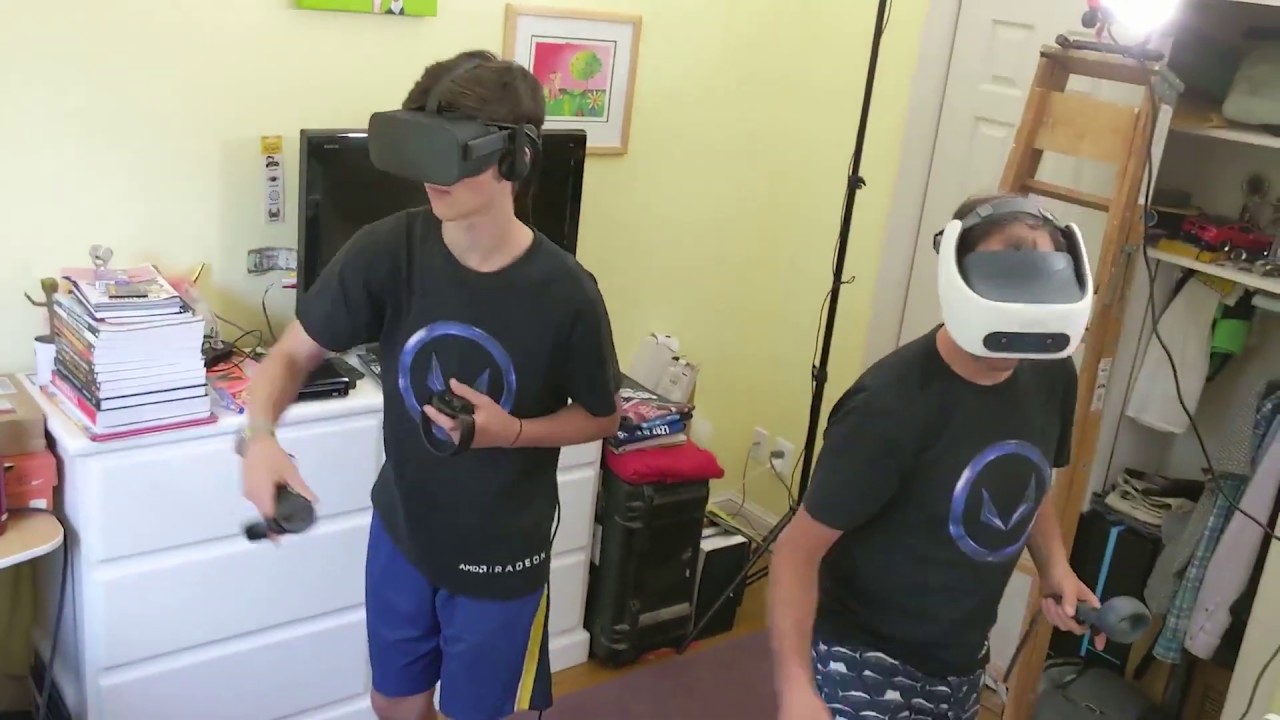
We configured a single PC to drive two separate VR headsets - an Oculus Rift and an HTC VIVE Focus Plus using Radeon ReLive for VR. Then we played Eleven Table Tennis VR in head-to-head mode. For more information about Radeon ReLive for VR, see this video: https://www.youtube.com/watch?v=f2kxMiThDxA
fair timber
@sonic lake Thanks cool to know that that's possible. What is be looking to do though is have VR mode deployed and still be able to work with and edit the project on the same PC.
I'd*
Deployed is the wrong word too. Activated.
 tawdry bough
I’m trying to make the default VR controller grab a ragdoll
I have tried adding a socket to the torso and putting a collision sphere in that socket, but when I ppgrab it, the controller grabs the collision sphere but it doesn’t take the ragdoll with it
Is there any way I can make the collision sphere and ragdoll stay together?
sonic lake
@tawdry boughthe ragdoll is simulating physics while the motion controller is moving kinematically (following the tracked device), so you need to use a physics handle or a physics constraint to attach your ragdoll to it.
@fair timber what will you be editing in VR? The scene?
lucid comet
swift forge
Thanks for advice. I made this set up. When HMD on/off or on head or not game is...
Everything before the last branch on the right should not be in the tick function and should only happen once when initializing (on begin play or something similar)
 nimble edge
Anyone worked with the Vive Focus 3?
nimble edge
warm idol
Hello Friends! I am unreal beginner and wanted to learn VR Oculus development, f...
You're calling an Axis, not a button input.
nimble edge
warm idol
Hello Friends! I am unreal beginner and wanted to learn VR Oculus development, f...
Meaning, that Axis Value is a value of 0-1 of how pressed the trigger is. It's firing constantly. If you want Press/Released, you need it set up as an Action
(you set this up in Project Settings > Inputs )
jovial hamlet
jovial hamlet
I guess we'll need to dig deep and do a proper study on how emissive materials a...
okay, so we've spent two days tinkering with built-in tonemapper shaders and managed to trim it down from like 200 instructions to 15 instructions
now we can do "filmic" tonemapping on oculus quest when all materials are unlit
so now quest look matches PCVR look pretty closely, whereas before it was... different to say the least

here we disabled stuff like bloom and fixed the exposure for a more fair comparison, but you get the idea
man quest development is hard
but a lot of fun
now to learn about vulkan subpasses
I guess it should be possible to do basic tonemapping this way for lit materials too
does anyone have any pointers on how to do custom vulkan subpasses in unreal? 😅
radiant garden
jovial hamlet
okay, so we've spent two days tinkering with built-in tonemapper shaders and man...
That is amazing!
Are you using all unlit materials?
I'm trying to figure out how to light things on the Quest. It's so hard. Everything is way blown out.
jovial hamlet
radiant garden
Are you using all unlit materials?
yep, and for now we just slap a material function with this tonemapper at the end of each material
there must be a better way to do it, but it works for now lol
radiant garden
jovial hamlet
yep, and for now we just slap a material function with this tonemapper at the en...
Is the tonemapper setting emissive color for the material?
untold crescent
radiant garden
I'm trying to figure out how to light things on the Quest. It's so hard. Everyth...
Yeah, I thought it might be related to your issue. Maybe you'll get a proper preview in editor if you disable tonemapping
jovial hamlet
radiant garden
Is the tonemapper setting emissive color for the material?
yeah, our setup looks like that, but I'm not sure if I'm ready to recommend it yet haha
 radiant garden
untold crescent
Yeah, I thought it might be related to your issue. Maybe you'll get a proper pre...
radiant garden
untold crescent
Yeah, I thought it might be related to your issue. Maybe you'll get a proper pre...
I just starting learning about UE4's lighting system last night. Is tonemapping related to the exposure settings? And are the exposure settings in the post process volume?
jovial hamlet
jovial hamlet
we are just learning too, so I don't think this is a good advice
jovial hamlet
radiant garden
I just starting learning about UE4's lighting system last night. Is tonemapping ...
as far as I understand it, tonemapping basically maps the color from the values that you get in your materials to the screen color space; it is usually a part of post processing
and exposure is a separate topic
the color management livestream is a good overview of this stuff
and the filmic tonemapper feature highlight stream was great too
untold crescent
radiant garden
I just starting learning about UE4's lighting system last night. Is tonemapping ...
Yeah, it's set in the postprocess volume under Film settings. There're cool interactive comparisons for different parameters:
https://docs.unrealengine.com/4.26/en-US/RenderingAndGraphics/PostProcessEffects/ColorGrading/

Tonemapping and color correction effects for adjusting scene colors.
radiant garden
Awesome! I will definitely check these out
This is PIE on the project I'm taking to VR. It's super washed out everywhere. I changed exposure on this way way low last night to get the color a little closer:

In my authoring tool, it looks black
 sturdy coral
@radiant garden probably a gamma problem, are you doing it all with vert colors?
radiant garden
sturdy coral
<@!443636088355946497> probably a gamma problem, are you doing it all with vert ...
Essentially yes. Only setting the Base Color.
I was able to replicate the same look on the building minus the window color with a single color node going directly to the BaseColor
I set the color value to the same code as in my non-UE editor (magica voxel in this case)
So I know the color values are coming across correctly, it's something I'm doing weird with lighting
The lighting is a basic static light source, static skylight, and post process volume
I'm certain this is coming down to my inexperience with UE4
sturdy coral
what does it look like in unlit view mode?
radiant garden
Unlit looks a lot closer actually

The bluish box on the left is notable because that is the standard cube in my graphics editor
sturdy coral
the only thing that should be able to change saturation like that is probably specular from skylight, if the base is pure green and red and not at all desaturated
radiant garden
Yeah the base of the building is super saturated
sturdy coral
is that pure 0,255,0 green?
radiant garden
The cube on the left has rgb values 153 204 255
Not pure green, just a sec and I'll get it
102,255,51
I'll switch the colors to more pure spectrum, red, green, and blue and test again
sturdy coral
before base color try putting the color into a power 2.2 node
radiant garden
That sounds familiar, is that the conversion to sRGB?
sturdy coral
yeah, close to it
radiant garden
Wow. Now it is dead on in unlit.
sturdy coral
yeah, so it is a gamma problem
radiant garden

Awesome, thanks for helping me with this
I have some formal training in GPU programming, but it's quite dated at this point
sturdy coral
np, I'm not sure where you should put the fix
radiant garden
I haven't learned much about sRGB, etc yet
In the gif I'm doing classic texture packing to get the data to niagara
sturdy coral
if using proc mesh you may need fcolor instead of flinearcolor
ask on #graphics and they can probably tell where in pipeline it is going bad
radiant garden
Yeah makes sense to ask there, I was going to do that after sorting some other things first
sturdy coral
2.2 isn't exact srgb correction because srgb has some linear portion near zero, but it is close
radiant garden
Ok. I will research this a bit then ask in #graphics . Thanks for the help! That would have taken me forever to figure out.
sturdy coral
np
upbeat eagle
radiant garden
Ok. I will research this a bit then ask in <#221799195806400512> . Thanks for th...
I had an issue something like this a while back and it was something to do with the camera auto exposure settings. Not sure if that’s what you are dealing with though.
 idle osprey
Does anyone know how to get the motion controllers to show up in a non-VRTemplate project? I tried following what Victor said in the OpenXR Template video stream from a few weeks ago, but they just won't show. I also tried adding a small sphere as a static mesh on one of them, and widget interactors. Nothing shows up.
 idle osprey
Nevermind! Got it...silly mistake.
 ashen vector
When I am loading a level a sand clock appears on screen for a moment, is there a way to disable this icon somehow?
I mean in the packaged project, it is running on PC and this happens when changing levels.. I just want a black screen, but a clock icon appears.
 chilly pasture
hey guys, anyone know any process of doing tcp dump on quest2
 trail cedar
idle osprey
Nevermind! Got it...silly mistake.
trail cedar
idle osprey
Nevermind! Got it...silly mistake.
what was the mistake if you don't mind? adding a static mesh seems to cause that issue of all the other pawn components not working for me atm.
idle osprey
trail cedar
what was the mistake if you don't mind? adding a static mesh seems to cause that...
Well...turns out it's only half a mistake, half a problem. My silly mistake was I wasn't using my GameMode, so my Character wasn't loading. I figured that out when I added some logging for the position of the controllers and got silence....
The other half, the more serious 'problem' is ...now, let me point out that I'm building for the Quest and Quest 2.... When I build my project from a Windows box, it's fine. If I build it from a Mac, the controllers will not show up. Same code, same project.
I haven't checked to see if there's a size difference in the APKs yet.
 formal ridge
Hey folks, so I’m packaging a project for shipping and I’m not sure this morning what I touched, but I’ve completely lost the ability to move my hands in VR they are stuck praying, does anyone have any quick insights on areas for sanity checks regarding this?
Launching the editor now to grab screenshots of my settings for the motion controllers
 lofty iris
could be a collision problem. also make sure you spawn your player with its feet at zero Z axis somewhere outside the actual level, delay and then teleport him to your start position. @formal ridge
formal ridge
It’s a bit more complex than traditional VR player characters, this is my player BP, it’s actually a third person character mesh which I’ve added a motion controller onto, previously I had it working before I had to fix a different bug, I touched something and it busted my ability to move the hands

These are the class defaults for each of the different areas of the motion controller / motion controller pawn


 formal ridge
lofty iris
could be a collision problem. also make sure you spawn your player with its feet...
formal ridge
lofty iris
could be a collision problem. also make sure you spawn your player with its feet...
I think it’s a setting I unticked as it was previously working
lofty iris
hm there was somthing with the player index causing issues, but the 4.27 update fix it. but you use the old one I guess.
formal ridge
Only using hands for widget interaction and yeah I’m on 4.26 it’s too far into the project to migrate sadly
lofty iris
sorry man, maybe someone else knows, but double check collisions and try spawning it outside or on an empty map.
formal ridge
I’m giving a few adjustments a shot
But yeah if anyone looks at the above images and is able to identify the settings issue please tag me!
lofty iris
Auto possess player is disabled on motioncontroller maybe that?
formal ridge
Yeah I’m testing that now but I can’t remember if I disabled it prior or not due to conflicting controller issues with the third person character
Sadly I have to package it for shipping each time to test so it will be about an hour before I’ll have that answer
 glad ocean
I've made an app using a plugin that accesses the local storage on a oculus quest 2 to play 360 videos. But for some reason it runs at around 33 fps. The entire scene only has 4 actors and I've tried optimising it by removing tick events wherever possible. But low fps is still an issue.
Does anyone happen to know whether accessing the local storage is a demanding task?

the gpu is on 29ms even when a video isn't playing? It's a black empty scene. Does anyone know what might be causing this?
formal ridge
Fixed my issue it was the possession
Broke my steam subsystem though without even touching it 😅 so onto the next bug in this rabbit hole 😁
wheat holly
glad ocean
the gpu is on 29ms even when a video isn't playing? It's a black empty scene. Do...
You'll need to look at what is actually causing your game to run at low FPS, we can't guess the problem 😛
I would suggest looking into the GPU profiler if you're sure that's what the problem is.
glad ocean
I'm using a plugin that accesses the local storage of the quest 2 headset to play 360 videos. Do you happen to know if that is a demanding task?
wheat holly
Reading files (videos) especially big ones can take time and is overall not the cheapest operation, I'm not sure what your plugin exactly does though. If it's a high resolution video it could also be the case that the quest can't render it fast enough regardless of reading the file it self, it's after all just a mobile device. So if you see your GPU giving a spike consistently look at it with a profiler, for all you know it's something else 🤷♀️
I see you for example have a Post Process Volume as well, may as well be that a setting in there takes a good amount of your performance away.
But again, we can't guess what the actual issue is without you looking at it.
glad ocean
https://www.unrealengine.com/marketplace/en-US/product/video-player-360-2d-180-360-stereo this is the plugin in question. The gpu being on 29ms is a constant issue. Right from when the app starts and no video is even being played.
The PPV is there because I read online it helps performance to place one and turn things like bloom etc off

Unreal Engine
Video Player 360 - video player for watching 2D, 180, 360, Stereo videos.
idle osprey
I've got a question for all the Lefties (like me) out there!
Do you prefer to use the Rightie's movement controls (left-hand steers, right hand turns) or would you rather have that swapped?
radiant garden
formal ridge
Fixed my issue it was the possession
Broke my steam subsystem though without ev...
It sounds like you aren't using source control. You'll want to remedy that ASAP. Among other things it is great for regression testing issues like this. You can revert to earlier known stable states for testing.
tired tree
@idle osprey option to use either, not that hard to setup input to allow for that
idle osprey
tired tree
<@!183445035696652288> option to use either, not that hard to setup input to all...
That's what I was thinking. I'll just have a bool for swapping hands for movement.
I'm so used to the Rightie way now, it doesn't matter...but still, I'd like to provide as many options as I can.
 rancid bolt
Sup peeps! Anyone know how to fix Nav mesh problems? My NavMesh doesn't seem to want to appear even though collisions are off and I placed a pefectly sized NavMesh Bounds Volume

SIKE I FIGURED IT OUT
NavMesh doesn't seem to like planes (wether with or without collisions). Use cubes instead -- This applies to indoor environments, idk if it's also the case with outdoor ones
 winter needle
Shizz all trailers about Ar glasses are kinda fake nothing robust for ar yet and unreal support for ar is almost non exist
formal ridge
radiant garden
It sounds like you aren't using source control. You'll want to remedy that ASAP....
Found the primary issue but not sure what solution there is here is the post I made in the sub system area
Steam Sub System
Steam Sub System works with Launch(Default), but when choosing one of the VR Launch options, I have 4 different launch options set, none of the VR Options have the Steam Sub System Enabled.
Again, the Steam Sub System Does Work with Launch(Default) Desktop Mode, Playername gets configured, and players can Host / Join. However, when say Launch Oculus SDK VR App or Launch SteamVR App are used, the title will not register that it has a working Steam Sub System.
Here are supporting articles of developers having the same issue
https://steamcommunity.com/app/358720/discussions/0/1353742967809614133/
https://answers.unrealengine.com/questions/675889/steam-initialization-problems-in-vr.html
I've tried disabling SteamVR Home, however, this no longer works as a viable option.
I've spent the last 72 hours attempting to figure this out(created 9 different builds to attempt to find the fix), searching all of google, forums, discords, and beyond to no avail.
The only two articles relevant are the ones above, but I've gone through thousands of topics related to Steam, Steam Sub Systems, Steam Documentation, UE4 Documentation, also someone recently vandalized the Wiki page for all of the VR Documentations, which has hindered all VR Developers recently in the last month. There is even a post about this within the Steam Dev Community.
This is on UE4 4.26 Shipping Build for the title as additional information!

Hey everyone, I noticed a few other people having some issues with SteamVR Home and I had to dig into it so I thought I'd post what my current theory because I got it to work properly in most cases now. I'm using UE4 but the same solution should apply for any engine. Small disclaimer that this is theory crafting based on my findings but I'm not ...
tired tree
@formal ridge have you tried in packaged?
its normal for the engine to not load the steam subsystem outside of stand alone
also that steamvr home issue is from 2017, I remember when it happened
shouldn't be the case anymore
if your packaged version isn't loading the steam subsystem then its just a misconfiguration on your end
formal ridge
Aye, I have it packaged for shipping
I’ve packaged 9 different variations
It works packaged if ran as launch default(opens as a pc game)
But when launching with SteamVR App launch option or even Oculus VR launch option with shipping build it doesn’t register the subsystem exists
And to clarify
The same build used works in desktop play, sub system shows properly, just when VR launch is used, it doesn’t work
So I know my configuration works in terms of functionality just not with VR 😤
When packaging a VR project for SteamVR you should be using windows yes?
formal ridge
tired tree
<@!667516809536208908> have you tried in packaged?
~
tired tree
yes, but I will note that I have dozens of users running steamvr and steam concurrently on 4.26 just fine
what does your log say? just attempting to init and then shutting down the subsystem?
formal ridge
When I package the logs read off like normal I have zero errors, the sub system initiates and is working, I’ll have to figure out how to pull the logs from the latest packaging
tired tree
i'll take this to PM, its likely vr unrelated in the end
formal ridge
Copy!
swift forge
lucid comet
Everything before the last branch on the right should not be in the tick functio...
Thanks. Seems it work except media. My experience plays video after user choose one. But simple Player's Pause doesn't work.
 lucid comet
swift forge
Thanks. Seems it work except media. My experience plays video after user choose ...
lucid comet
swift forge
Thanks. Seems it work except media. My experience plays video after user choose ...
Yeah. I had to set the play rate to 0 on my media player to pause it
swift forge
lucid comet
Yeah. I had to set the play rate to 0 on my media player to pause it
Ha. That's an idea. I'll try it. Thanks a lot!
idle osprey
I've got a C++ problem I can't figure out. When I set up my VRCharacter in blueprint, I set my VR Root to -88 and the Camera is then a child of it. This works fine if I do this in Blueprint. But when I set this up in C++, my floor is always way below my real floor. ```c++
AVRCharacter::AVRCharacter()
{
// Set this character to call Tick() every frame. You can turn this off to improve performance if you don't need it.
PrimaryActorTick.bCanEverTick = true;
VRRoot = CreateDefaultSubobject<USceneComponent>(TEXT("VRRoot"));
VRRoot->SetupAttachment(GetRootComponent());
Camera = CreateDefaultSubobject<UCameraComponent>(TEXT("Camera"));
Camera->SetupAttachment(VRRoot);
VRRoot->SetRelativeLocation(FVector(0.f, 0.f, -88.f));
}
void AVRCharacter::BeginPlay()
{
Super::BeginPlay();
if (UHeadMountedDisplayFunctionLibrary::IsHeadMountedDisplayEnabled())
UHeadMountedDisplayFunctionLibrary::SetTrackingOrigin(EHMDTrackingOrigin::Floor);
} ```
wheat holly
Have you checked if
if (UHeadMountedDisplayFunctionLibrary::IsHeadMountedDisplayEnabled())
        UHeadMountedDisplayFunctionLibrary::SetTrackingOrigin(EHMDTrackingOrigin::Floor);
```actually runs? The docs mention "using" which makes me think if your headset is not actually actively used it won't work.
> Returns whether or not we are currently using the head mounted display.Returns whether or not we are currently using the head mounted display.
ashen vector
I am working on a Rift application but it doesn´t look as good as the editor, I know the resolution is a factor here, but is there a way that I can force some quality enhancements to the HMD and make it look better?
 modest kestrel
ashen vector
I am working on a Rift application but it doesn´t look as good as the editor, I ...
modest kestrel
ashen vector
I am working on a Rift application but it doesn´t look as good as the editor, I ...
When you say editor, you mean VR preview in the editor vs a packaged build? Also, a few screenshots/examples could help people understand better what the problem could be
ashen vector
I am sorry I can't share anything because of NDAs 😦 but no, I mean the edito window on the PC screen, I know is not the same as the optics in the HMD but I feel I am missing some configurations that can make it look less bad.
modest kestrel
Mm without seeing it it would be difficult to tell, this is a blind shot, but something that in my experience is a lot more noticeable in the headset vs the flat screen and could make the same picture look worse in VR is the antialiasing, try increasing it to see if you see a difference
ashen vector
how can I do that?
one of the things I tried was increase the pixel density, but it didn't help that much and performance was not good. so I revert that back.
the most noticeable things are as you say, edges not smooth enough so I guess antialiasing will help, just not sure how to configure that..
Also contrast is not as good, and most things are smudgy or not crisp enough.
modest kestrel
there's a command that you can introduce to change that in game, I'm looking for it
r.MSAACount
assuming you are using msaa of course
 modest kestrel
Mmm OK, so that could be the issue, run the game and use r.MSAACount 4 in the command line
you should see a difference
TAA is basically VR Myopia experience 😅
ashen vector
I guess I should change the anti-aliasing method first?
modest kestrel
I think the command should do it in runtime, that's only the default method
ashen vector
ok
modest kestrel
but yeah, you can change it there
ashen vector
let me try it
mm yes I think it is slightly better. thanks. anything else you can think of?
can I go higher than 4?
modest kestrel
I think so, but antialiasing is performance costly, so you will see a big drop in GPU times
btw, you can switch back to TAA in runtime with the headset on to compare by using r.MSAACount 0
and r.MSAACount 1 turns off antialiasing altogether
modest kestrel
ashen vector
mm yes I think it is slightly better. thanks. anything else you can think of?
As I mentioned, without seeing it it's hard to know 😅 , but I would recommend you to check the Unreal documentation for the recommended settings for VR, if TAA was on, it's possible another undesired setting is also on that could be hindering the experience
like idk, forward rendering (which should also be turned on)
ashen vector
mmm it is not turned on, but I am afraid it will break the look that I already have :/
modest kestrel
hehe yeah, it could change the way some things look compared to referred, but it's the recommended method for VR, so you should see a lot of improvements in other areas, so the change in my opinion should be definitely worth it
ashen vector
I think I was wrong, when turning msaa it looks like no antialising.
will make a backup and try to change to forward rendering tomorrow.
modest kestrel
👍
modest kestrel
It's recommended for any Unreal VR experience (not mandatory tough) https://docs.unrealengine.com/4.27/en-US/TestingAndOptimization/PerformanceAndProfiling/ForwardRenderer/

Describes the advantages of using the Forward Shading Renderer.
idle osprey
wheat holly
Have you checked if
```cpp
if (UHeadMountedDisplayFunctionLibrary::IsHeadMounte...
Yes, it's executing the code.
idle osprey
Solved...another silly mistake.
 trail shale
After trying to get level streaming to work without experiencing big hitches (I have plenty of time so I could make it load 'slower' but smoother so there wasn't a hitch on the current level when another is streaming in) - I'm giving up and **switching to just using a blocking load for VR/ - so I need to use a VR splash screen instead - **
I'm assuming the docs are a good enough reference to accomplish this right (using Steam VR) - I mention the level loading in case someone magically knows a way but every time I bring it up someone tells me it's an engine limitation or something
 arctic saddle
does "AnyKey" on the input work for VR controls like the headset being idle?
radiant garden
trail shale
After trying to get level streaming to work without experiencing big hitches (I ...
I thought the point of level streaming was that it was suppose to prevent hitches. Is there something special about VR causing issues with this, or are there inherent flaws with level streaming?
 jade kettle
Is there a way to launch in VR mode if you connected your headset after startign up UE4 Editor?
Without restarting the editor
Asking for a colleague (not me) who accidentally borrowed his colleague's headset without plugging it back in (once again I didn't do it)
trail shale
radiant garden
I thought the point of level streaming was that it was suppose to prevent hitche...
I don't think it's related to VR - when I don't have the headset switched on, I have a boolean that disables the loading of any VR aspect of the project, the hitches still occur there - what I'm doing the VR loading is it swaps you completely out of the game, back to the Steam VR environment, so you still are moving around smoothly
best work around I can think of, but I'd be very grateful to anyone who can help me with hitches
 real needle
is there any documentation/talks about ProjectEverywhere (Unreal geospatial AR sample)
 daring pasture
trail shale
best work around I can think of, but I'd be very grateful to anyone who can help...
daring pasture
trail shale
best work around I can think of, but I'd be very grateful to anyone who can help...
Are you packaging out and testing? From my experience the hitches don't occur in packaged builds
trail shale
daring pasture
Are you packaging out and testing? From my experience the hitches don't occur in...
mine do but I think my settings are wrong, particularly the loading async not being ticked
trail shale
Also, does Steam VR block dialogue boxes sent from Unreal?
 vast thunder
Anyone here have a valve index or htc vive that could litterly just test if they can walk using joystick in my game
I will send google drive link with packaged game file. I just need to know if you can move
IF you dont and you know anything can someone explain why this input bindings will not work?


@hallow knoll I know you are usually active in here hopefully you can help
My game SafeZoneVR was trending on steam and has nearly 20k downloads in one month so it would be great if I can finally add support for index and htc
untold crescent
vast thunder
Anyone here have a valve index or htc vive that could litterly just test if the...
dm, I have a vive pro
Edit: going to get some sleep, but can help after that
idle osprey
vast thunder
My game SafeZoneVR was trending on steam and has nearly 20k downloads in one mon...
Nice trailer video. Did you do the whole thing in blueprint?
My latest problem is I can't seem to add motion controllers to my Character. When I start the app on the Quest, it just exits. I'm not seeing anything obvious like a null pointer in the logs. ```c++
AVRCharacter::AVRCharacter()
{
// Set this character to call Tick() every frame. You can turn this off to improve performance if you don't need it.
PrimaryActorTick.bCanEverTick = true;
// Create the objects we'll need
VROrigin = CreateDefaultSubobject<USceneComponent>(TEXT("VROrigin"));
Camera = CreateDefaultSubobject<UCameraComponent>(TEXT("Camera"));

LeftMotionController = CreateDefaultSubobject<UMotionControllerComponent>(TEXT("Left Controller"));
LeftMotionController->SetShowDeviceModel(true);
LeftMotionController->SetTrackingSource(EControllerHand::Left);

RightMotionController = CreateDefaultSubobject<UMotionControllerComponent>(TEXT("Right Controller"));
RightMotionController->SetShowDeviceModel(true);
RightMotionController->SetTrackingSource(EControllerHand::Right);

UWidgetInteractionComponent* LeftWidgetInteractionComponent = CreateDefaultSubobject<UWidgetInteractionComponent>(TEXT("Left Widget Interaction"));
UWidgetInteractionComponent* RightWidgetInteractionComponent = CreateDefaultSubobject<UWidgetInteractionComponent>(TEXT("Right Widget Interaction"));

// Attach all the objects to their locations for a VR Character
VROrigin->SetupAttachment(GetRootComponent());
Camera->SetupAttachment(VROrigin);
LeftMotionController->SetupAttachment(VROrigin);
RightMotionController->SetupAttachment(VROrigin);
LeftWidgetInteractionComponent->SetupAttachment(LeftMotionController);
RightWidgetInteractionComponent->SetupAttachment(RightMotionController);
}```
Is there a subsystem I need to add like I do for the HMD and UMG?
 surreal marsh
Hi guys, got a quick question, we are building pvp vr games. wondering what's the best voice chat tool for unreal engine?
real needle
trying to deploy on hololens 2 from Unreal 4.27. getting this:
AutomationException: Device connection failed: Requesting operating system information
using both ip of usb connection or wifi, same error.
hololens device is visible in device manager
idle osprey
Solved this one, too. I saw my BP_VRCharacter was referencing VROrigin(VRRoot). I'd renamed VR Root to VR Origin. But apparently cleaning and rebuilding the project from source wasn't enough -- something was stuck in the BP. So I deleted the BP and re-created it and my app is working now.
 hallow knoll
@vast thunder you need "_X" and "_Y" at the end of the axis input mappings
 spare yew
Still getting LogGoogleARCoreAPI: Error: ArSession_create returns with error: -2 with my Android 11 Device after the 4.27.1 Hotfix 😦
Anyone had any luck with ARcore on Android 11 with the hotfix? It listed UE-123593 Update ARCore SDK to 1.22.0 and I assumed this would have fixed it.
spare yew
I'm glad we don't get many AR projects in anymore or else I'd be on the chopping block for convincing the company that we didn't need to rely on Unity for AR projects 😫 This lack of support for ARCore is starting to stress me out
vast thunder
idle osprey
Nice trailer video. Did you do the whole thing in blueprint?
Yes I did, thanks for the compliment, I do trailer work for freelancing to so lmk if u need a trailer (:
vast thunder
hallow knoll
<@!719640962535653387> you need "_X" and "_Y" at the end of the axis input mappi...
What do you mean by that?
 wind yacht
@spare yew Yeah I have no idea what's up >_< these black screens have been a nightmare for me
sturdy coral
vast thunder
What do you mean by that?
Your axis name can't be like "MoveForward" "MoveRight", it has to be "Move_Y" and "Move_X"
it is due to steamvr's 2d axes not mapping exactly to ue4, which does everything 1d mostly
it looks for _X and _Y on the end of the name so that it knows to map both to one single 2d axis in steamvr
vast thunder
Wow thanks much Charles
I looked everywhere on google and couldn’t find that along with vc
Surprised that’s not in ue4 documentation as far as I could tell
 twin elm
does anyone else encounter the problem of the AR App developed with the unreal engine not opening in the Samsung Galaxy S series phone?
spare yew
twin elm
does anyone else encounter the problem of the AR App developed with the unreal e...
Yup.
wind yacht
The example project for 4.26 had a lot of problems for me when I ran it on Android so I'm kinda bummed to hear it may still have problems with the new template in 4.27.1
hallow knoll
@twin elm @spare yew is that still the problem in 4.27.1? We updated the ARCore version just read your message further up
We were unable to launch on Android 11 prior, but after the update we didn't come across any issues
wind yacht
What is your version target set to? I'm wondering if that is my problem currently
vast thunder
Anyone got an index willing to download my game rlly quick and see if they can walk, I got the file on google drive ill share with you
or htc
should take about 2 min
hallow knoll
@wind yacht XRQA is targeting 24, and they also mentioned that the camera issue can be solved by enabling "Support Arm64" in project settings
We have the issue logged and are looking into it but hoping that can unblock you in the meantime
wind yacht
hallow knoll
We have the issue logged and are looking into it but hoping that can unblock you...
Thanks, I'll take a stab at it later today. I do have "Support Arm64" enabled but my target was set to 30. I'll try 24 and see if that fixes things overall.
rancid bolt
Anyone know how to fix this ?

I'm pointing at a specific spot (right blue line) and it seems to teleport me to another location (left blue thingy)
 tribal lintel
rancid bolt
Anyone know how to fix this ?
tribal lintel
rancid bolt
Anyone know how to fix this ?
check your nav mesh, press P in editor viewport to make sure green is covering that area, then check collision view to make sure something isn't blocking in front of you
rancid bolt
tribal lintel
check your nav mesh, press P in editor viewport to make sure green is covering t...
Nav mesh seems perectly fine and collisions are off

Btw thanks for trying tho (honest thanks, no sarcasm)
Plus the problem occurs all throughout the map
Like this :
tribal lintel
hey no problem 🙂 I wish that was the issue! is it happening everywhere in the map? can you teleport anywhere at all?
the next thing I would try is to go into your pawn, find where the trace is happening for the teleport (IIRC search for project arc to nav or something) and put a print string off the trace and try and print what your hitting with that trace
 sturdy mirage
Is anyone in here able to get hand tracking for Quest working in the editor? I'm building from various different sources (including taking projects that should work) but am unable to see my hands in the editor, regardless of my configurations
Only way I have been able to see my hands yet was in a packaged build, and they didn't even have a texture
rancid bolt
tribal lintel
hey no problem 🙂 I wish that was the issue! is it happening everywhere in the m...
I can teleport but rarely to the right location. As for the trace and other stuff, I'm new to VR so I'm not too familiar with it, but I will look it up. Thanks for the headstart
rancid bolt
tribal lintel
hey no problem 🙂 I wish that was the issue! is it happening everywhere in the m...
Btw what does IIRC stand for? (Or what do you mean by it?)
rancid bolt
sturdy mirage
Is anyone in here able to get hand tracking for Quest working in the editor? I'm...
Have you tried copying from VR template and importing (or pasting) to your scene?
spare yew
rancid bolt
Btw what does IIRC stand for? (Or what do you mean by it?)
IIRC = If I Recall/Remember Correctly
rancid bolt
Thank you
sturdy mirage
rancid bolt
Have you tried copying from VR template and importing (or pasting) to your scene...
VR template does not have hand tracking enabled
VR Template only supports controllers.
sturdy mirage
The weird thing is I know something is picking up my hands since I can see the Home/Quest symbols when I turn my hands toward me but I have 0 model, not even the default hands
rancid bolt

A quick start guide to get you started using hand tracking in unreal engine 4.26.
☕☕☕ If you enjoy our content and want to support us you can do so with buymeacoff.ee/just2devs
Head to our website where you can download the VR Content Example or tutorial projects:
https://www.just2devs.com
Join the discord server where we can talk about VR de...
Have you tried this tutorial?
sturdy mirage
Yes, that's one of the tutorials I tried but something seems to be missing
I have found a project where I see the hands, now to find out what is missing/different
wind yacht
hallow knoll
<@!367476351827181569> XRQA is targeting 24, and they also mentioned that the ca...
Gave it a go with still seeing a blank camera view. Works fine in 4.23 though with no changes
rancid bolt
OK so for anyone with NavMesh problems, here's some steps that've helped me troubelshoot : 0) Before starting, duplicate your scene and rename the new scene "TEST" 1) Are your collisions on or off? Turn floor collisions on and wall collisions on and replace wall collisions with nav modifiers. 2) Do you have a skybox or hdri? Try deleting it 3) Are your floors planes? If so, try replacing them by cubes. 4) Do you have a Recast NavMesh in your scene? If not, drop a Nav Mesh Bounds and it'll automatically make one (which'll in turn, recalculate your NavMesh) 5) Do you have groups of objects? If so delete them and check if they were the prob.
rancid bolt
Anyone know how to use this? (And where or how to plug it in the VRPawn graph)
 spare yew
hallow knoll
<@!367476351827181569> XRQA is targeting 24, and they also mentioned that the ca...
spare yew
hallow knoll
<@!367476351827181569> XRQA is targeting 24, and they also mentioned that the ca...
Can confirm enabling "Support Arm64" has finally fixed the issue for me! Handheld AR Template now launches on my Samsung Galaxy S10+
wind yacht
@spare yew can you share a screenshot of your settings for Android? I have a Galaxy S10 and am having issues even with Support Arm64 enabled
spare yew
They're just default, only thing I changed was Support Arm64
wind yacht
WHat is your target and minimum sdk set to?
spare yew
24
wind yacht
for both target and minimum?
spare yew
Yup
wind yacht
hmm ok I'll see what's up. I think I did that but still was getting issues
spare yew
Are you having trouble building or are you getting the "AR Session Create failed -2" error?
wind yacht
I am building fine, but when I run my AR session the camera shows just black
it worked fine in 4.23
spare yew
Have you tried tweaking privacy settings on your phone? Just a thought.
wind yacht
I can see but I'm unsure why it worked before and now dowsnt work
spare yew
Yeah that's not an issue I've had before (among the many)
vast thunder
Ok so i have a really complicated question but to anyone who helps with an answer Ill tag you when I update my game next (currently has 20k downloads in first month)
Question, so basically I need to regenerate action manifest and controller bindings, I can do this in project settings but the problem is when I click the button to do so nothing happends, no output log text either

those the buttons I press and nothing appears in output log
Engine verion 4.27.1
I have tried disabling and reenabling plugin didnt work
same problem with another 4.27 project also, I need a fix asap so I can release index and htc support for my game (:
 eager pine
Hey!
Does anyone have experience with having livelink data shared across network? For others to use the same tracking data
Got it working
hallow knoll
spare yew
Can confirm enabling "Support Arm64" has finally fixed the issue for me! Handhel...
Thanks for following up with an update!
@vast thunder you can just add Index and Vive Keybindings in project settings in 4.27
hallow knoll
rancid bolt
Anyone know how to use this? (And where or how to plug it in the VRPawn graph)
You can execute Set World to Meters anywhere and it'll work. VRPawn Begin Play works just fine.
rancid bolt
Anyone know how to package an Unreal scene for VR (Oculus Rift specifically)? My current Windows build won't play in VR
 abstract forum

Wow, it’s a busy month in the XR space!
If only we had something to announce as well... 👀 https://t.co/HA23tcxYek
 Twitter
·
Twitter
·
Ultra leap is going to announce something. They make the leap motion controller and they open sourced the North Star AR headset
sonic lake
@rancid boltyou should be seeing the Oculus Rift in Unreal and be able to Play in VR. Did you install the Oculus software?
rancid bolt
Hey! Forgot to take the post out. Turns out the problem was the Start in VR checkbox. Thanks for answering tho
sonic lake
@rancid boltyes, that is a common pitfall. Glad you solved it.
 red grove
Hi, I have GetTrackingOrigin() set to eye level and I correctly ResetOrientationAndPosition with EOrientPositionSelector::Type::Position on a click on a button, when I call OpenLevel, this settings resets to default or something else. Does anyone know 1) if setting changes in Headmounteddisplaylfunctionlibrary stay persistent across levels? 2) Is there some override for engine class so I can save this calibration? 3) Are there other better libraries for me to use. Thank you
vast thunder
hallow knoll
<@!719640962535653387> you can just add Index and Vive Keybindings in project se...
I do not have a steam vr manifest file in my project config folder or when I package though
I need like a new one
If you could victor or anyone else just call me on discord that would help alot just a few min
Im in urgent need of help asap
sonic lake
@red grove what is preventing you from calling those functions (I guess you meant SetTrackingOrigin()) on Begin Play for each level you load?
red grove
@sonic lake I have two options, floor or eye level, I dont how that will help me
@sonic lake When i call resetpositionandorientation I get exactly what I want, hdm is reset and I know the cameras location is at 0,0,0 and its also in Mainroot (scene comopnent above it)
@sonic lake I thought that floor trackingorigin means that its calculated from floor, probably from oculus, but I might just know what its for 😄
sonic lake
@red grove what I meant is that you can automatically call the settings you need and the reset from your Begin Play of each level you load, there is no need to have the player do it with a button
Floor tracking origin is for most VR experiences where the player is standing / moving in the playarea and for which knowing where the floor is is key to the experience (and for safety reasons).
red grove
@sonic lake ok, but I need the player in position where he stands, if for example he loads another level, in that time he bends or sits, when the begin play function is called i will set wrong height
sonic lake
Eye level tracking is usually for seated experiences and for intermediate loading levels where it doesn't matter where the floor is
red grove
In the game im making it doesnt matter where the floor is, I just need the player to stand and confirm. Then the player is playing with expected experience
sonic lake
@red grove you usually manage that in an intermediate loading level. And you still give the option to the player to reset their position.
red grove
@sonic lake ok, now I have to find some docs on intermediate loading level, because that I havent done yet. Thanks a lot!
sonic lake
Basically it is a mini-level which you use to tell the player how to position themselves before you proceed to load the real level.
You can even detect the movements of the HMD and of the motion controller and proceed only if the player stands relatively still.
We do this in our VR platform to do an automatic "calibration" for a seated experience.
red grove
@sonic lake nice, using velocity of hmd and controllers its actually a pretty good idea. Id probably use moving average of those velocities to check it
sonic lake
exactly
red grove
but I just need them to stand
vast thunder
Anyone got any idea on my question ):
red grove
@sonic lake so just final question, if i use intermediate loading level, im able to share level metadata or properties?
sonic lake
red grove
<@!399916238098137098> so just final question, if i use intermediate loading le...
you mean among levels?
red grove
yes
sonic lake
You can store what you need in your GameInstance
red grove
@sonic lake thanks alot 🙂
sturdy coral
vast thunder
Anyone got any idea on my question ):
no manifest you need to click
 vast thunder
@sturdy coral nothing happeneds when I click that
that was my original problem
I checked output log and nothing writes when I click and of those 4 buttons
sturdy coral
vast thunder
I checked output log and nothing writes when I click and of those 4 buttons
check log for Error trying to generate action manifest
on thing you can really do is search around and find someone else with a common reason it might fail, or put a breakpoint on:
#if WITH_EDITOR
void FSteamVRInputDevice::RegenerateActionManifest()
{
    this->GenerateActionManifest(true, false, true, true);
}
and step through the code until you find where it fails
maybe make sure you have steamvr running and turn off all other HMD plugins temporarily
sturdy coral
vast thunder
I checked output log and nothing writes when I click and of those 4 buttons
also, try with a very simple project first like the built in vr template, try something like deleting the manifest if it comes with it already there and make sure you can regenerate it. If you still have problems there you know it isn't something specific to your project.
vast thunder
Ill do that rn
just tested on other 4.27 and same problem
The buttons dont post anything to output log
someone I talked to yesterday said same thing for their 4.26 project
I need to release the full vr support update asap and this is making me very not happy ):
sturdy coral
{
#if WITH_EDITOR
    FSteamVRInputDevice* SteamVRInputDevice = GetSteamVRInputDevice();
    if (SteamVRInputDevice != nullptr)
    {
        SteamVRInputDevice->RegenerateActionManifest();
    }
#endif
}```C++?
sturdy coral
if (SteamVRInputDevice != nullptr) that means if input device not created because of another plugin, it won't run
I'm pretty sure
sturdy coral
turn off the oculus plugin or launch with -hmd=SteamVR (latter might not work there have been various bugs over time with forcing hmd plugin)
vast thunder
Ok turned of oculusvr plugin
Im assuming that means game must be played now with steamvr open
no matter what platform
OMG IT WORKED
sturdy coral
you can turn oculus back on after
vast thunder
@sturdy coral you are a legend, where did u find the info for that I did like 100+ google searches
Bet!
Im posting a forums post rn for others, I couldnt find an answer anywhere and this has to have happend to others before
sturdy coral
@hallow knoll the engine should make it pop up an error dialog for that case, might have been supressed when that other annoying regenerate warning was supressed or something
vast thunder
Yeah me and my other friend got no output log entry
sturdy coral
I think it used to be if the oculus plugin was taking over then the steamvr input toolbar button wouldn't show up and that used to trip people up. Not sure about after it moved to Project Settings
vast thunder
I think this is something that needs to be passed on to steamvr plugin devs or ue4 devs
sturdy coral
this whole panel should prob be replaced with a warning if oculus or other hmd plugin is interfering:
https://media.discordapp.net/attachments/221799478364078081/898371471590686791/unknown.png

they closed all pull requests on steamvr now though so I think it may just not get fixed since everything is moving to openxr by default
vast thunder
Thank god for openxr
I got to do some reading on that
Does everything work rn with openxr? Like why couldnt I just do that rather then deal with steamvr api or is it not working yet for all headsets?
tired tree
openXR currently has some oculus platform issues
and anyone running through steamvr with oculus over openXR will just straight up not having a working application
its not translating correctly atm
 kind palm
Does changing the open XR environment not fix that problem?
 topaz plank
Oh ffs, they still didn't manage to fix the stereo layer issues for Oculus Quest in 4.27.1? Depth now works with Oculus VR plugin, but alpha is unsupported (black opaque background instead of translucent). And with OpenXR it doesn't work at all...
 neon geyser
Hello everyone, there's been a big issue for a while now with UE 4.27, you can't use the VR preview as a client (no hmd orientation applied) which makes debugging really hard for an online game.
Could you give a little upvote to that issue?
https://issues.unrealengine.com/issue/UE-122229
 raven dome
Hi so I’m wanting to buy these character models on unreal engine but it doesn’t show if I put steam vr support on but I thought that wouldn’t matter since you have to code it to your wanted movements if it was in vr can anyone please help me out don’t really wanna risk buying if it doesn’t work for vr
 spare yew
hallow knoll
Thanks for following up with an update!
spare yew
hallow knoll
Thanks for following up with an update!
Didn't realise until digging through the BPs that there was supposed to be a visualisation of the scanning plane. The material doesn't seem to work on Android - from my testing, it appears the "Get AR Texture" node doesn't work on Android but is also not returning an error meaning the fallback material is never chosen.
spare yew
Correction: texture sample type needs set to external. "Camera Image" works but the others do not.

 spare yew
I'm going to assume I'm just doing something wrong. Would be nice to have some more concrete examples of how to use the various cross-platform AR features
daring pasture
@raven dome it's not really optimized, it uses like 20 separate materials on each character, so if you plan on using several in a scene it may cause some performance hits
raven dome
daring pasture
<@565160411062599690> it's not really optimized, it uses like 20 separate materi...
Ah that makes sense how else do you think I could get a character like that?
daring pasture
Outside of paying someone I'm not sure, there's not a whole lot of options out there for ww2 characters
sonic lake
@raven dome I don't own that asset, so please take this with a pinch of salt. Unreal has a powerful skeletal mesh optimization system through automatic LOD's, caching, baking of materials, etc. With some work you may be able to make those characters work in VR as well. One way to test whether it would work or not is to try out, for example, with one of the many Paragon characters which are available for free from the Marketplace. They are very detailed and run some complex Blueprints/Animgraphs as well, so if you can make one of them work reliably, chances are you can make also those above work. It also depends on your project, which VR technology you are targeting (PC/mobile), what else goes on in your level, etc.
sturdy coral
raven dome
Ah that makes sense how else do you think I could get a character like that?
I think there is a texture baking tool somewhere in engine that can usually combine everything down to one material
 pulsar roost
Hello everyone! Hope you are having a nice day.
I was wondering If we can walk in VR Mode 🤔 I am using virtual scouting interactors
idle osprey
pulsar roost
Hello everyone! Hope you are having a nice day.
I was wondering If we can walk i...
I'm not quite sure I understand your question, but I think you're referring to room-scale VR? Where you can walk around in your play space and the headset properly updates your position. @dreamy ivy did a great blueprint tutorial of my VR movement system on his GDXR YouTube site for both UE4 and UE5. Physical walking and crouching (thanks to Marco!) work great.
pulsar roost
idle osprey
I'm not quite sure I understand your question, but I think you're referring to r...
Oh I will take a look into it! I am pretty sure is that. I would like to walk in the space instead of always flying.
Thanks a lot!!!
neon geyser
neon geyser
Hello everyone, there's been a big issue for a while now with UE 4.27, you can't...
Thanks to everyone who voted, it has been such a pain in the ass to debug clients those last weeks
sonic lake
@pulsar roostthere are various ways to move in VR.
Teleportation (which is what you may refer to as "flying") is widely used because it is quick, rather intuitive and it is known to limit the possibility to get motion sickness. The destination position is chosen by the player by positioning a target on the floor using the thumbstick. Usually the movement which is about to be performed is visually represented by an arc connecting the player to the target location.
** Locomotion ** is more similar to walking within the VR space. It is slower for the player and in some individuals it may induce motion sickness (especially if there a fast continuous rotations or accelerations). Usually you control the movement/direction with the thumbsticks on the motion controllers or by following the direction of sight, but there are other ways (for example by moving your arms back and forth). There are a couple of tutorials on my YouTube channel on how to switch from teleportation to locomotion (thumbstick controlled) for the old VR template. Didn't update to the new one yet.
** Snap turning or Snap rotation** this is a technique related only to rotations and it meant to avoid motion sickness for the player. Basically instead of turning in a continuous way, you turn by fixed angles (90 degrees = 1/4 turn or 45 degrees = 1/8) each time. It is the equivalent to teleportation but for rotational movements. I made a tutorial on this technique as well.
idle osprey
sonic lake
<@!497623528204664844>there are various ways to move in VR.
**Teleportation** (w...
She's looking for a way to walk around while editing in VR.
sonic lake
@idle ospreyah, got it. That would be the "old" VR Editor then. Or a custom experience specifically built for that, as it is typical in ArchViz.
idle osprey
Yes...not really something that I'm that familiar with as I do most of my Unreal work from a Mac.
sonic lake
@idle ospreyyep, you are not giving up on that! 😉
Kudos to you on your perseverance despite the problems/limitations.
idle osprey
Nope, works fine...except controllers don't show up in a Mac build on the Quest...quite odd, but that's the only thing I know of that doesn't work.
sonic lake
Meaning the controller meshes don't show up?
idle osprey
Yes.
Same project built on a Windows machine, running on a Quest, the controllers are present. Build the APK from a Mac and they're not.
sonic lake
Weird. They should come from the plugin anyway. I am sure there is a reason. Any hint within the build/packaging log?
idle osprey
Nope. Nothing.
sonic lake
Is that using the new VR template?
idle osprey
And the models are present, I can see them in the editor. If I manually assign them as the mesh, they show up. But not letting OpenXR determine the headset and assign the right controller.
Yes, or doing it myself in C++
sonic lake
Ah ok. So they are in, but for some reasons they are not retrieved or associated by the OpenXR plugin.
idle osprey
My guess is there's an #ifdef in the OpenXR plugin.
Something about supported platforms.
sonic lake
Could be. Engine version?
idle osprey
4.27.1
sonic lake
ok let me check the source code
idle osprey
Well...4.27.0. I haven't tried in .1
I pinged Victor about it and submitted a bug.
But anyway, as I said, that's the only oddness I've found doing Quest dev from a Mac.
Since I'm going to be using UBIK in the end, it probably won't matter to me.
idle osprey
Yes, I want to do full-body...animating the lower-body. Not sure how to do that yet, but I'll get there.
since I won't have foot trackers, animation is my plan.
It's what I did with Final IK in Unity.
sonic lake
The lower body is tricky without foot trackers. The kinematic chain is rather long and you would need a biomechanical model like we have in UBIK for the upper body.
Ideally you could use Deep Learning to devise the leg position from the overall movement and from the other sensors.
idle osprey
Seems a bit much for a Quest.
sonic lake
Once the NN is trained it is surprisingly fast. This is how hand tracking it is done inside the Quest.
Of course animation and a bit of heuristic are much simpler.
idle osprey
Yes. It's a challenge for another day, tho. I am learning about dynamic maze generation now and rewriting all my blueprint stuff in C++
sonic lake
Really cool! So you are going to have an infinite number of maze configurations to explore in VR?
idle osprey
The game is simple. You're a rat (figuratively). Find the cheese in the maze to win. I'll add a timer. Eventually multi-level and multi-player so you compete against other "rats".
I'm just finding it hard to get a block of time to work on it since I recently changed jobs and have a learning curve there. I'm doing Golang for the first time and parquet files.
sonic lake
That's a VR rendition of the "rat race" I guess
idle osprey
Yep. Pretty much! 😉
idle osprey
It's...different. Yeah, I'm much more comfortable in Python.
sonic lake
Oh it has curly braces. Good. 🙂
idle osprey
I'm doing a lot of stuff there, too. Mostly with pandas, pyarrow and AWS
So very NOT vr related. 😦
sonic lake
Nope, but fun! Same here. Working a lot on NLP lately.
And wondering about the next VR tutorials.
Any suggestion?
idle osprey
I've a few ideas. One I'd really like to see is how to switch from a 3rd person character to a vr character and back. Either at runtime or on startup. I know that has to be in the GameState or GameMode, but when I tried to do it with Multiplayer, I could only get it to choose one controller or the other at startup and only the Host worked. The selection was ignored by the clients.
sonic lake
The switch I can definitely cover. VR multiplayer from scratch would be a challenge though. Unless I make it super basic.
idle osprey
Kind of an advanced topic, tho. VR Multiplayer would be interesting. UMG interaction in VR.
sonic lake
UMG I can definitely do.
idle osprey
Just the switch would be great. Multiplayer isn't easy, by itself.
A tutorial on UMG showing how to save Player Preferences. Like selecting smooth or snap turning.
sonic lake
It is relatively easy to bring two VR players into the same environment and have them wave at each other. But direct interaction and co-interaction requires a lot of extra custom code.
Player Preferences yes, that is also pretty straightforward. Not VR specific though, but it can be adapted.
idle osprey
Yes, I've been learning about it...and ownership. Network relevance. Events that need to be replicated and ones that don't. LIke, does the guy outside need to hear the door open from someone inside opening it? No...but they need to know the door is open and not closed when they get near enough to it to matter.
Physical hands would be interesting, too...so your hands/controllers don't pass through walls or drawers. Let's say you have a book in a locked drawer. You shouldn't be able to reach into the desk and just pull the book out. The drawer has to be opened.
sonic lake
Surprisingly enough the best explanations about multiplayer (networking) in Unreal are those from the Unreal Tournament documentation. And the original write-ups by Tim Sweeney himself.
Yes, realistic physics in VR has become mainstream after Half Life Alyx
idle osprey
A holster. How to attach inventory items to your body and grab them to use them again. Like a flashlight on your belt you can remove and use...leave behind...pick up again, and re-attach to your belt.
sonic lake
It has a couple of challenges also thanks to some long standing bugs with the physics
Yep, holster and equipping is also something I got requests for
Thank you for your suggestions!
idle osprey
I'll be looking forward to my next YouTube ping that you've posted a new video. 🙂
sonic lake
I still owe my audience a follow-up to the climbing tutorial
How to launch yourself and grab while falling
idle osprey
oo, yeah, I would like to see that, too!
sonic lake
It is also not that difficult, just combining vectors, but I have had a hard time explaining it in writing
Better to show it
idle osprey
Diagrams are good. Have a good day! Nearly 1am here, so I'm signing out.
sonic lake
Yep, good night, sleep well!
 brave trellis
Dear Colleagues!
If it's not difficult, please tell me how to adjust the position of the camera in VR in such a way that while playing while sitting, you can move around the stage as if you were playing while standing? If someone knows, please do not consider it a great work, enlighten me! Thank you very much in advance for your help!
sonic lake
@brave trellissimply you take the VROrigin the VR Camera and the Motion Controllers are parented to and you give it a positive relative offset along the Z axis.
That will make the player feel higher above the floor.
brave trellis
sonic lake
That will make the player feel higher above the floor.
Dear Marco!
Many thanks for your help! It worked really well. I am very grateful for your responsiveness! I respectfully shake your hand.
real needle
I guess this goes here, im having trouble getting a VR character to work right, it looks fine at start but when i spawn into the map from player start, im a lot taller than what its supposed to be, idk how to get the actor to spawn the right height and all. ive also tried having a cube where the camera is parented to and that spawns the cam in the correct position but the hands are way above the camera still, which is assume only the cam component moved and not the capsule.
anyone know why this is happening?
pulsar roost
@sonic lake Hello Marco! Thank you so much for your help 🙂 as Corysia said I’d like to walk while editing. You mentioned it would be with the old editor or build a custom experience. Would you mind to share some resources to check on?
sonic lake
@real needlecan you show the hierarchy of your character?
@pulsar roosthi Marissa. What you are asking is typical of ArchViz aka Architectural Visualization. In ArchViz you would typically create the environment and then let use walk inside it, placing or moving furniture, changing the colors of the floor/walls etc. Is that what you are after?
real needle
sonic lake
<@456226577798135808>can you show the hierarchy of your character?

every time i hit play the camera goes above and ahead of player start for some reason
sonic lake
@real needlebecuase it has the wrong setup. You may want to take a look at my tut here: https://www.youtube.com/watch?v=EtEYIh9ndkc

This step-by-step tutorial shows how to implement thumbstick (aka gamepad or joystick) locomotion as an alternative to teleportation in the standard VR template.
It adds the ability to walk up and down stairs and ramps, making it particularly suited for ArchViz.
This method differs from the one in my other tutorial here (https://youtu.be/kGCS4...
See how the character is structured in it.
real needle
sonic lake
<@456226577798135808>becuase it has the wrong setup. You may want to take a look...
ima try and see what happens brb
real needle
sonic lake
<@456226577798135808>becuase it has the wrong setup. You may want to take a look...
that doesnt work
if i attach it to the origin and move the origin to the spot where the head should be then itll be in place where it needs to be, but then u cant freely move your head like to peak around corners, it moves the map with it
pulsar roost
sonic lake
<@!497623528204664844>hi Marissa. What you are asking is typical of ArchViz aka ...
Yes… as long as I am in the VRMode. No runtime at all 😅
Right now It seems that by modifying the VRScoutingInspectors template may work.
I somehow could make it by modifying the position if there is a floor under our inspectors. I was wondering if there is another way to do so. 😊
sonic lake
@pulsar roostif you want to use the Editor in VR that is the only way. Unless you use something like Virtual Desktop, but then you are in VR editing a 2D screen.
@real needleif you want that kind of behavior then you need a different approach. I'll give you some general pointers. You always need a Scene Component, which is usually named VR Origin, in between your pawn/character's root and your Motion Controllers and VR Camera components. This is the standard setup.
If you need more advanced features like having a body which follows you as you move in real life and graceful handling of collisions, then there is much more to code. In this case you may consider using the VR Expansion Plugin or some other VR frameworks which implement these advanced functionalities for you.
You may also consider taking the free course Getting Started in VR with Unreal Engine on learn.unrealengine.com
real needle
sonic lake
<@456226577798135808>if you want that kind of behavior then you need a different...
i got it to work, i guess there was something wrong in my other character i tried to make, only issue now is i cant rotate, trying to figure that out now
sonic lake
@real needlekeep in mind that if you walk "out" of your VR character and then rotate it, you are going to orbit around it. You need to implement room-scale rotation.
real needle
sonic lake
<@456226577798135808>keep in mind that if you walk "out" of your VR character an...
ok ill figure that out, i got it working
sonic lake
Cool
real needle
my issue now is this, when i move my head and look around, it kinda pulls a bit at the world. if that makes sense. i can move my head freely but the whole world and map kinda move in that direction with me
the whole map doesnt stick to the head, but when i look to the left i def see the world around me move a bit towards that direction.idk if that makes sense
sonic lake
did you change the hierarchy or what?
I think your character is being pushed back by collisions
real needle
sonic lake
did you change the hierarchy or what?
 sonic lake
can you make sure that the static meshes attached to your motion controllers are set to NoCollision
real needle
sonic lake
can you make sure that the static meshes attached to your motion controllers are...
they were, but the flashlight i was spawning into my right hand had collision and the mesh component in the pawn also had some as well
once i set all those to non it worked better
sonic lake
👍
real needle
sonic lake
👍
thank you, that was annoying, now to handle all other things XD
pulsar roost
sonic lake
<@!497623528204664844>if you want to use the Editor in VR that is the only way. ...
I see I see. I was thinking right then hahaha ooof. Thank you so much Marco! I really appreciate it 😄
 gritty basin
Hey there everyone! Hope all are well. I've been running into an issue with quite heavy aliasing in a media texture when deploying to Quest 2 using codec h264. In the editor I don't see any aliasing, but when deploying to Quest, there's significant aliasing and jumping of pixels. Have tried a variety of things, and set Full Precision highp for the shader, but still this issue.
If anyone has experienced this, or has any tips on how to get around it I would be super appreciative!!
sturdy coral
gritty basin
Hey there everyone! Hope all are well. I've been running into an issue with quit...
if it is undersampling you can manually add extra samples into the material. make sure to test in editor at same resolution as hmd and beware of the foveated stuff that might run on device and cause more undersampling in periphery
to be sure that is it test with a lower res video
gritty basin
Thanks for the response! Should I just disable FFR entirely? I had done that already but was still experiencing the issue
Might you have any resources that show how to add extra samples?
sturdy coral
instead of a texture sample node with texture in place, you hook one texture object node to two or more samplers, and adjust uvs to half texel offset, or something more intricate to avoid blur when not undersampling
I would confirm with a lower res video first because it might be something different
generally you should be able to have a video sized up to 2x per dimension of your eye buffer (not panel res) and will start reading down beyond that
that is if it is filling full view
gritty basin
Ah, I see
I think that might be where it's going funny. When I resized my plane to larger, it seemed the aliasing started to disappear
sturdy coral
you could also bake mips into your video somehow and change the uvs to a different mip based on ddx ddy calculation
gritty basin
But was obviously too big. The lower res might just do it
I see. Luckily the video is viewed from a static place, so if I get the resolution right it should hopefully just work?
sturdy coral
yeah, it should
the ffr regions will have more aliasing as if eyebuffer is at an even lower res there
gritty basin
Yeah, that makes total sense hey
As I was turning my head the aliasing would become .ore aoparent
*more apparent
What's strange is that I had disabled FFR and it was still there
Maybe after changing to the lower res video it will work out though
Forgive me, but what is the eye buffer vs panel res?
sturdy coral
eye buffer is what game renders to, which can be higher or lower than the screen
it gets scaled and warped into place for the lenses before finally making it to the screen, but they should be themselves adjusting how they sample if your eye buffer is too big, so that part usually isn't a source of aliasing
gritty basin
Ah, I see! So plane res is prior to warping?
I guess for quest eye buffer would be 1832x1920?
real needle
having a vr issue, i have room scale movement and rotation set up, but now i need the main capsule thats inherrited from the character base to not collide with anything, i need a different capsule that follows me to keep me from falling through the floor. but i also need it to constantly follow the camera, which obviously causes issues. how can i fix this?
idle osprey
What would be the c++ equivalent to the bp node Print string?
sturdy coral
@gritty basin no, that's just the screen res per eye. eye buffer res is what your game draws to before sending to the compositor
it depends on r.pixeldensity and other stuff, I'm not sure what all on quest
in steamvr you can find it what it will be at pixel density 1.0 by looking in the steamvr settings ui, not sure on quest. it may log it too
idle osprey
I'm trying to convert this bit of my blueprint code to C++ and I can't get it to rotate. If I put my rotation value (15.0f) in to the roll, the character spins. If I put it in to the pitch, the character will look straight up. But when I put it in to Yaw, nothing happens. The entire blueprint block is here: https://cdn.discordapp.com/attachments/744990258655133816/892638930233614336/unknown.png. And my C++ code is simply: c++ void AVRCharacter::SnapTurn(float Scalar) { if (FMath::Abs(Scalar) > TurnDeadzone) { if (Scalar > 0) { UE_LOG(LogTemp, Warning, TEXT("Snap Turn Positive %f"), SnapTurnAngle); SetActorRotation(GetActorRotation().Add(0.0f, SnapTurnAngle, 0.0f)); } else { UE_LOG(LogTemp, Warning, TEXT("Snap Turn Negative")); SetActorRotation(GetActorRotation().Add(0, SnapTurnAngle * -1.0f, 0)); } } } My log lines are printing as I expect: LogTemp: Warning: Snap Turn Positive 15.000000 But my character isn't turning like it does with the blueprint code.

Whoops, I pasted the wrong Set Actor Rotation node from the larger BP, but you should be able to get the idea. They're essentially the same.
sturdy coral
@idle osprey where do you call snap turn?
sonic lake
Also make sure your character isn’t set to follow the controller’s rotation
sturdy coral
yeah, main thing to watch out for is use 'controller rotation yaw' (controller there is referring to AController/APlayerController), and also just the order of events around that (because of FPS origins of the engine they do a weird thing where they apply all input rotations prior to other movement in APlayerController::PlayerTick in a somewhat weird way if you aren't making an FPS or need to rotate around a point other than the capsule)
 somber marsh
helloo, can you publish VR games on the Epic store?
even if your game uses steam VR to run?
real needle
can i get some help witha vr issue? i dont know how to fix it
having a vr issue, i have room scale movement and rotation set up, but now i need the main capsule thats inherrited from the character base to not collide with anything, i need a different capsule that follows me to keep me from falling through the floor. but i also need it to constantly follow the camera, which obviously causes issues. how can i fix this?
 summer geode
@real needle a new collision object channel called Floor set to block the pawn capsule?
real needle
summer geode
<@456226577798135808> a new collision object channel called Floor set to block ...
that wont work, i need the capsule to follow the player, with room scale movement, you could be away from initial spawn point in 3d space, so if you wanted to go up stairs for instance, the capsule wont be with the camera to do that. itll still be at spawn
summer geode
why aren't you making the capsule set to be blocked only by "Floor" collision follow the camera?
real needle
summer geode
why aren't you making the capsule set to be blocked only by "Floor" collision fo...
your not understanding what im saying. i need the capsule to follow the character
i need to attach the camera to the capsule to keep from falling out of the map, but i also need the capsule to follow the cameras movements to move the capsule with the camera.
sonic lake
real needle
i need to attach the camera to the capsule to keep from falling out of the map, ...
Not easy to help you out without seeing exactly what you are after. You should be able to set the root capsule of your character to query only and set its collisions so it is not blocked by any world actor.
You can also move the character to match the position of the VR camera (horizontal plane) and then offset the VR Origin by the opposite amount so everything stays in sync.
real needle
sonic lake
You can also move the character to match the position of the VR camera (horizon...
idk how to do this,
that sounds like itd help but im not sure how to do this.
sonic lake
I am on my phone so i cannot show it to you, but basically if the camera moves from A to B and you want the root capsule to also be in B, you need to move your character to B. But since the camera is parented to the VROrigin which is parented to the root, when you move the character the camera also shifts. To bring back the camera to B you need to move the VR Origin back to A.
If you draw it it will become apparent to you.
real needle
sonic lake
I am on my phone so i cannot show it to you, but basically if the camera moves f...
i kinda understand what u mean, but idk how the code would go. i understand ur busy, but i was in special ed lol def need a little extra help with learning it
basically id need to see a bp to understand it better
sonic lake
We worked out the same thing with @idle osprey maybe she can help you
idle osprey
real needle
i kinda understand what u mean, but idk how the code would go. i understand ur b...
I can point you to a good VR movement tutorial
sonic lake
Oh there she is!
real needle
idle osprey
I can point you to a good VR movement tutorial
that would be lovely.
idle osprey
I'm on the phone with my mom ATM. Once I get off, I can show you.
idle osprey
sonic lake
Also make sure your character isn’t set to follow the controller’s rotation
Where should I check that?
sonic lake
idle osprey
Where should I check that?
Character and Character Movement Component
Use Controller Rotation Yaw iirc
idle osprey
Someone else recommended that, too. I'll give it a try.
summer geode
real needle
see if it works
Of course it works 💯
idle osprey
What I saw last was it got set from 0 to 15, but next frame it was back to zero.
sonic lake
It’s reapplying the controller rotation which is stuck onto 0
idle osprey
sturdy coral
<@!183445035696652288> where do you call snap turn?
void AVRCharacter::SetupPlayerInputComponent(UInputComponent* PlayerInputComponent)
{
    Super::SetupPlayerInputComponent(PlayerInputComponent);
    InputComponent->BindAxis("Turn", this, &AVRCharacter::SnapTurn);
}``` This is my WASD hook for SnapTurn. A comes in as -1 and D comes in as 1.@sonic lake @sturdy coral Looks like AddControllerYawInput(SnapTurnAngle); is the fix.
Thanks!
sturdy coral
I'm not sure why the BP version worked, unless it wasn't set to follow controller yaw
idle osprey
I still don't know where that setting would be.
radiant garden
idle osprey
I still don't know where that setting would be.
UseControllRotationYaw is on the Pawn/Character under the "Pawn" category
idle osprey
I definitely didn't change that in the BP solution.
radiant garden
idle osprey
I definitely didn't change that in the BP solution.
There is also an OrientRotationToMovement bool on the CharacterMovement component
idle osprey
Yeah, I didn't set any of those.
idle osprey
What is considered realistic values for crawling, crouching, walking, running, and sprinting? I'm putting in 50, 200, 300, 600, and 800 as guesses, but I was wondering if there's any sort of standard used for movement speed?
 uneven sonnet
Hey, do you know how to force display the Steam VR controller binding section via UE4? Normally you would open Steam VR, go to controller section, show controller bindings
sturdy coral
@idle osprey you can look up human values, but 2d games usually go a lot faster. It's in cm/s. VR you may want to go even slower if you are doing smooth loco
you can also measure your animation, distance from footplant to footplant, to reduce sliding, if you aren't already doing some kind of IK speed scaling
idle osprey
I was thinking of doing the math to figure out cm/s for the average human walk speed of 4mph. But I thought I'd ask. No, I'm not doing any IK yet. Going to be, but not that far along yet.
sturdy coral
just put it in google like "4mph in cm/s" and it will convert, sometimes it gets tripped up and you have to reword the units, or try wolfram alpha
ashen vector
how can I setup the engine to render this way?
 sturdy coral
ashen vector
how can I setup the engine to render this way?
sturdy coral
ashen vector
how can I setup the engine to render this way?

learn tab stylized rendering example project
ashen vector
thanks.. I meant the side by side to be able to display diferent images on each eye.. do yo know if that projects does that?
sturdy coral
@ashen vector vr does different images per eye by default
you can change mirror mode to make the mirror display it similarly
ashen vector
I am following this information https://www.youtube.com/watch?v=VfuQv_5RDRA I wan to display a stereoscopic 360 image, but I have an issue at where just a stripe at the center on the HMD is on stereo, everything else is mono.. not sure what is happening.
If I close one eye I see the screen is split in the middle, same for the other eye, I suppose it should be displaying a full image for each eye instead..

Announce Post: https://forums.unrealengine.com/showthread.php?125878
On this stream Sam Dieter is explaining the Stereo Panoramic Plugin and how to get the best results with it. He will start by covering creating a Material that allows you to view Stereo Images and then show you how to view them on a device. Plus, tips & tricks on how to get the...
sturdy coral
it depends on many things like instanced stereo, but you can do it all from a custom node and looking into view uniforms parameter or something like that
View.StereoPassIndex
ashen vector
mmm no idea what I am doing sorry.
Instanced stereo didn't work since it renders the same thing on both eyes or thats how it felt.
the problem I see is the engine is rendering both images (left-right) on both eyes at the same time, and spliting both eyes in half instead of showin the left image on one eye and the right image on the other eye..
ashen vector
HMD mirror mode is not recognized on v4.27 I think
Left eye should be yellow, and right eye should be purple.. any ideas what is wrong with this?
 sonic lake
idle osprey
wow, wolfram alpha is cool
sonic lake
idle osprey
wow, wolfram alpha is cool
A very fast walking speed for a human is 5 km/h which converts to 1.38 m/s hence 138 cm/s. 179 cm/s is more (slow) running.
An average walking speed which most people tolerate in VR is 1 m/s or 100 cm/s.
kind palm
I have a question, could unreal engine handle switching between VR and PC in application during runtime?
sonic lake
@kind palmyes. Just disable the stereo mode on the HMD and it will revert to 2D/PC.
wheat holly
The Rift is a regular PCVR headset it doesn't use android, that's the Quest that uses that. Windows is I believe the most common used platform for the Rift (I'm not even sure if Oculus supports Linux and perhaps even Mac?).
dreamy ivy
Hey everyone, I had quite a few questions asking to cover UMG, as you can imagine it's a pretty deep topic for VR so I've started a series showing how to use it. As well as a few other things which you might not of thought about. It's pretty long but covers quite a lot. I'm going to record individual videos to cover topics in smaller chunks. so make sure to subscribe so you dont miss them.
Topics covered.
1:00 Creating a new level for VR
3:50 Making the background a solid colour
4:43 How to create your first UMG
5:24 Adding Text
5:44 How not to add UMG to VR
8:14 How to add UMG to VR
10:23 Starting our health and safety screen
11:30 Anchor points
12:57 Aligning UMG
13:52 UMG Details Pannel
19:03 Creating our health and safety screen
22:25 Auto wrapping text
26:00 Using Structs for UMG
31:33 Adding struct info to UMG
32:06 Three ways to add info to UMG
32:39 Making images sharp for UMG
35:17 Using Blueprints to populate UMG info
39:40 Binding UMG data
41:57 Fixing a Struct bug
45:00 Press any key to advance blueprint
58:00 Working with the VR template
58:30 Adding inputs to show template menu
59:06 Creating a Niagara widget pointer V2
1:26:19 Interacting With UMG IN 4.27/UE5 scene.
I hope it helps
https://youtu.be/yeIJhAsiGsw

#UnrealEngine #VR #VirtualReality
► Join the Discord: https://discord.gg/xw65fg7
► Description
In this video, I cover a wide range of topics related to UMG in UE4.27 and UE5. I also show how I create a new Niagara pointer in the template as well as how to understand/work with UMG in a variety of ways. I will be splitting this video into separat...
idle osprey
somber marsh
how do you package a project for oculus rift? is it android astc?
Rift would just be a windows app.
idle osprey
Seated VR. Would that be Eye tracking instead of Floor tracking? My next challenge is to get my movement code working for someone in a seated position. I'm thinking about people who are perhaps handicapped or bedridden or for some other reason unable to stand and crouch physically. This means I'll have to implement crouching and crawling via button presses rather than just tracking the height of the headset. I know UE has a Crouch() and Uncrouch() call. I need to figure out how to use those in VR.
 void parrot
Anyone know why SteamVR can spawn you at a negative value height wise?
Having real trouble with this and its working fine on Oculus, its just SteamVR refusing to play along
sturdy coral
void parrot
Anyone know why SteamVR can spawn you at a negative value height wise?
Having re...
Oculus defaults to eye level, everything else floor level
There is a node to change it, tracking origin
void parrot
sturdy coral
Oculus defaults to eye level, everything else floor level
Yeah its set to floor level for both devices and works fine on Oculus
Reset Orientation and Position might be doing something to it as well
idle osprey
sturdy coral
Oculus defaults to eye level, everything else floor level
Are you sure about that? Rift did, but not sure any other Oculus does today.
sturdy coral
maybe not quest, I haven't done any dev for that
 unreal pelican
Hey I was wondering if anyone here has experience with WMR, windows mixed reality. I am using a samsung odyssey, and I am having issues with basic locomotion via thumbsticks. I've got the WMR plugin and steamvr plugin.... not quite sure what the issue is. Any advice is greatly appreciated!
idle osprey
@sturdy coralkinda goes back to my question above....is Eye level for seated vr? Definitely floor is for room-scale
sturdy coral
@idle osprey yeah, eye is primarily for seated, main thing is they can recalibrate seated position through system menu
idle osprey
I'm not sure what to do with the capsule...or the camera, I guess. With roomscale and floor tracking, I put the VR Origin at -88, so it's at the bottom of the capsule. I'm thinking that's probably not right for seated.
My whole camera height and crouch detecting goes wonky if I go to eye level tracking, so I have to figure out what's happening.
sturdy coral
@idle osprey for now I have everything at floor origin. what I do on start is:
prompt for standing/seated preference.
if standing: prompt to stand still for height calibration (just for scaling avatar)
if seated:
-prompt to enter real standing height.
-prompt to calibrate seated position.
-Then based on entered height, raise up the origin by enough to make seated height == entered height
for all that I have some estimate of eyes are Xcm below top of head/height
idle osprey
yes, I chose 10cm for that.
sturdy coral
I will probably switch to eye origin for seated at some point instead, recalibrating eye origin I think has had bugs in some runtimes in the past
idle osprey
I don't have a UI yet. So far I'm just setting bp exposed variables in my VRCharacter header that I'll hook up to UMG eventually.
I'm going to have to figure out height calibration, too. So far, it's been working fine for me, but...I know I'll get bit eventually.
 celest swan
anyone know a good tutorial or way to make a Physical UI for VR?
sonic lake
@celest swanlike in pressing buttons etc.?

Learn how to create a VR push-button from scratch. Ideal for VR beginners seeking to learn more about VR interactables.
Link to the FBX asset used in this tutorial: https://drive.google.com/open?id=1xkyjcSPEcore88sJ_59jXTah4uLXGqeW
#vr #tutorial #unrealengine4
celest swan

as in i have a tablet that i would like to hold with physics and stuff and also reacts to button presses
sonic lake
@celest swannice
I don't have a tutorial on that specific subject, but glad to hear you are getting there
 steady shoal
hmm... decals are still not properly supported in ue4 mobile/vr ?
dreamy ivy
steady shoal
hmm... decals are still not properly supported in ue4 mobile/vr ?
no, there pretty expensive. But a good trick. If its on a specific surface and wont need to wrap, just put an image on a plane and then place it into the world. If its blood splatter and stuff then its way more difficult.
celest swan

 limpid widget
Did anyone ever get this crash when running a vulkan build for quest 2?
LogAndroid: Error: Assertion failed: Texture->Surface.Image != 0 && ImageBarrier.image == 0 [File:D:/Build/++UE4/Sync/Engine/Source/Runtime/VulkanRHI/Private/VulkanBarriers.cpp] [Line: 1193]
 hard relic
Any good Fake Glow tutorial for forward rendering? (I mean glow effect whithout hdr on)
jovial hamlet
hard relic
Any good Fake Glow tutorial for forward rendering? (I mean glow effect whithout ...
Haven't seen any tutorials, but one way to fake bloom is to put a camera-facing sprite near the object that you want bloom for. I'd imagine it requires a lot of tweaking and doesn't work for everything.
Also, we've made a lightweight (11 instructions) tonemapper that handles high emission values the same way as the default filmic tonemapper, but without HDR. Might be useful if your emissive materials become oversaturated with LDR.
jovial hamlet
jovial hamlet
looks like this (the spheres have different emission values)
https://gist.github.com/da-molchanov/85b95ab3f20fa4eb5624f9b3b959a0ee

Gist
Simple custom ACES tonemapper that approximates the default UE4 filmic tonemapper in 11 instructions. - ue4_aces_tonemapping.hlsl
hard relic
jovial hamlet
Haven't seen any tutorials, but one way to fake bloom is to put a camera-facing ...
Thank you for your answer. I need glow over every luminescent things in my game. Every bullets, enemies, etc…
We are agree that your « facing camera trick » will not help for this case?
jovial hamlet
hard relic
Thank you for your answer. I need glow over every luminescent things in my game....
I think it might look good for small things like bullets, small distant lights, or for quick explosions. As for the enemies, I guess the glow can be baked into the textures, but its is not true bloom of course and will look flat. I don't think there is a good general solution that works in LDR.
real needle
How to make Unreal editor VR mode to work on hololens 2?
hallow knoll
real needle
How to make Unreal editor VR mode to work on hololens 2?
That's not supported
 dire juniper
Thanks @hallow knoll for the webinar 👌
 novel hollow
Does Unreal support Simultaneous Front and Rear camera tracking.
hallow knoll
dire juniper
Thanks <@!531923466799284244> for the webinar 👌
Eyyy you're welcome! (and for those who missed it, the VOD will be available within a day or two)
hallow knoll
novel hollow
Does Unreal support Simultaneous Front and Rear camera tracking.
Does ARCore or ARKit support that?
Seems like ARKit does, but not ARCore
novel hollow
hallow knoll
Does ARCore or ARKit support that?
Yes, you are right. ARKit does
hallow knoll
AFAIK we don't have explicit support for that, but theoretically you should be able to
novel hollow
Thanks, I was going through Unity ARFoundation Forum, in Unity there is some flag that needs to be switched to enable Face tracking while using Rear AR Session. Anything in Unreal that could help?
trail shale
How do I ensure that when I load a level, the Steam VR icon DOES popup (basically block on load) - I'm getting hitches in the level and without messing with project streaming settings, it would be easier to just shift to a loading screen (even the native Steam VR is fine) so that when it is done, the experience is smoothed out - is it just a matter of using "Block on Load" or is there another setting I can do as well
**
Basically looking for a "Keep Player in Steam VR environment until this is all loaded and running normal"**
hallow knoll
The startup engineer in me would say "execute something that keeps the game thread just barely chugging along" 😅
Level streaming improvements for VR is something I've added to the long QOL-list, but it's apparently not low-hanging fruit. I opted in to not use level streaming to get around it.
 gentle timber
@radiant garden I noticed your posts about the android views looking different to the Shader Model 5 views and was having similar problems - was wondering how you dealt with it in the end?
I happened to see this old post in the forums - https://answers.unrealengine.com/questions/117405/view.html
and find that when I gamma correct a screenshot of the Shader Model 5 view to 2.2 I am pretty close to what the android view provides.. Bit confused as to which is incorrect, or needing the correction!
radiant garden
gentle timber
<@!443636088355946497> I noticed your posts about the android views looking diff...
Ultimately I was being a bit of a noob. I didn't realize unreal engine's rendering engine uses sRGB. The pow 2.2 fix helped me realize I needed to check the sRGB box when importing my textures.
I no longer do pow 2.2 in my material
gentle timber
hmm so in my case, what am I experiencing?
that's the android view on the left & the shader-5 on the right

it's mostly random megascans stuff & the textures have all got srgb checked
or is this actually all correct...?
tired tree
@trail shale in steamvr there is an API call to force keeping the overlay active
specifically to allow for application loading
nothing native in engine currently runs it, but its a minor function call to turn it on/off in c++
hard relic
jovial hamlet
I think it might look good for small things like bullets, small distant lights, ...
Aahr i just understand what you are saying.... it is already what i'm doing... And i have to deal with dithered transparency because of sprite are rendered in front of every mesh. never behind. So the result is... well.. dithered.
radiant garden
gentle timber
or is this actually all correct...?
I'm not sure. I haven't used megascan assets.
trail shale
hallow knoll
Level streaming improvements for VR is something I've added to the long QOL-list...
Well crap - that's at least good to know so I don't go spin my wheels, if someone like you can't get it to work smoothly, well, I'd probably better do likewise - I couldn't find much on the project streaming settings, things like "components registration granularity" but find specific explanations on how changing it to this number will do this
 lean yoke
Hi lads, pretty much new with UE development and VR development. I got this semester long school project and what I plan to make is like a very primitive in-game map editor in VR. Kinda like UE's VR editor but more simplistic.
What I want to figure out is how to have the player place an asset (or prop) by pointing at a spot on the floor, pressing trigger, and it spawns.
 chilly ocean
How do I improve text quality in VR? Currently, the text kind of jitters and shakes when I feel like that shouldn't really be happening
Specifically in my game using Unreal Engine
real needle
Is hololens MRTK works on unreal 5?
real needle
Does VR unreal editor mode works with Hololens 2 streaming? What would it take to make it work if not?
brave trellis
Hello guys, dear colleagues!
I have one big question. How and where can you place a finished VR game? I have developed a small VR game. I want to publish it, for example, in the Epic Market and on the Oculus Market, so that everyone can download it for FREE and install and play for themselves. I don't want to make money on this, I just want people to be able to get it for free, whoever needs it ...
If someone can help me? Please write to me personally. Thank you very much in advance and shake your hands!
 agile marsh
what is the best PC spec for oculus quest
agile marsh
HP 15 Core i5 8th Gen - (8 GB/1 TB HDD/DOS/2 GB Graphics) 15-da0077tx Laptop (15.6 inch, Sparkling Black, 1.77 kg) will i be able to develop using this laptop
sonic lake
agile marsh
HP 15 Core i5 8th Gen - (8 GB/1 TB HDD/DOS/2 GB Graphics) 15-da0077tx Laptop (1...
It depends on which kind of VR you intend to develop for (PC or mobile) and which VR headset you are going to use.
Since most mobile (stand-alone) VR devices can work in tethered mode, which makes it faster to develop with them, if your budget allows you should go for a VR-ready laptop.
If you don’t care about that and just want to develop for mobile VR, plus you have budget constraints, any laptop that has a USB-C 3 port and meets the Unreal Engine specs will work.
Before buying anything check online what people are reporting and if anyone is using it with VR.
agile marsh
sonic lake
It depends on which kind of VR you intend to develop for (PC or mobile) and whic...
my laptop has usb 3.0 and I am arable to develop games other than VR , I only have budget for a HMD right now ,I have checked in few websites but was not able to find the exact spec required for oculus quest
before I invest in HMD I want to know if I will be able to develop with the laptop that I have right now
sonic lake
agile marsh
before I invest in HMD I want to know if I will be able to develop with the lap...
With those specs you should be able to develop for mobile VR by launching directly to the device.
If you get a Quest 2 for example, Oculus Link won’t work but you can launch your VR experience directly on the device and run it there.
agile marsh
sonic lake
With those specs you should be able to develop for mobile VR by launching direct...
what HMD is the best for me then?
sonic lake
You are limited to standalone VR devices. I am familiar with the Oculus Quest 1/2 and the Pico Neo 2/3. There could be other options.
agile marsh
sonic lake
You are limited to standalone VR devices. I am familiar with the Oculus Quest 1/...
thank you very much
sonic lake
agile marsh
thank you very much
Check anyway if others are using the device you want to buy with a PC similar to yours, just to make sure it works (it should though).
You are welcome
 worthy quest
Hey guys, does anyone have some experience with the mixed reality capture framework and would be up to answer a few questions? Using the calibration tool results in a lot of pain and the results are pretty bad.
 marble lantern
Hello everybody 🙂 does anyone here who tried the vr 4.27 template with an htc vive 1? The haptic feedback is actually buggy, my Vive controllers in every grab and trigger event starts vibrating a lot and for a long time not following the input duration! In some cases I had to turn off the controller to stop it. Has anyone here experienced something similar?
 fiery cloud
marble lantern
Hello everybody 🙂 does anyone here who tried the vr 4.27 template with an htc ...
fiery cloud
marble lantern
Hello everybody 🙂 does anyone here who tried the vr 4.27 template with an htc ...
As far as I know, haptic seems broke in UE4 for a long time for vive wands. Force feedback seems to still work. I will take a look and see if I can find an issue
Specifically, broke in UE4 for vive wands.
raven dome
idk if anyone will know this but if i wanted to get somthing similar to the onward body physics with like crawling, turning crouching (1.7) on a custom character in my own unity project is that somthing that was brought from the assets store or was it privately coded by dpi
 urban ruin
hi guys, what file format should i export for testing in HTC VIVE and Oculus Rift S ?
sonic lake
@urban ruinyou need a format which can be run on the host machine, usually you would package to an EXE
urban ruin
hmm i have never done that b4
right now my problem is oculus = export in android ; how abt htc vive= ?
 lucid forge
Hey, does anyone know how to get Enhanced Input to recognize HP Mixed Reality inputs?
sonic lake
@urban ruinYou mentioned the Rift S, which is a PC based VR system. The experience runs on the PC and the HMD is just acting as sensor/display unit. The Oculus Quest/Quest 2 on the other hand is a standalone VR system, but can also work as PC based VR through Oculus Link. If you intend to use it as standalone VR system you Launch (a kind of install) the VR experience to it, after which you can disconnect it from your computer and play it standalone.
urban ruin
oh wow nvr know abt it, thx marco
sonic lake
You are welcome.
hallow knoll
worthy quest
Hey guys, does anyone have some experience with the mixed reality capture framew...
It’s not really supported anymore, I suggest you use a third party tool like LIV
hallow knoll
marble lantern
Hello everybody 🙂 does anyone here who tried the vr 4.27 template with an htc ...
There are no haptic events on trigger pull in the VR template 🤔 I have experienced “poor” haptic effects but that’s only on my vive pre controllers that are as old as the vive
hallow knoll
lucid forge
Hey, does anyone know how to get Enhanced Input to recognize HP Mixed Reality in...
Have you enabled the HP controller plugin? That said I don’t know if enhanced input works with motion controllers, it probably will in the future though
 twin heart
HI anyone know how to set for the  VALVE INDEX Fingertracking? Woud be great to get an advice
oh hi @hallow knoll was before misvnthrope. Didnt know youre here.
marble lantern
hallow knoll
There are no haptic events on trigger pull in the VR template 🤔 I have experien...
There is trigger tactile feedback in the interaction with the gun when firing 🙂 Do you think that is a htc vive 1 controller issue only?
marble lantern
fiery cloud
As far as I know, haptic seems broke in UE4 for a long time for vive wands. Forc...
with previous version of vr template I never had this type of problem,it's the first time. What do you mean to "force feedback"? It works... but too much and too long. 😩 anyway thanks for help 🙂
Edit: I discovered the ForceFeedback node that you intended, thanks 🙂
 weak dirge
does anyone know how to get body movement on charachter in unreal engine without a body suit
trail shale
weak dirge
does anyone know how to get body movement on charachter in unreal engine without...
ugh, if you are a masochist and like suffering, you could manually do it with motion controllers strapped to parts of you body (or the vive trackers) - you'd have to break it up though, you wouldn't be able to do it all at once (probably) even if you had that many tracker/controllers
 spark stag
Anyone have experience getting a usable AndroidManifest.xml that Oculus dev hub will accept?
 reef willow
Working with Hololens2 and Azure Spatial Anchors, trying to understand what the message that keeps occurring means when testing with Holographic Remoting and starting a session
LogAzureSpatialAnchors: CloudSession LogDebug: Failed to get availability status: RemotingHandlerCore_GetAnchorExportSufficiency_Failed : Remote call request failed
twin heart
Noone ever implemented VALVE INDEX Fingertracking?
 fierce oriole
Hello world! Unreal newbie here.. The onboarding with the VR Template is awesome in 4.27.1 - love that I just plug in my Quest and I can preview on device without any hassle.
What’s less clear to me is how to actually deploy to the device? The OpenXR docs in the manual don’t cover it. Should I still follow the Oculus VR plugin pathway instead?
Much I’ve found online still seems to detail manually installing Android Studio or SDK. I’ve been through a similar process in Unity..
sonic lake
@fierce oriolefrom Unreal, with your Quest connected and set to development mode, you Launch to the device instead that Play in VR. That triggers the packaging for Android/Quest, creates the APK and pushes it to the device.
For this to be possible Unreal needs to have access to the Android SDK/NDK. There are many guides around on how to set it up: https://developer.oculus.com/documentation/unreal/unreal-gsg-quest-quickstart/
fierce oriole
Ah ok, thanks. I’m just trying to locate the Android SDK/NDK as I must have it from my Unity install so then I can just point UE there
fierce oriole
Hmm, looks like I need to install Android Studio and follow the Unreal Android install guide :/
The batch file they provide to do the setup requires it
 frigid geode
Hello everyone. I just upgraded to UE4.27.1, and it's broken my VR project, which was not using OpenXR. The development build crashes as it tries to enter the game, and the logs just stop - sometimes in the middle of a sentence, or otherwise with what appears to be the start of a stack trace. I'm not sure what to do to figure out what is going on, or what could have changed; I noticed that they added a bunch of OpenXR plugins that could conflict with what I previously had set up, I tried disabling them, but it didn't seem to make a difference. I'm not sure how to debug if anyone has some ideas...
[2021.10.23-01.38.48:954][  0]LogOutputDevice: Warning:

Script Stack (0 frames):```That's what is at the end of the log.
frigid geode
spark stag
Anyone have experience getting a usable AndroidManifest.xml that Oculus dev hub ...
If you have tried and package a game for placement on the Oculus store, you will get warnings about Android permissions that you may not need.
In this video, I show how to use UPL (Unreal Plugin Language) to automatically edit the AndroidManifest.xml so that it will remove the permissions that you do not want.
Patreon:
https://www.patreon.com/...
 clever iron
Draw calls will be the death of me on Quest development T_T
sonic lake
clever iron
Draw calls will be the death of me on Quest development T_T
Yes, especially if you have too many of them. 😉
clever iron
sonic lake
Yes, especially if you have too many of them. 😉
Make level -> reduce the hell out of level to eliminate as many draw calls as possible
Then realize the multiplayer game that should hold 32 players can only hold 9 cuz of draw calls
damn hardware
design decision, how important is it to see someone else's hands in multiplayer? cuz that's two draw calls per pawn + network bandwidth
sonic lake
It depends on what those hands are for
@clever ironalways found this inspirational: https://80.lv/articles/optimizing-robo-recall-for-oculus-quest

Here are some tips and tricks on optimizing VR titles.
clever iron
I use hand positions to cast skills, so it might look cool for that reason, and for coms. But not an essential gameplay feature so... I think it's gone
I'll have to watch it!
clever iron
sonic lake
<@!143528890306920458>always found this inspirational: https://80.lv/articles/op...
lmao "when I first started doing this I felt like I needed a support group, you see those 100ms spikes and you're like there's no way I can do thissss"
Truth
sonic lake
Right. But eventually they released it. That's part of the reason why I find it inspirational.
clever iron
Does anyone have advice for using rederdoc with Vulkan? I can't seem to get it to show frame by frame draw since vulkan pools it all and then draws at once (as far as I've read)
wheat holly
sonic lake
<@!143528890306920458>always found this inspirational: https://80.lv/articles/op...
Wait, that game is on Quest? I would imagine the graphics have gotten a big downgrade on it, but that’s a good job they have done there xD
sonic lake
wheat holly
Wait, that game is on Quest? I would imagine the graphics have gotten a big down...
Yep. I have played both the PC VR version and the Quest version. They have done a great job with that port.
clever iron
wheat holly
Wait, that game is on Quest? I would imagine the graphics have gotten a big down...
"(paraphrasing) When talking to the artist it was can we make this material additive? Or else it's gonna be deleted, your choice"
There's a ton of optimization that went into it, very useful video
wheat holly
clever iron
"(paraphrasing) When talking to the artist it was can we make this material addi...
I’m watching it now yeah, I’m surprised they also had so much issues with blueprints. According to them converting it to C++ with nativization saved them on average 2ms up to sometimes more 😅
clever iron
that virtualization layer can be big for something as limited as mobile, I need to lookup the auto nativization function and do that too lmao
sonic lake
Last time we benchmarked it blueprint nativization led to a performance very close to native C++, just 5-10% slower.
wheat holly
Just finished the video, they did a really good job explaining the topics. Some things go a bit beyond me, but they still shared a fair amount of good ideas. These are the things we should have pinned in here honestly 👀
wheat holly
sonic lake
Last time we benchmarked it blueprint nativization led to a performance very clo...
I mean, that’s probably a still a lot better than before right? Even though it's a little slower than manual written code.
sonic lake
wheat holly
I mean, that’s probably a still a lot better than before right? Even though it's...
You mean respect to the Blueprint VM? Definitely.
clever iron
Yea I can't figure out a good way around it, goodbye hands, goodbye healthbars that are always visible, hello single material character mesh and party based visibility on character names. 6 minimum draws down to 1 minimum, 4 max
Optimization is so much fun
 charred blaze
Hello, I have this issue where when I enter the VR preview mode, the location of the headset within the VR world is very far up in the sky, away from the world origin, any idea what it is caused by or how I can fix it?
Oh, disregard, I had the "current camera location" checkbox checked :D
lofty iris
@charred blaze if you use set tracking origin floor level, you need to spawn the player with the bottom of the capsule at Z zero that´s the floor level and then teleport the player to the position you want him to be.
 quick kiln
Hello, I'm using OpenXR with Oculus Quest 2, and I've some weird issue with it. On the input mapping, when I chose Oculus Touch (L) X Press to detect that the button X on the left controller is being pressed, any input is detected anymore. In other word, I can press/touch/trigger/grip so any input is being received / captured by the game.
When I remove Oculus Touch (L) X Press from the Input mapping, everything work as usual.
Note: I tried to remove any other input mapping, thinking that it was conflicting, but it didn't solve the issue
Do you have any idea??
quick kiln
Btw, This issue happens only with the `X press'. If I set any other button it works just fine.
sonic lake
@quick kiln apparently it has been reported before: https://forums.oculusvr.com/t5/Unreal-Development/Quest2-Key-Binding-Issues-4-27-1-Binding-X-Key-breaks-all-input/td-p/889857

Hello, currently in the UE4.27.1 VR template project using the Oculus OpenXR plugin And then creating bindings in Project Settings -> Bindings -> Action Mappings the 2 bindings I am trying to use does not work properly. If I have the keybinding LX all input breaks and I can no longer move or do an...
quick kiln
@sonic lake Yup, I saw it and replied too. I wonder if that forum is active. Do you have an idea if the oculus OpenXR plugin source is available?
sonic lake
@quick kilnthe engine ships with the client side of OpenXR, the specific device implementation is part of the Oculus software stack and I don't think they share the source code for it.
quick kiln
@sonic lake Ok thanks!
fierce oriole
fierce oriole
Hmm, looks like I need to install Android Studio and follow the Unreal Android i...
Hmm, still not quite there it seems. First I had to edit my Android install to look for a dx.bat and associated jar file rather than the provided d8.bat. With that in place I now get this. I'm just attempting to deploy the 4.27.1 VR Template to my Quest 1:
Pastebin
Pastebin.com is the number one paste tool since 2002. Pastebin is a website where you can store text online for a set period of time.
Error: Z:\app\src\main\java\com\epicgames\ue4\GameActivity.java:562: error: variable PackagedForOculusMobile is already defined in class GameActivity
fierce oriole
Ah ok, got past that and now deployed to device by disabling the Oculus VR plugin!
real needle
Sorry to ask here, Ive tried following 3 tutorials, installed 2 different versions of java and rebooted 2 times now, 2 hours have past and I cannot build an oculus quest 2 APK,
The main error I am getting is :
UATHelper: Packaging (Android):   * What went wrong:
UATHelper: Packaging (Android):   Could not initialize class org.codehaus.groovy.reflection.ReflectionCache
UATHelper: Packaging (Android):
UATHelper: Packaging (Android):   * Try:
UATHelper: Packaging (Android):   Run with --stacktrace option to get the stack trace. Run with --info or --debug option to get more log output. Run with --scan to get full insights.
UATHelper: Packaging (Android):
UATHelper: Packaging (Android):   * Get more help at https://help.gradle.org
UATHelper: Packaging (Android):
UATHelper: Packaging (Android):   BUILD FAILED in 2s
UATHelper: Packaging (Android):   ERROR: cmd.exe failed with args /c "C:\Users\Computer\Documents\Unreal Projects\Quest2\Intermediate\Android\arm64\gradle\rungradle.bat" :app:assembleDebug
PackagingResults: Error: cmd.exe failed with args /c "C:\Users\Computer\Documents\Unreal Projects\Quest2\Intermediate\Android\arm64\gradle\rungradle.bat" :app:assembleDebug
I cannot figure this out with discord history search or google.
Also this
PackagingResults: Error: Could not initialize class org.codehaus.groovy.vmplugin.v7.Java7
Im completely lost, Im just about to give up on making this work today.
urban ruin
https://www.youtube.com/watch?v=X2D8c5A_yPU&ab_channel=ProjectTorture
hey everyone, so I'm interested in putting effect on VR Camera like this one. But may I ask, since the gameplay start the VR Pawn will change from camera into the BP motioncontroller. So does the video method suits to put in VR?

https://www.youtube.com/channel/UC7HRB-YIUrG29zufq-vURsw
If ya HAVEN'T Hit our new channel PLEASE do so!!! It's got tons of videos up and LOTS of fun stuff to check out!!!!
real needle
can someone help me please understand what this means?
UATHelper: Packaging (Android):   Creating rungradle.bat to work around commandline length limit (using unused drive letter Z:)
UATHelper: Packaging (Android):   Making .apk with Gradle...
UATHelper: Packaging (Android):   To honour the JVM settings for this build a new JVM will be forked. Please consider using the daemon: https://docs.gradle.org/6.1.1/userguide/gradle_daemon.html.
UATHelper: Packaging (Android):   Daemon will be stopped at the end of the build stopping after processing
UATHelper: Packaging (Android):   java.lang.NoClassDefFoundError: Could not initialize class org.codehaus.groovy.vmplugin.v7.Java7
this seems to be the source of my compile problems
fierce oriole
@real needle How did you install the Android tooling?
real needle
I used version 3.5
before that I tried 4.0 and 2020
I clicked the android setup bat as well
Also started a new blank unity project just incase
fierce oriole
I just successfully deployed the 4.27.1 VR Template to my Quest 1
I used Android Studio 4
real needle
Do you need visual studio installed as well?
fierce oriole
no
real needle
some tutorials mention it and others dont
gotcha, taking a break, will try later on again, take care
fierce oriole
all I needed to do was this https://docs.unrealengine.com/4.27/en-US/SharingAndReleasing/Mobile/Android/Setup/AndroidStudio/

How to set up your Android development environment for Unreal 4.25 and later
real needle
Thanks! I'll try it out this after noon
 rocky nexus
on somewhat related note, how do i debug quest project on quest? im getting native crash when i load a level with not very helpful error. im using this guide https://docs.unrealengine.com/4.27/en-US/SharingAndReleasing/Mobile/Android/AndroidDebugging/ but it doesnt seem up to date. for one LLDB Startup Command file seems to be missing in 4.27, but perhaps it is no longer needed. worse the app fails to launch, crashes on startup without debugger being attached. signing is also different requiring reinstall, which might be the issue
Taking a look at how to debug your UE4 project using Android Studio.
rocky nexus
meh seems the issue was that i had 'for distribution' checked, which makes sense i guess, but its not mentioned in the guide :<
 fringe blaze
How do I get the controllers to vibrate? I tried the async "Play Dynamic Force Feedback" node and it doesn't do anything.
I have a CV2 but I'm looking for a platform agnostic solution.
rocky nexus
im using Play haptic feedback in Playercontroller
LLDB stuff seems to be available in gh repo but not in distribution, nice.
tired tree
@sonic lake for the record on that input X button bug if you have to answer to anyone else i nthe future
epic has mentioned that they think it is a runtime issue on Oculus's side
as the openXR json appears correct
 dawn lark
does Oculus Quest have its own RenderEngine?
sonic lake
tired tree
<@!399916238098137098> for the record on that input X button bug if you have to ...
Thanks for confirming that. It didn’t look like something on the engine side. Pretty weird Oculus didn’t catch it in their tests.
dreamy ivy
Hey everyone, I thought id share my new tutorial showing how to work with UMG inside of your VR projects.

#UnrealEngine #VR #UMG
► Join the Discord: https://discord.gg/xw65fg7
► Description
Following on from the Part 1 we look at using Photoshop to create UMG elements and how we can use blueprint communication effectively to make something activate and de-activate.
0:00 Intro and what we will do
1:40 What we did in part 1
2:10 UMG draw size to s...
lucid forge
hallow knoll
Have you enabled the HP controller plugin? That said I don’t know if enhanced in...
(Woops, 3 days late reply)
Yeah unfortunately, so I suspect Enhanced Input just doesn't recognize it yet
 chilly sorrel
Hello! I'm trying to create a AIRCAR VR like game. I am using the flight project template that UE has already published, but when i load it into VR my controllers do not control the ship. Any help would be appreciatedf
real needle
Guys, this is a tough one. I need to get Nreal Light AR/MR headsets, and i need to know if its possible to compile .APK's for android phone and run them through the (phone) then the headsets. The goal is to either see markers and 3D models on the ground, or atleast to see AR models through the glasses
The problem is i dont know if the Nreal Glasses can run unknown apps or not. And im thinking of buying them. I was suggested to get the developer kit
but i wouldnt need the developer kit, if i got the normal consumer version of the headsets and if it accepts and runs .apk's compiled with ue4
... i figure if i compile a apk that would work on phone... it should work on glasses too
but this is a big guess that will cost me $500 or $1200 depending on the headset i need
please help
Anyone ?
... oh wonderful, i just found out Epic games sued Nreal for sounding too much like Unreal. ..
real needle
ok so i got a reply from Nreal community. ONE person said its possible. I hope im not making a mistake.
sturdy coral
real needle
ok so i got a reply from Nreal community. ONE person said its possible. I hope ...
is there no return policy?
just return it if it won't let you deploy a build and there was no way to figure it out beforehand
kind palm
dreamy ivy
Hey everyone, I thought id share my new tutorial showing how to work with UMG in...
I just wanna say you are a god send
 obsidian anchor
Hey guys, anyone having trouble unlocking developer mode in the latest version of the Oculus Quest 2 app?
I can't find the same option that existed before they changed the setting menu.
sonic lake
@obsidian anchorit's on the first screen of the device settings once you connect to the device from the app
obsidian anchor
It's been removed from the the app, I've just found a video talking about it, I'll post it here if it works
obsidian anchor
Hm. I can't see a way to do it in ODH either, ODH still says "toggle on dev mode" without saying where.

 obsidian anchor
Looks like it was that headset specifically with issues. Couldn't factory reset it without the app, then when I did I couldn't get it back to developer mode.
sonic lake
@obsidian anchorok so you can see the option on other Quest 2
obsidian anchor
I can't see the option on any actually, the other headset worked before I connected it to the internet
Nobody else seeing this issue?
sonic lake
Did they take it out with an update? I guess by mistake. Oculus does that from time to time, like when the blocked all Rifts worldwide with a bad update
sturdy coral
obsidian anchor
I can't see the option on any actually, the other headset worked before I connec...
they turned on some verification requirement, not sure if related

For @RNKinsenquera and anyone else that recently had side loaded apps stop working on Quest, the issue is that this just started getting enforced (much later than announced): https://t.co/wjcTlZqVKr If you finish the verification process, "unknown sources" should come back.
Twitter
·


 rocky nexus
Is it expected that 427 vr template runs at 20fps on quest 1? It seems to be using quest friendly settings, stat unit says the game takes most time…
 mortal fable
Has anyone experienced lag or warping issues while running the
VR Template for Unreal 2.47 (PCVR)? I'm experiencing this on two separate computers (one running an GTX 1080 and another running a RTX 2070 Super). I've used both an HTC Vive 1 and Oculus Quest 2 (with a link cable).
rocky nexus
perhaps its for similar reason as the perf issues i encountered, but i didnt test on desktop
 primal sluice
This is more of an UX question, but I did not find more appropriate channel. Are there any decent materials or advices on UX of player's movement in tactical VR game?
Seems like movement with controller's stick is troublesome, so I was wondering if there are good snap-point approaches where player could select a point to run towards (to next cover).
 tribal osprey
You could probably just use a teleport system that snaps the trace to cover if it's available. The only thing is I'm not sure that kind of locomotion will go well with vr
Would be an interesting concept to try though
tired tree
pretty sure you would lose more players to a lack of smooth locomotion than gain from that type of setup
idle osprey
I think Wands is a teleport-type of game. Robo Recall is. Personally, I won't play them because I want smooth locomotion.
And troublesome in what way? Motion sickness? Hard to implement? Difficult to move and shoot?
idle osprey
mortal fable
Has anyone experienced lag or warping issues while running the
VR Template for ...
I have a lot of trouble with the VR Template. When I use it, my FPS drop to 25 if I look down, even in an empty scene. Victor said Epic is aware of it. I decided not to use it and I'm getting great FPS having started from a blank project.
Has anyone any insight on how to toggle crouching in VR?
sturdy coral
idle osprey
Has anyone any insight on how to toggle crouching in VR?
just move vr root down, but if attached to capsule and crouching with character movement component, crouch shrinks the capsule too , so you only need to move half as much down (midpoint of capsule will lower by half of crouch amount when the capsule shrinks, you lower vrroot by the other needed half)
idle osprey
Hmm, that easy? I'm making this much harder than it needs to be, then.
And....my Mac reboots for a security update ...sigh
primal sluice
idle osprey
And troublesome in what way? Motion sickness? Hard to implement? Difficult to...
Dificult to move and shoot. Maybe it is a good idea to snap player’s zone when there is a combat encounters, but let him move with stick otherwise?
sturdy coral
there may be a bit more to it than that
also, I think it takes engine modifications or at least heavy character movement component subclass overriding if you want capsule to follow along with head, as the player phsyically crouches, rather than just a crouch button
idle osprey
sturdy coral
also, I think it takes engine modifications or at least heavy character movement...
Nope, solved that one with Marco's help earlier this year.
It's actually pretty easy.
sturdy coral
ah cool, I should clarify with rollback networking support though
mordentral's stuff probably solves that
idle osprey
I think you'd just have to replicate the capsule, but yes ..I haven't done networking yet
sturdy coral
it is stuff like when you replay a move from packet loss you have to redo the crouch state fractionally and stuff, otherwise if you were ducking when you went under something then standing, when it rewinds/replays you are standing then hit the edge and your client rubber bands. CMC already handles it for crouching as a boolean state but not gradations
idle osprey
I can see that would be problematic. I know the theory, and have done lots of networking, but haven't done replication in Unreal yet. That's coming, tho. Maybe next year.
Instances static meshes are my bugaboo today. Nearly have it, but not quite.
 wintry jewel
Hey hey, I'm just trying to get the length and width of the play area currently on a Quest. Using OpenXR. Every time this runs, a value of 0 prints. Have I done something wrong? Thank you for reading 🙂
 sonic lake
@wintry jewelhow are you using the Quest? Via Oculus Link or standalone?
dreamy ivy
kind palm
I just wanna say you are a god send
Thank you, so glad the videos are being helpful.
wintry jewel
sonic lake
<@!265425073769283585>how are you using the Quest? Via Oculus Link or standalone...
Link!
sonic lake
@wintry jewelfirst check, I am not getting any value either
wintry jewel
sonic lake
<@!265425073769283585>first check, I am not getting any value either
Am I doing it the right way? This was the only documentation I could find, so a bit puzzled! Thank you for testing anyway, really appreciate it 🙂
sonic lake
@wintry jewelI think it may be a problem on the Oculus side with the OpenXR implementation. Also not 100% sure 4.27.1 has the latest version of it.
 orchid adder
Wow, so little focus on VR/AR, do you think Unreal is a good focus for it or should I stick to Unity for the time being?
 half reef
Hi, what do I need to do before I can enable the VR editor mode, I can play in VR but the "VR mode" is greyed out
tribal osprey
half reef
Hi, what do I need to do before I can enable the VR editor mode, I can play in V...
What device are you on?
Index, Quest, Vive, etc
I believe if it's anything but an Index you just need to set the base software for that headset as your openXR runtime. Also, you'll probably want to pick up the Headset's specific OpenXR plugin. Quest has an Oculus OpenXR plugin which works better than the default one.
If it's an Index I believe there's some resources online for how to setup the SteamVR input, which I think you have to do alongside the openXR runtime stuff. Do not quote me on that though, I do not use an Index
tribal osprey
orchid adder
Wow, so little focus on VR/AR, do you think Unreal is a good focus for it or sho...
Nice, that's my setup too
Just open the Oculus software, go to Beta settings, and set it as your openxr runtime
Then go to Unreal Engine and pickup the Oculus OpenXR plugin
Once you've done that you should be able to use it
half reef
hmm just opened 4.23 instead of 4.27 and vr mode is available now
tribal osprey
Probably because it's not using OpenXR
rocky nexus
You can also use virtual desktop
tribal osprey
rocky nexus
You can also use virtual desktop
Does it work? I was having trouble setting it up
Do you have to set Steam as your openxr runtime?
rocky nexus
You need to open editor via streamer
tribal osprey
From the desktop right? Not on the Quest 2 app?
Because it doesn't show up as an option on the Quest 2 app
rocky nexus
Like this
Additional Notes
You can launch games that aren't part of your Oculus or Steam library by right-clicking the Streamer icon in the system tray, selecting "Launch Game..." and locating the executable. Alternatively, you can inject games through a batch file (.bat) by using: "C:\Program Files\Virtual Desktop Streamer\VirtualDesktop.Streamer.exe" "[ExecutablePath]"
tribal osprey
I'll give that a go when I get home, would be awesome to charge my headset while working
Thanks!
 dark nacelle
Can anyone help me out? I'm following a tutorial using the VR template in UE5 but the code for room scale movement is causing my character to fly in the direction of the headset constantly. Here's the function in question. If I turn it off the problem goes away.
 tired tree
@tribal osprey its not that the oculusXR plugin "works better" than the openXR module, the oculusXR module is fixing gaps in the openXR implementation from oculus, its not a reimplementation of the openXR module. You have to have both enabled
oculus is / has been lagging behind on openXR implementation api side
sonic lake
xrGetReferenceSpaceBoundsRect(Session, Space, &Bounds) seems to return 0,0 regardless
hallow knoll
wintry jewel
Hey hey, I'm just trying to get the length and width of the play area currently ...
Oculus Quest w. Link has a bug in the runtime where no data is returned. If you launch it on device, or use an Oculus Rift S the function works
hallow knoll
And afaik "stage" is the only reference space that's been implemented in the specification
hard relic
Aarg... problem. Any idea why my video file is playing correctly on a mesh surface but become black when exported into the Quest? ...
hallow knoll
half reef
Hi, what do I need to do before I can enable the VR editor mode, I can play in V...
VR Editor Mode doesn't work with OpenXR yet, but the editor team is working on it
sonic lake
I tried all of them anyway
FVector2D FOpenXRHMD::GetPlayAreaBounds(EHMDTrackingOrigin::Type Origin) const
{
    XrReferenceSpaceType Space = XR_REFERENCE_SPACE_TYPE_STAGE;
    switch (Origin)
    {
    case EHMDTrackingOrigin::Eye:
        Space = XR_REFERENCE_SPACE_TYPE_VIEW;
        break;
    case EHMDTrackingOrigin::Floor:
        Space = XR_REFERENCE_SPACE_TYPE_LOCAL;
        break;
    case EHMDTrackingOrigin::Stage:
        Space = XR_REFERENCE_SPACE_TYPE_STAGE;
        break;
    default:
        break;
    }
    XrExtent2Df Bounds;
    XR_ENSURE(xrGetReferenceSpaceBoundsRect(Session, Space, &Bounds));
    Swap(Bounds.width, Bounds.height); // Convert to UE coordinate system
    return ToFVector2D(Bounds, WorldToMetersScale);
}```Find it!
Files can't be .mov
They must be renamed as *.mp4
sonic lake
The Quest (and Android in general) does not like to eat Apple stuff
rocky nexus
tribal osprey
Thanks!
connect to vrd and start like that "C:\Program Files\Virtual Desktop Streamer\VirtualDesktop.Streamer.exe" "D:\DEV\ue\UE_4.27\Engine\Binaries\Win64\UE4Editor.exe" "D:\DEV\ue\projects\UE4271Template\UE4271Template.uproject"
tho it seems it doesnt work with openxr, so theres that
sonic lake
UE5 main branch, is it supposed to already work properly with VR?
sturdy coral
I think nanite still doesn't does it?
looks like they are getting close to release with possible feature lock downs
 * [new branch]                ue5-release-engine-staging -> EpicGames/ue5-release-engine-staging
* [new branch] ue5-release-engine-test -> EpicGames/ue5-release-engine-test```I haven't tested it in a while, the ue5-main does allow migrating from 4.27 to 5 now, so a bit easier to test with current projects
sonic lake
Took the lazy approach to just test the built in VR template
Crashes as soon as I hit VR Preview
Now it’s rebuilding with the latest commits
Not good C:\Users\marco\source\repos\UnrealEngine\Engine\Plugins\Experimental\NeuralNetworkInference\Source\ThirdParty\ONNXRuntime_2021_08_22\Private_DML\Windows\core\providers\dml\DmlExecutionProvider\src\MLOperatorAuthorImpl.cpp(488): error C4458: declaration of 'value' hides class member
sonic lake
nothing to do with VR of course
rocky nexus
half of this stuff doesnt work on 4.27 either so 🤷
sonic lake
This is what happens when I press the Play in VR button in UE5 main
Rendering thread exception:
Assertion failed: (Index >= 0) & (Index < ArrayNum) [File:C:\Users\marco\source\repos\UnrealEngine\Engine\Source\Runtime\Core\Public\Containers\Array.h] [Line: 688]
Array index out of bounds: 1 from an array of size 1


0x00007ff8372b4b60 UnrealEditor-OpenXRHMD.dll!FOpenXRHMD::OnBeginRendering_RenderThread() [C:\Users\marco\source\repos\UnrealEngine\Engine\Plugins\Runtime\OpenXR\Source\OpenXRHMD\Private\OpenXRHMD.cpp:1684]
0x000000ef00b77100 UnknownFunction []
0x00007ff885643c40 UnrealEditor-ApplicationCore.dll!Singleton() []```with a fresh project based on the VR template
sonic lake
For the records, UE5 main, Forward Renderer, OpenXR --> Play in VR from an empty project --> no crashes
fiery cloud
You may need to disable lumen, it's the default even in the vr template I believe
fiery cloud
Also, probably want to make sure that shadow method is set to "shadow maps" instead of the new virtual shadowmap system, if that has been set on by default
project settings -> rendering somewhere
sonic lake
ok thanks, as soon as it is done with the shaders
fiery cloud
Haha, time for a drink