#virtual-reality
1 messages · Page 237 of 1
 trail shale
 hallow knoll
That seems specific to your setup, that's not the case with the Action/Axis events by default
trail shale
I know that, it would be unreasonable for me to expect support on such a unique use case, except that I've been trying for 3 years now
hallow knoll
Did you see the VR Spectator Livestream I did? I showed off a hack on how you can add a menu to the spectator preview
trail shale
show me the link, I'm assuming it involves a scene capture and setting the spectatorscreen texture to the Render target tied to the scenecapture component
and basically point that at a 3D widget
hallow knoll
No I have a 3DWidget infront of the SceneCapture component 🤷
trail shale
Yes that's what I mean
then you get the mouse position and tick that relative to the WidgetInteraction
hallow knoll
Mouse X/Y, do a little transform math, and voila
trail shale
I'll take a look at your video, maybe there's something I'm missing
Someone had mentioned a way to apply the actual VR player's view to a render target as well
I'd like to try that and apply it to the background of that 3D widget, then I would have what appeared to be floating buttons
that float over the VR player's perspective
hallow knoll
I didn't walk it through in the video, but an example is part of the project. I was going to link that buuuuut those Forum links are broken T_T Will PM you direct downlad instead
trail shale
hallow knoll
I didn't walk it through in the video, but an example is part of the project. I ...
Thanks man, I appreciate it. Thanks for putting up with my bitching
The other thing I tried was to do a simple local multiplayer listener/client setup but I am not thinking that will work unless I can make the VR one keep focus while running two instances on VR - I wasn't able to do anything with it because I was testing remotely
 weary swallow
@hallow knoll I am working on a multiplayer Oculus Mobile app (for the App Lab) and want to create a listen server just to match up 4 people to play a simple game- It looks like I should probably use the Oculus Subsystem after reading the support page. I guess I am just trying to figure out what blueprints to make and where to put them (I think the host and join nodes go into the 3d widget interface buttons, and then I need an entitlement check I think, but still trying to figure out what to do)
hallow knoll
Yeah and you'd have to make everything work between host/client which would probably be a lot of work
weary swallow
When the Oculus Subsystem Creates a Session, does it open up a matchmaking pool that the OSS Find Matchmaking Systems can find instantly?
hallow knoll
weary swallow
<@!531923466799284244> I am working on a multiplayer Oculus Mobile app (for the ...
If you're looking to ship on the Oculus Store, and want to use their Social Features etc, then yes I'd recommend the Oculus OSS. They have documentation on their website on how to work with their API.
weary swallow
thank you! I have been reading the page, stumbling through slowly just because it's lots of new ideas for me.
hallow knoll
If you haven't done multiplayer before, you're in for a ride
weary swallow
hahaha Aaargh!
aside from all the replication and RPC work, do you have any quick lookouts for a noob like me for just wanting to connect any 4 availible players to play VR horseshoes?
also another quick question- is there a difference between the APK file that is created by "Launch on Oculus Quest" and the APK that is produced by "Package Project for Android ASTC"?
hallow knoll
weary swallow
also another quick question- is there a difference between the APK file that is ...
Yes Launch will contain a bunch of editor stuff - only use that when you iterate
weary swallow
thank you!
hallow knoll
weary swallow
aside from all the replication and RPC work, do you have any quick lookouts for ...
There's no shortcut for multiplayer, learn the fundamentals, you need them for what might seem like "simple things"
You can download the Collaborative Viewer Template from the Launcher if you want to look at how they did multiplayer
But that's a "this works"-setup. VRExpansionPlugin is doing it the right way for a game.
weary swallow
Thanks so much again
 chilly pasture
Is something wrong with Lighting on Oculus 4.25.4, having issues with following -
- Piink HLOD textures after building.
- No indirect Lighting, all the indirect surfaces are pitch black.
- Reflection captures are messed up too.
 dark apex
Vive aciton mappings. Is there something required on the SteamVR controller binding side? For some reason I can receive input for Vive (R) Trackpad in the launcher VR template, but not in a level with a custom build. Same name in Action Mappings.
 lethal kiln
I been having an issue setting up a level for Architecture preview which i been doing through the game etc. I just installed it on my Quest 2 and I get the splash screen for a second then it 'loads' and the whole thing is just black and I can't see or do anything.
chilly pasture
have you packaged your map ?@lethal kiln
lethal kiln
I'm just packaing the whole thing through the android astc, is there something specific for map packing?
I get an OBB file with the APK
lethal kiln
Yeah the same map is set for both Editor Startup Map and Default Map. Which is only map and I named it something unique to distinguish from default template name.
@chilly pasture
 lethal kiln
Yes, just an experiential kinda thing.
Okay it wasn't in there. thanks this might be the fix I needed.
chilly pasture
well, if there is just one map, then it should not be the problem, but try this and let me know, if this does not work, there might be something else going on, you can always send logs that will give more detail on that.
Usually if you have this issue, in logs it will say at some point, packagae, your map name cannot be loaded, something like that.
lethal kiln
Looking through the output log after launching the app on my quest gets me nothing. Still just 3 dots, and a black background. I really don't think the map is all that complex but could that be an issue?
@chilly pasture
chilly pasture
you are launching then map should not be the issue.
once launched and then you can see an apk installed in your unknown source folder inside quest, you can run it from there and while running use adb to fetch the logs and then send those logs here.
lethal kiln
I don't see nay errors, I got a couple warnings about PNGs being used which I think is just for the splash screen.
 warped quail
Hi there, I'm having an issue where SteamVR is seemingly tracking the exact location of my motion controllers, instead of the location of my hands. When I enable the oculus plugin for ue4 (I'm using an oculus rift s), the hands track properly and the in-game hand meshes correspond to the location of my hands. However, when using steamvr, the tracking is different and instead the location of the hand meshes corresponds to the exact location of my motion controllers. This makes it so that when my hands are pointing forward, the in-game hand meshes point upwards because the motion controllers are being held upright. Is this a common occurrence? Any help is greatly appreciated.
 short laurel
@warped quail I often detect whether steamvr and apply an additional transform to compensate
warped quail
@sturdy coral I am using the ue4 vr template mannequin
@short laurel I tried that, but I couldn't get it working very well, especially with grabbed objects. I ended up just copying the motion controller blueprint from steam vr's sample project, and it is now working fine
lethal kiln
I finally did it... after cheating and looking up how to merge two levels and just merged the levels and copied them onto the tutorial level... I don't know what thing makes it work and i'll be honest I don't think I'll ever learn.
 chrome siren
alright, this is driving me a bit insane. I've been trying to port a project to quest 2 for about 2 days now and everything I have tried has completely failed with next to no error logs
I've tried 4.25, I've tried 4.26, I spent 3 hour compiling the oculus branch of 4.26, I've tried blank projects, disabling all unneeded plugins, blank levels, everything, and upon launching the game on the headset through UE4 or installing an APK it just goes to white dots for a few seconds, and then straight back to home
the only two errors i have ever gotten were

and

and the first error vanished upon adding \oculusVR to additional asset directories to cook but the second error has been persistent
but no matter what it's the same thing, white dots and then back to the home screen
sometimes I can get the quest 2 to show me a screen with a button that says "app info" when it crashes but that just freezes my headset for a restart
I've tried uninstalling and reinstalling all android studio SDK's through different versions, I've tried every possible SDK and NDK number combo in the settings
I am just baffled as to how it somehow works for everyone else
I've followed every video and official tutorial I could find and searched up and tried all answers on the forums
I specifically thought installing the oculus branch, while painful, would atleast kind of help but it seems like it was just the biggest waste of time so far
 polar valve
@chrome siren Have you checked logcat? I had that second error at some point but unfortunately don't remember how I fixed it. Also can you post the full log? Maybe there's something in there
adb logcat -s UE4 -s debug -s DEBUG
Also had that first error actually but fixed it some other way
Possibly by also removing binaries and intermediate from my engine install and doing a full engine rebuild. But if you already set it up from scratch that wouldn't do anything
 gaunt pumice
does anyone know how to setup oculus avatars with unreal? the documentation only tells thats not supported in 4.26 anymore, but there is nothing about how to use it in BPs
trail shale
I'm trying to get a local listen server open on a VR game - but I can't open up more than one instance, Steam VR seems to shut it down instantly
trail shale
Is there a way to make something not visible to a player but still output to a VR spectator screen
 brittle crown
Hey I'm doing one of the VR learning modules (WHICH I DIDN'T KNOW EXISTED EARLIER) and I'm trying to set the action input to my vive trigger like the tutorial but I don't see it showing up.
brittle crown
trail shale
Is there a way to make something not visible to a player but still output to a V...
It looks like that's possible - https://docs.unrealengine.com/en-US/SharingAndReleasing/XRDevelopment/VR/DevelopVR/VRSpectatorScreen/index.html

This document provides an Overview of the Virtual Reality Spectator Screen in Unreal Engine 4.


 red grove
Hi, i have a vr camera problem when playing as Client.
Basically I have VR setup that works fine if I play standalone or Listen Server, however if I click on play as client, the camera in VR si locked, so if I move my head, surroindings move with it. Does anyone know a solution to this? Thank you very much.
trail shale
So, after 3 years of trying to develop in VR - I feel like it's fair for me to think that the editor should open up the same SIZE of a VR screen , each time, instead of randomly doing it
brittle crown
brittle crown
Fixed it. You have to promote key to a variable then you can find it.
Correction didn't fix it. My VR motion controllers don't show up when attempting to play
UGH, so the learning module (4.24) has me creating a BP for the motion controller named BP_VRHAND.
The module uses Occulus but it is supposedly the same for Vive. When they add the motion controller they go to details -> visualization and select display model source and it automatically detects the occulus but it doesn't for the vive.
brittle crown
-_-
The input action nodes are on the VR Pawn in the 4.26 VR template map.
Also there's a surprising amount of spelling errors.
 sturdy coral
@trail shale launch the other instance with -nohmd (re: "but I can't open up more than one instance, Steam VR seems to shut it down instantly")
brittle crown
Nope adding the controllers to the VR Pawn didn't work.
sturdy coral
if -nohmd doesn't let you launch a second instance you need this pull request, but I think someone said it was merged in 4.25: https://github.com/EpicGames/UnrealEngine/pull/6980
 brittle pasture
Hello. I'm using live link face in unreal engine 4 but all of the head movements are backwards.
and i also have this error message

 left oasis
Anyone having problems with using their Oculus Rift after Version 26 update?
Can't seem to test out my game with my headset anymore I get 3 dots when I put my headset on
 oak ridge
hi, anyone have experience with arkit/arcore? I am trying to reposition the world origin in the UE space to rotate around an object without breaking the mobility settings, but once I reposition world origin, it still rotates around the old one, any ideas?
 void parrot
left oasis
Can't seem to test out my game with my headset anymore I get 3 dots when I put m...
void parrot
left oasis
Can't seem to test out my game with my headset anymore I get 3 dots when I put m...
The fix for this on my end was to update the drivers on the Oculus Store app and restart the editor. Also unplug and plug the headset in
 worthy cave
Hello! Any chance someone has used app grouping to make cross-device (rift-quest) voice chat?
brittle crown
Did they change how things are structured between v 4.24 and 4.26 ?
 sleek holly
Can I make my player move forward when the game detects heavy body movement (gyro sensor)?
 compact kettle
Hey guys. Using OpenXR, is there any way you can figure out the device that is actually connected? Or even just the platform? We would like to know for analytics, but also need to know it to determine the correct Eye Tracking API to use
Since we now want to support the Reverb G2, we have to use OpenXR instead of the WMR plugin..
But with OpenXR, there seems to be no way to even detect who the manufacturer of the headset is let alone the device name
sturdy coral
compact kettle
Hey guys. Using OpenXR, is there any way you can figure out the device that is a...
@tired tree may know, I think he maybe did openxr model detection at least for controllers
 tired tree
that was a bit of a workaround comparing prebaked input schemes
 twin heart
Helo, i need some advice. How much Trianlges drawn under RHI for example ALyx would have? I want just to releasy to PC VR. Must i stay around a Million? This cant be true because even Roborecall jumps up to 2 Million sometimes.
sturdy coral
@twin heart I'm pretty sure they change the LOD amounts based on quality settings that they auto-pick when you first launch through gpu profiling
Unreal has a similar benchmarking thing built in
twin heart
@sturdy coral yes i imagine. Whats the Benchmarks name?
sturdy coral

Unreal Engine can auto-detect 'optimal' (graphical) settings per player based on a quick CPU and GPU benchmark. The functions are available in Blueprint to hook up into your game's options menu. Behind the scenes, the benchmark returns a performance index for CPU and GPU with a reference of 100.0 for "average good CPU/GPU". These values are then...
there is a command to adjust lod distances you could use based on the result of that
you'd probably want to know HMD refresh rate and FOV too, since that determines geometry burden
twin heart
Yes its a struggle, i try to get around 1.5Mil triangles and around 1000 drawcalls
@sturdy coral if possible
But for me i don’t get how much i can target for Ultra Settings... i have in my hmd rift s 5 million triangles and 2000 drawcalls and runs on 80fps when everything up. Are there games out there that have this “costs” on Ultra? Or will i create there a mess?
 chilly ocean
Has anyone gotten the "SteamVR Input" example project with that red glove working with animations in Unreal?
 primal mountain
My neighbor has oculus quest 2 but i do not. I would like to try developing a simpme game without an oculus of my own, build it to all and then have them try it out. Is that feasible?
I dont think I would be able to test the motion controllers without hardware of my own but perhaps I could substitute mouse cursor input to set up the gameplay mechanics.
sturdy coral
@primal mountain see robo recall mod kit, they have a 2d mode for testing
left right mouse for triggers, q e for grips
warped quail
is there any way to reset orientation and position for steamvr so that it accounts for player height? when using the reset orientation and position node, everything works except for the player's height - the camera's height just resets to the default scene root, which is in the ground
 fast hatch
Yes I have the same issue with losing button interactivity after respawning VR pawns! Has there been any fix figured out for this? Thanks in advance
 idle storm
Is the Mixed Reality Capture Sample still available in the epicgames/unrealengine repository?
 jade axle
really weird issue here, running in VR on an Oculus Quest, getting horrendous performance when tabbed into the game (like 3 fps) but when I tab out it goes back to normal.
Also just getting unexpectedly shitty performance (20-30 fps) in a basic scene with a few trees and some grass
 low bough
Could be a lot of things from size of textures used for the grass/trees, number of instances drawing at one time to using Mobile HDR (which will drop your fps right away by quite a bit)
I have to limit how much grass I have in my scene because it destroys performance
Are you using RenderDoc at all? It might give you some insight.
 white gulch
Anyone know how I could go about adding a fade to anything beyond the player when a menu spawns? I've been looking into render masking, but I'm wondering what the usual practice is for dimming or blurring a surrounding environment while an immediate object is accessed?
 quiet dew
Hi guys.. Having trouble setting up my Quest 2 with UE4 v4.23... Anyone have any joy using theirs with that version that could enlighten me?
low bough
quiet dew
Hi guys.. Having trouble setting up my Quest 2 with UE4 v4.23... Anyone have any...
I haven't tried with my Quest 2 yet but I've set up my Quest 1 a number of times and may be able to help you trouble shoot if you want to DM me.
quiet dew
🙏 That'd be awesome thank you, I'm just trying it with turning off Mobile Multi-view as I've read this and Mobile HDR go hand in hand and don't work independent of each other. If this doesn't work I'll begging you for answers 😅
 maiden willow
I could be wrong but I thought Quest 2 wasn't an option yet until 4.25.x
quiet dew
I too thought that but have seen it working with 4.23 so know it can be done
low bough
Do you have the option to compile the game engine from source code? The only reason I ask is because Oculus has their own build and its set up for quest 2.
I avoided doing it for a long time but ended up doing it because I ran into other issues with the normal game engine
quiet dew
Is that done by using GitHub? Think I read that somewhere, apologies I'm still a noob with the technical stuff.
low bough
It is.
And no apologies needed - nothing wrong with being new. I'm still figuring it all out.
Its a bit of a pain to learn to compile it but in the end it gives you a bit more freedom. It also can take a long time to compile depending on your computer so I tried to avoid it
but in the end I found it easier because they have things in there that aren't in the core version
quiet dew
Ahhhh OK thanks, well I'm running out of ideas to solve my issue so it surely can't hurt to try
I'm able to launch the project to my quest in UE4 but I just get a black screen (guardian boundary still appears however)
low bough
hmm..
quiet dew
Some tutorials use the android studio but when it comes to launching the .bat file I don't have the option, which I'm assuming is to do with the fact I'm using an older version of UE4.
low bough
Are you suing your own project or the sample vr project
quiet dew
Own project
low bough
Did you start it from the VR template?
quiet dew
I'm not sure as I wasn't part of the team when it was created, basically I've been given a laptop and quest 2 and told to set up the quest 2 to be able to package and launch it.
When windows stops doing its classic untimely update I'll be able to go into UE4 and find out more sorry
low bough
No worries.
lethal kiln
quiet dew
I'm not sure as I wasn't part of the team when it was created, basically I've be...
I was in a pretty similar situation. Was igven a project file. Was using 4.26. I just opened up the template and imported the level into it, there's something with the project file that lets it work and even after comparing both project files settings I couldn't find anything. But this worked. Packaged and works on my quest.
jade axle
 jade axle
low bough
Could be a lot of things from size of textures used for the grass/trees, number ...
jade axle
low bough
Could be a lot of things from size of textures used for the grass/trees, number ...
not running mobile HDR, I'm using the VR Expansion Plugin and running on their template project so it should all be configured properly. It's not the scene i get locked at 36 FPS even in an empty scene.
that's only when it's performing at all, whenever I focus the window it acts like it's minimized. drops down to 3 FPS. I get the same performance drop when it's actually minimized, only time it runs normally is when it's on the desktop but out of focus
stat unit says it's taking 300ms GPU time when I focus the window, but stat gpu says it's taking a normal frametime in both cases.
 plain echo
Is there any way to MoCap for android metahuman
 limpid widget
jade axle
limpid widget
jade axle
https://docs.unrealengine.com/en-US/SharingAndReleasing/XRDevelopment/VR/DevelopVR/ContentSetup/index.html
https://docs.unrealengine.com/en-US/SharingAndReleasing/XRDevelopment/VR/DevelopVR/VRPerformance/index.html
Did you try some of the tips from those sites?
Best practices for creating and optimizing content for VR projects
Information on different performance optmizations for VR.
 regal dune
Hello everyone pls help, i'm trying to make a multiplayer with Oculus Quest but i can't create a session. I already follow Oculus OSS documentation but nothing works. I'm missing something?
low bough
jade axle
not running mobile HDR, I'm using the VR Expansion Plugin and running on their t...
It's not the scene i get locked at 36 FPS even in an empty scene
Yeah that shouldn't be happening, that's really odd. My performance drops if the window loses focus, behind visual studio or some other program but it picks back up if I tab to the window so its opposite of your issue.
brittle crown
@jade axle it's still happening?!
That's awful, hopefully someone can help you track down the issue.
brittle crown
Hey are Nav Mesh Bounds treated any differently in VR? I'm doing a learning module that covers making a teleporter from scratch and I keep clipping through the level I'm using.

 glossy jackal
Hi everybody, I'm using UE4.25 and been dealing with a strange bug. In the input mapping I created an "Action Mapping" named "FireWeaponButton" and choose "Vive (R) Trigger" and "Oculus Touch (R) Trigger" to trigger this "FireWeaponButton". So a player using HTC Vive controller will call this when they press trigger or a player using Oculus Touch controller will also call this when they press trigger. However when testing this out with HTC vive controller, when I press trigger the weapon simultaneously double fires (player uses 2 bullets), when I take out "Oculus Touch (R) Trigger" it uses 1 bullet. Why does pressing the Vive trigger also doubles as pressing the Oculus Touch trigger?
maiden willow
glossy jackal
Hi everybody, I'm using UE4.25 and been dealing with a strange bug. In the input...
Hello!
 north tapir
hey @split steeple, you were working with SteamVR plugin if I remember correctly. Sorry if this is the wrong person. I'm trying to get which input is pressed with Any Key node. But Any Key only fires if that button is set up in the bindings. This doesnt happen with OculusVR. Is there a way to get whatever pressed in SteamVR without setting it up in the binding?
 silver brook
Is the XR Loading Screen supposed to work in 4.26? Any known caveats with its use? Doesn't seem to do anything for me.
white gulch
Looking to add some geometry to a scene using an opacity map to fake holes into it. Is this, as a rule, better or worse for FPS than using actual polygonal holes?
north tapir
white gulch
Looking to add some geometry to a scene using an opacity map to fake holes into ...
if its not close to the camera, you can try putting black dots for the hole
white gulch
Good thought, thanks! These are part of a set of storage rack beams, which will be near the person walking around in VR, but it's still viable overall. We're not shooting for perfect realism, thankfully.
compact kettle
Does anybody know how I can re-issue WMR to focus our app? We have to launch a calibration tool in the middle of it, which launches fine. But after it has completed, VR focus does not return to our app 😦
FApp::SetUseVRFocus(true);
FApp::SetHasVRFocus(true);
tried those two to no avail
 prisma sapphire
Hey guys does anyone know why I cant see spot lights when packaging a standalone app onto the Oculus 2? I'm trying to get a flashlight working on a standalone build but when playing I cant see any light source being omitted from my flashlight The spotlight does work when packaging to PCVR though, so not really sure whats going on?
maiden willow
prisma sapphire
Hey guys does anyone know why I cant see spot lights when packaging a standalone...

 iron pine
@everyone Does anyone know of a free realistic arm/upperbody ik solution other than the UBIK since it has a offset issue so I can't use it
trail shale
Somehow I screwed up the VR spectator screen texture to be locked to a different render target - I've done a "find all" for the Set Spectator Screen Texture but none of the ones I removed have fixed it ( I can tell it's set to the wrong render target because it is showing pictures of assets that aren't even loaded, like it's cached in the editor) - Any other place I should look?
Weird - for anyone encountering this problem in the editor, you will literally have to run a command while running the game to set the spectator screen mode to something different, which I'm guessing will reinitialize the internal Render Target the editor uses (I know it's not a RT but you know what I mean, it's outputting the VR player's perspective )
I really hope Epic fixes it's VR editor preview tools in Unreal 5 (but I'm not holding out any hope) - really sucks to have this happen and have console commands do absolutely nothing to the preview mode

Right now I am forced to ALT-ENTER the window (but it doesn't want to redraw the correct resolution, it still only takes up the same size that the windowed version did) and then when I close it and run it again, for that one time only, it is full-screen like it should be )
 tribal sky
I have ran into a strange problem. It look like unreal isnt detecting my input from my left controller. I use the oculus touch ones. I didnt mess with anything it just happened maybe cause of the recent update? I have tried it in two different projects too.
jade axle
any fix for UE's water system not working in VR, besides disabling instanced stereo?
hallow knoll
@jade axle We're working on making the new water system compatible with all platforms and devices - it's released as an Experimental Plugin in 4.26
jade axle
hallow knoll
<@!132237398653272065> We're working on making the new water system compatible w...
alright, thanks
hallow knoll
trail shale
I really hope Epic fixes it's VR editor preview tools in Unreal 5 (but I'm not h...
I make sure to reset the Spectator Screen Mode on Destroyed (which is what the editor tells the Actor to do when you stop PIE as well) like so:


 woeful hound
 dusky moon
@hallow knoll have you ever noticed this issue in unreal Victor ?!
hallow knoll
What do you mean by "reset the pawn"?
hallow knoll
Do you have hand tracking set to hands+controllers?
Seems like it could be related to the hands/controllers switching - and no, I've never come across that, but I also haven't done anything resembling production development with hand tracking - just goofing around
dusky moon
ah no I'm not using hand tracking - just with Rift S using motion controllers ... they track just fine even after re-spawning
the issue which is strange is just button press
hallow knoll
so you meant that the motion controllers are tracked, but X/Y A/B doesn't work
dusky moon
'hmmm I was thinking there might be an oculus specific command to force re-enable inputs
hallow knoll
file a bug/post on the forums and let me know when you do
hallow knoll
repro project 🙏
silver brook
When doing an "Open Level" call that blocks the main thread it seems as though my 3D widget becomes 2D in HMD, is this what is supposed to happen?
 mental halo
Anyone know how to render the right lens to the monitor instead of the left? I'm using a Rift S
 sly elk
@mental halo I don't think yo ucan
brittle crown
Hey does anyone use blueprint for both VIVE & Occulus?
I'm looking at the "Unreal for Virtual Reality Development" learning series and they make a point to say that it's specifically for the Occulus and not the Rift. Which leads me to wonder if the course is worth doing if I don't have an Occulus.
sly elk
At one point Wrench was entirely blueprint and on both vive and oculus
brittle crown
sly elk
At one point Wrench was entirely blueprint and on both vive and oculus
I didn't know about Wrench so I goggled it. Thats a pretty awesome project you guys created!
I wish I had something like that when back when I attempted my first gear replacement...
 viscid moat
@hallow knoll is there any reason for the bIsTracked bool on motion controllers to still be accessible? It appears to me that it's returning true even when controllers are off, so it might be legacy? It seems to have been replaced in favor of an enum for the controller status which appears to properly say NotTracked, unless I am mistaken?
sly elk
@hallow knoll Have you moved over to VR stuff now?
trail shale
Does VR have different rules for collision because they want VR to fail?
Not trolling - I don't understand why this Last Hit Actor is NEVER any of these items - even though this motion controller CAN interact with these objects, and even the laser pointer CAN, when I override it's visibility to ensure it is on
 hallow knoll
viscid moat
<@!531923466799284244> is there any reason for the bIsTracked bool on motion con...
hallow knoll
viscid moat
<@!531923466799284244> is there any reason for the bIsTracked bool on motion con...
Not sure
hallow knoll
sly elk
<@!531923466799284244> Have you moved over to VR stuff now?
Nope, just a little biased since it's what I do in my spare time :b
hallow knoll
trail shale
Does VR have different rules for collision because they want VR to fail?
Not t...
I might be wrong here, but doesn't hit events only fire when the bodies are simulating physics?
I always use overlap for anything attached to the motioncontrollers, especially since hit is more expensive and fires every time two primitives touch (which can be quite common since your hands shake slightly)
trail shale
Basically the gameplay is for firefighters to do incident command (strategic thinking of complex incidents) - so outside of the truck, I want to have the laser pointer ON - but inside, I want it OFF, (that's LS Draw Laser Pointer Bool) - So when they ARE in the Firetruck, it sets the "show pointer" (which literally is used to draw visibility of the pointer) - however, if it is pointing at one of those actors listed, it should show them


As far as I can tell, that second screenshot is where the relevant LastHitActor is set
trail shale
@hallow knoll as far as I can tell, being "inside" of one actor is making the collision system not poll again and check to see if it is colliding with one of these other actors - in fact, if I debug move my player away from that truck, it will actually interact with the items - (but oddly enough, not toggling visibility of the laser pointer)
hallow knoll
yeah hit is only for the immediate >|< hit, not overlap etc
trail shale
So my issue is I guess I have to filter out that collision channel of the Truck itself
The problem is sometimes I need to interact with the truck (the truck handle)
and I really don't want to just filter it out, it seems like a brute force way to get some functionality at the cost of future functionality later
lethal kiln
This might sound a little odd but I'm wondering if there is easy ways to distribute a VR game/apk/experience so someone can do a really simple download or go to a website see a QR code and get a link or something for Quest. Obviously Oculus store but wondering if there is some alternatives (not trying to skirt around cost, games would be free just educational research thing.)
trail shale
Does oculus charge you if you give them a product for free distribution?
hallow knoll
lethal kiln
This might sound a little odd but I'm wondering if there is easy ways to distrib...
Check out sidequest
jade axle
this normal? oculus link eating up so much GPU power


finding it impossible to hit 72/90 FPS on my system even in basic scenes and with everything turned down
I just have a landscape with two world aligned blends, some grass, and some trees, yet no matter what I disable I'm always running at 36/45 FPS
trail shale
jade axle
I just have a landscape with two world aligned blends, some grass, and some tree...
Make sure you don't have dynamic shadows on the grass (especially if it is animated)
jade axle
trail shale
Make sure you don't have dynamic shadows on the grass (especially if it is anima...
i get 45 FPS with the grass disabled
idk what's going on
my PC runs HL Alyx at 120 FPS
trail shale
So, assuming you've done the restarts and what not
jade axle
but it won't run a basic scene lol, I can turn off everything except the landscape and set it to black and it still locks to 45 FPS
trail shale
what does the detailed GPU info show you when you use it the CTRL, SHIFT , thing
Shortcut: Ctrl+Shift+,
viscid moat
What version of unreal are you running? I've heard 4.26.2 might have known issues with framerates.
jade axle
4.26.2
viscid moat
Try 4.26.1 or a later 4.25

 novel sigil
So does anybody now how I can size the collision for a character based on the location of the hmd irl? I have been having a lot of trouble and would like any sort of assistance I can get
 neon geyser
What are the important metrics to profile regarding textures optimization?
The memory?
tired tree
@jade axle would be best off checking performance without DLSS prior
to make sure the baseline is solid
 paper epoch
does the quest support cloth physics?
 nimble edge
Anyone else having problems showing a texture on the spectator screen in 4.26?
(or can test and see if it works for you?)
viscid moat
nimble edge
Anyone else having problems showing a texture on the spectator screen in 4.26?
I'm on 4.26.1 and my spectator screen shows everything just fine it seems.
nimble edge
viscid moat
I'm on 4.26.1 and my spectator screen shows everything just fine it seems.
Can you set a texture instead of the default VR mirror?
viscid moat
Not really sure what you're referring to?
nimble edge
There’s a “set spectator mode” node. If you set it to texture. Then do a set spectator texture mode and set it to any old texture: it should show that texture
In 4.26 I’m just getting black, instead of the set texture.
viscid moat
Yes, I built a camera last night and it works just fine. It uses a render target that is set up properly.
Call these in this order: UHeadMountedDisplayFunctionLibrary::SetSpectatorScreenMode(ESpectatorScreenMode::Texture); UHeadMountedDisplayFunctionLibrary::SetSpectatorScreenTexture(SpectatorRenderTarget);
Change the gama on the RT to 2.2 or else it's too dark
And make sure the size is correct
This document provides an Overview of the Virtual Reality Spectator Screen in Unreal Engine 4.
nimble edge
Hrmmm. Thanks.
I have it working in several projects, but it won’t work in any of my 4.26 projects
viscid moat
I haven't had this set up til last night so I can't speak for previous versions.
nimble edge
I’m setting it to a widget, instead of a RT, but no textures are working for me... so it’s not a widget problem.
viscid moat
Won't be able to help without code/bp screenshots really. If you follow the tut everything should just work
I also can't speak for 4.26.2
Bind things to keys so you can try them at runtime instead of prefab.
nimble edge
This is a simplified version of what I'm doing:

That works in my 4.25 projects. But not my 4.26 projects.
ooo, false. It doesn't work in THIS project....
viscid moat
Sounds project specific then. Not sure if there's some settings you may have opted into that are preventing it from working, but if you make a blank 4.26 project, and it works, then you have some personal digging to do.
Don't mean that in a bad way, just that I can't help much without source code.
nimble edge
Found it. OpenXR
OpenXR on - No texture. OpenXR off. Texture.
cruuud. I need OpenXR for this project.
Or maybe it's WMR. I'll check later today.
viscid moat
Glad you were able to fix it! Always the dreaded check boxes that ruin things in UE far too often lol
And yea, OpenXR isn't quite ready, so I'm not using it yet. Going to use it in the future when all the kinks are worked out.
nimble edge
Looks like it's not openXR, it's WMR.
As soon as I turn on the WMR plugin, or the OpenXR plugin the texture stops displaying
Which is no good fro me. This project is WMR only
viscid moat
Yikes... I have no experience with WMR unfortunately so I can't help any further. Might be better off filing a bug report somewhere to try and address it.
nimble edge
where do I file bugs?
I've never done that for UE
found it. I should have googled first.
jade axle
seems DLSS is per eye so it's running twice, still getting a minor performance boost from it though
jade axle
is there any way for it to like, not do that? I would have figured it would run both eyes as one image and upscale the whole thing. Doing it this way seems slower.
 sweet oracle
anyone know how to debug quest crashes?
it crashes on launch via editor
tried running adb logcat -s UE4 debug Debug DEBUG AndroidRuntime
but nothing good came out of it
low bough
I'm usually able to get a decent log in the unreal output log if I'm using the launcher when testing.
I have to find it but there was a pretty decent talk by someone at Epic showing how he debugged it
doesn't have as much information outside of what you are doing but here it is anyway:
https://youtu.be/hEtu-ciPc7g?t=663

This Unreal Fest Europe 2019 presentation by Oclus VR's Software Engineer Loren McQuade shows how to configure, build, deploy, debug, and profile your UE4 project for Oculus Rift and Oculus Quest. This talk assumes you are familiar with PC development on UE4, and focuses on considerations to keep in mind developing a VR application for Oculus HM...
neon geyser
Does someone already used the Mobile software occlusion feature?

Changing this doesn't seem to have any impact on the occlusion distance
 tacit solstice
Hi, we are about the make an android VR game. It will just a project which we will look around in the spheres textured with 360-degree photos. We only need to look around and don't move anywhere.
How we need to start?
We dont know what we should do.
sweet oracle
thanks @low bough will look into it
 median wolf
I am attempting to set relative transform of a skeletons bone

unfortunately it only lets me select objects like a camera, is there any way to select an objects bone?
 obsidian lotus
Not possible, sorry.
median wolf
How do VR games move a character rigs hands then?
 obtuse spruce
@neon geyser I've done some software occlusion. Have you set r.SO.VisualizeBuffer to 1 while using the mobile preview renderer to see it's working? Occluders show up as white in the visual
An overview of using Software Occlusion Queries for mobile platforms as a dynamic occlusion culling method.
You can also use stat softwareocclusion to get hard data on what it's doing
@tacit solstice That seems pretty simple. If all you need VR-wise is a pawn with a camera following the HMD, the VR template project has you covered
low bough
median wolf
How do VR games move a character rigs hands then?
The Unreal VR sample project shows how they do it. The Hands/Arms are usually separate models parented to the motion controllers.
You can do some limited bone transformations in an animation blueprint but if you are just trying to have hands that are attached to the motion controllers, its better to break the model up into separate body and hand/arm models.
You can also add arm/elbow/hand movement if you want full arms using IK in the animation blueprint.
 mint knot
I just got myself an oculus quest, is there an easy quick how to guide on how to connect the oculus to the pc without publishing the app into the device?
i just wanna try to use the quest as an motion capture. is that possible and are there any tutorials?
low bough
If you have a graphics card that can support the rift you can use oculus link to view your Unreal project through VR Preview. You need the oculus software and plugins installed.
 mint knot
i have the quest, is it only working with the rift?
low bough
If your computer has a graphics card that can handle the rift, Oculus link allows you to use your quest as a rift
low bough

AAt OC6, we introduced Oculus Link—a new way to access Rift games and experiences from a gaming PC on Oculus Quest. Today, we’re excited to share that Oculus Link software is rolling out in beta, so you can now enjoy AAA PC VR games like Asgard’s Wrath and Stormland on Quest. Oculus Link lets you explore the richness of the Rift content library ...
mint knot
yes mine works
low bough
I believe you can load up a VR project in unreal with your quest plugged into your computer in rift mode and run the projects
https://developer.oculus.com/documentation/unreal/unreal-quick-start-guide-rift/
I use my quest as a rift when I'm developing and don't want to deploy. You should be able to do that with at least Unreal 4.25 and above. Not sure about anything before that
Describes a quick start for Oculus Rift development in Unreal.
You need the oculus software installed:
https://www.oculus.com/setup/

Download VR software on your PC to set up Oculus Rift S and Oculus Rift. Download the Oculus mobile app on your phone to set up Oculus Quest and Oculus Go.
mint knot
thank you very much
low bough
No problem.
 uneven python
im getting some weird behavior while using vr headset with skylight, left eye shows skylight but also has some image overlayed and right eye does not show skylight. what should i look into?
hallow knoll
@nimble edge Spectator screen in 4.26 with OpenXR doesn't work - fixed in 4.27
@jade axle Each eye is a separate camera and post-effects like that need to be processed for each eye. Nvidia might be able share data between the cameras and do DLSS but not currently. Remember that only tensor cores can use DLSS so it limits your market if it only performs with DLSS on.
uneven python
so... no one has any problems with skylight flickering? also, do volumetric clouds appear ok in both eyes?
 wheat holly
I believe I've heard people in here before 'complaining' about the clouds not working, not sure about the skylight though.
 low bough
I haven't had any issues with skylight. I have it set to static though and mainly use it for baking. I'm also using the Oculus build of 4.26 so I wonder if something from the Epic build wasn't merged into it.
uneven python
oh, the oculus build, right, will check it out, thanks
this is the viewport

this is when i preview in vr

and sometimes, if i reload the level while previewing it, or im not sure how how to reproduce it yet, left eye flickers between top and bottom image and right eye shows bottom image
dusky moon
any1 here tried air link on quest ? curious about the latency
uneven python
@dusky moon im using the air link since yesterday. havent noticed any latency
north tapir
uneven python
<@!220541732171939850> im using the air link since yesterday. havent noticed any...
Are you using Quest 1 or 2?
uneven python
@north tapir quest2
 manic fulcrum
Anyone know how to grab ragdoll mannequin in vr
 sonic lake
manic fulcrum
Anyone know how to grab ragdoll mannequin in vr
sonic lake
manic fulcrum
Anyone know how to grab ragdoll mannequin in vr
Use a Physics Handle
manic fulcrum
sonic lake
Use a Physics Handle
Thanks it works ✌
trail shale
Is there a trick to getting this audio device to default to NOT muted? Valve Index - I need to find a way to activate this from the engine automatically if possible - because I'm recording audio and it won't work if it is muted
 brittle crown
I don't think my mic on the Vive is automatically muted
I know that's not helpful, but I would check to see if it's a Windows setting vs an engine setting.
I know you can turn the mic on via cpp or bp, as I had a hell of a time figuring out how to get the submix to record properly without getting audio feedback.
I would imagine turning the mic on via the engine should default to being unmuted? That would be logical.
uneven python
ok my problem had to do with screen space global illumination. when its activated, i can see skylight only in the left eye
gaunt pumice
i am using SteamVR with Oculus Quest. Not sure why, but the thumbstick axis values don't get picked up. trigger axis values work though...
did anyone run into this problem?
viscid moat
uneven python
ok my problem had to do with screen space global illumination. when its activate...
This sounds like something you should make a bug report for. I had disabled things in one eye in the past that are now fixed.
gaunt pumice
gaunt pumice
i am using SteamVR with Oculus Quest. Not sure why, but the thumbstick axis valu...
solved it. looks like unreal needs to "get" both axis, X and Y...
weary swallow
quick question- How can I get a good screenshot of a VR scene without putting on the headset and trying to take a screen capture of PIE? I just want some simple shots without all the widgets and crap all over the editor window
 blissful bear
weary swallow
quick question- How can I get a good screenshot of a VR scene without putting on...
blissful bear
weary swallow
quick question- How can I get a good screenshot of a VR scene without putting on...
You can press 'g' in the editor viewport to toggle all that stuff on/off if that helps.
 civic brook
@weary swallow There's a tool for that:
https://docs.unrealengine.com/en-US/WorkingWithMedia/TakingScreenshots/#highresolutionscreenshottool
Guide to taking in-game screenshots of environments and gameplay.
And a console command, on the same doc
 ember pumice
I'm starting on a 2 player VR game. Does anyone know if the built in motion controller class is replicated?
wheat holly
It’s not to my knowledge, I had to replicate it my self.
But it can definitely be done, at least in C++. Didn’t try it in BP.
 sturdy coral
@spare dagger that's with mediapipe?
how did you convert their points to blend shapes or bones?
 spare dagger
FACS and a nn
and within unreal is using additive with the pose asset
and yeah mediapipe for tracking
sturdy coral
@spare dagger cool. you trained it to generate FACS/blendshapes from the points, or is there a project out there somewhere that already does?
I've been looking for something like that with it
spare dagger
solve 3d position and rotation from fake mediapipe depth, then you have a normalized looking straight face
from there is just record min max a few times and train from that
hallow knoll
ember pumice
I'm starting on a 2 player VR game. Does anyone know if the built in motion cont...
No, but you can download the Collab Viewer Template which has a Blueprint solution on how to replicate a VR Pawn: https://docs.unrealengine.com/en-US/Resources/Templates/CollabViewer/index.html
Describes how to get started doing collaborative VR and desktop design reviews with the Collab Viewer Template.
For more than 2-4 player setup, take a look at VR Expansion Plugin. It comes with exposed data frequency parameters and client side interpolation - which allows for less bandwidth-intensive transform replication
ember pumice
@hallow knoll I didn't know about that template, thank you
 ashen dome
Anyone got a good method of making sure when you push forwards the vr character will always walk in the forward vector of the the mesh or an arrow ref like I made . I have solved this with snap turn by using set control rotation, But I have setup a vr system where Im rotating the character mesh to face My hmd rotation But Im experiencing constant spinning or walking in a circle . . Is there a way I could set the control rotation without affecting the actor?
 flat goblet
I'm having a bit of an issue, I'm using an Oculus Rift S, and when I go into VR Preview, The headset works just fine, but my controllers aren't appearing/tracking. The only thing that works is when i press the menu on them it does bring up the menu. I've tested the controllers in other games and they work just fine. Its only in UE's VR Preview that they don't show up at all. Anyone by chance have a fix?
hallow knoll
flat goblet
I'm having a bit of an issue, I'm using an Oculus Rift S, and when I go into VR ...
Are you using the VR Template or just a blank project? If it's a blank project you have to setup your Pawn to display your tracked motion controller
flat goblet
I've tried both. The project I originally was working on was working and then I'm not sure what happened but it stopped.
Thats good to know about the blank project though! As that would explain why it isn't working.
hallow knoll
Working with VR is somewhat notorious of occasionally having things not working - whether performance related, black screen in the HMD, or controllers not working. If you're testing with a newly created VR Template and it's not working, a PC restart is my go-to
sturdy coral
@ashen dome you can set bAbsoluteRotation on scene components
and then location can be in relative space and rotation in world space
there are some tricky things with characters and control rotation because rotation is applied pre-tick during input handling, in APlayerController::PlayerTick
flat goblet
@hallow knoll I'll give that a go and hope for the best.
 sullen vortex
@hallow knoll do you know any workaround for building arm64 apk on 4.25? it seems to be a bug making an app crash on Quest everytime there is an open level, or server traveling
hallow knoll
sullen vortex
<@!531923466799284244> do you know any workaround for building arm64 apk on 4.25...
Do you have a crash log? I'm not familiar with the issue
sullen vortex
on the app log there is no sign of what is causing the crash, will try adb logcat to get a crash.log
found a lot of devs having the same issue with 4.25, owrked for me changing ndk version but now is happening the same thing again
hallow knoll
Seems like the log ends (in Discord) before the crash
sullen vortex
if you download the log you will be able to find the backtrace
flat goblet
@hallow knoll Sadly that didn't work. Restarted the computer and when I hop back into my existing project, the controllers are still missing.
hallow knoll
flat goblet
<@!531923466799284244> Sadly that didn't work. Restarted the computer and when...
Existing project could be related to that project - have you reproduced in a fresh VR Template?
flat goblet
I haven't tried. I'll give that a go first. Is there anything special I need to add into the fresh VR template to get the Rift S controllers to work?
hallow knoll
Nope, just open MotionControllerMap and VR PIE
flat goblet
awesome! I'll give that a go
flat goblet
@hallow knoll Looks like it is an issue with my existing project. The new build is working just fine! I'll dig deeper! Thank you for the help!
 bright rock
Is there any "non-taping sensor" way of preventing the headset from going to sleep mode when taking it off within Unreal?
Oculus Quest btw
sturdy coral
@bright rock for oculus pc headsets there is something in the debug tool, you could try that
I'm not sure if it works for quest
Describes how to use the Oculus Debug Tool (ODT).
 ornate raptor
bright rock
Is there any "non-taping sensor" way of preventing the headset from going to sle...
ornate raptor
bright rock
Is there any "non-taping sensor" way of preventing the headset from going to sle...
You can disable the proximity sensor from Oculus Developer Hub
sullen vortex
bright rock
Is there any "non-taping sensor" way of preventing the headset from going to sle...
in your Quest / settings / power /auto sleep headset change to your desire settings
red grove
Hi, Im making a Vr game, where players character moves a lot in a space (flying). Now I have a question regarding optimalization. When im high and I see whole world and I have certain speed, FPS drops. Im thinking the reason is that lot of pixels are updating so bigger the speed and bigger the world I currently see causes FPS drop. Now im not sure, so can anybody tell me if Im right with my assumptions?
- If i correctly set cull distance and LODS, game will be more optimized, since player doesnt see everything
- If I dont look somewhere, so pixels are not updating on camera, unreal does not calculate this by default (I dont know if its true or not)
- I want to limit peripheral vision based on speed, that way I dont see whole world just. Does limiting peripheral vision based on speed increases optimalization and how can I achieve it?
Thank you very much for your help.
iron pine
I’m so confused. I have an object with a snap point and when the line trace hits it, I want it to move to the hand but the hand and snap point should be aligned. Does anyone know how to do this?
sullen vortex
@mighty carbon @shy merlin did you solve the 4.25 arm64 for Quest 2 issue? if yes, could you share some info about? thanks in advance!
 mighty carbon
what kind of issue? I never had any arm64 issue with 4.25
 shy merlin
sullen vortex
<@!223204723031932929> <@!155702738989088769> did you solve the 4.25 arm64 for Q...
shy merlin
sullen vortex
<@!223204723031932929> <@!155702738989088769> did you solve the 4.25 arm64 for Q...
I solved this issue by turning off the RHI thread.
As far as I could tell, its related to a lost frame in the RHI causing something similar to a nullptr
It was very difficult to isolate because the crash log was not very informative.
But my application works perfectly now with arm64, vulkan, mobile-multiview, etc
sullen vortex
shy merlin
As far as I could tell, its related to a lost frame in the RHI causing something...
where do you that in project settings?
shy merlin
You just need to do a console command, there does not seem to be a way to do it in the project settings.
sullen vortex
ok, so you add a console command at begin play in the level? or am i missing something?
shy merlin
r.RHIThread.Enable 0
Taking a high-level look at Parallel Rendering Overview in Unreal Engine 4
sullen vortex
yeah, already found the documentation
did you get any performance down cause of that?
sullen vortex
thanks!
iron pine
I’m so confused. I have an object with a snap point and when the line trace hits it, I want it to move to the hand but the hand and snap point should be aligned. Does anyone know how to do this?
sullen vortex
shy merlin
I solved this issue by turning off the RHI thread.
no lucky for me, still crshing on open level, any ideas? im stucked with this
shy merlin
you have a crash log?
sullen vortex
on it
sullen vortex
just pm you
mental halo
Anyone ever had the problem where changing levels (using Open Level node) in a packaged build changes the lighting? This strangely only happens in a built project but not when changing levels in editor. Also, the lighting is normal when starting up the packaged build (this is the default map) but changes when the map is reloaded (opening the same level) or changed to another. It appears to be turning off the Skylight, because deleting it in editor and using PIE makes it look identical to this.

After changing levels (to the same one):
 mental halo
Seem to have found a possible solution here: https://forums.unrealengine.com/t/skylight-problems-only-in-vr-difficult-to-reproduce/137557

Unreal Engine Forums
I have a VR project that contains one persistant level and 5 streamed trough blueprint levels. These 5 levels have a mixture of sunlight and skylight settings. Thus: the lighting isnt done in the persistant level. But on a per level base (no static lightning). One dynamic light and one skylight per level. Inside the editor everything works fin...
 fringe blaze
Can someone on here confirm that WorldAlignedTextures don't work on the Quest 2? That seems to be the case but I can't find anything confirming it.
sullen vortex
@prisma sapphire do you have any stationary or movable lights in your scene?
sullen vortex
well, thats why...
compact kettle
Does vr.PixelDensity (lower than 1) cause EXTREME rendering offsets / issues with WMR for any of you as well?
(using the HP G2 Omnicept)
compact kettle
Fixed the ScreenPercentage thing with WMR, if anyone's curious.. (4.26)
In AdjustViewRect, in WindowsMixedRealityHMD.cpp, add
                SizeX *= ScreenScalePercentage;
        SizeY *= ScreenScalePercentage;

        if (StereoPass == eSSP_RIGHT_EYE) {
            X *= ScreenScalePercentage;
            Y *= ScreenScalePercentage;
        }
to the end of that
weary swallow
blissful bear
You can press 'g' in the editor viewport to toggle all that stuff on/off if that...
thank you! this is great and worked perfectly
weary swallow
civic brook
<@!671451070404493322> There's a tool for that:
https://docs.unrealengine.com/en...
thank you! a very good resource you have shared. much appreciated!@
 dawn viper
Hey Guys, does anyone knows why in android (Oculus quest, another android devices) i get this error? I get only in android packaged version, windows no. And i found out that when i remove landscape from my levels, it stopped. I already tried a lot things, didn't resolve

 marsh gate
Hey guys. Does anyone that uses Oculus Quest can help me with this problem? I'm trying to launch my project to the headset, this error appears (I'm using the VR template and done the configuration just like this video: https://www.youtube.com/watch?v=HgwXqRuEOo0&t=534s

 orchid oak
https://learn.unrealengine.com/course/3746259
It will go over on how to set up your Oculus to unreal so when you play it you can actually use it. As Well as go through a step-by-step process on making your own personal Dart game..And everything you need to know on making a VR game for both PC and Android.
 orchid urchin
orchid oak
https://learn.unrealengine.com/course/3746259
It will go over on how to set up ...
orchid urchin
orchid oak
https://learn.unrealengine.com/course/3746259
It will go over on how to set up ...
Done! 👍
orchid oak
@orchid urchin 🙏
 delicate isle
Quick question. Does anyone have any particular preference for adding motion controllers to a character as individual components or separate actors?
wheat holly
Why would you make them completely separate actors?
ember pumice
I prefer separate actors as it's more flexible and not tied into the character class
orchid oak
Thats reasonable
delicate isle
I've been using components for my motion controllers up until now and was considering changing to actors. However, does this mean that both actors will then need to replicate independently of the pawn and is that going to be a future performance issue?
sturdy coral
I put them as part of the player controller and attach to character
So you are interacting with menu, or interactive grab able ui stuff it doesn't break down if pawn is killed
No player controller on non-owning clients, so I replicate positions for them separately though
 frigid osprey
I started putting my game under the "performance" microscope trying to sort out what was the source of 50FPS.
I have remove everything except controllers and a skybox
The controllers are have 500 vertices and are mapped to an 8x8 pixel texture with 1 UV slot to eliminate that as a culprit
with controllers alone it runs 90FPS
I have adjusted the default skydome material to have no textures during they day.
I have remapped to the interior of a cube
when the cube is on screen without the controllers it is 90FPS
as soon as the controllers get in front of the skybox it drops to 50FPS
do other people have this problem with skyboxes/skydomes? Kinda at a loss of what to do
This is VR btw using NVIDIA GeForce GTX 980 Ti
frigid osprey
Of course I post this and find out it is the exponential height fog that is actually killing performance. NM 😦
sturdy coral
@frigid osprey it shouldn't kill it that much on a 980ti, unless you had volumetric fog on in it
 main stream
When i press start in VR preview, the players body is under the floor :/ anyone knows a solution please ?
UE4 default VR template - windows mixed reality samsung HMD odyssey+
Engine version 4.26.2
 twin elm
Check if vr pawn is auto possess
mighty carbon
finally tried Air Link. Very convenient! No more wires. However, performance in UE4 PIE via Air Link is utter sh!t 😦
north tapir
mighty carbon
finally tried Air Link. Very convenient! No more wires. However, performance in ...
This might not be related to Air Link. This was happening to me on Quest with wired too. Try clicking on the PIE window to focus on that window. I dont have Quest 2 to test it.
mighty carbon
thanks, I'll try that next time I work with my project
main stream
twin elm
Check if vr pawn is auto possess
Okay
twin elm
main stream
Okay
Does it works?
viscid moat
I have one of the strangest things happening to me currently. I created an external camera that draws to a render target in order to change the spectator screen's perspective. When I enable the render target to be drawn to, my left motion controller model stops tracking properly to the hand and when I rotate it rotates completely off axis. Has anyone experienced this before? Feels like an engine bug.
This is going to sound even crazier... when you untick capture every frame on the SceneCaptureComponent2D it starts working again.. lol
 old plover
Hi guys, can I ask you for your help? I am testing my thesis first demo and I need people with unreal engine and a VR headset to test it while I watch as "think aloud technique" via stream or zoom call. Please let me know if you are interested on helping me.
 blissful rain
Anyone experienced with the Instanced Stereo setting? I've got the Custom Motion Blur fx from the marketplace and it doesn't work on the right eye with Instanced Stereo on
viscid moat
blissful rain
Anyone experienced with the Instanced Stereo setting? I've got the Custom Motion...
What engine version are you running? There were some engine bugs in later versions that caused differences in each eye. If this is a newer version you probably need to submit a bug ticket to unreal.
orchid oak
I agree
limpid widget
Did someone else have the issue that vr preview starts minimized?
blissful rain
viscid moat
What engine version are you running? There were some engine bugs in later versio...
4.26.2
Thanks. Still, where could I find more info on the caveats of Instanced Stereo? Wasn't as lucky as I would have expected in my search
main stream
twin elm
Does it works?
I tried one day later. Shut down pc and restarted next day. Its working automatically. Didn't have to do anything new.
 proven epoch
Hey, I used CullDistanceVolume in my level and on PC debug playthrough it works but on build for android ASTC the culling does not work
I have set the boolean in proejct settings to true to enable culling
What have I missed?
main stream
twin elm
Does it works?
Same issue again. Don't know what's going on :'(

Issue : default vr template. Players half body beneath the floor. Mixed reality hmd odyssey+ device
This time teleportation wasn't working. UE4.26.2
polar valve
limpid widget
Did someone else have the issue that vr preview starts minimized?
I've had that happen because there were popups in the bottom right. If you close all of them it might fix it.
 limpid widget
had none, but what I did was redo the project and it works now 😄
sturdy coral
@blissful rain if it is someone's custom shader it probably isn't an engine problem
blissful rain
This is what I see in my right eye with Instanced Stereo on
@viscid moat @sturdy coral
sturdy coral
look for scene texture lookups and stuff for one where they are sampling full screen UVs and not considering it is split in two for instanced stereo
blissful rain
First is left eye, then is right eye
sturdy coral
I can't remember exactly where it was but I had to fix something like that for a water material that was sampling scene color to avoid multiple layers before the multilayer water material domain existed
blissful rain
Hm, yeah I was squinting at those red nodes in the material but didn't know exactly which one to blame yet
sturdy coral
you could ask the author to fix too, if they don't have a headset they can launch with -emulatestereo
blissful rain
Yeah this is for a project where I don't think we have that leisure
viscid moat
Interesting, I've never seen that before as a material issue. I'll most likely run into it at some point. Let us know what the fix is if he figures it out.
sturdy coral
I think the next release is adding support for microsoft's shader debugger where you can step through an individual pixel
pix:
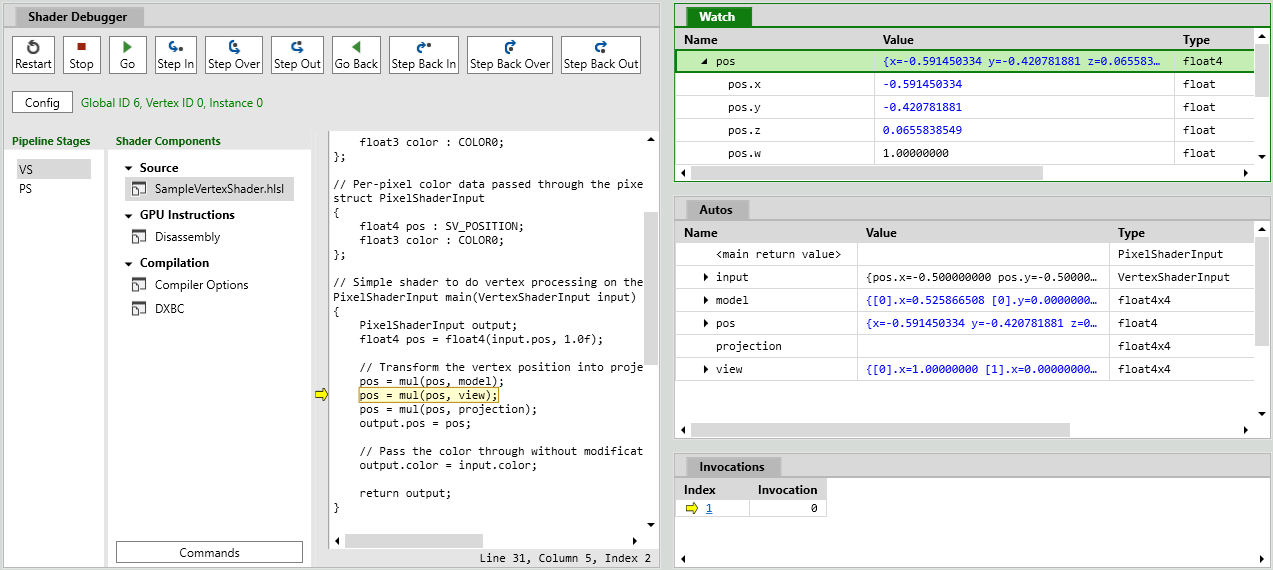

A PIX GPU capture records all the Direct3D 12 API calls made by the game, including their parameter data. These calls can later be replayed, which enables a range of debugging and analysis features. It is not always possible for PIX to successfully take a GPU capture if a game is calling Direct3D 12 in invalid ways.
trail shale
One of my users have a Vive Pro and the moment he hits anything, it crashes - (it detects the motion controllers and draws them correctly but the moment he hits a single key/input, it crashes - I checked the editor and found this - any ideas?```cpp
bool FSlateApplication::OnControllerButtonPressed(FGamepadKeyNames::Type KeyName, int32 ControllerId, bool IsRepeat)
{
FKey Key(KeyName);
check(Key.IsValid());
TOptional<int32> UserIndex = GetUserIndexForController(ControllerId, Key);
if (!UserIndex.IsSet())
{
    return false;
}

FKeyEvent KeyEvent(Key, PlatformApplication->GetModifierKeys(), UserIndex.GetValue(), IsRepeat, 0, 0);

return ProcessKeyDownEvent(KeyEvent);```
I found this but I don't want to implement it if the newer input system will muck it up - this seems outdated - https://answers.unrealengine.com/questions/688020/editor-crashes-with-vive-trackers.html
this line and below seems to keep repeating :
void FSteamVRInputDevice::ProcessActionEvents(FSteamVRInputActionSet SteamVRInputActionSet)
{
    for (auto& Action : ActionEvents)
    {
        if (Action.Handle == k_ulInvalidActionHandle)
        {
            continue;
}```This happened to me too. Check if you have deprecated input mapping. Especially the button you are pressing could be deprecated
trail shale
@north tapir Can you advise the input mapping that is deprecated? ( can search for it, I know what you mean but I'm looking for a particular node
These maybe?
 trail shale
Can someone help me chase down these input events? the problem is I can't seem to put a break on all my events because I think it crashes before it breaks
 daring pasture
Pretty sure every "MotionController_" bind is deprecated now
daring pasture
They are right there in your input settings. The binds should be headset specific now.
trail shale
What I mean is, WHERE in my project is this input event that I need to remove?
in the action bindings in project settings?
daring pasture
The drop down where MotionController_.... is. Replace them
trail shale
here is where I'm confused - the RightThumbPadDown EVENT doesn't actually happen in any of my blueprints
trail shale
so how is it being called, or maybe it first checks the key event then looks for the event tied to it?
AH
thank you for explaiining that
daring pasture
Had that happen once before as well on an input that wasnt called. Same thing I had a deprecated binding set. Probably steamvr's fault, but regardless should solve it
trail shale
Thanks man, if this works I'll owe you a drink
daring pasture
Haha, no thanks happy to help.
trail shale
daring pasture
Haha, no thanks happy to help.
What's the trick to making Unreal see these changes live? I've always had to restart Steam VR and the editor and that's reallllly tedious
daring pasture
Should just be able to regenerate the bindings and manifest. Do you have the steamvr input button enabled on your toolbar?
Sometimes it just wont work for me, so I have to restart steam vr. Never had to restart the editor though.
trail shale
daring pasture
Sometimes it just wont work for me, so I have to restart steam vr. Never had to ...
When I try to restart VR, it tells me I have to shut down the editor
north tapir
trail shale
These maybe?
yea they are deprecated. Basically, if it has _ in the name its highly likely its depretaced And as someone else mentioned, its SteamVR's fault. This doesnt cause issue on Oculus
daring pasture
trail shale
When I try to restart VR, it tells me I have to shut down the editor
Thats odd, I've never had to restart the editor when restarting steam vr.
trail shale
what's a good way to test it?
Because I can't get the grip to fire, fuck I hate steam vr/Unreal's implementation

 daring pasture
Did you generate the bindings and all using the steamvr button?
trail shale
I did all of those buttons using Steam VR
Just do these all in the order they appear?
 trail shale
yes
I change my bindings in project settings then start at the top and do all those regens
my default input isn't updating
daring pasture
They should just work for the most part then. You may need to bind directly in steam using the dashboard

 daring pasture
I dont know if theres a specific order, but yeah i do the same thing
trail shale
the default input says in windows it is being modified but adding ANYTHING to it I can't find it changing
daring pasture
There should be a steamvr input folder generated i believe. Contains jsons for each controller type
trail shale
Why the fuck were they all WRITE PROTECTED
I can't get the trackpad to work - the button you actually press down - it's this one right?
 sturdy coral
pretty sure that's it, there is a separate touched one for when it is touched
trail shale
Why doesn't these events UPDATE
Literally killing myself trying to save lives and this shoudln't be what stops me
daring pasture
In steam vr edit the bindings. They may need to be specifically set to click, touch, ect...
trail shale
Why doesn't Epic with it's 15 billion dollars have a write check to make sure the bindings were actually written to file instead of just allowing windows to do it's read only bullshit - this seems to be the problem - it is showing the bindings listed in the project settings but they don't match what's in the json file, until I set it to writable
this is killing me


same blueprint
 daring pasture
Can you not change them in steamvr directly using the dashboard while in preview?
mighty carbon
folks, do you recall how to make UE4 launch Oculus instead of Steam on start-up ?
sturdy coral
@trail shale why do you have stuff read-only? because of source control?
to change them from steamvr you have too turn on a developer option
I think you have to have this on:

or that may just be for displaying the input debug overlay, I can't remember
but there should be an option to export back to original file once you have one of the right settings
unfortunately unreal's json generation is done differently than steamvrs and so you can't diff the files, it is all out of order and formatted differently
 mossy cloud
I have been struggling for a week to get a package to build out of unreal. I'm a novice and I can't understand what I'm doing wrong when this is the error message (no details!)

can anybody tell me how to get a useful list of the required steps I'm missing? I've followed the setup to the letter.
sullen vortex
mossy cloud
can anybody tell me how to get a useful list of the required steps I'm missing? ...
follow the link that appears in the message you posted (the blue thing) or....https://docs.unrealengine.com/en-US/SharingAndReleasing/Mobile/Android/Setup/AndroidStudio/index.html
How to set up your Android development environment for Unreal 4.25 and later
basically you need to setup android in your pc and setup unreal to work with it
 mighty carbon
that doesn't seem to work @daring pasture
4.26.2
I use -hmd=OculusHMD in the cmd line and nothing launches now. I can live with that.
daring pasture
Not sure, works for me on 26.1
mighty carbon
Since I am using Air Link, I have to launch Oculus beforehand anyway
 modest cliff
[Android/ARCore] Has anyone found a fix for the issue where the camera feed on Android stays black when the app gets put in background (i.e., by home button) with AR Core?
polar valve
I have a weird issue with the Quest 2. Every Ensure causes it to crash. Doesn't happen with the Quest 1. Using 4.25.4. Anyone have any idea how to fix that?
Example logcat stacktrace https://logviewer.xyz/5c3c7d2a31f629fb0c5abce9b2e0f9ce
 glass lantern
Hey all, I know this sounds dumb but what is the undo button in the VR editor when using quest controls? I can't find any documentation on it at all
 umbral raven
Any devs out there interested in an NFT SDK for Unreal Engine 4..?
ashen dome
Hi , Im doing some vr weapon grips and its kinda easy to do a weapon snap to hand socket, But Im trying to do a hand snap to weapon mesh and have the hand socket match perfectly. Im using IK to control the hands. How can I make the hands grip the weapon exactly where the grip socket on the hand is.
sullen vortex
polar valve
I have a weird issue with the Quest 2. Every Ensure causes it to crash. Doesn't ...
are you building arm v8a? had the same issue in 4.25.4 and what worked for me was building for testing or shipping instead of development...don´t ask me why. Was struggling for weeks asking everyone around here about this, without any success. Then just accidentally built for testing and it worked....🤯 Cant build for dev which is a pita but anyways. Let me know if that helps somehow, if not, sorry for the noise. Also if needed i can share with you my android project settings
sullen vortex
mossy cloud
every step perfectly
drop me a pm and i´ll be glad to assist you on that
polar valve
sullen vortex
are you building arm v8a? had the same issue in 4.25.4 and what worked for me wa...
Yeah arm64 v8a. Didn't want to do all my testing in shipping builds but good to know a test build works too. Thanks!
delicate isle
polar valve
I have a weird issue with the Quest 2. Every Ensure causes it to crash. Doesn't ...
The Quest2 chip uses XOM stack memory protection system that breaks whenever Unreal fails an ensure, since it then tries to walk the stack to print the function names to Logcat. See here - https://github.com/Oculus-VR/UnrealEngine/issues/102#issuecomment-738609683
polar valve
delicate isle
The Quest2 chip uses XOM stack memory protection system that breaks whenever Unr...
Thanks for the info! So either try upgrading to 4.26 or fix all the ensures?
delicate isle
I upgraded to 4.26 myself. Was a good excuse to move to OpenXR
Managed to get most of the Quest features working again except for the hand tracking cursor pose
... and probably some other features that I'm forgetting about that will annoy me when I find they aren't working later lol
polar valve
Not looking forward to upgrading but I guess fixing that problem alone would be worth it
 dark gate
Hi,
I’m using UE4.24 and I packaged my game to steam. Whenever I try to play it using Vive or Index, the game crashes in the beginning and saying controllers not detected.
When trying to play it using Rift it worked fine.
NOTE:
I have deleted the steam plugin and then added it back (because my game intended to be on Oculus store only)
 grand smelt
When packaging to Quest2. I use OpenLevel to change to another level both the first and second level contain NavMesh for VR navigation. But the second level does not keep the NavMesh at least the navigation ray no longer works.
sullen vortex
grand smelt
When packaging to Quest2. I use OpenLevel to change to another level both the fi...
are you sure your navigation is built in your second level? if you press P key inside the editor, do you see in green your navigation path?
grand smelt
Yes, it is and green.
sullen vortex
any warning in the apk log?
trail shale
sturdy coral
<@!273265779175194624> why do you have stuff read-only? because of source contro...
I'm assuming it's read only because of source control but what keeps throwing me off is the parts that I have checked out I'm guessing now are not the actual files that unreal is trying to write the new binds to - the idea was to keep the various input files more or less checked out all the time but every once in awhile submitting aversion and then immediately checking it out again - I'm starting to lean heavily towards the actual issue being when I switch to a new device I haven't yet checked out the proper Json file
trail shale
sly elk
Physics in vr are so satisfying
Oddly satisfying
 sturdy timber
hello, I just noticed that on a project I have based on the VR Template, my VR hands have their rotation offset when on SteamVR while everything is perfect for OculusVR. Is it normal or did I messed up something without noticing?
sturdy timber
or is it maybe because I'm testing steamVR with my Oculus Touch, which have a different physical rotation
 empty fog
4.26 Engine
Hi, I have a problem with an AR application.
When I lock the device and go back to my application or switch applications and then go back to my application, the camera stops working. Has this ever happened to anyone?
 timber pawn
Getting a crash [2021.05.07-11.19.16:276][ 0]LogSockets: Error: Unable to read full network header
when I try to launch to a headset
iron pine
@sturdy timber I have the same issue. I’m not sure but I think it’s because steam vr tracks a different point on the hands. Oculus gives you the wrist position while steam vr gives you the palm location
sturdy timber
I see! thanks 🙂 now I just need to figure out if it's a problem or not 🤔
north tapir
sturdy timber
I see! thanks 🙂 now I just need to figure out if it's a problem or not 🤔
Yea every headset (Quest, Index, Vive...) has a different pivot on every platform(oculus, steamvr, openxr)
sturdy timber
Ok thanks! so basically an offset must be set for each platform ?
I mean, each combo headset/platform
sturdy coral
sturdy timber
Ok thanks! so basically an offset must be set for each platform ?
openxr is more standardized though in that regard, I think they are mostly the same transforms between runtimes there
tired tree
@sturdy coral @sturdy timber with every controller in OpenXR there are multiple poses, but the "default" pose is the center of the IRL palm facing inward for the tracked location. When engine is fully openXR this will just solve itself.
delicate isle
tired tree
<@!223705852412952578> <@!238913376938360832> with every controller in OpenXR th...
I have to fix my controller model offsets in my VR template I'm working on. The touch controllers have a natural origin aligned to the top flat part of the controller right in the middle whilst the grip location rotates the pitch upwards by around 45.
tired tree
its around 30 from vive wands difference
delicate isle
I was surprised the other day to find that SteamVR provides a full hand pose with animations when holding the controller. My hand tracking/controller tracking code thought I was using hand tracking and animated the hands which was awesome
tired tree
I have a full suite of offsets per controller that aligns them
delicate isle
@tired tree Are you the author of VRExpansionPlugin?
delicate isle
Just wanted to say thanks to you - your plugin is amazing
tired tree
you are using it or referencing it? you said you were making a template
delicate isle
Making a template project for my VR course
tired tree
ah
delicate isle
I've been using it to handle gripping and replication
tired tree
it has controller profiles
you can use them to align those controllers
and solve most of your problems
delicate isle
Just spent the last few months changing everything over to OpenXR
delicate isle
I'll have to take a look - I found the controller profile option earlier but didn't look deeply enough into it
I have hand tracking working on the Quest and Hololens right now
Made a pinching system that tracks the pinch location and passes it as a pivot to the grip interface
The only thing I'm missing in OpenXR right now is the Oculus hand tracking cursor pose
Just trying to make sure I'm ahead of the curve for transitioning to OpenXR rather than having to deal with it later
@tired tree Do the controller profiles offset the whole grip motion controller's transform? I currently have static/skeletal meshes attached to the motion controller to represent the hands
tired tree
yes
on the tracking side
to align to where the hands would be
essentially works like openXR will
lets you offset tracking to a palm position
delicate isle
Just found the controller profile option now - do I have to set up new ones for each controller?
tired tree
the template has a bunch already defined
though since you already have a gripping system setup
might be easier to start from scratch
delicate isle
Yeah
tired tree
whatever your dev controller was is the base, then you assign offsets to align all other controllers to that one
delicate isle
I'm waiting for XR_MSFT_controller_model to get picked up by the main OpenXR spec
Will just have to rock offsets in the meantime but that's fine
My goal is to give my students a template that has controllers/handtracking, gripping, and locomotion (teleport and free movement) already implemented so they can focus on making VR content without reinventing the wheel
tired tree
sounds cool
delicate isle
Oh, and they're developing in a Mac lab sigh
Thankfully the OpenXR plugins don't define any blueprint nodes so I don't have to go in and #ifdef stuff out if they're not running on Windows or Android
Had to do that last year for a majority of the OculusInput module
 unreal egret
Does anyone know if the airlink on quest 2 work with ue4? Or is it only for games?
fringe blaze
Are there are performance implications to having multiple box collision meshes in a single static mesh?
maiden willow
unreal egret
Does anyone know if the airlink on quest 2 work with ue4? Or is it only for game...
It works
sonic lake
fringe blaze
Are there are performance implications to having multiple box collision meshes i...
Of course there are since the physics engine has to check for collisions and resolve them against each shape, but as long as you stick to simple primitives / simple convex meshes the impact will be minimal.
fringe blaze
@sonic lake Thank you for both answers haha.
mighty carbon
I was thinking of attaching gun (static mesh component) to the NPC's hand (socket) on anim notify in runtime. Someone said not to do that because (re)attaching components in runtime is too "expensive". Is it true ?
 real needle
We´re very proud to announce the first alpha release of our VR game ASTROROXX for Oculus Quest 1 and 2: https://www.youtube.com/watch?v=pL3OGWHlt9I and we´re looking for alpha testers for the free version of the game: https://www.astroroxx.com
Astroroxx for Oculus Quest 1, 2 and Rift - FREE ALPHA available at https://www.astroroxx.com for Oculus Quest. Apply now!
 wraith helm
Any idea how to use occulus link with ue4?????
maiden willow
wraith helm
Any idea how to use occulus link with ue4?????
Make sure your headset is connected first to the oculus desktop app, then launch your project
wraith helm
Will it automatically start in vr mode after clicking the play button
maiden willow
You have to use the drop down there and select play in VR
You need your project set up for Android as well to see it I believe
wraith helm
Great, thanks I'll try that
 eager sun
How would I make a copy, or like another instance of a weapon, and make it collide with the original?
I currently have 2 separate copies of the same weapon, but I'm sure that's not the most efficient way to copy a weapon, if I wanted to make... say.. a weapon spawner
 eager sun
I feel bad for asking a new question, especially since my last one didn't get answered, but oh well...
How do I fix this error?
OnComponentHit (OnControllerMesh) does not have a valid matching component!
 maiden willow
You should be utilizing the hit actor component out node
eager sun
maiden willow
You should be utilizing the hit actor component out node
I figured as much, I'm just too new at this to know what it should lead TO.
I'm not a fan of vibrating controllers anyways, and I believe it pertains to that function
maiden willow
Oh lol, you pull that out and then utilize that to action against that component
Let me get an example for you
eager sun
On a lighter note, can I pick your brain again, with some ACTUAL blueprinting this time? I have a scene with some blocks to climb, but my player isn't "ungrabbing" my blocks when I let go, and I can't "re-grab" a block I've already "grabbed"
Ironically, my brain sees the blueprint layout the same way a coder sees code, although I know 0% C#/C+(+) at all.
Followed this tut to the letter: https://www.youtube.com/watch?v=lKxf0yhGJJ4

This step by step tutorial covers the implementation of my VR Climbing System.
Features:
- One/Two hands climbing
- Gravity falling
- Ground detection
- Fully compatible with the Standard VR template
- Teleport and Climb
- Climb while holding objects (single hand)
If you find my tutorials useful, consider subscribing to my channel. Thanks! :-)
maiden willow
Official documentation https://docs.unrealengine.com/en-US/BlueprintAPI/Collision/OnComponentHit/index.html
On Component Hit

 maiden willow
Trust me, it takes a while to get into it. Go slow and be persistent
eager sun
That's my plan, but I have no idea how to troubleshoot this style of "if A then B" code (blueprints?)
since nothing is labelled aside from what it literally is lol
my 1st picture above, i have no idea which of those 3 "blueprints" does what
id have to follow the non-talkative YT vid again and make a note lol
I chose this over Unity solely because I can't code C*
wraith helm
Whenever I try opening unreal engine with my occulus link on the UE4 Editor stays in loading state
 sonic lake
@eager sunthat's a very nice tutorial, good choice! 😉
At 16:47, after the line trace, we set up the condition for falling. As you can see it is connected to the false output of the Branch node. Make sure you didn't connect it to the True output.
Also double check all the booleans at 13:56 to make sure the true/false values are set exactly like shown in the tutorial
At the beginning it is normal to mix things up and perhaps get confused with what does what. Eventually you will develop an intuition for it.
eager sun
Hello and welcome, @sonic lake ! To everyone else, he is the author of many YT UE4 tuts, like the one I linked a few messages up. What an honor.
 dull bane
Holy smokes Marco thanks for the vids they're the best!
eager sun
wraith helm
I had the same issue. For my Rift S, I had to allow Unknown Sources in the Oculus App

 sonic lake
Glad you found it
Yes, execution connections are petty important
@eager sun let me know if you have other issues
sonic lake
Not sure what you are trying to do. You seem to have combined two different tutorials. DM me, we can have a look.
wraith helm
eager sun
I had the same issue. For my Rift S, I had to allow Unknown Sources in the Oculu...
Thanks for the help soves the problem
eager sun
wraith helm
Thanks for the help soves the problem
Glad to help!
 trail pagoda
hey everyone!
does someone have tips on where I could look for creative/fun shaders for the quest?
or some kind of effect for the camera?
finding it a bit hard with VR :/
 next aspen
hey can anyone help me change the player's height? I need the player to be shorter.
next aspen
@sonic lake you seem to know about this stuff
eager sun
next aspen
hey can anyone help me change the player's height? I need the player to be short...
Depending on the platform, I would say maybe change the capsule's half height, like this:
 next aspen
eager sun
Depending on the platform, I would say maybe change the capsule's half height, l...
next aspen
eager sun
Depending on the platform, I would say maybe change the capsule's half height, l...
VR characters dont seem to have a capsule
eager sun
Oh well now I know you're in VR. This is determined by the wearer of the headset, AFAIK.
next aspen
any way to adjust it?
eager sun
Bend your knees/jump 😛
next aspen
ha. But like fr.
eager sun
No. As in the game Blade & Sorcery among many others, you calibrate the height before you begin playing so the player is drawn at your height so everything matches
Otherwise you might have lanky alien garbage scoops for arms.
#trailerparkboys🍁
next aspen
The thing is my game revolves around picking up small things on the ground so if youre standing up its a lot to bend down. I want to make the game accessable.
eager sun
Back Pain Simulator?
next aspen
haha, no thats what I want to avoid.
next aspen
well if I can make the player shorter you wouldnt have to bend down as much/at all.
eager sun
🐌
But then the player would feel very short no matter their height, making it a cat simulator.
#gladimnotshort
next aspen
eh kinda? I think making it adjustable, maybe even on the fly, might be good. Then youd be like a smol flying robot.
eager sun
What exactly are we picking up? Part of breaking a VR experience is having to do real-world painful bending during "VR happy time"
next aspen
Some gummy bears. My concept is that youre defending... something? Im still not 100% sure but I guess ill go with a honey pot. Anyway, the idea is you pick them up, and throw them at other gummy bears so they go flying.
eager sun
Hence why my favorite game came stock with tele-you're a Jedi-kinesis
Why not aim to catch as many in your mouth AS they fall?
Yummy Gummy in my Tummy Bears
next aspen
they walk around, that would be... strange. But also not what im making the game about.
eager sun
Well, Doctor Seuss would be proud.
Perhaps pick them up with a vacuum gun?
then shoot them!
I would get annoyed with tapping my controller on the ground picking them up tbh
It's already cracked from the death of my lamp
next aspen
one idea ive had is to have multiple enemies that work to change how you interact with other enemies. So I might make an enemy a vaccum that picks them up easier.
But to your tapping the ground point, they are big enough you dont have to get your controller right next to the ground, you have about a foot and a half of clearance I think.
But also making the player shorter would help that.
@eager sun you know how to help or nah?
eager sun
Not really in this scenario, sorry
I only know that mine always behaves as I described.
next aspen
figured it out. I actually found it a while ago, there's a part in the code where it initalises the height of the HMD and you can change that from "floor level" to "eye level" but I was editing the wrong thing.
sturdy coral
@next aspen most games have settled on some telekenesis (rec room, alyx (more extreme than you may want), etc.)
definitely don't go for precise pickup of floor objects because a good portion of users will have their floor misconfigured by +-6inches
next aspen
sturdy coral
definitely don't go for precise pickup of floor objects because a good portion o...
I feel like my game somewhat requires it. But what I just did to it will ensure the floor's position doesnt matter whatsoever.
sonic lake
next aspen
figured it out. I actually found it a while ago, there's a part in the code wher...
You can also simply move down the VR Origin
trail pagoda
no one has any tips for where one could find shaders specifically for VR in unreal?
 wide tendon


I'm having a rough time. I finally remembered that perhaps someone here in discord could help. I am trying to package the simplest VR app and get it installed locally on my Oculus Quest 1. After three days of dependancy hell in Java, Andriod, deleting build folder, intermediate folders, updating and downgrading java versions, upgrading, uninstalling an d downgrading gradle i've finally conceeded defeat. Frustratingly, just a day before all this i was able to package just fine, but i was having issues with the 'keystore format' that the keytool application was generating as per instructions on the u nreal website.
Now i've given up, i just want to create a new VR project using the default template, and publish that with a local key or, uploading to oculus to publish to 'app-lab'.
Just now, the JAVA, andriod & gradle bullshit seems to have... desisted momentarily, and i'm back to this error upon packaging my andriod package:
com.android.ide.common.signing.KeytoolException: Failed to read key MyKey from store "C:\Users\timothy\Documents\xx_teststuff\asshole\Intermediate\Android\armv7\private_key.pepk": Invalid keystore format
This keystore "private_key.pepk" is my latest attempt, after being told that the keytool app wasn't generating the latest acceptible security standard. I managed to get this keystore by opening the Andriod studio app and creating it from there and placing it in the appropriate place in my project.
Could anyone shed some light upon my latest issue?
I should mention that i'm a complete noob at the security signing and packaging and publishing stuff. (That's actually why i'm trying to practice it)
real needle
I know that this will sound like pretty basic stuff but I’m struggling to pick up a skeletal mesh (for reference I’m trying to do something similar to robo recall where the player can grab a specific bone) I’ve tried using a few ways but I can’t seem to get it working
My dms r open if anyone has the answer for my issue 🙂
 oak pawn
Any folks here have specific recommendations for a headset for development in UE? Specifically for use with the VR Editor mode etc, not to deploy. Comfort & stability are the priority. Would love to hear from folks who have multiple HMD to compare the experience of.
lethal kiln
oak pawn
Any folks here have specific recommendations for a headset for development in UE...
I've had quest 2 and Rift. I really don't think there is a real difference between the two of them visually wise to someone who isn't really looking for the detail etc. I'd recommend the Quest 2 for the wireless capability especially since the CV1 isn't available anymore. But I think an Oculus headset has its advantages because they're the biggest market share, you can use the Oculus headset with Steam VR pretty easily, While I think Index controllers are pretty important for the future etc I don't think buying an index and developing specifically for those controllers has enough of a market to be worth it.
Of course I've never used any other headsets. But I like the Quest 2, I don't enjoy the facebook part but it's fine.
lethal kiln
wide tendon
I'm having a rough time. I finally remembered that perhaps someone here in disco...
Alright this is a very annoying process I did it successfully the other week basically what I did was follow a video which I'll link below. You essentially will do a command line and just make a really simple alias etc. From there you go to the Keystore settings in the project settings insert what you did before and then try to package it.
https://www.youtube.com/watch?v=-GSBX4ZdgCA
Then just drag the keystore file from the directory into the project folder and it'll work there.

In this video is explained how to sign your Unreal Engine 4 game to prepare it for distribution for the Play Store.
CMD instructions:
cd "path were your jdk is located/bin"
keytool -genkey -v -keystore Store.keystore -alias Alias -storepass password -validity 9999
Get my apps on google play:
https://play.google.com/store/apps/dev?id=6299544315...
 dreamy ivy
Hope everyone's doing well. Thought I'd post this here for those that might be interested. My latest tutorial premiers over on YouTube in 30mins. Showing how to setup Half-Life Alyx movement system using Blueprints. The video itself includes extras such as having to physically crouch bellow objects to get past, stop the player going through wall, Jump, Snap Turn, sprinting and Room scale movement. So there is a lot to cover in this one. This video was made possible with help from @idle osprey who was able to figure out the crouch, snap turn, and room scale fixes required for this all to work. I hope you all enjoy it.
https://www.youtube.com/user/Corysia

YouTube
#UnrealEngine #VR #HalfLifeAlyx
► Description
In this video, I show how to create a smooth locomotion system for your VR project similar to Half-Life Alyx including the ability to crouch, Jump, Snap turn, sprint and use room-scale VR while being affected by gravity and including the ability to walk upstairs
This video was made possible by our...
I also show how to fix some issues when grabbing objects when using smooth locomotion.
 covert hazel
what do i need to do to package a project for pcvr? i downloaded the vrexpansionplugin demo project and i would like to package that
dreamy ivy
@covert hazel you should be able to go file>Package Project and then choose windows.
covert hazel
thanks!
 wary coral
Hello, hope you’re doing well! I’m Gabe Mukobi on behalf of StanfordXR (Stanford University's virtual/augmented reality student org), and I wanted to let you know about Redefining Reality, our annual VR/AR Conference happening soon! On Saturday, May 22nd at 10 AM PT, we’ll have an exciting day full of speakers, panels, networking, and socials. We’ve invited numerous speakers and industry leaders at companies such as Facebook, Unity, Epic Games, HaptX, and many more to discuss the exciting future of XR.
Historically, our conference was held in person and has attracted 400+ attendees including professionals, researchers, students, and the general public. This year, we’re moving to an online format, which means we are able to invite anyone with access to an internet connection! We are hoping you would be willing to share this free event with people in your organization and anyone else who may be interested. In these difficult times, our goal for this conference is to bring together our communities to learn, inspire, and encourage all things XR and have fun while doing it 🙂
The speakers and panels will be held on zoom and we will transition into a social/networking event in VR through VRChat (connect via VR headset or via flatscreen if you don't have a headset).
You can RSVP and find the full details of our event including speakers, panels, and socials at our website: RedefiningXR.com
If you have any additional questions or concerns please reach out to me or email admin@stanfordxr.edu. We hope to see some of you there!
 trail shale
What's the simplest way to determine if a motion controller is moving? am I just ticking it's possition and checking to see if it's more or less the same (to that realistic margin?)
 sand abyss
question, whats the common way to setup a VR character? currently im using a character for the base class and have its hierarchy as
capsule:
  vr component (scene component)
    CameraComponent
  CharacterMesh
  Right/Left Motion Controller Component
so i can use the character movement component for moving around the world along with replication and interpolation without creating my own system. everything currently is working fine except for room scale as i can walk out of my capsule which is obviously a problem
maiden willow
sand abyss
question, whats the common way to setup a VR character? currently im using a cha...
Check out Jonathan Bardwell's post about three up from yours
maybe 6 or 7 🙂
trail shale
Ugh, there's no rhyme or reason why new binds added to input don't seem to update - restarting editor, restarting stream VR, the rebuilding the action - i've checked the json files and those new input events are added - the blueprint in question has input and breaks fire on the other keys there - this is a brand new input action so I can't see the inptu being consumed by anything else (i'm not sure how the input stack handles the same key tied to different input actions)
sand abyss
well thats nearly the same setup i have now lol as that of his video
maiden willow
Did it help you out though?
sand abyss
negative as it doesnt help with roomscale. the current issue i have now is since the capsule is the root and the camera is the child, when you walk around (lets say i walk left 4 feet) i am then outside of the capsule which is whats being used for the character movement component. need to figure out some way to keep them together. changing the root to the scene component with a capsule as a child of the camera doesnt work either as the character movement component just moves the capsule and not the entire actor (same deal if you set the updated component in the character movement component to be the root scene component)
i see their working on a new VR template for 4.27 so hopefully that will come soon, i didnt see it in the dev branch yet
well one thing i didnt try was updating the x/y position of the capsule to match that of the camera within a tolerance and see if that helps it track together
trail shale
Are the InputAction FaceButtons now deprecated?
tired tree
@sand abyss the new template doesn't have anything like that in it
and for syncing you would roll back the HMDs relative offset and apply it to the characters movement
generally for that to be networked you'd have to do it in line with the character movement components saved moves
trail shale
Can you not have the same key tied to different events in this? I assume that you can be just you need to realize which one will first consume input? I am running into problems and I suspect this is happening internally, because I'm not even calling these action events anywhere
tired tree
by either directly injecting the offset, or applying movement input that relates to it
my two vr character classes take two different methods, one locking the camera in XY and moving the character with the hmds movements, and the other entirely decoupling the capsules location from the actor and literally moving it with the HMD. There are blueprint solutions as well by moving the camera root inversely to the cameras relative position.
trail shale
sorry didn't realize this didn't come through

I can't for the life of me get any of these events to fire

They are all getting updated here so I'm not sure what is happening -


I've restarted Steam VR and I"ve tried all these things -

Unless there's some order if I missing here, I think I'm going to lose my mind soon
I get this all the time but unless I missing something it's fine -

It's okay to have multiple entries in this right? jesus this is impossible to iterate on, there's no rhyme or reason that I can figure out
Can ANYONE please please please explain this to me, why is this event I've made NOT firing, when the key works with other events?

 maiden willow
sand abyss
i see their working on a new VR template for 4.27 so hopefully that will come so...
maiden willow
sand abyss
i see their working on a new VR template for 4.27 so hopefully that will come so...
There is also VRE that handles this for you with MordenTral's plugin/custom character classes
trail shale
Why does this one work


I can literally restart someone's heart but I can't make a goddamn action binding work like I want to
If it were consuming input, the bottom event should still fire if I remove the top one from the blueprint
and if they have the same key binding to their action inputs, it can't be that one other blueprint is consuming that key for one action event but not for the other - they use the SAME key bind
Why did THIS happen??????? I'm using the Valve Index -

WHY DOES THE EDITOR THINK I'M USING THE VIVE?
tired tree
it doesn't matter
it throws any key from that action
the openXR like action system doesn't actually care what button triggered it
you can't rely on that
even more so since end users can rebind keys on the runtime side, so all of those faux "keys" in engine are meaning less for checking against
they are just used for the default manifest generation
trail shale
tired tree
it doesn't matter
Can I not have the same hardware keyed tied to multiple events? I can make it work just by using the action event that worked but I'm worried that there is something fundamental about the way the input handles VR (particularly steam vr)
tired tree
@trail shale you can't really with vr buttons
if you have trigger on two actions at once it can throw other actions
its a bug / limit of how they jury rigged the new input methodology in
which should be getting an overhaul
trail shale
It's so confusing to figure out what is what
your advice is just delete the ones that don't work and stick to the ones that do?
tired tree
i didn't read everything up above, didn't have time, I am leaving the office right now, but wanted to point out the end there and what was going on
trail shale
No dude, I appreciate it, I at least know I'm not crazy - if you get bored feel free to look, maybe there's something obvious I'm missing - It may be a limitation of the current implementation that I wasn't aware of, that's exactly why I asked
dreamy ivy
sand abyss
negative as it doesnt help with roomscale. the current issue i have now is since...
It even says in my thumbnail that it fixes room scale. It might be worth watching the video again.
My tutorial shows how to implement it and make the capsule follow the players head so room scale works. I recommend checking the time stamps.
10:26 info in the description
sand abyss
@dreamy ivy i probably overlooked that from skimming through it so ill rewatch it again. ended up getting it working by setting location and offsetting the VRComponent back, now just have to figure out some form of replication for this movement
void AVRTestCharacter::Tick(float DeltaSeconds)
{
    Super::Tick(DeltaSeconds);
    TickTimer += 1.0f * DeltaSeconds;
    if (TickTimer > 0.01f && !HasAuthority())
    {
        Server_UpdateHands(LeftControllerComponent->GetComponentTransform(), RightControllerComponent->GetComponentTransform());
        TickTimer = 0.0f;
    }

    FVector CameraLocation = CameraComponent->GetComponentLocation();
    FVector VRCompLocation = VRComponent->GetComponentLocation();
    FVector CurrentLocation = GetActorLocation();
    CurrentLocation.X = CameraLocation.X;
    CurrentLocation.Y = CameraLocation.Y;
    SetActorLocation(CurrentLocation);

    VRComponent->SetWorldLocation(VRCompLocation);

    CameraLocation = CameraComponent->GetComponentLocation();
    FVector ModifiedCameraLocation = CameraLocation;
    ModifiedCameraLocation.Z -= 170.0f;
    ModifiedCameraLocation.X -= 12.0f;
    FRotator Rotation = FRotator(0.0f, CameraComponent->GetComponentRotation().Yaw - 90.0f, 0.0f);
    GetMesh()->SetWorldLocationAndRotation(ModifiedCameraLocation, Rotation);
}
@sand abyss that isn't multiplayer compatible
sand abyss
edited as you were typing
tired tree
its still not
sand abyss
"now just have to figure out some form of replication for this movement". might try and switch to addmovementinput
tired tree
just sending the offsets to the server won't be sync'd with the character movement buffer
yeah you need to inject it as part of the movement process
if you are in 4.26 that is fairly easy now
sand abyss
what changed in 4.26?
tired tree
they have an overridable network archive stream now
you can pass any data into it
a lot easier than overriding the movement rpcs
sand abyss
how do you do that?
tired tree
no docs on it yet, since its new
but it involves overriding a network data container and passing in the new subclass in a virtual override
/** Default client to server move RPC data container. Can be bypassed via SetNetworkMoveDataContainer(). */
FVRCharacterNetworkMoveDataContainer VRNetworkMoveDataContainer;
FVRCharacterMoveResponseDataContainer VRMoveResponseDataContainer;

GitHub
A UE4 VR framework. Contribute to mordentral/VRExpansionPlugin development by creating an account on GitHub.
the section around ServerMove_PerformMovement
is where its using the new overrides
unreal egret
Does anyone know why ue4 doesn't open in quest 2 through link? When I press play, it shows the ue4 editor loading and doesn't actually load it. It just stays at loading forever.
sand abyss
@tired tree yea im just saying screw it for the time being, i read through the code and it made some sense. for now ill be using your plugin 🙂 btw i noticed when i create a blueprint class off of the VRCharacter i have issues with the camera being in the floor upon spawning, but if i create a c++ class derived from VRCharacter and then create a child BP class from that its fine
sand abyss
i did
isnt floor for steam vr? im on the vive and tried all the options with the same result
tired tree
yes it is
that should work though
thats all that the template does is bp subclass the vrchar
also that is no literal difference from you subclassing it in c++ and then bp
sand abyss
thats what made 0 sense because there is no change. either way i needed to make a c++ class for it so its all good
 craggy flicker
Does anyone know how to set up a widget to detect whether you're pressing a button with the left controller or the right one?
sturdy timber
Hello, I'm trying to get the velocity of my controllers, I mean the direct values from the accelerometer, not the ones derived from position etc. Looking into engine and oculus plugin code, it seems it is not provided. Is there any other way to get them? I'm trying to compensate for tracking loss. Thanks for your help
ah, I see GetRawSensorData() could do the trick
just need to find the equivalent for other VR platforms
if anyone knows the coordinate space of the data returned by GetRawSensorData() I'm interested 🙂
sturdy timber
mmm seems to be Unreal World coordinates
 leaden violet
I am trying to find documentation on image tracking with MRTK for Hololens 2. Can someone point me in the right direction?
sturdy timber
Another question: do someone know if it's expected behavior that the Oculus Touches lose inertial tracking when not seen by the hmd cameras (using Quest 2)? I thought inertial would not be dependant of controller visiblitys as it should be tied with accelerometer etc. 🤔
@leaden violet I remember doing some research and finding stuff (although a bit limited) on Microsoft doc. I know it's not image but QR code but for instance : https://docs.microsoft.com/en-us/windows/mixed-reality/develop/unreal/unreal-qr-codes?tabs=426 I seem to recall there was an equivalent for image tracking (can't find it rn)
leaden violet
sturdy timber
<@!459473533282549770> I remember doing some research and finding stuff (althoug...
ty … yes I found qr and have that working as a poc. I tried the same logic with image using their image tracking equivalent but I am missing something an insure what that is. I have a data asset of my image reference in the session. Hoping to find some doc on it or a third party solution to process the images.
sturdy timber
yeah, I did not manage to make it work either (it was very quick r&d but I remember concluding that is was not an easy task in the engine)
fringe blaze
This is slightly off-topic, but my Quest 2 constantly disconnects / reconnects to my PC while I'm using it, while it's plugged into my desktop (and therefore makes Oculus Link unusable). My Rift S has some connectivity issues but it isn't nearly as bad. I've got a cheap motherboard...is it just the USB chipsets? Do I just need to upgrade?
 slender pulsar
Whats the most decent VR glasses right now ? Quest 2 ?
And for gamedev what you would get the 250gb one or the 64 ?
wraith helm
slender pulsar
Whats the most decent VR glasses right now ? Quest 2 ?
And for gamedev what you ...
If your aim is android based vr then choose 250 gb but if u want to work on desktop vr u should be ok with 64 gb
slender pulsar
Does it comes with charger cable and the desktop link thing ?
north tapir
I doubt you will ever need 10 gb let alone 250 gb for a vr game
slender pulsar
I thought this was less expensive, in love with the conversion rates to europe charging extra money for no clear reason
its like 350€ base price and 299$ base
sly elk
I think the quest 2 is the best deal for desktop VR as well. The display is nice, airlink is great, controllers are good.
slender pulsar
Is there any difference at all between the official cable connect and the half cost non official ones?
What about desktop ones ala index?
maiden willow
If you have a good router there is also Air Link that you can look into
Then you may not need a link cable at all
slender pulsar
Okay picked the Quest 2 then
Its possible to release on steam for example without rift but with support for it using only the Quest as reference ?
tired tree
roughly yes, linked quest is essentially a rift emulation anyway
trail pagoda
hi guys, probably pretty easy but couldnt find any simple answer. does someone know ho to easily disable the vr teleport function? I want the player to be just seated and not able to move. thanks!
maiden willow
You should be able to just unhook either the event in the Tick on the pawn or the input themselves
 drowsy rover
The Quest 2 is amazing, I'm surprised inside-out tracking works so well
drowsy rover
slender pulsar
Is there any difference at all between the official cable connect and the half c...
I'm using an unofficial one from VOKOO, it's working great
Air Link doesn't really work with my cheap router
 keen prawn
yea quest 2 seems like some nice hardware for $$, you are also paying them with ur data a bit tho 😛
lethal kiln
Yeah, it’s not great but yeah I enjoy my quest 2, my off brand cable works fine I think the usb c type connections on my computer are more of the reason I have issues over the cable. I typically just use airlink though because I had a good enough cheap router.
slender pulsar
lethal kiln
Yeah, it’s not great but yeah I enjoy my quest 2, my off brand cable works fine ...
why isn't great ?
empty fog
Hello everybody. I have a big problem with UE4.26 regarding AR. It is absolutely not functional.
Any augmented reality application developed in ue4, if put on standby and then opened again, will no longer work. The camera and thus the AR session will no longer work.
What can I do? are the ue4 developers doing anything about it?
lethal kiln
slender pulsar
why isn't great ?
Facebook data collection
 dusty notch
Doesn't matter, they collect your info even if you don't have FB account.
 nimble raven
hey guys I noticed all of my emissive textures in the Oculus Quest 2 and Glossy textures are looking really flat and lambert. Does anyone know how to make High gloss look good in the Oculus Quest 2?
 brazen kraken
Hey Guys, I recently Bought a new Oculus quest 2 and i want to start development using UE4 in Vr.
I dont how to connect them together.
also, is there a way to use Ue4 using air link as well?
waiting for response.
Thank you
maiden willow
You need your Oculus account to have developer mode enabled, and then also enable developer mode in the headset. After you've installed UE4 you also need to follow the directions for installing the Android stuff (found on Oculus developer websites). Then you need to have the Oculus desktop app installed and connected to your headset prior to launching your UE4 project
There are several tutorials you can find on Youtube though that walk you through the process
brazen kraken
maiden willow
You need your Oculus account to have developer mode enabled, and then also enabl...
I managed to make it work via Newest version and airlink.. wireless Unreal now
thank You soo much, though!
 frail bear
Any idea why after climbing my vision would be jittery? I set movement mode back to walking. Is there something I'm missing?
 sharp forum
Hey guys. Is the VRExpansion example using the RightHand_AnimBP at all, or is there another pose library for the hands, that I can edit for special hand poses?
frail bear
@sharp forum it uses the righthand_animbp
sharp forum
Or can someone do a screen grab of the location where I can connect a break to force the hand into my wanted pose?
I know how to do it in the anim blueprint, just not in the Pawn/Motion controller/Grasping hand, event graph.
slender pulsar
Does someone uses Deferred rendering for desktop VR ?
Just the general deferred standards 👀
@narrow bronze did you solved the issue with vulkan ?
I have to check the next week the HDR and that things
chilly pasture
Hey guys, is there anyone who have experience with in app purchases with Oculus ?
I am having this problem where, launching the checkout flow for a SKU, leads to me an error, where it says cannot purchase additional content.
 bronze raven
Has someone made a multiplayer AR app? Theoretically it seems doable but was wondering of any possible blockers
fringe blaze
Is there a name in Unreal for the touch-sensitive thing on the Quest 2 controllers?
I can't even find much about the new "thing" in general...it's like a small circle, like a laptop trackpad but very small.
I would like to create a binding in the Project Settings for it.
Sorry, I know that was vague...here's a picture.
 sharp forum
track pad
there should be commands for up, down, left right, press, touch. Some of these will not work if the controller does not allow for those inputs.
or touch pad... ... it's the only one with 'pad ' in the name. 😋 sorry. not at work computer now.
sturdy coral
@fringe blaze there used to be a way, the oculus hand sample used it I think, you can look through the blueprint there
don't rely on it for functionality other than animating hand, because quest and rift S don't have it but CV1 and quest 2 do
or something like that
 rustic blaze
im having really weird problems in my vr project, its a vr template that ive been upgrading
now the thing is inside BP_motion controler is event tick that updates the hand animation based one some values
BlueprintUE
and these values are type boolean and are set to true when you pickup the item and to false when you drop it, so function grab actor and drop
the problem is these values keep reseting or so it seems as if i put a print string in the beginning that prints the falue of the variable it goes false all the time and when i pickup the item its false, true, false, true all the time
and im out of ideas how to fix this
sly elk
@slender pulsar we use deferred for desktop vr
slender pulsar
sly elk
<@94317435246620672> we use deferred for desktop vr
And how it works without the shared rendering features and such?
slender pulsar
Technically on forward you only need to do a single pass for many things
While on deferred you have to re render all for each eye from what I now?
nimble raven
hey guys I noticed all of my emissive textures in the Oculus Quest 2 and Glossy textures are looking really flat and lambert. Does anyone know how to make High gloss look good in the Oculus Quest 2?
sharp forum
Is there anyone here that is using the VRExpansion Plugin? I need to know how to force the hand into a pose. Take away the finger movement of the player when their hand enters a collision volume, then gives them back control over the fingers, when their hand exits the volume.
I can create the pose, and the AnimBP for the hand. I can't figure out where to insert it, and what to turn off, in the hand/pawn actors.
 warm glade
Fullbody tracking with two webcams is coming, source https://twitter.com/Akiya_Souken_VR/status/1395199325920137223
frail bear
@sharp forum I don't think it has to do with VRExpansionPlugin. I think you just need to put the logic in the RIghtHand_AnimBP
maiden willow
sharp forum
Is there anyone here that is using the VRExpansion Plugin? I need to know how to...
If you are using grasping hands there is a ‘custom pose’ variable that you need to set and then tell it the animation instance you want to show
 lusty lark
Hello! I am having some very weird problems with the Vive inputs that doesnt work when I open level with IP. If I package just the GameLevel the inputs works, but if I open the GameLevel with IP the inputs doesnt work. If I use the Oculus Quest2 controllers, they work. Can anybody please confirm it that Vive doestn support OpenLevel with IP? Aka there is not possible to make VR multiplayer game with Vive?
sly elk
Does anyone use or have users on vive cosmos?
We added support recently, we don't have our own device to test with, but we are hearing that the haptics are doing weird things
not turning off, etc
mighty carbon

Oculus Quest firmware update v29 was found to have a bunch of strings/mentions to a Face and Eye tracking runtime that Facebook is working on for a future headset.
Despite my excitement for the consumerization of Eye + Face tracking for VR, I am almost somber to it happening so soon thanks to Facebook's work. I also go over the problems that th...
modest cliff
[Android|ARCore] Hi all. Has anyone found a way to have 60fps back with AR Core on Android with 4.26? I'm not even sure if that is a decision from Google or Epic...
Alright...setting ARSessionConfig - Frame Sync Mode - Sync Tick Without Camera Image instead of ARSessionConfig - Frame Sync Mode - Sync Tick With Camera Image already helps tremendously
sharp forum
I know how to set up the animation, if I know what I am looking for. I just figured out that the pawn is not using the HandMesh in the Pawn. It gets turned off or deleted, and replaced with the GraspingHand. I still see the HandState with the Enums I created in the Pawn BP.
sharp forum
maiden willow
If you are using grasping hands there is a ‘custom pose’ variable that you need ...
What I need to know is where to put the break to override the normal hand movements.

This didn't work. I tried several areas, and many at the same time. I tried block all the areas in the pawn, and only got results when I started blockign things in the GraspingHand BP. This is a problem for me, since the Grasping hand has only one solid row of contacts. The right hand components can be dragged out, but during the construction script, it creates a left hand, and also adds sufix to each name. I have not done this type of search before.
 midnight trellis
Hello
We have a project that runs greatly, we are trying to package it and export for windows, problem is that faceAR is not running, in standalone player or exported exe file. It runs perfectly in viewport play, other than that nowhere.
maiden willow
sharp forum
This didn't work. I tried several areas, and many at the same time. I tried bloc...
I’ll open my project up and help you out in a bit
maiden willow
sharp forum
What I need to know is where to put the break to override the normal hand moveme...
In your VivePawn (or whatever you are using) the final output of 'Grip or Drop Object Clean' there is a Boolean output you are going to use. Utilize this (I'll also show the custom event)
Above/Below (depending on how this shows on your screen) is the custom event in the Grasping Hand blueprint. This is to strictly allow the player to close their fist if they are not holding something.

 sly elk
Anybody here on an and GPU?
 idle osprey
AMD, perhaps? Autocorrect is evil
 surreal lark
so, i have been trying to build an vr motion system in UE4, and all tutorials / solutions seem to have atleast one of these problems:
A: miss collisions (use the floating pawn movement)
B: ignore offset while rotating (rotate around the player origin, not the camera)
C: ignore offset while coliding (dont move the colider to the camera)
i have fixed everything exept C now, and i want to ask, HOW could i offset an characters collision to the HMDs location without yeeting the player through the arena?
idle osprey
surreal lark
so, i have been *trying* to build an vr motion system in UE4, and all tutorials ...
Over the last year, I've been working on a movement system I liked. I wanted to support teleportation, smooth movement, smooth and snap turning, crouching and jumping. Teleportation isn't quite how I want it yet, but it still works. Last week, Jonathan put out a tutorial video for it: https://youtu.be/bG6V-AAdfLU
surreal lark
idle osprey
Over the last year, I've been working on a movement system I liked. I wanted to...
thanks, this looks (outside of having teleportation) just like what i need.
surreal lark
other question: where is the difference?
 iron pine
Guys does anyone know the solution for this:
https://forums.unrealengine.com/t/my-physics-constraints-wont-lock-position-properly/230448

Unreal Engine Forums
Im trying to set up a vr slider for a pistol and ideally I want to use a physics constraint. The problem is that when both the constraint components, in my case the pistol and the slider are simulating physics the physics constraint doesn’t exactly behave the way it should. If I use a physics constraint and connect 2 components one simulating an...
frail bear
surreal lark
other question: where is the difference?
The (L) and (R) tell you its the left and right controllers. I believe the vive has a touch or grip that wraps from right to left side so this would be specific to the right side of the touch area. I don't have vive so I'm not familiar
paper epoch
I am having a little trouble mapping buttons to the htc vive focus plus for porting an app from oculus quest 2.
There are 2 inputs I am unable to map. One is thumbstick movement and the other is the A button from quest. I am trying to map it to the trackpad click but it does not seem to work.
Can anybody give a breakdown of the controller mappings as our studio does not have the headset and the app is being tested overseas
idle osprey
The Oculus button should be straightforward. It's either going to be called A or Primary (I don't have Unreal open in front of me). Choose the right touch controller, primary button.
mossy cloud
I'm trying to use Air Link and the VR option for Play is greyed out. Do I have a setting set incorrectly?
 maiden willow
Try setting up your Air Link prior to launching your project. UE4 has to see your HMD during the load process to allow you to PIE with VR
mossy cloud
maiden willow
Try setting up your Air Link prior to launching your project. UE4 has to see you...
Ok thank you will try
mossy cloud
maiden willow
Try setting up your Air Link prior to launching your project. UE4 has to see you...
Works perfect thanks!
sharp forum
maiden willow
Thank you. This is can find. I was using that note output to block player movement. If gripping a special item, the controls are disabled.
maiden willow
sharp forum
Thank you. This is can find. I was using that note output to block player moveme...
You may not use it the same way, but this was just an example of how to hook it in
sharp forum
My concern is having two sections figting each other.
Thanks for your help. I will give this a try.
 mystic tinsel
What's the best way to lock the player's camera into a fixed position in vr? We're looking at having a first person view while flying a vehicle (no cockpit, think of it like first person drone racing) and we'd like the HMD to be totally locked, just like it would in FPV drone racing. So turning their head would just have the view follow them and not rotate the camera on the pawn.
sturdy timber
you could try to uncheck "lock camera to hmd" on the camera. Locking the camera will cause a hell lot of motion sickness though
delicate isle
@mystic tinsel Instead of locking the headset, I would recommend keeping it free, and then have some UI or other elements near to the user sp they can use them as a point of reference when physically moving their head around
@sturdy timber Already pointed out that the motion sickness from having a fixed camera angle will be rough for any user, even those with VR legs
mystic tinsel
delicate isle
<@!282730861047185418> Instead of locking the headset, I would recommend keeping...
That wouldn't make any sense. We're basically recreating first person drone racing which has a fixed view.