
#virtual-reality
1 messages · Page 235 of 1
 reef lily
 wheat holly
And that's exactly the problem, what if the person playing is taller than for example a door in their way or what about a vent you're crawling through. People tend to stick their heads through the ceiling, some games don't care if you do that. For other games it might matter more 🙂
reef lily
Ah true
Damn I hate developing for VR. I just can't deal with all these vendor specific software things running in the background Windows Mixed Reality sucks big time. SteamVR sucks moderately. Oculus sucks slightly less but still enough.
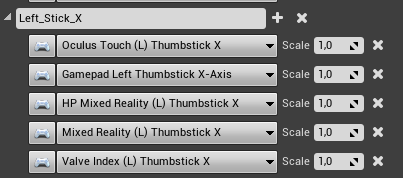
All these bindings but no, the player controller just doesn't respond to them.
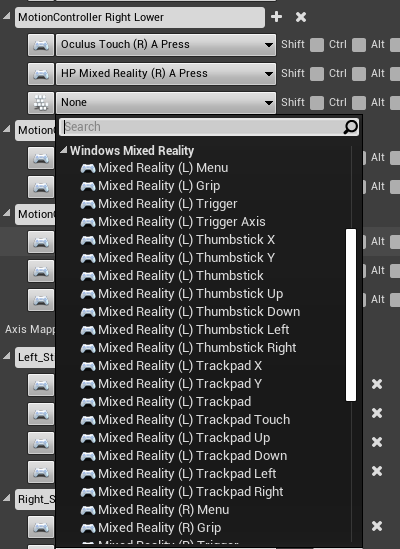
Also, I still don't know which one to pick between HP Mixed Reality and Mixed Reality
Mixed Reality worked before when HP didn't, but only HP had a Grip Axis while MR only had "Grip"
and MR didn't have the face buttons either...
 tired tree
@reef lily @humble spoke well, a vr character is kind of the entire main point behind www.vreue4.com ...
 serene ridge
tired tree
<@278464555162796032> <@175828553449996289> well, a vr character is kind of the ...
serene ridge
tired tree
<@278464555162796032> <@175828553449996289> well, a vr character is kind of the ...
...bookmarking...
🙂
I'm basically just custom spinning the same thing right now for prototyping.
and yes VR development is hard
 visual nova
Hey does anyone know if it's possible to change display device model at runtime?

I have an event set that fires when the player clips through a trigger box, and disables Display Device Model
but for some reason the model is still visible
 tribal lintel
reef lily
Damn I hate developing for VR. I just can't deal with all these vendor specific ...
tribal lintel
reef lily
Damn I hate developing for VR. I just can't deal with all these vendor specific ...
For the input, for the index specifically, this helped me, but it seems like the naming convention and vector splitting applies to more then just the index
https://github.com/ValveSoftware/steamvr_unreal_plugin/issues/142
For the WMR buttons, the HP Reverp g2 has 2 face buttons, looks like HP has a plugin with more inputs if you haven't enabled that, I will eventually get there to test this but haven't yet
https://docs.microsoft.com/en-us/windows/mixed-reality/develop/unreal/unreal-reverb-g2-controllers?tabs=all

GitHub
Using Unreal Engine 4.24.3. Currently cannot replicate any functionality for Thumbsticks on the Valve Index controllers. I've tried my best to follow the guidelines outlines in on this gith...

Learn how to use the new HP Reverb G2 Controllers in OpenXR and SteamVR for Unreal mixed reality applications.
 worthy quest
Hey, does someone know how to update the Azure Spatial Anchors SDK? I was getting this "You're receiving this email because you currently use a version of Azure Spatial Anchors that will become unsupported on 3 February 2021." before and in fact it doesn't work anymore for me.
 delicate phoenix
wheat holly
And that's exactly the problem, what if the person playing is taller than for ex...
delicate phoenix
wheat holly
And that's exactly the problem, what if the person playing is taller than for ex...
Why not scale all players to the same height?
 obsidian anchor
Has anyone managed to make a multi-player game for Oculus Quest 2 where two people can play in the same room and not run into each other?
reef lily
@tribal lintel Thanks. I'm already naming my thumbstick axii with _X and _Y, and also using the HP plugin. (I realize now that the old G1 controllers actually never had face buttons, I guess that's why non HP WMR didn't have those mappings)
@delicate phoenix it's one solution, but in VR, with every solution there's a downside. In this case, tall players would feel like their feet were in the floor, and short players would feel like walking in the air and wouldn't be able to reach items on the floor
tired tree
You can change world to meters to scale the tracked data to a character
 flat fable
Is there a better way to do this?
I want to take "right hand contents" (set when you pick up an item) and if it's a gun, call "startshooting"
 sage gulch
why does choosing a VR template for a project only allow Blueprint, not cpp native?
 cobalt jackal
hello everyone, i'm doing a vr project in eu, but since it's my first experience i'm looking for a person expert in creating "photorealistic" environments who can help me. paid.
for more info contact me
tribal lintel
sage gulch
why does choosing a VR template for a project only allow Blueprint, not cpp nati...
While there used to be CPP VR templates, as of 4.26 they are no more. Simply make a new C++ class from gamemode base and you will have a C++ project
tribal lintel
obsidian anchor
Has anyone managed to make a multi-player game for Oculus Quest 2 where two peop...
Very interesting! I'm not familiar with inside out tracking so I wouldn't know how you would set both players initial world locations and maintain their accuracy, but I do know quest 2 has bluetooth 5.0 which has around a 130 foot range, bluetooth can proximity check between 2 devices. I'd be surprised oculus didn't offer some kind of API that let's you interface with it's bluetooth.
Or maybe have the each player set a real marker down like tape on the floor, then have them stand on it to calibrate their location and start the game from there
or you could do something absolutely wacky like use the oculus cameras (from said API) to read QR codes that the players print out and tape to their shirts or something, if I had more time I'd love to go down this rabbit hole (I don't have an un-tethered headset though). Sorry if this is all useless nonsense!
tribal lintel
cobalt jackal
hello everyone, i'm doing a vr project in eu, but since it's my first experience...
job board #instructions
cobalt jackal
thank u @tribal lintel
 ember pumice
I'm trying to decide which engine version to use for my project, I'm going to use SteamVR and I will be developing on the oculus quest 2.
My options are the regular ue4 26 and the ue4 oculus branch
Does using the oculus branch have any advantages for a pcvr game?
For example would the Fixed Foveated Rendering work?
 clever iron
Maybe one of you know. I packaged my server for a build with Oculus OSS. When I run my build on my local machine it works, I get
LogOnline: Display: Oculus: FOnlineSubsystemOculus::InitWithWindowsPlatform() LogOnline: OSS: TryLoadSubsystemAndSetDefault: Loaded subsystem for module [Oculus]
When I run the build on my windows server I get
LogOnline: Display: Oculus: FOnlineSubsystemOculus::InitWithWindowsPlatform() LogOnline: Warning: Oculus: Failed to initialize the Oculus Platform SDK! Failure code: -5
And it's literally the same build. Aren't all dependencies packaged into the pak?
clever iron
Failure -5 is "ovrPlatformInitialize_UnableToVerify." Really hopin there's someone with Oculus OSS experience who knows lmao
Did you ever solve this?
sage gulch
does 4.26 "un-deprecate" some BP nodes that 4.25 had killed off or am I mistaken?
obsidian anchor
tribal lintel
Very interesting! I'm not familiar with inside out tracking so I wouldn't know h...
Super interesting! I'm definitely looking for someone who has done this so if anyone knows someone please let me know. I'll put a paid ad up on the job board soon.
 dusky moon
I'm wondering if Oculus App lab would become available for Rift developers at some point ?!
kind of disappointing how they're ignoring us 😦
wheat holly
Do we really need it though? You can already really easily run any game that supports the rift by having a download to the game. It would be nice to have it yes, as it's a bit more official. But it definitely didn't require third party software like the Quest did need to make it accessible for most users (intentionally leaving away the Oculus Link Cable here, as it was all about directly playing on your headset).
dusky moon
wheat holly
Do we really need it though? You can already really easily run any game that sup...
Yeah It's mainly helpful for the ease of access - when I want to share an early access (WIP) project I can just then easily update the build and use the same link to share it - also it's easily searchable in the oculus library
wheat holly
In that case it would definitely be nice yeah, I understand your feeling though.
 twilit vector
Hi! Does anyone have a tutorial or example on how I can make pick up items like in boneworks or alyx?
 median idol
ember pumice
For example would the Fixed Foveated Rendering work?
median idol
ember pumice
For example would the Fixed Foveated Rendering work?
Hi @ember pumice the Oculus branch has the most up to date version of the Oculus SDK which is helpful if you want to use the latest Oculus features. However it always uses a somehow dated version of UE and if you use it from the branch you will always have to maintain it updated by yourself and start it by using Virtual Studio. So it's really a compromise here. I'm mainly developing for the Quest 1 and 2 now and I'm currently using the standard UE 4.26 which already allows me to use hand-tracking and most of the recent Oculus features. As for Foveated Rendering I know that you can use it already but I'm not sure if the standard UE version allows you to tweak it as much as the oculus branch. Hope this information helps!
Hello everyone crazy VR Unreal developer here. Has anyone dealt with Ambisonic audio in 360 videos within Unreal? Having trouble working with it and it seems that having to split audio and video just to have true Spatial Audio seems unoptimized. If anyone has had any experience with it please reply
reef lily
@median idol you ought to ask in #audio. Several ue4 audio devs actively hang out and respond there 🙂
median idol
hey @reef lily thank you! I had already asked there too.
serene ridge
sage gulch
why does choosing a VR template for a project only allow Blueprint, not cpp nati...
I made a port of the VR blueprint template into C++ a while back. It was UE 4.16 but might be helpful to you anyways if you're trying to convert anything in the template to code. I don't think the blueprint template has really changed in all this time either.
GitHub
Virtual Reality sample converted from Blueprint to C++ project - sclark39/UE-VR-Code-Sample
I don't think they've ever had an official C++ version of the VR template though.
sage gulch
hmm interesting, thanks 🙂
I ended up gleaning some insight when looking at the config files.. I'm not exactly sure yet but I think I gained some cruft in there from a combination of updating the project repeatedly and maybe editor bugs that aren't reading and writing the config file properly
ember pumice
@serene ridge Is that the exact same template in c++ ?
or do you have some extra stuff
serene ridge
ember pumice
<@!105789297554149376> Is that the exact same template in c++ ?
The only extra thing was robo recall style teleport (hold joystick to initiate, release to teleport)
It was also only the full locomotion side of the template
Iirc
But the teleport mechanics itself was still the same as the template
 jagged mesa
Hello.
Since googlevr is no longer supported for IOS, whats the best way to transfer googlevr project to IOS?
tribal lintel
jagged mesa
Hello.
Since googlevr is no longer supported for IOS, whats the best way to tran...
solutions in here look promising, ignore the unity part and try the new cardboard sdk plugin
https://stackoverflow.com/questions/64051081/ios-14-google-cardboard-view-is-broken

Stack Overflow
On all apps that I can find that use Cardboard in iOS 14 (iPhone), the VR view is insanely bugged. The camera swings wildly all over the place.
Here is a video example: https://www.reddit.com/r/you...
jagged mesa
tribal lintel
solutions in here look promising, ignore the unity part and try the new cardboar...
Thanks mate will look into that
 paper epoch
hey guys need some help. I am building for quest 2 and for some reaason emission is not working in the build at all. I have bloom disabled and it looks fine when I test in PC
 viscid aurora
hi , can anyone help , i want to grab an object and rotate in vr , i tried to attach an object to motion controller and then disable input from player controller and add rotation to object through axis value of thumb-stick but it work but i got stuck at drop part , i am not able to detach or drop an object because i need when user press grip button and while pressing it will be able to rotate through thumbstick and as soon as user release that grip key it should drop the object .
thanks
paper epoch
viscid aurora
hi , can anyone help , i want to grab an object and rotate in vr , i tried to at...
disabling input will stop input altogether
viscid aurora
paper epoch
disabling input will stop input altogether
got it i didn't have to disable player input just have to enable object input on pick ,thanks
does anyone have documentation or tutorial or something about how to add voice chat in multiplayer for quest
paper epoch
viscid aurora
does anyone have documentation or tutorial or something about how to add voice c...
well the principle should be the same
 idle osprey
Does anyone know how to fix the intellisense in VSCode for 4.26.1? It seems to have changed again...
 proper anvil
hey how's it going? I have no problem getting motion controller transform from a pawn, but I keep getting null transforms from Actors, even after calling Enable Input and enable tracking etc.
 past tiger
Anyone else getting low frame rates in the editor when using the OpenXR plugin with 4.26.1?
 hallow knoll
proper anvil
hey how's it going? I have no problem getting motion controller transform from a...
hallow knoll
proper anvil
hey how's it going? I have no problem getting motion controller transform from a...
Have you set the MotionSource of that MotionController component? None of those functions are required
hallow knoll
past tiger
Anyone else getting low frame rates in the editor when using the OpenXR plugin w...
Yeah we're aware of this - the only workaround I know of is console command "t.maxfps 0"
past tiger
Awesome! Thank you @hallow knoll
 sturdy coral
@hallow knoll @past tiger I guess it is coming from:
OpenXRHMD/Private/OpenXRHMD.cpp
41:#define OPENXR_PAUSED_IDLE_FPS 10```
?Yes, it's on Left at the moment
 fading hornet
@sonic lake Hey! This is Sara from youtube. Where is a good place to chat?
 sonic lake
@fading hornet Direct Message
 blissful bear
Impressive. Far from real-time at the moment though.
https://www.youtube.com/watch?v=MbZ0ld1ShFo

❤️ Check out Perceptilabs and sign up for a free demo here: https://www.perceptilabs.com/papers
📝 The paper "Constraining Dense Hand Surface Tracking with Elasticity" is available here:
https://research.fb.com/publications/constraining-dense-hand-surface-tracking-with-elasticity/
🙏 We would like to thank our generous Patreon supporters who mak...
 ashen shadow
Has anybody had trouble where a texture looks fine in one eye in VR, but just a "ghost" mesh in the other eye? I have a character created that looks fine on the screen and in the left eye, but the right eye the characters skin (only) is white. All other textures on the character (eyes, clothes and hair) look fine.
 viscid moat
ashen shadow
Has anybody had trouble where a texture looks fine in one eye in VR, but just a ...
viscid moat
ashen shadow
Has anybody had trouble where a texture looks fine in one eye in VR, but just a ...
Yes. I have recently noticed this in 4.26 I believe. Toggle instanced stereo on or off and it should take care of it. Seems like a bug though.
ashen shadow
Ok, thanks @viscid moat . I'll give that a try. I've never done that, I assume it's something I can Google quick? 😃
past tiger
You can search for it in project settings
ashen shadow
past tiger
You can search for it in project settings
Fantastic. Thank you! I really appreciate the help.
past tiger
Is there any reason that the OpenXR plugin would affect shadow quality? Shadows on my dynamic objects are very pixelated when I enable the OpenXR plugin
ashen shadow
past tiger
Is there any reason that the OpenXR plugin would affect shadow quality? Shadows ...
I just checked. I do not see that in the project I am working on.
past tiger
Hmmm... Thanks for checking @ashen shadow
ashen shadow
past tiger
Hmmm... Thanks for checking <@!689904725675606042>
I'm in 4.26.1 if that makes a difference
past tiger
Same here
I have non-default settings for shadow quality, but why OpenXR would affect it at all seems strange
ashen shadow
past tiger
Same here
Gotcha, not sure then. Agree, I wouldn't think it would make a difference. But honestly, I'm just coming over to Unreal from Unity so I'm still learning a lot
past tiger
Then welcome to Unreal 

ashen shadow
Thanks!
past tiger
The OpenXR plugin is fairly new, so I guess they still have things to work out with it
I was hoping it would be ready because it will make VR development much better
ashen shadow
Word
Just to close the loop: I toggled instanced stereo on and off and it did work. Thank you @past tiger and @viscid moat ! 👍
viscid moat
ashen shadow
Just to close the loop: I toggled instanced stereo on and off and it did work. T...
If you want to put that in as a bug ticket to Epic, that would help. I've put in quite a bit so I don't want to annoy them 😉
ashen shadow
viscid moat
If you want to put that in as a bug ticket to Epic, that would help. I've put in...
Ok, can do.
ashen shadow
viscid moat
https://epicsupport.force.com/unrealengine/s/?language=en_US
Thanks
ashen shadow
ashen shadow
Thanks
Submitted
ember pumice
Is there a difference between forward and deferred rendering for a simple pcvr game?
If I can get my target fps in deferred rendering should I stick with it?
clever iron
Anyone know why when I try and join a moderated session for oculus, it finds the room and joins that, but is not able to return an address to connect to for the session?
Warning: GetAddressInfo failed to resolve host with error SE_HOST_NOT_FOUND
paper epoch
idle osprey
Does anyone know how to fix the intellisense in VSCode for 4.26.1? It seems to ...
VS intellisense nver really worked well for me. I use visual assist
idle osprey
I'm on a Mac most of the time... trying to find an editor that works. So far, I'm starting to think I'm better off with an app like notepad.
cobalt jackal
hello here, anyone work with oculus quest ? i m doing apk and i m getting error (i m a beginner)
blissful bear
ember pumice
If I can get my target fps in deferred rendering should I stick with it?
Try forward rendering. You will be able to use MSAA anti-aliasing which looks WAY better in vr than any of the deferred renderer anti-aliasing options. You lose some rendering features though. I always use forward render for vr.
median idol
Hey people anyone has had a problem where the floor textures are very pixelated right beneath your feet but perfectly fine just a meter away? No matter how big the texture is? Even tried using Quixel default materials imported in 8K and the result is always the same... don't get it...
this happens in my Oculus Quest
blissful bear
I have a similar problem in that my textures on Quest 2 don't use bilinear sampling for the top mipmap, instead they are point sampled. I don't know how to fix it - using 4.22. Perhaps you are seeing the same thing?
proper anvil
is there a way to feed pitch and roll as input for reset orientation and position, without modifing engine source? https://docs.unrealengine.com/en-US/BlueprintAPI/Input/HeadMountedDisplay/ResetOrientationandPosition/index.html#:~:text=Resets orientation by setting roll,'%20(for%20positional%20tracking).&text=(in)%20the%20desired%20yaw%20to%20be%20set%20after%20orientation%20reset.
Reset Orientation and Position
 mossy nest
Excited to announce another XR Bootcamp Master Class Pro Event Series over the next couple of days on #Locomotion & #Avatars. We will be live on various platforms including zoom, discord and #clubhouse - links below:
https://eventbrite.com/e/behind-the-scenes-at-microsoft-research-vr-locomotion-avatars-tickets-137404176591?aff=
serene ridge
Sounds good. I'll be there.
 delicate isle
Has anyone managed to get an OpenXR enabled project working on an Oculus Quest(2) using 4.26.1? The release notes say that Quest OpenXR support has been added but no matter what I do, I end up with a black screen on the headset. I've made a blank project with a super simple pawn to test this out. The Project was built using Android platform 29, NDK 21.3, Vulkan and armv8-a. Plugins used were the OpenXR, OpenXRHandtracking and OculusOpenXR plugins with the regular OculusVR plugin disabled.
tribal lintel
mossy nest
Excited to announce another XR Bootcamp Master Class Pro Event Series over the n...
Hey you should post this to #events ,
Cheers!
past tiger
I wonder if we will be getting aim and grip data from OpenXR. It seems like Unity has it?
https://docs.microsoft.com/en-us/windows/mixed-reality/develop/unity/openxr-supported-features#aim-and-grip-poses
Discover the features OpenXR supports for mixed reality development in Unity.
 willow trail
This is driving me nuts, this used to work fine in 4.25, but after the update, the grip state and type seem to reset itself to open/free, and I'm not sure why... Anyone is familiar with what kind of change could have caused that?
I'm trying to debug this but as far as I know there's no way to watch when a value is being changed? If I print type and state right after updating it has been changed successfully, but on eventTick right afterwards it seems to have reverted.
(This is all in the SteamVR sample project by the way)
willow trail
Okay I ended up figuring out that I needed to update the BP_MotionController's own "type" and "state" instead of the animBP directly
tired tree
@past tiger you can set which mode the motion controllers track to
or directly query against it, its one of the "source types"
by default everything is in grip (palm) which means that you don't have to re-align hands per controller anymore when using openXR in ue4
past tiger
@tired tree Interesting!
I am using the "Right" MotionSource for the right controller, and it is pointing basically up. (Which isn't what I would expect for either Aim or Grip)
R_MotionController->MotionSource = FXRMotionControllerBase::RightHandSourceId;
How would I access a different source type?
tired tree
with which controller?
I believe if I remember correctly that Right/Left default to grip pose
and grip is supposed to be your real life palm
so depending on what controller you are holding, the pitch would differ
however when laying out something like a mesh hand, aligning it to one controller would naturally align it to all then
as it is supposed to be the actual location of your physical palm
tired tree
the source is a name
those ID ones are just some old hardcoded ones
also it would make sense for rift to have a pitch increase on it in palm pose
past tiger
Thanks! I was able to get the right aim using FName("RightAim")
The aim is pointing forward as expected, but I don't understand why the grip would be pointing up
tired tree
is it straight up, or about 60 degrees which is where I would expect it?
with how the hand holds those controllers
past tiger
It's basically pointing along the axis of the grip, like if you were holding a broomstick
Actually, I might understand now. It is pointing along the -Z axis in both cases as defined in the OpenXR specs
I finally figured out what the "tube formed by your non-thumb fingers" meant 😄
 alpine kiln
Well, we submitted to the Oculus App Lab yesterday, but just noticed that it can take 4-5 weeks for approval... Wow. It's very much a curated garden, but not far from a walled garden. SideQuest maybe the best hope for most Oculus VR indie releases as the App Lab is more locked down then they originally explained. Out of curiosity, who else has submitted apps for Quest, how long did you wait, or are you still in a holding pattern?
paper epoch
willow trail
This is driving me nuts, this used to work fine in 4.25, but after the update, t...
dont use cast each time. Save the value in a variable and take values from there
delicate isle
delicate isle
Has anyone managed to get an OpenXR enabled project working on an Oculus Quest(2...
If anyone runs into this issue, I managed to solve it by calling EnableHMD in my pawn blueprint. It seems as though this function isn't getting called automatically on the Quest in OpenXR - this got me past the black screen . I had another crash afterwards but I think its unrelated since it happens a few seconds after the scene starts. Unfortunately I can't debug it since I can't get the Android Studio debugger working and I think stacktraces have been nerfed on the Quest 2 due to XOM limitations.
 rustic cargo
@alpine kiln I'll be submitting in a few days - the timeframe I saw was "at least 2 weeks" , but I imagine there is a big backlog from launch currently
 pliant panther
Hi.
We have a big issue with Augmented Reality in UE4, 4.25.4. When the state of the AR Session is "Fatal error" I cannot continue handling It, It has no effect if I stop, pause or start the AR Session again, It simply remains in "Fatal error" and the screen goes black. This state appears in the following circumstances, as I have observed:
- Put the application in the background and return to the application
- Session is stopped manually and AR session start manually again
- The mobile goes into sleep mode (either naturally or forced) and exits sleep mode
These tests have been carried out on Android.
Our game is based on Augmented Reality Unreal Template, so I am using ARKit and ARCore.
When I print the string that has additional information it tells me that I should login AR again, it matches what the Unreal documentation says, but it doesn't work.
How can we solve It?
 twin elm
Hey all!
I had created a new project with a blank template in c++,
then I enable AR Utilities, Google ARCore, Google ARCore Services Plugins,
then when I started my app on the android device, it's not starting camera it's just all black screen.
Do I have to enable any other plugins or something? does anyone know how to fix it?
pliant panther
twin elm
I had created a new project with a blank template in c++,
then I enable AR Utili...
I have similar problems with ARCore like I posted just before you, which UE4 version are you using? Have you request Android Camera Permission?
twin elm
pliant panther
I have similar problems with ARCore like I posted just before you, which UE4 ver...
Hey!
I am using ue 4.26.1
and no, I didn't request android camera permission.
pliant panther
I think you need request Android Camera permission, then Start AR Session
I am having serious problems with ARCore, I am using blueprints and when I Pause/Start AR Session, AR Session status is FATAL ERROR and you can't do anything else
twin elm
pliant panther
I think you need request Android Camera permission, then Start AR Session
can you link me to any documentation on how to get camera permission?
pliant panther
twin elm
can you link me to any documentation on how to get camera permission?
https://answers.unrealengine.com/questions/896712/how-to-require-android-permission-in-c.html I am not using C++, but it seems to be useful
 tawny halo
Hi, I started integrating PSO cache into my oculus quest build, it wouldn't work until the changes from this thread https://forums.unrealengine.com/development-discussion/android-development/1707967-after-migration-ue4-22-4-24-pso-cache-loading-running-is-not-working. Right now it compiles the shaders when starting the game and the hitches are gone but some materials aren't shown at all and some are only shown after some time. I'm working on a oculust quest 4.25 engine. I'm building for android(ASTC) and uploading the build on oculus quest 1. Has anyone encountered this problem before or maybe has any idea what could cause it or how to debug it?
Unreal Engine Forums
Hi guys!
We are having some difficulties with PSO caching in UE4.24.1.
We had everything fine about PSO caching with our game in UE 4.22 but after migration to 4.24 we can't manage why the PSO cache is not running in the build.
We have stablepc.csv file already generated and it is already succesfully packaged to the project
twin elm
pliant panther
https://answers.unrealengine.com/questions/896712/how-to-require-android-permiss...
Thanks, David I was able to solve the issue,
The Issue was that I was trying to scan a png file, so the session config was failing.
thanks again for the time and help,
twin elm
pliant panther
I am having serious problems with ARCore, I am using blueprints and when I Pause...
can you give some more info
like on what level you are trying to pause/start AR Session like on level Blueprint or Game Mode or Player Controller or Pawn class and what is the error code?
 restive loom
Hey, a little bit of off-topic. What VR headset would you recommend? Cheap and good for development
pliant panther
twin elm
like on what level you are trying to pause/start AR Session like on level Bluepr...
I create Unreal AR Template with blueprints, in 4.25.4, I build for Android, and when I start AR session everything is OK, but if I pause or stop session and Start AR Session again, or put the application in the background and return to the application, the state of the AR Session is "Fatal error" I cannot continue handling It, It has no effect if I stop, pause or start the AR Session again, It simply remains in "Fatal error" and the screen goes black
twin elm
pliant panther
I create Unreal AR Template with blueprints, in 4.25.4, I build for Android, and...
Ok,
I will let you know if I find something out about it.
restive loom
So what VR headsets do you use?
twin elm
restive loom
So what VR headsets do you use?
oculus rift s
restive loom
Okay, good, thanks!
wheat holly
restive loom
Hey, a little bit of off-topic. What VR headset would you recommend? Cheap and g...
Nothing off-topic about that if you ask me. It depends a bit IMO on where you want to release your game on, if you plan on releasing for Quest then you definitely need a Quest, same concept for PC. Ideally you would have all headsets you want to support, but that usually ends up being a bit expensive 😅
And of course depending on if it’s singleplayer or multiplayer. You can’t properly test a MP game with 1 headset.
 frigid kite
Just dipping my toes back in to UE vr dev, considering to finally start porting my Unity project. I noticed that OpenXR is now supported, but disabling SteamVR (and Oculus) and only leaving the OpenXR plugin enabled leaves me with a greyed out VR preview button. What am I missing?
pliant panther
pliant panther
Hi.
We have a big issue with Augmented Reality in UE4, 4.25.4. When the state of...
can someone help me? 😅
idle osprey
So...I'm stuck and I don't know where to go from here. I write apps for the Quest. I develop (mostly) on a Mac. Before you say "Mac's can't do VR!" let me point out again, I'm developing for the QUEST. Up thru 4.25.4, I didn't have any issues I couldn't work around. VSCode worked fine as an editor for C++, and Blueprint VR apps went on to the Quest, no problem. But with the release of 4.26.x, the VR Template is broken because the SteamVR Chaperone is no longer available. (see picture - left is 4.25.4, right is 4.26.1). Also, in 4.26.1, VSCode is once again broken and I can't get it to properly parse headers. Even worse, the code generation for the VSCode templates is calling cl.exe which should be clang on Mac. I don't know where to go from here -- I'm starting to feel like I am going to have to abandon Unreal if they're not going to support Macs anymore. I've submitted a bug related to the Chaperone issue, but it's been more than a week and it hasn't ended up on the list.
past tiger
I doubt that the SteamVR chaperone is needed for the Quest. You can just delete those functions and remove the references to them from the Event Graph. (Make sure to link the node preceding them to the node following them.)
sturdy coral
@idle osprey I think steamvr chaperone won't be loaded if the steamvr plugin isn't loaded
Maybe the difference is 4.26 went to openxr at higher priority than steamvr
idle osprey
sturdy coral
<@183445035696652288> I think steamvr chaperone won't be loaded if the steamvr p...
It's loaded. But it no longer shows up in the component list, nor can I find it to add it anymore.
idle osprey
past tiger
I doubt that the SteamVR chaperone is needed for the Quest. You can just delete ...
It isn't. And I've tried. I've ripped out the entire function. Unfortunately, it still won't compile due to another Event error elsewhere in the BP.
...looking that up again to refresh my memory on what it's called.
sturdy coral
@idle osprey in window->developer tools add the output log, and search its filter for steamvr and see what all shows up there
idle osprey
This one... OnComponentHit doesn't seem to exist, either.
past tiger
I see that as just a warning when SteamVR is disabled. That is just to make the controller rumble when touching something. You could remove that, or replace it with OnComponentHit of something else, like the HandMesh?
sturdy coral
seems just your actor lost some of its components, I'm not sure why you can't find chaperone one in the search list, unless the plugin isn't added
idle osprey
Ok...so I've just created a brand new VR_Vanilla blueprint app.
sturdy coral
that is strange, unless they maybe ifdef'ed it out for mac on 4.26
idle osprey
That's what I"m afraid has happened.
Oculus is already #ifdeffed out.
so even tho I have the plugins enabled, I can't get to the Oculus nodes in 4.25.x. Now I can't get to the SteamVR ones. I don't 'need' them -- I mean, I will later if I want to take advantage of Oculus specific stuff like Avatar or Entitlements. But a BP VR app was working just fine on the Quest. Now I can't work with it in 4.26.
sturdy coral
#define STEAMVR_SUPPORTED_PLATFORMS (PLATFORM_MAC || (PLATFORM_LINUX && PLATFORM_CPU_X86_FAMILY && PLATFORM_64BITS) || (PLATFORM_WINDOWS && WINVER > 0x0502))
mac is still listed in there
idle osprey
Anyway, so I figured...whatever. I'll just make my own template. And XCode is the worst editor in the world. VSCode worked ok in 4.25, with some fixes. But they broke something new in 4.26.1. 😱
sturdy coral
usually things are set up so that even if the platform isn't supported, all the classes are still there for blueprints and stuff, just the implementation isn't defined, based on that STEAMVR_SUPPORTED_PLATFORMS variable, and probably something similar for oculus
something deeper is going wrong but I don't know where you should look
 whole herald
I am having a problem with the VR Expansion Plugin and multiplayer. When a client connects to the listen server it does not have any controller tracking. I am using the Plugins VRCharacter as the parent class of my pawn. is there something I am missing like designating the second pawn as belonging to the second player?
 pine anchor
can someone please teach me ue4 vr game dev and take me under their mentorship because i have some good dream ideas for games i want to make in the future
 lone oar
If I aim to always have atleast 45fps while developing on a gtx 1070 does that mean I can reliable expect it will run at 90+ on a 3070/3080 class gpu?
alpine kiln
@rustic cargo, good luck with the submission. Hopefully it's in the time frame you mentioned, and the FAQ on their site is over estimating how long it takes.
alpine kiln
restive loom
So what VR headsets do you use?
What are you looking to develop? We test with Vive, Rift, and both Quests. The Quest is currently outselling everything else, and the mobility of it is nice. So we do both PC and Mobile VR.
 cursive light
did anyone ever find a way to make the climb tutorial work with a character instead of a pawn
alpine kiln
whole herald
I am having a problem with the VR Expansion Plugin and multiplayer. When a clien...
I would recommend joining up on their Discord channel and asking over there. The dev is very active, and may be able to help you with this.
whole herald
@alpine kiln ok will do
tribal lintel
pliant panther
can someone help me? 😅
Sorry I can't be of help, this seems like a question for pros and staff on the unreal forums and answer hub, you should definitely try there
 distant yoke
is RTX + VR slow? my headset becomes extremely unresponsive and choppy when i activate RTX
could it be because i have an old vive cosmos?
it runs fine without rtx
 sharp thunder
Hi, im having trouble with level streaming since everytime i load or unload a sub level, i take a hit in performance. I tried reducing the amount of lvl streaming volumes, but it keeps happening. Im thinking about whats the maximum objects you can load/unload without taking a hit, but cant find any info. Any guidelines on performance?is it better to load a big single chunk or smaller chunks with multiple volumes?
Right now i have 2k actors on scene, and i can chop em in many ways but the thing is, that if i use level streaming volumes/blueprints to load for example 200 actors at a time, i get hit in performance
so any recomendations would be appreciated
serene ridge
distant yoke
is RTX + VR slow? my headset becomes extremely unresponsive and choppy when i ac...
Do you mean RTX Voice? I have run into a lot of issues with this. Whenever doing VR dev I often have to kill the rtx voice process because it goes crazy.
I believe it has to do with UE not having enough VRAM available and needing to do too much swapping. Something along those lines. Other programs seem to be able to trigger the same issue in demanding games, but RTX voice is especially bad.
serene ridge
sharp thunder
so any recomendations would be appreciated
Garbage collection! There are some console variables relevant to this we found during development that greatly reduced streaming related hitches...
You can look in to actor clustering / blueprint clustering...
Trying to find the specific bad one
s.forceGCAfterLevelStreamedOut
There it is. Warning: if the level isn't garbage collected and you show it again too soon, it will be like a visibility toggled level (actors will maintain state)
The other thing you can do is not ever unload the levels fully, only hide/show them. That is a lot faster to stream.
But your blueprint/scripting needs to be set up properly to handle that
sharp thunder
memory isnt an issue right now, but even hiding and showing causes the hitch
serene ridge
Yep. It's probably the GC. Other than that, if you've got a lot of stuff happening on BeginPlay, (like actors spawning other actors), it can trigger big hitches
serene ridge
Streaming is hard! Good luck.
sharp thunder
yeah, i've tried many ways and it keeps happening
serene ridge
There were some other console commands similar to that to change behavior while streaming but I can't remember what they were :/
When we got close to shipping our game, I did a search through engine source to find every console variable and made a big spreadsheet of them all to audit.
UE4.24 had 2910 variables.
and in that we found 10-20 hugely important ones that were not set well by default
sharp thunder
xD
sharp thunder
serene ridge
`s.forceGCAfterLevelStreamedOut`
do you recomend any setting value for that one?
serene ridge
I recommend setting it to 0, what we found was that you don't want to ever force GC unless absolutely necessary because GC = hitch
sharp thunder
okok perfect
distant yoke
serene ridge
Do you mean RTX Voice? I have run into a lot of issues with this. Whenever doing...
i meant raytracing
serene ridge
Ah, sorry, I've got no experience with that. I wouldn't be surprised at all if it was expensive though.
distant yoke
yeah me too, but didnt expect it to be that expensive ^_^
serene ridge
Haha yeah... Question is if it is running twice or if it can do some instanced stereo type of thing
distant yoke
anyone have an old vive cosmos? UE4.25.4 doesnt detect it's input controller and the Valve SDK ended at 4.23
GitHub
SteamVR Input Unreal Plugin - Documentation at: https://github.com/ValveSoftware/steamvr_unreal_plugin/wiki Sample project (UE4.15-4.23): https://github.com/ValveSoftware/steamvr_unreal_pl...
distant yoke
serene ridge
Haha yeah... Question is if it is running twice or if it can do some instanced s...
i think it renders twice. fps becomes fpm
serene ridge
o.o
distant yoke
frames per minutes
serene ridge
Yikes
distant yoke
xD
serene ridge
Yeah, stay away then! VR aint ready for that yet 😛
distant yoke
its okay ill just get 10 3090Tis
sharp thunder
hey, @serene ridge thanks a lot mate, I owe you one. I've tweaked a few parameters and, hitches are now affordable :D. Also, i found this https://peterleontev.com/blog/level_streaming_optimization/
Or why am I experiencing hitches during the game?
i tweaked the following:
s.ContinuouslyIncrementalGCWhileLevelsPendingPurge 0
s.ForceGCAfterLevelStreamedOut 0
s.PriorityLevelStreamingActorsUpdateExtraTime 0
s.LevelStreamingActorsUpdateTimeLimit 0
this way, levels dont wait to end till fully loaded and i can slice the content in small packs
serene ridge
Awesome. That first one is the other one I was thinking of but couldn't remember
 marsh ether
What seems like a silly question, but I can't seem to find the answer.
I'm using the default VR Template in Unreal 4.25; working in the MotionController Map.
I'm importing some test geometry from Blender.
How to I make the new geometry "walkable" or really "teleportable".
I'll keep googling, but any hints or suggestions would be great.
serene ridge
The VR template relies on the nav mesh. You need to make sure that the geo you add is static mobility I think, and you will need to make sure the nav mesh is covering it (might need to rebuild paths)
You can press P in the viewport to show the nav mesh I believe
Also the collision of the mesh needs to be set up correctly, a lot of the time when you import the auto-generated collision for the mesh is pretty bad
@marsh ether ^
hope that helps
marsh ether
Ah - that does.
I did try to look for NavMesh but I don't know where to look.
It's a good clue, tho.
I'm trying to move over from Unity so there are lots of hangups that I have because I just don't know where things are in the engine.
Thanks!
Poo... I'll have to rethink this.
I'm getting navigation on the light-blocker, not the interior...
Oh dear...
https://gyazo.com/7256cdcc1fd93a9c51749b4a76c6764f

I'll keep playing.
serene ridge
Just need to turn off collision on your light blocker
There's also a collision view mode which is helpful for diagnosing nav issues
marsh ether
It seems that the nav mesh doesn't like interior spaces ... and that was one piece of welded geometry.
I tried separating the "floor" as a separate piece...
And this helped a little...
But recast is doing something far too clever, and there's no actual geometry where it drew the new navmesh...
Humph!

I probably need to back off and learn what the heck is going on with the navigation system.
 upbeat marsh
Anyone knows why render texture painting doesn't show up on quest 2?
I have a system to draw on a paper. Works fine in editor, but doesn't show the drawing texture on the quest apk.
Maybe it has to do with the fact I'm creating render target on the bp?
Maybe it had to do with render texture format?
Tried turning on use full precision on material, tried changing formats. Nothing works.
Please help :(
 real needle
@upbeat marsh does it work in es 3.1 preview?
 trail shale
What's the deal with audio attenuation on Steam VR? It just seems to mute any sound I try to apply it to, when I use playsound 2d, it always works
 eager pine
anyone managed to use the htc vive without the headset?
I've managed to use the trackers without the headset, but my problem occurs when im trying to edit the vr settings to null, where the config settings are missing. Is it required to connect the headset atleast once to make it work?
marsh ether
Any ideas why the default MotionController won't have any range on the Teleport when using new geometry and a new navmesh?
I have reduced the geometry to a minimum and have a new contained navmesh this "kindov" works:
It still doesn't conform to what I'd call the flat planes of walkable geometry:
https://gyazo.com/c1a1b3777e2460e9ec2a9c32c142dcb1

But when I play and try to use the motion controllers, the length is essentially zero:
https://gyazo.com/ca7948c621386e2429a0f690309030a0

As a guess, I removed all of the geometry except the walking plane ...
...
... and it worked.
So why does it fail if there's a roof?
Success:
https://gyazo.com/1edb86e51605ef05423d9389e556585e

Fail:
 sage gulch
can you toggle VR mode? I see the checkbox in Preferences to start up the game in VR or not, and if I build with that enabled but unplug the headset before launching, it plays fine.. but obviously unplugging it is dumb
don't see a node for it
 feral bloom
Does dlss work ok with forwardshading?
 night kernel
can any one help me make Third Person character work with vr ue 4.26
sage gulch
try remapping the inputs
sage gulch
any suggestions on improving audio performance?
builds push 72fps but the audio still warbles and cuts out over link
tribal lintel
When exiting VR preview, steamVR will "hang", the last image is stuck in the last HMD orientation, only going transparent when looking away. I use desktop+ to keep my headset on, and I've found the only solution is to either kill the game from steamVR overlay (picking controller up to go through this process each time is unrealsonable), or I just turn my head far to the side before hitting escape, but the image still floats around the display. Is there easy way to kill the VR preview from desktop?
 tough silo
Okay this should be a simple problem. On UE 4.25. My game outputs its audio through my PC speakers, not through my Oculus headset. This occurs both in editor as well as a packaged build. Beat Saber, and other Oculus store games, plays in the Oculus headset.
Where do I set the audio to come through the Oculus headset?
https://developer.oculus.com/documentation/unreal/unreal-audio/ Says it should be automatic when you use the Oculus plug-in... but... no.
tough silo
... upgrading to Unreal Engine 4.26.1 fixed it... but other stuff is broken in 4.26.1 so I'm still curious about a 4.25 fix.
 pine zinc
feral bloom
Does dlss work ok with forwardshading?
pine zinc
feral bloom
Does dlss work ok with forwardshading?
Yes and it works very well
pliant panther
tribal lintel
Sorry I can't be of help, this seems like a question for pros and staff on the u...
thank you! Yes, I tried there, but I didn't have an answer yet
upbeat marsh
Anyone developed a drawing system for oculus quest?
I'm using a system similar to this :
https://youtu.be/DBWzGgJEi1Y
It works great in editor, but the color doesn't show up on my canvas when deployed to the quest (apk, standalone).
It may have to do with creating render target in real time and not setting it to the right format, but I tried changing and still, nothing...
My canvas texture is a png from photoshop. Tried tga as well.
Again, works well in editor /rift mode, not on deployed to quest.
Anyone knows?

New VR Tutorial. This time is about playing with Materials and create a canvas where you can paint with pencils of different colours!
You can find the project files here:
https://drive.google.com/drive/folders/1hiWWnI_S7TxVaJJ5XgxP9GIWHnpuD5fx?usp=sharing
This fantastic example shows you how to use different operations on materials, change p...
 hoary latch
Anyone have any experience with this error: "LogHMD: Error: ovrp_BeginFrame4 41597 failed (-1000)" ? It happens about 10-15 seconds into starting a VR preview. On version 4.24.3. Causes a freeze with an hour glass in the bottom right. Picks up after 20-30 seconds and doesn't occur again.
trail shale
Why does my audio not play when I use spawnsound or attach, but it always plays when I use 2D sound - I've widened the range on attenuation but the sound seems to change whenever I am in VR, so I'm assuming Steam VR is affecting it somehow ?
 compact kayak
I'm trying to implement Oculus Achievements.
I've set up the achievements on Oculus' Developer Dashboard and set up the blueprints to Write Achievement Progress (see attached image)
I've also added the following to DefaultEngine.ini
[OnlineSubsystem]
DefaultPlatformService=Oculus
[OnlineSubsystemOculus]
bEnabled=true
OculusAppId=xxxxxxxxx
The entitlement check works but for some reason the achievements don't despite the code executing through the success pin (the play sound executes - see attached image)
I've tried both launching it through the editor and installing it through the Developer Dashboard release channels.
Has anyone experienced a similar issue? Any ideas on how to fix it?
Btw, I'm using version 4.23
 idle heron
Hello. I was wondering if anyone has been able to get the new GetARTexture node to work with ARCore and UE 4.26. I'm trying to use it to set the texture in a material but all I get is a black texture.
sturdy coral
@trail shale you are using audio plugins or stock?
dusky moon
Any1 knows if DLSS 2.0 plugin works with VR ?! I have seen some ppl post the question on forum but not sure if any1 tested it yet
pine zinc
dusky moon
Any1 knows if DLSS 2.0 plugin works with VR ?! I have seen some ppl post the que...
Yes it works very well and can even enable raytracing w/ reflections to run at a comfortable fps
dusky moon
pine zinc
Yes it works very well and can even enable raytracing w/ reflections to run at a...
Oh wow I'm curious to test - cuz they actually weren't confident to announce that it officially supports VR..
pine zinc
Go ahead and try it for yourself, my 3090 was getting 6ms frames in ultra performance with a ton of ray traced reflections
Although i had a bluriness artifact in half of one eye
frigid kite
Very interesting 🤔 How well does the new TAA hold up in VR? Is it an option to go deferred, or is everyone still sticking to forward for the time being?
pine zinc
TAA is now outdated with DLSS
 thin coral
Quick question on Forward Shading...
I enabled it, built the new shaders, and everything is pitch black. If I disable my FogAtmosphere, a single frame is rendered. Now all I see is that frame until I re-enable FogAtmosphere and re-disable it... rendering another solitary frame. Anyone experienced something similar?
 bitter temple
are there any good resources for working with VR in UE4? I've found a handful of not-horrible tutorials but there doesn't seem to be a goldmine of information out there.
sonic lake
@bitter temple beside the official documentation and the VR template, which you can study/reverse engineer, there are few videos on YouTube you can watch. A VR introduction from Epic, the channels of DownToCode, CodeLikeMe, Matthew Palaje and your truly if you like (Marco Ghislanzoni). M72TheLaw is Mordentral's channel with updates on the VR Expansion Plugin.
There is also the book by Mitch McCaffrey: Unreal Engine VR Cookbook: Developing Virtual Reality with UE4
This is another book by I haven't read it: Unreal Engine 4 Virtual Reality Projects: Build immersive, real-world VR applications using UE4, C++, and Unreal Blueprints
bitter temple
that second book looks interesting
the first one does too but I am just wondering if it's dated already
I think I'm going to purchase the second one
It seems like it is a good fit for where I'm at
I will let you know if I like it
Thanks Marco
The issue I have with a lot of tutorials is they tell you what to do, but not WHY
Give a man a fish, he eats for a day. Teach a man to fish, he eats for a lifetime
sonic lake
@bitter temple tutorials are necessarily a trade off between content and duration, otherwise they would be too long for the media. I do my best to explain the why in mine (see for example my tut on room scale snap rotation) but from the statistics I can see that most people tend to skip that part and jump directly to the how. So you are one of a kind.
trail shale
sturdy coral
<@!273265779175194624> you are using audio plugins or stock?
I don't remember using any audio plugins - but what should I look for if that's the case
sturdy coral
Look in plugins for audio plugins, and audio setting for same
bitter temple
Good tutorials are hard to make. I recall seeing some of yours and didn't think I had any complaints
trail shale
sturdy coral
Look in plugins for audio plugins, and audio setting for same
Is this the problem? Spatialization seems pretty gdamn important.
sturdy coral
@trail shale You need to turn them off to rule them out as the problem
trail shale
ah okay
sturdy coral
First do a basic project and find the simplest way you can reproduce your issue by gradually turning on the same features and config settings and plugins
trail shale
that's a good idea, I'll report back with my findings
 solid haven
Is anyone having trouble when trying to launch a project on Oculus Quest 2? I keep getting this error, even on a new project, version 4.26.1
bitter temple
@sonic lake so far I am liking this book
Unreal Engine 4 Virtual Reality Projects: Build immersive, real-world VR applications using UE4, C++, and Unreal Blueprints
It's answered a lot of questions I've had rolling in my head about things
tired tree
Think I am mentioned at the end of that book lol
bitter temple
why is that?
tired tree
they talk about my plugin
rustic cargo
@solid haven yep, i've found restaring my computer (mostly just out of supersition at this point - make sure no hidden gradle android stuff is running) then before opening project deleting all projects folders except config and content (do this before launching project) - then I can package
bitter temple
tired tree
they talk about my plugin
ah the VR expansion plugin? I believe they do mention you at the end, I haven't gotten there yet but I did skim ahead last night
UE4 isn't reading my Oculus Touch (L) Thumbstick X or Y for some odd reason. It reads the right fine, and the buttons on the left fine
The joystick isn't broken, works fine in SteamVR home
This print is firing every tick it seems I guess axis inputs have to fire every tick
but the values are 0
so strange
the default VR template works fine, so I guess this is an issue localized to my project in some way. I will figure it out
bitter temple
ah it was steamvr bindings
bitter temple
Anyone know of a way to achieve cel-shading with the forward renderer?
Without the gbuffer the popular ways of achieving this in UE4 don't work at all
but it has to be possible
 warm flax
Hi all,
I'm beginning work on developing an AR game, but I lack an Android device and while I have an apple device, I lack a developer's license so I can't build to it. How can I build and test my game without these? Can I test in editor on windows? I'm very new to AR dev so I have no clue what I'm doing and the documentation hasn't really been too much help. Any clarity would be much appreciated. Any resources that could point me in the right direction would also be appreciated.
bitter temple
@warm flax Just spare no expense and get the dev license for Apple
XD
Can you buy a cheap android phone? I bet you can find some for $20 USD
sturdy coral
ironic user name 😜
warm flax
After some... unfortunate real estate investments made in the early 90's, I'm unable to budget that lol
Tbh this is a project for my job so I'd really like to avoid spending any of my own money on it, and I feel there has to be a way to build it so I can work with it in windows.
bitter temple
I'm sure there is, just build it for windows and port it to mobile later
I'm not sure what the application for it is
But if you need a camera use a web cam
warm flax
Alright, I'll try to do a bit more digging, but I can't even seem to get my webcam working with it. Would you be able to direct me on how to select my webcam for use?
I really do appreciate your assistance so far, I've done dev work in UE4 before but just not AR so I'm just really lost.
solid haven
rustic cargo
<@!214870986644914177> yep, i've found restaring my computer (mostly just out of...
Really, deleting ALL folders in the project except config and content? I only though it was intermediate that could be deleted?
 civic brook
Don't delete Source if you have a folder by that name, that's your C++ code ;P
solid haven
Haha, thanks! I just decided not to do that as that also seemed unwise and then you just confirmed my choice
 brittle crown
Hey does anyone know what I would want to use to create a 2D start menu that the player accesses prior to starting the VR portion of the game? As in are there specific terms I should be searching for?
rustic cargo
er yeah, i was saying that in the context of a blueprint only project
you can try deleting just intermediate first
solid haven
Yeah, I've done that dozens of times, so will try deleting Binares, Build, DerivedDataCache, Saved and Script as well
civic brook
I'm not sure if there's a definitive list somewhere, but AFAIK:
Binaries - "built" game (well, the closest that exists before packaging. Runs when you PIE or play standalone)
Config - Project settings
Content - BP Assets & other uassets
Derived Data cache - idk, but it gets regenerated if you delete it
Intermediate - Temporary files used for building the game in the Binaries folder
Plugins - Game-specific plugins not installed to the engine. You'll rarely ever see this folder.
Saved - Saved game data. Stuff like save files, key bindings, graphical settings. Wiping this will clear your save file and stuff
Source - CPP code
@brittle crown Add to Player Screen / Add to Viewport might work for you. If you are looking for tips making the 2D screen itself, look up the UMG system
brittle crown
Oh I'm good(ish) on making the 2D menu, I'm just hoping to have the player transition between the computer monitor and the VR headset.
civic brook
I don't know how to show a separate image in the headset from what's on the screen, but you you add something to viewport then it should be clickable on-screen, even if the VR Headset is still connected. Of course, that will block the VR Headset's entire view once the menu appears, so use carefully.
Once you remove the menu from viewport, the headset's view should be back to normal.
solid haven
Unfortunately still the same error even after deleting all the folders above
These two are the errors I find, it seems to be an issue with gradle
brittle crown
@civic brook ok thanks! I'll dig around the documentation as well and if I find anything specific I'll let you know!
civic brook
Oh no, Android build errors 🤮
@solid haven Is there anything helpful in the txt file that it references in the first shot you posted?
solid haven
civic brook
Oh no, Android build errors 🤮
<@!214870986644914177> Is there anything helpful...
I can investigate closer, I'll be back with a reply soon
bitter temple
tired tree
they talk about my plugin
I downloaded your VRE demo build
Have you tested it with the quest 2 controllers?
tired tree
yes i own them
solid haven
@bitter temple I did, it works fine with Quest 2, at least in preview
tired tree
but steam input likes to cause issues from time to time
bitter temple
yea the demo build worked, it was using a capactive touch for the teleport though
which really threw me off
tired tree
thats just input binding, use the same button for walking as teleport
every other movement mode is better with cap rather than holding stick down
regardless you just set that in project settings anyway
bitter temple
I'm still learning the relationship between inputs in engine and the steamvr bindings. It's throwing me off having two modes of inputs
solid haven
@civic brook
"Could not initialize class org.codehaus.groovy.reflection.ReflectionCache", might this be the culprit?
 sly elk
@full junco I saw a thread from a ways back about you asking for an update on RTAO in vr. Have you heard anything? anyone know of any details about why it was pulled. I saw reference to there being bugs but it was non specific and even the totally unworkable for VR RTGI works (but as a slideshow )
 full junco
sly elk
<@!223203360386318338> I saw a thread from a ways back about you asking for an u...
full junco
sly elk
<@!223203360386318338> I saw a thread from a ways back about you asking for an u...
no, I have not heard anything new
but I tested RTAO more and found that I dislike the look of it anyways
 midnight tree
hey gents, was hoping for some pointers. i have a moving truck with a nice size truck bed. i would like the player to be able to teleport around in said truckbed, but keep him restricted to that truckbed. what would be the best way to go about this? currently i just attach the player to the truck so he follows the trucks movement, but i cant teleport around in the truckbed, only outside of it.
sly elk
So this is what happens when you edit the engine to re-enable RTAO in VR.. Right eye looks normal and left eye is a mess: https://www.youtube.com/watch?v=70juoZe2UfE&feature=youtu.be
 tough silo
@midnight tree It depends on how your teleport is implemented. I implement mine with a custom trace channel that I apply to things that I can teleport on. (In my case, I call it SbGround, which the engine maps to ECC_GameTraceChannel3 in DefaultEngine.ini).
midnight tree
@tough silo thanks bud about 2 seconds after i posted that i came across something that talked about trace channels 😛
i got it sorted
tough silo
Cool.
midnight tree
i took it one step further and made it a custom object type since the base VR teleport uses object type as its filter
worlddynamic is what it was set to by default
i just made a custom one and it worked just as well
thanks for the tip though 🙂
tough silo
Sure. It's all user-space code, so really anything works.
Well... you know what I mean. :p
midnight tree
for some reason i had this super complex concept in mind at first of somehow spawning a navmesh that is attached to my moving vehicle and then updating the navmesh on event ticks... aka the stupid way
this was such a cleaner solution and works flawlessly right now 🙂
tough silo
Yeah usually there's a simple as eff solution that solves just about anything.
 orchid veldt
frigid kite
Just dipping my toes back in to UE vr dev, considering to finally start porting ...
orchid veldt
frigid kite
Just dipping my toes back in to UE vr dev, considering to finally start porting ...
I think on your platform of choice, you need to enable OpenXR as the runtime, otherwise it won't recognise it.
I can't remember on WMR, and haven't tried on oculus, but the developer tab on the settings on SteamVR will have an option for you to set it as the selected OpenXR runtime
 civic brook
solid haven
<@!238100494353039360>
civic brook
solid haven
<@!238100494353039360>
Honestly idk, could be. My experience is pretty limited with that stuff, sometimes I end up just reinstalling Andriod Studio and all with different versions until it works. The text file is usually kinda long, but I was hoping when you dug around and opened it it would have something useful.
frigid kite
@orchid veldt Oh hey, that did the trick! Thanks so much for answering 🙌
orchid veldt
No worries, though let me know if your HMD displays anything or not. I have an issue on my side where the headset & controllers are being properly tracked in the app, but the display isn't being fed back 😕
frigid kite
The HMD works, I didn't see my controllers yet but that's probably just because the show model flag isn't ticked.
orchid veldt
Awesome, thanks for letting me know!
trail shale
Is this exposed to blueprint? FSteamVRHMD::GetStereoProjectionMatrix creates the projection matrix. Width is by default FPlane((2.0f * InvRL), 0.0f, 0.0f, 0.0f). The 2.0f is the +/-1 of clip space - it is scaling view. Change the 2.0 up or down and you change the fov. (The second line is the vertical one).
I'm trying to find it in the docs but I can't seem to find there
civic brook
Nope, only exposed to native. Originates in the IStereoRendering Interface
\Engine\Source\Runtime\Engine\Public\StereoRendering.h
warm flax
Hi, does anyone have any resources or tutorials that can get me started with AR development in UE4?
 runic cedar
@warm flax Hi ,ar tutorials
https://www.youtube.com/watch?v=dSj6Gib7_bc&list=PLOYRuAWHilak6xjAnwnCu11Daq4kzcFj_
FOR UE4.26
!!!!!!CAUTION!! If you use ue4.26 use this variant for the rest is the same ...
https://imgur.com/a/OAAMV6C
ARCandidate in UE4.26 now be found here: https://imgur.com/a/npa6PiS
Complete step-by-step tutorial to create AR Image Tracking unreal engine 4.25 ..
For those who want the FitToScan image you can find it here:
https://develope...
or you can buy full commented project from marketplace like that

Unreal Engine
AR Furniture features are demonstrated on demo video: https://youtu.be/cgex1sQ8tZk
I have a question how can i add the shadows in the AR?
warm flax
runic cedar
<@!541640076959154187> Hi ,ar tutorials
https://www.youtube.com/watch?v=dSj6Gib7...
Does this require an android or apple mobile device? I don't have an apple developer licence or android device, so can I test using my computer webcam?
runic cedar
Yea Android or iOS device you need
webcam will not work with ARCore or ARKit, you can check in the interned AR supported devices list
warm flax
Ah, thanks. Do you know if an android emulator or virtual machine would work?
runic cedar
@warm flax No i said only phones with ARCore (android) or ARKit (ios) you need only supported AR phone, not vebcamera not sumulators and etc
warm flax
Ah ok, then it seems my hands are tied for the time being
pine zinc


I have this weird blur effect on ray traced reflections in my right eye in vr, does anyone know a fix? I already disabled all irrelevant post process options, only ray traced related ones were active.
 tall lark
pine zinc
I have this weird blur effect on ray traced reflections in my right eye in vr, d...
tall lark
pine zinc
I have this weird blur effect on ray traced reflections in my right eye in vr, d...
What is you Anti-Aliasing method set to? Read in the documentation that TAA can have blurriness due to 'the constant sub-pixel movement introduced by head tracking'. It recommends MSAA.
pine zinc
tall lark
What is you Anti-Aliasing method set to? Read in the documentation that TAA can ...
Its not using any aa except for DLSS
And I tried with it on and off
 solid thorn
Has anyone tried the VR Expansion plugin with the quest 2? I keep getting this error every time I try to build on 4.24.3 LogPlayLevel: Error: 02-18 16:21:43.279 20691 20719 D UE4 : [2021.02.18-22.21.43:279][ 0]LogStreaming: Error: Couldn't find file for package /Script/OpenVRExpansionPlugin requested by async loading code. NameToLoad: /Script/OpenVRExpansionPlugin
LogPlayLevel: Error: 02-18 16:21:43.279 20691 20719 D UE4 : [2021.02.18-22.21.43:279][ 0]LogStreaming: Error: Found 1 dependent packages...
delicate isle
@solid thorn Are you trying to load the VREpxansion sample scene or have you integrated it into your own project? I'm using VRExpansion on the Quest 2 just fine, but I'm only using the VRExpansionPlugin part, not any of the OpenVR parts.
solid thorn
@delicate isle It's my own project. It worked for Steam VR just fine but launching it on the quest gives me that error. I'm pretty stumped lol. Perhaps it's the engine or VRExpansion version? I think I'm going to try and upgrade and see if that fixes it.
It's good to know that it works though so thank you for that.
delicate isle
Quest does not support OpenVR/SteamVR
Upgrading the engine won't fix it, its just that you're using components of VRExpansionPlugin that aren't whitelisted for the Quest platform.
You'll need to find what assets you've included that are referencing SteamVR. My bet is a blueprint node
I'm using VRExpansionPlugin on my Quest 2 using OpenXR at the moment, so it can definitely be done
solid thorn
hmmm interesting. So what it's affecting is my character blueprint and that one is just the base one from the example project that I just added stuff too. I will have to take a look at it now then.
delicate isle
The VRCharacter from VRExpansionPlugin shouldn't have any SteamVR dependencies as far as I know - I'm using that pawn as a base as well.
solid thorn
It's just odd how it says it can't find the file for package rather than it is whitelisted or something
delicate isle
You could try turning off you SteamVR plugin if you're making content for the Quest, it'll remove any nodes you might include by accident
solid thorn
I turned it off already. I can make sure though lol
delicate isle
I spent several hours trying to track down a problem like this before and realised that I had was using a SteamVR enum on the Quest which failed at runtime
solid thorn
@delicate isle Yup you were 100% right. It was this guy lol. Thanks so much you saved me hours of work!! You are a real hero lol
 tired tree
@solid thorn that module actually is supposed to be able to be left on for testing on Android, it compile time removes all steamvr code. However during 4.25 I forgot to whitelist android again after some testing so the module wouldn't package out to it
When the engine is openxr entirely anyway it won't matter as the controller detection code in openxr is universal
solid thorn
tired tree
<@232267706265632768> that module actually is supposed to be able to be left on ...
Ahhh I see. I was stumped for a long time on that one. Your plugin is a 100% must have for VR development so I had to figure out a fix somehow. I'm just glad it's working now lol.
tired tree
@solid thorn what engine version are you on out of curiosity
that should be fixed in all current downloads
solid thorn
I'm on 4.24.3
Perhaps I should upgrade the engine anyway so stuff like this doesn't happen. That's how I was going to try an fix the problem originally but then Mystfit figured it out so I didn't have too.
 austere warren
Hi, has anyone used the "orientation" Session Type in the HandheldAR demo? BP_ARPawn spawns, but it's camera doesn't move when the phone moves. Am I missing something? (i'd like the phone to drive location/rotation of the camera in a UE4 map)
midnight tree
gents having a problem with physics. player is in the back of a truck, when the player grabs a weapon and said weapon bumps into the truck mesh, the truck gets launched into oblivion with the player on it. trying to sort out how to prevent this but still allowing those 2 components to interact with one another
any tips on where to look
sturdy coral
@midnight tree is the weapon physics-simulated or a kinematic actor?
sturdy coral
you can look on the weapon mesh and see if simulate physics is set
but it may be getting toggled off in code when you pick it up and changing into kinematic
midnight tree
simulate physics is unchecked for all components in the weaponBP
sturdy coral
mordentral's plugin supports physics grips that would probably work better for your situation
midnight tree
gotta be a way to dampen the physics on that
sturdy coral
kinematic stuff is going to not respond to physics itself and have no leeway
and can just cause stuff like that to explode
midnight tree
hm...
 elfin edge
I've got an issue with my game, has anyone found this or have a solution? If you start up the game without Steam VR, Unreal will start it for you. The problem is, Steam VR is started in such a way that it steals application focus from the main game - cutting the audio as it's out of focus.
It doesn't happen with Oculus native.
It's probably my number 1 source of support emails / returns for the game.
 iron pine
@elfin edge You can disable the steam vr plugin
elfin edge
Not really an option as it's a VR game. I probably should have mentioned that
sonic lake
OpenXR should eventually get rid of this mess about multiples platforms/runtime/plugins
If you have both the Oculus Runtime running but also SteamVR installed, launching Unreal with both plugins active results in a conflict between the two. SteamVR is also invoked and tries to take over. If you are using the Quest/Quest 2 over Link the result is that the key inputs are totally gone. The solution may be to stick to the SteamVR plugin if you are distributed through SteamVR and to the Oculus plugin if you are distributing through the Oculus Store (so basically two different versions).
 arctic saddle
What in the heck is this error? I click on a button to load a pretty light level and it streams in the bigger level with the loading widget i have. It's worked before. But i'm on a different computer. Not sure what causes this. It freezes for like 20-30 seconds, then actually loads the loading screen with the streaming in level.

Reading from the above comment, is it possible there is a conflict with SteamVR and OculusVR plugin? I don't remember setting those before, but the oculus plugin has an auto splash screen thing. That's what the error looks like almost. I don't think there's any splash screen. Unless the transition screen shouldn't be set in the maps and modes section.
sturdy coral
@elfin edge there is an option somewhere to not change out of focus audio
[Audio]
UnfocusedVolumeMultiplier=1.0
it can still be a good idea to detect if focus is taken from the game and prompt the user about it, because windows will priority boost the focused application
(don't make prompt impossible to dismiss without focusing though, because streamers and stuff don't necessarily want it focused)
hallow knoll
arctic saddle
What in the heck is this error? I click on a button to load a pretty light level...
Depending on which engine version you're on, I've had to disable the Oculus Auto-Splash screen (Project Settings -> Oculus) to get rid of the 20-30s freeze
You can have Oculus and SteamVR plugins enabled - it's only if you're pushing to the Oculus store that you need to disable SteamVR and remove any Steam relevant logic from your BPs
Like Mordentral mentioned above, OpenXR will fix a lot of these problems 🙂
elfin edge
Thanks @sturdy coral That seems like a pretty good option to start with.
hallow knoll
@sonic lake no :b #virtual-reality message
sonic lake
@hallow knoll because I wrote the same above in response to the same question. I feel honored anyway! 😄
OpenXR should definitely be a game changer, especially as more and more devices are entering the market.
 torpid sandal
Hi, in AR when tracking images, is it possible to check if ARTrackedImaged is still in view of the camera? I need a solution for both ARCore (Android) and ARKit (iOS).
I tried using GetTrackingState() of the ARTrackedGeometry, but it is always set to "Tracking" (even when the image is covered or not in view), for both iOS and Android.
Please, is this supported by the plugins?
arctic saddle
hallow knoll
Depending on which engine version you're on, I've had to disable the Oculus Auto...
4.24.3
arctic saddle
Seems disabling the Oculus VR Plugin worked.
torpid sandal
torpid sandal
Hi, in AR when tracking images, is it possible to check if ARTrackedImaged is st...
I found this in GoogleARCoreResources.cpp
ArAugmentedImage_getTrackingMethod(SessionHandle, ImageHandle, &TrackingMethod);
switch (TrackingMethod)
{
  case AR_AUGMENTED_IMAGE_TRACKING_METHOD_FULL_TRACKING:
    // The Augmented Image is currently being tracked using the camera image.
    TrackedGeometry->UpdateTrackingState(EARTrackingState::Tracking);
    break;
  case AR_AUGMENTED_IMAGE_TRACKING_METHOD_LAST_KNOWN_POSE:
    // The Augmented Image is currently being tracked based on its last known pose,
    // because it can no longer be tracked using the camera image.
    TrackedGeometry->UpdateTrackingState(EARTrackingState::NotTracking);
    break;
  case AR_AUGMENTED_IMAGE_TRACKING_METHOD_NOT_TRACKING:
    // The Augmented Image is not currently being tracked.
    TrackedGeometry->UpdateTrackingState(EARTrackingState::StoppedTracking);
    break;
}
I guess someone had a right idea of setting the tracking state when the image is occluded. However UpdateTrackingState() is being called all over the place and probably setting it back to "Tracking". Unfortunate.
But I managed to get it to work by just calling ArAugmentedImage_getTrackingMethod() myself and not relying on the TrackingState. So this solves it for ARCore at least.
torpid sandal
torpid sandal
I found this in GoogleARCoreResources.cpp
```
ArAugmentedImage_getTrackingMethod...
ARKit seems to be a different problem. There is also an idea of setting the TrackingState in AppleARKitSystem.cpp.
FoundGeometry->SetTrackingState(AnchorData->bIsTracked ? EARTrackingState::Tracking : EARTrackingState::NotTracking);
No idea if something is overriding the tracking state, or the ARKit by iOS is just not updating it. But it is difficult to check, cannot get a reference to "ARAnchor". "AllAnchors" is private in the AppleARKitSystem and NativeResource is not set for the UARTrackedGeomerty in ARKit plugin. Unfortunate again.
 bitter perch
Has anyone else encountered this problem? Stencil is constantly offset. Using Vive Pro and UE4.26.

 pale harbor
hi what is the easiest way to get smooth locomotion and gravity in vr? the default vr template has only teleport.
ember pumice
Easiest way would be to add world offset till your player hits the ground
And add world offset until player hits obstacle to have a smooth walk
sturdy coral
@pale harbor have you tried mordentral's vr template?
his example project has that and climbing built in
torpid sandal
Hi, does scene reconstruction work in UE4.26.1 using ARKit? I tried to use:
IsARSceneReconstructionSupported(EARSessionType::World, EARSceneReconstruction::MeshOnly)
It returns false for each combination of the input parameters. When I try to copy-paste the content of the function to my custom function, it returns true.
Does someone encountered this problem, please? Am I missing something? Do I have to enable something in the Engine?
I am using iPad Pro (12.9-inch) (4th generation), it should be supported, LiDAR works using other apps from AppStore.
 latent ferry
I've come across something weird. I've set up input axis mapping for Oculus touch controller Trigger and the axis seams to interpolate over time rather than give a 1to1 axis. anyone know how to turn this smoothing off?
latent ferry
in that video I'm scaling the mesh directly off of the axis value coming from the trigger input and you can clearly see the value interpolates rather than snaps, its particularly clear when releasing the trigger and seeing the mesh scale shrink over a few frames rather than snap to 0
past tiger
latent ferry
https://imgur.com/a/YW9phtt
in that video I'm scaling the mesh directly off of ...
That looks as expected. It's an axis value, not a button.
I believe Oculus Touch also has an action mapping input that would appear more like a button press.
latent ferry
@past tiger Yup, understood, I just feel some kind of interpolation on that axis
past tiger
I think I see what you mean. Like the values are being interpolated after you've released the trigger.
 tulip breach
ive started a project in 4.26 but my vive controller input isnt working at all even tho ive maped it in the input menu
sturdy coral
@tulip breach does it work on the vr example template?
 marble kiln
Is there anyone on here I can pay $50 a week to do a quick one hour lesson?
I'm great at Unity, Cinema 4D, and AE. Trying to jump into AE and could really use some beginner help for a few weeks.
obsidian anchor
Oculus Quest 2 question: anyone here used QR codes or other reference methods to account for drift or tracking specific spaces like stairs?
viscid aurora
Hi @everyone , can anyone help me regarding two problems i have in vr multiplayer
- how can i take players name from local to the server , player can set their name locally and when they enter to server their name should update their too.
- how can i rotate an object through oculus thumb stick axis without having jitter (its working when i pass the rotation value to server then multicast but with jitters or not smooth)
 urban ruin
Hi @everyone , I've been working on a VR rhythm game. so may I ask if any of u knows abt audio beat algorithm. Hoping someone can give me an insight how's it made/scripted with bp. And also i like to ask how people use the bp node: Get Beat Tempo in bp. Thanks in advance
 dreamy ivy
Hey you beautiful people. I've created a part 2 to the VR fuse box puzzle tutorial I released last week. I was asked how we could upgrade the fuse box by adding static meshes to the current blueprints and how we can set it up so the player can place objects in any location but only have the win state fire if it's in the correct position.
There's a lot of possibilities for this set up and i'd love to see how you guys implement it into your projects. Remember It doesn't have to be for an escape room, maybe it could be used for:
- Weapon Rack
- Using a Key to unlock a door (might be a video soon)
- Attaching items to the player (Hint, Update the fuse actor location on tick)
- Create a VR tablet which can attach to locations to read data.
Just to think of a few, There's so many possibilities. Let me know what you all think.
Here's the links to Part 1 and 2

#UnrealEngine #VirtualReality #EscapeRoom
► Description
In this tutorial I show you how to create a puzzle which mimics a fuse box. the player must put the fuses in the correct locations to active another blueprint.
If you're new to VR and want to get started with Oculus Quest development, I recommend watching these videos first.
- Installin...

#UnrealEngine #VR #VirtualReality
► Description
In this video, we duplicate and update our fuze box to allow players the ability to place the items in any location and how to stop multiple objects from being placed inside each other.
If you're new to VR and want to get started with Oculus Quest development, I recommend watching these videos f...
 abstract forum

First details on the next-generation VR system coming to the PS5 console.
wheat holly
Oh cool
👀
I really hope they add joysticks, that will probably allow a lot more games to come to the platform.
 weary swallow
@dreamy ivy Thanks so much for making and posting those tutorials! I just went through part 1 and it was super helpful, and coincidentally enough the question I came here to ask today. Slackers rule!
 short laurel
FYI - For any Quest developers - the Oculus version of 4.26 is on github with OVR 1.57
Just deployed an apk successfully
 past fulcrum
Hey all, I’ve followed a tutorial on YouTube to make a VR game but I can’t play a VR Preview. I’ve got my quest 2 connected to my laptop so I’m not sure why.
 muted scarab
Do you have your oculus app open? Open oculus app 1st then unreal and see if it works
@past fulcrum that one above was 4 you
I am pretty blocked. Stereo layer depth question. On VR preview my stereo layers respect depth but when I cook they render on top of everything.
Documents suggest that oculus would “always” respect depth regardless of checking the checkbox on the stereo layer. And all the topics I can find fight with the opposite problem 🤦♂️
Any and all clues would be appreciated.
proper anvil
hey all
just wondering if oculus hand tracking track the transform of forearms or elbows, found this on Oculus website:
https://developer.oculus.com/documentation/unity/unity-handtracking/

Utilize the hand tracking feature to use hands as input devices.
muted scarab
muted scarab
I am pretty blocked. Stereo layer depth question. On VR preview my stereo layers...

problem visualized here
muted scarab
I just did a test on the VR template both FWD shading and without and the stereo layers render as predicted. I guess that is promising.
I wonder if I have messed accidentally with my cooking settings or something
 compact kettle
Hey. Technically, this is a "non-vr" question, literally taken. Our app can be used in VR and non-VR, which is determined based on whether a HMD is connected - However, Oculus and Mixed Reality Portal still open up on launch when using non-VR. Do any of you know where that is initiated, so that I can prevent it? We use engine source, so I can fiddle around in there, but I can't seem to find where thats done
eager pine
Has anyone used the livelink XR plugin?
Im having issues when moving the root of the livelink component actor. The camera stays in position, and the only way i can make an offset is by using an event tick for setting the actor location on the component
tired tree
@muted scarab that is with oculus correct? is your packaged version running over steamvr instead of native oculus?
muted scarab
@tired tree native oculus. tbh I don't even know how to make it use Steam VR
tired tree
just curious because steamvr doesn't support depth on stereo layers, though its supposed to pass through for oculus
muted scarab
steamVR doesn't support depth at all?
well that means that I need to get code based render to texture going. bummer
 icy laurel
any insight on this? i thought it was just because i was putting off building my lighting, it happens almost every time i exit the VR Preview...if i remember right i had very similar problem if not identical the last time i tried unreal but "from scratch" this time im useing templates, and it happens on each of them. due to the context of the error i assumed lighting was doing it, but now about four hours and 8 crashes later...i feel like im doing something wrong with UE4 and VR

getting hard to stay motivated when i crash every time i take off the headset
icy laurel
thanks in advance for any insight, will update if i figure something out i know i cant be the only one experianceing this. especially since it happened years ago when i got my rift.
civic brook
Did you do anything to the template, or is it literally a fresh template project that crashes?
serene ridge
Does anyone know of a VR foundation project? I saw someone post something a few weeks back. It came with typical movement and multiplayer already built up
Oh, the one I'm thinking of was this, VR Expansion Plugin -- https://vreue4.com/
tired tree
@serene ridge what about it? And VR Foundation Project is actually a good name
serene ridge
I was trying to find it (but then managed to find it in my browser history). Wanted to check out if it would work for me. I don't think it will work just stock, but it may have some stuff I can use still
After checking out the demo project, I'm quite sure I've played some released games based on this though.
@tired tree Ah, you're actually the author of that project aren't you! 🙂
I suppose I have a question for you in that case.
So the default behavior in the demo for this project is that when you try to put your head through a wall, it pushes you back. In my last game what we did was let the player put their head through, but then we would prevent them from sliding further in that direction if doing so would put them even further through a wall...
So you could stick your head through walls and you could slide back into the "allowed" space, but it would prevent you from sliding further out. Is there something like this available in your plugin?
It's hard to explain this very well, but we basically had a collision proxy for the player which what the player input really moved, and then that movement would get mirrored onto the HMD offset (and in between player input, the proxy would keep trying to reach the HMD so if you weren't in a wall it should be equivalent to moving normally)
tribal lintel
icy laurel
any insight on this? i thought it was just because i was putting off building my...
The only way i've ever gotten around this issue is doing one of these things
- preform a CLEAN installation of nvidia drivers using geforce experience/amd drivers using AMD software
- migrate everything to a new project (can take your .ini settings with you also)
- switching target RHI to DX11
Haven't needed to do this lately, but it was an incredible pain when it was happening
past fulcrum
muted scarab
Do you have your oculus app open? Open oculus app 1st then unreal and see if it ...
My oculus app won’t download unfortunately. It just says it can’t connect when I get to the install part.
muted scarab
@past fulcrum has your quest worked on any games on PC? I think you need the oculus software to begin with
past fulcrum
Once I get the app installed I think it’ll work
tired tree
@serene ridge I have a seperated walking and locomotion collision setup that is available where you can walk IRL into a wall but cannot locomote into it (sounds like what you were doing mostly?). I do not have seperated collision no as I try to maintain as much of the default engine character intact as possible.
that being said, the character is just one part, and the other parts of the plugin don't require it.
serene ridge
Cool. I'll have to check out your approach then. Locomotion in vr is hard! 😂
tired tree
@serene ridge the way mine works is two seperate collision channels, if only walking roomscale it uses one, however if locomotion is active it uses the normal character collision setup
if you want a wall roomscale walkable you would ignore the roomscale channel
but if locomotion is active it would still block, even if walking in roomscale
serene ridge
Would you be able to physically walk through the wall, and then keep locomoting after that? Effectively phasing through the wall?
tired tree
yes unless you ran some logic to lock locomotion
its mostly for tables the like
as most users want the push back
serene ridge
Right that makes sense
tired tree
considering its becoming fairly standard
serene ridge
Makes me sick when it happens but yeah I've been seeing it in more games
tired tree
push back does throw an event btw
when its happening
that can be used to black the screen or ease the effect
sage gulch
do all steam users have steamVR installed? they have to elect to do a separate install, don't they
will running steamVR and Oculus plugins in the same project have a performance impact or other issue?
jagged mesa
Hello, i see that real-time GI is not happening for VR. What do you think is the best way to replace it? or i'm stuck with baking ?
 mighty carbon
baking is life
abstract forum

1.16.8 - Now with full OpenXR support
Well OpenXR just dropped into the Main branch for SteamVR
past tiger
I get this error in the log when running with OpenXR plugin and MSAA. Is this a known issue?

 chilly pasture
Hey, guys anyone using OVRLipsync Plugin for quest having some issues related to that
I am feeding in the AudioBuffer to that, and it seems to crash, saying AudioRecord OverFlow.
Anyone hvae solution for this ?
 sharp hedge
can i make vr games that have have mixed reality support on unreal engine? where i can see the person and his virtual world with a green screen? like this video https://youtu.be/jBLl6n7tRQE?t=12 or this is only available on unity?

Mixed Reality Masterclass Episode 1- LIV Basics. In this episode I take a detailed look at everything you need to get started with Mixed Reality and LIV, and address a lot of the common issues people have when getting in to MR. As we progress through this Masterclass series, I will show you everything you need to unlock the potential of Mixed Re...
also can i make and test vr games in the editor without the need of a vr headset because i don't have permenant acess to the headset
 cosmic shoal
@sharp hedge after the level is made you have to constantly check how things work, so no.
tired tree
@cosmic shoal once a good base is in place you can do most of the dev work out of VR tbh
ember pumice
@sharp hedge Bseides the VR pawn you should create a PC pawn that simulates vr hande and movement etc
tired tree
@sharp hedge as for the mixed reality, last I checked LIV had a ue4 plugin
also the engine has some framework around it built in: https://docs.unrealengine.com/en-US/WorkingWithMedia/MR/index.html
Composite footage of users into a virtual space with Mixed Reality Capture
though its a bit complicated to setup from what I understand
 fading jay
I wrote this in the unreal engine channel, but surely this is a better place to put it (I didn't find this before as there are so many channels), I won't repeat the whole thing BUT, in short.
Do you guys know any good tutorial in how to make vr multiplayer games in blueprints ?
I have foudn either multiplayer (networking) or VR but not both
serene ridge
@fading jay https://vreue4.com/ has multiplayer VR support. Might be a good place to start.
fading jay
I'll check it out
tired tree
@fading jay VRE aside, vr networking is no different, you just need to handle some extra client side controlled objects. So learning engine networking at the base level is going to be important
fading jay
I was checking videos in youtube about how the whole networking thing works, my main issue with this, that got me to come and ask for help, is that usually the engine / game just crashes, there is no helpful error or anything to maybe point into what's going wrong
and given that I didn't really find a vr video that explains the logic behind initializing vr on the engine / pawn etc
I am a bit lost 😄
tired tree
there are quite a few vr tutorials out there, including the official documentation
as for a crash, the engine writes out logs, its actually fairly hard to force a crash from blueprints rather than a infinite logic loop or something
fading jay
well, it turned to be quite easy for me :D, to be fair in the last 3 days of development the crash screen has been a big part of it, and yes, there are logs, and I have found them, but they don't really say useful things, nothing seems so terribly wrong as to crash the game or the editor.
serene ridge
If you can't figure out why its crashing sometimes attaching the debugger can help to catch it before you get to the crash report screen and get you some more info.
But that does get into looking at engine source and deep engine debugging real quick. 🙂
fading jay
I will keep that in mind, but I am looking at the videos from VRE and this looks like it is 100% what I am looking for
I am new to unreal, I used unity a lot, but I can't just deal anymore with the networking changes, I just can't
so I want to learn more UE, beyond the tutorials, I actually want to do something
we'll see
I'll stick around in this discord tho, it was very welcoming
tired tree
@fading jay VRE is my plugin actually, I just don't recommend it to newcomers to the engine usually. It has a dedicated discord for direct support for it as well
fading jay
I saw that
not that it is yours
but that there is another discord, I will watch the videos, and see what that gives me.
I have a couple of hundreds of hours of tutorial and course videos on unreal
I just never managed to do anything with it
then again, I am at the stage that I will continue learning only if I run into problems
(I was kind of expecting something that wasn't a crash window tho 😄 ahjhah )
short laurel
Ive got both a Quest 2 and Valve Index hooked up to PC - is there any way to specify which headset is used when I launch a VR Preview from editor?
serene ridge
short laurel
Ive got both a Quest 2 and Valve Index hooked up to PC - is there any way to spe...
I've had to unplug the one I'm not using to get it to work. If you find a way to hotswitch more easily I'd definitely like to know about it... My guess is you could do it with a hardware switch type of thing.
sly elk
anyone else here have a rift game on the oculus store? we have seen sales trending up lately but haven't run sales there or done anything significant on the vr side. Others seeing this as well? Thinking it mighjt just be the number of users on the oculus store growing?
short laurel
serene ridge
I've had to unplug the one I'm not using to get it to work. If you find a way to...
Thanks Remi - Assuming its safe to disconnect/reconnect the headsets without shutting down pc ?
serene ridge
In terms of damaging the headsets, no I haven't had any issues with it... Sometimes the drivers/software I think gets confused though and it does require a reset occasionally. Ideally you want to set your work up so that you're not needing to go back and forth very much.
Some of the others I've worked with just used multiple machines if they needed to be switching more frequently
But that comes with its own set of challenges
short laurel
Yeah - havent decided if I wanna target quest native or pc vr... once I do I guess it will make sense to just leave one connected for the majority of time
multiple machines is good idea - have a laptop on desk too
will have to sync over p4
and the laptop gpu is pretty iffy
sage gulch
can you guys actually get good audio performance over Link while in editor? everything stutters and warbles but it's fine in PIE
lone oar
Is there a downside to using ACharacter as the base class for VR instead of the usual VRPawn most demos show?
sage gulch
you can use other pawns fine afaik but they may or may not have support for HMD or Motion Controller built in, etc, then you may face integrating that functionality somehow if desired
serene ridge
lone oar
Is there a downside to using ACharacter as the base class for VR instead of the ...
You can't really use the vanilla character because the HMD gets offset from the root component
So VR pawns need to be set up in much weirder ways to deal with the physical hmd offset from their room centers
sage gulch
is there a trick to setting the Oculus audio buffer or something? It stutters so bad the game crashes but if I build it to start without VR then it's fine
sage gulch
if I build with the OculusXR plugin, the audio playback correctly but it's coming out of the desktop speakers...
sage gulch
on a whim I've got OculusVR plugin, Oculus Audio plugin, Oculus XR plugin, Steam VR, Open XR.... all enabled and it still plays OK but from the desktop speakers. If I whittle back plugins until the audio is sent to the HMD then it's stuttering like mad
hallow knoll
@icy laurel That D3D-crash has been the plague for a long time. It's specific to hardware/driver combinations. Make sure Windows and your GPU drivers are up to date, and appreciate it if you hit "send" on the crash reporter every time (it's important even though it might seem redundant).
sturdy coral
@hallow knoll fwiw the most recent drivers (at least as of a couple days ago) have a window blanking issue and were blacklisted

I was having it and had to roll back to something earlier
ah the title of that commit is a typo I think, it says 462.40 but the commit blacklists 461.40; a new driver is out today so maybe that addresses the issue
I had rolled back to 460.89 based on an answerhub answer someone found but I'll try with t he latest.. totally separate from that d3d crash but looking at the stack trace in his screenshot I think did a work around to fix that issue too
looks like my fix was steamvr specific, and really just a workaround: https://github.com/EpicGames/UnrealEngine/pull/6991
if you turn off depth submission, that will see that it is off and prevent some part of the depth texture swap chain that was causing a crash
solid thorn
tired tree
<@!296577786389200897> VRE is my plugin actually, I just don't recommend it to n...
Is there anyway I can get an invite to that server? I haven't been able to find it anywhere.
frigid kite
There's a pretty big button on the VRE site... https://discord.gg/KvG8AVeTew
 covert ferry
Hi all,
I am trying to use the LIV SDK with my unreal project.
Can anyone explain to me where I go to find this "Hierarchy"
mentioned in step 6 of this quick start ?
as you can see I didnt get very far before I got stuck in the process 😅
 tired tree
@covert ferry it just means drop the component in the actor where you have the camera
Hierarchy being the list of actor components
it wants them to have the same parent
covert ferry
@tired tree That is starting to make more sense now thank you, would that be the MotionControllerPawn in the unreal VR template ?
Since that is the only camera I know of in my app.
tired tree
yes
covert ferry
thank you @tired tree I will give it a go!
Might be a bit of a longshot, sorry to ping you @tired tree
Do you happen to have any idea why I can not save after dropping the MixedRealityRenderer into the hierarchy ?


 maiden willow
@covert ferry you may have better luck in the LIV Discord for issues if you haven't tried already. MordenTral may not have this plugin implemented.
https://discord.gg/liv
covert ferry
Thank you @maiden willow I did ask there, I was only asking in the off chance, not meaning to harrass or anything.
maiden willow
No worries, I was trying to give you more avenues of help honestly
You may want to try saving without that component in your hierarchy, restart your PC and then try again. Not sure why but sometimes that works for me
restive loom
I want to join VR development, would you recommend to buy Oculus Rift S or wait for other, better models?
covert ferry
I will try it !
@maiden willow Restarting my PC fixed it >.<
tyvm for the suggestion!
maiden willow
Glad it worked!
trail shale
Is there a way to set an input ReleasedKey event, so that it is still listening for that ReleaseKey event, even after the input is lost?
I have an application where I am using a 2nd screen (Spectator screen) to score the VR Player. It is setup to immediately return input back to the VR player, but when it takes it, any logic tied to the Press/hold & Release, is interrupted -
I tried setting up some logic to prevent the event tied to the ReleaseKey button (when it gets unintentionally triggered when the BP loses input for a split second) but the problem is, when input is restored back to that same BP, the ReleaseKey will never fire, because the system has recorded that it already has, even if it really hasn't.
If I could initiate an event from that spectator screen TO that blueprint that basically said, "Okay, flag this button as pressed now" so the system would start listening again for that OnRelease, then I think I could make this work.
I'm using this - https://dfab.nl/vr-spectator-control-window/
I just need to be able to say, hey, this "Button1" set it to "Pressed" now, that way the system will be listening for the "Button1 Released"
serene ridge
Ok... so my crazy plan for handling vr locomotion and collision detection is either...
- Make the player collision proxy a separate actor from the player pawn / vr camera, and let the player pawn drive it and mirror movement from it
- Keep the collision proxy and camera in the same actor, but make them share a common scene root that will always be at 0,0,0... and then I would move the vr origin and the collision proxy components independently inside the actor...
I can't decide which of these is more sensible. I like option 2 because it keeps it all in one actor, but there's still some weirdness to it. I'm not sure if there's some other advantage to having the collision proxy be it be a literal actor rather than just a component.
tired tree
singleplayer?
serene ridge
Ah. Multiplayer, but it's co-op so player positions won't be critical. I plan to force the co-op player's avatar to show at the collision proxy, not the literal location of their head, so the avatars never go through walls
tired tree
then all in one will be easier
if it was single player the other way around
going to be some huge syncing issues decoupling local perspective and remote though like that
unless its literally puzzle solving
and no real interactions
serene ridge
The desync should only happen if people stick their head through walls, otherwise the two positions should be identical.
That's my theory at least
serene ridge
ah yes
tired tree
are you having the remote perspective follow at the wall, or snap to the new position
serene ridge
the collision proxy will keep trying to reach the player while they are out in the void, so it should slide across the wall
tired tree
and if they walk through a gate or something like that?
in the wall next to it
guess you'll have to keep the local player blinded until the collision body can re-sync
within some threshold
i know that MuchCharles is / was using a setup like that
for his multiplayer setup
serene ridge
Cool, I'll send him a message too. I did something similar to this in Gnomes & Goblins, but that was a singleplayer game. It wasn't done as well in terms of the hierarchy though as I'm thinking of doing now, so there was a lot of special case rewinding positions during movement to ensure the components would move independently (which then caused issues with overlap triggers).
serene ridge
Yeah. I'm not sure yet how I will handle moving platforms
tired tree
in non action games no real reason not to handle it like that
same way as the std character
find the floor object and track it
if its something you can stand on
it just injects in your offset calculations
serene ridge
I imagine you need to make sure the floor movement is happening before the player's tick?
tired tree
all of your hmd to collision offsets should be done in relative space anyway and converted to global
tired tree
you are free to run your player tick during update or something, doesn't sound like you need much physics interaction
but yeah you could also manage ticking when it detects a new movable floor
serene ridge
Very very helpful. Thanks for the input 🙂
trail shale
How the heck does the game thread work on different windows? Can't I make a bind event to losing/gaining input? if I did, I could find a workaround with this


sorry, that's a bit confusing - but the moment I click that second screen (the orange box) it fires the event on Released, even when they are still holding down the player
I understand that losing input does this, I just can't figure out how to reset that key, so the split second loss of input, when it regains input (that control window has a function that immediately returns input back to the VR player) and then I can set that key to a PRESSED state, so the input manager will keep listening for the moment the player actually does release the key
covert ferry
Any idea how to make a packaged project open through steam ?
its currently no appearing in VR but instead just my regular games library..
civic brook
restive loom
I want to join VR development, would you recommend to buy Oculus Rift S or wait ...
A little late here, but I would recommend a Quest 2, cause you can use it for both PC VR and Quest development should you decide you want to do that.
civic brook
covert ferry
its currently no appearing in VR but instead just my regular games library..
Once you have the exe, that's more of a steam question than a UE4 VR question. You miiight be able to edit tags by right clicking it, not sure tho
restive loom
civic brook
A little late here, but I would recommend a Quest 2, cause you can use it for bo...
Your just on time, i was thinking about this variant, i would really like to get that one, but budget does not allow that sadly
I think i would wait until i complete my first PC, PS, XBOX project, and then jump into VR, in next year maybe
serene ridge
Quest 3 should be coming soon too I think
covert ferry
@civic brook Hi tyvm for the info, the main issue I am having is that the exe isnt opening the game in the headset but instead, only on the monitor.
civic brook
covert ferry
<@!238100494353039360> Hi tyvm for the info, the main issue I am having is that ...
Oh gnarly. So you're asking about SteamVR, not Steam. Big difference.
Definitely make sure the plugin is enabled on the project as step zero.
Also check the project settings for a Start in VR or similar setting. If not that then idk, I'm curious what it is
covert ferry
tyvm @civic brook I will try out your suggestions!
serene ridge
Is there a way to make the UE window not need focus to take input from VR controllers?
restive loom
Does UE4.26 still have VR mode? Or it's a different module? There are just some strange branches on GitHub


 desert rivet
Does anyone know how to get the button bindings working on the Vive Cosmos? I recently tested a build on multiple systems , Vive, Index, Oculus Quest with Link, Oculus CV1 etc. and they all worked, except on a Vive Cosmos. None of the input buttons worked?
covert ferry
Point and click teleport suddenly doesnt work in my app (the standard teleport method which comes with the vr template)
any ideas why ?
tired tree
@covert ferry it relies on navigation mesh
turn on the navigation preview and make sure it exists
covert ferry
@tired tree It still exists here
 tired tree
then you'll have to step through it and see where it is failing, havent used default template in years but it traced visible last i knew
covert ferry
There is no blue trace when I hold the button to teleport so I know something is wrongs just from that
covert ferry
Ive sorted it now thank you, It turns out that the time I have spent away from the app has made me forget how I actually configured the movement. its ok now though.
sage gulch
huh, if I build for non-VR or Oculus native, my routine will correctly cycle between 4 views. No changes to code, but using XR based plugins to build, they only cycle between 2 views.. 😆 🧐
same controller inputs and bindings and everything
(and the audio plays ok on XR, but out the desktop speakers, but building for Oculus native it's sent to the HMD headphones properly but dropping audio even when at good fps)
any way to manually adjust the buffer or latency on Oculus audio?
tribal lintel
trail shale
How the heck does the game thread work on different windows? Can't I make a bind...
the on possessed node can fire right as a pawn gets input control from the player controller, and un possess node will fire when that pawn loses input from the player controller.
sturdy coral
@serene ridge I have the character just walk towards the head when not using the joystick on the controller, and follow input when using the joystick
only main issue was with turning due to how that is done at an early stage of pre-ticking input or something, originally intended for mouse responsiveness or something I think
mostly the same thing I had as here 5 years ago, but now I keep head and hands on the player controller and attach the player controller to the character: https://www.youtube.com/watch?v=-T3o1DWa3O4


I also do a bunch of heuristics on reaching the head to let you lean around and stuff without walking the character, for full body ik stuff
basically just the taller you stand the more tightly I try to match the head (because you can't be leaning when standing tall), and I give more slack for leaning forward than side to side and expand the threshold the lower you go
ember pumice
sturdy coral
mostly the same thing I had as here 5 years ago, but now I keep head and hands o...
This video gave me joy, the way you physically walk to a higher ground visualized in-game is awesome
 sacred prairie
Hey guys, don't know if anyone ran into this issue, but our game runs perfectly in the editor, but when we try packaging it - the input system just doesn't work, no matter which headset we try. Did anyone run into this? or have an idea how to solve this?
serene ridge
sturdy coral
<@!105789297554149376> I have the character just walk towards the head when not ...
Oh wow. My current approach doesn't do any Z offsets based on physical movement, it only goes up and down ramps/stairs with controller input
I like that idea though. I think it would be pretty easy to add to what I already have... move collision proxy towards the head like I'm already doing, and then as long as the proxy is close enough to the head apply the Z offset to the player camera as well...
But your video does identify another piece that I am working on, which is that I want to smooth out any fast vertical motion so the player doesn't get sick.
I think that is important, although it may be better handled by just hand crafting the player collision rather than trying to do something fancy in the code. Otherwise I would be trading off responsive movement (going up ramps) to smooth out the jitter (up/down movement would get delayed slightly on ramps)
serene ridge
@sturdy coral That really is a very cool idea. It was really easy to add to what I've already got too. Great stuff. 🙂
sage gulch
errrmm.. do the XR controllers have their own ideas about their Z-up vector?
ember pumice
Did you ask them
What do you mean though?
short laurel
trying to use oculus link for ue4 editor preview... seems to work some of the time but often times link crashes and i have to re-enable in headset.... is anyone able to use link for vr preivew reliably?
packaging seems more reliable - but takes longer
^^disabling proximity sensor and guardian seems to have helped immensely
 fathom temple
If the Quest sleeps, yes, you lose Link. Are you using Oculus Developer Hub?
short laurel
yeah
 vivid summit
From a developer point of view what do you think is likely the best VR headset for being able to fully utilise the hardware in Unreal or just in general? HTC Vive or Valve Index? Do they both allow you to add on trackers for your own custom motion tracking solution for example ... I am not buying occulous as it demands facebook use and because they cancelled their go api support after 2 years which seems ludicrous to me. Not a fan of their business choices right now. I heard that you can use add on controllers interchangeably between HTC and Valve which sounds good. If anyone has a good link to a more developer oriented article that weighs the pros and cons of the two I would appreciate it.
 proven epoch
Hey there how do you guys make a loading screen for oculus games?
ember pumice
vivid summit
From a developer point of view what do you think is likely the best VR headset f...
@vivid summit @short laurel
My experience on the Oculus quest and quest 2 with link cable was horrible. I tried two different cables and it just kept crashing. The only reliable way to test my games were to load them to the quest and launch them from there. The crash wasn't about the device going to sleep mode or anything either.
I got a chance to try the rift s. This headset was literally plug and play. It did not lag/stutter like the quest+link and it didn't crash once. For a different project using Unity* I tried the rift s but the controllers were constantly vibrating for some reason I couldn't yet solve.
I also temporarily had access to a vive pro which was even better than the rift s. But I had to deal with base stations.
Now I ordered an Index for myself and I think either an Index or Vive will do great for development. In my experience, if you want solid development, stay away from the quest.
@short laurel
I wanted to get a Vive pro first but I thought getting an Index with warranty would definitely be the better choice.
Getting the Vive Pro second hand is also really hard. Chances are you will find the headset alone (without controllers, basestations etc) for an absurd price. And if you find a full kit, it's going to be priced high without warranty.
fathom temple
I use a Rift and the Quest. If I am working on a Quest project, I test on the Quest without Link as often as possible. I would like to get a Vive or Index to use for testing, but can't justify it yet.
tribal lintel
I would say valve index checks the most boxes, with one more box checked over HTC, finger tracking. there is a repo out there on github that allows you to access the 3d passthrough of the index, enabling it to develop AR applications, the only thing you might be missing is eye tracking from the hololens. Index you can add base stations, other trackers for full body. HTC Vive or index, most headsets are pretty interchangeable with parts, but if you wanted to use HTC controllers with a index, or vise versa, you will need to track down some good dongles with a specific chipset. The index has 2 dongles in the headset, 1 per controller, this is standard, but it would allow you to buy an index, buy HTC controllers, emulate the HTC vive on the index
tired tree
@sage gulch in openxr? Default tracking state is for the palm position
Openxr has standardized tracking points so you don't need to generally handle offsetting things depending on what controller it is yourself
sage gulch
yeah I think I'm getting a bit ambitious trying to include native oculus and steam support as well as XR.. seems rotated off and I think producing double button inputs
covert ferry
Hi guys.
what could be the cause of my camera being seperated from my hands?
(hands still track)
My eye level is at floor level and although I can see my hands, they are much further away then they should be.
short laurel
ember pumice
<@715521769016000524> <@223201800055029761>
My experience on the Oculus quest...
Ive got index - love it for pc vr. it is definitely more stable for me when working in ue4 vr preview. (went back to it after trying link for a bit) i can still build and deploy to quest 2 while index is connected. so i am using index for quick iteration, then periodically deploying to quest 2. Only annoying part is supporting both inputs for knuckles and quest 2.
are people using Niagara for vr particle fx? (having some issues getting gpu effects to work)
wheat holly
short laurel
are people using Niagara for vr particle fx? (having some issues getting gpu eff...
In 4.25 I had issues with Instanced Stereo Rendering enabled, so I went with Cascade.
vivid summit
Thanks , that confirms what I was thinking . Index or Vive should be a good choice ... when available after covid 2020/2021 .
ember pumice
Np
@vivid summit My Index just arrived now and it feels awesome.
But I think I had too big expectations for the FOV, it doesn't feel any more immersive imo. The display is good though
paper epoch
is VR stable on 4.26. I am planning to upgrade from 4.25 for gpu lightmapper
clever iron
Does anyone know of a reason why a delegate would hang? Sometimes Oculus CreateSession will call success delegate, other times it will not succeed or fail, just hang on a middle step.
Particularly using the Oculus OSS it calls:
OculusSubsystem.AddRequestDelegate( ovr_Matchmaking_CreateAndEnqueueRoom2(TCHAR_TO_ANSI(*Pool), MatchmakingOptions), FOculusMessageOnCompleteDelegate::CreateRaw(this, &FOnlineSessionOculus::OnCreateRoomComplete, Session.SessionName));
but doesn't end up calling the OnCreateRoomComplete delegate. I've run this several times and it has only succeeded once so far as I can see, in the third or fourth try
 limpid widget
Hey,
I've tried the OpenXR Plugin (Unreal 4.25.4) but the game just froze, nothing happend, nothing displayed.
Did anyone have this before?
urban ruin
Hi guys, a small problem here. Does anybody encounters the same problem as I? My game has no bgm sound even after i command it spawn in blueprint. (Unreal 4.25.4)
iron pine
@eternal inlet For the UBIK plugin is are there any earlier versions more specifically for 4.25
 eternal inlet
@iron pine i believe the plugin can compile for 4.25 without any code changes. I will have to check though to be sure
 white gulch
Developing in 4.25.4 for the Vive Focus Plus, usually we work with the Vive Pro. Considering the need for Wave VR and the supposed conflicts with Steam/Oculus plugins, are we going to need a different VR Pawn than the one used in the VR template?
past tiger
white gulch
Developing in 4.25.4 for the Vive Focus Plus, usually we work with the Vive Pro....
The VR template doesn't require the Oculus VR plugin. The Steam VR dependencies are also pretty minor.
To remove the Steam VR dependencies: In the BP_MotionController blueprint, delete SetupRoomScaleOutline and UpdateRoomScaleOutline functions and remove references to those functions from the Event Graph
white gulch
@past tiger Thanks for the context. Does the existing VRPawn in the template require any replacement or changes sourced from Wave VR's documentation, beyond what you've indicated?
past tiger
white gulch
<@!178290180522770432> Thanks for the context. Does the existing VRPawn in the t...
I don't have a Vive Focus, so I can't confirm that it will work. I'm just saying that Steam/Oculus plugin conflicts should not be a major issue.
white gulch
No worries, thanks for the info regardless. 🙂
restive loom
Can i grab image from Oculus Quest 2's cameras?
maiden willow
restive loom
Can i grab image from Oculus Quest 2's cameras?
Facebook has closed those API s.
clever iron
Does anyone know of a reason why a oculus session delegate would hang? Sometimes Oculus CreateSession will call success delegate, other times it will not succeed or fail, just hang on a middle step.
Particularly using the Oculus OSS it calls:
OculusSubsystem.AddRequestDelegate( ovr_Matchmaking_CreateAndEnqueueRoom2(TCHAR_TO_ANSI(*Pool), MatchmakingOptions), FOculusMessageOnCompleteDelegate::CreateRaw(this, &FOnlineSessionOculus::OnCreateRoomComplete, Session.SessionName));
but doesn't end up calling the OnCreateRoomComplete delegate. I've run this several times and it has only succeeded once so far as I can see, in the third or fourth try
arctic saddle
Is there a way to get rid of the app hang when using "open level"? Or is it better to stream all the levels for VR and just have persistent map when the app launches.
clever iron
clever iron
Does anyone know of a reason why a oculus session delegate would hang? Sometimes...
Fun fact, if you follow the oculus recommendation to "We recommend that you check the queue every frame for new messages and notifications" it will interrupt CreateSession OnComplete delegate.
so that took a couple days to figure out >_>
 cold sluice
What options are available( and the best) for mobile VR in Unreal since the Google cardboard is now deprecated?
 worthy cave
Hi guys, I'm trying to think of the way to implement 3d widgets (especially curved screens like one in Oculus Home, or floating text). My config: Oculus Quest 2 with 4.26, Vulkan supported toggled
My main problem is for the widgets the default anti aliasing for the platform isn't enough ( I have "jittery" lines and such). What I've tried already :
- Stereo Layers with depth support - text is very crisp, but everything else is black and isn't rendering, I'm guessing this is because it isn't supported on this platform yet officially. Without depth support it just renders above everything else
- Since it is not advisable to turn up the AA more then MSAA 4x (and it is already hardcoded into the settings) and everything else looks fine I can't solve it that way
Maybe anyone had this problem before?
 hushed nova
Hey, has anyone worked with WorldToMeters and had problems with the controllers taking time to return to their original position?
by time I mean a frame
tired tree
@hushed nova controllers only update their positions on their tick, you would either want to set worldtometers directy before their tick, or manually in c++ call thier PollTracking function after changing it.
hushed nova
How would I make sure they tick after I need them to? @tired tree
And their poll function I think is PollControllerState which is private
Ohh just found out about set tick group I think that might do it
tired tree
@hushed nova don't change their tick group...
set a tick preres on some dedicated actor or component that is setting world to meters
 tribal sky
Hey does anyone know how the big vr games have those hand poses for each object? Do they adjust the fingers manually for each object or what?
hushed nova
@tired tree so I should use AddTickPrerequisiteActor in the motion controller actor, and the prerequisite should be the actor/component that is setting the world to meters right?
tired tree
@hushed nova yes
when it polls current relative transform it uses world to meters to calculate it
you could also manually set the controllers relative transform based on the difference, but this would likely be easier
hushed nova
alright thanks, I'll give it a try
@tired tree I set the pawn to become the tick prerequisite of both motion controllers, but the problem is still happening
LogTemp: Warning: LeftControllerLocation: X=-167.617 Y=-15.189 Z=375.041 LogTemp: Warning: WorldToMeters: 229.620880 LogTemp: Warning: LeftControllerLocation: X=-168.611 Y=-14.713 Z=372.131 LogTemp: Warning: WorldToMeters: 232.821030 LogTemp: Warning: LeftControllerLocation: X=-167.618 Y=-15.217 Z=375.059 LogTemp: Warning: WorldToMeters: 229.788040 LogTemp: Warning: LeftControllerLocation: X=-168.536 Y=-14.810 Z=372.277 LogTemp: Warning: WorldToMeters: 233.181229 LogTemp: Warning: LeftControllerLocation: X=-167.437 Y=-15.401 Z=375.380 LogTemp: Warning: WorldToMeters: 229.605728 LogTemp: Warning: LeftControllerLocation: X=-168.484 Y=-14.987 Z=372.089 LogTemp: Warning: WorldToMeters: 232.432083 LogTemp: Warning: LeftControllerLocation: X=-167.604 Y=-15.386 Z=374.669 LogTemp: Warning: WorldToMeters: 229.530945
this is a few frames, controller location and worltometers keep changing
back and forth
because I'm setting worldtometer based on the controller location
hushed nova
I'm trying to do something like the VR creativity apps where you grab the world and resize it
tired tree
you need to alter your offsets as well when you change world to meters, or base it off of a percentage of difference biased around the HMD
you don't want to base it off of the controllers last and current position without accounting for the new scale
hushed nova
so I should offset the controller location based on the previous world to meters and the new one right?
tired tree
Get Device Pose
this is also unaltered position I beleive
ah, no that also uses world to meters, never mind on that
and yes you would have to either account for the changes, or base everything off of the hands relative to each other
or relative to the camera in percentages
@hushed nova you could also get the current world to meters and divide the position by it to get everything to base line and work off of that
hushed nova
hushed nova
so I should offset the controller location based on the previous world to meters...
I tried this and I'm still getting the same problem
float diff = NewWorldToMetersGoal / CurrentWorldToMetersScale; LeftHandController->SetActorLocation(LeftHandController->GetActorLocation() * diff); RightHandController->SetActorLocation(RightHandController->GetActorLocation() * diff);
CurrentWorldToMetersScale is the current world to meters before any changes this frame
tired tree
@hushed nova you shouldn't be working off of actor location, roomscale is in relative space, you are adding in the actors base location to that
you want to work with the controllers relative position and then convert to world if you need it in world
also I think that dividing by world to meters and working with baselines is going to be easier for you
hushed nova
@tired tree I should get the controller relative to the pawn or the HMD? and also divide what by world to meters? If it's the controller location then I'm essentially already doing that in the code above and multiplying the location by the new world to meter
hushed nova
I'm trying to change the controller location based on the position of it in the last frame and on the world to meters but it's also not working that well
tired tree
@hushed nova you don't need to multiply, when tracking positional change just divide down to get the base and work off of that from frame to frame
lone oar
can Instanced Stereo be toggled on/off during runtime or you have to package with a fixed setting?
worthy cave
Hi, has anyone here managed to get stereo layers with depth support working as intended with Oculus Quest 2?
short laurel
Translucent Materials are only rendering in one eye in VR Preview on Valve Index?
wheat holly
short laurel
Translucent Materials are only rendering in one eye in VR Preview on Valve Index...
Is the material applied to a Niagara particle by any chance?
short laurel
wheat holly
Is the material applied to a Niagara particle by any chance?
Not in this case - but it only happens in the Oculus build of 4.26. (Only using Index for VR Preview because Link cable is unstable in VR Preview)
So weird 😦
wheat holly
Then I'm afraid I can't really help 😔
On 4.25 I had roughly the same issue with Instanced Stereo Rendering on and using Niagara particles that were translucent. But yeah..
short laurel
Thinking about putting my game entirely in a plugin, and then using it it both Oculus 4.26 Engine (Quest Native) and Epic 4.26 Engine (PCVR)
annoying that link cable is so flaky in VR Preview
 nimble raven
Hey everyone I am working on a mac and using unreal engine to launch onto the oculus Quest 2. when I launch, the launch will succeed and the application is found in my unknown sources on the headset. when the application is selected and the three dots show me that loading is finished the screen remains black. what should I do guys ?
short laurel
@nimble raven are you using Oculus or Epic build of 4.26?
nimble raven
Oculus 👍
im developing in Unreal 4.26.1 and I am attempting to launch to the Oculus
delicate isle
nimble raven
Hey everyone I am working on a mac and using unreal engine to launch onto the oc...
You most likely need to explicitly package the OculusVR plugin content. I ran into this issue with the plugin not cooking and packaging some of the runtime materials it needed.
Project Settings->Packaging->Additional asset directories to package - add /OculusVR
I teach a VR course in a Mac lab using Quests and you wouldn't believe the backflips I had to do to get everything working
Can't wait to switch over to OpenXR this year
This was for the Oculus 4.25 branch btw
 carmine vortex
IM thinking of buying an Oculus Quest 2 and was planning on using it for UE Deving too, is the 64gb one enough or should i go 256 ? I'm asking since i have no idea how the UE>Quest 2 connection works
short laurel
nimble raven
im developing in Unreal 4.26.1 and I am attempting to launch to the Oculus
I had issues with stock Epic build of 4.26. Oculus maintains a custom branch of UE4 and just released a 4.26 update. I have successfully deployed this to device
short laurel
carmine vortex
IM thinking of buying an Oculus Quest 2 and was planning on using it for UE Devi...
64 GB should work - you can delete off projects if you run out off space. (Basically your projects and all downloaded content share the same 64 gb)
idle osprey
nimble raven
im developing in Unreal 4.26.1 and I am attempting to launch to the Oculus
I've got bad news for you. Ever since 4.26 came out, I've been unable to deploy a Quest app from my Mac. The basic VR blueprint doesn't compile due to the Steam Chaperone being removed (mac only). Creating a C++ app from scratch also doesn't work. All I ever see are 3 dots. I did some looking, and buried way, way down in the Unreal 4.26 release notes, I found: New: Removed VR support for Mac. No longer supported and not compatible with current/future Mac updates. They're at https://docs.unrealengine.com/en-US/WhatsNew/Builds/ReleaseNotes/4_26/index.html
The Oculus libs aren't compatible with Mac -- even tho we're building to the Quest. You can't access them and they won't build from source. You can see for yourself in this image. There's no "Oculus Library" section.

Overview of new and updated features in Unreal Engine 4.26
When you built your Oculus version from source, you probably got this error, but might have missed it: ```$ ./GenerateProjectFiles.command
Setting up Unreal Engine 4 project files...
Running system mono/msbuild, version: Mono JIT compiler version 5.18.0.268 (2018-08/68aad3b0eb7 Tue Feb 26 07:23:00 PST 2019)
2020-10-26 15:14:03.753 defaults[18282:520240]
The domain/default pair of (com.epicgames.ue4, MonoAOT) does not exist
While compiling /opt/private/Unreal/Source/UnrealEngine/Samples/Oculus/AvatarSamples/Intermediate/Build/BuildRules/AvatarSamplesModuleRules.dll:
Generating data for project indexing... 92%Oculus Avatar SDK not supported for this platform
4%Oculus Platform SDK not supported for this platform
100%
Writing project files... 100%```
I'm referring specifically to these two lines:
Oculus Platform SDK not supported for this platform```

Please, somebody, prove me wrong. But I've had to give up using Unreal due to the lack of OSX support.I think you're going to be on 4.25 forever at this point. 😦
chilly pasture
Anyone have success with running Web Browser on Oculus quest 2
idle osprey
I've had no trouble running the Oculus Browser app or Firefox inside the Quest. I've played a few WebXR apps that way.
worthy cave
worthy cave
Hi guys, I'm trying to think of the way to implement 3d widgets (especially curv...
In case anyone wondering stereo layers don't work correctly in UE 4.26 so do not repeat my mistake, they work fine with UE 4.25 but it is really a big shame since I've upgraded because of some other features two months ago and now my project is either broken or I can't use stereo layers which is also very bad
Any tips on to how to downgrade my project to 4.25 with my staff like pawns or maps still being there? Switching through the usual option does not help
sturdy coral
@worthy cave the only real way I know of is check out your old 4.25 revision from source control, upgrade it to 4.26, then use the blueprint diff tool against your real 4.26 version. Looking at the diffs, manually backport the changes by hand to a second checkout of the 4.25 version
probably much easier to just stick with 4.26 and wait on a stereo layers fix, or comment out the stereo layers stuff and use the generic base class implementation (which is only rendered in game and not through the compositor, so won't work for loading screens)
worthy cave
sturdy coral
probably much easier to just stick with 4.26 and wait on a stereo layers fix, or...
Thanks for the suggestions, I will try that, I will also try to build UE 4.26 from the current Epic master in hopes the fix is already out there, the deadlines on my current project are rough so waiting for it is not really an option
sturdy coral
maybe try through the OculusOpenXR plugin and disable the OculusVR one
I'm not sure if that works on quest
worthy cave
Thanks, will do, according to the documentation it is but who knows
sturdy coral
@worthy cave have you tried the oculus branch? sometimes they have fixes in place before the next release
worthy cave
yeah, I tried it, same error, when I use Stereo Layers with depth everything but them renders as black
sturdy coral
commit 52e5d8f50fb21409952e103a3856e9a736ba8b5f
Author: Victor Brodin <Victor.Brodin@epicgames.com>
Date:   Tue Feb 23 15:30:26 2021 -0500

    New VR Template added to the official folder #fyi steve.smith

[CL 15505945 by Victor Brodin in Main branch]```new VR template in Epicgames/master
worthy cave
yeah, I will try building from master tomorrow, I think it is worth a shot
sturdy coral
just found that unrelated to what you are trying
looks interesting, they removed the old VR template
worthy cave
the behavior of stereo layers using depth with openXR plugin is even more interesting, it is still rendering the image on top of everything but it is rendering its twice and the second picture is somewhat distorted
probably it is worth a try to test openXR plugin with Oculus branch
dreamy ivy
Has anyone here used RenderDoc for there Quest project. I'm having an issue where it disconnect immediately after its connected so i cant even open the project to debug it. If anyone has a solution id love to know.
delicate isle
idle osprey
I've got bad news for you. Ever since 4.26 came out, I've been unable to deploy...
The VR template wouldn't work on the Quest anyway due to SteamVR dependencies. I managed to push Quest apps from a Mac last year by #ifdefing the Oculus blueprint function bodies out and whitelisting the plugin/modules I needed. This let me place Oculus specific blueprint nodes that would then start working when I pushed to the headset. I haven't dug into the 4.26 Oculus plugin changes yet since I'm trying to shift to OpenXR but I will attempt the same trick when trying to push OpenXR content from a Mac to a Quest.
dreamy ivy
the vr template works fine on the quest.
dreamy ivy
yeah, it works fine. in some cases though you need to disable to steam VR plugin and disconnect the room scale function but other than that it works great. Also you mention MAC im pretty sure vr development on mac has been stopped on 4.26
delicate isle
I mainly stuck to the OculusInput module when exposing the nodes to mac since I wanted my students to play around with hand tracking
Again, I'm not targeting a Mac, I'm targeting a quest
The cross compiler handles all the VR stuff
dreamy ivy
yeah, but building your game on a mac for quest is not possible anymore. I could be wrong though.
delicate isle
The thing is you're just building for Android, any Quest specific stuff just gets packaged along the way
I can't render VR on a Mac but that's not the problem
dreamy ivy
but your unable to access the Oculus plugin settings within unreal since the oculus desktop isnt supported.
unless you know of a way to show the oculus plugin without having the desktop application installed
delicate isle
Open the project on Windows, change every Oculus plugin setting at least once to store them in DefaultEngine.ini then use that config on Mac when pushing to the Quest
Just because the plugin doesnt load doesn't mean it won't respect the settings during packaging
dreamy ivy
 delicate isle
That's how I got the hand tracking working from the Mac
Yeah, I get it but we're not talking about running VR in a Mac, just packaging on a Mac for a Quest...
If that means that they no longer whitelist the HeadMountedDisplay engine module for mac that might be a larger issue
Sorry, I'm on my phone right now so I can't delve into the source
dreamy ivy
no worries, I took the screen shot from the 4.26 release notes. but surely if they are discontinuing VR support on mac then you can assume they will eventually get rid of the HeadMountedDisplay content or it will become obsolete.
idle osprey
delicate isle
If that means that they no longer whitelist the HeadMountedDisplay engine module...
All I know is, since 4.26 came out, I cannot get anything to run on a Quest or a Quest 2. I was fine in 4.25.4 -- I couldn't access the Oculus blueprint nodes or call them from C++, but I had no trouble deploying "vanilla" VR to a Quest. Today, with 4.26, I can only get the cursed 3 dots.
delicate isle
@idle osprey Are you packaging the Oculus plugin to the quest using "Additional asset directories to package"?
idle osprey
And like you, I'm targetting the Quest. I've no illusions of running VR on a Mac. I just want it to still be a valid build platform. If you manage to pull that off in 4.26, I'd really like to know how.
I never had to in 4.25
I mean, I'm not trying to do anything oculus specific.
delicate isle
@idle osprey I'm working on it since I have to upgrade our class lab to 4.26 with Quest support otherwise I'm in trouble :/
Hence why I'm putting all of my eggs in the OpenXR basket
idle osprey
Also, Mojave is the lowest OS they'll now support, so that target's moving, too
delicate isle
We're on Catalina atm
idle osprey
I'm on Mojave. I'll upgrade when I need to.
But please, keep me informed on your progress? Take notes! 🙂
I really don't want to be banished to ||Unity||.
I actually know it better than Unreal, but I just spent the last year learning 4.25 in my spare time.
delicate isle
@idle osprey Give the plugin packaging thing a go. I found that I couldn't push a vanilla project to the Quest from a Mac around June 2020 without adding /OculusVR to the Additional asset directories to package option. It was because the plugin at runtime was attempting to load a pokeahole material which was never cooked and copied. I don't know how you managed to get it working without that option, but its worth a try. I only found out about it by perusing the verbose adb logcat output in depth until I found errors about missing materials
idle osprey
No, never had that problem at all. Neither in a Blueprint nor C++ project.
I've done the GameDev.tv's C++ VR course on a Mac. I had far more trouble with VSCode than the Quest.
sure, the postprocessing didn't work...but that was all.
 hasty wing
This is where you go if you have issues with vr stuff right?
idle osprey
One place, yeah.
hasty wing
Ok cool. I'm having trouble with getting the pawn to rotate with the headset
idle osprey
C++ or BP?
hasty wing
BP
idle osprey
And you didn't start off with the template?
hasty wing
i did?
idle osprey
That should work right out of the box. Quest or Rift or ?
idle osprey
k, it should just work.
hasty wing
just teleportation. I can look around just fine but im trying to get the pawn to face where the player is looking
idle osprey
ok...let's clarify a few things
when you say turn...do you mean if you turn your head?
hasty wing
yeah
idle osprey
or do you mean snap turning and smooth turning?
hasty wing
turning my head
idle osprey
because you have to add those yourself. But you should be able to look around all you want.
hasty wing
Yeah I can look around fine but the player pawn isnt turning with my head
idle osprey
ah, yeah. ok, no it won't.
hasty wing
why not?
idle osprey
You have to add a lot of code.
Well, because the VR template sucks, actually.
it's very bare bones.
hasty wing
yeah lol
idle osprey
How's your C++?
hasty wing
I haven't done much with it
idle osprey
k, there's some "free" courses you can take. both a C++ class and a VR C++ class.
After taking that class, I started to work on a new VR template that handled room scale properly, smooth movement, smooth and snap turning, etc.
But then this mess you'll read above happened, and I stopped working on it.
hasty wing
oh
idle osprey
but the two gamedev.tv classes you can get for free out at http://learn.unrealengine.com/
hasty wing
ok cool. One more thing, is there a quick and/or easy way to get the players height?
idle osprey
you can get either the camera or the hmd
hasty wing
ok cool. Thanks!
dreamy ivy
@hasty wing if you turn your body in the real world then the player will turn and when you move your head to look around you also turn. I'm a bit stumped on what your trying to do.
hasty wing
dreamy ivy
<@515364565245231114> if you turn your body in the real world then the player wi...
Yes but also no. When I turn my head the pawn doesnt turn but I still see whats to the left or right of me
real needle
Is it possible to increase the size of "Print String" text in VR without straight-up creating a new widget? I literally can't read it when it's all the way in the top left.
idle osprey
not with that debug node, no
maiden willow
real needle
Is it possible to increase the size of "Print String" text in VR without straigh...
Add a text tender component to your hand and print to that. It is what MordenTral does in his template and it's genius
delicate isle
maiden willow
Add a text tender component to your hand and print to that. It is what MordenTra...
Can you redirect the Unreal log straight to it or just add your own strings to it?
maiden willow
Your own strings that i know of
delicate isle
FOutputDeviceRedirector::Get()->AddOutputDevice(...); plus extending FOutputDevice apparently https://answers.unrealengine.com/questions/406694/how-to-subscribe-toredirect-log-messages.html
I like that idea, I'd love to place the log in world space
 real swallow
Hi I want to spawn Normal pawn in PIE and VR pawn in VR mode?
If there any way to check whether player is in playing in VR?
 agile grotto
What component is getting translated when you look around in VR? Like where can I find the rotation, is it just the characters camera component?
tired tree
@delicate isle there is an engine plugin that renders the output log and I seperately also have an opensource file that renders the output log to texture (console too)
then you can just display in world as you wish
@agile grotto yes its just the camera component, the camera component acts as your hmd proxy in game, with its "root" components position being the center of your tracked playspace.
agile grotto
@tired tree If i wanted to reset the rotation, I thought I would just use SetRelativeRotation to zero - but this doesn't appear to actually be doing anything?
tired tree
@agile grotto the camera will always track the hmd by default unless you turn bLockToHMD to false
so it would just reset itself again
you should be using https://docs.unrealengine.com/en-US/BlueprintAPI/Input/HeadMountedDisplay/ResetOrientationandPosition/index.html for that
Reset Orientation and Position
or applying a manual offset to the cameras root
agile grotto
I'm trying to include an option that switches from VR to regular view on a monitor, so I set EnableHMD(False) and then subsequently try to reset the orientation to ensure that there is no unwanted roll or other rotations
Any ideas if I have to set bLockToHMD false if I were trying something like this? @tired tree
thanks for the tips so far
tired tree
if vr mode is off it should no longer track yes
shouldn't have an issue at that point
agile grotto
hmm, yeah I'm still having issues and can't work out why
trail shale
I'm having issues where my user is accidentally activating his binoculars - the normal use is to bring them both motion controllers to the head collision - each one increments a variable and every time a collision event is checked, it checks if that increment is 2, if it is, then it activates them -
**Am I wrong in assuming that the issue is probably tracking related? **These are on a custom collision channel, so nothing else can be triggering them. But i was thinking about it and if the tracking isn't perfect, the intertia of the collisions might keep the mesh moving even when they don't, and cause it to collide falsely. (but in terms of the game engine, it IS colliding)
tired tree
@trail shale would be better off manually checking bounds between the bino's and a head collision zone than relying on hit/overlap events generally when you are handling things with controllers
its a fairly cheap calculation and one you would only have to do when the binoculars are held anyway
if there isn't an actual binocular model than that is a bit different of course
but yes there will be some jitter in and out
trail shale
tired tree
<@!273265779175194624> would be better off manually checking bounds between the ...
Do you have a resource you recommend to see about that? I've never done bounds checking before
And also I toggle the binoculars viewpoint that just sets the a plane to spawn right in front of their eyes, and the plane is set to a texture of a scenecapture that is projected ahead of the player (all control meshes are hidden when this occurs)
idle osprey
delicate isle
The VR template wouldn't work on the Quest anyway due to SteamVR dependencies. I...
I don't suppose you have a diff for that I could patch with?
delicate isle
@idle osprey The patched Oculus plugin? I have one for 4.25 but haven't had a look at 4.26 yet
idle osprey
delicate isle
<@183445035696652288> The patched Oculus plugin? I have one for 4.25 but haven't...
I meant the 4.26 when you get it done, but I'd love to see the 4.25 one. Maybe I can get a jump start on it this weekend.
delicate isle
@idle osprey From a quick cursory overview, I can see that Oculus have actually implemented exactly what I did to get the plugin compiling on the Mac originally, which is to wrap all Oculus specific code in #ifdef OCULUS_[MODULE]_SUPPORTED_PLATFORMS conditionals. The #platform define is set in the module interface header.
What I did to get the modules loading was just to add Mac to the list of whitelisted platforms for the modules that I wanted to expose functions for - in this case I focused just on the Oculus Input module since I wanted hand tracking nodes. Here's my 4.25 branch with my tweaks if you want to take a look. https://github.com/Mystfit/UnrealEngine/tree/mac_oculusinput/Engine/Plugins/Runtime/Oculus/OculusVR
Just to reiterate, this was just to expose Oculus blueprint nodes so that I could get the project packaged on a Mac for a Quest android platform, not to run on the Mac iteself.
idle osprey
delicate isle
Just to reiterate, this was just to expose Oculus blueprint nodes so that I coul...
Thank you, and yes. I completely understand the intent. In other servers, I'm constantly reminding people that Oculus Link is not in any way the same as running on the Quest and testing that way is perilous.
delicate isle
Haha, it's absolutely fine, I'm just writing that for anybody who searches for this conversation later on