#virtual-reality
1 messages · Page 212 of 1
 north verge
 sullen vortex
has anyone had the issue of not seeing listed in unknown sources tab on the quest your app? after compiling, im installing the apk through adb, but doesnt list it in unknown sources,,,
first time that happens, and no errors on install
 limpid lava
Anybody build straight to the Quest from UE4 with no problems, but get a black screen with a perpetual loading icon when trying to run the app from an APK(installed using command prompt and SideQuest)? Using 4.23 with the VR Template to eliminate any unnecessary room for errors I might get from using my other project.
 rain pasture
Anyone working with hololens on unreal not hololens 2 i dont want to switch to unity
 fossil anvil
i have done some work for hololens.
 grim prairie
Few days ago I asked about the Oculus entitlement checks.
For anyone still interested here is how you do them correctly.
You must also have a custom item uploaded to oculus and link that item as the entitlement reward.
 mighty carbon
I am sure you don't need to do all that
grim prairie
Yep that was how I was walked though it from Oculus Developer Support.
Well in the code yeah you can maybe get away with not doing the ID check after entitlement but the rest is all needed or you wont pass the check.
 uncut silo
Vive tracker is not found.
I have 5 Vive trackers and 5 Motion Controller components, however while all Trackers are activated in SteamVR app, the packaged game returns only 4 Ids. How come?
 sturdy canyon
That blueprint looks similar to mine, but I don't know what you mean by custom item as an entitlement reward
Btw @grim prairie on Android quit game doesn't work even with that platform override. So I made a blueprint library function that crashes the game, lol
But it crashes with the reason "user failed entitlement check"
mighty carbon
Unreal Engine Forums
I migrated my game (The Big SokoBang) from 4.19 to 4.22.
The unpleasant surprise is that now Exit does not work - I am using it on Exit button with blueprint
sturdy canyon
Ah that was just a 4.22 bug then
mighty carbon
btw, does anyone have any idea why 4.23.1 isn't even on the radar ? I haven't seen a single commit with bug fix for bugs from Issue tracker
as if they decided to skip 4.23.x and release 4.24 first for some reason
@hallow knoll do you happen to have any info about this "situation" ? ^^ (info that you can publicly disclose)
grim prairie
You must upload a custom item to the oculus platform in GLB format.
Once they approve the custom item players are then given that item when owning your game.
Oculus checks to see if they own that item essentially.
 hallow knoll
@mighty carbon There's a hotfix in the works
mighty carbon
ok, thanks
@grim prairie so giving player a custom item every time player launches the game/app is a must thing to do ?
grim prairie
Without an item assigned as your entitlement item the check will always fail.
mighty carbon
that sounds like a bug to me
grim prairie
The item is on the oculus platform in their home not your game
mighty carbon
the way it worked on Gear VR / Go was if players own the game, and you run entitlement check, it passes and that's it
grim prairie
They buy the game Oculus gives them your custom item. When you load up game you do entitlement check. It sees if you own the item if yes run game if no close game.
Without first making an item for it to check for it will always fail.
mighty carbon
that's weird and dumb on Oculus part IMO :/
grim prairie
Yeah for sure 4 days of lost dev before they walked me though it.
If I was not able to get the elevated support from Start I never would have got that. It's not clear that's how it needs to be done in the documentation.
mighty carbon
What kind of item should it be? Just a cube or something from your game ?
grim prairie
Can be anything. Players get it to display in their Oculus Homes
Mine is a thinking emoji
mighty carbon
middle finger emoji should do 😛
grim prairie
Yeah but it is what it is lol
mighty carbon
cool, thanks
grim prairie
Hopefully the info helps someone else avoid a buch of lost dev days
uncut silo
Guys, need help. Vive tracker is not found.
I have 5 Vive trackers and 5 Motion Controller components, however while all Trackers are activated in SteamVR app, the packaged game returns only 4 IDs(using Get Valid Tracked Device Ids- Other). How come?
 little scaffold
never tried as much tracked device at once, how do you get the tracking information?
uncut silo
@little scaffold what do you mean by tracking info?
little scaffold
I mean are you using this node?
uncut silo
I spawn motion controller components and set motion source to Special_#
@little scaffold
little scaffold
how do you link those special_# motion source to your trackers? Do you let unreal decide?
uncut silo
Yes
BTW I'm using 4.22
Unfortunately, I don't know any way to directly link Motion Controller component to the Vive Tracker
mighty carbon
@sturdy canyon So basically if you wire controller button to Quit Game and press it in the shipping build, it would simply do nothing? (but would close the game with development build?)
sturdy canyon
I never do development builds on Android, so I don't know
But in shipping it did nothing, yeah
Worked fine on PC and in editor
mighty carbon
gotcha
sturdy canyon
I never do development builds at all actually. I either do a shipping build or test in editor
I recently had to make an Android build with "for distribution" unchecked to run RenderDoc for the first time
Amazing program
mighty carbon
🙂
 copper violet
hello, if i export static mesh as fbx from UE, does it maintain vertex information, ie for texture blending?
little scaffold
@uncut silo are they all vive trackers or you are also using vive controllers?
try doing some tests to know which doesn't track and investigate
@hallow knoll is there a limit to vive trackers that unreal handles?
hallow knoll
@little scaffold There shouldn't be no, but I've never used MotionController components for trackers. I use the function that returns tracked devices.
little scaffold
and then from that you set your different motion controllers or update the position of components on tick?
hallow knoll
Not sure about "set different motion controllers", but I tend to use the transform data that the function returns in my AnimBPs rather than moving components. I think either way is fine, depends on what you need it for. If you specifically want to move components, then dynamically spawning motioncontrollers at runtime for each tracked device is probably fine 🙂
little scaffold
I meant set the motion source in the motion controllers already spawned before, thanks for the answer 🙂
 lofty oar
So my shadows in vr disappear when i look a certain way, any fix? BTW my vr capture is really shaky for some reason.
 daring mural
Curious, after long-term exposure to VR, has anyone noticed slight disorientation or discomfort when watching 2D/flat cameras in video make exaggerated movements? Like forcing movements on an HMD lol
 willow trail
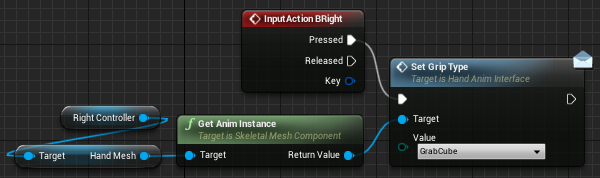
I can't find how to change the pose for hands on the SteamVR plugin sample
I've looked at the blueprints of the bow, squishy and all, and tried all kinds of functions on all kinds of actors, BPs, skeletal animations BPs but I can't for the life of me find how to switch pose 😕
I'm on the Index and UE4.23, if anyone has experimented with that or has any idea I'd be very thankful
Put very simply I just want to be able to set the hand to a specific pose on the press of a button. https://puu.sh/EnU4o/0b24e69ca0.mp4
And I've tried all kinds of variants of this (In MotionControllerPawn) to no avail https://i.imgur.com/89RwkOs.png
 outer linden
hi guys, is anybody know how to get HMD device model name?
 topaz plank
?
outer linden
its return SteamVR for all headsets
topaz plank
works for Oculus... 😄
outer linden
yes its return Oculus, Steamvr and psvr
 tired tree
@outer linden for steamVR there is no built in function to do that, there is a console command that pulls the correct information but that is pretty hard to parse from blueprints
I have a utility library that accesses it though
and exposes it to BP
if you wanted to pull the classes into your project
tired tree
its part of a module
can pull the source directly, or the module
has both the direct property reading, as well as a node that parses it for you into the different hmds
outer linden
ooo I just start watching it and write here)))
you can tell which node to use?
I already add plugin and rebuild project
tired tree
yeah sec
also I just pushed the cosmos entry to it, forgot to bring that live
@outer linden
first is the preparsed node
second is how you query directly
HMD is always index 0 in steamVR so you don't technically have to pass in a valid ID, just 0
outer linden
thanks I will try it
 flat shoal
@daring mural well... I don't know if it's a coincidence or not, but I've been working with VR for three years now, and I can't play FPS games anymore... I get too dizzy/sick
might just be my age, though... 😛
willow trail
This is the best I got at the moment, by utter chance I stumbled on some arrangement of nodes that impact the controller's pose, but this is clearly not the way it's meant to be done, the grip keeps being pulled down to 0 so I have to update it every frame, and the finger curl still has some impact... https://i.imgur.com/6f0ufnU.png

Really wish this was documented 😦
If anyone has some clues or even rudimentary knowledge of SteamVR, or has any method of figure that out that is better than literally bruteforcing every cast that sounds like it could work, and then bruteforcing every method that sounds relevant, I'm all ears
tired tree
that isn't "steamvr" that is just their example project
they use some pose blends in the animBP
its all native engine stuff aside from the actual finger pose node
willow trail
Yes sorry I mean the example project, it's all a bit overwhelming I just need something functional reasonably quick so didn't want to start from nowhere
Yeah they have those pose blends in the animBP, but I don't know how to tell the BP to switch pose from outside
tired tree
in the actual items I believe
willow trail
I assume that BP already handles interpolations and all, isn't there a way to just tell it to switch to this pose?
tired tree
off memory
willow trail
Yeah the items return a pose when being picked up, but I'm looking to change the post from inside the VR Pawn
Like, press a button to switch to X mode that just summons a laser pointer in your hand
tired tree
then find where it polls the interface
willow trail
I've been trying to figure that out, but "look for references" breaks down I feel
couldn't get to that part of the BP
Or any code related to finger curls for example, which I was also curious about
tired tree
that is all in the animbp
when not in a grip pose
and when in one you can blend between by curl values
i haven't loaded that project up since I was bug checking it though, so can't help too much
willow trail
Ah okay, well I'll look harder
Out of curiosity (and because I remember it being easier 2 years ago) are you still making a VR template?
tired tree
maintaining one yes
but its not a "game" template
its a reference package
people keep using it as a game template >.<
willow trail
I did 😳
Not working on a game right now though, it's like a CAD visualization thingy
So I'm not that concerned about interactivity, just want some basic stuff to do measurements on the model
mighty carbon
oh wow, that was fast https://forums.oculusvr.com/community/discussion/80983/quest-go-gear-vr-build-9-0-release-notes
Oculus
Join the Official Oculus Discussion Forums and talk about Oculus Rift, Oculus Touch, Samsung Gear VR, and virtual reality.
outer linden
@tired tree it works like a charm, thanks.
tired tree
@outer linden uw, good luck with your project
 sturdy coral
@flat shoal have you switched headsets?
some that have moved to 80hz etc. might make you more sick
oh wait, you mean actual 2d FPS?
flat shoal
yes 😛
 wild seal
Anyone else having issues getting vr preview to work in 4.23?
 daring pasture
No, but I am having an issue with packaged, and preview, forcing windowed 3288 x 1960...no idea why
mighty carbon
Does anyone know if Epic will upload videos from Unreal Dev days ? (interested in Robo Recall porting to Quest)
@hallow knoll ^^
hallow knoll
Yup we'll make them available sometime later this year
 cloud fossil
Has anyone packaged and successfully ran the face ar kite boy example on ios? I can package it fine but the app crashes on ios after splash screen when built from 4.23. I have go the app to run fine when built from 4.21 but now i'm desperate because that version can' communicate via livelink to 4.23 on my pc
would be crazy grateful for any advice.
 pulsar dome
@cloud fossil #mobile
Does anyone have any idea if the default VR project is setup so that it works with valve index?
daring mural
Anyone using AnimIK with VRE physics grips by any chance
willow trail
Is there a convenient way to show text in VR above everything, and not have it do depth-test?
It's meant to be placed in the world (I'm making a sort of measuring tool that shows the length above a line marker)
 frigid kite
Yes, using the composited overlay
willow trail
Composited overlay? Okay thanks, I'll look into that!
@frigid kite Do you mean using UMG or something? I can't find any reference to "composited overlay" or something similar 😕
frigid kite
Ah, it's called stereo layer in Unreal https://docs.unrealengine.com/en-US/Platforms/VR/DevelopVR/StereoLayers/index.html
Setting up and working with VR Stereo Layers.
Oculus calls it compositor
I believe that the Oculus version does support depth testing, allowing you to for instance put an interaction laser over the UI
This doesn't work in SteamVR, at least it didn't use to when I last used it
@willow trail
But since you don't want any depth testing, it should be fine in either case
willow trail
@frigid kite Huh, do I really need an entirely new render buffer just to have one object be rendered above the rest?
I'm using an Index btw (should have mentioned that)
I was just hoping to shunt the z-depth testing, like you can when working with translucent object
But since the render text material uses masked opacity and a distance field texture, I'm afraid it wouldn't look great/be less optimized
little scaffold
@willow trail if you want the object to render on top of everything you can disable depth test in the material
willow trail
@little scaffold Even for masked opacity materials?
little scaffold
I think it is possible yes, let me check
willow trail

I can duplicate the text material and set it to translucent, but that's gonna mean more shader complexity
little scaffold
yes you are right, that depends on the complexity of your scene
frigid kite
@willow trail The stereo layer has the added benefit of being a lot clearer to read though
willow trail
I would call the scene complexity "extreme", but I don't know if adding a bit of translucency would hurt it that much to be fair
@frigid kite Huh, how so?
frigid kite
Only one way to find out 👼 no sense in trying to optimize now
That's what the stereo layers are for
willow trail
Realistically it'll be fine, it's mostly just I've taught myself to stay away from translucent material whenever possible, especially in VR
By read through, you mean the text might be clearer to read?
I wonder how that works, would you render just the text supersampled?
little scaffold
then maybe the stereo layer is better
 hoary fjord
Anyone have any info on how to create a good first person vehicle VR?
Please message me, im very interested
little scaffold
@hoary fjord look at the vrexpansion plugin example project, there is one there
tired tree
@willow trail in stereo layers the texture is directly put on screen, it is composited over the actual render, it is MUCH cleaner
however that also means that unless you have depth buffer support with it, things like laser pointers or hands will be occluded by it
willow trail
@tired tree Not too concerned about the depth buffer support, it's fine if the text goes above everything, but I'm still confused as to how/why it's cleaner
Cleaner logic-wise? Or visually cleaner?
Not sure I understand why it would be cleaner if we're already rendering at full resolution :/
tired tree
No post processing, no anti-aliasing, direct blit
willow trail
Hmm, dunno if no anti-aliasing matters since hopefully it's been rendered anti-aliased in the buffer, but I guess it's an option
Can it handle transparency and different kinds of transparency?
Maybe even different kind of transparency per pixel?
tired tree
there is a compatibility chart here:
Setting up and working with VR Stereo Layers.
the answer is: it varies
think all platforms support basic transparency though
willow trail
Ah I see, I didn't realize this was what was used generally for UI
tired tree
you aren't getting a shader with it though, its a texture blt
willow trail
Ah too bad
Well I mean
Can I not maybe reuse the result of the existing buffer?
If it's just a texture you write to, but you can handle transparency yourself by reading what's been last rendered by the other pass 🤷
tired tree
from your widget?
anything you can get to a texture2d with the correct formatting you can display to a stereo layer, so yes
transparency works with it though
willow trail
Dunno never used widgets before, really just thinking out loud here
Yeah it could have been nice in this instance to have subtractive transparency, stuff like that
just a thought
tired tree
it should be much faster to use a transparency stereo layer than a transparent plane in engine
it doesn't have to be sorted or managed during the scene render
willow trail
even if depth test ignored?
tired tree
its just an overlay
willow trail
I reckon one quad can't be that much if it completely skips depth testing
 old olive
anybody know how to fix the latest update to SteamVR Input Plugin? It's not working in the VR Template right out of the box. Before this update, I was using the deprecated Hand variable on the Motion Controller, and when I tried updating to Motion Source instead (copied from the SteamVRInputPluginTemplate), it stopped responding to all input, finger tracking and motion detection (even tho Get Device World Pose still tracks position+rotation for my characters arms)... so now with the latest update, it isn't working with either the Hand or Motion Source in my project and I'm comparing it to the SteamVRInputPluginTemplate project and I can't find anything different other than they're now using these hand-skeleton-specific nodes on the anim BP and I don't see them using the finger tracking variables either
Basically the controllers just sit there motionless... the left hand is mirroring but they aren't tracking anything, even tho, like I said, I am successfully using Get Device World Pose to move my character's hands, the fingers aren't tracking and the motion controllers (which I hide visually for gameplay) aren't moving and no input is registering any more
mighty carbon
has anyone gotten 9.0 update on Quest ?
old olive
I put this together myself and it worked fine in the last version of Steam VR Input, but now nothing. The variables stay at 0. Curiously, the bool check on the first node allows the pass through still, and none of the nodes give me warnings or anything:
then this is the new "Motion Source" tracking I copied from the SteamVRInputPlugin Template, and I placed on Construction and Begin Play, as they have:
mighty carbon

All-new powerful PC VR with 88% higher resolution. Simplified setup with inside-out tracking. Customization via forward-thinking mods.
$700
 waxen solstice
$700+$300 wireless adapter
Gonna stick to my quest / original vive combo for a while longer
tired tree
bad tracking, very low battery life.....ew
waxen solstice
I am honestly in love with the quest
with the oculus link i think it will be nice, just having a better way to USB tether than vridge would be great
mighty carbon
@sturdy canyon Epic just replied to me about that Quit Game BP node issue on Android - they said it works fine in shipping build in 4.23
does it work for you in 4.23 ?
old olive
ach fixed my problem by doing the rebuild action manifest steps again
mighty carbon
@grim prairie does Quit Game work for you in shipping 4.23 build on Quest ?
 sly elk
anyone else with a game on steam get constant fraudulent key requests?
i started responding with keys that have already been redeemed
mighty carbon
yeah, I got one on Fb for my Steam game
sly elk
i get them almost every day
I think its probably the same few people doing it so If I annoy them enough they will stop?
grim prairie
I use execute console command quit
mighty carbon
@sly elk it's probably better to ignore them
@grim prairie care to try Quit Game node with 4.23 ?
grim prairie
On quest. Sorry my mistake. We actually don't have a quest 😦
On Rift it was working for sure. We use it in other spots just not the entitlement check.
Mainly becasue I missed another step with adding stuff to the DefualtEngine.ini and the new way showed the execute node instead of the quit so I used it.
mighty carbon
oh, Quit Game works fine on PC
grim prairie
Why not just switch to the execute node 6 of one 12 of another
grim prairie
Fair enough
mighty carbon
but if no one reports the issue, Epic won't know
grim prairie
I wish I had a quest to help you out 😦
 granite jacinth
@mighty carbon Actually, funny story, seems like even if you report the issue, they may not care enough to do anything about it
Depends on the person you get though. I know some of the support guys can be awesome.
sly elk
actually, key scammers can't actually verify if a key works
so if you give them a key, they sell it to the key reseller, then the key resellers gets pissed at them later?
sturdy canyon
I'm not in 4.23 yet
mighty carbon
😦 me neither .. I don't even have it installed
@granite jacinth well, I got a response saying they tested it on 4.23 and it works fine. Asking me for my BP nodes setup :/
sly elk
If all (or a lot) of developers responded to scam key requests with fake keys the whole grey market key resale thing would break down
mighty carbon
@sly elk maybe they are hacking groups.. You don't really want to mess with them 😛
sly elk
its about time. We don't even bother with patch notes on oculus
its an unformatted single line text box
mighty carbon
@tired tree for deep linking..
 brisk spade
i want to make a menu to select several experiences:
- the player position is fixed to maximize guidance for all possible users
- the person shall be able to scroll between the experience through hand swiping (how to avoid swiping by mistake? -> have a specific area or object that relates with changing the scene)
- under the scene is hidden menu to directly select a specific experience with icons of that experience
are there any flaws having such a way of interacting or can i throw any unexperienced person onto such a menue?
its for all kind of skill levels
people overwhelmed by teleporting so i dont shall overengineer it at all 🙂
cloud fossil
does anyone at all in this channel use apple AR kit? still haven't met anyone
 solar steeple
@waxen solstice hey, I have the same combo myself
vive for targeting PC, quest for mobile (and console, til I get a ps4 devkit) and eventually oculus with the link
anyway... anyone have tips on debugging in VR?
I'm trying to inspect the position of the motion controllers, but as soon as I shift+F1 during the VR preview, it kinda goes to shit
 subtle raft
make a widget for debugging stuff
solar steeple
?
subtle raft
like if you want to see the location of your motioncontroller or any value type thing
send it to a widget thats attached to something
@solar steeple https://youtu.be/CLbkeBqs3F8?t=1191
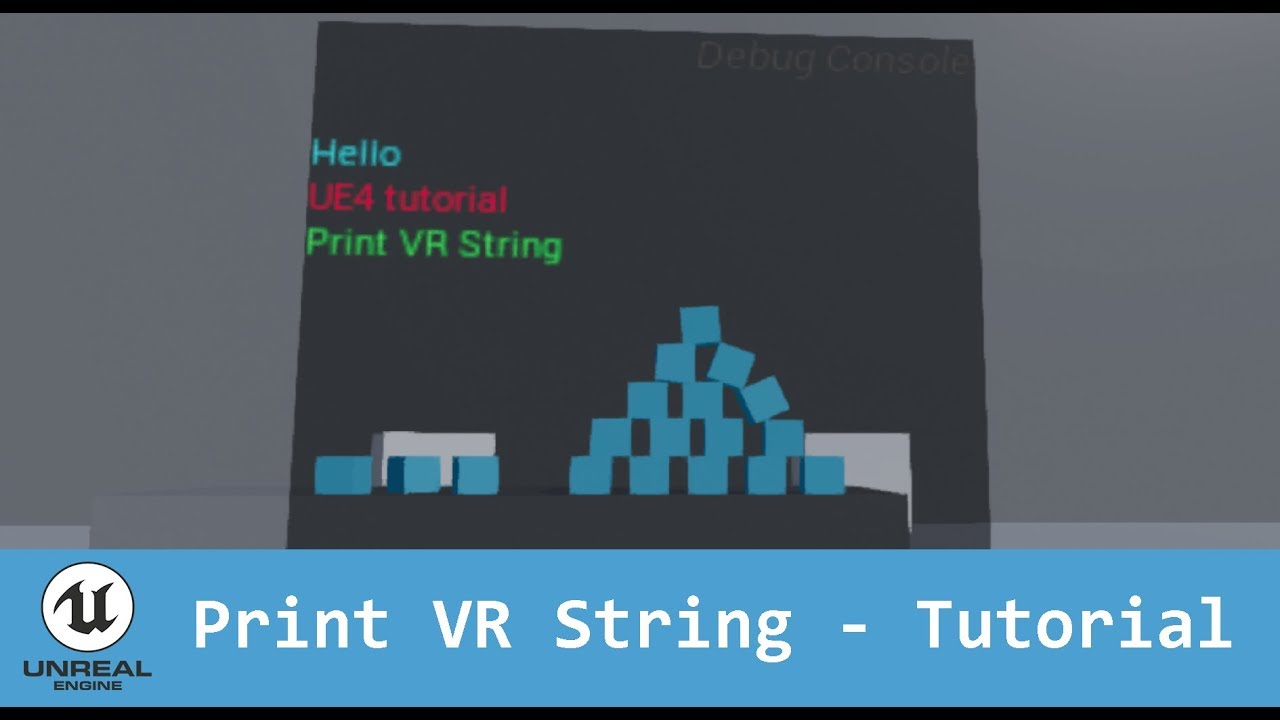
In this video series I will show you how to create a 3D Console in VR to print your strings correctly. I hope that helps.
something like this
instead of printing to console, you print to an asset like this that you can read easier or attach it to something
solar steeple
thanks
subtle raft
is that what you meant
solar steeple
been trying to find/read widget documentation and... it's not great
I mean I suppose that can work, but I lose out on the normal workflow of being able to inspect/edit stuff using the editor while in PIE mode
if I wasn't in VR, then shift+F1 would give me the scenario I wanted
subtle raft
this would jsut be for seeing the value of something
you can still do breakpoints and all that in VR
solar steeple
yeah, and it could help, but if I'd want to know if something would be better if it was 50 units up or something, I'd have to stop, move it, then play again, etc.
subtle raft
I made something that I could shortcut to a specific feature I was working on
so liek right when I pressed play I would be able to try what Im working on
kind of like making a map just for testing stuff
solar steeple
sounds useful, but it's still a workaround for a dumb loss in functionality
tbh I didn't always have this behavior with VR dev
when I was following a tutorial, I was able to see the location update from the editor in real time. not sure exactly what the difference is here
solar steeple
for a flat game, you hit Play, the editor viewport takes control of the mouse, etc.
then you hit shift+F1, preview is still in PIE mode, but now you can select objects with the mouse to see their details, including location
with VR preview, when you start, it opens the preview in a new window and minimizes the editor
subtle raft
oh for vr preview you just alt tab
solar steeple
my issue is, when I hit F1, the mouse escapes, and I can open the editor, but it's not reflecting the contents of the vr preview
subtle raft
or do you mean you want to click on things in the vr preview?
normally the vr preview will pop up in another window
oh ya that too
the editor doesnt update to the VR Preview
and you cant interact with anything
I dunno if theres anything you can do about that
you could make a "mouse mode" and a "vr mode"
I did that for a project
where I had a checkbox on the player controller
to start it in vr or fps control bascially
solar steeple
so my full problem is, I implemented arm swinging, but for some reason, pulling a trigger will also mess with movement, even though trigger pull is only mapped to grabbing objects
subtle raft
you couldnt do it during runtime though
solar steeple
so specifically what I'm trying to figure out is why that's happening, and thought that maybe when I grab, the curving of the hand mesh causes the location to change, thus triggering an "arm swing"
so when I alt tab and can't interact, I can't test the problem I have
and yeah, it might be easiest to just hack it to get around this
subtle raft
what button is for movement
solar steeple
touchpad click is for movement, triggers are for grabbing
but triggers cause movement while the touchpad is clicked, even if you don't move the controllers
subtle raft
your'e sure you didnt assign both buttons to the same input event?
solar steeple
looking at the code, the only way that could happen is if the animation is somehow changing the location of the controllers
all the relevant stuff is happening in blueprints right now. one event is off GrabLeft, the other is off TeleportLeft
grab is mapped to triggers, teleport is mapped to touchpad
basically, even if I mapped movement to every button, it shouldn't trigger any movement unless I move the controller, changing the location, and giving the arm swinger function a value to add to input
subtle raft
you could use breakpoints to figure that out
solar steeple
not sure how... it's running every tick
subtle raft
oh like every tick it's checking if move? is true?
solar steeple
yeah, every tick it calls this "calculate movement" function, and the function checks if these booleans for left/right are true, then checks the delta in position from last frame and adds it to camera and char movement
probably easiest to just set up the widget and see if the location changes when I grab
subtle raft
the bool must be getting set to true while grabbing then
solar steeple
no, it's only happening while I'm moving
if I grab and I'm not moving, nothing happens but the grab
but if I grab, even with the hand that's not moving, while moving is enabled, I move
even when I shouldn't move, if that makes sense
subtle raft
are you doing this on the player controller or the motioncontroller bps
solar steeple
player
subtle raft
you might want to handle all the movement on each controller BP
solar steeple
but it's using motion controller location to figure out how far to move
I'm not sure that would work too well. the function is set up to work one way when using both arms to move, and another way if only using one or the other arm
if it's on both controllers at the same time, they would ostensibly cancel each other out if you swing your arms normally
subtle raft
well the player controller can figure out which way to use on the controller BPs
solar steeple
?
subtle raft
you'll be firing the controller events in the player controller still
solar steeple
oh, you mean use the controllers to generate values, then use the player to actually apply the inputs depending on one or both arms being swung?
solar steeple
it would complicate things a bit, but that would make the bug easier to suss out
tho I dunno that it would actually fix the issue if the controllers are reporting funny numbers
subtle raft
anything in VR with your hands is complicated
subtle raft
I would need ot know exactly how all your movement and grabbing works
solar steeple

This is a tutorial of how to create arm swinger movement with collision in Unreal Engine 4 Link to the plugin: https://drive.google.com/file/d/1zXElI6n2vPqB0...
that's the tutorial I followed
the code is linked in the description, all in ArmSwingerComponent.cpp
none of it seems to be getting trigger input tho so I dunno why pulling left trigger while holding the right arm swing button would affect movement at all
cause at most, the only position that would change due to the grab animation would be the left controller
this is the blueprint on the character
not really anything fancy going on
here's a pastebin of the relevant code https://pastebin.com/ex4PEev5
 subtle raft
so all that stuff in the tick could prolly be put in the controller BPs
and instead of setting those bools
I would enable/disable tick on the controller BPs
solar steeple
the bools would help decide if you're swinging one or both arms tho
subtle raft
in the player bp's tick I would have it get a value the controller BPs set and then add them together or just get the max of both of them to figure out how much and where the player bp moves
and on each controller bp, when you release the movement button have that value get set to 0
and disable tick
solar steeple
I'll give it a shot
I'll make my own classes while I'm at it, cause UE4 is not set up well for editing plugins at all
solar steeple
lol, rewrote the code myself, and it's not only a little wonky due to there not being a 1 : 1 between C++ functions and BP functions, but the trigger pull bug is still present
flat shoal
anyone else found depth stencils to be too resource consuming for VR?

 charred needle
hello, can anybody help with Environment Probes in AR? totaly dont understand how it must work
little scaffold
I know Oculus avatars can be used on all platforms but how can the user select the avatar he wants on the htc vive for example?
tired tree
tesla?
 balmy surge
Hi I'm currently making a VR game and i am using bounding boxes to keep people in the environment. But if you hit the bounding box at an angle with teleport you can go through it. Any ideas?
hoary fjord
its a tesla inside the plugin
tired tree
@hoary fjord the VR Expansion Plugin?
hoary fjord
yes
hoary fjord
if you go into the folder Content -> VRExpansion -> Vive -> Testing -> Car -> Tesla.fbx
downloaded it from your gitbucket then.
daring pasture
Its the car in the example map
hoary fjord
Yes how to I get that mesh into the other blueprint?
 woeful sundial
@charred needle yes, right here https://medium.com/@joe.j.graf/ar-environment-probes-in-ue4-4-20-afda05bcc587

Medium
In my previous post, I talked about the support for ARKit 2.0 that will be present in the UE4 4.20 release (link below). In this short…
charred needle
yep, thx u i find the solution, need to change render to metal desktop, just forgot it
 slender pulsar
What just happened with the oculus quest on the last update don't show anymore on the editor?
Nevermind needs no re enable editors mode
mighty carbon

Apple may have recently acquired UK-based motion capture company IKinema, based on evidence from company filings and information shared by a...
didn't someone here use their product in VR ?
sturdy coral
damn what a waste
assuming they will just shut it down and use it for animoji or something
granite jacinth
They did that for some face capture thing right?
Forgot the name of it. A few years back.
sturdy coral
yeah they acquired faceshift, I think a lot of their documentation of the face api stuff still comes from faceshift stuff
like the shape keys and stuff
solar steeple
in the VR template, does anyone know why the "update animation" blueprint nodes would interfere with movement?
I'm trying to implement arm swinger locomotion, where I basically get the size of the distance between one/both motion controllers' last and current positions, and add that to the character's movement input
but if I leave in the code for grabbing stuff, it sends me flying if I grab something while moving
or if I even attempt to grab something while moving
 placid spear
Damn.....so I guess the indie runtime licenses people purchased can no longer be accessed 😢
I wish I’d downloaded the 4.22 version before the Ikinema website was stripped
 languid night
My god, why can't imported skeletal meshes and anims work on the Oculus Quest?
Has anyone figured out how to do it?
solar steeple
to answer my last question, it's because grabbing activates collision on the hand mesh, causing it to collide with (and push away) the character it's attached to (i.e. you)
@languid night that's really weird. where are you importing from? and do you mean they work fine on PC?
 dim iron
@languid night i created my own hands and skeletal mesh, works fine on quest.
 limber rose
yeah, IKinema getting bought by apple is lame, they went completely silent re: Indie Runtime license
languid night
@solar steeple I'm importing models that I auto rigged in mixamo
@dim iron how did you import them?
Models that I rigged myself in Maya dont appear either.
 sonic lake
@languid night Don't appear meaning they don't show/display inside the Quest? Try to apply to your SM a default opaque material first. It may be a shader issue.
languid night
@sonic lake They don't show/display inside the quest at all. I've already tried using default materials
I noticed that when my launched game, it instantly crashes in the quest, Ue4 log says
LogShaderLibrary: Display: Failed to load Shared Shader Library: DatasmithContent_SC and no native library supported.
It goes on to print this message a bunch of times with a different shader library
sonic lake
@languid night I think your answer is here: https://forums.unrealengine.com/unreal-engine/unreal-studio/1640244-datasmith-oculus-quest
Unreal Engine Forums
I'm currently trying to launch a project on the Oculus Quest that was brought into Unreal using Datasmith. As long as the Datasmith plugin is active the
languid night
I'll try removing datasmith and other plugins that I'm not using then
but I am getting a similar error for OculusVR
solar steeple
is there some fundamental issue with using C++ code inside plugins on Quest?
 trail shale
IS Tracked Boolean, does this actually work? I have an event that triggers on an overlap of a collision capsule and it keeps triggering if I lose tracking, I've tried to use this and it doesn't seem to have any effect
trail shale
Can someone advise why my VIve controllers stopped tracking completely in 4.22, even though I am able to use a previous build and they are fine then
Doesn't seem like they are possessing anymore
The motion controllers spawn in the world for sure, I can see them there
solar steeple
@trail shale known bug in 4.22. I believe you now have to call SetOwner on each motion controller object, passing in the owner's parent
trail shale
jesus christ, thank you
solar steeple
less of a bug and more a regression based on some random change that was made
trail shale
I have a base controller that a seperate controller inherits, where do I need to SetOwner?
solar steeple
LeftController->SetOwner(this);
trail shale
or do I use that on the VR Pawn itself when it spawns the MC's
solar steeple
yeah, in the beginplay or wherever you're spawning them, just call set owner right after
assuming you have SetHand somewhere, or SetTrackingSource, do it right after/around there
trail shale
isn't this right then?
or do I have another problem?
I disabled the Steam VR controls plugin
and now they are working
solar steeple
oh, I wouldn't know about how the blueprint logic for it works, sorry
here's example code from a C++ lecture:
LeftController = GetWorld()->SpawnActor<AHandController>(HandControllerClass); if (LeftController != nullptr) { LeftController->AttachToComponent(VRRoot, FAttachmentTransformRules::KeepRelativeTransform); LeftController->SetHand(EControllerHand::Left); LeftController->SetOwner(this); // FIX FOR 4.22 }
so I don't know if passing an owner in the spawn actor function is the same as calling set owner after spawn actor
pulsar dome
Is it possible to set the VR template's camera so that it cannot move/is not attached to hmd but rotates with hmd?
solar steeple
jeez, I'm pretty annoyed with how inconsistent UE4 can be at times..
trail shale
@pulsar dome Probably, or at least you could make separate camera and attached it to the player pawn
solar steeple
there are failures that can occur in one use case, but not another, due to differences in tolerances of different parts of UE4
trail shale
What is your appliation for this
solar steeple
like not doing certain setups on PC, it will fail silently, but fall back on something in the background and "just work"
but then on, say, Quest, that failure will screw everything up
and you gotta dig pretty deep to find the actual cause of the problem, because it'll often be the result of some set of changes that happened between UE4 versions
pulsar dome
@trail shale I'm creating a scene where the player is in a car in VR and I want the player to spawn and stay in the correct position, regardless of player movement
solar steeple
@pulsar dome have you tried this? https://answers.unrealengine.com/questions/438430/how-to-fix-vr-camera-location.html
pulsar dome
Oh I forgot to mention
The car is stationary so we don't have to worry about car movement
I just don't want the player's physical movement to clip the camera out of the car
solar steeple
that page I linked should still apply
trail shale
@solar steeple Here's a question - I'm trying to be able to simply move my HMD view to match a target arrow, for debugging purposes, so I can drag an arrow actor that points in the direction I want....however when I Set the Location/Rotation, I'm still looking at the ground (because the HMD itself is faced down) How can I override that orientation? (I tried resetting orientation as well)
solar steeple
do you have "lock to HMD" checked on the camera?
trail shale
hmmm, I didn't, I'll try that
solar steeple
I mean, if it's checked, it might be overriding your set rotation/location
pulsar dome
Wait hold on I believe I solved it
Okay so for event begin play, you must detach the VR Origin from the rest of the actor, and then set a Boolean that says that you are going to lock the player in (so that this only happens on certain levels). Then on event tick, if that Boolean is true, teleport the VROrigin to the desired position, then execute reset orientation and position but only select position
trail shale
No different whether it is set to lock or unlock @solar steeple
pulsar dome
With my method the height still is controlled by the HMD for whatever reason but that's completely fine
solar steeple
@trail shale have you seen this? https://answers.unrealengine.com/questions/491385/lock-to-hmd-false-still-results-in-the-camera-foll.html
solar steeple
damn. well, I'm stumped, both on that and on my own issue
grim prairie
So... Here's question for everyone. Really making me scratch my head or rather smash it off a wall repeatedly...
Suddenly out of the blue unreal stopped packaging projects. Like it worked 1 min then after playing the test build I went to make some changes in the blueprints. Nothing major just hiding a texture on pause.
Went back to build again again and it no longer will package config files.
Assumed it was my changes rolled them back. Still won't package config files.
Needless to say I tried everything I could think of and followed every piece of advice I could find to fix it in unreal. Nodda.
So I think back and remember windows updates happened that morning. Go and see what's up. Files all appear to be in read only state. Guess maybe the engine can't pull them in read only. They won't come out of read only... Ok weird.follow tons of guides provided by Microsoft advisors team. At the end suggested I reinstall.
Created a windows image using their software.
Wiped Windows 10 main drive. Left additional drives full of backup data. Fresh install Visual studio and all other unreal stuff.
Learn that VS 16.3 which you were forced to get on install now completely breaks compiling the engine, and you need to use 14.22.27905 or it will never compile. That one was a solid 6 hours to figure out ffs.
Error still happens.....
OK wtf thinking in the most outrageous terms.. Maybe additional drives were somehow messing with the new install.
Remove all backup drives. Fresh install again... Install and build everything again.
Problem still there.
Happens with any version of unreal in any project old or new template or new blank project. Used official launcher version as well as repo versions which I normally work with.
And ideas...
solar steeple
doesn't seem like a vr issue'
I'd ask in a more general channel to get more eyes on it, and also write a forum and answerhub post
that really sucks
grim prairie
Makes sense I'll move it :)
I did on answerhub and reddit and a bunch of other groups I am in. I am over 72 hours now chasing this down.
If I didn't need the code inside of the config files I would not care. Detach the Oculus stuff and the game plays fine without the config files.
They are still excluded on build but nothing from them is needed.
languid night
@dim iron Can you walk me through your import process for skelatal meshes for use in Quest?
solar steeple
spent a few hours on refactoring today, and now I have arm swinging working on oculus quest, which has been broken for me for like a week and a half at least
can't recall the last time I was so happy to fix a bug
languid night
Did PC VR arm swinging not work for the Quest?
solar steeple
right, it worked fine on pc, but when I packaged for quest it just didn't work
I still don't know exactly what was wrong beyond SteamVR silently failsafing a lot of problems and Oculus not doing that
but basically I took code out of a plugin and implemented it as part of my project directly, and it worked
languid night
Wow
solar steeple
I know they run the c++ code through different compilers
had one build fail during packaging
so that's something to look out for
fossil anvil
Hi, Guys How to create a Fade IN and Fade Out for Camera for Vr (OculusGo).
flat shoal
@fossil anvil normal camera fade doesn't work in VR?
fossil anvil
@flat shoal No
 tardy hollow
You could look to the regular MotionControllerPawn Blueprint and see how they handle Fade In / Fade Out in the Teleportation Handling
sonic lake
@fossil anvil Last time I checked Camera Fades work properly in VR as well. Which functions are you using for that?
fossil anvil
@sonic lake iam using Start Camera Fade and Stop Camera Fade for Oculus go
sonic lake
@fossil anvil Are you aware that you have to add a Delay after the camera fade, to give it time to actually fade.
fossil anvil
yes i know that.
I have read somewhere that Camera Fade Does not work with Oculus Go.
I am not sure if that is correct
sonic lake
That is strange. I don't see why it shouldn't. 🤔
sonic lake
Yes because the node executes immediately
The duration of the Delay has to be >= duration of the Fade
Plus check Hold when Finished
Otherwise it goes back to full transparency right away
fossil anvil
checking the Hold When FInished should not switch it back to Transparency ?
sonic lake
Are you fading to black?
fossil anvil
yes
sonic lake
exactly
sonic lake
not sure what you are doing after the Fade
fossil anvil
I am loading Some meshes
sonic lake
a loading screen can just be a special level where the player is in a fixed position and stuff happens around them
it all depends on your design and what you want to convey during the loading phase
fossil anvil
i Have level where I spawn some meshes in the beginning , But they always comes blurry because it being loaded , so i just want a black Screen or a logo , while this happens
sonic lake
You could also put the player inside a black sphere, let them know the level is loading with a message or something and then remove the sphere once done.
In the meantime everything is loading outside of the sphere
fossil anvil
hmm Nice, Idea.
Like they do in VRFunGames
sonic lake
👍🏼
fossil anvil
@sonic lake Thanks for the Help
sonic lake
You are welcome!
 lunar geyser
Good day everyone, I'm struggling with some materials not rendering for the Oculus Quest platform. Despite the editor preview for ES3.1 rendering everything properly on the flat-screen. There are no errors to go by in the material editor and dynamic lights are limited to two [Stationary]. I'm also using the Mali Offline Compiler but to no avail. I've tried Googling this for sometime now but have not had any luck in getting closer to resolution. Perhaps someone here has some advice they may be willing to offer in light of this?
UE4 version being used is 4.23.0
Any help would be greatly appreciated 🙂
daring mural
We're building a hub where devs and VR gamers can co-exist to allow devs to pull 'testers' from a pool for their games. PM me if you're interested!
 zealous smelt
Anyone have experience with Oculus Quest and would be willing to chat? DM me. Thanks
brisk spade
need some help!
i want to open my my map with simulate to which path my blueprint takes, but when pressing simulate and possess my hmd stucks in the vive home screen
any ideas how to solve
sonic lake
@brisk spade the editor is minimized during VR play in order to not affect the performances and get you motion sick. For VR debugging you should use on screen messages or log messages. Or debug your blueprint with a non VR Pawn and then switch to VR later on.
brisk spade
@sonic lake its the actual game that doesnt show up not theeditor
VR Preview works normaly
brisk spade
i want to see the flowof my blueprints while someoneelse tests sth in VR
sonic lake
Ok then this is what I already explained above. You can always bring back up the editor during a VR preview but that will affect the performances of the system and your tester may suffer from it.
flat shoal
@brisk spade you should have chosen Unity if you want that feature 😛
brisk spade
another question :
is this here ok looking?
when clicking on a Button Widget the button kepps pressed
subtle raft
is there an enum or something that can tell a blueprint which PIE is used?
like if you simulate, the editor will automatically use the non-VR pawn
 alpine oyster
using IK in my vr game, how can i get the body mesh to scale with the actual person
ie a short person has a smaller mesh?
little scaffold
@subtle raft there is an enum in C++ only
subtle raft
boo
 orchid schooner
you could detect PIE by loaded map name
map "World" will have name "UEDPIE_0_World"
subtle raft
oh interesting
could just make a simple CPP class too right
never done that before though
I just did it with a bool on my pawn, but would keep forgetting to disable it when building xD
tired tree
@subtle raft have an example of that already
bool UVRExpansionFunctionLibrary::IsInVREditorPreviewOrGame()
{
#if WITH_EDITOR
if (GIsEditor)
{
    UEditorEngine* EdEngine = Cast<UEditorEngine>(GEngine);
    return EdEngine->bUseVRPreviewForPlayWorld;
}
#endif
// Is not an editor build, default to true here
return true;
}
WorldType enum doesn't actually provide a distinction between vr preview and preview
mighty carbon
finally, 4.23.0 + 1.41 integration is up on Oculus github
 fathom epoch
Hi guys im trying to include a 3d character as a VR avatar. is there a way to lock the position of the camera to the head bone of the character? and just account for the hmds rotation when it moves?
sturdy coral
@fathom epoch not a good idea, that can cause a lot of sickness
instead you probably want to try an IK solve to get the head bone near the HMD, then also maybe move the hips further into place if it doesn't reach
fathom epoch
I really need to implement it so I'll worry about the motion sickness later
how do I get the hmd to stick to the head?
I'll make the adjustments later I just need to see how this can be achieved
sturdy coral
@fathom epoch call 'set tracking origin' to head then just attach the camera to the head with inherit rotation = false
or rather, attach a scene component to the head, and have it have inherit rotation to false
and attach camera to that
but don't do it, it will seem fine in open areas where you are high enough off the ground to not get much parallax from the character's movement, but it will make everyone puke when they get close to things
fathom epoch
I currently have a scene component
and I parented my follow camera to it
and parented the scene component to the skeletal mesh
also the scene component is parented to the head socket of my 3d mesh
but when I run the VR Preview, the camera goes above the head of the skeletal mesh
I dont know why this is happening
sturdy coral
I guess setting tracking origin to head/eyes probably isn't enough on its own
you basically need to constantly move it back into place if you want the hmd to always line up with the eye socket
fathom epoch
I just need the camera to stick to the location of the head socket
sturdy coral
which means no positional movement
fathom epoch
im implementing touchpad locomotion for this one
sturdy coral
there is also a way to turn positional off somewhere, maybe in the camera manager or controller
doesn't matter if you are implementing touchpad locomotion, you shouldn't do it this way
fathom epoch
so im gonna go out of a limb to tell people to not walk around but they can rotate and the character should rotate with the rotation of the camera
sonic lake
@fathom epoch you may want to check out my tutorial here https://youtu.be/EKR8ogonD68

This is the easiest way I found to get yourself a VR body with arm Inverse Kinematic (requires Motion Controllers) and full thumbstick locomotion. This step-...
sturdy coral
you should move the character to the hmd as it moves around, and also try to reach the HMD through IK, and you can have trackpad movement on top of that
sonic lake
But it doesn't support room scale
sturdy coral
even if you are targetting gear vr with no 6-dof you should try and avoid just attaching to a socket on the head , the head bob etc. (even the non-rotational part of it) will make people sick
fathom epoch
@sonic lake thats the tutorial im actually basing my implementation on
I thought it was enough to parent the camera to the scene component
but it still snaps to the height of the hmd
sturdy coral
did you change tracking origin?
fathom epoch
which I dont understand why its happening since im currently using a sitdown setup for my vr environment
sturdy coral
the default tracking origin differs between oculus and steamvr
fathom epoch
how do I change that muchcharles?
frigid kite
Has anyone managed to get the MediaPlayer working on quest?
frigid kite
Ah nevermind, the movies just had to be in Content
frigid kite
What are some good budgetary targets for the Quest in terms of draw call / tri count?
topaz plank
@frigid kite frame rate drops below 72 for me with more than ~100k triangles, basic shaders, static lighting on ES3.1 / UE4.23 vanilla (no Oculus fork). Mostly GPU bound, so draw call count matters less at this point (though Oculus recommends around 100-150 max). I'm curious if anyone is getting better performance and what their setup is.
I haven't even been able to get MobileHDR and dynamic lighting to run properly. But I guess there's no point in trying considering the above results.
frigid kite
Alright, thanks @topaz plank !
frigid kite
I believe I saw that mobile HDR has to be turned off in some Unreal for Quest guidelines, not sure if it would be supported at all
frigid kite
@willow trail Just stumbled across this, in reference to your question as to why compositor layers are more legible: https://developer.oculus.com/documentation/quest/latest/concepts/unreal-overlay/
Describes how to use VR compositor overlay layers in your Unreal app.
willow trail
@frigid kite Thanks! Wish it went more into details with the rendering aspect
They are less prone to judder, and are raytraced through the lenses
I understand the judder part since it's independent of the app framerate, but I don't get the "raytraced through the lenses" part
frigid kite
Well, me neither
I was also interested as to why exactly it is crisper
Maybe it's some other way of warping the output to match the lenses, instead of just straight up resampling the render buffer in a distorted way
which leads to undersampling in the center
little scaffold
Does anyone know if spatialized audio can work on the quest? Boundaries for audio attenuation?
topaz plank
@little scaffold yes, it works, although I personally feel it's not very audible with the built-in speakers. Follow this guide: https://developer.oculus.com/documentation/unreal/latest/concepts/unreal-audio/
Describes adding spatialized audio in Unreal apps.
Did any of you guys make experiences with particle effects on the Quest already? I'm very interested in any learnings and visual examples you could share.
 white fern
Anyone here done DLC for mobile AR/VR? I'm struggling with packaging for Oculus Quest in #packaging.
little scaffold
@topaz plank thanks for this, I'll look into it
mighty carbon
@white fern unlikely and there is no easy way doing it with UE4
 bronze raven
Anyone knows if the approach to connecting a host from windows and clients from the oculus quest changes from when connecting 2 pcs or is the process the same? I mean, do I just use the find sessions, join etc and they find each other like it does on 2 pcs
 mellow dome
Hey guys, anyone knows why skeletal meshes are not working in VR when I try to drop them?
it seems physics is not reset correctly
I'm using the standard UE4 VR Template
and changed the BP_PickupCube to use a skeletal mesh instead of static mesh
fixed collision settings
but nothing works
sturdy coral
@mellow dome can't say for sure but try setting EVisibilityBasedAnimTickOption::AlwaysTickPoseAndRefreshBones
I've seen some stuff get bad feedback loops when it is set to OnlyTickPoseWhenRendered and ends up getting culled and then never rendered or ticked again because it is at origin or something (doesn't sound exactly like your problem though, I'm not sure if you are doing ragdoll physics or what from your description)
white fern
@mighty carbon Thanks for the response. Sorry to hear there's no easy way, but honestly all I care about is that there is a way to do it -- preferably while still being able to use .pak files. Know any good references for making DLC that might be helpful for that?
@bronze raven AFAIK both Windows and Android (Quest's underlying OS) both use UDP the same, so the platform shouldn't make much difference as long as your host application is build for Windows and your client apps are built for Quest with the appropriate network configs and permissions. Granted this is theoretical, as I haven't tried this myself. Good Luck
mighty carbon
@white fern search YouTube - there might be some tutorials.
Or do it how, for example, RAGE 2 did it - once DLC was ready, they just updated the whole game and you could purchase DLC access being in-game, with in-game currency (which you had to purchase for real $$ on Steam)
mighty carbon
well folks, imagine that - Oculus Quest cable is too fat to fit into tiny hole I have on the back panel to connect to USB-C port
white fern
I did see and follow this tutorial, but this is how I ran into the issues I'm facing: https://www.youtube.com/watch?v=ndHNdUSRpho
Enjoy the videos and music you love, upload original content, and share it all with friends, family, and the world on YouTube.
mighty carbon
alright, I used power bank's USB-C cable with Quest 😅
got my project up and running on the device.. Pretty cool. Definitely a lot better than on Go.
also seems like GPU particles crash with Vulkan is fixed in 4.23.0 + 1.41
sturdy canyon
I’m looking forward to updating
After I get this next update out I’ll upgrade my engine
mighty carbon
Hmm.. For some reason POM material doesn't work on Quest (with Vulkan; haven't tried ES3.1)
flat shoal
You shouldn't even use POM on Vive/Index, let alone a mobile device like Quest... 🙂
mighty carbon
why not ? I think Dreadhalls uses POM
willow trail
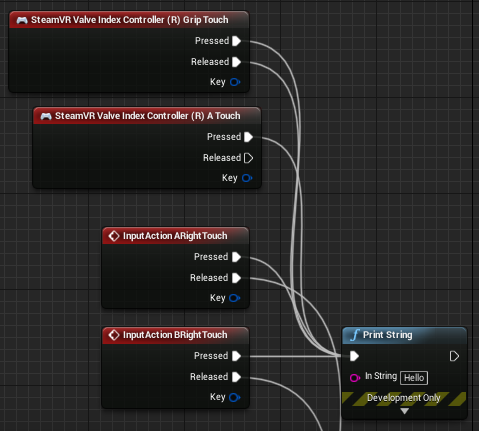
So "touch" input for the Valve Index straight up doesn't work for me with the SteamVR plugin. I tried quite a few things, but somehow can't have anything trigger for any of the capacitive touch events.
Anyone has encountered something like that or has a clue? https://i.imgur.com/12HoOOJ.png
 white fern
@willow trail Dumb question, but you do have input enabled on that graph right? Where is that BP? Player controller, motion controller pawn, somewhere else? Are your other input events working?
willow trail
It's on a motion controller pawn
Every other input I've set up works fine
Yeah, not a dumb question, but I do have other input thingies right next to it, which are working fine 😕
white fern
Yeah, haven't actually worked with Index, so not sure. But I wanted to check the obvious JIC
Do you have any other calls from that event that are consuming input? You check that already?
willow trail
Not in my BP directly
Could be in a parent class or something, but I feel like it should still trigger those events right?
mellow dome
@sturdy coral thanks for the input, I'll try this evening and report back
white fern
@willow trail It should if input isn't consumed. Click on the event node in BP and you'll see this.
If consume input is checked (or, in code bConsumeInput on a binding is True) then only the first binding will fire.
I'd check that
If that's not it, it may actually be an index issue, but as we've established I can't be much help there for now.
willow trail
@white fern Hmm okay I'll check that, thanks
The touch input all in all do work since they influence animations
tired tree
@willow trail open up the steamvr controller bindings overlay and see if they are bound or not
willow trail
@tired tree I'll be honest, between the project/input bindings, the action manifest and the controller bindings I'm really lost
But they're unbound yeah
Even though I bound them in th input and did what I do usually, click all 3 entries in SteamVR : Regenerate action manifest, regenerate bindings, reload manifest
tired tree
they "attempt" to auto bind the inputs
there can/will be cases where their auto binding code fails
and you will want to manually bind in the overlay, and set defaults again
and likely report that their auto binding failed in that case to them
willow trail
Hmm okay
Do you have any resources regarding this input system and interaction with the overlay?
Or maybe a wee little quick rundown 😛
tired tree
generally the overlay is intended to be manually binded for defaults, they are trying to provide a convenience to try and auto do most of it.
willow trail
I've been unable to find much info on any of this (although I was looking for plugin info more than anything)
Any application communicating with the API gives a list of binding action and a default binding?
Is that it?
So you must define inputs in UE, which the SteamVR plugin "converts" into exposed SteamVR actions, and then also makes a default configuration using the settings inside UE?
tired tree

beleive that runeberg has been posting vids about it
he had a blog or something, dunno where that is
willow trail
Oh thanks
tired tree
I have a howto as well but most of it covers my specific setup
willow trail
Just want to know how it works at the API level so I can have an idea of what the plugin does
tired tree
and yeah, ue4 actions are mapped to steamvr actions, and then they are trying to automatically decide what buttons should go to what based on the key names
that automatic mapping part can fail
the engines default implementation of this doesn't even attempt to automate the key mappings
and leaves it up to doing it manually in the overlay
willow trail
But I have to choose those inputs specifically from a list though, so what exactly does the plugin have to deduce? https://i.imgur.com/FGPiVuP.png
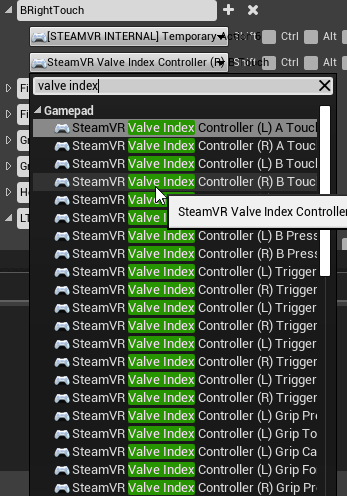
Also attempting to use those events directly from the BP doesn't trigger anything, but I assume that's expected?
tired tree
yeah it should be mapping that correctly in that case
and yeah...all of those keys are "dummy" keys
they don't do anything but setup the auto mapping
willow trail
Roger
tired tree
not a fan of the approach tbh
willow trail
Bit confused as to why they didn't go through the regular gamepad driver routes to expose buttons, axis and the like 🤷
But I guess this is what you need to rebind inputs in games without requiring every game to implement their own input binding menu
Anyway, much clearer to me now, thanks @tired tree
willow trail
@tired tree Actually sorry to bother you again, but it seems like the inputs I've set up in UE (I've got quite a few) aren't showing up in the SteamVR bindings panel. I assume "Generate manifest" is what should update all that, but it doesn't seem like it's updating it?
There's all the "default" ones and a weird "NewActionMapping_0" which doesn't even appear in UE. Any idea? https://i.imgur.com/XLY8eiE.png
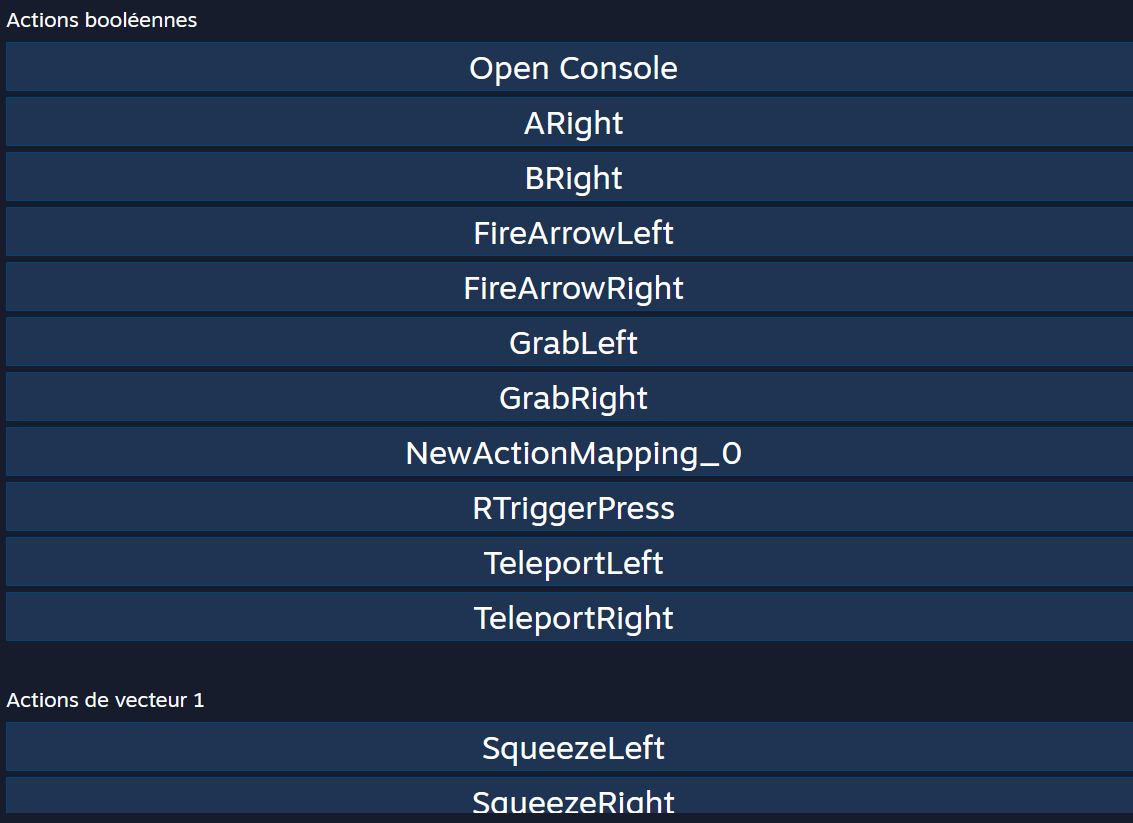
Looking directly at the new action manifest json it looks like it updated properly aswell 🤷
tired tree
you are only using the steam plugin?
tired tree
you'll have to contact them then
willow trail
Ok so turns out somewhere in my quest for answers I created a new configuration. The default one was probably updating just fine while my custom one was overriding with older values. Whatever caused the issue initially probably got fixed restarting the editor/steamVR
So PEBKAC as usual
Either way, learned a great deal, thanks again MordenTral
mighty carbon
some info for UE4 and 1.41 integration https://developer.oculus.com/downloads/package/unreal-engine-4-integration/
 chilly ocean
For whatever reason, when I am running a version of the project that is not packaged, my steamvr inputs for vive all work. However. When I am packaged, one axis input does not work for me in steamvr. Every other input does though
Why would that be happening. I am on version 4.22 of ue4 btw
mighty carbon
hmm... UE-79845 got moved to 4.23.2 hotfix. I wouldn't be surprised it it will go into 4.24.x
sly elk
we are running a demo open to the public at a large car show - prime space in a big booth shared with castrol, michelin, volvo, etc. We expect we will be doing demos non stop all day for the two days we are running it. Anyone done a lot of VR demos for the public have advice? We are bringing two rift S, alcohol wipes for cleaning the foam, lens cleaning supplies, and we are building a demo with simplified interactions that is totally guided. Looking for any experience people here have putting random people in VR and moving them through quickly in a way that works well.
placid spear
Anyone have ideas or workarounds for full body avatars now that Ikinema is gone?
granite jacinth
@sly elk Nice! I might see you / the demo there (live 30mins away)
Alcohol wipes for face
Or facial cleaning wipes
forget trying to clean the foam/headset
paper towels for drying face / inside of headset
and get paper/disposable liners for headset
sonic lake
@sly elk make also sure you have a large TV / beamer and good audio for those seeing the demo from the outside. It's big part of the experience and attracts even more people.
sly elk
Yeah, we have two large TVs, one running a video loop and one showing the headset view.
Are there paper disposable covers for the Rift S availible
?
Oh, i guess something like this?
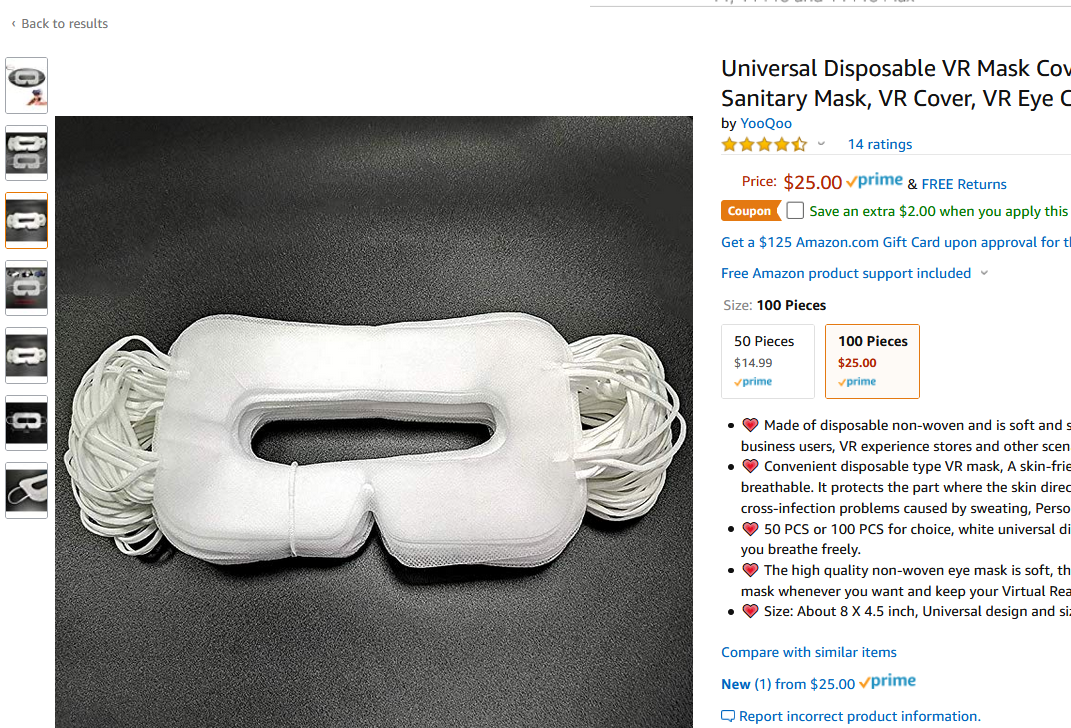
if there are ones that stick to the headset that fit the rifts i think that would be way better than having people put on mask things
mighty carbon
get PU leather VRCover and wipe it with alcohol
or rather get 2 - one "new", that you put in in front of the user, and another one you take off and wipe, getting it ready for the next person
brisk spade
@wraith sky hi
sly elk
VRcover doesn't offer one for rifts
brisk spade
the problem was that many testers couldnt read anything because of the blurry text
 wraith sky
if you're using on screen widgets...well...don't
brisk spade
@wraith sky my internet dies every day at midnight so i cant do any research :/
im using only 3d widgets
would your attempt help to improve the readability?
wraith sky
yep, increase widget's size and draw size in parent
brisk spade
its basically a discribtion on a window
even on a vive pro compared to oculus
maybe image resolution was not high enough, when they tested it
wraith sky
3d widgets are using render to texture, so it's scaled down to the lower of those 2
brisk spade
ahhhhh
so would say make texts easy readable isnt a hard task at all?
my boss said its nearly impossible^^
wraith sky
if it's just a text on the side of the window, consider separating it to a separate widget
brisk spade
why a seperate window?
so having a actor that has the image and the text as a 3d widget?
wraith sky
you can render to texture at 4k...it only matters if it will be possible to look that close with HMD
brisk spade
text can be rendered to 4k umg not?
wraith sky
cause if your widget is large, and text is on the side, you need to waste a lot of resolution just for text
and render to texture is slow
brisk spade
it has to be sharp enough
wraith sky
i can read 3-4pt text on my 1080p screen
brisk spade
because it is scaled
wraith sky
cause you can move hmd up close to it
wraith sky
3d widget is placed in world
brisk spade
with my application i have to deal with ppl who cant differentiate between their fingers in VR
wraith sky
it it's attached to hmd resolution won't change anything
brisk spade
cant hold the trigger while pressing a button...
so i just want to exclude that you ment teleporting to the widget to read it
wraith sky
um...you can place widget on a sleeve...that's most common thing to do in vr
brisk spade
first time i hear the term sleeve
wraith sky
it's not a term...it's a sleeve


 brisk spade
not possible we tested it, people just ignored it
too complicated for stupid user 😄
they also forgot they had a display there
wraith sky
well, if text is attached to hmd (which is bad idea imo), your only option is to make large text
brisk spade
the texts lenght are like short encyclopaedia entrys
basically you point on a object and then a window popups and you can read some interesting facts
wraith sky
well, probably camera attached ribbon text plate that user can grab will be better in this case
brisk spade
ohhh you mean the user can grab a plate to read it
wraith sky
yep
brisk spade
and hold it close to his eyes
wraith sky
yep
brisk spade
it would also be more intuitve and interactive than just boring windows
wraith sky
you can spawn it in front of user when needed
brisk spade
@wraith sky another example how stupid my users can be
the did not understood, that the menu is fixed to them and they turned 2-4 times around until they realised that the menu would not disappear
they would be overwhelmed by the spawning
but a transistion to them would be an idea
im not kidding 😄
@wraith sky thank you for your time 😄
wraith sky
yeah, that's why i recommend using ribbon attachment
sly elk
we use hmd attached text and a watch widget
both work fine
you just have to teach the user about the watch
and haptic vibrate that controller when there is an update on it
we only use it for displaying notifications which send people to our tablet interface
wraith sky
I want knuckles -_-
brisk spade
@sly elk would you use such a interface for a 80 year old person, that wanna try out VR for the first time, that never had any contact to such stereoscopic technology
?
wraith sky
I admire people who would like to use VR in their 80s
i would probably made some kind of animated mascot to assist
wraith sky
Mascots are always possible. Japan best example. They have mascot for suppository.
brisk spade
i hate noisy flying companions
i need a for reading is good simple solution, but the idea to use containers a user has to pick up
mighty carbon
@sly elk Rift CV1 or S ?
sly elk
Unless they are only sitting, I don't think putting an 80 year old into VR in particularly responsible
mighty carbon
@ember forum I posted an update to Oculus BUg Report site about GPU particles and Vulkan.. If you can test it again and post your reply there, it would be great
sly elk
i have seen enough people try to lean on something or fall over after getting disoriented. With someone younger its kind of funny and the risk of serious injury is low. With an 80 year old it could literally be life threatening
mighty carbon
hmm.. VR Cover indeed has nothing for Rift S :/
 arctic saddle
Has anyone worked with ARcore? I can't seem to figure out why my objects scale is so small when it's spawned. It is modeled for real world scale.
 mild trail
So what would be the best VR choice for archviz no matter the price.
flat shoal
@mild trail https://unigine.com/ 😛

UNIGINE: Professional VR Platform for Business
mild trail
Th Xtal looks gigantic and dont think it can do wireless. Varjo looks alot nicer for a customer to put on his/her head.
mild trail
Woaaa that Varjo is expensive 🙂
mighty carbon
No matter the price you said 😅
mild trail
True, I was so unaware of the extreme prices of theese rather special headsets. Wondering.. the vive pro eye has eye tracking too. That combined with a wireless unit would be pretty nice would it not?
brisk spade
can someone help me with widget interaction for the left hand
i dont know how to set up the left hand
rhis working for the right hand in Motion Controller blueprint
mellow dome
@sturdy coral I tried AlwaysTickPoseAndRefreshBones but that did nothing sadly
If someone can help me get skeletal meshes work in VR
i'd be extremely grateful 🙂
sturdy coral
@mellow dome have you tried reproducing the attach/detach stuff outside of the example?
make sure your mesh simulates on its own by starting it off above the ground, and then try attaching/detaching it from a stand-in actor in the same way as the template
just to narrow down where it is breaking
mellow dome
Thanks for the input @sturdy coral
It breaks on the detach part
attaching it works great
but when detaching, the inertia is lost, and the object falls like a brick through everything
I'm making a minimal blueprint to illustrate
 raw cedar
Anybody know of any good resources for implementing simple dynamic resolution on PC?
I can't even figure out how to get accurate timing (like the total GPU time reported by stat gpu)
and the built-in dynamic resolution stuff looks like it wouldn't use vr.PixelDensity anyway
alpine oyster
how would you guys check for a punch in motioncontrollers
mellow dome
I guess you could record the distance travelled between 2 frames and compare it to a threshold when you overlap your target
topaz plank
What's the cheapest way of doing a screen fade on Quest? Any way to avoid post processing?
 dusky moon
Hey! I want to make a big offseted Bionic hands for my VR Pawn. followed this tutorial :
https://www.youtube.com/watch?v=EKR8ogonD68
This is the easiest way I found to get yourself a VR body with arm Inverse Kinematic (requires Motion Controllers) and full thumbstick locomotion. This step-...
its working now only except that I don't know how to offset my upper arm bones like this :
When I offset them in the skeletal tree, in game it doesnt take effect. (I'm a total noob in IK and ue4's animsbps need help 😄 )
mighty carbon
@topaz plank there is a node in Oculus library to darken materials globally. I never tried it though.
topaz plank
@mighty carbon this one?
mighty carbon
I don't recall
But you can also just have a sphere with fading material around camera
I am pretty sure YouTube has a tutorial about view fading in VR
 carmine yoke
Hey, I'm trying to show text in world but using a widget in a widget component but I've two issues with it:
1: When I use a handful or them they seem to slow my gamthread time ALOT.
2: it's not mipmapped or anything so the aliasing is horrendous in VR
So my question is what's the most efficient and most legible way to read text in world in VR?
I could switch them all to textrenders but somehow I don't think it'd be much better..
I could Import the text as textures and map them to whatever surface, that way they're mipmapped also, but that I have no flexibility in changing them at runtime - unless I import every variation of what I might want the text to be which is... loooooong.
Any thoughts?
topaz plank
@carmine yoke https://www.youtube.com/watch?v=lxFqUDW5-fE

Description: How to render UMG widgets into the resolution independent stereo layers while keeping the benefits of UMG such as interaction. Epic Documentatio...
@mighty carbon I just read up on the node on the oculus docs. Seems like its purpose is exactly what I want. It doesn't work however 😄
carmine yoke
@topaz plank That's essentially what I'm using and it eats at my gamethread. I had 10 of them in the world, just for labels, and I couldn't hit frame rate
topaz plank
you're updating them on tick?=
carmine yoke
@topaz plank Nope :/
Even if I did hit framerate they still look like trash, aliasing all over the shop
@mighty carbon Ok I'll check that out, thanks
mighty carbon
I didn't offer any advice 🤷
mighty carbon
😅
topaz plank
for the labels, you can try the below, and call "RequestRedraw" on them once
they will be significantly cheaper then
@mighty carbon didn't realize the node would only work in headset and not in the editor VR preview. So it does work after all 😄
carmine yoke
^That happens so often its so annoying, sometimes makes debugging without a headset impossible...
Okay cool, i'll try that out and come back wit han update
mighty carbon
@topaz plank the only issue is that it might not work on non-Oculus HMDs
topaz plank
we develop for Quest only, anyways, so not a problem for us 😄
carmine yoke
I've found that alot of oculus' stuff works on the vive too
@topaz plank Out of curiosity do you debug with a Rift s and only launch to quest every so often?
topaz plank
debug with old rift, yes
carmine yoke
cool, I think I need to ask my work for a rift/rift s.... I can handle launching to the quest 20+ times a day
can't*
topaz plank
or wait for oculus link 😄
carmine yoke
God I can't wait
@topaz plank Manually Redrawing did help alot! but, i'm still getting a couple hitches, lemme profile and i'll report back
Looks unrelated to the UMG! Thanks a bunch man! I'd started trying to UV map the text to everything...
alpine oyster
Do you guys think this 8is the best way to detect punches on the motion controllers?
carmine yoke
@alpine oyster I don't much like the idea of doing that on tick ... That said, I've never had to prototype something like that so I can't help that much
I would be tempted to try and rig up a overlap boundary which queries how fast your hands are moving when they're stretched out, something like that
that way it wouldn't be on tick
alpine oyster
so like an invisible collision sphere near the players hands when stretched otu?
carmine yoke
That's what I'm thinking yeah, You could even use that to turn the tick on/off so it would just be ticking for a few moments
How often would someones arms be fully stretched - hitting the boundary in other facets of your game though? something to think about
alpine oyster
i would also have to scale it for short/tall people
carmine yoke
Yeah, but you can just do that as a calibration thing when someone starts up the game
like arizona sunshine? does that i think, so they know where to put the holster
Neways I've gotta bounce, GL bud
 trail hinge
Could anyone with experience with the VRExpansion Plugin example template clarify for me if steam multiplayer works directly “out of the box” in 4.20?
For example do I need any other plugins to set up like OpenVR plugin or do I need to disable Advanced Sessions? Do I need to delete any files or change config files?
tired tree
it works as is
though in 4.20, if you are trying to package it, you have to do development unless you want to add the app_id.txt file to the folder
@trail hinge
trail hinge
@tired tree THANK YOU! It works beautifully! We have been trying so hard to make multiplayer work for our graduation project and you saved us, bless your soul
tired tree
have fun! the template isnt the best start for a full project due to all of the extra examples in it, but for a grad project its prob fine. @trail hinge
topaz plank
Has anyone an idea why my widget animations don't play using stereo layers? Everything else renders fine, but animations don't seem to update the render target.
Hm, so the issue is that I am trying to set "live texture" on the stereo layer component to true on runtime, just before playing my widget animation. That doesn't work. If I set it to true in the component's default, it works, however.
topaz plank
Marking the stereo layer component dirty (not exposed to BP per default, but can do e.g. via SetPriority) seems to work, but causes it to render completely white for one frame.
 sweet oracle
I am trying to get my laser to show the beam end point where the laser hits the widget... it works find when i have the debug at one frame selected. But when i unselect that... i think my laser end point is behind my widget. How can I fix this?
https://cdn.discordapp.com/attachments/221798862938046464/632989306696237056/unknown.png

https://cdn.discordapp.com/attachments/221798862938046464/632989420550881289/unknown.png


 pulsar dome
Hey, so I'm packaging my demo in preparation for the game's release in two weeks. When in editor I get around 120 FPS <= 8 ms and then when I package my game it's significantly worse, I'm estimating around 20 fps
 odd garnet
game is Hand to Hand Combat VR https://store.steampowered.com/app/995140/Hand_to_Hand_Combat
pulsar dome
@carmine yoke Don't worry, I fixed it by following the UE4 VR Best Practices guide and it told me to turn off smooth framerate and it fixed my problem 😄 For anyone else with this problem make sure smooth and fixed framerate are off in your project settings, and also follow the guide for a bunch of other good tips
carmine yoke
Nice
pulsar dome
Yeah lol, thanks for the help though 👍
carmine yoke
@sweet oracle is sounds like your widget doesnt have the right collisions
I can't quite read the BPs on the second pic it's not high enough definition
sweet oracle
@carmine yoke i checked the collisions on it... its set to block for the laser
carmine yoke
And it's got hit events?
If you just output the hit object name is that the name of your widget?
carmine yoke
I would use impact point instead of location (incase your teleportation is causing problems) and set whatever your marker is to be overlap. Ummmm
sweet oracle
yea impact point and location is same in this case
carmine yoke
Hmm, I'm not sure then, there's some disconnect of where it wants to be and where it's ending up, if you print the hit location, and then where it ends up are these the same?
Im just trying to find where in the process its going wrong
Because you say the debug draw is in the correct place
So it must be after that, something to do with your teleport/the object you're teleportating
 crystal oak
With the VRExpanded plugin is anyone aware of how you would be able to lock the camera to HMD, but enable some sort of offset? for example, my camera tends to be too far back in a characters face when it comes to full body.
tired tree
@crystal oak you don't want to move the camera away from the hmd spot, that would be terrible for the user, you want to hide or move the head itself.
 sonic tide
So when you grab an object, it turns off physics simulation for that object, then attaches it (so that it doesnt fly out of my hands). Is there any way to attach something adn keep it in that spot, but not turn off physics simulation?
I want to use hit events with held objects but it won't work if sim physics is off
im guessing i could set location of heldactor/component to my hand's location every tick but it sounds really expensive and unconventional
sonic lake
@sonic tide to grab an object and still have its physics active, you need to use a physics handle or attach it through a physics constraint. For both there a number of tutorials on YouTube you can look up and follow.
sonic tide
So should I use the physics handle in the object I'm picking up?
sonic lake
@sonic tide normally the Physics Handle component is with the player (motion controller) and it is used to grab the physics actor. I wrote "normally" because I have seen variations of this technique where, for example, the Physics Handle is kept separate from the player (motion controller) and the object tracks it on Tick. You can experiment with one or the other and see what suits you better.
You also have the option to use the VR Expansion plugin which implements physics grabbing for you.
carmine yoke
Anyone using Vulkan with the Quest? I get these weird pink artefacts on some of my meshes, like a small pink square
They seem to appear/disappear based on my FFR
Only happens when I'm using Vulkan, not OpenGL
carmine yoke
Also - Does anyone know where to get meshes for the Quest controllers?
carmine yoke
^ I've had to download Unity and the Oculus Unity integration because they have them there, If anyone wants a copy of them without having to go through the effort hmu
sonic lake
@carmine yoke
willow trail
Anyone knows a reason why standalone doesn't work in VR for me? The headset and controllers position remains statically on the floor at the default actor position. "automatically start in VR" is checked, and the "launch" option to package the binary doesn't work at all for me (Just tells me Missing receipt... Check that this target has been built)
(VR preview works fine)
Also regarding building/packaging, I don't have Visual Studio, but I don't have any cpp code. The only plugin i'm using is the SteamVR one
willow trail
Currently trying to get UE4 to work with VSCode, maybe I need to compile something myself anyway? Not sure
carmine yoke
@sonic lake fml.. I've already done it now
Oh thats the 4.23 branch
they didn't have it in the 4.22 one which is the one im using
long..
@willow trail But roomscale works?
willow trail
@carmine yoke In VR Preview?
In VR Preview everything works
In any standalone mode nothing works at all, and it won't package at all
There's no notion of roomscale or anything really
carmine yoke
Oh oh, sorry I got confused
Okay so it works fine in VR preview, I never use standalone mode anyways so I wouldn't bother with that.
You can't package? dev or shipping?
@willow trail
willow trail
@carmine yoke No, it fails every time
Well all i'm doing is pressing "launch"
after doing "build"
carmine yoke
What're the errors
willow trail
Missing receipt [name of the project.target] ... Check that this target has been built
No other error
carmine yoke
Try and package pressing file > package project > windows 64
and check your package build config is development
under file> package project> build config
willow trail
I get this almost instantly
PackagingResults: Error: Unable to compile source files.```Are you using a source version of UE4?
willow trail
No
Haven't written any C++ either
From the hastebin, the french messages say that the global namespace already contain definitions to 'SteamVREditor', 'SteamVRInput'...etc
It's colored as regular (white) messages though, not errors 🤷
carmine yoke
hmm, the normal things i would do it this situation would be:
Check your steam VR plugin is on (but if its working in vr preview then sounds like it works),
Go on the ue4 section of the Epic games launcher and validate your engine, sounds like something might be broken (You could also make an empty VR project from the template and see if that packages, if so its something to do with your project not the engine)
Then if that doesn't help then Delete all the derived files in your project and re derive them
Those are the simple stuffs - otherwise you'll have to get more complex unfortunately, i've not seen that error before
 warm wagon
Hi guys i have one question,
I noticed in UE4 4.23 when the camera is in default position (overlap the ground) i see this color glitch.
If i move the camera outside of the ground this glitch disappear.
I also noticed the same glitch is visible in the part of the map that i don't see in that moment.
Why does this happen and what's is the name of this glitch?
Thanks
carmine yoke
@warm wagon That looks like you've got some visualiser on to me?