#virtual-reality
1 messages · Page 187 of 1
 fleet plume
have you seen the real beat saber clone being shown at gamescom?
somebody was actually that stupid and clone it for release as a proper game
 wicked oak
no
fleet plume

UploadVR
Holobeat from Hologate is an unashamed Beat Saber clone for the arcades, allowing up to four friends to compete for high scores.
wicked oak
wich is funny becouse i actually have a very high quality clone
wicked oak
nah
fleet plume
but can't do shit
wicked oak
they are making bank to a huge degree
 daring mural
it's kinda like fortnite vs pubg though
fleet plume
yeah they're licensing BS themselves
to arcades
yeah, can't protect game ideas/mechanics
 quiet swan
How do I properly add a weapon to vr? Blueprint -> actor blueprint -> then just add mesh and texture? Do I need to but a special vr weapons from market place?
daring mural
you can't make big licensing to VR arcades with their standard rates (you get between 7-13 cents per minute played and the higher the payout, the less they advertise the game in-store)
fleet plume
wait, that's actually not that bad
daring mural
there's this new service that distributes it for you to as many arcades as possible, I forget the name but if anyone needs it I'll find it. You'd definitely need a lot of arcades onboard to make decent $. I tried licensing it to them with flat annual fees, they didn't bite haha
fleet plume
3 hours of play and that's a the full price of the game
wicked oak
i get like 20 dollars a month from arcades XD
daring mural
true but i wouldn't expect people to play one game for longer than 5-10min
wicked oak
from the steam licensing (wich is monthly)
daring mural
@wicked oak you get your game on Viveport?
fleet plume
isn't there a minimum session length?
daring mural
doubtful, probably a max though
fleet plume
hehe
wicked oak
i aint even bothering to make a viveport build
and i want to put DWVR EVERYWHERE
btw santa cruz version of DWVR coming
fleet plume
i was afraid of that 😉
daring mural
@wicked oak that's what I thought too but I got a couple payouts over $1k during sales for doing 0 extra work. It's a dead platform but they have 2 alternative revenue options (for vive subs & they distribute it to arcades for you too)
wicked oak
and then use my magic photoscan stuffs
fleet plume
build a level editor in VR
wicked oak
and actor merging
fleet plume
should be simple
wicked oak
and houdini shanenigans
so yeah, i think santa cruz dwvr is possible
im running it on ps4 at 120 fps after all
with its HORRID cpu
wicked oak
lower overhead renderer tho
im already using super-simplified shaders, so the lower overhead rendering is going to fit great
fleet plume
build a dungeon editor and people will love you to bits
also nobody will complain about there not being enough content
wicked oak
you could have it working through a very, very limited editor
like, with voxels or similar
grid based
daring mural
yeah haha
wicked oak
nah it would take too much dev time
 mighty carbon
Sounds like OC5 will be quite exciting
wicked oak
i want to make the stuff for cheap with little amount of work
so i can continue doing the RPG game
fleet plume
you could build your levels in vr and get 2x bang for buck
but yeah, time's limited as solo dev
wicked oak
the thing is that i want to do DWVR 2, and the RPG,at the same time
plus DWVR Santa Cruz Edition
and thats IF i dont get enough money from the job offers im interviewing with
fleet plume
but why continue with commercial games if you'd be working fulltime?
it's not like you'd have any spare time left
mighty carbon
residual income
wicked oak
money is money m8
if i can offload the level design to someone and publish another game on minimum work, thats a lot of extra cash
at the moment the RPG has gameplay enough to get sold
just no art
ofload the art once a few more things are clear (about the combat), and publish it while working part time or similar
quiet swan
how do we add a gun to a vr level do we need a speical gun from the store?
whats the process you use to load a gun to the world?
daring mural
@quiet swan That's a simple question and still the most difficult one I've seen on here. It's kind of like asking "how do I make a game?" - You can start with some free assets, for sure. The asset store has some provided by Epic, you could even import some free ones you download from other sites. If you've not used UE before, here are two good playlists to start with: https://www.youtube.com/watch?v=w4XlBKeE46E&list=PLZlv_N0_O1gasd4IcOe9Cx9wHoBB7rxFl and https://www.youtube.com/watch?v=EFXMW_UEDco&list=PLZlv_N0_O1gY35ezlSQn1sWOGfh4C7ewO
If you've used UE before, I recommend downloading MordenTral's VRExpansion plugin, it's free and has a lot of the functionality you're referring to already built-in. You can see how it's set up and work up from there. 👌
quiet swan
I am using that plugin
for some reason the gun is acting up
it doesnt matter if I change the mesh on the base gun it ruins something
daring mural
If you open up the static/skeletal mesh the plugin uses, you'll see it has 2 sockets called VRGripP1 and VRGripS1
These indicate grip locations so you'll need to create the sockets in your mesh, set them up the same way (and name them the same for now)
@quiet swan
quiet swan
lets see hopefully this can fix my never ending rolling issue , Im using a grippleable static mesh
@daring mural I dont see them in there
is it in the gun base?
daring mural
@quiet swan You seem to be grabbing the gun, is that not an issue? Are you talking about the physics?
quiet swan
with MordenTral's VRExpansion plugin he has a gun base
is this the one im suppose to use to make my weapon? I made a gun its a grippable skeletal mesh actor
that gun on the screen shot is not the gunbase in MordenTral's VRExpansion plugin
its the one im trying to bring in but I cant stop the rolling
did I discover a bug or soemthing?
 severe rain
hey gang, having a funky issue
Building to oculus, our project runs at a buttery 90fps
running it in a vive headset, however, the performance dips to sub 45 fps
machines are identical
any ideas?
we've got a legit tech artist, so the assets are about as optimized as they can be regarding LODs, poly counts, minimal transparencies, etc etc
quiet swan
hey @severe rain do you know how to make something stop rolling on thr ground for ever and ever nothing im trying is working and the other objects dont do this
severe rain
you could potentially turn off physics on it
on ground hit, turn physics off after 5 seconds or whatevs
looking at your video demo, it looks almost as if you've got a capsule collider on the gun instead of a cube or mesh collider
having a capsule will make rolling more of an issue than if you made it a box-a-mundo
quiet swan
i dont have any capsuke collider on it do i need one?
severe rain
it has to have one
how else is it hitting the ground?
i think if you go into the BP, you'll most likely find a collision of some sort on it
severe rain
click on static mesh in there
then in the search area type "collision"
what i'd do is right click the gun base in the folders and "Create Child Blueprint"
then make all static mesh changes in there
unless yours is a skeletal mesh i guess which reading upward i see it is
quiet swan
I duplicated it so now I have gunbase2
all I did now was change the static mesh and the gun falls through the floor
after I pick it up
daring mural
@quiet swan You probably have a basic capsule collision on it, open up the static mesh viewer where you have the sockets and at the top, use one of the tools to enable/show simple collisions. Click and delete the one that appears and then auto-generate (via the Collision tab at the very top) a new collision (you'll find the settings before hitting 'Apply' at the bottom right, do something like 8x8 or 16x16 then hit Apply). Should stop your gun from rolling around.
quiet swan
thanks SINN that worked for the gun base in the vr plugin, the gun on that one was falling through the floor now it doesnt...but im confused on why it lost its settings if all I did was change the static mesh in gunbase? The orginal gun base had a gun that looked like a nerf gun that shot tennis ball looking things out, it also when I picked it up and let go of the right mouse button I could still hold the gun without pressing down. wit the mesh changed in the gunbase, it falls when I let go of mouse and it doesnt shoot the tennis ball looking things. why would so many settings be changed off a simple mesh change?
 tired tree
@quiet swan both of us already answered that for you, you need to add back in the snap sockets if you want the snap to grip functionality.
every gun has different offsets and rotations to grip at, you need to define them
check out the original mesh in the mesh viewer, it has sockets on it defining areas that aren't free grip
and when you grip the example gun at the handle it enables firing, changes how it drops, and allows secondary gripping
daring mural
Yeah without the grip sockets, a lot of the use functionality doesn't work because the gun isn't in "use-ready" mode essentially.
See the plugin's static mesh example, open it up and re-create the 2 sockets you see there in your own mesh.
Name them the same as in the example gun so the attachments work properly & try running it that way.
quiet swan
oh ok thanks for all the help, im excited about vr, I think VR needs more indy people, because the billion dollar companies arent producing alot of VR games which is shocking, for example, this game called owward VR is years ahead of call of duty or arma...its like dude, you guys got the money how is 1 guy doing more then all of you
hopefully my VR game will make a difference, im going the survival horror route, I like what that guy did with the doom 3 BFG VR mod
the doom 3 bfg game and mode cost me $1 and it was the best VR expirence ever better then the new VR doom game
daring mural
It's because VR games make a lot less than standard games so big companies don't really want to invest too much into developing for the medium. Some big titles have been ported / re-designed for VR but it's mainly a publicity thing, to get their foot in the door & to help the industry grow. Companies like FB, Microsoft, Apple etc. are getting involved but it's more of a long-term investment.
quiet swan
its like WTF how did 1 guy make a mod better then your AAA plus built from the ground Up VR doom game
daring mural
I'd be surprised if Skyrim VR satisfied Bethesda financially and it sold a lot.
Dante, the Onward dev spent like 2 years working on Onward I think before its day 1 EA release. He probably made no money from VR during that entire time period. Not an appealing investment for a lot of companies in a new, unpredictable industry ;/
quiet swan
o
daring mural
I was a bit surprised but you can also tell by the lighting
Indie unity games tend to look a bit more flat than UE releases
quiet swan
he might not have made money but hes a legend in my eyes
daring mural
Oh he's made a lot of money since then 😛
quiet swan
and etched himself a spot in VR history
daring mural
Probably 1.5-2.5 million USD gross (guestimate based on unreliable SteamSpy counts & the Oculus store port)
Yeah he's a cool guy
quiet swan
cool my gun works now thanks all!
mighty carbon

More Details: https://uploadvr.com/nostos-is-an-open-world-vr-rpg-that-looks-a-lot-like-sword-art-online/ Improbable partner NetEase will be announcing/revea...
I wonder what kind of PC it requires
quiet swan
video card is more important
daring mural
If any of you guys do freelance contracts, we need someone for a short-term thing, VR-related and I'm betting we won't get much of a response from the Looking-for-Talent section for VR-specific things. PM me 👌
 abstract forum
@quiet swan Do you plan on selling your VR Gun Kit
quiet swan
hey
selling?
I dont think ill be selling anything anytime soon
im just learning and working on a private game
maybe in 2 years when I get more familar with unreal
I mean I cant even change the projectile from looking like a tennis ball unless I spend 15 minutes on how to do it on google, because when I try something I think will work in unreal it never does but im new
mighty carbon
@tawny patio Is there any way you could ask devs on stream today to specify the new mobile features/optimizations that are also relevant to mobile VR ( Oculus Go / Gear VR ) ? Thanks beforehand
 tawny patio
@mighty carbon I already have your question do-wn my friend. 😃
mighty carbon
🤘
 sturdy coral

The Magic Leap One is the first mixed-reality headset we’ve ever taken apart, and boy was it a challenge. Not only is this one of the most interesting device...
 halcyon island
We just went live with the trailer for our VR game: https://www.youtube.com/watch?v=zcHqdcFN0hU&feature=youtu.be
Don’t miss our release- join our Newsletter: http://www.martov.com/playchiaro Or wishlist Chiaro on Steam here: http://bit.ly/WishlistChiaro Chiaro and The E...
made with the UNREAL ENGINE
tired tree
@sturdy coral @wicked oak https://github.com/EpicGames/UnrealEngine/commit/10176d2f8c01d2fec8e0a4ea0a0d211645742f61
devVR just got the openVR input commit
sturdy coral
sweet
tired tree
they still map to legacy for some reason
even though that commit will be only valid on openVR .16 and up
they have a boolean to switch between legacy and OpenVRInput
sturdy coral
@tired tree what exactly does it do? dynamically create FKeys for all the steamvr configured actions/axis stuff?
tired tree
no
It takes the UE4 input list and generates an OpenVRInput manifest file containing them
in OpenInput the application tells them what it wants for inputs and provides default bindings per controller type
then the end user can remap them in SteamVR as they wish
currently all games not implementing OpenInput use a bunch of default legacy mappings of the old values
honestly the workflow is less than ideal
but its very flexible
mighty carbon
I wish they worked on Vulkan for Go instead 😃
sturdy coral
@tired tree so you can basically assign which button is Facebutton1 , etc., but if the controller had e.g. 5 facebuttons it couldn't be used?
tired tree
yeah because its the same people working on that @mighty carbon ? ......
mighty carbon
I wouldn't know
tired tree
@sturdy coral you literally export what you want to OpenInput
and no, its not the same people
mighty carbon
aye
tired tree
as far as ue4, i'm pretty sure its just exporting their hard values to OpenInput
ie: Knuckles pinkycurl
then it gets mapped
i didn't see anything about the skeletal support on first glance being added
that has to be an action manifest entry as well
yeah
currently its not doing anything with the skeleton type
just boolean and vector
wonder if that manifest write is going to keep overwriting itself, could get annoying adding skeletal mappings....
wicked oak
sweet
sturdy coral
@tired tree when does it write the manifest? can it export out project specific stuff like "Jump" and let the user map that to anything, or is it only the existing stuff?
tired tree
Looks like on Bindings change
and yes, the whole point of it is that the user can bind whatever to whatever
you can do that currently even with the legacy bindings
pretty sure that ue4 is only checking for their default actions though
sturdy coral
hmm, that might mess up 'consume input' stuff right?
tired tree
yeah, like I said, looks patched for now
ie: it just exports all vr button mappings
essentially the same as the legacy names
well...it uses the action name
so it should be fully configurable for the two types it currently supports
it just only has one default bindings being generated
so additional would have to be hand added to the manifest?
this looks very...beta
sturdy coral
'UEVR-1255' I'd like to be able to see all the VR JIRA tickets
 split steeple
interesting yeah.... lots of missing stuff there.
for the skeletal input they coud be plannign to patch it to Livelink. Ater playing with it vs the custom anim node, that seems to be the best way to go#
tired tree
its a different paradigm from the std input system
I don't like live link in packaged as much
split steeple
in what sense mordentral?
tired tree
and regardless it still needs a manifest entry
live link is very "editor" oriented right now
also since OpenInputs skeletal system ties into the inputs anyway
split steeple
ive used it in runtime and packaged....https://youtu.be/h4gChzavPpY

Quick tutorial on how to implement an open/close door mechanic in VR while field testing the new SteamVR Knuckles and my Live Link implementation with skelet...
split steeple
i included runtime translation to the stock UE hand skel too
i actually liked the editor bit very much... now i do my finger and hand motion capture animation with it which is prett cool, I can record so many gestures as long as my fingers flexibility allows it 😛
the old anim node nodet hough yeah was easier to set up.
split steeple
and may feel more natural to most users
sturdy coral
code structure represents the internal corporate structure
any skeletal input stuff probably goes to the livelink team now
even if it would be better to integrate more into the input system
tired tree
they'll deff add it, they did for magic leap
but live link doesn't mean it won't have an animation node as well
split steeple
hmmm... wouldnt it server bus approach actually help mordentral, as you can just stream to as many clients?
split steeple
just not the traditional replication style.
sturdy coral
message bus won't go through steam will it?
split steeple
not sure.
i can imagine how to rig it up but need to test. could be a good feature though.
replicating that many points and to make it smooth i feel might be too inefficient?
sturdy coral
they have some kind of compression thing built in with it
sturdy coral
ideally you would do it in deltas off of last acknowledged pose though
tired tree
yea
like I handle controllers currently
otherwise you have to run at full htz
and that will always be too expensive
wicked oak
well you can compress all the pose into a struct and sent it over network through replication
wicked oak
i was looking at the best way to just send a "chunk" of random memory with unreal replication system
nice
interpolation?
tired tree
you'd have to manually interpolate between states
sturdy coral
it compresses it but is stateless I think
tired tree
as long as you are under the packet size limit you can send chunks, other wise you need to do udp connection
sturdy coral
does it account for constraints? finger can never bend back beyond X degrees etc.?
split steeple
yes.
tired tree
it has a max/min extension @sturdy coral it never sends out side of that
but blending would have to account for it
split steeple
its got maxgrip as well includign motionrange (to account for with or without controller)
yeah, its one of the things I gave as feedback.. itll be nice if I can query the api for the min/maxes
tired tree
I don't think replication is going to be that bad in the end, its 31 compressed bone transforms, should be small enough to send within rpc limits.
wicked oak
dont replicate the full hand animation every server tick of people 10 meters back
split steeple
i wonder how itll scale with more people doing hand gestures.
tired tree
might be worth decompressing and throwing out useless bones too
split steeple
yeah theres a couple of meta there.. when i mapped to the ue stock skel, ignored of the metas.
theyre meant for blending and predictive poses
which i guess ma make sense only for the local player side of things
wicked oak
@tired tree IK that shit
instead of sending the bone transforms, send the end effectors
per finger
split steeple
the extra meta bones are meannt forthe 2 bone IK
wicked oak
then you can do it on 5 FVectors
tired tree
they have dedicated bones for 2 bone ik
but you want to send all of the major joints if you want full precision
wicked oak
you can use it for far away people
tired tree
I have a quantized transform class anyway :p
scaling it by distance is a though
but wouldn't run IK
sturdy coral
for non thumbs, base finger bone has two degrees of freedom over about 100 degrees and 15 degrees side to side, then all the other bones in the fingers just have one degree of freedom over maybe 100 degrees
sturdy coral
~100 bits for 1 degree accuracy on the four fingers
wicked oak
one Byte per position would be more than enough
256 values normalized over 20 cms
accuracy of less than 0.1 mms, wich is more than good enough
hell, pack 2 values on a byte
sturdy coral
IK isn't enough
tired tree
they don't specify how they pack the transforms btw
sturdy coral
when gripping things your fingers can bend in different ways
tired tree
its entirely possible they account for joint limits already
I haven't checked the actual packed size yet
i was going to test that tonight actually
sturdy coral
well I'm not sure, It is pretty hard to hold your finger tip steady and move any other bone
without also moving your hand
quiet swan
so I am about to add armor and health to my guy. I was wondering in the vr expansion plug in, Im using the fps vive pawn controller but this is just for my lap top, I need to put the health and armor on the correct pawn, does anyone know which pawn it is?
to edit and add the variables
split steeple
@tired tree can you verify performance hit as well from your end?
love the lively discussion here btw, nice to see all the ideas bouncing around
should drop by more often.. too many servers and channels lol
wish theres just one... any of you guys going to any vr conferences soon? would be good to meet up.
mighty carbon
is there a way to check when player is swinging arm? I figured I should apply damage for melee only when the arm is in full swing, somehow..
sturdy coral
@mighty carbon you mean to avoid people hitting by waggling?
linear velocity of controller measured at a point near wrist bone
mighty carbon
yeah, l don't want to cause damage to any damageable actor by simply running into them and touching them with melee weapon
I wonder if Go/Gear VR controller has something similar
sturdy coral
if you don't want it from pawn's movement you could take velocity relative to pawn
mighty carbon
aye, I'll look into it, thanks
sturdy coral
@split steeple I think @wicked oak mentioned going to connect
tired tree
@split steeple performance hit how? from the bone transforming? I am caching them and haven't noticed one
mighty carbon
Oculus
Join the Official Oculus Discussion Forums and talk about Oculus Rift, Oculus Touch, Samsung Gear VR, and virtual reality.
wicked oak
Wrist Watch: once enabled, your left wrist will display the time when Dash is up. If you pin the watch, it will display on your wrist in Home and in all apps.
awesome
sturdy coral
unfortunately pinning it will interfere with games that use a wrist watch =/
and though oculus has a dedicated menu button, steam consumes that as its own home button
Long Press: Sets the Oculus Button to a long press to avoid accidental presses.
that's a nice one.. vive and wmr need that
quiet swan
Which vr pawn are you guys using to edit your in game vr character?
 glossy agate
@mighty carbon I’m doing that in my game for melee. Yeah it just checks linear velocity. I just have a float variable against a branch and when it exceeds needed velocity I activate the ability to damage. I also can set the float per weapon so smaller reach the less speed is needed to damage for game balance
glossy agate
No
 sullen vortex
guys, has any of you had success using the cable component plugin in ue4 for vr interaction? seems i cant attach start or end to the cable inside of the bp. Thanks in advance!
trying to create a hose, and though that cable component was my best choice
glossy agate
@quiet swan Rama has a melee plugin that’s probably way better than what I have. Not sure how it works in VR but I think it’s free and has cool features
 rain knot
I am hoping to use cable management with VR as well. For now I am using FleX with VR in 4.20, a branch of Unreal Engine 0lento has made that has all kinds of Nvidia plugins added to it
It also has some rope stuff, but I suspect the cable system for UE4 might work better for something like a grappling hook and such
sullen vortex
@rain knot where can i get that branch? thanks in advance
rain knot
Its this one, but its the source code so you would have to build it all, which takes quite some time:
https://github.com/0lento/UnrealEngine
sullen vortex
yeap. been there. thanks a lot!
rain knot
Ahh, good 😃 Its the first time it ever worked for me
But I am pretty new to UE4
Have you tried this?
https://forums.unrealengine.com/development-discussion/vr-ar-development/89050-vr-expansion-plugin?116782-VR-(OpenVR)-Expansion-Plugin=
Unreal Engine Forums
VR Expansion Plugin
Updated: 08/22/2018
10/10/2016 - No longer OpenVR specific, if platform does not support OpenVR the plugin no longer compiles out the
It looks very interesting, but it also seems to need to be built into the engine, and I cannot get it to build once I added this plugin, but all I did was add the folder, generate the project files again and then try to build it again in Visual Studio
sullen vortex
no i havent. Sometimes plugins like that arent very helpful for me trying to understand how they work, and adding it to a current project...i´m new to Unreal engine too so...
rain knot
Yeah, it sure seems useful though. But dont want to go away from this engine build I am using now. It has climbing, a drivable car, different forms of locomotion and more
But I will try to experiment some more tomorrow. I hope you get the 0lento branch working
tired tree
@rain knot I don't really suggest my plugin / to people new to the engine, it is fairly hefty. That being said there are also pre-built binaries for people just wanting to play around and not learn to compile it, I just let people know that learning to compile is generally better since they can run with minor engine versions instantly then.
sturdy coral
@tired tree
steamvr beta updates say:
-Compatibility with new frequency and amplitude based haptics API.
is that something that is part of the new input system?
I saw haptics mentioned in that diff
sturdy coral
(the ue4 diff)
tired tree
maybe .14
didn't read much into it though
honestly not an area I have paid much attention too
sturdy coral
I wonder if they will superimpose calls now
so that you can be playing a long running haptic and have stuff happen on top of it
tired tree
look up the release notes on it, I think that was specifically mentioned
in the steamvr beta notes
sturdy coral
yeah the header doesn't tell enough
doesn't say the supported freq ranges or anything
I almost wouldn't want to ever use it if it requires a firmware update to the controller that lots of players probably won't do
tired tree
yeah I don't think it actually changed anything looking at it
it was .12
and it was shifting things around for the haptics
sturdy coral
@tired tree I think it might be the TRiggerHapticVibration stuff in this one:
https://github.com/ValveSoftware/openvr/commit/6aacebd1246592d9911439d5abd0c657b8948ab0
GitHub
SteamVR Input (IVRInput/IVRDriverInput):
- Added motion range parameter to UpdateSkeletonComponent in IVRDriverInput. This allows the driver to specify which range of motion set the given transfo...
tired tree
@sturdy coral Added ulRestrictToDevice argument
was just adding a param to the function
they added that same one to most of the input nodes
i'll link you the haptic info tho
in pm
split steeple
Cheers @sturdy coral PMd!
@tired tree any general cpu hit going through the new input system?
 olive ferry
I'm getting a black screen using .avi file with alpha channel on my Oculus GO but when I run it on the device I'm getting a black wall and the video doesn't show up, did someone ever face this issue ?
Maybe I'm using the wrong method/video format, if someone have a better idea I'm willin' to ear it
 eager pine
Whats the best practice to show correct fps?
wicked oak
so...
who wants to dev for psvr
becouse literally the whole PS4 SDK got leaked
nvm literally everything got leaked except ue4 code
leak includes live2d, phyre, and unity
 cosmic shoal
yikes
wicked oak
i checked the torrent (but without downloading/seeding it, im not an idiot) and its fully legit
it includes everything
except ue4 code
XD
cosmic shoal
I'm wondering if they keep SDKs under wraps mostly to deter hacking or to make only serious devs interested.
wicked oak
the hacking part
and the whole "enterprise secret sauce" stuff
btw, the leak includes phyre engine
wich is open source and interesting to check out
cosmic shoal
I read an article that went deep into the story of a group of xbox hackers that went as far as to break into the microsoft offices to steal dev kits.
We would still need a dev unit for ps4 wouldn't we?
wicked oak
not anymore
you can use a hacked ps4
but thats a test-kit
not a dev-kit
given that what i need are testk-kits
maybe it could work and save me 1500 euros
by using hacked consoles instead of testkits to test stuff
cosmic shoal
too expensive
wicked oak
its mostly that i need 2 testkits
for MP testing
too bad sony has my IP and my adress and my name
dammit
cosmic shoal
for mutyplayer you need more than one so yeah it gets expensive
wicked oak
i need to get one guy that is "offsite" to test this stuff
 sleek venture
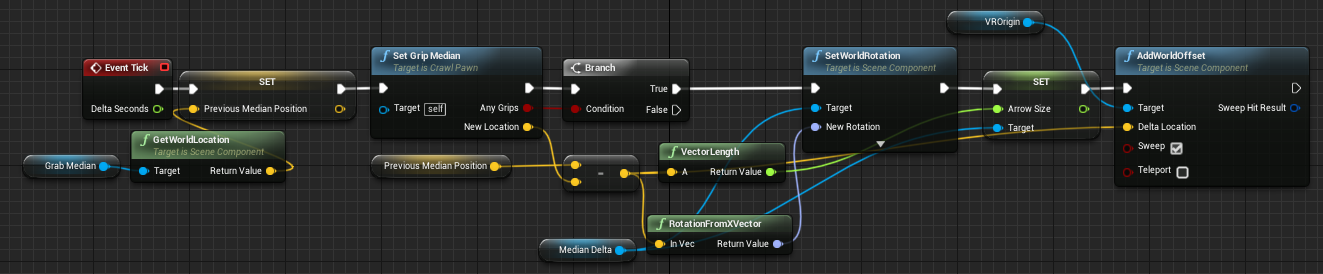
I'm trying to recreate the locomotion from Echo VR by calculating the average of all grabbing hands, getting the location delta between frames and applying the inverse as an offset to the VR Origin. It seems to work somewhat, but every time I grab something the location jumps wildly between two points. I suspect that it probably is because the hands move with the VR Origin, but what do I need to do to stop this problem?
 warm lion
Anyone know why a plugin wouldn't work for mobile VR? I did notice that it only lists supported platforms as windows, linux, max - but what can I do to get this working on mobile VR?
 sturdy coral
@sleek venture that's one issue, but also how are you calculating rotation delta?
you may need quaternions for that
sleek venture
well technically echo vr doesn't let you rotate through grabbing, you do that with the joysticks
but I'm thinking that I just calculate the rotation delta from the x-vector from the left to right hand
I'll have to see what I need, but I want to cross that bridge when I get there
for now I'd like to figure out a solution for translation only
could I set the world location of the motion controllers after applying the world offset of the vr origin?
tired tree
that average is going to change based on how the hands move relative to each other
ie: closer / farther apart
sleek venture
no it's not
well, not entirely
but if both arms are moving in opposite directions the average wouldn't change
but yeah, the average needs to move around
echo vr has a nice solution where when the solver can't track your hands because you're grabbing a wall with both arms and moving them apart, for instance, a second holographic pair of arms appears that shows you where your arms are
I'd like to do that too
I need the average though, so I can handle things like moving objects and rotating by using both arms
tired tree
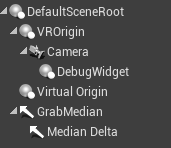
also setting VROrigin isn't what you want to do here
you want to move the actual pawn
 tired tree
Default Scene Root
sleek venture
ah
sleek venture
I'm not presetting the previous median position
does event tick get called before or after inputaction grab?
tired tree
if you aren't turning tick on on demand then prior
however
did you already get rid of the rotation logic?
sleek venture
I've never had it
sleek venture
yeah
just the velocity vector of the median
ah, it works once I applied the offset to the defaultsceneroot
thanks
Is there a way I can apply physics to the pawn as well?
tired tree
as in what? actual physics? or sim them
simming them is fairly easy, you just store velocity and handle a gravity constant
you likely don't want to actually simulate your character, for one you don't have a primitive root, and for two, even if you did you would want to not follow rotationally
sleek venture
yeah I was thinking just simulating gravity will have to do
the idea is that the player is basically just a sphere with arms, so I can keep the collision really simple
tired tree
yeah I have a collision mode like that I added for someone doing a low grav climbing game
centers the capsule around the head instead of the body
mighty carbon
check this out https://www.reddit.com/r/oculus/comments/99ymym/first_look_stormland_gameplay_footage/
 sleek venture
interesting
I have to come up with a solid way to handle movement when gripping or releasing a hand
if I use both hands and let go, the median jumps
I think instead I should use the delta of whatever hand is holding, and use the median when both hands are used
I'll have to keep track of more variables but it will work
sturdy coral
@sleek venture just store prev position for both hands, average of delta of both is the same as delta of average of both
and on the frame where you release one, use only delta of remaining hand
tired tree
^^
sturdy coral
@tired tree steam audio adds GPU acceleration support for all OpenCL platforms:

reddit
1 vote and 1 comment so far on Reddit
says it will work with nvidia too
hopefully should be a nice jump over CPU based
hmm, only speeds up baking
not used for occlusion at runtime
tired tree
yeah, that isn't like the AMD specific feature
think that one was actual real time occlusion
 potent gust
Do we recommend shifting to 4.20 yet? If not, any ideas on how to port 4.20 to 4.19 without stupid missing file errors?
The reason this question has popped up is because for some silly reason, after shifting to 4.20, when ever i launch on the Oculus Go, i see my scene for a second or two, then the player controller gets generated, and then, BLACK SCREEN! with a message saying lighting is not built (which it isnt yet).
sleek venture
I've had an interesting bug
on 4.20
if I run my game with the touch controllers out of view of the sensors they won't react properly to motion or button presses
tired tree
why would you expect them to track motion outside of the sensor view?
rain knot
I am using 4.20... not sure why not to do so? Maybe because some plugins do not support 4.19 yet?
I am pretty new to UE4, I am just trying to test out Nvidia FleX. So far... the performance seems great 😃 Water physics, cloth, ropes... smoke, fire... there are probably some limitations, but so far it sure seems to give you some pretty awesome options for interactivity in VR.
 spiral magnet
@sleek venture Do you use the official Epic Engine Version or the Oculus Fork?
sleek venture
official one
rain knot
There is an Oculus Fork? Hmmm... I am using an engine that 0lento shared source for, not sure exactly how much he stuffed into it
But it does support Oculus
sleek venture
and @tired tree, I mean it can't track motion even after moving it back into view
actually now that I think about it it might just not track button inputs
which makes even less sense
spiral magnet
@rain knot There is 🙂 But i'm not sure how much they change besides integrating the newest Oculus Plugin by themself instead of waiting on the Epic QA
You can access it here: https://github.com/oculus-vr/unrealengine
But it may be that the repo is only visible after you got an invite from oculus by requesting one in their developer portal... can't quite remember... but you probably also need the invite from epic games which you also can get from a epic games site
rain knot
I do have access it seems... I have signed up for so many developer portals, I dont remember how many anymore
But I suspect 0lento already added this to his 4.20 build of UE4, since it works as good as it does
Oh... maybe not. This has example scenes I have not seen
potent gust
So if it is working for you, then any idea why im getting this strange black screen that seemed to have appeared out of nowhere.
sleek venture
@sturdy coral basically implemented your method, it works like a charm
rain knot
Oh, I have not going out of sensor range... I will give it a try
potent gust
@sleek venture How exactly are you putting the controller out of sensor view?
sleek venture
if I have them on the table they're outside of the field of vision
potent gust
Oh. You are talking Oculus Rift. Ok
potent gust
Seems like a touch and go Oculus driver issue though
rain knot
Well, I dont have the problem. Also, if I start the scene without the controllers having been found they become visible after I activate them
potent gust
Yeah. headspace is with the Go currently
rain knot
What version of Oculus are you using? I am on the open beta branch
uh oh... I had to install a load of SDK stuff for Visual Studio to build the UE engine, and now I dont have enough space on my C drive to update Oculus 😛
I guess it could be a problem with the new update?
potent gust
Lol. Maybe you should get a HDD larger than 32GB
rain knot
Its 256gb but yeah
potent gust
kidding
rain knot
I am hoping to get 2 M.2 512gb SSDs for my C drive in my next computer 😛
potent gust
Btw, i never install engine versions onto my SSD. Havent noticed any effects of the slower speeds.
rain knot
But... my plans for that computer might be a bit unrealistic... it might end up costing 7000 dollars or more if I get everything I am planning to get into it
Its not the engine I installed on it, the problem was all the SDK stuff I needed for Visual Studio
potent gust
Either way, i'd definately wait for the 1180/1170 releasing end of next month.
rain knot
and I tried to not use drive C, but it did not allow me to do so
potent gust
Microsoft is awesome, isnt it?
rain knot
You mean the 2080? I ordered a 2080Ti
Yeah, its pretty silly that they of all people demand to use drive C
potent gust
Umm. yeah. I'm sticking with the 1180ti, since i have 4 screens i need to use + VR
rain knot
You mean the 1080ti then?
potent gust
No. 1180
potent gust
Not sure actually, loads of nonsensical speculation online.
It releases with the 2080 i believe
rain knot
People called the 2080 for 1180 to begin with
But last Monday they announced the 20 series
potent gust
I saw a comparison chart some time ago, between the two. Speculative of course
rain knot
Yeah, its all smokes and mirrors so far pretty much
But the VR port sounds nice
Even though nothing can use it yet
rain knot
Its meant to reduce the amount of connections you need to use on your PC, and enable something like the PiMax 8K X to actually be able to render at 90fps without having to use more than one DisplayPort cable
rain knot
So the nice thing about it, is it makes a USB-C / USB3.1 cable that has 3 DisplayPort lanes and a USB3.1 lane in it.... which should provide any of the near future HMDs with all the power and bandwidth they could need
So its like a USB-C cable on speed
that plugs directly into your GPU
potent gust
Wow. Is it wierd that im more excited about the laptop version of this card
rain knot
That would make for truly wireless VR 😃 At least with inside out tracking added to it
potent gust
What would truely be remarkable, is a laptop with the sensors inbuilt. Of course it would cost like $15000, but atleast we could say we did it.
Sort of like a ferrari that no one buys
rain knot
Of course there is also the Santa Cruz, it should be released early 2019. It will not have much power, but if it works, it shows for a promising VR future
Have you looked at its tracking technology and how well it seems to perform?
All the tracking is done from the HMD
The Santa Cruz is truly wireless VR as its stand alone and supports 6DoF tracked controllers and HMD.
potent gust
Truth be told, i've stopped believing developer commits. I'll believe its usability once i use it myself, or read trusted user reviews.
rain knot
There are some... somewhat trustworthy user reviews though
But yeah... I am a bit skeptical
rain knot
The reviews have become better actually, after it got its first release
Still, its clearly not meant for regular users yet... lets see in... hmm... 2 more years or something
Currently its 50 degrees FoV... 😛 Who wants that? Some say they dont notice it after a bit anyway... but...
Oculus do seem to know what they are doing though, they are not some new startup like Magic Leap, and also Facebook is really invested in them succeeding with VR it seems
potent gust
Yeah, but same old complains. Just a bit better than the Hololens
"Currently its 50 degrees FoV... 😛 Who wants that? Some say they dont notice it after a bit anyway... but..."
I'd like to meet one of these 'some
About Oculus, true, but something tells me that these things generally need to go through a generation to really be effective.
Anyway, back to the original question. How can i port from 4.20 to 4.19. Even it is to be done separately, i can do that
rain knot
Why do you want to? Is it the official 4.20 you have issues with?
Have you ensured its only a problem with UE?
I am using a custom 4.20 build and it has no problems... oh and I have tried the official 4.20 as well, and it also works
potent gust
Basically, im working on the Oculus Go. Getting a black screen with the light build warning. If i turn Mobile multiview off, then i get the black screen only on 1 eye, and on the other eye, some objects are appearing and dissapearing.
rain knot
Dont you have some kind of version control?
So that you could install 4.19 and open the project when it was a 4.19 project
potent gust
I feel like the Nick Fury with this setup
Yeah, i do, but after the port, i did a shitload of work without testing if it actually works. Assumed it did.
rain knot
ohh... sucks
Maybe it might be changes you could commit to the 4.19 version? Although its likely riksy
potent gust
Works on windows. Am using @tired tree plugin for VR, and adding a separate module for Go support
rain knot
Have you tried just copying the full project to a new folder and open it with 4.19`?
potent gust
Thats what i tried. But anything i copy to the contents folder is invisible to 4.19
rain knot
I learned yesterday that you have to migrate
potent gust
And for the map, it says it was made on a previous version.
rain knot
Maybe that will work?
potent gust
Tried that as well
rain knot
oh
potent gust
Any other ideas. Or maybe why im getting this strange black screen issue in the first place
Then i can stick with 4.2
4.20
rain knot
Hmmm... maybe its one of the changes you did?
Have you tried regular VR scenes and then adding some of your new VR stuff from the current project to it?
That way you might be able to tell when the problem occurs... or maybe its a project setting and you cannot even open the regular VR maps
potent gust
I dont get it tbh. I reset the engine.ini as well. Still same result.
rain knot
Try a new project just based on a standard VR template, see if that works
Might as well see if its your 4.20 engine overall that is the problem
potent gust
Good idea. Trying that
rain knot
I am still using 4.20.1 btw... but I doubt 4.20.2 is that different
potent gust
im also on 20.1
rain knot
I found out that Flex was finally also released for Unity, so I installed it. Then I found it strange it had no example scenes / maps. I looked in a PDF explaining it all, and it then tells me there is a different project with example scenes / maps for it. Ahh, great. So I try to look for it on the asset store and I find nothing. I google it, find a link to the asset store... and for some reason it has been removed 😦
That might put a stick in the wheel for my plans to compare Unity Flex to Unreal Flex
potent gust
Shouldnt be too different. Maybe some limitations on the control the different engines offer.
Btw, oculsu go is always forward rendering right?
rain knot
Yeah... but it would be interesting to try out all the same
I am not sure, but I think its probably best to stick to forward rendering
As far as I know, forward rendering should be used for VR overall, for performance reasons. But it might have changed since last I looked into it
potent gust
Ok
 real needle
Should I do the top one or the bottom one? Legitament question, I'm assuming top one since its newer
sleek venture
I'd say start with the newer one, if they are referencing material covered in the previous video you can always go back
 nocturne sky
noob question, how do you make a billboard for vr that doesn't roll with the camera?
quiet swan
is there a special step I need to take to put a Widget in VR? I am follwoing tutorials but nothing is working
i think maybe its because they are in 3rd person/1st person project
sturdy coral
@quiet swan no special steps, just use UWidgetComponent; only special thing is if you want it in a VR overlay/stereo layer
You may have to change the input mode away from hardware, can't remember what it defaults to
quiet swan
ok then i have found an issue I dont know how to fix, I am trying to set up a VR watch with the health and armor system. I set up the widget, and everything works when I set the progress bar, but as soon as I enter this code, the system stops working yet I get no errors from unreal. The blue bar represents armor, then red health, the armor has the code and it fails to update the changes to the progress bar, I need it to update like the health but the health has no code in it,
is that the correct way to set up the widget to show armor and health? thats how the tutorials did it
sturdy coral
@quiet swan try getting a basic widget doing something much simpler
and try printing out an error if that cast fails, and if it prints put a break point to figure out why
quiet swan
well
I figured it out
you can use the progress bar to test the widget in VR
you need to change the variable in order to see if its really working
it could drive a person mad
tired tree
@rain knot you can create a file link in windows to another drive
and it treats it like it is on drive c:
mighty carbon
I just noticed Oculus fork of UE 4.20.2 has really old SDKs :/
not whole a lot of love from neither Epic nor Oculus (note that Unity has everything current)
another example of no love is occlusion queries bug - Oculus said they are aware, but have no plans fixing it :/
(I don't know if it's because they are going for Vulkan and don't want to deal with ES3.1 bugs, or if they just don't feel it worth their time fixing UE4 bugs related to mobile VR)
sullen vortex
guys im dealing with the freaking rope thing here. Already on flex rope (nvidia) and can collision with my hands on vr, but cant grab it. Just made the custom events for grab/drop but it doesnt seem to work. Any help appreciated!😓
potent gust
For anyone else having the same issue on the Oculus Go with the meshes appearing/disappearing or black screen after load, turn off Occlusion Culling to fix it.
sleek venture
I've made a VR pawn class from scratch by copying the Motion Controller Pawn from the Starter Content, but for some reason the camera spawns well below the VR Origin. What could I have made different?
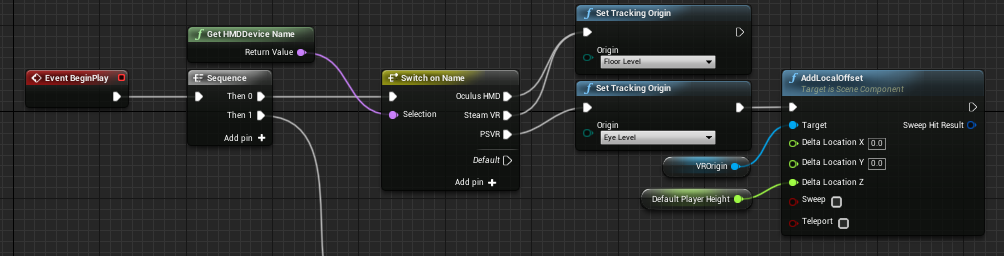
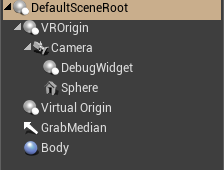
I have no idea what else could be missing
it seems like I only reach the same height as the origin when standing
whereas with the motion controller pawn the camera will be at the origin when on the floor
but I'm using the correct tracking origin
sturdy coral
@sleek venture what tracking origin are you using?
you probably want floor unless making a cockpit game
sleek venture
since I'm using an Oculus floor
but it's the same as the pawn, so I don't understand why it's different
mighty carbon
folks, let's upvote this one please https://trello.com/c/N7OjpOyc/141-parametric-walk-run-cycles-generation
Add procedural generation of cycle animations like f.e. 3DsMax CAT system does. https://www.youtube.com/watch?v=Ev4mtnNxpfc&feature=youtu.be&t=4m23s
Votes
1
Labels
Backlog
tired tree
well THAT isn't coming any time soon
mighty carbon
well, the author just posted on the forum that if he gets more likes on the task, he will move it up in the priority
I actually the one who pitched him the tool (I worked with 3DS MAX CAT) - it's extremely powerful tool for keyframed anims, allowing you to create high quality walk/run/etc. cycles in no time using parameters
wicked oak
thats not going to happen
what would be cool (related) is neural net animation synthesis
mighty carbon
is it gonna kill you to vote for it ?
wicked oak
like what they use in for-honor
wich would be much more generic in fact
than just a parametric walk cycle
you would feed it root motion locomotion anims and it synthesizes the proper graph/blending
mighty carbon
it's a way easier to implement parametric walk/run cycle tool vs neural network procedural animation
wicked oak
i dont think parametric walk/run is any easy
and its WAY too game specific
hell, its too character specific
mighty carbon
dude, go try CAT
btw, it's not a run-time tool.. You make anim, you bake it, you use it in your game.. It just replaces a need in using 3rd party anim package.
maybe it's not a tool for someone who is looking for realistic anims (one can use mocap for that), but for keyframed anims it should be a gold standard (especially nowadays where one would like to have a lot of various and unique anims on the budget, yet want them to look great)
potent gust
Im with @wicked oak on this, this is sooooo not production friendly, neither is it really procedural (given the amount of limitations it would come with).
mighty carbon
lol
have you animated characters? (on top of doing everything else in the game)
CAT for MAX was made by a team of animators, who realized that traditional ways of keyframing is not production friendly and too time consuming
neural networks isn't a magic pill and is not within the reach of indies (hell, if it was the thing, Autodesk would have already had it in Maya/MAX/Motionbuilder)
top notch animators might not need it either (but wait, they do since they created CAT in the first place), but indies who wear a lot of hats (and especially if they are on the budget and don't have a lot of time on their hands) need this tool. I'd say it's a must-have tool for animation.
sleek venture
shouldn't you be writing this on a different channel
mighty carbon
you know, don't fucking upvote it.. Cuz nowadays if it ain't about you and your needs, who cares... It's too much effort to click on "Vote" button.
sleek venture
you're not gonna convince anyone like this
mighty carbon
@sleek venture back in IRC days I could have gone to any channel and ask for upvote. People who knew me (from IRC) would have done it in a heartbeat. That was loooong time ago.
I didn't have to convince anyone back in the days.. That's just how things used to be
sleek venture
why don't you ask your friends to vote on it then
mighty carbon
if folks from here ask me to upvote something (folks I've been interacting with for some time), I'd do it (assuming it's not illegal or political) - it costs me nothing to press thumbs up or vote buttons
why should I limit myself to friends only ?
sleek venture
well seeing how there's only one vote on this it doesn't look like you asked any of them
anyway, we should keep this discussion XR-related
mighty carbon
I retweet stuff from people I don't know - as long as their projects look fine in my eyes and not totally repulsive, I retweet. I know the struggle of PR.
@sleek venture your nickname suits you - you are indeed horrible at reading 😛 I said people today don't care if it's not about them.
my friends (IRL) don't even do game dev or play games
wicked oak
@mighty carbon the neural net stuff is too new for autodesk
like, its starting to become popular last year
of course autodesk hasnt added it yet
its also something autodesk doesnt need nor want
sleek venture
don't aggro him
wicked oak
this is for realtime games
autodesk doesnt do games
they do crowds, but for crowds CAT is enough
with the neural net anims, its basically just a blending node that blends beetween different root motion animations given a velocity/position
mighty carbon
it requires a ton of processing power and you don't have a say so in the process.. With CAT you still animate (or tweak after you done tuning parameters of you walk cycle for example)
wicked oak
so if it sees you are moving forward it plays the forward running animation
it doesnt
mighty carbon
and CAT does both - root motion and on the spot
wicked oak
its probably less intensive than full body IK (wich unreal also needs)
mighty carbon
like I said, a team of animators created CAT - thinking that they didn't know what they were doing is absurd
wicked oak
but right now unreal doesnt need it 😦
(the neural net stuff)
definitely not needed for fortnite
at the moment, ubisoft is using it on all their games
becouse you just mocap movement, and then let the AI do the locomotion blend
its awesome stuff and works super well
mighty carbon
but what does it have to do with Epic?! It's a third party plugins. Think of it as Blender being plugin for UE4
it's to make offline animations
the feature I asked to upvote is to help making offline anims faster and better looking with less effort
good luck doing mocap
hardware isn't cheap and you need to be in a decent shape and you need to be a decent performance actor to get good mocap
if you have that much money, you don't even need anything.. Just hire Doom/Darksiders-grade keyframe animators to do your bidding
or hire Andy Serkis
I am guessing either people here (on Discord in general, not just this channel) never done anims (in a timely manner, for a commercial project and not just for "personal growth") or not solo indies working on their commercial game on a budget with very little time available to work on their project. Thus there is no understanding (or willingness to understand) of the value of parametric animation tools like C.A.T. for 3DS MAX.
oh, and CAT has non-destructive workflow
sleek venture
this might just be a guess, but maybe the guys at #animation have more experience animating than developers for VR, which is notorious for having floating hands for the player model
mighty carbon
they might, but it's a half-dead channel
plus it's more about how to get anims into UE4 and deal with them in UE4.. Not how to make anims.
also, unless VR has no AI and no multiplayer, you still need animations.. Reusing same anims from Marketplace will only get you so far ahead. At the end of the day you want your characters to have unique looking anims.
sturdy coral
@mighty carbon you are essentially trying to game the voting system by asking people uninterested in it to vote it up regardless as a favor
it is fine to bring attention to it and make the legitimate case for it
mighty carbon
@sturdy coral like I said, back in the days uninterested people who knew me on IRC would vote regardless, because it's beneficial for others
tired tree
might as well upvote every single feature on there then
that is kind of beside the point of it
mighty carbon
@wicked oak https://www.youtube.com/watch?v=S6jsPV62VhU

Basic run-cycle of lioness done with 3ds Max CAT animation system. Mid-poly model used in games. Model and textures created by Cauldron Ltd.
and

Subscribe here: https://goo.gl/XCeaKd Patreon: https://www.patreon.com/MilosCernyAnimation/ Visit my website to download more free stuff: https://www.milosce...
sturdy coral
this is the wrong channel for that
mighty carbon
nah, it's not
at least not UE4 discord
there is no community spirit IMO
not that I am IRC guru, but things were a way different back then
glossy agate
Used some physical animations in multiplayer. Had to keep lowering everything till it stopped crashing. One day hopefully I could have 50 running over the network for the hoard. https://youtu.be/sIpDKvPfelY

https://store.steampowered.com/app/756290/In_League/ Discord: https://discord.gg/WS2QR7b Survive the hoards and collect loot to stay alive. Play solo or with...
quiet swan
rut tow
I just realize my VR plugin vive character has way more stuff then the instructors 3rd person character....
so its kind of hard to follow along
for example I can find primaryfire in the blueprints clicking on the vive character
quiet swan
where is this part located in the blueprint for VR? I need to add things here for my ammo counter
I dont see any input action events
in the vr
sturdy coral
@quiet swan in what VR, epic's VR template?
quiet swan
no in the VR plugin template
I dont know where the code should be injected in the vr plugin
daring mural
@quiet swan don't understand the question,
that's a custom input under Settings>Inputs
oh you're looking at a video
open up the character blueprint and do Ctrl+F, type Fire and you'll find it
 sage gulch
does the Magic Leap simulator play nice with a Rift?
or is there a conflict with both installed on the same machine? would be nice if you could use the rift as a visualizer even when targeting the MLO
mighty carbon
Look who resurfaced http://palmerluckey.com/magic-leap-is-a-tragic-heap/

The title of this review was carefully chosen, not glibly. I want what is best for VR and all other technologies on the Reality–Virtuality Continuum, Magic Leap included. Unfortunately, their cur…
sturdy coral
That's pretty nuts.. I guess those fibers wouldn't light up like that if they were real, since they should have total internal reflection
tired tree
he has a solid point, that money could have gone to better places
sage gulch
that's a spurious claim I'd say; they are likely to have some loss, especially if plastic strands and non collimated LED light; you could also do a long exposure or double exposure for effect when photographing
 olive garden
How do you enable arcore in the project settings? "enable ar on start" isn't there anymore.
sturdy coral
@sage gulch I don't think LED light can be switched fast enough to be used in scanning fiber displays
plus their original design was supposed to rely on extremely narrowband laser light for low (or uniform?) dispersion in the tunable zone plates
sage gulch
they have some odd patents but that was never a public claim about hardware spec.. That prototype in the picture could very well use waveguides and just put the LED elsewhere to make it "easier" to assemble..
sleek venture
how can I disable translation of the HMD? I only need rotation from it.
sage gulch
add a camera and lock or disable its movement
sleek venture
will blueprints be able to move the location, and will it be locked in world or local space?
also, is there a way to lock it in place through properties or do I have to do it through blueprints?
I'm not seeing anything in the properties
olive ferry
Someone already use theses on a Oculus GO ?
I tried it but it's seem's like it doesnt work on the HMD
mighty carbon
I am devving for Go, but never used those nodes
what do you use those nodes for @olive ferry ?
olive ferry
I want to know if the player toke off the HMD off his head to restart the current level when someone else put it back
It works for Oculius Rift pretty well but for non on Go
mighty carbon
I don't think it works on Go
(especially since Go is aimed at media consumption, there is a lot of stuff they don't support or fix)
olive ferry
Damn, thank youb for the answer
@mighty carbon On the other hand, do you know why point lignt doesnt display correctly on Go ?
mighty carbon
dynamic one? Because they are not supported
olive ferry
It was stationary by defaut, static could make the work ?
mighty carbon
static will be baked, so yes
olive ferry
Perfect, thank you a lot
mighty carbon

CNET
The company came close to announcing a VR headset, but it's been put on ice. Here’s why.
sad
 mighty carbon
well, since most people on Steam use Intel and 88%+ in VR use Intel, I doubt too many people here have TR in their possession
mighty carbon


Who said you can't have your air combat simulator at home?! https://t.co/s5j9CijLeG
Retweets
13762
Likes
25940
 Twitter
I wonder if it comes with plugin for UE4
😄
sage gulch
that motion simulator could also be called a limb reorienter
mighty carbon
a rumor is that SC CV1 will be powered by 845 SoC
 sly elk
Is that substantially different than what was expected?
mighty carbon
835 is what early dev kits had
when it comes to mobile I think each step forward can be counted as "substantially better" than previous iteration
sly elk
I'm getting impatient for CV2 and the increased hardware spec that will come with it
im guessing 2020 for that
mighty carbon
probably
glossy agate
Holy shit, I want one of the rigs. Probably have to staple the vive to my head to keep it on but that looks fun
 lusty lark
Hey guys!
Is it even possible to debug problems with ARkit or ARcore?
Like if the mobile app is crashing where do I look for the crash error?
 scenic slate
Hello. I am trying to debug performance problems in VR project but by typing stat unit or some other command the text is not visible in screen but outside of it. Anyone else have this problem? Even the console menu starts in middle of screen. Without VR everything works
mighty carbon
@solid elk doesn't Epic's VR template have teleport locomotion ?
 stable dove
Anyone know why a post process effect would only affect 1 eye and not the other in VR?
mighty carbon
probably not supported (especially in forward rendering)
sturdy coral
@solid elk @mighty carbon yes, and I think it already does a quick fade-to-black/blink
real needle
I'm trying to find the robo recall talk on their weapon designs, does anyone have a link?
quiet swan
you know how when you change the matrieal on like 15 different materials and each time you close it asks to apply changes to the world, is there a way to just not have to click yes each time?
its taking a long time to change the color of things
quiet swan
has anyone ever tried to import a big mesh or prop scene only to have unreal hang on importing?
glossy agate
Did ue4 stop supporting the LOD system for skeletal meshes now? It’s not showing up. Through simplygon
mighty carbon
Did 4.20 get native LOD system for skeletal meshes @glossy agate ?
glossy agate
Not that I know of. The simplygon integration was from like 2016, and it used to be in there. Maybe something happened to my plugin
lusty lark
Hey guys, how do you restart a level with the AR session?
I tried to open the level again which logically would reset everything but it seems that the AR session is persistent through the game instance.
 balmy surge
Does anyone know how to single out a Vive tracker. this is what I've got so far but the ID changes based on what is turned on first.
 upbeat roost
would something like this help? http://api.unrealengine.com/INT/BlueprintAPI/SteamVR/GetValidTrackedDeviceIds/index.html
Get Valid Tracked Device Ids
balmy surge
@upbeat roost Cheers but i tried it, it never picked it up.
upbeat roost
i guess you might have to do some sort of calibration then. i don't think there's a way to identify specific trackers
 solid elk
@balmy surge I got my trackers in the post today. I'm just having a look at integrating them now. I'll let you know if I get anywhere
upbeat roost
have any of you ever seen a graphical issue like this?
only occurs after starting in VR. visible in-game, in the editor, in thumbnails and release builds. and only started occuring in 4.20.
the preview builds worked fine, but what change in the release build might have caused this? :/
solid elk
@balmy surge did you successfully pair the tracker? The Devices > Pair Tracker option is missing for me in Steam Vr
balmy surge
@solid elk have you pkugged in the dongle?
solid elk
yeah lol
balmy surge
You need to pair it as a controller
@upbeat roost Cheers man ill update you if i find anything
@upbeat roost Maybe Clear your Cache?
upbeat roost
@balmy surge thank goodness, it's driving me nuts. blank project by the way
would reinstalling unreal engine have cleared my cache?
balmy surge
no
upbeat roost
cool, gonna try that!
i don't suppose anyone has an idea what might cause those patterns.
balmy surge
\AppData\Local\UnrealEngine\Common\DerivedDataCache
its there
Corrupted shaders maybe
upbeat roost
thanks. I'll update you in an hour 👋
solid elk
what is the include for USteamVRFunctionLibrary?
#include "Runtime/Steam/SteamVR/Source/SteamVR/Classes/SteamVRFunctionLibrary.h" doesn't work
sorted
upbeat roost
@balmy surge
clearing the cache didn't help unfortunately
is there any way to redownload the preview build of 4.20? that seemed to work just fine. 4.19 is still working as well.
any advice is welcome 🙂
again, this only happens when using VR
upbeat roost
new discovery... umm...
if i make a HighResScreenshot the effect disappears until I enter VR mode again.
any ideas on what might be the problem? I can't even guess 😔
sturdy coral
new Acer WMR headset:

reddit
51 votes and 46 comments so far on Reddit
seems to be the same resolution as before
mighty carbon
looks nice on the outside
sturdy coral
says it has two LCD panels, so maybe real IPD adjustment
mighty carbon
100 deg. FOV sucks
cosmic shoal
If it has a better set of lenses than the Lenovo, a brighter screen, and hardware IPD adjustment I'm sold on it for my next installation.
sturdy coral
just hope it isn't heavy
OLED stuff has all been heavier than LCD, I'm not sure if that is the panel bonded to glass or something, or if it is from them having hardware IPD
upbeat roost
so as it turns out version 4.20 broke unreal's distortion for me
does anyone know how unreal handles the lens distortion? any way to fix it? (edit: doesn't happen when using vulkan)
mighty carbon
daamn, 4.20.3 has already 2 pages of unresolved bugs :/
mighty carbon
oh wow, 4.21 will have complete support for Magic P00p
and native WMR support (not through SteamVR)
eager pine
like seated cameras inside a bus, is it better to possess that and then repossess the character?
eager pine
what can be the reason for the tracking is wrong? room setup is okay, and other projects its working fine, the problem is that when we start the project, the head is on the floor ingame, but in reality the headset is in a chair
quiet swan
I bought some props and they have a texture that says its a hieght, which dot on the color thing do I need to plug the height texture into?
abstract forum
Unreal Engine 4 now natively supports the Windows Mixed Reality (WMR) platform and headsets, including the HP Mixed Reality headset and the Samsung Odyssey. There is no longer a need to use these headsets through SteamVR. To use UE4’s native WMR support, you must be on th...
Labels
VR / AR
tired tree
@sturdy coral took the time to check btw, avg compressed size is 41 bytes for the skeletal data
sturdy coral
that's not too bad
eager pine
what can be the reason for the floor track to be under the ground?
'i think its about half way under
fleet plume

Germany hosts Europe's largest video game expo of the year. Vive Wireless Adapter debuted in a big way, taking home the best new hardware award for the show.
hyped
i seriously can't wait to loose that damn wire
mighty carbon
Wait for Santa Cruz then 🙂
daring mural
@eager pine make sure your rift or steamVR set-up was done and set the tracking origin to Floor in UE on beginplay
 slim karma
if I want to have objects that I can grab with two hands and that collide with the environment and get stuck on it, what's the best way to achieve this?
let's say you have a rectangular box that you want to rotate around when you grab it with both hands and that's supposed to stick to the wall if you were to push your hands through the wall. 😄
mighty carbon
can any mobile VR dev here vote for this https://issues.unrealengine.com/issue/UE-62347 please ?
upbeat roost
what graphics api is everyone using? directx? vulkan?
slim karma
@astral trail
slim karma
basically I want to manouver a rectangular object through an obstacle course in VR
 astral trail
ah
you need to create a physics handle component
add that to player
then
when object is beeing grabbed
use grab event
the physics object will then not loose interaction
you have to reset the physics handle location in a physics tick
the object generates hit events
slim karma
I tried the physics handle with "grab component at location" but the location seems to be fixed in space and not follow the controller
slim karma
lemme try that, 1 sec
okay that looks promising
can I attach multiple physics handles to one object?
astral trail
yes
astral trail
no
you have to state a grab location
have a handle for each
but just clone them
they are not easy to control
it took me a full day to stabilize
astral trail
make one great one
then copy that one
so that you have same settings
i dont know if you can actually use one handle effectivly for multiple objects
we dont do that
but
maybe try
could be awesome
slim karma
well I just want to move one object, but using both hands
astral trail
good
the you would prolly have the code run from the object
and every hands activates a bool in the object
when both are on it sets simulate true
and you can lift
in theory
try attaching one object 2 times
for each hand
you need to update tick ofc
both hands 2 locations
slim karma
yeah I'll try that
tired tree
its not that difficult
you can simulate the secondary input or straight use two constraints
either way works
astral trail
yee
slim karma
that works surprisingly well for a start, but it's wonky and floaty
anyway thanks for the help @astral trail I'll see how well I can tweak it
astral trail
@slim karma
take a look at epics default vr start map
it has grabbing stuff
just compare it a bit
for more understanding :3
mighty carbon
yes @lime escarp
eager pine
@daring mural yeah pretty much done that already
eager pine
possession of a pawn, forcing the rotation of the camera
 woven kite
Any idea how to use multiple online subsystems (Oculus and Steam, for example) in a single project? Or at the very least, change the default/"active" one at runtime? As far as I can tell, I can only set one in the DefaultEngine.ini. For some context, I'm working on a VR project and I just want to be able to switch which oss I'm using based on the HMD to get the player's username. Otherwise, I think I'd have to make two separate builds for Rift and Vive.
sturdy coral
@woven kite I set steam in Config and override it in my project's Saved/Config to run null in dev
I think oculus will reject your entry if you have any reference to steam in your code, so you have to do a separate build anyway
woven kite
So you're saying you added a line like "DefaultPlatformService=Null" in the Engine.ini file in Saved/Config? Does that just make it so you're running null when developing and Steam once you build/package?
Yeah, I figured I'd have to make two builds eventually, but I was hoping I could make a headset agnostic build temporarily since I'm not really ready to fully publish/upload to Oculus. Like having a build I could share through another build hosting site like Itch that would get the person's username regardless of HMD would be great.
sturdy coral
@woven kite in Config/Windows/WindowsEngine.ini I have:
[/Script/Engine.GameEngine]
!NetDriverDefinitions=ClearArray
;+NetDriverDefinitions=(DefName="GameNetDriver",DriverClassName="OnlineSubsystemUtils.IpNetDriver",DriverClassNameFallback="OnlineSubsystemUtils.IpNetDriver")
+NetDriverDefinitions=(DefName="GameNetDriver",DriverClassName="OnlineSubsystemSteam.SteamNetDriver",DriverClassNameFallback="OnlineSubsystemUtils.IpNetDriver")
+NetDriverDefinitions=(DefName="DemoNetDriver",DriverClassName="/Script/Engine.DemoNetDriver",DriverClassNameFallback="/Script/Engine.DemoNetDriver")

[OnlineSubsystem]
DefaultPlatformService=Steam

[PacketHandlerComponents]
+Components=OnlineSubsystemSteam.SteamAuthComponentModuleInterface
and in Saved/Config/Windows/Engine.ini:
[/Script/Engine.GameEngine]
!NetDriverDefinitions=ClearArray
+NetDriverDefinitions=(DefName="GameNetDriver",DriverClassName="OnlineSubsystemUtils.IpNetDriver",DriverClassNameFallback="OnlineSubsystemUtils.IpNetDriver")
+NetDriverDefinitions=(DefName="DemoNetDriver",DriverClassName="/Script/Engine.DemoNetDriver",DriverClassNameFallback="/Script/Engine.DemoNetDriver")

[OnlineSubsystem]
DefaultPlatformService=Null

[PacketHandlerComponents]
!Components=ClearArray

[OnlineSubsystemSteam]
bEnabled=false```not sure
[OnlineSubsystemSteam]
bEnabled=false
is needed
woven kite
Gotcha. Thanks for taking the time to post those.
sturdy coral
@woven kite np, yeah then for testing if you still need steam you can comment out in the Saved/Config one
I used to comment out and uncomment steam all in defaultengine, but then would have to remember when I packaged for a steam build to make sure it was uncommented
this way works a good bit better and should never mess up your packaging
 lime escarp
@mighty carbon thank you
I want to try that !!! Do you know of it s work if my phone has no gyroscope?
quiet swan
I have a question, most of the tutorials online when making a HUD ammo counter is always cast to the first person character. In VR I would like to cast the ammo counter to a widget on the gun, since we cant cast to the first person character, and since the variables for the ammo are NOT located in the first person character but in the GUNBASE, how can we cast to the widget ?
this is what I have and im trying to make the 99 bullets show going down to 0.
mighty carbon
@lime escarp if you are to work on AR project, you should have looked into ARKit (iOS) and ARCore (Android) by now https://developers.google.com/ar/discover/supported-devices

Google Developers
I haven't done any AR development myself
glossy agate
@quiet swan You have to set the owning gun reference, then that would plug into your cast. But you probably want to push the logic instead, so the gun is telling an ammo var in your widget to update. The way it looks like you have it would be tricky to know when to get a new number update
 charred portal
 mighty carbon
is it a gib ?
 wraith sky
September 24 Vive Wireless Adapter now available!
On September 4, we’re making good on our promise to create a hardware agnostic store that serves the largest VR community we can, as Oculus Rift compatibility comes to Viveport.
wicked oak
too bad no one wants viveport becouse its crap
its just steam but shitty
at least oculus makes sure to review the games
 dreamy ivy
Hey everyone, I'm currently working with the Lenovo Mirage headset and found out its possible to add 2 Controllers to it. there both connected via Bluetooth but i'm unsure how to incorporate the second one into a project. On the git there is GVR SDK for unity they have a prefab for a second controller where you set it to dominant or none dominant controller and was wondering if anyone knows how to do this in unreal or has any experience in it?
 thorny niche
Hello! Trying to build empty GearVR project and got the error https://gyazo.com/d948262e73009c6a1f280755de3dc756

And from Editor's POV https://gyazo.com/030925adfc8d90017a317ba1e57bfd2d


 thorny niche
This thing caught my attention the most - com.google.vr.sdk.samples.permission.PermissionHelper. But can't google anything about it.