#virtual-reality
1 messages · Page 147 of 1
 crimson tide
 leaden jackal
I would disagree. It's a lot harder for me to get away with playing a game on my phone during a meeting if I dont have to wear an HMD ;P
crimson tide
ya, to easily switch between 2d and vr in a single app would be extremely convenient
I'd be pissed if I had to buy a 2nd version of the app if I wanted another mode
 mighty carbon
if it was, both Google and Oculus would have already implemented this feature
 sturdy coral
are you sure it isn't possible with cardboard?
mighty carbon
well, why don't you package two apps into one?
crimson tide
then explain this 😛
sturdy coral
gear has a separate mode the OS goes into and stuff but I thought cardboard just did it all with a standard app
mighty carbon
Has anyone tried "Octilinear rendering" in Oculus SDK 1.19 ?
(I am guessing it's not in UE4 just yet)
sturdy coral
I don't know exactly what it is but I think it is just lens matched shading
 tired tree
it is
sturdy coral
I'm not sure what they did in the SDK, they probably just provide the layout to apps now
tired tree
its just for NVIDIA hardware too
sturdy coral
so that future HMDs with different geometries will work
I'm pretty sure the nvidia branch hardcoded it before, so a future HMD could break it
oculus also made changes recently to support canted displays
mighty carbon
They don't say it's a part of UE4 integration, so I am wondering..
sturdy coral
it can't be part of the stock ue4 integration
because that doesn't support LMS
but it might get picked up into nvidia's branch
tired tree
@sturdy coral they specifically say that it "implements LMS"
mighty carbon
http://www.dailymail.co.uk/news/china/article-5023575/Spectacular-pictures-China-s-1-billion-VR-park.html daaammnnn, China..

Mail Online
Astonishing images of a ground-breaking virtual reality theme park due to complete in south-west China have been revealed. Curious gamers will be able to travel to the future.
tired tree
@frail portal Vr controller?
 frail portal
@tired tree It's a wireless/wired VR footpad that lets you walk, run, and jump hands free: http://www.SprintRVR.com
I made the first prototype with parts from bed Bath and beyond 😄 hahahhaah
 eternal inlet
hi, anyone know what the 4.18 equivalent to this looks like? It says i should use MotionController Component, but not sure which nodes return Position/Rotation?
sturdy coral
@tired tree @mighty carbon what it may be doing is
normally the last step in lens match shading is reprojecting to a flat projection and doing some upscaling
then handing it off to the compositor
so now instead maybe you just hand off that buffer that hasn't been stretched back out yet
and the compositor does the scaling in a more efficient way
frail portal
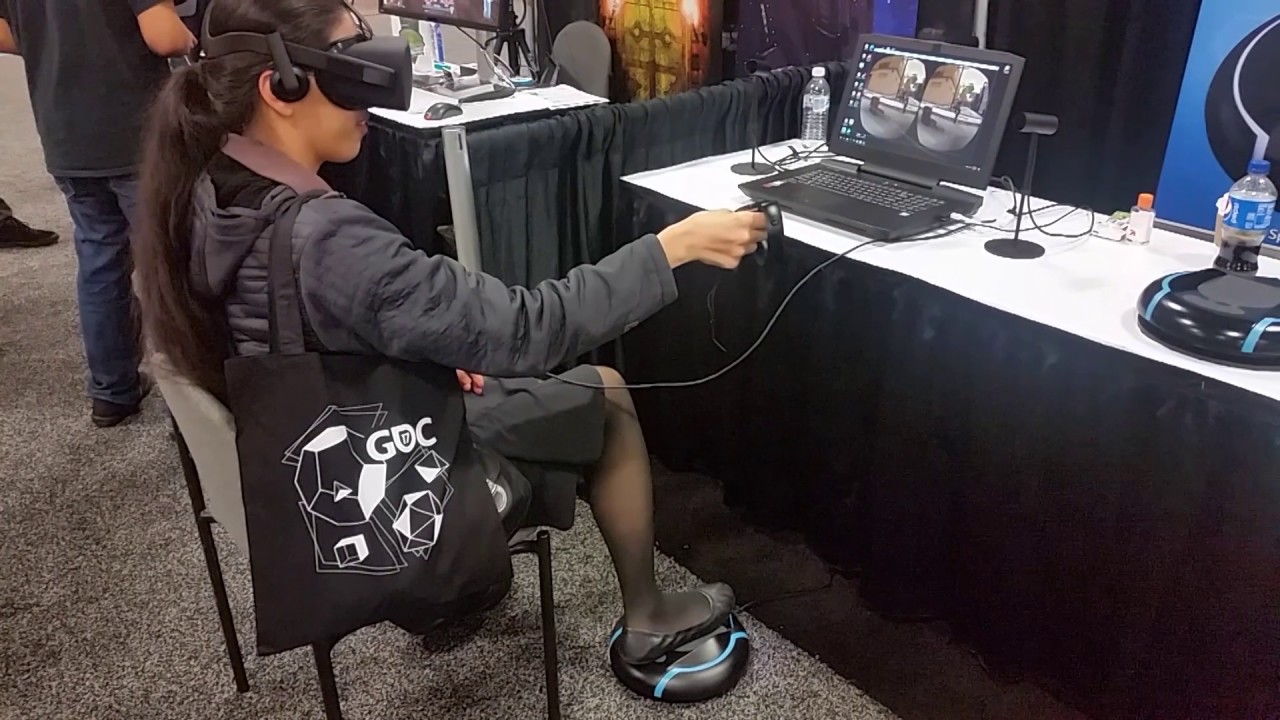
What an amazing show! People played various FPS games by using SprintR to walk and run!
sturdy coral
but I don't think an api call could just add LMS to your engine, it takes a lot of shader changes and stuff
they may also render in the stereo layers and chaperone and stuff with LMS before reprojecting/upscaling that buffer
tired tree
why would they bother to even add something like that then? it wouldn't make sense unless it implements it FOR you
the page on it is very sparse...
sturdy coral
yeah
it does show guardian being rendered inside the unreprojected buffer on that page
but that might just be because an artist just cropped an image to roughly show what was going on and didn't mean to imply that
that could save some bandwidth though to go from small LMS buffer directly to the screen with a lens warp that is aware of it, instead of getting upscaled to a flat projection with 2-4x as many pixels as the screen and then get downscaled again in the lens warp
 wicked oak
keep in mind one thing tho. Nvidia does modify shaders of big profile games
i would definitely see them doing Game Ready drivers for robo recall, artika one, or raw data, that add LMS
mighty carbon
@wicked oak did you see Dungeon Architect level streaming for Snap builder ?
wicked oak
yes, the last implementation was horrid
i dont know if the guy remade it
i remember it was so bad the guy just completely scrapped it
it had no redeeming qualities, it was completely useless
Hey everyone, the snap builder went through some major improvements. You can design your snap modules in level files (as opposed to blueprints)
YOOOOOOOOOOOOOOOOOOOOOOOOOOOOOOOOO
ok gonna have a look at it
becouse if it works im 100% stealing that
It also supports level streaming. The level streaming logic is based on the dungeon graph's room connection, rather than a simple distance based check. You can load rooms up to a certain depth from where you are standing. In the video I have the depth set to 1, so rooms directly connected to the current room are shown ```this is pure gold
man, ali akbar surely delivers
im glad i paid the money for his plugin even if i dont use it right now
 granite jacinth
 wicked oak
even if i probably wont use his direct implementation (not featured enough) i will read that code and see how it does it, to use it with my needs
sturdy coral
@wicked oak raw data at least already uses the nvidia branch
eternal inlet
anyone happen to know why it's not possible to change "Self shadow only" ?
on ie. a static mesh
 trail shale
@eternal inlet I just threw a sphere down...the only thing I could think is that maybe you turned off cast shadows? that made the self shadow button unclickable
eternal inlet
sry i meant i can't find a node to change it in runtime
i can read the value of it though
trail shale
I see that too...maybe play with the bInsetShadows thing ?
eternal inlet
i'll have a look at it tmr i think
gonna call it for tonight, but thx for checking it out
trail shale
it does prompt the question (which I don't know) what is the difference between self shadow and inset shadows
eternal inlet
hmm, maybe inset shadows are what i was looking for in the first place
 uneven moon
In the works

VR Sniper! Official Teaser Trailer for 'The Perfect Sniper' Coming Soon to Oculus, HTC Vive and PSVR (with AIM Support) DISCORD: https://discord.gg/uxz3xZf S...
sturdy coral
@trail shale I'm pretty sure inset shadows do like a small frustum around the object and render in any intersecting scene stuff into a shadow map and apply it to the object, then do the same for the object and apply it to any scene stuff behind it
so a movable object outside of the cascades can get shadows from the scene, and the movable object can cast dynamic shadows onto the scene
if you are using stationary lighting it should get blended in with the baked shadows without double shadowing
 wintry escarp
you can use the rift with c++ cant you, it doesn't need to use bp ?
sturdy coral
yeah you can use c++
granite jacinth
@uneven moon lol
 full junco
heres an interesting breakdown of how the star citizen engine renders stuff https://www.youtube.com/watch?v=_-OoMySD66E

Experience the power and flexibility of Star Engine as Ali Brown provides a visual breakdown of some of the layers and processes that go into building a sing...
trail shale
Just doublechecking, my FPS count is 45 FPS and won't go higher...that's because Steam VR messes with some of the unreal's diagnostic stuff right?
full junco
no, thats because you seem to be running into reprojection, so you will only get more than 45 if you have more than 90
trail shale
wait. so I am either above 90 frames or magically down to 45 and under?
that sucks but i think it makes sense
it seems much smoother at least
full junco
with interleaved reprojection, there is nothing between 45 and 90, yeah
full junco
make sure you are above 90
trail shale
Gee, that's it?
full junco
thats why VR is harder than non-vr 😄
but you should also be able to use async reprojection, so you should try to find out why that doesn't work
trail shale
fuck this, can't I get two gpu's one for each eye
full junco
I think ue4 does not support that
trail shale
i need to build an actual exe but last time there was a filename issue...how can I do a package check like I do a map check?
full junco
if theres an error on packaging, it tells you what the error is
trail shale
yeah but I don't want to package for 3 hours to find out what the error is
trail shale
super basic question - does it package ALL of the assets I have in all my content folders, or just the ones referenced/used?
full junco
all referenced ones I think, but I'm also not fully sure about that
trail shale
is this what you were talking about earler?
full junco
well the setting is further below there I think
trail shale
And probably last question, where do I change my AA to use MSAA
full junco
project settings
trail shale
and I want async reprojection on right?
trail shale
hm
full junco
so try to disable that
trail shale
how?
sturdy coral
@trail shale it is in the same settings menu you posted, but under performance
trail shale
MAN, MSAA makes it run buttery smooth but the trees look like a shitty pile of pixels!
How can I determine the TRUE frame rate since it doesn't show me between 45 - 90?
full junco
MSAA is more expensive than all other AA
trail shale
wat
full junco
so it won't make it run better
trail shale
why does it...um, run better
seriously, I'm a gamer (non console)...the frame right is higher, trust me
that's why I want to measure true frame rate
full junco
it was 45 before and 45 now, so how is it higher?
trail shale
you told me it would cap because of Steam VR
all I can tell you is, my eyes can notice a smoother game
full junco
no, 45 is always 45
sturdy coral
looks like he might have an msaa level of zero
trail shale
but why can't i see 46, or 47?
full junco
because steam forces ue4 to spend the rest of the time idling
so that you will only have 45 unless you have 90
trail shale
well WTF Steam
sturdy coral
if you turn off interleaved and leave on async I think you can get 46 or 47
full junco
that's how interleaved reprojection works
with async reprojection you should have values between 45 and 90
trail shale
and where are the MSAA settings besides the scalability settings
sturdy coral
type r.MSAACount
trail shale
annnnd I reload and must compile 5,000 shaders
sturdy coral
and see what the current value is
trail shale
4
sturdy coral
oh you didn't reload when it told you to? did you switch to the forward renderer at the same time?
trail shale
guess not
sturdy coral
you were probably just testing the performance difference of no AA at all
full junco
MSAA isn't good with a lot of foliage, it's very expensive
sturdy coral
that might have turned off velocity rendering and helped your performance
along with TAA having a cost
trail shale
I think @sturdy coral has it, it looked like it was soooo jaggy
but I'm getting there, hopefully I can demo this at the fire station before the end of Nov
@sturdy coral how do I get the right AA on?
sturdy coral
that's too vague
trail shale
you said I had it on when it wasn't on
sturdy coral
I said you needed to restart after turning on forward rendering and msaa
and that by not restarting, it might have just turned off all AA
now that you have restarted it shouldn't be an issue
trail shale
okay, but how do I set the different LEVELS of the AA, from FXAA, MSAA, and TAA....other than console
btw, i'm getting there @full junco , it shows framerate hovering around 75, sometimes hitting 85
sturdy coral
that's something google will tell you right away
r.msaacount 4 for four sample msaa
I don't know other than console
you can set startup commands though in config files
trail shale
check...lst thing and them i am going to bed...why is my culling volume not appear to be working...here are settings
i literally want to have everything aroudn my culled, just for testing
full junco
@trail shale so what did you do to get more than 45 fps now?
trail shale
check, i'm getting there, this one world volume actually helped ALOT
I'm getting 11 m/s and the areas I'm not I have a decent idea on what to do
sturdy coral
the pimax kickstarter is getting close to$3million which will add an eye tracking module stretch goal.. who knows how well that will work, they haven't demoed eye tracking at all
trail shale
talked to one dev who used the fove and said it was 'interesting" took some getting used to
@sturdy coral for some reason it doesn't cull blueprint actors, like prefab building BPs?
sturdy coral
weird, are they created in the construction script?
that answerhub says they need mobility static too
full junco
I'm really wondering why steam is using interleaved reprojection by default and only after you disabled it, it used async reprojection.
it should use async reprojection all the time since it's superior
@sturdy coral you have any idea why it doesn't?
trail shale
it always said it was using async reprojection
I fucking KNEW it was a culling problem first and foremost
back in business baby!
sturdy coral
@full junco I don't know why either, I think just because they still don't have AMD support for it
full junco
but steam can easily see what gpu you use
sturdy coral
yeah
I don't know why they don't chose the default based on which gpu you have or fall back to it
so I'm not sure that's the real reason
full junco
is steam always using interleaved reprojection unless you disable it?
trail shale
dunno but you guys are my heroes
sturdy coral
I'm not exactly sure what happens when both are enabled
I used to know, but I've forgotten
full junco
by default both are enabled, and it should be intelligent enough to pick the better one if possible
sturdy coral
yeah and it should know that if the user is using oculus, ignore the setting
I think it does now, but at one point I think it didn't
mighty carbon
@trail shale so how did you solve culling issue?
trail shale
Threw down Culling Volume the size of the entire level, set size to cull to like 999999 and distance to 5000
Improvement skyrocketed
tired tree
I would add a few different layers to that
for different sizes
you have some large objects and 5000 pop in will be way more noticable with those than the small bushes and things
@full junco doesn't it default to async now?
I thought it only didn't at the start because it was a new feature
haven't turned it off since it came out, don't know what its like now
full junco
@tired tree well at least for @trail shale it didn't, it used interleaved until he manually turned that off
 alpine torrent
those who are in san fransisco there is mixed reality capture studio https://blogs.windows.com/windowsexperience/2017/10/25/midnight/

San Francisco location includes a Mixed Reality Academy to provide community hub for creators and developers to learn, collaborate and create in mixed reality.
trail shale
@tired tree You're right, I plan too, but I was amazed at the overall improvement without losing much ...look at the after
before just some trees (even though when I removed those trees manually, the performance didn't jump much)
mighty carbon
@tired tree by layers do you mean several volumes with different settings?
trail shale
https://www.engadget.com/2017/10/28/first-oscard-award-virtual-reality/ VR won an Oscar...

Engadget
A virtual reality installation about immigrants gets the first Oscar ever awarded to a VR experience.
 silk lodge
fove was ok, the eye tracking was about 80% there, it's lack of positional tracking was a bother
anybody else here back the pimax?
tired tree
@trail shale yeah, thats why I told you to place a culling volume
@mighty carbon you can set different cut off points for differen sizes
 tawny urchin
I've read lots of people saying you're not supposed to use post process materials in VR for performance reasons, but I haven't noted any drops in performance with my tests, is this more of a general subjective rule or is there more to it?
sturdy coral
@silk lodge I backed the 8K X and the 8K, but it is starting to sound more and more sketchy with them never demoing at 90hz
 real needle
@tawny urchin All "performance rules" are subjective. There isn't a ridiculous cost to having a post process volume in your level, it's what you do with it. Mainly, I stay away from auto exposure and such because it's an unnatural effect (our eyes does it themselves). Better to find a good mid between your bright areas and your dark.
What effects are you interested in?
@sturdy coral I read one of the answers on reddit and it all sounded like ControlVR to me... demo units that can do it, but production will likely take years or not at all
I sure hope I'm wrong though
I got screwed by ControlVR and I'll never do a hardware kickstarter again, unless I personally know them
I need to read up on their "brain warp" and what that does
tawny urchin
@real needle thanks for the thorough answer! I'm using a post process mat for cel shading with lens flare and bloom and it looks nice and performs decently, just wanted to make sure it wasn't breaking some rule that would mess me up down the line.
silk lodge
@sturdy coral I just went in for 8kx. I figure there will be a keep your 8k for $500 program if I want it. Also, I think they're just having issues with their dp chip, I think they were previously running in 90hz over dual hdmi, but that's just speculation.
granite jacinth
@silk lodge hmm you got one too huh
Everyone's all up in arms about it now with all the press release
After it beat Rift KS
I'm still unshaken about it. I'll wait and see.
There will be plenty of others on the market and the prices will come down significantly
silk lodge
yeah, I wish peole would just learn to have fun and enjoy it instead of deviding up into little angry armies
sturdy coral
@granite jacinth yeah, now that acer invested $5million in StarVR I think we will see many options for wide FOV before too long
granite jacinth
Yup, should be good for consumers
It's good Pimax made so much $$$
Others see the potential and $$$ as well
So this might have actually accelerated a few timelines
We'll see if v2 of Vive (which AFAIK hasn't been announced/details) will try to up the ante.
silk lodge
I don't think vive2 would announce before xmas. I think both facebook and oculus are trying to be really quiet about 2nd gen, because facebook could drop tons of cash and beat htc (maybe) but they don't want to go first again and get wrecked by htc adding something great like smell
also, nobody wants to announce v2 before xmas
that'd kill things
also v2 will need more gpu power or really good optimization, so that it's gonna raise the bar
and finally you've gotta wonder if both companies or either company will go for a 2nd gen high end system
 glossy agate
Hope both go for eye tracking and foviated rendering on really nice screens to raise the graphics bar without needing new GPUs. Stand alone will be great with that too.
silk lodge
even going multires can add a lot of clarity without much cost
glossy agate
Hopefully moors law makes it happen
silk lodge
the one thing I'm on the fence about is the leap motion sensor
is it worth $100? Would it be better than current gen? Would it be good enough to do cool stuff?
would it work for single client work?
glossy agate
Personally I think I prefer controller input or at least holding something tangible. Leap motion would be cool for enterprise but I think for now it's going to end up like that Xbox camera they just stopped producing.
Put it in the lighthouses and use it for full body tracking would be awesome though.
sturdy coral
@silk lodge adding screen resolution doesn't require much more GPU power because you can just upscale, it only needs more to meet the peak resolution.
current render targets are heavily downscaled (though non-uniformly), so adding resolution to the screen can give you a quality increase for free
though it makes the compositor's job a little heavier
(most of the quality gain would be at the periphery though, because that is the most heavily downscaled area)
 tired kettle
dunno, for me the hacky look of a VR + leap setup turns me off. I can imagine b2b especially large corp want a polished product to show their customers (not a taped and wired bar on a HMD). VR + Leap is something for experiments, imho to be prepared for better tech. for hackathons. for internal tests.
wintry escarp
i don't think we will see vive2 or rift2 until well into 2018
mighty carbon
Gen2 isn't happening until Nvidia releases new arch (which has to be significantly more performant than Pascal)
I think gen1 still has a long way to go.
wintry escarp
then gen1 will get a price slash and be the entry model
mighty carbon
but, who would wants gen1 if gen2 will be mind blowing ?
 raven bone
HTC vive or Oculus Rift? I'm thinking of buying a vive
mighty carbon
@raven bone what do you plan to use it for ? (games, enterprise; home or going to clients)
mighty carbon
Rift then
wicked oak
oculus no doubt
unless you plan to have a huge space (rift struggles on huge spaces)
but for home use, probably not going to be a problem
 halcyon island
anyone have an issue where a texture shows up in engine and in first person game mode but not in vr?
 urban shell
can anyone verify if 4.18 steamVR is fullscreen in the binary version now? or do we still need to update source?
mighty carbon
https://uploadvr.com/become-god-megalith-coming-psvr-2018/ << love the art style for the environments

UploadVR
Megalith is an upcoming hero shooter for PSVR from Disruptive Games.
 tribal plinth
^ same
mighty carbon
I wonder if layered materials work in forward renderer
tribal plinth
has like a windwalker or windwaker idk what game it is feel
sturdy coral
looks like the witness/journey/rime
mighty carbon

Íslenska tölvuleikjafyrirtækið CCP ætlar að setja þróun sýndarveruleikaleikja á hilluna næstu 2-3 árin, loka starfstöð sinni í Atlanta og selja starfstöðina í Newcastle. Í heild munu breytingar fyrirtækisins hafa áhrif á um 100 starfsmenn fyrirtækisins af rúmlega 370, þar af um 30 hér á landi.
sounds like VR no more
(I wonder if it's because VR is still unsustainable for a large company of if they know something we do not)
wintry escarp
who knows what it says, its in one of those devil languages
silk lodge
@urban shell you can set spectator screen options, just add a node and type in spectator
 sly elk
windows mixed reality headsets are shipping now, right?
anyone have one yet?
I have read some statements that makes me think steam VR through unreal will work with them?
sturdy coral
@mighty carbon on the CCP thing, having 100 people or more on VR is too many for a studio at this stage
I think even epic only had 10-20 working on robo recall at a time, and that is with heavy platform holder support
CCP probably lost platform holder support or possibly didn't meet targets for them (bet it is winding down in general at this point unless Microsoft is funding people)
 raven halo
And Epic got payed 10 million for it as well
raven halo
100 people working on VR? That’s an AAA sized dev team. We are definitely not there yet
sturdy coral
yeah that money probably included the forward renderer work which might have gone beyond that team
 quiet badger
anyone know a good way to network quadruped characters for an online multiplayer game? I need to add vr support too as per what my client wants
sturdy coral
probably no different than biped, just uses a fatter capsule
unless you get into giant quadrupeds that you need to pass over certain smaller objects and stuff
 native cedar
For how valve does things vive 2 will most likely be 8k and/or full wireless, with low latency and better tracking (yes, even better!). I don't know if they'll try to make it lighter and more ergonomic, but they probably will.
I think wireless would be a big selling point for a new headset; was playing lone echo arena and I'd really enjoy being able to turn around as much as I want
tbh I doubt they will even go 8k at this point; I don't see any innovation in better resolution, only higher hardware requirements
tired tree
Vive isn't valve....
 dawn cipher
Does anyone have a solution for 2D UIs while in VR preview mode that can be interacted with using the mouse?
 noble charm
I've used the spectator screen to render a widget but that had no interaction.
dawn cipher
@noble charm yeah that's my issue is I need clicking and the like... Might investigate using a Widget that the Spectator Screen views and then use wiget interaction components that match up with the cursor as it's displayed...
tired tree
@dawn cipher unless it is pressing I wouldn't bother yet
Epic is adding a new spectator screen eventually that is a full Player viewport rendered instead of a texture
its already list in the code and wiki
tired tree
Mmm, I had a proto for rendering widgets to the texture but keeping their collision set up on the viewport
the problem was that VR mode splits the collision zone in two
and I wasn't going to re-create half the system when epic is changing it soon anyway
sturdy coral
@tired tree what do you mean it is already listed in the code? it is there a todo comment or something?
sturdy coral
ah cool
sturdy coral
I wish they would do a much more flexible viewport system in general
tired tree
well, you can do a ton with it in source
sturdy coral
yeah, the editor does a lot
tired tree
and, a lot with overrides
its just that VR mode ties into so much that its a PITA to work around in some cases
sturdy coral
I've heard multi monitor is a lot harder than it should be due to it, but it was a really old answerhub post
definitely says it is doable with some source hacking, just isn't officially supported
mighty carbon
my mesh based terrain doesn't cast shadows :/
any idea why would that be happening ?
trail shale
Is there a simple way to check in blueprint to see if a VR headset/mode is connected and if not, then spawn a different pawn?
trail shale
There are like 20 different widget videos for VR....anyone recommend one?
granite jacinth
@trail shale Those types of questions aren't very good around here
Just pick one that you can follow along at your own pace
Start with the official docs
But, if you want, I know someone who's a rockstar: https://www.youtube.com/watch?v=tgWWwiHQmzY

Please consider supporting me with as little as a dollar a month! https://www.patreon.com/victorburgos. Every bit helps in making sure that I can continue do...
Man, I need to get back to YT tutorials after this book
quiet badger
yes there is a way. I have several blueprints that check for headset type. If it's not detected then spawn the default pawn I guess
tired kettle
@sly elk I have a Dell Visor. The unity setup is already strange (2017.2 special build and manually added UWP module) and then you dont even see the handcontrollers show up and the convergence is off. Didnt even tried with UE, read that theres an old 4.14 on github for UWP, adn tim sweney doesnt liking uwp so he avoided it for the mainbranch. Windows MR hardware is 3 month too ealry out. Software and development environments are not even ready yet.
 gleaming river
Does anyone have a cheat seat of settings for optimised performance in VR?
 rigid lion
I don't and you probably know this, but profileGPU is your friend.. sorry if I'm stating the obvious, but I only found this 1 week ago ._.
on that topic.. Does anyone know what HZB SetupMips 512x512 is, and how do i disable whatever is calling it?
tired kettle
@gleaming river If its for a certain system (b2b) use maximum gpu with max cpu. If you target free market with loads of configurations.... what @rigid lion said.
 willow trail
I'm setting a few poses for my hands, is there anyway to show a prop in the animation sequence editor so I can position the fingers properly on the item that I'll want to grip?
rigid lion
are you using fbx hands?
cause this is a painfull workaround, but I did it in the past.. you merge the prop with th hands outside in maya or houdini or whatever... then you pose.. then you delet and reimport
but i hope someone else has a better answer
willow trail
@rigid lion Nah I'm actually just using the default robot hands right now
I'd drop the pose in my scene and align it with the item so I could at least see the changes there, but for some reason they're not taking
eternal inlet
ok so people that have had spectator cam working in HDR, pls explain to me how they did it... according to Rudy, it doesn't work
rigid lion
try setting the rotations in a normal pawn BP with the prop merged in.. I remember when I was messing around with the kinect, there was a way to set bone rotation in a normal pb.. maybe it was part of the kinect plugin though
mighty carbon
Has anyone here worked with Importance Texture Sample in BP?
eternal inlet
@wicked oak is that screenshot from their official slides?
wicked oak
yes
eternal inlet
huh... i just (robo) recall them looking different
tired tree
Jonas....again...HDR exponent is 2.2-2.4, which is why the gamma adjustment brings the colors back into relative range
there is a reason people are using 2.2 generally there
eternal inlet
and yes i know.... but as i've also said tons of times... it doesn't work or have any effect for me
i've tried with gammas up to 10 with no visual change
i will post an example project to show what i mean later when i get home, then some bright head may be so kind to fix it and post it back, so i can see how i should have done it in the first place
wicked oak
thats from the oculus connect stuff
gleaming river
@tired kettle thanks
rigid lion
I want to set up floating dust particles for a vr enviroment. anyone know of a good tutorial on this.. kinda like the hell scene in virtual rickality
trail shale
Is there a trick to getting the Robo Recall project to work in the Vive? Wanted to play with their optimizations firsthand
trail shale
@mighty carbon I have the project version the Epic released
mighty carbon
Mod kit ? (for RR)
rigid lion
there was a mod available for vive... i tested it some time ago
tired tree
@mighty carbon they don't have the steamVR plugin in the mod kit at all
you have to force it in
its not the standard engine
 frigid kite
I'm trying to package a VR project for regular desktop use - switched out the pawns, disabled "start in VR", nothing VR related is active
but the build always runs in stereo on the monitor
vr.bEnableStereo 0 and vr.bEnableHMD 0 don't change anything, they always say they're enabled, even after restarting
Unwanted stereo
Not running with -vr
mighty carbon
@tired tree oh yeah, I forgot it came with own engine build :/
full junco
@frigid kite weird
tired tree
@frigid kite are you running with -emulatestereo?
frigid kite
no command line args at all
full junco
saved files? you mean config files I guess
frigid kite
The problem persists 😦
full junco
the config stuff is in config, not in saved/config
full junco
he said his issue is in packaged though
tired tree
oops
yeah you are right
though i've had to delete that anyway
for packaged games too
used to pull resolution from there on packaging
if you just overwrite the folder the original saved folder persists
can have old last settings in it
full junco
deleting the saved folder is not really hurting you though, while the config folder has stuff inside that you usually don't want to delete
you can delete all folders, just content and config have to stay and you don't really notice that you deleted anything
tired tree
in the project side
in the packaged side the saved stores the configs, but its still safe to delete them
frigid kite
I've already deleted the entire packaged build, done a full rebuild, still stereo
full junco
on shipping packaged, the saved folder is in appdata, so there you usually never delete anything
frigid kite
Deleted /Saved, still stereo
Deleting /Config in its entirety keeps the build from starting it seems
full junco
yeah too much important stuff in there
frigid kite
It also keeps launching SteamVR, even though the Vive is not connected
wintry escarp
disabled all vr plugins
full junco
disabling the vr plugins isnt a solution I think
frigid kite
that's a pain though, then all BP's which inherit from it are invalid
(even though they are not used in this specific build)
full junco
it would error on any vr node that youre using, so thats bad
tired tree
that stereo is the -emulatestereo view...it has to be stuck on somehow
assuming you aren't actually calling EnableHMD and its using the SimpleHMD class that is
frigid kite
I've never used that myself though, didn't know it existed
full junco
do you maybe have some extra software running?
that for some reason tries to enable stereo on random apps?
frigid kite
I'm using your plugin Morden, but not in this build, the PC spawns a regular pawn
I do not
mighty carbon
Texture based importance sampling in BP is killing me 😦
full junco
but you're not dead yet?
tired tree
Yeah the plugin doesn't have anything to do with turning on stereo
frigid kite
Thought so
mighty carbon
@full junco I don't want to be, thus I am wondering if anyone worked with that yet
full junco
@mighty carbon I didnt
frigid kite
Gone through the config files, there's no relevant mention of "stereo" or "vr" anywhere in either /Engine or /<Game>
I also disabled instanced stereo out of desperation, but to no avail
full junco
what engine version?
frigid kite
17
Interestingly, vr.bEnableStereo & HMD are also both enabled in PIE (mono), and also can't be turned off
trail shale
Is there any additional blueprint node you have to use to keep the player's orientation facing a certain way after you transform their location?
sly elk
if all you are doing is changing their position transform their rotation/orientation shouldn't change
trail shale
how would I add an offset to adjust their rotation after the fact? just use a rotator and then set rotation on the actor with the player controller as target?
trail shale
I am using it to teleport the player "inside" of a firetruck and moving that firetruck around the map
here's something I'm confused about....the positioner has to be THERE in the back for them to end up in the seat by that laptop....WHY?
@sly elk I want them to always be facing the front of the truck, so I'd have to make some sort of rotator relative to the truck's point..... right now they teleport and are facing behind themselves or facing the driver
This is actually more of a blueprint question than a VR issue, I'll move the question there
tired tree
@trail shale no its kind of a VR question
trail shale
yeah, the location thing is throwing me off
tired tree
you have to rotate the actor around the HMD as a pivot and place it relative to the seat
in roomscale the vr camera is offset from the actors root position
trail shale
What I don't understand is, that component is obviously a child of the Firetruck blueprint, so it's location should be relative to it
AH
tired tree
ie: actor is at world 100,100,100, HMD is at world 150,150,180
trail shale
so there's the 50 units that I'm probably off?
trail shale
shit that's what I was afraid of
tired tree
its not hard to account for
trail shale
I need a way for it to always be consistent
tired tree
get HMD position
and when in the seat, move the vr root back an forth to keep them within a boundry on the seat
trail shale
when you say Vr root?
tired tree
the scene component that the default epic setup has you place in the actor
that you attach your camera to
trail shale
the motioncontroller BP?
tired tree
no....the pawn
trail shale
glitch with my outliner....I can't find the stuff but I know it's there, i'm playing and teleporting around but not finding them
tired tree
the PAWN
tired tree
its auto spawned, remember? you are using two different ones
have to go into your content area, not outliner
trail shale
how is it autospawned?
I remember placing it in scene but can't fidn it
anyway i'm in the BP
that one correct?
tired tree
yes
trail shale
So I literally move that VRorigin ?
trail shale
Right now I have just interaction between the level blueprint and the firetruck, I'd prefer to keep it simple and leave pawn BP's untouched till I have a good foundation
tired tree
take that player position in the firetruck
trail shale
this is my teleport function
tired tree
subtract the HMD relative position
you'll have to account for the pawn rotation as well
trail shale
how do I make that node come up?
tired tree
but that is the basics of it
trail shale
I don't find anything in HMD
tired tree
HeadMountedDisplay
trail shale
get orientation and position?
tired tree
yes
trail shale
wouldn't that rotation go into the teleport?
tired tree
yes, but you are rotating by the difference between the HMDs relative rotation and the firetrucks rotation
the hmd isn't at 0,0,0 of the pawn, so when you rotate the pawn you MOVE the hmd
the HMD is at the end of a stick the length of its distance from the center of the play space, rotate that stick and the end changes position
trail shale
hmm
that makes sense it's just the "synxtax" of how to compensate for that
I just want the HMD to face the front of the truck
tired tree
search in this discord for pivot rotate
i've explained it like 4 times now I think
or google
trail shale
Sorry, I appreciate you trying to hold my hand, I'm lookign for that search on google
found this on forums....does this work?
tired tree
you can reset position as well yes
I haven't checked reset pos/orient in a while because it was consistently broken for vive for a long time.
trail shale
Do I use a pivot node to do it the non-broken way?
tired tree
if it works for you, just reset orientation
trail shale
lol, it doesn't
and the weird thing is, I can find no pattern
each scenario is a different rotation it seems
position seems "okay" but I won't be able to confirm until I figure out rotation
So I have these invisible actors that are tagged with the scenario number and when that scenario comes up, the transform data of those invisible trucks is used to teleport the real fire truck there
I have to tell you though, I don't understand the difference between setactortransform and teleport, I think teleport keeps physics but I'm not sure
so every firetruck is going ot be facing a different location
but that shouldn't matter if I am getting a relative rotation from the positioner
oh shit...i think this is the problem?
ugh, there is still inconsistency
 nocturne sky
Hi, I recently moved to 4.18 to test the new features. And now I can't deploy to the Gear VR. anyone had a similar problem?
is a copy from a 4.17 test project that I had previously running, and I copied the OSIG file in the 4.18 forlder already. Everything else seems to be the same humm
alpine torrent

WonderHowTo
One of the most highly-cited drawbacks to the HoloLens is its limited field of view (FOV), but now it appears that Microsoft has solved that problem. Based on patents filed in April with the World Intellectual Property Organization and discovered via MSPoweruser, the method involves splitting an image and projecting the two separate components then combining them. The inventors, Microsoft optical engineers Tuomas Vallius and Jani Tervo, were able to achieve at least 70 degrees FOV, even if the individual components were only able to support 35 degrees (or the FOV of the current HoloLens
sturdy coral
@frigid kite run with -nohmd
then you can keep the plugins and not mess up your blueprint nodes. you can run the editor that way too
if it still launches oculus with -nohmd, you might need this patch (OculusInput plugin created an ovr session even if you did -nohmd):
I'm on 4.16 though, at some point I think they have unified the oculus input and oculus hmd plugins, so you may not need that anymore
alpine torrent
@mighty carbon think UWP support in UE4 could it be sooner than Hololens2?
mighty carbon
well, there is a branch maintained by MS.. I don't know how current it is, but it exists.
I don't believe Epic will add official UWP support into UE4 unless there is a massive financial incentive
alpine torrent
@mighty carbon well for mixed reality headsets
mighty carbon
which have as much money as VR - not enough for a company size of Epic
granite jacinth
we are xr
 clear lance
Xtreme reality?
noble charm
Xtreeeeeme
 forest plover
extra reality?
alpine torrent
Extreme Rough Level
glossy agate
Did you guys just coin that, or is it and actual term? Havn't heard that one before
Its got a wiki page. Its legit https://en.wikipedia.org/wiki/Extended_reality
Extended reality (XR) is a term referring to all real-and-virtual combined environments and human-machine interactions generated by computer technology and wearables. It includes representative forms such as augmented reality (AR), augmented virt...
alpine torrent
Mixed reality the better than Extended Reality
 balmy creek
The industry is moving towards XR as an umbrella term for alternate reality stuff. Epic is using it as of 4.18.
We're discussing it, though. It's still pretty new, and while I like to think this is a forward-thinking community, we might be shutting out some developers by not just calling it #vr-ar.
If you have thoughts on this, please chime in over in #server-feedback. Would be appreciated. 👍
 neat karma
Mixed Reality doesn't cover full VR though
XR is the general term
we are trying it out. Lets get past the "eww it's new" phase and see if there are still issues with it
sly elk
Just pretend the X is a stand in for whatever letter you want it to be
tired tree
#virtual-reality would make more sense at this point
mighty carbon
xXxR
got texture based importance sampling working https://s1.postimg.org/8vxqsl8dj3/texture_importance_sampling_test.png
 trail shale
Everytime I start up my map my teleport function puts the player facing a different spot and location in the truck, it keeps getting moved, I walked away for halloween with the kids came back and it doesn't work
This makes NO sense
Why is the position so OFF?
granite jacinth
@mighty carbon Yo, so explain what that does and why you are doing it please?
trail shale
This was working FINE earlier today. The only thing that has changed is SteamVR went to sleep and then restarted.....now my position and rotation are completly messed up (though they appear to be consistent) .... how is roomscale messing with my stuff???
Now I'm like, outside and in front of the truck
Someone please tell me why this is happening???
granite jacinth
@trail shale try 1st screen again, you are blocking important info
trail shale
I took that screenshot when I had it working perfectly.
And it looks that way now
Yeah my position is offset like in the picture of the truck
I feel like the position of the headset (which hasn't changed that much distance) but somehow SteamVR is messing something up
granite jacinth
How are you recentering the player?
trail shale
the center seems to be consistent
in fact, I believe if I were to move my positioner up above to that yellow box, it would work
But I REALLY believe that if I shut down Unreal and come back in an hour, or shut down steam vr, it will change
trail shale
Well dude it was working earlier
tired tree
you are still just setting to your seat position
it depends on where you are standing
trail shale
I am still at my desk
the headset maybe has moved a few inches
but I would have had to walk across the ROOM to move the distance that occurs in the game
I remember when I fixed it, Ihad no idea why it worked, which is usually a bad sign
tired tree
was it after you recentered
granite jacinth
?
Why would you even gamble on anyone sitting perfectly where you want them to be sitting
tired tree
because you are not offsetting at all by your room position in that graph....
granite jacinth
^
But you don't know anything about VR @tired tree
So let's not take any of your advice ever
trail shale
easy guys, we are all the same team here, Team Blakestr
tired tree
yeah, you need to go back to what I suggested before and accoutn for the HMD location
mighty carbon
@granite jacinth I am working with mesh-based terrain and it doesn't support procedural grass. So I am implementing my own procedural ecosystem, so to speak, using importance sampling to define where foliage goes and how dense it should be
trail shale
@mighty carbon what about grass nodes?
mighty carbon
instances
tired tree
ah
tired tree
and you tried the foliage instanced mesh tool?
because it can paint on static meshes...
mighty carbon
I wouldn't want to hand paint 10km^2 terrain
granite jacinth
@mighty carbon How are you defining it?
mighty carbon
I'd use procedural foliage tool, but it deals with volumes (which I don't think I can spawn in runtime)
@tired tree why not ?
@granite jacinth defining what?
granite jacinth
Is this supposed to be voxel?
Well, how are you making sure that grass goes where you want
Or dirt
or trees
etc
mighty carbon
using masks (RGBA8 textures) and Texture-based Importance Sampling that was added in 4.17 to UE4
granite jacinth
Right, that's not what I am asking
Well, sort of, but what are you using to make sure it goes where you want
tired tree
you are just tiling foliage?
granite jacinth
Just because you regurgetate new terms you just learned doesn't really help 😉
mighty carbon
I sample texture, get pixels with certain luminosity, get coordinates, scale it up and use it to place instance
granite jacinth
SO you sample teh textures
mighty carbon
yeh
granite jacinth
So, luminosity
so brightness
So, blacks vs whites?
we're talking about a greyscale
mighty carbon
it has luminosity, RGB and A options. Not sure what the difference is, yet
mighty carbon
I would think so, but input higher than 1 is allowed
granite jacinth
Hmm
tired tree
you are doing this because I assume you were saying that the landscapes are slow two days ago
granite jacinth
I don't see how, if the range is 0-1
tired tree
did you actually experiment with landscape LODing and streaming?
mighty carbon
yeah, landscape is not only bizarelly slow, but also very restrictive :/
mighty carbon
I literally have to have like ~300 components in order to utilize my heightmap
and that yields a crap load of drawcalls
granite jacinth
I'm so confused
I just noticed this was xr too
Are you doing this for a VR project?
mighty carbon
yep
granite jacinth
....
mighty carbon
VR
tired tree
and that is why you stream, LOD and distance cull them...
mighty carbon
LOD has nothing to do with drawcalls
mighty carbon
there is no distance cull for Landscape
only LOD
which has no effect on drawcalls - already tested
@tired tree try it yourself first 😉
trail shale
motorsep, how SURE are you about the distance cull for Landscape? Have you done a freezerendering and flown up to verify?
tired tree
@mighty carbon I HAVE
trail shale
@granite jacinth asshole drove down a bikepath, killed like 8 people
mighty carbon
it's funny, because I ran stat cmds and Landscape was a way, way worse than mesh
~3M tris, ~300 drawcalls (with no material) with LOD, with occlusions
trail shale
Okay it is working again, I reset Steam VR and it is working....so I don't know why...but in any case, it wouldn't be helpful for me to record these relative transform coordinates of this positioner and assign them to the default value of a variable in my main BP, because the node gets them anyway right? I'm just trying to prevent this shit from breaking again
tired tree
tiles get occlusion culled behind other tiles
unless you are running a flat salt flats you shouldn't be getting them all
they also downscale lods at distance
smoothly
mighty carbon
aye dude.. You assuming I just slapped default landscape and complaining about results here
which I didn't do
tired tree
you can also change how many components you want,....
mighty carbon
you can not
it clips the landscape
When you paint it with brush in UE4, you sure can have whatever you want
when you use a heightmap (4k x 4k) you can not do much
tired tree
importing heightmaps has "number of components / sections / section size right on it...
when creating it
mighty carbon
look, I can upload height map and you can try it
if I don't use Fit to Data button, it comes out cropped
if I use Fit to Data, it comes out the way I untended for it to come out, but with performance cost. And I can't change number of components
tired tree
you have to tweak the components / sections to fit the heightmap size...
 pearl tangle
Did you consider splitting up the height map and doing multiple landscapes as well if you prefer that?
tired tree
fit to data does it automatically
I mean..do what you want, but a 10kmx10km static mesh landscape....
mighty carbon
@pearl tangle no, didn't know about that.. Wouldn't I have issues aligning pieces ?
@tired tree I am not quite understanding why making 10km^2 mesh terrain is a questionable endeavor ?
it still have LOD, it's a way less polys with good visuals, a way less drawcalls
tired tree
multiple landscapes out of a single tiled height map is part of the workflow
mighty carbon
the only problem is procedural foliage
tired tree
is it a single static mesh or several
mighty carbon
several
pearl tangle
the landscape component is designed in a way so that it can chunk the landscape and do LOD's in distinct areas. If you do a single static mesh you cant get that to happen
mighty carbon
well, right now it's a single mesh (I need to get other stuff working first), but I already have Blender tools to auto split and auto generate seamless LODs for chunked terrains
pearl tangle
putting pieces of landscape together is a normal workflow
Yeah you can do it manually like that. The landscape tool in Unreal is just designed to do it for you
mighty carbon
(I made chunked mesh terrain for Gear VR project)
tired tree
and work with the foliage tools too, so you don't have to auto generate tiled instances
which unless you add noise to, will not have the best results
mighty carbon
so, how do do tiled heightmap Landscape? I did see anything about that in Epic's docs
tired tree
System for managing large worlds including origin shifting technology.
look at end for tiled
prob another page
somewhere else with more detail
mighty carbon
oh, shoot, I can't cut my heightmap - GIMP doesn't support 16bit images 😦
btw, I am sure you are aware that world composition only works in singleplayer
tired tree
do it without
mighty carbon
also, new volumetric lightmaps don't support level streaming
trail shale
@mighty carbon that can't be for that long though right?
mighty carbon
no idea..
trail shale
With all these new channels, where does a question on rendering/optimization go?
mighty carbon
#graphics
trail shale
take a look bro, dey changed
mighty carbon
heh, indeed
trail shale
that's where I used to ask
trail shale
dunno, but can someone HERE tell me this , if you are occlusion culling something, if a single vertex of a static mesh is visible, will the game render the ENTIRE static mesh, or just the visible vertex and adjoining faces?
trail shale
I see that with the "show bounds" in the static mesh window
glossy agate
Why not just use world comp? If you are just dropping masks on it for foliage gen it should work. Pretty sure it works with auto landscape on the marketplace.
granite jacinth
Yeah, I know it's being used in MP games
tired tree
its world origin shifting that is single player only currently
granite jacinth
So I was confused by his statement
glossy agate
I think just the only issue is it replicates to all players if one person is streaming it like streaming levels do?
I'm not sure though
tired tree
clients only load the tiles that are relevant to them
haven't tested that part
but it claims it
mighty carbon
so, how can one reliably play on large levels without origin shifting ?
there is a reason Fortnite uses smaller maps
trail shale
How would I take the relative transform data of a component and convert it to world transform data (consistent with it's parent)
I want to be able to use it instead of a positioner and just teleport the player to that location relative to the truckThat transform data works however it is relative to the parent obviously.
This shit BREAKS everytime I exit unreal
It throws me way off in an inconsistent way, this time I didn't even leave my desk
I figure if maybe I use raw coordinates I can start finding the pattern of what it is actually doing...
mighty carbon
hmm... apparently I can't just slice heightmap to make it tiled :/
sturdy coral
kite demo doesn't use world origin shifting either, you only need it for truely massive levels
fortnite BR's size is probably because they don't have vehicles, not because that is as big as they can go without world origin shifting
mighty carbon
well, I can't get tiled heightmap, therefore I can't really have tiled Landscape
I also doubt tiled landscape will help with drawcalls
sturdy coral
kitedemo uses multiple landscapes and world composition, I think it loads in a whole proxy mesh as each level streams out
mighty carbon
also it needs Titan X to run at 30 fps
sturdy coral
that's not necessarily why, and it may need even higher without that technique
it is doing realtime landscape GI and stuff
mighty carbon
I am trying to rescale heightmap and see if that generates less components
glossy agate
Was about to say kite demo had extreme everything.
mighty carbon
also just noticed LOD (for each instance) doesn't quite work in HISMC :/ Culling distance doesn't work either
what's rescale tool ?
trail shale
Is the VR widget hovering still broke? In July I heard they were having issues
sturdy coral
@mighty carbon under manage select change component size
mighty carbon
yeah and that clips my landscape (and I lose perimeter)
the only way I can fully import my heightmap is by clicking Fit Data button.
granite jacinth
@mighty carbon what's your game on steam called?
granite jacinth
aye
 fresh laurel

HTC versprach die Veröffentlichung zweier autarker VR-Brillen in China und im Westen noch für 2017. Mitte November könnte es soweit sein.
Vive standalone is coming
Hold on to your Butts
trail shale
WIDGETS: Is there a trick to getting one to spawn attached to one of the Vive's hands? It's easy enough to spawn it and make it work....if you want TWO of them.... the tricky part is the way the VR template constructs the left hand by mirror the right's mesh....
mighty carbon
managed to get more or so decent look (without normal map yet) for Landscape with 81 component (scaled down heightmap to 1024 from 4k)
still get 150 drawcalls and 1M+ tris, but it might be ok.. Will do more testing tomorrow
apparently HISMCs and ISMCs are f#cked when it comes to LOD for individual instances :/
pearl tangle
@mighty carbon what is the bitdepth of your heightmap anyway?
and also why can't you just slice up your heightmap image in photoshop into 4 sections that are 1024 and put 4 landscapes?
 neon egret
@trail shale well give them a common parent
A scenecomponent. And only mirror the mesh
The widget should stay unaffected
gleaming river
What would be the best way to switch between two baked maps?
mighty carbon
@pearl tangle 16bit and because border pixels of each tile have to be shared between tiles, whatever that means.
mighty carbon
Does anyone know how to have global normal map on the Landscape, in addition to local ones (per material)?
 terse depot
Hey guys 😃 If you want to help us with VRobot game development please join the discussion http://steamcommunity.com/groups/HTCVIVEVR/discussions/0/1480982971157230500/

This is a group for Vive owners and VR enthusiasts. Be respectful to other members and enjoy!
trail shale
@terse depot sent you a message
@neon egret If the BP_motioncontroller automatically makes a 2nd hand, how could I avoid mirrior the widget along with it? I want it attached to the left hands movement
neon egret
Well you motioncontroller has a hand mesh
Just put a scenecomp as parent
And out the widget on that instead of the mesh
tired tree
motion controller itself is a scene component anyway
mighty carbon
oh, now we are in #virtual-reality , not in #xr :/
trail shale
I was in the wrong BP @neon egret should have been in motioncontroller pawn, not the BP
it works and it's only on the left hand
It's there but it is WAY off. I'm going to play with adding rotation but does anyone have any TIPS to make this easier to do?
uneven moon
are movable spotlights performance heavy if they cast zero shadows?
trail shale
test and see....turn off "cast shadows" and do the gpu profiler
 cosmic shoal
I think most channels could be merged with their parent, like all content creation in one channel instead of 9. If it gets too crowded have a Content Creation 2. I dunno, it's quite a hassle to look through all of them if you are just browsing on what has been said lately.
Discord is too much like IRC, it should include things like threads and ability to hide channels. My ideal Discord would also let me see all my favorite channels from different "servers" in one screen.
mighty carbon
it was working fine IMO, but now half of the channels are empty :/
@tired tree Do you happen to know how to mix several normal maps on the Landscape ?
 sharp swan
Hope someone here played Reficul last night for halloween 😄 https://www.youtube.com/watch?v=7Ha2ZWJsG9M

" Reficul is a survival horror game designed for VR and motion controllers. As darkness descends upon the world. can you survive the dark new world? Prepare ...
granite jacinth
xr is no more
mighty carbon
nope
tired tree
XR was better,,,
alpine torrent
would you think having #vr #ar channnels?
alpine torrent
i was like that that #xr is
glossy agate
There is only like 1 or 2 ar only people here so that channel would probably be dead for a while if separate.
tired tree
also with the XR layer in engine now, a lot of the base structure is the same
mighty carbon

GameSpot
Check out a bunch of new gameplay footage for the upcoming Bethesda VR game.
December is around the corner.. I just hope it runs on Rift.
glossy agate
I think it may be Vive exclusive because of the Zenimax lawsuit. Someone will probably find a way to port it though like a reverse revive
mighty carbon
money doesn't smell, so why lock it to Vive? (yeah, I know, lawsuit and all, but money talks)
tired tree
@glossy agate if it uses steamVR, its not locked
glossy agate
Well not locked, but won't the controller pitch and inputs be wonky?
tired tree
inputs aren't that bad
pitch is a little more of an issue, but its like 40 degrees different on guns
glossy agate
Yeah. I don't know what the inputs are yet, so not sure if anything would be prohibitive.
wintry escarp
hasn't the rift now outsold the vive?
trail shale
Snap to Target has definately helped me center my widget to my left hand mesh/controller
But the rotation keeps moving out
I'd like to somehow clamp the y or x rotation but I'm not sure syntactically in blueprint how to achieve that
granite jacinth
@trail shale you're welcome
l2 learn basics imho
You are asking a lot of newb questions for every little thing
Take a step back and watch some beginner tutorials
trail shale
The VR thing throws me off
I'm not sure how clamping can work when you are using snap to target
And I don't know if it's possible to just snap a particular axis to the target
can I somehow break up that rotation enum rule ?
mighty carbon
Is Simplygon free for UE4 ?
sturdy coral
free until you make a certain amount
2% on anything over $25,000 per quarter
which works out to 3% of your remainder after you've payed Steam and Epic
sly elk
unreal's LOD system is separate from simplygon, right?
I was under the impression that unreal's generated lods used simplygon but im guessing that isn
isn't correct
mighty carbon
@sturdy coral so Epic doesn't collect the fee and we have to separately pay to Simplygon? :/ Kinda inconvenient - too many places to pay to.
@sly elk It doesn't support skeletal meshes and isn't quite as nice as InstaLOD or Simplygon
sly elk
ah okay
mighty carbon
(especially when it comes to baking atlases)
sly elk
2% seems kind of nuts for a lod tool.
wintry escarp
I thought ue4 does lod
mighty carbon
it does, but ... read above

StarWars.com
The astromechs of the Resistance are in need of repair, and it's up to you to fix them -- in immersive virtual reality.ILMxLAB and Lucasfilm today announced a new VR experience, Star Wars: Droid R
no Rift support.. wtf
tired kettle
Oculus is doing exclusives all day long and now you complain if a single thing is for the vive...?
trail shale
Also, remember who released their motion tracking patents to the entire market? It wasn't oculus....
sturdy coral
plus it is coming to dealerships in partnership with Nissan, Oculus didn't even have a headset you could license for business use until less than a month ago
Vive has focused on that for a long time
trail shale
I'm porting the vive controller over into Unreal, it was easy enough but does someone have a link for a workthrough to get all the controls to animate? I know there are objects I can import but rather than reinvent the wheel, I'd rather just copy someone who knows what they are doing
sturdy coral
I don't know if there is an example anywhere. Importing all the pieces in is in mordentral's plugin, for animating them I think there is a json thing it provides all the rotation origins
Oculus has an animated controller you can use in their branch
trail shale
It's not a deal breaker, I really just wanted the trigger to move, I can use material instances for the other controls
wicked oak
fucking lol
compare DoomVR to DWVR
basically the exact same gameplay
just better done XD
wicked oak
yes
mighty carbon
lol
@tired kettle at least people can use Revive to play Oculus games (and I assume that fixes input)
trail shale
I missed have missed a step during porting this over : why is my texture blurry there?
must have done something wrong
Why is it importing to such a low res?
tired tree
@sturdy coral Epic is actually adding VR model loading as a generic interfaced plugin module
its not finished yet, and isn't blueprint accessible at all
but they started it with the XR refactoring
assume ti will be finished and bluieprintable soon
mighty carbon



 sturdy coral
@trail shale open the texture in UE4 and post a screenshot of that instead of the photoshop one
and restart first to make sure it isn't just a texture streaming bug
@mighty carbon that's really good MS is joining OpenXR
openxr isn't going to magically open up platforms though
Less work for engine integrations, but the stores can still be restricted and stuff. It does sound like Oculus is planning to open up the 360 headset more than gearvr though, and will allow outside apps
mighty carbon

Inverse
Panos Panay has suggested how the headsets could come to the console.
trail shale
@sturdy coral It was a texture streaming bug, THANKS
sturdy coral
np, it is pretty common when adding assets
mighty carbon


got landscape figured out 😅
about on par with mesh based terrain as far as stats go
mighty carbon
@sturdy coral re-sized heightmap (which allowed for less components, while fitting data) and actual material with fitted global normal map
glossy agate
Didn't realize you could do global normal. Is the difference pretty noticeable with compared with without it?
Didn't think you would notice it up close.
mighty carbon
It's for far away effect, not for close up 😉
I am not sure if I am going to use normal maps for close up effect
With anime shading landscape doesn't look too good, so having detailed normal maps might make it look out of place with normal lighting/shading
mighty carbon

Inverse
Paris Games Week left some fans with a bitter taste.
lol, modern gamers are never happy
full junco
I dont like it when people make it sound like dynamic lighting isn't something thats needed in VR games
mighty carbon
that's because a lot of people still don't think much of VR
especially when people like Carmack stuck on mobile and recommend going unlit materials
full junco
well, there is a huge difference between mobile VR and desktop VR
and I always said that mobile VR hurts desktop VR because people that see mobile VR associate that with VR then
and its better to not see VR at all than see shitty VR and think VR is shitty
frigid kite
Agreed!
mighty carbon
yeah, but it's Carmack.. It just seems like he doesn't care for desktop VR at all. He hasn't even tried Pimax v2 or Windows MR (and I suspect he hasn't tried Vive either)
full junco
lol, he has surely tried the vive
especially when the rift didn't yet had touch controller
mighty carbon
just saying.. he was asked on Twitter if he tried Pimax and he said no..
you'd think one of leading VR CTOs would be willing to test competitors right away
full junco
because for trying the pimax you have to be somewhere where those chinese guys are demoing it, its not like you can just order one and get one
and carmack doesn't have time to chase chinese startups to try their products
mighty carbon
oh, I thought they already sent out prototypes to some folks
full junco
I don't know of anyone who ever got one
and at the moment the pimax is really still only existing on paper
no one knows if it will ever be a real product that you can buy
there are enough kickstarter things that just failed
mighty carbon
what about all of those reviews that say Pimax is mind blowing and most immersive VR HMD out there (supposedly people already tried it somehow) ?
full junco
it all depends on what reviewer you ask
I trust tested most and the tested guy said that if you had a buy a VR headset, he would still buy a vive or rift over the pimax currently
I didn't see any reviewer who really said the pimax would be mind blowing in any way
sure, more immersive is easy due to more FOV
mighty carbon
aye
wicked oak
but having that high of a fov is a tradeoff
you NEED multires tech to allow that thing to run properly
and then it lowers resolution in the center
i would prefer if what they say of a "less fov but more res" version will be done
instead of 200 fov, maybe 150? but more res at the center
full junco
150 would be a bit boring though... thats not much more than 110
better just render multiple viewports to get a nice resolution in the center too
full junco
you said that with multires it would lower res in the center
wicked oak
nono
lower res due to high fov
multires works by rendering multiple viewports
such that edges are low resolution, and the center is high resolution
different lenses could have more res at the center, but less FOV
i would prefer that
by a lot
im ok with the current FOV
would prefer a bit more, but i care much more about resolution
full junco
but why less FOV and more res at the center?
better high fov and also more res at the center
don't get why you want to reduce the fov
wicked oak
there is a finite number of pixels
full junco
well, 2*4K is really a lot
wicked oak
if you have 4k pixels with 200 fov, the density is MUCH less than having 4k pixels at 100 fov
its not when you have such high fov
basically at the center is barely more resolution than a current rift/vive
full junco
sure? I dont really believe that
full junco
keep in mind all the reviewers of the pimax saw something like upscaled 2K rendered on it, nowhere near the 2*4K
wicked oak
if you had the 2k vertical screens for 100 fov, you would have considerable resolution at the center
pimax screens are 4k x 2k
rift is 1.4k x 1.2k i think
full junco
don't say 4k x 2k
wicked oak
just due to the screen being more rectangular you would have a lot more horizontal fov
so if you had comparable vertical fov with the rift
full junco
4k should be 3840 x 2160
wicked oak
it goes from 1.2k to 2k pixels vertically
almost 4 times the pixels (in 2 dimensions)
 fluid pelican
Does anyone know how the classes are set up in the ue4.17 vr template? I know the bp interface connects different objects to the vr player character. I’m trying to cast from the MotionControllerPawn to my gun bp so that I can shoot after I pick it up but nothing happens when I pull the trigger when I cast to the attached actor (which is the gun)
full junco
also keep in mind pimax is rgb vs rift/vive pentile, so there you get another 33% more subpixels
full junco
its LCD, you ever saw a pentile LCD?
wicked oak
i dont know
full junco
I think pentile LCD dont exist
and I think I read they confirmed its rgb
actually, 3 is 50% more than 2, so pimax has 50% more subpixels due to rgb vs pentile
wicked oak
personally i do not have high hopes for the pimax
so i did not back it.
but im looking at it to see what happens when it releases
full junco
I also don't. its a technical concept, not really more
wicked oak
i will get one if its as good as they claim
but only then
its probably it will be plagued by issues
becouse chinese devs
you shouldnt EVER trust chinese developers
full junco
I think they have no clue about software, yeah
wicked oak
you can look at it from the mobile phone market
chinese phones are cheaper, and can have pretty good hardware
but forget about support
or guarantees
full junco
who cares about support