

1 messages · Page 3 of 1
 real abyss
 sonic lake
@real abyssyou need a Nav Mesh for the teleportation to work properly
real abyss
 real abyss
sonic lake
<@1032572606597038080>you need a Nav Mesh for the teleportation to work properly
real abyss
sonic lake
<@1032572606597038080>you need a Nav Mesh for the teleportation to work properly
Is this the thing?
real abyss
sonic lake
<@1032572606597038080>you need a Nav Mesh for the teleportation to work properly
But I can only teleport a little at a time,It's like moving slowly
 neon monolith
Hey!
I have a few Vive Trackers that I need to use in VR in pair with some vr gloves in urneal engine 5.
I have succesfully been able to install the livelinkxr plugin on a Visual Production default Project, because it's the only one that shows the "visual production" option in the engine "window" tab.. I set it up to control a camera and it works there..
But I am trying to make this work on a sample VR project.. and I cant even find the live link tab so I can source my trackers...
in the screesnhot you can see, that there is no "visual production" or "live link" option... where do I find this tab in UE5?
I have livelinkxr and the steamvr plugin installed.
thanks guys!
 neon monolith
Hey!
I have a few Vive Trackers that I need to use in VR in pair with some vr gl...
neon monolith
neon monolith
Hey!
I have a few Vive Trackers that I need to use in VR in pair with some vr gl...
So, I got it... Was missing a plugin.. all good..
But my right and left controller are not using my trackers as controlers...
But, replicating the camera setup, i created a blueprint that tracks on of them and put it inside the vr pawn.. and it is working.. i have a cube as my hand to test.. and i can flip the tracker around and it translates to the engine ok..
The ideal is for them to be considered controllers.. any ideas what A m i missing?
 glad matrix
what i dont get is why there are so many low poly objects for standalone? https://i.imgur.com/3sc573M.png
in the wc room the q2 only renders what is visible. q2 can do 750k-1m tris per scene. so where is the issue?
they could have easily put 10k tris on that toilet.
 lean depot
Hey does anyone know how to prevent models from drifting when looking away from a tracked image?
 tribal lintel
That's true, in a completely blank experience, blanker then the unreal default level, you can handle 750k-1m tris per scene
glad matrix
tribal lintel
That's true, in a completely blank experience, blanker then the unreal default l...
culling???
tribal lintel
sounds like you haven't experimented much
glad matrix
not with performance on standalone vr, no. but i guess i can expect the worst nightmare ive ever experience in my life?
so what is meta talking with 750k tris per scene if q2 actually cant render that at all?
are they talking about a scene with 62000 minecraft blocks. each block has 12 tris. total 750k tris. lol and very simple materials
tribal lintel
yes you absolutely can expect a nightmare, but coming out on the other side with lots of valueable experience that caries over outside of mobile vr. your not going to find any answers to those questions. everything depends on everything else. what game logic, engine features, materials ect are happening will change how many tris you can handle, it's not a good baseline for measuring perf
 royal slate
Does anyone have a good lead on why my Oculus-Vr/Unreal build using a quest 2 deployment will only work if I disable my meta plugin? Otherwise, I get a splash screen then a crash right to oculus home screen.
This is Ue5
And the default VR template
 white gulch
Attempting to export a rather large VR experience for the Focus Plus and 3 units. I've been through a lot of tutorials on reducing overall package size, but even with all available known packaging options, I'm still looking at a 5 GB export and a failed cook as a result.
Is there ANY way around this limit? The experience has something like 60 levels.
Currently attempting ASTC export as an APK/OBB
 slender lynx
lean depot
Hey does anyone know how to prevent models from drifting when looking away from ...
slender lynx
lean depot
Hey does anyone know how to prevent models from drifting when looking away from ...
I have the same problem with UE5 on android. On iOS with an iPad Pro there is almost no drift. Maybe an hardware problem?!
 sullen vortex
white gulch
Attempting to export a rather large VR experience for the Focus Plus and 3 units...
sullen vortex
white gulch
Attempting to export a rather large VR experience for the Focus Plus and 3 units...
OBB Limit is 4gigs, you will have to split it into more OBBS, DM if you need help on how to do that
 slim raft
Does anyone here know what motion source to select on a motion controller component to correspond to a vive tracker that has been set to 'held in hand' and 'right hand?'
I can't get any motion from it in this role, but no other role seems to let me bind inputs correctly.
slim raft
Actually, I just wrote a simple blueprint to loop through all the motion sources. None work while the tracker is set to held in hand. Setting it to camera in steam vr, causes motion to appear when camera is set as the motion source in the blueprint. Perhaps Steam VR doesn't forward the pose along in this case?
 fathom temple
Thanks for the feedback! That's the impression I had, glad to hear I might have a good pulse on it.
 sinful goblet
Guys any body faced this kind of error using VR?
OpenXRHMD_Swapchain.cpp Line 93,
Failed to wait on acquired swapchain image. This usually indicates a problem with the OpenXR runtime
slim raft
Just to answer my own question, you have to manually turn all the poses on in Steam VR input binding UI for the held in hand role.
 unique plover
Running into an issue with the packaged version of my game...runs fine in VR Preview mode, anyone have any ideas on what I could try? The right eye looks correct, but the lights are distorted in the left eye. I've tried adjusting a lot of the render settings (e.g., turning off InstancedStereo) without any luck.
 unique plover
Running into an issue with the packaged version of my game...runs fine in VR Pre...
unique plover
unique plover
Running into an issue with the packaged version of my game...runs fine in VR Pre...
This is what it looks like in VR preview mode. The render issue above is actually there for both the packaged version of the game and when running in standalone.

 real needle
Hey there folks, has anyone encountered problems using the passthrough API (on oculus quest 2) in Unreal 5 (the oculus branch from github)? following the instructions from here https://developer.oculus.com/documentation/unreal/unreal-passthrough-overview/?locale=en_GB, I can do everything except add the "Oculus Passthrough Component" to my VR pawn - the only vaguely related component that shows up for me is the similarly named "Oculus XR Passthrough Component", which doesn't seem to do the same thing (in that it doesn't have the same properties - eg the 'positioning' setting - and with it added and activated I only get black where the passthrough layer should be). Weirdly I can open other projects in which I already set up Passthrough and they build and run fine with the passthrough component that is already added to the pawn - but as in my recent project, I can't find the "Oculus Passthrough Component" in the add component dropdown. Any advice would be gratefully received! Thanks, Tim
This document contains instructions and information for developers to integrate the Passthrough API.
(I'm on the oculus-5.0-v46 branch if that helps any)
 brave trellis
Friends! Who knows how to make the same MENU but only under VR? I can't figure out how to switch between widgets in VR? Maybe someone knows the link to the video with the lesson? Or maybe someone wants to record such a video? I searched the internet but unfortunately I couldn't find anything. Help me please.
 full gull
Is 4.27 oculus branch source still the go-to for quest 2 development?
 muted scarab
Hello All, I am in the process of migrating my game to UE5. 1st issue I have encountered is some of Oculus Touch Controller inputs not working.
I have activated Steam VR and Oculus plugins. Currently the trigger mapping (and buttons) work but thumbstick don't. I use 1st gen Rift. And tests been done in VR Preview. Any pointers would be great.
(Input listing lists both X and Right/Left for the thumbsticks I have tried both)
 distant spoke
hey guys, i am developing a VR experience and i'm trying to display correctly scene capture 2D on the headset, so far unsuccesfully.... anyone have any idea i could i work this out ?
muted scarab
distant spoke
hey guys, i am developing a VR experience and i'm trying to display correctly sc...
Can you explain a bit more in detail what you want to do?
You should be able to do it via UMG for example. Or just map it on a card.
distant spoke
hey ! so im experimenting with portals in VR and am trying to display scenecapture 2D correctly in VR, i figured i need two scene captures compunent per portal one for the left eye and one for the right. but i cant get the position of each eye to get the stereo image of both eyes to match up
in the shader mat of the portal i am able to display one texture per eye using a custom node with 'return ResolvedView.StereoPassIndex;' and a lerp afterwards
unique plover
muted scarab
Hello All, I am in the process of migrating my game to UE5. 1st issue I have enc...
One thing I'm probably going to do before release is move to the OpenXR plugin - I don't have any experience with it, but one of the things it provides is to "fill in" the mappings for controllers you can't test with (e.g., specify the Index inputs and it will, theoretically, map the Oculus Touch inputs as long as you haven't explicitly added them). Might be worth looking at?
I will say that using only the SteamVR plugin (I didn't install the Oculus plugin), I was able to get the Oculus Touch inputs working fine with a Quest 2. I'm not sure what differences might arise when using a first-gen Rift instead.
sinful goblet
Guys how can play vr in viewport instead of launching another standalone?
 dapper turtle
hi all,
how does one account for different screen resolutions in VR? i'm using a stereo widget (from VR Expansion Plugin) and it shows in landscape mode on the quest and in portrait mode on the index. how do i dynamically figure out the draw size?
here are my current settings

 ashen dome
Hey quick question. I made mirrors in UE4 so I could see my VR character with the planer reflection method. But Now In UE5 everytime I launch with the planer reflection plane in the VR template the editor crashes 😦 Anyone know What I need to do. or what the Issue is. Thanks.
 valid pine
hey all trying to use vr in a project but the vr preview isn’t working
im not able to click on it
using an oculus quest 2 and i cable linked it
tribal lintel
valid pine
using an oculus quest 2 and i cable linked it
make sure your oculus PC app is open and your device is connected first, then restart your project with that open
valid pine
tribal lintel
make sure your oculus PC app is open and your device is connected first, then re...
I did that
But it’s not working
tribal lintel
valid pine
I did that
make sure you activated oculus link in your headset before opening the project, and also download ODH oculus developer hub
valid pine
tribal lintel
make sure you activated oculus link in your headset before opening the project, ...
Are you sure oculus developer hub needs to be installed
muted scarab
unique plover
One thing I'm probably going to do before release is move to the OpenXR plugin -...
thanks, all leads like this help in trouble shooting.
muted scarab
sinful goblet
Guys how can play vr in viewport instead of launching another standalone?
vr preview
ue5
 muted scarab
vr preview
ue5
muted scarab
muted scarab
vr preview
ue5
ue4
 muted scarab
dapper turtle
hi all,
how does one account for different screen resolutions in VR? i'm using a...
muted scarab
dapper turtle
hi all,
how does one account for different screen resolutions in VR? i'm using a...
if you figure it out please share here
muted scarab
muted scarab
thanks, all leads like this help in trouble shooting.
Turning off steam VR plugin fixed it. Now I just need to figure out why UE5 forces seem so much weaker (physics based controls are very sluggish)
 ionic tulip
hi there, i been having difficulties trying to get a driving wheel to rotate properly, when i grab one side of the wheel it works completely fine, but when grabbing the other half it rotates the opposite way, does anyone have a good solution on how to rotate a driving wheel in vr?
 mighty carbon
muted scarab
Hello All, I am in the process of migrating my game to UE5. 1st issue I have enc...
mighty carbon
muted scarab
Hello All, I am in the process of migrating my game to UE5. 1st issue I have enc...
Probably not a good idea to migrate to 5.1 just yet
 grave wren
Hey,
does someone know how to re-enable Opengl ES 3.1 for Android/Quest 2 on 4.27?
When I package for Quest 2 with ES 3.1 enabled, and Vulkan disabled i only get 3 dots and no game loads, if I enable Vulkan the game loads.
The reason why I want to switch is, that 8k 360 degree videos play with 20 fps on Vulkan and 72 fps on ES3.1 (Quest 2 has dedicated cores for playing media files in 8k, which works in 4.26 on ES 3.1)
Thank you
muted scarab
mighty carbon
Probably not a good idea to migrate to 5.1 just yet
do you mean 5 in general is bad idea? I am using 5.0.3
(it looked like 5.1 because I said 5 and continues with 1st...)
mighty carbon
muted scarab
do you mean 5 in general is bad idea? I am using 5.0.3
(it looked like 5.1 becau...
if you are building for mobile VR, yes, 5.x is kinda bad idea (if it's something super simple, maybe it's not too bad). I can't say much about PC VR but I've heard it's okay'ish for PC VR.
grave wren
grave wren
Hey,
does someone know how to re-enable Opengl ES 3.1 for Android/Quest 2 on 4.2...
Here is some log information when I start the app (and the 3 dots appear and stay):
App is packaged for OpenGL ES 3.1 and an ES 3.2-capable device was detected. .... Vulkan not available as project packaged without bSupportsVulkan or bSupportsVulkanSM5. [2022.11.10-14.40.39:478][ 0]LogAndroid: Checking 29 rules from DeviceProfile ini file. [2022.11.10-14.40.39:478][ 0]LogAndroid: Default profile: Android_Default [2022.11.10-14.40.39:478][ 0]LogAndroid: GpuFamily: Adreno (TM) 650 [2022.11.10-14.40.39:478][ 0]LogAndroid: GlVersion: OpenGL ES 3.2 V@0655.0 (GIT@f9286358ab, I9676dd3674, 1658896813) (Date:07/26/22) [2022.11.10-14.40.39:478][ 0]LogAndroid: VulkanAvailable: false [2022.11.10-14.40.39:478][ 0]LogAndroid: VulkanVersion: 1.1.128 [2022.11.10-14.40.39:478][ 0]LogAndroid: AndroidVersion: 10 [2022.11.10-14.40.39:478][ 0]LogAndroid: DeviceMake: Oculus [2022.11.10-14.40.39:478][ 0]LogAndroid: DeviceModel: Quest [2022.11.10-14.40.39:478][ 0]LogAndroid: DeviceBuildNumber: user-47421700667400000 [2022.11.10-14.40.39:478][ 0]LogAndroid: UsingHoudini: false .... Initializing OpenGL RHI [2022.11.10-14.40.39:581][ 0]LogRHI: GL_VENDOR: Qualcomm [2022.11.10-14.40.39:581][ 0]LogRHI: GL_RENDERER: Adreno (TM) 650 [2022.11.10-14.40.39:581][ 0]LogRHI: GL_VERSION: OpenGL ES 3.2 V@0655.0 (GIT@f9286358ab, I9676dd3674, 1658896813) (Date:07/26/22) [2022.11.10-14.40.39:581][ 0]LogRHI: GL_SHADING_LANGUAGE_VERSION: OpenGL ES GLSL ES 3.20
It appears that it uses OpenGL but I dont understand why the app stays on the 3 dots, but with vulkan it launches
mighty carbon
you can have Nanite + Lumen in PC VR with UE5.x if you happened to have 3090 🙂
and with deferred you can pretty much have all the bells and whistles as pancake games get using UE5
I don't have 3090, so I don't know for sure, but based on the experiments posted on Twitter by some UE VR devs, it works fine
btw, how is this still a thing https://forums.unrealengine.com/t/native-microphone-input-support-for-android-with-full-exposure-to-blueprints/132973/2 ?!

We are in 2022, a lot of unreal engine 5 best graphics in the world, but android and IOS don’t even work the microphone… the audioComponent only works on windows… Neither on Android, nor on IOS… Surprisingly, it doesn’t work on linux either…X(
any solution for this issue ?
 silver brook
Shouldn't this?

Query these assets here?

The drop down doesn't show anything other than Default and Custom
 hallow knoll
Nanite and Lumen is not yet performant enough for VR Games, but it can be used for other purposes
 glossy jackal
For VR projects do you guys enable "smooth frame rate" or "fixed frame rate"? What do you think is the optimal framerate setting for VR? Also do you guys use a frame rate cap?
 spiral marlin
Is it possible to send inputs from the VR controller to a widget in a similar way as gamepad inputs are sent to wigets with setting focus
I believe I've tried it and the vr motion controllers disappeared when I set focus
ashen dome
Does Planer reflection NOT work in vr in UE5 its all distorted for me. But It worked in ue4.
neon monolith
Hey guys!
Is there any way to have the VarjoOpenXR plugin work with unreal engine 5.1?
If yes, This would be incredible!
Thanks
 feral smelt
Hi All, anyone have a solution about this ?
i have search it on internet but still cant get an answer
 mighty carbon
hallow knoll
Nanite and Lumen is not yet performant enough for VR Games, but it can be used f...
mighty carbon
hallow knoll
Nanite and Lumen is not yet performant enough for VR Games, but it can be used f...

The Epic gods have done it again... Lumen and Nanite in #UnrealEngine #VirtualReality using #UE5-main (5.2). This is by far the most detail and realism I have ever seen in #VR.
2927
446
 Twitter
·
Twitter
·

I've never had a watch party before—could be fun. Tune in at 4p EST/1p PST today for the premiere of my 'how to' guide for Lumen/Nanite in VR for #UE5 Preview 1.
I'll take you thru using the latest OpenXR template to create this + I'll answer Q&A in chat!
https://t.co/ON0miINQCz
148
Twitter
·
 dusty prawn
hello everyone !!! does anyone know how to package project for oculus quest 2 as i wanna upload apk file in it but it is not showing my device connected as i connecting it wirelessly
muted scarab
mighty carbon
if you are building for mobile VR, yes, 5.x is kinda bad idea (if it's something...
this is PC but I might step back to 4.27 for now - found it weird that the physics behavior wasn't consistent considering that I used chaos already in 4.27
 sterile sandal
Hello, Is there any way to make Megascans assets available on the marketplace compatible for VR/AR? (Quest2)
 timber stirrup
dusty prawn
hello everyone !!! does anyone know how to package project for oculus quest 2 as...
timber stirrup
dusty prawn
hello everyone !!! does anyone know how to package project for oculus quest 2 as...
sidequest will help you sideload your builds from a gui, and has a lot of tutorials
https://sidequestvr.com/
SideQuest is the early access layer for Virtual Reality. Get access to the latest Oculus Quest Games, Oculus App Lab games & lots of free apps on applab and sideload.
 ember forum
LODS based on screen size does not work for VR because of DRAMATIC different screen sizes difference for headsets
what is an alternative
didn't there used to be a distance based thing in ue4
ember forum
timber stirrup
sidequest will help you sideload your builds from a gui, and has a lot of tutori...
another alternative is to use ODH (oculus developer hub) which is an official tool for quest2, but I also use both myself...
mighty carbon
ember forum
didn't there used to be a distance based thing in ue4
used to be.. And I was arguing with one of the Epic's devs that it has to be distance based for VR (Gear VR days)
they said nope, Fortnite isn't a VR game
ember forum
mighty carbon
used to be.. And I was arguing with one of the Epic's devs that it has to be dis...
omg thats so ||fucked||
 keen nimbus
New to VR dev, is there a way to toggle between rendering in VR and as regular desktop while a game is running?
 high urchin
does someone know if magic leap one is still working with any unreal version? i tried different versions of there lumin sdk and so on but i dont get it to work... can maybe someone help?
mighty carbon
keen nimbus
New to VR dev, is there a way to toggle between rendering in VR and as regular d...
I don't believe so, but why would you want that ?
keen nimbus
mighty carbon
I don't believe so, but why would you want that ?
Yeah dont worry. I had a bit of a misunderstanding. All good lol
ember forum
anyone here using openxr with Varjo aero and confirm it works with an unreal engine project?
ember forum
keen nimbus
New to VR dev, is there a way to toggle between rendering in VR and as regular d...
technically you could use those commands like
vr.bEnableHMD 0 vr.bEnableStereo 0
and vice versa
mighty carbon
What's the goal though?
 dusky arrow
Just wondered if anyone had tried adding chaos destruction into a 4.27 VR project - I wondered if it worked ok etc, any performance issues/advantages vs using PhysX? Pondering whether to move over to Chaos as my game is very 'destruction' based
 severe violet
Is it true that the standard VR Pawn doesn't have a overlap thingie? That it stays in the center of the play space? >.>
severe violet
Solved! Put a Colission box as child of the HMD in the VRPawn
 tiny shoal
Heya, could anyone here help me with snapping the MotionController (the player's hand, in my case) to a certain component, for something like snapping the hand on door knobs? This is what I'm currently trying, but it just makes the controller fly up?

I'm using an Oculus Quest 2, with Link Cable, if that matters
tiny shoal
Actually, I created a copy of the VRPawn (I'm using the VR Template) and made it inherit from Character instead of controller, as I wanted to use smooth movement instead of teleporting, but this caused everything to move up - the camera, controllers etc) probably due to the collider of the Character actor. I've just made the character collider really small and planned to fix this later on, but maybe it has something to do with that?
 idle osprey
@hallow knoll The VR Template fails to open at all in 5.1 on an intel Mac (by default). Is this intentional or just an oversight? Manually editing DefaultEngine.ini to turn off vr.InstancedStereo seems to work (still compiling shaders).

It's interesting that I get this error now because I didn't before with 5.0.3, 4.27, etc... I hope it's just a preview thing.
 silver maple
Is there something special to do to enable an Unreal game to write to its Saved folder on a Quest 2? FFileHelper::SaveArrayToFile() doesn't work with a path set using FPaths::ProjectSavedDir() + TEXT("Filename"). I'm deploying the game directly from the editor if that matters.
silver brook
silver maple
Is there something special to do to enable an Unreal game to write to its Saved ...
Have you tried requesting for the android permission for storage read/write? Also what Unreal Engine version are you using?
silver brook
FYI regarding permissions with UE5. They confirmed there is an issue. https://issues.unrealengine.com/issue/UE-170079

Welcome to the Unreal Engine Issue and Bug Tracker. You can check the status of an issue and search for existing bugs. See latest bug fixes too.
 brave sapphire
Hello guys, how are we all? I just joined discord today so I'm fairly new to how things work here but I hear it's really good for discussing helpful tips and chatting with other passionate people about digital arts and game design. Now I'm pretty new to 'Unreal Engine' and it's mechanics so I'm eager to learn and discuss any helpful tips to do specifically with 'Virtual Reality' in 'Unreal Engine' because I'm trying to design a VR game for the 'Oculus Quest 2'.
brave sapphire
@brave sapphire
 spice edge
Hey does anyone know if the 5.1 release supports lumen and nanite for VR? https://twitter.com/iBrews/status/1570844710155190275

Lumen and Nanite running in VR w/ Unreal Engine 5.1 at 90 fps and no crashing.
2711
420
Twitter
·
 wheat holly
spice edge
Hey does anyone know if the 5.1 release supports lumen and nanite for VR? https:...
wheat holly
spice edge
Hey does anyone know if the 5.1 release supports lumen and nanite for VR? https:...
According to their release notes yes.
Rendering Feature Parity (Experimental)
We added initial stereo support for Nanite, Lumen and Temporal Super Resolution. Currently this is only supported on PC while using the Deferred renderer.
silver maple
silver brook
Have you tried requesting for the android permission for storage read/write? Als...
Thank you, didn't know about the permissions!
silver brook
silver maple
Thank you, didn't know about the permissions!
FYI there is a bug with permission requests in 5.0 and 5.1
 fringe blaze
Volumetric fog is fixed let's goooooooooooooooooo
 wind yacht
Is it finally a safe idea to jump my 4.27 PC VR project to 5.1?
fringe blaze
wind yacht
Is it finally a safe idea to jump my 4.27 PC VR project to 5.1?
I've been using 5.1-Preview2 and haven't had any VR-related issues.
On a week-old project though
wheat holly
Honestly not sure. They did just deprecate all non-OpenXR plugins in 5.1 though.
Deprecated Oculus VR and SteamVR Plugins
We deprecated the Oculus VR and SteamVR Plugins in 5.1. Use the OpenXR plugin and the appropriate OpenXR runtime for your Oculus or SteamVR projects.Refer to the OpenXR Prerequisites documentation for more information about installing the OpenXR plugin and runtimes.
 tame forum
So the framerate is better in 5.1 but now I get strange black shadows whenever I move
wheat holly
Is that just default UE? Or is Lumen / Nanite enabled?
wheat holly
I'll let you know how mine looks like in an hour or so, still downloading everything 🥲
tame forum
gotcha. Yeah strange, preview didn't have these shadows. it was a just a bit slow
wheat holly
So only in packaged?
tame forum
i meant 5.1 preview 2
wheat holly
Ah, I see.
tame forum
vs 5.1 official
spice edge
Got it running as well, for steamvr use r.RHIThread.Enable 0
wind yacht
fringe blaze
I've been using 5.1-Preview2 and haven't had any VR-related issues.
I guess I'll wait a little longer to wait and see what the overall feel is
 warped timber
Are you using 4.27 Oculus branch or 5 with new metaXR plugin for this? I seem to have issues with the latter getting Quest Pro to be a valid android build target. Not sure if you’ve run into this?
spice edge
nanite and lumen in VR feels amazing, runs pretty good too
 wheat holly
Just don't try it with the Epic sample projects though 🤣
Got a whole 2-3 FPS..
fringe blaze
Is there a way to exit your game and open the web browser on the Quest 2?
silver brook
oof, updating project from 5.0 to 5.1 even copied the VR Template from 5.1 project's .ini over and made sure to set up proper start up map again and I just get a blank screen with three dots...
No errors in log this time
Packaged VR Template project works fine no issues
Might be a plugin issue.
silver brook
warped timber
Having issues with new MetaXR plugin?
What's this?
silver brook
@warped timber Is this just for store release or also an alternative to the recommended OpenXR Plugin?
Also looks like that hasn't updated to 5.1 yet
silver brook
Narrowed it down to some aspect of the config causing the black screen with three dots on quest. Broke the temp project by just copying over my Config folder. so if it isn't anything inside the DefaultEngine.ini since I replaced that already it's something in the other files...
Ah it was the Start in VR UE5 for Pico didn't need it but since Pico doesn't have their plugin updated to UE5.1 had to test for Quest and it needs it. "Facepalm"
silver maple
How does one make Motion Controllers work on a dedicated server? I'm using the Collab Viewer template as a basis for my pawns and logic. When I'm in the app's main menu it works fine, but as soon as I arrive on the server, my controllers are no longer detected; the Controllers are spawned but they lie clasped beneath the pawn. I tried making them replicated variables, to no avail.
Is there a good resource for understanding how to make Motion Controllers work on a dedicated server? I tried looking up unreal motion controllers multiplayer on Google but there's very little information out there and much of it seems outdated.
silver brook
Can anyone else confirm terrible media playback performance on Quest 2 with UE5 and 5.1?
a 6K video has no issues playing in 4.27, but lags with 50ms per frame in UE5
silver brook
Not sure if UE4 is lower res by default where as UE5 does not? Hoping its just a setting to toggle/tweak
brave sapphire
Does anyone know how to add a physical body in Virtual Reality UE5?
I'm still very new to the VR platform.
silver brook
grave wren
Hey,
does someone know how to re-enable Opengl ES 3.1 for Android/Quest 2 on 4.2...
Hey I'm discovering some similar issues as well! I'm going to PM you if that's alright.
 wooden chasm
does anybody have some good tutorial/resource to create a full body vr ik? thanks in advice
tame forum
spice edge
Got it running as well, for steamvr use r.RHIThread.Enable 0
Nice, that did the trick. Thanks
 dreamy ivy
Has anyone been able to add new inputs to the 5.1 template I create the appropriate Input actions, and then added them to the IMC_Default but inside the VRPawn there not firing. I cant get any input from them at all.
Feeling dead in the water.
idle osprey
wooden chasm
does anybody have some good tutorial/resource to create a full body vr ik? thank...
I know of a bad one that will teach you a lot.
 fierce salmon
Hey there guys I was wondering if anyone could help me out. I am creating an augmented reality tower defence game where AI must run towards a castle the player needs to defend however the AI move to always seems to be failing when I test it on my tablet. The AI move to never fails in the editor so I am wondering where I am going wrong. I have attached a screenshot below of the AI blueprint. My AI is only spawned in when the player clicks on the screen to place the castle with a plane attached to it. The AI spawn on this plane. So far I have checked that the locations are correct and that a nav mesh is included within the scene. However I am not too sure if the nav mesh could be causing issues when packaging to android? Any help is appreciated!
 mighty carbon
spice edge
nanite and lumen in VR feels amazing, runs pretty good too
mighty carbon
spice edge
nanite and lumen in VR feels amazing, runs pretty good too
on 4090 ?
 tiny bolt
tiny shoal
Heya, could anyone here help me with snapping the MotionController (the player's...
tiny bolt
tiny shoal
Heya, could anyone here help me with snapping the MotionController (the player's...
I don't think you can attach the motionController to anything in this way. Instead have a fake hand as a child to the controller, and attach the fake hand to the object you want to snap to. Hide the motionController during the grab.
The motionController moves in the same relative space as the hmd. If you attach the motionController to anything else, it'll move relative to the new parent. Hence it pops up in the air because it's now relative to the door knob.
hallow knoll
dreamy ivy
Has anyone been able to add new inputs to the 5.1 template I create the appropri...
Which keys are you binding to the Input Actions?
tiny shoal
tiny bolt
I don't think you can attach the motionController to anything in this way. Inste...
Mhmm, I kinda found that out the hard way... Appreciate the answer anyway though!
I do have another question, though - Why is my camera randomly reset at a different height every time I play my game? Sometimes it starts waaay up like I'm a giant with tiny arms, sometimes it's at what I believe is normal, and sometimes it starts at the level's floor?
These are the tracking settings I'm currently using, but sometimes these don't change that much

https://www.reddit.com/r/unrealengine/comments/at7me4/comment/hobfwul/?utm_source=share&utm_medium=web2x&context=3 This points to a few settings when using a character (my case) but these don't seem to change much
3 votes and 5 comments so far on Reddit
spiral marlin
Has anyone ran into the issue of after using a Widget Interaction component in VR, none of their motion controller inputs get sent to the game unless they minimize/maximize and click on the game window again?
spiral marlin
I figured it out!
c++: FSlateApplication::Get().SetAllUserFocusToGameViewport();
blueprint: https://docs.unrealengine.com/4.27/en-US/BlueprintAPI/Focus/SetFocustoGameViewport/
Upon closing the menu/widget, I had to invoke this to get focus back to game viewport so that the inputs weren't being consumed by the widget
 glad temple
Hi, I’m using a mixed reality headset (Varjo) and I’m trying to get it so that the mixed reality seen in the headset is also visible on the desktop monitor. Right now only the 3D geometry is displayed and the “real world” MR areas are just black on the monitor. Is it possible to get the camera feed seen in the headset to also display on the monitor?
wooden chasm
idle osprey
I know of a bad one that will teach you a lot.
??
dreamy ivy
hallow knoll
Which keys are you binding to the Input Actions?
Sorry dude, I forgot I posted that here or I would have removed it. I had cloned the VR Pawn So I could modify it but figured out it messed up the cast nodes for the hand animations, had to re do them and then it worked while also changing some project settings for the enhanced input content.
idle osprey
wooden chasm
??
It's not really "bad". That was more of a joke. It works. I just wasn't happy with the result. But it will teach you a ton about doing this sort of thing. https://youtu.be/qBooEZnlAA4
 maiden seal
Hello there, i making a small app for VR devices where i need to display a json-formatted string. While converting it to a text and displaying on windows works perfectly (i get the breaklines and indents), on android (Meta and Pico), my text is displayed as a single line which is not readable.
I tried replacing and adding breaklines and indents myself but it's still ugly and ruins the windows display 
Does someone had to deal with this ? 
sonic lake
maiden seal
Hello there, i making a small app for VR devices where i need to display a json-...
Is that for debug reasons or what? You can always use a widget for that.
maiden seal
Well the app is meant for debugging purpose, but my ui contains a text bloc where i'd like to display my json string
idle osprey
I'm rebuilding my dev machine. Should I stick with VS2019 or go to 2022?
tiny bolt
tiny shoal
I do have another question, though - Why is my camera randomly reset at a differ...
That's probably the cases of the hmd state when setTrackingOrigin is evoked.
-hmd sits on your desk when its origin is reset, you pick up the hmd and now you're too high.
-hmd already on your head when the origin is reset, might send you into the floor, might send you to the correct height, who knows. This is different behavior between the Oculus Rift and the Vive although I haven't tested in 5.1 yet.
-hmd is not being tracked when the origin is set, then the trackers find it after you pick it up: This is probably the case where you're correctly positioned.
Anyways, the issue is mostly avoidable by not doing this on begin play. You can make a timerbyevent that repeatedly checks if the Hmd is on (being worn) and then set the origin if true (and cancel the timer).
sonic lake
maiden seal
Well the app is meant for debugging purpose, but my ui contains a text bloc wher...
You can just split the long text with CR to display it properly in a widget. Not sure I understand what the problem is. Can you show a screenshot?
maiden seal
@sonic lake This is on windows, the text is formatted as expected (don't pay attention to the red drawn line)

And this is on VR (android)

Here is my blueprint, Display Scan being my text area
 maiden seal
yeah but i'm having a hard time finding something usefull as nobody try to display json but rather use it to format tables or lists...
I shall mention that i'm neither and android dev nor an Unreal Dev, so i'm a bit overwhelmed when combining both ahah, it's possible that i missed something simple 
tiny shoal
tiny bolt
That's probably the cases of the hmd state when setTrackingOrigin is evoked.
-...
Huh, interesting that the template actually does it the "bad" away 🤔
Anyway, I'll try out something like that - Thanks!
 silk lodge
silver maple
How does one make Motion Controllers work on a dedicated server? I'm using the C...
silk lodge
silver maple
How does one make Motion Controllers work on a dedicated server? I'm using the C...
ping me some time about replication of controllers. It's a mess
 crimson ingot
Does anyone know the fix to the issue i'm having.
I'm working on an AR Project for iOS, For some reason, in Development builds the camera will function, in shipping builds, the camera will not.
I've tried the basic AR Templates too and same results, I'm using Unreal Engine 5.0.3
(I've also posted this in #mobile) (Reverted back to 4.27 and this fixed the issue)
tiny bolt
tiny shoal
Huh, interesting that the template actually does it the "bad" away 🤔
I think it's supposed to automatically reposition you during play but I've never not had to change the logic in a new project. 🤷♂️
tiny bolt
crimson ingot
Does anyone know the fix to the issue i'm having.
I'm working on an AR Project f...
That sounds like a permissions issue. My web app has to make an api call to ios to ask the user to use the gyro. Haven't done this in an unreal project tho...
crimson ingot
it's weird because it does request permission to the camera, it even shows that it's enabled but the visuals don't appear on the screen
it will only appear in development mode
tiny bolt
Curious if there's a template you could try that works. That issue sounds painful to debug
glad temple
How do you display camera video from your device to the pc monitor?
silver maple
silk lodge
ping me some time about replication of controllers. It's a mess
Thanks but I switched to using VRExpansion, which just works out of the box. 😄
silk lodge
silver maple
Thanks but I switched to using VRExpansion, which just works out of the box. 😄
that's great
hallow knoll
tiny bolt
That's probably the cases of the hmd state when setTrackingOrigin is evoked.
-...
It sounds like you don't have Guardian set up properly, that's not default behavior with SetTrackingOrigin = Floor, which is the configuration you should have for room scale VR
tiny bolt
hallow knoll
It sounds like you don't have Guardian set up properly, that's not default behav...
For sure but I'm developing on Oculus Rift and Oculus Quest II and it works on quest and is ever inconsistent on Rift. So that's my workaround.
I do be writing some pretty gnarly workarounds tho
ashen dome
If anyone has managed to pull off a planer reflection mirror in VR 5.1, Please let me know the settings. I got it working But only on one eye.
 left cedar
anyone else gettin shadow flickers in vr using nanite in 5.1? Im only seeing it in VR mode. 53 seconds in. Thanks in adv!
https://youtu.be/NRW5uTqET-k

Unreal Engine 5.1 VR with Nanite and Lumen
Join this channel to get access to perks:
https://www.youtube.com/channel/UCoJun_nF0I90wzXq5t4SdqA/join
Buy my courses to support the Channel!
https://www.artstation.com/a/7481092
https://www.udemy.com/course/cyberpunkue5/?referralCode=E466ABC1B15E52AB0B3D
https://jsfilmz.gumroad.com/l/cyberpunkue5
ht...
 chrome ether
Is this the correct place to ask for some VR input mapping help? I can't seem to map the trigger button for Valve index, the second stage trigger. "Trigger axis" works, "Trigger touch" works, "Trigger" won't - the action will be triggered on "trigger axis" instead, even though it's not mapped. All i'm changing is the option from the top down menu.. Is there something special about this input button in particular?
 mighty carbon
left cedar
anyone else gettin shadow flickers in vr using nanite in 5.1? Im only seeing it ...
mighty carbon
left cedar
anyone else gettin shadow flickers in vr using nanite in 5.1? Im only seeing it ...
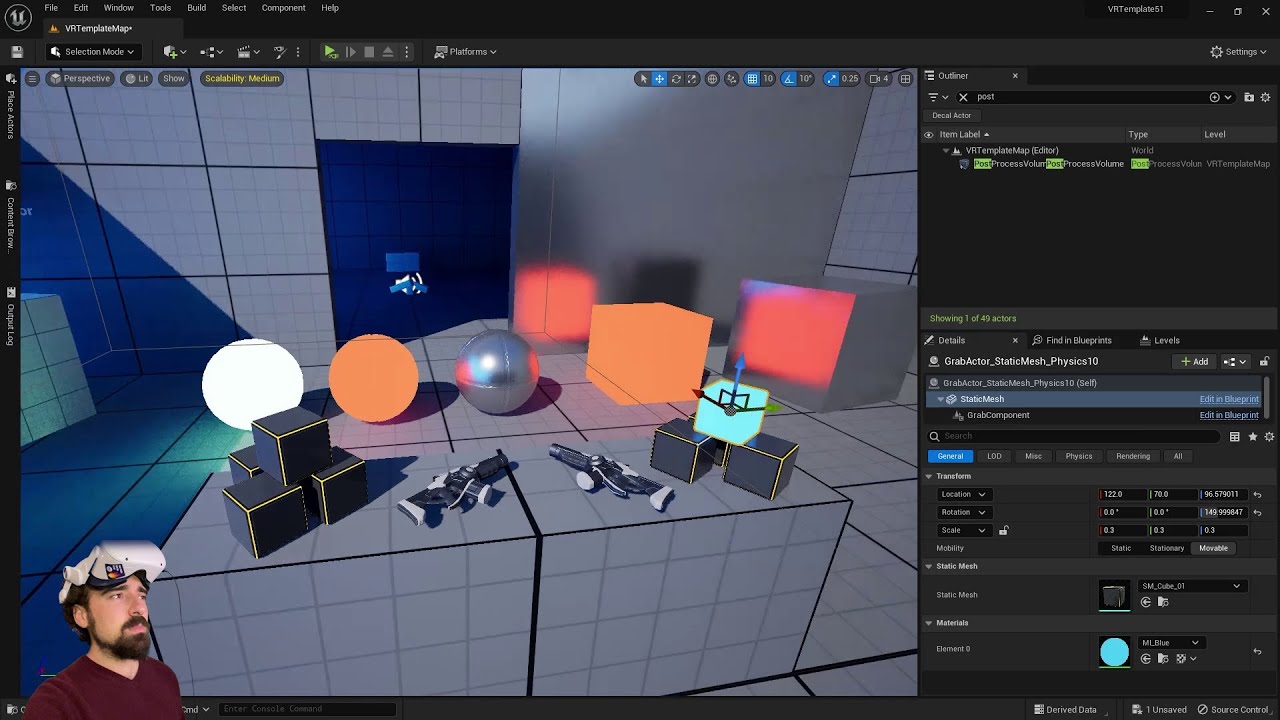
I'm on an RTX 3080 mobile.
For SteamVR, be sure to use the launch parameter -norhithread to avoid weird shadow artifacts.
Key points:
Download the "Orb Simulator" Demo, which now includes trees and buildings:
https://www.dropbox.com/sh/da489eg96ca4lxm/AACTSZ3gYI65RWQ...
see if this helps
tiny bolt
Moving some projects to 5.1 so thought I'd just ask, can we add C++ to the VR template yet (ue5)
tiny bolt
We DO have the add C++ option now 😄
tiny bolt
big appreciate for setting up vscode being the easiest it's ever been
 hushed abyss
spiral marlin
I figured it out!
c++: `FSlateApplication::Get().SetAllUserFocusToGameViewpor...
hushed abyss
spiral marlin
I figured it out!
c++: `FSlateApplication::Get().SetAllUserFocusToGameViewpor...
Thanks for this. I ran into the same issue after upgrading to 5.1. This seems to fix it although it seems like a bug.. my widget component is set to not receive focus.
 shy steeple
I'm trying to upload the build to Meta store's Production channel but I keep getting following error.
GraphQL server responded with error 1675030: Error performing query.
I re-read their uploading instructions and guidelines and I even tried to upload the empty project using oculus version of ue 4.27. But I still get the same error.
I can upload to all channels except "Production (Store)" using Meta Quest Developer Hub or ovr-platform-util.
Is anyone familiar with this issue? 🙂
ashen dome
Can anyone tell me why Decals and planer reflections are only rendering in one EYE in VR?
left cedar
mighty carbon
https://www.youtube.com/watch?v=L8t_pOjYVz4
didnt help apparently its a dx12 issue garrr
mighty carbon
ugh 😦
 round cliff
How to detect if a client quits by Oculus menu Quit (Quest 1-2)
 prisma sapphire
Hey guys, does anyone know why I’m seeing two different textures on my character based on which eye lens I’m looking through in VR?


 brisk sun
Hey guys! I'm currently running into what seems to be a known issue with Motion Controller Overlap events firing off every tick. (https://issues.unrealengine.com/issue/UE-36103). The bug report says 'Resolved' 2017 But I'm still seeing others reporting it as an issue since then, I was wondering if any of you have ran into or got past this issue.
The overlap events work as expected until I attach a component to either of the motion controller components, then the overlap Begin and overlap End gets called every tick.
Welcome to the Unreal Engine Issue and Bug Tracker. You can check the status of an issue and search for existing bugs. See latest bug fixes too.
dreamy ivy
Has anyone here had issues with Motion controllers suddenly stop tracking for the project your working on? I was in 5.1 yesterday and everything was fine. then my project detected my actual hands, not controllers and now it wont track the motion controllers of My quest 2.
Testing in a default template works as they should. but my project now has now tracking or inputs. I've been at this for two days with no luck. tried the standard stuff like checking:
I also haven't touched the motion controller components at all.
I'm really confused and I cant progress without controllers so any help would be fantastic.
The controllers just spawn on the floor and don't move In VR preview.
Thought when righting this to check the output log, I'm getting this error and the editor hangs when opening.


Also getting this one.
going through the CPP it mentions XR_ENSURE(xrCreateActionSet(InInstance, &Info, &Handle)); on each one of the lines.
dreamy ivy
figured it out. Enhanced input is a damn nightmare. if your motion controllers stop tracking, make sure your Input mapping context has a new description or none at all. Dont duplicate.
silk lodge
dreamy ivy
figured it out. Enhanced input is a damn nightmare. if your motion controllers s...
good info!
left cedar
is it just me or msaa looks better than tsr in vr? much sharper for sure
 polar valve
Anyone know why everything is black on the Quest (except for stereo layers) after updating from 4.26 to 4.27? Using OpenGL
Same on Pico
 heavy tulip
Hey! Does anyone have experience with Oculus/Meta API implementation? More specifically the Subscription API. I need some help on this
mighty carbon
I hear that VR looks as good in deferred with properly tweaked TAA
Maaaybe slightly less sharp than MSAA
But with a lot more eye candy
 daring pasture
TAA just has too many issues in vr. FXAA looks significantly better in UE5 compared to UE4, especially with MSAA not being an option for me.
mighty carbon
Why is it not an option in UE5 ?
daring pasture
For my project it's not because I need deferred, not that it cant be used.
mighty carbon
What about that new fancy AA method in UE5? Has anyone tried it in VR?
I am waiting on 5.1 NvRTX fork to try DLSS2.0 in VR
daring pasture
Tsr? I tried it but it tanked performance for me.
mighty carbon
Yeah, that one
daring pasture
I'm not a good test case to compare though since my main level is pretty large with a ton of foliage
daring pasture
I'm hoping virtual shadow maps gets fixed in vr. 5.1 seems to have broken them
You right 🥲
 jovial hamlet
petition to bring fortnite to quest
left cedar
left cedar
anyone else gettin shadow flickers in vr using nanite in 5.1? Im only seeing it ...
turnin down GI in scalability fixes shadow weird sh*t but only in editor still shows up in package 🙂 hope they can fix it
left cedar
daring pasture
I'm hoping virtual shadow maps gets fixed in vr. 5.1 seems to have broken them
u havin shadow flickers?
daring pasture
Yeah
left cedar
daring pasture
Tsr? I tried it but it tanked performance for me.
i tried both tsr and msaa msaa looks sharper
left cedar
daring pasture
Yeah
yea me too turnin down GI to High fixes it
daring pasture
Hmm, I'll give that a try
left cedar
yea atleast in vr editor it does. also tried in 5.2 same thing
daring pasture
left cedar
i tried both tsr and msaa msaa looks sharper
I haven't used msaa since 4.24 i think. Don't even remember how it looks to compare
daring pasture
I would use it if I could, but my foliage would take a massive hit
left cedar
ahahah yea got cha
mighty carbon
@left cedar have you tried NvRTX branch of UE5 ?
left cedar
mighty carbon
<@421829807790227489> have you tried NvRTX branch of UE5 ?
maybe..... hahaha lets just say the 5.1 is coming and its gonna be a big one
mighty carbon
I am wondering if RTXGI/DI + DLSS2.0 is faster than Lumen
and perhaps more scalable ?
left cedar
ill try to compare it when its officially out
 chilly ocean
So I'm trying to use the web browser plugin on the Oculus Quest 2 and it doesn't render anything at all, unlike windows where it does... Seems like this is a problem that has existed for a while looking at forums. Anyone try anything with this?
Or an alternative method is to just open up the browser in the quest, anyone know how to do that?
spiral marlin
This is probably a dumb question but what size should my UMG be for a near-fullscreen HUD that sits in front of the viewer's VR camera?
Dropping in a canvas panel at root defaults to 1280x720
 marsh crystal
I check back every once in a while but is there any way to render ui widgets directly to the HMD yet?
chilly ocean
marsh crystal
I check back every once in a while but is there any way to render ui widgets dir...
Isn't that what Stereo Layers are?
Don't render it in the main rendering pass since that messes with anti-aliasing and whatnot
marsh crystal
wait i didn't know about stereo layers
 ashen thunder
in ue 5.0.3, how to disable openXR but keep OculusVR plugin?
I would like to use the Hand Tracking features but it doesn't display the hands mesh, it only shows the two menu buttons. I have read that this is caused by OpenXR plugin and disabling that, it also disables OculusVR plugin.

 remote sandal
Good Day,
I downloaded the "Oculus Lipsync plugin 29.0.0" and followed the instructions given in the document.
As per the documentation, I copied the the "OVRLipsync" to "UE4.27-Engine-Plugins" and also into "UE5.1-Engine-Plugins".
But when I open a project in both the versions, The plugin is throwing an error saying the plugin is compiled for different version.
I also tried to copy the plugin directly to the project folder, Still same error.
Please sort the issue for me,
Thanks,
 pearl hare
Anybody happen to know if this demo scene (or something like it) is available for download? https://twitter.com/H1R0Y4N/status/1579060446937550848
The Epic gods have done it again... Lumen and Nanite in #UnrealEngine #VirtualReality using #UE5-main (5.2). This is by far the most detail and realism I have ever seen in #VR.
2932
447
Twitter
·
 summer geode
Don't think it is but won't be hard at all to recreate with megascans
pearl hare
Yeah I was trying to tinker with them but am having a tough time. Thought if there was a demo scene using nanite and lumen I could compare and see where I'm going wrong.
summer geode
pearl hare
Yeah I was trying to tinker with them but am having a tough time. Thought if the...
this guy has some demos setup with lumen and nanite for vr that you can download: https://www.youtube.com/watch?v=efWDbGysKYg https://www.youtube.com/watch?v=L8t_pOjYVz4&t=2460s
 flat shoal
@left cedar @daring pasture @dull ocean have any of you tried sharpening post processing together with TAA? (There's also a tonemapper sharpening effect, apparently...)
marsh crystal
did they remove the vr editor from 5.1? I dont see it now.
 quiet badger
I'm surprised anyone hangs out in here tbh
flat shoal
Epic employees are of a different opinion... 😅
left cedar
i havent tried applying tonemapper sharpening in vr only in my animation stuff
mighty carbon

Rumors of Meta CEO Zuckerberg’s possible resignation in 2023 have been spreading like wildfire and it evidently came from an inside source.
End of Era
And probably end of standalone VR
left cedar
i like miniverses tho
marsh crystal
I don’t think this is the end of standalone vr. Don’t apple and Microsoft have headsets planned or something?
 keen prawn
i dont mind the cable... more pixels... more refreshrate!
like i dont think they add much hardware wize
screens and gpu needs to get better and cheaper... thats where the real gains are
but VR will have a future with or w/o facebook
*Meta 😛
both amazon and facebook found out the hard way you cant trow a pile of cash and create a fun world in a few years
jovial hamlet
marsh crystal
I don’t think this is the end of standalone vr. Don’t apple and Microsoft have h...
Don't have high hopes for apple gaming
keen prawn
hmm apple could have made a console.... or something
they kinda make everything... but also not really
fringe blaze
I'm using Polygon assets for my game, but I'm replacing the textures with 256x256 copies of Quixel textures (albedo only). The Polygon assets use texture atlases for performance.
My current plan is to redo the UVs of the assets and use multiple material slots instead. Since the new textures will only be 256x256, will the performance of my game be largely unaffected?
 severe delta
marsh crystal
did they remove the vr editor from 5.1? I dont see it now.
severe delta
marsh crystal
did they remove the vr editor from 5.1? I dont see it now.
I can't find it either. I'm installing 4.27 to try making it work again. Any news?
I'm praying this feature will be restored and compatible with Oculus quest 2. I teach at USF Tampa a course called Envisioning Sustainability and we are using Gravity Sketch on the Oculus to build worlds to teach climate mitigation technologies and would much prefer to develop in Unreal. Right now we are able to create and edit on the PC and then Play on the Oculus but as you know, the intuitive way of creating "in-world" with one's hands is so much more powerful. Any ideas when we can expect VR edit back?
marsh crystal
severe delta
I'm praying this feature will be restored and compatible with Oculus quest 2. I...
I forget I keep asking about the vr editor too. Honestly I haven’t had any luck getting it working in any version of ue5. The button becomes available in 5.0.3 only when I enable th steam vr plugin and disable oculus. But that doesn’t work because my headset is oculus so I can’t even use it because the controllers don’t detect. Idk it’s just been a nightmare for me trying to use the vr editor. But it sucks because it works so well for vr development
marsh crystal
severe delta
I can't find it either. I'm installing 4.27 to try making it work again. Any n...
It’s funny I did the same thing last night. Almost debating making my levels in 4.7 and migrating them over now 🤣
pearl hare
summer geode
this guy has some demos setup with lumen and nanite for vr that you can download...
Thanks!
severe violet
Anyone ever had this with VR when using Screen Space Global Illumination?

This is UE 5.0.3
 outer flicker
fringe blaze
I'm using Polygon assets for my game, but I'm replacing the textures with 256x25...
outer flicker
fringe blaze
I'm using Polygon assets for my game, but I'm replacing the textures with 256x25...
Increasing material slots will likely increase your drawcall count. So keep an eye on that.
mighty carbon
severe violet
Anyone ever had this with VR when using Screen Space Global Illumination?
Screen space effects never worked in VR
severe violet
mighty carbon
Screen space effects never worked in VR
Ssoo.. what kind of reflections am I seeing then?
mighty carbon
Dunno, but you have one eye and other eye showing different things
severe violet
I am using the Skylight as the scene reflection capture. So Naturally I do see the other car in the reflections but. On the Hotrod I also see the inside of the wheel reflected on the chasis of the car... weirdly enough I don't see any car reflections in the mirror of the Impala?
I am seeing similar in VR

Granted you have to turn off "Forward shading" to be able to enable it. Lumen works in VR too with UE 5.1.
mighty carbon
I don't have much experience with deferred 😅
 hidden crest
flat shoal
<@421829807790227489> <@191008392108703744> <@971879383373578310> have any of yo...
hidden crest
flat shoal
<@421829807790227489> <@191008392108703744> <@971879383373578310> have any of yo...
It worked quite well for me with TAAU enabled. Almost gets me to the sharpness of MSAA with Forward Shading.
 untold knoll
I have some very high quality 180 stereo images that I captured with my camera, and viewing them on my quest 2 using an image software (immerGallery) looks infinitely better than on Unreal. I have a project where I drop my images and package to my quest. The difference is night and day!
Unreal can load the 8k images fine but it just makes them look much much worse for some reason
 golden current
Have you tried thinkering with the compression settings?
fringe blaze
I have a master material with 1400 instructions, but it means that I don't have to use any lights (baked or realtime) in my scene. Would this be good performance-wise?
 foggy oxide
does anyone knows how to run a console command on an oculus quest ? (thats a game packaged as apk and installed)
chilly ocean
foggy oxide
does anyone knows how to run a console command on an oculus quest ? (thats a g...
adb shell "am broadcast -a android.intent.action.RUN -e cmd 'YOUR_COMMAND_HERE'"
Taken from https://developer.oculus.com/blog/developer-perspective-ue4-logging-and-console-commands-for-mobile-vr/, which has other useful information on debugging
foggy oxide
chilly ocean
Taken from https://developer.oculus.com/blog/developer-perspective-ue4-logging-a...
you're awesome thanks, and thanks for the link.
you wouldnt happen to have a link to profile a game while it's running on the oculus right?
(ive already searched for the ovrmetricstool )
chilly ocean
foggy oxide
(ive already searched for the ovrmetricstool )
You enable persistent overlay on the OVRMetrics tool and it should run over your Unreal Engine game
foggy oxide
Thanks a lot :)
 stiff wind
Hey, I'm testing out the Handheld AR template with an android phone.
The issue: The camera pass through stays black.
Everything else works: surfaces are identified, I can manipulate the placeable, etc..
I'm trying to figure out where the camera feed is in the blueprints, but I need some help finding it?
 gritty yew
Can someone please tell me the name of the thumb sensor on the touch controllers? The flat sensor just to the side of the X/Y, B/Y buttons.
I cant find it.
Ue4.26
jovial hamlet
gritty yew
Can someone please tell me the name of the thumb sensor on the touch controllers...
This one?
I'm on 4.27-Oculus though

 distant hill
Yeah I don't see it in an Epic Games build on 5.1 at least, might be specific to the Oculus branch?
gritty yew
jovial hamlet
This one?
I'm on 4.27-Oculus though
Yea closest thing i could find was Thumb up cap touch, but that is a cap rest/touch for the flat touch menu button. Awell.
chilly ocean
Does anyone know if substepping works on Oculus Quest 2? This link says mobile devices don't have substepping working so... curious. Kind of a big deal https://docs.unrealengine.com/4.27/en-US/InteractiveExperiences/Physics/Substepping/

Explanation of what Physics Sub-Stepping is and when to use it.
foggy oxide
stiff wind
Hey, I'm testing out the Handheld AR template with an android phone.
The issue:...
what engine version? i found that to be an issue on 4.24-26 versions
anyone had performance issues with a mediaplayer on oculus quest 2?
slender lynx
stiff wind
Hey, I'm testing out the Handheld AR template with an android phone.
The issue:...
Currently UE 5 is not useable for doing mobile augmented reality. There are some showstopper bugs. Maybe they get fixed in UE 5.2
 winged gorge
Hello! I'm wondering how I can get finger curls and splays through the openxr plugin instead of steamVR, so I can get completely rid of steamVR

 coarse prism
Using StartCameraFade I can do fade out no problem, but for some reason fading in seems to just not work.
Any ideas as to why this would be?
 mental halo
Just started working on a Quest 2 build but my game is crashing on standalone, where can I access the crash logs?
gritty yew
How would I set my loading screen to show in the hmd? I have a working loading screen, but will only show on the desktop window and not in the hmd.
Edit: forgot; im using async loading screen plugin.
polar valve
mental halo
Just started working on a Quest 2 build but my game is crashing on standalone, w...
Either "internal shared storage"/UE4Game/Project_Name/Project_Name/Saved/Logs/ Or if it crashes before writing a log file/ is unable to write the crash to the log adb logcat *:F
flat shoal
I get flickering in screen space reflections in VR using UE 5.1... can you do anything to fix that?
mighty carbon
Don't use screen space effect in Vr @flat shoal 🥲
flat shoal
mighty carbon
Don't use screen space effect in Vr <@149623011199156225> 🥲
Aww... but it's so close! No artifacts, works in instanced stereo... it's just that little bit of occasional flickering.
mighty carbon
If you read Epic's Getting Started guide, you'll see that even deferred rendering isn't recommended
So all these fancy features aren't officially supported in VR
So, either live with glitches or don't use the feature
flat shoal
mighty carbon
If you read Epic's Getting Started guide, you'll see that even deferred renderin...
Ehh... it does? I had a call with someone from Epic a few months ago and they were adamant that we should dump forward shading and just go for deferred instead. 🤣
mighty carbon
Official when it's in writing
I talked to Tim Sweeney on Twitter and with Epic's engineers, about them fixing occlusion culling performance issues on Quest 2.
Nothing has been fixed since then 🤷♂️
So, official is in writing
flat shoal
Well, with nanite + lumen in VR in 5.2 this will be rendered moot (for us) anyway...
mighty carbon
Also Oculus Meta still advises to use forward even with PC VR
Meta knows hell a lot more about VR and optimizing for VR than Epic 😂
flat shoal
Hmm... input mappings have gone haywire in 5.1 compared to 4.27...
Damn, the VR template doesn't even use them... time to learn something new again, I guess!
 gusty ridge
So Im a bit confused. If I want to target Quest headsets, is the OpenXR plugin enough or must I use the MetaXR plugin for 5.0.3? since theres no support for MetaXR in 5.1 yet
 jade kettle
So how's VR + Nanite + Lumen in 5.1?
I tried messing around with it in the VR Template Project but I don't think it's exactly working as I'm expecting
And I'm wondering if there are any project settings I'm overlooking
 dreamy orbit
jade kettle
So how's VR + Nanite + Lumen in 5.1?
dreamy orbit
jade kettle
So how's VR + Nanite + Lumen in 5.1?
Amazing. I am running a lot of experiments - trying to see what gives the most performance balanced with amazing looks. It does require quite a bit of power to run it smooth enough to enjoy, but the future looks fantastic. ( @jade kettle If you haven't already watched it, this gives some good insight into some settings you need to adjust: https://youtu.be/L8t_pOjYVz4)
I'm on an RTX 3080 mobile.
For SteamVR, be sure to use the launch parameter -norhithread to avoid weird shadow artifacts.
Key points:
Download the "Orb Simulator" Demo, which now includes trees and buildings:
https://www.dropbox.com/sh/da489eg96ca4lxm/AACTSZ3gYI65RWQ...
jade kettle
dreamy orbit
Amazing. I am running a lot of experiments - trying to see what gives the most ...
Thanks! I didn't realise Alex released a more definite video
dreamy orbit
Here's someone pushing theirs to 11: https://youtu.be/Ow2SIDCNrQU

One of the free assets that recently added to Unreal Marketplace is MW Broadleaf Tree Forest Biome. I just tested it in VR with Lumen and Nanite enabled setting.
It looks very cool, however they can increase the bark resolution as we can now use Nanite.
Download link:
https://www.unrealengine.com/marketplace/en-US/product/broadleaf-forest-coll...
real needle
Looking for someone who can help me add a custom fbx enviroment to unreal engine and get it to work, well paid gig
Looking for ongoing tutoring too
gusty ridge
For Unreal 5.1, do I need to use the OpenXR plugin to make a standalone Quest game, or do I need to stick with 5.0 and use the MetaXR plugin until that plugin works for 5.1?
jade kettle
dreamy orbit
Amazing. I am running a lot of experiments - trying to see what gives the most ...
Speaking about Alex, he did a talk at Unreal Fest! https://www.youtube.com/watch?v=JD95BklloHk
Unreal Engine's VR Template was given a major overhaul and now supports OpenXR, which means it supports just about any headset. Let's explore the state of VR in UE5.
We’re excited to bring you sessions from Unreal Fest 2022, available to watch on demand: https://www.unrealengine.com/en-US/events/unreal-fest-2022
stiff wind
foggy oxide
what engine version? i found that to be an issue on 4.24-26 versions
I'm trying out 5.1
stiff wind
slender lynx
Currently UE 5 is not useable for doing mobile augmented reality. There are some...
Alright, thanks for the input. Has epic stated anything about the bug?
sullen vortex
anyone using Pico sdk into pipeline? i´m using 4.27 and since i added Pico SDk, every time i try to compile server / client i ´m getting unknown crash build
Thanks in advace
 uncut needle
sullen vortex
anyone using Pico sdk into pipeline? i´m using 4.27 and since i added Pico SDk, ...
uncut needle
sullen vortex
anyone using Pico sdk into pipeline? i´m using 4.27 and since i added Pico SDk, ...
Haha I have done a project in pico. It was a real hassle to get it to package. Once it worked it worked really well though.
uncut needle
sullen vortex
anyone using Pico sdk into pipeline? i´m using 4.27 and since i added Pico SDk, ...
Have you also tried to package an empty project with the correct sdk, ndk locations and versions?
sullen vortex
uncut needle
Have you also tried to package an empty project with the correct sdk, ndk locati...
ndk looks to be the same as oculus quest...and crash is unknown which doesnt help
 reef willow
Anyone know where to post about some of the features in the Architecture CollabViewer template being broken in 5.1?
uncut needle
sullen vortex
ndk looks to be the same as oculus quest...and crash is unknown which doesnt hel...
It might have to do with the sdk or ndk versions you have installed in android studio. If you have a lower version still installed it can give this error.
reef willow
reef willow
Anyone know where to post about some of the features in the Architecture CollabV...
The issue was related to SetPositionInViewport() and will be fixed in next patch.
https://twitter.com/RyanDowlingSoka/status/1596300959013306369?s=20&t=QcQiNVt5y2WW7IQ6PPiVpA
If you are using 5.1 and have had your SetPositionInViewport() call start failing, know its fixed for the next 5.1 patch, but also I've got the workaround in the QT here.
#UnrealEngine #UE5
 Twitter
·
Twitter
·
 feral smelt
Hi all, i want to ask
Can we development vr for android phone ?
So the user can play the game with android
 rotund ruin
Anyone know why the Mediaplayer shows the video double? it show the same on top and bottom, trying to make a 360 video in a sphere for VR
this is how it looks like in Media texture

 sacred drift
Hello there. Is any familiar with the vr expansion plugin? I'm trying to set up a dial but it's snapping instead of being able to gradually move it with vr controller. This is my code. 1st is the VRCharacter blueprint and the 2ns is my dial setup.


 frank shell
Is anyone familiar with index controller inputs? I can't seem to get any input values for features that are index controller exclusive. For instance I can't get trackpad force or grip force axis inputs even though they are present in my bindings drop down.
frank shell
Alright, I've figured this out and it doesn't have anything to do with VR stuff.
I'm using Enhanced Input and I wasn't aware that if you want an input to be available to enhanced input you need to bind it to some arbitrary action/axis input in the Project Settings.
 red oxide
Hi everyone, I have a question.
I’m working on an android VR app in 5.1 but every time I turn on Mobile Multi-View I get a fatal error when I cook that appears to be related to a shader compilation error. Anybody have experience with this and whether I might be missing a related setting that’s causing it not to work?
I feel like it was working fine in 5.0. I checked it on two projects (one just the plain VR Template) with the same results on both.
 brittle salmon
im wondering what are the bare minimum files ue 4.27 needs to do an android build for a vr headset
edit: after installing stuff as per ue documentation (every single step), apparently you only need the SDK, jre and NDK folders, which you can find from Local/Android and the android studio installation folders, and then you can copy those into one place and remove the rest of the things you installed.
the guide says to install everything through android studio, but does it need studio itself or just the sdk, ndk and a path to jdk?
my client has a strict firewall and they dont seem too happy to dig through all the addresses the studio installer uses, so they want just the necessary files
i'll tinker around and post an answer to myself if i figure it out 😅 , but if anyone knows it would help a lot
red oxide
Any chance somebody could help me with an error?
`LogPlayLevel: Error: UAT: ERROR: minSdkVersion is higher than Android version installed on device, possibly due to NDK API Level
LogPlayLevel: Error: UAT:
ERROR: Installation of apk 'D:\Unreal Projects\Detection\Binaries/Android\Detection-arm64.apk' failed: [INSTALL_FAILED_OLDER_SDK: Failed parse during installPackageLI: /data/app/vmdl2088663699.tmp/base.apk (at Binary XML file line #8): Requires newer sdk version #33 (current version is #29)]`
Which would make sense, however.. I have Android SDK 33 installed. 29 is set as my min SDK and my target SDK in project settings per Oculus documentation.
I have android 33.0.1 SDK Build tools, NDK 25.1.8937393, and CMake 3.22.1
It only just broke with my update, and I haven't changed my SDK/NDK path. I ran SetupAndroid.bat as well and restarted my computer several times but it still sees it as 29 in the engine.
brittle salmon
call "%SDKMANAGER%" "platform-tools" "platforms;android-28" "build-tools;28.0.3" "cmake;3.10.2.4988404" "ndk;21.4.7075529"
does the setupandroid bat have the arguments as version 29
for you
red oxide
Thanks, one sec I’m restarting my engine and I’ll confirm
brittle salmon
to me the setupandroid seems like redundancy, or i'm just completely missing something
red oxide
This might be the issue - in SetupAndroid.bat we run this SET command
--
SET PLATFORMS_VERSION=%1 SET BUILDTOOLS_VERSION=%2 SET CMAKE_VERSION=%3 SET NDK_VERSION=%4
But since the build tools have now gone into the 30's I don't think it's setting it correctly. It's capping at 29.
Right? Looks like it's just appending the correct number to the '2' prefix
Whereas we need a different prefix
It does also have this though (after)
rem hardcoded versions for compatibility with non-Turnkey manual running if "%PLATFORMS_VERSION%" == "" SET PLATFORMS_VERSION=android-32 if "%BUILDTOOLS_VERSION%" == "" SET BUILDTOOLS_VERSION=30.0.3 if "%CMAKE_VERSION%" == "" SET CMAKE_VERSION=3.10.2.4988404 if "%NDK_VERSION%" == "" SET NDK_VERSION=25.1.8937393
brittle salmon
i mean the %SDKMANAGER% seems to take whatever packages you want as arguments, so you could just replace them with the versions you need
when its called
red oxide
Hmm… I think I’m a little lost here actually.
sterile sandal
Hello, Does anyone tried Metahumans on quest2 / quest pro ?
How it looks?
red oxide
They're ok. It's better with TSAA on (I think) instead of MSAA but it's expensive.
sterile sandal
ok. Are there any apps on the Meta store which are using Metahumans?
red oxide
Probably on App Lab
brittle salmon
figured out my problem, added a solution as an edit
jade kettle
My company is looking into the Vive Focus 3 for our next productions, does anyone have experience with that with UE?
brittle salmon
i do
jade kettle
What SDK is that? Vive Wave?
I've also read that you can't access the pass-through camera imagery
brittle salmon
OpenXR, OpenXREyeTracker, OpenXRHandTracking, WaveOpenXR
waveopenxr basically
those are all the plugins you need to build for it
i havent done a build for it for a while though
jade kettle
Alright, because we're currently using Vive Pros but that's practically a complete different ecosystem right?
brittle salmon
it is
its pretty similar to quest, but you need to do some focus specific stuff
there are some resources on the vive developer forums
jade kettle
Thanks, yeah I was tripping over the Vive branding
brittle salmon
yeah, its a standalone android headset instead of a pcvr one
jade kettle
And little to no relation to SteamVR
brittle salmon
yeah actually you need to disable steamvr and other desktop vr stuff once you do a build for it
in unreal editor plugins
jade kettle
Yep
Argh now I do remember I did an experience with it in Paris with it connected to a VR Backpack and it was using SteamVR
brittle salmon
yeah it can connect to a pc too, probably was doing that then
it has a wireless streaming app built in too
brittle salmon
it does
jade kettle
Wireless to PCVR?
jade kettle
Ah, more expenses 😅
jade kettle
(This is the Paris VR experience I did https://www.eternellenotredame.com/en)
brittle salmon
nice, im under an nda 😅
jade kettle
Hah I can imagine, the Vive Focus 3 is not really consumer level
But thanks for answering!
One last question, the map sharing function, is it easy and stable to work with or is it a nightmare?
brittle salmon
just to save a bit of time for you, you'll need android sdk build tools version 29.0.2, and ndk version 21.1.6352462 for the focus 3, once you start installing the android studio stuff
jade kettle
if you've worked with it
brittle salmon
i havent heard of that
jade kettle
Hello all, Looking for any technical information on enabling map sharing. Pasted below is the press release from November 2021 on the Focus 3's newer features. I haven't seen anything else on the forums, google searches result in copies of the press release on various tech sites, and I've reached...

HTC VIVE now offers Location Based Entertainment mode with “Wi-Fi map sharing” on VIVE FOCUS 3. This allows multiple users to operate accurate co-location tracking in a shared space, without having to individually set up or calibrate each headset. It saves set-up time, and lets people go straight into multiplayer games with no delay. Contact us...
It's pretty cool, I was in the same space as around 30 other people and I was able to see their representations very accurately
brittle salmon
yeah i haven't done anything like that with it
jade kettle
Like even hi five my colleagues while wearign the headset
Which is why we're looking into it
red oxide
red oxide
Any chance somebody could help me with an error?
----
`LogPlayLevel: Error: UA...
Did a fresh install of the engine as well as android & all it's accompanying tools per the Epic instructions and I'm still getting nowhere 😦
 odd shadow
Had someone same problem with AR session config in UE5?
 brittle salmon
red oxide
Did a fresh install of the engine as well as android & all it's accompanying too...
brittle salmon
red oxide
Did a fresh install of the engine as well as android & all it's accompanying too...
you only really need a sdk, ndk and jre to get it working, the unreal instructions makes you get the wrong versions
i'd try installing the right sdk version in android studio so it matches whatever quest needs, and see if it works
and not use the .bat since it downloads some old versions and sets them as the sdk
the .bat sets the windows environment variables, which is what unreal uses as a backup if you dont manually specify a sdk or ndk path in the editor

idk if android studio updates those if you install a new sdk version
 subtle raft
Whenever I use this node the engine crashes (5.1) does this happen for anyone else? I have a feeling this might be a Quest Pro exclusive issue
 quick dirge
subtle raft
Whenever I use this node the engine crashes (5.1) does this happen for anyone el...
quick dirge
subtle raft
Whenever I use this node the engine crashes (5.1) does this happen for anyone el...
Don't know, but this node was implemented for OpenXR in 5.1 (before that, it just wasn't working at all), so new feature + new headset might be an unlucky combo. If that's any help, I think I posted a workaround on the forums to basically implement the same thing with just a few BP nodes.
subtle raft
Ya in 5.0 it didn't do anything, do you have a link to that post?
found it https://forums.unrealengine.com/t/reset-vr-position-on-openxr/250323/17 thank you!
 echo bane
What video card do you recommend to program things in virtual reality? I have a 6600xt and its performance is fatal
 rocky nexus
you can get decent experience on mobile cpu (quest) so gfx card that alone costs more should be quite usable. if you want to use lumen and nanite, you want best gpu you can buy
echo bane
Thank you
quiet badger
I really need a vr project to be apart of right now. Really burned out trying to develop for quest on my own.
quiet badger
low poly stylized all day
 steel zenith
Hello group! I have a problem that I can't create the APK, when I try to do it I get the message "SDK NOT SETUP", I've tried everything and everything looking in Unreal forums, Unreal Discord and hours of videos in English, but no solution to this. I want to export to create the APK for my Meta Quest 2.
Test with different versions of SDK, NDK, Java, Android Studio 4.0 and 3.5.3.
Technical details:
MAC M1
MACOS 13.0
X-codes 14.1
Unreal Engine 5.0.3 (verified)
Meta Quest 2
I remain attentive to any idea, advice or something... thank you very much.
 ashen thunder
Can someone help me finding a way to use the Touch Input in the Oculus Quest 2 with OpenXR Plugin? I can find and map Trigger, Buttons but not the cap of the controller.
 subtle raft
ashen thunder
subtle raft
ashen thunder
try 2D Axis?
 dusky walrus
hi all, is there a simple way to lock hmd movement and only allow rotation?
real needle
hi
is there any way to use multiple vr headset in vr template ??
just one of them will be controller the others just spectator
Device: meta guest 2
 shadow forge
I've had a scroll up to check but has anyone else upgraded a Quest project to 5.1 and had the right eye stop rendering? All worked fine in 5.0.
dreamy ivy
does anyone know how to get holographic remoting working with the Hololens 2 in Unreal engine 5. I can find the Windows mixed reality plugin anymore.
steel zenith
hello everyone, I have a MAC M1 with Ventura 13.0 system, I want to compile an APK but this message appears on the screen, I have xcode 14, and I put the path by hand in the Unreal of the SDK, NDK and Java (android studio), no I know what to do, can someone guide me?
 real needle
Hi
Can multiple vr headset be used in one game??🙄 ue5.1
tribal lintel
ashen thunder
Can someone help me finding a way to use the Touch Input in the Oculus Quest 2 w...
That button is there to detect if your thumb resting is on it, to drive hand poses. If I remember correctly it's just a true or false so it's not actually under input, so you would use their BP or C++ function to check for it from the oculus plugin. most likely requires their source build or their new standalone plugin
tribal lintel
real needle
Hi
Can multiple vr headset be used in one game??🙄 ue5.1
yes
real needle
tribal lintel
yes
Can u give me doc or help??🙄 its very important for me 🤦🏻♂️
 maiden willow
real needle
Can u give me doc or help??🙄 its very important for me 🤦🏻♂️
maiden willow
real needle
Can u give me doc or help??🙄 its very important for me 🤦🏻♂️
This isn't VR specific but it will give you all you need to know in order to understand the fundamentals for replication within Unreal Engine 5. It won't matter if you build the game as VR, 3rd person or even 1st person - it all works the same at that point.
maiden willow
real needle
Can u give me doc or help??🙄 its very important for me 🤦🏻♂️
This link has a coupon code that should still be valid for today only:
https://www.udemy.com/course/unreal-engine-5-cpp-multiplayer-shooter/?couponCode=DEC-01-22-MLTSHT

Create a fast-paced, competitive multiplayer shooter in Unreal Engine 5 using C++!
real needle
maiden willow
This link has a coupon code that should still be valid for today only:
https://w...
Thank you so much ☺️
 low mauve
hello i need help

ERROR: We found issues with the APK during validation. Please check that the APK meets the Application Manifest Requirements and then resubmit your app.
(android:screenOrientation in AndroidManifest.xml)
i am stuck with this one when i trying to upload to Meta Quest
I spent last 4 days and nights with this issues
I will very appritiated if you have some solutions
jade kettle
I'm testing VR with Nanite, and I've got issues with geometry flickering in the headset. I remember there beign a fix or tweak for that but I can't find it anymore
white gulch
Is there a solution for a "true mirror texture" while working with Standalone Headsets? All of the Mirror materials I generate seem to end up as flat green textures when ported to the headset for a test.
jade kettle
white gulch
Is there a solution for a "true mirror texture" while working with Standalone He...
What's your current solution for a true mirror texture?
white gulch
I use a Scene Capture Cube and a Camera: https://youtu.be/JrbPlPOavzU

Get this model, or the course here: https://bit.ly/31L1sjO
Download My Free Furniture Model Collection | https://bit.ly/3r89a05
All Pro courses | https://pro-courses.learnarchviz.com/
Follow me on IG | https://www.instagram.com/learnarchviz/
Learn Arch Viz Forum | https://arch-viz-forum.learnarchviz.com/
Udemy | https://www.udemy.com/user/adamzo...
This solution works great! ....in Unreal editor
Once I port it to my Focus Plus/3, the texture just goes a flat Green.
Anyone ever get that particular bug, mirror or otherwise? The flat green issues.
jade kettle
Try this? https://forums.unrealengine.com/t/material-using-render-target-does-not-display-on-android/483223

On Android specifically, when attempting to display a material which is created using a render target of an avatar, onto a UI widget, it does not render at all. However, if I change the material blend mode to opaque it shows, albeit with a black background around the avatar. I need to be able to show the avatar with a transparent background but...
white gulch
jade kettle
Try this? https://forums.unrealengine.com/t/material-using-render-target-does-no...
No such luck, sadly. Still green. I'll see if there's any associated settings I could play with.
 summer rapids
by any chance anyone here would be interested in play testing a ue4 vr game?
odd shadow
Does someone know why i cant see anything with AR on my phone? (My project and UE AR project tested same thing just black screen) Phone telling me that my camera is on. Vulkan Off.
dreamy ivy
hey, everyone. Has any one had an issue with 5.1 were the oculus app opens in a window and is saying it's missing the OpenXRHMD Module? First time it's happened and I'm a a bit thrown.
I can successfully build the APK, and get it onto the headset but opening it just creates a window which then closes the app.
tribal lintel
dreamy ivy
hey, everyone. Has any one had an issue with 5.1 were the oculus app opens in a ...
are you using 5.1 launcher? have you downloaded the new meta standalone plugin that is the replacement for their oculus source branch?
dreamy ivy
tribal lintel
are you using 5.1 launcher? have you downloaded the new meta standalone plugin t...
I am and I have, the plugin wouldn't load saying it was missing some additions.
I only needed to enable it temporarily for testing so I used the old deprecated plugin in ue5.1 but if there's a way of making the metaxr plugin work with out source I'd live to know.
distant hill
I haven't been able to get the MetaXR plugin working but the regular OpenXR one works just fine
keen prawn
whats like default setup for VR these days? used to be forward shading and instanced stereo and stuff like that... but now with UE5 and FSR 2.x anything changed?
distant hill
Has anyone successfully used FVoiceModule / IVoiceCapture on Oculus Quest 2 (or really android in general)
It seems to get freed 3 seconds after initialization
[2022.12.08-21.44.44:145][ 0]LogVoiceCapture: Warning: VoiceModuleAndroid Init
[2022.12.08-21.44.44:158][ 0]LogVoiceCapture: Warning: OpenSLES Initializing HW
[2022.12.08-21.44.44:158][ 0]LogVoiceCapture: Warning: Create audio recorder
[2022.12.08-21.44.44:342][ 0]LogVoiceCapture: Warning: OpenSLES SL_RecorderBufferQueue -512085136
[2022.12.08-21.44.47:712][ 0]LogVoiceCapture: Warning: FreeAllVoiceCaptureObjects
The way I instantiate and use it works great on Windows and Mac builds
VoiceCapture = FVoiceModule::Get().CreateVoiceCapture(CurrentDeviceName, 16000, 1);
Which gives me a TSharedPtr that I store on my ActorComponent which is on the main player Character
Something bizarre I've noticed is that I'm getting supposedly 268435456 bytes of audio data... at once... which is insane because that's 268 MB. Actually, looks like I'm just hitting some kind of maximum there lol. And then the encoder can't encode any of it, so seems like it's invalid data.
And again - the entire implementation works great on Windows and Mac.
reef willow
reef willow
The issue was related to SetPositionInViewport() and will be fixed in next patch...
The VR Menu appears to be broken in 5.1, which was not fixed by apply the changes previously mentioned.
reef willow
reef willow
The VR Menu appears to be broken in 5.1, which was not fixed by apply the change...
I believe these links address this issue (Widget Interaction Component press pointer key broken)
https://issues.unrealengine.com/issue/UE-170472
https://github.com/EpicGames/UnrealEngine/pull/9794
https://forums.unrealengine.com/t/widget-interaction-component-press-pointer-key-broken/695305/6
https://github.com/EpicGames/UnrealEngine/commit/dad870090760393fc04848f3a680ea121a126069
Welcome to the Unreal Engine Issue and Bug Tracker. You can check the status of an issue and search for existing bugs. See latest bug fixes too.
I think I found the duplicate of your report : link I would suggest to upvote it so Epic doesn’t forget it in 5.2 @BOBtheROSS @KKCarrot666 @MisterRobot2
distant hill
@reef willow are you using the Enhanced Input System?
I was having lots of issues with VR menus in my project since I upgraded to 5.1 and switching to Enhanced Input fixed everything, although it's annoying and overengineered for a project with input as simple as mine
dreamy ivy
**I'm currently working on an advanced Blueprints only VR Template for UE5.1
**
I just made my early alpha version live over on my Patreon if anyone is interested in V0.2
https://www.patreon.com/posts/gdxr-vr-template-75721302?utm_medium=clipboard_copy&utm_source=copyLink&utm_campaign=postshare_creator&utm_content=join_link
Here's the list of my current features, fixes and updates
https://www.gdxr.co.uk/gdxrtemplate-updates-and-fixes
I'll be adding videos for the new features to my YouTube channel soon.
https://www.youtube.com/@GDXR/videos

Have you been thinking about creating your own interactive applications using Unreal Engine but don't know where to start?
This channel aims to help you get started if your a beginner or even an experienced developer.
Our Discord is all ways open for those who need help or even just want to hang out: https://discord.gg/xw65fg7
If your just s...
reef willow
distant hill
<@237079584892387328> are you using the Enhanced Input System?
Yes i switched over to use the enhanced input system but the problem persisted.
I applied the changes from this commit to my 5.1 source build and the problem went away.
https://github.com/EpicGames/UnrealEngine/commit/7256c4586cf69c5582fc599ab893d2d3334a2c0d
 tender jolt
Hey
Has anyone worked with VR dialogue system?
Have problem running the package
For 4.27
 placid stag
is there a tutorial for VR multiplayer somewhere i just can't get it?
 umbral gull
Hi! Who can help me? I binded several buttons for movement. For Oculus. WASD is working well. But I can't move in VR.


also I have logic
 distant hill
your right/left should be using the X axis
and you don't need to scale anything, thumbstick to the right will already be +1 and to the left will be -1, you don't need back/left at all
 olive sparrow
Hey guys, does anyone know if Google ARCore face augmentation detection works with UE5?
The last reference I could get of it was from a tutorial made with version 4.26 that used the GoogleARCoreFaceMeshComponent to work. But that component is marked as deprecated in UE5 and I can't see it in the Blueprint Components drop down either.
Apart from that, it seems like ARFaceComponent is the new way to go forward, but I can't seem to find a way to make that work? Does anyone know how to get face detection to work with ARCore?
ashen thunder
tribal lintel
That button is there to detect if your thumb resting is on it, to drive hand pos...
Got it! Thank you!
ashen thunder
subtle raft
try 2D Axis?
Nothing 😦
chilly ocean
Is there a way to set up widget hit testing for two motion controllers at once
like if I have two motion controller laser pointers active at once
distant hill
Yes, you can have two widget interaction components, just make sure each one has its own pointer index
distant hill
distant hill
Has anyone successfully used FVoiceModule / IVoiceCapture on Oculus Quest 2 (or ...
I ended up writing some platform specific code and directly using the "GoogleOboe" module that underlies the Android implementation of AudioCapture. (which is hardcoded to 2 channels of floating point data at 48khz... so i couldn't use that sadly) But using Oboe directly works great.
ashen thunder
Hello, I'm using UE 5.0.3 hand tracking that works in Editor but not in package. I am connected via AirLink and in the Oculus Home, hands are missing too.
Developer Runtime Features are enabled in Settings.
What am I missing here?

 shadow nimbus
Hello, is there a way to retrieve the HMD FoV via blueprints? I'm trying to display a "damage taken" indicator in front of the camera and I'd like to scale it based on the FoV to have it work on both Quest and Pimax headsets.
 worthy quest
ashen thunder
Hello, I'm using UE 5.0.3 hand tracking that works in Editor but not in package....
worthy quest
ashen thunder
Hello, I'm using UE 5.0.3 hand tracking that works in Editor but not in package....
hand tracking is only supported in standalone builds iirc
silver maple
[Oculus Quest 2] Has anyone ever had a problem with sound and voice no longer working when the player temporarily leaves the Guardian zone?
tribal lintel
ashen thunder
Hello, I'm using UE 5.0.3 hand tracking that works in Editor but not in package....
under General, did you make sure oculus is set as your default XR runtime?
flat shoal
Anyone know why this has stopped working in UE5? Worked well in 4.27 but never returns valid in 5.1...

Oh, even though I'm using "any hand" it only works for the right controller... great
ashen thunder
worthy quest
hand tracking is only supported in standalone builds iirc
Thank for your response. Can you clarify for me please what iirc means? I am building/packaging the game as standalone but there the hands are missing. Otherwise in the editor everything is good.
ashen thunder
tribal lintel
under General, did you make sure oculus is set as your default XR runtime?
Thank you for your response. I am using the Legacy Oculus SDK that works flawlessly but only in editor. The Legacy Oculus SDK + OpenXR doesn't work at all, not in editor and not in package and Native OpenXR with Oculus vendor extension gives me an amazing and uplifting editor crash when playing in Editor.
ashen thunder
tribal lintel
under General, did you make sure oculus is set as your default XR runtime?
 worthy quest
ashen thunder
Thank for your response. Can you clarify for me please what iirc means? I am bui...
worthy quest
ashen thunder
Thank for your response. Can you clarify for me please what iirc means? I am bui...
by standalone I mean, running on the quest itself instead of your PC. from what I remember it is not possible to have PCVR working with handtracking on the quest
 tiny bobcat
How to use additional lights for an AR app for android ? I tried using emissive materials but it doesn't affect any mesh surfaces.
And also, I'm completely new to unreal engine.
distant hill
ashen thunder
Thank you for your response. I am using the Legacy Oculus SDK that works flawles...
what crash do you get with "Native OpenXR with Oculus vendor extensions"?
that's the recommended one to use
oh never mind I see you're doing hand tracking
tribal lintel
ashen thunder
No for the first screenshot you sent was not in unreal, that was the oculus app, in general there check what your runtime is. unfortunately if it was me I would be trying to move everything over to the bottom option in your screenshot there, as your kind of in wild west world in terms of compatibility

 ashen thunder
tribal lintel
No for the first screenshot you sent was not in unreal, that was the oculus app,...
ashen thunder
tribal lintel
No for the first screenshot you sent was not in unreal, that was the oculus app,...
Oh, mine looks the same as yours, Set Oculus as active grayed-out.
ashen thunder
worthy quest
by standalone I mean, running on the quest itself instead of your PC. from what ...
Oh, snap! But in the editor it works...
ashen thunder
tribal lintel
No for the first screenshot you sent was not in unreal, that was the oculus app,...
And I have attempted to use Native OpenXR with Oculus vendor extensions but the editor crashes when pressing play in VR
 ashen thunder
worthy quest
by standalone I mean, running on the quest itself instead of your PC. from what ...
ashen thunder
worthy quest
by standalone I mean, running on the quest itself instead of your PC. from what ...
But I have downloaded a demo from the Github and Hand Tracking is working in this package game on my PC, but it is made in UE 4.27
https://github.com/oculus-samples/Unreal-HandGameplay

Oculus showcase of hand tracking based interactions in Unreal. - GitHub - oculus-samples/Unreal-HandGameplay: Oculus showcase of hand tracking based interactions in Unreal.
placid stag
i made a little game for me and my friend how do i have him try it on quest?
ashen thunder
placid stag
i made a little game for me and my friend how do i have him try it on quest?
I'm not an expert but you could send him the APK file and can upload it in his quest either by installing the .bat file you provide or via Side Quest App
 radiant sundial
question for vive controller in ue input mapping(as i don't have a vive controller), what is the difference between Vive (X) Trackpad and Vive (X) Trackpad Touch? also are the directional options button presses or just putting your finger over that section to trigger?
tiny bobcat
I have a model placed inside an actor blueprint. I have watched a video and for now have followed it to spawn my model inside the app. It works but I want to add lights inside my model as you can see in the screenshot and also a switch for it. Currently the emissive material doesn't light up the surface and when I place actual lights inside the actor and inside the level as well, nothing works beside the sky light and directional light. A little help in the right direction would be very much appreciated.


 hidden flame
Hi, I had all the input's for the vr set up automatically for my project but now for some reason it all got deleted. Is there a way to get the default setting config that you get when you install a vr project?
I don't want to have to manually set up everything, I want the default interaction profile
radiant sundial
you could create another default project and copy the DefaultInput.ini in the Config folder from that project into yours.
ember forum
hey all, i'm using a 3d widget for showing blood splatter vignette when player gets hit. i can't figure out how to get the HMD resolution dynamically. i've tried GetSupportedFullscreenResolutions[0] and also GetGameUserSettings->GetScreenResolution() but they don't return the right screen resolution. my goal is to make the widget go from edge to edge of the VR screen (in HMD). how could i achieve that?
trying to get this dynamically because each device has different resolutions
 hushed shuttle
hi quick question is Unity AR simpler to use than UE5 ? i've looked around and it seems like it, just wondering why..
rocky nexus
there is no ar in fortnite,, if a thing is not there, it tends to be lower priority
hushed shuttle
hahah i see
mighty carbon
hushed shuttle
hi quick question is Unity AR simpler to use than UE5 ? i've looked around and i...
Unity is in-house engine of Meta, so everything comes there first (or sometimes only to Unity)
hushed shuttle
mighty carbon
Unity is in-house engine of Meta, so everything comes there first (or sometimes ...
looool
feral smelt
Hi all
any tips on how to make a website appear in VR?
because the web browser plugin can't work, I'm confused about what other method to use (I want to display YouTube videos/documents on the internet)
ember forum
is pso caching still broken for vulkan?
 raven halo
Should be fixed yeah
ember forum
raven halo
Should be fixed yeah
what are you using 4.27 or 5?
ember forum
raven halo
Oculus branch
oof great me 2
real needle
hi is there any way to zoom VR camera??
mighty carbon
Are you trying to make your players sick? 🤮
real needle
mighty carbon
Are you trying to make your players sick? 🤮
😆 no, but the product owner whants that🥲
radiant sundial
hey, does anyone know what happened to the 'Deploy compiled .so directly to device(Oculus)' was removed(or maybe moved?) starting in 4.26? I can find barely any information on this setting, just that in 2020 it was added https://developer.oculus.com/blog/ue4-and-native-iteration-time-improvements/ but then seems to have been removed around 4.26 and no explanation given.

Developer iteration time is one of the top pain points we hear from Oculus developers, and we recently published improvements we made for Unity iteration time. We have also been working hard to reduce iteration time for UE4 and native developers and would like to share some of our latest improvements to the latest Oculus GitHub release.
mighty carbon
I guess you no longer need it 🤷♂️
 velvet panther
Hi, anyone having any experience of running those trees https://www.unrealengine.com/marketplace/en-US/product/trees-birch-tree in VR? Looking for nice trees to use in a city environment, not a forest. It is for stand a lone use.

 woeful verge
Has anyone done any work with the Samsung Odyssey in Unreal Engine? I'm trying to figure out how to map the touchpad buttons and actually register the clicks
 solemn canopy
I want to reset the world origin to the ARpin position and rotation for multiplayer to see the same object in the same location in reality.
but the function "Set AR World Origin Location and Rotation" does not work.
After searching, I found this answer, but I wrote the code as it is, but it doesn't work as I thought. I think I'm doing something wrong.
I want to understand this code.
What is the location variable here? And what role does this function "Update External Tracking HMDPosition" play?
*version = UE5.1
*device = hololens2
https://github.com/microsoft/MixedRealityToolkit-Unreal/issues/19


Hello, I am on UE 4.27.2 Source Branch. The function SetARWorldOriginLocationandRotation() does not seem to work as intended. It has no effect on setting a different location on HoloLens Native app...
solemn canopy
I don't know why in client, HoloLens ARPin are not loaded,,,in the editor play, it's well..🥺
woeful verge
Can anyone help me out? I'm using the default VR template. I want the player to move in the direction that the camera is snapped.
I'm getting the Camera's forward vector and multiplying it, then passing that into the destination. I'm not getting the desired results though

 gloomy crescent
Has anyone figured out a way to use vive trackers with 5.1 without livelink?
wooden chasm
does anyone here know which is the best approach for a full body vr ik? thanks
 kind heart
Hi, I've put together a page/list of resources for those who are new to AR/VR development. https://walkingthroughdough.com/ all feedback and additional recommendations are welcome.
 solemn canopy
Someone knows what it is ?? When the client server connection closed, this message comes up
 marsh crystal
I see an option to add a stereo layer as a component in a blueprint but it only allows me to assign a texture to this plane but is there a way to assign a material to it?
 sullen vortex
wooden chasm
does anyone here know which is the best approach for a full body vr ik? thanks
sullen vortex
wooden chasm
does anyone here know which is the best approach for a full body vr ik? thanks
i´m using this https://www.unrealengine.com/marketplace/en-US/product/vr-ik-body
Its pretty descent, hope it helps

VR IK Body Plugin is designed to evaluate body position from VR input.
 trail bobcat
hi im trying to set up locomation for vr (free flowing movement with the joystick) but sinc ue 5.1 they now use a enhanced input system and i cant get my head around it it has all the basics set up but i dont want teleporting please if someone can show me how they done it in the vr pawn i would be very greatful
 bitter hazel
hey there, I am currently trying to use unreal engine 5 for a VR project on a quest 2 and I want to use Mobile HDR for certain shaders to function (i am aware performance will drop but this is just a test) but when I enable it, one of the eyes in the headset goes black, does anyone know why this is or how to fix it?
silver brook
Anyone deal with issues getting pixel color from a render target for quest?
winged gorge
I have run into a pretty serious problem and have absolutely no idea how to fix it: whenever I start my project in VR preview, unreal completely freezes without crashing. I added some fps controls to the character controller and then it works fine.
My pc isn't running out of memory or spiking in performance either
 warped steeple
How do i connect my VR headset to ue5?
winged gorge
Update: turning off texture and level streaming fixes the freezing!
winged gorge
warped steeple
How do i connect my VR headset to ue5?
If you have your vr headset connected to your pc it should work automatically. If you have steamVR or Oculus home started up it will work.
In the camera settings of your player character, make sure this box is checked (It should be by default)

And in the project settings, tick this box (this is for when you make builds, wont change anything in editor)

 zinc violet
@worthy quest@ashen thunder not sure if this was mentioned already but current Oculus runtime doesn't anymore do editor check for Quest handtracking.. so it can technically work on PCVR runtime. I haven't tried this on Unreal but at least on Unity you can just read the hand tracking data from OpenXR extension. Microsoft has XR toolkit that implements this API for handtracking (and they have this SDK for both Unreal and Unity).
There isn't anything Unreal or Unity specific here, only mentioned this because I've only verified this data to be available on Unity's standalone builds through OpenXR api itself
warped steeple
winged gorge
Everything is turned on
but i can’t get into vr for some reason
my steam vr is open and headset is ready but i can’t open ue5 in vr for some reason
 waxen glacier
Has anyone used the Enhanced Input system for vr in 5.1?
I can't get the controller action mappings to work. Tried the vr template IMC, works just fine, I take the valve index trigger axis and replaces it with the EXACT same input, and it doens't work anymore. Looks like what comes in the template isn't what is accessible through the dropdown for some reason.
 uneven python
i changed the VRtemplate folder location and did some modification to the blueprints. now i cannot rapidly shoot balls but only when the previous ball disappears and after i select an option in the ingame menu i can no longer move and interact using the controllers. where could i look for a solution?
uneven python
found something more about the problem. it seems that when using the menu and clicking on it, UE looses focus of the game window. if i left click with the actual mouse, things start working again, till i use the menu with the vr controllers
 sturdy coral
uneven python
i changed the VRtemplate folder location and did some modification to the bluepr...
sturdy coral
uneven python
i changed the VRtemplate folder location and did some modification to the bluepr...
It's a known bug in the widget interactor in 5.1, I think you can find a pull request fixing it on github
uneven python
but it does not happen in the original vrtemplate. what changed when i modified it?
@sturdy coral
sturdy coral
Oh wait, sounds a bit different
There is one where widget interaction sets focus of the real slate user instead of the virtual slate user to the widget
That may remove window focus too I guess, but I'm not sure. It makes motion controller presses stop working though since they try to get routed to the virtual window instead of the main window -> viewport -> player controller
sturdy coral
uneven python
but it does not happen in the original vrtemplate. what changed when i modified ...
Did you change anything in the ui blueprints? If they didn't capture focus before it may not have happened
uneven python
if by the ui blueprints you mean the ingame menu with: reset,restart,qui then yes i did
@sturdy coral
sturdy coral
uneven python
<@223705852412952578>
Try cherry picking this commit: https://github.com/EpicGames/UnrealEngine/commit/7256c4586cf69c5582fc599ab893d2d3334a2c0d
uneven python
sturdy coral
Try cherry picking this commit: https://github.com/EpicGames/UnrealEngine/commit...
cool, thanks
worthy quest
zinc violet
<@309726001829642242><@765864477627252736> not sure if this was mentioned alread...
interesting, thanks for letting us know!
solemn canopy
I have 8 level in project and should switch level to level in same reality space and 5 players should be switched to the next level at the same time.
what is the best level switch way to do this?

I put the two levels in to the one level for try..!
jade kettle
I specifically work with the Vive Focus 3, but I'm guessing this might be applicable to other standalone headsets. Lots of these headsets have device specific features, but if I wanted to use it mainly in the context of PCVR, can I still get access to these features?
For example, hand tracking, does that work with a PCVR package or do I have to specifically make a device specific package to be installed on the headset
 candid cape
Anyone know how to fix this?
This is a nanite scene with lumen
I tried 5.1 and 5.2 but it didn’t fix the issue
candid cape
Turning virtual shadow maps off didn’t help
quiet badger
anyone know where to get an adreno offline compiler?
 quiet badger
mali offline compiler readout seems to be borked in ue5
 trail bobcat
waxen glacier
Has anyone used the Enhanced Input system for vr in 5.1?
I can't get the contr...
trail bobcat
waxen glacier
Has anyone used the Enhanced Input system for vr in 5.1?
I can't get the contr...
that sounds like its more to do with the #enhanced-input-system
quiet badger
quiet badger
anyone know where to get an adreno offline compiler?
turns out this option is only in the oculus branch engine. weird, I'm going to look into that
 near lantern
Does anyone have the proper export settings for Quest 2 in 5.1? I’ve been trying everything I can find online, but keep having issues (mainly an extremely red saturation after installing the apk).
 deep pike
What would be the best practice for faster debugging on iOS devices? Right now I'm developing on my workstation with a 7700K iMac 2017 for remote building + 2017 iPad Pro for deployment. A very simple ARKit scene took ~2min to deploy and test.
Wondering how much time would it save if I upgrade to iPad Pro 2022 M2 + M1 Mac Mini? Or any other practices for faster testing on iOS devices. Thanks
 pseudo tusk
Hey guys, what UE5 features would it be reasonable to have in a VR game supposed to run on Quest 2?
pseudo tusk
I'm more about which are the ones to not have. I'm guessing Nanite will be out of the question, what about Lumen?
Okay, anything else?
I never used UE4 really, so I'm not sure what to disable or enable for VR
Okay, so no Nanite, use forward rendering, Lumen is outta the window, otherwise work as normal, got it
I wonder if this stuff could work using PCVR
I mean, Lumen and stuff should work with PCVR, right?
Nanite might be a problem - is there a way to un-nanite a mesh depending on the user's settings?
Oh god I just realized I'm gonna have to use LOD... oh my god
pseudo tusk
I don't think that Quest 2 supports DX12, and that even if it did, it wouldn't be powerful enough to support Nanite
gritty yew
anyone know of a specific reason that a normal character HMD would control it's camera, but when possessing a pawn in a multiplayer game, the HMD stop controlling the camera? it is trying to move the camera, but the view stays the same no matter what. only way i can rotat view is with the controller rotation.
when i play normal standalone, works fine, when i possess the pawn in the multiplayer server as client, it sets the camera at floor and i can no longer control camera rotation with the HMD
i just can't wrap my head around, why it works fine in standalone, but when i join server as client, i can't controll the camera anymore...
 atomic drum
This is probably been asked a billion times. Can anyone tell me how to set the forward direction of the HMD so I can orientate it to match the Player Start?
atomic drum
fixed it
 frosty quail
Hello guys
solemn canopy
in persistent level, Local Spatial Anchor not loaded..😢
solemn canopy
some can explain about this function?

 sage tusk
Does anyone have experience working with the HoloLens 2 in Unreal 5.0? I'm running into a nullptr crash when I attempt to track the environment and have run out of ideas. Made a post about it if anyone is willing to check it out. https://forums.unrealengine.com/t/hololens-2-not-tracking-environment-in-ue-5-0-3/736540

Tried following this tutorial to setup spatial mapping and was unsuccessful as “OnUpdateTrackedGeometry (ARTrackableNotify)” never seems to be called. Since this project was developed for 4.26 I figured some things might have changed and so decided to do some more research. Found this recent article from Microsoft suggesting I call ToggleARCapt...
reef willow
sage tusk
Does anyone have experience working with the HoloLens 2 in Unreal 5.0? I'm runni...
5.0.3 has a regression where a check will assert in FOpenXRHMD::GetDisplayTime()/ OpenXRHMD.cpp line 1582. Assertion failed: PipelineState.bXrFrameStateUpdated Workaround 1: If building Unreal from...
sage tusk
reef willow
https://github.com/microsoft/Microsoft-OpenXR-Unreal/issues/84
Thank you!! I didn't even think to check the github documentation. This wasn't the solution to my problem, but it led me to the right answer! Apparently it's a bug that will hopefully be fixed in 5.1.1
https://github.com/microsoft/Microsoft-OpenXR-Unreal/issues/91
As shown in #68 enabling that option results in a crash with this call stack: Assertion failed: CurrentCookHelper == nullptr [File:D:\build++UE5\Sync\Engine\Source\Runtime\Engine\Private\PhysicsEn...
 eager knoll
Hey has anyone tried to use VR trackers with UE5.1?
I would like to get VR tracker information without having to run in VR mode but I don't know how to do this with OpenXR
eager knoll
Specifically to use livelink to connect to the VR trackers
Without the steamVR plugin livelinkXR won't pick up the trackers
 unborn bluff

Join us at the world's greatest tech event as we arrive with the biggest reveal.
We look forward to showcasing our immersive learning solutions to you! See you there!
#CES2023 #CES23 #xr #ar #vr
guys this is my companys launch event for XR headset it would really help us if you all join this launch event
 pulsar fox
Hello! Has anyone using hand tracking in 5.0 had Oculus System Gestures not working? I cannot open Oculus Menu with classic pinch while using hand tracking and i cannot figure out why
silver brook
Anyone here ever tried to make or is making or perhaps just have an opinion on fast paced VR games that involve wall running, jumping and just heavy on movement mechanics in general?
wheat holly
If you just want an opinion, it doesn't really matter too much. Some will dislike it because they can't play the game because of it, others will love you for it. But in the end it comes down to how well it works and how good the game is.
Stride had great success with it because it was fun to slide around, jump and what not but it was also mixed with some other fun stuff. Although I personally never bought the game because they went mostly a PvP / multiplayer way at some point. Can't be bothered by that 😛
But the biggest downside to it in specific is probably that new VR players will stay far away from your game. My brother recently got a headset and we haven't played anything yet that doesn't involve teleport locomotion for him. But again, some of the most played VR games are an absolute disaster for new VR players but they instead focused on making their game great and were able to do so because of those choices.
silver brook
@wheat holly Seems reasonable, I guess there are two perspective, make what you love and those who see it how you see it will gravitate to it and make something to target as many people as possible.
 hasty smelt
Has anyone messed with passthrough camera from quest 2 or pro in unreal projects? the samples projects that shipped with the oculus branch doesnt seem to function--and ive very deliberately gone back over the instructions to set up a number of times. just curious if there are some undocumented gotchas?
 idle marten
anyone know offhand what the CombineRotators settings are to get the hmd rotation to work for a head rotation
?
for quest
my current settings worked a few years ago with mixed reality but now im having a hard time finding the right numbers

 slim estuary
Has anyone figured out a way to use hand tracking over Airlink yet? I have see a few mentions of OpenXR now being able to do it, but no confirmation.
idle marten
YES
idle marten
slim estuary
Has anyone figured out a way to use hand tracking over Airlink yet? I have see ...
yeessss
use the OculusVR plugin, in the project settings.. change the OculusVr Api to Legacy.. also.. in the Oculus app.. you need to go to settings->beta->enable runtime features.. and enable it
ill link the video tutorial i found on this
https://www.youtube.com/watch?v=BdY8eGCwexQ&list=PLbgD2Tk2QUnkYVdDN-EMSiinyKpWXRpIR&index=14

🙌🙌🙌 Take a look at our Hand Tracking Plugin here: https://www.unrealengine.com/marketplace/en-US/product/hand-tracking-plugin
☕☕☕ If you enjoy our content and want to support us you can do so with buymeacoff.ee/just2devs
Join the discord server where we can talk about VR development, tutorials and the VR Content Examples: https://discord.com/i...
slim estuary
idle marten
yeessss
Unfortunately this still does not work over Airlink when you package for Windows... it only works in the editor. Hopefully they will allow us to use hand tracking over Airlink one day before the Quest 2 is obsolete. Virtual Desktop is able to do it, so it is possible.
idle marten
ooohh
gotchya.. you're packaging a windows app
i thought you were asking about testing a quest app in editor with airlink
slim estuary
idle marten
ooohh
Yeah, hand tracking has always worked fine in the native headset... but going over Airlink has never worked outside the editor. Shame Epic refuses to give us this very simple option as Virtual Desktop can do it.
frosty quail
Hello, I took a project from someone and am continuing it, but it doesn't work at all on the vr headset. read it when you enter and read it again if you know it please help me
rocky nexus
what? perhaps ask that someone what they did to make it run, or if it did run at all. 'it doesnt work' is not a whole lot of actionable info
 undone grail
is the default AR handheld template broken for you guys aswell on 5.1 - android?
undone grail
seams like the cameraz feed isnt comming through. plane detection and tracking seams to work anyways
warped steeple
Hello bois, how do I change Blueprints/Viewports floor level. Many thanks.
atomic drum
Anyone doing Quest2 mumble?
I'm trying to show the Virtual Keyboard, no luck at all.
distant spoke
has anyone noticed some stuttering when using quest2 +airlink on ue 5.1 ?
it wast there in the preview version
and it's making everything unusable
atomic drum
I moved back to USB
solemn canopy
how to set location of sub level(steaming spawn) to anchor's location?
 silent compass
@dreamy ivy Please don't post promotions outside of Community Creations #announcements message
dreamy ivy
silent compass
<@183619766920019968> Please don't post promotions outside of Community Creation...
Ahh, sorry.
silent compass
@unborn bluff Please see my message right above yours
chilly ocean
Is there a way to enable SSW for Quest 2 on UE4 4.27?
 vocal crater
So 4.27 full body vr set ups don’t work in 5.1 so now what?
maiden willow
DragonIK if you can afford it
gritty yew
In UE5, is there a way to stop steam VR from starting by default without turning off the plugin. somethings i have in my character need steam VR plugin enabled, but i only want to launch in editor straight to the oculus rift. as it is now, no matter what, steam VR loads up everytime i go to play in editor. is there a wa to forcce it to use oculus runtime as default instead of steam VR?
also, i should add, i moved my project from 4.26 to 5.0
 sage gulch
vocal crater
So 4.27 full body vr set ups don’t work in 5.1 so now what?
sage gulch
vocal crater
So 4.27 full body vr set ups don’t work in 5.1 so now what?
is that a custom setup or some roadmap decision by Epic or what?
sage gulch
gritty yew
In UE5, is there a way to stop steam VR from starting by default without turning...
maybe try adjusting the priority order for HMD environments in one of the config files
sturdy coral
gritty yew
In UE5, is there a way to stop steam VR from starting by default without turning...
With this pull request you can use -nohmd to prevent launch: https://github.com/EpicGames/UnrealEngine/pull/6980
solemn canopy
how to reset world origin rotation on HoloLens2 in UE5.1?
 dire citrus
Hey! I'm currently encountering a problem with a VR project : Shadows are show only in left eye
-I have 1 directionnal light movable
-If i disable instanced stereo Right eye is full glitchy
Any ideas to fix it? Thanks! 😁
 woven dragon
dire citrus
Hey! I'm currently encountering a problem with a VR project : Shadows are show o...
woven dragon
dire citrus
Hey! I'm currently encountering a problem with a VR project : Shadows are show o...
I just started trying out lumen and my new character pipeline in VR last night and the first most noticeable issue is the grooms only rendering in the left eye. This is with a Vive 2 Pro. Also some glitchy shadows overall.
woven dragon
Yeah shadows are super glitchy in both eyes. I tried using "-norhithread" as suggested here but it didn't help: https://www.youtube.com/watch?v=L8t_pOjYVz4&ab_channel=iBrews
I'm on an RTX 3080 mobile.
For SteamVR, be sure to use the launch parameter -norhithread to avoid weird shadow artifacts.
Key points:
Download the "Orb Simulator" Demo, which now includes trees and buildings:
https://www.dropbox.com/sh/da489eg96ca4lxm/AACTSZ3gYI65RWQ...
woven dragon
I increased the shadow scalability to High and that fixed the flicker, but introduced some stutter, particularly around the outside edge of the viewport. Cannot see it in the preview window but for sure in the headset. This is Vive Pro 2 and 4090.
Side note, I recommend turning off SteamVR Home in the settings, it was eating up 5GB of VRAM
silver brook
woven dragon
Yeah shadows are super glitchy in both eyes. I tried using "-norhithread" as su...
Only thing that comes to mind is him being on a 3080 mobile. Also these features are still experimental for VR.
woven dragon
silver brook
Only thing that comes to mind is him being on a 3080 mobile. Also these features...
I was able to resolve it by increasing the shadows to High but again that introduced stuttering
Without the groom its a moot point, the shadows still look like crap at the moment, maybe by 5.2 it will be better 🙂
real needle
guys do you still use SteamVR for htc vive in UE5.1? I read that this plugin was discontinued?
What else can I use?
wheat holly
It was deprecated in favor of OpenXR.
chilly ocean
OculusOpenXR seems completely broken for me in 4.27. Just a black screen? -_- happens to anyone else?
 neon salmon
Is there any performance and stability difference between developing on UE4.27 and UE5.1 I just moved my project to 5.1 and want to know if I should continue…
chilly ocean
neon salmon
Is there any performance and stability difference between developing on UE4.27 a...
4.27 is pretty stable if you use OpenVR, OpenXR on the other case is not...
5.1 apparently you're forced to use that, but idk how VR performance is on there
hasty smelt
non vr ar related, but my sandbox crashed constantly on the shipped 5.1 build (not source built, so no patches) comparted to 5.0
real needle
Hi guys im looking for a new tutor on unreal engine for VR. My current one seems to be unreliable
sonic lake
real needle
Hi guys im looking for a new tutor on unreal engine for VR. My current one seems...
Which kind of tutorials are you looking for? Starter ones or some specific aspects?
 uneven juniper
Hi everyone,
I'm having a hard time making the microphone of the Quest 2 work on our game.
I have ticked the box to add permissions to support voice chat (Record_audio)
In my Config folder I have an Android folder with an AndroidEngine.ini, inside I have this
[OnlineSubsystem]
DefaultPlatformService=Oculus
bHasVoiceEnabled=true
And with that when I use Create Audio Capture it always fails with "Error: Failed to open oboe capture stream: ErrorInternal"
Anyone got an idea of what I'm missing ?
Edit: the solution was to ask for permission on android
 vocal crater
sage gulch
is that a custom setup or some roadmap decision by Epic or what?
vocal crater
sage gulch
is that a custom setup or some roadmap decision by Epic or what?
Apparently it was epics decision 4.27 works fine. 5.0 kinda breaks slightly and as of 5.1 with the new ik full solvers it completely breaks the vr body set ups. Cannot do it with out plug ins. I’ve tried but I’ve already upgraded don’t wanna go backwards so just hands will have to do for now
sage gulch
dang
seems like they could have left the legacy solver in place until there was a new 1st party implementation :/
 unkempt steppe
How would i make frame rate visible in VR?
sonic lake
unkempt steppe
How would i make frame rate visible in VR?
The engine FPS or the HMD frame rate? The latter is available through the debug HUD of each device. The former can be easily displayed in VR using a Text Render component and having it show 1/Delta Time
You can also do stat fps but it is not very visible
 clever forum
i have been trying for the idk how long to make vr hands that have physics. basically i want the end result to be vr hands that dont pass through walls and can push stuff like small cubes. but i have no idea how to do this.
i tried using this BP to constraint a phys constraint to the motion controller to the "left hand collision" which will just be my virtual hand. doesnt work, any idea on how i should do this?
 vocal crater
sage gulch
seems like they could have left the legacy solver in place until there was a new...
vocal crater
sage gulch
seems like they could have left the legacy solver in place until there was a new...
The crazy part is you can use the old mannequin as a work around right…. But once you enable the openxr plugin the camera refuses to attach the skeleton because of the vr height and rotation set ups so the vr origin node is one reason its breaking so as of now the camera never stays where you place it you can attach it. Get a scene component set the transforms and the camera will never ever ever attach to the skeleton or act accordingly in vr once you disable the plug in, and uncheck the hmd , it acts like first person or third person cams again I’ve tried everything . No dice… the messed up part about all of this is the 4.6 and 4.7 meta vr plug in for unity and the open xr plug in for unity both support full body avatars ….. I’m highly disappointed I really looked forward to it but I guess until then I could just keep my project going until solution arises.
 weak fern
i have build AR template app following documentation. App is installed and running properly but when i try to scan and place actor on a plane, it is not tracking any plane and camera is simply only showing screen, no unreal widgets. I can't understand why its happening. can someone help me?
jade kettle
Is there a way to unlock FPS in the VR template? Right now I'm testing performance but it's either 45FPS or 90FPS
sonic lake
@jade kettlethat's how VR works, the FPS is locked to match what the HMD is requesting. What you can actually do is test the performance using the own HMD performance monitor. That provides the best metrics about the real user experience.
jade kettle
sonic lake
<@259474121484795907>that's how VR works, the FPS is locked to match what the HM...
Ok thanks!
I've got the performance graph in SteamVR, but is there a more indepth performance monitor?
sonic lake
@jade kettletypically each HMD has an own performance monitor. I am familiar with the Oculus one.
For good metrics you want to get as close as possible to the device.
 noble path
/portfolio freelance
 limpid widget
Btw, anyone here working with/experience with PSVR2 and UE? I'd love to have someone to talk and share experience. If so, dm me please
jade kettle
Is there a way to change screen percentage for VR? I'm typing in the console command r.ScreenPercentage and it doesn't affect anything
Changing it in the hamburger menu in the editor doesn't seem to affect anything either
Ah I got it, it got stuck in some kind of settings flag kerfuffle. An editor restart fixed it
jade kettle
Has anyone who's worked with VR and Nanite managed to alleviate the shadow or geo flickering?
wheat holly
You need to disable something with a certain flag but I don’t remember what it exactly was. Would recommend seeing if you can find it with the search function 🙂
jade kettle
wheat holly
You need to disable something with a certain flag but I don’t remember what it e...
The screen percentage settings? I found it in Editor Preferences -> Performance -> Viewport Resolution
wheat holly
jade kettle
The screen percentage settings? I found it in Editor Preferences -> Performance ...
No for nanite / lumen.
unique plover
jade kettle
Ah I got it, it got stuck in some kind of settings flag kerfuffle. An editor res...
You're looking for vr.PixelDensity if you're in a more recent version of Unreal Engine.
"vr.PixelDensity 1" sets the resolution to 100% of the headset's resolution, "vr.PixelDensity 0.5" to 50%, etc.
tame forum
we are trying to move the sun using the track pad on knuckles controllers. Currently we push forwards or backwards on the joystick but moving that logic to the pad isn't that simple. If I set the trackpad as an axis input it only recognizes a single direction. Any suggestions?
tame forum
jade kettle
Has anyone who's worked with VR and Nanite managed to alleviate the shadow or ge...
r.RHIThread.Enable 0_
 foggy pelican
hello, i have unreal engine 5.1 and i'm trying to visualize the mesh that was made by ARKit, so i enabled the rendering of the mesh data on the ARSessionConfig, but i'm getting a very basic and incorrect representation (see first attachment). My goal is to have the result (from a unity app) on the second image. Could it because unreal engine 5.1 uses ARKit 4.0 and not a more recent one?

 jade kettle
unique plover
You're looking for vr.PixelDensity if you're in a more recent version of Unreal ...
jade kettle
unique plover
You're looking for vr.PixelDensity if you're in a more recent version of Unreal ...
Thanks! That doesn't seem to work with the nvidia DLSS plugin. Regardless it seems that there's a critical bug with DLSS and VR in UE5.1.0 at the moment so that's on hold
 tawny halo
Anyone had simillar issues when packaging for AndroidASTC(oculus quest)?
1>Z:\app\src\main\java\com\epicgames\ue4\GameActivity.java:3231: error: package GoogleApiClient does not exist
1>                GoogleApiClient.Builder gbuilder = new GoogleApiClient.Builder(this);
 viscid crystal
Does anyone happen to know how to get trigger inputs from 3 different Vive trackers to input functions of 3 different pawns? I am able to get it working with 2 as I can just treat them as the left and right hand, but I am having difficulty getting the third working. Am I missing something obvious?
ashen thunder
zinc violet
There isn't anything Unreal or Unity specific here, only mentioned this because ...
Thank you for your info.
silver maple
Anyone else had a problem with VR preview not working via Oculus Link on a Quest Pro? It's like the preview launches on the headset but the Link menu instantly displays itself in front of it (in a really laggy fashion) and no input gets through to the PC.
Fixed it, needed to authorize the execution of apps of unknown origin in the desktop Oculus app.
jade kettle
Those with experience with the Vive Focus 3, is the Wave SDK applicable when you're using Vive Business Streaming or targeting PCVR? I don't really completely understand the relation between Wave, SteamVR, OpenXR etc....
foggy pelican
is there any way of calling the file picker on iOS? that only seems to be implemented for windows
 warm lion
I'm having trouble getting vr editor mode in ue5
I have enabled auto entry in preferences
I'm on oculus rift s
Editor is main window/ and focused on my desktop
When I put the headset on - all I get is the oculus home vr stuff in my view. It never switches to ue5
 dense anvil
Hi everybody, I have a bug with a small projects of mine and I wanted to ask if anybody here would be willing to take a quick look at it? I can hop in a voice chat any time. Would be much appreciated and only takes a couple of seconds, just a quick question 🙂
This bug boggles me for a long time already and I am kinda desperate ^^
atomic drum
foggy pelican
hello, i have unreal engine 5.1 and i'm trying to visualize the mesh that was ma...
Sorry to say the docs for ARkit in UE are a bit of a joke (I guess they don't use it in Fortnite), only way I've been progressing is from the source code and added stuff that's missing.
radiant sundial
is changing world scale a good way to deal with people of different heights? for example i'm 6', so 100% world scale is being built for my height, so if someone sets there height as 5', should i set world scale to somewhere around 80% for them? secondly is there any resources/tables for good world scales for people's height?
sonic lake
@radiant sundialthat's not usual nor ideal, unless you have a particular use case for it. We all see the same world from our own respective heights and this is what you want to make for a natural feeling. The world is always the same regardless of your height.
In other words, you don't scale the world to match the player's height, you just ensure that they can perceive the same world from a vintage point which is as close as possible to their real height.
Plus you need to cater for seated vs. standing experience.
radiant sundial
well the problem is the height the models is built is for 6' player, i would basically need to scale these down for someone smaller.
and only along the z axis ideally.
sonic lake
Ok this is a different need. You have an avatar and you want to make sure it is proportioned for different player heights.
radiant sundial
yes
sonic lake
There are various possible approaches depending if they can see themselves in mirror like surfaces or only look down at their own bodies
If they can see themselves reflected you need to avoid distortion, so you may need different avatars, pre-scaled for different height ranges
Or scale the avatar at runtime to match the height
This in general works fine expect for the physics/collisions
radiant sundial
yes, i could probably scale easily. there are no mirrors to worry about for my game.
radiant sundial
ok, thanks for the advice.
real needle
Would someone kindly tell me how the HTC Vive is supposed to run in UE5.1 without SteamVR? Everyone tells me to use openXR, but what exactly is that? I have activated the OpenXR plugins in UE, but what else? I can't even use VR preview because it's greyed out. Anyone?
How am I even supposed to set up the vive without SteamVR?
So I guess the application SteamVR is still needed, but I have to disable the SteamVR plugin in UE and use OpenXR plugin instead?
wheat holly
but what exactly is that?
OpenXR is a way to interact with devices through an open source standardized system. Before OpenXR all platforms had their own systems. Steam had (has) their own API, Oculus/Meta had (has) their own API's and when a new headset comes out they have their own stuff as well. OpenXR aims at removing the need to constantly have to update software to support a certain headset and instead relies on those device manufacturers to support OpenXR and 'just make it work' from the perspective of a game developer.
The Steam, Oculus/Meta and Windows Mixed Reality plugins were deprecated in UE5 in favor of OpenXR.
I don't exactly know how it works with the Vive though. But so far OpenXR is far from perfect if you ask me.
real needle
That sounds like I should keep using Steam VR plugin until it doesn't work anymore.
wheat holly
Having worked on a Unity game that ported to OpenXR, I wouldn't recommend it so far. The old stuff works just fine and may not be an ideal situation for new headsets but OpenXR just isn't either. The idea is wonderful of OpenXR but it needs more time IMO.
Yes I'm aware this is the Unreal Discord. 😛
real needle
Doesn't matter to me. I just need VR to look at projects in VR preview, I don't even export them. I just need the VR preview to work.
Looking around and teleporting is all I need.
wheat holly
Not sure why it's disabled though. Regardless of which one you use it should still have the preview.
real needle
I have reinstalled and set up SteamVR and the preview is working now, so that's solved. I've already run into other issues by now, but at least VR preview is working again. Thanks for replying.
tame forum
Hi Everyone. Just wanted to throw this out again incase it got lost in the mix. we are trying to move the sun using the track pad on knuckles controllers. Currently we push forwards or backwards on the joystick but moving that logic to the pad isn't that simple. If I set the trackpad as an axis input it only recognizes a single direction. Any suggestions?
zinc violet
slim estuary
Unfortunately this still does not work over Airlink when you package for Windows...
bit old message but I mentioned earlier here already that Meta did remove the editor checks few versions ago from oculus runtime. Actual UE and Unity integrations probably have those checks still in place but you can read the hand data from OpenXR extension directly and it works, even at runtime on packaged PCVR build. Virtual Desktop is different, afaik they actually run the hand tracking on Quest app side, which was never restricted.
I don't know if they plan to keep it this way in the future, afaik it wasn't officially announced but happened around same time when they added eye and face tracking settings for Quest Pro's PCVR access
 slate frigate
Hi I have made a basic VR Pawn using C++ but when I load into the simulation it doesn't track my height properly and I am really low to the floor is there any way to sort this?
wheat holly
slate frigate
Hi I have made a basic VR Pawn using C++ but when I load into the simulation it ...
Try adding this node to your begin play. (Don't remember what the C++ variant is, also won't really matter anyway I guess). Should fix any weird offsets. Do note that if your pawn's origin is at the zero mark and you use player starts it will still be too high, I usually just move the player start half way in the ground.
 wheat holly
tame forum
Hi Everyone. Just wanted to throw this out again incase it got lost in the mix. ...
wheat holly
tame forum
Hi Everyone. Just wanted to throw this out again incase it got lost in the mix. ...
In at least 4.27.2 I have both the X and Y in the input settings for the trackpad. Not sure.

Are you using an older / newer engine version? The new input system?
tame forum
wheat holly
In at least 4.27.2 I have both the X and Y in the input settings for the trackpa...
yeah, new system 5.1
wheat holly
Perfect example of OpenXR being weird. I just enabled it to see how it was right now and SteamVR was the main runtime on my PC. When I wanted to use Airlink with my Quest it greyed out the launch in VR button because it required the Oculus/Meta runtime 😅
I hate both versions so much, non-openxr is just so much more stable, but openxr provides some really nice stuff like actual proper hand rotations based on the device playing instead of manually having to mess with those things... :/
tame forum
pros and cons I guess, unfortunately the pad for us only moves in one direction which is strange
hallow knoll
tame forum
pros and cons I guess, unfortunately the pad for us only moves in one direction ...
Is your Input Action set to 1d or 2d?
 tame forum
hallow knoll
Is your Input Action set to 1d or 2d?
tame forum
hallow knoll
Is your Input Action set to 1d or 2d?
we are looking now Victor. We've never seen IA_Move
hallow knoll
I wasn't specifically referring to that Input Action - whichever input action you're using should be set to 2d if you want both axis to return
And you want to make sure that the binding is using the 2D-Axis FKey:
 tame forum
so im looking in edit->projectsettings->input
correct?
under axis mappings

i feel like im looking in the wrong spot
tame forum
hallow knoll
I wasn't specifically referring to that Input Action - whichever input action yo...
heey, we were looking in the wrong place. Thanks! Setting things up now.
also, we love your name. Nice work!
limpid widget
Anyone here developing for PSVR2 and open to chat and share knowledge about it? Please dm me
 royal thorn
How can I create simple VR camera in UE 5.1 don't want to use VR pawn. Just VR camera view from mountain and building
wheat holly
royal thorn
How can I create simple VR camera in UE 5.1 don't want to use VR pawn. Just VR c...
Create a regular pawn, attach a camera to it and make sure to launch it in the VR preview. Perhaps that you also need to enable "Launch in VR" in the project settings. Then set that pawn in your gamemode to be the default and that should be it.
wheat holly
limpid widget
Anyone here developing for PSVR2 and open to chat and share knowledge about it? ...
To my knowledge console stuff is usually under a NDA, not sure if you're going to get an answer here honestly 😅
royal thorn
wheat holly
Create a regular pawn, attach a camera to it and make sure to launch it in the V...
That's great Will give it a try and will update you
Thank you
real needle
Any Tutorial on how to install basic wasd movement on my VRPawn instead of teleporting? Or using the thumbsticks for walking? All I can find is for Unreal 4 and it works differently in UE5.1. The blueprints are different, so the UE4 Tutorials are useless.
jade kettle
wheat holly
Perfect example of OpenXR being weird. I just enabled it to see how it was right...
Yeah it's weird. You can activate it to use Meta runtime somewhere in the Meta Quest Desktop app settings. But yeah, I thought OpenXR would auto-negotiate which headset and platform it would use but it doesn't
Granted, we are probably in the 1% who switch between platforms
How I understand OpenXR, it now works as the following
              _Action_            _Actions translated to target runtime_
Unreal Engine ---------> OpenXR ----------------------------------------> VR Runtime (e.g. SteamVR)
where it used to work as
              _Action_
Unreal Engine --------> VR Runtime (e.g. SteamVR)
With the latter having the drawback that the action would work on a SteamVR headset, but not on a Meta headset
wheat holly
I don't really care that I have to do it, but the game I used to work on had issues with this that people who previously had either a SteamVR specific headset or a Meta headset bought a new headset from the opposite stuff and had their setups wrong which sometimes would cause issues within the game. By far the biggest flaw of OpenXR if you ask me that this kind of stuff can happen.
And because most people have absolutely zero clue how that works the best case scenario is that they found the Discord for it or made a forum post. Worst case they just refunded 'because the game didn't work'.
jade kettle
Ai that sucks
So basically what was happening, if the user switched from SteamVR to Meta, was OpenXR sending SteamVR specific data rather than Meta
Without a clear indiciation that this was happening
Because the OpenXR set-up was still set to target SteamVR
wheat holly
For example, or the other way around. And nothing warns the user about perhaps having the wrong selected runtime yup.
We also had cases where the entire runtime would not load and boot up in a PC mode instead.. But I'm not sure where that came from so I'm not necessarily blaming that one on OpenXR 😛
jade kettle
Yeah, my company wants to update and transition away from our Vive Pros so I've been checking out the Vive Focus 3 so this week has been filled with that
There are several SDKs for it but they're all specific to a certain use case
wheat holly
The wonderful world of VR 😄
jade kettle
e.g. one specific SDK is for standalone app on the headset itself, the PCVR implementation uses OpenXR, there's also an OpenXR SDK for standalone
And each one doesn't have the same amount of supported features and the documentation is rather vague on it
Yep haha
Sorry had to rant about that a bit
wheat holly
Neh all fine, I think every developer that had to deal with this is frustrated about it. There's currently just no simple solution that "just works". Hopefully OpenXR improves things over time and companies stick to it but it's definitely not too great atm.
real needle
Anyone have an idea how to setup simple wasd movement while in VR preview?
I'm talking about moving with wasd (or thumbsticks) instead of teleporting. Using the HMD only to look around.
jade kettle
real needle
Anyone have an idea how to setup simple wasd movement while in VR preview?
Just add those inputs and transforms to your VR pawn? You'll probably need to finagle with it a bit
real needle
I'll gladly create a blueprint and add it to my VRpawn but I need a tutorial on how to create such a blueprint in the first place in UE5. I can't even look up how they did it in the FPS template because I don't know where to find the input related blueprint.
Actually I think I'll go back to 4.27 for my simple tasks, UE5 has given me nothing but trouble so far. UE was always hard on beginners, but with 5 it went completely through the roof.
 marsh lily
i need some help i can't get vr locomotion to work?
 quiet swan
is there any like early release programs for oculus quest?
like how test flight for apple or google play console for andriod?
 cedar spindle
It would be so cool to have my music in a VR/AR game. If anybody is going to finish a project I can write music for it just to get a foot in
sonic lake
Break it down into simple steps. What is the first thing that doesn’t work or that you need to implement?
jade kettle
EVERYTHING
sonic lake
That’s a good start 😉
I forgot to tag @marsh lily
We are talking about VR locomotion
zinc violet
is there some specific reason to use 5.1 for Quest 2 dev now?
also as a side note, last "fully featured" custom branch from Meta was for 4.27, with all their goodies
like AppSW, late latching and tonemap subpasses
 pearl lava
Has anyone tried using Lumen in VR with the HDRI plugin?
This gives me a huge performance boost. (well almost)
Here is how that looks like.
The black glitches appear in the direction of head rotation.
Looking around very slowly doesn't have those glitches and they only appear in VR, not in the editor.
tribal lintel
zinc violet
also as a side note, last "fully featured" custom branch from Meta was for 4.27,...
all of that is coming to 5.1, instead of using their fork of unreal, they are moving everything to the standalone plugin for ue5. currently no there is no specific reason, it depends what exactly you need, you will have to compare the current state of the 4.27 fork, and the plugin. At this time their 4.27 branch is probably their most full featured unreal product currently, and is most likely still the best bet for shipping
marsh lily
@sonic lake hi i tried this i can't get it to work
 sonic lake
marsh lily
<@399916238098137098> hi i tried this i can't get it to work
sonic lake
marsh lily
<@399916238098137098> hi i tried this i can't get it to work
Ok. Does your Pawn have any movement component?
In other words, what does your pawn look like in terms of hierarchy of components?
hallow knoll
Linking Enhanced Input/OpenXR related conversation from #enhanced-input-system as it may be relevant to ya'll: #enhanced-input-system message
marsh lily
i'm using a character and it has character movement is that it
sonic lake
marsh lily
i'm using a character and it has character movement is that it
Ok. Next thing to check is that the input events are working properly. You can place a Print String after each event to write a message to the log file. Did you do that?
You can click the inputs while previewing in VR and check the log file afterwards.
marsh lily
yeah i did that but nothing came up in the logs
sonic lake
marsh lily
yeah i did that but nothing came up in the logs
Which means your input events are not being triggered. Victor has posted above a link related to the use of inputs in VR.
You may also want to check how inputs are handled inside the standard VR template.
marsh lily
ok thanks for your help and sorry i'm new to this
sonic lake
marsh lily
ok thanks for your help and sorry i'm new to this
Nothing to be sorry about. You have learned some debugging skills which may be useful going forward.
 thorn flare
Hey, i'm trying to get a game working with the oculus online subsystem, but it immediatly crashes on Quest unless google play's online subsystem is enabled, what do i do here?
rocky nexus
did you set oculus as subsystem to use? afaik google one is the default. its in .ini somewhere
thorn flare
rocky nexus
did you set oculus as subsystem to use? afaik google one is the default. its in ...
Oculus subsystem is on and it's default in ini
rocky nexus
thorn flare
Oculus subsystem is on and it's default in ini
in androidengine.ini as well? if it crashes something wants it to be there, perhaps you are using something that depends on it by accident? got to check stacktrace to see exactly where it fails. running with debugger might also be useful, if quite annoying to do
thorn flare
rocky nexus
in androidengine.ini as well? if it crashes something wants it to be there, perh...
based on what i've deduced, it's crashing because of something called androidplatformmisc.h
that being said, i'm new to this and i dont know how to exclude it from being in the packaged build
thorn flare
I dunno how to fix this, it should be easy to disclude androidplatformmisc.h from my package
I keep seeing people saying they included it but I dunno how to even remove it?
 stone lark
Can anyone enlighten me on how motion controller MotionSource is used in 5.1? Specifically, in the VR Template the VRPawn has motion controllers set to "Left" and "Right" as I'm used to, but in the Menu class it's checking for "LeftAim" and/or "RightAim" to set a ref to the pointer hand. So presumably MotionSource is changed at runtime but I can't find where.
 cerulean wigeon
stone lark
Can anyone enlighten me on how motion controller MotionSource is used in 5.1? Sp...
cerulean wigeon
stone lark
Can anyone enlighten me on how motion controller MotionSource is used in 5.1? Sp...
this is just off the top of my head, but i believe the pawn has another motion controller component that has the source set to aim
stone lark
ahah you're right, should have noticed that, thanks a lot!
Could you explain the underlying concept here? Does the WidgetInteractionComponent require the 'aim' motion source or something?
cerulean wigeon
doesn't require it, but it has a different transform to better align the WIC as opposed to the transform for the grip
stone lark
got it, I see it's also used for aiming the teleport target, makes sense, thanks very much
zinc violet
tribal lintel
all of that is coming to 5.1, instead of using their fork of unreal, they are mo...
any source for this? asking because would be surprised if they managed to make AppSW work as plugin
they didn't even manage to make that work for 5.0 or 5.1 on their custom branches
and yes 5.1 has custom branch from Meta too
(although it's marked preview atm: https://github.com/Oculus-VR/UnrealEngine/tree/oculus-5.1-preview)
tribal lintel
hmm I remember testing and using spacewarp, I thought it was for 5.0, but maybe it was their 4.27 branch
Provides instructions on how to create a Unreal Engine project for Meta Quest development.
here, their landing page for new developers, they direct users to use the plugin for both ue4 and ue5, while here:
Provides a guide to quickly onboard new users developing Unreal Engine VR apps for Meta Quest.
they list it as a second option
late latching
Application SpaceWarp
mobile tonemap subpasses``` silk lava
atomic drum
Sorry to say the docs for ARkit in UE are a bit of a joke (I guess they don't us...
silk lava
atomic drum
Sorry to say the docs for ARkit in UE are a bit of a joke (I guess they don't us...
Agree having issues getting any information, and becuase the docs are so bad, there is also no tut's online for it.
 sonic fjord
oculus UE got messed up ever since the move to openXR. I really hope they're able to actually move everything back into a plugin that updates in lockstep with mainline UE, instead of having a source build that's 2 versions behind. without source builds, it's not even at parity with the pre-openXR plugin.
quiet swan
Does the oculus have any early release programs like TestFlight or Google play console?
sonic fjord
Quest apps can be Early Access. You can also use App Lab, which has less stringent requirements for release.
Failing that, SideQuest is the last option, but everyone using your app has to set up Oculus Developer Mode.
hallow knoll
sonic fjord
oculus UE got messed up ever since the move to openXR. I really hope they're abl...
They're working on making the MetaXR plugin have feature parity w. OculusVR: https://www.unrealengine.com/marketplace/en-US/product/8313d8d7e7cf4e03a33e79eb757bccba/questions

Meta Quest XR Plugin is the all-in-one plugin for development on Meta Quest and Oculus Rift headsets. This plugin is updated to include key XR features available for Unreal Engine 5 developers, including features built-in with Unreal Engine 4.
The goal is to reduce the need for the Oculus fork, so that you can work and ship w. Vanilla UE
 sonic turtle
Does anyone know equivalent of UOculusFunctionLibrary::GetDeviceType() in OpenXR? I want to check if the player device is Oculus Quest, Rift or something else(not vr).
c++
 quasi goblet
Does anyone know how to solve this to be able to build for oculus quest 2 on ue5. Went through every tutorial. Have visual studio, android, every sdk, everything tutorials said linked up, restarted multiple times, nothing works. What is this circle of hell

If noone figured this one out are you even building projects in unreal5. Do lower versions have this issue?
this is my android setup... maybe if anyone has it working they can check if some of this is checked or unchecked for them

 sonic fjord
in 4.25, I had to uninstall Android 13 to get it to build lol. but if I recall correctly, 5.1 was working without doing that
tawny halo
Hi, packaging for android astc(oculus quest) I'm having a compile error when I include OnlineSubsystemGooglePlay
> Task :app:compileDebugJavaWithJavac FAILED
The following annotation processors are not incremental: compiler-1.1.1.jar (android.arch.lifecycle:compiler:1.1.1).
Make sure all annotation processors are incremental to improve your build speed.
                               ^
Y:\app\src\main\java\com\epicgames\ue4\GameActivity.java:3231: error: package GoogleApiClient does not exist
                GoogleApiClient.Builder gbuilder = new GoogleApiClient.Builder(this);
                                                                      ^
Y:\app\src\main\java\com\epicgames\ue4\GameActivity.java:3234: error: cannot find symbol
                gbuilder.addApiIfAvailable(Games.API, Games.SCOPE_GAMES);
                                           ^
  symbol:   variable Games
  location: class GameActivity
Y:\app\src\main\java\com\epicgames\ue4\GameActivity.java:3234: error: cannot find symbol
                gbuilder.addApiIfAvailable(Games.API, Games.SCOPE_GAMES);
                                                      ^
  symbol:   variable Games
  location: class GameActivity
Y:\app\src\main\java\com\epicgames\ue4\GameActivity.java:3235: error: cannot find symbol
                googleClient = gbuilder.build();
                ^
  symbol:   variable googleClient
  location: class GameActivity
Y:\app\src\main\java\com\epicgames\ue4\GameActivity.java:3241: error: cannot find symbol
            Log.debug("googleClient is " + ((googleClient == null) ? "disabled" : "valid"));
                                             ^
  symbol:   variable googleClient
  location: class GameActivity
Note: Some input files use or override a deprecated API.
Note: Recompile with -Xlint:deprecation for details.
6 errors
Without it the game packages but fails on startup, looking at this thread lack of OSGP might be the cause https://forums.unrealengine.com/t/4-25-3-crash-on-launch-on-quest-only-arm64/469946 ue4.26.1
 severe raptor
hello guys, help please, how to add vr base in unreal engine 5 like in ue4 after clicking button "add feature or content pack.."
or how to add the virtual reality base to my unreal engine 5 project? im tried create fully virtual reality project in ue5 and migrate files from there to my project, it didnt work, blueprints not working
thank you

 true sandal
If I'm looking to create a low-poly game with high performance at high player counts in mind, would Unity or Unreal Engine be the best choice?
I remember hearing that Unity has better general performance, but after doing some looking around, the answer doesn't seem so simple.
quasi goblet
is it possible to package a game for vr for oculus quest in 5.0
sonic turtle
sonic turtle
Does anyone know equivalent of UOculusFunctionLibrary::GetDeviceType() in OpenXR...
anyone?
sonic lake
In general if you click continue the packaging log file will show you where exactly the error comes from.
silk lava
quasi goblet
is it possible to package a game for vr for oculus quest in 5.0
I have several apps running on the OQ2 all done in 5 and 5.1
sonic turtle
I guess you are replying to different question. My question is what the equivalent of GetDeviceType() in OpenXR is.
sonic lake
sonic turtle
I guess you are replying to different question. My question is what the equivale...
Apologies, wrong OP indeed
@quasi goblet See if this helps. You may be missing the dot net support. https://youtu.be/52jI7Sxt3Kw

SDK Not Setup UE5 . The SDK for Android is not installed properly | The SDK for Windows is not installed properly .
Support me by Thanks Button Under Video
Article to Fix SDK Not Setup UE5 : https://www.codeprofessionally.com/sdk-not-setup-ue5/
Facebook Page : https://www.facebook.com/Code-Prof-110511874050372
tribal lintel
sonic turtle
I guess you are replying to different question. My question is what the equivale...
I can’t look right now but within open xr there is something that returns the device string only if a successful open Xr call was made
So you’ll get null if no open Xr is present but then you can handle it there
 faint jolt
Hello, I had a question, im opening my VR project after a few months
and the "motion controller pawn" is gone, it doesn't show up if i try and add it again. But in a clean VR project it does
I checked the files and its there, but in UE its just gone.
In a fresh project

my project

they are both running UE 4.25
 glossy torrent
i start building a level from VR TEMPLATE . i need to run from Oculus Quest 2 in standalone mode. I build the apk and all work great. 1 thing i cant get it work is the reflectnions, SSR , and reflection capture dosent work at all , anyone have some experience ?
left cedar
hello there, anyone else experiencing an issue when switching to the spectator vr view and it looks completely different than the original vr camera? The spectator view looks bad and blocky compared to the OG vr pawn. Thanks in adv
pearl lava
Is there a way to set the IPD for the virtual camera? I found the "Eye offset for fake stereo rendering device" setting but it seems that this won't affect OpenXR.
Setting vr world scale to meters also seems wrong because that would affect tracking too.
royal thorn
Working on Oculus VR UE5.1 unable to see light build data and scene is darker. Put my skylight and directional light stationery now I can only see skylight more but can't see build data
 eager pine
So has anyone followed the guides to get headless steam vr tracking?
I've done the setup 100 times about now, but heres a hiccup ive never figured out.
Most stationaries (95%) the headless method for steam vr doesn't work.
Mostly have to use laptops to setup the tracking, but suddenly they stop working as well.
When im saying it doesnt work, the controllers or trackers doesnt show up in steamvr anymore, but they are connected with a dongle and successfully paired.
Theres a weird error in the web console when this happens.
Tue Jan 03 2023 15:40:03.110 - lighthouse: LHR-2ED4D0F7: Transition to protocol version 0 Tue Jan 03 2023 15:40:03.119 - lighthouse: LHR-2ED4D0F7: Protocol versioning supported, requesting 1 Tue Jan 03 2023 15:40:03.126 - lighthouse: LHR-2ED4D0F7: Transition to protocol version 1 Tue Jan 03 2023 15:40:03.888 - lighthouse: LHR-69892829: Transition to protocol version 0 Tue Jan 03 2023 15:40:03.896 - lighthouse: LHR-69892829: Protocol versioning supported, requesting 1 Tue Jan 03 2023 15:40:03.904 - lighthouse: LHR-69892829: Transition to protocol version 1 Tue Jan 03 2023 15:40:04.111 - lighthouse: LHR-2ED4D0F7: Transition to protocol version 0 Tue Jan 03 2023 15:40:04.125 - lighthouse: LHR-2ED4D0F7: Protocol versioning supported, requesting 1
jade kettle
eager pine
I've done the setup 100 times about now, but heres a hiccup ive never figured ou...
Yeah it's a headache, despite the fact that it's headless
Sorry wanted to make that bad joke. xsens, a mocap system, had a feature in its software that can activate the headless mode with a click of a button. I've always wondered how they did that because it was the only time it worked for me
eager pine
jade kettle
Yeah it's a headache, despite the fact that it's headless
Well i figured a "fast" fix that worked actually, totally random and done it on three differnent machines.
https://github.com/TriadSemi/triad_openvr/blob/master/example_default.vrsettings#L3
Paste these into steamvrsettings in the first steam folder, then connect your devices, then you restart steamvr. You will see that it says you need a headset, just find the vrsettings file inside the steamvr folder this time and change "enabled" to ture
This is an enhanced wrapper for the already excellent pyopenvr library by cmbruns. The goal of this library is to create easy to use python functions for any SteamVR tracked system. - triad_openvr...
sonic lake
@slate frigatenot a tutorial but back in time someone turned the standard VR template, which was BP based, to C++
I think if you Google it it may pop up

Unreal Engine 4 VR Template Porting Full C++ Project. - GitHub - Sombusta/UE4_VRTemplate_Cpp: Unreal Engine 4 VR Template Porting Full C++ Project.
slate frigate
You are a legend thank you 🙂
candid cape
@left cedar
I really need your help with an issue I’m facing in unreal engine
It seems like I tried everything
But nothing helps
You may remember I reached out to you on YouTube about my shadow flicker issue
And you told me to decrease the shadow quality
And so I did
I went to the scalability settings and changed the shadow quality but it didn’t help
It just increased the shadow flicker
I also have a question
Do you remember what commit you built unreal engine 5.2 from
Because for me updating to 5.2 didn’t fix the issue as I said, and changing the scalability settings didn’t help either
Any insight you have on how I can fix the issue will actually mean the world to me
It’s very frustrating when you try fixing an issue for more than 3 weeks and nothing helps, so if you can tell me in detail how you fixed the issue I would be overjoyed
left cedar
candid cape
<@421829807790227489>
im not sure tbh im using vive pro first gen and the flickers went away for me using 5.2. I didnt do anything special tbh
candid cape
So you just updated the engine
That’s all
Did you do it from the ue5-main branch though
Or did you change some of the settings on the default vr scene
If you changed any of settings do you remember wich
That would be very helpful
Aside from disabling forward shading so that lumen can work
Could you send me a scene with some basic free mega scan rocks or something with lumen and nanite that doesn’t have shadow flicker, like that I would be able to compare my project setting with yours
@left cedar
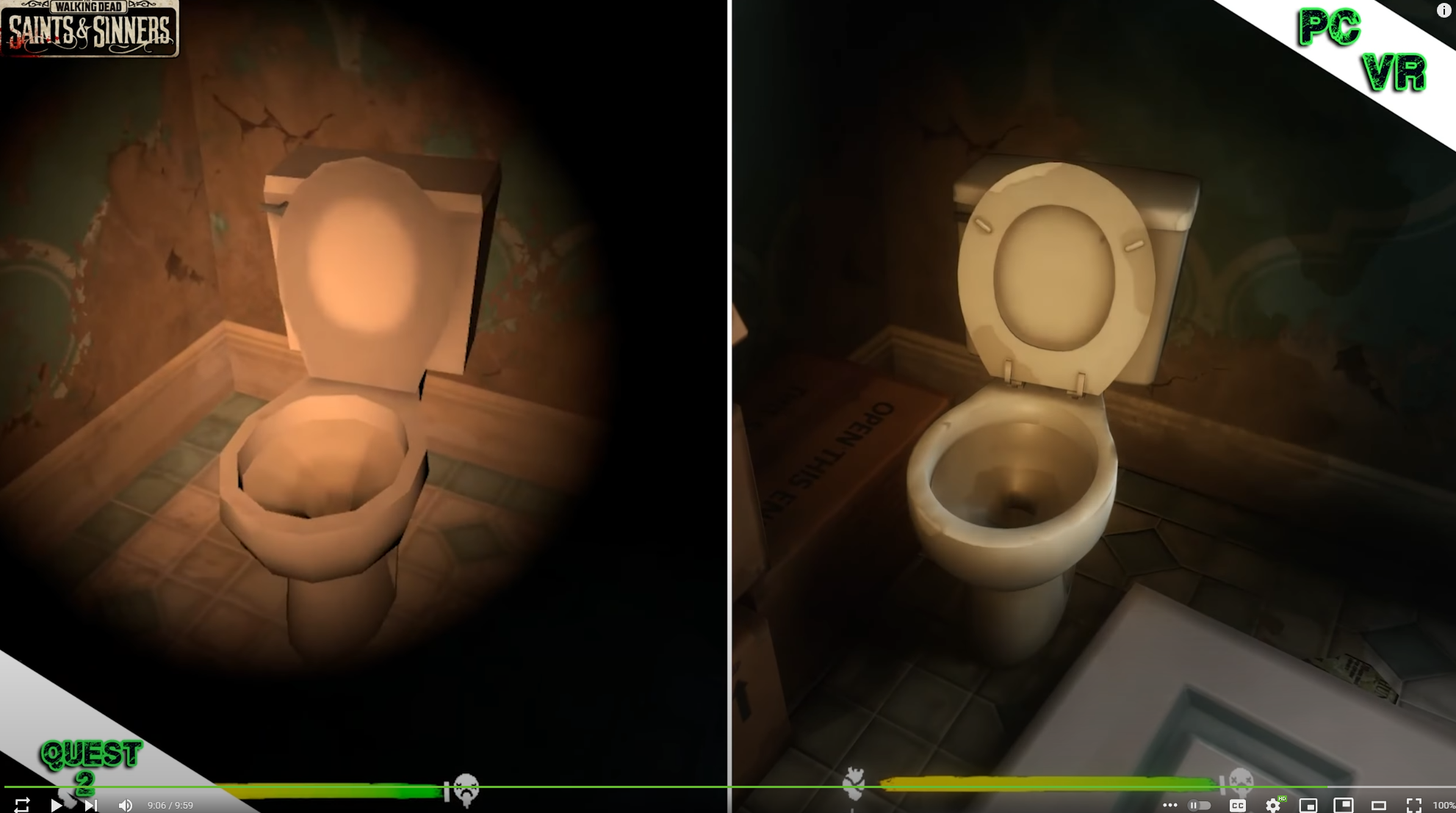


 dire kayak
