#multiplayer
1 messages · Page 664 of 1
 grizzled stirrup
 winged badger
that way if you get tempted to delay BeginPlay, the weapons will still have stats readable from the UI
grizzled stirrup
winged badger
that way if you get tempted to delay BeginPlay, the weapons will still have stat...
For this edge case it would make sense but I'm not doing it ever in my case as most of this happens at runtime when beginplay has already fired off
winged badger
you can't do it in BeginPlay on both
without the deferred spawn though
because server will call BeginPlay before you set the seed
grizzled stirrup
Oh right yeah sorry I mean the server would set the seed + manually call the OnRep and the client would auto call it when the seed replicates down
winged badger
provided world already started play
grizzled stirrup
I know bad practice and I should make a different func that OnRep calls
But yeah you are right
Client wouldn't have the replicated seed at begin play
grizzled stirrup
As you aren't sure if it's the client or the server calling it?
winged badger
yes
grizzled stirrup
Yeah I can see how that could be a big headache
winged badger
i mean, you can see it from callstack, but its still annoying
grizzled stirrup
Another thing I'm a bit curious about is that say you have this weapon with a seed and you move to another level via seamless travel, should you copy the seed over via CopyProperties or can I just copy the weapon pointer over and it'll remember the seed etc.?
Since it doesn't exist in the new level anymore at least spawned
Hard to think about when only the data should be transferred and a fresh weapon spawned, then inited with that seed or when the pointer itself should move, containing the data
grizzled stirrup
I mean each player would copy it's specific equipped weapon in the PS
When traveling
winged badger
you can persist it entirely
grizzled stirrup
Yeah I might try that even though the pawns get destroyed
I suppose the weapon would then just be floating in space and could be re-equipped
winged badger
or you can have a seed, or a composite seed just written in your PS as inventory
grizzled stirrup
Yeah that's what I'm doing now
And it seems to work fine
Spawn a fresh weapon
winged badger
bonus points there, as you can regenerate the inventory on reconnect
grizzled stirrup
winged badger
bonus points there, as you can regenerate the inventory on reconnect
That's a great bonus
I'll keep doing that then thanks!
For games with inventory in general that needs to persist between levels but is not tied to a savegame, would this be the approach too? Store in the PS and move over via copyProprties?
winged badger
we keep our inventory and skill on PS for reconnects
with listen servers, connection is not as reliable
grizzled stirrup
Nice so when the player disconnects, their old PS stays around for X seconds
So if they reconnect their data is still there
winged badger
5 minutes
grizzled stirrup
Yeah I mean setup the rejoining and reiniting
winged badger
you might want to add some cleanup in APlayerState::OnDeactivated
grizzled stirrup
As my sessions are no longer joinable once they start
So I'm not sure how to get them back in
winged badger
and also restore it when Pawn is spawned with previously inactive PS
you can allow for rejoin
grizzled stirrup
Do you use the previously inactive PS or do you spawn a new one and copy the old properties over?
grizzled stirrup
winged badger
you can allow for rejoin
Will this only apply to previously joined players and not any player searching for sessions?
winged badger
have the game save the session ID somewhere find that session even if its ongoing
grizzled stirrup
Good point will look into that
I'm thinking a simple form of host migration may be trivial with something along these lines
As in my case the entire level could restart
So I'd just need to cache state for each player each level
winged badger
there is no simple form of host migration 😄
grizzled stirrup
Yeah the issue being moving the connections over
grizzled stirrup
that's fine in my case it's all deterministic and the level would be restarted
winged badger
including PSs
grizzled stirrup
Yeah I'd have to manually save temp data in the GI per player
To reinit them
But the hardest part still being probably nominating another player to host and getting the previous players in their lobby
winged badger
use a GI subsystem, or LocalPlayer if you have any form of local MP
grizzled stirrup
I'd just have a simple struct most likely, there's really not a lot saved per player in my case
Equipped stuff and a very small inventory
 golden nest
Hi, can someone help me solving a rep notify problem?
winged badger
maybe if you tell us what it is

 winged badger
always screenshot so its visible which BP is it
golden nest
No, but i have a widget component on the head of my player
golden nest
But when i call the "SetName" from the PS it does not update on the server
winged badger
there is no guarantee a playerstate actor will have replicated by then
golden nest
CDO?
winged badger
infact, because of the low net priority PS has by default it very likely wouldn't have
class default object
that OnRep will fire once, before BeginPlay
and the widget component itself doesn't need to be replicated at all
you want to move that to OnRep_PlayerState
grizzled stirrup
golden nest
But when i call the "SetName" from the PS it does not update on the server
In BP the server does not call the OnRep func automatically afaik, right @winged badger ?
winged badger
but that will just replicate a pointer to CDO component
on a priority 3 actor
and is relying on PS, a priority 1 actor, having replicated as an actor by then
which fails 99%+ of the time
grizzled stirrup
Sorry misread his issue
winged badger
TL;DR; do not replicate widget component, you get nothing by that
it will exist, as its part of the CDO
hook that banner logic into OnRep_PlayerState
golden nest
I'm not replicating the widget component
winged badger
as you need a working playerstate for it to work
golden nest
Ok, so when i update the player state, i call the "SetName"
golden nest
And it will call the event on the server too?
winged badger
with blueprints, yes, unfortunately, it will
golden nest
Cause what i have now is only the clients updating the name nor the server
winged badger
the blueprint OnRep is not a replication callback, its a hack presenting a property changed callback as a replication callback
so it will fire on server as well
golden nest
Ok, thanks ❤️
 tidal fiber
For now, we have a simple throttling mechanism for multicast events: a multicast function will not replicate more than twice in a given Actor's network update period.
(https://docs.unrealengine.com/4.27/en-US/InteractiveExperiences/Networking/Actors/RPCs/)
does this mean that for a single multicast function in a given network update period, the server will send the rpc to at most 2 clients?
winged badger
no
there is no mechanic to track that in the engine
it will always send the MC to all relevant clients simultaneously
tidal fiber
how should I interpret the quote?
golden nest
So i did what u said, and call the "SetName" from the player state, but the server keeps avoiding the replication
@winged badger
golden nest
Can i override a OnRepNotify Function?
 peak sentinel
If it is virtual yes
golden nest
in bp?
peak sentinel
Override the one with _Implementation suffix
golden nest
i can't make the server call the rep notify
Is like it never call the "Set" on the variable replicated
 pallid token
I have a bow class, that has a ReleaseBow_Server() RPC. When this RPC is called from client-owned bow, it does not work, but when it's called from the server-owned bow on a listen server it does work. If I put the Server RPC inside the character class, it does work but that won't work for my purposes. The Bow is bSetReplicates = true
 clever plinth
pallid token
I have a bow class, that has a ReleaseBow_Server() RPC. When this RPC is called ...
clever plinth
pallid token
I have a bow class, that has a ReleaseBow_Server() RPC. When this RPC is called ...
I'm not an expert in this area, but I think your bow class needs to be owned by something that has a network connection (like the player controller, or its pawn) in order for RPCs to work.
 rancid flame
GetLifetimeReplicatedProps should just be defined in the .cpp right? and not the .h? why is this complaining about an unresolved external symbol?
https://gist.github.com/benui-dev/3551a72399d10c3a59dbeb9565519624
clever plinth
rancid flame
`GetLifetimeReplicatedProps` should just be defined in the .cpp right? and not t...
Your error corresponds to a different class from the one in the h/c++ files (AMyPlayerState vs AMyGameStateBase)
clever plinth
rancid flame
I'm so sorry
Happens to everybody
@rancid flame Also, now that I look again, you want a declaration for your method in the header as well as a definition in the C++ file. Typically in header:
virtual void GetLifetimeReplicatedProps(TArray<FLifetimeProperty>& OutLifetimeProps) const override;
Then in cpp file:
void MyClassName::GetLifetimeReplicatedProps(TArray<FLifetimeProperty>& OutLifetimeProps) const {
}
Yeah I thought so too but this tutorial says you don't need it, and weirdly it does compile without it in the header? I've used UE4 for years but this is my first time touching network-related code.
Also this tutorial is from like 5+ years ago sooo
 silent valley
It's added implicitly to the header by Unreal build tool as soon as you make a property in the class Replicated.
clever plinth
Is it a known issue that Unreal's "Network Emulation" settings produce higher pings than the latency settings would suggest?
peak sentinel
You mean the ones we set on editor preferences?
clever plinth
peak sentinel
You mean the ones we set on editor preferences?
Yes. The numbers there seem about 3-4x lower than the measured ping I see
peak sentinel
10 packetlag is almost equal to 25 ping
I'm not sure though, but it should be very similar to that value
Other than that, normal 'ping' variable on playerstate is not totally accurate
There might be multiple reasons why you measured the unexpected value
peak sentinel
peak sentinel
Other than that, normal 'ping' variable on playerstate is not totally accurate
Ping * 4.f is actual ping but still not %100 equal
clever plinth
I'm using the value reported by stat net.
@peak sentinel Are the values in the editor preferences packetlag and what does that term mean in this context?
peak sentinel
Packet lag generates latency between network updates, network emulation sets a pktlag value to simulate the latency
clever plinth
Ok, the 10 -> 25 multiplier effect you mentioned above describes some of what I'm seeing. For example if I pick the "Average" profile in the editor preferences (30-60 latency) I see ~200ms ping.
peak sentinel
Average can be considered as bad though, for example if you are developing a fast paced FPS shooter you are right to expect maximum 125-150 ping from your players
Average settings also set high amount of packet loss
But a good quality of netcode should run perfectly on those settings
clever plinth
Pardon my naivete here (new to network games), but the average profile sets 1% packet loss. Is that considered high?
peak sentinel
Sorry my bad, thats not that high
I confused with my own settings
Its a good value to test
clever plinth
@lapis flint If I can ask another dumb question: At 200ms ping I'm seeing pretty noticeable jitter/jumping on my client side if I change directions quick enough (for example mashing the arrow keys quasi randomly, or turning around rapidly with the mouse). Anecdotally it seemed higher than what I had seen in other games I've played, so I've been reading through the character movement code and dumping values to chart/plot them. For example I see corrections on the client on the order of 50cm-100cm while traveling 600cm/s. That said I lack the experience to really say if this is typical. Is 200ms in the domain of "unmanageable" for a first-person style game?
peak sentinel
I never saw that intense jitterings on my own project with higher value of ping
'Turning around rapidly with mouse' can cause jitterings
Because if you dont factor lag compensation methods into your code it will take some time to arrive to other clients and server and if the latency is high it will be noticeable
But just using "add movement input" and such things should not cause any intense visible jitter
Because CharacterMovementComponent handles those things for you
If have a insane amount of velocity, you can try to tweak correction variables
For example, each server update server checks the distance of your old location and newly arrived location data
If it is higher than 256 units, server will teleport you instantly
Because it will think you're cheating or something really went wrong so it should correct your position
I tried to answer the question generally, mostly its about context
So the answer should be case-specific normally
Maybe client sets its position to A then sends it to server, but last position in the server is B and after 250ms server sent the B position and client reverted back to B
If you havent yet, I recommend studying "prediction" and "lag-compensation" topics for a while
Then take a look at to ShooterGame project (you can find it on Epic Games Launcher) and UnrealTournament repo
clever plinth
peak sentinel
If you havent yet, I recommend studying "prediction" and "lag-compensation" topi...
Thanks, I'll read about this a bit. I have been using the ShooterGame example as a reference for my project. I can see the jumps/jitter in ShooterGame as well if I push the ping up to around 200. My movement component is very similar (different speeds, but same class).
peak sentinel
ShooterGame doesnt include prediction methods at all, its only for demonstrating some concepts. Its actually outdated 😅
Try Unreal Tournament instead
But in any case, Character Movement should not cause any jitters if you tweak the correction settings
It it is, then you're doing something wrong
There are just some very specific-cases CMC fails with humanoid movement
clever plinth
peak sentinel
Try Unreal Tournament instead
Good tip, I'll check out UT
peak sentinel
This article does not explain Unreal Engine way of doing this but general idea of things work in any multiplayer games, you can also analyze this: https://www.gabrielgambetta.com/client-server-game-architecture.html (it has 4 parts)
rancid flame
I'm hoping someone can help me understand some Unreal multiplayer logic.
I've got a blank project and I have created a custom APlayerController subclass, with a tick function that calls GEngine->AddOnScreenDebugMessage to print its name.
In the editor, when I click Play in Viewport, Number of Players 2, Play as Listen Server, 3 messages get printed every tick:
MyPlayerController_0
MyPlayerController_0
MyPlayerController_1
In the World Outliner there are only 2 player controller instances, why does it seem like MyPlayerController_0 being ticked twice?
Similarly if I set a breakpoint in the tick, I can see 3 different AMyPlayerControllers instances 3 different memory addresses.
When I choose Play as Client, there are 4 messages printed.
grizzled stirrup
Does an array with no elements as part of a replicated struct use any bandwidth when replicating?
rancid flame
rancid flame
I'm hoping someone can help me understand some Unreal multiplayer logic.
I've go...
Oh, I should have used PlayerTick not Tick, the comment explains why
/* PlayerTick is only called if the PlayerController has a PlayerInput object. Therefore, it will not be called on servers for non-locally controlled playercontrollers. */
Structs only sends the changed element's data so it should not matter afaik
Arrays also send the only changed element
grizzled stirrup
Perfect thank you
pallid token
I asked earlier, but the answer I got didn't help, but I do appreciate it. So, I have a Character where I have,
void MyCharacter::BeginAttack()
{
  Bow->FireBow();
}
In Bow, I have
void MyBow::FireBow()
{
  FireBow_Server();
}
void MyBow::FireBow_Server_Implementation()
{
  //Spawns the arrow
}
Firebow_Server() is never called on the server when the client is firing the bow, but it is called on a Listen Server.
However, this works,
void MyCharacter::BeginAttack()
{
  BeginAttack_Server();
}
void MyCharacter::BeginAttack_Server_Implementation()
{
  Bow->FireBow();
}
Bow Class
void MyBow::FireBow()
{
  //Spawns the Arrow
}
I do have the owner of Bow set as the Character.
The reason I need it to work as the former and not the latter is because I have a socket on the bow where the arrow spawns, and when I am aiming the bow, the animation doesn't play on the server, so the socket is in the wrong place. I need to pass the socket position from the client to the server (Which isn't shown in the code above because I was trying to be concise).
peak sentinel
So simply sockets are different between client and server right?
Its probably not about your logic, animations sometimes doesnt run on server
clever plinth
@peak sentinel Regarding previous convo, this is what I meant by "jitter". I realized I probably worded it poorly. What I am seeing is discrete corrections in client position: https://i.imgur.com/WXh6OJb.png In this example I plotted server/client velocity and position (x-axis, in this case) after time-aligning them. Around 37 seconds in this example server velocity starts to drift away from client, and then a correction is sent to the client. These happen in the absence of collisions or any physics interactions (just walking on a flat plane). In any case, I'm still digging into it, but I wanted to provide clarification on what I was seeing since "jitter" probably doesn't capture it correctly. It's more like periodic jumps that can be spaced fairly far apart, but are pretty reproducible under 100-200ms of latency.
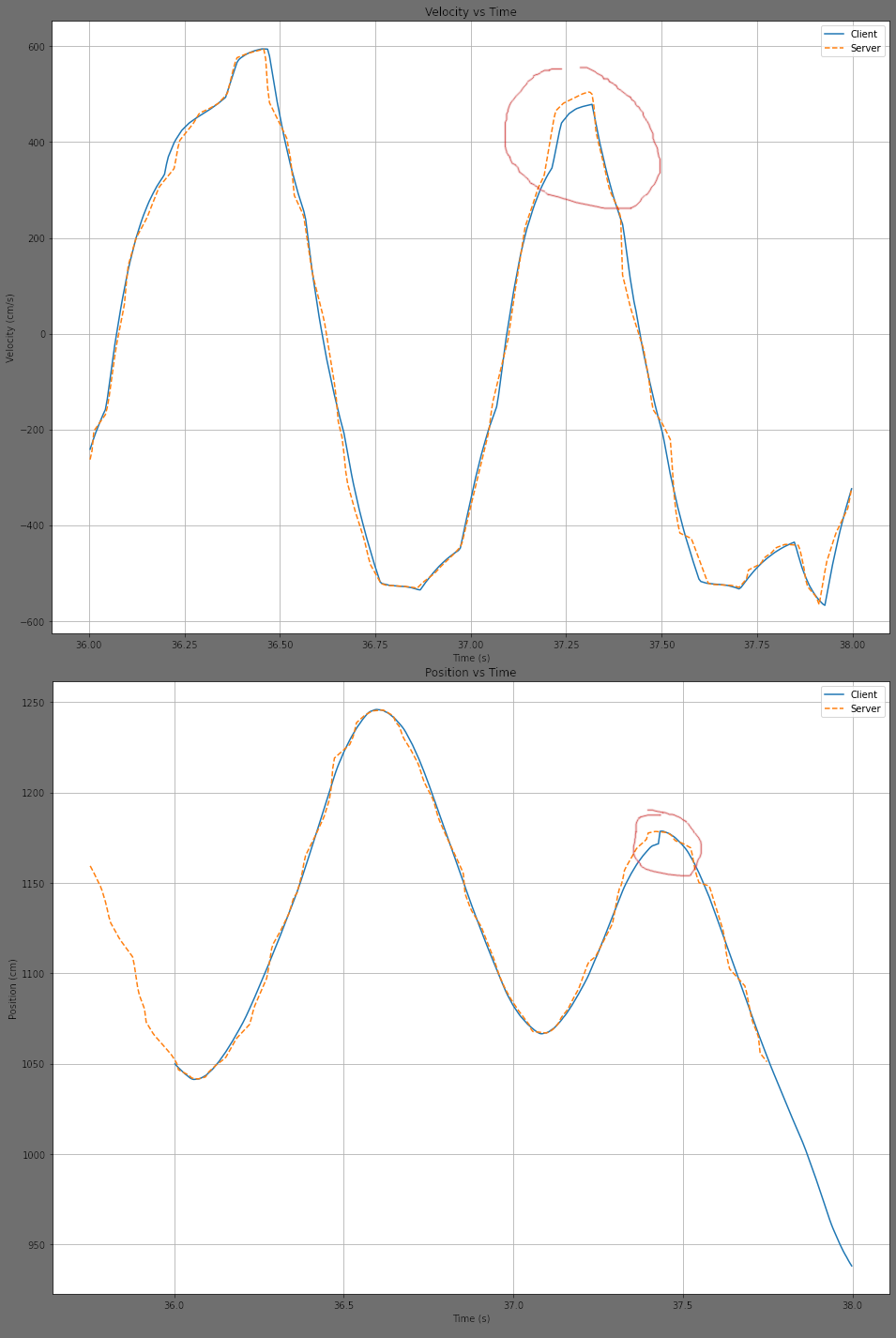 pallid token
peak sentinel
Its probably not about your logic, animations sometimes doesnt run on server
pallid token
peak sentinel
Its probably not about your logic, animations sometimes doesnt run on server
Yeah, that's why I am trying to combat. I need to pass the socket location from the client to the server. It's easier to do that from within the bow actor, than to get the socket from the bow Mesh then pass it to the bow actor within the Character class.
 cyan bane
I'd like to replicate position variables in/relevant to the Actor class without overriding the Actor class and making my own. Is the best way to do this just to make some sort of ActorNetworkComponent and do it all in there?
peak sentinel
clever plinth
<@!748517221608980631> Regarding previous convo, this is what I meant by "jitter...
Wow how did you even get the data to draw that graph lol 😄 Anyway, I'm really alien to the possible solution or anything about what could possibly going wrong, it can be even pretty expected considering the packet losses happen sometimes. What makes me think about this option is packet loss rate, to have an idea about that, you can set packet loss to 0 and increase packet lag a little so we can see if its happening because of it or not. Also ensure you're just using AddMovementInput and not using any external logic like sprinting etc.
peak sentinel
pallid token
Yeah, that's why I am trying to combat. I need to pass the socket location from ...
One sec
Sorry wrong tag
peak sentinel
pallid token
Yeah, that's why I am trying to combat. I need to pass the socket location from ...
set VisibilityBasedAnimTickOption to AlwaysTickPoseAndRefreshBones
this way server will run all animations
Anyway if thats not a solution for you, what I would do is have a replicated on rep variable named ArrowSocketLocation (FVector_NetQuantize100) and just update it from server, so client will only call an RPC and pass the ArrowSocketLocation value to server and server will update it, then call OnRep
And every connection will get forward vector of ArrowSocketLocation and fire it, simulate theirselves
But thats a very deterministic way
 plucky prairie
any point me in the right direction for showing any enemy health bar but only on the client that did damage to it? I've got everything set up for checking who did the damage but cant work out how to show a widget spawned on another actor on just 1 client
 dark edge
Where would be the place to store something like all the bank accounts for characters and factions in an RP game?
rancid flame
plucky prairie
any point me in the right direction for showing any enemy health bar but only on...
Isn't there an Originator property for damage dealt? Couldn't you use that?
 sinful tree
dark edge
Where would be the place to store something like all the bank accounts for chara...
sinful tree
dark edge
Where would be the place to store something like all the bank accounts for chara...
I would do bank accounts as a component on the player controller simply to reduce excess network traffic replicating it through player state as other players don't really need to know about other's bank accounts in most cases.
dark edge
sinful tree
I would do bank accounts as a component on the player controller simply to reduc...
They need to be persistent and also groups can have a bank account. It has to all be aggregated somewhere as it's not really a PLAYER's bank account, but rather a characters, and is associated by UUID to a bank card. That is, a card can be stolen and used etc.
It'll just be an association of a UUID to a value, and possibly to the UUIDs of the bank cards themselves.
We've got a bit of a weird item system but the crux of the whole thing is that every item has a UUID, and can be individually distinguished. Enables all sorts of mechanics like, a police officer can investigate a scene and register the unique weapon that caused the crime, not just the type.
 harsh lintel
The game uses a dedicated server, I have an actor that is replicated, I'm doing this in the blueprint, when I PIE as client, the actor is destroyed, but when playing the packaged game/server the actor is not destroyed
 sinful tree
dark edge
They need to be persistent and also groups can have a bank account. It has to a...
sinful tree
dark edge
They need to be persistent and also groups can have a bank account. It has to a...
Maybe a single bank system component on game state in that case, and within it contains a map that stores your account UUID to structure containing an array of items within the account.
 ebon plume
I created a system that uses a line trace from the player to the ground.
In short: my player floats around based off the specs I give it and dynamically changes height based on the terrain elevation.
The way it's hovering is by (adding force) I also add force to move it horizontally and vertically. All this is done in event tick.
This works amazing !!! .... Locally... it's super cool. But unusable when I try to replicate it.
I don't want to run all the physics or line tracing on the server , don't think that would be a good idea.
So we did all the physics and calculations locally and then on the server, we updated the location and rotation of the player.
This does not work.
The rotation works fine.
The hovering effect and movement is unbelievably laggy and unusable.
 kindred widget
<@&213101288538374145>
 rich locust
How do you create a very low size dedicated server build ?
Is there a guide on about it online
Lets say I have over 50+ gb build
but dedicated server only takes about 2 GBs
how do you do this ?
tidal fiber
if you replicate a pointer to an object that doesn't yet exist on the client, will the pointer be nullptr on the client? is this situation even possible?
winged badger
ofc it is
common occurence @tidal fiber is replicating a pointer to PlayerState, the PS Actor, having lower NetPriority, will generally replicate several frames to few seconds after the Controller and Pawn
until it does, the NetGUID cannot be resolved, and any replicated variables holding a pointer to it are nullptr
note that replication callbacks will fire after NetGUID is resolved though
tidal fiber
I see, thank you
silent valley
rich locust
How do you create a very low size dedicated server build ?
Dedicated server usually strips things like textures out automatically, so a Server build should be significantly smaller than a Game package.
rich locust
silent valley
Dedicated server usually strips things like textures out automatically, so a Ser...

when I added "Texture" here and get a build
I got crash immediately
I am trying other stuff as well tho
silent valley
if your server build is 50GB, how big is your game package?
silent valley
how are you making the build?
fwiw, my game build is 8.5Gb and server build is 4Gb
rich locust
client build, then add the server target files to binaries
silent valley
oh
rich locust
now im trying to go for stripped build
silent valley
You need to make a new target for Server build
 regal storm
For reference, cannonballs are at about 440 meters per second, give or take for wind, etc.
So about half the speed of an average bullet
 hexed pewter
I recently stumble across this excellent blog post by Exi
https://cedric-neukirchen.net/2021/06/27/ue4-multiplayer-sessions-in-c/
It proved very helpful as I'm just trying to incorporate session management in my own project. I ended up stealing literally the whole subsystem.
Now I have an issue, where I have all my main menu stuff in 1 module, and the upper mentioned subsystem ended up in other module (main module). I think I could easily connect these two by exposing delegates from my main menu module, however I'm not completely sure what class to use as a bridge, all that comes to my mind is gameinstance. Are there any other candidates for that job?
This post shall give you a short introduction to handling your Multiplayer Sessions via your own C++ code. Most of you probably either started with...
 violet sentinel
how do usually multiplayer lobbies setup with dedicated servers?
currently the player creates steam session and opens lobby level
rest of players join the session
host configures session and launches, players seamless travel to chosen game map.
how would it be with dedicated server? searching an empty instance for first player to join on or creating them on demand with some cloud service?
(never dealt with DS before, only read basic details so far)
silent valley
violet sentinel
how do usually multiplayer lobbies setup with dedicated servers?
currently the ...
If your game is session based then usually a load balancing type system manages a pool of servers and has the ability to spin up more on demand. See Gamelift, PlayFab etc.
violet sentinel
yeah, was reading about it
but what about "ownership", if nobody will be host how to decide who will be "master" allowed for setting up lobby settings. or it can be done via gamelist/playfab to know who requested instance to be master.
can't have everyone be allowed to modify lobby settings but some owner
silent valley
So any DS registers itself with some kind of service, whether public matchmaking service, or registers privately with load balancer which dishes out the connections to clients.
Other than that, DS works just like listen server but with no clients.
ebon plume
Why can't you simply update the location and rotation of an actor on the server?
The actor moves locally via physics and using applied force.
Trying to call on the server to update just the location and rotation does not work at all. The lag is tremendous
sinful tree
ebon plume
Why can't you simply update the location and rotation of an actor on the server?...
If actors are replicated from the server, then their movement should be getting made on the server. The client should never be pre-emptively moving a server controlled actor and then telling the server where to move it to.
ebon plume
sinful tree
If actors are replicated from the server, then their movement should be getting ...
Yeah and the problem with me doing this is the issue / difficulty of replicating physics :/
 twin juniper
Pretty new to multiplayer, but the character on client can't sprint, only the host can. anyone know the fix?
 graceful mango
What could be the issue? I cant connect to dedicated server and to listen server, having just permanent black screen

 wheat magnet
can you try to press tilde ~ keyboard button ( to make sure it is working, not freezed )
graceful mango
console works, when i am trying to connect manually it opens main menu (via open ip)
i should say that blank project works, i cant connect to local listen server in blank project
wheat magnet
so you are opening using from console keyboard? for example open <level/ip>
graceful mango
first i am trying to use "play as client and launch dedicated server "
it isnt working
open level/ip drops me to main menu
on 4.23 ver all worked good
this is 4.27
wheat magnet
1: You may need to set up the maps in project->map&modes
2: or you need to lookup into server travelling ( make sure it is working )
make sure everything is correct setup in project maps and mode settings
i see, there is error " invalid steam id ", maybe this causing the issue?
graceful mango
i found

23:53:07 [LogNet] Error! UEngine::BroadcastNetworkFailure: FailureType = PendingConnectionFailure, ErrorString = Your connection to the host has been lost., Driver = PendingNetDriver IpNetDriver_5
23:53:07 [LogNetSerialization] Error! FBitReader::SetOverflowed() called! (ReadLen: 32, Remaining: 1, Max: 1)
and this is on the server side LogNet: Warning: PacketHander isn't fully initialized and also didn't fully consume a packet! This will cause the connection to try to send a packet before the initial packet sequence has been established. Ignoring. Connection: [UNetConnection] RemoteAddr: 127.0.0.1:63311, Name: SteamNetConnection_0, Driver: GameNetDriver SteamNetDriver_0, IsServer: YES, PC: NULL, Owner: NULL, UniqueId: INVALID
graceful mango
wheat magnet
i see, there is error " invalid steam id ", maybe this causing the issue?
hm but it wasnt presented in 4.23
wheat magnet
you can also change steam id to 480

Medium
Connect an existing project with Steam Tools and play with your friends
follow this article, there might be something you've missed, or need to modify/update
also try to google your error logs, you will find solution
graceful mango
@wheat magnet Alright i have found the issue
Epic Games has broken SteamOnlineSubmodule while making EOS
wheat magnet
ok great
 fading birch
hexed pewter
I recently stumble across this excellent blog post by Exi
https://cedric-neukir...
fading birch
hexed pewter
I recently stumble across this excellent blog post by Exi
https://cedric-neukir...
fwiw, that blog is the top pin in #online-subsystems
to answer your question, I personally use a game instance subsystem for that exact reason.
It's accessible anywhere
tidal fiber
can you put an FFastArraySerializer inside a struct and replicate the entire struct?
winged badger
hexed pewter
I recently stumble across this excellent blog post by Exi
https://cedric-neukir...
seems like you should rethink what goes into what module there
if any of your modules at all has a or needs a dependency to main module, you did it wrong
 fluid summit
Hi, I am having some troubles to trigger event with event dispatchers from server to remote, do they work on Mp?
 grand stratus
guys if iam using seamless travel
does a new player controller spawn for each player
or the same controller stat
fluid summit
tidal fiber
can you put an FFastArraySerializer inside a struct and replicate the entire str...
Not sure on c++, but on bp you can réplicate them with no problem
I would asume its doable on c++ if not available as default
 glass vector
are player input events (ie, defined axis and key binding events) executed on the server automatically?
do they get executed on both client and server simultaneously?

does this BP node run on the server when the player presses right
sinful tree
glass vector
are player input events (ie, defined axis and key binding events) executed on th...
No. Any input is only executed on the client. In most of the examples the engine gives you, they're using the character movement component which replicates the input for you automatically.
ebon plume
I've been here asking the same stuff quite a lot. Sorry.
But I have smoothed the physics finally and it looks pretty nice. Even with network emulation with some pretty nasty values.
I am curious though...
Is it okay to be adding force with event tick on the server (the entire time) its the only way to achieve the dynamic hover physics I want.
My thought is to run all the "add force" and physics calculations on the server, and then update the clients position rather than trying to add force on both client and server.
 hoary lark
You kinda have two options... you can give up client-side prediction and pass player input to the server, let the server run the game, and update clients... Or you can build a customized prediction system like how CMC does it. I created a physically accurate jetpack character with a modified CMC that worked well in MP. I did allow partial client authority for minor deviations.
Lot of work for a full custom system with prediction
 thin stratus
Last time I did networked hovering I coded a custom movement component same way the CMC works
glass vector
what is cmc
hexed pewter
glass vector
what is cmc
characterMovementComponent
glass vector
thx
 pallid mesa
How do I skip simulated proxies on ReplicateSubobjects?
can I simply do a Role check?
thin stratus
Does it not allow you to do that via the DOREPLIFETIME Condition of the Subobject?
pallid mesa
not exaaactly per se... look what I'm trying to do 😄

Might be unnecesary given rep graph exists. But I'm learning and I would like to make it work
glass vector
for apply damage Blueprint node, am I able to call it on the client, or do I have to use an RPC to call on the server?
thin stratus
Generally damage is processed only on the Server
Using those nodes or not, you want to make sure damage is not process by clients or directly requested.
Usually you only RPC for the Inputs of the client (e.g. pressed left mouse button to fire a weapon) and the whole weapon fire, line trace, project, whatever logic that ultimately deals damage would run on the server. +- some local only version of the same code that is used to predict hit effects
 fleet viper
the spawn gun function doesnt get called on the server, tho it has authority, anybody knows why?

it works on client tho
fleet viper
also this just happends with one of my gamemode it works with every other gamemode
fluid summit
I'm getting a Rep Notify that is only triggering on the server side, is that okey?
fleet viper
fleet viper
also this just happends with one of my gamemode it works with every other gamemo...
nvm controllers werent init yet -.-
fleet viper
fluid summit
I'm getting a Rep Notify that is only triggering on the server side, is that oke...
dont count me on that but i think that is how its supposed to work yeah
fluid summit
oh i tought it was exactly the opposite, that they are triggered when something changes on server side that is repnotify, so that you can update it on the clients (so only triggers on client)
thin stratus
RepNotify in cpp only call on clients. In BPs they call on both
fluid summit
I'm trying to use it in order to update the UI of the inventory, but i can't get to update the UI correctly, it seems like the data from the inventory is always one update behind and the rep notify triggers only on server.
Any advice on how to approach this?
wheat magnet
does session works over internet?
for example this node, does this works over internet?

 woeful pebble
why does attachcomponenttocomponent not work on a server event?
wheat magnet
so session is just a way to join players together?
 mossy venture
wheat magnet
so session is just a way to join players together?
mossy venture
wheat magnet
so session is just a way to join players together?
Essentially yes. Without needing to use a direct network address.
wheat magnet
i have question regarding this session node. i tested this node with lan, it works fine. But when i build dedicated server, after hosting the server, i can press the ~ keyboard button and type "open <ip>" then i can join server. But how these session node works with dedicated server?
wheat magnet
mossy venture
Essentially yes. Without needing to use a direct network address.
so you mean like open <ip> right?
mossy venture
Yes. Instead of that you find the session instead, and then join with the session id.
wheat magnet
when i build the dedicated server, which method should i use to join player in lobby?
mossy venture
JoinSession.
wheat magnet
i mostly tested multiplayer with LAN
wheat magnet
mossy venture
JoinSession.
Thanks, does i also need the steam or EOS?
mossy venture
There isn't much difference from what I recall. Although you need to switch join by LAN off of course. I'm not an expert though and don't remember everything.
wheat magnet
i want to test game over internet
mossy venture
I believe you do need to use a different online subsystem from NULL for online, but I cannot remember fully.
wheat magnet
Yes in the book there is mentioned online subsystem from NULL only works over LAN, not internet
mossy venture
wheat magnet
Yes in the book there is mentioned online subsystem from NULL only works over LA...
Then I believe you have your answer. Steam is probably easier to do, it has better documentation.
wheat magnet
So these session nodes also works over internet, right?
mossy venture
wheat magnet
So these session nodes also works over internet, right?
Yes.
wheat magnet
what is the best way/practices to test and build the game with dedicated server
mossy venture
wheat magnet
what is the best way/practices to test and build the game with dedicated server
I don't know, sorry.
wheat magnet
ok thank you
i remember when i was building and testing the game with dedicated server, the engine was recompiling each time and it was taking hours to building the dedicated server
fading birch
It shouldn't be doing that @wheat magnet .
As far as online subsystems go, there's some info in #online-subsystems about it.
 unborn trellis
In my Player Controller, I have this custom event where a widget will display indicating the location of when someone is damaged. However, if the Player shoots someone and it hits, the indicator (sphere) spawns on the owning player, What i want it to do is spawn the sphere at the location of whoever is dealing the damage. I can send a video showing what i mean better
 fading birch
you don't need to package a dedicated server to test it either. You can just launch your project with -log -server and you'll be right as rain.
fading birch
unborn trellis
In my Player Controller, I have this custom event where a widget will display in...
Player controllers only exist between the owning player and the server. You should move that to a player state, which is replicated to all clients.
tidal fiber
if you've built a networked game and want to add a singleplayer mode, is there an easy way to emulate singleplayer by running a listen server and connecting an AI controller? can anyone point me to search terms / resources about this?
unborn trellis
fading birch
Player controllers only exist between the owning player and the server. You shou...
Okay, can i send my video anyway showing my problem?
fading birch
just drop it in here
unborn trellis
So essentially, it works, as in, the rotation when looking around the sphere, but the location at where it spawns is on the person receiving the damage, not who dealt it.
fading birch
tidal fiber
if you've built a networked game and want to add a singleplayer mode, is there a...
single player just lets the client act as authority. Should be alright.
tidal fiber
thanks
unborn trellis
fading birch
Player controllers only exist between the owning player and the server. You shou...
is that how i can get the damage causer's location? in the player state?
fading birch
you would need to get it off of the pawn
unborn trellis
like this? (this is in the player controller)
 unborn trellis
fading birch
that would give you *your* pawn
unborn trellis
fading birch
that would give you *your* pawn
i want the enemy pawn
 tight glen
quick question. Where in the heck is the option to turn on seamless travel for maps. Trying to finish my lobby -> game start and I can't for the life of me find this setting. I thought you had to enable something from the project settings and then there were settings in the map itself but I can't seem to find them. Everything I find talks about the Umap settings but I know I've done this in straight up BP before
unborn trellis
fading birch
then i would move this to the player state
would it still be the same blueprint? or do i need to alter it?
fading birch
alter it most likely
unborn trellis
how could i alter it for it??
fading birch
how are you getting this hit location in the first place?
if it's running on the server, you can do it from the controller just fine
tight glen
fading birch
gamemode <@!261622381905313792>
THANKS! You're a saint and a scholar : b
unborn trellis
fading birch
if it's running on the server, you can do it from the controller just fine
it is i believe
unborn trellis
fading birch
how are you getting this hit location in the first place?
This is how im dealing the damage. So when the player is hit, the health goes down and then the "show hitcircle" blueprint runs (in the player controller)
 unborn trellis
nothing shows up for damage causer

 twilit radish
Why would you need to replicate something that often?
Also changing the priority / update frequency doesn’t guarantee that it will be replicated that fast anyway because of bandwidth limitations, if there’s no space left for it or other things have a higher priority it may not get replicated immediately.
unborn trellis
still having troubles with this damage indicator :/
fading birch
unborn trellis
nothing shows up for damage causer
You need to pass in the damage causer when you apply the damage.
tight glen
one other question. Don't you have to somehow copy the playerstate properties when you seamless travel? Even if absolute travel is false?
unborn trellis
fading birch
You need to pass in the damage causer when you apply the damage.
idk who to cast to tho. When i type cast, everything shows up
fading birch
Where are you doing the trace to apply damage?
unborn trellis
in the weapon blueprint
unborn trellis
fading birch
Then just pass the weapon itself
but can't i have it spawn on the player tho?
fading birch
unborn trellis
but can't i have it spawn on the player tho?
You can. You just need to grab the pawn that the weapon belongs to
What are you trying to replicate that needs to be done all the time?
Thats just not feasible
unborn trellis
fading birch
You can. You just need to grab the pawn that the weapon belongs to
when i cast from the instigated by, it spawns on whoever is dealing the damage. That's what i want, but now i somehow need it so the indicator displays on the one recieving the damage.
fading birch
So damage only runs on the server.
You'll need to call a client RPC on the controller to display that info to the person who took damage.
unborn trellis
what does RPC stand for?
fading birch
Ah. Physics are a mess to replicate. I would just have each client do their own physics and have the server occasionally correct it as needed.
tight glen
unborn trellis
ill have to look at this another time. :/
Check out the multiplayer starter/replication tutorial from the epic live learning. They go into RPC's, authorative vs non, replciation, owner, and more. It's like an hour long and I think it would really help out.
does the physics matter for gameplay? If it doesn't and it's just for apperance then just run on each client.
mind giving an example of what you are tyring to do?
unborn trellis
tight glen
Check out the multiplayer starter/replication tutorial from the epic live learni...
I'm gonna take a crack at it either tomorrow or Tuesday
twilit radish
You can replicate things as many times as you want to clients but at the end of the day if latency pops up it will fall apart regardless of how often you send something, there's nothing you can do about people their bad internet. I would say try to rather build something that still updates often but can also be corrected if needed, this is in general the pain with physics and multiplayer because it just never fully works out. That's why correction is a thing 🙂
tight glen
Where's the setting/list of actors that get copied when you travel? Can't seem to find it in the docs or anywehere but they do reference it.
twilit radish
Called on server during seamless level transitions to get the list of Actors that should be moved into the new level PlayerControllers, Role < ROLE_Authority Actors, and any non-Actors that are inside an Actor that is in the list (i.e. Object.Outer == Actor in the list) are all automatically moved regardless of whether they're included here only...
tight glen
I thought you can edit or add things to it without c++ though
twilit radish
I'm not sure if BP has the option, someone else will have to answer that if they happen to know.
tight glen
ill double check if not then c++ it is :b. thanks for the help Thom
mossy venture
Does anyone have a guide on UI for multiplayer? I'm trying to destroy a widget on all clients, when going from lobby to the game map. However having issues with getting anything to work. I got a multicast running from the gamemode when it's ready to remove the widget, with the widget removal code inside. It doesn't seem to be doing anything though.
mossy venture
tight glen
widgets only run on clients
Yes I know.
tight glen
remove from parent
twilit radish
The GameMode also isn't available on clients, it only exists on the server. So running a multicast in there won't do anything.
 mossy venture
OK looks like I'm confused what a multicast is then.
So should I be putting the multicast on the controller instead, and then having the gamemode call it, when the widgets are ready to be removed?
twilit radish
About what a multicast is, it's a form of an RPC that can be called on the server to invoke the called function on all clients and the server it self. Since the GameMode isn't replicated down to clients it can never be called on clients since they don't have a GameMode instance. You'll need to place it somewhere where it makes sense for your game and which is shared across all clients. This is btw a helpful little overview of RPCs: https://docs.unrealengine.com/4.27/en-US/InteractiveExperiences/Networking/Actors/RPCs/


Designating function replication across the network
wheat magnet
mossy venture
OK looks like I'm confused what a multicast is then.
link to unreal networking book :https://cedric-neukirchen.net/
 twilit radish
I personally think an RPC may not even be the best way because I guess it should be connected to some state, if the game is in the lobby something probably already tells players they are in the lobby.
mossy venture
OK that is what I thought. I wasn't taking into account that it only replicates from the object it is called from.
Yeah I was thinking it might be easier to just have a variable that gets set when out of lobby.
twilit radish
You could consider setting up a general state for your game, so when people are in the lobby, when the game is about to start, when the game has started, when it has ended etc. (or whatever makes sense for your game). Then you only would ever need to refer to those changes / the state for these kinds of things and that probably will save you a lot of effort down the line as well 🙂
So simply said something that indicates what the current status of the game is, which also gets replicated down to clients.
mossy venture
@twilit radish @wheat magnet Thanks for the help! Will look into using the game state instead with a variable. Should be a lot easier.
twilit radish
Good luck! 👍
wheat magnet
mossy venture
Yes.
it doesn't support with dedicated server, what exact mean by this

so how session nodes works over internet?
mossy venture
I don't know about dedicated server. But Session nodes will work over the internet with dedicated or listen server.
wheat magnet
ok thanks
 lofty abyss
While discussing a replication related issue on a locomotion system plugin, someone told he solved the issue by using dedicated server, and that was the reply he got 
 fading birch
wheat magnet
it doesn't support with dedicated server, what exact mean by this
fading birch
wheat magnet
it doesn't support with dedicated server, what exact mean by this
what is that in reference to? Also this discussion should be happening in #online-subsystems
unborn trellis
fading birch
You need to pass in the damage causer when you apply the damage.
So i decided to try this out. The good news is that When the client shoots the server, on the server screen, the damage indicator works as it should (the sphere spawns at the location of the client's weapon). However, when the Server shoots the client, the widget displays but the location isn't updated.
 fading birch
you'll have to handle that differently as you're using a listen server setup
unborn trellis
i am getting this error tho
 mossy venture
Probably the listen server where it's not getting set, due to no replication.
fading birch
that doesn't matter
you're using a listen server
meaning the host is the server
you'll need to handle it differently
mossy venture
It's still trying to access a variable on the server though, right?
fading birch
with that in mind
unborn trellis
any suggestions on how i could make it work??
mossy venture
By setting the DamageCauserRef variable on the server too basically.
Although your listen server is a client too, it's predominantly a server.
unborn trellis
im not too sure how to tackle it :/
although im getting closer with getting it half working
mossy venture
Get the local player on the server and set the variable.
unborn trellis
mossy venture
Get the local player on the server and set the variable.
oh bruh, i think i got it working. I had to make my damage causer variable replicated 🤦♂️
yeah it's working now :P
thank you @fading birch and @mossy venture 👍
although i am still getting an error :/
so like, it displays and works on the client, but this error comes up
 mossy venture
Somewhere it's accessing DamageCauserRef when it's not been set.
Maybe you're missing an instigator somewhere. Assuming you're using UE4's damage system. Although it could be several things.
tight glen
unborn trellis
so like, it displays and works on the client, but this error comes up
throw in a breakpoint and follow it back to see what is causing the none
unborn trellis
tight glen
throw in a breakpoint and follow it back to see what is causing the none
which node am i setting the breakpoint?
mossy venture
Just after where you're meant to be setting DamageCauserRef.
unborn trellis
so what im seeing is, on the first hit, the widget doesnt display, but then when the second shot hits, the widget gets displayed
for the client
mossy venture
Sounds like somewhere you're not setting DamageCauserRef before you try to access it.
you can put if (DamageCauserRef) before you use it to avoid the error. Although it won't tell you where you're missing setting it.
unborn trellis
seems like the error only happens when im using the Player Controller custom event
mossy venture
Sorry an isvalid on DamagerCauserRef. Forget you're using BP.
tight glen
unborn trellis
which node am i setting the breakpoint?
set it on the one that throws the error then you can follow back to see why the value is none. Make sure it is getting set/populated
unborn trellis
unborn trellis
seems like the error only happens when im using the Player Controller custom eve...
never mind, it throws an error either way
tight glen
unborn trellis
never mind, it throws an error either way
printscreen your blueprint
unborn trellis
tight glen
printscreen your blueprint
this is in the Character Blueprint
 tight glen
well looks like there is no way to access the seamlesstravelactor list unless you use c++ and for some reason player controller mesh isn't being saved even with seamless travel enabled. Anyone have an idea why?
put breakpoints on them all and see if they have valid inputs
im guessing the first cast breaks though
unborn trellis
tight glen
put breakpoints on them all and see if they have valid inputs
when you say valid, as soon as it hits, the whole game goes grey right?
unborn trellis
tight glen
yeah that means it hit the break poiint
oh this is interesting
better if i record
mossy venture
tight glen
well looks like there is no way to access the seamlesstravelactor list unless yo...
Sorry no. Sounds complicated.
unborn trellis
So when i have 3 players, i shot the 3rd player, it didnt display the widget, but after the second shot, then the breakpoint initialised
tidal fiber
what is the "rpc overhead for components"?
tight glen
hm I nthink you probably want to check with server to see if it was hit
and then if it was the server tells the client to create the widget
otherwise you may get into a situation where there are hit detections but the server doesn't register them
also what calls the client hit circle?
peak sentinel
tidal fiber
what is the "rpc overhead for components"?
 tidal fiber
I see, thanks
peak sentinel
Its not worth to avoid it if you need to use RPCs in components but CharacterMovementComponent is a very critical system for projects thats why Epic tries too hard to optimize it in any means
Unless you have too many things or gameplay-critical things its fine imo
tight glen
@thin stratus Hate to ping you but just wanted your input on how to get seamless travel working with playerstates/controllers. Not sure if there is an easy way to troubleshoot as well since it only works in standalone mode so when trying to travel I can put in breakpoints or anything.
fading birch
you can breakpoint standalone just fine. Just attach your debugger to your standalone process.
tight glen
in visual studio or ue4?
tight glen
fading birch
you can breakpoint standalone just fine. Just attach your debugger to your stand...
I'll try both. Haven't been able to find any decent documentation besides just the .cpp and .h stuff from epic.
 quiet fjord
Guys should I do rpc to the player's movements or only with the component replicate movement is fine for me
thin stratus
tight glen
<@!94211915902889984> Hate to ping you but just wanted your input on how to get...
Not sure what to help you with. Blueprints can't be breakpointed in Standalone, so you'll have to work with Log Prints
thin stratus
quiet fjord
Guys should I do rpc to the player's movements or only with the component replic...
Depends on your movement. Usually all movement that relies on Player Input should go through the CharacterMovementComponent.
Custom movement code that the CMC doesn't offer to you might need C++ or you need to live with doing it in Blueprints and get corrections every now and then.
tight glen
thin stratus
Not sure what to help you with. Blueprints can't be breakpointed in Standalone, ...
Thanks Cedric. So from what I saw/read there isn't a way to expose the seamlessactor in BP. Do you know of any good examples of getting seamlesstravel working correctly or do you think it would be better for me to just use level streaming. My game will just have a main menu, lobby, and then the level that will be played.
thin stratus
Why do you need to expose the SeamlessTravel actor?
If you travel with server+clients, SeamlessTravel is preferred
You can use OnCopyProperties in the PlayerState and OnSwapPlayerControllers in the GameMode to move Data back and forth
tight glen
I have a character mesh that I am trying to have where the players can select their character before the game e.g in the lobby but when I travel from the lobby to the level the mesh gets set to none which means that on the travel my playerstate, whatever I am storing it in gets reset
thin stratus
And instead of PostLogin in the GameMode, you can use that Generic Initialize Player function or whatever it is called
tight glen
that's only avaliable in c++ right though the oncopyproperties?
thin stratus
No
I PRd that into the Engine ages ago
It's available in BPs too
Both of the functions I mentioned are
My Lobby on the Marketplace is BP only and uses those
tight glen
I actually just saw that XD
thin stratus
So yeah you use that to move the data over
tight glen
Where is this these function located OnCopyProperties?
thin stratus
tight glen
Where is this these function located OnCopyProperties?
PlayerState?
tight glen
thin stratus
PlayerState?
only C++ are exposed to BP's?
thin stratus
I already answered that
tight glen
I made a child of player state but it doesn't show up with or without context
oh wait its Event Copy Properties
I will test this thanks for the help
 charred crane
If I have an actor bp placed in a level, what's the difference between it if it's replicated vs not replicated?
Maybe it's better if I just state my problem. I have a static mesh (a wall) placed in my level. I have a non-replicated actor also placed in the level. It contains a trigger volume and on its begin play hides the wall and disables it's collision. Once a player walks over the trigger volume, I want the wall to become visible and enable collision. When anyone walks over the trigger volume, the wall becomes visible for the server, but not for clients, however the collision turns on for all.
tight glen
have you seen the ue4 videos on replication from epic?
charred crane
yes. is there something obvious I'm missing?
tight glen
I think so if you haven't seen the replciation video they talk about what replciation is as well as how to handle this
charred crane
I don't think that their video would've covered how I just solved it. the problem was that I needed to set the static mesh actor as replicated once I got the ref. I had a problem where when I tried to set its visibility immediately after setting it as replicated, the visibility wouldn't update. I need a 1.5+ second delay after setting it as replicated before it will propagate its visibility to clients.
tight glen
hm well theres many ways to solve the issue I was just saying that how to handle events only on clients or only on server are handled in the video
charred crane
I had the logic correct, it's just that I had to force replication on the object(since a base static mesh doesn't have a replicates property to enable) and use a delay.
tight glen
congrats on getting it
glass vector
Regarding Blueprint RPCs, i don't understand what can or can't be passed as variables into them as variables. it says that things that can be seralised can be passed into them as variables, does it mean that actor references can't be passed into them?
(ie actors and objects that have been spawned in the map)
grand stratus
guys i used server travel when all player joins the lobby
i used seamless travel btw
i really need to know why player state resets
i set some variables in it
and it just got reset when i travel
i wish one answers , thanks in advance
 fossil spoke
@grand stratus Because the PlayerState is not retained during a SeamlessTravel. It however does provide you with a function CopyProperties that allows you to transfer the state of variables over into the new PlayerState.
grand stratus
so how i can copy it when i travel
iam using seamless travel
i thought that players state are kept
@fossil spoke
fossil spoke
I just said it has a function in it called CopyProperties that you can override.
grand stratus
Yeah i searched for it
fossil spoke
This allows you to literally copy the properties you want
grand stratus
But where does this function copy to
fossil spoke
Over to the new PlayerState
grand stratus
But i think the new player state appears only when i server travel
Ao the past one is removed
How can i connect both
fossil spoke
The function passes you a reference to the old PlayerState
This function is called before the old one is removed during travel
grand stratus
So what i only need to use this function after server travel
fossil spoke
It happens during travel….
grand stratus
And the function carries the old player states anyways
During travel?
Then how can i call it in between
grand stratus
Sorry iam still amateur
fossil spoke
Yes
grand stratus
void AShooterPlayerState::CopyProperties(class APlayerState* PlayerState)
{
Super::CopyProperties(PlayerState);
  if (IsValid(PlayerState))
  {
     this->Test = "New Value";

      AShooterPlayerState* ShooterPlayerState = Cast<AShooterPlayerState>(PlayerState);
      if (ShooterPlayerState)
      {
          ShooterPlayerState->Test = this->Test;
      }
  }
I saw this
But idk what is the ashooter player state
Why new one
He casted it
fossil spoke
Because in order to access that variable you need to cast the PlayerState to the right type
APlayerState does not have a Test variable
But AShooterPlayerState does
So you cast to it to access that variable
fossil spoke
Sorry can you rephrase that?
grand stratus
Sorry
There is a player state parameter
In the function
Is this the new player state
Or the old one
fossil spoke
I think its the new one. I cant remember lol
You should try and search where this function is called and verify
This would be a good practice for you
grand stratus
Okay last thing
If i have many players traviling
Traveling
How can i know which new player state crosspond to the old player state
fossil spoke
“this” will be the old PlayerState.
grand stratus
Okay
Btw the name of the player get copied automatically
Is this cause player name from the default variables
In player state not in my custom one
fossil spoke
If you look at the Super implementation you see it is copied for you.
grand stratus
Okay
So bro when i server travel
It will call now the custom copy properties
Not the default one
Automatically , i just create the blue print out of its c++
fossil spoke
Yes
grand stratus
Okay thanks man
quiet fjord
What do you think of my targeting system with loss of target?
 empty axle
quiet fjord
What do you think of my targeting system with loss of target?
empty axle
quiet fjord
What do you think of my targeting system with loss of target?
wrong channel
#work-in-progress
quiet fjord
ok thanks 🙂
golden nest
Hi, can someone help me understand concepts of replication and priority in my project?
Cause i'm implementing the same logic getting two different results :c
Here is my PS, where i load the user info from game instance

Here i set the head banner whit the name of the user

and here is the rep notify event

I'm only getting the clients to do the expected (update their banners on user data loaded), but the server does not seems to do the replication for itself
I added a print to screen when the rep notify fires, but only the client pawn is calling it

And here is the call of "SetHeaderBanner"

I tried calling the set header banner on input, but it only calls server functionality, client does not seems to work

and this is what i got, only server update
 sinful tree
golden nest
I tried calling the set header banner on input, but it only calls server functio...
sinful tree
golden nest
I tried calling the set header banner on input, but it only calls server functio...
This event will only ever run on server.

Because you have the Head Banner set as an OnRep, then the clients run the OnRep function when the values change.

In blueprints, OnReps are also executed on server.
sinful tree
From your screenshot, it looks like it's working perfectly. Your server is calling the set head banner, then the client and server are both responding with their OnRep.
golden nest
golden nest
I added a print to screen when the rep notify fires, but only the client pawn is...
but look here
The server does not update its banner
It keeps showing "Nombre" (that's the default value)
On clients works fine
sinful tree
Where are you actually changing the value though that the server can then read?
golden nest
I'm reading the value on PS from game instance, then calling the "SetHeadBanner" on the player's pawn
sinful tree
Your HeadBanner variable exists in the playerstate, but how does the server get the value you want to change it to.
 thin stratus
Kinda
You only want to call the ServerRPC on the LocallyControlled Client
And you don't need to have all the other execution paths theoretically
golden nest
Ignore the default values in case the player is not logged in
thin stratus
Unless use is expected to be invalid
Ah okay
Hm yeah then it should be fine
The boolean is a bit redundant
You can mark that as non-replicated
And just set it inside the OnRep of the struct
They won't replicate in order etc, so only making one of them OnRep is better
sinful tree
Are you sure you're even getting passed this cast?
 golden nest
So u suggest that i call the rep notify on PS and update the pawn from there?
golden nest
sinful tree
Are you sure you're even getting passed this cast?
yes, that's the parent class of my Gameplay_PC
golden nest
thin stratus
All I suggest is to make that boolean nonreplicated
Oh, ok
But what happens whit the head banner
Still not working
The thing is that i can open as many clients i want and it works fine, but when it comes to the server it does not seems to call the rep notify after the "SetHeadBanner"
Could it be that there is no client to replicate the info when the server spawns?
Should it call the rep notify anyway?
thin stratus
It would call it anyway in Blueprints
Only reason it wouldn't is if the values are the same
golden nest
Let me try changing the default values
That's why i change the default to be "nombre" and "Rol"

Any other ideas?
Set it to be blank?
thin stratus
What makes you think that the code isn't calling for the Server?
Did you place print strings or put breakpoints in?
What is the OnRep even doing
golden nest
I'm printing a string on rep notify, and when the server start it does not print anything
This

Updating a widget component on the pawn
This widget

And both text components are binded to the values setted on rep notify
And it works fine for clients, but server is crazy :C
If i run only a server, i'm never getting the rep notify print

and now i noticed that is calling it twice
Now that's solved xD

I tried calling only on R input, and it works fine, but when i call it from PS it does not work
any ideas? :c
 split siren
If you were to release a competitive shooter, what hosting service would you go for? I am thinking about AWS Gamelift, but the setup feel daunting
thin stratus
golden nest
I'm printing a string on rep notify, and when the server start it does not print...
But that is not the OnRep of the UserData or?
golden nest
thin stratus
But that is not the OnRep of the UserData or?
No, on rep user data updates the chat widget
thin stratus
But your screenshot never showed where you set the header
Ah you do that on button press
Where is the data from that is set?
golden nest
On button pressed i execute the same "SetHeadBanner" and it reads the data from PS, and that works
golden nest
golden nest
But when i do it automatic from the "ServerSaveUserInfo" the server does not executes the rep notify
golden nest
split siren
If you were to release a competitive shooter, what hosting service would you go ...
I like AWS and it's full of documentation on their website
It gives u the exact code that u need to get it working
golden nest
thin stratus
Might be a timing issue?
i think so
But i do not know where else call the update
Because i try on pawn start but it throws not valid error on reading the PS
I mean, on pawn begin play
thin stratus
Yeah BeginPlay of pawn is too early
Pawn calls BeginPlay when being spawned
It's not possessed at that point
Which means Controller and PlayerState aren't set
golden nest
Oh that’s make sense
thin stratus
You need to use things like Event Possessed (Server only)
The whole setup becomes a lot easier in C++
Cause then you have access to OnRep_PlayerState
And OnRep_Pawn
In Pawn and PlayerState
But well
thin stratus
Yeah
You can override them in your own class and then just make a BlueprintImplementableEvent that you call
golden nest
Ok, I will try on possessed first
thin stratus
Something something
virtual void OnRep_PlayerState() override;

UFUNCTION(BlueprintImplementableEvent, meta = (DisplayName = "OnRep_PlayerState")
void K2_OnRep_PlayerState();

void AYourCharacter::OnRep_PlayerState()
{
  Super::OnRep_PlayerState();

  K2_OnRep_PlayerState();
}
Ok I will try
Cause event on possessed throws not valid errors too 😅
That’s not gonna cause my event “SetHeadBanner” to run on every update and not only once?
Should I run it before a do once?
golden nest
thin stratus
Something something
```cpp
virtual void OnRep_PlayerState() override;
UFUNCTIO...
What's the meaning on "K2"?
thin stratus
Just some remnant of how Epic games calls BP functions that would otherwise have the same name as the C++ one, which doesn't compile
golden nest
Oh that's good to know
thin stratus
golden nest
Cause event on possessed throws not valid errors too 😅
Well keep in mind that htis Onrep from c++ only calls on the CLients anyway
But the Server should have no issue just using the Possessed Event
golden nest
And when at the time that "OnPossessed" event is called it's 100% true that my PS its gonna be loaded?
thin stratus
Should be as it's created together with the PlayerController
Or rather by the PlayerController
And since you are on the Server here, you don't need to care about replication of it
The only thing you have to make sure is setup properly is the information you wish to display
But I assume that's what your boolean was for in the playerState
Since you will always have a race condition on clients anyway
Either the Character or the PlayerState will replicate first
So the PlayerState has to tell teh Character to update
And if the Character is not valid yet, then you have to catch it the other way round, which means the Character has to ask the PlayerState for info
That way it doesn't matter who replicates first
golden nest
Ok, i'll give it a try
Thanks ❤️
Do u know where i can find docs of the order of execution of the BPs?
Like when the GI, GM, PC, PS are created?
thin stratus
Hm no
There is a YouTube video that goes pretty indepth about this
I can link that later
hexed pewter
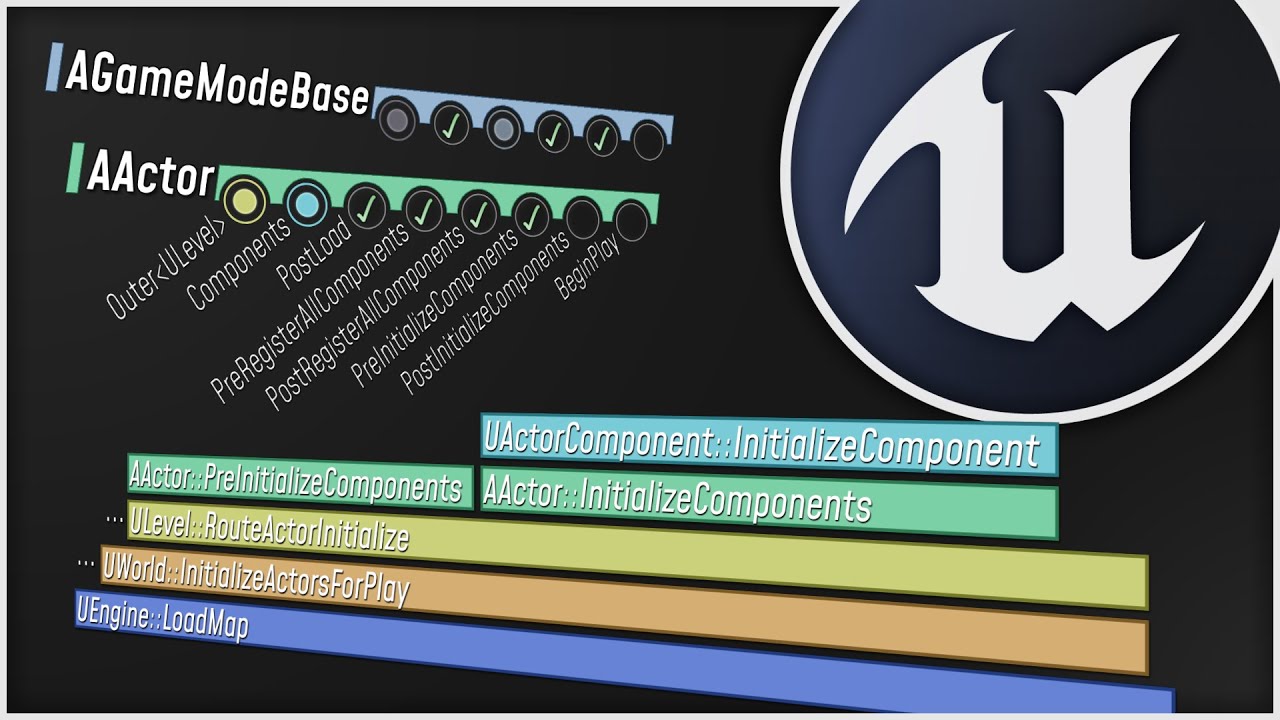
What happens when you start up your Unreal Engine game? This video is a guided tour of the Engine's initialization process: along the way, we'll glimpse the high-level structure of the Engine (modules, game instances, local players, and viewports) and we'll see how all the different parts of the Game Framework (game modes, game states, player co...
 blazing spruce
Hey, do you just need to put 'listen' into the options of the open level node? otherwise does anything else look wrong here?
 thin stratus
Yus @hexed pewter
thin stratus
blazing spruce
Hey, do you just need to put 'listen' into the options of the open level node? o...
Despite the replicated int being redundant, no
hexed pewter
I watch it every day before sleep 🤡 hoping it will make me better at ue
blazing spruce
thin stratus
Despite the replicated int being redundant, no
Interesting cause it doesn't work lol I started following Ryan Laley's online sessions series and he did this in the game instance class and made it replicated does that make a difference that it was in the GI?
thin stratus
GI and Replication is also redundant :D
GI doesn't hold any gameplay code and only exists locally for each player
There is no replication in it
golden nest
you can hold your num of players value in GI until you create a gameplay map and load the value from GI to GS or GM on begin
blazing spruce
thin stratus
There is no replication in it
Okay makes sense lol so other than that theirs nothing wrong with that code cause it wont load the level when i click the host button
golden nest
did u check seamless travel?
Seamless travel does not work in PIE
And will print a warning in output log
that could be why the map is not loading
blazing spruce
Ill check the seamless travel option but its supposed to be working with steam so i right click on the project file and select Launch Game
this is the host button code too just in case
 thin stratus
This should be fine
Any errors or warnings in the log?
Do you see the Steam overlay when yo ustart the game?
Are you not finding the session or why?
Could be normal if you use the test ID
blazing spruce
The steam overlay comes up, i get the Main Menu load, i click host game and nothing happens, although when i run it in UE as a standalone and press the host button it takes me to the prelobby level just not when i try do it through steam
in the viewport for UE tho
if i actually choose the 'Standalone Game' option it also wont work
twilit radish
Is it a bad idea to always have a listen server running and just update the session data to deny people from joining when not wanted? This so that people can instantly join if wanted instead of launching the listen server and creating the session.
And probably a check in some PreLogin event to make sure nobody actually joins.
thin stratus
Think in specific games that is totally fine
 elder ravine
🍉 Can someone help me out🍉 :
How do you guys handle fetching Previous Game Mode variables in a New Game Mode after Seamless travel.
For instance a variable containing a Match Settings Structure > Going from a lobby game mode into a gameplay game mode.
Do you guys save a variable like that on the server's Game instance to acces it in the new Game Mode?
Player controller variables I can simply acces using the EventOnSwapPlayerControllers and cast from the Old PC to the New PC to pass through the neccesary persisting variables..
But how does one do this with variables that exist on the Game Mode and Game State
Anyone perhaps have some advice?
elder ravine
twilit radish
Is it a bad idea to always have a listen server running and just update the sess...
So you basically use your listen server as a dedicated server. Totally fine.
twilit radish
No? There are big differences between those two, I was simply curious if it's actually needed to keep setting it all up when you can also just always have it running and disable/enable joining when needed. If the client shuts down their game the server is dead, that's not the case with a dedicated server.
elder ravine
twilit radish
No? There are big differences between those two, I was simply curious if it's ac...
I know that there's a big difference, but what do you mean by 'Keep setting it up'.
You still need to setup the listen server once right? And then you simply keep it running?
Are you aiming to have some persistent servers online? Hosted from like a virtual machine or something?
Just curious😋
twilit radish
With setting it up I mean starting the listen server and switching to the preferred level and also setting up the session so it can actually be joined if for example ran on Steam. If someone wants to join you would need to go through those steps first, I was wondering why you just can't always have it running as a listen server and if someone decides they want people to be able to join open up the game to other clients by updating the session data.
I'm not aiming to have persistent servers, then I would indeed need dedicated servers. I'm simply looking into a quicker setup for people to join, especially switching to most likely the same level when already in it is simply annoying 😛
Unless I missed some C++ 'magic' that can already do this, but so far I've only found that starting a new level with the listen option does this.
elder ravine
Ahh ok! 😆 Now I understand what you're doing
Thats a pretty smart way actually of achieving your goal, and nothing wrong with it.
Thanks for explaining it to me, I was just curious
twilit radish
No worries, it's difficult to understand things at times without seeing someone. I have had the same problem many times haha.
elder ravine
twilit radish
No worries, it's difficult to understand things at times without seeing someone....
xD
twilit radish
It's just a chat program after all, context and seeing what someone means can be difficult 😛
But yeah, it's fine don't worry.
elder ravine
twilit radish
But yeah, it's fine don't worry.
Exactlyy, so sometimes you can have such a different instance of what someone is trying to say
twilit radish
No, as in Discord is just a chat program.
twilit radish
Yet another example 😆
elder ravine
😛
fading birch
Generally speaking, when a player decides to start "hosting" you open a new map anyways. Ie Main Menu -> Lobby type map
elder ravine
fading birch
Generally speaking, when a player decides to start "hosting" you open a new map ...
Unless your MainMenu is your gameplay map.. Im assuming Thom has that
fading birch
sure, doesn't matter
As far as "opening" and "closing" the map, you can just update the session
and make it so it's not searchable
twilit radish
In my case it would be a lobby and a separate game map. People should be able to join other people their lobbies, but should also be able to deny this from happening with some setting. From their lobby they could join the game world, do whatever they want for some time and come back to the lobby / hub.
fading birch
that..isn't really possible
twilit radish
Why not?
fading birch
if you want the client to go to a new map, by themselves, then they would be disconnected from the server
now, if you want a gameplay loop, like Call of Duty for example where its Lobby -> Game Map -> Repeat
that's totally doable
because everyone travels together
elder ravine
Yeah players can't be in separate UE4 'Levels'. If thats what you're trying to achieve
fading birch
Well..
twilit radish
Not by them selves, see it as this: You start the game, pick a save file and join your own hub as a host. From there people can join that host or join other hosts (and then become a client). From that hub the host can start a match and all join the other map.
fading birch
technically they could
but that's way outside the scope of this discussion
That's not how listen servers work
elder ravine
twilit radish
Not by them selves, see it as this: You start the game, pick a save file and joi...
But this is the standard UE4 Lobby setup. This is exactly what I do in all my multiplayer projects
elder ravine
Yeah like valheim
twilit radish
Why is that now how listen servers work?
fading birch
because the "Host" is the authority
elder ravine
He meant 'technically they could'
fading birch
once you join a host as a client, you follow the host where they go
fading birch
as long as they open a map with ?Listen ofc
twilit radish
Which is exactly what happens?
You simply start the game as a host, but if you decide to join someone else you become a client.
elder ravine
But Thom, the setup you are describing is completely normal
Jump in the hangout voice chat with me will you? I can show you the setup
fading birch
You edited your message, it makes more sense now
twilit radish
fading birch
You edited your message, it makes more sense now
Ah sorry 😅
fading birch
Basically your flow is:
1. Player Starts Game
2. Player starts hosting a server
3. Player can leave their own lobby to join another player's lobby (what happens to other players in the player's lobby?)
4. Lobby Host starts the Game
5. Start Game opens map with ?listen```is that correct?
elder ravine
Start game seamless transitions Session players to the Gameplay map @fading birch add this to step 5.
Complete?

 elder ravine
@fading birch 6. When gameplay is done, players go back to lobby
twilit radish
Yes, players can indeed leave their own lobby to join someone else who is a host or others could join their game. In the lobby people can just look around, mess a bit with each other, look at what the host has achieved so far etc. and then the host can decide to actually start a game on the different map.
twilit radish
fading birch
Basically your flow is:
```
1. Player Starts Game
2. Player starts hosting a ser...
So this yes.
elder ravine
fading birch
doesn't even have to be seamless, but that's obviously preferred
just to save some PC variables perhaps.
fading birch
there's more reasons
it's easier on clients
so they don't get hit with a double loading screen
elder ravine
yeah i just named one nice example
twilit radish
I think seamless would be preferred with this because you go back to the lobby after a 'match', no need to split people apart if you ask me 😛
fading birch
that's not what seamless does
elder ravine
1. Player Starts Game 2. Player starts hosting a server 3. Player can leave their own lobby to join another player's lobby (what happens to other players in the player's lobby?) 4. Lobby Host starts the Game 5. Start Game opens map with ?listen (This is where the gameplay happens)
6. After Gameplay they go back to the lobby (HUB)
7. repeat from step 4
twilit radish
Seamless prevents people from having to reconnect to a listen server or dedicated server after switching to a different map right?
fading birch
Seamless travel keeps the clients connect to the server, which allows the hand off of data from 1 map to another.
Non Seamless travel (hard travel) disconnects you from the server, then you travel on you own to it, and reconnect to the server.
Hard Travel is what you do when you first connect to a server, or leave it
elder ravine
Well now that we are talking about this topic guys, mind if I ask this following question:
fading birch
shoot
twilit radish
Yeah, so it would make sense to keep them connected if they swap from the hub/lobby to the game world and then back after some time right?
fading birch
yeah, seamless travel is usually preferred
elder ravine
How do you guys handle fetching Previous Game Mode variables in a New Game Mode after Seamless travel.
For instance a variable containing a Match Settings Structure > Going from a lobby game mode into a gameplay game mode.
Do you guys save a variable like that on the server's Game instance to acces it in the new Game Mode?
Player controller variables I can simply acces using the EventOnSwapPlayerControllers and cast from the Old PC to the New PC to pass through the neccesary persisting variables..
But how does one do this with variables that exist on the Game Mode and Game State
Anyone perhaps have some advice?
elder ravine
The Match Settings Structure variable that I mention for instance
fading birch
game modes and game states shouldn't be used to save persistent data between maps
I would definitely store match settings in the game instance
elder ravine
fading birch
I would definitely store match settings in the game instance
Yep, exactly
I just use the variable in the Lobby Game Mode to For Each loop through my array of player controllers to update their UI with the Game Settings in the Lobby... But I save a copy of this Match settings in the game instance to acces it in the Gameplay Map and act upon it
Fine right?
elder ravine
fading birch
I would definitely store match settings in the game instance
Yep, thanks
elder ravine
How
elder ravine
with the option string?
elder ravine
Yea
fading birch
when you open a level, you there's an Option string parameter
elder ravine
Once in lobby again it resets
fading birch
you can just parse that
elder ravine
fading birch
when you open a level, you there's an `Option` string parameter
Yeah.. seen that, just not sure how to put the Match Settings in there
elder ravine
And save the struct in the game instance and acces it again once in gameplay map right?
fading birch
you could serialize the struct into a string
and then deserialize it in the game server
fading birch
but that would require C++, which i'm not sure if you're using that or BP
elder ravine
I think im sticking with the game intance way... If it's no problem
elder ravine
fading birch
but that would require C++, which i'm not sure if you're using that or BP
BP only..
fading birch
ah yeah
elder ravine
: )
elder ravine
Alrighty
fading birch
make a AInfo actor
and just put it all in there
and add it to the actors to copy list
¯_(ツ)_/¯
elder ravine
Yeah could do that..
fading birch
many ways to skin a cat
elder ravine
But then the Game Instance way still seems easdier for me xD
Yeah
Like, with a Player Info structure i do the followiung
this strucutre contains the username and player profile pic for instance
Player controller variables I can simply acces using the EventOnSwapPlayerControllers and cast from the Old PC to the New PC to pass through the neccesary persisting variables..
Thats what I use to take PC variables from Lobby to the Gameplay map
fading birch
you could ALSO go a completely different direction. Setup an entire backend infrastructure, a REST Api, backed with a SQL database and just store the data in that.
😛
twilit radish
Sounds a bit expensive for just this 😂
elder ravine
Or I could make my own game engine
twilit radish
Sure hosting, but the actual effort to support this all for the very little it sounds like it has to do.. Don't think so 😛
fading birch
oh well it was also all be in code
so...
xD
oh actually wait
@elder ravine are you using sessions?
if so, just add it to the session info
then grab it from there when you load into the gameplay map
ezpz
fading birch
The match setting info
The player specific stuff should be handled on the controllers
elder ravine
Yeah exactly
Alrighty
Well. If its all fine, which you agreed with me it is, then i keep the match settings in the game instance.
And the player info stuff i pass through with the OnSwapPlayerControllers event and cast from the old pc, get the variable of player info, and pass it into the new pc
blazing spruce
thin stratus
Could be normal if you use the test ID
I changed the pin on the Create Sessions node from On Success just to the top pin and that worked lmao does this cause any issues it being this way tho that you're aware of?
thin stratus
blazing spruce
I changed the pin on the Create Sessions node from On Success just to the top pi...
Yeah you will still not create a session
blazing spruce
thin stratus
Yeah you will still not create a session
fuuuuuuuuuuuuuuuuuuuu! Thanks lmao gonna keep digging then lol
 graceful falcon
Hello, So I made an game that has online multiplayer but the problem is I don't wanna use steams subsystem or epics subsystem or some other subsystem does anyone know how I can make it online multiplayer without using steam or epic or any other subsystem? Main idea is to upload the game on itch.io
 bitter oriole
graceful falcon
Hello, So I made an game that has online multiplayer but the problem is I don't ...
bitter oriole
graceful falcon
Hello, So I made an game that has online multiplayer but the problem is I don't ...
You only need an online subsystem if you want server browsers, friends, or matchmaking
graceful falcon
oh okay but do you have any idea what for subsystem
 quasi tide
Just don't use it
bitter oriole
graceful falcon
oh okay but do you have any idea what for subsystem
Do what ? Just don't use those features
quasi tide
If you want to be able to connect, you need to do your own STUN/ICE servers, NAT Punchthrough, or Port Forwarding
thin stratus
You basically have to create the features that you need from those subsystems on your own
bitter oriole
If you do need matchmaking, then you'll need some kind of service - Steam, Epic, or your own
thin stratus
Which is not a straight forward task, so using Steam or EOS is def the better choice
bitter oriole
To be fair matchmaking / server browser is kinda straightforward, friends less so
thin stratus
It's straight forward if you know how to make it
If you have to learn all of that still, it's not straight forward
graceful falcon
okay thanks!
peak sentinel
Do you guys replicate ammo to owner?
I'm trying to handle predictive automatic reloading when ammo is 0, but between server and client always there is a mismatch
Sometimes server reload 25 ammo, client reloads 30
If I replicate to owner, due to latency, server always corrects the ammo and it looks glitchy on UI
Couldnt find a workaround
 boreal wadi
Has anyone attempted to replicate the inventory system used in Action RPG? Im struggling mainly because it uses maps to organize and update data which cant be replicated so Im at a loss on how to replicate everything. I have a few Ideas but would like to speak with someone with more networking experience.
tight glen
peak sentinel
Do you guys replicate ammo to owner?
Check out antize inventory. They have a basic ammo shooting system that is replicated and works fairly well. I am using it to create my wip game
 dull lance
peak sentinel
Do you guys replicate ammo to owner?
dull lance
peak sentinel
Do you guys replicate ammo to owner?
how are you doing your do rep life time thingy?
Also, for this kind of thing you can always have a replicating int32 and a local int32.
Tho how you handle it depends on how you handle fire (whether you do shooting locally then send results to server or do shooting both locally and then everywhere else)
 hollow eagle
It's a great example of why getting network prediction right is so hard. Seemingly simple scenario - replicate a single number while predicting what it should be - but it gets all kinds of screwy if you go about it naively.
A simple way would be to do what tank said - display a local int32 to the user regardless of what's being replicated back to the client. What I'd add to that is when the player stops firing (or maybe a moment afterwards) you replace the local value with the server-replicated value to account for any desync that may have occured.
 smoky wing
hello everybody, i wonder how i can make player joins a match when press start or make a new session for him if no empty session. i saw some answered were that i need several servers or if one server i need to use ports. i don't know how i can go with one server approach. also is matchmaking of EOS can solve my problem.. and create matches for players ?
blazing spruce
thin stratus
Yeah you will still not create a session
Looks like the reason it wasn't hosting a session was potentially down to a bug with 4.27 that has broke steam subsystem lol
peak sentinel
dull lance
Tho how you handle it depends on how you handle fire (whether you do shooting lo...
Having a local int32 seems like a good idea, I have a LastShot FVector value with OnRep, whenever client or server fires they replicate this FVector and each connection fire a local projectile from given location by calculating forward vector etc. This is a quite bad design but intended
The main problem is, since everyone creating a local projectile inside of OnRep, when client hits to 0 ammo on primary clip, sometimes server still has 3 or 5 even 7 ammo left on the clip, so while client reloads 30 ammo, server reloads lesser ammo
Probably I need to send the value with RPC
 glacial pollen
Epic what is the deal with not fixing this since forever now?

 stoic ore
anyone knows where I can change the MaxSplitscreenPlayers? I just can't find it. It should be available to config files shouldn't it?
hexed pewter
Is there any online course or series on unreal multiplayer that I could follow along / use as reference when creating my own multiplayer project?
stoic ore
hexed pewter
Is there any online course or series on unreal multiplayer that I could follow a...
did you have a look into the pins of this channel? There are quite some helpful things
hoary lark
peak sentinel
Having a local int32 seems like a good idea, I have a LastShot FVector value wit...
You "know this is a bad design" - so you know that replicated variables don't attempt to transmit every change, right?
stoic ore
stoic ore
anyone knows where I can change the MaxSplitscreenPlayers? I just can't find it....
found it.
peak sentinel
hoary lark
You "know this is a bad design" - so you know that replicated variables don't at...
Thats a bad but only working design for pooled-projectiles in my case, its working very well unless the reloading issue I've mentioned above