#multiplayer
1 messages · Page 662 of 1
 grand stratus
there is another solution i saw , it says to create a function that give the game state reference from game mode using on post login event
calid check dont works
it checks it forever
what i mean it never be valid
grand stratus
what have u done in c++
 thin stratus
I created a UWorldSubsystem child
And that has a reference to the GameState
And a callback for when that reference is set
And the GameState, on BeginPlay, gets that custom subsystem and sets its reference on it
 long hollow
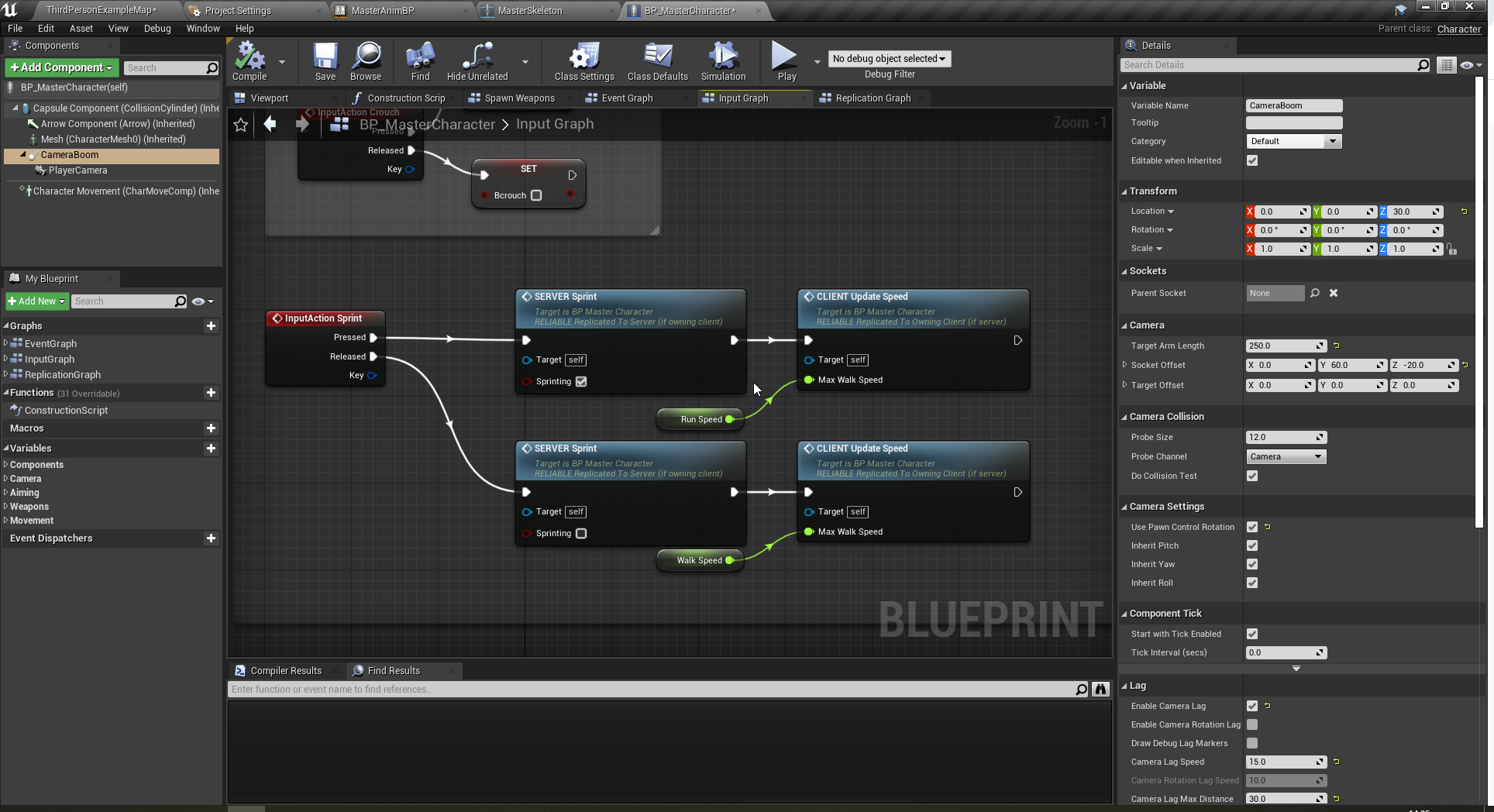
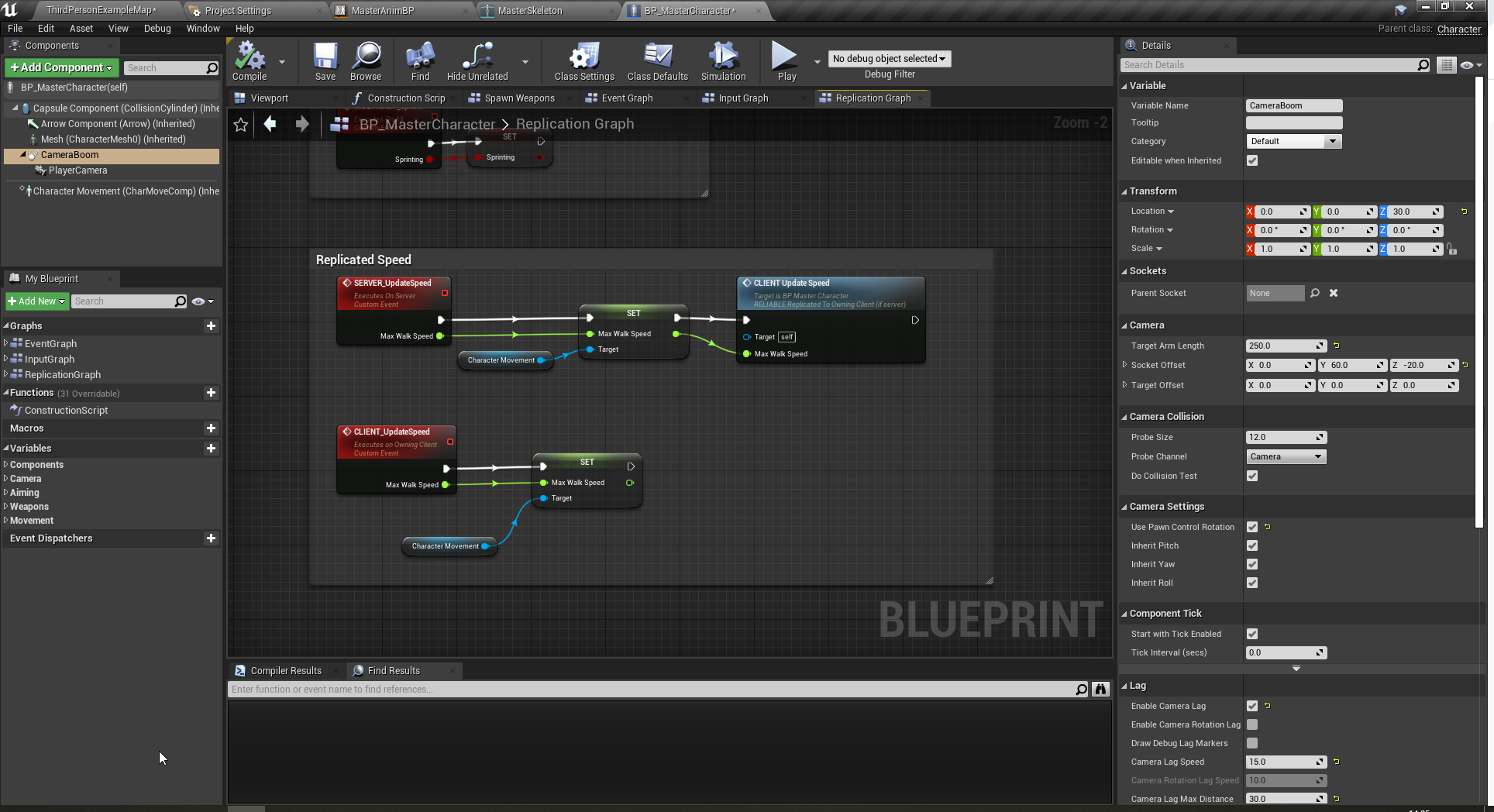
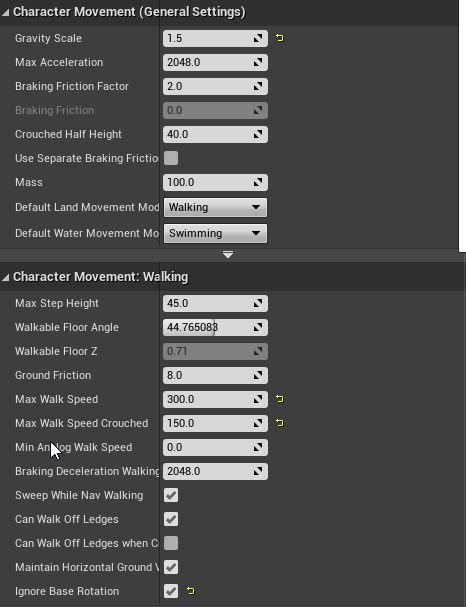
can anyone remind me how to fix a jittering sprint animation (replicated) effects client only, obv server is ok. ive checked all the min / max speeds are the same everywhere
thin stratus
That way I can query it via the subsystem and if it's not valid listen to the delegate callback
thin stratus
long hollow
can anyone remind me how to fix a jittering sprint animation (replicated) effect...
When does it jitter? While sprinting or start/stop?
grand stratus
okay great
thin stratus
long hollow
whjile sprinting
Can you show the code that handles the sprinting?
 stoic ore
is there a way to simulate that a client gets disconnected to non-dedicated server in PIE?
 brazen sluice
In the online subsystem, what are the settings so that find session only finds friend's sessions?
Do I need to disable advertising? Will they still be there?
thin stratus
long hollow
https://i.imgur.com/AJvAb7X.png
https://i.imgur.com/P0NPwUx.png
https://i.imgur....
This is a shitty solution
MovementSpeed is a "State"
"States" should always be created as Replicated Variables
You can RPC to the Server
But not RPC to the clients
The Server should set a RepNotify variable with the speed
And that OnRep function should set the maxSpeed on the CMC
long hollow
ahh ok well that might explain it then, thanks i'll go fix that 😄
stoic ore
brazen sluice
In the online subsystem, what are the settings so that find session only finds f...
null online subsystem has no friends list afaik. What I do to only find friends session is read friends list and search for friend session for every friend in the list.
brazen sluice
I'm using steam online subsystem with advanced sessions
stoic ore
IOnlineSession has a function "FindFriendSession" you can give friend net id to find a session of them.
brazen sluice
But then the server still potentially accept foreigner connections
thin stratus
brazen sluice
In the online subsystem, what are the settings so that find session only finds f...
I don't think that's a thing
You could only manually filter them
brazen sluice
if someone were to use the command to join one
thin stratus
Also #online-subsystems
The only thing you could do is to filter it locally with "is that a friend" and then not show it
And on the Server, when someone connects, doing the same and PreLogin or Login
brazen sluice
Really??
thin stratus
C++ ahoi
brazen sluice
I was assuming that it was a pretty common behaviour
thin stratus
Maybe
I honestly don't know, I haven't tried that. Just from what I did in the past, I can't come up with something that would allow this on a Master Server level
brazen sluice
I seems weird to me especially since there iss a button "join by presence friend only " on create session
thin stratus
You'd need to pass something in to filter
Joining a Session and joining a Server are two different things though
brazen sluice
I'd assume some combination would give you friend only sessions
thin stratus
The Session is joinable only be friend presece, meaning you can only join via the Friendlist I guess
thin stratus
And if you handle your join code correctly it should fail to join the session manually and then also not join the server
But if someone manually joins the server, for whatever reason, they would still be able to join I guess
Just not being part of the session
stoic ore
You don't need to filter sessions yourself. Like mentioned, you can just read the friends list and search if the friend has a session.
brazen sluice
pre login is a game instance hook?
brazen sluice
huuuu
stoic ore
anyone? #multiplayer message
thin stratus
You mean a Timeout?
stoic ore
sure I can implement a timeout for the client but I thought there is maybe something implemented in engine that I can use. Like latency settings or so
or a cvar
thin stratus
Was more a question
grand stratus
okay since check validity for game state takes so much time , i need to create a function that passes the game state from game mode
so should i make the game state rep notify
or what should i do
thin stratus
I don't think that solution would work
The GameMode only exists on the Server
So you would need to send it via the PlayerController or so
And then you still have the issue that sending the RPC with the Reference of the GameState
Cause the GameState isn't magically create by this
It can still be null
grand stratus
i was going to send the game state on post login event
thin stratus
What would that change though?
Sending Actors via RPCs doesn't create the Actor
It only sends a NetID
afaik
And that would resolve to nothing cause the GameState doesn't exist yet
So same issue
grand stratus
so what now
is valid does not work
also if it workd
t
the player state could be still not valid
thin stratus
Correct
It's tricky to make this work event based
Without C++ that is
In BPs I would just check on Tick in the Widget if it should update or not
 kindred widget
I did the 0.0 second delay loop in a couple of places for that.
Dirty. But.. it works. 🤷♂️
grand stratus
so can i create a blueprint function from c++ as u did @thin stratus
thin stratus
Well yeah
thin stratus
Depends on what you mean with study
You can simply inherit from UWorldSubsystem
And the Engine will take care of creating it
It also allows for getting the Subsystem in BP via GetYourSubsystemName
grand stratus
i really dont know what i uworldsubsystem
grand stratus
i know c++
thin stratus
Then create a new C++ class with WorldSubsystem as a Parent
That should be straight forward if you know C++ :<
grand stratus
okay i will try to do this
 twin juniper
hello guys
i want to learn unreal multiplayer using c++.
i made few game using c++ in ue and unity now i want to learn multiplayer
can any one help to find out best tutorials where i can learn what is multiplayer and how to use
 meager spade
https://learn.unrealengine.com, search youtube, check UDemy, etc.
 fading birch
Tom Looman has some good multiplayer courses on Udemy as well. They're massively discounted if you're a new UDemy user as well. (So just make a new account in incognito mode if you aren't)
 gilded nest
I’m creating a game where you have different clans/groups that are creatable and joinable. How would I store this data. Say I created a group, I want the other accounts to be able to search for it and it comes up. How do I do this?
 bitter oriole
You would put that information over a database with an account system
Something like a publicly available HTTP server with json requests
 warm pecan
Has anyone come across an "off the shelf multi-user (vr?) solution" for Unreal? There's a number for Unity (VRChat, Sinespace, Atlspace) and a few for WebGL (Hubs, FrameVR). Looking to teach classes (so not a game).
 hollow eagle
If you're looking for a premade game in unreal with those features, you're in the wrong place and possibly the wrong server. This channel is for creating games with multiplayer, not using/finding existing games.
#lounge or another server entirely would be a better place to ask.
If you're asking about having multiple people use unreal at the same time, you're still in the wrong channel but look into "multi user editing"
 boreal wadi
Has anyone ran into the issue where playing as a client in unreal 5 is pretty much running at 3 frames a second.. How did you fix it. Is UE5 capable of testing multiplayer stuff?
fading birch
I would type in stat unit and see what's causing so many issues. I've had no real problems testing multiplayer in UE5
boreal wadi
Its not visual. I found the issue. Just need to get help solving it
 mint umbra
would the gameState be the correct place to initialize the map for an online game?
I want to place actors randomly in the level and need them to replicate to each client
gilded nest
mint umbra
would the gameState be the correct place to initialize the map for an online gam...
I think I would do this differently, maybe in the level, then run a custom event in the player controller that is client sided which gets the actor and it’s transform or vector, prob transform. Either that or run a multicast in the player controller.
mint umbra
cool, ill give that a shot.. thank you @gilded nest
gilded nest
mint umbra
cool, ill give that a shot.. thank you <@!574061044796751872>
Yeah no problem
fading birch
boreal wadi
Its not visual. I found the issue. Just need to get help solving it
stat unit doesn't just show visible issues. It shows what's taking a long time to process. My guess is you're doing something on the game thread that you shouldn't be doing.
 tropic snow
Trying to make a ladder system for multiplayer. This works on server but stutters and doesn't move up on client. Anyone know how to fix this?
 gilded nest
tropic snow
Trying to make a ladder system for multiplayer. This works on server but stutter...
gilded nest
tropic snow
Trying to make a ladder system for multiplayer. This works on server but stutter...
I suggest making a custom event. Call it whatever, and run it on the client, then create another one that runs on multicast. Put that code in the multicast one, run the multicast from the client event, and put the event on move forward
Make sure if there are any animations they are replicated
I would check on ladder then run the event on true
And false put back to the normal movement
And there should be a class setting I beleive called replicate movement
 inland slate
Hello everyone,
I upgrade my project from 4.25 to 4.26 and then to 4.27.
After upgrade, i am getting errors on server log (Dedicated server).
Here is link to forum where i have replied to guy who has having same problem,
https://forums.unrealengine.com/t/server-error-could-not-find-outer-particlemodule/245028/2?u=hvs_rhs
If anyone can help.

Unreal Engine Forums
I am having same issue. I upgraded from 4.25(Working) to 4.26(Not working) then 4.27(Not working). I am also getting error for world composition and virtual texture is not working in any built file (in editor it works perfectly) I have no idea, what is happening.
 rocky kestrel
I have static mesh component in player and I want to set it realtime (wear helmet) how replicate it?
 past pebble
Hello I have a custom pawn trying to setup multiplayer, got the movements working but thing is when I add more than one player every others players spawn in the ground with a camera only:

I'm using the default player controller
 dark inlet
Hello! I have a dedicated server and i would like to display the ping on the player client widget, how can i get the ping variable?
 chrome bay
past pebble
Hello I have a custom pawn trying to setup multiplayer, got the movements workin...
chrome bay
past pebble
Hello I have a custom pawn trying to setup multiplayer, got the movements workin...
You need more playerstarts
 serene sparrow
Hello.
How bad would it be to have say a couple thousand replicated actors spawn? There is only one replicated property and movement is not replicated.
I realize pre-optimization is bad but I want to have an idea in case it is a horrible thing to do from the get-go.
chrome bay
I'll be surprised if they all spawn to be honest, that's a lot to spawn in one go
What's it for - and do they have to be replicated?
serene sparrow
I am just spawning some stuff for a gameplay feature. Honestly having them spawn both on server and client separately should be easy-ishly doable, but I wanted to ask first whether there is a common-sense wisdom against doing it the easy way
chrome bay
Is this for procedural generation or somesuch?
serene sparrow
yes
chrome bay
And presumably these actors are somehow network & gameplay relevant, either you want to be able to walk on them or they have collision etc?
serene sparrow
yeah. they have overlap and also you can click them
chrome bay
I would advise against making them all individually replicated. @winged badger / @meager spade have done some cool things to support deterministic procedural generation without having to replicate each actor individually
Fortnite has a lot of replicated actors but most of them are dormant and loaded with the level
If you have to spawn them at runtime, it gets a lot harder
Without any detail it's hard to say more than that
serene sparrow
it's pretty simple procgen so I can do it separately. Just placing some stuff around so that they are different each session. I'll set something up to place them in the same places and do overlap etc. separately with some leeway given to the client.
Or maybe, on another note, if I have a bunch of actors with dormant replication at first, and hidden to the player, I suppose they wouldn't use much resources? I would then activate a random batch each time they are needed.
That way I still have replication for my events etc.*
chrome bay
The real issue is that you have to spawn them all with the same deterministic names, then trick the engine into thinking those actors were loaded with the world. Otherwise you have to spawn + replicate each one individually from the server, which is the expensive part. That's what Zlo/Kaos have managed but I don't think there's a specific resource to look at how.
But yeah if they are dormant, they have no network overhead as such - since the channel is closed. Fortnite's entire levels are made up of dormant actors, which are "woke" once they are needed.
serene sparrow
What if I have a bunch exist initially, so they are stably named, and then just unhide them and enable replication as needed. My only issue would then be whether 40-50k hidden and not replicated actors produce any slowdown
chrome bay
Going to have the same issue, you'd have to wake all the actors you want to change at once to let clients know which ones are visible
Or, alternatively - replicate that information via a proxy actor in a fast array
serene sparrow
makes sense, thank you so much for your help! I think I'll take the proxy approach
past pebble
chrome bay
You need more playerstarts
Can't I have only one player start for all players ?
chrome bay
No because they'll all try to spawn inside each other
The pawn is failing to spawn because of collision, that's why you only get a camera at world origin for all but the first player
past pebble
Why does the thirdpersoncharacter works with only one player start ?
chrome bay
Might be because the chracters don't block each others' collision
So they'll all just spawn on top of one another
 chrome bay
Maybe they force spawn ignoring collisions
There's a per-actor setting
Either way, it's not the right way to deal with it. They could just as easily spawn underneath the floor doing that
past pebble
Ok, so can I spawn the player starts dynamically ? Or should I just add a bunch of them and hope that it'll always work ?
chrome bay
add a bunch yeah
Enough for as many players as you want to support
The engines' default implementation doesn't do a very good job of assigning them though
It looks like Pawn.Cpp sets the collision handling method to AdjustIfPossibleButDontSpawnIfColliding in 4.25
That's probably why the character works, because it's auto-adjusting the position
But it likely can't handle that for a large box etc.
past pebble
Ok great, thanks
I'm not doing a MMO but how a large multiplayer game would deal with this ?
chrome bay
same idea, lots of spawn points
past pebble
and then a joining queue based on the number of spawn points availables ?
chrome bay
Different ways of doing it, I would just be sure to have enough spawn points to always spawn as many players as you cna have
in UE4, that's only ever going to reach about 100 anyway
You don't have to use playerstarts ofc, you can use your own logic for spawning
past pebble
chrome bay
You don't have to use playerstarts ofc, you can use your own logic for spawning
Oh yeah ok!
Really interesting info, thanks mate
chrome bay
Really depends on the game ofc
inland slate
Any one ?
#multiplayer message
 halcyon totem
does anyone know the name of the node that has a boolean at the end of it for class components?
v

 elder sable
Where can i get an event of a player joining a game with full data available ? I tried GameState::AddPlayerState but it seems the player name is not replicated yet
 blissful totem
GameMode's PostLogin?
 modern cipher
elder sable
Where can i get an event of a player joining a game with full data available ? I...
modern cipher
elder sable
Where can i get an event of a player joining a game with full data available ? I...
if you need PlayerState data on the client side you can override OnRep_PlayerState()
Idk if the player state is available OnPostLogin
elder sable
Ok thanks !
rocky kestrel
I have Player stats component in player where (agility, vitality etc.) are stored then I have function in player which calculates player max health and health depending on those variables. How should I replicate it?
 violet sentinel
why not HandleStartingNewPlayer ? will save of headache with seamless
elder sable
violet sentinel
why not HandleStartingNewPlayer ? will save of headache with seamless
Was that for me ?
fading birch
HandleStartingNewPlayer covers both PostLogin and HandleMatchHasStarted. PostLogin isn't triggered on seamless travel, but HandleMatchHasStarted is.
elder sable
Oh i guess that's what i need, thanks :p
fading birch
rocky kestrel
I have Player stats component in player where (agility, vitality etc.) are store...
just mark the component as replicates?
make sure those variables replicate as well
 lusty sky
Isn't it the same for something like a player name? it wont change during gameplay i guess?
rocky kestrel
Atm my max health and health variables replicates and player stats component replicate.
fading birch
It can if you call SetPlayerName
blissful totem
Hey when I test my game's networking in editor, the game mode seems to set the match state to "Aborted" shortly after the level loads. Why is it doing this? Is there any way to check?
This happens after the host loads the level. It hits "WaitingToStart", then hits "InProgress" then hits "Aborted. If I Override ReadyToStartMatch to return False, it will shift to Aborted without hitting InProgress
This only happens if the host loads this level from a main menu mode / map.
warm pecan
hollow eagle
If you're asking about having multiple people use unreal at the same time, you'r...
Thks... (I'm always in the wrong place)
 lost dune
Hello , how to get the local ( owning client ) player character reference ?
getPlayerCharacter(0) don't give me the specific playercharacter from each client
meager spade
GameInstance()->GetFirstPlayerController()->GetPawn()
lost dune
thank you so much
meager spade
don't use those god awful static in multiplayer games
 patent crystal
Hell all, running into what is probably a simple problem on some simple p2p functionality. Essentially have a bunch of client's connecting to a host. We want to have some logic for if they somehow get disconnected, to try to find the session again and rejoin. We are running into some issues where, upon trying to re-join the previously cached session, we successfully join, and then lose connection right there after. If we attempt to clear the cached session and run the logic to find the host again and join, we can never find anything.
[2021.09.07-19.23.48:438][105]LogBlueprintUserMessages: [GI_ASCE_C_2147482599] Disconnected with reason: ConnectionLost Trying to rejoin [2021.09.07-19.23.48:438][105]LogBlueprintUserMessages: [GI_ASCE_C_2147482599] Disconnected, Trying to Rejoin... [2021.09.07-19.23.48:438][105]LogOnlineSession: OSS: Join session: traveling to 192.168.1.145:7777 [2021.09.07-19.23.48:438][105]LogBlueprintUserMessages: [GI_ASCE_C_2147482599] Successfully Rejoined! [2021.09.07-19.23.48:451][106]LogNet: Browse: /Game/Maps/LV_Lobby?closed [2021.09.07-19.23.48:451][106]LogNet: Connection failed; returning to Entry
The Join session: ip here is different than the original ip the client uses to get into the host
lost dune
Is there a way to get the local player character (possessed locally on the client) using blueprint?
 rich locust
modern cipher
lost dune
Is there a way to get the local player character (possessed locally on the clien...
rich locust
modern cipher
lost dune
Is there a way to get the local player character (possessed locally on the clien...
did you try GetPlayerController()->GetControlledPawn() ?
lost dune
because before getcontrolledpawn there is "getPlayercontroller(0)"
the (0) target the first
character
the first controller in this c ase
I can't believe i have issues for getting the simpliest thing in multiplayer
lost dune
Or maybe this is because I use separate server with run under one process
Run under one process cam melt the player controller ids?
 plucky prawn
Is there a "proper" way to make an actor visible to specific players? I tried googling and didn't really find much, but I thought maybe messing around with some of the replication functions might work?
 obsidian rivet
hey do anybody know that how can i add a system like mini militia i have a multiplayer game but i can not buy the server that is y
fading birch
I"m not sure what your question is.
obsidian rivet
fading birch
I"m not sure what your question is.
it is like local multiplayer game in which we can play over bluetooth or wifi hotspot
 rich sinew
plucky prawn
Is there a "proper" way to make an actor visible to specific players? I tried go...
rich sinew
plucky prawn
Is there a "proper" way to make an actor visible to specific players? I tried go...
Do you mean not visible to specific players, or not replicate to specific players? they're quite different
fading birch
obsidian rivet
it is like local multiplayer game in which we can play over bluetooth or wifi ho...
I'm still not clear on what your actual question is. It looks like you hit enter too early or something.
obsidian rivet
so it is like local multiplayer
or in this one person is a host whos mobile hotspot is on adn other player are join that match by connecting to that specific wifi and they play the game it is the most demanding game before pubg on playstore i think u might know it
hollow eagle
you're asking how to have someone host a server themselves
it's called a listen server and it's supported out of the box
obsidian rivet
okay i was asking this as i made a multiplayer game but now the server are too expensive and people say they do not have good quality
plucky prawn
rich sinew
Do you mean not **visible** to specific players, or not **replicate** to specifi...
Both if possible but mainly visibility. I'm changing my game to spawn spectators server side and I'd like spectators to see each other and also see living players, but have the living players not see the spectators.
chrome bay
You can just override IsNetRelevantFor on the spectator class
plucky prawn
chrome bay
You can just override IsNetRelevantFor on the spectator class
Thanks. That's what I was looking at doing.
 azure hollow
hey guys is 85kb too much for a ghost replay? I need to send this to playfab
 woeful pebble
is using a peer-to-peer server otherwise known as a listen server unsafe if i give my game to my friend?
azure hollow
I made JSON serialization because I haven't been able to serialize a struct of array in binary
woeful pebble
Like could i get hacked?
thin stratus
woeful pebble
Like could i get hacked?
Eh, what
woeful pebble
thin stratus
Eh, what
isn't p2p insecure
thin stratus
In what regard
thin stratus
It depends on what you mean with insecure
woeful pebble
I mean, since i am hosting the server off of my machine won't it mean somebody could get access to my machine?
thin stratus
That doesn't really have anything to do with ListenServer or not. Hosting a Dedicated Server on your PC would mean the same
And idk, maybe they can get access, but not more or less than usual.
woeful pebble
Okay
thin stratus
Also ListenServer is not p2p
p2p means everyone is connected to each other and everyone has authority over their data
Clients are only connected to the ListenServer
So this is not p2p
ListenServer has the Authority and is the Server here
 fair lantern
Hey guys, im new to unreal
I have this problem where if I play as listen server my traces work fine but if I play in viewport with only clients then I get two traces instead of one
and the second one is in the wrong spot
 blazing spruce
Hi, does anyone know of a good resource before i start doing some digging into the different types and use cases for different classes, im working on a multiplayer game so i think i need to know about use cases for things like Game Instance, Game Mode, Game State classes even more basic things like what should go in a Character Class compared to a PlayerController class?
blazing spruce
was that to me?
 empty axle
blazing spruce
was that to me?
empty axle
blazing spruce
was that to me?
yes
blazing spruce
sorry, where am i looking?
empty axle
blazing spruce
sorry, where am i looking?
on channel pinned messages in top right corner
blazing spruce
Legend, cheers!
 upbeat basin
Is it possible to connect shipped dedicated servers from editor?
thin stratus
Visual Studio (or generally the code ide) but not UE4 Editor
upbeat basin
Do you mean running the editor from visual studio on development editor mode?
thin stratus
No
upbeat basin
Attaching the process for debugging?
upbeat basin
Oh okay but that's not what I'm looking for
So it's not possible to connect from PIE, right?
upbeat basin
Yep
thin stratus
No you should never connect from the Editor to an outside process
Doesn't matter if shipped or not
upbeat basin
I see
I wanted to create a debug environment (dedicated server) to connect from editors so that I can test/debug from editor on different networks and devices
Is it possible to connect the server created by editor on PIE if we're on same local network though?
 hexed pewter
If I wanted to create a clone of Unreal Tournament, or something like Dota2 (both in very small scale), how much of networking architecture is already there in the engine ready to be used and how much would I need to write from scratch?
fading birch
Plenty to make either of those.
hexed pewter
I recently looked into CharacterMovementComponent. It has quite a lot of code inside it. Hopefully that does not translate to coding every feature to fit multiplayer.
bitter oriole
hexed pewter
I recently looked into CharacterMovementComponent. It has quite a lot of code in...
You should assume that multiplayer support means x5 the code size on average, in my experience
For features like movement, it's more than 10 times
CMC is kinda bloated, but a flying vehicle that behaves perfectly in real world settings is hard to get down to less than 500 - 1000 lines
hexed pewter
bitter oriole
You should assume that multiplayer support means x5 the code size on average, in...
x5, considering it runs decent with no weird stuttering and sort of that?
bitter oriole
Yeah, again, on average. Movement is the worst.
hexed pewter
that is really helpfull, I needed to consider this because I'm planning on making a portfolio project, so even a broad assessment is a good thing, again many thanks
bitter oriole
If you're not doing a multiplayer development portfolio, MP is likely a bad idea
hexed pewter
Indeed I'm not, I'm planning on applying for a junior ue4/c++ programmer job. I just thought having a multiplayer demo would make me stand out more, improving my chances, what was the final straw for making that decision was reading many opinions about "transitioning" already implemented feature from singleplayer to multiplayer and how it can snowball in even not so big games.
 dark edge
What makes multiplayer movement such a PITA is prediction. If you don't need prediction (the response to input is pretty slow anyway) then movement isn't that hard. Flying is pretty smooth and not too twitchy, you could get away with non-predicted movement.
grand stratus
guys if i made a uworld subsystem does it instantiated when i join the level right , cause i want to get the game state to be valid?
chrome bay
It won't be valid at the time the subsystem is created, very unlikely anyway
Could arrive at any point, you'll need to code around the race conditions
 grizzled flicker
Slightly confused by ppl who say root motion is bad for multiplayer. I think I get the logic that if there’s any lag or discrepancy about where the root is of client vs server it can cause big issues but isn’t that the only way to do it? If there’s no root motion then the root of the character won’t move at all so I’d imagine that causes far more issues, no? What don’t I understand ?
bitter oriole
grizzled flicker
Slightly confused by ppl who say root motion is bad for multiplayer. I think I g...
You usually have characters moved by their root component, which is a collision capsule
The character skeletal mesh is just for show
Root motion means the mesh goes outside of that root capsule, which is terrible for all the reasons you can think of
blissful totem
Where does one store data that can be shared with the server after joining, e.g. player name?
game instance?
blissful totem
thx
 sage isle
I am looking at server options but I have heard some good and bad things about some, I want to have dedicated servers so I was looking into amazon AWS but what would yall recommend?
bitter oriole
Not needing dedicated servers 😬
modern cipher
is that timer when using potions in Fortnite
replicated or just a local timer? after x seconds applies a gameplay effect

 summer tide
How do you replicate a variable in a struct?
dark edge
summer tide
How do you replicate a variable in a struct?
You replicate the whole struct
A struct is basically just a data format, like how a vector is basically just three floats
summer tide
The whole thing? What about DOREPSTRUCT?
bitter oriole
Only UPROPERTY vars that aren't marked with that "no rep" flag will replicate within the struct
Still needs to be USTRUCT of course and yes, replicated
summer tide
bitter oriole
Only UPROPERTY vars that aren't marked with that "no rep" flag will replicate wi...
So the only way to replicate a single variable in a struct is to replicate the whole struct
bitter oriole
No, I just explained what will replicate or not within the struct
dark edge
@summer tide are you trying to replicate only certain fields in the struct?
summer tide
dark edge
<@441113547540398091> are you trying to replicate only certain fields in the str...
Right now I only need one of them to be replicated. I don't mind doing the whole struct but trying to understand.
dark edge
Ya just replicate the struct.
bitter oriole
Replicate the struct, and only replicate relevant fields within it
summer tide
dark edge
Ya just replicate the struct.
thanks
 sacred spire
bitter oriole
Replicate the struct, and only replicate relevant fields within it
sacred spire
bitter oriole
Replicate the struct, and only replicate relevant fields within it
Basically, you replicate the Struct + then replicate again the field within it? Extra replication. Am i understand it correctly?
bitter oriole
No
Just like UObjects you can only replicate UPROPERTY variables
So a replicated USTRUCT that has no UPROPERTY variable replicates nothing
It's not extra, it's opt-in, per variable
sacred spire
Example, once i complete replicated the struct. Then within it has integer variable, bool variable etc, i still have to replicate those 2 variables within it too?
Sorry my brain is horrible
 wheat magnet
server travel isn't working in editor, but working in standalone, how to fix this issue?
sage isle
bitter oriole
Not needing dedicated servers 😬
What would you recommend instead?
I am trying to setup a game where dozens of people can join at any time with a persistent world, wouldnt dedicated servers be the right way to do that or am I going down the wrong road here?
summer tide
Do you know if you can use line breaks in multiplayer mode in VS?
wheat magnet
it return cast not success

in client side, the cast not working, but cast success in server side, how to fix this
?
grand stratus
chrome bay
Could arrive at any point, you'll need to code around the race conditions
@chrome bay what do u mean with race condition
wheat magnet
can anyone tell how to fix this issue?
 red salmon
Is there any good tutorial or documentation that can help me with my player rejoin issue so when a player leaves his data is being remembered by the server and when the player rejoins he keeps all the data from before?
 rose raft
I'm using the NetworkPredictionPlugin. What is the best way to get the duration of time being interpolated (in other words the delta time between the From and To state)?
Here's an example:
// State we are evolving frame to frame and keeping in sync.
struct FExampleSyncState
{
    // ...

      void Interpolate(const FExampleSyncState* From, const FExampleSyncState* To, float Alpha)
    {
        // We have Alpha, which is a value from zero to one.
        // How do we know the amount of time we are interpolating?
    }
}
For more context as to what I'm talking about see this:
https://github.com/EpicGames/UnrealEngine/blob/99b6e203a15d04fc7bbbf554c421a985c1ccb8f1/Engine/Plugins/Runtime/NetworkPredictionExtras/Source/NetworkPredictionExtras/Public/FlyingMovementSimulation.h
An example in that file would be FFlyingMovementSyncState::Interpolate
 vague spruce
i've got a attribute set on an actor that's replicated. is there any reason i should look into putting this into a player state instead? i don't know what the benefits are of using player state
 steel fractal
hi everyone, i have a quick question, i made a function to shoot my projectile to the center of the screen, and it runs fine in single player and client to server, but i want to run it on the server to prevent client side cheats. Im wondering why my replication wont work?


 minor sable

this function gets called by the server would that have something to do with the actor itself possibly and not the function
steel fractal
ill try it out
steel fractal
minor sable
wont work unfortunatley
 sinful tree
steel fractal
sinful tree
steel fractal
Do not do this. If your tick is set to 0.0, you'd effectively be sending an RPC every frame (so every 0.016s at 60FPS) which can flood the network. Marking it reliable means it could further jam the network as each RPC needs verification that it went through.
If you want this function to run on the server, then make it so the client replicates only the state - ie. If they press the fire button, then do the RPC. If you have a gun that you want to repeatedly fire, still do it the same way, but set a timer on the server, and on release of the button, do a second RPC to stop that timer.
steel fractal
sinful tree
Do not do this. If your tick is set to 0.0, you'd effectively be sending an RPC...
I see, so your saying the current way I have it is flooding the network and could causing it to not replicate correctly, or at least that it would be terrible for network performance
 coral latch
Does anyone know where I can learn how to make a dialogue system for couch co-op game?
fading birch
Is there a reason you want to build a debug server? a development server generally works fine.
 lost inlet
And is content being cooked for it?
fading birch
Are you sure the functions getting called? I've never seen a server rpc fail to breakpoint.
lost inlet
well the standalone configs like game, server, and client usually require cooked content
basically anything that isn't editor
also be interested in the RPC setup
fading birch
you could always just launch your server with a custom path and debug it that was with -log -server via your solution config
lost inlet
and the _Implementation?
also you don't need to do WithValidation anymore if it's just going to return true
Server_LaunchCharacterRPC_Implementation is probably going to get inlined
by the compiler
it's not been required for ages, the compendium is outdated
no? it getting inlined isn't
but if you have a breakpoint on LaunchCharacterRPC() when compiling DevelopmentEditor, it probably won't hit it
well that should hit, do you see anything in the log about calling an RPC when you're not the owner?
I would assume you're the net owner if it's a character though
you would see it in a play as client PIE session
I forget what the output looks like but it'll include the RPC name
fading birch
you could wrap the function with:
#pragma optimize("", off)
void ASideScrollerRPGCharacter::Server_LaunchCharacterRPC_Implementation()
{
    LaunchCharacterRPC();
}
#pragma optimize("", on)``` right @lost inlet ?might as well compile DebugGame Editor if you're going to do that
it doesn't really make as much difference as you probably think it does
well it is because that's how the majority of the in-editor MP verification happens and it's not really failed us yet
and if you do out of process server in the editor then you have to attach the debugger to the other process
ok, fuck it, do UE_LOG
pretty much
probably because you attached to the wrong process
and not really
 vagrant lance
I have an issue where the host loses input completely after a third client joins the game. Only happens rarely. Any thoughts on what this could be?
I've checked for any 'set input mode ui only' nodes and there are none
red salmon
Is there any good tutorial or documentation that can help me with my player rejoin issue so when a player leaves his data is being remembered by the server and when the player rejoins he keeps all the data from before?
thin stratus
red salmon
Is there any good tutorial or documentation that can help me with my player rejo...
Not that I know of, but the PlayerState is for that. The GameMode has a setting for how long a PlayerState should be kept alive. And then it's something with the "OverrideWith" function in the PlayerState class, but I'm still confused by the direction of that function and haven't had the chance to look at it since then.
But that only works for a limited time and/or as long the Server isn't shutting down (although I'm not sure you can make an inactive PlayerState live that long)
If it has to remain longer/over a shutdown, you need to save the data on the harddrive of the server
 glad quest
Hello there. I'm currently trying to read up on Networking in Unreal through eXi's Network Compendium, reached a point where I think I am misunderstanding something though.
I've split my PlayerPawn into Character & Controller and set the Replicating flag on the affected components (Movement etc.). I've moved all input to the player controller and save a reference to the possessed pawn in there.

Then in the Pawn I have the corresponding event run on the server so the client can't cheat

I am unable to move a pawn as client though. Why is that? I expected the server to add the input to the camera / character and send the updated rotation / position back to the client.
thin stratus
Because you aren't taking into account that UE4 wants you to set ControlYaw and Input locally :P
You simply can't do what you are doing
Cause the Movement is replicated through the MovementComponent
The Client already sends its data to the Server
And since you aren't setting anything on the Client, it's sending "nothing"
Or rather it's sending that the character is standing still
glad quest
Fair enough.
Thank you!
Are there other things UE expects the local client to do? Like Jump?
thin stratus
All Input
That causes build-in movement
Jump, Crouch
ControlRotation, MovementInput
And if you do your own, like Sprint, theoretically also that, but that needs your own C++ CMC
red salmon
thin stratus
Not that I know of, but the PlayerState is for that. The GameMode has a setting ...
I cant belief that there isnt a solution built in or something out there that doesnt address this problem I kinda looked everywhere and found nothing only this "overridewith" which it kinda sucks. I just want a simple way for the server to identify that player owns that account (steam) and load in his progress that can be saved on a pawn in the world or something close to that
thin stratus
Why would it be build in though?
You can identify the Player via their UniqueNetId
Given they have one that is unique
If you use Steam, that ID is the SteamID
GameMode in PreLogin and Login gives the ID.
Or PlayerState has it. All of that is C++ (which is more or less requirement for proper multiplayer projects).
You can, if a player joins, use that ID to figure out where their data is
But if your Server restarts, the data will be lost
And DedicatedServers have to be restarted, best every 24h
So if you don't care about that limitation, put a character somewhere that you can identify by the ID and repossess it when the player rejoins
If you do care about the restart server stuff, save it to the disk, and load it based on the ID.
@red salmon
red salmon
many ppl said to not use the unique net it cause it prints out garbage or nothing
tbh I might give that a try I just wanted to do my research before using steam
thin stratus
The unique net id is your only chance, unless yo uwant to build your own database
You don't have to print it
But you can
It's just that it's not meant to be printed
But for steam it should give you some string with a number
But if you don't need it in string format, you can just compare the FUniqueNetId type directly
I think the default type of the steam ID is uint64 or so
Every Steam user can be uniquely identified by a 64-bit numeric ID, known as the user's Steam ID.
    /**
     * Platform specific conversion to string representation of data
     *
     * @return data in string form
     */
    virtual FString ToString() const override
    {
        return FString::Printf(TEXT("%llu"), UniqueNetId);
    }
    /** Holds the net id for a player */
    uint64 UniqueNetId;
That's from FUniqueNetIdSteam
Which you won't touch directly
glad quest
Do I assume correctly that Event Dispatchers called by the client won't be replicated to the server since it doesn't own the Dispatchers in the Pawn?
thin stratus
glad quest
Do I assume correctly that Event Dispatchers called by the client won't be repli...
EventDispatchers aren't networked to begin with afaik
They call where you call them
That's all
glad quest
sigh alright, that's gonna be fun then lmao
thin stratus
You have RPCs and OnRep functions in which you can call the Delegate
glad quest
I was hoping to be able to re-use part of the infrastructure of the (now SP version. In hindsight, should have thought of MP earlier) which uses Event Dispatchers on Input Level and Actor Components just listen to those

Then the component looks like this

Guess I'll switch to RPCs then
dark edge
@glad quest What sort of system are you building where components need to listen for input events like that?
glad quest
Crouching etc. are in their own actor components
It was just easier that way
Though the Pawn knows all their components anyway, so I can just call them directly. Not too bad.

Just a bit more untidy if there is more than one component reacting to an event, e.g. Velocity Stop
glad quest
Seems to work as intended, nice.
thin stratus
That looks like a terrible thing to do with any form of lag :D
brazen sluice
Component replication is kind of garbage no? It's kind of random whether something is going to work or not based on the hierarchy of replication and the difference between replication and component replication on the same actor
modern cipher
+-------------------+------------+-----------------------+
|                   | Mesh Merge | Master Pose Component |
+-------------------+------------+-----------------------+
| GameThread Cost   | Medium     | Min                   |
+-------------------+------------+-----------------------+
| RenderThread Cost | Low        | High                  |
+-------------------+------------+-----------------------+
which one should be use lol?
 vague fractal
I'm kinda confused here.
I have a replicated enum variable DodgeDirection.
This variable will decide if the player can go into the dodge animation (Inside of the AnimationBlueprint)
I thought if i just change it on the server it will get replicated so that other players also see the animation, but it doesn't. It will only run on the server 😕
blissful totem
Don't try to replicate variables in the animation blueprint
replicate the on the pawn, and have the anim bp grab it from the pawn.
vague fractal
That's what i do.
I change the variable via InputBindings
blissful totem
So DodgeDirection is replicated on the pawn?
vague fractal
More specifically in my custom CMC
blissful totem
and on tick you're grabbing dodgedirection and setting it in the anim bp?
vague fractal
No, i'm getting the value from a getter which is used in the Transition Rule
Like this here basically
 blissful totem
ok. can you check to see if the enum is correctly replicating?
If it's not, then the anim bp is not relevant here.
modern cipher
IDK about enum replication but if you replicate the state as an int
enum class EMyEnum
{
StateOne = 1,
StateTwo = 2,
}
int32 StateOrWhatever;
then get that int value from the enum
vague fractal
Well, i think it isn't correctly replicated, otherwise it should work, i think 😅
modern cipher
idk never tried to replicate an enum
vague fractal
I think an enum shouldn't change anything.
It's basically just an replicated uint8
modern cipher
debug or share code XD i cant say anything more
vague fractal
This here are my bindings
    PlayerInputComponent->BindKey(EKeys::W, IE_DoubleClick,  GetPlayerMovementComponent(), &UPlayerMovementComponent::SetDodgeDirection<EDodgeDirection::Forwards>);
    PlayerInputComponent->BindKey(EKeys::S, IE_DoubleClick,  GetPlayerMovementComponent(), &UPlayerMovementComponent::SetDodgeDirection<EDodgeDirection::Backwards>);
    PlayerInputComponent->BindKey(EKeys::D, IE_DoubleClick,  GetPlayerMovementComponent(), &UPlayerMovementComponent::SetDodgeDirection<EDodgeDirection::Right>);
    PlayerInputComponent->BindKey(EKeys::A, IE_DoubleClick,  GetPlayerMovementComponent(), &UPlayerMovementComponent::SetDodgeDirection<EDodgeDirection::Left>);
Where UPlayerMovementComponent::SetDodgeDirection<> is only doing this logic
template<EDodgeDirection DodgeDirection>
void UPlayerMovementComponent::SetDodgeDirection()
{
    if(GetOwner()->HasAuthority())
    {
        return SetDodgeDirection(DodgeDirection);
    }
    Server_SetDodgeDirection(DodgeDirection);
}
The Server_SetDodgeDirection will also just call SetDodgeDirection and it looks like this
void UPlayerMovementComponent::SetDodgeDirection(EDodgeDirection DodgeDirection)
{
    eM_DodgeDirection = CanDodge() ? DodgeDirection : EDodgeDirection::None;
}
eM_DodgeDirection is the replicated enum variable which is also used in my AnimBP
lusty sky
hmm what is the purpose of the template? is that function called with different enums?
vague fractal
Exactly.
Basically just a way to make it more generic rather than having a method called SetDodgeDirection_Forward, SetDodgeDirection_Right and so on
lusty sky
you can have actions bounds to input for left/right.. then call SetDodgeDirection( EnumDirection )
I dont think you can replicate enum class
try to change that to the old type TEnumAsByte or use an int instead to replicate the enum value
obsidian rivet
hey i want to ask something did any one ever played mini militia
vague fractal
lusty sky
you can have actions bounds to input for left/right.. then call SetDodgeDirectio...
Welp, i gonna give it a try without enum class, but i would be shocked if you really can't do that
I've tried it now with a plain int32, but it's the same result
glad quest
thin stratus
That looks like a terrible thing to do with any form of lag :D
How come?
lusty sky
vague fractal
I've tried it now with a plain `int32`, but it's the same result
@vague fractal i tried it with TEnumAsByte and it worked
lost inlet
modern cipher
```
+-------------------+------------+-----------------------+
| ...
mesh merge having a "medium" gamethread cost is a little bit disingenuous because while there is a medium impact to perform the merge, you do save on not having to update child transforms
modern cipher
i wonder what fortnite uses to handle clothing on modular meshes
high render cost for multiplayer is kinda bad i guess
lusty sky
UENUM(BlueprintType)
enum MyEnum
{
Default  =   0,
Yes      = 100,
No       = 250,
};

UPROPERTY(Replicated, BlueprintReadOnly, Category = Test)
TEnumAsByte<MyEnum> MyValue;
you should have a default entry value = 0
@vague fractal
thin stratus
glad quest
How come?
Because movement will only be smooth for the local client if you use C++ and your own child class of the CMC
You are only setting Sprinting on the Server, and then replicate it down to the client again
Not only is that a small delay before the client actually notices teh sprint
but it will also cause corrections since the CMC will now move the character differently on client and server for a few frames
glad quest
Yeah, you're right, I just tested with simulated worse network conditions. Ouch.
glad quest
thin stratus
You are only setting Sprinting on the Server, and then replicate it down to the ...
It is probably even worse than just that, since we used an additive approach for components where each component would be responsible for calculating it's own influence (speed, rotation) and they get combined in the core.
glad quest
Guess we won't get around making a custom solution for this then.
time to rewrite the entire thing in C++
 fluid summit
Is "Executes on owning client" safe or is it the same as running it on the remote without replication? i read about what it's but i'm not sure if there's a diference
Player --> Hey server, run this on me with the current state you have of my self
Or
Player --> Hey server, run this on me with the current state that I have of my self
blissful totem
The server would be telling the client to do something with its current state
fluid summit
Oh that makes sense, i'm gonna check it to run on server and change the replication relevancy of the object to "only relevant to owner" then
fluid summit
I'm spawning a placeholder actor on the remote, so when you click, it checks against the server if there's collisions with other actors (dedi server)
that way i can move the placeholder actor freely on the remote without having to update it's position on the server.
Does anyone can think of a better way to implement this?
vagrant lance
Is there a 'proper' way for players spawning their own characters? I've been doing it through the player controller on a 'On Server RPC' but that's throwing up some rare issues where Possession doesn't work
red salmon
thin stratus
The unique net id is your only chance, unless yo uwant to build your own databas...
Thank you for the information about the unique player ID it works, although I wonder can the unique net ID be tampered with locally?
vague fractal
@lusty sky The problem was actually just me here.
I've forgot to replicate the custom CMC 🤦♀️
twin juniper
affordable fixed pricing cloud suggestions? I'm planning out a third person MVP and wonder what suggestions you have to host the dedicated server. I been looking at DigitalOcean droplet's and they seem to be ideal for the MVP stage. Any insight, has anyone used droplets for their projects? o:
fading birch
I've used AWS Gamelift before. Which is basically some preconfigured EC2 instances. It can get pretty pricey. I've used DO for hosting servers for private testing events and it seems alright for stuff like that.
 limber gyro
twin juniper
affordable fixed pricing cloud suggestions? I'm planning out a third person MVP ...
limber gyro
twin juniper
affordable fixed pricing cloud suggestions? I'm planning out a third person MVP ...
im using playfab, they give you 1 server for free and is by far the easiest one i found to implement
twin juniper
fading birch
I've used AWS Gamelift before. Which is basically some preconfigured EC2 instanc...
that's great to hear, exactly what I want, testing MVP. AWS Gamelift seems rad to try out if the MVP is successful
twin juniper
limber gyro
im using playfab, they give you 1 server for free and is by far the easiest one ...
never heard of playfab before, will check it out. thanks 🙏
 quasi tide
Is there a way to see which client ran the server event?
 vivid seal
@limber gyro i tried to figure out how to get playfab working but am apparently too dumb, any specific resources you used to get it set up?
 harsh lintel
I have a targeting system, it rotates the player that is targeting something, to get the new rotation of the character that is targeting something it does this ```FRotator UTargetSystemComponent::GetControlRotationOnTarget(AActor* OtherActor) const
{
const FRotator ControlRotation = PlayerController->GetControlRotation();
const FVector CharacterLocation = CharacterReference->GetActorLocation();
const FVector OtherActorLocation = OtherActor->GetActorLocation();

// Find look at rotation
const FRotator LookRotation = FRotationMatrix::MakeFromX(OtherActorLocation - CharacterLocation).Rotator();
float Pitch = LookRotation.Pitch;
FRotator TargetRotation;
if (bAdjustPitchBasedOnDistanceToTarget)
{
    const float DistanceToTarget = GetDistanceFromCharacter(OtherActor);
    const float PitchInRange = (DistanceToTarget * PitchDistanceCoefficient + PitchDistanceOffset) * -1.0f;
    const float PitchOffset = FMath::Clamp(PitchInRange, PitchMin, PitchMax);

    Pitch = Pitch + PitchOffset;
    TargetRotation = FRotator(Pitch, LookRotation.Yaw, ControlRotation.Roll);
}
else
{
    if (bIgnoreLookInput) {
        TargetRotation = FRotator(Pitch, LookRotation.Yaw, ControlRotation.Roll);
    } else {
        TargetRotation = FRotator(ControlRotation.Pitch, LookRotation.Yaw, ControlRotation.Roll);
    }
}

return FMath::RInterpTo( ControlRotation, TargetRotation, GetWorld()->GetDeltaSeconds(), 9.0f );
}
and then with the return of that I just call ``` PlayerController->SetControlRotation(ControlRotation);
But the rotation doesn't look smooth, any ideas how to improve it?
fading birch
vivid seal
<@!131571237154586624> i tried to figure out how to get playfab working but am a...
They have a getting started guide for ue4. I would check that.
Or just do some googling. Plenty of tuts
 tame adder
can anyone here help me? im trying to do command servertravel to a new map with the clients already in a created session when the map loads the host loads in but the others disconnect from the map?
fading birch
I would look into beacons. It's a lightweight object you can send to the server ahead of time.
tame adder
beacons i have never heard of that befreo
 cedar tangle
I am so happy to discover the "Blueprint Type: Interface".
fading birch
tame adder
beacons i have never heard of that befreo
There's a pin in #online-subsystems about them.
vivid seal
looking at ShooterGame's implementation of confirming hitscan shots, am I correct that unreal doesn't do any kind of rewinding or compensating for latency for shooting? It just checks whether the shot was possible given the server's current location/rotation of the shooter and the hit actor? is this because CMC is already doing extrapolation, so clients are not shooting at "past" versions of other players, but predicted versions of them? Or is this just assuming that latency will be covered by the leeway given to the bounding box?
also on top of that it seems like the server accepts the client's spread value instead of calculating its own, but this would definitely be open to exploits i think since the spread value is just used to give the server a "possible" radius the shot could have been in
vivid seal
i really dont want to implement server rewinding and have animations playing on the server so i'd like to use this "trust the client but with some sanity checks" approach but am just wondering if the sanity checks in ShooterGame are about what is normal or if it's a simplified example and I'd need something more complicated.
thin stratus
Hm, good questions. Not sure what Shooter Game does exactly, cause I haven't looked at that part of its code yet. Have you had a look at the UT source code, just in case it does things differently or more advanced? @vivid seal
azure hollow
best way to compress a structure?
limber gyro
vivid seal
<@!131571237154586624> i tried to figure out how to get playfab working but am a...
i just followed the docs on their site, if you do exactly what they tell you to do, you will be fine
i did strugle a bit in the beggining because i tried to do things in the game mode instead of the game module
quasi tide
2 questions that kind of surround the same thing:
-
How do you actually set the owner to the correct client? I have the weapon set to replicate, and in the begin play, have the spawning behind a HasAuthority check. If they have authority, then they can spawn the weapon. So, initially, the server should be the only thing spawning the weapon, then replicating it to the clients. In this scenario, I was setting the
ownertoself, and that worked initially, but it no longer does, and I'm not sure why. -
A client is trying to pick up an item and place it in their inventory. When the client goes to interact with the item, it calls a RunOnServer event to pick the item up. Server then calls a RunOnOwningClient event to have the client add it to their inventory. But this never happens. I have confirmed that my inventory works in a non-networked setup. So, I thought it might be an ownership issue, but I'm not sure how I can find which client is requesting the pickup in order to set the owner to be that client.
 floral crow
quasi tide
2 questions that kind of surround the same thing:
1. How do you actually set th...
floral crow
quasi tide
2 questions that kind of surround the same thing:
1. How do you actually set th...
Are you setting the owner on the SpawnActor node?
thin stratus
In a Character?
I heard mixed things about doing that. Try moving the code to OnPossessed
And then if it still doesn't work, combine that with using the Controller of the Character as Owner
quasi tide
Yeah, the weapon spawning is in the character, as is the pickup logic
thin stratus
- A client is trying to pick up an item and place it in their inventory. When the client goes to interact with the item, it calls a RunOnServer event to pick the item up. Server then calls a RunOnOwningClient event to have the client add it to their inventory. But this never happens. I have confirmed that my inventory works in a non-networked setup. So, I thought it might be an ownership issue, but I'm not sure how I can find which client is requesting the pickup in order to set the owner to be that client.
Also this sounds like a broken setup
The Server should not need to RPC back the "Put into Inventory"
The Server is the authority over the Inventory
If at all they should send some reduced amount of data (everything needed to display it) back
vague fractal
How should someone properly replicate a LaunchCharacter ?
Currently i'm only doing that on the server and the result is also how it should if the client is also the server, but a normal client will have strong corrections.
Is the solution here to also call the LaunchCharacter on the client here ?
quasi tide
The inventory is a component on the character, if the client owns the character through the PC - don't they also own the inventory component?
thin stratus
And yeah, if you call the ClientRPC on the Item itself or similar, it's gonna be dropped. The Item is probably not owned by the Client
Yeah
Is the Inventory Component marked as replicated?
quasi tide
ClientRPC is not on the item, it is on the character.
thin stratus
vague fractal
How should someone properly replicate a `LaunchCharacter` ?
Currently i'm only d...
Can't really sync that
The Server corrects you cause the timestamp that they move you with has a different location result
You can only get that into sync by implementing whatever movement you are doing into the CMC
And only if the Client is the one instigating it
quasi tide
Not that I recall. I didn't do that because I was trying to have the client add the item to the inventory on their own. (Yeah, I know, don't trust the client)
thin stratus
You shouldn't do that either way
The Server would never know about the inventory
At that point you could just not tell the server at all
quasi tide
That's fair
vague fractal
thin stratus
You can only get that into sync by implementing whatever movement you are doing ...
The LaunchCharacter is actually be called in my custom CMC, but i guess i have to do this with the rather complicated way where you use those bit flags ?
thin stratus
If it's triggered via input of the player,. yeah
azure hollow
is 90kb heavy file to send to the server for a ghost replay?
vague fractal
Really wish it would be less complicated >_<
But guess it's time to try it again
quasi tide
Alright - so, in summary:
For issue 1 - try spawning and attaching the weapon through the player controller OnPossess
Issue 2 - Replicate the inventory component, but only add the item on the server side, then it'll be replicated down to the client
thin stratus
quasi tide
Alright - so, in summary:
For issue 1 - try spawning and attaching the weapon t...
PlayerCharacter OnPossessed is also fine
thin stratus
azure hollow
is 90kb heavy file to send to the server for a ghost replay?
Maybe, maybe not. Do you have bandwidth issues?
azure hollow
no I am working with API calls and since it's my first time I wanted to set some limits...if possible
 peak sentinel
I think sending that 90kb in one time is bad
azure hollow
But I need to send and store data not replicating
I just have to park my data in playfab 😄 it's for a racing game
thin stratus
Playfab, rip your wallet
azure hollow
thanks hahaha
thin stratus
Are you doing anything else in the meantime in terms of networking?
Don't think 90kb is that bad if it's just in between everything
peak sentinel
Can we actually download the data like we download files from internet? Like multithreading but for bandwith 😄 That would be a cool system for sending datas like replays or anything exceeds 50-100kb
azure hollow
thin stratus
Are you doing anything else in the meantime in terms of networking?
I just want to send a struct (with location and rotation) and store the data on playfab
on playfab they say the limit is 300kb per single player data, but of course I want to minimize as much as possible
quasi tide
@thin stratus Alright - I just did a quick test, seems like those solutions didn't work for me (both trying to spawn the weapon in the Possessed event and replicating the inventory). May have done something a little wrong though, because I was rushing. I just had to try it out because it felt like it could be a quick thing. Had to get back to work though, lol
vague fractal
Is there a runtime way to set a value to PktLag or is the only way the DefaultEngine.ini file + restarting the editor ?
 frosty mist
vague fractal
Is there a runtime way to set a value to `PktLag` or is the only way the `Defaul...
frosty mist
vague fractal
Is there a runtime way to set a value to `PktLag` or is the only way the `Defaul...
console command NetEmulation.PktLag maybe? For whatever reason I believe it was called differently
vague fractal
Yeah, that seems to work, thanks 😄
frosty mist
vague fractal
Is there a runtime way to set a value to `PktLag` or is the only way the `Defaul...
Great! I think they've changed the names at some point. In this post it was just net pktlag https://www.unrealengine.com/en-US/blog/finding-network-based-exploits
Unreal Engine
Recently, I had an email conversation with a Gears of War fan about the differences in networking quality between each of the three games in the series. One thing that we can point to in terms of increasing the quality of the networking experience is our use of the Unreal Engine’s built in network simulation features.
vague fractal
I'm using 4.27 where it works
peak sentinel
net pktlag=value
net pktlagvariance=value
net pktloss=value
3 useful console commands
 silent valley
You can also change it in the Play drop down button.. Advanced Settings
quasi tide
They were asking for runtime changing.
frosty mist
peak sentinel
net pktlag=value
net pktlagvariance=value
net pktloss=value
3 useful console com...
do those still work in later versions of the engine?
frosty mist
Good to know. I remember that I only used those but could only find the NetEmulation commands in engine that appear to just be the same
twin juniper
hay, i made a very basic multiplayer game, but o can't join the game. when i try to join it just shows a black screen. can anyone tell me whats wrong?
#include "PuzzlePlatformGameInstance.h"

#include "Engine/Engine.h" //for GenEngine()
#include "Engine/World.h"

UPuzzlePlatformGameInstance::UPuzzlePlatformGameInstance(const FObjectInitializer& ObjectInitializer) {

    UE_LOG(LogTemp, Warning, TEXT("Game Instance Constrocter"));
}

void UPuzzlePlatformGameInstance::Init()
{
    UE_LOG(LogTemp, Warning, TEXT("GameInstance Init"));

}

void UPuzzlePlatformGameInstance::Host() {

    UEngine* Engine = GetEngine();
    if (!ensure(Engine != nullptr)) return;

    Engine->AddOnScreenDebugMessage(0, 2, FColor::Green, TEXT("Hosting..."));

    UWorld* World = GetWorld();
    if (!ensure(World != nullptr)) return;

    World->ServerTravel("/Game/ThirdPersonCPP/Maps/ThirdPersonExampleMap?listen");
}

void UPuzzlePlatformGameInstance::Join(const FString& Address) {

    UEngine* Engine = GetEngine();
    if (!ensure(Engine != nullptr)) return;

    Engine->AddOnScreenDebugMessage(0, 2, FColor::Green, FString::Printf(TEXT("Joining %s"), *Address));

    APlayerController* PlayerController = GetFirstLocalPlayerController();
    if (!ensure(PlayerController != nullptr)) return;

    PlayerController->ClientTravel(Address, ETravelType::TRAVEL_Absolute);
}
// Fill out your copyright notice in the Description page of Project Settings.

#pragma once

#include "CoreMinimal.h"
#include "Engine/GameInstance.h"
#include "PuzzlePlatformGameInstance.generated.h"

UCLASS()
class PUZZLEPLATFORM_API UPuzzlePlatformGameInstance : public UGameInstance
{
    GENERATED_BODY()

public:
    UPuzzlePlatformGameInstance(const FObjectInitializer& ObjectInitializer);

    virtual void Init();

    UFUNCTION(Exec) //Exec for allowing game-play-terminal to access this function
    void Host();

    UFUNCTION(Exec)
    void Join(const FString& Address);
};
can someone tell me how to serialize a struct of array into binary data??? I wanna call this function from bp later
fading birch
azure hollow
can someone tell me how to serialize a struct of array into binary data??? I wan...
something like this:
/* This is an example of just a placeholder struct. You can use any USTRUCT here to do this. Even pass it into the function */
FYourStruct YourStuct = FYourStruct();
YourStuct.Num = 5;
YourStuct.SomeString = FString("ExampleString");
FBufferArchive Buffer(true);
FYourStruct ::StaticStruct()->SerializeBin(Buffer, &YourStuct );
TArray<uint8> Bytes = Buffer;``` tall grove
Hi, can someone point me to a a succesfull strategy about how to manage 4 players in differents levels?(load level instance/level streaming/ world composition)
vague fractal
I've followed now this tutorial to avoid network corrections and it works how it should (Holy shit is it painful to do, is it just me or is that really normal ?)
https://www.youtube.com/watch?v=Of8SGBa3WvU
Now i've read this comment here
I know this video is pretty old at this point. Are there any plans to update this to reflect the new 4.26 changes to FCharacterNetworkMoveData and FCharacterNetworkMoveDataContainer? It seems like you no longer need to RPC parameters like requested walk speed, and can instead just attach this data to an inherited struct, but the process is still a bit confusing and I'd love to see a tutorial on it.
And now i wonder, is there maybe an more up to date video which uses the 4.26 way ?
Also, is the 4.26 way less... painful ? 😄

In this video I show the proper way to make movement abilities for your characters. This is done by creating a Custom CharacterMovementComponent.
We start from scratch with a third person BP project, but here is the completed project you can copy code from: https://drive.google.com/open?id=1w9mMlKlcFhTrr8wsf1_76h_4v_k2ysei
azure hollow
fading birch
something like this:
```c
/* This is an example of just a placeholder struct...
I wanna make it a function so I can plug in TArray<FMyStruct> MyStruct in bp...will work for array too?
fading birch
It should. You would need to need to loop through it.
azure hollow
fading birch
It should. You would need to need to loop through it.
what should I put in the .h? I'm sorry I'm pretty noob with c++
but It's the only way I can get serialization done 😄
fading birch
Just make a BP callable function that would take an array of your struct. You can't really make it agnostic via BP
You should also ask in #cpp
azure hollow
I don't understand the code...I did it JSON but it's way too heavy
 eternal canyon
vague fractal
I've followed now this tutorial to avoid network corrections and it works how it...
eternal canyon
vague fractal
I've followed now this tutorial to avoid network corrections and it works how it...
more stuff to do
the only difference in 4.26
is u can do the exact same thiong as in 4.25
but u can also send custom data now
butttt
sending custom data would take a little bit longer to set up
vague fractal
That sounds like it's even more work 😅
Kinda had the hope that it's less complicated cuz this way was already like the worst thing i ever had to do in UE since i started with it ~3,5 years ago 🥲
 lusty fractal
I'm sorry, I forgot about this channel
I have this over in #blueprint if anyone could help me https://discordapp.com/channels/187217643009212416/221798862938046464/885982287559262248
vague fractal
Are there some common "lag values" you should use for stress tests ?
Currently i'm testing if something breaks due to an high ping, but i also feel like testing 500 ping on the server and also on the client is a bit too hard
sinful tree
lusty fractal
I have this over in <#221798862938046464> if anyone could help me https://discor...
Is your Tile BP set to replicate?
lusty fractal
sinful tree
Is your Tile BP set to replicate?
It is not, I will try that and get back to you
vivid seal
vague fractal
I've followed now this tutorial to avoid network corrections and it works how it...
Lol i read this whole comment and was like "hey I was wondering the exact same thing!" so I clicked the video and saw that I was also the one who commented that 5 months ago...
 blazing socket
How do I check from a PlayerState if a client is its controller?
GetRemoteRole() == ENetRole::ROLE_AutonomousProxy this doesn't seem to work
fluid summit
you can't replicate maps?
peak sentinel
You cant
peak sentinel
blazing socket
How do I check from a PlayerState if a client is its controller?
Try checking NetMode
eternal canyon
fluid summit
you can't replicate maps?
u can make a makeshift map using two arrays in a struct
probably would be a lot of data tho
tall grove
Hi, can someone tell me whats the best strategy to manage 4 online players in a big map?
Should i load level instance each time a player goes near? should i load the entire map loaded all time?
How grounded does?
 tawdry marsh
hi guys. i ruined my game because i dragged a couple of files around to sort out the workspace. and now the host button isnt casting the player to a server. can someone please help me figure out what i have to redirect to fix this?
 obsidian spruce
Hi everyone. I have created a slide boost system for my charcter using apply force but it does not replicate, is it possible to make the apply force and apply impulse replicate and if so, how? thanks a lot
vague fractal
vivid seal
Lol i read this whole comment and was like "hey I was wondering the exact same t...
Oh lmao 😄
I guess you didn't found any source for it, or ? xD
tawdry marsh
hey guys, is there anyone who can tell me if there is something wrong in this code? i moved some files and now when host button is pressed it is no longer casting the player to a session
 tall grove
Hi, can someone tell me whats the best strategy to manage 4 online players in a big map?
Should i load level instance each time a player goes near? should i load the entire map all time?level streaming? world composition?
How grounded does that?
lusty fractal
sinful tree
Is your Tile BP set to replicate?
This fixed it, thank you. Idk why I didn't think of it XD
vague fractal
What kind of timer intervals are reasonable for the server ?
I'm not sure if an interval of 0.01 is already a no-go here
(Used to increase or decrease e.g. the stamina of a player)
violet sentinel
i think most of people should understand that 😄
peak sentinel
I care about %0.0001 😄
blazing socket
Ugh I'm having so much trouble.. I'm trying to set a replicated name variable in the PlayerState from GameInstance. Problem is I can't figure out how to set the variable ONLY from the proper GameInstance (i.e. the GameInstance from the client that owns the player)
Does anyone have any advice?
 mossy venture
blazing socket
Does anyone have any advice?
mossy venture
blazing socket
Does anyone have any advice?
Don't you want to set it on the server, then have it replicated to the client?
blazing socket
Yes
But how does the server get info from a specific client's GameInstance?
If I use the server's GameInstance that will obviously be wrong
dark edge
blazing socket
But how does the server get info from a specific client's GameInstance?
You go thru the PlayerController. When does this happen, what's the actual mechanic you're trying to build?
blazing socket
Well I want players to be able to set their name in game. So in the main menu, I'm saving the name they set to a variable in their GameInstance. Once they join the multiplayer game, I want that variable to be set in the playerstate (so that all players can see their name)
Yeah I guess I could try PlayerController
So I'd need to have the PlayerController get the variable from GameInstance on the Client, then send an RPC to the server with this Name variable - which would then call SetPlayerName on the PlayerState?
It's a bit complicated so I'm trying to get it straight in my head
vague spruce
sup. i have a function on my AController that's tagged with UFUNCTION(Client). however, GetNetMode is always DedicatedServer and i'm unsure if the function is being called on the client or not. i'm guessing because GetNetMode is DedicatedServer then it isn't being called on the client controller.
is it possible to call a function on a client controller? right now, everything that i'm calling from the server is getting executed on the server and and never on the client, even for Client functions
dark edge
Yeah the player controller would send over the data, triggered by some sort of post joining method. Depending on how you're doing server joining, you can just have the name be some of the data that gets passed over on a join request
blazing socket
dark edge
Yeah the player controller would send over the data, triggered by some sort of p...
Okay thanks. Right now my joining methodology is very basic (I'm just joining via console command) but I guess I'll look into way to do that
dark edge
Ya that'd come with Sessions.
To reiterate, on join, PlayerController -> IsLocalController -> Get Data -> RPC to Server -> set stuff on PlayerState
vague spruce
vague spruce
sup. i have a function on my `AController` that's tagged with `UFUNCTION(Client)...
i was only able to make it work by calling a Client function on the actual ACharacter, and not on the controller. i'll live with this kludgy fix for now. just wish it would have worked on the Controller . i think it's because the NetOwner of the controller lives on the server, so Client functions won't work
vague fractal
Is it too extreme to test gameplay features where the server has a 250 ping while the client itself has also an 250 ping ?
 upbeat heron
I have a weird problem.
When trying multiplayer in the editor as "Player as listen server", my client ALSO has a gamemode that is firing multicast events causing things to behave wrong.
dark edge
upbeat heron
I have a weird problem.
When trying multiplayer in the editor as "Player as list...
Can you confirm that the client is connected to the listen server and both of them have a local GameMode?
Client window will have a game mode unless it's connected.
dark edge
By default it does but there's a setting to make it not. That's the only way I can think of that you would have two game modes existing
I'm certain you don't have 2 gamemodes if they're connected.
upbeat heron
I can confirm that network messages do get sent, and post login is being called(only on the server, as you would expect)
dark edge
Yes but do you know that the client is connected? If both instances are effectively in single ayer they'll both have a GameMode.
upbeat heron
I'm not sure how to confirm that concretely
dark edge
So what makes you think there's two game modes then. And you don't just have a bug causing something to fire twice?
upbeat heron
I put a print statement inside a gamemode function, which gets called by the client

bp debug filter also seems to have two instances

I suspect the issue might have to do with the fact that im using steam subsystem but i don't know for sure
The other thing I just did, it made the logic match up was set certain fields in my game-mode to replicated
so now both game-modes did the same thing and it "looks" correct
but that is still a problem waiting to happen again
 severe widget
this is quite weird. how are you transitioning into the level?
 meager wing
I'm having an issue with Steam Overlay not opening, subsystem is running correctly, everything else about steam is working
but shift+tab won't open the overlay
Googling is unhelpful, most people are just having issues setting steam up in general lol
Not sure when it stopped working, but everything else works, hosting, inviting people, ect
sinful tree
meager wing
but shift+tab won't open the overlay
Are you trying to open it within the editor?
meager wing
Nope, running by right clicking on the project and selecting launch
a built version of the game has the same issue
bitter oriole
Did you put an appid.txt file next to the binary
meager wing
bitter oriole
Did you put an appid.txt file next to the binary
is that still necessary? I have the AppID set in DefaultEngine.ini
bitter oriole
Yes, it is, if you're not starting the game from Steam
tawdry marsh
but why does it effect it ? i ment the files like in the content folder not from the source path.
 hasty sluice
hi guys, i'm actually working on a project with a friend and we start to learn how work the online system on unreal. I was wondering if someone can give me some tips / explain me how we could play to our game online (actually working in LAN). Do we have to buy a little server? Can we make without it? Thanks for your time and sorry for the possible english mistakes
meager wing
bitter oriole
Yes, it is, if you're not starting the game from Steam
I created the appid.txt with the correct app ID both in the project binaries and a built version of the project just for good measure, still no luck. It's worth mentioning that the overlay was working previously, I don't recall changing anything that should have influenced it
meager wing
hasty sluice
hi guys, i'm actually working on a project with a friend and we start to learn h...
You're wanting to do just LAN or actual online?
hasty sluice
@meager wing game is actually working LAN, we want to know what are the differents step to access to the online mode
meager wing
If you already have everything working in LAN, you should just need port-forward the device running the server
and let clients choose a server via entering an IP
if you're trying to use a serverlist, it gets a little more complicated
other than that, your options are using "Subsystems". Such as the steam subsystem
which can handle invites and such for you
meager wing
Which option are you thinking of? The design of your project has to be pretty different depending if you're using a subsystem or not
well, just the lobby system
replication and stuff stays the same
hasty sluice
we have a lobby system, we gonna try the port forwarf the device, thanks for your help
meager wing
No problem, ill see if i can find something about not using subsystem
Are you using a serverlist feature?
hasty sluice
the only thing i m afraid off is the fact that the client in LAN is lagging (because we use our own machine to host the game) do we need to buy a little server to prevent this kind of problem?
meager wing
Shouldn't have too unless your machine is a bit under powered. Are you making a dedicated server?
hasty sluice
y that what i was thinking, out game is online a card game, and my pc have pretty good component so i think we can handle it right?
our game is only **
mm i not sure for the dedicated server, gonna ask my m8
 small tiger
Yes we are using a dedicated server
meager wing
It's hard to say why it would be lagging, it may be because the dedicated server and client are running on the same machine. Are you sure it's network based lag and not something else?
small tiger
happens only when we launch it as standalone
hasty sluice
if u say that we can handle the game on our pc we gonna focus on the optimisation i think
small tiger
in the editor it's fluid
thin stratus
Do you intend to host the servers for your players?
Because then you'll have to rent a server. Your home PC won't cut it. Specially if you intend this project to scale.
Ignoring your lag issue
hasty sluice
no haha just personnal project for fun
thin stratus
Why even bothering with dedicated servers then
small tiger
would be enough to host games on our home pc i guess
thin stratus
Just host as a ListenServer?
 rich ridge
Is it good to derive the animation logic with the Montages, asking with respect to network bandwidth.
meager wing
A listen server may be more appropriate
small tiger
it could works online ?
thin stratus
Why wouldn't it
hasty sluice
oh ok
thin stratus
The only diff is that the client itself is also the server
meager wing
that's alright
thin stratus
Yeah then don't bother with dedicated servers if you don't need them
small tiger
oh okay so i guess we are already using a listen server
we are creating session
with listen param
rich ridge
thin stratus
The only diff is that the client itself is also the server
OnRepPlayerstate is not called on listen servers too. That's also one difference
meager wing
Okay that makes way more sense lol
thin stratus
rich ridge
OnRepPlayerstate is not called on listen servers too. That's also one difference
That's a server thing. Nothing to do with listen vs dedicated
Yeah then you are using listen servers already
Get the terms right . Confusing as f otherwise
small tiger
yeah sorry for the mistake
rich ridge
The listen server is also a player, if you put any logic inside rep player states then it won't execute for Lister server player
thin stratus
Still not a listen server specific issue
meager wing
thin stratus
Get the terms right . Confusing as f otherwise
They're new, and we figured out the situation eventually
thin stratus
meager wing
They're new, and we figured out the situation eventually
Right then what's the issue?
hasty sluice
sry for the miscomprehension
small tiger
So, we have a listen server which working good in LAN and we are trying to make it works online
but we have no really ideas how we can do it
thin stratus
Online you only have two options
meager wing
thin stratus
Right then what's the issue?
referring to the criticism of their vocabulary, still hoping to help them out
thin stratus
Either you use the null subsystem and connect via ip
Which requires ports to be opened
Or you utilize an #online-subsystems that offers sessions
E.g. steam or eos
Sessions are bundles of information that are stored on the master server of the subsystem and you can register sessions and query them
rich ridge
thin stratus
OnReps in cpp don't call for servers
That's exactly what I m saying..
Your listen server is also a player, so any logic written in on rep won't execute for that player
Eg, GAS asc is initialised in on rep player state mostly , and thus for listen server player GAS asc doesn't init ..
thin stratus
I'm not gonna argue further. It's a stupid argument to have
small tiger
So, if we port forward it will use our home pc to host that's right ?
meager wing
small tiger
So, if we port forward it will use our home pc to host that's right ?
Yes, it'll be hosted by the player that started the lobby
small tiger
Okay thanks
hasty sluice
thank m8 for ur tiime
small tiger
gonna watch that i guess
meager wing
If you navigate to your project directory and right-click on the .uproject file then select "Launch Game" it'll run a standalone version that I personally find more consistent when testing multiplayer features btw.
small tiger
yeah that's what im doing
meager wing
nice
thin stratus
One should make sure to test via standalone and if possible packaged every now and then
Specially when the project is quite far
fluid summit
Hi! i'm having troubles replicating one of my actors like the others.
This one Replicates as expect (Shows on client Owner Yes, Shows on Server Yes, Show on Other clients No)

This other one doesn't show on owning the client, but yes on the server (if i want it to show also on the owner, i need to check Always relevant, but i don't want the other clients to know about it)

i want to replicate from server to owner only, does anyone know what may be wrong? The inside components are set to replicate
dark edge
So does anyone here know WHY they made the onrep behavior different between BP and c++?
fluid summit
Because they didn't wanted to replicate the previous errors.
 fluid summit
Hi! i'm having troubles replicating one of my actors like the others.
This one R...
fluid summit
fluid summit
Hi! i'm having troubles replicating one of my actors like the others.
This one R...
I think i solved this, but i'm not sure.

Spawn actor only spawns on the client side if it's a rpc (with actor replication set to only relevant to owner)
Building spawns okey on client with execute on server (also with actor replication set to nly relevant to owner)
not sure why, but it fixes the problem.
dark edge
fluid summit
Spawn actor only spawns on the client side if it's a rpc (with actor replication...
Why are you replicating the spawning of the actor instead of just replicating the actor itself?
fluid summit
I want the actor to show only on the owning client and the server.
I can't make it to replicate on the owner without a rpc, not sure why
fluid summit
fluid summit
This other one doesn't show on owning the client, but yes on the server (if i wa...
This are the settings i'm using for the actor
with my other actor and the same setting, works okey.
dark edge
Wait why is the server running input? Is this a listen server or dedicated server setup?
fluid summit
dedicated server, sorry i forgot to mention.
dark edge
So the 2 -> multicast SpawnActor will never run. Honestly this looks spaghetti and real bad. Start over, you want to spawn an actor that only server and owning client see right?
fluid summit
yes, only owner and server should see it

2 doesn't spawn anything there
3 does spawn the building actor
both actors, same settings
dark edge
That all looks screwed, should just be
Client Input -> Run on Server -> Server spawns actor, sets owner to player/PlayerController, sets replication condition to OwnerOnly
fluid summit
oh, those 2 pictures are from the player controller
the actor giving troubles has as a parent the "top down character", maybe that's relevant.
fluid summit
so the rpc wasn't actually solving the problem
fluid summit
Okey the problem was on the parent of the class, not sure what, but i removed it and it works ok now.
 buoyant sierra
Hi all! New here, and to the engine.
Left Unity when I wanted to start dabble with multiplayer... aaaand I guess y’all know the state of that in Unity.
So I was pleasantly surprised by how great the built in systems in Unreal are!
Or well, I was, until I tried to make a top down-template multiplayer (man what a rabbit hole).
So I’ve done the (what seems like, as no updated solutions are found via google since ‘14) “pc with proxypawn that on server spawns the player with an aicontroller and proxypawn copies the transform”-yata yata.
Not really great if one introduces lag.. as there is no prediction.
Soo. Have anyone tried/successfully implemented a system where you like grab the points from UPathfollowingComponent::GetPath and like do AddMovementInput to have the built in prediction love?
upbeat heron
severe widget
this is quite weird. how are you transitioning into the level?
Sorry for late response but I directly launching the game map with multiplayer as listen server active
tall grove
Hi, can someone tell me whats the best strategy to manage 4 online players in a big map?
Should i load level instance each time a player goes near? should i load the entire map all time?level streaming? world composition?
How grounded does that?
 keen condor
Hello , may i ask someone in private few questions about multiplayer c++ games ?
 hoary lark
Probably not but you can ask everybody in public 
keen condor
If you say so : This is my understandings of unreal mp so far. (I'm using only c++)
i have clients and a server , if i wan't to replicate my movements on other clients i just need to replicate my movementDirection vector on others clients and then the other clients will localy actualise the movementDirection vector of my client Character's copy.
So let's imagine that i just wan't to send inputs to a server and it will actualize my position and positions of my character's copies, this how i would make it : i'm using player controller, i create a class that manages input (let's call it InputManager) , and define a replicable myInputManager variable from InputManager class inside the PlayerController class. So when myInputManager is replicated , copies of my PlayerController on other clients will have their ("myInputManager") updated. Finaly i just have to localy set whatever i implemented depending on the final input data coming from the server.
so if i'm not totaly wrong , i'll ask few questions : is it a good idea to replicate a player controller for all character's copies , is it better to implent this stuff directly on the character class ?
If i wan't to create a class that manage all network stuff, should i make it as a component of my character's class ?
hoary lark
would you like to make all this to learn? are you aware all of this type of functionality already exists in character movement component (for "humanoid" style movement) ?
keen condor
yes i'm learning right now , i'm trying to understand all basic concepts so i can go into more serious projects
this is my 2nd day on unreal
I just wan't to be sure that i understood multiplayer concept correctly
vivid seal
for what its worth, if you're just starting unreal I would try to implement your game in single player first, then remake in multiplayer. mp concepts will add like 4x as many issues you have to solve, and there will be a lot of things that you won't be sure whether the issue is the actual game code or replication
but if you're set on multiplayer, yeah check out the Character Movement Component
keen condor
thanks for your answer , single player is not scaring me at all as it's pretty much the same on every engines , all i have to do is checking the doc and generally i find what i wan't on it, but i never went deeply into multiplayers concepts so i read lot of things and i just wanted to be sure that i understood decently basic concepts
fluid summit
Hi, one question.
If you spawn an actor on owning client, how secure is it to use that actor's information for later (database save on dedicated server)
Because im forcing my self to réplicate actors on the server that I only want on the client, but that i need secure information from them
hoary lark
keen condor
this is my 2nd day on unreal
TBH, at 2 days in, it doesn't matter how awesome you might be in other engines, you should be doing nothing but following tutorials and gaining general familiarity with the new engine. your solution might work in a general sense, but it also wouldn't work at all in unreal because of how replication works in UE
regardless, I will say the pinned "network compendium" provides a lot of good general knowledge on networking stuff in UE, if you haven't seen it yet
but you need to learn the game framework first, from UE docs
keen condor
I mean , i didin't skip the learning part of unreal , when i managed to do something with the engine i'm just trying to adapt it for a multiplayer usage
i'm pretty sure it's not the most efficient way to learn , but this is the way i choosed . And thank you again for your advices and your help !
 finite goblet
does COND_InitialOnly repeats when your actor becomes relevant again ?
vague spruce
sup. i've got some AIs on the server. i need to run an RPC that disables collision on these AIs on the client when they die. how do i let the game client know? Client is not working. i'm guessing it's because the AIs aren't actually real clients.
do i need to do some multicast shenanigans
peak sentinel
vague spruce
do i need to do some multicast shenanigans
You need to use OnRep on pawn class
Multicast is fire and forget
peak sentinel
Np (:
vague spruce
    UPROPERTY(Replicated, ReplicatedUsing=OnRep_IsDead)
    bool bIsDead;

    virtual void OnRep_IsDead();
this did the trick
peak sentinel
If you have a health variable replicated I'd do that on there
if(Health < 0)
{
disablecollision();
}
vague spruce
true true
i'm using GAS
i'm half asleep, just wanted to solve this problem
will properly fix it tmrw
peak sentinel
Alright, good luck
 wise zephyr
Hey guys i am trying to replicate an instance static mesh...both client and server have different index's for each body of the instanced mesh how do you guys go about this? i am trying to destroy a body of an instance static mesh for both client and server
fluid summit
I can only think of an index of parts and replicate the values on it to both server and client, than use it as references
but probably there's a better way to do it, i'm new to multiplayer
wise zephyr
how do i get the indexes of each body?
fluid summit
wise zephyr
how do i get the indexes of each body?
If you can't get the indexes, how do you know that server and client have different indexes?
wise zephyr
ahhh i got an idea thanks!
fluid summit
I'm doing some testing and i'm still confused on how replication of a new actor/Uobject works if done on server
if i run this

and press one, the ProxyClass is only valid on Server
the setup is a dedi server with a custom PlayerController and a Default Uobject (ProxyClass) set to replicate on the custom controller.
shouldn't the ProxyClass be valid on both server and client after pressing 1?
sinful tree
fluid summit
I'm doing some testing and i'm still confused on how replication of a new actor/...
You need to do more than just mark the "Proxy Class" reference as replicated. You need to mark the actual "Proxy Class" blueprint as replicated.
Also, I don't think UObjects will replicate by default?
There's C++ you have to do in order to do so if I'm recalling correctly.
fluid summit
Oh that may be the reason than
sinful tree
https://jambax.co.uk/replicating-uobjects/ --- there's a certificate expired warning when going to this page, so up to you if you want to proceed to it or not.
fluid summit
I need some way to validate/write data on the server diferently depending of a class, this affects that client and server only.
will a replicated Uobject be the way to do it or maybe there's a better way?
fluid summit
not sure, i tried with Actors without results.
I'm trying to figurate how to get a piece of string from a database be interpretated diferently depending of the unit class (but with the units being client owner/server only)
sinful tree
Ok, but then that's probably something you don't want to do on the client at all.
You let the server tell the client what to do based on the database data.
The server should know the unit class.
If you want the client to change something, that's fine - you can just RPC the selection the client is making without having to use a UObject as an intermediary.
fluid summit
maybe i'm approaching the problem in the wrong way.
This is 2 clients running standalone on a dedi server (default third person template)
how can i get the actors to only show on the owner client, but yet, be able to trust the information they have?. (without them bumping into each others)
 sinful tree
So you basically want on each client to only be able to see the actor they control kinda thing?
fluid summit
my process right now is
- get character info data from database as string
2)spawn a class specified on the string (unit class)
3)feed the string to the class and let it do whatever it has to do with it.
4)do some stuff with the unit on player owner side
5)when server detects Log Out, use the information on that controller (the spawned class from point 2) to save the character info into the database
fluid summit
sinful tree
So you basically want on each client to only be able to see the actor they contr...
that plus them not being in the same space, but yet running on the server for security reasons.
i'm trying to do this basically
sinful tree
These characters would never interact with one another?
fluid summit

#artofConquest #mobilegame #gameplay #moba #strategicGame
fluid summit
sinful tree
These characters would never interact with one another?
no, never.
If at some point i need to make them interact, i'll spawn a replicated puppet that is always relevant.
but i'm trying to build the "city side" first.
sinful tree
So even the world that the characters exist in, would theoretically be completely separate?
Ie. I have my game map, you have yours?
I can build a town in one spot, you can build a mine in the same spot?
fluid summit
yeah
with the information of all yours buildings / characters being saved to a database through a dedi server (best way i could find)
i'm trying to fake a mmorpg
sinful tree
Then yeah, you need to rethink how you're doing this. If the characters are not interacting at all, then there's no point in having them connect to a dedicated server.
Especially if they're meant to have different game worlds.
fluid summit
how can i trust the info they have if not?
sinful tree
What does it matter if it is effectively a single player game?
fluid summit
you can play on your separate city (things relevant only to your player)
or go and explore a persistant map where some things are shared among players
#artofConquest #mobilegame #gameplay #moba #strategicGame
like a monster or a city that's replicated for everyone (with the info of this actor being saved on the server and than to the database)
my approach so far is to have your city on the same map with owner only replicated actors and than when exploring the map, spawn a pupper that's replicated to everyone and go with it
i think a better example would be diablo 3.
If you can play on your own session, how can i trust your info when pulling it into the database?
sinful tree
If you look at it like that, then each player would have their own dedicated server running.
fluid summit
how do you think they are going on that game about getting your city for yourself and still impact the server database?
i still can't figurate out how to get that part
(not sure if this makes more sense)

1)player exclusive content that is saved into database
2)shared world content driven by database
3)data from player exclusive content needs to be trusted since it can interact with the shared world content.
I apology if it's a mess
sinful tree
It's not so much a mess as something that's a bit complex and I don't have 100% of the answer for you either.... Just trying to think about what I've learned along the way..
sinful tree
Your point #3 is what is driving this home - you do need some kind of server (not necessarily a UE4 server) that validates what the player is doing if their world can interact with the shared world as a malicious player could negatively impact the experience of other players when in the shared world. Using a UE4 server would be fine, but you either have to:
- Run a separate dedicated server instance for each player.
- Learn about "World" objects within UE4, and figure out how to have multiple players hosted on one dedicated server, each with their own World instance for the player-specific worlds. Unfortunately, I'm not very familiar about these objects myself, but I do know they exist and I believe they can be used in such a way.
For option 1 (Dedicated servers for each player):
As the player builds or do whatever it is they do on their world, you can validate what they are doing on the dedicated server and save the data to the database - when they join the game again, you load the world data and replicate to the client all the things they've done.
When they move into the "Shared World" you would have them travel to another dedicated server where they would be able to interact and see each other. The dedicated server again would load the values for the specific players and replicate to all clients.
For option 2 (World objects):
You again can validate whatever the player is doing on the dedicated server and save the data to the database and load it back to them, but when loading, you create their World object and populate it, and spawn this player into that World.
When moving into a shared world, you'd probably want to have separate dedicated servers specifically for this purpose that don't muck about with the whole concept of World objects - so just standard Dedicated Servers.
fluid summit
No problem, any advice is appreciated, i just reached into the forum to see if someone can help.
oh the previous message just popped
fluid summit
on GameMode you can use "Event OnPostLogin" that gets triggered each time a new player controller logs in, not sure if that is what you are looking for
GameMode only runs on the server.
sinful tree
If you only care about the client, then use the player controller's begin play.
With a switch has authority set to remote.

 elfin sail
fluid summit
on GameMode you can use "Event OnPostLogin" that gets triggered each time a new ...
elfin sail
fluid summit
on GameMode you can use "Event OnPostLogin" that gets triggered each time a new ...
gamemode is only on server
elfin sail
sinful tree
If you only care about the client, then use the player controller's begin play.
beginplay of what ?
there is code related to server
i think gameState is bes option to check
client or server
sinful tree

If your concern is on the server, then Game Mode OnPostLogin is probably the better place.
fluid summit
I think the setup can work if i use the "your world" like an inventory.
Storing all the data on replicated actors with no transform and spawning some non replicated actors to represent those first actors.
So you can have one part of the map where all the players are playing on, but only seeing their content.
And in other parts of the map, spawn replicated actors with transforms.
Would this be a murdering of the server? having a lot of replicated actors with no transform on the same part of the map.
sinful tree
fluid summit
I think the setup can work if i use the "your world" like an inventory.
Storing ...
How would the server know where to allow one player to move vs. where to not allow another?
Eg. Let's say I build a house somewhere. My character should collide with it, other characters shouldn't, but enemy units that exist within "my world" should.
 fluid summit
sinful tree
Eg. Let's say I build a house somewhere. My character should collide with it, o...
fluid summit
sinful tree
Eg. Let's say I build a house somewhere. My character should collide with it, o...
On your World, there is no interaction with other players at all, only on the shared World.
sinful tree
fluid summit
On your World, there is no interaction with other players at all, only on the sh...
But how you want to program it, you will have other players in the server world.
Eg. You and I both connect to the same server, we just don't see the same things.
fluid summit
Right, we dont see the same things, only if we look/mové to the área of the map where some actors are réplicated to all
sinful tree
So again, the problem is, how does the server know where I can walk freely, but you cannot.
fluid summit
Well, those instances would be only to show and drive the behavior of the real actors.
Kind of like having a HUD of actors
Movement on your own World is irrelevante, the gameplay there is data drive mainly
Like resources management, trigger building upgrades, etc
sinful tree
SO no custom placement of buildings?
fluid summit
Oh I see the problem
My real buildings would collider with your building, so I cant have custom placement driven by colision check
🤔
That may be solved with a placement matrix
2d array to check which spots are taken, so when trying to place a building on a custom location, I check on the matrix if any of the points requiered are taken, meaning, another building is on that spot already
That may actually work, im still worried about having all the actors with no transform replicating on owner.
sinful tree
Still, what about where your player is allowed to move around or any AI that you may want interacting with the world?
fluid summit
Maybe there I can spawn a proxy puppet that is always réplicated to everyone (the combat system is not real time, forgot to mention that)
Its a turn based automátic simultion, so that there's no live replication requiered
The job of the dedi server on those cases would be to spawn the monsters which everyone can see.
Than on battle request, take the character data and the monster data and run the simulation (on server) and apply the results to the involved data
There is still the problem of how spawn monsters that only the player can see and be trusted
Example of how the battle simulation goes.
https://youtu.be/87oKgBq7DaM
3vs3 battle random pick up batturu,
p/s: want more better battle quality, watch in 750hd or 480, thx for watching
buoyant sierra
Does anyone have a good click-to-move solution with client prediction for multiplayer?
 slow wing
Does anyone else have problems where simulated proxies using CMC do not smoothly come to rest? When another player stops running, my client always overpredicts their location and then has to snap them back a bit to where they actually stopped. I think you normally resolved this by buffering some movement rather than playing it all in real time, but does UE4 have some way to smooth this out easily by default, or is this even something else others have experienced (maybe I am doing something wrong)?
 lucid pewter
How can I make a system where you enter with IPv4?
fluid summit
with a dedicated server for sure you can connect using IPv4, you need to be sure that you have the ports open on your modem on the server side and check that your internet provider does not have another IPv4 direcctions on top of yours.
lucid pewter
fluid summit
with a dedicated server for sure you can connect using IPv4, you need to be sure...
So all those YouTube tutorials where they come in with the IP address are fake? Do you still need a dedicated server?
lucid pewter
fluid summit
with a dedicated server for sure you can connect using IPv4, you need to be sure...
I wanted to do something Chill so that maybe they can merge with Hamachi
fluid summit
i think you can also join using listen server, but i haven't tried myself. i'm only learning dedi at the moment
with hamachi you can for sure
lucid pewter
fluid summit
with hamachi you can for sure
and which node should i use? I followed some tutorials but they didn't work
fluid summit
you can open the console and type "open yourlocalipaddress:port" to join a game on your network that is open to connections (listen or dedi)
lucid pewter
fluid summit
you can open the console and type "open yourlocalipaddress:port" to join a game ...
Only through the console?
fluid summit
same on bp, check "open level" node (instead of map name, you can use local ip)
lucid pewter
fluid summit
same on bp, check "open level" node (instead of map name, you can use local ip)
 fluid summit
yeah, that should work if your ports are open
lucid pewter
fluid summit
yeah, that should work if your ports are open
Now I tried to myself ... but he didn't let me in
fluid summit
Check this tutorial on net modes

An overview of the essential concepts for writing multiplayer game code in Unreal, in under 25
minutes or your money back.
Sample project: https://github.com/awforsythe/Repsi/
Patreon: https://patreon.com/alexforsythe
Twitter: https://twitter.com/alexforsythe
00:00 - Introduction
01:24 - Net Mode
03:33 - Replication System Basics
05:13 - Acto...


 fluid summit
that should give you 1 client playing as a server and one client connected to that server by default
lucid pewter
fluid summit
that should give you 1 client playing as a server and one client connected to th...
Yes, I try so if it works .. am I wrong? There is no GameMode in the main menu, is that a problem?
finite goblet
What happens when a pointer to a replicated actor is replicated which itself hasn't replicated to the client yet?
does it call OnRep again or just silently fills out the pointer as soon as the actor spawns on the client?
tawdry marsh
can someone helping me on my host session multiplayer nodes? i moved something and now it needs something updated for it to read the host session
 tawdry marsh
anyone please?
fading birch
your reference to your game instance isn't valid. Check you're setting it properly
tawdry marsh
it was fine before i moved the files
so now how can i reatarget it to understand it was fine
what do i hav eto remove and relink
 tawdry marsh
fading birch
your reference to your game instance isn't valid. Check you're setting it proper...
tawdry marsh
fading birch
your reference to your game instance isn't valid. Check you're setting it proper...
.
fading birch
this is a question for #blueprint tbh
tawdry marsh
kk thanks.
 uncut atlas
Hi, are behavior tree tasks automatically replicated? Ex. If I call a task to play an animation, will it play for everyone (host and clients)?
meager wing
Anyone have an opinion on the SmoothSync plugin from the marketplace? I'm wanting to use physics mechanics in my game
some people say it works for physics, some say it doesn't work that well at all
vagrant lance
Hi, I’m trying to get public matchmaking working with advanced sessions. It works fine in editor but fails to connect in a cooked build on steam. It works fine through normal invites though. Any thoughts what could cause this?
vagrant lance
uncut atlas
Hi, are behavior tree tasks automatically replicated? Ex. If I call a task to pl...
In my experience yes
But I think animations are best done through an animation blueprint
uncut atlas
I'm referring to playing animation montages
vagrant lance
I have trees sending blueprint interface messages to the controlled character which trigger the montages from there, that works for me
uncut atlas
Ok thanks!
peak sentinel
uncut atlas
Hi, are behavior tree tasks automatically replicated? Ex. If I call a task to pl...
They are not replicated, everything is server-side
fluid summit
Hi! i have a few questions about this documentation, maybe someone is more knowledgeable on the topic.
https://docs.unrealengine.com/4.26/en-US/InteractiveExperiences/Networking/Actors/ReplicationFlow/
what is the criteria for NetDormancy? on the document says only about initial state. How does it behave after that? can i one actor dormant again in order to save network bandwith? can i change the time it takes for one actor to become dormant?
AActor::IsRelevancyOwnerFor - Called to determine relevancy when bOnlyRelevantToOwner is true
AActor::IsNetRelevantFor - Called to determine relevancy when bOnlyRelevantToOwner is false
In what scenarios would this 2 be significant? i think that with "bOnlyRelevantToOwner " it would be enough and this 2 become useless.

A detailed description of low-level Actor replication.
 winged badger
@fluid summit easiest way is to just read AActor::IsNetRelevanFor default implementation of the function
but it tends to go through cheaper checks first - is always relevant, you don't need to know anything else
is relevant to owner only - check if RealViewer (PC in this case) is the owner, and thats it
if its not relevant to owner only, then it goes into the default distance based relevancy, if its within 15000 UU from the last position client sent in ServerUpdateCamera
its relevant
vague spruce
is there an easy way to tell through debugging whether an actor is local or server-side?