#multiplayer
1 messages · Page 656 of 1
 rough kestrel
I think that depends. If you have collision in a separate sublevel that is persistent it shouod be fine I guess. This is a theoratical guess tho.
 steady musk
rough kestrel
I think that depends. If you have collision in a separate sublevel that is persi...
steady musk
rough kestrel
I think that depends. If you have collision in a separate sublevel that is persi...
Nah I have worse situation rn when actors that 'respawned' are not in sync with server
 vital karma
what even should i use for setting the start point of a player?
 grand kestrel
What is recommended for saving/loading games when you want to support both playing online (dedicated server, can't trust client, may serve many players) and standalone (single player only) without using multiple systems. Does EOS offer something that I should be looking at?
 kindred widget
This has nothing to do with your online subsystem. If you're playing on a dedicated server, the server saves stuff locally. If you're playing in Standalone in single player, the application saves it locally.
grand kestrel
So I guess I just use the traditional saving/loading features that come with the engine
Wouldn't it make more sense to use a NoSQL DB or something though if there are a lot of players being authenticated and loaded?
I know Bruno made such a plugin but I don't use plugins that ignore convention
rough kestrel
vital karma
what even should i use for setting the start point of a player?
get actors of class? or you could check game mode source code to see how it is handled there
steady musk
Guys, can I send data between UE4 dedicated servers? I want players to be able to travel to another server but with some data. Not sure how to do it properly
 narrow skiff
Variables inside Game instance or save data @steady musk
Are they supposed to keep the information and load it again and have the same data? if so go with Save data but if they just need it temporarily go with game instance @steady musk
steady musk
@narrow skiff Players will travel between different servers, not just levels. So GI and Save data wont do the trick as I think 🙂
narrow skiff
Is the game window closing and reopening? @steady musk
steady musk
Nope, just client travel to another server
narrow skiff
Have you tried gameinstance
steady musk
Not really, even tho the save data probably do the trick what if I will need to share data between server not when players are moving?
narrow skiff
Send it back out of game instance
steady musk
How are they connected to each other?
narrow skiff
Game Instance -> playerstate then server
Get game instance inside playerstate and the variable you need
steady musk
Soooo, how I should be sent to another server?
narrow skiff
Are you asking me how the variable should be sent to the server?
steady musk
From one server to another, yeah. Not sure if its so obvious 😄
kindred widget
It's worth mentioning that ARK handles this via Savegames. Player "Uploads" which is just a way to say that the server saves specific data to a space. Then in another server, they can have the other server access the same data. Likely linked from account IDs.
That requires servers to be on the same machine though.
 lost inlet
or having some kind of backend to upload data to
then that can be shared between servers
steady musk
Well, seems like rn its the only way that I see how to share some data between servers. Not ideal, so keep looking 😄 Digging into some kind of backend rn, yeah
Probably will need master server that will handle everything about server's data sharing
narrow skiff
Backend is good if you are needing to keep the information forever unless you delete the information on shutdown. If its only temporary like say kills or something and you just wanna display that on the next server you can do Gl if you want to server use playerstate if the server doesnt need to hold the information or do anything with it just leave it inside Gl

 mellow stag
Is there a way to bypass steams' region lock for sessions?
narrow skiff
For your self? or other users @mellow stag
mellow stag
Well when users create sessions in the game, only people in the same region can see them
I was wondering if there was a way to just toggle the entire thing off
narrow skiff
Steam will only return sessions within your Steam region and sometimes sessions related to the people on your friends list.
You should be able to connect via console
steady musk
narrow skiff
Backend is good if you are needing to keep the information forever unless you de...
Oh, I got your idea of transferring data with PlayerState. Still I cant see how to send data without player travelling in this way. 2 different servers have 2 different GI's arent they?
narrow skiff
Client has a Gl and can transfer with his Gl from server to server
kindred widget
That only works if you trust the client.
Otherwise you end up with level 13 leaving Server1, and magically some level 6597 joins Server2 with the same name.
narrow skiff
Yeah if he is saving like strict data
Same with save data unless you store it backend
 gusty slate
Hello 🙂
If you guys had to put it in the shortest summary: Multicast vs Rep Notify
kindred widget
One time throw away, don't care if new players join or people are out of relevancy range Vs Needs to be updated for even new joiners or people outside of relevancy range.
gusty slate
Aaaaaah I see, so a now and then execution vs a notify that gets applied/triggered for existing and new entering players (maintains that state)
Thanks @kindred widget exactly what I needed to know which to use and where
kindred widget
It's pretty much the same with any form of RPC vs Replication.
gusty slate
I see yes, it makes sense
kindred widget
Also worth a note that Replication takes server CPU time. Not a ton, but it can add up over many actors and properties. Sometimes less speedy updates can be better put on RPCs. Depends on the mechanic and requirements. Some replication conditions help with that too though like OwnerOnly, InitialOnly, etc.
vital karma
where does a game start event get made? in game mode? or something else
steady musk
Another one - can I make 1 sub-level always loaded in World Composition?
 misty plover
Hey guys, I am pretty new to networking and could use some help with this error saying “inherited member is not allowed”

 bitter oriole
What's the compiler log output
lost inlet
and you can't screenshot?
misty plover
bitter oriole
What's the compiler log output
Member function not declared. I have Net/UnrealNetwork.h included
And no I’m not at my computer so it doesn’t have discord lol
bitter oriole
No, I mean, what is the compiler log
The full thing, from the Output window in VS, copypaste it here
misty plover
1>------ Build started: Project: JoshScape, Configuration: Development_Editor x64 ------
1>Building JoshScapeEditor...
1>Using Visual Studio 2017 14.16.27038 toolchain (C:\Program Files (x86)\Microsoft Visual Studio\2017\Professional\VC\Tools\MSVC\14.16.27023) and Windows 10.0.17763.0 SDK (C:\Program Files (x86)\Windows Kits\10).
1>Building 4 actions with 12 processes...
1> [1/4] JoshScapeCharacter.cpp
1>C:\Users\admin\Documents\Unreal Projects\JoshScape\Source\JoshScape\JoshScapeCharacter.cpp(96): error C2509: 'GetLifetimeReplicatedProps': member function not declared in 'AJoshScapeCharacter'
1> c:\users\admin\documents\unreal projects\joshscape\source\joshscape\JoshScapeCharacter.h(10): note: see declaration of 'AJoshScapeCharacter'
1>C:\Program Files (x86)\Microsoft Visual Studio\2017\Professional\Common7\IDE\VC\VCTargets\Microsoft.MakeFile.Targets(44,5): error MSB3073: The command ""C:\Program Files\Epic Games\UE_4.26\Engine\Build\BatchFiles\Build.bat" JoshScapeEditor Win64 Development -Project="C:\Users\admin\Documents\Unreal Projects\JoshScape\JoshScape.uproject" -WaitMutex -FromMsBuild" exited with code 6.
1>Done building project "JoshScape.vcxproj" -- FAILED.
========== Build: 0 succeeded, 1 failed, 0 up-to-date, 0 skipped ==========
bitter oriole
How's usernames declared ?
lost inlet
error C2509: 'GetLifetimeReplicatedProps': member function not declared in 'AJoshScapeCharacter'
I thought this gave it away
misty plover
UPROPERTY(EditAnywhere, BlueprintReadWrite, Replicated) TArray<FString> usernames = {“ ”}
lost inlet
does your header have GetLifetimeReplicatedProps declared?
bitter oriole
It shouldn't
misty plover
It’s include in Net/UnrealNetwork.h
lost inlet
well yes and no, it used to be optional as UHT would generate the declaration for you
unless that got removed
bitter oriole
It didn't, but the conditions are tricky and that's likely the issue
lost inlet
I always manually declare it anyway, and would suggest the same happens here
I actually usually go a step further with _Implementation functions and the like since it helps out the IDE a bit
bitter oriole
IIRC there's a simple fix for that but declaring the override in header will indeed fix it
misty plover
Alright
 lost dune
Does someone have a Simple Outline Material PP to share? or a good tutorial , tutos i followed sucked
bitter oriole
Tom Looman's is fine
 glad escarp
Hey dudes. Anyone here know much about posses/unpossess stuff? I'm a little stuck and documentation isn't answering my question.
 blazing socket
Why is my NetMulticast only running on server during PossessedBy()? It runs on both server and client during other times in the game, just not at the start...
 fading birch
blazing socket
Why is my NetMulticast only running on server during PossessedBy()? It runs on b...
fading birch
blazing socket
Why is my NetMulticast only running on server during PossessedBy()? It runs on b...
the controller has a function called OnPossess you can hook into. I don't think you need a multicast.
blazing socket
I should clarify.. I'm calling the Multicast (which is within the Character class) from an AttributeSet when an Attribute is changed. During run time if I change this attribute, the function is called on server and clients. However at the beginning of the game (When the character is possessed and default gameplay effects are applied to the character), the multicast is only called on the server and other players.
Hopefully that makes sense
 stable swift
is it bad practice to run the single player mode of the game as basically 1 player multiplayer. To avoid having to use different scenes and scripts for the single player mode?
when using a client/server host setup?
lost inlet
stable swift
is it bad practice to run the single player mode of the game as basically 1 play...
I’m not sure what you mean, we have a completely offline mode in our game and things function pretty much as expected
Though I would assume it is bad if your net code is making false assumptions and breaking offline mode
fading birch
blazing socket
I should clarify.. I'm calling the Multicast (which is within the Character clas...
You can just cast to your character from the controller and initialize your attribute set there.
mellow stag
Any reason why I'm only able to get the playercount from Dedicated Steam Servers instead of listen servers?
rough kestrel
How do I despawn a pawn on a dedicated server if the player leaves? The spawn just stays there right now.
kindred widget
@stable swift Generally speaking, a Listenserver and Standalone will pretty much run identically. RPCs just get treated like non network functions in Standalone. ServerRPCs from a Listenserver machine will get treated like a normal event on that machine. Therefore if your netcode is done well your game should be able to function regardless of whether it's being played Standalone, Listenserver or Dedicated server setup with very little specialization between the three. The part that gets most people is Replication. OnReps don't run on Standalone of course and listenserver won't call C++ OnReps on server, but that's why your updates for those things should be done through delegates. Server sets value, calls delegate. It works. Clients get OnRep, the OnRep calls the delegate, everything functions.
fading birch
rough kestrel
How do I despawn a pawn on a dedicated server if the player leaves? The spawn ju...
That is supposed to happen by default. Are you overriding Destroy?
stable swift
kindred widget
<@!347593178343276547> Generally speaking, a Listenserver and Standalone will pr...
Thanks I wasn't sure if I had to worry about latency between the local host and client
 twin juniper
How to go about making a positions system that shows a list on screen of who is 1st 2nd 3rd during the race for a multiplayer game where players run on a simple track that is shaped like a square.?
fading birch
twin juniper
How to go about making a positions system that shows a list on screen of who is ...
I would use the world time. Cache the start time of the race. Each time a player passes through the checkpoint, cache that time in a map of player state -> float (time). When a player passes a checkpoint you can sort the times and display who has the best time.
 modern cipher
twin juniper
How to go about making a positions system that shows a list on screen of who is ...
modern cipher
twin juniper
How to go about making a positions system that shows a list on screen of who is ...
Another way of doing this is to put checkpoints ( Actors ) in the way, then calculate the distance between the checkpoint and every player in the race
the closest player is in the first position and so on ranking by closest distance to the checkpoint and you can update the ranking every time a player crosses/collides with a new checkpoint.
 lost gale
Hi, i'm not very experienced with unreal's multiplayer features but i'm evaluating using UE for my multiplayer game as it seems to have a quite sophisticated replication system built-in. for my game i need a single medium sized map, that's always active and a varying amount of very small instanced maps where players duel each other, that are loaded and unloaded as required. I've read that ue by default doesn't support loading multiple maps additively in one instance. And starting a new application instance for potentially quite a few, but very short lived combat sessions (think temtem) doesn't seem right. There seems to be a plugin on the marketplace ('multiworld') that allows this, but has the restriction of not providing replication for the additionally loaded maps which takes away the main selling point for me. In unity and godot loading multiple maps is not a problem, but Is there a way to achieve my desired setup in UE natively or by other accessible means (all maps need a physics world for queries and pathfinding)? I'm not really experienced with c++ (mainly c# dev), but would maybe be able to figure things out if necessary (and not complex/too deep into the internals).
 chrome bay
One map/game per-server instance in UE, always
Multiple instances can run on one box however
You can't run one instance of the .exe and have that server managing multiple games however, it's not possible nor is it really a good idea tbh.
I guess you could do it, but it would involve massive workarounds that aren't worth it
lost gale
chrome bay
You can't run one instance of the .exe and have that server managing multiple ga...
the instances are just small duel areas, i don't think it's that bad of an idea, knowing that in unity or godot i would make players and maps virtual (not be gameobjects/nodes) and use just one physically loaded map for each logical map for physics and path queries. But i'm not sure how i would be able to do that in unreal while still having the replication work. it would probably not be easy and involve massive workarounds as you mentioned.
Thanks; i wish this could have been the point to finally use unreal, but i guess it's safer for now to stick to the other options.
chrome bay
You can still do it, but in Unreals' eyes all of those players would technically be in the same game. You would have to physically move the different levels into their own areas far enough away from the others, but then you get new issues like being too far from world origin etc.
But even in other engines, to me at least, it wouldn't make a lot of sense to have one .exe running/hosting multiple independent games.
 bitter swift
Does anyone know how to fix this?
 bitter swift
chrome bay
Don't call SetReplicates in the constructor
bitter swift
chrome bay
Don't call SetReplicates in the constructor
very well, thank you👍
 polar wing
Hey! I've heard of devs accidentally shipping server code or dev secrets in shipping builds. Not entirely sure how this occurs, but I'd really like to avoid making those mistakes haha. What sneaky stuff should I look out for?
chrome bay
Best you can do is compile stuff out
polar wing
Ahh, cool cool. So it's more about separating your server code and, say, EOS stuff from the compiled client version entirely?
chrome bay
Pretty much. You can't easily decompile C++ anyway, but you can assume any assets you ship are fair-game for being extracted
polar wing
chrome bay
Pretty much. You can't easily decompile C++ anyway, but you can assume any asset...
Awesome, makes sense! I'll need to make some architecture considerations, then. I have some P2P stuff going on, but that can technically be separated from dedicated server/accounts stuff. Like an untracked private hosting thing (no account or stats changes).
 dark edge
twin juniper
How to go about making a positions system that shows a list on screen of who is ...
dark edge
twin juniper
How to go about making a positions system that shows a list on screen of who is ...
That's a multi part question but the general approach is to break it up like this.
-
Some function to calculate progress or amount of race completed etc. Probably spline and checkpoint based.
-
Results from 1 are saved to PlayerStates
-
Scoreboard widget reads PlayerStates to generate the scoreboard
chrome bay
Here's a fun bug for anyone using replication graph
Calling ForceNetUpdate() on an actor that is a dependant of another actor, will not actually cause a net update of that actor that frame - you have to update the whole chain of dependants
Big lols
kindred widget
That's nuts. How do you make an actor dependent on another one? Can't you override the ForeNetUpdate and have it chain for all required actors, or does that not work well?
rough kestrel
fading birch
That is supposed to happen by default. Are you overriding `Destroy`?
nope
For some reason connecting to a dedicated server via quest is giving me a crash. Does trying to get gamemode via client cause a crash in builds?
kindred widget
@rough kestrel Only if you use the pointer after getting it in C++. Using the getter for it or trying to use it in blueprint should not cause a crash.
fading birch
gamemode only exists on the server
kindred widget
That's not really a gamemode specific thing though. With a few exceptions, you should generally always assume a getter can return a nullptr and IsValid it before using it.
fading birch
sure, always check your pointers.
but they specifically asked about the game mode
which only exists on server
kindred widget
Getting it on the client won't cause a crash though. The getter should just return null.
fading birch
yes, but if you're not checking if it's not null, then you'll crash.
 fallen oracle
I'm having problems with implementing custom movements into my game. Is anyone here have experience with it?
Detailed topic here: https://forums.unrealengine.com/t/implementation-of-custom-moves-in-multiplayer/245351
Would really like to gain some insight about how others do these kind of things

Unreal Engine Forums
Hi! I’m wondering if anyone managed to implement special moves in unreal engine, in a way that it doesn’t bug out in multiplayer. My game has a lot of special moves, dashes, arced jumps, knockbacks, etc. I want a way to control the movement of my character, not just add an impact force, then let physics handle it (in a very buggy way). Until ...
 boreal geyser
Hey has anyone else ever seen this problem?
I have a server travel command in my game instance that I use to travel from the pregame lobby to the game, and from the game to the lobby. Both levels have different game modes. I am able to successfully travel from the lobby to the game, but UE4 crashes the other way around?
lost inlet
so what does the callstack say?
rough kestrel
kindred widget
<@!428266140385411075> Only if you use the pointer after getting it in C++. Usin...
ok then Im stumped
getting some pointer addresses in output log
 lost inlet
it would help to have debugging symbols installed
rough kestrel
I think I am getting crashes in seamless travel when I run it via console command in game mode. Any fixes for that?
kindred widget
Really depends on what the crash is related to.
rough kestrel
I have a line in device output log mentioning seamless travel. Trying a rebuild disabling it
 thin stratus
You don't really want to disable it
Server Travels should, if possible, be Seamless
If you have a crash, then you should check what the crash log says and fix it (unless it#s engine related, but there is no SeamlessTravel crash I know of)
rough kestrel
Ok I tried rebuilding without it and now I cannot connect to the server at all (rebuilt both)
rough kestrel
Guys I need help. I am not able to connect to my dedicated server at all. I am trying to connect in VR and when I try console command for joining I do connect but head tracking stops.
 stable thicket
Hi I'm new to unreal but I'm doing a multiplayer game and I wanted to know how can I change the sky color and all that stuff but only to 2 persons view
kindred widget
Like, weather or so?
stable thicket
no like the color of the sky and the cloud speed and all that stuff
kindred widget
Well. Pretty much anything that needs to be updated on a client needs to be replicated. Since you're just starting, I'd start with a subclass of GameMode and GameState. Do all of your replicating/RPC testing through GameState and the player's Controller to start simple.
@stable thicket Also since you're just starting both multiplayer and programming, I highly caution against impatience :D. Programming itself is a constant process of learning new things, learning new things about things you thought you already knew about. For starters. If you're new to programming like you mentioned in the Blueprint channel, I'd brush up on BlueprintCommunication. It'll sort of teach you about pointers or references and how to use them. There's a pinned video for it in the blueprint channel. As far as Multiplayer goes. Read this a few times. https://cedric-neukirchen.net/
stable thicket
okay thank you for the help
 viscid monolith
Can i use bitmasks to store a lot of booleans?
Will something like int8 replicate?
 sinful tree
viscid monolith
Can i use bitmasks to store a lot of booleans?
sinful tree
viscid monolith
Can i use bitmasks to store a lot of booleans?
Don't know if you're using BP or C++, but there's a free plugin, LE Extended Standard Library, which has some nodes available that let you store bools as bits in a byte https://www.unrealengine.com/marketplace/en-US/product/low-entry-extended-standard-library
 viscid monolith
Storing is not a problem, I'm on c++. Problem is just replication, I'm not sure if it's possible, because I never worked with networking
 dull lance
viscid monolith
Storing is not a problem, I'm on c++. Problem is just replication, I'm not sure ...
dull lance
viscid monolith
Storing is not a problem, I'm on c++. Problem is just replication, I'm not sure ...
are you talking about replicating a uint32 bMyVar : 1?
because that [while it will cost a bit more cpu wise] will effectively only take 1 bit of memory
afaik though there should be nothing stopping you from replicating an int8 if UPROPERTY() doesn't complain at compile time
 eternal canyon
dull lance
afaik though there should be nothing stopping you from replicating an int8 if UP...
eternal canyon
dull lance
afaik though there should be nothing stopping you from replicating an int8 if UP...
u have to use a uint8
plus than u get access to the last bit
 summer tide
I’m trying to move all of my server rpc from character bp to its component
How can I do that? Setowner?
kindred widget
@summer tide You should just be able to move the RPCs. If they were working in the Character, they'll work in the component in the exact same manner as long as you set the component to replicate as well.
 gentle pagoda
when I am sending a request to a friend in game . Request received by steam not by game please help what shold I can do?
thin stratus
Relatively sure you can
Like, very sure
You need to do it via the SDK from steam and listen to a delegate of them, but it does work
Ah wait.what are we talking about actually
Session invites or friend request?
Cause I meant session invites
bitter oriole
Session invites apparently
I'm not convinced there's a callback for receiving the request, there's certainly one for when you accept it in Steam's overlay
But I could be wrong
gentle pagoda
thin stratus
Like, very sure
for session request
I want invitations in game how can I do this
thin stratus
You have to tie in the callback via the steam SDK
Been a while since I've done that
gentle pagoda
can you please share any documentation or tutorial I am new to unreal its my first multiplayer game
it would be very help full if you can
rough kestrel
should the main menu game mode be different from the multiplayer map?
I wanted to do seamless travel which I am having trouble with
bitter oriole
Seamless travel only works when you change level on the same server, so it can't help with a main menu
thin stratus
I usually have a Base GameMode class that sits above all (just in case).
Then I have a MainMenu GameMode as Child.
As well as a Gameplay one, also as a Child of the Base one.
The Gameplay one has SeamlessTravel enabled.
In cases where the game literally has GameModes, like UT, the other gameplay gamemodes would inherit from the Gameplay one.
All travels between MainMenu and Gameplay are non-seamless hard travels (not even Server Travels). All travels between Gameplay GameModes are seamless ServerTravels.
Sometimes, when a Lobby is part of the flow, I stick one GameMode class between Base and Gameplay, e.g. "Game" (I know, shitty name, but whatever), and have a Lobby GameMode inherit from that one, so Lobby and Gameplay can share some data that the MainMenu one doesn't care about. Travel between Lobby and Gameplay gamemodes would still be Seamless ServerTravels.
rough kestrel
bitter oriole
Seamless travel only works when you change level on the same server, so it can't...
So I guess that would also be the reason why I am unable to connect to a dedicated server cuz I have the same mode on main menu with seamless travel on?
bitter oriole
You can't seamless connect to anything, no
 vague fractal
Still wondering, if you are already inside of an server RPC and you'll call another server RPC in it, will this actually end up as another RPC call or will it directly jump into the implementation of the RPC ?
bitter oriole
The actual RPC code only runs on the server, so you're calling the function directly
vague fractal
Alright, that's good to know, not that i was going to call another server RPC at such a place, but xD
 wheat magnet
does anyone works with photon multiplayer in unreal?
Also for making realtime multiplayer games, which approach you will prefer?
realtime means "a game that can be played worldwide"
wheat magnet
need your answers
bitter oriole
vague fractal
Alright, that's good to know, not that i was going to call another server RPC at...
Shouldn't matter anyway, tbh.
summer tide
kindred widget
<@!441113547540398091> You should just be able to move the RPCs. If they were wo...
So in my char I had Custom Event with Switch Has Auth , if server I had Multicast event else Server. So in comp, I can't do the same.
vague fractal
bitter oriole
Shouldn't matter anyway, tbh.
Quick note that i'm still not sure how the "reliable buffer" really works, but i was just afraid that i fill the buffer for no reason with that case
kindred widget
Er. I'll double check, but that doesn't sound correct. Components use their actor's channel for networking. So they should have the same capabilities.
@summer tide


Result, Component blueprint, Actor blueprint.
Pressed T on a client.
summer tide
Nice! Did you enable the Component Replicates or that's not needed.
kindred widget
You need the component to replicate to RPC or replicate from it.
It's also worth noting that this switch is unnecessary if you want this to happen regardless from any machine.

Server event will just act like a normal non RPC function on the server, and will RPC from a client. Simplifies it considerably.
summer tide
Ok thanks
 trail hill
While looking through the replication code I noticed that the Actor class uses DOREPLIFETIME_WITH_PARAMS_FAST for replicating properties and I also found other macros like DOREPLIFETIME_WITH_PARAMS_FAST_STATIC_ARRAY and DOREPLIFETIME_WITH_PARAMS
Does anyone know the difference between these?
Why is one marked as FAST and the other not. And is there any drawbacks for using one over the other?
vital karma
where is the normal place to store a players username? playerstate? game instance? the player character?
narrow skiff
@vital karma Up to you. Just remember that for networked multiplayer you will likely need the replicatableness. Keep what doesn't need to be shared in the GameMode and GameInstance. If you need to share the data put it in the PlayerState
 twin moat
Any guides out there about combining multiple local players with online multiplayer?
vital karma
narrow skiff
<@!433989108474314753> Up to you. Just remember that for networked multiplayer y...
ok so then what goes in the gamemode?
ima list my plans for each bp so would you or someone else be able to tell me what is a bad idea and what isnt?
GameInstance rn i just have the players name here because its set in the main menu and saved here to move it over to the main thingo
GameMode dont really know what should go in here rn EDIT(i dont think anything normaly goes in here after looking at it, plz tell me if im wrong
GameState game status stuff? reference to all the qualified players, how long the game has been going on for (a timer i guess) etc
PlayerState player status stuff i guess, if they are alive, if they have qualified etc
PlayerCharacter im not using a player controller rn so i have movement stuff in here and the pause menu code
narrow skiff
GameMode exists only on the server, You would put like game information in here like say you want a certain mode to be team based while another one can be just free for all
vital karma
oh ok, so do i have multiple diffeerent gamemodes if i have different types of literal game modes
should my player state have the players name instead of the game instance? i want to be able to have the name saved in the main menu to be used in game
narrow skiff
You can create multiple different game modes or you can put all the information in one just have the data inside structs
vital karma
ok
narrow skiff
vital karma
should my player state have the players name instead of the game instance? i wan...
Its up to you, It works either way
narrow skiff
twin moat
Any guides out there about combining multiple local players with online multipla...

For those who want to give a little thanks, I just set up a page over at buymeacoffee as a new way to show support. The internet can be pretty neat sometimes. :)
https://www.buymeacoffee.com/mikethetech
-- Follow me on Twitch! https://www.twitch.tv/itsmikethetech
Dig what I make? Support me on Patreon to help me keep making cool stuff! (and get...
vital karma
thanks, last thing - what is the normal/best/standard way of updating gui across players? do i have a replicated var that is binded to the widget or something else?
narrow skiff
You can set the data inside the player controller and send that data to the widget
vital karma
so inside the player controller would be a replicated var that is sent to the widget?
narrow skiff
No need to replicate it as its going to the client
vital karma
but then how does another client get that var? and update their widget?
narrow skiff
I replicate teammate information
twin moat
narrow skiff
https://www.youtube.com/watch?v=u043y2D2agw
Thanks. I'm specifically wondering how to combine multiple local players with playing online - like on Halo how you can have 2 players on 1 xbox that do matchmaking online. But I guess it's not much different than implementing 1 player that plays online?
vital karma
one thing i dont get is replicating widgets, first i was trying to have a nametag system, it worked fine on the owning client but doesnt do anything for other clients
now im trying to get something else to work using widgets it doesnt update both of them
my goal rn i is
player has a number on their screen that starts at 0
player presses a button and that number goes up for everyone, all clients
but i just dont know how :(

what kind of replication should i have on the Test Event and Test Int for it to be synced across all clients and server?
i just put this in my player character idk if that makes a difference
 short arrow
vital karma
one thing i dont get is replicating widgets, first i was trying to have a nameta...
short arrow
vital karma
one thing i dont get is replicating widgets, first i was trying to have a nameta...
You want Test Event to run on server and set "Test Int" Variable to be replicated
vital karma
ok ill try that
still acts as if there are two different variables :(
that are not sycned
short arrow
There are
every client should see their own, as well as the others numbers of everyone else
vital karma
rn im basically just trying to make a counter that any player can add to
just to get a feel of replication
short arrow
so you don't want them all to have an individual counter, you want the counter to up anytime someone presses the test button?
vital karma
yes
vital karma
is the var in game state replicated?
short arrow
set it to replicated
vital karma
yay, that works
would you mind explaining why it only works when the variable is in gamestate?
narrow skiff
Game State exists on the server and is replicated to all clients
vital karma
ok but if a var is replicated on a player character blueprint why doesnt that work? is the variable replicated but specific to the character?
short arrow
it is specific to the character
vital karma
so replication is effectivly just the static keyword in c++
short arrow
other clients can see it, but they can only change their own
I suck at c++ :)
don't know it
vital karma
its kindof like having a replicating var
twin juniper
Guys i'm in dire need of help... How the hell do i expose this:
TSharedPtr<class FOnlineSessionSearch> SessionSearch;
To blueprints?
I need these results :S

 hollow eagle
You cannot expose TSharedPtr to blueprint. Or FOnlineSessionSearch, as it isn't a USTRUCT.
twin juniper
So what is the workaround of this?
On the forum it says this
"Finding Sessions is a bit annoying, because to properly show the results via your UI, you either have to stay in C++ or setup some Blueprint Types and static Functions to extract all the information from the Session Result. Specially your custom Settings, like the MapName we added in the Create Session part.
Of course, I won’t show how to do that here, because we are in C++ land here.
Usually you would also want to pass in some Search Settings into your FindSession node, but again, I want to keep it simple, so you aren’t bombarded by code you might not need."
But i have no idea what it means 😂
I have been stuck on this for hours 😦
hollow eagle
There's no simple answer to that. They are (correctly) suggesting that you pretty much need to write a wrapper in C++ for anything interacting with FOnlineSessionSearch.
I haven't used it myself, but have you looked at the advanced sessions plugin? It exposes more of unreal's online subsystems. It may already have wrappers for this.
twin juniper
I'll check it out, it might give me some ideas. Thank you for the heads up 🙂
 gleaming vector
i use advanced sessions, its great
thin stratus
Server or Client doesn't matter
If you use singleprocess in PIE it should show the logs in the output window
Standalone, non-singleprocess or packaged you'll need to open the client specific log file
What exactly did you expect? Not sure what's disappointing
Oh, you want to see Client Prints in the Server log?
You'd need to code that yourself
The Authority check makes sure the code is called on the Client
But there is nothing in place to send the data to the Server
It will log locally only
You'd need to write a little Logger that sits on the Client PlayerController or similar, and send the info via RPC to the Server
Yeah then you need to do that yourself
Format the message and send it over to the server through some component of your own
Well how though
The info sits in the memory of each pc
it's by definition impossible
Ha
Well it's just one RPC to send the FString over
Could be worse :D
If the Server has the same info as the Client, then you can just keep logging on the Server though
Most certainly
But your question was to put two prints into the same log
And while that works in your editor
It won't outside of it
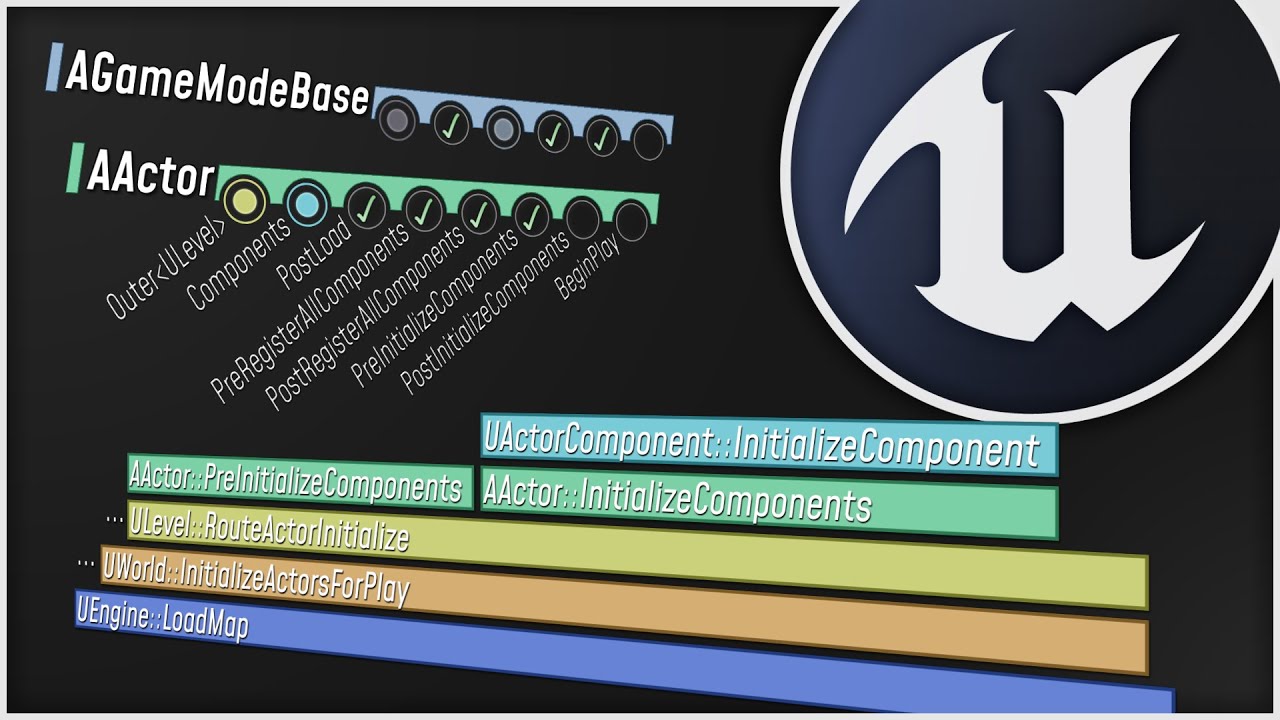
What happens when you start up your Unreal Engine game? This video is a guided tour of the Engine's initialization process: along the way, we'll glimpse the high-level structure of the Engine (modules, game instances, local players, and viewports) and we'll see how all the different parts of the Game Framework (game modes, game states, player co...
Watch this for starters
The person goes over most of the init stuff
Starting very early in everyones favorite int main()
And also reaching AActor stuff
Maybe that helps you already
thin stratus
@twin juniper only if the player camera actor is replicated and owned by the client
@granite badge does he respawn if he moves?
Think it doesn't send any data from the other player cause they aren't doing anything that deems them dirty
Hmmm
It probably does
Never used that
You mean ue4s playercameramanager
Or your own actor
 peak sentinel
How do you guys handle replicated pool systems?
I thought about creating one pool for each client and one pool for server but didnt go well with my projectile system
thin stratus
Yeah so you mean your own custom actor called PlayerCameraActor. If you want that to utilize ServerRPCs, you need to make sure that you replicate it, spawn it on the Server, and specify the Owner when spawning. Otherwise it will drop the ServerRPC
 strong magnet
Does UE support network models other than client-server? (p2p for example)
I'd like to make a fighting game, but with a direct connection between the clients to minimize latency. Giving authority to one client would enable cheating, so I want to have both clients do the validation.
wheat magnet
wheat magnet
does anyone works with photon multiplayer in unreal?
can anyone answer this question
thin stratus
strong magnet
Does UE support network models other than client-server? (p2p for example)
No, at least not without you putting lots of effort into it afaik
vital karma
where should the Players Display Name get stored? what blueprint?
vital karma
but that is like a weird string, is ok to change that and use it as their name tag?
chrome bay
In editor it'll be a random hash but in a game using an online subsystem it'll take their name from the OSS
E.g, their steam display name or something
vital karma
ok
vital karma

ive tried this event as run on server Multicast and Owning Client but none of them update all the players gui, only one
AmountOfQualifiedPlayers is replicated fine, when one client calls the event only that client gets the update for Multicast
Run on Server only updates player 0 i think
and Owning Clienti dont even know its so inconsistent :(
vague fractal
vital karma
Have you called the Multicast from the server ?
Also, not sure if it's better, but i think i'd use a OnRep for this logic rather than a Multicast
kindred widget
Are there any functions that get called on a replicated UObject before it's client side destruction?
In short, I have a normal TArray of UObject pointers. But I'd like to run a delegate on the client after removing one from the array on the server, which would presumably destroy it on the client.
 meager spade
i would use a FastArraySerializer
twin moat
thin stratus
No, at least not without you putting lots of effort into it afaik
I thought a listen server was essentially P2P? Or is that not the case
peak sentinel
bOwnerNoSee flag is not updated with SetOwner() function right? I need to update them on client locally
thin stratus
twin moat
I thought a listen server was essentially P2P? Or is that not the case
No, P2P would mean that each side is equal
Which they technically aren't, because the Server is still the Authority.
They can send data back and forth, but the client can't replicate anything automatically to the Server (e.g an OnRep) or spawn an actor that replicates for the server
And much more
twin moat
Thanks for the clarification 👍
kindred widget
Fast Array would be nice. And Easier. But would require rewriting half of this component's functions. 😄
eternal canyon
You dont need to send an RPC
as begin play already runs on the server
oh my bad
 vivid prawn
when I Set Actor hidden in Game for an actor in multiplayer it only hide the geometry for everyone, but the collision is still exist, even though I did server request and disable the collision with Set Actor Enable Collision, it only disable it on the server side but not on the other clients, somehow collision is not replicated, any idea why?
I end up doing Multicast to disable collision on everyone else, but i think there should be a better way
kindred widget
Most settings like that are not replicated. If you want to do something like disabling an actor, replicate a simple boolean or something and set the collision, visibility, etc, locally based on that value.
vivid prawn
@kindred widget oh, you mean as RepNotify?
kindred widget
Yep.
vivid prawn
I see... yeah, that could be a good solution, thanks
gusty slate
Hello 🙂
If I have like a placing actor component on the player controller that acts as a manager for placing objects and placing (tracing, checking overlap etc) and all of that is all clientside apart from spawning, should I make the spawning RPC in the PlayerController or make this Component replicated and it handles its own RPC?
 silent valley
gusty slate
Hello 🙂
If I have like a placing actor component on the player controller that ...
silent valley
gusty slate
Hello 🙂
If I have like a placing actor component on the player controller that ...
Either is fine, for encapsulation you might as well make the component replicated
silent valley
If you put RPCs in the Player controller then the code can get messy and mixed up. Encapsulated means the similar code and functionality is together in the same component.
gusty slate
Aaah i see what you mean, the goal of this manager in itself is encapsulation of this functionality so might as well make it replocated and handle its own stuff
Thanks for the advice :)
wheat magnet
Hi, does anyone uses photon multiplayer in unreal, anyone can guide regarding photon in unreal engine?
 devout egret
Hi everyone! Does anyone know how to make AddImpulse() work in clients? I’m working on a slide ability that adds an impulse to the character movement before setting crouching to true and lowering ground friction. I’m struggling trying to replicate add impulse via RPC’s. Has anyone dealt with this kind of situations before? Thanks!
 polar lotus
I've got a weird issue that I've been able to trace down to one thing
BeginPlay has been getting called twice on my GameState
I have delayed start enabled on my GameMode
and when I StartMatch from my game state, it looks like it calls BeginPlay again
so it gets called 2 times in total, once when I hit the play button in the editor, and twice when StartMatch is called
why is it like this
why is BeginPlay getting called on an actor which has already begun play
fading birch
are you running a server? If so, it may be the server calling begin play, and then the client doing so
polar lotus
nope, I'm running standalone
polar lotus
breakpoint what?
I already found out that calling StartMatch makes BeginPlay get called for a second time
so my culprit here is StartMatch
I think this might actually be a bug with the engine
idk maybe
this just doesn't seem right
hollow eagle
There are guards against BeginPlay being called multiple times
polar lotus
well they ain't workin
hollow eagle
How do you know it's being called twice?
As Djriff said, have you set a breakpoint to make sure?
because again, it's not actually possible unless you yourself are manually calling BeginPlay.
 polar lotus
the game state
so when I do this:

all I get is this in the logs

but If I do this

I get this in the logs

I cleared the log between attempts by the way, so it definitely did get called twice in the second try
hollow eagle
So the issue is likely related to calling StartMatch from within BeginPlay - StartMatch itself triggers BeginPlay, though I'm still failing to see how it ends up calling it twice because there are guards for that.
Anyway, if you just want to start match immediately then override ReadyToStartMatch in AGameMode to always return true instead.
polar lotus
I have delayed start enabled in my game mode
polar lotus
hollow eagle
So the issue is likely related to calling StartMatch from within BeginPlay - Sta...
so disabling it would do the same thing as overriding ReadyToStartMatch
However
I don't want to instantly start the match all the time
I originally set it up like this

so that it only calls startMatch immediately if I'm in PIE
but if I'm not in pie (game is launched without the editor) then I want it to countdown to start the match like normal
hollow eagle
then do the check in ReadyToStartMatch
there's no reason it has to happen in BeginPlay
polar lotus
hollow eagle
then do the check in ReadyToStartMatch
Ok I think I did it


it seems to work fine
I just wanna know if I'm doing this right
hollow eagle
Not quite. It might work fine but the intention of ReadyToStartMatch() is not an event per-se, but a constant asking what the status of the gamemode is.
As such, you shouldn't be "initializing" anything from it.
polar lotus
yeah I realized that
hence the DoOnce
it seems like ReadyToStartMatch is called on tick or something
hollow eagle
I'd say you should still be initializing your game state from BeginPlay
ReadyToStartMatch should just return a status, true or false, and not do anything itself.
polar lotus
hollow eagle
I'd say you should still be initializing your game state from BeginPlay
but that's just going back to square one??!
hollow eagle
No it isn't, don't call StartMatch from there.
You can just set a boolean variable somewhere when you're actually ready, and ReadyToStartMatch can just return the value of that variable.
That way you're not calling BeginPlay from within itself. instead of BeginPlay -> StartMatch -> BeginPlay, it's BeginPlay -> Set some variable, next tick ReadyToStartMatch returns true and the game framework calls StartMatch.
 hollow eagle
pretty much
 rough kestrel
What is the correct way to disconnect from a dedicated server. As of now the pawns stay in the dedicated server as long as the dedicated server runs.
 lilac raven
Hey guys, so in our game we are firing lots of projectiles (one every 0.2 seconds) the projectile spawn is an RPC to just run on server and the spawned projectile is replicated with replicate movement on. Obviously, this causes huge server lag, and im wondering how we can do this flawlessly? or very close to?
rough kestrel
lilac raven
Hey guys, so in our game we are firing lots of projectiles (one every 0.2 second...
are the bullets pooled actors? That can be a huge factor. You could check how often the network data of the object is sent.
bitter oriole
lilac raven
Hey guys, so in our game we are firing lots of projectiles (one every 0.2 second...
Are the projectiles behaving with physics here, or are they simple bullets ? Because at this rate of fire, multiplayer will kinda break down.
The usual implementation of weapons with high rate of fire is start fire RPC + stop fire RPC, not individual shots
In that scenario projectiles are deterministic (no physics simulation) and not replicated at al
Each client fully simulates them locally based on "is firing" and "current aim"
lilac raven
Thanks for replying guys, so to answer @rough kestrel they are not pooled, what would be the best way to pool them? and @bitter oriole They are projectile componenets, but their trajectory can be easily pre-calculated, when they hit they spawn goo, so basically they wont be bouncing around, its a simple fly and hit. I did just make it so its start RPC, stop RPC when not firing, however I cant seem to replicate my cameras pitch, so how can i send shot loc and rot over the network? this is the confusing part to me
bitter oriole
You need to send unreliable RPCs on tick with your aim
Then send RPCs for start fire & stop fire
And the server needs to replicate both data streams
lilac raven
okay i see, that makes sense, ill test that out! thx
gusty slate
Yep
chrome bay
No - there is no replication occuring
Blueprint might behave differently (incorrectly) - but that's just BP.
gusty slate
I was thinking of RPCs as far as I'm aware they do follow the same framework whether it is a server or a singleplayer, if done properly
chrome bay
RPC's will be called as if you are the Server yeah
But OnRep's will not fire
Sine no property is actually being replicated, and the network system will never call the function
They probably do fire in Blueprint because they aren't true on-reps in Blueprint, but IDK off the top of my head.
gusty slate
Hmmm I know you're way more experienced but I feel like I tested it and they do execute the OnRep
chrome bay
In C++ they definitely won't
gusty slate
I think that's the case yeah
rough kestrel
lilac raven
Thanks for replying guys, so to answer <@!428266140385411075> they are not poole...
by pooling I mean pre spawn a set of projectiles, make them invisible physics off. Make a stack of these objects instead of spawning them just teleport to the transform needed. And instead of destroying them make them invisible again. That is the core concept of pooling.
I think ue4 has built in support for this never tried it tho. Spawning and destroying anything in runtime is expensive to cpu and also networking
chrome bay
Blueprint OnReps are an irritating hack
gusty slate
x)
lilac raven
rough kestrel
by pooling I mean pre spawn a set of projectiles, make them invisible physics of...
Okay sounds good, so I can spawn them at the start, add them to an array and just move them from there? I will try it out! I just fixed or extremely mitigated the lag we were suffering thanks to the advice here so thats ideal! If i can further optimise that's sweet
chrome bay
Yeah you can call it manually. It's quite common to do that anyway, so that the server applies the same changes or runs the same code.
Yeah, it's quite common if you want the same code to run server-side
I prefer this, just to be explicit:
{
    check(HasAuthority());
    bFoo = true;
    OnFooChanged();
}

void OnRep_Foo() { OnFooChanged(); }

void OnFooChanged()
{
    // Respond to foo here
}```I can't get Simple Move to replicate in 1+ play as client. Any idea ?
rough kestrel
lilac raven
Okay sounds good, so I can spawn them at the start, add them to an array and jus...
anytime we do our apps on quest and any realtime spawning is really costly so this is what we do most of thr time
 unkempt moat
Hey, i implemented a main menu where I can start the game. For now it just loads the level clientside. Now I want that if they press play the server should load a map that the client join. But I don’t know where to start. Where can I program the behaviour of the Server?
If I press play from a loaded map the clients join directly in it and are connected
How can I reach this behaviour over my main menu ?
I created an own level for the main menu
 lapis zinc
does anyone know what the easiest way to make a simple 2 player multiplayer game is? because ive tried researching this for unreal but no one can give me a straight answer. Do you need a dedicated server? Do you have to use port forwarding or can it just be peer 2 peer. ive made replicated games with advanced steam sessions but it seems like that just connects only local players on same wifi. I know I sound dumb for not knowing but I really cant find a correct answer
kindred widget
@lapis zincUnreal doesn't really do Peer2Peer by default. Everything is ran through the server machine and replicated to Clients. Port Forwarding doesn't matter until you release or need to connect for testing. If you release through Steam, it has tools that handle this for you. If not, you need port forwarding. For a two player game, you do not need a dedicated server unless your plan is to have a persistent server where either player can join at any time and the world needs to stay active even if no players are online. If you are fine with one player needing to have the game open first, then a Listenserver setup will work just fine.
lapis zinc
kindred widget
<@!178651102105960448>Unreal doesn't really do Peer2Peer by default. Everything ...
All I really want to do is package the game and send it to a colleague so we can play test it together
but my listen servers never seem to work over the internet
gusty slate
Hey 🙂
So on replicated actors with ChildComponents, I'm noticing that the child component isn't consistently ready on BeginPlay, is there a way I can execute functionality when it is properly spawned?
twin juniper
I made a BP that put a static boxes along the spine , i am trying to make it so the game keeps track of player positions.
So when they walk into one of the boxes it saves at what time they did that and compares with what time other players did.
How do i get info when a player collides with one of these boxes and also to know wich of the boxes the player collided with?

 fathom dust
If I want to dig into the mechanics of how multicast RPCs are actually sent, could anybody point me to the place in the engine where that happens?
 shy kelp
even tho the damagezombie function is being called which i checked with breakpoints, the function itself is not being run SOMETIMES as if its set to not reliable, even tho the function is set to reliable. this code works in single player but is so inconsistent in clientside, any help?

even when damagezombie event runs, it then sometimes stop at apply damage 💀
im so confused
silent valley
Set network emulation to Bad then walk around changing direction. The corrections show up when the client mispredicts, more common due to increased latency.
Basically it happens when the server and client disagree. E.g. spawn a non replicated collision and when the player hits it the client and server will disagree on the position and correct.
I'm not at my computer, but it's a drop down setting from the play button in editor. Imo it's good to run with it set to Average all the time, helps flush out bugs.
fading birch
there's a console command you can use to show the prediction as well
i can't remember the command off the top of my head though
 fluid summit
Hi! Has anyone played something like art of conquest or inmortal daoist?
Im looking if i can make a prototype versión of something like that, and get away without using a dedicated server. Only use a database, what do you think?
bitter oriole
Online databases make no sense if you don't have a dedicated server. What are you going to do, let the client tell you about their stuff ?
"I just gained 50 levels, promise"
fluid summit
yeah, that's my biggest worry. I was hoping there's a way around it
bitter oriole
There isn't. Especially on PC or Android, people will be forging requests in days
Assuming enough players that cheaters start showing up
You can ever trust a client - if you go this way, might as well store the save data there in the first place and forget the database
If you want the database, you need the game running on trusted hardware
fluid summit
that seems reasonable, thanks!
Any alternative to gamesparks for authentication with a free profile for development?
bitter oriole
Steam, EGS I guess
fading birch
EOS as well
hollow eagle
either EOS or playfab if you don't want to be tied to a specific platform's identity service.
fluid summit
i'm gonna try with EOS, since it goes with Auth and Database within the same SDK
 grizzled stirrup
It's pretty interesting that COD Warzone seems to authenticate hits completely on the client since there are so many videos of cheaters hitting every shot from miles away
Do you think they do this just to make the shooting feel extra responsive on the client or didn't want to do a full rewind on the server or something?
fading birch
they may just do some heavy validation on the server
iirc Fortnite does that as well
mellow stag
How would I start by optimizing my project for dedicated servers, I did a test and after around 15+ players join the server becomes unstable, it's running on very expensive hardware
fading birch
It depends. On you running a lot of stuff on tick? You should profile your server with unreal insights and see what's causing all of that to happen.
summer tide
If my AI won't move ONLY in 1+ client mode, what could go wrong? any idea? The nav mesh seems right, the target actor and target location appear correct.
mellow stag
LogNetPartialBunch: Error: Attempted to send bunch exceeding max allowed size. BunchSize=417982, MaximumSize=65536 What's this error mean?
rough kestrel
for some weird reason when I host a dedicated server, logout function is not being called even when I disconnect from the server (say application quits). The pawns remain in the scene when I reconnect. Any ideas how this could be fixed? Also tried overriding logout on game mode but got nothing.
rough kestrel
grizzled stirrup
Do you think they do this just to make the shooting feel extra responsive on the...
responsiveness sounds plausible. Doing the action through server has a small delay
 shut gyro
How can I prevent the server from destroying the player state when a player leaves/disconnects the game?
I want to keep it there in case they want to reconnect.
shut gyro
Figured it out, have to override "OnUnPossess" in CDPlayerController to not set the player state to null and "OnDeactivated/OnReactivated" in the CDPlayerState class as the default behavior of OnDeactivated is to destroy the PlayerState.
 upbeat marsh
I've got a two player game in which you control 6 characters each
For some reason 6 extra phantom heroes spawn for each player at the start. And the non phantom characters respond to input given to the phantom ones
If I click one of the ones without a healthbar (the phantom ones) and tell them to move, a different one moves
The ones with healthbars all behave normally
Can someone tell me why the extra characters are being spawned and why the duplicates control the originals?


 empty axle
mellow stag
LogNetPartialBunch: Error: Attempted to send bunch exceeding max allowed size. B...
empty axle
mellow stag
LogNetPartialBunch: Error: Attempted to send bunch exceeding max allowed size. B...
You are replicating some array or sending an RPC with more data that can be send in single bunch by ue network.
fading birch
@upbeat marsh minor thing. You're Add to your array pin isn't doing anything there. You need to plug in your spawned actor to it.
summer tide
My AI won't move in 1+ play as clients mode, but it works in other modes. The nav mesh seems fine. Everything seems fine. https://gyazo.com/2cce93e018f366479e15e2db9312d39d

 livid sluice
Hey Guys quick question. I'm having a replicated reference of an item (which is also set to be replicated) inside my Character_BP. And through the server function call of "Disable Physics" custom function I'm turning off the physics of that item . Now to my knowledge since the item is replicated and the reference is replicated this item should should disable physics for all clients and server. But that is not the case. Unless I multicast it, only the server is able to see the item having disabled collision. Why is that?
 chrome bay
Because whether collision is enabled or not is not replicated
Solution is to create a replicated bool or some-such, which uses an OnRep callback to set the properties
Don't use multicast for anything stateful
livid sluice
Right I get it.
could you kindly explain what you mean by stateful . like for example?
chrome bay
Anything that changes the state of the object essentially
RPC's are for one-time events, that don't necessarily matter if you don't receive them.
livid sluice
Why is it not advised to multicast such a thing
It might not sync up correctly is it?
chrome bay
Using a multicast means that both relevancy and join-in-progress will not work properly, so it'll be broken
And if you miss that multicast, the client will be forever out of sync with no way to catch up - worst of all, the server won't know
Anything that persistently modifies an object should be a replicated var
livid sluice
So if something gets modified through out the game use repNotify but if it's a one time change multi cast is fine?
Something along those lines?
livid sluice
I dont know if I'm being stupid but, I called the rep notify as you mentioned. And this is then logged by all clients and server. Until it gets to the interface. Afterwards only the owning client runs the functions. I cant figure out why

This runs on all 3

But this is only running on owning client.

The item is replicated.
 thin stratus
Any AccessedNone errors?
chrome bay
It might be that TP Holding Item hasn't replicated yet, so there would be a race condition
thin stratus
Also this is still wrong
You should not have State Variables of ObjectA in ObjectB
The Boolean should be in the Item
chrome bay
Yeah that should be a property of the object you're picking up, that would also fix the race condition

 livid sluice
The TP Item is replicated, what do you mean by race thing?
The server or client is faster then the other?
livid sluice
thin stratus
You should not have State Variables of ObjectA in ObjectB
Yea that makes sense
I just wanted to see if this works first
there is a better way of doing the whole thing. But it's bugging me on "why" it doesn't work
thin stratus
The Race Condition means that it's not guaranteed that things always happen in the same order
chrome bay
Because the bool is replicating before the reference - and you have no way to enforce an order
thin stratus
If you set a replicated Pointer/reference variable and call an RPC right after that
It's not given that the Pointer/Ref will have replicated when the RPC replicates
That goes for everything networked. If you need things to be valid, either tie the whole stuff to the "thing" or make sure to replicated everything together via structs
Although I think not even then you can actually guarantee that this works, because if you just spawned the actor and then replicate the pointer it might still be invalid on the client, because the package that tells the client to spawn the actor is send elsewhere
So best is to tie it to the thing itself, so move the boolean into the item
livid sluice
will try that thank you.
kindred widget
About the PushModel stuff. What is the difference between MARK_PROPERTY_DIRTY and MARK_PROPERTY_DIRTY_FROM_NAME ? Epic seems to favor the latter, but I would have thought the former would have been better in most cases?
grizzled stirrup
rough kestrel
responsiveness sounds plausible. Doing the action through server has a small del...
But you can still do it on the client and just verify on the server (that spread was added). Games like CSGO do this
Almost every game has clientside hit detection with various forms of server verification
It just is surprising that CODs seem to accept hits from clients that have 0 spread
Allowing them to hipfire across the map and land every shot
silent valley
The thing is though - how can you server side check for spread? The client basically tells the server I shot from here, it went there, it hit something.
Client hack can always doctor the data so any spread validation would pass.
chrome bay
Normally you don't tbh
You only need to validate against the most obvious forms of cheating, like shooting through walls or spawning a shot on the other side of the map to your location.
You could validate spread if you wanted, though. I've done it but I'm not sure whether it was really worth it, we do it in HLL.
silent valley
How do you do that? You have a gun aim dir, and a random seed/offset or something? And check if the actual shot dir matches?
chrome bay
Pretty much yeah, we send up to two reliable RPC's per-shot. One is the initial shot, the second is the hit verify request.
The first contains the spawn location and base direction, and the unique shot ID.
Server checks all that stuff against current character position etc.
Second contains the shot ID and what/where it hit - so you can't send a verify request for a shot you never actually fired, and the shot ID increments independently but in a deterministic way
So we instantly kick them via the _Validate() function if the server receives the wrong shot ID
Protects against sending "known" RNG seeds
silent valley
But in theory the client aimbot could work backwards from desired shot direction, and send both RPC so they matched up?
chrome bay
Only if they knew exactly what sort of offset a given seed would produce, what the current/next seed is, and adjustd the aim to compensate
But that's a pretty far-fetching theory, I'd wager most off-the-shelf aimbots aren't intelligent enough to do that.
Problem is, usually the spread isn't actually large enough anyway to throw off a regular aimbot that just aims towards COM
And even though we simulate shots as projectiles, bullets are usually so fast the shot lead doesn't matter either
TBH, aimbots is a losing battle - in reality there's sweet FA you can do about them other than hoping your anti-cheat of choice detects it and bans them
silent valley
Fair enough, thanks, it's not something I know much about really. I ended up not verifying spread because I couldn't figure out how to make it secure, but it still bothers me 🙂
chrome bay
Just add EAC to the game, and tell your players that aimbots are it's job to detect 😄
That's the reality of it tbh
Protecting against shooting through walls etc. though you can do at the game level
silent valley
yeah sounds like a plan! I already validate the shot on server that it has not hit anything before the target point, validate shot distance, fire rate and ammo etc. Don't think there's much more I can do, EAC is gonna be a requirement for sure.
chrome bay
Yeah that's the main things covered
Fire-rate is the one that's really hard to deal with
The jitter of packets and server/client running at different speeds means you can't just use simple timestamps, have to take a more heuristic approach
silent valley
Definitely! I spent a while on that. I have a ring buffer on server and take rolling average etc. Still impacts bad latency clients tho for sure.
just about tuning the values so they don't got in the way too much.
chrome bay
yeah all about fine-tuning the tolerenaces
What's really annoying about it, is that there's very little info out there on how the pros do it.
I suspect to avoid people abusing it for one thing
silent valley
Yes very true. You were actually very helpful in general when I was working on this system 🙂
chrome bay
UT has a pretty interesting approach where they tie shots fired to character movement updates.. but to hell with that
silent valley
at some point you just have to call it done and move on, and if your game blows up then maybe re-examine it 🙂
chrome bay
yeah exactly 😄
We reinvented/redid all this stuff way after release, hardest part is getting people to give a crap about the game for it to be a big enough problem in the first place 😄
silent valley
yeah nice problem to have for sure
chrome bay
yeah, but on the other side it can come back to bite you a bit if you don't plan for it
silent valley
there's a sweet spot definitely. Putting no thought into it is a recipe for disaster.
even having the systems in place to accept/reject shots etc is half the battle
tweaking the criteria for pass/fail is then the bit that needs to be worked on as hackers start exploiting
I found testing these systems quite difficult too - short of actually hacking the game I ended up with a bunch of CVars to override stuff on client: fire rate, aim dir, etc
chrome bay
oh for sure
that's the only way really, apart from putting it in front of people and/or buying the cheats - but I ain't supporting that industry 😄
Sheer bitterness is what gets me through it 😄
silent valley
Heh
chrome bay
But yeah just creating RPC's that send "known" cheats to the server and seeing how it deals with it is the way
 coarse flame
Is the only way to store data on a dedicated server through VaRest and to a sql db?
narrow skiff
Are you meaning like send data from server to sql?
coarse flame
Nah, so like my game will be basing players data on a dedicated server, so that no cheating will be possible
And im wondering if i can store player stats such as economy, inventory etc on the dedicated server, or if i have to use a sql db?
narrow skiff
Player Controller?
narrow skiff
Yeah hold the inventory on the playercontroller
coarse flame
But wont that store locally?
narrow skiff
What are you needing to do with the inventory
coarse flame
i want to store economy, player-owned houses and inventory etc on the dedicated server, so that its fetched upon connection, not locally so that someone can use cheat engine and cheat
narrow skiff
You would do verification so users cant cheat. But if you are wanting to restore the inventory and user stats upon connection you would probably want SQL
chrome bay
Storing it on a remote server doesn't necessarily stop cheating. Cheats primarily use existing exploits.
coarse flame
Yes but if its fetched from a server it aint cheat engine easy to cheat your money ig
chrome bay
Sure it is
narrow skiff
They will find a vulnerability
chrome bay
If you have an RPC that goes to the Server and says "give this client 5 money" for example, and the server doesn't check that, then it doesn't stop a cheater spamming the server with that packet.
The key to anti-cheat is trusting nothing the client asks of the server.
Verify/validate every action they ask of it
narrow skiff
^
 quiet fjord
a question if someone can help me
narrow skiff
Whats sup
quiet fjord
When creating rooms where players store that we must create in advance in the configuration of our server or it is done automatically
narrow skiff
Explain a little more
quiet fjord
I would like to know how the rooms where the players are stored are created when searching for a game
in aws
narrow skiff
If its AWS I have no Idea never used AWS I built all mine custom
quiet fjord
that is, if I have 200 users and I want to distribute it in 30 players per game, how would the creation of rooms be manual or is it automatic?
quiet fjord
narrow skiff
If its AWS I have no Idea never used AWS I built all mine custom
Are those rooms created automatically? or you decide the number of players per room
narrow skiff
By rooms do you mean per server instance?
quiet fjord
yes
narrow skiff
Then yeah Both
quiet fjord
ok then you manage it from unreal the creation of rooms in case of full rooms for new players
narrow skiff
I have a master server that manages all the request and then sends the request to one of my empty servers (It searches for a server that has enough room)
kindred widget
Regarding the new PushModel system for replication. Do you need to do something to enable it, or? Wondering because of the macro in PushModel.h of
#define IS_PUSH_MODEL_ENABLED() false
chrome bay
bWithPushModel = true; in Target.cs IIRC
That being said though, this is from the horses mouth:
That said, so far we've only seen modest performance gains - less than a millisecond in average server frametime. However, if you've profiled and noticed a bottleneck on property comparisons for replication, you might see more gains if the actor(s) causing the bottleneck are converted to push model.
kindred widget
Mostly just curious for personal learning. 😄 Actually my real reason for considering it wasn't so much server performance as much as net performance. Less server updates to smaller variable increments like floats without having to do InitialOnly/RPC or setting a bool somewhere else for the replication to poll to rely on. Just marking it dirty at points seemed cleaner and also easier.
rough kestrel
grizzled stirrup
It just is surprising that CODs seem to accept hits from clients that have 0 spr...
do you really think they care about game health. They lost their core identity and went to BR. Dont expect them ti fix stuff. You have a point regarding client side approach tho.
lost inlet
kindred widget
Regarding the new PushModel system for replication. Do you need to do something ...
which version of the engine are you using? push model can be used without defining anything in 4.26+
kindred widget
4.26.2 for my test projects. But mostly I'm on 4.25.4
chrome bay
Yeah I don't think it's fully stable in 4.25
upbeat marsh
I've got a two player game in which you control 6 characters each
For some reason 6 extra phantom heroes spawn for each player at the start. And the non phantom characters respond to input given to the phantom ones
If I click one of the ones without a healthbar (the phantom ones) and tell them to move, a different one moves
The ones with healthbars all behave normally
Can someone tell me why the extra characters are being spawned and why the duplicates control the originals?


(FYI - I've reconnected the add-to-array pin in SpawnNewHeroes. Wasn't the issue)
kindred widget
For starts, you shouldn't be spawning things in a Multicast. Spawn things only on the server and replicate them.
fathom dust
Sorry to resurrect a message from weeks ago (and for the direct ping); did you ever find a good solve for client prediction on simulated proxies?
silent valley
coarse flame
Is the only way to store data on a dedicated server through VaRest and to a sql ...
FWIW I stored dedicated server data on the local server HDD using the built in Unreal SaveGame system. Works fine for us.
I have since changed it to read/write the final savegame data to Amazon S3 so the instance can be terminated and restarted without losing progress.
lost inlet
you can even write a local json file or sqlite database as alternatives to savegames
if persistence is the key, ie. between dedicated server instances, then you'll probably want something centralised like a REST API to get/push data
hopefully with the S3 approach, you're not directly exposing your AWS credentials to people, even if it only allows access to a single S3 bucket
thin stratus
fathom dust
Sorry to resurrect a message from weeks ago (and for the direct ping); did you e...
Nope, the project suffering from it is still suffering from it. I haven't had time to work on that client since then :P
fathom dust
Makes sense. I'm digging around in the CMC seeing what's possible, if I find anything good I'll reply here. Thanks for the network compendium btw 🙂
thin stratus
Glad it helps and thanks for sharing in case you find a solution
 violet sentinel
chrome bay
Yeah I don't think it's fully stable in 4.25
violet sentinel
chrome bay
Yeah I don't think it's fully stable in 4.25
pushmodel is disabled by default in 4.25 launcher builds, in 4.26 it is enabled
upbeat marsh
kindred widget
For starts, you shouldn't be spawning things in a Multicast. Spawn things only o...
I tried doing it that way but it had a different problem of only seeing them on the owning client
The team and heroes are all replicated actors
 grizzled flicker
Silly question but is the player capsule and mesh supposed to have the replicated tick box checked off for multiplayer or no? I get some weird stuttering movement sometimes just trying to pinpoint the cause
silent valley
lost inlet
hopefully with the S3 approach, you're not directly exposing your AWS credential...
Hopefully 🙂
The AWS credentials (and name, settings, etc) are passed in by my python script that launches the AWS instances - no credentials are stored inside the exe afaik.
lost inlet
that seems alright if you don't have community servers
silent valley
yeah that will be upto them I guess, or it falls back to local files
grizzled stirrup
rough kestrel
do you really think they care about game health. They lost their core identity a...
Of course they care: if they don't they stop making money! No one wants to buy skins for a game infested with cheaters. It's surprising the cheating is so bad to be honest for such a big company
grizzled stirrup
silent valley
The thing is though - how can you server side check for spread? The client basic...
A deterministic spread seed that the server sims when validating: if the player has shot 500 shots, the 500th on the server should validate to be roughly the same result
But yeah I can see issues there with a missing packet that sends things out of sync on the server
It's a hard problem to be sure. What CSGO does is completely rewinds states of all players and retakes the shot on the sever so the client can't really get around that (at least in terms of setting spread to 0)
lost inlet
yes but CSGO has a much more trivial animation state
grizzled stirrup
Yeah it probably baloons in complexity with cod yeah
lost inlet
CSHD + validation is what we ended up with after trying various 100% server side approaches
grizzled stirrup
It just is interesting that there are very commonly people seen in cod just running around hipfiring and insta headshotting the entire lobby
As in I've seen it many times personally, not just videos online
Seems to be quite rampant at the moment
And hard to combat
Seems to be almost non existent in Fortnite though so they may need to just rewrite their anticheat or something
lost inlet
or license one, but that'll probably be extremely expensive with their peak-CCU
they'd have to balance what they would lose in MTX from people quitting to what the cost of developing/licensing a better system is
though I do remember there was an exploit in BF4 that some cheats took advantage of where they could send chat messages as "admin", they purposely left it in for a while to catch people using it
grizzled stirrup
I didn't consisder that CCU woudl increase costs but it makes sense!
But yeah at the moment they are bleeding players
Every second game you lose to a cheater
If they don't do something big and fast I don't see many people bothering to keep playing
Crazy how multiplayer development needs to do so much to try and stop unfair play
lost inlet
ubisoft is actually pursuing legal action against cheat authors, which actually seems a pretty effective tactic for AAA
grizzled stirrup
Seems like indies are basically screwed especially using UE4 for competitive MP
No money for big AC or legal fees
Better to focus on co-op it seems!
lost inlet
you have to have a legitimate business to get your driver signed, and many cheats run at the kernel level
at least P2Cs anyway
grizzled stirrup
Is that why Valorants AC seems very good?
As it starts with the PC and remains active?
lost inlet
I don't think so, but their AC seems like a privacy nightmare
silent valley
grizzled stirrup
No money for big AC or legal fees
Easy Anti-Cheat is free for Unreal engine devs 🙂
modern cipher
grizzled stirrup
As it starts with the PC and remains active?
lmfao that sounds like a legit backdoor
can you beat cheaters from usermode?
bruh you cant beat something like reading player locations from memory in an fps game
well it is there in fortnite/pubg etc... XD
bitter oriole
grizzled stirrup
Seems like indies are basically screwed especially using UE4 for competitive MP
Indies cannot do competitive MP, no matter the engine
The security arms race is simply too much
fading birch
Yeah...even with very good funding you need a team of people dedicated solely to that.
We actually hired a pen testing company for one of my contracts and the amount of stuff I had to implement to counteract the issues they found was insane
easily tripled our codebase
bitter oriole
The bare minimum is dedicated servers, some kind of client-side anticheat, a reporting system, and a replay system
With people actually watching those
Assuming you're serious about competitive play where most matches are cheat free, that is
fading birch
We had all of that. Dedicated Servers, EAC, automated reporting system, manual reporting system. We had less of a replay system and more of a heavy amount of log searching.
We had our servers hosted on gamelift and via EAC we could find the actual game where the cheats occurred via Region->Fleet Id->Game Session Id
did quite a few manual bans that way
it was a crazy arms race between us and the cheaters though
doesn't help we accidentally shipped our PDB once
fathom dust
meager spade
could you elaborate?
yeah, I've got a multiplayer game where I'd like to predict knocking back another player and have it smoothly interpolate to the server correction when it comes in
meager spade
i use RootMotionSource
from CMC
i use Ability tasks from ASC, but i also made some Async Tasks which handle it
but predicting knockback is a bit urgh
fathom dust
it is lol
meager spade
as if the client gets its wrong, it looks weird
hence i always let the server initiate the knockbacks
fathom dust
yeah. that's the fallback, it'd be nice to have the prediction for game feel
meager spade
slight delay, but its better than if the knockback should not have happened and glitching out on the client
one thing i got told by a Fortnite dev is, predict as little as possible to make the game feel smooth. But they don't predict knockbacks, etc. Its all server side
i think the only knockback they predict is a player knocking himself back
ie via the gun that causes knockback
fathom dust
which is pretty straightforward, the autonomous proxies seem to properly smooth corrections there
so I actually have two places I'm looking at this, one of which I did start using root motion for knockback, I just wanted to keep the question simple
there's an object in the world (think soccer ball) that's a server-owned character so I can slap an ASC on it
it's got pretty simple motion
but I want to give it a velocity and just set it going, vs. when I knock back a character a set distance I use a custom linear root motion source with a curve to remap time
fathom dust
yeah
player knocks the ball
so locally if I predict, it'll start moving and then teleport back when the server correction comes in
meager spade
so the ball uses CMC?
fathom dust
it won't smooth because my local movement is all just standard velocity that the smoothing doesn't know about
and just ignores
yeah
meager spade
hmm, thats problematic
CMC is ok for player movement, initiated by the player. Tho using like LaunchCharacter, its should actually be okay.. that is a tough one to solve..
fathom dust
yeah 🙂 I'm in the guts of the CMC and I have a thing to try
where I'll fake a server correction
fathom dust
oh interesting. I'll take a look at it
meager spade
still WIP tho, so i can't recommend using it, nor have i seen the state of it recently.
but its going to be the upgrade to CMC
fathom dust
there's a world where I just write my own CMC from scratch but that sounds like work 🤔
meager spade
if you do that, might be better to utilize the network prediction plugin
tho not sure what the costs are for networking, last time i checked it was not very optimized
but if its just for a ball, and there is not many, it should be ok
fathom dust
yeah. it sounds like there's a few paths, but I'll post here what I end up with. fundamentally it could just be disabling prediction, but I'd like to target mobile devices and the feel difference is pretty significant
quiet fjord
Guys any plugins or what option is to monitor the network traffic and all the network configuration of my game in unreal within the engine
I want it to optimize speed as much as possible
lost inlet
packets/s, bandwidth, and packet loss is already retrievable pretty easily
quiet fjord
is networking insights?
 hallow sand
Does anyone have any tips for leaving a character in game temporarily after a disconnect?
And reconnect them to their same character if they rejoin before it deletes
 tacit bough
I'm still new to replication.
I've got the following problem: players "die" on a client, but this state doesn't get propagated to the server. And I don't know what I'd need to do to make that happen.

float AShooterCharacter::TakeDamage(float Damage, struct FDamageEvent const& DamageEvent, class AController* EventInstigator, class AActor* DamageCauser)
{
    GEngine->AddOnScreenDebugMessage(-1, 5.f, FColor::White, TEXT("PLAYING IS TAKING DAMAGE"));
    AShooterPlayerController* MyPC = Cast<AShooterPlayerController>(Controller);

    {
        Health -= Damage;
        GEngine->AddOnScreenDebugMessage(-1, 5.f, FColor::White, FString::SanitizeFloat(Health));
        if (Health <= 0)
        {
            GEngine->AddOnScreenDebugMessage(-1, 5.f, FColor::White, TEXT("PLAYER DIED"));
            Die(Damage, DamageEvent, EventInstigator, DamageCauser);
        }
        else
        {
            PlayHit(Damage, DamageEvent, EventInstigator ? EventInstigator->GetPawn() : NULL, DamageCauser);
        }
        MakeNoise(1.0f, EventInstigator ? EventInstigator->GetPawn() : this);
    }

    return Damage;
}
So this is your generic TakeDamage() code I guess.
hollow eagle
You should be applying damage and handing death on the server.
tacit bough
I just don't know what I'd have to add to make the replication work correctly.
oh so the damage dealt is already replicated?
but the "event" of death isn't.
hollow eagle
You replicate what clients want to do ("shoot", "move", "reload", etc) and the server is what actually performs it and replicates it to everyone else. Clients may also perform the same action to hide latency, but the server is what does the action and finds the final result (overriding what the client did if it got anything wrong).
You'd never want to let clients apply damage themselves except to simulate what they think will happen.
When you attack on a client, you don't have the client apply damage. You tell the server that you want to attack and let the server apply damage.
tacit bough
gotcha! So not even dealing damage is done by clients alone. Makes sense.
dull lance
most things won't be handled by the clients
live by the motto of "don't trust the clients when it matters"
hollow eagle
The client may still want to play effects and animations associated with the attack, to hide any latency, but it wouldn't decide on its own that something is going to die. The general rule is you have clients "predict" the bare minimum to keep the game feeling responsive, everything else you just tell the server what you want to do and let it get replicated back.
tacit bough
I am playing around with shootergame the template from Epic Games right now and I found some functions like
void AShooterWeapon_Instant::ServerNotifyHit_Implementation()
does this mean that functions will be run on the server based on what they're called? (e. g. prefix= ServerNotifyHit_)
fading birch
@tacit bough just as an FYI, TakeDamage is overriden in pawn, which checks ShouldTakeDamage where it checks the pawns net role. If it's not ROLE_Authority it doesn't run TakeDamage.
look at the header file
there is likely a UFUNCTION(Server, WithValidation, Reliable) above that declaration
tacit bough
@fading birch in general or specifically in the shootergame project?
fading birch
you should also give the pinned network compendium in this channel
that's engine level
you can look at APawn::TakeDamage
it's right there in the code
tacit bough
the one by Cedrix? I've read it but couldn't make much use of it personally.
That's why I'm trying to study the shootergame project just to understand the fundamentals
fading birch
that guide by Cedric is the fundamentals
it explains how the entire server and client relationship works
among several other important things
 dusky idol
O.O 100+ page pdf
tacit bough
well again, I couldn't gather anything really useful out of it for creating a game with damage logic. I guess just too abstract for me? I guess I'll just read it over again.
dull lance
dusky idol
O.O 100+ page pdf
it'd be like 40 pages if it was in book format
slides format makes it seem bigger than it is
hollow eagle
The network compendium is definitely important to read to understand the basics.
I've also always found this to be a good introduction to not just how the core networking systems work, but how to actually structure things in the "right" way. It's a little bit out of date and isn't quite a step-by-step guide, but it goes over the really important bits. Assuming you already know C++. https://www.tomlooman.com/survival-sample-game-for-ue4/
 )
tacit bough
)
tacit bough
heh I just like to learn by example but the ShooterGame project is... convoluted to say the least.
or I'm not used to projects of that scale. Can't really tell.
fading birch
tacit bough
well again, I couldn't gather anything really useful out of it for creating a ga...
The document is meant more to familiarize yourself with networking concepts in general. Specific use cases, such as taking/dealing damage require you to do research on google. For example, Epic's offical blog post about damage:
https://www.unrealengine.com/en-US/blog/damage-in-ue4
Reading the code/documentation regarding the functions you're overriding is also important. If you choose not to call the parent function, you need to understand what not calling the parent function will do and what it does. If you determine you really don't need the functionality, then don't call it, but if it runs checks you can use, pilfer from it or just call the parent function.
dusky idol
is MP possible only using blueprints?
fading birch
For example, TakeDamage is originally declared in Actor.H. Since you're using a class that derives from ACharacter, you'll need to read through each time it's overridden in the parent. Character.h doesn't override TakeDamage, but it's parent APawn does. APawn is where it does the check for authority before applying damage. This is important because if you have another class which derives directly from AActor, you'll need to handle the check for net authority yourself, basically implementing the same check that's in APawn
fading birch
dusky idol
is MP possible only using blueprints?
yes.
dusky idol
fance
fading birch
at least in terms of entirely within UE4
once you start scaling your game, distributing it, etc. You'll likely want some code in there
as it's more efficient for heavy lifting, it's easier to maintain, and you can merge code when working in a team, which you can't with BPs
dull lance
is it possible only with Blueprints? Yes. Will it be much more of a nightmare? also yes
mellow stag
How would I optimize my game for dedicated server multiplayer, seems to get extremely laggy at 10+ players
Running on REALly good hardware
fading birch
@mellow stag I answered this last night:
It depends. On you running a lot of stuff on tick? You should profile your server with unreal insights and see what's causing all of that to happen.
mellow stag
Sorry if I already asked this question
fading birch
you did, I think you just missed my reply from last night
fading birch
I would do a CPU Profile
over a normal match with 10 players
and see what's causing the hang ups
mellow stag
How would I open up the unreal insights tool? @fading birch
lost inlet

Overview of Unreal Insights application profiling tool
this is a pretty googleable thing
mellow stag
Would these settings be fine for a pretty big open world, similar to a game like rust?
 fading birch
that's a pretty low tick rate
mellow stag
Lower Tick Rate = would improve performance with a large number of players no?
Since not having to do as much?
 kind ember
Anyone have experienced with PlayFab Party Chat before? https://docs.microsoft.com/en-us/gaming/playfab/features/multiplayer/networking/concepts-chat

Information on how PlayFab Party real-time chat communication behaves and can be used.
hollow eagle
mellow stag
Lower Tick Rate = would improve performance with a large number of players no?
This isn't something you blindly change. Nor is it something anyone can give you a generic answer for.
eternal canyon
kind ember
Anyone have experienced with PlayFab Party Chat before? https://docs.microsoft.c...
U need the playfab party sdk for ue4 which is only available with xbox developers thingy
mellow stag
What is default tickrate?
kind ember
eternal canyon
U need the playfab party sdk for ue4 which is only available with xbox developer...
Are you sure EM?
https://github.com/PlayFab/PlayFabParty/tree/v1.7.0

GitHub
The libraries, headers, and documentation for accessing the PlayFab Party feature. - GitHub - PlayFab/PlayFabParty at v1.7.0
eternal canyon
kind ember
Are you sure EM?
https://github.com/PlayFab/PlayFabParty/tree/v1.7.0
that is the c++ sdk which is different from the unreal sdk from my understanding
fading birch
mellow stag
What is default tickrate?
30 is the engine default. I know a few games use that or 60.
eternal canyon
 hollow eagle
PC GDK is available without a developer license now.
Also, according to the docs the OSS is on the marketplace. https://www.unrealengine.com/marketplace/en-US/product/playfab-sdk
kind ember
eternal canyon
that is the c++ sdk which is different from the unreal sdk from my understanding
Yea I don't want to use thier OSS, since its require me to be an Xbox dev or something.
There documentation is pain in the @$$
Have you worked with the chat system?
eternal canyon
hollow eagle
Also, according to the docs the OSS is on the marketplace. https://www.unrealeng...
IT IS??
hollow eagle
i mean, i just linked it
eternal canyon
yea ik im checking rn
fading birch
you can use multiple OSS at once
you just need to specify which one you want to use when calling OSS functions
hollow eagle
and the PC GDK installers are on github https://github.com/microsoft/GDK (don't be fooled - this is the installer, not any source code despite being on github... it's a weird method of distribution)
eternal canyon
hollow eagle
Also, according to the docs the OSS is on the marketplace. https://www.unrealeng...
oh wait no he is looking for the PLayfab Party Sdk
not the playfab sdk
hollow eagle
The PlayFab Online Subsystem (PF OSS) enables you to make use of Party and Azure Cognitive services in your Unreal Engine 4 (UE4) game.
eternal canyon
hollow eagle
> The PlayFab Online Subsystem (PF OSS) enables you to make use of Party and Azu...
Where do u see that?
hollow eagle
kind ember
Lol yea not the SDK
I'm talking about thier Chat system(PlayFab Party).
hollow eagle
Which says its included in both the OSS and the GDK (which I'd assume includes PC GDK, not just Xbox GDK)
hollow eagle
Why are you trying to change it? Do you understand what it is you're changing?
Are you trying to investigate a specific problem?
Or is this premature optimization?
mellow stag
Well, after around 10-15 players connect server becomes unstable, running on good server hardware
mellow stag
Yes, replication is slow
hollow eagle
Then start doing some network profiling and seeing what's the bottleneck.
mellow stag
Will do, what profile do you recommend, the network profile?
hollow eagle
Maybe changing network settings will help. Maybe you're just sending way too much too often. It's impossible to know and you're just going to be randomly guessing unless you actually come up with some data to show what's wrong.
mellow stag
okay will do a profile rn thanks for the help 🙂
hollow eagle
well this answers the confusion about the party OSS vs playfab OSS https://docs.microsoft.com/en-us/gaming/playfab/features/multiplayer/networking/unreal-release-notes
 eternal canyon
hollow eagle
well this answers the confusion about the party OSS vs playfab OSS https://docs....
eternal canyon
hollow eagle
well this answers the confusion about the party OSS vs playfab OSS https://docs....
ohhh lol
fading birch
I would still profile your CPU too to ensure your server isn't doing weird things on the CPU level.
you can profile both at once.
dusky idol
im working on the basics of a game that i'd like to make MP later. is MP a thing i need to plan for at the beginning, when it comes to character controllers and cameras?
fading birch
controllers are only per owning client and the server
kind ember
hollow eagle
well this answers the confusion about the party OSS vs playfab OSS https://docs....
It doesn't download if you try
hollow eagle
what doesn't
fading birch
That said, you should plan for multiplayer from the get go otherwise you'll just make a ton of work foryourself in the future
kind ember
hollow eagle
what doesn't
It say you need to be Xbox dev
hollow eagle
for what
kind ember
THe OSS you posted
hollow eagle
yeah, that doesn't require being an xbox dev
one of the old doc pages mentions needing to be an xbox dev but that's outdated
kind ember
hollow eagle
https://www.unrealengine.com/marketplace/en-US/product/playfab-sdk ?
Lol, I don't think the PlayFab Party is in there.
I'll check again.
hollow eagle
oh you know what, the docs are super unclear about it... the OSS isn't the same as that
well, you can still try installing the PC GDK which should have the C++ libraries.
who knows, the PC GDK might even include the OSS.
kind ember
Oh jeez this is mass confusion. Lol haha
I do have the lib already.
I was asking if anyone have worked with it.
hollow eagle
oh lol
lost inlet
I do find it weird that they don't offer a proper OSS implementation except for the separate playfab party one, which is just the party features
hollow eagle
It sounds like that changed. Or at least they renamed it to make people think it changed...
It's now OnlineSubsystemPlayfab instead of OnlineSubssytemPlayFabParty.
lost inlet
"Edit the base function AGameMode::PreLogin to remove the OSS type check (bUniqueIdCheckOk)" glad this is gone in 4.27
instead it can check a list
kind ember
Well it looks I have to registered to be a Dev on windows store front to get the playfab OSS for $99.
This is the higest I'll ever pay for a DLC, lol.
lost inlet
looks like it implements identity, sessions and voice
and exposes "cognitive services" in an OSS-ish way
kind ember
fading birch
we just used the C++ sdk
You guys have the PlayFab Party Chat implemented?
fading birch
no, we use a custom voice solution
kind ember
Oh why not use PlayFab since your main system is PlayFab?
And what voice service?
fading birch
We don't use a voice server
we custom tailored our own solution
and we only use PlayFab for player data storage
it's the backend of our progression system
kind ember
fading birch
we custom tailored our own solution
Nice! On AWS?
fading birch
No, completely within UE4
kind ember
Cool.
I want to do that as well but worried that it could saturate the network.
How many players in your game session max?
fading birch
100
kind ember
Same here, Im gonna see about going that route.
fading birch
a lot of that stuff was written before I joined the project
most of it is way above my head
 violet moon
Curious for a server host would you guys recommend aws over anyone else?
fading birch
depends on your use case and budget
kind ember
fading birch
depends on your use case and budget
Is ur current project server using AWS?
kind ember
fading birch
uhh it was
So it changed to what?
fading birch
I'm working on like 2 projects atm
my normal paid job is one of them
We use manually hosted dedicated servers as our game needs a bit beefy of a server setup to run properly
For my 2nd project, we tested initial scaling with Gamelift and it worked well, however we don't really have a need for it as we're still in the development phase.
kind ember
Nice!
fading birch
why do you ask?
kind ember
idk, i like to see what the community are doing.
fading birch
ah ok
for my 2nd project we're considering moving over to playfab for matchmaking and scaling
their free tier is much nicer looking than AWS'
One contract I did exclusively used AWS Gamelift with FlexMatch
and the end pricing left something to be desired.
kind ember
fading birch
for my 2nd project we're considering moving over to playfab for matchmaking and ...
PlayFab is more expensive tho after the free tier.
AWS reserved EC2 save a lot of money.
fading birch
we were using linux spot instances
which are fairly cheap
but, the scaling speed was a wee bit slow, even though we were quite generous with the amount of available fleet space based on player count
sometimes it struggled to keep up
kind ember
Why use spot instances? They can shut at any given moment haha.
Scaling is faster if you use AWS Lambda, AWS auto scaling I bet is slow.
Speaking of linux, my server would crash everytime on boot. So still on windows right now.
fading birch
We had enterprise support
they told us that there would be a 2 minute warning before they would just shut down on us
they also propogate the event TerminateSession which you can bind to and handle in game.
we saw that warning exactly once over 3 months
We were letting Gamelift handle the scaling
with AWS Lambda backing it up
we had a metric ton of Lambda functions
we basically made our own online subsystem from scratch
that was done before I joined, mostly. I told them they were nuts.
The scaling wouldn't keep up when we would get slammed by an extra 30% of players relative to the current player count out of nowhere
kind ember
Wow, that Enterprise plan tho.
Spot instances can scale down? I though it needs to remain running.
Thats good stuff.
fading birch
They can
we had it set to keep 15% of extra servers alive to deal with an influx of players
it also helped that we had 10 servers per ec2 instance
kind ember
What instance type is that?
kind ember
Nice
violet moon
Fair I guess I wont really know till im finished.
grizzled stirrup
Leads to issues though like in ShooterGame where there'd be a few frames before a character pops in around the corner when moving fast. Also footstep sounds and other cosmetic things need to be heard from certain positions on the client
grizzled stirrup
Yeah 100%, works fine with 0 latency in editor, falls apart after that
chrome bay
Yep, has no practical application in a real situation. And as you say, just because a player isn't on-screen doesn't mean they don't have some gameplay impact.
Footsteps etc. being one of them
grizzled stirrup
How do they manage footstep sounds and other cosmetic events?
chrome bay
Maybe they use some sort of pre-determined culling volumes or something.. just guessing though
I can see that maybe working if it was carefully done
bitter oriole
Anti-cheat lead Paul Chamberlain walks us through the technical guts of Fog of War, VALORANT's anti-wallhack system.
chrome bay
That's pretty interesting! Wouldn't work for us for sure.. but in a very tightly-tuned environment, that's pretty cool.
 wise bridge
Hello everyone, I still haven't fixed the low debit problem for my game in multiplayer, that make the others players in 10 fps while I'm at much more. How can I fix that please?
grizzled stirrup
Very interesting! Doesn't seem to touch on footstep sounds though
and I can definitley hear them around
Probably RPC'd down or something?
chrome bay
I suspect they force it within a certain distance maybe
bitter oriole
wise bridge
Hello everyone, I still haven't fixed the low debit problem for my game in multi...
Gonna need more information on that - how did you test for performance on clients, what does the profiler say, etc
bitter oriole
chrome bay
I suspect they force it within a certain distance maybe
Very likely since you can only find more shitty edge cases under a certain distance
chrome bay
Yeah
And with only 10 players, it's less of a problem if your opening/closing actor channels frequently too
wise bridge
bitter oriole
Gonna need more information on that - how did you test for performance on client...
I'm new to unreal engine, I was keeping this part for later, when my game will be more developped
chrome bay
Would be nightmarish for 100 players
wise bridge
So I haven't touched anything, I just SEE that other players aren't replicated with a good framerate
bitter oriole
wise bridge
So I haven't touched anything, I just SEE that other players aren't replicated w...
Replication has very little to do with framerate
wise bridge
And before I was talking with someone that told me it was caused by the engine settings, that had a way lower debit that it should by default
bitter oriole
Let's start from the basics, what is the framerate on clients, and how are you testing ?
Don't assume anything before you have facts
 pastel pivot
for the valorant stuff, we've seen bugs when you could see everyone on the minimap, so yeah they don't render ppl you can't see but the server is definitly aware of everyone's position, so step sounds are made like any other shooters is my guess
you can't have true wallhack in valorant but you can have everyone's location, their system isn't perfect, but make cheaters life harder
bitter oriole
^ pretty much like everything else about the game cheat-wise
pastel pivot
yep !