#multiplayer
1 messages · Page 634 of 1
 young spoke
 kindred widget
Your pointers in the character should be replicated as well, they're not currently.
Spawn the replicated character, and make that spawn event run a function in the character like "ServerInitialize" or something along those lines. In that function/event, make the character spawn it's replicated weapons, and set those into replicated pointers. Then it will all simply replicate to clients.
Even the attachment should be replicated.
young spoke
I am not sure what you mean by replicated pointers
kindred widget
The blue variables are pointers. They point to an object once populated. If you replicate them, then when they're set on the server, they'll point to the same thing on the clients as the server's version, as long as it's set to something that is replicated.
young spoke
object references?
kindred widget
Yeah those things.
young spoke
Not sure how to set them into replicated pointers
kindred widget
I don't have Unreal up, but usually if you click on one, it's details will show up in the top right. Should be a setting to mark is as replicated or repnotify there.
young spoke
weapons are replicated just fine
its the spawning thats the issue
we need to set the equipped weapon var locally
for other features to work
kindred widget
Other features like?
kindred widget
That's why you set it as a replicated pointer from the server.
kindred widget
Not sure what he did wrong then. Even ShooterGame example does the same thing.
young spoke
I might cry
 winged badger
note that if weapon is an Actor
it has to replicate on its own using its own Actor Channel
young spoke
winged badger
note that if weapon is an Actor
I think weapon are fine replicated
Its the spawning
winged badger
on average day, Character will replicate first
as will its pointer to weapon
but at that point weapon Actor will not had replicated yet
 meager spade
in my weapon system i made, i actually have the server and client communicate for a bit when a weapon is given to them
via some rpc's
to ensure everything is ready
winged badger
if you just have OnRep for weapon pointer, everything will be ready when its callback fires
if the pointer is valid
meager spade
but that requires you to have that in the character
meaning is not very encapsulated
young spoke
On a high level
winged badger
or its component, its the most common use case
meager spade
only if you have a weapon component (which i do not have) 😄
young spoke
As shooting happens on the player
meager spade
weapons are character?
kindred widget
You should really make the weapons hold the shooting logic.
young spoke
We do a linetrace form the players center screen
meager spade
and yes weapons should contain all the shoot logic
does not matter, weapon can also do that
having shoot logic inside the player breaks encapsulation even more, weapon should handle everything it needs to do (fire the shot, spawn fx, etc)
young spoke
they hold the logic in the sense they tell the player character everything they need to do
i.e. full auto
kindred widget
GetCameraViewManager is just as easily called in the weapon. 🤷♂️
meager spade
:/ anyway you replicated that weapon variable yet?
kindred widget
Even if you need the character or the controller controlling it, you can always GetOwner->CastToCharacter, or GetOwner->GetOwner->CastToPlayerController
young spoke
I am an expert at doing things the wrong way
kindred widget
Just get used to doing things in a way that might get changed later. Doing them in the character might work fine now. But what happens if you want a rocket launcher later? There's at least one branch. How about a bow with drawstring logic? Another one with some tie in with button released, etc. Your firing logic will get out of control.
young spoke
Yeah we realised that
weapons inherit from a base class
of which the fire function can be overrided
fire function on weapon calls character hitscan
so we can call a projectie instead
meager spade
yeah but that "Hitscan" logic can be in the weapon itself
player does not need to be clustered with that stuff
kindred widget
The weapon should work regardless of whether it's attached to a character, or some little droid bot Pawn.
 woven sinew
anyone has steam sessions working with a packaged dedicated server exe ?
I can only find my session when running the server from VS
it works only in the DebugGame_Editor config with -server lol
help
 unkempt wing
AGameMode::HandleSeamlessTravelPlayer() is called on the new Game Mode, correct? I'm trying to override it and remove the functionality that resets and creates a new Player State for many reasons but I don't know whether to put that functionality on the new or old Game Mode.
 bitter oriole
Why not use the existing mechanism to copy the relevant data into the new player state ?
unkempt wing
The deletion of Player States causes the game to think a player left the match prematurely according to the comments (GameMode.cpp line 457)
//@fixme: need a way to replace PlayerStates that doesn't cause incorrect "player left the game"/"player entered the game" messages
```and that will make the backend systems I already have in place apply a leaver penalty for everyoneUnless I misunderstood, actually. AActor::Destroy() is a huge function so I don't know if it's ever called somewhere in there, but when that comment says "player left the game" does that mean it calls AGameModeBase::Logout()?
I assumed so, but if I'm wrong my life is much easier
 twin juniper
is there a way to get the an axis value on the server without calling an rpc? or client authority over character needed for that?
bitter oriole
unkempt wing
The deletion of Player States causes the game to think a player left the match p...
I would be very surprised by that since seamless travels kinds of works that way
unkempt wing
Maybe I am being a little bit paranoid about it, I may as well give it a shot using just the copy constructor and see how it goes.
bitter oriole
Yeah no
Destroying the old playerstate after copying the relevant data is the way it works
If that somehow causes a bug, then work on that bug, not the player state swap
unkempt wing
It says it only does that for the sake of keeping the PlayerState in the right class as the new GameMode but I know that for this specific case they keep the same classes, which is why I thought to try and override this in the first place
But yeah that makes sense, and it's probably a better approach anyways. Thanks for the tip!
kindred widget
@twin juniper If it is data on another machine, it needs to be RPCed or Replicated.
 crystal crag
@meager spade Wouldn't that be solved by just making a base character class?
Regardless of it is an AI, or a player, it can still equip and shoot a weapon
young spoke
kindred widget
<@456226577798135808> If it is data on another machine, it needs to be RPCed or ...
So your method fixed it
Partially

Player visible weapon does not seem to replicate
(this is the weapon that appears to the controlling players view)

So clients do not spawn with a weapon model in their hands
 kindred widget
Is the weapon actor itself replicated?
young spoke
yes
kindred widget
Where are you doing attachment?
young spoke
WHat do you mean
kindred widget
You're attaching the weapon character's mesh somewhere on the server?
 kindred widget
That is spawning, not attachment.
young spoke
In the set equipped weapon function
kindred widget
Is that being called on the client?
kindred widget
You might need to set your PlayerVisibleWeapon as a Repnotify and do the attachment there once the pointer changes.
Like in ShooterGame, they do this all on the server, but there are two different meshes in each weapon and the more detailed first person gun gets attached to the arms mesh, and the slightly less detailed gun gets attached to the 3rd person mesh. The attachment gets replicated automatically assuming both actors are replicated.
But look in your one screenshot. Notice how the one character has it's weapon in hand on all screens?
young spoke
yeah
kindred widget
Either you have to set the attachment on every machine via a repnotify, or handle it via the server. Second method is a little more secure, but it requires the double weapon mesh work around if you're using a first person arms mesh and a third person mesh other players see.
Your one character is likely the listenserver character, so when they equip it, they and everyone else sees it. But clients will get ignored on other machines since they're not the server.
 nocturne iron
I am doing a FPS weapon for my game and i have a question regarding what the client should be responsible for. Should i trace on the client or server, if i trace on the server the clients shots will not be 100% accurate, if i trace on the client it will be a potential security risk... What does the big game do?
 silent valley
As an example, Fortnite trusts the client to do the trace, but server also does some additional checks to validate the shot would be possible.
Checks that the shot position is close to the player, maybe they haven't turned too much between shots, etc.
This way it's generally a good experience for each player because they see their shots hit, but that said it can mean that a player is hit by another when they think they are safe, just down to latency.
Each game needs to make their own decisions on how much to trust the client.
nocturne iron
Right, if big studios can afford the security risk trusting the client with tracing causes, i can too xD
bitter oriole
As far as I know, most shooters use the client's trace
What big games do is that they confirm by rolling back the scene state to <lag time for that player> ago
If it's close enough, fine - the window just has to be big enough for hit registration to feel good and small enough that cheating that way is pointless
Rolling back in UE4 is difficult but you can for example store every gun's and player's transform for 500ms worth of server frames
crystal crag
I'm still fighting getting the character to lock on to a target the camera is facing. With someone's help, I was able to get it working in a single player session. When I use a dedicated server, it just keeps locking on to the same spot, regardless of which way the camera is facing
It's so frustrating. I have a timer delegate that kicks off on both the server and client every few seconds
[Server] LogTemp: Warning: APlayerRaevinCharacter::HandleCheckEnvironment() - Actor rotation: P=-2.639554 Y=-58.345501 R=-0.000000 and controller rotation: P=4.581299 Y=154.209595 R=0.000000
[Client] LogTemp: Warning: APlayerRaevinCharacter::HandleCheckEnvironment() - Actor rotation: P=-0.097439 Y=-33.352222 R=0.000000 and controller rotation: P=4.578626 Y=154.209824 R=0.000000
Do those values look like they are way off in terms of what the server thinks the actor rotation is versus the client thinks its rotation is?
kindred widget
@crystal crag What are you trying to do?
crystal crag
I'm trying to grab the closest enemy character to the center of my player's camera. The problem is the closest enemy character that wins is always one in the same spot each time I load the game
it never takes my player's camera into account in multiplayer. This works fine in single playert
which leads me to believe somehow the camera's rotation on the client, or the character's rotation, somehow isn't the same as what the server sees

You can see it here. I keep hitting tab, which is supposed to lock on to the closest target, relative to the follow camera
but for whatever reason, it always wants to lock onto whatever target is closest to the same spot in the world each time I fire up the game
but in single player (I turn off the dedicated server option in PIE), the locking works just fine. It locks onto the closest target, relative to the position the camera is facing
So basically, the character locks onto a target to attack, but I want the player to be able to rotate the camera the around, and then hit tab to switch to the closest target, relative to where the player has the camera facing
so when the player locks on to a target, I switch off orient rotation to movement, and I switch the camera's bUsePawnRotation to false. I'm not sure if that is what is causing my problems or not. I don't know. I've been stuck on this for weeks
kindred widget
Personally. I hate the idea of relying on synchronization between client and server for stuff like that. I'd just let the client choose on it's own in it's own code, and then pass the chosen enemy reference to the server to set the target.
crystal crag
Yeah I might try that. It concerned me that the server and client didn't match though
so that's why I was trying to figure out why they didn't match
If the player gets locked onto a target, then on tick, I rotate the player actor towards the target. Is that not a correct approach?
Maybe that's where the problem is
const bool WasLockedPreviousFrame = bWasLockedPreviousFrame;
    if(CameraLockArm != nullptr)
    {
        const bool IsCameraCurrentlyLocked = CameraLockArm->IsCameraLockedToTarget();
        if (IsCameraCurrentlyLocked)
        {
            if (!WasLockedPreviousFrame)
            {
                URaevinCharacterMovementComponent* RCMC = GetCharacterMovementComponent();
                if (RCMC != nullptr)
                {
                    UE_LOG(LogTemp, Warning, TEXT("Was NOT locked during previous frame, and we now are locked onto a target. Setting CMC's orient rotation to movement to false."));
                    RCMC->bOrientRotationToMovement = false;
                    /*bUseControllerRotationYaw = true;*/
                }
            }
            AActor* LockedTarget = CameraLockArm->GetTarget()->GetOwner();
            const FRotator NewRot = UKismetMathLibrary::FindLookAtRotation(GetActorLocation(), LockedTarget->GetActorLocation());
            SetActorRotation(NewRot, ETeleportType::None);
        }
        else
        {
            if (WasLockedPreviousFrame)
            {
                UE_LOG(LogTemp, Warning, TEXT("Was locked during previous frame, and we now are no longer locked onto a target. Setting back CMC's orient rotation to movement to true."));
                URaevinCharacterMovementComponent* RCMC = GetCharacterMovementComponent();
                if (RCMC != nullptr)
                {
                    RCMC->bOrientRotationToMovement = true;
                    /*bUseControllerRotationYaw = false;*/
                }
            }
        }

        bWasLockedPreviousFrame = IsCameraCurrentlyLocked;
    }
Or is it that the camera's rotation never replicates?
so even though it is swiveling on the client, it's not swiveling on the server at any point, which is why it always grabs the same world location, every single time I launch the game?
I have bUseControllerYaw set to false, which is what I would want right? Doesn't the camera rotate to match the controller's rotation?
so setting bUsecontrollerYaw to false means the character won't rotate to the controller's rotation, but the camera will
I would think that would make the server/client be in sync, since the controllers rotation is definitely replicated
kindred widget
Hmm. That's part of the issue though. Not your current issue. You wouldn't notice the actual issue unless you were moving very fast and picking out of a dozen enemies. But say your client spins their camera around and hits tab. What happens if the RPC for tab is out of sync with the movement? Server is going to pick a different target than the client would have.
Your print above is a good example of that. Yaw is off by fifteen degrees.
meager spade
@bitter oriole except in fortnite, they do no roll backs 😄 just some server checks and a basic line trace on the server for blocking hits in the world (maybe someone put a wall up the client did not see?), but no rollbacks at all
bitter oriole
That's wild
meager spade
yeah Dave Ratti mentioned it on a forum post for a question i asked
i suppose there anti-cheat handles a lot of things
kindred widget
That's not terribly surprising. Server checks can only go so far. Funny enough the company they acquired for that is based here in Finland if I recall correctly. 😄
meager spade
i suppose 100 players and storing data for rewind, etc just is not viable, i bet even warzone don't
crystal crag
Warzone can't commit to that kind of horsepower. All of the cheaters would crash their servers.
Just of of curiosity, isn't letting the client be the authority for all of this firing logic the main cause for cheaters being so high?
If we just had the server run all of that logic, line traces, recoil logic for guns, etc, wouldn't that cut down on the cheating?
I would think that most of these aim bot cheats are just reading process memory and then simulating the player movement on the mouse input to match the desired pattern
so other than those, which would still be an issue, it would cut out things like tinkering with recoil or being able to have the client say they shot the player 15 times instead of 10
 twilit radish
Funny enough not necessarily, a friend of mine told me and even showed me through a video that even with for example doing shooting server side it may not always be the case that it's fair (so doing a rollback to see if the player actually hit the other player). CS:GO for example has a hack that allows clients to have a wider 'range' of shooting on targets based off faking a certain parameter (can't quite remember what it was). There was a video about it explaining the thing, let me see if I can find it.
crystal crag
@kindred widget Also, Authaer, continuing our previous conversation, wouldn't the server fix the rotation differences on it's own? I was just having the player sit there, with my hands off of the mouse, and I was not locked onto a target. Wouldn't the server correct a difference of 15 degrees, or is that not a very high difference?
@twilit radish Well either way, nothing will be perfect, otherwise everyone would just do that. That sounds like a specific implementation bug versus a general bug that everyone would encounter when making multiplayer games. I'm just not sure why everyone is putting so much authority on the clients. That seems like a terrible idea. But, I am a professional software engineer, not a game developer, so I know very little about that area.
@kindred widget btw, I'm no longer debating whether that logic should be client-side. I am going to re-write it in the way that you suggested, I am only asking for my learning benefit.
kindred widget
It is true that letting the server do all of the logic would be the safest. But networking creates latency. Doing everything on the server creates two problems. The first is obvious, player input lags. There's no prediction or anything and this feels terrible for players. Imagine playing an FPS with a tenth of a second lag in everything from starting to fire to mouse input movement. It's just not going to feel good to players. That brings up the second point. Players with latency are already at a disadvantage. Now imagine that everything is based on that? Person with 30ms vs someone with 180ms.
crystal crag
Ok, so my thought is correct on that they're trading responsiveness for accuracy / fairness.
kindred widget
By letting the client do a lot, you given them the power to be on level fields at least as far as tracking and input. And their disadvantage is only on the input travel time. It lets people cheat, sure. But that's why client side cheat prevention is so huge these days.
crystal crag
Or I guess the other way around
 vivid seal
theres also the concern that in specifically the examples used (fortnite, warzone) you're talking about doing rollback for every shot fired by 100 players, thats a lot of server calculations that are going to be more expensive than just a basic sanity check line trace. for games with fewer players doing real rollback is a lot less of a concern
kindred widget
Technically it's not every shot. Just the shots that the client claims it hit. If it misses, no need.
vivid seal
okay thats true, but you get my point, 100 players all needing to do rollbacks when they hit is a lot more undertaking than 12 players doing rollbacks
crystal crag
These games have such rampant cheaters, I think something is going to have to give soon. Take Apex for example, where its cheater activity is reaching CS:GO levels of terribleness
twilit radish
For the people that are curious about what I was mentioning (just look at the first minute or so and you'll get the idea): https://www.youtube.com/watch?v=JXzkcKP_qFU

- fake latency caps at 800ms because any ticks older than 1 second according to the server are discarded
- most CS:GO servers use the default value of 200 for sv_maxunlag,
if you're wondering why this was released today, old channel got BTFO
lag comp video: https://youtu.be/6EwaW2iz4iA
Cheat: Aimware
Music: Crypt of the Necrodancer ...
crystal crag
some days you face a cheating squad as much as 2/3s of all of your games over a four hour period
That discourages you from wanting to play. I know my friends have said "screw it" after a bunch cheaters ruined several games, and we just stopped for a while
So I'm not sure what the right call is to fix it, but it's getting really bad for these popular shooters
twilit radish
crystal crag
That discourages you from wanting to play. I know my friends have said "screw it...
Even if people would want to, 99% of the time you can't make your game 100% cheat proof or even close to that. Shooters are inherently flawed because of how they work as an example.
crystal crag
You'd think they would start tracking stats or something as a way to auto ban cheaters. Like there are games where one team goes through and kills the entire server. You watch as they engage, and they immediately down the other team within a matter of 8 seconds. That should be a giant red flag.
vivid seal
its a trade off, you could prevent a lot of cheating but it would involve making the game feel pretty unresponsive on anything but the lowest latency. or you could make the game feel good for people on medium to high latency but open yourself for more cheating
crystal crag
But now I'm getting a little more into a rant than anything. My original question was answered by you all. Thanks for that clarification. That was my general feeling towards why client-side auth has been used so much. I always wanted to confirm it though, and now I have 🙂
twilit radish
crystal crag
You'd think they would start tracking stats or something as a way to auto ban ch...
You could for example use machine learning for such things, and I can't imagine no one doing that. But again it's a trade off, machine learning is far from perfect and often also bans innocent people 🤷♀️
Or even things such as exploits that happen, maybe on purpose maybe on accident could mess up that ^
crystal crag
yeah, that's the biggest (reasonable) fear. My friend has unrealistic views of just banning anyone for anything that is a red flag. If they go too far with it, then no one will play.
No gaming company is going to go that hard core with it. He says that they should, and that people that are not teenagers will be ok with innocent people getting banned if it weeds out 90% of the cheaters
I don't agree with that view. I don't think it would play out that way at all.
but he thinks that none of these companies care. They just want all of the teenager's charging their parent's credit cards for their micro transactions. As long as they keep doing that, they don't care that the cheating is terrible.
twilit radish
I mean it already happens, probably not that 1 minor suspicious thing gets you banned in any game. But games have for sure banned people that were innocent, whether it's their fancy machine learning anti-cheat failing or simply because of a glitch that made it look like they were cheating and they got banned by a human moderator 🤷♀️
crystal crag
Yeah. I'm glad I asked this. This has been a good talk about the subject. I've always wanted to bounce my friend's crazy ideas off of people that actually work professionally in the gaming industry, to confirm my thoughts on it.
kindred widget
Personally speaking. I love competitive games. I've seen a few hackers. But they don't last long. The other point is community. People can report and get them banned. If you use client side cheat prevention, like EasyAntiCheat, they also get their steam accounts banned in other games as well which leads to people being less likely to do that. Sure. It's shitty when you run into one, but I'd rather have a game I enjoy playing 98% of the time, than something that feels terrible just to avoid that 2%
Games like Overwatch or Apex Legends allow community reporting. Your reports are also worth less if you report people who don't get banned or report constantly. Community can help a lot in that regard.
twilit radish
One example I can name is Rocket League though, it's inherently (completely?) safe by design. It's the only competitive game I still really play from time to time 🙂
But that doesn't mean you can't enjoy the rest yeah, but yes that does mean you'll run into cheaters every now and then (which also depends on the game of course).
At least, I've not heard of any real cheats for it at all. Let alone huge ones that are comparable to the impact aim bot has for example.
twilit radish
crystal crag
Yeah. I'm glad I asked this. This has been a good talk about the subject. I've a...
Small disclaimer, I'm not an expert / professional. For that you'll have to look at others 😂
crystal crag
That's just what a professional who is trying to hide would say 😉
twilit radish
I'm just a person who likes multiplayer and it's concepts way too much, but I'm definitely not an expert. Still just trying to learn it all 😄
twilit radish
kindred widget
Games like Overwatch or Apex Legends allow community reporting. Your reports are...
CS:GO's overwatch system is another great example of this IMO 🙂
twin juniper
Is Advanced Sessions Plugin (4.26.2) Out yet?
meager spade
use any 4.26 version
twin juniper
meager spade
use any 4.26 version
👍
twin juniper
when my friend downloading our project from github he is getting this? what is this and how to fix it?
 winged badger
compile them
twin juniper
winged badger
compile them
He did but he didn't get projectname.sln and the .vs folder in the Project main folder
winged badger
need to right click .uproject and generate VS project files for that
twin juniper
winged badger
need to right click .uproject and generate VS project files for that
you are a legend thank you 😄 baby steps my friend baby steps
 barren patrol
Hi all, question about streaming levels with actors that need to be replicated.
I have set my server to stream in some replicated actors. However, it doesn't seem to be executing the full replication initialization logic that you would normally get from something like SpawnActorFromClass blueprint
The client does not see the actors, and there are some settings like "Exchanged Roles=false" which lead me to believe it did not initialize replication.
I've confirmed that on the server, each streamed actor does have their BeginPlay called. So now I'm really lost on how to find the right code to trigger to make these initialize their replication correctly...
It's the same actor class which replicates correctly when I spawn it in code. All the class settings for replication are correct. e.g. replicates = true and net load on client = true.
 lost inlet
does the client know the sublevel is visible?
barren patrol
@lost inlet thanks for the help. I'm not spawning the sublevel on the client, because it only contains replicated actors. I would have thought those automatically replicate to the client as well.
Maybe I am doing this wrong. I'm just learning how to do streaming level instances
lost inlet
they're stably named, part of a level, then the client would need to load the sublevel
barren patrol
interesting, ok.
because they are part of a level, maybe the replication code is going sideways?
I'm doing something a little strange. Trying to use RPCs to spawn a dungeon on the server and ONE client (not others). It's working for the environment piece. But I thought I would just keep the replicated actors (mobs, boss, etc) in a separate level that I could stream only on the server, and just take advantage of replication to get it onto the client.
But if the initialization of replication depends on some "parent level" field, I could see that messing things up.
Ok, just putting it all into one streaming level seems to work better. At least it's showing up.
Thanks @lost inlet !
barren patrol
Alright, well, that worked for visibility. But seemed to break my replication of GAS TargetData (for a HitResult struct). On the client the hit actor will be valid, and on the server it's empty.
I'm guessing the actor is not properly network addressable somehow with what I'm doing.
Time to debug the NetSerialize process I guess...
vivid seal
can anyone tell me what the use case is for NetSerializeOptionalValue? I'm fairly new to serialization and I don't really understand when you'd use this function instead of just NetSerialize
barren patrol
@vivid seal In general network traffic costs money and bandwidth, so I would think it can help you optimize that.
vivid seal
does it actually send less data or does it just send the default value and skip writing the data to the archive?
barren patrol
Helper to optionally serialize a value (using the NetSerialize function). is what the docs say
I would assume it is the former.
 gleaming vector
ok, im at a bit of a loss here
4.26 with physx, when i call AddImpulse on a physics enabled component on authority
with replicate movement checked
it doesn't replicate the server-added impulse
im not sure the server is even applying the impulse
barren patrol
I think there is a “replicate physics” setting on the actor level, maybe that does something?
gleaming vector
is there?
there is ReplicateMovement
which is checked
there is a bRepPhysics bool in the replicated movement struct, that appears to be false if it's welded (it isn't)
ok, i figured it out and it was dumb
it was getting stuck in the player
nothing to do with replication
 scarlet cypress
why do i get 2 widgets on top of each other when there are 2 players in the world creating each 1 widget for themselves
it's not replicated just normal blueprint
kindred widget
@scarlet cypress Assuming that you're doing this on beginplay?
kindred widget
Are you doing this in Character or Controller?
scarlet cypress
character
kindred widget
So you have two players. Two machines. This means one character is spawned per player, per machine. So you actually have four characters. Your beginplay for the class will run once per character as it's instantiated.
Technically not replicated. But your beginplay will run twice on each machine in this case.
scarlet cypress
Ahhh yeah i see, but there is no viewport for the other player so it just puts it on yours again
How should i fix that? Is there some way to check if you're the owner/possessor of the character? @kindred widget
and only then create it
kindred widget
There are a lot better ways to set it up. Personally I use AHUD for any UI that isn't in a WidgetComponent. But like in your case, you could just check if the character is locally controlled.
Personally, I'd make an event in AHUD, and have the character's beginplay pass itself in through that AHUD event. Then you can check there and refresh the UI for the new character if necessary or ignore it if it's not the local player's character. Otherwise if you ever respawn the player's character you'll still have two widgets on screen.
I don't personally care much for pure event driven stuff in this regard as far as multiplayer goes. Checking and caching a pointer to the locally controlled character on tick, and calling a delegate when it changes has always served me well in more complex UI situations.
crystal crag
@kindred widget So the problem I have been having just took a weird turn. I moved that logic to the client side, as we discussed. The behavior is still the same. So I fired up the debugger, and I see that only one enemy target is ever being included in the list. So the other two targets are never even having their angles compared
TArray<URaevinTargetComponent*> URaevinLockArmComponent::GetAllAvailableTargets()
{
    TArray<UPrimitiveComponent*> TargetPrims;
    TArray<TEnumAsByte<EObjectTypeQuery>> ObjectTypes = { EObjectTypeQuery::ObjectTypeQuery2 }; // World Dynamic Object Type

    // Overlap check for targetable component
    UKismetSystemLibrary::SphereOverlapComponents(GetOwner(), GetComponentLocation(), MaxTargetLockDistance, ObjectTypes, URaevinTargetComponent::StaticClass(), TArray<AActor*>{GetOwner()}, TargetPrims);

    TArray<URaevinTargetComponent*> TargetComps;
    for (UPrimitiveComponent* Comp : TargetPrims)
    {
        URaevinTargetComponent* TargetComp = Cast<URaevinTargetComponent>(Comp);
        if(!TargetComp->StillValidAsTarget()) continue;
        TargetComps.Add(TargetComp);
    }

    return TargetComps;
}
Tjat
*that's the code on the client that grabs all possible targets. Is there anything there that looks incorrect? I can't imagine the distance is a problem, because the target being included is the furthest away from my character


It keeps locking onto that guy, way in the background
because that guy is the only one ever being returned from the UKismetSystemLibrary::SphereOverlapComponents call
kindred widget
You're certain that you have the TargetComponent that you're filtering for on other things?
crystal crag
You mean, you're asking if I am sure the other two targets actually have that component on them?
I never thought of that, because they all inherit from the same base class, which creates and owns that target component. But hey, let me find a way to confirm that
kindred widget
They should have it then.
You haven't accidentally changed any collision settings or anything on them by chance?
crystal crag

hm...
Something else for me to check. I don't think so, but I need to investigate any possible lead
I'm at my wits end with this lol
kindred widget
Well. You're getting at least one component. Cause it's locking on to something.
crystal crag
right
kindred widget
Double check this.
    for (UPrimitiveComponent* Comp : TargetPrims)
    {
        URaevinTargetComponent* TargetComp = Cast<URaevinTargetComponent>(Comp);
        if(!TargetComp->StillValidAsTarget()) continue;
        TargetComps.Add(TargetComp);
}```Make sure that's not filtering out anything it shouldn't.
What is the rest of your filtering function Here? #multiplayer message
crystal crag

Well, target prims is always 1
so the rest of the logic isn't the problem at the moment. It has something to do with grabbing those components for whatever reason
Is it being weird because URaevinTargetComponent is a widget component?
UCLASS( ClassGroup=(Custom), meta=(BlueprintSpawnableComponent) )
class RAEVIN_API URaevinTargetComponent : public UWidgetComponent
This is how I am constructing the component in the base character class.
// Target Component
TargetComponent = CreateDefaultSubobject<URaevinCharacterTargetComponent>(TEXT("TargetComponent"));
TargetComponent->SetupAttachment(RootComponent);
kindred widget
Do you have any settings altered on any of the inheriting classes?
Even something as simple as one having a widget set, and another one not?
crystal crag
I'll check. I am running single player again really quick to see if I get more than one bakc
*back
Ok, if I walk up to them all, having them group up around me, then I get them all to show up in the targetprims array
I don't know what was going on there then. Before, it was selecting a target really far away. When I was far away this time, zero targets were returned (expected behavior)
so I guess I am past that issue, but the lock on still is clunky and doesn't work right. I don't know why. It doesn't seem to really respect the direction I rotate the camera
kindred widget
How are you filtering them?
crystal crag

The orange arrow is the direction of the camera
but if I press tab, it will lock on to the target on the right for example
instead of the target behind the player mesh, which is where my camera is currently looking
// Get the target with the smallest angle difference from the camera forward vector
    float ClosestDotToCenter = 0.0f;
    URaevinTargetComponent* TargetComponent = nullptr;

    for (int32 i = 0; i < AvailableTargets.Num(); i++)
    {
        const URaevinTargetComponent* AvailableTarget = AvailableTargets[i];
        AActor* ToActorOwner = AvailableTarget->GetOwner();
        FVector ToActor = (ToActorOwner->GetActorLocation() - OwningCharacter->GetActorLocation()).GetSafeNormal();
        float Dot = FVector::DotProduct(OwningCamera->GetForwardVector(), ToActor);
        if (Dot > ClosestDotToCenter)
        {
            ClosestDotToCenter = Dot;
            TargetComponent = AvailableTargets[i];
        }
    }
That's how it is determining which target in the list should be the lock on target
I removed the commented out code to make it easier to read
twin juniper
What happens when Foo_Validate returns false?
meager spade
It's used as a this is fatal this client tried to ask the server to do something it shall not do. So server disconnects the connection
Very rare you put anything other than true so they made validate optional
twin juniper
That explains why i suddenly disappear from the client. At first I thought that it does not execute the _Implementation, Thank you @crystal crag and @meager spade
twilit radish
Doesn't it also work the other way around, or is it only for the server?
twin juniper
it works on both
meager spade
Only server rpcs have validate
twin juniper
both server and client
meager spade
And server wont disconnect itself.
Oh maybe never tried or needed validate on client rpcs
Nor have I ever seen it
twin juniper
i only tried it on server rpcs
meager spade
I know if validate on server returns false it drops the net connection for that connection.
twilit radish
If it's there I assume that it's mostly useful for listen server cases. To name an example I've seen people on games use modified clients to scare away people. What they did was modify text messages send over the network if they were the host and said they were going to get banned etc. through adjusting the color / size of the messages. So you could for example put a regex in place, or whatever 🙂
meager spade
Not sure how client side works maybe the client drops it's own connection to the server.. seems a bit odd
kindred widget
@crystal crag As far as I'm aware. This should be all you need to get your targets on a client. This should return the closest component to the center of the camera's view.
TArray<TEnumAsByte<EObjectTypeQuery>> ObjectTypes;
ObjectTypes.Add(UEngineTypes::ConvertToObjectType(ECollisionChannel::ECC_WorldDynamic));
TArray<AActor*> ActorsToIgnore;
TArray<UPrimitiveComponent*> OutComponents;
UKismetSystemLibrary::SphereOverlapComponents(this, GetActorLocation(), 15000.f, ObjectTypes, UWidgetComponent::StaticClass(), ActorsToIgnore, OutComponents);

APlayerCameraManager* CameraManager = UGameplayStatics::GetPlayerCameraManager(this, 0);
const FVector CameraDirection = CameraManager->GetCameraRotation().Vector();
const FVector CameraLocation = CameraManager->GetCameraLocation();

float ClosestDotProduct = -1.f;
UPrimitiveComponent* ClosestTarget = nullptr;

for    (UPrimitiveComponent* LoopTarget : OutComponents)
{
    const FVector TargetUnitDirection = (LoopTarget->GetComponentLocation() - CameraLocation).GetSafeNormal();
    const float LoopDotProduct = FVector::DotProduct(CameraDirection, TargetUnitDirection);
    if (LoopDotProduct > ClosestDotProduct)
    {
        ClosestDotProduct = LoopDotProduct;
        ClosestTarget = LoopTarget;
    }
}
return ClosestTarget;
Replaced with your subclassed component and correct distances and such.
crystal crag

Ah ok I see that you just put something else in chat
let me read that
that video I uploaded is showing me hitting tab (tab toggles lock/unlock) repeatedly, trying to lock onto the target, but it keeps picking a different target to the left or right
anyways, let me look at your code and try to import that into my method and see what happens
kindred widget
Bear in mind you may need a bit of extra checking if you don't want targets between the camera and player character to be tested.
crystal crag
Ok yeah that makes sense
Thanks for all of your help! I'm going to try out your code when I get back to my computer and I'll let you know how it goes.
twin juniper
I need to make a character look like it's hovering, but when I move the skeletal mesh of the character on the server, other clients don't see it hovering.
 dark edge
twin juniper
I need to make a character look like it's hovering, but when I move the skeletal...
dark edge
twin juniper
I need to make a character look like it's hovering, but when I move the skeletal...
Do you intend for the actual capsule to be hovering or just an animation to make it look that way?
You want to have a replicated variable like bIsHovering and use it in the anim BP to switch to the hovering animations
twin juniper
dark edge
Do you intend for the actual capsule to be hovering or just an animation to make...
I'm moving the skeletal mesh because I don't want to move the capsule, I'll try with an animation
dark edge
You can do it by moving the mesh as well, just make sure it's server driven. Idk if just offsetting the mesh will work, it might. I'd recommend having one variable that represents whether it's hovering or not and using that to drive the visuals.
twin juniper
I'm doing it by moving the mesh on the server, but this is what other clients see https://lensdump.com/i/Ic8wEm

other clients see the mesh lifting but it drops, local client stays hovering
 raw quarry
when a new client joins the server, does Event BeginPlay run on that client for the actors that already existed before he joined?
and is there a way to test this in PIE without needing to build a server?
crystal crag
Couldn't you just use a listen server to test that?
@twin juniper Yeah I would recommend using a replicated variable and tying that into the AnimBP
since you don't want to move the actual capsule itself
raw quarry
@crystal crag don't think so cause I can only add clients at the start from in PIE as far as I can tell
crystal crag
Just use the command line to start a listen server
and repeat for x number of clients
e.g. (from powershell core):
& "C:\Source\GH_Repos\UE4\Engine\Binaries\Win64\UE4Editor-Win64-Debug.exe" "E:\Repos\Raevin\Raevin.uproject" -game?listen
then when in game hit ` to open the console and then type in:
open 127.0.0.1
and hit enter
you would do that for the clients, not the listen server client of course
then just wait whatever amount of time you wish to wait and then fire up another client to test
twin juniper
crystal crag
<@456226577798135808> Yeah I would recommend using a replicated variable and tyi...
alright, I just have to learn how to make a hover animation, thanks
raw quarry
hmm I'lll give that a try
crystal crag
@kindred widget sadly the problem still remains. It picks the target closest to this magical spot in the world
after I used your code
float ClosestDotToCenter = 0.0f;
    URaevinTargetComponent* TargetComponent = nullptr;

    APlayerCameraManager* CameraManager = UGameplayStatics::GetPlayerCameraManager(this, 0);
    const FVector CameraDirection = CameraManager->GetCameraRotation().Vector();
    const FVector CameraLocation = CameraManager->GetCameraLocation();

    float ClosestDotProduct = -1.f;

    for (URaevinTargetComponent* LoopTarget : AvailableTargets)
    {
        const FVector TargetUnitDirection = (LoopTarget->GetComponentLocation() - CameraLocation).GetSafeNormal();
        const float LoopDotProduct = FVector::DotProduct(CameraDirection, TargetUnitDirection);
        if (LoopDotProduct > ClosestDotProduct)
        {
            ClosestDotProduct = LoopDotProduct;
            TargetComponent = LoopTarget;
        }
    }
    return TargetComponent;
and now it's working fine. What the heck is going on with this project?
nope, spoke too soon. It's better, but it still doesn't always work. There is only one target circling my character, yet it's locking on to a target much further away
and I'm not facing the target it's locking on to with the camera
It just won't stop picking the same target, regardless of how much I rotate the camera or how much I move and rotate the character
dark edge
@crystal crag I missed it the first time, what are you trying to do?
crystal crag
I'm trying to get the client to pick the target closest to the center of the camera
dark edge
Is that your only metric, absolutely nothing to do with distance?
crystal crag
so while the character strafes, I can switch to another target
well, I guess I will eventually need to account for that too. I have an overlap sphere trace, which handles grabbing all targets within the sphere
dark edge
Aight
crystal crag
something is off, because it just seems to pick a spot that it loves, and then it will never stop picking the same target.
dark edge
So target closest to center will be target with highest result of Dot(Normalize(targetpos - camerapos), Camera ForewardVector)
crystal crag
right, so this pretty much: const FVector TargetUnitDirection = (LoopTarget->GetComponentLocation() - CameraLocation).GetSafeNormal();
dark edge
Ya
crystal crag
const float LoopDotProduct = FVector::DotProduct(CameraDirection, TargetUnitDirection);
dark edge
Yeah that should arrange from one when directly aimed at something to negative one when aimed the opposite direction, and 0 when aimed orthogonal
So your problem is probably in the selection logic. You should set Maxdot to -1, iterate over all targets and set TargetToAimAt if the dot product is above MaxDot. Update MaxDot when that changes
So to reiterate
MaxDot = -1
Over all PotentialTargets
If TargetDot > MaxDot
MaxDot = TargetDot
TargetToLock = ThisPotentialTarget
crystal crag
Isn't that what this code is doing or no?
APlayerCameraManager* CameraManager = UGameplayStatics::GetPlayerCameraManager(this, 0);
    const FVector CameraDirection = CameraManager->GetCameraRotation().Vector();
    const FVector CameraLocation = CameraManager->GetCameraLocation();

    float ClosestDotProduct = -1.f;

    for (URaevinTargetComponent* LoopTarget : AvailableTargets)
    {
        const FVector TargetUnitDirection = (LoopTarget->GetComponentLocation() - CameraLocation).GetSafeNormal();
        const float LoopDotProduct = FVector::DotProduct(CameraDirection, TargetUnitDirection);
        if (LoopDotProduct > ClosestDotProduct)
        {
            ClosestDotProduct = LoopDotProduct;
            TargetComponent = LoopTarget;
        }
    }
oh sorry I can take the log statements out to make it easier to read
there we go
dark edge
Are you sure that your dot product is outputting as expected? Double check that you don't have your inputs backwards and it's not outputting -1 when aligned
crystal crag
LogRaevinCamera: Warning: URaevinLockArmComponent::GetBestLockTarget() - current location for camera manager's camera 'X=5057.408 Y=472.895 Z=883.852' and the direction (GetCameraRotation().Vector()) is 'X=0.955 Y=-0.031 Z=-0.296'.
LogRaevinCamera: Warning: URaevinLockArmComponent::GetBestLockTarget() - target unit direction (LoopTarget->GetComponentLocation() - CameraLocation).GetSafeNormal() translates to (X=5069.070 Y=382.100 Z=786.440 - X=5057.408 Y=472.895 Z=883.852).GetSafeNormal(), which equals 'X=0.087 Y=-0.679 Z=-0.729'. The loop dot product's value is: 0.319830
LogRaevinCamera: Warning: URaevinLockArmComponent::GetBestLockTarget() - found best target component! The owner for said TargetComponent is 'BP_Enemy_DarkKnight_C_1'
LogRaevinCamera: Warning: URaevinLockArmComponent::GetBestLockTarget() - current location for camera manager's camera 'X=4311.610 Y=228.476 Z=817.388' and the direction (GetCameraRotation().Vector()) is 'X=0.953 Y=-0.264 Z=-0.148'.
LogRaevinCamera: Warning: URaevinLockArmComponent::GetBestLockTarget() - target unit direction (LoopTarget->GetComponentLocation() - CameraLocation).GetSafeNormal() translates to (X=5267.260 Y=-75.740 Z=780.180 - X=4311.610 Y=228.476 Z=817.388).GetSafeNormal(), which equals 'X=0.952 Y=-0.303 Z=-0.037'. The loop dot product's value is: 0.993105
LogRaevinCamera: Warning: URaevinLockArmComponent::GetBestLockTarget() - found best target component! The owner for said TargetComponent is 'BP_Enemy_DarkKnight_C_1'
let me check the dot
that was both times I did the lock, even though I was staring at a completely different target, it selected the same one twice
and this play through it seems to be working ok, yet the only thing I changed was adding UE_LOG statements
kindred widget
You might also add like a 1.5f second drawdebugarrow on the tab button's function from player cahracter to the selected widget's world location.
dark edge
Yeah I don't know, when in doubt, use draw debug liberally. I would start with drawing the dot product output to make sure it's behaving right.
crystal crag
ok
dark edge
Is this for top-down tab targeting?
crystal crag
Yeah I was starting to head down that route. I was starting with the log statements. I'm going to play with this some more and then if I keep getting weirdness, I'll move on to adding the debug arrow and shapes as necessary
no it's third person
trying to make a similar setup to the witcher 3
dark edge
So camera angle is relatively close to character facing angle, it's not something crazy like world of Warcraft
crystal crag
where you can strafe around your target, but still look around while attacking your target
right

I'm pretty sure I'm using the default third person template project's settings for the camera position / spring arm length / etc.
Right now it's working great.
dark edge
Might have been some weird bug with your logging where maybe instead of evaluating in a log you were actually updating something
crystal crag
Maybe the other target I was looking at was barely out of range, so it didn't include it, which made it default to the same target. I forgot to check the available targets array before I started messaging on here
I could almost cry with happiness. It looks like it is finally working. I don't get much time to myself, as the family keeps me busy, so I have had this stretching on for weeks.
lol, now it's not working again. Ok, I'll add the arrows and stuf
f
It's weird that I was able to get it to work flawlessly for what felt like 6 minutes, constantly switching frantically between all three targets, just to then kill those targets, have three more spawn, then it stopped working again.
how would I go about drawing the dot? I can draw the unit direction, but debug draw arrow wants to work with vectors
const FVector TargetUnitDirection = (LoopTarget->GetComponentLocation() - CameraLocation).GetSafeNormal();
        const float LoopDotProduct = FVector::DotProduct(CameraDirection, TargetUnitDirection);
        UKismetSystemLibrary::DrawDebugArrow(this, CameraLocation, TargetUnitDirection, 5.0f, FLinearColor::Red, 5.0f, 5.0f);
dark edge
crystal crag
It's weird that I was able to get it to work flawlessly for what felt like 6 min...
I don't know I just do everything in Blueprint until works 100% and then I translate to c++. I'll just draw debug text at the actor location
crystal crag
What does it mean if the arrow appears behind you and goes in a weird direction?
?
oops that's the wrong video
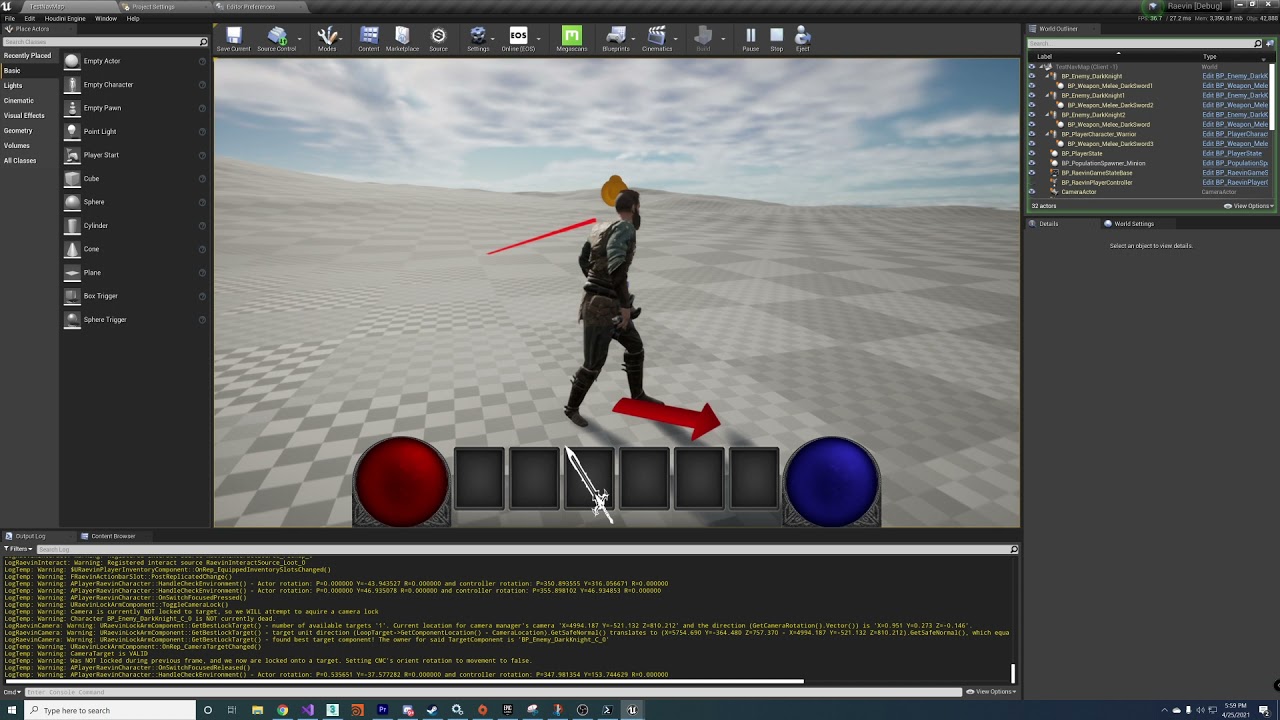
That's the correct video
I'm guessing that is because the camera is on the spring arm
which is moving the camera 300 units back
kindred widget
My initial reaction to that is that it's pointing at the world 0,0,0
What is the code displaying the arrow?
crystal crag
const FVector TargetUnitDirection = (LoopTarget->GetComponentLocation() - CameraLocation).GetSafeNormal();
const float LoopDotProduct = FVector::DotProduct(CameraDirection, TargetUnitDirection);
UKismetSystemLibrary::DrawDebugArrow(this, CameraLocation, TargetUnitDirection, 5.0f, FLinearColor::Red, 5.0f, 5.0f);
Maybe I'm not using that right?
I mean, maybe I am not filling in the right parameters? Obviously the start line would be the camera's location
so that part is right
and then I'm trying to point towards the target unit direction
kindred widget
Yeah, it was pointing near world 0,0,0. 😄
You have to add the direction to the camera location. TargetUnitDirection will be a pointing vector. So take that and do (TargetUnitDirection * 150.f) + CameraLocation
Then it'll draw a line from the camera location, 150 units in the direction TargetUnitDirection is facing.
 proper bone
Good evening, have anyone already created an online sub system plugin? If yes have you written test units
 willow garden
https://docs.unrealengine.com/en-US/InteractiveExperiences/Networking/Travelling/#persistingactorsacrossseamlesstravel this page says that AGameMode is persisted across seamless travel, but I'm logging MyGameMode::EndPlay and it is called in the process of traveling from the transition map to the new map, before MyGameModeForNewMap::PostActorCreated is even called. it doesn't seem like there is even a point where both game modes exist at the same time. in what capacity is it persisted?
An overview of how travelling works in multiplayer.
twin juniper
Is the steam region effects the testing packaged project? like do we need to be in the same steam region for testing stuff? (Advance Session)
twin juniper
winged badger
other then that, no
ty 👍
twin juniper
winged badger
sessions might filter out stuff from outside the region
sorry if i didn't explain my issue or my question, but this fixed it for me and now i can test it with my friend 👍
 barren patrol
Are there any easy ways to debug what an actor's NetworkGUID is on client+server in PIE?
i'm suspecting a mismatch but not sure the best way to debug it
crystal crag

@kindred widget so the arrows are pointing in the right direction. The other targets are too far away for them to be considered
yet it won't lock on to him
hey, here's something weird
I have two random camera actors in the level. When I tried to delete them, it says that my player camera manager is currently referencing them
these cameras are hidden a little bit under the map. Why are these being created?

Is it normal to have two cameras created for the player character, that are just sitting on their own, not attached to anything?
I see in the stack trace when I connect to the server, the player manager is creating the cameras during PostInitializeComponents()

I am thinking this is the actual cause of all my problems with this targeting system
bummer. That's not the problem. I deleted them and it still isn't working.
 forest bolt
Hey guys, how do I replicate the PlayerState variables?
//MyPlayerState.cpp
void MyPlayerState::GetLifetimeReplicatedProps(TArray<FLifetimeProperty>& OutLifetimeProps) const
{
    Super::GetLifetimeReplicatedProps(OutLifetimeProps);

    DOREPLIFETIME(ATaskPlayerState, bIsOnBlueTeam);
    DOREPLIFETIME(ATaskPlayerState, bIsCarryingEnemyFlag);
}
//MyPlayerState.h
UPROPERTY(Replicated, BlueprintReadOnly)
bool bIsCarryingEnemyFlag = false;

UPROPERTY(Replicated)
bool bIsOnBlueTeam = true;
the errors are:
error C2275: 'ATaskPlayerState': illegal use of this type as an expression
error C3861: 'DOREPLIFETIME': identifier not found
 chrome bay
@forest bolt Add #include "Net/UnrealNetwork.h" to the .cpp file
It doesn't know what the DOREPLIFETIME macro is
 hazy silo
hello everyone 🙂
I have a little replication problem when implementing a "sprint"
this is the initial event, the gait is replicated with notify

this happens on rep_notify

however, this will only work on the server. if a client tries to sprint, something seems to hold it back and it will not become faster
chrome bay
The "Sprint" event will only be called by the controlling client.
You need to notify the Server via RPC about start/stopping sprint.
hazy silo
can rep_notifies only be called from the server? @chrome bay
chrome bay
They don't really work properly in Blueprint. In BP they will be called whenever you change the variable, rather than when the variable is replicated from the Server.
The local client should ignore server replication of the value though, since otherwise it'll break movement prediction
So the flow should be to set the value locally, notify the server via RPC of the value change, and replicate that value to everybody except the owner.
Though saying that, you don't necessarily need to replicate the value at all if all you're doing is changing movement speed.
hazy silo
so this will break movement prediction, right?

 thin stratus
Well, no.
And yes
I don't think you can NOT break MovementPrediction if you are only using BPs
You have to extend the CMC if you have custom logic that should work with MovementPrediction
Otherwise you can't ensure that the Characters moves with the same data during the same timestamp
Even if you predict the Gate change in BPs, it will not be actually predicted movement
Cause the Client will run the Movement with the Speed set in a different Timestamp
The client basically calls, per frame, an RPC inside the MovementComponent (or rather in the Pawn, but that has different reasons).
And the data it sends along is needed to keep everything in sync. Part of that is for example if you are pressing the jump key.
So if you have a keypress to change your movement speed, then that keypress has to follow the same flow and rules.
As soon as you perform a local key input that isn't sent via that RPCs data, it will always be out of sync for a few frames. You won't always notice it, but if you crank up the Ping simulation to average or bad and you enable drawing the net correction debug, then you will see that either when starting or stopping to sprint (or walk, or whatever your movement speeds are) you will get a correction
If you can't use C++ or you aren't yet skilled enough to dive into the CMC, I would stop worrying about it breaking the native movement prediction.
Set the Enum or speed locally, then RPC and live with the small corrections you get.
hazy silo
 thin stratus
:P Yeah multiplayer is not easy and straight forward.
hazy silo
@thin stratus thank you so much for the detailed explanation! 🥰
chrome bay
MP iz hard 😄
Don't be discouraged, but I do strongly recommend picking up some C++ skills if you want to go ham with Multiplayer dev.
thin stratus
Did anyone use Unreal Insights for Network Profiling?
I know the original Network Profiler had a "Waste" Column, but I can't find that in the Unreal Insights one...
 marble gazelle
I want to use WorkdComposition for Multiplayer to allow to stream parts of the map (won't use Origin offset)
I was wondering if someone also did that and can give me some hints on what I should be aware of.
My current main question is, if there is smth I can inherit from to manage when to stream in and out levels, if I want to control it somehow (lets say I want to specify I need to load some level where I want to teleport the player to, but it can be unloaded, if the players moves away a certain distance, and if there of course are no other players requesting to load it)
chrome bay
Couple things to bear in mind
Server is always in zero-origin space, so you have the remember that when sending vectors to/from clients.
 potent cradle
thin stratus
I know the original Network Profiler had a "Waste" Column, but I can't find that...
potent cradle
thin stratus
I know the original Network Profiler had a "Waste" Column, but I can't find that...
Potentially superfluous, maybe helpful:
Not sure about UnrealInsights, but perhaps RyanJon's rewrtie of the network profile can give you that information: https://github.com/ryanjon2040/UnrealNetworkProfiler

GitHub
A modern WPF based Network Profiler for Unreal Engine. - ryanjon2040/UnrealNetworkProfiler
chrome bay
And the other thing I found is that it can lead to increased movement error-correction as you get further from that origin, since server/client have more discrepencies
Also if you're using any kind of physics, I recommend avoiding origin rebasing altogether.
Physics is very unhappy when you suddenly yeet the origin, and it results in a massive hitch as every actor is reinserted into the tree
thin stratus
potent cradle
Potentially superfluous, maybe helpful:
Not sure about UnrealInsights, but perha...
Thanks, that also has the Waste column. I like the Network insights in general
But that waste column is quite golden
marble gazelle
as said, I will disable origin shifting, so coordinates are the same and levels won't be too big, its more to reduce recourse needs if we have a map with a "bigger" city and some outer parts, where we could just onload the city
chrome bay
Oh sorry, I read as world origin rebasing not composition
Don't those two things come hand-in-hand though anyway?
marble gazelle
no, you can just disable it, its also what the documentation states 🙂 Either disable it, or implement your own server or a layer in between. 😄
chrome bay
I see.. in that case not sure. We're only dealing with ~2km levels so have only used origin rebasing only. It's not been a fun experience 😄
 marble gazelle
😄 ok.
So any hints on how to manage to tell the server (and the client) That I need to load a Level for a player so I can teleport onto a location that level specified, Then tell the system that from now on this level is for that client only relevant by distance?
chrome bay
haha
thin stratus
"That was a headshot?!" "Float says no."
chrome bay
The real issue is that everything close to the camera (aka weapons etc) start getting an annoying jitter
marble gazelle
just go f64, solved 😛 who cares for big load on net
potent cradle
chrome bay
I see.. in that case not sure. We're only dealing with ~2km levels so have only ...
You rebase even for that size?
thin stratus
:P Sorry, trying to avoid my network profiling task.
chrome bay
I think it's partly created by animations evaluating in world-space rather than camera-relative space
potent cradle
I though Unreal could handle more than 2km without breaking down 🤔
chrome bay
Even around 1.5-2Km from origin you start getting jitter on stuff close to camera
thin stratus
If only someone would DOUBLE their efforts
thin stratus
As much as I love multiplayer, I had enough "fun" lately with random engine bugs.
Singleplayer it is.
chrome bay
This is what our scopes look like around 1k from origin (super narrow FOV though, like 8-10)
https://www.youtube.com/watch?v=mi8RQKtXlNk
Damn sucks.
thin stratus
You can be happy though
Because it's visually showing the bug
You know what is going on. imagine it would only show somewhere deep down in some system
chrome bay
Oh totally
thin stratus
I still can't get over the "Oh, yeah Client#s might clear their NetGUID and Server doesn't and then nothing spawns anymore." bug I had to deal with
thin stratus
Yeah, I reached the point of "Let's just push the netguids again after travel, who cares about bandwidth."
thin stratus
marble gazelle
😄 ok.
So any hints on how to manage to tell the server (and the client) That I ...
You mean with Level Streaming?
chrome bay
A fun one is that Epic doesn't support seamlessly travelling to a map you're already in, so you better hope to ship with at least 2 maps 😄
thin stratus
That's actually strange, given you move from Map to Transition to Map
How does UT restart the map?
chrome bay
I think it's partly down to loading times, but clients seem to get confused about what map they're really in
I'd have to ask the poor sucker who looked into it in detail though 😄
thin stratus
How dare you don't post your findings under this Youtube comment, James!
 marble gazelle
thin stratus
You mean with Level Streaming?
marble gazelle
thin stratus
You mean with Level Streaming?
World Composition
Using the "normal" level streaming, with streaming volumes for example, will load everything loaded for all clients, I want to have only loaded on clients what the clients need
But world Composition just as a helper to get streaming as this supports that, at least that's what I've found online^^
Just thinking about how I can control it properly and where I should starting to look at in the code base
 merry harness
Hiho, I'm just building a login system. Well first of all a Connect to Server event. There is the possibility to use Join or Create Sessoin. Aren't sessions more for shooter games or games like fallout? So a round-based session?
What is the exact name or does the counterpart work?
Login -> Connect to Dedicated Server -> Play 6h on the server
potent cradle
chrome bay
This is what our scopes look like around 1k from origin (super narrow FOV though...
Yikes...
Never knew it was that bad
marble gazelle
hm from the documentation it said, if I disable origin shifting it would work and in my first test it did
ah yep^^
thin stratus
merry harness
Hiho, I'm just building a login system. Well first of all a Connect to Server ev...
Sessions are just info about the Server you want to connect to. You can use that in all sorts of ways.
marble gazelle
But since we (right now) don't need endless levels, we are fine. if we do, well, we need to implement our own server tech anyway...^^
thin stratus
But yes, it's very common in games that are matchbased.
merry harness
ah ok thanks ^^
thin stratus
But games like Survival Games where a Server runs for hours and restarts during the night also use Sessions for ServerLists
merry harness
Ah ok i try to create a MMO
thin stratus
The Sessions holds generic info like where to connect to, the name, the amount of players and from there on whatever else you want to pass in. The Map, GameMode, PasswordProtected etc.
Yeah then Sessions aren't really what you need
UE4 has no build in stuff for MMOs
You have to code that oustide of UE4 with your own library and backend
merry harness
I know but Tera is created in Unreal, its an MMO, so it should be able ^^
thin stratus
Sure, but not with UE4 alone
Your login stuff has to talk to a backend first and establish some authentication session.
Then you can travel to the Servers that make up your MMO, which in addition should need to verify that you are actually logged in etc.
Not much in terms of UE4 here, despite the connection process.
merry harness
My Idea is, to have a website, where you can register your account. This account will be saved in a MySQL Database and with PHP/MySQL the Engine can controll your login with the database
thin stratus
Yeah, that's usually a way of doing it
There are a few though and I never looked further into it, cause a one-person MMO is just wishful thinking
merry harness
we are a small team of 4 person ^^
thin stratus
Good luck
bitter oriole
PHP is not exactly the biggest problem here
It's also the only language on most free hosting
merry harness
?
bitter oriole
You don't need to tell me, just saying PHP isn't going away
marble gazelle
we currently use a websocket for such things. What I currently don't like is that the Login part has to be in sync, so the game server needs to be notified in first place, so we don't block the game thread to check if we are allowed to connect ...
merry harness
What do you mean by free hosting ?
bitter oriole
I think comparing PHP to these is absurd, it's still actively developed
You might hate it, and you'd have good reason for it
But the next website I need to make will be in PHP because it's still the baseline on hosting
merry harness
But the communication between php and MySQL is fine, and i can import the MySQL output very easy from php to UE
potent cradle
bitter oriole
But the next website I need to make will be in PHP because it's still the baseli...
Out of curiosity, a static website? Node.JS coverage (for instance through Netlify) is also growing nicely.
merry harness
php is easy ^^
bitter oriole
potent cradle
Out of curiosity, a static website? Node.JS coverage (for instance through Netli...
Imagine dropping PHP over its lack of typing to use JS instead
potent cradle
bitter oriole
Imagine dropping PHP over its lack of typing to use JS instead
Not necessarily, TypeScript is a sane alternative that runs fine on Node too 😉
merry harness
There are many ways to create a decent website. If you prefer, you can also create a pure html-CSS website or a Javascript page. PHP and Javascript favor certain things that are somewhat more complicated or at least not as logical on others as with php and jscr.
bitter oriole
In any case, it's website stuff, who cares about the language
potent cradle
Language nerds (guilty!) 😄
bitter oriole
At least PHP isn't made obsolete every year
merry harness
Thats true xD
bitter oriole
Anyway, don't make MMOs, you'll be disappointed when you sell 50 units and have 8 players
merry harness
But i think its the same problem with other games. If you build a survival game and only 8 player will play that game ^^
bitter oriole
If your indie game needs to have multiple people playing it it has already failed
So yeah, if you're doing a battle royale, you've also killed it before it launches
merry harness
My MMO Game is 3 years old.
bitter oriole
And you're doing the login system just now ?
merry harness
I worked out a full game 3 years ago.
- written down stories
- quest ideas
- List item
(EQ 32, Items 117, consumable 40) - crafting system worked out
- characters
- Skill system
I just have to realize it in unreal ^^
bitter oriole
But you designed it to be an MMO, knowing that you're going to get 50 players
So you spend years doing it but then it's dead on arrival
You could have shipped 3 games in the past 3 years
Anyway, just my 2 cents, make small games that can survive the player counts they're going to get
merry harness
I haven't worked on the game for 3 years. 3 years ago I came up with a concept for it. Working out the individual points was relatively quick.
It was an idea that I wanted to implement at some point.
Now I've started to deal with the Unreal engine.
3 years ago it was just an idea and now I'm first learning how UE works, server communication and so on. Then I see what I can make of it.
Whether I'm doing a survival, shooter or mmo. I definitely need the server communication ^^
 meager girder
Something weird is happening. I have made my UObjects replicate in many projects before, but in my current project they just... won't. The only difference I can think of, is this time I've put it inside a module, but I don't think that should be any different, right?
 chrome bay
Should be good then, so long as the actor & component are replicated and you've added the necessary code to UStatBase
Just be sure you use the 'actor' as the 'outer' of the object
Things get a bit tricky if you want to use the component
winged badger
why did you conclude they are not replicating @meager girder ?
meager girder
Yeah, that's the weird part. I create the object like this UStatBase* NewStat = NewObject<UStatBase>(this, StatClass);
where "this" is the actor component
chrome bay
Ah that's probably the issue
meager girder
@winged badger they are nullptrs on the clients
winged badger
that will replace the Outer on client to Actor
chrome bay
Client-side they will always be created with the actor as the outer
chrome bay
Is Stats a replicated array also?
winged badger
@meager girder breakpoint in AActor::OnSubobjectCreatedFromReplication
 winged badger
if they are created but are nullptr on clients when your array of references to them replicates
it can be as simple as flipping Super in ReplicateSubobjects to the bottom of the overriden function
making the Subobjects replicate before the members
meager girder
@winged badger the breakpoint isnt being hit
winged badger
that begs the question is UStatComponentBase replicated?
meager girder
@chrome bay yeah, they're replicated 😄
@winged badger

ive tried putting the component on my character and my playerstate
same issue
@winged badger if you want, I can send my code to you if thats easier 😄
winged badger
you have a blueprint deriving from that Actor?
check if it changes the replication settings
like doesn't replicate the component
meager girder
 winged badger
other then that, show me the component's GetLifetimeReplicatedProps
 winged badger
does the OnRep for stats fire?
meager girder
yeah it does 😛
thin stratus
Do the other two variables work?
 winged badger
that array is UPROPERTY?
meager girder
been trying to figure it out for days now :p
thin stratus
Does the same problem happen if you replicate the Objects inside an Actor instead of a Component?
Just wondering
 winged badger
ok, move the super call in ReplicateSubobjects override to the last line of the function
it might be that OnSubobjectCreatedFromReplication won't hit due to epic netcode being sloppy
 winged badger
last line needs to be |=
winged badger
also IsSupportedForNetworking in UStat?
meager girder

i inherit my stat from that
i also get this LogNet: Warning: UActorChannel::ProcessBunch: ReadContentBlockPayload failed to find/create object. RepObj: NULL, Channel: 6
in the output log
thin stratus
Yeah that usually means it tries to do something with an object that isn't available on the client
E.g. if you try to spawn replicated components runtime and you start replicating stuff before the component exists on the client
meager girder
ah
thin stratus
But here it shouldn't happen
I would suggest you move this to an actor before you waste all your time on hunting a setup issue
If the Actor version works, then it might be some limitation or you can nail down the setup problem
winged badger
for starters
meager girder
yeah ill try that
thin stratus
Yeah that is one of the things that might break it, cause the Component is a UObject that replicates through the Actor channel already.
 winged badger
TSubclassOf<UStatBase> seems way simpler
 winged badger
what each stat has its own subclass?
meager girder
i thought using the assetmanager was good practice here
yeah

i scale some stats by other stats
idk if thats the best way
winged badger
it changing the Outer doesn't work
try giving it a fixed class
UStatBase::StaticClass()
see if it works then
meager girder
ill do it outside the array then, ill just create another replicated variable 😛
winged badger
better test to just replace that StatClass with UStatBase::StaticClass()
less work, too
 winged badger
running out of ideas here
i know for a fact that ActorComponent can replicate its own subobjects
and at least around 4.18 it could do so with itself as outer just fine
meager girder
yeah, ive done it before. i honestly dont know what is causing this
it is probably something where ill go "im so stupid" after figuring it out xd
woven sinew
hey guys, anyone know why when debugging my server is listed under "Unreal Test" game on steam
meager girder
@thin stratus i tried creating a "stat" on my playerstate instead, and that didnt work either 😦
@winged badger im just gonna make a new project and see if the same thing happens there i guess 😦
potent cradle
Is there a simple metric I could record on the server to pump back down to the client, to put in a debug widget, to measure how saturated the server's bandwidth is?
winged badger
Stat Net?
potent cradle
winged badger
Stat Net?
Pardon, stat net is usually run client side to see how the connection is right? Is there a way to programmatically see how "saturated" the server's connections are from the perspective of the dedicated server itself?
Trying to find a simple way to find a reading to notice when my server is struggling
thin stratus
Isn't there this Server Stat Class in the GameMode that you can use to debug the Server from ClientSide?
Iirc Epic added that cause they had trouble debugging their cloud servers?
potent cradle
thin stratus
Isn't there this Server Stat Class in the GameMode that you can use to debug the...
Class used to replicate server
This? 🤔
A few interesting metrics there
 royal sigil
Guys, have trouble with replicating physics. More accurately, the physics does replicates, but it doesn't applies locally, so it doesn't corrects the clients errors, but spikes into new replicated states. How to make client predict physics too?
thin stratus
potent cradle
https://docs.unrealengine.com/en-US/API/Runtime/Engine/Engine/AServerStatReplica...
Could be, yeah
thin stratus
royal sigil
Guys, have trouble with replicating physics. More accurately, the physics does r...
Ehhhh, Physics and Replication, sort of no-go, at least in UE4.
It's not deterministic afaik, and even if it was, you'd have the problem that your Client has to keep track of the moves to replay them when being corrected. Which involves saving the entire physics scene.
At least for client controlled physics, like a fully physicsbased character
Your best bet is to do it fully client auth then
royal sigil
It shouldn't be. It just need to diff client and server side phys states and correct differences.
Which described in physics -> replication settings
thin stratus
What are you even trying to achieve? That would be important to know
royal sigil
Physics-based movement on different actors.
thin stratus
So Client presses button and Physics-based Actor starts moving?
potent cradle
Seems like my replication graph is destroying actors & not replicating properly in some parts of my map, anyone ran into that?
I already increased the bounds like so:
float SpatialBiasX = -600000.f;
float SpatialBiasY = -600000.f;
Can we maybe visualise the bounds or something?
Assuming that's even it though 🤔
But turning off the replication graph in my defaultengine.ini does fix the issue
royal sigil
thin stratus
So Client presses button and Physics-based Actor starts moving?
Not only. Some actors move on scene with forces. So client kinda calculates physics himself and asks server if it's right. Server tells, for example, no, this actor is moving a bit faster and already here, so client lerping this errors and trying to be in sync with server. If error is big enough, client just snaps server's phys state, otherwise he tries to be as close as possible.
AFAIK it's implemented by default, you need to enable SM settings and setup phys replication in project settings. But it works kinda strange.
It seems like client absolutely stops simulating itself which makes him moves only on replicating states and of course its laggy AF. But I'm sure there is a way.
 empty axle
Hi is there any global event that is called after successful client travel?
Nevermind found FWorldDelegates::OnPostWorldCreation
chrome bay
royal sigil
It seems like client absolutely stops simulating itself which makes him moves on...
The client doesn't disable simulation of physics locally. You have server and client simulating physics at different tick rates, and also independently of each other. The client is advancing locally, but as latency increases they are also receiving replicated state updates for those actors further and further back in time. So the pattern is the client advances, then receives a latest packet, client snaps back, advances, receives old packet etc etc.
The built in physics replication tries to smooth that out.
Predicted characters walking on top of physics objects is essentially a lost cause
Well.. it'll work, but it won't be all that smooth
royal sigil
It should do so. But in my case I have a simple sphere moving by single force (torque). And if "Replicate movement" is enabled it just spikes between positions and don't move between them.
chrome bay
As it's torque you may want to set the RotationQuantizationLevel on the replicated movmenet advanced properties to "Short" instead of "Byte". Byte gives very poor (but cheap ofc) rotation replication
 dry tulip
Im testing a dedicated server in editor. I am trying to use external shortcuts (..\UE4Editor.exe [Game] -server -log -game) . When i launch this i get an error that says "Failed to open descriptor file" Ive used this method to test other projects. Any ideas what I am missing?
i might have figured out a work around, using the absolute path to the uproject file seems to be working 🙂
thin stratus
Anyone ever tried to get predicted spawning of actors working? Doesn't sound too far away
From what I understand, I only need to make sure they are stably named... and maybe handle the GUID somehow?
If the Client already has the Actor spawned, the Server spawning the Actor would not cause the Client to spawn it again.
 eternal briar
I keep getting these warnings on my multiplayer clients.
LogGarbage: Warning: [54]: StaticMesh None.None, IsReadyForFinishDestroy: false
I think they might be happening because I am calling "SetStaticMesh" function in the construction script on both server and client and when the server destroys the actor the client is having issues.(The actor replicates but the static mesh component does not) What should I do to avoid these errors? Is there any way to set static mesh on both server and clients without using network resources?
 azure hollow
can someone tell me how should I do serialization of a struct? I need to send data to the server for a ghost replay and It's my first time honestly 🙂
 eternal canyon
thin stratus
Anyone ever tried to get predicted spawning of actors working? Doesn't sound too...
eternal canyon
thin stratus
Anyone ever tried to get predicted spawning of actors working? Doesn't sound too...
It depends on what ur doing but in one of my things we have predicted projectiles the way UET does them from my understanding
twin juniper
How do I spawn as a spectator?
Also, Lets say on client 1, is it possible to disconnect my current character and then reconnect a new character on that same client?
do i have to make a new class for the spectator? or is there an automatic functionality in unreal?
kindred widget
@azure hollow In C++?
azure hollow
yes it's the same to me 🙂
kindred widget
I'm not exactly certain what you mean by serialize? If you want to send something via replication or RPC, it needs to be marked as a UPROPERTY(). Blueprint does this automatically with it's structs.
Replicated loose properties in an actor or actorcomponent need UPROPERTY(Replicated), if it's in a struct, the struct's properties just need to be UPROPERTY() marked. You only need a specifier for properties in the struct that you do NOT want to send.
So if you want to RPC the struct. You just need the properties in the struct to be UPROPERTY() marked. Replication is a little more involved. If you want to replicate a version of that struct, those properties need the same thing, and then the struct declaration in the .h file also needs to be UPROPERTY(Replicated), and then you need to add it via macro in GetLifetimeReplicatedProps
 rich cradle
How do you actually run a steam dedicated server? Resources on the topic seem pretty scarce or potentially outdated.
I can run a dedicated server just fine so long as I use -nosteam. But with steam enabled it crashes on startup with
[2021.04.26-15.28.30:691][ 53]LogWindows: Error: === Critical error: ===
[2021.04.26-15.28.30:691][ 53]LogWindows: Error:
[2021.04.26-15.28.30:692][ 53]LogWindows: Error: Assertion failed: SteamUtilsPtr [File:G:/Site13_Engine/Engine/Plugins/Online/OnlineSubsystemSteam/Source/Private/OnlineSessionAsyncLobbySteam.cpp] [Line: 472] ```
I have yet to find anything on that onlinecan be a different config
you have a nullptr on SteamUtilsPtr
check OnlineSessionAsyncLobbySteam.cpp on line 472
rich cradle
The fact that I am getting the nullptr means that something I am doing is wrong, but ehh what exactly. Everything works fine so long as I just dont use steam. I dont even know where to start
proper bone
ISteamUtils* SteamUtilsPtr = SteamUtils();
check(SteamUtilsPtr);
go to the SteamUtils function, see what it does to get to the success
I create my own online subsystem, I don't know steam, but I would do this to find any problem
rich cradle
that goes beyond my knowledge. I dont know how the backend api stuff works
I think the issue is probably somehow related to needing some steam redistributables or something in the build folder
proper bone
for my part i am also a beginner, may i know enough to get by i use the laravel framework for the api
you just have a null pointer, search google or in the source to see how this pointer is initialized
rich cradle
found an old thread from 2017 on the issue
seems to have something to do with presence. https://forums.unrealengine.com/t/using-presence-with-steam-subsystem-causes-steamutilsptr-crash/99260
proper bone
rich cradle
seems to have something to do with presence. <https://forums.unrealengine.com/t/...
I had the same issue.
Presense should not be used on dedicated servers, and thus the solution is to turn it off.
Settings.bUsesPresence = false;
Settings.bAllowJoinViaPresence = false;
So I'm getting into the harder part (for me) of multiplayer now and just don't see through it anymore.. can someone bring me on the right path?

The player dies and leaves a dead body that's meant for look and also respawns the player that left it (maybe not the best concept, i know)
Leaving the dead body works and respawning the new character aswell, but the server always posseses the new character instead of the client that left it
The "posseser controller" reference is meant to identify who's body it is, but the server always snitches it (even tho it's replicated) also i cant run posses locally because it's authority only
Where did i think wrong? And what must be changed to make it work?
kindred widget
@scarlet cypress First of all. Don't ever use GetPlayerController in server oriented code. The only safe way to use that is on a client, for client related things like getting the client/listenserver's local controller, or pawn, or for UI, since UI is not networked.
So for instance. What you're doing here. You've told the server, to get the first player controller. This will be the server's controller if it's a listenserver, or the first player connected if it's a dedicated server.

You should, instead, get this ThirdPersonCharacter's Controller, and pass that instead of GetPlayerController.
Learning the default AActor Owner hierarchy for stuff is a serious necessity for starting to make more complex systems like this in multiplayer.
Also. This does not work.

You need to pass that Transform through the "Server" event.
scarlet cypress
@kindred widget Thanks for the support, I've been able to solve it with passing the player controller via "DieServer" that fixed it. So it actually was just something i overlooked.. I didn't pass the transform there because the player start is the same on every machine.. That's something you can do right?
kindred widget
They are. But for the case of what you're doing, you may as well just not run it on the client, remove the ServerRPC, and only run that line of functions behind IsServer, or SwitchHasAuthority.
Cause as far as the Client is concerned, it just got a random player start for nothing. It's never used.
potent cradle
Anyone know if there are any gotchas or special rules around unpossessed pawns in the context of replication graph? Would there be a logical reason for a pawn to be continually destroyed and recreated if they are not possessed (I spawn and destroy any attached AI controllers, before later possessing it as the player), when using the repgraph?
Issue does not seem to happen without repgraph
(and only in certain parts of the world)
EDIT: Seems to be the case that if the player has no pawn possessed, the normal flow of getting replicated information about other pawns around the controller, is disturbed
 torpid girder
I am trying to client side volume streaming working. I set the levels to always be loaded. Set up the volumes. However all the levels are loaded
 gaunt fractal
hey guys, so I have this code for wallrunning, mantling, sliding, etc. but whenenver I set the project to run with more than 1 player, I get an error. This error only comes up if the project is ran with more than 1 player. Can you guys pls help? thanks
I will post a photo of the error
here
 forest bolt
hey guys, is there anything that could block a SpawnActor? In my server logic when a character dies he should drop an object. This is a snippet of my OnRep method:
// .h
UPROPERTY(EditDefaultsOnly, BlueprintReadOnly, Category = Class)
TSubclassOf<MyObject> MyObjClass;

// .cpp
void APlayerCharacter::OnHealthUpdate()
{
    if (GetLocalRole() == ROLE_Authority)
    {
        if (CurrentHealth <= 0)
        {
            if (condition)
            {
                //Set Spawn Collision Handling Override
                FActorSpawnParameters ActorSpawnParams;
                ActorSpawnParams.SpawnCollisionHandlingOverride = ESpawnActorCollisionHandlingMethod::AdjustIfPossibleButAlwaysSpawn;
                ActorSpawnParams.Owner = this;
                ActorSpawnParams.Instigator = GetInstigator();
                ActorSpawnParams.bNoFail = true;

                if (MyObjClass != NULL)
                {
                    auto SpawnedMyObject = World->SpawnActor<MyObject>(MyObjClass, GetActorLocation() + FVector(50.0f, 50.0f, 0.0f), GetActorRotation(), ActorSpawnParams);
                    if (SpawnedMyObject != nullptr)
                    {
                       // set some variables
                    }
                }
                else
                  UE_LOG(LogTemp, Warning, TEXT("Please set the Class variable in the BP!"));
        }
    }
}
Even setting up bNoFail sometimes it won't spawn
I'm also spawning adding a FVector (50.0f, 50.0f, 0.0f) so it won't collide with the player pawn
kindred widget
@gaunt fractal Your GetController call is returning null. Presumably you're running it on a client for a pawn that is not owned by the client. Which means that controller won't exist on that machine.
gaunt fractal
how do I make it exist on that machine?
kindred widget
You don't. Controllers are a player's window to the server. You don't want them accessable by other machines. Which is why they exist one per player on the server, and only one on each client machine.
gaunt fractal
so how do I fix it?
kindred widget
Well. Presumably you should be doing the control rotation logic on the machine that owns the controller, and updating this to the server, which can replicate to all clients. Doing that would keep you from trying to make one client update another client's controlrotation.
@forest bolt Is SpawnedObject null after spawning it? Or how are you testing that it's not spawned?
gaunt fractal
kindred widget
Well. Presumably you should be doing the control rotation logic on the machine t...
so basically I upload the host's controller to the server?
kindred widget
Not exactly. Unreal networking is actually incredibly simple. It can be a headache to work around, but in short, there are only two ways that information is passed from machine to machine. RPC and Replication. An RPC is an event that is sent from one machine to another. A client can ONLY ServerRPC. They cannot talk to other clients directly. Servers can run RPCs through actors that a client owns, like PlayerControllers as ClientRPC, or they can Multicast to all versions of that actor on all machines.
Replication is similar to multicasting, except that it happens via the server setting a variable and then some time later evaluating it to see that it's changed and sending it to where it needs to go. Some replication only happens to specific machines. Depends on your settings, etc, etc.
A client can only ever ServerRPC through a client owned actor. The base of this is the PlayerController. By default any pawn the controller possesses also becomes a client owned actor because it's AActor* Owner variable gets set during this. Note all of this happens on the server.
gaunt fractal
wait. So RPCs can be used for something like doing damage to another player?
and replication is for something like tracking player movement?
forest bolt
kindred widget
<@!272092507272249345> Is SpawnedObject null after spawning it? Or how are you t...
it's null
kindred widget
Sure, that's how you normally do it. Common FPS method is to have a client RPC to server, say "I hit this with these stats" server uses that information to run checks of it's own to validate the hit, and then changes health on the damaged actor, and it gets replicated to all machines and they all update their stuff.
gaunt fractal
Sorry, I still don't know how I can fix my problem
forest bolt
it doesn't hit the code after if (obj != nullptr)
kindred widget
Sort of on the movement. The difference is much like native movement components. Client presses button, and ServerRPCs it's movement to the server. Server does movement, and tells all other machines where that player is moving.
gaunt fractal
but how do I make all the clients have the controller the host has?
kindred widget
You don't. You let each client do their own movement. They decide where their jumping, hanging from, or facing, etc. This gets sent to the server as basic data. Directions, rotators, locations, etc. Server replicates this to other clients, and other clients update that actor based on what they have recieved.
kindred widget
Well. That really depends on the system. Wall running for instance. Is likely to be a custom state in your movement that makes it move differently, and lets animblueprints pull the data they need to animate correctly, like running along the wall. I'm sure you'd need more, but initially my thoughts are that you need probably location and velocity. Maybe rotation. Likely a state based enum.
You can likely extrapolate rotation from location and velocity. But the other two and the state setting are probably necessary to replicate so that clients will perform the same stuff the server is doing.
@forest bolt Hmm. It seems fine. It's odd not seeing GetWorld there. I assume that's valid though since it's not crashing.
forest bolt
oh the GetWorld is before
in the same function
I'm just not showing it
UWorld* const World = GetWorld();
if (World == nullptr) return;
Gotcha. Uncertain then. If the class is valid. 🤷♂️
winged badger
failed spawns tend to have a LogSpawn entry attached to it in the output log
kindred widget
Personally. I'd breakpoint, or try to else some of your other if statements. A lot of places that could go besides that uelog.
winged badger
first thing is check the logs though
you'd be surprised how much they catch in this case
Actor spawned out of level bounds? there is an actual log for that
(someone left WorldStatic collision on a skybox)
torpid girder
i am thinking that i need a different way to handle level streaming, could i load all the maps on the server and then use blueprints to load levels on the client?
winged badger
there was a bug with level streaming when the streaming levels were set to automatic load
nothing in the streamed levels would replicate to clients
torpid girder
ah
torpid girder
there is some weird things with multiplayer and level streaming
forest bolt
kindred widget
Personally. I'd breakpoint, or try to else some of your other if statements. A l...
I tried, but it just doesn't reach the statement after the if not nullptr
forest bolt
winged badger
Actor spawned out of level bounds? there is an actual log for that
I'll check the logs
thanks
vivid seal
do reliable RPCs from different components on the same actor have guaranteed order? like if i call an RPC from my health component then another RPC from my ability component on the same actor, will the health rpc arrive before the ability rpc every time?
actually i guess the answer would be yes because they're both coming from the same connection?
chrome bay
They should have the same order yeah
 lean fossil
hello there, I'm playing an animation montage on a character while displacing it on server. It's working fine on server and on clients, except for the client that owns the character (other clients see the animation, but not himself). Any idea of what might be happening?
 gilded vapor
Would anyone have any suggestions on implementing a Sekiro style deflect for multiplayer? (I've technically have implemented but latency between players make it feel not great).
the delay between attack/deflect is too high if the client-locally predicts it (and sends the even to the attacker).
Locally predicting attacker side means that the defending client has to activate block very early (relative to the attack they will see)
winged badger
halo networking GDC had a good example how to eat the lag with different animation speeds
 grizzled flicker
so if functions are strictly server based how would I replicate a function to show up on client side?
I set a variable to a team color but only on listen server does that variable replicate.. when I go to client mode it doesnt work
gilded vapor
grizzled flicker
so if functions are strictly server based how would I replicate a function to sh...
Look up RPCs (NetMulticast specifically)
grizzled flicker
ty
gilded vapor
@grizzled flicker You could potentially use a replicated variable. For team color you might want to go with rep-variable opposed to RPC now that I think of it
forest bolt
winged badger
Actor spawned out of level bounds? there is an actual log for that
update: the object is being spawned on Z=260 and I don't know why
vivid seal
For those of you doing shooter-type games:
What does your lag compensation/sanity checking look like?
I’m assuming that I don’t want to be running animations for everything on the server, so rewinding hitboxes isn’t going to be super accurate.
I know that a lot of the games trust the client and just check to make sure things aren’t too egregious, and depend on anti cheat to prevent Aimbots, but I haven’t found an example of what those checks look like. Do you just check that the hit location of a trace was within a specific radius of where the hit target is now? Do you check line of sight? Do you rewind player locations to check that line of sight?
meager spade
i do 0 lag compensation
and i trust the client to an extent
server just does a sanity trace to make sure nothing popped up between the shot that the shooter never saw
but not an authoritive trace like, "oh you hit here" but a more "make sure the shot never got blocked by the world"
vivid seal
So you just trace from the clients start location to the clients end location and make sure either nothing got hit or the thing the client thought he hit got hit?
dark edge
meager spade
but not an authoritive trace like, "oh you hit here" but a more "make sure the s...
You doing projectiles or hitscan?
dark edge
So moving shooter vs moving target, what does the target see? Projectiles landing where they WERE but still hitting?
meager spade
i dont check if the other character/actor got hit @vivid seal, i just care on the server if something in the world blocked it
dark edge
or are they fast enough that it's not really an issue?
meager spade
rockets are quite slow but not super slow
snipers are pretty rapid with the shot
and yeah you will need to lead your shot that kinda thing
dark edge
Ya i suppose it depends on your velocities too. Target will only see themselves ping/2 in the future so it shouldn't get too blatant.
meager spade
it feels ok tbh, and snipers are more of a skill weapon
rather than a precise hit weapon
hitscan obvs are instant
dark edge
Ya i suppose someone has to see something that doesn't line up so might as well favor the shooter.
meager spade
like hitscan sniper just does not feel right
vivid seal
Related question, is anyone doing anything to sync client and server clocks?
meager spade
zlo did clock syncs in TRS2
its pretty close
if you want a sorta rewind system, UT4 has one
you can look at
vivid seal
I think UT is just using the basic capsule collision to rewind. I’m not super invested in extremely accurate lag compensation, but that won’t work for enemies with multiple hitboxes, or hitboxes that move significantly with animation, unless I do server animations and also record anim states and such
I’m not super invested in perfect rewind though
I’m fine trusting clients to an extent, was just curious about what kind of sanity checks people do
 fossil spoke
Its not unreasonable to rewind just the Capsule, if your Animations are relatively well contained within the size of the Capsule, using it as a sanity check for a rewind will generally result in acceptable hits.
vivid seal
The clock sync I wanted to help me get prediction of cast bar and global cooldown timers working better, right now I’ve implemented ability queueing but with packet variance sometimes the server receives the next ability request before the previous one is finished if ping drops, I wanted accurate timestamps to mess with
Also getting some weirdness with my attempt at syncing clocks causing the “end time” of a cast not being totally accurate to when a timer I set actually finishes, because the client is periodically receiving the server time stamp and adjusting his own timestamp off that
forest bolt
Hey guys, sup? I asked here earlier but I couldn't make it work. I have a spawn actor being fired by the server but the actor just isn't there:
 fossil spoke
Is it replicated?
If the Server spawns an Actor that isnt set to Replicate, it will not exist on Clients.
forest bolt
fossil spoke
Is it replicated?
I'm setting bReplicates to true in the class constructor
(the object that's being spawned)
forest bolt
fossil spoke
If the Server spawns an Actor that isnt set to Replicate, it will not exist on C...
do I need to re-set it when spawning the actor?
fossil spoke
No.
vivid seal
im getting a crash in my custom NetSerialize function for a struct and am not sure why.
USTRUCT(BlueprintType)
struct FCombatParameter
{
    GENERATED_BODY()

    UPROPERTY(BlueprintReadWrite)
    ECombatParamType ParamType = ECombatParamType::None;
    UPROPERTY(BlueprintReadWrite)
    int32 ID = 0;
    UPROPERTY(BlueprintReadWrite)
    UObject* Object = nullptr;
    UPROPERTY(BlueprintReadWrite)
    TSubclassOf<UObject> Class;
    UPROPERTY(BlueprintReadWrite)
    FVector Location = FVector::ZeroVector;
    UPROPERTY(BlueprintReadWrite)
    FRotator Rotation = FRotator::ZeroRotator;
    UPROPERTY(BlueprintReadWrite)
    FVector Scale = FVector::ZeroVector;

    bool NetSerialize(FArchive& Ar, class UPackageMap* Map, bool& bOutSuccess)
    {
        SerializeOptionalValue(Ar.IsSaving(), Ar, ParamType, ECombatParamType::None);
        SerializeOptionalValue(Ar.IsSaving(), Ar, ID, 0);
        SerializeOptionalValue(Ar.IsSaving(), Ar, Object, static_cast<UObject*>(nullptr);
        SerializeOptionalValue(Ar.IsSaving(), Ar, Class, static_cast<TSubclassOf<UObject>>(nullptr));
        NetSerializeOptionalValue(Ar.IsSaving(), Ar, Location, FVector::ZeroVector, Map);
        NetSerializeOptionalValue(Ar.IsSaving(), Ar, Rotation, FRotator::ZeroRotator, Map);
        NetSerializeOptionalValue(Ar.IsSaving(), Ar, Scale, FVector::ZeroVector, Map);
        return true;
    }
};
This NetSerialize function was working fine yesterday, so i know it has something to do with some additional code I added passing these structs around and then replicating them later, but I'm wondering if my NetSerialize function is "correct" (for example, i'm just using regular SerializeOptionalValue instead of NetSerializeOptionalValue because it won't let me do Net version on UObject*, TSubclassOf, or any POD).

this is where it is actually crashing, and the memory address there is my "Object" property in the struct i posted
marble gazelle
why do you use custom serialization anyway? this struct doesn't look like being required to have a custom serialization oO
but for the crash, do you hold this Struct as UPROPERTY() somewhere? otherwise you should use a TWeakObjectPtr, since it looks like the object you are referencing got deleted
vivid seal
i used the custom serialization as a way to kind of treat the struct almost like a union, I almost never use more than a few of the variables at a time, so I wanted to use the optional serialization call to prevent having to send an empty vector, rotator, another vector, integer, pointer, and class pointer when most of the time only one of those things actually has data I care about
its the only way i've found to send "generic" parameters in an RPC that can be of any of a number of different types
but i could also be totally misunderstanding what SerializeOptionalValue and NetSerializeOptionalValue actually do, since I don't really know anything about serialization @marble gazelle
marble gazelle
\o/ no idea. I think I'd just create different RPCs, since usually data I send has a meaning
vivid seal
its wrapped up in my ability system, i want to send predicted "things" like targets, hit results, charge time, etc. from the client with the TryUseAbility RPC that the server receives, so I just send it as an array of these generic structs. I deleted a bunch of code that was (seemingly) unrelated and now I don't get the crash anymore, so I think it must have had something to do with how this struct is copied around, or it wasn't a uproperty somewhere and the object was garbage collected
scarlet cypress
Is this a somewhat responsible multiplayer respawn system or will epic games sue me for missuse of the ue4?

 craggy void
There's a RestartPlayer method on the GameMode that just creates a new default pawn for the player and possesses it
Not sure why you have a separate class for dead players? Are you trying to do ragdoll or something?
scarlet cypress
craggy void
Not sure why you have a separate class for dead players? Are you trying to do ra...
Yeah for ragdoll and then i don't have to make the character "feel dead"
like disable controlls etc
craggy void
Will always look weird though with lag. No animation sync and with lag might cause player to appear double or disappear and reappear later
scarlet cypress
But it destroys the character in the same "line" that it creates the new body, so lag shouldn't matter..?
craggy void
If the packet that signals the actor is destroyed is delayed or whatever
It just seems a very roundabout way while you can simply unpossess the pawn to disable controls and set some replicated IsDead variable that signals things like starting ragdoll state
scarlet cypress
Yeah that might be better for next time
craggy void
Also not sure what's calling your DieServer method, but generally you want to handle damage and dying server side already anyway
No need for an RPC then
scarlet cypress
Yeah it's not on the server, i don't care about safety for this project
Only with RPC to spawn the actor
craggy void
Well then the answer to your original question is, no Epic won't sue you, but it won't win you any prizes and it'll probably be very glitchy :p
craggy void
At best from disgruntled players 😉
azure hollow
Can someone help me with JSON? I need to send a struct over to Playfab (location and rotation of my vehicle) any idea on how to do this?
craggy void
azure hollow
Can someone help me with JSON? I need to send a struct over to Playfab (location...
Never used it myself, but perhaps the rest plugin is worth looking into: https://www.unrealengine.com/marketplace/en-US/product/varest-plugin ?

Unreal Engine
Plugin that makes REST communications much easier.
marble gazelle
azure hollow
Can someone help me with JSON? I need to send a struct over to Playfab (location...
if you do it on c++ side, just wrap the data in a USTRUCT and use engines API to convert it to a json
checkout JsonUtilities.h
azure hollow
marble gazelle
if you do it on c++ side, just wrap the data in a USTRUCT and use engines API to...
any source about this? 🙂
marble gazelle
template<typename StructType>
void GetJsonStringFromStruct(const StructType& FilledStruct, FString& StringOutput)
{
FJsonObjectConverter::UStructToJsonObjectString(StructType::StaticStruct(), &FilledStruct, StringOutput, 0, 0, 0, nullptr, false);
}
cool thanks dude, I hope this will help me 🙂
azure hollow
craggy void
Never used it myself, but perhaps the rest plugin is worth looking into: https:/...
I'm not sure but I think the playfab SDK do the same, I may be wrong
marble gazelle
#pragma once

#include "CoreMinimal.h"
#include "Json.h"
#include "JsonUtilities.h"

namespace FJsonUtils
{
    template<typename StructType, typename InAllocator>
    void GetJsonStringFromArray(const TArray<StructType, InAllocator>& ArrayIn, FString& StringOutput)
    {
        TArray<TSharedPtr<FJsonValue>> Array;
        GetJsonArrayFromArray(ArrayIn, Array);
        TSharedRef<TJsonWriter<TCHAR, TCondensedJsonPrintPolicy<TCHAR>>> JsonWriter =
            TJsonWriterFactory<TCHAR, TCondensedJsonPrintPolicy<TCHAR>>::Create(&StringOutput);
        if (!FJsonSerializer::Serialize(Array, JsonWriter))
        {
            // TODO Handle Error?
        }
    }

    template<typename StructType, typename InAllocator>
    void GetJsonArrayFromArray(const TArray<StructType, InAllocator>& ArrayIn, TArray<TSharedPtr<FJsonValue>> Out_Array)
    {
        Out_Array.Reset();
        Out_Array.Reserve(ArrayIn.Num());
        for (const StructType& Struct : ArrayIn)
        {
            Out_Array.Add(MakeShareable(new FJsonValueObject(FJsonObjectConverter::UStructToJsonObject(Struct))));
        }
    }

    template<typename StructType>
    void GetJsonStringFromStruct(const StructType& FilledStruct, FString& StringOutput)
    {
        FJsonObjectConverter::UStructToJsonObjectString(StructType::StaticStruct(), &FilledStruct, StringOutput, 0, 0, 0, nullptr, false);
    }

    template<typename StructType>
    void GetStructFromJsonString(const FString& JsonString, StructType& StructOutput)
    {
        FJsonObjectConverter::JsonObjectStringToUStruct(JsonString, &StructOutput, 0, 0);
    }

    template<typename StructType>
    void GetArrayFromJsonString(const FString& JsonString, TArray<StructType>& ArrayOutput)
    {
        FJsonObjectConverter::JsonArrayStringToUStruct(JsonString, &ArrayOutput, 0, 0);
    }
}
thats our Utils atm
azure hollow
marble gazelle
```cpp
#pragma once
#include "CoreMinimal.h"
#include "Json.h"
#include "JsonUt...
Are you familiar with playfab?
marble gazelle
no, we have our own rest API^^
 jagged aurora
I need to attach my pawn character to different actors on server and client, however whenever I attach my pawn on server to an actor it is immediately replicated to clients which I do not want. I have not written that functionality, this seems to be something by default in Unreal as I have the same issue with many other actors. Is there a way disable this ?
craggy void
jagged aurora
I need to attach my pawn character to different actors on server and client, how...
Yeah attachment is replicated by default. Look into the GatherCurrentMovement() on AActor, which sets the AttachmentReplication property, which in turn attaches clients' proxies in its OnRep. Making your own override of that method might do the trick.
Maybe disabling Replicates Movement on the actor is enough, but from first glance at the GatherCurrentMovement() it looks like attachment is always replicated there
 bronze arch
thin stratus
There are a few though and I never looked further into it, cause a one-person MM...
bronze arch
thin stratus
There are a few though and I never looked further into it, cause a one-person MM...
"is just wishful thinking"... Really? :D
Sorry me for being necro since i didnt enter discord yesterday, I read all of your topic today and i just laughed at this sentence only 
potent cradle
bronze arch
"is just wishful thinking"... Really? :D
There's a buttload of things to consider for a project of that size. Filling the world with engaging content, a wide variety of back-end services that require people with skills beyond game development, performance, scaling, the list goes on.
It's a meme for a reason 😛
jagged aurora
@craggy void, ok thx I'll try it in the future.
bronze arch
potent cradle
There's a buttload of things to consider for a project of that size. Filling the...
What if one person really did it that whole buttload? 
potent cradle
bronze arch
What if one person really did it that whole buttload? <:thonk:414150292506935316...
I'm really not one to discourage ambition, even when it borders on madness, but an MMO is a whole other level
Cut your teeth on a modest open world if you want to do something that is hard yet still attainable
But forget about hundreds of players, do something attainable first
Filling that population with active players is another challenge, too
 sharp night
hello. someone knows how to replicate 3d wiget?
i explain all details here. https://forums.unrealengine.com/t/replicate-3d-widget-again/225462

Unreal Engine Forums
Hello everyone. I was wondering if there’s a way to proper replicate 3D Widget. I post a detailed description in the answer hub but I think it’s useful to have it here also, because this topic is constantly talked about. I’m using DEDICATED SERVER + REP NOTIFY + 3D WIDGET I have a similar setup to replicate skeletal meshes (in cpp) and it work...
bronze arch
I have not prepared a lengthy travel subject for this. because it's in ready prototype yet.
bronze arch
potent cradle
I'm really not one to discourage ambition, even when it borders on madness, but ...
Yes, you are right about that. but instead of generalizing for this, he could put a particular person on list.
potent cradle
Looks like you're far beyond just starting out
Good first impression from the store page
bronze arch
potent cradle
Good first impression from the store page
those screenies and gifts was first alpha stage version. they will changed after next alpha shipped
meager spade
no posting of discord servers
bronze arch
meager spade
no posting of discord servers
oh sorry then. I might missed something about this on rules.
 charred pebble
How would one pass match logic from one pawn to the next upon possession?
I have get player controller but it drops all other information aside from the normal player functions such as movement and attacks, but actual multiplayer logic doesn’t reassign to the new pawn
As you can see upon repossession it drops the team and flag count
 rapid bronze
Where do you store those values
craggy void
charred pebble
How would one pass match logic from one pawn to the next upon possession?
I hav...
Sounds like something that should be in the PlayerState
rapid bronze
I mean, if it's match information, then info should be in GameState to start off
charred pebble
Cool, thanks for the point in the right direction
 night tartan
I asked this in cpp, but I'll ask here too:
I've got an actor with Instanced Static Mesh Components, and when I do a SetActorLocation(), the spline moves, but the instances do not - but only for client; server sees the instances move just fine...am I doing something wrong with how Instances should be moved on a network?
 open quail
i assume your actor is set to replicates and replicate movement?
night tartan
yup
if I eject I see that the spline has moved (clientside) but the instanced meshes didn't go with it
however, they do on server side
just wondering if this is a limitation of Instanced meshes themselves
twin juniper
I'm moving the skeletal mesh of a character, to make it look like it's hovering without moving/modifying the capsulecomponent, but other clients don't see the mesh hovering, only the local client
dark edge
twin juniper
I'm moving the skeletal mesh of a character, to make it look like it's hovering ...
Which machine is actually moving the mesh relative to the capsule?
twin juniper
dark edge
Which machine is actually moving the mesh relative to the capsule?
this is done on the server
dark edge
If that's not replicating(not sure if it should or not), you should change things to be driven by a bIsHovering boolean
Set it to repnotify
And set mesh position based on it when the repnotify fires.
forest bolt
Hey guys, I've been facing a strange bug on a actor spawned on the server not showing for the clients. It's everything replicated and I'm making sure that the role is AUTHORITY before spawning. I'm even printing the spawn location of the actor owner and the object spawned, they have a small difference of adjustment.
Is there any other thing I can do to debug this?
or mb could someone join me to debug this?
scarlet cypress
My clients character lags behind quite a lot and snaps back again like i have a 200ms ping.. is that normal when running on lan or what did i screw up?
dark edge
scarlet cypress
My clients character lags behind quite a lot and snaps back again like i have a ...
Are you doing anything weird with the character movement component or just using it the standard way?
scarlet cypress
dark edge
Are you doing anything weird with the character movement component or just using...
Walk, sprint, jump the usual..
eternal canyon
scarlet cypress
My clients character lags behind quite a lot and snaps back again like i have a ...
when u say sprint how exactly did u do this?
did u inherit from the CMC and do it there?
or did u use an RPC from a custom event
scarlet cypress
eternal canyon
or did u use an RPC from a custom event
RPC that changes walk speed, I’m bad at c++.. is it easy to do that CMC stuff?
eternal canyon
yes it is if ur comfortable with c++
dark edge
scarlet cypress
And that’s what’s causing that lag behind thing?
The sprint is 100% the culprit. You need to do some C++ work to get a sprint working well
Although.... if cheating is not a problem, I have an idea for a workaround
just have sprinting be full input, and walking be like half movement input.
so walking is equivelent to only putting the analog stick to half of max etc...
it'll be really easy to cheat but should work
gilded vapor
To add a sprint effectively you have to modify the networking flags of the CMC