#multiplayer
1 messages · Page 609 of 1
 woeful hound
 dull lance
you spawn a Pawn on Server with 2 clients
the actor gets their roles:
Server : Local: Authority
Clients (each): Local: Autonomous
 rich ridge
To call server RPC , the pawn must be spawned by server
woeful hound
Also, the only reason I am at this state is from a different issue where the clients movement is jittery when playing over steam
rich ridge
Server doesn't know the locally spawned pawn
dull lance
@woeful hound that issue has nothing to do with the role an actor has on client
woeful hound
I know it has nothing to do with that, I added Server to the movement function and now the player doesn't move
My MovementComponent is set to replicate movement. I read somewhere that it could be an authority issue so I was trying different things.
Thank you both for responding. I have ideas I'd like to try now
 green spoke
I haven't, I'll check it out. Thanks!
 tranquil yoke
If i have changed something on server , like loading a portion of the map, will this change will be shown to the users who is going to join later, or i have to tell that user to make the change locally ?
dull lance
Depends on whether those changes / properties replicate their status
tranquil yoke
if it is loading and unloading,then i have to replicate each asset ? which can be load and unload dynamically ?
 meager spade
CMC is predicted
 peak star
Playerstate has two events, CopyProperties and OverrideWith, that it says should run when traveling to a new level. I overrode these in my child Playerstate BP class but they are not running when the player travels to a new level via the server executing ServerTravel command. Do these only get run if the pkayerstates are added to the list of actors that should be taken along? If so, is there a way to do that in BP?
meager spade
client moves, sends move to server, server moves, sends move to other clients. Server finds a funny move it will tell the client to teleport back.
@tulip ferry
peak star
I just want the color they chose for their avatar to survive the level change.
meager spade
playerstates get copied if they are not being moved along
that CopyProperties will be called on the old player state, with the new player state as its param
simply copy the value
peak star
Color choice is stored in my playerstates. Yes that is what i do in my implementations of those events but the events do not run when the server brings the players along in a travel to a new level
So i wonder whatnis the point if the events do not fire?
peak star
I do.
peak star
I use Execute Console Command node with ServerTravel MyLevelName
I do not have seamless travel enabled
Is that required for this to work? (4.25 it is set on game modes but it is not allowed to be used during PIE)
@tulip ferry are the clients possessing the pawns in question?
I knownit sounds like annobvious question but I have to check
meager spade
you cant travel in pie
meager spade
thats not really a travel tho is it?
peak star
It is a successful ServerTravel command
peak star
@meager spade so those two playerstate events only run in seamless travel?
meager spade
sec
peak star
I am avoiding seamless because if I dont use pie it takes forever to iterate and test changes
peak star
@tulip ferry depends on whether your gamemode is child of gamemodebase or the more complicated one. Might start out as spectators depending
@tulip ferry and whether you spawn via gamemode functions or just straight up spawn the pawn and possess it.
@meager spade lol I was afraid of that 😯
not sure if i helped or ...? @tulip ferry
@meager spade thanks
meager spade
replication is Server -> Client
never ever Client -> Server
and it had to be marked Replicated
green spoke
@tulip ferry Hey, there are some courses on Udemy.com for multiplayer that are very good. I don't understand your question, but I'm pretty sure the answer is there. They go on sale for $15 all the time.
peak star
@twin juniper what direction are you trying to replicate? Variable replication only goes from server to same actor on client devices.
green spoke
No worries dude, UE has a very steep learning cliff. It's designed by teams to support teams. Also, after those courses, I really started to get more comfortable with it.
 lucid vault
If one variable changes in a replicated struct, does every variable in the struct re-replicate, or does Unreal optimize that for you?
 barren canyon
 lilac bear
hello peeps, so this is not ideal, but my hands are somewhat tied. Does anyone have any bp (or even c++ or theoretic articles or books) appraoches/suggestions on trying to implement a server authenticated movement prediction model for vehicles and/or fps movement? I need to do a lot of reading for a project I'm working on with my team. I want to make sure the approach I take will scale well with 16-32 players. Links appreciated 🙂
hmm... this looks like a good start for me. Not sure what pitfalls are ahead for me in UE4
https://gafferongames.com/tags/networking/

Gaffer On Games
Glenn Fiedler's game development and networking articles
peak star
@twin juniper sorry I had to leave before finishong conversation. I have lots of RL responsibilities :/
 twin juniper
@twin juniper you said its your first time doing replication
nobody can ever get it right on first try with no prior knowledge i suggest you to read eXi's ue4 compendium pdf or probably download epic content examples
from epic launcher -> Learn tab -> content examples, they have a lot of stuff including replication, see how they do it
 cunning stirrup
Hi, basic question : I move ACharacters in multiplayer using AddMovementInput, it works in singleplayer and as host but not as client, the event for the movement inputs get called alright on client side, but the ACharacter can only rotate, not move.
I am not using GameModeBase nor GameStateBase, is there something i'm missing here ?
Using unreal 4.25
 kindred widget
@cunning stirrup The GameMode has no bearing here. The only thing you need to do to move a possessed character is call AddMovementInput on it, on the client.
cunning stirrup
Yes that's what I do, but just in case it had any impact, I mentionned it
kindred widget
Can your client see your server host moving?
cunning stirrup
yes
kindred widget
Doesn't sound like replication has been broken then. Are you using C++ or blueprint?
cunning stirrup
BP for movement logic, C++ for generating the input events
kindred widget
Not sure I follow?
cunning stirrup
C++ class is used as boilerplate code to that every input is pre-configured
let's say it's BP
kindred widget
You're getting an axis besides 0 when the input is pressed?
cunning stirrup
Yes, inputs are non-zero
kindred widget
Your input looks more or less like this?
cunning stirrup
yes
kindred widget
Hmm. The server can see the client turn?
cunning stirrup
it doesn't see it turn
I have this for inputs
my project is open source, can I send you the link so you can look at it ? it's on GH
Btw thanks for your time
kindred widget
I can try looking at it if it's not huge. I'm not finding much help with general searches.
 stoic nimbus
I'm playing with the network prediction plugin and I'm noticing when testing with 2 clients that the other player movements are always massively overshooting and correcting back to their correct position, both in my implementation and in the test map.
Is there any settings to get better results ?
server side and local predicted movements both seem fine, it's player B moves on player A screen that get weird
 tall maple
Does calling an OnRep function from the server make it run on the clients? Or does it just run as a normal function
meager spade
just a normal function call
tall maple
In my OnRep function, I play an effect. The effect doesn't play on the client or server unless I call the OnRep function. I thought changing the replicated variable triggered the OnRep function?
meager spade
c++ or bp?
tall maple
c++ @meager spade
meager spade
and how often you changing the variable?
tall maple
just once
meager spade
and are you also changing it on client?
meager spade
well server will never call OnRep functions itself, you have to do that explicitly
client will call it when server replicates the changed property to them
tall maple
Ah ok I see
meager spade
so you change bExploded to true from false and server, and leave it
do nothing else with bExploded right?
tall maple
Correct
meager spade
cause people sometimes toggle the bool like true false true, and wonder why there false never triggered a onrep on clients
tall maple
Ah, im not doing that
 chrome bay
Not destroying it straight away are you?
tall maple
The only thing I don't get is why calling OnRep_Explode() makes the effect play on the client and server
No the actor stays
When I remove the OnRep_Explode() call it doesn't happen on either the client or server
Its probably something dumb, im just struggling to get my heard around UE4 multiplayer right now, im coming from source engine
Ok, I see why now - it has to happen on the server to be replicated to the client
chrome bay
yeah replication is only ever Server->Client
Clients can ask the Server to do something with a Server RPC, but that's all they can do essentially.
tall maple
Ok, thanks for the replies guys!
tall maple
Thank you 🙂
 steel fox
How can I handle Player respawn?
rich ridge
steel fox
How can I handle Player respawn?
Player dies, respawn it and repossess it.
steel fox
I was searching for something more specific😅, where should I spawn it to have it spawned at player starts? Do I have to spawn it from gamemode?Player controller?
rich ridge
Only server should spawn actors in multiplayer games... So it should GameMode to spawn the player character.
It's not a thumb rule that you should always spawn or respawn at PlayerStart... You can respawn at any location...
For example in your game you may want to respawn the player where he last died... So just store the last transform where player died and then respawn the player by giving that transform
But ideally the first spawn should happen at PlayerStart...@steel fox
I m sure that you are going to face problems when going to spawn multiple players in multiplayer game...😀
steel fox
rich ridge
I m sure that you are going to face problems when going to spawn multiple player...
That's why I've asked here
rich ridge
Are you able to spawn one player
 inner nest
Hello everyone. I have 2 players connected and I've made it properly so every player sees their own HP on the HUD. How do you go about displaying the other players HP on your HUD though?
Right now, I have an empty text box on top right called Enemy HP, what would I bind that to to get the other player's HP value?
peak star
@twin juniper ok so first thing to know is that variables NEVER replicate from client to server. They only replicate from the actor on the server to the same actor on all the clients.
So to get a client change something for that actor on all the devices that are connected to the server, you have to do a server RPC and ask the server to change that actor's variable for you, then the server changes it, and if it is marked as a rellixated variable then the change replicates to all the connected clients from there.
Unreal does it this way so there is a version of the world that is the TRUE version on the server and all the connected clients try to match up with it when the server sends out the variable replication
If you change a replicated variable on the client instead of asking the server to do it then it only changes on the client and then the server changes it back really soon to what it is on the server, as if it never changed.
chrome bay
The server won't send any updates about that variable unless it knows that client is out-of-date
Which it won't know if you change it client-side
TL;DR - never change replicated variables on the client unless you really know what you're doing.
steel fox
Why I can't join or create sessions in built project while in editor works?(I'm not using steam or eos)
chrome bay
You need some kind of online service to use sessions properly
Editor sessions are just LAN only
steel fox
Yes I know, the problem is that it's not working on localhost too...
 silent valley
check the logs 🙂
 muted perch
Switch has authority node
 dark edge
Or is locally controlled
muted perch
Having authority means you are the server
chrome bay
Authority != Server
Just means the local game has authority over that actor, but it doesn't always mean you are the Server
If it's a Player Controller you can probably get away with HasAuthority(), since the client in theory should never spawn one locally
But bear in mind, a server has authority over all controllers (incl it's own)
You can get the actual network mode with IsNetMode / GetNetMode
 lusty sky
GetNetMode() and IsNetMode() also
chrome bay
Which will give you client/server/standalone/dedicated server etc.
The client should get the pawn as well eventually
All the classes etc. will be the same
inner nest
Woops posted in the wrong channel. Not to interrupt guys but,I need to get the Health value of the other client in 1vs1 setting to display it on the HUD as "Enemy HP".
How do I go about doing that? Currently I just have a replicated health variable in my player_bp, how would I go about binding the enemy HP on the ui text though?
twin juniper
@tulip ferry share how you doing it probably someone could help
@inner nest is the enemy health always visible or just when you get close to enemy & stuff like that?
inner nest
@analog locust Always visible. Essentially I have UI constructed that says My Health and Enemy Health. "My Health" is working fine for each player, I need to set up Enemy Health too
Should be straightforward but its going over my head
lusty sky
@tulip ferry you probably need to cast pawn to your cusstom character or pawn class first
inner nest
twin juniper
<@!231321149542236160> is the enemy health always visible or just when you get c...
Any thoughts and insight?
twin juniper
@inner nest well i think you can call a multicast to update the health when ever enemy takes damage i think
then update the value from there on ui
 marble gazelle
For things like health changes I wouldn't use multicast, I think a simple replicated property should be enough and then you can bind to the on replicated.
twin juniper
ye but he wants to update a health value of an enemy that is not actually related to the character?
marble gazelle
doesnt matter?
twin juniper
how would you do it ?
inner nest
What would I bind at Enemy Health box?
I don't really need to update it per se, I already have the correct values in each client, i just want to display both values to each other.
twin juniper
sending server rpcs every x seconds ?
marble gazelle
the NPC can register in your UI to be the "active" enemiy and then the UI can register to a health change event
twin juniper
that's if you working with the owning character
marble gazelle
no?
the enemies are replicated anyway, otherwise the client wouldn't know about them
thus they also can do smth on client side
 marble gazelle
even if they are other players, they have actors on your side
inner nest
Essentially i want the values of the top to be displayed on bottom and vice versa
twin juniper
so you will need some kind of event that happens between them to get the health right§
like on hit or something?
marble gazelle
as said, as soon as the other player (not locally controlled) gets its begin play, it can tell the the ui
inner nest
Tell the UI which thing?
inner nest
😄
inner nest
❤️
marble gazelle
In multiplayer (if you create one on server of course) a player has a PlayerCharacter and a PlayerController. The playerController only exists on the server AND the OWNING client.
The PlayerCharacter on the other hand gets replicated to ALL Clients (if you don't override some "IsRelevant" logic)
Thus as soon a PlayerCharacter gets its BeginPlay fired, it can check on each peer, if it is locally controlled e.g. has a PlayerController, OR if it is remote controlled e.g. it just has a player state. otherwise its an AI
and thus you can react like how ever you want. If you just have 1v1 your local player can tell the UI "Hey I'm the local player" and the enemy can say "hey I'm the enemy"
twin juniper
for real? so i can just check if another player's controller is local? from my client?
in multiplayer if its not host
marble gazelle
well you will see that the other player obviously is NOT locally controlled on YOUR peer
thats what the check is for
chrome bay
You only have your controller on clients
twin juniper
ye tthat's what i thoughtt
chrome bay
Other players' controllers don't exist as far as that instance is concerned
So technically all player controllers on a client machine will be "local"
marble gazelle
bool APawn::IsLocallyControlled() const
{
    return ( Controller && Controller->IsLocalController() );
}
bool APawn::IsPlayerControlled() const
{
    return PlayerState && !PlayerState->IsABot();
}

bool APawn::IsBotControlled() const
{
    return PlayerState && PlayerState->IsABot();
}
yeah that's using PlayerState, which is fine
 gritty pelican
Hello, how i can get Connected player SteamID on DedicatedServer? for example in GameMode Login
chrome bay
You can get UniqueNetId from the Player State
marble gazelle
chrome bay
yeah that's using PlayerState, which is fine
this is unreal API...^^
chrome bay
PlayerState != PlayerController
marble gazelle
never said that
chrome bay
Clients can see all PlayerStates, but only their own controller
gritty pelican
@chrome bay it will work in GameMode Login?
marble gazelle
... yeah, that's how I explained it.
inner nest
@marble gazelle I appreciate the input very much.
I'm still mildly lost on the technicalities. I've set up a Lobby Player Controller that spawns in my Player_BPs.
I have the player health variable in the Player_BP, should I create another one for the enemy HP or all the magic you described should happen in my LobbyPC?
marble gazelle
inner nest
<@!132868383493324800> I appreciate the input very much.
I'm still mildly lost o...
Well you actually don't need an extra propertie for it, since each Player has its own health by this. For the local player they are stored on the locals Player_BPs (if this is the player Character) and for the other one the other Player_BPs has it
inner nest
How do I grab the other Player_BP is my whole issue 😄 Because essentially the 2 players is the same BP
marble gazelle
Now you just need to somehow get a reference to your UI. if your PlayerController knows it, all can access it
actually yes but no
twin juniper
tbh i don't think its an efficient way
that should happen on damage events or something i guess
or a widget component attached to the player showing his health
marble gazelle
you Instantiate it, so you have like 2 copies
chrome bay
It sounds like the issue you have is you're spawning multiple pawns and keeping references to them in one controller, but it's hard to tell.
marble gazelle
I'd say the issue is a misunderstanding with BP and how they are used and what a instance is
inner nest
In the lobby tutorial I saw, it had a character selection part. Which when I click it I spawnActor with my Player_BP class and then possess it
marble gazelle
a Blueprint is just a Plan how to build smth.
If a player is spawned, unreal takes this Plan and creates an actor out of it (yes this is not the exact way but what ever)
And then for the other player UE also takes this plan and spawns another actor and then you have 2 actors made by the same plan
lusty sky
if you spawing manually don't select a pawn in gamemode
it should be none selected since it will spawn automatically if selected
inner nest
I haven't it does say none, players seem to be spawning and connecting properly.
Copy that Frigerious, I should be in a good spot, as the 2 actors spawn properly and i can see the client's health on each client
marble gazelle
yeah
inner nest
At that point, is LobbyPC still my PlayerController or does the controller change when I spawn and possess the blueprints?
marble gazelle
what you "just" need to do is in your begin play check if this actor is the local player or not and react to this information
Depends on your gamemode which PC to use
and you don't possess a blueprint, you possess actors spawned from a blueprint
inner nest
Aha, so that never changes good to know, nice.
Sweet so how would I react to that information?
I'll check in the BeginPlay of the actor then if it's locally controlled or not, how do i utilize that info
marble gazelle
void APlayerCharacter::BeginPlay()
{
    Super::BeginPlay();
    if (IsLocallyControlled())
    {
        HPBar->SetVisibility(ESlateVisibility::Collapsed);
    }
}
As code... this way I disable the Healthbar for the local player
in BP you would use a Branch node and do what ever needed afterwards
inner nest
Alright then, and if it's not locally controlled then I send the variable to the UI and bind it to the Enemy HP?
Begin play will only be called once right?
marble gazelle
I would create delegate on your actor which gets called on health change
yep
once on each actor
inner nest
then I'm lost on how it helps me to actively keep track of the other player's hp
marble gazelle
EventDispatcher?
On your actor you can add an EventDispatcher and name it smth like OnHealthChanged
chrome bay
Long-term you should really avoid polluting "game" code with UI code
It becomes a much trickier beast in multiplayer
marble gazelle
then on your property, that replicats, you can add a RepNotify or smth and in this notify you can broadcast the event
chrome bay
Generally, just making your UI tick and poll the game for events and read info from it is much more reliable and less prone to error
Also allows you to redesign the UI at will without having to rewrite working game code
inner nest
I just need to get a simple prototype working here, whatever needs to be done for it to behave as should 😛
marble gazelle
if you tick or bind to events doesn't matter
inner nest
shit should be simplier, can't i just somehow literally scan for the other client besides me and assign his HP to that dang box
chrome bay
yep
The best approach is to use events to respond to changes. Have the HUD manage widgets and UI elements rather than actors and game objects.
When a new pawn is received, notify the local HUD, and let the HUD create and manage widgets for it however it needs to
And vice-versa when the HUD is created, have it scan for all existing pawns and create widgets for those
inner nest
I think i'm doing that perfectly for when it comes to the personal info of the client.
I just cant wrap my head around my head how to get access to the other actor's HP value.
Each player only has his own Health Value and I can correctly bind it to the UI, but i have no idea what to bind to that other enemy HP box
because essentially i only know my own HP, not the others
chrome bay
So the way I would do it, is have a "pawn" reference in each widget
"Assign" a pawn to a widget, then have the widget simply retrieve the "health" value from that pawn each tick and update itself
gritty pelican
Will Player State save on a new level when i use SeamlessTravel (ServerTravel)?
inner nest
chrome bay
"Assign" a pawn to a widget, then have the widget simply retrieve the "health" v...
Hmm I think i'm getting it.
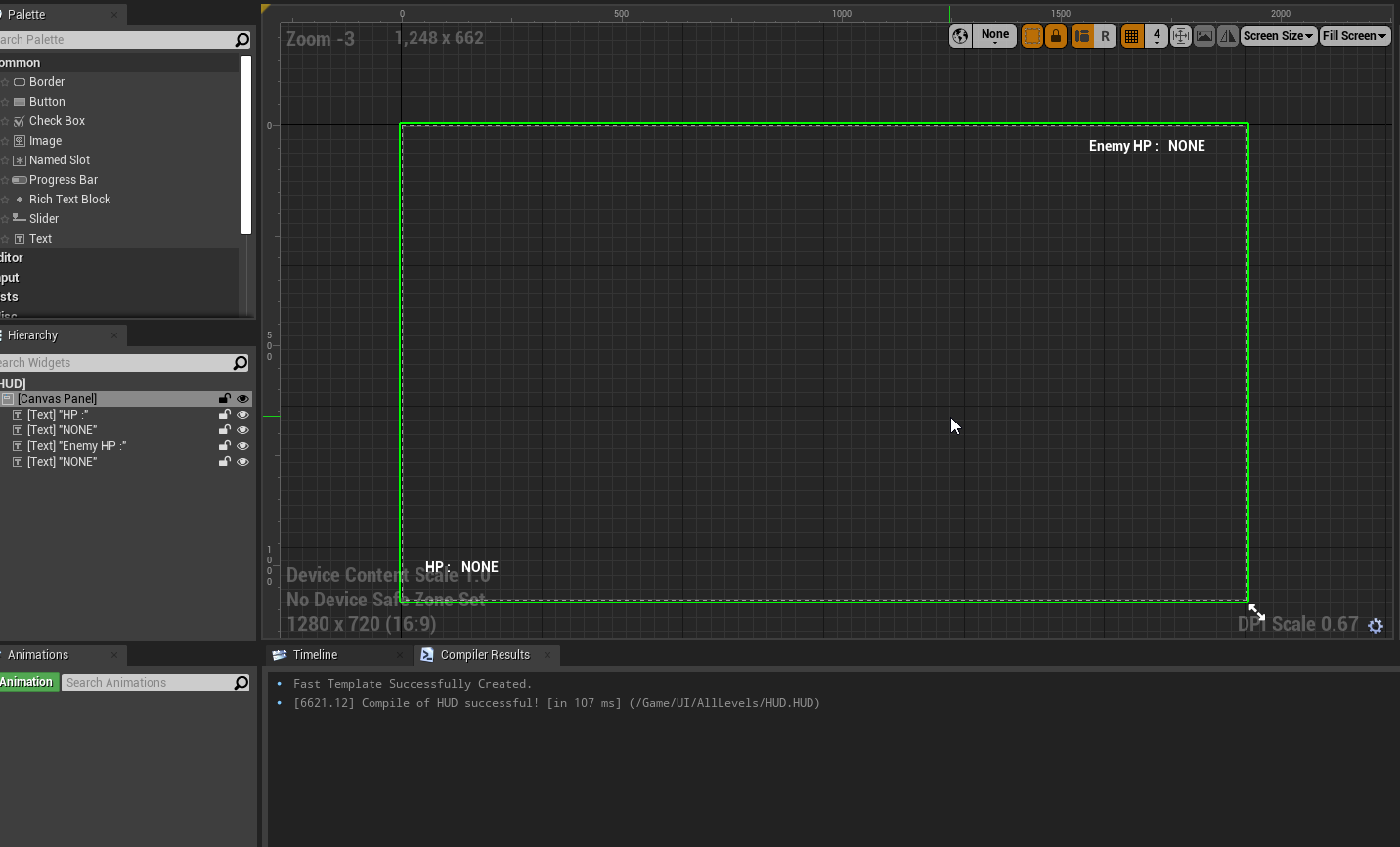
So by "each widget" you're saying I shouldn't have MyHP and EnemyHP in the same widget? Because right now i have it like so:
https://i.imgur.com/HCzWplE.png
 chrome bay
yeah exactly
you should have a separate widget for the health/status of each player
And each one of those is managed by the HUD, which creates them, and assigns pawns to them
So the Pawn, will call a HUD function called "OnPlayerAdded" from it's BeginPlay or something
OnPlayerAdded creates a "PawnHealthBar" widget, "assigns" it to a pawn, and keeps that in an array
Obviously it's game-dependent, but that's a pretty standard pattern
marble gazelle
its fine to have just this one UI, since it is not a Per Character UI that popsup or hides. its kinda static.
As the player characters spawn on your client they both can access everything so both can access your UI and report to it. To differentiate the two you just need to check if the actor is controlled locally or not.
If your UI is spawned after your Actors, you need to look for the Character first of course. If you are at a state where the UI knows both actors, it either can register to a health change event or it can just reference them and ask each tick for their health.
Since the health is replicated, each actor knows its own health.
inner nest
chrome bay
So the Pawn, will call a HUD function called "OnPlayerAdded" from it's BeginPlay...
Where do I create the OnPlayerAdded function?
chrome bay
HUD would be a good place
Using it as a central place to store all your UI widgets is useful
inner nest
That means create like an empty new canvas widget and use its event graph ? Because "HUD" isn't editable as far as i can see
That's probably it yeah 😛 I bothered y'all long enough 😄 Much appreciated to all of y'all ❤️
 vital heron
My bad wasn't looking. You can go first 😅
Oh no your all good! It's just when everyone posts their questions yours will eventually get lost and unless you repost your question your question will not get answered lol. I didn't want your question to go unanswered and get lost in the abyss lol
 bitter oriole
Yeah
It's the top level class that the client owns
It's basically the main class that clients can RPC the server
Also handles player input, HUD, etc
 hollow eagle
iirc there's an OnRep function in AController or APlayerController that you can override to get notified when the controlled pawn changes
dull lance
What's an optimal way to duplicate a component and all it's data for another actor?
say I have ActorA with a StaticMeshComponent, a custom mesh with dynamic material values (values are set at the client side on AMyActor::OnRepMaterialEdited), and I want to duplicate said component to a ActorB (and that it affects both server and clients)
bitter oriole
@tulip ferry There is no easy way to know except reading the code and knowing the engine.
dull lance
^ And getting a source engine version so you can breakpoint the hell out of everything you want to understand better
bitter oriole
No need for source engine for that, just install source & symbols in the regular launcher engine
bitter oriole
GetPawn()
By the way, the Unreal network compendium thing tells you some of which classes and methods reside where
And yeah, OnRep methods are just an event for "this variable was changed on server"
dull lance
@tulip ferry as a little thing, remember that OnRep() doesn't run on server (not for cpp). If you put any critical functionality in those functions, run it on Server manually
dull lance
dull lance
What's an optimal way to duplicate a component and all it's data for another act...
bumping for awesomeness
hollow eagle
Read what AWS has to say about spot instances. Everything you need to know is there.
https://aws.amazon.com/ec2/spot/
 thin jacinth
Thanks ill check it out 😃
 summer tide
So from my game mode, I cast to my controller than change my character's location to spawn location.
Currently I ony see server appearing.
Any idea what could go wrong?
dark edge
@summer tide wut.
That doesn't make any sense.
What exactly are you trying to do?
summer tide
Going from lobby to main level, I iterate over all the player starts to determine where the player choose to spawn. From game mode's event handling starting player node, I cast to my controller and in ctrl I I take the character and spawn the player. Does it make sense?
dark edge
@summer tide the game mode has functions you can override that select the pawn and starting location. Don't do it manually after that.
What do you mean you only have server appearing?
summer tide
Out of two clients, the host's character appears but the other client's camera only appears.
What's the function GM?
dark edge
I don't recall the name, just click the override button and look at all your options. There's a ton of them
summer tide
I could also use find player start
 bright breach
Hello, we are trying to get networking to work in a VR game and whenever the client joins the listen server, the host can no longer move. We've paid for a couple networking blueprints and have searched for solutions online, but nothing seems to point to what the problem is. Anyone have any ideas?
twin juniper
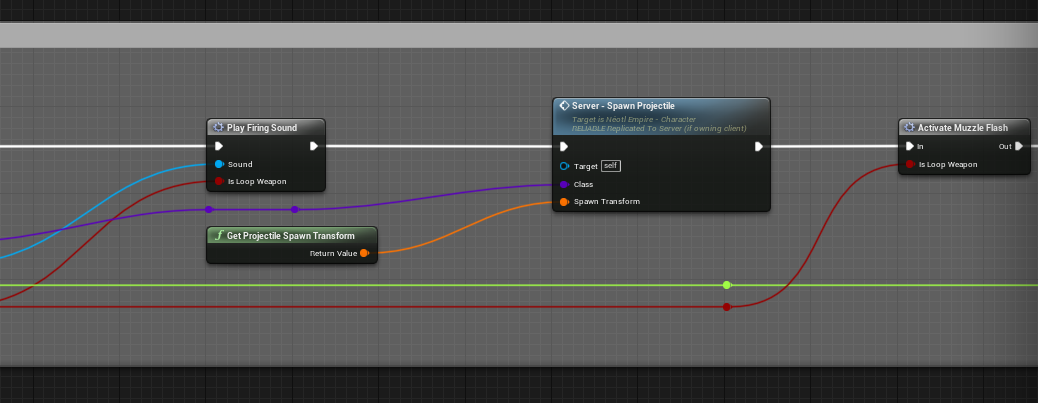
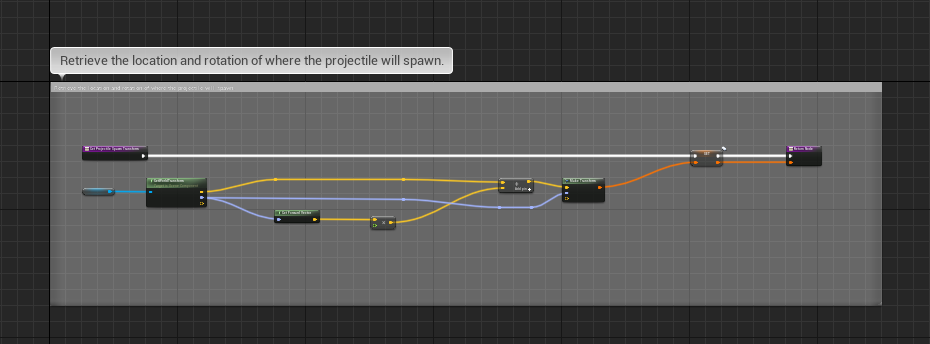
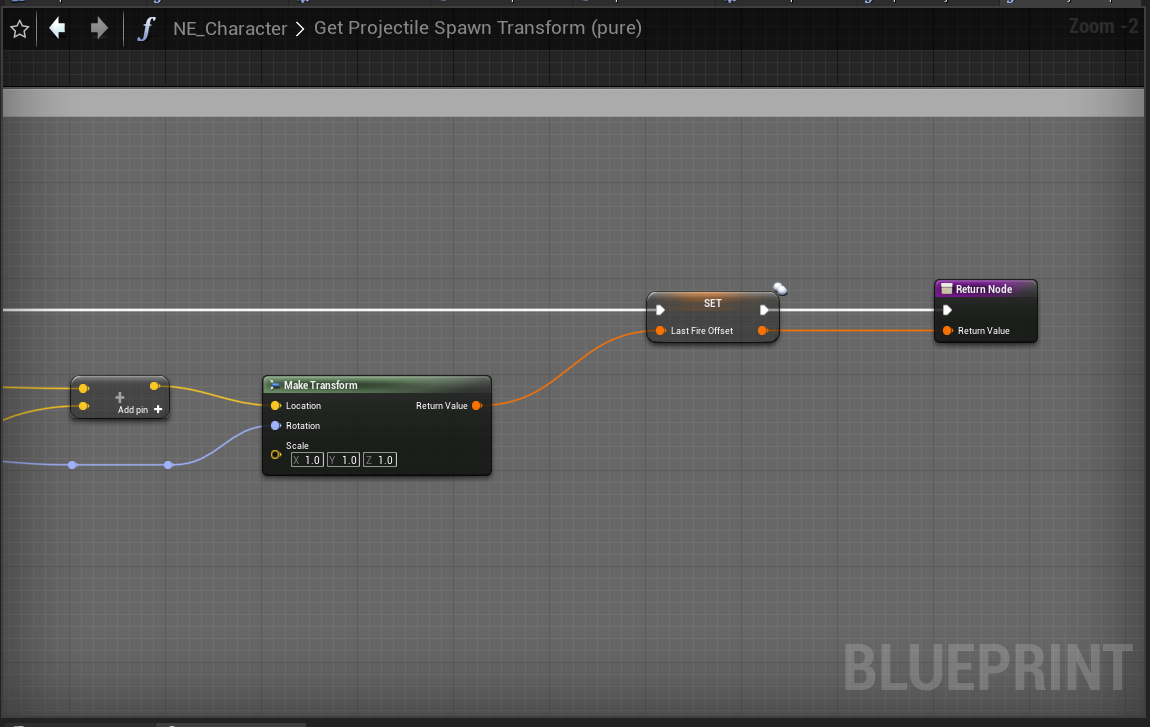
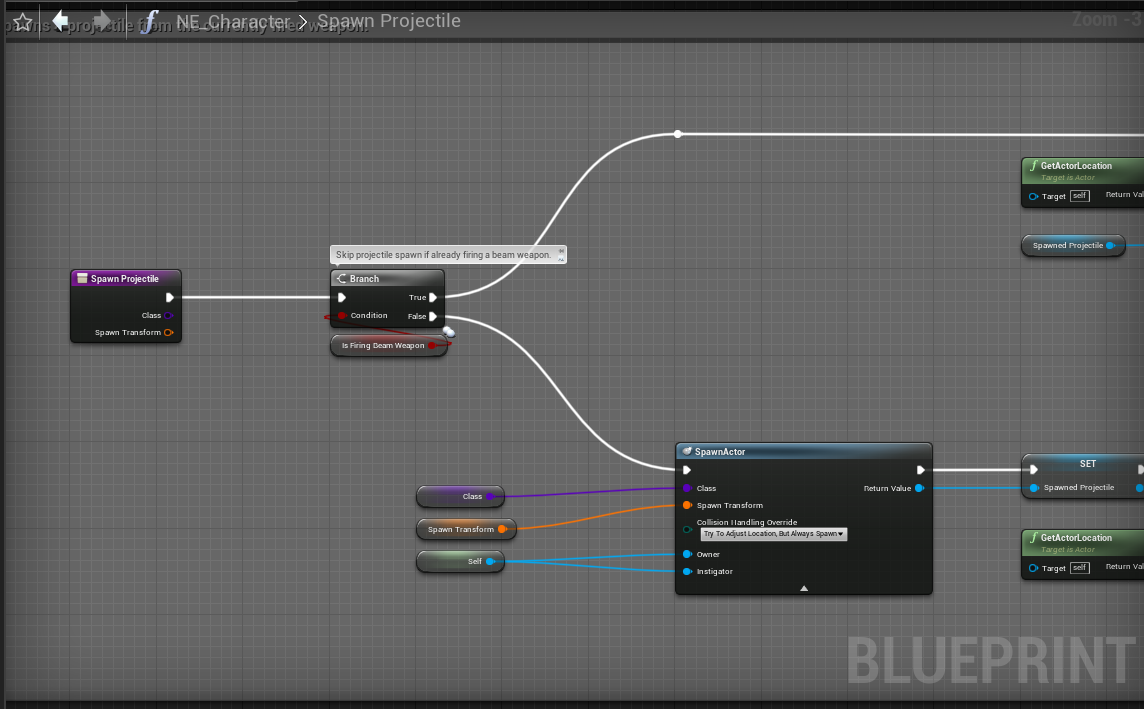
As I promised to @pure frigate on Twitch and upon his request, here are the blueprint data snippets relative to the projectile firing functionality. Still have yet to resolve this replication bug.
https://i.gyazo.com/293e46880ef229a38d2d55c00aec1263.png
https://i.gyazo.com/efb6c8c34d9a2b5d1fcc5815591baaf3.png
https://i.gyazo.com/9ecd369c2866788f0280b74e549f40f7.png
https://i.gyazo.com/3e9bc5a93529fd9d07094323a4d07188.png
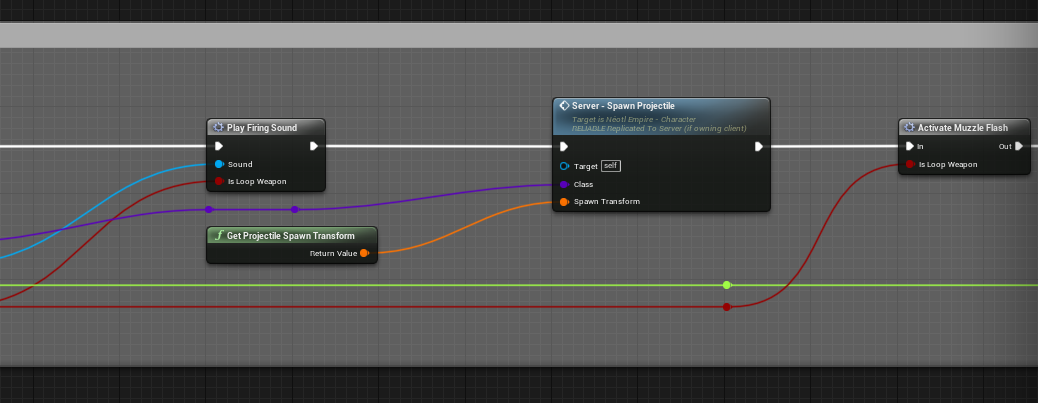


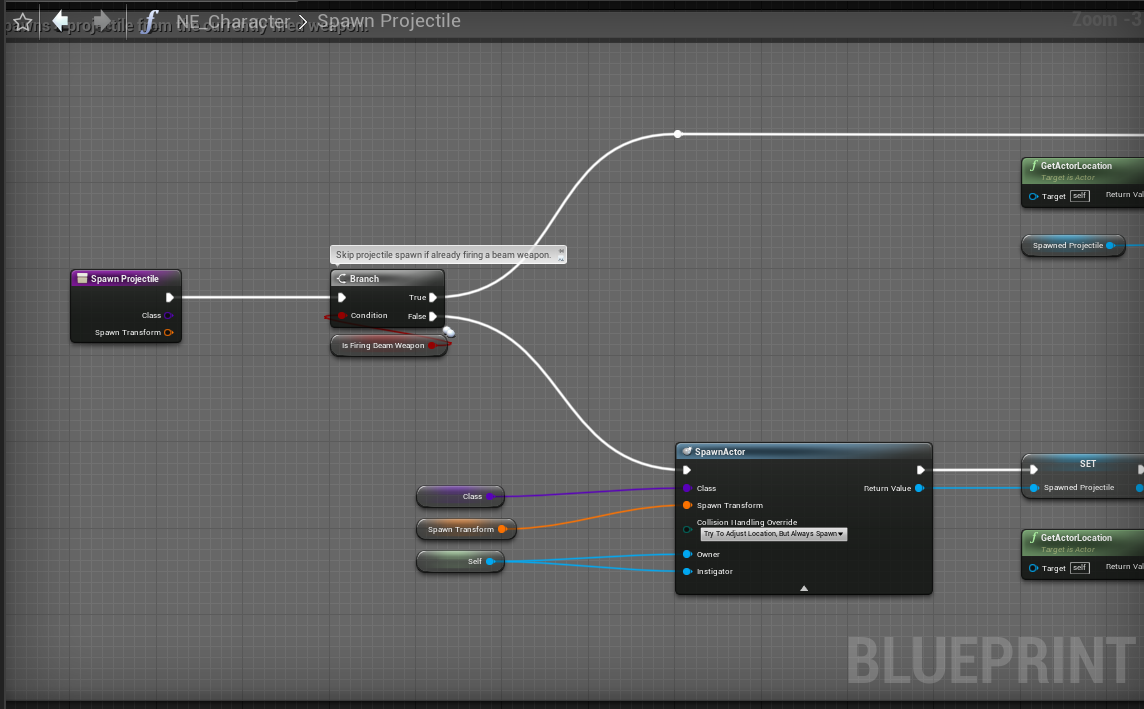
Let me know if you need the video of the problem in live action. You can also play the game on Steam and you will find the same issue I am trying to fix when playing an online match with someone.
This caught me by surprised since I had moved to 4.25 last year.
meager spade
what replication bug?>
gritty pelican
Will game mode login call after Seamless travel?
meager spade
no
 floral crow
Hey guys, any idea why an actor marked as AlwaysRelevant is being destroyed on a client with the reason being Relevancy? I thought always meant, well... always 😅
meager spade
you sure its relevancy destroying it?
gritty pelican
I have different game modes in two levels
and controllers/game state /player state
meager spade
login is only called when the player first connects, not when seamless travelling
floral crow
meager spade
you sure its relevancy destroying it?
Yeah, looked at the callstack and on Actor::ReceiveBunch (or something similar) I could see the reason being Relevancy
floral crow
Can it change per instance?
gritty pelican
What will work after a successful travelling?
meager spade
or its set in C++ but BP has set it to false
floral crow
These are the relevant settings on the actor
meager spade
well you could break point the actor that is getting removed
and check its relevancy flag
floral crow
Just in case OnlyRelevantToOwner can mess things up, but afaik AlwaysRelevant overrides the other one
meager spade
you have not overridden IsNetRelevantFor or w/e have you?
PostSeamlessTravel @gritty pelican
gritty pelican
Can there be different game mods, game states, controllers?
meager spade
ofc
gritty pelican
okay, thanks
floral crow
meager spade
and check its relevancy flag
Where can I look for the reason that relevancy ruled it out?
meager spade
well it will call IsNetRelevantFor function
floral crow
All I could find was this one argument saying "Relevancy"
meager spade
on AActr
floral crow
meager spade
you have not overridden IsNetRelevantFor or w/e have you?
nope
I have the error on a breakpoint right now
This is what I was talking about
meager spade
yes
floral crow
The entire callstack
meager spade
but you need to find the actor
its destroying
and check its locals
and then check its relevancy bool

as you can see here, bAlwaysRelevant overrides everything
floral crow
Apparently bAlwaysRelevant is true
meager spade
interesting
floral crow
btw, it is important to note that I've been able to reproduce the bug only on Bad network conditions emulation for both Clients and Server
meager spade
yeah but i have Always relevant stuff and i test in even worse than bad network connections
and never had that issue
something with AEntity is off
thing is
it could be this
hmm no that wouldn't cause it
floral crow
Thanks, at least I know that my behavior is not normal. That's a starting point
meager spade
i mean if it was a engine bug
then PlayerState would go away
and GameState
you have not missed a Super call anywhere
have you?
gritty pelican
@meager spade Where is a good place to spawn players after a successful travelling?
gritty pelican
PostSeamlessTravel called for each player?
floral crow
meager spade
you have not missed a Super call anywhere
I'm looking at exactly that rn
meager spade
specifically RestartPlayer function.
floral crow
Can't find any Super call missing
I only override 7 methods in cpp
I'm gonna look into the blueprint
gritty pelican
https://docs.unrealengine.com/en-US/API/Runtime/Engine/GameFramework/AGameModeBase/HandleSeamlessTravelPlayer/index.html
this function called after seamless travel?
Handles reinitializing players that remained through a seamless level transition called from C++ for players that finished loading after the server
meager spade
and that calls HandleStartingNewPlayer
which calls RestartPlayer
which is where you should spawn your pawn
floral crow
I can't find anything odd about Entity or its blueprint counterpart
meager spade
that is strange
floral crow
I'm def not overriding IsNetRelevantFor
Strangely enough, it only happens so far with this particular child of BP_Entity
All other BP_Entity children don't exhibit this
meager spade
yeah i would probably say a corrupted BP, but the bool was valid
floral crow
At this point it could well be a corrupted bp
Yeah, that's what I thought
Glad to know I'm not getting crazy haha
Thanks a lot @meager spade !
Gonna recreate it and go from there
gritty pelican
@meager spade i can't override HandleStartingNewPlayer
virtual void HandleStartingNewPlayer(APlayerController * NewPlayer) override;
Which function to override in game mode to spawn character at a specific location? If I set a character as a pawn in game mode it won't spawn the cloent but the cam only
 pure frigate
@twin juniper What’s the expected behavior and what’s the bug?
meager spade
@gritty pelican override RestartPlayer
or RestartPlayerAtPlayerStart
start looking at the source code not just the online docs
and understand the flow
gritty pelican
so i can use SpawnActor in RestartPlayer?
meager spade
either RestartPlayer or RestartPlayerAtPlayerStart depending if you also want to choose the start spot
we just overrode RestartPlayer
and did everything there
gritty pelican
void ACPP_BattleGameMode::RestartPlayer(AController* NewPlayer)
{
    //Super::RestartPlayer(NewPlayer); not need
    if (APawn* PlayerPawnPtr = NewPlayer->GetPawn())
    {
        NewPlayer->UnPossess();
        PlayerPawnPtr->Destroy();
    }

    //there spawn actor and possess
}
right?
meager spade
sure
make sure you do basic checks
    {
        return;
}``` at the topjust to make sure you don't crash.
gritty pelican
okay thanks
void ACPP_BattleGameMode::RestartPlayer(AController* NewPlayer)
{
    if (NewPlayer == nullptr || NewPlayer->IsPendingKillPending())
    {
        return;
    }
    if (MustSpectate(Cast<APlayerController>(NewPlayer)))
    {
        UE_LOG(LogGameMode, Verbose, TEXT("RestartPlayer: Tried to restart a spectator-only player!"));
        return;
    }

    if (APawn* PlayerPawnPtr = NewPlayer->GetPawn())
    {
        NewPlayer->UnPossess();
        PlayerPawnPtr->Destroy();
    }

    //there spawn actor and possess
}
I have Remove All Widgets in my Event Begin Play of my controller. For clients the widgets will get removed. Any idea>
 fossil spoke
Given the name of the function and where you put it, that kind of makes sense....
Are you asking the right question?
summer tide
Well i want to remove all widgets from all players and show the loading screen to all players.
THen remove the loading screen when done/
So I'm showing the loading screen from my controller when i'm iterating over the players
 frank pecan
If I had a ball that players can call a function like "Set Linear Velocity" on, how do I get that to replicate to all the players? I've tried calling that SetLinear velocity on the server, then having it multicast to the clients, but the force doesn't get applied to the ball for the clients
dull lance
quick question. If I have two ReplicatedUsing Variables, and I do cpp MyServerFunction() { VarOne = SomeOtherValue; OnRepVarOne(); VarTwo = SomeOtherOtherValue; OnRepVarTwo(); }
For the clients, is there a way to guarantee so that OnRepVarOne() also runs before OnRepVarTwo()?
frank pecan
dark edge
Setting it on the server should be enough
This is what I have:
and that launch ball at the bottom is the set physics velocity
So if the server player tries to launch the ball, he does. If its a client, the ball just drops
fossil spoke
@dull lance No, you would need to combine them in a Struct and replicate the Struct instead.
meager spade
you can guarentee order of onreps
from what i saw from a comment
it goes from the order they are added into the LifetimeProps array
@dull lance
dark edge
@frank pecan You don't need to multicast anything.
meager spade
DOREPLIFETIME(MyProp2);
Super::GetLifetimeReplicatedProps(Blah);```Do you have the physics movement replicating?
meager spade
would rep MyProp first, MyProp second, and call the OnReps in that order iirc
though you would need to test it
meager spade
yeah i saw a comment in one of the source files
fossil spoke
Is it confirmed?
meager spade
that stated, this property must replicate first as we need it in the onrep of the second property
fossil spoke
I just figured it was random as to where in the bunch the properties were set
meager spade
iirc, it iterates through all properties in order, and shoves them out if it needs to rep
fossil spoke
Good to know.
meager spade
but i am going on a comment here, and i have not tested.
but should be easy to test
dull lance
@meager spade is it necessary to have them execute before the Super:: call?
frank pecan
@dark edge I just tried on server and nothing happens at all when it's fired for the clients.
meager spade
not really but it gives you control that those props will be the first ones to rep
before any bp props and derived class props
dull lance
Ah nice
frank pecan
This is the replication settings for the ball:
meager spade
@fossil spoke @dull lance FRepLayout::ReplicateProperties looking at this, it does seem to be in order
though not sure how that will work for PushModel
fossil spoke
Id say its the same.
meager spade
@dull lance if you want to do something once all props have replicated, you can use /** Called right after calling all OnRep notifies (called even when there are no notifies) */ virtual void PostRepNotifies() {}
fossil spoke
Push Model is almost the same as just using ForceNetUpdate
On an Actor that has a 0 net update frequency
meager spade
yeah but the order you mark the props dirty might affect the order they are listed no? unless it goes throughs the props and checks it against the dirty flag
fossil spoke
Honestly couldnt say.
Havent looked that deep haha
Id just figured it would follow the same rules.
meager spade
would make sense if it did
dull lance
quick question on FastSerializers: when would/should you NOT use them when dealing with replicated arrays?
dark edge
@frank pecan
meager spade
i mean if the data is arbitary and you dont need callbacks etc
normal arrays only replicate changed elements anyway so they are pretty effecient
dull lance
Understood ^_^
kindred widget
@meager spade Thanks for pointing that out, actually I thought normal arrays always sent the full array. That led me to some testing. I find it interesting that it replicates the full size of the array, but only the properties that have been changed on the server. Like, replicating the array once by adding ten indexes, then constantly changing only index 5 on the server. On the client if you clear the array to zero indexes, it repopulates the array with ten indexes, but index 5 is the only one that's not defaulted since it was changed on the server and called that replication. I'm going to need to keep that in mind in the future. I might even ditch FastArrays for a couple of things since I don't need the callback stuff so much as simply the raw data.
 severe widget
I think it's just talking about how it arrives at the state to replicate - the comparison being faster with explicit index flagging
 topaz imp
Does unreal contain built-in mechanics for rewinding and replaying physics all in a single frame, particularly for building physics based prediction with clientside reconciliation for multiplayer games?
Currently jumping between engines trying to find the right one for my needs without having to install 3rd party libraries.
 fierce oriole
Hello Everyone! I got a hopefully easy one for the Multiplayer Pros: This is in a Macro. Why does the location replicate but the rotation does not? Is it because its in a macro?
kindred widget
@fierce oriole I assume that is a pawn controlled by a controller?
If that's the case, that's not actually a multiplayer issue. Pawns possessed by a controller rely on that controller's Control rotation. So changing their rotation will just get overwritten. You have to set location and then set the pawn's controller's control rotation.
dark edge
@topaz imp not yet. It's in development
fierce oriole
@kindred widget I will try that now. The reason I believe this is a replication issue is because it works as intended when Offline
kindred widget
That's a bit odd. Even in offline, pawns should override their rotation from their controller's ControlRotation.
fierce oriole
yeah as you can see here, it is as if the entire capsule is not rotating with the vehicle rotation
@kindred widget I am trying this but no changes
 small osprey
need help pls PM me
kindred widget
@fierce oriole I'm not sure. I was under the impression it was a normal pawn. I'm unfamiliar with exactly how to do what you're trying to do, haven't done vehicles a lot, but what little I know is usually you attach the player's character mesh to the car and more or less disable the character, disable collision, movement, etc. Then possess the car as a pawn.
 elder sable
Hi, if i have a player state class for a lobby map, and another one for the game map, how should i pass data between those two classes, should i just copy the common properties ?
 normal umbra
How can i create a local level for capturing character, pets etc?
 violet sentinel
Hi. is there a limit of how big Client RPC can be?
I need to specify collection of extra assets to preload on clients before opening map level
Thinking on doing a client rpc to all connected playercontrollers with list of assets (FSoftObjectPtr)
(or tell if there is a better option)
chrome bay
How big are we talking?
A TArray<FSoftObjectPtr> can get large quite easily, especially since each entry will be sent as a full path name string
violet sentinel
chrome bay
How big are we talking?
on average 60-70 FSoftObjectPath
current max 114
chrome bay
Yeah that is quite a lot
violet sentinel
i did split them in arrays of 20 and send them right now
chrome bay
A better approach would be to make the list of assets static data if you can, and put that in a data table or data asset
Then just pass a data table row name or the data asset
 potent cradle
There's no way of using Niagra and retaining synchronised transforms of the individual particles across the network, right?
chrome bay
there's not
violet sentinel
chrome bay
A better approach would be to make the list of assets static data if you can, an...
the problem is session data prepared in game lobby (Based on session configuration) and clients don't know what will be
potent cradle
chrome bay
there's not
Thought so, gotcha. Sad 😦
chrome bay
Is there a reason they need to load it prior to travelling?
It might even be by the time you get to the map, it's already been unloaded
violet sentinel
chrome bay
Is there a reason they need to load it prior to travelling?
yea, some are quite heavy
reworking existing system
previous system was just hardreferencing all blueprints in special "aggregator" actor which was spawned in map
so after map was loaded everything was freezing for good minute or two
it was bandaged by adding fake loading screen and waiting for event from aggregator actor
🤦
chrome bay
And there's no way you can compress what you're sending somehow? I.e. instead of sending long path names, sending smaller static data of somekind?
chrome bay
I mean, it might be fine. So long as you don't send so many you flood the reliable buffer
Breaking it up into multiple RPC's probably isn't going to help much if they're reliable, might make it worse
There is a max TArray size, but I can't remember now if it's # of elements, or the actual data size
violet sentinel
the broadcast is done once lobby finishes building list of assets that will be used in session and done before travelling to game level
chrome bay
I would stick to just one RPC that contains the full list
If that's too much, then find a way to ID the assets with an integer or something to reduce the size
Presumably there is a fixed list of things that would ever be loaded
violet sentinel
oh, true. i can make an index of asset
int to path
and send just ints
just need to set up the table, maybe in datatable or ini
chrome bay
yeah, just a cooked data asset somewhere that everyone has, with a big array containing soft ptrs
should be fine sending an array with 100 or so ints in there just as a one-off
Can't see that being any trouble really
MAX_PACKET_SIZE is 1024 bytes by the looks of it
Though the engine sends stuff in bunches which contains the packets, and it can send partial bunches
So it might be okay without all that
potent cradle
chrome bay
there's not
Hey Jambax, friend of mine just mentioned this on that topic:
"you can choose it to be determinsitic or change to CPU sim"
Could you grant me the wisdom as to why that still prevents its use in a "synchronised" fashion within multiplayer context?
(even though there's indeed no actual syncing)
chrome bay
I'm not sure, probably best to ask in #niagara
Niagara doesn't really interface with multiplayer stuff at all AFAIK
potent cradle
Good idea, crossposted 😄
woeful hound
Should my client player controller be possessing the Server pawn or the Autonomous pawn on the local system?
 sweet marsh
Hi guys, i'm having a few issues with stopping a particle system across the network
Spawning seems to work fine, but stopping the particle doesn't work on the client, the vfx stops on the client character on the host machine but not the client
{
    if (GetLocalRole() == ROLE_AutonomousProxy && GetRemoteRole() == ROLE_Authority && GetNetMode() == NM_Client)
    {
        GEngine->AddOnScreenDebugMessage(-1, 3.0f, FColor::Red, FString::Printf(TEXT("Client")));
        ServerStopVfxParticle();
    }
    if (GetLocalRole() == ROLE_Authority && GetRemoteRole() == ROLE_AutonomousProxy && GetNetMode() == NM_ListenServer)
    {
        GEngine->AddOnScreenDebugMessage(-1, 3.0f, FColor::Green, FString::Printf(TEXT("Server")));
        MulticastStopVfxParticle();
    }
}
The ServerStopVfxParticle()
simply calls the stop vfx particle again and then the multicast function stops the particle
No idea why this won't kill the VFX
 winged badger
probably destroying the actor that has the MC at the same time you're calling the MC
sweet marsh
@winged badger thanks ZLO, i'm beginning to think that maybe a lot of the odd stuff i'm seeing is due to the GAS and then multicast functions in code
i've done an authority check in the ability and it now deactivates as expected
winged badger
if so, you can just stop VFX at EndPlay
and lose the MC
your role checks are a bit of an overkill there
sweet marsh
yeah, i was just debugging things because i couldn't quite understand why things weren't working,
it looks like calling multicast functions from inside a gameplay ability sometimes fails to run on the server
 shut gyro
I can't get multiplayer to work in standalone for editor to work for whatever reason, only PIE works but that isn't really ideal...
Anyone else experiencing this issue?
Seems like the local address the NetDriver binds to is 127.0.0.1 for PIE but 0.0.0.0 for Standalone
meager spade
@sweet marsh you should not be multicasting inside a GA
anyway if you are using GAS, why are you not using Gameplay Cues?
sweet marsh
@meager spade I have a few functions to do things like change scale of a collision component on the character mesh, (which isn't replicated) so i have that function as a multicast function which is then called from the gameplayability
Yes i guess i should be using cues, however in the cue i can't do logic in them, although i could probably do the logic in the GA and then add the correct cue manually rather than on the GA options
Is there an actual issue with using multicast in GA or is it just not great design because its creating divides that people have to know about and means you have to have visual studio to fix them
for example, i have a wearables component on my character with a multicast function that detaches items from the character, within multiple GA i call this to remove items and force the item to launch off the character
inner nest
Hello everyone! I've been struck in what seems a pretty straightforward issue but I've been searching this channel and haven't found a satisfactory answer.
https://forums.unrealengine.com/development-discussion/blueprint-visual-scripting/1852702-multiplayer-how-to-display-other-player-s-health-on-client-hud
I've made a forum post, if it isn't too much trouble and got the time, I'd appreciate some insight, cheers!
Unreal Engine Forums
Hello there! I have this very basic prototype idea I need to make in Unreal but it requires networking. I'm familiar with game development and UE, but I'm a beginner when it comes to networking.
I think i have my basic theory and vocabulary down but i've been struggling so any help is greatly appreciated!
The game is a simple
marble gazelle
inner nest
Hello everyone! I've been struck in what seems a pretty straightforward issue bu...
Still the same answer, In your BeginPlay of your Player_BP, check if it is the local player, or not, and if its not the case, notify the UI that you are the enemy and want to show your Health ...
The BeginPlay for each actor is called always once and on all clients and yes you can do different stuff in there per client, by just checking if that actor is controlled locally or not
inner nest
marble gazelle
Still the same answer, In your BeginPlay of your Player_BP, check if it is the l...
You got me 😛
Sounds straightforward enough, "notify the UI you are the enemy" means casting to my UI from the Player_BP correct? What would be the object input of the cast in this case? Get player pawn says would always fail, hm
marble gazelle
inner nest
You got me 😛
Sounds straightforward enough, "notify the UI you are the enemy" ...
Actually you first of all need a reference to your UI. if you have that, you can do smth like SetEnemyPlayer(Self) since the actor calling this is your enemy (if you checked IsLocallyControlled == false)
inner nest
Oh shit, I think that got me somewhere :0
I think its working but just the UI is getting constructed multiple times, probably because Im constructing UI on the player_BP, I think thats bad practice.
Let me get some things straight. I should have a different Widgets for My health and Enemy Health right? Not all text boxes in the same widget.
Also I kinda hacked it now as im setting the EnemyDisplay in the UI from the Player_BP and I assume that's a no no. Instead I should get the correct enemy value from the UI but I'm not sure how do I cast to the correct pawn from the UI.
marble gazelle
inner nest
Oh shit, I think that got me somewhere :0
I think its working but just the UI i...
Well you still can have just One UI, but instead of creating it by the PlayerCharacter, use the PlayerController. Then your LocalPlayerCharacter and your EnemyPlayerCharacter can access it and register. Then the UI on the other hand can register a callback on the player (you would need to provide) that is triggered each time the health of the enemy changes.
You also can just store a reference to the actor and then check the health of each in each tick of the UI and update the values accordingly.
inner nest
You also can just store a reference to the actor and then check the health of each in each tick of the UI and update the values accordingly.
That sounds easier and more straightforward I think. I construct the UI on the HUD class right? And then how would I practically go about storing a reference to each actor in the UI event graph?
Plus even if I store a reference to each player in the UI, how would it know which is which? (Unless is locally controlled will also be used in that UI graph)
marble gazelle
.... You stated you know unreal ... I actually don't really believe that >.<
You can just add properties to your widget BP like LocalPlayer, Enemie of type Player_BP
inner nest
Hahaha fuck me, I can do everything I want in singleplayer I swear 😛
Aight man, I appreciate the help a lot i don't wanna keep you at it
marble gazelle
this is not a multiplayer specific feature..
you just need to save a ref to the actor that registers by lets say a method called SetLocalPlayer(PlayerBP) or SetEnemy(PlayerBP)
inner nest
@marble gazelle I probably didn't do it the exactly way you said but results prevail!
https://i.imgur.com/x6IUsPf.png
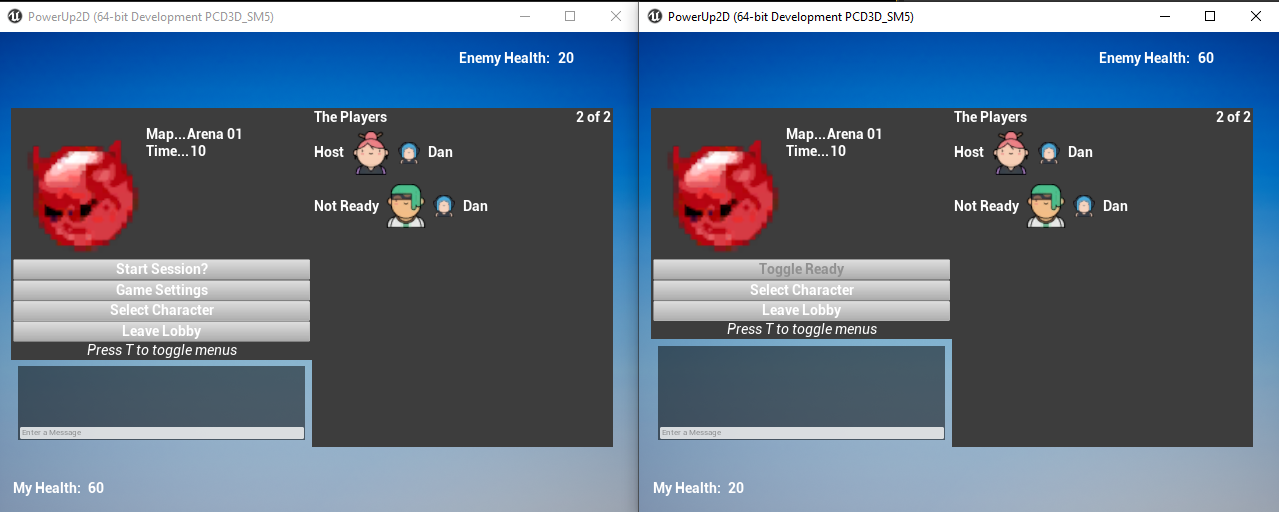




thanks man, it do be working
♥️
marble gazelle
😄 great!
 livid ravine
hey just wanted to say hi, im somewhat on the same boat where i'm trying to use Gauntlet to run multi client /server tests, with the caveat that im doing this on Mobile (android for now 😂 ). id love to have a channel here for 'automation' or a place to discuss about gauntlet. it sounds like youre bit ahead of me, im still struggling to use a controller ue4 provided, GauntletControllerBootTest.
silent valley
livid ravine
hey just wanted to say hi, im somewhat on the same boat where i'm trying to use ...
Hi 👋.
I have looked into Gauntlet a bit, but mainly still figuring out automated testing in general!
 paper lava
can I get some help with match flow?
I have a game mode with a customReadyToStartMatch but it seems to me when I return true on that, my playercontroller gets destroyed.. Is there a lifecycle chart of the multiplayer match somewhere that tells me when to do what? (create spec pawn, create player pawn, initialize hud, etc etc)
paper lava
aw man, my replication graph stops replicating the playercontroller on match start for a second.. for whatever reason
thin jacinth
How would I find out how much compute units I need for my game ? I'm looking to make a multiplayer game it has around 6 to 8 player lobbies, In hoping to use aws and contacted them too, but how would I find out the estimated compute units since then I can figure out my budget. Any ideas or suggestions?
Please @ me if you help 💓
 thin stratus
By testing different ones
 cursive stratus
Quick question, in a split-screen environment, is it better to let the Player Controller consume the inputs, or can I use Get Axis in the Pawn?
Or should I go the classic route of calling Pawn functions from the PC (passing along axis values)?
 lilac raven
Hi all im trying to call an RPC from client to server on an actor but its not calling the RPC to the server when fired on client
Why is this? server it calls and replicates to all clients, but from clients no
thin stratus
Cause your Client doesn't own the Actor
You can't do that on every actor
@cursive stratus I usually just have my Pawn related input in my Pawn
dark edge
@thin jacinth Playtest for a few hours on a populated server, log the utilization, extrapolate, automate server rollout, off-by-one error, $1M bill from AWS.
cursive stratus
@thin stratus thanks!
thin jacinth
dark edge
<@549330870276718610> Playtest for a few hours on a populated server, log the ut...
Ahhg thanks, and I'm good that 1m$ can go away 😂😭
lilac raven
thin stratus
Cause your Client doesn't own the Actor
i see. is there a way I can make the client own this actor, its not my player controller, its a gamemode manager
thin stratus
GameMode isn't even accessible by Clients
And yes, but that requires a ServerRPC first
So you will have to go over your Client owned actors anyway
There is no way around it
lilac raven
Oh its just a normal actor, but it manages a gamemode
I can set via server RPC
so i just RPC it, cast to each character as owner of this actor?
 grizzled stirrup
An OnRep event of mine gets called before BeginPlay, I have tried calling the logic I need in OnConstruction but that is too early
Is there a way to ensure that BeginPlay gets called before the OnRep event?
Other than manually calling BeginPlay there which feels like a hacky way of doing it
meager spade
@lilac raven only one player can own it or no one
not all players.
Owner needs to be set on server also.
@grizzled stirrup nope
grizzled stirrup
So my best bet is to just move the code I need in begin play and the onrep call to a function and call it twice?
meager spade
OnRep stuff always fires before BeginPlay went sent in the initial bunch
meager spade
@grizzled stirrup i am not sure what you are doing
but you can check in your OnRep for HasActorBegunPlay
and cache stuff so when BeginPlay runs, you can do stuff
if a specific bool is set
or something
grizzled stirrup
I'm just setting an FLinearColor property that is used when the OnRep fires
And wanted to cache it in begin play
As it's used around the place
meager spade
but its already cached tho?
grizzled stirrup
But I just moved it to a getter now and call it in mulutiple places
No big deal
meager spade
from the OnRep?
grizzled stirrup
No BeginPlay was the only place that cached it
And OnRep used it
So it was uninited there
meager spade
oh right
grizzled stirrup
Since the OnRep got called before BeginPlay
I'll just call it multiple times
A few casts and getters can be called a few more times, shouldn't be a big deal
meager spade
could you not cache it in like PostInitializeProperties?
grizzled stirrup
If GetOwner is valid there then sure!
meager spade
nah
grizzled stirrup
GetOwner doesn't appear to be valid in OnConstruction
meager spade
i think thats BeginPlay
grizzled stirrup
Ah damn
Getter it is then
Lesson learned anyway
BeginPlay does NOT come first 😄
meager spade
yeah i cant actually remember what comes just before the OnRep's and the owner is valid
if any, i would have to test, but yeah fun of UE4 networking 😄
grizzled stirrup
😄
winged badger
@grizzled stirrup why would you need to cache that color on BeginPlay?
grizzled stirrup
It's just used in a bunch of places around the class
I suppose it's still dirt cheap to just use getters and make copies of it each time
winged badger
why specifically on BeginPlay?
grizzled stirrup
That's the earliest I could call GetOwner
At least without more research
As OnConstruction / PostInit doesn't have an owner yet
winged badger
we talking actor or component?
grizzled stirrup
Actor
winged badger
void AActor::OnRep_Owner()
{

}
easy to adjust replayout for color to replicate 2nd
but that is the earliest point where you have an Owner on the client
grizzled stirrup
Great to know thanks!
In this case I think a few extra getter calls are ok but I'll be sure to do something similar here if I need a heavier thing cached
winged badger
(the Owner member being replicated itself)
grizzled stirrup
Got it!
grizzled stirrup
It's basically casting to 2 possible parent actors and calling a further getter on one of them
So still quite cheap
winged badger
FLinearColor GetMyColor() const
{
  return MyColor;
}
gets inlined anyways by the compiler
so its not quite cheap, its exactly as cheap
it also has the advantage of not breaking BPs if you ever rename it and its exposed
example of what i mean
i had
UPROPERTY(BlueprintReadOnly) EHeroClass MarineClass;
i replaced it with
USTRUCT(BlueprintType)
struct FPowerSuitModel
{
    GENERATED_BODY()

public:
    UPROPERTY(BlueprintReadOnly) ESolsticeHeroClass MarineClass = ESolsticeHeroClass::ESHC_Invalid;
    UPROPERTY(BlueprintReadOnly) ESuitTier SuitTier = ESuitTier::Unspecified;
};
and out of 15 or so BPs that were using it, not one broke
because they were all using GetMarineClass() function
grizzled stirrup
Ah that's clever!
Elegant way to handle it
This is the getter in question, should be fine right?:
FLinearColor AMasterProjectile::GetTint() const
{
    FLinearColor Tint = FLinearColor(1.0f, 1.0f, 1.0f);
    AProjectileWeapon* OwningWeapon = Cast<AProjectileWeapon>(GetOwner());
    if (OwningWeapon)
    {
        Tint = OwningWeapon->GetTint();
    }
    else
    {
        // If not fired from a weapon, check to see if the owner is an enemy
        AEnemyC* OwningEnemyC = Cast<AEnemyC>(GetOwner());
        if (OwningEnemyC)
        {
            Tint = OwningEnemyC->GetEnemyTint();
        }
    }

    return Tint;
}
Though I think better practice would be to pass the linear color in as a ref and return void...
winged badger
makes it slightly awkward to use from c++
grizzled stirrup
Yeah I like just passing the getter right into functions
Without having to create an empty property, fill it then pass it in
In this case would you just leave it as is?
Since FLinearColor isn't that heavy
winged badger
to save 8 bytes of memory for copying a ref instead of copying a color?
i wouldn't do it, makes things less readable
grizzled stirrup
Great will keep it like this in that case
thanks for the help!
One other thing, if passing a normalized vector to the server, if using FVector_NetQuantize it seems to just point straight out
Should I always be using FVector_NetQuantizeNormal ?
winged badger
FLinearColor AMasterProjectile::GetTint() const
{
    if (AProjectileWeapon* OwningWeapon = Cast<AProjectileWeapon>(GetOwner()))
    {
        return OwningWeapon->GetTint();
    }
    // If not fired from a weapon, check to see if the owner is an enemy
    else if (AEnemyC* OwningEnemyC = Cast<AEnemyC>(GetOwner()))
    {
        return OwningEnemyC->GetEnemyTint();
    }

    return FLinearColor(1.0f, 1.0f, 1.0f);;
}```easier to read/skim
grizzled stirrup
Ohh man I did not know you could pass in the cast directly like that
to the if statement
Much nicer
Thank you
winged badger
you can't combine conditions when you put assignment into if
but for most common use-case, it works just fine
grizzled stirrup
Very neat way of shortening common casting checks
winged badger
normal takes less bytes
with drawback being that it can only handle range 0...1 per vector component
for normalized vector, there is no drawback
grizzled stirrup
I'm curious why my dir is pointing straight out in that case...
Thanks I had thought it should be the cheapest option
Most likely just some mistake in my vector
winged badger
straight out is kylekatarn speak for? 😄
grizzled stirrup
😄
winged badger
if you convert a rotator to FVector_NetQuantizeNormal
you will lose the Roll information, as Vector can carry only Pitch+Yaw
grizzled stirrup
That's so weird the Dir works fine when using NetQuantizeNormal
But it only had yaw with NetQuantize
grizzled stirrup
Ahhh so the info got discarded
I assume NetQuantizeNormal normalizes in it or something
winged badger
no
all compressed FVectors inherit from FVector
they just override NetSerialize, they don't do anything different
grizzled stirrup
Strange in that case then no?
That the most compressed version is correct
But NetQuantize is incorrect
winged badger
so if you were counting on implicit instantiation of FVector_NetQuantizeNormal to normalize the vector for you
it won't
grizzled stirrup
I wonder how it suddenly works though if it doesn't normalize for me?
winged badger
no idea what you were doing
grizzled stirrup
For my Dir I get a forward vector of a mesh which I believe is normalized and then do this Dir = SpreadRandomStream.VRandCone(DirWithoutSpread, SpreadConeHalfAngle, SpreadConeHalfAngle);
Not sure if that un-normalizes it
winged badger
the packed vectors only serialize their data over the network in a different way
 vivid seal
if i change a variable in a FastArray item will it replicate the whole struct or just the changed value?
winged badger
usually whole struct
unless you implemented delta serialization for the item by hand
winged badger
for direction, it points the same way, normalized or not
grizzled stirrup
Yeah can confirm my dirs are all within -1 to 1 now Edit: Ah which i guess means they ARENT normalized as normalized is 0-1 right?
So that is very strange
That NetQuantize didn't work but NetQuantizeNormal does
Wait doesn't NetQuantize drop the decimals?
So it'd just be 0?
rather than 0.33
or whatever the normalized vector is
vivid seal
struggling to wrap my head around client prediction of cooldown timers. for example, i want the client to cast a spell, predict that it used 2 of his 3 charges, predict that the cooldown length will be 1.5 seconds, and start his own timer. at 1.5 seconds later he should gain a charge clientside if the server hasn't corrected him. Server can replicate the actual state of charges and cooldowns for an ability and the client can then add his predicted deltas. This is fine for spending charges, but for gaining them and then simulating another cooldown starting (for abilities with multiple charges) I'm not sure how to go about doing rollback and corrections.
Anyone have any ideas on this? It seems important to do some kind of client prediction for this so that higher latency doesn't mean waiting longer in between being able to use abilities (waiting for the server to replicate the cooldown success rather than predicting it a bit earlier)
winged badger
when client predicts something, like mana used
it will still keep its mana variable at the value it last received from server
it will instead introduce a 2nd variable, ManaClientDelta, ot w/e you want to call it
and the function
float GetAvailableMana() const
{
  return Mana - ManaClientDelta;
}
when the server confirms the activation, client will update its Mana to server's value and set Delta to 0
similarly, if server rejects the activation, client will just zero out its delta
last one would be a rollback
vivid seal
Yeah i have this implemented for resources like mana and energy, as well as ability charges (server replicated charges are separate from the displayed charges on the client, and I keep an array of predicted deltas to update that are cleared when the server acknowledges the cast that created them). I'm specifically concerned with things that involve timers, like predicting a cast bar's start/end time on the client or a cooldown's start/end time
the main thing is that a cooldown timer starting can be caused by an activated ability, but not always
since the cooldown will just run again in the case of multiple charges being used
winged badger
client should start its cooldown on it own as if it was in standalone
then just apply corrections from server
you can wait on server to confirm cooldown has expired to put the abilty back to available state
vivid seal
in that case wouldnt the cooldown effectively be Cooldown + ping for the client?
vivid seal
kind of related question, do you synchronize timestamps between server and clients beyond just using GetServerWorldTimeSeconds? i've heard it's not super accurate
winged badger
i do bounce RPCs for better sync
void ServerRequestTimeStamp_Implementation(float ClientTimeStamp)
{
  ClientSendTimeStamp(ClientTimeStamp, GetWorldSeconds());
}
 barren patrol
I was really worrying about non-predicted CDs for a while too. then I came to the conclusion that it really doesn't matter. at least in the context of my game and probably most games.
If you are doing something fast paced multiplayer, you probably need to be delivering servers that can provide <100 ms anyway
winged badger
variance in lag can cause problems
barren patrol
so even for a 2s CD you are maybe adding 5% delay
vivid seal
the worst case scenario is global cooldown, which i was going to set at 1 second, but even then it shouldn't be THAT bad
not sure if Global Cooldown is a regular term but it's a big thing in WoW which is the game I have the most experience with
barren patrol
yeah, under normal circumstances that should be less than 10% delay
and i would argue if the player ping is >100ms they are already in such a degraded state that some CD delay is the least of your problems
on LoL its well known that korean servers have an advantage at the very highest skill levels, due to the small country and very low pings for all players. but for 99% of the playerbase it doesn't make a huge difference up to, I think, 80ms.
 signal lance
A someone who plays competitively 40 ms can feel super laggy to me in some games but it depends on the game, something that isn't super fast paced even at 100ms can still feel fine
barren patrol
yeah. ping is noticable regardless
 lone veldt
question. when i fire a gun the bullet spawn perfectly and goes to the crosshair on client 1, but when i shift over to client 2, the bullet spawns in the right place but only goes in one direction, any suggestions?
 cosmic trail
Do I want to do RPC for projectiles as unreliable? How should I set it up so that only players that can see the projectile get it replicated?
@lone veldt the bullet should be going in one direction? Is this a curved bullet?
kindred widget
@lone veldt Can't really help without seeing how you're spawning the bullet and how it's set up. Is this using ProjectileMovementComponent?
summer tide
If the host saves the game, the client gets disconnected to the main menu. But it saves the project properly. How can I debug this?
 peak sentinel
I have a question regards to physics replication, we can replicate movement with sending transform data each tick and interpolating this process on simulated proxy, but why same rule doesnt apply on physics? Cant we somehow limit the physics movement server-side only and send transform data each tick? I guess with heavy processes like fluid simulation or other crazy things I dont know about yet would give weird results, but for basic physics, cant we just replicate transform?
I heard Unity team expanding their networking system and soon Unity users will be able to replicate physics without coding anything, if its possible in Unity I guess it also should be possible in Unreal?
kindred widget
It becomes an issue because prediction on physics is messy without deterministic physics. You can very easily make all clients see things about the same by replicating the transforms. Actually the easier way is to make a new struct of three vectors and a rotator, and replicate location, rotation, linear and angular velocity and update that on the clients each replication and also let them locally simulate for the frames in between. But the issue usually arises with gameplay because the clients are always behind, and it leads to precision issues that make gameplay feel bad. You hit the ball at a certain angle, but it shot off to the wrong side, sort of things. Replicating the physics is very easy for relatively accurate physics and decent connections, but making it gameplayable is the difficult part.
peak sentinel
I see, thanks for explaining Authaer
Now I see why people suffering with PhysX and replication together
 fervent yacht
Awww but when things are off on physics in multiplayer, it's amazing how it all starts stacking. Could be a game in and of itself, for the masochistic.
 chrome quest
@peak sentinel
Written quite sometime ago but still somewhat relevant. https://gafferongames.com/post/networked_physics_in_virtual_reality/
He has a lot more posts on physics replication
Gaffer On Games
Introduction About a year ago, Oculus approached me and offered to sponsor my research. They asked me, effectively: “Hey Glenn, there’s a lot of interest in networked physics in VR. You did a cool talk at GDC. Do you think could come up with a networked physics sample in VR that we could share with devs? Maybe you could use the touch controllers...
Not just relevant to VR by the way. This was just the post I saved
peak sentinel
chrome quest
<@748517221608980631>
Written quite sometime ago but still somewhat relevant. h...
Thanks, I was looking for this article
Saw this months ago but couldnt find again
chrome quest
Yeah. It's a bit elusive
That's why I had to bookmark this one
In one of his posts he proposed a rather decent solution to non deterministic physics replication.
kindred widget
A lot of it comes down to gameplay too. I mean a very slow moving object, like low grav environments can be done incredibly easily. Faster moving things will break down. Different mechanic and reasoning, but similar mechanic to bullets in multiplayer. If you spawn an actor for them, they move and die so fast on the server that clients can sometimes never see them. If you're replicating stuff for the client to interpolate, and a ball goes too fast and bounces off of a wall, the replication might not even show that. It might head towards the wall on a client, and then mysteriously arc and turn around in mid air before hitting the wall on the client.
peak sentinel
But I guess this is happening because physics not totally server-side, right?
chrome quest
Yeah. There's no single solution and a game might implement more than one solution.
It's not the Bible for physics networking but those series of articles expanded on quite a number of solutions
kindred widget
It's just an issue with networking. You always have to assume that you're working with much less performance. A lot less frames between data. With the best connections, you can sort of count on it, but it'd be bad to make a game around it. That's why network prediction is such a huge topic.
chrome quest
peak sentinel
But I guess this is happening because physics not totally server-side, right?
In one of the articles, he actually touched on this question and said something about simulating on both server and client side and most times the simulation is fairly correspondent. But at regular updates, the server can correct client transform.
It's more detailed than this tho
peak sentinel
Yeah, it just looks like CMC
chrome quest
Exactly
peak sentinel
Client makes an authorative move and server corrects it or allows it etc
chrome quest
Yeah. Something along that line
peak sentinel
Okay, I'll read whole the blog now, Thanks for the infos @kindred widget @chrome quest
chrome quest
You're welcome, glad to help.
fervent yacht
That was a pretty good read.
 modern swift
anyone know how to get a pawn in another client , for example there are 2 clients , client 1 pc controlled pawn is pawn1 and client 2 pc controlled pawn is pawn 2, how can I get pawn1 in client 2 or pawn 2 in client1?
kindred widget
@modern swift Hard to say. It depends on your setup. PlayerStates have a reference to the pawn that they belong to. How you figure out which one of the player states you would need to use the correct pawn reference is another matter though.
chrome quest
The only method I can think of now is at runtime. Through an event or something. Like entering a trigger box and getting a reference to all player pawns that enter the trigger with a check to see and ignore if it's a locally controlled pawn.
With more than two pawns, that is another matter
kindred widget
It's easy to get a list of all of the player's pawns by just getting the playerstate array from GameState and getting the PawnPrivate from the playerstates.
chrome quest
Yeah. That also. I didn't ask how he needed the reference and what he needed it for. 😅
 distant talon
So there's a net max update rate and a min update rate, is there a way to monitor the current update rate for an actor in a test enviro other than just counting received onreps for a variable that is intentionally changed every frame?
gritty pelican
How i can set variable before spawn actor?
FTransform SpawnBattlePawnTransform = PlayerStartPtr->GetActorTransform();
if (ACPP_BattlePawn* BattlePawnPtr = GetWorld()->SpawnActorDeferred<ACPP_BattlePawn>(DefaultPawnClass, SpawnBattlePawnTransform, NewPlayer, nullptr, ESpawnActorCollisionHandlingMethod::AlwaysSpawn))
{
    const FRepBattlePawnMovement RepBattlePawnMovementLocal(FVector::ZeroVector,
    FVector::ZeroVector,
    SpawnBattlePawnTransform.GetLocation(),
    SpawnBattlePawnTransform.GetRotation().Rotator()
    );
    BattlePawnPtr->InitMovementInfo(RepBattlePawnMovementLocal);
    NewPlayer->Possess(BattlePawnPtr);
    UGameplayStatics::FinishSpawningActor(BattlePawnPtr, SpawnBattlePawnTransform);
}
and in my pawn on begin player. If server, all good, but on client my variable = 0 0 0
I think that he does not have time to replicate
Maybe there is some way to pass this value to the client so that during the "begin play" this value is already available
kindred widget
You usually don't rely on it being available immediately. Set it to replicate and handle it when it replicates.
gritty pelican
okay
steel fox
ServerRestartPlayer() respawn my player always at the same player start, how can I tell it to respawn to a new random player start witouth having to set its position and rotation manually?
bitter oriole
Modify the function in game mode base that selects player starts
modern swift
kindred widget
<@!429972120991432704> Hard to say. It depends on your setup. PlayerStates have ...
thanks for remind me to use player state. I will use gamestate to get all of them
 inland hedge
Hey all 🙂 I was wondering if there's a way to replicate certain properties only if they are within a certain distance from the controller. E.g. I have a furnace actor which I only want to send its temperature if the actor is closer than 500 units. The fact that its enabled or disabled should be much more than that. I know there's custom replication rules, is that the direction I should be looking? I've also read that if those custom replication conditions change a lot, it "slows things down" (as stated by the docs).
 rose egret
editor placed actor with bNetLoadOnClient = true is always relevant ?
meager spade
yes
rose egret
so if my map is big (1k already) for things like door, lootbox, breakable glass, its not good to have bNetLoadOnClient to true ?
meager spade
mark them initial dormant
rose egret
lootboxes are spawned at runtime but
meager spade
and only wake them when needed 🤷
we have lots of pre-placed replicated actors
and we only wake them from dormancy when stuff needs to happen
rose egret
I guess that would be the same, still those objects like door, windows who are too far get replicated and receive multicast
🤔
rose egret
but I have to wake them when someone interacts with the door
meager spade
btw, NetLoadOnClient is not strictly always relevant
rose egret
hum ?
meager spade
its more they wont get destroyed via culling
meaning the range is still taken into consideration
for replication
inland hedge
anyone have any tips for replicating certain properties only if they are within a client's range? or should I be building something custom
rose egret
u can use DOREPLIFETIME_ACTIVE_OVERRIDE but its not per connection
inland hedge
yeah I read about that so thats probably not going to work eh 😅
but then i'll work it in a "subscription" type of thing. players only need to see the temperature if they "open" the furnace, so at that point they'll be subscribed to the actor and i'll send over all the data and changes through RPC's
gritty pelican
can i replicate uint8? i need to replicate value from 0 to 100
inland hedge
yes
gritty pelican
it will
UPROPERTY(Replicated)
uint8 PlatformScale = 100;
?
inland hedge
Quite sure it will
twin juniper
Does anyone know if calling a Client RPC while already executing code on client will still use network resources?
bitter oriole
Calling a client RPC means it will run on the client, on the tick after it's received
It's fully independent from whatever the client itself is doing
 unkempt jay
I am having tons of issue with my multiplayer, it is a golf game where the physics is done on the server then replicated out to the clients, can someone help me get this stuff straightened out a bit in a call?
I can pay for your time
 fresh grotto
Hey, I have like a... general question. I'm using stat net to performance test my game, finally got things running smoothly, but do you guys have any idea what the Goldilocks zone is for a reasonable amount of Bytes in and Bytes out? right now I'm hovering around 3kbps in and out, but I don't really have any frame of reference for if that's good or not
Right now I'm sitting with these stats:
Net Tick averages around 0.17ms, maxes out around .4ms when wild stuff is going on.
I haven't seen the max BPS go above 6000, which I think is good as long as people aren't playing on dial-up? But I donno, this is all so new to me.
steel fox
If I create a UserWidget(not replicated obv) inside BeginPlay of a replicated actor, why I can acess it only inside Client RPCs? Shouldn't I be able to acess it in non RPC functions too?
thin stratus
There should be no connection to the concept of RPCs if you talk about BeginPlay spawned Widgets :D
Unless you wonder why it doesn't update on the client
Which is due to you have to RPC to the client
steel fox
Yes I know, In fact what I do is: create the widget on BeginPlay and then call a non RPC function inside the actor that has the widget, before doing what I want to do I check if IsValid(), idk why but if I don't call this function as a RPC I get false from that check
thin stratus
Well, best bet is: you are doing something wrong :D
What you say doesn't make sense. Yo ushould share your code
steel fox
The actor containing that code can be spawned when the player requests to have it, it's replicated and the UserWidget isn't
meager spade
wtf? 😄
also
this is super long winded
and why is your weapon creating the crosshair?
you weapon should be telling your hud, hey i have this weapon and i want this crosshair
fresh grotto
Consolidating your code into fewer actors and objects may seem like a pain initially, but it significantly reduces hair pulling in the long run. Fewer places to break means fewer things break
steel fox
So you suggest to have super long classes instead of a lot but shorter classes?
 bold wing
Hey all, I am using ‘get owner’ a lot when figuring out who owns a projectile that just hit something e.g to assign scores etc. ‘Get owner’ is meant for networking though, so is this bad practice?
meager spade
normally you use Instigator
@steel fox to touch on my comments above
CrosshairWidget = CreateWidget<UDynamicCrosshairWidget>(UGameplayStatics::GetPlayerController(GetWorld(), 0), CrosshairWidgetClass);
if (CrosshairWidget)
{
  CrosshairWidget->AddToViewport(3);
}```but i do recommend, you putting that in your HUD class
steel fox
Playing as listen server and using that code adds the widget to all players, that's why I'm using the IsLocallyControlled() check
steel fox
meager spade
but i do recommend, you putting that in your HUD class
Ok, then I'll do that
meager spade
ofc you wouldn't do that in beginplay btw
that should be done when the weapon is equipped
unless you have just one weapon..
i have this for example if (GetKaosPawn() && GetKaosPawn()->IsLocallyControlled()) { if (bEquipped) { GetKaosPawn()->GetController<AKaosPlayerController>()->GetKaosHUD()->SetWeaponCrosshair(CrosshairClass); } else { GetKaosPawn()->GetController<AKaosPlayerController>()->GetKaosHUD()->ClearWeaponCrosshair(CrosshairClass); } }
cause the crosshair is linked to that weapon
steel fox
TY, I've ignored HUDs like a fool until now😬
meager spade
this was a rough draft, its still WIP, this was a dirty implementation
most of my guns use the same crosshair
steel fox
So basically HUD are used to display infos on screen but the player can't interact with them right?
meager spade
so in my next pass, i will make sure to reuse the same widget where possible
HUD is everything on screen to the player during the game
all the time
well can be hidden
but you know what i mean 🙂
steel fox
Yes thank you a lot
meager spade
HUD is always local only, and it makes perfect sense for this type of stuff
paper lava
My replication graph stops replicating an actor when he's out of sight of the team. The client seems to interpolate, makes the actor run towards the original target.. Is there a way to stop that, just kill the actor?
fresh grotto
I have a projectile that starts slow then speeds up over time. Should I just replicate the actual projectile, or should I use the Server Projectile / Dummy Client projectile approach?
lilac raven
fresh grotto
I have a projectile that starts slow then speeds up over time. Should I just rep...
If i understand, you need to have a switch for is server, if you are the server, just spawn the projectile, if youre not, perform an RPC like this (Client > Server) and itll spawn on the server, you need to feed the projectile spawn location and rotation through them custom RPC events. Then in the projectile BP turn on 'replicates' and 'always relevant'
I had my setup where it would spawn the projectile on both clients and servers at the approx loc and rot, but the issue is each client could get a different result, so i instead did what i said above, spawned it only on the server, even if a client fires it, then have actor replication on and the server will make sure the clients (assuming a good connection) see the same things @fresh grotto
fresh grotto
Hmmm
That sounds really network intensive, if I'm spawning more than a few bullets a second
It doesn't cause many problems on your end?
lilac raven
well, i guess it would be more intense for the server, at is needs to replicated each of them actors each frame for all clients, as if you just said 'spawn' once for all clients, then the server doesnt have to handle anything after that, the clients each have their own version of that projectile, the issue is accuracy, lets say the player turns on the client, but client 2 sees them turn 20 degrees, but client 3 sees them turn 30 because they have different connection speeds, then theyll fire at different angles.
but
i just realised there is an option called 'net load on client' maybe this will help?
fresh grotto
Oh okay okay okay okay no that's fine, I misread what you said
I have no idea what net load on client does.
lilac raven
ok, maybe look into net load on client btw it may fix the whole issue
might take strain off the host / server
fresh grotto
Will do, thanks @lilac raven
lilac raven
np! 🙂
topaz imp
Does unreal engine let you manually step the physics engine?
bitter oriole
Nope
peak star
Maybe I am mistaken but Hidden in Game seems to replicate when done on the server. I want it to happen on all devices included p2p server EXCEPT one (so 3rd person pawn becomes invisible to all but controlling player)
frank pecan
I have grapple hook swingin in my game. I am trying to replicate it for multiplayer, but whenever a client is swinging, it is very jittery. How do I make it smoother? Here's my grapple logic:
summer tide
For sound effects doing multicast is enough right? Also is there a way to set Net Cuil Distance globally for all actors.
lone veldt
@kindred widget yes it is
this is how im spawning the bullet, im making it rotate from the gun spawn point socket to the crosshair
 swift kelp
from the game mode, when I call UFUNCTION(Client, Reliable) does that also set it on the server?
lone veldt
it works fine on the first client but on the second it doesnt, it only points in one direction
@cosmic trail
summer tide
Does player state exist if the player haven't spawned yet?
frank pecan
I have this on a actor. The timer's countdown is not counting down on clients, only on server. How to fix?
summer tide
You can store the data in a replicated variable of a game/player state. From widget cast to game/player state to access the data since player/game state replicates to server and all clients it will work.
 quick flint
what's the best way to do a server only function?
{
  if (HasAuthority() {

}
}

or

myFunction()
{
#if WITH_SERVER_CODE

#endif
}

or

myFunction()
{
  check(HasAuthority());
}```only the first one will do what you want
the second won't work if your clients have any server functionality compiled in at all (i.e. listen server)
the third one will assert on any client calling that function which is definitely not what you want
(unless you never call that function on a client and want to make sure it isn't ever called)
 glad sedge
Should I avoid rootbone-based animation movement when it comes to multiplayer?
For example, my character does a little 'flip'. RN I'm using character launch + some delay nodes to set the velocity down to simulate a bit of a quick-up, slow-down movement.
Ordinarily I'd do that entirely in animation and let the root bone handle everything - it's just with multi not sure if that's a good idea.
cosmic trail
@quick flint be careful with hasauthority, if the client created it, it has authority. U can try GetNetMode() == ... to break it down into the different types of servers. I've had to differentiate between NM_Dedicated vs. NM_Standalone | NM_Listen a lot
twin juniper
meager spade
what replication bug?>
This bug.
Client's projectile fire is mis-positioned.
https://i.gyazo.com/8ff35ecb79ef7e1e8da214b89bc9aa93.mp4
Server's projectile fire is perfect.
https://i.gyazo.com/79b88666dca3a43d471e8ba9b39d86d0.mp4
The problem is that when the client fires, the projectile of the weapon does not spawn where it needs to be. It spawns far forward from it's origin.
These are the videos of the problem @pure frigate.
peak sentinel
I've been working with my movement component and something bites me really hard with this issue, actually this is not an issue this is a very expected behaviour but I would like to know whats the ideal way to optimize this behaviour. So lets say I have a ball, and its bouncing like this, on a laggy network, client is doesnt have the knowledge of the movement, it has only end and starting points, and it interpolates with a linear line. Is there any hacky way to make the client follow the bouncing?
As far as I can observe, in these cases CMC just stops interpolating and snaps to server location
I also made something close to that, I am checking the difference between start and end points with .Size() but its also giving me the linear result, doesnt calculate the bouncing
So if my actor moved around something small, server will think its not far and client will just keep interpolating
peak sentinel
An example video, when I am close, it starts to interpolate linearly, but when I am away, its interpolates better. (NetUpdateFreq is 1)
 heady python
getting 4 players into a match via 'advanced matchmaking' crashed my engine and crashes the packaged project too. Im using listen servers. Anyone know why?
marble gazelle
Yes, ListenServer just provide 3 Players.
... I would try to check the crash log?
heady python
listen servers have a 3 player limit? how do I change that limit?
marble gazelle
that was a joke....
I suggest to check your logs to get the callstack. I don't know why you crash, I don't know your code base etc.
 wise bridge
Hello everyone, I have setup an aim offset, which works perfectly, but my clients send their camera update randomly, at best it take 2 seconds to update, worst it don't work at all... Anyone can help? Working perfectly well with my server to client, and I'm using a multicast event
 sullen kernel
Did something change with replication in 4.26 that would stop my OnRep_Value() functions from getting called? Everything worked in 4.25.4. The only warning I see is that they want me to chage my SetReplicates(true) to bReplicates = true in my actor constructors.
sullen kernel
I fixed the warnings by using bReplicates = true in my constructors. It looks like the replication is still working but my OnRep functions aren't being called for some reason in 4.26.
wise bridge
wise bridge
Hello everyone, I have setup an aim offset, which works perfectly, but my client...
No one?
dark edge
@wise bridge just use the ControlRotation.
wise bridge
dark edge
<@207894908063842304> just use the ControlRotation.
Thanks, well It's working right now and tomorrow it will not :x (it did this to me this morning)
swift kelp
I used to have it where when I would play in Standalone Game one game would start on screen 2 and the other game would start on screen 3. Now they both overlap and every time I start again in standalone I have to move them to those screens. Can any of you tell me the config I had before?
summer tide
If I package my project with shipping selected, I don't see Steam interface. Any idea why?>
 fallen pawn
@summer tide you might not have bUsesSteam = true; in your target file
fallen pawn
you do it in your projectname.Target.cs file
usually in the projectname\Source\ directory of your project
here's mine as an example
rest you'll have to google
summer tide
Ok let me try that. thanks
What;s the best connection timeout IDK if I should put it in my ini file
@fallen pawn I only compiled the project from PIE then packaged it. Still don't see the steam interface
Also I didn't put that in the editor target
fallen pawn
Ah, yeah you wont see steam from PIE
Standalone Game or doing this ^
should show steam
summer tide
Yea I know that. I don't see it when packaged using shipping
if I choose dev or debug then it works
summer tide
I think I'm missing app_id.txt
fallen pawn
yeah put one in Platform/ProjectName/Binaries/Win64/
literally just the steam app id
(thats mine obviously)
summer tide
yea thanks now it works
fallen pawn
nice
swift kelp
solution found
using the windows key plus arrow keys will tell windows where to open the windows next time you select your standalone game.
so instead of dragging every time you restart, use the windows key + arrow keys once
this was a solution to a question I posted earlier in the day
 gray scroll
is there a way to tell if a user is logged in to steam?
 sinful tree
gray scroll
is there a way to tell if a user is logged in to steam?
sinful tree
gray scroll
is there a way to tell if a user is logged in to steam?
The way I know how to is you'd need to implement the Steam Online Subsystem. From there, you can try and get the session ticket - if it fails to get the session ticket, then the computer is not logged into Steam. https://www.youtube.com/watch?v=4CgeAxiS19s&t=893s
This tutorial is for those that use a backend service (usually a plugin), such as GameSparks or PlayFab and want to get Steam Authentication working in Blueprints. Also, sorry about window being cut off to the left, doesn't affect tutorial at all Please consider supporting me with as little as a dollar a month: https://www.patreon.com/victor...