#multiplayer
1 messages · Page 604 of 1
 potent cradle
Oh I see, maybe I should just make a new enum that mirrors it
 winged badger
you kinda can
as there are wrapper blueprint pure functions for those
IsServer
and such
 meager spade
these are kinda wrappers, there isn't one for Autonomous or Simulated tho
oh wait
those are roles, ignore me
winged badger
networking in BP sucks :S
winged badger
! IsServer 🙂
meager spade
ListenServer is actually a PITA
cause you have to handle two cases
Server and Locally Controlled also
Dedicated Server is far simpler in terms of logic
potent cradle
ENetModeBP ULowLevelFunctionLibrary::GetNetMode( AActor* Actor )
{
    if ( !Actor || Actor == nullptr ) return ENetModeBP::NMBP_MAX;

    auto NetMode = Actor->GetNetMode();

    if ( NetMode == ENetMode::NM_Client ) return ENetModeBP::NMBP_Client;
    if ( NetMode == ENetMode::NM_Standalone ) return ENetModeBP::NMBP_Standalone;
    if ( NetMode == ENetMode::NM_DedicatedServer ) return ENetModeBP::NMBP_DedicatedServer;
    if ( NetMode == ENetMode::NM_ListenServer ) return ENetModeBP::NMBP_ListenServer;

    return ENetModeBP::NMBP_MAX;
}
Lol
😄
I bet there's a cleaner way (converting to a byte and and trying to see if you can get the corresponding one in the other enum?)

 peak sentinel
Is there any way to make WasRecentlyRendered() happen in clients too? I want to set a tick interval when any connected player stops rendering actor, but its always happening when authority renders the actor, doesnt work for clients
So basically if my actor is not being rendered by anyone I want to set a tick interval
meager spade
@potent cradle you can also convert that to a auto switch
take in actor, and have diff exec pins based on netmode
{
    if ( !Actor || Actor == nullptr )
{
  return ENetModeBP::NM_Max;
}
    return static_cast<ENetModeBP>(static_cast<uint8>(Actor->GetNetMode()));
}``` possibly lol ember osprey
Which hosting platform is the most affordable and easy to setup for a dedicated BR server (not self hosting btw)?
winged badger
ExpandEnumAsExecs="Parameter"

For BlueprintCallable functions, this indicates that one input execution pin should be created for each entry in the enum used by the parameter. That the named parameter must be of an enumerated type recognized by the Engine via the UENUM tag.
``` even more clean @meager spade @potent cradlei did mention that
winged badger
oh, didn't scroll up
winged badger
it doesn't mention that function has to have enum parameter by ref
for it to work
but that node is typically to verbose to be useful
potent cradle
winged badger
```
ExpandEnumAsExecs="Parameter"
For BlueprintCallable functions, this indicat...
I've done my best to comprehend this, but it's escaping me
this indicates that one input execution pin should be created for each entry in the enum used by the parameter
This one
The UENUM thingie I added I think
meager spade
make the enum class ENetModeBP : uint8
winged badger
did TEnumAsByte not work?
potent cradle
It did 😄
winged badger
so?
potent cradle
Oh no
Sorry, I'm mixing things up
It didn't
I stopped at this point
Didn't quite comprehend how to continue
meager spade
void ULowLevelFunctionLibrary::GetNetMode(AActor* Actor, ENetModeBP& OutMode)
{
    if ( !Actor || Actor == nullptr )
{
  OutMode = ENetModeBP::NM_Max;
  return;
}
    OutMode = static_cast<ENetModeBP>(static_cast<uint8>(Actor->GetNetMode()));
}
would make like a switch node
with different output exec's based on netmode
potent cradle
LowLevelFunctionLibrary.gen.cpp(101): [C2664] 'void ULowLevelFunctionLibrary::GetNetModeSwitch(AActor *,ENetModeBP &)': cannot convert argument 2 from 'TEnumAsByte<ENetModeBP>' to 'ENetModeBP &'
🤔
winged badger
TEnumAsByte is a wrapper to expose non-UENUMs to BP
its not to be used with actual UENUMs
potent cradle
Hmm, but then if I remove the UENUM declaration, I wouldn't be able to pass it through the other function I had anymore I believe, correct?
ENetModeBP ULowLevelFunctionLibrary::GetNetMode( AActor* Actor )
{
    if ( !Actor || Actor == nullptr )
    {
        return ENetModeBP::MAX;
    }

    return static_cast<ENetModeBP>(static_cast<uint8>(Actor->GetNetMode()));
}
This would no longer work, and I kinda like the format of this function.
For the same reason as this
winged badger
cannot convert argument 2 from 'TEnumAsByte<ENetModeBP>' to 'ENetModeBP &'
implies you wrapped your UENUM into TEnumAsByte
 hasty barn
Its obviously a very wrong topic to use but is there somebody familiar with AWS Cloudformation and GameLift?
 wind oasis
Hello. it is okay to replicate the transform of actor in event tick ?
 uncut schooner
Hello
Does anyone know how to request current ping so that I can call a server spawn and pass in the delay to compensate for the Ping?
 dark edge
wind oasis
Hello. it is okay to replicate the transform of actor in event tick ?
dark edge
wind oasis
Hello. it is okay to replicate the transform of actor in event tick ?
That depends. Are you doing something beyond what Replicate Movement does?
 sinful tree
uncut schooner
Hello
sinful tree
uncut schooner
Hello
Playerstate contains a ping variable.
wind oasis
dark edge
That depends. Are you doing something beyond what Replicate Movement does?
I'm doing Impulse
and It didn't work at the replicate movement
dark edge
You're trying to do replicated physics movement?
wind oasis
How ?
dark edge
It's pretty complex but checking replicate movement and replicate physics to autonomous proxies, it should at least work.
If you're using add impulse to move the object around, then you're using physics.
dark edge
Are you doing the impulse on tick?
If so, you should be using add Force instead.
Impulse is used for one-off things like launching or hitting something. Force is used for continuous forces.
peak sentinel
I want to mark this variable as replicated in PawnMovement class but I dont want to make changes in this class, is there any other way around?
What I read from stackoverflow says if you need to use same variable you need to set that variable in base class as private so you can declare it in your parent one without hiding it, but velocity is public and it must be
 thin stratus
sinful tree
Playerstate contains a ping variable.
thin stratus
sinful tree
Playerstate contains a ping variable.
Should be multiplied by 4 to get the actual ping @uncut schooner
meager spade
@peak sentinel why do you need that replicated?
Velocity should be local only and calculated locally.
peak sentinel
meager spade
Velocity should be local only and calculated locally.
Okay then good to know, client was always on zero with velocity
dark edge
Depending on what type of movement you're trying to do, it can be important to replicate velocity. Say, if you were making a high-speed racing game. It would definitely be important.
@idontunderstandcppijustpretend#9334
What are you trying to do anyway?
peak sentinel
I am trying to replicate UFloatingPawnMovement and everything is almost done but velocity is not working as I intended
Prorably I made a mistake somewhere else
meager spade
what reason would you replicate velocity? You could pass the velocity via RPC, but you would not replicate that propery
property*
peak sentinel
I migrated a system from somewhere else and edited it for myself and I was in assumption of I need to replicate it in order to make it work with the system but I was wrong
I am already passing with RPCs but in that RPC client velocity always returns 0, prorably I am making a mistake like setting that velocity in wrong line etc.
uncut schooner
wind oasis
Hello. it is okay to replicate the transform of actor in event tick ?
Oh, hi thanks everyone
I want to move a projectile further along its simulation on the server to align clients one
It works hardcoded
Tying things to compensate for lag
@wind oasis sorry wrong reply
If you want to replicate movement on tick rather use inbuilt replicate and set frequency to 60
@wind oasis
uncut schooner
You need them to be synced with ping ect?
Maybe try the Velocity for impulses
its also built in
Ill show you
wind oasis
I found it
uncut schooner
This wont solve the delay but will probably solve the other issue, like the speed synced
wind oasis
it is good ?
uncut schooner
If you call that on the server it will impulse then but I think replicating using the setting is better
Go to class defualts
uncut schooner
try make the 60 250
So it does it even if there are more frames
also change the values to rounded 2 places
Good luck
uncut schooner
Did you tick replicate movement?
wind oasis
uncut schooner
Did you tick replicate movement?
Yes
 lucid vault
Has anyone gotten VOIP working smoothly? The mic cuts out really bad for everyone. I set the mic threshold to -1 and tested on an empty map, same issue
If you get right up to the microphone, it sounds fine. So it is a mic sensitivity problem
Either the mic threshold isn't taking effect, or -1 is not the value I need. I will try with an extreme value such as -100 and see if that helps. I'm doubtful though
 silent valley
@lucid vault I had no luck getting it to work well on 4.25.3
In the end I switched to Vivox which has been very good.
lucid vault
@silent valley Do you have a positional audio setup?
silent valley
yes, vivox has one positional channel available
 steel vault
I too have been trying to get voip working and will switch to vivox as well
uncut schooner
@wind oasis
Is it like a mesh that needs to be replicated?
You have to make it the root object
lucid vault
I find the documentation for Vivox vague and confusing. I've enabled the plugin, but I'm not sure what it means when it says to select a user ID and login. Where do I actually login? Somewhere in code?
sinful tree
Appears so. Additional token info can be found here:
https://docs.unrealengine.com/Attachments/ProductionPipelines/VivoxPlugin/VivoxIntegrationGuide/UE4.21 Access Token Dev Guide.pdf
 lost inlet
the Vivox plugin distributed with UE4 targets a much older version of the SDK and can't be used with newer accounts
that's why Vivox has their own UE4 plugin
silent valley
@lucid vault yeah ignore the docs, follow the guides on the Vivox dev portal. They have a version of Shooter game which is a great place to start.
I copied a bunch of code out of the game instance class they setup to get me started.
meager spade
Outdated docs bite again
 normal vault
Always
I love getting my info from 4.8 docs before all the cine work done. It's my favorite 😄
 twin juniper
Am I missing something? I am in a multiplayer game and I want to show and hide some actors locally only, I am using 'set actor hidden in game' connected to a widget button click, however when I do a print string debug on client 1, it returns data from client 4! I don't want this to replicate but be local only. It doesn't work btw
Do I need some kind of 'client only' flag? I thought this would run locally only by default.
In fact it always seems to give me a 'hello' message from client 4
meh fixed looked like just related to parent/child hierarchy. But weird I got a message from wrong client
have to investigate
 kindred widget
@twin juniper If that printed from client 4, then the click was on client 4.
lucid vault
@silent valley I'm assuming you don't want to use your Steam username to login to Vivox as it's not unique. Would it make sense to use your Steam ID?
lucid vault
I can't login to Vivox in Init() of GameInstance, because my PlayerController is null inside that method. I require the PC to get the uniqueID loaded by Steam. And since the PC is null, I can't bind a delegate to the PlayerState's unique ID.
Where is a good place to run this login code once where I have access to the SteamID/uniqueID of the player state?
peak sentinel
UE_LOG only prints for server, right?
 fossil spoke
No.
It logs to whatever context its being called in.
If its being called by the Server it will Log on the Server. If its being called by a Client, it will Log on that Client.
peak sentinel
Understood, thank you
 modern swift
Hi all, is that a way to package dedicated server with Client, as I want make offline mode for my multiplayer game. so the player device run a dedicated server and client, then I dont need to rewrite all the code and blueprint for single player
 vital heron
modern swift
Hi all, is that a way to package dedicated server with Client, as I want make of...
vital heron
modern swift
Hi all, is that a way to package dedicated server with Client, as I want make of...
Do you mean a listen server?
modern swift
no , even you run listen server, some logic only only in client will not run
modern swift
vital heron
Do you mean a listen server?
thanks maybe I can run as listen server then just move "client only logic'' in offline mode
vital heron
Maybe, I don't know much but what you described it sounds a lot like a listen server so I just wanted to point that out
You could also have a main menu that actually allows you to connect to the server and go to your offline mode
 whole urchin
is it true that world composition is not compatible with multiplayer ?
lucid vault
@silent valley @steel vault I fixed the VOIP sensitivity issue with two commands:
voice.MicNoiseGateThreshold = 0.01
voice.SilenceDetectionThreshold = 0.01
The mic picks up everything, now I simply need to solve the low quality / stuttering issue.
"simply" 🤡
steel vault
Nice. I assume some of it has to do with flooding the buffer with voip information which is probably another reason why using Vivox to separate voice info out is a good idea.
 tranquil yoke
Hey guys,i have one question regarding the server processes, I am using gamelift, and i have deployed a server with 5 processess in it, to handle the different game session in one instances, problem is when i want to get the game session they all return same ipAddress, which is wrong, as all the player joins same Map, even though they are on different game session.
any one has thoughts about this ?
uncut schooner
sinful tree
Playerstate contains a ping variable.
Thanks a ton, will check it out
@thin stratus , Thanks bro
the values its returning are close...
But not on point
 austere snow
Would anyone happen to know why when I pass a float "PawnYawValue" from client->server, it converts for example -90 to 270?
austere snow
Yes but it's yielding different result when printed the same way on client and server
the server is handling it differently
uncut schooner
Hmmm
Why are you fetching or sending that value
Yaw is replicated on pawns out of the box
uncut schooner
Like the values read differently but probably mean the same value on rotation
austere snow
It seems to be replicating fine, but the issue is I need to compare the clients value and the server value
and it would be hard to compare if they're in different format
uncut schooner
Yeah makes sense
austere snow
I can just do some math to convert them. Server seems to use 0-360 while client uses 0-180, 0 to -180
uncut schooner
Ok checking
austere snow
Appreciate the help
austere snow
Alright, I'll try that. Also I found this: https://answers.unrealengine.com/questions/954138/client-and-server-rotation-are-calculated-differen.html
Okay, the values are sync'd up properly. I really appreciate your help 🙂 @uncut schooner
uncut schooner
Cool @austere snow
silent valley
tranquil yoke
Hey guys,i have one question regarding the server processes, I am using gamelift...
Each server process would usually run on a different port to allow multiple connections. Not sure about Gamelift specifics though.
tranquil yoke
@silent valley
each server is running on different port i need to get the port on which server is listening and pass it to the aws sdk i guess, anyone have better understanding feel free to message
silent valley
I'd expect it to be the other way around. Gamelift tells each instance what port it should run on?
tranquil yoke
well its not instance, it is one isntance and has multiple processes, so IP remains same just the port changes
i see in my server that it has different ports , each process. but when i request a session it returns the same ip address
silent valley
Ah... According to the docs FProcessParameters has a port parameter you set from game. Make sure each process registers a unique FProcessParameters.
tranquil yoke
do i have to pass different port for each process
?
or is it being handled by FURL:urlconfig.defaultPort() ?
what does this method will return ?
this is the question i am kind of stuck with
silent valley
Idk what the urlconfig stuff is, but if you know what ports you are using the. Just pass it in. Or can you read it back from unreal for each process?
tranquil yoke
do you know how to get listening port for server , because server is listening to correct, its just the aws does not know about this
silent valley
Return the URL of this level, which may possibly exist on a remote machine.
austere snow
Is there a time variable I can get that is synced between server and client?
thin stratus
uncut schooner
Again, you need to multiply this by 4. The variable even tells you to if you hover it iirc
And of course turn it into an integer first in case the value exceeds uint8
silent valley
austere snow
Is there a time variable I can get that is synced between server and client?
GetServerWorldTimeSeconds
austere snow
Thank you!
tranquil yoke
@silent valley for dedicated server it does not return anything
silent valley
Idk then ,sorry. Search the code for 'port' 😁
tranquil yoke
yeah, doing that,
Thanks for your help
 warm leaf
Any Ideas why the Run on owning side works and the Multicast not? I tried many different ways. Ps: it is an actor component and every Player controlls an other actor with this component but only the one with the same ID will react.
In debug mode I see that the Variable will not be set correctly on the server
warm leaf
Ok one step further now server replicates to all clients but client only updates on hisself
Is this maybe an overriding problem from the server because the server will override the variable with his own?
kindred widget
@austere snow They're not really out of sync. Most anything that uses rotations either unwinds them, or the rotation's winding doesn't matter. When a server sends a rotator, it compresses it down into the smallest form it can manage, and when it uncompresses it on the client, it ends up 'normalized', or more correctly the winding on the rotator is taken out. Actual rotators are -180 to 180 on all axis, even pitch. Most times pitch never goes above or below 90 or -90, but it still can. anything above 180 will get wrapped around to the negative side. But when they're send to clients and compressed, they take away the negative side and compress them from 0-360 to get the data a byte or so smaller. On uncompression, it just does 0-360 without normalizing it, but the rotator is still the same.
@warm leaf First off, when using tick in a replicated actor and doing networking on it, much like beginplay I'd recommend a switch. Right now you're making all instances of that object try to make an owning client RPC. So the client version will do something, and then the server version will tell it to overwrite that. Judging by your earlier post, I'd assume that it's not even running the RPC from the server. You said this was in an actor component?
warm leaf
kindred widget
<@!303818965962981376> First off, when using tick in a replicated actor and doin...
jea it is an actor component and thanks for the help (event tick is only for Testing 😇 )
kindred widget
The component itself is set to replicate and the actor that it's a part of is replicating as well?
kindred widget
Can I ask what you're generally trying to do?
If I understand right, you want to move something on a client, and have that movement update for all other clients?
warm leaf
jea but only one specific actor should react (the one with the same ID as the player)
kindred widget
Is it possible that you could set the actor with the moving component to be owned by a client? It would make that very simple.
You wouldn't need IDs then.
warm leaf
No I found nothing on the Internet
Thats the reason for IDs
Wait. Do you mean somethink like this?
This only works for Actors not for Actor Components
winged badger
and what do you think GetOwner does from ActorComponent scope?
warm leaf
Maybe I have to make multiple Location variables on the server so they cant override each other
warm leaf
winged badger
and what do you think GetOwner does from ActorComponent scope?
ok. but in which way this will help me?
winged badger
warm leaf
oh I know this Document but it only helped a bit for my specific problem
 queen mortar
Is there anyone who has the time and could help me with the Unreal engine? I am a beginner in c++. I have created multiplayer to play with my friends and I would like to make a shooting game. If theres anyone who could help me please message me
warm leaf
the workaround works in theory but the variable dont get set on the Server
kindred widget
@queen mortar If you're looking for a tutor, I'd suggest the job board. Otherwise you're better off with reading a lot of the pinned material or asking specific questions that people can help with.
queen mortar
@kindred widget okay thanks
meager spade
@warm leaf never send a reliable RPC on tick
and never send a reliable Multicast on tick either
 gaunt steeple
Heya, hope you're having a great holidays.
I wanted to make an Multiplayer(LAN+WAN) game for android.
I was successful with normal LAN connection but I was wondering how can I do it like one device creates a HOTSPOT and other Devices joins it [Like other games Mini militia, Among Us]
And also want to host sessions through WAN. (On PC its simple through Steam OSS or Direct IP) but what can I do for Android to achieve it(Maybe Google OSS?)?
I searched a lot but couldn't find any good tutorial or doc or other resources.
Can someone give me some clue or show me a way to achieve it?
peak sentinel
EOS should work but I didnt tried yet, I am in doubt too @gaunt steeple
It allows you to create a P2P session on ios and android
gaunt steeple
@peak sentinel I thought about it too, but was not successful with that yet. I was wondering isn't there any other ways?
peak sentinel
Default OSS system also should work by default but you need to make some changes manually, afaik
gaunt steeple
the NULL?
peak sentinel
I mean every other way passes through default OSS
yeah
But I have zero knowledge about it, just heard it works
But the there is an EOS plugin in marketplace, I asked in their discord channel and the developers of the plugin told me that EOS works with p2p android
gaunt steeple
I'm already using NULL which is working fine with LAN but not with Hotspot LAN or WAN. and I have no clue what to modify
Thanks for the suggestion but right now I don't want to spend on any external plugin because I want that for Learning purpose and do it manually.
peak sentinel
Its free actually
Its handling the auth system for you and automates some other stuff, which is I guess could be helpful for p2p
But free version does not provide support, you are limited with documentation
But since its christmas, developers are on holiday and they created a community support section in their discord, so meanwhile you have the chance I would say try it out
gaunt steeple
Is the WAN for Android also available in free version? Ok I'll check that out
peak sentinel
Yeah everything is included except blueprint and support by developers
gaunt steeple
That's nice
 orchid pollen
is there a way to check whether a particular actor has been network culled due to having exceeded the 'Net Cull Distance Squared'?
winged badger
check where?
orchid pollen
anywhere lol
i just want to know if the actor is still being replicated on remote clients for example
orchid pollen
well it does, its just not having its properties replicated anymore until it comes back into range
at least thats what seems to happen
winged badger
only if its static
orchid pollen
what do you mean by that
winged badger
loasded from package
has to have static NetGUID not to get destroyed when not relevant
btw
if you need to check if something is relevant on client
you're doing something wrong
 soft relic
Is EOS reliable enough to use for logging in, parties etc. or would another system like playfab or so be preferred?
meager spade
 limber gyro
@soft relic playfab for parties is messy, if i were you i would use eos or steam for parties and stuff like that because it is much easier to implement and to wrap your head around it
anyways on with my question, i have my character go ragdoll when they die, on the client of the character that dies the ragdoll works fine but on the other clients it shows in slow motion, could it be that the network is trying to replicate the ragdoll?
meager spade
you should not replicate the ragdoll, it should only be done locally
but apart from that, no idea why its going slowmo
limber gyro
yes i know, i just unchecked "replicate physics to autonomos proxyes" and its still in slow mo so i guess that wasnt the issue
man this thing has really got me stumped, what could cause the physics simulation to be slower on other clients?
 warm leaf
Sorry to ask so many times but I realy dont know why it is not sending the variable properly to the server (I read many documentations and also my normal replication process dont worked)
Multicast works on server but the replication to all dont work on client
limber gyro
u dont replicate variables with functions if that is what you are asking
u mark a variable to be replicated in the uproperty and override the GetLifetimeReplicatedProps
limber gyro
warm leaf
Sorry to ask so many times but I realy dont know why it is not sending the varia...
what are you trying to achieve exactly?
warm leaf
limber gyro
what are you trying to achieve exactly?
replicate the Location of the actor so every client can see it
limber gyro
warm leaf
replicate the Location of the actor so every client can see it
does it use physics?
warm leaf
nope
limber gyro
u need to be more specific
warm leaf
limber gyro
or is it just a random object like a box?
it is an actor controlled by a player through eventdispatcher
limber gyro
what does this actor do
warm leaf
move 100 units
limber gyro
so it moves 100 units when you interact with it?
warm leaf
jes
 twilit oak
how do you enable the push model? i assume it is some .ini file value somewhere but i cant find anything about it
limber gyro
assuming the server has authority over that actor all you have to do is do a server function without multicast and set its position
and that actor also needs to be replicated in the BP
you gotta go inside the BP and tick "replicates"
warm leaf
ok i will try thx for the help
warm leaf
limber gyro
you gotta go inside the BP and tick "replicates"
It is replicated
austere snow
Is there a way to replicate data only to specific players?
meager spade
there is, but it's not easy
either you have a special Team Actor or something, and override IsRelevantFor
austere snow
meager spade
either you have a special Team Actor or something, and override IsRelevantFor
Could you elaborate on "Team Actor"?
meager spade
an actor which the gamemode spawns for each team
and is only replicated to that team
 timid moss
Does anyone know how often the server updates the position and rotation of the character in the CMC? For instance if the client is running 240 fps, does the server then update the character's position and rotation at 240 fps too? Or does the server have like a cap at 60 fps?
austere snow
@meager spade I'm guessing you can't override IsRelevantFor in BP, right?
twin juniper
So by accident the dimensions of my game maps are absolutely huge. I thought this wouldn't be a problem since all my meshes have huge dimensions as well so it's not like the level is more dense it just has large unreal dimensions. Problem is I am running into issues with net cull distance.
lost inlet
austere snow
<@!341285849301909506> I'm guessing you can't override IsRelevantFor in BP, righ...
I don’t think so, BP can only do very basic replication. I don’t recommend doing much networking in BP
peak sentinel
My velocity variable works on everywhere, but when I try to do
if(GetOwnerRole == ROLE_SimulatedProxy)
{
  Print(Velocity)
}```
its returning zero. There are more functions and lines of code but I tried to explain as simplified, I am basically trying to set some variables as Velocity, like VariableA = Velocity and VariableB = Velocity but only on SimulatedProxy its always returning zero. Am I making a mistake with proxies or my code sucks?SimulateMovement() is running on each tick as locally without relying on any role. And UpdateServerState() is being run on server. Both prints / sets correct velocity values. Only SimulatedProxy does not work
lost inlet
need a bit more background here, "Velocity" is a replicated var?
and I would add breakpoints to anything that manipulates the velocity variable
peak sentinel
I tried to print every function instead of breakpoints, still couldnt get used to IDE breakpoints. Nothing is manipulating along the way, it just becomes zero on SimulatedProxy. Velocity is not replicated, its coming from PawnMovement, the class I am working on is a child of UFloatingPawnMovement
So velocity is being manipulated by only FloatingPawnMovement and other base classes, any replicated function I made is not interfering it
But, I have some variables getting values from Velocity, like a struct that stores server data*. ServerState.Velocity = Velocity; and ClientStartTime = Velocity -- ServerState.Velocity returns correct values, but ClientStartTime is not and I am not setting Velocity along the way. And its only being manipulated by FloatingPawnMovement's functions, but in any case it cant be zero. But when I change the ServerState, an on rep function is triggering, and if I am SimulatedProxy, a function I selected is triggering from that OnRep function. And when I try to print Velocity its 0
Actually just realized, its becoming zero on OnRep functions. Prorably because its not a replicated variable, right?
meager spade
Velocity should not be a replicated prop though, it changes too frequently for a rep prop
peak sentinel
Yeah, iirc you told me that before, also in CMC its not replicated. I thought it was only returning zero for SimulatedProxy but looks like its same for any non-authority connection
I'll look through CMC to see how client receives client data, to see if I can find something helpful
meager spade
it does it via Unreliable RPC's
tranquil yoke
Hey guys, Is it possible to tap into Unreal handshaking process, so we can check the state of the connections directly from unreal's code
 inner sand
think thi bp is depricated but can't tell https://www.youtube.com/watch?v=WPVuMFotWJ0. Its the get unique device id blueprint, if it is whats the alternative, right now i think maybe ill useI guid instead but don't know if thatll cause any problems just looking for the best way to do unique player identification without having to use any sort of database out of ue

What is the Get Unique Device ID Node in Unreal Engine 4
Source Files: https://github.com/MWadstein/wtf-hdi-files
 covert rampart
Hello everyone. I'm new to multiplayer, just trying to wrap my head around the concept of replication.
I'm just gonna post what [I think] I know about the topic, and I'd appreciate it if y'all would tell me if I'm wrong anywhere and how.
So, replication matters only in multiplayer games, and it is the way that UE coordinates a variable value between remote players so that they both see the same value when they go to read it.
vital heron
covert rampart
Hello everyone. I'm new to multiplayer, just trying to wrap my head around the ...
Just going to say this to you. You'll need to understand the concept of client-side prediction aswell. An article that helped me understand this is this: https://www.gabrielgambetta.com/client-side-prediction-server-reconciliation.html
covert rampart
okay cool
I don't even know what the word predication means lol. I'll have to look that one up.
oh... you meant to type prediction?
vital heron
lol good luck. I'm not really good with defining words so I don't want to give you any wrong definition
vital heron
covert rampart
oh... you meant to type prediction?
?
covert rampart
Look at the URL...
covert rampart
hehe. okay, I know what that word means 😉
fossil spoke
If he is new to multiplayer, dont throw a complex thing like CSP at him...
Dont worry about CSP until you understand the basics of Replication.
covert rampart
okay... so, I'll just continue with what I was saying for now (I'm still gonna bookmark that link for later though, potato)
vital heron
covert rampart
okay... so, I'll just continue with what I was saying for now (I'm still gonna b...
Yea It's good to keep
peak sentinel
covert rampart
So, replication matters *only* in multiplayer games, and it is the way that UE c...
Can I recommend you a tutorial?
Just explains the "idea", not diving into blueprints and making game templates
fossil spoke
@covert rampart If you havent read the Network Compendium in the Pinned Messages, i highly recommend you do that first.
peak sentinel
https://youtu.be/TEojA3VBXG8 its compatible with compendium, after the reading you can take a look at this too
 clever plinth
Does anyone know why this may be happening?
Client is absorbing remote function ServerFire on actor BP_TestWeapon_C_0 because RemoteRole is ROLE_None
For some reason, damage can't be dealt to other game clients
meager spade
well the answer is right there
its RemoteRole is None
weapons should be spawned on server, replicated, and have it owner set to the Player who has the gun.
clever plinth
Oops, that's a stupid mistake on my part 🤦♂️
inner sand
does anyone know how to leave a session using the built in ue4 subsystem
clever plinth
@inner sand I believe you just map travel out
inner sand
got it, if i want to move all players through like a map lobby system is there a good way to do that without having them leving the session
 summer tide
Loading a game saved in a steam multiplayer, do I have to create a session prior loading the game? I assume a session need to exist.
 hollow eagle
no
game saves are not managed by steam, there's nothing stopping you from loading your save file regardless of your session state
summer tide
Then how do you continue multiplayer gameplay after loading a multiplayer game
@hollow eagle
hollow eagle
I think I've answered this for you multiple times - there's no single way to do it, but one way would be to have the host load whatever save data it needs and then replicate that data to clients when they join.
summer tide
Is there any tutorials or example projects or docs to get more info on this?
My loading would be very similar to the grounded game's multiplayer loading, i assume
hollow eagle
There's nothing special about loading in multiplayer, you just load your save normally
as far as replicating that data goes... lots of ways to do it, depends on how big the data is. Depending on the game you may not need to send much manually if most of the "saved" actors are replicated anyway
summer tide
Ok you said replicate that data to clients when they join, so that means a session has to exist, otherwise clients can't join
hollow eagle
a session existing is completely irrelevant to loading the game, you're talking about two completely different things.
Yes, you want a session to host a multiplayer game. The host doesn't need to have a session to load the game, but you can do both things at the same time if you want.
all "loading a save" means is reading the save file from disk and deserializing whatever data is in it
what you do with that data is completely up to you
summer tide
yes you told me that before
I think I need to do both things at the same time to solve my issue
hollow eagle
That's fine, as I said - you can do whatever you want in terms of loading a save. If you tie that to the host opening a session that's up to you.
summer tide
I assume when loading a level in multiplayer I also have to use the special param with OpenLevel
summer tide
Testing this is hard since it requires two pc and two steam account..
hollow eagle
you can test on a single PC if you use online subsystem null.
can even test multiple clients from the editor
inner sand
Question, having some trouble with destroy session node players persist even after it is called and are not disconnected, it is being called on the game instance but is being called by the listen server, can it not be run in the game instance whatsoever or is do I need additional steps alongside destroy game session to disconnect players
warm leaf
I think I found a good solution to replicate a non player actor that is controlled by the player. Add this code to your player and in get all actors of class the actor you want to replicate🤗 hope this will help some of you
kindred widget
@warm leaf Is the robot a character class?
 keen linden
Hi all, anybody good with replication ? i am testing something and i am getting all kinds of interesting results, except the result i want to get 😄
this does not run on CLIENT, if it has been triggered on server side.... but it runs ok on client and server if its triggered on client side
could anybody explain why? btw. it is inside player controller bp...
like... when i mouseover a grey cube in Client1, then it is changed to red on Client1 and on Server too. But if i mouseover grey cube on Server, it is only marked red on Server, but not on Client1
kindred widget
@keen linden The issue here is the pointers you're trying to RPC. The Component could maybe be networked, but the material definitely should not be. And technically this isn't replication, although actual replication would suit you much better here. What is your actual end goal? Do you just want it to turn red on all clients when ANY person mouses over it?
keen linden
@kindred widget thanks for the reply. I am testing how things should be replicated. Yes in this case i am trying to mark an element i mouseover with different color, but thats just test ...
so... i am trying to change a certain object property (in this case color), and make all clients know about it...
what would be good approach for this situation? to create a function "changeMyColor" inside an object, and call that function instead of trying to assign material?
and yes, by color i mean material, my mistake...
i am not trying to replicate the material, it does exist on all instances... i am trying to replicate the information that material has changed..
kindred widget
To try to simplify things for learning, the best way to manage most replication is to replicate properties and let clients do the cosmetics based on those properties. For instance in your case. You could make a ServerRPC from your controller that simply sets a moused over actor/component pointer on the server. Note that this would only work for Actors that are replicated, or ActorComponents that are replicated and inside of a replicating actor. So you send that pointer from the client to the server. If it's valid on the server, you might call a function(Likely an interface function to simplify this among all classes you might mouse over) that tells that object that something is mousing over it. In the server side of the RPC, you would get the current mouse over object, if it's valid, tell it to stop it's mouse over, then apply the mouse over to the newly sent pointer if it's valid. That's all just in the player controller.
Then in your actual component/actor, the function you call on it would affect it. This would be best done by setting a replicated variable. Create a repnotify variable and inside of the repnotify, you would affect the material individually on all clients based on the variable replicated, like a boolean.
keen linden
hm but thats what i was trying to do.. "to let client change the matrial" by calling function SetMaterial, that is the funciton of the Actor or not?
basically i understand it like my issue is that the actor is not replicated
but in actor i can only see this, regarding replication:
and thats movement, not material
kindred widget
@keen linden Do you want your mouse over to happen at the actor level? Also simplifies it a little bit.
@keen linden Here, try something like this.
This is the controller class. Just a simple server RPC for your actors to use to update their own mouse over.
This is a simple actor class, set to replicate on the right side, simple mouse over event that calls the local player controller on this client to use it for RPCing, to set that bool at the top.
Inside of the same actor is a repnotify function, which uses the replicated bool to choose a material to apply to the local static mesh component in this actor.
In the end, the only networking is a single RPC sent to server, and then a bool variable replicated to all clients. The clients do all of their own work based on that boolean.
keen linden
thanks looking at it
ye u do what i was thinking, u declare function "change my material" inside actor, and then call it "on rep notify" (i think it could be also called directly, but who knows)
i was trying to change actor from outside on purpose, to see how to replicate such thing.. but probably it is not possible
like.. i was trying to achieve the same thing, but only using the controller, without code placed into the actor
thats because i detect what actor i am mouseover currently, so i could have the logic outside of the actor itself, based on it's type or so
kindred widget
The issue is that even in single player, you really should let actors change their own components. Take for example a simple mouse over example without networking. The controller wouldn't do anything. It would just exist. Actors themselves would fire MouseOver events and do their own thing on their own components like changing materials, or showing and hiding specific components, etc.
Even with a line trace from the cursor in the controller, all you'd really do is call an interface function on these objects to make them do their own thing.
keen linden
@kindred widget valuable info thanks
 trail swan
Hello, I have a problem. If I host a server (Listen Server) and a client want to connect it has no input. But if I load the map on startup it works. I think this is a posses issue or something like that. This is my OnPostLogin Event https://prnt.sc/wbkzp9
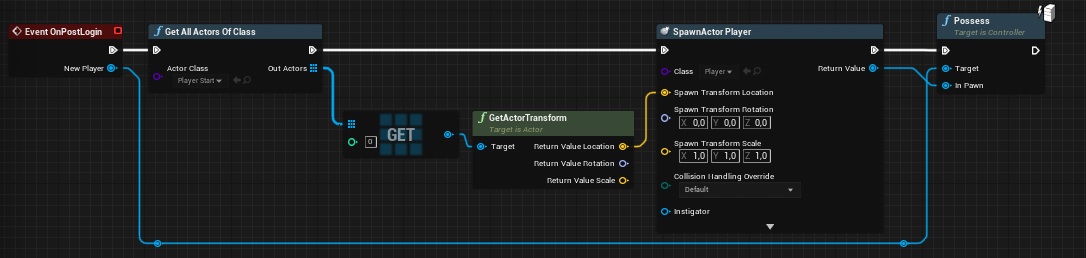
 little sable
In multiplayer where the server is a client, I assume the only solution to the server closing if the host leaves is to not use client servers? (e.g to go the dedicated route) - Unity dev of 5 years moving over to unreal and have been using photon networking.
 rich ridge
little sable
In multiplayer where the server is a client, I assume the only solution to the s...
rich ridge
little sable
In multiplayer where the server is a client, I assume the only solution to the s...
In unreal server who is client is called Listen server ...
What do you exactly mean by close?
Unreal has very robust multiplayer framework, so photon is not used here.
little sable
I meant client hosted, sorry I shoulda been clear
So yeah instead of a client, using just a dedicated is the option?
trail swan
But our game is a little 2-5 multiplayer game. Is not a listen server better here?
rich ridge
I assume the only solution to the server closing if the host leaves is to not use client servers? (e.g to go the dedicated route) @little sable can you explain more about this.
little sable
I've been experimenting with networking where one of the clients is the host essentially, instead of building a dedicated client to host the games. If that host client closes, all connected clients are disconnected as the instance no longer exists
silent valley
There is no Host Migration built into Unreal so yes no option out of the box. Although it is possible to roll your own solution.
little sable
That's what I thought, Thanks 🙂
rich ridge
You can make host migration above p2p framework... Requires a lot of work
little sable
For my "first" project i'll probably just go down the dedicated route until I decide wether to stick with the engine or regress to Unity. Thanks for the input, much appreciated.
silent valley
Yeah, avoid fighting the engine at all costs if you're a small team!
rich ridge
@little sable https://youtube.com/watch?v=-6WC3MqEh3M
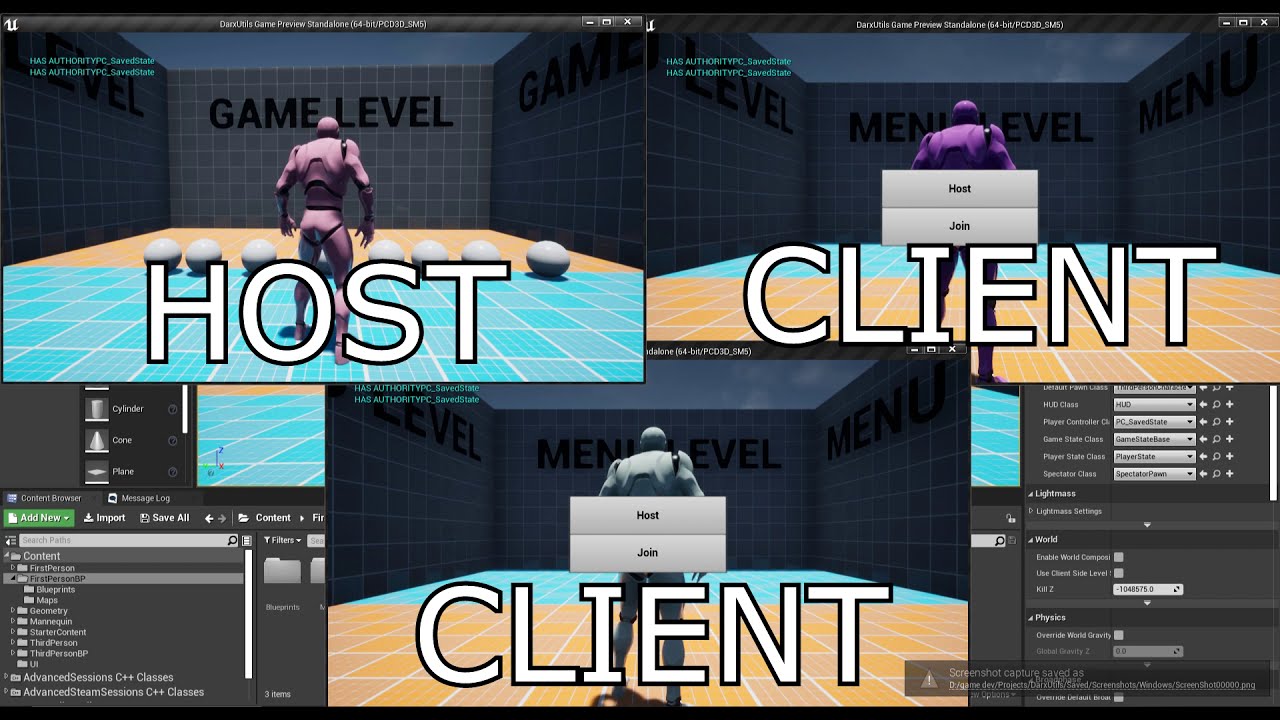
Its in a form of a plugin, but im not releasing it yet cuz its impossible to use without proper documentation. Plus needs lots of polish since rn im using a bunch of delays instead of proper checks and things can easily fall apart.
➤ Discord : https://discord.io/RetailRoyale
➤ Twitter : https://twitter.com/RetailRoyale
silent valley
Unreal networking is fantastic compared to Unity IMO. I was previously working in Unity but the networking was a mess. Unreal has networking built in from the core.
little sable
Unity networking is pretty horrible, but i've been working with it for a few years, so i've kinda gotten used to it. @rich ridge that looks quite interesting, saving the state remotely and doing an auto-rehost/rejoin looks like a good solution]
twin juniper
How do I specify what types of information associated with an actor I want to replicate based on distance? For example let's say player 1 swings and sword and kills player 2. I want everyone in the whole map to know player 2 has died. But I only want people within x metres to see the animation (since it's too far away past that anyway).
little sable
(I say remotely as whilst doing it locally would work for alot of cases, remote will be better for anti-cheat)
rich ridge
You can extend it above p2p framework.. like epic online services
rich ridge
twin juniper
How do I specify what types of information associated with an actor I want to re...
There is a distance culling in actor class. It should do the trick.
twin juniper
As another example in my projects I have some structures which I want everyone in my whole map to see (with LODs on the mesh). I found I needed to check 'always relevant' to prevent these flickering in and out of existence on clients. But I have some data attached to them which I only want players close up to know about and I can't seem to detach this data from their inherited 'always relevant' status
silent valley
Look into Replication Graph it has finer grained controls over actor relevancy
rich ridge
Very advanced ^
silent valley
Although generally it's tied to an Actor and you can't split state easily without using another actor, or the GameState class instead
 wise bridge
Hello everyone, I'm working on a gun system. It's working well on the host, but not on the client, what's wrong? (the line just doesn't trace). I had some issues because I can't get a reference to the game mode on the client, I'm just making a reference on the game state to the shoot function which is on the game mode. This screen is on the PC
And this is on the GM
rich ridge
@wise bridge GameMode doesn't exist on client.. if you try to acces GameMode on clients you will get null.
So need to rethink on your logic
wise bridge
That's why I'm using the gamestate, it's just a link to the gameMode actually I just want it to work, and move it after properly, shouldn't change anything no?
rich ridge
This is your gun system for a character right??
wise bridge
Yes
rich ridge
Why does your gun system need dependency of GameState or GameMode?
Gun system is a system for player to attack other player...
GameMode or GameState is for entire game not for player.
So why you are hooking game system inside of your mini gun system.
peak sentinel
When to use FNetQuantize? Is it for packing/compressing FVectors? And is there any disadvantages or using it?
wise bridge
rich ridge
So why you are hooking game system inside of your mini gun system.
I thought it was better to do it there, so the position isn't biased with too much latency
To make the system server sided and not client sided
rich ridge
There is a simple approach for gun fire.
When user clicks mouse button to fire gun..
Do RPC to server.. and server will do line trace and spawn projectile actor for gun fire.. simple...
I guess you are injecting GameMode or GameState to avoid RPC isn't it...
wise bridge
So I just remove my mutlicast replication on the GM
rich ridge
Yes.
wise bridge
That's the way I learned to do it, people said it was the best for replication yes
rich ridge
Gun fire is specific to a particular player... So do server RPC in player controller.
Usually people do multicast in GameState not GameMode.
wise bridge
Ok I gonna try this, telling you if that's working later
meager spade
@wise bridge check the pinned network compendium
GameMode only exists on server, does not replicate and can not handle any replicated functions.
putting Firing in the GameState is pretty silly also, complete break of encapsulation
wise bridge
What's encapsulation?
wise bridge
So I should just do it on the player controller? The point is that I don't want to do a client sided game, as there's a lot of issues on that
wise bridge
It's an actor
meager spade
then why does that not have all your firing stuff?
your player or playercontroller simply calls Weapon->Fire when input is pressed
your weapon keeps all its logic
as long as you set the owner of the weapon to the player, it can do RPC calls
wise bridge
I was going for another logic at the begining of my system, but that's true
meager spade
benefit of this is
Maybe you have a laser weapon? or a Rocket Launcher, or a crossbow, etc
by calling a Fire function on a weapon base class, you can handle multiple different weapons
wise bridge
Actually I just want to get a basic gun ^^
meager spade
but its also future proofing 😄
but sure, if you want just a simple gun, do it in the Player Character not controller
cause you can not multicast from the Player Controller
(you can, but it won't work as expected)
meager spade
eh?
when client presses input, you call a server RPC to fire weapon
if you want it non client side firing
warm leaf
kindred widget
<@!303818965962981376> Is the robot a character class?
No its a normal actor
vital heron
Hi everyone! I've been studying client-side prediction and understand the concept on how to do it but implementing it has been tricky. Is there any source code I can study or look at. I think the character has cps but I have no idea where it actually is in the source code.
Also I'm not sure if the best way to send movement updates is through RPCs.
 heady python
My clients movement in game looks fine to the server, but on the clients end they are rubberbanding constantly. I am using a very basic movement script. Movement is replicated in the character movement component. Anyone know why my client would be rubberbanding?
vital heron
heady python
My clients movement in game looks fine to the server, but on the clients end the...
are u using pawn or character
heady python
character @vital heron
vital heron
yea im not sure
heady python
it works fine in the editor, but when i try and play multiplayer on steam the client is laggy
vital heron
heady python
it works fine in the editor, but when i try and play multiplayer on steam the cl...
weird, characters should be able to handle this
keen linden
i was experiencing the same, when server was setting position of the player via SimpleMoveToLocation , character has been moved on client, but it was not doing animations correctly... so it was kinda rubberbanding... while on the server, movement was all ok
vital heron
yea Ima leave it to these guys to handle your problem better. if it was a pawn I could've helped more since I have a lot of experience with them
heady python
yhea @keen linden i tried the simplemovetolocation aswell but the server just saw it as setting a location and didnt actually load in the movement animations and rotations
very weird
keen linden
thats not weird, client should move itself, then animations will go ok
so probably your issue is similar, check who is moving what (by debug strings or something)
 harsh fiber
Hey all, new to the discord is this an OK place to post a question about Sessions and Steam?
*not to derail the current conversation. Apologies if not.
keen linden
@harsh fiber probably wrong place for the question itself (could ask in general) 😄 but i think this channel is ok for steam, sessions and other MP stuff
harsh fiber
I see, TY
Quick shotgun Q then: I have a game that is using OnlineSubSystemSteam (not sockets) and when I call EndSession the associated OnEnd delegates aren't getting called because the session never ends. Anyone have an idea off hand as to what would be preventing this session from ending? Or a good debug practice to find out why?
keen linden
@harsh fiber i never tried steam, i only work with dedicated, so maybe someone else will respond you soon
thin stratus
@harsh fiber could try by enabling some more verbose logging. Not sure out of my head which log categories they use though
twin juniper
Let's say I want an AI character to move from point A to point B in a deterministic way. Is there a way to transfer this into input into character movement component for smooth replication?
winged badger
all AI are simulated proxies on clients
they don't need input for smooth replication
that is required only for the prediction on autonomous proxy and nowhere else
 unkempt tiger
Anyone know what I might be missing from an include or something? I keep getting this unresolved external symbol error when trying to mark a property as dirty for my push model:
In here:
 fringe dove
is there any ufunction specifier magic out there to prevent reentrancy issues on RPCs? you can get something working on dedicated server, but then on listen server your client RPCs can have immediate side effects while you are in the middle of a loop etc. It would be nice if client and server RPCs could be marked to only get dispatched on the next tick on listen servers instead of immediately
winged badger
@unkempt tiger its missing dependency in build.cs
link error is never a missing include
@fringe dove no
unkempt tiger
Aye I figured the same from some googling, still didn't manage to find the module name I need though
winged badger
it should not require a separate dependency
as engine uses it quite a bit, it should be in Engine
Actor, ActorComponent and PlayerState all use it
unkempt tiger
Yeah, I looked at PlayerState and copied their style of usage
Which makes me scratch my head even more furiously as to why it wouldn't compile
winged badger
the entire header is wrapped in #if WITH_PUSH_MODEL
winged badger
you just need to enable it for your project somewhere
unkempt tiger
Best I could find was this console command which probably wont ever help the link error
unkempt tiger
wdym by setter?
 inner sand
does anyone know how to properly close bp session, simply destroying session or opening level on server seems to do nothing
twin juniper
How can I get an AI to follow another character in a replicated way, not relying on a navmesh? Basically I want to move in 3d space. Since all my obstacles are rooted to the ground I decided to use a navmesh for pathfinding and I move a 'dummy' AI character on the XY axis, which works fine (avoids obstacles). I have an AI character that spawns one of these 'dummies' on begin play, and I basically want to follow the dummy's XY coordinates (in a replicated way) as well as have some z axis variation which I define myself.
 vocal cargo
hey folks, is there a way to Set a Material Collection Parameter in a single player?
unkempt tiger
4.26
meager spade
4.26 all you need to do is set a CVar to use push model
unkempt tiger
This?
meager spade
yes
clever plinth
@unkempt tiger You will always need to include the modules ur using
It's a common mistake, so don't feel bad
😉
unkempt tiger
:D
Thanks, I'ma add it and give that a try, it's the first time I ever needed to tweak that modules line E: it worked! thanks 😍
clever plinth
I have a question myself that may have been caused by something stupid
For some reason, my server rpc is unable to deal damage to clients
It somehow breaks before damage can be dealth
And with more debugging, it looks like it's failing to raycast
unkempt tiger
raycast for bullets?
vital heron
raycasting for bullets is amazing, so efficient
clever plinth
Running some more debug sessions
unkempt tiger
print all the logs
vital heron
I used to spawn actual actors as bullets. For pistols it was somewhat fine but when you get guns like smgs and assault rifles is where it gets bad.
Ok I will stop getting off topic
clever plinth
vital heron
I used to spawn actual actors as bullets. For pistols it was somewhat fine but w...
That's tough
unkempt tiger
that stuff is still on topic :D
unkempt tiger
I did the same, then I moved to structs instead of actors
@chrome bay very kindly provided me with some hot guidance
clever plinth
Is it not possible to raycast via a server rpc?
vital heron
unkempt tiger
I did the same, then I moved to structs instead of actors
I've never really understood structs, I need to research them more
vital heron
clever plinth
Is it not possible to raycast via a server rpc?
shouldn't it?
unkempt tiger
they are essentially classes, only their uses/intentions are usually different
clever plinth
vital heron
shouldn't it?
It should, I'm still debugging to find out why
I'm thinking that the player cam manager isn't replicated
unkempt tiger
while classes kind of linger around in your session and do prominent work, structs are more commonly used to aggregate data
fossil spoke
@clever plinth An RPC is simply a mechanism to call code on a remote machine. It has no bearing on the ability of the code to perform certain actions (such as a Raycast).
vital heron
unkempt tiger
while classes kind of linger around in your session and do prominent work, struc...
oh thank you so much!
so structs are kinda classes but they are used more to store data
unkempt tiger
structs can still declare and define functions etc. In native CPP, they are identical to classes, with the only difference that their members are by default public, while classes are by default private (or protected? Idr)
clever plinth
fossil spoke
<@!578668767316410371> An RPC is simply a mechanism to call code on a remote mac...
I'm not sure why this is happening then, LineTraceSingleByChannel called on the server rpc is returning false
meager spade
server might not have the same position as player
fossil spoke
Make sure that its inputs are valid.
meager spade
if you are using Animations
meager spade
yes but for your linetrace, where are you tracing from
vital heron
unkempt tiger
structs can still declare and define functions etc. In native CPP, they are iden...
oh.
clever plinth
meager spade
yes but for your linetrace, where are you tracing from
The PlayerCameraManager
clever plinth
Just the location of the cam manager
fossil spoke
It maybe completely different to the Client.
meager spade
PCM is not replicated
fossil spoke
The CameraManager is not something you want to trace from.
meager spade
but it can get client side updates to the server, but they are not all the time (meaning they can be different)
fossil spoke
If you want to use the PCM, it has a function for getting the current ViewTarget camera location.
clever plinth
Gotcha
fossil spoke
This is whats updated, from what Kaos said
clever plinth
Yeah, ALS does all the cam stuff via pcm, which is a real pain
So, GetActorEyesViewPoint would work?
fossil spoke
ALS sounds like a Plugin that isnt Multiplayer ready.
meager spade
Its advanced locomotion and it really isn't
fossil spoke
Right
meager spade
well it has really bad networking
winged badger
epic tutorial bad?
fossil spoke
🤷♂️
meager spade
looks like Epic tutorial 😄
fossil spoke
Most plugins are pretty bad
clever plinth
That's annoying
winged badger
well, i do see a lot of people in #cpp making plugins, that are really struggling with basics still
fossil spoke
Eitherway, you need to find a method for ensuring that the Server gets the most valid, up to date location for where to start and end the LineTrace.
clever plinth
Thanks for ur help Devils and Kaos 😁
fossil spoke
Alternatively, you could send the start location with the RPC.
clever plinth
fossil spoke
Alternatively, you could send the start location with the RPC.
That is a really good idea
clever plinth
Nope
I decided against it cuz u can get away with using horrid animations in a tpp game
Also, ALS comes with a bunch of free anims so that's why I went w/ it
winged badger
fairly sure you can get quite a few anims out of paragon assets
winged badger
im not sure pluygins like ALS, SmoothSync... are any good for anything really
they are not standalone systems, they integrate with the rest of your game is my understanding
and as such, they also force you down a particular road, which makes them of very limited use for learning as well
peak sentinel
I dont know about ALS but SmoothSync is really not any good, also it doesnt follow correct coding conventions for unreal
fossil spoke
What is SmoothSync anyway?
peak sentinel
A plugin that made for replicating physics/movement - for non-characters
unkempt tiger
ALS has to be a pretty good implementation since its developer is now working for Epic :-)
hollow eagle
that... means nothing
unkempt tiger
fair enough, but I did look at it and it seems well put together
hollow eagle
not trying to hate on the dev or anything, but just in general someone working for epic doesn't have any bearing on their personal endeavors outside of that work
and it sounds like ALS just wasn't originally built with multiplayer in mind, so quality is irrelevant
peak sentinel
Isnt ALS root-motion based btw? As far as I know its not a good thing for replication
One-time root motion animations are okay but locomotion with root motion is dangerous, as far as I read from here
unkempt tiger
I dont think it is from what I could tell
unkempt tiger
@clever plinth did you consider things like lag compensation?
summer tide
How would I replicate time that shows on HUD for all players?
fossil spoke
Replicate an int32 that represents seconds?
summer tide
Does it run on each player or server only
Let's say I have a sky system with time. I take the time and show it on hud for all players
clever plinth
Are AGameSession and UOnlineSessionClient used in the Session interface in the oss?
steel vault
I admin the server for ALS. It's a great plugin to teach you the basics of animation blueprints and decision trees for animation. I use plugins like that to learn the basics and even some of the more advanced topics and then cherry pick from them and write my own system.
meager spade
didn't say the animations were bad
but the replication/networking side is abysmal 😄
at least when i last looked at ALS3 and 4
steel vault
Yes that I can agree with 100% haha
meager spade
the guy who made ALS he is good with AnimBP and animations, etc. But people have different skill sets.
i am crap at AnimBP and animations
steel vault
Same. It's a great guideline for everything outside of multiplayer for locomotion
fossil spoke
@summer tide Replicated variables are Set by the Server and have their value updated on Clients.
In your case, the Server would set the time of day (in seconds?) and each Client would then know the same time as the Server.
summer tide
I got that part thanks.
rich ridge
clever plinth
The PlayerCameraManager
PlayerCameraManager exists on server too. but it doesn't replicate the player's local view to server.
So I ended up using TargetActor from GAS module... actually all my gameplay is via GAS.
clever plinth
Yeah, that makes sense now 😝
heady python
Using advanced steam sessions.
My 'Update Session' node is returning as a failure every time i call start game. This BP is in my gameinstance. Anyone know why?
 oblique brook
Does anyone know about Steam friend invites? our invites get sent, received, player can accept the invite, but it does nothing after that.... lobby creation an joining is working just fine
an there is literally nothing about this online
winged badger
you do need to connect to the host via unreal after joining the lobby from an invite
or after the game itself starts, if you're already in a lobby
harsh fiber
@thin stratus Still haven't solved it but I did find how to change log verbosity
[Core.Log]
LogOnline=VeryVerbose
in DefaultEngine.ini
 karmic briar
hey guys i wanna ask have anyone here have experience implementing this ?
Describes methods to achieve more performant Animation Blueprints through optimization techniques.
the c++ part
i cant get it to compile
 meager fable
is there an equivalent for set physics angular velocity that works in multiplayer?
 pallid mesa
winged badger
they are not standalone systems, they integrate with the rest of your game is my...
pallid mesa
winged badger
they are not standalone systems, they integrate with the rest of your game is my...
smoothsync is decent, it's a component that replicates movement in a client auth fashioned way... it simply works
potent cradle
I've also found smoothsync useful
It's great for replicating movement of non-character class AI
twin juniper
Are there ways to 'brute force' smoother replication at close range? Pretty much I have two movement modes, the first is needed only at close range but it doesn't replicate as well
potent cradle
Force net update?
twin juniper
Is that exposed to BP?
potent cradle
potent cradle
twin juniper
Is that exposed to BP?
Yes
potent cradle
potent cradle
Could also play with these
Not sure if you can change those with BP, but should be easy enough to wrap in a C++ function library if you need it
These are
twin juniper
Here is how I am handling my movement and I'm wondering if there is a smoother way to do it. I don't understand CMC completely
The 'following' mesh is an actor I spawn on begin play, that smoothly pathfinds on the ground. The point is this way I can have vertical axis movement as well, whereas pathfinding on its own does not allow that
potent cradle
The update to your server is being done on tick, so that's not the issue. It's the server that is not replicating frequently enough to the other clients, based on what you're saying.
So when that movement mode is active that needs more frequent replication, update the replication parameters on the server for that pawn.
potent cradle
twin juniper
The 'following' mesh is an actor I spawn on begin play, that smoothly pathfinds ...
Oh, that sounds like a different problem entirely
potent cradle
twin juniper
Are there ways to 'brute force' smoother replication at close range? Pretty much...
Compared to this
twin juniper
But the system I have looks ok, there is some jitter but very slight. Need to eliminate it though
potent cradle
potent cradle
The update to your server is being done on tick, so that's not the issue. It's t...
Try this
Start with increasing Net Update Frequency
twin juniper
on the CMC or the actor?
potent cradle
The CMC has a bunch of replication/update variables, but I'm not sure those are relevant right now
twin juniper
net update frequency is 100
rich ridge
@potent cradle your UE4 looks different? Does UE4 support themes too??
potent cradle
twin juniper
net update frequency is 100
Try 150, but 100 should be fine already. Actually, I wonder if maybe you just have issues with your logic somewhere
Are you playing as dedicated server?
Try listen server to see if it's smooth
That will at least show you how it looks on the server
potent cradle
rich ridge
<@232215194984644611> your UE4 looks different? Does UE4 support themes too??

😄
He also has a plugin for cleaner blueprint node connections/lines
twin juniper
on the server it's smooth aye
rich ridge
Nice
potent cradle
twin juniper
on the server it's smooth aye
I've often had jitter like that when there were a bunch of corrections or mismatches of the CMC between server and client
That is to say, things like max speed not being the same on server/client
Or the movement mode not being the same
Etc.
As a debug, perhaps run a print on a timer with a bunch of important variables like max speed and movement mode. See if there's a discrepancy, it'll show you the print on server + client, then you compare
(switch back to dedicated server for this)
twin juniper
Looks like my move direction is only getting set on server
On my begin play I spawn an actor, not on server, however the actor is replicated and moves using nav movement
 frank shell
Replicating movement as like the class defaikt too? For that actor bp
 lunar sluice
Does anyone know if it is possible to design a multiplayer game with blueprints where the players can be in different maps at the same time? Like an mmo where people are in different continents, dungeons, towns, buildings etc?
lunar sluice
I'm assuming then that level streaming wont work well for this either?
lunar sluice
Alright. Thanks 🙂
unkempt tiger
So I have this really weird replication bug.. it seems that a certain UPROPERTY() in my struct is being received by the client all wrong
The UPROPERTY in question is this WeaponEquipTarget
Logs show that the server sends it as a nullptr
However the client received it as a valid AActor* pointer? what?
These are the Replication and OnRep functions, I don't see what I could be missing
rich ridge
UPROPERTY(Replicated)
meager spade
structs don't ned Replicated
unkempt tiger
I thought I had to add the NotReplicated specifier when I dont want to replicate things
unkempt tiger
Right, that's what I thought
rich ridge
my bad, i didn't know this fact.
unkempt tiger
Sometimes it'd be the other way around too: the server would send a valid AActor* pointer and the client would receive a nullptr. In this case I thought it was a relevancy issue - but nothing afaik explains the reverse scenario...
Could it maybe be some internal delta serialization related working of the engine that's spazzing out? 
Perhaps its a matter of ordering struct members from biggest size to smallest size 
unkempt tiger
I think I know what the problem is...
I took a closer look at the logs and organized replication and onrep lines side by side on sublime... and saw that packet 47 and packet 48 never actually made it to the client. And it was those packets in which the weapon equip target value changed. Could it be that UE4 decided to just merge what should have made it in packet 47/48 into packet 49?
Even though I specifically added the Atomic specifier?
I built my netcode so that it's resilient to missed packets (like packet 47, 48) so things stay in sync
But I did so under the assumption that no merging of values will take place when some packets fail to arrive...
twin juniper
If I have a server RPC is IsServer() check inside it useless?
 lofty kelp
you should do auth check inside of server events and rpcs... if not hackers can try and force them to run on the client....
clever plinth
Where would I set the subclass for my game's UGameUserSettings
fringe dove
@clever plinth look at the shootergame project
clever plinth
Yessir, I have been
fringe dove
DefaultEngine.ini

[/Script/Engine.Engine]

GameUserSettingsClassName=/Script/ShooterGame.ShooterGameUserSettings
Oh, so it's configured
fringe dove
yeah, it may be settable from UI too
fringe dove
np
rich ridge
clever plinth
Where would I set the subclass for my game's UGameUserSettings
What is signigficance of this class??
clever plinth
@rich ridge Game Settings 🤷♂️
rich ridge
In perspective of multiplayer.
clever plinth
Oh shoot, I forgot that this was the multiplayer channel
🤦♂️
@rich ridge That's my bad
rich ridge
no worries I was asking for my own knowledge if its related to multiplayer somehow.
twin juniper
How difficult is setting up a dedicated server? I have some logic that only works on client (although it replicates fine), would this be an issue without dedicated server?
I don't really understand the whole 'hosting' thing, I have a pawn possess command that allows clients only to possess other unpossessed pawns at will but does not run on server. Does 'host' as as a kind of client and server at the same time?
rich ridge
You need source build of Engine
twin juniper
wot that mean
twin juniper
Is it hard to learn? I am going to have max 4 players, maybe 5 if its smoother than expected
rich ridge
It's not hard.. just follow instructions and you should be good to go
kindred widget
Do you care if the main host can technically cheat? Like is your game designed to be played with friends or is it competitive?
twin juniper
Friendly but would rather not have cheating
rich ridge
On YouTube you can find a lot of good tutorial building dedicated servers
kindred widget
If you want to keep everyone from cheating then you need to host servers yourself, and use dedicated servers.
rich ridge
Nowadays UE4 development has become easy
kindred widget
If you want people to host stuff themselves, dedicated or listenserver, you have to be aware that the host can cheat things.
twin juniper
yes a lot of stuff I am very reliant on predesigned code @rich ridge eg character movement replication is all done for me
I actually know very little
What does it mean to host something myself
kindred widget
You have to pay for server space.
rich ridge
You become the admin of your game servers and you spin the dedicated servers on cloud like AWS, azure, etc
And you pay the cost of server hosting
twin juniper
So this is me but my idea of hosting a game was like
I build a pylon outside my house
rich ridge
Pylon??
kindred widget
If you game is small, and you want people to host themselves, don't care so much about cheat prevention. If we're talking like a couple of friends chilling with an RPG, they're going to police themselves. Listenserver setup is also a lot easier for this in the end because it doesn't require your users to download and setup a second piece of software just to play with each other.
rich ridge
^
twin juniper
What about anti cheat failsafes
so that maybe julian assange can cheat
but not the average player
kindred widget
I mean definitely still do good programming. Don't let clients fuck with server stuff. Server alone should have authority. But just be aware that the host themselves can still memory hack or whatever, just like in any single player game. Most people who play games with friends are pretty aware of this though.
You still want the tools in place for the responsible one in the group to host and keep the group troll from being able to ruin things, but the main host is still going to have access to the server.
twin juniper
I could add some random checks to troll people
Like if someone's health changes unexpectedly they insta die
or turn into a goat for the rest of the game
vital heron
Anyone got any good source code to learn client side prediction?
 mortal kernel
I have a System which sets Variables on the server only... they get replicated to all clients all good and games... but how do I "hide" them from other clients...
For example the Server sets Player 1 Money to 100
And then all Players "know" that Player 1 has 100 Money
How would I change that ?
winged badger
just make it replicate to owner only
 raven plaza
Is there any reason why I can't set the current active player (possess/unposses) inside the UMG widget? I want the game to switch to the second player after a certain time as passed, but posses and unposses don't seem to work inside the event graph for my widget
For some reason it doesn't seem possible at all to posses or unposses the pawns I have in my game (they are spawned in at run time)
However, possessing them directly after the "Create Player" event on construction works fine. Is there any way to circumvent this?
winged badger
Possess and Unposses are not functions of UUserWidget
also
the widgets/UI is local, and you really need to run possession logic on server
kindred widget
Also don't try to Server RPC from the widget.
Just incase you try that one for the possess call.
winged badger
calling Possess will Unpossess the previous Pawn automatically, too
kindred widget
Hey Zlo, you do AI stuff, right?
winged badger
on occasion, Kaos does most AI stuff
kindred widget
Do you know where the magical key is hidden to enable NavMeshWalking? Everyone on forums is like "Use this! It's magical! Paragon uses it, blah blah.".
winged badger
CMC, MovementMode
kindred widget
Tried changing the CMC's movement mode to that. No change in performance, and the AI debug thing still shows "Walking" as the movement mode.
winged badger
the search for floor is a little bit cheaper
with 150 AI its about 1ms difference though
as nav trace is significantly simpler then a capsule sweep
and its done on Tick
kindred widget
Is the AI debug thing showing up as "MovementMode:Walking" normal, then?
winged badger
no
the 2 are mutually exclusive
note that its not for every game
with our isometric camera, there are no real drawbacks
but for FPS AI walking 30 UU above ground would look silly
kindred widget
I don't know why this thing isn't changing then. I'm setting it as a default and on beginplay. 😦
winged badger
probably something overwriting it later on
after you pass the set on BeginPlay
verify it while on a breakpoint, and put data breakpoint to catch what changes it
kindred widget
It's changed right after it's set on beginplay. It's NavMeshWalking = true directly after the set, but even the tick after that it's false. I have no idea what could be setting this, because this is a super simple AI.
winged badger
so while on a breakpoint where you verify its true
set the data breakpoint on the value
and examine the callstack after it hits
that is the most efficient technique for catching undesired changes
kindred widget
I need a C++ base class for that, don't I?
winged badger
good idea to have those
kindred widget
Like I said, this thing is incredibly simple. Right now it's nothing but a death, small beginplay, and a simple behavior tree.
winged badger
and yet something is ninja changing your movement mode
doesn't matter how simple it is
kindred widget
Something to do with the default AI controller. Only happens when using SpawnAIFromClass even with no behavior tree. SpawnActorFromClass stays on the correct movement mode.
kindred widget
Way ahead of you. Already spawned the AI controller manually and whatnot. The moment the AI is possessed, the movement mode can't seem to be changed. Even made a new controller class and disable tick, etc.
 sly violet
Hello again everyone. I have a question about authority and replication of ABPs.
I have created a blendspace head look for my first person character. It works perfectly on local. The head and body blend nicely. However, I cannot figure out how to get this to replicate to the other clients.
- Does every aspect of a player pawn ABP replicate always?
- Does the player controller not replicate? Is there a way to fake it?
kindred widget
@sly violet AnimBlueprints are local only. Where you're setting Pitch, try to use BaseAimRotation instead of ControlRotation.
sly violet
I will give that a shot, thank you
kindred widget
Leave a mention if you have any trouble past that.
sly violet
100% that was the issue. Thank you @kindred widget
 eternal canyon
Are there any drawbacks of using client authoritative movement other than cheating? (And yes I do know about client prediction and custom movement component)
summer tide
Setting AI behavior and restarting their logic, would that need to run on server only? I've an AI when I interact with it, it follows me.
kindred widget
@summer tide All AI Logic is serverside, usually.
 quick flint
kindred widget
quick flint
kindred widget
Really depends on what those actors are doing. You're really going to need to look into the replication graph for that sort of thing. Default replication will probably choke and die on that. I have to assume that it's possible though, I assume that there's at least that many actors in a Fortnite match.
peak sentinel
Fortnite has 50k
lost inlet
push model replication will make that more achievable
peak sentinel
Btw while talking about that subject, is lockstep (i dont know what it is, just heard from reddit lol) mandatory for RTS in Unreal?
Hmm 🤔 I think I asked the wrong question. Is lockstep even possible in unreal?
hollow eagle
You could implement lockstep networking. I don't know why you would unless you absolutely had to though...
for an RTS it can be useful but you're going to have a hell of a time trying to implement it
 gleaming vector
you still need repgraph if you want to go over a few thousand
and push model will certainly help
you will have a hard time implementing lockstep
since you need to break some assumptions inside of the engine and the gameplay framework
hollow eagle
and good luck keeping things deterministic if you use the built-in physics
hollow eagle
and I'm sure chaos is too
hollow eagle
is it really? huh
gleaming vector
it's why dave ratti is doing cool shit with physics rollback
hollow eagle
neat, wasn't aware that was one of the reasons to go to chaos
peak sentinel
Thanks for the infos
steel vault
Was really hoping chaos was deterministic. I need networked physics to work for me without trying too hard lol
 small dove
hello everyone,
I want to make a sample Steam IAP, but I don't know from where. Can anyone help me with an example/the tutorial for IAP on steam?
It would be great to have a tutorial on IAP on steam
clever plinth
@small dove the oss docs are pretty useful once u get the hang of em,
I remember I had to stick to that, and you get the patterns after a few hours of trial and error
Definitely make a test project to test out the functionality u are interested in
summer tide
So I'm using root motion for everything. The server walk animations appear faster. Any idea why?
This is what I did in bp

 worthy knot
can anyone please let me know about extending the world Bound Limit , as i have map of 40kmsq , and thats still nothing compared to other map sizes like witcher which is 136 square kilometers in size , and DAYZ which is 225kmsq and if there is anyway just let me know , even if i have to change engine code thanks:)
summer tide
I think there's a check box for it. In world settings...
I think you also have to enable world composition
worthy knot
@summer tide i already checked that , and the one in project settings too , it only helped a little bit but i was still facing issues
summer tide
Did you check this one? https://gyazo.com/6bebfe93ff465e2e388a169dfbbd1091
 worthy knot
@summer tide yes this one , this is the one i checked
but after i checked it didn't do much
summer tide
How does your level details look like? It has a square box on its center.
worthy knot
yeah it has a square box at the center , but my map is much bigger than that
i want to know how i can increase range/size of that box to fit the size of my map
summer tide
You can't. The origin rebase option moves the origin as you move out of the box. DayZ and Witcher both use proprietary game engines not UE4.
worthy knot
okay thats fine , but there might be a way to like sort change it to my map size , say source code changing? , because even after enabling world origin rebasing i could still notice jittering in movement of my character
there might be a way to sort of 'personalize" like other engines can be ? i mean ue4 is pretty powerful , the thing is how do we do it ? is there way to change the world bound settings through engine code settings ?
summer tide
UE4 is a 32bit engine. That's why.
That square box is the recommended for world composition and means 32 bit precision
worthy knot
whats the difference between 32bit engins and 64 bit engines
potent cradle
Twice the bits!
worthy knot
okay so cant we change engine code to make the bounds bigger ? even if its 32 bit and will it work ? , and i think this is a question for so many out there
summer tide
That box is restricted by 32bit. Maybe UE5 will be 64bits and that box will be double the size. Also you can't just change a value or some code to convert an engine from 32 to 64 bit. It was architect that way.