#multiplayer
1 messages · Page 600 of 1
 fossil spoke
 tidal crown
yes it is I think
fossil spoke
Then you only want the RPC to be called by the Client.
Hence IsLocalPlayerController
fossil spoke
Is the RPC function doing the possession?
tidal crown
yes
fossil spoke
Then your not understanding how RPCs work.
tidal crown
thats entirely possible lol
This is in my PlayerController
That event is fired by PlayerController Event BeginPlay
fossil spoke
Yes, so put a branch before the RPC call in BeginPlay that checks IsLocalPlayerController
tidal crown
and I want to only do this on the server? I thought the Has Authority would have stopped it ?
from happening locally that is
tidal crown
I do read what it says?...that isn't helpful :/
its going to execute on server
and I want that yes?
fossil spoke
Executes on Server
Well your saying you want it to only happen on the Server, thats exactly what that says its doing.
This is what an RPC is.
Remote Procedure Call
tidal crown
yes I get that, so what I'm wondering is why is this firing twice
once it fails and the second time it succeeds..
fossil spoke
A Client calls the RPC, the message is sent to the Server, the Server executes the code.
tidal crown
what I'm struggling with is why does Event BeginPlay fire this twice.
On the server in specific
fossil spoke
Because BeginPlay is called by the Server AND the Client, so both the Server AND the Client are running the RPC.
You only want the Client to call the RPC so that the Server runs it.
Hence IsLocalPlayerController
tidal crown
but has authority should prevent that from happening on the local client no?
fossil spoke
The Red node, is what the RPC will execute, on the Server.
fossil spoke
HasAuthority in that place is redundant
 raw quarry
it gets called once by the server directly, and the second time by the client calling the RPC
fossil spoke
Because Authority is the Server
tidal crown
so if IsLocalPlayerController do nothing
raw quarry
a "replicated to server" event does not mean it will only execute on the client. It'll also run it from the server in your begin play, it just won't replicate that time
fossil spoke
IsLocalPlayerController checks if the PC is locally controlled by a human.
tidal crown
so SpawnPlayer should not be an RPC
fossil spoke
IE: not by a Server
Potentially yes.
Making it a regular event would work
As long as you keep the HasAuthority node.
tidal crown
yes ok that makes sense to me too
raw quarry
yeah from what you have there currently, it doesn't look like it'll need an RPC since the server runs begin play anyway. You'd only really need an RPC if you need to wait until the client has spawned or you need info from the client
raw quarry
if spawnplayer is directly called by begin play, yes
tidal crown
it is
fossil spoke
That pretty blury but looks ok.
tidal crown
OK sorry, thats a screenshare
 bronze arch
Just good to know ; is there way to split server logic from clients via blueprint? (So do not read server things from the file)
fossil spoke
There are a bunch of nodes that help you with Network Context.
HasAuthority
GetLocalRole
IsDedicatedServer
To name a few, they all depend on where your calling them however as to whether they are useful in your particular scenario.
bronze arch
I mean if i use a "run on server" node, it wont includes to client packages, right?
raw quarry
one gotcha with "HasAuthority" is that the authority node will execute on the client for a class that isn't replicated
Do you mean will those blueprints exist on the compiled version?
raw quarry
yeah I believe those would still be included
only way you can exclude it is by putting it in C++ and surrounding by an if macro
 winged badger
blueprints can't strip off parts of the logic out for packaging
bronze arch
Only the know how to split server logic in c++
But seem there no way to do same on bp
winged badger
with some effort one could use composition for server logic in BP in places
and just not package those blueprints to clients
tidal crown
OK, so I have this now, and its definitely still broken. It's no longer an RPC, I check if is local player controller and that I have authority.
fossil spoke
Remove the IsLocalPlayerController
tidal crown
off on the edge I am doing spawn/posses
bronze arch
U mean like just duplicate the project and rename server-client?
fossil spoke
Why did you add that after you decided to change it from an RPC?
tidal crown
you said to?
bronze arch
Does it will work?
fossil spoke
Only if it was remaining as an RPC
But since its not, it changes how it needs to work.
tidal crown
gotcha
winged badger
what is that weird thing you're doing with playerstates?
tidal crown
oh trying to get player index from player array using playerstate ref
to assign a playerstart
winged badger
you could literally remove every node there except the PlayerState one and it would do the same thing
ah
that is what one overrides Find/ChoosePlayerStart for usually
tidal crown
is that a player controller method?
winged badger
gamemode, takes PC as argument
also, PlayerArray won't have the same order across clients
tidal crown
thats good to know
winged badger
so... lets call it an odd approach
 sly violet
Hey, Zlo.
In Multiplayer games what BP do you usually put Spawn Player character and possess?
tidal crown
( @sly violet and I are working on the same issue)
so removing isLocalPlayerController had no effect, still doesn't work @fossil spoke
I see the first print string get called
on the server side
fossil spoke
Did you forget to remove the check in BeginPlay?
tidal crown
nope
winged badger
i have about 150 line function in the GameMode to spawn the Player
and it calls other functions as well
so goes to around ~800 lines of code to get the Player all ready to play
tidal crown
so we're just attempting to posses on Event BeginPlay in a PlayerController (post seamless travel)
winged badger
@sly violet
tidal crown
this is real basic :/
winged badger
why would you do this to yourself after seamless travel?
means you have lobby and play levels, correct?
winged badger
so in your lobby player picks a class?
tidal crown
currently they just login and we hit start game and load the gameplay map
sly violet
Our lobby has nothing yet. We just go straight to a level right now.
tidal crown
@fossil spoke incorrect, its being called.
winged badger
why would you have client initiate the spawn of its pawn?
fossil spoke
Your controller must be changing then from the previous level.
tidal crown
this is happening server-side
winged badger
its completely uneccessary
tidal crown
 winged badger
override HandleStartingNewPlayer in GameMode
sly violet
@winged badger because I am learning where best to do this stuff. It seemed intuitive for a player, post travel, to tell the game mode it is ready to spawn its pawn and then connect to it.
winged badger
if you want GameMode to spawn default Pawn call Parent function
if not you have PC and PlayerState valid at that point
and spawn it manually
you can override which class of pawn by overriding GetDefaultPawnForController function in GameMode
all this you did is just complicating the hell out of the thing
tidal crown
yes I believe that
sly violet
Agreed.
winged badger
also, if you want assign playerstarts like you just did
you can keep a counter in gamemode
tidal crown
I thought about that but it felt bad
winged badger
instead of doing that crazy search via playerstates
tidal crown
I don't understand how PlayerArray would be not order guaranteed btw
its an array
thats like...what it does
winged badger
@sly violet we have one class for the player pawn and we have multiple gameplay classes, character setup, choosing your weapons... each module you add to the player changes its visual appearance
its also PC possesses ObserverPawn, owns the AIController which possesses the PlayerPawn setup
sly violet
That makes sense.
winged badger
so the spawn routine is somewhat... complicated as a result
tidal crown
yeah we're prototyping rn so its much simpler atm
sly violet
Really, just learning. Running through tutorials and trying to build something. I have been a designer for many years, but want to understand code better. DePiglio is a deeply experienced engineer, just new to game dev.
Thank you for the assistance.
tidal crown
together we are a half decent UE pair
but yeah, still trying to ramp up on the control flow of all of this.
winged badger
you're used to c++ @tidal crown ?
tidal crown
yes
winged badger
so seamless travel goes like this
raw quarry
It's impossible to have the perfect/correct approach for everything on your first attempt, so just make it work and take the things you've learned on the way to make it better the next round 🙂
tidal crown
@raw quarry we're barely there but that's the idea 😛
winged badger
all clients (and listen server host) start loading the destination map
 oblique glacier
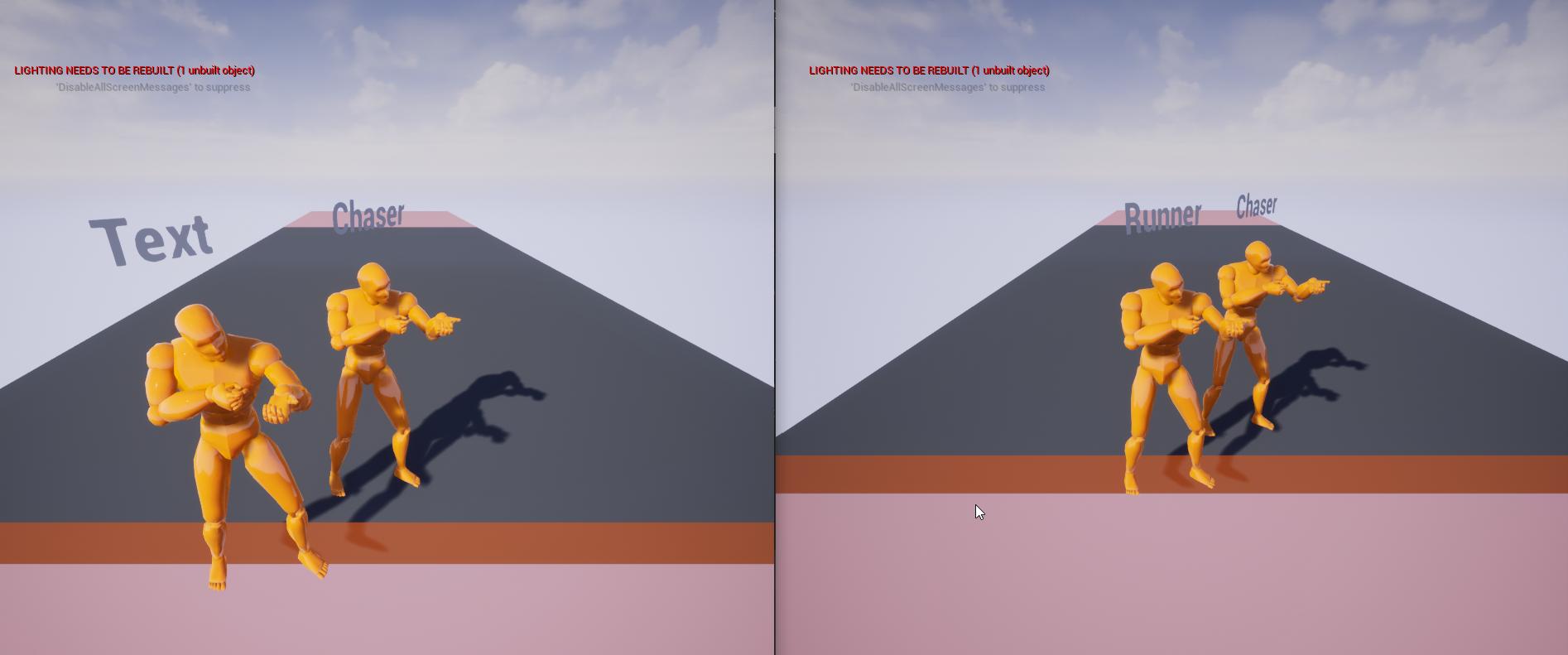
Hey guys, im having trouble getting the client to receive replicated values of other players, any suggestions where i might be going wrong? https://i.imgur.com/ktNEQZN.jpeg (client is left side)
 winged badger
each PC when the load is completed (this would be departing/lobby controller if they change class on gameplay level) first calls NotifyWorldLoaded, then ServerNotifyWorldLoaded
raw quarry
@oblique glacier hard to say whats happening without looking at your code/blueprints, but one guess that might be the problem is that variables only replicate from server to client. So, if you set the value of a replicated variable on one client, it will not replicate to the server or other clients
winged badger
when host/server load the map, the PostSeamlessTravel gets called on the GameMode
that will iterate over all present controllers, and call HandleSeamlessTravelPlayer on each one
oblique glacier
@raw quarry thats sounds like the problem, i wasnt sure if replicating from server to client automatically pushed the update to all clients
winged badger
any clients that load slower, get HandleSeamlessTravelPlayer called on them from ServerNotifyLoadedWorld_Implementation
that function is what handles changing of the PC/PS classes
any data you want to transfer from lobby to game level that is player specific you can do via their PlayerStates
oblique glacier
how do i make the other clients receive the update too? do i need a netmulticast
winged badger
lobby player state persists upon this point always, and can use CopyProperties to copy that data into a new PS
raw quarry
@oblique glacier yeah to send data from client -> server you'll have to do an RPC (e.g. an event that executes on server and takes the value as an argument)
winged badger
after HandleSeamlessTravelPlayer, GenericPlayerIniitalization is called (also server side only) and this is the point where RPC to initialize HUD is sent to the client
then its HandleStartingNewPlayer
tidal crown
OK I think I fucked up and started this process in GenericPlayerInit
winged badger
its a BlueprintNativeEvent, and its default implementation does RestartPlayer (spawns the default pawn)
tidal crown
and that was too early as I suspceted
raw quarry
@oblique glacier if a variable is replicated, a change on the server will replicate it to all clients unless you have a replication condition set on it
 signal lance
oblique glacier
how do i make the other clients receive the update too? do i need a netmulticast
signal lance
oblique glacier
how do i make the other clients receive the update too? do i need a netmulticast
Why don't you just make the variable replicated and set the value on the server, this will replicate it to all clients and will also make sure any clients that join later get the same value which isn't the case with multicast RPCs
tidal crown
now try with the HandleStartingNewPlayer
raw quarry
make sure you're setting the value on the server, not on the client
signal lance
^
sly violet
@winged badger That worked. Thank you, and thank you for the explanation.
tidal crown
@winged badger this is fantastic...is there any sort of diagram of this workflow?
that I could reference back to?
winged badger
now except for NotifyLoadedWorld (local to client) and ServerNotifyLoadedWorld call
all this happens on the server
oblique glacier
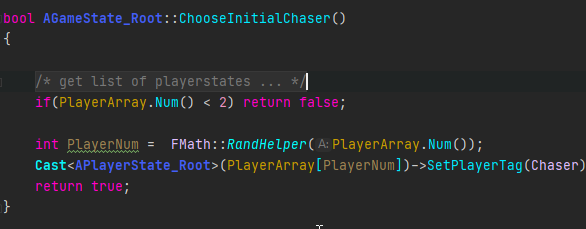
so i might accidently be using client playerstates? https://i.imgur.com/wRxPKPn.png
 winged badger
i have no idea, i just read the source code
oblique glacier
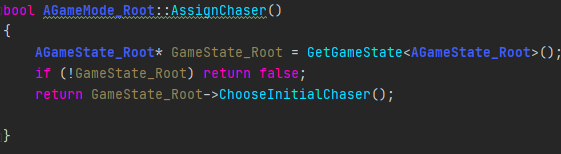 tidal crown
@winged badger fair enough
winged badger
and after using it for a while and doing many tweaks with order of initialization
tidal crown
for me its one of those where do I cut in and trace
winged badger
i kinda know it off the top of my head now
winged badger
we do all kinds of crazy stuff
spawn 30k actor procedural level separately on server/clients and network it after the fact
@tidal crown i do recommend overriding ReadyToStartMatch in GameMode as well so it doesn't return true until NumTravellingPlayers == 0
tidal crown
does it poll this?
winged badger
it runs on tick, until the match starts
 halcyon totem
does anyone here want to help me out? I need a door and game replicated, for some reason only 1 door can open per map. I have tried everything and I am stuck I can cash app money if you can help just send me a direct message I hate being stuck and its driving m e crazy on why it only works on one door
winged badger
until it returns true, no actor will call BeginPlay, server or client
oblique glacier
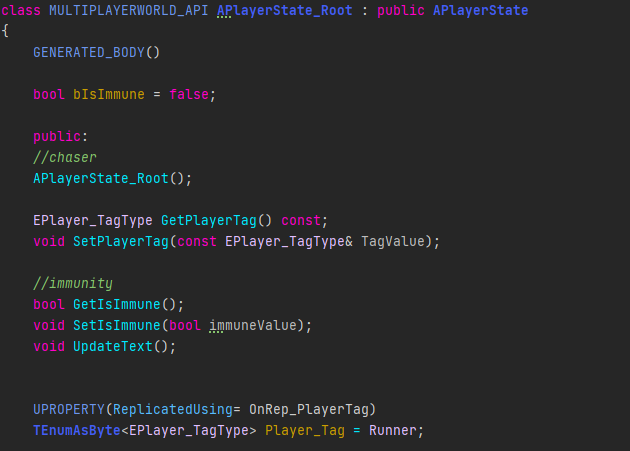
so my tag variable is replicated in the playerstate.. https://i.imgur.com/xGDpTl2.png and i try to update the text render of the character for that playerstate @raw quarry
 tidal crown
@winged badger do you explicitly have to call StartMatch to stop that?
or it does it when that returns true?
oblique glacier
is that not server side? @raw quarry
winged badger
GameMode will start a match when ReadyToStartMatch returns true
tidal crown
oh that makes sense gotcha
winged badger
not entirely sure what the replayout will do with native enum @oblique glacier
tidal crown
im guessing that immediately returns true if I don't override it
winged badger
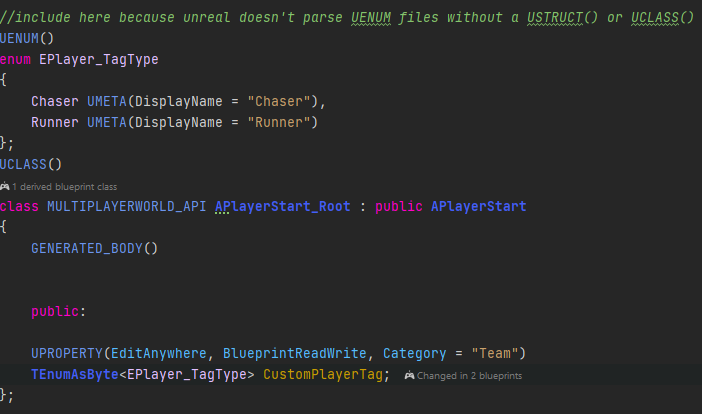
do you have a good reason not to use UENUM?
oblique glacier
 tidal crown
@winged badger btw we're using GameModeBase
not GameMode, so I think that bit doesn't happen
tidal crown
all the docs I read said non base was deprecated :/
oblique glacier
its a UENUM defined in another class @winged badger
winged badger
its not
raw quarry
@oblique glacier where are you setting the value of customplayertag
winged badger
TEnumAsByte is specifically there to let BP handle native enums
tidal crown
well that fucking sucks
winged badger
UENUMs do not need it
raw quarry
I mean player_tag
oblique glacier

gamestate casts through a random player from the playerarray
and assigns one as the chaser
winged badger
and unreal loves to just silently fail when it doesn't know how to replicate something
oblique glacier
also this enum thing, i read that unreal doenst parse UENUM properly so you need to put it wil a UCLASS or USTRUCT
oblique glacier
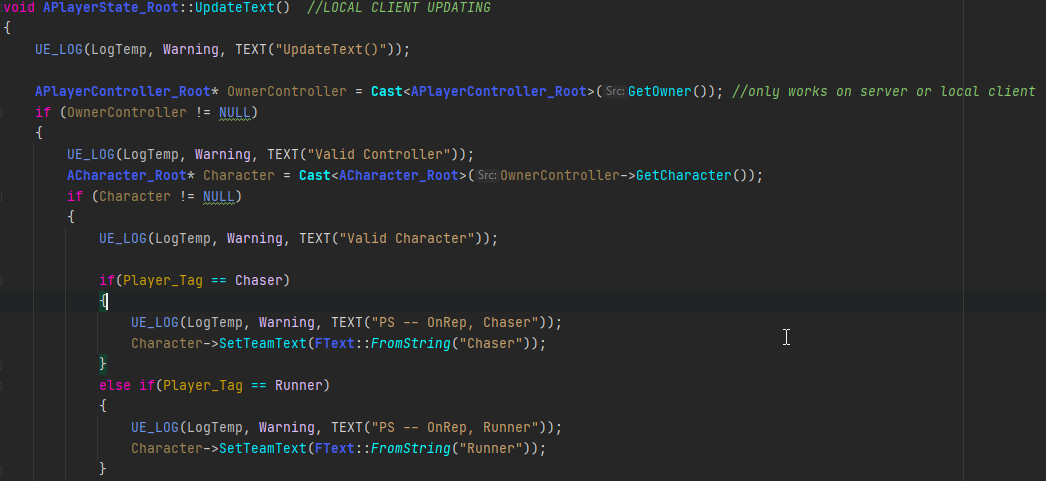
https://i.imgur.com/IUa3bIZ.png this part is where the tag value is pushed to the text render in the character
 oblique glacier
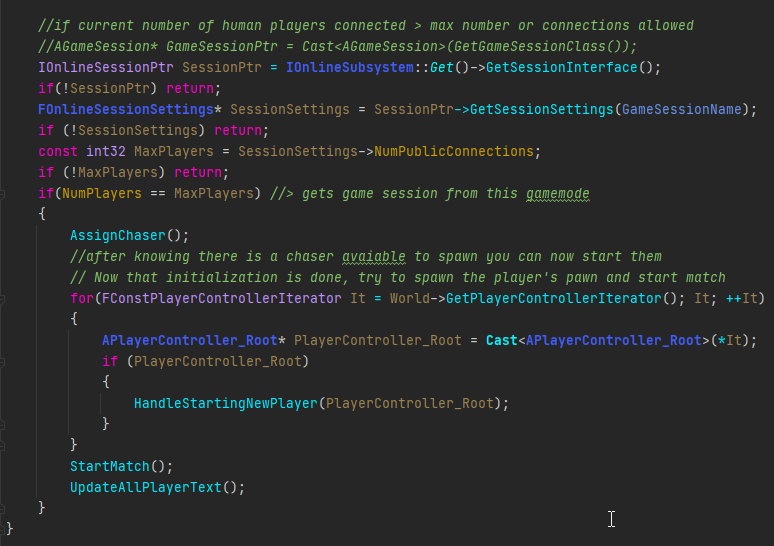
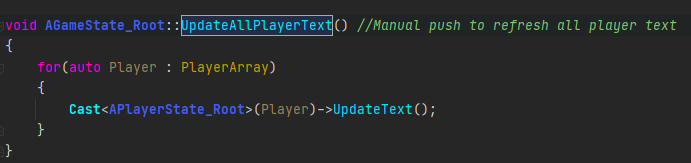
the onrep fires when i initially change the player tag of the chosen chaser, https://i.imgur.com/1S2xPnv.png since i set this before spawning the pawns there is no valid character and therefore doesnt update the text in the character, so after the match has started i manually update the text of every player
 oblique glacier
oh lol sorry https://i.imgur.com/nsjYW3i.png
 winged badger
whats your GetLifetimeReplicatedProps look like?
oblique glacier
https://i.imgur.com/YuZTknR.png for the playerstate

i have also tried replicating the text render itself but didnt change any outcome :/
oblique glacier
okay ill try
oblique glacier

 echo snow
Do I need to start a timer from the server?
Or should I replicate the event that is attached to the timer
winged badger
// in header
UPROPERTY(Replicated) bool bEpicFailed = true;

// In your GetLifetimeReplicatedProps
DOREPLIFETIME(APlayerState_Root, bEpicFailed);
i don't know what version you are, or if the bug where replication doesn't work when you only have a single replicated properly with OnRep was fixed on any version
oblique glacier
u want me to remove the ReplicatedUsing?
winged badger
no, just add those 2 lines
oblique glacier
ah as a test?
oblique glacier
unfortunately not, i must be doing the replication wrong,
so to replicate a value i set from the server to a client it should auto replicate to all clients?
is that part correct
winged badger
yes
oblique glacier
therefore i must not be setting the variable on the server?
so i set the variable in the playerstate grabbed by the GameState->PlayerArray.. are those playerstates belonging to the server or clients?
(and that gamestate itself is obtained by the gamemode)
winged badger
that GameState and PlayerArray exist on all machines
so, which instance of the GameState
and when?
oblique glacier
CustomGameMode::PostLogin() i get the gamestate using the helper function.. https://i.imgur.com/vn9LK5w.png

is this the servers gamestate
winged badger
it is, PostLogin runs server only
oblique glacier
fantastic
winged badger
HandleStartingNewPlayer is better
more natural hook for that
you are kinda doing it at the same time
oblique glacier
i do it just before then because i need to have a chaser assigned to know which playerstarts to use for each team
winged badger
thats fine
oblique glacier
yes fantastic, so next..
i use that gamestates function ChooseInitialChaser() which grabs a random playerstate from the playerarray
thats playerstate should be a server playerstate?
winged badger
its a playerstate instance on server, yes
oblique glacier
oblique glacier
so i might accidently be using client playerstates? https://i.imgur.com/wRxPKPn....
^
okay
so using that server playerstate i then use a setter function the change the value of the replicated variable Player_Tag
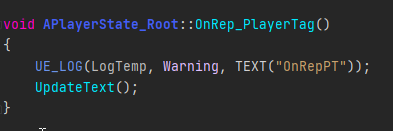
doing so should trigger the OnRep_PlayerTag() but since I have no valid character yet it does nothing
oblique glacier
all that should happen is the enum private variable should change
yes the onrep triggers fine
oblique glacier
the character is invalid for now until the HandleNewPlayer has occured for all players
updatePlayer? which block are you reffering to?
winged badger
UpdatePlayerText
whats it supposed to do?
update the widget component on the character?
oblique glacier
UpdateText() which is called by both SetPlayerTag() and OnRep_PlayerTag() is intended to go to the character, and change the text of a text render component
winged badger
best place to do it that way
is to call UpdatePlayerText from OnRep_PlayerState override in the Character
alternatively, you can attach the PlayerState to Pawn
and put your text renderer on the player state itself
(it is an Actor after all)
(OnRep_PlayerState in Character addition to OnRep_PlayerTag in PS)
oblique glacier
i like this, i shall ammend the code when i have solved my problem, is this what you assume is wrong or just an efficiency ammendment? because the text seems to render okay
winged badger
you have no way of knowing which one of them will become available first
if a client is waiting for 2 minutes for a full game
sure, PS will be there first
but
the last client will have PS and Character start replicating at the same time
and PS has much lower NetPriority
so odds are, that client will have Character before PS
you have to cover both situations because of that (and there is always packet loss, too)
oblique glacier
makes sense, ill definitely get on this, but this isnt causing the replication error though right?
winged badger
there is no replication error, you're just one callback short
case when character comes after PlayerState
and PlayerState already received the PlayerTag
in that case, when Character's PlayerState pointer replicates, it can just access the PS and set the text
therefore overriding this (declared in APawn)
    /** PlayerState Replication Notification Callback */
    UFUNCTION()
    virtual void OnRep_PlayerState();
to cover that scenario
oblique glacier
okay let me try to explain it back to you so i can see if im understanding correctly, the playerstate is always assigned to a client first and will be there before a character, therefore the playertag should be stored in the playerstate. when there is a character you need to grab the tag value from the playerstate and update the characters text render ?
winged badger
nnot on clients
if playerstate and character are created on server at roughly the same time
both of those Actors replicate individually
and in 99% cases, Character will arrive before PS
oblique glacier
also to note the tags will changed upon contact with other players (like the game "tag")
winged badger
OnRep_PlayerTag will handle that
winged badger
if you delayed spawning the character on server, no
but if you didn't, yes
networking is fun
oblique glacier
ahh
winged badger
(and note that there is no delay for the last client to join)
oblique glacier
i do delay the spawning so in my case i will always get the ps first?
oblique glacier
you receive the playercontroller at Login() and the Character is given the the player controller at PostLogin()
dont you get the splayer state with the playercontroller
winged badger
you do, but its the same frame
and if you spawn character synchronously right after, so is the character
net driver ticks later
so all of them are evaluated for replication in the same pass
and are sent in order of net priority (which sends PS last)
PS can often arrive several frames later
oblique glacier
okay, so if the PS is last, this is why you want me to use the character to store the playertag?
i think im getting it just a little confused at the final part where the character callback is needed
overriding the OnRep in the character will cover the basis that if the character does come first itll use that one instead
i get this
oblique glacier
and thats what im missing for the text to replicate to other clients?
winged badger
there is no order of guarantee
character can come first, ps can come first
so your code needs to work either way
oblique glacier
yes okay that makes sense i can do this
you just want me to override the onrep thats all in character? i dont need to replicate the text render or anything
winged badger
no
you just need the character to update its own text if the playerstate already has data when that OnRep_PlayerState fires
nothing else
oblique glacier
im so sorry for being dumb 🤣 , im getting there i swear
where is this OnRep_PlayerState coming from?
nvm
its a default function gotcha
https://i.imgur.com/pDRIiEE.png this what you mean?
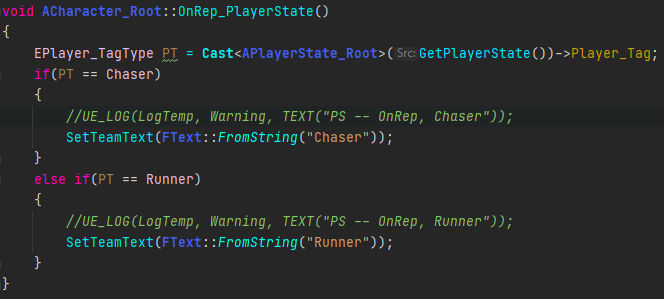
@winged badger
winged badger
yeah, right after you call super

 raw quarry
I'm just noticing that if a client is running at, for example, 144 hz but the dedicated server is at 60 fps, there is a lot of desync + teleporting even when just walking around. I'm guessing without digging in super deep that the movement component is sending updates 144 times per second and is then somehow getting out of sync with the server
anyone else run into this?
Should I just have my pawns tick with a 0.016666 delay between ticks?
 rapid bronze
Uuuh, my guess would be Tick Rates
raw quarry
hmm can you clarify more @rapid bronze ?
rapid bronze
Be sure to have something like this in DefaultEngine.ini
MaxNetTickRate=60
NetServerMaxTickRate=60
LanServerMaxTickRate=60
NetClientTicksPerSecond=60
bClampListenServerTickRates=true
MaxClientRate=10000
MaxInternetClientRate=10000```So everything ticks 60 times a second on the Net
rapid bronze
Mhm
rapid bronze
For example
16 players * 10000 = 160000bps or 160kbs
Let's hope it works out for ye
raw quarry
right right, well I appreciate it 🙂
raw quarry
that seems to have done the trick! Our players will be very happy haha
rapid bronze
I'm glad it worked!
 kindred widget
Question. Are Static Mesh Pointers viable over network? Gonna test myself if no one knows in a minute or two.
Trying to avoid making a new class.
 marble gazelle
Pointers are never ever valid over network
 chrome bay
pointers to assets will be
marble gazelle
It's even not guaranteed that the Mesh is even loaded
no?
We talk about memory pointers, right?
chrome bay
Assuming that is, you are using it via an RPC, or as a replicated property
Well the pointer is not the same of course, but the "object" it points to can be resolved to your own local instance of it
marble gazelle
Well k, Wrapped they may are, but then you don't send a pointer in fact
chrome bay
As far as your game code is concerend you send a pointer, but UE4 will automatically resolve it behind the scenes
Assuming the object is network addressable
marble gazelle
yeah sure
kindred widget
Just tested to be sure. It seems to work. I'm basically just trying to see if I have the same component on the client as the server. I was going to do IDs, but the Foliage Editor is an ass. Passing the pointer to the StaticMesh is valid on both sides.
marble gazelle
but for Assets, I usually send the Path, since maybe its not loaded
chrome bay
There's no need, the engine will load it
Plus if you send a path, it's considerably more expensive because it will just be a string every time
Whereas UE will assign that asset a net GUID once it's been resolved the first time
 thin stratus
Yeah, no need to send the path :D
chrome bay
@kindred widget Foliage is serialized into the level, so it sort of makes sense you can resolve a pointer to it
marble gazelle
actually its a SoftObjectPtr
 meager spade
@kindred widget anything in the level will have a stable name
and can be resolved by UE4 networking
chrome bay
You wouldn't normally send a soft object ptr via network anyway
marble gazelle
Haha you are so right xD I totally fucked up remembering my code -.-' I send just FNames that are mapped to the assets (Its for the equipment system and on server side I don't load any meshs for them since its not needed)
kindred widget
It's oddly hard to override foliage stuff. :/ Getting there though.
chrome bay
FName is still a string btw 😉
marble gazelle
Doesn't matter
meager spade
well technically you should not send DFNames
FNames are index based
and not guarenteed to be the same on clients and server
thin stratus
Just send the asset pointer :<
meager spade
yup
UE4 networking will resolve it
i pass around my itemdefinitions between server and client, just by sending the pointer
chrome bay
also gameplay tags FTW
marble gazelle
But this wont work for me. The server requests the profile data from internal services (actually a json) then creates the Char Settings with FNames and then clients can lazily load the meshs
thin stratus
Map the Asset to the FName on the Server and then send the AssetPointer?
Idk, this is how you should try to do it.
marble gazelle
but then the server would need to load the assets which I actually don't need
(And didn't had any issues with it so far...)
chrome bay
DataTables waves
I use them quite a lot for network config stuff
We use them in HLL for cosmetics for example, cosmetic items are just an FName ID
then it goes looking up in a data table for the info based on the ID and type
marble gazelle
And what are data tables? Maps of FName to smth. I use them to map ID to SoftObjPtr
chrome bay
Right, but the advantage of using a data table is the FName gets a lot shorter than a full asset path
marble gazelle
. . . I do exactly this . . .
chrome bay
kk it sounded like you were sending a full asset path every time 😄
marble gazelle
Yeah I thought I do that. I don't xD
chrome bay
You can even go hardcore, then make a custom data "table" type that uses an array instead of a map, then send the index
and limit the index to the maximum index for C O M P R E S S I O N
marble gazelle
Makes iteration harder
chrome bay
well if you have the index, no need to iterate at all
But y'know, I wouldn't actually do that
just thinking of ways to make the data even ₛₘₐₗₗₑᵣ
marble gazelle
I won't do that 😛
Na, it's not smth I send each frame, so it should be fine. Dont optimize too early^^
Maybe at some point I add some sort of custom ID that uses a crc32 so I can just send int32 but this would require lots of editor work as well I think so hmm \o/
kindred widget
My brain is mush right now. But a normal float is 32bit? So each component in a vector is 32bit, and the normal NetQuantize lowers that precision to 20bits? Which if I understand right, brings a vector from 12 bytes to 7.5 bytes?
 open skiff
Are USubSystem replicated?
meager spade
@open skiff no
open skiff
@meager spade Thanks. Will they run on a dedicated server, if so which class?
open skiff
@meager spade Thank you.
chrome bay
Don't forget you can override virtual bool ShouldCreateSubsystem(UObject* Outer) const { return true; } too
open skiff
@chrome bay Thank you.
 rose egret
chrome bay
and limit the index to the maximum index for C O M P R E S S I O N
rose egret
chrome bay
and limit the index to the maximum index for C O M P R E S S I O N
that's what I did exactly. 😁
 peak sentinel
Why people use structs instead of single variables to replicate them? Is it cheaper?
 sinful tree
I think it depends on use case. Using structs help you maintain data that should be together in packages. As an example, I load some data from a database on the server, lets say for a player's character data, I then feed that data into a struct, and then I can replicate the struct across all at once in an OnRep function and then I should have all the data available for that struct on the client, which would be far easier than trying to deal with individual values coming across one at a time, especially if it was having to deal with multiple characters, which I could then store in an array of my character struct.
peak sentinel
Understood. I was reading Zak's (senior epic engineer) comment on a answers.unreal question, that explains why he recommended using struct for storing pawns positions. Thanks for explaining 🙂
chrome bay
structs replicate atomically too
Whereas separate members can arrive in different packets IIRC
sinful tree
peak sentinel
Understood. I was reading Zak's (senior epic engineer) comment on a answers.unre...
Do you have a link to that? I'm curious if he answered that in regards to pawn positions as it may have been in reference to a Map of Pawns to Pawn Locations, as Maps you cannot replicate directly, but apparently you can through a struct.
chrome bay
something like that should just be an individual property of the pawn
peak sentinel
Its about smoothing the movement: https://answers.unrealengine.com/questions/479211/what-is-the-best-way-to-smooth-player-movement-for.html
chrome bay
Well location and rotation for example are likely always changing at the same time, so it makes sense to replicate them together where possible
The engines' FRepMovement does the same
There's other more advanced benefits also
Only the changed properties of the struct will replicate btw, so it doesn't cost anything extra
sinful tree
chrome bay
Only the changed properties of the struct will replicate btw, so it doesn't cost...
Ohh that's nice to know. 😄
chrome bay
yeah the engine is pretty smart about it
IIRC even if you have them in an array, so long as the array doesn't change size or order it will do the same also
 wind garden
Is there some functionality to compress data with a generic compression like zlib before sending via RPC? For example compress a byte array with zlib. I see there are some functions for quantization but i look for something generic and lossless.
chrome bay
You could look at Oodle
Fairly sure there's UE4 integration already
Actually, it might already be integrated by default. Not sure now
chrome bay
Ah yeah that's it, I wasn't sure
Wonder how much mileage you can really get out of that though
wind garden
Its not. There is a plugin for it but it needs a license and i am basically on a 0$ budget. I could afford a cheap solution but since they dont list prices on the website, its probably expensive.
winged badger
they quoted me $8500 per platform
chrome bay
Yeah figures.. in that case no idea.
winged badger
you can haggle it down, but yeah... won't get it to zero budget acceptable
chrome bay
All I know is there was an Oodle .dll in the Paragon install files, so I guess they decided to use it there
peak sentinel
First time seeing this, replication works very well but, should I worry about this warning?
void ABasePawn::Tick(float DeltaTime)
{
    Super::Tick(DeltaTime);

    ServerUpdatePosition(GetActorLocation(), GetActorRotation());
}

void ABasePawn::ServerUpdatePosition_Implementation(FVector Loc, FRotator Rot)
{
    FServerPositionData.ServerLocation = Loc;
    FServerPositionData.ServerRotation = Rot;
}
you're running it from all pawns
on every machine
be their local and owner by the PC or not
so other clients pawns are trying to send that RPC too
and that is what gives the error
peak sentinel
isLocallyControlled() should fix it then, thanks
winged badger
indeed
halcyon totem
what would cause an array to not work in multiplayer? I have a keypad that can open each door I assign it to in single player, but it mutiplayer the keypad can only open 1 door with the client, even though each is assigned to open the door with the array. but the server can use both keypads and open both doors
I tried to do the get all actos of class and get a copy for both the doors and the keypads
then I do a binding. but I am confused as the client can only use 1 keypad and door but the server can use both keypads and doors
 bitter oriole
Hey @halcyon totem - you keep asking questions about this door thing. Did you try doing a schematic on paper of how the data flows between server and clients - RPCs, client ownership and replication ?
halcyon totem
yes the door opens for the client
bitter oriole
That's not really what i'm asking 🙂
halcyon totem
but only 1 time, so its tricky
what would you do to fix it?
where would you start to look?
these are the things I dont know
bitter oriole
I would solve this on paper first
Unreal has only two main mechanisms for multiplayer - sending stuff from one owning client to the server (RPC, aka "run on server" Blueprint event), and replicated variables. It's extremely simple. The problem is deciding how to use them.
Arrays work well with both mechanisms, so it's not a bug or technical issue
halcyon totem
well I was excited when the door opened for the client and the server saw, but I am finding its always something else....
this time the something else was, it only opens 1 time...
bitter oriole
Yes, multiplayer is like that
That's why it's crucial that you understand your netcode design
Right now I feel like you're trying things right and left until it works
halcyon totem
well I have run out of things to try
kindred widget
@halcyon totem You are doing some oddly quirky things for just opening a door. O.o
 potent cradle
That's when you need to step back, and learn fundamentals @halcyon totem
No shame in that, I got to that point too
It'll be much easier afterwards
bitter oriole
My entire point is that this is not a problem you solve by trying
You need to understand how it needs to work
potent cradle

Creating a networked multiplayer game isn't easy, but Unreal Engine's gameplay framework is designed to set you up for success. On this episode of Inside Unreal, Technical Writer Michael Prinke will cover fundamentals such as the server-client model, various features of replicated Actors, and best-practices for efficient networked games.
Announ...
I highly recommend this one
It shows you all kinds of things you can do wrong
And how to fix it
It's highly illuminating
I got to a point where I was spending weeks on stupid little shit, just hacking my way through the weeds, until I thought: "right, step back, start going over fundamentals again". I solved the problem I was having in an evening afterwards.
bitter oriole
Another highly helpful thing is to log everything with the current station (client N / server) in the log
You then confirm that the sequence of events in log matches the flow chart on paper
kindred widget
Come to think of it, I don't think I've watched any of the multiplayer livestreams. Pretty much everything you need to know for basic fundamentals can be learned in a couple of doc pages and eXi's compendium. At least for blueprint networking and basic C++ networking.
potent cradle
Yeah, Cedric's guide is fantastic
halcyon totem
im watching this video, its a networking for dummies https://www.youtube.com/watch?v=KsORRtBOJYc

📹 Part 4 of our replication series unlocks limitless potential with Multicast and RepNotify! In this video, we dive deeper about how Unreal Engine's Actor Replication really works as well as introduce ourselves to a variable replication and how combining the power of variable replication with an event driven design can help us build a multiplaye...
potent cradle
Though having a video that shows you perspective of the clients & servers, and goes through common mistakes, is highly illuminating. Makes it easier to imagine, especially when you're new to networking. A large part of the problem is having a mental mapping of what's going on, it's super abstract at first.
halcyon totem
sometimes I just need a big brother to slap me in my head and say no dummy not that way this way
kindred widget
All you need for your door is a client line trace, then ServerRPC with an actor argument from the client version of the pawn to the server version. Then have the server version call an interface on the hit keypad, which makes makes the server keypad call a function in the door that sets a replicated bool or something. On that bool's replication, play a timeline one way or the other.
Now you have a replicated door that can be opened via keypad, and should reopen if a client disconnects and reconnects. Better use would be actual open state, but this is simpler to implement.
bitter oriole
Basically, the door itself should be a simple animated mesh with a replicated bool "open" - when it's true the open anim is playing, unlooped, whe, it's false the close anim is playing, unlooped
The keypad just changes the bool on the server
The only hard part is that only client-owned actors can fire server events from a client
So the keypad action probably needs to go through player controller or pawn
kindred widget
I normally just have the client's character do that through interfaces. The actor's themselves check server version's distance or whatever to make sure that it can be used, but the client's side is little more than line trace, send server rpc with hit actor if it's valid.
Lets you interact with aaaall the things with no extra effort.
halcyon totem
Im going to try to use an interface I had been using event dispatchers so Ill try that next
bitter oriole
^
You need a server event in Pawn/PC that takes a keypad actor as parameter ; gets the linked door from the keypad (on server) ; sets the door state to open/close (on server)
It's that simple
 rare quest
what's the best way to replicate a widget hp bar through c++?
 limber gyro
rare quest
what's the best way to replicate a widget hp bar through c++?
limber gyro
rare quest
what's the best way to replicate a widget hp bar through c++?
you dont replicate widgets, they are not even networked, you gotta replicate variables then use those variables to populate the widget
the way i have it setup in my game is, i have a HP variable that is replicated and then i pass the reference to my character to the widget and fetch the HP from there
kindred widget
@rare quest Create yourself an AHUD class, and use it to call CreateWidget. You need to add "Slate, "SlateCore", "UMG" to your Build.cs and include UUserWidget. Or create your own UserWidget class to create. Then what you'll do is create a BP child class of your CPP AHUD, and use the BP version in your game mode. In the CPP AHUD, create a
UPROPERTY(EditAnywhere) TSubclassOf<UUserWidget> HealthBarWidgetClass;
and then you can call
UUserWidget* MyHealthBarWidget = CreateWidget<UUserWidget>(GetWorld(), HealthBarWidgetClass);
to spawn the actual widget and use the return from the CreateWidget to add it to screen. After that you can replicate stuff in your player character that your widget can access for it's display.
rare quest
thank you very much, I'll keep you updated @kindred widget
kindred widget
@rare quest Also don't forget to set the HealthBarWidgetClass in the blueprint version of the HUD class to your HealthBarWidget's Class.
I often found it was much easier just to keep pointers to widgets in the C++ AHUD class, that I could populate from Blueprint. I have my own singular UUserWidget class that has a few BlueprintEvents that I can use from C++ code by getting the widget from the HUD and calling those events to make things happen in blueprint. Made my UI design a lot quicker to iterate on.
limber gyro
kindred widget
<@!203217327678947328> Also don't forget to set the HealthBarWidgetClass in the ...
is this not possible to do in BP
for example when u have a health bar abouve the character and its replicated
to get the reference directly inside the widget?
from what u said, you have like a reference to the character in your base widget c++ class no?
kindred widget
It's UI. I just use GetPlayerPawn. For more complex UI, I use a BlueprintImplementableEvent with a UObject argument that I can cast to whatever that UI is designed for. You can pass things through to UI easily that way to set them up.
limber gyro
well but get player pawn is not replicated is it
you will always get the local player pawn right?
kindred widget
Why does it need to be? It's UI. It returns the local player's currently possessed pawn.
limber gyro
well we are in the multiplayer section xD
kindred widget
No, I see what you mean. For healthbars that aren't the player's.
limber gyro
so if you do that and you tried to damage the enemy player it would show your helth bar instead of the other player not?
no''
kindred widget
But playerstates are easy to get from anywhere as well. So is Gamestate.
limber gyro
ye but how do u get the player state inside a widget of an enemy
i tried "get owning player" but it didnt work
kindred widget
If you want to line trace and show a health bar, you can do it the same way I mentioned with the BIE Line trace, call event in hud that passes along hit actor. HUD spawns or reuses UI and places it on screen and passes that actor reference in for display.
limber gyro
i am just trying to figure out if theres a better way to get the character reference inside the widget BP
kindred widget
If you want healthbars on enemy units, use a WidgetComponent in screen space.
limber gyro
in my game theres a few players connected and they all have health bars that are a componenet of the character class
right now i just pass the character pointer on the beginplay of the character
but i was wondering if there was a better way to do it
inside the widget itself with BP
but since widgets dont replicate there might not be
kindred widget
Of which character though? Like teammates, or?
kindred widget
If it's constantly on screen, WidgetComponents are much easier to work with. If it's something like a line trace for displaying the health of the enemy in the middle of the screen, a single widget that can he shown and hidden with an event that allows you to pass the reference from the trace is probably best.
limber gyro
i might not be making myself very clear
what i want is ot do this:
but directly inside the widget
kindred widget
Hmm. I'm not sure there is a way to do that inside of the Widget. Normal use case is what you're already doing.
limber gyro
it would definetly be nice to have tho
its a bit of a pain to make a parent class in c++ just to add a reference and nothing else
kindred widget
Let me see if you can run the outer line to get the component that spawned it.
rose egret
how to profile how many actors are relevant to a client ?
 normal jacinth
Has anyone ever had this issue? We're playing a Dev build and it reckons we're using different versions of the game (we aren't)
kindred widget
@limber gyro Not really finding anything. Just from the widget to it's owner, which seems to be GameInstance.
limber gyro
rip
normal jacinth
has 4.25 of Advanced Steam Sessions removed some functionality? I can't find the event for when an Invite is Accepted any more
oh nvm I forgot you have to reparent game instance to see the nodes
 hollow oar
Hey guys, new here and to unreal. Posted a question in the main channel, but am realizing it would be better off here. Anyone up to help me with a networking problem im having? its only online, local lan works fine
 vivid prawn
hi guys, I have syncing issue with Projectile Movement, some properties like velocity and Initial speed does sync very well, but other properties doesn't work, like Bounciness and Friction, is there any settings to make them replicate as well? ...or am I missing something?
...also, when projectile hit the wall, it create a different result
on client side, it will just drop
but on server side it will stick to the wall
 summer tide
@kindred widget So I got the fishing rod working. To retrieve it do you think this will work? https://gyazo.com/99d557ccd59783b37b6c809e669fa4c7

The true logic only works for me if I put that in multicast
 whole urchin
anybody can help me replicate pitch ?
meager spade
pitch is replicated
i really should make a blog on it 😄
show me how you are getting the pitch
 dark edge
@meager spade If you're serious about the blog post you should do one going over the less-covered framework classes and variables like ControlRotation, GameState and the fact that it holds the PlayerStates, etc. I see a lot of new devs basically duplicating things they didn't know already exist.
dark edge
What's your blog? I just find vapes lol
meager spade
i will get some content posted it there again 😄
@whole urchin literally just do GetBaseAimRotation pull off, get pitch, set that as your pitch
meager spade
ofc
meager spade
works fine for me
whole urchin
show me the blueprint, the replication part
whole urchin
pitch
meager spade
that is what GetBaseAimRotation is
whole urchin
it's not
whole urchin
show me
meager spade
    // that is by default Controller.Rotation for AI, and camera (crosshair) rotation for human players.
    FVector POVLoc;
    FRotator POVRot;
    if( Controller != nullptr && !InFreeCam() )
    {
        Controller->GetPlayerViewPoint(POVLoc, POVRot);
        return POVRot;
}```if you have a controller, it returns your view point
POVRot = GetActorRotation();```no controller it gets actor rotation
    if( FMath::IsNearlyZero(POVRot.Pitch) )
    {
        if (BlendedReplayViewPitch != 0.0f)
        {
            // If we are in a replay and have a blended value for playback, use that
            POVRot.Pitch = BlendedReplayViewPitch;
        }
        else
        {
            // Else use the RemoteViewPitch
            POVRot.Pitch = RemoteViewPitch;
            POVRot.Pitch = POVRot.Pitch * 360.0f / 255.0f;
        }
    }

return POVRot;```if the ActorRot pitch is 0, then uses RemoteViewPitch which IS replicated
    UPROPERTY(replicated)
uint8 RemoteViewPitch;```how am i supposed to understand this
meager spade
i am showing you that it is replicated
you don't need to replicate the pitch
just pull the pitch from the player with GetBaseAimRotation() and getting the pitch
whole urchin
is this FPS or TPS ?
meager spade
i use it in TPS
summer tide
Single player and Steam/lan multiplayer should use diff save file names, right?
 sand iris
sinful tree
sand iris
sinful tree
Guessing this needs to be done in game mode or instance on the server.
winged badger
it needs to be done on the server
 modern swift
a question about pc index in multplayer run on dedicated server. I assume dedicated server dont hv pc itself. on Server side the first player join will be index 0 and second play join will index 1. what if first player disconnected, the second player will become index 0 on the server side ?
and From client side it only have 1 pc and the index is 0, is this concept correct?
 empty axle
@modern swift yes
echo snow
How can I fix these?
I'm calculating player speed on the client and setting the speed from the server to everyone else.
I'm also setting the speed locally on the player too
Looks like this
When player is running on a slope I'm checking for how fast he should run up hill. But because the server and client isn't the same, it starts lagging.
 plush wave
Does COND_InitialOnly mean it will try to send the first value when it is set?
Or just when the actor is created it sends the initial value
Have a int set to 0 by default on an actor
It then gets set just once
But not at spawn
Sometime later
Wondering if COND_InitialOnly is an acceptable use of this
plush wave
Gotcha
 meager fable
is the constructor script called on every client or just on the server? I'm talking replicated actor spawned on the server
chrome bay
All instances
meager fable
thanks
rose egret
whats the best TickGroup in dedicated server to run lots of LineTest every tick ? does it matter ?
chrome bay
Doesn't matter. TickGroup is a game-level decision
Most of the time, I suspect, you'd use PostPhysics
Since you want to raytrace the latest state of the physics scene
 grizzled stirrup
Should SetInstigator and SetOwner only be called on the server for replicated actors?
Ok well it looks like both Instigator and Owner are replicated, so the answer to that is yes
meager fable
I attached an actor to my pawn, it's location gets replicated only from the server to the clients(wrongly btw). The actor is set to replicate & NetLoadOnClient, replicate movement is turned off and all of its components have replication turned off. GetAllChildActors returns only 1 actor and it doesn't replicate. Network profiler shows that this actor replicates AttachmentReplication almost every frame. How can I check what exacly is getting replicated there?
 safe marsh
anyone know how to cross-compile a linux server on windows? I followed a tutorial and it build the server, but put it in the engine directory, not the project directory
even with the project set as the startup project in VS
safe marsh
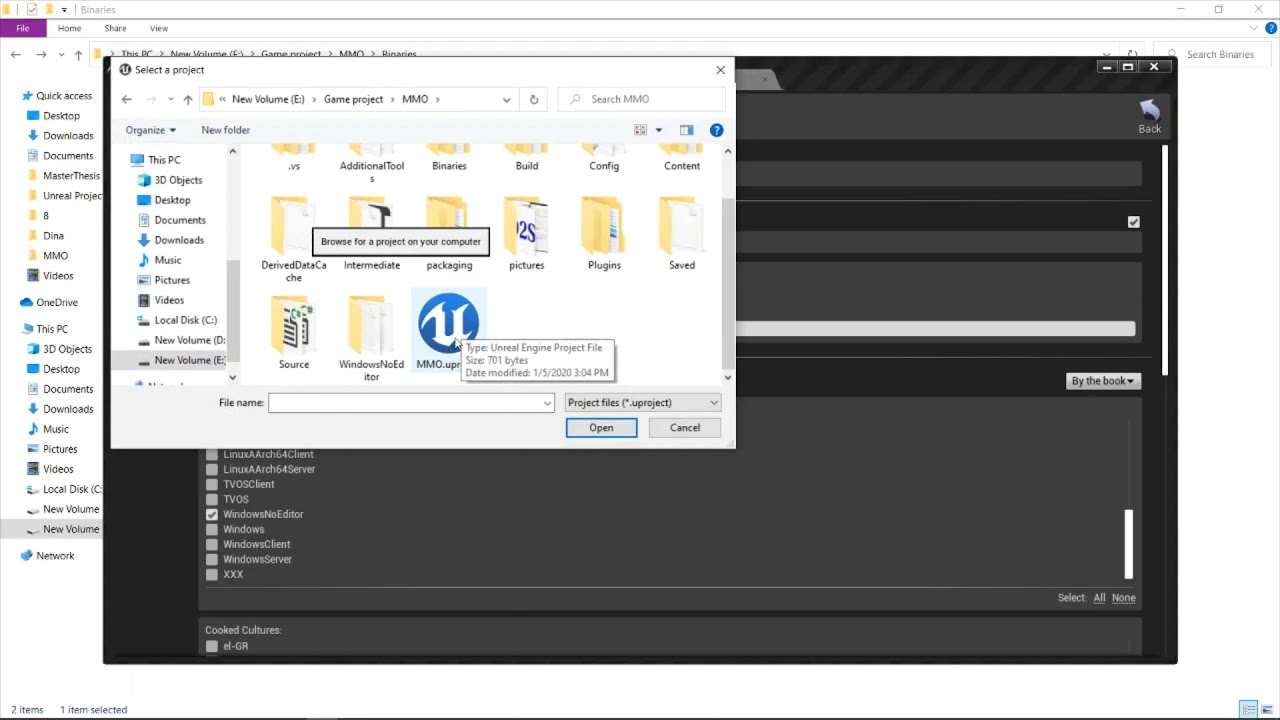
In this video I am going to show you how to compile a Linux dedicated server using windows machine:
Environment variable name: '"LINUX_MULTIARCH_ROOT"
Usable Linux commands:
cd: change the directory
ls: list files in the directory
chmod +x: make a file executable
UE4 Toolchain: https://docs.unrealengine.com/en-US/Platforms/Linux/GettingStarted...
so it builds the server as UE4Server.sym nt ProjectNameServer.sym in the engine folder, not project, I followed his method
also, the unrealfrontend cannot find the server target when packaging
safe marsh
Ok, I need to add server build target to the project, thought it wasnt necessary because he didnt mention it
 ember osprey
@meager spade How do you access the Network Prediction Plugin in code?
I enabled it but when I try to include this #include "Movement/FlyingMovement.h"
vs tells me it can't find it? Is there some other initialization required for plugins like this?
meager spade
that is not the correct include though is it?
did you add the network prediction stuff to the Build.cs?
ember osprey
Didn't know I needed to?
meager spade
that is basic UE4 C++ knowledge 😄
you need NETWORKPREDICTION and NETWORKPREDICTIONEXTRAS in your Build.CS
ember osprey
not NETWORKPREDICTIONEXTRAS only NETWORKPREDICTION
meager spade
well
ember osprey
and that include was in the extras.
meager spade
right?
ember osprey
I'm using source, so once I include in the build cs do I need to rebuild the engine?
or will just include it?
ember osprey
ok thanks, I'll work on that rn.
ember osprey
meager spade
it goes in your game module build.cs
I added it:
but it still cannot find the file.
Do I need to implement like startup module code or something?
this is from their extras project:
Should I have to be doing this tho: #include "Plugins/Runtime/NetworkPrediction/Source/NetworkPrediction/Public/Movement/FlyingMovement.h"
if you included the plugin in your build .cs?
It doesn't seem correct.
normal jacinth
Hi 🙂 Is there a way to find out where my blueprints are slowing the game down?
bitter oriole
Yeah, by profiling
Start with stat unit to confirm it's a CPU problem
Then move on to start statfile/stopfile to record CPU performance, and use the profiler in the session frontend window
Find largest tick time on the main thread and you're done
normal jacinth
that doesn't show me much, everything runs smooth
it's only when i play over a network in a build that there's slowdown
I've found a network profiler but can't get that to generate data
bitter oriole
Network profiler is for bandwidth, not slowdowns
If you know the slowdown is CPU related, which is something you need to check first, use the profiler
bitter oriole
Which means that thread is idling
Inactive, doing nothing, waiting
Means you're looking at the wrong thread
normal jacinth
sorry for such amateur questions; what should I be looking at then?
bitter oriole
Here's how it goes : rendering a frame needs every thread that has synchronisation to have finished their work (simple version here)
If you have a 40ms frame time for example, and a thread worked for 16ms, it stalls for 24ms
Your job is to find the thread that actually worked for 40ms and slowed everyone else down
Usually, if you really have a CPU performance issue, that would be the main thread
Since that's the one running Blueprint and the game framework
normal jacinth
interesting
this might be a question too far but how do I find that thread?
This is what I'm looking at
bitter oriole
You're showing me a game running at 100fps
That supposed to be the performance problem ?
normal jacinth
I don't know :/
I'm trying to find the reason why the game slows down massively when played online
bitter oriole
So, is that slowdown a persistent state ? Does it happen for more than a second ?
normal jacinth
the assets I'm using are very simple and show up as blue/green in the quad views etc
yeah it's persistent
for the client mostly
(I'm doing peer to peer)
normal jacinth
if I do that in a cooked build will it still generate a file?
bitter oriole
stat unit just shows stuff on the screen
If you have a cooked development build, it will work fine, yes
but you can also try that while running in standalone (right click uproject -> launch)
ember osprey
@meager spade I figured it out. The editor was lying to me using hot reload, it was telling me my code was compiling fine, but when I built the solution in VS. I found header errors that have been there for weeks! Step one completed. Thanks!
bitter oriole
That's not a hot reload issue
That's a unity build issue - include errors are routinely hidden by the unity merge process
Disable unity build from time to time to do an include check pass
ember osprey
bitter oriole
That's not a hot reload issue
are you talking to me?
bitter oriole
Yes
bitter oriole
Check in project settings that you have debug symbols generated
 twin juniper
Morning
I'm having a hard time over here trying to figure out how I can check for an actor's role via c++.
What I want to do is to get the role of the character my script is running on and then see if it's not an authority.
The method that the tutorial I was following used is apparently outdated, but I couldn't get the new setup working either (and I'm kinda stuck at that point).
I'd ask one of the coders to post a little snippet that I can take a look at after I finish my stuff so I don't need to "detour" in terms of learning stuff.
(aaand please ping me when responding )
🖖
safe marsh
will check @bitter oriole
bitter oriole
@twin juniper GetLocalRole() for local, GetRemoteRole() for remote
modern swift
https://paste.ofcode.org/kHcigLqqZFLa8ncz8buB7n hi all anyone know why replicationgraph have this error
chrome bay
Override InitGlobalGraphNodes() and call PreAllocateRepList() a few times
Example:
    PreAllocateRepList(6, 12);
    PreAllocateRepList(128, 64);
PreAllocateRepList(512, 16);```Could you link a tutorial or documentation giving a more precise overview of how to use them ?
bitter oriole
The various aspects of replicating Actor objects.
ember osprey
bitter oriole
That's a unity build issue - include errors are routinely hidden by the unity me...
I'm using unreal not unity
modern swift
chrome bay
Example:
thanks let me check
safe marsh
@bitter oriole I cant see an option for linux symbols in project settings
bitter oriole
@ember osprey I am well aware. Unity build is a UE4 feature.
safe marsh
I followed some tutorial to build the server, basically its the same except missing the .sym file
ember osprey
bitter oriole
<@!509381570310701086> I am well aware. Unity build is a UE4 feature.
hmmmm ok
twin juniper
Yea I checked the documentation already but I didn't know what to do with it .. yea , fairly new to coding in this sense
Well the problem is I see stuff - but I don't understand what it does. And therefore can't assemble stuff which is exactly my problem..
ember osprey
The editor compile said all good and never errored, but when I built in VS it showed actual errors.
bitter oriole
No, it's really not. It's a feature that compiles your source files at least 10x faster, by merging .cpp files together
There is no way to prevent this side effect, which is, that a .cpp file missing includes, can have them filled by another
The entire point is to avoid multiple include parsing
ember osprey
got it! Thanks @bitter oriole !
modern swift
chrome bay
Override InitGlobalGraphNodes() and call PreAllocateRepList() a few times
I find the PreAllocateRepList is more than 4 , I dont know what it does? can I remove all of them , or just remove PreAllocateRepList(512, 16); like BasicReplicationGraph example?
peak sentinel
void ABasePawn::ServerUpdatePosition_Implementation(FVector Loc, FRotator Rot)
{
    FServerPositionData.ServerLocation = Loc;
    FServerPositionData.ServerRotation = Rot;
}

void ABasePawn::Tick(float DeltaTime)
{
    if(WasRecentlyRendered())
    {
        AActor::ForceNetUpdate(); // Forcing net update on rendered only.
    }
    if(IsLocallyControlled())
    {
        ServerUpdatePosition(GetActorLocation(), GetActorRotation());
        if(FServerPositionData.ServerLocation != GetActorLocation())
        {
            const FVector NewToOldVector = GetActorLocation() - FServerPositionData.ServerLocation;
            SetActorLocation(FMath::Lerp(GetActorLocation(), FServerPositionData.ServerLocation, (1.f - DeltaTime / 0.125f)));
            UE_LOG(LogTemp, Warning, TEXT("%s we're tick updating location for %s"), *FString(__FUNCTION__), *GetNameSafe(this));
        }
        else
        {
            UE_LOG(LogTemp, Warning, TEXT("server and client pos are same."));
        }
    }
}
How can I compare server and client positions? I was in assumption this tick function was working, and I tried to interpolate between client and server but then I realized its because of ReplicateMovement enabled... if(serverposition != getactorloc always returns false. So client says its already same. But its not smooth
chrome bay
@modern swift to be honest It's hard to know where to go without debugging it. Rep Graph is a pretty advanced topic, you'll want to at least install debug symbols. That callstack doesn't show anything useful
Just tells you what ensure it hit
twin juniper
@bitter oriole
What the tutorial I watched, showed was also this snippet of code
if (Role < ROLE_Authority)
{

}
I can't access role and according to a post, this option has been removed.
Been searching & looking tutorials for hours to find out what exact steps I have to do in order to create a workaround for this. As a beginner pieces of the documentation don't help as they just show part of steps (atleast in this case) but don't offer a guide telling me what I need to set up in order to check for roles.
So I'd instead need something like a video that, as mentioned here, explains all the steps I need to do in order to reach my goal
... got any thoughts ? ._.
modern swift
chrome bay
<@!429972120991432704> to be honest It's hard to know where to go without debugg...
thanks, anyway it only have error when I packing to window application , I tried to attach to debugger in VS , seems nothing can see. maybe I tried to see the youtube tutorial again to see what it does, thanks man
 quasi wyvern
just setup a multiplayer create/join session which works with basic pawns and character movements component.
server owned pawn can move finde and also replicates to the client.
but the client only can look around but can't move at all (not talking about replication) - like its stuck...
does anybody know what could be the problem?
thx
safe marsh
@bitter oriole any idea how to build the .sym file for a linux server?
first when I built linux server it put the binaries in the engine folder (including sym), I added a build rule to the project and it built 3/4 of the files, but the symbols file is missing
bitter oriole
Let me check
safe marsh
Sure, I followed the video I linked above, pretty much doing exactly what he does but the file is missing
bitter oriole
@safe marsh I do get the .sym on a client build (no server here) on 4.26 so clearly that still works. UAT command is
BuildCookRun -ue4exe=UE4Editor-Cmd.exe -project="xxxx.uproject" -utf8output -nop4 -nocompile -clientconfig=Shipping -build -targetplatform=Linux -installed -cook -createreleaseversion=master -stage -package -pak -compressed -distribution -archive -archivedirectory="xxx"
Check in package output that you don't have nodebug or something
echo snow
Does anybody know how I may solve the small jitter/lag when switching player max walks speeds?
safe marsh
@bitter oriole I packed for linux client, it rebuilt the engine and now its generating the sym file for client/server builtargets, when I built for linux server in vs it also did a rebuild but didnt generate the sym file
Not sure if that makes sense its 3am so will try tmr
rare quest
Guys, I have a question, how can I get a c++ variable wich is replicated, to work properly and change on all clients, so i can then get it from a widget blueprint and display it in a health bar?
winged badger
well, this works just fine, if you want all players to show local players HP
if not you need context for the widget
so question becomes where is that widget shown from?
whats its relation with the pawn whose health its supposed to display?
rare quest
it is a widget component attached to the pawn
winged badger
they have the pawn on BeginPlay
do Cast<UMyWidget>(WidgetComponent->GetUserWidgetObject())->DisplayedPawn = this;
injecting the reference to itself into the widget
then each widget will show the health of the pawn its on
meager spade
btw @rare quest Replicated with ReplicatedUsing is redundant, one or the other is required, causes no harm but just for future reference, you only need 1 or the other 🙂
rare quest
winged badger
do ``Cast<UMyWidget>(WidgetComponent->GetUserWidgetObject())->DisplayedPawn = th...
do i need an include of widgets to cast to my widget class?
winged badger
if your widget doesn't have a c++ base
you'll have to do that in BP
and i didn't just Cast, i dereferenced the result, so definitely yes
grizzled stirrup
Will an OnRep function fire on clients that have joined after it was set?
As in GameState sets a replicated OnRep property on BeginPlay but laggy PlayerB hasn't joined yet, will PlayerB get that OnRep function called when he eventually joins, or will he just have the up to date property but not the function called?
It seems they do at least testing with standalone editor instances
winged badger
@grizzled stirrup the OnRep_MatchState in GameState is what calls BeginPlay on clients
(tells the world it should call it on all Actors)
grizzled stirrup
That is good to know! Say for a general example, if the gamestate sets a random onrep property before other players join, they'll ALWAYS call that OnRep function when they do join right?
winged badger
with GameState in specific there is more to it
all GameState OnReps will happen before any client Actor calls BeginPlay
but in general, yes
(this also guarantees GameState has already replicated when BeginPlay happens)
grizzled stirrup
Oh right I see what you mean now, in that case it might end up with stuff not working properly if the onreps happen before (only if they have something important in BeginPlay or call it at all)
winged badger
for Actors replicated to clients
they will also do all OnReps before their BeginPlay
(on the replication that spawns them)
grizzled stirrup
Very good info will be keeping this in mind now when doing these early onreps
thanks!
 clever plinth
For clarification, playing a game using "offline" mode in the editor would imitate something like a player in a lobby, correct?
It confuses me since that would mean that the "offline" mode is not actually 'offline'
sinful tree
clever plinth
For clarification, playing a game using "offline" mode in the editor would imita...
Offline as in when playing in the editor, it is not connecting to a dedicated or listen server when launching. The other options make the editor connect to either a dedicated server or a listen server
clever plinth
Sweet! ty @sinful tree
 burnt olive
Hi. I'm trying to hide the head only for the player who owns and at the same time others can see your head. I have seen that the variable "owner no see" exists but it would have to have the head in a separate mesh. Is there another way to do this? Thanks
 polar wing
@burnt olive You can use the hide bone by name function on the locally-controlled client. Just hide the neck 03 or whichever bone the head is connected to.
Usually works for me!
burnt olive
@polar wing The bone works fine but what happens with this is that it is only working for the client and my game is local host
Which means that there will always be a server and therefore it won't work for the host player
polar wing
@burnt olive IsLocallyControlled should work. Ohh yeah I see you're doing it on beginplay, which means that the controller may not yet have received its controller on the host PC. Ran into the same issue, so I do my checks either OnNextTick or run the function after a really tiny delay (set a timer to run the function after like 0.01 seconds or something). Bit of a hack, but it works great for anything to do with initial settings when a pawn is spawned/respawned.
Particularly for listen servers
burnt olive
@polar wing Oh great, with a little delay it works. I am very grateful to you ! 😇
 gloomy sedge
Wow, that method is great @polar wing
polar wing
Glad to help! I've run into those exact some issues and it isn't always clear what the fix really is (like the controller check failing on listen servers on beginplay, which can send you down a rabbit hole for a while haha) or quickly hiding a body part. @burnt olive @gloomy sedge
gloomy sedge
Just out of curiosity, a different question. I'm looking into Voice chat in a game, if I play two instances of the game should I be able to hear myself ? (*talking through one client and hearing it on another client?)
Also, does voice work in editor ?
summer tide
How can I avoid Event Handle Starting new player from repeating in single player mode?
dark edge
uh, what do you mean by repeating?
winged badger
unless you did something unspeakable
example would include but not be limited to spawning playercontrollers by hand
or have started the player in spectator mode
that event will fire exactly once per player
summer tide
So my game mode's event begin play is being called repeatedly. Strange in single player mode
winged badger
you sure you don't have something akin to OpenLevel connected to BeginPlay?
summer tide
silly me I had some stuff -- sorry i got it
Is there any better way to set sk meshes and theirs mats beside this? https://gyazo.com/5bd64e9d89c2bf6dc839b3e15461be29
 winged badger
for anything that is not fire and forget (has persistent state)
always use RepNotify
never Multicast
summer tide
Nice lesson thanks
winged badger
then let me complete with why
if you are outside the network relevancy of a player that runs this
or you joined late in the game
you don't see the effects if it was a multicast
repnotify still works
summer tide
So which variable will get repnotify since it depends on a single variable. https://gyazo.com/b1c8fca8e90ba55579ea7fa578862bde


 winged badger
a struct containing all of them
summer tide
So I have male or female. They have unique SK meshes
So struct containing gender then all the SK meshes
winged badger
so make a struct
put all mesh asset references and material asset references you need there
make a datatable from the struct
fill the datatable
OnRep just the Rowname you need
and have clients fetch the data from the DataTable and set their meshes/materials
in this case you can really OnRep a boolean and select Rowname depending on male/female
peak sentinel
I've overriden the PostNetReceiveLocationAndRotation() and added FMath::Lerp to smooth the movement, and its working but still looking weird. Is it because of Alpha value or the method itself is wrong?
safe marsh
anyone know how to kill a linux dedicated via commandline
seems like launching the process and sendinc ^C will kill it, but idk if there is some way in the commandline
whole urchin
i want my character to sprint after holding Shift for more that X seconds
how do i replicate this for ?
 steel vault
The exact same way you would replicate it without the "more than X seconds", you simply start a timer on shift press and after the timer completes, you send the sprint RPC to the server from the client and set your local instance to sprint mode as well.
Or, if you are worried about hacking and a player instantly sprinting, then fire an RPC immediately and let the server start the timer. Then if you let go of shift, send an RPC to cancel the sprint mode and OnRep to handle it.
whole urchin
it sounds easy for you, but i dont know how to execute it
i understand the logic, i dont know how to do the RPCs from the clients
 uncut atlas
Hi! I'm developing a small tank game. I'm spawning the projectiles on the server to be replicated to each client, but there's a slight delay before the server actually spawns the projectile on the clients. I saw an Unreal YT video saying its possible to spawn the projectile locally and have the server spawn it on everyone else but they didn't go into detail about it or say where I can go to learn how to do that. Does anyone know?
summer tide
@winged badger Do you know how sitting on a chair could be replicated properly? Everything works with repnotify but the rotation of the char is having issues. So let's say the chair is facing North. The player comes from east or west, You he sits on it the player gets rotated toward north and sits on it.
 lost inlet
you can look at how UT actually does it. it's probably simple like the client spawning the "predicted" projectile and then the server sends what projectile they actually spawned and it just swaps it out
uncut atlas
@lost inlet I've heard about Unreal Tournament but I never actually looked into it. What is UT?
lost inlet
what are the first letters of unreal and tournament
https://github.com/epicgames/unrealtournament the source to UT is on github
uncut atlas
I know unreal tournament is ut lol. I meant to ask what is it for
lost inlet
now I'm even more confused
 gleaming vector
yeah, it's one of the first FPS games
the Unreal Engine is named after Unreal/Unreal Tournament
lost inlet
I'm surprised someone can go this long and have not heard of unreal tournament
gleaming vector
(Unreal being a single player game, Unreal Tournament being multiplayer)
@lost inlet there are people using UE4 that were born after UT2k3
lost inlet
shame the reboot got canned, but the UT team did BR mode for fortnite and the rest is history
uncut atlas
I've heard about it just didn't look into it.
gleaming vector
yeah
UT4 was fun
i really enjoyed it
but like, i guess if you make fortnite br you kinda dont hvae time to make ut4
lost inlet
it was a prototype the UT team made because one of the guys on the team really liked PUBG
and save the world mode was not working out
gleaming vector
yeah
i hear it was done in like a week during an internal gamejam
and epic was just like "yeah whatever ship it"
and i guess the rest is history
clever plinth
LoL @.@
gleaming vector
but, real talk, I wouldn't use UT4 for much
it has some good ways of doing things but like shootergame, it was built for a much older version of the engine
and a lot of best practices have changed
lost inlet
shootergame is still updated though, since they use it as a testbed for console cert
vivid prawn
does every player has it own GameMode? cause when I test the game locally it works fine, but when I play over the internet some variables react differently, also do we Replicate GameMode Variables? does it even make sense replicating GameMode Variables?
empty axle
You don't replicate GameMode variables. GameMode only exists on server side
vivid prawn
okay, I have a collectible object in the game, when player pick it up, in GameMode it will tick it who got the object, I test it locally using 4 players as (client only) and works perfectly fine, but when I play it over the internet it doesn't, at one point GameMode Tick all players as if they hold the object, and it's strange cause the variable is boolean
 hollow eagle
GameMode doesn't replicate, period.
If you need something conceptually part of the gamemode to replicate, put it in GameState (which does replicate).
vivid prawn
I do agree with you, cause every time i want to tell anything to GameMdoe it has to be called on Server only. but i don't understand why over the internet it act strangely
is there any way to debug this?
gleaming vector
there is no way to "debug" it
the gamemode is server-only
it's a design decision by Epic
if you want to replicate information to all clients, use the GameState
generally what I do, is if a player wants to set a value that all players can see, I set up a Client->Server RPC on the Player Controller, call a function on the GameMode to validate that action, then set the value on a replicated property in the GameState
I don't do this for everything, but if you follow this pattern you'll get an idea with the division of responsibility for each class
 wind oasis
hi, how can I replicate to variables of game state to all to calculate who is the winner of the match ?
plush wave
If two players are in the same level on their local machines, does one still have to "level" travel to multiplayer connect to the other?
rare quest
guys, does anyone know why my variables are not updating ? I call a print and it gives me the same value that is in the constructor, even if i modify it
plush wave
Or can they connect without reloading the level they are already in
 violet sentinel
Hi. is there a nicer way to track when All players seamless-travelled to new game ?
Current code passes number of players as new game mode url parameter (NumTravellingPlayers) and counts incoming players during InitSeamlessTravelPlayer. when count is equal fires OnTravelComplete delegate, but it causes too many issues and even when some players are still not loaded properly event is triggered
 wheat magnet
@rare quest you need to run your project from visual studio by pressing this green button, it will always run your project to the latest compiled updated code, sometime you also need to restart your editor and recompile the project from vs, and reopen the project again, so it refresh and add new changes to project
dark edge
@wind oasis do the calculation in GameMode and have it write to a replicated variable in GameState
wind oasis
Thanks I will try that!
dark edge
For example, when a goal is scored, GameMode does the score updating logic and checks to see if a win has happened. If it has, it can set WinningPlayer on Gamestate or call a multicast event or whatever.
GameMode and GameState are somewhat similar, but GameMode ONLY exists on the server. I prefer to have the logic in GameMode and use Gamestate to store stuff that should be visible to everyone. You could do all the logic on Gamestate too but you'd have to constantly be checking if you're the server etc.
wind oasis
Ok
peak sentinel
Just asking because of wonder, Pawn has a smooth correction function inside, CMC also uses the same function. Zak says its what makes movement smooth (ignoring timestamps etc). So if pawn already uses the function CMC does why it is not smooth as CMC?
potent cradle
Anyone know if 4.26's buoyancy works fine with multiplayer? Is there any (unreplicated) physics involved?
 amber plover
Im running into an issue where I can't change pawn in multiplayer, Im trying to unposses and posses another pawn, but even tho I run it on server an multicast my pawn just stays on the main player.
(it's a going into a car type of thing)
dark edge
@amber plover All you gotta do is possess the pawn on the server and you're done. What's the problem?
 gusty slate
Hello everyone,
I have been researching the available solutions to creating a party system similar to Rocket league/Borderlands/Fortnite and I just wanted to ask if I should delve deeper into Beacons or Lobbies? Considering that my aim here is for it to work on Steam
kindred widget
@amber plover The issue might be the multicast. It shouldn't be necessary to multicast because possession is replicated already. Just do it on the server alone with no other RPCs.
uncut atlas
I'm trying to spawn a particle on the server and all of the clients. I thought about using a NetMulticast RPC but I'm confused because I'm setting the pointer (UParticleSystem* ParticleFX) on the server. I don't think the pointer can be replicated because the address might be different on each client, so how do I tell the clients what particle I want them to spawn? Or are pointers able to be replicated?
 quiet wyvern
why cant i possess a pawn after servertravel?
kindred widget
@uncut atlas What kind of actor is that Particle System attached to? Normally you'd multicast or replicate a value, and then let clients themselves spawn the particle.
uncut atlas
@kindred widget The particle system is inside a custom struct. The struct object is in a character class.
dark edge
@uncut atlas What's the use case, when should it spawn?
uncut atlas
It should spawn when the player fires the projectile.
dark edge
Then hook into that event
uncut atlas
I'm making a tank game, so it'll spawn at the barrel
dark edge
So just spawn it when EventFire happens
It depends on how your logic is set up. The easiest way is to have InputFire call Server fire which spawns the projectile and calls MultiFire which does the FX and cosmetics
That will NOT have lag compensation tho so there'll be a ping delay between hitting the fire key and it firing
Also for something like guns you might have a better time adding the particle system component in the BP and just activating it for the shots
uncut atlas
Ok that makes sense. Can pointers be replicated? I set the pointer on the server, so the clients have invalid pointers.
I thought if you replicate pointers it replicates the address, but apparently it replicates the object the pointer is pointing to. Thanks @dark edge and @kindred widget for your help!
uncut atlas
Oh ok. I'm gonna have to do more research cuz I don't know what NetGUID is. Thanks.
 brave solar
I feel like I'm misunderstanding something about replication - I have the server set a repnotify boolean, and everything in the notify function fires for everyone, but the boolean itself does not seem to replicate properly. I added a text component and I'm setting the text to display the boolean value every frame. On the server it shows the correct value but on clients it just switches between true and false every frame?