#multiplayer
1 messages · Page 597 of 1
 manic agate
I understand, thank you!
 grizzled stirrup
What is broken about steam connection? I'm about to upgrade to 4.26
 fringe sinew
Isn't their that thing from SabreDartStudios, OpenWorldSystems or something, has anyone here used that?
 karmic briar
i used it
 gloomy sedge
Hi there, I am using the ThirdPersonStoryAdventure project from the market place and trying to convert it to multiplayer. I have the walk and sprinting set up, but the Animation for the walk and sprint seems to be doubled, any idea why this would be happening? The play rates of the animations are still set to 1
 vivid prawn

 dark edge
@gloomy sedge try it with 150ms ping
gloomy sedge
In both Gifs, the Characters speed is set to 300, so not too sure why the animation goes crazy while in game
dark edge
That depends on your animation setup. Does the CMC seem to be working correctly and changing max speed?
gloomy sedge
yep I have printed out the CMC's max walk speed and the client and the server are both saying the same values
Definitely something to do with the Networking as offline works fine
dark edge
You sure it's not constantly rubber banding? Try printing the actual speed
gloomy sedge
Works fine in Offline, Just when I go on a Play as Client
Unsure really, The Variables are the same on both client and server, but the animation looks like the play rate is being changed which It isn't
And this is how the Animation is getting the speed variable for the blendspace
Ah found it!
They had set the mode to this which for some reason screws up the animation
 winged badger
correct. insufficient information to conclude anything about your sanity though 😄
oh, your avatar is not dancing... is disappointed now
 twin juniper
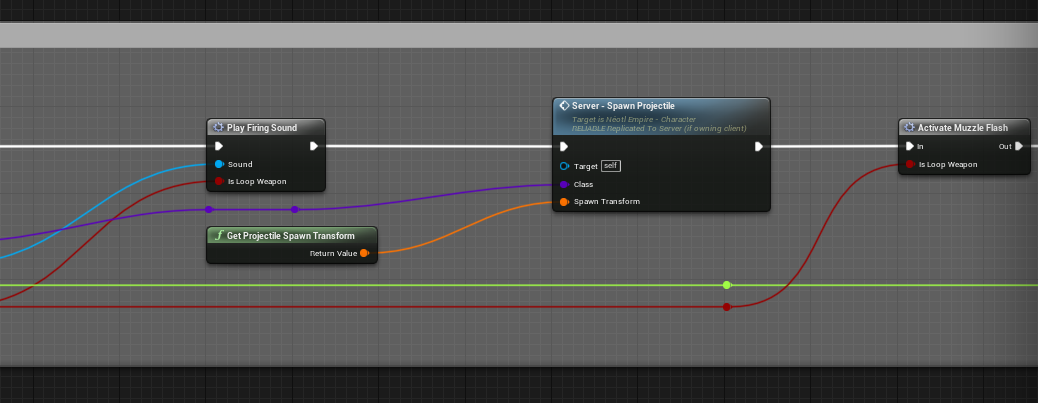
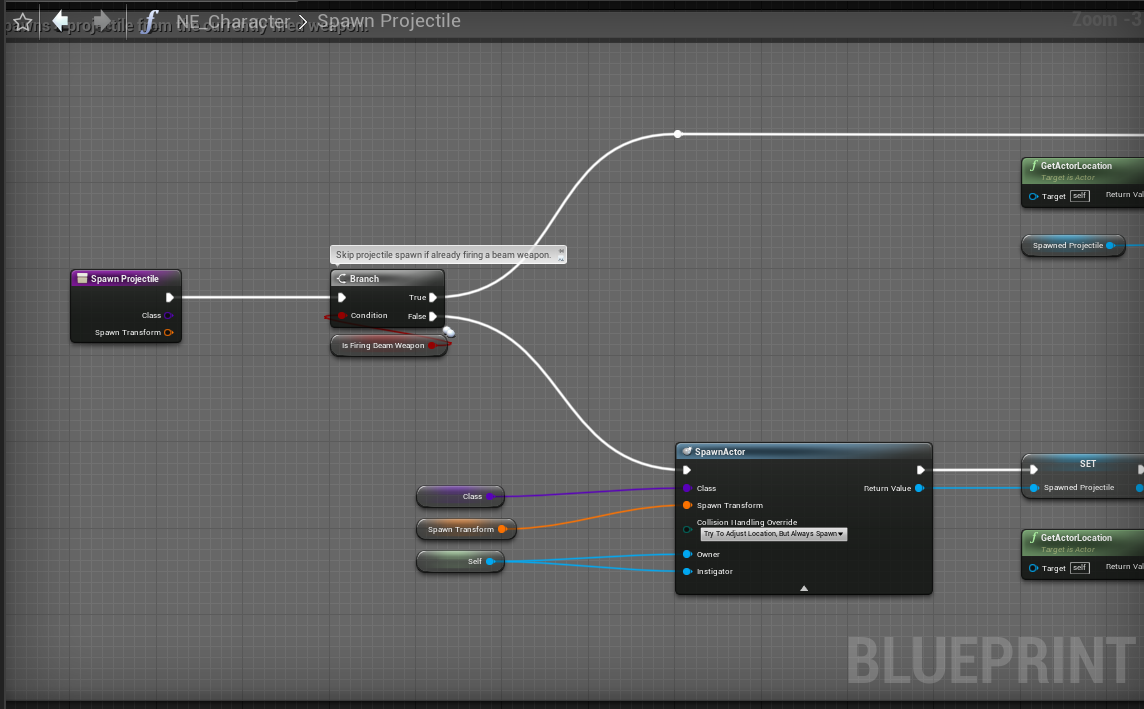
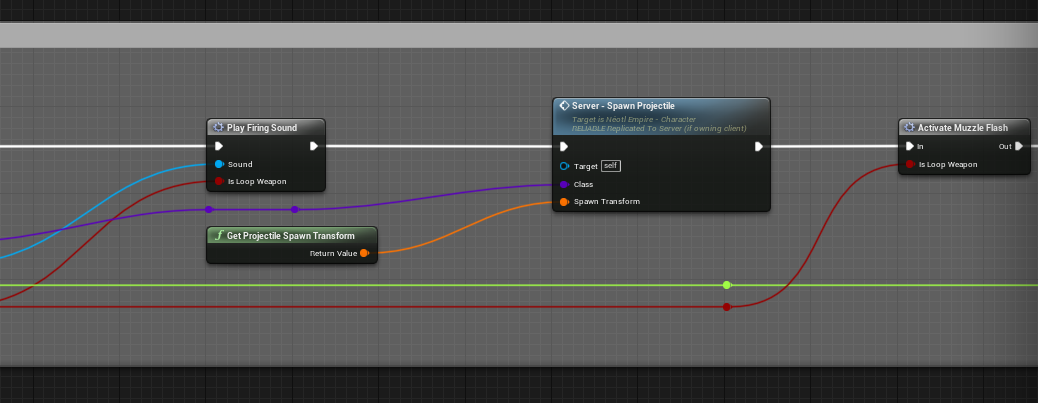
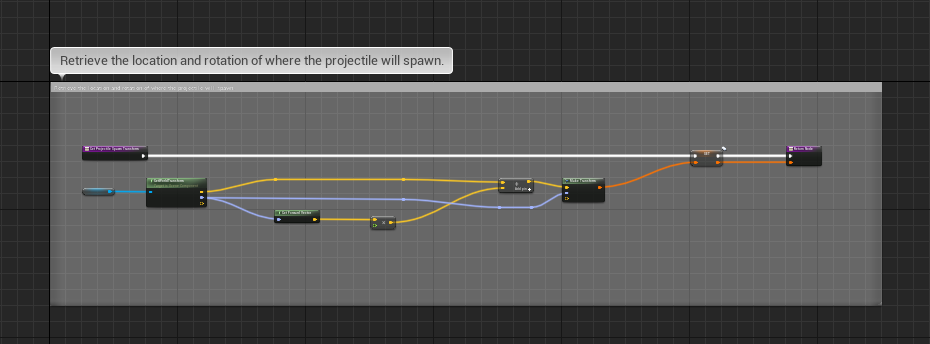
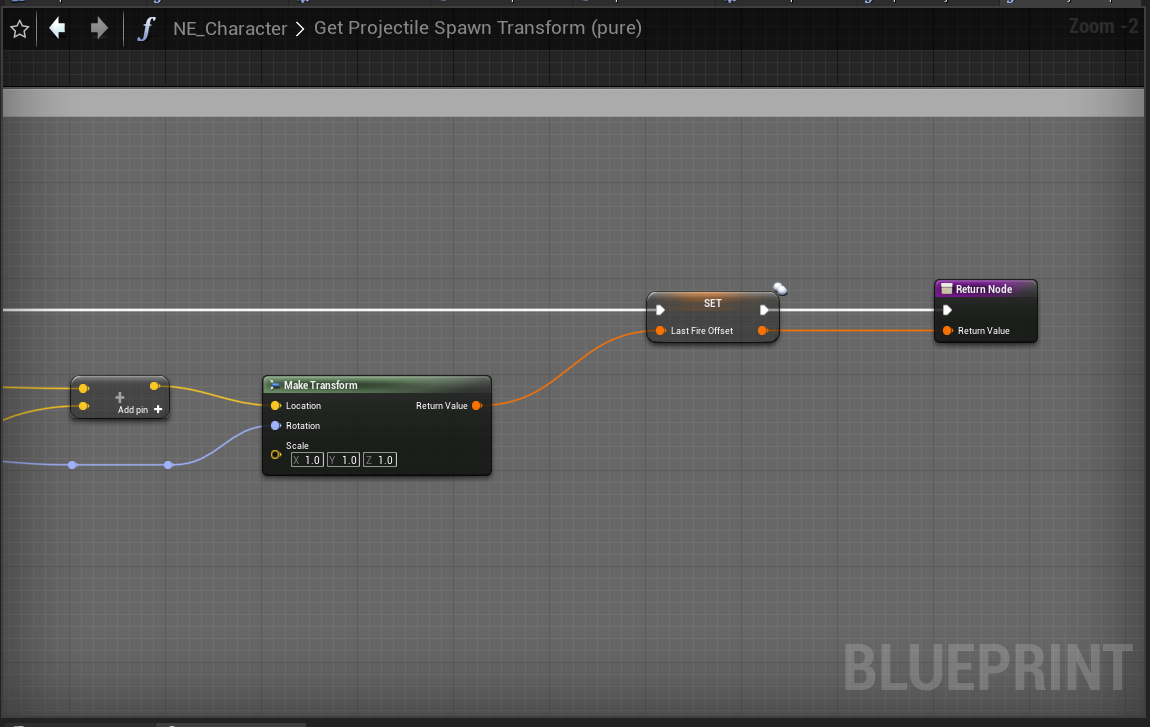
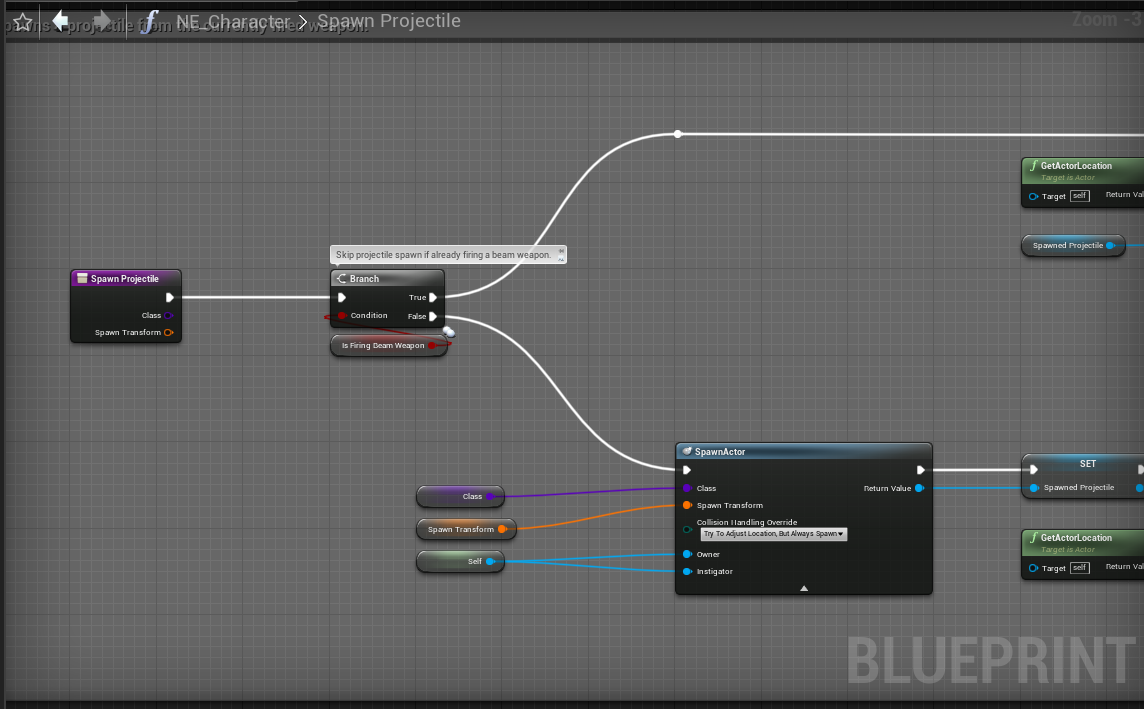
Folks, I still need help in regards to the projectile replication issue. I tried to replicate the transform data to force the correct fire location to no avail.
Client's projectile fire is mis-positioned.
https://i.gyazo.com/8ff35ecb79ef7e1e8da214b89bc9aa93.mp4
Server's projectile fire is perfect.
https://i.gyazo.com/79b88666dca3a43d471e8ba9b39d86d0.mp4
The problem is that when the client fires, the projectile of the weapon does not spawn where it needs to be. It spawns far forward from it's origin.
 steel vault
grizzled stirrup
What is broken about steam connection? I'm about to upgrade to 4.26
steel vault
grizzled stirrup
What is broken about steam connection? I'm about to upgrade to 4.26
You should still give it a shot and upgrade if you have steam working in prior versions. I didn't yet try steam on other versions so I'm trying to get it working in general. I will most likely end up trying a sample project to see if it works and then go back to the drawing board for my project. It just won't server travel for some reason when I call join session from the client to the host.
twin juniper
Here are the blueprint data snippets relative to the projectile firing functionality.
https://i.gyazo.com/293e46880ef229a38d2d55c00aec1263.png
https://i.gyazo.com/efb6c8c34d9a2b5d1fcc5815591baaf3.png
https://i.gyazo.com/9ecd369c2866788f0280b74e549f40f7.png
https://i.gyazo.com/3e9bc5a93529fd9d07094323a4d07188.png


 steady dirge
In a lot of tutorials it is stated that a replicated variable set on the server is replicated to all clients. In my experience this is not true. I did the following setup and the variable is not replicated to client 2. It is only replicated to client where I hit the K key.
steady dirge
@dull lance In this example I set the variable on the server? Event ROS_set is set to execute On server?
 acoustic jewel
Hi! I have a problem and I really don't know how to fix it. When I play in multiplayer and a client disconnects, the whole game quits, even on the host. Have you encountered this? Can you give me a hint on how to manage it? Thanks!
dark edge
steady dirge
In a lot of tutorials it is stated that a replicated variable set on the server...
You have two instances of that character. When you press l, you are checking that characters instance.
 peak star
@steady dirge the variable is not global but is on each instance of thirdperson character. So it changes only for that character pawn, but it does so on both server and client. The thing is, each client is controlling a different thirdpersoncharacter with its own instance of that variable
dark edge
All three views (server, client1, client2) see 2 characters. Your local input only goes to the locally controlled character.
peak star
@steady dirge if you want a variable that is not specific to each instance of the actor but rather is shared across the whole game session for everyone then it is better to put it in a central location like the Game State
dark edge
@peak star slightly off topic, but do you put logic in your game state or use game State as a data container and game mode as the logic that controls it? I do the latter.
peak star
It depends. When I was starting out I out EVERYTHING in gamestate @dark edge but now I try more to do the way you do.
As doing it my old way makes it a major pain to add new gameplay types like team deathmatch, coop, capture the flag etc.
Your way is definitely better
@dark edge ps I figured out my cat carrying kitten problem in physics. I used a physics handle instead of attaching. Not sure why that works and attaching doesn't for rag doll but glad it works now.
twin juniper
Can I change if a variable gets replicated on run time ?
steel vault
I haven't tried it myself, but yes, I believe you can turn on/off replication. Have you tried it?
twin juniper
well I see there is an option for changing an Actors replication state but not for the variables it self
steel vault
Oh, right. The variable. That I don't think you can turn on or off, no. I think you can set custom properties so that it only replicates once.
twin juniper
There is that but have no idea how it works
steel vault
What are you trying to accomplish?
twin juniper
I have a cpp project and I do have a major struct stored in the base cpp
I have another plugin on the hand which handles the buildings
I dont want this to replicate the data used if it is a building
I need to make this building class part of mine
because it uses casting and such
steel vault
Detailed information about how to conditionally replicate Actor properties.
This property has no particular condition, but wants the ability to toggle on/off via SetCustomIsActiveOverride```Looks to me like you set it to custom and then override SetCustomIsActiveOverride
I believe that's your answer. Would have to try it to verify.
 ember osprey
How do you start a game without the players all spawning in one spot? Do I need to override the NetworkPlayerStart in game mode or is there a way to make a player start in other locations? Any time I have more than 2 players the other players never spawn in correctly.
The camera just bumps down below the level and those clients never show up like this:
Its fine when I only have 2 players:
dark edge
ember osprey
The camera just bumps down below the level and those clients never show up like ...
Add more start locations or override the GameMode functions for choosing start location.
acoustic jewel
How can you check if the PlayerState belongs to an active or inactive player?
ember osprey
dark edge
Add more start locations or override the GameMode functions for choosing start l...
adding more start locations worked. Thanks!
 summer tide
Is this a char casting issue or replication issue?
So i have two players. They get on their horses. After that they switch their horses. Then everything works but this happens : If player 1 upper body anims show up on player 2 beside the horse.
ember osprey
can ISM (instance static meshes) be replicated across a network in ue?
ember osprey
So there is no way to get other clients to see an ISM at all?
 meager spade
create it on the client
ember osprey
done, but how do I get other clients to see instances?
meager spade
create it on the client
ember osprey
I have created it on the client and clients can see their own ISM, but no other clients ISM.
meager spade
yes you need to tell other clients to create the own copy of it
meager spade
multicast? fast array? TArray? OnRep property?
client creates it, tells server hey, i created this, server tells other clients to create the same thing
ember osprey
ok, I thought that was what replication is?
meager spade
you can't replicate a Instance static mesh component
nor the instances it creates
the clients need to do that locally
but without seeing code 🤷
ember osprey
meager spade
but without seeing code 🤷
Do you know a reference to see how to pulll off what you are saying?
ember osprey
Trying to get all connected clients to see instances of ISMs created at runtime.
 slim matrix
im have the same sort of problem i just need to figure out how to get the server to add a instance that spawns on the client as well
ember osprey
each client has an ISM and are creating instances at runtime, but clients only see their own instances and not other clients istances.
meager spade
right so when client creates one, it needs to tell the server
ember osprey
void APutSpawner::MeshAdder()
{
    MyInstanceMeshComp->AddInstanceWorldSpace(MeshTransform);
}
the server will then tell clients to do the same
ember osprey
code
meager spade
thats basic replication stuff
ember osprey
so you can or can't replicate?
meager spade
you can NOT replicate instanced static meshes or ISM components.
you can tell it what mesh you used to create the ism
like
void Server_SpawnedInstancedMesh(UStaticMesh* MeshUsed)
if its the same mesh
then server needs tell clients to call MeshAdder() via a multicast
void Server_SpawnedInstancedMesh(const FTransform& MeshTransform);

UFUNCTION(NetMulticast, Reliable)
void Multicast_SpawnedInstancedMesh(const FTransform& MeshTransform)```then when client creates the ISM, it tells server, server runs the multicast, all clients call PutSpawner->MeshAdder.
that is the simplest way.
gets tricky when you need to handle late joiners (ie people joining the game in progress)
slim matrix
if i make the server do a multicast to add a instance the for clients nothing happens in BP
ember osprey
So other clients will not see other clients ISM, but actually spawn the exact mesh in the spot of other client's ISM?
meager spade
they can't see other clients ISM's ISM can not be replicated
they need to create there own version of it locally.
ember osprey
So the client will have their own ISM and then as many other ISMs as their are other clients?
meager spade
yes, or have a world ism manager (but be warned there is a bug when using NavMesh and ISM's)
updating one ism, will regenerate navmesh for entire bounds of the actor that holds the ISM
ember osprey
can you create ISM components at runtime?
ember osprey
ok, so let me get this straight:
Create the client and ISM
then
Create as many additional ISM components on each client to represent all clients ISM
Then when instances are made from any client
ember osprey
send instance data via multicast to every client to update the respective ISM.
meager spade
what is instance data ?
ember osprey
transform
but also mesh data when initialized.
transform data will change at runtime in my case.
ember osprey
ok, thanks, this is gonna take me like a week to get right. 
slim matrix
how do i tell the server to do something locally on the client because if i do run on server then run on owning client it still says the server executed it
meager spade
@ember osprey this is dedicated server (2 clients) https://www.thegames.dev/snaps/IM6bUS1Y0b.mp4
creating a ISM
ember osprey
meager spade
<@!509381570310701086> this is dedicated server (2 clients) https://www.thegames...
Thats great!
That is exactly what I need to accomplish.
meager spade
thing is ISM wasn't really built for replication :/
ember osprey
Only difference is a new instance would have another transform
Is there a reference for that video, i.e. code or writeup?
meager spade
why are you using ISM's for anyway? is there a need for isms?
i mean i have like 2K trees in my game, just actors :/
ember osprey
ISM is more efficient than using actors
 glad fiber
Hey guys, I'm working on a project at the moment which requires a multiplayer system similar to that of GTA Online. The game itself is nothing like GTA, but I want to setup a system that has a range of lobbies that players can join, without choosing a specific server. Ide also rather stay away from steam online if possible. I have got a dedicated server avaliable.
meager spade
Fortnite runs 50K replicated actors plus around probably 20-30K non replicated actors lol
ember osprey
There is one instance created per client every 1 second
summer tide
I've a variable called InteractableHorse in my riding system which is replicated. In the AnimBP it seems the variable is reacting to server only. Any clue?
If Client 0 mounts, that variable in AnimBP for both clients appear valid.
What went wrong?
ember osprey
There is an instance that appears behind the player every second, hence the need for ISM efficiency
meager spade
@summer tide where is this horse prop?
meager spade
@ember osprey not seen one
ember osprey

summer tide
The riding system comp added to the player and that variable is in the riding system comp
meager spade
and is that component replicated?
summer tide
meager spade
and is that component replicated?
Yes it is. Everything else works.
meager spade
then no idea without seeing more detail
summer tide
meager spade
then no idea without seeing more detail
This is the issue. When the players switch their horses their upper body animations effects the other player.
I only have one movements variable
ember osprey
@meager spade What did you mean by ISM manager?
meager spade
a single replicated actor in the world with ISM components on it
ember osprey
ok, how would that ISM work considering ISM components can't be replicated?
I use managers like this, btw.
but I don't see how it would differ considering the ISM replication problems.
Trying to wrap my head around an ISM manager.
meager spade
well ISM's cant replicate
so your manager will tell other clients to create that ISM
locally
via a multicast
or make one ISM manager per player
replicated
that would be simpler
server creates it, stores a reference to it in that players controller
then player does Controller->ISMManager->CreateISM(transform)
ISMManager does a Server RPC, which does a Multicast, and creates the ism's
on all clients
ember osprey
how would the client communicate their local ISM data to other clients to render?
mesh transform data has to be communicated because each instance is created with a new transform.
summer tide
meager spade
but without seeing what you have done i can only guess
I fixed it. I wasn't reseting one of the ref varaibles.
ember osprey
 At least someone is fixin' stuff round here!
steel vault
Why does your ISM need to be replicated anyway? Is the spawning of these ISMs pretty deterministic? If so just fake it client side and only replicate things that you really need to
Also, Kaos is right, it's really hard to help when things are so vague.
ember osprey
steel vault
Also, Kaos is right, it's really hard to help when things are so vague.
hi
I have a player(s) that moves around a level and every 1 second an ISM creates a new instance with a new transform based on where the player is located at that time.
There will are multiple players but I can only see the owning clients ISM instances.
steel vault
Yea, that's entirely local and doesn't need to be replicated then.
ember osprey
every client needs to see every instance created by every other client.
in the world
steel vault
You already have the replicated positions of each character, if the characters are for sure spawning every second based on their location then just do it locally based on the local client's transform of the other players
There is your replication value right there already replicated...
Now you are only spawning ISM's locally based off a timer locally that forms based off the local position of the other character which is replicated
 fringe dove
Does the new water plugin have any replication stuff built in?
ember osprey
@steel vault how would the client communicate their local ISM data to other clients to render?
mesh transform data has to be communicated because each instance is created with a new transform.
meager spade
is that transform deterministic?
you said you spawn it where the player is
if so all clients can do the same
steel vault
Basically what I'm trying to get at is that you have a pretty accurate representation of the player's location and where they have been so you can deterministically assume those positions for spawning the ISM will be pretty close.
It also depends on how important it is to be 100% accurate
ember osprey
Doesn't have to be 100% accurate.
I'm just trying to think how the heck I would design this setup
I already have an ISM on the client
I'm using C++ also
steel vault
Let your character handle spawning the ISM on a timer and don't check for is locally controlled or has authority so that all characters just spawn them on a timer.
steel vault
Ok, so then you should see it on all of the spawners
ember osprey
you just can't see other ISM from the other clients
remote clients ISM do not show in the world of local client
steel vault
See that doesn't make sense then. You have an issue in your code. If you have 8 characters and your character code says spawn something every 1 second at this location behind me, then you should see all connected clients doing that.
There is no networking involved at that point
ember osprey
Yeah the issue with the code is that the ISM is networked, thats what I'm here trying to figure out.
not networked
steel vault
I'm still unsure what you're saying. It NEEDS to be not networked.
ember osprey
ISMs cannot be replicated
steel vault
Right
ember osprey
so ISM stuff does not show automatically on remote clients like other components might
I have to create a custom solution to handle the instances from each clients ISM
because as mentioned, Instances only show on the local client and not remote clients.
steel vault
Ok, so what you need to do is replicate an event that starts the timer which does the spawning of the ISM client side
Or, you make a replicated event that just says "spawn ISM" and then when it comes down to the client it spawns it locally
ember osprey
Are there issues with replicated Timer Handles?
steel vault
You're not replicating a timer. You're replicating an event that creates and starts a timer.
Everything is still local on the client the replication is just an event.
ember osprey
ok
meager spade
i thought he was doing this on beginplay
but i think he is creating the ISM actor locally only
so other clients don't have it
ember osprey
ISM is local only rn yes.
steel vault
I guess I'm not understanding the setup then..
It's really really tough without a code snippet or some better form of understanding how things are setup
meager spade
yeah
ember osprey
Tell me how you would solve the problem statement above.
meager spade
how can we?
we told you 2 different ways to do it
why can't you show code?
or pseudo code?
ember osprey
void APutSpawner::BeginPlay()
{
    Super::BeginPlay();

    Repeating();
}

void APutSpawner::Repeating()
{
    // Call RepeatingFunction once per second, starting two seconds from now.
    GetWorldTimerManager().SetTimer(MyTimerHandle, this, &APutSpawner::MeshAdder, 1.0f, true, 2.0f);
}

void APutSpawner::MeshAdder()
{
    MyInstanceMeshComp->AddInstanceWorldSpace(MeshTransform);
}```right thurr.
meager spade
no what sets it
ember osprey
MeshTransform is set by getting transform of a local component on the player pawn
which moves around the level.
constantly updating but I only grab it every second.
steel vault
Sounds to me like things should be working. Especially because this seems like it should be doing this for all local instances.
If the transform is wrong try a different transform.
ember osprey
everything works locally, I just can't see the remote client ISMs
steel vault
Remote client? All clients have copies of the characters on their client
ember osprey
and ISMs cannot be replicated easily
ember osprey
owning client
meager spade
so why is it not created on all clients?
ember osprey
owning client is opposite of remote client
winged badger
(not replicated)
meager spade
only thing you will have to do is make a reference to it or have it store a reference to the character who is updating i t
it*
ember osprey
Ok, I will work on it using the suggestions you kind folks have suggested. I really appreciate the help. I truly do.
Thanks!
Hopefully I'll be back in celebration and not with my tail between my legs.
 gleaming vector
what is the best practice these days for replicating control rotation?
nvm, figured it out
engine replicates aim angles
good enough
 whole urchin
i've made a third person shooter on listener server
when i fire, and zoom in and out while fireing
on server it works fine
but on other clients, some times it works sometime it doesn't
anybody had a similar experience ?
 limber gyro
quick question, do singletons exist in the server?
 fossil spoke
Thats a pretty broad question. What do you mean exactly.
 sleek current
Basically I have multiple AI spawned and they just do a move to
It sends too much packets with rot/loc info about the mobs
and you can see rubber banding
is there a way to squeeze stuff into packets so they wont be sent as small ones
its UDP
winged badger
how many ai?
sleek current
20-30
winged badger
its not packets
sleek current
hmm, then what are the possible anwers to that?
Its on peer to peer
and the data is on UDP
and sometimes when theres a loss theres just big chunk of data at once or smth
winged badger
you are not using unreal networking?
sleek current
how can I detect that?
winged badger
with normal networking
id wager on replicated scene component causing jitter
off the top of my head, no ideam never done p2p
unreal's server auth networking can easily handle 30 AI
sleek current
hmm ok, thanks @winged badger I will look into this stuff 😛
 tidal crown
Anyone here working with PlayFab? Having a weird time trying to include gsdk.h
tidal crown
Different question: In GameModeBase->GameState, when does the PlayerArray get updated to remove the exiting PlayerController? I inspected it after calling Super::Logout() and it was still there.
 halcyon totem
can someone please explain why this happens, with this code which in my level blueprint code, I am able to open my door in offline, but in the listen server it only works when im using the editor to control the character, if i use the other players that come out on the other windows it wont work, and it wont work in client mode, do I need to add some kind of more code to make it work ?
meager spade
cant use Server/Client RPC is level blueprint
halcyon totem
really? oh no so how will I make it so the door can open in multiplayer???
@meager spade do you know of any work arounds?
 uncut atlas
Hi! I'm getting into the networking framework and using the online subsystem. Does unreal support host migration on listen servers? If the host leaves, the game finds the player with the best connection to be the new host.
winged badger
not even remotely
uncut atlas
@winged badger was you responding to my question? So it's not possible.
winged badger
no, unreal networking doesn't use p2p
i mean everything is technically possible
but expect nothign will work out of the box
and you need to implement most of it by hand
uncut atlas
Oh ok, thanks.
 tidal quarry
I have an issue where my playerstate is calling an event on the pawn (health is updating, trying to update the bar above the pawns head), but one of the clients is not getting any of the events, while the other gets both pawn events. The server calls the event 4x.
Why might one client not call the function at all for either character?
 marble gazelle
Magic
To help you it requires some more information. What is the Function you call decorated with? Is it a MultiCast, or Client.
tidal crown
Does anyone know when a Player is removed from GameState->PlayerArray? Inspecting it during GameModeBase::Logout() shows its still present after calling super..
marble gazelle
you could set a conditional breakpoint on the memory, once the array is filled
winged badger
@tidal crown during logout itself
void AGameMode::Logout( AController* Exiting )
{
    APlayerController* PC = Cast<APlayerController>(Exiting);
    if ( PC != nullptr )
    {
        RemovePlayerControllerFromPlayerCount(PC);
        AddInactivePlayer(PC->PlayerState, PC);
    }

    Super::Logout(Exiting);
}
AddInactivePlayer stashes the playerstat in the GameMode InactivePlayerArray for a while, in case the player reconnects
 nocturne iron
What would be the best way to spawn impact decals:
- Do the trace on all clients and somehow store the camera aim direction & position somewhere that's not the actual camera.
- Pass over the impact position, normal and hit component (i don't know how that's going to work)
- Something smart i haven't thought of?
 thin stratus
You can simulate and predict the Trace on all Clients
 unkempt tiger
Does OnRep get called async?
Or do I have a guarantee that it wont have some race condition?
winged badger
its called on game thread
 tranquil yoke
hey, guys how would i get NetConnection object locally, Is it available inside PlayerController ?
 rustic hound
has anyone encountered issues from using servertravel with Online Subsystem Steam?
my players disconnect instantly when i change levels. I have seamless travel on, which should have fixed the issue but it's not working
it works fine in the editor but when I package the build and test it with my teammates, they all instantly disconnect when servertravel is called
I just read that it might be caused by the clients loading in faster than the listen server, hence they end up disconnecting?
currently checking out something called ServerTravelPause that should be placed in the DefaultEngine.ini
thin stratus
If you use SeamlessTravel, then it shouldn't work in the Editor
Which makes me think you aren't actually using that
rustic hound
oh sorry, bad choice of words
I meant run in standalone mode through the editor
but now that i think about it, thats technically not in the editor anymore, yeah
 supple mural
how do I make people spectators besides killing them and making them posess a spectatorpawn?
 oak hill
Hey guys, just to know, is the new pushmodel already enabled out of the box in 4.25?
tidal quarry
marble gazelle
To help you it requires some more information. What is the Function you call dec...
I figured it out, it was a race issue of code. The UI existed for one client and not the other. It wasn't working on beginplay either, but if I add a delay on begin play then run the code it works.
thin stratus
Ahhhh
Don't use Delays to fix those issues
As soon as you have a higher ping client it will break again
 chrome bay
@oak hill AFAIK it's disabled by default
#define WITH_PUSH_MODEL 0 this in 4.25 and 4.26
oak hill
Thanks Jambax, I was suspecting this because while testing it variables get replicated even without using MARK_PROPERTY_DIRTY macros
chrome bay
AFAIK they don't plan to enable it, you have to opt in
4 Months ago:
As such, this is pretty much just an experimental / beta feature at this point and aside from just the test that "FN Works", it doesn't really receive explicit QA.
So yeah, take with a pinch of salt 😄
oak hill
Someone use it? It's worth using it?
oak hill
chrome bay
4 Months ago:
```As such, this is pretty much just an experimental / beta featur...
Oh, I see XD
chrome bay
It's only worth using if you're bottle-necked by the property comparisons server side. If not, you won't really get any benefit.
They also don't plan to support marking individual struct/array properties dirty etc by the looks of it, so unsure how much mileage you can really get out of it
oak hill
Thanks for the info Jambax, I'm relatively new to this things so I'm trying to figure out different ways of doing things
chrome bay
best thing is to profile first and figure out where your bottlenecks are
If any
you can do a surprising amount just tweaking the basic actor properties
oak hill
Sure, I already done a lot by tweaking net dormancy and net frequency alone
chrome bay
dormancy can be great be careful with it though
When something wakes from dormancy it's like spawning a new actor, all the properties are resent
So don't wake/sleep too often
oak hill
and also FastArraySerializer seems very useful
oak hill
chrome bay
When something wakes from dormancy it's like spawning a new actor, all the prope...
Sure, I've already many actors in dormant state, it saves a lot
oak hill
chrome bay
When something wakes from dormancy it's like spawning a new actor, all the prope...
Which should be the same as using ForceNetUpdate I guess?
chrome bay
Nah ForceNetUpdate just resets the last udpate time for that actor
So it will check properties at the end of the frame
instead of that actor waiting for it's next usual turn
oak hill
Yes, but in the case of an actor in dormant state, it will be also waked right? And put back to dormant state after the update, I think
chrome bay
oh yeh it will flush dormancy also
IIRC you have to explicitly mark the actor as dormant again once you've "woken" it though, but I can't remember off top of my head
oak hill
I see... I thought it would return to its previous state after the update
Thanks very much for the info
tidal crown
winged badger
<@!354159404737757195> during logout itself
Actually GameState had methods to overload that are right after mutation of the player array. Logout is too early I found
 analog locust
ReplicatedUsing = OnRep_Changed for an array of UObjects
it should call OnRep_Changed if the element changed & marked dirty for replication right?
thin stratus
Well, it calls if the Array is modified. Not if the UObjects are.
+, just in case, UObjects aren't replicated by default
analog locust
i did replicate the ubojects
but it never calls onrep
even if i mark it dirty
bool UContainerComponent::ReplicateSubobjects(UActorChannel* Channel, FOutBunch* Bunch, FReplicationFlags* RepFlags)
{
    bool bWroteSomething = Super::ReplicateSubobjects(Channel, Bunch, RepFlags);

    if (Channel->KeyNeedsToReplicate(0, ReplicatedSlotsKey))
    {
        for (auto& Item: Items)
        {
            if (Channel->KeyNeedsToReplicate(Item->GetUniqueID(), Item->RepKey))
            {
                bWroteSomething |= Channel->ReplicateSubobject(Item, *Bunch, *RepFlags);
            }
        }
    }

    return bWroteSomething;
}
MarkDirtyForReplication()
{
    RepKey++;
    GetOwningComponent()->ReplicatedSlotsKey++;
}
c++
winged badger
and we are talking about OnRep for that Item, or OnRep inside the Item?
analog locust
UPROPERTY(ReplicatedUsing = OnRep_ItemsChanged)
TArray<class UContainerSlot*> Items;

UFUNCTION()
void OnRep_ItemsChanged();
you overrode IsSupportedForNetworking() on UContainerSolt?
analog locust
replicating uobject via the actor comp channel yeah
the problem is everything working just that onrep dosen't get called
winged badger
actor component doesn't have a channel
analog locust
i meant actor channel
winged badger
you should be careful
because the post-replciation Outer will be the Actor
no matter what it is on server
try slapping a breakpoint in AActor::OnSubobjectCreatedForReplication
see if it hits
winged badger
and the object are your UContainerSlots, yes?
analog locust
ye
analog locust
yes in the actor comp which is attached to the character
winged badger
just for sanity, the component itself is replicated and has a getlifetimereplicatedprops entry for Items?
analog locust
yes
Super::GetLifetimeReplicatedProps(OutLifetimeProps);
DOREPLIFETIME_CONDITION(UContainerComponent, Items, COND_OwnerOnly);
winged badger
and super in getlifetimereplicatedprops?
not sure, i would never use a TArray for Items
so somewhat limited experience there
analog locust
but i thought its the only option for replicating stuff like inventoriess
since map is not replicated
winged badger
FFastArraySerializer has a more elegant way of handling a replication race between the objects and array elements
and is capable of individual per-item callbacks on clients for add/remove/change
docs and example of implementation are in NetSerialziation.h header
analog locust
i'll take a look
winged badger
usually for stuff like this, per-item callbacks are awesome
and if your fastarray replicates before the Object itself does
it will call PostReplicatedAdd (FastArraySerializerItem would have a pointer to object here)
if the object is null during the add, as soon as object replicates and its NetGUID is resolved
PostReplicatedChange gets called, this time with a valid object
so thats very convenient
analog locust
i have some nullptr's in the array aswell which are replicated idk if that can cause issues
since its slot based and i just nullout the slot
winged badger
so array replicated before the obejcts did
analog locust
ye
winged badger
it might start to work
if you put super at the end of ReplicateSubobjects
instead at the start
i still can't recommend fast array for this highly enough
btw @analog locust i'd put a pointer to UContainerItem and SlotIndex into FFastArraySerializerItem, makes it simpler to broadcast the changes to the UI
analog locust
ye that's exaclty what i neeed
btw the UObjects are slots which contain : item * / count etc
the item class is derived from aactor so i can replicate stuff like item health to other players when dropped
 fervent spoke
is there a best practice for syncing up clocks between client and server? when the client does a "execute on server" event, i need to know the delay between when that command is received by the server (after lag) and when the server actually gets to its next tick to run it. e.g. if the server only ticks every 50ms, anything the client sends it can be delayed by up to 50ms before actually executing.
if i know how long before the tick the server received the command, then i can take it into account. is there a really clean way to get this info?
can the server do anything between ticks? if i could execute the code immediately upon receiving it, that'd make this easy, or if i could at least record at what time the command was received, then i can account for it.
at the very least, i need to be able to sync up some form of client and server clock very accurately so that i can calculate when exactly the command was sent, and adjust by network lag to find when exact the server received it, for a best guess
the context is lag compensation for hitreg. right now my lag compensation works great when the client and server have perfectly sync'd ticks (e.g. run in editor), but when they don't, the lag compensation is off because right now it doesn't take into account the delay between the server receiving a command and actually executing it
so it can always be off by up to a server tick
 rose egret
@analog locust u can use replicated static array as well
winged badger
@fervent spoke best you can get is Client Sending a Server_RequestTime(float ClientTimestamp) and server immediately responding with Client_SendTime(float ClientTImestamp, float ServerTimestamp)
from the Client_SendTime_Implementation you can calculate round trip, and assume half of it was up half down
that gives you a delta between servers GetWorldTimeSeconds and clients GetWorldTImeSeconds
you cache that and now you can get pretty accurate server timestamp from your own as a client
fervent spoke
winged badger
<@!131685664566542337> best you can get is Client Sending a ``Server_RequestTime...
yeah the best method i figured out is basically that. one thing i'm still wondering about is in the documentation for "get real time accurate", it says
Unlike the other time functions this is accurate to the exact time this function is called instead of set once per frame.
does this just mean it measures how far into the processing of the current tick? like you could never measure time an arbitrary period between ticks?
like i know you can use this to determine for example that eventTick happens a few microseconds after BeginPlay, but is it impossible to do anything independent of the tick timing?
winged badger
best version you'll get is it you periodically send it, cache round trip time along with delta, then use the delta you got from the RPC pair with the lowest round trip time
as for real time accurate, i don't see the point
 gusty slate
Hello :)
Is it not possible to test Steam on Standalone anymore?
winged badger
it is possible, you can check by turning on steam overlay when you start the game
if your steam client is running, you should see it
gusty slate
It used to but after a certain engine update it didn't work anymore
it works with no issue in packaged
fervent spoke
best version i thought of is server recording the current time and asking for the time from the client on startup. client sends its current time, subtract half the RTT and record that for later.
then when something happens, the client sends its current time. server subtracts the previously recorded client's time, to get how much time has passed. server adds that to the time it recorded for server time earlier, to get what time it was on the server when the client's packet was received.
should be accurate to +/- one client tick
and you don't have to account for lag every time, only at the start
would just be a lot easier if the server could just record when it received a command between ticks, could skip a lot of steps and room for error
 faint lotus
I figured that since I brought this up last week I should let you all know that I have validated (on 4.25 Windows, since I'd have had to dl all the source for 4.26 onto my already overfull machine to test this on 4.26) that clients built using the shipping compile target cannot use the IP of the server they wish to connect to as a command line positional argument to directly connect to a server. It took a while because I had to get a repro on a clean project and I wanted to dot my 'i's and cross my 't's, but it appears that the functionality in question simply does not work (and per the conversation last week, may have never been intended to).
I've reported the issue to Epic so they can decide whether they want to fix it. In the meantime, since I spent two weeks trying to chase this down, I wanted to share the knowledge to hopefully protect anyone else from the same gotcha.
nocturne iron
Does anyone know why character movement components is super laggy on builds. It's even lagging on default FPS template...
winged badger
define super laggy, is it lag or jitter, how many of them do you have and its generally not
nocturne iron
It's jittering like the interpolation is not getting enough data so it just kinda snaps into place if that makes sence?
winged badger
p.NetShowCorrections in console during play
nocturne iron
What is p.NetShowCorrections supposed to do?
meager spade
shows you corrections
nocturne iron
No shit...
meager spade
well you asked
meager spade
so there is no corrections
nocturne iron
Also, im using 25.4
meager spade
can you check one thing
nocturne iron
yeah
meager spade
is your skeletal mesh comp replicated?
nocturne iron
nope
meager spade
100 percent sure?
nocturne iron
I know that one xD
meager spade
good
winged badger
any other replicated scenes?
nocturne iron
Nope
winged badger
and reliable RPC barrages on Tick?
meager spade
can you show video
nocturne iron
yeah, sec
winged badger
that doesn't look like CMC jitter
and net corrections would be pretty obvious with the debug
nocturne iron
nocturne iron
Is that a build?
meager spade
editor but standalone
nocturne iron
It looks a lot better in editor
meager spade
lemme build
winged badger
did you play with network emulation settings?
meager spade
mine seems ok
nocturne iron
What settings?
nocturne iron
Project settings?
nocturne iron
The wired thing is, i get fine results when using a third party plugin (SmoothSync)
But i suppose that is juse because of the interpolation it dose...
meager spade
do you even see it in packaged?
nocturne iron
yeah
tidal quarry
thin stratus
As soon as you have a higher ping client it will break again
thanks for advice. I changed how i handled it completely
fossil spoke
Has anyone ever come across an issue where a Replicated Actor thats spawned by the Server does not get spawned on some Clients (others spawning it correctly)?
Its extremely odd, in that to be more specific, a Character for a Player is normally being spawned by the Server and most of the Clients also spawn it (as per Actor replication) however some Clients dont spawn it and obviously that Player is then "invisible" to them.
Ive noticed that Clients who mention they cant see another Player has the following in the Logs.
[2020.12.09-00.15.02:844][307]LogNetPackageMap: Warning: GetObjectFromNetGUID: Attempt to reassign read-only guid. FullNetGUIDPath: PATH_TO_CHARACTER
[2020.12.09-00.15.02:844][307]LogNetPackageMap: Warning: Long net serialize: 296.012604ms, Serialized Object CHARACTER_OBJECT
summer tide
How can I pass character ref to my level BP?
 peak sentinel
Afaik you cant @summer tide
At least via cast or somehow with any inheritance methods, you cant
summer tide
Trying to pass placed level actors to my character bp.
Such as plysics volume and some actors
THe level BP has switch with Auth @peak sentinel
peak sentinel
summer tide
Trying to pass placed level actors to my character bp.
Level BP to character bp is possible but afaik any other class to level bp is not possible. I think with overlaps or maybe with bindings/interfaces you can do that but its not worth the effort. iirc eXi said "try to avoid level bp as much as possible"
Just use an actor to manage your created level actors* or use gamemode/gamestate w/e needed in your case to pass variables
summer tide
You can spawn actor on server only. Pass params when you are calling it. In the actor bp you check editable and expose on spawn.
peak sentinel
Why do you want to do this before constructor anyway? (insert dancing blue man here)
Yeah lol 😅
Well you know I dont understand cpp I just pretend but I bet this is not possible but -asking this question with courage of being a beginner lol- if you are already storing variables on server, cant you just pass by parameter to spawnActorDeferred/expose on spawn inputs? this way unreal should do the job prorably even on the simulated actor
Google disagree with me: "Any property that has to travel to the client has to be replicated - this is the defacto expectation made by the engine. If they only need to travel once, you can use the COND_InitialOnly flag."
summer tide
So guys, if I have a placed physics Volume in a level, how can I create multiple instance of it.
So I have a physics volume in my level. I passed its ref via game instance then to my character bp.
peak sentinel
Thinking about it.. Are you generally afraid of the actors footprint size or sending 50 kb of total? Maybe you can split the variables and load the important ones first, later on load other things
Maybe even use async task
And since they are initial, isnt there any way to compress them?
Maybe even storing textures, skeletal meshes in an array on actors and just sending index int to select one lol
peak sentinel
Well it sucks we cant change the replication state of variables in runtime. You could construct same struct again as local var. and cache everything there, replicate it, after your job is done torn it off but since we cant do that I cant see any other way than mapping variables inside the struct with an integer and just send that values an indexes. Still not sure if it makes sense tho lol insert megaman here

 peak sentinel
Understood, just one more question to see if I understood correctly, can clients load their own data from their local in your project?
 pine ore
Does anone remerbrer that enratoed a json you could hid damgaged/unrebaakle tecutres
generated kson*
for MC 1.122
gusty slate
Hello hello :)
I am working on a MP game and wanted to know if you guys have any suggestions on how to create a "Lobby" system similar to PUBG/Rocket League/Fortnite? Where in the main menu you can invite friends and get data from them and then either matchmake or host a server.
I've already worked on normal session gameflow but I'm interesting in this approach.
 polar wing
gusty slate
Hello hello :)
I am working on a MP game and wanted to know if you guys have any...
polar wing
gusty slate
Hello hello :)
I am working on a MP game and wanted to know if you guys have any...
Hey! You can write your own if you really want to, but definitely look into existing multiplayer solutions and see if something will work great for you (like, if you're willing to consider EOS, this plugin is excellent and has amazing support by the dev, plus a bunch of added bonuses like crossplay and so on: https://www.unrealengine.com/marketplace/en-US/product/eos-online-subsystem). There's a free version if you earn less than $30k a year. Always worth weighing existing systems against writing your own, especially if you want to ship something in a decent timeframe. But it depends on your use case, of course.
gusty slate
Is something like that not possible with Steam's online system?
I've built a working game before with the regular session gameflow of hosting servers and people joining/inviting friends using Steam's subsystem
it would be optimal for me if I can implement this with steam's subsystem
polar wing
Ahhh, I get you. Yeah, it's totally possible! I just wanted to present this plugin, as it also supports Steam anyway and does a lot of work for you, but its real value lies in if you want to adopt EOS' range of features (so if you don't need that, it's irrelevant). It all depends on your needs.
gusty slate
Do you have any insight for me on how to approach it? Like, would the main menu be a hosted lobby?
polar wing
It's been a while since I looked (using the plugin, so didn't dive too deep), but I remember it involving beacons and presence.
https://docs.unrealengine.com/en-US/InteractiveExperiences/Networking/OnlineBeacons/index.html
And here's a legacy community resource that helped me (I had to dig for it now after the official wiki was shut down haha):
https://ue4community.wiki/legacy/partymatchmaking-cxjddryz
Overview of the Online Beacon system
Overview Original Author: This guide is still a WIP so it's incomplete and has a ton of typos xD What's a party system and how can I use it? The name Party in this case comes from the same xbox t...
gusty slate
Thanks kyle, I'll look into it 👍
polar wing
Epic, hope that helps!
 viscid escarp
When i spawn a object on server, then client joins session, client do not see the spawned object. If i spawn the object while client is in session the client can see the object. How to make the client see the object that was spawned when he wasn't in session?
winged badger
its either no longer replicated, its dormant or its not relevant
if that is happening
 red sand
How to reconnect to a ongoing match, that u were disconnected from?
viscid escarp
red sand
How to reconnect to a ongoing match, that u were disconnected from?
you can just destroy session and join again. If you want to load the previous variables you have to save them in postlogin and load after spawning the pawn or playercontroller
red sand
viscid escarp
you can just destroy session and join again. If you want to load the previous va...
Does post login works once u join the game or even while u are on menu?
 silent valley
I have a persistent world Unreal dedicated server, the infrastructure runs on AWS. Currently I'm using the Unreal SaveGame system which read/write files to the instance hard drive.
I'm looking at options for persisting this data across multiple instance terminates/creates, and backups in the future.
There's a couple of options sticking with the files directly (basically mounting the SaveGame folder on another drive or network filesystem), but I was wondering what other people do?
Keeping the file approach is handy because then it works the same locally but would it be better to use AWS api/database directly to read/write blobs of serialised data?
Another approach I've not thought of?
 mighty zinc
Hi im trying to make a custom character movement component
But it keeps crashing on play
Im following a tutorial from sabredartstudios on yt
There's no error when i play offline
But when i play on client it crashes
uncut atlas
I'm confused about clients playing an animation montage triggered from another client's machine. I don't think animation montages are automatically replicated, so I think what I need to do is use a Server RPC to tell the server to call a NetMulticast RPC so that everyone, including the host, calls the function to play the animation montage. Is my method correct/efficient?
mighty zinc
 visual cosmos
So uhhh, weird question but is it possible to temporarily disable receiving movement replication updates on an autonomous proxy in BP scope? Trying to hack in replication as a mod to a singleplayer game, so I'd rather avoid having to do proper client side prediction/server reconc code in BP if the aforementioned is "good enough"
 rich ridge
silent valley
I have a persistent world Unreal dedicated server, the infrastructure runs on AW...
rich ridge
silent valley
I have a persistent world Unreal dedicated server, the infrastructure runs on AW...
What is the TTL of your persisted Saved data?
If it's somewhere around 30 days.. you can use redis cache.
silent valley
I don't really know, I want the data to persist indefinitely unless I delete it.
mighty zinc
Why is it giving an access violation?
rich ridge
Access violation means NPE, some variable is null. Attach debugger and check Luffy.
rich ridge
silent valley
I don't really know, I want the data to persist indefinitely unless I delete it.
If your database keeps growing you may get charged.
silent valley
Being charged is fine, I just want to understand what my options are.
Currently the SaveGame is saved to a file, but maybe I should save to memory and upload the blob to database instead.
silent valley
idk, I don't really know anything about this side of things
rich ridge
Rdbms or non-rdbms
silent valley
DynamoDB has a limit of 400kb per item - my savegames will probably be bigger than that
rich ridge
Yes that's why I was asking about db
silent valley
doesn't need to be structured IMO, kay value should be fine, but values might be 1MB +
rich ridge
So what you can do is upload save file in S3 bucket and write that S3 link in db.
halcyon totem
I have placed a keypad terminal on mt map which uses a widget, I keep getting errors when I run it as a client is there anything i need to do to make the widget work without errors in multiplayer?
rich ridge
As far as I know there are databases which support binary blob, and images too
@silent valley
silent valley
yes ok, s3 is a good idea
halcyon totem
thisis the node in question
silent valley
actually I already have a cron job copying my data to s3 every 30s, the concept is right I think but running it every 30s is the wrong approach
thanks @rich ridge
rich ridge
Right.. but costing would increase if using db and S3. Please consider that too
Dynamo db is free for first 25 GB
mighty zinc
rich ridge
Access violation means NPE, some variable is null. Attach debugger and check Luf...
How will it work offline then
rich ridge
Is your client process crashing or server process?
I assume it's game client process, then simply launch editor in debug mode. Press Ctrl+F9
mighty zinc
kk
viscid escarp
red sand
Does post login works once u join the game or even while u are on menu?
sorry, i mean onlogout to save, and post login to load. OnLogout is fired before PC left the session and PostLogin is fired after PC join
mighty zinc
rich ridge
Now add breakpoints in your custom CMC
It happens during the postinitialize components
I only call the super here
And cast Super::GetCharacterMovement() to my CMC and store it
red sand
viscid escarp
sorry, i mean onlogout to save, and post login to load. OnLogout is fired before...
isn't there chance that someone can mess with save game data?
twin juniper
Quick question, where is the "run as dedicated server" option in ue 4.26?
mighty zinc
Run as Client
twin juniper
thanks
mighty zinc
The Disassembly shows it happens in AActor::InitializeComponents
rich ridge
not expert with disassembly code.
rich ridge
red sand
isn't there chance that someone can mess with save game data?
how this is hackable?
red sand
i mean when u save data, won't it be saved in player's system
rich ridge
red sand
i mean when u save data, won't it be saved in player's system
I assume it is session based game with dedicated server which can last for max 40 mins, so whatever you are saving will be in RAM and that too on server, so how it can be hacked?
those Logout and PostLogin are called in GameMode which only exists on server.
red sand
rich ridge
I assume it is session based game with dedicated server which can last for max 4...
Ahhh i see,
Appreciate explaining it. Kinda didn't know it gets saved on ram
i thought it was like single player saved game, that's saved in player's system
rich ridge
it is possible to hack from RAM too, but those hackers are very very rare.
and they won't be wasting time for hacking a game
red sand
also when rejoining the game how to get the join the session that was left. Do i need to get any additional info. Like session id or something
rich ridge
this job is handled by your OSS.
for example your game crashes and player disconnects. when he re-opens the game
you need to query if player is in any online session or not
your OSS will tell yes or no
if yes, then get the ip:port and re-join
 jagged kernel
Hi! I'm working on a two player multiplayer game and unsuccessfully trying to troubleshoot my event dispatcher. When my character (BP_CharMain) dies, I would like to communicate to the other BP_CharMain to load the winning screen. Currently, I have the event dispatcher set up so that the event is bound when the BP_CharMain is first created, and the event is called when the player's health reaches 0. (see screenshots below).
However, even though "made call" is printed, "running bound event" is not, which makes me think that the Die custom event is never actually run. I have no idea why
rich ridge
@jagged kernel You said it is a multiplayer game, so your server knows that one player has died (assume Player-A died), so let server tell Player-B that Player-A has died and then Player-B's PlayerController shows the UI.
Simple
use RPCs
jagged kernel
oh i see
what is the distinction between RPC, event dispatch, and blueprint interface?
rich ridge
RPC is Remote procedure calls.. meaning one computer which is in America is able to call a function on computer which is in Antarctica.
They aren't sharing same memory but still able to call the function
So your server will call RPC and it will be executed on client.
jagged kernel
Er actually
i think the Attacked event is an RPC (it runs on the server)
the reason why I wanted the event dispatch is because I am having trouble accessing the player controller of the other BP_CharMain (when I use the get all actors of class BP_CharMain, only one of them will cast properly to BP_Controller)
rich ridge
Server's version of get all actor will be local to server only
And vice versa
You need RPC
On your server you can access player controller of any player
halcyon totem
Ok I need a simple answer is there a difference between playing as a client on a listen server vs playing as a client in the editor? I get widget errors when running as client but not playing as a client on the listen server
jagged kernel
rich ridge
On your server you can access player controller of any player
using get all actors of class?
halcyon totem
Is the reason I get the errors because the server is not playing?/
rich ridge
GetPlayerController (0) and GetPlayerController (1)
jagged kernel
When I have the server loop through the player controllers and print the controller ids they are unfortunately both -1
supple mural
halcyon totem
Ok I need a simple answer is there a difference between playing as a client on a...
When you play as a listen server, you're playing as authority. When you're client you don't have authority thus your widget errors are related to being a client as your widgets probably don't know who they can assign themselves too
rich ridge
if you are able to loop through the player controller and not getting null pointer means your both player controllers are valid
RPCs can be implemented in BP very easily, you don't give it a try
jagged kernel
Attacked is already an RPC (that is how our other attacks are replicating right now)
supple mural
I think @rich ridge is saying you need another RPC which is called when player is killed?
jagged kernel
Ohhh ok
aww that is a lovely way to describe that
thank you though! will give it a shot
halcyon totem
@supple mural so when you pick play as listen server, if you put 4 players 4 windows up, 3 say client on them and im guess the other connected to the editor is the server, are these windows that say clients all listen servers? or at they clients? because I dont get errors on those windows even though they say clietns unless they are server-clients? But im confused because I thought there could only be 1 server....
supple mural
all clients of the listen server
the listen server playing in the game is not a client
halcyon totem
play like this in the listen server I get no errors
the erros come when I play only as a client, as soon as the level loads it shoots errors
it points to a widget but I cant give it autority in the widget
dark edge
@halcyon totem looks like you have a widget trying to access something that doesn't exist yet
halcyon totem
@dark edge thats what I am trying to understand, maybe its the way unlreal loads the client in the editor? why would it error in client only mode but not playing as a client on the listen server in editor? or should I ignore the client errors?
dark edge
When does that UI widget spawn?
halcyon totem
when? its like a keypad widget connected to a mesh, I place it on the map so I guess it gets loaded with the map
it gets created in an event construct with some functions
thats the widget that I press the buttons to open the door
do I need to fix the error before I ship the game?
 valid python
Hey guys! I'm having some trouble with serverTravel. I have a startgame function which calls GetWorld()->ServerTravel(...). This works fine for the server (i'm using a dedicated server), it goes to the new map and loads my new gamemode. For some reason though all of my connected clients don't move with the server. I feel like i've tried almost everything I can at this point. I have noticed that the clientTravel_implementation function doesn't ever get called on my client (but does get called on the server). If I kill the client and reconnect to the server it joins the new map just fine but for some reason it won't transition from my lobby.
winged badger
and your departing gamemode has seamless travel enabled?
valid python
yup
valid python
yeah they don't seem to go to the transition map either. the lobby essentially breaks since the gamestate has changed stuff but they stay on the lobby
winged badger
steam?
valid python
no i'm just using my own system to get the server address to join. (I do have DefaultPlatformService=Null)
the client gets the serveraddress and then calls clientTravel to join the lobby
winged badger
void AGameModeBase::ProcessServerTravel(const FString& URL, bool bAbsolute)
APlayerController* AGameModeBase::ProcessClientTravel(FString& FURL, FGuid NextMapGuid, bool bSeamless, bool bAbsolute)
breakpoints in those 2?
and you are travelling to the same server instance, not another game instance running on the server, yes?
valid python
both breakpoints are hit and in the case of processClientTravel PlayerController->ClientTravel does get called. and yeah should be, the server travel just loads a new map/gamemode
winged badger
PCIterator should have all the PCs there still
so it should iterate over the lot and call CLientTravel
when ProcessClientTravel is called
does it do any of that?
valid python
yeah it does seem to, one thing I did notice that seems strange is that ClientTravelInternal_Implementation gets called on the server (even though it's a client rpc i believe)
another thing is that the server knows the clients still have the old playercontroller when I check the name.
winged badger
            if (Cast<UNetConnection>(PlayerController->Player) != nullptr)
            {
                // Remote player
                PlayerController->ClientTravel(FURL, TRAVEL_Relative, bSeamless, NextMapGuid);
so the breakpoint at the last line here hits?
valid python
yes breakpoint hits there
winged badger
but the clients don't get a RPC?
hmmmm
time for the painful bit
log LogNet VeryVerbose into the console
before you start server travel
ideally you'd want server + one client logs
LogNet on VeryVerbose does spam a lot
there has to be some logging involved to account for client RPC failing
valid python
yeah i would hope so anyway haha just a second
winged badger
check the normal logs before going very verbose
valid python
so server logs seem normal (in non verbose): https://pastebin.com/VdMV9xgw. Client logs show nothing at all when server starts travel except for errors about widget stuff when the travel ends
valid python
yeah i did (that was one of things i realized i wasn't doing at one point haha)
winged badger
and the client logs?
valid python
this is the only output from client side after joining the lobby initially:
LogLoad: Took 0.065341 seconds to LoadMap(/Game/Maps/Lobby)
LogOnlineSession: Warning: OSS: No game present to join for session (GameSession)
PIE: Error: Blueprint Runtime Error: "Attempted to access BP_GameState_Lobby_C_0 via property CallFunc_GetGameState_ReturnValue, but BP_GameState_Lobby_C_0 is pending kill". Blueprint: L
winged badger
the last one is odd to say the least
valid python
The last one is related to widget that is referencing gamestate stuff. I assumed since the server moved on it invalidated some of stuff I was trying to access
valid python
Oh sorry yeah those were the logs from after I started server travel not on initial connection to the lobby (I can grab those if you want)
valid python
Hold on let me check
sorry yeah here the log right after server travel:
PIE: Error: Blueprint Runtime Error: "Attempted to access BP_GameState_Lobby_C_0 via property CallFunc_GetGameState_ReturnValue, but BP_GameState_Lobby_C_0 is pending kill". Blueprint: Lobby_Widget Function: Execute Ubergraph Lobby Widget Graph: ForEachLoop Node: Branch
PIE: Error: Blueprint Runtime Error: "Accessed None". Blueprint: Lobby_Widget Function: Execute Ubergraph Lobby Widget Graph: ForEachLoop Node: Branch
That repeats every tick until i stop the client
Checking very verbose now
winged badger
that looks like either your server went before the client connected
gamestate is the most reliable replicated actor
only one with guarantees
valid python
Very verbose server: https://pastebin.com/vQF8ii6W (note i cleaned it up a little bit and also this is everything from server start to servertravel and then end), and client same thing: https://pastebin.com/mSfBcA5y
Pastebin
Pastebin.com is the number one paste tool since 2002. Pastebin is a website where you can store text online for a set period of time.
Pastebin
Pastebin.com is the number one paste tool since 2002. Pastebin is a website where you can store text online for a set period of time.
summer tide
@winged badger If I have a physics volume in my level, is there a way to use that with all the players?
summer tide
Let's say it's not a physics volume but something else that you placed in your level. Would I be able to create multiple copies to use it with other players
winged badger
if its an actor placed in a level its loaded from package
so it exists on all clients and its net addressable
it will do whatever that actor normally does on each client instance individually
summer tide
So it's diff for volumes I assume
winged badger
its not, its an actor
summer tide
I passed my volume ref via game instance then to my character bp
from level bp -> game instance -> char bp
since level bp has access to level volumes
is there any other way?
winged badger
actors don't do well without a world
meager spade
you can pass a template
to SpawnActor node
and it will create that actor with that template
@dull lance
not sure how well it works
well it duplicates and sets all reflected properties
to the value's supplied by the template
but ofc, if they are not replicated
clients won't get them values
i mean duplicating actors like that (dynamic stuff) is a pain
you would have to pass along the stuff in a struct
and reconstruct the actor client side
that would be ideal
have the client construct stuff locally once they recieve it from replication
winged badger
you could just serialize the actor into a binary archive
pass that
spawn a new one and deserialize
summer tide
So let's say I placed 3 water volumes in the level. Based a player's collision I attach the volume with the player so that it can swim and detach when I leave the water. To replicate this I assume I use switch auth -> Auth to Multicast and Remote to Server->multicast
 fierce oriole
Hey so can any multiplayer pros advise me how to best replicate the MultisphereTrace?
Im setting the locations OnTick like this (Ive tried Server, Multicast):
dark edge
@fierce oriole What's the use case, what are you tracing for?
fierce oriole
a Melee weapon. I have spheres attached to the weapons
@dark edge And it works offline of course lol
It seems to not get the Z values (or perhaps a rotation?), and always registers a hit at the same height
Seems like I need to replicate the position of the Axe as well?
halcyon totem
can someone please help, I am trying to get a random code off another blueprint and print it into the widget but it keeps saying its not valid, I made a reference in the blueprint, but its saying its not valid, whats the correct way to send a random number from one blueprint to a widget so it displays on the screen
winged badger
not really
only thing thats serialized is a delta from the CDO
so depends, but its not going to write every UPROP of an Actor
 spice inlet
Is there a way to make a server password protected?
UE4 wiki shows this for options while creating an advanced session:
Invites are working naturally over steam, but how are passwords handled?
I dont even see anything to GIVE a password to when making it.
 lime leaf
Aiai.. haha, 1 hour madness into mistakenly thinking replication fails, just to discover I was working on a deprecated function
Replication is sloow, and probably loading from my HD too, older non SSD.. When I start the editor and load my project, then hit play, I get the start-game screen pretty quick, but when hitting "start game", 3.5 minutes it takes to init the game.. Seriously needs optimization
When running again 2nd time it takes 1.2 minutes, still too much..
Actually trying to reduce replication all together, and rather have redundancy running stuff on both client and server, data generated is faster than replicating it if not needed..
I replicate the actors, but keep variables that don't need replication rather initialized by an RPC event. Not sure if it helps that much, sort of the same data as would be replicated IDK
At least done in one chunk
 raw quarry
Am I crazy or is the FSavedMove_Character::MaxSpeed variable never really used?
So it seems like it won't properly replay changes in move speed if that's the case
even when replaying a move, it seems to be just pulling the max speed directly from the movement component
winged badger
just at a quick search i see it used
raw quarry
where?
winged badger
void FSavedMove_Character::SetMoveFor(ACharacter* Character, float InDeltaTime, FVector const& NewAccel, class FNetworkPredictionData_Client_Character & ClientData)
{
    CharacterOwner = Character;
    DeltaTime = InDeltaTime;

    SetInitialPosition(Character);

    AccelMag = NewAccel.Size();
    AccelNormal = (AccelMag > SMALL_NUMBER ? NewAccel / AccelMag : FVector::ZeroVector);

    // Round value, so that client and server match exactly (and so we can send with less bandwidth). This rounded value is copied back to the client in ReplicateMoveToServer.
    // This is done after the AccelMag and AccelNormal are computed above, because those are only used client-side for combining move logic and need to remain accurate.
    Acceleration = Character->GetCharacterMovement()->RoundAcceleration(NewAccel);

    MaxSpeed = Character->GetCharacterMovement()->GetMaxSpeed();
its sets its own to match the CMCs here
raw quarry
yeah exactly
but when actually calculating the movement, it uses GetMaxSpeed() from the mvoement component rather than what's saved in the move
winged badger
i can't say i'd be entirely shocked if something unspeakable was going on in CMC
raw quarry
Ahh I see haha
Well I'm trying to find a way to add more prediction capabilities (for things like movement speed changes) without modifying core unreal code so maybe that will be difficult
or at least I'll have to override more than I would've liked
raw quarry
yeah that's what its looking like so far haha
raw quarry
don't have much for better options unfortunately
winged badger
neither did we
raw quarry
and GAS is annoying to work with and isn't powerful enough for everything I need
winged badger
we had to break the strong coupling with the PlayerController
raw quarry
ah interesting
lime leaf
I'm having my own made "Player" actors in GameState and PlayerState and try using playerID from steam ID or something.. for later.. hooking playercontroller to player. Both GameState and PlayerState ensures the replication, had to move stuff from GameMode
Still feel like a noob with multiplayer stuff, got only 2 years experience with unreal engine multiplayer stuff and of that not much c++. But, things are starting to work, at least in PIE with 2 player listenserver single process..
winged badger
Diving into c++ for networking is a good idea
Blueprints have only 10% network functionality exposed, and half of that are hacks
lime leaf
@winged badger Yeah, will do eventually, I fear I have to really dive deep into c++ for the whole game, to get it performing well enough. It's OK I have many years of c++ experience, but some work it will be, lots of it is now blueprints
winged badger
if you have years of c++ experience you should had dived into it by now
how can blueprint limitations not annoy you?
lime leaf
I just barely started making new nodes porting spaghetti to c++, major improvements. But the core system is a lot of blueprint classes
@winged badger I was dumb 🙂 hehe, I thought "oh, blueprints, me like" and went all blueprints 3 years. Even thought that "I'll prove it, an RTS in all blueprints is possible", till I started porting stuff and the performance spoke for itself. I got obsessed with blueprints, but have seen the light again, feels at home working in visual studio again too so, s'ok. Regret not going c++ earlier though.
winged badger
try rider
its much more comfortable to write code in
its debugger sucks, but thats why you keep VS as well
lime leaf
I looked at it, but I like visual studio, used to it. What's the big gain with Rider?
winged badger
intellisense is lightning fast
lime leaf
mmm
winged badger
so are searches, can do engine symbol search in real time
lime leaf
Cool, might look at it again then
winged badger
it can figure out a some of the weird stuff you do
and notify as hints or warnings
lime leaf
I saw UE is working on a CodeView too
winged badger
anything from a typo, to this member could be const, to an include you're not using, to a delegate you never bound to
lime leaf
in-Editor
winged badger
its also capable of searching BP assets for references in code
and finding derived blueprint classes
lime leaf
but I might start using visual studio for loading the editor and use source at some point.
winged badger
and hooks automatically into editors output log
winged badger
it can also show you which blueprints are changing EditDefaults properties
lime leaf
for discord?
winged badger
you make a screen and just drop the jpg into it
rider is free until may, its in beta
lime leaf
ah mm, I used imgur hehe
cool
I programmed Watcom C++ in 95, working at Funcom. I made a VESA driver in ASM, also a whole image blending library in SSE2/MMX ASM, and a whole VJ app to mix video and run FX, and I made 200+ video effects in c++/asm for about 10 years before starting learning Unreal Engine 4 years ago (abbreviated bio) 🙂
I also made texturemapping in 3D in ASM in 93, demoscene stuff.. Anyways, some background as programmer.
I turn 50 next week, it is horrible 😛
steel vault
You just sold me on rider... downloading tomorrow
lime leaf
win+shift+s and then paste, wah, learned something 🙂
 lost inlet
though I think that BP list stuff is a gimmick really, rider really isn't a prime time IDE imo
you might love it until you have to debug
lost inlet
nah
not with VAX anyway
i found out resharper, which is the same engine rider uses for its "intellisense", was slowing down my VS all the time
i would even say it has an unacceptable level of performance for a commercial product
 clever plinth
Same! VA kills my computer
 hollow eagle
resharper definitely has performance issues that rider doesn't. Which is odd since they're the same backend.
VAX tends to work fine for me
clever plinth
VS has this weird issue for me where it breaks down every few minutes and restarts
lost inlet
yeah I had that resharper
disabled resharper
everything magically works
I renewed VAX, VAX runs flawlessly
peak sentinel
Does VAX provide everything Rider provides?
hollow eagle
VAX has always worked great for me as well, it just doesn't have quite everything rider does.
lime leaf
Most annoying programming thing for me right now is UE Editor crashing sometimes when trying to compile c++
hollow eagle
I've been using rider for actual development and jumping into VS when i need a serious debug session
lost inlet
well it depends what you get from rider, VAX has everything I need
I don't care for the blueprint reference list thing
@lime leaf NEVER USE HOT RELOAD
peak sentinel
lost inlet
I don't care for the blueprint reference list thing
Yeah I dont know when/why to use it tho
hollow eagle
I've found that rider is actually more reliable at navigating through code. That's the biggest thing for me.
lime leaf
I've used the Intel compiler in VS, it has automatic vectorization and a lot of cool stuff for performance, multithreaded for loops etc etc, I used OpenMP though. But could I use it with UE? Not sure.. the Intel compiler I mean..
hollow eagle
I doubt it unless epic explicitly has made an effort to support it
lost inlet
and I don't think intel's own teams even recommend it for games
the MSVC compiler can already do vectorisation and unrolling of loops
which isn't "multithreaded"
lime leaf
Might be that Epics compiler use is fine, anyways just the idea of optimizing for multiple cores would be good for games in general, from what I gather a lot of game code run singlethreaded? I see UE has some multithread efforts with the animations and whatnot, but yeah if you code c++ you'd want to be able to use more cores sometimes
hollow eagle
That's not a compiler thing though
lost inlet
epic don't have a compiler
and the intel compiler isn't a magic make multithreaded compiler
lime leaf
@lost inlet yeah, I guess it is basic compiler stuff by now 🙂 A few years ago it was "hot"
lost inlet
unrolling ISN'T multithreading
lime leaf
@hollow eagle it is, the compiler can use a special syntax to use multithread libraries like OpenMP
hollow eagle
Sure, you can have special syntax for it
multithreading is not a compiler thing though
Also, making game engines multithreaded is hard. The recent trend has been to move things towards multithreaded job systems (id tech is notable for not having a main thread via a job system) but doing that (which is already difficult, especially if the engine wasn't originally designed for it) while keeping "designer code" at least seemingly single-threaded is difficult.
lime leaf
it is a library thing, but a compiler that uses it, compiles the code into something that uses it without you having to program that, but the actual compiling from c++ to asm/binary if thats what you gather is a compile thing then you're right perhaps 🙂
hollow eagle
lost inlet
which is kinda similar in concept to what idtech does these days
Yeah, ECS is another way to architect things to take advantage of it. ECS is more implicit though, I think. Either way, you're building some sort of dependency graph for tasks/systems/whatever
lost inlet
I hope UE5 has an option similar to DOTS
hollow eagle
lime leaf
it is a library thing, but a compiler that uses it, compiles the code into somet...
My point is that multithreaded code is not a compiler feature. If anything it's an operating system feature since that's what provides the base libraries to access it. Some non-standard compilers provide fancy syntactical sugar on top of C++ but that's not a requirement.
Regardless, those compilers are not used in the gamedev world for a multitude of reasons.
lime leaf
The Intel compiler f.ex had #pragma for a lot of multithreaded stuff to define blocks to be split on several threads
"parallel for"
hollow eagle
lost inlet
I hope UE5 has an option similar to DOTS
I doubt it. Though unreal does already have a job system if you want that sort of multithreading at least.
lost inlet
yeah which is complicated once you get UObjects involved
hollow eagle
Personally I don't love ECS - it's great for some games and some models of thought, but I don't like it as a one-size-fits-all solution
I'm more interested in seeing what id did with their job graph to completely remove the main thread.
lime leaf
F.ex my farms in my RTS game has lots of plants, each, and I could've ran parallel threaded updates of variables since they're not interdependent, lots of arrays. But yeah the UObject thing I know little about..
lost inlet
you don't need a special compiler to do parallel updates
plus I would hate vendor lock-in
lime leaf
@lost inlet agreed
Intel compiler is pricey too if you're on a budget.. nowadays parallel is more and more commonplace functionality
But it is hard yeah, to code for multithreading, somewhat hard 🙂
lost inlet
I wouldn't trust any "magic" parallelisation anyway
lime leaf
I had major performance increase with my video effects, lots of pixels, CPU based, now the fx are outdated I just released em all for free, people use GPU nowadays
For game code though, it would be nice to have some options to tinker a bit with threading some things
I sort of enjoyed the compiler output saying "loop was parallelized"
lime leaf
https://en.wikipedia.org/wiki/Automatic_parallelization it is a rabbit hole, sure the compiler does a lot of work with it, so I would argue it is "also" a compiler thing, but also an operating system thing, there exists many libraries too for multithreading, many roads to Rome.. Anyways, got sidetracked.. Back to work..
Automatic parallelization, also auto parallelization, or autoparallelization refers to converting sequential code into multi-threaded and/or vectorized code in order to use multiple processors simultaneously in a shared-memory multiprocessor (SMP) machine. Fully automatic parallelization of sequential programs is a challenging because it requir...
rich ridge
@lime leaf why would you want parallelization?
For example UE4 dedicated servers are single threaded, if you introduce multithreading and parallelization you would probably end up needing more server cores which will increase your server cost.
After all the multithreading and parallelization done, if you run single core server for UE4 dedicated server then you did all work for nothing
It is a double edged sword.
 shrewd tinsel
does onrep function fires on server?
 foggy idol
I think it getr replicated to everyone
*gets
including the server
@shrewd tinsel
does anyone know what could be causing this LogProperty: Warning: Native NetSerialize StructProperty /Script/Gunplay.ShotInfo:TraceEnd (ScriptStruct /Script/Engine.Vector_NetQuantize) failed.
 empty axle
@shrewd tinsel in blueprints yes, in cpp no
lime leaf
@rich ridge Yeah I reckon 🙂 I'm just looking at gamers, many have CPUs with at least 4 cores or more. IDK it was a discussion that lead there, not on topic "multiplayer", there are definitely benefits to singleprocess I see that.
 gilded vapor
hollow eagle
My point is that multithreaded code is _not_ a compiler feature. If anything it'...
gilded vapor
hollow eagle
My point is that multithreaded code is _not_ a compiler feature. If anything it'...
OpenMP is certainly a compiler feature, and its supported by fairly standard compilers. GCC, Clang, VSCompiler
lime leaf
I might stick to listen server for my RTS game though, max 8 players. Steam multiplayer maybe.. Not dedicated servers.
Hence on both client and server in listen server scenario, you'd typically have at least 4 cores
Any for loop processing a set of data that can be parallelized is a potential performance gain, or bigger jobs that could happen simultaneously, in c++, core loops like in my farms scenario. I could have upto 400 farms, each with a 15x15 grid of up to 5 plants and 10 leaves each, all growing. Doing them now in c++ helps, threaded would be even better.
I'm spreading them out over several frames, they grow one step every 3-5 secs
thin stratus
shrewd tinsel
does onrep function fires on server?
In BPs yes, in C++ no.
dark edge
@fierce oriole do client side hit detection and just do the sanity check on the server when processing the hit.
@lime leaf are you calling update on all those objects or do you have some sort of a data and system architecture?
lime leaf
@dark edge plants are in arrays, I have c++ processing of those arrays, I call update once every 3-5 seconds per farm, that adds the farm to a queue handled by FarmManager which makes sure to even out how many farms are processed each frame
I do transform update on ISM/HISM meshes only if recently rendered
batch update
dark edge
@lime leaf How's the perf like that? It seems like it shouldn't be too bad
lime leaf
@dark edge pretty OK so far, it isn't the farms that is dragging performance down currently 🙂 It was though, before I made GrowCurrentPlants in c++ it was a lot of blueprint spaghetti
dark edge
You might get a bit more mileage out of doing your game resources as data only and just having the actors be visual. Like to where updating all the plants doesnt mean passing gobs of actors around, just cruising an array of structs.
lime leaf
I guess currently it is the sum of things, I get around 10-15 fps in multiplayer PIE 2 clients and 2 computer players, on one machine.. it drops further over time. My goal is at least 30+ fps on minimum spec, my machine isn
t even minimum spec so..
got far to go
@dark edge yeah thats what I am doing 🙂 arrays not even structs
but in actors, one actor for each farm, no replication though, only server makes packages, harvesting and growing runs separate on client/server
plants and leaves are in Instanced Static Mesh, also have an implementation of Hierarchical ISM but waiting for a fix for custominstancedata, might work in 4.26 haven't checked..
dark edge
What I'm talking about is having every plant on the map live in data, in one place
I'm doing that for projectiles, a bullet is just a struct in a bigass array which represents every projectile on the map.
lime leaf
@dark edge Yeah, I thought about it, not the main issue though.. but I get what you're thinking I think
dark edge
It scales really nice because you can just slam the whole array into cache and zip through it without touching ram
lime leaf
Sounds good, might do that myself thanks for tip! There will be a massive amount of bullets eventually, from lots of turrets. I've programmed optimization of turrets so that when they are locked to a target there is no rotation etc.
I'm thinking to scrap bullet trajectories if not within rendered, and just do a delay-hit target
It doesn't need to be exact
gusty slate
Hello everyone, just a question. What exactly should I do so that an actor placed in the level can trigger a multicast to all its proxies in clients? Setting it to Replicate isn't working atm
the multicast is only triggering on the server
gusty slate
Hmm odd, I have a timer setup on the server and it triggers a multicast, but it is only being called on server
Very odd, I setup a simple testing actor with a RepNotify on Beginplay and it works, but it isn't working with a Blueprint I've made before
I found what it was
It's because the actor was far from the character spawn location
so it wasn't replicating
gloomy sedge
Is it Possible to auto fill the level name with the ip found from the sessions?
 meager fable
I destroy an actor on the client and it still exists on the level
does destroy actor need to be called on the server?
gloomy sedge
@meager fable Yes, You should destroyActors from the server and replicating it to all the clients, The client shouldn't be able to destroy actors (allows cheating)
meager fable
thanks
gusty slate
@gloomy sedge Joining a session automatically opens the session's hosted level, you don't have to do OpenLevel
gloomy sedge
Does it? Thought it just connected the the cliesnt and the server, but didn't actually take them to it
Thanks!
thin stratus
Given you can't really be on another map than the host, it's implied.
gloomy sedge
truue truueeeeee
thin stratus
On that note, the "automatically opens the level of the host" stuff is actually forced by Epic through the join session node.
In C++ that's actually an extra step
Joining the Session doesn't need you to connect to it
 eternal parrot
Is it possible to join a session without travelling to the host map? I just wanna use sessions for VOIP, and travel the players manually.