#multiplayer
1 messages · Page 591 of 1
 twin juniper
Which is why I asked if it was only executed on the server.
Good call though,
I'll remove that code
From the player character
And place it in the hud tick
Thank you.
 supple mural
Hey guys, question: Is Set Actor Rotation not supposed to replicate?
supple mural
so how can I replicate it? If I do the switch has authority and do a "replicate to server" it still doesn't rotate the client
 winged badger
then the server would have to replicate desired rotation it got from client
and clients other then owner would set it onrep, or interp towards desired rotatiton on tick
supple mural
server would have to replicate desired rotation it got from client
How do I tell the server the rotation and the player I want it to rotate?
winged badger
do not replicate that back to owner
or it will jitter, badly
you send an RPC from the pawn you want to rotate
supple mural
oh. Then that explains one of the glitches I have in another part.
Right, that's a RPC to server ain't it?
so, my rotation as of right now replicates to everyone but the client
twin juniper
@winged badger i just realise,d wouldn't everyone else's hud tick be executing on the listen server as well?
Or does each player's hud only tick for them?
winged badger
then it doesn't have any HUD
twin juniper
Got it thank you.
 tranquil yoke
@winged badger hey do you think we can replicate skeletal mesh ?
i mean the actual mesh ?
winged badger
to change it at runtime?
tranquil yoke
no, I will construct a skeletal mesh at one client, then i want everyone to have that mesh for that user.
Either i can construct the skeletal mesh for everyone, or construct for one and replicate then use it for everyone else.
winged badger
you can't replicate a client created asset
or a server created asset at runtime, because clients won't have it in the package
so your pretty much only option is to replicate the parameters used for creating it
and have everyone construct its own
tranquil yoke
we can not replicate asset data as well ?
yeah , that is what i am doing, actually if users are increasing , like if there are 15 users, then last user has to create 15 meshes at once. i am little worried it might be too much, considering it is running on android.\
any way arounds ?
tranquil yoke
what do you mean stagger ?
winged badger
if you need to create more then one at the same time
queue them
and create one by one
 crystal umbra
@winged badger i still cant figure this out. I have even went into my C++ spawning actor and did the following
    if(SpawnedActor)
        UE_LOG(LogTemp, Error, TEXT("ActorSpawned"));
    FString pos = position.ToString();
    UE_LOG(LogTemp, Warning, TEXT("%s"), *pos);
GetWorld()->SpawnActor<class AActor>(SpawnedActor, position, rotator, spawnParams);```this is how I ended up replicating SetActorRotation future Unreal Slackers people
crystal umbra
@winged badger and the function is called every time but no actor is spawning unless i set it to do so on begin play
its crazy that this will not work. The anim notify is executing every print string but the actor is just not spawning
 quick flint
anyone know what p.NetEnableMoveCombining does
It says "Whether to enable move comining on the client to reduce bandwidth by combining similar moves"
 vocal cargo
anyone knows how to replicate montages from anim instance?
I can do it from my character, but in anim instance, if I:
TryGetOwningPawn- Cast that to
MyCharacter - Multicast() {
MyCharacter->PlayAnimMontage}, doesn't work
I guess my question is, how to get my ACharacter from UAnimInstance
 open jacinth
@vocal cargo if the multicast is call from the server, it will replicate to all instance, if multicast is call from client, i will happen in that client only
vocal cargo
it is called from the server @open jacinth
My player calls ServerPlayAnim which calls MulticastPlayAnim which runs MyCharacter->PlayAnimMontage
I think the problem is that MyCharacter doesnt exist?
vocal cargo
vocal cargo
I can do it from my character, but in anim instance, if I:
1. `TryGetOwningPawn`...
I get it like I specified here
 austere needle
So it sounds like the "addforce" is being triggered multiple times on the client. My knee-jerk thought is that the client is applying the force locally, then telling the server it applied the force, then the server is applying the force to the client again, and because of the replication the client then does what the server does and applies the force to itself a second time.
open jacinth
@austere needle but i tried using switch authority node before the add force, so client pawn can't trigger it locally
 strong vapor
[Help] anyone know what settings to adjust and where to throttle networking bandwidth? i've tried putting things in defaultgame.ini and defaultengine.ini but i have no idea if its working.. nothing in my stat net is changing
austere needle
open jacinth
<@!143815222740647937> but i tried using switch authority node before the add fo...
I'm not sure then. most of my work in replication is done in c++. If I was in c++ then I would check to see what the local role is and decide what to do off that
so if my local role is auto proxy, then I wouldn't apply the force on replication
but I think checking for authority would get the same result
so I'm unsure
supple mural
How do you guys get the player controller/pawn for replication?
strong vapor
the player controller doesnt replicate
but the pawn can
and you can get it all off the player state
supple mural
how?
strong vapor
which is a class that you can find on the gamestate
its an array of player states
what are you trying to do?
supple mural
trying to disable/enable input
for some god forsaken reason it's not working in this area of my code but works elsewhere
strong vapor
so you're trying to use some functionality on the pawn or player controller..
make sure you're doing it on the server i guess?
and.. you can't call server events on scripts that arent owned by that client
so.. on YOUR pawn. as a player.. you can call a server event on yourself... but if a player presses an input and it tries to get some other script and fire a server event it will fail i believe
you would want to hook up a server event on the pawn first that you got the input from.. be on the server.. then do all your stuff
[Help] trying to figure out how to manipulate network bandwidth settings if anyone can help me
supple mural
strong vapor
you would want to hook up a server event on the pawn first that you got the inpu...
I see, thanks a lot
 quasi tide
Here is a simple BP setup to see the roles of my actors. I am only using this on my server and client (listen server). I would assume that the strings only get printed once. However, when I run the game, they get printed twice. Any idea on why?
open jacinth
@quasi tide because the world has 2 pawns, so the begin play will fire twice for each pawns, if your world has 3 pawns, it will fire three times
quasi tide
But shouldn't the bottom one ONLY print to the screen of the remote pawn, and the top ONLY print to the screen of the server?
 thin stratus
Yes but you are in the editor as a single process
If you start them as two standlaone games you would have them split
quasi tide
Ahhhh
open jacinth
@thin stratus i have a question but no one seem to be solve, can you take a look please?
thin stratus
Post it again. I just woke up. Will see if i find time
open jacinth
im having a problem when replicating movement. I have 2 pawns, 1 client, 1 listen server. In the pawn it has event tick like this. In the Listen-server pawn, it works perfectly ( when it jumps, it will slowly fall down as the result of both addforce up and gravity down). But in client pawn, the addforce up looks like it has double the effect, so that it will "fly to the moon" because the gravity not big enough to pull it down. I tried using switch has authority before the add force node, but result is the same. I tried unchecking the replicate movement of the pawn, and the client works fine, but of course, without the replicate movement, the multiplayer game won't work as expected
thin stratus
You need to utilize DeltaSeconds in that screen
But even then, this is not synced behavior. If you do it like that you might get corrections on the client
open jacinth
this still make the client fly away, while server while go back to the ground
how should i do it
open jacinth
im creating a grapling hook using same behaviour of this ( add force in event tick), i just want to understand how the add force works, so i can do the rest by myself.
 random nymph
Does anyone here have experience about launching unreal dedicated server on gamelift with steam enabled and using multiple launch configurations?
thin stratus
open jacinth
im creating a grapling hook using same behaviour of this ( add force in event ti...
I'm not sure why it would cause the effect you see. You can try the LaunchCharacter node instead and see if that gives you a better result.
random nymph
I have everything working fine if I only use 1 configuration with the initialia aws fleet startup and I can add more configurations fine after the fleet is up. But if I try to use multiple configurations by default the steam fails to initialise
LogOnline: Error: STEAM: Failed to create file: C:/game/Kingshunt/Binaries/Win64/steam_appid.txt
LogOnline: Warning: STEAM: Could not create/update the steam_appid.txt file! Make sure the directory is writable and there isn't another instance using this file
LogOnline: Warning: STEAM: Could not set up the steam environment! Falling back to another OSS.
LogOnline: Warning: STEAM: Steam API failed to initialize!
LogOnline: Display: STEAM: OnlineSubsystemSteam::Shutdown()```No idea what multiple configurations are, but the server shouldn't need to create/update the app id text file
You'd create DevEditor builds of your Server
And make sure to have the Steam binaries with it
random nymph
Basically multiple configurations is just how many unreal instances I'm running on one virtual server instance
And the server build configuration is Development
thin stratus
Yeah it's trying to create/update the steam_appid.txt which is already in use by the other process
Did you add the steam dlls to the packaged server?
open jacinth
@thin stratus i changed to AddImpulse and now it works as expected, thank you.
thin stratus
That's something else though
AddImpulse is a one time shock
Like a shockwave from an explosion
Try the LaunchCharacter node
random nymph
Yeah I have the dlls. And everything is working if not starting multiple unreal instances by default
random nymph
I have not tried
thin stratus
Make sure that steam is off
open jacinth
thin stratus
Try the LaunchCharacter node
if i use LaunchCharacter node, multi the force with delta time, then the client hook have smaller force than the server, opposite to the AddForce ( which client force is bigger than server)
but with impulse, both client and server has the same force
thin stratus
Yeah, use what works for you. It's honestly all 3 not good :P
You are not making sure that the forces are synced between Server and Clients.
Which you also can't without C++
So you will always have some problems anyway.
 peak sentinel
Sometimes collision fails on client, especially on "PktLag 200", is there anything I can improve the current setup?
 dark edge
@open jacinth if you're using the character movement component, you should try to do all your movement within the context of the character movement component. for something like a grapple hook, you would have to make a custom movement mode. Using forces is going to be janky as f***, probably usable in a single player game, but for multiplayer, you need to learn that movement component in and out.
thin stratus
peak sentinel
Sometimes collision fails on client, especially on "PktLag 200", is there anythi...
You should not deal damage on Clients to begin with
Yeah it's new, Adriel
Also your Actor, the one that this code is in, has its own HasAuthority node
No need to query the Instigator
And is that actor owned by the client? Otherwise your OnHit isn't reaching the server anyway
Also don't see why I needs to
Hit should already execute on teh Server
The only thing the client should do is show some hit effects
And if they are dopped in a 200ms situation
Then you shouldn't care
Only thing you can improve is to not destroy the actor instantly on the server
But give it 3s delay or so
And use an OnRep "Disabled" boolean to hide the actor
Because you might destroy the actor before the client can play out effects
dark edge
@open jacinth a grappling hook is fundamentally a constraint, so you'll want to make a swinging movement mode, just like how there's a walking and flying movement mode already in the movement component
peak sentinel
Okay eXi, thank you, especially that 3ms delay trick was an awesome info to know
dark edge
You could hack it together with forces assuming forces work well on a character, but in multiplayer it would be a nightmare
open jacinth
@dark edge okay i will notice that, im just learnt for a few weeks, need more knowledge to solve this
winged badger
@crystal umbra now when you actor fails to spawn
open your output log, and filter it by LogSpawn
 meager fable
Anyone tried replicating motion controllers in blueprints? Here's how i'm doing it right now to no result
the code on the bottom is in tick
all of the rep notify functions are the same
without the code only the position of the server hands would get replicated correctly
but right now the server has some jumpy movement in hands and the clients still dont replicate correctly
 kindred widget
You need to RPC. You're asking if it's locally controlled and then inputting the values into a local function. Your ServerUpdateVRTransform thing isn't an RPC.
Make sure your transforms are set to skip owner, and change that Event to a ServerRPC. I think it'll work then.
meager fable
wow I forgot to mark that as an RPC XD
kindred widget
Don't forget the skip owner part too! Otherwise the server will overwrite the owning client and it'll probably feel weird.
meager fable
Thanks, never knew that was an option
peak sentinel
kindred widget
Don't forget the skip owner part too! Otherwise the server will overwrite the ow...
Could this be the reason why server overrides my clients roll direction? I am getting input data and calculating vectors from mouse input
kindred widget
Possibly. If you're doing something from a client and you just want to reflect that on other clients via a replicated property, usually you'll just skip owner because you don't want the server to overwrite what the owner is doing.
peak sentinel
Its weird server can override the root motion movement tho 😄
 rose egret
what's the easiest way to sort replicating actors of a connection? I want the close characters to be replicated with higher priority
huum I guess I found it. GetNetPriority
thin stratus
Sounds like ReplicationGraph to me :D
winged badger
but gathering relevant actors with normal relevancy outside of ServerREplicateActors
sounds crazy
then sort by distance, then interp NetPriority
it would take more CPU then evaluating Actors for replication does
 sacred spire
does "For Each Loop" node behavior always won't update the last character? I noticed my mesh's character colour won't be given if it is the last client to connect.
For example, if it 3 players total, the 3rd client will get the default UE character mesh white colour. Similarly to the 4th client if the total players in game is 4 players.
it is always the last client won't be getting the colour update.
winged badger
doesn't have to do anything with for each
your order of execution is faulty somewhere
sacred spire
alright thanks, i go check again
kindred widget
Might be worth posting the loop here. Otherwise we're only able to guess at the problem.
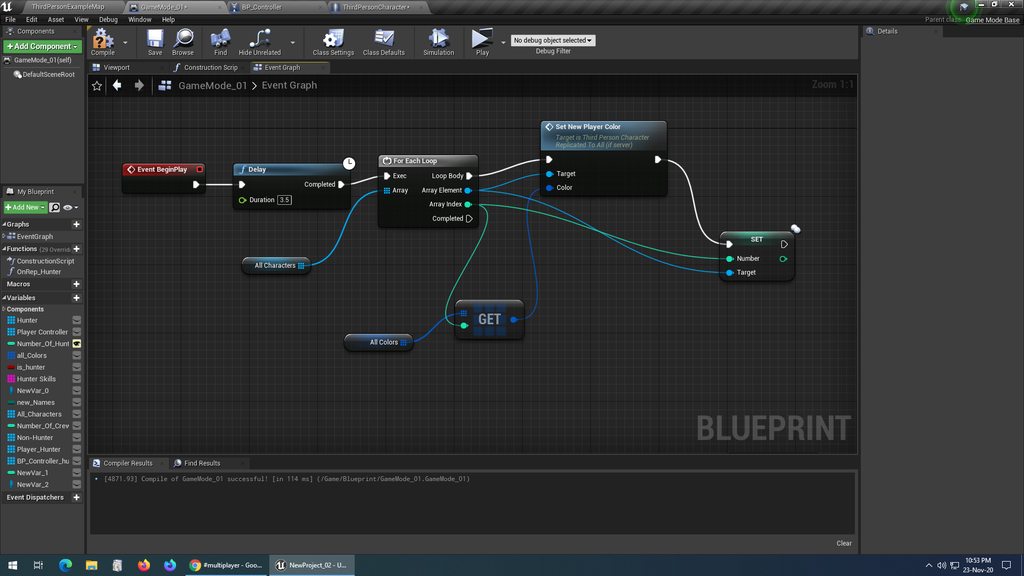
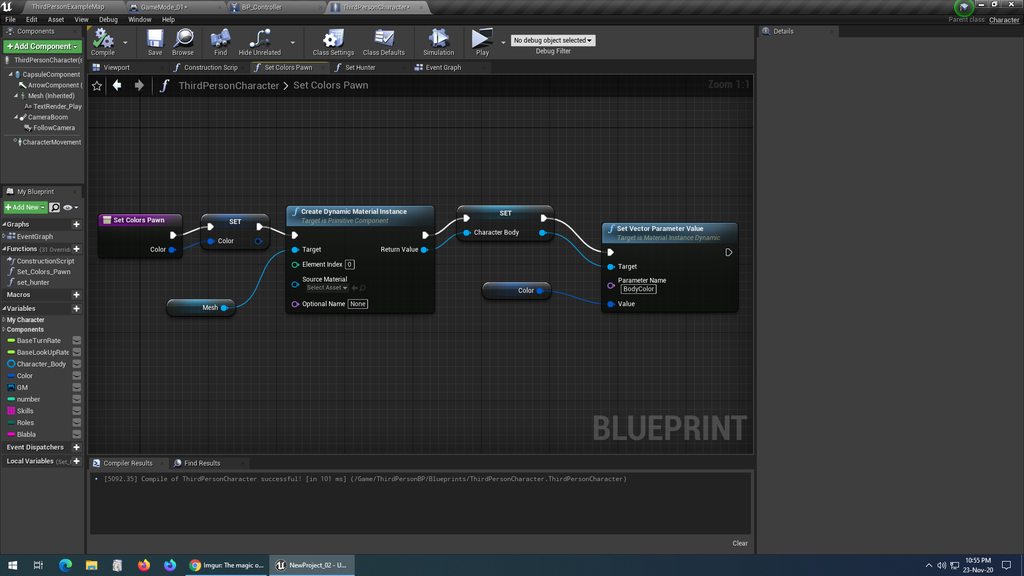
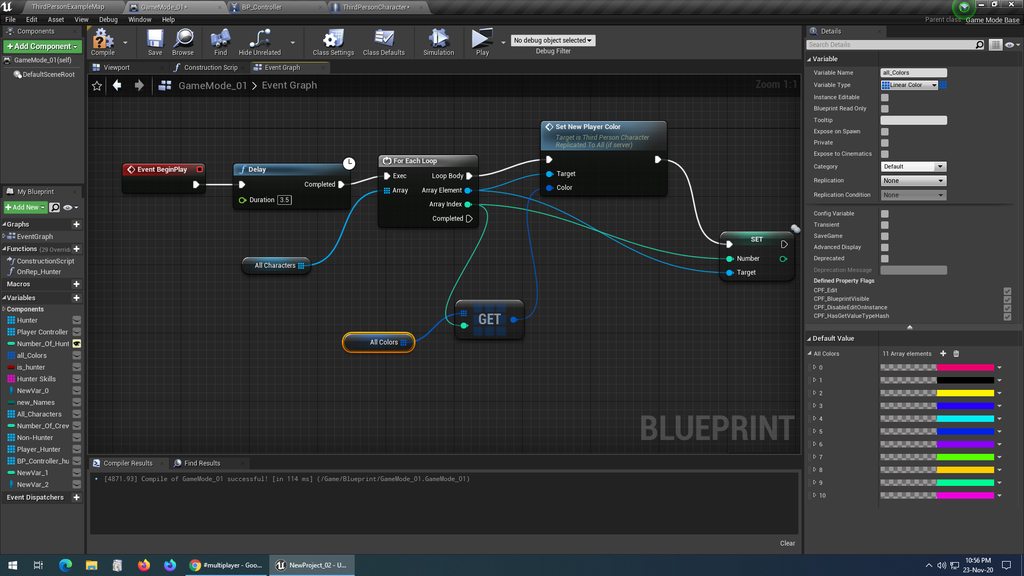
 gritty pelican
can i use Steam Stats for save player Rank?
kindred widget
@sacred spire Honestly. Ditch the multicast. You're already setting the integer which is replicated. Just set that in the characters on the server. Make the integer a repnotify. In the repnotify function, let each client set the colors themselves based on the replicated integer.
winged badger
multicast from GameMode doesn't strike me as particularly effective either
even if it uses 3rd person character
this is clear OnRep wins vs. multicast situation
sacred spire
delay doesn't solve it
my multicast is from ThirdPersonCharacter class, not GameMode
winged badger
you put a replicated color variable in the Character
you set color OnRep
and you assign the color as soon as the character is spawned (read: HandleStartingNewPlayer override, after calling Parent)
sacred spire
I set replicated on the "color variable" in the character. As for the "OnRep", is it the "All Colors" variable in GameMode?
winged badger
multicast here leaves every late joiner, and everyone out of relevancy permanently in invalid state
twin juniper
Hey, concerning TArray replication, there is surely more overhead when replicating single members of larger structs than simpler items in the array, correct?
i.e. a struct with two or three member variables compared with a single variable
sacred spire
@kindred widget which integer? the one called "Set" in Game Mode?
@winged badger noted, thanks
kindred widget
You have a Number integer in the character already that is set to replicate. You're setting it right after the multicast call.
sacred spire
Oh okay, i set that to RepNotify now
kindred widget
Put the array of colors in the character, or somewhere else easily reachable that exists on all machines like GameState.
Non replicated, the array can be not replicated.
In the OnRep_Numbers function that should have been made when you set that integer to repnotify, get the Number, pick a color from the array where ever you put it, and set the vector parameter.
sacred spire
okay noted, gonna slowly digest all these. I am quite slow. Thanks
 hidden thorn
Just wondering if I am missing something here, is HUD class independent for each client meaning that each client has its own HUD class spawned. The reason why I am asking is because I am Creating a Widget in the HUD class via BP at BeginPlay but it seems that only the server actually has it created.
supple mural
@hidden thorn you need to do this
hidden thorn
Are you calling that from the Character or from the HUD Blueprint ??
I can only get GetController in my Character
kindred widget
@hidden thorn By HUD class, I assume you mean a blueprint child class of the actual AHUD class? And that's on it's beginplay?
supple mural
hidden thorn
Are you calling that from the Character or from the HUD Blueprint ??
This is from the character
hidden thorn
kindred widget
<@!146007366180012032> By HUD class, I assume you mean a blueprint child class o...
That's correct, I just was unsure how to explain it better.
kindred widget
AHUD is spawned once on each machine(Not sure about dedicated servers but I doubt it). Even on the ListenServer. It has no network relevancy and should work as if coded for single player. So what you have there should work fine on any machine. Also, don't bother giving widget owners unless you're making a split screen game.
hidden thorn
supple mural
This is from the character
It just seems wrong doing it in the Character BP
kindred widget
I do all of my widget related stuff from the HUD class as well.
supple mural
Oh, that's interesting. So you add your widget to the viewport in the widget editor?
hidden thorn
kindred widget
AHUD is spawned once on each machine(Not sure about dedicated servers but I doub...
I assumed so much but was unsure :D, About not assigning an owner good to know I always do it :D. Regarding the fact that's not showing u[, still not sure why I guess I will have to keep trying and see why its not working.
kindred widget
Nothing in that HUD affects it's own visibility?
hidden thorn
supple mural
Oh, that's interesting. So you add your widget to the viewport in the widget edi...
So if you creating a PB that inherits from the HUD class, it just makes sense that you create the HUD Widget from there, this also gives you ability to have different HUD Widgets for different gamemodes.
kindred widget
HUD meaning the widget, not the AHUD class.
rose egret
I seriously don't understand why the hell they make useful properties in Actor and other components private, whyyy, I need to edit PreReplication but AttachmentReplication, ReplicatedMovement , are private, :((((((
hidden thorn
@kindred widget Not its all empty, if I call it in the LevelBlueprint Beginplay it works though. But let me just try again.
supple mural
Oh that's interesting. I didn't know that before
kindred widget
@hidden thorn You said it was only spawning that widget on the server?
hidden thorn
Yeah
kindred widget
And that's in a child of the HUD actor class. You've set that HUD class in the game mode that's being used in that map?
hidden thorn
Whether that was the case exactly or not I am unsure, but I can say for sure that only the server had it visible in the viewport.
hidden thorn
kindred widget
And that's in a child of the HUD actor class. You've set that HUD class in the g...
Correct
As I said, I am trying it again just to be 100% certain as I might've messed something up
supple mural
Hey guys, is there a way to 100% disable/enable input for a client?
The way I'm doing it doesn't seem to work reliably. At the start of this function, I call a disable input but it doesn't do anything.
hidden thorn
kindred widget
And that's in a child of the HUD actor class. You've set that HUD class in the g...
Finally managed to get the HUD Widget showing up, so all the other ones for the MainMenu/Lobby were working fine it was just the one in-game that wasn't. I am not certain what was causing it to not show but I removed any references to it from other BPs and now it works. Luckily it was fresh so wasn't used in only 1 place but even then it was just calling methods from it.
hidden thorn
supple mural
Hey guys, is there a way to 100% disable/enable input for a client?
Have you tried GetPlayerController->EnableInput ?? (I assume this is what you tried)
supple mural
yup
I'm doing this in blueprints. But I'm willing to do this in C++ if it'll magically start working
hidden thorn
I doubt it will 😄
supple mural
Yeah, same here
hidden thorn
Are you sure you're not enabling it back somewhere else?
kindred widget
What do you mean by for a client? What is the use case for disabling the client?
hidden thorn
Also what exactly is your scenario, maybe if we get what you are trying to do it will help find a solution.
kindred widget
Like for their own UI, or for keeping them from interacting with the server in their owned actors?
supple mural
Alright, So I'm doing a grapple system. On Grapple Init (when they press a key) we disable input. Then do our movements and then when we finish grapple we're supposed to enable movement
I'm pretty sure somethings either not getting replicated properly OR I'm not giving it the right inputs
I don't think I can use GetPlayerController because it uses player index and that's no good for replication I think
kindred widget
You shouldn't use different input paths for client and server. Just make the listenserver call the same RPC, it works the same way.
And if it's a dedicated server, it won't have input.
As for the input. Target should be Self, PlayerController should be the GetController.
supple mural
Just make the listenserver call the same RPC, it works the same way.
what do you mean by this?
instead of using switch has authority, I should run the grapple client?
 loud onyx
Question about replication! Does anybody know where to find information on this option here, Replication Condition? Context clues give me a little bit, but I'd like to see a breakdown of how each option is handled. Couldn't find in docs.
quasi tide
Detailed information about how to conditionally replicate Actor properties.
loud onyx
AH ok. Thanks!!
 vivid seal
How would you guys do something like Lucio’s knockback from Overwatch? Just have the server do it? Or is there a decent way to do client prediction of AddImpulse or LaunchCharacter? Similarly, something like a Fear effect that forces a character to run in a direction for some time. I would need to check these things on the server and also be able to reject client movement input for a time while this is active.
supple mural
don't use LaunchCharacter
My GOD don't use it
play around with the velocity instead, that replicates 100%
 wind oasis
I'm making multiplayer game and the speed of the characters different but they has the same speed value. how can I fix that ?
 eternal canyon
if u use launch character
do it twice
once on the server
once on the client
and it should be smoother
hidden thorn
Is there like a diagram or something that shows what Classes are Shared between The client/server, only server and only client side. I remember I found one but it wasn't very detailed.
 still path
If I have a variable in the GameMode set to replicate (say a score), will every player be able to cast to and see that variable or will I have to jump through some more hoops for all players to see the variable as the same?
hidden thorn
On a similar note to @still path 's, I inherited from GameState and added some extra variables and set the UPROPERTY to Replicated do I need to set bReplicated and use GetLifetimeReplicatedProps ???
thin stratus
GameState should already set to replicate
But you need the GetLifetimeRepl. Function for your own variables
hidden thorn
Ah ok, thanks
still path
thank you @thin stratus
 limber gyro
i am calling a custom blueprintimplementableevent function inside my gamemode that comes from the game instance but it only executes on the server
do i need to multicast it?
so that it executes on the players?
since game instances exist on the players aswell i was under the impression that the function would also be called in the clients
hidden thorn
@thin stratus If I have a variable like bIsAlive which needs to be replicated I feel that should be on PlayerState, question I had further up apply to this as well? Also is PlayerState the right place to have that sort of info about the character on?
kindred widget
@limber gyro Instance exists on all clients. Game Mode does not.
limber gyro
oh ok so thats where i am confused so i do have to multicast
@hidden thorn it should be depending on what you want to achieve
keep in mind that playerstates disapear when players disconect
thin stratus
hidden thorn
<@!94211915902889984> If I have a variable like `bIsAlive` which needs to be rep...
Well, info about the Character should probably be in the Character. But depening on your game it could make sense to put it into the PlayerState
hidden thorn
I am just trying to keep information's about the player in the current session.
kindred widget
Depends on your use case. What are you trying to make happen? GameMode is the inner brain of the server. The decision making place to put stuff that only the server will ever know or see. If it's dealing with all clients and it's game wide, consider the GameState in the GameMode's stead.
hidden thorn
@thin stratus Hmm, so what I want to do more specifically is set the character type at the beginning of the game. What I had in mind is get all the connected players using GameState->PlayerArray and then assign it to them, the problem is that that's the PlayerState and unsure how I can get the Character from there
thin stratus
Well you can get the PlayerState from the Character
And I think the PlayerState also has a pawn ref by now
Not sure if in BPs
hidden thorn
Well, I am doing everything in BP and once its complete and I know exactly how I want it to work I move it to C++
hidden thorn
thin stratus
And I think the PlayerState also has a pawn ref by now
I will take a look at this, thanks
 lucid vault
Is it better to A) Send variables to animBP from character, when those variables change B) Have animBP grab variables from character every frame in update?
I am currently using method A. But, I'm starting to notice some desync in some circumstances, so I'm debating switching to B
I don't think there are any downsides to B
With method A, if a player joins the game late, the variables won't get set in the animBP, for instance
kindred widget
Method B is more common and considered better practice. In fact I believe there are some changes in 4.26 that are even more in that direction.
limber gyro
i am calling the following function:
FUNCTION(Client, Reliable)
void ClientWriteMatch(const FString& matchInfo);
and then that function is wraping a blueprintnativeevent
but in the logs it still says the server is calling it
kindred widget
What actor is this RPC on?
limber gyro
its in the game instance
kindred widget
Game Instance is not replicated, it cannot RPC.
lucid vault
Use game state
I figured B was better. The net code for ALS is really not that great :p
kindred widget
Clients don't even have a GameMode, so no, it isn't replicated either. It's ServerOnly for security.
I've heard that from a few people about ALS.
 sage creek
is this a good time to ask for help about a specific issue i'm having?
kindred widget
Any time is a good time. Feel free to pose problems or issues whenever if it's in the appropriate channel. People will usually try to help if they're around and have time.
sage creek
i'm pretty new to networking so just bear with me on this
limber gyro
why the heck cant i get my game instance inside the gamestate
unreal is not helping out today
sage creek
this is how damage and launching are SUPPOSED to work
and this is how it meshes with multiplayer
(the guy who successfully launched was the host. no one launches on dedicated servers and are doomed to the pain and eternal boredom of immortality.)
limber gyro
ur only launching in the client
sage creek
huh?
limber gyro
the server doesnt know that you are launching characters so they are being rubber banded back
limber gyro
u gotta rpc that
sage creek
what does that mean?
limber gyro
well the correct fix would be to override the movement component
and make your custom replicated movement
limber gyro
but if you want the second best option you gotta rpc and launch both in the server and client at the same time
you basicly make a rpc that is going to call a function that will launch your character in the server
google, UE4 rpc's
sage creek
oh
limber gyro
launch character doesnt work that great over netowrking i think
but u can give it a shot
might still jitter tho
lucid vault
You probably want to enable IgnoreClientMovementErrorChecksAndCorrection
sage creek
where is that?
sage creek
my what?
limber gyro
theres a bunch of variables that you might wanna disable for smoother movement
lucid vault
Go into your character BP, and drag out the Character Movement Component
sage creek
lucid vault
And allow for the server to accept client authoritative position
wait, but would that not also allow for cheating using an external program or modified game since it's client authoritative?
sage creek
lucid vault
Go into your character BP, and drag out the Character Movement Component
ohhhh
lucid vault
You could validate the movement on the server to help guard against cheating
limber gyro
ive found that even with that set to false the server still checks for movement inconistencies
sage creek
how so?
kindred widget
@limber gyro What are you trying to do exactly between game instance and the clients? And which game instance? The one on the server?
limber gyro
i mean true
lucid vault
IgnoreClientMovementErrorChecksAndCorrection and ServerAcceptClientAuthoritativePosition perhaps?
sage creek
wait but where is "IgnoreClientMovementErrorChecksAndCorrection"
limber gyro
@kindred widget i am trying to send a string to my clients so i can save it in the save game
sage creek
nvm
limber gyro
which is in the game instance
so i am thinkin of calling the RPC in the game state and then getting my game instance with the BP event and calling it
the thing is GetGameInstance doesnt exist in the game state for some reason
sage creek
i turned on IgnoreClientMovementErrorChecksAndCorrection
the man now still only launches clientside
nvm
ServerAcceptClientAuthoritativePosition is on now
is this even really a good way to be doing this?
kindred widget
@limber gyro All you should need to do, is either set a string variable as repnotify in the GameState, or make a Multicast RPC in the Gamestate when the string changes and use the string as a parameter.
limber gyro
@kindred widget
{
    UProjectArenaGameInstance* gameinstance = GetWorld()->GetGameInstance<UProjectArenaGameInstance>();

    gameinstance->WriteMatch(matchInfo);
}```isnt this suposed to work
?
sage creek
i just feel like i might be making things hard for myself later on
limber gyro
i am not doing the rpc in the game instance its in the game state
 empty axle
oh sorry
limber gyro
i just get the game instance inside the rpc
 meager spade
still cant do in the gamestate
kindred widget
You need to Multicast. Right now you're telling the owning client to run that code. Server owns the GameState actor. Clients only own Controllers and their controlled pawns.
limber gyro
you cant do it in the game state either? xD
meager spade
only Multicast RPC's
Client and Server RPC's require an owning connection
GameState is owned by server.
meager spade
PlayerController or some Actor whos owner, ultimately goes back to PlayerController
to run Server/Client RPC's
kindred widget
Multicasting that should work I believe, yes. It would tell each client to run that on their local gamestate and get their local gameinstance to call that function.
limber gyro
if i used the PC i would need to call the function in all PC's no?
limber gyro
so ye multicast is way less messy
meager spade
then your basically doing a multicast 😄
limber gyro
indeed
kindred widget
Only reason to do it in the controller might be if different clients need different strings for some reason.
limber gyro
nah they dont
its for a local match history
o ye its working
thanks guys
i didnt know that the game mode and th game instance werent replicated
i was under the impression that the game mode was at least
empty axle
@limber gyro if you care about late-joiners and relevance then you should consider replicating that as a property instead of a multicast though
actually in that case the gamestate is always relevant so that is not a problem for you
but late-joiners are still
kindred widget
@limber gyro Nah, the only two strange native actors(note that GameInstance isn't an actor) Are the GameMode and the PlayerController. At least when it comes to networking. GameMode only exists on server, no clients have one. The Controller on the other hand only exists on the owning client and the server. PlayerControllers of other players do not exist on each other's clients. That's one reason why GetPlayerController0 always returns the correct controller for that machine and is generally safe to use either before a serverRPC from input on actors or from UI.
Then again if you're using it for input, usually that's on itself or the character, which can just GetController().
 torpid girder
Is the concept of a server browser out of date?
kindred widget
Like letting people browse for servers to join and play on?
 rotund topaz
That depends on what you want to do
limber gyro
i would say it is a bit outdated
most modern games have match making
at least most AAA ones
meager spade
Not all lol
Browsers are common still for custom games etc. But matchmaking is the norm. Both is very common. Again its game dependant. So yeah..
kindred widget
Actually it's not really that outdated. Sure, a lot of modern games use matchmaking, but just as many and a lot of them that use matchmaking also allow custom lobbies for players to do their own custom matches, or even for specialized community driven tournaments. And that's just for shooters. Games like Eco, or Ark, that have persistent servers don't usually do matchmaking. RTS games often mix them for the same reasons that shooters do. Custom games and tournaments.
 wide stream
Hi everyone. Could anyone point me to some examples when UOnlineSession is used? I understand how the various multiplayer classes interact with each other, but I can't seem to find anything reasonable on UOnlineSession. The only thing I've managed to find out is that it's supposed to be a class is intended to encapsulate anything clients (including a listen client) would care about when talking to an online platform (invites, joins, presence, matchmaking).
hidden thorn
How can I get the PlayerState from the CharacterClass ??
quick flint
Is it just good habit to replicate a uint8 with multiple bitflags than to replicate multiple bools?
A single bool is 1 byte, but a single byte could store 8 bitflags
would love to hear thoughts of others
kindred widget
@hidden thorn Which playerstate? the one attached to the controller controlling the character?
hidden thorn
I got it, nvm 😄 and yes
Quick question, if I update a variable that's marked as Replicated on the PlayerState will it automatically be updated on all the clients or do I still need to Multicastit?
kindred widget
If it's replicated, it should replicate based on it's condition settings normally by just setting it.
hidden thorn
I think I messed something up 😄 need to check it
lucid vault
I'm having problems spawning an actor and attaching it to a player directly after spawn. It doesn't replicate the attachment
If I put a delay after spawning the actor (before attachment) it fixes the problem
However, a delay seems like a bad solution
Anyone know why this happens?
(I spawn and attach only on authority)
Might actually be because I do the attachment in the Possessed Event
kindred widget
I find that Possessed has issues with it's pointer sometimes for some reason. It's often null when I tried using it without even a 0.1 delay in single player.
winged badger
which version @kindred widget ?
@lucid vault HandleStartingNewPlayer override in GameMode is the most convenient place to assemble your object graph
lucid vault
Well, certain characters start with an item in hand
I figure the best place to have that is in the specific player
winged badger
its not, as evidence of you asking the question about it in the first place
when that event (in BP) fires, you have a valid fresh PC and PS
and Parent (unless you want to manually spawn the Pawn) will spawn the Pawn
its a single no-reentry point in the GameMode, that the executon goes through after both PostLogin and HandleSeamlessTravelPlayer
lucid vault
Does it run after GetDefaultPawnClassForController?
As I would need to know the character type to determine if the character should hold an item
winged badger
default behavior (parent) will call that function
so it gets called by Parent event / Super
by default
so you can put your code before or after the GetDefaultPawnClass, really
HandleStartingNewPlayer_Implementation (native implementation for BP native event) calls RestartPlayer, which calls GetDefaultPawnClass
lucid vault
Although, my characters are defined in Blueprints with a common c++ parent. I'm wondering how I can differentiate them from c++ in HandleStartingNewPlayer_Implementation. Would the ideal solution be to create an enum for all character types and assign them to each character?
winged badger
well, you can not call parent if you wish
and spawn the pawn by hand
calling GetDefaultPawnClass yourself
you can use TSubclassOf<AMyPawnBase> for the class
but you can't push that into the HandleStartingNewPlayer as an Artument directly
but yeah, easiest way is to just implement GetDefaultPawnClassForController in BP and just call it from c++
(note you can use the blueprint override for HandleStartingNewPlayer, it will work fine)
i did that when i prototyped the current system - PlayerController, PlayerState, AIController, Character, Pawn and one Actor
all linked up and given all the references they need
lucid vault
I see. Thanks for the info
 sand iris
I'm running an automated test in "Play as Client" mode and trying to spawn an actor with a static mesh component but the static mesh is invisible, however, the mesh shows in offline mode fine.
this is the BP code I'm using to spawn the static mesh actor but I think it's only getting spawned on the client and not the server
Ok I figured the issue with the static mesh not showing on the client. The problem was that the mesh was not being spawned on the server.
however, now my problem is that the collider is only on the client but not on the server
so I can go through the mesh on play as client mode (but not on offline mode)
 ocean geyser
ill try to break this up, im having an issue with replication. at the bottom in the OnRep im having the issue of only the owning client being able to call TeamSet() for themselves and not other clients eventhough the OnRep is running. im changing the color of a mesh on the character based on the team, blue team has the color being blue and red is red, this is handled in blueprint. TeamSet is a BlueprintImplementableEvent. this works as intended, but as stated TeamSet only runs on the owning client so only the mesh on the owning client gets changed (so client 1 can see their own mesh color change, but not client 2)
void AAirsoftPlayerState::BeginPlay()
{
    Super::BeginPlay();

    if (HasAuthority())
    {
        uint8 RedTeamCount = 0;
        uint8 BlueTeamCount = 0;

        if (AGameStateBase* GS = GetWorld()->GetGameState<AGameStateBase>())
        {
            for (APlayerState* PS : GS->PlayerArray)
            {
                if (AAirsoftPlayerState* TDMPS = Cast<AAirsoftPlayerState>(PS))
                {
                    if (TDMPS->GetTeam() == ETeam::Red)
                        ++RedTeamCount;
                    else if (TDMPS->GetTeam() == ETeam::Blue)
                        ++BlueTeamCount;
                }
            }
        }

        UE_LOG(LogTemp, Warning, TEXT("Red: %d        Blue: %d"), RedTeamCount, BlueTeamCount);

        if (RedTeamCount > BlueTeamCount)
        {
            Team = ETeam::Blue;
            UE_LOG(LogTemp, Warning, TEXT("SETTING TEAM TO BRAVO"));
        }
        else
        {
            Team = ETeam::Red;
            UE_LOG(LogTemp, Warning, TEXT("SETTING TEAM TO ALPHA"));
        }
        OnRep_Team();
    }
}

void AAirsoftPlayerState::OnRep_Team()
{
    if (APlayerController* PC = Cast<APlayerController>(GetOwner()))
    {
        if (ACharacterBase* Character = Cast<ACharacterBase>(PC->GetPawn()))
        {
            Character->TeamSet(Team);
        }
    }
}
yeah, you don't have other player's PCs
so that first if will fail for anything but the owner
if you're past 4.22 i think PlayerState should have a valid pointer to Pawn
@ocean geyser
lucid vault
HandleStartingNewPlayer_Implementation won't work for me, because the player starts as a spectator, and is assigned a character after x time. I guess RestartPlayer is probably the best place to attach actors for my case?
ocean geyser
son of a gun GetPawn -_-
winged badger
if that is what you do to turn the spectator into non-spectator, yes
ocean geyser
@winged badger no luck with GetPawn(), now it currently only sets it on the server for the servers character
void AAirsoftPlayerState::OnRep_Team()
{
    if (ACharacterBase* Character = Cast<ACharacterBase>(GetPawn()))
    {
        Character->TeamSet(Team);
        UE_LOG(LogTemp, Warning, TEXT("TEAM SET"));
    }
}
its PawnPrivate
i assume GetPawn is the function
but
1 - PlayerState and Pawn Actors replicate separately
Pawn will generally replicate first due to higher NetPriority, but that can go to shit with packet loss
2 - PawnPrivate in PlayerState is not replicated, but injected
ocean geyser
so should i run a timer until the pawn gets valid for the client?
sand iris
how can I get an actor to have collision in multiplayer? any tutorials on it?
I'm spawning an actor with a box collider but I can walk through it when playing in Play as Client mode.
quick flint
I want to also know how to do collision in multiplayer
winged badger
void APawn::SetPlayerState(APlayerState* NewPlayerState)
{
    if (PlayerState && PlayerState->GetPawn() == this)
    {
        FSetPlayerStatePawn(PlayerState, nullptr);
    }
    PlayerState = NewPlayerState;
    if (PlayerState)
    {
        FSetPlayerStatePawn(PlayerState, this);
    }
}
you should probably use this for the hook
when this happens (the second if)
PlayerState Actor replicated, it has also replicated its initial variables
and only after this line FSetPlayerStatePawn(PlayerState, this);
does the GetPawn() in PS start working
ofc, its not wvirtual, so gg epic 😦
ocean geyser
or be lazy XD
void AAirsoftPlayerState::OnRep_Team()
{
    if (ACharacterBase* Character = Cast<ACharacterBase>(GetPawn()))
    {
        Character->TeamSet(Team);
        UE_LOG(LogTemp, Warning, TEXT("TEAM SET"));
        if (GetWorldTimerManager().TimerExists(TempHandle))
            GetWorldTimerManager().ClearTimer(TempHandle);
    }
    else
    {
        if (GetWorldTimerManager().TimerExists(TempHandle))
            GetWorldTimerManager().ClearTimer(TempHandle);

        GetWorldTimerManager().SetTimer(TempHandle, this, &AAirsoftPlayerState::OnRep_Team, 1.0f, false);
    }
}
void APawn::OnRep_PlayerState()
{
    SetPlayerState(PlayerState);
}
can definitely do this
if PlayerState is valid, grab the team ID from it and set color thingy
after Super
timer is just sloppy
you basically just added a Delay 😛
lucid vault
RestartPlayer won't work for me because I also call RestartPlayerAtLocation. So I overrode FinishRestartPlayer instead.
However, overriding FinishRestartPlayer, calling super, no other code, causes player spawns to break 🤔
There should literally be no difference overriding the function if I call super. I don't understand 😐
ig I will just override both restart functions and call a function from each that handles pickup actors. Kind annoying that there isn't a single function that would be suitable (that I can tell)
lucid vault
Damn, the attach method is still not replicating to clients when called from the server inside of the RestartPlayer methods 🤔
 summer tide
Trying to assign some skeleton meshes to my player in char selection. In the widget I have male and female buttons. The buttons are connected to a player controller which has a rep/notify that assigns the meshes to the character.
winged badger
@indigo reef you're not allowed to post discord links here, #old-rules
also, there are job post boards for this
lucid vault
It looks like AttachTo is multicasting, so clients that join late don't get the attachment up to date
quick flint
How do I setup networked collision
winged badger
@lucid vault scene components replicate attachements
but only if they themselves are replicated
so what are you attaching to what?
@quick flint you'll need to elaborate what you mean by "network collision"
quick flint
@winged badger if I spawn an actor and setup a static mesh and a box collider the collision isn’t being registered and I can walk though the cube
winged badger
all collisions are local
so they work separately on each machine
as if it was a single player
quick flint
@winged badger so how do I make it so a player can’t walk through a cube I spawn
lucid vault
@winged badger The actor that I'm attaching has a static mesh as the root component
I'm attaching it to my characters skeletal mesh on his hand socket
I'm guessing that I will need to use a replicated variable with on rep so the clients also attach
winged badger
that is probably preferable to replicating the static mesh component in the said actor
peak sentinel
Is replicated variables being networked each frame?
winged badger
no
peak sentinel
So its not harmful to use for selecting random materials on construction script? (I have 50+ characters)
winged badger
what does construction script have to do with net update frequency?
peak sentinel
Its not, what I am trying to say I have a variable that I am going to use it on one place but I have too many actors carrying that variable, I wonder if this is going to eat too much bandwith or not
winged badger
is that the only thing that replicates on those actors?
peak sentinel
No, they have 5 or 6 other replicated variables too
winged badger
then it won't make any difference
there is a common misconception that bandwidth is the main problem too, its not
its the CPU time server spends evaluating Actors for replication
you're much more likely to choke your network there then on bandwidth
peak sentinel
Understood, good to know. Thank you
winged badger
if that was the only replicated variable in an Actor, thats say, pre-placed on the level
then it would be a good idea to have a single Actor replicate that variable for all 50 of them
while keeping the 50 non-replicated
as they wouldn't need to be evaluated that way
it would consume the same bandwidth
peak sentinel
What if I have an actor for selecting materials, that when I spawn AI it just selects one material from array/index, and sends it via parameter, since I only have one variable, would that be more optimized?
winged badger
and btw, your Actor wants to be checked for replication on its NetUpdateFrequency, which is 100 times a second by default, and imo, way too high
it still won't ever get sent that often, even if you change its replicated variable on Tick
as server won't send everything, but just as much as it can, sorted by NetPriority
not if the AI needs to replicate for other reasons
peak sentinel
I am just going to send them one time, when they spawned, if I mark function as reliable, wouldnt it send?
winged badger
this would work if you wanted to randomly color cubes on the level and keep it in sync, for example
this is clear OnRep is better then RPC situation
and you can set the replication to InitialOnly
for that variable
peak sentinel
Understood, thanks so much for guidance
kindred widget
@winged badger Just tested it again, I can't get it to do it in this version at least. When I was having that issue I'm pretty sure I was in 4.24. Sometime early this year. Was a single player project though and I was trying to use the controller's OnPossess, and the pawn kept coming up null without a 0.1 second delay.
To be fair. I could also be remembering wrong as well. I was a couple of months into starting to learn UE4 and was overwhelmed at the time. I don't think 4.25 was out quite yet.
 silent valley
So I have a very simple Steam test application (using AdvancedSessionPlugin) which worked fine on the official Epic prebuilt engine. After switching to the my source build engine I am getting this error and no lobbies found:
LogOnlineSession: STEAM: Found 1 lobbies, finalizing the search
LogOnlineSession: STEAM: Search result 0: LobbyId=Lobby[0x1860000010BA8F9], LobbyId.IsValid()=true, CSteamID(LobbyId).IsLobby()=true
LogOnlineSession: Warning: STEAM: Removed incompatible build: ServerBuildUniqueId = 0x00c89141, GetBuildUniqueId() = 0x00000000
LogOnlineSession: Warning: STEAM: Unable to parse search result for lobby 'Lobby[0x1860000010BA8F9]'
it's not obvious how I set this up...
there's BuildIdOverride and bUseBuildIdOverride config vars, but how is it supposed to work without the BuildIdOverride?
silent valley
ok so it seems if I run a packaged version it has a BuildID, and if I launch from VisualStudio it has BuildID==0 🤷
I can work with this.
silent valley
actually, scratch that I'm an idiot I was using an old build 🙈
hidden thorn
Are GameStates shared between levels?? So after starting a session, I move to another level the GameState will remain the same (I just want to confirm as that's what I am expecting)
hidden thorn
Hmm, ok thanks
What would be the best thing to do in the following scenario, I have some replicated variables in the PlayerState the GameState has a PlayerArray which I am using to set the variables on the PlayerState, but if the GameState is removed between travels and so is the PlayerState then what I am trying to do is not going to work unless I make them non-destructible between levels.
kindred widget
What is the game type?
hidden thorn
Game type?
kindred widget
What kind of game is it? Why do you change levels?
hidden thorn
Oh I see
So when you initially create the session you are dropped in a waiting level until everyone joins and then you travel to the level where magic happens, I guess you could do it all in one level but this is the approach I initially took 😄
The initial level is sort of a lobby, But you can walk around and what not.
kindred widget
Someone might know a different way. Initially I'd assume that you'd save them in a savegame or on the server's gameinstance mapped via the player's ID. Then just have the server reinitialize the states in the new map.
hidden thorn
So then is the GameInstance not getting destroyed between travels?
kindred widget
By ID, I mean their unique net ID, not player controller iterator number.
And no. GameInstance survives the lifetime of the application.
quick flint
remember
by default, the unique id is your computer name + a series of random characters
on steam, its your steam username
 fiery badge
Hey!
i am trying to creating a Dedicated Server from : https://docs.unrealengine.com/en-US/Gameplay/Networking/HowTo/DedicatedServers/index.html
i am at Step 2:6 -> when i try to generate project it's throwing this Error, can anyone please Help me out
Running C:/Program Files/Epic Games/UE_4.25/Engine/Binaries/DotNET/UnrealBuildTool.exe -projectfiles -project="D:/Sagar/Unreal_Engine/Project/S_ThirdPersonMP/S_ThirdPersonMP.uproject" -game -rocket -progress -log="D:\Sagar\Unreal_Engine\Project\S_ThirdPersonMP/Saved/Logs/UnrealVersionSelector-2020.11.24-18.13.26.log"
Discovering modules, targets and source code for project...
While compiling D:\Sagar\Unreal_Engine\Project\S_ThirdPersonMP\Intermediate\Build\BuildRules\S_ThirdPersonMPModuleRules.dll:
d:\Sagar\Unreal_Engine\Project\S_ThirdPersonMP\Source\S_ThirdPersonMPServer.Target.cs(6,14) : error CS0101: The namespace '<global namespace>' already contains a definition for 'S_ThirdPersonMPTarget'
ERROR: Unable to compile source files.
How to set up and package a dedicated server for your project.
i did ever things as it is in documents
i checked like ten times
try to google it but no luck
meager fable
Is SimulatePhysics replicated? I mean is it enough to call set simulate physics on the server only or do I have to multicast it
hidden thorn
Is there anything other than the GameState that holds a reference to how many players there are currently connected, something that might know even between server travel!! 😄
fiery badge
hidden thorn
I think its the class name you are using inside ....Server.Target.cs
The namespace '<global namespace>' already contains a definition for 'S_ThirdPersonMPTarget'
hidden thorn
Change the class name to the file name (assuming that's the issue)
silent valley
contents of your S_ThirdPersonMPServer.Target.cs file would help
hidden thorn
The image above is the content of his S_ThirdPersonMPServer.Target.cs
fiery badge
yes
silent valley
oh, so it is, then yeah change the name to match the file. As @hidden thorn said the error is because there are 2 class definitions in the assembly with the same name
class should be calld S_ThirdPersonMPServer (and change the constructor name too)
fiery badge
i change class name from S_ThirdPersonMPTarget to S_ThirdPersonMPServer but it's not working
// Copyright Epic Games, Inc. All Rights Reserved.
using UnrealBuildTool;
using System.Collections.Generic;
public class S_ThirdPersonMPServer : TargetRules
{
public S_ThirdPersonMPServer(TargetInfo Target) : base(Target)
{
Type = TargetType.Server;
DefaultBuildSettings = BuildSettingsVersion.V2;
ExtraModuleNames.Add("S_ThirdPersonMP");
}
}
silent valley
looks ok to me
hidden thorn
What error are you getting now?
 nocturne iron
Is the HasAuthority() check necessary? If i call Server_Attack(), on the client (and vice-versa) wont it just do the check inside the engine anyways?
hidden thorn
If I am not wrong, HasAuthority simply checks if the client that just called the Method ... HasAuthority over the current Actor to be able to send the request, so I would that you want it, I think the Multicast_Attack should only be called by the server to update all the other clients, so you don't need the else.
meager fable
Is SimulatePhysics replicated? I mean is it enough to call SetSimulatePhysics on the server only or do I have to multicast it
meager spade
@nocturne iron don't post in multiple channels.
 sleek current
are there any resources regarding best practices/optimizations for ue4 multiplayer?
 chrome bay
It's a pretty huge subject so nothing specific AFAIK
silent valley
Any reason why my Windows dedicated server is not connectable via Steam?
LogOnlineSession: Warning: STEAM: Failed to respond IP:82.8.239.49
I have opened the App via the firewall
My linux server is working ok now I have opened all the ports I needed
quick flint
Is UCharacterMovementComponent::DoJump called on the server or the client?
kindred widget
@nocturne iron If that is from player input?
thin stratus
silent valley
Any reason why my Windows dedicated server is not connectable via Steam?
```
Log...
Are you trying to connect via IP?
silent valley
sorry I don't mean connect, I am currently just calling FindSessions
trying to enumerate Sessions via Steam
Dedicated Server Linux works ok, Listen Server Windows works ok, but Dedicated Windows is just not searchable...
winged badger
is it running on same machine youre searching from?
silent valley
I had same warning STEAM: Failed to respond for Linux server until I opened all the ports (27015, 3478, 4379, 4380)
no difference machine
I have tried different machine same network, and different network too
winged badger
the only steam API limitation is the server on same machine won't be visible
silent valley
hmm I just thought - what if the machines are behind NAT?
does Dedicated work behind NAT?
 royal rampart
what do these numbers mean (log output from dedicated server)
lucid vault
@winged badger I didn't think about replication taking up CPU performance. I have 2,000 replicated actors simulating physics and I am getting bad latency spikes and general network lag. All of the actors are stationary, and the only replication on the actors is the default ReplicateMovement.
Correct me if I am wrong, but from my understanding, my issue is NOT a bandwidth problem, because the actors are not moving, therefore, they are not sending any updated transforms / velocity. It must be a CPU problem then
In which case, I wonder if a dedicated server would solve this problem
chrome bay
The trouble with physics actors is they usually are always moving
So they can have a major impact on bandwidth
Even tiny adjustments from the physics engine applying gravity etc.
x2,000 actors - it adds up to a lot
lucid vault
What would be a general solution then? You can imagine my level is a warehouse, with lots of boxes on the shelves. 99% of the time the boxes will not be moving
chrome bay
Make sure they are sleeping would be the first thing
Network dormancy perhaps
Hard to say
lucid vault
Assuming that they are sleeping and not sending transforms, does that mean my CPU is the next culprit?
chrome bay
x2,000 actors all with continuously updating transforms is not so simple to do
If they're sleeping they aren't moving in the physics engine, so no updating transforms
but yes, the CPU side is still checking for changes
edit typo
lucid vault
I figured :p
Essentially I need to make sure all of my actors are not updating transforms when not moving. Then, if I have CPU problems, I would need a dedicated server probably
chrome bay
dedi server will still chug a bit I suspect, it'd be worth considering things like replication graph, possibly network dormancy etc.
lots of work to get 2k actors working reliably
need to profile it to get any real info
nocturne iron
meager spade
<@!257928132240211969> don't post in multiple channels.
i removed it from cpp
nocturne iron
kindred widget
<@!257928132240211969> If that is from player input?
yeah, indirectly
 sweet atlas
learning how to make multiplayer games. basing it on the first person template, the camera rotation is replicated to the server by default, but the other client doesnt see it. (it sees the rotation of the other player's character, but not the camera pitch (meaning the gun is alwazs horizontal)). anyone know how to replicate that from the server to the other client?
winged badger
you do have a current pitch on server for every client
send by ServerUpdateCamera RPC under the hood
its accessible (as location and direction of camera) via PlayerController::GetPlayerViewPoint (c++ only)
sweet atlas
ah thanks. been able to stick with just BPs so far 😦
winged badger
you can manually replicate the ptich
whenever it changes owning client RPCs the new Pitch to server
server Replicates that to allother clients (RepNotify, SkipOwner)
and other clients adjust whatever they need OnRep
sweet atlas
seems i can access it in BP using getbaseaimrotation of pawn
quick flint
Anyone here have experience creating custom bit flags for the character movement component?
I was curious if anyone knew where I should set it, I found a tutorial which shows setting it on TickComponent but this causes some problems for me
dark edge
@sweet atlas use control rotation to drive pitch and yaw
sweet atlas
that's done by default in the FPS template, but its not replicated to other client, @dark edge . the controllering client and the server would see the up/down looking, but the other player would not. yaw worke,d becasue its on the whole actor and that was replicated
dark edge
@sweet atlas are you sure the control rotation isn't replicated everywhere? It's been so long since I've messed with it I don't remember. I thought it replicated everywhere
sweet atlas
all i know is that it wasnt working, even though use control rotation was on by default and that causes it to work on the owning client + server, not on the other client. maybe there was some other issue
dark edge
It actually might not since on clients, only the local controller exists.
 languid whale
I have a issue, I have this third person weapon mesh that needs to disapear when the player is killed but it will only disapear on the host side the client will still see the weapon floating after it has been destroyed. Does anyone know how I could handle this?
This is how it is now set up, the target is the pawn itself
kindred widget
@languid whale The weapon itself, not just the pointer, should be set to replicate. Then all you need to do is destroy it on the server.
languid whale
This is the Third Person weapon's replication setup. idk if it is good tho, how should I destroy something on the server? Would destroy actor not suffice?
kindred widget
Destroy actor is fine, as long as it's called on the server. You should also be certain that you're not spawning a second one on the client that is in the exact same placement, which would make it look like it only works on the server.
meager spade
@sweet atlas pitch is replicated..
you are using the wrong function to get your values in the animgraph
everyone always does it when they follow bad tutorials
GetBaseAimRotation() is what you want to pull your yaw and pitch from
sand iris
how can I get an actor to have collision in multiplayer? any tutorials on it?
I'm spawning an actor with a box collider but I can walk through it when in "Play as Client" mode.
In offline mode I can't walk through the box collider.
meager spade
collisions dont care for networking.
your issue is something else
ie spawning it on server and setting the collision, and not telling the client.
(if you manually set it at runtime)
sand iris
meager spade
ie spawning it on server and setting the collision, and not telling the client.
All I have is this on Begin Play to spawn BP_SingleMesh (which is just a cube with a box collider)
meager spade
ok?
sand iris
meager spade
like i said collisions don't care for networking, the fact you can walk through is something not right with your collisions or what you are doing
is it replicated?
sand iris
Yeah, we have the actor set to replicate
sand iris
I think begin play is called on the client and the server right? I guess that's why the cube is getting spawned on the client?
winged badger
yes
clients instance of the game, aside from replication updates
runs exactly like the server's one
meaning BeginPlay, Tick, Collisions
all is local
languid whale
@kindred widget Sorry to bother you again. But I am not sure what you mean with that the client also spawn the 3rd person weapon. How would I check that? And also how would I make sure the destroy actor happen on the server
Also I made this but this also does not work 😦
sand iris
@meager spade @winged badger im not following. I check for HasAuthority now before spawning and now the cube doesn't spawn at all in the Play as Client mode.
meager spade
but its replicated
winged badger
then its not replicated
meager spade
client should not run it
sand iris
so it should only spawn on the server and then appear on the client through replication? (as opposed to spawning it in both client and server)
meager spade
i mean client will get the actor when it gets sent through the bunch
from the server
you cant spawn actors at runtime replicated on client and server, if they are spawned on each. (i mean you can but you have to make sure names match client and server, etc).
so either you spawn it locally and not replicate it
or you replicate it and spawn it on server only.
sand iris
I see, I guess that somehow it's failing to replicate to the client then because when playing in "Play as Listen Server" mode it spawns the cube. But "Play as Client" doesn't spawn it.
could it have something to do with this error?
Blueprint Runtime Error: "Accessed None trying to read property Character". Blueprint: BP_HVS_InGame_HUD Function: Execute Ubergraph BP HVS in Game HUD Graph: Setup Listeners for Attributes Node: Listen for Attributes Change
meager spade
accessing stuff to quickly
sand iris
meager spade
beginplay != order guarentee
you cant access local player char
and expect it to be valid
welcome to the world of networking.
@sand iris small hack for testing only, put a 1 second delay
before spawning the cube.
and hopefully you can see the issue
quick flint
Is there something like this but in Unreal Engine?
sand iris
meager spade
<@!217441989937987595> small hack for testing only, put a 1 second delay
oh wow, that fixed it, thanks! if the 1 second thing is a hack, what would be the proper way of doing something like this?
languid whale
So I have figured out that the third person weapon is destroyed on the server but not the client how do I fix that? Does anyone have any ideas?
quick flint
@meager spade do you think it could be a good idea to simply create one actor that has BeginPlay and then design my 'execution order' based on that and create a custom "Initialize" function on all my other actors?
It doesn't seem like there is any way to control which actors get initialized first in Unreal
There is no "Script Execution order"
meager spade
All actors will call begin play
quick flint
Yeah but in different order sadly
tranquil yoke
hey guys, i have this on my server logs
[2020.11.24-20.08.50:405][741]LogNet: Client netspeed is 100000
[2020.11.24-20.08.50:712][763]LogNet: Join request: /Game/360Project/Maps/WorldLevel?Name=localhost-00056D9108D8784C0DE9C46C826677A7?SplitscreenCount=1
[2020.11.24-20.08.50:712][763]LogOnlineSession: Warning: OSS: No game present to join for session (GameSession)
[2020.11.24-20.08.50:713][763]LogNet: Join succeeded: localhost-00056D9108
Does this mean. server is trying to join server ?
empty axle
@quick flint your proposition seems okay. You could call some method from that one actor that will define initialization order. Probably some common interface could fit there nicely. I think there is nothing built in.
quick flint
Yeah I was thinking the same
empty axle
We actually had a little bit different approach. We had component that would check if everything is "synchronized" and then if it is we would fire event to which a lot of components and actors were binded. In our case it was enough
quick flint
Do you have an understanding of the character movement component compreessed flags
empty axle
Which one
quick flint
UCharacterMovementComponent
empty axle
I mean which flags. I didn't worked a lot in CMC but I might remember something
quick flint
Me and my partner made a custom char move component which inherits from this and we are having some troubles with getting "stuck" in a movement mode, because of how we setup the bit flags
Uhm so
this guy mentioned it
The compressed flags are basically used by the CMC pretty extensively lol
empty axle
Hmm no idea about that sorry
 quaint laurel
Making a multiplayer platforming game -- Playing as a client feels really terrible and the physics are janky, but the host has no problem. Does anyone have any advice for me?
quick flint
its not physics being messed up
its probably server correctoin
open the console and type p.NetShowServerCorrections 1
hidden thorn
How can I update a Gamemode that's used on another level before traveling to it?
quaint laurel
@quick flint It looks like you're right. And turning on ignore movement correction seems to fix the jankiness, but then the positions between the client and host are desynced
quick flint
@quaint laurel you should make a custom character movement component
meager spade
@hidden thorn you cant
store stuff in like GameInstance or a GI Subsystem you need to pesist
persist*
and have the gamemode pull that.
hidden thorn
meager spade
<@!146007366180012032> you cant
I see, just thought there would've been a way, thanks for the answer.
winged badger
how can there be a way, as that GameMode instance doesn't exist yet?
summer tide
How to get Steam game name for the friend's list/
twin juniper
Is it possible for a server to host multiple levels simultaneously? And redirect players to different levels?
twin juniper
Is it inside your character BP?
 steel vault
@sand iris where is the code that appends "Server" to the beginning?
sand iris
steel vault
<@!217441989937987595> where is the code that appends "Server" to the beginning?
there is none, when you run the game in Play as Client mode, it automatically adds "Server:" to the beginning of strings printed by the server
sand iris
twin juniper
Is it inside your character BP?
The Tick is inside my test BP. It's just a BP that runs an automated test by simulating player input (like running forward and jumping)
sand iris
Test bp is part of the world outliner so it's in the map before the game starts.
The BP's parent class is FunctionalTest.
maybe the problem is that the server becomes the owner of the test BP when teh game starts?
sand iris
Ok so it seems like the issue is specific to the BP that inherits from the FunctionalTest class.
Tick gets called on server and client for other BPs but for the FunctionalTest BP's Tick only gets called on the server.
However, FunctionalTest's BeginPlay gets called on both server & client.
 steel fractal
 harsh lintel
I have an AI that is owned by the server, I have a Server RPC in BeginPlay but I get "No owning connection for Actor" error, it's the first time it happens to me but I think I haven't done this through BP with AI
strong vapor
yea i dont think you can fire client to server functions on something thats owned by the server
im not sure
on begin play maybe you should just do a switch has authority and only do stuff on the servers end.. and then replicate anything that needs to get out to clients
strong vapor
@meager spade do you know anything about adjusting network bandwidth settings?
meager spade
i just tweaked a few settings but not a lot
strong vapor
are these the settings?
This in my Game.ini:
[/Script/Engine.GameNetworkManager]
TotalNetBandwidth=20000
MaxDynamicBandwidth=7000
MinDynamicBandwidth=4000
And this in my Engine.ini:
[/ Script / Engine.Player]
ConfiguredInternetSpeed = 24000
ConfiguredLanSpeed = 24000
strong vapor
huhhhhhh???
lolol
ok well lets try this again
also
how can i tell if these settings are working?
im assuming a statnet line
and also if i do a profile... i should see a difference in how high the peaks get
right?
meager spade
possibly, i use insights in 4.25
really helpful to see the size of packets also being sent
btw TotalNetBandwidth=200000 MaxDynamicBandwidth=40000 MinDynamicBandwidth=20000 ClientAuthorativePosition=false ClientErrorUpdateRateLimit=0.015f ClientNetCamUpdateDeltaTime=0.066 MaxMoveDeltaTime=0.125f ClientNetSendMoveDeltaTime=0.05
settings i use
strong vapor
damn
thats why higher than i thought i could set things
im guessing your game is on a real dedicated server? that has a huge upload speed?
strong vapor
oh right on
 rotund sapphire
you can probably bypass the limits simply by sending rpcs via reliable
meager spade
yeah under networkmanager
strong vapor
gamenetworkmanager got it
twin juniper
Perhaps a stupid question?
Is it possible to replicate an event from a scene actor to the server, then multicast to all clients?
I read somewhere that it isn't..
I can't seem to get it working though, although the same setup works just fine when called from a player
open jacinth
if that scene actor isn't owned by invoking client, then that event will be dropped
twin juniper
Ahh, thank you so much, I wasn't really sure if what I read was correct, and couldn't find anything on the documentation, so honestly, 10 hours thinking I had done something wrong somehow ha, thanks.
 rare oak
hey all, should GetLifeSpan() return a replicated value to clients without authority on an actor? I always seem to get 0 back
I see them use it like this in the UT projectile code, but it doesn't wanna work for me 🤔
quasi tide
I've been running into an issue with listen servers. It seems like my AI position is getting out of sync on the client side. At least this is what I'm guessing based on my tests. I am working on an FPS and I am doing a line trace when I shoot. When the line trace hits something with my interface, it will do damage to it. My AI has a stagger montage that gets played when it gets hit.
On the server, I can hit the AI anywhere and it works as expected. On a client however, sometimes the line trace doesn't seem to register, even though it appears that it should on the client side. An example would be that the server can hit the AI's hand and it will stagger, but the client side, sometimes they can, sometimes they can't.
I don't do anything with movement in the BP as of yet, I just made sure that they are replicating. I am only using root motion from the anim montage as well. Any common pitfalls that I'm missing?
kindred widget
@quasi tide Well, it's safe to say that the server and client will be out of sync with animations. That's one major reason you shouldn't do server authority only hit detection in shooters based on the mesh. It's often semi fine on capsules, but the mesh location cannot be exactly promised due to the way that the time difference from server to client movement and animations work.
 toxic lion
Hello. moving question here. I'm having an issue I haven't gotten around yet.
When spawning item in third person arms, the owning player still sees the item that is spawned, even though the item's skeleton is set to 'Owner no see' via blueprints
The server sees everything as it should, however the clients are all having this issue
kindred widget
@toxic lion Third person arms? O.o
toxic lion
kindred widget
How is that spawned/created?
toxic lion
one sec, trying to grab the bp screenie
quasi tide
kindred widget
<@!297744474703134722> Well, it's safe to say that the server and client will be...
Then how is the common way to handle this? If I use the capsule based approach, I can shoot over the shoulder of the AI and it be registered as a hit. Am I missing something?
toxic lion
BlueprintUE
BlueprintUE
I'm trying to avoid having to create a TP_Item version of the FP item for each item that can be picked up
kindred widget
Really depends on your intended experience. But in short, basically you want to find a way to allow a client to shoot and hit on their own machine, and tell the server what it's done. Then the server can run a multitude of checks to prevent cheating as much as it can.
toxic lion
here's a pic of the BP_Player Equip since it actually shows the events that are ran on the server
quasi tide
kindred widget
Really depends on your intended experience. But in short, basically you want to...
Alright - it's probably the checks that I'm failing on, because the client does do the line trace on their machine as well. It's a co-op game, so I don't care too much about cheating honestly.
kindred widget
@toxic lion And you just have OwnerNoSee set to true in the blueprint itself?
Can I ask where this execution line starts from? What is calling it?
Because right now you're only telling it to do something if it's on a non locally controlled version.
toxic lion
@kindred widget I don't have it set in the BP itself. If I set that, then the items can't be seen in the world
the very base of it is the item getting picked up
kindred widget
Okay. That's likely why you're seeing what you are. See, if the client picks something up right now. You're making a server RPC to tell the server to spawn and attach this item. When this hits EventAddItem, this will run for any client, but not a listenserver. Because the Listenserver's character is locally controlled, and you're doing nothing on IsLocallyControlled right now. Where as when a client runs this from their server rpc, their character is not locally controlled on the Server.
So. In relation to your first issue, this isn't actually the server seeing things right, this is the server not spawning the item for themselves.
toxic lion
yes! I think some debugging showed that IsLocallyControlled wasn't running at all. you're right
not quite sure how to continue from here, but i do believe you hit the nail on the head there
thin stratus
Your Branch is flipped, isn't it?
If it's locally Controlled
Then you can perform ServerRPCs
If not, then you are either on the Server that looks at someone elses pawn, or on a simulating client
Although the HasAuth might want to go in front of it
kindred widget
His problem is that he already did a server RPC long before calling that. So he was on the server before that interface was called, which means that the IsLocallyControlled would only ever return true on the listenserver character. And he was only doing logic on the false side of the branch. The True event wasn't hooked up.
twin juniper
Hello,
I was told that a scene actor can't replicate to the server.
As a workaround, I tried using an event dispatcher, to call an event from the Level Blueprint, which still failed to replicate to server and then to all clients.
Does event dispatchers not work to the level blueprint from a scene actor either, or am I doing something else wrong? :)
thin stratus
I was told that a scene actor can't replicate to the server.
What does that mean?
Do you mean that you can't run a Server RPC on an Actor that is placed into the Scene?
twin juniper
I basically have a light switch, telling the server to turn off all the lights, and then telling the players :)
But it wouldn't work
thin stratus
Yeah okay, an EventDispatcher is not gonna solve that for you
twin juniper
Ah ok
thin stratus
You have to first ServerRPC in your Character/PlayerController
And then perform the logic to Interact with the LightSwitch
So that the Server knows "Player wants to interact." and then performs the interaction for them
You can always, in addition, interact on the client for instant feedback
toxic lion
hmm, im still a bit confused about the RPC calling the pickup action. once the item is picked up, I'd like for it to be equipped, so I assumed I could just keep running a series of events down the line
thin stratus
So basically -> Input -> ServerRPC -> Interact
toxic lion
i will swap the branches however
thin stratus
And NOT Input -> Interact -> ServerRPC
twin juniper
Thank you for the reply,
I will give it a try! :)
and when i read that, i realise that im being an idiot. :P
thin stratus
toxic lion
hmm, im still a bit confused about the RPC calling the pickup action. once the i...
If you are already on the Server with your code, why do you need to communicate with the Client? Can't you just continue without RPCs, perform your equip and then let replication handle the equipping for the Client in form of an OnRep variable?
twin juniper
Would it be feasible to create a blueprint which handles all the server events, and just dispatch to that blueprint?
If so, is there a specific blueprint type I would need to use, thanks in advance everyone.
toxic lion
great question. Besides incompetence I don't have a good reason. I'm trying to figure out the correct work flow, but unfortunately I'm not quite there yet with understanding how to handle networking
On a side note its you! I'm about 1/2 way through reading your compendium. fantastic stuff btw
twin juniper
^just to keep everything together, I'm getting so lost as I develop this lol
kindred widget
@toxic lion Basically, ditch everything between EventItemAdd and SpawnItemInSocket. And connect them directly.
toxic lion
unfortunately it's about putting it into practice after reading the material and trying to understand how/why it works
thin stratus
twin juniper
Would it be feasible to create a blueprint which handles all the server events, ...
Hm, not really. You can add an ActorComponent to your Character or Controller and tell that to do your stuff.
But in the end you are just moving code around. The important thing is that your Client can only perform ServerRPCs on Actors that are owned by him (the Light Switch is not)
On a side note its you! I'm about 1/2 way through reading your compendium. fantastic stuff btw
Glad it helps (: and yes, putting it into practice is a different story
twin juniper
Got it, and Amaze has sent me your guide, thanks to him, and I will give it a read too!
Looks detailed, awesome resource.
kindred widget
Make ItemInMainHand a replicated pointer with RepNotify. Presumably the item you're spawning is already replicated. When ItemInMainHand replicates, set your visibility or whatever based on whether it's locally controlled.
thin stratus
Yeah that's what I also do in some simpler inventories
toxic lion
thank you. let me give that a shot. may take a few to decouple
twin juniper
I have set the light switch as an actor, and set the events like this.
Everything is set to replicate (the actor and light), but still doesn't seem to work.
Doesn't print either Server or Client either.
Please forgive me if I'm misunderstanding.
I genuinely appreciate your time to help me.
thin stratus
But
twin juniper
Side note, "ToAll" doesn't print either actually
thin stratus
I already told you you can't perform ServerRPCs in that actor
You have to do that before you do your Interaction stuff
The Actor can replifcate variables and Multicasts
But not Server and Client RPC
Unless you change the owner to the client, which can only be done on the Server (so same problem) and would only work for one client at a time
So perform the RPC before you interact
In addition, you should not handle STATES via Multicasts
STATES should be OnRep variables
The Multicast fires for everyone in range
What if someone joins? They will never get that event
But they will get the OnRep call of your varaible
So if you change somethings state, e.g. Light on/off, then you have to use Varaibles set to OnRep and not Multicasts
Multicasts can be used for things that need to happen NOW and aren't interesting anymore afterwards
twin juniper
Oh, gosh I'm so confused haha.
How would I perform the RPC before the interaction.
and okay, I will make sure to use a repnotify instead. I hadn't considered someone joining after, doh! :P
thin stratus
Like the click sound of the lightswitch
twin juniper
Okay, multicasts for in the moment, forgotten after sorta things
thin stratus
How would I perform the RPC before the interaction.
Somewhere you have a Key Press
And that is followed by some line trace or so I assume
And that calls the Interface function
The ServerRPC needs to be between Key Press and LineTrace
So that the Server executes the LineTrace
And then calls the Interact Interface
twin juniper
Ohh okay
kindred widget
@twin juniper This is what you're trying to do. This needs to be in your character where you're line tracing to hit the light on the client.
And that event needs to be a serverRPC.
thin stratus
I would argue that you want to do the ServerRPC before the trace
But that's just cheat vs no-cheat
kindred widget
Probably. I'm just so used to allowing client input and on the server double checking via distance, a trace or two and such.
toxic lion
alright so i've rerouted, and I can spawn in the item in first person and see it all well and good.
Third person still issues however.
I do have other RPCs in between. sounds to me like I then also need to remove those as well right?
when I attempt to pickup an item
it eventually runs this RPC
kindred widget
Unless there is another RPC in between, this RPC is unnecessary. You're already on the server from the RPC after the client's interaction input. It won't hurt anything, but it doesn't actually do anything either.
toxic lion
okay, for the time just turned off replication on that event as well
So I'm at this point here, where third person isn't firing
though, I now think that is to be expected
kindred widget
Unfortunately this isn't where you want to split the islocally controlled. You're still on the server. So when this is ran, this will only ever go to the true branch when it's the ListenServer's character.
twin juniper
Okay, I got it working, thank you both very much! :)
toxic lion
hmm okay, so it sounds like I need to somehow leave the server?
kindred widget
Sort of. If you want to simplify it, the easiest way is to use a replicated pointer to the spawned and attached item and let the client handle it's visibility.
thin stratus
The Struct can be a replicated variable at this point
And then in the OnRep you can do that IsLocallyControlled stuff
toxic lion
alright alright. thank you both again. let me see if I can work that out
kindred widget
@toxic lion To clarify for the IsLocallyControlled, that is just a simple check to ask if the local machine owns the pawn that the code is running in. By default, clients own their own controllers and their controlled characters. So this boolean would only ever be true if it's running in the version owned by the local machine. Therefore if client 2 ran this in client 3's character, it would be false, if the server ran this in client3's character, it'd be false. If client 3 runs this in client 3's character it'll be true.
Normally you use this on events that get ran in every machine like beginplay or OnReps to differentiate behavior for just the owning client vs the players that aren't controlling the character.
toxic lion
okay that is starting to make some sense
the is FP boolean dictates who the item is visible to
at the moment the Spawn Item In Socket leads to a function that calls this non replicated event on the server
and this is the last stop
the material is for debugging purposes. for some reason the material isn't actually being applied in game, odd, but besides the point
at the moment the third person item isn't spawning though we are going into that branch
thin stratus
If you just need to toggle visiblity based on ownership, you can use two meshes and set them to OwnerNoSee and OwnerOnlySee
These are booleans on the Component
toxic lion
I'm trying to do so with the following:
one gets correctly assigned to 'Only Owner See' however the second one doesn't get assigned to 'OwnerOnlySee'
thin stratus
You usually set that on teh component before runtime
toxic lion
ah so if I'm not able to change it at runtime?
Otherwise, I don't see a way of hiding the item's visibility to the user
thin stratus
This is more something like an overall setting
If you want to change visibility runtime, you would change just that, visibility
toxic lion
that won't work though because no one will be able to see the item
maybe my logic is flawed here but here's the rundown
player picks up object
The owning player then spawns 2 instances. one that only he can see (in his FPS arms)
and one that everyone else can see (in his TPS arms)
if i just toggle the visibility to them, then no one will be able to see them afaik
 tawny mason
Hi guys! Has anyone had to fight the replication of movement for AI ? i'm having a bunch of trouble moving 9-18 AI characters in a replicated scenario, just the movement replication is pushing the server hard.
thin stratus
Welcome to UE4 and CharacterMovementComponent based Movement Replicatin.
I haven't had the joy of optimizing it yet, but it's def known to be a problem
twin juniper
Not sure how / if you can with UE4, but set a perception cone on the player, and degrade the network rate when the AI agent is out of view.
and range
tawny mason
I don't think that would work, since they are mostly all in-sight of at least 1 player
There aren't any params i could tweak or some way of optimizing this ? Seems rather odd to have this much trouble just moving AI around.
tawny mason
No problem 😄
empty axle
Did you already profiled the server?
tawny mason
yes i did
empty axle
can you share the results as a screenshot?
empty axle
I mean the cpu profiling
tawny mason
CPU side they are fine, it's the networking that is not
i'm aware 4KB/s is a lot, i just want to get that down, but as you can see it's just 8 calls.
empty axle
4 KB for all the AI movement?