#multiplayer
1 messages · Page 496 of 1
 meager spade
 tardy cosmos
just because I am lazy. I just want to sincronize the cooldown between server and client, and instead of make a function that triggers in both side, I just want the client get the info from the variable each time the cooldown changes
so instead of do this, if it is cheap, I would just replicate the float instead of doing the other logic
 high current
tardy cosmos
high current
tardy cosmos
I will think about timelines,makes sense
is 4 byte per message I guess, so 20 * 4 per second if I change 20 times per second
tardy cosmos
thanks!
 vapid egret
has anyone been able to develop a tcp client system that works with ue4 yet?
 summer nova
@meager spade one very important detail
the CPU cost of server replication is directly proportional to how many objects are replicated
not how many replicated properties they have
1 god-actor with 100 replicated variables is a lot more efficient than 1 actor with 10 components of 10 vars each
meager spade
yeah that i understand, think i also heard it spoke about in the Replication Graph talks
but it makes sense
 twin juniper
how do I enable client side input on a possessed pawn?
meager spade
it should automatically be enabled, input is on the local player
 simple pollen
I'm not sure what you mean, client side is the same as local?
twin juniper
yeah well the way Im doing it doesnt work but I have little understanding of multiplayer so far
I create players
with this BP
following a tut
 worthy wasp
I hate to ask a question in the wrong channel - i'm unsure if its Engine-Source related or Multiplayer - but i'll drop it here too....
Not sure if this is the right channel - but i thought it was relevant - i'm building a project that includes the LOBBY module - but when i include its module - i get the following error when trying to open my project... Not finding anything relevant on google searches and i'm a bit stumped - i dont see any other dependancies to the Lobby module.... Source build 4.23
"Missing import: UE4Editor-Lobby.dll"
 winged badger
you need to add a dependency for all external modules you're using in your.build.cs
worthy wasp
i understand that - and specifically i already did add "lobby" in the build.cs
simple pollen
Add exceptions in your antivirus and firewall.
worthy wasp
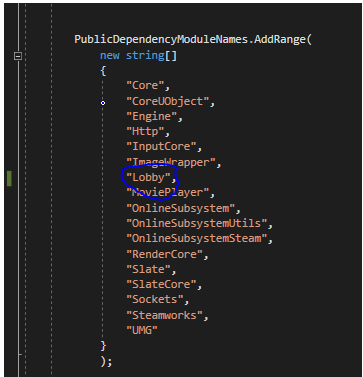
no antivirus on this computer (dont knock lol) but firewall - what would i be looking at adding?
port or program?
simple pollen
Well if you don't have antivirus then forget it since your firewall won't really do anything like this.
worthy wasp
hell i'll just disable it real quick - see if thats even the issue
simple pollen
I was considering if it was a folder permission or folder intercepting problem.
simple pollen
Hmm
worthy wasp
launch error is: https://i.imgur.com/3p4tGr9.png
But logs show :
LogWindows:   Missing import: UE4Editor-Lobby.dll
LogWindows:   Looked in......```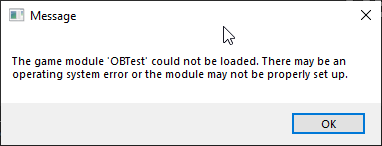
it looks in several different places - doesnt find it.
i've searched manually - UE4Editor-Lobby.dll doesnt exist anywhere in my project or engine source....
i dont have to implement it as a module somehow do i in the Project.cpp ?
simple pollen
How did you add it ?
worthy wasp
i already showed it above - but here goes again https://i.imgur.com/dQN584F.png
public or private - neither work to clear this issue - but both compile fine in VS
winged badger
that should search engine and plugins folders
so you didn't actually use the Lobby module, just added it as a dependency in the .build.cs
?
worthy wasp
oh its heavily used
simple pollen
I think he didn't add the actual dependency yet.
winged badger
and where is it physically on disk?
worthy wasp
several classes that inherit from Lobby module classes
simple pollen
Adding strings to your PublicDependencyModuleNames won't actually do much unless you've imported or included the Lobby Module.
worthy wasp
C:\UE4Source\UnrealEngine-4.23\Engine
winged badger
that is typically done in .uproject file
worthy wasp
oh well
simple pollen
Yes.
winged badger
VS doesn't give a crap about that one
worthy wasp
that maybe an issue there - lemme try that
simple pollen
VS generally doesn't really do much interaction with UE..
It's the other way around if there's any.
winged badger
its just that 99% of the people add a plugin in .uproject, then forget the build.cs dependency for compiling the project
simple pollen
Yes, haha, It's normally not the other way around xD
winged badger
(99% that end up with errors)
worthy wasp
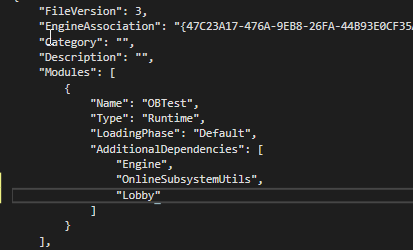
I just added it here: THis is correct right? https://i.imgur.com/H9SwotU.png
 winged badger
if its included as "Lobby" in PublicDependencies
should be "Name" : "Lobby" iirc
unless you have a module that depends on Lobby module
worthy wasp
oh i see- sorry
winged badger
in which case you should visit the .uproject of the module that needs the Lobby, instead of the main one
worthy wasp
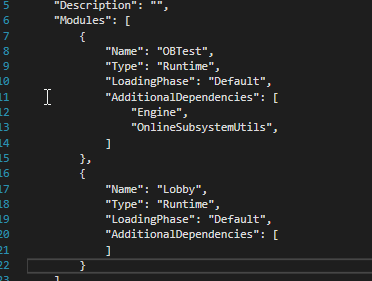
ok i've definitely done this wrong - is the Type or LoadingPhase different for this? It asked if i wanted to rebuild "Lobby" I selected yes and "Could not be compiled. Try rebuilding from source manually" I am/have lol
 polar lotus
How can I get the current session result from blueprint
worthy wasp
@winged badger @simple pollen - completely wrong outlook on my part.... i was looking at it too literally. The correction was to add Plugin to the .uproject file "OnlineFramework"
Thanks again for chiming in to help! ❤
@polar lotus - do youhave Advanced Sessions plugin?
polar lotus
yes
worthy wasp
theres a node (been a few years since i used this plugin) in there to pull ... but when you Search/Join session - you NEED TO STORE IT
whatever you join is what you are CURRENT IN
there is no GetCurrentSession in that pugin (that i remember)
FYI store it in your GameInstance - so its not re-instantiated @ map travels
polar lotus
I need to call this from the session creator too
its easy from the client because of the session found
worthy wasp
CreateSession - has a return session struct does it not?
polar lotus
nope
worthy wasp
are you C++ friendly?
worthy wasp
ok stand by one sec
polar lotus
I understand it but I cant write a script on my own
I wrote a node that encodes a base64 string but thats it
btw thanks
worthy wasp
if we cant find the answer....
i hate to shun you off liek that though - give me a min ute to do some digging
otherwise - apparently Shootergame does it when they CREATE SESSION
but i'm almost certian they do it in 100% code
polar lotus
Im using steam
polar lotus
yeah shootergame is all c++
worthy wasp
if your not code friendly - this wont help much....
worthy wasp
    if (OnlineSub)
    {
        IOnlineSessionPtr SessionInt = OnlineSub->GetSessionInterface();
        if (SessionInt.IsValid())
        {
            FNamedOnlineSession* Session = SessionInt.IsValid() ? SessionInt->GetNamedSession(GameSessionName) : NULL;
            if (Session && Session->SessionInfo.IsValid())
            {
                return Session->SessionInfo->GetSessionId().ToString();
            }
        }
    }
anywhere you want its a getter - but for this particular instance it returns an FString
polar lotus
thats fine
worthy wasp
you can take ou tthe FString - because its getting a full on struct FNameOnlineSession
polar lotus
where Should I put this
worthy wasp
one sec - lemme see if this struct is BlueprintType
otherwise we'll have to convert it
worthy wasp
one second please...
polar lotus
ok
worthy wasp
it looks as though both the FNamedOnlineSession (which is a FOnlineSession) are both not blueprint type - so youre going to have to make ur own BlueprintType struct - and move over hte information.... i know for a fact that you cant include FUniqueNetId as a blueprint type... so convert that to a string.... same with the other information....
There has to be an example of the conversions in AdvancedSessions plugin for the JoinSession (it returns a BlueprintType struct) - see what that struct is and how its populating its information - as it has to pull from one of these types of structs above
i dont have the plugin on my system - so i'm not of much help there.
but look specifically at the funciton (IN CODE) for JoinSession or SearchSession - they both output that struct
polar lotus
ok let me dig
polar lotus
dude. thanks
worthy wasp
my pleasure
polar lotus
thanks so much for your help
im only 14 and Im trying to make a multiplayer game
Im using unreal to learn c++
worthy wasp
you are lightyears beyond my 14 year old son lol
i wish he had your ambition
i've tried to include him into my projects... he shows not even the slightest bit of interest
 thin stratus
Not everyone has to become a gamedev
worthy wasp
hehehe i dont try to force it on him
polar lotus
I was kinda an engineer in general for most of my life
I do electronics projects in my spare time
worthy wasp
i was jus ttrying to find his strengths as a child
polar lotus
I build my own PC
 fervent yacht
My 9 year old daugher likes blueprints, I'd let them play with that.
worthy wasp
undestood - sorry
polar lotus
lets head to lounge
@worthy wasp which source file did you want me to look at
Can I integrate that code in to a BP Function Library?
and make it a node
that would be a life saver
polar lotus
I just need a reference of the current session
thin stratus
That function only gives you the SessionID as a string.
What do you need that ref for?
 cunning shoal
Hey guys, I've been struggling on an issue for a few days now and I was hoping you could help me out. I'm noticing On Rep functions for variables don't fire the first time in my code. I have an ammo box, player walks over it and it goes away (visibility/collision changed), and a timer brings it back. This works great if the client is in the relevancy (net cull) distance, but if it's outside of it and comes in, it does not run the OnRep function. If the client is there when it's set to invisible, and goes outside relevance zone, and comes back later it works
thin stratus
So you want your current host to join a new game, becoming a client and taking their own clients with them? @polar lotus
polar lotus
no
I want a host to make a game, tell their real life friends to play with them and tell them the key so they can join it
thin stratus
It should be enough to share your own steam ID then
No need to expose anything like this.
polar lotus
I want it to be displayed on the host's screen
thin stratus
Right, also what about just normal invites?
polar lotus
Invites?
thin stratus
Well, Steam has Friendlists that allow inviting your friends.
If you use steam it's pretty weird you want to join via the steamID
polar lotus
you have to get an AppID for that
thin stratus
You have to anyway
polar lotus
no you dont
thin stratus
You can't distribute on Steam otherwise
thin stratus
That's not really how that works though. You are sharing the AppID with thousands of devs then
Also even then you can perform invites
thin stratus
This is literally what everyone uses during development
ServerLists will often not show anything
And it's limited in features.
You can of course do whatever you want, but it's pretty weird to use Steam with only the dev ID
Either way, for the ID you want you don't need to query the Session iirc
It's enough to expose it via UniqueNetId of the PlayerState
polar lotus
Its just a little game Im doing in my free time to play with friends
thin stratus
Means you could make your own APlayerState C++ class.
thin stratus
That's pretty much needed when doing online stuff.
You can't get that ID String without
polar lotus
its working fine without it
thin stratus
You want that ID, so you gotta use some C++
thin stratus
You can expose it relatively easy by making a custom APlayerState class
And writing a simple FString GetUniqueIdAsString() const; function
That then returns the UniqueId as String
polar lotus
Wont I have to add a bunch of other stuff
You cant make a PlayerState with JUST that can you?
thin stratus
hm?
polar lotus
If I were to create a playerState class instead of using the default one, Wouldnt I have to write a bunch of other code
You can't have an empty PlayerState class can you?
thin stratus
Not really
Sure you can
It inherits the stuff from the APlayerState class
That's what all your BP classes do too
polar lotus
So you're saying I can create a new C++ playerstate that only gets the sessionId?
thin stratus
Yes
polar lotus
Why can't I make it in to a blueprint node
thin stratus
That will become a BP node eventually
thin stratus
Not the PlayerState, but the function you will make
It will just be a BP node that you can use from your PlayerState
polar lotus
Ok, So how would I do that?
I made a PlayerState class
in c++
Can I use just 1
For lobby and game
i just use
    if (OnlineSub)
    {
        IOnlineSessionPtr SessionInt = OnlineSub->GetSessionInterface();
        if (SessionInt.IsValid())
        {
            FNamedOnlineSession* Session = SessionInt.IsValid() ? SessionInt->GetNamedSession(GameSessionName) : NULL;
            if (Session && Session->SessionInfo.IsValid())
            {
                return Session->SessionInfo->GetSessionId().ToString();
            }
        }
}```That's not what you need
polar lotus
then what?
thin stratus
You just need to return UniqueNetIdRepl.ToString(); or similar, don't know the exact line out of my head
polar lotus
and that Returns the sessionID/SteamID of host?
thin stratus
If you are using Steam OnlineSubsystem, yes
Well also for the clients of course, but you'll only display it in the HostGame screen anyway I guess
thin stratus
No you don't. This is interfaced by UE4.
polar lotus
ok
thin stratus
You have to add the declaration to the header file and the implementation of the function to the cpp file (the one open in your screen)
/** @return Unique Net ID of the Player (e.g. SteamID) as FString. */
UFUNCTION(BlueprintPure, Category = "Online")
    FString GetUniqueNetID() const;

FString AVWFPlayerState::GetUniqueNetID() const
{
    if(UniqueId.GetUniqueNetId.IsValid())
        return UniqueId.GetUniqueNetId()->ToString();

    return FString("");
}
Something like this. Top thing is Declaration, bottom is implementation.
Haven't tested this though.
thin stratus
Might be that you need to include "Online.h" at least
thin stratus
:P I have it included so it does exist
thin stratus
Yeah, 1 sec.
polar lotus
ok
thin stratus
Alright, lemme have a look
@polar lotus In your build.cs, you should have something saying PublicDependencyModuleNames.AddRange
There should technically already be something in that list
Add "OnlineSubsystem" (with "") to it
That should allow you to include Online.h
I gotta head to bed now (1am here)
thin stratus
But the include works now?
Try putting it into both Public and PrivateDependency ¯_(ツ)_/¯
I have so much included into our project, it's hard to find where one was allowing this
This should def compile, just tried it
Ah fudge
Change this
if(UniqueId.GetUniqueNetId.IsValid())
to if(UniqueId.GetUniqueNetId().IsValid())
winged badger
ummm.... if its a compiler error... its not the .build.cs include
thin stratus
should have typed it and then copied it instead of doing it out of my head
winged badger
those explode when linker starts
thin stratus
Yeah wasn't sure if the IsValid fail was refering to the struct being unknown
winged badger
missing () ends up with "use & to create pointer to member" error
thin stratus
I simply forgot the () when I typed the code here :P As said, didn't test it
winged badger
can't remember the start of the text
thin stratus
Well it does compile fine in our playerState
And we only have the Online.h included into that
So it can't be much
XZ is already rather far, just help him with the last steps
I have to get into bed
winged badger
gn
 rich leaf
I need some help Unreal community!
Please check this out and offer me any assistance you can.
We are working on a Networked game hat involves two teams : one FPS and one RTS. When each player dies they spawn a pickup that the other team can collect.
When the FPS collectible spawns it does fine but when the RTS Collectible does, UE4 crashes. ☹️
rich leaf
Any suggestions what may be going wrong?
rich leaf
I’m the arms not the face. lol thx tho
winged badger
was just about to ask that
rich leaf
The materials (color) designating the pickup type
winged badger
and whats the entire callstack?
crash might very well have nothing to do with the SetSide
rich leaf
what are you thinking it may be then?
rich leaf
k
meager spade
also i am not sure if SetMaterial handles a passed in null, if Red is not valid
winged badger
its also dereferencing myMesh
it might be called on a nullptr, the SetSide()
or the crash might be unrelated to the pickup at all
rich leaf
We figured it out thx. Another issue tho: during player using sprint: Press key= multiply movement rate to 1.5x = the framrate drips significantly. Research found this subject from 2015 saying that the player position is calculated on the server side and client side and may not be in sync?
- maybe we could set the Server to calculate position and force it to be the same speed somehow if that’s the problem?
winged badger
you should set it both client and server side
and a difference in speed is likely to cause jitter, but not FPS drop
rich leaf
yeah its more of a jitter - any idea how to alieviate that?
winged badger
ZloToday at 2:25 AM
you should set it both client and server side
rich leaf
ok thx
its only 5:35 pm here - thx for being a late nighter - ill be working on Unreal until at least that time here in Los Angeles. 🙂
 gray scroll
i have a magazine that i set simulate on so it drops
but it seems to lag on clients
any idea why?
winged badger
because you spawn it on server and it appears on client only when the actor replicates?
don't spawn the actor for the magazine drop if you're going to destroy it right after, a particle effect can do the trick just fine
also, server authority for a prop is not required
which means there is no reason to set the Lifetime server side
which means, even if you are going to go the spawn the Actor way, you should make it not replicated and spawn it locally on each machine
gray scroll
but then other players wont see it drop right? @winged badger
winged badger
"and spawn it locally on each machine"
 velvet parcel
If a blueprint does not replicate is it still able to use RPCs and Rep notify?
 fossil spoke
No.
velvet parcel
hehe thanks\
 graceful cypress
anybody have a good guide to make a simple multiplayer that a dumbass like me could understand?
meager spade
simple multiplayer what?
velvet parcel
There are too many bullshit things you gotta setup with game mode, game state ect..
 molten pasture
hey guys, anyone here using UWorks on 4.23 yet?
and yes, no good "instant classic gamemodes" button :p
meager spade
@velvet parcel what is so bullshit about it?
molten pasture
multiplayer still has a steep learning curve, I wouldn't recommend touching it until you've made a single player game or two first
meager spade
how can they make a "gamemode" for EVERY type of game out there?
meager spade
yeah rhetorical
molten pasture
yeah, speaking of which, any good recent examples for game modes? ShooterGame is only clean reference I know of
meager spade
what kinda game you making?
molten pasture
counter-strikeish defusal style game mode
meager spade
i mean UT4 has some examples
but yeah they are kinda intertwined into the game
as GameMode's are normally specific to your game
velvet parcel
@meager spade Mainly because the largest hurdle to overcome is the fact that not all things like gamestate, playerstate, player controller, game mode. game instance, HUD will exist at the very start when you login.
So you have to make a system that checks for all of these things before moving forward which is often unreliable.
It should be a core function of the editor to have something in place as a part of begin play for all blueprints.
Making sure all of that crap exists is kind of an unsaid hardship of getting into multiplayer dev. You end up getting bugs that simply make things seem like they are broken
Not only that but those things are not always created in the same order either...
This is pretty bullshit
😄
Why the hell would anyone ever want to run game logic before the playerstate exists for example. The engine should automatically force everything to pause until all of the core things exist by default
 austere snow
Is a PlayerController server, client, or shared?
velvet parcel
I run RPCs for server and client on the player controller
austere snow
so both?
velvet parcel
pretty sure on that
austere snow
So I should be using "has authority"
fossil spoke
PlayerController exists on the Server and the Client that owns the PlayerController.
Other Clients DO NOT have eachothers PlayerControllers, only their own.
Clients can make use of the PlayerState to share information about eachother.
velvet parcel
I feel more inclined to share a lot of data on the player pawn for stuff like health ect. That allows me to share data among clients too. Right?
Or is that a bad way to do it?
 raw quarry
I'm getting a strange and seemingly random lag problem with my game. Every once in a while, a player will start appearing to lag from the perspective of another player. They'll start floating around and be nowhere near where they actually are. So player A will appear to be lagging to player B. The weird part is that neither player A or player B appear to be lagging to anybody else. On top of that, nobody else lags from player B's perspective. It'll just randomly sometimes happen for one player. For context, this is unreal 4.18
I can't consistently reproduce it either, it just sporadically will happen
any ideas would be much appreciated
raw quarry
no change in possession
and the distances can be pretty far
sometimes theyll just float in one position
off the ground even
winged badger
can you even semi-reliably reproduce it?
raw quarry
nope lol
winged badger
are the pawns always relevant?
raw quarry
yes
well
the setting isnt turned on
but it does that even if im standing next to their "ghost"
winged badger
relevancy breaking is the most likely scenario, although
raw quarry
ill turn that just in case then
winged badger
they shouldn't even be visible then
raw quarry
what do you mean?
winged badger
non relevant Actors that aren't loaded from the package don't exist on clients
is it a specific player, is one of the two always a listen server host?
raw quarry
nope a random plaer
its on a dedicated server
and itll happen randoml even when i could see them fine previously
winged badger
you don't have an inappropriate GetPlayerController[0] that can get the wires crossed?
winged badger
that one is dangerous with dedis
its fine when called client side, but if called server side, havoc
raw quarry
i use it a decent amount
winged badger
because as far as dedicated server cares
raw quarry
oh yeah i dont use [0] on the dedi ofc
winged badger
GetPlayerController[0] is the first player that logged in
did you change the default relevancy settings?
winged badger
does it ever happen when the other player is within ~15k UU?
raw quarry
yes
we just had a play test with about 10 people and I saw it happen like twice in an hour
for a few minutes
winged badger
there is an engine fail that can cause you seeing yourself walking in random direction and not responding to controls
raw quarry
the player doesnt appear to lag to himself
winged badger
but iirc it requires changes in possession to happen
in any case, the root of the problem is PC not setting Owner on the Pawn
but that wouldn't break other players, as that pointer would be null on other clients, as they don't have other PCs
raw quarry
right
and the only possession change that happens is the initial possession when a player spawns
and its assigned a new pawn
winged badger
CMC?
raw quarry
i mean it's being used, yes
i'm also using gameplay abilities, but i think this issue started happening before i implemented it
winged badger
what are the network conditions?
does it happen only in real test over the internet?
raw quarry
ping is about 20ms being hosted on a debian server on digital ocean
had the same issue on AWS tho
and yes it's only happened on a test over the internet
but I haven't really tested it on a localhost server
and i'm sure the simulated dedicated server wouldn't really show it, and i haven't tested it much with two players in there anyway
winged badger
does it autofix itself after a few seconds, and can other players still see the "lagged out" player fine?
raw quarry
other players see him just fine
and it fixes itself after like a minute or so
or 30 seconds idk
winged badger
and the player that sees the other player as lagged out is also visible just fine to everyone else and can see everyone else just fine?
raw quarry
yes
winged badger
any teleporting involved?
raw quarry
which is what's especialyl strange
yes
like sometimes the "lagged out" player will float in a spot and then teleport somewhere else
winged badger
i mean as part of normal gameplay mechanics
raw quarry
oh
winged badger
prior to it breaking
raw quarry
there aren't really teleports but there are fast movements
but it seems to also happen on characters that dont have fast movements
winged badger
how many players?
raw quarry
~10
winged badger
that is basically how all players look like when a listen server host disconnects, before it tosses them to main menu
just running in whatever straight line the last received update had them moving in
raw quarry
well they dont just run in a straight line
winged badger
but packet loss in server auth environment does not explain this
winged badger
yeah, but they update 10 times a second or so
raw quarry
so it would make sense that the "lagged out" character is getting marked is not relevent
but not sure why
winged badger
and all other packets are being received just fine
raw quarry
cause I can literally be standing right next to the "lagged out" character on my screen and that character shows as being somewhere else for everybody else
winged badger
so its not a temporary fail of network connection
raw quarry
yeah for sure
its like all packets are being dropped except one now and then for a specific character for like a minute
winged badger
and relevancy uses server positions to calculate distance based relevancy
raw quarry
right
only thing I can think of is turning on always relevent and see if it happens again
its hard to test though
winged badger
its not possible that the player was broken while it was still outside 15k UU, then somehow made its way closer?
winged badger
reading the log lognet veryverbose logs could in theory reveal the cause
but those are so large its downright impossible
raw quarry
hmm the map is about 15k across at the extremes
winged badger
unless you can reliable repro in contained environment
raw quarry
but its still unlikely that they were that far apart
winged badger
the pawns NetCullDistanceSquared is 225M?
raw quarry
yup
winged badger
do you see it responding to any of the controls when its broken?
raw quarry
what do you mean?
winged badger
is the player you see broken basically an automaton
raw quarry
the "lagged out" player doesn't appear to be lagged out to himself or anybody else
winged badger
or does it just move wrong and seem to respond to input otherwise
as you see it, not as he sees it
raw quarry
it just very sporadic movement
and if i attack it, it does nothing
but this is expected because the server sees the player in a different location
winged badger
if it keeps happening with always relevant
you can wire a control that will find all player pawns locally
then print the capsule and skeletal mesh locations for those that have a large difference between their locations
that would at least tell if you have the broken player in the wrong position locally, or just its mesh
 hoary lark
@raw quarry have you looked into net bandwidth saturation yet
raw quarry
hmm I haven't
is there a way to do that in unreal?
or should i just use a packet sniffer
hoary lark
Search this channel for "saturated" you should find a couple messages from me recently. Especially if your game is running at a high frame rate it's worth checking into
raw quarry
will do thanks
hoary lark
TLDR is that unreal only gives you like 56K modem bandwidth by default and the CMC sends out a packet per frame, so at high fps it exceeds default allowances and it stops sending packets
hoary lark
I'm theorizing now and might be wrong but what you're describing might happen if players A and B are running at 200 fps and and players C, D etc are running slower. Because players A and B have both a high upload and high download to hit the ceiling before other clients
raw quarry
hmm but it would probably happen more consistently then
winged badger
it still wouldn't selectively break a single player from a perspective of just one player
everyone else sees them fine
so server did get the right data from those clients
hoary lark
If I'm player B and my upload rate is huge because I'm running at 1000 FPS, I might ignore packets from the server to avoid blowing my bandwidth cap (?)
winged badger
upload and download don't run against the same cap
raw quarry
and why would it only ignore packets from one character
unless that characters packets are just always sent last i guess
winged badger
server won't send more then the cap allowed per client
and if it doesn't send an update for one of the characters
it will have higher priority on next evaluation
hoary lark
Yeah maybe it's a dead end 
twin juniper
Hi guys I am new to multiplayer. I had some issues with movement but eventually I got it working via replicating a variable and calling an event on tick. This was of course laggy as I sent movement input information to the server which then sent it back to the client, but it worked, I know the correct way is to use character movement component but I wanted to learn both ways. I am simulating 2 player split screen.
Problem is I am trying to do the same with rotation. 1) what is the correct procedure to rotate in multiplayer, analagous to using 'add movement input' to go back and forward? THis is not an issue though as I can google this. I am just puzzled by 2) as I have this BP
I am trying to understand how replication works. Rotation is fine on server. On client , if I try and rotate locally it works perfectly but is invisible on server. If I use 'multicast' in my 'right' event it also works on client, though is laggy and is invisible on server. If I use 'replicate to server' then it doesn't work at all. Why? I want to be able to rotate my client and it be visible from server this way just to help me understand, I am sure this will be laggy and not the correct way to do things so I will learn this after, but I am puzzled why this is not working properly
I tried setting the 'replicates' flag on all components of my 'Wasp' pawn including the mesh
meager spade
yuck
dont replicate everything
dont call a reliable RPC on a function that updates every tick
twin juniper
I'm aware this is the wrong way to do things, I just want to know why it doesn't work at all
 worthy perch
From what I read, I'm pretty sure you're not actually sending anything to the server from the client. (Multicasts called from a client only gets called locally).
And just because you mark components as replicated, does not mean all properties on those components will replicate to the client.
And replication only happens down from the server to the client/s.
 shy nymph
hey everyone, does anyone have good ressources on how to make a good hit validation system?
i want a projectile to spawn on the client and the server for responsive ness and want the client to have hit authority up to a defined ping, but still want the server to validate the hit
if client and server spawn the projectile and register the hit, how would i go about making the server check if he hit as well and if the hit is the same as the clients
meager spade
smoke and mirrors @shy nymph
have the client spawn a "dummy" projectile locally
and server spawn the real projectile (can be hidden with a revelancy check so owning client doesnt see the server projectile) and just have the server projectile do the actual damage
cunning shoal
Hey guys, I've been struggling on an issue for a few days now and I was hoping you could help me out. I'm noticing On Rep functions for variables don't fire the first time in my code, has anyone experienced this?
worthy perch
Should only fire if the old and new values have changed.
cunning shoal
These are my blueprints for testing it right now on an Ammo box
player walks over it and it goes away (visibility/collision changed), and a timer brings it back. This works great if the client is in the relevancy (net cull) distance, but if it's outside of it and comes in, it does not run the OnRep function. If the client is there when it's set to invisible, and goes outside relevance zone, and comes back later it works (re-appears once they hit the relevancy zone)
@worthy perch yep, and my bool is set to enable by default, but then when a player walks over it, is set to false - so the value does change but it won't update the client if outside of the relevancy zone and comes back in later
cunning shoal
Weird part is I used the example for the chest in the content examples from Epic as reference too (tried without using replicate to server as well)
twin juniper
how should you network cooldown for a ability
you cant make the variables accessible from the client cause even a simple program like cheat engine is able to speedhack
thin stratus
Put the cooldown on the server and replicate it?
 mystic ember
Hello i´m new here and i want to learn programming with unreal engine 4. Can someone help me ?
simple pollen
@mystic ember So much content out there, I'd say first of all you should find a common language such as Java, C#, C++, preferably a language that is object oriented, read a book and study some tutorials, maybe even spend your first week with this. Then afterwards when you have some of the basics, you can go on to YouTube video tutorials, look at UE4 Guides and study each and everyone of the basic UE4 templates they offer you as well as the starter tutorials. Learn how to study yourself, be curious and keep searching, eventually start referencing the UE4 Documentation. Once you've done this for a few months you'll be able to really go in-depth with creating games. I know this is so generic, but really, it's really one of the better ways.
mystic ember
@simple pollen Thank you for the advisment, but i learned HTML and i made a internship in at software ag. I dont want to specify that, i just want to say that i didnt found a tutorial that is good enough. I wanted to learn from a advanced user/programmer of UE4.
simple pollen
I can only tell you, even if you found a mentor, the mentor would not be able to tell you what you should create, get started and eventually just throw any and all questions you have somewhere in the related sections here.
mystic ember
@simple pollen Tutorials are specific in one directions, but i want to learn slowley in every direction
simple pollen
That's a way too broad and not a very reasonable action to take.
Tutorials only teach you their viewpoint.
To learn slowly in every direction can be interpreted as simply learning about everything in phases, therefore reading documentation, reading guides, watching tutorials, experimenting yourself and implementing what you have seen, read and heard, is what can cause you to learn.
mystic ember
@simple pollen Thank you for youre adverment, my problem is i dont know the basics from UE4. I couldnt find a tutorial or a website, that is explaining good the basics.
simple pollen
You can't learn everything in one go, UE4 has no specific limit to what you can do or what you should do.
Read the documentation.
They also have excellent tutorials to get you started when you open UE4.
mystic ember
@simple pollen I searched someone who could teach me the basics and a little bit more so then i could go in the directions. I know that it is impossible to learn everything, but the tutorials ect cant teach you that what you want its like doing what the computer says, you cant ask him questions
simple pollen
Well, my best advice is still just to jump into a small project that you believe would be easy to create, start from there, then any questions that come up google them or ask in here. Obviously google first because whilst it can be hard to find actual content, UE4 is very saturated knowledgewise.
And the same thing you seek is apparent for any knowledge in the world.
thin stratus
- This channel is dedicated to #multiplayer and not to general UE4 help.
- If you need a tutor, check #looking-for-work or make a post in #looking-for-talent .
- There is tons of documentation on UE4 docs, Wiki and YouTube (and a lot of other blogs and posts).
Please check #more-resources and #old-rules once more to be sure to post into the right channels.
mystic ember
@thin stratus I´m sorry that i have ask for help in this chanel, but i wanted to search for peoples that are good at programming multiplayergames
thin stratus
Right, but yet you asked for general help and guidance, nothing directly related to multiplayer. :P
Move it to #ue4-general for this.
mystic ember
Sorry that i didnt said it right. It will not happen again
 gritty pelican
how to optimize big world in multiplayer, world composition not working with dedicated server
winged badger
how big is big?
gritty pelican
how to optimize AI in Open World, I made the spawn AI system, while the player enters a certain zone, this is so far my best option
@winged badger 6x6 km
island
in addition to the main island there are 5 more islands 3 by 3 km
gritty pelican
50 players, Static bots, killer bots, save zone, inventory items, all about 10k
but bots appear only when the player enters the zone, inventory items do not replicate the position - they are static
Many bushes from which you can pick berries
Now I have 60 FPS, at high. Given that everything is almost motionless.
The biggest problem is the bots.
winged badger
the biggest problem is CMC i'd wager
gritty pelican
ты русский Зло?
winged badger
nope, and even if i did speak russian i wouldn't do it here
there are middlewares like SpatialOS
that let you distribute the load between multiple dedicated servers
and still use unreal's networking
they are not free though
gritty pelican
Maybe it's better to take a very powerful server?
simple pollen
One very powerful server ?
winged badger
not sure it works that way
evaluating actors for replication is done on a single thread
simple pollen
I don't think one server would be able to handle resources of that amount.
Indeed.
winged badger
if you have to evaluate 10k or so actors - expect it to take over 20ms
replication graphs and/or dormancy can cut that down though
gritty pelican
But everything is fine, because replication is for certain clients with a distance of 150 m
winged badger
but 100 CharacterMovementComponents running around
gritty pelican
Beyond this distance, replication stops for the client
winged badger
that is about as much as a server can take
simple pollen
For the client but your server still handles all the actors.
winged badger
and it has to evaluate all of them that aren't in inactive repgraph buckets or dormant
gritty pelican
- to all, replication occurs only when something changes in the object
winged badger
for each of your 50 clients separately
gritty pelican
I tested my world 6 by 6 km. And received a stable ping of 20ms. with about 30 players
gritty pelican
The problem is that I would like to make some other system for AI. But I have no idea how to do this.
while they were tested there were about 100
possibly less, since they appeared only if the player entered the bot area
 silent birch
I can not do that when a player's life is at zero it destroys it just works at the server not at the customer's
 red musk
Hello everyone, if I am using Level Streaming with the Streaming Method set to Blueprint, multiple clients run through PIE will no longer correctly auto connect / spawn their pawn to my dedicated server - only client 1 works correctly
Anyone know why that would be?
The level set to Blueprint load has no logic in its level blueprint, and is just some random environment objects
winged badger
and it works just fine with AlwaysLoaded?
winged badger
will no longer correctly auto connect / spawn their pawn to my dedicated server
you'll need to elaborate a little
red musk
I figured it out, was a stupid error on my part, all of the various levels I tried switching to blueprint had spawn points on them, so I was effectively turning off spawn points from existing immediately.
My default pawn was set to not spawn if it fails to adjust location, since they were all spawning on top with collision, subsequent pawns failed to be created
Changing the spawn collision handling method on my base pawn to Try To Adjust Location, But Always Spawn has fixed my issue
Sorry for the waste of time! 🙃
winged badger
you should really have PlayerStarts on PersistentLevel
 woven grove
Hey guys
Anybody have solid recommendations, or is there a general consensus on which database software is best/easiest to use for indies developing a game with login server functionality?
Persistence including coordinates/mapdata and statistics etc.
Is MySQL through HTTPS -> UE4 the best way to go here?
 tropic snow
Anyone know how to get this replicate well?
looks smooth on server, client is a bit clitchy
 mighty rover
quick question: from a custom PlayerState, why do these two nodes return something different? Is it because from GetPlayercontroller -> PlayerState, since it's replicated and hasn't been replicated down yet, or...?
fossil spoke
PlayerArray is an array of all PlayerStates, it is not an ordered array.
PlayerIndex0's PlayerState can be in an arbitrary location of the PlayerArray.
Also yes you will have to contend with Replication as well
mighty rover
@fossil spoke thanks
 supple musk
Hello guys quick question,
If I use the cmd "open IPADRESS:PORT" and the travel fails, my game default map is loaded. How can I choose to stay on my actual map instead of going to game default map ?
velvet parcel
If I run a server RPC on the server what does it do exactly? Is it basically like running a non replicated RPC?
 lapis breach
i think it will drop the call
as far as i can see server will run multicast and run on owning client only
same with client, if they are told to call anything apart from run on server it will drop the call
@velvet parcel
supple musk
Server RPC on Server just runs like a normal function call would
Designating function replication across the network
look at the two tables on this page
velvet parcel
@supple musk Thanks that is kind of what I was thinking it would do.
But I wasnt sure
 compact osprey
Hi , my client doesn't have good tranform... is it because i don't set transform replicates in tick from the server ?
 light obsidian
do you have replicate movement ticked? @compact osprey
 steep jay
Can somebody explain RPC replication to me? I watched all of the Blueprint Multiplayer videos and a lot of tutorials on youtube, but I still don't understand it.
light obsidian
you can tick that in the actor class defaults
compact osprey
My golf ball BP is a pawn
light obsidian
alright
is there any other logic that might leave them out of sync?
like freezing positions but not doing that server side on accident
light obsidian
do you run that on the server
compact osprey
but Client move a little bit and get teleported at his spawn transform
 grand kestrel
@steep jay Check out the networking compendium that cedric exi wrote, he has it pinned to this channel
compact osprey
set physics linear velocity ?
light obsidian
so you move the client but it warps back to where it was?
compact osprey
yes
steep jay
Wow, 100 pages, thanks for the resource!
light obsidian
sounds like you're not changing the velocity through the server
grand kestrel
@steep jay Almost everyone who learns networking starts there, it's the best resource
light obsidian
so the client corrects its position to match
grand kestrel
@compact osprey @light obsidian What happens is this, if you have 50ms latency:
- Client moves, tells server to move
- 50ms later server moves
- Server replicates result 50ms later, which is 50ms in the past, and snaps the client to where the server was
...Repeat
That's why client-side prediction exists, so they make the same moves, locally, and the client is only corrected if there's ever a mismatch, which should never occur without interaction between two different remotely controlled entities
compact osprey
@grand kestrel thank you
grand kestrel
Currently UE4 only has built-in client-side prediction for characters via CharacterMovementComponent and ACharacter
compact osprey
for the first problem I need to change latency ?
grand kestrel
Nope
You will either need to write client-side prediction or find a way to use CMC to do what you're attempting
Due to UE4 physics being non-deterministic you will be hard pressed to write prediction for physics
Because errors to the 7th digit of precision in a transform can result in wildly different deflection vectors during collisions, which is why we still don't have properly predicted vehicles
Both options are quite far out of the reach of a beginner developer, unfortunately
Epic has started making a modular/expandable prediction plugin, but its a fair way off, and wont be too beginner friendly itself I think - however they will likely use it themselves to make all their templated player actors predicted (such as rolling ball)
The alternative is to have client-authoritative movement
So long as its not a competitive game, you can get away with it
So the client simply tells the server "I'm here" and the server tells everyone else the same
grand kestrel
@compact osprey For starters, process all movement locally only, then afterward, send the resulting transform to the server in an unreliable RPC, and have it 'set world transform' from the RPC, then simply check 'replicates movement' and hopefully that will get you started
Oh, actually just send location and rotation unless you need scale
It might also be worth rounding the location vector to 1 digit
Just so you're sending less data
You can compress the rotation into bytes too if you like
Some would argue this is premature optimization though 🤷
grand kestrel
That makes it easy then 🙂
 fiery geyser
Hei, i need a bit of your thoughts on a system that i'am pioneering for our game, now a bit of description about it, is a fast paced third person shooter in an arena style game. The new mechanic we are trying to introduce is: there are some actors in the game where the players can interact with them, they can translate/rotate mostly on one axis back and forth (this happens on the server on some sort of timer and is replicated to the clients), we have a pretty solid custom replication component that handles interpolation/extrapolation on them using all kinds of compression tricks to reduce the network load. However, too many of them and is a bit too heavy for our component to handle leading to jaggering movement/teleportation all that, but our lead designer needs them. Any thoughts on how could we optimize that? (I know the answer is kind a broad, but anything might lead us to a better way of dealing things) I am just looking for new perspectives.
grand kestrel
That is way too vague, you should be using the net/etc profiling tools and finding out whats really going on
winged badger
what are you replicating for that component, and how many of them are on the level @fiery geyser ?
 astral fossil
Hey, I have a quick question:
Is there anything that makes RepNotify NOT be replicated in all instances?
I'm having this situation in which in one map, all instances receive notification and in another map, only server and local actors receive it
replication condition is set to None
winged badger
BP?
astral fossil
uhum,
winged badger
it will trigger whenever the RepNotify variable is set
even when set locally
as for not receiving RepNotifies
astral fossil
it should right? I never seen that issue before
winged badger
being out of NetRelevancy (range) you won't get a replicated variable, and so no RepNotify
astral fossil
hmmmm gonna investigate that, thanks!
winged badger
i asked if it was BP because c++ behaves differently
there only clients get OnReps called
astral fossil
hmm
winged badger
and they don't get called except as a replication callback
astral fossil
good to know also
damn, even with Always Relevant set it still happens. Don't know how to replicate the problem in isolated environment
astral fossil
ok
I'm having this issue in one actor only. It's spawned by the pawn (on server, to a replicated variable).
I want to set this actor mesh on runtime, and for that I need to get info saved on the local Game instance (where the player selected options are stored)
So, on this actor I get its owner and do this:
so, the actor's Server instance will receive Pawn Assets and wil apply to the variable, which should be replicated on all instances
and it does, on another map that I tried
winged badger
where does that run from? BeginPlay?
astral fossil
yes
astral fossil
sets
im testing with 2 clients and dedicated server:
Server actor: notifies
Client1 actor (ORIGINAL): notifies
Client1 actor (replic) : NOPE
Client2 actor (ORIGINAL) : notifies
Client2 actor (replic): NOPE
winged badger
do those prints happen before BeginPlay?
winged badger
on clients
astral fossil
I also experimented with some huge delays to be sure everything was already spawned
the weird thing is that (besides this working in another map) I'm doing this same process in the pawn, to set its meshes, and in it all notifies are triggered
winged badger
when does it print NOPE?
astral fossil
it doesn't print
hahah sorry should have expressed diferently
only those with 'notifies' trigger the OnRep_ function
OH
sorry, tried with a bigger delay and it worked... its still weird
winged badger
how many replicated Actors?
astral fossil
its 2 clients, each one having its 'own' actor and a replication of this actor in the other client
winged badger
total on map?
i suspect that if you crank up its NetPriority to 4, and remove the Delays it will work just fine
astral fossil
oh you mean all actors?
hmm
gonna try
net priority was set to 3., now on 4 it worked once without delay
I use to thought that repNotifies would make sure to notify even yet to be spawned actors
I already had problems with multicast for this reason (trying to execute something before spawn) and the proposed solution was to use repnotify
winged badger
NetPriority can fail if a packet with that actor is lost
doesn't happen all that often
but its not a foolproof solve
astral fossil
its weird cause i'm now messing with a lot of actors now, and I'm testing all on my machine
winged badger
i figured, NetPriority change only makes a difference when you start hitting bandwidth caps during initial load
astral fossil
hmm, thank you very much for your help man =)!
one thing, is that the best way to know if an actor is "locally controlled" (i know this is specific for pawns)
winged badger
does c++ function work for you?
astral fossil
I'm working with BP in this case, but sure, better to know
winged badger
bool USolsticeObjectLibrary::IsLocallyControlled(AActor* ActorToQuery)
{
    if (!ensure(ActorToQuery))
    {
        return false;
    }

    AActor* TopOwner = NULL;

    for (TopOwner = ActorToQuery; TopOwner->GetOwner(); TopOwner = TopOwner->GetOwner()) { }

    APlayerController* controller = Cast<APlayerController>(TopOwner);
    return controller && controller->IsLocalPlayerController();
}
Awesome ! Thanks again 🙂
tropic snow
Everything works but the client mesh yaw does not rotate. Anyone know why?
 somber glade
How do actor visuals work in a multiplayer environment when you do something like say change the color of something, and a player joins after that color has been changed? Let's say we have a cube that is black when the game starts. At some point a player pushes a button that turns it red. Normally that red color would be set on each client with a rep notify. If we only change it with a rep notify, would a player joining after that happens see it as red or the original black? Should we also run separate code for the server to change the color on its end? I'm just trying to make sure I have a grip on how rep notify works. As far as I understand it right now, when the server sets something with a rep notify, and you run code in that rep notify, that code doesn't run on the server right?
 wraith wasp
as far as i understand it (also still learning), repnotify is called only on already connect clients. if you need to share state like a changed color it should be a replicated variable
@somber glade
somber glade
Thanks!
wraith wasp
also keep in mind that server is a bit ambiguous
there is a dedicated server and a listen server
listen server is both, the server and a client
so client code will also run on that kind of server
wraith wasp
this might be of interest to your question
https://docs.unrealengine.com/en-US/Resources/ContentExamples/Networking/index.html#relevancy
@somber glade
Overview of the samples provided in the Network Features Content Example map.
somber glade
@wraith wasp Thank you, I'll check that out.
gray scroll
I am trying to rep notify team name so everyone including late joiners can see the players updated skins depending on team but for some reason... the later joiners cant see the right player skin... any idea why?
wraith wasp
SetPlayerTeam is run on server and at the end it calls a server rpc. I'm not sure this will work. server RPCs should only be called on clients. i think a fix might be to not replicate this event at all since you already receive the change on clients via repnotify
@gray scroll
with "this event" i meant "SetTeam"
gray scroll
@wraith wasp so don't replicate SetTeam?
wraith wasp
that's my guess
it should set the replicated var on the server and also update and trigger replication on clients
gray scroll
I will try it... but don't think it would be the reason
 main spindle
Anyone know of a good workaround to the fact that you can't replicate maps?
As in map variables
In blueprints
velvet parcel
is there a way to increase how much data can be transferred over the network when using a multicast or rep notify?
 bitter oriole
There is
Though it's a bit more subtle than that
IIRC it's a bandwidth limit, not a size limit
 fleet raven
there are several limits
it will refuse to serialize arrays over a few KB, there is a max size on multi-part bunches, and there are multiple bandwidth limits
bitter oriole
I thought usually the bandwidth one kicks in quite quickly
bitter oriole
Pretty sure it's kbps
fleet raven
ideally you could just remove the limit
but the protocol behaves very dumb then
it'll happily send barrages of packets at 30% loss if you queue too much

 void nest
Hello guys. I'm trying to optimise the movement replication of a ship in my game. Currently all movement is set serverside, the server then sends the transform using an multicast. This is done with a 0.1 second delay and a doonce. This works well, but sometimes on slower internet connection if one multicast is skipped it is very noticeable. Making the delay smaller will be too much I think and flood the bandwith. So I was thinking of instead of using a multicast, setting the transform to replicated and just let the server update it on tick. Question is, how optimised is this? I've read that UE then decides itself how often the transform variables is updated. But I'd like to hear some specifics on how optimised exactly it is compared to a multicast?
the ship is a boat on bobbing water, so the transform will in fact be different every single tick
making me think that the server will push new transform data every single tick. And everything inside of my head tells me this will be bad 😛
but somehow people say i should be optimised
hence my confusion
but.... what if I set the variable on server and still use the doonce and 0.1 second delay?
would that be more reliable than the multicast which is not set to reliable
 earnest igloo
@void nest Check the pinned items for a video called "Overwatch Gameplay Architecture and Netcode" It gives a good overview of some of the sorts of techniques that will probably help you
bitter oriole
This should absolutely be done with a replicated variable
And yes, replication optimizes itself
void nest
is there any documentation about this?
void nest
even if the variables is different every tick?
earnest igloo
^^
bitter oriole
You need to update movement every tick on remote clients, but you won't get replication update every tick
So you'll need interpolation
void nest
yes i already have a very complicated smoothing system 😛
it's just that when the replication gets skipped (using the multicast) the ship smoothly interpolates to the next updated location, but even when smoothed it still looks like a strange inconsistency in the speed
i want the ships to move extremely smooth and as close to the server original transform as possible
all the while keeping it somewhat optimised
bitter oriole
Inconsistencies in speed might be an interpolation issue
You're not using linear right ?
void nest
the ships are boats that players walk on in first person, so any small hickup is very noticeable
earnest igloo
Is the movement deterministic? Could the client make a reasonable prediction on where the ship should end up by running the same movement code as the server?
(by which I mean the same bobbing calculations)
void nest
no not really, beause the ships are buoyancy calculated, all of the buoyancy calculations happen serverside, as the clients can not calculate their own buoyancy locally and then end up with the ship being on different rotation on different clients
all clients must get 100% accurate transform that is equal on each client
bitter oriole
This isn't going to happen really
void nest
the current system works perfectly, except for the hickups on slow internets
but I'll try with the replicated variable and see what that gives
bitter oriole
You'll always have to allow some leeway between players
earnest igloo
I don't mean that you would detach the client calculation from the server - the server position would still be authoritative - but buoyancy doesn't seem like a completely unrealistic thing for the client to have a go at calculating for a tick or two until the next update comes in
void nest
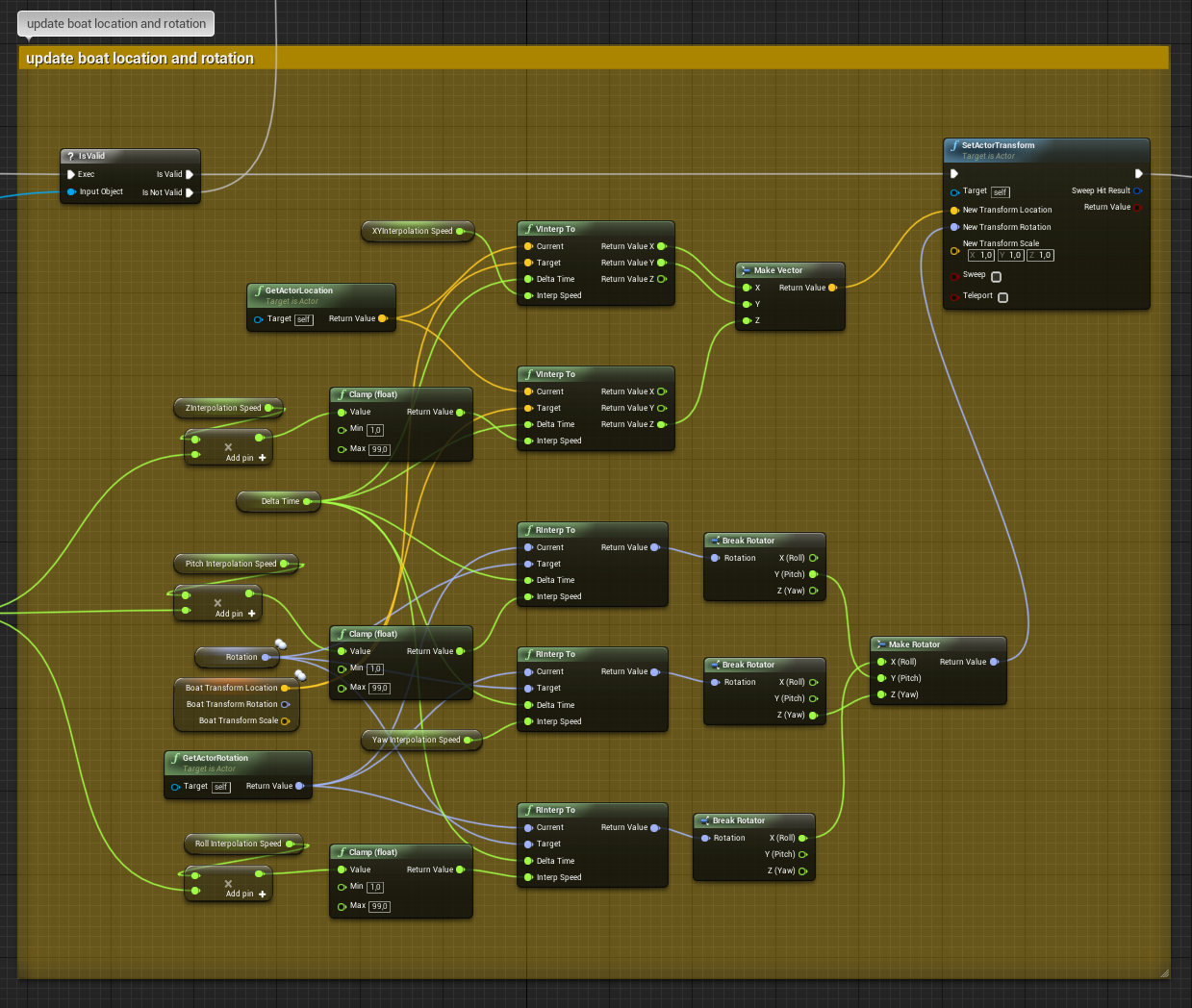
this is the interpolation I'm using currently
what do you mean with linear?
do you mean interp to constant?
if yes, no I do not use that
i use the rinterp nodes which by my knowledge have a smooth in and out, no?
and vinterp*
don't mind the interpolation speeds, those are for different wave settings
@earnest igloo Yeah that is definitely a possibility
a clientside calculation that gets corrected with the server's replication anytime it can, if the server fails to replicate, the client's own calculation get's used as a placeholder / backup
could work
earnest igloo
Yeah I think that could probably be good. Wave motion sounds like it should have a good degree of determinism to allow it
void nest
but that would only fix the buoyancy though, the problem is less the buoyancy and more the actual y/x location
earnest igloo
Ah ok
void nest
which is harder for the client to predict, as that would mean clients would have control over the direction and speed
earnest igloo
Does the boat look "skatey" when you skip an update?
void nest
it looks like the ship is slowing down / standing still for a fraction and then it catches up to the new update
earnest igloo
Ah you run out of interp buffer? You just keep the one sample around right?
void nest
yeah basically
the interpolation on the YX happens quite fast, as I can't slow that down too much or there is an offset between the server's location and the client's location, which causes collision issues as collisions are also calculated serverside
basically the ship than stops from a collision while on the client it still apears a distance away from said collision
earnest igloo
You could do the same prediction thing... on the client presume that the server will probably agree with you on the effect of your control inputs and movement calcs, and put your ship in the "right" place on the client without consulting the server. You would only notice a correction if the server gets back to you and disagrees, which is unlikely if the ship is mostly on its own
void nest
yeah true, also what I was thinking
earnest igloo
Again the server remains authoritative but the client can guess in the mean time
void nest
would be a bit of work to implement, but if the issue still persist after the changes I just made, I will look into something like that
thanks a lot for the help!
earnest igloo
Yeah it would be - depends how important it is to you have have this seem responsive
void nest
it's actually really important, as the ships are the main mechanic in the game. Hence why i want the experience on them as smooth as possible
earnest igloo
Also, if you have time I'd highly recommend having a watch of this https://www.youtube.com/watch?v=W3aieHjyNvw It's not UE4 but there are some great explanations of techniques in there

In this 2017 GDC session, Blizzard's Timothy Ford explains how Overwatch uses the Entity Component System (ECS) architecture to create a rich variety of laye...
void nest
I've seen that video pass by a while ago, watched a small part. Will definitely watch it in full soon!
earnest igloo
There's a big chunk of stuff on ECS which is probably less relevant. Around 22 minutes in there's a good section on what they did with netcode though
earnest igloo
@void nest Hey just thinking about your blueprint screenshot. It looks like you don't do any extrapolation, correct? So if Current is the same as Target then the velocity of the ship will drop to zero. I figure ships turn kinda slowly, so you might find that a simple linear extrapolation does a world of good. Do you replicate velocity? If you do, you'd just calculate a predicted target (so replicated target + velocity * time) if you reached your replicated Target before the next update from the server came in
void nest
Yeah that happens when the server fails to replicate the rotation or the replication is delayed by ping. The client will already have reached the previously replicated rotation making it so that the client has to wait until the next replication comes through upon which he sudenly interpolates to the next rotation, which suddenly gets sped up as the target rotation is much bigger than usual.
Currently there is no clientside prediction what so ever. But with a bit of work I can add it.
void nest
Thanks again for you input 😉
earnest igloo
You're very welcome 🙂
 amber ore
@pallid mesa "had to do PR for 4.23 due to a net culling issue with posessions and late joiners XD"
I think I'm having the exact same issue. Can you tell me which PR it is?
 slow bronze
Hello everyone. I have a question regarding fast TArray replication. It's explicitly said that inside functions like PreReplicatedRemove(), that the indices are only valid inside those functions.
I dig a big into the replication code and I think it's only valid here because deletion of items is performed later and is made using the swap and remove idiom.
So the question is : Is there a way to get the indices of modified items as they would be after the deserialization ?
compact osprey
Hi , Does anyone can explain me how can I fix this client transform Problem with my ball ?


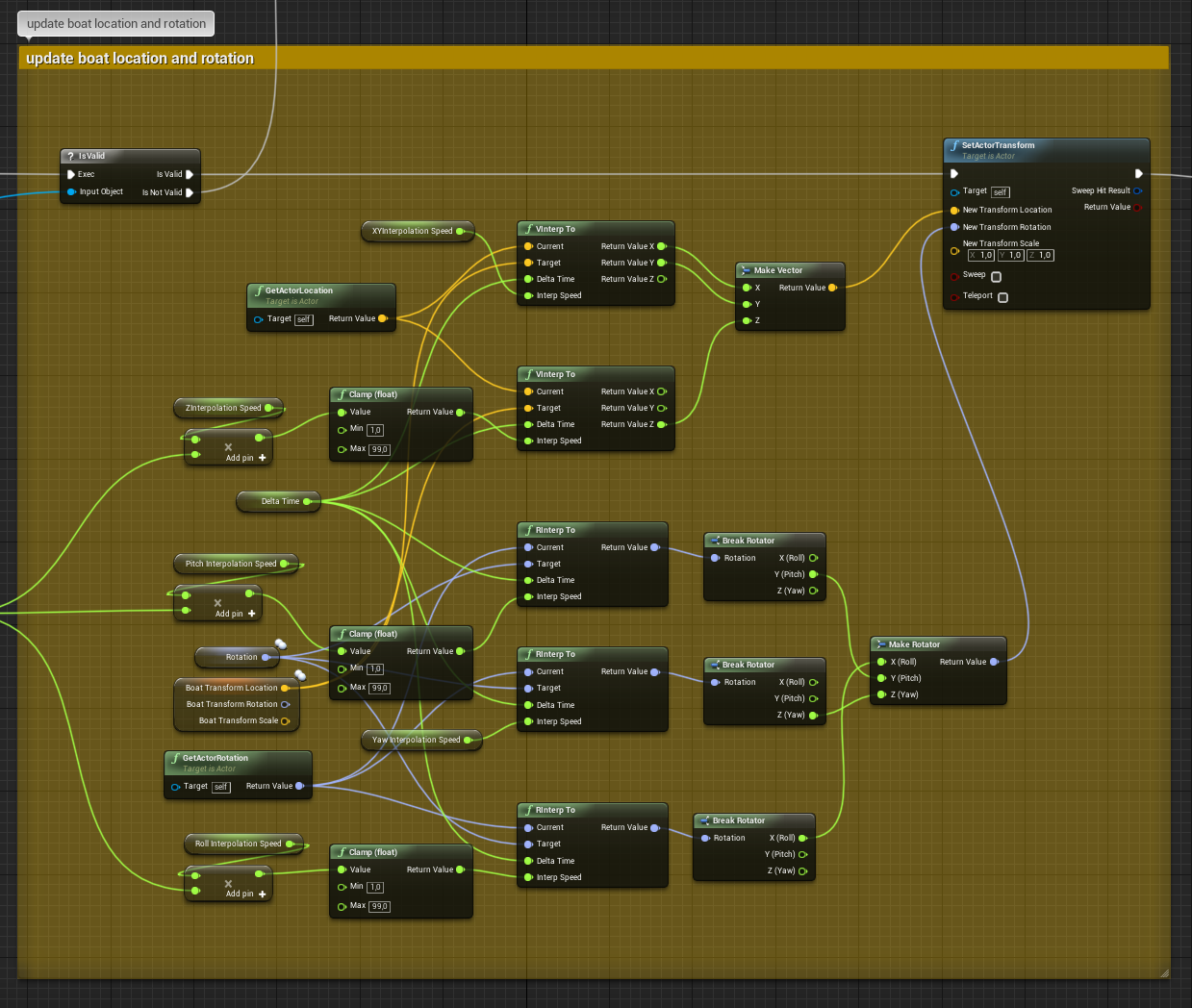 slow bronze
@compact osprey If ReplicateMovement is checked, the position of you actor will already by replicated. I think you don't really need this code.
compact osprey
to move my ball i use set physics linear velocity and if i don't use this code balls are like that
If i call set Position On server just after Set physic linear velocity , the problem is " fixed" but I want to do it with the best way
slow bronze
@compact osprey Make sure your staticMeshComponent is set to replicate. I just tested it. Calling SetPhysicsLinearVelocity on server worked for me.
compact osprey
@slow bronze
slow bronze
Is ReplicateComponent checked ?
compact osprey
Oops i thought it was on the screen ... Yes it is
compact osprey
I Check to my side
slow bronze
thin stratus
Both of you are using Physics and Multiplayer, right?
compact osprey
yes
thin stratus
@compact osprey @slow bronze
Yeah, both if you have to be aware of this not being something you usually replicate.
Simulated Physics + Multiplayer (specially in UE4) is a nightmare and basically not doable.
You can get a semi-working solution where you let the Server simulate physics and replicate the location adn rotation to the client.
That only works for actors that the client doesn't control though
What you see in the last video Melvin posted is one of the issues you need to actively code a solution for
And with physics that's not really a thing
You'd need to save the local moves and replay them when updates from the server come in
Currently you can see that he's not doing that and the server, caused by ping, overrides the client location
compact osprey
thin stratus
So you constantly get kicked back
Correct, that works until you actively add ping to it
If only the server simultes it, the player shooting the ball will always be delayed, cause the whole thing has to travel to the server and back first
So not responsive at all
Simulating it on the client first needs you to save the move and replay it when the server sends the update a few ms later.
The CMC from the Character does all of that
Epic is working on a more generic prediction system but atm only the CMC really has a solution for this
And that does not include simulated physics either way
CMC calculates the physcis via normal vector math and moves the actor by hand
(CMC being the CharacterMovementComponent)
If you can live with lags or with the shot delay, then you can go for a server authoritive solution
The other solution to this would be not letting the server simulated the physics at all
Then you would be client authoritive, client simulates the physics, tells server the location and server tells it to everyone else
That still misses interpolation though (in case ping is high or packages are droped)
And client authoritive obviously allows cheating, which for some is a problem too
compact osprey
ok, in my case , what i made is it fine ? I'm currently working with your pdf to understand all things
thin stratus
You are simulating it on the server as far as I can see
compact osprey
yes
thin stratus
That would cause set backs if you let the server replicate the movement back to the local client
Or the shot delay if not
Test it by enabling package delay in the editor
Unreal Engine
Recently, I had an email conversation with a Gears of War fan about the differences in networking quality between each of the three games in the series. One thing that we can point to in terms of increasing the quality of the networking experience is our use of the Unreal Eng...
That should have some console commands for that
slow bronze
I'm aware of that. I just made this little demo quickly to show Melvin a simple setup ^^.
thin stratus
Right, I didn't get that out of the short convo I saw
Thought you are both struggling with similar issues
Either way, it's not something one can easily solve.
Either you live with the drawbacks from simulating physics and understand that a client authoritive solution might be the best (and allows cheating).
Or you go the extra step of making a custom C++ movementComponent that takes care of doing all the "physics" via vector math and calculating the location and rotation yourself
compact osprey
So, I should test my code with Package delay enabled to see how it"s work right ?
thin stratus
That would show you if you have any problems related to higher pings
As PIE testing might be a more or less 0ping experience
which is pretty unlikely to ever be a thing :D
compact osprey
for the moment no problems related with 500 pings ... 🤔
Net pktlag = 500 and NetPktLess= 50
thin stratus
Not 100% sure how you are doing it atm. It must have a draw back somewhere. :D
compact osprey
when i use thoses command Net pktlag = 500 and NetPktLess= 50 ?
compact osprey
yes haha
thin stratus
So that's the solution where the server simulates and the client just waits for the update
The higher the ping, the greater the delay
- you have no interpolation, so if there are package drops, you will see the ball jump
Obviously different per game
But that's the general case
compact osprey
Ok , i note this in my mind
 unique kelp
Are there any special considerations, (besides transforming vectors/positions in my RPCs) when changing clients' world origin locations? I'm currently seeing some weirdness with Landscape LODs and some missed inputs in the movement component right around when the rebasing kicks in
Stuff like sprint sticking to on/off or jumps not triggering even though they go through the right flow in the character code
work day's over, so sorry If I dont reply for a bit, but any kind of help is greatly appreciated
grand kestrel
@thin stratus Do you know if there's any drawback to expecting AI to have player states?
Coz the equipment plugin I'm making uses the player state for the container and as owner, thinking about making it support pawn for the sake of AI
 jolly siren
None that I have seen, other than an extra actor per AI
grand kestrel
Hmm
I built it with the possibility in mind from the start so shouldn't be too hard, guess I'll try adding it once I've more or less finished the plugin, so long as there's no major hiccups then it'll just be a bonus that they don't need player states
fleet raven
does anyone have much experience with the replication graph? I'm wondering if it heavily relies on actors for relevancy/priorization or if it would be able to manage this for individual components within a huge actor
polar lotus
Hey guys, If I have a game that supports dedicated AND listen servers, what kind of replication would I do for a gun firing in a character blueprint since my gun is part of the character
 dark edge
Yo is ControlRotation replicated?
dark edge
So Character is what spawns the bullets or does the raycasts?
dark edge
It'll depend on your lag compensation technique but just doing the trace and damage on server should get you going
just do it on the authority and you should be good
dark edge
You'll need to translate the fire input into an RPC to server
polar lotus
In to an RPC?
dark edge
@tropic snow You simulating lag or no?
polar lotus
Right now I have a character and child classes with different skelmesh and my character casts to itself as the hit actor
dark edge
@polar lotus This is the bare minimum. You'll want to do some stuff client side so you don't gotta wait for a round trip before you see your character fire on your own screen.
tropic snow
I replicated the variables but made it so the server runs it with an Auth
polar lotus
Right now when I click it does nothing with that stuff
The only way for everyone to see it is to make it run on server and then multicast
dark edge
Well yeah, you need to replicate the results at a minimum.
@tropic snow Why aren't you just using pawn control rotation?
dark edge
@polar lotus You're just boincing to the server and back. The server is never firing.
polar lotus
dark edge
That should work
polar lotus
ok
tropic snow
I shouldn't be?
dark edge
If you set your stuff up right you shouldn't have to change anything when playing single player, listen server, or dedicated
dark edge
@tropic snow Everything with the arms/aim should be derived locally from the control rotation. It looks like you're replicating the rotation from server to owning client somehow which will be really really bad
tropic snow
I see. I started off as third person thats why
i just moved the camera
to the face now to start working on fps
dark edge
just make sure your aim offset is being driven by the control rotation or some other locally calculated rotation.
tropic snow
it will have tps mesh and fps mesh
dark edge
I'm guessing its perfectly smooth on the host?
tropic snow
yes
dark edge
Yeah you're using a replicated variable somewhere
Where's the math that calculates your aim offset?
tropic snow
well all my variables are replicated just running through the server
yaw and the pitch
dark edge
They should be locally calculated based on control rotation. The control rotation should be replicated
tropic snow
This is it