#multiplayer
1 messages · Page 439 of 1
 twin juniper
Allar's Blog
This document covers the bare basics on how to get your Unreal Engine 4 game project able to build both Windows and Linux dedicated server builds, using just a Windows machine for compiling. Requirements For 4.9.X or older, you need Visual Studio Community Edition 2013 For 4.10
so i read this tutorial
and i think you just need to build one time the server
and after you can just cook
to get the content
 bleak lily
anyone have experience with the advanced sessions plugin?
twin juniper
yeah i tried
if you just using the advanced session just for the session
with a dedicated is working
but if you want to integrate steam api
is crashing all the dedicated
bleak lily
The advanced session works for me in the editor but not when i package it
its weird
it used to but now it doesnt
 lofty holly
Hey umm just
wanted to ask if that plugin for steam works for someone without any issues in newest version of unreal
twin juniper
i just cooked and windows server
and this is the size
the idea when you are cooking an windows server you don't
need to build the engine from source i think
and is working to connect
this is saving a lot of time
bleak lily
oh its a console command
bleak lily
oh
twin juniper
without textures rendering
this is the build
with textures
you can make a server with this of course
but is opening the client with the game in the same time i tried
but this is a server not a dedicated server
bleak lily
yeah how would you package the other thing
twin juniper
do you mean the server
bleak lily
yeah
twin juniper
wait
Allar's Blog
This document covers the bare basics on how to get your Unreal Engine 4 game project able to build both Windows and Linux dedicated server builds, using just a Windows machine for compiling. Requirements For 4.9.X or older, you need Visual Studio Community Edition 2013 For 4.10
i followed this tutorial
is working with the advanced sessions btw
i am going to try with the steam api
inside
 spiral saffron
Have a problem with replicating motion controllers (HTC Vive) on dedicated server. So I have template VR BP project, motion controllers do replicate on manual move (add world offset), but don't when I launch it in packaged build. It seems like the whole tracking system doesn't work. Have anyone had the same problem?
 thin stratus
Pretty sure VR tracking needs manual Replication
spiral saffron
@thin stratus my approach uses manual replication. It has rep transform on every controller and writes it on owning client and then reads on others
thin stratus
Writes it on owning client?
You are setting the variable locally on the owning client?
@spiral saffron
spiral saffron
Yes
thin stratus
Yeah that's wrong
Replication only works from server to clients
You have to send the data via a non-reliable rpc to the server
And then set the variable
spiral saffron
I mean that I call rpc run on server with parameter from owning client. Inside this rpc I set variable
thin stratus
That you didn't say though :P
spiral saffron
It is about eleventh hour of trying c:
thin stratus
Are you making sure you skip the owner in that process
Cause the owner already has the data of course
spiral saffron
I have following check wether it is owner or not:
- check if it is auth, if no then continue
- compare player controller 0 with owner (when I spawn I set owner as owner of motion controller pawn)
- if they are equal, then it is owning client, if no, then remote
 winged badger
never use GetPlayerController[0] with dedicated servers on the server
sorry, didn't read the whole thing, but really can't stress that enough
thin stratus
Well then your local tracking should work
spiral saffron
Yep, I know player controllers' thing, but it looks safe here
thin stratus
Do you see the controller moving locally?
spiral saffron
With vive - no, with add world offset - yes (and it is replicated that way)
thin stratus
Not sure why add world offset but yeah
You should def see the local controllers move
spiral saffron
just for check is it problem in mc or in me)
thin stratus
Even if Replication doesnt work
spiral saffron
I heard that mordentral's plugin works great with network, also tried it with single. But it gives me error of finding "ShaderCore" module. This is another possible way, but "ShaderCore" doesn't google at all
 peak patio
Hello, I have a small question about variable replication. Let say A is replicated and is set to 0 on the client AND the server.
If I set A to 1 on the client, and nothing change on the server, what can I do to make the server replicate A to force being 0 on the client(like, every second or so)?
Multicast RPC is the only solution?
 fossil spoke
@peak patio You can use a RepNotified Struct variable to force replication for that variable.
Since the Server already sees the variable as 0 and you would need to change the value of it to force Replication, setting it to 0 again on the Server obviously will have no effect.
You COULD use an Multicast RPC to force set the Clients version of it to 0 again.
Or like i suggested you could bundle the variable into a Struct variable that is RepNotified. In RepNotify would be where you set the actual variable on the Client.
The struct would contain 2 variables, the integer you want to actually have the value updated on the Client and then another integer you use to force the replication of the Struct which you would just increment basically whenever you want to force replication.
peak patio
Hum, I see... Ok thank you very much :) ! I'll try both approach (repnotified and multicast)
fossil spoke
Good luck 👍
peak patio
Thank you!
 raven holly
Does reloading the map fix floating point issues?
When running long periods
i hear that using ServerTravel with ?restart at the end does this?
There's also a command "RestartLevel"
thin stratus
RestartGame does the ServerTravel?Restart
The ?Restart parameter just grabs the same map you are playing
So you basically call ServerTravel <MapNameYouArePlaying> with that
raven holly
Ah ok
And will this fix floating point issues ?
With net driver etc
Would it restart the net driver?
thin stratus
Then just restart the process if you don't care about Clients
raven holly
I just want something that refreshes the server without restarting the actual process
thin stratus
,>
raven holly
What?
It's inconvenient to restart the process, and I want to manage restarts inside the engine
As it'll need to be restarted every 3-4 days
thin stratus
Then try open level, but I still don't think this will reset the netDriver
Restarting a Process is basically just a cron job to kill the process and then start them again
Or whatever other scheduler you want to use
 plush wave
Is replicating an array bad practice? Or does UE4 do some of the heavy lifting and only replicate what changes on the array (not the entire thing every time it gets an element added).
 weary saffron
Hi! I want to change in spectator when my character is died. How can this make?
winged badger
@plush wave it is if its larger, yes
unreal will replicate the entire thing, but only if you add/insert/remove, it doesn't care for changes to elements themselves
as an alternative i suggest giving NetSerialization.h header a read, its heavily commented explaining the alternative
(unless you're BP only project, then you're out of luck)
raven holly
@plush wave no
generally replicating an array is not bad, but it depends what data is being replicated
twin juniper
i cooked a server
and i find that is a dedicated and an server
but i don't think that i understand that correctly
 craggy oxide
anyone else using the Oculus OSS and experiencing issues with client travel in 4.21?
 hot ridge
I know there's no simple answer to this but just wondering if there are things I should be looking at:
My server player sees the client as choppy, but my client has no issues looking at server (server shows as smooth movement)
Is there something I should set to give the client player higher priority over other objects in the scene? should I scale back some of my replicated objects/etc?
spiral saffron
Yeah! I've bet MotionController Component replication 😄 What I've done:
- disable auto activate on MC
- GetValidTrackedDeviceIDs + GetTrackedDevicePositionAndOrientation
- put data from 2 to my replication method
- changed setting location of MC instead of whole actor (maybe it is not needed)
Now I'm curios, whether tracked device ids use ids relatively to tracking cameras or relatively to client's machine. Does anyone know?
 ember needle
Does this command only work for meshes that are owned by the local client? https://gyazo.com/ec1e11757a0c31b8c0cfed7c22aa1f8b
because for some reason this transform is applied only on the client that owns the mesh...
yes, this is called out of a multicast on all clients
I've spent a WHOLE DAY just to try to see how to make a player SIT on a BENCH, in MP
😃
twin juniper
for a weapon that regenerates its ammo over time and it fires instantly on client and uses and consumes ammo on client, then tells server the weapon has fired and what not to keep things nice and smooth...
there exists a scenario where if your ping is higher then the weapon firerate the server can possibly replicate an ammo update right after you fire the weapon. causing the client to think that they can fire the weapon twice but they cannot.
the picture explains what i mean, for the video im spamming the fire button, notice Two projectiles fire off, but on the server there is only enough energy for One. i then traverse upwards and fire this time without spamming mouse button, simulating what is supposed to happen, but take note of the energy bar (the yellow one)
any ideas? should i just not replicate energy at all and depend on the simulation accuracy of it all... ??? 😦
@raven holly is your game full bp?
ember needle
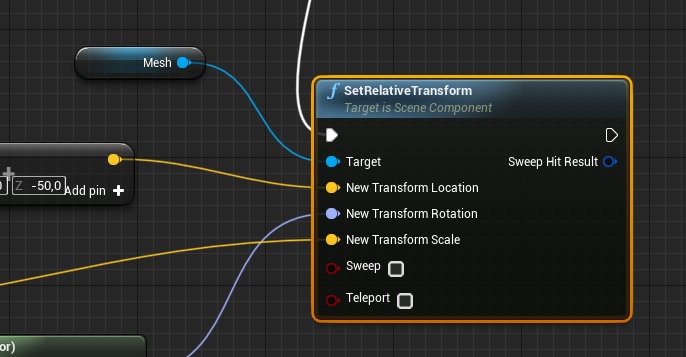
Hopefully some kind soul can help here. I'm trying to make a player SIT on a GONDOLA BENCH in MP. I'm detaching the mesh component and attaching it to a Gondola, in this way (this is run on every client with a multicast, GONDOLA is set on every client)
https://gyazo.com/fa0d9ab4ff62e55a68a68a90b28a9c0c

I then need to put the mesh in the correct position of the chair, so I move it:
https://i.gyazo.com/thumb/1200/ec1e11757a0c31b8c0cfed7c22aa1f8b-png.jpg

For SOME REASON that I don't understand, this works only on some occasions that I've yet to determine, i.e. it's completely random: sometimes it's like the SetRelativeTransform wasn't even called.
any ideas...? I've been on this for hours
twin juniper
the multicast rpc is firing off for everything properly ?
or its just mesh attachment issue ?
ember needle
yes it fires
even weirder
if i have only 1 client and 1 server, it works only if the server gets on board
if i have 2 clients and 1 server, all works
twin juniper
what about repnotify for this? instead of multicast rpc
spiral saffron
As I know, owning is compulsory for replicating from client to server. If you replicate from server to client, owning is not needed
twin juniper
have like the client tell the server to set a repnotify variable to the bench and the OnRep for the bench just sets the relativetransform
SeatedInThisChair ???
 foggy hedge
hi, when variable changes on client it does not change on server ,.. could someone help ? i
spiral saffron
@foggy hedge Replication works from server to client. You have to make variable replicated and then
change it on server
foggy hedge
it s replicated in game state, but i cast from actor to game state to change it on overlap
@spiral saffron
i guess this way is wrong ?
@spiral saffron i have also tried to make custom event (run on server) but it did not wort either
ember needle
my issue has nothing to do with multicasting since it is properly fired
it has to do with properly detaching the character mesh and attach it to the bench socket
unfortunately there seem to be some quirks going on with the movement component
twin juniper
what happens if you call attach without detach ?
ember needle
same thing
 meager spade
@ember needle why are your detatching and attaching the mesh
you would attach the actor to the godola
not the mesh component
ember needle
the reason is that the movement component interferes with the positioning of the mesh once in MP
meager spade
disable movement
meager spade
hmm like i said you can disable movement component
whilst on the gondola
and reneable it
ember needle
yes i already do that
meager spade
when you detach the mesh and attach you mess up the CMC so its not advisable
ember needle
i don’t know it’s just a series of things that are difficult to find the correct sequence
i see
meager spade
its a ski lift
ember needle
in mp
ember needle
absolutely
meager spade
yeah in MP
ember needle
ok so the order is:
set actor in position
disable collision
disable movement on component
meager spade
let me load a empty project
and ill show you it working in simple fasion
fashion*
meager spade
yeah
ember needle
attachactorto didn’t work
meager spade
mine is quite intergrated so i would rather show you a simple version
ember needle
my actor would end up in negative Z for some reason and hence get killed
meager spade
yeah cause of the way your handling it probably
the gondola is moving the mesh but the actor is staying put and cause collisions are disabled on capsule, it falls through the floor
raven holly
@twin juniper mostly bp
@thin stratus I checked UDN and loadmap does destroy the netdriver and create a new one
Also servertravel does too
Just so you know 😃
foggy hedge
variable from player controller is valid for server but not for client... does someone know the reason.. ?
raven holly
replicate it
foggy hedge
@raven holly do you mean to make variable replicated ? on variables details
i ve already done it but it doesn t work
raven holly
Are you replicating it to the owning client?
Player controller only exists on the players client & server, not other players
raven holly
uh thats not how you do that
foggy hedge
@raven holly i get this var to client directly from player controller but in these custom event it s still invalid
raven holly
You should really watch some tuts on this
foggy hedge
i m new in multiplayer so i dont know much ((
spiral saffron
I've made a short mind map on replication. If someone would take a look and gave me some comments in DM like "it is good" or "you've missed some crucial concept", I'd be grateful. It is not complete, though, there is no info on relevancy and conditional replication
https://drive.google.com/file/d/198WXTO7fUoT_H24pxcc0s1m9vw_tHlbv/view?usp=sharing

Google Docs
 ocean arrow
Good people of the high council, I seek advice!
I am developing a super smash style fighter and wish to outsource the movement system do hat it may be flawless. How foolish would it be to do this and then attempt to retrofit the movement system to work online?
so that*
 hasty adder
so wierd question, I have a UMG component on all players which is set to not active, I want it to go active when that player picks up an item to add one more peice of complexity to this it needs to retrigger when they come on screen I feel like this is best placed in a onrep for the item because there is a bool associated with this item when someone has posession of it.
the context of its usage is it generates a target on the character and it animates in on them as a offscreen marker to better help the player know who is the target
my trouble is not sure how you pass this right on the character so it makes this activate correctly.
actually might have figured it out
nope nevermind
 grand kestrel
@lament cloak GetTearOff()
 white fable
Could anyone give me some advice on the best approach for debugging and stepping through multiple clients connecting to a listen server, with Visual Studio debugger attached. Specifically, what are the limitations for PIE here?
Right now, I'm seeing inconsistent results when searching for and creating sessions. I've got Single Process checked and Auto Connect unchecked, which seemed right but I can only seem to find sessions when in standalone. Thanks
 bitter oriole
PIE basically doesn't do sessions
You're correct that it will only work in standalone
white fable
Thanks. So in essence hitting a breakpoint in VS isn't possible when testing multiplayer, or is there another way?
bitter oriole
Of course it is
PIE is unrelated to Visual
However, you'll need separate instances of Visual
 hoary spear
https://forums.unrealengine.com/development-discussion/content-creation/23921-mmo-starter-kit
Anyone tried this ?
Unreal Engine Forums
MMO Starter Kit is available for purchase on Sellfy (https://sellfy.com/p/fo6a/)!
Online documentation for version 1.16 (UE 4.21.0) (https://docs.google.com/documen
 jade gazelle
I haven’t tried it but I just can’t imagine how it would possibly be of any use unless you were trying to build the exact game the creator of the plug-in had in mind
I would never try a cookie cutter solution for something as complex as an mmo
I’ve been developing my own sort of micro mmo in ue4 for 5-6 months now and each piece really needs to be custom tailored to your specific game
hoary spear
Yeah i can imagine the template will only get you that far before you need to start customizing
and this is probably how far it goes. Doesnt seem to be tested with alot of players either
I mean, 10+ isnt noteworthy
jade gazelle
You’re going to have to customize almost everything, so why bother starting with someone else’s work that you’ll need to completely retrofit
bitter oriole
Apparently tried with 140 players
Which is a lot more than any small indie will really get
jade gazelle
Without any sort of third party server middleware, I don’t see how anything other than a zone based MMO is currently possible with ue4
Zone based being each level/map is its own dedicated server
And having a cap of say 150ppl
That’s what I am currently building and prototyping on. I don’t see any reason why more than 150ppl would need to be in one area at once so if you can build a big enough world and spread that across 50+ zones, you have MMO numbers of concurrent players
hoary spear
140 ppl -> 400kB/s doesnt sound so bad tho
bitter oriole
To be honest, instanced MMOs work well and are popular on their own. Aiming for even a few dozen players max is pretty rational because the tech is much simpler, it scales much better, doesn't feel as empty if your game isn't a best seller, etc.
jade gazelle
You would still need to find solutions for things like cross server chat though since as far as I know there is no good built in way for ue4 servers to directly communicate with each other
Yeah I mean I think most people immediately jump to the notion that 150ppl isn’t an MMO, but I’ve played many of them since the late 90s and it’s very rare to ever need to accommodate that many people in one specific area. The goal is to try and spread people out as much as possible. Different starting cities, etc
hoary spear
In WoW, there must've been a few hundred in the big cities
and it lagged like crazy every time..
Sure people complained, but it didnt really break the game since it was only a few areas that struggled with it
jade gazelle
Right. That’s when you may need to think about splitting a city into 2 zones, north and south say
It obviously isn’t ideal but it’s one way to handle that
hoary spear
You could also instance it
but not very cool if you're looking for your bud and cant find him
jade gazelle
I don’t know if I would Instance a city
jade gazelle
Ahh
Maybe. I’m trying to design what I’m making with little to no instancing if possible as I think it really breaks immersion
hoary spear
Agreed
I was disappointed with FFXIV with instanced houses
I liked how Archage had none-instanced housing areas. Keeps up the immersion, imo
bitter oriole
The biggest issue with 150 player is that less than 1000 games on Steam have that player count, and those who do sold literally hundreds of thousand copies
So unless you've got a large publisher behind you, I wouldn't base the game on that
jade gazelle
Yeah, kind of a future-proofing
hoary spear
well atleast have a plan ready i guess
bitter oriole
Our all-time peak from launch day is 97, so there's that
bitter oriole
Nope, SP game.
Working on a MP game now, but with three players teams.
Basically making sure the game is viable if it doesn't sell 100,000 copies
hoary spear
what did you mean with 97 all time high then ?
bitter oriole
Concurrent players
hoary spear
Didnt know that were tracked in SP games
bitter oriole
An ongoing analysis of Steam's player numbers, seeing what's been played the most.
hoary spear
there we go
was just about to mention it 😛
3,2 mill players. that would be... alot of servers
bitter oriole
My advice for sizing an MP game would be to look at the minimum online player count a few months after launch for games that sell as much as you can estimate
Considering median sales on Steam today are in the low thousands
(concurrent players in the low single digits)
hoary spear
Conan exiles. 4k
thats less than expected
heard so much great stuff about it
so expected a few 100k
clearly im way out of realistic range 😂
hoary spear
insane
bitter oriole
98-99% less than 1000
bitter oriole
Which is why I'm extremely skeptical of any online-only indie game - I think that's just asking for dead servers and pissed off players
hoary spear
WoW needs a replacer tho
so the MMO market should open up big when it dies ..
atleast i'd expect that..
bitter oriole
Now divide by 1000
And it's still more than even hugely successful indies can pull
Like, Dead Cells has 3000 online players now
hoary spear
its kinda crushing to see the actual numbers
bitter oriole
And it's one of the few million-unit indies
hoary spear
but as mentioned, i think it will open up when WoW dies
unless someone makes something amazing again,
which by todays standard is pretty impossible 😛
atleast for indie
jade gazelle
There are a bunch of smaller and Kickstarter MMOs in the works but most of them look like flops
Or vaporware
 stone sentinel
Hi guys,
hoary spear
FF14, 8k average
its nothing...
well .. "nothing"...
i'd be very happy with it , but not if i were SE 😛
jade gazelle
I think that’s just on steam, they have a stand-alone client as well
FF14 had over 10 million subscribers a year or so ago
Not sure now but they aren’t hurting for players
bitter oriole
You're comparing subscribers vs online players 😉
hoary spear
So was WoW tho btw.
jade gazelle
Well if I’m the developer I don’t care about concurrent players, I care about people paying the monthly fee haha
Less concurrent players is less server cost
bitter oriole
Concurrent players is what you design your game for
hoary spear
would suggest a drop in subscribers
so it would signal that your game is going in the wrong direction
bitter oriole
WoW couldn't work with 1000 concurrent players, plainly put
stone sentinel
Hi guys,
I am having an issue with my multiplayer game.
I am using Advanced Locomotion System which is sending client data to server relatives to location and rotation.
I now am sending player's AIM from the client to server so that it can shoot properly to the target I am aiming to.
When I call this RPC function (that has only a FVector as argument) my player starts to desync and I receive a log message that says <LogNetPlayerMovement: Warning: CreateSavedMove: Hit limit of 96 saved moves (timing out or very bad ping?)>
Any suggestion on how to solve this problem or where to look for?
 jolly siren
Limit the rate at which clients send movement updates to the server. Prevents clients running at high framerates from causing excessive load on the server. (Shipped with 4.17)
Does anyone know where this code is? Been looking through CMC and haven't found it yet
bitter oriole
Isn't that higher level ?
AActor has plenty of replication rate settings
So I guess it went there
jolly siren
Ah it could be, I'm really interested in finding the commit/code
bitter oriole
Though "movement updates" might really be CMC 🤔
jolly siren
Right, that's why I assumed it was CMC
I guess looking through perforce would be easier. The github Fortnite commits are kind of a nightmare to look through
bitter oriole
Yeah
jolly siren
But that statement doesn't really seem to be correct.
When I test with Fortnite I'm getting these overall numbers
30 fps locked: up rates between 2 - 3 KB/s and down rates between 2-3 KB/s
80-100fps: up rates between 2-5 KB/s and down rates between 2-4 KB/s
160 - 190fps: up rates between 5-11 KB/s and down rates between 5-10 KB/s
And I'm assuming a lot of that is movement data
bitter oriole
Client framerate ?
jolly siren
yes
bitter oriole
Maybe they're talking about something truly excessive
Like it used to be 100KB instead
jolly siren
Yeah I guess they could have just improved it
jolly siren
oh wow okay
 dusky flower
relevancy would play a role in bandwidth wouldnt it
jolly siren
yeah we are seeing 15 KB up/down in our game and were worried about that
stone sentinel
is it too much?
dusky flower
" A significant bandwidth optimization in Unreal's network code is that the server only tells clients about Actors in that client's relevant set."
jolly siren
We were just comparing it to PUBG, Fortnite, and UT and it is higher. I guess PUBG and Fortnite are different types of games that can take advantage of relevancy though. Ours is a arena based shooter like UT
 west star
@jolly siren how many clients/actors with updates? For just a couple of characters and no other updated actors, 15kb is a bit high but shouldn't be an issue.
Different engine but csgo is max ~100-150kb for 128Hz
jolly siren
We were seeing those numbers with one server and one client. But we have also seen less with more characters. It seems to be inconsistent. I'm still going through footage and looking at the numbers.
bitter oriole
Isn't CS quite more fast paced though ?
jolly siren
We cap fps at 240 and you have to get pretty close to that mark to run into the 15KB
I'm doing general network optimizations right now. But I'm still interested in where Limit the rate at which clients send movement updates to the server. Prevents clients running at high framerates from causing excessive load on the server. (Shipped with 4.17) this was changed.
dusky flower
i wouldnt do premature optimization, especially if there are inconsistencies
i think optimum packet size is 1500bytes per tick
jolly siren
You are right. It is consistent if you are running near 240fps regardless of how many clients there are.
dusky flower
so it scales correctly
1.5kb * (server ticks/second aka hz) should be optimum for a client connection, i forget how it scales though
jolly siren
One thing I noticed in UT is they have their own replicated movement code. FRepUTMovement https://github.com/EpicGames/UnrealTournament/blob/clean-master/UnrealTournament/Source/UnrealTournament/Public/UTCharacter.h#L22
dusky flower
"/** Replicated movement data of our RootComponent.
- More efficient than engine's FRepMovement
*/"
haha
west star
@jolly siren any chance it is referring to the NetUpdateFrequency code?
jolly siren
I think that has been in the engine for a long time
This says it was a 4.17 change

Unreal Engine
In the course of developing the Battle Royale game mode we’ve made many performance, memory, and workflow optimizations that not only benefit Fortnite: Battle Royale but every developer using Unreal Engine 4.
Separate topic, so FNames are sent over the network as strings? I've always heard that we should use FName for replicating. That is a common misconception then.
 chrome bay
@jolly siren Yeah they are. I believe they can be sent by ID but only if you can garauntee they exist on all clients. Gameplay Tags do some custom serialization for that when a certain flag is checked.
That said, FName is still cheaper than an FString and FText for replication IIRC
jolly siren
That thread says FName is sent as FString
That is the misconception I was talking about. Whether FName is cheaper for replication than FString
chrome bay
Ah roger. In that case then, I'm not sure.
 severe widget
Fnames for which an EName exist i think are the ones replicated by ID right?
 hot robin
i was reading into multiplayer and on how to make a Dedicated Server. Unreal Engine uses the Default Port of 7777. Here is my Question what if i want to run multiple servers on one Server so that if u look into the Server List for example u could see US1 US2 US3 ... so to achive this i need multiple Servers running or is it done by multiple game instances? and is the max players (64 if not edited) bound to the instance or do i completly missunderstand the whole thing?
chrome bay
For GameplayTags at least, they are serialized by a uint32 index IIRC
But only if usingFastReplication
 bleak cloud
I'm running into an issue when I run from editor. It seems like only one player is getting a player controller. I'm not sure what suddenly caused it to not spawn playerControllers for each player
Any ideas?
chrome bay
{
    if (PackageMap)
    {
        PackageMap->SerializeName(*this, N);
    }
    else
    {
        UPackageMap::StaticSerializeName(*this, N);
    }

    return *this;
}```@jolly siren have a look at PackageMap::StaticSerializeName()
It looks as though if the name is hardcoded, it replicates via index, otherwise it is replicated as a string.
Also uses one extra bit to serialize whether the name is hardcoded or not
then again... #define MAX_NETWORKED_HARDCODED_NAME 410
jolly siren
okay, yeah I'm not talking about hardcoded names
chrome bay
for names that are created on the fly they are replicated as a string it seems
            FString OutString = InName.GetPlainNameString();
            int32 OutNumber = InName.GetNumber();
Ar << OutString << OutNumber;```Looks to me like they're actually more expensive than strings, since they send the name ID as well
jolly siren
Myth is busted then 🙌
chrome bay
uint8 bHardcoded = InName.GetComparisonIndex() <= MAX_NETWORKED_HARDCODED_NAME;
bitter oriole
Quality variable name
chrome bay
I guess cheaper FName replication is possible.. but only if you do a bit of background work to support it
haha
Well that was a rabbit hole I didn't expect to go down 😛
bitter oriole
How about GUIDs ?
Since you're down the hole now
Might want to bring that particular rabbit back too :3
chrome bay
Funnilly enough I looked at that a few weeks ago.. I was really hoping that net GUID would be identical on all connections
Turns out it isn't 😦
bitter oriole
No I mean replicated FGuid types
We used FName extensively for Helium Rain to identify all parts, and I'm using FGuid now for part identifiers, so I need to replicate that
Wondering if it's expensive
chrome bay
It doesn't look as though FNetBitReader / FNetBitWriter has an override for FGUID
Must just serialize as 128bits 😢
Also.. adding MP to Helium Rain? Sweet 😄
It makes you wonder though.. FString is just a TArray<uint8> right?
In shipping.. you'd think with the reduced character set of FNames they could make that smaller
But that'd probably involve some really crafting packing or compression I guess
jolly siren
yeah, I'm interested in string compression for sure. I'm surprised they don't have something setup for it already.
The other possible misconception I was looking at is whether or not uint8 : 1 is actually necessary for replicated bools to automatically pack. Or if there is code to automatically bit pack multiple replicated bool in the same class. I ran into this https://answers.unrealengine.com/questions/541121/does-replication-treat-bitfields-as-they-are.html
But I'm actually not sure what UBoolProperty is. Reminds me of Java.
chrome bay
I think there's some horrible legacy code that exists for bools IIRC
But I've got so used to using bitfields for bools nowadays.
or overriding NetSerialize() altogether
bleak cloud
Anyone know why play in editor would only spawn one playerController when running with multiple players?
bleak cloud
clients
chrome bay
Yeah, that'll be why
bleak cloud
Seemed to be working fine for me last night
chrome bay
Controllers don't replicate to other clients
bleak cloud
Right
chrome bay
Only the client which owns them
bleak cloud
So only the one would show in the world outliner?
chrome bay
Yeah certainly if the editor is playing as the client (would be the case if using dedicated server)
bleak cloud
Not using dedicated server atm.
Whats really odd is how the working player doesn't move on the bugged players screen, and when the working player shoots, the projectiles show for the bugged player but don't move. At the same time, enemies spawned are moving and working as they should
chrome bay
welcome 😄
jolly siren
Do you actually have to do the bit packing/unpacking yourself for them? Or do you just throw uint8:1 there and it is taking care of? I've never seen a complete answer on how to use them.
chrome bay
I believe uint8:1; sends as packed, but only if uint8:1;s are all declared in the header one after the other
I can't remember where I got that info mind you
But e.g. if you have
uint8 SomeBool : 1; float Somefloat uint8 SomeBOol2 :1;
That will use two bytes, one for each
But if declared in one contiguous block they are packed IIRC
jolly siren
oh wow I've never heard that before
chrome bay
I think it could be a compile-time thing maybe
But I'm not 100% so take that with a pinch of salt
jolly siren
Yeah that sounds strange to me
This is from ShooterGame
    /** current targeting state */
    UPROPERTY(Transient, Replicated)
    uint8 bIsTargeting : 1;

    /** modifier for max movement speed */
    UPROPERTY(EditDefaultsOnly, Category = Pawn)
    float RunningSpeedModifier;

    /** current running state */
    UPROPERTY(Transient, Replicated)
    uint8 bWantsToRun : 1;

    /** from gamepad running is toggled */
    uint8 bWantsToRunToggled : 1;

    /** current firing state */
    uint8 bWantsToFire : 1;
Seems like Epic would know about it, if that was the case
 worthy perch
I think you can see that in FHitResult::NetSerialize() in Collision.cpp.
uint8 Flags = (bBlockingHit << 0) | (bStartPenetrating << 1) | (bImpactPointEqualsLocation << 2) | (bImpactNormalEqualsNormal << 3) | (bInvalidItem << 4) | (bInvalidFaceIndex << 5) | (bNoPenetrationDepth << 6);
    Ar.SerializeBits(&Flags, 7);
    bBlockingHit = (Flags & (1 << 0)) ? 1 : 0;
    bStartPenetrating = (Flags & (1 << 1)) ? 1 : 0;
    bImpactPointEqualsLocation = (Flags & (1 << 2)) ? 1 : 0;
    bImpactNormalEqualsNormal = (Flags & (1 << 3)) ? 1 : 0;
    bInvalidItem = (Flags & (1 << 4)) ? 1 : 0;
    bInvalidFaceIndex = (Flags & (1 << 5)) ? 1 : 0;
    bNoPenetrationDepth = (Flags & (1 << 6)) ? 1 : 0;
@chrome bay No we're not adding MP to that 😛 Thanks for confirming the 128b serializing...
jolly siren
So we have to manually pack them in NetSerialize?
chrome bay
Ah it looks like some of those flags are only relevant for NetSerialize, that's probably why
{
    // Most of the time the vectors are the same values, use that as an optimization
    bool bImpactPointEqualsLocation = 0, bImpactNormalEqualsNormal = 0;
    // Often times the indexes are invalid, use that as an optimization
bool bInvalidItem = 0, bInvalidFaceIndex = 0, bNoPenetrationDepth = 0;```Looks like they only pack manually there for packing purposes
@bitter oriole maybe use gameplay tags for categories instead 😛
jolly siren
I mean does declaring a replicated variable as uint8 : 1even do anything by itself? Or do we have to manually override NetSerialize for every class that has them and pack them ourselves before sending to get the optimization vs declaring as bool?
chrome bay
@jolly siren I think uint8:1; will be packed automagically
Though I can't find anyway to find out, aside from putting together a quick test case
But assuming that the uint8:1's are all in a bitfield at compile time, and assuming FArchive serializes based on sizeof() - you can probably assume they are packed
but then again we're in UE4 world.. never assume anything 😄
worthy perch
severe widget
I was gonna dive through source but that seems like an accurate answer.
chrome bay
Yeah that makes sense
bleak cloud
@chrome bay Seems like clients aren't replicating for some reason? They can't move, but if they fire, it's creating projectiles on the server that are working properly
but they don't move or work on the client
chrome bay
To be honest it's impossible to say why without having the project in front of you.
But if client and server are talking, stuff is going on.
bleak cloud
Any suggestions on how I should go about debugging this?
chrome bay
Are you using characters RE movement?
bleak cloud
Yep
It was all working last night, I'm wondering if somehow a config changed somewhere is messing with things
chrome bay
Possibly. Characters support movement etc. and all the fancy gubbins out of the box - so something more sinister is at play
bleak cloud
I've been disconnecting things in game mode, player controller, and characters. They're stripped pretty bare at this point and it's still having the same issue.
Are there better alternatives to testing MP than running from editor?
or will I have to build and run
chrome bay
Editor can be messy at times but usually not for stuff that simple. If you're working from BP it can be more difficult since a lot of the netcode isn't exposed so can be hard to track issues down.
But at the very least, I would first make sure you can get players just spawning as characters and running around
bleak cloud
Really regretting not setting up my source control last night 😅
worthy perch
Can they move in singleplayer?
bleak cloud
Yep. The player that is the listen server is working properly
worthy perch
How are you handling movement?
bleak cloud
If I turn off autoconnecting, they both work properly
I'm assuming easier if I just take a screen?
worthy perch
Yup.
bleak cloud
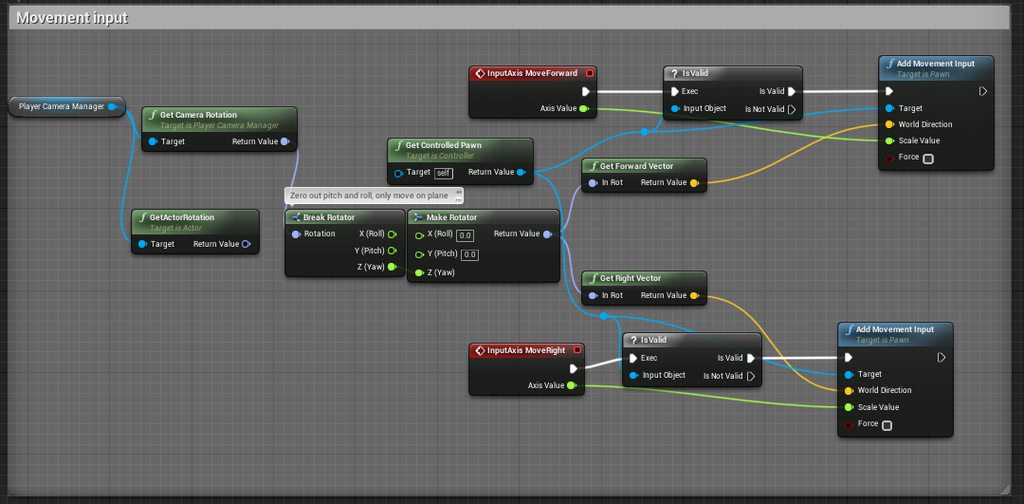
This was working last night and shouldn't have had any changes, so I don't think this is the problem.
worthy perch
My last guess is to check your "MoveForward" and "MoveRight" inputs in Project Settings > Input.
Also, maybe check if GetControlledPawn() is not returning nullptr.
bleak cloud
If that was the case, I don't think they'd work for the server either, right?
worthy perch
Oh, then check ControlledPawn.
chrome bay
One thing I would check, is to see if those input functions are being called Server side too
The GetControlledPawn() check would pass on both Server and Local client, so they'd both be adding movement input
Whereas you only wanna be doing that on the client
bleak cloud
Any reason why this would have been working last night?
chrome bay
It would still be adding zero on the Server, but nevetherless it might be confusing things
No idea - though in general I would recommend handling pawn-related input in the pawn itself, rather than passing through the controller
bleak cloud
That would mean moving the AddMovementInputs into the pawn, right? But you'd still run the InputAxis events through the player controller?
chrome bay
AddMovementInput and the input Axis events would be in the pawn
(Pawns can receive input directly)
bleak cloud
I thought playercontroller was meant to handle user input
chrome bay
Just as an example, I have both vehicle and character pawns in one of my projects - they both need to handle input differently
Not neccesarily
If anything I find it cleaner to do it through the pawn
bleak cloud
Gotcha.
chrome bay
There might be a few exceptions but in general UE templates do that too
bleak cloud
Kk. I'll work on switching that around.
Are there any weird client config settings that could be doing this somehow?
bleak cloud
Adding content to a project shouldn't change any configurations or anything right? Should just add the assets?
meager spade
@chrome bay i actually did a test with packing
chrome bay
@bleak cloud if it's marketplace content, it might do.
@meager spade What was the result? I'm intriguid...
(but spelt right)
meager spade

same amount of bools
but putting say a float inside the packed bools struct
and breaking up the packing

so they have to be continuous to be packed
wait
no it will still pack
nope i was correct first time
so what it does, is it will pack the first set of bools, then if it finds no more, end of pack, then if it does find more, it will pack them but in a different pack
worthy perch
Marketplace content can change a project's settings when it's imported?
bleak cloud
I'm testing it right now so I'll let ya know ¯_(ツ)_/¯
Last thing I did before it stopped working was add some marketplace content to the project
worthy perch
Oh, cool.
jolly siren
Does that only pertain to structs? Or classes as well?
meager spade
classes aswell
worthy perch
Do you have to implement NetSerialize for structs?
meager spade
@worthy perch only if you want to serialize your struct manually
@jolly siren https://gyazo.com/265ed2e463d3f39967d5a991bf2ea588

packed bools
packed bools with a float inbetween them: https://gyazo.com/313a05cfa90c34078844525c2383906c
 jolly siren
What about using bool instead of the packed uint? Curious if it automatically packs with just bool
 chrome bay
NetSerialize can be more expensive anyway in some cases. A struct with NetSerialize will send all data each time, without it, RepLayout will only send changed properties.
meager spade
so 8 for bool, 4 for the float

packed bools with a float at the end
so packing works only in continuous use, if you break up the pack, it negates all purpose
so like ```
uint8 mybool : 1;
uint8 mybool2 : 1;
float something;
uint8 mybool3 : 1;
will actually increase usage cost
jolly siren
💩
jolly siren
That makes sense
meager spade
so only pack if you know your going to benefit from it
uint32 if you have a lot of bools 😄
jolly siren
Thanks for clearing that all up 😃
meager spade
np i actually did that a while back cause i wanted to find out for myself
i think uint8 is only 1 byte so whilst you may not increase usage per say, you are negating the point in using it
different with uint32 as that is 4 bytes, and you will be increasing usage
just for clarficiation
like ```
uint8 mybool : 1;
float a;
uint8 mybool : 1;
float b;
bool c;````yeah that makes sense. I normally use uint8. But I get why you would use uint32 if you have a ton of bools.
2?
meager spade
typo
jolly siren
okay thought so 😃
 calm plaza
Steam OSS LAN session connection is timing out. Outside of firewall and port problems, where should I look to solve this?
 tropic fjord
Has anyone ever had the issue where they've source-built a dedicated server and the player isn't jumping to the server on BeginPlay?
Can't figure out what's up
tropic fjord
I'm just loading into my EntryMap and keep falling for some reason
tropic fjord
Legit don't understand why this is going on, tbh
 flint plover
Anyone here ever constrained the camera to a plane? Been looking but cant find a solid answer. got a top down ship thats constrained along the Y, so he can only go left and right along X and up and down along Z. everything works fine with movement, but im trying to get the camera to just go up or down along the Z axis and ignore the players movement on the X so that the player can get to the edge of the screen (think galaga but with the ability to move the screen up or down)
I almost want to fake it with a follow camera that has a movement component added in, then constrain that on Y and X, and some how pass along the players position to the BP. Would that require me to spawn the camera actor with the player and then set the follow camera as the active one?
bleak lily
My server browser is super bugged out right now it works in the editor but not when I package it and also sometimes when I package it I can see a thing where it says that the server has 0 players 9999 ping and I cant join that
its super weird
 viscid dagger
Just going through some networking stuff at the moment with UE4. I understand that client travel allows the client to connect to either another server or another map on the same server. In a design that I've been creating, I want each player to be dispersed to separate maps and after completing certain objectives, be able to visit maps that other clients reside in, however I could accomplish something akin to this by having a large map with smaller maps within it and just teleport players between segments of the larger map.
Extremely noobish question, but is there a performance boost on the server or client for having separate maps vs having a large map with smaller subsections? What advantages/disadvantages do these approaches have? I'm fairly new to the networking thing so I'm not certain as to what the best approach would be here. Any help would be appreciated. Thanks.
winged badger
Unreal doesn't like people trying to open multiple maps at the same time
And you would have to do it on server, if you wanted several smaller maps approach
So you are stuck with 1 map for this
Look into level streaming though, not all clients need to have all sublevels loaded at all times
viscid dagger
Thanks for the response. I figured if each client shouldn
shouldn't have a map, I'd have to go with level streamiing
streaming*
I'll just have to be smart with loading objects I suppose. Is there any reason why unreal doesn't like people being on multiple maps? Does the architecture not support it properly?
twin juniper
Hi everyone. Maybe someone could try to help me with multiplayer in Unreal?
So the problem I got is when I try to test the level and I have more than 1 player, it doesnt work. Player who hosts the game (server) just disables controller and player cant move when player who joined they dont appear on the level at all, just appears camera under the floor. But if I test just with 1 player (server) then it works fine
spiral saffron
Hey!
Have someone replicated motion controllers? There is function "GetValidTrackedDeviceIds" which returnes array of integer indexes of motion controllers. So far I've figured out that id:1 == right and id:2 == left. But what if more than one pair of controllers would appear in same real-world room? I mean, for example, VR warehouses. How can I figure out which id is for which player? Does it depend on player controller index on server (ie pc_0 owns 1 and 2, pc_1 owns 3 and 4 etc.)?
Also need to say that I call this function on owning client only
twin juniper
Hi again. A little bit of update on my problem. I managed to fix multiplayer working. I had a problem of some nodes being "Server only" when I had to change them to "Multicast". But I've noticed another bug. Before the main level all the players connect to lobby level where they chose a character and after everyone has selected the character server can start the game. But on the actual level for client it spawns only default character. For example in client in lobby selected green character in game he will appear red, which is character by default
white fable
@spiral saffron I don't think you can guarantee that id:1 will always be the left and id:2 the right. I thought it depended on the order they were switched on. GetValidTrackedDeviceIds will just add the last detected device to the array as and when it's picked up, but the order of these could constantly be changing as devices drop out or reappear. At least that's how I understand it.
spiral saffron
@white fable Could you give me advice how to find info on that off the top of your head?
And I've tested just now like this: switched off both controllers, switched on the left one and then read that array. It had one element: "2"
So it looks like it is "inner id" of device
white fable
The solution I went with you get a unique, persistent controller/tracker ID was to load the OpenVR dlls into Unreal (see github OpenVR). These will return a device serial number, which you can always guarantee won't change. It's a bit of a pain though.
worthy perch
What class are motion controllers?
spiral saffron
@white fable Found in mordentral's vr expansion this function. It look like what you actually meant. But have you worked with this in networking context?
white fable
@spiral saffron I think that vr expansion plugin wraps a lot of the OpenvVR functions and exposes to them blueprints, so that makes sense. I call on owning client as well, but as long as the DeviceID matches a serial number I don't suppose it matters.
thin stratus
@twin juniper Your best bet is to use their forums and support services
jolly siren
Are there any cheaper alternatives to bReplicateMovement ? I want to replicate the movement of weapon pickups as they fall to the ground (think Halo). But right now they are using a ton of bandwidth. I could shut off replicate movement once they come to a rest. But I was just wondering what other options I have.
 fleet sluice
@jolly siren RPCs for "dropped" and "picked up" and let each client simulate its own movement independently because it doesn't sound like it would have any effect on gameplay.
Or am I missing something?
jolly siren
That is an option. But players can fight over weapons, so that might get strange if they aren't in the same location for everyone.
fleet sluice
If you pass the "throw" vector through the "dropped" RPC, why wouldn't they land in the same location, though?
Or have an additional RPC "OnWeaponTouchedTheGround" to let the server correct its position.
jolly siren
They move around a bit after they hit the ground. But that's true. I could just use an rpc to correct the movement once it has stopped. Or replicate the final location.
west star
Speaking of which, physics bounce angles are still partially random in ue4, right?
I remember having to rewrite the internal logic to get the same bounces across clients and avoid jitter.
winged badger
random isn't the word for it... slight variations because impact angles are not perfectly synced cause the problems
winged badger
in a nightmare scenario, sure
but server generally allows some tolerance before it corrects positions
thin stratus
Well don't you think I already read everything I could before posting there ?
jolly siren
Do you have an example of calculating some sort of physics bounces yourself like that? I'm curious as to how that would be structured.
thin stratus
Given the amount of people here who wouldn't do that, yes I expect you to not have been there.
On the other hand, I simply suggested you to go there because it makes more sense than asking here as a first thing.
Now calm your horses.
Your best bet is to check the logs.
And if PlayFab provides Source Code, you can also try to break point the stuff
And see where it actually returns false.
I would also hope that PlayFab is actually able to help you here, because if not, then their service is really nothing I would touch.
 queen bay
Hey guys,
I have a dedicated server at home and it worked now 1 month perfectly. But from once day it instantly didn't listen on port 7777, I mean the server listen to this port but it isn't open. I restarted my rooters, updated NoIP, created a new build, Tested my build locally with 127.0.0.1:7777 (works perfectly), but it just doesn't open me the networking server. I have also the Tool from NoIP which updates my ip to the DDNS domain... All is fine, but it doesn't create the server.
Any ideas what I can try?
jolly siren
Is there a priority difference between a replicated variable that is set and then has ForceNetUpdate called on its actor vs. a rpc?
hasty adder
Though that just means it calls the rep to happen then and there instantly rather then it's uhh forget the word but priority which could be set to not be as imp
jolly siren
Makes sense
meager spade
has anyone here done anything like adjusting the delay before a bullet hits depending on range, ie if range is 4000, the hit scan processes x amount of time later if that makes sense?
to kinda fake that the bullet is travelling
worthy perch
You could just use a timer for that.
 sharp pagoda
Why not use projectiles for that?
meager spade
well for the long range guns i will
but for fast firing guns i want to keep them hitscan
snipers etc will be projectile
worthy perch
I'm not too familiar with this, but is this in PIE?
Maybe try launching as Standlone Game. If that doesn't work, perhaps you need two machines for Steam. 1. To run the client. 2. To run the server.
Oh, well, I forgot that Standalone Game won't create the server...
Yeah. Let me get the wiki.
I think most people use Steam for sessions based stuff, which I have absolutely no knowledge of.
hot robin
i have a question regarding Dedicated Servers 😃
if the max Player count is set to 64 (wich is the Limit if u dont change it in the source of the Engine) is that max player count per .exe or per instance?
 fleet raven
that's the same thing?
hmm I guess you can run multiple processes from one exe, the limit is per instance
hot robin
👆 Like that (fast example)
that 1 "Server" hosts 3 "sessions" where 64 people can join right?
would not be reccomended because of performance right?
fleet raven
that's not a thing by default, though there are some cloud providers that can provide this kind of autoscaling
fossil spoke
A single Dedicated Server .exe (the process) is considered a single Session, it cannot handle more than 1 session. A single Dedicated Server box (physical machine) can run multiple .exe (processes) to support multiple "Server" sessions.
hot robin
👆 Thats what i wanted to know Thanks for the awnser ^^
so i have to switch the port for each .exe and thats it <- (in short term)
hot robin
handy
fossil spoke
It just increments from 7777
hot robin
i wonder how much players UE4 could "potentially" handle (they dont need to stand at 1 place for the sake of fps but for example on a 10x10 km map what would be the max until the game gets unplayable / crashes 🤔 i guess its even then a question of what is happening and the performance of the game itself ^^ but still realy interesting 😃
fossil spoke
139 is fine, its up to you if you want to update but be warned you may need to fix the OSS if it has compat issues.
@hot robin Well considering Fortnite has 100 players, that would be a good start to guess at. External libraries like SpatialOS can help with creating extremely crazy multiplayer experiences but it does take some work to get that going. Not sure what its limits are.
hot robin
yeah it looked super interesting but i dont bother touching it since ur bound to their service and u pay per GB used by every user and they are not public about the Prices wich is a bad sign if u ask me.
fossil spoke
Just means you need to make an enquiry about it.
hot robin
If they would charge a Set amount until X is reached like Epic handels it would be more acceptable because if its not a "hit" the cost could be massive and get a big drag.
But if u pay 20-50 bucks a month until u hit a certin amount of traffic there could be some kind of "Extra License" need in place so its not such a "Risk" even if its way less per gb right now.
Also what about DDOS attacks? Does the traffic of a DDOS attack will have a financial impackt on me as a developer? ...^^ all that raises way to many questions. ^^
 red sand
Hi anyone knows how to replicated updated joint locations?
thin stratus
Technically you always have some sort of variable you use to calculate/update the joint locations
You would want to replicate that data
Outside of the AnimBP of course
red sand
I was doing it in Gameplay Ability Blueprint But then I made custom event for that in Character itself and called it in Gameplay Ability Blueprint when I wanted to update the joint location and it's working now
jolly siren
Do you guys think that Fortnite's KB net speed is using KB as 1024 bytes or 1000 bytes?
bitter oriole
1024 ?
jolly siren
oop that's what I meant instead of 1200
But you think they are using 1024? I thought 1000 was normally used for data transfer
thin stratus
I would also say 1000
jolly siren
Okay, yeah this is what I'm using
const float OutKiloBytesPerSecond = (float)NetConnection->OutBytesPerSecond / 1000.f;
"The byte scale is different than the bit scale, each step up is by a factor of 1024 not 1000. Although, a common misconception is that this also applies to networking, it doesn't. In the context of networking speeds the factor is 1000 not 1024."
I'll stick with 1000 then. Thanks guys
 nocturne berry
@thin stratus Your suggestion to use FCoreUObjectDelegates::PostLoadMapWithWorld in GameMode to get the port worked! Couldn't try it before today because I've exceeded the 125h limit for free tier on GameLift :p
anw I have 1 more question regarding GameSparks with GameLift in which I think you had as a problem before and fixed it https://gamedev.amazon.com/forums/questions/20217/ue4-dedicated-server-on-gamelift-reports-websocket.html
I did add certmgr /add addtrustexternalcaroot.crt to my install.bat file, also tried certmgr.exe /add /c AddTrustExternalCARoot.cer /s /r localmachine root, but every time i upload my build to GameLift the fleet fails on installing the install.bat
Still have your solution to this?
thin stratus
I haven't touched that in like 1-2 years. Will probablye have to fight it later the year again. That's def what I tried and that worked.
Can't say much more.
nocturne berry
do u remember if you had to upload certmgr.exe to the server?
twin juniper
so the Steam SubSystem thing is bugged hard
you can't find any sessions if you have it enabled
 wary willow
Hmmm, everyone changing their usernames to real names has me tripping out
twin juniper
when i am using the null subsytem i can find the sessions
but when i am trying to implement the steam i can't find any sessions
and i just want to use the steam just for the names and avatars
bitter oriole
@twin juniper Steam OSS works fine
Of course with Steam it needs two Steam accounts on different machines
ocean arrow
Any of you lot hear about Ikinema for motion capture?
Hard to find a good review on it
bitter oriole
ocean arrow
oh shit I thought I was there
bitter oriole
You can't do that due to Steam's design
twin juniper
yeah but the dedicated is not using the steam
bitter oriole
If it's not using Steam, it can't use Steam sessions 🤷
twin juniper
no , is using the steam oss but when i open the dedicated i don't get any error
but i think you are right
bitter oriole
You simply can't, and never will be able to, use Steam sessions on a single machine
That's by design on Steam's side
twin juniper
yeah but if i want to put the server on linux vps
i need to login with an steam account?
that is not having logic
bitter oriole
No idea, I've never touched dedicated servers
ocean arrow
Well then I got a multiplayer question for you. Making a smash bros style fighter and I wanted to contract a guy to get the movement system just right. How foolish would it be to retrofit the movement system to work online?
Just the rolls, jumpts, runs exc. not the full game.
bitter oriole
Hard to say for sure but the Character Movement class in UE4 is like 10,000 lines of C++, most of it networking
Generally speaking it's hard
ocean arrow
Holy shit... I had no idea I was getting myself in for a task that deep.
You're saying its thousands of lines of code to get mario jumping and running left and right?
Let alone doing it smoothly?
bitter oriole
You said "online" - online makes anything 5x harder
Movement in particular, if you can't use the character component movement, is huge
It needs to be very sophisticated to look okay
ocean arrow
Do you think someone of your skill could even do it?
I am just learning C++ with the intent to learn net code
Should I just pay a guy?
bitter oriole
It's very doable, it's just way more work than single-player or local MP
Basically it's matter of simulating smooth movement despite lossy, slow, random communications
bitter oriole
Yes
Like I said, online support for a feature is always more work than the feature itself
ocean arrow
So if I don't think I can deliver a proper movement system in C++ retrofitting someone elses code is a fool's errand it seems
Look like paying someone to do the whole job is the only way. That is a big chunk to fundraise. Guy said he would netcode part of the game for 20k
bitter oriole
If you're not going to spend months in complex C++, you can try tuning the character movement component to your game
ocean arrow
Its not responsive enough unfortunately. :/
I have to get it melee smooth
Is netcoding your profession?
bitter oriole
Part of it, I guess ? But I'm way too busy with my own projects if that's your thinking.
ocean arrow
I am trying to get an idea of how much I would budget into the cost of getting the game to work online
In case learning it myself proves to be insurmountable.
fleet sluice
@bitter oriole @twin juniper You simply can't, and never will be able to, use Steam sessions on a single machine That's by design on Steam's side
Actually it's by design from Epic's side. I implemented multiple Steam sessions on a single machine in my plugin so I dug deep enough to discover that.
Steam's networking utilities use virtual ports so there's no technical limitation that says "one account, one server".
sharp pagoda
"virtual ports" 🤔
 manic pine
as opposed to using the LPT1 port
fleet sluice
More like a "parser". All Steam traffic arrives on "actual" port X, but the system itself delivers it to different channels so you end up with addresses like: 215414219419:100, in the format "SteamID : virtual port". Thus, you can have an account with SteamID 215414219419, which runs N processes, which will result in a range of clients/servers from 215414219419:1 to 215414219419:N.
sharp pagoda
Ah gotcha
fleet sluice
Therefore, multiple clients on the same account. It just isn't implemented in Epic's NetDriver. It's not even technically related to the OnlineSubsystemSteam functions, but to the SteamNetDriver class itself.
manic pine
was there any inline comments about why?
fleet sluice
No, but it's pretty obvious from the design itself that it was just for convenience. SteamNetDriver doesn't even allow direct IP connections. Whoever worked on it simply started with the premise "one machine, one account and if I am coding SteamID connections, why should I also bother with direct IP ones"
manic pine
if im understanding it correctly, it would mean you could never run a (steam-registered) dedicated server and play as a client from the same machine on any UE4-based game?
fleet sluice
In theory, you should. Dedicated servers have their own accounts so whatever your "human" account it, it's going to run in parallel to the dedicated server's account, which is sort of created automatically on start-up.
Listen servers won't work though.
And the dedicated servers will bug out or simply not allow multiple clients on one machine.
There's a whole list of "edge cases" because of that design of SteamNetDriver.
fleet sluice
I haven't followed VoIP development in OnlineSubsystemSteam for about a year now. Things with Steam aren't hard by themselves, but the framework provided by Epic makes the average UE4 dev assume it's an all-in-one, ideal, robust solution, which is really far from the truth.
twin juniper
yeah but when i use null subsystem is working
fleet sluice
Most of my customers' misunderstandings come from the UE4 side.
OSNull uses platform sockets (or IP:port) to transfer data so yea, of course that works fine out of the box.
fleet sluice
I guess
twin juniper
you don't have any idea how to use just the steam api just for the player data and not for the sessions?
fleet sluice
They had an OnlineSubsystemMCP in Unreal Tournament ages ago so it wouldn't be a first
What do you mean "player data"?
fleet sluice
Yes, I know how to use those. That's part of what my Marketplace products help with.
fleet sluice
I'd rather not flood this channel with promotion though so feel free to join my Discord if you're interested.
twin juniper
you are romanian? , i am asking because of the name
fleet sluice
Yes
worthy perch
For just getting something like melee smoothing on a character, couldn't you just increase the netupdatefrequency? Sure, there's still some latency especially with how you do animations, but I don't think rewriting CMC could fix that. Most of CMC already makes the replicated movement structs net serialized/packed.
Sure there's quite a lot of stuff you probably don't need in CMC that gets handled, but I doubt that has a significant network cost.
ocean arrow
That to me Mr. Floss?
Hmm, do you think I could lift most of the code from cmc and apply it to a more tailored movement system? My boys have been unable to really nail melee movement with unreal's setup. Do you think it is possible assuming you are quite familiar with smash?
worthy perch
I think it's probably quite doable, however, do you already know what you would change to get gains?
ocean arrow
Igain?
gains*?
I am just learning C++ and netcode btw if that was not already sadly apparent .
worthy perch
I meant like, do you know what you want to change in order to get the desired outcome.
ocean arrow
ah
In temrs of the movement system
A smash character runs in a series of states
ie: walking is at a variable speed, while tapping foreward puts you into a fixed sprint.
most of the issues have been in air movement
being able to control how a character moves through the air is limited in a few keyy ways in unreal it seems
worthy perch
So your problems are just related to how movement "feels"?
ocean arrow
It also must be all done in C++ to my understanding to meet the mark in terms of preformace
yes
worthy perch
Oooh, I thought it had to do with movement replication.
Yeah, then in your case, it's very doable.
ocean arrow
really?
worthy perch
Yeah.
ocean arrow
Yeah it needs to feel right but problem 1 is that I am just learning C++ and dont know if I can make melee movement, and was wondering if I could contract that out and retrofit what they send me to work online
because netcode seems to be the main big expense
thus why I am trying my hand at learning it myself
worthy perch
I mean, a lot of the stuff in CMC is already exposed... like Jump Height sort of thing.
And for the stuff that's not exposed, let's say... how falling is handled, should be pretty straight forward.
ocean arrow
Nice
So do you think retrofitting is to be avoided at all costs even if it were something as relatively simple as the movement alone ?
Or you think think I am overhyping my fear on being able to code melee movement all together?
worthy perch
I mean... unless you see a reason to do so.
ocean arrow
Do you think you could code melee movement if you really put yourself to it?
netcoding and all
worthy perch
Well, most of the code is already in CMC.
ocean arrow
So I am being a tad overly fearful?
worthy perch
Maybe? I think it's definitely doable.
ocean arrow
Do you think you could if you put yourself to it?
worthy perch
Umm... I guess.
worthy perch
Unreal takes care of pretty much everything.
ocean arrow
huh, So the job of most devs here is to just smooth it out so to speak? It seems kinda choppy by default.
worthy perch
I guess to implement the stuff rather than build upon it.
ocean arrow
When you open the source code for netplay does it all pretty much make sense to you or is a good deal of it ls lost in translation?
I feel like devs making a fps game have an easy time in this department
worthy perch
What's NetPlay?
ocean arrow
the netcode stuff, online functionality code
worthy perch
I never really took a look... but for the most part, things can be followed. I don't know.
ocean arrow
Hmm, I see.
Sounds like I am overestimating the difficulty of it all somewhat. Let us hope this is true haha.
worthy perch
Maybe take a look at this: https://wiki.unrealengine.com/Authoritative_Networked_Character_Movement
ocean arrow
Will read
worthy perch
I don't think you need to do that way for many things, but the information in the wiki should be good.
 lean onyx
Has anyone used fsocket multicast? I'm thinking of using it for a mobile companion app for my game, all in ue4
sharp pagoda
Not specifically the FSocket class, but I've used multicast udp sockets. What's your question?
 normal girder
hello
can someone explain me something
i have a classic session system
on plyer press host
the other press join
after they go on lobby
and after i press start game and all go on the game
so, how to set some variable on the first screen (before host or join)
and keep this variable when i change map
i try with playerState, but i don t think i must do this
i beleived that i can use GameInstance, but i m not sure that is the good solution
so if someone can show me the way...
lean onyx
@sharp pagoda I need to send updates every frametick, in order. the other option is to use a middleman, which both devices will be connected-- just didn't want to waste that kind of data on the server
small though, fits in a network frame maybe 10 bytes total
middleman as in server in aws
sharp pagoda
Alright, so you probably want tcp sockets? Or do you need some special multicast functionality?
lean onyx
well i want the devices to simply find eachother without user input, maybe i should set up an initial handshake? just worried about ports being open and all of that
sharp pagoda
Oh you're talking about p2p connections?
lean onyx
well sort of yea, but just one device to one device, likely the only two on the subnet
sharp pagoda
Can you explain a bit more about what this mobile companion is going to do?
lean onyx
its for a physical trainer, hard to explain why it's good until you see it; but the mobile app will be more convenient to use while working out (on a stationary bike)
sharp pagoda
Also is this app for the local network only or can you discover your device on the public internet?
lean onyx
hopefully just local, but i've seen some wifi networks not play nice which would mean utilizing a central server on the internet side
sharp pagoda
Gotcha, so you can achieve this through a local group multicast every so often broadcasting "Hey, I'm available", where the other device (probably the phone) can listen for this an exchange enough info to connect through that.
From then on you'll need to either use a middle man service to setup the p2p connection or write a connection oriented reliable udp layer
 glacial pollen
Attaching a replicated actor, to another replicated actor causes a weird de-sync in location for the client
any ideas?
winged badger
what FAttachmentTransformRule did you use?
is the offset consistent across axii?
is scale other then 1.f involved?
glacial pollen
SnapToTarget
scale is 1 everywhere
yes, the offset appears consistent
yellow arrow is true "0"
Torso is first attachment
Legs are 2nd, and 3rd.
Body (invisible) is 4th
Arms are 5/6th
Locations are correct on server
When I had replicate turned off for these attached components everything seemed to work
Above: If I turn of replication for body parts, they appear correctly, but the attached arrows (red) are in the correct pattern, but wrong location
If I turn off replication for ALL attachable actors, then everything works just fine...
winged badger
and if you turn off just bReplicateMovement?
glacial pollen
If I do that, its the same as the initial issue
I have to disable replication for the scene root in order for everything to appear to work
winged badger
i never replicated a root component
its always the DefaultSubobject, so you can reference it just fine on replicated Actor over the network
it uses its FName + Actors NetGUID for referencne
glacial pollen
I don't use c++
While I understand a bit of what you are saying
I don't know what a defaultsubobject is
winged badger
if you added it in BP via AddComponent+ instead of spawning it in runtime
its defaultsubobject
its part of the Actors ClassDefaultObject
glacial pollen
I have to dynamically spawn it as an actor
winged badger
and as such can be reference it over network
oh, you can spawn Actor dynamically just fine
as long as you don't spawn its root component during runtime separately
glacial pollen
I don't understand why turning off replication on the root component allows for proper client attachment
I though you WANT replication for this stuff
winged badger
i don't exactly know, since i never tried it
but - actor constnruction
when server spawns an Actor that is replicated
glacial pollen
Okay, since the client sees everything correctly, i am somehow going to assume that it looks at what its attached to for replication
winged badger
client gets a package, or a bunch, which is basically : spawn an Actor of this Type and here are its replicated properties
glacial pollen
yea
winged badger
the client constructs an Actor of that Type
glacial pollen
sure
winged badger
and runs its constructor/constnruction script
winged badger
which is where default subobjects are added
glacial pollen
after spawning
i attach it to another actor
this isn't cdo related
imagine legos
you spawn 100 legos, and let the user attach/detach them at will
if you enable replication on the lego root component, attachment location will drift per attachment in the chain.
winged badger
only if the transforms are relative to root
glacial pollen
no, i've set them to snap to target
and even tried setting the relatives to 0 after attachment
winged badger
but my point is, your root is either a mesh or a scene ?
and it contains no custom logic
or a capsule
glacial pollen
my root is not dynamic
that IS cdo
but the attachment is dynamic
Also, my body parts are skeletal root
winged badger
sure, but there is no need to replicate components from the CDO unless there is custom networking logic inside them
glacial pollen
the red arrows, are secondary attached actors to each body part, and those are static meshes
okay
I thought the replication was more than just the "object"
winged badger
same goes for Actors that are pre-placed on level (loaded from package)
glacial pollen
but I guess thats what replicate movement does
winged badger
they have a unique name in the package, that can be used to reference them over network
glacial pollen
So I can turn off replication for everything that is CDO? (just keep replicate movement)
(not variables)
(Just the components)
winged badger
if you have a UStaticMeshComponent in the CDO, it doesn't need to be replicated
winged badger
if you have your WeaponComponent that contains replicated variables and/or RPCs in the CDO, that you have to replicate
SkeletalMesh has no custom networking logic, UAnimInstance is not replicated at all
Scene and StaticMesh components also
glacial pollen
okay, thank you. So one last question.
why the hell does turning on replication for these
A: Not work
B: Even allowed, if A: is true
worthy perch
Are you attaching to a socket?
glacial pollen
(yes and no)
worthy perch
Or socket location that sort of thing?
glacial pollen
no
worthy perch
Perhaps the server isn't running the animation.
glacial pollen
my "initial" attachment just attaches to the characters skeletal mesh (no bone)
winged badger
that is pretty large offset on those screens for animation to be responsible
glacial pollen
and that already fails
winged badger
i tried replicating root (capsule) once
glacial pollen
(additional body parts DO attach to bones from the parent skeletal mesh)
winged badger
it caused so much jitter that i never hit Replicated bool on root component again
glacial pollen
lol