#multiplayer
1 messages · Page 438 of 1
 winged badger
 jade gazelle
But it is designed that way in BP , as you just said above and as the documentation says
So I don’t know how that’s a misuse really
winged badger
no it is designed for replication callbacks
it seems convenient to use it as a setter function
but
landmine
it also vastly reduces the readability of your code
especially if someone else has to go through it at a later date
or yourself, 2 years from now
writing code isn't a contest in who uses the least number of nodes/characters
 pallid token
I have something that is multicast to all connected clients, but it's not executed on the server. how is this possible?
winged badger
if it reads like english, thats good... if its easy to maintain.... good, if there are no repetitions... good, if you can extend it rather then modify it... super
if it takes twice as much space... #life
 flint plover
Quick question guys, I'm nearing the end of my project and everything seems to be working great. It's a 1v1 multiplayer game, and I'm wanting to host online play but I'm unsure how to go about it. Would a listen server do fine? just have one player host and the other join. Or would this allow the host to cheat somehow?
 worthy perch
It would allow the host to cheat, yeah.
@pallid token Is that on a dedicated server? If not, I do think that some people had issues with listen servers and some... things like replication going wrong.
 woven bay
Quick question, what's the benefit to using a PlayerController vs the default generated Character?
woven bay
ahh thank you
I was following a tutorial in C++ trying to get a better understanding but unfortunately they never went into much detail as to why use a Controller base in a multiplayer scenario
 twin juniper
ok so
i have an actor which in its BeginPlay sets a dynamic material for its mesh
and it uses a parameter
which is decided using a random number
if i let it be it ends up being different in every client obviously
how do i replicate this parameter
how can i like
send a explicit signal to repliccate that and not continue the function until that variable's been replicated
 sharp pagoda
You can grab that info from UNetConnection
@jolly siren , assuming that's what you're asking
 cedar finch
So Is there anything I need to know about In-Editor multiplayer testing such as bugs or limits? I ask this because I'm running into issues where only two players are loading HUD objects correctly and the last two clients load nothing.
I'm testing with 4 players
sharp pagoda
You can get the Ping from the player state through ExactPing, not sure if the netconnection stores it or not
cedar finch
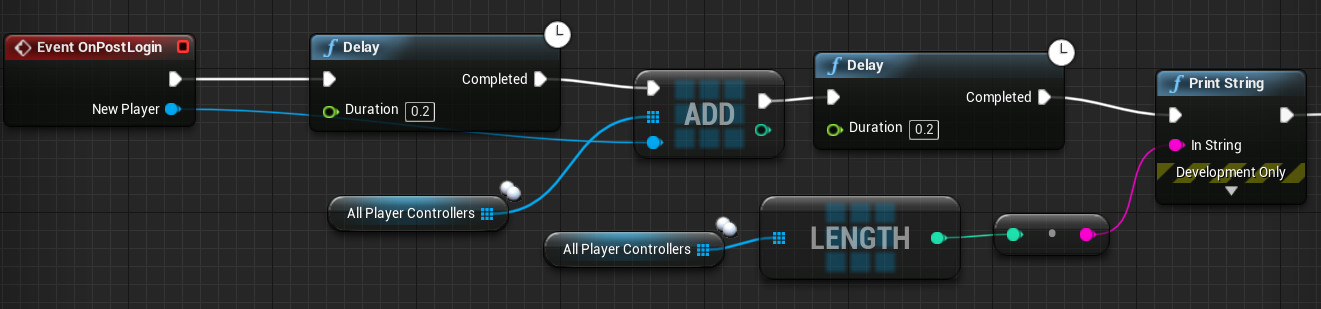
Hmmm so in my Gamemode I add the playercontrollers to an array OnPostLogin but for some reason only two get added when testing in the editor.
How do I test with 4 players if I can't use the editor? All 4 players are in the game but only two of them are added into the Array in Gamemode. How is that possible?
hold up i may have found the issue
Nope. Still only gets 2 of the 4 players. 😦 This sucks because I need to test things that involve a NumPlayers variable.
and it only returns 1 or 2 and never 3 or 4
 jolly siren
@sharp pagoda ahh nice, I'm looking there now. I was using NetDriver, but it was giving higher values than I was expecting
cedar finch
Ok let me ask you guys this question: Where should I get and set a "NumberOfPlayers" variable? Gamemode only counts the server so it always returns 1. If i play as a listen server it returns 2.
IDK why it won't work. I guess I'll just use "GetNumPlayers" node and "GetNumSpectators" and add them together in order to set my variable.
 strong abyss
@cedar finch You can test in editor with more that 2 players.
In my game, I use PostLogin to add the new PlayerController to a vector. I could get the size of this array to know the number of players.
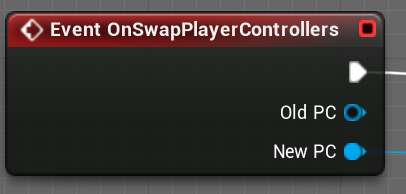
If you are using seamless travel though, postlogin won't get called, you need to override SwapPlayerControllers and do something similar to what you would do in postlogin.
in my xp, one bug with editor for us has been launching the game from editor on multiple computers, we would need to join a game at the same time if >2 players, otherwise it wouldn't work. The error didn't happen when building the game though.
cedar finch
Hmm ok maybe that's my issue. I have everything in my PostLogin and I'm testing directly on my level and not starting from the main menu then connecting in. I'm doing the same with the player controllers and adding them to an array for lots of other stuff
I know the node below doesn't work when I test directly on my level instead of joining from the main menu. But I have to do that because it wont load the level when testing in-editor. It just stays on the loading screen when traveling to the level. https://i.gyazo.com/38af5d956cae3d8d6b3c155785dac97a.png
 strong abyss
Yeah you can't use seamless travel in editor.
But if your code is in PostLogin, then you should be okay if you are launching the level from editor.
cedar finch
Hmm. IDK Here is where I set it. Maybe you know what I'm doing wrong: https://i.gyazo.com/b7e439db54a39e3cd181554307517c02.png
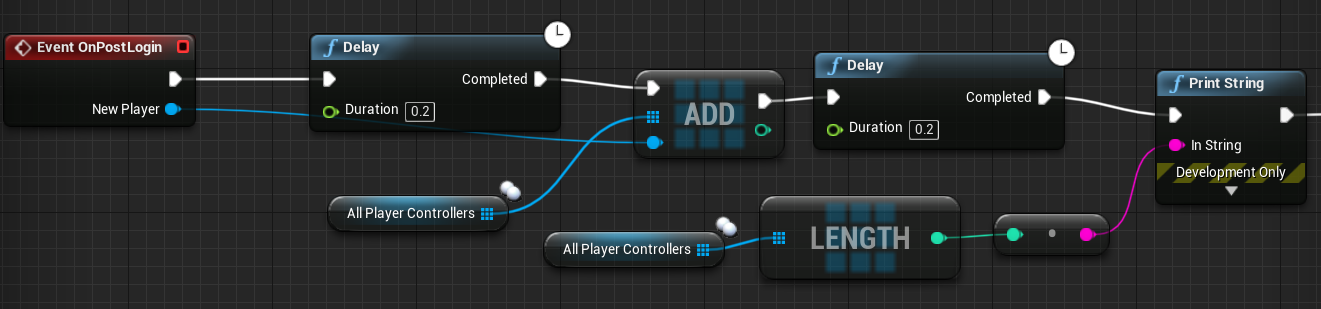
If I run as dedicated It prints "1" But if I run as a listen it prints "2"
I have 4 players and need it to print 4
cedar finch
I just added them in now because It wasn't working I thought maybe it'd help lol
strong abyss
How are you changing the number of players?
cedar finch
Well I need the number of players for setting enemy numbers. I also need that array of all player controllers so I can do things such as add them to the scoreboard as well as add their score to everyones HUD.
I can use get all actors of class and do it. but It's bugging me that this isn't working when It should
strong abyss
Are you changing the number of players here?
cedar finch
Plus get all actors of class could execute before everyone connects then things would realy mess up.
Yes thats where i'm changing it
That's why I went with the Onlogin node so no matter what they would get added into the array and count
strong abyss
Hmm.. you must be removing them somewhere else then.
I just copied that bp you shared and it is printing the correct results
cedar finch
IDK I just made a brand new array and plugged it in instead and it's doing the same thing.
strong abyss
In world settings do you have the correct game mode plugged in
cedar finch
Is your's set to replicate?
strong abyss
The game mode only exists on the server, so no replication is wanted.
cedar finch
Yea that's what I thought
Just checkin
The gamemode is set in world settings. Let me change levels and see if that helps or refreshes
Huh......IDK it's the same thing
strong abyss
When you put a break point in there does it hit the correct number of times?
cedar finch
What tha! I had replicated set. I set it to none and now it works.
OMG
Dang...
Well it's printing now. I'm just stupid and had it set to replicate for some reason.
strong abyss
Nice.
cedar finch
Thanks for helping me out. I really do appreciate it. Sorry it was a silly error on my part
strong abyss
ha no prob. That's game dev haha
 random nymph
Hello. What is the last moment in playercontroller's lifetime to still call rpc functions?
 thin stratus
EndPlay maybe?
jade gazelle
Game mode log out would work no?
 bitter oriole
Game mode doesn't exist on clients though
bitter oriole
He said player controller, so 😛
 manic pine
dont think theres any way you could at the same time know when pc is about to die and also guarantee an rpc send before it does
jade gazelle
Server has a copy of the controller though, so you could send an RPC from server —> client in game mode log out
manic pine
soon as it's destroyed its actor channel would die, failing the rpc
would be a bad way to do it anyhow, since you cant know how the client logged out
he might be out of the game already by the time the PC is disconnecting on server
pallid token
AServer RPC runs as if it were called from the server, right?
thin stratus
Technically you could see it that way, yeah
pallid token
So, I have a server RPC, that calls a function in another class, Then, from that class, another function from another class. Is that whole stack called from the server in the same way?
bitter oriole
Well, your client calls a server RPC in the first place
pallid token
Yes
bitter oriole
Which means it basically sends a message to itself on the server, to call this function
The caller is always going to be the server here
The RPC mechanism isn't a language feature, it''s an UE mechanism
So the whole thing will happen on the server
manic pine
yeah, the client is never part of the call stack, when it runs the server rpc all its really doing is telling the engine to send a packet to the server telling it to run function X on object Y
pallid token
Ok, thanks!
jolly siren
Should UNetConnection::InPacketsLost / UNetConnection::InPackets be giving me in packet loss percentage?
I'm getting 0 even when I do Net Pktloss=x
winged badger
silly question, but... integers?
jolly siren
That is what those properties are, yes
winged badger
i mean, you didn't divide a lesser integer with a greater one by any chance?

 cerulean hamlet
Lets say I have a reference to an actor in a streaming level but that streaming level hasn't finished loading when I receive that reference
at what point does Unreal go back and fix up that reference?
winged badger
if the Actor was loaded from a package, it can be referenced over network even without it being replicated
so reference shouldn't need fixing
 versed socket
The other day I was asking about OnlineSubsytem*. What it is, how it fits in with everything else, etc. You guys did a good job of explaining it and said that I should ask about other related things, too.
One such thing that I'm really struggling to find resources to learn about is with setting up and using the VOIP system. I tried implementing it (specifically the recently added native one from 4.19, not the Steam one) for one of my projects but when I excitedly got a friend to test it with me, it didn't work. Probably I just didn't set it up properly.
I'm aware that there are some things you need to add to your DefaultEngine.ini and that you need to make some calls to some PlayerController C++ methods, but that's all I can ever find. To the best of my knowledge, nobody has ever demonstrated how to use it. The Steam one, sure, but not for the newer, native engine one.
strong abyss
Hey all! I have a grenade setup as shown above. When a grenade is thrown, the server applies an impulse to the RootSphere. This works great on the server, and the grenade behaves as expected. But on my client, it just floats in place. I have Replicate Movement set to true on the BP_FragGrenade, but it appears to not be replicating.
What am I missing about physics objects and replicating their movement?
versed socket
@strong abyss This is a question more for the #legacy-physics channel, I'd think. Basically, though, there's a bunch of ways to fix this. You can set a "DesiredLocation" and in the OnRep you can do a Lerp or something to that position. Also, when you enable Physics so that you can add impulse, make sure you do it for everyone and not just for the server (which is why it's floating in place)
Replicating physics is one of those things that I'm currently struggling to learn as well and is something that nobody really knows the exact best implementation for, so don't take my word as fact
 gaunt crown
How would I replicate everyone but the Owner?
I tried this but I get errors when I have two players connected on Dedicated Server.
thin stratus
thin stratus
Also that Parameter is misleading
- stuff like this shouldn't use RPCs
Or rather
Not Multicast RPCs
gaunt crown
Hm?
thin stratus
- RPCs are fire and forget, if people aren't in range of the person activating the light or the join into the game after the person turned on the light, they will never get teh multicast
You use RepNotify variables for that.
- Passing the Pawn as "self" into an RPC that is called inside that very Pawn makes no sense, you can just use "self" after the RPC. No need to pass that reference.
gaunt crown
Or you could always do Event Begin Play and check if it's visible and set visibility for the other player.
thin stratus
- To not do it for the local player, call "IsLocallyControlled" on the Pawn
thin stratus
Na, you don't do that BeginPlay stuff
gaunt crown
 thin stratus
Make a boolean variable "bFlashlightOn"
Set it to RepNotify
You can actually also tick "SkipOwner"
Then you don't need the LocallyControlled stuff
In the RepNotify function (will automatically pop up in your functions tab), you then toggle the visibilty
gaunt crown
Yeah I skip owner because I want to be able to have people across the globe actually play without interruptions of stuff reacting later
Like turning on a Flashlight instantly without a 300 millisecond wait lul
thin stratus
You are also already setting it locally so it's fine to skip the owner
As long as you never want to toggle the light force by the Server
Cause then you'd still skip the owner, which is bad
E.g. Battery ran out on the Server -> Set boolean to false -> owner never shuts off flashlight
gaunt crown
I only want to skip owner for toggling it.
So the Multicast doesn't override and cause interruptions and Client can do his thing.
thin stratus
The multicast is a bad idea for this, as already explained
gaunt crown
Yeah
thin stratus
If you have a player that is not relevant to that pawn and becomes relevant, they never see the flashlight change
Multicasts don't call again when you join or become relevant
gaunt crown
Changing now. Cheers 😄
I can do Skip Owner btw because I leave the Client related stuff out of the Variable.
Works a charm.
Much appreciated. I've learnt some extra info today 😃
 hoary spear
So, RepNotify would trigger if a player joins after the server sent the original notify ?
Like, it would also recieve it, when joining?
So it would be someting like this:
- Someone did something!
- server gets informed, and sets the repNotify variable
- All joined players are informed via repNotify
abit later...
- New player joins.
- New player recieve the very same repNotify event that the others got
Is this correct?
hoary spear
Awesome. I never considered that scenario
thin stratus
New Players, or players that become relevant, receive the updated variable
Receiving that value will trigger the RepNotify
A normal Replicated Variable will of course also be received, but no RepNotify event to call from it
hoary spear
Thanks for the clearify 😃 Makes alot of sense that they would recieve it ^^ Cant imagine what a pain it would be to manually have to update every joined player with all the needed variables..
gaunt crown
@thin stratus Do you know why Pitch Rotation is not replicated?
thin stratus
Probably cause it's controller rotation
Think the view stuff is for that
GetPlayerView or something like that
versed socket
The other day I was asking about OnlineSubsytem*. What it is, how it fits in with everything else, etc. You guys did a good job of explaining it and said that I should ask about other related things, too.
One such thing that I'm really struggling to find resources to learn about is with setting up and using the VOIP system. I tried implementing it (specifically the recently added native one from 4.19, not the Steam one) for one of my projects but when I excitedly got a friend to test it with me, it didn't work. Probably I just didn't set it up properly.
I'm aware that there are some things you need to add to your DefaultEngine.ini and that you need to make some calls to some PlayerController C++ methods, but that's all I can ever find. To the best of my knowledge, nobody has ever demonstrated how to use it. The Steam one, sure, but not for the newer, native engine one.
thin stratus
Wasn't the Engine one wrapping the Steam one?
manic pine
engine had different ones depending on oss
not quite sure how it is past 419
its always been very messy though, and impossible to test using just one comp
thin stratus
Yeah, def. I had it working once with very little changes.
But I would need to actively grab my laptop and setup a test project
No time for that atm
cerulean hamlet
@winged badger I'm asking where is the code that resolves that reference
gaunt crown
@thin stratus Hey man. Just wondering, is this the best way to replicate the Pitch Rotation for the character?
thin stratus
Returns Player's Point of View For the AI this means the Pawn's 'Eyes' ViewPoint For a Human player, this means the Camera's ViewPoint
Could try utilizing this from the server
 hushed maple
I want to host a game on my streaming PC and give players online the ability to control a characters basic movements. Is there any easy to setup ways to achieve this for a noob at programming 😛
Even just a single button one a website that sends that feeds the input into the game
 meager spade
well your game can listen to requests from an API sure
when your game gets the callback, it does whatever was pressed
hushed maple
Is there a particular API I could look into? I'm doing some research myself too:)
thin stratus
Well, HTTP Requests could do that I assume?
With a JSON body for the instructions
That streaming PC needs a static IP though
Otherwise you gotta update the scripts every time
hushed maple
hmm I did try one of the HTTP plugins from the marketplace but couldn't get it working. Maybe it was my IP that was the issue
thin stratus
This is def nothing to pull off in an evening if you have no idea what you are doing
If you want TwitchPeople to use your game
you might want to check the twitch plugin on the marketplace
hushed maple
cool I'll check it out, I don't know what I'm doing either really :P, just brainstorming ideas
Just noticed this, couldn't I grab keywords written in "messages"
 ebon bramble
vaRest plugin ???
hushed maple
this is from Twitch Integrator
ebon bramble
Oohh. Hmm you could integrate twitch with your own middleman API server and then have the server talk to the game .. no ?
You are basically making a twitch plays Pokemon ? Lol
hushed maple
Actually it's related to paranormal research 😉
ebon bramble
👻
hushed maple
I have some crazy ideas lol
twin juniper
I want to make my game multiplayer but don't know where to start?
Any tips would be greatly appreciated
winged badger
 versed socket
Just wanted to follow up on my post earlier: does anyone actually know how to use the native UE4 VOIP system introduced with 4.19 via its OnlineSubsystemNull interface (i.e. not Steam)?
I'm trying to figure out how to make it work on my own test projects so that I know what the actual steps to make it work are, which I can then work on incorporating into my own actual projects
 dapper summit
hey anyone know what im doing wrong i set a host button that works fine but when i join a session this happens the player that has joined has no body and can't move and has no HUD
 fringe dove
@versed socket you still use OSS steam, in 4.20 or 4.21 they made steam use the same stuff as the null subsytem by sharing a common base implementation through onlinesubsystemutils
before, steam would do the encoding/decoding and possibly the mic thresholding, now that is all through OnlineSubsystemUtils and VoiceCaptureWindows
DefaultEngine.ini needs
[OnlineSubsystem]
bHasVoiceEnabled=true

[Voice]
bEnabled=true```

DefaultGame.ini:
```ini
[/Script/Engine.GameSession]
bRequiresPushToTalk=false```

(or true if you want push to talk, then you need an input config for it too)when you connect you need to do so by creating a session on host and joining a session on client, if you just host through '?listen' it may not work by default
you also need to raise the default bandwidth limits a bit
dapper summit
you talking to me or the other guy?
fringe dove
jfaw
dapper summit
alright
fringe dove
@dapper summit on yours do you have a default player pawn configured for your game mode?
dapper summit
i fixed the movement problem all i need is to actually be able to join
i dont know the nodes for it i hate servers but it would be nice to get it out of the way
fringe dove
what did you do to fix the movement problem?
and the movement problem was after joining I thought?
dapper summit
it was when i joined it gave me no controls but i set it in the level blueprint
i have these set up in the game instance
fringe dove
@dapper summit do you have a spawn point?
fringe dove
@dapper summit what exactly do you mean can't join
you said you did join right? you just didn't spawn
dapper summit
it does nothing when i click join session earlier it did but there was no character and HUD and stuff like that but now i done something and it won't join at all but i just want to join and have a character body
fringe dove
@dapper summit add a breakpoint to the join session node and make sure it is called
you don't get the 'quick play connection error' printing out right?
fringe dove
check the log tab for stuff
to see if it reported any errors/warnings
output log, not message log
dapper summit
doesn't there supposed to be anything on the exc pin on success on join session?
have nothing in output log i think its doing that message for the fun of it lol
fringe dove
@dapper summit makes sure the length of the search results was at least 1, I don't know if you can get success without there being one result, but it might be that failure means a failure to search and success means a successful search even if it didn't find one
though blueprint should have range checking and should have failed in other ways if you accessed an invalid index
dapper summit
still failed
fringe dove
@dapper summit you are using null subsystem or steam?
and are you sure 'use lan' is on?
(if testing on one machine)
dapper summit
im using lan i have the steam integration but im not using it now
fringe dove
@dapper summit try the multiplayer shootout demo and make sure the session host/join there works for you, to rule out issues
in the learn tab
dapper summit
alright will do thanks for trying to help me
fringe dove
you can look at its code too, but it is kind of convoluted at least when I looked a long time ago
I didn't know much UI stuff back then though and I think a lot was tied to UMG
 potent prairie
why does the server think this socket on my skeleton is in a different location than the client?
creating issues when i spawn/attach to the player
potent prairie
hmm also the gravity seems to be different on the server. seems to fall quicker than what the client sees, even though its a server-only spawned projectile
nvm had to turn on replicates movement as well. all is good in the hood
worthy perch
@potent prairie Your skeletal mesh animations by default don't change bone transforms when not rendered.
GetMesh()->MeshComponentUpdateFlag = EMeshComponentUpdateFlag::AlwaysTickPoseAndRefreshBones;
ty
meager spade
is that a big performance hit
having the server refreshing bones?
surely there is a way to do it without needing to do that on the server?
sharp pagoda
Erebel and I tried to get instantaneous anim evaluation so that you don't have to always tick the pose on the server, but we never solved the curve interpolation issue. There's a hacky solution of ticking the pose many times during the frame in order to have the pose like 99% interped to the actual pose, but not sure if it's even worth it. @meager spade
So yea in theory you don't need to tick the pose at all until you need a socket transform, but it's a bit tricky
worthy perch
Is ticking the pose really that expensive?
sharp pagoda
Oh yea I bet, but it's an endless mystery of how they did it
meager spade
server ticking 100 clients poses every frame seems to me like a big impact
sharp pagoda
You could ask erebel if he ever profiled it in his case, I don't remember off the top of my head
worthy perch
Oh, yeah, I guess it is needless.
sharp pagoda
Yea it's redundant calculation
meager spade
https://gyazo.com/9a7be864c31c65535632e599ad23d0ad welp here goes my big commit for the night
 sharp pagoda
Source upload?
sharp pagoda
Make sure you setup your type map properly before you have to go back and fix it all haha
meager spade
my typemap is ermm
 fossil spoke
Yes do typemap
 fossil spoke
I forgot it once. Never again
meager spade
do you have a typemap i could borrow 😄
sharp pagoda
I typically make the uproject writable so that you don't have to do the registry garbage with source builds
fossil spoke
Pretty sure there is a Typemap in the Engine somewhere
fossil spoke
Hmm must be thinking of that
meager spade
then realised perforce can use gitignore
so i used both my custom p4ignore and the engines .gitignore
just wondering if i can strip anymore out, like all the crap "setup.bat" installs
cause i dont need that in sourcecontrol
anyways wrong channel 😄
sharp pagoda
Use a dir stat to filter out the biggest things you can remove, pointless removing small things like build scripts
sharp pagoda
I would, nice for the artists to send you an unwind screenshot
meager spade
yeah i was kinda thinking to supply them seperatly
if needed
but i cba, ill just commit this, hopefully my typemap is fine
sharp pagoda
Looked good for the most part
meager spade
//Theia/alpha/Engine/Extras/ThirdPartyNotUE/emsdk/Win64/python/2.7.5.3_64bit/Lib/encodings/cp863.py
wondering if i should strip ThirdPartyNotUE stuff out
think best bet is to compare the git version to mine and remove stuff that isnt in there]
sharp pagoda
Just measure the file size? No point in removing small things you don't need
meager spade
true
here goes a 30gb upload 111,835 files, the Engine folder has: 145,427 files so its removed a good chunk
 plush wave
How would one do a server check (aka Role == ROLE_AUTHORITY or HasAuthority()) in a UObject?
Can you just get outer then do a HasAuthority check?
Or do you have to pass in the actor who is doing the executing?
winged badger
Only actors have net roles
plush wave
So I'd have to pass in the actor?
winged badger
There is NetMode as well
plush wave
NetMode?
winged badger
Yeah, NM_Standalone NM_Server
Dont recall how to usd then off the top of my head
But look into the code for IsServer BP node
Might be a simpler way to get what you need
plush wave
Great thank you
And you can get NetMode from a UObject?
I know there is an AActor::GetNetMode()
thin stratus
UObjects need get the NetMode of the AActor the are in
plush wave
Ok great thank you
versed socket
@fringe dove Thank you for writing that explanation for how to use the Null VOIP. I have done those things, though I haven't tested it without the ?listen trick. I will try making a bare, simple project using Create and Join Session. Hopefully that will be sufficient!
versed socket
Is using OnRep to replicate a Pawn's desired transform and then lerping to it clientside on Tick basically just how the PawnMovementComponent works? It can't be that simple right?
I know that that's basically how the ProjectileMovementComponent works, at least: it replicates start pos, end pos, and travel time then lets everybody play it out for themselves iirc.
fossil spoke
Check out the pinned messages, i added a Youtube talk about how Halo does Server Authoritative - Client Side predictive actions.
versed socket
When I was climbing the learning curve for Unreal, one of the supposed "best practices" that I learned was to make heavy use of events and event delegates in Blueprints so as to avoid the mess of boolean checks on Tick and whatnot. However this "prefer OnRep over event replication" practice I've learned recently has really got me looking back and rethinking everything.
For example, a while ago I implemented a weapon in a Multiplayer FPS that would fire itself via an Event call, but this "prefer OnRep" thing makes me think that instead I should be using some kind of bIsShooting variable that will in turn call event functions in its OnRep function. Is this how you guys who are much better than me in general do it in your own things?
meager spade
@versed socket depends if it has to be a replicated bool from the server
versed socket
I don't even know anymore. I'm trying to salvage what I thought I knew was the best practice all these years.
worthy perch
OnRep is primarily for clients to do something when a replicated property changes.
It's like a client setter.
Or at least how I use it.
 supple musk
I don't see how events and OnReps are incompatible either
worthy perch
Do you mean compatible?
From my understanding, I would say RPCs and OnRep don't really have anything in common.
supple musk
Oh @versed socket meant RPCs for events ?
worthy perch
I'm not really sure what he meant.
versed socket
Here's what I'm referencing: https://youtu.be/mT8VUVuk-CY?t=4093

This week we'll be joined by Ryan Gerleve and Dave Ratti to discuss general server optimization in UE4, as well as techniques and solutions to improve your A...
Also in that stream, they talk about how for Fortnite they use OnRep functions that in turn call authority-based events, rather than using multicasted events in general.
The reasoning being that an event call can be completely missed without "reliable" checked (which they say is a bad practice to use), but an OnRep function's effects will at least be guaranteed to kick in at some point.
supple musk
then between a reliable multicast RPC and an onrep, what would be the best ?
and why do they use OnRep to authory event ?
( i'm at work so can't check the vid but am intrigued )
thin stratus
Reliable > normal replication
Means that if you, for example, call a Reliable RPC on Tick, you'd really fast start to notice problems.
E.g. Spawning a Replicated Actor from the Server won't replicate to the Client anymore
Or at least only randomly, very delayed
The the Reliable calls are prioritized here. Really only use that if need to make sure that the RPC 100% reaches the target.
A VFX event for example doesn't need that.
If you need a Client to remove the Widget at the Start of the game, then a Reliable Call is valid
Cause you really don't want that one to drop.
And for Multicast vs RepNotify, it's really simple:
- Multicast is a fire and forget event, even with Reliable. While Reliable would make sure that it hits the Target, it doesn't make sure that non-relevant players who get relevant receive this.
This means a Player that joins late or a Player that is far away and comes into relevant distance, will never get the Multicast call fired again (that specific one).
So if you spawn a sound or visual effect via multicast, they won't receive that if they aren't relevant. Which is cool, cause why would they care. - RepNotify on the other hand, while it reaches the same amount of players (so non-relevant people won't be reached), it does fire for people who join late or get relevant.
Because the variable that its bound to will replicate for these people. So if you need something to update when people get relevant, you use the RepNotify.
An example would be the state of a door. Is it open or closed? You don't want to open the door via Multicast, cause then it stays closed for people who get relevant later.
@versed socket @worthy perch @supple musk Does that clear things up?
thin stratus
To give you an answer to that bIsShooting thing, ask yourself the same question:
- Does a Player need to know about this when they come into relevatn distance?
supple musk
In Fortnite it is indeed quite useful because players are so far from each others
thin stratus
Well if you set bIsShooting to true once and the the player can shoot for 5 seconds before they stop and you set it back to false, then def use a RepNotify
Cause otherwise, people who get relevant won't know they a shooting
If you however (for whatever reason), replicate the shooting event every time the player shoots, a Multicast is fine.
Cause the shots that are in the past aren't relevant for us anymore
So you could also say that StateChanges should be RepNotify, while one time events can be Multicast
But well
Or rather RPC, you can of course also target a single client with a RepNotify
jade gazelle
I’m not sure I understand why they would say Reliable RPCs are bad practice. Isn’t that pretty much the only way to send data from client —> server? Even if you put an authoritative event in OnRep like they said it still could drop if it wasn’t marked reliable.
W/o reliable there is no guarantee that the event will actually happen, which often is necessary
Obviously not for vfx or sound but for gameplay events
jade gazelle
That’s kind of what I figured. Maybe they are just trying to make sure people don’t just automatically check mark Reliable for every RPC they create
One thing I was wondering about the other day is with OnRep, in C++ the server does not call the function, only clients. In BP both server and clients do apparently
If you nativized a BP with OnRep server functionality would that be broken in the conversion to C++?
thin stratus
Don't know
Shouldn't though
And yes, Server doesn't call in C++
You need to manually call it
jade gazelle
Seems weird that they would have it function differently rather than consistently
Will just have to test it
thin stratus
Blueprints aren't working that way
They always try to make things easier for bp users
jolly siren
Has anyone ran into an issue where NetServerMaxTickRate doesn't work? Our server tick rate isn't capping correctly and is going rampant.
@graceful cave I see that you had a similar issue a while back?
Ah your issue was with listen servers tho, yeah you need to set bClampListenServerTickRate=true for that to work.
But I'm dealing with dedicated servers here
jolly siren
Our dedicated server tick rate isn't getting capped at NetServerMaxTickRate for some reason
 graceful cave
so serverside delta seconds is going over it?
i have mine set in Saved\Config\WindowsServer\Engine.ini in a packaged game
NetServerMaxTickRate=60```and it works as expected
jolly siren
server side fps is going over it yes. We have ours set in DefaultEngine.ini
graceful cave
try setting it the location i have mine set and see if its still an issue
jolly siren
okay, I noticed that dedicated server frame rate isn't capping when testing from the editor either tho
graceful cave
if youre running with Run Dedicated Server checked then it just runs the framerate in your viewport
jolly siren
I am, but I am doing this in gamemode
UE_LOG(LogTemp, Warning, TEXT("FPS: %d"), (int32)GAverageFPS);
graceful cave
i dont think net driver exists in PIE at all so net server max tick rate wont have any effect
as far as i know theres no way to test it outside of a packaged game
 quaint stump
Hi guys, i have a problem with my multiplayer game. When the server change map with console command "servertravel", the client is travelled in new map, but if another client search session(find session) in new map ,he see the empty server list. Anyone can help me? thanks so much in advance.
jolly siren
@graceful cave Do you disable smoothing for dedicated servers too?
graceful cave
i dont think ive adjusted that setting
jolly siren
okay
graceful cave
how far above your configured tick rate is the actual frame rate going?
 chrome bay
In PIE I don't think dedicated servers respect the max tick rate
Has to be packaged up
graceful cave
they dont, net driver just returns nullptr if you try to access it in PIE
graceful cave
@jolly siren when you launch a packaged dedicated server with the log showing, does it print the tick rate anywhere?
when levels load like this
jolly siren
I'll check the logs on the dedicated server. I found a udn post that says t.maxFPS overrides NetServerMaxTickRate. However, I don't set that directly and am using GameUserSettings to set max fps.
I'm not sure how high the tick rate is going on the dedicated servers yet. I found this issue because our MaxInternetClientRate is hitting the cap of 15KB/s sometimes
jolly siren
Does anyone know where dedicated server logs go on Linux for shipping builds?
I know they go to C:\Users\UserName\AppData\Local\GameName for windows
(when using bUseLoggingInShipping = true)
jolly siren
.config/Epic probably?
I don't have it packaged to check yet
Do you know if it will take -LOG="path" into account when using bUseLoggingInShipping?
fringe dove
@jolly siren mine go in: ~/LinuxServer/GameName/Saved/Logs
where LinuxServer is the full packaged folder copied over
jolly siren
For shipping builds?
fringe dove
yeah it is a shipping build
fringe dove
@jolly siren I'm launching it through the script they include after packaging (~/LinuxServer/GameName.sh)
fringe dove
nope, and looking at it the script doesn't seem to be doing anything special wrt logs
I have bUseLoggingInShipping
jolly siren
Okay awesome, well that is the best case scenario so hopefully we get that too
worthy perch
So, quick question. What can I do to reduce the bandwidth cost of ReplicatedMovement, particularly that from CharacterMovementComponent?
On AI characters, they have a NetUpdateFrequency of 5 - 10, and I think it's eating my bandwidth. It really limits the number of AI actors I can have.
quaint stump
You can increase the net update frequency (100 is the default value) of the actor or set it to dormant if it stay some times without moving.
worthy perch
Wouldn't increasing net update frequency increase the bandwidth?
And in this case, they're always moving.
quaint stump
you are right, sorry, the NetUpdateFrequency is the number of replication per second apparently
Does anyone already had issues to find a session after this session did a ServerTravel? I can only find sessions who didn't change map.
I'm using a listen server.
Find session return an empty structure if a client do a FindSession after the server did a Travel
jolly siren
Is it normal for clientside up/down bandwidth to increase as client frame rate increases?
 crystal crag
Has anyone here ever tried to get the ActionRPG template to work w/ a dedicated server?
I feel like I am really close to getting there. I could find out later I am way off, but I only have a couple of visible issues
The major one right now is the enemy characters are jittering. Does anyone know what I could start to look for? I have Always tick and refresh bones enabled on the mesh
This is a small clip of what I am talking about
twin juniper
there a way to have an actor be NOT relevant to owner? like reverse of the OnlyRelevantToOwner checkbox being NotReleventToOwner ?
winged badger
there is no sense in having a replicated actor that has an owner and is not relevant to it
overriding AActor::IsNetRelevantFor can do it tho
twin juniper
thanks! dont know if its the right way but it does exactly what im looking for
i have owning client fire off weapon projectile locally, then tell the server to fire projectile too. server spawns replicated projectile so remote clients know about it
but owner was receiving this too, so double projectile on owner screen
i cant do repnotify and have remoteclients shoot their own projectile because the origin of the projectile (weapon) tends to be out of replication range, very far away outside of net distance
twin juniper
i guess another solution is somehow owning clients copy of the projectile will sync up or be taken over by server's copy of projectile.. have no idea where to even begin with that 😆
 halcyon abyss
hey guys, when a controller logs out... the pawn is destroyed immediately... Where is this happening?
halcyon abyss
does anyone know?
 icy nacelle
I'm having some issues with an SQLite database I'm trying to save/load with.
Essentially I'm trying to decide where to hold the load and save functions. I'm saving/loading variables in the controller, player state and player character. These variables are changed on the server, the player 'knows' each variable when it comes to saving to the database.
Normally, I'd handle the save/load in the game mode, where I can store the database, HOWEVER - as you know the client can't access the game mode. How should I handle this? Should I do an event that runs on the server and calls the save/load from there?
Apologies if this doesn't make much sense, I'm having a hard time understanding this.
twin juniper
Hey all
I've got a dedicated server build running, and it's all showing up in the LAN steam server browser
but even with the ports forwarded, it refuses to show up in the steam internet tab
I also can't connect via a remote machine using Open ip or Open ip:port
Does anyone have any tips or can they shed some light? Engine v4.21.1 - Built from source. Using Advanced Sessions
meager spade
might be a odd answer but you enabled port forwarding so it can reach the outside world ?
twin juniper
Yes of course - Also tried running via my windows dedicated server (open ports, firewall disabled)
That's one of the first things I looked at
I did find this thread, and followed all the advice on it to no avail https://forums.unrealengine.com/development-discussion/c-gameplay-programming/69281-dedicated-server-with-steam-is-a-joke
Unreal Engine Forums
For gameplay programmers writing C++ code.
sharp pagoda
We had that issue for a while too, I can't remember if we ever got the server to be listed for more than a few seconds before being taken off the list, but we could still search/join from the steam master list and connect directly through open steam.thesteamidlistedinthelansection
It's some strange behavior with the advertising system
twin juniper
So find session still worked for you?
sharp pagoda
At the end of the day it never caused any issues, as everything still worked despite it not showing up
meager spade
think im going to be alright as mine is a matchmaking based game, not a dedicated list
sharp pagoda
If you set everything up and opened your firewall you can find session or open steam.901229435537397777
You can't directly join via IP, as the steam subsys expects an id instead of an ipv4 address
twin juniper
🤔 Okay, I'll check it out
sharp pagoda
You can have your own server list, it works fine, it's just the actual steam client browser is strange with advertising
twin juniper
10-4, looking into it now, quickly wrote a condition to connect to the first server it finds (which should only be my dev server)
Yeah, open steam.id isn't working either
😦
sharp pagoda
You typed in the id listed in the LAN section of the client browser?
twin juniper
Yeah
sharp pagoda
What does the dedi log?
twin juniper
2 seconds
Hang on
that's not the full log
@sharp pagoda https://pastebin.com/kUdrzPX8
 sharp pagoda
Is that log taken after the player tried to connect?
twin juniper
Yes
sharp pagoda
So it's not even getting on the public internet, otherwise you'd have some logging from the net driver either accepting or refusing the connection attempt
Are you absolutely sure you forwarded 27015 and 27016 as well as allowed the dedi server through the windows firewall?
Might as well do udp and tcp to be safe
twin juniper
This is the client log btw
1000% the ports are open, as I've tested another known working game server on the same ports
I'll check again to be safe
sharp pagoda
" GetAddressInfo failed to resolve host with error SE_HOST_NOT_FOUND" is the offending message here
GetAddressInfo is a winsock level function that's telling you that it literally could not find your server on the public internet
twin juniper
Yeah, the ports are open :sigh:
sharp pagoda
Is this server housed in a virtual machine?
twin juniper
No
LogNet: UChannel::CleanUp: ChIndex == 0. Closing connection. [UChannel] ChIndex: 0, Closing: 0 [UNetConnection] RemoteAddr: 0.0.0.0:7777, Name: IpConnection_7, Driver: PendingNetDriver IpNetDriver_7, IsServer: NO, PC: NULL, Owner: NULL, UniqueId: INVALID
LogNet: UNetConnection::PendingConnectionLost. [UNetConnection] RemoteAddr: 0.0.0.0:7777, Name: None, Driver: PendingNetDriver None, IsServer: YES, PC: NULL, Owner: NULL, UniqueId: INVALID bPendingDestroy=0```I noticed this?
0:0:0:0:7777
sharp pagoda
Yea I would imagine the unetconnection was just fed a null ipv4 when the host lookup failed
twin juniper
nevermind, that's after the connection failed
sharp pagoda
Does your local steam client download region match the server's steam client download region?
 raven holly
is there a way to run two dedis with steam OSS? on 7777 and 7778? Failed to initialize Steam, this could be due to a Steam server and client running on the same machine.
sharp pagoda
99% sure you can't
twin juniper
I'm going to upload a fresh build to the dedi to just double check
😦
Kinda at a loss for idea's at this point
sharp pagoda
You would get the net error indicating a version mismatch if that was an issue
twin juniper
Right
sharp pagoda
The problem is the server never even sees the connection attempt
twin juniper
It's as if steam isn't even getting a request to list it or something
sharp pagoda
The client isn't able to resolve the actual server address when talking to the steam master server
Uh idea
Show me your server init function
I remember there's a snippet you need in there for dedis
twin juniper
The blueprint or c?
sharp pagoda
c only, one sec I'll show you what I mean
twin juniper
Okay 👍
sharp pagoda
Or wait you're using advanced sessions right?
twin juniper
Yeah
twin juniper
Hang tight, gotta find it again
I only found this
void AGameSession::RegisterServer()
{
}```inside GameSession.cpp
sharp pagoda
Yea I believe that's the culprit
twin juniper
Alright
Is there any documentation on this anywhere?
I'm not finding much of anything with a google search or forum search
sharp pagoda
I was pointed to it somewhere, cannot for the life of me find it now
Both of the dedi server guides on the wiki don't mention it 🤔
twin juniper
Yeah, that's where I looked first lol
twin juniper
What file do you have it in?
twin juniper
Ahh - i just read that Advanced Sessions should auto-run the needed registerServer stuff once the map is changed after the session is created
I'm such a noob when it comes to C++ and unreal, I have no idea where to even begin to add the child class for AGameSession @sharp pagoda
twin juniper
🙏 You are a godsend to be honest
sharp pagoda
And in your game mode
twin juniper
Alright, I'm calling it for the night
I'll try this in the morning I suppose
Don't understand why dedicated server builds are so complicated
Or why there isn't a good tutorial out yet
 red sand
Is it compulsory to have source-build of UE4 to use Dedicated server?
worthy perch
At least in 4.19.2, without the source version, you can't build for Server target.
red sand
same problem in 4.21.3 as well, can't build server target without source-build
 spiral saffron
Hi everyone! Need help on server package. Following this tutorial https://wiki.unrealengine.com/Dedicated_Server_Guide_(Windows_%26_Linux) from @worn nymph . Got stuck on packaging project on Win64. UBT says: "UATHelper: Packaging (Windows (64-bit)): ERROR: No target name was specified on the command-line." Need to say that every step before was made as in tutorial and everything was good before that point. I would appreciate any help.
@red sand , regarding your question: I believe there is no way to build Dedicated Server without source from git
worthy perch
@spiral saffron , Maybe this: https://answers.unrealengine.com/questions/709222/no-32-bit-compiler-toolchain-found-2.html
spiral saffron
@worthy perch thanks for help! First link looks like what I need. But in new VS Installer I haven't found exact match of modules in post. I'll try find something similar.
worthy perch
I have my doubts if the first link is the solution to your problem, now that I think about it. Well, hopefully it works, tell me if it does.
worthy perch
Hmm, maybe ask in #packaging if you haven't already.
spiral saffron
thanks, I'll try
 nocturne berry
hey guys, does anyone know when the dedicated server assigns a port? and if there is a callback which i could listen to to know when i can start fetching it?
I need it to send it to gamelift.
I'm trying to catch it in the GameInstance's Init, i tried to log it and it returns 0, and i checked the log and it seems that the port is assigned after my log
thin stratus
@nocturne berry Pretty sure you can get it from the world in the ProcessReady function
Haven't touch the implementation in ages, but this here was what I did like 2(?) years ago:
FProcessParameters* Params = new FProcessParameters();
Params->port = GetWorld()->URL.Port;
That's called in ProcessReady, after InitSDK()
Which is called from GameInstance::Init
So that should work
nocturne berry
yes that's where i'm trying to assign the port for the ProcessReady, but locally it is returning 0
nocturne berry
@thin stratus just tried this GetWorld()->URL.Port;, now i remembered that the problem with it is that it always returns 7777
thin stratus
Hm
nocturne berry
that's why i was trying to see when is the port actually getting assigned to the server, so that i can then catch it and initialize the ProcessReady
thin stratus
Yeah I recall having that issue too
But not for Gamelift
I think that was when I had my own MasterServer
But I don't have the code at hand anymore
nocturne berry
:/
thin stratus
How are you changing the port to 7778, by hand or ue4 automatic?
nocturne berry
ue4 automatic
thin stratus
@nocturne berry Okay so
The log with the 7778 is posted in InitListen iirc
That happens in the Listen Function of the World
That is called in the LoadMap function of the "UnrealEngine" (the GEngine stuff) class
Which technically means
That instead of Init of the GameInstance
You could do it in the PostLoad of the Map
Which you can listen to with this FCoreUObjectDelegates::PostLoadMapWithWorld
That's all I can give you atm
nocturne berry
thank you! i shall try that and report back
i really appreciate you taking the time to help
thin stratus
I think I actually did this in the GameModeBeginPlay
For that very reason
Or something like that
nocturne berry
yea i think that's a good place to listen for the port
 knotty frost
has anyone else ran into this crash? Assertion failed: State == Handler::State::InitializingComponents
PacketHandler.cpp line 587
thin stratus
Yop
twin juniper
how ?
bitter oriole
I did that too in Python some years ago
bitter oriole
When Steam didn't exist :3
twin juniper
i found an plugin for master server in python
for unreal
but i am not sure if i can make the dedicated server to register
into master server
with blueprints
bitter oriole
If writing a few thousand lines of C++ is a problem, forget about master servers and use Steam
knotty frost
@thin stratus Did you just extend OnlineSubsystemNull as a base and redo the matchmaking? I need to work on a custom OSS soon
thin stratus
No, I just wrote my own MasterServer and in the GI of the Server I managed the sending of the data to the server and the heartbeat
twin juniper
i don't have any problem with c++
knotty frost
I was thinking of keeping it flexible and fairly simple, a containerized, load-balanced kubernetes matchmaking and profile service over https i can deploy somewhere that'll scale
having lots of annoying issues with Steam matchmaking recently with some users/regions
thin stratus
It was really just for a simple MasterServer with list
MasterServer has Database
Dedi register and send heartbeat iirc
And Clients as MasterServer for the list
¯_(ツ)_/¯
bitter oriole
Why not Steam for everything
twin juniper
do you mean to use the steam master server?
bitter oriole
The Steam matchmaking infrastructure yes
knotty frost
@bitter oriole Platform lock-in for the most part, rare issues with some clients you will run into if successful as well
bitter oriole
Oh I wasn't asking you
twin juniper
yeah but already build an dedicated server
knotty frost
ah sorry
bitter oriole
That's unrelated
Dedicated is just an optimization / security measure
Sessions are matchmaking
You can have each without the other
thin stratus
Of course lol
knotty frost
GameSession::RegisterServer
knotty frost
you'd override that function, and register the server with your master server
bitter oriole
TBH I wouldn't touch dedicated servers with a 10-feet pole if these things are new to you, but that's just me... 😃
No offense
twin juniper
why?
knotty frost
IMO architecting for a dedicated server is easier than a listen server but it totally depends on the game you are creating
bitter oriole
Simple reason : you don't need dedicated servers unless you want either a competitive game where players will cheat, or high player counts
Both are very bad ideas for beginners or solo devs
worthy perch
You want players to cheat?
twin juniper
yeap
worthy perch
Uhh, alright... well, that might be a little difficult for them if you use a dedicated server.
bitter oriole
The advice I generally give to single developers like me is to avoid competitive, matchmaking, and more than 4-5 players
thin stratus
Yeah the hosting costs for competetive and matchmaking is insane
If you don't have a few thousands just to spare for that, forget it
thin stratus
Then use ListenServers
twin juniper
that i want to use dedicated
worthy perch
On the subject, can I get a quick idea of how to calculate the cost of running dedicated servers?
twin juniper
the AWS are a solution for dedicated servers?
knotty frost
hosting costs are pretty insane yeah...and if you are supporting more than 16 players you can forget the cloud services
worthy perch
Alright, I'll check there again. I couldn't really understand the pricing.
knotty frost
AWS - c5.xlarge = ~$200/m , 3.0GHz max core speed, single core
worthy perch
I saw those numbers, but I didn't understand how those scale with internet usage.
twin juniper
yeah linux
knotty frost
how is unreal running on linux cpu wise these days? it wasn't running well at all in 4.17-4.18
bitter oriole
To be fair, you can count on one hand the solo devs who have 10 online players at one time after launch week.
worthy perch
You don't need to buy the licenses.
thin stratus
@worthy perch It's time it runs
Times the money
If you need one instance that costs x € per month
twin juniper
i know that i am idiot, this should return true if the level is on the dedicated server?
knotty frost
you rent the windows licenses with cloud providers, usually an extra $10-30/m
worthy perch
So bandwidth doesn't matter at all?
twin juniper
an idea is to open the dedicated server for community
worthy perch
Huh, thank you.
knotty frost
if your game can do that, that is the best route for costs
thin stratus
Yes it returns true
You can share the DedicatedServer files
Then they can start their own
knotty frost
yep
E3-1230v6 has supported over 100 players without much strain for one of my projects but it depends on your code optimization
thin stratus
Yop
twin juniper
some docs for presence
?
forget
is for listen server
does the anti cheat do something
?
bitter oriole
There is no anti cheat
twin juniper
vac?
knotty frost
you turn it on, and steam + ue4 takes care of the rest
it's pretty much just a checkbox on the partner page
bitter oriole
Nice
knotty frost
as to how effective it is...thats another story lol
twin juniper
yeah but if the dedicated is on an linux
i need to install steam for the dedicated
or i am idiot
?
knotty frost
UE4 will package the steam dependencies your server needs during the packaging process
twin juniper
that explains
knotty frost
there are some edits you need to make to the engine for it all to work correctly though
knotty frost
you'll need to change some settings near the top of OnlineSessionAsyncServerSteam.cpp at the very least
knotty frost
nah just the game targeting the engine, it'll selectively rebuild what changed, no need to do a full rebuild
twin juniper
ok
first i am trying to build again a dedicated server
and see after what is happening
twin juniper
so it worked
the dedicated create the session without a problem
and i didn't change but i am not sure that i can find the session
worthy perch
You sure your client actually connected/didn't disconnect?
 glacial pollen
Okay, thanks for the tip
I see that my client is logging out. Why is that?
glacial pollen
I got the dedicated server to stay as Dedicated by using ?listen
however the client still logs out right after calling Level Load
worthy perch
In PIE? If so, don't do PIE.
worthy perch
It's pretty decent for some things. Pretty much only loading levels is the problem.
woven bay
Does anyone with a good foundation/background in C++ multiplayer care to DM with me and answer a few questions, I have a good background in Unity (8 years total programming knowledge) but I need some guidance with a project I'm starting in Unreal that will be a client-server title
sharp pagoda
Why don't you ask here? You're much more likely to get answers
woven bay
true I was just kind of hoping to have bit more of a 1 on 1
so my goal is a open world zombie survival game, client-server model, for the mechanics I got the most important ones:
Inventory
Crafting
Base Building
Melee + Ranged Combat
Raiding
My main questions are what classes should I be using to manage these on the server side? Should I just use a controller for inventory, crafting and combat or is there another way that I'm not thinking of?
I was doing a lot of the networking code in the project generated character class but I quickly realized that, that was a bad idea and that there's smarter ways of handling, for example, player vitals in a controller class
sharp pagoda
So to start with inventory, there's three main places to put it.
2). A component of the player controller, use this if you want the inventory to be bound to the logical client, so it persists through respawning etc. Again no fine tuned net control
3). A standalone actor that can be on either the char or the controller, this gives you net update frequency control
AFAIK fortnite uses option 3, with the inventory pointer on the player controller
woven bay
gotcha, now one thing is that the inventory would be persistent on disconnect so when you come back you will still have all the contents of your inventory but I'm sure that could just be stored in a .json file on the server end
sharp pagoda
Crafting, base building, melee, raiding are similar and should be either character or controller. It really depends on whether you need it to persist across multiple characters you might possess.
woven bay
you only control your character, when you die a duplicate of your player will be spawned that will be lootable to other players and then you'll respawn somewhere else in the world
sharp pagoda
So you're basically making Rust?
woven bay
for the server being authoritative would storing the inventory on the player character be fine as long as I use server methods and validate
Rust Legacy basically
sharp pagoda
Yes it would
Especially since this is basically rust, option 1 is probably what you want
woven bay
gotcha
I originally started this project in Unity but because I didn't have a lot of money or a big team backing me to work on a networking solution the project became a huge headache
would bases just be actors with server replicated variables like health and stability?
so each wall, foundation, roof, door, etc...
sharp pagoda
That's a bit trickier, because you have potentially tens of thousands of building components
Yes with the health, no with the stability
Well maybe
It's probably pretty redundant to replicate the stability, since that can be calculated per-client
woven bay
that's true too
sharp pagoda
Think about when you hit a rocket on a foundation, it could tear down an entire structure, so you want to minimize the bandwidth cost of that
woven bay
ahh makes sense
sharp pagoda
For health - not much you can do that I can think of, you'll have to have all the components replicate their own health, but if you want to scale this game up like rust you'll need to write a pretty complex rep graph to handle all of that
woven bay
gotcha
sharp pagoda
Bookmark these, you'll need them later https://www.youtube.com/watch?v=CDnNAAzgltw https://www.youtube.com/watch?v=mT8VUVuk-CY

Working on a multiplayer game? Are there many players in-game together? On this livestream, our networking team will demonstrate 4.20's new Replication Graph...
This week we'll be joined by Ryan Gerleve and Dave Ratti to discuss general server optimization in UE4, as well as techniques and solutions to improve your A...
woven bay
thank you, I've currently just been keeping a notebook with things I find out as I work on my project
for when players go to sleep by disconnecting in the game would I basically just unposess the pawn or create an actor there?
sharp pagoda
"when you die a duplicate of your player will be spawned that will be lootable to other players" you probably don't want to duplicate the entire player like this, a better system would be to disable ticking, TearOff() as much as you can so you don't continue to replicate pointless info, enable ragdolling, set a lifetime and when that lifetime expires spawn a loot bag w/ all your stuff in it if there's anything left
I would unpossess
woven bay
gotcha
sharp pagoda
Just like dying, there's not really a need to duplicate all that stuff
woven bay
by duplicate I just meant the player model and then it would just be like a storage container
sharp pagoda
A counter argument is how these things would work with your interaction system, since you can loot dead + sleeping players, so it's kind of a tricky design choice
woven bay
also for things like storage containers is it possible to store all the items in a .json file on the server?
sharp pagoda
Yea you would need something like that
woven bay
good to know
I don't know how Unreal engine handles levels but would it be possible to just manipulate the level that the world uses and then save and load based off of that
sharp pagoda
Save/load the inventory items?
sharp pagoda
I would guess no, but don't hold me to that
The objects in the world should be responsible for telling everyone else about themselves
woven bay
so how would bases be saved in the case of a server restart situation just like the inventory in a .json?
or would that be a bit extreme?
sharp pagoda
You would need to serialize all of the actors through a save system, I don't have much experience there but there's loads of save system plugins/tutorials you can find
woven bay
oh okay I totally forgot about those
is using those type of systems a smart idea? In Unity the engine changed so much so frequently that many asset developers would sometimes struggle to keep up
glacial pollen
@worthy perch
Enabling seamless travel in the appropriate gamemodes, and also using console command "servertravel /game/maps/lobby?listen" instead of the Level load
fixed everything for me
woven bay
like code plugins in general
sharp pagoda
I'm not sure what you're going to do otherwise 😄 you have all the sourcecode with the plugin so you're free to update them separately as well
Popular plugins tend to get supported constantly, so you shouldn't worry too much about that
woven bay
alright good to know
sharp pagoda
I mean you could roll your own everything, but what's the point? You're just reinventing the wheel + giving yourself more work
woven bay
right and that's very true too
I just got burned a lot with Unity where a new unity update would come out that would help with workflow and just make developing a lot easier but then half of the programming based assets that I used with my project for things like shaders and or system I didn't have much knowledge in would end up breaking
sharp pagoda
UE4 tends to have a more static structure, so you typically only need to fixup some broken things between updates very rarely. Also I'm not sure what your average unity workflow is, but in ue4 you typically don't update your project to every major release.
woven bay
yeah I've figured that out 😄 it's very nice
thanks again for talking to me, it's helped me get a better idea of how I'm going to accomplish everything
 lean swallow
Hi there !
Can some one explain what shoul contain a dedicat server?
Or to guide me to a pacth.
I want to learn more about dedicat server and multiplayer game, it anything that can help me
by the way, i m new in development.
glacial pollen
Invalid player state after player travel? I see the player controller switches over to the new one, so why not the PS?
sharp pagoda
It does, when are you testing for it?
 livid barn
After wqeeks of trying to understand the CharacterMovementComponent and how to replicate stuff; I only now discover there is code to set Client Authoritive Positions
And by the looks of it its simply a setting I can set in the Network Manager. Some flag or something.
Where can I find the network manager so i can set this? I'm googling and digging through menus, cant find the damn option anywhere 😦
thin stratus
@lean swallow Can you rephrase the question? Cause a DedicatedServer is the same as a ListenServer in terms of ServerCode.
Only difference is that the ListenServer is also a Client at the same time and you have to manage that as well.
@livid barn You should be able to do that via ConfigFile
Just check the name of the boolean and search if they are pulling that info from somewhere
livid barn
i found the parameter in game.ini but every time i start the editor it resets it back to false
twin juniper
dedicated server are better if you don't want a client inside it
i think
i have a question about the dedicated server
so i don't need to rebuild the dedicated server everytime i make a change to the game
just if i am adding c++ classes
i see that when developement server is building , is just compiling c++
but not blueprints
?
twin juniper
so the server search is working
versed socket
@twin juniper 🎉 Congratulations! Do you know if your server search is blocking or is it in a separate thread? (i.e. does it all come at once after a long time of searching or does it all trickle in slowly as you search for more servers)
Also how are you doing the search? Is it using Steam's server search interface? Is it using a custom web app back-end that you made?
twin juniper
@versed socket i am using the advanced sessions
i am not really what subsystem it is
i think is null
and yeah it takes more time for the server to search
but you can control the amount of servers
but i tried to integrate steam subsystem into the dedicated server
and is crashing like hell
pff
twin juniper
oh man i am really thinking to leave the dedicated server and just use the listen server with steam sub system
the errora and the compiling time are too much
errors*
Hey guys. I just set up world composition and my regular working spawns doesn't seem to work. Any obvious stuff that I should look at first? I've always worked with 1 large level with sub-levels always loaded before.
glacial pollen
Destroying Session - Invalid Player State
after server travel
any ideas?
Its always after traveling to a new map with a different gamemode/player controller. And it happens after the new player controller is created
[2019.01.27-17.30.35:666][864]LogWorld: ----SeamlessTravel finished in 0.43 seconds ------
[2019.01.27-17.30.35:666][864]LogGameMode: Display: Match State Changed from EnteringMap to WaitingToStart
[2019.01.27-17.30.35:667][864]LogGameState: Match State Changed from EnteringMap to WaitingToStart
[2019.01.27-17.30.35:922][872]LogGameMode: >> GameMode::HandleSeamlessTravelPlayer: PC_Menu_C_0
[2019.01.27-17.30.35:923][872]LogBlueprintUserMessages: [GM_Lobby_C_0] BeginPlayPC Client !!!!!!!!!!!!!!!!!!!!!!!
[2019.01.27-17.30.35:924][872]LogBlueprintUserMessages: [PS_Menu_C_0] PS BASE Copy Props !!!!!!!!!!!!!!!!!!!!!!!!!!!
[2019.01.27-17.30.35:925][872]LogBlueprintUserMessages: [GM_Lobby_C_0] Swapping Player Controller Lobby
[2019.01.27-17.30.35:927][872]LogGameMode: << GameMode::HandleSeamlessTravelPlayer: PC_Lobby_C_0
[2019.01.27-17.30.35:991][874]LogScript: Warning: Script Msg: DestroySession - Invalid player state
jolly siren
Has anyone worked with either of these?
LogSecurity: Warning: Malformed_Packet: Packet failed PacketHandler processing.
LogSecurity: Warning: Invalid_Data: Bunch data overflowed (15 42+491/170)
 foggy hedge
 bleak lily
I am having an issue where I have a server browser and it works in the pie but it doesnt when I package it
I am using the advanced sessions plugin

 thin stratus
It's technically not?
You have to modify the MaxSpeed of the CMC by hand on Server and Clients.
If only the local Client changes it, they will walk faster and the Server will correct them
@fleet raven
 fleet raven
I'm talking about the really basic speed hack that works by having time run faster for the client
https://answers.unrealengine.com/questions/428329/client-speed-hack.html found this, the settings that were mentioned do indeed exist and are off by default
thin stratus
Ah that stuff, alright, not a lot of people actually find that or talk about it hehe
Maybe it's off because of the same logic that they apply to everything "Not every game needs this, so it's optional for the ones that do."
fleet raven
I only found it because someone sent me a video of the old af cheatengine speedhack working just fine in my game
ridiculous that they talk about server authoritative movement and then have this not enabled
fleet raven
btw, do you know of any good overviews on how the character movement works in detail? how to properly add custom predicted movement, points to integrate with weapons so they use the same location and aim on client/server, etc
manic pine
using server location/aim has some pitfalls yeah
for one, the default move just sends a few digits of precision for the yaw and pitch
and client's delaymove can make it so the server doesnt even have up to date location/view information in the first place
fleet raven
what do you mean by delay move?
spiral saffron
Is it possible to create a session on Dedicated Server? Do I need to override IOnlineSubsystem for this?
bitter oriole
Yes, and no
spiral saffron
Uhm... Then GameSession::RegisterServer.
manic pine
@fleet raven I just mean the CanDelayMove/MoveCombining stuff, which can temporarily delay server updating client char's location/view
fleet raven
oh yeah, what's this move combining about
how does the server know what to do if it doesn't receive a client move for a while
manic pine
the server only does stuff when it receives a move
server doesnt move client's char on regular tick
even if its e.g. in the air
(listenserver does run smoothing in tick when not receiving move)
the idea with move combining is really just bandwidth conservation, so first it asks if it candelaymove... if it can, client stores the move instead of sending to the server
then the next move it can do move combining, or even delay that move as well
thin stratus
@fleet raven Just google a bit
There are one or two wiki posts
That add some stuff to the CMC
It's mainly adding it to the your own Move class
And making sure the ClientData and ServerData are taking the new stuff into account
Move is for replaying
And ClientData / ServerData for the replication stuff
iirc
 peak patio
Hello! Does someone know if it's possible to retrieve the session extrasettings inside the gamemode?
When I print "get session state", it write "no session", but it's a server instance so i'm 100% sure the session exist...
bitter oriole
What makes you think so ? Sessions aren't tied to multiplayer
You usually want them connected, but they're completely independent mechanisms
peak patio
I actually used a "create advanced session". Then ("on succes") it open a level with the gamemode. In the beginplay on this game mode I want to retrieve that session...
Did I do something wrong?
Or maybe I didn't fully understand how all of this work...
bitter oriole
What you did sounds fine. it that on Steam OSS, or the default null OSS ?
Not familiar with the session state
peak patio
as it's in the editor, I think it's null OSS (should be steam OSS)... I'll try with the steam OSS
ok, so it works when connected on steam!
I think i'll deal with that, just have to test everything on standalone mode, thank you very much 😃
bitter oriole
So, basically in editor you're restricted to null
Actually I'm not even sure you have OSS in editor
At all 😃
 raven viper
Hi peeps! Quick question. eXi wrote a topic on C++ based session creation and hosting, and it seems to be outdated for a while now. I'm trying to use it in 4.20, and I get an error for including Online.h. VS says no such file or directory found, while VA finds it correctly at the time of include. Also in Build.cs I've got OnlineSubsystem, OnlineSubsystemUtils and OnlineSubsystemNull, yet it won't include Online.h
spiral saffron
@raven viper try to generate vs files with .uproject
raven viper
Did already, still won't include.
twin juniper
if you want to make a login
you need to use an REST API
that can do CRUD
is not secure to use an direct connection to the database
because you are giving the data to the users
the idea with login is that you just need to get the data for the username and password
and after just to compare
in the game
you don't really need to chose php for an api
you can use python,node.js or ruby on rails
i don't know really what playfab or gamesparks is doing
yeah
you can host one locally or to choose an website
no you need to create an API on the website
and a login inside the game
you can also make a login on the website if you want
sharp pagoda
I don't know where you're getting this "requirement to have a website" from, but you don't need one. For a login system you just need a remote server that you can contact and request/submit data to through a secure connection.
You can create accounts from anywhere you want, it's just contacting the login server.
twin juniper
what i said ?
sharp pagoda
"if you want to make a login
you need to use an REST API"
twin juniper
an website is still an server
sharp pagoda
"Well thanks, but does that mean that I have to host a website for creating login ?" -> "yeah
you can host one locally or to choose an website"
You're implying that you need a website for this
twin juniper
yeah because when i am thinking at login
i am thinking at an website
does anybody have an idea how i can make
without opening the game
i searched that playfab is doing
i think you can use that services
spiral saffron
I tried both playfab and gamesparks and personally for me second was better. Better DB, easier login, but poor last version support (I had to ask in user support for 4.21 plugin) because of they can not upload it to marketplace (don't know why)