#multiplayer
1 messages · Page 424 of 1
 winged badger
BP_Pickup is your PlayerController?
@next warren
hmm, no its not
Server RPC is redundant, since its after HasAuthority switch
the IsValid node is redundant after CastSuccess
i have no idea what AddItem actually does
or what you mean by "all my clients getting updated"
 gaunt crown
So just a quick Q. With creating a Sprint System via Blueprint. I did a test with simulating lag in the Editor on Dedicated Server by using net pktlag=300 to see if it was quite functional through high latency. It works great... UNTIL you start spamming your sprint button, and then comes the wave of rubber banding when client and server are trying to simulate the new position it all goes whack. Many games like Fortnite, which obviously a lot is made in C++. I tried a test with their sprint system. I had 400 latency. I didn't have a rubber band AT ALL when playing around with their Sprinting. Now is there some way us Blueprinters could overcome this issue entirely to make a smooth sprint system ?
Some better "prediction" between the Client and Server to overcome ANY type of rubberband.
Ok so I found the Client and Server Character Movement Prediction stuff.
I understand these are here to prevent any desync with the player location and the server location but turning these off fixes that prediction rubber band. But not sure if Fortnite did something to these to fix that anyway?
 haughty burrow
does anyone have any advice for how to get viewport size and mouse position per player?
it's for a top down project where the mouse position and character are being used to generate Look At Rotation, so the character looks where the mouse is to shoot.
gaunt crown
Ok so I found a thread through the UE forums actually. Someone said it seems that Fortnite disabled the Network and Client Prediction stuff to prevent as much rubber banding as possible. ( I feel as if I doubt that but whatever )Hm thats easy then 😄 all g guys
winged badger
@gaunt crown they did not disable it
they took it to another level
i do get you're not a coder, but give the GameplayPrediction.h a read, it has several pages of comments explaining the system on top
gaunt crown
hm
gaunt crown
@winged badger You can adjust the Network Min Time for Adjusting the Clients side to a higher value so if you are happening to spam Sprint you dont get THAT much of a Rubber band but so very little so I guess thats okay 😃
From 0.1 to 1.0 seconds.
That's definitely high enough.
😃
win win
 thin stratus
I'm actually implementing that stuff and reading through that part of the CMC
They can't turn of everything, cause then they would need to trust the client (Fortnite)
There is even code in the CMC that looks out for timestamp differences of speedhacking
 slim holly
that seems bit overkill
actually digging into MP back after a while
either I've forgotten or something has been changed, but I can't seem to determine is pawn on client side
because IsLocalPlayerController seems to be false on server (?)
thin stratus
IsLocalPlayerController says if you are on the Local Side of the PlayerController
So for other PlayerControllers, the Server returns false.
@slim holly
slim holly
aight well no server sees all data, but refuses to replicate it
even tho the variable is set to replicate
slim holly
like, this is very odd
server sees the value, but it cannot be replicated back to clients
even the repnotify is only triggering on server
slim holly
welp, I was sane afterall, just forgot to replicate the component
thin stratus
anyone here extended or created their own networked movement comp?
Currently trying to get the Rotation to the Server etc., however that's the direct input vector that comes from mouse movement
And I'm not sure if I should send and save that one or the resulting Acceleration
Cause in terms of linear movement, epic only sends the acceleration
Epic's CMC does Rotation for the View, but then again it also only really cares about YAW and maybe pitch limited to 90°
Linear Movement seems to replicated nicely even at 200ms
My rotation solution does that too but sometimes freaks out and I'm not sure why (the CMC code is just too much to instantly know what is causing it)
Actually my Rotation is never causing acceleration, so I can only send the direct input over
Should this just be handled via the Rotation saved in the SavedMove? 🤔
slim holly
I would calculate the rotation on clients
since I assume you are already sending some information about crosshair location
might as well use that
oh right but you include angular velocities to movement
thin stratus
Yeah the movement is pretty dependent on the angular movement
So I want that to be included
I also found that it's not my way of sending it that causes this
I removed all of it and I still have angular issues
Currently debuggin
ServerMoveHandleClientError seems to do sh`t
thin stratus
Okay, found the issue. The Client Adjustment wasn't handling rotation, even though the PendingMove was saving it.
Epic only having half the code in place is sometime annoying
Now I only need to get rid of the weird jittering on rotation (linear seems to be fine)
 balmy kindle
Hey guys, i have some room prefabs which is essentially a Main Blueprint with a bunch of child actor components. In PIE everything shows correct. But over LAN or Steam Multiplayer some child actors are only visible to the server... The room itself (the parent actor) is replicating though. I tested every combination of component replicates, turn off replication in the child actor and so on. I don't know what i am doing wrong here.. Is there any "correct" way to properly replicate child actor components?
slim holly
so, does CMC actually save the input directly to an array, and play it back on the server side with occasional checks are the pawns in similar positions?
thin stratus
No, the CMC saves it locally
slim holly
but why
thin stratus
Because the Client needs to replay the moves
slim holly
I can't get my head around what is the benefit of that
thin stratus
Then read up on it
slim holly
I've tried
thin stratus
The Client always performs their move locally and also tells the Server to do the same.
If there is a large gap between the Server answering that request, the Client will get snapped back, cause they already performed multiple additional moves and the server sends an outdated answer.
To prevent that, the client takes the answer and replays the moves + the server one to check if they result on the same point
If you don't do that, you would constantly get ported backwards to an earlier point in time
cause as said, the server might send the answer back with a delay (highping)
slim holly
oh yea so client get's authority over non-uniform movement
or what would derive from estimation/simulation
thin stratus
As said, client wouldn't get corrected by "Oudated" moves
It's this
Client is already at (12,10) when he recieves the replicated location/move from the Server cause of delay
that would teleport him back to (11/10) which is obviously not what you want
This solves it
You go back to the thing you've send, accept it (apply it) and reapply all your steps that you locally already did in the meantime
 vagrant falcon
@winged badger okey, gonna ask there. Thx
 twin juniper
how to make a simple character select system thats able to be replicated ?
winged badger
of what complexity? select a premade?
winged badger
you put a variable in a PlayerController or a PlayerState that holds whatever you want to identify the character with (integer is good)
when you press a button, the widget gets the PlayerController (GetOwningPlayer node, as long as you connected the owner pin when creating the widget)
and calls an event on it, sending the associated character ID (integer in this example)
PlayerController has a Server Replicated event, say "ServerSetCharacterID" with integer input
which is the event button click calls
the event body sets your variable (now execution is server side)
variable is marked as replicated, and that is pretty much the gist of it
PlayerState is meant to hold publicly accessible information about the Player, and is fully out of the box Replicated
so i think its a better option for holding the CharacterID
 copper portal
How can I return everyone to my lobby level? Currently I use server travel but only the host would return to the lobby map but no one else does.
thin stratus
ServerTravel is correct to move everyone
thin stratus
If I get ClientCorrections at 200ms by just "driving" over uneven terrain (not a lot of corrections but some), do I have to accept that or is this a hint that I'm not sending all required data to the server so they have an equal state?
I'm already increasing the allowed error to 400 (squared)
Also how valid is it to set "ClientAuthorityPosition" to true in competetive games?
As far as I see the boolean only matters if there was no error
Cause I don't seem to get clientcorrections on even tarrain, even with jumping and loopings
So I have the feeling the Server needs more information
(not sure what info but well)
twin juniper
question how does one get a dedicated game server to work on ue4
 round crown
one does not simply "get" a dedicated game server to work
 worn nymph
@twin juniper compile the engine from source. set up your target.cs c++ files . build the server exe
twin juniper
anything else i have to add to the blueprints/code? @worn nymph
to make them work over the network
i heared u need to turn on a setting to make objects visible
worn nymph
not sure what you mean. more than likely unless uploading to a external server you will have to forward ports on your router
twin juniper
@worn nymph not that
i mean inside the blueprint
do i have to turn on replication
for example
i have a external host
and i know how that works
worn nymph
whats blueprint got to do with setting up a dedicated server its completely unrelated to your original question lol
twin juniper
@worn nymph your right this is a new question
i am trying to make the actionrpg demo from epic work online
and since its not made for online
do i have to turn on replication for objects that move
thin stratus
Well, you have to make sure things that need to be replicated are replicated
What things that are is up to you find out
A DedicatedServer is nothing more than a Server
You can test it by just enabling DedicatedServer in the player options in the editor
twin juniper
okay
also i am just asking
i nerver did network code
at least not with ue4
also all servers work diffrend
well actualy i did some basic network code
using rest to grab variables of an site
thin stratus
Grab my Compendium from the Pinned Messages
If you never did Multiplayer in UE4, then you shouldn't parse a project that you don't fully know about as your first
Start smaller
twin juniper
@thin stratus i do know how blueprint works
and i coded lots of C++(outside of UE4)
thin stratus
Yeah, that doesn't matter
thin stratus
If you see blueprints and singleplayer as one block you learned.
Then double the size of that block and call it multiplayer
twin juniper
its not the same
nor do i see it as that
anyway thanks for telling me about that document i will start reading it @thin stratus
thin stratus
I'm simply talking about the amount to learn
twin juniper
oh
yea it takes indeed longer
i know that
especialy to make ur own server without any support of engine code i did that in unity
it didnt turn out good
it whas a horrable game and i had to trow it away
wich support form engine code i mean like a dedicated ue4 server and stuff
i nerver do that again in any engine
at least not for the game server
 fossil pelican
how do i determine if the game is in single player or multiplayer to decide whether to do hit reg on the server or client?
twin juniper
@thin stratus do the ewxamples work on 4.20.X or only 4.14.X
thin stratus
Singleplayer is basically a server that is not listening
@fossil pelican
So if you keep it on the Server (which you kinda should) it will work for both
@twin juniper They are only tested on the version stated
twin juniper
@thin stratus oh okay
fossil pelican
well, im checking for has authority which doesnt run when im playing with one player
thin stratus
I have a project open that heavily uses SwitchHasAuthority and it works with and without clients
fossil pelican
im using c++, so using HasAuthority()
worn nymph
@twin juniper you will struggle greatly with that RPG sample game usese the gameplay ability system which is one of the most complicated systems in unreal and that sample is setup for songle player only you will have to completelty alter redo most of the programming
twin juniper
@worn nymph i will make it partly online and partly offline
with that i mean some levels will be in a seperate gamemode
that supports online
and more then one player
if needed that is
thin stratus
I'm gonna post this one last time:
The RPG Sample is NOT at all easy to get working online. We have multiple years of experience and you might want to follow the advice of starting with something smaller.
You'll see yourself redoing 50-90% of the code of that project.
Specially cause of the Ability System
twin juniper
oh okay
i understand it
can i use parts of it in my game
like that i change to gamemode to another one for the online parts
that will support multiplayer
thin stratus
You can always get back to that project once you feel confident enough, but starting with something so complex to learn multiplayer will only throw stone after stone into your path and you'll eventually stop having fun and start feeling frustrated
thin stratus
It's just a suggestion. You are free to do whatever you want.
twin juniper
i think its a good sugestion
propley better to start with the shootergame
and get that to work
with a dedicated server
thin stratus
For deving you don't need to BUILD the dedi server
You can simulate it in the Editor
twin juniper
oh
thin stratus
 twin juniper
my response to myself
i downloaded all my things but forgot to download the shootergame 
well with my things i mean things i can legaly download from the store(free or bought packages
)
got 100+GB already
thin stratus
I still don't get why the CMC checks the Current Location with the Client Location.
The CurrentLocation is in the past, while the Client Location is potentially in the future.
Of course there is a difference between them. I can't just correct the client cause he's logically in the future.
Actually, it's not the future one
But for the client who is in the future, the correction is huge
 red ledge
would destroying a replicated actor on the client be stupid?
I mean I would still destroy it on the server
but I want to have some sort of a predicted behavior
pretty much it's a replicated projectile
so when it hits a a target
I stop the movement and turn off the collision
then I check the authority
thin stratus
You can hide it on the client before
red ledge
on the client I play VFX then destroy it
on the server I do the effects then destroy it
thin stratus
Just hide it, don't destroy it
thin stratus
And maybe give the client some time before destroying it on the server
Hide it on both and set the lifetime to 1 or 2 seconds
(on the server)
red ledge
ah I understand thanks
would turning off the collision and stopping projectile movement on client be safe?
red ledge
also does play in editor as dedicated server make all clients look like a dedicated server?
I'm using GetNetMode() != NM_DedicatedServer and when I play in editor as a dedicated server, the effect doesn't show up
tho when i tick it off, it works normally
 unborn nimbus
Anyone know if there's a Delegate or function that gets called when an actor loses relevancy?
slim holly
don't think so, losing relevancy just stops updating it completely
afaik
there could be a function to check it manually
unborn nimbus
basically I have a decal component that I want to turn off visibility when it reaches cull distance/net cull distance
slim holly
eh, but isn't the whole actor invisible at culling distance anyway?
twin juniper
I have a difficult issue I am unable to figure out. I want to do a matchmaking system and I have a few separate "races" or "classes" but how can I tell the server which to spawn for each player? Think about Starcraft 2, you can pick terran, zerg, or protoss. How do we tell the server who is who?
twin juniper
@slim holly Nice profile puncture by the way
 unique thunder
What's the most cost-efficient way of keeping an actor rotated towards every player on their client? I can run a multicast in the actor itself on tick and get the look at rotation of the player, it does work for everyone but this is probably overkill -- wondering if there's a better way since this is a fairly common thing in games.
 sharp pagoda
@unique thunder so I'm going to assume that whether or not the object should face the local player doesn't change like every other tick. What you want to do is have a replicated variable to determine if the object should face the player, and on tick branch on this to either set the rotation of not. Spamming multicast rpcs on tick would destroy your bandwidth
unique thunder
@sharp pagoda The object would face the player 100% of the time, only issue being replicating this to all clients independently and without a huge bandwidth hit. But where is this tick in your version? If I just avoid replicating it completely then inside the character blueprint, grab a reference to the object on beginplay and then tick its rotation locally so clients run the math themselves, would that be too expensive?
The object in question is in the level by default and never moves or stops existing, I'm guessing that last method I mentioned would be the most cost-effective
 lean river
@unique thunder is there any gameplay related function on SERVER side which require authorited rotation or it is only just visual thing?
Because if it is visual thing why you dont rotate objects only on clients and skip all the replication
unique thunder
@lean river The object's material is changed via repnotify but other than that, its rotation is purely visual
And relevant to clients independently
I'll try running it on tick locally inside the playerBP, should be fine
It gets a bit tricky though becuase,
I also want to do this for player usernames where multiple things have to be facing the player at all times
Would a get all actors of class > rotate logic be efficient on tick in this case?
sharp pagoda
@unique thunder what you're asking is a bit confusing. I think you want this actor to face the local player for all clients? If so there is no replication involved here, you just rotate locally
unique thunder
@sharp pagoda Yes but in the case of rotating the usernames of other players to face you, would it be efficient to do this via: get all actors of class > rotate logic, locally and on tick?
thin stratus
Just get the ViewTarget from the PC0
You don't need replication for that
On each local client, the ViewTarget is the camera
So just use that is the location for your rotation
vagrant falcon
hi, how can i check if sent packet was lost in blueprints
sharp pagoda
Don't use get all actors of class on tick, cache the username objects
That's a broad question @vagrant falcon what networking system are you trying to sample?
Eg rpcs, raw sockets, etc
vagrant falcon
i have following error on server, that leads to drop connecting client. It happends 25% of time. So im removing reliable from all events. But for example if im shooting and packet was lost i would like to send second one but idk how to check it in blueprints
sharp pagoda
"Leads to drop connecting client"? Resending lost packets is what reliable is made for, don't reinvent the wheel
You're getting an overflow because you're spamming reliable rpcs over a poor connection
vagrant falcon
i teseted localy 1 dedicated server and 5 clients
sharp pagoda
You must be doing something strange then, like calling rpcs on tick for multiple clients
If you know you're not, try using multi process PIE
vagrant falcon
i do not call it from tick. can it be issue that most logic is inside playerstate ?
sharp pagoda
Define "most logic"
vagrant falcon
winged badger
too many reliable RPCs
use variable replication when its better suited for the task (which is often)
and keep in mind that all CMC's ServerMove functions are Unreliable
if you want to draw a comparison about what should or shouldn't be reliable
vagrant falcon
inventory, items in inventory of each player, sync unique item ids from gamestate, weapons in hands and slots, health
winged badger
something like shooting a minigun where each bullet has its own RPC is a terrible idea, better to just RPC StartFire and StopFire
and course correct clients a little along the way
winged badger
if its network related, sure
vagrant falcon
ok, cause got confused about infos in tutorials and guides
 weak yew
hey nobody knows if a plugin "simple networking system" is currently existing
sharp pagoda
Huh?
weak yew
sorry it's actually good thank you
Unreal Engine Forums
This is the place to show, share, and link to your stuff!
i found that
vagrant falcon
wow, its a really helpful pdf
thx

 weak yew
multiplayer is working on android like a pc or it's different

Previous video (first simple version): https://youtu.be/AWDGsORVgNQ DefaultEngine.ini code: [OnlineSubsystem] DefaultPlatformService=LAN If this works hit li...
i need to make this on android
thin stratus
Replicationwise it's the same
But hosting and searching/joining sessions depends on what the GooglePlay Subsystem implements
weak yew
if it's not gonna use Google play
thin stratus
Without a Subsystem that gives you a MasterServer or a MasterServer itself, you won't be able to search for sessions
Then you can only do that in LAN or join directly via IP
- you might have problems with ports not being open
Steam for PC does a good chunk of work for us, but idk if googleplay does the same
slim holly
also I don't think direct ip connect even works on mobile
service providers keep mobile IP addresses masked for security reasons
weak yew
pff this is very hard
slim holly
yup, takes some determination
unique thunder
@sharp pagoda I can sample the username objects but what if players leave and join? Should I just get all actors of class, store their username components in an array and then run a multicast on disconnect to remove one's self from everyone's array if valid or something?
Also, would it make sense to run a for loop on tick to rotate them all or would I have to do them separately? Because there are 30 players
sharp pagoda
Broadcast to all clients when someone leaves/joins to update their username cache
For loop would work
unique thunder
Ah gotcha, so something like a Game Mode would keep track of all of them and update clients whenever the array changes
sharp pagoda
No the array is not replicated
They are managed locally
Just make a multicast call on player join/leave
unique thunder
Gotcha, thank you
 next warren
If an replicated inventory actor is spawned in pc then who is owner ??
And where it will be only between one client and server or all clients and server
lean river
no matter where you spawn the actor, you can set the owner.. if you not set any owner means actor is not owned by anyone
slim holly
excuse my slow, how do I determine can I send RPC from actor component?
as in, check does owning connection exist
 manic pine
not sure if there's an easier way, but you could travel the GetOwner() tree until you find null or a playercontroller
slim holly
returns null always
it gets the first owner properly, but not the second
first owner being parent
manic pine
then the client doesnt own it and cant call RPCs on it
slim holly
no I mean, it returned null on all
client and server
even tho it is specifically set at least on server
and it should be valid
manic pine
whats specifically set
slim holly
spawning pawn manually with owner pin connected, followed up by possess
which both should set the ownership
granted, this is not the first time I've run into this issue
twin juniper
I have a difficult issue I am unable to figure out. I want to do a matchmaking system and I have a few separate "races" or "classes" but how can I tell the server which to spawn for each player? Think about Starcraft 2, you can pick terran, zerg, or protoss. How do we tell the server who is who?
winged badger
@slim holly how early are you checking?
manic pine
what if you just try GetOwner()->GetNetConnection != null
winged badger
not even PlayerCharacter will have a controller at his BeginPlay
slim holly
constantly checking
winged badger
bool AActor::HasNetOwner() const
{
    if (Owner == NULL)
    {
        // all basic AActors are unable to call RPCs without special AActors as their owners (ie APlayerController)
        return false;
    }

    // Find the topmost actor in this owner chain
    AActor* TopOwner = NULL;
    for (TopOwner = Owner; TopOwner->Owner; TopOwner = TopOwner->Owner)
    {
    }

    return TopOwner->HasNetOwner();
}
you should be able to do GetOwner()->HasNetOwner()
from a component
slim holly
again, as mentioned, anything past first owner is null
you can't query it by any means
hmmm 🤔
yea no, it can't find the owner even I tried to save the reference between queries
in case there was a delay in execution
slim holly
yea, something is clearing the owner
 cyan bane
I'm having client movement and animation jitter on my clients, but only using packaged builds. It runs fine in editor. Any ideas? :/
 deep flame
I had a similar issue when playing with the "use controller rotation yaw" flag on the class defaults of my character
crazy spin animation when moving? or is it just jitter?
cyan bane
General forward/back/left/right movement jitter for the owning client. Clients see other players and objects moving smoothly though.
deep flame
on multiplayer I guess? sounds like on local you have two conflicting inputs one of which might not be replicated?
cyan bane
So there's no jitter in editor when testing multiplayer, but there is using packaged build. I tested it using another computer and the same computer using 127.0.0.1. So it's not lag related.
I'm just trying to find whats different between how the editor runs the game and how a packaged build does
deep flame
I would presume one is a Debug build and the other one isnt? Optimization might cause a problem that only happens when something is fast
cyan bane
True, i'll take another look at that. Thanks!
 tawny parcel
@cyan bane Also double chk if you change move speed in someway that the variable is replicated properly. Many movement jitter issues can be from that (actor & projectile)
cyan bane
@tawny parcel I think i found the issue. Some movement code I wrote is running more efficiently outside of the editor so its burning through my movement location array quicker than in editor.
But thanks!
next warren
How to spawn an pickup actor in multiplayer
When i try to spawn in gamemode it automatically executing overlapping event
next warren
When game starts
So my pcref become invalid which contains all functions such as(add item,search empty slot,stack etc.)
Newvar2( pc reference)
Anybody suggest solutions
Thanks in advance
 fleet bear
looking for a link to the youtube livestream epic did showing off how to load user content at runtime. like a mod or workshop item. I can't seem to find a link anywhere
please @ me if you have it or DM me
 ruby furnace
Trying to run a dedicated server on debian with docker and kubernetes. Locally on docker it is fine, but on google cloud it gets stuck at:
LogWorld: Bringing World /Game/ThirdPersonCPP/Maps/ThirdPersonExampleMap.ThirdPersonExampleMap up for play (max tick rate 30) at 2018.10.21-09.04.51
And locally it does after that, resulting it to be ready to connect
LogWorld: Bringing up level for play took: 0.000363
LogGameMode: Display: Match State Changed from EnteringMap to WaitingToStart
Any ideas or tips to debug?
 rose egret
whats the best aws instance type for game servers?
rose egret
I mean amazon EC2 instance types 😃
 charred crane
Anyone familiar with the network profiler who could give me some tips/assistance?
 lost inlet
i'm not sure how you would make multiplayer through an SQL database, unless you're just using it for persistent storage
but there are better alternatives that are free and open source, for relational data i use postgres for most things
copper portal
Does anyone know how I can make a return to lobby function? I am using the onlinesubsystem.
thin stratus
@copper portal :D Jesus, didn't I (and probably others) already tell you that if it's a LobbyLevel that your Server hosts, that you just have to call "ServerTravel Lobby"?
If that's not the case then start explaining your setup. Returning to a Lobby is usually nothing complicated, as stated above.
 ember needle
All, are sounds submitted to network relevancy? I don't understand why certain sounds are not heard by clients if too far, while they are heard on a listening server
thin stratus
Sooooooooo, movement replication.
If the Client sends its location AFTER moving locally, and that is cut down to a FVector_NetQuantize100, isn't there a high chance that this causes a Correction even without any ping?
 gleaming vector
isn't the error tolerance pretty high?
like 10cm?
it's much higher than the precision loss due to the quantized vector
thin stratus
Yeah I assume so too. Just trying to figure out why I get corrected sometimes
Not sure what I need to give the Server and what should be the same due to the "scene"
I manually changed the tolerance to 400 units (squared), so 20 units difference between Client and Server location
And it goes really hard offsync sometimes
It's 90% CMC code, so I assume the code that actively moves my pawn is not in sync
thin stratus


How can I get such a big correction ( these are printed on the Server ), by just moving around on a horizontal plane?
I deactivated all Rotational movement and Hovering movement as well as gravity
.>
LogNetHoverMovement: Warning: *** Client: Error for Pawn at Time=21.631 is 148.398 LocDiff(X=-97.007 Y=-112.301 Z=0.000) ClientLoc(X=-32.957 Y=8020.699 Z=200.000) ServerLoc(X=64.050 Y=8133.000 Z=200.000) Vel(X=1183.624 Y=1612.173 Z=0.000) Accel(X=1284.300 Y=2144.900 Z=0.000)
Given that this happens after moving around for a while, I feel like the error slowly accumulates
And yes, I doubt many people here can actively help on Movement Replication similar to the CMC in C++.
You are all my rubber duckies.
- maybe someone learns something while reading this stuff
gleaming vector
isn't there a bug where sometimes the server doesn't rep movement back to the local client
that may be the issue?
in 4.20 at least
(i haven't been tracking it, my project is on 4.19)
thin stratus
Hm, it is 4.20, we updated to it. Is that a bug of the CMC or just in general?
You mean this?
@gleaming vector
gleaming vector
that is indeed it
thin stratus
Yeah I have a ListenServer at the moment
thin stratus
It also replicates properly in terms of I can see it moving on everyone properly.
gleaming vector
that seems really wrong though
I've never really had any corrections locally
with no simulated lag
thin stratus
I do simulate lag atm
gleaming vector
oh
thin stratus
But I also had them without
gleaming vector
that's with simulated lag?
thin stratus
Not that often
gleaming vector
ok
up to 4.19, I've seen maybe 4-5 corrections total
that weren't my fault
(cause I definitely have fucked up CMC's movement trying to do something fancy :P)
thin stratus
I'm just confused us to why I get that atm. Then again I don't know how the simulation is done.
If I have 0 packageloss entered, can I assume that each package reaches the server and otherway round?
thin stratus
Even on the same PC?
gleaming vector
uhm
it's never guaranteed
but, you'll probably never get packetloss on the same pc
i'm not sure if a socket is opened to transfer between two instances on the same PC
but I can't see what it wouldn't do a loopback
and even then, you might get packetloss or out of order packets
but like, you might get struck by lightning before that happens
😛
thin stratus
Would a lost package create correction?
gleaming vector
not always
thin stratus
I mean, the Client sends its last location to the Server (post move).
Server does the same move and and compares the new location to the one from the client.
If that drops, it would offset them by one move
Which shouldn't be 20 units
gleaming vector
yeah
like, I don't think you have a packetloss problem
or ping problem
I do see a lot of corrections when I simulate a lot of packetloss
like greater than 25% packetloss
you pretty much correct every 4-5 moves
(which makes sense if you are dropping every 4th packet)
thin stratus
Thing is I don't have all code setup yet and I don't know if some of it plays into this.
I currently only have the Server and the Client movement setup.
As well as the ClientCorrection etc.
// Owning Client and Server
    if (PawnOwner->Role > ROLE_SimulatedProxy)
    {
        const bool bIsClient = (PawnOwner->Role == ROLE_AutonomousProxy && (IsNetMode(NM_Client)));
        if (bIsClient)
        {
            ClientUpdatePositionAfterServerUpdate();
        }

        // Client and Server
        if (PawnOwner->IsLocallyControlled())
        {
            // Check if we want to jump
            CheckJumpInput(DeltaTime);

            // @TODO: Scoped?
            // All Movement Modes use Input for Acceleration
            InputAcceleration = GetAccelerationFromInputVector(InputVector);
            AnalogInputModifier = GetAnalogInputModifier();

            // Server
            if (PawnOwner->Role == ROLE_Authority)
            {
                PerformMovement(DeltaTime);
            }
            // Client
            else if (bIsClient)
            {
                ReplicateMoveToServer(DeltaTime, InputAcceleration, RotationInputVector);
            }
        }
        // Server Ticking for Remote Client
        else if (PawnOwner->GetRemoteRole() == ROLE_AutonomousProxy)
        {
            // @TODO: Smooth Movement for ListenServer
        }
    }
    // Simulating Clients only
    else if(PawnOwner->Role == ROLE_SimulatedProxy)
    {
        // @TODO: Simulate Tick
    }
So basically the last two TODOs aren't added yet
And I wonder if that would cause the issue (CMC isn't really clear on that)
gleaming vector
I don't really see anything in your code that would cause issues
maybe InputVector isn't being replicated correctly?
if you have some desync there, you would get a correction
thin stratus
I can only try to print the values on client and server right before sending the move
And then checking the logs when a correction happens
gleaming vector
yeah
there is a perform correction function in the CMC
you can probably log or breakpoint there
thin stratus
The RotationInputVector is new, as I have movement in air that is directly controlled by the rotation input from your mouse and keyboard
gleaming vector
try to get an understanding why the correction is happening
gleaming vector
oh
thin stratus
The drawn correction box are also rotated properly
thin stratus
they are simply offset in location
Well, once you worked with it for a few days it gets clearer
gleaming vector
sure
I broke it down into a bunch of pieces and rewrote the prediction/interpolation part once
for squad
thin stratus
It's just a bit too tide into the character and then having like 3-4 classes defined inside the same files
gleaming vector
it wasn't great code, but it worked
yeah
but, I'm not sure why you are correcting so often
thin stratus
Yeah i basically recreated it but swapped out the character with a hover pawn
gleaming vector
but I can say it's not supposed to do that normally
thin stratus
Probably because I do something stupidly wrong
gleaming vector
unless there is a bug in 4.20
thin stratus
If there is, then I would get these corrections with a plain character too
gleaming vector
(which i guess we can't rule out given that they already broke it)
thin stratus
I mean I can test it with a character I guess
gleaming vector
does it do this with a plain character/cmc?
thin stratus
Not sure yet
Is that a angular or linear problem?
Really hard to see
They look rotated correctly
But offset to the right
slim holly
maybe debug arrows would be better 🤔
slim holly
as far as I can tell, the server initial location is wrong
thin stratus
LogNetHoverMovement: Warning: Found Client Error | Diff X=-487.228 Y=173.917 Z=-0.642 | Client X=685.280 Y=6070.110 Z=432.910 | Server X=198.052 Y=6244.026 Z=432.268 | Large True
This is the first time it finds a ClientError. Means the frame before that it didn't
And it's even a "large" one
So it jumped from "Okay" to "On fire"
slim holly
how much buffer do you have?
thin stratus
Buffer of what exactly?
slim holly
I watched https://www.gdcvault.com/play/1022195/Physics-for-Game-Programmers-Networking few days ago and I got the impression you need a small buffer on server side
Game physics engines are used to create games like Portal, Titanfall, Smash Hit, and Diablo 3. Games would be far less compelling without the realistic physics simulation that engages the player's intuition and stimulates their motion awareness....
thin stratus
Thing is, this is basically the CMC
slim holly
on top of connection latency
thin stratus
The "Large" Diff is triggered when the difference is > 100 units
The normal one is triggered for > 20 units
Even with a package being lost, how can it jump from < 20 units diff to > 100 units diff in one frame
The moves look fine, so what you said about the start location being wrong might be true
But that would mean the start location moved > 80 units "backwards" during the last frame
On the server it is
Okay, lemme start printing the locations etc. right before the RPC and directly after, to see where both are before this happens
Cause techncially I should see a weird jump
thin stratus
Calculate
CMC only sends the "ClientPostMove" Location and the InputAcceleration
- flags about "Jumping" etc.
So basically everything the Server can't know about + the Location of the Client past the move that is being send to compare to
Well and a Timestamp
slim holly
this image https://cdn.discordapp.com/attachments/221799385611239424/503843301489901568/unknown.png just intrigued me, the curve is identical but you would expect result like that if green had higher exit velocity

 thin stratus
The floor is a bit too bright, should've screened it differently
slim holly
which would cause the difference in local location
thin stratus
Yeah, I know what you mean, but that also would mean that the vel jumped
Cause it wasn't offset last frame
Correction usually happen if it's slighly over the default threshold
And the large one is usually triggered if you really do something bad on the client
But I'm just driving around on the same speed as the server
Ah well, lemme print stuff
thin stratus
In theory, one and the same timestamp needs to have the same values or?
LogNetHoverMovement: *** CLIENT BEFORE MOVE - Timestamp 136.085266 - Location X=-846.736 Y=8685.249 Z=203.012 | Rotation P=0.000000 Y=-85.088646 R=0.000000 | Accel X=-1609.900 Y=-1912.600 Z=0.000 | Vel X=-267.422 Y=-1982.015 Z=0.001 | AngVel X=-0.080 Y=-0.282 Z=0.000
LogNetHoverMovement: *** SERVER BEFORE MOVE - Timestamp 136.085266 - Location X=-869.410 Y=8683.919 Z=192.432 | Rotation P=0.000000 Y=-81.066566 R=0.000000 | Accel X=-1692.200 Y=-1840.200 Z=0.000 | Vel X=-440.369 Y=-1950.907 Z=0.001 | AngVel X=0.291 Y=-0.253 Z=0.00```So this, is bad. :D
Earlier timestamps seem to be much closer/identical
Aha, no idea if that tellsm e something, but the very first timestamp sends an input acceleration which the server never receives
LogNetHoverMovement: *** CLIENT BEFORE MOVE - Timestamp 4.425504 - Location X=3000.000 Y=6750.000 Z=200.000 | Rotation P=0.000000 Y=-179.999969 R=0.000000 | Accel X=-2500.000 Y=0.000 Z=0.000 | Vel X=0.000 Y=0.000 Z=0.000 | AngVel X=0.000 Y=0.000 Z=0.000
LogNetHoverMovement: *** SERVER BEFORE MOVE - Timestamp 4.425504 - Location X=3000.000 Y=6750.000 Z=200.000 | Rotation P=0.000000 Y=179.999969 R=0.000000 | Accel X=0.000 Y=0.000 Z=0.000 | Vel X=0.000 Y=0.000 Z=0.000 | AngVel X=0.000 Y=0.000 Z=0.000
is it just raw value from client or calculated?
thin stratus
CLIENT BEFORE MOVE is literally all the data before it calls "PerformMovement"
And SERVER BEFORE MOVE" is what the Server receives before calling MoveAutonomous
But let me double check I print at the same point
I'll find what's causing this!
 modern dome
Whats the use case for Unreliable RPCs? I cannot think of a case where I want something to be sent Unreliable 🤔
thin stratus
@modern dome Would you want to sent updates per tick reliable?
If your answer is "Yes" then good luck :D
modern dome
nah.
winged badger
there were quite a few people here who sent everything Reliable
and ended with a horrible jitter while moving
modern dome
But I cannot thinkg of something that should be sent unreliable
winged badger
anything that does have to get there, even if its seconds late
modern dome
As a usual pleb I mean
winged badger
is good candidate for Reliable
modern dome
do you have an example in a regular game?
winged badger
everything else can be Unreliable
thin stratus
Sounds and FX
Multicasted to Clients to play
Not interesting if it doesn't reach the client
winged badger
i will generally have my InputActions, like Skill/Item Use and Start/Stop fire reliable
but anything not gameplay critical, is Unreliable
thin stratus
One Time Events that need to reach the Client/Server are reliable
Everything else you don't care if it reaches them can be unreliable
modern dome
But shouldnt Sound and FX just be played on the Client and a REACTION of a Reliable RPC?
thin stratus
E.g. I don#t care if one of my Sound Replications is droped
No, because it's not important compared to input
You want to save the reliable stuff for things that are important
modern dome
therefore no Unreliable RPC for sound, just a usual Client-side function after a Reliable RPC
thin stratus
In theory you would not even have to use an RPC for that
Cause you use the client side stuff
modern dome
thats what I mean
thin stratus
But I'm trying to give you an example
You have two groups of events: Important and Unimportant
modern dome
Even Particle Effects are not Unreliable. Just an aftermath of a Reliable RPC
thin stratus
No, you would never send a Reliable RPC in the first place for that
modern dome
You dont understand me.
Let's say I have a reliable RPC "Cast Spell".
Cast Spell gets multicasted to every Client. But every Clients just plays the Particle Effects on its own. as a Reaction of that RPC
slim holly
depends on the spell really
thin stratus
"CastSpell" would be a ServerRPC, Reliable cause it is important that it reaches the Server.
The Server performs the Spell, the Client Performs the Spell locally already.
And then you would fire an Unreliable Multicast to tell the Other clients about the FX of the spell
This whole relaible and unreliable stuff is also only important in extreme situations.
Usually unreliable also gets to you
It's more about if a package is ever dropped
It should be resend if it's an input action
But we don't need to retry some effect
Other question, a + or - 179.999969 for a rotation shouldn't be a difference or?
modern dome
@thin stratus Interesting. That clarifies some things :)
thin stratus
Yeah sorry for not having a better example at hand right now :D
winged badger
it shouldn't, unless well... gimbal lock
thin stratus
Okay, so one correction I had now was after the ServerRPCs were dropped for several frames. But that could have been lag at the start of the game
Okay, It might be the AngularVelocity
It's different on YAW
Everything else seems fine
copper portal
@thin stratus it doesn't work. Only host returns to that level
copper portal
Ye
thin stratus
Then make sure your GameModes (despite the MainMenu one) are marked as SeamlessTravel
Steam requires that
Otherwise it kicks your clients
I assume your Lobby is marked correctly, but your gameplay one isn't
copper portal
Oh that makes sense. Hopefully it works
So lobby game mode and my main game mode must have seamless travel marked?
thin stratus
Yeah, every gamemode that you ServerTravel from
copper portal
K
unique thunder
If I change a Boolean that only the server cares about and uses to manipulate the game, does it need to be RepNotified so new players are also aware or will they still know the bool's state given that it's only reflected in the actions the server takes as a result of it?
winged badger
if clients do not do anything based on that boolean/state
it doesn't even need to be Replicated
and shouldn't be Replicated
 solar stirrup
Should I use PlayerState for player health?
 magic helm
I usually keep that in the pawn, unless health is persistent across multiple pawns or something
magic helm
Then just replicate it normally and change the values on the server
solar stirrup
aight
twin juniper
I have a difficult issue I am unable to figure out. I want to do a matchmaking system and I have a few separate "races" or "classes" but how can I tell the server which to spawn for each player? Think about Starcraft 2, you can pick terran, zerg, or protoss. How do we tell the server who is who?
twin juniper
Hey guys any1 know how fix this ? https://cdn.discordapp.com/attachments/221798862938046464/504001039469641758/Screenshot_2018-10-22_20.39.35.png can pay too !


 warm summit
Hey there does anyone know a good tutorial on how to have Health Variables on the Clients and how to decrement them by the Server? Like if Client 1 shoots Client 2 and Client 1 sends a command to the Server to decrement Client 2s Health. And how to store them properly on the Server. Anyone an idea?
thin stratus
- Make Float or Integer Variable on your Pawn/Character
- Mark the Variable as "Replicated"
- Make sure you perform your Attack on the ServerSide (e.g. A LineTrace)
- When hit, call "ApplyDamage" on the HitActor
- On your Pawn/Character, add the "OnAnyDamage" event to your EventGraph
- Reduce the Health variable with the Damage that comes in
@warm summit
thin stratus
Important point is that you make sure the ApplyDamage is called on the Server already
warm summit
ill see, thanks
"3. Make sure you perform your Attack on the ServerSide (e.g. A LineTrace)" Do i need to multicast it?
I don't know why, but my linetrace doesn't show up..
FixedIt
warm summit
Thanks, it helped a lot!!
Everythings working now, except the hud xd
This is how I setup the HUD (Healthbar), but it only show up correctly on the Server. Do you see the problem?
thin stratus
Well first thing is the Delay
If you do it right, you never need a Delay
Second, where do you actually spawn that Widget?
And Third, if you do it like this, then you need to make sure that you either respawn your Widget with the Pawn, or never destroy the pawn or assign the pawn anew when it gets respawned
Cause otherwise that CharacterRef will be empty once your character dies
warm summit
- I do it in the Player Controller
- Actually I have perma death, so I don't think thats a problem right? But it still may be a problem with the respawning of a character
warm summit
Its pretty complicated, because I can choose different Characters from a base character and everytime it respawns. That may be the problem, I don't know. So on the picture I set up the hud when I set up like an options window. (In the lobby)
thin stratus
Does the CLient have a Pawn at that point?
If not, you might need to do the retrieving of the pawn slightly different
Remove the Construct code
Go into your Pawn/Character
and add the OnPossessed Event
Call a ClientRPC in there (whatever name you want to give it) and in that pass the Controller that you get from the Possessed event
And then get the UI and set the Character ref
That way your character will always set the ref himself
warm summit
I don't really know what you mean by deleting the construct code
or the OnPossessed Event or the ClientRPC. But heres my Event for swapping the character and posess it. Maybe that helps?
@thin stratus
 cedar finch
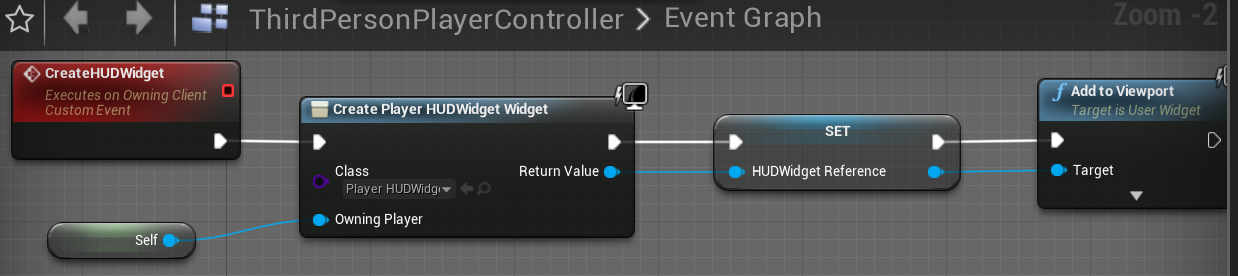
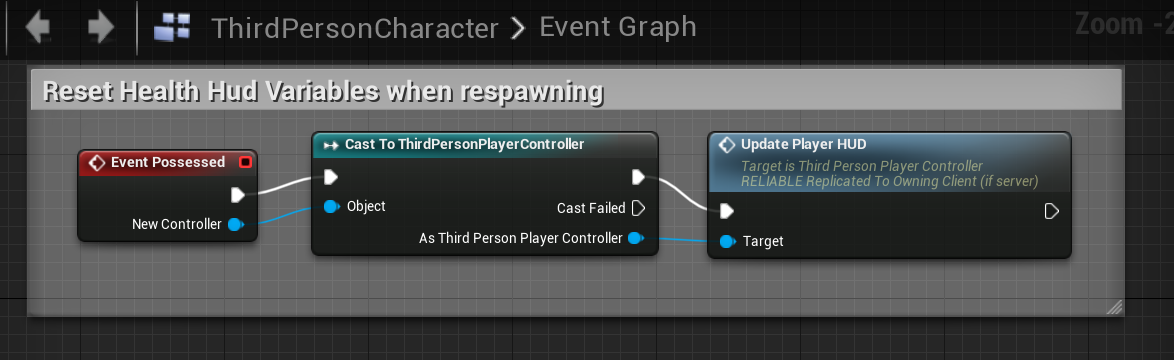
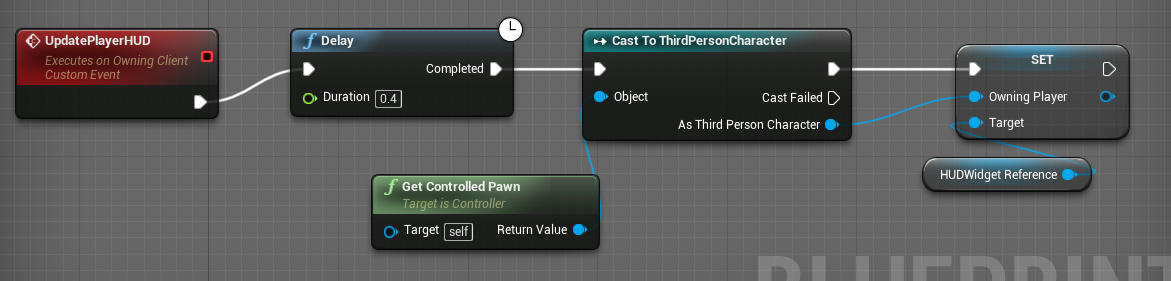
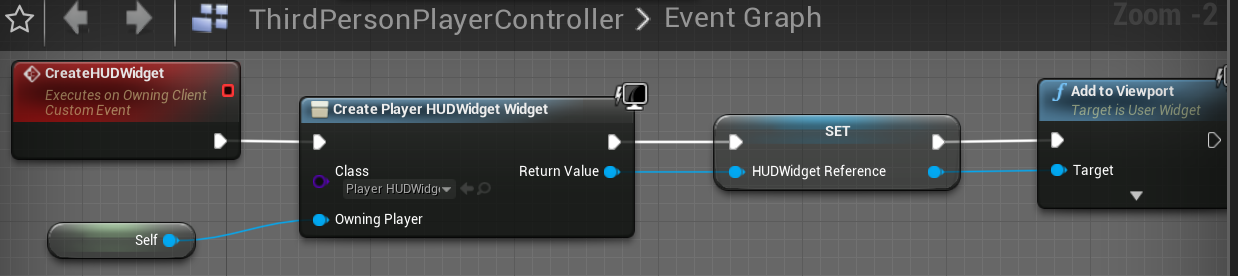
@warm summit @thin stratus That's the same issue I was having a week ago. Do what cedric_eXi said but make sure you add a small delay in the new event. I called my event UpdatePlayerHUD (the one called in the OnPossessed event) and inside make sure to add the small delay node to give enough time to set the new owner. https://i.gyazo.com/c41a810b7e105837d50bb6fc3fa9295a.png https://i.gyazo.com/a48edcd69d19624377f4dd8036234ac8.png https://i.gyazo.com/6dbfa2793a63255fcb375d0e09585bc6.png
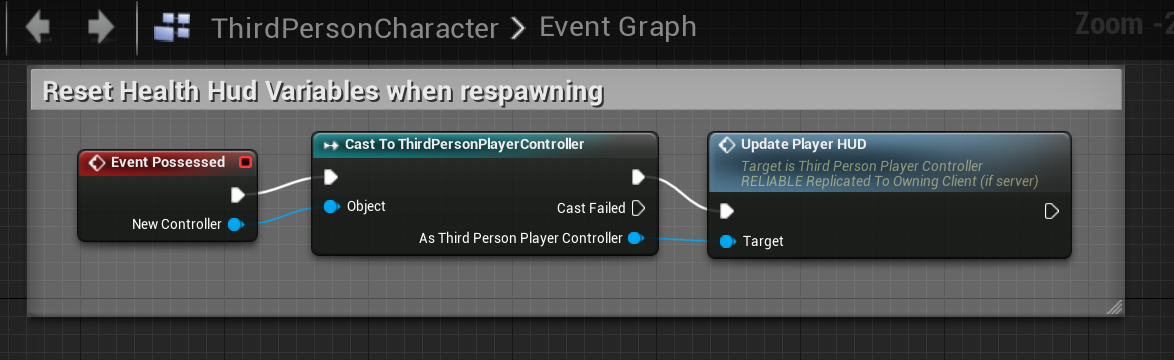
 deep flame
Cedric, you're the real MVP. I hope everybody acknowledges the invaluable help you give altruistically
warm summit
yeah man
warm summit
@cedar finch how'd you get the set (owning player) node??
and when do I need to call the createHUDWidget event?
 gusty lily
hiyas. i'm getting a walk-on-ceiling thing happening in my 2d game. a line traces upwards 200u and if a few conditions are met, the character's gravity it flipped. the game users a listen server setup and this only works if player is server. on client it does work briefly but it's doing that thing where client and server seems to disagree. can anyone thing of any reason why setting gravity in character blueprint like this wouldn't work?
actually its' to do with the 'is input key down condition'
not the gravity setting. what's the best/fastest way to replicate this in a listen server environment. I admit that replication is concept I am really struggling with.
now i have a replicated variable for jump being held, but doesnt seem to affect
copper portal
@thin stratus so it did something different. It didn't transfer anyone, it just showed a black screen but I dont know if the player is in the level. I have to do some further testing but as far as I know, its not working
gusty lily
this has got me there. instead of snooping if the key was held, i used the action mapping and set the variable on the server if the blueprint is the client character. i think.
charred crane
I cannot find ANY information about the network profiler other than a single page of documentation that doesn't say anything about the results or even what they mean. Has anyone used it before?
cedar finch
@warm summit I set the variable inside my HUDWidget. Then I actually created my HUD inside my PlayerController. I also call the UpdateHUD event I posted earlier inside the playercontroller. To make the variable inside your HUDWidget just drag off of your character, in my case Thirdperson, and promote to variable. https://i.gyazo.com/19d602bfa5fedcfc040cf35593851001.png https://i.gyazo.com/ffeb3909a834c8bad2860dd529b6ab68.png
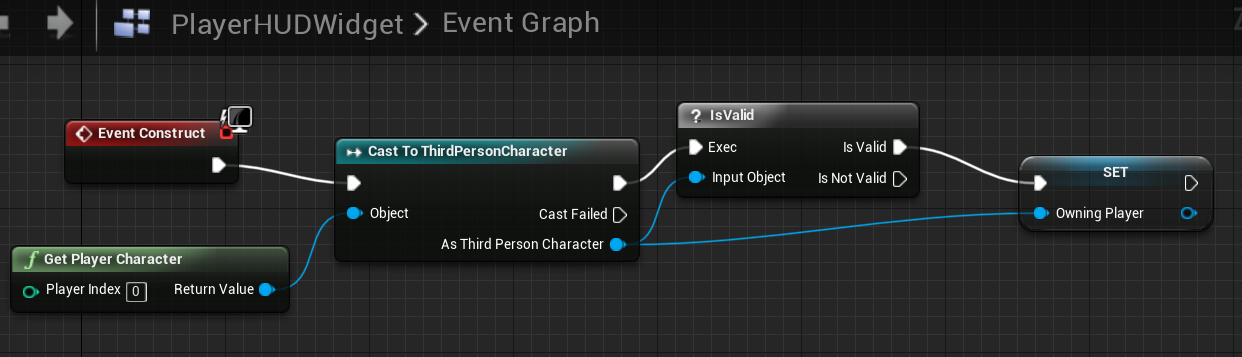
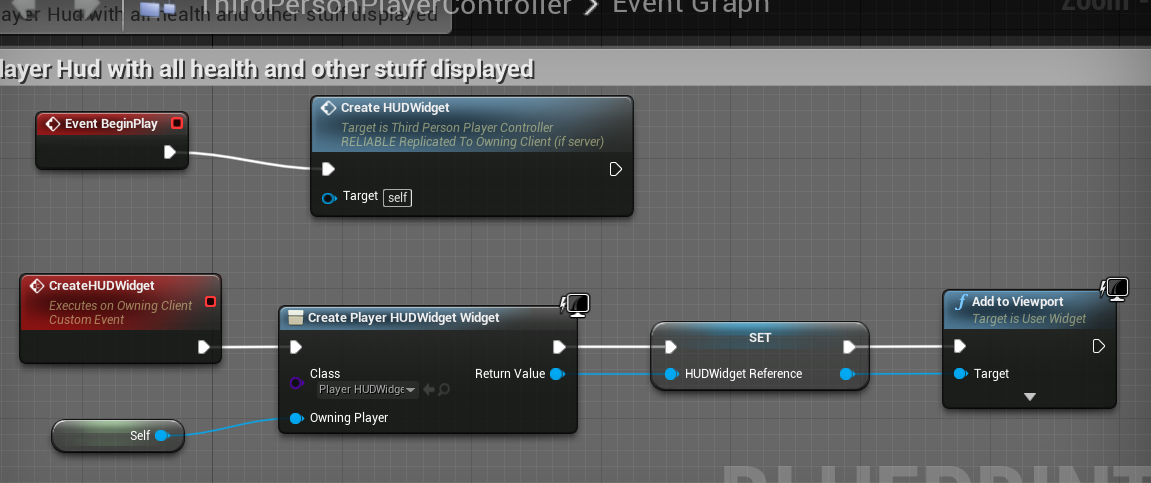


 solar flower
I'm creating a perlin-noise based grid of AActor-derived tiles in my GameMode currently, they're not set to replicate yet...so the client doesn't see them at all.
Currently i'm looking into the best place for their generation, and how I want to replicate them..since they have variables that change over the course of the game and are constantly queried. Any suggestions?
winged badger
how many tiles are we talking about and do you use c++? @solar flower
winged badger
i suggest reading NetSerialization.h for ideas on replication, has a large commented section
solar flower
I'll search for it, my question is more about structure tho
winged badger
basically implementing FFastArraySerializer, which also gives you client side notifications for any changes/adds or removals of individual items
solar flower
Thinking of putting the Grid Generation in a server Gamestate function
winged badger
that works, i might go a singleton Actor path
LevelManager or some such, pre-placed on the level
solar flower
None of the tiles will move or be changed that much, but they'll be constantly queried for their info
winged badger
have it and its components handle tiles and tiles alone
solar flower
What do you mean by singleton actor?
winged badger
i mean you put one into the level
solar flower
Just it's own class?
winged badger
and its the only Actor of its type
add static accessors for it, cache the reference somewhere
solar flower
Would it be all that expensive to mark each tile as replicated?
Assuming the level generation is done during load
solar flower
Is it exposed to BP?
winged badger
i mean, you don't have to replicate them
with FFastArraySerializer path
and no, not really
its mostly structs, the array equivalent is a struct, as are all the items
and those are nightmare to work on in BP
solar flower
Reading through the docs now
winged badger
if its a grid, and only the tile info changes, you can preplace them
and just replicate FTileData
gives you a benefit of 16k actors being loaded from the package instead of spawned
solar flower
I was thinking NetTemporary
solar flower
Good point
If they're pre-instanced in the level, but I need to adjust the transform on half before the game starts...will I still get the same network overhead
Is spawning all that network intensive for a basic AActor derivative?
winged badger
for 16k, it is even when its not networked
solar flower
I'm just curious about the replication
winged badger
you can replicate the random seed as well, have the clients generate the same grid "randomly"
solar flower
That'll probably be where i end up later on, just trying to get basic replication currently
While also allowing a way to optimize later on
winged badger
careful with the bunch cap
40kB i think
before the replication breaks
(in single packet)
solar flower
I'm breaking it up into 600 per frame
Not sure what the time is for open network channels
Is it one frame?
winged badger
1s / NetUpdateFrequency
solar flower
So theoretically...
If i use NetTemporary replicated tiles, spawned from the gamestate in chunks of 600 per frame....i should have something manageable?
Guess I'd turn NetUpdateFrequency up for the tile actors
winged badger
never looked into NetTemporary
solar flower
From what i've read it only replicates the actor for one frame
winged badger
it could work
solar flower
While I have you, are InstancedStaticMeshes the standard for tile-based multiplayer games?
winged badger
i have very little experience with those
solar flower
oh, interesting
winged badger
but i am not working with a procedurally generated map
solar flower
Yea, new territory for me as well
twin juniper
Hi, I have a question.
I want to know how I can have levels with multiple game modes, but I don't know the correct way to do it.
My question is... if I have two game modes (like CTF and DM), and I have 1 map only, what I should do? I have to clone the level and configure each with World Settings > GameMode override? or can I change the GameMode with OpenLevel?
What is the correct way?
 celest falcon
Hey, first time trying out some multiplayer things with Unreal, I'm trying to find a player pawn by UniqueNetid, any hints how I would continue from here? It seems I can only find the player state based on UniqueNetid, but I have no idea how I would then get the pawn reference...
slim holly
do rpc's have any overhead?
 bitter oriole
@slim holly Compared to what ?
slim holly
like, at anything
is there a package id or something attached to it
or any other data
twin juniper
I have a difficult issue I am unable to figure out. I want to do a matchmaking system and I have a few separate "races" or "classes" but how can I tell the server which to spawn for each player? Think about Starcraft 2, you can pick terran, zerg, or protoss. How do we tell the server who is who?
unborn nimbus
You still have to call RPCs from the class that owns them right?
warm summit
@cedar finch Thanks so much.. Everything's working now 😃
charred crane
Anyone have experience with the network profiler?
gleaming vector
@twin juniper it depends on how you define your races
one way you can do it is before the player joins a server, they can append their race selection to their join parameters
you can do this by overriding GetGameLoginOptions in a child class of ULocalPlayer
and then in your gamemode's login function, you can check to see if that option is in the player's connection string
so what you would do in this case is have some UI that sets the player's intended race (or class or whatever), format that into some GameLoginOption that is returned in that function
in the game mode, check to see if they have that option (if not, don't allow them to join, or assign them one, or whatever you want to do here)
and then during initial player pawn spawning, set up their class/race/whatever there
since you know what they intend to be at that point
twin juniper
@gleaming vector would this still work when using custom online subsystems?
twin juniper
@gleaming vector Question, when we call open IP_HERE, it will get the login options from ULocalPlayer::GetGameLoginOptions?
Then, we could pass it from the UI for example?
gleaming vector
yes
twin juniper
Thank you!
gleaming vector
the login options are appended really late in the connection process
so it doesn't matter how you connect to a server (either the open command or some other function)
it's like the last thing you do before you connect to the server
twin juniper
@gleaming vector but are they applied in PostLogin()?
Like, what is a safe time to access them?
gleaming vector
they are passed to the server at the earliest possible time, so whereever there are login options, you will see them there
winged badger
they will be ready by the time AGameMode::HandleStartingNewPlayer is called
which is where its easiest to hook up any custom player setup
twin juniper
Alright, I have one last question. I want to know how to do a round-robin style spawning setup. For example, there are two potential spawns that your base can spawn at, but I want it to be randomized. Is there a way to randomize player start spawning, but still make sure that player a and player b don't accidently roll the same dice?
charred crane
One of my characters has an ability that sends a wave out which constantly knocks backs any other actor it comes in contact with. Why would clients not be affected very well by this? Especially when stationary?
 worthy wasp
Question - SteamOverlay:
My computer i freshly imaged to Windows10 recently - SteamOverlay isnt showing up on my PC - but same exact project - the steam overlay works fine on other developers machines - trying to troubleshoot this but i'm not getting anywhere fast.... Anyone had this similiar issue before?
Steam is in fact installed - and i come OUT of FamilyView when i do this.
any blank/new project - same scenario..... before re-imaging - i've setup probably a dozen projects using steam API integration... never had this problem.
cedar finch
I'm working on a Spectator system similiar to Fortnite where you see the name of the person your spectating as well as their health. I set it up in my Gamemode but it only works for server. Should I set it up somewhere else? Maybe PlayerController? I did notice I don't get updated health values while spectating, it only updates if I switch to another player then switch back. So I'm not sure how I should approach this
 drifting plank
GameMode contains only connection and match logic, GameState contains match data and PlayerState contains player data ;)
I never implement a spectator mode but I've already made a custom player state to store kill count of each individual player. Maybe you can do the same for the health ? (In any case your health needs to be handled in your player pawn).
cedar finch
@drifting plank Ahh, ok I forgot about PlayerState. I havent created one yet. I was planning on creating a scoring system for players so I'll look into PlayerState and probably be able to get the players health from my Thirdperson Character. Thanks for the help. I was looking for a direction to head in and you pointed me in the right direction. 😃
haughty burrow
anybody have any advice on this?: https://answers.unrealengine.com/questions/218056/stop-damage-to-self-in-multiplayer.html?childToView=840179#answer-840179
copper portal
@fossil spoke I did what @thin stratus told me to do (enable seamless travel in gamemode) and it returned to the lobby level but for some reason, I cant get the widget to show. The widget code in in the onpostlogin event in my lobby gamemode but that doesnt do its job. What should I do to fix this problem?
charred crane
@haughty burrow i did what one of the commenters suggested. When I spawn my projectile, i set its owner to...its owner(self if the character is creating it) and then when there's an overlap/hit, if get owner (the method) is equal to my owner ( the variable), don't do anything.
 fossil spoke
@copper portal GameMode is server side only, the Server shouldnt be trying to display Widgets, Clients need to manage opening the Widgets themselves.
copper portal
well the gamemode calls an event from pc @fossil spoke
fossil spoke
So
fossil spoke
The Servers version of that Players PC yes
copper portal
it shows when the player first joins the lobby but when the player returns to lobby, it doesnt show
fossil spoke
I just explained that the Server cannot manage opening an Widget for a Client.
The Client needs to do that locally.
copper portal
it works the first time though
when the player joins the lobby
does onpostlogin only occur once?
fossil spoke
On Hard travel yes. PostLogin is not called again if your using Seamless travel
copper portal
well there is my problem
but how would I show the widget now?
when the player returns to lobby
fossil spoke
BeginPlay on the PlayerController?
solar flower
Can you unposses and possess from the player state?
copper portal
ye
solar flower
This isn't working for my client for some reason
The pawn is spawned but not possessed
Snip is from the playerstate
copper portal
this is multiplayer right?
solar flower
yea
fossil spoke
PlayerController 0 maynot be the PC you think it is
copper portal
id use a foreachloop
fossil spoke
@copper portal I cant debug your code mate. Your doing something wrong, you havent even said whats happening that isnt right.
fossil spoke
My guess is that your trying to open a Widget from the Server for a Client, which the Server cannot do.
fossil spoke
...
copper portal
mega oof
fossil spoke
Debug your code man.
solar flower
Controllers can be passed in as variables to a server rpc?
since they exist on both?
fossil spoke
Why are you trying to unpossess in the PS?
What are you attempting to do?
PlayerState is data, you shouldnt really be doing anything inparticular on it like that.
solar flower
Client gamestate generates the world, when it's finished generating and setting up it tells the player state their world is ready
Then in the playerstate i'm waiting for that acknowledgement and possessing the gameplay pawn
Spectator during the generation
Very willing to move things if this isn't best practice
Wanna keep generation in the gamestate tho
fossil spoke
Why would the GameState generate the World... Wouldnt you want an entire independant Actor doing that?
solar flower
Yea, it's pretty modular so I'll move it later on
I want it in the gamestate so it's easier to access globally
fossil spoke
Well make a function library that simplifies it.
Just because something is easy, doesnt make it right.
solar flower
Wouldn't that still be searching through every actor in the game to find it?
I guess GetGameState() could be doing that too, haven't looked into it
fossil spoke
Actor Iteration is pretty performant
solar flower
I have a lot of actors in the scene
copper portal
@fossil spoke ok so the information didnt show on the widget but I have a ref in my pc. How am I able to store that ref somewhere so that it can be accessed after servertravel and still have the same value?
fossil spoke
Well when you spawn the Actor, cache it somewhere thats easy to access.
solar flower
Like the gamestate?
solar flower
I migrated it from the game mode this morning
fossil spoke
Id have it on the PC, id probably also set its Owner to be the PC as well. That way you have instant access to the PlayerController that owns it from inside the World generator
@copper portal Ref to what?
fossil spoke
All Widgets are destroyed when the level is changed.
copper portal
fr?
fossil spoke
You cant store refs to Widgets across travels
fossil spoke
Sure
Your going about this all wrong though mate.
You shouldnt need to pass the PC
You shouldnt be possessing in the PS
solar flower
So if I move the world generation to the PC, the gamestate could generate the Seed, then pass it to the PC on RepNotify.
Then the PC could generate the world, and finally call a server RPC on the PC to spawn and possess?
fossil spoke
That sounds better than what your doing right now.
Id still separate it out into its own Actor though.
solar flower
ActorComponent attached to the PC or Actor referenced by the PC?
fossil spoke
Actor itself.
solar flower
Any cons for actor component?
fossil spoke
Well if its an Actor Component then every PC on the Server would have one, as opposed to just a single Actor existing on the Server.
fossil spoke
Is the Seed the same for each Client?
solar flower
Yea, the clients have to get the seed from (currently the game state)
fossil spoke
The single Actor on the Server could replicate its Seed to the Clients.... I dont understand why thats an issue for you.
solar flower
It's not, just wondering why you'd recommend certain things
So i don't do the same thing later on and can judge pros/cons myself
fossil spoke
The WorldGen Actor on the Server would be created for each Client when they connect, each Client would then have a version of the WorldGen Actor with the Seed that the Server determined when the actual World was created. Therefore each Clients version of the WorldGen Actor could go ahead and generate the world locally. Once the world is generated locally, it can tell the PC to let the Server know that its done so and to possess its assigned Pawn.
Does that make sense?
No need for GameState, no need for PlayerState, no need to pass any info to the Server (other than the simple RPC that lets it know its right to go ahead and possess the Pawn, this would happen inside the PC though so it doesnt need to pass anything).
solar flower
Would AWorldGen be something that should be packaged in the level and found by the controllers or should it be spawned in beginplay?
Also, would it be a replicated actor?
fossil spoke
Id let the GameMode spawn that. It would be a Replicated Actor yes.
solar flower
Guessing no
fossil spoke
If its not Replicated then the Clients wont know the Server spawned one and thus in turn the Clients wont spawn it themselves and thus the world wont be generated locally for Clients.
solar flower
So it would be replicated but Seed would be the only replicated variable, Generate() wouldn't be an RPC
fossil spoke
Generate() would be called on BeginPlay inside AWorldGen
Seed would be a Replicated var, yes.
solar flower
I've been calling Generate from the Seed repnotify
fossil spoke
When the Client connects it will be told to create AWorldGen and it will get the Servers version of Seed and then call Generate() with the Seed
solar flower
That's done automatically for the clients because it's replicated?
create AWorldGen
fossil spoke
Calling it OnRep would work to i guess.
solar flower
If a client connects halfway through a game, would the OnRep still work?
Assuming that the Gamemode or something has generated it and set it in AWorldGen at it's BeginPlay
fossil spoke
Yes
solar flower
Gonna try to do a major refactor real quick, okay if i tag you with questions about what we talked about if I run into issues?
fossil spoke
Sure
solar flower
I have a WaveManager ActorComponent on my GameState currently that holds info like the number of enemies to spawn in a wave, how many are currently alive, the spawn locations, current wave number, etc...
Is the gamestate the proper place for that? Players access it to fill information for their HUD
fossil spoke
Yeah that sounds fine.
 left marsh
I have a bunch of physics-based props in my scene. how can I ensure they stay in-sync between clients?
 maiden vine
Anyone can help me figure out how to spawn just a player controller for player 2 to join in on local multiplayer? I cant get the 2nd gamepad to be recognized
Like a jump in jump out game
cedar finch
So i'm trying to learn how to use PlayerStates. How do you cast to it? Also is there a guide or video on playerstates?
fossil spoke
Its just a regular Actor, you cast to it the same way you cast everything else?
Check out Exi`s Network compendium, its linked in the Pinned messages.
Im sure he has something in there about PlayerStates.
cedar finch
Found it. Thanks I'll read it now. 😃
thin stratus
@copper portal @fossil spoke Short reminder:
OnPostLogin calls for HardTravels only. So only when you move from, for example, MainMenu to Lobby.
With SeamlessTravel enabled, OnPostLogin won't call. There are other events that you can use instead, such as "HandleStartingNewPlayer".
This is the reason why your Widget doesn't show, because OnPostLogin does NOT call when using SeamlessTravel.
And no, you HAVE to use SeamlessTravel if you use Steam, so you'll have to adjust your code to use Events that call for Hard- and SeamlessTravels.
I hope that wasn't answered already, cause I don't have the time to go through all the messages after I got pinged.
Oh and reason OnPostLogin only calls on HardTravels: HardTravels are basically first time connections, so when the player "logs into" your server.
It's not reeeaaally like a login (even though you could do some stuff with passwords in C++), but well.
In totall it calls PreLogin, Login and PostLogin, where PostLogin is the only event exposed to BPs.
When using SeamlessTravel, the Player is never disconnecting and thus also not connecting and login in again.
winged badger
there is a function in the GameMode, called from both HandleSeamlessTravel and from PostLogin
i can't recall the name, but shouldn't take too long to find out
fossil spoke
Yeah he got it eventually after i explained it all @thin stratus lol
thin stratus
@winged badger Think it's HandleStartingNewPlayer
@fossil spoke Gnah, ALL the writing for nothing.
winged badger
that one also gets called, its the one that initializes HUDs among other things
thin stratus
I hope some random person, YES YOU!, will read that and learn it for the future.
Well that or "StartNewPlayer"
Can't see much more passing a PC in GameMode API
Ah well there is "HandleSeamlessTravelPlayer" in GameModeBase
As well as InitNewPlayer
But that is hardtravel i think
Then we have OnSwapPlayerControllers but that's more for keeping data
winged badger
virtual void GenericPlayerInitialization(AController *C)
thin stratus
Ah well, I have never used that one haha
winged badger
    /**
     * Handles all player initialization that is shared between the travel methods
     * (i.e. called from both PostLogin() and HandleSeamlessTravelPlayer())
     */
that bit peeked my interest
winged badger
there is a pattern of not exposing very convenient overrides
AController::SetPawn(APawn *InPawn) is also not BP exposed
and its called from both OnRep_Pawn and from Possess
so first point where you can be sure Pawn is good on both client and server
left marsh
I am attempting to run a build of my game in DevelopmentServer, but I am failing a Check in regards to releasing unavailable memory.
Has anyone encountered this?
fossil spoke
Is that really the function signature? With an AController* C lol
winged badger
it is
left marsh
It's in regards to Canvas initializing with the editor-only texture WhiteSquareTexture
fossil spoke
Eww
thin stratus
They do that all the time. They use C in the declaration and Controller in the implementation
Saw that tons of times in the CMC
Might be the same dev
fossil spoke
Horrible
thin stratus
@left marsh Yeah well, are you using some Editor only stuff that isn't packaged with your server?
left marsh
@pale turtle I tracked it back to the default texture references of the Canvas class. The odd thing is that my standalone game hits the same point and gets the same warning about the texture being unavailable but doesn't hit the check when de-loading.
next warren
My hudref value getting none value on client side but on server side hudref has. Value i dont know why my client has none value
left marsh
I will try a fresh project and see what happens
thin stratus
@left marsh Make sure to check your logs when packaging
This shouldn't happen in the first place
next warren
Anyone suggest solution thanks in advance
thin stratus
@next warren Are you setting it somewhere else?
next warren
In pc i m setting the hud value
thin stratus
No where else?
Also are you sure that you aren't calling this on the wrong instance?
HUDClass only exists on the Local PlayerController.
left marsh
I am running in visual studio. Do I need to package?
IE running in DevelopmentServer mode so I can debug.
thin stratus
Means, while the PlayerController of the Client exists on the Server and the LocalClient, the HUD does only exist on the Client
@left marsh Ehm, I'm not sure, I usually package my devservers. Also haven't worked that much with them
I would test if that also happens in a packaged version
If not, then it might be a problem of how you debug it
left marsh
What is your process for deploying a packaged server executable?
The Packaging option in the editor creates a game exe, not a server exe
thin stratus
Build the Solution in VS with DevServer.
Package the Project in Editor for Dev.
Move the DevServer Binaries to the Packaged Project.
next warren
So how can i call event which is in hud
thin stratus
But you could probably also look into using the frontent @left marsh
And setup a Server Profile there
next warren
I m new to muktillayer
left marsh
Frontend?
next warren
*multiplayer
thin stratus
@left marsh And correct, packaging creates Game exe
left marsh
I am unaware of this tool
thin stratus
But building the solution for DevServer creates the Server exe
left marsh
What binaries do I need to move? Just the Server.exe or is there something else?
left marsh
I will give it a try.
thin stratus
The rest is shared in the package build
Might want to google a bit as the docs are kinda short
@next warren Well you have to always target the local player
I don't know your code
But usually that's done via a ClientRPC
given that your Server should handle all Inventory modifications