#multiplayer
1 messages · Page 419 of 1
 zinc zealot
thats the problem i was having but screw it
xd
im gonna make it so only the host can use it
 sharp arrow
guys can you help me with this when it atracts the players should be able to se the othe rplayer grab it and it does but the problem is that when i see in one screen the other player catchign it when it catches it instead of being attach right in the hand is like in the socket but far awar from the hand but if i see the screen of the one ho catched it it is in his hand
sharp arrow
sharp arrow
the problem here that i wana fix is that the weapon is not in the hand
sharp arrow
forget guys i did it
 twin juniper
Does anyone have an issue with steam subsystem
the overlay does not work
I followed this
 bleak lily
how would I be able to do something in which the server checks to see if there is a certain actor there and if it isnt the game ends
 trim dirge
I need some help in my multiplayer game, how can i drag a ragdoll to safety, drag another player while dead from one location to another? how is it even done
 modest dock
anyone know how to get a players ping connected to a session?
 gusty parcel
Anyone know how to setup a ark like server system?
 red ledge
@bleak lily try searching for all actors of class on gamemode, if the function returns 0 actors of that class, then end the game
game mode only exists on server
bleak lily
I would have to create a new function for that right
@red ledge how would I get the number of actors of that class like how would it know it is 0
red ledge
do you use blueprints or c++?
bleak lily
blueprints
what thing would I use to see if it had 0 actors of the class

like i am using this
red ledge
drag the out actors and check if the length is less than 1

 red ledge
use a branch and end the game if that is true
you should probably check blueprints basics before making a multiplayer game
bleak lily
yeah
oh thats weird I cant destroy the session
like its not in here
oh no its because I cant do it in a function
I got it
is there a way for me to wait though for this to happen since there is a character select and there obviously wouldnt be that actor right when you start
@red ledge
red ledge
if you are using sessions, there should be a function called when players join, don't check anything until players start joining
It's called something post login
or make the controller class talk to the game mode and ask it to check on the controller begin play
zinc zealot
hmm
Does anyone know
how to save a map after used on a multiplayer session
or save it fover
over
weird..
never had this before
LogOutputDevice: Error: === Handled ensure: ===
LogOutputDevice: Error: [Callstack] 0x00000000CED6B706 UE4Editor-Core.dll!UnknownFunction []
LogOnline: Warning: OSS: AutoLogin missing AUTH_LOGIN=<login id>.
 novel solar
I'm trying to wrap my head around uchannel, specifically the control channel.
Is there anything but API docs?
zinc zealot
im so fuckin mad
i lost all the code i did to fix the problems i had yesterday
and now i have to redo them
and i dont remember them
noice
my game is all fucked up and im freaking out
 cerulean hamlet
Is there a callback for when any Unreal instance (client or server) finishes loading a map?
@novel solar what about UChannel are you trying to understand
 winged badger
    //APlayerController.h
    /**
     * Called to notify the server when the client has loaded a new world via seamless traveling
     * @param WorldPackageName the name of the world package that was loaded
     */
    UFUNCTION(reliable, server, WithValidation, SealedEvent)
    void ServerNotifyLoadedWorld(FName WorldPackageName);
of you can look into FWorldDelegates
looks like it goes to SwapPlayerControllers() from there directly
novel solar
@cerulean hamlet working on a distributed mmo server, so having to customize a lot. What I'm trying to achieve, is routing from an echo server with some server responses (outside of unreal entirely)
So, with uchannels, I'm trying to figure out creation, and specifically control channel.
 unique thunder
What goes into the 'object' pin when I cast to my player from inside my playercontroller? "GetOwner"?
 fossil spoke
What is the type your trying to cast to?
unique thunder
character
fossil spoke
GetControlledPawn()
cerulean hamlet
@winged badger will the FWorldDelegates include finishing loading after level streaming?
 meager spade
 worthy orchid
Anyone have an idea as to why I can't seem to connect to my dedicated server from the compiled game but I can from running standalone?
When I run the compiled game and try to connect the server seems to close the connection or vise versa
Using steam btw
 cedar finch
Anyone know why when I sprint I can't see myself doing the sprint animation (just kinda shakes) but it does show for all the other clients? I'm trying to replicate my sprint but it won't show on the owning client
worthy orchid
Did you make the event run on server?
cedar finch
Yes
worthy orchid
Try doing multicast
cedar finch


@worthy orchid Multicast worked!! Thanks man. I wish i understood why that fixed it. Do you got a quick explanation?
worthy orchid
Yeah it's just what it implies it casts it on server and owning client
 gaunt crown
Switch Has Authority is useless on a Run On Server Event since the target is already Server btw 😃
Excuse me, it only caught my eye for no reason 🤣
gaunt crown
Ok anyone know of this one ?
 thin stratus
The function can still be called from a Client, even if it only executes local
And there are situations where you even want to filter that
gaunt crown
Ah the more you know
https://gyazo.com/a52bc9dbb2a064504ae5eecb0e1f7ae2 I have this issue
 thin stratus
Every functions and variable is basically available to the client, so if you don't want them to cheat, let Authority only handle stuff
gaunt crown
That fires on Server apparently
But until I exit UE4
and reopen, and interact it runs on client etc perfectly.
Is this a bug ?
Heres after now I restarted UE

Perfect.
Print Strings show.
thin stratus
It only works once?
gaunt crown
I created the Events in the graph and they would only fire Server and it pissed me off so much that I restarted UE and then when I tried after restarting it fired Client and all as it was suppose to do which made my very happy to see I was correct this entire time, but when I edited the graph with Interacting Server only fires again and I have to restart for the correct replicating process weirdly enough.
It works all the time until I edit the graph with something and need to restart.
gaunt crown
Good to know
Thanks for clearing that up haha 😄
Is it possible that can be reported to UE to be fixed?
thin stratus
Tricky, only if you can recreate the bug in a new project
Cause they need to see the problem and be able to recreate it
gaunt crown
Oh I found the bug!
When editing the Graph of the Foliage Component BP it seems to require a restart.
Foliage Instanced Static Mesh Component is the Parent BP.
I just removed a Print String from the Graph and now nothing will fire.
 zinc zealot
why cant i get an As thirdperson from this
its not doing
i set stabed to replicate and still
 icy nacelle
@zinc zealot This is more for #blueprint
You've got quite a few things that looks like it could be done better here.
Firstly, you want to do a cast to in your first screenshot when you have an overlap, otherwise everything will be set as the actor 'stabbed'
Secondly, you shouldn't have CastTo's in tick
icy nacelle
Having some major problems with this lasso item that I've made. It shoots a projectile with a cable component, but its not replicating properly. Works perfectly (as a straight line from hand to projectile) on singleplayer.
Any idea why this could be happening? Couldn't find anything on google with replication errors for the cable component.
For perspective in that image:
The player is slightly invisible, and the red cube is the end point of the projectile.
winged badger
did you go read the CableComponent?
zinc zealot
Why cant i do this!!!
icy nacelle
Yeah @winged badger, There's nothing under replication for the unreal docs
I cant understand why its doing this
winged badger
i meant the source code
icy nacelle
No I haven't, how would I go about de-bugging while searching the source code?
winged badger
i am assuming that nothing in it is replicated
so you would have to fully simulate the lasso client side
instead of relying on replication
icy nacelle
I see
The cable component has a 'replicate component' checkbox, could this indicate that it is replicated in its source?
winged badger
every component has it, so no
read the GetLifetimeReplicatedProps override in its .cpp
there you can see at a glance what members declared in that class is it replicating
twin juniper
Hello guys
I have a problem
When I connect on dedicated server I get lags like, I move and it throws me back to the place I moved from
And the game is really simple
I get no framedrops
and no high ping
thin stratus
Using a Character?
twin juniper
yea
thin stratus
Adjusting the MaxWalkSpeed somewhere?
Usually that only happens if you have no proper network code for movement input
And you move on the client but the server doesn't move or lags behind
twin juniper
Well not really but It throws me after like a second or so
But will look at that and will seee
 charred tulip
I'm making a multiplayer physics based game and whenever I spawn 100 replicated balls, the client's end looks horrible. Balls look very choppy. Can someone explain how this is happening? What tools I could use to see this for myself? If I can see how it's doing it maybe I can figure out what questions to ask next on how to fix it. I'm by no means a network guru lol
 jagged garden
@charred tulip I’m not entirely sure the solution but when you have that many replicated actors it starts to look very choppy on the clients end so I would recommend maybe doing custom replication where you send the position of the balls to the client
 grand kestrel
Physics based multiplayer game, not a network guru. Doesn't mix
 high heart
what would the best entry point be for an event that needs to occur after a game has started but before ANY actors are spawned or replicated client-side?
ie; right after the world loads
fossil spoke
You mean the game as in the process itself?
high heart
no like a match. right after a gamemode is started, except on the client
it's painfully obvious to me at this point that I can't depend on GameState to be ready when a character spawns on the client
so that rules that out
fossil spoke
What are you trying to do?
high heart
Ultimately I'm trying to do client-authed VR weapon loadouts. The process is:
- spawn characters and weapons on server
- call equip logic client-side as soon as possible
Equipping server-side is not an option for reasons. That's not important. The tricky part here is that if the weapons replicate before the character they don't know who to equip to. It's crazy and random and unreliable. I've already written a set of static functions that use uint8 loadout ids to track which weapons go to which actors, but it doesn't clean up very well which could potentially cause errors if clients have data from other worlds with old actor references.
All I need to do is reset the static arrays right after Bringing world %s up for play
but, before any of the weapons or characters get replicated
fossil spoke
Why not reset them when the previous world ends?
That way they are ready for the next world.
high heart
That'd work just fine
though I could imagine weird behavior in-editor since static stuff doesn't seem to get reset when PIE exits
though actually that's just speculation. i may be wrong
fossil spoke
Well you could write your own Editor only code that handles it for the PIE case.
Just scope it in whatever editor preprocessor you think is necessary
fossil spoke
Just do it when the level is unloaded. There will be a delegate for it in FCoreUObjectDelegates
high heart
wow I didn't know about FCoreUObjectDelegates
thanks
I don't see an unload event. OnPreLoadMap should probably work though
and I guess moving all the logic to game instance would probably fix any editor issues
gaunt crown
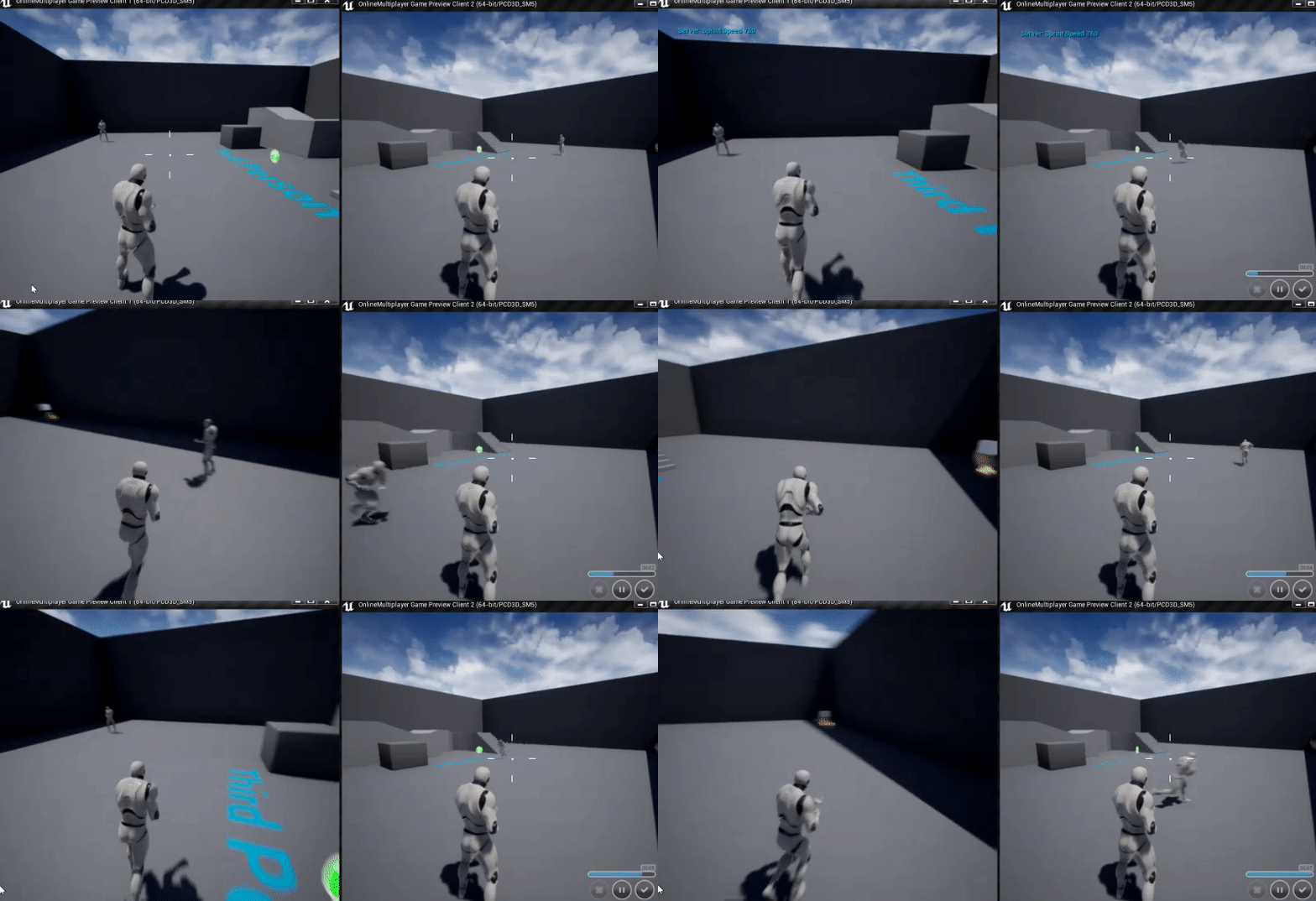
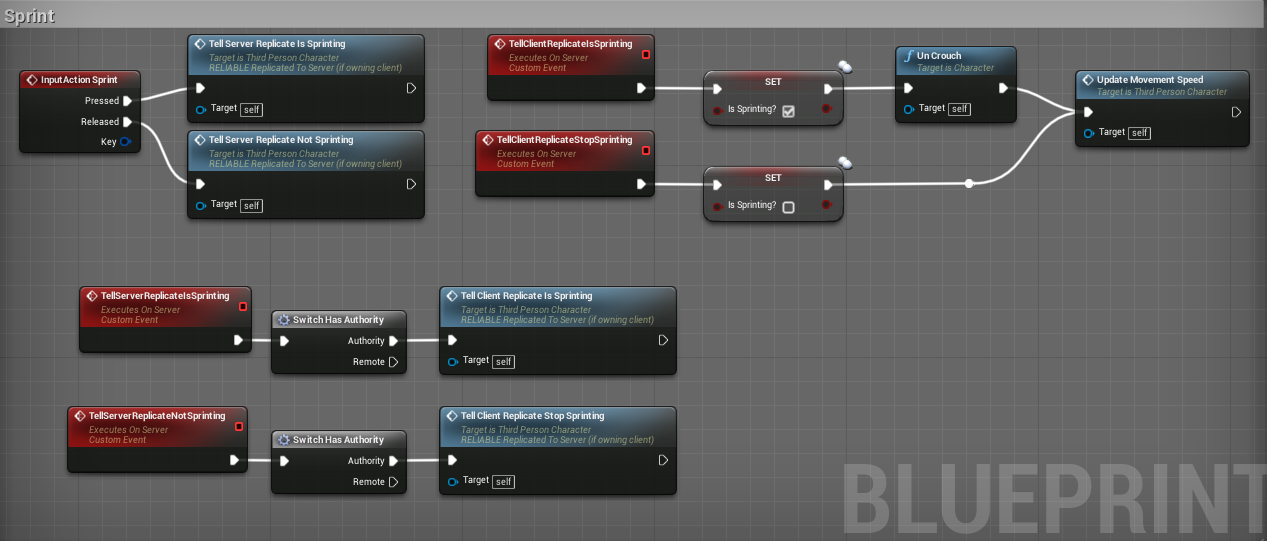
Hey so I noticed that when I enabled some pktlag on my project, my sprint mechanic when I stop and start it is a bit glitchy due to response between the client and the server being obviously laggy.
https://gyazo.com/d3c303198667b794aac3db33d668f8e1
How do games mainly do sprinting and prevent any desync for the player to be a smooth movement ?

I do it this way.
grand kestrel
@gaunt crown By creating custom client prediction for CMC, here's a wiki entry (but the wiki is borked) that gives you a basic rundown
https://wiki.unrealengine.com/Authoritative_Networked_Character_Movement
You definitely can't do it in BP
grand kestrel
Unfortunately you'll find a lot of solutions on youtube that don't work once latency is introduced
Yeah, CMC is C++ only
That will never change, however epic have said they want to make a umm.. adequate implementation of CMC some years back, but that was never a priority and until Fortnite would benefit from it it never will be
gaunt crown
hm
grand kestrel
Eh well you don't need to know much to add prediction based on some tutorial
I made a wiki tutorial for a character flying with a wing suit aimed at BP users a while back, which uses only the bare minimum C++ required and walks them through it, but as I said the wiki is borked
grand kestrel
Definitely not
gaunt crown
😮
grand kestrel
Quite the opposite once familar
BP is hard to read
Once anything becomes remotely complex
gaunt crown
ah
grand kestrel

GitHub
A sample of character movement replication for UE4 - error454/CharacterMovementReplication-UE4
Very old but still mostly relevant and main thing: not on wiki
Read the second link to understand a bit more about it
GL, I'm off for a few hours
gaunt crown
ty man
unique thunder
@gaunt crown I haven't read through the whole chat on this but,
You should be able to do it by lerping the max speed in-between the run states to get a smoother outcome with BP alone
🤔
You can lerp from current speed to desired run/sprint using a timeline that plays from start and this should eliminate any problems with players switching too fast or in-between the lerps
gaunt crown
yeah that could potentially solve it.
do a slow down and a run up type of thing
Instead of instant max walk speed change
@unique thunder
😃
gaunt crown
My fix is this 😃
for now
Old

New
As you said @unique thunder Timeline 😃
Works nicely to slowly transition movement and stop that rubberband
And that was set to 100 on the pktlag.
so def good improvement.
gaunt crown
@red ledge Its obviously a definite work around
I can tell you what though
adding that timeline made the movement cooler 😛
and fixed that issue too haha
red ledge
if it works then it works is the first rule of programming
gaunt crown
@red ledge 😃 Yes sir!
Im here to learn and enjoy what I love doing, being creative.
And making bugs basically features 
 jolly siren
 inner flare
Sweet. That's awesome I was just having this issue, thanks 😃
 vital steeple
do unreliable RPCs have a chance to NEVER run, or do they just have a chance to be latent and run later?
for instance if i have a particle effect activated on multicast and its unreliable
will it just get activated/deactivated slightly off timing, or does it have a chacne to be stuck on or off
 humble zealot
Guys, can i delay my character from spawning in until the map is loaded? (level stream)
its urgent
grand kestrel
@vital steeple reliable RPC will run later if it fails, unreliable will not
 vital steeple
thank you 😃
also anyone had sounds not replicate to clients with PIE, dedicated server, and two clients? i have a multicast ignore local client, and the print node indicates its playing on server/remote clients, but its not actually playing
 sharp pagoda
Note that it's not specifically "run later". Reliable RPCs are ordered within their own data channel
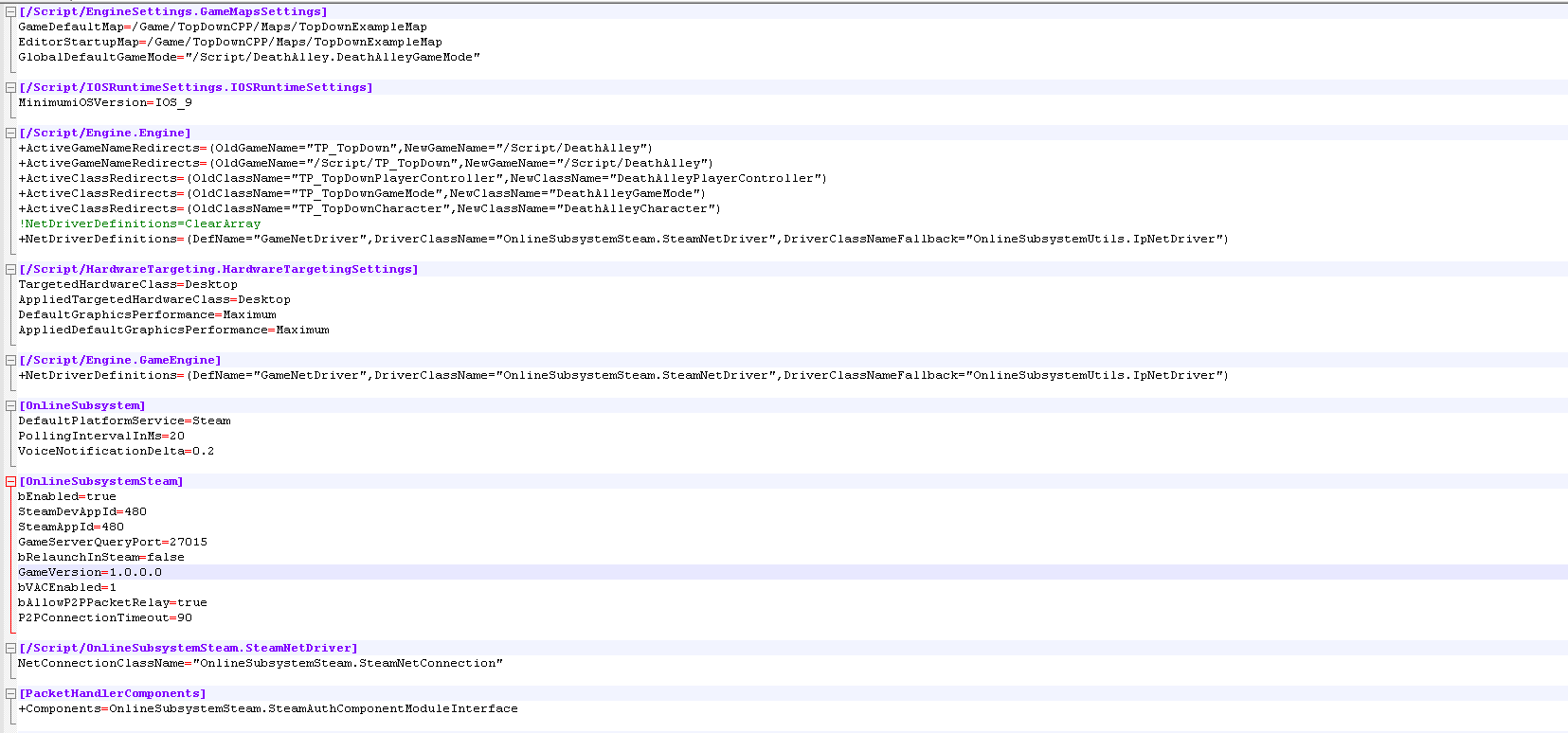
@twin juniper Your net driver definitions
twin juniper
@sharp pagoda Which ones?
sharp pagoda
[/Script/Engine.GameEngine]
!NetDriverDefinitions=ClearArray
+NetDriverDefinitions=(DefName="GameNetDriver",DriverClassName="/Script/OnlineSubsystemSteam.SteamNetDriver",DriverClassNameFallback="/Script/OnlineSubsystemUtils.IpNetDriver")
+NetDriverDefinitions=(DefName="BeaconNetDriver",DriverClassName="/Script/OnlineSubsystemSteam.SteamNetDriver",DriverClassNameFallback="/Script/OnlineSubsystemUtils.IpNetDriver")
Is what it should look like
Nothing in Engine.Engine
twin juniper
Oh
humble zealot
do you guys know how to delay a character spawn until the level loads in?
i need help an cant get an answer
sharp pagoda
My best guess would be to look at gamemode, see if there's anything related to post map load there, and override the default spawning system to spawn your player after post load @humble zealot
twin juniper
@sharp pagoda thanks that worked lol
humble zealot
@sharp pagoda I will give it a look
cedar finch
I have a simple zombie that moves to players using "Ai move to" It works but I was wondering how I could make him chase after other close players instead of allways chasing the 1st person. For example say the zombie was chasing me and I told my friend, "take the zombie from me" and he ran close to the zombie and the zombie would start chasing him. Any Hints on how I should go about doing it?
humble zealot
@sharp pagoda I just noticed I'm actually using the standard Third person game mode
nothing edited
vital steeple
maybe im missing something
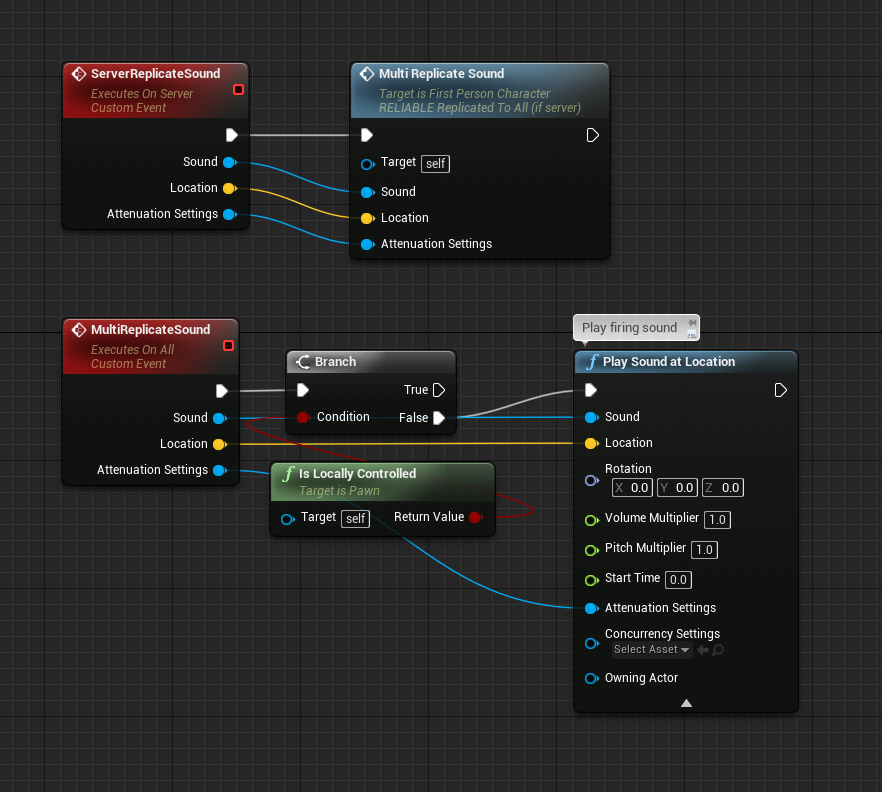
when i run prints, the owning client DOESNT play and the server/other non owning client DO play... supposedly. they at least print
is there soemthing about sound replication that im missing?
because im not hearing them in PIE
this is in a fresh example project
zinc zealot
Hey guys
question
I've had this problem for quite a bit now
Clients
when moving backwards
glitch
looks like their trying to turn in various directions at the same time
and i mean animation wise
is it the Moving component that the 3rd person character comes with and i mean the Programming
zinc zealot
It might be because of the same account or same machine
Idk
Does anyone know anything about my problem?
vital steeple
no one is aware if any weird sound replication issues or limitations?
vital steeple
does it just not work in PIE?
grand kestrel
No it works
Keep in mind if a window isn't active it won't play the sound
Or rather it's muted in background
grand kestrel
It's a common feature in games 😋
vital steeple
thank you...
im both grateful and a little salty about that
though how do some games override that? i know squad does
is that just an engine setting somewhere?
grand kestrel
You've made the biggest rookie error; tunnel vision
Focusing on replication instead of the whole picture
vital steeple
yeah for sure 😦
grand kestrel
It's one of those things you'll get past with experience
It's probably a setting somewhere, you'll need to ask Dr Google
grand kestrel
Np
 runic cairn
Hey guys, after upgrading from 4.17 to 4.20, all clients will crash when the server attempts to seamlessly travel them back to the lobby when the game ends with the following fatal error:
Rendering thread exception:
Fatal error!

Unhandled Exception: EXCEPTION_ACCESS_VIOLATION reading address 0xffffffff

0x00007ff615f2dae2 BattleRoyale.exe!FFXSystem::AddGPUSimulation'::2'::EURCMacro_FAddGPUSimulationCommand::DoTask() [c:\unrealengine\engine\source\runtime\engine\private\particles\particlegpusimulation.cpp:4438]
0x00007ff615f2eda2 BattleRoyale.exe!TGraphTask<FFXSystem::AddGPUSimulation'::2'::EURCMacro_FAddGPUSimulationCommand>::ExecuteTask() [c:\unrealengine\engine\source\runtime\core\public\async\taskgraphinterfaces.h:832]```Has anyone seen this before or have any ideas what might be causing this all of a sudden?
or...
---------------------------
Assertion failed: Component->FXSystem == FXSystem [File:C:\UnrealEngine\Engine\Source\Runtime\Engine\Private\Particles\ParticleGpuSimulation.cpp] [Line: 3221] ``` left marsh
Are there some general guidelines for making multiplayer functionality in Unreal?
Particular patterns to adhere to, for example?
 glad sedge

Like. 400 times
I'd advise mapping as much as you can using some kind of flow chart software, like lucid charts.
 halcyon totem
I want to learn how to make an online game in 2018 where are you all getting your into and tutorials from?
 rose egret
can someone tell me how an TArray<FString> property is replicated? every time I add an element the whole array will be replicated or just the added element?
 random thunder
Hey guys, can someone help me with the Blue Man Vehicle Physics? I can't get it to work properly in multiplayer.
https://forums.unrealengine.com/unreal-engine/marketplace/111247-blue-man-vehicle-physics-plugin?p=1526796#post1526796
Unreal Engine Forums
MARKETPLACE https://www.unrealengine.com/marketp...ehicle-physics (https://www.unrealengine.com/marketplace/blue-man-vehicle-physics)
You can get the Plugin right
grand kestrel
IIRC there is currently no working prediction for his plugin
 slate veldt
Silly question - noticed that if a client joins a game after other players, the other players pawn's "BeginPlay" doesn't get called on the client (sets some references)
I'm assuming I should just move this into a "PostNetInit" instead?
 late violet
Found something I can't seem to get the answer for. Note: writing in C++, but if there's a blueprint version, I can use that too.
I have an Actor, which is created and attached to a character. I've set the owner of this actor to the character. In the Tick of this Actor, I want to run some code that is only run on the owning client (which would be the owning client of the character, since they are the owner). I can't have this be an RPC as timing is important, and needs to be the same frame, and also, needs to work in a standalone game, which rules out checking if it's running as authority, or client. Is there some easy way to find this out? Note: The character could be server or client depending if it's a player character or an AI character.
zinc zealot
Hey guys
question
I've had this problem for quite a bit now
Clients
when moving backwards
glitch
looks like their trying to turn in various directions at the same time
and i mean animation wise
is it the Moving component that the 3rd person character comes with and i mean the Programming
 worn nymph
depends if your using the calculate direction node in your anim bp as it has a few issues that can cause blendspace problems
@zinc zealot
zinc zealot
thx
zinc zealot
Hey guys
found this way to do footsteps
but it uses notifys in the anime BP
so
this wont work will it ?
sharp pagoda
Yikes, poor design @zinc zealot. Make an anim notify class called Footstep which you can place in your locomotion animations. In the notify class, override OnNotifyReceived() and perform a line trace at the foot base downwards into the ground to get the physical surface, which you then play a specific sound cue accordingly.
zinc zealot
i dint understand very well..
zinc zealot
a notify is something you put in an animation at a certain time
and it triggers an event
right ?
sharp pagoda
Yes, but in this case you should use a notify class, not a notify event so that it can be used between anim blueprints
sharp pagoda
So first create a new blueprint class that extends from AnimNotify, call it BP_Footstep or something, then click on Override in the functions list to create a custom implementation for OnNotifyReceived
zinc zealot
and between anim BP's you mean between third person and anim class right
sharp pagoda
Yep
zinc zealot
should this work like an interface ?
sharp pagoda
Now override received notify
It's a full class, not an interface
Even though it looks like an interface because it's so empty
sharp pagoda
Now from there what I would do is take the component input, get owner, cast to your custom player class, then call a function like GetSurfaceUnderFoot()
Obviously you need to make this GetSurfaceUnderFoot() function in your player class
zinc zealot
hmm
so only take the event notify from the foot
and move the code to third person char
right ?
sharp pagoda
An implementation of such a function would involve a line trace single from the foot downwards, breaking the hit result, and returning the PhysMat
sharp pagoda
You want the character to determine what is under his foot, not the notify to guess
sharp pagoda
Then you can have the notify work on any character
sharp pagoda
You don't want that event, you can just delete it
That's an event specific to that anim bp
zinc zealot
ye but
sharp pagoda
The ReceivedNotify() event takes its place
zinc zealot
how do i get something similar
ok
but how do i select the notifys
or does it take all
sharp pagoda
So now in your animation assets where you put the notifys before, replace them with Add Notify -> FootstepNotify
sharp pagoda
Yep, but the wrong type of notify
They are event notifies
You want them to be class notifies
zinc zealot
ok
sharp pagoda
Also let's move this to #animation
zinc zealot
ok xD
twin juniper
SteamAuthComponentModuleInterface
I noticed the steam auth component has functions such as "GetAuthTicket()"
Does this component automatically do authentication? Or must we manually call the methods?
unique thunder
I'm trying to run a multicast to make an object visible to all players but I want to filter out certain players only inside the multicast. For example: Multicast > Is local player (for each client) bool = true? If true, set visibility. But not sure how to access the playerBP of each player that receives the multicast
 manic pine
your question is not clearly formulated i think... what are you running the multicast on(characters or other stuff?) and where is the condition
unique thunder
1 sec
Multicast > Cast to local player > Does local player team = my team? If true, continue.
Would this work?
(This event fires inside each player on tick)
unique thunder
Yes, I have a function that checks whether a player's voice is being detected
If yes, it displays a little sound icon next to their name
If not, it hides it.
That detection has to happen on tick, so the display has to happen on tick unfortunately.
It's actually the player controller storing a local reference of the active player BP and executing this multicast on tick if so.
manic pine
hmm youre mixing your terms a bit here i think... but 'active player BP' do you just mean pawn?
unique thunder
Yes, sorry
manic pine
and you wanna show to all clients when a person is talking
unique thunder
Yes, so this event checks if a player is talking and only spits out a boolean
'CurrentBody' is the active pawn reference at any given time.
On Possess, the pawn resets that variable in its playercontroller to reference the correct self.
But it runs a server RPC inside the active pawn that runs a multicast
Displaying the voice icon when they're talking as determined on tick, via this function's boolean.
😩 🔫
manic pine
this seems overly complex for what you are trying to achieve...
why doesnt every pawn just have a boolean IsTalking that's replicated to non-owners
then on repnotify boolean is true, display widget
boolean is false, hide widget
unique thunder
repnotify, fuck
genius
okay hold up
I can run this from the playercontroller since the boolean is set there and I already have a reference to the active pawn
but I'm still not sure how I would access the non-owning player's Team variable
to only display it to those whose team = my team
manic pine
do the pawns know their own teams
unique thunder
yes
manic pine
then in the repnotify, IfEnemyTo(Localcontroller->localpawn)
unique thunder
not sure what you mean
manic pine
well you'll need a reference to your locally controlled pawn yes
or playercontroller if that has the team too
manic pine
right, so you just check if teams are the same in repnotify
manic pine
yeah, you need to get a reference either to your local controller or to the locally controlled pawn
the dirty way of doing that in blueprint is to use the static getcontroller(0) thing
unique thunder
doing it in repnotify now,
the 'CurrentBody' variable is the locally controlled pawn that's running this repnotify
so I already have access to my own team name
it's other pawns that I'm not sure how to access without a Cast and a local controller check
manic pine
it doesnt need to run on the locally controlled pawn
it should run on everyone else's pawns
unique thunder
hmm
manic pine
replicate the IsTalking var only to non-owner
unique thunder
would this work
CurrentBody Team = owner pawn (if executing on every client) Team
unique thunder
my own
manic pine
you store a reference to your locally controlled pawn in every single pawn?
unique thunder
no, in my own playercontroller. I've got CurrentBody and PreviousBody. I used it mainly to discard my dead bodies on respawn and also to do so on EndPlay incase the player closed the game
but I figured I could also get these vars from it since I'm running the voice chat logic in playercontroller anyway
manic pine
im very confused by your setup here.... youre saying this is inside the playercontroller class?
if it is, what exactly do you expect GetOwner to return?
unique thunder
unique thunder
im thinking if I run this on repnotify and every client runs it, then they'll get a reference to themselves. cross-check with my Team variable and on true, show the speaking icon on their client
manic pine
what class is 'themselves'?
unique thunder
WZ_PlayerBP (the getOwner is my attempt at accessing their local version/pawn)
manic pine
im being a bit difficult here because a playercontroller's owner is actually a netconnection or some such
certainly not a pawn
the pawn does not own the playercontroller
its the other way around
unique thunder
ah damn. That's my bad, because usually when I cast to my own pawn blueprint from inside my weapons, I can use 'GetOwner' since the pawn sets itself as the owner on pick-up
got confused
manic pine
yeah, thats sensible
but playercontroller owns the pawn
pawn in turn can own a weapon
or whatever you want really
another thing you may not be aware of is that a playercontroller only exists on the client who controls it
unique thunder
yeah
manic pine
so if there's 10 players in your game, there are 10 playercontrollers on the server, but each client only has one
their own
right, so your current setup does not make much sense as it is
unique thunder
well,
if I cast to the pawn blueprint in the repnotify, what would you use in the object pin to get the Local version of it?
manic pine
you cant have the replicated var on the controller
that wont give you any information at all
unique thunder
so if in this repnotify, I do: CurrentBody>local event inside my active pawn
and in that local event,
I cast to WZ_PlayerBP
the boolean could be replicated
manic pine
who is gonna receive that repnotify do you think
unique thunder
everyone
manic pine
how? only the owning client has that playercontroller
manic pine
cant replicate a var when they dont even have the object
unique thunder
in the playercontroller, when the boolean changes, I trigger a RepNotify inside my pawn blueprint
that repnotify then runs this logic with the boolean known
manic pine
yeah, you essentially duplicate the boolean to the pawn
the pawn's boolean is set to replicate with repnotify
then everyone will receive the repnotify
and can check if the talking pawn is on their team
unique thunder
won't I still need to cast inside the repnotify so that I can access both the Team variable on the receiving client, and on my own
to compare?
manic pine
yes, essentially you would do something like GetController(index0)->cast to your playercontrollerclass->get team, check if same team as "this" pawn
unique thunder
so it does seem to work but the cast fails when I test locally
and
it'll be that GetOwner
1 sec
threw it in there to get rid of the error temporarily
manic pine
you dont want getowner
that would just check if the pawn you are in has the same team as the pawn's controller
unique thunder
I want to cross-check the Team variable from inside the pawn blueprint though,
not the playercontroller
manic pine
yes
unique thunder
manic pine
but you dont wanna cross check with the pawn's owner, you wanna cross check with the local controller
local controller != getowner
you are in someone else's pawn here, yes
you wanna check if their team is the same as the team of the local pawn(which is not the one running the repnotify)
unique thunder
when this repnotify gets executed on all clients, that local 'Team' variable will be their variable, correct?
manic pine
no
unique thunder
okay so the cast = the other clients
and they cross-check against the local variable
which is mine
but since this runs on their own clients, the cast has to be a local reference
manic pine
every client has their own game world
each of those worlds contains every pawn
when you run a multicast on a pawn from the server, that multicast function will execute on that pawn on every client
it executes on the pawn, being the keyword
unique thunder
ah so if your client executes my multicast, there are really only 2 players involved. you and I. and it repeats for everyone, between them and myself
unique thunder
local controller != getowner
this confused me, im guessing you primarily work with cpp?
manic pine
ah yes, just means not equal
if we are 10 players on the server and each have a pawn
then you have 10 pawns in your game world
9 of those are not owned by you
manic pine
nono, i was just making a point with that line, you need to get the player controller from a static function
its called hmm
GetPlayerController
it takes a 'Player Index' as an input, just leave that at 0
manic pine
first you need to cast it to your player controller class
unique thunder
done
manic pine
right, if Team is a member of playercontroller, then you can just use it directly
otherwise, you need to do GetPawn on it
then cast that to your pawn class
unique thunder
1 sec
manic pine
GetControlledPawn, sorry
unique thunder
yeah
it does seem to be working, I'll test on the server soon
quick question on the repnotify
because I'm running the speech detection on tick in the playercontroller, I'm passing that boolean on tick as well
but it's probably not a good idea to run the repnotify on tick
so I set this up, and it does work
but is it good practice or is there a cleaner way?
I know the repnotify executes on other clients when it is changed
so maybe running it on tick is fine as long as it isn't changing, it won't replicate to other clients
but I can't be sure
manic pine
server wont send the replication unless var was changed
so its not pretty, but it'll work without spamming the clients
so yeah, dont worry about it
trim dirge
In my multiplayer game i want the AI to follow "ALL players" , but for some reason it follows client 1 only and if i changed the player index to one, it will follow client 2 and so on, any help with that ?
unique thunder
@trim dirge it can't follow all players. unless you mean follow the closest player regardless of which it is?
or does every client see the AI differently
trim dirge
exactly
no a very simple one
i want it to move to whomever is closer
and if any player gets destroyed it moves to the other one and so on,
trim dirge
is it done in AI move to or behavior tree
sharp arrow
can someone help me with this
when i change to first person he should detect the item in the first person camera but it doesnt is like still detecting in the first camera instead than the first
in server it works but in client it doesnt
sharp arrow
 glacial yacht
im trying to connect to a dedicated server via static ip from a dslite ipv6 port mapper, i can reach the port when a simple node.js app is listening to the port ( 7777 for example) but not the dedicated server, someone a clue whats the issue here?
 mighty rover
So I'm testing with a listen server implementation (2 clients, 1 acting as listen server). When overriding ReadyToStartMatch to start when 2 players join in my custom game mode, Client 1 (listen server), gets put into the match world with a default pawn and controller instead of the proper pawn and player controller. Then once Client 2 joins the same session, the match starts and assigns the proper pawn and player controller to Client 2, but Client 1 is without both still yet. It's like it puts Client 1 into a default lobby of the world before the match starts, but I don't know how to control this.
For testing, to start the game I have a separate map called Main Menu which loads the main menu UMG, user logs in from this main menu, initial login values get stored in Global Instance to persist across maps, then once a player clicks on a "Play" button I have "Open Level" node with the option of "listen".
For Client 2 I have a separate button that executes console command "open [IP]" to load into the same session as Client 1 is hosting.
 rough iron
@mighty rover if you use the same map/gamemode it should use that same pawn. You can debug it (C++), just set a breakpoint in RestarPlayer or Login methods of the base game mode, there it will assign you the right controller. The pawn is assigned in RestarPlayer if I recall correctly.
 next falcon
I have a Replicated Actor spawned from the server
On begin play it checks if its the server with HasAuth and if it is the Server it executes a Multicast but the multicast get only on the server never to clients ?
What did i wrong ?
next falcon
Actor
fossil spoke
Is it set to replicate?
next falcon
yes and always active
fossil spoke
Where does it exist? In the level or is it spawned at runtime?
Does that Actor exist on all Clients is what im getting at?
fossil spoke
So you can verify that Actor exists on all Clients.
next falcon
yes
fossil spoke
Is the Multicast set to Reliable?
fossil spoke
When is FoliageController spawned?
next falcon
Gamestate->Beginplay
fossil spoke
So the Multicast maybe being called to early.
The Clients version of the Actor may not have been setup yet by the time the Multicast is sent.
fossil spoke
I see your already Replicating FoliageContainer.
Why not use RepNotify instead
On FoliageContainer
And do away with the Multicast RPC
If you need other variables to come through, perhaps RepNotify an struct which will contain those value types.
next falcon
yeah thanks man 😄
fossil spoke
No worries, good luck.
 slim holly
how does Online RPG games get away with reporting damage numbers to player?
fossil spoke
How do you mean?
slim holly
the instant response
is the damage client sees a "rough estimate" or pre-rolled value?
fossil spoke
Id say they calculate it on the Client for cosmetic reasons such as that
Obviously it wont affect gameplay in anyway.
slim holly
oh you mean, the backside works on % based damage?
red ledge
Gameplay abilities use that
slim holly
but client just sees big numbers
red ledge
it pretty much runs the same thing on client and server
then the server overrides anything the client did
fossil spoke
Every instance would run the same code, just that the Server is the only one that would really affect gameplay
Clients only run it for cosmetics
slim holly
so, non-accurate estimates?
fossil spoke
It could be 100% accurate
slim holly
well, it's not like anyone is going to whip out a calculator mid-combat and check the values
fossil spoke
Even if you have RNG involved
You can still replicate the seed to Clients to ensure they are running the same simulation
slim holly
 I guess that makes most sense
fossil spoke
As long as their is no tampering Client side, its highly likely it will be accurate.
But if the Client modifies something its only going to affect the cosmetics
slim holly
yea everything is pretty much client side triggered cosmetics at this point
server just sends a boolean that X player is attacking
and client figures out the rest
Still bit worried about the targeting system, I was told to just use reference solving but that sounds like a bandwidth waste
instead of assigning identifier value to each actor
 urban dew
Anyone know how to do client side objects, so only 1 player can see
for example if player completed value = true then object visible for that player?
I want to be doing a if player distance < x amount from object, then item visislbe
rough iron
@fossil spoke @next falcon Spawning an actor that should be available to all clients from the GameState is a bad idea, if you spawn runtime stuff that should replicate you should always do it from the GameMode which only exists on the host. That way you wont have issues with trying to spawn it too early.
fossil spoke
I agree.
next falcon
i agree too.
next falcon
ill changeit
rough iron
use HandleMatchIsWaitingToStart for example
it's the first safe way to start replication
rough iron
same for calling any RPCs on controllers, thats only safe after PostLogin is called
No idea if you have that much control in BP xD
fossil spoke
Dont think so
rough iron
either way I never ever do any MP games that is not a mix of both xD
fossil spoke
Neither, but i always assume they are using BP first unless specified otherwise haha
slim holly
well, it is usually implied of the solution is only doable in c++
 twin vault
got a problem with steam, its joining the session successfully, but when i travel with ClientTravel(TravelURL, ETravelType::TRAVEL_Absolute); nothing happens, travel url looks like steam.12312312313
jolly siren
@twin vault are you using seamless travel?
twin vault
Tried both with and without
jolly siren
okay, only seamless works with steam
rose egret
can we run a Devolopment Packaged Build as dedicated server?
RTSGame.exe -server -log
doesn't work. it start the game normally
 chrome bay
The other client shouldn't have ?listen
Only the client creating the server should have that as an argument
twin vault
yea, the other i meant the one not connecting, the server
glacial yacht
im trying to connect to a dedicated server via static ip from a dslite ipv6 port mapper, i can reach the port when a simple node.js app is listening to the port ( 7777 for example) but not the dedicated server, someone a clue whats the issue here?
urban dew
I'm making a item pickup overlay, it works perfectly currently, however all other players can see the overlay from the weapon you're near, so I'm trying to swap it to client side but struggling, can someone assist
first one, was it working,
2nd and third are my new attempt
chrome bay
Collision runs on all players, so it's still going to run that code on each client.
I guess you could check if the character overlapping it is locally controlled.
Probably not foolproof though
urban dew
would you be able to give an example of how that would work? im still fairly new to unreal, learning quickly, but not "fluent"
 balmy kindle
there is a node called "is locally controlled"
urban dew
but how would that work considering all items are "public"
balmy kindle
you check if the overlapping actor is locally controlled, if so render the custom depth
twin vault
its the third time i ask this but......
any way to see if the code is running on client or server?
while debugging
 hot ridge
So i have a problem that makes no sense to me because I've followed all procedures for getting the Steam online subsystem working....
I setup my DefaultEngine.ini to enable Steam
I turned on the plugin for Steam Online Subsystem
I have an interface for finding and connectingwith other players (LAN set to off)
but I see their computer name and not their Steam name and it can only connect via LAN
im on UE 4.19.2 as well
I've spent hours combing over Unreal Answers and forums and no one has this problem... I've tried almost every solution with no luck.
My guess is that my network setup works since I can connect and see other players, but am unable to use the Steam network
It's odd since I get the steam overlay as well
Anyone have input or thoughts?
zinc zealot
Are you doing it on a local machine ?
might have to do with that
i think
cause when i do on different PC's
i see steam name
on my pc
it shows my pc name
hot ridge
I'm running it on two seperate machines
zinc zealot
and a bunch of numbers
are they on the same steam account ?
or different
if its not that
hot ridge
different steam accounts but only computer name
zinc zealot
i cant be much help cause im a newb xd
hot ridge
thanks, any thoughts are helpful
zinc zealot
hmmm
maybe you just did something wron in the engine.ini ? or what ever that is
wrong*
hot ridge
I'm going to check my dll's in the engine and see if I messed up there, even though I was having problems before I brought in stuff from the steam SDK
zinc zealot
Hey guys does anyone know how to make this
Not Replicated
ok forget it i solved it ^^
wow dint know this had a simple replication method xd
hot ridge
This is driving me crazy >_<
I don't know what is going on since eaerlier versions of my game were showing the steam username, but now it does not -_-
zinc zealot
idk if in standalone it does
just
do pie
in your own pc 2
windows
and see
what it does
hot ridge
ok
zinc zealot
maybe if
it doesnt show steam name
this result will be different too
are you using a listen server ?
hot ridge
yeah the server is set to listen
zinc zealot
ok
im gonna test
you test it too
try to host a session
and see its name
my name shows up like this
how does yours ?
hot ridge
hold on grabbing it... opened wrong project
zinc zealot
ok
hot ridge
my computer is crapping out on me but yeah i'm getting the PC name very similar to your screenshot
hot ridge
yeah, its a little hard since it's built in for vr, but give me a min
zinc zealot
but another person might
and if they see
oh xd
awesome
rip my pc dying completely
hot ridge
i'm working on tow comps so let me take a phone pic lol
hot ridge
I've been using unreal for 6 months, and working on a VR simulation for the business I work for
(design studio)
zinc zealot
cool 😃
hot ridge
Normally I do it for fun but I was hired for my abilities I guess lol
For some reason my phone now doesn't want to send the pic
Damn it lol
Let me just screenshot and login to discord on other comp
there you go... finally
I think I'm using the same setup you had in your screen
zinc zealot
theres no numbers..
hot ridge
oh no i think allmy phone pics will start uploading now, so fear not if you see alot of pics popping u
zinc zealot
don know if thats normal
hot ridge
the numbers are there,
zinc zealot
xd
hot ridge
the ui is cutoff though
zinc zealot
btw can you check your private if you dont mind anwsering some questions xd
hot ridge
yeah
thin stratus
If your PC name is used, it's probably not using Steam
Can you try to print the PlayerName from the PlayerState Class?
That should show the Steam Username if you have Steam properly setup
@hot ridge
hot ridge
Ok thx I'll try that once I get back from lunch
 jagged sinew
Why does this not work if Session is ticked?
If LAN is only ticked, it will spawn. If Session is selected with or without LAN however, then it will not spawn.
It will go ahead and print string: "This did not work!"
hot ridge
@thin stratus so I did what you mentioned and after running I only get the computer name
Steam overlay works (it pops in when running) but it seems Unreal dosn't use it at all
when I run an online game
My guess is this, but it is only making me more confused:
Steamworks is working but Unreal is still using NULL and running LAN games and overriding my Steam settings
Any other tips? DefaultEngine.ini is setup correctly, I activated the Steam Online Subsystem in plugins, and still this
ok... might have found a crazy solution
i'll post it if it goes ok
hot ridge
So I'm still checking, but a couple of things pointing to the problem:
In the Task Manager it showed that all of my previous project launches were still running (even though I have a quit function... why is this???)
Also I deleted the Binaries, Build, Intermediate, and Saved folders as well as the project .sln file
rebuilt it and now the name is showing up
Steam Name
thin stratus
Steamworks is not using the subsystem
hot ridge
but if I run with other Unreal launches showing in the task manager (even after closed) i get computer name
thin stratus
So yes youll have to query the name yourself then
Hm
Then you are in fact using the steam subsystem though
hot ridge
yeah it's very odd
my guess is that it dosnt grab steam info if another unreal project is using it
and defaults to computer name and the NULL subsystem
jolly siren
Has anyone setup a killcam with InMemoryNetworkReplayStreaming and Level Collections? After playing the killcam I think it is standard to call DestroyDemoNetDriver. However, that causes DemoNetDriver to be null until I call PlayReplay again. But I need to access DemoNetDriver->DemoCurrentTime before I play the replay so that I can skip to the correct time for the killcam.
thin stratus
@hot ridge well yeah steam doesn't allow more than one game to be active
hot ridge
I'm copying my project over to another computer and I'll post result
while i wait, any tips for making sure unreal fully closes and dosnt hang in the task manager?
jagged sinew
Anyone got an answer to my problem? :/
All I want is multiplayer compatibility without Steam.
thin stratus
@jagged sinew Well if you can't host a session then your Project isn't setup correctly
jagged sinew
@thin stratus Wdym by setup correctly?
thin stratus
Well Sessions require a subsystem
NULL for LAN and for example Steam for Internet Sessions
NULL is default, but you still have to setup your ini files
unique thunder
@jagged sinew Are you trying to run a LAN session or a server session without Steam?
zinc zealot
why isnt this working ?
i think the server is getting it
but client is getting null from the vector variable
no errors in output log or what ever is the name
gaunt crown
Is it not possible to fire a Server event on a replicated blueprint from the Character BP?
Got this set up

 fossil spoke
@gaunt crown Yes it is. Make sure that your Cast is correct
gaunt crown

This is without Dedicated Server Ticked
you can see it fires
but with Dedicated Server ticked. No longer works.
 fossil spoke
Can you show the rest of the BP?
 royal slate
That BP can't call the server like that
royal slate
Go through your player controller
Left click -> local PC -> server PC -> server Foliage BP
 bitter lintel
Anyone know how to "query for the actors most outer owner"?
left marsh
Is there a way to do a RPC where the parameter is a actor reference?
left marsh
Ah. I tried that a long time ago and it didn't work correctly.
Maybe it's because I was using a player controller and not a AActor
winged badger
that would break only if you were using a Multicast
jagged sinew
@unique thunder Session
 lime vortex
hey guys, new here and would really appreciate some advice.. Im at step 5 of @worn nymph 's guide and have just built the game inside of VS2017, I checked the binaries folder but dont seem to have nearly as many files. There was no error so im not sure if its just because its a newer version or whatever it could be, could anybody please advise?? https://gyazo.com/6d6afaf9c3b4a376c17fbfbec55ddea1 Thanks guys



 lime vortex
Ill take another look, thanks for the advice @thin stratus appreciate it a lot 😃
worn nymph
@lime vortex at work roght now but if you get stuck feel free to pm me any questions and ill get back to you when i can . also that guide is a little outdated as elic have turned off editing but it still generally works
lime vortex
@worn nymph No worries I initially figured out that part, ill keep going with it and see how it goes if I need help ill PM you later on in the evening, appreciate the offer of help very much hopefully it still works, or maybe someone else can link an updated guide we will see, thanks mate!
zinc zealot
rip my question
whats wrong here ?
the event does come from a widget..
why dont my clients get variable ?
grand kestrel
@zinc zealot multicast occurs immediately but replication is on tick, it likely hasn't been set also that's not a good way to handle it
grand kestrel
Instead of using multicast make the vector replication a repnotify and use that instead of a multitask
Replication tick
Replication isn't instant
Multicast is
grand kestrel
Yes
zinc zealot
in the variable ?
grand kestrel
Also replication is very cheap, multicast isn't
zinc zealot
but i need all the players to know that value
zinc zealot
i've been reading it
it dint all stick but
yeh
multicast isnt basically setting it on all players and server
grand kestrel
Then you should know that replication propagates to all clients unless you change the condition
zinc zealot
so, thats what i want
yeah
i want it on all clients and server
its a listen
but the thing
is the variable isnt getting on all the clients
how do i get it on all clients?
grand kestrel
Set it locally, RPC it to server, set the replication condition to skip owner
grand kestrel
This is all at the most basic level of networking, I really think you should re read the compendium
zinc zealot
im at half
i read all the common actor classes
thats all
well i got it working
it surprisingly worked this way xd
grand kestrel
Does it work on other clients with latency?
jolly siren
Does anyone understand why this gets hit on all clients? The death sound plays for all clients. But according to that clause I would only expect it to play for the client who actually died
if (GetNetMode() != NM_DedicatedServer && DeathSound && Mesh1P && Mesh1P->IsVisible())
Specifically the Mesh1P->IsVisible() part
The first person mesh should only be visible for the local client (autonomous proxy)
Unless bOnlyOwnerSee doesn't impact IsVisible
thin stratus
I would rather work with Autonomouse and Simulated checks
Instead of implying things like visibility to be affected
jolly siren
Yeah, so would I. This is ShooterGame's implementation. I'm just trying to execute some code in OnDeath for the player who actually died only. However, according to their comment I can't rely on the controller here.
Which in turn means that I can't rely on Role here?
winged badger
@jolly siren if that controller is NULL at that point, i believe the game already broke beyond recovery
only 2 things that could cause that are Unpossess and PC calling Possess on some other Pawn
if either is the case, you can just rearrange the execution order
"may be NULL here" just sounds weird, its not random
and its not executed around BeginPlay either, so there should be no issue with construction order
jolly siren
I'm assuming it is because they call DetachFromControllerPendingDestroy(); in OnDeath
jolly siren
Well Controller is replicated
If it is called on the server and replicated over before OnDeath is called on the client then there will be an issue, right?
I'm thinking that is why they say "may be NULL here"
winged badger
well, without the Pawn being controlled, that runs on everyone
there is no way to filter it
jolly siren
I thought that is what their Mesh1P->IsVisible() is trying to do
winged badger
ROLE_SimulatedProxy Pawns are the same for every client
that event runs on every instance of that Pawn, everywhere
winged badger
i don't think their Mesh disappears only locally
thin stratus
I really dislike most of ShooterGames code in terms of HOW they do it
UT is similar but still different enough to not cause this confusion
jolly siren
Well it's the first person mesh. Which should only be visible for the local client because of bOnlyOwnerSee
thin stratus
Without owner, no OnwerOnlySee
winged badger
then it doesn't matter if its set invisible for everyone
but, without knowing how they did it
i am guessing EventOnDeath happens from OnRep_Health if Health is <= 0
DetachFromControllerPendingDestroy() will go over RPC i think
jolly siren
OnRep_LastTakeHitInfo
winged badger
so it will not wait for the Net Update cycle
jolly siren
Okay, I'll check out UT
winged badger
you should be able to get it working with a small hack tho