#multiplayer
1 messages · Page 407 of 1
 grand kestrel
 thin stratus
@tropic snow Might be that your sounds have no attenuation or however it is called setup
@elder crypt The PlayerState is a replicated class
You would only need to make sure that your puts variable inside the playerstate is marked as replicated and that on the server can update it
 tropic snow
@thin stratus know a good resource on where to do this? Google hasnt been my friend for this.
thin stratus
Try again. I just typed ue4 sound attenuation and found several info
 dusty halo
@thin stratus Where is the best way to save player exp in MP to avoid cheating?
 bitter oriole
On a database server than only the dedicated servers that you own can access
dusty halo
Any good tutorial for that?
 winged badger
as in 30 minute video? nope
dusty halo
@winged badger can be 5h tutorial if it will help me with that 😂
bitter oriole
Not really lots of tutorials for that kind of stuff
You're going to be setting up a server that has some kind of program running that accepts connections from servers, authenticates them with a private + public key system, then accepts their requests about the players on the server
winged badger
i wouldn't go around trying to build a DB server on Unreal
bitter oriole
Something like an HTTP server - PHP + MySQL would work
Then your dedicated servers would send regular HTTP requests
"get level for player with steam id 01544584546" - "increase XP for player with steam id 01544584546"
I think basically a month of work would give you something nice, but you need to learn about databases, HTTP requests, PHP
Simplest route I guess
(Perk of PHP is - you don't need a VPS for this server, just regular website hosting)
winged badger
it should be noted that dedicated servers aren't free
bitter oriole
Well this is basically the "MMO lite" architecture that Destiny or Sea of Thieves do, and yeah there's a cost
But "avoiding cheating" always requires dedicated servers anyway
dusty halo
Ok, will take a look
grand kestrel
Couldn't you use Bruno's USQLite plugin? https://www.unrealengine.com/marketplace/usqlite-database

This plugin empowers you to save and load data to and from SQLite Databases in Unreal Engine without forcing you to write a single line of SQL Code (or Blueprint Spaghetti).
bitter oriole
@grand kestrel Well, SQLite is just a database
The point here is how you access it
Database can't be on a client, or accessed from a client, so...
grand kestrel
Oh true
 elder crypt
Okay :) I don't know exactly how to call for the variable, though. Since it's replicated to each player how would I get an array of all of them, such as how the default "Player Array" is?
Is there any way at all to add the variable to that player array? I'm thinking no because I haven't been able to find any documentation on it
elder crypt
@thin stratus crap I meant to tag you
 twin juniper
Hello can i get some help over here please guys,i swear ive done everything in this tutorial https://www.youtube.com/watch?v=D6QtvPrqNLg

Marching onward we start working on our Lobby Game Mode scripting which handles when a player connects to or leaves the lobby, updating the lobby information...
everything works great and following it, till the 15th tut
everything works fine but the start session button is grey and i cant press it so i can go to the Arena01 any help? i done everything in tuts
i hope some of you are familiar with this tut series
i can provide pictures of the "Start Session" button blueprint
bitter oriole
Anyone know how to get the current lag from a remote player on the server ? Anything built-in for that ?
winged badger
maybe something in NetDriver
its the first place i'd look
@twin juniper check the button's Enabled bindings in the UMG designer
bitter oriole
Actually I found it as APlayerState->ExactPing.
winged badger
that seems suspiciously convenient
bitter oriole
It does, but it also looks correct 😛
elder crypt
How would I be able to get a single variable from the player state for all characters?
Like if I had a score variable in the playerstate and I wanted to get the score from all players
 charred crane
I've got what I think is a simple problem - My player controllers have an audio component. The host starts playing their component when they enter the game and when the other players connect, the host plays again, so that there are multiple out of sync tracks for the host. Any ideas?
elder crypt
@charred crane you can use switchonauthority or something like that to check if it’s the host or a client
charred crane
I don't have any logic for playing the component, its autoplay on spawn. why does the host get a new component playing when a new client joins. Is that because the server holds the PCs? (The client plays their component as normal upon spawn)
elder crypt
Can you send a screenshot of it?
charred crane
there isn't really anything to send a screenshot of. its a player controller with 1 component that has all default properties except which sound is going to play.
twin juniper
@elder crypt the binding and all are done as described by the video dont know what else to do
This is the proplem ( its grey)
This is the button binding
this is the button "Start session" function (Enable ReadyStart button) BP
Please help guys
im willing to pay
for anyone who can help me continue this small proplem
 rich jewel
wouldn't host migration work just by saving the game and reloading it with a different host?
I've read a lot of people say you need to change the source
twin juniper
How can i do that?
isnt it a simple proplem? i just need to know why that button doesnt let me click on it so i can go to the level game
rich jewel
Oh I wasnt referring to your issue
twin juniper
ok
charred crane
give me a few mins @twin juniper and i'll see what i can come up with
winged badger
@twin juniper what Sets the CanWeStart boolean in LobbyGM?
because only reason that button would be disabled on server is because that boolean is false
winged badger
the rest of EnableStartButton makes no sense, enabling it on client if their PlayerClass is NULL set and disabling it if it is Set
twin juniper
this is "can we start"
if you are willing to help
can we download "team viewer" program and let you get into my PC remotly?
and see for your self
winged badger
if the design wants all client players to press Start
before the server can press Start
then your booleans for ButtonStatus after the 2nd branch in EnableStartButton
are reversed
charred crane
nah that's not it, I'm looking at my version and its identical and I actually have the opposite problem
@twin juniper do you have a custom event inside your lobby game mode called EveryoneUpdate?
twin juniper
@winged badger Just wanted to say big thanx for Zlo he helped me alo and got it working thanx man
rich jewel
Ok I've been struggling with this all day:
- How do I make it so a client procs a server event? So for example when a widget opens up on players (you don't want to run the widget on the server) I want to disable player movement. I've found that if I do that on clientside, the server just overrides it.
 full bane
set a variable and on the server and replicate it
or use OnRep event and spawn the widget in there
if it is a client event -> call a ServerRPC
and disable movement on the server
rich jewel
replication only goes from server to client though
full bane
yes
if the event that makes the widget pop up, you can just use replication
so both client and server have the same state
but you can use RPCs to go from client to server
rich jewel
Oh I'll look into RPCs then
The thing is I have to cancel out the server when I apply the widget or the game crashes so I cant go server->client because the server is locked out of the BP
Hm does the server have to call an event that is set to "replicate: run on server"
Because I cant even get the server to print "hi"
Oh is RPC not supported with blueprints?
 vivid silo
Hi all, I'm having a problem trying to get my animation to play for other clients/server
The animation seems to play on the clients side
but other players can't see that animation being performed by said player
Is anybody able to point me where I'm going wrong?
Any help would be great! Have a great night everybody! 😃
winged badger
@rich jewel you can try with SetInputMode
on the client, when the widget opens/closes
it is hackable tho
vivid silo
Still stuck, any help would be great guys! 😃
 glacial lotus
Any examples of how to make the network code(in fact blueprints) for the weapon shooting?
glacial lotus
I guess the question is if it makes sense to do the whole aiming logic on the server? My game is a cooperative TPS with lots of minions
winged badger
@vivid silo i don't see any logic executed on server there
just a call to the server event
 foggy kindle
@glacial lotus have you ever checked the multiplayer shootout in learning tab ? It is in blueprint and may have what you need.
vivid silo
@winged badger Which one should I switch to the server event
winged badger
your input always happens on local controller
which is a client, if its not a listen server host
after that you call the Server events, but what they do is not in the screen you posted
in general, if you want to trigger an animation the flow goes like:
(Client) InputAction -> Calls ServerRPC and a non-replicated event that triggers the animation locally
you do not want your local player to wait for a round trip of network latency before he/she sees the game react to input
(Server) ServerEvent (one called from input action) -> calls a Multicast RPC
(Everyone) Multicast RPC does a Branch, checking that the Pawn you're animating is NOT LocallyControlled (so you don't play animation on OwningCient twice) -> calls the above mentioned non-replicated function/event that triggers the animation
vivid silo
Okay, thats a bit to take in but I'll try it out
I'm new to BP, so I'll see what I can do
Thank you very much! @winged badger
 covert ember
Hello! so I am new to how the multiplayer works, because I have followed a tutorial and completed it, but only LAN servers show up, can someone please explain how I can get it to the public?
winged badger
steam?
if it is Steam, there is a limitation that you can only see the servers on LAN if they are hosted on the same machine you are looking from
nothing you can do about it
 weak bear
Question. Can you use ai perception over network if the perception component only acts on the server and the Aactors information is replicated to clients?
 worthy wasp
@weak bear - all AI should be controlled by server anyhow.... unless of course you have player controlled AI (PETS/HIRELINGS/MINIONS) which the commands still need to be ran as server so they replicate to others
weak bear
@worthy wasp right but still wasn't sure because the docs say that the component doesn't work on networked clients
So wasn't entirely sure what that meant
elder crypt
For some reason I'm not able to change my array at all. It comes out with an error when I play the game. Does anyone know why that may be?
worthy wasp
@elder crypt - this isnt really related to Multiplayer - but try getting a REFERENCE of hte index of your array (obviously its STRUCT based) and use SetMembersInStruct node pulling from the said struct reference.
and sorry - i maybe a little wrong with GET REFERENCE - i dont think thats an ability of the GET node you'll find in the blueprint system
just upll off of the GolfBallStruct - and GET REFERENCE
it may/maynot be there (i think it is)
elder crypt
My bad I realized it should've gone in blueprints. It's just with a multiplayer game so I put it here
and I'll try that right now :)
Would it be something like this? @worthy wasp
Of course having them connected
worthy wasp
yes thats exactly it bu tyou dont need the SET ARRAY ELEMENT
you can remove that
now also
the BEAUTY of SetMembersInStruct node.....
you can select it - and select WHAT MEMBESR (DETAILS PANEL) you want to change
all others will stay what they are if you have them UNSELECTED
or if you select them - they'll fill whatever details you put in
so say you want to change JUST THE INT.....
select that - and voila - you changed just the INT information - the rest stayed what it was prior to this node
very nice utility
elder crypt
Awesome, thank you :)
rich jewel
@winged badger Yes I can set input mode to UI only the issue is if the player was running when they step on the space they keep running even if you disable their movement
So they lose control of their character but their character keeps moving at the last velocity they were moving at
So I'm trying to stop the player fro moving (and doing their run animation) but that doesn't really work
Apparently all I had to do is set ignore move input to true. Messing with the character's velocity, "player movement" and "movement mode" all didn't work. Sometimes... :S
 unique thunder
Is setting the default pawn in game mode enough to spawn and possess a pawn when you join a multiplayer server? I'm able to join the server and the pawn is spawned but I don't possess it by default.
worthy wasp
@unique thunder - after joining a session the GameModes::PostLogin method is ran - where you need to handle spawnpoints, spawning and custom "OnBeginPlay" methods for the playercontroller tha thas joined.....
AGameMode::PostLogin is hte method that fires when a controller joins. Here you can safely cast to the declared default playercontroller class, and spawn a pawn - possessing it with the given playercontroller and then you can run custom functs (similar to begin play) in the said classes.
this ONLY happens once - on NON-Seamless travel maps. if you ahve seamless travel = true - this wont happen.
rich jewel
I'm having a client -2 problem. The widget is set up client side only but when I click on a button it enters the event from client -2's perspective
From what I understand client -2 is a backend thing
Note I'm talking about client 'negative' 2 not 'dash' 2
worthy wasp
@rich jewel - i'll assume you're talking about PIE mode with more than 1 player client?
as for client NEGATIVE 2 .... never heard of or seen such a thing... dont even know its existence. in a perfect world - DEDICATED SERVER: PController0 is the server... 1+ are clients.
In listen server - PController0 SHOULD be the server - and +1 for all clients - but only the server has information on the PControllers indeces..... no remote client can access anothers playercontroller at any time (even in dedi)
and in regards to widgets - the playercontroller is what owns them .... so you should be accessing the controller with "GetOwningPlayer" node in the widget - casting to PlayerControllerClass for a reference..... dont use GetPlayerController(0) in multiplayer
rich jewel
@worthy wasp this person had a similar issue https://answers.unrealengine.com/questions/288522/widget-and-replicationwho-is-client-2.html
But I've set the widget to be owned by theclient who sttepped on the pressure plate
worthy wasp
@unique thunder - you need to pull off of the NEW PLAYER pin for whatever is hooked up to GetPlayerController0
in this method you'll ALWAYS be getting PController0.....
you dont want that - you want the player coming in
worthy wasp
@unique thunder http://puu.sh/AW3bL/6920e20734.png
 rich jewel
GetPlayerConroller[0] seems to work for setting the mouse cursor to active and ignoring move inputs
worthy wasp
@rich jewel - you're doing it wrong. in MPlayer widgets - ALWAYS acces the local playercontroller with: GetOwningPlayer as the target object
unique thunder
Will this always get the player start on each map respectively?
unique thunder
ty
worthy wasp
perfect
worthy wasp
GetOwningPlayer/Pawn is ONLY accessible to widgets
yes
it doesnt exist (in context) in any other UClass
as for other BP's.....
rich jewel
Interesting so I couldn't really even print text without it doing player -2
Not that I ever really need to print text other than debugging
Perhaps player -2 is the 'player' that controls UMG?
worthy wasp
can you please specify if youre still referring to NEGATIVE 2 ?
rich jewel
worthy wasp
so woul dyou please follow that up by showing your node setup for your PrintString please?
worthy wasp
it starts at 0 and works up (as any array)
rich jewel
and the dev basically said hes not sure why it says client -2
But his answer didnt really seem to be relevant to me on how to fix it
worthy wasp
can you screenshot your MULTIPLAYER OPTIONS for me? EDITOR PREFERENCES -> PLAY -> MPOPTIONS

and lastly - what EDITOR VERSION ar eyou on?
rich jewel
4.19
if I set it to one players I still get client -2
and it doesnt matter which player steps on the plate
worthy wasp
so i'm a bit lost - you have a print string connected to a button.... it prings "Client -2"
what does the PLATE setup look like?
also - is your DEDICATED SERVER popping up?
(it'll be invisible unless you have -log in the executable at the end of the TARGET)
rich jewel
Yea dedicated server is not popping up
thats the plate's blueprint
Its ugly because I condenced it to a square for screenshotting purposes
worthy wasp
ok heres a PERFECT example of a BAD USE of GetPlayerIndex[0]
your ALWAYS goign to be getting playerindex 0
which could be ANYONE in multiplayer......
it has 0 accuracy
rich jewel
Yea that's what I was using it for
rich jewel
Well you can see the blueprint is blocked off from the server
and on client side I believe every single client regards player 0 as that instance's player
at least its been working in that its creating the widgets and disabling the right player's movements
worthy wasp
hopefully so in your case
so does this create a LOCAL widget to the playercontroller then?
rich jewel
it creates a widget properly to the player that steps on the plate and disables their movement
rich jewel
But then when I click on one of the buttons nothing works because it is going from client -2's perspective
So the widget appears but it's like the widget is owned by client -2
worthy wasp
ok bud
heres my thoughts....
one sec while i pencil over top your SSshot
ok
@rich jewel http://puu.sh/AW3Fu/172ecc1a11.jpg

this should properly create the UI for you
and be tied to the CORRECT player.....
i would go as far as to say you can safely remove the IsDedicatedServer branch as well
both branches in fact
the cast will be safetype... if it fails it doesnt execute anything else
i'm not baggin on you - we all had to learn it with MPlayer setups... bvut you need to ditch GetPlayerController[0] or GetPlayerPawn[0] methods.....
its not accurate (as you're seeing) and isnt safe to use
rich jewel
So whats the proper of saying "Get this instance's controlled character"?
worthy wasp
as i just did
any overlap/trigger even tyou have an AActor reference of triggered actor
same with any GetActorsOfClass
take that reference - act on that
rich jewel
and cast to player pawn doesnt seem to be a thing
worthy wasp
dude - whats your player character class?
i dont mean literally "Cast To PlayerPawnClass" there is no such node
pull off of OTHER ACTOR pin....
and type CAST
if you have CONTEXT SENSITIVE on... you'll come up with available options
one of which will be a blueprint that is your CHARACTER class of your project....
rich jewel
So you mean ThirdPersonCharacter?
worthy wasp
i have 0 idea what project setup you've done... if your doing from a template - then that sounds about right.
sorry - stepped outside to let my dog out
elder crypt
@worthy wasp May I ask you a quick question?
rich jewel
Hm so I made the changes and it does work (and is a lot cleaner) but the widget is still player -2
worthy wasp
is Player2 (Should be at the TOP OF YOUR CONSOLE WINDOW) the one stepping on the plate?
@elder crypt of course
worthy wasp
let me stop you right there real quick
worthy wasp
your running a SERVER RPC event on a non-replicated variable
rich jewel
No player 2 is not
worthy wasp
as well - whenever you do RPC's you should ALWAY SPASS VARIABLES through - never direct access
rich jewel
Even if there's only one player + the dedicated server it still says player -2
worthy wasp
1 se clushen lemme look at things real quick.
worthy wasp
also lushen - in a better programmed version - you would make a function on the PlayerController class to handle everything AFTER the CastToPlayerController() node.....
because - this shouldnt be in that PLATES actor class.....
just saying
this is programming etiquette or best practice i guess i'd say
its not that it wont work....
its just not determined "proper"
rich jewel
yea I'd like to do things proper when I can so I appreciate it
worthy wasp
😉
it seems like more work (and it is) but its done right at that point....
and thats what matters
makes troubleshooting easier when you have to
rich jewel
Yea that way when I have to re-enable player movement and such then it'll be in the same BP as when I enabled it
even if they're called in different places
elder crypt
I replicated it just now @worthy wasp :) But the issue is still here. https://gyazo.com/1a2b60409aef42faf78a59028df8d6db So I have the variable golfballstructure inside my character blueprint. I try to call it in any other place and it comes up with this error https://gyazo.com/2dcdc02b75f455b84cabc046a32b8b7c . (The screenshot is where I'm calling the variable). When I click on the error message it brings up the loop itself https://gyazo.com/ee5d655816de03ecd1148d2f971a9102


 unique thunder
So it looks like only when using dedicated server I spawn in but don't possess the default pawn.
Not sure why only in ded server it doesn't do it
worthy wasp
@elder crypt - this is what i'm talking about:
worthy wasp
😉
@elder crypt - i dont know .... is GolfBallPlayerBlueprint a valid variable?
thats the error - saying its not valid
rather... "accessed none"
worthy wasp
perfect - however your going to want to pass in the STRING param too
i'm unsure on the error atrap .... something is using GolfBallPlayerBlueprint as a variable type... but its not set or its invalid....
elder crypt
It's still showing the same error :(
worthy wasp
try deleting the FOR EACH LOOP
worthy wasp
pull from the struct again and type in ForEachLoop
and create a new ForEachLoop node
compile and see if you still get it
the error that is
elder crypt
Yeah, the error still appears to be there
worthy wasp
for shits and gigles - can you screenshot what you just did?
the ForEachLoop node conected
elder crypt
I made sure to add an array element to the variable
the golfballstructure variable
elder crypt
That's totally okay :) I appreciate you taking a look at it
I think it might be a bug, I saw something about it not working for just structures
worthy wasp
its an array of structs
i do it all the time
i dont think its a bug
youre in 4.19?
worthy wasp
what do you mean by "do you call for it in other places" ?
elder crypt
I created this inside of my playerblueprint
and I'm trying to get the variable from a different blueprint
Did I set it up incorrectly?
worthy wasp
is GolfBallPlayerBlueprint a correct type?
i would expect so - asyou got GolfBallStructure from it....
remove the ForEachloop - and compile - does it?
elder crypt
Is there a way to break the array without having to use a loop?
worthy wasp
leave it still a struct
elder crypt
oh and maybe split it inside the widget I created
worthy wasp
yah - or just come off the struct copy it out puts from the ForEachLLoop node... and break
rich jewel
I did move everything to a function within 3rdpersoncharacter. Didn't fix anything but I know you didn't think it would
elder crypt
This you mean?
same dumb thing :(
Yeah I think it might be a bug or something
Oh well 😅
thin stratus
@elder crypt you are getting accessed none errors on that?
 rose egret
I want to create some actors after Player Controller was created. which Func should I override in game mode?
winged badger
HandleStartingNewPlayer
(it normally spawns the Default Pawn, so you'll have to either do it yourself or call Super)
elder crypt
@thin stratus Yessir, that's exactly what I'm getting
elder crypt
How would I fix that?
thin stratus
Setting the variable with an actual reference
Reference variables are empty by default
You only defined the type
elder crypt
I'm opening the game right now one sec
So I've defined the type up here. How would I make it not empty?
thin stratus
@elder crypt Not the struct
The variable you are getting the struct from
GolfBallPlayerBlueprint
That one is empty
I assume so at least
elder crypt
I don't understand what you mean by empty
I don't think it is
Let me show you the blueprint
That's pretty much the blueprint for that
@thin stratus
That all works fine but the errors come from the loop
The loop comes from my "tab menu"
thin stratus
Yeah you need to understand that hehe
Check the bp communication stream
Pinned to the #blueprint channel
A reference variable can hold one of many instances of a class
If you have a variable of type golfplayer then it doesnt mean it directly references the player
You could have 10000 players. It can't know which instance you mean
You have to set that yourself
 stone badge
hii everyone , i have been looking for a tutorial or guide that can help me . i want to create a multi player scenario where player can see each other pick up object from the scene and moving them around (each player has Physics Handler and Event ticks) ? thxxx
twin juniper
i trying change when i join the server i want no go to loby but to other map like characters selection when i chose the character its and click to play its send to ThirdPersonExampleMap
but i cant make it work
https://pastebin.com/KR5KEN4P
https://pastebin.com/9t9K1ji7
https://pastebin.com/fJziYNuQ

i change the World->ServerTravel("/Game/Assets/Maps/charselection?listen");
in all this files and its send-mne for the loby
what i doing wrong
winged badger
you have to be connected to the server
in order to travel
and server has to issue the command
but when you join the server you will end up on whatever map server has open with ?listen option
automatically
elder crypt
I have a tab menu that lists off players
The host player can see all players and each client can see the host as well as themselves
However the clients can't see the other clients
How could I fix that?
(the players each have their own struct inside the playerstate which is put into an array inside the game instance. Then that array is listed off in the tab menu)
 umbral adder
hey guys i am trying to make a buy/item system in multiplayer
i have these two databases, and i want to know how would i store the users's bought items .
and a system it check if the user have bought a currently selected item .
- Thanks Decode
thin stratus
No
You simply make a new one with item id and user id
Well and an id as primary key for the table itself
twin juniper
can someone help-me
winged badger
not without knowing what you need help with
twin juniper
I want when join the server go to map characters selection but its send me every time for the loby
I change the code in server traveling to map i want but no sucess what i doing wrong
umbral adder
@thin stratus thanks
 spare lynx
Anyone knows a good tutorial/pdf whatsoever about UE networking - server/client? Don't mind C++
twin juniper
when i change the servertravel to map i want the client its be send it to map i put in servertravel right ??
spare lynx
Oh cheers Zlo, lovely
stone badge
hii everyone , im trying to use amazon game lift service so before i start i have some question if u may help me to understand them . in unreal i need to create a multiplayer based on dedicated server so it can work on game lift ? or do i need to use another thing ? thxxx
worthy wasp
@stone badge - it says right on the very first description of GameLift services - that its intended for Dedicated Server hosting:

Amazon Web Services, Inc.
stone badge
ohh thxxx i did see it thxx
elder crypt
Hey I was wondering how I could have all players give information to a single array :)
charred crane
So I've got a decently fast moving wall that spawns on the server and is meant to push clients away but it only works for a very small amount of its duration. instead the client hits it and then walks through it. any ideas?
i've set the object and its components to replicate along with setting replicates movement.
when the wall is used against the server it works perfectly, leading me to belive it has something to do with the clients position.
 raven holly
Why would multi-cast trigger an actor to spawn when it's outside the replication distance?
I thought that multicast only sends within the replication distance ?
Or thats what the content examples show
worthy wasp
@raven holly - dont fully understand your question - however it goes back to an old saying - if a tree falls in the woods - does it make a sound?
 slim holly
Initial probably has to ignore the limit
worthy wasp
if you spawn an actor outside of a clients replication distance - the actor still spawned - for those inside of its replication distance...... those outside of it - they dont know abotu it yet.
slim holly
because clients wouldn't otherwise even know it exists
raven holly
Well they force themselves to know about the actor
For some reason
They spawn in the actor just to do the multicast then despawns
lol
worthy wasp
they do when they cross over the REPLICATION DISTANCE threshold (like OnOVerlap)
raven holly
Nope I spawn 2 players, run away from it until it despawns
Call a multicast, it spawns in, does the action then despawns
slim holly
Engine can't really know is the content of the actor important, so it can't ignore it based on distance
worthy wasp
josh - i fully dont understand your scenario - your not describing it clear enough with "it" and "it spawns in"
slim holly
by despawning I would imagine it removes it from the client scene so it doesn't consume resources
but the actor has to be there to do the script
raven holly
I'm saying. When a multicast is called, it is called on all clients, and if the client is outside the replication distance it spawns the actor in just for the multicast then despawns
slim holly
yea, it sounds logical behavior
worthy wasp
then you're coding something wrong....
raven holly
Um..
worthy wasp
or again - i'm not fully understanding you
slim holly
if player dies outside replication distance in multiplayer, everyone should probably know about it
raven holly
I'm saying. When a multicast is called, it is called on all clients, and if the client is outside the replication distance it spawns the actor in just for the multicast then despawns
slim holly
even if it's outside the range
raven holly
What else is there to understand lol
slim holly
what is there not to
raven holly
No, not everyone should know about a death
slim holly
Engine can't tell is the content of the multicast important or not
raven holly
If you have an open world scenario, one player dies across the map, the other shouldnt care
My question is.. is it by design that multicast will spawn an actor in outside the replication distance just for the multicast
Then my next question would be, how would I do it differently so that only actors within the radius care
worthy wasp
so I (as client1) spawn a box at my present location.....
Client2 is OUTSIDE of my replication distance
Client2 is still seeing the box that i drop at client1's location?
slim holly
get all clients in range and call them individually
worthy wasp
ok good luck with your problem!
raven holly
That is completely not what i'm saying
@slim holly Would be a little excessive for a gunshot sound etc
I was hoping multicast just didn't send it to actors outside it's replication distance
Which I swear was what it was meant to do
Based off the content examples
slim holly
you just need to tweak your gunshot event not to be multicast
but say, a replicated boolean
raven holly
Yeah that wouldn't work so well
slim holly
it's doable for sure
as long as it looks "ok" for the local player
and trust me, not a single game these days look "ok" if you look close enough
slim holly
I'm sure there are network relevancy checks you could implement
raven holly
Yeah its meant to outside the distance
slim holly
but I don't know is it enough for engine to skip the default behavior
raven holly
It could be because I have a reference to the actor in question, but.. that shouldnt affect it
raven holly
Could it be that I have a bind on the other clients?
slim holly
no but it would have to be rpc 🤔
raven holly
That having a bind causes it to be relevant to multicasts
The content examples and the UE documentation are both different lol
documentation says all connected clients
content examples say all relevant actors
slim holly
I can't say really
raven holly
"Move the client into the blue ring, causing the chest to be come relevant."
So it's designed to only multicast to actors inside it's rep distance
I must have something aside replication distance keeping it relevant to multicasts
It may be a bind to an event dispatch
slim holly
so yea, doc says multicast doesn't occur if actor is not relevant
but as far as I know, OnRep boolean would be a workaround
raven holly
Shouldnt need a workaround though haha
slim holly
welp, such is life of a programmer
 slim holly
btw was it reliable multicast?
raven holly
indeed
im about to test that now
I rarely use non reliable multicasts
Everything I use multicast for is quite important
weird
Non reliable worked
lol
Fixed it *
That's fucking stupid
🤔
Should be reliable to relavent actors
Time to dig into ue source i guess
slim holly
reliable == forced
raven holly
yes but it also means, that it will sometimes stop things when it thinks the network is saturated
slim holly
that's why the replicated variable approach is better
it only gets delayed, not dropped
raven holly
For the likes of gunshots and what im using it for, doing that won't really be viable
raven holly
Well sounds are important also
What do you do, just set a bool, shoot to true, then immediately false?
or flipflop
slim holly
5-40sec sounds like saturation
(done that too)
well, not saturation as such but Engine has built-in flood protection
raven holly
Nah this was an old issue with rep notify which is why i didn't use it for time sensitive stuff
old.. but fixed in 4.19
Im using 4.19 so shouldnt be an issue with delays
But.. the net update time would have to be highish
slim holly
but the flood protection only affects the sending connection tho
well yea the tickrate would slow it down, by a mere 15ms
raven holly
Well the player is using 100 net update freq
slim holly
all I say is, don't fight the clock on networking
it always wins
even a 100ms delay is perfectly acceptable in open world games
raven holly
haha yeah i guess so
slim holly
for counter-strike and types, multicast everything
raven holly
Good to know that multicast ignore replication distance
My player were reporting ghost sounds from guns at the centre of the map
Which is because it would trigger the gun to spawn (0,0,0) and then attach to the player for the multicast
(╯°□°)╯︵ ┻━┻
grand kestrel
Attachments should be done with replication
Because they're not always relevant for multicast
Soon as they become relevant the replication will occur
And it attaches
raven holly
Yes
grand kestrel
The multicast wont take care of that
raven holly
That's what I do
🤔
Idk what info you're adding to the conv, but I think you missed the context
 earnest oar
Could I ask for some help with a problem in #blueprints?
glacial lotus
In my character I'm trying to delete the player name text and status widget only if the character is the player (4 players multiplayer game using listen server). But it doesn't work. Any tips?
I'm using "is locally controlled". Is that right?
elder crypt
I have the whole issue with the structs and filling in variables figured out :) However I have a question if anyone may know what to do.
So I have a PlayerState that sends each player's information to a GameInstance
https://gyazo.com/68e53426c62aa8150d816e99207c0fa5
Then I have a tab menu that breaks up the information and puts it on screen for the player
https://gyazo.com/ae8aab8a20ce125e0158b1f4fe9bc771
However as of now only the server owner can see this information
https://gyazo.com/d77014a8991bab4f253ae886c2232abb


How could I make the clients also see this information?
 winter zenith
What you could do is rather than store it in the Game Instance is have it stored within the Player State still, as each player will have a replicated copy of each players PlayerState
elder crypt
That doesn't seem to be working very well @winter zenith
winter zenith
Are the values not being replicated to other clients?
for setting the values the clients should be calling an RPC on their own PlayerState to set the value, and the RPC call on the server would set the relevant replicated variables, which in turn should replicate the values to each other client.
elder crypt
Should I use a switch has authority?
worthy wasp
for anything replicated you ALWAYS need to set the values AS SERVER @elder crypt
White is right in his above mention - store it in the playerstate.... make sure the variables are REPLICATED as well make sure that they are set AS SERVER
 hoary lark
I hate crossposting, but I just posted a Q in #legacy-physics about AddForce acting different on clients vs localhost and would love it if anyone could un-retard me.
elder crypt
@worthy wasp Okay :) I just did all that
However now when I press tab as the host I can only see their name
and the clients can only see themself and the host
winter zenith
@elder crypt if it's still not working would you mind sending an updated screenshot of your your RPC call and RPC implementation look like? 😃
winter zenith
ok, so you've got all player information
in a particular player's playerstate
is that actually holding info about other players
that might need to be changed to only hold information about that specific player
i.e. the state directly related to that player
not sure if maybe you already have, but this is well worth reading through - http://cedric-neukirchen.net/Downloads/Compendium/UE4_Network_Compendium_by_Cedric_eXi_Neukirchen.pdf
elder crypt
Okay :) The server itself does seem to hold info about all of the players though
I had a print screen for the "all player information" varaible and it showed 3 different players
And I've read a bit of that :) It's a lot to take in, y'know? 😅 😂
I'll read more in depth though
winter zenith
for sure, it's a bit document
but well worth reading through a few times until it really clicks and you go: a-ha
this is what I should be using player state for
versus game state
versus game mode
etc 😃
 late violet
Maybe a stupid question, but I've got a dedicated server built, and I want to limit the max players allowed to join at one time to 4, but I can't seem to find a setting or even a property to set a limit. I've tried looking in the GameMode for a callback to deny a player from joining also, and unable to find this. How best would I create this limit?
 lean hornet
What is the best way to replicate physics balls movement with blueprints ? (with the least amount of lag)I currently have a system in place where it has quite a bit of lag and also theres no smooth replication.
bitter oriole
@lean hornet Smooth replication of UE physics is a very tough sale
UE physics aren't deterministic, so there isn't a strategy that works seamlessly all the time
Best you can do is let all clients be somewhat autonomous in their simulation, but apply additional forces to push them toward what the server does
lean hornet
hmmm so my above example preatty much ?
i thaught of a way with vinterp and a timeline do you think that would work better ?
bitter oriole
Well, what I was thinking was to actually let clients simulate physics themselves - just with an applied force to correct toward the server
Would be very smooth and realistic, probably not very close to what the server does, but that's a tradeof to make
If you don't care about 100% smooth, replication + interpolation with a cubic curve works well
lean hornet
the issue is i need preatty much exact positions of the ballls because im currenly working on a pool game so rough locations are not that good
is there a better way to work with relication in c++ ß
bitter oriole
For a pool game, honestly, you probably want to look at custom physics, and drop the built-in simulation entirely
Like, keep using that for collision detection - but not for movement
If you manage to have actually deterministic output for a given input (player shot) then you just need to replicate that
lean hornet
should i still correct it maybe every that and that time ?
bitter oriole
Yeah a reset of the table after every shot would be common sense
This is an ideal solution, though, maybe not an easily achievable one
lean hornet
i have a great idea on how to do it that way and keeping the current physiscs system.
bitter oriole
The key limitations UE4 physics have are like this :
- same inputs can yield different outputs
- no way to run a simulation and then abort it or rollback it
Unfortunately these two concepts are core to MP physics
lean hornet
yeah ill find a workaround thank you for your feedback
thin stratus
@umbral adder Yeah kinda. You still need an id for the entry itself
entry_id | user_id | item_id
With that you can query all items owned by the user
By simply joining the 3 tables
thin stratus
I mean what I wrote :P
 swift path
Has anyone ever received the error Warning: STEAM: Failed to initialize Steam, this could be due to a Steam server and client running on the same machine. Try running with -NOSTEAM on the cmdline to disable. before? A Google search yielded very little. Already verified Steam is not running on the machine running the dedicated server.
thin stratus
You need to put the Steam Binaries from the Engine Folder into the your DediServer's Binaries folder
@swift path
swift path
@thin stratus Unfortunately that didn't seem to do anything. Thanks though!
swift path
Oh, you don't? I remember a while back you were required to have Steam on the dedicated server itself.
late violet
@thin stratus Do you know how to limit the amount of players that can join a dedicated server? I've not been able to find a setting, field or even an overridable method to limit it.
 proper olive
morning guys! I'm having some jitter on my clients when using a Set Actor Rotation RPC... Rotation isn't automatically replicated so just to see working results, I'm basically just swtich-authority and RPCing all over the place. I could probably whittle away at it for a while until I see better results, but can anyone dictate the proper sequence for setting actor rotation in multiplayer with proper multicasting from either server/client? (on a character bp)
late violet
So if I launch the dedicated server (server.exe -log -MaxPlayers 4) that'll work?
thin stratus
It's an options so it goes behind the mapname
late violet
Ah okay, I'll try that 😃
proper olive
just to clarify my question I guess what I mean is... I need to on-owning-client set rotation, then for remote connections, run on server and multicast - do I use "is locally controlled" - false, to prevent the multicast/server from overriding what the client has already done on their end? This will help me understand smooth combat replication when I eventually get there too 😄
raven holly
@thin stratus Oh UE actually supports that? Neat!
 next falcon
Hello
Could anyone help me with a multiplayer chunk-based problem?
Its hard to explain here but if u know about multiplayer and chunks pls write me 😄
thin stratus
@raven holly Yeah, that will even auto kick if the 5 player joins
raven holly
Yeah I usually set mine in the basegame
 gilded olive
anyone knows when a RPC is called? If for example I call Server_Fire(), that method will be executed before the tick of that actor? first things when tick ? after the tick? when arrives....
raven holly
Depends on latency to the server
gilded olive
so you are saying that the method does not have an specific order?
unreal executes the method when arrive instead of buffer it and execute it when the actor tick
that it?
 steady briar
if i want to set a variable (bool) with repnotify, do i just use a switch has authority so that the server sets the bool?
 bold heron
Anyone here have a good understanding of multiplayer systems using a dedicated aws server?
 icy nacelle
Right, having a very strange bug.
When my player sprints, the animation is jaggedy (When playing as a multiplayer client)
HOWEVER, when I have a BP open on my second monitor while I play on the first monitor, this doesn't occur. Any idea why this is happening? Is it a multiplayer problem or an unreal editor one???
bold heron
if you are replicating your animation state it could cause some rubber banding and look poor. If it's possible, replicate the driving parameters behind the animation and let it handle the simulation locally. That is of course if the animation does not need to be completely accurate.
@icy nacelle
 glass orbit
hi
icy nacelle
When you say animation state, do you refer to the movement component?
bold heron
Depends on your movement setup. Are you using an animation blueprint?
glass orbit
hello
icy nacelle
I am yes
Havent needed to use montages as of yet, but we've got a lot more animation work to do
bold heron
So look into what is driving your locomotion animation.
Usually this is something like a velocity variable
steady briar
anyone able to find the link to the ue4 livestream about replicating with the treasure chest opening and stuff? i watched it on my tv and i swear youtube results are different between tv and pc <_< i cant find it again
icy nacelle
Thanks for the help JD I'll look into it
bold heron
@steady briar is it in this list somewhere ?
https://docs.unrealengine.com/en-us/Videos/PLZlv_N0_O1ga0aV9jVqJgog0VWz1cLL5f/bOjYP-c4qhA
maybe #19
steady briar
just me or do those pages take like a minute before it even tries to load
and no not #19. i tried searching their youtube channel but it was cluttered
 fresh vault
@icy nacelle It might be the editor option "Use less CPU when in Background". Try turning that off maybe?
icy nacelle
Thats what I was thinking, I remember my lecturer telling me that you can turn it off. Cant remember where it is
Project /editor settings?
fresh vault
Edit->Editor Preferences. Use the search bar "Use less" and it will be at the top.
Erm.. it will be the only thing hehe
icy nacelle
Ah, nope that want it.
fresh vault
oh well.
icy nacelle
Appreciate the suggestion though! Thanks.
fresh vault
Oh it's just sprinting. So yeah it might be that the remote side doesn't know to increase the max speed. Doing that on the server doesn't change it for the clients.
So you're seeing a battle of locations
Well, it depends on how you do it really, but it could be a disconnect relating to the speed so moving prediction on the remote side doesn't predict the right location.
icy nacelle
That actually sounds a lot more likely
fresh vault
I'm not too great with UE4 so there may be a better way, but in my sprint code, I change Max Speed myself. I had to make sure it changed for everyone.
 swift topaz
I have an interesting problem that I'm having issues replicating.
Client A spawns actors to build a level on the dedicated server. The dedicated server has a blank level (it's being populated by one client). Client B through E join the dedicated server, but see every actor loading in on their screen one at a time. Unfortunately the spawned actors also function as ground. Making B through E fall through the world until all actors load on their machine and they reset their position.
I tried running as both Client A and B and B had no issues snapping back to the ground actor once the appropriate actor was loaded in. Others however, said they only way they were able to remain on the ground actors was to jump as soon as they loaded in while the actors were being propagated.
What's the best way to go about figuring out when all relevant actors have finished loading for clients on a dedicated server?
winged badger
loading from a package really isn't an option?
icy nacelle
@zinc zealot If you want to make a multiplayer game, definitely read up on cedriks compendium
 zinc zealot
whats that ?
icy nacelle
icy nacelle
Tells you everything you need to know about multiplayer
icy nacelle
That is a weird question
zinc zealot
xD
icy nacelle
Might want to take it to #ue4-general / #lounge
zinc zealot
kay sry XD
now last question
ik you kinda anwser it but its just that
To make the multiplayer do i have to host the servers (kinda obvious ik dont judge) or is there anyway to
idk
icy nacelle
Having a weird issue with trying to get my destructible mesh to explode for all clients - So far I've tried to make it work with rep notify, then I did a rep notify on a server call but it still doesn't work. Should I move all this to a controller or will it work on the actor?
 copper portal
I need help with a respawn system. I have most of the things done its just that sometimes, all players wont respawn and it is not consistent.
unique thunder
Does Owner No See not work in multiplayer? Ran with dedicated server checked and I can see the mesh even though it's checked to not let me.
winter zenith
@unique thunder it should work. I'm using it to show/hide first-person/third-person meshes for a FPS and it's working happily. Is the problem only with a dedicated server or also when running using a listen server with other clients?
thin stratus
Are you sure that the player is the owner of the mesh/actor?
 finite bison
if the server spawns an actor for which it had to manually load an asset using FStreamableManager, does the client have to handle the manual asset loading as well?
if yes, where would i hook into to handle that?
icy nacelle
Still having troubles with the above problem ^
 open gazelle
Hello channel! I am trying to find out how to check if client is outdated. Is there any functionality already implemented. I an searching the code but until now without luck.
thin stratus
There should be
That should work based on version numbers when packaging
But not entirely sure
 wispy silo
hi, simple question. When programming for multiplayer and you want to reference different players through their controller, is it simply a matter of changing the player controller index?
or is that used for something else?
thin stratus
The index is for local players
Or Splitscreen players
Not sure if you can use it when connecting with splitscreen to online
So it's only for couch coop
You can't access other players PC online
Only the server has all of them
@wispy silo
steady briar
Unreal Engine
A previous blog post offered a crash course in blueprint networking, but now we’re back with a thrilling six-part mini-series on creating blueprint content that works in a networked game!
are these effective or are there bad practices in it?
twin juniper
Hey, does someone know how to "server travel" correctly.
wispy silo
oh okay, so controller index is local machine only?
finite bison
is there any way to differentiate multiple PIE instances for logging purposes? like port used, unique ID etc?
wispy silo
how would i go about accessing the players for online sessions? or would i just use their net ID with a custom array?
finite bison
i have this log output and don't really know where the instances are living (PIE listen server with 2 players)
    IsLocalController: true  -- BeginPlay TestPlayerController_0 ..ROLE on machine : ROLE_Authority / REMOTE ROLE : ROLE_SimulatedProxy
    IsLocalController: false -- BeginPlay TestPlayerController_1 ..ROLE on machine : ROLE_Authority / REMOTE ROLE : ROLE_None
    IsLocalController: true  -- BeginPlay TestPlayerController_0 ..ROLE on machine : ROLE_AutonomousProxy / REMOTE ROLE : ROLE_Authority
 arctic willow
could someone help me with the Steam integration? I followed Unreal's Documentation about it and used steam's sdk version v142. I got an build error with ..\source\SteamTest\SteamTest.Build.cs(6,12) : error CS1729: 'UnrealBuildTool.ModuleRules' does not contain a constructor that takes 0 arguments
wispy silo
is this on a new project or established one?
you made all the proper changes to the DefaultEngine.ini right?
arctic willow
yeah i did, it's a new project
i maybe solved the problem..
okay solved, but still thx for the effort 😃
 languid comet
@icy nacelle I could be wrong, but I believe everything health related has to happen on the server, including explosions, then the server send that info to all clients.
It was in one of the Unreal tutorials...https://www.unrealengine.com/en-US/blog/blueprint-networking-tutorials
Unreal Engine
A previous blog post offered a crash course in blueprint networking, but now we’re back with a thrilling six-part mini-series on creating blueprint content that works in a networked game!
Check how he spawns the bomb under the last two videos
 polar portal
Hey guys, I've got a simple pong game where the default pawn set in the game mode and the player moves up and down (sets the linear velocity of the pawn on an axis). If I try to set the number of players to 2 in play in editor mode I'd like to be able to set the player in the newly opened window to be on the left hand side (opposite player 1) so that the other player can play in a separate window (locally networked multiplayer). How can I achieve this?
Ideally, I'd like to have a UMG menu with host game, join game, in host game the player will sit and wait for someone to join before the game will begin, in join game, it joins a locally hosted game
icy nacelle
Whoops sorry for the late reply @languid comet, I think discord is down when I first tried to reply!
I dont think thats the problem I'm looking at right now since I've already tried a to run it on server and also run it on server then multicast. I think the problem lies with not being able to run this type of event with RPC on an actor in the world
thin stratus
@polar portal Setting players to 2 should already be enough
At least for testing
You just have to make sure that you have two spawn points, one on each side
For join, host etc there are a lot of tutorials out there
polar portal
I've Just tried something quickly, on my host game button I open the level I have with 2 spawn points as Open level with listen as the additional options. Then with join I run the command: Open 127.0.0.1. This successfully puts me in the same game as I can see one paddle moving and the ball moving except..player 2 who joined isn't at the player 2 spawn..
slim holly
yea there's no logic by default to select spawn points
there is a internal function in gamemode to assign those, but it's never called
iirc
polar portal
do you recall the name of the function?
slim holly
nvm it was just a function to find PlayerStart actor with specific tag
so I guess tagging playerstarts is the intended use-case
polar portal
it's strange, if I host the game on the client the client will spawn in player 2, if I join via the host, he doesn't spawn on the player 1 spot, I assume I'd have to manually spawn him there and set the player controller of the pawn right?
thin stratus
You could override the FindPlayerSpawn function in the game mode
There you could get all actors or class PlayerSpawn (or PlayerStart?)
Which should give you an array or size two
Only thing you need then is some integer to count the amount of players
And depending on that grab one of the spawn points
thin stratus
So for the simple act of having a Physics Actor that needs to properly replicate its position to the Clients, did anyone ever setup some sort of interpolation in C++ (or BP)?
Cause the simple idea of VInterp the location isn't really good
Or not even Physics, but Physics or normal actor
We have two different types, a Ball and a Projectile (quite the big and slow moving one) and they both need to look smooth on the client, even with high ping
And I really don't want to fight with the CMC to learn from that :D
 drifting plank
Hello there 😃 ! I'm in trouble with a system which I need to design "an items system in network".
My current system works as described :
- Player can loot an item (by passing by the loot manager (which contains a data table with all informations including an item ID)
- Player can also have equiped item by default (without passing by the loot manager) so It doesn't have the ID to retrieve informations contains in the data table.
If I create a new manager to only store the data table independtly.
I still don't know how to link properly the blueprint reference of an item (contains in the data table). It needs to be updated when the data table change.
I just need to feedback what I have equiped by default and when I loot an item with the same system or a more complex but which handle these cases.
Anyone has already create an item system in network ? How have you do that ? Is my design bad ? Can I pass by an other system ?
Thanks in advance for the help. 😃
rose egret
is TickActor called client side on pawns that dont have PC> I mean their controller is not the current client.
proper olive
mornin folks
I'm having this massive wait for clients when they log in to the server before their controller is spawned, and since there's no controller, I can't add a "connecting" widget
for now I've put a blackout post-process volume at 0,0,0 world position which works well enough, but I'd like to figure out why it's taking so long to spawn the controller if anyone knows where to look?
I have that chart of gameplay framework startup order but yeah... should I just put delays on my game mode / game state beginplays or something?
it's actually ON game state beginplay where I'm spawning the widget :/
I have a feeling I'm gonna end up deleting this question in 30 seconds anyway lol sometimes putting it into words is the best way to figure it out 😄
rose egret
whats the difference between AActor::GetOwner and AActor::GetNetOwner ?
proper olive
well spawning the "connecting" widget on controller beginplay works the same as gamestate beginplay, also spawning it before/after the loadmap node only shows for the moment before the map loads
looks like I have to decorate the 0,0,0 world location as a waiting room? 😄
 urban dew
hoping someone might be able to help, if I play on my level, everything works fine, however if I start on a main menu, then load into my level, my character refuses to move at all, no errors at all. what could be the issue?
I have a main menu, which I then host server, when server starts host, it then loads the map, once I spawn in I can't move at all, however, if I skip the menu, and just spawn in the level straight away I can move.
open gazelle
@thin stratus so where do i set the version number 😃
 twin sable
Hey, does anyone know why my server character's remote role might be showing up as AutonomousProxy when shouldnt it be SimulatedProxy?
winged badger
it shouldn't be SimulatedProxy
twin sable
maybe im confused what GetRemoteRole() does
winged badger
if you had more clients
then you could see only one is AutonomousProxy
the one playing in that window/machine
twin sable
what do you mean? more client doesnt change it
winged badger
on server everything is authority
on client, anything attached to the local playercontroller is autonomous proxy
and anything not owned by it is simulated proxy
so difference here would be in client window
twin sable
ok, thankyou
steady briar
can a non replicated custom event call a multicast function?
i know im bad at this stuff so i started over, got variable replication to work now im trying a function and this is what i got so far
simple explosion with a print. nothing after the switch works but no combination of the "Interaction Complete" functions replication settings change anything.
thin stratus
Yes it can
But it depends on where the Event comes from
If it's called by a Client
then it won't get past the Switch
And the Multicast wouldn't work
You need the server to call the event
@steady briar
steady briar
ya im trying to figure that out
i deleted all my old stuff cuz it got cluttered and im trying to do really simple things this time
last time i made stuff look how i wanted, then tried to figure out the replication and stuff. this time im going the other way
i think im doing what is shown in the function replication docs but i think the main difference is the very beginning. they use an overlap event, u said the server and client each do their own overlap for that right? so for them, auth is the server calling it
thin stratus
Yes
steady briar
so it must be something im doing that makes the server not know its going on right?
im a lil lost because the client casts to the object, the object casts to the client, then the client casts back to the object. i dont know if the server is aware of any of it
also not sure if the server needs to know about the initial interaction
 zinc zephyr
sorry for crospossting but I realized here is better to ask: what is the correct way to authenticate player using online subsystem, I mean I what order functions need to be called on which objects?
Is there some guide I can go through? I'm using Slate and CPP no blueprints
What I would like to do is to have login form with username and password entered and verified by my server, after that continue with game flow, I'm using REST API and Bearer token
@thin stratus I did found your networking compendium but I could not find anything in it dealing with autentificating players, there is PostLogin function but I would like to know how to chain functions properly so rest of OSS works as it should, after server reply I do plan to store token (i can control for how long it will be valid and refresh it on background as needed for other requests) I'm just not sure what place in UE is best to offer player login form and what function to call after that with regard to UE. GameSparks using UObject like manager on GameInstance for that, Steam does not deal with user authentification directly in-game...
 nocturne copper
I got up the launching and joining dedicated portion on this guide last night.
https://wiki.unrealengine.com/Dedicated_Server_Guide_(Windows_%26_Linux)#7._Play_your_game_on_your_server
I am assuming that the way this is done is the dedicated is just running and the other two are supposed to be clients that just get dropped into the level.
Does the server have to have the map actually open or just as long as that command prompt is running it will just track the clients?
Finally taking some time now and delving into the dedicated side of things
And reading though this forum as well just to double check on the learning's
https://forums.unrealengine.com/development-discussion/blueprint-visual-scripting/110236-dedicated-server-guide-engine-4-14
Unreal Engine Forums
Build powerful visual scripts without code.
 worn nymph
that guide is a little outdated now and unfortunately epic have disabled editing for months and months now so i cant change it. what is it you are trying to do?
 wintry ruin
Hi, I have a question about multipl;ayer. I have my dedicated server setup and when a player changes his traits (example changes hair style or equips an armor) I send this message to all other players, broadcasting the change. The problem is when the character joins the server, as I need then to send out all my traits to everyone with broadcast. Is this the proper way?
I'm not sure if its a good or bad idea to send the broadcast to all players also when they are not visibile
seems a bit of a waste
are you guys broadcasting those changes yourlsef, or are you using another way? like adding components which are "replicated" by Unreal
is there a performance difference between UE replication and broadcasting the message myself?
 fringe dove
4.20: > New: Added Support with Rewindable Actors for replays.
what are Rewindable Actors?
polar portal
I posted this in GDL but I'll post it here too, hopefully I can get this sorted tonight:
Can someone help me? I've been trying to make my game networked multiplayer for 2 days, it's a simple pong game but it's eluding me.
The Setup:
Menu Hud -> Host Game Button, Join Game Button
Host Game -> Open Level (Muliplayer Level) with listen.
Join Game -> cmd execute "Open 127.0.0.1".
Multiplayer Level setup:
One Ball, already in the level, doesn't move until the player array in gamestate has 2 players in it, will then start a countdown and move.
Two player starts. One Camera pointed downwards toward the field.
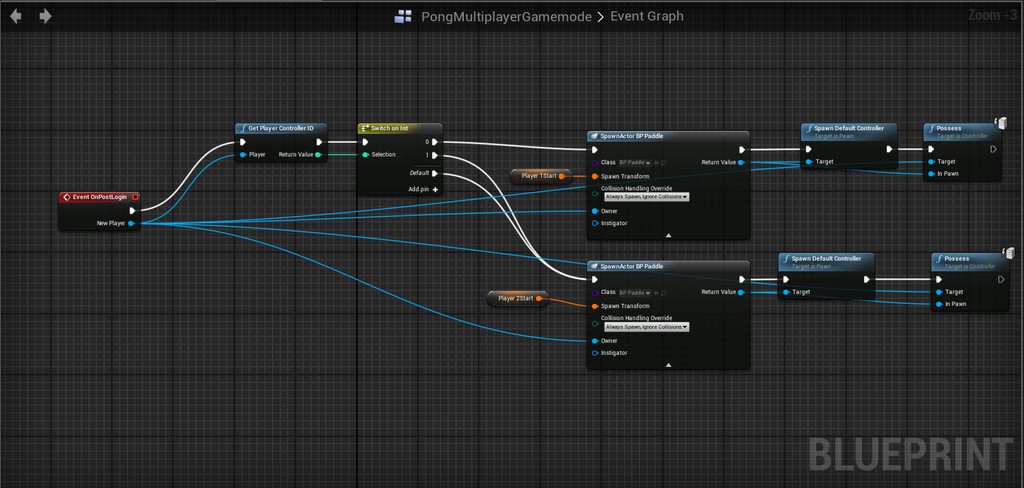
The multiplayer game mode has the following in it's blueprint: https://imgur.com/a/FIT3O5h
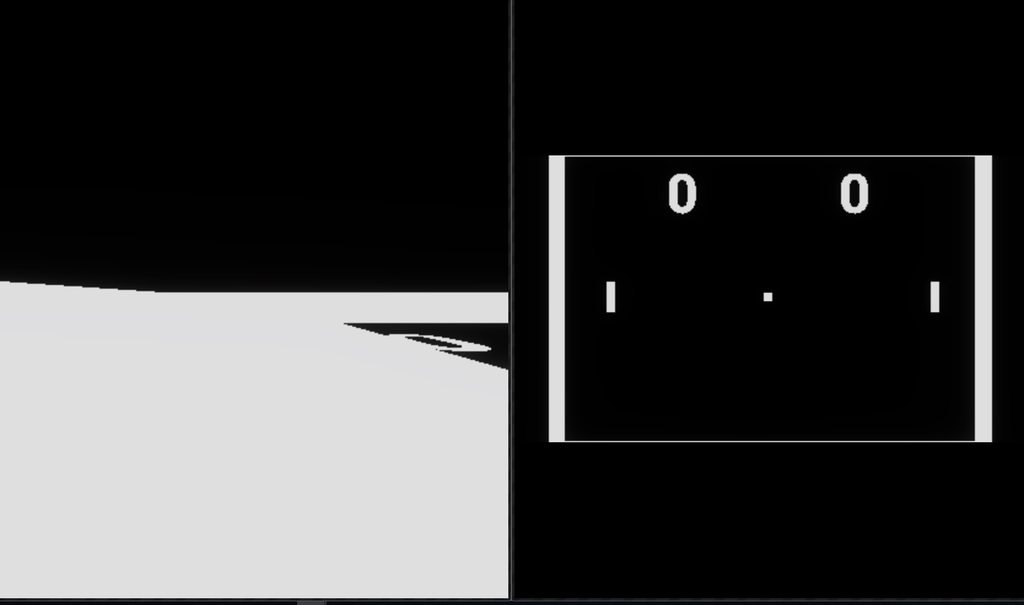
The result: https://imgur.com/a/bcVuB4y
Player on the right can move, player on the left, doesn't have the right camera, CAN move but his movement isn't replicated on the right, the ball however is moving on both.
Where am I going wrong here?
Player on the right is host, player on the left joined.
 charred crane
Does a server retain its listen status after a servertravel command?
 regal hazel


 thin stratus
@charred crane Yes
fringe dove
     Change 4024181 by Ryan.Gerleve

        Support the notion of Rewindable Actors for replays. These are actors that shouldn't be destroyed during scrubbing.

        #jira FORT-71396
#AUTOMERGE using branch FNMain->DevNetworking of change#3908062 by Jon.Nabozny on 2018/02/24 11:59:27.```What plugin do u use to store data jn database?
fringe dove
What does that mean exactly? I've never had actors disappear during scrubbing
dusty halo
*in
fringe dove
unless it was back to a point where they weren't spawned
for anyone else interested, here's the main bool that controls it:
Actor.h

545b303834 (Ryan Gerleve         2018-05-04 10:11:42 -0400  195)        UPROPERTY()
545b303834 (Ryan Gerleve 2018-05-04 10:11:42 -0400 196) uint8 bReplayRewindable:1;```hmm, it looks like when scrubbing back past a checkpoint it destroyed and recreated everything before. I never noticed that:
DemoNetDriver.cpp

    // Destroy all non startup actors. They will get restored with the checkpoint
    for ( FActorIterator It( GetWorld() ); It; ++It )
so I guess this just makes scrubbing more efficient but you have to take care that the actor won't get messed up if it doesn't get begin play again etc.?
drifting plank
Hello ! Is that dangerous to replicate some actors which are parented ?
Because in my case, when my player moves, once the actor parented is hidden and redisplay, the parenting is broken. I didn't understand why and how to solve this issue...
Anybody can explain me how it works exactly ? :o
Thanks in avance 😉
twin juniper
I looked at the unreal tournament source, because i want to learn how to properly replicate custom movement. I saw that they made a few changes to how the replication works (FSavedMove_Character and struct FRepMovement to replicate movement more efficiently). Is this still relevant with new engine versions? Can i still gain more efficiency with this or is this neglectable nowadays? Thanks in advance
 ancient ruin
p4v
rose egret
one question. does UE4 compress float Replicated Properties or RPC Parameter?
I know that uint could be compressed but not sure about float 😐
steady briar
so if overlap events are triggered by client and server, how do i get a custom event to trigger like that too? if i replace my input with an overlap it seems to work, but none of the replication options work for the custom event itself
 shut gyro
Apparently the Replication Graph is disabled on consoles because of splitscreen? Well, what if you don't need splitscreen on console?...
icy nacelle
Equipping an AI's weapon on spawn, running this (from the AI actor)
Works on singleplayer, not when playing as a client, any ideas?
steady briar
if i cast to another bp does it make the player who casted to it its owner/authority?
drifting plank
@icy nacelle You want to equip the weapon and replicate it ?
Why don't spawn the weapon on the server ?
icy nacelle
That's what the above is yes
drifting plank
No You spawn on each client
Not on the server
An actor marked as replicated which is spawned on server are spawned on all clients without multicast
@steady briar You want to trigger an event on a server when you overlap a thing on server ?
drifting plank
Can you screen your BP ?
steady briar
it seems the server has no idea about anything im doing
drifting plank
Have you bind the event on client and trigger only on server ?
steady briar
well, which part? its relatively simple but at the same time complicated and i think thats my problem here
ok so probably a good time to ask... "bind"? ive seen it but havent used it yet
drifting plank
When you trigger the event and when you receive the event
icy nacelle
@drifting plank but I am spawning it with a multicast?
drifting plank
Vyktory -> Screen where you trigger the event and the event itself
grandmaMax -> Multicast spawn for each client but the entity is not linked between all clients
icy nacelle
You think I should just spawn it on server instead? I'm sorry, I don't understand what you're saying
drifting plank
If you spawn with a multicast, you will have some entities which are different on all clients (not replicated from the server). Maybe it's what you want.
The actor doesn't spawn at all ?
steady briar
the way i have it going.. the character presses a button, starts a function that casts to an object on the ground, the object casts back telling the player to do an animation, when the animation is done it casts back telling it to run a "done" function. need shots of all of it?
icy nacelle
Yeah it doesn't appear in the world
drifting plank
Oh !
steady briar
also about grandmaMax's problem, couldnt equipment changes be a RepNotify? on rep notify, set mesh etc?
im dumb but thats how in my brain i was gonna handle it
nowhere near that point yet though
drifting plank
If the weapon need to be display to all other players -> It needs to be spawn on the server (and marked as replicated)
steady briar
isnt repnotify done by the server?
drifting plank
If the weapon is only for the client. You just need to spawn it once for the client without multicast
Repnotify is used to persist informations.
So if a player disconnect, the informations will always be present
And Repnotify is used for variables not functions
steady briar
i dunno ive only used repnotify for practice so far... made a random food list display o.O
drifting plank
If you want to replicates an array you can just put it as replicated
If this array is important for the gameplay, you need a repnotify to persist it
steady briar
i did what the traffic light tutorial did
drifting plank
Yes ^^
steady briar
anywho i just thought it might work for that issue
my issue though i dunno im stumped
drifting plank
Repnotify is also lighter than replicated (which is updated frequently)
Very usefull for entity which change very rarely
steady briar
so... i made a class between actor and my useful stuff, its generic for all interactables
drifting plank
Like a light
steady briar
drifting plank
Yes
steady briar
this is all it does and wow that looks super zoomed in here for some reason
i know what i have now doesnt work so i removed some junk but, in my character...
above this pic is just how i find the nearest object that im dealing with
drifting plank
You are on network so you need to use some functions which call the server and feedback the client
icy nacelle
@drifting plank So what you're saying is that I should run on server instead of run on server then multicasting?
steady briar
its all placeholder (i started over and wanted to keep it simple) before making it fancy
it will print Pre Auth but not Post Auth in the mid there, so i guess that means the server doesnt know it is going at all
ive tried all combinations of replication on each of the custom events i could, was hoping something would work and then i could figure out why. but noooope
if i slap this in there it works
instead of where my function is called, so the difference being overlap vs custom event
drifting plank
I made a scheme for you
Client calls Server Event
Server do some logic
Server calls Multicast to feedback clients
Clients trigger some feedbacks depending the event called.
steady briar
i tried to follow the uhm... function replication one where they step on the button. mostly the same except they use overlap and i dont
if the overlap works replacing the 1st custom event i have, then that means that 1 spot is the problem right?
drifting plank
@icy nacelle For the actor which don't spawn it can be an issue with the collision which prevent to spawn
Normaly it will spawn !
But it depends what you want
Weapon replicated for all or only the client
But I see that you have choose Always spawn so it's very strange :/
Maybe the function multicast is not called because you are not on server ?
icy nacelle
This is being called on an AI actor
So I think this may be the problem.
I'm not sure how to handle network operations on actors that are not the player controller / character / state.
drifting plank
Ai is on server normaly
icy nacelle
Yeah, so thats why I'm stuck at figuring out why this does not work.
drifting plank
You can follow the execution of your blueprint here :
steady briar
@drifting plank so, client tells server to run the function, then it replicates? ive tried run on server and multicast and it stops at different parts but never gets to the end. overlap trigger does the whole thing
drifting plank
I will do a blueprint screen for you
@steady briar
The top part is a blueprint sample for a player like a character, a controller or any other actor which is OWNED by the player linked with the client you used.
The bottom part concers the actor which you want to interact with it. He is logicaly NOT OWNED by your client. So you need to trigger a server from outside (so our player in the top part).
I hope you have undestood a bit better !
If you have any questions. I'm here 😉
steady briar
it would be a cast to on the top though, right?
drifting plank
a cast to ?
steady briar
character telling object to do something
drifting plank
yes
Pawn or character or something else inherited from pawn 😉
which is owned by a player controller 😃
By default you have a basic player controller which posseses your default pawn.
steady briar
so based on my printing here.. it seems anything that says run on server does not work
drifting plank
You call the server function on the owning pawn, yes ?
steady briar
well, its after CastTo, like it would be in ur example
drifting plank
In my example I have regroup the two parts
But it's on two different actors !
You have do the same ?
steady briar
well on the top part ur not replicating ur function, but ur telling the other object to run on server. so i have a custom event, not replicated. cast to other object, run function on server
drifting plank
Exact, the first is not replicated. But it called a replicated event of an another actor (On server).
steady briar
this is my version of ur top part
and this is the other object. i dont get a print
steady briar
what do you mean?
steady briar
character. the other bp is a rock actor
the goal is for the interactable object to be anything. talk to npc, pick up item, chop tree, whatever. as long as they have the same function in them it will call it
drifting plank
Yes I undestand ^^
steady briar
so typically it would be Character --> Object --> Character --> Object for a complete interaction
its largely why im getting screwed up here i think
drifting plank
So if the call doesn't work. You need to call a server event on the client to call this event directly on the server
Like that
steady briar
this stuff hurts my brain...