#multiplayer
1 messages · Page 395 of 1
 queen nymph
and persistent level should randomly choose which variants to load and then use coordinates from that generator to place sublevels into persistent level
 broken maple
ya that should work with the right checks
queen nymph
but how to load into persisten level only variants of the corner (for example) that will be used, if i have to manually load them
broken maple
with lots of variables like. check last levels vector location
and set new ones vector location to that + 2500 in the X direction
or something like that
and have checks for. only spawn a sphere if the one it's spawning off from is a cube
queen nymph
i mean something else
broken maple
on each of their event begin plays. randomise a set of new variables
what do you mean
broken maple
@queen nymph my explanation may have been a little unorganised but yeah i was pretty much saying you can do that
any sort of randomizing is gonna use some sort of resources no?
unless you just have it all preload at the start of the game. and then somehow move stream levels to where you want them to be like leggo. not even sure if it's possible to teleport levels around after they're made
@queen nymph you won't be loading every single variant with what i said
broken maple
would you like a little test code?
queen nymph
that would be nice! to give you more info. from that generator, i export it to csv which engine immediately turns into Data table. then for loops goes for each row and colmumn and loads levels if there is value in that particular row/column
broken maple
just a little sum up. once you have the level created. you don't plan to change it to a different variant during play do you?
queen nymph
no, i for each 'shape' i will have multiple variants so it will be like "submap_NE_001", "submap_NE_002" and so on.
by 'no', i mean, you are right, i will not change viariant.
broken maple
i know
queen nymph
just to be sure 😃
broken maple
i think i'm seeing a problem
broken maple
@queen nymph yeah it seems you might need to figure out how to work the one with the location set
which is the whole replication bs again hahaha
i'll keep working on it but i'm not sure if i can get it tonight
queen nymph
thank you, but don't waste your free time on it. I am preparing mentally that i will have to read those data table and fill 'levels' by hand.
i really appreciate your help, but i think this is where epic has to do something.
broken maple
@queen nymph if i can get it to work i'd probably consider making a game about it myself already have a multiplayer game idea with that mechanic as an idea
queen nymph
ah, so win win then 😄
broken maple
but replication is a bitch so i'll work when i can let me know if you figure it out
queen nymph
will do! i posted link here from the forums, perhaps you will have better understanding. this guy made it work long time ago. it needs victory plugin tho.
Unreal Engine Forums
Build powerful visual scripts without code.
holy shit. i think i made it work.
broken maple
via just BP?
broken maple
what did you do?
queen nymph
i have no idea. nothing i haven't been doing past 2 days
this is in pers. level bp
this is in that on rep notify function
broken maple
looks plausible. rep notify was something i did mention earlier
as others were mentioning it
does it work fine?
queen nymph
yeah, i tried that like milion times
broken maple
that's a problem if you plan to have more than 2 players in the game :P
queen nymph
maybe there is a problem
with two levels, there is another problem. on client it shows only last added
broken maple
try delays between level streams
queen nymph
tried, no luck
i made it work with 2 levels when i created variable for each level with its own on rep notify and then custom event.
beyond stupid i think
queen nymph
np, thanks for the help!
 high heart
is there a way to automatically call OnRep functions on the server automatically when a variable changes? typically in my code I'm just doing
if (IsLocallyControlled()) {
    OnRep_Variable();
}
but this seems sort of hacky
 wanton pebble
so..
If this working, hit like button :D or sub :D Have you any questions? Ask me in comments... ;) I'll upload more these tutorials... Used music: K-391 - Summer...
this works locally
i can connect the 2 game instances
but i tried it with a friend
who lives a few km away from me
and i can't get it to work...
broken maple
@wanton pebble you might have to open UE4 Ports etc. depending on what you're testing with him on it
and instead of opening 127.0.0.1
you want to go to google and type what's my ip
and send him your public ip address
sorry
not send him it
but put that in the "execute command" thing
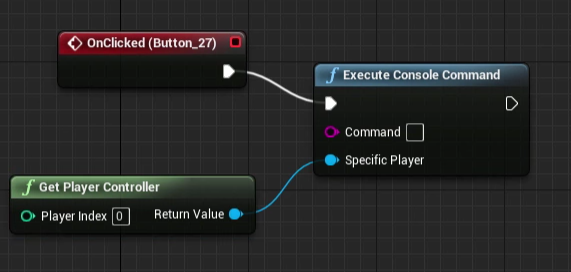
open public ip !listen
broken maple
open is what the host needs to do
wanton pebble
But I had open map
broken maple
join for the clients
wanton pebble
after that?
broken maple
and leave use lan off. so it's using your public ip
wanton pebble
so execute that and then create a session or...?
broken maple
and then the execute is what your friend needs to run
you can press the tilde key in play
and that opens up console
you can just type it there for tests
open 124..325.2.5.23.52.
wanton pebble
on the join i have it as a console command
he enters the IP
then open <entered IP>
broken maple
yeah
if that doesn't work. just try it through console for testing. cause session joining can be weird. if it works, great
wanton pebble
and the host one
as it was previously
when i try to test it locally with my IPv6 instead of the name of the map i get a crash >.<
broken maple
create session
broken maple
maybe before the open level part
on sucess open level
on failure. print string failed to create session
wanton pebble
alright
fails to create session...
nvm
ok yeah
it fails when i have it like this
 broken maple
editor always uses 127.0.0.1
broken maple
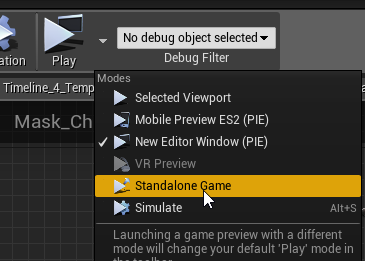
@wanton pebble hey sorry i'm gonna go to sleep but it might either require you to make a build before you try host a session. rather than standalone https://i.imgur.com/390rMtl.png you can try using advanced sessions also. try googling that if you can't figure it out. if you're still stuck on the problem tommorow just @broken maple in like 10hours time from now
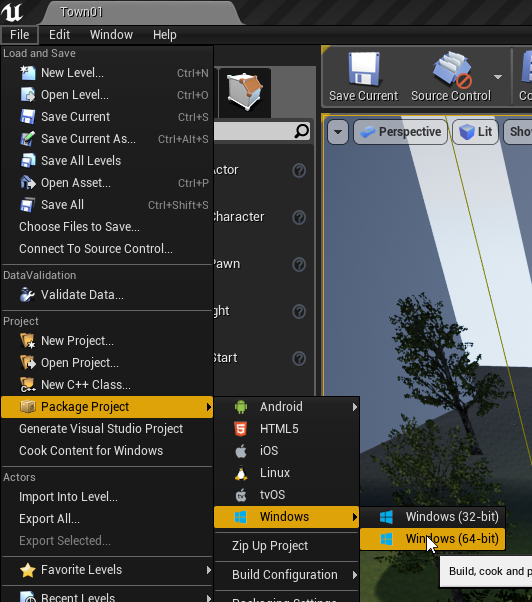
and i'll figure it out for ya
been awhile since i've jumped on sessions sorry
 sour river
Hello, is there currently a way to host multiplayer servers on Linux?
 grand kestrel
Yes it's quite the norm, Google it
 full bane
did anybone have success with token authentication for dedicated steam servers?
you can host up to 1000 servers per account with it, but I don't even know where to start that
 loud mountain
Hey @full bane Rocket let me set up a test project real quick and I get back to you
sorry I've just pinged the wrong person here, I apologize
loud mountain
okay, so I have not found any functionality in the Online Subsystem from Unreal, You can (in theory) try to log into your server account by using the Identity interface, but that seems more to be the authentication with services like Epic or Facebook and stuff, not neccesarily steam server accounts. The Steam SDK Documentation points to the LogOn function and describes it with Begin Process to log into a persistent game server account. But as far as I could see there's no default implementation by epic here right now
I don't know about advanced sessions tho
full bane
I tried to use steamworks directly yesterday
instead of onlineSubsystem interfaces
but that only seems to work once you actually load the steam DDLs via the subsytem thing
I am not sure if that is how it's supposed to work though
when you are running the dedicated server without steam running, it appears to still load the steam DDLs
just that the steamworks module doesn't get initialized correctly
loud mountain
this one should give you advice on how to use any third party library (like the steam SDK) in unreal
full bane
oh ya, steamworks is already working though
I can use the steamworks api directly already
just that it doesn't work without having steam running
and you can't run several server instances with steam running, afaik
doesn't help that I don't know how the steam thing works
their documentation isn't very detailed
basically just API calls 😦
no examples or anything
 unique thunder
Anyone here using dedicated servers?
 viral raft
@wanton pebble Have you setup a Online subsystem in a .ini file?
Does someone know how to replicate Matinee's?
 ruby meteor
Whats the best way to replicate full auto shooting (~200rpm)? Using a reliable call for each shot seems like too much calls and creates networking issues (character movement lag for example)
 cerulean glade
Trace lines?
I don't know the first thing about networking yet, but I know it's a much lighter load than spawning individual bullets, I believe....
Or maybe make it an anim with a single trace that repeat X amount of damage every Y seconds. ?
@ruby meteor
 fleet sluice
@ruby meteor At 200 RPM, the human hearing will most likely never notice if it actually hears fewer shots (i.e. 150). And since 200 RPM is a very low frequency for replication, you should be able to get good results just by using unreliable RPCs.
 fierce birch
@full bane afaik, your servers don't have to be running steam
you need special dlls for it tho
full bane
ya, just found that out
withLogOnAnonymous
but can't do authentication then
if players are VAC banned, I believe
or if they own the game
fierce birch
the auth thing is kinda controversial
you do want to do some check for ownership tho
well
full bane
well, you can do that part client side
fierce birch
if it's online only game, then it's not really an issue
wanton pebble
so, i have an issue
i tried just making a multiplayer server
using create session
in Blueprints
but it always fails to create the session
😐
 toxic pawn
I know this is probably not the right place to ask, but given that the guys in #animation doesn't seem to be as active and I really am desperate, here we go:
Does any of you guys know how could I go about detaching a bone from a skeletal mesh? I want to do this for removing a mag from a weapon.
 gleaming bobcat
What is the best way to call root motion (Anim Montage) in multiplayer ? I am currently sending RPC to server to play it and then server send RPC multicast to clients to play it. But quiet often it says : "Server disagrees with Client's track position!! ServerTrackPosition: 0.000000, ClientTrackPosition: 0.025059, DeltaTrackPosition: -0.025059. TimeStamp: 29.321869" etc. So the server is correcting a position and it does not look good.
 meager spade
that's the issue i have with root motions :/
gleaming bobcat
So how did you sort it ?
meager spade
i stopped using root montages for now ;D
gleaming bobcat
next to UE log there is comment : "// Not much we can do there unfortunately, just jump to server's track position.
This looks like root motion is completely useless in MP ?
 fossil spoke
Paragon uses Root motion im pretty sure, its MP so it must work.
I could be wrong 😃
 kind bay
Paragon didn't use root motions for their locomotion, I know they used some unreleased AnimgraphNodes to adjust animations for better for foot contact.
fossil spoke
Oh ok, it seemed like it used Root Motion
 potent prairie
for local multiplayer, is it best to just use multiple player characters and controllers? I have an issue when 1 player dies, all my players do the same death animation/respawn lol
 plain flume
Morning. When Replicating the UStructin C++. Do I need to set replicated tag to variables inside the struct also, or is it enough to replicate just the variable created from the struct?
fossil spoke
@potent prairie You should be using an Character and Controller for each Client.
@plain flume You only need to mark the Struct as Replicated, there is an UPROPERTY Specifier called NotReplicated that you can use to mark variables inside the Struct that shouldnt be considered for Replication at all.
NotReplicated only works inside USTRUCTs
plain flume
Thanks @fossil spoke !
 eternal anchor
How can I pass some additional parameters when joining server ?
Ie. I want to pass some string (ID) when player is attemping to connect to verify it on server.
 wary wyvern
Guys, I've packaged dedicated server and start it using server.exe -log command..
It works as expected, but sometimes, when I press Connect on my device, it does not connect me. And i'm not able to connect until I press Ctrl+C. Server does not shutdown, but allow to connect instead and continue.
ruby meteor
@wary wyvern Did you take a look at the server/client logs? Maybe you find something there
wary wyvern
@ruby meteor Some say it could be windows feature. When you click on console with a cursor, it holds the process and you have to press Ctrl_C
Logs are fine, btw
 worn nymph
yes if its running on same computer its probable that you clicked and the server window lost focus which will pause its execution until you click again or hit the keyboard keys
 steady briar
is this where id go for questions about replication? O.o
meager spade
yep
steady briar
hmm... well im trying to do something i thought would be relatively simple. but turns out replication hurts my brain a lot
i have a rock that can be interacted with and destroyed. however, when a player is within a certain range, i enable a particle effect so they know that rock is destroyable. i only want the overlapping player to see that particle, but everyone needs to see it be destroyed
ive tried doing a bunch of testing with printing so i can see where the path is going (and whos saying it) but i am kind of lost
ruby meteor
@steady briar Just check for each player if he is near the rock, go to the rock bp for example and if hes near the players char (get player char + self (rock) => get distance, if distance < 500...) activate the effect or disable it when hes not near
steady briar
i have an overlap event, but it shows it for all players even if they are far away
ruby meteor
can u screenshot it?
do you have the overlap event inside the rock or in the player bp?
steady briar
the rock. player has a sphere attached to them that it checks for
first half
then here is the on/off. however when -anything- ends overlap it turns it off for all, but i think replication would be per-player so i gotta re do it anyway
ruby meteor
Every player runs this code, and they will notice even if the DetectionSphere of another player overlaps
so you need to check if the component comes from the player that executes it
steady briar
ya i tried to like... get player controller like in screenshots ive seen of a blueprint but it does not work
a while back someone said this was what my goal was

but playercontroller is the player id number it doesnt really... work o.O like his
ruby meteor
try to get owner of the component like u did
and then drag the return value and write "is equal"
use the get owner for the first slot
and get player character for the second
This should check if its the sphere of the specific player
and if its true, you can activate your effect
ruby meteor
you start dragging from "other comp" from the begin overlap
and then write "get owner", and click enter so it spawns an "get owner" node and plugs it in for you
steady briar
yes i know that
ruby meteor
and then from the "get owner" node you start dragging again, and write "equal (object)"
steady briar
i mean the picture i showed earlier from the other person. i couldnt get that to work, not sure how he did
ruby meteor
its a different "Get Owner"
the first one from the other comp is "Get Actor that the component is coming from"
thats how you get the actor
if you do it again then, with the actor as input its an "get the controller of the actor"
steady briar
theirs goes from Other Actor to Get Owner (Target is Actor) same as mine. im just going to say its sorcery... maybe witchcraft.
ruby meteor
one moment I will try to send you another screenshot
steady briar
but the.. checking for individual who is overlapping it is... avoiding replication right?
ruby meteor
I think so
steady briar
i did something similar to this before but the result never changed. i must be implementing it wrong
ruby meteor
@steady briar https://imgur.com/a/TMmmCqH Thats I would try to get the player controller of a component (what you are trying, the other screenshot uses on actor overlap which returns an actor already, but you use on component overlap so you have to do it slightly different)
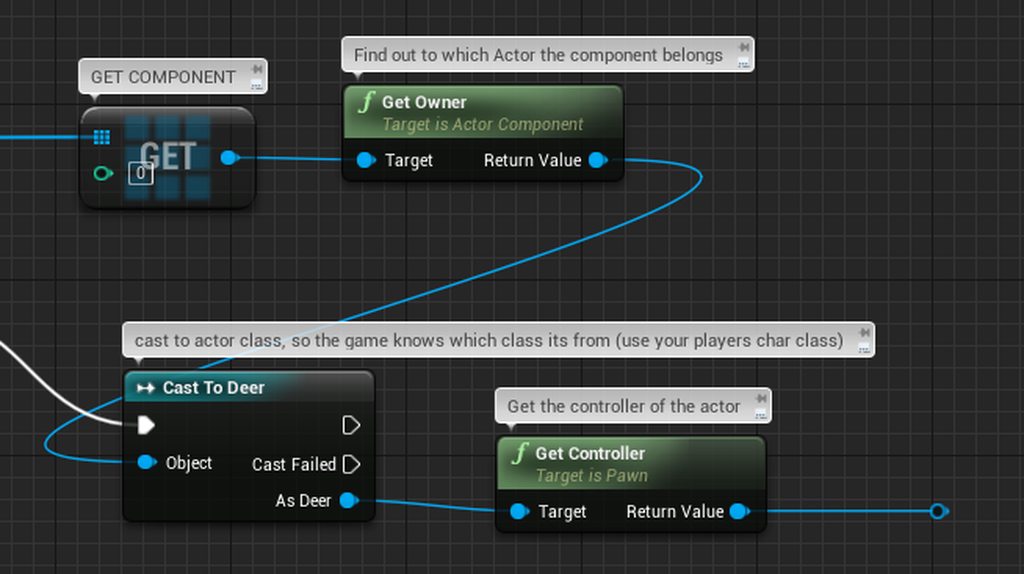 steady briar
so i need to do a Cast To? o.O or is that just in yours
ruby meteor
I didnt manage to use get controller if I didnt cast to the actor i wanted to know the controller from before
steady briar
ok... so back to the check thing
on overlap, Other Actor --> Get Owner. Other Body Index --> Get Player Character. Equal(Object) ? or just totally wrong
ruby meteor
that should work, you are checking if the overlapping volume is from your own character and if thats true, you exectute your other code (show the effects) and it only executes it on the client thats close enough
steady briar
well.. checking those 2 things and having it be true would still activate the particle for all
ruby meteor
can you screenshot the whole thing again?
steady briar
i dont know how to make it only visible to the player
ruby meteor
are you using dedicated servers or listen servers?
steady briar
dedicated
but basically just checking would be like this
client 1, 2 and server all say Yep
because the overlapping player does have a player controller so that is true --> runs rest of branch for everyone
 past bear
evening folks - anyone have any ideas why a multicast RPC going from server to clients might just never happen on the client?
actor is set to replicate, but the function is only ever happening on the server
actor is placed in world
Repnotify also fails, for the record
fleet sluice
Unreliable and called on BeginPlay, which will likely try to broadcast the RPC before the object itself has had its initial replication completed on the client?
past bear
it is reliable, but maybe it is too early
in fact, that may well be the problem
the native code system I'm getting the server side event from seems to be occuring before BeginPlay
prodding the programmer responsible for that now, thanks!
 gleaming vector
@thin stratus did you see this? https://github.com/chiefGui/sparkslift.js

GitHub
Contribute to sparkslift.js development by creating an account on GitHub.
gamesparks integration with gamelift
 thin stratus
Yeah, they asked me to help a bit with answering questions
I think it builds up on the code examples i got from amazon
@gleaming vector
thin stratus
It's not that difficult if you can code
Gamelifts SDK has a clear UE4 tutorial
Same with Gamesparks
Only thing you need to crack is sending a rest call from gamesparks cloud code to gamelift
thin stratus
That's a bit tricky cause gamelift has bad docs on how to format the call with Signature etc
Yeah
Only thing that makes this useless for most one person teams is the price
gleaming vector
yeah
grand kestrel
I think Gamelift has always been pretty expensive compared to other options ☹️
 sturdy tulip
Hey guys, working on a rts multiplayer, when a unit is gathering resource, how would you do the system to interact between the unit and the resource while the game speed can be changed ?
Currently I've setup timers that trigger every X seconds that send a "harvest" message from the unit to the resource and it decrement the resource. But if in the middle of that X seconds the player change the speed, it won't work properly and will cause issues.
I thought about putting into the tick function but I am slight afraid of network performance issues later on with lots of unit and resources. Any ideas ?
cerulean glade
In the BP nodes look for world something (It changes the speed of everything.)
Found it: Global Time Dilation
That will give you the speed of the entire game like playing fast or normal or max speeds in game feature you see in total war and sc2
 burnt meteor
Hey guys I wanna host my dedicated server virtually and I need a good service any recommendations?
worn nymph
@burnt meteor is it just for testing or actual game launch ?
burnt meteor
game launch@worn nymph
worn nymph
ah not sure then . really you would need to try a few it all comes down to services provided for cost per user and it all depends on your game, how many users how many transactions per month etc
ive been pretty happy with AWS instances but im only testing so not sure how much the costs go up for a full game
burnt meteor
@worn nymph oaky thanks
 boreal vine
I'm really struggling guys on something that should be so simple . Help please 😭 😭 I'm spawning an actor in my client third person via a server rpc which is all replicating fine. but when I have spawned a camera after the actor is spawned to transition between the third person camera and the new actor camera nothing i try seams to work. how do i do this???
spawn actor on server then spawn a camera for the client to transition from client third person to server actor then posses the server actor?
 twin juniper
@boreal vine is the camera and character in the same blueprint?
as you can see from this pic, i place the camera on a spring arm attached to my character mesh as as child. works out for me. You can use SetViewTargetWithBlend to do camera transitions.
twin juniper
@boreal vine you can also Lerp a third camera between first and third person cameras to transition between them using timelines, as long as all cameras are attached to the actor blueprint as children. The first result of googling "transition between two cameras unreal" gives you a result you can check out. hope this helps. Should also work with replication as long as all cameras are in the same blueprint.
boreal vine
that kinda what i want but im running into problems because I Im spawning an actor via server rpc then Im trying to create a transition camera on the client to go to this server actors camera before possessing it.
the problem is running an event on the client with the info pertaining to the newly spawned server actors camera.
how do you run a custom event on the client after running a server rpc with refrence to the actor the server rpc spawned?
twin juniper
are you transitioning between cameras attached to the same character?
or a character that died and a new one that spawned?
because if the cameras are attached to the same character my way works above.
boreal vine
2 different characters, one on client one on server
unique thunder
PM me if you've used dedicated servers before
 solar stirrup
Does anybody have a thesis on how UE4's networking works? I need to learn more about networking.
thin stratus
You mean indepth or just the replication part?
solar stirrup
Replication would be nice, in-depth even better
solar stirrup
@thin stratus
ruby meteor
Hey, I cant seem to find out how to run multiple dedicated servers for a steam game on one machine (virtual server), every server I start after the first one will disable the steam API, it seems like you can only have one steam game running at once, surely there most be a way around it? Anyone got an idea? Thanks in advance!
solar stirrup
Only one steam game at once else the API glitches iirc
ruby meteor
but there must be a way to have multiple instances running? maybe disabling something you would need for clients but not for servers? otherwise it would be really costly to host servers for your games, since every little game server needs their own (virtual) server
 thorny kelp
Not really, when you create a game server on the same machine it takes the next port
@ruby meteor so technically you can launch as many processes of your game as you like, until you exceed your vm's resources
ruby meteor
@thorny kelp but this is what happens if I start a second server: https://imgur.com/a/veDtld3
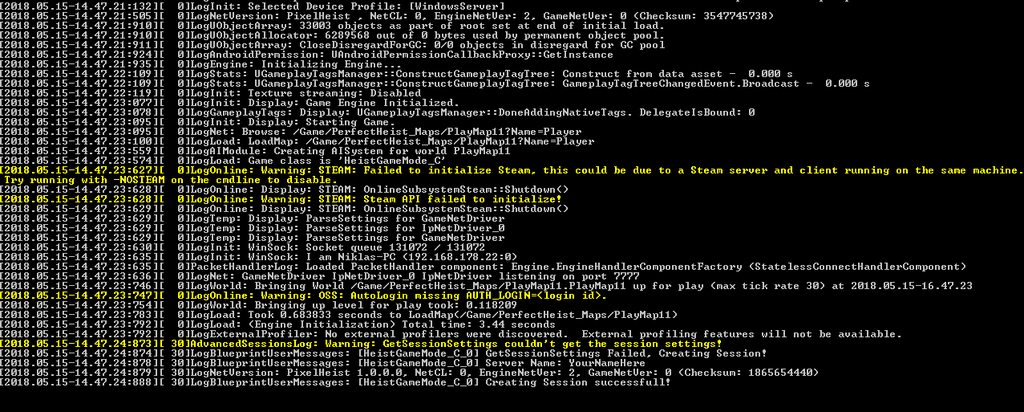 ruby meteor
I am using this currently: "..path..\Server.exe" MapName -log -steam -lan
And the errors appear and I cant find/join the server
ruby meteor
I am using development build settings right now
ruby meteor
@hasty adder But I am using steam for the clients, can they still find the server and join then?
 hasty adder
Find them is one thing. I’ve always had difficulty setting up using steams master server and instead use my own database. But you can still connect with steam. Someone here was working on steam updates
Forget the nick 😦
wary wyvern
Trying to connect to a dedicated server and get these lines. Client cannot enter. Does anybody know, why this might happen?
ruby meteor
@wary wyvern Looks like the client is trying to connect again and again? Maybe something is looping (try print messages before you connect, maybe that will help)
wary wyvern
@ruby meteor Well, client always retry if he cannot connect
hasty adder
That some kinda special system@being used? UPlay?
wary wyvern
@ruby meteor If I try to connect using local IP it connects successfully. Ports are forwarded, server recieves packets. Is it possible that server fails on trying to send packets to the server?
ruby meteor
maybe you find something in the client/server logs?
wary wyvern
@ruby meteor My guess is that firewall blocks outgoing packets from my server..
 sudden frost
Hey do u know any way to get a free dedicated server? I mean that there is way to test multiplayer but no on Lan for free
unique thunder
Any1 use Amazon GameLIft?
eternal anchor
Yes
hasty adder
You can get free trial time on aws and on google compute
@sudden frost
You’ll hafta signup and provide payment info. As after trial you’ll start getting charged
Aws is a free tier for a year which isn’t much. Google gives you like 3 months of a ton of credit to test. But one and done so use it when you really need to test such things
solar stirrup
I already have it haha
I was thinking about more in-depth about how the framework works behind the scenes
hasty adder
Kinda is, what do you mean to do/change?
 lean hornet
So i ran into the issue im using advanced session and tried testing the game in multiplayer wich diddnt go well. (locally i can find servers while using internet sessions) but it doesnt work when trying to play with friends
loud mountain
@lean hornet Are your ports being forwarded / is your firewall blocking it (not just your systems but also routers)
lean hornet
well but shouldnt 7777 be always forwarded i mean i can host games like golf it with no issue
loud mountain
steam has a system for forwarding packets via their own servers
lean hornet
oh
loud mountain
so you need to forward unless using a service like steam
lean hornet
well does it work with including the steam subsystem
loud mountain
yeah theres some page on the unreal wiki that shows how to setup steam
using their spacewar appid might work
loud mountain
then you might be able to connect via steam, yes
lean hornet
hmmm~
loud mountain
just in cased you missed it but you need to setup bindings for steam invites
else nothing is happening when clicking on the invite
lean hornet
well i was using a server browser
i can also work with steam invites if you think that would go better
loud mountain
It worked for me before
loud mountain
alright then
wanton pebble
Hey guys
so... i got a simple host/join system set up
and locally, i can join my own server
but my friend, who lives a few KM away, can't
i'm assuming i have some sort of Lan option on somewhere
IP wise
does anyone know what the issue is/how i can fix it?
loud mountain
same as dollon I believe - have you port forwarded?
wanton pebble
ummm... what's that 😅
loud mountain
well then probably yes 😛
you need to setup port forwarding in your router
or it will simply block the requests from your friend
(firewall)
wanton pebble
ok
loud mountain
ue4 uses port 7777 on tcp AFAIK
wanton pebble
well, i'm the one hosting it
loud mountain
you should google how to do that for your specific router
wanton pebble
ok, thanks for the help
 worthy wasp
GameState::MatchState - this is not defined at all - just declared as an FName - does that mean that there is no pre-defined states to the engine? (I dont see any in source)
dont see any in Cedrics Network Compendium - nor any other online docs.... but i remember from Allars Generic Shooter game (back in 2016) we had a few defined ones somehow?
IE: "WaitingToStart", "InProgress"
nvm found it!
 toxic pawn
Hey guys, one quick question here. For some reason the overlap event for my bullet seems to only trigger when firing at a certain part of the character (the pelvis area), although the collision capsule covers the entire body.
Do you know why might that happen?
broken maple
would be something wrong with your code. if you set up a simple capsule that got generate overlaps. perhaps you got it overlapping the actor. and your code is rigged in a way that it fires off only once or some sort. or you got 2 overlap events happening
really depends on how you set that code up
toxic pawn
I'm working in blueprints, and I listen for the overlap component event.
Both components have generate overlap to true
Although the bullet's collision is a box, but that shouldn't matter
@broken maple
broken maple
that's not enough information to diagnose it. shit happens all the time in the engine and it's usually something you set up
 gloomy tiger
@grand kestrel been reading the chat and saw you mentioned that GameLift has always been pretty expensive compared to other options
am wondering, could you provide some GameLift alternatives? 🤔
i've been researching A LOT and found absolutely nothing. cc @thin stratus @gleaming vector
gleaming vector
you could probably roll your own with docker nowadays
but, yeah, there is nothing like GameLift
most companies that do similar back ends roll their own
gloomy tiger
well, i started developing a platform like that on the top of EC2 but geez, there're certain things that it's cheaper to pay GameLift rather than building ourselves
gleaming vector
since it started out as mostly proprietary tech
yes
GameLift isn't viable for small teams because of GameLift
but because this style of massive availability is fucking expensive
even if you roll your own
GameLift, i believe, is very cheap in and of itself... the highest costs are the AWS service costs for your server instances
thin stratus
You have other cloud hosting, but not with the automatic start/stop system of GameLift afaik
gleaming vector
iirc, gamelift itself is pennies per server
gloomy tiger
agreed @gleaming vector
thin stratus
Does GameLift allow Linux Servers by now?
gloomy tiger
that's why GameLift is so unique @thin stratus 😄
yes
waaaaaaaaaaaaaaaaaay cheaper
also, they have the spot instances
thin stratus
Then it should be a lot cheaper
gloomy tiger
yeah, like US$40 less
at least
because there's no windows licensing
linux servers + spot instance = 1 mcdonalds
what's driving me crazy about gamelift is its immutability
if you change a comma in your server and you have to rebuild and upload again, at least ~1h and a half will be lost in this process.
(until you get your fleet up and running again.)
thin stratus
Hm yeah, you can't really push test builds easily
 pale thorn
Maybe a stupid question but I'm not sure how to correctly solve this.
I've saw the Network Relevancy Tutorial and it makes sense. But for my part I've a small Area where a big object is moved after a Event. Now when the client joins after the Event is fired the animation would start.
Or even when the Client joins while the animation is playing how is that possible? I'm not sure what I'm missing here.
gloomy tiger
@pale thorn you mean, you want to preservate the state of your animation right?
i mean, if the client connects when the animation is playing, you want him to see that point of the animation, correct?
pale thorn
Beside it's not a real Animation. More a MoveComponentTo
gloomy tiger
you have to persist the location of the object
pale thorn
Would I RepNotify the position of the object the whole time?
gloomy tiger
so when new players connect they'll receive that given location
worthy wasp
is this object an AActor base or ACharacter?
pale thorn
Actor. In my example a Elevator Door.
gloomy tiger
yeah, you have to handle this yourself since there's no built-in movement component or prediction
repnotify is an option
worthy wasp
its location is replicated by default - as long as the actor is set to replicated. your MOVEMENT code needs to be ran AS SERVER.
however - it will not handle a pathfinding - as you have no MOVEMENT COMPONENT
gloomy tiger
^ replicated by default if server is the authority
worthy wasp
"if server is the authority" does that even make sense?
gloomy tiger
it does not
wait. let me rephrase it.
- replicated by default if the server is the one moving the actor.
worthy wasp
exactly as i said
gloomy tiger
nope.
worthy wasp
but again - MoveTo - utilizes NavMESH & Pathfinding agents (CharacterMovement component) - which you lack.
pale thorn
I don't have the issue while everyone is joined. It's about the player who joined later.
gloomy tiger
yous aid the location is replicated by default as long as the actor is set to replicate. but an actor set to replicate won't presist its location if moved from the client's perspective.
worthy wasp
you'll have to do some timer work + MoveTO incrememtnations - perhaps build a spline & move along that spline over time
@gloomy tiger - which is why i summed it up with "code needs to be ran AS SERVER"
then you complicated it
gloomy tiger
i didn't lol
i mean, you were right. but i think the way you formulated your phrase could be better--which is what i'm proposing here
worthy wasp
@pale thorn the player tha tjoined later - if the code is RAN AS SERVER ... its location (at the time the player joined) shoul dbe updated for tha tplayer.
gloomy tiger
like so -
its location is replicated by default - as long as the actor is set to replicate and the movement is occuring in the server.
but worry not. am not trying to sabotate you lol
apologize if it sounded this way
worthy wasp
i could care less about me - i'm trying to help this guy out. you said the same thing i'm saying - with different words.
if he was confused from what i said - he could have said "i dont understand you" which would merit the case for a different sentence with the same meaning (different words)
gloomy tiger
that's why am trying to improve what you've said. to avoid misinformation.
pale thorn
Actually it was fine with "repnotify is an option"
gloomy tiger
but @pale thorn, these are two different approaches.
RepNotify would require some extra manual effort, whilst @worthy wasp's solution would give you an automatic resolution.
pale thorn
uhm.. okay
worthy wasp
automatic but delayed by Replication Time for the actor. RepNotify (like NetMulticast) would work when the server has changed the variable - and the RepNotify would thus be ran - allowing you to SetActorLocation(RepNotifyVariable); on all clients instances of that actor
worthy wasp
its not that its delayless.....
its a method of pulling of NetMulticast (more overhead/bandwidth) with the same funcitonality
now - am I a UE4 engineer that has proven this? No
i'm uust going off of documentation
it happens AT THE POINT of the server changing the variable
where as setting a replicated variable and relying on NetReplication to run - is delayed by whatever ht etimed delay is
gloomy tiger
that's my point. i can't see the difference between repnotify vs. your approach.
worthy wasp
i'm sure you would only see it in a test lab with MS differences
of course - varying on network traffic & speeds
worthy wasp
its said to be the instant that the replicated variable is changed (by server) the RepNotify funciton fires for every client
so its not that its faster - its gauranteed (which is what NetMulticast is supposed to do)
without hte overhead of a NetMulticast
to be hones t- idont see the difference
i just read what they put out on the docs
gloomy tiger
gotcha
worthy wasp
it seems theoretically th esame workflow
with 2 different names
they MUST exist for a reason - i'm unsure
gloomy tiger
am curious about RepNotify because our project never used it and we have 0 problems of living without it. at the beginning we were using it here and there and inconsistencies were happening all over the place.
that's why i'm curious
worthy wasp
Cedric is the man for all of this - he wrote the book (literally)
gloomy tiger
maybe we've been misunderstanding it
well, at this point i'm feeling bad for Andi lol
worthy wasp
i use repnotify for other features - like an Inventory System callback....
when inventory changes - i use RepNotify - to fire off an UdateGUI() locallly ot the player
that way the player's UI will update itself
pale thorn
@gloomy tiger @worthy wasp Alright. First: Thank you. It worked for the Actor Movement.
worthy wasp
good stuff!@
worthy wasp
what means of RPC would you use to pull off that inventory callback functionality?
gloomy tiger
let's say the player unequipped an item - i call an event Unequip Item (Server) which happens on the server to remove hte item from the client. when everything's good to the player, then i call another RPC Refresh Inventory (Own Client) and 💥, updates the UI like a charm 🤔
worthy wasp
so - in your inventory system - you dont have a funciton for AddItemToInventory() ?
gloomy tiger
i do
worthy wasp
wouldnt UnequiItem(Server) run this?
gloomy tiger
probably my example wasn't the best one
but
Unequip Item (Server) -> Add Item To Inventory (Server) -> Refresh Inventory (Own Client)
worthy wasp
it's its own approach - i'm not saying that its wrong or right
but
if Inventory[ ] was a RepNotify variabble....
you wouldnt need to ever call RefreshInventory() at all
ever
because it would be calling that same RPC in the RepNotify function
again - different approach
gloomy tiger
mhm.
worthy wasp
same outcome
gloomy tiger
well, never thought this way.
worthy wasp
point being - you dont have to REMEMBE rto manually call RefreshInventory()
so no matter how many instances of Inventory this ... inventory that... you call in your project
whenever Inventory chagnes - its done AUTOMATICALLY
Add, Subtract, Delete
etc
gloomy tiger
yes, it makes sense.
pale thorn
One last thing:
I've a Text Render as a Component (Replicates) which is changed from the server (-> Multicast). I changed that "Set Text" to Exec on Server as well. But it's not the same outcome (like on the doors). Is that a whole diferent thing? Or I'm just stupid? I can't see the error.
gloomy tiger
will keep it in mind. 😃 am unsure of the problems we had back then when tried to use repnotify.
but your explanation was very clear. thank you for sharing.
worthy wasp
@pale thorn - this TextRender (I'll assume you're trying to set text??) exists on the same actor?
pale thorn
Yap. Set Text. The Set Text happens on the same Actor. Wait can I send you a screenshot? I think it's faster.
gloomy tiger
Do it, @pale thorn
pale thorn
So this works fine.
Open Elevator Door is "Run as Server".
On the same actor (the panel for the elevator)
This is not working (as the door).
worthy wasp
ok the problem is....
your using ElevatorDoor as a reference in this actor class
when it should be PASSED AS ARG through the RPC
pale thorn
But the Door is working fine?
worthy wasp

also
you've misunderstood the RPC chain
from what i see
Client is calling NMCast... NMCast is calling Server
this is wrong
Client -> Server -> NMCast
it even says that in the tooltip of the RPC types
pale thorn
Yap. I'm doing it like this.
Client Use the Button -> Server calculate -> Multicast
 pale thorn
between ServerUseTheObject (don't blame the names please 😄 ) and Multicast the Server to his thing.
That's how i "learned" it.
oh wait.. I don't have to call it again... my bad. Gonna fix that.
Okay got it. Solved it with a RepNotify (for the Text).
Oh is it above not working because it's on the same actor? Ooohhh
Anyway! Thank you all!
 silent sigil
I'm having an issue with voip
I'm using the steam advanced sessions lib
and I am hacking up the engine a small amount for my own purposes
when I flip the flags in the ini files to disable voice, everything works fine
when i enable the flags, the game crashes on client connecting to the server
Adding some logging to the steam api code, the voice packet shared pointer is invalid in the FOnlineVoiceSteam::ProcessRemoteVoicePackets function
what is weird is it passes the first valid check, and is invalid during a deeper loop
any help would be appreciated, im using 4.19 stable engine version for my base
@ me if you have help, I'm continuing to debug. the logging i added earlier was invalid. so ignore the bit about the shared pointer. i had a bool flipped
twin juniper
@silent sigil, did you fix this yet?
I used networked voice in my code - it works, but only in blueprints.
i call this from my gameplay player controller - the active one for the game. get player controller id, and passing it into start networked voice did work for me as a test with my local server and client. there were some issues with steam play, but it was primarily due to latency (for example some words were cut off or choppy)
 balmy kindle
Hey Guys, i am doing the UE4 Multiplayer Tutorial and it shows me this error if i want to remove that structure pin... Any ideas why?
hasty adder
https://trello.com/c/GshsPVag/290-steam-authentication was this you guys? Embrion or whatever
Steam Authentication has been added! Games can now add a packet handler component that interfaces with the Steam authentication APIs, allowing them to advertise their servers properly, handle VAC/publisher bans, and provide better validation of c...
Labels
Networking
@jolly siren
 jolly siren
 wraith citrus
Hello you beautiful people
I'm having a problem on my client where I can pass right through a wall I spawn
I'm trying to create a movement boundary. It works fine on the server
hasty adder
client jitters a bit?
wraith citrus
Yep
hasty adder
It’s not spawned for client so it thinks it can walk through it. Movement location eventually is updated after servers collision and server accepts it
It needs to be spawned for client and server
That I know of anyway. May want to multicast it’s spawn?
wraith citrus
It's multicasted
hasty adder
Isnit bps or c++?
wraith citrus
Bps
It's being spawned in mygamestate
So it should be on client and server right?
hasty adder
What’s the event look like?
hasty adder
It exists for both doesn’t mean it automatically will run the same logic does both. What executes that event?
wraith citrus
A character pawn starts the event
Which goes to the player contoller and then the gamestate
hasty adder
How it’s run is important. A client cannot multicast only the server can do a client would need to run on server and then have it run the multicast
hasty adder
Probably a server (host)
wraith citrus
Didn't work :/
It's weird cuz the client doesn't walk through any other objects
So its just our spawned object
boreal vine
Hi, I have a client 3rd person character spawning via a server RPC a new actor. then poseseing that actor. how do I possess a camera that interpolates between the Third person camera transform and the new actor transform when the new actor is possessed?
so basicaly: dedicated server set up
Third person charachter on clint spawns actor on server via rpc
then i need a transition camera on client to lerp between the third person and new actor cameras before possessing the new actor
wraith citrus
I just made the wall super thick and I still walk right through it
hasty adder
It’s because the character is getting far enough through the collision client side to tell the server and it corrects it to after thencollision
Walls have no thickness :0 it’s the face of the mesh that only counts
hasty adder
I know the problem is the client side collision isn’t existent but the server is trying to correct the location of the player
Which is why it jitters
wraith citrus
So how do we get the collision working on the client?
hasty adder
The client needs to be told the collision exists. Could be something in the actor.
Is the collision a volume or anything like that or just the properties of the mesh actor?
wraith citrus
Just the properties of the mesh actor I would think
Didn't do anything fancy
Just spawn a wall
We're just going through our actor clicking to replicate stuff lol
Under character movement
And we're looking at the mesh now
hasty adder
I’m not home or I’d try myself but that’s the problem I ran into same problem. But this was because the client actor had a dynamic changing collision depending on team
So I had to update on begin play for bother server and client collision responces
wraith citrus
Hmm yeah we don't have any team stuff going on
hasty adder
Sure there must be a vid on this. Someone posted a building system tutorial like fornite on reddit I think
It’d have the same challenges let me see if I can find it
 wraith citrus
Did you need an addactorlocaloffset node?
hasty adder
Not for my problem no
high heart
does initial variable replication happen before RPCs are working?
I'm constantly having issues during character initialization on clients and it seems like I'm misunderstanding something
grand kestrel
RPC is sent when you call it. Replication of variables occurs each net update. They aren't tied together
Oh
You mean before there's an owning connection
I can't say for sure but I'd imagine replication would have to occur beforehand
Because owner is replicated to client at which point they can call RPC
Wouldn't be hard to test using repnotify and calling an RPC as soon as you can
high heart
I guess that makes sense. this is one of the main issues that kind of tipped me off:
Script Stack:
ProxyWarVRCharacter.OnRep_MouseControlEnabled

[2018.05.16-22.55.59:725][200]LogStats: FPlatformStackWalk::StackWalkAndDump -  6.970 s
[2018.05.16-22.55.59:725][200]LogOutputDevice: Error: === Handled ensure: ===
[2018.05.16-22.55.59:728][200]LogOutputDevice: Error:
[2018.05.16-22.55.59:729][200]LogOutputDevice: Error: Ensure condition failed: !bRegistered || GetAttachParent()->GetAttachChildren().Contains(this) [File:D:\Build\++UE4+Release-4.18+Compile\Sync\Engine\Source\Runtime\Engine\Private\Components\SceneComponent.cpp] [Line: 2001]
[2018.05.16-22.55.59:730][200]LogOutputDevice: Error: Attempt to detach SceneComponent 'Right Grip Motion Controller Component' owned by 'BP_HailstormHero_C_0' from AttachParent 'VR Replicated Camera Component' while not attached.
[2018.05.16-22.55.59:730][200]LogOutputDevice: Error: Stack:
It has nothing to do with RPC's, but I get this every time the client starts up. Basically i'm just getting OnRep calls before the components are all attached. Which begs the question... what's the correct entry point to set stuff up where I can be 100% sure that RPCs will work, playerstate/controllers are there, everything's attached, etc? Currently when my client spawns a character it's sort of a random clusterfuck
I'd been assuming in-code that if OnRep events are occurring then everything should be working but that is clearly not the case.
 severe nymph
Usually in even begin play I have a retrigger delay that checks is valid on playerstate @high heart once valid It breaks the trigger then continues on with logic
I then attach meshes and setup for the character. Spawn motion controllers etc
From the looks of the error it appears you are attempting to detach a motion controller component from the parent when it’s already been detached. What events will call the detach? From experience if it’s an overlap you could be missing a switch authority and it’s firing the event from other clients or the server. Hit events can cause the same issue
From my experience I’ve only eliminated those type things from only using server authority events to attach or detach client components
Also onrep events will not cause errors when trying to rep to a playerstate that hasn’t possessed a pawn. The engine knows how to properly handle this. The variable can’t call a function within a pawn bp if the pawn isn’t possessed by a player and it can’t try to execute a function if the function doesn’t exist for a playerstate yet
There is no controller Id at the time the onrep event fires then there is no class to reference
If this was the case then any multicast or rpc call would error out every connection made that is initializing into a controller and pawn within the gamestate
I’m almost for certain there is an order of operations issue with the character pawn bp when possessed and is valid isn’t being used in the necessary situations
burnt meteor
Guys I have been trying to make a good fps but I can't get the animations to sync
I have 1 mesh for tomorrow and 1 mesh for fp
Any suggestions? Please@me
thin stratus
Your anims should be driven by the animBP
And that gets values from the character
Which are usually replicated
If you need both meshes to do the same on Third and First person, then use the same AnimBP and Skeleton I assume
burnt meteor
So 2anim BP's?
thin stratus
No, "same" means only one, but assigned to each mesh
thin stratus
What do you mean?
thin stratus
You use two meshComponents and two meshes, both using the same animBP
thin stratus
For your mesh problem at least
burnt meteor
But the animations will be different right?
thin stratus
Why would they
burnt meteor
The skeleton s are different

Want to learn C++? Check out mu Unreal Engine 4 C++ course on Udemy with this special YouTube discount! https://www.udemy.com/unrealengine-cpp/?couponCode=YT...
What did he do in this video @thin stratus
Did he have 2 ani BP?
thin stratus
With only arms, probably
burnt meteor
Also had 1 last question of all videos I have seen the gun always sticks to the camera perfectly how?
thin stratus
As long as both use the same replicated variables from your pawn, it doesn't matter what constellation you use
burnt meteor
Ok
thin stratus
The gun is attached to the first person hands. Why wouldn't it stick to the camera?
burnt meteor
Cause when u spawn the gun it doesn't suck properly to camera rather to the socket
Ok
Thanks
I tried doing that but the third person mesh dissenting hold the gun properly
Only in the fp
And also u check only owner see for the fp mesh right?

Footage from our 12-player session for a new gamemode we're testing. More info: http://www.tomlooman.com/switch-dynamic-online-first-person-shooter/ Core rul...
Another reference
 fringe dove
For now, we have a simple throttling mechanism for multicast events: a multicast function will not replicate more than twice in a given Actor's network update period. Long term, we expect to improve on this and have better support for cross channel traffic management and throttling.
anyone know where that logic is in the code? I'd like to turn it off or increase the amount to more than twice
burnt meteor
@thin stratus
thin stratus
@burnt meteor well you will want to rotate the first person mesh to Match
 hidden belfry
I have a problem running dedicated server in separate process. In log I have:
LogOutputDevice: Error: The MainFrame module should only be loaded when running the editor. Code that extends the editor, adds menu items, etc... should not run when running in -game mode or in a non-WITH_EDITOR build```Does anyone know how to fix it?
thin stratus
Did you Compile and Package the Server properly?
Does it start on the main process?
(I assume separate process you mean a background one?)
meager spade
don't you need to compile using the source code rather than the launcher version for dedicated servers?
fossil spoke
Yes. Dedi servers require an source build.
hidden belfry
I mean I turn on "dedicated server" (and turn off "run in single process") under play menu and hit start.
steady briar
by default is pretty much everything replicated?
i have a blueprint with my direction light in it and it seems to be incredibly wrong when simulating a dedicated server. is it duplicating/replicating the light?
unique thunder
for anyone using gamelift, where do you store your player's progress data?
 calm hound
@steady briar by default assume basically nothing is replicated
steady briar
@calm hound my discord messed up didnt know i had a mention. well... im having trouble making something only show for the client. also... lighting... not sure why its so messed up (i think its duplicating my light for every player)
steady briar
yes, its in a blueprint so i can control it for a day/night cycle
calm hound
Whenever you put something as a component, it doesn't really replicate. But every client that gets a copy created of the blueprint is going to have that component created with it
because that's what the defaults for that actor are
steady briar
ok so... wut o.O shouldnt that mean they just have a light?
calm hound
Yes, everyone will have a light
steady briar
ok so... 1 player not dedicated is like this
dedicated o.O
is that weird? or should i have expected that
calm hound
are you modifying the light in ANY way?
steady briar
well for a light cycle i rotate it, change intensity and color
calm hound
Okay, so then Picture 2 is you as a client
steady briar
right
calm hound
So those 3 parameters aren't being updated properly
Because the light is there, so the client has the light. But it seems like the rotation is pointing much higher for the client at the very least
steady briar
replication is evil... had people help me for like hours, even recreating it themselves (for my particle effect the other day) and cant get it to work
calm hound
I suggest logging your info and see where it's different
steady briar
well the grass being super bright like that is never in the cycle or default location of the light
i dont even know how it gets like that
calm hound
if you're programming in blueprint, connect a Print Screen with a Print to Log/Print To Screen checked, and have it output your three values. Rotation, Intensity, and Color
steady briar
if it just used the rotation and intensity that it does for the editor window itd be fine but its weird
calm hound
See what the difference between dedicated and non-dedicated is
steady briar
well it controls a few things at the same time, but ya i tried the rotation one but heres the problem
whenever i print something, it prints for everything
so if the server things its rotating it correctly, but the client doesnt see it correctly, its going to print what the server sees (which would be the same as non-dedicated)
thinks' not things
calm hound
if you Print To Log, it should tell you who's calling the function
steady briar
ok so maybe stupid question... wheres the log o.O
steady briar
output log?
calm hound
yup
Get that out, make sure your Print String command is setup to output to the log
and it should tell you. If it doesn't, try running it with dedicated server off, and 2 players. So it should create a 1 player (which is the server) and a 2nd player (client)
steady briar
Client1 starts light cycle, not client2
so... if it were dedicated, server runs it, clients never see
steady briar
so what would be the best way? my understanding is limited on this... as it is with many other things
i guess im wondering... if it replicates, does it update based on the server every tick?
or can i just have it start at the same point as the server and hope it lines up
calm hound
Nope. Replication is much more complex than that
You have two things that send data. You have RPC calls, which you manually send or you have replicated variables
RPCS are functions, replicated variables are just variables you set to replicate
RPCs are sent as soon as you call them, although they can have delays because of network traffic
steady briar
ok so the clients dont need to run the timeline that controls the light, it just reads the float to know how to rotate
calm hound
variables are updated based on some replication properties that will update if it realizes the client has an out of date property, and you basically set a refresh rate for it to check
So while you CAN just send the update. It's not recommended because that's a lot of network traffic
steady briar
ya for something that is predictable
steady briar
could i make a function where it checks current rotation and rotation rate and have it check to make sure its accurate every like 30 seconds or so?
calm hound
set your variables to Replicated, and set them to Replicate Initial Only
steady briar
like a rotation sync
calm hound
Pretty much
if you set your variables to replicate on initial only, it'll basically set them to match the server whenever a player joins at an time
steady briar
would that make the sun move differently if someone is lagging though?
calm hound
from there, you'd have the Client run their version of the function that basically moves the sun in your predicted pattern
meager spade
@steady briar no as they will be locally updating based on the initial value from the server
calm hound
and then from there you can build in safety checks, where the server forces an update of the variables after 5 miuntes or something so the client stays up to date
steady briar
ok i understand it in theory... gonna be a while til i can actually make it happen
calm hound
So if the client ends up lagging, they'll be corrected eventually and you'll never notice 99% of the time
steady briar
its been 2 weeks i still havent been able to get a particle to only show for a certain player T_T i am... not very good at replication for sure
calm hound
Replication is basically a good way to push yourself to suicide
steady briar
and if ur lagging u should expect issues tbh. at least it corrects eventually and its not dark for u when its bright for everyone else
calm hound
Yeah. The goal with replication, is to replicate as little as you possibly can
steady briar
ya i can see why
right. and for something so predictable... i mean it is literally the sun rising... that is the most predictable thing ever
hasnt failed yet
calm hound
Right
steady briar
but hey so... things like bullets from high rate of fire weapons... they really communicate with the server to make sure they hit every time?
thats like a half second of burst fire replicating more than hours of a sun cycle
calm hound
So for weapons
There are different ways to do it, but the way I do it follows the Unreal Tournament model
Client Presses Fire, it tells the server "I'm beginning to fire". The server recieves that, and it gets a bFiring = true. It replicates that to everyone, and everyone locally, plays a firing animation
Everyone that has that bFiring = true, plays the fire animation and the effects locally. No one cares about how much ammo is in the clip. Except the server, and the person actually pressing the trigger
the server says "Hey, he's out of ammo" and forces the client to stop firing, or the client says "I'm out of ammo" and tells the server EndFire(), which basically tells the server to set bFiring = false, and then tells EVERYONE that variable switched, so EVERYONE locally stops playing the animation
steady briar
ya ive noticed stuff like that in... i think battlefield. id be on the headset with my dad or brother, on my screen theyre doing like 6 round bursts, but they say theyre only shooting 1-2 rounds. easier to tell it On/Off than every individual bullet eh
meager spade
and i would use Unrealiable for server > other clients
calm hound
So while firing, the SERVER does all teh calculations. Clients "fake" it. They play bullet hits and effects where they think it's going to go, but it's not actually accurate. This can be replicated, but it's not a great idea for efficiency.
meager spade
especially for high rate of fire
steady briar
well good thing the fastest gun ill have is like 15rpm
calm hound
and if hte bullet hit is important, it says "Hey. Pawn. You got hit" and then plays blood animation for anyone. If it just hits the dirt, it doesn't say anything
steady briar
good ol break opens
calm hound
Yeah, Unreliable vs reliable is important. Reliable means it WILL reach the client, EVENTUALLY. But you can wait 30 minutes before it happens
Unreliable means HEY, I'm not reaching the client. I'm going to stop trying and give up
steady briar
hmm so this... reminds me... melee stabby things. im not a fan of the oldschool "do a trace to see if target is in range, then do damage at X point in animation". ive seen examples of like constant traces from handle --> outwards every X amount of time or distance... ive also seen a cube collision on the weapon that does overlap events to detect hits... either of those viable?
steady briar
the collision one seems the easiest and most reliable i think
calm hound
Chivalry is a game where you play a bunch of knights swinging your swords at people non-stop. You want that to be as accurate as possible. They do the line trace every few millaseconds during a swing
meager spade
i used a collider on the sword and did a check when the animation is at the damage point, but there are lots of ways
steady briar
ya chivalry long ago i watched them in development showing that off, was really neat
calm hound
Because that's the most accurate way to make the player feel like they didn't get a cheap hit or a cheap miss
steady briar
my concern is... if its based on time, u have more of an advantage with a slow weapon
calm hound
if you're doing a PvP game, you want accuracy. If you're doing a PvE game where everyone is on the same side
steady briar
swing too fast and it might go through someone but the trace didnt fire while overlapping
calm hound
you want the player to always feel like they hit the enemy because that's what it looked like on their screen
steady briar
is the simple box collision overlap method bad?
calm hound
I wouldn't say it's bad
But collision misses is very common
because it's running all the time, and you're reyling on the system to catch it
a trace, during an animation, is forcing checks throughout that animation. And then stopping
and it gives you control of how many traces to do per tick
steady briar
well it would only be checking between animnotifies like StartAttack and EndAttack... assuming its still done that way (i havent done animations since UDK)
calm hound
Yeah that's a good way to do it
but like I said, it's about accuracy. A collision box isn't bad. Especially with UE4 being so powerful
steady briar
and i could do something like if hitting a shield, it was blocked so StopAttack and play animation like deflected
meager spade
calm hound
but if you REALLY need that accuracy, again, for like a competitive game where sword swings are non-stop
but if it's like Call of Duty, where you only do a knife attack randomly
but 99% of the game is shooting
steady briar
ya and the knife is just an instant-trace
calm hound
don't put all the resources into tracing throughout a tick
steady briar
well, game will be heavily melee weapons
but the good part is its a bit slower. its not super actiony
calm hound
Probably best to do a StartAnim and EndAnim and trace X amount per tick from two sockets setup in the sword
steady briar
i guess i would have to adjust the trace delay based on attack speed
steady briar
thats down the road though. currently im working on environment and some animals and whatnot
making a deer-like animal... but ofc, gonna have to shoot it cuz... well its not gonna cook itself. so the trace thing i was unsure about
and i get bullets can be instant-traces -or- projectiles... but for an arrow it would just be like a small collision at the pointy end and see what it runs into?
calm hound
That's an easy way to do it
the only thing to keep in mind, I could be wrong about this. But collision detection jumps with lag
steady briar
so someone could do a controlled lag and not get hit o.O
calm hound
it's a possibility
that's why you try to make the actual tracing happen on the server
steady briar
so... collision cube tells the server when it thinks it hits something... instant trace -is- the server checking?
calm hound
They both can happen on either
It's all about how you set it up
but collision shapes tend to happen on both, and you chose which one to listen to
but traces, if called on a client, will still be done on a client using what the client believes to be true
 craggy sable
Do anyone know what does this error mean? The file exist...
BP_TPS_GameInstance exists, "BP_TPS_GameInstance.BP_TPS_GameInstance_C" not.
 winged badger
in which folder?
severe nymph
You guys ever run into an issue on a listen server where hit events won’t fire on authority unless the listen server player is near the client?
I have a projectile that is replicated and multicasted for all but owner... it also fires locally for the owner. If the server player is near the client all is well. If the server player is away the zombie which is spawned by the server won’t fire hit events on authority when hit with the projectile
I do get prints off the remote branch
burnt meteor
@Vyktori#3383 don't do traces for melee
Hey everyone, In this small series I am going to show you my first Meele Combat System. This will eb a series off 2 Videos ( maybe 3). ______________________...
fossil spoke
@burnt meteor
burnt meteor
@fossil spoke i know i enalbed push to talk but i doesnt work
fossil spoke
bind an key to "Stop Networked Voice/Start Networked Voice" for a local player
fossil spoke
Maybe try an key that isnt the Console key?
fossil spoke
Probably
 wary willow
Any tips with Restart Games/Levels in MP? Tried ServerTravel+LevelName, Seamless, that crashed the crap outta the game. non-seamless looks like it's going to work, but then it just kicks everyone out.
burnt meteor
this docs is useless
it just repeats the same thing
@wary willow seamless travel should work
send the logs
wary willow
Warning: SetActiveLevelCollection attempted to use an out of date NetDriver: GameNetDriver [2018.05.18-02.50.26:336][293]LogWorld: Warning: SetActiveLevelCollection attempted to use an out of date NetDriver: GameNetDriver [2018.05.18-02.50.26:338][294]LogSlate: Request Window 'ContagionVR (64-bit, PCD3D_SM5) ' being destroyed
Time to google
Ah, k. So no non-seamless travel in Steam, gg
Need to figure out why Seamless crashes I guess. Maybe the level is too big
craggy sable
Hi! I would want to have "instances" on my online server-client game, by instances i mean to open a map (with a dungeon for example) and the players should be able to join that instance (notice that this instance is separated from the main map in order to be able to start more than one of this instances at the same time).
I've read that the "best" approach to do that is starting several dedicated servers listening on different ports and transport the players using "Execute command" with "open ip:port". I've done that and it works. The problem is that for some reason after several player transportations the standalone server becomes bugged and the command stops working
maybe its because how the client exits the server when the command its executed? But this should't be a problem because the server must be able to handle rough disconnections, right?
help xDD
 lean river
UReplicationDriver and ReplicationGraph is comming with 4.20? Am i dreaming? :)
worn nymph
yep and they have added/fixed steam authentication finally
seperate replication lists for each network connection sounds awesome i wonder how its all going to work and how many more players it will allow support for over the traditional system
craggy sable
Do anyone know how can i properly disconnect a player from the standalone server and then join into another server? Is there a better way to archive what i said before?
 molten tinsel
Any good tutorials on making a dedicated server? All I'm really worried about is getting two people in the same place.
 slender cloud
So We are using server travel (just vanilla, not seamless). Seems to only work some of the time. Really intermittent. Anyone have ideas where to look for the main factors that would make it fail?
Works in editor perfect, but over steam like 50% of the time
 flat bison
@molten tinsel https://wiki.unrealengine.com/Dedicated_Server_Guide_(Windows_%26_Linux) worked wel for me tbh
molten tinsel
Thanks
 dark edge
Do you guys have any input on the best way to handle replication WRT projectiles? I'd like to spawn a replicated actor that's relevent to all BUT owner but haven't sorted out quite how to do that.
winged badger
override its AActor::IsNetRelevantFor() function
return false if its the Owner, and then call Super
(not entirely sure it will work, but best guess)
 agile lotus


 slender cloud
Cool. Thanks man
 brittle slate
hey would anyone know how to get a dedicated server to show up in my server browser? im using advanced sessions plugin
meager spade
for multiplayer, if i want a player to shoot projectiles rather than hitscan, do i get the server to send the actor? wouldn't that cause delay on the players side?
 uncut pivot
lol my friend
meager spade
lol?
uncut pivot
lots of people shoot a bullet on the local client and then on the server which broadcast to the other clients
meager spade
did you find my question funny?
uncut pivot
its funny because its a question we all ask ourselves
meager spade
do we ?
uncut pivot
yes
meager spade
right ok. well thanks for your insight.
severe nymph
@meager spade id go read up on the replication documents to get a good understanding of it. Everything you want to do will need to both be replicated up to the server and back out to clients
meager spade
yeah i know that, i have a multiplayer game working with hitscan and stuff
just never used projectiles
severe nymph
I currently have a VR game in development using projectiles
Multiplayer
There are a couple ways to handle it
After a couple of different methods I tested it seems a good way to handle it is to have a local projectile fire event with the firing logic. Another event that calls the local event for the client and replicated server event. The replicated event will then call a multicast. This multicast event will check is local and call the local event on false branch so it fires for everyone else.
The other method is to use bool repnotify variable called fire and in the function have the clients handle the fire logic .... just make sure the hit events are handled with has authority and all should be well either way you go. I chose multicast because it seems to be more efficient and rep notify had a chance of becoming relevant and firing randomly..... where multicast is fire and forget and as long as the server authority handled the hits the game state stays consistent
Hope that was helpful @meager spade
meager spade
yeah thanks @severe nymph
severe nymph
No problem
 next osprey
is there a quick way to host a listen server through console commands?
and then to join it on another computer through console commands?
oh
you just append ?listen to the map name
noice
dark edge
@severe nymph How would you handle something with weird projectiles with state like sticky grenades? The replicated fire events work beautifully but it feels more hacky than just spawning the projectile on the server and replicating it out. I just havn't figure out how to do client side prediction in that style yet for the calling client.
severe nymph
For sticky grenades you would actually replicate the projectile. Fire it locally from the client and rep server event. The server event should ignore owner pass the calling playerstate into the spawn projectile node for the rpc call.
@dark edge
dark edge
How would you ignore the owner? That's what I'm stuck on.
severe nymph
The replicated event has the option on replication type
dark edge
I mean if the actor itself is set to replicate, how do you not end up with 2 grenades on the calling client?
severe nymph
The rep event won’t spawn it for the owner
I’m sorry maybe I didn’t give enough detail
dark edge
Are you talking about replicating the event that spawns the projectile, or replicating a projectile spawned on the server? With the 1st you get a local projectile on all machines, with the 2nd the server has the only "real"projectile and the clients all just have replicated proxy actors.
severe nymph
I’m talking about replicating the event
So with a simple rpc to server you can’t ignore owner if the projectile actor is replicated
A replicated actor will spawn on all clients if the authority is told to spawn it
However
dark edge
What I'm trying to do is replicate the projectile actor to all but owner, or in some other way do the "fake projectile" approach from UT and Overwatch. Replicating the event works beautifully but it gets complicated if the projectiles can bounce or have other non-deterministic stuff.
Unless I just have the server-side projectile do another multicast to update all the client-side ones whenever something happens like a bounce.
severe nymph
Sticky grenades should have the projectile calculate on the server
dark edge
How would you do latency compensation or would you just have 2 types of projectiles depending on if they are replicated actors or not?
severe nymph
Well your question is really multiple parts