#multiplayer
1 messages · Page 391 of 1
 proper olive
@sharp spire that's what I'm doing
the switch has authority makes sure it only spawns on server
and the clients are seeing the replicated state.... but they're not receiving the reference to the horse variable ifi t's the server who calls the function
 sharp spire
You’re probably right, I am new to multiplayer 😃
 winged badger
yeah, i think you misunderstood that part
sharp spire
Is it an object?
winged badger
if the FUNCTION is not replicated it runs on invoking client
winged badger
yes, i can't say that table is fortunately made
So if Actor calling the function is Owned by the local PC, and function is not replicated, it will run only locally
proper olive
I've run into this like three different times. If you Spawn Actor on a Server RPC from Client, if you don't Switch Has Authority first, it will spawn on both server and client and the client sees 2
this has nothing to do with my issue so idk why you're debating me on this 😄
winged badger
If the Actor calling the function is Owned by the local PC, and function is Multicast, it will run only locally
If the Actor calling the function is Owned by the local PC, and function is Server RPC, it will run on server only
If the Actor calling the function is Owned by the local PC, and function is Client RPC, it will run only locally
note: BeginPlay, Tick and few other functions are called on every copy of the Actor
so whatever is in there will execute separately on all clients and server
 bitter oriole
It's super effective to log where you're being executed in methods
The problem in networking is understanding which methods are run where in the UE4 framework
(and which of your code should run where, too)
proper olive
yeah I moved all these settings off of the controller and onto RPCs on the character because controllers don't replicate
bitter oriole
There's a great chart somewhere with which framework classes execute where
winged badger
that picture pinned on this channel?
proper olive
No, player controllers do not replicate
bitter oriole
lmao
winged badger
if they didn't replicate, there would be no networking at all @proper olive
proper olive
maybe itsj ust their location that doesn't replicate?
winged badger
you could not send a single InputAction to the server
bitter oriole
PCs are on the server and the owning client
proper olive
right
bitter oriole
They indeed don't replicate to other clients
bitter oriole
But they replicate allright
bitter oriole
Sure, not a native speaker, thanks for being accurate
proper olive
😄
it's a common mispelling
always glad to help
that's like "a lot" and "allot"... I just get triggered and have to correct the whole world 😇
hmm so it's not spawning double actors like I thought
but it definitely happens now and then so next time I find it I'll try to track it down and share here
maybe you can help me fix it 😄
but nevertheless taking out the Switch Has Authority didn't fix muh problem
only when the server does it at run time. RepNotify on client login works perfectly! Sooooo weird
is it maybe because it's ALREADY set from RPC and therefor not running the RepNotify code?
HEY it';s sort of working now!!
switched it up to this:
so funny, in the same conditions as before (clients seeing server do it at run-time), it's running the Attach to Actor code, the Set Relative Location and Rotation node, and he's moving around with the horse, but it won't do the Attach to Component node
and RepNotify from client to client isn't working, although doing it at Run-Time IS working for clients seeing other clients
^ RepNotify on second client
clients seeing each other at run-time:
so it's basically opposites - Rep Notify works from Server but not Clients (to other clients), but doing it at runtime works from Clients but not from Server (to other clients)
Server sees everything correct all the time of course
bitter oriole
@proper olive rep notify is expected to never pop from a client-side change
If that's what you're saying
proper olive
it is running from client to client
it's not running just this one node from server to client
o no wait
bitter oriole
rep notify is only from server to client
proper olive
well actually
it's running at runtime from client to server to client
but at login yeah clients arent seeing the repnotify of other clients
bitter oriole
client to server is RPC, server to client is repnotify
proper olive
keep in mind I've done rep notify and multicast foir a bajillion other things
hair color, shirt color, animations, swimming, etc
so it's just this actor reference that's bugging out
bugging me* out 😄
I didn't do replication for swimming yet nevermind 😄 ok I did it for holding and dropping and modular building houses and stuff 😄 that was complicated
bitter oriole
Just keep it simple, log stuff, debug stuff, be sure to run in separate game instances (PIE for networking has some pitfalls)
proper olive
what kinda pitfalls?
that would be good to know
like how it detects mouse clicks from other windows sometimes? 😉
bitter oriole
Running in PIE makes it hard to log stuff to logs or the screen and know which of the server or the client it is
bitter oriole
If it works, it works
proper olive
no really you're gonna throw me overboard for this one 😄
bitter oriole
thinking you overestimate my interest in your problems here :p
proper olive
forgot to finish up there with the other false
but yeah 😄 that worked for clients seeing the server mount up at run-time, gotta test RepNotify now
lol didn't even plug in the boolean branch
but yeah just forcing the code to wait until the server replicated actor value is valid before continuing with the attachment
and moving forward with a negative if it's not supposed to be waiting for an actor, hopefully
 thin stratus
:P You don't want to do what you are doing in that screenshot
Even if it works, you don't want that, trust me
proper olive
because of the loop?
thin stratus
proper olive
yeah
proper olive
well now that we know that fixes the problem (the actor isn't valid until some delay)
what's a better way to fix it?
whats the method? 😄
thin stratus
Is that on the Server or Client?
proper olive
I'm still very noob
that's the client one, I might not need it on the server RPC but I put it there too
I haven't tried cutting away to see how much is redundant yet
just got it working
thin stratus
If you want to do something based on a Variable being replicated, use RepNotify
proper olive
I am using Rep Notify
thin stratus
Or, if it's a fire and forget thing, just an RPC
proper olive
I'll show you the problem 1 sec
thin stratus
You are using it on the Boolean
If multiple variables need to arrive at the same time, pack them into a Struct
proper olive
this is the code running on my Rep Notify

it's not reading the Actor variable on Clients when the Server sets it for them
that Horse variable
proper olive
yeah
thin stratus
If you 100% need that boolean together with the Reference, then use a Struct
proper olive
ooooh
proper olive
and when it repnotifys it'll carry the Actor reference with it?
that's what I was looking for 😄 😄 😄
proper olive
oooh
thin stratus
You could just say "if Horse ref is invalid -> not riding a horse"
thin stratus
Forget about the vectors right now. That was just an example of a struct firing repnotify
thin stratus
Thing is, do you need bRidingHorse at that point?
As far as I see
You are setting the Horse
proper olive
I could just put all this on the Horse Rep Notify code?
thin stratus
That obv only works if you set the Horse variable to nothing
When you don't ride it
thin stratus
Sure
 twin juniper
I've got a problem lads
been killing myself over it
it's about dying/respawning/damage/whatever
if I shoot the server as the client, the server dies
but if I shoot the client as the server, I die
moreover, when I have 1 server and 2 clients, if client#2 kills client#1, the server dies
proper olive
I never use Get Player Controller Index 0 in Multiplayter tho I have seen a streamer use it, he was in C and I had no clue
but that might be it?
that returns self basically
twin juniper
I've tried on two different machines to make sure
same thing happens
the server gets killed every time
twin juniper
yeah
if I kill anyone as server, the Die function runs for me, not for the killed client
proper olive
what BP are you running Die on?
twin juniper
the Pawn
twin juniper
okay, let me try
holy moly
how did I miss that
but, why?
it works, but I don't understand why
proper olive
because the Player Controller Index isn't really meant for multiplayer unless you know exactly how many players there are (liek a 4 person game)
proper olive
Get Controller returns the controller of the pawn in question
proper olive
😄 yaaay
😇
I think the Index is meant for split screen multiplayer?
i.e. non-networked
twin juniper
might be
proper olive
it's my dream to make it so you can play the lute while sitting on a chair in a carriage driven by a horse onto a boat on the ocean
in multiplayer
I won't rest until it's complete 😂
proper olive
so far I got sitting on a horse on the boat in the ocean, and I kinda technically sort of have a vehicle in the game so I'm basically there
twin juniper
GOTY
proper olive
Took a break, tried using the Horse actor variable's RepNotify graph instead of the Bool, works perfectly 😄 thanks @thin stratus
thin stratus
Yus
proper olive
works on the repnotifys and on the server doing it, basically all conditions until proven otherwise 😄
gotta get rid of those capsule shadows tho... they look so bad (or maybe there's a way to avoid self-shadowing)... that's for another channel tho 😄
 jolly siren
ugh I still haven't managed to get session player count to actually update
sharp spire
Does a rep notify update for everyone? Or not when the variable is modified on a multicast ?
Or only when the variable is modified on a multicast*
jolly siren
Replicated properties should be modified on the server
And then the rep notify will be called on any client that the property is set to replicate to
@sharp spire ^
Okay, shouldn't calling UpdateSessionJoinability within GM::PostLogin and GM::Logout keep the player count correct?
My session player count just remains at 0
thin stratus
On Steam?
jolly siren
yes
jolly siren
Yeah, that's what I thought calling UpdateSessionJoinability would do
thin stratus
Dedi or Listen?
jolly siren
dedi
jolly siren
Right, it doesn't work automatically. Trying to figure out what I need to do to get it working
Someone must have gotten this to work 😵
@fleet sluice did you run into this when you made your uworks server browser?
thin stratus
Well you COULD use a custom setting on the session for it
And update that
Super::PostLogin(NewPlayer);

 UWorld* const World = GetWorld();
 if (World)
 {
     AGameModeBase* const Game = World->GetAuthGameMode();
     if (Game)
     {
         if (Game->GameSession)
         {
             FJoinabilitySettings OutSettings;
             Game->GameSession->GetSessionJoinability(GameSessionName, OutSettings);

             Game->GameSession->UpdateSessionJoinability(GameSessionName,
                 OutSettings.bPublicSearchable, OutSettings.bAllowInvites,
                 OutSettings.bJoinViaPresence, OutSettings.bJoinViaPresenceFriendsOnly);
         }
     }
 }
Correct
jolly siren
and it didn't work
UT does the same thing
void AFPSGameMode::UpdatePlayerSessionInfo()
{
    if (GameSession)
    {
        // Get the current join settings
        FJoinabilitySettings JoinSettings;
        GameSession->GetSessionJoinability(GameSessionName, JoinSettings);

        // Update the session joinability settings since the player count has changed
        GameSession->UpdateSessionJoinability(GameSessionName, JoinSettings.bPublicSearchable, JoinSettings.bAllowInvites, JoinSettings.bJoinViaPresence, JoinSettings.bJoinViaPresenceFriendsOnly);
    }
}```Does it return 0 or 1 (playercount)
jolly siren
And I call UpdatePlayerSessionInfo from GM::GenericPlayerInitialization and GM::Logout
thin stratus
void UOnlineEngineInterfaceImpl::UpdateSessionJoinability(UWorld* World, FName SessionName, bool bPublicSearchable, bool bAllowInvites, bool bJoinViaPresence, bool bJoinViaPresenceFriendsOnly)
{
    IOnlineSessionPtr SessionInt = Online::GetSessionInterface(World);
    if (SessionInt.IsValid())
    {
        FOnlineSessionSettings* SessionSettings = SessionInt->GetSessionSettings(SessionName);
        if (SessionSettings != nullptr)
        {
            SessionSettings->bShouldAdvertise = bPublicSearchable;
            SessionSettings->bAllowInvites = bAllowInvites;
            SessionSettings->bAllowJoinViaPresence = bJoinViaPresence && !bJoinViaPresenceFriendsOnly;
            SessionSettings->bAllowJoinViaPresenceFriendsOnly = bJoinViaPresenceFriendsOnly;
            SessionInt->UpdateSession(SessionName, *SessionSettings, true);
        }
    }
}
That's what it calls
jolly siren
Right, I dug into that and I don't even see anywhere that it updates the player count
even though the answerhub said it fixes it
and UT uses it too
void AUTGameMode::UpdatePlayersPresence()
{
    bool bAllowJoin = GameSession ? (NumPlayers < GameSession->MaxPlayers) : false;

    AUTGameSession* UTGameSession = Cast<AUTGameSession>(GameSession);
    bool bNoJoinInProgress = UTGameSession ? UTGameSession->bNoJoinInProgress : false;

    bool bAllowInvites = !bPrivateMatch && (!bNoJoinInProgress || !UTGameState->HasMatchStarted());
    bool bAllowJoinInProgress = !bNoJoinInProgress || !UTGameState->HasMatchStarted();

    UE_LOG(UT,Verbose,TEXT("UpdatePlayersPresence: AllowJoin: %i %i %i"), bAllowJoin, bAllowInvites, bAllowJoinInProgress);

    if (GameSession)
    {
        const auto OnlineSub = IOnlineSubsystem::Get();
        if (OnlineSub)
        {
            const auto SessionInterface = OnlineSub->GetSessionInterface();
            if (SessionInterface.IsValid())
            {
                EOnlineSessionState::Type State = SessionInterface->GetSessionState(GameSessionName);
                if (State == EOnlineSessionState::Pending ||
                    State == EOnlineSessionState::Starting ||
                    State == EOnlineSessionState::InProgress)
                {
                    GameSession->UpdateSessionJoinability(GameSessionName, true, bAllowInvites, true, false);
                }
            }
        }
    }


    UTGameState->bRestrictPartyJoin =  !bAllowJoinInProgress;
    FString PresenceString = FText::Format(NSLOCTEXT("UTGameMode","PlayingPresenceFormatStr","Playing {0} on {1}"), DisplayName, FText::FromString(*GetWorld()->GetMapName())).ToString();
    for( FConstControllerIterator Iterator = GetWorld()->GetControllerIterator(); Iterator; ++Iterator )
    {
        AUTPlayerController* Controller = Cast<AUTPlayerController>(*Iterator);
        if (Controller)
        {
            Controller->ClientSetPresence(PresenceString, bAllowInvites, bAllowJoinInProgress, bAllowJoinInProgress, false);
        }
    }
}```lol
oooh it has a region, I've been wanting to expose server location to the browser
thin stratus
Still not seeing it updating the actual usercount
 timid pendant
@thin stratus Hi how can i get the "?name=" string to be used in umg from this function you showed me yesterday. Would It be the Get Player Name function thats in the engine already/ // Client travel to the server
FString ConnectString;
if (SessionInterface->GetResolvedConnectString(GameSessionName, ConnectString) )
{
UBaseGameInstance* GameInstance = Cast<UBaseGameInstance>(GetGameInstance());
ConnectString += FString("?name=") + GameInstance->playerusername;
ClientTravel(ConnectString, TRAVEL_Absolute);
}
timid pendant
Alright thank you
thin stratus
@jolly siren Hm
NewSession->NumOpenPublicConnections = ServerDetails->m_nMaxPlayers - ServerDetails->m_nPlayers;
jolly siren
right, it gets it from steam
thin stratus
So that happens in "ParseSearchResult"
jolly siren
and m_nPlayers is what is always 0
so it always return NumOpenPublicConnections as 10 for me
since that is my max players
and then I display SearchResult.Session.SessionSettings.NumPublicConnections - SearchResult.Session.NumOpenPublicConnections
which is always 0
thin stratus
Yeah
So the thing is
gameserveritem_t* Server = SteamMatchmakingServersPtr->GetServerDetails(Request, iServer);
This is where it ends
That's the actual SteamAPI
So it should be available
Means that it's really never updated
jolly siren
I thought that there should be a way to tell steam that a player has joined or left
like how UpdateSession has the bShouldRefreshOnlineData param
bool FOnlineSessionSteam::UpdateSession(FName SessionName, FOnlineSessionSettings& UpdatedSessionSettings, bool bShouldRefreshOnlineData)
which uses FOnlineAsyncTaskSteamUpdateServer
which has it's own tick that calls that UpdatePublishedSettings function you linked
jolly siren
wow
jolly siren
It seems that way
jolly siren
Does UT use an ootb version of unreal?
A custom session setting? Okay, yeah I'll have to look into how to do that
jolly siren
That would be great cedric ❤
thin stratus
Okay lemme check what project had that
HostSettings = MakeShareable(new FOnlineSessionSettings());
HostSettings->Set(SETTING_GAMEMODE, GameType, EOnlineDataAdvertisementType::ViaOnlineService);
HostSettings->Set(SETTING_MAPNAME, MapName, EOnlineDataAdvertisementType::ViaOnlineService);
HostSettings->Set(SETTING_SERVERNAME, ServerName, EOnlineDataAdvertisementType::ViaOnlineService);
HostSettings->Set(SETTING_INVADED, (int32)ETPInvadeState::TP_ALONE, EOnlineDataAdvertisementType::ViaOnlineService);

OnCreateSessionCompleteDelegateHandle = Session->AddOnCreateSessionCompleteDelegate_Handle(OnCreateSessionCompleteDelegate);

return Session->CreateSession(*CurrentSessionParams.UserId, InSessionName, *HostSettings);
Lower half
Some of the settings are already available
Others can be defined like this
#define SETTING_SERVERNAME FName(TEXT("ServerName"))
#define SETTING_INVADED FName(TEXT("Invaded"))
So SETTING_SERVERNAME and SETTING_INVADED are custom
jolly siren
ahh nice, that's cool
thin stratus
And then, to retrieve the session settings
for (int32 SearchIdx = 0; SearchIdx < SearchSettings->SearchResults.Num(); SearchIdx++)
{
    const FOnlineSessionSearchResult& SearchResult = SearchSettings->SearchResults[SearchIdx];

    FString GameModeName;
    SearchResult.Session.SessionSettings.Get(SETTING_GAMEMODE, GameModeName);

    int32 InvadeStateInt;
    SearchResult.Session.SessionSettings.Get(SETTING_INVADED, InvadeStateInt);
    ETPInvadeState InvadeState = static_cast<ETPInvadeState>(InvadeStateInt);
}
Okay, that makes sense. So the .Get call
thin stratus
Removed some of the code
Cause it's not really that important to see the Get 50 times :D
jolly siren
So, I would need to do a .Get and a .Set to increment the number of players in PostLogin?
And the same to decrement in Logout
thin stratus
You would update like this:
if (Session.IsValid())
{
     HostSettings = MakeShareable(new FOnlineSessionSettings());
     HostSettings->Set(SETTING_INVADED, (int32)NewInvadeState, EOnlineDataAdvertisementType::ViaOnlineService);

     OnUpdateSessionCompleteDelegateHandle = Session->AddOnUpdateSessionCompleteDelegate_Handle(OnUpdateSessionCompleteDelegate);
     return Session->UpdateSession(InSessionName, *HostSettings);
}
Could probably pass true to UpdateSession
However worked without for me
Subsystem code is old, cause the project is not from 4.19
So can basically scrap that
You can probably grab the existing settings
And just update one
jolly siren
I don't see one for player count, so probably makes sense to create a custom one
There is one for region tho
SETTING_REGION
FString
thin stratus
Yeah
Yeah the code is older
4.12 or so idk
But the Set and Get stays the same
Will remove the other code from it to make it easier to read now
jolly siren
Right, that makes sense. Is the SessionCompleteDelegate a requirement?
thin stratus
Don't think so
But can't hurt
I'm not doing anything in the UpdateComplete
Despite clearing HostSettings or so
But it was also a tutoring project. meant to show more than needed
thin stratus
In my own UpdateSession Function
For that project it was placed in the GameInstance
However you could probably move it to GameSession for your case
Or where ever you have your Session functions
I tend to created the callback proxies for all of them by now
And call the code in BPs
jolly siren
ahh okay cool, that makes sense
thin stratus
If you aren't familiar with them, check the FriendList stuff I did for Epic Games
jolly siren
I'm debating on creating a new project just to get this server browser stuff working properly because it sucks having to wait 2 hours to build every time I want to test something.
thin stratus
Or just read how the default ones are done
Sometimes that helps
You can put all your code into a Plugin in that other project
And simply move it over then
Did that when I created some Beacon stuff
Cause Fresh Project feels better
:D
jolly siren
Right 😆
Okay cool, I'll see if I can get everything on my wishlist working.
- customizable server name
- gamemode and map name updating after servertravel
- location/region
- ip:port
Thanks for the help cedric ❤
thin stratus
Not sure if IP:PORT for steam works
They actively removed that from the Session results
So that would also need to be an extra setting
And yeah, no biggie
jolly siren
Ahh okay, that is the lowest priority. If I can only get location/region that would be enough for now.
oh one last question. so none of this will show up on the server browser that is on the steam client itself?
jolly siren
okay, it would be weird to always see 0 players there
thin stratus
It's limited anyway, isn't it?
jolly siren
idk if anyone uses it anymore tho
thin stratus
No idea
jolly siren
I was mostly worried about the player count
jolly siren
Looks like UT populations region from a cmd line arg
would be cool to automate that or country
jolly siren
UT has a timer that updates it's session settings every minute
GetWorldTimerManager().SetTimer(TempHandle, this, &AUTGameMode::UpdateOnlineServer, 60.0f*GetActorTimeDilation());
ghetto
thin stratus
lol
UT also calls their PostMatch stuff twice
So wouldn't focus too much on their stuff
jolly siren
yeah, there are so many places that I'm like what is going on
thin stratus
Yeah, I wonder why they aren't causing issues with that
They call "HandlePostMatch" in a timer to delay it
But call "EndMatch" right after
Mabye I lost track, but EndMatch results in HandlePostMatch
So they call that twice :D
jolly siren
yeah that's strange
my favorite bit of code from shootergame is this little gem
int32 BestScore = MAX_uint32;
 severe widget
Well I mean
jolly siren
let that sink in
severe widget
also is that just before they're trying to find who has the best score?
cause then that's doubly wrong
jolly siren
They are intentionally overflowing the int32. Just to set it to -1
(sorry offtopic, just had to mention)
severe widget
also I thought my brain was on, srry will come back later
sharp spire
ill have everyone know that helped me last night, @severe widget @glacial pollen @winged badger . ive got my equipment working 😃
didnt even need a multicast after all lol
sharp spire
lmao no way...
im sorry if thats true lol
(not that i dont have dreams about my project aswell... lol)
sometimes i feel like ive solved some issues while sleeping lol
severe widget
@sharp spire glad to hear you got it man
 glacial pollen
Lmao
sharp spire
another question.. lol
in important situations, should i ask the server what items are in my equipment to allow certain things? or is that unncessary
winged badger
you should
you also shouldn't send the item level/skill level from client to server to set
sharp spire
alright and i can do that by calling a function through an RPC right?
not for setting, for getting
winged badger
because that can be hacked in 5 minutes by a 13 y/o using cheat engine
sharp spire
hm
winged badger
for my inventory
i just send the ServerRPC ServerUseItem with a slot index integer parameter
and let the server figure out the rest and replicate the results back to me
sharp spire
alright that makes sense
 high heart
anybody know if it'd be possible to create a steam server with a different appid than the actual game? I'm trying to work around steam's demo/full matchmaking barriers
 hollow creek
So I'm trying to set up Network play for the first time ever, and I've reached a bit of a hitch. I've been hacking away at logs and google searches, but for some reason, it won't sort out that the library is present. Anyone know what might be up? http://imagizer.imageshack.us/a/img922/3172/HcUTyP.png http://imagizer.imageshack.us/a/img923/8972/2Fastt.png http://imagizer.imageshack.us/a/img923/6072/vy5rua.png


 brittle sinew
Does the specific file it's talking about exist?
brittle sinew
(Win64/steam_api64.dll)

 sharp pagoda
The file path in the error doesn't include /sdk/
hollow creek
...mother of god
sharp pagoda
Haha
hollow creek
all the docs I've been reading have had an /sdk/ in there, it just evaded me completely
i'll give it a shot! thank you
well ill be damned
sharp pagoda
Ah, glad it worked out
hollow creek
😃
 fleet sluice
@jolly siren @thin stratus Yes, I ran into it, and so do my customers, routinely.
Player count isn't being updated because a Steam GameServer needs to authenticate the players with Steam's back-end. Then, once they're authenticated, the player count automatically goes up. It will also automatically go down if the server ends the authentication session when a user disconnects, for whatever reason.
There's no way to simply update the player count without authentication, like you would do with the server name, for example. You could use the SetGameTags function to pass it as custom data, but I don't think it's worth it because:
- GameTags are very short so you can't pass too much data through them.
- You want to authenticate players anyway, otherwise someone with a pirated copy could just join a regular game because UE4 wouldn't be able to differentiate between the 2.
If you want, I can point you in the right direction with authentication. It's just some async communication that can happen even after connecting, on APlayerController::OnLogin or whatever it was called.
jolly siren
@fleet sluice ahhhh right, I remember now. I forgot that I had determined that was the cause at one point. That would be awesome 😃 Whatever you have on authentication is greatly appreciated. The last time I had that was back on the ugly pull request on like 4.12
I would think authentication is still important on free games because of bans and cheating.
 vital steeple
IIRC onrep functions should only ever be called by clients... right?
i have a replicated actor that ticks an integer thats replicated (onrepnotify) up
and the onrep function is being called by the server...
glacial pollen
.> psssst.... There is a bug you can abuse.... >.<
Use a replicated int_array(0), change a value in the array (0), and only the client will run the OnRep
If you SET the array, then both server and client run the OnRep
Other than that onrep is still a bit new to me
vital steeple
odd
i think even in an official ue4 video they mentioned on rep only runs on client, and that was my experience so far
i think...
im noticing a lot of really weird behavior in 4.18 though
like why would that replicate to the server? its running on the server... shouldnt it only need to replicate on the client??
glacial pollen
What if you want the server and client to do something if a variable changes? That variable may change because of an unrelated function, and you don't want to be putting in a bunch of branches, or multiple functions.
If you want, just do an is server branch on the OnRep and bypass
vital steeple
yeah there are definitely work arounds, im just confused by the behavior... it seems like a bug to me
i dont remember it doing this before... but maybe im just tired
twin juniper
@vital steeple I've had very random behavior when it comes to OnRep in a listen server... I still don't know why the OnRep function will sometimes run for the host and sometimes not...
sharp spire
My work around with using onrep and having it replicate is A: changing the variable in a serverRPC, and also writing the repNotifys code after you’ve changed it
@vital steeple
For example I had my equipment repnotify to change its skeletalmesh, but wrote the code of changing the mesh as it’s own function. So the repnotify calls the function to change the mesh, and also after the variable is changed and forces the onrep, I have it called aswell
works fine for visuals, not sure if that’ll be okay for spawning things etc
Because somehow for me the server wasn’t seeing the changes but all the clients saw each others change.. lol weird behavior indeed.
Because obviously the server knew about these changes and replicated them to all clients but the server said eh.. don’t care lol
Server being a listen host *
thin stratus
@fleet sluice @jolly siren ah yeah. Now I remember. The PR etc. also added that. I assume the authentication simply uses some steamapi call combined with the steamid?
fleet sluice
@thin stratus Mainly, yes. The client retrieves a ticket (locally generated), sends it to the server either via Steam's Networking interface or replication and then the server uses an API calrl to verify the ticket, which results in a callback with a detailed authentication result. Then it's up to the server if it notifies the client of the result or not.
@jolly siren My current implementation is in a BP APlayerController sub-class (I didn't want to hard-code it into the NetDriver yet). I'll send screenshots when I get home. It's rather short and simple.
Related to the pull request, I don't remember much about it, but I remember seeing its author on this Discord: @Scientizatogm
I guess he left. I hate it when people pick nicknames so long and hard to read.
thin stratus
Hehe, the PR isn't that good anymore anyway
Was a nice idea, but well
But good to know, have to implement that sooner or later too
Can it be, that the ListenServers do this properly already?
Despite the ping
fleet sluice
Technically, there's no difference between client-server and client-client (listen server) authentication, so yea. I don't think OSSteam has it though.
The proper place to put it in, is definitely the NetDriver, not AGameMode. APlayerController is a satisfying middle-ground.
 burnt meteor
i finally figured out the chat bug :))))))))))))))))))))))))
thin stratus
@fleet sluice Haven't looked at netdrivers that much yet. Not feeling too comfortable to just place code into it, hehe
Steam does handle server and listenserver differently though
At least they have two different files for all the functions for each
fleet sluice
On the surface, yes (i.e. the advertising and browsing part), but internally, they both rely on an incomplete and broken IpNetDriver subclass, hard-coded to use the ISteamNetworking interface for low-level traffic
The USteamNetDriver class and its associated utilities don't do anything different between listen and dedicated
 lean hornet
sooooo~ i ran into a issue with replication of the player movement speed makeing the player move slower and faster on the movement of the scroll wheel but its currently not working. What am i doing wrong ?
IMGUR link for no Image spam https://imgur.com/a/cny7nwp
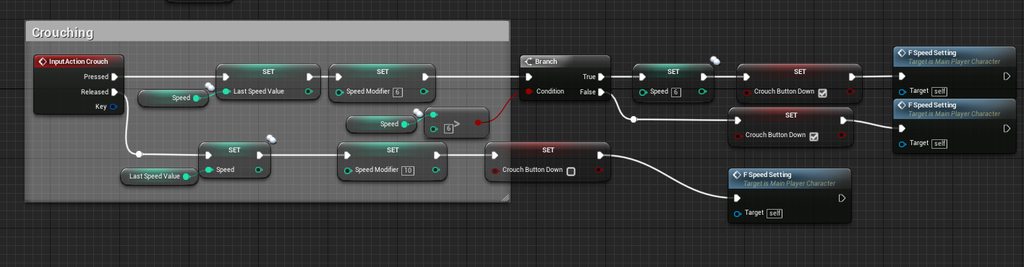 winged badger
Input actions are client-side
you need to forward them to server if you want them to take effect
and replication of variables only works one way : from server to client
lean hornet
so i forward the info the the playerstate and call it from there ? @winged badger
so client player ==> playerstate ==> ServerPlayer
thin stratus
@Vlad#1167 Hm alright. Would be interested in the solution to authentication then.
I guess it's part of SteamWorks already?
Or UWorks was the name
@lean hornet No, you just call a ServerRPC in the Character directly
If you have a ListenServer setup, then Input can be called on the ListenServer Client or on the other Clients.
You should use a SwitchHasAuthority node to test that
ListenServer (Authority) can set the changes directly.
Client (Remote) should set the changes locally, but in addition call a ServerRPC that also sets the changes.
I assume "FSpeedSetting" applies th changes?
Then you'd want to mark your Integer variable as REP NOTIFY instead of just REPLICATED.
That generates a OnRep_VariableName function which will be called when the variable replicated.
In that you will want to call your function that applies the settings
burnt meteor
U can also use an RPC
lean hornet
@thin stratus i will try that thank you
thin stratus
@burnt meteor RepNotify is kinda needed to make sure that late joiners and players becoming relevant also get the update
a Multicast wouldn't work there
 cunning stirrup
Hello, i'm having a crash when trying to send a map (TMap) through RPC in blueprint, can anyone confirm that ?
ok seems that TMap is not implemented for replication https://answers.unrealengine.com/questions/670186/rpc-event-with-map-variables.html?sort=oldest
bitter oriole
Is it not implemented now ?
jolly siren
@fleet sluice Awesome, screenshots would be beautiful 😃 And I ❤ short and sweet solutions. The PR was never good, just a huge mess with a lot of unnecessary changes.
lean hornet
sooo after i fixed the issue of replication and now this happens https://www.youtube.com/watch?v=UxGuG5mX5do&feature=youtu.be
 jolly siren
Check to see if the speeds are the same on the server and client
and use the console command p.NetShowCorrections 1
Looks like the server is correcting your movement. Which causes the jerky look
lean hornet
speeds are the same tho
just checked
and the console command does nothing for me ?
jolly siren
I was talking about Max Walk Speed
 full bane
looks like you enabled the bOrientRotationToMovement thing in the characterMovementComponent
full bane
👍
fleet sluice
@jolly siren @thin stratus Top execution line runs on client's BeginPlay, bottom execution line runs on server's EndPlay.
This is the relevant section from Steam's official docs: https://partner.steamgames.com/doc/features/auth#3
GetUser refers to Steam's ISteamUser and GetGameServer refers to the ISteamGameServer interface. All custom functions I've used from my plugin have the same names as they do in the Steam SDK. Likewise for the ValidateAuthTicketResponse_t callback from the SDK.
Seems to be working well inside an APlayerControllerclass. I haven't heard of people complaining about it thus far.
jolly siren
Thank you so much Vlad, digging into this now 😃
thin stratus
Thanks Vlad!
Wondering though: If not using the NetDriver anyway, wouldn't that code make more sense in the GameMode?
Wouldn't I be able to send the Ticket and SteamID via ClientTravel options
And then verify them in PreLogin?
if the "BeginAuth" already fails locally, I could kick them in PreLogin directly
If not, I could wait for the callback from steam
fleet sluice
I guess you could. I never tried. I just happen to know where the NetDriver accepts/denies connections because I messed with that directly to fix OSSteam's multiple machine requirement.
I don't see any reason why it wouldn't work
fleet sluice
TArray<uint8>
thin stratus
Hm, so I could convert that to a String
fleet sluice
Not to be confused with the FTicketHandle struct, because from Steam's point of view, the server could keep track of N tickets in the same object
thin stratus
Coolio, will try that with PreLogin when I ever get to it. Thanks for sharing!
Handle seems to be only relevant on the client?
Does that handle need to survive? cause I would generate that stuff before actively joining the server
fleet sluice
My bad, poor phrasing on my part. No, I don't think it needs to survive, generally. I was thinking of client-client authentication and the existence of some weird case where one would need to keep track of multiple handles.
thin stratus
Ah right
fleet sluice
If the authentication fails, the server could just send a new RPC and request a new ticket, at which point the old handle is no longer needed anyway.
thin stratus
I would usually just deny the Client if the Auth fails
One question though:
How is that part tested anyway
Cause that is a synced reply
Is that "OK" worth anything?
Because "PreLogin" can only kick a player in a synced call.
So if that BeginAuthSession returns anythin but OK (or maybe something !Okay), then I could kick them directly, without needing to send the ticket to the Steam Servers
fleet sluice
Yea, the OK part is required. It's a local verification. Technically, with or without the Steam application running, the .dll handling this stuff is the same (steamclient64.dll). I assume it's some form format verification to exclude malformed tickets.
You could, yes. I would give them 2-3 shots though.
For each client, that is
It can't hurt
This is all in the range of milliseconds anyway
thin stratus
So it could fail event though the ticket is valid?
 vocal dagger
When I start the game and I'm not on multiplayer I have my own game mode right? If I join a session my game mode is overtaken by the server's game mode am I right?
fleet sluice
Yea. Imagine a client sends a 0 0 0 69 69 0 0 0 ticket and Steam expecting tickets to start with 1 1 1 instead. The server wouldn't even forward the ticket to Steam because it knows from the start it's screwed.
jolly siren
Does the steamclient.so handle this the same on linux? vs. the dll
 versed socket
So apparently UE4 has Voice Chat built into it? I just noticed this APlayerController::ToggleSpeaking() method: http://api.unrealengine.com/INT/API/Runtime/Engine/GameFramework/APlayerController/ToggleSpeaking/index.html
Toggle voice chat on and off
jolly siren
yes, it works okay in 4.19
 high nebula
in my top down game, with multiplayer, if I make the world using world composition, and tiles of 80mx80m, am I going to have issues? Without a dedicated server?
quickly testing in the editor with 3 players, once my first character went into another tile the other two started jittering..
I have the streaming set really low so player 1 unloads the first tile pretty quick
high nebula
bah, no world composition. will do level streaming tho, and use it to control areas manually
Getting really wierd issues with my mana variable tho
everytime I switch between client windows, the client resets to default value minus whatever he's spent
I have a feeling its the way I have the regen/spend functions are set up
Mana variable is on character pawn. Is now set to RepNotify, which just updates the HUD
Yup. bad setup.
sharp spire
hey guys, what is the most common way of refreshing a HUD after modifying a Replicated Variable via RPC?
just calling a refresh after the input?
RepNotify still gets run by the server, so its accessing NONE
high nebula
I've been doing an IsValid node on the hud reference. it "works"
works on the client, server sees its not valid and silently fails
high nebula
yeah works for me, dunno if its the best way. 🤷
sharp spire
i was actually curious if the GameModes' HUD class is meant for referencing, but figured id rather be more accurate with my question lol
high nebula
oh, I use widgets so I dont even know what that HUD class does anymore :?
sharp spire
oh i use widgets too
guess that nulls my question lol
also, that works fine for listenserver, but the clients arent updating their hud :\
inventory*
high nebula
uhh, I dunno, does each client have the hud?
sharp spire
yes lol
its working just having an issue ..
not sure what i did. but im sure its my doing.
on the server i click an input to add an item through RPCS and such to add an item and itll add it just fine. for the clients i click add, and it adds it but doesnt show it in the inventory until i add a second item... lol
fleet sluice
HUD doesn't do anything crucial anymore. In one old livestream, a gentleman from Epic even said, if in use, it should just be considered a "UMG container" and nothing more.
sharp spire
well i thought about using it as a container tbh
im still having trouble understanding where a hasAuthority switch is useful... (yes i know thats bad lol)
is it mainly used for setting locally and over the network at the same time? i just dont get it.. lol
severe widget
no it doesn't handle any RPCs
Its for code that is going to run on both places - but how that happens is up to you
sharp spire
https://gyazo.com/6630c84c7fe30c91f5ab0daf6f9a1a28 so im using this to handle my widget refresh while still adding to the server array. (the function just simply contains adding to the inventory array)

on the listenserver everything is fine, and on the clients its ALMOST right... except the first item in your inventory is always messed up..
basically it shows no icon, and no text, but can be clicked and activates its usage.. but when adding a second item, it takes the place of the first and still says theres two items.. then the third takes the second place, etc
oh wait, do pure functions followup on the server?
maybe thats my issue lol
thin stratus
You are calling the local event right after the ServerRPC
You do know that a ServerRPC as well as replicating data takes time, right?
Call Refresh directly will probably still use the old data
 night jay
Guys I've been trying to figure this out but I'm kinda stuck
How the hell do you execute console commands on a dedicated server
Like not even the BP node works
sharp spire
oooo
so how can i have it refresh on a delay?
RepNotify id imagine?
but how would i go from a ServerRPC to a Local?
@thin stratus
basically whats happening is the first item has no information for my UI somehow
any items added after that work fine
actually let me test if its the first time THAT item shows up
its just the latest item thats added, so youre right
just gotta find a work around lol
ill be damned.
onrep works fine since i have a "isvalid" on my widget reference.
thanks @thin stratus
vital steeple
@sharp spire sounds like you have a similar solution for when i was spawning equipment/character meshes 😃
regarding your response to my stuff a few hours ago
thin stratus
ServerRPC and then a Repnotify
And if you don't want others to get that update, use the rep conditions
E.g. OwnerOnly
vital steeple
also replicated meshes dont change if you set a different mesh. you have to manually force the change by multicasting the mesh change. thats a known bug. so watchout for that 😃
IIRC the official response to that bug was "spawn actors in with the intended mesh"
if you want to swap a mesh (on a character for example) they recommended you just destroy it and possess a new actor with the correct mesh 😉
ive also noticed VERY weird behavior with replicated particle systems. soemtimes, activating them DOES display correctly for other players, other times it doesnt. restarting the editor seemed to "fix" it. :/
im on 4.18 though, and i've heard 4.18 is a bit buggy
thin stratus
Why would that be a bug
The mesh is simply not replicated
You should also not use an rpc
As late joiners wouldn't see the mesh change then
Repnotify mesh variable should work
sharp spire
Actually my mesh changes over rpc with rep notify just fine 😮 for the listen server and all connected clients
Maybe I used a multicast, but I don’t believe I did
Festive hats 😃
Yea my men have ten packs. They work out a lot.
vital steeple
sorry, to clarify: on 4.18 set skeletal mesh doesn't replicate, even if the component is replicated and it's run locally on the server. with static meshes, it works fine. there was an bug report submitted a year or so ago about it, but i cant seem to find it right now. my google fu is weak.
i think that qualifies it as a bug
or were you talking about the particle activation not showing to clients?
ive run into that multiple times and its just disappeared later
sharp spire
mine does replicate though
the client and server and can see clients and servers equipment using a RepNotify
proper olive
You can replicate set skeletal mesh by using RepNotify and multicast at the same time it's really wonky but it works @sharp spire
I feel like the mesh variable should be passed through the Multicast RPC too but this works
anyway I have a question if anyone has experience with this really bizarre error... a friend of mine says he gets a similar error when using characters attached to other characters
basically the Add Controller Yaw Input, when using Controller Rotation Yaw and not Orienting Rotation to Movement...... on client, and on server, it works fine, but for clients seeing other clients, it's as if the character's rotation is being clamped from 360 degrees of movement to 180, so that it turns around in half a circle in the same time/speed it takes to turn a full circle, then snaps around to the other side
my normal character doesn't display this behavior which is why I think it's because of the attachment, but curious if anyone has seen this before?
 toxic meteor
What's the best way to handle picking up items in multiplayer? Should you run a trace on the client & then have the server also do a trace to check or can you just have the server do a trace to the object?
My thinking: Client Trace --> Server Trace --> Add item to inventory
Or can you just do the server trace?
 fossil spoke
@toxic meteor If you let the Client and Server do the trace you can use that to help hide latency.
The Clients trace would be used to "assume" that the Servers trace will also allow you to pickup the item
Therefore the Client can predict what the Server is going to do.
And do it ahead of time.
If the Server rejects the request then you just force the Client to remove the Item
And its placed back on the ground.
So no harm done
If you only allow the Server to trace then your client has no information about the item UNTIL the Server tells the client what happened.
toxic meteor
@fossil spoke How would you go about implementing that?
For example, I have 'interact' bound to F, so in the character blueprint I would have the Event Interact call the trace function. Would I also then do the same thing say within the player controller where switch has auth and then compare the two results & go from there?
So on client (Character blueprint) Trace returns item
Server(CharacterController Blueprint) Trace returns item & checks client trace if the same then add item to inventory
fossil spoke
Player presses "F" indicating they want to run some sort of trace for Item Pickup.
Send an RPC to the Server to let it know the Player wants to perform that action.
Server runs the same function as the Client does locally.
The Client would run cosmetic "Pickup" logic (removing the mesh from the ground, putting in inventory visually) Server would replicate any actual state down to the Player (ie: An Item has been added to Inventory)
toxic meteor
Awesome, that helps alot!
fossil spoke
Use HASAUTHORITY inside the "DoTraceForItem" function to perform Authority/Remote specific actions
Use HasAuth where you need to ensure different logic is run by different Roles
If the Server rejects the request you would then get the Server to send an RPC back down to the Client to tell the Client to reverse any cosmetic changes it did.
toxic meteor
Is the player controller the proper place to have this as its replicated between owning client & server or would I split it between that and the character?
fossil spoke
PlayerController exists on the Server (for every client) and its owning Client. Using the word Replicated in that context is not accurate.
Is it for adding Items into an Inventory?
toxic meteor
Yeah I wasn't quite sure what to call it, I'm still learning how all the networking stuff works, been using the Network Compnedium as a refrence
and it is for adding items to an inventory
fossil spoke
Where is your Inventory implemented?
fossil spoke
Do it on the PC then.
Honestly, i would have seperated out the Inventory into its own Component and then implemented Pickup functionality on that Component as part of the Inventory
👍
toxic meteor
Go ahead 😃
fossil spoke
Go ahead
Where does it appear?
I wouldnt be worried.
No idea man, never seen it before. Its only an Warning and if its working fine i wouldnt be concerned. Make sure it works fine in an Packaged game though.
toxic meteor
@fossil spoke When you said that you tend to separate your inventory into a separate component, what do you mean? Are you creating another blueprint altogether?
fossil spoke
Yes an Actor Component
toxic meteor
Okay thanks!
proper olive
Fixed my problem with an Is NOT Locally Controlled switch 😄
#meta
I have a general purpose question that I never really saw discussed personally... when you run a Server RPC or Client RPC, then continue run the exec wire off of the blue node, are you still on Server or Client, or does it go back to / stay on whichever one it was before the RPC?
like this:
ignore my boolean there because I'm actually doing both the Orient and the Controller Yaw on that Server RPC (and doing one yes, one no)
but basically let's say the client runs this code - the Orient Rotation to Movement on the right there - would it be on Server or Client or both or ...?
vital steeple
@proper olive thats what i had to do
it just doesnt replicate (for me) by running a command on the server to set the variable and let it naturally replicate
had to do a multicast
proper olive
I multicast most of my variables yeah for example animation booleans
but don't have to if it's like the movement component for example
certain things are automatically replicated if run on a replicating actor on the server, but not everything
but yeah anybody know about that post-blue-Server-RPC exec wire replication? 😄
fossil spoke
@proper olive To answer your question, the Network Context of the wire will remain the same. The RPC node doesnt change the Context of the wire, it sends an REMOTE request to the endpoint to run an particular piece of code.
If an node was called on the Server, the next node after that will remain being called on the Server
RPCs do not modify the Network Context of an wire
proper olive
so that Server RPC will run on Server then when it continues on the white exec line, it'll remain however it was before the Server RPC?
fossil spoke
Yes
proper olive
woohoo
sharp spire
@proper olive it’s replicating tho without multicast is what I’m saying :/
proper olive
o sorry, I just came in at the end, didn't go back far enough to see what the root issue was
just saw "skeletal meshes don't replicate" and had to say something 😄
cause they don't, but they can...
sharp spire
I didn’t have an issue I just saw a discussion on how you need a multicast for skeletal mesh components to replicate and I got it working just fine with an RPC and setting the toggle on
Hm
proper olive
@sharp spire ah did you check if you are indeed using a multicast? would be curious to see how you accomplished changing skel mesh at run time without it?
sharp spire
thats why i figured id pitch in and share what i've done 😮
ill post what i did
https://gyazo.com/d8b209fa25de84e9f39241d3c873e200 the EquipFunction is straightforward about setting my equipment array which is set to RepNotify and on RepNotify runs refresh which runs this https://gyazo.com/bdab2ff0b8de64696b59b40c00a3abb6


E_RightHand is set to Component Replicate
and its as simple as that, no MC o.o
and both clients, and listen server all see eachothers changes


proof of concept
proper olive
where's Inventory Index going to?
proper olive
ah
sharp spire
in my entire project
proper olive
not repnotify?
sharp spire
yes repnotify for Equipment and Inventory
proper olive
repnotify from server is basically what cedric was saying earlier
that's essentially multicast plus if you wanna let me call it that 😄
sharp spire
well with all due respect i wasnt trying to see who was right haha i was just seeing if had any bit of insight for those that were curious. so essentially were both right 😃
proper olive
oh me neither
sharp spire
im very new to multiplayer so im bound to make many mistakes
i hope i stress that enough ._.
proper olive
saaaame here
well technically I'm very new to UE and multiplayer and programming and gamedev all at the same time
sharp spire
haha i started UE and asset creation about two years ago
started multiplayer about a week and a half ago.. haha
proper olive
nice nice, 2 years all around here minus sanity breaks
multiplayer definitely tests the nerves 😉
sharp spire
i need a sanity break... i spend an average of 6 hours a day working on my project and the only "break" i had was when my son was born lol
sharp spire
i got so far into my last project, i may release it as a single player game. but my intentions were a mp but didnt realize it wasnt an easy conversion
its not bad for you if you actually finish something 😃
proper olive
well no i just mean getting sucked into working at the desk for too many hours is bad for the back 😄
sharp spire
i started this project that im working on now when i started learning MP nearly two weeks ago and ive made tons of progress. at this rate i think i could finish a fun mobile game within 6 months if not sooner
yea haha
i need an argonomical desk
proper olive
yeah I kinda feel like certain multiplayer functions should be reversed by default
sharp spire
or however that word is spelled lol
proper olive
like make us force it to run only on client instead of multicast/repnotify everything by default
sharp spire
i agree, but in a sense it gives those who finally understand it a fair chance at success compared to those who just learn the basics of UE4
proper olive
yeah there's definitely a bar to pass 😄
sharp spire
by all means haha
but its a fun bar
i enjoy thinking about it while im at work lol
proper olive
sometimes I think certain default values were left wrong on purpose
just to make sure you're changing things yourself
winged badger
its "ergonomical"
sharp spire
thank you @winged badger 😃
proper olive
how do you mean?
sharp spire
ergonomical?
proper olive
yea
sharp spire
a desk where you can go from sitting to standing by lifting the desk
it has a pressure mount
proper olive
ooooh lol
proper olive
I had one but the design was bad by design, a bolt was pressured loose and I started being afraid my cat would trigger it into crushing him under it so I stopped using it completely
standing is still important 😄
sharp spire
haha poor cats.. always so curious. sorry, we should probably either move to #ue4-general or PM. sorry guys.
proper olive
lmao thinking the same
sharp spire
cats are not MP relevant right now.
proper olive
trying to keep it on topic..... well I fixed my weird rotation issue and now I'm trying to figure out why my swimming component is still active but that's just a process of elimination... I usually only ask here when I really can't find anything on Google
 vivid fjord
we talking about cats?
proper olive
how bout that cat game, would be fun in multiplayer.....
winged badger
the cats are relevant when you need to replicate them
proper olive
:drumroll:
vivid fjord
cats are naturally adversarial and territorial
proper olive
they're relevant when they're within the relevancy radius
proper olive
switch on random enumerator of senses
from stream so they just stare at a wall until something changes their condition
sharp spire
If you're using a Multicats make sure to have an array of literboxes
fossil spoke
Those Multicats will get you
 gloomy tiger
People, question -- is there a simple way to simulate a player logout/disconnect in the Editor?
I mean, when I close the player's window even when not running the Dedicated Server in a single process, both are closed when I close the client window.
(PIE)
 hasty adder
In client console reconnect
Disconnect works but will bring you to default project map in its own instance I believe @gloomy tiger
hasty adder
o/
Comes in handy if you need to make sure a player drops a game needed item if they disconnect 😉
gloomy tiger
Sure thing! xD
thin stratus
So, I'm currently trying to figure out if I want to get rid of the default specatorpawn that spawns when the PlayerController receives the SpectatorClass.
Or if I would want to just reposition it. Because I start my GameMode delayed and during the time they see the team selection, I want them to use a rotating camera in the middle of the map.
To get rid of the SpectatorPawn I would need to actively override the "ReceivedPlayer" and "ReceivedSpectatorClass" I assume.
Or I change the view target and let them (client only-) spectator pawn just sit in the world
thin stratus
Well actually I need to stop that one from spawning
Why does Epic have to do soooo much for one
I mean cool to have a specator system, but why forcing it on me
void APlayerController::PostInitializeComponents()
{
    Super::PostInitializeComponents();

    if ( !IsPendingKill() && (GetNetMode() != NM_Client) )
    {
        // create a new player replication info
        InitPlayerState();
    }

    SpawnPlayerCameraManager();
    ResetCameraMode();

    if ( GetNetMode() == NM_Client )
    {
        SpawnDefaultHUD();
    }

    AddCheats();

    bPlayerIsWaiting = true;
    StateName = NAME_Spectating; // Don't use ChangeState, because we want to defer spawning the SpectatorPawn until the Player is received
}
Guess one could override PostInit and set the start to something else
Probably gonna break everything lol
thin stratus
If only the coders of UT would use comments more often
Splitting the CameraManager UpdateCamera function for Dedi Server and others.
No comment why that's done
fossil spoke
What do you mean Splitting it?
thin stratus
They do something else for DedicatedServers
fossil spoke
Oh right
thin stratus
fossil spoke
I havent read any UT code lol
thin stratus
Seems like they force default values
Yeah I'm trying to learn how to properly utilize all given classes
And currently try to remove the forced SpectatorPawn
fossil spoke
The PCM is great
thin stratus
Yeah using that now to modify the camera, e.g. moving it to the rotating spawn camera at start
Still having the problem of a SpectatorPawn spawning by default
...
fossil spoke
You dont have the SpawnAsSpectator flag on GM set? lol
thin stratus
It receives the Class from GameState and spawns it
Cause PostInitProps sets the state to Spectating by default
I will try overriding this with my own custom state
fossil spoke
Is this in UT or just UE4
thin stratus
Just UE4
fossil spoke
Mmmm never noticed that before
thin stratus
Yeah idk
StateName = NAME_Spectating; // Don't use ChangeState, because we want to defer spawning the SpectatorPawn until the Player is received
In void APlayerController::PostInitializeComponents()
fossil spoke
Why would they bother at all if the flag on GM isnt set?
Doesnt make sense
The PC doesnt need an Pawn
thin stratus
Well they do :D
void APlayerController::ReceivedSpectatorClass(TSubclassOf<ASpectatorPawn> SpectatorClass)
{
    if (IsInState(NAME_Spectating))
    {
        if (GetSpectatorPawn() == NULL)
        {
            BeginSpectatingState();
        }
    }
}
What condition does this occur? Does it get spawned/destroyed even if an DefaultPawnClass is defined?
thin stratus
DefaultPawnClass != NULL and bDelayedStart = true
thin stratus
void AGameStateBase::ReceivedSpectatorClass()
{
    // Tell each PlayerController that the Spectator class is here
    for (FConstPlayerControllerIterator Iterator = GetWorld()->GetPlayerControllerIterator(); Iterator; ++Iterator)
    {
        APlayerController* const PlayerController = Iterator->Get();
        if (PlayerController && PlayerController->IsLocalController())
        {
            PlayerController->ReceivedSpectatorClass(SpectatorClass);
        }
    }
}
There is no check for that
ReceivedSpectatorClass calls on OnRep
void AGameModeBase::InitGameState()
{
    GameState->GameModeClass = GetClass();
    GameState->ReceivedGameModeClass();

    GameState->SpectatorClass = SpectatorClass;
    GameState->ReceivedSpectatorClass();
}
So GameMode hands it to GameState. That gives it to PlayerControllers
And they instantly spawn the Spectator if in Spectate State
I mean, sure, I will try to simply NOT set it to spectate state
But still weird
bStartPlayersAsSpectators
Is what you meant, right? @fossil spoke
fossil spoke
Yeah
thin stratus
Yeah that only gets used in "HandleStartingNewPlayer"
And there it only checks for it to be false
:D They never use it?
thin stratus
Typical >.>
fossil spoke
Aye haha
thin stratus
I mean sure, they are using that in the way of saying "If it's false, we can spawn the normal pawn"
Like, the boolean is meant to delay spawning the actual pawn
Not to allow spawning the spectator
So if you tick that, and you don't use DelayedStart, then it won't spawn the pawn
But keep you in the already spawned spectator
While you would think, that you simply have no pawn at start
.>
Welp, I will post an update once I know if I can simply not set state to spectate
 cedar galleon
hey everyone! I have need solution......
I join in the player in the session (JoinSession) when the pplayer Logout from Server I want the character not destroy on server, but stay on Server. Now when exit from Session the player destroy, I want stay on Server, how can solved this problem?
Tk..
fossil spoke
@tawny jaysualnotte#6215 Unpossess the Character before leaving the Server, that should stop it from being Destroyed.
cedar galleon
@fossil spoke I have used Unpossess but when exit to window player close the connection and Character destroy on Server
fossil spoke
Hmm, i thought an Orphaned Pawn would remain
fossil spoke
Sorry that doesnt make sense?
thin stratus
I can't find any logic that would destroy the pawn by itself
However might be hidden somewhere
cedar galleon
@thin stratus I have multiplayer game, I want when the Player logout from SErver not dissaper your character, but go in the state "sleeping", want stay on server
how can solved?
thin stratus
Idk, I can't see any reason for an unpossessed pawn to be destroyed
 idle fiber
Has anyone tried using the close combat swordsman kit by Gert for a multiplayer scenario?
 solar stirrup
how good is Unreal's networking implementation?
fleet sluice
Good for what purpose?
For DOTA-like multiplayer, it's good. For WoW-like multiplayer, better turn around.
fleet sluice
Star Citizen is also a FPS with a server authoritative architecture, yet a MMO at the same time.
All I'm saying is, you're a bit vague.
solar stirrup
For a game with around 32 players maximum
fleet sluice
Then np.
solar stirrup
Alright cool
I'm coming from Unity and I'm making my own net lib since UNET sucks 🤢
fleet sluice
What are you using for NAT traversal?
Just curious here
I made my own networking using Steam
solar stirrup
I'm gonna make my own coupled with UPNP
I'm learning more about networking at the same time
fleet sluice
I've had disappointing results with UPNP and 3 different consumer-level NATs
But that was just my experience and I'm saying it as a heads-up, not at all as a discouragement
jolly siren
I came from Unity like a week after UNet was released because I was so disappointed by it and I've been nothing but happy with Unreal's networking ❤
fleet sluice
I was close to coding TURN/ICE servers while working on my networking because UE4 offers no such thing
jolly siren
The Steam implementation is pretty incomplete tho fyi
jolly siren
@thin stratus For your session implementations, do you create a new delegate for FindSessionComplete and make it BlueprintAssignable? Instead of using the ootb FOnFindSessionCompleteDelegate?
thin stratus
My FindSessionProxy has a custom Struct in it for all the session data.
Since the Delegate in the Proxies defines the return value, I have to create a new one that returns TArray<customStruct>
So, yes?
DECLARE_DYNAMIC_MULTICAST_DELEGATE_OneParam(FFindSessionsDelegate, const TArray<FPBSessionResult>&, Results);
    /** Delegate (BP Node Exec) called when we successful. */
    UPROPERTY(BlueprintAssignable)
        FFindSessionsDelegate OnSuccess;

    /** Delegate (BP Node Exec) called when we failed. */
    UPROPERTY(BlueprintAssignable)
        FFindSessionsDelegate OnFailure;
ahh so you use a UOnlineBlueprintCallProxyBase for your session stuff?
thin stratus
Yes, cause I expose that stuff to BPs
If you don't plan on needing that, then you can do the same though
Code is basically the same
Just one delegate less and then a second parameter for "bSuccessful"
Well actually
You can use the same :P
jolly siren
Ahh okay, right. Yeah I'm just cleaning some of my session code because my initial implementation used something similar to ShooterGame, where they keep checking to see if the results have came back in tick
thin stratus
Ouch :D
jolly siren
😛
 gusty raptor
hey guys, im trying to attach a actor to another actor, actors are spawned on server.. how wouldi replicate the attachments?
editor crashes with almost everything i try 😦
 magic helm
Have you tried only attaching on the server?
Also are both actors replicating and have replicate movement turned on?
toxic meteor
Is it possible to get a players steam group? (I want to make a guild system using the steam groups as to determine the members)
winged badger
i think the steam API calls it "clan"
hasty adder
Might be private data now 😉
toxic meteor
Just incase anyone was curious; I figured out how to get peoples steam groups using advanced sessions: There's a node 'Get Steam Groups' that gets an array of the users steam groups 😃
glacial pollen
Why...
is the server running this rpc?
It appears the client doesn't have the object...
brittle sinew
Is that component (directly or indirectly) owned by the server's PlayerController?
glacial pollen
Supposed to be the server side of the local player controller
it has a hud that I need to work on the client, but need server authority to make sure the right weapon spawns
This (Self) is the child actor of another actor
MesddataContainer is owned by the character
severe widget
listen server?
glacial pollen
which is ran in the characters begin play, using Has Auth here
No, dedicated
All this works fine If I do this from the main menu (not connecting to a server)
The server and client both have MeshDataContainers
And each MeshDataContainer has a ChildActor prebuilt into the BP
However, the childactor's class is set at runtime
Do I need to set the owner manually? Wouldn't this already be set since MeshDataContainer already owns the child actor?
I mean replication should give the client his copy... yea?
glacial pollen
So, it appears that the Set Child Actor node, does not set the owner....
brittle sinew
Yeah, that's expected. Actors don't consider parent components when looking for owning connections
glacial pollen
Well its working when not connected to a server, I still says its replication
brittle sinew
That's because when an actor doesn't have an owner, the function is called on the local instance that made the call.
When you're calling it on your client, the only place to call it is the client.
If you want to call something on an owning client from the server, it needs to have an owner that defines that owning client.
Like you found out, you need to do that manually.
glacial pollen
The client is the one making the call, but I have to manually set the ownership from the server side, right after spawning, which still doesnt work because it appears the client still doesnt know it owns a replicated child actor - actor
brittle sinew
What are you setting the owner to?
glacial pollen
I get the owner of the child actor component
Using print string, I can SEE the correct owner
This works solo, but as soon as I go network, the server knows the owner, but the client still doesn't
InitModule calls:
So
Server sets child actor class
Server sets child actor - actor's owner
Server calls InitModule on it
InitModule calls AddWeapon on client
Client doesn't know who the owner is
I could just use the construct from object (with proper owner), and attach it and set a reference variable, but damn man this should work exactly the same, but save me from doing all this:
Basically the new owner is just not replicated to the client
Or I could just make two separate calls to set owner, once on server, and once on client
but even with the replicated variable work around I still get this :
Why is this running on the server?
vital steeple
anyone been able to create a dedicated server exe? ive been following some guides but neither of them work. i designed my mp to work around a dedicated server but i dont think i can create one from inside the client itself
toxic meteor
@vital steeple This should be what your looking for: https://wiki.unrealengine.com/Dedicated_Server_Guide_(Windows_%26_Linux)#1._Download_the_Unreal_engine_from_source
Just follow the guide & it should work
vital steeple
yeah thats one of the ones i followed
toxic meteor
That's the one I used & it works fine
toxic meteor
are you trying to use advanced systems plugin?
vital steeple
lets me select, just doesnt have the source build as an option
toxic meteor
Did you launch the sourecbuild
like to the menu where you can create/select a project
vital steeple
when i do that step (local windows debugger)
it just loads my project up instantly
hrm
toxic meteor
double check you did all the steps properly I guess, I never encountered that problem
vital steeple
so the biggest difference is i didnt start from github
i started from my project
ill start fresh
this seems unnecessarily round about though, for somethign that seems like it should be more streamlined
but what do i know 😃
like will you have to run through this process and do a custom build EVERY time the engine updates?
toxic meteor
I'm not sure, but you normally dont update to the newest engine version right away