#multiplayer
1 messages · Page 348 of 1
 grand kestrel
derived from KMSComponent
 inner iris
😄
 ruby epoch
Iam using set view target for spectating mode
 lilac egret
how do I replicate blendspace?
ruby epoch
but its not update camera position orient to controller
if I manually replicate it
I get stutters
any ideas how to fix that?
 trail dragon
@lilac egret Replicate the variables needed for the blend state, send those variables to the AnimBP from the actor when recieved
Are there any tutorials on weapons in multiplayer? I'm sure I can figure it out myself, but always happen to have a good kickstart :p
Specifically networking the equipping, inventory of, and firing of a weapon
 hasty adder
I got a weird problem that only happens with some people in a ship build. Local host of a game can run ok. And then joins a server and gets some odd lag. Now this isn't everyone it's like 2 out 12 ppl
hasty adder
I'm wondering because his computer is a lot better then most getting 160 frames and might not sync with dedicated server
So any thoughts how to test for what might cause the online crazy desynch let me know @ me 😃
trail dragon
Can't share videos like that @hasty adder
hasty adder
Ah no fun need to upload them I'm a 3rd party in this
 rain rampart
how do i port foward ue4
 civic belfry
is there some kind of trick to getting a particle system to activate and deactive for a player on all of the other remote clients?
trying multicast reliable with activate and deactivate but it doesn't seem to replicate
only works on the owning player's client
hasty adder
Port forward would done in your router if your local ip is 10.0.0.120
Your router might be 10.0.0.1
You web into it and enable port forwarding for the port range to point that port to the ip of the computer so 7777 forward traffic to 10.0.0.120
There's videos on this on YouTube
civic belfry
yeah, it will be differnt by vendor so look up your manufacturer's instructions if possible
some call it port-forward, others call it server address something or other
hasty adder
The other part of the battle is you might want to test disabling your computer firewall where the server is
civic belfry
ah yeah, and disable the IPv4 firewall on your router too - those things are always bad news
hasty adder
Also note you likely can't test this locally meaning one@computer on the same network over the Internet to your network back
civic belfry
^
hasty adder
This is a lot like if you tried to call yourself on the phone you'll need a friend or outside network to test
civic belfry
Anyone know why this would fail to activate a player's particle system componants on everyone other than the player running the RPC?
seems like it should work to me!
If I have it active from the start, everyone can see it. it seems like its just messing up when I try to activate/deactivate
hasty adder
Are you calling that multicast from a server command
Ie: Client explodes calls on server explodes_sv (run on server) then calls explodes_mc (multicast.)
Only server can run a multicast to get to anyone it's reaching down not everyone while clients only reach up to the server
Multicast must always be run on server/host because it knows about the clients. Clients only know about the host /server
civic belfry
ohhhh
I hadn't thought of that, I was running it from the client directly
off of an input
hasty adder
😃
hasty adder
Yeah visual thought of it is base of a tree feeding down to the roots is the server the roots themselves are clients
Right
They got little tool tips on the nodes "if server" or "if client" which doesn't say a lot but makes sense in the picture you make ofnit
So say I want to send a message on discord tonyou. I dunno your ip
Then server does
I send it to the server who then sends it to tou
And everyone else 😃
hasty adder
Yup 😃
civic belfry
probably saved me more grief down the road since I hadn't ran into that concept yet
just now taking off with networking crap
fun times
hasty adder
Just try and remember client can never interact directly to another client. But server can talk to everyone
civic belfry
the misconception I had going on was that if my client ran a multicast event - it was basically telling the server to broadcast. I hadn't thought that it was basically telling my client to multicast lol
good stuff, I should probably take the night to watch some multiplayer tutorials before I fight my way through this. still not totally convinced that my jetpacks are done properly
even though they work
hasty adder
Multiplayer is tough. In the end nothing is perfect. Client side actions and server side multicasts can go all sorts of complicated to give client s responsive illusion while calculating server side
This is why ppl see things like bullet trailed fly through someone's head but not hit
civic belfry
ah yeah
hasty adder
Because sure for them they shot at the right time but in reality the only true God is the server unless your logic tells the server to trust the client which is where the hacks begin 😃
civic belfry
it is admittedly more tought than I though it would be. I've spent 2 years learning single player and figured that would help a lot. I also know traditional networking (CCNA) but it doesn't mean shit now hahahah
hasty adder
It's differ bet like 2d and 3D
Wow can't type
Your dealing with multiple worlds bow
civic belfry
yeah, multiplayer is like 4D lol
 polar lily
not really related; but you know you can plug both particle effects into a single de/activate node instead of having two~? :>
hasty adder
Yes that I know of
If there both particles effects as a class
You can activate and deactivate multiples in same call
Same for things like set visibility efc
polar lily
ye, pretty much
hasty adder
Very good 😃
civic belfry
now lets tidy up the jetpacks
jk LOL
not touching that until I find a better way to do it all together
polar lily
good gawd o_o
hasty adder
Bp is nice but remember it will leave thin vague because say you want a gun could logically call the effect locally instantly so your not waiting for server to tell you to spawn it. And rhen tell a multicast to spawn it for everyone but you so you don't see it teice
polar lily
SPAGHETTI!
hasty adder
Twice
civic belfry
ahh that makes sense
I'm getting minor corrections for the jetpack system that I'm working on - super close corrections
seems to only happen when my X and Y velocities are set
but I'm betting it will be not so minor with regular lag
or a bunch of players
hasty adder
I can help later if you want to pm me screens of the logic but I need to hit the sack it's 2am
civic belfry
nah, no need to waste peoples time on it now, it works well enough to prototype with
will have to address it later
thanks for the multicast teaching though - that would have been a nightmare to keep running into without knowing the gist of it
hasty adder
It's good to learn as you go so no worries . Nitr mate 😃 np
 unborn nimbus
Ok so I have a a Server RPC that I'm trying to call on the client but when I place a breakpoint inside the client-side function, it just skips over the server function.

 brittle sinew
If you look at your logs, do you get any mention of 'no owning connection'?
95% of the time when a server RPC isn't making it to the server, it's probably ownership problems 😃
unborn nimbus
ah it's because of no root component and I didn't set bAlwaysRelevant
 dark kernel
Are game modes accessible to all connected players, or do I need a game instance?
brittle sinew
The GameMode isn't accessible to clients, but I'm not sure why that would mean you need a game instance per se
dark kernel
okay. trying to logic out what I am missing here. If I wanted to play chess between two players, I would store the chessboard/pieces in...a game mode on the server? and then replicate it out to the client?
brittle sinew
Usually, for things that relate to the state of the game (like score/leaderboard or maybe even the board), you would use the GameState, which is replicated to all clients
dark kernel
ah ok. is that a separate class then from the game mode I am assuming?
brittle sinew
Yep, AGameState
dark kernel
awesome. thank you. I'l lgo read up some :3
 shy nymph
Someone out there that tried the steam Multiplayer Blueprint Tutorial?
https://www.youtube.com/playlist?list=PLZlv_N0_O1gYqSlbGQVKsRg6fpxWndZqZ

YouTube
Video Tutorial Series In this video series, Wes Bunn from Epic Games walks you through creating a networked game with Steam integration entirely through Blue...
I tried it but got stuck at launching a lobby, instead of getting me to the lobby map after the "open level" it opens the Lobby map and suddenly drops me back to the mainMenu for some reason i dont get it
https://youtu.be/Bb1tkhWhB_w
 shy nymph
The error in the Logfile says
Network Failure: GameNetDriver[NetDriverListenFailure]: SteamSockets: binding to port 7777 failed
anyone? :((
 thin stratus
Is that the Lobby Tutorial fro mEpic?
Can't they freaking remove it
It's so damn bad
They just tried to let the discussion around it die
"After GDC we will do something about it."
tsk..
@shy nymph Did you setup the Config files properly?
Is there more in your Log that talks about Steam?
shy nymph
@thin stratus yea probably not, i made the config file like this recent video from Unreal
https://youtu.be/oDSJ7vixpCE
thinking "well its fairly new this must work" but now i just copied the .ini config file from the docs and it stoped jumping back

Getting your game working with Steam is frequently an important part of one's development cycle. Cedric will begin with a walkthrough on how to integrate the...
dunno what exactly caused the problem
thin stratus
That's actually me :P
In the video. Well idk what Epic does in their tutorial.
They probably use Seamless Travel somewhere. The config in my video might need a few adjustments for their tutorial
shy nymph
oh well... hi 😄 yea probably, i didn't see this one before the other one so i started doing all of the work from the other tutorial... hosting works now but now my other pc can't find the hosted game... but i have to look into this one first
if I cant figure out why its not finding the hosted game, do you have some knowledge about this so i could maybe ask you again? 😃
 wind vale
i've mention this before but after trying out the tips i got i'm still struggling to get it working. Using bps, making a chatwindow, i wanted to have all clients see a "host" tag once the host sends a message. All i've menaged so far is only the host seing the host tag but on all clients messages, while clients dont see host tag at all. For each connect player i run https://gyazo.com/5dce9aa10ec555d3626b889114a308b2 which calls, https://gyazo.com/44280572d36124ad8d99ead8099b7c30 . the text widget equals basically to this https://gyazo.com/b5c10e6e81b3f288690cf1fbb5733ba0


 thin stratus
Where is "IsHost" set?
I bet you set it on the Server, so it's alwas true
You need the server to check the sender and check if it's the server
Or you have a different event when the server sends, up to you
wind vale
at the beggining of the PC, with is server
thin stratus
The RPC is on the Server
So IsServer will probably always be true when the Server generates a message
What you need to do is checking if the SENDER is the server
You could do that by actually using the PlayerID of the PlayerState
So the Sending Player send the ID
And server can use it to check against all PlayerState
but tbh, the Server should know when he sends a message
I would just split that into Client Sends message and Server sends message
Also your ChatWindow is a widget i guess. RPCs have no reason to exist or work in them
UpdateChatWindow should be a normal event
wind vale
Ok... thanks.. i'll try your approach. i got to the point of realizing why it wasnt working and that i should do "checking if the SENDER is the server" but with no idea on how to
wind vale
yeah
thin stratus
Make a second Event that is not a SERVER RPC
Right before sending the message, you check if it's a client or server
Client calls the SERVER RPC Version
Server the non ServerRPC version
Both perform the "Mutlicast_SendMessage" or how ever you actually send the message from server to client
Only different is that the SERVER RPC sets "SERVER" to false
and the non one sets it to true
wind vale
getting the idea... i'll try to implement it right after dinner, cheers and thank you
dark kernel
If I am calling Get Game Mode inside the Game State, is it going to get the data from the game mode from the server even on the client? or will it fail?
dark kernel
I'm guessing I want to call bto the Game state from the game mode then to get data
brittle sinew
Yeah, that sounds like a good way to do it 😃
dark kernel
trying to mostly wrap my head around where my game data should be tracked. I read somewhere that the game state stores the data and the game mode does things.
brittle sinew
Well, to be honest, they do whatever you make them :p
dark kernel
lol
brittle sinew
You can do anything you want in either of them really, just keep in mind the restrictions placed on the classes (GameMode only exists on server), and you also want to think about keeping things organized
dark kernel
right
brittle sinew
There's no set list of what you should be doing in either, though
What you described sounds pretty typical, but my point is just that the classes don't do those two things by themselves
dark kernel
makes sense
 fossil spoke
Is that so.
 twin juniper
if i possess a pawn on Player A, before player B has connected. Then I move the pawn, Player B now logs in, he will see the possessed pawn in the location it was before player A moved it. Also, there seems to be some disconnect with my skeletal mesh components... Player has his loincloth in two separate locations. https://i.imgur.com/mKmyfVN.png
 fossil spoke
If the Pawn has its movement replicated it should appear correctly on the newly connected player.
twin juniper
@fossil spoke it does
 cursive herald
hmm
@twin juniper So both characters and vehicles should load if they are relevant in the correct place
is the pawns marked as only relevant to owner?
with net load?
 cursive herald
check always relevant and see anything changes?
fossil spoke
Make sure that the components are set to replicate as well.
cursive herald
yup that too
twin juniper
@fossil spoke Which components?
fossil spoke
Whatever the cloth is, Mesh?
cursive herald
actually as long as it's a static relative position you shouldn't need to rep it
just the actual movement of the pawn
check the CMC or whatever movement comp you are using for replication settings
cursive herald
how are you moving the pawn?
are you sure it's only moving on the client because the client has thought it's moved but the server doesn't?
twin juniper
Oh I know its moving on both
because if we move the pawn, when player B is connected... he will see the changes
its only if he connects late
that he wont see the changes
cursive herald
ah
I remember having to init rep some things for issues like this on larger games when they fall in and out of relevancy. Like if the player is now too far to be relevant.
but not sure that's the same here it sounds like the position of the possessed pawn simply isn't being sent
when the pawn replicates it should update the position
so maybe the pawn isn't replicating until it moves?
you could setup some initial only replication
see if that fixes it
you could also have some onrep functions depending on replicated variables that may not be valid at the first rep
but I would think you would see those in the forms of crashs unless you are good with isvalid/null checks
twin juniper
@cursive herald but we are right next to eachother :l
also it sometimes just... blinks
so maybe
cursive herald
being right next to eachother doesn't effect replication in terms of when it happens in UE4
they only rep deltas
if there are no deltas to rep then they don't rep them
if they blink... do you have something that might set the pawn back to that location for a moment?
or do you have an attachment to that location and pawn?
cursive herald
hmm is this pawn a vehicle or???
cursive herald
vehicle, got it.
twin juniper
😛
actually let me make sure that it actually inhereits from APawn and not ACharacter... we have been using APawn for flying mounts because of the pawn levitating component
sec
cursive herald
so when you get out of the vehicle does it like return to it's base?
ya APawn is typically better for flying than character
twin juniper
ok it inhereits from ACharacter
but i know we have a robot which inhereits from APawn and it works fine
cursive herald
SO I would say with no idea of the code or codebase that the fact you thought it was pawn
means it should be pawn
twin juniper
i mean i dont think that it being a pawn or a character should matter
like, if I move regular characters around
they move
and u can see them when u connect late
cursive herald
I don't think there would be either
but this doesn't seem like an epic level bug
So I would say the safe assumption is something with your code-base.
but that said I mean I have no clue. do you have the engine pdbs? can you step through on the client on first load when it happens and sees if it gets replication of the correct location ever?
setup some breakpoints and really dig into this thing 😄
cursive herald
OnRep functions
by the time they fire you can check the local variable and if you include an argument for the old one they will detect that and all that jazz
twin juniper
Yeah
hasty adder
Strange higher end ppl sometime seem outa sync with server with movement rep, like they're over hitting the server. Because there frame is high maybe. Still gathering data but curious if anyone seen this
Note I do the following due to rebinds.. Controller calls a local event to send a message to controlled pawn to add input instead of using standard input binds
twin juniper
@hasty adder yes
hasty adder
Hmm trying to figure this out things where fine a few months ago. I'm pretty sure I was using this bind system then. :/ it's like 2 ppl ours 15 now that are effected
Windows 10 for both
Nvidia 970 and 1070 gtx hmm
 heady epoch
I have an object in the level that uses a scene capture 2d and a render target to display the weapon of the player through umg.
The problem is that when it starts capturing it displays to all clients. Should I instead create multiple of this actor and assign different rendertargets per character? Is there a way to do this with only a single level in the scene?
Osok - Today at 1:30 PM
I am thinking of spawning the capture actor on the client only, and seems to work, but I can not access it except for the first time.
cursive herald
@hasty adder yes that is a known issue: High FPS clients cause the server to take more load from that client
there is a fix in 4.19
hasty adder
@cursive herald thanks!
hasty adder
@cursive herald one user confirmed vsync fixed their problem
The other still some lag but capping at 90 was good . Good to know
 turbid hatch
Hi guys.
I need the help of someone who understands multiplayer and preferably Blueprint as well. I need some guidance and I am willing to pay. Does anyone have some recommendations?
brittle sinew
Well, you have this channel here 😉
If you're specifically looking for personal help, go check out #career-chat
dark kernel
I've a weird problem. I added a default game state into my gamemode bp (call it bpGameState). Now that I've done that, it's spawning a game state, but no game mode. is creation of a game mode being blocked for some reason?
brittle sinew
I doubt the GameMode isn't being spawned, since the GameMode is the thing that spawns the GameState 😉
dark kernel
i have no game mode object in my Outliner
oh wait.
I lied
it's just not calling begin play for some reason when I hit play
brittle sinew
Did you derive your GameState from GameState or GameStateBase?
dark kernel
Game State
brittle sinew
If you subclass AGameState, you need to manually do some things to 'start' the game; BeginPlay isn't called on objects until that point
dark kernel
ah ok
brittle sinew
If you don't need those features, just subclass from AGameStateBase
 red ledge
has anyone here played with beacons and match making? I remember some were talking about it a few months ago
red ledge
thank you
 void canopy
@turbid hatch I've sent you pm for multiplayer assistance
red ledge
if I have an mmo rpg style game where players can trade things, where should I handle the trade? Server RPC on the inventroy component or on the game mode?
 past bear
if it's MMO RPG style, on an entirely different service outside of the game engine
 drowsy badger
^ can confirm. things like that happen even not on the same machine as game server
thin stratus
Well, the trade itself can be hanlded on the InventoryComponent or what you have the stuff in
But that Component should then communicate with the outside DataBase
red ledge
just an mmorpg style not really one, more of a test you can say not a game, there won't be any data bases etc
thank you I'll see what I can do
 regal relic
You can easily setup something like Playfab to get started with using backend datebased design. Without having to worry about handling any of the backend stuff yourself.. Its a great way to learn the process, And save time on the development process.
red ledge
Thank you, I'll look into that if I decided to look more into it, I'm just testing if I can do it on a small scale for now
 cedar aspen
hey does anyone know if UE4 has any kind of inbuilt lag compensation
 lost inlet
no it doesn't
you can either implement CSHD (like shootergame does) or implement it yourself
which is a bit involved
thin stratus
Anyone here worked with Seamless Travel + OnSwapPlayerControllers in Blueprints?
I'm successfully printing Lobby (oldPC) and Gameplay (newPC), as well as possessing the newly Spawned Pawn via newPC (prints of Controlled Pawn etc show correct Pawn), but camera is simply stuck as not having a pawn possessed
 jolly siren
so the cam is just sitting at 0,0,0?
thin stratus
Seems like it
Think I solved it
OnSwapPlayerControllers calls too early
Saved the selections and controllers and spawned the players on BeginPlay
Seems to work
jolly siren
ahh okay, awesome 👍
dark kernel
So small question. In my player controller, I have a "SetWorldLocationandRotation" node on Begin play. this works fine with one client, no server, i.e. standalone. How would I modify that to be done for all players in the game?
I'm getting turned around with all the different kinds of replication for functions :/
 glad sedge
@dark kernel What's helped me the most is continually asking a question: does the server know about this variable / function / action.
That and using it in conjuction with https://docs.unrealengine.com/latest/images/Gameplay/Framework/GameFlow/GameFlowChart.png
 dark kernel
thanks
glad sedge
Also understand there's a difference between Dedicated server vs client / listener server
shy nymph
Anyone any Idea what might be the Problem in my steam session project when the host doesnt see any clients move but the clients can see the server move but also not other clients :/
fossil spoke
Sounds like your not replicating movement correctly.
 sterile pebble
@shy nymph yeah, just check the replicate movement box
shy nymph
@sterile pebble oh okay that sounds simple i will check it
shy nymph
@meepmeep#4613 it is set to 'true' on my pawn
but still not working
and it already was set to 'ture'
 jagged knot
aaaand another problem, finally. /sarcasm/
steam sessions stopped working for me after updating windows. I can't find sessions I create on another pc using another steam account
when creating the session, this is posted in the log: Warning: STEAM: No session info to join for session (Game)
jagged knot
any ideas? I already tried disabling firewall etc
inner iris
In general, it seems most of the shooting examples use traces against the mesh of an enemy player. However with skins and other factors, this could cause the hitbox to increase or decrease depending on the size of the current armour/helmet. Is it generally best practice to create some generic collision shapes (head/torso, legs, etc) in the character BP and attach them to sockets, and trace against those instead of the default physics asset collision from the imported skeletons?
Just to keep fair play and avoid players choosing certain skins to gain an advantage.
Or I guess the base skeleton could have no armor/helmet equipped and any objects could just be attached with no collision to that base skeleton. Interested to see what methods people use!
jolly siren
Wouldn't it be weirder if you shot someone in the armor and it didn't damage them?
 restive sparrow
See csgo
 wind totem
Can some one help me about animation replicating
i am geting stuck
if some one have liiiiitle time to see my screen and tell me what to do
 slim holly
you don't replicate animations, you replicate conditions that create animations
unborn nimbus
How can I have the server know whether a client is playing a certain animation?
slim holly
replicate the event that started the animation
unborn nimbus
The event that started the animation is on the server
Basically, I want to call Montage_IsActive() on the server but obviously that doesn't work
slim holly
surely both client and server can trigger the montage(as they probably should)
wind totem
I try to replicate but wont work i watched videos and stuff still wont work -_-
unborn nimbus
pm me demonith
inner iris
@jolly siren the hitbox would be larger than the base human mesh so it’d intersect with the armor or be fairly close to what users see. Otherwise there’d be people picking the smallest possible skins for the advantage.
 ebon rapids
Hello! does the gamemode has access to a specific player? If so, how do I access information from this player? is it through the playercontroller?
unborn nimbus
Player State I believe
thin stratus
@ebon rapids Where do you want to access information and why
The GameState has the PlayerArray, holding PlayerStates
ebon rapids
I want the gamemode to execute something based on a player string. Should I approach this another way?
thin stratus
Hm, depends on what this string and the action is about
ebon rapids
When the player connects he sends a string through the URL. Before the player spawns I can read the string from the URL, and this string was previously stored in the client. I want to check if the string from URL (that the gamemode received) matches with the string stored in the client. should I store it on the PlayerState or GameInstance? I want to know how do I make the gamemode identify that player through this string. "Hey you are the player XYZ because you sent 123 through the URL. And since you are 123 I will give you ABC"
 wary willow
@thin stratus You should compile a FAQ about MP and when you get a chance to update your comp, add these, with some basic examples.
@ebon rapids This question's probably been asked quite a bit, you could try to use the Search here on Discord
@ebon rapids What URL are you talking about though?
ebon rapids
when the player uses "open 123.456.789:7777?String=123"
wary willow
Options
ebon rapids
yes
ebon rapids
BP
thin stratus
So the thing is: Blueprints allow you to pass information via the OpenLevel or "ServerTravel" command
by doing ?Key=Value
You can get that via the Options on the GameMode
Thing is, C++ actually allows the same for clients
They can pass a string that the server can check on in PreLogin functions, that don't exist in Blueprints (sadly)
thin stratus
Na before that even
I think PreLogin and Login pass player options
Login and PostLogin have a PlayerController
I do the indentify in there
so hte player passes his key or what ever in there and I check if that one is awaited (in an array)
however if you can't use c++, you would need to work around the lack of functions
OptionsString only comes from the Server
If the Client should pass something on connect, the earliest point would be PostLogin
Where you can use a ClientRPC on the PlayerController
ebon rapids
I'm a noob with C++ hehe
thin stratus
and then a ServerRPC to pass data back to the server
ebon rapids
well thanks for the insights, I will try to do something with C++
thin stratus
@ebon rapids It's quite straight forward.
You would "Only" need to override the PreLogin or Login function in the GameMode
and in addition you would need custom function for connecting that let's you pass the sting
I assume you are using JoinSession stuff?
ebon rapids
btw is it a bad idea if I change the engine source instead of overrride?
ebon rapids
no session stuff, just connection via Open level
thin stratus
Alright, then you might be able to just pass the stuff via openlevel
if not, I could give you a chunk of code at some point that replaces that node for client connection and gives you the ability to pass ?Key=Value stuff
ebon rapids
I did this to read the Fstring "Chave"
 pallid mesa
seamless traveling on BP's doesnt work if you don't have at least one player on your session, open level really works out for dc servers
 agile lotus
Is unreal capable of allowing multiple local players in an online session? an example would be on some games where if you have other local players they would appear as Prazon (1) and Prazon (2)
on the same PC or console
but joining games together online
 twin vault
yes
agile lotus
tyty
heady epoch
Anyone ever run into this problem? Set Actor Location called from the server on the server does not work. But if I use attach to actor it works perfectly fine. Absolutely crazy. Maybe a bug? Seems like a bit hacky of a work around, but I guess it'll do. Anyone seen this?
thin stratus
Are you sure the person who calls the rpc owns the actor?
@heady epoch
Also isn't that the game mode you are working in?
Why does that one have an rpc at all
It only exists on the server
Clients can't even get a reference to it
heady epoch
Here is the flag that calls that event in the GM
@thin stratus
Should I change that to a multicast instead?
Essentially I want the GM to control the rules of touches, captures, returns.
wary willow
His point was, why do you have any RPCs on the GameMode
It only exists on the Server
That little overlap
heady epoch
I suppose I can leave it as a custom event by itself then
wary willow
You don't make an RPC call to your GM
jolly siren
You are calling a Server RPC from the server
wary willow
I would probably leave it on the flag itself
Asking the Server for permission
But, I haven't done a CTF gametype, so I really don't know what I would do after experimenting
I just know that if you leave it on the server, there's going to be a delay
And since the client doesn't know anything about the GameMode
it would be hard to do any sort of client-side prediction
soft or hard
wary willow
So, TBH, just do you;)
heady epoch
which gets the gamemode to run the drop flag event
heady epoch
Set actor location wasn't working because there was nothing in the target 😫
I have not purchased it no.
wary willow
Actually, don't think they have CTF, but I think you are misunderstanding a few concepts
ShooterGame is free
Download it on learn tab
wary willow
Maybe not learn tab
heady epoch
i read through cedric's mp pdf.
i thought to get it to run on server
i did run on server function
but I can just do a plain custom event if it is already on server
heady epoch
I don't know everything about mp that is for sure. Happy to find out that I can just use a regular event when I know it is on the server side.
WHat is a good way to eliminate the delay with picking up the flag for example that I can feel
so it checks the overlap is on the server so it attaches the flag on the server, but there is a smal small delay.
do I also attach it client side and then remove it client side if the server disagrees?
as evidenced here

Google Drive
wary willow
Like I said, I haven't done a CTF game type. So without actual experiementation/experience, I would say that for now, you should just do a Multicast to your CaptureFlag event. But have that event inside the Flag, not the GameMode.
heady epoch
unfortunately the video is still being processed
wary willow
If you wanted to do a IsLocallyControlled bool
shy nymph
hey everyone im stuck with a problem replication my physics base pawn movement
https://youtu.be/XKyzG-kIeJY
someone knows any good ressource on this or knows what going wrong here? 😦 really need some help
 heady epoch
looks like it is replicating?
shy nymph
yea it seems to be replicating but you see on the server how its supposed to be moving, not that stuttery movment thats on the clinet
*client
shy nymph
how much? xDD i mean this shows that it can be done but not how to to it 😦
found some videos that did it as well
dark kernel
if i have a function that adjusts a camera's location and rotation on all clients, I should fire that on the server, then replicate it to the client to adjust their camera as well, right? is that a multiicast?
heady epoch
@shy nymph basically the client is constantly updating the server with its position and the serving is lerping to the position the client is telling the server which replicates to everyone else. It was a 4 figure sum paid.
shy nymph
@heady epoch yea thats basically what im doing or rather trying to do with some blueprint code i found in a tutorial on youtube. maybe im doing something wrong here but this leads to the stuttery client motion you see in the video
hasty adder
I did a small ctf thing a bit back I did this .. Make a flag spawn actor. This had the flag in it as a mesh.. Which when picked up I simply set its visibility off and it on overlap would if flagishome check if the right team is overlapping set it to not be home and set the player character to have flag. I also had a similar mesh on the mesh since it's easy to again when they have flag is set make it visible to all. And when killed they would drop a separate flag actor. Also note I had an spawn ref and E um for flag team and spawn id which I would pass to the character who would pass to the dropped flag so. It would know it's home location actor and be able to turn the visibility and such back before it destroys itself.
@heady epoch
I have the ctf example on the forums if your want to see the bkueprint project I think it's 4.15
 worn nymph
anyone know how to get the logs from a dedicated server crash . my server is crashing on startup but its closing before i can see whats wrong?
pallid mesa
add -log to the game execution @worn nymph
@echo off
setlocal EnableDelayedExpansion

set engine_path=%programfiles(x86)%\Epic Games\UE_4.X\Binaries\Win64\UE4Editor.exe
echo UE4Editor.exe directory: [!engine_path!]
set /p new_engine_path=:
if not "%new_engine_path%" EQU "" (
    set engine_path=%new_engine_path%
)

"%engine_path%" "%CD%\MyGame.uproject" CreateSession -server -port=7777 -log -nosteam
``` quick bat script for you @worn nymphi have -log already what does the bat do?
pallid mesa
CreateSession is supposed to be a test map which holds the creation of a dc server with predefined arguments
whenever you execute the command you will see a console logging your game
and you can join that "dc server" locally if you want to
but its really handy to see the execution flow without even entering the editor
also adding -log to the argument list
you should be able to see the console anyways
the script is just a handier thing to do
worn nymph
yes but as soon as it starts to errot the console closes and i cant see why
pallid mesa
you can actually see the txt files with your logs
but i don't remember in which directory
if you use steam they will be inside your steam/game directory
hasty adder
@worn nymph my round able hack way was to use desktop rec software and just watch the replay 😉
Though now that I think about it can't you do something like gameserver -log | more
Or maybe it's in the batch file you do first line server command second like pause
And it will always wait for a key input before continuing After closing
worn nymph
error im getting is package contains editor only data
hmm strange never had this one before
worn nymph
lol thanks but it just makes the bat freeze not the logs but interesting to know lol. i will just create a new project and test and debug some more
cursive herald
logs are written to the hard drive for a reason
worn nymph
hmm so tried brand new project and also shooter game they all crash with same errors
worn nymph
god dammit spent all night on this and its the same stupid backlogged bug
target date for fix engine 4.19 😛
dark kernel
sorry for asking the same question again, but i got no response the first time. If i have a function that is supposed to set a static camera's location and rotation on all clients, I should fire that on the server, then replicate it to the client to adjust their camera as well, right? is that a multiicast?
brittle sinew
@dark kernel you could do it that way, or you could simply replicate the component and the changes will be automatically propagated to clients
(to call an RPC it must be replicated to begin with, so changes like that don't really require an RPC)
dark kernel
I set up the camera as a component on the default player pawn, so if I check that component to replicate, I should just be able to set it up as a normal begin play script?
essentially I am setting the camera for a chess game, looking down at the board, so both clients have the same view
hasty adder
Question here what are you having the camera do? Trying not to get a shared camera experience?
dark kernel
Not really. Just give the players a view of the board from their client.
dark kernel
from the game mode?
worn nymph
then inside player controller get reference to this camera and use set view target with blend
i wouldnt do it in gamemode no. that only exists on the server
worn nymph
i was thinking of making a chess game so let me know how you get on
lol
like an updated version of battle chess
dark kernel
ha. I will. It originally started as an exercise to learn UE4 and just supports local multiplayer (two people using the same computer)
but i wanted to add in multiplayer support to learn networking
hasty adder
Yeah that's what I do in a top down hovercraft mode
dark kernel
Set view target essentially moves the camera view, right? It's not a "point the camera at the target" function.
worn nymph
doesnt move the camera as such. more like you unposess the current camera and you take the view of the new camera. this can give the appearance of movement depending on where they are
dark kernel
ah. cool.
worn nymph
like for exmple on my character creation screen i have two cameras one is showing all characters then when i click on a character i use the set view node
and it swaps view to the other camera which is zoomed in
dark kernel
So i would have my camera actor spawn in the rotation/location i want, then use set view target to that actor? And then set that actor to replicate
hasty adder
Don't need to replicate it. Technically
Each client has there own version of the world. For instance if you make an actor wth a camera face how you want to and build logic in it to move around independently of the client. Each client has there own copy of the world the same actor doing the same logic
dark kernel
ah yes thats basically what I am trying to accomplish. each client having its own independent camera
worn nymph
well it all depends really
if youre going to use a fixed camera type setup or for example you could create the players as spectator type pawns which is just basically a flying camera and they could go wherever they want and zoom in and out on the chess board
or you can use a mixture of both
 dark kernel
Oh man. THe spectator pawn idea is awesome
jolly siren
mhm gl with that patent
the McDonald's patent referenced in that article is more interesting
😛
 neon mango
When/where would be the best place to trigger my loadout selection menu?
I thought I'd do it in the games PostLogin but that doesn't seem to work
Since I need to call MyHUD
unborn nimbus
Is there a way to basically Multicast to all clients except 1?
jolly siren
no
unborn nimbus
I didn't think so <.<
unborn nimbus
Multicast executes on client not server?
jolly siren
it executes on server and all clients
jolly siren
right
unborn nimbus
thanks
jolly siren
np
heady epoch
@hasty adder I've got it all working now a bit differently than you do, but I would take a look at what you did, link?
grand kestrel
If I set a replicated variable on the server with repnotify who will call the repnotify, everyone?
Just double checking
 regal hazel
Who ever the replicated variable is set to replicate to
grand kestrel
Cool thanks
worn nymph
Dam the fix that worked before isn't working now .
Anyone ever got this error when running a dedicated server ?
"Package contains EditorOnly data which is not supported by the current build"
Fails with lots of log linker warnings but the things it's listing are normal ue4 classes like the third person character bp.
I tried a clean project , shooter game and my own project and always same errors .
only since I switched to 4.16 .
I get no errors packaging or building just when I launch
hasty adder
grand kestrel
@worn nymph you need to exclude from the build using #if WITH_EDITOR
PostEditChangeProperty is a common one people miss
When they override it
On phone so hard to talk in detail
Oh
I missed some of your post sorry
Reading hard on phone too lol
 hazy matrix
Does anyone know if I can actually test multiplayer (Steam) without having an actual product on Steam?
fossil spoke
Use the appid=480?
hazy matrix
Huh, never worked for me in Unity. This is my first time attempting multiplayer in Unreal. Unity always told me I didn't have permission to create lobbies
hasty adder
Anyone know off hand if create session with steam on and your own app I'd has a problem when unreleased on steam? Did a ship build to test and can't "host" not that I need to but need to make a note and ensure it works later
drowsy badger
you can create session/find session using appid 480
can confirm
if dedicated, it even shows up on steam's server browser
dark kernel
So, I've almost got something working, but i'm slightly perplexed (screenshot attached before explanation)
This works just fine when I have clients set to 1 under play in the editor.
when i set it to 2 clients, w/o dedicated server, only the client that isn't acting as the listen server is correct. if i check dedicated server, neither is.
why would this be?
(that's attached to a begin Play statement)
hasty adder
No I have my own appid and it works outside of published on steam as non released
thin stratus
@hasty adder One thing comes to mind: Your app is not unlocked for Session Creation
That's the only thing that could stop it if everything else works
hasty adder
Ah that just a setting hiding in the steamworks build setting somewhere?
hasty adder
Looks like free projects you have to email them to enable it
wary willow
@hasty adder ?
Did you pay your $100 for it?
I'm like 99% sure last I talked to Valve about throwing up a free game, I still had to pay $100
sterile pebble
I'm curious but is there someone who made custom dedicated server instead of default one?
sterile pebble
I dont know actually..
jolly siren
lol
sterile pebble
actually no, I lost my thought..sorry
dark kernel
can anyone help me with an issue? Screenshot below
This works just fine when I have clients set to 1 under play in the editor.
when i set it to 2 clients, w/o dedicated server, only the client that isn't acting as the listen server is correct. if i check dedicated server, neither is.
why would this be?
(that's attached to a begin Play statement)
worn nymph
@hasty adder i found out how to log dedicatd server crashes u dont need your hacky solution now :-p
hasty adder
Oh yah? Lol
worn nymph
in the exe shortcut add this -log LOG=MyGameLog.txt MyGameLog.txt can be named anything you want and it will save the log into a txt file
hasty adder
Ah good to know
Exi also pointed out on shipping there is code to enable logs. So a head of time notice it's normal for dedicated server window with -log to be blank
I forgot where i saved that note tho
worn nymph
yeah its like a macro u have to change
twin juniper
hello
i have q question
if i wanted to connect to a dedicated server that is lisening to a port which is different then default 7777
how would i do that?
jolly siren
how are you joining currently? with the open console command?
you should be able to join with open ipaddress:port
shy nymph
God damn it... is it really sooo hard to replicate the movement of my physics based pawn.... Cant fibd good ressources and spend the whole day trying to figure it out myself.... Getting nowhere 😭 😭 😭 😭
shy nymph
being independent and budget not available that might be no option 😦
dark kernel
hey, I still can't get my cameras to work lol so ifeel you
 reef tinsel
Hi guys
So, I've got my gamestate class which can give me a player array
This is a player state array
Is there a way to get the controlled pawn from the player state?
Which, I'm guessing would be from the controller
Basically, I want to represent the pawn controlled in my minimap, for each player
I've got the minimap logic done, just need to access the pawns
reef tinsel
Player state, in my case, is a reference from player controller
Player Controller -> PlayerState
Player Controller -> Pawn
But I've tried getting the player controller from the player state without success
reef tinsel
So, to get all pawns that are possessed in the level,
Like, those that are being controlled,
Would it be as easy as "get all actors from class"?
And referencing them locally in my minimap, of course
jolly siren
The Pawns are all already there on the client, so yeah that should work. Or have the Pawn's themselves communicate with your minimap
jolly siren
The fun part is when you try and make a minimap secure
reef tinsel
Like, I'm thinking that handling player's locations locally could yield to cheating
Exactly
jolly siren
They could cheat regardless if the pawn is being replicated
ShooterGame handles that be not replicating pawns when they are out of sight
See second pinned item in this channel
jolly siren
yeah
reef tinsel
Harcore stuff there
And actually a great tip
Didnt think of that haha
So basically what worked for me was:
Get the player array, do a foreach loop
And with each index, get all actors of class "player character"
And add them to my minimap marker widget
Which works alright
But feels unsafe haha
jolly siren
It's going to be unsafe until you add the IsReplicationPausedForConnection stuff anyways
pallid mesa
network frustum points can have lilttle errors like little gaps in the level design
so pause relevancy would be something cool to do even for minimap
but in this case around your character
but yeah as i said shootergame pause relevancy (aka network culling) still needs a bit of tweaking according the game you'll be working on
oh, aight, get all actors from class @reef tinsel
about that, remember to update your references whenever a new player joins the game
dark kernel
could someone look at my question from earlier? >.> I can repost if needed
jolly siren
please don't repost
but do explain more, because your previous two attempts were lacking
pallid mesa
im pretty sure its because of that node hehe
jolly siren
right, agreed
pallid mesa
most of the times people don't understand what's the real stand of that node
dark kernel
sorry I'm still new to learning multiplayer, so I'm struggling to explain the problem as well as the solution
pallid mesa
you need to get the controller without a player index
with an actual reference
check out the friendly "GetController" nodes you find pressing right click on the blueprint editor
dark kernel
thanks. I'll give that a whirl. I'm not really new to UE4, just new to networking
pallid mesa
welcome to networking world :D
dark kernel
It's caused me no end of drinking, i tell you.
pallid mesa
hahaha, anyways try it out and bring your findings, good luck!
dark kernel
I will thanks 😃 Leaving the office in a few so will try once i'm home.
pallid mesa
split screen would be one application :)
hasty adder
I see posts all the time just sitting index 0 always returns the local player controller
I mean I'm right with you I always use get controller
jagged knot
Maybe I changed something in the create session section,...?
Since the error is kind of telling me that my session does not have enough information for others to join
wary willow
@jagged knot Have you shown any BP's yet?
jagged knot
not yet... I'll post the important part, maybe I'm missing something embarrasingly simple
wary willow
Yeah, doesn't anyone helping you if you don't post BPs, we can only go off the info given.
jagged knot
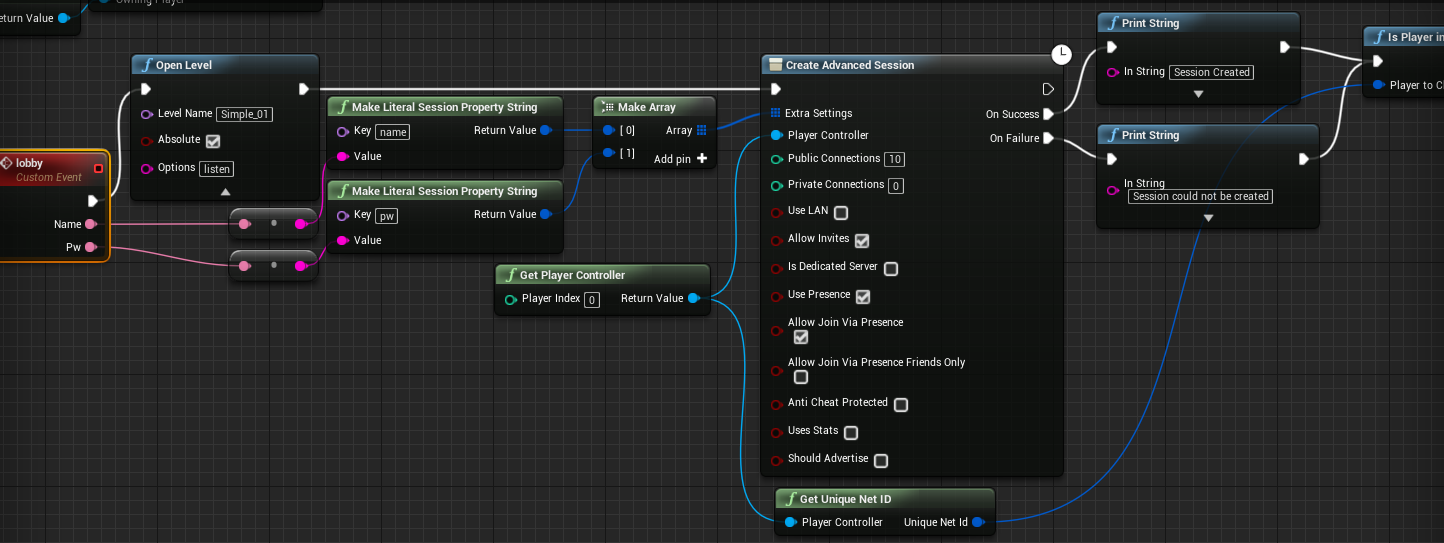
the "isPlayerInSessoin" at the end returns "true", so the session is there, but not accessible
the code is located in my gameInstance
jagged knot
default nodes?
wary willow
Otherwise, ask @heady merlin If he could catch something silly
As in, you are using non-Epic supported stuff
jagged knot
yes, since all the tutorials explaining how to get connections running via steam use the advanced steam sessions plugin
wary willow
?
No idea, I don't use ASS
But, that's definitely not what all the tutorials use
wait
lol
jagged knot
it seemed to be a common tool
wary willow
LMFAO....wtf
jagged knot
did you find something....?
wary willow
I was so focused on the ASS node
You are opening the level..
prior to creating the session
wtf
lol
jagged knot
...yes? this worked before
jagged knot
yes
wary willow
Just humor me
jagged knot
I'll try interchanging them
it's packaging now. If it works, I'll be very confused, since I can not remember interchanging them since it worked. Why would I have done that? I'm really confused
wary willow
No idea. might not even be the problem
jagged knot
...
wary willow
?
wary willow
😉
jagged knot
when did i even touch the session creation part



 jagged knot
hm?
wary willow
So, this is the problem
While I do agree, SOMETIMES, shit after OpenLevel will execute
You should definitely never expect it to
That should be the very last node on any execution line
jagged knot
oh
jagged knot
well the "isplayerinsession" still fires now :D
wary willow
GameMode restarts
jagged knot
maybe my new processor switched the world too fast
jagged knot
would explain why it worked earlier
my study pc went from shitpc to mediumshit pc... Now I have to upgrade my home pc
jagged knot
thanks a lot for your help though, I would have needed ages to find out about the mistake
wary willow
?
jagged knot
I want a new cpu for my home pc; I use that pc for compiling bigger scenes. Do the lighting calculations become better with more cores or higher refresh rate?
wary willow
?
Why would they be better with higher refresh rate?
I am assuming, monitor?
But to answer your question, yes, CPU cores are op
jagged knot
deciding between 12 threads a 5 ghz and 16 threads a 4 ghz
clock speed is the word I was looking for
not refresh rate :)
jagged knot
already calculated into the 4.0 and 5.0
wary willow

Puget Systems
In this article we will be examining how the new Skylake-X and Kaby Lake-X CPUs on X299 compare to the previous generation Intel CPUs and AMD's Ryzen CPUs in Unreal Engine Editor.
^ read that
And, any further question, we can go to #ue4-general
jagged knot
ok, thanks
wary willow
try not to clog this chan too much
neon mango
If my character is replicated does that mean its mesh is also replicated and that the server would have to allow said mesh to move in order for it to move?
shy nymph
no need for text, did narration xDD
https://youtu.be/-rA_h0fY9As

So how can i achieve this properly?
shy nymph
since im "replicating my movement" on my own i thought i dont need the checked "replicate movement" on my pawn, turns out, THAT FIXED IT... like ... what= not yet really smooth but at least every client can move
 chrome bay
Make sure you test with lag. If you're using PhysX, I almost garauntee you'll have issues.
shy nymph
but this cant be such an impossible age of empires world wonder level of carzyness, can it?
twin vault
where should i put a piece of code that i want to run when the editor loads?
thin stratus
@twin vault Why is that Multiplayer relevant?
sterile pebble
is "Run dedicated server" even working?
Is there any chance that this check box can help me debug game with dedicated server?
I mean, I just got a game to debug, which is aimed to use dedicated server instead of listen. It works perfect in packaged version and I can attach visual studio to exe files and debug it, but I also want to just press play in editor and test out several things - is this possible or this "run dedicated server" check box in editor just useless in such case?
chrome bay
Things never run the same in editor as they do in packaged builds.
jolly siren
Run dedicated server in the editor is definitely not useless
It works for most things. You have to run standalone instead of PIE for certain platform specific stuff like steam.
 eternal anchor
run dedicated server is working
problem is by default all pie instances share memory
so if you have singleton which is supposed to per >client<
then all clients run in PIE will get the same singleton instance (for example)
if you want to do real testing yoo should do in packaged dev/debug builds
and attach VS debugger to them
jolly siren
Use Single Process won't fix that? I don't code with singleton, so I don't run into that.
eternal anchor
nah
i tried to run PIE instances in separate processes
don't remember my exact issues back then but suffice to say it didn't worked out ;
jolly siren
ahh okay, I do run with Use Single Process unchecked and standalone quite often and it is useful for me
You should be able to attach to each process separately when using standalone at least
dark kernel
@jolly siren thanks for the help last night. I was able to figure out the issue (finally) after much wailing and gnashing of teeth
jolly siren
no problem, glad you got it working 👍
dark kernel
I ended up dragging the camera into the world where i wanted it (since it's static) and setting it up in the level blueprint. which i think? exists on the client
jolly siren
yeah it does. It's really easy to test, just add a print node and it prepends Server or Client to the beginning of the message automatically depending on where it is executing.
dark kernel
oh neat
sterile pebble
but how it launches dedicated server than? I dont see any new process
It looks like it working, but I dont understand how)
jolly siren
it launches the dedicated server as a separate cmd window
you should see it pop up first before the client windows if you did it right
sterile pebble
should I add -log to see that window?
jolly siren
are you running the editor from visual studio?
sterile pebble
nope
jolly siren
ah possibly then, idk I always run from vs
dark kernel
VS is love
So, I understand the relationship between game state (exists everywhereE) and game mode (exists on the server) What is the equivalent analogy for Game mode with Player State
inner iris
Is it possible to launch the game standalone without the editor but have the same functionality as the “Run Dedicated Server” checkbox? Something like “?listen” but launches a dedicated server instead?
dark kernel
bookmarking that picture thanks :3
jolly siren
yeah, I'm going to pin it. It needs a bit of updating because of the GameModeBase stuff. But it's still really useful.
dark kernel
yeah. I assume the black arrows are one to many ownership then?
jolly siren
The GameState -> PlayerState is one to many
dark kernel
perfect thanks
thin stratus
@eoinobroin#6833 Yes, you can create a bat file that starts a Dedicated Server as standalone
DISCORD
:: Starts a Dedicated Server for the specified Unreal Engine 4 Project.
:: Enables a LOG console, which is also printed to the project's "Saved\Logs" folder.
::
:: Created by Cedric Neukirchen
:: Contact: contact@cedric-neukirchen.com
:: Website: cedric-neukirchen.com

@ECHO OFF
:: Set your paths here correctly

SETLOCAL
SET ProjectPath=D:\MyProjectFolder
SET UProjectFileName=MyProject
SET EnginePath=D:\MyEngineFolder\Engine\Binaries\Win64
SET MapName=MyMap

@ECHO ON

echo "Trying to start Dedicated Server."

echo %EnginePath% UE4Editor.exe %ProjectPath%\%UProjectFileName%.uproject

@ECHO OFF

start /d "%EnginePath%" UE4Editor.exe "%ProjectPath%\%UProjectFileName%.uproject" %MapName% -server -game -log -port=7777
Something like that
File I push to clients that want the same thing @eoinobroin#6833
Can someone tag him for me -.-
jolly siren
@inner iris ^
thin stratus
Cheers
pallid mesa
oyoyoy...
i think i sent one a while ago a bit more customised
cannot find it, ugh
 unreal bison
anyone can send me any tutorials on how to make my game multiplayer for co op 4 people. where it runs on the hosts pc but they can do it through the main menu and not have to download server seperate.
idlike it to maybe run a background process when they host the game so its not a seperate dos command window when they alt tab
 rare cloud
 jolly siren
@alpine crown You can use a listen server if you don't want a separate server.
The compendium talks about it
twin juniper
When does UE4 support voice chat in blueprint.....
jolly siren
I know that the popular Advanced Sessions plugin supports that. But idk about the timeline to support it ootb.
shy nymph
nvm
neon mango
Anyone here know anything about ragdoll replication? Is it possible for example to only replicate the posotion of some bones but not all?
 fickle basalt
Hey guys, just trying to get some advice on how to accomplish projectile bullets for dedicated servers. Anyone got time to answer a couple questions? I already know how to do them as far as local play goes, I spawn a bullet actor that handles the line traces and velocities. But I'm not getting results with dedicated server.
Also note: the weapon is also a separate actor thats just attached to the player character (for loadouts and loot)
neon mango
@fickle basalt If you haven't already, check out the Shootergame Project to see how they do it.
fickle basalt
@neon mango yeah Ive been dreading downloading that just for this. I feel like last time I looked at it (couple years ago) it was just straight line trace. Where Im using actors with lifespan so it archs with bullet drop
neon mango
@fickle basalt No, the projectiles they use for their rocket launcher type gun uses an actor, they have a regular assault gun that uses line traces. They may also use a line trace for the projectile (not sure) but they for sure have an actor for the projectile itself.
They have a base weapon class for general weapon stuff, like reloading, etc... but they have two child classes from it a Projectile type and instant type

 stark dome
That naming 😬
fickle basalt
Ok I guess I gotta download it then. My bullets are fast moving. Using actual calculations for them from data sheets I found. So something like 98000 uu/sec. Think replication will keep up without bogging out?
neon mango
Not sure, haven't messed with that side of the shooter game
There are these settings you can raise though [/Script/Engine.Player] ConfiguredInternetSpeed=10000 ConfiguredLanSpeed=20000 [/Script/OnlineSubsystemUtils.IpNetDriver] MaxClientRate=15000 MaxInternetClientRate=10000
trail dragon
@fickle basalt At 980m/s, is it even worth creating a projectile? That's pretty quick, given that it'll take a bit for the replication message to even reach the player so he creates the actor on his end
slim holly
you'd be amazed how slow that is
on screen that is
but yea I would do projectile path simulation and run traces along with it and fake the visuals
trail dragon
I love Fortnite Battle Royale's sniper for having an extremely low muzzle velocity, and yeah that one is an actual projectile as well.
fickle basalt
Well I use the speed because gravity affects it as well. So in open world, a 5.56 NATO round can travel 2.1km before hitting ground. These means there is considerable bullet drop. And the calculation in total can take <2seconds, but more then current frame time, hence why I don't do the whole simulation at once. Something could move out of the way in that time at that distance.
And no way on each bullet I'm going to calculate the velocities of every moving object potentially in the path with an auto-firing weapon.
unreal bison
@rare cloud @jolly siren thanks guys ill study this heavily!
jolly siren
np
neon mango
Is there a way to RPC from server to just one client?
jolly siren
no
neon mango
Like I can't move into it
 raven holly
Hi guys, having an issue with a client authoritive actor and culling distances. So a player controls an actor, which then sends location, rotation etc to the server. But when I fly out of a certain distance, it dissapears for other clients
It's like the net cull distance is despawning it as it thinks it's back when it was spawned
I set the transform on the server
neon mango
raven holly
Yeah I know how it works
neon mango
Sounds like your saying you are getting culled?
raven holly
Yes it is
neon mango
And that is what should happen?
raven holly
So I spawn an actor, then posses it
Fly it away from it's spawn location
Do the same on another client
Move them both to a certain distance
And the other disappears
neon mango
raven holly

It moving backwards is getting closer to the player character
When it moves past a certain distance it's culled
Where as my actor is right there
It's like it's using it's player characters distance to cull it
Make sense? lol
I have the owner set to the player controller
neon mango
yea I understand your problem, but I haven't personally had that issue. It all sounds like a net culling issue?
raven holly
neon mango
Did you try to increase it?
raven holly
That wouldn't resolve it
That would just increase the distance
Wait.. is a player controller attached to a pawn?
Maybe the player controller is still attached to the player pawn
neon mango
That is a good question, I'm still learning myself but I thought it was more like a Pawn has a PlayerController or I guess a PC has a pawn?
raven holly
PC has a pawn
neon mango
But what makes you think that is the issue?
neon mango
wait how are you moving it?
Is it an animation that is moving?
A look at how root-based animation is handled within Unreal Engine 4
Maybe its pawn is actually at spawn still but your animation is moving your mesh away from the pawn


 raven holly
See one client sees the drone and the other doesnt, but only because I moved that drones player pawn
So the drone is using it's owner (player controller) as the centre of net culling
If i leave the player pawn back there, neither clients can see each other
neon mango
Do you know if you have root motion or not?
raven holly
They aren't animated
neon mango
ok
raven holly
Like inside the culling distance, i can see them both moving etc
But the drone has to be within the old player pawn distance
It's so weird ><
neon mango
Yea I'm just not sure :/
raven holly
it's like I have to attach the player controller to the new pawn
But I thought possesing does that
raven holly
So stupid, why this is a thing idk
wary willow
@raven holly hmmm
Actually, if you think about it
It sort of makes sense
But, that they didn't document this
raven holly
it uses the camera location to calculate what actors should be culled
wary willow
Especially in any of their networking docs, is poop
raven holly
it does make sense in that respect
raven holly
So if i replicate my camera it should fix it ?
🤔
Even if i move the root comp it doesnt fix the culling
which should move the camera
raven holly
I had to make a player camera manager class to disable it
But I wonder if this will affect anything else
Like surely it's a net perf thing as well
wary willow
Damn, been working in VR too much
raven holly
haha
wary willow
Aye, I just opened up a FPS project
I guess I could have just made a new PC
w/e
Anyway, had to make a new PCM to change it
neon mango
If I'm wanting to store something like the Players Inventory selection before the player even exists should I set the Inventory to be in the PlayerState?
I'm thinking about going that rout but IDK if its right
neon mango
@thin stratus Player Joins but hasn't yet spawned with character but I want them to pick out weapons
So I was thining store their picks in PlayerState and when I spawn them I can just look at playerstate and give them the right weapons
thin stratus
Well, usually I save the Inventory on the PlayerController
Or PlayerState, but then make sure that it doesn't replicate to others
Both are okay choices
neon mango
Yea I'm using the SHooter game which stores the Inventory on the Character
thin stratus
Yeah that's not so ideal in every game
neon mango
I suppose the PlayerController would work in this case as well?
thin stratus
Yeah, reason I use PlayerController is that I'm sure it's valid early on (PlayerState SHOULD too, but yeah) and it's only available on Server and Owner
But since replication conditions are a thing in BPs, you could just replicate it to OwnerOnly
neon mango
I read someone saying classes should be stored in player state
Inventory seems along those lines
but I'm not sure ...
thin stratus
It's totally fine to put it into the PlayerState
Just make sure that you use the conditions if you want other players to NOT see the inventory
neon mango
its kind of a public thing already
I'm not going to rep it though
Just make the SetInvenntory an RPC
thin stratus
Sure
neon mango
cool thanks!
civic belfry
Question! I have some rooms in my level that are BPs because they move around like 6dof elevators. In order for them to call events on the server, it seems like they need to have an owner.... Who would this Be? Gamestate? I can spawn the BPs in my level blueprint and assign an owner, just not sure what the "correct" owner would be
The events I'm calling replicate variables to all of the clients, I think that's where the "this must have an owner" error is coming from. Making the owner gamestate allows the events to run, I'm just not sure if that's a good or bad way of doing things
 reef slate
Hey everbody, ive been intersted in meaking an MMORPG type of game and ive been wondering: is it a good idea to create a complete server from scratch for the game or is it better to use unreal engines built in networking solution for this kind of stuff ?
thin stratus
Given UE4 barely allows 100 players atm, you will need a different server architecture.
civic belfry
This channel has been pretty slow for a weekend 🤐
 desert dagger
its monday here 😦
civic belfry
yeah I guess it is here too now lol. 3am
trying to figure out who the "owner" of random level BPs should be
LogNet:Warning: UIpNetDriver::ProcesRemoteFunction: No owning connection for actor ChildActor71_GEN_VARIABLE_testroomBP4x4_C_CAT_250. Function Server Set Variables will not be processed.
to get rid of that bastard error ^
civic belfry
ahhh I finally got it
 late sundial
hey, im having problem with multiplayer/steam. it doesnt work over internet, we tried with friend to connect same server. appid is spacewar, ports are forwarded. lan works great just cant figure it out why multiplayer doesnt work. im using advanced sessions.. 😫
have been thinking if the game is trying to find servers from spacewar and not in my project, could that be an issue?
 tame adder
@late sundial kim still need help?
late sundial
yeah, havent found any fixes