#multiplayer
1 messages · Page 255 of 1
 grizzled stirrup
 exotic wasp
aimbot is tragically just not counterable without anticheat since it mimics player input
it's still perfectly possible to spinbot in CS and valorant
but having a single match with a cheater has long term consequences with things like rank so it's a lot more important that EVERYTHING is perfect
grizzled stirrup
exotic wasp
aimbot is tragically just not counterable without anticheat since it mimics play...
Yeah anything like the method that shootergame tried to do (cull based on visibility) sadly doesn't work with latency as they pop out of nowhere
exotic wasp
most games still do that
for performance and to negate wall hacks
ideally never send a client more information than it needs at that exact point in time
grizzled stirrup
exotic wasp
most games still do that
Interesting, I've seen recent warzone hacks that show full body silhouettes through walls and at the very least many games have a rough bounding box of a player to simulate footsteps and such
The unfortunate side effect of needing to give legit players lots of information on who is around them
exotic wasp
well that's a massive map so it doesn't surprise me that they don't do that
could also literally be simulating animation based on audio locations
 shrewd ginkgo
When I package the game, the create advanced session gives the output "On Success" and opens the lobby level. When my friend searches for the game, the find session also gives the output "On Success", but the result length is 0 and it does not see the server. Steam overlay is activated.
[/Script/Engine.GameEngine]
+NetDriverDefinitions=(DefName="GameNetDriver",DriverClassName="OnlineSubsystemSteam.SteamNetDriver",DriverClassNameFallback="OnlineSubsystemUtils.IpNetDriver")
[OnlineSubsystem]
DefaultPlatformService=Steam
bHasVoiceEnabled=true
[Voice]
bEnabled=true
[OnlineSubsystemSteam]
bEnabled=true
SteamDevAppId=480
[/Script/OnlineSubsystemSteam.SteamNetDriver]
NetConnectionClassName=OnlineSubsystemSteam.SteamNetConnection
[/Script/UnrealEd.CookerSettings]
bCookOnTheFlyForLaunchOn=False


 tardy fossil
if you print the number of elements in the results array after the Find Sessions node, does it consistently say 500?
oh wait i didnt read the last part of your message lol
i do notice you're using create advanced session but not using find session advanced.. not sure if thats your issue but its worth a try
shrewd ginkgo
It was working fine before but it broke down for some reason I don't know.
 mortal blaze
Hello, thank for the answer.
I started looking into gamestate, and it seemed promising for what I wanted to do.
However, when I empty the array with my system via the client, the server still has access to all the numbers in that array. However, when I empty it from my server, the client always returns "0."
I feel like I missed some information about servers with gamestate, but I can't find it on the forums.
 sinful tree
mortal blaze
Hello, thank for the answer.
I started looking into gamestate, and it seemed pr...
sinful tree
mortal blaze
Hello, thank for the answer.
I started looking into gamestate, and it seemed pr...
Replication only happens one way, server -> clients. If you clear a variable on clients it'll only ever clear it locally. You can have the client request that the array be cleared for everyone by having that client send a server RPC and then having the server clear the array.
mortal blaze
sinful tree
Replication only happens one way, server -> clients. If you clear a variable on...
Replication with gamestate is only server -> clients ?
A listening server is not seen as a client?
sinful tree
mortal blaze
Replication with gamestate is only server -> clients ?
A listening server is no...
Replication = Automatic sending of stately replicated variables out to others. Doesn't matter what actor it is, replication only happens from server -> clients.
Setting a replicated variable on the server will make it so that value is replicated out to others.
Setting a replicated variable on a client will only set it locally on that client.
A listen server where the player is playing and hosting the server in the same game instance is still considered the server.
Clients can send the server RPCs (Remote Procedure Call), which is effectively asking the server to do something for them. You can have the client send the server values through inputs on the RPC and then have the server do something with those values. Clients can only call these RPCs on actors or components of actors that they are currently the owner of - typically their player controller, palyerstate and their controlled pawn
mortal blaze
sinful tree
Replication = Automatic sending of stately replicated variables out to others. ...
Oh, thanks for the explanation. I think it's pretty clear, but it's still a problem for what I want to do. I'll try another way.
 arctic mist
Just bumping this so it doesn’t get lost! Would like an answer please!
 vivid seal
For the example you gave, you'd probably want a replicated variable since all clients should have the same collision profile when it changes. In general my rule of thumb is RPC for events (a thing happened and i want everyone to know about) and replicated variables for state (a variable changed and will stay changed until I change it again). In your example, if you multicast to change the collision profile, it might work right now, but if (for example) another player joins the game later on, on their screen the collision won't be set correctly, since they weren't there to receive the RPC originally.
collision is a weird example for late joining because movement is handled in its own little world, but if you were changing the player's team color or something for example, that would be something persistent that you want everyone to know about, including people who didn't receive that RPC when it happened.
arctic mist
oh okay, but if i had a bunch of unreliable RPC functions it wouldn't slow down the game dramatically though right? was my main question
or should i start using replicated variables more often?
exotic wasp
anything important to gameplay should be reliable
rpcs sadly aren't a replacement for replicated properties since RPCs don't change state for new players (and other issues)
 devout sonnet
I removed all widgets and I still can't trigger that click event. The game is super small right now, i don't think i have anything consuming input. And i don't know why it doesn't work only in a joined session.
It's not just the click events either. it seems that all input event's (Like pressing enter) doesn't work in this joined session. Is there a setting i'm missing?
I forgot to set input Mode Game and UI lol
 amber vale
Hey, can anyone explain why there's a discrepancy between the local client and the server when reading PlayerState::ExactPing? The server's estimate of a connected client's ping is usually 10-20ms higher. What's the technical reason for that?
grizzled stirrup
amber vale
Hey, can anyone explain why there's a discrepancy between the local client and t...
Been a while since I looked at it but AFAIK ExactPing isn't replicated and is in bytes so you have to multiply GetPing by 4 to get actual ping
int32(PlayerState->GetPing()) * 4)
amber vale
grizzled stirrup
Been a while since I looked at it but AFAIK ExactPing isn't replicated and is in...
That's CompressedPing. ExactPing is replicated between the server and local client. I think it just has something to do with processing time or tickrate, cause it's consistently around 15ms higher than the client's version, regardless of what the client's ping actually is
grizzled stirrup
amber vale
That's `CompressedPing`. `ExactPing` is replicated between the server and local ...
At least on UE4 it isn't but maybe it is now in UE5
 dark edge
exotic wasp
anything important to gameplay should be reliable
dark edge
exotic wasp
anything important to gameplay should be reliable
either reliable or sent often enough that it doesn't matter
my aim direction is important for gameplay but it doesn't need to be reliable because there's an absolute fire hose of aim directions flying at the server over time
a few missed ones is fine
 nova wasp
amber vale
That's `CompressedPing`. `ExactPing` is replicated between the server and local ...
nova wasp
amber vale
That's `CompressedPing`. `ExactPing` is replicated between the server and local ...
it can optionally include the delta time of the frame
this is probably where the 15ms comes from
dark edge
Looks like CompressedPing is the replicated one
 cold temple
Hi, I want to control all the item-spawners in a multiplayer setting, should I create a actor component to solely do this and then attach it to the gamestate? or is there a better way?
 thin stratus
cold temple
Hi, I want to control all the item-spawners in a multiplayer setting, should I c...
thin stratus
cold temple
Hi, I want to control all the item-spawners in a multiplayer setting, should I c...
Component on GameState sounds like a good start
 twin cliff
if i want somewhere i can hook into to persist data to a database when a player leaves the server or when the server shuts down gracefully, what are the recommended places for that?
Logout() on the game mode seems like the place, although the pawn is already destroyed (i guess i should track the state i need for it in a subsystem or something instead?)
 regal narwhal
Hi there, I have a problem when GrantAbility via AbilitySystemComponent. My AbilitySystemComponent has a GrantAbility function that also bind to input via enhanced input system. I cached InputSystem when BeginPlay. but granting bility works on server side and binding ability to a input doesnt work since EnhancedInputComponent is invalid and only valid on Client. how could I fix the probnlem?
    {
        Spec.InputID = GetOrAssignInputId(InputAction);


        if (CachedInputComponent.IsValid())
        {
            BindInput(Spec.InputID, InputAction);
        }
    }


return GiveAbility(Spec);```I believe you should be able to override OnGiveAbility() in your UGameplayAbility to then handle the binding.
regal narwhal
that will most probably work. thanks for tip. I ve checked and see the inputcomponent is valid
 lost inlet
dark edge
https://github.com/EpicGames/UnrealEngine/blob/2d53fcab0066b1f16dd956b227720841c...
lost inlet
dark edge
https://github.com/EpicGames/UnrealEngine/blob/2d53fcab0066b1f16dd956b227720841c...
yep, GetPingInMilliseconds will also return the corrected value, or the precise ping if you're a local player
sinful tree
twin cliff
if i want somewhere i can hook into to persist data to a database when a player ...
APlayerController::PawnLeavingGame() is where the pawn gets destroyed when the playercontroller is destroyed. You can override this and it should be good for handling the pawn data when a player disconnects for whatever reason.
 meager aurora
How would you approach avoiding the issue of replaying ragdoll physics, for late joiners during death event and showing the final death pose? SaveSnapshot? Would that replicate?
lost inlet
that seems like a solution waiting for a problem
 limber gyro
why do you even need to replicate a ragdoll? i have a feeling you are going at it the wrong way, but i have been wrong before
meager aurora
@limber gyro I just wanted to simulate physics on death event, bad idea?
limber gyro
meager aurora
<@131571237154586624> I just wanted to simulate physics on death event, bad idea...
its not a bad idea, you are just probably over thinking it if it doesnt afect gameplay
a player that did not see other player die wont care that a ragdoll animation isnt there
meager aurora
No, that's not the issue.
Player 1 kills Player 2, Player 2 enters ragdoll state.
Player 3 joins later, sees the ragdoll just taking place, not the final pose.
limber gyro
i would do the ragdoll stuff localy only and not even show it to players joining
not sure how that would look like for you tho
if you dont have a camera following the ragdoll you could just spawn one locally at the time of death
meager aurora
limber gyro
if you dont have a camera following the ragdoll you could just spawn one locally...
Spawn what exactly ?
limber gyro
the skeletal mesh, and then make it ragdoll
spawn a copy of the skeletal mesh of the character that died
and set the character that died to invisible/no collision and get rid of it when you see fit
shrewd ginkgo
the game is properly packaged. when i start the game the steam overlay comes up. i install the server and it goes to the lobby menu. when the second computer searches for the server the find session result length is 0 and it says no session found. it was working fine until recently but I probably changed something unknowingly. can someone help



No description provided
No description provided
there is what I do in Server UI and GameInstance
sinful tree
shrewd ginkgo
the game is properly packaged. when i start the game the steam overlay comes up....
in the open level node you need to put "?listen" in the options field.
shrewd ginkgo
ty Im gonna try it
 twin minnow
Did you ever finda workaround for this?
shrewd ginkgo
sinful tree
in the open level node you need to put "?listen" in the options field.
questionmark doesnt work I put it but I got same result
 keen slate
Is this generally safe to call on the server, or does it only work on the controlling client?
APlayerController::IsPrimaryPlayer();
What kind of Server?
That function was pretty cursed a couple years ago already.
It will use APlayerController::IsSplitscreenPlayer, which will check the ULocalPlayer of the PlayerController.
That won't be valid for anyone but the owning client
keen slate
thin stratus
That won't be valid for anyone but the owning client
Yes, I tried looking through the implementation, but it didn't look very comprehensible - some branches use net id.
But it's fine, I just moved the logic to a client RPC for safety.
Server is Listen..
Server does not have access to clients' UlocalPlayers? There's a base variable in PlayerController of type UPlayer, and it looks like some kind of networking is involved..
thin stratus
keen slate
Yes, I tried looking through the implementation, but it didn't look very compreh...
It shouldn't have access to the ULocalPlayer.
At least, iirc.
 hallow cliff
Hello, in my lobby system, players are selecting characters, so the character is not spawned. Where can I install voice chat in this lobby section? I wanted to install it on the player controller, but it does not accept the component that the settings will attach to. Does anyone have a suggestion for where I should install it?
vivid seal
Having an issue using ServerTravel(“?Restart”) where the client is getting a connection timeout after 20 seconds and booted back to menu. I have both InitialConnectTimeout and ConnectionTimeout set to 60 seconds in my DefaultEngine, so I’m not sure where this 20 second value comes from.
 jade heart
would anyone know why when i sprint it is glitchy and not smooth? my sprinting code > https://blueprintue.com/blueprint/l-mv2kee/
No description provided
and here is a side by side of the server running and the client running (client is the one with all the ui)
the console error was just cause the server was running btw
dark edge
jade heart
would anyone know why when i sprint it is glitchy and not smooth? my sprinting c...
Because a true multiplayer sprint isn't really possible in BP only
dark edge
jade heart
and here is a side by side of the server running and the client running (client ...

Try my C++ Survival Game Course:
http://bit.ly/unrealsurvival
Discord:
https://discord.gg/meFRZfm
Business Email: contact@reubs.io
 errant mulch
hello guys, excuse the interruption
im currently trying to pass a reference of the player character on client A, to the client B, this is to compare a variable inside the playerstate that indicates on which team are each player, so when client A calls for the function, it executes on client B but not Client A.
what would be the best option to pass the references? using rpcs like in the example image?
is this even the correct approach to execute a function on one specific client but not the other?
 dark edge
errant mulch
hello guys, excuse the interruption
im currently trying to pass a reference of ...
dark edge
errant mulch
hello guys, excuse the interruption
im currently trying to pass a reference of ...
in the big picture, what are you trying to do here?
When Client A takes this action, XXXXXXX should happen
errant mulch
dark edge
When Client A takes this action, XXXXXXX should happen
So, what im trying to do here is basically
-
Someone from (lets say red team) use a power that its main goal is to play a music for the rival on the blue team
-
to do that, i have on playerState the teams, red being 0, and blue being 1
-
i pass onto the server the reference (self) of the player that used the power, so then i can pass it along to a multicast to the rest of the clients.
-
when it arrives at the multicast, i get the reference of the player, and get the team that originally used the power up, so it will only affect the ones that are NOT on the red team
thats my idea on how to get the reference from the original client to the rest of the clients
dark edge
errant mulch
So, what im trying to do here is basically
1. Someone from (lets say red team) ...
Is anything spawned here or do you want to do this just with function calls, not spawning any MusicPlayer or whatever
errant mulch
but as im seeing, its prrobably wrong
nope, no spawns
unless you consider this node a spawn
 dark edge
ok so assuming you have some event that plays music, give it a parameter of the same type as your team.
MulticastPlayForTeam(Team)
then on the clientside end of that, check if the LOCAL PLAYERS team matches that team
What actor does all this code run in?
errant mulch
on the Character player
dark edge
oh in that case you don't even need to pass anything over
errant mulch
i dont?
dark edge
MulticastEvent -> check if local players team = this pawn's players team -> play audio if not
the pawn has an associated playerstate so you can compare that team with the LOCAL PLAYERS team
you need to get the local player
In Pawn:
Multicast -> if self.playerstate.team != localplayerstate.team -> play audio
that simple
multicast code runs on every computer for which that actor is relevent
errant mulch
local players team... thats the one on the playerstate right? dosent the player state share its variables among all clients?
dark edge
so you want to compare the local playerstate on that computer with self (the pawn's) owning playerstate
dark edge
errant mulch
local players team... thats the one on the playerstate right? dosent the player ...
everyones playerstate is on every computer
if there are 4 players in the game, on your computer your playerstate will be local and the others won't
 errant mulch
yeah, ive seen this diagram, its hard to keep track sometimes where is everything
dark edge
everything in the middle is on every machine
so if you and are in in the game, and i did the multicast, on my machine, my local player and my pawns local player would be = so no audio
on your machine, your local player and my pawns player teams would not be equal, so play audio
The "rule" to play audio is if the audio playing pawns team and the local players team do not match
errant mulch
im about to get it, but im still doubtfull about the definition of local player and pawns local player
dark edge
errant mulch
im about to get it, but im still doubtfull about the definition of local player ...
local playerstate vs a pawn's playerstate
errant mulch
every player has his own playerstate, that i know
dark edge
 errant mulch
god i feel really stupid but i think i get it
let me try something
also, another question, could i change the team directly on the player state with something like this?

in this case, it will change the team on the local playerstate, correct?
dark edge
errant mulch
also, another question, could i change the team directly on the player state wi...
setting the team will have to happen on the server
 marble magnet
Does anyone know why using a listen server, crouching (using the built-in function) and making the server lag (outbound loss mainly), other clients see the server's character's location and crouch state "desync" ? If the same thing happens to clients, this issue doesn't happen, I remade the c++ function myself replicating it through rpcs and the same thing happens, even tho it replicates correctly normally, but the craziest thing is, if done in bp, the behavior changes (??), it stops desyncing but it may jitter for 1 frame. Then I checked on lyra, using the same functions I used, it doesn't desync. I'm completely lost on all of this, has anyone run into this and know wtf is going on ? It looks like the server starts sending its location while missing his crouch/capsule size, so it "floats" in the air as the center of the capsule went up
errant mulch
dark edge
setting the team will have to happen on the server
this is probably the key part i needed god
errant mulch
dark edge
setting the team will have to happen on the server
thats another thing i cannot grasp, i always assume that replication will take care of the variable going into the server
dark edge
errant mulch
thats another thing i cannot grasp, i always assume that replication will take c...
no
it never will
variable replication is server to clients ONLY
and the only way to send info to the server is run on server events
read the compendium
errant mulch
i have to re read that alot these days yes, something are clicking, like, i knew that the only way to send info to the server is with a rpc, but i never thought it applied also to variable replication
dark edge
errant mulch
i have to re read that alot these days yes, something are clicking, like, i knew...
The only way to tell the server anything is through an RPC
just drill that in your head
errant mulch
golden rule drilled
marble magnet
marble magnet
Does anyone know why using a listen server, crouching (using the built-in functi...
tab triggers the default crouch function, caps lock trigger the c++ function (that is basically copy and pasted from the og one but without relying on the vars the og one sets), and left shift is full bp implementation


 nocturne quail
Reliables needs with validation?
Server RPC missing 'WithValidation' keyword in the UPROPERTY() declaration statement. Required for security purposes.
    UFUNCTION(Server, Reliable)
    void ServerToggleJump_Implementation();
this the first time i encounter this error
 fossil spoke
Why have you appended _Implementation to your declaration?
The implementation function will already have that, you dont need to add that to the declaration
WithValidation is mandatory AFAIK
Might have changed in UE5 🤷
nocturne quail
fossil spoke
Why have you appended `_Implementation` to your declaration?
i always do it and it was working fine
nocturne quail
fossil spoke
Might have changed in UE5 🤷
I downgraded to 4.19 which is more suitable for my project
fossil spoke
    UFUNCTION(Server, Reliable, WithValidation)
    void ServerToggleJump();
Thats what it should look like
fossil spoke
nocturne quail
I downgraded to 4.19 which is more suitable for my project
That would explain it
nocturne quail
fossil spoke
```
UFUNCTION(Server, Reliable, WithValidation)
void ServerToggleJump();...
its working now Thanks
nocturne quail
fossil spoke
That would explain it
oh, its not working and again gives the same error
fossil spoke
You need to add the _Validate implementation function
bool UMyClass::ServerToggleJump_Validate()
nocturne quail
yeah this is what the error says but why that needs validate if i don't want to validate the state change
fossil spoke
Its just a requirement, you generally will always return true from the function.
Unless of course you want to validate it
Returning false will cause the connection to be closed.
nocturne quail
I validated in the past when i need to, and it was not necessary afair
maybe its 4.19 specific?
fossil spoke
As i said earlier, in previous versions of the engine it was mandatory
nocturne quail
fossil spoke
As i said earlier, in previous versions of the engine it was mandatory
ah, my bad english i just translated mandatory
Thanks i will validate it as it needs to 🫠
fossil spoke
👍
marble magnet
marble magnet
tab triggers the default crouch function, caps lock trigger the c++ function (t...
Still about this, anyone knows why lyra and default ue5 differs in how the server replicates its position if it's desynced with the client (here intentionally setting the capsule taller on the server than the clients) ? Default ue5 tries to snap it back to the "real" location (center of the capsule) while lyra keeps it lower, this is not running the custom classes of lyra, default character and all
 torpid lantern
How does Mass Entity hold up for multiplayer?
I see "MassReplication" is a thing, but I can't find much in terms of documentation or tutorials.
 quasi tide
Not well supported. You'll roll your own.
 dark parcel
errant mulch
golden rule drilled
dark parcel
errant mulch
golden rule drilled
to add on what is already said.
Incase it hasn;t click.
Server RPC is THE ONLY WAY for Client to communicate with server.
 cloud crown
    bool PickupItemByInstance(USI_ItemInstance* InItemInstance);```
```bool USI_InventoryComponent::PickupItemByInstance(USI_ItemInstance* InItemInstance)
{
    if (!InItemInstance) return false;
    USI_ItemInstance* LocalItemInstance = InItemInstance;
    InItemInstance= nullptr;
    return InventoryList.AddItemByInstance(LocalItemInstance);
}```
bool FInventoryList::AddItemByInstance(USI_ItemInstance* InItemInstance)
{
if (!InItemInstance)
return false;
FInventoryListItem& Item = Items.AddDefaulted_GetRef();
Item.ItemInstance = InItemInstance;
MarkItemDirty(Item);
return true;
}
its been a month not able to fix this bug
after pick up i destrouy the item actor not the instance the actor have the instance ref
but in client the item instance in the inbventory becomes null if the item sactor is destroyed
{
bool WroteSomething = Super::ReplicateSubobjects(Channel, Bunch, RepFlags);
WroteSomething |= Channel->ReplicateSubobject(ItemInstance, *Bunch, *RepFlags);
return WroteSomething;
}``` chrome bay
The instance is a replicated subobject of the actor, if you destroy it, the instance will go with it.
No different to an actor component
You also don't need to copy the item pointer in PickupItemByInstance(), that does nothing
 grizzled garnet
I asked something in #online-subsystems but haven't had a response, so I'll ask here, a separate but related question
The issue I put in #online-subsystems is that there's an error preventing either players connecting to clients, or players starting up games, with the Steam Sockets protocol.
After doing some research, it would seem that Steam Sockets and the default Steam Networking net drivers are incompatible, which is the root of my issue. I want players to be able to connect via manual IP to games, meaning the null subsystem should be active simultaneously to the steam subsystem. However, I cannot set the fallback driver to IPNet, and IPNet doesn't get set when -nosteam is passed if the Steam Sockets is active (in this case the driver error I showed is reported).
Questions:
-
What is the best way to swap subsystems at runtime? Or more specifically: how can I specify the NetDriverDefinitions used at runtime? I have a plugin that can check if Steam is enabled, so if I can select which NetDriverDefinition to use at runtime then I could choose IPNet when steam is disabled
-
Is there some way to connect over IP to a game while Steam Sockets is active? Steam Sockets uses a relay thru the Steam network which is great for games found in session searching but not if I want a direct IP connection. In UE's documentation there's a parameter
OnlineSubsystemSteam.bAllowP2PPacketRelay, it sounds like setting this to false would establish what I am looking for?
nocturne quail
creating onrep's using static is a good practice?
    UPROPERTY(ReplicatedUsing = OnRep_IsCrouch) bool bIsCrouch;
    UFUNCTION() static void OnRep_IsCrouch();
Static void function is declared as static, its scope is limited to the translation unit (e.g., the specific .cpp file) where it's defined. It can't be called directly from other files. The function exists for the entire duration of the program.

Normal void function, without the static keyword, has external linkage by default. This means it can be accessed from other translation units (files) within the program.
since this is a replication function and will have a tree connected to other classes, will it not break replication at some point?
 pseudo wagon
nocturne quail
creating onrep's using static is a good practice?
```c++
UPROPERTY(Replicat...
pseudo wagon
nocturne quail
creating onrep's using static is a good practice?
```c++
UPROPERTY(Replicat...
Does it even work?
nocturne quail
pseudo wagon
Does it even work?
yeah rider did compiled it, but yet not tested in the editor
if it does compiled it means it will work
and resharper in visual studio also suggested me to make it static or even const and both did compiled
I'm on UE 4.19 in case if for you it will not work in UE5
 nocturne quail
are these virtuals not reduntant in the unreal API?
it should be like
ENGINE_API void UpdateNavigationRelevance() override;
if i'm not mistaken
lost inlet
a static OnRep is extremely cursed
though that whole indentation scheme is also cursed
nocturne quail
lost inlet
though that whole indentation scheme is also cursed
agree, its not yet finished
lost inlet
using an ancient engine version for what I'm sure are Missty-exclusive reasons is also cursed
nocturne quail
lost inlet
using an ancient engine version for what I'm sure are Missty-exclusive reasons i...
I finished with unreal engine 5, it doesn't have the real needed things which it should have if i take into account the memory it eats not only in editor mode which i can afford, but in shipping builds there is 50% difference in terms of optimizations
talking about the same project which i moved form 4.26 to 5.4, and now downgraded to 4.19
this solve one of my mystery question that why is bigg aaa companies not switching to ue5
actually ue5 is also ancient, it has nothing new we really need... we developers don't need fancy interfaces
errant mulch
hot take: i preffer the ue4 interface and is not just nostalgia, everything is easier to find there
nocturne quail
someone told me it has plugin like landscape patch... i am telling them who need this plugin for flat surfaces, this plugin can't even detect a surface if you use it with a slopped object like road
lost inlet
I knew I was going to get something non-sensical
nocturne quail
errant mulch
hot take: i preffer the ue4 interface and is not just nostalgia, everything is e...
not just to find there, look at to the zoom steps in ue4, makes it very easy to organize assets and view ports
in ue5 it jumps like crazy and have only 4 or 5 steps with big jumps 😄
nocturne quail
lost inlet
though that whole indentation scheme is also cursed
there is the finished one 🙂
 lost inlet
U-macro on the same line as the declaration is still cursed, and I suppose since you're on an old version you're forced to have WithValidation and there's no TOP. Component references shouldn't be Blueprint writable either
nocturne quail
lost inlet
U-macro on the same line as the declaration is still cursed, and I suppose since...
if it works that's fine?
because its working 😄
ah, bp read write should not be used in private members 🤔
so is it not possible to make it at least editable in the child bp class?
i mean having in private
sinful tree
Make it protected
nocturne quail
sinful tree
Make it protected
yeah seems like i have no other easy option
 prisma snow
Is it possible to have a virtual function for OnRep?
Have a base class with a replicated variable and I want to trigger some code once it's replicated depending on the derived class
lost inlet
yes
prisma snow
I'm setting up player bots for our RTS, probably the central class for the bots will be a server-only PlayerController derived class. I wanted to ask, is it possible to spawn those controllers AFTER all human player controllers have been created etc by GameMode? It seems that StartPlay() get consistently called AFTER RestartPlayer() but Idk if I can rely on that
 latent heart
Surely you want to derive it from AIController?
prisma snow
latent heart
Surely you want to derive it from AIController?
I looked into it, and for now I don't think that's a necessity - we don't plan to use any of the built in AIController functionality
But if you have a good reason to do it I am all ears, it's the first time I work with AIControllers
prisma snow
latent heart
Why not just use AController then?
Ahhh because we have some common functionality between human player controllers and AI player controllers (mainly the interface and helpers to send and replicate orders), plus some entity control stuff.
So we have a base class for both human and AI players that derives from APlayerController
latent heart
Components
 late vector
Hey! Sorry to interrupt your conversation, I'm currently learning multiplayer in C++, and I have a question. If I don’t set up any replication, should the client still see exactly what the server is doing? My grab system works on the server, but the client doesn’t see it correctly, and I’m not sure why. Any insights would be really appreciated!
nocturne quail
late vector
Hey! Sorry to interrupt your conversation, I'm currently learning multiplayer in...
Clients won't automatically see updates or changes happening on the server
late vector
sooo I need to do all the client and multicast stuff ?
so like logical stuff on server and visual stuff on server + client ?
nocturne quail
late vector
so like logical stuff on server and visual stuff on server + client ?
server don't need any visual stuff if it is dedicated server
late vector
and if i'm in a P2P game ?
nocturne quail
in short you request the server to update something on client
nocturne quail
late vector
and if i'm in a P2P game ?
i'm not sure if unreal uses p2p
late vector
nocturne quail
i'm not sure if unreal uses p2p
I mean listen server
nocturne quail
late vector
I mean listen server
while Unreal supports P2P, the more common approach is the dedicated server model for multiplayer games
lost inlet
The server can do whatever it wants, it's the server. But you have to implement replication if you want clients to see or do anything
This is not optional
Multiplayer is not trivial
late vector
nocturne quail
in short you request the server to update something on client
mmmhh alright because for instance I try to do that before where I grab with my client (I do the line trace etc.. on client then server check if line trace is valid and also execute SetTargetLocation etc...) and it seems liek the client struggle to keep in sync and idk what to do next
late vector
nocturne quail
while Unreal supports P2P, the more common approach is the dedicated server mode...
well I make a game to play with friends onn steam so I don't need a dedicated server
lost inlet
The only difference a listen server makes is that one player is a server
And they're the authority and can do whatever they want
For everyone else, it's pretty much indistinguishable from being connected to a dedicated server
nocturne quail
BP_MessageActor
│
├── Variables
│   └── Message (String, Replicated)
│
├── Events
│   ├── Event BeginPlay
│   │   └── (Superclass BeginPlay)
│   │
│   ├── Custom Event: SendMessage (Input: NewMessage (String))
│   │   └── Set Message = NewMessage
│   │
│   └── Event: OnRep_Message
│       └── Print String (Message)
AMessageActor
│
├── Variables
│   └── Message (String, Replicated, using OnRep)
│
├── Functions
│   ├── AMessageActor::AMessageActor()
│   │   └── bReplicates = true
│   │
│   ├── AMessageActor::BeginPlay()
│   │   └── (Superclass BeginPlay)
│   │
│   ├── AMessageActor::SendMessage(const FString& NewMessage)
│   │   ├── if (HasAuthority())
│   │   │   ├── Set Message = NewMessage
│   │   │   └── OnRep_Message()
│   │   └── (End of Function)
│   │
│   ├── AMessageActor::OnRep_Message()
│   │   └── GEngine->AddOnScreenDebugMessage(-1, 5.f, FColor::Green, Message)
│   │
│   └── AMessageActor::GetLifetimeReplicatedProps(TArray<FLifetimeProperty>& OutLifetimeProps)
│       ├── Super::GetLifetimeReplicatedProps(OutLifetimeProps)
│       └── DOREPLIFETIME(AMessageActor, Message)
this is the structure unreal uses for replication
late vector
alright and for instance this should work with client and server right ?
sinful tree
nocturne quail
while Unreal supports P2P, the more common approach is the dedicated server mode...
Unreal doesn't support P2P out of the box. Listen server = still client/server and it's a misnomer to call it P2P. Whether you use dedicated servers or listen servers is entirely up to what your intentions are with your game and there is no "common" approach as this varies based on the type of game you're making.
nocturne quail
sinful tree
Unreal doesn't support P2P out of the box. Listen server = still client/server ...
yeah, i already told them unreal uses server -> client model, but it can support p2p and there even few plugins i just searched
nocturne quail
late vector
alright and for instance this should work with client and server right ?
server instance is always authority and all connected clients are in the controll of server
you can code the server to update clients
late vector
well I try to do that indeed but lets say to do that in c++ I need to be on the server of course and them like execute a UFUNCTION(Client) or UFUNCTION(NetMulticast) ? or i'm dumb idk lmao
nocturne quail
late vector
well I try to do that indeed but lets say to do that in c++ I need to be on the ...
client is for only owning client+server, multicast is for all clients and server
lost inlet
if you want true P2P then you need to implement custom networking for that. "P2P" in things like EOS is just a way of accommodating listen servers without having to forward ports on your router
nocturne quail
this message should be pinned for future users, short and very informative
prisma snow
late vector
well I try to do that indeed but lets say to do that in c++ I need to be on the ...
I'd read through the Network Compendium pinned here and prepare yourself for learning a lot, multiplayer in Unreal is pretty difficult initially although very powerful later on
nocturne quail
prisma snow
I'd read through the Network Compendium pinned here and prepare yourself for lea...
how can we both talk about pinned post at the same time 😄
identical brains
quasi tide
prisma snow
I'd read through the Network Compendium pinned here and prepare yourself for lea...
I would say MP in UE is the easiest of all off-the-shelf engines.
late vector
prisma snow
I'd read through the Network Compendium pinned here and prepare yourself for lea...
Yeah, I know but even after reading the network compendium, it all seemed understandable at first, but in practice, it's a whole different story haha
nocturne quail
nocturne quail
```hs
BP_MessageActor
│
├── Variables
│ └── Message (String, Replicated)
│
├──...
here is the code version:
UCLASS()
class YOURGAME_API AMessageActor : public AActor
{
    GENERATED_BODY()

public:
    AMessageActor();

protected:
    virtual void BeginPlay() override;

public:
    UFUNCTION(Server, Reliable)
    void SendMessage(const FString& NewMessage);

    UPROPERTY(ReplicatedUsing=OnRep_Message)
    FString Message;

    UFUNCTION()
    void OnRep_Message();
};

AMessageActor::AMessageActor()
{
    bReplicates = true; // Enable replication
}

void AMessageActor::BeginPlay()
{
    Super::BeginPlay();
}

void AMessageActor::SendMessage(const FString& NewMessage)
{
    if (HasAuthority())
    {
        Message = NewMessage; // Update the message on the server
        OnRep_Message(); // Call OnRep manually to notify all clients
    }
}

void AMessageActor::OnRep_Message()
{
    GEngine->AddOnScreenDebugMessage(-1, 5.f, FColor::Green, Message); // Print the message on all clients
}

void AMessageActor::GetLifetimeReplicatedProps(TArray<FLifetimeProperty>& OutLifetimeProps) const
{
    Super::GetLifetimeReplicatedProps(OutLifetimeProps);
    DOREPLIFETIME(AMessageActor, Message);
}
I'm not sure how this random ass replicated actor is relevant
also the mindset of multiplayer is the hard part rather than the UE framework part
sinful tree
nocturne quail
yeah, i already told them unreal uses `server -> client` model, but it can suppo...
By that logic, Unreal can technically support everything ever coded ever (which is technically true) which ends up being that stating Unreal supports something is a meaningless statement.
An example... I wouldn't say my fridge supports heating up food too, which could technically be true, but it would require me to insert a microwave into it in order to do so.
late vector
nocturne quail
here is the code version:
```c++
UCLASS()
class YOURGAME_API AMessageActor : pu...
waiit so what the difference between doing OnRep and call a Multicast function instead here ?
nocturne quail
sinful tree
By that logic, Unreal can technically support everything ever coded ever (which ...
i would use the compressor of Your fridge to heat up the food 😄
sinful tree
We're not making heat pumps here dammit.. I'm using a plugin.
 nocturne quail
late vector
waiit so what the difference between doing OnRep and call a Multicast function i...
nocturne quail
late vector
waiit so what the difference between doing OnRep and call a Multicast function i...
onrep is more reliable, in terms of if later clients joined they will automatically be getting the previous updates , and many more benifits
in short, multicast is when you call it, dies forever after execution, but on rep will be re executed if needed automatically
late vector
ohhhh yeah make sense tbh !
sinful tree
Multicast = Fire and Forget. OnRep = It can trigger the function whenever the client receives an update.
 dense sleet
I'm wondering what the difference is between launching a client with "-server" (where it will run headless) vs building a dedicated server via engine source?
I see official unreal documentation suggesting you must build from source + have a custom engine version built from source (mostly going off the setting up dedicated server for Lyra example - https://dev.epicgames.com/documentation/en-us/unreal-engine/setting-up-dedicated-servers-in-unreal-engine) but it's not ideal to need to maintain a custom engine build for my whole team, when I'm not actually modifying the base binaries at all.
I assume when you launch with "-server" it's effectively just a headless client... But if so, then what makes the dedicated server so different?
late vector
Alrightttt, thanks for your time and help. I think it's time for me to just dive in and start trying things out...
nocturne quail
late vector
ohhhh yeah make sense tbh !
another example:
you need to fire weapon using multicast, but equp weapon using onrep
if you equp weapon using multicast, new player will see you without weapon they will not be notified you have equipped weapon when they were not in the match
exotic wasp
dense sleet
I'm wondering what the difference is between launching a client with "-server" (...
dedicated server build let's you strip things from it
late vector
yeah yeah so like onRep to check if a player have any grab item right now, right ?
I mean to update
exotic wasp
a client build running headless is the same size and code as a normal client
nocturne quail
it can update anything that needs to be
nocturne quail
late vector
yeah yeah so like onRep to check if a player have any grab item right now, right...
if you destroy vehicle tire and new player join, they need to know that vehicle tyre is destroyed, so onrep will notify them if you destroy the car tire using onrep
sinful tree
What they may not need to see is the tire popping animation... Which would be a multicast.
prisma snow
quasi tide
I would say MP in UE is the *easiest* of all off-the-shelf engines.
Agreed partially and I really like the system but it's tricky to understand initially
dense sleet
exotic wasp
a client build running headless is the same size and code as a normal client
Is this the only difference? I understand closer to shipping this is absolutely worth the trouble, but does a server build otherwise function the same as a client running headless?
In regard to how information is handled
nocturne quail
dense sleet
Is this the only difference? I understand closer to shipping this is absolutely ...
dedicated server supports splitting server code out of client build too for security reason, but this is a very difficult task becasue sometime server code should be existed on client too
dark edge
sinful tree
We're not making heat pumps here dammit.. I'm using a plugin.
speak for yourself
I don't know how anyone would make a heat pump mechanic fun but I'd be open to suggestions
 sinful tree
Just get the microwave plugin. 😛
dark edge
I think air simulation can be fun for vehicles but not air conditioning lol
nocturne quail
forcing this enum to be non bp type will optimize it? because i'm thinking to have a seperate base C++ class for each weapon , and all these classes will be derived from another master weapon base class.
so i can set this type in c++.
dark edge
nocturne quail
forcing this enum to be `non bp type` will optimize it? because i'm thinking to...
Why would you have an enum for weapon types?
What makes an AKM different from an AUG?
nocturne quail
dark edge
Why would you have an enum for weapon types?
each weapon has unique animations
dark edge
Different mesh, different stats, different animations, sure sounds like they should be data assets to me
nocturne quail
i want to blend their offsets using the type
nocturne quail
dark edge
Different mesh, different stats, different animations, sure sounds like they sho...
like character picks akm, it will notify the animbp class to start blending the akm animations
dark edge
nocturne quail
like character picks akm, it will notify the animbp class to start blending the ...
So why the enum?
why not pick up akm -> get anim set from data asset or data table entry -> blend that anim set
Seems like you're spreading the definition of your weapons out all over the place
So adding a weapon = add 1 data asset, instead of modifying stuff all over the place
nocturne quail
dark edge
why not pick up akm -> get anim set from data asset or data table entry -> blend...
You mean each weapon data asset will have the BlendSpace asset and it will be passed from character to the character anim bp to blend?
its not one or two animation, each weapon comes with a full set of blend spaces, aim offsets for all poses crouch, prone, stand
nocturne quail
dark edge
why not pick up akm -> get anim set from data asset or data table entry -> blend...
this is akm

if the type akm matches, the animation start to blend these
 exotic wasp
dark edge
I don't know how anyone would make a heat pump mechanic fun but I'd be open to s...
exotic wasp
dark edge
I don't know how anyone would make a heat pump mechanic fun but I'd be open to s...
holy shit heat pump
space station 13 has really "fun" atmospherics simulation
dark edge
exotic wasp
holy shit heat pump
I'm not doing anything with condensation etc that you'd need for a heat pump but you could probably technically make one with what I have. It's more for engine plumbing. Turbo/supercharger/intercooler/intake type stuff
Basically instead of an engine being a thing that reads throttle input and RPM and makes torque, it eats air based on throttle and RPM to make the torque, based on first principles stuff
late vector
Sooo it's me again and I try to implement what you say but as you can see on the video it works in "local" but struggle to keep in sync in the other client. In the video it's (client 1 and client 2) and not (server and client 1).
Here my code, I try to add in the server like Multicast or OnRep but everytime, the clients see the object lag like crazy
Input -> CheckGrab

CheckGrab()
{
    Grab(GrabLookAtComponent, lPos, lRot, CustomPlayerCharacter->PhysicsHandle);
    if (!CustomPlayerCharacter->HasAuthority()) Server_Grab(GrabLookAtComponent, lPos, lRot, CustomPlayerCharacter->PhysicsHandle);
}

void UInteractionComponent::Server_Grab_Implementation(UPrimitiveComponent* Component, FVector Pos, FRotator Rot, UPhysicsHandleComponent* PhysicsHandle)
{
    Grab(Component, Pos, Rot, PhysicsHandle);
}

void UInteractionComponent::Grab(UPrimitiveComponent* Component, FVector Pos, FRotator Rot, UPhysicsHandleComponent* PhysicsHandle)
{
    if (!CustomPlayerCharacter || !Component) return;

    if (Component) PhysicsHandle->GrabComponentAtLocationWithRotation(Component, TEXT("None"), Pos, Rot);
    CustomPlayerCharacter->GrabHandle->SetWorldLocationAndRotation(Pos, Rot);
}
Post code properly formatted please:
```cpp
Code here
```
late vector
oh shit yeah
 heady finch
I am changing the mesh of a static mesh component on actor through an Interaction interface message that is called through a Server event, then in the item I interacted with I call a reliable multicast event that changes the value of a rep_notify bool that then changes the mesh on the component. The problem I'm facing is that if the server is too far away or is not looking at the actor the client is interacting with, then the server won't see any changes.

 thin stratus
late vector
```cpp
Input -> CheckGrab
CheckGrab()
{
Grab(GrabLookAtComponent, lPos, lRo...
thin stratus
late vector
```cpp
Input -> CheckGrab
CheckGrab()
{
Grab(GrabLookAtComponent, lPos, lRo...
btw, UObjects and childclasses of those should be checked via IsValid(..)
Cause they can be != nullptr but pending kill
thin stratus
late vector
Sooo it's me again and I try to implement what you say but as you can see on the...
Video doesn't really show that something is going wrong, or what exactly do you mean?
Grabbing them on both sides and having physics run on both sides is never gonna stay in sync.
You won't get around only doing that on the Server and replicating the Transform back + smoothing it.
late vector
thin stratus
btw, UObjects and childclasses of those should be checked via `IsValid(..)`
Ohhh okay I didn't know I will fix that ! thanks
thin stratus
thin stratus
You won't get around only doing that on the Server and replicating the Transform...
Or, if only one client can interact with it at a time, do it locally and tell the Server the Transform, then have it replicate, skipping the owner and smoothed on everyone else.
late vector
thin stratus
Video doesn't really show that something is going wrong, or what exactly do you ...
well when client 1 grab and move around at a high speed, client 2 see the object lag sometimes (when there is a spike)
thin stratus
I assume you set the Actor to Replicated and ReplicateMovement
That's just gonna apply the Transform directly when it is received
Again, you won't get around writing smoothing code for it
late vector
thin stratus
I assume you set the Actor to Replicated and ReplicateMovement
Yeah of course
late vector
thin stratus
Again, you won't get around writing smoothing code for it
mmhh so what you suggest exactly ? 😅
Like doing it in local and then send the transform to the server ?
or humm idk
and disable like gravity I believe ?
nocturne quail
late vector
and disable like gravity I believe ?
try this
UPROPERTY(ReplicatedUsing=OnRep_GrabbedObject)
UPrimitiveComponent* GrabbedComponent;

UPROPERTY(Replicated)
FVector GrabbedLocation;

UPROPERTY(Replicated)
FRotator GrabbedRotation;

UFUNCTION()
void OnRep_GrabbedObject();
void UInteractionComponent::OnRep_GrabbedObject()
{
    if (GrabbedComponent)
    {
        // Set the position and rotation on the client side
        GrabbedComponent->SetWorldLocation(GrabbedLocation);
        GrabbedComponent->SetWorldRotation(GrabbedRotation);
    }
}
void UInteractionComponent::Server_Grab_Implementation(UPrimitiveComponent* Component, FVector Pos, FRotator Rot, UPhysicsHandleComponent* PhysicsHandle)
{
    Grab(Component, Pos, Rot, PhysicsHandle);

    // Update the replicated properties
    GrabbedComponent = Component;
    GrabbedLocation = Pos;
    GrabbedRotation = Rot;
}
I tried doing something similar but it didn't work. Let me retry with that again
nocturne quail
maybe you will also need to call this in your server function to ensure proper replication
    // Mark the properties as dirty to ensure they replicate
    MarkPackageDirty();
 kindred widget
Lol?
What in the fuck? Are you throwing around GPT stuff again? That's not how you mark properties for replication even using a pushmodel?
nocturne quail
kindred widget
What in the fuck? Are you throwing around GPT stuff again? That's not how you ma...
that function they will implement themself according to their data
marble magnet
marble magnet
Still about this, anyone knows why lyra and default ue5 differs in how the serve...
bump on this ?
late vector
well I tried what you say and now they are async but with lag ahah like client 1 is the same as client 2 with lag
maybe I should also add that I do that LMAO :
nocturne quail
try interp for setting transforms, it will add smoothing
late vector
Begin Play:
GetWorld()->GetTimerManager().SetTimer(InteractionLoopTimer, this, &UInteractionComponent::CheckLookAt, 0.05f, true);


void UInteractionComponent::GrabUpdatePhysicTransform()
{
    if (CustomPlayerCharacter && IsValid(CustomPlayerCharacter->PhysicsHandle->GetGrabbedComponent()))
    {
        CustomPlayerCharacter->PhysicsHandle->SetTargetLocation(CustomPlayerCharacter->GrabHandle->GetComponentLocation());
    }
}
mhhh I maybe can but I think its more of a replication issue like coding issue
prisma snow
kindred widget
What in the fuck? Are you throwing around GPT stuff again? That's not how you ma...
Would be cool to keep track of the growing percentage of nonse from LLMs arriving to this chats 
late vector
late vector
```cpp
Begin Play:
GetWorld()->GetTimerManager().SetTimer(InteractionLoopTimer, ...
(BTW: I do that in client, try to do it on server, onrep, multicast etc.. doesn't work i'm so dumb bro)
kindred widget
prisma snow
Would be cool to keep track of the growing percentage of nonse from LLMs arrivin...
Bruh I always mark my packages dirty to replicate them. Like I just send the client the entire game, they don't even need to install it.
nocturne quail
disable colliison on moving objects, they may interact with character physics/collision and making bad behaviour
prisma snow
kindred widget
Bruh I always mark my packages dirty to replicate them. Like I just send the cli...
LOL
It's like when I was writing a faster version of project world to screen and ChatGPT's test was 10x slower than the original xD
late vector
nocturne quail
disable colliison on moving objects, they may interact with character physics/co...
also try it before and retry it right now except a crash same issue
i start to think my system is just broken as f
nocturne quail
also you don't need to simulate physics if you are directly playing with world transforms
late vector
the issue is that if I set simulate physics on false after grab it, it won't work because the PhysicsHandle need it
maybe I should just make my own physicsHandle without simulate physics
nocturne quail
or try to decrease the physics update rate
i think gravity = 0.05 will fix that lag issue, try it 😄
late vector
it is the project settings or idk lmao
like the physics update rate first
nvm I find it
nocturne quail
late vector
it is the project settings or idk lmao
there are two functions you can controll this in code
primitive->setlineardamping
primitive->setangulardamping
late vector
I try to increase, decrease everything same the lag is still here
I think i will eat unreal engine
nocturne quail
try standalone game with two clients
late vector
well in standalone it work like a charm
nocturne quail
you selected this one?
 thin stratus
nocturne quail
+
maybe you will also need to call this in your server function to ensure prop...
thin stratus
nocturne quail
+
maybe you will also need to call this in your server function to ensure prop...
That's wrong, please don't do that.
nocturne quail
late vector
ah no I did not do that
this will start a real dedicated server and connect 2 clients to it
thin stratus
@late vector The usual way of smoothing stuff like this is to interpolate from LastReceivedData to NewReceiveData over time (Tick).
late vector
nocturne quail
this will start a real dedicated server and connect 2 clients to it
well yeah same issue
and WTF MY ITEMS FLYING
thin stratus
With the small addition that if data replicates faster than you interpolate, your "LastReceivedData" would probably want to be the CurrentTransform instead, as you otherwise suddenly jump the remaining part.
late vector
mmmhh let me try
thin stratus
tbh, this isn't much of "let me try" thing. At least not in the sense that you should throw 5 lines of code together and click some checkboxes.
You need to learn how to do this and then implement it.
late vector
wait idk you tell me I should interp last and new in tick its not what you say ?
thin stratus
If only one player can move the Actor at a time, send the Transform to the Server on Tick (not reliable) and have the Server set it to an OnRep variable.
If more than one player can move the Actor, that you'd need to handle that a bit different, but it would still set the OnRep variable on the Server.
Whenever the OnRep function calls for the Transform, you need to update the variables you are interpolating.
If only one player can move the Actor at a time, then you'd probably want to skip that one locally in the OnRep. This can be done in a smart way by setting the Owner of the Actor to that player and having the OnRep variable set to SkipOwner. Otherwise, you'll need to somehow keep track of who is holding that Actor and then check that "Holder" if they are local.
If more than one player can move the Actor, you don't need to skip anyone I guess.
The smoothing would also happen on Tick, no RPC though of course.
You always smooth from a "Last State" to a "New State" over time. How fast is something you need to configure to fit what you think looks best.
The smoothing can be done with a simple Interpolate on the Location and the Rotator.
The "Last State" and the "New State" are usually updated whenever the OnRep calls (which isn't every frame, hence the requirement for Smoothing).
The OnRep usually always counts as the "New State". The "Last State" will be whatever the current Transform is (the latest result of your smoothing).
There is a case where data doesn't come in fast enough, which means the Actor would stand stationary for a bit before continueing. You could "extrapolate" in those cases.
Extrapolation in this case is also relatively simple. If you consider the difference between Last State and New State to be 0 to 1.0 (percent), then you can always calculate the current state with CurrentState = LastState + DeltaState * Percent. Percent being the thing you slowly update over time from 0 to 1.0 over and over.
E.g. if you smooth from (100, 0, 0) to (150, 0, 0), then DeltaState would be (50, 0, 0). Now if you didn't get any data in time, if you just increase Percent further, beyond the 1.0, e.g. to 1.2, you would move to (160, 0, 0) ultimately. That's a gample though, cause it could be that the movement didn't continue in that direction.
After that you start tuning numbers.
Smoothing is simple, in theory, but you gotta code it after all.
Also if you do it this way, turn of "Replicated Movement", cause that will fight your locally smoothed value as well as the Client's predicted movement.
late vector
HOLY COW ! I understand now what you mean lmao.. yeah that not that simple indeed... How the f you even come with that 😭
Alright so It's very late where I live, I think I will try to do that tomorrow, and its a big try ahah but anyway thanks you A LOT for that ! I think I can do it with a lot of time !
(Also thanks Missty for you help ! ahah even if it didn't work)
lmao it's like the bottom of iceberg what you say here ahah
 lament flax
thin stratus
If only one player can move the Actor at a time, send the Transform to the Serve...
lament flax
thin stratus
If only one player can move the Actor at a time, send the Transform to the Serve...
sometimes i feel like I should pay to get answers in this discord lol
 crisp shard
if i have a server event that changes a widget entry and it's relevant for anyone that would be looking at it, i know i could just send this updated info upon widget creation etc, but im curious if i want all potential viewers of that widget to get the update in real time, would i do a multicast and do the logic like that on the clients? or would i do the multicast plus a owning client ? i might be just recursively thinking but im not sure if the multicast would be best or if i should do the owning client event on a multicast (or repnotfiy now that i think about it)
sinful tree
crisp shard
if i have a server event that changes a widget entry and it's relevant for anyon...
If you want the change to be visible to anyone who may eventually have the widget relevant at any point in the future, then OnRep is what you want.
 pallid wyvern
Hello fellow Devs, I came across a problem while creating a multiplayer game. It's PvPvE, and I need navigation system for Bots. As the map is big, baking the navmesh increases the build size y approx. 200mb. While this is fine for server, I don't want this for clients because it increase map load time for client as well.
Any leads on how I can avoid packaging map without nav mesh data? I am using world composition and world partition does not support baked lights.
 slim jay
Hey, can't find any sources about advanced steam session ban system and AI gives overly complex solutions. Do you know any source about this?
 glossy wigeon
If I want to have a quest system, and I want players to be able to accept quests, from a quest giver, I would need a Quest giver component, that replicates the offered quests and also have a "quest taker" component on the player. Since the player won't be able to call a RPC on the quest giver component.
So basically, the quest taker component will take a reference of the quest from the quest giver, and send a RPC.
This way we ensure, that the quest is taken by a player with authority over it, so that player A can't accept quests for player B.
Do I get the concept right, regarding validation and in general about authority?
dark parcel
Client make request to server by sending server RPC. ofc you have to do this in an actor owned by the client.
The server simply answer back to the client.
When you do a server rpc you are asking a server to Run a function on it's machine.
And ofc being in the server machine, you can get any object that lives in the server's instance.
Player ServerRPC -> Request to take Quest (id)
Server run the function -> Get the relevant component / w.e you need. Check if the quest can be taken. -> If can be taken, add the quest to the relevant player.
If you make the quest data a variable, you can use OnRep on the client to react the server's answer.
 serene copper
Hi, I am not sure if this is the right place to ask, but here I go. I am currently having trouble replicating when the client reaches 0 hitpoints and "revives" back to 25% health. The players can upgrade a skill that lets them do that before the game. If the host does that, it works for the host, but the client somehow also revives even though they did not level that.
If the client leveled that, then the client does not revive. Anyone got an idea? I am kind of starting to lose my mind.
I have done the logic before a server event, in the server event and also in the multicast after the server event 😄 Help will be appreciated a lot.
Current attempt looks like this. The "Bonus receive level" integer comes from the save game that gets loaded on begin play. If value 0 no revive, if value 1 the player revives.
 dark parcel
Why is restoring health not something that server exclusively run.
serene copper
I think I also already had it in the Server event
dark parcel
why are you calculating both in client and server?
client shouldn't have a say at all when it comes to restoring HP or dealing damage.


 bright summit
thin stratus
<@1075099805900083231> The usual way of smoothing stuff like this is to interpol...
bright summit
thin stratus
<@1075099805900083231> The usual way of smoothing stuff like this is to interpol...
I will hookup onto this. So if I want to receeive the server data about object transform this is the way?
glossy wigeon
dark parcel
___________
Player ServerRPC -> Request to take Quest (id)
Server run the functi...
Yea I think that's the point at which I'm right now.
Coming from a web environment, it took my some time to wrap my head around, how "validation" is done.
Because you don't have a Client A made the request in a RPC, but you get this implicitly, because a client can only call an RPC on a component it owns.
That's how you do this kind of validation right, by knowing the Client owns this component, so it's him.
Also it means if a client want's to make a RPC, there need's to be something owned by the client, that can make RPC's.
Which in turn means for things like quest giving and taking, one most likely want's a pair of components, one that offers the Quest (owned by server) and one that takes the quest (owned by the client and communicates via a RPC on the server with the offer component).
It's a more conceptual question I know 😅
 outer birch
Anyone done a transition to Iris? Been trying to figure out a Error: UNetSubObjectFactory::InstantiateNetObjectFromHeader issue. The actor in question has
bReplicateUsingRegisteredSubObjectList = true;
and after constructing the object, I do:
AddReplicatedSubObject(HealthSet); but still the client is unable to resolve the NetRefHandle
quasi tide
outer birch
Anyone done a transition to Iris? Been trying to figure out a ` Error: UNetSubO...
I know @thin stratus is doing it and @hollow eagle has been using it for awhile. @nova wasp as well. (sorry for the pings!)
 hollow eagle
If this is a UObject (as opposed to a component or something else that already supports replication), make sure you've overridden RegisterReplicationFragments/IsSupportedForNetworking/GetFunctionCallspace/etc
Other than that, what you've posted is generally all you need
outer birch
hollow eagle
If this is a UObject (as opposed to a component or something else that already s...
It's a healthset, which is a subclass of UAttributeSet, which does implement RegisterReplicationFragments, do i need to do it for every subclass?
hollow eagle
no, you shouldn't
We're also using GAS, I don't think we've done anything special for attribute sets
not even AddReplicatedSubObject - I think the ASC already does that
outer birch
hmm
hollow eagle
yeah it does, in UAbilitySystemComponent::AddSpawnedAttribute
outer birch
weird, we're not calling any variant of htat
i wonder how our attributes are being found by the ASC
hollow eagle
AddAttributeSetSubobject maybe? It calls that too
outer birch
we do do that for other places but not this one, weird
anyway, thats prolly a different mystery this object should be replicating it correctly
got any good suggestions for extra ensures/error detection stuff
hollow eagle
Unfortunately not really, those errors are usually pretty simple in that the object just isn't replicating. Though the full error message may have more detail.
outer birch
LogIris: Error: UNetSubObjectFactory::InstantiateNetObjectFromHeader NetRefHandle (Id=1055):(RepSystemId=?): Failed to find static or stable name object referenced by SubObject: [NetRefHandle (Id=9):(RepSystemId=?)]/MapsDevelopers/UEDPIE_1_L_CombatGym.[NetRefHandle (Id=7):(RepSystemId=?)]L_CombatGym.[NetRefHandle (Id=5):(RepSystemId=?)]PersistentLevel.[NetRefHandle (Id=81):(RepSystemId=?)]B_DL_Pillar_C_2.[NetRefHandle (Id=1055):(RepSystemId=?)]PropHealthSet, Owner: RootObject B_DL_Pillar_C_2 (InternalIndex: 104) (NetRefHandle (Id=81):(RepSystemId=1)), RootObject: /MapsDevelopers/UEDPIE_1_L_CombatGym.L_CombatGym:PersistentLevel.B_DL_Pillar_C_2
hollow eagle
hmm
it seems to think the object has a static name? that's weird if you're instantiating it at runtime
it's trying to netmap the object - i.e. the object already exists on both client and server, it's just linking them together
outer birch
its a non default subobject thats being created at runtime optionally to reduce overhead
hollow eagle
that makes sense, the question is why it thinks such an object would be statically named
outer birch
[[2025.05.22-14.11.04:464][231]]LogIrisBridge: Verbose: ObjectReplicationBridge(0)::StartReplicatingNetObject Created NetRefHandle (Id=1055):(RepSystemId=0) with ProtocolId:0xc65decb for Object named PropHealthSet [[2025.05.22-14.11.04:464][231]]LogIrisBridge: Verbose: ReplicationBridge(0)::InternalAttachInstanceToNetHandle Attached: PropHealthSet NetRefHandle (Id=1055):(RepSystemId=0) to (InternalIndex: 193) [[2025.05.22-14.11.04:464][231]]LogIrisBridge: Verbose: ObjectReplicationBridge(0)::StartReplicatingSubObject Added SubObject PropHealthSet (InternalIndex: 193) (NetRefHandle (Id=1055):(RepSystemId=0)) tied to RootObject B_DL_Pillar_C_2 (InternalIndex: 42) (NetRefHandle (Id=81):(RepSystemId=0)) RelativeToSubObjectHandle NetObject None (InternalIndex: None) (NetRefHandle (Id=0):(RepSystemId=?)) [[2025.05.22-14.11.04:499][231]]LogIrisBridge: Verbose: ObjectReplicationBridge(0)::NetFlushDormantObject: RootObject B_DL_Pillar_C_2 (InternalIndex: 42) (NetRefHandle (Id=81):(RepSystemId=0)) [[2025.05.22-14.11.04:510][231]]LogIrisBridge: VeryVerbose: WriteNetRefHandleCreationInfo (new) for NetRefHandle (Id=1055):(RepSystemId=0) : Factory: NetSubObjectFactory_0 (id:1) Header: FNetStaticSubObjectCreationHeader (ProtocolId:0xc65decb):
these are the earlier logs indicating im registering it/whatever
hollow eagle
are you overriding IsNameStableForNetworking or similar?
looks like UAttributeSet has an extra condition it returns true for that, I think this should be false for your case.
 outer birch
not exactly, but
void UAttributeSet::SetNetAddressable()
{
bNetAddressable = true;
}
and we set it true
hollow eagle
that might be the problem?
I don't think we set that anywhere
it's making iris think the object has a stable name when it doesn't
outer birch
hmmm, maybe a holdover from when it was a default subobject
it does have a stable name though, but maybe that means something different in iris land
heh, apparently there's some bullshit magic for how it registers,
// Create attribute sets (they need to be made before the ASC is initialized, or we have to manually register them)
hollow eagle
Having a stable name doesn't differ in iris vs legacy, but if you aren't also creating the object on the client with that same name it won't work.
outer birch
yeah that makes perfect sense
which would have been the case back it was created by default
quasi tide
Siliex - while you're here, I know you've been using Iris for quite some time now. Has you opinion on it changed at all since sometime ago when you listed out the highlights? Like is it still an overall improvement?
outer birch
quasi tide
I know <@94211915902889984> is doing it and <@189777486161117184> has been using...
thanks for knowing the people in the know
glossy wigeon
Is this right, if I have a component living on the PlayerState, I can't call an RPC on that component, since the PlayerState is not owned by the Client by default?
sinful tree
glossy wigeon
Is this right, if I have a component living on the PlayerState, I can't call an ...
You can call an RPC to the server on the client whose playerstate it is and so long as that component is replicated.
glossy wigeon
sinful tree
You can call an RPC to the server on the client whose playerstate it is and so l...
Hmm then I need to investigate further, when I try to call the rpc from a widgets button click, I get thrown onto the default map 😦
dark edge
glossy wigeon
Hmm then I need to investigate further, when I try to call the rpc from a widget...
Show your code
glossy wigeon
dark edge
Show your code
Not sure if it's a code issue though 😅
// Header file
UFUNCTION(BlueprintCallable, Category=Quest)
void AcceptQuest();

UFUNCTION(Server, Reliable, WithValidation)
void ServerAcceptQuest();

// Cpp file
void UQuestComponent::AcceptQuest()
{
    if (!GetOwner()->HasAuthority())
    {
        ServerAcceptQuest();
    }
}

void UQuestComponent::ServerAcceptQuest_Implementation()
{
    bool abc = true;
}

bool UQuestComponent::ServerAcceptQuest_Validate()
{
    return true;
}
nvm I think I'm doing something else wrong
I really don't understand it, I feel like the component got tainted, because it got passed through widgets, or because it is not directly accessed from the player state but is a variable on a widget?
sinful tree
glossy wigeon
Not sure if it's a code issue though 😅
```C++
// Header file
UFUNCTION(Blueprin...
I don't think this is the relevant code. If you're getting pushed to the default map, that's an indication that you may be doing some other RPC with validation. Always returning true in this implementation means that it shouldn't be kicking you out.
glossy wigeon
sinful tree
I don't think this is the relevant code. If you're getting pushed to the defaul...
Yea when accessing the Quest Component directly from the PlayerState of the widgets owner, it works.
Before I was using the same component, that was referenced as variable on a parent widget.
Not sure if this is really an issue, just wondering.
 proper vine
Dealing with an issue where the client is unable to crouch. The player on the server is able to crouch and replicate crouching, but when I hit the crouch button as a client, they don't crouch, even though the function is getting called. It's as if the client isn't triggering the server side function. bIsCrouched always comes out as false for clients in the Validate function
https://i.gyazo.com/7043915a3eae0d98c7611296193df58a.png
https://i.gyazo.com/53c68f291fc50ff848d51d921990caab.png

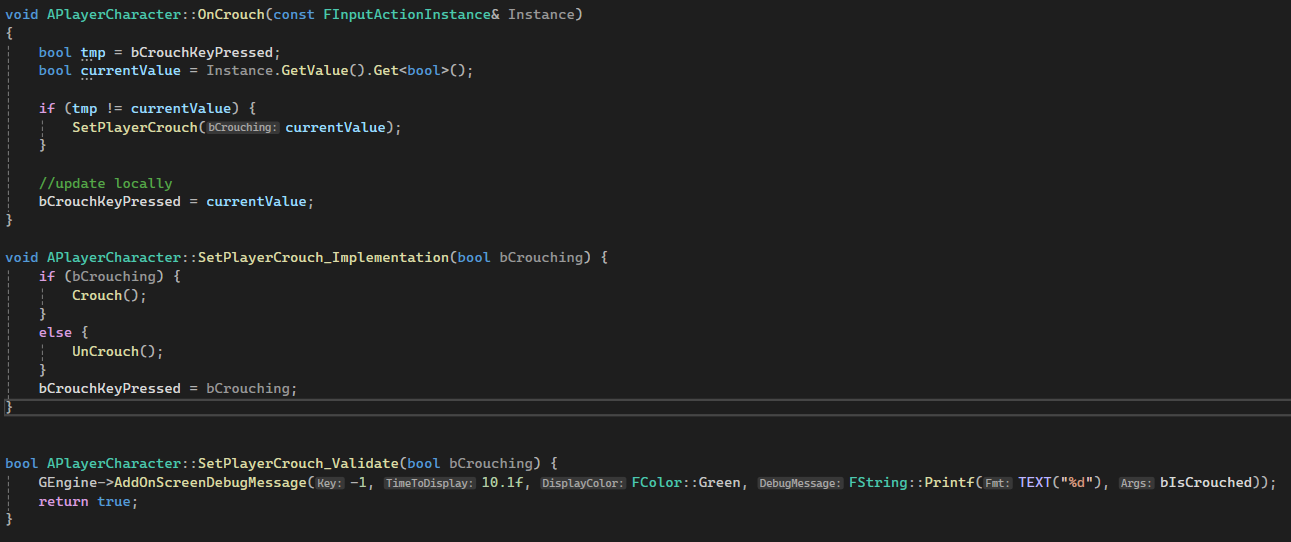 nocturne quail
proper vine
Dealing with an issue where the client is unable to crouch. The player on the se...
nocturne quail
proper vine
Dealing with an issue where the client is unable to crouch. The player on the se...
crouch and prone system
discord breaked the formatting, fix it yourself
proper vine
uhhh, ok. I'm kinda new to networking, I figured the problem might just a missing call or bad syntax or something, but I'll give that a try, thanks
exotic wasp
proper vine
uhhh, ok. I'm kinda new to networking, I figured the problem might just a missin...
if you set a breakpoint in the SetPlayerCrouch function, does it get hit when a client crouches?
proper vine
exotic wasp
if you set a breakpoint in the SetPlayerCrouch function, does it get hit when a ...
I had some print statements that were successfully called by both the server and client players, and the names were correct, so I figured SetPlayerCrouch was successfully getting called by the client player as well. lemme try the breakpoint
exotic wasp
also, is current value ever what you expect it to be?
proper vine
current value? you mean bIsCrouched? it only is what I expect it to be for the server player, not the client player
sinful tree
proper vine
Dealing with an issue where the client is unable to crouch. The player on the se...
If this class is based on the built-in character class, you shouldn't be RPCing the crouch, it's built into the CMC to be client predicted.
proper vine
sinful tree
If this class is based on the built-in character class, you shouldn't be RPCing ...
so should I change SetPlayerCrouch to not be a server function and just call Crouch/UnCrouch in the OnCrouch function?
sinful tree
proper vine
so should I change SetPlayerCrouch to not be a server function and just call Cro...
Yep
proper vine
sinful tree
Yep
that fixed it! Thank you!
dark parcel
glossy wigeon
Yea I think that's the point at which I'm right now.
Coming from a web environm...
No, why does the client need to make the rpc through the component? It can make a request from w.e it own. Including player controller or character.
Again client call the server rpc. It can be anywhere the client owns.
Read the pinned channel a dozen of times till it click.
You are still thinking of running the rpc in the same component on something the client potentially don't have ownership of.
glossy wigeon
dark parcel
No, why does the client need to make the rpc through the component? It can make ...
Thats not at all what I wrote, but I think we are talking about the same thing, all good and thanks! 🙂
dark edge
Anyone have any idea why simulating physics on a replicated actor with an attached actor, seems to break the attachment? This all works on the listen server and I'm pretty sure it worked in UE4, but I can't really sort out WTF is going on now.
A is attached to B, then A has simulate physics turned on. Both replicate and have replicate movement turned on.
Expected: A and B fall as 1 body just like in single player.
Actual: A falls on client just the same as on server, but B acts as if it doesn't have an attach offset from A, and tries to be at the exact same location.
dark edge
It appears that the attach parent get cleared when it starts simulating physics

 meager heart
Is there a way to force a UObject RepNotify parameter to broadcast its update to clients? If I just set its value to itself it'll call repnotify on the server but won't send that to the clients
- I'm trying to do this because I've changed some of the properties of the object at this point, but those aren't detected by normal repnotify so I'm basically trying to force it to update on clients
 regal narwhal
Hi there. I m experienceing an issue while implementing a multiplayer interaction system. I have two components, one is InteractionComponent which grantAbility and the other is InteractableComponent which store InteractionConfig like GameplayAbility etc. I m trying to make it multiplayer works. so InteractionComponent is works locally. but I m having an issue since GrantingAbility should happen on the Serverside. I ve fix that but when I grantAbility, I need AbiltySpecHandle on the client to show some info. Since it doesnt work async I m stucked a bit. can someone maybe give any suggestion how to fix that issue
Would that make sense to convert GrantAbility with TFuture Tpromise? I m not sure if it works in mp btw
lament flax
meager heart
Is there a way to force a UObject RepNotify parameter to broadcast its update to...
Could you send a screenshot of the details panel with the var selected ?
But the ideal flow is to make the variables inside the upbject replicate
pseudo wagon
meager heart
Is there a way to force a UObject RepNotify parameter to broadcast its update to...
Rep notify will not call on the UObject but on the property of UObject, You should use that rep notify.
dark edge
dark edge
It appears that the attach parent get cleared when it starts simulating physics
Turns out I hadn't replicated the scene components
lost inlet
meager heart
Is there a way to force a UObject RepNotify parameter to broadcast its update to...
if this is an asset on disk that you are modifying properties of, then all that gets replicated is the path to the asset.
if you want a UObject that gets its properties replicated then you'll be looking at subobject replication
 river shore
Hello guys!
I am trying to attach a weapon to my character mesh. The player who picks up the gun should attach it not to the third-person mesh but to the first-person mesh. But since I am handling the attachment through the server. it replicates the attachment to the local client, which attaches it to the third-person mesh for every player. Is there a way around so I can attach the weapon to the first-person mesh just for the client that picks up the weapon? Thx for any help ❤️
// Gets excecuted by the server
void ADefaultCharacter::AttachWeapon(ABaseItem* Weapon)
{
        // Marked replicated
    AttachWeapon = Weapon;
    OnRep_AttachWeapon();
}

void ADefaultCharacter::OnRep_AttachWeapon()
{
    if(!AttachWeapon || !GetMesh()->DoesSocketExist(AttachWeapon->SocketName)) return;

    if(IsLocallyControlled())
    {
                // Should attach to the first person mesh
        AttachWeapon->SetActorHiddenInGame(false);
        AttachWeapon->AttachToComponent(AttachArms, FAttachmentTransformRules::SnapToTargetIncludingScale, AttachWeapon->SocketName);
        GEngine->AddOnScreenDebugMessage(-1, 50.f, FColor::Red, "Is locally controlled");
    }
    else
    {
                // Should attach to the third person mesh
        GEngine->AddOnScreenDebugMessage(-1, 50.f, FColor::Green, "Is not locally controlled");
        AttachWeapon->AttachToComponent(GetMesh(), FAttachmentTransformRules::SnapToTargetIncludingScale, AttachWeapon->SocketName);
        AttachWeapon->SetActorHiddenInGame(false);
    }
}```You'd probably have to override OnRep_Attachment to handle it I'd guess
river shore
dark edge
You'd probably have to override OnRep_Attachment to handle it I'd guess
I already thought about it, but thought there might be a way I am missing...Thx though! I will probably do that then
dark edge
river shore
I already thought about it, but thought there might be a way I am missing...Thx ...
Maybe see if you can trick it by using a non replicated property
Attach to SkeletalMeshComponent* MeshToAttachTo which would be = the different meshes on different machines.
river shore
dark edge
Attach to SkeletalMeshComponent* MeshToAttachTo which would be = the different m...
Oh
dark edge
Wouldn't hurt to try that
river shore
kinda unsafe but I guess the other way is so too, thx a lot for the idea
river shore
dark edge
Wouldn't hurt to try that
true
dark edge
If that doesn't work I'd maybe see about just swapping the mesh you use based on machine instead of hiding showing one of the 2 mesh components.
river shore
dark edge
If that doesn't work I'd maybe see about just swapping the mesh you use based on...
yeah, probably will try this first, seems the most safe ig...
dark edge
Is Character.Mesh a replicated component by default?
river shore
dark edge
Is Character.Mesh a replicated component by default?
I do not know tbh
nocturne quail
What else I can do or change in this system to make it more robust and fast and optimized while keeping the security?
void ASurviveCharacterBase::ServerManageMovement_Implementation(const float NewValue, EMovmenetInputKey NewMovementKey)
{
    switch (CharacterPose)
    {
    case ECharacterPoseType::E_PoseStand: PredictedCharacterSpeed = CalculateStandPredictedCharacterSpeed(); break;
    case ECharacterPoseType::E_PoseCrouch: PredictedCharacterSpeed = CalculateCrouchPredictedCharacterSpeed(); break;
    case ECharacterPoseType::E_PoseProne: PredictedCharacterSpeed = CalculatePronePredictedCharacterSpeed(); break;
    case ECharacterPoseType::E_PoseJump: PredictedCharacterSpeed = CalculateJumpPredictedCharacterSpeed(); break;
    case ECharacterPoseType::E_PoseMax: break;
    default: break;
    }
    OnRep_PredictedCharacterSpeed();

    if(NewMovementKey == EMovmenetInputKey::EKeyForward)
    {
        ClientApplyForwardMovement(NewValue);
    }
    else if(NewMovementKey == EMovmenetInputKey::EKeyRight)
    {
        ClientApplyRightMovement(NewValue);
    }
}

void ASurviveCharacterBase::OnRep_PredictedCharacterSpeed()
{
    UCharacterMovementComponent* MovementComp = GetCharacterMovement();
    if (MovementComp)
    {
        MovementComp->MaxWalkSpeed = PredictedCharacterSpeed;
    }
}

void ASurviveCharacterBase::ClientApplyForwardMovement_Implementation(const float NewValue)
{
    if(!HasAuthority())
    AddMovementInput(Controller->GetControlRotation().Vector(), NewValue);
}

void ASurviveCharacterBase::ClientApplyRightMovement_Implementation(const float NewValue)
{
    if(!HasAuthority())
    AddMovementInput(FRotationMatrix(Controller->GetControlRotation()).GetScaledAxis(EAxis::Y), NewValue);
}
ofcourse i can pass the input key in ClientApplyto determine if client want to move f/r , but then it will cost... so i decided to have to seperate client rpc's
sinful tree
nocturne quail
What else I can do or change in this system to make it more robust and fast and ...
if this is using the character movement component, it's not properly predicted and will break with any amount of lag, and assuming ClientApplyForward/RightMovement_Implementation functions are RPCs to the client, the beginning of any movement inputs on a client will also feel extremely sluggish for all clients.
nocturne quail
sinful tree
if this is using the character movement component, it's not properly predicted a...
it was very stuttering when i was using multicast to set the speed value, and using onrep it jitters very little on other clients but for the owning client it works fine.
is there any other technique to have the same server derived predicted movement without jitters?
yes I'm testing it with the default CMC
sinful tree
nocturne quail
it was very stuttering when i was using multicast to set the speed value, and u...
- You have to create custom movement modes within the CMC itself so that they are inserted into the movelist with a timestamp so the server can validate when the speed changes took place. Look into any C++ tutorials on replicating sprinting with the CMC and that'll start getting you somewhere with it.
- Use the AddMovementInput on the client directly from their input. Calling AddMovementInput directly on the client without the server telling them to do so is part of the prediction process allowing client input to execute immediately which calls into the CMC to then make whatever RPCs are necessary to have the character move.
nocturne quail
sinful tree
1) You have to create custom movement modes within the CMC itself so that they a...
Thanks for this detailed useful input, i think it's not that tough task and i will be implementing it next few hours
nocturne quail
sinful tree
1) You have to create custom movement modes within the CMC itself so that they a...
I have CustomMovementComponent derived from default CMC in my another project, i think i can just take it and override these stuff and add new modes
sinful tree
Yeah, you'll need to subclass the CMC to handle the new movement.
nocturne quail
sinful tree
Yeah, you'll need to subclass the CMC to handle the new movement.
and have to Assign my custom cmc in ACahracter since i don't want to have two CMC's in a character class, right?
seems like i started to have my custom engine 😄
dark edge
I have a bunch of relationships between things, what's the approach to maintaining that over the network?
Of course I can have a replicated array of connections, but how to handle the connection making it to the client before the things being connected do?
 trail olive
Hello, I am in a bit of a predicament whether I should let the Client Initialize their Inventory Component or make the server do that for them. What do you guys think ?
dark parcel
trail olive
Hello, I am in a bit of a predicament whether I should let the Client Initialize...
Totally depend on the game.
If you reference an existing game it is probably clearer on what approach to take.
meager heart
lament flax
Could you send a screenshot of the details panel with the var selected ?
Thanks! (and @pseudo wagon @lost inlet ), here's the details. Understood about what you've said to use the repnotify inside the actual object, it's in a DataAsset so I think it's a bit rough but I'm already replicating the fields of the DA so I'll see if I can broadcast an event from the repnotify within the primary DA and see if that works
Was hoping there was an easier way to just force a repnotify to fire, but that solution should be a bit cleaner so I'll check it out
 lost inlet
it doesn't work like that
like I said, a reference to an asset is only going to be replicated as an actual path to the asset
and it's not a subobject of a replicated actor either
you should really treat data assets as immutable
meager heart
It's actually a dynamically constructed DA
Looks like this is working actually, if I bind to this event dispatcher in the client it'll get updated by the repnotify
 nocturne quail
sinful tree
Yeah, you'll need to subclass the CMC to handle the new movement.
nocturne quail
sinful tree
Yeah, you'll need to subclass the CMC to handle the new movement.
I finished it, and now i have a small issue where i the default cmc is not replaced with my cmc
    GetCharacterMovement()->DestroyComponent();
    SurviveMovementComponent = CreateDefaultSubobject<USurviveMovementComponent>(TEXT("SurviveMovementComponent"));
    SurviveMovementComponent->UpdatedComponent = RootComponent;
or i have to do it directly in the ACharacter class to extend it and don't have a sub class?
then engine will need to rebuild which is not an issue with an ssd, but it will need to update then lots of references
ah nvm, it works 😄

 rare cloud
nocturne quail
I finished it, and now i have a small issue where i the default cmc is not repla...
rare cloud
nocturne quail
I finished it, and now i have a small issue where i the default cmc is not repla...
you need to do it this way, using the CDO constructor :
AMyPlayerCharacter::AMyPlayerCharacter(const FObjectInitializer& ObjectInitializer)
    : Super(ObjectInitializer.SetDefaultSubobjectClass<UMyCharacterMovementComponent>(ACharacter::CharacterMovementComponentName))
{

}
This looks super clean, is there any good sides of using it or is it just a good practice?
rare cloud
nocturne quail
This looks super clean, is there any good sides of using it or is it just a good...
it's the way you use a Custom CMC with a character, destroying something to create another one isn't a good practice imo 😄
nocturne quail
rare cloud
it's the way you use a Custom CMC with a character, destroying something to crea...
totally agree, that approach is a new thing for me to learn, Thanks for sharing the knowledge
kindred widget
rare cloud
you need to do it this way, using the CDO constructor :
```cpp
AMyPlayerCharacte...
You can also just set it in the editor.
latent heart
Anyone got experiences with level instanes and multiplayer? Can they work? Is it a hopeless endeavour?
nocturne quail
TPair supports network reflection?
I don't remember I used it before, but not sure if it was working or not
in 4.19 specifically
this is my usecase:
UENUM(BlueprintType)
enum class EMovementType : uint8
{
    Stand,
    Crouch
};

UENUM(BlueprintType)
enum class EMovementState : uint8
{
    Walk_Forward,
    Walk_Other,
    Jog_Forward,
    Jog_Backward
};

USTRUCT()
struct FMovementSpeed
{
    GENERATED_BODY()

public:
    TMap<TPair<EMovementType, EMovementState>, float> SpeedMap;

    FMovementSpeed()
    {
        SpeedMap.Add(TPair<EMovementType::Stand, EMovementState::Walk_Forward>, 175);
        SpeedMap.Add(TPair<EMovementType::Stand, EMovementState::Jog_Forward>, 500);
    }

    float GetSpeed(EMovementType Type, EMovementState State) const
    {
        const float* Speed = SpeedMap.Find(TPair<Type, State>());
        return Speed ? *Speed : 0.0f;
    }
};

void USurviveMovementComponent::PhysWalking(float deltaTime, int32 Iterations)
{
    Super::PhysWalking(deltaTime, Iterations);

    //GetSpeed(..., ...); will be used to set value of `MaxWalkSpeed`
}
@hollow eagle did yall end up replacing GAMEPLAYATTRIBUTE_VALUE_SETTER usages with one that invaldiates the attributes?
trying to decide if i should do it there, or PostAttributeSet
hollow eagle
don't think so, you mean marking it dirty?
outer birch
yeah
hollow eagle
I think the ASC already does that but I need to check
yeah, in FGameplayAttribute::SetNumericValueChecked
outer birch
ah hot damn
nocturne quail
What im doing wrong?
 outer birch
nocturne quail
What im doing wrong?
outer birch
nocturne quail
What im doing wrong?
Probably not including a header that defines the enum
nocturne quail
outer birch
Probably not including a header that defines the enum
Enums are directly defined in the top of this header file, the issue was somewhere else in the character class where i renamed the Enum class and forgot to update the params in the function which was passed in the character class
for some reason it resharper was showing this CustomMovementComponent class with errors
 humble idol
nocturne quail
What im doing wrong?
humble idol
nocturne quail
What im doing wrong?
I wonder if this has anything to do with defining operator== and GetTypeHash for your TPair.
crisp shard
would i treat event dispatchers similar to interface messages in terms of how to replicate them? essentially, do a server rpc before the call event ?
example might be, character interacting w widget, presses button, server rpc to character and then call the event from there on whatever actor / bp ?
nocturne quail
humble idol
I wonder if this has anything to do with defining ``operator==`` and ``GetTypeHa...
currently it stops complaining after fixing the function params, I think it will work when i will test it after fixing some more issues in other places of the project
dark edge
What's the simplest way to keep a bunch of connections between things in sync, where there's really no actors involved at all. At least not fundamentally.
I have a bunch of components which add entries to a system when they spawn and remove entries when they end play. I can make connections between entries by index.
Assuming I have some way to guarantee indices or whatever I use as the address to be deterministic and stable, I guess I could just have a replicated array Connections, and in its onrep, make the connection if both targets exist. Then targets just have to retrigger connections when they start existing and every replicated connection will be made as soon as the 2 targets and the connection record make it to the client
The more I think about it the more this subsystem stuff should just be in components on GameState so I can use replication lol
nocturne quail
Why i'm not getting circular dependency? 😄
ACharacter: #include "CharacterMovementComponent.h"
CustomMovementComponent: #include "CharacterMovementComponent.h"
AMyCharacter: #include "CustomMovementComponent.h"
Why would you?
exotic wasp
if the movement component included the character it would be circular
nocturne quail
thin stratus
Why would you?
because I'm including in the character header file
nocturne quail
thin stratus
You only wrote the class, not the file extension
this function is the part of the character and the parameter ECharacterMovementMode passed is the part of MyCustomMovementComponent
UFUNCTION(Server, Reliable, WithValidation) void ServerUpdateCharacterMovementMode(const ECharacterMovementMode NewCharacterMovementMode);
if not include, it won't compile

and that forward declaration not working, not sure why resharper is suggesting it 😄
thin stratus
Circular Dependency happens if you include A in B and B in A, either directly or over a chain.
thin stratus
nocturne quail
if not include, it won't compile
Don't put structs and enums into headers that you don't want to include when you need the structs and enums.
/// Bad, unless you'd always include CustomMovementComponent.h anyway, and even then it's not good.
/// As soon as you only need the enum, or generally types of that header, it's bad.
CustomMovementComponent.h
  - Declare ECharacterMovementMode

MyCharacter.h
  - Include CustomMovementComponent.h
/// Good

CharacterMovementTypes.h
  - Declare ECharacterMovementMode

CustomMovementComponent.h
  - Include CharacterMovementTypes.h

MyCharacter.h
  - Include CharacterMovementTypes.h
And forward declare whenever you can.
nocturne quail
thin stratus
```c++
/// Bad, unless you'd always include CustomMovementComponent.h anyway, an...
Perfect solution, but is it safe in terms of reverse engineering?
I mean if a hacker want to find those struct/enums to determine how is the main structure working....
finding data in a big compiled class can be difficult for them i guess but not sure 😄
exotic wasp
if you are just using a type to return, pass by reference, or by pointer, you can usually forward include
exotic wasp
nocturne quail
Perfect solution, but is it safe in terms of reverse engineering?
I mean if a ha...
a hacker will always win 🙂
dark edge
How many hackers are you expecting for your solo dev game lol
nocturne quail
exotic wasp
a hacker will always win 🙂
not always, their journey is gonna end soon once nvidia released their AI anti hacks
exotic wasp
if you really care about people reverse engineering your game, obfuscate it
 modern garnet
nocturne quail
What im doing wrong?
modern garnet
nocturne quail
What im doing wrong?
The responses aren't wrong about separating common types out into their own headers but I am pretty sure the problem with your snippet is the syntax isn't correct and not an include issue.
 exotic wasp
nocturne quail
not always, their journey is gonna end soon once nvidia released their AI anti h...
exotic wasp
nocturne quail
not always, their journey is gonna end soon once nvidia released their AI anti h...
just wait until ai hacks come out to counter the ai antihacks...
its an infinite arms race
the best you can do as a developer is make your game unexploitable. anything more is an utter waste of time
and also, who cares unless its a competitive game?
modern garnet
humble idol
I wonder if this has anything to do with defining ``operator==`` and ``GetTypeHa...
TPair is an alias for TTuple which has an implementation of GetTypeHash.
humble idol
modern garnet
`TPair` is an alias for `TTuple` which has an implementation of `GetTypeHash`.
Ah okay, that's good to know!
nocturne quail
modern garnet
The responses aren't wrong about separating common types out into their own head...
it was already solved, the issue was in character class
nocturne quail
modern garnet
The responses aren't wrong about separating common types out into their own head...
    float GetSpeed(EMovementType Type, EMovementState State) const
    {
        const float* Speed = SpeedMap.Find(TPair<EMovementType, EMovementState>(Type, State));
        return Speed ? *Speed : 0.0f;
    }
What makes you think that any of your code is safe?
Pretty wild assumption that having those types in any other files would make it any more or less safe.
Your game can be reverse engineered. Just live with that.
People have been reverse engineering WoW Servers.
nocturne quail
thin stratus
What makes you think that any of your code is safe?
I asked cause I was expecting that U will recommend some strong hashing/encryption techniques )
thin stratus
I will recommend you to stop wasting your time on stuff like this and focus on the game itself.
nocturne quail
people were saying to me md5 is not that much hard decrypt
thin stratus
Missty. Your game will be decompiled, reverse engineered, hacked and cracked. Stop wasting your time on it.
The big companies fail at it, so will you.
It's a lost cause.
Make sure the game feels good and is fun to play. The people will buy it and enjoy playing it.
Everything else doesn't matter.
The ones who pirate it would most likely never have bought it.
It's not important.
The ones that hack will be found anyway.
And if you really end up with a popular game that suffers from cheating, then you can still solve that after the fact.
nocturne quail
Great constructive advice, Thanks
thin stratus
Yeah, it probably sounds harsh, but it is what it is.
Look at Nintendo that has huge problems with their Console being reverse engineered. Their N64 games decompiled, etc.
What are you going to do that such a company hasn't already tried?
The only thing they can still do is write some bullshit TOS that locks your Switch 2 if you do something with it that they don't want, even though you paid for the damn hardware.
proper vine
trying to fix a UObject not replicating properly to the clients. I have a custom UObject, HitData, that is failing to replicate on the client.
I know UObjects don't normally replicate without some extra effort, I followed this documentation to a T and it's still not working: https://dev.epicgames.com/documentation/en-us/unreal-engine/replicating-uobjects-in-unreal-engine
HitData's UPROPERTY is set to replicate, it's in DOREPLIFETIME in GetLifetimeReplicatedProps, I've overriden ReplicateSubObjects, the UObject has GetLifetimeReplicateProps and has overriden IsSupportedForNetworking, and still the client does not get the replicated UObject. The server receives the data just fine.

Epic Games Developer
Learn how to replicate UObjects in Unreal Engine.
The code's a little long so I'll do my best to explain what's going on:
AGameTypeBase::AGameTypeBase()
    : Super()
{
    GameData = CreateDefaultSubobject<UGameTypeDataComponentBase>("Gamedata");
    HitData = CreateDefaultSubobject<UHitInfo_DataAsset>("HitData");

    // Set this actor to call Tick() every frame.  You can turn this off to improve performance if you don't need it.
    PrimaryActorTick.bCanEverTick = true;
    bReplicates = true;
    bAlwaysRelevant = true;
    bReplicateUsingRegisteredSubObjectList = true;
    GameData->SetNetAddressable();
    GameData->SetIsReplicated(true);

    if (IsValid(HitData))
    {
        RemoveReplicatedSubObject(HitData);
    }
    HitData = NewObject<UHitInfo_DataAsset>();
    // MyActorSubobject becomes a replicated subobject here
    AddReplicatedSubObject(HitData);

}

void AGameTypeBase::GetLifetimeReplicatedProps(TArray<FLifetimeProperty>& OutLifetimeProps) const
{
    Super::GetLifetimeReplicatedProps(OutLifetimeProps);
    DOREPLIFETIME(AGameTypeBase, GameData);
    DOREPLIFETIME(AGameTypeBase, bReady);
    DOREPLIFETIME(AGameTypeBase, HitData);
}

bool AGameTypeBase::ReplicateSubobjects(UActorChannel* Channel, FOutBunch* Bunch, FReplicationFlags* RepFlags)
{
    bool bWroteSomething = Super::ReplicateSubobjects(Channel, Bunch, RepFlags);
    // MyActorSubobject becomes a replicated subobject here
    if (IsValid(HitData))
    {
        bWroteSomething |= Channel->ReplicateSubobject(HitData, *Bunch, *RepFlags);
    }
    // Add any other replicated subobjects here in a similar way
    return bWroteSomething;
}

void AGameTypeBase::OnTag_Implementation(UTagComponent* Tagged, const FHitResult& HitResult, AShootable* Shootable, const UWorld* worldRef)
{
    RemoveReplicatedSubObject(HitData);
    HitData = MakeHitInfo(Tagged, HitResult, Shootable, worldRef);

    bool bHitValid = false;
    if (HitData) {
        AddReplicatedSubObject(HitData); //temporarily replicate via the gametype as we process OnCustomTag
        bHitValid = OnCustomTag(HitData);


    }
    if (bHitValid) {
        GameData->AddValidHit(HitData);
        AnnounceTag(HitData);
    }
}

UHitInfo_DataAsset* AGameTypeBase::MakeHitInfo_Implementation(UTagComponent* Tagged, const FHitResult& HitResult, AShootable* Shootable, const UWorld* worldRef, float distMult)
{
    UHitInfo_DataAsset* data = NewObject<UHitInfo_DataAsset>(GetOuter());
    float baseValue = Shootable->GetBasePointValue() * Tagged->basePoints;
    float baseMultiplier = Shootable->GetBounceCount() + 1;
    float dist = Shootable->GetDistance();
    data->SetHitInfo(Tagged, Shootable, baseValue, baseMultiplier, dist, distMult, UPublicHelperFunctions::GetGameState(worldRef)->getGameTime(), HitResult);
    for (const auto& t : Tagged->ComponentTags) {
        //data->hitTags.Add(t);
    }
    return data;
}
sorry if all this might be too much but just to be safe, first its generated in OnTag via MakeHitInfo, after which its passed into OnCustomTag. In OnCustomTag, it's broadcasted via an event
In OnCustomTag, it's passed into AddHitInfo like so:
if (bValidHit) {
    attackState->AddHitInfo(data, total * selfMultiply, total * teamMultiply);
}
then, AddHitInfo calls some functions which broadcasts the data:
void AUserPlayerState::AddHitInfo_Implementation(UHitInfo_DataAsset* HitInfo, const float playerPointsAdd, const float teamPointsAdd)
{
    if(GetPlayerGameData()) GetPlayerGameData()->Hits.Add(HitInfo);
    SetScore(GetScore() + playerPointsAdd);
    onPointsAdd(HitInfo, playerPointsAdd, teamPointsAdd);
    if (GetTeam()) GetTeam()->AddHitInfo(HitInfo, teamPointsAdd);
    //GEngine->AddOnScreenDebugMessage(-1, 10.f, FColor::White, FString::Printf(TEXT("POINTS: %f"), GetScore()));
    //GEngine->AddOnScreenDebugMessage(-1, 10.f, FColor::White, GetName());
}

void AUserPlayerState::onPointsAdd_Implementation(UHitInfo_DataAsset* HitInfo, const float playerPointsAdd, const float teamPointsAdd)
{
    PointsAddDelegate.Broadcast(HitInfo, playerPointsAdd, teamPointsAdd);
    onPointsAdd_Client(HitInfo, playerPointsAdd, teamPointsAdd);
    onPointsAdd_Multicast(HitInfo, playerPointsAdd, teamPointsAdd);
}

void AUserPlayerState::onPointsAdd_Client_Implementation(UHitInfo_DataAsset* HitInfo, const float playerPointsAdd, const float teamPointsAdd)
{

    PointsAddDelegate_Client.Broadcast(HitInfo, playerPointsAdd, teamPointsAdd);
}

void AUserPlayerState::onPointsAdd_Multicast_Implementation(UHitInfo_DataAsset* HitInfo, const float playerPointsAdd, const float teamPointsAdd)
{

    PointsAddDelegate_Multicast.Broadcast(HitInfo, playerPointsAdd, teamPointsAdd);
}
again, sorry if that's too verbose, but I thought I'd be thorough since I'm not really sure where the problem is
 crystal crag
I am working on a PCG dungeon generator. I've gotten to the part where I want to spawn replicated actors that the players can pick up. Do I have to filter that logic from the clients, because then I will end up with duplicated actors (since SpawnActor is replicated)?
dark edge
crystal crag
I am working on a PCG dungeon generator. I've gotten to the part where I want to...
Spawn the replicated actors on server only and they will replicate to clients
crystal crag
That's what I thought, thanks.,
dark edge
spawnactor is not replicated, spawning a replicated actor makes it also spawn on client
crystal crag
Ah, ok. Well, thanks for the extra clarification!
torpid lantern
Is there a trick to get smooth network movment while using Floating Pawn Movement?
I'm wanting bulk NPCs and I am trying to avoid using the CMC for NPCs.
I notice a very slight jitter on pawn movement, but if I reparent my NPCs from "Pawn" to "Character" the jitter is gone.
I believe this is due to the out-of-the-box network smoothing in CMC. How could I recreate that specific functionality using Floating Pawn Movement?
thin stratus
torpid lantern
Is there a trick to get smooth network movment while using Floating Pawn Movemen...
Might sound stupid but the answer will be: By coding it.
There is nothing outside the CMC available with smoothing. Despite maybe the projectile movement component.
exotic wasp
proper vine
trying to fix a UObject not replicating properly to the clients. I have a custom...
also worth mentioning, use the new registered subobjects list
its way easier to use
its on that same page
proper vine
exotic wasp
also worth mentioning, use the new registered subobjects list
thanks. we've found that the problem isn't that the data isn't being replicated, it seems that it's taking too long to replicate, so the message containing the relevant data comes out as null
torpid lantern
As a shareback and for future searchers -
Solution to resolve my NPC jitter for Pawns using FloatingPawnMovement was to create a "NetworkSmoothing" component.
Code: https://pastebin.com/8Q5FWLqb
warning: code is GPT generated
- Create a new cpp class "NetworkSmoothingComponent" and copy+paste the above code
- Replace
YOURGAME_APIwith the correct info for your game - Add the NetworkSmoothing component to your Pawn
- Disable movement replication for the Pawn
- On the Pawn, create a RepNotify ServerTransform variable
- On Pawn's SERVER tick, set the ServerTransform variable with the pawn's transform
- On the ServerTransform RepNotify, call NetworkSmoothing's "Apply Replicated Transform" function and feed it ServerTransform
Note: Component also exposes Interpolation Time as a blueprint variable for tuning
exotic wasp
why does the component even exist if you're having to change the pawn
torpid lantern
Was that a question for me? If so, I'm not changing the pawn. Objective here is to create a component that can smooth replicated movement for non-characters.
exotic wasp
arent you adding a ServerTransform property to the pawn?
torpid lantern
Yeah! Server tick sets a RepNotify transform var on the Pawn, which triggers the OnRep, which feeds the transform into the component; comp then interps the Pawn to the location/rotation locally.
I can disable "replicate movement" on the Pawn, because that's what it's doing anyway with the NetworkSmoothing component.
Do you see anything majorly flawed? I am not very good with cpp, but this is what GPT told me to do and it cleared my jitter issue with FloatingPawnMovement.
thin stratus
torpid lantern
Yeah! Server tick sets a RepNotify transform var on the Pawn, which triggers the...
I can gladly review that code, if you want. Just not sure what's the best way to do that. Maybe throw it into GitHub as a PR/merge to some empty repo, so one can comment on it.
If we ignore redundant stuff and bad coding by ChatGPT, I would say that it's an okay start. The main thing I would try to improve are the way you smooth (doesn't need to be linear for example) and edge cases, such as the Transform smoothing having finished but the next update isn't coming in quick enough (e.g. ping increased). That would lead to your actor standing still for a few frames before it starts interpolating again
So basically some simple extrapolation is missing
And if you are working in C++ it's theoretically an option to use the ReplicatedMovement anyway and simply override the function where UE just sets the Actor Transform to the replicated one.
You might also want to consider the case that your actor could be attached to something, which would look strange if the location is then smoothed, as you'd rather want it to stick nicely to the other actor in case it's moving or animating.
So yeah, room for improvement is there. The general interpolation logic is usually simple. It's the edge cases that make it problematic
 soft condor
Hey folks! I need some help with using delegates over the network. I have a delegate inside a Uobject(HolsterSystem) that I essentially call inside of a repNotify. I did some debugging and found that at the time when the repnotify is called the delegate has lost it's invocation list. My uobject is created on beginplay of the player. I also add a weaklambda like below. I'm pretty sure it gets added at the end of beginplay as debugging showed that as well. I suspect maybe it has something do with the delegate only existing on the server? I found out that delegates are not replicated so could it be that the delegate isn't on the client and therefore never had that invocation list added? Any thoughts on this would be helpful thanks:
DECLARE_MULTICAST_DELEGATE(FOnHolsterAssignedCallback)
class UHolsterSystem: public UObject {
//other stuff up here
FOnHolsterAssignedCallback OnHolsterAssigned;
}

//holstersystem.cpp
void UHolsterSystem::OnRep_PrimaryHolsters(){
for (int32 i = 0; i < PrimaryHolsters.Num(); i++){
   if (PrimaryHolsters[i].State != LastPrimaryHolsters[i].State){
    OnStateChange(PrimaryHolsters[i].State);//this method broadcasts delegate and it is here where it has empty list
      }
}
LastPrimaryHolsters = PrimaryHolsters;
}

//playercharacter.h
class AhordeGameCharacter : public ACharacter{
//stuff
UPROPERTY(Replicated)
TObjectPtr<UHolsterSystem> HolsterSystem;
}

//playercharacter.cpp
void AhordeGameCharacter::BeginPlay(){
if (GetLocalRole() == ROLE_Authority){
HolsterSystem = NewObject<UHolsterSystem>();
if (HolsterSystem){
HolsterSystem->OnHolsterAssigned.AddWeakLambda(this, [this](){
 TestClientCallback();
});
}
}
}//has invocation list at this point```You are in fact only binding on the server.
You'll need to change the HolsterSystem variable to be ReplicatedUsing and then bind additionally in the OnRep for it
nocturne quail
sinful tree
Yeah, you'll need to subclass the CMC to handle the new movement.
I finally completed the system that You recommended me yesterday, and it is working as intended but a very very tiny small jitter still feels periodically like every 10 or 15 seconds. is there any thing incorrectly i'm doing or it can't be further improved?
by default character in standing mode
thin stratus
nocturne quail
I finally completed the system that You recommended me yesterday, and it is work...
If you are calling an RPC to modify the CMC state and then modify it locally through the OnRep it will cause corrections
If the movement speed values are known upfront then you shouldn't need a Server RPC
bMoveForward seems wrong. You shouldn't need to set that. The CMC can figure that out on server and client by itself.
The AddMovementInput call will result in the Server and Client having an Acceleration value that points in that direction. So you can easily figure out what the client pressed by using that.
nocturne quail
thin stratus
If the movement speed values are known upfront then you shouldn't need a Server ...
all speed values exists in the movement component and applied by the PhysWalking based on the derived state from character.
if i change and update that state without rpc, then it extremely jitters, and setting it only by server also jitters extremely... so i changed the state by onrep and it works smoothly for first 15sec and then it jitters one and next 15sec again smooth
thin stratus
nocturne quail
all speed values exists in the movement component and applied by the `PhysWalkin...
Yeah but all of the options you mentioned are wrong.
You need to use information that the server and client have available inside the CMC. You can't only set it on one side and you can use additional replication.
nocturne quail
thin stratus
The AddMovementInput call will result in the Server and Client having an Acceler...
it will be great, but i don't know how to figure it out directly in the PhysWalking without sending character state to it
thin stratus
The CMC already sends an RPC with information
nocturne quail
thin stratus
The CMC already sends an RPC with information
i think i need to access the controller somehow in cmc to figure it out which key and direction was pressed?
thin stratus
nocturne quail
it will be great, but i don't know how to figure it out directly in the PhysWalk...
The acceleration variable you can access in the CMC should be the result of the Movement Input you added, multiplied by the acceleration setting the CMC has.
No. The acceleration already points into what the player pressed. In world space fwiw
Can be unrotated by whatever you use to define the direction
If you want it local for something
If you want to know if the player pressed forward (local forward, so e.g. W) then you can unrotate the Acceleration and check the X axis for being positive
nocturne quail
thin stratus
The acceleration variable you can access in the CMC should be the result of the ...
acceleration variable returns the actual maxwalk speed, or is it 1, -1 ?
thin stratus
nocturne quail
acceleration variable returns the actual maxwalk speed, or is it `1, -1` ?
Neither
Acceleration is your Input Value (0 to 1) multiplied by the WorldDirection you passed into AddMovementInput and then multiplied by the MaxAcceleration of the CMC
Could also be that it's called InputAcceleration
Would need to double check
But you can unrotate that vector by eg. The control rotation. To get it to point into your local input axis.
nocturne quail
thin stratus
Acceleration is your Input Value (0 to 1) multiplied by the WorldDirection you p...
this is an amazing information, this solved to avoid extra cache input var replication
thin stratus
Yop. As long as the information is known on both sides at all times you can simply use it inside the CMC. The only thing you can't do is use a speed value that only one of the two knows.
You should usually not have a speed value that only the client knows, cause sending that to the server allows cheating
And if you have one that only the server knows then you'll need to tell it to the client (e.g. via the OnRep) and more or less accept the one time correction
nocturne quail
thin stratus
And if you have one that only the server knows then you'll need to tell it to th...
yeah this is what actually i'm doing, the speed struct is initialized by the server at runtime
thin stratus
But if both know about it, e.g. you have a Sprint speed that you set on the CMC or character in the defaults before pressing play, then you are usually lucky and can just utilize whatever turns on sprinting inside the CMC via key presses send to the server along the existing server rpc
thin stratus
nocturne quail
yeah this is what actually i'm doing, the speed struct is initialized by the ser...
Once or multiple times?
nocturne quail
thin stratus
Once or multiple times?
Once, the whole struct and then using it
thin stratus
Yeah that's fine. I assume this happens before the player even moves.
What I meant is something else. Like if another player casts a spell at yours and halfs your movement speed. You can't know about that on the local client. So when the debuff replicates you'll have a small time where the server moves you with the debuff and you locally predict it wrong until the debuff replicated
nocturne quail
thin stratus
Yeah that's fine. I assume this happens before the player even moves.
I have a variable which enables the player input by server after 5 seconds of possession, and in this 5sec all critical data initialized by the server and then player can move, jump etc
 brazen anvil
Is it possible to store a inventory component on the player controller of a character? The reason I ask is related to cheating. If the inventory was on the character, then everyone gets a copy of the character. If it was on the controller then everyone wouldn't get the controller.
thin stratus
brazen anvil
Is it possible to store a inventory component on the player controller of a char...
Yes, that's possible. You can also place it onto the character and simply mark the properties to only replicate to the owner though
Which is what I would go for unless I would want the Inventory to survive the character being respawned
Which is rarely the case. And if it needs to then the character could also just be teleported and reset instead of fully respawned. That's cheaper anyway
crisp shard
i wouldn't consider this an issue per say, but i always am running into something im needing to solve for, which is when the character is interactin with a server actor and they ghen give the character a widget, once character has widget i typically will just rpc from character to do whatever. but there are plenty of times where i want to communicate back to that thing i just communicated with, and storing that as a ref on the charazcter for that singleuar event doesn't seem like a good idae, but im not sure what might be some other approaches to getting that communication to be efficient and proper.
i have ways to solve for this but i feel like they are all where i start to lose full confidence in the appraoch.
an example i have is when interacting with a "console" you get the console ref returned as an actor and i can communicate with it from there via interface functions etc, but this is a one off thing where it made sense to do that, but in most cases, like the one imcurruenlty working on i feel ike there has got to be a better appraoch to the communication between all things
thin stratus
crisp shard
i wouldn't consider this an issue per say, but i always am running into somethin...
Not sure I follow tbh. An actual example of where you struggle to "communicate" would be better.
crisp shard
thin stratus
Not sure I follow tbh. An actual example of where you struggle to "communicate" ...
yea hard to explain i guess, cuase tbh i can actually get everything to communicate but im doing overly extreme checks to get things to work correctly
i can share how things work currently but it's a bit much
- client interacts w actor (rpc)
- actor gives client a widget
- client does things, rpc's back to character toget to server
that part is fine, but from there i got from the cahracter to the game state where i have that actor stored (i hate this personally , as it has made the process of getting everything back and forth very difficult)
i go to gamestate, check all the possible actors that i just interacted with, and then i check those for another actor... it'sjust a mess lol and this is all on the gamestate, and so getting everything back to the widget / character / actors is turning into a nightmare
my instinct says that i could solve this by using event dispatchers to communicate better between the charcter and the actor and then that actor could communicate with the other actor via another event dispatcher
the real thing that i'd like to find a consistnecy for doing in terms of the logic, is how to communicate back to an actor that gave the client a widget after that client makes some changes.
so actor gives widget to client (the variables of which are from server) and client wants to communicate back to that specific actor.
and again i had 1 solution that works but i don't want to scale that method (bascially putting an actor ref on the character when im interacted with it). not the bp , but an actor then i just interface message with it, but i think an event dispatcher from that charadter rpc, after changing the widget, i think it would maybe work, i just dont use them alot
This type of thing usually isn’t a challenge but I think it’s because I’m going from the character to an actor and then that actor creates another actor, and although I do have things “working” it’s just omega messy
I plan on redoing pretty much everything from scratch on this particular system tho so I can try again.
soft condor
thin stratus
You'll need to change the HolsterSystem variable to be ReplicatedUsing and then ...
Thanks for help! This makes sense and it worked 🫶🏿
outer birch
thin stratus
The only thing they can still do is write some bullshit TOS that locks your Swit...
Also, don't put in things that silently erode gameplay if you detect a hacker. Like it's funny as shit when in the batman arkam games, they had his cape fail to deploy if they found you were using a pirated copy and youd constantly fall to your death. HILARIOUS. But then the priates would review bomb the game about how the game was broken and buggy.
When using iris, do you ever get down to 'nothing', or do you only ever get down to a point where during the pollpush pass of iris they check to see i guess if anything is dirty?

AFAIK, i've removed all polling from the healthset, but there's still 200ns of it doing...something. I assumed it would disappear completely and would add itself to a larger table when dirtied, but perhaps not.
dark edge
It also happens if character is not attached so I'm pretty sure it's not self-collision
Any thoughts on where to look for this jittery behavior?
nocturne quail
dark edge
Any thoughts on where to look for this jittery behavior?
obviously something needs to tune-up in physics settings
dark parcel
If I got an array of a data type, lets say ItemFragment (Uobject).
The array is replicated but the ItemFragment is not.
Will adding / removing the array replicate the changes? I am guessing not?
thin stratus
outer birch
Also, don't put in things that silently erode gameplay if you detect a hacker. ...
Reminds me of Game Dev Tycoon (or one of those games at least), where they had a version of the game where you would always lose the playthrough cause your games were getting pirated. And iirc they uploaded that to the given pirate websites themselves and enjoyed the support posts about "How do I stop my company from failing due to people pirating my games?".
EDIT: Just googled it and it was Game Dev Tycoon. When the game launched almost 95% of the over 3000 running game sessions were apparently the pirated version. Can't make that shit up.
dark edge
I did some more investigating, totally at a loss here as to what the problem could be.
Found a difference. Component Replicates is ON for the jittery one. Turning it on for the BP one causes it to jitter too.
thin stratus
outer birch
AFAIK, i've removed all polling from the healthset, but there's still 200ns of i...
I can't share too much but my wife recently looked into performance improvements for Iris for our current customer and Iris has some pretty big flaws/bugs on the polling side currently
If you want to figure that out check how it handles dirtied subobjects as well as properties. You might come to the same conclusion. Fixing/altering this can improve performance of Iris drastically
There is a CL by someone (official epic commit) that tried to fix something on Iris and they ended up causing dirty subobjects to cause a huge overhead.
What you posted there about the health attribute set showing up even though it's not dirty should be exactly that. But I never looked at the code, the fix etc, I only got told about it.
thin stratus
dark parcel
If I got an array of a data type, lets say ItemFragment (Uobject).
The array is...
If it's a runtime spawned uobject then I would assume no
dark parcel
thin stratus
If it's a runtime spawned uobject then I would assume no
https://dev.epicgames.com/documentation/en-us/unreal-engine/replicating-uobjects-in-unreal-engine
It seems NewObject will do the trick?
Epic Games Developer
Learn how to replicate UObjects in Unreal Engine.
but maybe I need to make the UObject replicated too 🤔
testing right now, gonna take a while to write this.
Can't help but feel like I am overstepping this though. I am just working on interaction component in multiplayer. Trying to have modularity like how Lyra handle items, maybe I should have kept this simpler 🤷♂️ .
dark edge
dark edge
Found a difference. Component Replicates is ON for the jittery one. Turning it...
So anyone got any insight as to why that could be the case? I'm guessing the component is replicating its transform in some way that's clobbering the actor movement replication.
dark parcel
https://forums.unrealengine.com/t/replicating-tarrays-crashes-game/21237/6
found this, gonna give it ago.

Epic Developer Community Forums
Okay so I finally successfully replicated a TArray of Objects, it is fairly simple once you get your head around Replication. Begin with defining the UObject you want replicated. I actually create a UNetworkObject as a base class for all UObjects I want replicated. But the quick and dirty way is to simply override the IsSupportedForNetworking...
Seems like I have to mark both the array and the underlying Uobject as replicated.
OnRep will get called twice as well , one for the underlying property, the other for array size change.
thin stratus
dark edge
So anyone got any insight as to why that could be the case? I'm guessing the co...
I can have a look in a few minutes. I'm just making a coffee
thin stratus
dark parcel
OnRep will get called twice as well <:crying:1316599219188011038>, one for the u...
That's always the case.
Even for Actor and Component Arrays
Without that you'd have a shitty time
dark parcel

thin stratus
Cause if the server spawns an actor and adds it to an array, you have no chance in guaranteeing that the actor fully replicated before the array of the other object does
dark parcel
gotcha!
thin stratus
dark parcel
Seems like I have to mark both the array and the underlying Uobject as replicate...
The only case where the object doesn't need to be marked as replicated is if the object exists locally too and is stably named and netaddressable iirc
E.g. an asset in your content browser, a component of a replicated actor, an actor placed into the scene etc.
thin stratus
dark edge
Any thoughts on where to look for this jittery behavior?
How do you not throw yourself out of the window with that sound constantly playing.
@dark edge Any reason you choose to fight Physics with this stuff? Are you simply accepting that you can't predict the movement on the client and will have shitty rubberbanding and corrections?
This is of course not relevant to the actual question, which I will have a look at in a second.
dark edge
thin stratus
<@127902729677963264> Any reason you choose to fight Physics with this stuff? Ar...
I am sort of predicting, the sim runs everywhere
Without components replicated it works beautifully, I have a simple 1 actor vehicle which is butter smooth in multiplayer
thin stratus
dark edge
I am sort of predicting, the sim runs everywhere
Yeah, but there is no implementation for replaying moves etc.
Unless you make this client authorative I guess.
dark edge
Nothing is replayed, no prediction at all
Entire sim runs everywhere, stock physics replicating keeps it in sync if it gets too divergent
You do have ping lag between inputs and things happening but that's fine for my project
thin stratus
Hm well, okay. Mainly asking cause 5 years or so ago I was in a similar position and I choose against physics and handled in in the CMC instead, with Vector math.
dark edge
Nooooo this is physics at its core
and you have multi-player vehicles, prediction would be an absolute nightmare
thin stratus
But only one drives the multi player vehicles or?
dark edge
This is more garrysmod than Rocket League
dark edge
thin stratus
But only one drives the multi player vehicles or?
However it's set up, multiple drivers is totally doable
Anyways, where I'm at right now is that if Component Replicates is off on the root component of every part, it works beautifully, except I lose all the attachment replication goodies.
If it's on, attachment replication works great, but the physics replication is getting clobbered in some way.
thin stratus
dark edge
This is more garrysmod than Rocket League
Right, I coded that stuff for the "Hovering Drones" of Hoverloop (there is a gameplay trailer on YouTube, but the game never made it). It's of course not GMod or Multi-player vehicles, so was just wondering why the need for actual physics. But makes sense.
thin stratus
dark edge
Anyways, where I'm at right now is that if Component Replicates is off on the ro...
Checking the code atm
thin stratus
dark edge
Anyways, where I'm at right now is that if Component Replicates is off on the ro...
So the main Vehicle Actor is set to Replicates and Replicates Movement?
dark edge
thin stratus
So the main Vehicle Actor is set to Replicates and Replicates Movement?
Each part, yes.
There is no vehicle actor, just parts, and a single part is the one simulating physics
all others are attached to it with auto weld
thin stratus
About the RootComponent being marked as replicated:
In theory, most of the time you'll not need to do that, as the majority of properties would be driven through the Actors own replication.
USceneComponent replicates a shit ton of properties and has OnReps to apply them:
DOREPLIFETIME_WITH_PARAMS_FAST(USceneComponent, bAbsoluteLocation, SharedParams);
DOREPLIFETIME_WITH_PARAMS_FAST(USceneComponent, bAbsoluteRotation, SharedParams);
DOREPLIFETIME_WITH_PARAMS_FAST(USceneComponent, bAbsoluteScale, SharedParams);
DOREPLIFETIME_WITH_PARAMS_FAST(USceneComponent, bVisible, SharedParams);
DOREPLIFETIME_WITH_PARAMS_FAST(USceneComponent, bShouldBeAttached, SharedParams);
DOREPLIFETIME_WITH_PARAMS_FAST(USceneComponent, bShouldSnapLocationWhenAttached, SharedParams);
DOREPLIFETIME_WITH_PARAMS_FAST(USceneComponent, bShouldSnapRotationWhenAttached, SharedParams);
DOREPLIFETIME_WITH_PARAMS_FAST(USceneComponent, bShouldSnapScaleWhenAttached, SharedParams);
DOREPLIFETIME_WITH_PARAMS_FAST(USceneComponent, AttachParent, SharedParams);
DOREPLIFETIME_WITH_PARAMS_FAST(USceneComponent, AttachChildren, SharedParams);
DOREPLIFETIME_WITH_PARAMS_FAST(USceneComponent, AttachSocketName, SharedParams);
DOREPLIFETIME_WITH_PARAMS_FAST(USceneComponent, RelativeLocation, RelativeLocationParams);
DOREPLIFETIME_WITH_PARAMS_FAST(USceneComponent, RelativeRotation, SharedParams);
DOREPLIFETIME_WITH_PARAMS_FAST(USceneComponent, RelativeScale3D, SharedParams);
DOREPLIFETIME_WITH_PARAMS_FAST(USceneComponent, Mobility, SharedParams);
Any kind of replication of Transform will fight your local sim.
dark edge
The funny thing is it fights the built-in physics replication as well, it's reproducable with a single component actor
thin stratus
There is no replication for Physics though
dark edge
Sure there is
dark edge

That's been in since early UE4
maybe since the beginning
it's just not predictive is all
thin stratus
Right, but that and whatever Chaos is doing for LEGO is both only meant for things that are in the scene, not directly controlled.
dark edge
I think maybe my solution is to either opt out of whatever is clobbering it, or make the system work with root component not replicated
thin stratus
The jitter is probably also going away (more or less) if you disable the local sim
dark edge
thin stratus
The jitter is probably also going away (more or less) if you disable the local s...
testing
thin stratus
The issue is that the Location locally is X, while you constantly get replicated locations from the Server that are X+-SomeValue
So the Actor/Component gets teleported around.
You also have the Actor ReplicatedMovement on, which in theory is also not needed, unless the Physics replication needs that.
ReplicatedMovement on the Actor just does this:
void AActor::PostNetReceiveLocationAndRotation()
{
    const FRepMovement& LocalRepMovement = GetReplicatedMovement();
    FVector NewLocation = FRepMovement::RebaseOntoLocalOrigin(LocalRepMovement.Location, this);

    if( RootComponent && RootComponent->IsRegistered() && (NewLocation != GetActorLocation() || LocalRepMovement.Rotation != GetActorRotation()) )
    {
        SetActorLocationAndRotation(NewLocation, LocalRepMovement.Rotation, /*bSweep=*/ false);
    }
}
That's the main reason why people who enable that see jitter.
Cause there is no smoothing built in and the packages the client receives from the Server aren't accurate.
And that's without even taking prediction into account.
Just moving a Block on the Server over Time and having that ReplicatedMovement enabled results in (expected) jitter.
dark edge
Yeah I think there's at least 2 and maybe 3 things having an opinion over where the thing should be
thin stratus
I assume the DOREPLIFETIME_WITH_PARAMS_FAST(USceneComponent, RelativeLocation, RelativeLocationParams); will do the same
nova wasp
you can disable replicated properties in a child component
thin stratus
void USceneComponent::OnRep_Transform()
{
    bNetUpdateTransform = true;
}
I know why Adriel has them replicated.
Because part of the replicated properties is also the AttachParent.
But in theory it's not needed to replicate the Component for that.
nova wasp
also many onreps are virtual and cna be changed to do whatever instead
thin stratus
Cause the Actor has logic for replicating the attachparent stuff already.
Discord, please.

void USceneComponent::PostRepNotifies()
{
    if (bNetUpdateAttachment)
    {
        Exchange(NetOldAttachParent, AttachParent);
        Exchange(NetOldAttachSocketName, AttachSocketName);

        // Note: This is a local fix for JIRA UE-43355.
        if (bShouldSnapLocationWhenAttached && !bNetUpdateTransform)
        {
            SetRelativeLocation_Direct(FVector::ZeroVector);
        }
        if (bShouldSnapRotationWhenAttached && !bNetUpdateTransform)
        {
            SetRelativeRotation_Direct(FRotator::ZeroRotator);
        }
        if (bShouldSnapScaleWhenAttached && !bNetUpdateTransform)
        {
            SetRelativeScale3D_Direct(FVector::OneVector);
        }
        // Check if this is a detach
        if (AttachParent && !bShouldBeAttached)
        {
            ensureMsgf(NetOldAttachParent == nullptr, TEXT("Local modification of AttachParent detected for replicated component %s, disable replication or execute detachment on host."), *GetFullName());
            DetachFromComponent(FDetachmentTransformRules::KeepWorldTransform);
        }
        else
        {
            const bool bOldShouldBeAttached = bShouldBeAttached;
            const bool bOldShouldSnapLocationWhenAttached = bShouldSnapLocationWhenAttached;
            const bool bOldShouldSnapRotationWhenAttached = bShouldSnapRotationWhenAttached;
            const bool bOldShouldSnapScaleWhenAttached    = bShouldSnapScaleWhenAttached;

            AttachToComponent(NetOldAttachParent, FAttachmentTransformRules::KeepRelativeTransform, NetOldAttachSocketName);

            // restore to what we have received from the server
            SetShouldBeAttached(bOldShouldBeAttached);
            SetShouldSnapLocationWhenAttached(bOldShouldSnapLocationWhenAttached);
            SetShouldSnapRotationWhenAttached(bOldShouldSnapRotationWhenAttached);
            SetShouldSnapScaleWhenAttached(bOldShouldSnapScaleWhenAttached);
        }

        bNetUpdateAttachment = false;
    }

    if (bNetUpdateTransform)
    {
        UpdateComponentToWorld();
        bNetUpdateTransform = false;
    }
}
That's what the SceneComponent does if you replicate it
Or rather mark it as replicated.
It handles Relative Transform and Attachment.
Relative Transform causes Adriel's jitter.
dark edge
Yeah that might be it
thin stratus
Turning replication off turns the Attachment off too
But you shouldn't need the SceneComponent attachment.
These Components are on Actors, or not?
dark edge
just a check if simulating physics before updating component to world?
Every vehicle part is an actor. A vehicle is some collection of parts all welded together
lego style
thin stratus
if Component Replicates is off on the root component of every part, it works beautifully, except I lose all the attachment replication goodies
This part is what I meant.
dark edge
Yeah I'll try override that onrep and just not update component to world if simulating
nova wasp
DISABLE_REPLICATED_PROPERTY(USceneComponent, blah)
thin stratus
The Actor VehiclePart, if you mark that Actor as replicated (doesn't need ReplicatedMovement), you should already have Attachment replicate.
nova wasp
overriding the onrep is far more simple though I guess, and lets you conditionally do the intended route when needed
dark edge
thin stratus
The Actor VehiclePart, if you mark that Actor as replicated (doesn't need Replic...
It breaks local transform somehow
thin stratus
Megafunk, I don't 100% get why that is relevant though.
Adriel has full control over turning it on or off already.
It's more about figuring out why the Component has to be replicated to begin with.
dark edge
if Component is not replicated, attachment offsets break
thin stratus
Yeah, and it shouldn't if the Actor itself is replicated.
Cause if you attach the Actor it will already replicate.
nova wasp
thin stratus
Megafunk, I don't 100% get why that is relevant though.
Adriel has full control ...
I guess my point is you can keep other replicated properties and remove some you don't need
its sometimes useful to only turn some things off and not all of them
thin stratus
nova wasp
I guess my point is you can keep other replicated properties and remove some you...
Ah, :D then you might want to actively write that in one single response. Felt more like you are throwing in random things to try and help.
dark edge
It does, that was the first roadbump I encountered.
Or rather, it breaks when you simulate physics.
#programmer-hangout message
thin stratus
Is it simple to reproduce your setup?
nova wasp
thin stratus
Ah, :D then you might want to actively write that in one single response. Felt m...
its both lol
thin stratus
dark edge
It does, that was the first roadbump I encountered.
Or rather, it breaks when ...
Also, you have this BP vs C++ thing. I assume with your realizing the difference, you can break it in either setup?
nova wasp
my first reaction upon seeing how scene component rep works is questioning how anything works because there are 10 different properties that can show up at random frames
non atomic send = random shit shows up with 0 context
thin stratus
Yeah, kinda. I think in most cases it still runs through one and the same replication package due to the Actor
nova wasp
so you could for example receive what you are attached to and not RelativeLocation until a few frames later
thin stratus
There was docs page that explained the order in which this all works. But Iris might do it differnetly in the future i guess.
nova wasp
most cases is not good enough in my opinion here
dark edge
Try this:
thin stratus
UE version?
dark edge
If root component is not replicated, it works fine.
If replicated, it jitters.
thin stratus
I mean I can potentially just recreate the setup. Was mainly wondering if BPs is enough

 nova wasp
I forget, is this using fixed ticking physics?
thin stratus
Gimme a minute. Have no active project locally. Need to quickly push together a character to actually walk with >.>
(EnhancedInput is so fun........)
dark edge
1PP template should work
thin stratus
@outer birch Wife said you should "look into the BuildPollList function where they propagate dirtyness".
thin stratus
dark edge
1PP template should work
Bold of you to assume that I have templates downloaded.
thin stratus
dark edge
Assume that WorldLocation.Z math has some deeper meaning?
The -250 are a bit strange. :D
dark edge
thin stratus
Assume that WorldLocation.Z math has some deeper meaning?
just to get it to hover
just gotta be able to move around with physics as smoothly as possible
My actual project is tires and such but gotta smoothly hover before trying to smoothly have suspension and tire grip
dark edge
thin stratus
```c++
void USceneComponent::PostRepNotifies()
{
if (bNetUpdateAttachment)
...
Investigated overrideing this, all those properties used inside of it are private LOL
and UpdateComponentToWorld is final
thin stratus
I think I'm doing something wrong. Mine just starts lifting off
Are you sure the MapRangeClamped is correct o.o
If location is positive, we add a positive force?
dark edge
if Target-Location is positive
thin stratus
Ah the 250 is a look ahead?
dark edge
That's the Z elevation to have zero force
below that you push up, above that you push down
This test rig has 4 hover points so it can get a little bit of wobble action going to accentuate any transform clobbering visually



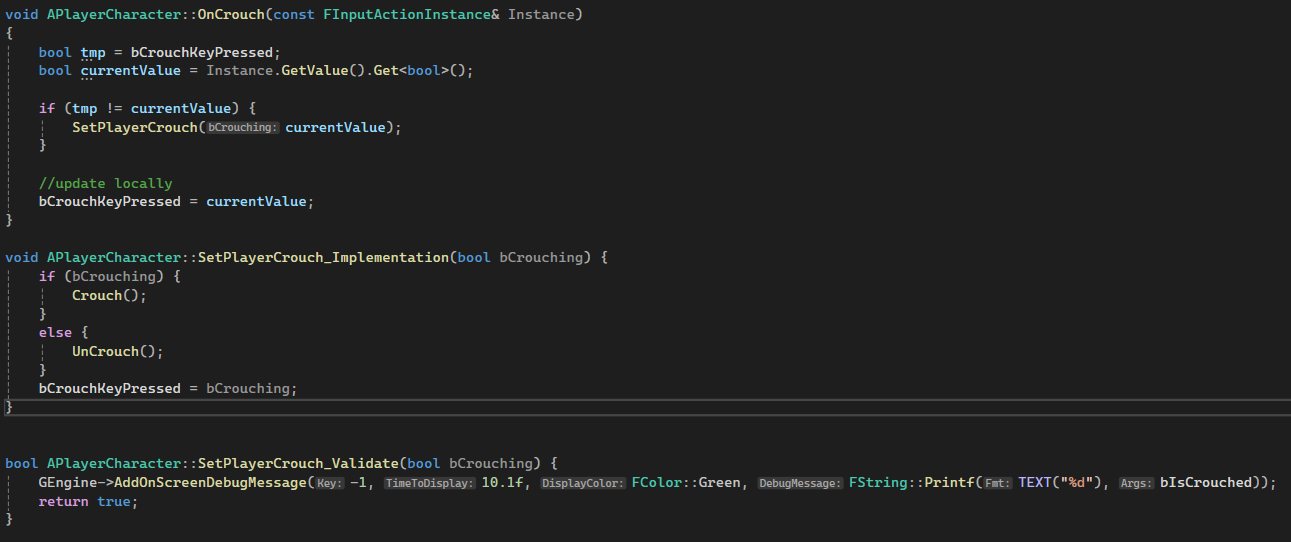 dark edge
Once you can confirm it hovers and slides around if you bump it, test in multiplayer. You should see that it behaves very badly if Component Replicates is on for the root
thin stratus
Yeah I need to make that thing a bit smaller first.
So that's what I have for now.
thin stratus
Yeah just adding a bit of debug functionality
Could be smoother fwiw.
Pretty sure that's the Actor Transform correcting constantly.
Yeah it is
But without setting Replicate Movement on the Actor, you run into the problem that it can desync.
So you would still need to add some smoothing fwiw.
dark edge
thin stratus
But without setting Replicate Movement on the Actor, you run into the problem th...
That's always been on
thin stratus
Doesn't matter though, you are just not noticing it yet.
dark edge
The weird part is it's smooth with Component Replicates off, and a jittery mess with Component Replicats on
thin stratus
Lemme check how bad it gets with the scene compoent replicating
thin stratus
dark edge
The weird part is it's smooth with Component Replicates off, and a jittery mess ...
Yeah but it's the same concept basically.
The Server Transform replicates back to the Client
And constantly corrects it
dark edge
If you have stock physics replication settings they are really strict so you'll encounter more snapping than me
dark edge
thin stratus
And constantly corrects it
Yes, but I think the root is that there's 2 systems doing that.
Physics replication is doing it nice and smooth with all sorts of tunability, and something is just directly setting component transforms when Component Replicates is on
thin stratus
Do you replicate only teh root of that hover actor?
Do I need to enable physics replication somewhere?
I usually never touch that shit due to the nature of it desyncing
dark edge
thin stratus
Do I need to enable physics replication somewhere?
on by default
dark edge
thin stratus
Do you replicate only teh root of that hover actor?
Yes, turning on ReplicateComponent on the root of the hover actor is enough to clobber transforms
thin stratus
Replicated Movement + Replicated RootComponent
Starts jittering when hitting it a second time.
dark edge
Actor Replicates
Replicate Movement
Components Replicates = false
Behaves
Actor Replicates
Replicate Movement
Components Replicates = true
Jitter City
thin stratus
Mind you, I set the FPS to 60 flat for now. Lemme unlock that.
dark edge
thin stratus
Replicated Movement + Replicated RootComponent
That might be it
Might be rotation only
hard to tell
thin stratus
Hm na, looks similar even with 120 fps
dark edge
I think there's 2 systems trying to keep the root components transform in sync, and they're fighting.
thin stratus
ReplicatedMovement on the Actor Off
Replicated on the Component On
So it doesn|t really matter which of the two are on. As soon as you enable replication of the Transform of either Actor or Scene Component, you will get the "corrections"
I don't know why it's so much worse for you when you have both enabled
But I don't see a difference.
Lemme spawn two of them with the settings all exposed
dark edge
What engine you on?
thin stratus
5.3 tbh, cause I have no 5.5 project at hand.
But this should be relatively unchanged between versions
@dark edge Doesn't really seem like they are very different in behavior. Minus the one that doesn't replicate Movement and Component.
Also with both of those turned off, if Physics replication would be on by default, shouldn't it still sync?
dark edge
What are the red and green boxes?
thin stratus
I guess it's not on by default in 5.3?
 thin stratus
dark edge
What are the red and green boxes?
thin stratus
dark edge
What are the red and green boxes?
Green is the Location of the Component on the Client, Red on the Server.
Makes it easier to compare.
dark edge
thin stratus
I guess it's not on by default in 5.3?
That's just prediction
dark edge
thin stratus
I guess it's not on by default in 5.3?
My only difference is my angle lerp is 0
thin stratus
Okay with that on I do see a lot more corrections
Lovely
The "none" one is still not replicating, so it will be tested somewhere
Too many systems fighting each other remains my guess.
The one that has no replication on movement or scene component still desyncs
Enabling Resimulation doesn't make it any better
Let's have a look how that boolean is even utilized
Okay so for one, that Physics stuff overrides the LinearVelocity on the RootComponent with the replicated one of the Server.
void AActor::PostNetReceiveVelocity(const FVector& NewVelocity)
{
    const FPhysicsPredictionSettings& PhysicsPredictionSettings = UPhysicsSettings::Get()->PhysicsPrediction;
    if (PhysicsPredictionSettings.bEnablePhysicsPrediction)
    {
        // required to keep client deterministic with server simulation
        if (RootComponent && RootComponent->IsRegistered() && (NewVelocity != GetVelocity()))
        {
            if (UPrimitiveComponent* PrimitiveComponent = Cast<UPrimitiveComponent>(RootComponent))
            {
                PrimitiveComponent->SetPhysicsLinearVelocity(NewVelocity);
            }
        }
    }
}
Hm, it seems to cause all sorts of shit. It also touches how the CMC works and moves the whole thing to an Async Tick.
dark edge
thin stratus
```c++
// Check if this is a detach
if (AttachParent && !bShould...
I think it's that raw UpdateComponentToWorld doing it
dark edge
thin stratus
Hm, it seems to cause all sorts of shit. It also touches how the CMC works and m...
yeah the new physics stuff isn't ready for prime time I don't think lol
thin stratus
I struggle to put my finger on what is going wrong in yours vs mine.
There is also bReplicatePhysicsToAutonomousProxy on the Component, which is true by default in 5.3
dark edge
Yeah that's on
dark edge
thin stratus
I struggle to put my finger on what is going wrong in yours vs mine.
Maybe you're drawing boxes early
I see the mesh moving relative to the clientside box
thin stratus
I just don't see how it would keep the Server and Client in sync without at least one of the two Movement Replications being true
dark edge
thin stratus
I just don't see how it would keep the Server and Client in sync without at leas...
I think the physics replication relies on Movement Replication or at least the actor being replicated
thin stratus
Could be
dark edge
That's fine, it works great like that. What breaks it is the raw component to world transform being updated when Component replicates
I think in the meantime I might just see if I can keep the attachment and relative transforms of attached parts in sync without ComponentReplicates, if I can do that then it'll work great
Just gotta give each part an AttachParent and RelativeTransform and they can hook themselves up clientside
To be sure, attachment works without ComponentReplicates, until you enable physics on the root. Then all the children claim to have no attach parent and get sucked into the root's transform. Something is busted.
thin stratus
if I turn angle lerp to 0 it starts breaking the one that only replicates the actor LOL
Actually it breaks a lot of stuff
That's probably why it#s smooth for you
You might want to debug your Server and Client positions like I do
Look at how smooth the yellow one is, that is the one that has the Scene Component turned off
The Physics Replication seems to only affect the Actor itself, and if you turn off the Component Replication and set the Angle Lerp to 0.0, you start avoiding corrections but you get a desync.
dark edge
thin stratus
You might want to debug your Server and Client positions like I do
just draw debug box?
thin stratus
dark edge
I think in the meantime I might just see if I can keep the attachment and relati...
Thing is, if your Parts are Actors and are replicated and you call Attach on them, they should replicate the Attachment. Actor has a ReplicatedAttachment logic already.
thin stratus
dark edge
just draw debug box?
In the loop.

After the loop for the center mesh.

Extent can vary depending on how big your boxes are.
Also can someone please PR a change to Select nodes so PickA and True/False are not swapped...
From what I can tell, one would:
- Want AngleLerp to be > 0.0
- Want Position Lerp to be very small. Epic says "if not even 0.0", but not sure.
- Need to enable MovementReplication on the Actor
- Not need to enable Replication on the SceneComponent, as that fights with it
- Need to toy around with some of the numbers to get the jitter under control when having AngleLerp > 0.0.
Not sure if the Physics Prediction stuff does any smoothing, but I would say no.
I guess the Angle Lerp etc. is that smoothing
thin stratus
Yeah it does do smoothing, but man the smoothing is choppy
dark edge
the lerp is not smoothing, it's a hard snap per packet. The smoothing comes from the coefficients and error accumulation
thin stratus
Turning the Angle Lerp to 0.0 turns of my smoothing for it entirely though until it reaches the point where it really hard snaps
dark edge
I'm probably the only person who uses the built in physics replication lol. It had a typo for YEARS, it was "Physic Replication Settings"
thin stratus
I don't know why yours manages to sync up again. In my video you can see how it just desyncs the rotation when I touch the mesh.
dark edge
I have everything on except Component Replicates
thin stratus
Must be 5.3 vs 5.5 then. Lemme see if I can open this in 5.5
Now I'm curious
For the Actor Attachment, you'd need to actively show the problem.
I'm not sure I understand what is going wrong with that.
Probably the last thing I will do for now though. Can continue with this another time.
Which setting do you have on above the replication settingsß
 dark edge
thin stratus
dark edge
thin stratus
 thin stratus
Right, it does seem to behave like you showed in 5.5
That said, I don't see additional jitter with I enable the Component replication -.-
Are you shitting me... 5.5 runs like garbage compared to 5.3
The fuck did they do
dark edge
maybe some default option
thin stratus
I had 120 fps in 5.3 and now I'm at 62 or so
dark edge
maybe you had the editor viewport in live mode vs not
thin stratus
Oh wow, it was cause I had the BP open on my other screen
Man this Engine is so shit sometimes
dark edge
lmao
latent heart
Lol
dark edge
Unreal: The worst engine, except all the other ones.
Anyways, gotta get to bed. Thanks for the help, you gave me a few avenues to look into to fix this project.
This week I'll either sort out some way to fix the problems fundamentally or just live with Component Replicates turned off, and handle all the attachment and relative transforms in my own code. Thanks a bunch, and also thanks for the compendium.
thin stratus
You can't make this shit up
This is a freaking empty character BP, not even a mesh in it. 2 Input actions and 2 debug keys for the resetting and drawing.
Even minimized it still steals performance
latent heart
Slate is super efficient.
thin stratus
This should be more in line with what you have on your end.
Can't tell if the SceneCompo being replicated adds jitter though. My setup doesn't show that too well
I would say yes though
dark edge
thin stratus
network emulation or no?
thin stratus
dark edge
network emulation or no?
No, but ping shouldn't matter and package loss shouldn't be set to != 0
Lemme try anyway
Welp, ping does matter apparently. It's gonna be that the PhysicsReplication logic does not touch the SceneComponent at all and is only integrated into the Actor Replication.
As soon as you turn on the replication of the SceneComponent you get a second set of Transform being replicated and applied
I think that's enough of testing though. Seems to be pretty clear now that for one 5.3 is not far enough to test/use this, and that the Physics Replication is only on Actor level, and if you start replicating the SceneComponent you add the RelativeTransform being replicated back to the Client into the mix.
@dark edge Don't have the time to look at the video anymore, but here is what I, for whatever reason, had to do to get the attachment working.


To save on coding things twice, I made use of OnRep calling on Server in Blueprints.
In C++ you'd need to manually ensure you attach on the Server too.
dark edge
Thanks, yeah I think that's the approach I go with for now
thin stratus
Replicating SceneComponent messes that up too btw ...
I like how the physics stuff makes the thing too heavy on my end now
Also, just fyi, attaching a lot of actors with a lot of scene components will quickly become a bottleneck due to the shitty way UE updates the transforms.
So try to keep the amount of scene components low.
outer birch
thin stratus
There is a CL by someone (official epic commit) that tried to fix something on I...
Did they try and then back it out?
kindred widget
thin stratus
You can't make this shit up
Slate invalidation is fun. I'd wager 90% of that cost is the details panel.
dark edge
thin stratus
So try to keep the amount of scene components low.
how low?
I picture 100-200 scene components per vehicle absolute max
thin stratus
outer birch
Did they try and then back it out?
Should still be there.
thin stratus
kindred widget
Slate invalidation is fun. I'd wager 90% of that cost is the details panel.
Probably.
dark edge
At least my device components aren't scenes. I thought about it but I just opted to have them piggyback on scenes for spatial stuff
thin stratus
dark edge
how low?
I picture 100-200 scene components per vehicle absolute max
I can't give you exact numbers. If you have a lot of components on a vehicle you gotta profile it.
But I'm sure 100-200 is gonna make you bleed ms.
Depends also on how many vehicles you have in the scene.
dark edge
thin stratus
Depends also on how many vehicles you have in the scene.
10 max, probably about 50-100 scenes per on average
thin stratus
Yeah, that can get pretty expensive.
dark edge
I'm guessing the workaround is ISM eventually if it gets there?
outer birch
thin stratus
There is a CL by someone (official epic commit) that tried to fix something on I...
I assume your wife is referring to https://github.com/EpicGames/UnrealEngine/commit/88a2558657312ebc9f394ebb377f698c52fcafa5, the "// Currently we must enforce polling SubObjects with owner" seems like a crappy requirement. Any hints on the 'proper fix' ?