#multiplayer
1 messages · Page 234 of 1
 odd hamlet
 chrome bay
Well you're not really - but that's why Chat GPT is a useful as a box of dead frogs
Only way you're going to get correct info is by looking at the source code
Keep in mind Chat GPT is just feeding you harvested info from the internet, most of which is either wrong or out of date.
odd hamlet
chrome bay
Well you're not really - but that's why Chat GPT is a useful as a box of dead fr...
May I ask how did you get in there?
how did u find the cpp?
 upbeat basin
You can use your IDE's search action/tool. If there is a log, then it should be typed in somewhere (excluding the parameterized stuff ofc). If you include the engine files on the search, you can locate where the log is coming from
 magic hazel
Hello! Does anyone know how to fix or avoid this?
Multiplayer. Host can easily travel from menu to gameworld and vice versa. But Client is stuck when tries to open menu.
I use LoadingScreen through FLoadingScreenAttributes and need to use bAllowEngineTick for properly shown loading screen.
Without bAllowEngineTick client works normally but loading screen works on it weirdly.
chrome bay
odd hamlet
how did u find the cpp?
Just CTRL+F'd the error you posted over the entire solution
specifically the Failed to parse connection URL part
 halcyon gorge
Hi everyone! I decided to make a multiplayer game for a jam. I set it up using the Steam subsystem with App ID 480 following a tutorial. I tested it on two PCs with different Steam accounts, one of which was connected via mobile data. The session was created successfully, and everything worked. However, when I shared it with my jam teammates, they couldn't connect.
I then decided to switch to EOS. I set it up following another tutorial, but when launching the game, the PersistentAuth login fails. I added a login button for AccountPortal, but it doesn't work either—the login window doesn't even open. I double-checked all the IDs.
Does anyone know what could be causing this issue or have a simple solution for implementing a Relay? I don’t have time to set up a dedicated server, and hosting my own relay server seems too complex at the moment.
odd hamlet
chrome bay
Just CTRL+F'd the error you posted over the entire solution
could you explain like an idiot because i dont know where to ctrl + F over the entire solution,
I got this one and i canno`t find it 😦
LogSockets: Warning: Could not serialize 76561198867930852, got error code SE_NO_ERROR [0]
chrome bay
odd hamlet
could you explain like an idiot because i dont know where to ctrl + F over the e...
just open any code file and pres CTRL + F, switch to search "Entire Solution"
sometimes you need to search just parts of the message because the rest will be formatted arguments
It's just a starting point to get you in the right place
odd hamlet
SteamConnectIP=76561198867930852:7777
I tried it this way but still doesn`t work
LogSockets: Warning: Could not serialize 76561198867930852, got error code SE_NO_ERROR [0]
I get this error from the image

i simply can't understand it anymroe
 lost inlet
then you're not using steam sockets
upbeat basin
Is it coming from the Steam net driver?
If that's the case then +NetDriverDefinitions=(DefName="GameNetDriver",DriverClassName="OnlineSubsystemSteam.SteamNetDriver",DriverClassNameFallback="OnlineSubsystemUtils.IpNetDriver") on DefaultEngine.ini could help, if missing
odd hamlet
upbeat basin
Is it coming from the Steam net driver?
this is coming from SocketSubsystemBSD.cpp, the error
bool bInviteSent = SteamFriends()->InviteUserToGame(FriendSteamId, TCHAR_TO_ANSI(*SteamConnectString));
and this is how i am inviting my friend
upbeat basin
I meant the steam sockets, what sswires said, not the error
odd hamlet
upbeat basin
I meant the steam sockets, what sswires said, not the error
this is in my DefaultEngine.ini
 odd hamlet
lost inlet
then you're not using steam sockets
odd hamlet
lost inlet
then you're not using steam sockets
how the fuck am i suppose to use them?
"
I want to cry
chrome bay
There are two steam-relevant socket types. FSocketSubsystemSteam and FSteamSocketsSubsystem.
GetAddressFromString in both cases doesn't take a string in the format you're providing. The regular steam subsystem takes an ID only, no port - in the format of steam.#### The Steam Sockets Subsystem takes the steam.ipaddress:port format.
Put a breakpoint in, see where it's going wrong. You don't need to add SteamConnectIP= to the start to begin with, that's for something else
It also wouldn't shock me in the slightest to find out that the Online Steam Subsystem is massively out of date, because Epic don't maintain it at all anymore and the Steam API has changed a lot
The GameRichPresenceJoinRequested_t callback data you get from Steam is what contains the connection string. Solid chance it's not what Epic thinks it is which is why the friend invite fails.
Should be a very easy fix, but you'll need to start debugging
 ornate moat
As a Romanian friend, I would suggest you, stop using chatgpt.
You are not using it as a source of documentation, you just get random code from it.. Wich is bad.
@odd hamlet
Instead of asking chatgpt :
How I add multiplayer to my game, give me code.
Ask : hey, I want the new unreal engine 5.5 documentation about steam sockets. And so on
Don t ask for something "precooked "
lost inlet
or just don't ask chatgpt because its knowledge about unreal engine is extremely limited
 agile basin
Hi, I have this issue where player0 will autoposess the actor set to player0, but player1 just spawns at the default location instead of autoposessing player1. Any ideas?
 hollow frigate
Im confuse... (and probably not doing the best approach). This is a logic to display health bar above enemy head when in range. I can confirm the check if enemy work perfectly, but instead of showing the bar above the enemy head, it show above my own character head?

 dark edge
hollow frigate
Im confuse... (and probably not doing the best approach). This is a logic to dis...
dark edge
hollow frigate
Im confuse... (and probably not doing the best approach). This is a logic to dis...
If you and enemy are both PSW_CharacterBase, then you're both telling each other to unhide hp bar
hollow frigate
dark edge
If you and enemy are both PSW_CharacterBase, then you're both telling each other...
so I should run it on client only?
dark edge
hollow frigate
so I should run it on client only?
Just think about the rules
hollow frigate
dark edge
Just think about the rules
I'm confuse now ! not sure what you mean by think about the rules... if by default I set the hp bar to visible and do a logic for each character to hide their own bar it work, and they only see the other players bar, not their own. I though I was specifically picking up the WB I wanted to hide/show for to the requested player
dark edge
"Show HP Bar when near another character and that character is your enemy" is obviously not the correct rule.
It should be "Show HP bar when near the PLAYERS character and that character is your enemy"
I would do it all from the POV of the players pawn, simplest way to do it. Is the players pawn special? like, is there a class for just the players character?
hollow frigate
the logic is casting to a base class but its built in a player only class. So my issue is between player (pvp)
hollow frigate
dark edge
"Show HP Bar when near another character and that character is your enemy" is ob...
So the structure I have to make it simple
Base Class is the parent for player and monster, the logic works almost perfectly for monster, but for some reason it's replicating to all player, so if player 1 is close to a monster, he sees the bar but if player 2 is too far, he shouldn't see it but he will because if player 1 been close. but PVP, its just a mess for some weird reason
dark edge
Just do it in player classes, like this:
Overlap -> if self is locally controlled -> cast otheractor to character -> if otheractor is on enemy team -> tell them to show their hp bar.
or just enable the overlap collider for locally controlled characters
or in some other way filter it to end up with the same result, which is that a characters hp bar is visible if they overlap a LOCALLY CONTROLLED characters overlap collider, and they are enemies
hollow frigate
great adding the locally controlled on self did fix the monster bar showing to all player at any distance, but the pvp still not working. Ill try to dig more to figure out why its making that restriction on player
dark edge
hollow frigate
great adding the locally controlled on self did fix the monster bar showing to a...
show your current code
ornate moat
Did someone tried to do a RogueLike type game?
I can't find a good Wave system
and i was thinkin' maybe someone can help me out
dark edge
ornate moat
I can't find a good Wave system
wfc?
ornate moat
With a ideea
ornate moat
dark edge
wfc?
wfc?
hollow frigate
dark edge
show your current code
checked Owner No See on the Widget Component

Ok I think its working fine now
 hot scroll
Hey, I'm having an unusual bug with Client behavior.
I have a UX element that has text based on the IsServer node. It'll say Client or Server.
I'm seeing my TargetRules with the TargetType.Client think it is the Server.
This happens in Cooked .exe as well as Packaged .exe
The editor will correctly be a Client when I set it to use as a Client.
I'm rather perplexed about how to diagnose this further. Any suggestions/common gotchas?
dark edge
ornate moat
wfc?
what do you mean by Wave system?
ornate moat
Imagine the game Brotato as example
where you start the game
and bunch of enemy spawns
at the beggining
after clearing the stage, you go to next stage [wave] and there are more powerfull enemies
etc.
Shortly, i need a system where per level / wave / stage enemies to become more hardfully to beat, and more powerfully / more to spawn
dark edge
ok that sort of wave
ornate moat
yessir
ornate moat
i did that, the problem comes after it
I kinda want to make it inifnite until you die
i don't really want to do a switch on int, check if level 1/2/3/4.../50/51
to change Hp / Dmg multiplier manually
That's where i fwk things up
 short arrow
You don't really gotta do all that, just need a few starting variables like... how many enemies to spawn at level 1, and a few multipliers to increase their strengths each round, when the round ends, increment the level, spawn the zombies and apply the multipliers
dark edge
ornate moat
i don't really want to do a switch on int, check if level 1/2/3/4.../50/51
math
 silent grotto
Uhm hi, I am kinda confused right now. I put my viewport into a new window, 2 clients and put it at "Play as Client" but for some reason but send they have authority. Even when I put it as Listen Server both still have authority. How is that? One says server when printing while the other does not and still both think they have authority.
Am I doing something wrong? I just print at begin play the GetAUthority BP function
dark edge
EnemyStrength = 1.2 ^ Level
that'll make them 20 percent stronger per level forever
whatever that means
short arrow
For example if you have 5 starting enemies, and you're on round 2 now, it would be 5 * (2 * multiplier) or something
Each round you'd end up with more and more enemies
You'd do the same with their stats
ornate moat
short arrow
You don't really gotta do all that, just need a few starting variables like... h...
Some sort like
BeginPlay -> CurrentHealth = 100 -> OnWaveClear ->SetUpSettings
SetUpSettings -> get current health * HealthMultiplier [1.2] -> SpawnZombies -> StartNewWave
Hope i got it
Som' like that?
short arrow
Sounds like you got it
ornate moat
Saw some dudes / even the AI chat, told me to use data structs, enums, and it's blown me away
I lost it at that part
silent grotto
Why is this true for both clients?
I call this from HUD at BeginPlay, "Play as Client"
 short arrow
It shouldn't be, you sure you got the game set as listen server mode or client mode?


 grand kestrel
@thin stratus @pallid mesa it appears that moves that don't get combined can still get delayed which still results in de-sync
This didn't happen on my predicted movement dev project, but it happened in production, and when I went back to the dev project it was happening there too lol...
In ReplicateMoveToServer() it handles move combining (CanCombineWith(), CombineWith()) and regardless of the outcoming, then factors delaying the move based on ClientNetSendMoveDeltaTime
We need to stop it from delaying moves where time-critical events occur, i.e. a change to velocity in OnStartMyModifier()
Therefore, CanDelaySendingMove() needs to be overridden, which basically tells us exactly this:
    // Don't delay moves that change movement mode over the course of the move.
    if (NewMove->StartPackedMovementMode != NewMove->EndPackedMovementMode)
    {
        return false;
    }
Do you guys agree with my approach, to override this and check NewMove->StartMyModifer != NewMove->EndMyModifier ?
Or is there some sort of oversight on my part?
I suppose I could achieve the same by setting bForceNoCombine on the saved move elsewhere, and possibly avoid requiring Start/End modifiers?
short arrow
silent grotto
Why is this true for both clients?
I call this from HUD at BeginPlay, "Play as ...
You sure the actor is replicating?
silent grotto
short arrow
You sure the actor is replicating?
Does it need to be replicated for the result to be false?
So in other words, if it's not being replicated, I always have authority?
short arrow
Whatever spawns it will have authority over the actor
So multiple things will say they have authority of it yes
It's checking authority against the actor, if you want to know if you are authority over the game you can check "Is Server"
silent grotto
Looks like HUD has no replication at all, which kinda makes sense
short arrow
Or you can check your own role against the server
I believe it's in the controller
"Remote role" i believe is how you can check what you are

Epic Games Developer
Determine how much control this game instance has over an actor in Unreal Engine.
short arrow
silent grotto
Looks like HUD has no replication at all, which kinda makes sense
No widgets have replication, indeed
silent grotto
short arrow
No widgets have replication, indeed
I said HUD, not widgets.
silent grotto
and is Server seems to be the thing I was looking for
silent grotto
short arrow
Or you can check your own role against the server
but this is a good idea tbh
so thank you very much!
short arrow
👍
silent grotto
hhm maybe one more thing which I do not understand
I basically have this setup right now

but changing the resolution with this widget, changes only one window no matter in what window I hit apply
like one window never changes its resolution
and I am not sure why that is
I basically do this:

but even when doing Get Player Controller (the one that requires an index) it aint working properly
short arrow
There are lots of small bugs related to graphics settings in PIE, try doing it in standalone
dark edge
silent grotto
Why is this true for both clients?
I call this from HUD at BeginPlay, "Play as ...
because HUD isn't a replicated thing
every HUD has "authority"
silent grotto
dark edge
every HUD has "authority"
yeah we figured that out already ^^ thank you
silent grotto
short arrow
There are lots of small bugs related to graphics settings in PIE, try doing it i...
okay
but I think remember trying this already and having the same result
oh nvm
standalone does the thing
crazy
short arrow
Yeah, never rely on PIE for settings
Or most things for that matter
Always test final code in standalone if you're having unexplainable issues
There are also things that will work in pie but won't work in standalone
That'll be fun
Those ones must be fixed
silent grotto
okay, but the issue I had in standalone was that my framegrabber was just recording black frames, which wasn't the case for PIE and idk why, I just followed this as much as possible when implementing the framegrabber :
https://github.com/pafuhana1213/FrameGrabberSample/tree/master
GitHub
Sample to convert rendering result to texture using FrameGrabber function - pafuhana1213/FrameGrabberSample
silent grotto
short arrow
There are also things that will work in pie but won't work in standalone
yeah exactly xd
short arrow
I'm not gonna get all into plugins and stuff sorry bud 😅
silent grotto
its not a plugin but nah nah dw, I just wanted to mention, cause I don't quite understand but I'll come up with some solution I guess
ornate moat
Do Functions calls themselfs on servers too? rpcs?
i can't set them to run on server / multicast it
tho
 quiet yarrow
Sure you can run them on server / multicast
run on server custom event > multicast > Function
though if server and client will need the relavant info to run the function
 quiet yarrow
yeah no you cant just run a function on server without a custom event
you also cant run rpc inside functions
but you can call rpc from inside functions
and send the data from within out
ornate moat
i see, so if a function is inside a custom event with run on server on, it's gonna work
that function as an c.event
quiet yarrow
correct
ornate moat
I see
 thin stratus
grand kestrel
<@94211915902889984> <@158247241000157185> it appears that moves that don't get...
thin stratus
grand kestrel
<@94211915902889984> <@158247241000157185> it appears that moves that don't get...
Makes sense to me
ornate moat
ty
Yo, @quiet yarrow Mind if i send you a dm?
i have one question, and it's off the subject, don't really wanna fwk the discord flow here
quiet yarrow
sure
 split siren
I set up simple Iris project, but I can't see any part of Iris processing happening on a separate thread/worker, which I assume is the main benefit. What am I missing?
 quiet yarrow
Im having a tough time finding a working replicatable solution to having Physics arms/hands + procedural animations.
I figured I could replicate a ball and move that and have the arm attached to it, but since its not the parent I cant move it? So im out of ideas
chatgpt is saying do IK for the hands, but its instructions suck. Could someone help point me in the right direction?
grand kestrel
thin stratus
Makes sense to me
I would have thought moves marked as important (IsImportantMove) would inherently not be delayed
But nope
I'm almost tempted to add that though...
grand kestrel
@thin stratus @pallid mesa
Updated: https://github.com/Vaei/PredictedMovement/wiki/Move-Containers#delayed-moves
Might get updated again soon tho lol...
 tacit furnace
I'm trying to replicate the functionality shown in the blueprint. However, when I execute it as 'Run on Server,' the spawned actors don't appear on the client side, and the server spawns 6 actors instead of 3. How can I fix this so that only 3 actors spawn on the server and properly replicate to the clients?

 haughty ingot
tacit furnace
I'm trying to replicate the functionality shown in the blueprint. However, when ...
haughty ingot
tacit furnace
I'm trying to replicate the functionality shown in the blueprint. However, when ...
Need more context
tacit furnace
haughty ingot
Need more context
this is a combinaiton from this video https://youtu.be/XxtfP3hpopo?feature=shared lock puzzle and this codes spawn dials
Support me here: https://www.patreon.com/halbotstudios
Get my assets here: https://www.fab.com/sellers/HALbot Studios
Join the Discord and showoff your work here: https://discord.gg/Syccf4gTwE
Assets for this tutorial: https://www.patreon.com/posts/combination-lock-120009212
Prerequisites: Interaction Tutorial: https://youtu.be/7OmgBa-cKro?s...
haughty ingot
Sorry I'm not going to watch a video, but if you want to show more of your project I can look at pictures. There isn't enough context in your message to help you without much trouble
lost inlet
Feeling a bit of deja vu
Since I'm sure that tutorial does not cover multiplayer at all
And Unreal RPC 101: you can only call server RPCs on actors the client owns
I also wonder about the test methodology here and what the actual logic looks like in more detail
And any actors spawned by the server must be replicated to appear on other clients
tacit furnace
lost inlet
And Unreal RPC 101: you can only call server RPCs on actors the client owns
I'll use rpc in player controller
tacit furnace
lost inlet
And any actors spawned by the server must be replicated to appear on other clien...
actor and components are replicated
tacit furnace
haughty ingot
Sorry I'm not going to watch a video, but if you want to show more of your proje...
what information do you need?
 bright summit
it should return null? What GetOwner should return if actor is owned by the server? I thought I understand the basics of multiplayer but then comes ownership and everything collapses 😄
 short arrow
bright summit
it should return null? What GetOwner should return if actor is owned by the serv...
short arrow
bright summit
it should return null? What GetOwner should return if actor is owned by the serv...
you still need to set the owner if you plan to that node
 bright summit
I'm confused because pre-placed in scene objects do not return owner so I assume the owner is the server, right? When I spawn the same actor but through server rpc (for testing purposes only) by level bluebrint, it also do not return owner (I didn't set it in spawn node), so it should be server-owned, right?
(route of spawning by level bp):
player pawn interact server rpc->OnInteract Event on object->Spawn Actor
I have an actor with physics simulation, player can grab it, throw etc. Actors can damage players also based on phys impact. With objects pre-placed in scene everything works correctly, but when I spawn this as I mentioned it is not. Wondering why, both objects should behave the same
Damage RPC is executed by object (OnHit event) it self on the player's pawn damageable component
short arrow
if you have it pre placed, with "Net Load on Client" enabled, then that's why
bright summit
yes it has ticked this box
short arrow
untick it and see if it stops working
personally, I always leave that option off, I think it should be off by default
short arrow
what you're seeing now is what's happening when you try to spawn the actor at runtime
when the client loads the game it's spawning those actors
with "net load on client" on, they keep their own copy of those actors pre placed in the world
so there's like literally 2 copies
a client owned copy, and a server owned one
bright summit
ok but spawned runtime client see this actor as well
I assume my approach with running these RPC's are bad but I want to understand what is happening
short arrow
need more information to be more helpful
so there's an event that doesn't fire when you spawn an actor?
if you're experiencing that problem on a client it's because it does not have ownership of the actor
bright summit
That's right, the runtime spawned actor isn't working as intended but the placed in scene it is.
short arrow
are you sure the actor that's placed in scene is actually replicating?
if the server calls the event, everyone will probably see it
but if the client calls it, I imagine that only the client that called it will see it
net load on client is a little complicated
bright summit
It must be replicated because it's physics simulated actor and position is synced
short arrow
right but are you testing from the perspective of both client and server?
bright summit
yes
short arrow
and also calling the event from both client and server?
bright summit
spawn event actually I have called only from server
short arrow
either way, if you are trying to do an RPC from a client that isn't set as the owner of the actor then it won't work
that's the issue
Net Load on Client is complicated
bright summit
short arrow
either way, if you are trying to do an RPC from a client that isn't set as the o...
so with net load on client, client has owning connection of this actor to be able to sent rpc?
short arrow
it has ownership of it's own actor that it spawned
I don't believe it's actually working 100% properly the way you say it is with Net Load on Client, I think issues would present themselves with further testing
bright summit
with object that is pre-placed on scene I can grab the object, throw it into player and he is being damaged. Damage is applied from throwed actor in OnHit event calling the server rpc on player's damageable comonent. And it works, from client perspective and the server. There is no any warnings about not owning connection.
But if I do the same for run-time spawned actor there are warnings about it
 sinful tree
bright summit
with object that is pre-placed on scene I can grab the object, throw it into pla...
sinful tree
bright summit
with object that is pre-placed on scene I can grab the object, throw it into pla...
RPCs are only meant to be executed on client owned replicated actors. You probably shouldn't be sending an RPC with the OnHit event as the server can detect the hit event itself without the client telling it to happen. If I rememberr right, if you're using "NetLoadOnClient" then the client would be spawning its own copy of that actor, and then it's just executing its own logic client side, not replicating anything to the server.
bright summit
sinful tree
RPCs are only meant to be executed on client owned replicated actors. You proba...
yeah about hit event you're right, it's meaningless rpc I will fix this. So what should I do when spawning actors run-time to have the same behaviour as that with "net load on client"?
sinful tree
You should not be RPCing in actors that aren't owned by clients, period.
If you want the client to be able to tell the server to do something on that actor, then you must make it owned by a client first before allowing the RPC to be sent.
So when spawning it at runtime, you could set the owner of it at that point.... If someone else can end up interacting with it and you want them to send RPCs, then you'd have to change the ownership to them on the server first.
The other consideration here is that some events trigger on all machines, like the OnHit event - that means all clients could ultimately detect the OnHit and then be attempting to call the RPC. You need to gate the logic so that only the appropriate machine is executing what you need it to execute, like checking authority before proceeding with your code.
bright summit
if actros have unticked "net load on client" and are placed in scene, they should be visible on client if it is replicated actor?
ok it should
bright summit
sinful tree
You should not be RPCing in actors that aren't owned by clients, period.
Changing ownership should be done by server. So I am doing it via Interact function Server RPC while picking up object. Still same problem. Also moved the damage rpc to the object itself to be sure it will be executed. What is strange client can call RPC, listen server no. On in-scene placed actors there is no problem even without "net load on client"
what is more strange - when testing on client1, client2, client3 - eachother can damage themselves via phys object
 tardy fossil
aint multiplayer logic fun?!
bright summit
yeah. still do not know why placed in scene actors are able to call rpc's 😄
chrome bay
They're net addressable, so calling RPC's is fine
Client/Server RPCs won't go anywhere, but Multicasts will
In the same sense, you can add components to actors which have RPC's but are not explicitly replicated. Works fine
bright summit
chrome bay
They're net addressable, so calling RPC's is fine
you are talking about in-scene placed actors, right?
chrome bay
Yeah, you can call Multicasts on them (possibly only reliable) and they will work
But Server/Client won't, unless somebody is set as the net owner
Not something I've ever done mind you
bright summit
ok ok
my func applying damage is server rpc, not multicast and it still works 😄
on scene placed actors
there is no any message about no owning connection
I think I am not fully understaing how RPCs should be routed. The basics one like interact I know, but what about such this case, when I want to apply damage from the falling world object, or maybe.. door stuck?
where the RPC should be implemented and what should call it?
chrome bay
bright summit
my func applying damage is server rpc, not multicast and it still works 😄
It shouldn't be. If the client calls a Server RPC on an actor they don't explicitly own it should fail straight away
And if the client doesn't reject it the Server should
The answer is you don't
The Server deals the damage and the effects of that replicate back to clients naturally
bright summit
I removed the RPC property tag and made it as normal function and it works as previously. So In-scene placed actor is owning connection of all the player because it can call on the player applydamage function?
chrome bay
Okay, so I'm assuming the actor isn't replicated? In which case that's why you can call an "RPC" - you are the local authority over that actor.
So no RPC is actually being done, you're just running it locally.
And no - an actor can only have one owning connection at once.
You can do whatever you want to stuff placed in the level as a client if those actors aren't replicated, but obviously that will only happen on your local machine
So if you destroy a wall and try to walk through it, then the server would "correct" you back
bright summit
It has bReplicates = true, I unchecked in placed actors also "net load on client" and it is still spawning on clients so it should be replicated
their local role is simulated proxy
chrome bay
Yeah, so they are replicated then. The RPC should be failing
There's no way that RPC is actually running server-side
bright summit
let me double check
so I don't know, unchecked run one process to have reliable print strings, as you can see implementation is executed on server, but not on client

 dark parcel
Like what?
Damage is server side only
The thing that client receive is the effects and the replicated variable
If I'm client and I hit something, tell server I hit something and send any neccesary data. Server check if the damage valid then subtract the hit point.
The client can then get the updated hit point.
bright summit
this is not the case, I am wondering how is it possible that inscene placed actor is able to call server rpc on player without owning connection
it shouldn't be
rpc should be dropped
but it is not
dark parcel
Ownership shouldn't even be in this picture
Sounds like quiet a shit show if you have to pass ownership around
Not to mention delay existing
Everything client do, can be routed to things they controlled from the get go
The controller or the character they possess
bright summit
dark parcel
Ownership shouldn't even be in this picture
oh really? I was previously told that I should change ownerships in that case
dark parcel
bright summit
oh really? I was previously told that I should change ownerships in that case
Like what example?
bright summit
picking up physics object which is able to damage players on impact or other world objects
dark parcel
So you gonna tell server, hwy I hit something. Give me the ownership of this actor.
Then you ask server to calculate the damage after you get the ownership?
Then what happend if another client hit the same thing?
dark parcel
bright summit
picking up physics object which is able to damage players on impact or other wor...
The object can have reference to the character that owns it.
You route the rpc from the character
You don't send server rpc from the physic object.
Physic object on hit -> get owner -> cast to my character-> client_ihitsomething(server rpc)
chrome bay
I woudln't even bring networking into it, all of that should just be handled server side
Otherwise it's an instant exploit
A server RPC that asks it to just apply damage is asking for trouble
bright summit
HasAuthority should work here well, but still don't know why calling rpc is possible from worldspawned actors and it is not dropped
dark parcel
Client wouldn't be able to call rpc on actor they don't own.
I'm not sure the context, if you doing like a goal post overlap and the like then you can just use rely on the server world with switch has authority.
But I think it gets tricky when you are doing shooting, or simmiliar mechanic
Because the server and the client don't neccesarily see the same thing
@chrome bay can I ask for 2 cent. For a melee combat, should I just deal with it server side?
I was gonna let client have a degree of authority so they don't feel cheated.
Like shooting a slow moving fire ball. If the client don't have High ping and the fireball hit an enemy. Then the server will just check if the hit is possible by doing simple calculation. Then just explode the ball in the server and deal damage.
With no experience I don't know the approach with the best trade off.
bright summit
Ok converted it to just OnHit event, without any rpcs as @chrome bay suggested. Problem is with spawned in run-time actors. HasAuthority check is just failing and events are not executing
chrome bay
dark parcel
<@150632829909336066> can I ask for 2 cent. For a melee combat, should I just de...
You'd probably do it similar to how you would validate client hits for bullets I imagine. Notify the server you hit something, but don't take is as gospel, server should verify
bright summit
eh
I started wondering why I done the RPCs and not just the HasAuthority thing. That was propably damage was not applied so I thought it was necessary
but it wasn't and @chrome bay was right. The problem was in damage calculation which damage alwas was 0
because spawned object had 5kg of mass which was out of bounds
sorry for wasting your time
dark parcel
chrome bay
You'd probably do it similar to how you would validate client hits for bullets I...
Thx.
split siren
I have a weird setup. I want to test how good Iris is, so I have dedicated server running on workstation and 500+ clients on Kubernetes cluster.
When client attempts to connect, the server sees it and tries for 20 seconds
LogHandshake: SendConnectChallenge. Timestamp: 344.449866,
Which never reaches the client in a pod on a Kuberentes cluster.
There shouln't be any firewall in between them.
I wonder, what is the StatelessConnectHandlerComponent::SendToClient function actually using to send the connect challenge? At that point, is there a tunnel/websocket already created?
bright summit
Ok I have another issue. I was searching on this discord for similar and I found but it wasn't my case because I need replicated mesh component(phys simulation sync). The problem are these warnings:
FNetGUIDCache::SupportsObject: AudioComponent /Game/FirstPerson/Maps/UEDPIE_0_FirstPersonMap3.FirstPersonMap3:PersistentLevel.BasePhysicsEntity_UAID_74563C6386EE1B4502_2145970111.AudioComponent_5 NOT Supported.```
I need to play these sounds/particles in this actor class, is there any way to get rid of it? exotic wasp
are you replicating the audio component?
bright summit
exotic wasp
are you replicating the audio component?
nope
just spawning via gameplaystatics inside the actor where replicated static mesh is
thin stratus
bright summit
just spawning via gameplaystatics inside the actor where replicated static mesh ...
So what are you doing with it that triggers that?
I assume you aren't calling an RPC inside of it, so are you replicating it via a variable or passing it along in an RPC?
Either of those only work if the Object is stably named, which a Subobject usually is.
If you created this runtime, then you need to ensure that the Object has the same name on Server and Client. And you also need to ensure that the Object exists on the Client before trying to replicate anything with it.
Better idea would be not passing it along, but just assuming that the receiving end of the RPC has such a Component too.
Or just not spawning it runtime.
bright summit
actually its function called from tick which updates the "scraping" sounds and decides if it should play or not. It spawns sound if it do not exists (there is no need to hold it whole time), same things are with niagara - OnHit, Overlap etc. I can get rid of it just slapping !HasAuthority but on listen server it just stopping working
none of audiocomponent or niagara are replicated, they are just created runtime
only thing replicated in this actor is static mesh
thin stratus
I didn't ask if the Component is replicated.
I asked if you are passing the Component through a Variable or RPC
Spawning it and calling functions on it wouldn't cause the warning you get.
Somewhere you are trying to send the pointer to that Component through the net.
bright summit
I have second static class which has bound events from this actor (OnHit, Overlap etc.) to handle them there. For example static function ProcessImpactDamage
If it matters my actor is child of AStaticMeshActor and I am getting staticmeshcomp from there via GetStaticMeshComponent()
bright summit
I have SpawnSoundAttached also and it is attached to rootcomponent, but I do not know if it can be the case
thin stratus
@bright summit None of this matters. I already told you where the warning usually comes from.
bright summit
Ok thank you, this is a good hint I think
 nocturne quail
I have little extended the VehicleReset system in the default vehicle template to get smooth Decelleration effect if the character jumps from the vehicle while it was moving
but the issue is now the velocity never reach Zero so the timer is always running
void AVehicle::SmoothDecellerate() //called by server
{
    FVector CurrentLinearVelocity = GetMesh()->GetPhysicsLinearVelocity();
    FVector CurrentAngularVelocity = GetMesh()->GetPhysicsAngularVelocityInDegrees();

    float LinearDamping = 0.1f;
    float AngularDamping = 1.0f;

    FVector NewLinearVelocity = FMath::Lerp(CurrentLinearVelocity, FVector::ZeroVector, LinearDamping);
    FVector NewAngularVelocity = FMath::Lerp(CurrentAngularVelocity, FVector::ZeroVector, AngularDamping);

    GetMesh()->SetPhysicsLinearVelocity(NewLinearVelocity);
    GetMesh()->SetPhysicsAngularVelocityInDegrees(NewAngularVelocity);

    UE_LOG(LogTemp, Warning, TEXT("Current Linear Velocity: %s"), *CurrentLinearVelocity.ToString());
    UE_LOG(LogTemp, Warning, TEXT("Current Angular Velocity: %s"), *CurrentAngularVelocity.ToString());
    UE_LOG(LogTemp, Warning, TEXT("New Linear Velocity: %s"), *NewLinearVelocity.ToString());
    UE_LOG(LogTemp, Warning, TEXT("New Angular Velocity: %s"), *NewAngularVelocity.ToString());

    if (NewLinearVelocity.SizeSquared() > KINDA_SMALL_NUMBER || NewAngularVelocity.SizeSquared() > KINDA_SMALL_NUMBER)
    {
        GetWorld()->GetTimerManager().SetTimer(SmoothStopTimerHandle, this, &AVehicle::SmoothDecellerate, 0.1f, false);
    }
    else
    {
        ResetVehicle(); //Immediately stop vehicle movements etc
    }
}
Logs:
LogTemp: Warning: Current Linear Velocity: X=96.161 Y=-0.016 Z=0.705
LogTemp: Warning: Current Angular Velocity: X=-0.002 Y=0.016 Z=0.000
LogTemp: Warning: New Linear Velocity: X=86.545 Y=-0.015 Z=0.634
LogTemp: Warning: New Angular Velocity: X=0.000 Y=0.000 Z=0.000
is there any other reliable way to achieve this?
also the vehicle is decreasing velocities which is fine
but it drops from 500 to 100 smoothly and then keeps 100
split siren
nocturne quail
but it drops from 500 to 100 smoothly and then keeps 100
If I understand your problem correctly, the solution might be to use
FMath::FInterpTo()
Or if you need something more smooth
FMath::InterpEaseInOut
Basically you need to keep track of the start value/time and use the current time to see where you currently are on the curve (from StartTime/Value to EndTime/Value)
For example, if your start time is at 1.0 with speed of 1000 and your end time is at 6.0 with speed 0.0, if you are at second 3.5 you can calculate exactly what the value should be.
At least that would be my take on it
split siren
nocturne quail
but it drops from 500 to 100 smoothly and then keeps 100
But even so, your code shouldn't stop at 100 velocity... If it really does that, there might be something else changing the speed
nocturne quail
split siren
But even so, your code shouldn't stop at 100 velocity... If it really does that,...
yeah this is what i am trying to find, it seems like when i start to decrease the current velocity, when it reach 100, something start to increasing it
so decrease, increase starts in cycle
split siren
What movement component does it have?
nocturne quail
ChaosVehicleMovement = CastChecked<UChaosWheeledVehicleMovementComponent>(GetVehicleMovement());
split siren
nocturne quail
`ChaosVehicleMovement = CastChecked<UChaosWheeledVehicleMovementComponent>(GetVe...
You should not externally change the physics without going through the movement component. Dumb question, but can't you just apply breaks when player exits the vehicle?
nocturne quail
split siren
You should not externally change the physics without going through the movement ...
it stops the vehicle immediately which is only the case if the character jumps when not holding the throttle input
like a vehicle current speed is 15000 and a character jumps, so the vehicle should move forward and smoothly stops
what i achieve is the velocity drops to 100 and then it locked on it 😄
from 15000 to 100 smoothly
i can put hard value like if this is 100 put brake
but NewLinearVelocity.SizeSquared() > KINDA_SMALL_NUMBER should do the trick to stop the timer, but it don''t
split siren
I find it weird that the vehicle stops instantly when player exits the vehicle. The momentum should be kept, is it possible by any chance that the vehicle collides with the character mesh on the same tick as exiting the vehicle, thus stopping the car instantly?
nocturne quail
currently compiling with Finterp, lets see what we will get 😄
nocturne quail
split siren
I find it weird that the vehicle stops instantly when player exits the vehicle. ...
no, my character don't block vehicle
it is ignored temporary
just for this case to be sure it was not colliding
split siren
I am gonna try it on the car example...
So your car is the a pawn you possess and then you posses your human character when exiting right?
nocturne quail
i am also doing it on car template
nocturne quail
split siren
So your car is the a pawn you possess and then you posses your human character w...
yes
i am using
UCLASS(abstract)
class ATP_VehicleAdvPawn : public AWheeledVehiclePawn
default C++ vehicle template
 mellow stag
Hello! I was wondering if anyone is familiar with CheatEngine and the speed cheat whcih changes the tick rate I was wondering how to setup a block for that?
split siren
mellow stag
Hello! I was wondering if anyone is familiar with CheatEngine and the speed chea...
You can take a look at CMC, there is some time discrepancy allowed but client needs to pay it back at some point.
mellow stag
Where would I change the time discrepency?
split siren
nocturne quail
yes
Hey, so I tested it and the template works normally. Once you possess something else, the car is put into neutral and continues normally
split siren
nocturne quail
i am using
```c++
UCLASS(abstract)
class ATP_VehicleAdvPawn : public AWheeledVe...
 nocturne quail
split siren
Hey, so I tested it and the template works normally. Once you possess something ...
nocturne quail
split siren
Hey, so I tested it and the template works normally. Once you possess something ...
continues and never stops, right?
mellow stag
split siren
You can take a look at CMC, there is some time discrepancy allowed but client ne...
Right now on my dedicated server you can pull up cheat engine and enable SpeedHack and the client has full control over the speed
split siren
nocturne quail
continues and never stops, right?
It's put into neutral, it will stop eventually but it takes a while. But it doesnt' stop instantly as you described
split siren
mellow stag
Right now on my dedicated server you can pull up cheat engine and enable SpeedHa...
Over the speed of what?
mellow stag
Movement. everything else is server side so they cant control that
split siren
mellow stag
Movement. everything else is server side so they cant control that
Even movement is server side
dark parcel
Like what exactly? Changing things like Max walk speed won't do anything
Client will just get corrected by the server
nocturne quail
split siren
It's put into neutral, it will stop eventually but it takes a while. But it does...
You called the reset vehicle function when unpossess?
split siren
It has client side prediction but speed hack shouldnt effect the server location too much
mellow stag
https://www.youtube.com/watch?v=KPXLA5re6xc i was trying to correct this by making my own check for player location etc. here's what it looks like
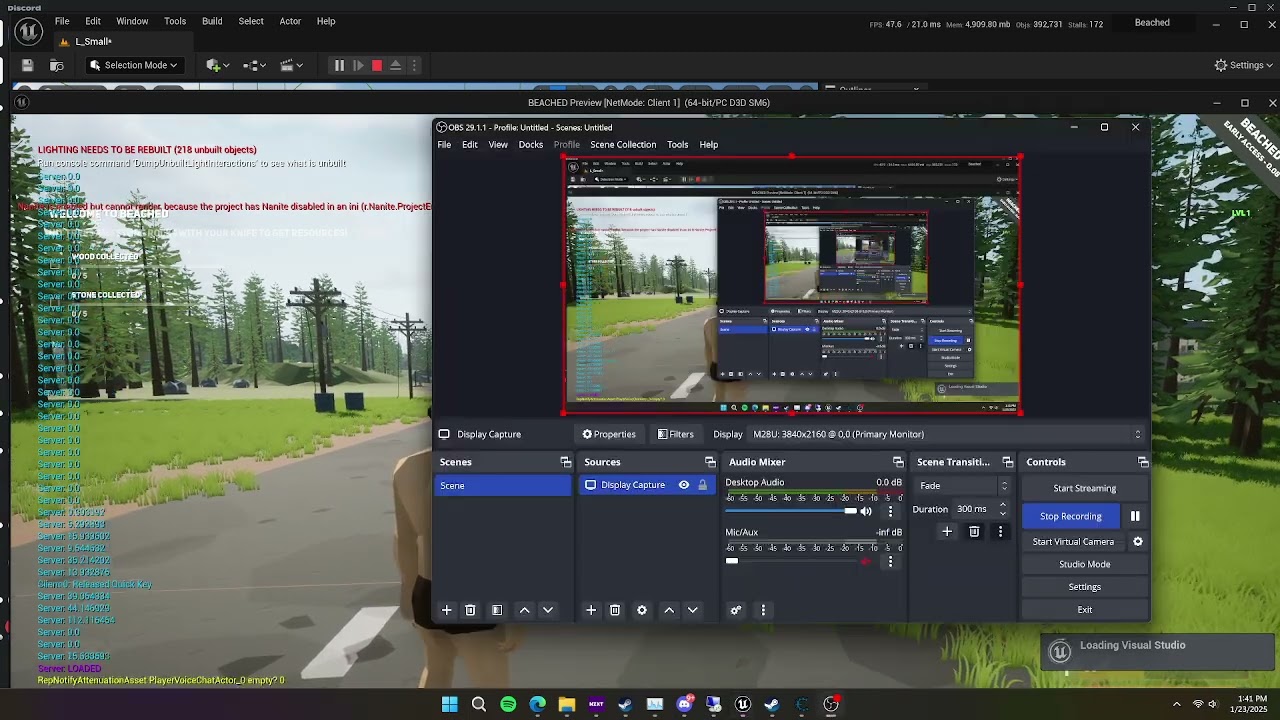
Ignore how the character disappears thats just my check
nocturne quail
nocturne quail
You called the reset vehicle function when unpossess?
void ATP_VehicleAdvPawn::ResetVehicle(const FInputActionValue& Value)
{
    // reset to a location slightly above our current one
    FVector ResetLocation = GetActorLocation() + FVector(0.0f, 0.0f, 50.0f);

    // reset to our yaw. Ignore pitch and roll
    FRotator ResetRotation = GetActorRotation();
    ResetRotation.Pitch = 0.0f;
    ResetRotation.Roll = 0.0f;

    // teleport the actor to the reset spot and reset physics
    SetActorTransform(FTransform(ResetRotation, ResetLocation, FVector::OneVector), false, nullptr, ETeleportType::TeleportPhysics);

    GetMesh()->SetPhysicsAngularVelocityInDegrees(FVector::ZeroVector);
    GetMesh()->SetPhysicsLinearVelocity(FVector::ZeroVector);

    UE_LOG(LogTemplateVehicle, Error, TEXT("Reset Vehicle"));
}
this is what they used when we exit vehicle by default which stops the vehicle instantly
mellow stag
split siren
It has client side prediction but speed hack shouldnt effect the server location...
The speedhack has full control, I might have disabled some sort of check
split siren
nocturne quail
```c++
void ATP_VehicleAdvPawn::ResetVehicle(const FInputActionValue& Value)
{
...
Why do you want to reset the vehicle upon exiting?
split siren
mellow stag
The speedhack has full control, I might have disabled some sort of check
Are you running client-server? Or is it a standalone
mellow stag
On my packaged game in the dedicated server on steam, you can do the exact same thing.
I am running Client Server in PIE
nocturne quail
split siren
Why do you want to reset the vehicle upon exiting?
many reasons because this is important.
void AVehicle::ResetVehicleState()
{
    // Reset the vehicle to a new position and state
    if (AAIControllerBase* TempAIController = GetWorld()->SpawnActor<AAIControllerBase>())
    {
        // Reset location slightly above current position
        FVector ResetLocation = GetActorLocation() + FVector(0.0f, 0.0f, 50.0f);

        // Reset to yaw, ignoring pitch and roll
        FRotator ResetRotation = GetActorRotation();
        ResetRotation.Pitch = 0.0f;
        ResetRotation.Roll = 0.0f;

        // Teleport the actor to the reset spot and reset physics
        SetActorTransform(FTransform(ResetRotation, ResetLocation, FVector::OneVector), false, nullptr, ETeleportType::TeleportPhysics);

        // Directly stop the vehicle if it was not moving
        GetMesh()->SetPhysicsAngularVelocityInDegrees(FVector::ZeroVector);
        GetMesh()->SetPhysicsLinearVelocity(FVector::ZeroVector);

        // If there is no valid driver, possess an AI controller and reset throttle input
        if (!IsValid(Driver))
        {
            TempAIController->Possess(this);
            GetVehicleMovementComponent()->SetThrottleInput(0.0f);
            TempAIController->UnPossess();
        }

        // Cleanup AI controller and reset interaction
        TempAIController->Destroy();
        VehicleInteractionComponent->SetActive(true);
    }
}
if not reset, it will never stop untill it hits something
mellow stag
split siren
Even movement is server side
Velocity is staying the same with hacks on/off so cheatengine is just altering the tick which allows the player to move faster
split siren
mellow stag
Velocity is staying the same with hacks on/off so cheatengine is just altering t...
https://github.com/EpicGames/UnrealEngine/blob/585df42eb3a391efd295abd231333df20cddbcf3/Engine/Source/Runtime/Engine/Classes/GameFramework/GameNetworkManager.h#L198-L200
This value is responsible for the discrepancy resolution
mellow stag
split siren
https://github.com/EpicGames/UnrealEngine/blob/585df42eb3a391efd295abd231333df20...
Found my issue I had both of these disabled
I mean enabled

Now is there a value I can change for how frequent this check or how much the discrepency is?
split siren
mellow stag
Now is there a value I can change for how frequent this check or how much the di...
MovementTimeDiscrepancyDriftAllowance
mellow stag
Are these thru C+ or BP?
split siren
/**
     * Accepted drift in clocks between client and server as a percent per second allowed.
     *
     * 0.0 is "no forgiveness" and all logic would run on raw values, no tampering on the server side.
     * 0.02 would be a 2% per second difference "forgiven" - if the time discrepancy in a given second was less than 2%,
     * the error handling/detection code effectively ignores it.
     *
     * Increasing this value above 0% lessens the chance of false positives on time discrepancy (burst packet loss, performance
     * hitches), but also means anyone tampering with their client time below that percent will not be detected and no resolution
     * action will be taken, and anyone above that threshold will still gain the advantage of this % of time boost (if running at
     * 10% speed-up and this value is 0.05 or 5% allowance, they would only be resolved down to a 5% speed boost).
     *
     * Time discrepancy detection code DOES keep track of LifetimeRawTimeDiscrepancy, which is unaffected by this drift allowance,
     * so cheating below DriftAllowance percent could be tracked and acted on outside of an individual game. For example, if DriftAllowance
     * was 0.05 (meaning we're not going to actively prevent any cheating below 5% boosts to ensure less false positives for normal players),
     * we could still post-process analytics of the game showing that Player X regularly runs at 4% speed boost and take action.
     */
    UPROPERTY(GlobalConfig)
    float MovementTimeDiscrepancyDriftAllowance;
They are globalconfig
mellow stag
Perfect thank you ❤️
mellow stag
split siren
They are `globalconfig`
Sorry to bug again, but can't seem to find global config
mellow stag
Ty!
 steep orbit
Hey everyone, I assume that the "Play as Client" option launches a dedicated server in the background if the correct settings are configured, but I was wondering if there's a second dedicated server launched behind the scenes when we switch levels. I don't think there is, but I just wanted to ask. When my player travels to another map, it seems like the PreLoginAsync() event doesn't get triggered at all, unlike PostLogin(), which is triggered during map transitions. PreLoginAsync() only seems to fire the first time I play the game. This might be due to the limitations of the editor and would likely be more relevant in tests on actual built servers, but it would be a nightmare to dev like this since the players should (normally) be authenticated with an id and token to access the maps lol
I just can't get why the PostLogin() event will be fired with map travels but not the PreLoginAsync() 


 dark edge
 twin juniper
What's this got to do with #multiplayer ?
twin juniper
I make those character in unreal engine 5
nocturne quail
twin juniper
I make those character in unreal engine 5
u are on the wrong place , check #work-in-progress to post your work
twin juniper
nocturne quail
u are on the wrong place , check <#225448516376461313> to post your work
Okay
twin juniper
twin juniper
IF YOU'RE INTERESTED KINDLY INBOX ME AM AVAILABLE
dark parcel
nocturne quail
u are on the wrong place , check <#225448516376461313> to post your work
did it added you? 
nocturne quail
dark parcel
did it added you? <:lurkin:1316599475447402550>
not yet 😄
mellow stag
split siren
https://github.com/EpicGames/UnrealEngine/blob/ue5-main/Engine/Config/BaseGame.i...
Do you by chance know the best settings, i've been fine tuning them for the past couple hours can't seem to get them right
nocturne quail
@split siren
finally it works: 😄
void AVehicle::SmoothDecellerate()
{
    FVector CurrentLinearVelocity = GetMesh()->GetPhysicsLinearVelocity();
    const float StopThreshold = 10.0f;
    const float MaxDeceleration = 1000.0f;
    const float StoppingCoefficient = 0.1f;

    FVector NewLinearVelocity = FVector::ZeroVector;

    if (CurrentLinearVelocity.Size() > StopThreshold)
    {
        FVector Direction = CurrentLinearVelocity.GetSafeNormal();
        float DecelerationAmount = MaxDeceleration * GetWorld()->GetDeltaSeconds();
        NewLinearVelocity = CurrentLinearVelocity - (Direction * DecelerationAmount);

        if (NewLinearVelocity.Size() < StopThreshold)
        {
            NewLinearVelocity = FVector::ZeroVector;
        }
    }

    GetMesh()->SetPhysicsLinearVelocity(NewLinearVelocity);

    if (NewLinearVelocity.SizeSquared() > FMath::Square(StopThreshold))
    {
        GetWorld()->GetTimerManager().SetTimer(SmoothDecellerateTimer, this, &AVehicle::SmoothDecellerate, 0.1f, false);
    }
    else
    {
        ResetVehicleState();
    }
}
Hey, not sure if people still awake (it is 2 am over here) but I was being confused - i have one PC creating a session with a print, that should print the PlayerController's display name and "has joined" but for some reason when my other computer joins the session (and it seems be successful) there is no message that says a playercontroller has joined and I do not see 2 pawns in the map hirarchy either but just one.
But it said it joined which means it has found sessions and joined session at index 0
Why is OnPostLogin not being triggered then=?
this seems to fire up when a session is created but not when others join
 quiet yarrow
how does world partitioning work in multiplayer?
does the server/host have all cells loaded?
dark edge
quiet yarrow
does the server/host have all cells loaded?
It probably at least has all cells that all clients have loaded or something to that effect
grand kestrel
mellow stag
Hello! I was wondering if anyone is familiar with CheatEngine and the speed chea...
I can just do a role check on CMC TickComponent and make the client do DeltaTime *= 2.f and bam speed hacked lol. CMC does have speed hack detection but it's disabled by default. You can enable it in the config ini
bright summit
thin stratus
<@474039411584008213> None of this matters. I already told you where the warning...
Sorry to bother you, just wanna be sure, you was talking about sending pointer to audiocomponent/Niagara right? Or staticmesh?
bright summit
ok I see that it complains only about audio and niagara which is spawned attatched to the static'mesh
bright summit
made another component for attatching these things and it is fixed now. I thought that StaticMeshActor has another rootcomponent than the staticmeshcomp itself
 sly dirge
Hello, Im trying to replicate the grabbing functionality from VRGK which acts on a physics constraint attached to the hand and the object a player tries to grab. My current setup is as follows: Player has a hand actor with physics constraints, when player grabs an object it attaches that object to the physics constraint on the hand actor.
The method I went with (and correct me if I need to change it) is I spawn the hand actors only locally on owning client, when client grabs an object, I am calling a Server RPC that sets the owner of the object to the player pawn and then calls an interface function on that object. In that interface function I am setting the replicate movement to false if grabbed and true if released, a replicated variable Grabbed to start the event tick, and I set the owning pawn and replicated transform variable.In event tick I check if locally controlled I am setting the replicated variables of the velocities and transform and sending them to the server with a server RPC, If not owning client I simply just set the objects velocities and transforms to the replicated values.
This method works great untill I introcude some lag, on pktLag=250 its smooth until the player throws the object and the replicate movement is enabled again. Im assuming this is happening because the server state is behind the client state when it switches back to replicate movement enabled.(video showcasees it)
I am trying to avoid having to have physics constraints on the server and have the server handle all physics since its a physics heavy game, any suggestions on how to fix this ? I am open to changing how I handle the Hand actors if its necessary to replicate.
Sorry for the long detailed message, first time working on multiplayer so dont want to miss any important info.


 upbeat basin
silent grotto
Hey, not sure if people still awake (it is 2 am over here) but I was being confu...
upbeat basin
silent grotto
Hey, not sure if people still awake (it is 2 am over here) but I was being confu...
Joining to a session doesn't automatically connects you to the server, although I feel like I read someone said it should somewhere around here, it might be an option I am missing as well.
So what I do, and what I can recommmend for the time being, is after joining session you can use IOnlineSessionPtr::GetResolvedConnectString() to get the connection string and travel to the server giving connection string as the URL argument
For additional information, OnPostLogin is called whenever a player tries to connect to a server and gets approved, nothing to do with sessions. After you create the session I believe you travel to the desired level, that's why you get the PostLogin. You get associated with a new world with a new controller, so the server is being notified about that, not because you create a session
split siren
Before starting yet another project, I wanted to ask for a sanity check.
From my profiling the main reason limiting allowing more players to join the game is the time to iterate over and tick all UDataStreamChannels.
Since I am using iris, all game data should be already collected at that point.
How difficult would it be to make the DataStreamChannels to tick in parallel?

 nova wasp
split siren
Before starting yet another project, I wanted to ask for a sanity check.
From m...
nova wasp
split siren
Before starting yet another project, I wanted to ask for a sanity check.
From m...
You would need to make replication reading thread safe which seems difficult given it triggers onreps and creates objects (only reading but this screenshot is writing...)
But perhaps some earlier pieces are less prone to mutation
Ah you left out this is writing
This I'm not so sure about
split siren
nova wasp
You would need to make replication reading thread safe which seems difficult giv...
I was thinking about the reading thread as well.. It mainly runs the CMC, which I can make run in parallel under several conditions. But the out seems to be several times more expensive
 nova wasp
split siren
I was thinking about the reading thread as well.. It mainly runs the CMC, which ...
nova wasp
split siren
I was thinking about the reading thread as well.. It mainly runs the CMC, which ...
It reads literally all rpcs and onreps from clients (well, onreps only on clients)
You could maybe filter out incoming data by type but it will require engine changes
And is not trivial to split without sending extra metadata in the packet
split siren
nova wasp
It reads literally all rpcs and onreps from clients (well, onreps only on client...
Doesn't the scope also include the CMC replay?
 nova wasp
I do think this is kind of possible but it will be mutex spam in the reader at the very least
tardy fossil
pretty sure CMC sends all its data over RPCs
split siren
nova wasp
What?
ServerMovePacked runs the CMC inputs from the client on the server no?
nova wasp
That's saved moves
I have never heard them referred to as a replay... That is a very general term to use in this context lol
split siren
nova wasp
I have never heard them referred to as a replay... That is a very general term t...
Yeah, my bad.
nova wasp
Rollback would be a more direct term to me at least... I could be wrong
Replay does make sense as that's effectively what it does
 bright summit
If I noticed correctly when I am replicating static mesh every other aprameters like physmaterials are not being syncronized (what is is reasonable), but I need this info. Tried to get on the server PhysicalMaterial but it seems to be too early at BeginPlay because it returns me default one, but OnHit it seems applied correclty (phys mat is assigned on material which static mesh is using)
It seems beginplay is the latest initialization point of actor where I can bring this information. Any ideas how to get it? Or am I missing something again? 😄
nova wasp
split siren
I just saw the term in the cmc quite a lot
Said alone i was thinking you meant actual replays which Iris does not support
So I was confused
I'm more familiar with the sim proxy side of the CMC
You may as well just breakpoint the read
Curious how much of the CMC can be threaded
Threading sweeps is trivial but the scene component moves is less so
This is a great example of why making an MMO in unreal is a bit difficult lol
Work done per connection is fine at low counts
chrome bay
split siren
Before starting yet another project, I wanted to ask for a sanity check.
From m...
Usually pointless because most dedicated servers are single threaded
However, Epic are supposedly thinking long-term about supporting some amount of parrellism for this in case you do want a MT server.
split siren
chrome bay
Usually pointless because most dedicated servers are single threaded
That is the motiovation, I am happy to have fewer server instances hosting more players.
 pale hazel
Can I replicate a Struct that contains a TObjectPtr<UObject>?
So my structure is:
AActor:
  -TObjectPtr<UObject>:
    -TArray<FArrayEntry>

FArrayEntry looks like this:
FArrayEntry:
  - TObjectPtr<UObject>   <- THIS DOESNT REPLICATE
I know how to make UObjects replicatable, and the array of structs is correctly replicated, except for the UObjectPtr's, those are not replicated.
Trying to mark the TObjectPtr in FArrayEntry doesnt work, UnrealHeaderTool tells me "Struct Members cannot be replicated"
So does this just not work? Do I have to make a UObject class out of my FArrayEntry struct?
chrome bay
struct members already are replicated by default
the only meta that works on them is NotReplicated
You're only replicating a reference to that object remember, not the actual object itself.
 stable aspen
Hey all, what can cause this? Im running my game via "run as listen server" with two players, the server works fine, but the client doesnt take input and doesnt seem to replicate where the server is at
(Being in T-pose is expected as i broke animations)

Server to the right and client to the left
Seems to be with my game state as changing it in the gamemode fixes this issue...
What did i forget to do in it? Its quite litteraly nothing
UCLASS()
class SHINOBIPROJECT_API AGameGameState : public AGameStateBase
{
    GENERATED_BODY()
};
Right, that makes sense. But how would I go about replicating an uobject then?
Do I have to create the object on the client manually somehow?
chrome bay
pale hazel
Right, this is for subobjects of actors, but what about subobjects of uobjects?
or do I have to register the referenced UObject in my uobject, as a subobject of the overarching actor?
I think I have a bit of reading and experimenting to do, thanks
pale hazel
pale hazel
Can I replicate a Struct that contains a TObjectPtr<UObject>?
So my structure is...
But still if anyone knows how to properly replicate this structure, please let me know
chrome bay
Any replicated UObject has to be outered by an actor at some point
If you want to replicate an object you spawned/created at runtime, it has to be replicated via an actor
pale hazel
That would be via calling AddReplicatedSubObject right?
I do this with my UObject (the one that contains the Array of Structs, which then contain another UObject Ref)
So if I have a setup like this:
class AMyActor
{
    TObjectPtr<UHighlevelObject> HighlevelObj;
}

class UHighlevelObject
{
    TArray<FArrayEntry> MyArray;
}

struct FArrayEntry
{
    TObjectPtr<ULowlevelObject> LowlevelObj;
}

class ULowlevelObject
{
    int MyFunInt;
}
I need to call AddReplicatedSubObject() when I instantiate my HighlevelObj, to make it replicated
And to replicate the LowlevelObj values, which are kept in the MyArray inside the HighlevelObj, I also need to call AddReplicatedSubObject() for each of the LowlevelObject instances
Am I understanding this right?
chrome bay
yeah pretty much
pale hazel
Alright, I'll give this a shot and see if i can make it work, thanks a lot for the help, appreciate it
But that's for monday, the weekend calls, thanks again
 grizzled stirrup
In C++ will an OnRep function be called automatically on client (but not the server) when a property replicates down?
 winter pollen
How do you guys usally test replication in editor? Both on listen server and client options? I usally test with like 2 clients idk if thats enough to be sure
 little pumice
winter pollen
How do you guys usally test replication in editor? Both on listen server and cli...
little pumice
winter pollen
How do you guys usally test replication in editor? Both on listen server and cli...
to test what exactly?
little pumice
listen server(first player) can be fine if your goal is to inspect only the second player (client).
though codebase may contain strict checks like IsDedicatedServer
keep that in mind
quiet yarrow
is there no proper way to set owner real time on physic objects? Seems if this is done sometimes weird location mismatch happens for a brief moment
 undone magnet
Hey all! I'm following an online tutorial for an inventory system, and I've added the ability for player characters to hold items in their hand using ChildActorComponents. However, I'm using both a first person mesh (for the owning client) and third person mesh (for all other clients). Therefore, I've had to change things to create two hand ChildActorComponents - one for each mesh - and set them up so there are two of the held item when an item is equipped. However, I now run into the problem of two items being visible to every client when an item is being held. I would like to make it so the first person mesh's ChildActorComponent is only visible to the client that owns the player character and the third person mesh's ChildActorComponent is visible only to all other clients. What would be the best way to go about this?


 exotic wasp
undone magnet
Hey all! I'm following an online tutorial for an inventory system, and I've adde...
exotic wasp
undone magnet
Hey all! I'm following an online tutorial for an inventory system, and I've adde...
is there an option to set visible only for owner?
should be a property, might be specific to the mesh on the item
 tender olive
wait, I got lost on client to server calls.
So if I have an actor (blue print actor) that was spawn from the client, so it doesn't exists on the server, so far that is fine.
But on this client actor, I want to call the server to run a server action.
but as far as I understand, since this actor only exists on the client, having a custom event set to run on server (reliable), doesn't do anything, it runs, but from the client.
From reading I was supposed to call the server from the player controller, but in this random actor, one can't get the a valid player reference.
what am I missing?
I don't want to call an action on the actor itself, I want to reach to the game mode, and ask it to spawn some more actors

 nova wasp
tender olive
wait, I got lost on client to server calls.
So if I have an actor (blue print ac...
nova wasp
tender olive
wait, I got lost on client to server calls.
So if I have an actor (blue print ac...
if the client spawns it why is it difficult to just send an rpc from the client that spawns it? no context for the actual thing you want to do here doens't help
I'm not sure if bp supports replicated sub objects but that might help reduce the amount of rpc boilerplate if that is the issue
tender olive
? no context? what else would I say, i have an actor that lives on the client, and I want to call a function on the game mode in the server, but I can't find a way to reach it, that is all
nova wasp
what creates the actor on the client?
tender olive
pcg spawn the actor
nova wasp
so the client is sending an rpc indicating pcg has finished doing something? I guess I can see how that would be useful
I would say the simple thing is to have the player controller listen for some event this creates locally or just get the local player controller on the client if this is not a splitscreen game
that way the player controller pointer is present to send an rpc from to the server
tender olive
" local player controller on the client"
that is exactly what I have in the blueprint screenshot, it doesn't work
and that is where I'm stuck
nova wasp
tender olive
that is exactly what I have in the blueprint screenshot, it doesn't work
the RPC must be created in the event graph of the player controller as it has the required setup to communicate with the server via rpc
that's why you want the player controller or their pawn
tender olive
all google answer point to get a player controller reference and call the server from there,
great, get player controller doesn't work from the actor
nova wasp
it's not just about having the pointer. the EVENT ITSELF as an RPC must be in the player controller or a sub object of it
nova wasp
tender olive
great, get player controller doesn't work from the actor
If you mean this part... which player is this for? you don't connect anything to this pin
 tender olive
wasn't that supposed to be the local player reference id, so you don't have to "guess" the indext for the "get player controller"?
nova wasp
tender olive
wasn't that supposed to be the local player reference id, so you don't have to "...
so you are passing in a player controller to get their platform id... to get a player controller by local index?
int32 UGameplayStatics::GetPlayerControllerID(APlayerController* PlayerController)
{
    FPlatformUserId UserID = PlayerController ? PlayerController->GetPlatformUserId() : PLATFORMUSERID_NONE;
    return FGenericPlatformMisc::GetUserIndexForPlatformUser(UserID);
}
this looks like it will always return -1
BP really kind of leaves you hanging with this kind of thing lol
tender olive
yah, but how do I figure out the index? it requires the player controller, so that is a loop
nova wasp
My dumb idea to get this in BP easily would be to get the HUD and call GetOwningPlayerController
that is something that should always be the local player controller (which is the ONLY player controller on clients)
listen servers and dedicates an authority (or split screen standalone) could have multiple local player controllers
tender olive
get hud requires the player controller 😢
can I just use "Get player Controller" at index 0 on all clients? if I get this correctly, each index is the player logged in sequence, so one need to know which index it has
nova wasp
UGameInstance::GetFirstLocalPlayerController not being exposed to BP is so evil lol
Multiplayer in BP seems like tilting at windmills
a local player subsystem perhaps could get the local player?
nova wasp
tender olive
can I just use "Get player Controller" at index 0 on all clients? if I get this ...
for non listen servers or dedicates this is fine
but of course you need to know what that is (when to not do this and instead iterate over the player controllers to find the first local one)
One insane spaghetti way you could do this would be to to make an single manager actor
that the BP player tells about itself when it logs in / begins play etc
and then have other actors just GetActorOfClass -> mycontroller
GetActorOfClass should use an acceleration structure by class so it won't iterate over every actor in existance but I'm not sure about bp classes
tender olive
wait, so if I have one dummy actor placed on the level, the server will own it right?
can I from the client actor call a function on this dummy actor then?
nova wasp
tender olive
wait, so if I have one dummy actor placed on the level, the server will own it r...
doesn't matter who owns it
that's besides the point
the server owning it would mean the client can't rpc it to server anyways
the client must own the object to invoke a server rpc
and the server must have sent it to them to be aware of it
the idea here is to make it easy for any actor in the world to figure out who the local client player controller is
to call a server rpc (client -> server)
I'm too used to the C++ side of multiplayer so this might be off, there might be a less complicated way


 nova wasp
tender olive
so, this works
but what am I losing having that fixed 0 index?
nova wasp
tender olive
so, this works
but what am I losing having that fixed 0 index?
Like I said... if the machine has multiple local players it might get the wrong one (listen servers, dedicated)
the server will have every player controller
clients (net mode client) will have only one local player controller assuming no splitscreen
read the article I linked I guess

WizardCell
Good practices to adopt, and bad habits to avoid when doing online multiplayer in Unreal Engine
tender olive
- These functions will do you more harm than good, unless you know what you’re doing (which, in most cases, sadly ends up not being the case)
ouch 🫠
nova wasp
I will say honestly it's kind of unreal's fault for blueprint MP being so barebones
honestly so many things only available in the C++ api that have no real good reason for not being exposed
tender olive
I guess I'll make c++ class to expose that client id you mention "UGameInstance::GetFirstLocalPlayerController"
one would assume the client knows its own index id, at least I was thinking that would be the case
sinful tree
In online multiplayer games you shouldn't be using the ID at all. It's meant for use in local multiplayer games (like couch co-ops and the like).
This also doesn't seem like it's the right way to go about handling what you want to be doing here... If you're wanting to have a client tell the server the seed number, then this actor shouldn't be doing so in the first place. You'd probably want some kind of replicated component on the player controller that can facilitate the communication between the server and the locally spawned actor.
dark parcel
You are already in the character blueprint
nova wasp
which on the listen server could change as the array changes
and on the client is always going to be the first element
dark parcel
Just use get controller
nova wasp
no they are not, they are in some actor spawned by PCG
nova wasp
which ideally has some handle to being spawned
I don't know how PCG in-world things work in terms of bp or runtime
 hybrid meteor
i want help with my game ,i am having a problem. Its only a two player game which i run as a listen server, I want that the character who wins the game will spawn a widget component above his head (just like a health bar) but i want to spawn widget having his name on top of his head . But the problem i am having that when the client wins and i spawn the widget over his head the server is not able to see the widget but the client can, but when the server wins and then i spawn the widget over his name both the client and server can see the widget . I just cant figure out why on spawning the widget over the client the server is not able to see . Also what i am doing is when i game ends i check in the game mode which character wins i call its player controller and from that player controller i call the events which spawns the widget over the character that is in the characters blueprint
 fiery bolt
Hi everyone.
Is there anyway to know when actors dormancy state changes or becomes relevant ?
 jade igloo
How come my output for EventOnPostLogin in the GameMode is PC_0 and PC_1, but in the Event Beginplay in the actual player controller I only get Client 0 (and not Client 1). I'm using Play as Client with 2 players and I got my PC Replicates and Net Load on Client checked. The gamemode also has the correct Player Controller Class. If I need to provide any more details let me know.
dark parcel
jade igloo
How come my output for EventOnPostLogin in the GameMode is PC_0 and PC_1, but in...
Who's calling on the begin play? Client only know their own controller
Where server have copy of everyone controller
Look up exi compendium pinned in this channel
hybrid meteor
hybrid meteor
i want help with my game ,i am having a problem. Its only a two player game whi...
can someone please help me with this
dark parcel
hybrid meteor
can someone please help me with this
Show me your widget component on the character
 dark parcel
On the detail panel type replicate and look for component replicates
hybrid meteor
i did that
dark parcel
Make sure it's ticked. Do that and show
hybrid meteor
its alreeady ticked
hybrid meteor
 dark parcel
Is the vissibility set to false here?
hybrid meteor
also when i am drawing the widget on screen then the problem arises when i am drawing it on world then the problem is gone
hybrid meteor
dark parcel
Is the vissibility set to false here?
no
dark parcel
hybrid meteor
also when i am drawing the widget on screen then the problem arises when i am dr...
Well that's not network related..
dark parcel
I think it's the offset perhaps
Personally I have no issue with either one
If you can't see the widget with screen space work your way from there.
hybrid meteor
is there anyway that i draw it in world and still it always parrellel to screen
dark parcel
You have to rotate the plane to face your camera
I personally just use screen space and resize based on distance
Because I can't get text to render nicely with world space
hybrid meteor
how can i rotate it so that is always shows on screen'
dark parcel
hybrid meteor
how can i rotate it so that is always shows on screen'
use the Find look at rotation
but why not just use screen space
My name tag is only a border and a text
 hybrid meteor
dark parcel
but why not just use screen space
hybrid meteor
dark parcel
but why not just use screen space
because of the above problem
dark parcel
try it at the simplest form
hybrid meteor
mine also is just a text but the server is not seeing the clients widget
idk why thats happening
dark parcel
construct a widget per character and have that display first on every machine
if you can't do that then I can't help you, there's seems to be more problems that you have yet solve
hybrid meteor
ok i somehow made it worked
bright summit
After reading your advice on this discord, watching many tutorials, reading many blogs I noticed I'm still doing things wrong. I want to have heavy customizable level interactions in my game. I was doing it in I think bad way(Screen 1) because I was using NetMulticast on almost everything on server-owned actor which was placed in-scene.
Yesterday I watched NotGDC talk where guy talked about that in some games he shipped** he didn't use any of netmulticast/client rpc**. I am still wondering how to properly do the **"interaction chain" **showed on screens.
I am attaching them to illustrate you want I wanna achieve, on first screen I showed my current way of doing things but I want to do it properly, so after watching/reading these things I prepared new way how can I approach this. But I want you to advise me if it will be proper way or should I change something (in the networking, not the way of opening doors if it should be an animation or playing sounds etc.)

 dark parcel
why are you multicasting playing audio?
you don't need to tell others to play a sound, the sound plays when the sound plays.
For a door it play sound when the door is being opened or closed
and I wouldn't use a single multicast for a stateful entities, a door is stateful
CLient -> Hey I want to Open this door (Server RPC)
Server -> Checks if interacting client have a key -> Yes? bOpenDoor = true

OnRep bOpenDoor -> Play timeline / anim -> Play sound
bright summit
dark parcel
why are you multicasting playing audio?
I wrote that I realized this is the wrong way of doing things
dark parcel
95% of the time you don't want to use multicast. 100% for stateful behavior
mc is good for fire and forget actions
bright summit
like playing sounds 
bright summit
it shouldn't
dark parcel
I seen people trying to replicate foot step sounds
like why
just play it locally when the foot hit the floor
0 networking
you can network the nike if you like
so sound can be played depending on the shoes type
bright summit
so idea to route these things like on second screen tagged "new way" is correct?
dark parcel
I haven't work on a door yet but your the designer so it can be elaborate as you want.
though I would probably just start simple for my own game and see if it work just fine
bOnRep -> Open door
bOnRep-> Close door
i probably wouldn't track if the door is fully close or not
is there a purpose on doing that?
well I guess for late joiners...
bright summit
yes, because I can extend this simple "doors" for moving platforms/elevators
dark parcel
if it really matter
If you need to sync multiple fields (e.g bDoorOpen and bDoorFullyOpen), I would probably pack them to a struct
OnRep->bDoorFullyOpen -> Don't play the time line, open the door instantly
so late joiners don't have to see the door slowly being opened
bright summit
yes
but what about door stop moving sound when it is complete open, without this variable I do not have a really way to play this sound without onrep
dark parcel
for a moving platform, you probably need different approach
you probably need to track the platform location and replicate it
bright summit
this is how I have doors made
dark parcel
that won't matter for a door but your platform will require different solution
bright summit
but I don't asked about it, I asked about proper routing executions
dark parcel
CLient -> Hey I want to Open this door (Server RPC)
Server -> Checks if interacting client have a key -> Yes? bOpenDoor = true
OnRep bOpenDoor -> Play timeline / anim -> Play sound
is probably how I would do it
bright summit
how about later events
dark parcel
like?
bright summit
like I showed them on screen
dark parcel
I can't read / understand other people code
too brain dead
You can try writing down psudo code first before diagram
just talk about what happends game play wise
E.g Interacting with a door
As client -> Ask server I want to open this door
Server checks if client have required item -> If yes, Door -> bOpen = true (replicate)
Client bOpen OnRep-> Open door
bright summit
I literally showed the example with button->door->light etc
you even didn't look at the images I sent
but thank you anyway
dark parcel
I did but can't form a comment, again because I don't understand other people code.
like what is Change location while opening
it's a bit abstract to me
not saying it's wrong, Im just saying I don't understand
nocturne quail
Why is OnRep_SeatOne(); not called on clients correctly?
on Server: character attach to vehicle correctly to socket
on Client: character attach to vehicle correctly not on socket
UPROPERTY(Replicated) ACharacter* Driver;
DOREPLIFETIME(ACharacter, Driver);

UPROPERTY(ReplicatedUsing = OnRep_SeatOne) bool IsSeatOneAvailable;
DOREPLIFETIME_CONDITION_NOTIFY(ACharacter, IsSeatOneAvailable, COND_None, REPNOTIFY_Always);
UFUNCTION() void OnRep_SeatOne();
void AVehicle::BeginPlay()
{
    Super::BeginPlay();

    VehicleInteractionComponent->OnInteract.AddDynamic(this, &AVehicle::OnInteract);
    IsSeatOneAvailable = true;
}

void AVehicle::OnInteract(ACharacter* Character)
{
    if (HasAuthority())
    {
        if (IsSeatOneAvailable)
        {
            if (APlayerController* PC = Cast<APlayerController>(Character->GetController()))
            {
                PC->Possess(this);
                SetOwner(PC);
                Driver = Character;

                IsSeatOneAvailable = false;
                OnRep_SeatOne();
            }
        }
    }
}

void AVehicle::OnRep_SeatOne()
{
    if (!IsSeatOneAvailable)
    {
        HandleAttachment(Driver, FName("SocketSeatOne"));
    }
}

void AVehicle::HandleAttachment(class ACharacter* Target, const FName Socket)
{
    if (Target && GetMesh())
    {
        Target->GetMesh()->SetCollisionProfileName(TEXT("InVehicleCharacterPreset"));
        Target->AttachToComponent(GetMesh(), { EAttachmentRule::SnapToTarget, true }, Socket);
    }
}
well, would help if you tell how to get the player controller from a random actor, this is not the player character...
interesting how no one reads the original post where I clearly state it
dark parcel
Whos controller are you trying to reach though?
calling it from a random actor or not is kinda irrelevant
tender olive
it is relevant, there is no way to get the current local player controller from a random actor spawn on the client, and that is the issue.
I'm using get player controller (index 0) which is the point of the argument, since this isn't the best way, can cause other issues
tender olive
exactly, which explicitly say it is not possible, on blueprints only*
dark parcel
Say what?
You can get the local controller from anywhere, use the function from game Instance like the artcle showed
Multiplayer blueprint is limited
a little bit of C++ goes long way
tender olive
ah, try first, once you get the player controller from an actor without using the index, then you tell me, if you were so kind
dark parcel
tender olive
ah, try first, once you get the player controller from an actor without using th...
well I was commenting before you said blueprint only restriction
tender olive
yah, problem with c++, is not c++, when I add c++ to any project, a brand new project, it restart, fine, and never open again
dark parcel
AAGController* UAGLibrary::GetLocalAGController(const UObject* UWorld)
{
    auto World = GEngine->GetWorldFromContextObject(UWorld, EGetWorldErrorMode::LogAndReturnNull);
    if (auto GameInstance = World->GetGameInstance())
    {
        if (auto AGController = Cast<AAGController>(GameInstance->GetFirstLocalPlayerController()))
        {
            return AGController;
        }
    }
    return nullptr;
}
This is how I get my local controller
dark parcel
tender olive
yah, problem with c++, is not c++, when I add c++ to any project, a brand new pr...
You have to build the project 🤷♂️
bp multiplayer is very limited if you are not biting the bullet you will be building a house with your bare hand
tender olive
if it would built... it doesn't, spend like 3 days re-doing the steps for c++
dark parcel
nothing that can't be solved
bright summit
I am rewriting my project 4th time xD
this is normal you are doing things like that
when you do something for the second time it will almost always turn out better
tender olive
well a clean new project shouldn't just break without doing anything, that is not normal you won't find a single thread about the game just not recompiling anymore after adding the c++ from the editor
dark parcel
tender olive
well a clean new project shouldn't just break without doing anything, that is no...
Converting the project to C++ (Adding a C++ class)
Means you have to open your project from IDE
dark parcel
and build for development editor if you want to open the uproject instead running it from the IDE
tender olive
and it shouldn't need to go from the vs, unreal compiles by itself, but it can't, same reason the vs can't either, why? that is a good question
tender olive
jezz, of course people will say, "you are not doing the steps" ,after I redo the entire steps on unreal official page 20x
dark parcel
Yeah you are missing something
ask in #cpp they are happy to help
or are you implying it's engine issue?
dark parcel
tender olive
it doesn't compile
Read build out put and fix. Ask questions
tender olive
engine has a lot of issue, but it is not engine issue.
But then, explain me this.
it was working, I have another project with c++ enabled, so I wanted to test something, create a new third person project, as normal, add c++ from the editor, it ask to restart, then never open again. How would I be missing a step in the first place if it was already working before.
dark parcel
it never opened because you didn't build for development editor
I will re-iterate this again
tender olive
nothing else that has c++ opens
dark parcel
After you add a new C++ class
you will need to open your project from your IDE. Set config to development build then Build the solution.
tender olive
skip that, its implied I try, that is the part that just doesn't work
dark parcel
you can't open your project after adding C++ class because you have not build the solution.
tender olive
even the other project doesn't open anymore
ah, nvm, you just don't get the part that the thing don't compile
dark parcel
lol
tender olive
and keep repeating, you need to compile, like if I just didn't try the first thing
dark parcel
maybe you can ask questions and post the issue
instead giving up and saying C++ just doesn't work in my computer
tender olive
I did all that for quite some time, don't assume it didn't compile and I left, as I said, spend some days only on this
just happens to be one of the limbos unreal have, that will probably require to clean the entire system to make it work, which I just won't do it for now
dark parcel
You are assuming you done things correctly
and can't get the same result where others could
So I don't know what else to say at this point
you can try again and then this time ask questions when you hit the wall
tender olive
You assume I just gave up in 5 seconds, but I did ask alot and as usual, this is the kind of ansewer, you need to compile
dark parcel
I didn't say that
but you are implying you have given up
so I don't know what else to say
tender olive
nvm, once I have a good free time, I just clean up the entire system, and it should work, even without the holly compile from the ide, since you don't need to.
adding the cpp restart, unreal recompiles for you
dark parcel
tender olive
nvm, once I have a good free time, I just clean up the entire system, and it sho...
no you still have to build
you actually need to
bright summit
once you add the cpp, just open the solution and build the project
dark parcel
Not sure why you are fighting it with your own believe when you don't have it work on your end...
bright summit
then open it
dark parcel
just ask #cpp 🤷♂️
Build the god damn project
or you can't open it which is what happend in your end
open sln , ctrl B
dark parcel
Read the build output
and figure out why
I am repeating it because that's the way to build the project
if it doesn't build then fix the error which is can be read in the build output
tender olive
yah, again, like I didn't try that
bright summit
show us compile log
dark parcel
I can only repeat until I see the build output log
Repeating "but I did everything" isn't gonna correct it either
I mean you are already making a false assumption in the last few minute.

just accept that you have not done what is required, figure out what and solve the issue
and if what you said is true "It didn't build" then no shit you can't open your project again. Read the error from the output log and address it.
tender olive
I'm not, go your self and do it.
Create new prject with BP, click add c++, restart, unreal will ask to recompile, and it recompiles for you without a need for the ide, if you just add a class and didn't do anything.
Try it on your end first.
you telling me this is a false positive, is a false positive
 tender olive
I TRIED, for 50x time
dark parcel
I don't see it
bright summit
SHOW COMPILE LOG THEN
dark parcel
all I see is the result of someone not building their project
Clicking yes is not rebuilding the project from IDE
you are not worth the stress. I give up
gave you the answer but you keep on fighting me instead
dark parcel
tender olive
I'm not, go your self and do it.
Create new prject with BP, click add c++, resta...
Of course I tried it on my end many times 🤦♂️
tender olive
gave me nothing besides, "click compile", I was not even ask for c++ you mention it, I'm here on multiplayer asking how to get the reference from the player controller from a random actor. The answer is you can't. Done there is no continuantion on this
tender olive
in a blueprint, if you insist
dark parcel
self imposed restriction
wcyd
you would have ended up with a built project
instead arguing here
if you just COMPILE AND BUILD FROM THE IDE
tender olive
again, gave me nothing, this answer I already had, and even said, I'll expose this function later to blueprint
so far you only repeat what other already said
dark parcel
nocturne quail
Why is `OnRep_SeatOne();` not called on clients correctly?
on `Server`: charact...
It seems like you are handling attachment both on the server and client?
I don't know attaching business in mp but what if you just let the server do the attachment
 torpid crest
Can anyone point to docs how to implement Steam 'Join game' which would join to already running session?
Right now it's only starting the game
nevermind found it - https://dev.epicgames.com/community/learning/tutorials/0JMY/unreal-engine-how-to-join-friends-via-steam-overlays-using-advanced-sessions?utm_source=chatgpt.com

Epic Games Developer
This is meant to be a speed run of joining a friend through the Steam overlay (shift tab) using the Advanced Sessions Plugin
nocturne quail
dark parcel
I don't know attaching business in mp but what if you just let the server do the...
same issue, but if i use multicast it works fine
i mean attaching just on server changed nothing
but if i delay attachment for .5sec, it woks fine
dark parcel
nocturne quail
i mean attaching just on server changed nothing
attaching on server attached it for the clients right?
i tested just now and it does
But I can't tell if things work "correctly" since I am attaching a character and the gravity kinda fight the attachment
nocturne quail
dark parcel
attaching on server attached it for the clients right?
yes it attached but not on the socket defined
dark parcel
nocturne quail
yes it attached but not on the socket defined
not sure if this is related, but did you tick component replicate to the component you are attaching?
nocturne quail
both are replicated ofcourse
LogTemp: OnRep  Client at: 2025.10.15-19.13.50
LogTemp: OnRep  Server at: 2025.10.15-19.13.50
@nocturne quail Keep in mind Attachment doesn't need to be replicated.
Attachment is already replicated.
If the Server attaches an Actor that is replicated (which your Character will be) to something, the AttachmentInfo is gonna be gathered and replicated, and the Client will then automatically attach.
thin stratus
tender olive
in a blueprint, if you insist
GetPlayerController node is a thing.
The OnRep wouldn't be needed anyway.
nocturne quail
netmulticast works fine
thin stratus
Also not needed though
void AActor::OnRep_AttachmentReplication() is already handling attachment
if (AttachmentReplication.AttachParent)
    {
        if (RootComponent)
        {
            USceneComponent* AttachParentComponent = (AttachmentReplication.AttachComponent ? ToRawPtr(AttachmentReplication.AttachComponent) : AttachmentReplication.AttachParent->GetRootComponent());

            if (AttachParentComponent)
            {
                RootComponent->SetRelativeLocation_Direct(AttachmentReplication.LocationOffset);
                RootComponent->SetRelativeRotation_Direct(AttachmentReplication.RotationOffset);
                RootComponent->SetRelativeScale3D_Direct(AttachmentReplication.RelativeScale3D);

                // If we're already attached to the correct Parent and Socket, then the update must be position only.
                // AttachToComponent would early out in this case.
                // Note, we ignore the special case for simulated bodies in AttachToComponent as AttachmentReplication shouldn't get updated
                // if the body is simulated (see AActor::GatherMovement).
                const bool bAlreadyAttached = (AttachParentComponent == RootComponent->GetAttachParent() && AttachmentReplication.AttachSocket == RootComponent->GetAttachSocketName() && AttachParentComponent->GetAttachChildren().Contains(RootComponent));
                if (bAlreadyAttached)
                {
                    // Note, this doesn't match AttachToComponent, but we're assuming it's safe to skip physics (see comment above).
                    RootComponent->UpdateComponentToWorld(EUpdateTransformFlags::SkipPhysicsUpdate, ETeleportType::None);
                }
                else
                {
                    RootComponent->AttachToComponent(AttachParentComponent, FAttachmentTransformRules::KeepRelativeTransform, AttachmentReplication.AttachSocket);
                }
            }
        }
    }
    else
this my new code
void AVehicle::OnRep_SeatOne()
{
    const FDateTime CurrentTime = FDateTime::Now();

    if (HasAuthority())
    {
        UE_LOG(LogTemp, Log, TEXT("OnRep_SeatOne called on Server at: %s"), *CurrentTime.ToString());
    }
    else
    {
        UE_LOG(LogTemp, Log, TEXT("OnRep_SeatOne called on Client at: %s"), *CurrentTime.ToString());
    }
    if (HasAuthority())
    {
        HandleAttachment(Driver, FName("SocketSeatOne"));
    }
}
What do you need the OnRep for
Just call HandleAttachment in the function that sets the boolean
And get rid of the OnRep setup
nocturne quail
trying now
tender olive
thin stratus
GetPlayerController node is a thing.
oh boy, it doesn't work on a random actor that is not the current character. Plenty of discussion about it already,
its only doable trough c++ where you can actually get it anywhere.
thin stratus
tender olive
oh boy, it doesn't work on a random actor that is not the current character. Ple...
GetPlayerController returns the local PlayerController, with the Index in it providing you with the local splitscreen/couch coop PlayerControllers if you have any.
If you only have a client with a local player index 0 would be enough.
From inside a Character you wouldn't use that node, cause there you could use GetController.
But they would both return the same fwiw (if the Character is possessed by that and you are using it locally of course)
tender olive
that is the thing right, index 0 will work on certain situations only, other case it will return the wrong reference.
you can't from a random actor that lives on the client side, get a valid reference to the current local player controller without c++, that is the hole point of the discussion.
I'm using "get player controller index 0", and knowing the issues it might cause
thin stratus
Yeah, not true what you are stating there.
I've been working with this Engine for over 10 years.
You can either trust me on that or run around with false info
Up to you
tender olive
So please, show me from a random actor how you get the current local player controller so you can call a server function
dark parcel
@thin stratus this one quiet a fighter, just saying
thin stratus
tender olive
So please, show me from a random actor how you get the current local player cont...
GetPlayerController(0) will do that.
In fact, it does the same as GetWorld()->GetFirstLocalPlayerController()
Same code in the end.
dark parcel
thin stratus
GetPlayerController(0) will do that.
Isn't it different if you are calling it as server
thin stratus
Both of these will grab the LocalPlayers array of the GameInstance and return the first entry.
 latent heart
The server's local player will be index 0 as well... if it has a player.
thin stratus
So GetPlayerController(0) returns the first local PlayerController
dark parcel
the source code even says the iterator order not to be trusted
thin stratus
Well we are talking about Client wanting its local PlayerController.
So GetPlayerController(0) does indeed do that.
latent heart
You can access the ULocalPlayer (somewhere) and find its associated player controller if you want to make sure?
thin stratus
The Code doesn't even use the Iterator anymore..
dark parcel
thin stratus
Well we are talking about Client wanting its local PlayerController.
yeah but I think he want it as listen server too
thin stratus
ListenServer will also return its own local one first
tender olive
so the hole point on this page is "wrong": https://wizardcell.com/unreal/multiplayer-tips-and-tricks/#2-beware-of-getplayerxxx0-static-functions
if that is the case then I can use it, that was my initial question and since people said this won't work, well here we are
WizardCell
Good practices to adopt, and bad habits to avoid when doing online multiplayer in Unreal Engine
thin stratus
APlayerController* UGameInstance::GetFirstLocalPlayerController(const UWorld* World) const
{
    // Use the consistent local players order if possible
    if (World == nullptr || World == GetWorld())
    {
        for (ULocalPlayer* Player : LocalPlayers)
        {
            // Returns the first non-null UPlayer::PlayerController without filtering by UWorld.
            if (Player && Player->PlayerController)
            {
                // return first non-null entry
                return Player->PlayerController;
            }
        }
    }
class APlayerController* UGameplayStatics::GetPlayerController(const UObject* WorldContextObject, int32 PlayerIndex)
{
    UWorld* World = GEngine->GetWorldFromContextObject(WorldContextObject, EGetWorldErrorMode::LogAndReturnNull);

    if (!World)
    {
        return nullptr;
    }

    // Don't use the game instance if the passed in world isn't the primary active world
    UGameInstance* GameInstance = World->GetGameInstance();
    const bool bUseGameInstance = GameInstance && GameInstance->GetWorld() == World;

    int32 Index = 0;
    if (bUseGameInstance)
    {
        const TArray<ULocalPlayer*>& LocalPlayers = GameInstance->GetLocalPlayers();
        for (ULocalPlayer* LocalPlayer : LocalPlayers)
        {
            // Only count local players with an actual PC as part of the indexing
            if (APlayerController* PC = LocalPlayer->PlayerController)
            {
                if (Index == PlayerIndex)
                {
                    return PC;
                }
                Index++;
            }
        }
    }
This seems correct.
tender olive
so let me ask again,
can I just use "get player controller 0" from a random actor that lives in the client so I can reach the server side? From blueprint**
thin stratus
Yeah, why wouldn't you? GetPlayerController(0)->CastToYourController()->CallServerRPC.
That being "BP" code.
Can't draw a node here
latent heart
You could try! Ascii art 😄
dark parcel
Calling that as dedicated server will return the first client controller?
tender olive
Yah that is what I did, so now a different answer to the same question.
So in that case you are saing that this is fine, then I don't actually have a question ,it is working
thin stratus
@fathom aspen The page talking about GetPlayerController(0) and GetFirstLocalPlayerController is wrong, right?
Both methods use the GameInstance LocalPlayers Array and return the first entry.
If the Client's PlayerController can end up first in the Array of the ListenServer, then both methods would do the wrong thing.
dark parcel
Client loading world faster than server would also change the order number based on what I read
thin stratus
tender olive
Yah that is what I did, so now a different answer to the same question.
So in th...
Yeah I mean, GetPlayerController(0) returns the first entry from the GameInstance's LocalPlayer Array.
Should you use that everywhere and at all times? Probably not. In a lot of cases you have a "relative" reference to it.
- Possessed Character has the "relative" Controller available.
- PlayerState has the "relative" Controller as the "Owner" (can be cast)
- Most UserWidgets have the Controller available via "GetOwningPlayer"
In a lot of cases, this won't really make a difference if you need the local one on the Client.
If you have a Splitscreen Game where you can just a Server with multiple local Clients, then it starts making sense to fall back to those instead of the GetPlayerController node (or similar).
And if you are on the Server you (especially DedicatedServer) you often need to talk to the "relative" Controller.
E.g. if a Character dies and you want to respawn it, you want the Controller of that Character.
thin stratus
dark parcel
Client loading world faster than server would also change the order number based...
Sure, but they use the same array. So GetFirstLocalPlayerController would have the same issue.
nocturne quail
thin stratus
And get rid of the OnRep setup
still same behaviour
now i am calling handleattachment directly on server when interacted

if i play as server, it attach correctly to the seat
else it will stay at the location from where i interact with vehicle
but will be attached to vehicle
dark parcel
thin stratus
Sure, but they use the same array. So GetFirstLocalPlayerController would have t...
I think it does IsLocalController check?
thin stratus
dark parcel
I think it does IsLocalController check?
It's a ULocalPlayer Array.
What would that check do
nocturne quail
all i can guess the socket is invalid on client
dark parcel
I think if Netmode is dedicated, it will return false. So at least it will return a null ptr instead of the first client player controller if called from dedi server
tender olive
thin stratus
It's a ULocalPlayer Array.
so now, even with c++ impl version of it, it would still result in the same problem 🤯 ...
On this case in particular, I just want some of the client actors to signal to the server they want to spawn, already have a control in the server to prevent multiple clients spawning the same thing, so get player controller 0 on this situation works, I just need to reach to the server.
But if I got what you said, making this a c++ call to the first player controller, wouldn't change anything compare to get player controller at index 0 node
thin stratus
tender olive
so now, even with c++ impl version of it, it would still result in the same prob...
Correct. Both would do what you want just fine.
tender olive
right, so If I need to know which client actually calls that, would there be any other way?
thin stratus
No, there is also no reason, given the RPC call is inside the PlayerController of the Client that calls.
tender olive
lol hahha right, so a random actor on client is doomed 🫠 , well I don't need a owning client for now, but I was planning to having it know who spawn it, which I guess I'll have to work around it
well thanks, that clarify a lot
thin stratus
tender olive
lol hahha right, so a random actor on client is doomed 🫠 , well I don't need a...
Random Actor is doomed?
Why would it be?
tender olive
In my context, it spawn trough pcg, pcg doesn't asign any owner, or at least I don't know how to set a owner to a pcg spawned actor.
after the actor is done doing its thing on the client, it calls the server to spaw it, or just get destroy locally and do nothing.
currently I'm using this get player controller 0, and it works just fine, what I was trying to confirm is, ok, it has spawned, now it needs to know who spawn it, which is not possible if I got this right. Since index 0 might not be the right index
so that is why I said, "its doomed", like it will never have a owner
thin stratus
tender olive
In my context, it spawn trough pcg, pcg doesn't asign any owner, or at least I d...
Right, you seem to misunderstand something.
The Index you pass in is for the LocalPlayer Array. The Client that calls the RPC doesn't have more than one entry in that.
It can't get PlayerControllers of other Clients.
nocturne quail
doing this atleast works to attach to the correct spot but then character falls down like som egravity is messing around with it
thin stratus
If you do GetPlayerController(1) on a Client in a Game that has no Splitscreen stuff, you will get a Nullptr.
nocturne quail
even disabled gravity still issue presists
thin stratus
So there is only one PlayerController you can logically retrieve for the Client anyway
So if you RPC with that one, the PlayerController instance on the Server is the one linked to that Client.
 fathom aspen
thin stratus
If the Client's PlayerController can end up first in the Array of the ListenServ...
fathom aspen
thin stratus
If the Client's PlayerController can end up first in the Array of the ListenServ...
Totally agreed. That was totally based on past personal experience, so unless something changed afterwards I can't explain what was that behavior I experienced. I'll correct it, but I would strongly advise people against using these statics getters when possible since you can shoot yourself in the foot once that gets called on a dedicated server. @tender olive
Another reason why I would not use it, is say you sometimes want to do something with the controller from the pawn, if the connection between the two breaks for whatever reason, using that function wouldn't tell you that the connection has broke, and go figure that yourself... you would end up doing things on the controller thinking it's still relevant for that pawn etc. when in fact it's not
thin stratus
You know who called the RPC cause that's their PlayerController it calls in.
tender olive
Yah that is the part I get confused, so if it will have only itself, then there is no issue, so why would the function not work well like that article describe
thin stratus
fathom aspen
Totally agreed. That was totally based on past personal experience, so unless so...
DedicatedServer and LocalSplitscreen can be an issue, yeah.
But only cause the people who would use the Node don't know what they are doing.
It's not even the nodes fault at that point.
thin stratus
tender olive
Yah that is the part I get confused, so if it will have only itself, then there ...
The article clearly points out that it can have different results than you might expect if you use it wrong.
fathom aspen
Literally... been here enough to realize why these functions are cursed... people been ranting over them for long enough
thin stratus
Using it on the Local Player to retrieve the LocalPlayerController is totally fine.
It would only become a problem if you use it with Splitscreen Players that are connected to a Server.
Cause then the Client has more than one PlayerController.
Like 2 people in front of the same Xbox joining an online Server
And in that case you could still use the Node fwiw, but you'd need to keep track of who has what index.
On the Client, not on the Server fwiw
fathom aspen
Indeed, so you end up killing local multiplayer without you realizing it... you may don't want splitscreen for your game and its totally fine, but it's good to make your game scale well, because who knows
 lament flax
imo using the static getters could influence and trigger bad design choices
MP or not
fathom aspen
Same goes for dedicated server. Ever heard about games that are listen server, and then unable to support dedicated, this might be one of the reasons
On a listen server you can say GetPlayerController(0) and almost be sure it's your local PC
On dedicated that is totally false
thin stratus
@tender olive

There, works just fine.
Actor is just dragged into the scene. 2 Player ListenServer.
The big thing is that you learn what GetPlayerController(0) can return on Client, ListenServer and DedicatedServer.
That way you know when to use it and when not.
At least imo. That's better than being scared away from it.
dark parcel
// Only return a local PlayerController from the given World.
        for (FConstPlayerControllerIterator Iterator = World->GetPlayerControllerIterator(); Iterator; ++Iterator)
        {
            APlayerController* PC = Iterator->Get();
            if (PC && PC->IsLocalController())
            {
                return PC;
            }
        }
This should always return the local controller? Since it's checking if the NetMode
if dedicated it will just return null
tender olive
yah it works, I'm using it, just want to understand why not to use since the alternative c++ reference get first would endput in the same issue
lament flax
whats your system
tender olive
thanks for all the info, I'll start a split screen project to test this out, but for now it will work
lament flax
there is a ton of ways to directly get your controller by caching it somewhere
thin stratus

ListenServer LocalPlayer array, 10 Seconds after the Client connected.
It's not possible for the ListenServer to grab the Client's PlayerController.
It has no LocalPlayer of the Client in its Array.
GetPlayerController(0) on the ListenServer will only return the ListenServer's PlayerController, as if it was a Client.
So there is nothing to be scared about.
tender olive
lament flax
whats your system
in very simplified way, pcg will spawn some actor, those actor will then do some local validation and either destroy itsel or ask to be actually spawn in the server. This is already working, we are just discussing the situation of getting to the server trough "get player controller index 0"
dark parcel
thin stratus
ListenServer LocalPlayer array, 10 Seconds after the Client connected.
will this stay true on ServerTravel?
fathom aspen
thin stratus
So there is nothing to be scared about.
up until you want to support dedicated servers one day 
thin stratus
DedicatedServer will also try to use that Array, but it's empty on a DedicatedServer, as hopefully expected.
It will then go on to grab it via something else. And that something else will be the PlayerArray (PlayerStates) in the GameState.
So here you get whatever connected first as a Client, which makes sense to me, as it's index 0
dark parcel
thin stratus
DedicatedServer will also try to use that Array, but it's empty on a DedicatedSe...
it might grab the first client controller instead of returning empty
thin stratus
It will 100% return the first Client PlayerController
lament flax
tender olive
in very simplified way, pcg will spawn some actor, those actor will then do some...
- server get seeds
- server runs PCG
- each actor is replicated and runs its checks
- if they stay/destroyed client would have the same
thin stratus
The first Client that connected. the function is coded that way after all.
lament flax
not 100% sure since i never played with networked PCG
tender olive
lament flax
- server get seeds
- server runs PCG
- each actor is replicated and runs its che...
pcg runs on the client
lament flax
why ?
thin stratus
If you run GetPlayerController(Index) on a DedicatedServer, you will get the PlayerController based on the PlayerArray order.
Pretty straight forward imo
dark parcel
thin stratus
It will 100% return the first Client PlayerController
// Only return a local PlayerController from the given World.
        for (FConstPlayerControllerIterator Iterator = World->GetPlayerControllerIterator(); Iterator; ++Iterator)
        {
            APlayerController* PC = Iterator->Get();
            if (PC && PC->IsLocalController())
            {
                return PC;
            }
        }
this check for Netmode so it will return null if dedi
tender olive
ask unreal 🤣
lament flax
if the server runs the PCG and the spawned actors are replicated, no need to run anything on client
thin stratus
dark parcel
```cpp
// Only return a local PlayerController from the given World.
for...
 lament flax
tender olive
ask unreal 🤣
lament flax
tender olive
ask unreal 🤣
i think you are just talking about the default behavior, it runs locally
fathom aspen
thin stratus
Pretty straight forward imo
right but people that use the function don't realize that... my whole point about these functions is that they are context-less and it can lead to bad design, and potentially issues as well
tender olive
lament flax
i think you are just talking about the default behavior, it runs locally
well if you know how to make it run on the server, I'm all ears
thin stratus
fathom aspen
right but people that use the function don't realize that... my whole point abou...
I'm just correcting some false statements.
while sometimes in a listen-server environment for example, the client connects fast enough (through seamless travel) that it ends up as index 0 on the listen-server, so you end up with an undesired PlayerController, while expecting the listen-server’s PlayerController.
lament flax
tender olive
well if you know how to make it run on the server, I'm all ears
run the PCG by code i guess, on server at beginplay or something
thin stratus
Imo, that's not the case, cause the LocalPlayer Array will NOT contain the Client's LocalPlayer either way.
fathom aspen
thin stratus
Imo, that's not the case, cause the LocalPlayer Array will NOT contain the Clien...
right, that's what I'm going to remove
thanks for the correction btw
thin stratus
The function will fall back to use the GameState's PlayerArray ,and then the Iterator afterwards.
fathom aspen
Cedric always there for the save
tender olive
Yah thanks @thin stratus loads of nice info there
thin stratus
Now, fun fact.
UWorld::GetFirstLocalPlayerController() is shittier than GetPlayerController(0), as that function uses the Iterator :D
thin stratus
And then we have UGameInstance::GetFirstLocalPlayerController, which will use the LocalPlayer Array first, and then the Iterator.
So that is again, actually shittier than GetPlayerController(0)
Could be argued if the PlayerArray order has any more worth
fathom aspen
in what sense? I wonder how does the iterator behave in comparison the game state PlayerArray
in terms of order and shit
thin stratus
But in theory one is better off using the BP node's function in C++ even
thin stratus
fathom aspen
in what sense? I wonder how does the iterator behave in comparison the game stat...
Could be that it's the same order in the end.
The Iterator is not an GetAllActorsOfClass node iterator
fathom aspen
thin stratus
But in theory one is better off using the BP node's function in C++ even
-10 points for including the GameplayStatics Library, doesn't get my vote
thin stratus
It's just an Iterator over a PlayerController List that sits in the UWorld
thin stratus
fathom aspen
-10 points for including the GameplayStatics Library, doesn't get my vote
Yeah, sure, but the sad truth is that it would cover more cases.
In most cases you'd never use the Node or Function anyway, but in the cases that you need it, it's good to know.
fathom aspen
indeed, it will travel cosmos to bring you one no matter what lol
thin stratus
Might want to write that down on your page :D
If you use the Iterator, then what you wrote might actually be true
fathom aspen
yeah, i'm getting lots of info out of this chat, so taking notes heh
thin stratus
Because the Iterator goes over the List that is filled via SeamlessTravel stuff
But that would mean that your sentence is actually inverted then
Although you ref the GameInstance one
The UWorld one would return a different order, and potentially even grab the Client's PlayerController
The Iterator in general would
fathom aspen
thin stratus
But that would mean that your sentence is actually inverted then
lol, i'm so evil
thin stratus
Cause it's a list of PlayerControllers.
While the GameInstance LocalPlayers array is a list of ULocalPlayer, and the Client won't nbe in there on the Server
fathom aspen
I assume what happened was this, the client loaded first, so there was no local PC to get on the server, and checking the GameState PlayerArray it found the client's
I mean yeah it might make sense in some situations, but this is pure evil
So in such senario both versions would behave the same
nocturne quail
same behaviour, nothing changes if i use attach to actor
i'm tired of it now, i am gonna redesign my own attachment system now and will not use the default attachment from AActor.. not worth it to debug it anymore 😄
thin stratus
So tl;dr about "GetPlayerController(0)" and similar C++ methods:
-
UGameplayStatics::GetPlayerController(Index)
- Checks the LocalPlayers Array of the GameInstance first
- Then checks the PlayerState Array of the GameStateBase
- Then uses the UWorld PlayerControllerList (iterator)
-
UGameInstance::GetFirstLocalPlayerController()
- Checks the LocalPlayers Array of the GameInstance first
- Then uses the UWorld PlayerControllerList (iterator)
-
UWorld::GetFirstLocalPlayerController()
- Uses the UWorld PlayerControllerList (iterator)
-
UGameInstance::LocalPlayers
- Contains ULocalPlayer
- Only contains entries for the Local Player, so ListenServer will only have a entry per its own Local Players
-
AGameStateBase::PlayerArray
- Contains APlayerState
- Contains all PlayerStates of all Players, so Index 0 can return any (valid) PlayerController
- ListenServer could return a Client one by mistake
- DedicatedServer will always use this for UGameplayStatics
- Client would still return the correct one as the only PlayerState with a valid PlayerController is their own
-
UWorld::PlayerControllerList
- Contains APlayerController
- Contains all PlayerControllers, so Index 0 can return any (valid) PlayerController
- ListenServer could return a Client one by mistake
- DedicatedServer will always use this for UWorld and UGameInstance calls
- Client would still return the correct one as their would only be one entry in there
- Is filled by AController::PostInitializeComponents and FSeamlessTravelHandler::Tick()
-
Splitscreen/Local Coop Players
- Will cause UGameInstance::LocalPlayers to have more than one ULocalPlayer in it for the given Client/ListenServer
- Not sure about the order here, but usually you add the second ULocalPlayer "later" anyway
- Will cause UGameInstance::LocalPlayers to have more than one ULocalPlayer in it for the given Client/ListenServer
fathom aspen
Wow what a huge beautiful wall of text
thin stratus
thin stratus
So tl;dr about "GetPlayerController(0)" and similar C++ methods:
- UGameplaySta...
thin stratus
fathom aspen
Think i'm gonna steal it for my article
Credit me or I sue you. ❤️
fathom aspen
lost ™️ there
thin stratus
I will leave now though. Gotta get ready to visit a friend. Read ya all later.
 mystic estuary
Hello, I need to bypass simulation delay for PIE debug purposes. Is there a way to somehow magically send an RPC or somehow pass the data (in my case a struct) ignoring it?
 knotty frost
I’m making a multiplayer third-person shooter, and I can’t get my client to shoot for whatever reason. The server seems to work just fine.
My BP_Weaponbase https://blueprintue.com/blueprint/x_peg2rj/
My Spawnmanger https://blueprintue.com/blueprint/3ar0vc_b/
My Shoot Logic https://blueprintue.com/blueprint/sxgo8u9o/
No description provided
No description provided
No description provided
nocturne quail
guess i found the issue, my AC was expecting disabled movement of character before it tries to attach to vehicle
else it will not be attached
but it attached and not correctly attached 😄
so found two bugs, one in AC and the other is in the handleattachment
latent heart
AC?
nocturne quail
        Target->GetCharacterMovement()->StopMovementImmediately();
        Target->GetCharacterMovement()->SetMovementMode(EMovementMode::MOVE_None);
this will do the trick i guess, compiling now will see what we will get
nocturne quail
latent heart
AC?
Anti Cheat
latent heart
Ah ha.
sinful tree
tender olive
well, would help if you tell how to get the player controller from a random acto...
I told you how you can properly "get" the controller - you force the actor to have a relationship with the controller. Make the contoller tell the actor itself its reference, or have a component on the controller that does the communication between the two.
tender olive
sinful tree
I told you how you can properly "get" the controller - you force the actor to ha...
You lost the whole discussion about it, in summary the question and doubts was related to
"get player controller at index 0", would actually work well, and the answer is depends on what kind of multiplayer one have.
and Cedric gave a lot of explanations on how it actually works
#multiplayer message
" you force the actor to have a relationship with the controller." there is no way to do this when pcg spaw the actor. If I was spawining with an action event, that would not even be a question. The question is when one have an actor on the client and have no link to the current local player, how to get a valid one.
ornate moat
why tf is doing that
bright summit
ornate moat
why tf is doing that
code?
ornate moat
Monster Logic First photo
Adjust the Health, secnd photo.
Master logic 3th photo :


 dark parcel
da faq...
Why are you spawning like that?
You should have the server and only the server spawn the monsters.
If the actor being spawned is set to replicate, client will eventually receive a copy
 subtle kernel
guys, I'm kinda being a lil slow.. How can I replicate character rotation? When I have CMC and use SetActorRotation, it's not being replicated, what is the proper way to do it?
ornate moat
dark parcel
Why are you spawning like that?
You should have the server and only the server ...
that's a good damn question
dark parcel
Spawner Manager Begin Play -> Switch has Authority -> Spawn things
that's it, client doesn't need to do anything, it just wait to receive a copy
ornate moat
By some odd reason, i tough i need to also replicate the fact that servers spawned the mobs
aswell
And yet, there's still no updated widget
Any ideea on dat'? @dark parcel
ornate moat
.
 dark parcel
ornate moat
.
dark parcel
ornate moat
.
you don't need server RPC, you are already the server
ornate moat
oke
dark parcel
Authority -> Spawn Monster
ornate moat
done
dark parcel
#multiplayer message
You should just use for loop instead of calling the function again, that is pretty cursed
but that's not really your problem atm
ornate moat
imma gonna use Loop instead, but for now, i want to know
what's happening with the Client 1
why dosen't get the replicated health

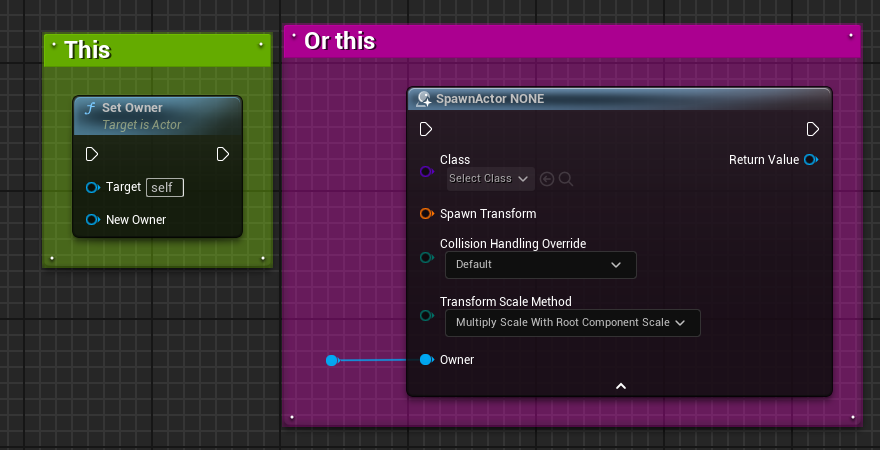 dark parcel
interface here is utterly pointless imo