#multiplayer
1 messages · Page 228 of 1
 short arrow
I really think you're wasting your time with Mass. I did spend time using it for about 3 weeks, and during that time I never once felt like it would be useful for anything other then very specific tasks for a large number of AI
on top of that, the sheer lack of documentation and userbase makes it that much worse. Also, if you wrote an attack function in c++, and then wrote one for Mass, the cost would probably be nanosecond differences, if any at all
I'm not sure what you're thinking is going to change
short arrow
 stable aspen
50 bajillion cores and bandwidth just for me
stable aspen
50 bajillion cores and bandwidth just for me
that'll work 🤣
stable aspen
Well there's not only an attack function
short arrow
I gave you a ton of useful links, and information already. If you spend some time learning and understanding them, they will take you very far
stable aspen
But yeah i don't really see any part of my game that could have a significant performance increase because of ECS, it's not like i'm making an RTS or something data heavy
short arrow
If I had to pick one, I'd say learn the FFastArraySerializer and start making your own network manager utilizing it
second would be dormancy for things that could not partake in the manager
stable aspen
short arrow
I gave you a ton of useful links, and information already. If you spend some tim...
Thanks you so much, if my game ever goes somewhwere (will not) i'll tell ya
Gonna put them all in a file...
short arrow
some of them (not all) are pinned here already
just keep in mind there's other helpful stuff in there as well
 dark edge
Do you have 10,000 things attacking?
ECS is amazing for LARGE sims, but for small stuff it probably isn't worth the hassle.
stable aspen
dark edge
Do you have 10,000 things attacking?
There is no AI stuff happening, only players attacking, and fights will not always happen
At best 100 attacks per second on all the server
 steep panther
does anyone have any insight as to what controls a players 'location' for replication if their pawn isn't replicating movement?
players character is attached to a different player's vehicle, so the vehicle moving around doesn't update new stuff around the passengers because the passenger 'network location' is where they joined the vehicle, and it doesn't load anything new around them until they exit
is there a way to periodically update their 'network location' while they are attached to the other actor?
 nova wasp
stable aspen
At best 100 attacks per second on all the server
nova wasp
stable aspen
At best 100 attacks per second on all the server
100 per second is like... ~3 a frame? that's absolutely peanuts
nova wasp
steep panther
does anyone have any insight as to what controls a players 'location' for replic...
view location is sent by the controller viewpoint periodically in certain mods
look into what changes LastSpectatorSyncLocation
 exotic wasp
ECS is great but doesnt help with networking at all
no matter how efficiently you can process things on a client, the network bottleneck is going to be the amount of crap you can shove through an unreliable connection
nova wasp
exotic wasp
no matter how efficiently you can process things on a client, the network bottle...
it is absolutely a network bottleneck to poll objects
however serialization schemes and how you array things in memory are kind of unrelated in most cases
exotic wasp
nova wasp
it is absolutely a network bottleneck to poll objects
i mean yeah, but if you really want to get around that, push network model is a thing
nova wasp
it does not make it much faster
exotic wasp
kinda shocked by that
nova wasp
you still need to do quite a lot of work to send replicated data about a given actor
I think you get the best of both worlds if you just put some things in 'network managers' when needed
exotic wasp
nova wasp
it does not make it much faster
based on benchmarks from that article push model seems to be a lot faster than normal replicated properties. unless im entirely misinterpreting the values
nova wasp
it's better but there's still a lot of overhead from how stuff gets polled... netbroadcast is still a fairly big part of the frame on server profiles you will typically see
exotic wasp
ah
nova wasp
so it's 100% worth doing but it doesn't really improve it as much as you would think considering the work done (you would assume you only pay for what actually changes)
exotic wasp
eh, a 3x decrease in average tick time without having to significantly change design is pretty nice
i really dont understand why replicated properties dont have special getter/setters that just automatically do push model as is
polling each frame for changes in properties seems incredibly naive
my main question with the network manager approach, is how do you handle relevancy? wouldn't all actors under the manager always get their values replicated?
nova wasp
exotic wasp
i really dont understand why replicated properties dont have special getter/sett...
engine makes dozens of these for various things
for example.. non-const ref getter that marks dirty is done in a few places
 fossil veldt
I can’t tell if you’re troll from previous comments but i’m going to give you the benefit of the doubt - generally it just depends, in the context of servers specifically it really isn’t any faster in any practical sense because it’s not so common to want to scale servers horizontally, generally the goal is to make something that runs on 1 core as fast as possible (so you can scale vertically and stack as many servers per core), and ECS really don’t give you anything in this scenario outside of good access patterns, which for most gameplay code doesn’t really matter (but again it still depends)
the place ECS really is strong is on a client where the user has lots of threads and you have a lot of systematic things in your game, there’s a reason why Epic doesn’t really bother having more than 1 game thread and it’s because generally game code itself is quite rarely actually a bottleneck, most performance bottlenecks are the result of something systematic performing poorly like transforms, physics, gc, rendering
nova wasp
And serialization is generally per-object anyways
 sudden cipher
Hi, where can i find documentation about mover plugin ? I'm trying to add basic multiplayer to a blanck project but i can't find any informations on it (5.5.1)
 chrome bay
You don't really need to do anything to add multiplayer, it "Just works" in multiplayer the same way CMC does
Other than that, there is no official documentation
It's also highly experimental and expensive, so use caution
 peak mirage
Sorry for the late reply, since we moved back to the good old repgraph, I never actually "solved" that issue. But @normal fulcrum had nicely let me know that error line was because of bandwidth saturation, and solution would be double the bandwidth limit (default is about 100,000 and Fornite uses 200,000. I just don't know the unit of those numbers).
Hope this help
sudden cipher
chrome bay
You don't really need to do anything to add multiplayer, it "Just works" in mult...
I don't know how to add multiplayer so i wanted some tutorial with it
chrome bay
If you've never done multiplayer starting out with mover seems unwise
sudden cipher
it's because of this video pointing out problem on the basic unreal movement
Wishlist our game Spanky! https://store.steampowered.com/app/1732420/Spanky/
GMC: https://www.unrealengine.com/marketplace/en-US/product/general-movement-component?sessionInvalidated=true
Smooth Sync: https://www.unrealengine.com/marketplace/en-US/product/smooth-sync
In this video we address the topic of multiplayer games made with unreal engi...
i wanted to avoid problem in advance
sudden cipher
chrome bay
If you've never done multiplayer starting out with mover seems unwise
so what would you suggest me?
 dark parcel
sudden cipher
so what would you suggest me?
dark parcel
sudden cipher
so what would you suggest me?
rolling your own movement component wouldn't be an option at this stage, so you have to work with what unreal gave you
I think Mover is built on top of a cmc, I don't know but it's experimental. You can just use Character movement component for your networked movement

https://discord.gg/uQjhcJSsRG
In this video I setup a new project and create a custom character movement component. I also implement movement safe sprinting which works at any ping.
https://github.com/delgoodie/Zippy
0:00 Create New Project
1:02 Setup File System
02:50 Create Custom CMC
04:43 Saved Move Class
08:37 Compressed Flags
13:35 Client...
chrome bay
Mover isn't built on CMC, Mover is a completely new system
Just use Character Movement for now if you're starting out
Rolling your own movement, for multiplayer, is insanely advanced
dark parcel
🙊
sudden cipher
chrome bay
Rolling your own movement, for multiplayer, is insanely advanced
oh okay
so i should avoid sliding
and etc?
any kind of movement?
dark parcel
sudden cipher
so i should avoid sliding
that's not the advice given.. at this point you only have one viable option. Look at the tutorial above to implement networked movement using CMC or you can also look at GAS documentation by tranex that implement sprinting.
del goodie covers sliding, wall climbing, sprinting, crouching for multiplayer. You basically have to work with CMC framework.
the video you posted earlier were right in saying that you will need C++ to implement networked movement. Any blueprint workaround will not work
dark parcel
networked movement needs to be done in C++
you can't do it from bp land as you don't have access to toggle the bits on FSavedMove
sudden cipher
so my whole project need to be c++?
dark parcel
no but the movement bit should be in c++
sudden cipher
okay i think i will have tons of question, but hpefully gpt can guide me in c++
dark parcel
sudden cipher
okay i think i will have tons of question, but hpefully gpt can guide me in c++
I will wish you luck but it's futile
there's no shortcut
you gotta bite the bullet
p.s: I used to use GPT
sudden cipher
i learned coding basics with php but i use gpt for 2 years now, i transform my idea into code, because i hate learning
dark parcel
multiplayer is a can of worm. I don't think you will get far if you don't want to learn.
I bet it's learning everyday for everyone here...
dark parcel
sudden cipher
i know i just learn by asking gpt
I stop asking gpt, it spit more wrong answer or entirely made up functions more often than not

 feral berry
Hello guys, I have an issue with my project if anyone could hop on a call with me to help me out. Brief description of the issue: Im trying to have AIs fill in the teams if no online players join the session and remove the AI in replace of the online player if joins later on while the game is in progress. I would appreciate your help
short arrow
feral berry
Hello guys, I have an issue with my project if anyone could hop on a call with m...
Just make sure the character isn't destroyed upon the client disconnecting, set an AIController inside of the actors details panel, and make sure the controller is possessing, the character upon client disconnection
Run the behavior tree or whatever logic you have for the AI once the character has been possessed by the AI
It might already be possessed but just inactive ( i don't remember)
When the player comes back, just deactivate the Behavior tree or equivalent
You can ask specific questions, other then that. I hope someone agrees to hop in a call with you
 lost inlet
Hopping on a call is kind of a big ask though since that's getting someone's undivided attention for free. The approach you described sounds reasonable
I'd be interested in hearing the real question about the supposed issue first
Though if I'm going to speculate, then I'd guess it's pawns being destroyed on disconnect, which you mentioned
 hoary spear
lost inlet
Hopping on a call is kind of a big ask though since that's getting someone's und...
hoary spear
lost inlet
Hopping on a call is kind of a big ask though since that's getting someone's und...
Agreed. Only reason i would consider doing it anyways is because if i decided to help them anyways, doing it on call will often, in my experience, resolve thenissue far faster
Letting me get back to my business sooner
Thougt pure messages got a more async nature 😅
 unkempt tiger
I'm quite confused, if I have an actor with a 'edit anywhere' UPROPERTY that's replicated with an OnRep, and I launch an offline standalone with that actor placed in the map with the property is set to some value on that instance, will the OnRep fire?
hoary spear
Doubtfully
unkempt tiger
Indeed it does not
I just realized it was other code that was making its way to the OnRep, woops
lost inlet
from C++, an OnRep is only called by the replication system, under any other context (like setting the var offline/as the server) you have to call it manually
feral berry
short arrow
You can ask specific questions, other then that. I hope someone agrees to hop in...
Yep thats what I also thought but my AI is a different actor so I want to destroy/spawn AI depending if player joins or leaves. Thats why I wanted a call so screen share and be able to do that quicker
 late quarry
relatively new to the networking part of UE, if I was to transfer data from one player pawn to another, how exactly would I got about that? have all relevant data be sent to the gamemode with a run on server event, store it there and then let each pawn grab it from there?
 sinful tree
late quarry
relatively new to the networking part of UE, if I was to transfer data from one ...
sinful tree
late quarry
relatively new to the networking part of UE, if I was to transfer data from one ...
Transferring data between objects doesn't require networking specifically as that just has to do with getting a reference to the object, reading the value, and sending it to whatever other object.
If you want to transfer data from a client to the server or server to client, that's where networking comes in.
So if you had some value you generate on a client, and you want to send it to the server, you would have to do so through a Run On Server event with the value as an input on the event, but that must happen within a replicated actor that is owned by that client, so like their player controller, controlled pawn, playerstate or a replicated component attached to one of these owned actors.
Once running on the server, you can then take the input value and store it wherever you like. If you want to replicate that value out to others, then you'd normally use a replicated property stored in a replicated actor and your pawns could then read the variable as needed, or, you can use Rep W/Notify which gives you a function that triggers when the variable change is received on a client. The game mode doesn't replicate out to anyone and only exists on the server, so it would not be a good candidate to store values that need to be shared with clients.
short arrow
feral berry
Yep thats what I also thought but my AI is a different actor so I want to destr...
then it's waaaaaay easier. Just spawn the AI at the last location of the disconnected player, and vise versa
You still need to make sure the pawn doesn't get destroyed, I think it can be done in blueprints but it's really easy to do in cpp, there's a function you can override in your controller
then you can destroy the pawn once you've properly gotten the location, rotation, and whatever else you might need
 normal fulcrum
stat net gives the number of actors being replicated
Is there any console command to dump a list of objects currently replicated?
 grave lynx
Player controllers are not reset after server travel, is there a clean way to reset some stuff inside? overridable method?
 idle jay
sudden cipher
i'm starting with bp, can i use both?
idle jay
sudden cipher
i'm starting with bp, can i use both?
you can get quite far by just using blueprint actually.
 livid gale
Hey all, can anyone point me in the right direction to where one might find a proper multiplayer save system? I've been searching all over YouTube, following what I can but most of the systems descend into a chaotic mess.
short arrow
livid gale
Hey all, can anyone point me in the right direction to where one might find a pr...
Save systems often do descend into a chaotic mess in unreal engine
And it changes drastically depending on your game and what you need to save
There's no one size fits all save system
livid gale
yeah, I'm just trying to get my inventory saved at this point. I mean it does save and load but it is overwritten depending on what you do as the server or client, then when loaded it just loads whatever was the last inventory to be modified to everyone.
sinful tree
livid gale
yeah, I'm just trying to get my inventory saved at this point. I mean it does sa...
Save games are local only. So if you call to save the game on a client, it'll only save on the client. If you call to save on the server, it'll only save on the server. So any data you're writing to the save file would also be whatever is local to where you're saving.
livid gale
I guess what I'm trying to wrap my head around is, doesn't the save game file save data for both the client and the server? Then when loaded populate that saved data back to the respective players?
sinful tree
No. It has nothing to do with networking.
livid gale
So far, looking at the save data it's only saving the array for either the server or the client
sinful tree
I can save values on a client, and I can load those values on a client. I can save values on the sever, and load those values on the server. I can't save values on the client and load them on the server.
The save game object doesn't replicate, and it'll exist only wherever you ended up creating it. When you actually go to save the save game object, it'll save on the computer where you happed to call to save it on.
Most server-based multiplayer games rely on the server saving the data and the server loads the data. In this kind of scenario, you don't carry around the progress the player makes to other servers.
You can have the client save data locally, and then have it transfer their data to the server, but then the client is in control of their sav files and what data is sent to the server, so they can potentially cheat (nothing stopping them from saying they're level 9999 or whatever) or use someone else's save, etc.
livid gale
I see, so the only time I should be concerned with replication of the inventory is in something shared such as a chest. I was just expecting if I populated the client's inventory and the server's inventory, they'd both repopulate the way I had left them upon stopping PIE and playing again.
sinful tree
If your intention is to have all inventory functions be handled locally, then sure. If you intend for the server to be able to manipulate a client's inventory (like the server grants the client an item) then the inventory would almost certainly need to be managed by the server.
livid gale
Okay
Just trying to make sure if one player picks up an item it isn't granted to everyone 😄
sinful tree
But that has nothing to do with saves does it?
Saving data = take whatever value and write it to disk.
Loading data = read whatever value from disk.
livid gale
Yup
So how it works now in my client view and server view they each can pick up items independently and it won't transfer to the other inventories. Unless I load the save file. If I put it on not replicated then it just repopulates the servers inventory. Apologies for all of the explanations, I'm just trying to make sure it's the intended behavior if you're playing as a listen server
sinful tree
Where are you loading the save file from? What event? What blueprint or C++ class?
livid gale
Blueprint from an inventory component.
Communication through a BPI to the game instance
sinful tree
So again... Save systems are local only. PIE isn't a really good test since it's running on the same machine - but If you're doing it on begin play of the inventory component for example, that begin play can run on both the server and the client, and even any other clients depending on what you've attached that component to.
livid gale
Gotcha.
 upbeat jolt
thank you for your input!
upbeat jolt
it seems if I use set user focus it still focuses all of the player controllers. I have a keyboard player and a gamepad player, and when I focus the keyboard player, the gamepad player also focuses on it. Also for some reason the gamepad player doesnt focus at all if they are the one interacting...
is there a specific way to set focus on a single viewport local multiplayer game?
or at this point is it better to just write a custom system? Would love to make unreal's system work tbh
 thin stratus
upbeat jolt
is there a specific way to set focus on a single viewport local multiplayer game...
thin stratus
upbeat jolt
is there a specific way to set focus on a single viewport local multiplayer game...
Usually the way is to use SetUserFocus with the correct PlayerController
One important step is to supply the outer/owner of the Widget when creating it properly.
So you can call GetOwningPlayer in the widget to refer to the correct one
sudden cipher
idle jay
you can get quite far by just using blueprint actually.
I will need to understand when to stop with bp
thin stratus
sudden cipher
I will need to understand when to stop with bp
If you want to do it properly, then it's not about understanding when to STOP using BP, but when to START.
When doing Multiplayer stuff, your best bet is to have almost all core logic in C++.
Blueprints don't offer the same amount of control for Multiplayer and are lacking several properties and functions that are useful and needed.
Instead of trying to use Blueprints and only picking C++ when something isn't available in BPs, I would advice to use C++ for the core logic of your game and exposing logic to Blueprints for finetuning and designers.
You can still have code/logic in Blueprints and Widgets, but that's usually as part of a child Blueprint made from your own C++ class, that you then extend to setup the rest of whatever specific thing you are making.
In Singleplayer you can probably get quite far without touching C++. In Multiplayer I would advice against that idea.
 little pumice
https://www.youtube.com/watch?v=VMZftEVDuCE @sudden cipher
It's not an either/or decision. Learn what makes C++ and Blueprints different, what they have in common, and how to use them together effectively. We'll also learn a thing or two about performance optimization and some basic software design concepts.
Read the article version: http://awforsythe.com/unreal/blueprints_vs_cpp/
00:00 - Introduction...
sudden cipher
Thx to both of you i'm watching this after school
dark parcel
idle jay
you can get quite far by just using blueprint actually.
not far enough to sprint in networked game
 magic karma
Hello, I need my dedicated server to store data. I've heard people say to use a file server for that. I can't find many tutorials for file servers, so far the only solution I've found is player -> dedicated server -> cloud mysql server. I'm pretty new to all this so before I implement that system into my game I want to make sure I'm not doing something stupid.
TLDR: Is player -> dedicated server -> cloud mysql server an acceptable way to manage data storage?
lost inlet
magic karma
Hello, I need my dedicated server to store data. I've heard people say to use a ...
who would've said to use a file server? they probably said to use a file
like you can have save games on the server just fine
you can write whatever you want to the local file system
if you want a backend, where data is persisted regardless of what server you play on, then I would recommend not directly connecting to a database server and having an API between it
magic karma
lost inlet
like you can have save games on the server just fine
do you mean use the default "save game" system on the dedicated server?
lost inlet
yes, all it is just serialising a UObject to disk
https://dev.epicgames.com/community/learning/talks-and-demos/4ORW/unreal-engine-serialization-best-practices-and-techniques this is the most comprehensive talk I've seen on the subject
but you can use whatever you want. you could locally save everything to a SQLite database
but connecting to a cloud DB directly is just a huge security red flag, especially if your dedicated server is freely downloadable
magic karma
lost inlet
yes, all it is just serialising a UObject to disk
I was thinking of just using savegame, but someone told me that "it wasn't ideal". So just to clarify, nothing bad will happen once I have millions of savegame files on my dedicated server? (I haven't watched the video you gave me yet so I don't know if the answer is there)
lost inlet
why would you have millions? but it all depends on the size of the data
and the storage space you have
also if they say something like "it's not ideal" without really explaining why, well they probably don't really know themselves
magic karma
okay thanks. That's relieving to hear.
sudden cipher
Quick question to the guys who adviced me this series of tutorial, https://youtu.be/17D4SzewYZ0?si=Tw84v9bGrqr3gGaL
Can this apply to a player that is not humanoid?
https://discord.gg/uQjhcJSsRG
In this video I setup a new project and create a custom character movement component. I also implement movement safe sprinting which works at any ping.
https://github.com/delgoodie/Zippy
0:00 Create New Project
1:02 Setup File System
02:50 Create Custom CMC
04:43 Saved Move Class
08:37 Compressed Flags
13:35 Client...
 twin tree
sudden cipher
Quick question to the guys who adviced me this series of tutorial, https://youtu...
twin tree
sudden cipher
Quick question to the guys who adviced me this series of tutorial, https://youtu...
Yes, really the only difference between a humanoid and non-humanoid character is model and animations. Unless you want something special, the movement component would be the same
little pumice
sudden cipher
Quick question to the guys who adviced me this series of tutorial, https://youtu...
yeah, but it will use capsule for collisions still 
sudden cipher
I'm new to unreal is the capsule collider resizable to be a ball?
little pumice
sudden cipher
I'm new to unreal is the capsule collider resizable to be a ball?
yes, resizable
little pumice
little pumice
yes, resizable
it's not a silver bullet though, e.g. would be hard to make a snake or smth like that
exotic wasp
cmc only supporting capsule collider is a pretty big issue for non-humanoids
sudden cipher
No more like a ball
I want to try to make a 3d version of "rounds"
So little arms and legs (i hope i can make them procédural on client side only, they don't need to be synced since they are not hitboxes
dark edge
sudden cipher
No more like a ball
a ball is just a capsule with zero height, itll work
sudden cipher
Thx
 kindred widget
This would be nearly impossible to answer without some logs from the player and a heavy tour of the framework. Like your handling for a connection fail or whatever. Or know whether it even was a connection fail on their part, etc.
 charred lark
Hey Guys! Can someone give me a hint or help me with a problem... I have a multiplayer game and i added a vehicle to it. in standalone i can enter the vehicle and i attach der player to the vehicle posses it etc. everything works fine. but when i try to do it as a client the client falls through the vehicle...i can control the vehicle but the pawn is falling down forever...here my blueprints:


sometimes it falls through...sometimes it the player sits next to the car...but i disabled the collision... :/
sinful tree
charred lark
Hey Guys! Can someone give me a hint or help me with a problem... I have a multi...
Changing the collision on the capsule component to No Collision prevents the movement component from working correctly and will cause the actor to fall. You probably shouldn't change its collision and instead just disable the movement component.
I'm also not sure why you're doing the possess and setting of the "Is Driving" bool within this OnRep. That should just be getting done on the server itself at the point you're setting the "Vehicle" variable.
 nocturne quail
is there a way to pack this network call to optimize it ? 😄
bool ACoreCharacter::bCanAttackNetworkCall_Implementation() const
{
    if (IsDBNO || IsDead || IsOnTheFlight || IsFreeFalling || IsUmbrellaOpen || bUnSatisfiedPing || bSwimming)
    {
        return false;
    }
    return true;
}
When i only disable movement the car is flying around bcs of the collision when i attach the player to the vehicle
little pumice
nocturne quail
is there a way to pack this network call to optimize it ? 😄
```c++
bool ACoreC...
What exactly do you want to optimize? and what this function has to do with networking? 
sinful tree
charred lark
When i only disable movement the car is flying around bcs of the collision when ...
What if you disable movement & disable collision?
charred lark
i though i should not disable collision?^^
nocturne quail
little pumice
What exactly do you want to optimize? and what this function has to do with net...
this is a network auth call to verify on server if a player can attach, and i want to optimize the packets the server recieved from the victim to check for
sinful tree
charred lark
i though i should not disable collision?^^
I'm not 100% on physics stuff.
 lament flax
is it possible that InitPlayerState on the player controller gets called before ReceivedGameModeClass on the game state ?
charred lark
Ah oke ...
little pumice
nocturne quail
this is a network auth call to verify on server if a player can attach, and i wa...
isn't server using his own flags and sends just a bool?
nocturne quail
little pumice
isn't server using his own flags and sends just a bool?
Solved thanks
little pumice
also Server do not trust clients, so it make no sense to send something that takes key part in validation
nocturne quail
little pumice
also Server do not trust clients, so it make no sense to send something that tak...
yeah it was a typo, server actually recieved packets form client and compare it with the data stored on server to return the finalized result
little pumice
nocturne quail
yeah it was a typo, server actually recieved packets form client and compare it ...
then screenshot should contain code that sends actual data you mentioned
nocturne quail
little pumice
then screenshot should contain code that sends actual data you mentioned <:Joker...
its the return value of the same call, i guess it can be more optimized to make it like fast call by the server
checking for 7 bools is not worth it in a network scenario i guess
or i could just make one more extra uint8 which is always 1 if any of these bools is true, and use that for validity?
 viral vortex
Hi, I don’t understand something, this is a controller and it sees a print on the client side and at the end I call a function on the server side and it doesn’t work inside (print string), what could be the problem?
 nocturne quail
or increment/decrement that uint8 based on the condition of these bools
so if all bools are true the uint8 should be 7, any bool is false decrement that uint8 so it is now 6
character should only attack if that uint8 is 0
i think this is the only solution to avoid checking for these all bools 😄
little pumice
nocturne quail
checking for 7 bools is not worth it in a network scenario i guess
afaik RPC sends data if you put it as a function arguments, just referencing variables in the body of _valdiate shouldn't do anything network related
lament flax
after 2 seamless travel between my lobby and game level, the game mode in the lobby level is still the in game class ?
how does this can happen
looks like its because i forgot to set Game param in URL, its weird thaat the issue doesnt happen the first time
nocturne quail
little pumice
afaik RPC sends data if you put it as a function arguments, just referencing var...
but server still running those checks, and if in the game there is like 200 players then it is a stress for server i guess to run those checks for each client
now its not about packets 😄
little pumice
nocturne quail
but server still running those checks, and if in the game there is like 200 play...
nah, I don't think it would be a problem. Anyway you can use cpu profilers (e.g. unreal insight) + stress test(200 players) to see somewhat real impact
sinful tree
nocturne quail
but server still running those checks, and if in the game there is like 200 play...
If your game is struggling to check 7 bools, even 100s of times a second, then you've got larger issues at hand.
Ideally these should probably be either calculated or replicated bools and you'd have your client check them first, or at least whichever ones you want the client to know about, and then if they pass they can call an appropraite RPC where the server would then also check its values for them. You normally would not have to send the values back and forth all the time for each RPC.
nocturne quail
sinful tree
If your game is struggling to check 7 bools, even 100s of times a second, then y...
game is not struggling ofcourse, i am just highly addicted to extra care of things in the project
 grand kestrel
@thin stratus sorry if this is a bit vague but there's one thing I'd like some clarity on if/when you happen to have some time
If you think about the sprint ability in CMC, the way its implemented in PredictedMovement ( https://github.com/Vaei/PredictedMovement/blob/main/Source/PredictedMovement/Private/Sprint/SprintMovement.cpp )
What would the equivalent be, or what changes needed, if we removed the use of compressed flags and used FCharacterNetworkMoveData and/or FCharacterMoveResponseDataContainer instead?
Just trying to connect a few dots while working on the modifier system and want to rule out a few possibilities with the implementation
 gritty warren
I have read that FFastArraySerializer does not gaurantee that the client / server have the same order. Under what circumstances is this true, and is there something I can do to ensure it otherwise?
the indices of my array will never change, nor will the array change size (at least, once the game is finalized).
Under these circumstances, is it still possible for the indices to be different?
I think not, because I think the reordering only happens under operations of adding new indices and such, but I don't know what I don't know
lament flax
Why do you need indices ?
For example in my inventory system i store the original index in a int variable in each fast array entry
And this worked great for what i needed
 vapid gazelle
Could use a sanity check, is this correct?
https://forums.unrealengine.com/t/does-calling-set-owner-on-the-client-have-any-effect/541581/4
Setting owner on the client doesn't do anything by design.

Epic Developer Community Forums
It will change the owner locally only, and you will be permanently out of sync (or at least, until the server changes it and sends an update to the client). There’s no reason to call SetOwner() client-side on a replicated actor. It needs to be called Server side. Realistically SetOwner() should have an authority check internally, but it doesn’...
sinful tree
vapid gazelle
Could use a sanity check, is this correct?
https://forums.unrealengine.com/t/do...
As Jambax points out there, it will update the ownership locally on that client, but it won't impact how that actor behaves in regards to RPC calls and owner-based replication conditions on the server. If you need to set ownership in an online multiplayer game, you will more than likely want to update it on the server.
thin stratus
grand kestrel
<@94211915902889984> sorry if this is a bit vague but there's one thing I'd lik...
That Container is just a struct. You can put into that whatever you want and read it on the other side.
Same for the Server version.
 visual cedar
Hey all, doing some custom character movement replication stuff and exceeding this limit here.
how can I up the limit of NetPackedMovementMaxBits:
:NetSerialize: Dropping move due to NumBits (4211) exceeding allowable limit (4096). See NetPackedMovementMaxBits.
 opal pulsar
what is the best approach for manually delta serializing a struct? I have a struct with two internal structs and some values but I only want to replicate those internal structs if something changes an not pay for the whole thing every time
 verbal ice
If your struct & internal structs don't have a custom net serializer and aren't marked USTRUCT(Atomic), it'll already do that afaik
 cold cipher
how to get server infos, like pings, map modes etc those that may change over time (I have integer representing them, but not sure what I should do)
should I make extra session settings?
dark parcel
cold cipher
how to get server infos, like pings, map modes etc those that may change over ti...
that will depend on the online subsystem
e.g. steam sessions
or if you use EOS
 dark parcel
with steam advance sessions there isn't a way to get the ping by default until today afaik
you can only get ping once you are connected
getting the ping when browsing requires work from your end
maybe steam already implement the function, I dunnoe. you gotta look at steam sdk
As for map or other infos, you can update the extra settings
cold cipher
thanks!
 bright summit
?

but this is not working while testing on 480 app id, it will always display 999ms
nova wasp
    /** Ping to the search result, MAX_QUERY_PING is unreachable */
    int32 PingInMs;

    FOnlineSessionSearchResult()
        : PingInMs(MAX_QUERY_PING)
    {
    }
/** Value returned on unreachable or otherwise bad search results */
#define MAX_QUERY_PING 9999
looks like it didn't find anything reachable in that result
bright summit
nova wasp
looks like it didn't find anything reachable in that result
search result was correct because I was able to join session
interesting..
cold cipher
dark parcel
As for map or other infos, you can update the extra settings
another question, how do I get the extra settings from game mode?
lament flax
bright summit
but this is not working while testing on 480 app id, it will always display 999m...
What is your setup ?
Using Steam OSS ?
With Listen server ?
You can dive in code and check how it gets the ping, depending on your setup it might always return the max ping since it cant properly ping the host
dark parcel
cold cipher
another question, how do I get the extra settings from game mode?
wdym from the game mode?
The server update the extra settings
other players when they browse the session will see the settings from the server
cold cipher
 dark parcel
simple as that

This is client searching for session
then getting the settings from each session
lament flax
Not PascalCase is crazy
cold cipher
I know, I meant like changing variables in the lobby menu after starting a session, and when client searched they can see the changed one
dark parcel
cold cipher
I know, I meant like changing variables in the lobby menu after starting a sessi...
The lobby menu would be what players see when they iterate all the available sessions
as for the host updating the setting
wait
lament flax
Depends if this plugin allows you to edit them after creation
cold cipher
dark parcel
The lobby menu would be what players see when they iterate all the available ses...
I meant the lobby menu is when players see after starting/joining a session?
dark parcel
cold cipher
I meant the lobby menu is when players see after starting/joining a session?
This is how the server update the settings

after hosting the session
so everytime a new player join, the host just update the settings
when other players browse, they will see the current number of players
cold cipher
okay, so not using add or modify extra settings node
cold cipher
I just saw this node and thought this is how you edit settings while retaining other settings unchanged
but don't have a way to get extra settings
 dark parcel
that node seems to just change the settings, it does not Update the session
how you modify settings , get or set
that's irrelevant
if your question is how can i update my settings so other players can see the new setting value, then Update Session node and pass it your new settings
dark parcel
cold cipher
you are not passing session to the GetExtraSettings node
so I don't know what you expect from the output
use this node instead maybe

clarify with printing the results from the extra settings
bright summit
lament flax
What is your setup ?
Using Steam OSS ?
Steam, yeah listen server
dark parcel
bright summit
Steam, yeah listen server
yeah u can't ping like that
people been begging for years
If you are using listen server and pinging to a computer not from the same network then you will just get 9999 hard coded value
dark parcel
the method is not implemented by Steam
well, it's pretty important for me and many people
bright summit
oh ok, that explains everything
dark parcel
It do suck to join a server with high ping
bright summit
for competetive games, yeah this is an important feature
to show ping before join the server
lament flax
bright summit
for competetive games, yeah this is an important feature
Competitive games dont use listen servers
bright summit
in coop game usually you play with friends, isn't it?
bright summit
lament flax
Competitive games dont use listen servers
cs? xD
lament flax
Mostly but not always
dark parcel
bright summit
in coop game usually you play with friends, isn't it?
or strangers from internet
lament flax
bright summit
cs? xD
Real games are only on official servers
dark parcel
well I mean that's up to you isn't it
you can make competetive game with listen server
it's just people may complain about host hacking their way
lament flax
No one will play it once people understand they can easily cheat
bright summit
lament flax
Real games are only on official servers
sorry it was funny because I understood it as "counter-strike is not a real game" xD but then I realised you meant "real matchmaking"
dark parcel
I'm gonna use dedicated, it kinda wash away some problems that comes with listen server out of the box too
like jittering anim tick pose
just wondering how much it's gonna cost me... I know someone that host with AWS as indie dev though. Maybe it's affordable
thin stratus
It's gonna cost you enough, at least when you actually release.
lament flax
dark parcel
like jittering anim tick pose
Did you tried kaos fix ?
dark parcel
lament flax
Did you tried kaos fix ?
Yeah, and I got it to work soo far
lament flax
Limiting how much data clients send to listen server so it doesn't do weird stuff
dark parcel
but I don't know if it's bullet proof
lament flax
Animation shouldn't matter
thin stratus
Based on the game, the underlying machine needs to be reasonable strong on the CPU side.
That's tricky to know when the game isn't actually in a state where it has most or all of the required code and can be tested with all required players.
And that's just the cost to host a Server. There is also somewhat of a requirement to handle the Matchmaking and the Database that requires.
Unless you use e.g. Playfab, which in itself is usually even more expensive (but saves you time of course).
You also always want to target Linux DediServer, as the hosting costs are slightly lower with that.
dark parcel
There's a course that covers AWS fleet setup as well as handling match making and saving to DynamoDB
thin stratus
But I'm pretty sure that even for the minimum of players that you might have, you'll chunk out 3 to 4 digits of costs each month.
And then you gotta think about the playerbase.
Will you have enough players to actually have matchmaking working? You gotta need a few thousand.
Where are they coming from? Is your game Pay to Play or Free to Play?
If it's Free to Play to make it easier for people to pick it up, where does the money come from?
Microtransactions? That's pretty involved now-a-days. Lots of skins, effects, and what not, constant rotation, battle passes, etc. etc.
Like, single dev, or small team Matchmaking Competitive Dedicated Server Game is as unreasonable as the good old "I make an MMO alone." thing.
Although I would even argue that the MMO one is more reasonable..
You may try of course, which I told the other 50+ peeps that were here talking about the same thing the last 8 years, but same as them, we most likely never here from that whole thing again.
dark parcel
for me personally, I do it just for the portfolio
thin stratus
Gotta sometimes be a bit negative to pull peeps back into reality. I worked on such a game by a small team of 3-4 people once.
The amount of work and costs involved is ridiculous.
dark parcel
Seeing that a lot of job listing requires multiplayer and some backend knowledge.
thin stratus
You can gladly guess if that game ever made it :D
thin stratus
dark parcel
Seeing that a lot of job listing requires multiplayer and some backend knowledge...
I would probably not hire someone who is good at Backend AND Multiplayer.
Backend is a whole nother world. I would split that into two roles.
Look how much I got around in my life as a Game Dev Contractor, and I can do the bare minimum of backend stuff.
I know how to work with databases and I can integrate whatever that backend uses to communicate into UE.
That's about it. I could never set up a system that hosts fleets and has idling servers etc.
I did fully integrate this whole shitfest of Playfab once (for that very client), but that's also mostly following documentation.
Could I learn how to do that? Probably. Was that ever required during the past years? Once or twice maybe.
If you are really good at the Multiplayer side of UE, the Optimization and the really tricky problems, such as Movement and general prediction, then you are already good to go.
cold cipher
dark parcel
you are not passing session to the GetExtraSettings node
I don't know how to get that session
thin stratus
Which means, do you DedicatedServer project, but the backend part.. idk.
cold cipher
but session setting should work I guess
dark parcel
cold cipher
I don't know how to get that session
do you check my other screen shoot where the node doesn't require a session result?
nova wasp
dark parcel
I'm gonna use dedicated, it kinda wash away some problems that comes with listen...
listen servers are useful as a debugging tool
to compared client and authority easily
of course this is easier said than done to support as it's another code path
an authority that has a local player that needs to render things
so I would say if you can it's useful to keep them working... but don't go too crazy
lament flax
Having a LS adds extra work for each replicated property
But ideally you already have a SET function
nova wasp
of course? if they are the authority they must gather and replicate replicated objects
you are going to have HasAuthority everywhere anyways
the only difference is to not assume NM_Dedicated server is the only authority mode
and as a bonus: you need to consider replicated properies for clients if they want to locally make replays (I am not 100% sure of how this works though)
cold cipher
dark parcel
do you check my other screen shoot where the node doesn't require a session resu...
yes
hence the 'bug session setting should work I guess' comment
lament flax
Did anyone here run tests comparing memory and cpu cost between using fast array and arrays ?
Like at what points its better to use fast array
I tried once using fast array, was clean but properly overkill for my project since the player always have the same amount of slots
nova wasp
lament flax
Did anyone here run tests comparing memory and cpu cost between using fast array...
it depends on the types in the array and the number
Fast arrays also let you listen for each element changing which is not simple to do in regular array onreps
FWIW with Iris even basic Tarray replication can be delta'd per element
so it's much less needed
lament flax
Last time i askee about Iris i was told you should really consider if you want it before using it
What are the caveats ?
nova wasp
it's a lot of little things
lack of support for the old netserializer is a big one (no more FInstancedStruct replicated etc)
Wrong! FInstancedStructNetSerializerConfig is here 😮
lament flax
nova wasp
~~lack of support for the old netserializer is a big one (no more FInstancedStru...
You mean with Iris enabled i cant replicate instanced structs ?
nova wasp
Replication Graph is totally gone and replaced with iris filters and prioritizers
some onreps may come in surprising and new orders that will break complex projects
replays aren't GONE per se but are only possible by running the old demonet driver at the same time which can cause some hilarious issues with serialization
 lament flax
nova wasp
Replication Graph is totally gone and replaced with iris filters and prioritizer...
lament flax
nova wasp
Replication Graph is totally gone and replaced with iris filters and prioritizer...
I saw that a lot but never understood what replication graph are
nova wasp
if you don't know what that is then don't worry about it lol
basically it was a way to poll network objects based on some distance-based priority etc
for example: you don't need to know about a tree 2km away 200 times a second
lament flax
nova wasp
basically it was a way to poll network objects based on some distance-based prio...
You're talking about RG here ?
nova wasp
Iris serializers exist in a separate file and are a bit more work to make
most base engine types have them already
lament flax
Well i use them so i guess ill wait
nova wasp
from a gameplay code standpoint Iris is almost identical, you do all of the same macros etc with almost no changes
things get weirder the more network features you use that aren't simple things
Also if it makes you feel better... FInstancedStruct replication was more or less submitted by Jambax as a community PR and not from epic
so it's less surprising they don't support it there
nova wasp
there is a way to send polymorphic data but it's quite annoying to set up (TPolymorphicStructNetSerializerImpl... man it's a doozy of boilerplate)
I think I might need to try my hand at making my own iris instanced struct buffer send thing
nova wasp
lament flax
You mean with Iris enabled i cant replicate instanced structs ?
I was wrong! FInstancedStructNetSerializerConfig is now a thing 😮
sudden cipher
ok i can finally start this project, i added a third perso model to the fps sample scene (Weapon placement goes brrrrr), i'm a bit scared to start but i guess i need to fail to succeed
 lament flax
nova wasp
I was wrong! FInstancedStructNetSerializerConfig is now a thing 😮
lament flax
nova wasp
I was wrong! FInstancedStructNetSerializerConfig is now a thing 😮
Its a thing and its working ?
nova wasp
it would appear so but I'm not sure about every single nested type
 gritty nebula
hello friends, do you know why lyra's character lags like this? here is a gif showing a character strafing and jittering at the endof each strafe. i slowed down the gif so its easier to see the lag. this is from the point of view of a client looking at another client strafing
https://imgur.com/J0mjj2I
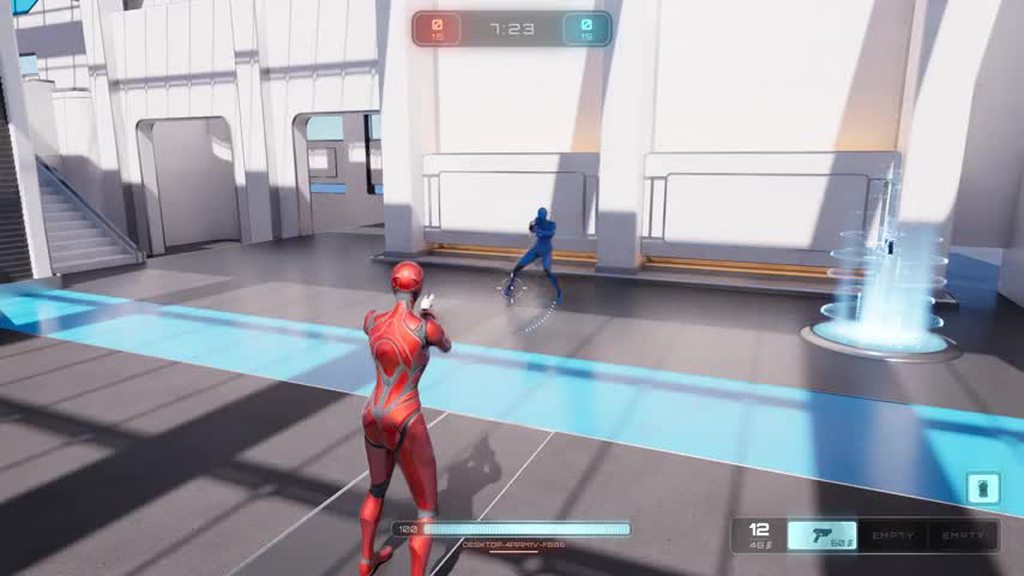
here is what you expect the strafing to look like. i slowed down the gif again for consistency. it is from the point of view of the host watching a client strafe. both examples are LAN
https://imgur.com/3NTmINw
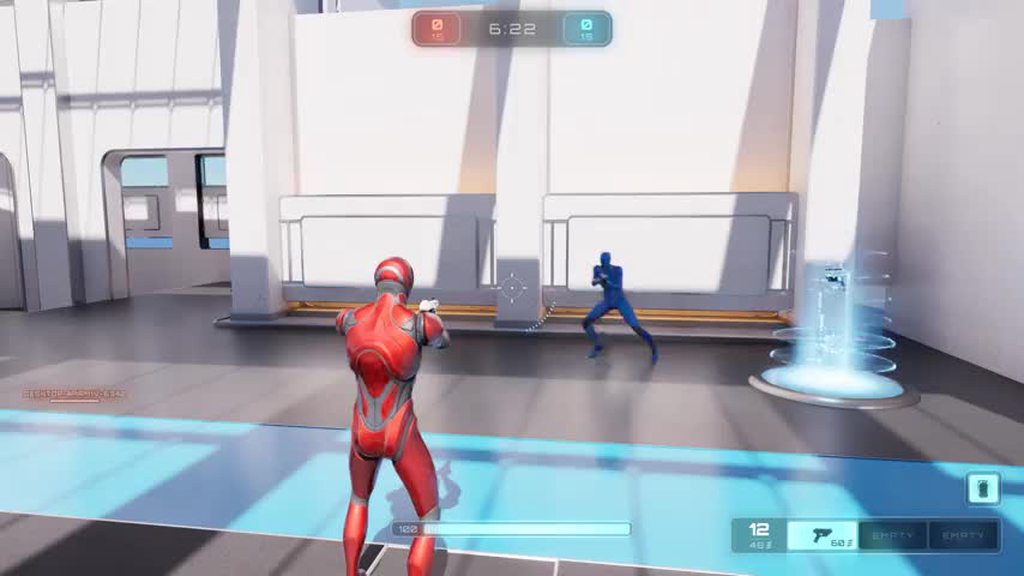
would appreciate any insight!
nova wasp
cmc positions can be a bit predicted from a client... you get new info that said they were actually going the other way after extrapolating it moving a bit more to the other way
gritty nebula
dang cuz i am trying to make my own character using cmc and the lag is even worse
nova wasp
you can fiddle around with smoothing settings to fit your stuff
and also less acceleration in a game will generally result in less jittery transitions like that as the overall change is more gradual
gritty nebula
o thats cool. ill probably play with the settings more to see if ican make it smoother. i play lots of fps games and i perhaps unreasonably expected cmc to kinda act like that outta the box lol
 wet crypt
Hello guys i have a simple respawn system where i can set a checkpoint and respawn after a few seconds i die. but i want this system to work with multiplayer like it needs to contain alive players and respawn all players when alive players is 0.


first bp is my character 2nd is gamemode
dark parcel
wet crypt
Hello guys i have a simple respawn system where i can set a checkpoint and resp...
Does the spawn ever get called to begin with?
Im asking because I don't know what the type of Player in RespawnPlayer
it probably has to be a player character type for the actor to be possesed
as for your respawn transform, you are setting it with input.
Inputs are local (in a sense that the codes will run on the machine of the player that press the input)
 river shore
Hello Guys!
So I wanna replicate my actor to my Clients but not all of them. I want to exclude one client because of gameplay reasons. I spawn the actor on the server in the actor component of the Client that should not the replicate. I tried doing it but got really confused when this dormacy thing is not working at all. ChatGPT is also not a great help and couldn´t fin much documentation. So thx for any help for the problem!
 ancient adder
river shore
Hello Guys!
So I wanna replicate my actor to my Clients but not all of them. I ...
ancient adder
river shore
Hello Guys!
So I wanna replicate my actor to my Clients but not all of them. I ...
I believe you can do that by overriding IsNetRelevantFor for that actor
river shore
ancient adder
I believe you can do that by overriding ``IsNetRelevantFor`` for that actor
Already tried that, Do have to then use any extra settings meaning dormancy
or only relevant for owner? cause that didn´t really made sense to me
ancient adder
I never used that function but I think you can do:
Create TSet of playercontrollers and add the client controller you do not want to replicate to
In the IsNetRelevantFor check if the controller of RealViewer or ViewTarget(Not sure which one) is in the Set, if it is then return false
river shore
bool ABasePlaceable::IsNetRelevantFor(const AActor* RealViewer, const AActor* ViewTarget,
    const FVector& SrcLocation) const
{
    if(ExcludedPlayerControllers.Contains(RealViewer))
    {
        return false;
    }

    return true;
}```
I have it like thisbut when I spawn the actor from the server and then add the player contoller to the ExcludedPlayerController it kinda doesn´t work, question would be does this work after the spawn or do I have to spawn diffrently forgot the name sry
ancient adder
Does this function get called before you add the controller? I believe it does, try the below
If it does, you can try deferred spawn, add the controller then finish spawning
river shore
ancient adder
If it does, you can try deferred spawn, add the controller then finish spawning
Thats what I thought, I will try it out thx!
river shore
ancient adder
If it does, you can try deferred spawn, add the controller then finish spawning
But is it not like tick based?
shouldn´t it check itself multiple times or only on spawn?
ancient adder
I'm not sure what you mean but I don't think IsNetRelevantFor is called before "actually" spawning the actor
river shore
ancient adder
I'm not sure what you mean but I don't think ``IsNetRelevantFor`` is called befo...
alr
 pliant cradle
I'm just starting to delve into multiplayer networking, and I feel like a complete novice yet again 🙂
This TargetWS vector is the client's desired aim point, so I can trust the client's results. If I want to set this value locally but then replicate it to other clients, is this the way to do it? Set it locally, then tell the server to set it through a server-executed event?
Does "Simulated Only" make sense as the replication condition or is there a better option?
 sinful tree
river shore
shouldn´t it check itself multiple times or only on spawn?
sinful tree
river shore
shouldn´t it check itself multiple times or only on spawn?
IsNetRelevantFor is continually checked on the server once the actor is spawned and my guess is that this happens at the net frequency update of the actor, so when you spawn a replicated actor, you're spawning it on the server, the server will consider it for replication, and then if IsNetRelevant == true it will send a message to the particular client and tell them to spawn their local copy of that actor etc..
river shore
sinful tree
IsNetRelevantFor is continually checked on the server once the actor is spawned ...
Alr thx. Found the bug, it was because I had a null ref to a controller, some casts where missing mb. Thx for the help though!
pliant cradle
pliant cradle
I'm just starting to delve into multiplayer networking, and I feel like a comple...
Ah hah, I was overcomplicating it. My setup was a little different from this example screenshot I took -- I'd been setting the value initially in a function that was called only on the client, which I guess broke the replication.
lost inlet
what are these files
 meager canyon
images of my setup
lost inlet
well they don't have file extensions so they're not embedding
meager canyon
ohhhh its not showing let me try and fix it i was renaming them and remove it
Hello everyone, good evening!
I'm facing some bugs in my game and could use some help:
Inconsistent Stone Spawning:
I have 4 indices in SpawnPoint fed into a For Each loop to spawn 4 stones per hole.
The spawning is inconsistent across 12 holes, sometimes spawning 1, 2, 3, or 4 stones per hole.
Multiplayer Sync Issue:
In 2-player mode, players see different stone counts in the same hole. For example, Hole 1 on Player 1's screen has 3 stones, but on Player 2's screen, it has 1 stone.


 meager canyon
lost inlet
well they don't have file extensions so they're not embedding
meager canyon
lost inlet
well they don't have file extensions so they're not embedding
yeah my bad fixed it by sending everyting again
lost inlet
if both players are supposed to see the same thing, why is there separate player 1 and player 2 logic?
meager canyon
its one logiv indisid the GameModeBase
 twin juniper

 jaunty palm
Could someone explain why the client is not getting the updated inventory after swap? Seems like the FastArraySerializer doesn't pickup the index swap at all🤔

 silent valley
jaunty palm
Could someone explain why the client is not getting the updated inventory after ...
silent valley
jaunty palm
Could someone explain why the client is not getting the updated inventory after ...
Fast array serialiser does not guarantee consistent order between clients. If order is important use array or store index in the item itself.
jaunty palm
silent valley
Fast array serialiser does not guarantee consistent order between clients. If or...
I see. I'll try storing the index into the item👍
Its funny tho this worked last couple months and suddenly yesterday it just broke and there are no modifications to the system XD seems I rode with luck
 heady crystal
Does anyone know why networking insights in UE5.5 doesn't collect any data? The Incoming and Outgoing options become N/A. I have set the standalone launch parameters to what the doc suggested and that works well in UE5.4 before I upgraded the project.

 nova wasp
heady crystal
Does anyone know why networking insights in UE5.5 doesn't collect any data? The ...
nova wasp
heady crystal
Does anyone know why networking insights in UE5.5 doesn't collect any data? The ...
show startup args
you need to have -NetTrace=3 etc for full verbosity and probably a local tracehost
-tracehost=localhost
heady crystal
Thank you dude, but it still doesn't work unless add cpu to trace as well. I'm not sure why cpu tracing is needed, but after that the networking insights works.
-NetTrace=3 -tracehost=localhost -trace=net,cpu
meager canyon
meager canyon
23212222222222222222222223210........................................
damit i slept on my keyboard and didn't know i sent this
guys its me again
I'm facing some bugs in my game and could use some help:
Inconsistent Stone Spawning:
I have 4 indices in SpawnPoint fed into a For Each loop to spawn 4 stones per hole.
The spawning is inconsistent across 12 holes, sometimes spawning 1, 2, 3, or 4 stones per hole.
Multiplayer Sync Issue:
In 2-player mode, players see different stone counts in the same hole. For example, Hole 1 on Player 1's screen has 3 stones, but on Player 2's screen, it has 1 stone.


 sudden cipher
I was thinking this night, i want my player to be a sphere but i want him to have feet that are not part of his "damageable colldier" is it possible ?
dark parcel
you can use physic assets for the collider and just leave out the legs
meager canyon
I noticed when I eject from the player controller (in my editor window), the number of stones changes to match the player 2 window. However, when I reattach to the player controller (main window), the inconsistent stone count appears again.
For example, in the main window, one hole has 4 stones, while in the player 2 window, the same hole has 2 stones. When I eject from the player controller in the main window, the stone count changes to match the player 2 window.
Any ideas on what might be causing this issue?
heady crystal
Does anyone know how to net serialize a property of dynamic array of FInstancedStruct?
 heady crystal
Well, I just found SafeNetSerializeTArray_WithNetSerialize which serves the purpose.

I have another question, does custom net serialize function skip the generic delta serialize? If only one property was changed, the whole struct got serialized and sent over networking?
sudden cipher
i'm getting an error that the tutorial i follow does not have, and i cna't figure out why


wow, found the mistake, on the last line it's "Actor" and not "Actors"
 crystal crag
I'm confused. I am testing out this "AI pawn is startled and looks at sensed direction" idea I had. I didn't think that calling SetActorRelativeRotation on the pawn was automatically replicated? I played PIE as a listen server and the AI pawn is rotating on the extra PIE window.
In the AI controller, I have the UsePawnRotationAsControlRotation option checked... is that why it is replicating? Calling SetRelativeActorRotation is effecting the control rotation?
Control rotation is replicated, so that is what logically makes sense to me. I will have to compile and publish it outside of the editor to see if the results are the same.
sinful tree
crystal crag
I'm confused. I am testing out this "AI pawn is startled and looks at sensed dir...
Rotation is part of movement. So If you're replicating movement and change rotation, that rotation would be replicated.
 hushed sierra
I'm trying to send a UObject as a parameter on an RPC. I read you could do this utilizing AddReplicatedSubObject on a different actor, and this would save me significant headache elsewhere, but I can't seem to make it work.
In the actor that I want to use to replicate this Uobject:
    //Spawn and configure a UObject containing some information that we want to send in an RPC
    UOrderRPCWrapper* OrderRPCWrapper = NewObject<UOrderRPCWrapper>(this);
    OrderRPCWrapper->TurnToExecute = 1;
    OrderRPCWrapper->MoveTarget = TargetDestination;
    OrderRPCWrapper->CleanupOnExecutionComplete = true;
    //Add it to the replication list
    AddReplicatedSubObject(OrderRPCWrapper);
    //Call RPC
    DF4XPC->HandleOrderRequest(DF4XPC, OrderRPCWrapper);
The actor is appropriately replicating.
The UObject itself has implemented IsSupportedForNetworking{true}, and the properties that I want are marked in GetLifetimeReplicatedProps(). The UObject is always null for the server when it gets to the HandleOrderRequest_Implementation.
Am I doing something wrong here, or do I need to do this another way?
crystal crag
I think you also have to handle it in the REplicateSubObjects override
I believe the method signature slightly varies depending on whether you are trying to handle it from an actor component vs actor
One moment, I am using that somewhere in my project.
ancient adder
hushed sierra
I'm trying to send a UObject as a parameter on an RPC. I read you could do this ...
Is that server rpc? I don't think callingAddReplicatedSubObject does anything on client side but I could be wrong
crystal crag
I just started upgrading my VS, completly forgetting about this ><. I would maybe take a look at the lyra starter game. They have custom UObjects in there that can be sent via RPC I believe.
lament flax
lament flax
in the PC it doesnt seem so
InitNewPlayer on gamemode sounds ok
sinful tree
hushed sierra
I'm trying to send a UObject as a parameter on an RPC. I read you could do this ...
If this object is created client side, then it wouldn't be a replicated object. The object would have to be created on the server first. Even if doing so, because you're creating the object and immediately calling the RPC doesn't guarantee that the object exists on the client by the time the RPC would be received, assuming this would at this point be a Client RPC.
hushed sierra
sinful tree
If this object is created client side, then it wouldn't be a replicated object. ...
The intent is to send data about a player "move" (move/attack/build order) from the client to the server. Since most moves contain the same information I would like to use something that supports inheritance for ease of management. My issue is that I can't seem to send the info that I want to the server for anyway, which was why I was trying to RPC it from the client
It works fine with structs, but those don't support inheritance.
 haughty ingot
Look into FInstancedStruct. They’re just a container that holds the UScriptStruct and the raw memory layout of the underlying structure. They can be replicated and they’re heterogenous.
 torpid lantern
I am trying to get my multiplayer game to work in standalone.
I was thinking I could just give the client authority by "open level" with ?listen -- but I'm noticing my animations are non-responsive. They work fine with a dedicated server running, but not standalone.
Weirdly GAS is replicating as expected and my RPCs look to be working.
Am I going about this the wrong way, or is there something special that I need to do to get animations working? I know SP > MP is a chore, but I was thinking MP > SP would be easier.
sinful tree
torpid lantern
I am trying to get my multiplayer game to work in standalone.
I was thinking I ...
opening a level with ?listen isn't standalone - that's listen server mode.
There's several caveats to how things work in the different modes, even silly things that don't make a ton of sense even with GAS.... Like... Calling AddReplicatedLooseGameplayTag() apparently doesn't work correctly in standalone or listen server mode... You need to also call AddLooseGameplayTag() in order for it to work right.... Checking authority on dedicated server is usually alright for ensuring you're doing something only on clients, but isn't great for doing things only on "clients" in listen server or standalone as the listen server or standalone version would be the authority too and they would probably need to do those same actions a client would too.
gritty nebula
hello, i am trying to add steam advanced sessions and i added a button that when pressed hosts a session and immediately opens a new level. when i press the button the screen flashes but it doesnt open the new level unless i add a delay. when i break the node to open a new level it still flashes. is anyone able to provide some insight?
thin stratus
gritty nebula
hello, i am trying to add steam advanced sessions and i added a button that when...
Show your code please
gritty nebula
thin stratus
Show your code please
hello thanks for the reply! i actually think i know whats causing it. i used a lot of the common game stuff from lyra and the common session subsystem stuff mgiht be interfering because i tried it on another project without the common game stuff and it works as expected. ill post a new update if i still cant figure it out
 jagged tulip
If anyone can help:
trying to find the best way to have multiple local controllers operate a character select screen at the same time.
I’m relatively new
thin stratus
jagged tulip
If anyone can help:
trying to find the best way to have multiple local controll...
You usually need to ensure that each Player gets UserFocus for the Character Select Screen.
UE should do the rest if you start navigating it with the controllers.
jagged tulip
Hmm. That’s what I was thinking but I seemed to have a multitude of issues.
Maybe I’m not ensuring things properly- how do I make sure each player has focus? I originally looped through each PlayerController and assigned focus and set UI mode
thin stratus
jagged tulip
Hmm. That’s what I was thinking but I seemed to have a multitude of issues.
Ma...
InputMode is a bit of a pitfall here.
InputMode doesn't exist per Player. It only exists once for the whole GameViewport.
You should be setting it based on your Players having UI or Game Input.
E.g. if everyone is in the UI -> UI Only
if everyone is in the Game -> Game Only
if some are in the UI and some are in the Game -> Game And UI
The Widget Focus on the SetInputMode UI Only function should also only affect the first Player iirc.
Other than that, setting UserFocus on different PlayerControllers to the Widget (which needs to allow Focus) should work.
What exactly are you experiencing?
gritty nebula
hello, i was wondering if someone more experienced in CommonSessionSubsystem could give feedback on whether commenting out the contents of UCommonSessionSubsystem::Initialize(FSubsystemCollectionBase& Collection) is a good idea when trying to stop it being used. would appreciate any feedback thanks!
heres a pic of what i did if curious

for more information i am using steam advanced sessions
thin stratus
gritty nebula
hello, i was wondering if someone more experienced in CommonSessionSubsystem cou...
Depends on why you don't want to use that.
Also depends on what the two bound functions actually do.
gritty nebula
thin stratus
Depends on why you don't want to use that.
It was getting used at the same time as Advanced Sessions
And was getting in the way
Could barely find any info on common session subsystems lol
thin stratus
gritty nebula
And was getting in the way
That's not explaining why it's getting in the way.
Nothing in that code looks like it would get in the way.
If you want to know if you can disable these functions, then you gotta share what they do and why they "get in the way" of yours.
gritty nebula
I see. Its just i had a problem where a map wouldnt open immediately after i created a session and commenting iut that part fixed it. I still dont understand what common session subsystem so i was worried i might break something
thin stratus
What are these two bindings doing?
TravelLocalSessionFailure and HandlePostLoadMap
You also need to share your code for creating the session and opening the map.
In theory you need to wait for the Session to be created before opening the map, as the Session failing to create would be otherwise not handled properly.
If you are instantly (same frame, without waiting on Creating the Session succeeding) open the new level and the CommonSession thing notices the Session failing to create and kicking you back to the MainMenu, then your problem wouldn't actually be fixed by commenting the code out. Then you'd just be hiding the fact that your Sessions aren't working
gritty nebula
here is where i am creating the session and opening the map:

and here is TravelLocalSessionFailure:
void UCommonSessionSubsystem::TravelLocalSessionFailure(UWorld* World, ETravelFailure::Type FailureType, const FString& ReasonString)
{
    // The delegate for this is global, but PIE can have more than one game instance, so make
    // sure it's being raised for the same world this game instance subsystem is associated with
    if (World != GetWorld())
    {
        return;
    }

    UE_LOG(LogCommonSession, Warning, TEXT("TravelLocalSessionFailure(World: %s, FailureType: %s, ReasonString: %s)"),
        *GetPathNameSafe(World),
        ETravelFailure::ToString(FailureType),
        *ReasonString);

    // TODO:  Broadcast this failure when we are also able to broadcast a success. Presently we broadcast a success before starting the travel, so a failure after a success is confusing.
    //FOnlineResultInformation JoinSessionResult;
    //JoinSessionResult.bWasSuccessful = false;
    //JoinSessionResult.ErrorId = ReasonString; // TODO:  Is this an adequate ErrorId?
    //JoinSessionResult.ErrorText = FText::FromString(ReasonString);
    //NotifyJoinSessionComplete(JoinSessionResult);
    NotifySessionInformationUpdated(ECommonSessionInformationState::OutOfGame);
}
The other binding is quite long and i dont wanna spam the chat sry
i appreciate your help. the commongame and commonuser plugins are really confusing and ill understand if its too much!
thin stratus
gritty nebula
and here is TravelLocalSessionFailure:
```
void UCommonSessionSubsystem::TravelL...
Don't think this would do anything. It logs and then calls that Notify function.
One thing I see is that you don't add ?listen to your openlevel node
gritty nebula
thin stratus
One thing I see is that you don't add ?listen to your openlevel node
ah yes i was testing it for just opening level. i can confirm it still works the same when i added listen when it comes to opening the level
 shrewd ginkgo
I tried to make an event that allows the murderer player to call all players by phone and play a sound at their location, but I can't test it. can you check if it is correct?
 dark parcel
multicast can only be run by the server
doing it as client will execute the code locally at best
shrewd ginkgo
should I put a custom event running on the server after my input
shrewd ginkgo
I want to print the name of the talking players on the screen but I couldn't do it. I don't understand where I made a mistake, can you help me?


 hushed sierra
haughty ingot
Look into FInstancedStruct. They’re just a container that holds the UScriptStruc...
hushed sierra
haughty ingot
Look into FInstancedStruct. They’re just a container that holds the UScriptStruc...
Thank you! This did exactly what I needed!
 whole plinth
This might be a silly question, but should enemy npc's be always relevant to the network?
lament flax
depends
vapid gazelle
Is it fair to say that just checking for authority before calling a Multicast event is technically not sufficient because you could have an actor where the client has authority over them, one that is never spawned on the server. So even if you have authority, it doesn't mean you can suddenly multicast to other instances of the game. In theory you'd also want to know if Is Server?
At the same time even if you were to call that multicast after passing an authority check, you wouldn't be able to because you're just a client?
crystal crag
For the second part of your question, a multicast on a client will not replicate to other clients.
If you are calling a multicast from the server, from a replicated / supported object, then it will call it on the server and on all currently connected clients.
thin stratus
vapid gazelle
Is it fair to say that just checking for authority before calling a Multicast ev...
You are correct in saying that Authority does not mean Server.
thin stratus
whole plinth
This might be a silly question, but should enemy npc's be always relevant to the...
Probably not.
shrewd ginkgo
Is this ok. I tried to make an event that allows the murderer player to call all players by phone and play a sound at their location.
 haughty ingot
That’s going to play the sound at the location of whatever character initiated the input. But you have the right idea for the order of RPCs
shrewd ginkgo
so what should I do to play the sound next to the other players.
 charred island
is the client supposed to be able to get the instigator of a projectile? it seems like this call only returns something server side
exotic wasp
charred island
is the client supposed to be able to get the instigator of a projectile? it seem...
/** Pawn responsible for damage and other gameplay events caused by this actor. */
    UPROPERTY(BlueprintReadWrite, ReplicatedUsing=OnRep_Instigator, meta=(ExposeOnSpawn=true, AllowPrivateAccess=true), Category=Actor)
    TObjectPtr<class APawn> Instigator;
its replicated. my guess is that you are trying to access it before it is replicated
charred island
yeah i was trying to do it in the constructor, discovered this after trying it in beginplay
wanted to prevent it from spawning to begin with under certain conditions in the client
the real answer is I should just not replicate it to begin with, but hey
exotic wasp
trying to only spawn it on a client if its instigator isnt the current client or something?
charred island
yes, i'm trying to have clients spawn their own shadow copy of the true projectile instantly instead of relying on the server projectile to get replicated
so i have to ignore/not render the replicated server copy on the client that instigated it
exotic wasp
any reason you're spawning a shadow copy? stuttery movement?
charred island
latency makes the projectile not appear in the correct place on spawn in my case
It's a space sim with high relative velocities and accelerations, so if it's being spawned from the server's authoritative location of the client's pawn, that's desynced and the replicated projectile location will also be desynced
exotic wasp
ahhh
charred island
as long as it "looks" right on the spawning client, that's fine, thus the shadow copy
server will handle actual hit detection
it's working now, just have to fix some weird stuff going on with the server pawn's replicated projectiles
which i have no idea why it's happening, lol
it's like they dont start replicating for several frames or something
specifically it spawns in, but doesn't move for a split second
and then the movement replication kicks in
exotic wasp
oh, are you using interpolation in the projectile movement component?
exotic wasp
if you disable replicate movement on the spawning client, does it still not move?
charred island
mabye that's the problem - I think I'm just using actor instead of projectile movement
charred island
exotic wasp
if you disable replicate movement on the spawning client, does it still not move...
to be clear - I this is the server's pawn's projectile. the client receives the spawn event, spawns that projectile, then a tick or two goes by before it actually starts updating via server's position
exotic wasp
projectile movement component would probably be better if its a simple trajectory
charred island
probably need to do actual projectile movement, at least until i home bake my own netcode for this
 half bluff
I use Onlinesubsystem , do any one know how to test the multiplayer on multiple machine with my Dev ID on steam ? I tried to easy change the DefaultEngine.ini and put my APP ID , but doesn't work on the other machine , also now try to get it back to 480 and never work : )
dark parcel
charred island
so i have to ignore/not render the replicated server copy on the client that ins...
This is what I end up doing
I still let the server copy spawn on the instigator but I made the projectile hidden for the instigator
charred island
yeah thats what I did and it seems to be working now
dark parcel
My next step is trying to interpolate the local version to server'S one
charred island
i had some issues with getting the projectile to start moving immediately, but i changed it to add the initial impulse inside the beginplay of the projectile, which solved that
dark parcel
charred island
yeah thats what I did and it seems to be working now
Well it "work" but at the same time in high latency my player hit something
When in the server it didnt
So I'm trying to interpolate and see how that goes
At the end of the day I wouldn't care for high ping player for my game
After 100 Ms, it's like get better internet dude
charred island
yeah interpolation will make it a little fairer in terms of the visual matching the authority
i probably wont bother for my case because the projectiles are hard to see anyway since they zoom off super fast in my space sim
right now they're all just actors with replicated physics movement, which isn't ideal. eventually I'll tie them in with my home baked movement interpolation system
normal fulcrum
half bluff
I use Onlinesubsystem , do any one know how to test the multiplayer on multiple ...
What exactly does not work? I used 480 and now using own id successfully. Also #online-subsystems fyi.
half bluff
I packaged my game as development , in my own machine when start the game it connect to the steam subsystem and the overlay steam pop up.
but sending the build files to my second machine, it doesn't connect to steam subsystem I don't know why
at the begining 480 was work fine but not both of them my own app id and 480
when try to connect as LAN it work fine both of the machine connect
you can write me the way you setup your own APP ID so I try , that could be useful to take a look again
@normal fulcrum
normal fulcrum
half bluff
you can write me the way you setup your own APP ID so I try , that could be usef...
SteamDevAppId=myid, nothing specific
normal fulcrum
half bluff
I packaged my game as development , in my own machine when start the game it con...
Check when you run the game steam_appid.txt shall be created in exe folder
I would also try to use 2 separate steam accounts
half bluff
 half bluff
normal fulcrum
Check when you run the game steam_appid.txt shall be created in exe folder
half bluff
normal fulcrum
Check when you run the game steam_appid.txt shall be created in exe folder
do you mean in the build file ?
the AI told me that , but try to create it manually here : ) nothing work
half bluff
normal fulcrum
I would also try to use 2 separate steam accounts
ya , I'm using two different machine with different steam account
 gusty slate
Hello,
Just a bit suspicious of my own mind and wanted to confirm. If I want to call a server RPC from UI, and this server RPC is inside a replicated component in the PlayerController, I can directly call the RPC in the UI from that component's reference right? But, if for example the server spawns a replicated Actor, I can't call a server RPC on the client from that actor's reference directly? As it's not owned by the client?
half bluff
@normal fulcrum do I need to add users in my steamworks ? like play testers ?
normal fulcrum
half bluff
<@227819956304216065> do I need to add users in my steamworks ? like play tester...
I use couple of accounts which own the game, games issued using keys, no need to add accounts to steamworks
 crisp ocean
Hey man, did you find a solution to this by any chance? Would save me a lot of trouble if you could share your solution, thanks!
sudden cipher
hi guys, im doing a split screen fps game, where i want at each end of round to allow each player to choose an upgrade, the thing is, i don't know how to tell who is the index of this player
 thin stratus
sudden cipher
thin stratus
sudden cipher
Why do you need the index?
In theory, you should be creating a Widget for the given Player that chooses the Upgrade.
And there you pass in the PlayerController via the OwningPlayer pin on the CreateWidget node.
Then here you can do "GetOwningPlayer" to get the PlayerController.
Which means in theory that's the Player that is currently choosing an Upgrade.
From there you can get the Pawn/PlayerState etc.
half bluff
normal fulcrum
I use couple of accounts which own the game, games issued using keys, no need to...
facing a hard time with that
lament flax
so after working a few weeks on some stuff i realize something that worked isnt working anymore, so here is the problem:
- when the player controller receives its player state in the lobby, i cache some user info in a struct (display name) locally
- then i send a server RPC on the player controller and set the BasePlayerController property of the struct (i am doing this on server so the pointer of the player controller is reped back to clients)
- finally i set the cached user info struct in a replicated property on the player state (so anyone can get it)
- when onrep is called from clients (or listen server), i check if the BasePlayerController property is valid, if true, i call a delegate
my issue is that on (4), when OnRep is called on the listen server player state (_0) on the Client_1 (the one that just joined) the BasePlayerController is ALWAYS null (and the OnRep is getting called once), i tried using a custom net serializer to do atomic replication for the struct but it didnt change anything
this happens for all clients, they only have BasePlayerController valid for themselfs, and the other ones are null (but the other properties of the struct such as the display name FString is replicated)
what is making the BasePlayerController not replicated ?
this is my cached user info struct (i removed some properties to make it shorter
USTRUCT(BlueprintType)
struct FTFCCachedUserInfo
{
    GENERATED_BODY();
    FTFCCachedUserInfo() = default;

    bool IsSet();

    // replicated
    UPROPERTY(BlueprintReadOnly) FString DisplayName = "";

    // replicated
    UPROPERTY() TObjectPtr<ATFCBaseLobbyInGamePlayerController> BasePlayerController = nullptr;
};
this is the replicated cached user info struct set on the player state
UPROPERTY(ReplicatedUsing=OnRep_CachedUserInfo)
FTFCCachedUserInfo CachedUserInfo;
What exactly? Getting keys from steam is easy
 tardy fossil
i am pretty sure APlayerController::IsNetRelevantFor is what makes player controllers only replicate to owning clients.. but replicating player controllers to clients doesnt seem like a good idea
half bluff
normal fulcrum
What exactly? Getting keys from steam is easy
how can I do that ? please if you are free to direct me
tardy fossil
do a playtest
if you request keys just for the purpose of testing steam will tell you to just make a playtest
normal fulcrum
tardy fossil
if you request keys just for the purpose of testing steam will tell you to just ...
Not really. I requested over 10 keys so far for testing purposes and no issue with that, will take some time though.
half bluff
Request Steam Product Keys ?
normal fulcrum
half bluff
Request Steam Product Keys ?
Correct
half bluff
then wich type ?
tardy fossil
oh they did for me.. guess it depends on the reviewer
half bluff
Realase state override ( beta ) ?
normal fulcrum
tardy fossil
oh they did for me.. guess it depends on the reviewer
I made three requests, just specify “for testing multiplayer capabilities” as comment
half bluff
 normal fulcrum
half bluff
normal fulcrum
half bluff
yes, you could do this, beta test
just mark the keys with some tag, so you could deactivate those after release
 lament flax
tardy fossil
i am pretty sure ```APlayerController::IsNetRelevantFor``` is what makes player ...
lament flax
tardy fossil
i am pretty sure ```APlayerController::IsNetRelevantFor``` is what makes player ...
Fuck im dumb
I forgot that PCs dont replicate to everyone
It was previously working because i was using player states
Thanks man
tardy fossil
no problem
normal fulcrum
half bluff
should I upload my game or what ?
Well, I doubt you have to upload anything, but I think steam api checks if you own the game, and if not, fails to init online subsystem
I think you could set LogOnlineSubsystem (iirc the name) to Verbose and check the exact messages on client, if you wish.
half bluff
normal fulcrum
Well, I doubt you have to upload anything, but I think steam api checks if you o...
so everytime need to playtest upload to steam new version of test
half bluff
anyone use SandBox as VM ? if yes , do you install steam and login everytime ?
also if use another VM please provide me
 amber stone
Im looking for anyone that considers themselves professional enough in multiplayer design principles to help step through some crap with me to resolve these network server corrections im getting in my very very very simple game. I have went through and expanded upon "delgoodies" tutorials on the CMC and I'm coming up short with results. NOTHING I do seems to work at getting rid of this jitter, so much so that its making me wonder if this has anything to do with the CMC I've designed or not? The reason I say this, is because I've implemented both Delgoodies tutorial, to no avail. I've also went through and implemented KyleL video which is newer and more in depth with the systems, but ultimately is just an expansion upon delgoodies tutorial. Both of these systems yield the EXACT same result, the movement works, it appears the movement works, and the sprinting works, BUT I still get this heinous jitter from server corrections. Im running in network emulated mode in the PIE using an "average" network profile, but it is just horrible how bad the rubber banding is. Please anyone out there who might know what is the cause of this, I need help. I'm willing to link/step through any and all code in this project just to figured out what is going on here. Im working from a source build of 5.4.3
Link to my unreal forum post
 steady kindle
Hey tony were you able to diagnose this problem? Any solution?
 flat night
Nope, I gave up on it for now
 clever hound
amber stone
Im looking for anyone that considers themselves professional enough in multiplay...
clever hound
amber stone
Im looking for anyone that considers themselves professional enough in multiplay...
That is called a job. I should get paid for reading aaaaaaaaallllll of that
But...
clever hound
amber stone
Im looking for anyone that considers themselves professional enough in multiplay...
What you are most likely doing is that you have different movement speed on server and the client
You either set the speed wrong on begin play or are you changing the speed on runtime
You are doing something very basic wrong because movement should work out of the box if you are using the default CMC
amber stone
Man I know, and I absolutely HATE asking tbh.
clever hound
amber stone
Man I know, and I absolutely HATE asking tbh.
I didn't mean anything bad by it but people are going to ignore your wall of text
amber stone
I only do when I've hit like the edge of my knowledge base, and I've exhausted all the internet resources my google-fu can produce. Especially when you feel like you are hitting some bizarre edge case that like you said is most likely some stupid small issue in setup.
Solo dev learning life.
shrewd ginkgo
s this ok. I tried to make an event that allows the murderer player to call all players by phone and play a sound at their location.
 clever hound
amber stone
I only do when I've hit like the edge of my knowledge base, and I've exhausted a...
clever hound
amber stone
I only do when I've hit like the edge of my knowledge base, and I've exhausted a...
Well I would say that the movement speed is different on server and client, I doubt anyone would* say anything else based on the video if you are doing some basic movement stuff atm
normal fulcrum
is there any wau to dump currentl replicated objects? I could write own code for NetworkObjectList but maybe here is something ready to use
amber stone
clever hound
Well I would say that the movement speed is different on server and client, I do...
This just got a bit more interesting I feel.
So I just saw the option to turn off client correction from the server all together
used it
and it got rid of all of the chopiness from my emulated network settings
but and it improved the performance that was being caused by my emulated network settings
but
I still get the jitters
but only to the degree that it was originally
so this is definitely got to be something dumb
but as your earlier suggestion I moved my logic that sets the speed into begin play out of constructor
clever hound
Test this... dont set the speed on beginplay
Turn on client correction
Dont use sprint or any movement speed change
Does it jitter
As in "jitter" does the client correction happen like shown in the video
 ashen plume
amber stone
but as your earlier suggestion I moved my logic that sets the speed into begin p...
ashen plume
amber stone
but as your earlier suggestion I moved my logic that sets the speed into begin p...
Are you sure the speed is the same for everyone
clever hound
amber stone
but as your earlier suggestion I moved my logic that sets the speed into begin p...
Oh and i did not suggest setting movement change on beginplay
That is useless and in your case will just cause more trouble
Just set the components walking speed to your start speed from the details panel
ashen plume
Its clear by the video that the client was trying to move faster than the server allowed
Id also recommend network profile settings for high ping and no packet loss just to test your logic
As packet loss will just be how much error tolerance youll allow to clean it
As for the movement disparity, if you implemented sprint, double check that your sprint isnt being flipped on
Probably not the most helpful advice, but it has to be speed related
amber stone
yeah it has to be
its got to be something janky in my setup somewhere
This is what I got on my blueprint end with the details on the custom movement component

Im honestly not sure which if these fields is what is effecting it because of the use of the custom component.
and I was doing this in my constructor in my C++
 ashen plume
All of that should be fine
As long as those arent being changed at runtime without predicted flags
amber stone
The only thing that I've used that CMC for so far was sprinting
and its tied to my Enhanced input action when I press shift
but this is doing this
even when im not pushing sprint
Sprint seems to react normally when pushed(well as normal as it is right now)
I can see the speed up on both the client and the server
when im watching it through the listen server
when I put it on really bad network emulation it will occasionally miss me pressing the button (as expected)
but this is my bare bones MaxWalkSpeed on the component that is doing it as well
even if I turn off network emulation
and I turn this settting on
 ashen plume
Probably avoid changing properties in the constructor for now
Turning on those ignores bypasses the prediction in cmc
amber stone
yeah and when I do that
it still happens
just not to the same degree it was
when I was emulating network
I dont see the p.NetShowCorrections anymore
when doing it
so whatever it is I feel like is happening outside the movement component
thats just my novice guess at this point tho
the jitter is horrible when the corrections are running normally
when I turn them off via that option
I still have this tiny tiny jitter
but not nearly as pronounced as it was, as when the server was sending corrections
ashen plume
Yes there is another ignore option beneath that
amber stone
im currently removing the stuff from the constructor
clever hound
But just dont actually disable the correction as a solution. If you don't make the movement client authorative after disabling it, the player location will desync
clever hound
Ye
ashen plume
Toggling both will allow you to test plainly if you have other problems
Like collision issues
Or if the baseline input reading is correct
Packet loss garuntees jitter so thats not helpful to test
Introducing only high ping would reveal corrections from movement speed disparity, cmc is built to deal with this delay
amber stone
interesting
whne I select both of the options
for ignoreing the client prediction, and Server accepts clients authoratative position
it behaves as if though I was still using the network corrections
a lot of hard rubber banding
 ashen plume
Also ensure youve saved etc
amber stone
yeah its saved and compiled
interesting though
simulated proxy now is jittering as well
ashen plume
Cause thats quite insane otherwise
amber stone
previously the simulated proxy was not jittering at all
it was actually the only thing on both client screens that was behaving correctly
it would walk and sprint both correct
and look right
its always the Autonmous proxy thats jittering
not the other guys
ashen plume
Do they work offline lol
amber stone
yup
if I play standalone or without network emulation on
all jittering goes away
completely
I only noticed this was happening because I compile my own source build of unreal and have it set up to be distributed through my perforce/helix core set up
ashen plume
Did you set packet loss to 0
amber stone
yup

If I turn network emulation off entirely, this will still happen when Im connecting to my dedicated server
but not when im doing things through the editor
ashen plume
Toggling both ignore settings should completely circumvent any corrections the server attempts to make
amber stone
This is what it looked liek before I was using network emulation
and before I was trying to use my dedicated
I thought everything was working fine
ashen plume
That video still implies the client still has a different movement speed than the server
Youll have to look where you set your speed back to normal after sprinting
Or wherever you set the min speed again
amber stone
there was only ever one place that the max speed was being set
and that was my characters constructor
 ashen plume
Then how does sprint work
Looking at your properties, max should be 600, and min 0
Thats what you have, if the sprint isnt those, then thats the issue
amber stone
currently all of thats being set over in the blueprint now, but before that, I had the walk speed set the same on both the blueprint and the c++
cause I have all the stuff in the constructor commented out
cause that was one of my thoughts earlier today was that the speed in the blueprint was off from the speed being set in my constructor
hmm
I dont know if this is of any relevence
but
I have also had a hard time reverting everything back to use the default movement component
if I comment the custom component assignment in my constructor out
and change my constructor back to default
instead of doing this

with the objectInitializer
If I just do

regular old empty constructor
It will crash my editor when the client triest to start when playing as listen server
the editor will complain about some kind of replication problem tha tI havent been able to nail down what is causing it yet
but
I feel like that might have something to do with this
let me replicate the issue
ill see the server connect
but as soon as the client window tries to start up
the editor crashes
ashen plume
Probably a good step is creating a new character in case it got corrupted
Since at this point it seems like non of your changes stick
amber stone
is there a way to do that and preserve my blueprint
cause that sounds like an absolute pain
amber stone
rip
you know. you mention that, and like two to three weeks ago I read a post of someone doing that exact same thing over this kind of issue fixing it
but my soul was just not preparred for that
I was going to exhaust every other option before I went that route
ashen plume
Ive had to multiple times
dark edge
Everyone here has rewritten entire projects from scratch
amber stone
this is like my third project rewrite to date
dark edge
the slow part isn't making the system, it's coming up with the system. It'll be better and cleaner
amber stone
so I get it
ashen plume
Switching between custom cmc nukes it every fn time
dark edge
Every rewrite my code gets smaller and faster and more ergonomic
ashen plume
I do hope it fixes your issues, as im pretty exhausted for knowledge
 tight bison
Hello,
i want to create a scoreboard(cpp) and afaik, I can’t just handle it in a uobject and have it in gamestate because i can’t replicate data inside. But i also do not want to clutter gamestate or gamemode itself. I also wanna have a global access to it presumably with a blueprintlibrary or a subsystem.
Can anyone put me in the right direction with this?
How should i handle it?
amber stone
ashen plume
I do hope it fixes your issues, as im pretty exhausted for knowledge
yeah me too, I'm at the end of my ropes with my knowledge as well.
I've actually considered weather or not this was a bug with the engine version im using
5.4.3
amber stone
ashen plume
I do hope it fixes your issues, as im pretty exhausted for knowledge
This is what happens when I comment out my constructor for the CMC on my ACharacter, and change it back to a default constructor, and completely get rid of the new CMC stuff.
it will just outright crash
dark edge
tight bison
Hello,
i want to create a scoreboard(cpp) and afaik, I can’t just handle it in ...
just make a component and slap it on GameState
nocturne quail
trying default CMC after a long time in a test project, so why will this glitch in a mp scenario using default CMC ?
void ACoreCharacter::TryToStartMovement(const bool& bForward, const float& Value)
{
    if (Value == 0.0f) {
        return;
    }

    if (PC)
    {
        ServerConfigureMovementData(Value);
        AddMovementInput((bForward ? FRotationMatrix(FRotator(0, PC->GetControllerRotation().Yaw, 0)).GetUnitAxis(EAxis::X) : FRotationMatrix(FRotator(0, PC->GetControllerRotation().Yaw, 0)).GetUnitAxis(EAxis::Y)), Value);
    }
}
the character is glitching while moving like the server is continously resetting his location
if i call this part by server before calling it on client everything works perfectly
AddMovementInput((bForward ? FRotationMatrix(FRotator(0, PC->GetControllerRotation().Yaw, 0)).GetUnitAxis(EAxis::X) : FRotationMatrix(FRotator(0, PC->GetControllerRotation().Yaw, 0)).GetUnitAxis(EAxis::Y)), Value);
so whats the point calling it by server if the default cmc is already replicated by default?
nocturne quail
Setting movementcomp to replicated true seperately fixed the issue...
 latent basin
Hey all, I have a simple set blend space plugged into event update animation.
This blend space is fed into a state machine. Both clients can see the updated upper body state in game, however it seems the 'hitboxes' arent updated and are still in the a pose.
So for example if i shoot at the head on any client, it wont return a hit actor and wont deal any damage because the server is still in a pose even though both clients can see the updated upper body.
If i shoot slightly behind the head it will deal damage because thats where the a pose player hitbox would be
If anyone has an Idea how I can properly pass through information on how to set the blendspaces depending on a weapon type properly please do let me know.
I did this set up as a basic debug because I had a proper system that fetched from a data table via a event dispatcher but this exact same issue occured


 half bluff
remember that when I was doing multiplayer with BP by Advanced Subsystem session , I can use the PIE as test for host/join and lot more .
but now with C++ and my own plugin handle logic host/join can't test with PIE only when package it any solution ?
 eternal canyon
latent basin
Hey all, I have a simple set blend space plugged into event update animation.
...
eternal canyon
latent basin
Hey all, I have a simple set blend space plugged into event update animation.
...
are u saying the server is still in “A-Pose” or a pose
thin stratus
latent basin
Hey all, I have a simple set blend space plugged into event update animation.
...
Probably cause the server isn't updating the bones and pose
You gotta make sure you set the skeletal mesh component on the character to also tick if not rendered
It's an enum and called something with visibility based tick or so
crisp ocean
Anyone experienced this issue before?
LogLoadingScreen: Loading screen showing: 1. Reason: GameState hasn't yet replicated (it's null)
This is happening post seamless travel exclusively on clients & on packaged builds. Does not repro on PIE. It never ends up being valid & the client never possesses its associated pawn, even though the pawn spawns correctly on the server side.
 rose solstice
When I test my game I use standalone game, play as client, with these settings (attached image). I use advanced steam sessions. However sometimes it starts me as not properly connected, so I can see my own player name (which should only show to remote clients). And animations are not working as they should, while some are. Really confusing to test if things are working properly with that inconsistency. Anyone know how to avoid that weird startup mode?
 latent basin
eternal canyon
are u saying the server is still in “A-Pose” or a pose
latent basin
eternal canyon
are u saying the server is still in “A-Pose” or a pose
It’s IN A POSE, sry for caps
latent basin
thin stratus
You gotta make sure you set the skeletal mesh component on the character to also...
Thanks will check this out
thin stratus
crisp ocean
Anyone experienced this issue before?
```LogLoadingScreen: Loading screen showin...
I mean, the GameState is as much of an Actor that has to replicate as any other.
The better question is why the GameState is needed for a LoadingScreen.
One of the main entry points on Clients where you can be sure that the GameState is valid is BeginPlay of any given Actor.
crisp ocean
Hey Cedric, thanks for the input. This is coming from the CommonLoadingScreen which has been created by Epic. From what I've diagnosed, the issue doesn't lie in the loading screen code as the client* GameState never returns a non-null value after certain seamless transitions, it indefinitely loops even if we DelayUntilNextTick it.
thin stratus
rose solstice
When I test my game I use standalone game, play as client, with these settings (...
I assume your setup starts you already connected to the Server?
If so, the Steam Sessions part is a bit redundant, as that's mainly to FIND the Server.
thin stratus
crisp ocean
Hey Cedric, thanks for the input. This is coming from the CommonLoadingScreen wh...
The GameState never becomes valid?
That's pretty bad
Are there any other log messages around the one you posted, talking about Net?
I would suggest you enable VeryVerbose logging on LogNet for example
And maybe LogNetPackageMap
crisp ocean
Yeah, let me fetch them. Not sure if I have VeryVerbose on atm but I'll show what I'm currently getting.
Here are the seamless travel logs. Most notably, this is likely the problematic part which shows up after the seamless travel finishes:
[2024.12.25-12.16.05:837][ 54]LogTemp: Warning: Could not find target for network state message.
[2024.12.25-12.16.05:837][ 54]LogTemp: Warning: Could not find target for network state message.
[2024.12.25-12.16.05:838][ 54]LogTemp: Warning: Could not find target for network state message.```Hm
Would be interesting to know what the channel index is on the server
That's the Client's log, right?
Is there a Server Log from the same time?
And yeah I would:
- Remove all the Blueprint and LogTemp messages, they just fill the log for no reason
- Increase Logging for LogNet and LogNetPackageMap
And then grab server and client log when it happens again
Possible also ensure VS/Rider is connected to the Server and Client Process
crisp ocean
thin stratus
That's the Client's log, right?
Yep
crisp ocean
thin stratus
Is there a Server Log from the same time?
I'll verify, but it's unlikely 🙁
crisp ocean
thin stratus
And yeah I would:
- Remove all the Blueprint and LogTemp messages, they just fi...
Thanks! Will do this & see if it provides any further information.
thin stratus
Yus
rose solstice
thin stratus
I assume your setup starts you already connected to the Server?
Yes and no, the server process is started in the background and eventually the client connects to it. But the steam part is probably not important no
thin stratus
Ah, it can be, as it's known that Steam isn't too good with multiple HardTravels after oneanother, but since this is the initial connection it shouldn't apply
thin stratus
rose solstice
Yes and no, the server process is started in the background and eventually the c...
However sometimes it starts me as not properly connected
You will have to be more specific on this. Either you are connected or you aren't.
Not properly doesn't really exist.
It's important that you first check if you are really connected or not.
If you are connected, then you'll want to check what parts are working and what not.
Depending on what it is, it can be that your code is just not taking some ping into account.
rose solstice
Yeah, true, I'm gonna try to read the log of both situations and see. It kind of seems like what I call not connected is that it seems to start a listen server. Eventhough that's not at all how it's set up. But I have some warning that junks up my log so I need to fix that first. But good input, thanks
latent basin
thin stratus
Probably cause the server isn't updating the bones and pose
Thanks alot, setting it to tick pose and refresh bones worked
crisp ocean
thin stratus
Yus
Hey man, the logs are extremely long. Anything in particular I should look for?
stable aspen
Hey all, what could cause the On Success pin of the JoinSession node executing but no logs that the player has joined in the dedicated server console happening, and no changing levels to the server's level?
An hour ago it printed stuff that the player has joined, but also printed some steam errors (im using advanced sessions steam) and the player didn't change levels
I'm using LAN btw since i can't port forward
little pumice
stable aspen
Hey all, what could cause the On Success pin of the JoinSession node executing b...
maybe logs are not enabled (or verbosity level) on the server
half bluff
what the best way for traveling? if I use Seamless travel that will not allow me to use different PlayerController and PlayerState right ?
little pumice
half bluff
what the best way for traveling? if I use Seamless travel that will not allow me...
best for what?
Single player mission-based game is one case, mutliplayer FPS is another.
half bluff
sorry for not clearify it :p , I mean that Traveling the players between Lobby and Game level with different Game mode and PC , PS
for multiplayer
little pumice
seamless is better for multiplayer. iirc it's possible to use different PC, though with extra efforts
stable aspen
little pumice
maybe logs are not enabled (or verbosity level) on the server
Wouldnt explain why my player is not changing levels
lament flax
Afaik after joining a session you still have to client travel to the connection string
stable aspen
It should do it automatically right? Also after a while it makes me go back to the main menu level even if i start in another level
lament flax
stable aspen
It should do it automatically right? Also after a while it makes me go back to t...
Well, not really.
I know that for lobbies you need to explicitly travel.
Being in a lobby isnt equal to being in the same level
A lobby i just an online abstraction
stable aspen
Get Num Players on the gamemode returns 0
lament flax
Anyways check the docs of your plugin
stable aspen
I'm pretty sure it's not connecting
stable aspen
lament flax
Anyways check the docs of your plugin
Yeah someone on a forum thread i searched linked a video ima watch it
Pretty sure i did it correctly though
(im wrong as always)
thin stratus
The default Session Nodes will automatically join the Server after joining the Session.
crisp ocean
thin stratus
PackageMap failing to do stuff
Hi again! If I'm getting this right, I'm afraid I'm not seeing too much inside the logs. I've attached a short file snippet at the very bottom of what the client appears to say on loop. Meanwhile the server occasionally sends this, but apart from this there's really not much that's setting it apart from other levels where client-pawn-possession + game-state-initiation/replication appeared to work:
[2024.12.25-18.40.51:965][310]LogNet: VeryVerbose: GetFunctionCallspace Multicast: NetMulticast_InvokeGameplayCueExecuted_FromSpec
[2024.12.25-18.40.51:965][311]LogNetPackageMap: Verbose: NetGUID <161> is fully ACKd (AckPacketId: -1 <= Connection->OutAckPacketIdL 32389)
[2024.12.25-18.40.51:965][311]LogNet: VeryVerbose: GetFunctionCallspace Not Net: OnExecute Local
[2024.12.25-18.40.51:965][311]LogNetPackageMap: Verbose: NetGUID <17782> is fully ACKd (AckPacketId: -1 <= Connection->OutAckPacketIdL 32389)```
I'm building on top of Lyra, & attaching GameState components inside various experiences. I've tried looking for inconsistencies there too within the flow but to no avail so far, & it was all working around a month ago (it still works perfectly on PIE!). It's quite interesting how the GameState of all elements refuses to set up here. I'll try breakpointing via process attachment later today to see if it that helps with diagnosing anything. I'd be grateful if you have any recommendations for where I should look! Thanks again. serene furnace
hey !
I got an issue with something normally simple, I attach an item to a player socket, both replicated, replicating movements, always relevant.
The event is fired inside a Rep notify variable, the item is replicated at runtime normally, orientation of the item snapped to the socket orientation / location is verry well.
Then I reconnect one client, and from what I could test, The socket transforms did not moved, but the item if rotated 50°+ on the wrong side, not matching the socket orientation, impacting anyone reconnecting can anyone explain me this ? Tyty
UE5.3
It's like the "Snap to target" rotation setting is just not impacted by the rep notify into the C++ Unreal code ???


 magic helm
Curious if anybody has implemented a fixed tick that isn't on the game thread for just the network clock to use with RPC's?
Yes I know about Mover 2.0, but that's fixed tick is on the game thread
 modest dove
does anyone know how to simulate packets out of order in PIE? I would like to test if an ActorChannel receives such packets sent with unreliable replication. I typed NetEmulation.PktOrder 1 in console. But I cannot receive any packets out of order.
it seems PktOrder should be set to 1 since breakpoints will hit the lines under PktOrder condition in UNetConnection::CheckOutgoingPacketEmulation
Thanks for the answer. yep unreliable packets shouldn't be guaranteed to arrive in order, but I would like to know if the instance which receives packets out of order automatically drop them. I suspect that UE5 has such functions because I experienced the thing above
nova wasp
magic helm
Curious if anybody has implemented a fixed tick that isn't on the game thread fo...
I did but it's a bit awkward to not have it on the main thread... basically you are going to want to get the results of the game objects end position ASAP after input anyways so unless you are making an rts game it feels a bit like you want main threaded gameplay anways
If there's some other work to be done on the main thread I guess but you want to render gamestuff asap so it's like... what are you saving by having this on another thread unless it's not the most recent frame?
magic helm
nova wasp
If there's some other work to be done on the main thread I guess but you want to...
It's more for frame rate consistency, incase a hitch happens or something on the game thread. End up having to do a lot of recovery work if that makes sense
nova wasp
having it live on its own specific thread I guess is another matter... I still assume you would be kind of sacrificing responsiveness but I can see the benefits in a way
magic helm
For sure, ends up being that the game thread is always in the past which I can live with
nova wasp
I just made mine task based
magic helm
But I mean that in the sense of network clock, running things locally and using the clock for just confirmation/rejection really
magic helm
nova wasp
I just made mine task based
So a task constantly spinning? Would that warrant just a thread just for that?
Or do you mean task per actor or something?
nova wasp
magic helm
So a task constantly spinning? Would that warrant just a thread just for that?
I just create a new task on demand for each frame
the idea being frames are short anyways
I just clock it based on the FApp platform time
one task can do multiple frames if need be
magic helm
Ah fair
nova wasp
it kind of makes a jagged shape in the insights graph for each frame
very much not stable frametimes for rendering
thin stratus
crisp ocean
Hi again! If I'm getting this right, I'm afraid I'm not seeing too much inside t...
The reason I originally suggested the PackageMap is that I had issues with that in 4.27, where after a bunch of Seamless Travels in The Ascent, we had Enemies not spawning on Clients anymore.
The reason was ultimately that the PackageMap got desynced and the Client never was able to match the NetID properly. Pretty sure that must be fixed by now, but there is also a console variable that forces the rebuilding of the map. That increases Bandwidth, cause Server has to send the whole info once more, but it fixed the issue.
Idk if that's your problem, but that's the only thing I can think of atm.
stable aspen
stable aspen
Hey all, what could cause the On Success pin of the JoinSession node executing b...
Aight so yeah, i've done an MRP, the on success pin triggers, nothing happens, no logs on the server, then after a while it travels me to the game default map, which is not the server map, _3 is client logs and _2 is server logs, please help!
(Server logs are printing the level name)
nocturne quail
This movement logic works on listen server but on dedicated server the client glitch when moving
i guess this is related to the discrepancy between the server and client movement processing, How to fix it ?
void ACharacter::MoveForwardKey(float Value) {
  TryToStartSimulateMovement(true, Value);
}

void ACharacter::TryToStartSimulateMovement(const bool bForward,
  const float Value) {
  if (!IsEnableMove) {
    return;
  }
  if (PC) {
    if (Value != 0) {
      ServerProcessGroundMovement(bForward, Value);

      const float VelocitySize = GetCharacterMovement() -> Velocity.Size() + 5.0f;

      if (VelocitySize <= WalkSpeed) {
        GetCharacterMovement() -> MaxWalkSpeed = VelocitySize;
      } else {
        GetCharacterMovement() -> MaxWalkSpeed = WalkSpeed;
      }
      AddMovementInput((bForward ? FRotationMatrix(FRotator(0, PC -> GetControlRotation().Yaw, 0)).GetUnitAxis(EAxis::X) : FRotationMatrix(FRotator(0, PC -> GetControllerRotation().Yaw, 0)).GetUnitAxis(EAxis::Y)), Value);
    }
  }
}

void ACharacter::ServerProcessGroundMovement_Implementation(const bool bForward,
  const float Value) {
  WalkSpeed = 550.0f;
}

bool ACharacter::ServerProcessGroundMovement_Validate(const bool bForward,
  const float Value) {
  return true;
}
WalkSpeed is a replicated variable.
little pumice
I would not rely on listen server + single client for network tests, there is no "real" networking, it's the same engine instance.
nocturne quail
little pumice
I would not rely on `listen server` + `single client` for network tests, there ...
first it starts glitching on dedicated server and then i implement support for listen server to test, and it works fine
but on dedicated it still glitching
little pumice
have you tested listen server via 2+ playable windows(instances)?
nocturne quail
little pumice
have you tested listen server via 2+ playable windows(instances)?
yeah it works fine
and in dedicated if i join with two clients, it starts more glitching
a single client lesss glitch
nocturne quail
if the CharacterMovement is replicated out of the box, why is this MaxWalkSpeed property not marked as replicated?
in
UCLASS(MinimalAPI)
class UCharacterMovementComponent
    /** The maximum ground speed when walking. Also determines maximum lateral speed when falling. */
    UPROPERTY(Category="Character Movement: Walking", EditAnywhere, BlueprintReadWrite, meta=(ClampMin="0", UIMin="0", ForceUnits="cm/s"))
    float MaxWalkSpeed;
iirc CMC uses RPCs to send data
nocturne quail
no idea why decided it to use RPC for this task, it could be more comfortable to just mark it replicated and let the developers set it by server so it replicated everywhere
and those RPCs are troublematic as above my code has issues in gameplay
since the code has no issues itself
 upbeat basin
CMC's replication always felt a bit more special, which is why/how it's better than just replicating location and rotation ourselves maybe?
I'm not a master on it but the saved move/flags are the stuff that everyone is aware of rather than the values like max speed
It's then up to you to implement how you are going to "show" your character is moving like for each client, that's how it felt to me while extending it
Have you checked the pinned messages about movement?
nocturne quail
here we go, i marked MaxWalkSpeed to Replicated and now my code works perfectly.
void ACharacter::MoveForwardKey(float Value)
{
    TryToStartSimulateMovement(true, Value);
}

void ACharacter::TryToStartSimulateMovement(const bool bForward, const float Value)
{
    if (!IsEnableMove) {
        return;
    }
    if (PC && Value != 0){
        ServerProcessGroundMovement(bForward, Value);
    }
}

void ACharacter::ServerProcessGroundMovement_Implementation(const bool bForward, const float Value)
{
    WalkSpeed = 550.0f;
    VelocitySize = GetCharacterMovement()->Velocity.Size() + 5.0f;

    if (VelocitySize <= WalkSpeed){
        GetCharacterMovement()->MaxWalkSpeed = VelocitySize;
    }
    else{
        GetCharacterMovement()->MaxWalkSpeed = WalkSpeed;
    }

    ClientTryToStartGroundMovement(bForward, Value);
}

bool ACharacter::ServerProcessGroundMovement_Validate(const bool bForward, const float Value)
{
    return true;
}

void ACharacter::ClientTryToStartGroundMovement_Implementation(const bool bForward, const float Value)
{
    AddMovementInput((bForward ? FRotationMatrix(FRotator(0, PC->GetControlRotation().Yaw, 0)).GetUnitAxis(EAxis::X) : FRotationMatrix(FRotator(0, PC->GetControllerRotation().Yaw, 0)).GetUnitAxis(EAxis::Y)), Value);
}
hi, i have here a local multiplayer fps, but the weapon here as the index 0 ()player 1) reference, what should i do to make it work on antoher player?

 misty sentinel
Finally realized why I had double replication issue on the client side.
So when you have multicast event with implementation in parent and child class, and child class call the parent implementation, the call of the event on server on the child will cause replication to the clients and then the call of the parent implementation on server would cause replication again
misty sentinel
sudden cipher
Get rotation of player with index 1? The question isn't clear
sudden cipher
misty sentinel
Get rotation of player with index 1? The question isn't clear
yeah, should i duplicate the blue print and change it by hand, or can i do it dynamic?
okay i found my solution
in the mapping process of the pick rifle, there is this get local player controller that is grabed from player controller
vapid gazelle
Multiplayer common patterns / best practices / design question:
For FPS titles that have weapons you drop and pick up, assuming the equipped version and the dropped version of the same weapon are two separate actors rather than one: does it make the most sense to pre-spawn both versions of each weapon on game start rather than doing that on demand when they're picked up or dropped?
E.g. say I have a BP_Pickup_Bazooka on the ground. When I pick it up and equip it, I go ahead and spawn BP_Equipped_Bazooka. Then when I drop it, I destroy BP_Equipped_Bazooka, again on the server.
Besides the extra work necessary to spawn/destroy, this would suit the local prediction case better too where the client doesn't have to wait for the new spawned actor to be replicated, the client can equip it immediately because it already exists in the game. Is this a pretty standard pattern?
 daring gorge
hello i have 2 reliable RPCs, one to start a timer and one to stop it. i use a server_start auto fire() to start firing my weapon on mouse click and on release stop that timer again. however my timer doesnt seem to stop at times, i cant seem to figure out why its not being triggered because mouse released triggers locally perfectly (tested using a print string) but the reliable RPC to stop timer doesnt always fire. im also using reliable RPCs to set booleans (for now) to see if i can set the bool to false as an extra measure to stop firing however it seems to keep auto firing , any idea what this could be?
stable aspen
stable aspen
Aight so yeah, i've done an MRP, the on success pin triggers, nothing happens, n...
(Please help i'm losing my mind 🙂 )
dark edge
vapid gazelle
Multiplayer common patterns / best practices / design question:
For FPS titles ...
I just don't make them seperate lol
depends on the design though
thin stratus
vapid gazelle
Multiplayer common patterns / best practices / design question:
For FPS titles ...
I would have a DataAsset based System fwiw. DataAsset into Spawner or Pickup -> Visual Represenation
On Pickup, use DataAsset to spawn correct Weapon and equip it.
Would probably also not try to predict this much.
thin stratus
stable aspen
(Please help i'm losing my mind 🙂 )
Haven't read the logs, but if JoinSession isn't working then you are most likely timing out or get denied.
I read in one of your older posts that you are using Steam but also not?
stable aspen
The On Success pin triggers though
thin stratus
That doesn't matter in theory.
Sessions and actual connection are two different things
Sessions are just some information construct
You can join a Server without joining a Session.
You can join a Session without joining a Server.
Which Subsystem are you using?
stable aspen
Steam with the advanced sessions steam plugin
thin stratus
And a Dedicated Server?
stable aspen
Yep
thin stratus
Does the DedicatedServer have Steam setup too?
UE requires both Server and Client to use the same Subsystem. It will otherwise deny connection due to mismatch of UniqueNetId.
stable aspen
How do i check that? It shouldnt be using another subsytem
thin stratus
It will tell you when it boots up in the log window if it's using the SteamNetDriver etc.
Or rather SteamSockets by now I guess
Is this a packaged Server?
stable aspen
Yep it is saying steam net driver listening on port 7777
stable aspen
thin stratus
Is this a packaged Server?
Nope it's started via PathToUnrealEditor.exe "PathToMy.uproject" -log -server
thin stratus
So Server and Client are just standalone. Does your Client also properly show that it's using Steam?
When starting this stuff on the same machine, depending on how it's setup, it can happen that Steam fails to initialize cause the other process is already using it
Are you joining via the Session you find in some Session list?
stable aspen
Yup the client has the steam overlay, i launch it via standalone game
thin stratus
You can try disabling Steam alltogether via -nosteam (iirc) on both sides to check if it then connects fine with the Subsystem NULL
Without Steam enabled you can also try direct IP connection via console
Mostly to check if it's a general problem or steam related
stable aspen
thin stratus
You can try disabling Steam alltogether via `-nosteam` (iirc) on both sides to c...
how will it find sessions without steam?
stable aspen
thin stratus
Without Steam enabled you can also try direct IP connection via console
good idea, how do i get the connection ip of my server?
thin stratus
stable aspen
how will it find sessions without steam?
You are starting it in the same PC
LAN Sessions are a thing
stable aspen
yes
stable aspen
Yup im doing LAN since i cant port forward
Game will have actual internet sessions though
thin stratus
For testing it without Steam, that all doesn't matter
SubsystemNULL allows LAN Sessions and direct IP connection (with open ports if hosted outside of the net)
Since the Server is on the same PC, both LAN Session and direct IP connection should work fine
[2024.12.26-12.01.06:040][386]LogNet: Warning: UNetConnection::Tick: Connection TIMED OUT. Closing connection.. Elapsed: 20.01, Real: 20.01, Good: 20.01, DriverTime: 20.01, Threshold: 20.00, [UNetConnection] RemoteAddr: 10.245.64.236:7777, Name: SteamNetConnection_0, Driver: Name:PendingNetDriver Def:GameNetDriver SteamNetDriver_0, IsServer: NO, PC: NULL, Owner: NULL, UniqueId: INVALID
[2024.12.26-12.01.06:040][386]LogNet: Error: UEngine::BroadcastNetworkFailure: FailureType = ConnectionTimeout, ErrorString = UNetConnection::Tick: Connection TIMED OUT. Closing connection.. Elapsed: 20.01, Real: 20.01, Good: 20.01, DriverTime: 20.01, Threshold: 20.00, [UNetConnection] RemoteAddr: 10.245.64.236:7777, Name: SteamNetConnection_0, Driver: Name:PendingNetDriver Def:GameNetDriver SteamNetDriver_0, IsServer: NO, PC: NULL, Owner: NULL, UniqueId: INVALID, Driver = Name:PendingNetDriver Def:GameNetDriver SteamNetDriver_0
[2024.12.26-12.01.06:040][386]LogNet: Warning: Network Failure: PendingNetDriver[ConnectionTimeout]: UNetConnection::Tick: Connection TIMED OUT. Closing connection.. Elapsed: 20.01, Real: 20.01, Good: 20.01, DriverTime: 20.01, Threshold: 20.00, [UNetConnection] RemoteAddr: 10.245.64.236:7777, Name: SteamNetConnection_0, Driver: Name:PendingNetDriver Def:GameNetDriver SteamNetDriver_0, IsServer: NO, PC: NULL, Owner: NULL, UniqueId: INVALID
[2024.12.26-12.01.06:040][386]LogNet: NetworkFailure: ConnectionTimeout, Error: 'UNetConnection::Tick: Connection TIMED OUT. Closing connection.. Elapsed: 20.01, Real: 20.01, Good: 20.01, DriverTime: 20.01, Threshold: 20.00, [UNetConnection] RemoteAddr: 10.245.64.236:7777, Name: SteamNetConnection_0, Driver: Name:PendingNetDriver Def:GameNetDriver SteamNetDriver_0, IsServer: NO, PC: NULL, Owner: NULL, UniqueId: INVALID'
[2024.12.26-12.01.06:040][386]LogNet: UNetConnection::Close: [UNetConnection] RemoteAddr: 10.245.64.236:7777, Name: SteamNetConnection_0, Driver: Name:PendingNetDriver Def:GameNetDriver SteamNetDriver_0, IsServer: NO, PC: NULL, Owner: NULL, UniqueId: INVALID, Channels: 3, Time: 2024.12.26-12.01.06
[2024.12.26-12.01.06:040][386]LogNet: UNetConnection::SendCloseReason:
[2024.12.26-12.01.06:040][386]LogNet: - Result=ConnectionTimeout, ErrorContext="ConnectionTimeout"
[2024.12.26-12.01.06:040][386]LogNet: UChannel::Close: Sending CloseBunch. ChIndex == 0. Name: [UChannel] ChIndex: 0, Closing: 0 [UNetConnection] RemoteAddr: 10.245.64.236:7777, Name: SteamNetConnection_0, Driver: Name:PendingNetDriver Def:GameNetDriver SteamNetDriver_0, IsServer: NO, PC: NULL, Owner: NULL, UniqueId: INVALID
[2024.12.26-12.01.06:046][387]LogGlobalStatus: UEngine::Browse Started Browse: "/Game/StarterContent/Maps/Advanced_Lighting?closed"
That's your client timing out fwiw
stable aspen
Looks like its a more general problem, i get this when running open 127.0.0.1
So it does the handshakes, recognizes its a server but the server doesnt send packets back
thin stratus
Server and Client both running without Steam in that setup?
Yeah that' a bit strange. Might be worth reducing the whole setup as much as possible.
- No Advanced Session Plugin, just native nodes
- New almost empty project
That's two things you could check. Could also be worth changing the map to something that doesn't contain any of your gameplay code.
Hard to tell what this is failing at.
In theory there should be no problem connecting via localhost to the Server
stable aspen
thin stratus
Server and Client both running without Steam in that setup?
Nope there's steam
But yeah let me do the third MRP of the day that is not using steam
"Fuck" is an MRP im not naming actual games "Fuck" 😂
Same for "Multiplayer"
What's the way to create a server with native nodes?
thin stratus
For direct IP connection you can skip the nodes alltogether
For LAN Sessions it's just CreateSession node
GameMode BeginPlay -> IsDedicatedServer -> CreateSession should be enough
Or even the LevelBP for testing with the same condition
I'm gonna head to bed now though. Just try to cut the problem into different setups and see which one works and which one fails to narrow it down for now.
stable aspen
Thanks you so much!
Aight it works on a brand new project with direct IP connection, maybe my net driver is broken? I'll see tommorow
 cunning bronze
hey, I'm toying with the idea of seamless multiplayer, think of journey as an example, what would be an easy way to do some sort of proximity based match making? using peer to peer
could session tags be utilized? I've also thought of running a websockets server in the background that notifies players if they happen to occupy the same room/tile and executes join session on one of the players
or is this a completely insane idea? 😅
thin stratus
@cunning bronze As long as you use ListenServers (peer to peer isn't really a thing in UE) and have everyone always be a ListenServer, this should somewhat work.
How you in the end handle the connecting part is up to you. You can use Steam and its Sessions (if you release there anyway) and do a Session Search once in a while, adding some information to the Session to determine if a found Session is compatible (e.g. some sort of identifier for the Room/Tile).
You can also write your own webservice for this, but keep in mind that without something like Steam, you'd need to take care of the NAT PunchThrough.