#multiplayer
1 messages · Page 213 of 1
 thin stratus
Taht was the wrong part of the code that I posted for the radom
// if it is relevant then mark the channel as relevant for a short amount of time
if ( bIsRelevant )
{
    Channel->RelevantTime = ElapsedTime + 0.5 * UpdateDelayRandomStream.FRand();
}
It's this
That's where the + 0.5R comes from in one of their comments
 lament owl
Thank you very much !
I've googled about 2hours, I can't find anything about that.
I'll read you're answer slowly again.
🥹
thin stratus
So they basically have the following delays in place:
- Only check Relevancy when "RelevantTime" has passed for 1 to 1.5 seconds.
- If Relevancy changes, only actually make it take effect if the RelevantTimeout has passed.
And again, don't change this in a global fashion.
Changing the RelevantTimeout (config variable) to e.g. 0.0, will cause all your Actors to spawn in and out
If you want control over this, move/create those variables on the Actor level and give them the same defautls
e.g. 5 seconds for the timeout and 1.0 seconds for the delay between IsRelevant checks
It's a very simple change. But that's somewhat the limit of it. You will still have a small delay on clients due to ping
thin stratus
lament owl
Thank you very much !
I've googled about 2hours, I can't find anything about th...
No worries. I'm always happy when someone benefits from me having lost my mind again due to some random sh*t.
lament owl
So spawning's delay is intended, right?
thin stratus
Spawning and Despawning is somewhat intended by default.
You can lower the Timeout via config, without changing the engine
But you keep the 1 to 1.5 delay in relevancy checks
And you can't set the Timeout to 0
So without Engine changes you probaly get down to roughly 1.1 to 1.6 seconds delay, if someone would go in and out of relevancy instantly by crossing the threshold or you returning true/false on a given actors IsNetRelevantFor function
Spawning in should be "Instant" (+ ping) if it has been longer than the timeout
Well actually, instant unless you actually hit the relevancy check delay
If it was just checked and was false, and then you change it, it takes 1 to 1.5 seconds before it gets re-evaluated
99% of a time, this is enough, as RelevancyRange is quite large, so the player won't notice
I only had to touch this due to that game being a MOBA
Where you have a small map and you can see people walk in and out of brushes
And we can't really have them just be hidden.
Cheaters etc. :P
lament owl
I'm doing similarly, I'm making FogOfWar uisng Replication Graph, so finding visibility about NetCullDistance.
thin stratus
Makes sense. We didn't use RepGraph there. But I assume it still uses the same NetRelevancy Code in the NetDriver
Until you tap into Iris I guess haha
lament owl
how about iris? it's performance can really replace RepGraph?
thin stratus
Can't comment on that. Have never replaced a really big RepGraph setup with Iris
 nova wasp
Just about anything is faster than the old unreal netcode backing... I don't know for sure but I would be willing to bet it's far faster
Iris is relatively hardcore c++ in that internally it operates on mostly dumb arrays and doesn't bounce around actor channels and poll things
as for if it makes relevancy popping better... no idea
in some ways Iris has to bend over backwards to mimic how the old netcode worked to maintain feature parity (subobject replication order for example)
you can just try turning it on to see but you would need to replace things like custom serializers and any repgraph would beed to be replaced
also be warned some funny things may happen where onreps happen in orders you don't expect
lament owl
Interesting.
I've seen really many code about iris in engine like NetDriver, so curious
like macro #if IRIS /../ #endif
nova wasp
yeah, it's kind of sice-car'd on to the netcode
they can kind of work at the same time hilariosly in some cases
 twin juniper
I'm currently using independent actors for the bullets in my gun, and I've set their replication to Replicates = true. Is this approach optimal for performance in a networked environment, or could it lead to potential issues with networking efficiency?
lament owl
I think you're right, in some lecture like udemy, I learned samely. using PMC
projectile rifle like PUBG
twin juniper
these days, good looking bullets are not only a line trace lol most of the time
lament owl
You can see how ShooterGame did it in github, ShooterGame->Weapons->ShooterProjectile.h
thin stratus
Idk if Lyra has projectile weapons, but that would also be an option to look at, given ShooterGame is a bit outdated.
The whole ActorReplication for Projectils thing depends largely on how many you want to spawn. And you#d probably still want to do some prediction for slower moving projectiles.
twin juniper
@hoary lark Even ShooterGame from UE4 is using
bReplicates = true;
SetReplicatingMovement(true);
about few hundreds during a full battle moment
thin stratus
Keep in mind projects like Lyra and ShooterGame, while being meant as an example, never had to deal with actually ensuring that whole thing runs well for lots of players.
They are examples after all. It can totally be that Lyra and ShooterGame fall apart when actually put into play, and require CPU and Bandwidth optimization
twin juniper
twin juniper
<@101844332046221312> Even ShooterGame from UE4 is using
```cpp
bReplicates = tr...
Is there a better way then for doing this? (optimization)
thin stratus
Honestly, really depends on your game. You can start with that fwiw and then iterate on it
twin juniper
I'm not seeing how I would optimize from there tho
thin stratus
No one here will be able to replace you implementing a solution and profiling it on a large scale test I'm afraid.
You could have a single Manager Actor only replicate the Transforms of Actors that otherwise are spawned individually locally.
There are lots of ways.
twin juniper
Because currently, it's basically replicating when it feels like it should automatically?
 hoary lark
Normal actor replication of bullets isn't even a starter option for many games imo (since then you have no sensible client side prediction). "It depends on your game" is the only real answer
My prototype was for a 4 player coop, no pvp, so client auth, easy mode
thin stratus
twin juniper
Because currently, it's basically replicating when it feels like it should autom...
"automatically"?
twin juniper
hoary lark
Normal actor replication of bullets isn't even a starter option for many games i...
well what I'm currently doing is spawning it on the client at first for prediction, which works well
twin juniper
thin stratus
"automatically"?
if a properties changes, it will replicate it automatically...
twin juniper
mhm, then spawning it on the server replicates it automatically
thin stratus
Correct
Which, if you spawn locally to predict, will create 2 instances
You can check the UnrealTournament code how they handled that for slow moving projectiles
twin juniper
thin stratus
You can check the UnrealTournament code how they handled that for slow moving pr...
I also do it for fast projectile
I was more wonderying about collisions, if the Client Prediction bullet hits something, what should happen? (Going to server but what would it check), if the Server Bullet hits something, then what do we do?
thin stratus
twin juniper
I was more wonderying about collisions, if the Client Prediction bullet hits som...
The Client Bullet is predicted and despite visual you might really not want to predict anything else.
Spawn some VFX, and SFX and leave it at that. Damage can be handled Authority-side only.
 cobalt notch
The New Window doesn't use the editor viewport. You can do selected viewport and your main editor window is 1st player and the 2nd player is the client window. This is like what you want.
thin stratus
Does anyone know how Satisfactory's Server Manager works? Is that just a Beacon Setup?
 oblique condor
So i packaged a windows debuggame dedicated server, and a new error in a similar function path popped up:
It crashes on Actor->GetName()
Most likely because the logs were disabled in the shipping build
How exactly can I track down what actor is pendingkillpending
The debugger info just shows nothing useful:

 oblique condor
So i packaged a windows debuggame dedicated server, and a new error in a similar...
oblique condor
oblique condor
So i packaged a windows debuggame dedicated server, and a new error in a similar...
So I found the actor, it is "WorldDataLayers"
AND it seems there's a forum post about it: https://forums.unrealengine.com/t/crash-when-seamlessly-travelling-from-world-partition-map-ue-214626/1914873

Epic Developer Community Forums
Hi, I’ve been running into an issue that sounds very much like UE-214626 and wanted to provide a bit more data in case it helps. Contrary to the issue above, I can reproduce this in editor, but from my testing I see it much more reliably in packaged games. What I’m trying to achieve is to have a lobby that people can join and from that lobby t...
 neon mango
What's your issue?
 ruby lodge
I have just read on the replication graph plugin. A thing I didn't really find though is if it's also helpful on fairly small maps with not that many replicated actors. Say, for example a shooter on a small map like in almost any shooter nowadays where there are only a bunch of replicated actors and up to 16 players. Mostly I have seen battle royale's, MMO's or so use it but just want to make sure
 kindred widget
ruby lodge
I have just read on the replication graph plugin. A thing I didn't really find t...
kindred widget
ruby lodge
I have just read on the replication graph plugin. A thing I didn't really find t...
16 players is probably a good candidate for it. As usual "it depends™️" If your maps are compartmentalized enough, it could probably save a decent amount on not replicating half of the game to everyone all the time.
ruby lodge
kindred widget
16 players is probably a good candidate for it. As usual "it depends™️" If your ...
Ah alright, thank you! As far as I understood, this doesn't replace any of the actual replication but instead is like a layer on top that checks who is relevant and who not, correct? Or will it be necessary to rewrite half of my multiplayer code lol
kindred widget
More or less. Basically if you have 16 players. You have 16 characters running around on each machine using normal replication. If you use the RepGraph, you can ignore the ones not actually relevant and not run checks on them until necessary.
ruby lodge
kindred widget
More or less. Basically if you have 16 players. You have 16 characters running a...
Do you know any good docs or tutorials on the RepGraph? The GDC vids I found were very old and mostly just explaining what it's for
kindred widget
I don't. I get the benefit of just poking at the stuff Kaos puts in. 😄 Sorry.
ruby lodge
kindred widget
I don't. I get the benefit of just poking at the stuff Kaos puts in. 😄 Sorry.
Haha no worries, thanks nevertheless!
Last thing, so it's only for actors and used through giving them specific tags? So it's nothing about game states/widgets/playerstates/gamemode etc?
 vagrant grail
I don't know what that means regarding my question
twin juniper
thin stratus
The Client Bullet is predicted and despite visual you might really not want to p...
understood, so that also means that the hit effect can't be predicted?
 midnight palm
Please help, I'm lost. It has been 3 days Im trying to find a way to replicated Quest3 users movement so everybody know where each other are in the map. The quests are conecting correctly to a dedicated server, but clients cant see each other position
I tought "Set is replicated" in the VRPawn would help, but nope
 crisp shard
Are save games “safe”? Of course doing all save / load logic on the server but is there any issue with using save game files for player data in mp?
kindred widget
crisp shard
Are save games “safe”? Of course doing all save / load logic on the server but ...
Nothing different than the issues you'll have using them in singleplayer.
crisp shard
kindred widget
Nothing different than the issues you'll have using them in singleplayer.
i guess im more or less not aware of what the issues could be ?
should i be storing the data somewhere else ? i just dont want anyone to be able to mess w the files
kindred widget
Then you need a dedicated server of your own where players can't access the files. You cannot keep people from tampering with save files on their own systems. 🤷♂️
crisp shard
kindred widget
Then you need a dedicated server of your own where players can't access the file...
i am using dedicated server, but i was just made aware of the issue that if they reinstalled the game then it would lose their save game files
kindred widget
Like you are launching a dedicated server somewhere, or you're allowing users to?
crisp shard
kindred widget
Like you are launching a dedicated server somewhere, or you're allowing users to...
im going to be using Edgegap so no user would be launching one
kindred widget
You should save their data with the server then. Client can install and uninstall all they like, they have no local data for themselves.
crisp shard
kindred widget
You should save their data with the server then. Client can install and uninstal...
would simply just saving and loading their data "on server" like via an RPC that would suffice ?
twin juniper
twin juniper
understood, so that also means that the hit effect can't be predicted?
I'm pretty sure the collision on the Predicted Actor on the Client still should work but not transmit data to the server to make sure that the visible part gets deleted when you've hit something..
Correct me if I'm wrong tho!
kindred widget
crisp shard
would simply just saving and loading their data "on server" like via an RPC that...
Don't really need an RPC. Data should stay on server. You have a dedicated server instance. The only thing the client gets is the data you allow them to see through replication.
crisp shard
twin juniper
I'm pretty sure the collision on the Predicted Actor on the Client still should ...
yea you can do impact VFX/SFX on the local client and it won't effect the server, i think what he is suggesting is that you shouldn't do any predicted DMG or things that only the server should handle
crisp shard
kindred widget
Don't really need an RPC. Data should stay on server. You have a dedicated serve...
hmm this semi confuses me, perhaps my logic is faulty (def isn't great hence my questions) but yea i am doing RPCs to load player data when the game starts on the character's begin play
 errant charm
does this warning matter, it still works fine as it gets called on the server and multicasted

as long as it works right? doesnt cause any issues at the moment
twin juniper
errant charm
does this warning matter, it still works fine as it gets called on the server an...
😆 lol, it's not fine
try calling any RPC
Also, no need to blur for single names
errant charm
it works, it gets called on a interaction, this interaction happens on the client and server. so the server calls it anyways
but its not fine? so will it cause issues ?
twin juniper
errant charm
but its not fine? so will it cause issues ?
surely something that you do not know is not working as it should
errant charm
is there any way to check if the client is calling it and not the server?
midnight palm
Im not sure to understand this error. What does it means exactly ? That it does not detect any client connecting ?

Its when Im launching the server
twin juniper
midnight palm
Im not sure to understand this error. What does it means exactly ? That it does ...
what do you think 'access none' means?
kindred widget
crisp shard
hmm this semi confuses me, perhaps my logic is faulty (def isn't great hence my ...
I'm mostly meaning that you shouldn't. You have a dedicated server. Save their data on the server. They log in, it's still there, you connect it via their net ID of whatever platform you're running through.
crisp shard
kindred widget
I'm mostly meaning that you shouldn't. You have a dedicated server. Save their d...
im using EOS, but im not sure how i would code that to save it on the server without a switch has authority node or "is dedicated server" and what class would i be doing that in ?
kindred widget
🤷♂️ Depends on when you need it saved. We use a save manager and when player's stats are updated periodically it'll trigger a save that gets the save manager and runs a save. We do listenserver so of course it RPCs that data back to the clients and they save it locally. But if we had dedicated servers running, the server would just save it all there without the RPC.
 cedar swift
crisp shard
im using EOS, but im not sure how i would code that to save it on the server wit...
cedar swift
crisp shard
im using EOS, but im not sure how i would code that to save it on the server wit...
lots to unload with the last half of that. Where you save depends entirely on how you save, is it just automatic, after specific events? etc.
Important part is that the client doesn't handle the real data.
Client should request this data to be handled in some way and then the server to send them a notify (if necessary for login, visuals, etc.) with said data (you'd want this trimmed to only the necessary stuff and only a copy)
crisp shard
cedar swift
lots to unload with the last half of that. Where you save depends entirely on ho...
yea that all makes sense. currenty the saving a loading of this data is on begin and end play. both of which are ultimatley RPC's. the end play has a switch has authority but i made it a reliable server event as well. i do feel that i have the necessary checks in there (no client ever changes any important variable)
cedar swift
crisp shard
yea that all makes sense. currenty the saving a loading of this data is on begi...
then if saving/loading still isn't persisent across different devices, it's because either the save data isn't working, maybe 1. you're not using something like a login ID to reference the save game 2. login ID is requested/saved before login, or this system isn't working.
I'd personally look at how you're storing the data and if there's any reference to your player's login ID when doing so & loading
crisp shard
cedar swift
then if saving/loading still isn't persisent across different devices, it's beca...
so i haven't actually tested it in a real world condition w the persistent part. i just have been asking questions about it in different chats and got some interesting info regarding save files and potentially them being unsafe in terms of storing the data securely and cant be tampered with. as well as the reinstall the game thing.
but using EOS, they login in the main menu, validated through epic id, then that epic id creates a save game file (if they don't already have one)
if they have one, it will load the data
cedar swift
crisp shard
so i haven't actually tested it in a real world condition w the persistent part....
in simple terms, what you want to do to avoid save data not being safe is purely requests.
I attempt to login by pressing a button that sends my request to the server. Server sends me a notify with my loaded data if successful
IIRC, EOS can't have server side Epic ID specific data
crisp shard
cedar swift
in simple terms, what you want to do to avoid save data not being safe is purely...
i mean this is essentially what i have
crisp shard
cedar swift
IIRC, EOS can't have server side Epic ID specific data
not sure what this means
cedar swift
crisp shard
not sure what this means
IIRC, with EOS you can't save a player's data from the server, the player has to call for it to be saved themselves
This part doesn't matter much to fixing your problem.
If they're able to load their data on a device normally, they're either saving locally, their data isn't being saved to EOS correctly, or most likely, they're not fully logged in before they're requesting their data.
Check your EOS developer portal and check Player Data Storage
I don't work with EOS anymore, so I'm sure things have changed and I'm not as familiar anymore, but it should put you on the right track.
Anyway, back to work, saw this between session
crisp shard
all good appreciate the help. was directed to the player data storage for eos so thinking by looking into it , it will spark the answer
errant charm
twin juniper
😆 lol, it's not fine
fixed it easy with Has Authority
kindred widget
crisp shard
yea that all makes sense. currenty the saving a loading of this data is on begi...
You shouldn't need RPCs for this though. For any of it. The data exist on the server, solely. The server has events that run when a player is ready for play and lea ving the game which the server along can use to load data locally on itself for that player. It can locally use that data to initialize everything it itself needs. Stuff the player needs to know about can be replicated to it as state from it's varying gameplay classes which get and use this data on the server. Client has zero authority over the data, doesn't even have the ability to send in data to be validated. Anything you send the server from a client is subject to cheating.
 half umbra

what's the deal with this PlayerState, when I add something like this to BeginPlay, the client has None, but the server doesn't
kindred widget
Beginplay of?
half umbra
how can I get PlayerState correctly? without using Delay?
kindred widget
Why are you saving a ref to the controller in the controller?
half umbra
kindred widget
Why are you saving a ref to the controller in the controller?
sry it is in component 😄
but attached to PlayerController
crisp shard
kindred widget
You shouldn't need RPCs for this though. For any of it. The data exist on the se...
i get what you mean, and that is exactly what i want. im just not certain how im ensuring that those functions are only happening via the server without an rpc. and im assuming this is done via a server only class ? if you wouldn't mind i'd appreciate a small example of how that could work ?
half umbra
PlayerController >>> Component >>> Begin Play
kindred widget
The general answer though is that playerstates don't exist when a playercontroller is created. On the server your playercontroller and playerstate may be created before the server runs beginplays. On a client that isn't always the case.
TLDR never expect stuff to be available. You always code your networking to be adaptable to waiting for things to be ready or you hook into the functions where they're set and add delegates. Such as playercontroller's SetPlayerState
half umbra
what if I pass a reference to Player State to the client via Event (Run On Owning Client)?
because the server always has PlayerState, so you can just pass it to the client at the beginning of the game
or Not 😄
?
kindred widget
Might work, but it's risky. May work in normal conditions where the RPC takes just enough time most times, but sometimes that RPC arrives before the client has a playerstate, thus the server sends a nullptr.
Just code a wait, or hook into the SetPlayerState. It'll get to the client at some point. 🤷♂️
kindred widget
crisp shard
i get what you mean, and that is exactly what i want. im just not certain how i...
For example, OnPostLogin and OnLogout in your GameMode. They only run on server as they're in GameMode. Logout should happen on disconnects and intentional leaves, giving you a hook to gather data for that player and trigger a save.
crisp shard
kindred widget
For example, OnPostLogin and OnLogout in your GameMode. They only run on server ...
ahhh now that clicks a bit more for me. that would be perfect
are those always called on logout for example?
in case of something like a rage quit or power goes out, server down etc
kindred widget
They should be. It should be called via the netdriver's timeout in most of those cases. At least for a client. Nothing can really help you if the server's power just shuts off.
midnight palm
twin juniper
what do you think 'access none' means?
@twin juniper Well, I guess it means it does not get players on the server ?
twin juniper
it means you are trying to do something like this:
nullptr->...
half umbra
@kindred widget In Player State (Component)

then you have a guarantee that Player State exists on clients
kindred widget
That should work. Assuming controller exists is pretty safe usually.
crisp shard
kindred widget
They should be. It should be called via the netdriver's timeout in most of those...
ok cool, yea appreciate the help using game mode to trigger these when players login makes sense to me so i'll try to adjust some things to use that and see where it takes me
kindred widget
For the record though. If you don't care about cheating. There is nothing wrong with letting the player upload it. Just from your initial point of caring about them tampering with files. 😄 They can't tamper with it if they never have it.
half umbra
kindred widget
That should work. Assuming controller exists is pretty safe usually.
But the controller always comes first?
crisp shard
kindred widget
For the record though. If you don't care about cheating. There is nothing wrong ...
haha makes sense, yea it's slightly "comptetive" so player stats / player currencies need to be not tamperable
kindred widget
half umbra
But the controller always comes first?
The controller is what creates the playerstate in the first place. So when it arrives on the client, it will always be able to resolve it's owner pointer.

 sharp hamlet
Hey all, anyone used this plugin called NetworkInformation?
https://github.com/Chippy4/NetworkInformation
This works fine, but not showing packet loss details even when the server is live in Gamelift servers. Anything i m missing?
GitHub
The Network Information plugin empowers Unreal Engine developers to effortlessly integrate vital network details into their projects. - Chippy4/NetworkInformation
 lost inlet
this just reads the data straight off the player controller's netconnection
are you expecting there to be packet loss? if you have decentish internet it's not going to be a common occurrence
sharp hamlet
lost inlet
are you expecting there to be packet loss? if you have decentish internet it's n...
Well, in a dedicated server environment, during our playtest, i expected some users to show packet losses, but all of them showed 0 packet losses. Can this actually happen?
lost inlet
yes?
sharp hamlet
Mm, okay thanks
sharp hamlet
lost inlet
yes?
Last stupid question, if someone joins using a mobile internet, which is unstable or irregular, might he show some packet loss?
lost inlet
depends on the signal quality I would've thought
and in a static location I doubt it's that unstable
sharp hamlet
Got it
 subtle kernel
hey guys. can you give me some basic idea of the work flow when you develop multi game server project? Like you have a client that travels from server to server, it's all nice and good in production configuration, but how do you actually develop/debug this process? Is it possible to actually do it in PIE? what would be best approach to simulate this behavior?
crisp shard
my server crashes everytime i try to run standalone mode while trying to load varaibles from an SQL database. this works fine when i play in editor but it seems the "server" doesn't have access/reference to the file that points to the database. im not sure if this is the case but would anyone know why this would happen in standalone but not in editor ?
ERROR: Failed to initialize persistence storage engine at path /Users/myname/Library/Application Support/com.MAiWORLD/iam-maiworld-default-rtdb.firebaseio.com: IO error: lock /Users/myname/Library/Application Support/com.MAiWORLD/iam-maiworld-default-rtdb.firebaseio.com/LOCK: Resource temporarily unavailable ERROR: Could not initialize persistence
 floral spade
crisp shard
`ERROR: Failed to initialize persistence storage engine at path /Users/myname/Li...
floral spade
crisp shard
`ERROR: Failed to initialize persistence storage engine at path /Users/myname/Li...
This sounds like an infrastructure error .. what are you hosting 'on' ?
crisp shard
floral spade
This sounds like an infrastructure error .. what are you hosting 'on' ?
im using google's firebase and im using a plugin to update it, but it works fine in editor, and it also works in standalone in the main menu, again guessing this is because when i am in the main menu, it's just local so the game can get the file that points to the database but on the server, i don't think it's able to
floral spade
crisp shard
im using google's firebase and im using a plugin to update it, but it works fine...
Hmm, that actually sounds like a permissions issue - https://github.com/firebase/quickstart-unity/issues/807
a non-enterprise solution, should be to simply:
chmod -R 777 /Users/myname/Library/Application Support/com.MAiWORLD/
As long as the MAiWORLD is a trusted source, and not something you found on a usb drive outside your office..
and if that doesnt resolve it, you have multiple processes trying to acquire a lock on the same thing
you cant have that, so try to reduce it to one thing calling that LOCK file
crisp shard
floral spade
and if that doesnt resolve it, you have multiple processes trying to acquire a l...
hmm this might actually be it but not sure exactly. so you mean if im trying to get data multiple times at once ? i will try the chmod command
i did have prob like 3 or 4 "get data" things running off start so that may have been it
floral spade
subtle kernel
hey guys. can you give me some basic idea of the work flow when you develop mult...
So the basic idea is leverage as much debug information at your avail, to see what is actually going on.
I've spend many a year sorting through logs for errors and helpful details about what is going on where and why -- and the best approach, honestly, is to treat it as a game. You gotta hunt and 'find' the bugs and get them, squash them, or nurse them into 'features' =) but thats just my take on software dev in general
floral spade
crisp shard
i did have prob like 3 or 4 "get data" things running off start so that may have...
that would definitely do it! on a POSIX system, a lock is a lock. Even the kernel cant do 'nuffin 'bout it anymore - its locked
crisp shard
floral spade
that would definitely do it! on a POSIX system, a lock is a lock. Even the kern...
damn alright cool. good to know. so basically make sure im only calling 1 at a time
floral spade
crisp shard
damn alright cool. good to know. so basically make sure im only calling 1 at a...
Yes, for a file-base 'backend' thats the only way -- you should look to a more robust solution 'if' you need it. You may not - it really depends on scale.
crisp shard
floral spade
Yes, for a file-base 'backend' thats the only way -- you should look to a more r...
i had it setup to store a few variables on player profiles , like kills, deaths, their player lvls. although, im using savegame files as well, so it was more of a way to have the data be persistent and out of the game so i could have two places to check
floral spade
subtle kernel
hey guys. can you give me some basic idea of the work flow when you develop mult...
If you haven't already, add these to your DefaultEngine.ini while in development:
LogNet=VeryVerbose
LogNetTraffic=VeryVerbose
LogOnline=VeryVerbose```


But 'VeryVerbose' is the top amount of information, you probably dont need that - only 'Verbose'.

There isn't one single solution for debugging though. Learning the art of debugging your own code is something everyone does differently, in their own way.And personally, I do a lot of pattern-matching - like I line two logs up side by side and look for the differences between stuff that way
 tired current
Hey does anyone know the best way to ensure widget values are replicateed? Like if i have a healthbar, should I be setting the percent in from a repnotify on a health float in the widget? or should I be directly calling the setpercent method from an RPC in the owning actor for example?
I cant directly replicate user widgets it seems so I feel the owning actor is responsible for ensuring it gets displayed correctly on server and clients.
 quasi tide
Widgets should just be reading from the game. So it should update based on w/e gets updated with where you have your health
 keen adder
tired current
Hey does anyone know the best way to ensure widget values are replicateed? Like ...
keen adder
tired current
Hey does anyone know the best way to ensure widget values are replicateed? Like ...
Make sure you use RepNotify (in the actor, which then updates the widget). Setting a replicated variable will make sure new players see the same health. Using an RPC only updates the one time, so newly joining players will not see the right health %, as they weren't around for that rpc
 dark edge
tired current
Hey does anyone know the best way to ensure widget values are replicateed? Like ...
dark edge
tired current
Hey does anyone know the best way to ensure widget values are replicateed? Like ...
- Health float is replicated on WhateverHasHealth. Healthbar widget updates itself on tick or binds the value (same thing sorta) //Simplest and my default for quick and dirty. Fine for starting.
- Health float is replicated (repnotify) on WhateverHasHealth. Repnotify tells Healthbar stuff. //gross, now WhateverHasHealth has to care about Widget.
- Health float is replicated (repnotify) on WhateverHasHealth. Repnotify fires a Dispatcher which Healthbar is bound to. //Probably ideal. WhateverHasHealth just screams "Health updated" into the void and doesn't care who's listening.
 tiny pier
I'm setting a mesh in begin play (after a short delay) in a custom AActor, however it only updates in the server. How do I get this to update on clients as well since RPC doesn't work on actors?
 neon summit
tiny pier
I'm setting a mesh in begin play (after a short delay) in a custom AActor, howev...
neon summit
tiny pier
I'm setting a mesh in begin play (after a short delay) in a custom AActor, howev...
Set the actor to replicate and check component replicates on mesh
?
tiny pier
oh it's cuz my blueprint version had comp replicates but not C++ version
twin juniper
So basically I'm currently using GetWorld()->SpawnActor on the server and it replicates to everyone automatically (it's one of those functions that does things heavily behind the scenes) and since I'm doing some prediction, I do not want to Spawn it on the owner... How would that be done?
In other words, I spawn an actor on the server and would like to make it replicate to some client but not all (not the Owner)
I could do a multicast on all clients and delete the spawned bullet on the client that I want but that would kind of be a waste of resources
 verbal ice
You shouldn't predict this
twin juniper
I'm predicting a bullet, which is what most games do, right?
verbal ice
But if you really want to, you can override AActor::IsNetRelevantFor() and make it irrelevant for the owning player
Yes, but you should get rid of the client predicted one and replace it with the server's, if it's a slow projectile
Depends on your game I guess
twin juniper
verbal ice
Yes, but you should get rid of the client predicted one and replace it with the ...
like a fortnite gun
where most bullets are pretty fast
within 1 sec
verbal ice
Then you can use the function I linked
twin juniper
ok thx a lot!
twin juniper
verbal ice
Spawning a replicated actor per bullet might not be the best idea
yea someone told me that I could just replicate their location (FVector) but if it doesn't lag too much, I'll stay with what works easily
 spring venture
Hi, I'm trying to build a hud for my game and I have an AmmoCount value that is OnRep'd. In the OnRep, I am trying to access the player controller so I can grab my hud instance and then settext(AmmoCount). However, I have found that it only works on the client and not on the listen server. I was wondering if anybody knew how to get the player controller of the listen server player?
 sinful tree
spring venture
Hi, I'm trying to build a hud for my game and I have an AmmoCount value that is ...
sinful tree
spring venture
Hi, I'm trying to build a hud for my game and I have an AmmoCount value that is ...
Work the other way around. Have the HUD try to get the values it needs.
A good way of handling something like this is to use an event dispatcher that you can call in the OnRep, and you'd have your HUD listen for that dispatcher, at which point it can update itself with the new value.
spring venture
sinful tree
A good way of handling something like this is to use an event dispatcher that yo...
I see. Thank you!
 mystic crown
How can set players in multiplayer game as target for enemy (nearest player set as target for enemy and if player run set nearest player as target again
 short arrow
mystic crown
How can set players in multiplayer game as target for enemy (nearest player set ...
short arrow
mystic crown
How can set players in multiplayer game as target for enemy (nearest player set ...
Are you asking how to determine the nearest player?
mystic crown
short arrow
Are you asking how to determine the nearest player?
yes through AI Perception sight
short arrow
So you want to get all perceived actors, and determine which actor is closest to the owner of the AIPerception component?
mystic crown
short arrow
So you want to get all perceived actors, and determine which actor is closest to...
yes and when player ran away AI select another nearest player as target
short arrow
mystic crown
yes and when player ran away AI select another nearest player as target

you should be able to zoom in to see it a little better
posted it to there if you want to copy paste it, anyway to do the other thing you wanted you just need to call this function every second or so in order to continuously get the closest player
mystic crown
short arrow
https://i.gyazo.com/5428a9bfd896b7398975afd783af75ad.png
thank you so much
mystic crown
short arrow
posted it to there if you want to copy paste it, anyway to do the other thing yo...
Thank you again
mystic crown
short arrow
posted it to there if you want to copy paste it, anyway to do the other thing yo...
i can use this in update perception i think
short arrow
you can use it wherever you like, I'd just call it every second through a timer for simplicity but you can also call it on perception updated it should work just fine
mystic crown
short arrow
you can use it wherever you like, I'd just call it every second through a timer ...
ok thanks
 torn moth
hey guys, a bit stuck on a problem. im making a multiplayer fps and my client is filled with errors while my server standalone works perfectly fine. whats strange is that the errors being thrown are regarding to references that im getting at begin play so they do register but then clear up on event tick with no setter there
lost inlet
some detail would be helpful
torn moth
this function is being called on beginplay. any code in event tick using this crosshair reference here says Accessed None trying to read property
 torn moth
if i print it on tick this is what it looks like

my first time dabbling in multiplayer n im stuck on this for stupidly long so any help would be appreciated ;-;
lost inlet
well you only create it for locally controlled so that makes sense, so you would have to check validity, though I'm not sure why the crosshair doesn't perform that logic itself
torn moth
lost inlet
well you only create it for locally controlled so that makes sense, so you would...
the logic of it didn't make sense at all but using validated gets only did fix the errors
torn moth
oh. this was on tick but im assuming all of the errors were because it was trying to get references of the other player's components? which would explain why the validated get fixes it

asking solely for learning
lost inlet
why is it reading gameplay state from the anim BP?
and that's not going to be from another player
torn moth
lost inlet
why is it reading gameplay state from the anim BP?
no clue, I didn't make it which is why debugging is more hell than usual
 fiery wadi
Hi can someone tell me why the client cannot open the door please ? I am trying to get my head round this but as I understand the Server has Authority and anything the server does automatically updates all connected clients, but if the client wants to do soemthing it sends the request to the server which then performs the "Execute on Server Event" to update the Door Actor in this example.
 kindred widget
fiery wadi
Hi can someone tell me why the client cannot open the door please ? I am tryin...
kindred widget
fiery wadi
Hi can someone tell me why the client cannot open the door please ? I am tryin...
Your client doesn't own the door. It can't ServerRPC through it.
fiery wadi
@kindred widget Would i need to have 2 duplicate lines of logic one to update the client and another to update the server?
damn need to get my kid from school lol brb
kindred widget
You can only RPC through an actor that the client owns. So by default the PlayerController, PlayerState, or possessed Pawn. The usual action is to generically pass the door actor as an Actor pointer through some generic RPC to tell the server version of your Pawn or something that the player wants to interact with said door.
 fallen fossil
Example:
Actor0 is owned by Server
Actor1 is owned by Player1
Actor2 is owned by Player2
Can Actor1 call event on actor0 to repliacte on server?
or I need Server Event on Actor1 and then call actor 0?
 upbeat basin
fallen fossil
Example:
Actor0 is owned by Server
Actor1 is owned by Player1
Actor2 is owned by...
upbeat basin
fallen fossil
Example:
Actor0 is owned by Server
Actor1 is owned by Player1
Actor2 is owned by...
Assuming you talk about perspective from Player1, you need the server RPC in this situation. It's not about from which object/actor you call the function from, it's about which client you call it. So in this case any server RPC will be dropped unless you call it from Actor1 on Player1 client
fallen fossil
upbeat basin
Assuming you talk about perspective from Player1, you need the server RPC in thi...
I want just shortest path, calling from Actors 1 on client side, to actor 0 on server side
upbeat basin
fallen fossil
I want just shortest path, calling from Actors 1 on client side, to actor 0 on s...
The server RPC must reside on an actor you own. So you need to call Actor1::ServerRPC -> Actor0::AnyFunction to make your AnyFunction run on server
fallen fossil
rephrasing, I don't know if calling any event either its normal Event or "Run or server" is going to ServerSide and executed there.
❌Actor1 (ClientSide) -> Actor0 (pure event)
❌Actor1 (ClientSide) -> Actor0 (run on server)
✅ Actor1(Server side) -> Actor0 (run on server)
so I guess this only
i just forget how to do it hah
alto
?? Actor1(Server side) -> Actor0 (Normal event)
can the event be declared as normal? 🤔
upbeat basin
Well there is this distinction which might be important
- Actor1 (ClientSide) -> Actor0 (pure event) -> This will still run your function on Actor0 only on your client, since you're just calling another function
- Actor1 (ClientSide) -> Actor0 (run on server) -> This will not run anything at all, if you try to call a function marked as server RPC from a client that doesn't own the actor, it'll be dropped since you don't have the authority
upbeat basin
fallen fossil
can the event be declared as normal? 🤔
Yup that'll still run on server
 indigo brook
Can someone explain like I'm five, how does one pass information to widgets? Example, player names.
I'm attempting to get player names (game mode) and distribute them to the player controllers then to the widgets they own. My results is that the names don't populate. It's server/client issues


 thin stratus
indigo brook
Can someone explain like I'm five, how does one pass information to widgets? Exa...
thin stratus
indigo brook
Can someone explain like I'm five, how does one pass information to widgets? Exa...
You can probably just start from scratch on that
lost inlet
what is going on here even? game modes don't replicate for one
also player states already have the player name
and the game state keeps an array of them
thin stratus
- Replicated "PlayerNames" in the GameMode -> Wrong. GameMode is Server-only
- BPI_Multiplayer to call a function on the PlayerController -> Strange Design, just add the function directly and call it
- SwitchHasAuthority after a Server-only function call (cause it's coming from the GameMode) -> Makes no sense
- ServerRPC on Authority Pin -> Wrong. You are already on the Server. Redundant.
- ClientRPC on Remote Pin -> Wrong. Only Server can call that on a Client-owned Actor. You are on the Client. And in this case, this won't even ever call, cause of the Server-only function call
- Replicated "UpdatedNames" in a Widget -> Wrong. Widgets don't replicate. They are local only.
indigo brook
Thank you, I'll attempt this @thin stratus
I know widgets don't replicate, I also know the player states have the names...I think I am still not fully understanding the flow is all. I was poking around this and that. I don't think I fully understand how the server, player controller or things talk to eachother. I'm learning over time
I'm also viewing your compendium too
thin stratus
As sswires said:
- PlayerState has a PlayerName variable, already replicated for you
- GameState has an Array of PlayerStates, so you can easily access the PlayerStates
- Note that they are not in the same order for everyone, if you need that you'll need to add your own, replicated PlayerState Array in the GameState and manage it yourself. The PlayerArray in the GameState is not actually replicated, but just filled by PlayerStates when they get spawned on everyone
fallen fossil
indigo brook
Can someone explain like I'm five, how does one pass information to widgets? Exa...
also small tip from me, call this on completed maybe , not each loop
 indigo brook
fallen fossil
also small tip from me, call this on completed maybe , not each loop
indigo brook
fallen fossil
also small tip from me, call this on completed maybe , not each loop
Indeed, the goal was to get around casting to each controller, I figured this would work. It was experimental
fallen fossil
you can't destroy actor which is sending data right away ?
 blazing bear
Is it normal to have lots of client corrections when looking around and moving in first person with 5% packet loss and 200ms? If the camera moves slowly, corrections rarely happen, but when looking around a lot and moving around, the client jitters and gets corrected. I wonder if GMCv2 does anything about it, or if players shouldn't be having 5% pkt loss in the first place
verbal ice
Players shouldn't have 200 ms and 5% packet loss
Do you have any custom movement code?
verbal ice
blazing bear
Is it normal to have lots of client corrections when looking around and moving i...
Also did you set the network emulation to clients only, server only or both?
blazing bear
verbal ice
Do you have any custom movement code?
Just sprinting built into a custom movement component, it jitters when packet loss is 5%, but say if I have 400ms and 1% packet loss then I rarely have jitters, and I don't get corrected by the server. The default CMC lags as well when pkt loss is 5%, yeah I think it's normal as the server doesn't even get the saved moves or something
blazing bear
verbal ice
Also did you set the network emulation to clients only, server only or both?
Clients only, I also tried the commands on the client I'm testing on
verbal ice
How did you write the sprinting, custom move data?
blazing bear
Yep, I studied how cmc works and built it similarly like in this plugin #multiplayer message
the lag also happens when walking, though it's kinda worse when sprinting because the player moves faster I suppose
verbal ice
Yeah packet loss is exagerated with the network emulation
In real scenarios you'd rarely get loss
so I'd test with average settings, you can disable packet loss and see if it still lags around
blazing bear
Yeah that's what I thought, I think if players are getting high packet loss then it's kinda their fault
verbal ice
I generally test around 120 ms max and I don't expect it to be perfect all the time
Yeah can't make the game run smoothly for everyone
blazing bear
1% packet loss is pretty realistic
blazing bear
Even if I bump the ping really high like 400ms I rarely get corrections, aside from collision calculations seldomly which is normal
verbal ice
I would just test with 0% pkt loss then in most scenarios, and then 1% for some more pushy testing
verbal ice
o7
crisp shard
while testing in standalone recently i noticed that the camera and screen size are messed up. they are not represneting what i see what i just play in editor and the camera distance / FOV seems to either change or it's getting squished somehow
i dont know where the setting would be to change this but it's only when i do it in standalone; just playing in editor the camera / screen is fine and adjusts acccordingly. but yea standlone totally messed up size / ratio wise
dark edge
indigo brook
Can someone explain like I'm five, how does one pass information to widgets? Exa...
Player name should be a replicated variable in PlayerState
Already exists I think?
Anyways, whenever a widget needs a name it can just get it.
Say you have an outer widget which is meant to show a list of all players. It would get the playerstate array, and for each player, add a child widget displaying their name.
indigo brook
dark edge
Player name should be a replicated variable in PlayerState
Thanks for answering, I got it to work through the Game State > Player Array > GetPlayerName. Works well enough!
dark edge
indigo brook
Thanks for answering, I got it to work through the Game State > Player Array > G...
Yup that's the default name I was talking about
You can't change it from BP but can in C++
indigo brook
Though I'm still a noob with multiplayer, what I struggle with is the rules of communication.
RPC's can only be used by Player Pawn or Player Controller, or the "owner"
Store variables within Game State or Player State and Get or Set those variables from a Widget owned by the player controller
Add a IsLocallyControlled bool check to run things soly on a pawn or controller, making it client side
Am I right with that?

 void moth
Hello, all. I've got a multiplayer test setup that works correctly if I have PIE run in Client mode where it starts a server in background, or in Listen Server mode -- in short, either mode where the sessions are pre-joined before my code gets control.
I've created a lobby level, session management widgets, etc., the way it's described in the official docs and numerous tutorials. If I start multiple players in standalone mode, I am able to craete a session from one of them, then have the others call FindSessions() to locate the server. That works perfectly.
Whenever one of the clients joins the server, though, the operation succeeds and the log shows all the network channels beign set up, but then the connection is aborted. Comparing the "working" and "nonworking" situations, it appears that the UDP port number which should be 17777 is somehow set to zero for my lobby setup. Since :0 is reserved to mean "assign a random unprivileged port number", I wasn't surprised at first when I saw this in the logs, but comparing to the working run, I think I should be seeing :17777 here.
I've checked project settings for UDP Messaging and TCP Messaging, but that 17777 doesn't seem to be something configurable there. Suggestions?
void moth
blazing bear
my bad I asked too fast, it's acknowledgment
Correct. It's a term that goes all the way back to the days of EIA RS-232 serial ports and the dawn of the ASCII character set. There are specific codes for ACK (adknowledge) and NAK (negative acknowledge). There are, in fact, "Dad jokes" from very old IT people like me involving "NAK NAK" and the response, "Who's there?", and ... well, you know where this is going, so I'll spare you the cringe 🙂
Log entry (IP redacted) from my lobby session join bug:
[2024.09.24-20.57.34:217][213]LogNet: UIpConnection::HandleSocketSendResult: Socket->SendTo failed with error 5 (SE_EINVAL). [UNetConnection] RemoteAddr: 192.168.xxx.yyy:0, Name: IpConnection_3, Driver: Name:PendingNetDriver Def:GameNetDriver IpNetDriver_3, IsServer: NO, PC: NULL, Owner: NULL, UniqueId: INVALID Connection beginning close timeout (Timeout = 5.000000).
For the working test runs with the editor spawning its own server, 192.168.xxx.yyy:0 is replaced with 127.0.0.1:17777. I could make my TCP and UDP messaging listen on the loopback interface like that, but that obviously won't work with more than one device involved.
blazing bear
void moth
Correct. It's a term that goes all the way back to the days of EIA RS-232 serial...
Hahahaha thank you for sharing that! Quite interesting.
 prisma storm
hi, i would like to get some advice on improving and practices to avoid in the following code that allows receiving server data based on the TCP protocol.
void UGI_Game::Init()
{
    Super::Init();
    tcpClient.connect();
    GetWorld()->GetTimerManager().SetTimer(TimerHandle_Update, this, &UGI_Game::CustomTick, 0.01f, true);
}

void UGI_Game::CustomTick()
{
    if (tcpClient.ListenSocket && tcpClient.ListenSocket->GetConnectionState() == SCS_Connected)
    {
        uint32 PendingDataSize = 0;
        if (tcpClient.ListenSocket->HasPendingData(PendingDataSize))
        {
            TArray<uint8> ReceivedData;
            ReceivedData.Init(0, FMath::Max(1u, PendingDataSize));

            int32 BytesRead = 0;
            tcpClient.ListenSocket->Recv(ReceivedData.GetData(), ReceivedData.Num(), BytesRead);

            if (BytesRead > 0)
            {
                ReceivedData.Add(0);

                FString ReceivedMessage = FString(UTF8_TO_TCHAR(ReceivedData.GetData()));

                UE_LOG(LogTemp, Display, TEXT("Message server : %s"), *ReceivedMessage);

                GEngine->AddOnScreenDebugMessage(-1, 15.0f, FColor::Yellow, "Sent message: " + ReceivedMessage);

                TSharedPtr<FJsonObject> JsonObject;

                TSharedRef<TJsonReader<>> Reader = TJsonReaderFactory<>::Create(ReceivedMessage);

                if (FJsonSerializer::Deserialize(Reader, JsonObject))
                {
                    // Get the value of the json object by field name

                    if (JsonObject->HasField("type"))
                    {

                        FString JsonType = JsonObject->GetStringField("type");
                        if (JsonType == "connect")
                        {
                            if (JsonObject->HasField("id"))
                            {
                                FString name = JsonObject->GetStringField("id");

                                setPlayerName(name);
                                PlayerName = name;
                                OnPlayerNameUpdated.Broadcast(name);
                            }
                        }
                        if (JsonType == "join")
                        {
                            if (JsonObject->HasField("id"))
                            {
                                FString name = JsonObject->GetStringField("id");
                                FVector Loc = FVector(4349.f, 6129.f, 140.f);
                                FRotator rot = FRotator::ZeroRotator;
                                FActorSpawnParameters SpawnInfo;
                                AAnoPlayer *Player;
                                Player = GetWorld()->SpawnActor<AAnoPlayer>(AAnoPlayer::StaticClass(), Loc, rot, SpawnInfo);
                                if (Player)
                                {
                                    Player->PlayerName = name;
                                    PlayerList.Add(name, Player);
                                }
                            }
                        }
                    }
                }
            }
        }
    }
}
Yeah, you usually set a timer or the lifespan combined with a bDestroyed OnRep that can be used to make the actor invisible etc.
thin stratus
dark edge
You can't change it from BP but can in C++
You can change it
GameMode should have a ChangeName function exposed
Don't ask me why it's in the GameMode
thin stratus
indigo brook
Though I'm still a noob with multiplayer, what I struggle with is the rules of c...
Yes and no. You are still throwing terms together.
ClientRPCs and ServerRPCs can be used on any Actor that is Owned by a Client. Aka the PlayerController of said Client is the Owner (Pin on SpawnActor node or via SetOwner function) of the Actor.
ClientRPCs can only be triggered by the Server and will be executed owning Client's Instance of that Actor.
ServerRPCs can only be triggered by the owning Client and will be executed on the Server's Instance of that Actor.
Multicast can only be triggered by the Server and will be executed on Everyone.
There is little side-note about Relevancy though. An Actor that isn't relevant to a given Client will also not have the RPC reach it. So a Multicast might not always reach everyone for example.
The Actors need to be replicated of course and only the Server can set the Owner, either via SpawnActor OwnerPin or SetOwner function.
Server triggering a ServerRPC will just act like a normal function. There is a chart in my Compendium that should list all possible combinations and what they end up doing.
IsLocallyControlled or IsLocalPlayerController are basically just two helper functions of Pawn and Controller that tell you if the Instance you call it in is the local one. You can do similar stuff in any Actor by getting the Owner. If it's a PlayerController then it will be null for anyone but OwningClient and Server. And then you can use IsLocalPlayerController on it. Some people also use other Actors as the Owner, cause up the Owner Chain they have the PlayerController as the Owner somewhere (PlayerController doesn't need to be the direct Owner).
These functions don't make anything Client-side. They only return true or false if you are on the Owning Clients side or not.
There is some more to it, but you should be able to read most of this in the Compendium anyway.
Putting replicated Information about the Game in general into the GameState and about each Player into the PlayerState is correct. Getting them in the Widget is also fine. Setting them from the Widget is a bit tricky. You'd need to have a ServerRPC in the PlayerState to set the replicated values there. And for the GameState you'd need to route the ServerRPC through a Client owned Actor first, cause GameState isn't owned by any Client.
thin stratus
void moth
Hello, all. I've got a multiplayer test setup that works correctly if I have PIE...
Default Port is 7777 btw
Not 17777
thin stratus
prisma storm
hi, i would like to get some advice on improving and practices to avoid in the f...
Most people will probably ask you why you need that vs just using Unreal's Networking directly. So not sure you will get much feedback. Not a lot of peeps do what you are doing with UE.
indigo brook
Thanks for answering again, I copied this message so I can look back on it. I also watched a few more in-depth videos on networking using Unreal. There's some decent stuff out there which is good.
I just need to practice communication methods and tinker until it makes more sense. I'm going to study the compendium more as well. I'm at the phase in a learning journey where I learned a bit, tried some stuff, made some progress but now I need to hit the books again
prisma storm
thin stratus
Most people will probably ask you why you need that vs just using Unreal's Netwo...
The reason I'm switching to a custom version is mainly for the flexibility and total control. Although I know it's a bit more complicated.
After that, I'm not asking for code, but rather advice on what can be improved or avoided, as there's very little information on the forums.
thin stratus
prisma storm
The reason I'm switching to a custom version is mainly for the flexibility and t...
Yeah and I'm basically trying to tell you that you probably won't find much more help here either, because most people use unreal existing implementation as that already offers enough control :/
If you go the route of custom socket connection you might as well look for generic information outside of UE
twin juniper
prisma storm
hi, i would like to get some advice on improving and practices to avoid in the f...
Did you create yourself tcpClient and tcpClient.ListenSocket ?
I'm curious about how would that even be done!
 drowsy pecan
Hello, I have a question for all of you, if someone can help.
Is steam advance sessions with the SteamDevAppID=480 safe to share ?
like, if you create a server and some one join can see your IP or vice versa?
Is it safer for user to use the steam app id once its published ?
I just want to know if i make an auto host creation system for other to automaticaly connect to it. will it be safe for everyone?
Otherwise, is there a way to use Steam as a host to everyone to connect to?
Thanks
void moth
thin stratus
ClientRPCs and ServerRPCs can be used on any Actor that is Owned by a Client. Ak...
This is quite possibly the most concise explanation of the semantics of Unreal RPCs I have ever seen.
void moth
thin stratus
Default Port is 7777 btw
Thanks! I realized that some time after typing my question. When I looked back at the logs, what happened is that one of the truly random ports for the other end just happened in that run to pick 17777. It's been that kind of a day. 😄
void moth
prisma storm
hi, i would like to get some advice on improving and practices to avoid in the f...
This may be a bit more nitpicking than you really want, but I get a little twitchy when I see hardwired constants like "FVector(4349.f, 6129.f, 140.f)". I'm sure you know why, and I'm equally sure you're just prototyping, but it's really easy to let something done in prototyping slip through to later code. If you want it there for early prototyping, flag it with a comment. I work on Linux, and I'm in the habit of flagging things like this as "STUB" in all-uppercase, because a "grep -r STUB *" at the top of my source tree will find all of them. The all-caps tag also stands out if I'm hand-inspecting my code while cleaning up developer scaffolding.
 scenic horizon
Hi all. Question about placing a replicated actor in the scene/editor. When the client joins, should it just work? Or is there any special checkboxes/considerations I need to make? (Using a listen server)
I'm having an issue where I have an Actor (NPC Character) placed in the scene that is replicating. When I place him in the scene I check a isNPC bool on the instance of the actor in the scene. I press play and the server starts, server player joins and can interact with the npc properly, npc moves around all good. The Outliner shows this scene object "BP_NPC". When the client joins, the "BP_NPC" disappears from the outliner, and is replaced by a spawned instance of that actor(With a default name, and the label is now yellow) with the properties I changed now reset back to default (so NPC = false now). And so, the client player can not interact with this NPC properly. What's odd is that the SERVER still can. Anyone have any idea lol? Is the Outliner just...not reliable? This should just work right? Feels like the client is saying "hey I have this actor in my local scene too, I should spawn it (even though I'm not the server?) and then things get confused or something? idk or something with AI controller posession?
 molten vine
Hey! I have a question. I've been diving into the character movement component. And I've removed the mesh interpolation that happens to smooth out the teleporting between snapshots. And it worked fine. However, my camera, that is ATTACHED to the head of the mesh. Should just teleport and jitter with the character right? No... It smoothly interpolates.... (This doesn't happen on client, only on proxies) Something about the simulated proxies causes attached cameras to smoothly interpolate, instead of snapping to their correct locations.
 vapid gazelle
Sanity check please: when I run the editor in client mode, I'm actually connecting against a dedicated server without a visual/cosmetic frontend, meaning that some code paths I assumed would always work when in Listen Server mode might actually not work.
E.g. Create System At Location (for Niagara) will not return anything because the dedicated server doesn't need to bother with it.
Which ultimately means I need to gate that path with a "Is Dedicated Server" check to not run into errors.
That sounds about right to you all?
 fossil spoke
vapid gazelle
Sanity check please: when I run the editor in client mode, I'm actually connecti...
fossil spoke
vapid gazelle
Sanity check please: when I run the editor in client mode, I'm actually connecti...
Yes, the very definition of Dedicated Server is without a visual frontend.
That is the difference between Dedicated and Listen.
twin juniper
It seems that when I spawn a weapon on a client and setting the owner to the controller (which shouldn't change the ownership to the server), it suddenly becomes on the server but it's still only visible on the Client...
 pseudo wagon
twin juniper
It seems that when I spawn a weapon on a client and setting the owner to the con...
pseudo wagon
twin juniper
It seems that when I spawn a weapon on a client and setting the owner to the con...
When you spawn actor on client, that client will has authority with that actor, has authority will return true even it is on client.
twin juniper
To Remember: HasAuthority() checks if the actor we are in is OWNED by the machine we are on... if that instance of the actor is from the machine we are running on
thin stratus
scenic horizon
Hi all. Question about placing a replicated actor in the scene/editor. When the ...
It should just work, yes
Are you trying to Server RPC in that NPC by any chance?
thin stratus
molten vine
Hey! I have a question. I've been diving into the character movement component. ...
Iirc the mesh interpolation is only for auto proxy on corrections in the CMC. The normal interpolation for the capsule is for the sim proxies. You might not have removed everything
molten vine
thin stratus
Iirc the mesh interpolation is only for auto proxy on corrections in the CMC. Th...
Hmmm, it's possible I didn't remove everything. But I literally searched for interpolation and checked all instances of it in the engine.
And the mesh and the capsule are at the same place. And moving in sync. The only thing is that when the character teleports to a new location, the camera lags behind.
That's the only thing that lags. I can even set the camera to follow the character. But the view still lags behind.
molten vine
No....
It only happens in network replays.
I have no interpolation on anything to try and prevent the lag in the replay.
As network replays are incompatible with linear interpolation.
This is a super niche question. And the answer isn't in my code, it's somewhere in the engine. As replays don't work correctly by default.
 modest crater
You poor soul you are still working on replays and snapshots 😦
 somber turtle
In a multiplayer setting, is it possible to have the same pause behavior when a reward selection screen similar to the ones games like vampire survivor shows up ? I know you can enable pause on server from the client PC, but I am wondering if I shouldn't do that 🤔 and it might be a recipe for disaster.
I want to do something similar where each client need to perform action(s) before the game resumes for every one
prisma storm
twin juniper
Did you create yourself `tcpClient` and `tcpClient.ListenSocket` ?
The tcpClient is a class that contains connection information for now, and the ListenSocket is a variable that stores the pointer to a newly created socket via the CreateSocket() method of the ISocketSubsystem interface.
prisma storm
void moth
This may be a bit more nitpicking than you really want, but I get a little twitc...
I understand that it can be frustrating to see this; it is indeed a prototyping version. But I assure you it will be changed anyway, as the position will be retrieved from the server to make the player appear at their last position before disconnecting. This was just to set a temporary spawn point.
molten vine
modest crater
You poor soul you are still working on replays and snapshots 😦
Yeah.... It sucks. I've tracked the problem down to something in the way that the engine moves scenecomponents. Making the camera move slightly slower than other primitives? Maybe tick groups, tick speeds? Maybe I need to run the camera's tick asynchronously? I have no idea.
dark edge
twin juniper
**To Remember**: HasAuthority() checks if the actor we are in is OWNED by the ma...
Authority and ownership are separate.
Clients own their pawns and controllers but do not have authority on them
 hybrid zodiac
HI everyone, I have a really baffling problem that I can't figure out. I want to create a simple function that just returns a player's aim direction (i.e. where they are looking with their crosshair). Kind of like base aim rotation. This is my function:
FRotator ABSPawnBase::GetPawnLookRotation() const
{
    if (HasAuthority() || IsLocallyControlled())
    {
        if (GetController())
        {
            return GetController()->GetControlRotation();
        }
        else
        {
            return GetActorForwardVector().Rotation();
        }
    }

    FRotator Result = FRotator::ZeroRotator;

    Result.Pitch = RemoteViewPitch;
    Result.Pitch = Result.Pitch * 360.f / 255.f;

    Result.Yaw = RemoteViewYaw;
    Result.Yaw = Result.Yaw * 360.f / 255.f;

    return Result;
}
So the idea is if it's the server or locally controlled player, it just returns the control rotation. Otherwise, it returns a replicated view (I added RemoteViewYaw since by default it just uses the pawn actor's yaw which might not be the same thing).
HOWEVER, for some bizarre reason, if the function is called by the authority on a pawn which is NOT locally controlled, GetControlRotation() always returns 0,0,0. This function ONLY works if the pawn is locally controlled, or fully remote. I can't figure out why GetController()->GetControlRotation() is returning a zero rotator for the authority. Any ideas on why this might be happening?
upbeat basin
hybrid zodiac
HI everyone, I have a really baffling problem that I can't figure out. I want to...
I unfortunately don't have an answer to your question but I'm curious why you are not using the base aim rotation directly, isn't that basically what you're trying to return there?
hybrid zodiac
@upbeat basin I believe the default functionality of base aim rotation returns the actor's yaw rather than the control yaw, which won't work for aim offsets where you want the body to twist to the left/right
upbeat basin
If your pawn uses the controller yaw they should be equal, isn't it?
kindred widget
It's more common to reverse rotate your skeletal mesh to stay in place.
In most game code, you want the actor's forward vector to be where they're looking. The lower half of the body is just faked in the skeleton animation.
hybrid zodiac
Eventually I want to use it for spectating a player driving a tank, where their aim rotation won't match the tank's facing
The actual problem I'm trying to solve right now though is that the host doesn't get the pitch values correctly when blending aim spaces: all players look like they're staring straight ahead
Basically, aim offsets currently only work for remote clients when observing the host
upbeat basin
Are your tank base and turret a single skeletal mesh or separated meshes?
If you're adding controller pitch input from your camera input, base aim rotation should be same across everyone including server, owning client and proxies
hybrid zodiac
I've not overridden AddControllerPitchInput at all
upbeat basin
No need to overriding, I meant just calling it with your camera input
I remember we struggled about the same thing (controlled pitch was not being replicated to proxies), we realized we were using get control rotation instead of get base aim rotation
I don't remember if there as another option that enabled it to be same across all players, but should just work out of box as far as I remember
hybrid zodiac
Not sure what that means. I have a first person camera which is set to use the pawn control rotation, but I don't think the camera runs any input
GetbaseAimRotation just uses the control rotation if there is a controller attached, so it has the same issue my function has: it always returns a zero rotator on the authority for non-locally-controlled pawns
We have an input mapped to mouse look which calls AddControllerYawInput and AddControllerPitchInput. Hmm... this would be executed locally however... I don't see where it's replicated to the server
Maybe that's the issue. Let me take another look
upbeat basin
The replication should be done under the hood by the engine as far as I know
hybrid zodiac
Yeah I just don't understand why the pawn actor rotates correctly, but the control rotation is always 0 on the server
I've never seen anything like it before
upbeat basin
Probably UserControllerRotationX is ticked on your pawn, which rotates it according to your controller rotation on everyone server, which is replicated to other players. But I don't understand why would you get 0 from GetControlRotation on server. That should directly return your controllers rotation on server and owning client
Are you sure it's the server that has 0 result?
That should be proxies who would get 0 vector from GetControlRotation since they don't have other players' controllers replicated to them
Are tanks changing their yaws with camera input directly and everyone is able to see that?
hybrid zodiac
Yeah it's definitely the server getting 0, and only for remote pawns:
FRotator ABSPawnBase::GetPawnLookRotation() const
{
    if (HasAuthority() || IsLocallyControlled())
    {
        if (GetController())
        {
            FRotator ControlRot = GetControlRotation();

            if (!IsLocallyControlled())
            {
                bool bBoop = true; <---- ControlRot is ALWAYS 0 here, and ONLY 0 here
            }

            return ControlRot;
        }
        else
        {
            return GetActorForwardVector().Rotation();
        }
    }

    FRotator Result = FRotator::ZeroRotator;

    Result.Pitch = RemoteViewPitch;
    Result.Pitch = Result.Pitch * 360.f / 255.f;

    Result.Yaw = RemoteViewYaw;
    Result.Yaw = Result.Yaw * 360.f / 255.f;

    return Result;
}
So my bBoop bool gets triggered if it's running on the authority, but the pawn isn't locally controlled, and it's the only time ControlRot is 0
upbeat basin
hybrid zodiac
So my bBoop bool gets triggered if it's running on the authority, but the pawn i...
With a basic setup like this (with using AddControllerYawInput and AddControllerPitchInput) my server and owning client prints the same values while simulated proxies return 0. I don't have any idea how you're getting a different result from this sorry
 hybrid zodiac
Yeah, doing the exact same thing as you produces this for me. Notice that weird first server value. It's actually showing -30 as the yaw, but it's frozen and never changes. That output is for the client's pawn
 upbeat basin
hybrid zodiac
Yeah, doing the exact same thing as you produces this for me. Notice that weird ...
upbeat basin
hybrid zodiac
Yeah, doing the exact same thing as you produces this for me. Notice that weird ...
That's still weird for me, you should get 0 for the servers pawn on the client if you're using get control rotation, it shouldn't be able to find a controller for that pawn
This is for control rotation

And this is for base aim rotation

Have you tried base aim rotation btw? Did you directly get into it with control rotation?
hybrid zodiac
Yeah, base aim rotation goes through a bunch of stuff, but if the pawn has a controller then it ultimately just retrieves the control rotation
So I end up with the same problem
hybrid zodiac
upbeat basin
That's still weird for me, you should get 0 for the servers pawn on the client i...
I made a mistake, re-ran it with the proper Get Control Rotation and the client now reports the host's control rotation as being 0, as expected. However, the server is still reporting a broken control rotation for the client pawn

The middle two values there should agree with each other, but they don't
upbeat basin
Is it a constant -30 difference even when you add rotation input?
hybrid zodiac
It sometimes changes when starting a new session, but it never changes after starting the game
Sometimes it's -59
 mint stream
Is it a bad idea to call a server RPC from a UCommonUserWidget in a NativeOnButtonDown function?
I am trying to equip and item when I right click on a widget slot. The NativeOnButtonDown calls a server RPC that contains my EquipmentManager->EquipItem(EquipmentDefinition). But I am noticing that when the client right clicks the slot, it spawns the item into the world, but the server window never spawns the item so it's unable to tell other clients that it's spawned. Should I not be calling a server RPC from my widget Native function???
 dark parcel
mint stream
Is it a bad idea to call a server RPC from a UCommonUserWidget in a NativeOnButt...
dark parcel
mint stream
Is it a bad idea to call a server RPC from a UCommonUserWidget in a NativeOnButt...
Widget is not replicated, you can't call RPC from there.
If you need client to call server RPC, you can route it to what ever the clients owns (Player controller or player's pawn).
e.g. Button clicked -> Get local controller -> buttonIsClicked (RPC)
twin juniper
dark edge
Clients own their pawns and controllers but do not have authority on them
But for instance an actor created on a Client, will have authority on that actor but the server won't, correct?
dark parcel
twin juniper
But for instance an actor created on a Client, will have authority on that actor...
An actor created on client will only exist in the client.
The server won't even know that actor exist.
upbeat basin
In addition, if you check auth in an actor spawned in client only, it should still return true
twin juniper
dark parcel
An actor created on client will only exist in the client.
the functions like Tick still runs on the server and client
dark parcel
Yeah but kinda pointless at the same time I think
dark parcel
twin juniper
the functions like Tick still runs on the server and client
If a client spawns locally, the server won't even know that actor exist.
You can test your self
Try spawning a banana in the client.
It won't show up in the server machine
twin juniper
I know, I'm basically doing Client AND Server spawning actor with the same actor, so the code inside of it must do some checks
upbeat basin
It's more about a warning that although it fails to replicate on everyone, if there is a logic that should work on server, it will still try to run on that client
dark parcel
Make sense
upbeat basin
twin juniper
I know, I'm basically doing Client AND Server spawning actor with the same actor...
Do you mean server and client calling spawn actor separately on their own machines?
twin juniper
yes
upbeat basin
Is your actor marked as replicated?
If it's not you're not doing anything related to networking here already. If it is, you are spawning an extra actor on your client
Replicated actors should be spawned from server only. Server will replicate the spawn on the clients on itself, you don't need to call spawn actor on the clients
dark parcel
If it's a replicated actor you would probably end up with more copies than you want.
You can spawn proxy in client I guess and ask the server to spawn a replicated actor. When the replicated actor arrive in the client door step, remove the proxy
twin juniper
then when lagging, a client would see 2 bullets... when he would have shot once
I'm just overloading IsNetRelevantFor
dark parcel
Delete the proxy? But you would have to reconcile the difference when it comes to a bullet. As the one from the client will be ahead
For my case, I just spawn locally and hide the server's spawned one for the client that is locally spawning the bullet. Not sure how it will work when it comes to play testing, would be nice to hear how other people go with their projectiles
twin juniper
GetNetMode() == NM_ListenServer So is this an actual function to determine if we are on the server or not?
mint stream
dark parcel
Widget is not replicated, you can't call RPC from there.
If you need client to c...
So you're saying something like this doesn't work?
FReply UEquipmentSlotWidget::NativeOnMouseButtonDown(const FGeometry& InGeometry, const FPointerEvent& InMouseEvent) {
  // Check if the right mouse button was clicked
  if (InMouseEvent.GetEffectingButton() == EKeys::RightMouseButton) {
    // Handle right-click logic, such as equipping the item
    EquipItemFromSlot();
    return FReply::Handled();
  }

  // Fall back to default behavior for other mouse button clicks (e.g., left-click)
  return Super::NativeOnMouseButtonDown(InGeometry, InMouseEvent);
}

void UEquipmentSlotWidget::EquipItemFromSlot() {

  // Check if the item is not already equipped
  if (!EquipmentInstance->IsEquipped()) {
    if (GetOwningPlayer()->HasAuthority()) {
      UE_LOG(LogTemp, Warning, TEXT("Equip function called from server"));
      ServerEquipItemFromSlot();
    } else {
      // Client: call the server function to equip the item
      UE_LOG(LogTemp, Warning, TEXT("Equip function called from client"));
      ServerEquipItemFromSlot();
    }
  }
  else {
    UE_LOG(LogTemp, Warning, TEXT("Item is already equipped."));
  }
}
void UEquipmentSlotWidget::NetMulticastEquipItemFromSlot_Implementation() {
  if (EquipmentInstance && EquipmentManagerComponent && !EquipmentInstance->IsEquipped()) {
    // Spawn the equipment actors and set the equipment state
    EquipmentManagerComponent->EquipItem(EquipmentInstance->GetEquipmentDefinition()->GetClass());
    EquipmentInstance->SetIsEquipped(true);

    // Optionally log or handle UI on all clients (including the server)
    UE_LOG(LogTemp, Warning, TEXT("Item equipped on the server: %s"), *EquipmentInstance->GetEquipmentDefinition()->GetName());

  } else {
    UE_LOG(LogTemp, Warning, TEXT("Item is already equipped on the server."));
  }
}

void UEquipmentSlotWidget::ServerEquipItemFromSlot_Implementation() {
  NetMulticastEquipItemFromSlot();
}
Are you saying that my player controller should make a call to EquipItem instead
twin juniper
Pretty sure multicast in a widget doesn't work
dark parcel
twin juniper
Pretty sure multicast in a widget doesn't work
no RPC will work in widget
it will just be treated as a regular function
dark parcel
mint stream
So you're saying something like this doesn't work?
```c++
FReply UEquipmentSlotW...
sure thing, your widget job is to only read states, not to execute any game logic
mint stream
dark parcel
sure thing, your widget job is to only read states, not to execute any game logi...
Ahhhh okay! I had a feeling that I couldn't do RPCs in a widget, but I wasn't 100% sure, so thank you for that clarification! I will move the logic to somewhere else. Would a UControllerComponent be a good place you think? Or should I just throw it into my player controller class? And I assume the variable bEquipItem should be a replicated variable inside whichever class?
dark parcel
mint stream
Ahhhh okay! I had a feeling that I couldn't do RPCs in a widget, but I wasn't 10...
I haven't work on my item or any interaction yet so maybe someone else can give advice when it comes to the design.
However, you can only run RPC as client on an actor that the client owns and by default, it's the pawn and their own controller.
Personally, I would route it to my inventory / equipment component but haven't work with components yet to know if RPC can be called from there.
mint stream
dark parcel
I haven't work on my item or any interaction yet so maybe someone else can give ...
Hmmmm, I think components can call RPCs if they are "attached" to a pawn/controller. At least in my case, my components are attached to my pawn and some of the RPC calls work. So do you think I should just modify my EquipmentManager's (component) EquipItem to call a ServerEquipItem instead?
upbeat basin
dark parcel
Delete the proxy? But you would have to reconcile the difference when it comes t...
If the component is on any replicated actor then the component can be replicated as well, thus allowing RPCs
Eh wrong message for reply
dark parcel
I noticed some multicast in your code though, what do you actually use them for?
it should never be used for stateful behavior
e.g. for equipping a weapon
twin juniper
dark parcel
it should never be used for stateful behavior
why not?
upbeat basin
And for another perspective, I use inventory component as well as inventory item component, actors that have inventory component can be added to inventory array that resides on inventory component. I have a replicated InventoryComponent variable on my InventoryItemComponent with onrep function. So I check whether an item is in an inventory by checking the validness of the owner inventory variable, or broadcast added/removed events on the OnRep function to execute stuff related to state changes
dark parcel
twin juniper
why not?
Multicast = Server telling every client to run a function in the client's copy of the actor.
Now what happend to players outside Relevancy or players that have not yet joined the game?
they simply don't execute the code
so now you end up with joining players not seeing another player equipping a weapon that in their machines, equipped
95% of the time you don't want multicast imo
it's used by a lot of shit tutorial for the wrong reason imo
mint stream
dark parcel
so now you end up with joining players not seeing another player equipping a wea...
Oh I didn't even think of that. I always thought it was the "route" to go for when you're trying to replicate things like spawning items into the world from a client so that all the clients can see and then the server calls the multicast to make sure it's replicated
dark parcel
If you want to broadcast a message and you don't care if it's get dropped, then sure multicast away.
You want to spawn a special effect but it's fine if they get dropped or not guaranteed to show on other client? Then use multicast
for anything that has to be in sync, you don't want to use multicast
most of the time, Rep-notify
upbeat basin
OnReps for the win
dark parcel
mint stream
Oh I didn't even think of that. I always thought it was the "route" to go for wh...
3rd videos I watched from youtube on multiplayer is someone spawning with multicast 🤢
and a lot of people thank him for the video
If you want to spawn an actor and have everyone receive a copy of the actor. You simply spawn it on the server (mark the actor as replicated). Then profit
Spawn Red Panda -> If Server -> Just spawn right away
If Client -> Run server RPC -> Spawn the panda
upbeat basin
dark parcel
Delete the proxy? But you would have to reconcile the difference when it comes t...
Not using prediction from my case 🤡
mint stream
Hmmm gotcha. I will for sure keep that in mind as I progress forward. I luckily have been using OnRep functions for the most part so my code isn't riddled with a lot of that
dark parcel
mint stream
Oh I didn't even think of that. I always thought it was the "route" to go for wh...
spawning with multicast in this context, apart from being wrong, you end up with more copies 😄 😄
you get told by the server to spawn one locally, then the server also send you a copy
dark parcel
upbeat basin
Not using prediction from my case 🤡
I tried that but unbearable even with little ping
Fireball comes out a second later 😢
twin juniper
upbeat basin
Not using prediction from my case 🤡
if it's a solo game, then you are good 😆
mint stream
Thank you guys! I have something to work and I learned something new! I'm sure I'll have more questions if it doesn't work haha
fallen fossil
Does variables marked as replicated, are sent to server if modified by clients? Is it that simple?
dark parcel
fallen fossil
Does variables marked as replicated, are sent to server if modified by clients? ...
it does not
changing the value on client side, will only change the value for it self
Unreal is using Server to Client model, and the only way for client to communicate with server is through server RPC
fallen fossil
ok
twin juniper
Why do people recommend that slow bullets shouldn't be predicted?
twin juniper
Also, for a flamethrower, that shouldn't be predicted, right?
fallen fossil
dark parcel
changing the value on client side, will only change the value for it self
Do you know if replicated actors share same reference? I want to pass reference to "Heal" specific actor but other can executing event
cause I guess its true, im accessing none
I either can translate Actor reference for Server, or do logic on server side by player pawn 🤔
ok, it should work from owner->Pawn 😄
crisp shard
when i launch standalone for my game, the window size is extremely small and i dont know how to change it ? it also seems to be messing up the visuals, like it cuts off parts of the UI when in the laod in screen
how do i change this ?
it seems it's this, but it will not let me adjust

 ember jasper
Hey,
If I Spawn an actor from the server with exposed variables set to a given value.
Clients copy of this actor do not receive the correct value.
Is there a way to receive these value as soon as BeginPlay hits ?
If I set the variable to Replicated or OnRep, there is a mandatory delay.
What would be the cleanest way ?
upbeat basin
crisp shard
when i launch standalone for my game, the window size is extremely small and i d...
You can add -ResX=SIZE and -ResY=SIZE parameters to your command line options to set the window size
ember jasper

 upbeat basin
ember jasper
Hey,
If I Spawn an actor **from the server** with **exposed variables** set to ...
upbeat basin
ember jasper
Hey,
If I Spawn an actor **from the server** with **exposed variables** set to ...
If you don't make them replicated there is no way of your clients knowing the value
I'm also not sure if replicated variables exposed on spawn works as intended all the time, I remember like we had an issue related to it and set the value after spawn instead of exposing but don't remember exactly what was the issue
Your best bet is having a repnotify variable and running your logic on the repnotify function
crisp shard
upbeat basin
You can add `-ResX=SIZE` and `-ResY=SIZE` parameters to your command line option...
would this set the defualt standalone game setup? it almost seems like there is a setting that is "forcing" it to be that size, and when i adjust the size manually while playing the viusals are weirdly squished . really haven't had this issue
also, is that in engine command line ? not like the terminal ?
im on mac*
upbeat basin
Spawn and variable replication are not guaranteed to happen at the same time as far as I know (on cpp there is a PostNetInit() function that's being called when replicated variables are received after spawn/BeginPlay)
upbeat basin
crisp shard
would this set the defualt standalone game setup? it almost seems like there is...
Is it packaged game or are you using editor's standalone play mode/running from console or right click to uproject?
crisp shard
upbeat basin
Is it packaged game or are you using editor's standalone play mode/running from ...
not packaged, this is just testing standalone game* play mode
upbeat basin
crisp shard
not packaged, this is just testing standalone game* play mode
You should be able to add it on additional launch parameters under editor preferences -> level editor -> play (or click to advanced settings in the context menu (3 dots) near play button)
 crisp shard
upbeat basin
You should be able to add it on additional launch parameters under editor prefer...
crisp shard
upbeat basin
You should be able to add it on additional launch parameters under editor prefer...
ok cool, this is the -ResX=Size / - ResY=Size?
i can't help but be curious why the play window would be squished at all still, i dont know why it would od that ?
 proud jewel
Hi everyone,
I am building a multiplayer game. We build a dedicated server in go lang. I am trying to use unreal's protobuf from NNERuntimeORTCpu plugin. I am able to compile and run it in client end. However it is giving cannot parse wire data format error on the server. Any suggestions or information on how I can use it. I am using UE 5.3.2 and protobuf version 3.20.2 on the server side.
 grim rain
Hi guys this function only works when i have the delay applied. is this okay to do in a multiplayer game or is there any other options
 dark edge
grim rain
Hi guys this function only works when i have the delay applied. is this okay to ...
dark edge
grim rain
Hi guys this function only works when i have the delay applied. is this okay to ...
what is the mechanic?
what are you trying to do
have a character carry another character right?
you have race conditions and redundancy all over the place. Think about it from the bare minimums
you should only have to send ONE thing to the server "I wanna pick up this dude"
so make your one run on server event just pass over DudeToPickUp, holding character is implied because it's you
???? -> I wanna pick up OtherCharacter (Run on Server Event)
RunOnServerEvent -> set variables -> attach
that might be enough, not sure if attachment plays nice like that with CMC
 dark edge
that is pretty ludicrous, first off, figure out the minimum thing required to get the attachment to work
if you JUST attach on server, what happens?
I'm pretty certain attachment can be replicated already so make sure you're set up to use that
grim rain
if i do the attach on server only it doesnt work, rn it works with this set up with the delays idk how
dark edge
you might need to do some bookkeeping like turning off the CMC before attaching or whatever, but figure that part out first
You should not be multicasting anything here, I know that
grim rain
okay ill check properly, i turn character movement to flying in my set attached actor states function
dark edge
IF attachment has to be done on all machines (doubtful), at least make it driven by a repnotify
grim rain
thanks for ur help imma check and see if server only works
yea i would like other players to see players carrying each other
so i should go with rep notify?
dark edge

Try:
???? -> call PickUpDude(run on server event)
PickUpDude(run on server) -> set carried dudes movement mode to none -> attach to carrier
just that
 haughty ingot
Attachment is replicated already, and it’s stateful. If you need custom logic when the attachment change happens, you can override OnRep_AttachmentReplication in the actor being attached to

 quiet yarrow
I gotta be honest. I think I have stumbled into something that helps my simulated objects physics to be replicated much smoother. But Im not sure what I actually did. Is anyone willing to take a look at my bp real quick and tell me what I did? Maybe I can do this same, but properly.
quiet yarrow

Here is what I did. Dont know how it really works tho. just sorta stumbled into it and now my physics feel more responsive on the client when I make contact so ive kept it
twin juniper
quiet yarrow
That is really not good...
You should understand the code before making it
quiet yarrow
lol yes I agree, but effort is better than no effort? idk I was just trying things
so what is happening and why is it sorta working as I want?
I have a general grasp on ownership and multicasting, but have no idea why this works in this context
twin juniper
You are making a Multicast on all clients to change the owner to the client Pawn, ok what if a new player join after that code has been ran? then they do not see that gun he's holding... or whatever that code does
quiet yarrow
right thats why rep/notify is a thing
tbh I didnt know multicasting works inside of a random actor
I thought rpc had to be made from controller or player pawn
twin juniper
for equipping a gun, I would probably tell you to Call a function that equips it on the server and then have a repNotify that triggers when it equips a weapon
twin juniper
quiet yarrow
I thought rpc had to be made from controller or player pawn
I'd highly suggest to read this: https://cedric-neukirchen.net/docs/category/multiplayer-network-compendium/
quiet yarrow
twin juniper
for equipping a gun, I would probably tell you to Call a function that equips it...
So thats what I do with normal interactions with this. But since players could bump into it I wanted to be off of overlap. Setting the ownership to the person touching it just makes bumping into things that have physics be much smoother than not
twin juniper
quiet yarrow
So thats what I do with normal interactions with this. But since players could b...
can you test your game when a late player joins the game? see if that works?
quiet yarrow
Yeah it works fine. The items are replicated and match up 1:1 from all the testing ive done. So thats why im sorta wondering why this works so well
quiet yarrow
twin juniper
can you test your game when a late player joins the game? see if that works?
Oh I should add. Im using smoothsync with "Sync Ownership change" enabled
subtle kernel
guys, how to properly control movement by code when you have CMC on Character? It's kinda always tries to stuggle with what you doing. Even simple changing rotation doesn't work when it comes to replication. I'm really thiking about getting rid of Controller controlling the character and use AI Controller instead, which doesn't have this prediction issues, since in my game I don't really need prediction.
But still, if I want to stay with player controller on character and use CMC, what will be the proper way of controlling location and rotation programatically on the Character?
 uncut citrus
Hey guys a quick question as I'm at a loss on this.
I have a dedicated server running a Ue4 map in 2 locations.
Is there anyway to know what Frame rate those maps are running at.
I set the server tickrate to 30 in the .ini file but I assume the real fps is quite different.
 lament flax
For a large amount of structs to rep, whats the best between regular structs and instanced struct ?
lament flax
And are instanced struct dependant of the GT ?
verbal ice
Depends on how you replicate them
Instanced structs are useful when you want to replicate arbitrary structs
If you don't need em use regular structs
fossil spoke
uncut citrus
Hey guys a quick question as I'm at a loss on this.
I have a dedicated server ru...
In order for a Client to know the Servers frame rate, it needs to replicate that to the Clients.
verbal ice
Instanced structs are slightly heavier since they don't have delta replication, you always send it all
lament flax
verbal ice
Instanced structs are useful when you want to replicate arbitrary structs
Wdym with arbitrary structs ?
fossil spoke
@lament flax InstancedStructs are heavier from a bandwidth perspective than just replicating the underlying struct
fossil spoke
But you obviously lose out on the polymorphic nature of InstancedStructs
You pay a cost for that
lament flax
So if i got a ton of structs i should use instanced structs ?
But for a networking perspective i should use regular structs ?
Arent instanced structs very good for scaling ?
verbal ice
They have nothing to do with that
fossil spoke
"A ton of structs" isnt a reason to use ISs
verbal ice
Instanced structs are good when you want to hold "any" struct in a variable
fossil spoke
The only reason to use ISs is if you need polymorphic structs
lament flax
fossil spoke
"A ton of structs" isnt a reason to use ISs
Instanced struct was mainly made for mass no ?
fossil spoke
No?
lament flax
Oh i thought it was
So if i dont care about modularity, regular structs should be good
fossil spoke
If you dont care about polymorphism in your struct types, then dont use ISs
lament flax
Okay thanks
lament flax
At runtime can you switch between net serialize and delta net serialize ?
ember jasper
upbeat basin
If you don't make them replicated there is no way of your clients knowing the va...
Thank you very much, it works ✌️
I just precise I had to manage the server differently because the Server never execute OnReps if the value didn't change from its side.
Since the actor is instanciated with the correct value already, the Server sets its course through BeginPlay, ignoring OnRep.
Clients however won't go through BeginPlay and will only begin executing it after receiving the OnRep 👍
 queen escarp
this might be a dumb question but im playing as listen server its abit laggy but on all clients its fluent, is it because my net cant handle it or is there any common issues for it ?
upbeat basin
ember jasper
I just precise I had to manage the server differently because the Server never e...
There are several differences between BP and CPP OnReps/RepNotifies. If you're using OnReps (cpp) you need to call the OnRep function yourself manually after setting your replicated variable for the server
That way you can keep your logic purely in the OnRep function and avoid code duplication
I prefer to avoid setting replicated variables directly and use setter functions to keep assignment and OnRep call together, so I don't forget to add the OnRep on a random place where I set the value
 round mist
queen escarp
this might be a dumb question but im playing as listen server its abit laggy ...
round mist
queen escarp
this might be a dumb question but im playing as listen server its abit laggy ...
Are you playing with simulated lag by accident? How many clients do you have connected? How much strain are you putting on the network with your game logic? Do you have a lot of stuff being replicated each frame?
queen escarp
not playing with simulated lag, about 3-6 clients dont have much being replicated each fram "i think"... how can i check the strain on network ?
thin stratus
What exactly is laggy for the ListenServer?
queen escarp
hard to say like "everything minilagging"
thin stratus
I don't think CPU should be a big problem with 3-6 players. There is the overhead of replication of course. Bandwidth could be an issue.
But if you only see the players lag then that's probably the same problem that UE has for ages with Simproxies lagging on ListenServers
queen escarp
hm.. i cant pinpoint the issue really i guess i have to record a session so i can narrow it down and maybe do some basic insight to se if it could be somethinge there
about the bandwith is there a way to allow more usage from it rather is there any built in max u can extend or something ?=
ember jasper
upbeat basin
There are several differences between BP and CPP OnReps/RepNotifies. If you're u...
thank you very much for the precision Layso 🙂
I've got another question.
Is it possible to synchronize every player when they have a different joining time and therefore different GetTimeSeconds ?
I'd like an event to begin at the same time for my listen server and each of my clients
If they have a 2sec lag, a RPC or property OnRep will be called 2 sec later for my clients. They won't be sync.
upbeat basin
GameState has a GetServerTimeSeconds function that returns the approximate server time
upbeat basin
However it mostly have a bad reputation regarding to synchronizing it correctly. There are several tutorials/blogs about making it better
You might want to check this out and do further research on it if you want to be precise
https://vorixo.github.io/devtricks/non-destructive-synced-net-clock/
Devtricks
Do you want to have a better synced clock in Unreal Engine without removing the default “synced” clock? This is your post!
ember jasper
thank you so much 🤩
lost inlet
I keep hearing that but we shipped a game using it with a more frequent update rate
And since that blog post was written, they default update rate is a lot more frequent too
Since clock drift could be pretty bad with the default setting
 cyan marten
Hi Guys,
I wanted to ask you guys what’s the best way to spawn 2 players in a different level after joining the same lobby.
I’ve tried a lot of different ways but they only works when i play the game level but not when coming from the lobby.
This is the code that i have atm.
The problem could be that between the lobby and the game level I have another level.
Thanks a lot🙏


 swift helm
Hi, does anyone know how I can replicate network ? please
 sinful tree
swift helm
Hi, does anyone know how I can replicate network ? please
sinful tree
swift helm
Hi, does anyone know how I can replicate network ? please
You'd use replicated variables set by the server when appropriate and then utilize those variables on the clients to drive your audio and visuals.
Seeing as you're using what looks like the vehicle movement component, I'm not sure if some of those values would already be replicated for you.
swift helm
Ok I will try to double check everything thanks 
indigo brook
Question: If there's 4 players, (0-3), say client 2 gets hit, locally you update the character/pawns health (using a replicated health float variable). That replicated variable, it tells the server on change and each simulated proxy of the character's health variable gets updated to match right?
 silent valley
indigo brook
Question: If there's 4 players, (0-3), say client 2 gets hit, locally you update...
silent valley
indigo brook
Question: If there's 4 players, (0-3), say client 2 gets hit, locally you update...
No, only the server should change replicated variables. If client changes their own it is not replicated to anyone else.
indigo brook
silent valley
No, only the server should change replicated variables. If client changes their ...
Thanks for answering, so if the health variable is set to replicated, wouldn't it set it to the same as everyone elses version of P2 or Client 2?
sinful tree
indigo brook
Thanks for answering, so if the health variable is set to replicated, wouldn't i...
No. Only the server replicates to everyone else. Setting a replicated variable on a client will only set it on that client.
upbeat basin
Server replicates values to clients. If you set variables in server, clients gets the updates. If you set variables in client, value only changes on that client
silent valley
A replicated variable, when set by the server, is replicated to ALL clients who have that actor.
So lets say Player 2 pawn has a health var, the server sets it to 20, then all clients can eventually see that Player2 pawn has a health value of 20.
indigo brook
Understood, so would this be a case for a Server RPC?
silent valley
usually a client would not request their own health to change due to cheating
sinful tree
indigo brook
Understood, so would this be a case for a Server RPC?
Server RPCs are used by clients to send the server information / request the server to do something.
A health value changing isn't something that a client should normally be requesting the server to do.
indigo brook
I understand that and I understand that it could cause cheating. I think I'm just trying to wrap my head around the backend information sharing
cyan marten
upbeat basin
Server replicates values to clients. If you set variables in server, clients get...
Can you please help me with my problem above?
upbeat basin
cyan marten
Can you please help me with my problem above?
I'm not sure if I get the issure there, are you trying to let 2 players play on different levels? Or are you trying to change your level from lobby to game map?
cyan marten
upbeat basin
I'm not sure if I get the issure there, are you trying to let 2 players play on ...
So i have a lobby level where the players join but then on the game level i’m not able to spawn the two players
What’s the best way to do it?
sinful tree
indigo brook
I understand that and I understand that it could cause cheating. I think I'm jus...
Variables are only replicated from server -> clients.
Clients can only send RPCs to the server, at which point the server can do whatever.
Damage being dealt isn't normally something you would allow a client to tell the server is happening. You at most would allow the client to say that they are attacking. The server would determine whether or not the hit was successful and then apply the damage which then replicates out to everyone else.
cyan marten
Sorry for disturbing you @upbeat basin
upbeat basin
cyan marten
So i have a lobby level where the players join but then on the game level i’m no...
Is the issue just spawning the pawns or carrying both players to the game level? You are using ServerTravel to open the game map right?
indigo brook
sinful tree
Variables are only replicated from server -> clients.
Clients can only send RPCs...
Thank you for taking the time to answer btw
So when a client's pawn gets in a fight and takes damage, what's the information flow?
cyan marten
upbeat basin
Is the issue just spawning the pawns or carrying both players to the game level?...
I think the problem is spawning the pawns.
I’m using open level but i tried the servertravel but didnt change anything
I activated the seamless travel on both levels
could The problem be that between the lobby and the game level I have another level?
upbeat basin
Well there are several things that might be causing it
I'm not sure about this but I want to say open will close the client connections and open a new standalone level. That would make your clients to go back to your project default level game default map (on your project settings) while opening the target level on the caller only
Is that the result you're getting after attempting to open the game level?
cyan marten
No, every level is opened correctly by both client and server
They both open the game level
upbeat basin
In that case and if you are successfully travelling seamlessly, post login shouldn't be called on GM_Game. Because your clients are already logged in during lobby
cyan marten
I thought so
upbeat basin
After seamless travel AGameMode::HandleStartingNewPlayer_Implementation is called to let you know your player is there and ready to play. I think there is a BP version of it as well, considering it has the _Implementation postfix
Otherwise you might need to override it from cpp
upbeat basin
upbeat basin
After seamless travel `AGameMode::HandleStartingNewPlayer_Implementation` is cal...
At least that's what I'm using to spawn my player pawns, there might be better solutions or earlier function calls
cyan marten
I have a example of HandleStartingNewPlayer in the image above, the thing is it spawns 2 servers
And i do not have controls/input on the server for some reason
upbeat basin
Well it might be due to the delay, clients might be taking more time than 0.5 seconds to travel
I would suggest avoiding using delays to ensure your logic in multiplayer
You can just check your player count after every HandleStartingNewPlayer call and start spawning once you reach the target count
And for that, you can use AGameState::PlayerArray which is a replicated TArray<APlayerState>. You don't need the custom player controller array
quasi tide
indigo brook
Thank you for taking the time to answer btw
So when a client's pawn gets in a f...
Client tells server it did an attack. Server does attack and tells other connected clients that the attacker did an attack. Processes damage on the server and tells client how much health they have (or if they missed or w/e).
Or the AI is what kicks all of this off and the flow is pretty much the same. Just, no client is telling the server because the AI is controlled on the server.
indigo brook
quasi tide
Client tells server it did an attack. Server does attack and tells other connect...
Thanks for answering, the server is the owner of the AI as well.
I got it to "work", I replicated my heath and healthmax variables, I also added a few Parent nodes after Begin Play and ApplyDamage events, now it works
quasi tide
Keep in mind, I don't know your specific setup. I did not go back and read anything. I was only answering the generic flow for games.
cyan marten
upbeat basin
And for that, you can use `AGameState::PlayerArray` which is a replicated `TArra...
So i should leave my thirdpersoncharacter as the default pawn and no custom player controller?
Make the logic on the gamestate and gamemode?
upbeat basin
No I meant you don't need AllPCs array
indigo brook
quasi tide
Keep in mind, I don't know your specific setup. I did not go back and read anyth...
All good, it's a listen server setup, I'm just trying to grasp the communication properly. I feel like I'm getting close-ish. You know how it is when learning multiplayer, take one step forward, two steps back until you actually understand it
upbeat basin
upbeat basin
No I meant you don't need `AllPCs` array
Because GameState already has AllPlayerStates kind of a thing. So you don't need to keep track of it manually
indigo brook
I've also been taking notes and trying to make graphs of information flow too haha
 cyan marten
upbeat basin
Because GameState already has AllPlayerStates kind of a thing. So you don't need...
cyan marten
upbeat basin
Because GameState already has AllPlayerStates kind of a thing. So you don't need...
Is the logic in the image wrong beside the allPCs array?
 grand mica
Has anyone tried to sync the clocks between different clients?
I want to actually start the match for both the clients at the same time but due to network latency there will always be some difference. To minimize that difference we actually add the delta for the clients depending on their Round Trip Time. Has someone tried to do something like this? Would like to know their experience
sinful tree
indigo brook
I've also been taking notes and trying to make graphs of information flow too ha...
All that you need to keep in mind with this diagram is that the listen server host is acting as the server, and therefor has its own playercontroller, HUD and UserWidgets as well.
 indigo brook
sinful tree
All that you need to keep in mind with this diagram is that the listen server ho...
indigo brook
sinful tree
All that you need to keep in mind with this diagram is that the listen server ho...
That's what I used to craft this one I made, I'm not saying mine is better or anything, just trying to understand it in a different way too
It's a great graph
upbeat basin
cyan marten
Is the logic in the image wrong beside the allPCs array?
I'm not sure, there are lots of nodes that are not connected or not shown
indigo brook
I've been scooping up notes and infographics from a few places trying to understand it, doing cross referencing of other guides and videos too
@sinful tree
 upbeat basin
I can suggest trying with disabling all your spawn logic and setting a default pawn to see if all players are travelling to game level successfully, then just spawning a pawn as soon as HandleStartingNewPlayer is received to see if they can get their pawns without synchronization and then checking player count on HandleStartingNewPlayer to spawn pawns to debug where your issue is at
cyan marten
upbeat basin
I can suggest trying with disabling all your spawn logic and setting a default p...
Thanks i’ll try rn
cyan marten
upbeat basin
I can suggest trying with disabling all your spawn logic and setting a default p...
Sorry for this stupid question, im still a beginner, how would you see if the players are traveling correctly?
If i put a print on the event begin play on the PC, when i start the game level it prints client and server but from the lobby to the game it prints server 2 times
fiery wadi
Ok im struggling with this after so many tutorials and "guides" and other information about "how replication works" I am confused to why if the server performs an interaction and the client see's it, I see people talking about "Client doesnt own the actor" which I do not understand to be honest with you. 😦 Its just so confusing for me at the minute. Any help is appreciated, Explain in laymens terms please xD

The server code

the door actor is set to Replicate along with all it's components to Replicate
sinful tree
fiery wadi
Ok im struggling with this after so many tutorials and "guides" and other inform...
Replication can only happen from Server -> Clients. In your example here, you're calling your "Interact" interface when you press the E key, but then within that interface, you're checking who the authority is of the actor, which will almost always be the server unless it happens to be an actor that you spawned only on that client, therefore, the interface does nothing more with that input when triggered on a client.
If you want the client to be able to call it, then you must send a Server RPC on your player's actor first when you press the input, and pass along a reference to the actor you're wanting to interact with. When running on the server, you can then call the interface to the actor that you're passing through the RPC, and then it would work.
You should also not need to cast at all when calling that interface - it kind of defeats the purpose of an interface if you're casting 🙂
fiery wadi
Ahh ok i think i understand Server RPC = Multicast or Run on Server?
sinful tree
Run On Server
sinful tree
No.
You have to call the run on server event on an actor that the client would own - which would be their controlled pawn, player controller, playerstate or any actor components attached to these actors.
Clients can only call run on server events on actors that they own.
So in your example here, you have your "E" input event which is probably on your character or player controller - it would be within this actor that you'd do the run on server event. The run on server event then can call the interface on the target actor.
fiery wadi
Yes its on the BP_ThirdPersonCharacter
@sinful tree Thank you for the advice, Would you be able to show an example of how this would work please? I tend to learn from visual things better, I understand if you cba tho 🙂
sinful tree

This is an extremely simple example but allows for communicating the E key being pressed and then calling the interface on the actor on the server.
 graceful flame
@fiery wadi It might help to think of RPC (run on server) as an "upload" request sent from the client to the server asking for something to change. Then you can setup the server to verify that the request makes sense and isn't considered cheating and have replicate the change so that all clients "download" the new state. The other type of RPC (run on owning client) is like a "private download" that the server sends to only this particular client who owns the actor/character.
A multicast is like replication where the server broadcasts the changes to all connected clients with a single event but 9 times out of 10 replicating a variable is better because its more performant for the network to do. That being said sometimes you still want to multicast instead because replicated variables tend to arrive out of order.
Also a note on reliable. Don't use reliable unless its something that MUST not be dropped. For example a change in state that indicates that the arena has ended or that the boss fight is starting...etc. Sending too many reliable RPCs over the network can lead to a client being disconnected because they overflow a buffer. So for instance you never want to have a reliable RPC running on tick or bound directly to user input because if a client spams that input they'll just end up disconnecting themselves from the server.
fiery wadi
Thank you so much for the example, it's so hard to find clear concise information in a visual format because they use a lot of the technical terms which tbh do not make a lot of sense until you start using it in a practical scenario if that makes sense.
I understand the Multicast (Happens to all clients who happen to be connected at the time of the multicast (Latecomers will n ot receive this event))
Run on Server (This tells the server to do something) (Which is a little where my knowledge gets hazy variable changes on the server which are Replicated are automatically passed down to all clients, Repnotify's will also update the variable and notify Latecomers to the updated variable value)
Run on Owning Client (This only happens on the client who owns the actor) (I think)
Reliable - guarantee's delivery of the event/action but only use on pivotal game interactions which can cause game disruption (Such as Player hits, Damage, etc)
So i have done some of the "theory" behind it but finding practical examples demonstrating this in a "real world" scenario is quite hard. I understtand that my knowledge barely skims making a multiplayer game but I feel ity should be enough to make a game where a server/client or client/client can interact with the same object in different states.
@graceful flame Thank you for the information, And I understand of the "server checks" like if a player fires a bullet I need the server to check "Does the player have enough bullets to fire?" and ensure that the player has not changed their ammo count from 1 to 999999 or something similar, it's just trying to work out how it all works within a blueprint environment which is something that isnt very clear on the internet, I've seen a lot of videos which some use "Casts" and others are using Interfaces some will have 1 event which then fires off a ClientSide Event and then the ClientSide event will fire off a ServerSide Event and so it kind of leaves you in a state of confusion, I guess theres a lot of ways to do basic things in Multiplayer in UE which is why theres 101 ways to open a door in multiplayer and it makes it hard when you try to step outside of that "box". I really appreciate all of the advice and help!
graceful flame
This will help a lot: https://wizardcell.com/unreal/multiplayer-tips-and-tricks/

WizardCell
Good practices to adopt, and bad habits to avoid when doing online multiplayer in Unreal Engine
fiery wadi
Thank you I have bookmarked that and will go over it when my brain is a little less fried from all the multiplayer stuff and I do not have so many h ome distractions.
@sinful tree Would it be better to pass interactions from the PlayerController instead of inside the Character Pawn blueprint? I know when a player Connects to a session the server creates a PlayerController for the player and then spawns in a pawn for them (I think)
graceful flame
Either or is fine, but just know that the PlayerController can be used on multiple characters. So if you want to keep things a bit cleaner you can just setup the blueprint on the PlayerController with all the inputs to control characters once and make use of it on all characters. Just have to possess a character via the PlayerController to begin using it. You can access it from the "Get Controlled Pawn" node within the PlayerController.
fiery wadi
Ahh ok thank you I,ve been reading through this today as well https://cedric-neukirchen.net/docs/multiplayer-compendium/remote-procedure-calls/
Other ways for Replication are so-called “RPC”s. Short form for “Remote Procedure Call”.
 split siren
Hey folks, I took a break from UE for couple of months, just wanted to ask in what state is Iris these days? Is it a bit more user friendly with some docs now?
thin stratus
Not to my knowledge
indigo brook
Quick quesiton, I'm attempting to hide the player's health bar on themeselves, but still see other characters healthbar. It works on the client as intended but not on the server, any tips? I'm using IsLocallyControlled with True setting the visibility to false, but it's not working, any tips? Right is server, left is client


 soft relic
no need to use code for this
delete all, click on the widget component and simply check Owner No see
indigo brook
I tried that but it didn't work at the time, I'll try again
soft relic
Should always work, as long as you are not locally controlling that pawn, the component should be visible and vice versa
indigo brook
soft relic
Should always work, as long as you are not locally controlling that pawn, the co...
Aye, however, I disconnected the code as mentioned and set with Owner No See true, now they somehow BOTH see haha
 soft relic
did you set that on the widget component?
indigo brook
 soft relic
are you using any external camera actors or so?
indigo brook
Yes, the widget is a component of the Third Person Character...perhaps it needs an owner? I looked into changing owner but I got only locally controlled option for split screen
 soft relic
what if you set that after begin play via blueprint?
indigo brook
soft relic
what if you set that after begin play via blueprint?
No dice, I tried both these guys as well

The SetOwnerPlayer, ignore that hah
soft relic
you would set that to self or Get Controller I suppose, but im pretty sure I remember that working without setting any owners to components
can you play in normal pie mode?
 soft relic
that would prohbably still not mkae a difference but worth a try, do try to play in New Editor Window as well instead of Standalone
indigo brook
Will do, on that note, when I play in New Editor Window, my client's screen is black
soft relic
thats something to fix then
indigo brook
It's a load order thing it seems
Maybe this counted for the black client screen but I had Absolute set to true, I turned it to false and my client worked fine


 pearl saddle
anyone know why voip doesn't work in shipped build?
actually when i tested it, it works fine in standalone for server. It also works for clients in shipped build (server can hear but cant talk back). It has nothing to do with my mic input as when my friend played as server it didn't work for him either and our voice worked when playing as client
 lavish junco
Hi, sorry to interrupt, has anyone any guide or documentation about making an local only multiplayer game (split screen fps kind of) ? I'm struggling a bit with the spawning and respawn, and interactions between players (who use the same bp_character)
lavish junco
If it is for online multiplayer (on server or client server), the player index is no use, for what i tried to understand. This index is reference for the controller (hardware) affected to a playercontroller
 stable marsh
lavish junco
If it is for online multiplayer (on server or client server), the player index i...
stable marsh
lavish junco
If it is for online multiplayer (on server or client server), the player index i...
Ran into another issue so just deleting my questions
cyan marten
upbeat basin
Is the issue just spawning the pawns or carrying both players to the game level?...
You were right
 cyan marten
I’m slowly getting to the problem
cyan marten
I was able to make the players travel to the game level, i only have a problem with a widget with a scenecapture where on the client it doesn’t show the background
soft relic
screenshot of code and what happens?
cyan marten
soft relic
screenshot of code and what happens?
I will send it tomorrow, Going to sleep now
stable marsh
Alright, still stuck on this - server side the functionality works but I'm not sure I understand how to cast to the client. The server is the blue player, they click, they spawn blue units. The client is the red player, they click and spawn red units. Server sees the changes but client does not (even though they successfully spawn the correct unit).


 fossil spoke
stable marsh
Alright, still stuck on this - server side the functionality works but I'm not s...
fossil spoke
stable marsh
Alright, still stuck on this - server side the functionality works but I'm not s...
SpawnUnits is being called by the Server RPC, which means its only executing on the Server. So SetVectorParameterValue which sets the color, is also only being executed on the Server, which is why the Client doesnt see a change in color.
You should instead have a Replicated variable on the BP_Scissors that indicates what player it belongs to.
Then the BP_Scissors would update its color using that information.
stable marsh
fossil spoke
Then the `BP_Scissors` would update its color using that information.
So I already have a variable (unitMID) that is replicated in BP_Scissors. I'm not understanding the replication condition (I've checked through all of them).
stable marsh
stable marsh
So I already have a variable (unitMID) that is replicated in BP_Scissors. I'm no...
(ignore the comment, I'm trying to test a derived unit before making changes on the base unit class)
 fossil spoke
That doesnt mean that any changes you make to that are automatically replicated.
It just means that, that thing is replicated. Not changes you make to it.
Material Instances are not something you would replicate.
stable marsh
fossil spoke
Material Instances are not something you would replicate.
Okay thank you for the response. So would you recommend "Spawn Unit" dispatch another event which is called/listened on the unit itself - then put the coloring code in the unit (and make myPlayerIndexD a replicate reference)?
fossil spoke
Sure
 vestal pelican
Is it possible to replicate a UObject and guarantee that 1 or more of its replicated variables are replicated before the UObject is considered as "fully replicated". The replicated variables may not necessarily be UObjects themselves (i.e. it might a replicated FString).
Example: Suppose the above UObject is replicated on an Actor and is hooked onto a callback function using ReplicatedUsing. When the ReplicatedUsing callback on the Actor is called for the UObject replicated, I am hoping that there is a way to guarantee that some data on the UObject, also replicated from the server on that UObject, is replicated and available when the callback on the Actor is called.
fossil spoke
vestal pelican
Is it possible to replicate a `UObject` and guarantee that 1 or more of its repl...
You should never try to make this type of assumption. You will always run into issues.
If you need certain data to be available together, pack them together and send them together.
vestal pelican
In this case it's not exactly possible because I have a replicated object that I have a callback on in a different part of the code. I can't pack the pointer to the object and the starting data and send them together unfortunately. It resides on the replicated object only.
verbal ice
No guarantee possible
If the replicated data on UObject is POD you have the guarantee that it will be available when that UObject replicates for the first time on a client. If it has already replicated you have no guarantee that it will be available when the actor's reference to the object is replicated
Since you can't really guarantee it's the first replication in your scenario, yeaaaaah
For actors you have the guarantee that, in BeginPlay, all replicated properties (that do not require mapping to another UObject) have been replicated.
Note: they may have been replicated but the rep notifies may not have been called. They tend to fire before or after BeginPlay.
stable marsh
What am I missing with this replication stuff? I've replicated the int that drives the selection choice but it's not updating on the client. Also, the color behavior is also on the unit now, instead of the player controller.


 somber turtle
stable marsh
What am I missing with this replication stuff? I've replicated the int that driv...
somber turtle
stable marsh
What am I missing with this replication stuff? I've replicated the int that driv...
Are you modifying the int on the server?
stable marsh
somber turtle
Are you modifying the int on the server?
Is this a server event? This is what modifies the index
 verbal ice
Yes
somber turtle
Yes because the GameMode only exists on the server
Depending on your flow, it's possible variable hasn't replicated yet
Hard to tell from the images alone
verbal ice
Use a replicated property w/ notify
somber turtle
If you want to validate this, you can use a rep notify and break point in there
verbal ice
Use the rep notify to change the color
stable marsh
I assume I would do it here - but I don't see the "Set W/ Notify" node when I search for it.
 somber turtle
stable marsh
I assume I would do it here - but I don't see the "Set W/ Notify" node when I se...
somber turtle
stable marsh
I assume I would do it here - but I don't see the "Set W/ Notify" node when I se...
In the details panel, instead of choosing Replicated choose the option with notify
verbal ice
 somber turtle
It will create an associated function
stable marsh
Huh, now I'm having the opposite problem - only client updates the colors
verbal ice
Did you update the node to Set w/notify
stable marsh
Alright got it working but this seems incredibly wrong:
I have to have both functions. If I just put it on init unit, only the server updates. If I just put it on the notify function, only the client updates


Is that correct, to have to duplicate the functionality across two different functions?
quiet yarrow
First time doing seamless travel. I've read through the blog post about seamless travel and I cant seem to get my clients to move with me. Anyone care to help?
fossil spoke
You literally just set EnableSeamlessTravel and use the ServerTravel command.
quiet yarrow
servertravel command?
stable marsh
Anyways, I'll mess with this more now that I know about RepNotify. Thanks all
fossil spoke
quiet yarrow
servertravel command?
The Server must switch the level.
 verbal ice
stable marsh
Is that correct, to have to duplicate the functionality across two different fun...
verbal ice
stable marsh
Is that correct, to have to duplicate the functionality across two different fun...
Not really
Check that your Set node is now Set w/ notify
Or just have the on rep call a function that sets the color
that way you can just call that function manually when you set the index
instead of duplicating code
void moth
I have a general concepts question. In UE, an RPC ius an Event, and it can accept inputs but doesn't return anything. This isn't the only way RPCs can work, however. In many other programming environments, an RPC is literally just a function call that traverses a network socket. The flow is something like this:
- Caller invokes the RPC thunk on the initiating system.
- RPC system serializes input parameters and marshals them into network transaction, then passes that transaction payload to target.
- Target system receives RPC transaction request and parameter payload.
- RPC system on target deserializes input parameters and calls the function implementation.
- Function does the requested operation and returns its values to the RPC system.
- RPC system serializes return payload and marshals it to network transaction response.
- Network response payload reaches caller.
- Caller's RPC system deserializes return values.
- Calling thread is reawakened and receives function return values.
All of this presumes the RPC call happens from a thread because it will block until complete or timed out.
My question: Is there anything comparable to this in UE?
The closest implementation pattern I can discern would be to call a server-side RPC to get the input payload to the server, then have an expectation that the server will set a predefined replicated-with-notify variable (maybe a struct). The caller treats the OnRep_Foo event as an async function return.
Is there a better way?
thin stratus
void moth
The closest implementation pattern I can discern would be to call a server-side ...
UE doesn't have an RPC that handles the return. You can call a ServerRPC in combination with a ClientRPC to mimic that fwiw
ClientRPC vs OnRep is more a question of the data being a state change or not
 quaint rain
I bought a Steam plugin and it's storing the Steam web API secret key in the DefaultEngine.ini.
How insecure is this? Can clients access that INI?
 peak mirage
Can anyone help me, what is the problem with Network Prediction Plugin? I saw a lot of blog posts say it's a must for multiplayer, while others (mostly here) said the plugin is not good or even causing a lot of trouble.
Currently considering between 2 prediction solutions, so I want to know what problems NPP has before making the call
verbal ice
What do you need it for
peak mirage
Well, I am working on an action fast pace game so prediction is a must.
I do know what prediction is and how it works, just too lazy to write one while there are many well know solutions around
So I want to know opinions from people with far more experience than me
short arrow
you probably won't get the response you're looking for here as people would actually have had to buy it in order to tell you why it sucks. I can say for certain the "movement prediction" plugin I bought once on the marketplace was indeed shite and our testers hated it. We removed it within hours even after reading over all of the documentation and believing we implemented it properly
Most code related things on the marketplace are pretty shit to be honest, I don't even bother anymore unless it's free. Especially if it's made in blueprint only. Hot Take: People who actually know what they're doing aren't wasting their time making youtube tutorials or marketplace assets. They are likely writing articles on a their own web page or documentation page, and releasing things on github or some equivalent
fallen fossil
Does multiplayer gamestate and mp gamemode is good for singleplayer? I want to do SP / Coop, so I should use mp version, but was thinking its usable for SP
short arrow
fallen fossil
Does multiplayer gamestate and mp gamemode is good for singleplayer? I want to d...
You can use them both for singleplayer without consequence, gamemode is not made for multiplayer use at all.
fallen fossil
short arrow
You can use them both for singleplayer without consequence, gamemode is not made...
 short arrow
Gamemode is not made for multiplayer use in the sense that it does not replicate
peak mirage
@short arrow well looks like you misunderstood me. I am asking for opinion about Epic's free Network Prediction Plugin, not some random plugins on marketplace. Thank you for the opinion anyway.
short arrow
Gamemode, the child class of BaseGameMode has some functions that help with multiplayer, but it itself is not made for multiplayer
short arrow
peak mirage
<@135505411779461120> well looks like you misunderstood me. I am asking for opin...
they made a prediction plugin?
interesting
peak mirage
Yeah, about 5 years ago actually
Cedric had talked about it here as well. From his experience, thing doesn't work as smooth as one would expect
That was the first time I see someone has a negative review about it, so I decided to ask people for their opinion
short arrow
thanks for letting me know, had no idea. I'd imagine it's one of those things they stopped working on in favor of Iris
I know Iris is planned to make a few multiplayer plugins obsolete
Gonna look into that 😅
fallen fossil
short arrow
Gamemode, the child class of BaseGameMode has some functions that help with mult...
Ok thanka
peak mirage
short arrow
I know Iris is planned to make a few multiplayer plugins obsolete
From what I know Iris is the layer below that and have nothing to do with prediction so I don't think it will make NPP go anywhere. On the other end, RepGraph doesn't look so well...
short arrow
right but they said something about wanting UE6 to be able to replicate hundreds/thousands of players easily I think, and I can't imagine them achieving that without some kind of prediction system? Unless the engineers are just built different and won't need it
nova wasp
short arrow
I know Iris is planned to make a few multiplayer plugins obsolete
Iris is more of a replacement of how packets are formed relative to changing properties on objects... it makes stuff like polling for changes and filtering faster/different but it has no bearing on game code performance (and not even really how unreal works, it's mostly seamless)
it doesn't even know what uobjects are without a wrapper around them that's added on top 😛
I think it's certainly a step in that direction but definitely not "zomg I can make mmos now" by any means from what I understand
queen escarp
hey
at the end of a actor (projectile)

when its colliding i destroy it but if i do it instantly it dosent have time to play sound (so no sound is played) if i put a delay it works but the obviously the actor still exists wich looks super wierd
whats the common way to tacle this ?
 vocal juniper
Hi guys
I have some topics to learn about replication in Unreal, but i write it from telephone call so some naming is't right
Does anyone know somesthing about it, or maybe you now some good resources where i can read about this
Topics:
-blob's
-relational bias
-prediction
-relational motion serialization and addressing
-wat vamp
-spotization
-jointry collection
-red point
-api for shells
I know that sounds stupid but any information will be hapefull
silent valley
I mean... I don't know where to start. What is it you're actually trying to do?
vocal juniper
I can describe my situation
I'm looking for a job for a bout a year now
And one guy told me to learn Replication deep, and create a project focused only in replication
I can't find any information while google "spotization" for example
I found some information about blobs.
i don't actualy know what is wat vamp, jointry collection, red point, relation bias, relational motion serialization and addressing
Maybe someone know good blog about deep replication behavior stuff like that
silent valley
ok, I'd suggest don't worry about that, you should try and make a multiplayer game. follow through some tutorials perhaps, and along the way you will learn about 'replication' etc.
if you spend a few months on this it should eventually 'click'
vocal juniper
i already fineshed Tom Looman Course
And i have an experience with basic replication, and refactoring some base components logic to be replicatec
But i don't actualy touch any blob's and prediction in it
silent valley
I mean a 'blob' is usually just sending a large amount of binary data - not relevant for most games.
Prediction - the CMC which handles player movement already has a lot of prediction built in.
If you want to practice prediction, try and make a projectile that you can fire from a client and it feels responsive and looks smooth for all other players.
IMO, don't try and learn concepts without actual context.
Learn 'how to learn' efficiently instead 🙂
vocal juniper
I understand. thx for the reply
short arrow
nova wasp
I think it's certainly a step in that direction but definitely not "zomg I can m...
great explenation! in that case I wonder just what epic is planning for UE6. They certainly have the goal in mind for massive amounts of players being possible without much effort beyond proper code ethics, and optimizing. Perhaps they are planning to come out with some unreleased things that will work alongside Iris? Or maybe they are just making big claims that will never fruition.
 tight lava
Hi, I'd like to see if I can add multiplayer to my vr game, but I don't really know where to start. There are a lot of tutorial on Yt, but I wonder if it all work even with VR, and overall the amount of stuff is a bit overwhelming 😅
So um, what should be a good beginning for that ?
 cunning orbit
Yes, all of the same principles apply so just start with learning MP mechanics without adding the complexity of testing with VR
thin stratus
You can use it for Multiplayer and Singleplayer just fine.
Ah, chat didn't scroll. gg.
tight lava
cunning orbit
Yes, all of the same principles apply so just start with learning MP mechanics w...
Alright, I'll check that myself but more reassured, thanks !
 rustic sable
how do you go about passing commands to a dedicated server, say you may want to change some behavior at runtime or call a quit command. Any guides on this?
 fossil veldt
tight lava
Hi, I'd like to see if I can add multiplayer to my vr game, but I don't really k...
fossil veldt
tight lava
Hi, I'd like to see if I can add multiplayer to my vr game, but I don't really k...
Do yourself a favour and go and use Mordentrals VR Expansion Plugin
short arrow
rustic sable
how do you go about passing commands to a dedicated server, say you may want to ...
Are you talking about Server RPCs?
rustic sable
short arrow
Are you talking about Server RPCs?
well this wouldn't be coming from the client, thinking more like console commands
subtle kernel
guys, how do you solve issue with data management in MP? I mean sometimes you have your character blind for example, thus it shouldn't be receiving data that he is usually receiving when his vision is on. On what level of abstraction this should be managed?
I'm talking basically competitive MP games, where possibility of seeing through the fog of war should be as little as possible.
short arrow
rustic sable
well this wouldn't be coming from the client, thinking more like console command...
If you're trying to send information to a dedicated server from outside of the game then I imagine websockets is the best way.
I don't think unreal engine offers an actual terminal you can use to input console commands into a dedicated server
rustic sable
short arrow
I don't think unreal engine offers an actual terminal you can use to input conso...
ok I thought if I have my server instance running on linux I could just pass cosole commands into it but if that's not the case I'll try it with websockets
short arrow
I know you can do it with websockets, but I feel like you should be able to do it with a Server Command Line Interface... I just have never seen anyone do it
 wanton bear
Assuming i need packets to arrive in order but i dont care about packet loss, the best way would be to just send a sequential number with each RPC and discard older packets?
dark parcel
@short arrow Wdym by Game mode is not for multiplayer 👀
short arrow
dark parcel
<@135505411779461120> Wdym by Game mode is not for multiplayer 👀
is not only for*
I see the problem is me, multiplayer and replication are not the same thing. I should have phrased that better
dark parcel
fallen fossil
Ok thanka
Game mode only exist on server, it have some functionality for multiplayers that server can utilize.
E.g. When a user joins (Post login) and when a user leave
you can use that as a container to hold data for the server too that others don't neccessarily have to know.
E.g rules of the game, how many bots , etc
wanton bear
alright gonna assume im right
short arrow
wanton bear
Assuming i need packets to arrive in order but i dont care about packet loss, th...
Your question is a little confusing, it's impossible to guarantee the order rpcs are sent without making it reliable, in which case not caring about packet loss means nothing
You can heavily increase the chances that the order will be correct, assuming you never saturate the available bandwidth for that frame or whatever the term for it is
wanton bear
the order theyre sent remains the same i.e. packets arrive 1, 3, 4, 7, 6, 5
theyre labelled as such so it turns into 1, 3, 4, 7 where 6 and 5 are discarded and the ones that didnt arrive dont matter
short arrow
And also never sending multiple of those rpcs over the same frame
If you are testing locally and the there's no heavy load then things are almost guaranteed to be in order
It's when saturation happens, and things start slowing down, that things start to happen in an unpredictable order unless the rpc is made reliable
I wouldn't test something like this locally
wanton bear
right... and if the client sends an incremental number with each RPC...
you know you can emulate ping in unreal right
and packet loss
short arrow
I don't think it's ping that determines this. The order that which rpcs are sent out and received are just not guaranteed. I've never actually read the code myself, but I remember unreal being pretty clear about this
It will most likely be in order, it's just not gauranteed
Unless it's reliable
wanton bear
...
short arrow
Something about UDP protocol being cheaper, but pretty much gaurantees nothing. It could come sooner or later, out of order, or straight up not at all
It's not really tied to ping
wanton bear
ok. the order is guaranteed (not the arrival) if i send an incremental number with the packet. i was more asking about whether its the most efficent method or if theres a built in method for what i was trying to do so i dont have to manually send the number and store it.
 fierce egret
I cant figure why does Print get called on Server. Any help?


Character is client, not server
Tried this, still server prints
 wanton bear
fierce egret
I cant figure why does Print get called on Server. Any help?
wanton bear
fierce egret
I cant figure why does Print get called on Server. Any help?
event beginplay runs on the server and client. if you imagine both the client and server has a copy of the character, and each one owns their copy. i believe that's why it prints twice
subtle kernel
fierce egret
Tried this, still server prints <:old_man_yells_at_unreal:989354160925327400>
what do you play in PIE?
fierce egret
subtle kernel
what do you play in PIE?
Client mode
fierce egret
wanton bear
event beginplay runs on the server and client. if you imagine both the client an...
How can i make it print on client? Is there another way?
subtle kernel
fierce egret
Client mode
what is this thing you implement blueprint in your screenshots?
fierce egret
wanton bear
event beginplay -> is locally controlled branch
I want it to send a message to the client after certain actions are done on the server, not at BeginPlay. I don't think it will work for me :(
fierce egret
subtle kernel
what is this thing you implement blueprint in your screenshots?
Its a replicated actor component. My character has this component
subtle kernel
fierce egret
Its a replicated actor component. My character has this component
Are actor and component replicated themselves?
fierce egret
subtle kernel
Are actor and component replicated themselves?
Yes, checked many times
Now i created a new replicated actor component, pasted nodes, added it to character, still same
I cant understand, i'll try it in a new project
subtle kernel
How do you create actor? Just drop it into the world?
fierce egret
Automatically spawned, on PlayerStart
wanton bear
fierce egret
I want it to send a message to the client after certain actions are done on the ...
make sure youre only sending from the server, then multicast RPC with a "islocallycontrolled" branch

 fierce egret
wanton bear
make sure youre only sending from the server, then multicast RPC with a "islocal...
fierce egret
wanton bear
make sure youre only sending from the server, then multicast RPC with a "islocal...
I did this, is locally controlled returns false always

I didnt try it with multicast, but is it a good solution? I mean using multicast to send a message to specified client
dark parcel
no
just avoid multicast
for anything stateful
Anyway, I run some test
Begin play is too early, the client's actor is not owned by the client yet
Doing this, will print on server only

but if you add delay  it will print Client
dark parcel
so my guess is that, begin play is too early, the actor is still owned by the server
dark parcel
fierce egret
Holy, that worked
well you don't want to do it this way
subtle kernel
you need to use some onrep_notify to make sure that client owns actor?
dark parcel
initialize on Pawn Possess instead of begin play
quasi tide
Put in a 40 second delay. If the network stuff hasn't resolved by then - you have far bigger problems anyway 🧠
fierce egret
dark parcel
initialize on Pawn Possess instead of begin play
Makes sense, thank you
dark parcel
subtle kernel
you need to use some onrep_notify to make sure that client owns actor?
RepNotify just gets called whenever a variable value changes
fierce egret
dark parcel
RepNotify just gets called whenever a variable value changes
By the way, does repnotify trigger when client attempts to change value of variable?
Or should server change it?
dark parcel
it gets triggered whenever the value changed
fierce egret
So it wont, if variable is replicated
quasi tide
fierce egret
By the way, does repnotify trigger when client attempts to change value of vari...
It operates differently in BP and C++
wanton bear
server should change it, but i think if the client does it just triggers for the client right?
quasi tide
In BP - onrep is always triggered. Even in singleplayer games.
dark parcel
well if the variable replicates the value will be updated so yeah it will be triggered
quasi tide
In C++, you have to manually call it on the server
dark parcel
wanton bear
server should change it, but i think if the client does it just triggers for the...
yes but that will still trigger the rep notify
who ever change it don't matter, it will be triggered
wanton bear
ooh i could ask you summer, is there a built in way in bps to make sure rpcs are received in order but without care of discarding packets or whether they arrive
quasi tide
The answer is no
dark parcel
he is 1000X smarter than me
wanton bear
right now ive set up so it sends an incremented number and discards any that are before the last number received
quasi tide
Your only choices are unreliable and reliable - and neither fill your requirements
dark parcel
quasi tide
Your only choices are unreliable and reliable - and neither fill your requiremen...
someone mention that if an RPC is reliable and if the RPC come from the same actor, the order are reliable? 0o
quasi tide
Look at the rest of his statement though. He wants it in order, but without care of discarding packet or if they even arrive.
Order isn't the only requirement
dark parcel
ohh okay
quasi tide
He wants the order of reliable but the rest of unreliable
wanton bear
reliable is a lot of overhead. just gotta stop bein lazy and do it manually i guess
dark parcel
What is it for btw? curious
wanton bear
just a coop movement system, so if you change speed to go faster and then slower and then faster rapidly and the packets arrive in a random order itll just throw away some instead of trying to show it accurately and waste resources
dark parcel
I would probably just make the rpc reliable and if I hit bottle neck then re-think the approach
wanton bear
that makes it massively slower though when you dont really need it?
as long as the last packet was the correct speed then there shouldnt be any rubber banding type issues i think
dark parcel
wanton bear
that makes it massively slower though when you dont really need it?
not fammiliar with the overhead but is it something that you already experienced?
wanton bear
well if reliable needs to wait for the right packets to come it could make it extremely slow
if you have 100 ping and send 2 packets, the second arrives first and the first doesnt arrive at all then the server has to send a message saying it didnt arrive and then you have to send again, probably making it 300ms bottleneck?
not sure if theres some sort of step im missing in the middle there that would make it faster but i think that's somewhat accurate as to what happens
dark parcel
probably want to take a look at how CMC does it.
delgoodie makes a nice video on how it work. Client apply movement -> Send the movement data to server -> Server validate and apply correction (if any)
there is some degree of tolerance as well so you only get rubber band when the network is extremly shitty.
blazing bear
wanton bear
just a coop movement system, so if you change speed to go faster and then slower...
how are you changing the speed of the character? using rpcs?

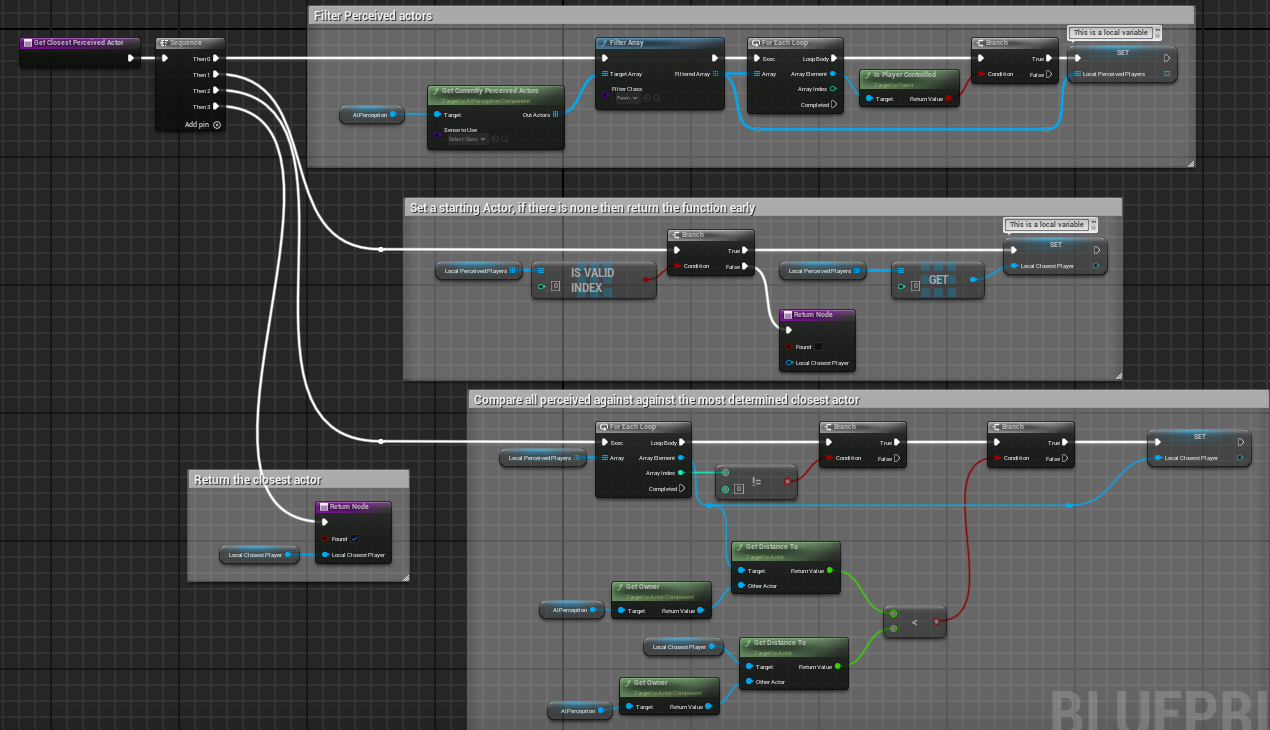 blazing bear
no no, have you tried having movement-safe variables in your custom UCharacterMovementComponent class and override the GetMaxSpeed function to return a different speed based on those variables?
you need client side prediction
as ColdSummer said, delgoodie does have a great series on this topic
I have done a similar thing not long ago and it works even with 400ms and 1% packet loss
wanton bear
hmm okay i bookmarked the youtube playlist for later thanks
blazing bear
np, even the first three videos are enough to get the hang of it, good luck.
subtle kernel
blazing bear
np, even the first three videos are enough to get the hang of it, good luck.
can you drop me a link please?
blazing bear
subtle kernel
can you drop me a link please?

https://discord.gg/uQjhcJSsRG
In this video I am introducing a series I will be making which explores the character movement component and how you can extend it in depth.
0:00 Intro
1:00 What is the CMC?
2:00 Do you need a custom CMC?
5:35 What does the CMC provide?
7:10 Outro
dark parcel
Nothing you can do to smoothly change the movement speed in blueprint if you are going to use CMC.
well maybe work if you tick "Server Allow Client Authorative Position"
But honestly, I would just bite the bullet and use CMC as intended.
blazing bear
yeah I think c++ is necessary, if you use bp only then I think GMCv2 could be worth it idk
wanton bear
blazing bear
yeah I think c++ is necessary, if you use bp only then I think GMCv2 could be wo...
coop game though? server authority isnt really necessary, just want whats represented to other clients to be as accurate as can be
dark parcel
wanton bear
coop game though? server authority isnt really necessary, just want whats repres...
One of the important bit is to toggle the bit value in FSavedMove, this should be what dictates the movement state and the movement speed.
Doing it in blueprint is just fighting the system imo and I don't think there's a way to toggle the bit flag in blueprint.
any other attempt will just result in rubber band / de-sync
wanton bear
yeah the youtube playlist basically says my use case is just about okay for janky blueprint solutions but i'm going through it anyway. probably a good entry point for learning c++
only know python and hlsl 😅
upbeat basin
Is the recommended/modern way of network profiling still the Network Profiler under the engine binaries?
thin stratus
upbeat basin
Is the recommended/modern way of network profiling still the Network Profiler un...
Unreal Insights
crisp shard
while testing in standalone, i sprint with one character and it drains the stamina of both characters and even changes the camera of the other client. this has never happened before and i don't know what could be cuasing it
LogScript: Warning: FLatentActionManager::ProcessLatentActions: CallbackTarget is None.
this is a message i get in the server logs when sprinting and then it will sprint for both clients for some reason as if im inputing on both characters at the same time , and it doesn't alwasy do it
im almost guessing it's thinking im controlling both somehow? i have both windows up at the same time while doing it but im only inputing on one screen at a time so idk if that could be the reason but it's the left shift key
i also added an "is locally controlled check" on the entire sprint function and it still does it on both clients