#multiplayer
1 messages · Page 203 of 1
 thin stratus
e.g. BP_GameMode_Game which is the parent of BP_GameMode_Gameplay and BP_GameMode_Lobby
And the GameLength stuff should then happen in BP_GameMode_Game
Otherwise you'll possibly lose the length between travels cause you forget to parse it in 15 places.
 spark otter
thin stratus
Keep in mind that for this to work properly across all travels, that your GameMo...
spark otter
thin stratus
Keep in mind that for this to work properly across all travels, that your GameMo...
Alright
No exaggeration
You've made me cry
I've been working on this, for 10+ hours a day, three days straight
and it's fixed
thank you
 rustic sable
do actors (replicated) dropped in the level, like say a PCG manger, get a default owner?
 zealous knoll
When using GameState that is no GameStateBase (because I want to add muliplayer later)
I lost my camera point of view.
I am using Set View Target With Blend
and I am not possessing any character
just using the player controllers
How to use with my setup the Camera point of view?
with a GameStateBase works normal
Point of view goes to 0,0,0
should I replicate the camera view? with Run on server Event?
thin stratus
spark otter
thank you
No worries (:
thin stratus
rustic sable
do actors (replicated) dropped in the level, like say a PCG manger, get a defau...
Probably not.
rustic sable
thin stratus
Probably not.
Yeah, all good tho
 vivid seal
Hey guys, I'm having an issue with a FastArray property where after some time of constantly replicating items in the array, my client gets disconnected with the error "Array Property Improperly Terminated" inside of ReceiveProperties_r(). Anyone know what might cause this? I'm looking at the function but don't really know what exactly is going on here. Something about the ReadHandle not being 0?
 plucky pewter
I have a question: For those of you working or have worked on Multiplayer projects using dedicated servers.
What process do you go through when designing?
When your writing code for the server and client do you build up most of the design using the null subsystem and THEN integrate a backend service?
Or do nail down the backend service provider first and then implement systems as you go? piece by piece?
 floral sail
In what cases do I need to replicate Mesh in Character?
I'm asking because that checkbox fixed one nasty bug where mesh rotation was desyncing under rare conditions. Apart from that bug, there were no issues whatsoever, thats why I don't fully understand why this checkbox was needed for me.

I used this simple function for SetRotation based on Server's data. In most cases it was working perfectly without Component Replicates, but under rare conditions (that I was able to reproduce in game, but not in code) it was leading to desyncing Character Mesh rotation. Actor's rotation was perfectly synced, but not Mesh rotation.
My initial thought was that if Actor replicates, then Mesh replicates automatically, but apparently not?

 bitter robin
Rotation shouldnt be replicated with RPCs Should have a replicated variable. Why? because if the actor isn't relevant for a person then they wont get the RPC, then when it becomes relevant they wont know its rotation.
floral sail
Oh wow thats actually true, thanks.
That wasn't an issue, but a good note, I need to pay more attention to relevancy factor.
Hm turns out when Mesh ComponentReplicates is set to true, the Mesh starts to twitch on the Clients with ping. Guess that solution is bad then.
 lost inlet
And this checkbox is commonly misunderstood anyway. It'll only replicate component properties that are actually set to be replicated
It won't just replicate everything about that mesh
 ruby lodge
@meager spade right now if I disable the replication for the weapon mesh, it spawns for the client but it doesn't get attached to his hands
also, it's animations do not play
well, the emitters do get spawned at the correct location etc like before, and the warning isn't popping up anymore, but neither is it attached for the clients view nor is it playing animations. So the server can see everything correctly with all weapons being attached for him and clients and the animations but the client cannot see any weapon animations or anyone having weapons actually attached. Instead they are just spawned at the position they were, well... spawned at, and then stay there
ruby lodge
inside of the function called on the second image on the actor component "InventorySystem", it attaches the weapon


Now, I know that it is not attaching it on the clients in any place here so I would say that a repNotify structure variable could be set on "Server_CreateAndEquipLoadout" and inside of it's function it calls create and equip loadout. What do you think?
also regarding the animations, I am playing them locally on everyone now as well
 slim jay
I’m using the Chaos physics system for vehicles, but the movements aren’t smooth in server. Is it possible to make smoother gameplay on the server without using a plugin? If you think it’s difficult without a plugin, which plugin would you recommend?
 grand kestrel
@thin stratus @pallid mesa Epic asked me to PR a change to CMC's NetworkSmoothingMode that separates out Translation/Rotation
Exponential is great for translation but Linear is way more stable for rotation
This also means you can conditionally disable interpolation for rotation (only) at the start of a montage/ability, so that it doesn't interpolate it in a wide arc for high mobility abilities, which makes sim proxies significantly more accurate
Hopefully be in 5.5, figured you guys would want to know about this 🙂
 fossil spoke
grand kestrel
<@94211915902889984> <@158247241000157185> Epic asked me to PR a change to CMC'...
fossil spoke
grand kestrel
<@94211915902889984> <@158247241000157185> Epic asked me to PR a change to CMC'...
Interesting, I noticed this as well between the 2 modes and actually did this for us internally lol
grand kestrel
fossil spoke
Interesting, I noticed this as well between the 2 modes and actually did this fo...
I did it internally and it worked so well that I posted on UDN asking why it wasn't in the engine 😄
Epic agreed and asked if I can PR it
 grand kestrel
Its a decent quality boost for Lyra too, since it uses Linear to get stable results from TIP/Aim offset, losing out on the exponential translation
fossil spoke
Be interesting to see how long it takes for them to merge it though 😛
grand kestrel
Since its through UDN hopefully I can just poke them again and speed it up
 twin juniper
For a Weapon Fire Rate, it must be fast (sometimes a weapon shoot 20 times per second..), would it be okay to verify with the server directly or would it be too slow?
I'm also thinking it should be validated on the client first and if it is correct, then the server needs to validate as well before shooting a single bullet.. If the client says no then the server would have also said no so we can skip the server request and directly say no
Tho I wanted to use shooting predicting but if I use this for the fire rate, the shooting will be slower I would think..
--
Like Client click -> Verify Fire Rate (via Server which is slower..) -> If valid, Predict Visuals -> Trace Hit via Server
Will this slow down and feel bad to the player?
Since my game is coop, would it be possible to just not check the fire rate? let the clients be able to hack and set 0 fire rate..
 short arrow
twin juniper
Since my game is coop, would it be possible to just not check the fire rate? let...
short arrow
twin juniper
Since my game is coop, would it be possible to just not check the fire rate? let...
It's totally fine to allow some things to be "hackable" and rely on your anti cheat. Fire rate is not one of them.
twin juniper
short arrow
It's totally fine to allow some things to be "hackable" and rely on your anti ch...
Ok thx
 pallid flame
I have a small project I'm working on that's working for singleplayer but I plan to turn it multiplayer later
Should I immediately start working on preparations for that or can I worry about it later on?
fossil spoke
@pallid flame Multiplayer isnt something you just add on at a later date.
You either build a Single Player or a Multiplayer game from the start.
You will end up redoing pretty much everything about your game to make it multiplayer after it being singleplayer
pallid flame
fossil spoke
You will end up redoing pretty much everything about your game to make it multip...
I see
Luckily I dont have too much already established so it's not the end of the world
From what I've heard this is probably a complex topic- but what would I have to begin to do to start that conversion process?
fossil spoke
There is no conversion process...
I think you just need to start researching the multiplayer side of UE
Replication
RPCs
Etc etc
How could you hope to "convert" your game if you have no idea what tools even exist to allow you to make a multiplayer game.
pallid flame
You're right
And what I mean by conversion is taking what I have and rewriting/recreating it for multiplayer compatibility
Not exactly what it suggests but yeah
Thank you though Ill look into it
 feral narwhal
Im trying to set a player outline on enemies (any controller with a different teamID), however I am now realizing I cant access the controller from clients on the character. Anyone know the correct way I should be doing this?

 charred island
is there a way to register event handlers on fields in the player state? I want to update GUI in a race game to reflect the players' positions, which are stored in the PlayerState objects
zealous knoll
feral narwhal
Im trying to set a player outline on enemies (any controller with a different te...
if I understood you correctly, you are facing what I realized just this morning: Player Controller cant be accessed by other clients.
I am right now re-coding my PC variables and logic to Player State 🥲
I have a question regarding where to put some info, GameState or PlayerState
for my TurnBase game:
-The amount of remaining actions at all (lets say 2 of 4 to choose: walk (and how much steps), jump, attack, use inventory).
-If the player consider he finished his turn (so the next player is allowed to play)
Maybe I track them in Player State but I check them always in Game State?
 lament flax
pallid flame
I have a small project I'm working on that's working for singleplayer but I plan...
lament flax
pallid flame
I have a small project I'm working on that's working for singleplayer but I plan...
Side note: if you make a MP project, you can turn it into a single player game later it needed
With almost no changes
zealous knoll
lament flax
With almost no changes
what typical changes would be?
lament flax
zealous knoll
what typical changes would be?
Depends if you have some custom MP backend or if you are using EOS
If you use plain UE MP with a listen server then you got nothing to change
feral narwhal
zealous knoll
if I understood you correctly, you are facing what I realized just this morning:...
yeah, still trying to fix it
lament flax
Since in singleplayer the playrr is the server
zealous knoll
using 2 players standalone everything is fine, Iam switching to multiplayer very early in dev
but
2 clients print Client 0 two times
this is my GameMode, I tried to find some tutorial, cant find how this was made, I did it in the past but cant remember
 pallid flame
I have so much to learn..
zealous knoll
the set up is that the Player Controller doesnt possess the pieces of the board (turn based), just command them as they are Ai
zealous knoll
pallid flame
I have so much to learn..
yes, me too
pallid flame
Just when I was getting the hang of single player coding
Its that much harder to code for multiplayer than singleplayer, right?
lament flax
zealous knoll
using 2 players standalone everything is fine, Iam switching to multiplayer very...
Look at the basic of MP
This compendium is meant to give you a good start into multiplayer programming for Unreal Engine.
Here its normal because the game mode only exists on the server
Also, if you test your game in PIE, either play as listen server or all as client (if you want a dedicated server)
lament flax
lament flax
Also, if you test your game in PIE, either play as listen server or all as clien...
Its in the pie settings
lament flax
pallid flame
Just when I was getting the hang of single player coding
Its *that* much harder ...
Yes its more work
- you got race conditions
- have to handle lag
- more optimisation
- prevent cheating
zealous knoll
lament flax
A good start is https://cedric-neukirchen.net/docs/category/multiplayer-network-...
yep Im with that, so far cant see a specific setup of blueprints that says if I spawn PCs or not
lament flax
zealous knoll
yep Im with that, so far cant see a specific setup of blueprints that says if I ...
Are you doing BP only ?
Multiplayer on BP is very hard and not ideal
I personally switched to cpp when starting to make my project MP
zealous knoll
I would love to learn cpp, but so far I didnt find anything I couldnt do with blueprints, and deadlines on client projects are tight
 pallid mesa
grand kestrel
<@94211915902889984> <@158247241000157185> Epic asked me to PR a change to CMC'...
pallid mesa
grand kestrel
<@94211915902889984> <@158247241000157185> Epic asked me to PR a change to CMC'...
thats pretty useful!
pallid mesa
grand kestrel
Its a decent quality boost for Lyra too, since it uses Linear to get stable resu...
does linear use some more bandwidth?
slim jay
Chaos Physics vehicle is not running smoothly on the server. What is the solution for this?
 knotty bane
can someone help with this problem, when the server takes the item he takes it succesfully but if the client takes the item the server receives it instead of the client i did switch authority and use a multicast to attach the mesh to the player charcter they both use

still a bit new to the multiplayer scene so happy to hear what is wrong here
 shrewd ginkgo
I want to make call phone skill for my killer. is it correct way to do it.


Btw all players connected variable contains player controllers
zealous knoll
slim jay
Chaos Physics vehicle is not running smoothly on the server. What is the solutio...
zealous knoll
shrewd ginkgo
I want to make call phone skill for my killer. is it correct way to do it.
where it is this logic, Player Controller?
Can I detect from GameState who sent data through an Interface? because adding ID the client could cheat.
maybe sending the pawn in the interface?
a different interface for each player ? it will be 2 players only, but maybe this is not good and anyway Im curious how this is made with more characters.
maybe sending the pawn?
the pawn or the player controller ?
 dark parcel
multicast everywhere 😔
 marsh hamlet
Hi. I have a PlayFab server running with the correct IP and port numbers. I am trying to connect it with IP and port parameters like "Game.exe 12.23.3.22:30000". While development and test builds successfully connect without issues, the shipping build client can not connect. Any ideas what might be the reason? Or how can I debug it. Basically same client build with everything same, only shipping configurated client fails to connect to server without any errors. Please help.
 blazing spruce
knotty bane
can someone help with this problem, when the server takes the item he takes it s...
blazing spruce
knotty bane
can someone help with this problem, when the server takes the item he takes it s...
The reason it works on the server and not the client is because you've marked the event as run on server, so even when a client triggers the event it'll run on the server
You don't wanna use any getters that take in an index like GetPlayerCharacter(0), GetPlayerController(0) ect, if the index is 0 it'll only ever get the first player at the index of 0 every time.. you'll wanna use GetController inside the character class to get the player controller and GetControlledPawn in your player controller class to get your player character instead
You should use a RepNotify instead of the multicast, multicasts don't take into account relevancy whereas rep notify will update players of the change once they become relevant to it
Im not sure how your interaction code is setup up or what class this code is in but i would be passing my player character and controller through the interface so you can access them from every actor that has the interaction interface implemented
and give this bad boy a read - https://cedric-neukirchen.net/docs/category/multiplayer-network-compendium/
This compendium is meant to give you a good start into multiplayer programming for Unreal Engine.
knotty bane
blazing spruce
The reason it works on the server and not the client is because you've marked th...
thanks for the explanation man! makes more sense now🙌
shrewd ginkgo
zealous knoll
where it is this logic, Player Controller?
in thirdperson character
zealous knoll
shrewd ginkgo
I want to make call phone skill for my killer. is it correct way to do it.
if I trigger input "Interaction" and is true "is Murderer"
then I call an event
which executes in all, making a foreach loop of all players
triggering a sound at the location of those who are not murderer...
I am just a noob in multiplayer but I don think you should do this in character

this should be in the GameState or GameMode
I dont know what you mean by "call phone skill", but whatever is this that is triggered by "a murderer" in others that "are not murederers" it should be not made in character
the player trigger this "call phone skill", better through an interface
sending its PlayerController, player state, or pawn, one of the 3, I am not sure which one. I would say PC
then
Game State receives this interface, checks the identity (PC, PS or Pawn)
checking if is murderer
if is true
then in GameState you make the foreach to the others that are not that PC
because also GameState have already Player Array (an array of PlayerStates so if you compare with the sent PC, get PC from the PlayerArray)
I repeat, I am just a beginner, so maybe Im wrong, hope some expert pass by to confirm my approach
knotty bane
blazing spruce
The reason it works on the server and not the client is because you've marked th...
think i'm going the right direction here but now the interaction is not working as it should do you see a prob here or am i still way of


i included the interaction setup that is inside the character
blazing spruce
knotty bane
i included the interaction setup that is inside the character
The interaction input, is that on your character class? You shouldn't need that cast
knotty bane
this is inside the character class
 blazing spruce
You also dont need that Has Authority node either i dont think
blazing spruce
knotty bane
this is inside the character class
Yeah remove the cast, cause it looks like you're casting into the same class that you're already in
knotty bane
but that is needed to get the controlled pawn right so the server doesnt receive the item if the clients interact
blazing spruce
The controlled pawn is your character class that you're already inside of tho isn't it? the target should just be self
knotty bane
blazing spruce
The controlled pawn is your character class that you're already inside of tho is...
alright removed all that and i can interact with the item but its not equipped both on client on server side, the provided screenshots are inside the item that will be picked up


 neon summit
You aren't specifying parent to attach to
knotty bane
even if i use get player character -> mesh to parent nothing happens
neon summit
Pass the character into interface event
Set a variable that's replicated and set in interacting actor
knotty bane
neon summit
Pass the character into interface event
so a reference to the charcter for the parent to attach to?
neon summit
Well the parent would be the character mesh but yeah
knotty bane
So what should i change exactly cause i dont really follow
dark parcel

This only does it on server
since you have switch has authority
OnRep should be used for clients to receive update
knotty bane
ah okay
grand kestrel
pallid mesa
does linear use some more bandwidth?
Net bandwidth, definitely not, nothing is sent after the fact, nor is anything sent at a different rate/frequency, its really just the difference between FInterpTo and FInterpConstantTo (not specifically using those)
But CPU bandwidth? No clue, you'd have to profile, but based on the math I'm looking at it should cost nothing in terms of difference
Its just the math that changes when interpolating the sim proxy loc/rot
pallid mesa
grand kestrel
Net bandwidth, definitely not, nothing is sent after the fact, nor is anything s...
iirc they send some extra data for linear
grand kestrel
pallid mesa
iirc they send some extra data for linear
Oh, yeah, I had almost forgot
ACharacter::PreReplication sends ReplicatedServerLastTransformUpdateTimeStamp
 clear copper
Is BeginPlay called before or after OnPostLogin?
 wary island
Hello! Has anyone had a problem with ClientTravel only working in a packaged build but not in the editor? We have tried both the function and using the console command and both only seem to be working in a packaged build. We are using Unreal 5.4.3.
short arrow
wary island
Hello! Has anyone had a problem with ClientTravel only working in a packaged bui...
Pretty sure server travelling and the likes regarding seamless travel does not work in editor.
I'm not 100% on that it's been a while. But I'm pretty sure seamless doesn't work in editor
grand kestrel
clear copper
Is BeginPlay called before or after OnPostLogin?
You should expect PostLogin to be called later because it occurs from replication
But I don't think there is a clear requirement for this to be true, so you shouldn't rely on it being true
clear copper
grand kestrel
You should expect PostLogin to be called later because it occurs from replicatio...
That's what I thought
 sour cradle
I know this is a dumb way to do it but im super rusty with UE. Im just trying to figure out how to pass a variable to the server. So heres my issue. I am working within a widget and I'm trying to pass text to an actor that's in the map. But its not replicating from client to server and in theory it should here's my setup

when I pass that text variable to the actor which contains NewVar 1 text which has replicated selected in replication" It will only show on the client not the server
I forgot to mention the actor itself is also set to replicate
if I were for example to set the variable on the server it would replicate to the client though
dark parcel
sour cradle
I know this is a dumb way to do it but im super rusty with UE. Im just trying to...
You don't do RPC in widget, it is not replicated.
Route it through what your client owns. PC or character
sour cradle
ah ok dam so I gotta put the replication event in the actor itself then
sour cradle
hmm ok then so maybe I could just store them in the gamestate then
sour cradle
dam my idea didnt work
in the widget

in the gamestate

I expected the variable to pass from client to server but it didn't. I think gamestate may probably be the wrong blueprint class to use
even know I want to store variables there eventually
 sinful tree
sour cradle
dam my idea didnt work
sinful tree
sour cradle
dam my idea didnt work
You can't RPC to the server on an actor the client doesn't own. Clients should never own the gamestate.
sour cradle
ah ok that makes sense then
if the client has to own it then it gotta be player controller then
dark parcel
sour cradle
if the client has to own it then it gotta be player controller then
Read the pinned material on ownership
sour cradle
ok will do
clear copper
If I call OnPostLogin in my own gamemode, is there any reason to call the parent's OnPostLogin? Is there anything important in the base GameMode's OnPostLogin?
sinful tree
clear copper
If I call OnPostLogin in my own gamemode, is there any reason to call the parent...
Most of the base gameplay classes call separate implementable events from their actual functions... If you've created a GameMode based off of say GameModeBase, then GameModeBases' OnPostLogin would still be called. If you make a child of your own custom GameMode and had functionality implemented in the parent in OnPostLogin and you want that called in the child while also having additional logic in the child's OnPostLogin, then you would need to make a call to the parent.
clear copper
sinful tree
Most of the base gameplay classes call separate implementable events from their ...
That makes sense, thanks
marsh hamlet
I am trying to test local multiplayer connection with simple ip (127.0.0.1:7777) port cli parameters in packaged builds. I can not get it to work with shipping builds though. Everything else is just fine like development build or test build. What might I be missing. Any idea?
 thorn warren
Yo quick question, would it be possible to get multiplayer working on two devices running a different engine version?
sour cradle
@dark parcel thanks it took me a little while but I got the full grasp of it now. Its a bit confusing at first but its pretty easy once you get it
dark parcel
sour cradle
<@1050954229902213150> thanks it took me a little while but I got the full grasp...
takes a while for it to click to me
but yeah, it isn't hard once we get the grasp
sour cradle
I wish there was a sort of warning that would pop up whether or not its not currently owned. I noticed you could also setowner but I dont think its a great idea to use that
dark parcel
sour cradle
I wish there was a sort of warning that would pop up whether or not its not curr...
Yes you can setOwner but use with caution and within context. Issue with Set Owner is there can only be one owner
sour cradle
yeah I figured that if it were used in a multiplayer instance it would need planning otherwise something like a FPS would probably break the server
dark parcel
not to mention exploits etc
 modest crater
marsh hamlet
I am trying to test local multiplayer connection with simple ip (127.0.0.1:7777)...
modest crater
marsh hamlet
I am trying to test local multiplayer connection with simple ip (127.0.0.1:7777)...
By default, a dedicated server listens on the localhost IP address (127.0.0.1) at port 7777. You can change the port for your dedicated server by adding the command line argument -port=<PORT_NUMBER>. If you change the port that your server is using, you will also need to change the port when connecting the client to the server.
marsh hamlet
dark parcel
not using steam is unimaginable for me
Not port forwarding. I simply want to connect to a server instance on the same machine. This is because I had a problem connecting to PlayFab and I wanted to see if that works locally in the first place. Note that development build, test build configurations connects successfully. Only shipping client is a problem.
marsh hamlet
modest crater
<https://dev.epicgames.com/documentation/en-us/unreal-engine/setting-up-dedicate...
Do you mean the shipping build configuration changes ports somehow? Using a development or test build with the exact same IP and port numbers, everything is OK, and the connection is successful. Only the shipping build can not connect in any way.
sour cradle
you can change that in the engine.ini aswell cant you?
thin stratus
marsh hamlet
Do you mean the shipping build configuration changes ports somehow? Using a deve...
What do your logs says? I assume your server remains as a Dev build?
marsh hamlet
thin stratus
What do your logs says? I assume your server remains as a Dev build?
It has no mention of incoming connection. And plus I did a network trace by WireShark. And that tells me in Shipping build, there is no request from the client process even.
thin stratus
And you don't have Client Logs? Did you consider enabling Logs in Shipping?
You have a Source Build anyway after all
marsh hamlet
thin stratus
You have a Source Build anyway after all
I didn't do that yet. I first wanted to learn if there is a bug or something lately or if I am missing something. I guess I will have to do that.
thin stratus
Not aware of anything.
You might as well make a fresh project with just some UI to connect and to tell you if you are connected and trying that out
That way you know if it's UE or your project.
marsh hamlet
thin stratus
That way you know if it's UE or your project.
I made an empty clean ThirdPersonTemplate project, and that didn't connect as well.
thin stratus
Then you'll need to some logging I'm afraid
If you have OSS Null enabled and connect via IP; there isn't too much that can go wrong on UE's side
marsh hamlet
thin stratus
If you have OSS Null enabled and connect via IP; there isn't too much that can g...
Thx for the help mate. I will need to dig down more.
sour cradle
@marsh hamlet so I had a similar issue
It was AVG firewalling the connection even though I set firewall rules
Try disabling your firewall and antivirus for a second
And yes it firewalled it on localhost somehow
 molten vine
Not sure if this is a multiplayer issue, but I'm currently tearing my hair out over this. I'm trying to make a first person killcam system using ue5's demonetdriver recording system. I've got the basic fundamentals of the system working. It records the replay, before loading a duplicate level to play the replay in before returning to the level after the replay is played. In this system, my character is a fullbody character, running no procedural animations(for testing purposes) with no replicated pitch variables (also for testing purposes) And I am setting my view to the view of the killing player in the replay.
However, The mesh of the character lags weirdly in the replay, constantly clipping through the camera and not updating quickly.
Notes:
Animations play fine
Particle effects play fine
The characters do not move glitchily while on the server, so it is not a replication issue. And adjusting network parameters does nothing to help.
What I've tried:
Both of my clients have stable 50fps frame rates.
Both clients are recording at a minimum frequency of 30 and a maximum of 50.
My camera has an interpolation to follow the character's head bone. It is definitely the mesh that is glitching around.
Video: https://drive.google.com/file/d/1g9dwXZu2w16DVN1ZNIWUzHsUk8lbEwUP/view?usp=sharing
 compact flame
This event works for spawning and possessing but once a client possesses no one else can see the pawn move its just there. even when the player that possessed it is moving

 twin juniper
can someone help me, this isnt working on the client side
but on the server it works just fine
PossessedCharacter (i.e possessed pawn) is set to be replicated as well
 thin stratus
I'm not sure you want to preserve the Controller. Cause that has some extra stuff going on in the GameMode
twin juniper
got it. The main thing I want to preserve though is the PossessedCharacter though
even on the client, the function's being called, apparently as i'm testing it out but it's just not saving the character
shrewd ginkgo
how can I change an variable in ingame gamemode from lobby level (menu gamemode)
bitter robin
You make a RPC that runs on the server in the game state and set the variable there.
shrewd ginkgo
Can you tell me step by step, I may not be able to do it because I'm a beginner.

this is game mode
I want to change spawn rate from lobby

it doesnt work because I use menu gamemode in the lobby
thin stratus
That's not possible that way.
There is only one GameMode at a time.
Why do you need to do that?
thin stratus
bitter robin
You make a RPC that runs on the server in the game state and set the variable th...
GameState can't run ServerRPCs...
shrewd ginkgo
because I have 2 diffrent game mode for menu and ingame
thin stratus
Then you need to either persist the Data outside of the GameMode, or use the OptionsString when ServerTraveling.
bitter robin
Oh? I remember it wrongly then, I suppose it would go in the playercontroller. Eitherway, it seems I'm misunderstanding his goal too, I thought he was trying to set the game settings while already in the game. But he is just setting the game settings it seems before the game starts.
thin stratus
Yeah, they are in the Lobby and want to set Settings that are used in the Game.
And the easiest way to get some of those settings across is with the OptionsString
shrewd ginkgo
like that ?
 thin stratus
Yeah, you can append more options to that Command
You currently have servertravel <mapname>
You can add more like this:
servertravel <mapname>?<key1>=<value1>?<key2>=<value2>
So e.g. add 2 more pins to your append node.
In one you type ?SpawnRate=
And the other one you connect your SpawnRate variable to.
Then in your Game GameMode, in the BeginPlay function, you can get the OptionsString, which is basically the string you constructed there, and grab the SpawnRate from it again.

Or like this if it's not an int originally
 shrewd ginkgo
thank you very much, I was very stressed because I couldn't do it
 thick flint
Hey i have a strange problem, when i attack a other player in multiplayer with my melee combo the player who IS attacking are getting damaged instead of the other player.
I used my system before and it worked fine. But after i had a file loss, i reworked it and it woks not the right way. I can show the bluprints in ScreenShare or Screenshots who ever needs it
(The health variable is Replicated and stored in a component. The Healthbar also works fine. Its just the damage that doesnt get appllied right)
 little pumice
thick flint
Hey i have a strange problem, when i attack a other player in multiplayer with m...
little pumice
thick flint
Hey i have a strange problem, when i attack a other player in multiplayer with m...
track down what actor is a target and where it's passed (function argument or "reference to self" etc)
thick flint
little pumice
track down what actor is a target and where it's passed (function argument or "r...
i fixxed it with the initial Apply Damage node from ue5, then the damage gets dealed right. But the client damaging the host with double damage, and i dont know why
 little pumice
mb missing HasAuthority check? do stuff on server not on both client and server (not considering client prediction here)
thick flint
little pumice
mb missing HasAuthority check? do stuff on server not on both client and server ...
where would i be check the authority? When overlapping the enemy? BeginPlay? Or when the input is triggerd?
little pumice
depends on your "architecture". Looks like you are lacking of "ue client-server networking" basic knowledge
thick flint
little pumice
depends on your "architecture". Looks like you are lacking of "ue client-server ...
Oh god damn yes xD

Wow i fixxed it
thanks
it works
little pumice
yeah but now client see result with a delay (network latency) it may be expected behavior or may be not (from game design perspective) 
 silk nexus
After adding a player's pawn to the SeamlessTravelActorList and triggering Seamless Travel, that player's pawn reverts to the game mode default. This attached wrapper function just calls the default GetSeamlessTravelActorList(bToTransition, ActorList);
What am I doing wrong?

This results in all listen server and clients getting the default pawn

Is there any more detailed documentation on seamless or server travel? I've read the official documentation
https://dev.epicgames.com/documentation/en-us/unreal-engine/travelling-in-multiplayer-in-unreal-engine?application_version=5.3
And
https://wizardcell.com/unreal/persistent-data/#persisting-data-across-seamless-travel
But so far I don't see a way to solve this problem.
Epic Games Developer
An overview of how travelling works in multiplayer.
WizardCell
Compendium for traveling, disconnecting, and persisting data across such scenarios
clear copper
I'm having an issue with a client accessing a variable. I have a replicated struct variable in my GameState that is just a String and a Texture2D. The host can open a widget and get that struct data with GetGameState to populate its widget, but the client can't. A replicated variable on the GameState should be accessible by every client, no?
thick flint
little pumice
yeah but now client see result with a delay (network latency) it may be expected...
thanks, youre cool
 gray sparrow
how can i set team variable in my controller before the game start?
silk nexus
gray sparrow
how can i set team variable in my controller before the game start?
Where do you store it?
short arrow
CMC sends out a multicast about movement information constantly, Does anyone know if the cost is relatively the same to loop through a list of relevant players and just send them each an RPC rather then doing a multicast? I need a way to send specific players information about something. But multicast is not ideal due to the fact that it's based on net cull distance
https://i.gyazo.com/ecadcf517cfb34d1a219412b37918e56.png
 gray sparrow
silk nexus
Where do you store it?
gray sparrow
silk nexus
Where do you store it?
idk thats why i ask you
i have a plugin with a c++ function that read very controller and need their team variable.
but the function start on begin play
silk nexus
I store mine in a custom player state
silk nexus
The player state has a variable that stores the associated team, and I also increased the net update frequency
You should always check to ensure it's not null, but yeah probably
gray sparrow
and its replicated? every controlelr has his own team in player state?
can you maybe send me the code? or a picture?
silk nexus
Just the player state
gray sparrow
how do you replciate the varibale to each controller
can you send me maybe a screenshot?
silk nexus
According to the network compendium, I understand the player state and its variables are mirrored in the client
For the specific client, that is. So, Client 1 has Player State 1, and the server has a Player State 1 which is effectively the same as the client 1 Player State 1.
gray sparrow
? i need every controller has its own team variable choosen in lobby
can you send me a screeenshoot how you did that maybe?
silk nexus
With the previous information about Unreal Engine's Server-Client architecture and the common classes we can divide those into four categories:
I don't store team in my player controller, only player state
gray sparrow
how can i store it in my player controller? -.-
silk nexus
You could just add it as a variable?
silk nexus
Why is there no time? Why don't you just add an event that checks on all the clients loading in?
short arrow
short arrow
CMC sends out a multicast about movement information constantly, Does anyone kno...
Turns out the answer to this is, multicast is actually cheaper then individual RPC's due to the way I believe UNetDriver handles sending packets. Without going into detail creating an individual RPC for every actor would bypass some optimization techniques. It's relatively minor but would be less efficient in a large scale game where many factors are at play
If you've got about 10 players in your game and you chose to handle everything through RPC's instead of multicasts it should be totally fine, though not good practice at all. In large scale games though you would likely lose a considerable amount of cpu time
 short arrow
are you not getting errors trying to access player controller 1?
is this local multiplayer
oh yeah so player 1 controls work but player 2 controls doesn't
I remember that being a common problem
I remember it being more involved then that, and also the replicated events your making aren't relevant for co op multiplayer, it's fornaught
until someone comes and offers a more direct solution I remember having this problem years ago and the only way I could get it to work was by following this tutorial
https://www.youtube.com/watch?v=98hu9MPm19c
It used the old input system but it should work the same way if you swap it out

This Video:
In this video, we flesh out our GameMode class and begin spawning in a player Input Receiver at each of the available Player Start points in the level.
0:00 Intro
00:19 Recap / Tidy
00:44 Get Player Start Points
01:24 About Player Start
04:50 Spawn Input Receivers
Multiplayer:
In this playlist, we'll look at anything and everythin...
 charred crane
I have a listen server as my player party, if I wanted to have a global chat for all logged in players (that aren't in game), would I need a server for that? Or is there some other way?
short arrow
charred crane
I have a listen server as my player party, if I wanted to have a global chat fo...
No matter what you'd need a server, it could be like a steam lobby, or a listen server everyones connected to in game, or a server running off your computer, or something similar. But somewhere something has to host that information to receive and send the chat data
I think a steam lobby is probably your best bet? But I thinkt here's a cap no how many players can be in a lobby
charred crane
Yeah sorry i meant would i need a dedicated server
There would be the party chat for the people in a listen server party out of game, the in game chat which is on a dedicated server, and then I want an out of game global chat that could be between parties.
 kindred oyster
Hey, I have a Question. I Have an Actor Component on PC that should also do Server Events and from there Multicasts. This seems to not work. Isn't this possible?
Ok, the component on playercharacter seems to work
is it true that Player Controler Component cant do Server / Multicast Calls or was the reason a other?
sinful tree
kindred oyster
Hey, I have a Question. I Have an Actor Component on PC that should also do Serv...
PlayerControllers and any of their components only exist on the server and the owning client. You cannot use them to communicate to other clients.
You can send an RPC to the server on a player controller and then have the server replicate back through another actor that is replicated on other clients, but not the player controller itself.
kindred oyster
in this case I want spawn an actor RPC to Server
and then Multicast an Niagara on clients
I thought this will work - Maybe the PlayerCharacter is also the better choice for this
sour cradle
So I got a pretty unique issue I don't think I'll be able to get around. I am constrained to blueprints and can't install plugins BTW it's part of the ruleset of my dev environment.
I'm trying to find the local session after it's created. Even if you use find sessions it doesn't find the local session
I'm adding that information to a structured array and want to append a GUID to the structure but I can't seem to grab the local session. Information
sour cradle
Well I found a funny work around
I could just pass the server name to the player controller and to the server. Have the server run a compare and send the data back to the client
but this in my opinion is not the greatest way to do it
 left heath
So I have a geometry collection component I have been using for destructible scenery. It works great and how I want everything to interact with other physics objects. It even works over networked servers just fine as well. The only issue is the "WAY" it decides to break is different for each client. I I'm having trouble finding resources that speak on this specific issue, with geometry component parts. Anybody have any ideas on how to approach syncing the broken pieces of a geometry collection across multiple clients?
dark parcel
kindred oyster
and then Multicast an Niagara on clients
So look at this, every client only have their own PC yea?
What you are doing is running a server rpc from client. So you are telling the server version of your PC to run a multicast event. That multicast event will run on all machine that has the PC except the other client doesn't have your PC so how do you think the other client will run the Spawn Niagara from a controller they never know to begin with?
 chilly haven
Hi,
About replication.
I'd like send frequency of certain unreliable data to each client to decrease over distance,
i.e. send more updates as an actor gets near a client.
My understanding is that Unreal has nothing like that? It's binary relevance: send at set frequency or don't send.
Is that right? Anyone do anything like this?
Thanks
 hollow eagle
chilly haven
hollow eagle
chilly haven
I guess that's the closest but not sure if would give enough control, e.g. does it only kick in when BW is saturated?
hollow eagle
it's not necessarily about bandwidth, it's also about server load. But if you have extra bandwidth and CPU to spare why would you want to send things less?
kindred oyster
dark parcel
So look at this, every client only have their own PC yea?
What you are doing is...
Ok, because every Client has only there own PC. And all clients has all characters (pawn). Right?
I saw a Table where is a Overview need to refind them and save it
chilly haven
hollow eagle
it's not necessarily about bandwidth, it's also about server load. But if you ha...
To minimize costs. Lower BW and CPu means I can run more dedicated servers on a host.
Or, the dedi can support more players
hollow eagle
Which is why you set bandwidth limits properly and NetUpdateFrequency.
NetUpdateFrequency is how often an actor is considered for replication.
That doesn't mean it'll actually get sent that often, it's just how often it is checked. And priority will throttle it further if there's a bunch of higher priority actors being considered in a network tick.
chilly haven
NetUpdateFrequency is fixed though
hollow eagle
yes, but priority isn't
You have to be considered for replication to be able to check a distance and adjust priority.
chilly haven
I can experiment with priority but am skeptical it can fit my case
hollow eagle
It's literally built for this case.
Net update frequency doesn't make sense to be adjusted based on distance because it's not a per-channel option - it's how often the server evaluates an actor for replication to all channels. And again, you have to be considered for replication to decide whether or not to replicate that tick.
chilly haven
For example if an actor is far, I might want to update some data every 2.5 seconds, but if near, every 0.25 seconds, and lerped for inbetween distances. Per channel.
hollow eagle
And priority will do that, just not with second granularity. If nothing else is replicating you wouldn't want to throttle that much either.
The engine has controls for bandwidth limits - even per-connection dynamic bandwidth limits.
For CPU you're going to have a better time using something like push model (or even moving to iris) if replication is taking up a big chunk of CPU time.
chilly haven
iris is live?
hollow eagle
Iris has been available for multiple versions and is beta in 5.4.
chilly haven
ok. will look at that too. cheers.
Any idea how much CPU and BW it saves, any case study done?
dark parcel
@kindred oyster

 nova wasp
chilly haven
Any idea how much CPU and BW it saves, any case study done?
nova wasp
chilly haven
Any idea how much CPU and BW it saves, any case study done?
You could figure this out pretty quickly by just creating a situation with lots of replicated properties to poll and just testing it?
It's more or less a cvar to toggle on and off, but you might need to swap some fast arrays to iris fast arrays
chilly haven
great, if it is that easy I'll give it a go with my current project sometime.
kindred oyster
dark parcel
<@332630760517271562>
Wow yeah thanks
 pulsar meteor
i'm on unreal engine 5.4.3, and i'm trying to set up local multiplayer but whatever I do I can't get inputs from player 2 to work. its not the hardware, and the player controller exists, but it's just not taking input, anyone know whats going on?
 hybrid crown
Little question, i've made this modifications in replication source code of AActor :
bool AActor::IsNetRelevantFor(const AActor* RealViewer, const AActor* ViewTarget, const FVector& SrcLocation) const
{

// ...


    return !GetDefault<AGameNetworkManager>()->bUseDistanceBasedRelevancy ||
            IsWithinNetRelevancyDistance(ViewTarget->GetActorLocation());
}```

(Basically, looking for viewTarget location instead of src location). I mind if someone already did the same and wonder about bad practice ? Or issue ? The goal was to avoiding modifing this for every actor of the game for spectator system.It's a pretty pointless change because SrcLocation is already based on view target.
hybrid crown
Hum, this enter in conflict with what Wizard say in his article.
or i miss something
hollow eagle
What do you think this conflicts with?
Oh, I see. I don't know if he was looking at an old version of the engine or what, but at least as of 5.4 that change would do nothing.
hybrid crown
Hum dunno, i'm in 5.4 but it doesn't look like the view target is taked
only the src loc
hollow eagle
SrcLocation comes from AController::GetPlayerViewPoint. If you want the viewtarget to always be the viewpoint then override that function.
hybrid crown
will look into it
yeah, cause the issue is the Pawn we are viewing -> replicated. But not the actor around him.
hollow eagle
Look at the implementation of APlayerController::GetPlayerViewPoint. It might not do what you want in all situations, override and adjust to your liking.
hybrid crown
thanks, will do it !
pulsar meteor
lost inlet
Well how is your input implemented?
Enhanced input
lost inlet
pulsar meteor
Enhanced input
yeah that isn't really adding detail, detail would be showing your implementation
hybrid crown
hollow eagle
Look at the implementation of `APlayerController::GetPlayerViewPoint`. It might ...
so, dunno if you already face that but. As the out location is LastSpectatorSyncLocation
When we spectate, but Spectate is local, so we should like send a RPC from the PC every X second to sync the loc ?
hollow eagle
it already does that
pulsar meteor
lost inlet
yeah that isn't really adding detail, detail would be showing your implementatio...
I guess I don't really know what to show. I've got a character, it works, it takes inputs I've set up with enhanced input, I create a local player, but the local play won't take input from additional controllers. What should I show you here?
lost inlet
the input events
pulsar meteor
It's nothing special, one moment I'll send a pic
pulsar meteor
lost inlet
the input events
heres the input events
 lost inlet
and this is on what blueprint? input events aren't networked
pulsar meteor
player controller
lost inlet
and what happens, did you add a breakpoint to see if it triggers?
what PIE mode is being used?
how do you enable your input mapping context?
pulsar meteor
lost inlet
and what happens, did you add a breakpoint to see if it triggers?
it works for one not the other
pulsar meteor
lost inlet
what PIE mode is being used?
both seperate window editor and standalone
pulsar meteor
lost inlet
how do you enable your input mapping context?
the default gamemode setup
hybrid crown
hollow eagle
it already does that
Thanks
For info this this one : GetFocalLocation()
who is responsable
pulsar meteor
lost inlet
since game modes only exist on the server
i'm only running one client
its a local game
lost inlet
yes and clients don't have game modes
pulsar meteor
also its the only context I have in default contexts it assigns it automatically, I didn't mean game modes
launches as server, same thing
wait, it works if I launch as 2 clients, now i'm confused
or rather a server/ client
so it detects input if I launch as a listen server and a client, but that's not what I want. so I gotta be missing something, any thoughts?
I also just found out If I set the second player controller to use the first player controllers controller, it swaps properly, but the second player controller still isn't recieving input
 karmic jacinth
I'm curious if it is possible to only replicate certain properties of a core component? In this case I want to only replicate part of a Capsule component. Should I use a Replicate Property on my parent class (in this case a character) to control the replicated values or is there an other way to do this?
thin stratus
karmic jacinth
I'm curious if it is possible to only replicate certain properties of a core com...
Every Class controls what variables are replicated. You'd need to alter the Capsule Component either via Source or via a ChildClass that overrides the DOREPLIFETIME calls.
 hollow bridge
What are the consequences of running low tick rate on a dedicated server in terms of collision / ai / movement?
karmic jacinth
thin stratus
Every Class controls what variables are replicated. You'd need to alter the Caps...
Ok, well I guess it will be just simpler in my case to use a specific parent rep notify variable which will control the capsule component state. Thanks for the info!
thin stratus
karmic jacinth
Ok, well I guess it will be just simpler in my case to use a specific parent rep...
Correct, that's what one usually does.
 undone needle
So, easy question, what would be the best approach to create a server side unique ID generator that players can request from and increments everytime a player requests a new ID? Should I simply put in on GameState? Or is there a better solution I am not seeing?
short arrow
undone needle
So, easy question, what would be the best approach to create a server side uniqu...
New GUID creates a new ID everytime you call it
undone needle
Forgot about that, but I'm afraid it will slow down my DB if I index it by GUID instead of integer
short arrow
Wonder what makes you say that. I think an FGuid is 16 bytes compared to an int32 of 4 bytes. But these days that doesn't mean much
I could maybe see if you're looping an excessively large amount of times through an excessively large amount of FGuids
But is it possible you're worried about nothing?
undone needle
for a brief moment I was under the impression that it was 128bytes...
you're right its not that big a deal for my project, will probably incorporate that, thanks!
short arrow
undone needle
for a brief moment I was under the impression that it was 128bytes...
That's bits :p
There are 128 bits in 16 bytes
undone needle
yeah lol
gray sparrow
how can i set """team variable""" from my lobby controller to my player controller?
through level travel
 vagrant grail
General question : Imagine a player A is shooting to another player B 1 big sphere projectile being really slow and I as player C enters the area of where that happens (as i was not there before) so everything in there loads for me on my client (so the players models, buildings, etc...).
What's the proper way to achieve that so when I enter that area I can see the big sphere projectile being shot at player B as I was not there when player A fired the projectile.
Like if I use an RPC, as I was not there when he shot, that means I would miss the RPC since Unreal would only send the RPC to clients being in the range of that player or projectile.
If I use a replicated property, I guess the starting of the shot would happen again on my client instead of me experiencing the sphere projectile already traveling.
So what's the proper way to handle this situation ?
Please ping me if any answer 🙂
modest crater
vagrant grail
General question : Imagine a player A is shooting to another player B 1 big sphe...
if the sphere is a replicated actor then a joining client will already see that, if its a locally spawned actor that each client simulates then you need to tell the connecting client that a sphere should exist here going x speed
vagrant grail
modest crater
if the sphere is a replicated actor then a joining client will already see that,...
thanks 🙏
modest crater
With the second option you can use some things like clients ping to determine how far ahead of the received position it should already be offset by the time the client receives it (just for more acurate prediction, people do it a lot with animation montages where the start time is offset by the ping)
 ruby lake
Advanced Sessions suports EOS plus for crossplay?
modest crater
gray sparrow
how can i set """team variable""" from my lobby controller to my player controll...
GameModeBase.h
    /**
     * Used to swap a viewport/connection's PlayerControllers when seamless traveling and the new GameMode's
     * controller class is different than the previous
     * includes network handling
     * @param OldPC - the old PC that should be discarded
     * @param NewPC - the new PC that should be used for the player
     */
    ENGINE_API virtual void SwapPlayerControllers(APlayerController* OldPC, APlayerController* NewPC);
but i dont want seamless travel ... how it work without seamless travel?
modest crater
I don't know.
gray sparrow
cant i safe my controller and team varaible chossen in lobby safe it in game instance?
and then ask game instance which controller has which team?
modest crater
Of course you could?
But you should store that state somewhere not on the client, otherwise a client can change its value by cheating.
Serializing a value and reading it again is not hard. It's the implementation you chose that affects how it all works.
gray sparrow
how can i set the right controller and his right team variable in game instannce?
and how can i ask which player has which team?
fossil spoke
gray sparrow
but i dont want seamless travel ... how it work without seamless travel?
Why do you think you dont want Seamless Travel?
clear copper
Do all clients have access to all PlayerStates?
fossil spoke
clear copper
Do all clients have access to all PlayerStates?
Yes
The GameState has an Array of all PlayerStates
clear copper
fossil spoke
Yes
Do they have access to all variables or only replicated ones on a PlayerState?
fossil spoke
clear copper
Do they have access to all variables or only replicated ones on a PlayerState?
What do you mean?
Access to variables has nothing to do with Replication
clear copper
fossil spoke
What do you mean?
I have a variable on the playerstate that I want other clients to see for use in their UI when they inspect another player
but i'm having trouble, could just be how im accessing it
just wanted to make sure I wasn't crazy
fossil spoke
In order for other Clients to know about changes to variables, that variable needs to be Replicated.
gray sparrow
fossil spoke
Why do you think you dont want Seamless Travel?
with seamless travel my whole project doesn work anymore...
fossil spoke
gray sparrow
with seamless travel my whole project doesn work anymore...
You probably need to do research on what a Hard Travel and Seamless Travel is.
So you understand the difference
And what their purpose is.
gray sparrow
cant i safe player controller 1 = team xx ... player controller 2= team xx... PC3 = team xx
and then when teh game start i can cast to game instance ans ask which team is player controlelr 2 for example?
thorn warren
can anyone explain how to access the clients from a listen server to possess a pawn? It seems the normal way you'd do it thru the player index is only meant for local multiplayer
 opaque forge
What's the best way to test a player joining late in development (for debugging)
When you play with multiple players, they all join at the same time
fossil spoke
opaque forge
What's the best way to test a player joining late in development (for debugging)
 fossil spoke
It literally adds a new Button to the tools panel that lets you Add Client at any time during PIE sessions.
opaque forge
cool
fossil spoke
thorn warren
can anyone explain how to access the clients from a listen server to possess a p...
Can you explain what you are trying to achieve?
thorn warren
I'm trying to setup an asymmetric multiplayer where the server and client have different player controllers
fossil spoke
You cant have different PlayerControllers
Are you sure you are using that term correctly?
Do you mean different Pawns?
fossil spoke
Clients dont possess Pawns
The Server possesses them
On behalf of the Client
The Client is told by the Server they are now controlling a Pawn
thorn warren
ok so where can I do that 🤔
fossil spoke
The Controller has a Possess function
Which you can pass in the Pawn to Possess.
This is basic stuff
Which is likely covered in many tutorials.
Online.
thorn warren
fossil spoke
Which is likely covered in many tutorials.
such as?
fossil spoke
thorn warren
such as?
thorn warren
dude I already looked that up why do you think I'm asking for help here
those examples don't detail how it works with a listen server
fossil spoke
Not sure why you think a listen server has anything different to do with it? Everything is a Server, except for a Client.
Standalone is a Server
Dedicated is a Server
Listen is a Server
thorn warren
I have no issues with the owning player possesing pawns, thats just regular unreal stuff
I'm talking about the client
fossil spoke
@thorn warren Post the code you have already tried, with which you are having trouble understanding how it should work.
thorn warren
I've tried a few different things, right now this inside a custom player controller allows the client to possess the pawn but not the server, despite there being enough pawns in the level
 fossil spoke
You are possessing the same pawn. Which overrides the previous possession.
Get(0) is just get element 0 from array.
thorn warren
I switched it to a keybind to see if I can get 2 different pawns working, but now neither does

I tried switching the default pawn for third person in the gamemode and that seems to work ok, but I still don't really understand how the system is meant to work
 silk pelican
hey to replicate iti have to add custom events or run on server before branch or after bracn\

hello anybody
bro
 kindred widget
Bro, you're still being impatient, and you still have not actually worded your issue differently or coherently.
 coral badger
thorn warren
I tried switching the default pawn for third person in the gamemode and that see...
coral badger
thorn warren
I tried switching the default pawn for third person in the gamemode and that see...
Usually, when setting up different startup pawns (which I assume you are trying to do because the variable that determines the pawn type is the player controller), you would instead approach this from the perspective of overriding the initial pawn that gets spawned, like so: https://www.youtube.com/watch?v=yfZUMUYFmN8
In case you need this to happen dynamically during gameplay, if you get the above working, this can be further adapted.

Wishlist CRETE on Steam or join the next playtest here:
https://store.steampowered.com/app/2022610/CRETE/
If you want to see how CRETE looks now, consider subscribing to the channel, checking our latest videos, or joining our Discord server to follow the development:
https://discord.gg/tRbEH2Cscp If you like this video subscribe for more conten...
thorn warren
I'll give that a try later, thanks 🤙
rustic sable
Since niagara effects dont play on dedicated server is there any good way to check for OnSystemFinished? trying to avoid doing a server call when this happens on the client obviously
 white smelt
coral badger
Usually, when setting up different startup pawns (which I assume you are trying ...
white smelt
coral badger
Usually, when setting up different startup pawns (which I assume you are trying ...
this is really bad you know,
coral badger
Is it?
 tardy fossil
i dont suppose theres a way to change the default NetCullDistanceSquared globally huh?
thorn warren
I think I solved my issue with a cheeky gamemode bool check
 woeful trout
for some reason the player revives when the other player is not downed
twin juniper
hi guys, quick Q, during seamless travel are playercontrollers persistent by default or do they get destroyed and players are reassigned/spawned new controllers?
 raw drift
Hey guys, i'm having a problem, i have a platform when a player enter the overlaping box of the platform, it moves, when he get out, it come back to original place. Perfect !
But when he does that and ANOTHER player jump on it again, then it work BUT it has a Very weird behavior and it teleport every second to the place it is supposed to be and try to come back at the same time....
Here is my graph what am i doing wrong ?
Thanks
 undone needle
Sounds like a rubberband issue where your box position is set on the server but not locally
lament flax
if i change two times a OnRep var in one frame, will it rep two times or once on the final value ?
woeful trout
woeful trout
for some reason the player revives when the other player is not downed
Someone help?
raw drift
undone needle
Sounds like a rubberband issue where your box position is set on the server but ...
Whereever i fire this, with server, withotu server, in MC or not, it does this
rustic sable
raw drift
Hey guys, i'm having a problem, i have a platform when a player enter the overla...
First thing I notice why are you doing an authority check followed by a server call? if you are checking for authority all following calls are already on the server.
after the cast to character I would think you would just want a multicast the 'Move Component to' OR just to have the static mesh replicated and just try move component to directly on the server, not sure if the clients would replicate position of a static mesh that way but worth a shot
if it's only moving on the server and not properly replicated it would explain the teleports
clear copper
In my GameState I have an variable that keeps track of what character each player has selected. I have it set to RepNotify so that if a player changes their selected character, everyone's UI updates to reflect this change. What's the best way to do this? Should I have the RepNofity function trigger an update event on the local PlayerController or PlayerState?
sinful tree
clear copper
In my GameState I have an variable that keeps track of what character each playe...
You should likely be storing what character is selected in the PlayerState.
The OnRep on the PlayerState can then get the Pawn of that player using the GetPawn function and have it call the event on the character to update itself based on the selection.
You'll also need to use BeginPlay to attempt to read the playerstate's current value of that variable and again update itself based on the selection.
clear copper
sinful tree
You should likely be storing what character is selected in the PlayerState.
Th...
The PlayerState only tracks what character the owning player has selected. In the UI, every player should be able to see what all other players have selected. Wouldn't an array of players and their selections be best stored in the GameState?
sinful tree
clear copper
The PlayerState only tracks what character the owning player has selected. In th...
No. Each PlayerState is a reference to each player that is replicated to everyone, is always relevant and you can have variables that are replicated out to everyone. This is usually the best place to store data that needs to persist about any particular player.
clear copper
sinful tree
No. Each PlayerState is a reference to each player that is replicated to everyo...
Ah ok, I'll give that method a shot
sinful tree
In fact, the GameState itself already has an array of the PlayerStates in the "PlayerArray".
clear copper
sinful tree
In fact, the GameState itself already has an array of the PlayerStates in the "P...
Yeah I was using that at first
charred crane
Does anyone know how I would go about having a dedicated chat server that my players connect to that is exclusively for messaging? Kinda like an MMO general chat that users can connect to while in my front end.
 latent heart
I wouldn't use unreal for that.
Set up an irc server or something. I'm sure there must be an ue irc integration. Or some custom web thing.
charred crane
Yeah I'm just so out of my area of expertise I have no idea how I'd do this
rustic sable
platforms like azure already have chat functionality built into the sdk, I'm sure the other big platforms do as well
 blazing bear
Hi, how can I access the HUD from the character class in multiplayer? I need the HUD reference to make changes to its widgets during gameplay
sinful tree
blazing bear
Hi, how can I access the HUD from the character class in multiplayer? I need the...
HUD and widgets have nothing to do with multiplayer as these are local only. The active HUD object can be retrieved through the local player controller.
blazing bear
sinful tree
HUD and widgets have nothing to do with multiplayer as these are local only. Th...
I'm aware of that, and I'm trying to retrieve it like this but it crashes:
const APlayerController* PlayerController = GetController<APlayerController>();
PlayerHUD = Cast<APlayerHUD>(PlayerController->GetHUD());
How can I get the local player controller only? Or I'm missing something else?
Maybe IsLocallyControlled() ?
sinful tree
blazing bear
I'm aware of that, and I'm trying to retrieve it like this but it crashes:
cons...
The trouble is that PlayerControllers are not replicated to all clients, only the owning client and the server will have it. If this code exists within a character, that character can exist on all clients, so when this code is called, GetController() may return a nullptr and the next line is attempting to access GetHUD() from it which causes the crash.
blazing bear
Aah I understand
So the getcontroller isn't getting the correct controller of the specific player
sinful tree
There's no good path from a character to get to the local player's HUD, unless it's the character that is being locally controlled, but then this would mean that code would only ever execute on the character that the local client possesses which may not be what you want.
blazing bear
Locally controlled character means that it doesn't have anything replicated ? The terms confuse me a bit even though I read the docs and stuff xD
Or that other clients or server can't do anything to that character
sinful tree
When I play a multiplayer game, I am a client. I have a character that I am in control of. That character is considered locally controlled by me.
 wary ermine
Hey guys, I've got a question. I am making a Local MP Game, I want each Player to be on its own screen instead of having a splitscreen. I could fine a few links guiding me toward ndisplay plugin but couldnt find a proper documentation or tutorial for games so far. Any idea or a better solution? 🙂
blazing bear
sinful tree
When I play a multiplayer game, I am a client. I have a character that I am in ...
Ah got it, well yeah, I'm trying to access the HUD of the locally controlled character, I don't wanna access the HUD of other characters. Each character is in control of its own HUD
sinful tree
Ok, so then all you would really need to do to prevent the crash, is check if your "PlayerController" variable you created is valid before proceeding with trying to get the HUD from it.
You may also want to consider having your widgets manage themselves rather than having the character have to tell the widgets to do something...
An example would be that you can create a widget and in its construct event retrieve the controlled character and read the values from it while also binding to events to know when the local controller's character has changed and to know when it should update what its displaying using event dispatchers.
blazing bear
Ah so better have them listening to value changes using delegates
Yeah I think that's a more sturdy way of doing it
 crisp shard
is game instance the only way to carry data from like a main menu to the actual game ?
i want to have a profile creation page prior to the player joining the game but not sure if i should be storing all these variables in the game instance
 leaden bone
Hey, is TArray replication optimized by default? I mean if I modify only one item on the server, does it replicate the full array to clients or only the diff?
I'm mostly concerned about the bandwidth here
nova wasp
leaden bone
Hey, is TArray replication optimized by default? I mean if I modify only one ite...
With Iris yes, without no
Just use a fast array serializer
It will delta serialize and let you react to individual changes
leaden bone
nova wasp
Just use a fast array serializer
Ok, that's what I wanted to know
Thank you
 viscid tapir
Hey! I noticed that MoveToLocation does not replicate the movement to the server. Is there any known fix for that ?
Can we achieve something similar to the CMC prediction/replication ?
dark parcel
Never done it, but don't see why it shouldnt
Go to your project setting and look for something called allow client navigation
Maybe that helps
 ashen plume
which one of these should i use for short character speed increases? they both describe roughly the same use case

 teal frost
crisp shard
i want to have a profile creation page prior to the player joining the game but ...
teal frost
crisp shard
i want to have a profile creation page prior to the player joining the game but ...
As far as i know data stored in the game instance can be accessed anywhere in the game.
It's not the only way to move info between levels etc.
You can save and load to/from a save state which can accomplish the same thing while retaining information when the game is closed.
If I'm not mistaken you can retain set values by using async loading as well.
ashen plume
dark parcel
Use the flag to change speed imo
what flag? i already modify the character's speed but due to network latency from server to client, the clients get their positions corrected
 quasi tide
They're talking about extending the CMC and properly adding the change to the SavedMoves process.
grand kestrel
ashen plume
which one of these should i use for short character speed increases? they both d...
The first one means it won't check for client error and send corrections, when it becomes false again, there will likely be a massive correction as a result, it isn't accepting/taking the client's location
The second one means that it will take the client's location and apply that to the server's location
Neither of those are correct for what you're doing
ashen plume
grand kestrel
The first one means it won't check for client error and send corrections, when i...
they both describe short bursts of movement, I would assume that a short sub second dash or speed change is exactly that
grand kestrel
ashen plume
they both describe short bursts of movement, I would assume that a short sub sec...
If you really want to allow client to be authoritative during your dash ability, then instead of using that boolean, override the corresponding virtual function instead ( UCharacterMovementComponent::ServerShouldUseAuthoritativePosition )
That way you can check, before disabling it, that they haven't exceeded an acceptable position - basically having the server verify the end result to some degree to help prevent cheaters from teleporting while its active
Cache the start location, and compare it to current location, and return false if its exceeds the max allowable distance
My repo shows how to implement net predicted abilities such as sprinting, that you can use as a template, if you want client-side prediction to prevent cheating without desync properly
https://github.com/Vaei/PredictedMovement/
ashen plume
grand kestrel
If you really want to allow client to be authoritative during your dash ability,...
ah, that should help, but then what use case would these flags be for?
grand kestrel
The function checks the flag, that's all
The flag doesn't allow you to do server validation, hence the recommendation to override
If you're building a co-op game where you don't care about cheaters at all you can actually set AGameNetworkManager::ClientAuthorativePosition to true if you want client to always have authority
And if you're not, then doing it using client authority is probably wrong
There are valid cases in competitive networked games for doing it, but not for general movement abilities
 sharp hamlet
Quick question, can we use replication logics (multicast and repnotify) inside level blueprint?
gray sparrow
hey , i have trees in my level and when im zoom in the leafes become invisble and only tree trunk is visible -.-
neon summit
Get controlled pawn
What did you do?
It depends where you're doing it also
Use event possessed
Probably be alot better to use game state
Probably actually playerstate
dark parcel
Game mode only exist on server
dark parcel
No, I'm in class
and I don't do homework
I'm still not gonna do your homework
here is something that can help you with replication
read it X20 times
dark parcel
__
So it seems favoring the client doesn't always produce a nice result. I'm struggling to work out how to do projectile in multiplayer.
in client visually, the projectile will hit an enemy and explode
but with delay in place, the server doesn't necessarily see the same thing and the projectile may miss
or the other way around, the client miss but on server it will hit
what can I do to reconcile these visual difference?
 graceful flame
dark parcel
__
So it seems favoring the client doesn't always produce a nice result. I'm st...
graceful flame
dark parcel
__
So it seems favoring the client doesn't always produce a nice result. I'm st...
Easy: Spawn projectile server only and use large enough particle effect to try and hide the delay.
Hard: Spawn on client and set a network lag based timer to auto destroy while also sending RPC to spawn on server at the same time with a location offset based on the last known position of the now destroyed client side projectile.
End result is a slightly popping projectile but it doesn’t have input lag when firing.
dark parcel
graceful flame
Easy: Spawn projectile server only and use large enough particle effect to try a...
Question: How does the size of the particle hides delay?
atm, I spawn on client and server
with the replicated Projectile not visible in the casting client
graceful flame
Think muzzle flash with puffy smoke
dark parcel
what about a slow moving fireball
cuz that's what I'm doing 😔
There's no input lag when firing visually, as I spawn locally for the casting client
the issue is how the hit is preceived between different machines
(visually)
I'm not at the part where I'm doing any damage
graceful flame
With the hard way I suggested the hits are server side and can apply damage. The client projectile doesn’t need to have any explosion vfx when it’s auto destroyed. The server projectile can multicast the vfx.
I used two separate blueprints for the projectiles
dark parcel
I want to give the client some leniency (Under 120ms) the client hit result would be accounted for and validated by server
it's probably too punishing when a client hit on their machine but not rewarded with a damage
but no matter how I look at it, there is a cons in every route that I can take
graceful flame
The client projectile is short lived based on network lag and is only used for visual purposes the server projectile handles hits. You could even disable all collision for the client projectile. Worst case is when you shoot at a wall right in front of you and it doesn’t explode until after a lag delay since the server projectile is being spawned and explodes right away.
dark parcel
Gotcha but how to reconcile the differences? since the projectile form the client would be ahead
even if interpolate it, the projectile would rubber band then?
graceful flame
The problem with projectiles is always going to be an issue which gets worse with an increase of network lag.
The solution depends on the type of game you’re making and whatever feels the best vs the drawbacks that come with that approach.
dark parcel
graceful flame
The client projectile is short lived based on network lag and is only used for v...
that's more option to explore, I will be sure to think about it more
graceful flame
If you care more about syncing things than just spawn on server and make sure you have enough servers around the world that players can play without much of a delay.
graceful flame
If you care more about input lag then do what I suggested and live with the drawbacks of shooting a projectile at a wall up close.
dark parcel
yup, I will sure to test various methods before commiting more into the ability system
graceful flame
Listen will have cheaters though so I hope it’s a coop game
dark parcel
graceful flame
Listen will have cheaters though so I hope it’s a coop game
Indeed it is, and I am fine with cheaters
graceful flame
Ok
dark parcel
don't have the necessary skills yet to make competetive mp game
one step at a time, if people cheat, it's their lost
kinda like baldur's gate
I even let them save locally, so there's no point in trying to prevent cheaters
it would be soo damn easy to edit the save file
thought about encrypting but what good will that do, people can just copy each other save file like in Elden ring
my plan is just to have some sort of validation from the listen server, I will not do anything more than that
 hoary spear
dark parcel
thought about encrypting but what good will that do, people can just copy each o...
hoary spear
dark parcel
thought about encrypting but what good will that do, people can just copy each o...
Not if you hash them with a unique id from the pc that made them
Some serial number or otherwise
sinful tree
Steam review the next week: "My computer died so I had to buy a new one and then lost my 300 hours of progress as it says my save game can't be loaded!"
woeful trout
woeful trout
for some reason the player revives when the other player is not downed
can someone help please!
thin stratus
I mean, that's in the GameMode, so IsServer should always be true cause there is no GameMode on Clients.
You wan to know if any of the PlayerControllers are Client or Server?
Given that it will be 1 Server and x Clients of course
Or is your game 1vs1?
(fyi, your Controller array isn't adding anything)
If you just want to know if the Player that joined is a Client or not you have two options:
- IsLocalPlayerController
- GetNetRole
Idk how the methods are called in BPs
Could also be GetLocalRole
LocalPlayerController will only be true for the Server one in teh GameMode
GetNetRole could be checked against Authority and SimulatedProxy (Server and Client)
 amber merlin
Hey guys, anyone that have some feedback on Playfab? Looking for backend solution.
I guess my biggest question is if i should do my own server manager for matchmaking or should let playfab do it? Also how do you feel about the the service?
thin stratus
Everything aside, all of that will cost you a shit ton of money.
If you are fine with that, then it's really up to you if you want to spent the time on coding that yourself and paying "just" the server hosting cost on some other hosting service, or if you want to skip that and just use PlayFab and pay all the extra fees for that.
amber merlin
I am inexperienced with game backend, work as developer (backend developer). Made a csgo replica, gameplay looking nice and wanted to start learning about backend and implementing a matchmaking. Have you any experience with playfab, thinking about the shit ton of money quote
thin stratus
I had clients that used it in the past.
I can't put an exact value on it, cause it depends on what you need.
woeful trout
thin stratus
Everything aside, all of that will cost you a shit ton of money.
hey ahmm sorry if i bother you can you help me for the problem which i have ?
thin stratus
But if you get out of the free area, it's gonna be a few hundreds easily. Obviously scaling up the more severs you need.
Which means you usually need some form of monitization.
pallid flame
woeful trout
hey ahmm sorry if i bother you can you help me for the problem which i have ?
Uhh there could be alot of reasons for this problem but in your code I dont see a check to make sure the player is actually downed and in need of a revive. Is that somewhere else?
//
//
Separate problem:
My clients cant seem to call the Run on Server custom event while the host, of course, can. Any simple reasons this could be happening? I'm very new to this multiplayer stuff and I don't know if there's an obvious fix or if I specifically did something wrong

Code could be cleaner, I know, but the first print string can be called by the client but it never gets to the second one :/
woeful trout
pallid flame
Uhh there could be alot of reasons for this problem but in your code I dont see ...
i dont think so and this is actually the problem 1st how can i make this check and 2nd in the code "player doing the revive" if you can see i have all the code which is when the player detect the other player if somehow make it to eneble this code after playing the downed anim?? i mean to check when the player is making the down animation then activate all the code but i dont know how to make this if you can help me please!!! 🙂
oh and sorry for my bad english
sinful tree
pallid flame
//
//
Separate problem:
My clients cant seem to call the `Run on Server` custom ...
Clients can only send RPCs on actors that they own. I'm guessing that they would not own a "BP Fire Wood Pickup".
 mellow cipher
In our new update, we have an issue where some clients are getting kicked after joining. Seems like too much network info initially joining because some people fix it by making the host run somewhere else or not talking on voip. We're using steam networking (Not steam sockets) and I can't think of anything we changed to affect this.
Is there a timeout or bandwidth config I can crank up to fix this? This is what the join log looks like:
[2024.08.13-09.33.15:528][403]LogOnlineVoice: OSS: StartRemoteVoiceProcessing(JACOB [0x11...D437]) returned 0x00000000
[2024.08.13-09.33.15:529][403]LogAbiotic: Display: CHAT LOG:  Jooseyadams has entered the facility.
[2024.08.13-09.33.15:531][403]AnimBlueprintLog: Warning: SLOTNODE: 'DefaultSlot' in animation instance class FPArms_AnimBP_C already exists. Remove duplicates from the animation graph for this class.
[2024.08.13-09.33.15:534][403]LogNet: Join succeeded: Abiscuits
[2024.08.13-09.33.16:144][442]LogNet: UChannel::Close: Sending CloseBunch. ChIndex == 0. Name: [UChannel] ChIndex: 0, Closing: 0 [UNetConnection] RemoteAddr: 76561198053306820:7777, Name: SteamNetConnection_2147436908, Driver: GameNetDriver SteamNetDriver_2147450074, IsServer: YES, PC: Abiotic_PlayerController_C_2147436896, Owner: Abiotic_PlayerController_C_2147436896, UniqueId: STEAM:JACOB [0x11...D437]
[2024.08.13-09.33.16:144][442]LogOnline: STEAM: AUTH: Successfully kicked player 76561198053306820
[2024.08.13-09.33.16:221][447]LogNet: UChannel::ReceivedSequencedBunch: Bunch.bClose == true. ChIndex == 0. Calling ConditionalCleanUp.
[2024.08.13-09.33.16:238][448]LogAbiotic: Display: CHAT LOG:  Jooseyadams has exited the facility.
[2024.08.13-09.33.16:238][448]LogOnlineVoice: OSS: UnregisterRemoteTalker(JACOB [0x11...D437]) returned 0x00000000
[2024.08.13-09.33.16:239][448]LogOnline: STEAM: Removing P2P Session Id: JACOB [0x11...D437], Channel: 7777, IdleTime: 0.018
[2024.08.13-09.33.17:393][526]LogOnlineSession: STEAM: Updating lobby joinability to true.
[2024.08.13-09.33.17:745][551]LogOnline: STEAM: Closing channel 7777 with user 76561198053306820
[2024.08.13-09.33.17:756][551]LogOnline: STEAM: 76561198053306820 has been removed.```Our game is also sublevel based with players logging into a void before teleporting to their last location. I wonder if I just need them to sit in the void for a bit longer?
dark parcel
hoary spear
Not if you hash them with a unique id from the pc that made them
Hmm yeah, maybe rely on cloud save and hash it with steam ID
But still the listen server can cheat anyway, so they can easily change their gold or add item as they please. So what can I do 👉👈
mellow cipher
Gamemode doesn't exist on clients
Most of the time, clients can only run "Execute on Server" functions on their controller or pawn
But the client on the player controller is then trying to do "Get Game Mode"
latent heart
No
The game mode is not replicated to the client.
The one exception is a listen server which has a server and a client (in simple terms).
dark parcel
Ofc, the game mode does not exist on client
As stated by others above

WizardCell
Good practices to adopt, and bad habits to avoid when doing online multiplayer in Unreal Engine
You should take your time to read, what objects get replicated.
Common advice around here is to read it 4 to 5 times and another more if you still don't get it. Mp takes some time to click.
 mental star
With the projectile motion component, I'm having trouble with collisions
I have a ball and a Racquet that aren't colliding.
 glad robin
I am definitely misunderstanding something with camera/player view. Inside the ASpectatorPawn, where is the camera that the player is viewing through created? I saw a SetViewTarget() call but how is the whole camera aspect handled?
modest crater
glad robin
I am definitely misunderstanding something with camera/player view. Inside the A...
If I had to guess, Id say the camera manager
glad robin
modest crater
If I had to guess, Id say the camera manager
Im away from computer rn but I was just saw this page: https://dev.epicgames.com/documentation/en-us/unreal-engine/cameras-in-unreal-engine?application_version=5.4 and I only glanced and didn't check any code but it sounds like PlayerController handles initial camera and that makes sense to me aha, I don't know why didn't see it earlier, guess I didn't look hard enough lol.
Epic Games Developer
An overview of cameras in Unreal Engine
 hallow dagger
dumb question
if I print a string in a client, and I see the message in both the client and the server, how does the message reach the server?
- is the message sent from the client to the server?
- or is the logic of the client being also run on the server, and therefor also being printed in the server?
fossil spoke
hallow dagger
dumb question
if I print a string in a client, and I see the message in both the...
If a PrintString is appearing on both, then both are running it
Your assumption of it being on a Client only is therefore incorrect.
hallow dagger
but it I print something when pressing a key (using an Input event), and the message appear in the server and the client, does that mean that the server is of the keys the client is pressing? doesn't seem right 🤔
I dont mean getting a "Client 0: Message" and a "Server: Message"
I mean getting a "Client 0: Message" in both the client and the server
hallow dagger
ah, sorry, yes, I was talking about running in PIE
bitter robin
there is only one debug messages list, all windows draw the same one.
mental star
mental star
With the projectile motion component, I'm having trouble with collisions
^ anyone around that can give me an idea?
Want to make sure it'll work online multiplayer style and I know you can't do real physics online but that's made the collisions between Ball and Racquet not work
 gusty valve
Hi all. trying to get a better understanding of clients and role authority. In a listen server structured game, only the server (host) player is Role_Authority correct? All the other connected clients would be Role_AutonomousProxy correct?
fossil spoke
gusty valve
Hi all. trying to get a better understanding of clients and role authority. In a...
P2P is a misnomer, dont use that term. Use Listen Server instead.
gusty valve
Rodger
fossil spoke
Connected Clients would be Autonomous proxy for themselves.
modest crater
gusty valve
Hi all. trying to get a better understanding of clients and role authority. In a...
**only the characters on the hosts instance have authority, so if you had Bob, Dan and Alex and Alex was a listen host he would also see Bob and Dan as authority (locally, remotely it will simulated or autonomous I dont recall, but just remeber there are 2 roles to actors)
Bob and Dan will see everyone as Simulated or for themselves, autonomous proxy
This is covered in the pins and docs tbh in better detail (then what I can "quickly" give)
gusty valve
Yeah I'm looking at the matrix right now
I'm trying to understand if it ever makes sense to in a listen server structured game to run code like this

Like this means they are trying to make sure this code is only executed on server, but why are they doing that for critical functionality that a client would need? (This is the open sourced GAS project by Tranek)
modest crater
Sure, the clients would RPC to the server to run that and the listen would already be the server and be able to run it. There is no "right" answer though
modest crater
gusty valve
Like this means they are trying to make sure this code is only executed on serve...
because i assume its not predicted and they want server only weapon addition/removal. The client would get the spawned actor replicated to them and usually run a stripped down version in its OnRep
gusty valve
modest crater
because i assume its not predicted and they want server only weapon addition/rem...
is there inherit danger that I put my game in by allowing AutonomousProxies to immediately execute functions like this?
i.e.
 modest crater
danger how lol?
vivid seal
its less about danger and more about making sure the server is replicating these things to everyone
modest crater
btw its a case by case basis, how much control can a client have when doing x thing
gusty valve
Danger as in cheating
modest crater
there is no right answer
vivid seal
but also if you let auto proxies do things like this, they could just add whatever to their inventory
maybe thats fine
maybe thats bad
depends on your game
modest crater
gusty valve
Even making games is a choose your own adventure game
It's all about creativity lol even writing code
gusty valve
Just trying to learn best practices for as much as I can as I'm really just starting out
Don't want to slip into bad habits or practices
modest crater
be as authoritarian as you can while also reducing lag and taking advantage of client side prediction for simple stuff.
An example is shooting, let a client linetrace and play vfx + the shoot animation but have the server only able to apply damage (and also do some checks like angle checks and visibility checks to reduce cheating)
I'm going a bit much but yeah, its all up to you and how much control you want to give and how much control you can fake.
gusty valve
modest crater
be as authoritarian as you can while also reducing lag and taking advantage of c...
Sounds like good advice. Thank you.
compact flame
How do I go about making this work for multiplayer?
 neon summit
compact flame
How do I go about making this work for multiplayer?
neon summit
compact flame
How do I go about making this work for multiplayer?
The anim bp doesn't replicate. You'd have to replicate it in the pawn then get it from character and set on anim bp
 sinful tree
compact flame
How do I go about making this work for multiplayer?
sinful tree
compact flame
How do I go about making this work for multiplayer?
Replicate the value through the character. Have the anim blueprint read the value in its Animation Update event from the character and set its own variable with the value so the anim blueprint can run on its separate thread.
 vapid rune
In the multiplayer listen server (not dedicated server)...can we make a same team save system or not ????
If we assemble same team again then save system show us last saved game ...
Is it possible or not ????
pallid flame
How long did it take yall to learn multiplayer coding? Was it hard? Cause ive been trying for like 3 days to get a hang of it and its just a massive headache
grand kestrel
3 days? Try like 3 years to be capable of making a release ready multiplayer game minimum, assuming you're doing CMC prediction+GAS or equivalent too
Most of us are still learning in some way or form
Just keep plugging away at it, it will eventually click
Make the smallest games possible, better to have a little win than a big loss, coz you'll look back on your work and think "wow, I knew nothing"
fossil spoke
pallid flame
How long did it take yall to learn multiplayer coding? Was it hard? Cause ive be...
Multiplayer is probably one of the hardest things to learn in Game Dev
Dont expect to become an expert overnight
If you dont think you can commit to years of learning, then it might not be for you
pallid flame
Glad to hear its not just me
How long did it take you to get a good hang of it?
pallid flame
grand kestrel
3 days? Try like 3 years to be capable of making a release ready multiplayer gam...
Thought so.. I haven't even had unreal engine installed for more than 2 weeks and learning everything (singleplayer-code wise) was going smoothly for me
And then I dipped my toes in multiplayer..
And since then ive been almost completely stuck
 upbeat haven
anyone using mover? Seems like this snippet of code not working on simulated proxies?
if (const FMoverDefaultSyncState* SyncState = CachedLastSyncState.SyncStateCollection.FindDataByType<FMoverDefaultSyncState>())
Im taking it as not everything is properly replicated yet? Animations are broken because of this (downstream)
vapid rune
In the multiplayer listen server (not dedicated server)...can we make a same team save system or not ????
If we assemble same team again then save system show us last saved game ...
Is it possible or not ????
 silent valley
vapid rune
In the multiplayer listen server (not dedicated server)...can we make a same te...
silent valley
vapid rune
In the multiplayer listen server (not dedicated server)...can we make a same te...
Yes, if the same person is hosting then they can restore their last savegame.
vapid rune
silent valley
Yes, if the same person is hosting then they can restore their last savegame.
Are you sure about
Let's suppose me and my friends play then we save and quit but next time m playing with another teammate ...but after some tym we assemble previous team can we resume over last time save state???
grand kestrel
upbeat haven
anyone using mover? Seems like this snippet of code not working on simulated pro...
Did you set the replication policy to independent? Its in project settings IIRC
kindred widget
pallid flame
How long did it take yall to learn multiplayer coding? Was it hard? Cause ive be...
You can drill the basics down in a few months which will help you muddle your way through things. But like Vaei said it'll take years to really get to a point where you can do most everything that'll need doing on a heavy multiplayer project. And it isn't necessarily strictly related to multiplayer code either. Beyond just learning specific multiplayer code, you have to understand the flow of everything around it that it affects.
pallid flame
kindred widget
You can drill the basics down in a few months which will help you muddle your wa...
Do you recommend I start off with single player games for now?
kindred widget
Depends on your needs. I mean if you want to learn Multiplayer it's best to do it in chunks. Do small tasks here and there in a side project to test it out sometimes. I think the main thing is that you can learn the basic tools pretty quick. Replication, RPCs, FastArrays, online subsystems, etc. But applying those takes a lot of time and understanding of the engine. So depending on experience, a singleplayer game can help you simply by giving you a mental map of "How can I translate this to what I've learned about multiplayer code?" And the best part is, if you start making multiplayer systems. Like Inventories, or interaction systems, etc. You don't need to keep separates. Your stuff should also work on a listenserver, which will also work in singleplayer. So you can keep the same stuff in multiple projects as you're going along if you keep them clean enough and don't make them project specific.
pallid flame
Yeah you're right
I had a nice single player project going on and then at one point I was like "Oh! I need to make sure to make this a multiplayer game" and then thats when I dove into it all
I tried to brute force it and ended up just watching hours and hours of tutorials n' reading articles online and I still didn't have a good grip on it; It was just really discouraging
 vale haven
Has anyone around solved the struggle of On-Screen multiplayer interactive widgets... I've got it supposed to be routing through the object in 3D space for replication, but the second a client connects the whole thing breaks, even for the host. The second the client leaves, widget works again.
Editing slider values stops working when a client is connected. Button to tab pages stops working. Not just on the client but the server itself. I tested values inside the widget itself and the widget seems to be reporting incorrect values. I don't really understand what's happening there.
dark parcel
@vale haven it sounds like you are not filtering codes that are suppose to run on each machine individually.
E.g. toggling input mode when other player join when really, each machine should handle its own input.
Try to understand how to use is locally controlled, switch has authority. Those 2 nodes are mostly what filter codes that run on what machine.
lament flax
why is there a delay before an actor isnt relavant when going out of the NetCullDistanceSquared ?
there is like a few secs
vale haven
dark parcel
E.g. toggling input mode when other player join when really, each machine shoul...
Shouldn't the values coming from the slate only exist locally though? For example, when I drag a slider before the client connects, the value coming out of "On Value Changed" is as expected. However after a client connects, it fluctuates between expected and zero.
But my understanding was that the widget itself only exists per client, and so the value coming back shouldn't have any way to be influenced by the client.
I understand swtich has authority and locally controlled, but I need this widget to operate both for the local-host and the client.
Should I still be checking for authority inside the widget? I didn't think that would actually gate anything successfully since all the data on the 3D object is being set with run-on-server calls.
It's clear I'm misunderstanding something, I just don't know what.
dark parcel
vale haven
Shouldn't the values coming from the slate only exist locally though? For exampl...
Again, looks like just a classic function that get run on unintended machine
You probably made more than 1 instance of the widget in the same client
Something that get triggered when other people join
I can only guess as much
Did you have something on begin play?
vale haven
Yes. Begin play sets up a bunch of things locally, like the controllers settings to use their widget interaction component.
The widget itself isn't being spawned then. It exists already in the scene
dark parcel
Well it depends where you call it and if you filter with is locally controlled
vale haven
That's too vague to be helpful.
dark parcel
For example calling on character begin play is a common mistake when not filtering with is locally controlled
I mean if you know how to filter codes you would know what should run on what machine
It's important part of multiplayer
vale haven
I know how to filter code, clearly I
just am not filtering this one correctly. I don't need an assessment on my general expertise, I need advice on widget specific interactions.
dark parcel
I mean you said it your self that the value changes when another client connects to the game
vale haven
Yes. So why is the value INSIDE the widget, not inside any replicated object, but the widget itself, affected by the presence of a client.
My understanding was that the client has no way of interacting with a widget on the host machine.
The UMG can't be replicated, so how is it able to affect the value coming out of that specific UMG
dark parcel
Picture a character begin play without filter that create widget at begin play
Everytime a new player join, you will get a new widget
vale haven
We're not creating a widget at begin play
dark parcel
3 players = instances
vale haven
The widget exists in the world.
vale haven
You don't have to guess, I've already said this.
dark parcel
Don't think I can help you
vale haven
I don't think you can either.
This value immediately begins to return inconsistent values. But this value should be coming directly out of the slider interaction. I can see the slider adjusting correctly on screen. I can see the bound float value as text updating correctly. The second I let it go, it snaps to 0.

 stoic lake
Is it possible to open a lobby without loading a level set to listen? I want to be able to open my hideout for other players without respawning in the hideout. The same way phasmo's system works
vale haven
The level has to be a listen server in order to recieve a connection from outside, but your matchmaking service does not need to be notified of that sessions existance until you desire it.
Usually you open a matchmaking session/lobby/ticket/whatever it is on your platform of choice, and then immediately call Open Level with a listen option, right?
I see no reason you can't start your initial hideout/level as a listen server, and then simly do your session management inside of the already open listen server.
Just ensure that you do good session/lobby cleanup when that lobby changes or ends.
@stoic lake
stoic lake
vale haven
The level has to be a listen server in order to recieve a connection from outsid...
Ahhh so can I just open the level with the listen attribute before ever creating the session?
vale haven
In theory.
stoic lake
I think that worked, thanks!
 sonic obsidian
Hey all ive have tryed the replication graph and had some issues with it is iris any better than rep graph or just the normal replication system i noticed its now experimental in 5.4 should i wait for it to be prod ready?
short arrow
sonic obsidian
Hey all ive have tryed the replication graph and had some issues with it is iris...
Iris is actually suppose to make Replication Graph irrelevant
So I'm pretty sure that means it's better and requires a little less setup
The best documentation you'll get out of it is probably Lyra starter game
sonic obsidian
short arrow
The best documentation you'll get out of it is probably Lyra starter game
oh cool dident know lyra used iris
thanks
 bright rover
anyone know when iris is supposed to come out of beta?
lament flax
from server, can i know when a variable got sucessfully reped to client (rep notify) ?
 chrome bay
no
 real ridge
guys should not be here this HELLO printed on server and all clients too? its inside blueprint pawn, but I am getting print only Server: Hello idk why its like not replicated to all

 rocky mantle
Is there a way to run console commands in a dedicated server that was launched from the editor?
 velvet current
when downloading source, should i download the same version as my game file (5.3.2) or download the latest release when I build from source for the purpose of dedicated server multiplayer?
thin stratus
velvet current
when downloading source, should i download the same version as my game file (5.3...
Same version
thin stratus
rocky mantle
Is there a way to run console commands in a dedicated server that was launched f...
ServerExec <consolecommand> in the console
velvet current
thin stratus
Same version
Thanks!!
 daring wharf
Hello friends, I’m having trouble interacting with the Advanced Sessions Steam plugin in the multiplayer game I'm developing for testing purposes. Is anyone else experiencing the same issue in version 5.3?
 surreal fox
How can I get rid of these? I mean when I try to update these booleans in my animation blueprints using custom events, they won't work in mulitplayer even though I use RPCs. Maybe there is a better way than this
 sinful tree
surreal fox
How can I get rid of these? I mean when I try to update these booleans in my ani...
sinful tree
surreal fox
How can I get rid of these? I mean when I try to update these booleans in my ani...
This is the correct way to do it. You set the replicated variables on your replicated character, the animation blueprint grabs the values on the update animation event and sets its own values so it can then run its stuff on its own thread.
surreal fox
sinful tree
This is the correct way to do it. You set the replicated variables on your repl...
yeah it works fine. But it updates each boolean's value every tick or something. I only want to update them when I call any event. I tried doing that, it worked for single player but Idk why it didn't worked for multiplayer. Its a mobile game so I just want it to be optimised as much as possible
sinful tree
surreal fox
yeah it works fine. But it updates each boolean's value every tick or something....
It doesn't matter if it updates them every frame, in fact, you want it to.... The blueprint update animation event fires every frame because animations execute every frame, and you want your animations to adjust based on the current values for that frame. The animation blueprint also ends up running in its own separate thread from the game thread, so you want those values updated in the animation blueprint when the animation blueprint needs them updated.
surreal fox
sinful tree
It doesn't matter if it updates them every frame, in fact, you want it to.... Th...
If the project gets bigger in future and we have around 30 - 40 booleans updating each frame. Is that expensive? or minimal?
sinful tree
Extremely minimal.
sinful tree
if you're worried about it, you can always test it out yourself too - create a mock up of what you think you might be using (your 30-40 booleans) in an animation blueprint, and spawn hundreds of those actors using that animation blueprint, then profile it and see where the CPU costs actually are.
dark parcel
surreal fox
How can I get rid of these? I mean when I try to update these booleans in my ani...
Use enum instead bools after bools
grand kestrel
You can use gameplay tag map like Lyra does, that would be cleanest solution
But that implies you're applying tags for each of those states reflected by the bools
 proven pagoda
grand kestrel
You can use gameplay tag map like Lyra does, that would be cleanest solution
But...
proven pagoda
grand kestrel
You can use gameplay tag map like Lyra does, that would be cleanest solution
But...
I check for tags in my anim instance to set my booleans to swap me between the states

I don't think I'll have 40 different states tho
grand kestrel
Yeah that's quite common
Tags are king
I recommended Lyra solution because it looks like they are BP only, and it could simplify that a lot
Lyra solution sucks the moment you need anything in C++
proven pagoda
Oh I didn't consider BP only vs C++
grand kestrel
Yeah. I would personally never update an anim bp from BP
Because running that in a VM is expensive
For a small game it makes little difference tho
 tribal sentinel
Why aren't server targets supported in Distribution Builds of UE? What is the reasoning behind that?
modest crater
I guess for a smol size, most people aren't doing dedicated server builds so its not fair to make them download that stuff ontop of everything else. Plus if you are going through the effort of a making a game that has dedicated servers, backends and match making then its implied you can clone the repo and wait for it to build, its only intimidating the first time.
The general workflow of working on engine code and gameplay code isnt that different (besides the build times).
 sullen sail
Hello everyone, I'm having issues with replication. Why is my Blueprint actor's multicast event not being called on the autonomous proxy, but only on the simulated proxy and authority?


The image on the left side is a listen server, the right side is the client 0
modest crater
(I didn't read too much into but I can already tell you that it should be a state and OnRep here not a multicast RPC)
PS: An optimization would be to make the initial state NetDormant then when you change it, you just ForceNetUpdate (in BP I think it auto does this when you update a replicated variable when dormant) then all clients will see new state but not waste CPU cycles checking relevency and state.
sinful tree
sullen sail
Hello everyone, I'm having issues with replication. Why is my Blueprint actor's ...
If you're attempting to have a client call that Server Open Barrier event it'll never work unless the client owns the actor.
That's not why you're having trouble though.. Is the Electric Barrier actor itself marked as replicated?
Also, it's probably a simulated proxy, not an autonomous.
sullen sail

Yeah, I'm limiting the showBarrier to the localClient and not to the other clients
Oh, now I get it! My client doesn't own the Electric Barrier. How do I make it own it?
modest crater
You don't. I am assuming the barrier here is a timed thing like the game starts or mid way through, just have the server set it that state and replicate it to clients like explained here #multiplayer message
If this was a client called event then you would have an RPC which would just tell the server to change its state and it replicates the same way.
 sweet spear
Have you attempted a fresh project? Just to test you connection? What do you have replicating?
compact flame
Hey everyone Im trying to cast to gamemode to get a varuable but it only seems to get it on server when I do it on client it dont work how do I fix this?
 dark edge
compact flame
Hey everyone Im trying to cast to gamemode to get a varuable but it only seems t...
dark edge
compact flame
Hey everyone Im trying to cast to gamemode to get a varuable but it only seems t...
GameMode only exists on server
Read the pins
compact flame
dark edge
GameMode only exists on server
Ik I solved it by making a request in the game state.
 spare kelp
vale haven
The level has to be a listen server in order to recieve a connection from outsid...
spare kelp
vale haven
The level has to be a listen server in order to recieve a connection from outsid...
Could I revisit this question?
I'd like to have my sessions independent of the level. As in, I'd like the title screen to be a place where a player can choose to host or join someone else's game. Or simply playing an offline game if they desire. Where every computer is by default hosting, without the user having to choose that option.
Do I have to somehow load that title screen (level) with the 'listen' option before any other machine will be able to see it?
Or, to ask another way, are sessions directly tied to listen servers?
Is there a cost to opening a session in this manner and then somehow closing the listening server side? (How would I do that?)
I have already setup a session create/find pair on the title screen, and using the NULL subsystem, they return 0 found games, despite having two machines on the same LAN. (I turned on the LAN options.)
vale haven
spare kelp
Could I revisit this question?
I'd like to have my sessions independent of the...
The level has to be a listen server in order to recieve a connection from the outside. I'm not sure how much more direct I can be.
If your level was not opened as a listen server, you cannot do Networked multiplayer in it.
 cosmic marlin
HELP!!
I wanted to replicate a array of UObjects in a actor, If I normally make that UObject using NewObject<>() it works just fine and replciates , but when i try to duplicate it using another instanced object from data Asset , it just doesn't. After some digging i found out because the Duplicated object has the followings flags RF_WasLoaded | RF_LoadCompleted after clearing those flags replications does work. So my question here is , Does removing those flags could be problem by any chance?
 kindred cairn
sweet spear
Have you attempted a fresh project? Just to test you connection? What do you hav...
kindred cairn
sweet spear
Have you attempted a fresh project? Just to test you connection? What do you hav...
Not yet, probably should do the next) However we tried just super basic character class without any logic except moving and standard movement component on a map without anything to replicate (basically just a plane to walk on). Still the same issue 😵💫
sweet spear
kindred cairn
Not yet, probably should do the next) However we tried just super basic characte...
have you tried smooth sync? i've had mass success with that plugin, it's cheap too
Also try both hosting and see if you can notice any difference
blazing spruce
Hi, I'm having an issue with my draw system, when the player opens the draw i teleport them to a specific location in front of the draw and rotate them to be facing it properly, but for some reason when the client accesses the draw it doesn't do it, when they then exit and re-enter the draw, it works? Any ideas what could be causing that?

Google Docs
sweet spear
@kindred cairnIt could straight up be something with your internet, if you're on a hotspot/wireless/4g/5g anything that's not fiber then you're going to have issues
kindred cairn
sweet spear
have you tried smooth sync? i've had mass success with that plugin, it's cheap t...
No, will definetely try this. Thanks! It's not because of internet, all players can see this issue.
sweet spear
kindred cairn
No, will definetely try this. Thanks! It's not because of internet, all players ...
Are they hosting though? and is it local?
kindred cairn
sweet spear
Are they hosting though? and is it local?
No it's the dedicated server on Amazon
sweet spear
kindred cairn
No it's the dedicated server on Amazon
Have you tried hosting?
thin stratus
@kindred cairn is it only the simproxies doing that or does the actual player (the one that controls the lagging SimProxy on their end) get a correction?
kindred cairn
sweet spear
Have you tried hosting?
Sorry not sure what you mean, if I tried to be host?)
kindred cairn
thin stratus
<@510718237630005248> is it only the simproxies doing that or does the actual pl...
Only simulated proxies
sweet spear
Well don't host the game on amazon, try to use your own PC as a test bed
because if it's a new project and lagging, it would suggest it's amazon's server
kindred cairn
sweet spear
Well don't host the game on amazon, try to use your own PC as a test bed
got it, yes, will try it as well. Good point)
sweet spear
if you host the server on your own pc and it still lags it means it's something else
if it still lags get someone else to load the server
kindred cairn
yes, makes sense)
surreal fox
sometimes when I move my character with timer event of 0.01 sec looping, the client does not move smoothly as the server does. What can be a solution for that?
 halcyon elk
hi everyone
i am trying to make a custom c++ playerstate class replication working
UCLASS(Blueprintable)
class AMyPlayerState : public APlayerState
{
GENERATED_BODY()
public:
AMyPlayerState();
UPROPERTY(ReplicatedUsing = OnRep_TeamIndex, BlueprintReadWrite)
    int32 TeamIndex;
UFUNCTION()
    void OnRep_TeamIndex();


UFUNCTION(BlueprintImplementableEvent, Category = "Team")
    void OnBPTeamIndexChanged(int32 NewTeamIndex, int32 OldTeamIndex);
protected:
virtual void GetLifetimeReplicatedProps(TArray<FLifetimeProperty>& OutLifetimeProps) const override;
private:
// Previous value of TeamIndex (not replicated)
int32 PreviousTeamIndex;
};
AMyPlayerState::AMyPlayerState()
{
bReplicates = true;
SetReplicates(true);
TeamIndex = -100;
PreviousTeamIndex = -100;
}
void AMyPlayerState::OnRep_TeamIndex()
{
OnBPTeamIndexChanged(TeamIndex, PreviousTeamIndex);
PreviousTeamIndex = TeamIndex;
}
void AMyPlayerState::GetLifetimeReplicatedProps(TArray<FLifetimeProperty>& OutLifetimeProps) const
{
Super::GetLifetimeReplicatedProps(OutLifetimeProps);
DOREPLIFETIME(ACrazyPlayerState, TeamIndex);
}
then i derive a blueprint class from it,
if i change the teamindex property on the server the value is not replicated !
on the other side i have tested to inherit from a bluerprint playerstate class and everything worked just fine .
any idea on what's going on please
 high compass
Okay, I don't understand what I'm doing wrong. Trying to make a custom HTTP request type.
FHttpModule::CreateRequest does TSharedRef<IHttpRequest, ESPMode::ThreadSafe>(new FNullHttpRequest())
but when I do TSharedRef<IHttpRequest, ESPMode::ThreadSafe>(new FMidHTTPRequest())
I get compiler errors because one of the TSharedRef constructors tries to new the IHttpRequest type, which it can't because it has virtual = 0 methods.
But that shouldn't be any different between the FHttpModule case and mine.
woeful trout
hey can someone knows how to make an ai replicated system
upbeat haven
has anyone managed to profile CMC vs mover? I know CMC is heavy and assuming mover will be much lighter. Wishing it worked with Iris.
Have you managed to understand any reason why Iris isn't working with mover since then?
 honest bloom
How do I use a fixed tick rate just as mentioned here by this article ?
https://www.kierannewland.co.uk/the-problems-with-unreal-engines-default-networking/
Do I change it in the engine binary ini settings files or .. it has just to do with the blueprint Tickrate thing ?

 fossil veldt
upbeat haven
Have you managed to understand any reason why Iris isn't working with mover sinc...
fossil veldt
upbeat haven
Have you managed to understand any reason why Iris isn't working with mover sinc...
yes
It's because epic hasn't implemented the iris net serializers for NPP
it isn't a problem with Mover but a problem with NPP
The prediction proxies need serializers, I posted one of them in here at one point that was half written
thin stratus
fossil veldt
The prediction proxies need serializers, I posted one of them in here at one poi...
Did you actually implement it fully?
fossil veldt
thin stratus
Did you actually implement it fully?
I didn't finish it no but it was something like 80% of the way there
It's not the only serializer that needs implementing either
from what I could see there was 2
thin stratus
Are you able to find the message? Would like to have a look at it
fossil veldt
I'l go digging
thin stratus
Cause I couldn't (Discord Search isn't helpful :/)
thin stratus
fossil veldt
I'l go digging
Appreciated
fossil veldt
Yeah so I mostly implemented it for FNetworkPredictionProxy
FReplicationProxy also needs doing, I think if you implement both then it should work
It may honestly work with just FNetworkPredictionProxy implemented tbh
thin stratus
Isn#t there a general issue of not being able to properly mark the Proxy as Altered?
Doesn't Iris require MarkDirty?
fossil veldt
Well the actual issue is this

That ID there for some reason breaks without a proper net serializer
And that ID is used to setup the entire services
this line here

It never becomes > 0 for clients
thin stratus
Yeah I looked that stuff a 100 times in the past weeks haha
fossil veldt
ahaha
thin stratus
Hm, well but it does without Iris, or?
Could swear the Local Client sets that up properly
fossil veldt
Yes without Iris it gets set to > 1
thin stratus
Right
fossil veldt
but when you turn iris on you get warns in logs about not having a net serializer
and I guess whatever fallback to use the old serializer is broken under iris
thin stratus
I hope they do a general fix up of NPP at some point. The amount of crashes NPP and Mover produce is just stupid.
fossil veldt
yea would be nice tbh
I didn't actually have that many crashes, but I was using independent interpolation
so maybe that's why I got less
Mover was actually fairly stable for me
chrome bay
I come here for therapy don't make me go
fossil veldt
I don't think at this point it's worth using fixed interp and doing your own interp because that's something that Justin is seemingly going to fix in the future
Sounded like he might do fixed ticking with automatic interp
fossil veldt
chrome bay
I come here for therapy don't make me go
Hey man you came to the multiplayer channel for therapy this is on you
haha
fossil veldt
Condolences
thin stratus
At some point you can literally see is mental decline every time the camera went on during standup
fossil veldt
hahahaha
chrome bay
huffing copium, staring into the middle distance repeating i'm sure it'll be worth it, I'm sure it'll be worth it
fossil veldt
timelapse NPP is in my walls


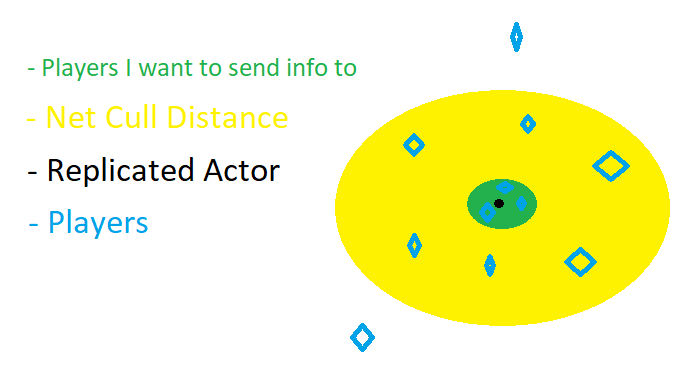
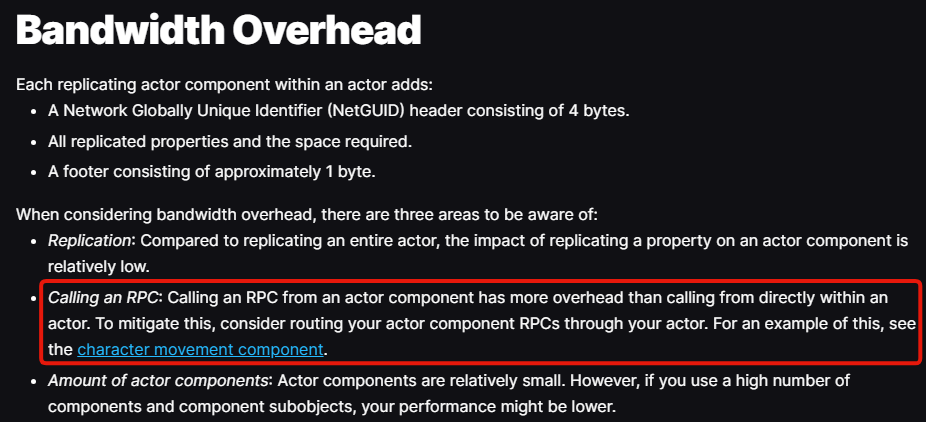
God dayum can't believe u guys used NPP at work
brave move
thin stratus
Literally NDA'd from crying actual tears in public about it.
fossil veldt
fucking lol
I have stopped using Mover for now tbh, until the API is finished I just cba anymore
chrome bay
It is incredibly experimental
fossil veldt
The fact that you can't actually properly implement crouch yet because the feature to implement it doesn't exist yet makes me sad
thin stratus
You can do a lot just fine, but NPP/Mover is one of these things where you only notice how shit and unfinished it is when you already committed.
upbeat haven
Gotta be better than cmc at least to expand upon
chrome bay
That's the best way to describe it tbh. Until you really get into the weeds with it, you have no idea how much pain it can cause
You'd think
fossil veldt
Yeah like don't get me wrong I know you can implement crouch but I just get sad implementing it knowing that I will have to just rewrite it when Justin releases the additional moves feature
and the fact that the mover synchronization ability task doesn't exist yet also makes me sad
chrome bay
I am relatively confident that will never exist
thin stratus
Honestly, they should just take a step back, look at the whole thing (NPP and Mover) and potentially realize that the core is rotten.
fossil veldt
chrome bay
I am relatively confident that will never exist
Maybe Justin changed his mind but as of my last talking to him (@ UnrealFest) that was the plan
thin stratus
Like, yeah I'm joking a lot with metaphors here, but I literally have a Mover 2.5 Board on Miro by now....
fossil veldt
He was experimenting with it essentially so it would syncronize GAS prediction context with NPPs
fossil veldt
thin stratus
Honestly, they should just take a step back, look at the whole thing (NPP and Mo...
In all honesty I agree, I think NPP needs to go
and just make a new kinematic liason that takes the good stuff
thin stratus
There are several good reasons for having a Streamlined path to prediction. Lots of other Game Engines and Games do that too.
UE is just too cut apart to get that fixed at this point I guess.
Writing "adapter" like code for GAS + NPP is not the solution imo
At that point we could just write that adapter for GAS + CMC and be done >.>
fossil veldt
Well the problem is that I don't see any possible future where GAS moves to NPP like was originally planned
thin stratus
And beyond all of that, let's not forget the Bandwidth and Server CPU cost of NPP and Mover .......
fossil veldt
It would be great if everything was on the same prediction context
chrome bay
bits out the arse
fossil veldt
but wishful thinking
thin stratus
I'm so happy I'm not part of the optimization team at this point.
chrome bay
:):):):):)
fossil veldt
thin stratus
And beyond all of that, let's not forget the Bandwidth and Server CPU cost of NP...
Hahahaha
Yeah atm genuinely I think I am going to at some point just completely rewrite a large part of the CMC to fix all the problems I have with it
chrome bay
CMC being so thoroughly proven accross 1,000's of games at this point is not to be sniffed at IMO
thin stratus
They also further improve it still
fossil veldt
chrome bay
CMC being so thoroughly proven accross 1,000's of games at this point is not to ...
Absolutely
chrome bay
Like you can tooooootally be critical of it's design, which could 1 billion percent be improved to support more modular features
thin stratus
There is async code in it by now. And there is also a lot of new code to handle some nasty smaller things, like jumping on and off a MovementBase, and stuff like that.
Lots of things that Mover will take ages to reach.
chrome bay
But NPP being the foundation of Mover is a gigantic flaw IMO, it is so unproven
And has such a long way to go before it's production ready
thin stratus
Turning the CMC into something like Mover isn't even that difficult
fossil veldt
thin stratus
Turning the CMC into something like Mover isn't even that difficult
yea this tbh
chrome bay
Yeah for sure
thin stratus
You just cut it into Modes and then throw all of it into shitty STATIC functions and ignore people wanting to override the behavior
fossil veldt
The main thing I wanted to fix on it is client side perf
That fking find floor function
:|
thin stratus
I also still don't get why NPP went away from sending Corrections.
I get that the CPU cost is moved to the Client that way
But the Bandwidth..
chrome bay
I think Dave did explain it somewhere a long time ago
But yeah I think the rationale was reducing CPU time on Server, but I don't know if that's ever really been a bottleneck anyways
fossil veldt
Also yo I had no idea you were at bulkhead aswell cedric
cosmic marlin
Anything on this please?
HELP!!
I wanted to replicate a array of UObjects in a actor, If I normally make that UObject using NewObject<>() it works just fine and replciates , but when i try to duplicate it using another instanced object from data Asset , it just doesn't. After some digging i found out because the Duplicated object has the followings flags RF_WasLoaded | RF_LoadCompleted after clearing those flags replications does work. So my question here is , Does removing those flags could be problem by any chance?
thin stratus
Hey James, when will you move your Tank Game to Physics Mover?
chrome bay
will I get banned if I tell you to go away with swear words
thin stratus
fossil veldt
Also yo I had no idea you were at bulkhead aswell cedric
Contractor. I'm everywhere.
fossil veldt
thin stratus
Contractor. I'm everywhere.
Ah I see ;D
fossil veldt
chrome bay
will I get banned if I tell you to go away with swear words
lolz
thin stratus
chrome bay
will I get banned if I tell you to go away with swear words
No, I would absolutely deserve all of them I bet.
But, I will take a shower now, so you are good to switch to some more relaxing #multiplayer topics.
chrome bay
I need a drink
fossil veldt
thin stratus
But, I will take a shower now, so you are good to switch to some more relaxing <...
Is the shower related to mover / npp based discussion
chrome bay
and a lie down in a quiet room
fossil veldt
ha ha ha
woeful trout
hey can someone knows how to make an ai replicated system
 weary mason
experimenting with packet loss for clients and dedicated server i noticed some general components auto activation fails during possession or even initialization and activate/reset must be forced on the owning client for set actor components
upbeat haven
thin stratus
And beyond all of that, let's not forget the Bandwidth and Server CPU cost of NP...
Is it not more performant?
honest bloom
honest bloom
How do I use a fixed tick rate just as mentioned here by this article ?
https://...
asking once more, if anyone is willing to help
If my question is too broad .. dumb .. whatever .. please tell me so that I can improve
thin stratus
fossil veldt
Is the shower related to mover / npp based discussion
No, but it helped.
thin stratus
upbeat haven
Is it not more performant?
Hard to tell tbh. I would say "No, not in its native form."
But it also depends on what you are trying to do. As usual.
honest bloom
Wonder if a thread for multiplayer beginners could be made on this channel ..
It feels like (I might be wrong) this place is much more used for elites discussions which are not so interested in answering noob questions over and over (and it's understandable, I don't blame)
Maybe this separation could avoid beginners like me loosing visibility for their questions
sinful tree
Your question isn't a "beginner" question.
 wispy crown
Hi!, Does anyone know if spring arm component replicates the locations of components attached to it? I have a sphere attached to the arm but i cannot make it replicate it's position. I've touched every knob i could find.
spare kelp
vale haven
If your level was not opened as a listen server, you cannot do Networked multipl...
I'm not doing multiplayer in it. I'm trying to setup sessions only.
As described in https://cedric-neukirchen.net/docs/session-management/sessions-in-cpp, like a matchmaking situation.
latent heart
If you want noob multiplayer info, the pinned messages are a good start.
And people generally answer any and every question they can, given a chance.
Also, the article you linked had a link under "fix the tickrate" - does that not tell you how to do it?
upbeat haven
thin stratus
Hard to tell tbh. I would say "No, not in its native form."
😅crazy I was here thinking that it would be more performant. Granted I haven't benchmarked anything. But I suppose that is the cost.
But I suppose it would mostly come down to npp for replication performance?
chrome bay
Npp has substantially worse network performance out of the box. A lot more data has to go back and forth.
it's just not mature enough. Whether it will be in time.. Who knows
amber merlin
Hello, am i seeing correct? EOS has matchmaking for dedicated servers?
upbeat haven
chrome bay
Npp has substantially worse network performance out of the box. A lot more data ...
I guess that's currently the cost of a generalized predicted system? In the case of cmc just having the optimization of doing absolutely the bare minimum it needs to