#multiplayer
1 messages · Page 192 of 1
 nocturne quail
2 hours max
 worn light
nocturne quail
2 hours max
worn light
nocturne quail
2 hours max
i have also made a server by using docker but doesnt know how to utilize it
 tawny mantle
Try UNetConnection::Close
 chrome bay
AGameSession::KickPlayer()
nocturne quail
tawny mantle
Try `UNetConnection::Close`
from the console in which i am controlling my linux box?
nocturne quail
chrome bay
AGameSession::KickPlayer()
so to execute this command i need the IP of the player right?
chrome bay
No you need the controller
nocturne quail
if in the game 50 controllers
i need to kick one specific, how will i know which controler is it?
chrome bay
Well, you need to find out of course
I mean presumably you have some way to identify which player you want to kick?
tawny mantle
nocturne quail
from the console in which i am controlling my linux box?
Do you want to do this manually as a moderator or smth?
chrome bay
Goes without saying this absolutely should not be done via normal game code with a ServerRPC or whatever
nocturne quail
chrome bay
I mean presumably you have some way to identify which player you want to kick?
yes i have their all information, ip, user name etc
chrome bay
Find the player state which matches that players name, get the controller from that, then kick
nocturne quail
tawny mantle
Do you want to do this manually as a moderator or smth?
yeah, thinking of to have a panel , external app
nocturne quail
for this i need an external app which will work like a widget in a listen server does, right?
with few buttons, ban, kick etc
chrome bay
Up to you really, many ways to do it
nocturne quail
chrome bay
Up to you really, many ways to do it
perhaps i writes an external app for this, how will i logged in as moderator of the dedicated server?
using that external app
 formal smelt
Can some one please help me with this:
How do I make camera stop following Head Mounted Device in collab viewer VR template Unreal Engine? So basically it should look like a static image in VR mode.
I am using Unreal Engine Version 5.2.1.
nocturne quail
can a dedicated has admin::pass/username ?
tawny mantle
nocturne quail
yeah, thinking of to have a panel , external app
If you have their IP adressess I think you can try to kick player using linux OS commands
nocturne quail
tawny mantle
If you have their IP adressess I think you can try to kick player using linux OS...
ofcourse, but i have to find which player IP is this, to avoid kicking the wrong player 😄
and for this i have to compare login data means account name or user name etc
to punish the cracker/cheater 😄
tawny mantle
nocturne quail
ofcourse, but i have to find which player IP is this, to avoid kicking the wrong...
it depends on your implementation, for example you can log all players login data that are connected to the dedicated server to some local data base or file
nocturne quail
tawny mantle
it depends on your implementation, for example you can log all players login dat...
yes, but it has no controll on live players
the DB only verify on the first login/pass validity
once the use logged in, the DB will not have controll on him
it should be controlled via a live session
tawny mantle
nocturne quail
yes, but it has no controll on live players
write a function on dedicated server that logs players data every time session is created and clear it after session is killed
you acquire users logins and ip adressess and then use OS commands to drop specific player
nocturne quail
tawny mantle
you acquire users logins and ip adressess and then use OS commands to drop speci...
nice approach, i got another idea, onpost login it can be done i think
when a controller logged in, store info and show on the app i want to write for better control
tawny mantle
nocturne quail
nice approach, i got another idea, `onpost` login it can be done i think
and on logout you can clear a redundant player record
nocturne quail
still i have to logged that app as a moderator in the dedicated server
if i launch the server from this app, it will be consider as moderator?
tawny mantle
nocturne quail
if i launch the server from this app, it will be consider as moderator?
I think you can just launch that custom app on the server and read data logged from the dedicated server or just use a csv file
it much simpler
do you have several host machines or one?
nocturne quail
tawny mantle
I think you can just launch that custom app on the server and read data logged f...
i have one linux vpx box
tawny mantle
nocturne quail
i have one linux vpx box
then try to use csv file first, then you can come up with some custom app
nocturne quail
great idea, seems like the problem is solved
 lament flax
tried this and i still got the issue
FPGFastSlot& NewSlot = Slots.Items.Emplace_GetRef(SlotVisibility);
    int32 Index = Slots.Items.Num() - 1;
    NewSlot.SlotIndex = Index;

    if (IsValid(Item))
    {
        NewSlot.Item = Item;
    }

    OnPostReplicatedAdd(NewSlot);
    Slots.MarkItemDirty(NewSlot);
maybe the issue is when i edit the entry ?
FPGFastSlot& Slot = Slots.Items[SlotIndex];

        Slot.Item = Item;

        OnPostReplicatedChange(Slot);
        Slots.MarkItemDirty(Slot);
 visual mountain
My game is a very simple turn based game where players make a choice, the outcome displays and turns are passed. Should the players choices be set to reliable?
in replication i mean
 rustic sable
visual mountain
My game is a very simple turn based game where players make a choice, the outcom...
rustic sable
visual mountain
My game is a very simple turn based game where players make a choice, the outcom...
if it affects gameplay and you want to make sure it gets to where it is going then yes
visual mountain
ty. very appreciated
 true stream
is using SpawnActor (on server) vs GetAllActorsOfClass (with replication enabled) the same ?
Im trying to send an event that runs on server and I think the reason is not working from the client is just because of that
 quasi tide
Not at all. One spawns an actor. The other gets all the actors that currently exist of a type of class.
 gloomy axle
Can the client not get the gamemode?
rustic sable
 gloomy axle
oh the user widget cant
I see
that explains everything lol
Can I call a custom event of "on server" on a widget?
 dark edge
gloomy axle
Can I call a custom event of "on server" on a widget?
dark edge
gloomy axle
Can I call a custom event of "on server" on a widget?
widgets don't network
gloomy axle
so i would have to go back to the client, client asks server
dark edge
the widget should talk to some gameplay object that does the run on server event
gloomy axle
hmm
quasi tide
Most commonly your player controller
gloomy axle
essentially a class selection ui where other players can see what class you chose
think apex legends
i think i got it though


i need to take out the second image on this widget blueprint
and place it onto a function the player controller calls, so it can ask the server for information
since widgets cant do that
dark edge
gloomy axle
essentially a class selection ui where other players can see what class you chos...
That would be the widget talking to the local PlayerController or PlayerState which tells the serverside version of PlayerController or PlayerState that it desires to choose BigassMcGee as its selected character.
gloomy axle
yeah, i was doing playercontroller to widget to server. so it needs to be player controller to widget to playercontroller to server
dark edge
basically the logic and data representing the character choice should exist in some gameplay class.
The widget is just an interface to display that data and trigger that logic.
gloomy axle
luckily i can just copy and paste this over i think since there's no functions on the ui itself i called
dark edge
Say you had this sort of setup:
PlayerController:
SendCharacterChoiceToServer(CharacterClass) (run on server event) -> set MyPlayerState.MyCharacterChoice //which is a replicated repnotify variable
Widget:
OnClicked -> call LocalPlayerController.SendCharacterChoiceToServer(CharacterClass)

 dark edge
the class ID as int seems goofy but sure
gloomy axle
yeah but it's only 3, technically 4, classes
dark edge
is that int used throughout the system?
gloomy axle
nah just the player controller and ui
dark edge
why not just send a ref to an actual pawn class?
gloomy axle
well the "class" only changes two things on the player controller
a special slot for class specific items
and potentially the mesh
dark edge
when you're spawning a character, is it driven by that int?
gloomy axle
not at all
dark edge
what's it driven by? what goes into the BuildACharacter bit of your code?
gloomy axle
it's pretty minimalistic
well i haven't even touched that part yet, i just wanted some way to send and read "class data" that the player chose
an int was a good prototype choice
dark edge
data table row might be better, it's functionally just an int as well
dark edge
you just need some consistent ID which is used everywhere to identify the choice
gloomy axle
but this is sort of the techical game design of this feature
nocturne quail
a bp rep-notify also needs to be called on dedicated server or it will be called automatically?
dark edge
could be a subclass of YourBaseClass, could be a data table row index, could be a data asset reference, whatever
gloomy axle
yeah that's what i was going to do at first, like have a player controller that would serve as the base class, then variants of that player controller
but since im just prototyping for now and the logic seems to be fine so far it'll be okay
damn it, i did the same mistake for choosing to confirm the class too
dark edge
gloomy axle
yeah that's what i was going to do at first, like have a player controller that ...
no don't do that
a PAWN as base class
If you and I choose different characters, our pawns are different. Our playercontrollers are not
 lament cloak
Arrays are replicated in whole right
 fathom aspen
no, they delta replicate
lament cloak
fathom aspen
no, they delta replicate
oh thats great news, do you know if order is guaranteed
fathom aspen
With TArrays I'm almost sure it is.
lament cloak
ye asking 'cause I know fast array isnt
fathom aspen
Though you are generally advised to add an "index" to every element struct that represents order
rustic sable
Say you want to launch a projectile at a certain point in a montage, do you have to send the socket location to the server when the anim notify triggers? Seems this could be laggy but can't think of a better way
fathom aspen
I mean what other options do you have? Usually we do it in GAS, with local predicted abilities which more or less end up doing what you mentioned
lament cloak
It highly depends, in my top down shooter we send the yaw of where you're aiming. Combine that with position of the character, both already have it, and you can recompute the location it spawned.
it also highly depends on how accurate you need it
are you predicting the projectile?
rustic sable
hmm ok, I mean we do have the loc / rot of the character and with that I guess I could just add back the position of the frame when the firing occurs
 rain condor
How can i get player controller sv side on actor component who is attached to bp_item?
dark edge
rain condor
How can i get player controller sv side on actor component who is attached to bp...
wat
What exactly do you have at the beginning of this?
I'm guessing you are an actor component, you're attached to an item, you want to get which playercontroller?
rain condor
dark edge
I'm guessing you are an actor component, you're attached to an item, you want to...
I wanna get a component inside of playercontroller
dark edge
rain condor
I wanna get a component inside of playercontroller
Inside of which playercontroller?
rain condor
dark edge
Inside of which playercontroller?
what do u mean with which?
dark edge
rain condor
what do u mean with which?
this is multiplayer. There are multiple players. Which of the multiple playercontrollers on the server do you want to get?
rain condor
Who has the item in his inventory
dark edge
ok so follow that chain
does an item know about the inventory it's in?
if it does, then it can figure out the pawn, then it can figure out the controller
 weary lava
So I’m trying to make it so that when my characters run out of health, they ragdoll, and then respawn after a few seconds. I’m doing this through a combination of GAS and functions in the BP of the character, since my health system is using GAS attributes.
However, when i tried making these characters ragdoll, they would either stand perfectly still until pushed, and their legs would be still the entire time, or they just wouldn’t move when pushed. I’m very confused on why this is, and I’ve followed quite a few tutorials on how to make this work.
For reference, my base when starting was the first person template, but I also added in the third person meshes since my project is a multiplayer game. That is what I’m using to make the rag dolls “work”.
rain condor
dark edge
if it does, then it can figure out the pawn, then it can figure out the controll...
i'll try
Ty
 twin juniper
When talking about prediction, things should only replicate if the prediction is not equal to what happened on the server right, or else we don't need to replicate it since it was predicted..?
 weary token
Is it possible to replicat chaos physics? And how do o start to learn this? Thank you
 fossil spoke
twin juniper
When talking about prediction, things should only replicate if the prediction is...
fossil spoke
twin juniper
When talking about prediction, things should only replicate if the prediction is...
Not necessarily. Prediction and how you implement it is highly dependent on the feature.
For example, if you were predicting a Projectile, you will still want to replicate the "master" projectile down to the Client.
 pearl bear
Hey everyone! I'm working on a multiplayer RPG game and have been reading about how World of Warcraft operates. From what I understand, there seems to be a clear distinction between the client, server, and data. Here's my breakdown:
Data: Game-related data (like NPCs, weapons, clothing, quests) are stored in a database, accessible via an API.
Server: The game server handles the game logic and state, but it doesn't contain specific data in its code. For instance, there's no hardcoded information about how much damage a weapon or spell does; it retrieves this from the database.
Client: The client only includes parts the player directly interacts with, such as visual objects and inputs, without containing any game logic.
Are my ideas accurate and logical? Also, would this architecture be applicable if I were to implement it using Unreal Engine? Thanks!
fossil spoke
pearl bear
Hey everyone! I'm working on a multiplayer RPG game and have been reading about ...
Implementation of details like that are entirely up to you. There is nothing stopping you from modelling how your game works under the hood around that idea.
pearl bear
fossil spoke
Implementation of details like that are entirely up to you. There is nothing sto...
Of course, I am asking this question to get and discuss the opinions of people in the community, if any. If you have any thoughts to share, I'd love to hear them.
fossil spoke
pearl bear
Of course, I am asking this question to get and discuss the opinions of people i...
Not try to rock the boat or anything here, but your question(s) are much to broad to ask so generally. There are many ways to approach how to architect a multiplayer game. The best answers you are going to get are "it depends". You need to evaluate the merits of a particular approach in context to the type of game you are making and its feature requirements, as well as in relation to the merits of other approaches.
Are my ideas accurate and logical?
They are logical, sure.
Accurate in what context? What does accurate even mean here?
Would this architecture be applicable if I were to implement it using Unreal Engine?
Sure.
gloomy axle
dark edge
a PAWN as base class
yeah that's what i meant lol
the pc controls the pawn, that's how i currently have it set up
 willow adder
Why does Simulate Physics not working on Multiplayer correctly , it seems that my Character collides thru some Objects, it is strange does i miss something , any suggestions?
 neon summit
willow adder
Why does Simulate Physics not working on Multiplayer correctly , it seems that m...
neon summit
willow adder
Why does Simulate Physics not working on Multiplayer correctly , it seems that m...
if its going through some objects check their collision settings
willow adder
Thank you Funky the Collision is already ok, in Single Player it works fine, i think the problem is that i activate Sim.Phys. for 1 Second and mix it with an Animation , so it seams the Animation causing the issue while it is set to root motions from Monatge only, the funny thing is this method works without any charm in Single Player
 strong vapor
what is/are the general rules and shortcomings of trying to have items in multiplayer have physical interactions.. like an object getting thrown around and bouncing around? Also.. one of my ideas is to just slap a ProjectileMovementComponent on things that are getting thrown cause I know that can handle bounciness and stuff too and sort of fake the physics interactions... I just feel like I've heard people tell me before "you can't simulate physics in multiplayer"
willow adder
strong vapor
what is/are the general rules and shortcomings of trying to have items in multip...
I using it in fake situation i saw the maximum i activate it on my Humonoid Character is now 2 - 3 Seconds , and this is just a Knockout situation in Fighting Games , there are some Multiplayer Ragdoll Plugins on the Market but just for Humanoid Characters
fossil spoke
strong vapor
what is/are the general rules and shortcomings of trying to have items in multip...
If there arent a lot of them, just throw a PMC on them.
willow adder
What is a PMC Matt ?
fossil spoke
Projectile Movement Component
Assuming they dont need continuous physics and its more of a throwable.
strong vapor
there won't be a ton of them at once.. I figure I can dynamically add the PMC when its being thrown
fossil spoke
Having say a Soccer Ball be networked is a different story
strong vapor
yea I don't think im going to worry about actually "simulating physics"
we have a dungeon crawler. and you need to be able to throw items across a gap or some shit to your homies
fossil spoke
Yeah in that case just use a PMC
willow adder
Just for everyone who works with Bp or C++ this Plugin is free and is the best to handle States in Multiplayer and Single Player, the Animation Bp is just a Dummy for the Idle Animation and some Blendspaces , these guys make a very good State Machiene and it is free the Pro Version has a lot more Features but i think for Montage States it would be enough do not waste your Time to spend Month to handle States in Anim BP : https://logicdriver.com/docs/guides/network/
Network replication can be configured for state machine actor components.
Please Correct me if I am wrong Matt or someone else
 devout sonnet
I finally got some progress in learning multiplayer stuff thanks to you guys. I'm going to try to make the cards actors that fall over when both players select their choice. Wish me luck!
 torpid lantern
Is this an appropriate channel to post a question on formatting a json for use with PlayFab?
I think I am getting tripped up by terminology.
fossil spoke
torpid lantern
Is this an appropriate channel to post a question on formatting a json for use w...
Sure I guess so.
torpid lantern
Thanks! The PlayFab forums have a moderation queue on questions.
Objective: Under Character Details' title data, have a single key "Inventory" and for Inventory's value to be an array of a custom Unreal struct (id, quantity, quality)
I think an Unreal struct = "objects" in json, is that correct?
So I think what I need to do when formatting this json, is to write an array field (Inventory) and each elm of that array would be a json object.
- Here is what I am trying to buid: https://imgur.com/lzxSTGQ
- This is what I am getting when running the below: https://imgur.com/yNardrz
- Here is the API call to PlayFab: https://imgur.com/K8N51UM
- Here is how I am creating that json "Data": https://imgur.com/dMjahnW
- Here is how I am creating the object array field used in the above json: https://imgur.com/zmwntPR
Am I over-complicating things? Usually I'll make a huge graph of nodes only to discover there a function out of the box that does the same thing.
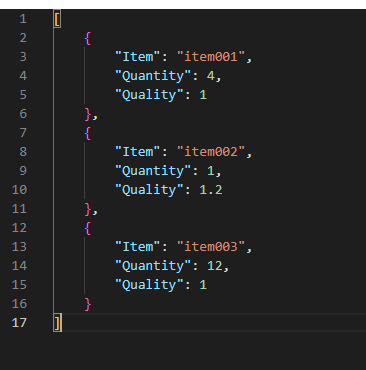
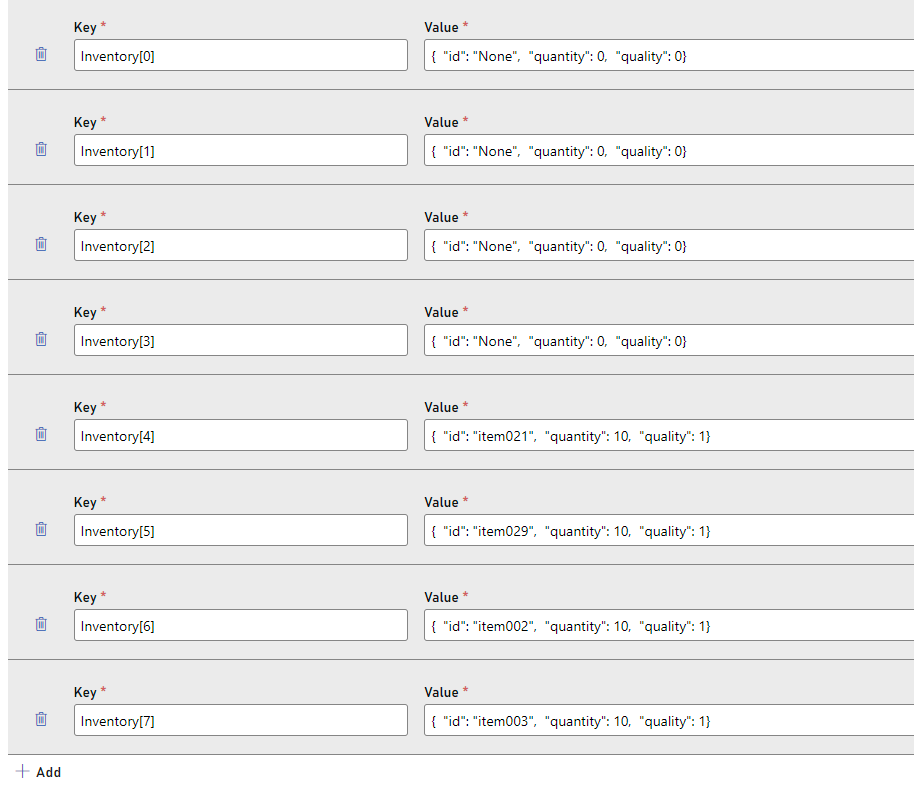
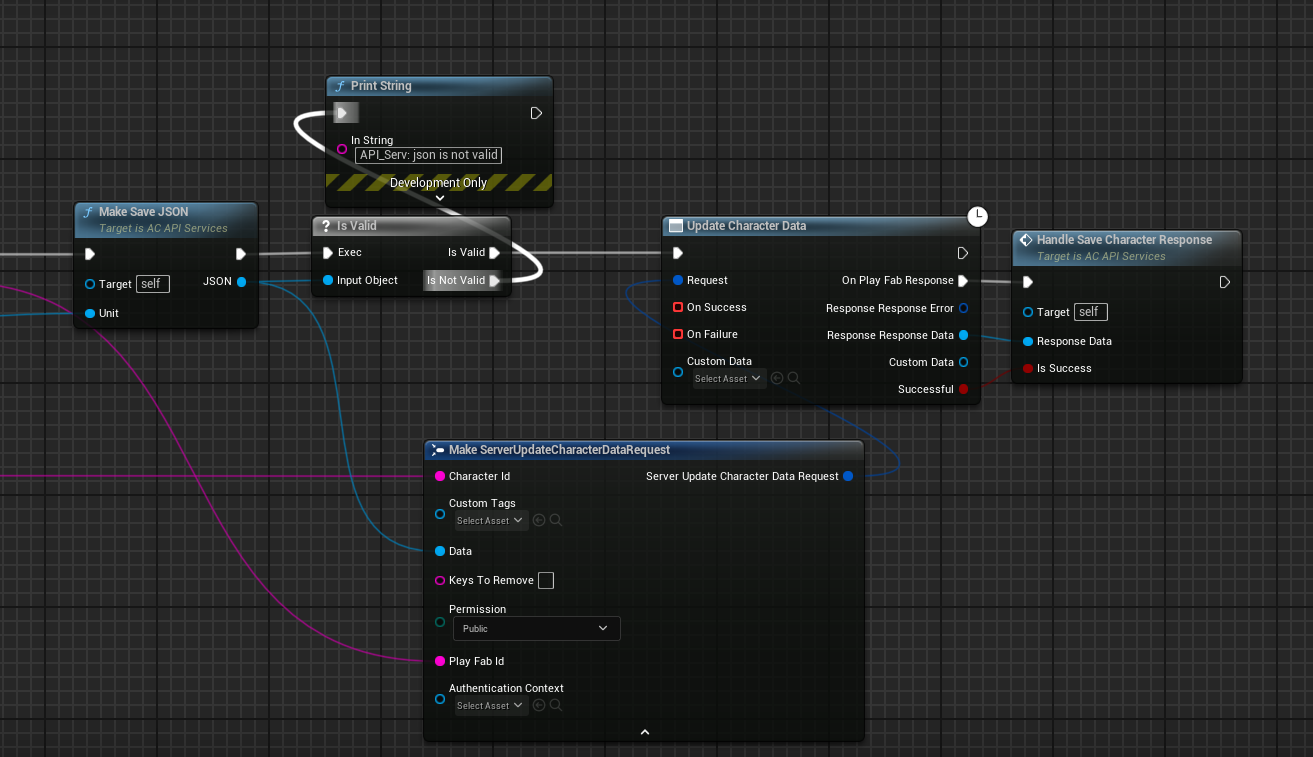
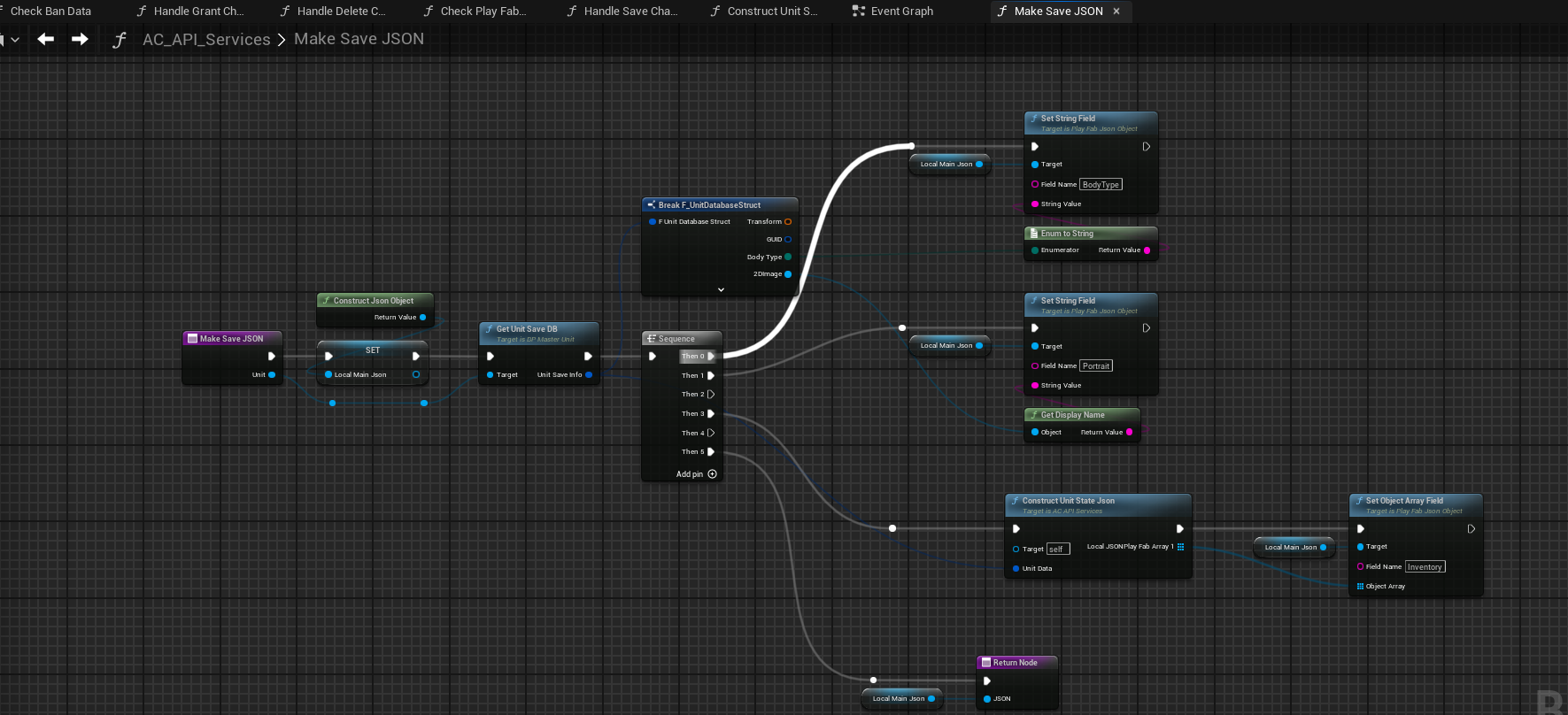
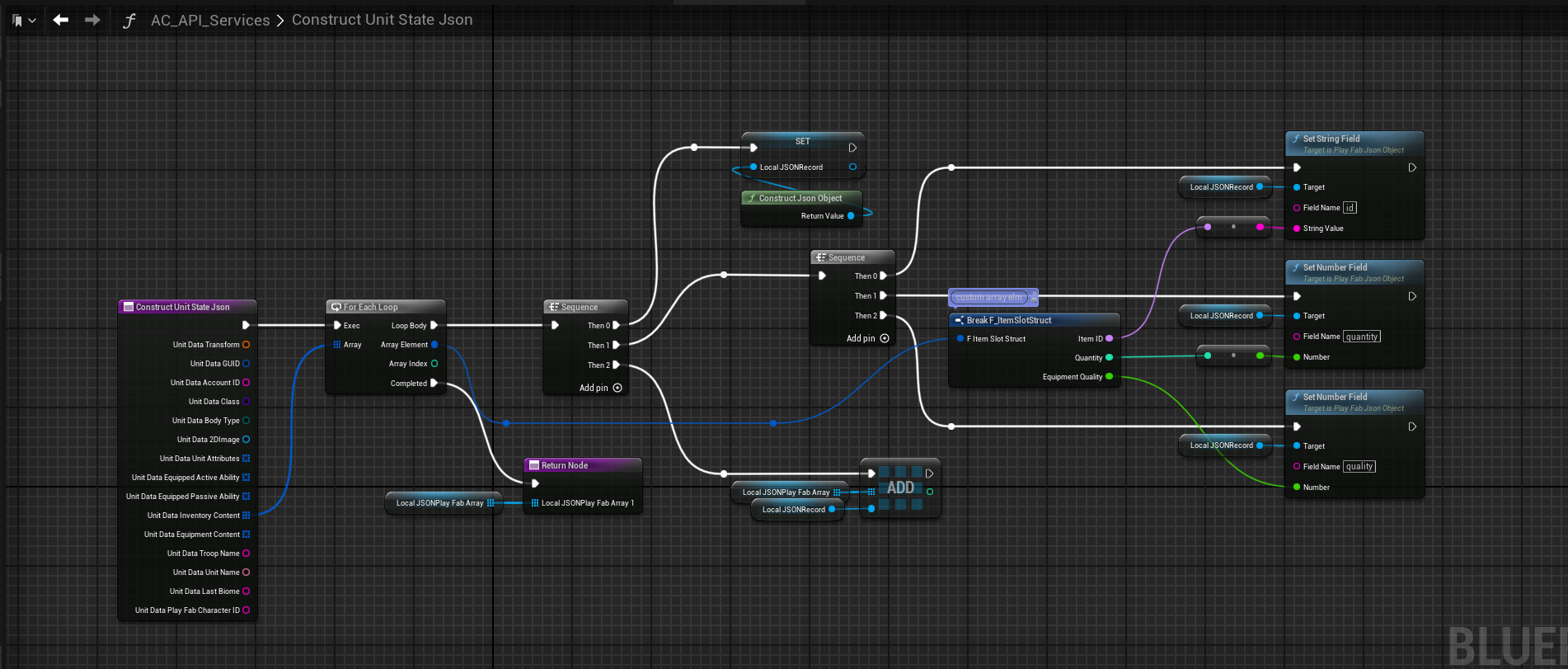
Or should I abandon this and just try to format a raw json string.
 dark parcel
If I send server rpcs to add a replicated array like the following
Time 0 : (ID 1, location 10, 0 ,0)
Time 1 : (ID 2, location 20,0,0)
When the data replicate back to client, is the order guaranteed? Or is it possible that I may receive struct with tag ID 2 before I receive struct with tag ID 1?
Actually the order shouldn't matter, I can just apply the incoming data and add all of the unprocessed rpc.
Would still be good to know if the order is somewhat guaranteed tho.
fossil spoke
Typically you should never rely on order.
 woven basin
dark parcel
Actually the order shouldn't matter, I can just apply the incoming data and add ...
woven basin
dark parcel
Actually the order shouldn't matter, I can just apply the incoming data and add ...
Order is only garunteed on a reliable replication on the same actor channel.
But if you need to ensure atomic updates, I think Voxi has an article pinned about how to ensure replication doesn’t result in non expected ordered outcomes
dark parcel
Ty all
chrome bay
lament flax
tried this and i still got the issue
Doesnt seem to be anything wrong with that code specifically, so the issue must be somewhere else
Are you sure you aren't adding slots on the client or something?
torpid lantern
torpid lantern
Thanks! The PlayFab forums have a moderation queue on questions.
**Objective**:...
If anybody lands here from the future, I figured it out thanks to this thread: https://community.playfab.com/questions/56900/how-can-i-set-an-object-field-to-player-title-data.html
Looks like there is (was) a limitation in PlayFab and the system won't accept json as a value, so the workaround was to convert it to string and save the string as value.
An open forum for users of PlayFab to get answers to questions and to provide feedback on features and add-ons they'd like to see.
chrome bay
Oh yeah, that'd explain it then 😄
 opal pulsar
theory question: I have a points system and things you can buy, the points are earned throughout a match.
When purchasing things, I found it easier to just have those networked purchase functions deal with the points system due to the arrival order and everything, better to keep it contained. I have it current as a component on my player state, do we think thats good?
Also for interaction logic on client and server side, whats the best way to about it? I can have the objects implement an interface but then whats the recommended way to network that logic?
dark edge
opal pulsar
theory question: I have a points system and things you can buy, the points are e...
What are these things?
What does it mean to buy a thing? What actually happens.
 stoic pasture
Hello everyone! I have a question. Is it possible to do server travel on a dedicated server? Is there any way to change levels without the clients disconnecting?
opal pulsar
dark edge
What does it mean to buy a thing? What actually happens.
Thats what I mean, everything is slightly different, think of cod zombies where you have perks, doors, box, weapons etc
opal pulsar
stoic pasture
Hello everyone! I have a question. Is it possible to do server travel on a dedic...
yes ofc there is
dark edge
opal pulsar
Thats what I mean, everything is slightly different, think of cod zombies where ...
Just start with the functionality to "Give player thing" then it's trivial to extend that to buying.
stoic pasture
opal pulsar
yes ofc there is
And what would be more or less the workflow?
 modest crater
 storm grove
wizards one is FULLL of info
 tardy fossil
are actor's position and rotation rounded in some way before being replicated to clients from a server?
they seem to be slightly off sometimes unless i actually replicate a location and a rotation with a UPROPERTY.. but then thats sending double data
modest crater
Yeah check out
    /** Used for replication of our RootComponent's position and velocity */
    UPROPERTY(EditDefaultsOnly, ReplicatedUsing=OnRep_ReplicatedMovement, Category=Replication, AdvancedDisplay)
    struct FRepMovement ReplicatedMovement;
on Actor.h, more importantly check FRepMovement's NetSerialize function which will show you how its quanitizing the data
chrome bay
You can adjust the quantization level too, but not at runtime
tardy fossil
interesting.. i see it now
i think the best option is to just round the server values too
chrome bay
yeah, tbh that should be the standard approach. Character movement applies rounding to inputs on the server but not the output
tardy fossil
so THATS why this doesn't effect the CMC but messes with my custom mover lol
chrome bay
Well to clarify, CMC also doesn't apply it to the output - but inputs (acceleration etc.) are rounded on the client before being processed to closer mimic what the server will do and reduce corrections
If you are predicting movement you definitely want to apply the same treatment ideally
otherwise the differences will stack up
opal pulsar
I cant replicate a uint64 or even reflect it, could I wrap it inside of a struct and override the NetSerialize and just replicate it manually? I ask because there is no reflection now so it wont know when its dirty, I could mark it as dirty but will that replicate fine?
// header
UPROPERTY(Replicated)
FFooBar myIntWrapper; // << Contains no reflected uproperties


void SomeFunc()
{
  myIntWrapper += 42; // overloaded operator to increase the value inside
  MARK_PROPERTY_DIRTY_FROM_NAME(UFooclass, myIntWrapper , this);
}
will that replicate it even though its not "reflected"
chrome bay
uint64 can definitely replicate
tardy fossil
was about to say ^
chrome bay
Just can't expose it to the BP graph
All the integer types work with UPROP
Just not all of them support BlueprintRead/Write
chrome bay
to answer your question though, you'd probably want to implement the == operator on your struct for the comparison (and implement WithIdenticalViaEquality) if the wrapper has no UPROPERTY
If net system can't call == or Identical() it falls back to checking relevant uprops inside the struct
opal pulsar
okay and what if I only implement that trait an not net serialize? Does it just full resend the new state? (opposed to delta like by default)
chrome bay
If it has no UPROP and you only implemented NetSerialize I would guess it wouldn't find any changes
But maybe it goes a step further and does Memcmp, not sure
 twin roost
where should I look for making a host migration system in a peer 2 peer system?
woven basin
twin roost
where should I look for making a host migration system in a peer 2 peer system?
what do you mean?
chrome bay
whatever you wanna do you'll be doing it all yourself
twin roost
I want to make a peer 2 peer multiplayer game, but I haven't found many videos about host migration
chrome bay
There's no inherent/native system for it if that's what you're looking for
twin roost
yeah I know, but what about a small guide or at least some ideas on how to make it
chrome bay
I don't know of anything tbh. There was a version of ShooterGame on github many years ago with host migration but it's long gone I think
Can't vouch for this, just comes up in google search
https://www.unrealengine.com/marketplace/en-US/product/host-migration-plugin
twin roost
alright, so I gotta cook it up myself it seems, so I just start from the concept that the host can potentially disappear for too long and make one of the players the host
that's gonna be fun
chrome bay
The general idea is that you just constantly maintain the best person to reconnect to if the server suddenly goes down. All players need to agree or at least be aware of who the target is. When the game connection drops, you automatically try to connect to that new players' IP a few times. If it doesn't work, back to the menu you go.
Host Migration in Gears worked that way. Once you migrated, you restart from the current round for simplicity
woven basin
honestly - if you dont know how to even approach it - might be too much to do
why not just use the systems that already exist?
or check if there is a paid plugin off marketplace
chrome bay
Migration is a last resort at best tbh and a PITA to support.
Anything competitive would be on dedicated anyway
Pretty much the standard expectation these days
twin roost
so what you are saying is that it'll be extra fun to create it from scratch, sounds good to me :D
 drifting furnace
thanks for the steps. i set it up but am running into a small issue. when i do the shoot on the second player the shoot functioanlity also happens on the main player as well which might be beacuse of the multicast. how do i get it to only do line traces/shoot functioanlity for the player that actually triggered the event and not all players
 dark parcel
by guarding with is locally controlled
drifting furnace
i see so i put that branch before on the server event ?
like right before i call it
@dark parcel
dark parcel
What you need to understand is that the check filter if the machine executing the code is locally controlling the actor or not.
I shouldn't need to tell you where to put that.
drifting furnace
ok
opal pulsar
I need some help with cross server communication..
Lets say I interact with an actor on the client, how would I also do that on the server? I cant have the interacted actor call it because clients cant call rpcs on non owned actors, which means I need to do it through my controller
drifting furnace
dark parcel
What you need to understand is that the check filter if the machine executing th...
i got stuck because when i was checking if locally controlled or not then the sounds / muzzle flashes werent replicating
dark parcel
opal pulsar
I need some help with cross server communication..
Lets say I interact with an...
But routing through controller seems like an ok choice?
I can't really speak for anyone but from what I gather, it sounded like a normal thing to do.
dark parcel
drifting furnace
i got stuck because when i was checking if locally controlled or not then the so...
You chose what code run on server and what run on client and proxies
opal pulsar
but then I need to send the pointer of the actor right? Are the strings when being passed across the net if I dont relicate the actors by default?
dark parcel
For other clients other than you, they can play the muzzle effect for visual
But the logic like tracing etc, should be done either in the one controlling the character or the server. Depending on your design. It's kinda complicated to do a shooter in multiplayer.
One approach I see is to do it on client, wrap the data in a struct, send to server.
Server re simulate the data by rewinding, check if it's valid
drifting furnace
when i did it in the controlling character bp itself it all worked but now i moved that functionality to the weapon blueprint
dark parcel
opal pulsar
but then I need to send the pointer of the actor right? Are the strings when bei...
Yeah but what's wrong with passing the pointer to the actor you are interacting with?
I'm pretty sure you know more stuff than me tho, so hopefully someone else have better idea.
I don't think passing a pointer to a non replicated actor will work, just my guts.
lament flax
im setting a ref to my inventory comp in a fast array contained inside
for some reasons, the ref is null on client when the PostRep... functions get called
UPGInventoryComponent::UPGInventoryComponent()
{
    SetIsReplicatedByDefault(true);
    bReplicateUsingRegisteredSubObjectList = true;

    if (!IsTemplate())
    {
        Slots.OwningInventoryComponent = this;
    }
}

void UPGInventoryComponent::PostLoad()
{
    Super::PostLoad();

    if (!IsTemplate())
    {
        Slots.OwningInventoryComponent = this;
    }
}

void FPGFastSlot::PostReplicatedAdd(const FPGInventorySlotContainer& InArraySerializer)
{
    check(IsValid(InArraySerializer.OwningInventoryComponent)); // null

    InArraySerializer.OwningInventoryComponent->OnPostReplicatedAdd(*this);
}
For my inventory, should I load all the Data Assets directly but load Asynchronously when needed the icon and the mesh,
or
just load the entire DA needed asynchronously when needed?
 solar stirrup
Depends on whether or not your inventory can work without the DA's data
In my case it couldn't, so I load all item data assets when the game starts, and any other assets in the DA are soft references so it doesn't kill memory.
@twin juniper
twin juniper
the DA must be there ye
To load the DA when the game start, do I have to put them in the Asset Manager (in project settings) ?
 proven pagoda
I'm kinda new to this stuff still so I was wondering, I made a multicast and I'm sending through a variable of USkeletalMesh* and I'm just thinking of bandwidth here, but isn't a pointer a small amount of data? I'm not sending through the network an entire USkeletalMesh variable, right? I'm just sending the address of the server info to the clients right? I want to do this function multicast but I don't want insane bandwidth for this skin being spent because the variable size.
I already do things like trim down vectors into FVector_NetQuantize etc idk if there's any trimming this down
twin juniper
Hello, how can I replicate 'MaterialParameterCollection' for multiplayer? I've been trying for 2 days and couldn't find any solution or resources. Can you help me?

 vital furnace
Hello, here is the situation: I would like to know the blueprint that allows me to exit the lobby and go to my gameplay level? And also how to transfer data from my BP_GM_Lobby (GameMode) to BP_GM_Gameplay (GameMode), BP_GS_Lobby (GameState) to BP_GS_Gameplay (GameState)...?
@thin stratus
 normal raven
vital furnace
Hello, here is the situation: I would like to know the blueprint that allows me ...
normal raven
vital furnace
Hello, here is the situation: I would like to know the blueprint that allows me ...
Blueprints has an "OpenLevel" script. If you want to have persistent data, look into using the GameInstance class
Hey, so interesting problem here: In my Voxel Engine I spawn ChunkActors with a deterministic network name based on their location in the world. This works. I'm able to spawn the actors locally on the client and server respectively, and then enable replication when I need them to be relevant for the client.
However, if I delete a given ChunkActor, and then later need to spawn a new ChunkActor in that same location, it needs to have the same deterministic name based on the location, but naming it the same thing as the previous ChunkActor causes a crash. Is there a way to "unregister" the network name so that it can be used again? Or do I just need to make sure it's a unique deterministic name every time?
woven basin
vital furnace
Hello, here is the situation: I would like to know the blueprint that allows me ...
please dont ping eXi and other mods for general questions
your question can be answered by reading WizardCells guide: https://wizardcell.com/unreal/persistent-data/
normal raven
normal raven
Hey, so interesting problem here: In my Voxel Engine I spawn ChunkActors with a ...
I guess I can solve this by keeping a replicated counter on the server that tracks the number of replicated ChunkActors, and add that number to my unique deterministic network name.
Edit: That doesn't work, I've got to be sure the ChunkActors get generated in the exact same order for this method (Which I may try to do)
lament flax
in a fast array, in PostReplicatedChange, is there a way to get the previous value of the struct, before it got updated ?
like you can with OnRep functions
chrome bay
no
lament flax
sad
normal raven
normal raven
I guess I can solve this by keeping a replicated counter on the server that trac...
If anyone has any suggestions it would be much appreciated.
 lost inlet
Went to the Mover talk at Unreal Fest and it looks like better support for fixed tick will be coming where locally controlled will interpolate, rest of the talk was fairly high level but some good info
twin juniper
twin juniper
To load the DA when the game start, do I have to put them in the Asset Manager (...
@solar stirrup is that correct?
solar stirrup
Yes and then load them in memory using the asset manager's streamable manager
twin juniper
ok got it
woven basin
lost inlet
Went to the Mover talk at Unreal Fest and it looks like better support for fixed...
any talk of it integrating with GAS or NPP in general?
hopefully the video for that talk goes online soon
lost inlet
It uses NPP but nothing in regards to GAS yet. Justin Havre has done some experimenting on his own but nothing shippable
Though technically you actually choose between NPP and Chaos Networked Physics
twin juniper
what does NPP stands for ?
lost inlet
Network prediction plugin
 brittle karma
https://forums.unrealengine.com/t/cant-find-session-using-online-subsystem-steam/1410458/3
i have the same question and there are no obvious answers! can anyone help?

Epic Developer Community Forums
This topic was automatically closed 30 days after the last reply. New replies are no longer allowed.
quasi tide
lost inlet
Went to the Mover talk at Unreal Fest and it looks like better support for fixed...
Noice. Do you know if they're going to publish these talks?
normal raven
normal raven
Hey, so interesting problem here: In my Voxel Engine I spawn ChunkActors with a ...
So to sum up, I need a way to generate a deterministic name for an AActor based on the location, and this name has to be different each time the server creates the chunk, but it also has to be the same on the client and server even if they spawn at radically different times. (Sometimes an AActor isn't relevant for a given client)
The client is also very likely to spawn these actors way before the server
Other notes: The actors only need to be named right before the server goes to replicate them
The idea is to change the GUID to be the same so I can just flick on replication and they will link up
(I recognize this is a pretty strange issue but it's an interesting coding challenge)
lost inlet
quasi tide
Noice. Do you know if they're going to publish these talks?
Yeah in like 3 weeks
rustic sable
I run a line trace on the server, if it hits I want to adjust the target location of my projectile but even when it hits the target location doesn't seems to update. This was working fine in single player, not sure why this would fail when running on server
 graceful flame
rustic sable
I run a line trace on the server, if it hits I want to adjust the target locatio...
graceful flame
rustic sable
I run a line trace on the server, if it hits I want to adjust the target locatio...
Is the actor replicated? I think maybe the change happens on the server but the client isn't receiving the new location because the location isn't being replicated to it.
rustic sable
I mean the projectile movement is replicated so I thought this would take care of it
graceful flame
The entire projectile actor has to be replicated
rustic sable
it is indeed, except its collision component
graceful flame
for any of its components to be replicated
And are you spawning the projectile on the server or client?
rustic sable
the projectiles do infact fire and replicate, the only issue is the target doesn't adjust if we get a hit with the linetrace
rustic sable
graceful flame
And are you spawning the projectile on the server or client?
server
besides the socket location which is passed in to the server function I don't see anything that would be blocking this
graceful flame
How are you setting the target? I assume you are spawning a projectile at some vector with some rotation then using its moment component to travel forwards, right?
Are you making something like a bullet ricochet bounce?
rustic sable
` FVector TargetLocation;
FVector StartTrace = Player->GetCamera()->GetComponentLocation();
TargetLocation = StartTrace + Player->GetCamera()->GetForwardVector() * 10000.f;`
it just starts forward from the camera
if we get a hit I adjust it
` bool success = GetWorld()->LineTraceSingleByChannel(hit, StartTrace, TargetLocation, TraceChannel, CollisionQueryParams);
if (success) { //if the line trace succeeded update the target location
    TargetLocation = hit.ImpactPoint;
    UE_LOG(LogTemp, Warning, TEXT("  -Arrow Linetrace Hit! %s"), *hit.ImpactPoint.ToString() );`
stand alone it shoots true
graceful flame
Im not understanding why you are using a line trace and a projectile.
rustic sable
client doesnt adjust
graceful flame
Normally its like you line trace from the barrel of the gun or you spawn a projectile from the barrel of the gun.
But it sounds like you are line tracing from the barrel + 1000 units in front of it then using the impact as the "target" of the projectile. Whatever target does I'm not sure because you can just spawn the projectile from the barrel and let it fly.
rustic sable
10K no 1000, yeah sure, would have to think if that has other implications tho
I mean if you're ADS you want to aim center not straight from the gun right? that wouldn't always be towards the reticle
graceful flame
Are you trying to see if the projectile will hit something 10,000 units in front of where it spawns? because that won't work if a moveable object gets in the way before it reaches the impact of the trace.
graceful flame
rustic sable
I mean if you're ADS you want to aim center not straight from the gun right? tha...
sure you can just spawn the projectile somewhere in front of the character using the capsule so it doesn't matter if you are ADS or not, just hide it with a muzzle flash so it doesn't look odd
or setup two separate spawn locations one for ADS and one for hip firing
rustic sable
Eh, I'm using the socket on a bow or staff which looks really good actually, just have to pass in the socket location on spawn
rustic sable
graceful flame
or setup two separate spawn locations one for ADS and one for hip firing
already have this
for hip fire I use capsule with a Z offset
 outer sphinx
Hello guys, something strange is happening to me hahah I'm making a game with the unreal dedicated server and when I try it in the editor everything is fine but when I compile the client and the server it appears as a "lag" being the client it doesn't match the client's position in the world with that of the server and the character constantly pulls me "back." The funniest thing is that I'm testing it locally 😦 I use pklag in the editor to compensate a little for the lag in the systems while I work. Will that affect it? Shouldn't I think
graceful flame
outer sphinx
Hello guys, something strange is happening to me hahah I'm making a game with th...
How much fake lag are you emulating? Packet loss is the killer of games.
outer sphinx
graceful flame
How much fake lag are you emulating? Packet loss is the killer of games.
300ms in the editor, but once the project is compiled the pktlag command is still "active"
graceful flame
You're adding emulated lag with a console command? I just test using Advanced Settings > Multiplayer Options > Network Emulation from within the editor that way theres no fake lag being packaged with the game.
outer sphinx
graceful flame
You're adding emulated lag with a console command? I just test using Advanced Se...
I'm not using it 😦
 twin juniper
Is dealing with NetPriority overkill/useless when using push model on replicated properties ? If I understand well NetPriotity sets the priority for when the actor checks for replication (so for traditional replication I guess?)
 azure hull
Hi, is there a way to optimize this going through network?

I've got 50 enemy actors all sending these frame by frame (top down, not gonna work distance culling).
And it floods network rather quickly
graceful flame
azure hull
Hi, is there a way to optimize this going through network?
Does it have to send updates every frame? What if you adjust the net update frequency to something a bit slower so it doesn't flood the network but also looks smooth. Also what does the netprofiler tool show?
azure hull
graceful flame
Does it have to send updates every frame? What if you adjust the net update freq...
I can play around with update frequency, just don't want it to get jittery. NetProfiler shows this. Network insighter does not look good either.


But it seems that aside of update frequency, the amount needs to be reduced as well.
Optimize it's bits. One header goes for 128bit on average.
graceful flame
Is that all for just one frame? A bad frame or an average frame?
azure hull
Average
You can see per green graph
Each line in that graph sends ReplicatedMovement and RepAnimMontageInfo (this is regards to montages, which I want to start touching after replicated movement)
graceful flame
Not sure what else can be done to optimize other than adjusting update frequency or a major design change starting from scratch again type thing. Like maybe your 50 actors can be something else entirely like particles...i dont know anything about your project.
azure hull
I've just noticed when I look at a single frame, I can see that CollisionCylinder affects these OnRep_ReplicatedMovement.
graceful flame
The big multiplayer games tend to have players spread out all over the place so that they can make use of net cull distances.
azure hull
No they can't be particles. It's that in a one zone (like in arpg scenario), you have 50mobs that attack you all at once.
graceful flame
Popular areas in MMO games do some sort of magic that I can't understand though.
azure hull
Thanks for tips though 👍
 hot scroll
Problem: Replicated Component isn't handling [Run on Server] event as expected
Project playing in editor as a listen server. 2 Players
Have an actor & is marked for replication.
Actor has BP ActorComponent. Marked for rep.
That component has a BP event that's marked to [Run on Server]
Client calls that Event.
No behavior happens on the Server.
If I switch the BP Event to [Multicast], it runs on the client but not the server (I have it logging).
The same actor/component is successfully running RepNotify behavior when the Server updates a data field.
That says to me the actor and component are at least sort of replicating correctly.
Anything else I could check on to diagnose why the [Run on Server] event isn't behaving as expected?
 thin stratus
hot scroll
Problem: **Replicated Component isn't handling [Run on Server] event as expected...
thin stratus
hot scroll
Problem: **Replicated Component isn't handling [Run on Server] event as expected...
That Actor is probably not owned by the Client.
normal raven
Is there a good way to change the net GUID on an actor already spawned locally on the client, so that it matches one spawned locally on the server and links up with it?
I thought I could just use Actor->Rename(Name) but it doesn't seem to work
 lusty kelp
Anyone here ever use braincloud?
if anyone ever done braincloud plugin ue5 then dm me
 short arrow
azure hull
I can play around with update frequency, just don't want it to get jittery. NetP...
short arrow
azure hull
I can play around with update frequency, just don't want it to get jittery. NetP...
Sounds like you need to predict more and replicate less, on top of that you need to make your own system then for throttling actors more and more as they get further away
If possible I'd go a step further and literally only update 5 of those Actors per frame. And then have clients use interpolation to match whatever it is you're updating on tick
rustic sable
is there some trick to getting the camera manager to update? camera forward vector seems like its not updating in my case
 vestal forum
what is the difference between DOREPLIFETIME_WITH_PARAMS_FAST and DOREPLIFETIME_WITH_PARAMS? what does _FAST mean?
rustic sable
rustic sable
is there some trick to getting the camera manager to update? camera forward vec...
Line traces and everything else work if I pass the client camera loc / forward vector to the server function would be better if the camera manager itself was updating
normal raven
rustic sable
Line traces and everything else work if I pass the client camera loc / forward v...
The camera manager is not necessarily replicated for clients if that's what you're using it for. That stuff is local IIRC
rustic sable
didn't need it replicated it's really just for a server line trace but when I get the player camera from it it seems like the server instance doesnt rotate
tardy fossil
get the control rotation and convert that into a vector with .Vector() and use that on the server for forward vector
rustic sable
yeah I tried this since the spring arm uses pawn control rotation anyway but it was coming out backwards. I'll have another fiddle with it
tardy fossil
if its backwards something like FVector forwardDir = -(GetControlRotation().Vector()); should work
normal raven
normal raven
Is there a good way to change the net GUID on an actor already spawned locally o...
Really getting stuck on this issue. Any pointers would be incredible!
normal raven
normal raven
So to sum up, I need a way to generate a deterministic name for an AActor based ...
☝️
rustic sable
normal raven
I thought I could just use Actor->Rename(Name) but it doesn't seem to work
if that would even work the rename would need to be on the server and most likely multicast or maybe set a name variable on the server and do an OnRep ?
normal raven
rustic sable
if that would even work the rename would need to be on the server and most likel...
Interesting. I'm following this doc: https://vorixo.github.io/devtricks/procgen/
But I need to do it slightly differently. He waits to turn on replication until both server and client have finished spawning actors locally, and I need to be able to turn it on before, because I can't guarantee that a client will have the given terrain chunks spawned by the time the server needs to replicate them
Devtricks
In this post you’ll learn how to perform efficient procedural generation ready for your multiplayer games.
I'm able to get a deterministic name that both the client and server rename the actors to, but the editor is giving me fits doing it that way. I guess the GUID is not getting changed?
I just don't know enough about how GUIDs work to know where I am going wrong
The other thing is I have several thousands of these terrain chunk actors so I can't just replicate or call an RPC for everything
rustic sable
why replicate it tho, just generate it on the client
normal raven
rustic sable
why replicate it tho, just generate it on the client
Well that's exactly what I was doing. The server and chunks generate the same mesh with the same data just using a seed, and that works fine, I just get some weird warnings when a client stands on an actor that the server doesn't own, so that's why I was trying to link them via replicated actors
rustic sable
I was actually just talking to someone about how this would work in voxel worlds
normal raven
rustic sable
I was actually just talking to someone about how this would work in voxel worlds
Oh neat!

 rustic sable
yeah owner wont work here according to the interwebs
"It’s not that straightforward to try and get locally-spawned objects to sync up between connections. You might start by looking at UObject::IsSupportedForNetworking(), UObject::IsNameStableForNetworking() and UObject::IsFullNameStableForNetworking()"
I haven't dug this deep into it yet but this is my future as well
normal raven
Alrighty well thanks! I guess I oughta do some more research online
rustic sable
I'm sure someone here knows how to sync this, might just be a matter of finding the right individual but looks like you're on the right track
normal raven
rustic sable
I'm sure someone here knows how to sync this, might just be a matter of finding ...
Well I much appreciate the help! Normally I try to plow through this stuff on my own, LOL, but I've got a deadline for this weekend that I really need to hit 😅
rustic sable
got to wonder how they spawn the proc gen in smth like lego fortnite
normal raven
Gotta love GPT's response "Oh wElL juSt sPAwn tHem oN ThE SeRveR aNd teLL ThEm to RePlICate!" 😅
rustic sable
sadly its a bit too esoteric for gpt
maybe checkout the voxelplugin multiplayer channel too, if anyone there has had luck with that this should be a breeze 😅
graceful flame
Spawning anything that could alter gameplay should be done on the server. Otherwise you're opening the door wide open for cheaters.
Spawning stuff like sound or visuals like particles ... etc is fine to be just clientside.
rustic sable
not really, if it needs to validate with the server anyway what will changing the landscape do? At best you'll fall through the ground or run into invisble walls
loot / AI spanws have to be server anyway
graceful flame
If a client can spawn their own landscape that isn't synced with what the server has then perhaps they can just spawn it lower and skip to an area they aren't supposed to reach yet. I don't know the use case or anything about the game but its usually not a good idea to let the client spawn stuff and not have the server replicate it unless it has zero impact on others or gameplay.
If you're replicating a seed value for the client to use in its proc gen then that's fine, but if its just like spawning stuff without determinism or replication then it's just gonna be full of desync and cheaters.
rustic sable
LogTemp: Warning: Player Camera: X=-239.728 Y=989.805 Z=1552.949 || X=-0.066 Y=0.946 Z=0.318 LogTemp: Warning: Camera Manager: X=-240.000 Y=990.000 Z=1553.000 || X=-0.041 Y=0.593 Z=0.804
I dont flipping get this, the values are almost the same but using the values from the player the shots connect, using the camera manager they go straight up in the air and the line traces fail
graceful flame
rustic sable
`LogTemp: Warning: Player Camera: X=-239.728 Y=989.805 Z=1552.949 || X=-0.066 Y...
Collision settings? Camera has its own channel so its probably being ignored.
rustic sable
its a custom trace channel for the projectiles so dont think its that?
graceful flame
Well you'd see a hit otherwise if its going through the thing you're expecting to hit, no?
normal raven
graceful flame
If a client can spawn their own landscape that isn't synced with what the server...
Nah NeuroSpice is right I think. The clients could potentially see things in areas they haven't traveled to, but they won't be able to interact with it unless the server has also got the given chunk spawned locally
rustic sable
graceful flame
Well you'd see a hit otherwise if its going through the thing you're expecting t...
I would think so 😅
graceful flame
normal raven
Nah NeuroSpice is right I think. The clients could potentially see things in are...
If it makes sense for your project sure, but I don't know anything about it.
Usually people come in here and try spawning projectiles client side and wonder why things don't replicate properly. That sort of thing lol
normal raven
graceful flame
Usually people come in here and try spawning projectiles client side and wonder ...
Oh naw it's nothing like that. Normally I'd spawn things replicated on server but I don't have that luxery this time unfortunately
hot scroll
thin stratus
That Actor is probably not owned by the Client.
Thanks, I realized I swapped from using the component I created on the PlayerController to one I just put into the scene for my testing.
It is now working as I expected, I just needed to move the component and prune some reference code that cared about it being on a testing Actor.
woven basin
normal raven
Oh naw it's nothing like that. Normally I'd spawn things replicated on server bu...
Couldn’t you do approach this differently;
Client travels, decides it wants to spawn in chunk 123. It RPC the server, server replies with a deterministic name for the chunk if not already preloaded.
But the server is not loading the chunk, just allocating chunk names.
That would be really light weight
And allow server to control all naming. At the cost of a single RPC per chunk, which is nothing
 novel zinc
Looking to spawn an actor on server and have it replicated to all clients except the owning client. What would be the best way to achieve this? Example would be:
- Client 1 spawns SomeActor locally
- Client 1 sends RPC telling server to spawn SomeActor remotely
- Server version of SomeActor is replicated to all clients except Client 1
woven basin
what's the goal here? local prediction? one option is the client removes the predicted version and replaces it with the server one, ensuring no issues with replication etc moving forward
willow adder
Spawning 2 Players same Class with Camera Component . Get Player Pawn 0 have active Camera on Server Window , but the Client Window Get Player Pawn 1 the Camera wont work ( Client Window looks like a Spectator) what is the issue?
woven basin
willow adder
Spawning 2 Players same Class with Camera Component . Get Player Pawn 0 have act...
Check out the pins for Wizards Tips&Tricks guide. Talks about how to correctly get references to pawns/controllers in multiplayer.
Get Pawn 0/1 etc will not work. That’s only for split screens, not multiplayer.
willow adder
woven basin
Get Pawn 0/1 etc will not work. That’s only for split screens, not multiplayer.
Ah ok i will check it thank you much Afrayedknot https://wizardcell.com/unreal/multiplayer-tips-and-tricks/ https://cedric-neukirchen.net/docs/category/multiplayer-network-compendium
normal raven
woven basin
Couldn’t you do approach this differently;
Client travels, decides it wants to ...
Yeah, I tried something like this. Not exactly sure I did it right. May have to rework my code.
Edit: This was it!! Had to do some debugging and discovered my actors just weren't being named properly on the server. Got them to link up and it works like a charm!
 balmy turret
I'm working on a multiplayer game, that currently uses a REST_API but I'm worried I might want bi-directional communication. I can't think of any cases at the moment, but I may want to push messeages from the rest api/database to the Unreal Dedicated server.
I'm wondering should I go with an rpc like gRPC or just plain ol websockets?
devout sonnet
why does everything about multiplayer have to be so much harder.
 fossil spoke
devout sonnet
why does everything about multiplayer have to be so much harder.
fossil spoke
devout sonnet
why does everything about multiplayer have to be so much harder.
Unreal is by far the easiest engine to implement a non trivial multiplayer game in.
Count your blessings you arent trying it in a different engine 😛
You will eventually get it if you keep at it.
Multiplayer is one of those things that just has a really difficult learning curve upfront.
But once you get it, and it makes sense, it enables you to make some really cool experiences.
 candid tinsel
I have a health system that when the player health is 0, the players dies and set a boolean variable to true called is dead, the variable is replicated but how can i check if all the players has it set to true so i can restart the level when all the players have died
fossil spoke
candid tinsel
I have a health system that when the player health is 0, the players dies and se...
There are a lot of ways you can manage that.
You can just setup a looping timer on the GameMode that iterates over all Players and checks their IsDead state.
You could send an Event when IsDead is triggered, that the GameMode listens for, when all Players send that Event you can restart 🤷
Theres 2 ways for you.
candid tinsel
so i made a event that tracks how many players are playing and everytime they die it decrease by one but the value glitches out when the client dies


im not sure why instead of going from 2 to 1 it goes to -3
thin stratus
candid tinsel
You need to properly replicate that stuff. The Death Event should only happen on the Server, so the call to decrement the Int would also only be on the server.
That means you gotta mark the integer as replicated in the GameState.
In theory it's also redundant to call the AddPlayersToList for clients (which you do cause you use BeginPlay). You could limit that with SwitchHasAuthority.
And if we go further, you could just stick around with that Array and replicate that and remove the integer.
Then you would need to remove the player from the list when they die (instead of decrementing the int).
Your "AmountPlayers" would then just be the PlayersAlive Array Length.
candid tinsel
so instead of using the amountplayers i could just use the players alive remove it from the array when they die?
thin stratus
Yeah
candid tinsel
do i need to replicate the event when the player have been removed from the array
thin stratus
No, you need to make sure that your Death stuff is already happening on the Server
And you wouldn't want to use GetPlayerCharacter0 for that, cause that would then always be the Server
Your setup seems to be a bit wrong overall
candid tinsel
yea because the health system is implemented in the parent and when i did the playes alive i code i did in the child because at first at did spectate and the camera is in the child
ill try changing it into an interface and see if it works better
dark parcel
candid tinsel
yea because the health system is implemented in the parent and when i did the pl...
Makes little sense to me on top of being unrelated to how you shouldn't call death function in every machine. Just the server.
candid tinsel
i got it working now when someone die the array decrease by one and when everyone dies the array becomes empty
im trying to figure out how to restart the level now
i switched out the cast get player character to a interface message that calls the event
 ashen jetty
Have you guys found any tutorials or projects to inspect for multiplayer but that like, start simply and extend existing character movement component in C++ with local client prediction and proper rollback etc etc so theres no rubberbanding, and then use GAS abilities for everything else on top thats not physical movement?
So far I'm finding people that make everything in C++ from scratch (too hard for me to follow at this stage, and also seems not right with GAS being right there) OR people that start extending Lyra by changing like one small thing. I feel like Lyra has way too much to start from. Maybe I just need to spend more time getting into lyra but yeah, thought I'd ask if this kind of dream video series exists that I havent been able to find yet
delgoodie cmc playlist might be the one, gonna go through that and see 🫡
dark parcel
ashen jetty
delgoodie cmc playlist might be the one, gonna go through that and see 🫡
He does wall running, slide vault etc.
No gas involvement afaik, also out of the scope of the guide
vital furnace
Why it always return me false ?

 sterile needle
hi, I would like to ask if there is a way to have the public IP address of the listen server that is hosted on one of the client machine? This public IP address is required by my applicatoin to starts a customized TCP server that streams data to TCP clients that run client's machines. My application will run on Occlus Quest 3.
lament cloak
So I have a TArray of structs, I have an OnRep, I use ForceNetUpdate... And yet it hardly ever actually updates, and when it does, it doesnt match the server's version at all.
What could I possibly be missing?
modest crater
lament cloak
So I have a TArray of structs, I have an OnRep, I use ForceNetUpdate... And yet ...
Show the struct
lament cloak
modest crater
Show the struct
USTRUCT(BlueprintType)
struct FPlot
{
    GENERATED_BODY()

    FPlot()
        : Index(0), OccupiedSeedItemInstance(nullptr)
    {}

    FPlot(uint8 InSocketIndex)
    {
        Index = InSocketIndex;
        OccupiedSeedItemInstance = nullptr;
    }

    bool NetSerialize(FArchive& Ar, UPackageMap* Map, bool& bOutSuccess)
    {
        Ar << Index;
        Ar << OccupiedSeedItemInstance;
        bOutSuccess = true;
        return true;
    }
private:
    UPROPERTY()
    uint8 Index;

    UPROPERTY()
    TWeakObjectPtr<USeedItemInstance> OccupiedSeedItemInstance;
};
Hmm, looks fine, i'd maybe go protected over private but I doubt thats it. Show the array an its DOREP usage
lament cloak
modest crater
Hmm, looks fine, i'd maybe go protected over private but I doubt thats it. Show ...
Yeah I tried making them public and protected, same behavior. Here's on the server:
I stripped out the getters/setters above, but here I use it on the server:
void AFarmPlotContainerActor::PlantSeed(const uint8 FarmPlotIndex, USeedItemInstance* SeedItemInstance)
{
    for (FPlot& Plot : PlotList)
    {
        if (Plot.GetIndex() == FarmPlotIndex)
        {
            Plot.SetOccupiedSeedItemInstance(*this, SeedItemInstance);
            break;
        }
    }
    ForceNetUpdate();
}

void FPlot::SetOccupiedSeedItemInstance(const AFarmPlotContainerActor& Container, const TWeakObjectPtr<USeedItemInstance>& InSeedItemInstance)
{
    ensure(Container.GetLocalRole() == ROLE_Authority);
    OccupiedSeedItemInstance = InSeedItemInstance;
}
and that runs fine
breakpoint hits ForceNetUpdate line
PlotList looks fine at that point
I'm going to try seting it to push based
lament cloak
modest crater
Hmm, looks fine, i'd maybe go protected over private but I doubt thats it. Show ...
Oh and DOREPLIFETIME(PlotList)
 ancient adder
Don't arrays only replicate when you change the indices?
lament cloak
ancient adder
Don't arrays only replicate when you change the indices?
That would make sense! This array doesn't change size, only its internals. So maybe I should be using FastArraySerializer and mark items dirty?
 quick musk
vital furnace
Why it always return me false ?
quick musk
vital furnace
Why it always return me false ?
where is this being run at?
vital furnace
quick musk
where is this being run at?
i have wrote this event in GameMode and i call it in event in Player controller and i use this event in widget
quick musk
vital furnace
i have wrote this event in GameMode and i call it in event in Player controller ...
and what server type are we using listen or dedicated
vital furnace
quick musk
and what server type are we using listen or dedicated
listen server
quick musk
and when is this called, when y'all are in the lobby? so i'm going to assume that the ?listen was already registered, but we'll try this instead of having the directory point to the map, just use the Map name itself and then append ?listen to it and see how that works out
tardy fossil
how does a server send its very first actor transforms to a client? I thought it was through AActor::FRepMovement but it seems something else encodes the transforms when the client first joins
lament cloak
ancient adder
Don't arrays only replicate when you change the indices?
Thanks for this, seems to be the case. I ended up just using FastArraySerializer and that works more how I was expecting it.
lament cloak
Why wouldn't ReplicateSubobjects() get called?
I just have bReplicates=true in the constructor
tardy fossil
looking at the source code, it seems ReplicateSubobjects() is only called if bReplicateUsingRegisteredSubObjectList is false
chrome bay
tardy fossil
how does a server send its very first actor transforms to a client? I thought it...
Initial Transform comes with the spawn packet
 candid spade
Hello, if I have a dedicated server, is it possible to travel to multiple other levels and I only have to register the server used in Playfab? Let's say I have the playablemap map, which is where I have the project, but I want to travel to other levels through portals. The other levels register as independent servers or as the same server and it is just another level using servertravel or some other method. Does anyone know of a tutorial? Or guide that can help me with this part?
thin stratus
candid spade
Hello, if I have a dedicated server, is it possible to travel to multiple other ...
UE doesn't support that. One server can only house one active level and if the server travels everyone travels. You can only do this by connecting players to a new server with the new map, but that's a client travel and thus not seamless. So it's basically a full on disconnect+connect
There are of course some * in all of this but the general rule of thumb is just that
 limber gyro
Hey guys, i want to pass a string option when joining a session? is there any way to do that without having to edit OSS code?
i can do it just fine with an "open" console command
can you "open" a session like that?
thin stratus
Yeah the ULocalPlayer has a function that passes in the Options when connecting
Sessions can also do that by hand fwiw. The JoinSession node (for whatever reason) is coded so it also joins the Server, which is an ugly side effect if you want to do that step yourself
    /**
     * Retrieves any game-specific login options for this player
     * if this function returns a non-empty string, the returned option or options be added
     * passed in to the level loading and connection code.  Options are in URL format,
     * key=value, with multiple options concatenated together with an & between each key/value pair
     *
     * @return URL Option or options for this game, Empty string otherwise
     */
    virtual FString GetGameLoginOptions() const { return TEXT(""); }
im gonna take a look at this
what is ULocalPlayer's function, as in what is it suposed to do in general?
thin stratus
/**
 *    Each player that is active on the current client/listen server has a LocalPlayer.
 *    It stays active across maps, and there may be several spawned in the case of splitscreen/coop.
 *    There will be 0 spawned on dedicated servers.
 */
It's just something more local than PlayerController
e.g. no replication
limber gyro
does this exist in .26?
limber gyro
seems a bit silly to have to derive a class from that just to pass 1 string, oh well
thin stratus
Kinda, but the truth is that this class is meant to be used a lot more, but it's too hidden :D
    UPROPERTY()
    TSubclassOf<class ULocalPlayer>  LocalPlayerClass;

    /** Sets the class to use for local players, which can be overridden to store game-specific information for a local player. */
    UPROPERTY(globalconfig, noclear, EditAnywhere, Category=DefaultClasses, meta=(MetaClass="/Script/Engine.LocalPlayer", DisplayName="Local Player Class", ConfigRestartRequired=true))
    FSoftClassPath LocalPlayerClassName;
Should be available in your ProjectSettings somewhere
limber gyro
oh so i also have to change an .ini file?
thin stratus
I mean, I just wrote it's in your ProjectSettings
limber gyro
ye, i just want to make sure because i am a bit insecure in my knowledge lol
thin stratus
The LocalPlayer is quite useful when dealing with Splitscreen or multiprofile platforms like Xbox for example. It's also your direct way into the SlateUser and is the thing that actually does World <-> Screen projection. You can even have Subsystems for it.
It's also what handles the playername you see.
Just people don't use the class much, especially when one only lives by tutorials
limber gyro
well even if you dont go by tutorials i dont think ive seen it mentioned once in the multiplayer documentation
might ve missed it tho
thin stratus
Yeah I should probably mention it if I didn't yet
thin stratus
Yeah I could add an entry to the GameFramework overview at some point
twin juniper
are these server or client function?
 limber gyro
twin juniper
are these server or client function?
limber gyro
twin juniper
are these server or client function?
its input so i would assume client
dark edge
twin juniper
are these server or client function?
it's LOCAL
so client unless in the case of listen server
or standalone. That event will fire on the computer the keyboard is hooked up to
vital furnace
quick musk
and when is this called, when y'all are in the lobby? so i'm going to assume tha...
it doesnt work
woven basin
vital furnace
i have wrote this event in GameMode and i call it in event in Player controller ...
GameMode is only on server


 coral granite
hello guys , does VA Rest plugin have the ability to check if the device has an internect connection or not ? or should i use another plugin for that and if so what do you suggest
vital furnace
woven basin
GameMode is only on server
and why i cant travel to my gameplay map ?
dark edge
 naive umbra
if owning client
dark edge
naive umbra
The machine doing the line trace is not the owning client of the pawn that got hit. It can't call Run On Server events on it.
You need a run on server event in the local pawn or playercontroller to tell the server to shrink the guy
and it should not end up with a multicast. Size is state, use a repnotify (if just setting scale on server doesn't automagically replicate)
naive umbra
dark edge
You need a run on server event in the local pawn or playercontroller to tell the...
I've been using blueprint interface to notify and I 've run the server in local playercontroller as well.
dark edge
naive umbra
I've been using blueprint interface to notify and I 've run the server in local ...
the interface call has to happen SERVERSIDE
you need a run on server event before the code leaves your pawn/controller (the thing doing the line trace)
naive umbra
dark edge
you need a run on server event before the code leaves your pawn/controller (the ...
Okay let me check
dark edge
your code stops right here because the machine executing it is not the owning client for the pawn
 naive umbra
dark edge
you need a run on server event before the code leaves your pawn/controller (the ...
naive umbra
dark edge
you need a run on server event before the code leaves your pawn/controller (the ...
So before the line trace event I need to execute all the stuff on server ?
I did but its not replicating on server side.
dark edge
naive umbra
So before the line trace event I need to execute all the stuff on server ?
no
you can do the line trace locally
but you need to have a run on server event basically saying "I hit this guy, I want to shrink him"
but you can do the line trace on server, that's valid as well
Input -> rpc -> trace -> interface call
or:
input -> trace -> rpc -> interface call
either one
twin juniper
dark edge
it's LOCAL
WOO, okk LOCAL
dark edge
but the rpc has to happen before the interface call
naive umbra
dark edge
Input -> rpc -> trace -> interface call
Yeah finally solved this mess. thanks @dark edge
brittle karma
yes
can you share the link to your github project so I can checkout the settings as well?
the .ini file
you are using a custom id?
graceful flame
coral granite
hello guys , does VA Rest plugin have the ability to check if the device has an ...
I suppose you could use it to make a GET or POST request to a web server and see if there's a response therefore telling you if the device is connected to the internet (or if the server is offline....)
brittle karma
the diff you shared on screenshot looks similar to mine
I wonder if it's something related to the region of steam
since we use SEARCH_PRESENCE
there are so many things I found about this issue, so many different answers and I tried all of them and still not a single result
I will test it using 5.2 to see if it works
rustic sable
I have an actor with replicates true, the player set as owner in the spawn params and COND_OwnerOnly but still seeing this on all clients
bascially it's just targeting so I would only want to see it on the locally controlled client, does OwnerOnly still replicate to the non locally controlled instances?
 kindred widget
rustic sable
I have an actor with replicates true, the player set as owner in the spawn param...
kindred widget
rustic sable
I have an actor with replicates true, the player set as owner in the spawn param...
You can't replicate an actor only to one client. The only actor that does this by default is the PlayerController. You can replicate a specific property on that actor to only the owner though.
 sinful marlin
rustic sable
bascially it's just targeting so I would only want to see it on the locally cont...
sinful marlin
rustic sable
bascially it's just targeting so I would only want to see it on the locally cont...
it's just targeting
That sounds like something you could do entirely client side? If it's something like a targeting indicator, I don't see why you would want that on the server to begin with
 nova wasp
kindred widget
You can't replicate an actor only to one client. The only actor that does this b...
nova wasp
kindred widget
You can't replicate an actor only to one client. The only actor that does this b...
You CAN group and filter network objects a fair amount but it's not the same as conditions
Definitely not so simple to narrow down to one client as properties are
 rose egret
will OnRep_ be called after or before BeginPlay ?
 hollow eagle
kindred widget
You can't replicate an actor only to one client. The only actor that does this b...
hollow eagle
kindred widget
You can't replicate an actor only to one client. The only actor that does this b...
err, you very much can. Either with "only relevant to owner" set on the actor (not the properties) or with a custom relevancy implementation
twin juniper
you can have condition on replication
rustic sable
sinful marlin
> it's just targeting
That sounds like something you could do entirely client si...
The idea is I need the location on click to be on the server so it’s either this or another server call to pass the final location.
kindred widget
Wouldn't you need a server call to pass it regardless if it's coming from a client?
 vestal pagoda
hello all, I want to have a replicated array of actors in C++, but if I have this line of code like this the project doesn't build

0>BWCharacterBase.gen.cpp.obj: Error LNK2001 : unresolved external symbol "public: virtual void __cdecl ABWCharacterBase::GetLifetimeReplicatedProps(class TArray<class FLifetimeProperty,class TSizedDefaultAllocator<32> > &)const " (?GetLifetimeReplicatedProps@ABWCharacterBase@@UEBAXAEAV?$TArray@VFLifetimeProperty@@V?$TSizedDefaultAllocator@$0CA@@@@@@Z)
0>BWPlayerCharacter.gen.cpp.obj: Error LNK2001 : unresolved external symbol "public: virtual void __cdecl ABWCharacterBase::GetLifetimeReplicatedProps(class TArray<class FLifetimeProperty,class TSizedDefaultAllocator<32> > &)const " (?GetLifetimeReplicatedProps@ABWCharacterBase@@UEBAXAEAV?$TArray@VFLifetimeProperty@@V?$TSizedDefaultAllocator@$0CA@@@@@@Z)
0>BWCharacterBase.cpp.obj: Error LNK2001 : unresolved external symbol "public: virtual void __cdecl ABWCharacterBase::GetLifetimeReplicatedProps(class TArray<class FLifetimeProperty,class TSizedDefaultAllocator<32> > &)const " (?GetLifetimeReplicatedProps@ABWCharacterBase@@UEBAXAEAV?$TArray@VFLifetimeProperty@@V?$TSizedDefaultAllocator@$0CA@@@@@@Z)
0>BWPlayerCharacter.cpp.obj: Error LNK2001 : unresolved external symbol "public: virtual void __cdecl ABWCharacterBase::GetLifetimeReplicatedProps(class TArray<class FLifetimeProperty,class TSizedDefaultAllocator<32> > &)const " (?GetLifetimeReplicatedProps@ABWCharacterBase@@UEBAXAEAV?$TArray@VFLifetimeProperty@@V?$TSizedDefaultAllocator@$0CA@@@@@@Z)
0>UnrealEditor-BlockWorlds.dll: Error LNK1120 : 1 unresolved externals
[11/11] WriteMetadata BlockWorldsEditor.target cancelled
0>Microsoft.MakeFile.Targets(44,5): Error MSB3073 : The command "D:\Games\Epic\UE_5.1\Engine\Build\BatchFiles\Build.bat BlockWorldsEditor Win64 Development -Project="D:\GameProjects\CubeThings\BlockWorlds\BlockWorlds.uproject" -WaitMutex -FromMsBuild" exited with code 6.
here is the crash error that happens, what am I doing wrong?
kindred widget
You need to implement the function GetLifetimeReplicatedProps
And then DOREPLIFETIME the array.
rustic sable
kindred widget
Wouldn't you need a server call to pass it regardless if it's coming from a clie...
Yeah if the movement is only happening on the client and isn’t seen on the server then you are indeed correct
kindred widget
Relying on server locations of things for actor targeting will probably feel bad. Won't always be what the player expected.
vestal pagoda
kindred widget
And then DOREPLIFETIME the array.
is there documentation somewhere where I can read up on more details about this?
 kindred widget
vestal pagoda
is there documentation somewhere where I can read up on more details about this?
kindred widget
vestal pagoda
is there documentation somewhere where I can read up on more details about this?
Unsure. Probably somewhere. But you need to implement that function whenever you have a Replicated or ReplicatedUsing property marked.
.h
virtual void GetLifetimeReplicatedProps(TArray<FLifetimeProperty>& OutLifetimeProps) const override;
.cpp
void ABWCharacterBase::GetLifetimeReplicatedProps(TArray<FLifetimeProperty>& OutLifetimeProps) const
{
    Super::GetLifetimeReplicatedProps(OutLifetimeProps);

    DOREPLIFETIME(ThisClass, Abilities);
}
Thanks that worked
 idle jay
guys im so burned out in this, i've been searching for this for 2 days and seems like noone has this issue
i cant even join a regular session, it tries to join to it on port 0
like
0.0.0.0:0
why
when i use network mode client it hosts a server properly and instantly joins it
when i do it manually it tries to join 0.0.0.0:0
i dont believe this, this is like the most basic thing, there are 5 minute tutorials for this
and it just doesnt work
even if i type "open 127.0.0.1"
i can see something happen in the console but keeps saying no packets received
thin stratus
when i use network mode client it hosts a server properly and instantly joins it
when i do it manually it tries to join 0.0.0.0:0
Where are you doing this manually?
idle jay
in the editor
but i use standalone and i just enter the ip from the cmd
i think i just solved
the problem
oh my god
had to put 'listen' to the map options but
why does it not say that, like, yeah i found a session but not joinable because of that
instead it just acts like it joins but really it doesnt
 frail barn
changing a widget's color (overhead hp bar) using rep_notify function, but after reconnect color is not persist, client sees default color
how to fix it?

 vapid gazelle
Could y'all kindly confirm that "Net Mode" doesn't matter when running the game in Standalone Game mode? As in, when in standalone, the game can be client or server, it doesn't matter which one of those settings you pick in the editor, since you're not actually running the game in the editor anymore?
Referring to this
 twin juniper
standalone = solo game
vapid gazelle
twin juniper
standalone = solo game
There's unfortunately a confusion in terms there, I'm specifically referring to Standalone Game mode, not the Standalone Net Mode
 twin juniper
that's just the editor modes
devout sonnet
So the Client gets to see the Server spawn their cards, and there own but the server doesn't know that the client spawned their cards. How does the client tell the server what they did?

That does make more sense
short arrow
frail barn
changing a widget's color (overhead hp bar) using rep_notify function, but after...
Widget probably doesn't exist yet.
 worthy oak
vapid gazelle
Could y'all kindly confirm that "Net Mode" doesn't matter when running the game ...
worthy oak
vapid gazelle
Could y'all kindly confirm that "Net Mode" doesn't matter when running the game ...
Standalone game just means it’s running its own process. So it’s closer to the packaged game. So in short yes because when you package your game it’s going to be standalone one way or the other
The modes you have listed there are for simulating different uses cases
vapid gazelle
worthy oak
Standalone game just means it’s running its own process. So it’s closer to the p...
Thanks for clarifying! The bit I'm still confused about is if the standalone game mode rejects outoing and incoming connections somehow, or if it's wide open to connect with other processes?
worthy oak
vapid gazelle
Thanks for clarifying! The bit I'm still confused about is if the standalone gam...
No. But you will need to create those processes yourself. The net modes you had listed do this for you, if you launch in standalone you would need something in game to initiate and receive those connections (or manually initate them through console)
This, to clarify, is assuming you chose standalone in both cases (standalone for net mode and for launch option)
vapid gazelle
worthy oak
No. But you will need to create those processes yourself. The net modes you had ...
Roger that. "something" in this case being for example, me creating a session, and then the other copy of the game explicitly joining the session, rather than the editor doing that match-making for you behind the scenes?
worthy oak
vapid gazelle
Roger that. "something" in this case being for example, me creating a session, a...
precisely. Typicall a join or create session call through a subsystem
 azure narwhal
Hi, Still pretty new to multiplayer. Can someone help me with getting World partition streaming working for multiplayer. From What im understanding it only works on the client side? is it possible to get it working on the server too?
dark parcel
frail barn
changing a widget's color (overhead hp bar) using rep_notify function, but after...
When the widget is constructed, you want to initialise. The on rep probably would already happend way before your widget is even valid
dark parcel
devout sonnet
So the Client gets to see the Server spawn their cards, and there own but the se...
If something is synced they should be spawned by server. So if client wants to spawn something, do a server rpc (this will request the server to run the function in their machine). This way server is the one that spawn the cards which the server will then replicate to all client if the actor is set to replicate.
 orchid eagle
Hey there, so i have made a AI system
and its fully working but only when i play the game as a listen server but when i play as a client the anim montages and UI and many more stuff wont work i have made sure that i do replicate this stuff the correct way but i can't seem to know the issue
here is a video showing what i mean
 meager spade
@orchid eagle run on server events are useless in AI, as AI only run on the server
also its super hard to see everything wrong, you say UI and stuff dont work
but there could be many reasons why it doesnt
orchid eagle
I think I know why the ai and the other stuff don't work on client but still the animation and the damage I can't figure out why they don't work
orchid eagle
meager spade
well would need to see how you are doing that
I can show you
In a screen share of something
Or you need a video showing it?
orchid eagle
Nope not at all
meager spade
nothing?
orchid eagle
Also it works super perfect in listen server
orchid eagle
meager spade
nothing?
No errors
meager spade
well 1 player listen server is just like single player
choose listen server, 2 players
and player 2 will likely be broken
orchid eagle
Hmm I will check that
Thanks mate ❤️
meager spade
most common pitful people fall into is; 1) not replicating an actor. 2) using RPCs like server and client rpc on an actor that is not owneed by the player or its controller. 3) using multicast rpcs for state stuff, 4) not having proper branches to handle networking latency (not really an issue for you here cause there will be no latency unless you set it)
oh and doing stuff on server and client (like spawning weapons) and having 2 copies and not knowing
Multiplayer is hard to get right
orchid eagle
Yeah still new to networking and ai stuff but sure I will get there 😅
devout sonnet
dark parcel
If something is synced they should be spawned by server. So if client wants to s...
what am i doing wrong?

 meager spade
@orchid eagle breakpoints and logging are your friend
use print to screen, debug flows
print screen in pie also tells you if its server or client
orchid eagle
meager spade
<@489047547235794944> breakpoints and logging are your friend
Thanks for the comments I think I have a clue where my issue was and how I would fix it and other possible bugs
I use breakpoints and prints all the time 😅
meager spade
yeah dont be afraid to spam them, till you fix the issue
orchid eagle
meager spade
print screen in pie also tells you if its server or client
I have seen that my AI actors are running on both client and server which isn't right so I will get them fixed soon
orchid eagle
meager spade
yeah dont be afraid to spam them, till you fix the issue
I had like a breakpoint on every node when I was doing the Eating and drinking behavior for my AI they were falling into a infinite loop but thankfully I got them fixed
dark parcel
devout sonnet
what am i doing wrong?
Tell us what exactly is wrong?
I'm not inspecting your codes
devout sonnet
dark parcel
Tell us what exactly is wrong?
Player connects, and calls the event to spawn actors. Loops through the player controller array and calls the function to spawn those actors. But it only does the servers.
devout sonnet
dark parcel
I'm not inspecting your codes
What's so bad about inspecting the code if it's simple?
dark parcel
Why are you looping thru all the players to spawn? Why not just spawn the card for incoming player?
If you have 4 players, you will end up with dozens spawn calls
You will spawn more cards than you want
@devout sonnet change the Screate cards to server rpc btw, you want the server to spawn the replicated actor not the client
 feral narwhal
would anyone know how to go about making a client authoritative pawn?
ancient adder
Is there method I could use to force a packet loss on the next net update or something?
 latent heart
feral narwhal
would anyone know how to go about making a client authoritative pawn?
latent heart
feral narwhal
would anyone know how to go about making a client authoritative pawn?
Just tell teh server everything you're doing and have it set that to its own copy of the pawn
 real folio
I have blueprint where Directional Light rotates to make day/night, it works great but only on server, on client (without Global Ilumination) is night too bright. I tried setting intensivity but no luck in that


 tired current
real folio
I have blueprint where Directional Light rotates to make day/night, it works gre...
tired current
real folio
I have blueprint where Directional Light rotates to make day/night, it works gre...
Please lmk if u find a solution to this
real folio
tired current
Please lmk if u find a solution to this
I had sky light in the scene
that was the issue
 peak lintel
Hi guys. I have a question.
If I connect to the server, until the player possess the camera, there is a default camera, placed at 0,0,0 and showing some random place from the world. How can I solve this? Even if I try to set a widget, or something, is not working properly, because the player controller is not created and for a second/milis I can see how the camera switches from the 0,0,0 to the possesed player's camera.
thin stratus
Does virtual void SerializeBits(void* V, int64 LengthBits), e.g. Ar.SerializeBits(&MyBool, 1); use 1 or 8 bits?
Cause the function itself does Serialize(V, (LengthBits + 7) / 8);
dark parcel
peak lintel
Hi guys. I have a question.
If I connect to the server, until the player possess...
I mask the effect by removing the loading screen only when the player possess a character
peak lintel
dark parcel
I mask the effect by removing the loading screen only when the player possess a ...
The loading screen is created for player controller right? But the PC is not loaded when the server starts, so for a half a second (until the loading starts) it still shows the 0,0,0 camera.
dark parcel
peak lintel
The loading screen is created for player controller right? But the PC is not loa...
The loading screen has nothing to do with the pc
When loading map, show loading screen
Remove when player posses a character
worthy oak
peak lintel
The loading screen is created for player controller right? But the PC is not loa...
I think the part you might be missing is loading screens either need to be BP with streaming levels or cpp so they can stay always up until you decide otherwise
With cpp (like async loading screen system) being the preferred option
dark parcel
You can't keep loading screen alive with bp on hard travel
peak lintel
In the level blueprint create a simple widget?
worthy oak
dark parcel
You can't keep loading screen alive with bp on hard travel
You can if you use a transition level
But as I said it’s not really a method I like
dark parcel
worthy oak
You can if you use a transition level
It's going from main menu to w.e map
Transition map is for server travel
worthy oak
IMO it’s easier and looks better with a plugin
dark parcel
Again that's not hard travel
Hard travel will occur at least once
You can't just server travel without being in a server
worthy oak
dark parcel
Transition map is for server travel
Main menu > empty level > load game level
That’s what I mean by transition map
If your doing it the BP way
dark parcel
worthy oak
If your doing it the BP way
You can't do that when joining a server
A hard travel will occur at least once
worthy oak
yes you can lol
Again a plugin like async loading screen is preferred less steps and you don’t get freezing widgets
dark parcel
Those plugins are written in cpp
worthy oak
Yes? That’s what I said
worthy oak
dark parcel
How do you open the map? With what node
You load an empty level that loads instant or near instant to keep the loading screen alive
Then stream in the “real”
Level
So your widget doesn’t freeze
dark parcel
worthy oak
You load an empty level that loads instant or near instant to keep the loading s...
How does loading a level that is empty keep the widget alive?
Widget get destroyed on open level
worthy oak
Right but because your in a level you can load the widget, there so it doesn’t get destroyed again
And because the level
Loads so fast you probably won’t notice that
While the streaming level loads in the background
dark parcel
Are you suggesting to slab another widget?
dark parcel
Your widget get destroyed so your fake loading screen get destroyed anyway
worthy oak
But you could do it in BP if you refuse to install a plugin
dark parcel
No way to do it in bp even if u load an empty level that make no diff
worthy oak
peak lintel
The loading screen is created for player controller right? But the PC is not loa...
To answer the question you actually have and Kaos suggested I’d just use a plugin like async loading screen and only remove it once your camera changes
You can add a minimum loading time if you really want (like 1 second) since you stated it happens pretty quick
That way you don’t see the jump
Keep in mind if you do use that plugin you will need to test in standalone
peak lintel
Thank you. I'll search a bit for some examples to see how it really works. My 'fake' loading screens are not created instanly so this should be the solution if you guys already did it
worthy oak
Absolutely. Async Loading Screen specifically has a great article for setting it up and giving you some ideas for design too
dark parcel
peak lintel
Thank you. I'll search a bit for some examples to see how it really works. My 'f...
If you created your widget thru bp from your main menu, it will always be destroyed during transition.
So you can use a plugin or keep the widget alive thru cpp
twin juniper
worthy oak
Absolutely. Async Loading Screen specifically has a great article for setting it...
could you link that article?
worthy oak
twin juniper
could you link that article?
It’s linked in the plugin page
peak lintel

Unreal Engine
Async Loading Screen allows you to easily configure a Loading Screen System in the project settings, and automatically add a Loading Screen whenever you open a new level, without Level Streaming.
worthy oak
Yep thats the one
twin juniper
that just load stuff asyncly?
woven basin
Anyone know what the Server Stat Replicator is for in the Game Mode? I looked around on discord, not much info about it. Just curious...
 worthy oak
twin juniper
that just load stuff asyncly?
worthy oak
twin juniper
that just load stuff asyncly?
Plug-in for creating loading screens
Automagically
twin juniper
mhmmm ok
worthy oak
Should be illegal how easy it is 😂
 glossy veldt
Hey everyone, I am using the NetworkPhysicsComponent in my game with physics replication mode Resimulation in my kart racing game.
I now have the problem, that for some reason the replication of the rigid bodies gets out of sync, which is not too much of a problem if there would be corrections applied to the positions, but nothing gets corrected.
Attached is a screenshot of my problem. I am visualizing all the forces that are applied to the rigidbody. On the right you can see the clients POV where there are large discrepencies between the listen server positions.
Furthermore, what I find really weird, is that on the client there seem to be 2 rigidbodies per player on the client (visible because of the debug arrows). The visualization with the mesh has the wrong position and is out of sync, while the visualization without the mesh shows up in the correct position.
Any help is greatly appreciated!
Using binary build of UE 5.4.2 btw
 proven pagoda
peak lintel
https://www.unrealengine.com/marketplace/en-US/product/async-loading-screen this...
proven pagoda
peak lintel
https://www.unrealengine.com/marketplace/en-US/product/async-loading-screen this...
I've put off loading screens for idk how long but seriously this thing is that easy and just works?
worthy oak
proven pagoda
I've put off loading screens for idk how long but seriously this thing is that e...
Yes. Enable it and configure it
it’s pretty neat
proven pagoda
That's so dumb my stuff could've looked so much cleaner into lobby and game map
I have nothing currently it's the frozen experience

I'm doing it today if it's that easy thank you
worthy oak
Yeah of course! Yeah it’s awesome 😄
pearl bear
I am developing a shared world game and I am thinking of storing things such as some dialogues, item information, information about other characters in a database. At this point, should I give my clients direct read access to the database or should this communication take place through the game server anyway? To give an example, the player will see information about the item with ID 2324. To do this, it makes an RPC to the game server and receives the information as a result, or it makes a request to a Web API and receives the information again. I can also make this WebAPI request with a more efficient method such as protobuf. What do you think?
 gusty slate
I feel like there's no point in doing that. If you need to secure something like health/damage/etc given from equipment, then maybe
But just static data representing items, etc. Should just be available to everyone
just useless consumption of bandwidth
latent heart
Never give clients direct access to a database.
Even if it's through some kind of web proxy. It's bound to get your data destroyed or leaked.
Via the server should be okay, but, as mentioned, probably better to just have static data available in the game client.
There are some times when it's unavoidable, such as global logins that happen before joining servers, but you should minimise that really.
limber gyro
hey guys, im having a bit of an issue getting info from "ULocalPlayer" in my initNewPlayer function, cast is not valid and i dont know why

that "inside local player options" is not being reached
also, do i even have to call that function? arent the options suposed to be appended automaticly to the login options?
my ULocalPlayer class just in case

 pearl bear
gusty slate
But just static data representing items, etc. Should just be available to everyo...
pearl bear
gusty slate
But just static data representing items, etc. Should just be available to everyo...
In static data scenario how can I keep my game data persistent and update game for all clients?
pearl bear
pearl bear
In static data scenario how can I keep my game data persistent and update game f...
I can send a patch for that but for this type of games update and rework items spells etc rapidly pretty important
gloomy axle
So what's the best way to go from client to server? I currently have a flow that goes from:
- Client presses button "Confirm", on click event leads to the first image
- PlayerConfirmedClass leads to the secondimage


i thought you could do client -> game state -> game mode since gamestate is shared between client and gamemdoe
but client doesn't have authority over gamestate right? so how can I go from client to server
worthy oak
gloomy axle
So what's the best way to go from client to server? I currently have a flow that...
Both of those functions need to be called server first
gloomy axle
run on server?
worthy oak
You can’t multicast from the client hence the “replicated to all IF SERVER”
worthy oak
gloomy axle
run on server?
Yes you need a function that’s run on server then your function of multicast
You can’t skip straight to multicast
Unless you are already in a server context
gloomy axle
right that makes sense
so the client can call a custom event with run on server on it?
gloomy axle
but what about the "if owning client"
worthy oak
Would be replicated to the owning client from the server
gloomy axle
worthy oak
Then your multicast
sorry the goal wasn't to multicast, the goal was to hit confirm and let the gamemode know a player confirmed
gloomy axle
worthy oak
Would be replicated to the owning client from the server
I see. I read that as "Replicated to server (if owning client)" as, if the client owns the server
worthy oak
gloomy axle
sorry the goal wasn't to multicast, the goal was to hit confirm and let the game...
I see then you would just want run server
gloomy axle
yea
gloomy axle
not remote?
worthy oak
You would be
worthy oak
gloomy axle
not remote?
Watcha mean sorry
gloomy axle
I thought the owning client was referring to the host client? As in, the client who owns the server
does it just mean the client on that machine?
twin juniper
gloomy axle
I thought the owning client was referring to the host client? As in, the client ...
the owning client is the client that owns the current object you are in
gloomy axle
so the current actor
twin juniper
gloomy axle
so the current actor
no, the machine that owns this actor
gloomy axle
okay okay, that makes sense
owning client means the client on the machine
got it
i just thought owning client meant the client owning the server lol
worthy oak
Yes it’s whoever owns the actor
gloomy axle
thanks yall
worthy oak
So if it’s your player you would be the owner
twin juniper
most of the time it's the server
worthy oak
twin juniper
most of the time it's the server
No
twin juniper
each PlayerController is owned by a client for example
twin juniper
worthy oak
No
yes
worthy oak
Server is owner of some classes yes
gloomy axle
in this instance i have a client who is clicking a confirm button, the client doesnt own the server
twin juniper
what I meant is, you want mostly to spawn on the server and then replicate the actor... depends ofc
twin juniper
gloomy axle
in this instance i have a client who is clicking a confirm button, the client do...
Widgets are client only
gloomy axle
hmm for some reason the client still can't tell the server it confirmed
here's what I call on the UI

then on the character, possessed by the player controller

any thoughts from this?
twin juniper
how do you know which player clicked from the server?
gloomy axle
i haven't really accounted for that yet, im just checking if the player can even click and send info to the server
i plan on making a data structure with the player controller, user net id, and class id
but why is that flow not working as expected? I go from widget click, to client event, to run on server event
worthy oak
Not sure I’m understanding what are you trying to do?
worthy oak
Haha me too
gloomy axle
but essentially, now the client can tell the server it chose a class, then confirmed it
the fix was actually somewhere else... in the event where I set the players class, I had it on multicast instead of run on server
worthy oak
Ah that would do it haha
limber gyro
is the function "GetGameLoginOptions" suposed to be called when u create a session?
from ULocalPlayer
gloomy axle
limber gyro
is the function "GetGameLoginOptions" suposed to be called when u create a sessi...
idk if it's "supposed" to, but ive had no issues creating sessions without it
proven pagoda
worthy oak
Yeah of course! Yeah it’s awesome 😄
It took like 30 mins to find all my random backgrounds and set it up before I got it looking how I want. It's great, however it seems to end before all my textures are fully loaded. I can't seem to find any settings to make it any longer than defaults? Any advice or it is what it is
It says in packaged builds to leave the minimum time to -1 but just for demo purposes we put it to 10sec
-1 ends like 1 second too early. It starts just fine
worthy oak
proven pagoda
-1 ends like 1 second too early. It starts just fine
-1 means it will load however long it takes your computer to load. Adding a number there will make the minimum loading time for that loading screen
So at 10 the loading screen will be 10 seconds even if your computer is capable of loading it faster
proven pagoda
worthy oak
So at 10 the loading screen will be 10 seconds even if your computer is capable ...
idk if it's just my machine but wouldn't it look better if the textures were loaded into full HD before showing the level?
Or just leave it -1 because all computers are different loading times really right
worthy oak
Yeah I mean that’s up to you, if your game gets more complex or it’s being loaded on a slower computer then yes. But you could argued setting it at 2 seconds so it doesn’t flash rapidly in a higher end machine
 sonic frigate
Hey guys
I want a simple Host/Client game - only blueprint
1: Menu - Create Session, Other Player Join Session first result
2: Host start game load new map and load to others.
Is this possible yet in Unreal 5.4, or I must use EOS or Steam?
Everything works okay in editor and standalone, but when I package it does not work Joining well, or the servertravel not working.
I want to keep simple this host-join story.
Thanks for any ideas🙌
worthy oak
sonic frigate
Hey guys
I want a simple Host/Client game - only blueprint
1: Menu - Create Sess...
you will want to use an online subsystem
Steam or EOS are two of the more common ones
it works in editor because the engine is doing it for you
sonic frigate
worthy oak
you will want to use an online subsystem
I see, so probably It is never gonna be working in packaged version. I wanted avoid for this small game to setup EOS 😦
quasi tide
sonic frigate
I see, so probably It is never gonna be working in packaged version. I wanted av...
This isn't a limitation of the engine btw - it is just how modern networking is designed.
quasi tide
Does seamless travel cause the PreLoadMap delegate to not fire off? Looking through the code, it doesn't seem it does. Am I overlooking something?
Only place I see it being broadcasted is inside of UEngine::LoadMap and going through the SeamlessTravel flow, it may not call this method. Anyone aware?
 obtuse field
Can tuples replicate or be sent via SCP?
opal pulsar
Can I get some tips for networking interactions across server and client? Mostly just the calling client, I want local logic to run and also an RPC to run an tell the server to also do the thing.
I am struggling with a good way to get interaction across
peak lintel
proven pagoda
I've put off loading screens for idk how long but seriously this thing is that e...
Yeah, tested and it's working. You can play with it a bit more. I do want to remove the loading when the game starts, but didn't find a way though, but it's good for what I need.
 left elbow
I'm trying to store player specific data (for instance his class) that should persist level transition on the GameInstance. How do i properly map it to a player?
thin stratus
quasi tide
Does seamless travel cause the PreLoadMap delegate to *not* fire off? Looking th...
Dont know tbh. It gets called via TickWorldTravel, but not sure that path is entered when SeamlessTraveling. I'm relatively sure I usually hook up loading screens to that callback adn thye work in SeamlessTravel, so it should be? Otherwise you have more SeamlessTravel focused callbacks too.
quasi tide
Yeah, that's the exact thing I'm looking into. The loading screen isn't happening unless I manually call it. I'm hooked into that delegate to.
I may just put it in the client travel call on the PC
meager spade
PreLoadMap is when the map preloads
iirc seamless travel may skip this
our loadiing screen system is pretty smart, and handles this automagically
quasi tide
meager spade
iirc seamless travel may skip this
This is what I'm seeing personally. I've walked the path that happens (a few times) once you call server travel and seamless travel is enabled and didn't see the execution go through with the LoadMap function. But I wanted a sanity check.
meager spade
you can hook into when the client starts to travel
our loadingscreenmanager detects this and throws up the screen
quasi tide
Yeah, that's what I was going to end up doing. Just hooking into the PC's PreClientTravel
proven pagoda
peak lintel
Yeah, tested and it's working. You can play with it a bit more. I do want to rem...
Put a movie for that one. The default screen is loading, the first option I think is on game start init
idle jay
hey guys, i have a quick question, should we see STEAM in the editor if we use SOS?
because when i package the build i can see STEAM: messages in the log
but in the editor all i see is UNetConnection
nevermind i just found a solution elsewhere
answer is : No, you have to package.
gloomy axle
So I created a S_PlayerInfo structure to keep some player information that'll be used universally, such as their SteamDisplayName, isAlive, etc.
Should I store this information on the pawn the player controller possesses or the player controller?
Probably the player controller right
im asking this in multiplayer since this is in context of a listening server setup
 strong hazel
Hi all,
I'm just dipping a toe into multiplayer at the moment, just working on some noddy functionality to see if it will help me learn etc.
I have created the most simple of turn-based game, e.g launch from editor (listen server / 2 players) - 2 windows, one server, one client. One player starts their turn, and upon clicking the mouse, the turn changes to the other player - that's it, nothing else.
The next step I wanted to try was a turn timer, the aim being the player will get so many seconds to perform their actions, then their turn ends and it changes to the other players turn. In addition, I'm adding a button so the player can end the turn before the timer runs out.
So, that's what I'm aiming for. Where I've come a bit unstuck today was with regards to replication and RPCs, and I'm not really 100% sure I'm understanding it correctly.
Initially, I thought I would set the turn time remaining on the server (in the gamemode), and then replicate that value to the clients (one of which being the listen server). That didn't seem to go too well, and only partially worked when I manually executed my OnRep_TurnTimeRemaining function, which I wasn't expecting to have to do.
I then wondered whether perhaps this is where an RPC should be used. My thinking was that if replication is for replicating the properties from the server version of an object to the client version of the "same object type" (playercontroller to playercontroller for example), then what I was trying to do wasn't that, as I was trying to go from GameMode to PlayerController (and then calling a function on the UI widget to set the text).
So... in terms of the gamemode, which I understand to be a single instance on the server, is this a scenario where I should use an RPC?
If so, is there a noddy way for a newbie, to understand when to use replication and when to use RPCs?
Sorry for the lengthy ramble, any help is appreciated 🙂
gloomy axle
strong hazel
Hi all,
I'm just dipping a toe into multiplayer at the moment, just working on ...
Check out the pinned messages, there's a great website on the basics of multiplayer replication
This compendium is meant to give you a good start into multiplayer programming for Unreal Engine.
strong hazel
gloomy axle
<@486928404361379840> https://cedric-neukirchen.net/docs/category/multiplayer-n...
Thanks @gloomy axle, I was reading that yesterday as it happens. I don't recall it covering when to use which approach though. I might have missed it, will check again this evening. I'll also check out the pinned posts, sorry, I don't use Discord that often so didn't think to check there! 🙂
gloomy axle
as for the turn timer, you could probably set up a simple prototype on the gamemode blueprint. maybe coming out of the event tick, just have a variable called currPlayer that refers to the current player in the turn. then just cycle through your ConnectedPlayers array
maybe checkout the timer node or something
 silent valley
strong hazel
Hi all,
I'm just dipping a toe into multiplayer at the moment, just working on ...
silent valley
strong hazel
Hi all,
I'm just dipping a toe into multiplayer at the moment, just working on ...
Game mode does not exist on clients, so something like Gamestate would be better.
Turn time remaining should be rephrased as future time the turn will end, and stored in gamestate. It is also 'state' which should be transferred via replication.
Rpcs are mainly for clients talking back to server, or one shot 'events' from server to one or all clients.
gloomy axle
I was considering gamemode since itll be the server telling the client it's their turn
silent valley
Yeah that's fair, running the logic on the gamemode would make sense. But then to tell the clients you might use gamestate, or maybe the pawn or player controller.
gloomy axle
yeah game state would make a lot of sense too, since it does relate to game management more so
or rather game flow I mean, which game state is good for
rustic sable
I removed both the dec / def of GetLifetimeReplicatedProps from a class and now getting a linker error
dark parcel
Why? If you declare it in your header you must have the implementation
rustic sable
there's no trace of it in the header or source files
lament flax
in a fast array item PostRep function, what would be a way to check if was called on the "owner"
example :
lets say i got Listen Server, Client 1 and Client 2.
My fast array contains a ref to the component where the fast array is declared and used
i create items and add them in the fast array for each of them
on PostReplicatedAdd call, using the component the idea is to do something if PostReplicatedAdd was called "on the good side"
example of expected results on check :
PostReplicatedAddcalled on Client 2, buts its the replication from Client 1 : check failPostReplicatedAddcalled on Client 1, its the replication from Client 1 : check succeed
the component owner is the character, who has authority
dark parcel
rustic sable
there's no trace of it in the header or source files
Look at the output log, should tells you where the error is
rustic sable
oh, I found it, I missed a replicated in one of the UPROPERTY tags 💀
tired current
Is RepNotify unreliable or something? I am trying to change a value in my gamestate and have it call a repnotify. However the repnotify is only call sometimes, and it seems like the player needs to be very close for it to occur
or would repnotify by affected by simulation distance
dark edge
tired current
Is RepNotify unreliable or something? I am trying to change a value in my gamest...
very close to what?
GameState should always be relevent
dark edge
No, if it's state it should be a replicated variable
make sure you're encountering what you think you're encountering
what are you changing the variable to, and how quickly?
GameState might have a fairly low replication frequency
tired current
its literally an int and I am just incrementign it
dark edge
how often?
dark edge
and you're saying the int NEVER gets incremented clientside?
tired current
it does, but the code in RepNotify does not get called consistly
dark edge
if you increment once does it get called once?
tired current
yes
dark edge
or are you incrementing many times and it only gets called once
if you increment multiple times within a replication frequency window it will still only replicate once
Server Client
1 1
2
3 3
4
5 5
tired current
ahh interesting
dark edge
That can happen
tired current
would it be bad practice to change the update frequency of gamestate
dark edge
nah go for it
but don't use onrep for anything you need EVERY update to
just if you need to keep up with the eventual state
tired current
its not in tick, but if you throw a bunch of objects very fast it could be quick
dark edge
tired current
its not in tick, but if you throw a bunch of objects very fast it could be quic...
why do you need every single change to be replicated?
tired current
ill try changing freq and lyk if it fixes it
dark edge
If it's for score popups or cosmetics I'd maybe multicast RPC the act of scoring but still just replicate the score value itself
The score is state. A score event is transient
A late joiner cares about score, they don't care about previous score events
tired current
rpc fixed my issue
 wanton pebble
Hey folks,
I'm relatively new to networking and replication in Unreal. I've been doing a lot of research and reading but I'm still stuck on a particular issue and was hoping somebody would be able to spot where I'm going wrong, thanks ^^
The project has a multiplayer FPS component, I'm currently trying to handle the spawning of the FPS and TPS weapons (both are needed as the system is dual-mesh). Both weapons derive from a common ItemInstance class. I'd like to conditionally update the visibility and shadow casting properties of a USkeletalMeshComponent* found in the ItemInstance: either the skeletal mesh has bOwnerNoSee true, or both bOnlyOwnerSee is true and CastShadow is false (to represent the first-person visible weapon and the third-person representation). However, I'm having real trouble getting it to work. I've tried just about every combination of RPCs and a messy workaround using replicated variables, but none of my attempts have worked so far. Am I missing something obvious?
My latest attempt is 2 RPCs: a server one and a netmulticast one:
    UFUNCTION(Server, Reliable)
    void UpdateVisiblityServer(bool bIsFPItem);

    UFUNCTION(NetMulticast, Reliable)
    void UpdateVisiblityClient(bool bIsFPItem);
implemented as follows:
void AItem::UpdateVisiblityServer_Implementation(bool bIsFPItem)
{
    UpdateVisiblityClient(bIsFPItem);
}

void AItem::UpdateVisiblityClient_Implementation(bool bIsFPItem)
{
    if (bIsFPItem)
    {
        SkeletalMeshComponent->bOnlyOwnerSee = true;
        SkeletalMeshComponent->CastShadow = false;
    }
    else SkeletalMeshComponent->bOwnerNoSee = true;
}
The spawner calls UpdateVisiblityServer on the actor after it has been spawned
fossil spoke
wanton pebble
Hey folks,
I'm relatively new to networking and replication in Unreal. I've been...
What is UpdateVisibility for?
Is this when the Item is Equipped/Unequipped?
wanton pebble
Yeah, it's called after the item is spawned
AItem* NewActorFP = GetWorld()->SpawnActorDeferred<AItem>(ActorToSpawn, SpawnTransform, OwningPawn);
if (IsValid(NewActorFP))
{
  UGameplayStatics::FinishSpawningActor(NewActorFP, SpawnTransform);

  NewActorFP->UpdateVisiblityServer(false);
}```So if thats the code for creating the FP Weapon, how, when and where does the TP Weapon get created?
wanton pebble
TP weapon is exactly the same code with the sole exception being that UpdateVisibilityServer has a true argument instead of false (and the pointer name is different of course)
wanton pebble
It's in the same function, right below the FP Weapon:
AItem* NewActorFP = GetWorld()->SpawnActorDeferred<AItem>(ActorToSpawn, SpawnTransform, OwningPawn);
if (IsValid(NewActorFP))
{
  UGameplayStatics::FinishSpawningActor(NewActorFP, SpawnTransform);

  NewActorFP->UpdateVisiblityServer(true);
}

AItem* NewActorTP = GetWorld()->SpawnActorDeferred<AItem>(ActorToSpawn, SpawnTransform, OwningPawn);
if (IsValid(NewActorTP))
{
  UGameplayStatics::FinishSpawningActor(NewActorFP, SpawnTransform);

  NewActorTP->UpdateVisiblityServer(false);
}```Right ok.
Couple of things.
Actually before I mention that
Where is this code called?
What class?
wanton pebble
It's called in the ItemManagerComponent, I'm pretty sure the entire structure is taken from lyra
A large chunk of this was written by another dev so i'm not intimately familiar with the architecture, I can reach out to him if you need more details
 zenith osprey
its based on Lyra yeah and follows the same steps in that regards leading up to that being called
fossil spoke
@zenith osprey Are you the other Dev?
zenith osprey
that i am yeah
wanton pebble
yep 👍
fossil spoke
Ok
So it appears to me as though the Weapons are not being stored at all?
Or is that further along?
wanton pebble
I've amended the full function above, they're stored in an array as follows:
SpawnedActors.Add(NewActorFP);```Ok
So pivotal question here.
This seems like functionality that should be in BeginPlay. Why are the Weapons not subclassed? AItem_FPWeapon and AItem_TPWeapon should then be able to independently set their required values within BeginPlay
Instead of running an RPC
wanton pebble
Is that the optimal architecture here?
fossil spoke
Calling an RPC directly after spawning the Actor will not reach the Client
wanton pebble
I see
fossil spoke
RPCs are called straight away.
The Actor hasnt had time to replicate to the Client
In order to receive the RPC
wanton pebble
That... makes sense 😅
fossil spoke
You should not RPC things that can be handled "locally"
Like utilizing BeginPlay
If you find you need an RPC immediately after spawning an Actor
Its more than likely that you should be using BeginPlay instead
nova wasp
When is it called?
zenith osprey
fossil spoke
Its more than likely that you should be using `BeginPlay` instead
hmm i get you, gimme a sec imma just quickly try something. But essentially im trying my best to just sticking with the structure of spawning the same item twice without having to have two different actors inherited from a respective Item_FP and Item_TP structure
fossil spoke
zenith osprey
hmm i get you, gimme a sec imma just quickly try something. But essentially im t...
You dont need to specifically reference that type in the spawn code.
Its still an AItem
ActorToSpawn is the class
zenith osprey
oh i understand that, its more in regards of setting an item up
fossil spoke
Unless there is something more complex going on with how Lyra manages things that complicates that?
Which I am unfamiliar with
zenith osprey
essentially thats my back up plan what youve proposed im just trying to find a way using the same item class.
fossil spoke
Im guessing ActorToSpawn is at some point a Blueprint subclass?
Also, I dont remember Lyra having First Person? Did you add this when copying it?
zenith osprey
its more using Lyra as a reference we havent copied
wanton pebble
We started a blank project and built some stuff custom with some stuff copied almost 1:1 from Lyra
zenith osprey
and taking inspiration or taking the systems we need etc
fossil spoke
Ok
fossil spoke
fossil spoke
If you find you need an RPC immediately after spawning an Actor
This part is more the point where you need to address.
zenith osprey
so this might be an editor thing, I have it working now. But its like i have to unfocus from the viewport and select the items in the outliner and then refocus in the viewport and then its working
dark edge
tired current
rpc fixed my issue
You still should not RPC for what the value is
zenith osprey
AWarboundItem* NewActorFP = GetWorld()->SpawnActorDeferred<AWarboundItem>(ActorToSpawn, SpawnTransform, OwningPawn);
            if (IsValid(NewActorFP))
            {
                UE_LOG(LogTemp, Log, TEXT("Actor spawned deferred successfully."));

                UGameplayStatics::FinishSpawningActor(NewActorFP, SpawnTransform);

                UE_LOG(LogTemp, Log, TEXT("Actor finished spawning."));

                NewActorFP->AttachToComponent(AttachTargetFP, FAttachmentTransformRules::KeepRelativeTransform, SpawnInfo.AttachSocket);
                NewActorFP->SetActorRelativeTransform(SpawnInfo.AttachTransform);
                NewActorFP->SetOwner(OwningPawn);
                NewActorFP->bFPItem = true;

                SpawnedActors.Add(NewActorFP);
}```oh god what is that formatting that copied over
fossil spoke
zenith osprey
```cpp
AWarboundItem* NewActorFP = GetWorld()->SpawnActorDeferred<AWarboundItem>...
The FinishSpawningActor should be at the end. Calling it immediately is literally the same as a regular call to SpawnActor.
Using SpawnActorDeferred is pointless in this example
zenith osprey
gotcha
ive been meaning to switch it out for SpawnActor anyhow
but basically the items just have a bool thats set on spawn and then the code for visibility is executed on begin play based off that bool and all according to the settings of the items works
tired current
dark edge
You still should not RPC for what the value is
The RPC just increments it, I am not passing the value if thats what you mean.
dark edge
tired current
The RPC just increments it, I am not passing the value if thats what you mean.
that'll get out of sync if there's ever a late joiner or an RPC is missed for any reason.
tired current
dark edge
that'll get out of sync if there's ever a late joiner or an RPC is missed for an...
the value is replicated thp
dark edge
sure that'll work