#multiplayer
1 messages · Page 126 of 1
 sinful tree
 sly kernel
WiFi is not mediocre - PC VR can be streamed over wifi to standalone HMD.. It's more than capable for multiplayer coop purposes, especially on LAN.
true, but that's on them
sinful tree
Right, but then it's on you to end up supporting them when they come back to you and complain about why they can't host properly.
sly kernel
could post a big letters warning on the splash screen when they start app on their phone 😛
they can also have their phone plugged in or run off battery pack
sinful tree
Likely ideally, yea, we'd all have wireless gigabit speeds with 1ms latency, but majority of people aren't near that yet :/
sly kernel
in the markets where Quest 2+ HMDs are sold, people have minimum 5Ghz WiFi
 dark edge
Why not just have one of the quests host?
sly kernel
dark edge
Why not just have one of the quests host?
because the game is already inching to CPU limits.
can't have any frame dips in VR
so, so far it sounds like a bad idea from different perspectives :/
dark edge
There isn't that much of a CPU budget difference between listen server and standalone
sly kernel
hosting on the phone that is
dark edge
Depends on the game of course. But I wouldn't expect there to be much of a difference at all
What the hell are you doing that's eating all the CPU anyway?
sly kernel
no, I am saying that there is no room to run listen server on one of the HMDs. It barely has enough juice to process the world. Processing extra stuff would be problematic.
sly kernel
dark edge
What the hell are you doing that's eating all the CPU anyway?
particles, physics, AI
dark edge
sly kernel
no, I am saying that there is no room to run listen server on one of the HMDs. I...
There isn't much extra.
Unless you're doing some sort of open world thing where all the players are not relevant to each other.
sly kernel
perhaps maybe it's just an overkill for standalone VR 😛
 wanton bear
where is the best place to store widget stuff like creation and multicasts for chat in multiplayer blueprints
or best practice or most common place
storing stuff in player controller is a bit awkward
 thin stratus
Widgets in the PlayerController or even LocalPlayer are pretty fine
Depends a bit on the Widget
If you want to send a Chat Message via Multicast, you Multicast that through the GameState and then locally access the Widget through the PlayerController
wanton bear
is there a reason to have the logic split between player controller and game state or player state though
im definitely overthinking this but it's bugging me that people don't seem to have a best practice
i mean as opposed to having it all in game state or player state
hmm okay, that kind of makes sense i guess
 shell leaf
When I press play the jump animation starts immediately even though I am checking a bool (isFalling) to transition to the jump state. After doing some experimenting, it turns out that this only happens on Server version of the game. isFalling() is true for ONLY the first tick on the server's character and not true at all for the clients. Anyone got any ideas?
dark edge
wanton bear
is there a reason to have the logic split between player controller and game sta...
The player controller should handle stuff pertinent only to the human player and not the game state at all
 serene kestrel
shell leaf
When I press play the jump animation starts immediately even though I am checkin...
serene kestrel
shell leaf
When I press play the jump animation starts immediately even though I am checkin...
When spawning characters, they're usually spawned just slightly above the ground, so on the Server the character is likely in the air (aka falling) for a frame or two. You may want your jump transition in the state machine to look at the actual jump boolean otherwise just walking off a ledge could trigger your jump animation as well
shell leaf
serene kestrel
When spawning characters, they're usually spawned just slightly above the ground...
This makes a lot of sense! Thank you very much for the response 🙂
 hollow brook
Greetings! I have a question regarding multiplayer/prediction/server authority. I understand the system where the server is the one deciding whether a client action is permitted and can authorize it or cancel it. This is mostly done to prevent cheating. My question is, how much different would be implementing Multiplayer without this Server Authority system? For example, a simple COOP game where one would not care about player cheating etc. Just that everything is replicated correctly. Do you have any informations or resources on this topic? Thanks!
serene kestrel
hollow brook
Greetings! I have a question regarding multiplayer/prediction/server authority. ...
Even in a co-op game, if you're going to be connecting multiple versions of the simulation in a multiplayer scenario, you still need to decide what is the the "true" state for each of your Actors/Objects in the game. In a "server-authoritative" model this is decided by whichever computer is the server. What you're describing is maybe a "client-authoritative" architecture. The problem you run into with this is deciding which Actors/Objects are owned by which clients. Once that's decided, you also need to get that information to all other clients. Unreal by default only allows sending information between Clients using the Server as an intermediary
Overall I would recommend still having a "server" in your setup which can be one of the clients. You can set certain systems (such as movement) to be "client-authoritative" meaning the server just trusts that client about what it says the state is.
 quasi tide
And you can always just have the server process w/e the client says they did.
Instead of working against UE's design
hollow brook
So if I understand correctly, I could use more functionality to be "client-authorative" as I do not need to check everything the client does is correct, but I do need to check a few things to keep the game synchronized (for example, if two players would pull an item from a chest, if that would be fully client-authorative, it could result to item duplication).
serene kestrel
hollow brook
So if I understand correctly, I could use more functionality to be "client-autho...
Correct, if you only want one player to be able to pull the item, someone eventually has to decide who actually got the item and the other players' clients need to sync up to that data
dark edge
hollow brook
So if I understand correctly, I could use more functionality to be "client-autho...
That's how I wrecked entire Minecraft servers back in the day when survival multiplayer just released.
I found one gunpowder in a mine shaft chest and duped it into entire inventories full of TNT and terrorized the place.
 frank birch
@pallid mesa why did you make your sync clock inside the PlayerController? 🤔
https://vorixo.github.io/devtricks/non-destructive-synced-net-clock/
Say, in the GameState? Is there a deeper reason or just personal preference? 🤔
Devtricks
Do you want to have a better synced clock in Unreal Engine without removing the default “synced” clock? This is your post!
I am not the first one then 😅
Well, I also have a question of why does it use the shortest round trip 🤔
this assumes time doesn't drift 🤔
or I could keep using a diff from a low moment in the past and drift further and further away 🤔
I sinc with the lowest lag, if I get laggier as I drift (and if I drift back then I will be laggier) then my adjustment will get stuck in the past version 🤔
 pallid mesa
frank birch
<@158247241000157185> why did you make your sync clock inside the PlayerControll...
pallid mesa
frank birch
<@158247241000157185> why did you make your sync clock inside the PlayerControll...
becuase the player controller is client owned and it can throw server rpcs as well as receiving client rpcs
serene kestrel
frank birch
I sinc with the lowest lag, if I get laggier as I drift (and if I drift back the...
How much clock drift are you realistically looking to combat against here? You should take enough samples such that network jitter isn't affecting the measurements. Though as with any clock sync algorithm, your times will have some half RTT bias that can't be avoided but I'm not sure if that's what you're referring to
pallid mesa
its... yeah... i mean if you think about it, even the most accurate one with high hazardous conditions kinda performed super well
and the approach is based of statistics
its not... purely mathematic per se
pallid mesa
sorted it out for ya?
frank birch
I just asked the other one because Laura teased me 😅
pallid mesa
hehehe
frank birch
I think the rolling window approach cost is not that big
And it's waaaay more accurate
pallid mesa
yeah nah its good
@serene kestrel for context, in the blog I expose different clocks, some better than others exploring different techniques
 hoary spear
When you do an OnRep which includes the old value, how would one include that if you call the OnRep manually?
Is there some fancy magic for it ?
hoary spear
So you'd temporary store the old data, and pass it in ?
sounds so backwards, thats all x)
pallid mesa
haha ye
frank birch
The fancy magic is the DOREPLIFETIME macro
If you call manually, you remember the old value manually
frank birch
(saw it just today while learning gas)
serene kestrel
pallid mesa
<@187644190170152960> for context, in the blog I expose different clocks, some b...
The circular buffer is mixing an averaged RTT with specific event measured timestamps, that calculated Delta doesn't make sense to me, what if the latest arrived timestamp was quite delayed, using the best RTT's leads to a large Delta
pallid mesa
statistical outliers are removed as part of the algorithm
serene kestrel
in ClientUpdateWOrldTime_Implementation I just see it setting ServerWorldTimeDelta directly, where does the outlier timestamps get filtered?
pallid mesa
if (RTTCircularBuffer.Num() == 10)
{
    TArray<float> tmp = RTTCircularBuffer;
    tmp.Sort();
    for (int i = 1; i < 9; ++i)
    {
        AdjustedRTT += tmp[i];
    }
    AdjustedRTT /= 8;
    RTTCircularBuffer.RemoveAt(0);
}
there
tmp.Sort();
serene kestrel
yea but then ServerWorldTimeDelta = ServerTimestamp - ClientTimestamp - AdjustedRTT / 2.0f just uses the outliers anyway? Or maybe I'm misunderstanding what that value is used for
pallid mesa
AdjustedRTT doesnt include the outliers, no
unless theres a bug hehe
it might be very possible
serene kestrel
sure, but ServerTimestamp and delta between ClientTimestamp and GetWorld()->GetTimeSeconds() could be an outlier
pallid mesa
the current RTT you say? it gets added to the array per sample
this function will be called at a fixed interval
moving the sliding window to query the latest RTT
serene kestrel
In that final assignment, you do ServerTimestamp - ClientTimestamp which could be an outlier if there was high network jitter on this collected sample
serene kestrel
If you discard this sample in the loop, you probably don't want to update your delta
pallid mesa
maybe!
in fact....
this might file for an upgrade in the clock!
however before doing anything /// i need to run it in the same experimental setup
i dont expect much improvement, but theoretically speaking you are right
frank birch
If you rerun the tests, allow the rolling window to warm up (I assume you did, but just in case 😛 )
Also, how do you test? 🤔
If you simulate lag... How do you unsimulate it? 😅
serene kestrel
If you really want an averaged sample delta, you should probably store the the calculated deltas and sort them by the RTT. Then average the calculated delta's of each of them and use that as your clock delta
pallid mesa
frank birch
If you simulate lag... How do you unsimulate it? 😅
ouf thats worth another blog post XD but basically the tests are all performed with emulated latency inside the editor. So it is possible to access the server clock from a client instance due to the nature of the simulation.
frank birch
Crawling through the editor? Interesting 🤔
Other alternative would be local isostamped logs
Less convoluted, and since both run on the same computer, the isodate should match
pallid mesa
ye
frank birch
I'm not at home, when I get back I will do some testing 😅
pallid mesa
If you really want an averaged sample delta...
worth exploring aswell
 umbral gale
Hello guys,
I started a new multiplayer (4 players) project and I just launch the basic Third person project provided by Unreal, I tested Network Emulation with average settings ~60ms lag and 1% packet loose but the game is really laggy for all clients (3 Clients + one is a listen server), do you know why the game seems to be laggy ?
Below you can see my netowrk emulation settings + my player settings


 chrome bay
That's more like 120 ms of lag. up to 60 incoming and up to 60 outgoing.
You can specify them independently to try to simulate poor connection symmetry
But the answer to the question 'why is it laggy' is because well, you're simulating lag 😄
umbral gale
You're right the lag is between 60 and 120ms, but as you can see on this video, this client has a lot of rollback even with average settings
chrome bay
Can't really tell if that's prediction error or camera arm BS
You can visualise net corrections
 smoky abyss
I'm making a listenserver game, this works perfectly on client pawn but not on server pawn, anyone knows why? Is probably something very dumb but can't find what is it xD

I call this event in the gamemode
chrome bay
Pawn could be null when they receive the RPC
smoky abyss
Is called just after spawning it D:
chrome bay
Doesn't mean it's reached the client though
smoky abyss
But works on client, doesn't work on Server pawn
chrome bay
Events on the client can occur in completely random orders, so there's no garauntee the game is in the right state. Takes a lot of effort to make it resilient to it.
Pretty much
Perhaps the order of operations works for clients, due to a fluke of how replication order is working in the editor environment.
smoky abyss
Also if I debug, it runs on server and clients, but only works on clients
"enable input" node
chrome bay
Check what the value of GetControlledPawn is
Wait a sec
GetControlledPawn being passed into 'Player Controller'? How does that even compile
Oh maybe not actually, can't see with the wires.
smoky abyss
 chrome bay
Check what GetControlledPawn is. Might be null. Should see warnings about it in the post-play dialog if so.
Might be not what you expect even
TBH whether input is enabled or not is probably something the client/lcoal user wants to manage themselves
Even if they're observing some game state value to determine it
smoky abyss
 chrome bay
🤷♂️ no idea then, looks like it's working to me. Issue might be elsewhere
smoky abyss
do you think so? I don't want players to start moving before the servers tells them to
smoky abyss
chrome bay
🤷♂️ no idea then, looks like it's working to me. Issue might be elsewhere
:/ ok, ty for the time
chrome bay
Actually, looking at what that function does in CPP, you don't want to use it anyway
Pawns already have their input enabled when they are possessed. That function is manually pushing/popping the input component onto he controller stack which is going to conflict with it.
smoky abyss
But they get disabled input on beginplay
chrome bay
smoky abyss
do you think so? I don't want players to start moving before the servers tells t...
An easier way would be to replicate a value that clients can observe, and locally decide whether to ignore inputs or not.
Yeah you shouldn't be using any of that stuff
Enable/Disable input manually creates input components and pushes them onto the controller stack, which is going to break and conflict with the default input logic that pawns have from possession
It's a stupidly named function tbh
Classic unrealism
To do this in easy mode, add a bool to your game state 'bPlayersCanMove' or whatever, and replicate it. Clients can grab that before handling inputs and ignore accordingly.
smoky abyss
chrome bay
To do this in easy mode, add a bool to your game state 'bPlayersCanMove' or what...
Ok, will try that
chrome bay
You could also use these:
    ENGINE_API virtual void SetIgnoreMoveInput(bool bNewMoveInput);

    /** Stops ignoring move input by resetting the ignore move input state. */
    UFUNCTION(BlueprintCallable, Category=Input, meta=(Keywords = "ClearIgnoreMoveInput"))
ENGINE_API virtual void ResetIgnoreMoveInput();```Which belong to APlayerController
Oh but of course, the networking side isn't exposed to Blueprint. Classic.
Multiplayer in BP is a meme
 cold magnet
Why is child actor component's actor owner not automatically set to whatever the owner of the child actor component is? Ugh... How to even fix this?
I guess I have to RPC on begin play yaaay
smoky abyss
At the end it was this

I was using "get controller- > cast to player controller" instead of get player controller
Why "get controller -> cast to player controller" doesn't work?
It was connected, I just disconnected it
Ok, I casted playercontroller instead of my own player controller blueprint... It was very hard to realize this because at the same time I did this, i was making a system to enable/disable input xD
 hoary spear
smoky abyss
Ok, I casted playercontroller instead of my own player controller blueprint... I...
hoary spear
smoky abyss
Ok, I casted playercontroller instead of my own player controller blueprint... I...
Get controller should work as long as you're possessing it
If its doesnt work, you can print its displayname to verify
If it prints nothing, its probably not the local controller
 sleek cradle
hello everyone. i have followed a course on a multiplayer game, using advanced sessions, in ue 5. i now have a weird situation where i see my dedicated server when running the client from the editor, but cannot join it, not even with open steam.9###. i do not see it in a builded exe of the client, but i can join it using open steam.9####. any ideas please? 🙂
 untold rose
is it possible to replicate a 2d texture? I have a BP where a 2d texture is passed to a material as a parameter. When this gets updated on the BP (server side), it needs to replicate to all the clients. Any suggestions on how best to handle it?
chrome bay
If it's an asset, you can just replicate a reference to it
It it's a render target and you want to replicate individual pixels, then no
untold rose
chrome bay
If it's an asset, you can just replicate a reference to it
yea it's just an asset, thanks.
hoary spear
untold rose
is it possible to replicate a 2d texture? I have a BP where a 2d texture is pass...
Repnotify Texture2d variable thats set from the server, which clients (+ server if bp) reacts to the variable changing
untold rose
hoary spear
Repnotify `Texture2d` variable thats set from the server, which clients (+ serve...
yea I know that, I just wasn't sure if it would work on 2d texture. 🙂
hoary spear
I may be wrong, as ive little testing on it so far, but it seems direct asset references rep faster than actor refs does aswel so thats nice if true
sinful tree
untold rose
is it possible to replicate a 2d texture? I have a BP where a 2d texture is pass...
Only if it's a predefined asset. When you reference a Texture2D over the network, you're referencing the object itself, not what it contains, so if you're creating the Texture2D at runtime others won't have that reference, and if you're manipulating the pixels in some way on one end, it won't be replicated that way to others.
untold rose
sinful tree
Only if it's a predefined asset. When you reference a Texture2D over the networ...
Yea, it's an image all clients should have.
 dark parcel
untold rose
is it possible to replicate a 2d texture? I have a BP where a 2d texture is pass...
dark parcel
untold rose
is it possible to replicate a 2d texture? I have a BP where a 2d texture is pass...
There is plugin for it. Ain't no way to replicate texture 2d without actual cpp codes.
But if both client have the asset you can just point the reference.
 burnt hinge
How to affect only the interacting client? Do i have to cast to the player controller each time? Doesn't seem to work eather
 sinful tree
burnt hinge
How to affect only the interacting client? Do i have to cast to the player contr...
sinful tree
burnt hinge
How to affect only the interacting client? Do i have to cast to the player contr...
You never want to use the "Get X by index" nodes in online multiplayer.
If this is an interaction from one actor to another non-player controlled actor, you can pass in the reference of the pawn performing the interaction, and from that you can get its controller.
frank birch
@pallid mesa and anyone that was interested in the network clock thingy we were talking about yesterday
I am running some tests
https://docs.google.com/spreadsheets/d/1TjSsIVziL5fbTeEMeEVbApauufEsv_d2ZKJau1p-R8U/edit?usp=sharing
my biggest question right now is: Is the window size thaaat important? what if I have 5 sameples? what if I have 20? what happens when lag variation gets big?

Google Docs
Unreal Net sim
Server Date,Server World Time,Client Date,Client World Time,Network Clock,Network Clock Adj,World Clock Diff,Network Clock Diff,Abs(Clock Diff),Date abs Dif,Average absolute diff,Network clock method
1698413919.3590,10.0027,1698413919.3590,7.7325,10.0101,2.2776,2.2702,-0.0074,0.00...
with 10 I am seeing an average difference of 16~32 ms
Essentially a frame, however the method I am using for testing has 2ms of margin of error / measuerement floor because I am not hacking the engine but checking the isodates for engine logs 😛
server world time vs client calculated world time (network clock)
burnt hinge
sinful tree
You never want to use the "Get X by index" nodes in online multiplayer.
If this ...
I'm getting my character ref as an actor. should i change it to something else?
I'm trying my best but i'm pretty new
frank birch
in my calculations I assume roundtrip time is symmetrical (essentially divide by two) but it might not be, that's why even with correction things are never in perfect sync 😅
sinful tree
burnt hinge
I'm getting my character ref as an actor. should i change it to something else?
At least pawn assuming pawns (and not just any actor) are the only ones that can perform such interactions. It depends on what you want to be able to do with your interactions. Pawn you can at least get the controller from. Character would allow you to access their character movement component. If there's custom functions you have in your character that you'd want to access, you could just pass along the reference as your character class.
burnt hinge
sinful tree
At least pawn assuming pawns (and not just any actor) are the only ones that can...
I can't connect a pawn controller with a player controller target.
I'm using an interface to talk between my character & vehicle. To open / close doors & interact.
sinful tree
You'd need to cast the controller from pawn to player controller
burnt hinge
sinful tree
You'd need to cast the controller from pawn to player controller
This worked. Thanks!
Do i have to cast each time i want to use these player controller targets?
 sinful tree
burnt hinge
This worked. Thanks!
Do i have to cast each time i want to use these player cont...
sinful tree
burnt hinge
This worked. Thanks!
Do i have to cast each time i want to use these player cont...
In the one below you wouldn't as it's only expecting a "Controller" reference.
The top one is expecting "Player Controller"
burnt hinge
ah nvm
frank birch
~~Why do we make our own sofisticated roundtrip calculators when playerstate has a pingcounter pingbucket and more? 🙃 ~~
Network time is not only your ping, but magical circumstances of when your world clock started
frank birch
There is a saying that only one team managed to reliably replicate physics in unreal engine, it's 6 cars and a ball
That being said, I saw that 5.3 has some experimental physics for networj
But I wouldn't bet on it yet 😅
burnt hinge
Can someone help with enhanced input for multiplayer? They sent me here
serene kestrel
burnt hinge
Can someone help with enhanced input for multiplayer? They sent me here
What specifically are you trying to solve?
burnt hinge
serene kestrel
What specifically are you trying to solve?
I'm initially spawning with a third person character but then i want to possess a vehicle. I'm unable to give the input contexts properly
serene kestrel
How are you attempting to switch the context?
burnt hinge
From the player controller. First when spawning in i'm giving context to character & then trying to switch on possess but it's invalid.


 tame sapphire
can the game state listen for an event dispatcher on the player controller? (As in can i just cast to the player controller and bind an event to it)
thin stratus
In theory yes
tame sapphire
for the reference can i just get player controller - cast to bp player controller as i wasnt sure if that existed in the same sense
thin stratus
Well, it depends where and when you are binding of course
And that GameState exists once, while PlayerController exists once per player, but only locally or the server
So you gotta be careful what you are binding to
tame sapphire
maybe i wont continue that route (Wanted to work on a turn ready and cancel ready)
that wasnt as convoluted as i currently had
thin stratus
Ready/Unready is usually something that you do in the PlayerState
tame sapphire
well i had a bind in player state to
hence looking at the dispatchers route
as theres also some widget stuff
thin stratus
Yeah but it's enough to just do
-> SetReady(bool bNewReady) -> bReady = bNewReady -> Server_SetReady(bool bNewReady) -> bReady = bNewReady -> GetGameState -> CheckIsEveryoneReady
And for visual callbacks, you would have a ref to the PlayerState in your Widget (per Player) and can bind to a Delegate you call from a OnRep_bReady
quasi tide
Look at Cedric, returning to his #multiplayer roots. Taking a break from #mass. 🥳
thin stratus
They s*ck equally
tame sapphire
thats roughly what i currently have, was just looking to see if i could change how its done
thank you
burnt hinge
Guys my player controller doesn't give input context to the clients. Works on server. What's the problem?
quasi tide
You're not doing it on the client
dark parcel
thin stratus
And for visual callbacks, you would have a ref to the PlayerState in your Widget...
Would it be necessary for server to check if everyone version of ready is ready?
Let's say if the server start the game right after it set ready but the changes haven't reach delaying client. Won't the game start prematurely?
Or am I thingking too much
 icy jetty
quasi tide
You're not doing it on the client
icy jetty
quasi tide
You're not doing it on the client
What does he need, an execute on all event to call these mapping context add-ons ?
quasi tide
No. There is an event that already gets called on the client when they're possessed. Set it up there.
thin stratus
dark parcel
Would it be necessary for server to check if everyone version of ready is ready?...
You usually start some countdown to be fair
burnt hinge
quasi tide
No. There is an event that already gets called on the client when they're posses...
Please elaborate..
quasi tide
There isn't much more to elaborate on. Look at the .h file for the player controller.
I don't remember what it is called exactly and I'm not at a computer with UE available.
thin stratus
OnControllerChangedEvent or something like that
Which calls for Server and Client
In BPs
icy jetty
Oh, so onPossess can only handle single player? 😀
thin stratus
Well it's ServerOnly
icy jetty
Doh ofc I forgot to read the fineprint 🤦
burnt hinge
Idk how to set it up🥲 🙂
quasi tide
I'd recommend learning. Multiplayer becomes a lot easier with it.
But Cedric gave a potential BP event
 steel vault
Hello!! I am having an issue with simulated proxies responding to movement changes such as toggling sprinting and walking. My custom CMC properly sets movement safe variables to enter these states, but my animations need to respond properly as well on the simulated proxies. I tried loose tags but those don't replicate, am I simply stuck with replicating a variable that changes based on those safe move variable changes? Or is there another way?
Or.... should I even just be replicating simulated only condition on the movement safe variables themselves?
Looking for best practice if possible!
thin stratus
steel vault
Hello!! I am having an issue with simulated proxies responding to movement chang...
    /** Set by character movement to specify that this Character is currently crouched. */
    UPROPERTY(BlueprintReadOnly, replicatedUsing=OnRep_IsCrouched, Category=Character)
    uint32 bIsCrouched:1;
DOREPLIFETIME_CONDITION( ACharacter, bIsCrouched, COND_SimulatedOnly );
steel vault
Haha, yea I went back to that as well.. they replicate a separate variable and then command the CMC to change. I was definitely thinking this is how I will have to do it, just wasn't entirely sure.
thin stratus
Yeah the CMC has no other info for the SimProxies
You'll notice that when you try to find an event to play a double jump effect :D
steel vault
Yea I was stumped like why is this not replicating?! Oh, because nothing is replicated here lol
But the movement modes and speeds are so it seemed like everything else just would be
Ok so I'll stick to replicating another variable then... quick answer, thanks!
steel vault
Any problem with including the movement based replicating variable on the CMC?
thin stratus
CMC isn't replicated
steel vault
Of course, duh. Ok I'll include them in my character then, thanks!
 grand kestrel
thin stratus
You'll notice that when you try to find an event to play a double jump effect :D
grand kestrel
thin stratus
You'll notice that when you try to find an event to play a double jump effect :D
There's literally nothing for this, ran into the same thing
grand kestrel
steel vault
Any problem with including the movement based replicating variable on the CMC?
CMC passes it to character for replication because component replication incurs an additional byte to identify the component, doing it manually saves bandwidth
It all gets routed through the actor regardless in the end
steel vault
Hmmm, so in this case do I need to RPC to the server if I'm on the client?
Nvm, yea looks like I need to call it on client then call the RPC.
thin stratus
@steel vault Well, no, cause your CMC already has the info on the server or not?
There is no need for any additional RPCs usually
steel vault
I meant for the bIsSprinting variable
When it gets set on the character, you need to RPC that to the server if you're on the client, no?
steel vault
@thin stratus I got everything working by using booleans on the character for is walking and is sprinting but I had to make sure they were set by switching the variables locally if they were a client and then calling a server rpc, or just calling locally if it's the server. I tried without the RPC and the server wasn't changing the proxy properly.
dark edge
steel vault
<@94211915902889984> I got everything working by using booleans on the character...
That will not work in multiplayer
steel vault
I just tested it, it does. I'm not sure what you mean
pallid mesa
now that we talking about CMC... I wonder.. has anyone attempted to make a sticky "movement mode"? Where the capsule follows the ground below (gravity towards surface) - how many LOC would that be? is it easy? (just curious to get a high level answer... nothing specific)
dark edge
steel vault
I just tested it, it does. I'm not sure what you mean
Try throw some network quality simulation on it
steel vault
pallid mesa
now that we talking about CMC... I wonder.. has anyone attempted to make a stick...
Pretty sure 5.3 just allowed for this with gravity functions
steel vault
dark edge
Try throw some network quality simulation on it
I don't see the problem? What is your proposed solution?
pallid mesa
steel vault
Pretty sure 5.3 just allowed for this with gravity functions
I've tried it :) and its vanila implementation mostly works, although its not really prepared for sticky movement
dark edge
You don't see jittering when you sprint with latency simulation on?
steel vault
If you're referring to me using isSprinting to change speed, no it doesn't
I have custom CMC implementation for it
The is sprinting is simply for state
The CMC handles a safe move to make sure it doesn't stutter at all
The issue is that the safe move variables don't replicate, so the state needs to be stored somewhere, so I'm now doing it on the character
I went backward.. CMC worked, sprinting smooth worked, but I couldn't animate that state on a simulated proxy
So I needed to store that state in order to replicate it
Now it does just that on the character, and movement speed changes happen on the CMC
The same happens for crouching as exi pointed out. They store the state of if you are crouching or not on the character, but the actual implementation details occur in the CMC. It passes it on
dark edge
steel vault
If you're referring to me using isSprinting to change speed, no it doesn't
Ah yeah that's what I thought you were doing. Could the animation state just be derived from speed? Do you care about the animation if the walk speed isn't yet above normal walk speed? (Sprinting from a dead stop)
I suppose the difference is if you care about wants to Sprint versus is actually sprinting
steel vault
Yes it could, but I have a ton of speed modifiers in my game, so that would get ugly, mainly why I decided to replicate a variable for state of walking, sprinting, etc.
They're simply telling me what mode I'm in so I can properly tell the locomotion graph what anims to use
And it was overkill to do a custom movement mode since nothing changes aside from anims
It's working flawlessly finally, I just didn't understand what exi meant by me not needing to RPC that state if I'm a client making the change
pallid mesa
why dont you use the velocity size
steel vault
Yea so like I said, if I"m sprinting and I get slowed by a modifier, I want to still show sprinting anims
So velocity doesn't make sense
dark edge
pallid mesa
why dont you use the velocity size
That's exactly what I said but they have a bunch of speed modifiers so walking with high stats might be the same speed as sprinting with low stats etc.
pallid mesa
ah got ya haha
steel vault
steel vault
It's working flawlessly finally, I just didn't understand what exi meant by me n...
And if you see this Exi, hopefully you can clarify, because I couldn't find a way to properly show sprinting on the server proxy from the client without an RPC. Simply setting the CMC to sprint changes the speed nicely, but I don't think I can get that state on the server without the client directly telling it to do so.
thin stratus
@steel vault I think the main confusion comes from you stating that you need an RPC
You said you set up the CMC with proper SavedMoves, and probably using the Flags to set sprinting
So I don't quite get what the second RPC is for
The Server already receives the Sprinting part via the ServerMove RPC
Just set it on the Character
steel vault
Are the flags properly set on the server is what you're saying so I don't need to RPC?
steel vault
So my safe move variable in my CMC bWantsToSprint can be used?
thin stratus
Why the SavedMove
The SavedMove is for the Client
The Server unpacks the Flags ServerSide
If you wouldn't be doing that correctly, you would have corrections
The Client sends the Flags via the ServerMove RPC to the Server.
The Server unpacks the Flags and sets the bWantsToSprint on its end
steel vault
I guess what I'm trying to figure out is where exactly to set my bIsSprinting on the character from that CMC flag
thin stratus
And the calls StartSprint
And there you can set that to True on the Character too
void UCharacterMovementComponent::UpdateCharacterStateBeforeMovement(float DeltaSeconds)
{
    // Proxies get replicated crouch state.
    if (CharacterOwner->GetLocalRole() != ROLE_SimulatedProxy)
    {
        // Check for a change in crouch state. Players toggle crouch by changing bWantsToCrouch.
        const bool bIsCrouching = IsCrouching();
        if (bIsCrouching && (!bWantsToCrouch || !CanCrouchInCurrentState()))
        {
            UnCrouch(false);
        }
        else if (!bIsCrouching && bWantsToCrouch && CanCrouchInCurrentState())
        {
            Crouch(false);
        }
    }
}
So I can simply set the character state variables in that function and be good on the server proxy
thin stratus
You add
const bool bIsSprint = IsSprinting();
if (bIsSprinting && (!bWantsToSprint || !CanSprintInCurrentState()))
{
  StopSprint();
}
else if (!bIsSprinting && bWantsToSprint && CanSprintInCurrentState())
{
  StartSprint();
}
And in Stop and StartSprint
You set your boolean on the Character
You just set it on Server and Client
And make it to only replicate to Sim
Then all 3 have the correct value
void UCharacterMovementComponent::Crouch(bool bClientSimulation)
{
    if (!HasValidData())
    {
        return;
    }

    if (!bClientSimulation && !CanCrouchInCurrentState())
    {
        return;
    }

    // See if collision is already at desired size.
    if (CharacterOwner->GetCapsuleComponent()->GetUnscaledCapsuleHalfHeight() == CrouchedHalfHeight)
    {
        if (!bClientSimulation)
        {
            CharacterOwner->bIsCrouched = true;
        }
        CharacterOwner->OnStartCrouch( 0.f, 0.f );
        return;
    }
CMC does the same thing
Just follow that code
steel vault
Yea I follow you now I think. I just wasn't sure where to set it, but updatestatebeforemovement makes complete sense. I'll give that a shot without my RPC's and that will be super clean. Thanks for the explanation!
thin stratus
The bClientSimulation is mainly for their capsule adjustment
That's probably irrelevant for you, so that boolean is redundant
Rest is fine though
steel vault
Yea I should have climbed deeper into them setting the character state variable there, makes sense that way
steel vault
Thanks!
 strong hazel
Hi all,
I've just worked through the Multiplayer Programming Quick Start example on Epic Documentation (https://docs.unrealengine.com/5.2/en-US/multiplayer-programming-quick-start-for-unreal-engine/)
When I test the game, I note that, whilst it works, I'm seeing the output information on both client and server windows, e.g. the same message. The article suggests that this should be different.
Can anyone advise? Is this the same because I'm running it on the same machine, so therefore the IsLocallyControlled() is true, and the GetLocalRole() is ROLE_Authority (for both client/server windows etc).
    void AThirdPersonMPCharacter::OnHealthUpdate()
    {
        //Client-specific functionality
        if (IsLocallyControlled())
        {
            FString healthMessage = FString::Printf(TEXT("You now have %f health remaining."), CurrentHealth);
            GEngine->AddOnScreenDebugMessage(-1, 5.f, FColor::Blue, healthMessage);

            if (CurrentHealth <= 0)
            {
                FString deathMessage = FString::Printf(TEXT("You have been killed."));
                GEngine->AddOnScreenDebugMessage(-1, 5.f, FColor::Red, deathMessage);
            }
        }

        //Server-specific functionality
        if (GetLocalRole() == ROLE_Authority)
        {
            FString healthMessage = FString::Printf(TEXT("%s now has %f health remaining."), *GetFName().ToString(), CurrentHealth);
            GEngine->AddOnScreenDebugMessage(-1, 5.f, FColor::Blue, healthMessage);
        }

        //Functions that occur on all machines.
        /*
            Any special functionality that should occur as a result of damage or death should be placed here.
        */
    }
Thanks in advance for any clarification 🙂
strong hazel
One other thing... I've dropped this in for a little bit of debug info (in BeginPlay() on the Character), and it outputs 4 messages in both windows.
    FString AuthorityMessage;

    switch(GetLocalRole())
    {
    case ROLE_Authority:
         AuthorityMessage = FString::Printf(TEXT("%s: I have Authority"), *GetName());
        GEngine->AddOnScreenDebugMessage(-1, 5.f, FColor::Green, AuthorityMessage);
    break;

    case ROLE_AutonomousProxy:
         AuthorityMessage = FString::Printf(TEXT("%s: I'm an Autonomous Proxy"), *GetName());
        GEngine->AddOnScreenDebugMessage(-1, 5.f, FColor::Green, AuthorityMessage);
    break;

    case ROLE_SimulatedProxy:
         AuthorityMessage = FString::Printf(TEXT("%s: I'm a Simulated Proxy"), *GetName());
        GEngine->AddOnScreenDebugMessage(-1, 5.f, FColor::Green, AuthorityMessage);
    break;

    default:
        AuthorityMessage = FString::Printf(TEXT("%s: Something else"), *GetName());
        GEngine->AddOnScreenDebugMessage(-1, 5.f, FColor::Green, AuthorityMessage);
        break;
    }
Initially, both characters are flagged as having authority, then one becomes a simulated proxy, and one an autonomous proxy. I was expecting, based on the documentation/tutorial, that one would be a simulated proxy, and the have authority.

 chrome onyx
Print strings will show up on all clients, so you're seeing:
Remote client (servers pawn)
Remote client (remote pawn)
Server (servers pawn)
Server (remote pawn)
Which is as expected - but the on screen messages showing up on all clients can be confusing in some cases for sure!
 golden nest
Can someone explain to me how to implement an RPC from c++?
I look all over the internet and couldn't understand how to use the functions
I keep getting linking errors >:c
 sharp plover
I'm having some issues regarding RPCs. I'm using a actor component but somehow if I create an event in there which is multi cast, and unreliable, then it doesn't work. If I set it to reliable then it works. Is it not possible to have unreliable RPCs in components?
golden nest
1>VivalandTestProjectile.cpp.obj : error LNK2005: "protected: void __cdecl AVivalandTestProjectile::ServerNotifyPlayerHit(class AVivalandTestCharacter *)" (?ServerNotifyPlayerHit@AVivalandTestProjectile@@IEAAXPEAVAVivalandTestCharacter@@@Z) already defined in VivalandTestProjectile.gen.cpp.obj
1>   Creating library D:\Dev\VivalandTest\Intermediate\Build\Win64\UnrealEditor\DebugGame\VivalandTest\UnrealEditor-VivalandTest-Win64-DebugGame.suppressed.lib and object D:\Dev\VivalandTest\Intermediate\Build\Win64\UnrealEditor\DebugGame\VivalandTest\UnrealEditor-VivalandTest-Win64-DebugGame.suppressed.exp
1>D:\Dev\VivalandTest\Binaries\Win64\UnrealEditor-VivalandTest-Win64-DebugGame.dll : fatal error LNK1169: one or more multiply defined symbols found``` this is the errorWould recommend editing your message and include the code which you wrote so others can spot the mistake
golden nest
The code
    void ServerNotifyPlayerHit(AVivalandTestCharacter* Player);
    void ServerNotifyPlayerHit_Implementation(AVivalandTestCharacter* Player);```
```void AVivalandTestProjectile::NotifyActorBeginOverlap(AActor* OtherActor)
{
    AVivalandTestCharacter* Character = Cast<AVivalandTestCharacter>(OtherActor);
    AVivalandTestCharacter* LocalOwner = Cast<AVivalandTestCharacter>(GetOwner());

    if (Character != nullptr && LocalOwner != nullptr)
    {
        if (Character->GetPlayerTeam() == LocalOwner->GetPlayerTeam())
        {
            ServerNotifyPlayerHit(Character);
        }
    }
    Destroy();
}

void AVivalandTestProjectile::ServerNotifyPlayerHit(AVivalandTestCharacter* Player)
{
    if (GetLocalRole() < ROLE_Authority)
    {
        AVivalandTestGameMode* GameMode = Cast<AVivalandTestGameMode>(GetWorld()->GetAuthGameMode());
        if (GameMode != nullptr)
        {
            int32 ScoreToIncrease = 1;
            GameMode->IncreaseTeamScore(Player->GetPlayerTeam(), ScoreToIncrease);
        }
    }
}

void AVivalandTestProjectile::ServerNotifyPlayerHit_Implementation(AVivalandTestCharacter* Player)
{
    ServerNotifyPlayerHit(Player);
}```The error points that I have two symbols that are defined the same, but I have not. I can't understand.
serene kestrel
You're not supposed to define AVivalandTestProjectile::ServerNotifyPlayerHit because Unreal Header Tool does it for you. Only implelment the _Implementation version of the function
golden nest
And should I check for Authority somehow? @serene kestrel
Cause I understood that ServerNotifyPlayerHit will be called for both, but ServerNotifyPlayerHit_Implementation only for the server, so that's why my implementation calls ServerNotifyPlayerHit
serene kestrel
ServerNotifyPlayerHit will only call ServerNotifyPlayerHit_Implementation on the server, you don't need the check
 surreal plaza
What is a good setup for testing multiple steam clients quickly with different steam accounts? Like sandboxie?
 pseudo kernel
For dedicated servers is there any way to have a skeleton update their bone positons for only one frame of an animation. I thought about setting EVisibilityBasedAnimTickOption::AlwaysTickPoseAndRefreshBones during the anim and then unsetting it after, but...
I don't care about bone location most of the time, but I do have an attack animation which spawns a projectile from the hand
pseudo kernel
I figured out how to do it with the bone postion finalized delegate... but is it a good idea 😓
strong hazel
chrome onyx
Print strings will show up on all clients, so you're seeing:
Remote client (serv...
Hey, thanks for the reply. hmm, that's something I thought they might have mentioned in that tutorial, as what was said would happen didn't.
What would be a better way to achieve (in the terms of output) what the original aim was? Would perhaps outputting to the log be better? Its supposed to output when the "player" loses some health, and I the "server" is supposed to just give a running dialogue of who lost health etc. (there were a few other issues with tutorial, but this one is the head scratcher for me) - thanks in advance 🙂
sleek cradle
sleek cradle
hello everyone. i have followed a course on a multiplayer game, using advanced s...
it seems i dont see my server in editor mode either, its not my server i see? any help with this please or a good resource where i can find help with this? 😄
 dusky yoke
Hey. When I tested my game yesterday with my friends over a steam session, we noticed that if the host died and as thus was incapable of continuing the playthrough (since I don't have a proper respawn/heal mechanic yet), and the players continued further away, some parts of my code stopped worked, such as weapon tracing. Spawning arrows and everything else worked fine. What could cause such an issue? Never experienced this in my own testing sessions
hoary spear
Hopefully not a single instance of "GetPlayerController(Index)" in the code
Is it possible to do some seamless transition from 1 server to local (when you're not initially the server) ?
Basically being connected to a listen server -> to become a listen server
sinful tree
hoary spear
Is it possible to do some seamless transition from 1 server to local (when you'r...
I don't think so, at least not while using Unreal's networking system. If you had a custom network solution you could transition things however you want pretty much.
hoary spear
Alright. Would be neat with a fallback option, and just swapping netmode at runtime 😅
All the things would more or less exist on the client already
Guesss no GameMode and controllers so that would have to be somehow stored om a client in an inaccessible state
 fierce egret
How can i save game in dedicated multiplayer project? Does server save all infos of clients or do all clients save their own game?
 graceful flame
fierce egret
How can i save game in dedicated multiplayer project? Does server save all infos...
graceful flame
fierce egret
How can i save game in dedicated multiplayer project? Does server save all infos...
External database server for anything sensitive that might be used for gameplay to prevent cheating such as Gold, Exp, Level…etc
Save locally for stuff like video/audio settings and input keybinds.
fierce egret
graceful flame
External database server for anything sensitive that might be used for gameplay ...
I dont have an external database for now. Can i try making a save game in project without a database?
graceful flame
That’s saving locally aka client side so yea but those files can be edited and shouldn’t be used for anything gameplay sensitive because it’s easy for cheaters to edit them.
 summer arrow
hi i am having some problem with replicating actor spawn can someone help me
 fierce egret
graceful flame
That’s saving locally aka client side so yea but those files can be edited and s...
fierce egret
graceful flame
That’s saving locally aka client side so yea but those files can be edited and s...
Thank you so much, last question is can i use external database without packaging project?
I mean can i use it in project file
sinful tree
fierce egret
How can i save game in dedicated multiplayer project? Does server save all infos...
If your intention is to allow others to host their own servers, you can use the built in save game system just like you would for a single player project. Where you save the data depends on how you want to handle saves and whether all the data is specific to a single server or not. Eg. I connect to one server, and I level up 4 times. If I connect to the same server, I would imagine I would still be level 5. If I connect to a different server, would I still be level 5 or would I be back at level 1? In the first scenario, you'd save my data on the server. In the second, you'd save it on my client and rely on my client telling the server my level.
If your intention is not to allow others to host servers, then you will need to use a database system as you wouldn't want to be storing data that can be accessed across multiple servers VIA a save game binary file.
graceful flame
fierce egret
Thank you so much, last question is can i use external database without packagin...
Yeah since the game is just process running on your computer you can make it communicate with a database server via HTTP requests to send / receive JSON data. The hard part is setting up the database to use some form of authentication.
I've been using this free plugin to help out with REST API requests from within blueprints. https://www.unrealengine.com/marketplace/en-US/product/varest-plugin
chrome onyx
strong hazel
Hey, thanks for the reply. hmm, that's something I thought they might have ment...
Since on screen messages happen everywhere, you might need to do one of the following:
-make a hud widget that shows these messages for the relevant clients
-find another function (you can look at the debug camera hud stuff) to display messages only to one screen
-filter/read through the log (but this kinda sucks)
strong hazel
chrome onyx
Since on screen messages happen everywhere, you might need to do one of the foll...
Thanks for this @chrome onyx, I did try the log, and preceded each message with who/what was sending it etc, that helped a bit, but I prefer your idea of the individual UI, I'll give that a whirl next.
sinful tree
summer arrow
hi i am having some problem with replicating actor spawn can someone help me
If it's an actor that needs to exist on all clients, the actor class needs to be marked as replicated and you spawn it only on the server, no need to multicast as multicast causes each client to create their own instance of the actor.
burnt hinge
line traces should be on the server right?
sinful tree
burnt hinge
line traces should be on the server right?
Doesn't have to be. Depends on what you're using them for.
 untold rock
I'm having issues replicating a pitch varaible, and using it as the spine IK pitch angle. It seems to be replicating in Listen Server mode, but not going to all the clients.
 rose prawn
untold rock
I'm having issues replicating a pitch varaible, and using it as the spine IK pit...
rose prawn
untold rock
I'm having issues replicating a pitch varaible, and using it as the spine IK pit...
You need to show your code and explain what you did.
untold rock
bool APlayerCharacter::Server_UpdateVariable_Validate(float NewValue)
{
// Add validation logic here if needed.
return true;
}
void APlayerCharacter::Server_UpdateVariable_Implementation(float NewValue)
{
// Update the replicated variable on the server.
CurrentReplicatedPitch = NewValue;
}
void APlayerCharacter::Look(const FInputActionValue& Value)
{
const FVector2D AxisValue = Value.Get<FVector2D>();
if (GetController())
{
AddControllerYawInput(AxisValue.X * GetWorld()->GetDeltaSeconds() * 10.0f);
AddControllerPitchInput(AxisValue.Y * GetWorld()->GetDeltaSeconds() * 10.0f);
    Server_UpdateVariable(GetControlRotation().Pitch);
}
}
I'm sending a Server network call on the Look function that is excuted on the Client Side.
CurrentReplicatedPitch is a variable that is replicated.
 dim barn
untold rock
bool APlayerCharacter::Server_UpdateVariable_Validate(float NewValue)
{
// A...
dim barn
untold rock
bool APlayerCharacter::Server_UpdateVariable_Validate(float NewValue)
{
// A...
It looks like you're sending an RPC to update CurrentReplicatedPitch. That doesn't look right. You should just mark it as replicated instead.
Ahh wait, you're trying to send it from client to server. Forget what I said.
untold rock
dim barn
It looks like you're sending an RPC to update CurrentReplicatedPitch. That doesn...
Yeah, it's from the client to server, and then referenced in a blueprint. It only seems replicates when one of the players is a server and client.
rose prawn
untold rock
Yeah, it's from the client to server, and then referenced in a blueprint. It onl...
Did you implemented GetLifetimeReplicatedProps to your character?
untold rock
rose prawn
Did you implemented GetLifetimeReplicatedProps to your character?
void APlayerCharacter::GetLifetimeReplicatedProps(TArray< FLifetimeProperty > & OutLifetimeProps) const
{
Super::GetLifetimeReplicatedProps(OutLifetimeProps);
DOREPLIFETIME(APlayerCharacter, CameraLocalRotation);
DOREPLIFETIME(APlayerCharacter, TargetCharacterRotation);
DOREPLIFETIME(APlayerCharacter, CurrentReplicatedPitch);
}
Yep, here's that for reference
burnt hinge
sinful tree
Doesn't have to be. Depends on what you're using them for.
I'm tracing to see if the player can exit a possessed vehicle
rose prawn
untold rock
void APlayerCharacter::GetLifetimeReplicatedProps(TArray< FLifetimeProperty > & ...
Try this:
FDoRepLifetimeParams Parameters;
Parameters.Condition = COND_SkipOwner;
DOREPLIFETIME_WITH_PARAMS_FAST(ThisClass, CurrentReplicatedPitch, Parameters)
//others as well
Could you show CurrentReplicatedPitch definition in header file
untold rock
dim barn
Could you show CurrentReplicatedPitch definition in header file
UPROPERTY(Replicated, BlueprintReadOnly)
float CurrentReplicatedPitch;
rose prawn
Also are you sure that Server_UpdateVariable(GetControlRotation().Pitch); is only called from locally controlled player right?
untold rock
rose prawn
Also are you sure that `Server_UpdateVariable(GetControlRotation().Pitch);` is o...
It's executing off of EnhancedInputComponent->BindAction(LookAction, ETriggerEvent::Triggered, this, &APlayerCharacter::Look);
under setupplayerinputcomponent
rose prawn
I'm doing something quite similar, so I will leave you an example. It might help:
//header:

UPROPERTY(Transient, Replicated)
FVector_NetQuantizeNormal LookInput;

void SetLookInputValue(FVector2D NewInputValue);

UFUNCTION(Server,Unreliable)
void Server_LookInputValue(FVector_NetQuantizeNormal NewInputValue);
//class
void ABlindDescentPlayerCharacter::GetLifetimeReplicatedProps(TArray<FLifetimeProperty>& OutLifetimeProps) const
{
    Super::GetLifetimeReplicatedProps(OutLifetimeProps);

    FDoRepLifetimeParams Parameters;
    Parameters.Condition = COND_SkipOwner;
    DOREPLIFETIME_WITH_PARAMS_FAST(ThisClass, MoveInput, Parameters)
    DOREPLIFETIME_WITH_PARAMS_FAST(ThisClass, LookInput, Parameters)

}
void ABlindDescentPlayerCharacter::Input_Move(const FInputActionValue& InputActionValue)
{
    if (IsLocallyControlled())
    {
        SetMoveInputValue(Value);
    }
}

void ABlindDescentPlayerCharacter::SetMoveInputValue(FVector2D NewInputValue)
{
    NewInputValue = NewInputValue.GetSafeNormal();

    FVector VectorValue = FVector(NewInputValue.X,NewInputValue.Y,0.f);

    if (MoveInput != VectorValue)
    {
        MoveInput = VectorValue;

        Server_MoveInputValue(MoveInput);
    }
}

void ABlindDescentPlayerCharacter::Server_MoveInputValue_Implementation(FVector_NetQuantizeNormal NewInputValue)
{
    MoveInput = NewInputValue;
}
It's also possible that the bug is somewhere else. Maybe it does replicate to all clients correctly. I would start debugging this by adding logs when it replicates to a client for example. To make sure.
untold rock
dim barn
It's also possible that the bug is somewhere else. Maybe it does replicate to al...
It is going to an animation blueprint, not sure if that could cause issues.
Also, it looks like the same setup as Emrehan's example...
summer arrow
sinful tree
If it's an actor that needs to exist on all clients, the actor class needs to be...
how can i mark class as replicated
should i create a class variable and set it replicated or something else
if i make it like that i can not edit the variables i should edit in the first spawning
rose prawn
untold rock
It is going to an animation blueprint, not sure if that could cause issues.
Als...
Couple of things that comes to my mind:
1- You might overwrite CurrentReplicatedPitch on other clients. You need to make sure there is nothing setting it except for the owner.
2- You might have forgot to mark your character as "Replicates".
Did you try to print CurrentReplicatedPitch so you can see the values on the screen as a text form?
summer arrow
rose prawn
Couple of things that comes to my mind:
1- You might overwrite CurrentReplicated...
hey do you know how to fix spawning an actor from client and making it replicated from server and all clients
rose prawn
summer arrow
hey do you know how to fix spawning an actor from client and making it replicate...
Spawn your actor from server instead, and make sure your actor and any variable you want is also marked as replicated.
summer arrow
my actor is replicated and all the variables i need from it but it just doesnt work

it runs on server and reliable
pick up object is also replicated in default settings
rose prawn
Could be number of things but change "Dropping Item" parameter type to Class and use GetClass in clientside instead, where you actually trigger DropAndSpawnItem.
untold rock
Where are you calling DropAndSpawnItem? Is it as a client or server?
summer arrow
well it comes from a button when the drop button pressed it casts to character bp and then an not replicated event calls this event
i guess it is from client
rose prawn
Create a function in your character, use this function to call DropAndSpawnItem function. Then go to your button, instead of calling DropAndSpawnItem directly, call the last function you just created
Basically, you shouldn't call a server function directly from UI.
summer arrow
Uh, okay now i am trying this thanks.
summer arrow
rose prawn
Basically, you shouldn't call a server function directly from UI.
IT WORKED THANK YOU SO MUCH
untold rock
rose prawn
Couple of things that comes to my mind:
1- You might overwrite CurrentReplicated...
1- From what I can see, it's only called under the Server_function
2- Character is set to replicates
Printing replicatedcurrentpitch shows that client 1 and client 2 andd servre have the same float
 rose prawn
untold rock
1- From what I can see, it's only called under the Server_function
2- Character ...
rose prawn
untold rock
1- From what I can see, it's only called under the Server_function
2- Character ...
It looks like it replicates properly from here unless I'm missing something 🤔
untold rock
rose prawn
It looks like it replicates properly from here unless I'm missing something 🤔
I think it's something to do with how I'm reading it in the animation blueprint, it works for one client when the client is client and server

this is the intended effect, it only works when playing in Listen Server mode
rose prawn
It's probably not related to replication.
Find "Visibility Based Anim Tick Option" in your skeletal mesh (it's in your character)
Select "Always Tick Pose and Refresh Bones"
@untold rock
golden nest
It should be able to get the game mode on server
untold rock
rose prawn
<@769005671932493846>
Still only shows up on one client
rose prawn
Well, this is where I give up then. I would need to see your code directly to figure it out, otherwise this will take too much time 😄
untold rock
rose prawn
Well, this is where I give up then. I would need to see your code directly to fi...
no worries, thanks for trying! i've rewritten this like 4 times now haha
burnt hinge
Why is this not replicating client to client? I'm running this off repnotify
 chrome onyx
burnt hinge
Why is this not replicating client to client? I'm running this off repnotify
chrome onyx
burnt hinge
Why is this not replicating client to client? I'm running this off repnotify
I'd always do a print string before to help you understand which clients are actually getting the event
Cause it could be they're getting it and the teleport logic is failing, or they aren't getting it
burnt hinge
only 1 client (the executer) & server are getting it. Maybe my target is bad?
chrome onyx
Okay so server and owner are getting it, gotcha
What is this object? The controller?
 chrome onyx
 obtuse loom
hey guys im having trouble with the gelifetimereplicatedparam
obtuse loom
hey guys im having trouble with the gelifetimereplicatedparam
Might be missing the unreal network header include? You can look at other classes with dorep macros and see what they include
obtuse loom
chrome onyx
Might be missing the unreal network header include? You can look at other classe...
i do have the header
chrome onyx
obtuse loom
i do have the header
I think the folks in the cpp channel probably have the right idea then
obtuse loom
ya apparently i had swapped the name of the parameter
burnt hinge
chrome onyx
What is this object? The controller?
possessable vehicle. exit vehicle teleport. i have 2 ways to exit. the other one is on multicast & replicating properly. This one is also connected to it. Sorry if shit explanation
chrome onyx
Hmm... If you're just doing a replicated property, and it's not set to owner only, I would expect that to get picked up. Keep in mind that onreps only get called when a change is detected, so just setting a value on server won't necessarily proc the event
If you're saying you have a multicast that works in the same place, that does rule a lot of things out
burnt hinge
im setting the rep on line trace detection
 chrome onyx
Hmm I feel like it might be cleaner if you use the multicast way in both cases... Usually you don't want to use rep vars to throw events like that
More to preserve state
Is that line trace happening only on server?
burnt hinge
yes
i tried mc way also but that didn't seem to work eather which is weird. i'll try again
maybe i'm connecting something wrong
chrome onyx
Hmm yeah I'd double check that all relevant actors (and any relevant components) are set to replicate
burnt hinge
well if it didn't replicate the owning client wouldn't see it eather tho?
chrome onyx
Depends how it was spawned I suppose
If it's in the level, each client might have its own un-synced copy of it
Or if it's spawned by everyone independently once the game starts (rather than just on the server)
chrome onyx
Yeah I'd cut it down to basics, like see if you can get one message across
Things can be deceptive, an actor spawned independently on each client can look a lot like a replicated actor
burnt hinge
i just have the vehicle placed in the world
 honest lantern
https://cdn.discordapp.com/attachments/846520322642411570/1167938673283710986/image.png?ex=654ff2a6&is=653d7da6&hm=7dafb9e69bb085a1769708ab31aa9c4f42eb3d2f130bde09ef48555b4fdfc7bb&
https://cdn.discordapp.com/attachments/846520322642411570/1167937610124103710/image.png?ex=654ff1a9&is=653d7ca9&hm=1f1ddf9ec22179dbffeb973f730d2230a184015cf635b972b7ed61a4448fa34f&
https://cdn.discordapp.com/attachments/846520322642411570/1167937610468044880/image.png?ex=654ff1a9&is=653d7ca9&hm=d20ba10c6a91a00e3f77501d040f9b84d02682321c7e80257f14a224b64d3384&
so this ppm only works for the clients and not the host...


 latent heart
Is the material applied to the weapon all teh time?
honest lantern
latent heart
Is the material applied to the weapon all teh time?
yep
latent heart
Is the host being played in the editor and the clients in separate windows?
Or are they all new windows?
honest lantern
latent heart
Is the host being played in the editor and the clients in separate windows?
^
latent heart
That might be the issue.
honest lantern
ah
latent heart
Have you tried packaging your game and testing there?
Do you have "run clients in a separate process" ticked in your editor options?
honest lantern
latent heart
Have you tried packaging your game and testing there?
theres an unknown cooking error and i think theres a blueprint error somewhere in the 500+ bps i have
honest lantern
latent heart
Do you have "run clients in a separate process" ticked in your editor options?
i dont think so
 gloomy axle
Hello! So I was finally able to deploy dedicated servers and have clients connect, but I'm having an issue when the second client connects. The second client doesnt seem to possess a pawn nor does the game mode spawn in that pawn... here's my gamemode:
https://blueprintue.com/blueprint/3jd_vof5/
and my spawn player logic:
https://blueprintue.com/blueprint/nsbn-09u/

No description provided
No description provided
I'm not sure why the second client wouldnt be
latent heart
honest lantern
theres an unknown cooking error and i think theres a blueprint error somewhere i...
You should probably fix that then.
gloomy axle
gloomy axle
I'm not sure why the second client wouldnt be
i have two player starts, the first client spawns in fine
honest lantern
latent heart
You should probably fix that then.
is there a way to like
scan all of them and see
gloomy axle
any help or ideas are appreciated
latent heart
Why doesn't spawn player have a target? Or is that just 'self' ?
honest lantern
latent heart
Do you have "run clients in a separate process" ticked in your editor options?
where would this be?
latent heart
Search for 'process' in your engine or project settings.
honest lantern
latent heart
Search for 'process' in your engine or project settings.
i tried that and didnt find anything
 honest lantern
lmaoo
latent heart
 latent heart
Search for 'process' in your engine or project settings.
latent heart
latent heart
Search for 'process' in your engine or project settings.
Engine or project settings.
honest lantern
ohhh
by default it was ticked and i just unticked it and it still doesnt show the material
right now im just playing it as standalone
honest lantern
no it doesnt
latent heart
Definitely sounds like an editor issue.
thin stratus
@gloomy axle Isn't your is valid check kinda wrong
Like you only continue the code if the player has a pawn. Not when they don't
It's sure correct to destroy the old one if valid but from what I see it's missing a path for when it's not valid
Also do you have a default pawn in the scene? That could explain why the first client worked
latent heart
Just connect the 'is not valid' output to the 'get all actors of class' input.
honest lantern
latent heart
Definitely sounds like an editor issue.
any ideas?
im very new to this type of stuff so im not sure how to troubleshoot
golden nest
How can I get all connected players from a widget that's on the client?
My thoughts are that the widget should read from somewhere that data, not the PC for example to send it to the widget, so how can I achieve this if the widget is clientside and cannot reach the game mode?
gloomy axle
thin stratus
It's sure correct to destroy the old one if valid but from what I see it's missi...
that sounds about right and yea @latent heart ill test that implementation. no i dont have a default
thin stratus
@golden nest GameState and PlayerArray
golden nest
Yeah, I know about that, but PlayerArray is in GameMode, and widgets are clientside, so how can a widget access gamemode
thin stratus
PlayerArray is in GameState
thin stratus
Check the Compendium again (:
golden nest
Is this exposed?
thin stratus
In BPs yes
burnt hinge
My multicast is not multicasting. Ughh. Wth
 thin stratus
Is the Server RPC happening in a Client Owned Actor and executed by that very client?
Aka is the Multicast even reached
latent heart
honest lantern
any ideas?
Run it in a packaged build (or start the editor with -game) and test that.
burnt hinge
thin stratus
Aka is the Multicast even reached
yes it says hello to me but only on 1 client
thin stratus
What says hello. Where is that hello
burnt hinge
after the multicast
thin stratus
I assume you mean server and client
Cause the Multicast should at least call on the server
burnt hinge
Sorry i got confused. I'm not native
 thin stratus
You said the Hello only prints on 1 client
burnt hinge
hmm 1 sec double check
thin stratus
Is the other client close enough and relevant?
burnt hinge
yes server also says hello before client
thin stratus
I assume you play with 2 clients and 1 server (dedi or listen)
thin stratus
And is the other client close enough?
burnt hinge
like 15 meters away
thin stratus
Can you try marking the RPC as Reliable
burnt hinge
thin stratus
Can you try marking the RPC as Reliable
the multicast? no change
thin stratus
Yeah. Hmmm
burnt hinge
 thin stratus
Any special replication settings on that actor
burnt hinge
i have 2 exit events. the other one works fine. that is also multicast. also entering works fine
thin stratus
Any obvious difference between those?
burnt hinge
thin stratus
Any obvious difference between those?
the first branch calls the regular exit, the other one is calling a teleport. which is the broken one. i don't get it


 thin stratus
Are you sure the other one calls on both clients and isn't just working due to other reasons
thin stratus
Put the print string on the other one too with a different text
Also if it's 2 am you should probably stop. You might figure it out instantly tomorrow
 thin stratus
Well probably not magic but you are doing something additionally then
Maybe some OnRep somewhere that the server sets when calling the multicast
Or something that UE already replicates
burnt hinge
i don't have any notifys
golden nest
If I have to set a variable serverside, is it a good idea to make the setter function a server function?
Or maybe better to create a server function that uses the setter?
thin stratus
If you set it from elsewhere too then rather make it 2 functions
But that's mostly code design
Server calling a server RPC will just act like it's a normal function
burnt hinge
thin stratus
Well probably not magic but you are doing something additionally then
I might be getting my character references wrong? Now that i'm checking the entering is replicating but also calling only client 0 in reality
 dusk orchid
anyone know if theres a way to run unreal insights for only the server when playing in the editor? In the editor i'm launching 2 clients and the dedicated server in the background
burnt hinge
thin stratus
Are you sure the other one calls on both clients and isn't just working due to o...
Guess i found one problem. i don't understand ownership

 ebon jacinth
Anyone have an idea why clients in a lobby might not be following the host to a listen server? This worked fine until we updated EOS SDK and now the clients never load the level with the host and just disconnect back to main menu:

 sinful tree
burnt hinge
Guess i found one problem. i don't understand ownership
sinful tree
burnt hinge
Guess i found one problem. i don't understand ownership
Ownership is a way of saying what client is responsible for a particular actor. When you set the ownership of something to a client owned actor on the server (like player controller, their controlled pawn or playerstate) then it makes an association to that client. At that point, you are able to send RPCs from that client to the server on that actor. It's a security measure so that client's can't just request the server to run whatever they want on any actors that exist. Additionally, if you're trying to call "Run On Owning Client" RPCs on an unowned actor, you'll get similar messages as there is no owning client, you can't send a Run On Owning Client RPC.
Possessing a pawn on the server by a player controller will also set the owner to the player controller that is possessing it.
All of this means if you wanted the client to be able to run "Run On Server" RPCs on the car pawn, you'll need to set ownership of it to that client first or have it be possessed by that client's player controller.
sinful tree
ebon jacinth
Anyone have an idea why clients in a lobby might not be following the host to a ...
You want to look into server travel if you're wanting clients to move with the host to a new map.
https://docs.unrealengine.com/4.27/en-US/InteractiveExperiences/Networking/Travelling/
burnt hinge
basically i need to possess it to own it and give out commands. But how can i give a command (event) like entering a vehicle with animation if i'm not owning it yet than.
ebon jacinth
sinful tree
You want to look into server travel if you're wanting clients to move with the h...
Weird part is this has worked for months, then we updated our EOS SDK and somehow the same code doesn't run now
We have a live build with that code, on an older version of the SDK that is up with players on it right now
gloomy axle
thin stratus
<@902268737699328062> Isn't your is valid check kinda wrong
that fixed it! thank you and thank you @latent heart
now i need to figure out why input controls seem to not work
it seems like mouse movement works because both clients' planes are rotating around, but when they hold down left click to enable boost nothing happens 🤔
oh the boost variables arent replicated, could that be why?
what should I set the boost variables to for their replication conditions if I want other connections to register this connectio is using boost? so they can move around
 keen hound
Is it possible to have admin commands for certain users?
latent heart
Sure, you can do whatever you like.
You just need to 1) add commands an admin could use 2) establish an authenticated user system whereby a remote client can identify themselves as an admin.
keen hound
latent heart
You just need to 1) add commands an admin could use 2) establish an authenticate...
I have 1 down, I'm just curious on 2,
Would it be possible to give it to users on steam?
latent heart
Probably. Check out the steam online subsystem to see if you have access to their unique ids.
gloomy axle
I keep getting this matchmaking error "Network checksum mismatch" anyone know what it means?
im attempting connections to a playfab server
latent heart
Sounds like a version error. Though that's just a guess.
pseudo kernel
If we spawn a deferred actor and set replicated properties before finalizing the spawn - will clients have those before BeginPlay is called on the client?
 fossil spoke
pseudo kernel
If we spawn a deferred actor and set replicated properties before finalizing the...
fossil spoke
pseudo kernel
If we spawn a deferred actor and set replicated properties before finalizing the...
Yes
gloomy axle
I keep getting this matchmaking error "Network checksum mismatch" anyone know what it means? it happened after trying to connect a client to a playfab server
golden nest
What would happen if I call a cpp server function from bp clientside?
I'm trying to set a username on server from a widget, which would be the way to go?
I code this, so I can call this server function from my widget
void InitializePlayerUsername(FText NewUsername);
void InitializePlayerUsername_Implementation(FText NewUsername);``` half socket
Hello,
To replicate projectiles, I'm doing this:
void UCogSampleProjectileComponent::BeginPlay()
{
Super::BeginPlay();
[...]
if (GetOwner()->GetLocalRole() == ROLE_Authority)
{
COMPARE_ASSIGN_AND_MARK_PROPERTY_DIRTY(UCogSampleProjectileComponent, SpawnLocation, GetOwner()->GetActorLocation(), this);
COMPARE_ASSIGN_AND_MARK_PROPERTY_DIRTY(UCogSampleProjectileComponent, SpawnRotation, GetOwner()->GetActorRotation(), this);
}
else
{
GetOwner()->SetActorLocationAndRotation(SpawnLocation, SpawnRotation);
Catchup(Controller->GetClientLag());
}
[...]
}```
I save the spawn location and rotation and get them replicated because, I want remote clients to tick their projectiles on their own.
I want the remote clients to be synced with the server. To do so they need to compute (to catchup) the projectile movement from :
- initial location
- initial rotation
- initial velocity
- Client lag (half the ping)
If I don't reposition the remote client projectiles at their initial values, I get some offset because the server doesn't necessarily replicates the location and rotation of the projectile at their spawn frame. Note that the projectile Actors are set to replicate but not replicate movement (as movement is computed locally)
Is there a way make sure the initial location and rotation are replicated instead of a later location and rotation ? gloomy axle
golden nest
I'm trying to set a username on server from a widget, which would be the way to ...
gloomy axle
golden nest
I'm trying to set a username on server from a widget, which would be the way to ...
i would get the player controller, cast to that, get their widget and change text
golden nest
But is the other way arround, I want to set a variable reading a value from the widget, setted by the user @gloomy axle
gloomy axle
golden nest
But is the other way arround, I want to set a variable reading a value from the ...
you should be able to get the game instance from the player controller, getting the widget from the pc
game instance is a server thing
 twin juniper
Does calling an interface message from a multicast event run the implemented interface event on the actor as multicast? (such as how that carries over with using dispatchers, does it work the same?)


 lost inlet
no
golden nest
Why could GameMode->RestartPlayer() be broken? I'm trying to respawn my player on a multiplayer game when hit
I have many PlayerStarts, but when I call the it nothing happens. I'm even calling it serverside.
thin stratus
@golden nest RestartPlayer uses the DefaultPawnClass to spawn the player
If you aren't using that you will need to handle it by hand
 clever hound
- In VR I have 2 constraints which connect my weapon and character together so that the weapon can influence the hand and rotate it and other way around.
- For some reason on the client the weapon goes to the correct position and sticks there but it does not rotate or influence the hand. Only the hand affects the weapon but when the weapon collides with a wall the wrist doesn't rotate. Its only attached to the hand with the physics constraints

1: As client. 2: As standalone/Listen server
When hitting the weapon againts a wall


Im not sure if this laggy movement of the weapon is also related to the same problem
 swift python
Does anyone know how to resolve "User
LogNetPackageMap: Warning: UPackageMapClient::InternalLoadObject: Unable to resolve default guid from client" on a dedicated server?
Basically I'm dynamically spawning a map (room actors) both on the server and on the client with the same random seed. It all works fine, I don't want the actors to be replicated as it's just unnecessary, as long as both the server and the client have the same map structure they both "see" the same thing
It plays fine, it's just annoying that the server log gets spammed
clever hound
I found more about the problem:
- I made a cube and on the server i set its transform to a socket which is on the hand. So the cube shows that the hand bone is rotating on the server but not on the client for some reason. The hand should be rotating and moving in sync with the debug cube
 tight isle
maybe stupid question, but where the _Validate function for RPC (WithValidate) happens?
(Server or Client or Both)
quasi tide
Server
cold magnet
clever hound
- In VR I have 2 constraints which connect my weapon and character together so t...
See VR Expansion Plugin's source (or just use the plugin) because there it works and is replicated. It's free and on GitHub
clever hound
cold magnet
See VR Expansion Plugin's source (or just use the plugin) because there it works...
The VRConstraint? Or what do you mean
The only thing im taking from the plugin is the roomscale movement
cold magnet
Generally how physics-based grabs where hand/grabbed meshes/collisions influence each other is solved there
clever hound
cold magnet
Generally how physics-based grabs where hand/grabbed meshes/collisions influence...
Ty I will check the source but I would like to keep my self made grab, drop and items
golden nest
thin stratus
<@326332979616022538> RestartPlayer uses the DefaultPawnClass to spawn the playe...
By default you mean the GameMode default? I'm using that, but restart player does nothing when called
burnt hinge
So i'm looking at a project from a studio. They have put most server events as reliable. Is this good practice?
 stuck cloud
I have a general question. I'm learning unreal for the first time and working on a turn based local shared screen game. I would like to keep the architecture in a way that keeps the option open to add online multiplayer later without having to rewrite everything. I started putting a lot of game-flow logic in GameMode and I'm wondering if that's bad practice?

Am I on the wrong path, controlling stuff like adding and removing widgets or input mappings from within GameMode like this?
The way I understand it, accessing player controllers from GameMode should be possible, since they all exist on the server. Those changes that I do on the server, are they then reflected for the clients?
golden nest
golden nest
By default you mean the GameMode default? I'm using that, but restart player doe...
This is my code and when debugging it runs fine. I also checked for the AGameModeBase functions to run fine.
{
AVivalandTestGameMode* GameMode = Cast<AVivalandTestGameMode>(GetWorld()->GetAuthGameMode());
AVivalandTestPlayerController* PlayerPC = Cast<AVivalandTestPlayerController>(Player->GetController());
if (GameMode != nullptr && PlayerPC != nullptr)
{
EPlayerTeam PlayerTeam = PlayerPC->GetPlayerTeam();
int32 ScoreToIncrease = 1;
PlayerPC->IncreasePlayerScore(ScoreToIncrease);
GameMode->RestartPlayerAtTransform(PlayerPC, FTransform::Identity);
}
}``` hasty crane
Hey guys, I'm new to UE, probably basic question. I have a variable (camera pitch). It actually moves the bones so that the character head is moving up and down. How can I replicate that variable from one client to all other clients?
dark parcel
Replicate the variable.
Other client would interpolate their bone rotation to the NewBoneRotation (the float that the server rpc send)
hasty crane
Yeah but my question is how to replicate that variable from one client to all clients? If I set it to replicate and change it on Client1 then Client1 and Server will have the new value but Client2 won't
stuck cloud
stuck cloud
Am I on the wrong path, controlling stuff like adding and removing widgets or in...
Or would you recommend not focusing on online multiplayer at all first? How much more complicated is it to keep things online-multiplayer capable?
chrome onyx
hasty crane
Yeah but my question is how to replicate that variable from one client to all cl...
Usually the way you do this is to periodically send the input to the server from the owning client (unreliable server RPC), then set a replicated variable on the server (or send another unreliable multicast down from the server)
Tricky parts are
a) ensuring you don't stomp the owners look direction, cause by default owners will also get the onreps/replicated var change and
B) smoothly interpolating the look on remote clients since you're not going to be getting a new look dir every frame
But yeah like... You can just send it up to server unreliable every 0.2s or something and that should get you closer
 wheat niche
Hey i have a problem i tried to spawn a playercharacter it works but the problem is that only the client can move arround not the server why is that?
dark parcel
chrome onyx
But yeah like... You can just send it up to server unreliable every 0.2s or some...
I was thingking every tick, reckon that's too much?
I thought anything that is transform related should be send asap
0.2 sec, sound pretty slow for head movement
As for the rep condition you can use skip_owner to not replicate it back to the owner
dark parcel
wheat niche
Hey i have a problem i tried to spawn a playercharacter it works but the problem...
But the server pawn spawned? Then I would look into how you implement the input
wheat niche
dark parcel
But the server pawn spawned? Then I would look into how you implement the input
i created a complete new project
wheat niche
dark parcel
But the server pawn spawned? Then I would look into how you implement the input
i have the basic thirdperosn character
dark parcel
wheat niche
i have the basic thirdperosn character
I mean that's unrelated
Never really use the new input so I'm not sure how it's set up
wheat niche
dark parcel
I mean that's unrelated
okay i followed his tutorial: https://www.youtube.com/watch?v=H0JZnWdY0k8&list=PLNb7FZ2Nw2HTcJ9Qvy8n2Ou-ZVbsDOMFh&index=6 and for him works everything

🧑🏻🚀Support us on our 💲Patreon for awesome benefits: https://www.patreon.com/kekdot
In this video we take a look at how we can spawn characters in multiplayer in Unreal Engine. We take a look at installing a function in the Game Mode that will locate player starts for us, which we then use in a Game Mode function that will spawn our players. Th...
dark parcel
Try to watch it again I suppose. If he doesn't skip anything you should get it to work too
Just a heads up that multiplayer with bp only is limited and challenging
 floral snow
Greetings guys!
I am implementing a character selection lobby for a multiplayer game.
The desired flow is as follows:
- Player starts the game
- The game loads the character selection lobby
- The player selects the character
- The game connects to the server => the match begins.
Now the problem that i am facing is how to pass the selected character type to the server in time for it to be used in ADDGameMode::GetDefaultPawnClassForController?
Since the character selection happens offline, once i then connect to the server i am not sure how to make it so that the server knows what pawn to spawn for the player as soon as they are connected?
latent heart
You can use the options string when connecting to a server
open server?character=blah or so
You can parse that options string on pre or post login, I forget, in the game mode.
floral snow
oh, this looks perfect, cheers!
latent heart
Just bear in mind that players can easily fake that option string.
Make sure your game doesn't crash if they do open server?character=lolnoobs
quasi tide
The way I handle this is just have a struct that is stored on the client's GI and then when the client joins, they send a server RPC with those values and then the server updates their side.
floral snow
quasi tide
The way I handle this is just have a struct that is stored on the client's GI an...
how do you handle the rpc delay?
thats the issue i can't find a good solution to
quasi tide
Just gotta wait until the server sends a client RPC back acknowledging things
Have some "connecting" UI until that
quasi tide
Less annoying than parsing a string, lol
latent heart
Parsing a string is pretty easy
quasi tide
Doesn't mean it isn't annoying.
latent heart
It's not really annoying either.
Maybe in BP...
Much easier to send a parse a string than it is to implement a connecting ui and deal with multiple rpcs.
golden nest
Why can I access the GetOwningPlayer()->GetPlayerState() from client widget?
This is my code

Server runs fine, but client shows no player state
Each PC must have its own PlayerState, right?
dim barn
golden nest
Why can I access the GetOwningPlayer()->GetPlayerState() from client widget?
- Could be that PlayerState has not replicated to that client yet.
- Maybe the cast fails?
golden nest
The cast fails because PlayerState is null
 lusty sky
because of step 1
dim barn
golden nest
But even waiting for long enough the PS never gets there
Open up your player state BP and print a string on BeginPlay event. It should print on the client after it replicates.
golden nest
It's a cpp class
dim barn
Even better. Then you can utilize on player rep functions that are already there.
golden nest
The weirdest thing is that I'm reading the player score from the ps
sinful tree
golden nest
This is my code
Are you actually setting the owning player of the widget when creating it?
golden nest
Yes, I'm getting the playercontroller on the HUD that creates the widget
I also tried to use GetPlayerController on the widget instead on GetOwningPlayer
But same results
sinful tree
Have you tried restarting the editor? There'd be no reason that by the time you clicked a button that the playerstate should be null.
sinful tree
Seems like.
lusty sky
golden nest
Might be a bug?
did you set that player state class in editor or game mode
golden nest
lusty sky
did you set that player state class in editor or game mode
It's setted in my GameMode cpp constructor
I also checked on world settings if the class is setted in the GM, and it's fine, server can access the PS
But client have no PS
I'm restarting the editor, hopefully that works
Same results
Don't know what's happening
That's what I get when I print the player state

Something else was happening also, when I call GameMode->RestartPlayer(MyPlayer) nothing happens. I debugged the hole function, and all the functions where executing, but nothing happened on my game
I think I'm not getting the right way on replication and multiplayer
Any ideas?
 short arrow
golden nest
Any ideas?
short arrow
golden nest
Any ideas?
get the gamestate, get the player array, and check if there are any playerstates valid inside of that array, if any are valid.. Check if the owner is = to your controller
there should only be one item in that array, and the owner should be your controller
assuming you're playing as 1 client
believe it's the same for listen server though
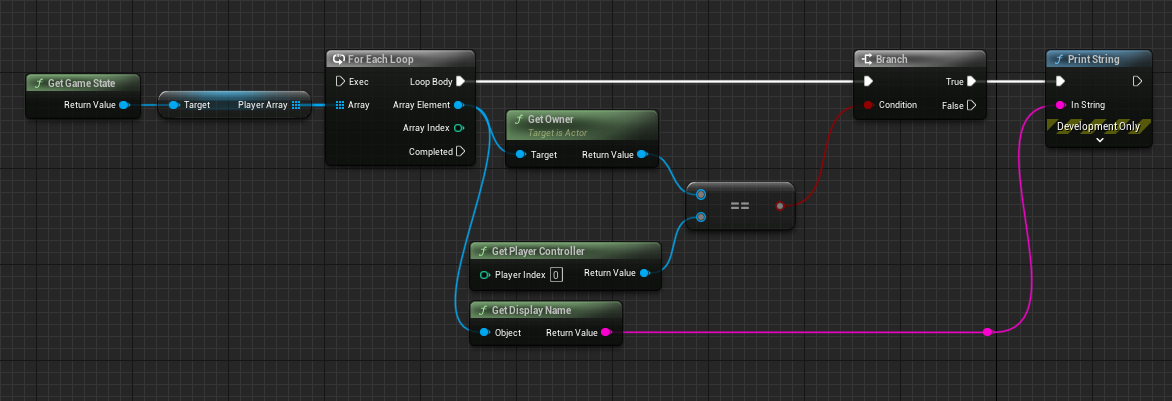


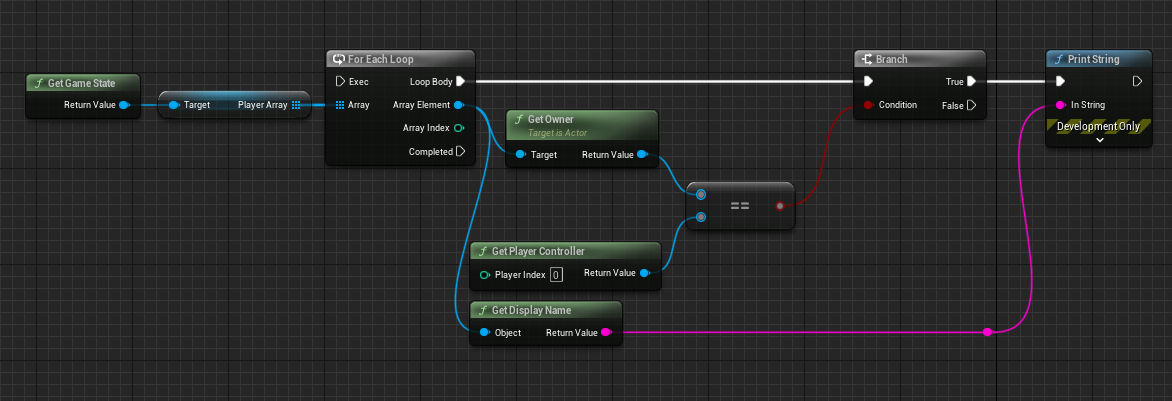 golden nest
short arrow
https://i.gyazo.com/7ea109fd833c046655e2bcfbcec972fc.png
golden nest
short arrow
https://i.gyazo.com/7ea109fd833c046655e2bcfbcec972fc.png
how would I get the owner of a PS if I'm on clientside
Widgets does not have access to PlayerControllers
Only the owning one
short arrow
exactly, and it's not just a widget thing, nothing has access to any controllers other then their own (excluding servers)
in that sense
"get owner" will return null and fail for everyone except your own
short arrow
all this is doing is checking if there's a playerstate that exists with your name on it
it'll help figure out the root of the problem
untold rock
It seems like the viewport player doesn't get the replicated data, but any other extra players do get the replicated data. Does anyone know why this could be happening?
golden nest
short arrow
https://i.gyazo.com/7ea109fd833c046655e2bcfbcec972fc.png
Well, also couldn't find any value
But if I print the PlayerArray there are 2 PS
If I print serverside the owners of the PS, it prints both player controllers, but clientside prints nothing
Is like client doesn't know that it owns a PS
short arrow
that's really odd
never seen that issue before 🤷
do you have the playerstates marked as not replicated?
golden nest
{
bReplicates = true;
PlayerUsername = FText::GetEmpty();
PlayerScore = 0;
PlayerTeam = EPlayerTeam::None;
}``` digital lichen
ebon jacinth
Anyone have an idea why clients in a lobby might not be following the host to a ...
digital lichen
ebon jacinth
Anyone have an idea why clients in a lobby might not be following the host to a ...
Working with Doonamai, we solved the problem. We had also installed another plugin that had written a port number to our defaultEngine.ini (see screenshot). We removed the port number and now the client can respond to the Connect Challenge Response from the host, and then the client can travel with the host.
 golden nest
Should I include bReplicates = true in my PlayerController?
I think default is true, but doesn't know what's happening so..
untold rock
untold rock
It seems like the viewport player doesn't get the replicated data, but any other...


 golden nest
untold rock
golden nest
untold rock
You should call server replication if you have no auth I think
If you are not the server, you want the RPC
If you are the server, just set the values
sinful tree
untold rock
Controllers only exist on the server and the client owning it. Any other clients won't be able to retrieve the controller in your animation blueprint. This is also pointless. Just get the pawn owner, no point in getting the pawn owner, getting the controller, then getting the pawn again.
 untold rock
sinful tree
Controllers only exist on the server and the client owning it. Any other client...
untold rock
sinful tree
Controllers only exist on the server and the client owning it. Any other client...
Not sure if I understand what nodes to use, so I tried this. But now its synced to the first player, which makes sense based on the nodes I'm using now. how should I get the character's controller in the animation blueprint?
 sinful tree
You should only need this in the anim bp.
 untold rock
sinful tree
You should only need this in the anim bp.
untold rock
sinful tree
You should only need this in the anim bp.
millions of thanks
it works now
short arrow
golden nest
```AVivalandTestPlayerState::AVivalandTestPlayerState()
{
bReplicates = true...
are you overriding something?
somewhere
golden nest
I found that something I changed on my PC was the problem
But don't know why cause it only input thing
but I deleted the changes and know works fine
short arrow
lol that's crazy, glad you figured it out though
golden nest
Let me explain what I'm trying to do
Maybe you notice something
I want this code to run both for server and client
{
    StopMovement();
}

// Triggered every frame when the input is held down
void AVivalandTestPlayerController::OnSetDestinationTriggered()
{
    // We flag that the input is being pressed
    FollowTime += GetWorld()->GetDeltaSeconds();

    // We look for the location in the world where the player has pressed the input
    FHitResult Hit;
    bool bHitSuccessful = GetHitResultUnderCursor(ECollisionChannel::ECC_Visibility, true, Hit);

    // If we hit a surface, cache the location
    if (bHitSuccessful)
    {
        CachedDestination = Hit.Location;
    }

    // Move towards mouse pointer or touch
    APawn* ControlledPawn = GetPawn();
    if (ControlledPawn != nullptr)
    {
        FVector WorldDirection = (CachedDestination - ControlledPawn->GetActorLocation()).GetSafeNormal();
        ControlledPawn->AddMovementInput(WorldDirection, 1.0, false);
    }
}
void AVivalandTestPlayerController::OnSetDestinationReleased()
{
    // If it was a short press
    if (FollowTime <= ShortPressThreshold)
    {
        // We move there and spawn some particles
        UAIBlueprintHelperLibrary::SimpleMoveToLocation(this, CachedDestination);
        UNiagaraFunctionLibrary::SpawnSystemAtLocation(this, FXCursor, CachedDestination, FRotator::ZeroRotator, FVector(1.f, 1.f, 1.f), true, true, ENCPoolMethod::None, true);
    }

    FollowTime = 0.f;
}
So what I did was create a server function that runs the SimpleMoveToLocation, and clientside I send the location value that I get from the cursor hit
Is this the right approach?
Like this
{
    StopMovement();
}

// Triggered every frame when the input is held down
void AVivalandTestPlayerController::OnSetDestinationTriggered()
{
    // We flag that the input is being pressed
    FollowTime += GetWorld()->GetDeltaSeconds();

    // We look for the location in the world where the player has pressed the input
    FHitResult Hit;
    bool bHitSuccessful = GetHitResultUnderCursor(ECollisionChannel::ECC_Visibility, true, Hit);

    // If we hit a surface, cache the location
    if (bHitSuccessful)
    {
        CachedDestination = Hit.Location;
    }
}

void AVivalandTestPlayerController::OnSetDestinationReleased()
{
    // We move there and spawn some particles
    Server_MoveToLocation(CachedDestination);
    UNiagaraFunctionLibrary::SpawnSystemAtLocation(this, FXCursor, CachedDestination, FRotator::ZeroRotator, FVector(1.f, 1.f, 1.f), true, true, ENCPoolMethod::None, true);
}
void AVivalandTestPlayerController::Server_MoveToLocation_Implementation(FVector NewDestination)
{
    UAIBlueprintHelperLibrary::SimpleMoveToLocation(this, NewDestination);
}```What do you think @short arrow ?
Also movement is automatically replicated, so I might be wrong with this implementation
chrome onyx
Yeah it's not really going to make a difference since you have latency across the network, so unless you're very low latency, it's going to "click into place". Meaning you'll have to do some form of interpolation on the remote clients, and 5/s is more than enough to interp between
Oops was replying to coldsummer but it didn't tag them
Ffs one more time @dark parcel
short arrow
Yeah all that seems fine at a quick glance, I don't see why any of this would cause the issue you were having previously @golden nest
golden nest
Ok, let me see what happen
short arrow
Though I've never made inputs in c++ so I can't really be sure
golden nest
I think inputs work fine cause I'm also shooting projectiles same way and it works fine
But something with movement isn't right
short arrow
well, you shouldn't be running AIMoveto or simplemoveto on clients for NPC's tbh
because the server owns them
you should ideally only be running predictions for local owned actors
golden nest
I have no npc's
Each player has it's own character that moves when clicking on the map
The code I showed you before, doesn't work. It has no weird bugs, but client doesn't move on click
Also need 2 clicks to trigger the input, wtf is happening here xD
short arrow
golden nest
I have no npc's
Oh i see, I think you might be over complicating the movement here. And tbh I wouldn't try to predict anything that isn't math, AIMoveto can be unreliable in my experience
All you need to do whenever you click somewhere is RPC to the server where you clicked
And let the server do the AiMoveTo
golden nest
that's what I'm doing
short arrow
I wouldnt run this on server and client though
I'm pretty sure that's what you said you were doing
If you're running the movement on both then you're essentially predicting movement on the client
golden nest
I think I'm running it only serverside
{
    StopMovement();
}

// Triggered every frame when the input is held down
void AVivalandTestPlayerController::OnSetDestinationTriggered()
{
    // We look for the location in the world where the player has pressed the input
    FHitResult Hit;
    bool bHitSuccessful = GetHitResultUnderCursor(ECollisionChannel::ECC_Visibility, true, Hit);

    // If we hit a surface, cache the location
    if (bHitSuccessful)
    {
        CachedDestination = Hit.Location;
    }
}

void AVivalandTestPlayerController::OnSetDestinationReleased()
{
    // We move there and spawn some particles
    Server_MoveToLocation(CachedDestination);
    UNiagaraFunctionLibrary::SpawnSystemAtLocation(this, FXCursor, CachedDestination, FRotator::ZeroRotator, FVector(1.f, 1.f, 1.f), true, true, ENCPoolMethod::None, true);
}
void AVivalandTestPlayerController::Server_MoveToLocation_Implementation(FVector NewDestination)
{
    UAIBlueprintHelperLibrary::SimpleMoveToLocation(this, NewDestination);
}```That's the code
Client finds the spot to move, and tell server to run AIMoveTo
When debugging, server gets the location, and runs SimpleMoveToLocation, but client is not moving at all
@short arrow Any ideas?
short arrow
golden nest
<@135505411779461120> Any ideas?
Om out right now, you can shoot me a dm and I can possibly help later on if you dont figure it out
golden nest
Oh, don't worry, thanks ❤️
pseudo kernel
I'm working on predicted projectiles and I'm questioning my approach. I have the player shooting immediately, and know when the proper server owned actor gets spawned, to make corrections.
I've been trying a bunch of stuff with the projectile movement component and have been able to make the server projectile match and interpolate so it looks smooth.
I've been able to take the predicted projectile's scene component and put it on the server spawned projectile... but notice the predicted actor will destroy the scene if it gets destroyed. I wonder if there's a better way, like intercepting the actor spawn and sort of reassigning my predicted actor as it? Or maybe there's an even better approach still.
golden nest
Why this code is not spawning the AICharacter and AIController for clients? I think BeginPlay runs for both client and server, but if(HasAuthority()) should leave clients aside and spawn on server for each player that joins.
{
    // Call the base class
    Super::BeginPlay();

    //Add Input Mapping Context
    if (UEnhancedInputLocalPlayerSubsystem* Subsystem = ULocalPlayer::GetSubsystem<UEnhancedInputLocalPlayerSubsystem>(GetLocalPlayer()))
    {
        Subsystem->AddMappingContext(DefaultMappingContext, 0);
    }

    APawn* MyPawn = GetPawn();

    if (HasAuthority())
    {
        //Spawn AIControlled character
        if (MyPawn != nullptr && AICharacterClass != nullptr && AIControllerClass != nullptr)
        {
            FTransform SpawnTransform = GetPawn()->GetActorTransform();
            FActorSpawnParameters SpawnParameters;
            SpawnParameters.Owner = this;
            AICharacter = Cast<AVivalandTestCharacter>(GetWorld()->SpawnActor(AICharacterClass, &SpawnTransform, SpawnParameters));
            AIController = Cast<AVivalandTestAIController>(GetWorld()->SpawnActor(AIControllerClass, &SpawnTransform, SpawnParameters));
            AVivalandTestPawn* VivalandPawn = Cast<AVivalandTestPawn>(GetPawn());
            if (AIController != nullptr && AICharacter != nullptr && VivalandPawn != nullptr)
            {
                AIController->Possess(AICharacter);
                VivalandPawn->Server_InitializePawn(AICharacter);
            }
        }
    }
}```Have you put a breakpoint in there?
Also player controllers only exist on the server and the owning character. If they are AI player controllers, they'll never be on the clients.
Not saying the authority check will break anything, mind.
golden nest
I put a breakpoint and only server player is executing the code once, I think. Let me try again
latent heart
That is expected.
golden nest
I want just the server to have the AIController & AICharacter references, but when client sends RPCs, use the AI references on server. It could work, right?
golden nest
latent heart
That is expected.
But wouldn't server execute the code once per user on the server?
latent heart
(So you can't reference the controller on the client)
golden nest
latent heart
(So you can't reference the controller on the client)
I don't want to
client just tells server "DoThis" with AI
And server uses the references
latent heart
Fair enough then.
golden nest
So, is it ok? Cause I can't get my client to have it's AICharacter
It's not spawning
latent heart
MyPawn may not be set yet when the PC triggers begin play, btw
Try one of the posses events.
golden nest
Oh, that's right
 woven basin
pseudo kernel
I'm working on predicted projectiles and I'm questioning my approach. I have the...
woven basin
pseudo kernel
I'm working on predicted projectiles and I'm questioning my approach. I have the...
A simple approach is have the firing animation be client prediction - but the actual spawning of the projectile to only be server side. A number of AAA Games do it like this. I think Fornite even does this. I vaguely remember someone (was it ?Kaos) talking about it here a few weeks ago
arh - found it - it was Jambax: #multiplayer message
pseudo kernel
woven basin
A simple approach is have the firing animation be client prediction - but the ac...
Interesting, I can play with that, I guess I struggle to get the projectile to feel responsive or come out of the muzzle location that way. Maybe when the projectile spawns I can retarget and interpolate it still
pseudo kernel
woven basin
arh - found it - it was Jambax: https://discord.com/channels/187217643009212416/...
Do you know what he means by SSHD here?
If you're using actors/slow moving projectiles, my opinion is it's not worth the hassle to predict them, just accept the latency and use SSHD
golden nest
latent heart
Try one of the posses events.
Well, same results
woven basin
pseudo kernel
Do you know what he means by SSHD here?
server side hit detection?
pseudo kernel
Ah yeah probably
that makes sense
I guess I can play with that approach and see how it ultimately feels
golden nest
latent heart
Try one of the posses events.
I tried this
{
    Super::OnPossess(InPawn);
    AVivalandTestPawn* VivalandPawn = Cast<AVivalandTestPawn>(InPawn);

    //Spawn AIControlled character
    if (VivalandPawn != nullptr && AICharacterClass != nullptr && AIControllerClass != nullptr)
    {
        FTransform SpawnTransform = VivalandPawn->GetActorTransform();
        FActorSpawnParameters SpawnParameters;
        SpawnParameters.Owner = this;
        AICharacter = Cast<AVivalandTestCharacter>(GetWorld()->SpawnActor(AICharacterClass, &SpawnTransform, SpawnParameters));
        AIController = Cast<AVivalandTestAIController>(GetWorld()->SpawnActor(AIControllerClass, &SpawnTransform, SpawnParameters));
        if (AIController != nullptr && AICharacter != nullptr)
        {
            AIController->Possess(AICharacter);
            VivalandPawn->Server_InitializePawn(AICharacter);
        }
    }
}```Okay?
Why do you have a server method, btw?
It's already running on the server.
You may wnat to check if the ai controller already exists and if the aichararacter already exist.
or you'll spawn new ones every time you posses a new pawn.
golden nest
oh, that's right, I might check for existing ones, but also the client is not spawning
golden nest
latent heart
Why do you have a server method, btw?
I override the OnPossess method, I don't have a server function
OnPossess is already serverside only
{
    Super::OnPossess(InPawn);

    if (AICharacter != nullptr || AIController != nullptr)
        return;

    //Spawn AIControlled character
    AVivalandTestPawn* VivalandPawn = Cast<AVivalandTestPawn>(InPawn);
    if (VivalandPawn != nullptr && AICharacterClass != nullptr && AIControllerClass != nullptr)
    {
        FTransform SpawnTransform = VivalandPawn->GetActorTransform();
        FActorSpawnParameters SpawnParameters;
        SpawnParameters.Owner = this;
        AICharacter = Cast<AVivalandTestCharacter>(GetWorld()->SpawnActor(AICharacterClass, &SpawnTransform, SpawnParameters));
        AIController = Cast<AVivalandTestAIController>(GetWorld()->SpawnActor(AIControllerClass, &SpawnTransform, SpawnParameters));
        if (AIController != nullptr && AICharacter != nullptr)
        {
            AIController->Possess(AICharacter);
            VivalandPawn->Server_InitializePawn(AICharacter);
        }
    }
}```Oh, Server_InitializePawn() is for initializing the AICharacter on my current pawn so camera can follow the AI character
I might change it to be just a function
latent heart
That's the thing, the Server specifier doesn't say, "this is a function that runs on the server"
It means, "Send the call to this function over the network to the server"
(or run it locally if you're already the server)
golden nest
Yeah, I want to run it locally on server
latent heart
So if you're already only ever running it on the server anyway, it's totally pointless to set it up as a server function.
golden nest
Yeah, it is server function cause before I was running this on BeginPlay, so I might change it
But that's another point
dark parcel
chrome onyx
Yeah it's not really going to make a difference since you have latency across th...
Make sense
golden nest
If I run if (HasAthority()) on tick, it will execute in client actor but serverside only?
dark parcel
Don't think so, it will prob run in the machine controlling the actor since it have authority over it
Check roles and print them above your character head
golden nest
So I might check roles for that?
This is my code
{
    if (FollowedActor != nullptr && HasAuthority())
    {
        float InterpolationSpeed = 10.0f;
        FVector NewLocation = FMath::VInterpTo(GetActorLocation(), FollowedActor->GetActorLocation(), DeltaSeconds, InterpolationSpeed);
        SetActorLocation(NewLocation);
    }
}```I want my Pawn to follow an actor and I thought that checking for Authority would do this only on server, so position is automatically replicated
dark parcel
Maybe get the is server check instead has authority if u want server only
golden nest
dark parcel
Maybe get the is server check instead has authority if u want server only
How is that?
latent heart
golden nest
If I run `if (HasAthority())` on tick, it will execute in client actor but serve...
It should work as you think.
golden nest
Well, it does not, on client the pawn does not follow my FollowedActor
I only set FollowedActor on server btw
dark parcel
Nvm I didn't get it right
golden nest
FollowedActor is also replicated
latent heart
The actor or the variable?
golden nest
The Variable
latent heart
Does it need to be?
golden nest
No, but it's old code haha
I will print something to screen to see what's up with this
I remove the replicated thing on FollowedActor variable
Well, it's "Following' the character, but nothing happens
golden nest
Maybe checking for GetLocalRole() == Authority?

I think HasAuthority() resolves where the actor was spawned, if on server then server has authority over it.
But, doesn't work as expected
sinful tree
Authority is technically whoever spawned/has ultimate control of an actor.
golden nest
Yes, but it does not update the position of my pawn don't know why
It's spawned on server, but doesn't update the position for clients
And transform is automatically replicated
should I set bReplicates = true;?
sinful tree
On the actor, yes, otherwise it wouldn't be replicated.
golden nest
sinful tree
On the actor, yes, otherwise it wouldn't be replicated.
I set bReplicates = true but still not following, I don't know what else could I do
sinful tree
Are you sure followed actor is valid on the server?
golden nest
Yes, it is setted correctly
I created a server_function to update the location to check what happens
sinful tree
Ok, possession seems to impact the ability to move the actor with set actor location.
golden nest
So how can i move my pawn based on AICharacter?
Maybe attaching my pawn to the AICharacter or something like that?
golden nest
sinful tree
Ok, possession seems to impact the ability to move the actor with set actor loca...
What do yo recommend?
I displayed the location of my pawn, and it's following the character, but my camera does not move

 potent pewter
Hi everyone, I'm looking for a guide, documentation or something to help me create an MMO TPS Shooter that will initially include:
- Authorization
- Creating a character in the appearance editor and then saving the appearance to the DB
- Tutorial after creating an account
- Server selection
- Main menu:
-Start Game / Join Game [Game Session Browser].
Start game: select mode, map, and number of players.
-Store [costume, weapons, items]
-Inventory.
At this point I have little to no knowledge of programming languages, before this I have at most edited existing code
I realize that it takes a lot of time to learn how to create a dedicated server and database and have no illusions that it will be quick and easy. I just need a point from which I can start learning by practicing.
Thanks in advance for your advice.
 teal frost
potent pewter
Hi everyone, I'm looking for a guide, documentation or something to help me crea...
teal frost
potent pewter
Hi everyone, I'm looking for a guide, documentation or something to help me crea...
Personally what I do is I just jumped into making a pretty simple project with a small demo scope. When I want to implement something I look up that thing specifically, then familiarize myself with all of the nodes and code that are used and what they're actually doing and why.
So more or less
Look up something specific,
Replicate it yourself to your project,
Then go back and garner an understanding of each aspect of it.
Also helps to look up several tutorials. There are almost always many ways to achieve the same thing.
Also just read around the ue database
With that said
Is anyone available to help with solving a spawning replication issue?
Server is setting the spawn transform, everyone but the owning client see's it as such. Does this for every pawn.
latent heart
potent pewter
Hi everyone, I'm looking for a guide, documentation or something to help me crea...
My advise is start small. Don't even consider making an mmo as your first, third, tenth game. Especially in UE.
potent pewter
teal frost
Personally what I do is I just jumped into making a pretty simple project with a...
Thank you, ah, about database i was talking about MySQL)
latent heart
And don't connect your game to a database.
teal frost
potent pewter
Thank you, ah, about database i was talking about MySQL)
I was referring to this https://docs.unrealengine.com/4.27/en-US/WhatsNew/

Information about new features in each release of Unreal Engine
latent heart
Use an intermediary like a webserver.
potent pewter
Got it, thank you guys)
golden nest
could this PrimaryActorTick.bCanEverTick = (Role == ROLE_Authority); for this code?
{
    if (FollowedActor != nullptr && HasAuthority())
    {
        float InterpolationSpeed = 10.0f;
        FVector NewLocation = FMath::VInterpTo(GetActorLocation(), FollowedActor->GetActorLocation(), DeltaSeconds, InterpolationSpeed);
        SetActorLocation(NewLocation);
        if (GEngine)
        {
            FString LocationString = FString::Printf(TEXT("Actor Location: X=%.2f, Y=%.2f, Z=%.2f"), NewLocation.X, NewLocation.Y, NewLocation.Z);
            GEngine->AddOnScreenDebugMessage(-1, 1.0f, FColor::Yellow, LocationString);
        }
    }
}```Maybe on BeginPlay()?
@latent heart I found out that PrimaryActorTick.bCanEverTick = HasAuthority(); disables the printing
So, this hole time tick was running on client
latent heart
Are you running HasAuthority in the constructor?
golden nest
On BeginPlay() I run PrimaryActorTick.bCanEverTick = HasAuthority();
latent heart
That shouldn't do anything.
golden nest
Shouldn't it disable client tick?
latent heart
I think?
 hollow eagle
bCanEverTick should only be set in the constructor.
latent heart
Yeah.
hollow eagle
Changing it does nothing once the actor spawns.
latent heart
You want to enable or disable the tick, not whether it can tick.
hollow eagle
If you want to change whether you're ticking at runtime call SetTickEnabled
golden nest
{
    SetActorTickEnabled(HasAuthority());
}````So this should enable server and disable client?
golden nest
golden nest
could this `PrimaryActorTick.bCanEverTick = (Role == ROLE_Authority);` for this ...
I'm just trying to do this tick follow, but doesn't work for clients and really don't know what else to do :/
latent heart
The only way you'd set that different in client vs server is if you had a dedicated server and dedicated client build.
golden nest
Yeah, I'm just trying everything to see what works
Is there another way to check for server? @latent heart @hollow eagle
latent heart
Not at construction time.
golden nest
I mean in tick
hollow eagle
again, what you just posted will work fine
golden nest
But it's not
hollow eagle
bCanEverTick = true in the constructor
SetActorTickEnabled in BeginPlay
then you're doing something wrong
and it's not directly related to this
golden nest
I'm not even spawning this class, is the default game mode pawn
I don't really know what to test
latent heart
Put a breakpoint in your tick function: cpp if (!HasAuthority()) { __debugbreak(); }
If it hits that, your client is ticking.
golden nest
Like this?
{
    if (!HasAuthority())
    {
        __debugbreak();
    }

    if (FollowedActor != nullptr && HasAuthority())
    {
        float InterpolationSpeed = 10.0f;
        FVector NewLocation = FMath::VInterpTo(GetActorLocation(), FollowedActor->GetActorLocation(), DeltaSeconds, InterpolationSpeed);
        SetActorLocation(NewLocation);
    }
}```And this
And test it.
You may need to disable running them all in separate processes or attach to a client to check, though.
golden nest
 latent heart
Did you do teh beginplay thing?
golden nest
Let me build again
golden nest
latent heart
Did you do teh beginplay thing?
Well it did not break
latent heart
Then you're ticking as expected.
Though I'd probably not use breakpoints for multiplayer builds. Maybe on-screen logging.
golden nest
So, tick is working fine, but why client camera is not moving? Can you help me figuring out?
latent heart
Some replication setting in the camera probably
Plus, if it did work, it'd be horribly janky over the network.
You should do it on the client too.
golden nest
I noticed something. My PC that owns the pawn that ticks to follow, spawns a projectile with PawnLocation, and when the AICharacter moves, the projectile keeps firing from the camera position. So, it means that the pawn is never moving, right?
{
    FVector SpawnPosition = GetPawn()->GetActorLocation();
    FRotator SpawnRotation = GetPawn()->GetActorRotation();

    Server_SpawnProjectile(SpawnPosition, SpawnRotation);
}```That function OnShootStarted is called by user input
 pseudo wagon
Does anyone able to run multiple session in single dedicated server?
thin stratus
@pseudo wagon It's one session per server
You can host multiple dedi servers on the same cloud server with different ports fwiw
 smoky vessel
Greetings! Does anyone know how to fix this? I started the game on two clients. The first client starts moving, and the second one follows, but the second one collides with the first as if it's a ghost. It feels like the server understands that the cars aren't moving, but the clients don't. Meanwhile, the HUD displays that it's a sports car
 crisp shard
Is it fine to be using the same player state for multiple levels (main menu, open world, mini game) while saving player data in that player state across all of those levels? This data is universal to the entire game/world but for example I have a pre world level where players will create a profile and thus us where I would creating their save game files and then in the open world I’d be loading it from that save game all of the days of which is stored in the player state which would be used in all of these different levels.
stuck cloud
Can I manage client widgets from withing GameMode? I have all player controllers stored in a player list but I'm not sure if I can manipulate the PlayerControllers on the servers. Are those changes I do on the server then happening for the clients too?
When I try to start my project with 2 player in client mode I crash with this:
 chrome bay
Clients should manage HUD themselves locally. GameMode has no functionality/doesn't exist on clients.
That's not where the crash is, the crash is further back in the stack. A Fatal log message has been triggered
stuck cloud
I add the local HUDs from within GameMode through accessing the player controllers / HUD that are stored on the server and call functions that should run locally on the clients. Is that also not possible?
I do stuff like this basically:

From my understanding (that is very limited 😄 ) this should add the HUDs to the player controllers that are also present on the server
Does anyone have some recommendations to learn how to do multiplayer in unreal?
chrome bay
The HUD instance doesn't exist on the Server, it only exists on clients.
HUD should be doing something like listening for an event when the game starts etc.
stuck cloud
Ok thx! I will have to change some things generally I guess...
Is there a recommended way of triggering events from within GameMode that can be listened to on the client side?
 tranquil yoke
GameMode is available only on server
chrome bay
You would usually use the game state to replicate mode-level information
stuck cloud
Ok thx. Something like triggering the events in GameState by accessing GameState in GameMode?
tranquil yoke
You want to trigger something on client when something happens on server?
stuck cloud
Yeah, I'd like the server to decide for example when new Turns start and whos Turn it is in my turnbased game
Right now I do that in GameMode but I was just doing local multiplayer so far
But I'm starting to think that I miserunderstood what GameMode is meant for 😅
tranquil yoke
In multiplayer Gamemode is only in server, so you cant send anything from server to client, Gamestate is available on server and client, so if there 3 clients there are 1 game state on server and 3 on client. (each for one client), so replicated parameter created on Gamestate will be accessible everywhere
stuck cloud
Cool, thx. So changing GameState on the server side and then reacting to changes in GameState on the client side is probably the way to do it
tranquil yoke
Now you can control UI on each client using parameters defined inside GameState, which is replicated so when you change replicated parameter on server it will go client and client will display on UI.
stuck cloud
Nice yeah that sounds like how it's supposed to be done
 jovial mantle
sorry for the repost... trying to get some help >_> sent it in general chat but it just got lost in other messages.
Hi! im kinda new to Unreal and I was working on my physics based player controller and I happened to stumble upon this video, https://youtu.be/YB_ew3j_HFw?si=q0pZDs0WoDGW8iMy
It mentions how blueprint isnt suited to handle interpolation with physic movement in a high ping network environment. And that tutorials on youtube does not cover that issue in their video tutorials.
I begun to search up some other resources and found this video below which managed to fix the jittery physics based movement of his vehicle after increasing the framerate of the Engine Physics refresh rate. https://youtu.be/43Qr41NFx3c?si=-XwKy8KJDyePIf4O
Could someone confirm / deny if that is true? (That blueprint physics based player controller movement has issues with interpolation during high ping network environment) or is it false?
And is it possible to make use of blueprints to create a good custom physics based movement player controller that would have good interpolation on high ping to make it not loot jittery?
(Feel free to PM / ping me if u would reply to this thx!)
Wishlist our game Spanky! https://store.steampowered.com/app/1732420/Spanky/
GMC: https://www.unrealengine.com/marketplace/en-US/product/general-movement-component?sessionInvalidated=true
Smooth Sync: https://www.unrealengine.com/marketplace/en-US/product/smooth-sync
In this video we address the topic of multiplayer games made with unreal engi...

In this continuing Unreal Engine Desert Driving Game series, we fix a problem with jittery vehicle motion when playing the game as a client in standalone or final build. This is caused by a mismatch between the graphics framerate and the physics simulation rate and the fix is detailed in this fantastic blog below by Victor Avila:
tranquil yoke
You should learn more about how multiplayer works before doing basic tasks.
Learn what is game mode , game state , player state, player controller, and what is the scope of these actors interms of multiplayer.
you need to get in this mindset of multiplayer first then things will become very easy.
https://cedric-neukirchen.net/docs/category/multiplayer-network-compendium/
read this, try to understand it
This compendium is meant to give you a good start into multiplayer programming for Unreal Engine.
stuck cloud
Thx yeah you're right. I'll check out the link, looks cool
tranquil yoke
you should also read about RPC, and how RPC can be sent, because not every actor can send RPC to server only those which is owned by the client.
Once you understand ownership of the actor, only then RPC works correctly.
each actor can have replicated parameters if the actor is replicated but it is not true for RPC.
stuck cloud
Yeah I didn't even read about RPCs yet. It's my first time learning unreal and I thought I'll do local multiplayer only but then quickly realized how multiplayer is such a integral part in unreal and since I started using the GameplayAbilitySystem which has multiplayer in it's core I now decided to make things work online too. I think it's not too late now since I'm only 4 weeks in
But I'll check it out next. I think I have to take a break from implementing stuff and do some reading/learning the basics now
jovial mantle
jovial mantle
sorry for the repost... trying to get some help >_> sent it in general chat but ...
Could someone help me? 
jovial mantle
Uhh, just to confirm, like u mean "no" it is probably not possible to create a physics based blueprints player controller with good interpolation on high ping? to prevent it from looking jittery?
Sooo I should probably try to create my player controller with C++ instead?
ah okay thx! also, does UE4 C++ tutorials work for UE5 C++?
It should be roughly the same right? other than maybe some functions depreciated here and there? Cos I noticed there is not alot of UE5 C++ tutorials around
also, by any chance do u know which specific features I should be looking at? for player movement replication over the network?
oh dang alright... I from asia so I might be asleep by then T_T whoever sees this please just drop me a DM or something
Ah I tried ue5 general but no one replied and the conversation went off somewhere else
quasi tide
Every "fix" I've seen for physics driven stuff, was done in C++.
quasi tide
quasi tide
Every "fix" I've seen for physics driven stuff, was done in C++.
So, while I don't really do much with physics at all, I'd say that it is impossible to do it exclusively in BP based on that alone.
jovial mantle
hmm okay thx!
quasi tide
That said - Epic is working on stuff like that. So in the future it might be possible.
Making Chaos more networking friendly that is.
jovial mantle
is chaos physics really that much different from UE4?
quasi tide
I've seen some commits about it.
quasi tide
jovial mantle
is chaos physics really that much different from UE4?
Going from PhysX to their homegrown solution, Chaos.
quasi tide
It is bad in the short term (less performant for a lot of people), but potentially good in the long-term (more control for the needs of Unreal Fortnite)
jovial mantle
Anyways thx for all the help! at least now I know to avoid blueprint tutorials for physics based character movement and search for C++ instead. I found one that seems kinda promising but kinda busy rn so hoping it would work when I do get around to testing it
stuck cloud
When playing in the editor with Net Mode set to Client, is it normal that the screen is black for 1-2 seconds until the game starts?
sinful tree
Yes
stuck cloud
And is it also normal that some actors already tick during that time period? I get errors during the tick fuction for an actor until the game is loaded
sinful tree
They can. The server starts up in the background and spawns things before your client views are ready.
stuck cloud
stuck cloud
sinful tree
They can. The server starts up in the background and spawns things before your ...
Ok cool, that makes sense. PlayerControllers are not ready yet either I guess. Thx for the help
 hasty cipher
Hola Amigos. I’m searching for a multiplayer development teacher to help me find the mistake I made with a few things. I really need to finish my project the end of november. I would pay you for a online teaching session.
teal frost
Anyone available to help me learn how to fix a pawn spawning replication problem? Lol
 fair latch
Isnt spawning as simple as it get
teal frost
fair latch
Isnt spawning as simple as it get
I thought so
fair latch
Tick replicate in the actor you want to spawn then spawn it from server
teal frost
fair latch
Tick replicate in the actor you want to spawn then spawn it from server
Yeah
The problem is
Like the 4 methods I've tried
Everything "works"
Everyone sees everyone in the correct orientation.
But everyone sees themselves with the wrong orientation.
Corrects itself on movement.
So server is working client is not.
I've tried handling the spawning on server, client, and Mc.
Through PC and GM.
Same result no matter what I do.
fair latch
Only server should spawn a replicated actor
teal frost
fair latch
Only server should spawn a replicated actor
Thats what I thought and how I had it originally and have it now
fair latch
It dont matter where you call the node as long the server the only one spawning it
teal frost
fair latch
It dont matter where you call the node as long the server the only one spawning ...
I figured but st this point idk what to do so I'm just trying things lol
fair latch
Dont u set the rotation for the spawn?
teal frost
fair latch
Dont u set the rotation for the spawn?
Setting it to the player start they spawn at.
On the server they're spawning with the correct transform.
On client side everyone is spawning with rot 0-0-0
fair latch
Not sure if rotation is replicated in cmc by default, i only get to spawn cubes soo far. If thats a problem for you then maybe you can update the transform to each client after spawning
teal frost
fair latch
Not sure if rotation is replicated in cmc by default, i only get to spawn cubes ...
Did that, and it kind of works.
The problem with that is it doesn't correct the camera positioning.
I'll probably dig deeper into that to see if there's a solution to that which I'm sure there is, but the 2 things I tried just broke my camera lol
fair latch
How does that break ur camera? Rotate the whole actor dont rotate the components
Just use set actor rotation via rpc
teal frost
fair latch
How does that break ur camera? Rotate the whole actor dont rotate the components
I know, I did.
And I'm not sure.
I can post a video later.
What happens is
Pawn spawns
Then rotates but the camera stays in the same place.
Then if I reset the placement of the camera rotation it gets all funky