#multiplayer
1 messages · Page 115 of 1
 clear island
 solar stirrup
im talking about anything replicated within the engine
 quasi tide
Iris or Verse. The race is on.
 dark edge
It's the difference between
"Hey this thing updated, replicated it soon"
and
"Better check if the thing changed so I know if I gotta replicate it"
For a small number of things you won't get much of a difference and just polling for changes is trivial.
For a giga number of things you dont want to poll all the time.
Polling happens all over the place. It's simple and is sometimes faster as it keeps execution nice and predictable.
 dusk fable
quick question , in multiplayer turn based game , the player in turn , gets to control the camera freely , others will spectate waiting for their turn , my question is , do i make character spawn in player starts or use actors for characters to spawn in ? characters arent controlled , they move one box at a time
dark edge
dusk fable
quick question , in multiplayer turn based game , the player in turn , gets to c...
Player start actor is just a dummy actor for the gamemode to know where to spawn a player's PAWN. You don't need to use them
Player's pawn should probably be just the camera in this setup.
dusk fable
dark edge
Player's pawn should probably be just the camera in this setup.
few more details on this oen pls ?
so the approach wld be , make a separate camera bp , setup spawn actors (characters) , when game starts , the camera follows whoever has the turn ?
dark edge
What do you intend for players to see when it's not their turn
dusk fable
spectate whoever is playing
dark edge
I would make the player's pawn be the camera thing
everyone would have one
when it's your turn, you can control it as normal (use an onrep for this)
when it's NOT your turn (same OnRep), have your pawn go in a mode that just attaches it or otherwise follows the movements of the player who's turn it is
So it's not 1 camera pawn being shared, its N camera pawns, where all of them copy whatever PlayerWhosTurnItIs's pawn is doing.
There would be other, more elegant ways to do this, but I'd start it like that. Super simple.
dusk fable
oh sounds good
okay that aside , the characters
i make bp actor as a spawn point for characters , and put them in the scene ?
dark edge
The core of it would be
OnRep_PlayerWho'sTurnItIs -> if PlayerWhosTurnItIs = MyPlayerState or whatever -> true -> do one thing
-> false -> do something else
dark edge
dusk fable
i make bp actor as a spawn point for characters , and put them in the scene ?
Sure, either that, or add some spawning logic to GameMode or whatever, depends on how you want things to be done.
dusk fable
alright
yeah cuz basically , i wanted the character to be there to show progress in-game , and players can use some utilities on each other, there will be some animation and all , but not free controll over character , its more of a board game
dark edge
Yeah like Baldur's Gate or other CRPGs
If I was doing something like that I'd have the pawn be the thing that holds the camera and not much more.
 woven bramble
Voice chat (Voip) works properly when I am in the lobby. Because I join the Lobby with Open Level (Create host or Join Server). But when I switch to the Main Map with Server Travel from Lobby, the voice does not work on the Main Map. Any idea?

 astral cypress
With pixel streaming how much overhead is produced by people seeing the same thing but from their own view
Like if you wanted a bunch of people in the same instance of a game would that be expensive?
 urban crystal
Having a wierd issue where when I kill a player and respawn them they get respawned fine on the server but on the client they float where the spawned and can't move
dark edge
urban crystal
Having a wierd issue where when I kill a player and respawn them they get respaw...
Show your kill / respawn code
 hollow bridge
Whenever a player places an item I set this player the owner because it's more convenient to be able to send RPC from the actor BP, is it a bad practice that should be avoided?
 fathom aspen
Due to tips and tricks article found in this channel pins it is
I mean an actor can have only one owner at a time and that means other players won't be able to do anything with the actor
Not to mention that it's another hard reference for nothing
Not to mention that it will be replicting extra bytes for the netguid over the network for nothing as well
So don't get me wrong. Sometimes it's fine (say a weapon actor attached to the pawn)
But usually it's not, where we are talking about world map actors
hollow bridge
Toda 😉
dark edge
hollow bridge
Whenever a player places an item I set this player the owner because it's more c...
I wouldn't set ownership for items that can be interacted with by multiple players
Stuff on the map, no
Equipped items, sure
 dark parcel
woven bramble
Voice chat (Voip) works properly when I am in the lobby. Because I join the Lobb...
dark parcel
woven bramble
Voice chat (Voip) works properly when I am in the lobby. Because I join the Lobb...
Run addvoip in main map maybe
When you enter new level, a lot of hard ref are destroyed
 silver totem
Anyone has any good reads on projectile replication with client prediction? I've already read Valve's Counter Strike post about hit detection and lag compensation, but that's primarily for raycast based weapons
So far I'm just letting the server spawn the projectile and replicate it to all clients, including the shooter
Is it typically how it's done? Or is it still feasible to spawn a fake projectile on client in case of heavy lag?
woven bramble
dark parcel
Run addvoip in main map maybe
I added it to the PlayerController integrated in the Main Menu, the problem is still the same.
It's really strange. I can't find any solution, it's ridiculous.
woven bramble
Is there a Voice Chat we can use other than Voip talker?
 woven basin
silver totem
Anyone has any good reads on projectile replication with client prediction? I've...
woven basin
silver totem
Anyone has any good reads on projectile replication with client prediction? I've...
The c++ shooter course by Druid Mechanics is very very good and includes a whole section about server/client prediction and replay/rollback stuff for bullets and replay etc.
It’s a paid course, but always coupons available on his discord, so it’s very cheap. But very high quality.
 sonic jasper
anyone know why GetOwner() on Playerstate is null on a client? Meant to be replicated?
solar stirrup
sonic jasper
anyone know why GetOwner() on Playerstate is null on a client? Meant to be repli...
Owners are generally player controllers
Check if it's null on your client's player state
sonic jasper
yeah its the playercontroller on the server but client is null on playerstate
solar stirrup
PlayerControllers are only replicated to their owning clients
So if you're a client you only know about your player controller, not anyone else's
Only the server has access to them all
sonic jasper
hmm was aware of that but would not have thought it an issue in this case but playerstates are odd haha, call is coming from a components onrep on the playerstate, shouldnt the client playerstate know its playercontroller?
solar stirrup
Yep, however there's no guarantee the player controller will have replicated yet ^^
I'd wait for BeginPlay() to be called on the player controller & player state, client side
sonic jasper
i put in a SetTimerForNextTick so unless its taking 5mins to replicate it aint replicating
solar stirrup
There's no guarantee about how long it'll take to replicate, or in which order (could be PC first and then PS, or vice versa)
sonic jasper
which doesnt appear to be
solar stirrup
i'd wait for both PS and PC to begin play
sonic jasper
will try putting break points in them see if they occuring during the wait
 kindred widget
virtual void ClientInitialize(class AController* C);```beginplays execute well before trying to RPC and that function executes before as well
so something busted with my playerstate i guess
kindred widget
What are you doing exactly?
sonic jasper
i have a component that loads data assets for the units to spawn for each player
when all data is loaded and replicated trying to rpc to server to spawn them
maybe comp on the playerstate is a bad place
just figured later when i do save data might be convenient
kindred widget
When you say units. I think like an RTS or squad game. Which makes me wonder why you care about the client's side?
sonic jasper
so have multiple factions, server side gets the factions in the current session and the replicates that list to clients to load the data, classes, meshes whatever
verify((AssetManager = UAssetManager::GetIfValid()) != nullptr);

    if(SessionGroupDataAssets.Num() > 0)
    {
        TArray<FName> LoadBundles;
        LoadBundles.Add(RTS_DATA_ASSET_BUNDLE_GAMEPLAY);
        const FStreamableDelegate GroupDataLoadedDelegate = FStreamableDelegate::CreateUObject(this, &URTSPlayerDataComponent::LoadSessionEntitiesPlaceableAssets_Client);
        AssetManager->LoadPrimaryAssets(SessionGroupDataAssets, LoadBundles, GroupDataLoadedDelegate);
}```i think the data stuff is right just need to change how i am trying to spawn the actual actors
like do it from the gamestate foreach player
kindred widget
Why are you replicating the data though? I understand replicating it assign it to a player. But as far as spawning default units for the player, that should all be done on the server anyhow. The client shouldn't be involved in this at all besides picking a faction, or picking units maybe. Which would happen long after stuff is initialized. But at spawn time, the server should already have this data ready, have it vetted for errors, and just do it on server. Client will receive the replicated actors eventually.
sonic jasper
yeah, i guess that is the case for soft pointers as well, would only need to load on server
once its spawn its just all replicated hey
was under the impression from somewhere clients needed it loaded
sonic jasper
kindred widget
Why are you replicating the data though? I understand replicating it assign it t...
thanks Authaer
kindred widget
sonic jasper
was under the impression from somewhere clients needed it loaded
They might if they need that data for UI or something. I mean no harm in putting a data asset pointer in the playerstate for their faction so that UI can get it and do stuff with it. But for default units, definitely all server only. 😄
 meager spade
@sonic jasper if the client does't have the data loaded
they will hitch loading it
ie if they recieve an actor which is not loaded on there side, they will sync load it during replication
 unborn nimbus
When replicating a struct, I understand that the entire struct is replicated when any property of the struct changes but how are non-uproperty members of that struct handled? Obviously they don't get replicated but does the underlying system still allocate memory for those non-uproperty members or are they completely ignored?
 latent heart
They are completely ignored.
unborn nimbus
awesome, thanks
latent heart
for replication
The receiving end will still allocate the entire struct, the non-uproperty vars will just have default values.
Or random trash memory
unborn nimbus
Sure, I just want to make sure it's not using unecessary bandwidth
latent heart
Nope!
unborn nimbus
wonderful
latent heart
Nothing in UE replicates with "let's just copy the memory from A, put it into the socket and put it in memory at B"
unborn nimbus
I didn't figure so but sometimes, you never know haha
 hollow mango
Anyone know if its possible to get a cached array of friend requests? (EOS) I want to implement a custom Friend Widget
unborn nimbus
@latent heart how about replicating arbitrary data like a byte array?
I suppose it should just handle TArray<uint8> right?
latent heart
Yup
 magic furnace
Hey what is my alternative for a for each in networking
because what I've noticed based on the nature of a for each
is that the for each is executing in one tick but the amount of packets to be sent is too much in my case
quasi tide
What?
magic furnace
yeah, well it's not technically correct, basically in other words
if I use a for each
quasi tide
A for each loop has nothing to do with networking
magic furnace
something might be too quickly replicated if I call an on client event from the server in a for each loop
at least that is the conclusion I draw
quasi tide
Then...don't do that?
magic furnace
yes, so I am asking for an alternative where I can achieve for each functionality but without the issue
or if there is a known way around it
quasi tide
For each has nothing to do with networking
You are making no sense.
If you want to loop through a collection, then for each or for loops are generally preferred
magic furnace
I call something like this, some random indexes will be skipped
 quasi tide
Why not use a multi cast?
magic furnace
it's only meant for this one client to run some functionality
a client side functionality
quasi tide
Then why are you using a foreach?
magic furnace
I equip 10 armor items, 2 of which are on the head
if u are in first person u need to set a translucent material on them clientside
so u can see
latent heart
So you're sending 10 reliable rpcs in a single tick?
magic furnace
yes, it's too much
latent heart
Why not send a single rpc with a list of armour to equip?
And surely the armour knows whether it shoudl be equipped on the neck or not?
Unless you're wearing gloves around your neck as a fashion accessory?
kindred widget
Why is that a client RPC to begin with?
Equipping should happen on server, either by data setting or spawning an actor for it. The client should receive that as a replication one way or the other.
latent heart
Why not have a variable for each armour piece, set the variable and let the onrep do its thing?
magic furnace
it doesn't need to be replicated in any way, it needs a single call that an equip happened to be fair

I could just throw it into completed
quasi tide
And why would equipping something be on tick anyway?
latent heart
Wghy do you have a string of server RPCs followed by a Client RPC in the same execution flow?
magic furnace
it does nothing, the code runs on server, it's just a mental note that it should run on server
the client rpc is the only rpc that happens here
magic furnace
I mean fair, it just needs an authority switch in the function
kindred widget
But either way. Equipment like this should just be a list of data that gets replicated. The only thing you need for this is a ServerRPC for the client to request equipment, and a replicated array of equipment. Each client can locally deal with the replicated data for that character however they need to.
magic furnace
it's a troubleshooting remnant now that I think about it
magic furnace
kindred widget
But either way. Equipment like this should just be a list of data that gets repl...
it's not an issue, you don't see the entire setup, nothing from this is actually RPCd, the items themselves handle it
what interests me is why when I call a for each
that makes 2 client rpcs
the second one gets skipped entirely
@sinful tree damn u gonna make me look insane
but tbf, ur right, some of this should be owner only on rep
when u write a lot of code and debug it 10 times it becomes a mess pretty quickly, which is getting adressed
 spare cloak
Hey all, I have a weird issue and would really appreciate some advice 🙏
I am trying to get Lyra running over a LAN network. I was able to get it running consistently, but now a joining player crashes each time they try to connect to a game. Any ideas?
Error message looks like something to do with world partioning settings, but afaik these have all been set up properly

Proof that it did work at one point 😭
 magic furnace
spare cloak
Hey all, I have a weird issue and would really appreciate some advice 🙏
I am t...
magic furnace
spare cloak
Hey all, I have a weird issue and would really appreciate some advice 🙏
I am t...
you're missing editor debug symbols
epic games launcher-> engine -> options and enable editor debug symbols
that will at least give u a full error message
and not a bunch of nonsense
spare cloak
Ooh, didn’t know that was a thing. Downloading now 👀
 echo bough
what are some method to handle a randomized sequences of levels that is also multiplayer friendly? seamless travel? level instances?
spare cloak
magic furnace
you're missing editor debug symbols
Here are the missing debug logs, any insight would be appreciated 🥺
 dark edge
quasi tide
And why would equipping something be on tick anyway?
dark edge
quasi tide
And why would equipping something be on tick anyway?
It's kinda funny. As you work on a system, you often end up going through this sequence.
- Do it on tick, we need to just get the thing working for now
- Do it on some event when needed
- Whoops, calling that event randomly is not very performant, let's check on tick and batch the logic
I could see EquipItems being on tick if you were doing a Total War for example.
magic furnace
it's not on tick in my case
no clue where that came from
maybe from my comment that for each is designed to run in 1 tick which might be the problem
spare cloak
spare cloak
Here are the missing debug logs, any insight would be appreciated 🥺
managed to find a workaround for this lyra lan networking. Still don't know what causes this crash, but thanks for the help anyway 🙇♂️
magic furnace
spare cloak
managed to find a workaround for this lyra lan networking. Still don't know what...
Yeah all I got from that is that it couldn't find the play in editor instance
 young spoke
what classes from unreal gameframework persist data when i call ClientTravel()?
i.e. i'm a client and i ClientTravel to a different server map that has different PlayerController / PlayerState/ etc.
where can i persist information such as a username through map travels
 sinful tree
young spoke
what classes from unreal gameframework persist data when i call ClientTravel()?
...
sinful tree
young spoke
what classes from unreal gameframework persist data when i call ClientTravel()?
...
GameInstance and Subsystems, otherwise you could use a save game. When connected to the new server, you'd then have to rely on the client to tell the new server the data.
https://wizardcell.com/unreal/persistent-data/ --- More info here.
young spoke
sinful tree
GameInstance and Subsystems, otherwise you could use a save game. When connecte...
bookmarked thx
 brisk swift
Hi, my client doesn't see server animations. Client sees their own due to server called functions and server can see client but can't see server
 winged badger
That can fail on any number of things
Most animations shouldnt be server auth
Only anim montages reslly
brisk swift
yeah sorry I play animation montage with anim instance->play_montage
winged badger
From which class?
brisk swift
the function to play the montage is on the character class but it is called from a server function on an actor component
winged badger
And youre not passing an AnimInstance pointer through the RPC?
Is it a client RPC?
dark parcel
brisk swift
Hi, my client doesn't see server animations. Client sees their own due to server...
Always show code so ppl can spot your mistake
You will get more chance to get help
brisk swift
Pastebin
Pastebin.com is the number one paste tool since 2002. Pastebin is a website where you can store text online for a set period of time.
 timber anchor
Hello! simple question i guess.
I'm trying to change color on a widget, Host is currently able to generate and change the color, but no matter what client won't be able to change it. What should go on the False branch in this case?

I'm probably too tired to connect right now, but since I'm a client, I should request the Server to run a custom event on all clients that will make the color of the widget change. Am I right?
Ok NVM, i was stoopid enough to forget about the fact that the client doesn't have access to an object place inside the level, so no matter what he has no idea on what that actor is.
hollow bridge
Hi, got an issue with stuttering AI on sloped ground while navmesh walking (client only, 0 lag)
I validated it in a clean project, anyone has an idea what might be the issue?
 chilly patio
anyone got a handy set up for replicating effects like particles and decals
 harsh lake
is there an unreal recommended way to stress test a dedicated server that run within a kubernetes cluster ?
i'm already have a multiplayer game ready. but having problem estimating how much resource the game dedicated would require.
 keen condor
Hello, I currently have an RPC server function that spawns a projectile. If I want to use client prediction for the spawn, can I change the logic to spawn the projectile locally and then call a server function that just validates the projectile spawn, and if not, roll back? Is this good practice? What do you suggest and is it really important to apply client prediction to the spawning of projectiles? Thank you
 thin stratus
timber anchor
Ok NVM, i was stoopid enough to forget about the fact that the client doesn't ha...
thin stratus
timber anchor
Ok NVM, i was stoopid enough to forget about the fact that the client doesn't ha...
On top it's questionable why you have an OnRep function that is limited to Auth and then calls a ServerRPC and a Multicast
It's like you threw everything in there without knowing what this actually means :P
thin stratus
chilly patio
anyone got a handy set up for replicating effects like particles and decals
There is usually no "one" setup
One-Time Effects are Multicasts, State driven Effects usually work off of OnRep States
Some stuff can be predicted too
thin stratus
harsh lake
is there an unreal recommended way to stress test a dedicated server that run wi...
Not really, you can test with Bots if you have a proper AI coded, but that might never actually mimic a set of players. And Bandwidth will also not be tested that way.
The usual way is a beta test session with players :P
thin stratus
keen condor
Hello, I currently have an RPC server function that spawns a projectile. If I wa...
So for Predicting any form of Actor Spawning you'd need to spawn locally first (as you said) and then ask the Server to also spawn. That will ultimately create a second copy of the Actor on the Client who predicts.
You'd need a way to figure out which local Actor matches the replicated one and then remove the Locally predicted one. At least I think that is what UT does.
For a Projectile you also have to take care of the actual Ping Delay in Movement.
If you spawn the Actor locally and it moves 100 units per second, and let's say it takes .5s (500ms, bit high but this is an example) to get from Client to Server via RPC, then the Projectile is actually 50 units on the way already.
If the Server would now spawn the Projectile at the normal origin and replicate the spawning back to the Client, the Positions wouldn't match. It will take another .5s to get back to the Client, which would mean the Client is already at 100 units for the Projectile, while the Server is probably at 50.
That means you'd need a proper synced net clock/ping (there is some stuff pinned to this channel) to figure out how far the Server needs to forward offset the Projectile.
And then the Server would ensure nothing between Spawn and forwarded Location is hit via a simple trace.
All in all, that's still not 100% correct, because you'd still only deal damage on the Server, so the Server's location of other actors is the one that determines if you hit.
If your projectile hit someone just about before they would "run out of the hit", it might already be further gone on the Server and miss.
So here you'd need to additionally handle the Hit locally and ask the Server to confirm.
The confirmation stuff is then yet again another system. You can try to just say "Okay that location of this Actor is roughly what I have, so that's fine.", or you might need to actually play back the location and check if the Actor was at that location at all.
Is this good practice? Probably. But it's also a sh*tload of work.
keen condor
Thank you verry much i will read that
keen condor
Jeez, that's indeed a lot of work. Thank you for your incredibly detailed response. Let's say I created my projectile locally (let's call it C), the server creates a projectile we'll call S, and a projectile S' which will be a replica of projectile S will be created on the client side. But at that point, before creating it on the client side, we'll need to delete the projectile C. However, I have absolutely no idea how to detect the event that tells the client to create a replica of the projectile S. Once I understand that, I can start tinkering for the next steps!
 pseudo wagon
Hi guys, does one RPC with array more effective than multiple rpc with single item?
thin stratus
keen condor
Jeez, that's indeed a lot of work. Thank you for your incredibly detailed respon...
The Client is the one that ultimately presses a Key to fire the Weapon.
Event KeyPress -> SpawnPredictedProjectile
Event SpawnPredictedProjetile -> SpawnActor(Projectile, SpawnTransform) -> ServerRPC_SpawnProjectile
Event ServerRPC_SpawnProjectile -> CalculateOffset -> SpawnActor(Projectile, OffsetSpawnTransform) -> TraceBetween SpawnTransform and OffsetSpawnTransform
(Note: The TraceBetween part might work differently. Just posting it to get a better idea of what I mean)
Since the Projectile Class would be marked as Replicated, the Client would automatically spawn the actually networked Projectile due to how Replication works.
- having its own local copy
There are probably way to match them up. You could generate a unique ID (e.g. a GUID) when predicting the Projectile Spawning and sending that to the Server. The Server can then set that on the replicated version so you can check in BeginPlay of the Projectile if you can find your local copy that also has that ID.
I think UT does positional matching (which I don't really like)
thin stratus
pseudo wagon
Hi guys, does one RPC with array more effective than multiple rpc with single it...
Hm, I would say yes, cause you ultimately send the same data, but with only one RPC.
But it depends on how big that Array is I guess.
keen condor
Oh great , yes there should be a way for matching them , i didnt think about that , i think its a better way than just overreding the predicted copy. Well thank you again you made it perfectly clear , now there is a lot of work to do !
thin stratus
You can have a look at the UT Source Code on GitHub if your Epic Account is linked to it
This is C++ of course
timber anchor
thin stratus
It's like you threw everything in there without knowing what this actually means...
Yeah I changed the whole logic this morning, I guess I was so sleepy that I couldn't even read. Thanks for the heads up!
harsh lake
thin stratus
Not really, you can test with Bots if you have a proper AI coded, but that might...
with stress test requiring actual beta tester. is there any estimation trick or good benchmark regarding resource cost of unreal engine dedicated server ?
thin stratus
harsh lake
with stress test requiring actual beta tester. is there any estimation trick or ...
Don't think so, cause it's highly depending on your Game and the way it's coded.
 shrewd ginkgo
When I transfer players from the lobby map to the game, the host's inputs are not activated and he cannot move, clients can move.
I connected enable inputs to an event tick in case the inputs are deactivated later and I get this error
Blueprint Runtime Error: "Accessed None trying to read property CallFunc_K2_GetPawn_ReturnValue". Node: Enable Input Graph: EventGraph Function: Execute Ubergraph in Game Player Controller Blueprint: InGamePlayerController
 vital bramble
Hi, I've an issue I can't figure out
On my listen client, I'm getting the GetCharacterMovement()->MaxWalkSpeed, in the BeginPlay of the CPP, I get 0 while in the BeginPlay of the BP, I'm getting the correct value,
Am I missing something ?
thin stratus
shrewd ginkgo
When I transfer players from the lobby map to the game, the host's inputs are no...
That sounds more like an InputMode issue
thin stratus
vital bramble
Hi, I've an issue I can't figure out
On my listen client, I'm getting the GetCh...
Can you show what you mean? C++ and BP code?
vital bramble
thin stratus
Can you show what you mean? C++ and BP code?
This is the CPP and BP

 thin stratus
Hm
BP BeginPlay gets called inside your Super::BeginPlay fwiw
But that shouldn't matter for the MaxWalkSpeed, unless you are setting it somewhere
You can try moving your C++ Code above the Super::BeginPlay call to see if it's 0 then too
vital bramble
OK I'll check
Hm indeed... When moved before I have the correct value, I was sure about the begin play not interfering with the value but it seems something is... I'll check that thanks 🙂
shrewd ginkgo
thin stratus
That sounds more like an InputMode issue
how can I fix it
thin stratus
shrewd ginkgo
how can I fix it
By ensuring your Player has the right InputMode via SetInputModeGame
shrewd ginkgo
ty
 drifting heath
Trying to get a game to work in standalone or listen & dedicated server mode, by using the same code and processes. Would if (!GIsServer) work in all cases where I only want the code to execute on the server, regardless of if it's standalone, listen or dedicated? If the player is playing in Standalone or Listen, I would imagine GIsServer would be true for the client hosting the game.
quasi tide
Check net mode
drifting heath
if (GetNetMode() != NM_Standalone)
  if (!GIsServer)
?
quasi tide
I haven't used GIsServer before, so can't comment on the reliability of it.
drifting heath
Ah, actually, on second thought...
 digital marten
drifting heath
Trying to get a game to work in standalone or listen & dedicated server mode, by...
digital marten
drifting heath
Trying to get a game to work in standalone or listen & dedicated server mode, by...
Wouldn't you just want to check the ROLE_Authority?
drifting heath
bool AMyCustomActor::IsExecutionServer()
  if (GetNetMode() == NM_Standalone)
    return true;
  return HasAuthority()
Might work
drifting heath
digital marten
Wouldn't you just want to check the `ROLE_Authority`?
No, I was told checking authority can return true on clients if they own the actor.
I never want it to be true except on the server, or in standalone
Reliably
digital marten
drifting heath
No, I was told checking authority can return true on clients if they own the act...
Define what you mean by own?
quasi tide
Check < NM_Client
drifting heath
I suppose I could just run the game as a listen server, and avoid the whole standalone issue altogether.
A listen server without a connection is essentially a standalone
digital marten
drifting heath
No, I was told checking authority can return true on clients if they own the act...
They will get ROLE_AutonomousProxy if they own it.
quasi tide
Just check that the net mode is < NM_Client
quasi tide
digital marten
They will get `ROLE_AutonomousProxy` if they own it.
Clients can return true for ROLE_Authority.
digital marten
It would only be ROLE_Authority if it is something you spawned locally on the client and doesn't exist on the server.
quasi tide
Just treat Authority as which machine spawned the actor
If you look at the comments for the NetMode enum, it tells you, you can just check < NM_Client for what you want Melanie
Nothing fancy needed
drifting heath
Gotya, I see it. Anything less than NM Client is a server.
latent heart
Or, at least, has authority.
drifting heath
So the net mode enum is related to the execution of the service, not the independent actor, correct?
Yeah - Nevermind. It's an engine enum.
Thanks all 🙂

 drifting heath
Yeah, I just followed it to that. I wasn't thinking at first.
That's a solid enum to use for this. Thank you!
quasi tide
I use it all the time, lol
drifting heath
As long as it works as I'm understanding, it should be perfect.
void ACharacterBase::AddExperiencePoints(float AddValue)
  // Only execute on the server, or when playing standalone
  if (GetNetMode() >= NM_Client)
    return;
  ...
void ACharacterBase::AddExperiencePoints(float AddValue)
  // Only execute on the server, or when playing standalone
  if (GetNetMode() < NM_Client)
  {
    ...
lol, no worries. I try to avoid nesting when it isn't necessary for readability
digital marten
drifting heath
```cpp
void ACharacterBase::AddExperiencePoints(float AddValue)
// Only execut...
If you're not sure, just put a UE_LOG inside and see what the result is.
You can can put the editor in client mode, listen, standalone, etc...
 cloud fulcrum
Short Question... is "Multiplayer Shootout" Internet Multiplayer (Outside LAN) capeable?
cloud fulcrum
Its an example from Unreal Engine
quasi tide
Capable of what though?
Playing in online? Yes. UE has pretty good networking support.
cloud fulcrum
quasi tide
Capable of what though?
Multiplayer
So that I can use it as the foundation
quasi tide
Do you know how to write multiplayer code?
cloud fulcrum
Nope, I watched some tutorials and tried to understand how to write it, but the tutorials are really wierd and the code does not work at all
quasi tide
You're going to have to learn eventually anyway.
I don't know the sample you're referring to, so I can't comment if it would be a good foundation or not
cloud fulcrum
quasi tide
I don't know the sample you're referring to, so I can't comment if it would be a...
Sry, I tried to make Multiplayer in my own Game, everthing was fine, but when I shipped it and tried it with my firends it didnt't worked at all
I couldn´t find his Server
quasi tide
You'd most likely have to do the same stuff with that sample project.
So doubt you'd gain much
cloud fulcrum
I can do the rest, the only thing I need is to be able to connect to a Client Server outside my wifi.
quasi tide
Again - I doubt that sample project will have that for you already
You need to use a 3rd party server or mess with ports or host your own STUN server
cloud fulcrum
hmmmm, do you have any tips for me? Or should I just try making a singelplayer game?
I tried it with EOS but it didn´t worked
sinful tree
In order to connect clients to an "online" server you need one of two things:
- The server running and the person hosting the server has port forwarding set up on their router to facilitate communications to the required ports on the computer that the server is using. You would then share the public IP and port that the server is listening on and have the clients connect to it.
- Using #online-subsystems to have the server host create a session which the players can then search for and join, without the additional headache of doing port forwarding or using IP addresses.
cloud fulcrum
sinful tree
In order to connect clients to an "online" server you need one of two things:
1)...
Sounds good, but I tried it today with the EOS Epic Games and it didn´t worked. I tried fixing it but the Server still wasn´t visible in my epic games gameservice tab
 high lotus
@cloud fulcrum you can use hamachi to create a virtual lan which you can use to connect via IP over the internet
@cloud fulcrum you would probably learn a lot from a course like this - which is often discounted to 8 or $12 https://www.udemy.com/course/unrealmultiplayer/

Udemy
Make Local & Online Multiplayer Games. Improve Your Coding Programming Skills. Made In Collaboration With Epic Games.
thin stratus
Everything on Udemy is almost always discounted
That's their whole marketing :D
Doesn't mean the courses are bad of course
digital marten
high lotus
<@673278973979131941> you would probably learn a lot from a course like this - w...
I did that course not long ago. It's decent. It's old though and some of the content needs updating or improving.
Problems:
- I found a that games auto change to inprogress after someone joins a sessions preventing more users from joining, so you had to set the host to accept join in progress to true.
- They were missing a Super call somewhere (I think it was in the game instance) and didn't mention about fixing that code error, which stopped UI from working it 5.1+.
The above two issues I did report to them, so they may have fixed them, or not.
The other problems are:
- They used reliable RPC call every frame to send player movement to the server. This is a very bad choice to make and you don't want to do this. Sending multiple reliable RPC calls per second can be done, Hell Let Loose Sends ~20 Reliable RPC calls per second, but generally you want to reduce reliable RPC usage where possible.
- Had some issues with cubic spline interpolation near the end of the course and wasn't able to do that part. Their old UE4 project doesn't work in UE5, I tried fixing all the compile errors, didn't work for me.
I definitely recommend the course for getting started and familiar with networking if you know C++ (and are comfortable with C++) and it has some decent content on UI, but it wont be enough to know what you're doing. You will need to do lots more reading and research if you want to do stuff like character movement replication from scratch in a server authoritative manor that's efficient (I'm having to learn this currently).
high lotus
Thanks for that review. I've recently started going through these courses - just to brush up, and am surprised about the move on reliable rpc!
digital marten
They also teach you how to use the the OnlineSubsystem. A personal observation of mine though is that the implementation varies between platforms. To be specific the Null subsystem has some quirks, and you will get strange problems if you don't know them and they're not documented either.
When using the OnlineSubsystem I recommend you read the implementation of the functions you are using, otherwise you WILL get stuck because requirements change. Some flags Steam uses and some NULL use are completely different.
digital marten
high lotus
Thanks for that review. I've recently started going through these courses - just...
Ye, they should have used Unreliable RPC calls.
This is the issue I'm talking about the NULL online subsystem #online-subsystems message
digital marten
digital marten
This is the issue I'm talking about the NULL online subsystem https://discord.co...
The Steam implementation doesn't have this quirk.
Also I have a question. Is Online Services (https://docs.unrealengine.com/5.3/en-US/online-services-in-unreal-engine/) replacing OnlineSubsystem in the future when it leaves beta? Looks like a replacement to me.

Use Unreal Engine's Online Services to extend your project's online experience.
quasi tide
Yes. Epic has even said as much
They recommend not using online subsystem anymore, unless your game is already late in development pretty much (or releasing pretty soon)
digital marten
quasi tide
Yes. Epic has even said as much
Despite being in Beta is it technically stable?
quasi tide
Beats me. I don't use it. I'm still on subsystem.
 heady copper
Hello friends
digital marten
I'll probably look at trying to use it because I'm only just getting started on my game and I haven't implemented the OnlineSubsystem for my project yet.
I've already seen some of the OnlineSubsystem's age in NULL and its inconsistencies. So I'm fully willing to give Online Services a go.
 brazen anvil
If a variable is not in the FSavedMove but is replicated, can it still be used for client side predicition or does it have to be inside the FSavedMove?
 torpid oracle
Hello slackers,
I'm working on a multiplayer save load system to save the score of each player between different levels. We've tried the basic save load nodes, (replicated/not replicated), but it seems multiple players are reading off the same save load slot that each player has a unique index, even when packaged out and testing on separate machines. We've tried multiple ways to save the score including creating text files but the problem still persists.
Any clues on what may be the issue? I can provide screenshots if needed. (we're simple peasants working in nodes, little coding experience)
Any help would be really appreciated.
high lotus
how do you differentiate between the players?
and can you just store all the save data somewhere else like a sub system or game instance?
you might find this guide helpful
https://wizardcell.com/unreal/persistent-data/#the-better-more-reliable-way-to-stash-data-on-disconnection
WizardCell
Compendium for traveling, disconnecting, and persisting data across such scenarios
torpid oracle
we have tried saving the score inside the game instance, it returns zero somehow.
We differetiate between players with an index number assigned to each player at the start of the game. The player index is just the integer of the player in the players array.
thank you my man
high lotus
if you save in the game instance, you'd need to do "run on owning client" on the client's player controller to pull from the instance which would be client side
I can't promise you that's the best way, it's something I need to learn, hopefully this helps
torpid oracle
Yeah thanks man, that's great. We'll get on that guide.
high lotus
Let me know what you find out!
torpid oracle
It seems getting the local player controler ID returns -1 for all players, would this not overwrite previous saves?
torpid oracle
Okay so we got the scores working with creating text files, not the best way to do it I guess but it works and we've been stumped on this for over a week.
Thanks for the help Puzzabug, legend!
 final tartan
maybe better channel than general, but getting an issue on my 5.3 build that doesnt make any sense... getting this while trying to connect to my dedicated server within UE editor. Normally this happens if make changes after packaging and builds are different but this is a fresh package after upgrading project. Also the packaged client works fine connecting to packaged dedicated server, but connecting from within editor doesnt work at all.
LogNet: UPendingNetGame::SendInitialJoin: Sending hello. [UNetConnection] RemoteAddr: 127.0.0.1:7775, Name: IpConnection_3, Driver: PendingNetDriver IpNetDriver_3, IsServer: NO, PC: NULL, Owner: NULL, UniqueId: INVALID
LogNet: Error: Server is incompatible with the local version of the game: RemoteNetworkVersion=3367123562, RemoteNetworkFeatures=LegacyReplication vs LocalNetworkVersion=753457390, LocalNetworkFeatures=LegacyReplication
LogNet: Error: UEngine::BroadcastNetworkFailure: FailureType = OutdatedClient, ErrorString = The match you are trying to join is running an incompatible version of the game. Please try upgrading your game version., Driver = PendingNetDriver IpNetDriver_3
LogNet: Warning: Network Failure: PendingNetDriver[OutdatedClient]: The match you are trying to join is running an incompatible version of the game. Please try upgrading your game version.
LogNet: NetworkFailure: OutdatedClient, Error: 'The match you are trying to join is running an incompatible version of the game. Please try upgrading your game version.'
LogNet: Error: UEngine::BroadcastNetworkFailure: FailureType = PendingConnectionFailure, ErrorString = The match you are trying to join is running an incompatible version of the game. Please try upgrading your game version., Driver = PendingNetDriver IpNetDriver_3
LogNet: UNetConnection::Close: [UNetConnection] RemoteAddr: 127.0.0.1:7775, Name: IpConnection_3, Driver: PendingNetDriver IpNetDriver_3, IsServer: NO, PC: NULL, Owner: NULL, UniqueId: INVALID, Channels: 3, Time: 2023.09.09-02.44.12
LogNet: UChannel::Close: Sending CloseBunch. ChIndex == 0. Name: [UChannel] ChIndex: 0, Closing: 0 [UNetConnection] RemoteAddr: 127.0.0.1:7775, Name: IpConnection_3, Driver: PendingNetDriver IpNetDriver_3, IsServer: NO, PC: NULL, Owner: NULL, UniqueId: INVALID
LogNet: DestroyNamedNetDriver IpNetDriver_3 [PendingNetDriver]
woven basin
quasi tide
They recommend not using online subsystem anymore, unless your game is already l...
is there a write up of services vs subsystem? I googled it and didnt find anything useful?
 lean current
So I want to make a online board game. Im reading this:
https://cedric-neukirchen.net/docs/category/multiplayer-network-compendium
Should I read it in it's entirety before even beginning? Or should I start, then read on what I need?
This compendium is meant to give you a good start into multiplayer programming for Unreal Engine.
 fossil spoke
lean current
So I want to make a online board game. Im reading this:
https://cedric-neukirche...
fossil spoke
lean current
So I want to make a online board game. Im reading this:
https://cedric-neukirche...
Read it at least once.
lean current
fair enough. I thought of reading the full thing to have at least some of it in memory so that when Im actually making the game I can atleast recall what I need to use and read about it. But I just wanted to make sure im on the right path
thank you
shrewd ginkgo
When I transfer players from the lobby map to the game, the host's inputs are not activated and he cannot move, clients can move.
I connected enable inputs to an event tick in case the inputs are deactivated later. If I do this I get this error
Blueprint Runtime Error: "Accessed None trying to read property CallFunc_K2_GetPawn_ReturnValue". Node: Enable Input Graph: EventGraph Function: Execute Ubergraph in Game Player Controller Blueprint: InGamePlayerController
its not about input mode
quasi tide
woven basin
is there a write up of services vs subsystem? I googled it and didnt find anythi...
5.2 (or 5.1) release notes talk about it and there are docs on it from Epic as well.
 dusk orchid
hey all quick question that i cant seem to find online
i have a server function
UFUNCTION(Server, Reliable)
    void QueueInput(const FXYZInputMessage& InputMessage);
    void QueueInput_Implementation(const FXYZInputMessage& InputMessage);
inside the impl function how can i see which PlayerController sent it?
I've tried the following
AXYZPlayerController* CallingPlayerController = GetOwner()->GetInstigatorController<AXYZPlayerController>();
but GetInstigatorController() is returning nullptr
ty!
solar stirrup
dusk orchid
hey all quick question that i cant seem to find online
i have a server function...
Where is that function
in what class
 dry pebble
quasi tide
Yes. Epic has even said as much
dry pebble
quasi tide
Yes. Epic has even said as much
Do you know where Epic said that?
dusk orchid
solar stirrup
Where is that function
ah nvm i figured out that function was not what i needed and instead im using PlayerState->GetUniqueId to verify Player RPC calls
shrewd ginkgo
When I transfer players from the lobby map to the game, the host's inputs are not activated and he cannot move, clients can move.
I connected enable inputs to an event tick in case the inputs are deactivated later and I get this error
Blueprint Runtime Error: "Accessed None trying to read property CallFunc_K2_GetPawn_ReturnValue". Node: Enable Input Graph: EventGraph Function: Execute Ubergraph in Game Player Controller Blueprint: InGamePlayerController


 shut bough
unreal android app as overlay or in window format to launch one specific part of screen..any suggestions?
quasi tide
dry pebble
Do you know where Epic said that?
https://docs.unrealengine.com/5.1/en-US/overview-of-online-services-in-unreal-engine/
"We also recommend using Online Services for developers targeting their own backend, or those who will be incorporating a number of UE upgrades beyond 5.1 into their project before shipping."

 oak mesa
What is the best way to see the content I’m building in Unreel on desktop, in my oculus headset??
final tartan
final tartan
maybe better channel than general, but getting an issue on my 5.3 build that do...
figured it out.... i completely forgot that the shortcuts you create for opening server have a hardcoded path so when project was copied for 5.3 it was actually opening my 5.2 version causing a version mismatch
dry pebble
quasi tide
<https://docs.unrealengine.com/5.1/en-US/overview-of-online-services-in-unreal-e...
oh wow thank you, that is important info
brazen anvil
I am looking at the comments above Crouch() in CharacterMovementComponent.h and I am trying to understand what the bool bClientSimulation means.
/**
* Checks if new capsule size fits (no encroachment), and call CharacterOwner->OnStartCrouch() if successful.
* In general you should set bWantsToCrouch instead to have the crouch persist during movement, or just use the crouch functions on the owning Character.
* @param bClientSimulation true when called when bIsCrouched is replicated to non owned clients, to update collision cylinder and offset.
*/
virtual void Crouch(bool bClientSimulation = false);
Can anyone explain? That wording is throwing me off.
 wispy iron
brazen anvil
I am looking at the comments above `Crouch()` in `CharacterMovementComponent.h` ...
wispy iron
brazen anvil
I am looking at the comments above `Crouch()` in `CharacterMovementComponent.h` ...
look in function definition and try to figure out what is influenced, there are some branches and logic inside it
brazen anvil
From what it sounds like it basically means do you want it replicated.
 worn flame
Hey, Cedric! I'm going through the pain of CMC-related GE removal prediction. Can you share a bit more? What entails 'giving the client some threshold'?
worn flame
worn flame
Hey, Cedric! I'm going through the pain of CMC-related GE removal prediction. Ca...
Tried giving the client some more space and time to predict stuff on the CMC, but it didn't change anything for me.

 low helm
Replicating effects for spells (no GAS), for standard RPG. I assume the generic approach is to use a Primary Data Asset for this, where the server is unreliable multicasting a reference to the Data Asset, which contains emitter/sound info. Wanted to check if this approach is good. Also, maychance this should be a soft refernce instead...
 fossil spoke
low helm
Replicating effects for spells (no GAS), for standard RPG. I assume the generic ...
fossil spoke
low helm
Replicating effects for spells (no GAS), for standard RPG. I assume the generic ...
Sure, if there is no other mechanism for triggering the effect locally.
Effects should generally speaking be triggered as a byproduct of a source event occuring.
If a Weapon fires a shot, thats a pretty important event to replicate.
However the Shot itself shouldnt replicate what effects need to be played.
low helm
And does this need to be a soft reference? I'm worried this will blocking load?
fossil spoke
Only the minimal required information to determine what needs to be played and where.
 tawdry cradle
Hi. Help please. I'm taking the first steps in mastering multiplayer. I'm trying to add multiplayer to the single project. Faced a problem with Widget Interaction. It simply doesn't work in multiplayer. I tried to change the values of "Virtual user index" and "Pointer index" to "Player id" from player state. But it didn't work. The widget interacts, that is, the trace works and the button sounds are played, but as if the trace works duplicated. The sounds work, but when click on the button, the logic does not work.
The interaction widget component and the widget itself are bound to character

 green moat
I'm running a dedicated server that will handle multiple game sessions. How would I go about sending a message from a player in one game session to a player in another game session?
ie chat, party invite, etc
If I have the IP Address is there a way to send a string/json to the game other server?
fossil spoke
@green moat If you dont want to use something like EOS or the Steam network to send messages (whatever data you like) between users.
You can look into setting up Beacons
urban crystal
I am trying to make a team system where I store a array of the team objects on the game state but they're not replicating properly and I don't know why
 fossil spoke
Did you enable Replication on them?
urban crystal
 fossil spoke
Did you spawn them on the Server?
fossil spoke
Did you add their DOREP?
 urban crystal
this is where I create them that may be where the problem is
 urban crystal
okay thanks i can figure it out from there
fossil spoke
Do some research on how Actors are spawned
urban crystal
got it working thanks
 karmic briar
dumb question, gamemode only execute on server right? and not on client at all?
 proven kayak
lean current
proven kayak
lean current
for an online board game, is it better to have a dedicated server or a listen server
games might take several sessions
thin stratus
lean current
for an online board game, is it better to have a dedicated server or a listen se...
Online Board Game is nothing that can answer that question
One can make such a Game with either Server Type
lean current
ok but I think it makes a difference if the game is turn based or not, like not much resources are needed. Plus if the game is multiple sessions, will that change anything?
thin stratus
No
ListenServer: - A Player hosts the Game. That Player is required to keep the Game open. If that Player leaves the Game, all Clients will be disconnected.
The Hosting Client also has full authority over the game, so they can easily cheat and fake progress.
DedicatedServer (player-hosted): - Some Player hosts a Dedicated Server which remains open even if every Client leaves. The Server, being hosted by a Player, still allows for Cheating.
DedicatedServer (hosted by you): - Same as the above, but since you are hosting it, cheating will become a lot less likely, at least not through the same ways. This however comes with thousands of €$ costs.
lean current
I mostly know this already, other than the fact that listen servers allow you to cheat more easily. Fair enough then I will make a dedicated server since I already pay for one to host my website
lean current
yeah.. obviously..
thin stratus
Don't mix stuff up :P
lean current
its digital ocean, I hosted so many different types of things
thin stratus
And the Server that hosts your website is by far not strong enough to keep a UE Server running
lean current
yeah I can cough up a couple bucks for my and my friends to play for now
thin stratus
- A Dedicated Server is locked to somewhat aroudn 30 to 100 users
So you usually need one per session
Hence the thousands of costs for this
Hosting a proper UE Server, maybe 10 of them depending on the game o ndifferent ports, is easily multiple hundreds per month
lean current
thats fine I can sell cOsMitEcs wiTH miCro tRanSaCtiOns
thin stratus
If you don't need to combat cheating, don't host these servers yourself
Well, this is a friendly suggestion. I've dealt with this stuff lots of times before.
If you think you are (like all the ones before you) the chosen one that makes enough from an unknown, unannounced, game, that you can pay all those server costs, then sure
lean current
:I
thin stratus
So friendly suggestion is: Player-hosted Dedi Server, or Listen Server
Unless you have a team and a publisher or sit on a gold mine
lean current
for now I don't really intend to fully publish the game its just for me and my friends
tho obv I will release it later
thin stratus
Then keep it self hosted Dedi Servers for now
Or if you want quicker iteration time, drop the Dedi Server
And just have a friend host
Idk how long your sessions are
lean current
thin stratus
Idk how long your sessions are
idk like could be a couple days depending on the game
thin stratus
Keep in mind that a UE Dedi Server has to be restarted every 24h
thin stratus
Alright
If all your players are always there together, then Listen would be enough
If people need to be able to randomly join at 2 am to paly the game without their friends, then sure, Dedicated is needed
lean current
also since the game is turn based, all players will be playing at the same time for like 1-2 hours maybe, then log off. So can I use this fact to my advantage?
thin stratus
Yeah then it's enough for one person to just host as a ListenServer tbh
This sounds like D&D
Just have the DM host
lean current
like make it so that the server saves the game and only reloads when everyone logs on
D&D?
lean current
lol
lean current
thin stratus
Just have the DM host
whats DM again
thin stratus
Dungeon Master
lean current
oh
lean current
lean current
like make it so that the server saves the game and only reloads when everyone lo...
so something like that will work
thin stratus
But either way, if cheating doesn't matter cause it's usually a game between friends, you could just have ListenServers
And then put a Lobby Level between the MainMenu and the Gameplay one where everyone joins before the game starts
lean current
well I would like to prevent some people from cheating
thin stratus
The problem is that as soon as you care about that, or some sort of progression system with items or battlepass shit is involved ,you are locked to hosting DedicatedServers yourself
And it's not just starting it somewhere. It needs a backend that spins those up on demand
Something like PlayFab or whatever all those shitty services are called
You basically are instantly locked to creating the same system that Overwatch, Fornite, Counter Strike, Fall Guys etc. uses
And that's €€€€
And a lot of work fwiw
 silent valley
thin stratus
Keep in mind that a UE Dedi Server has to be restarted every 24h
silent valley
thin stratus
Keep in mind that a UE Dedi Server has to be restarted every 24h
Sorry for derailing, but why do you say the server must be restarted every 24hr?
thin stratus
silent valley
Sorry for derailing, but why do you say the server must be restarted every 24hr?
Cause the Timer that ticks upwards in the Engine will overflow
Or first get very unprecise
The engine itself even says so
silent valley
Oh.. ours seems OK after a week still.
The world time is now double, maybe its not so necessary any longer
thin stratus
Maybe
digital marten
thin stratus
Maybe
Not dealt with dedicated servers yet. That's useful to know.
Does doing something like changing the map using seamless travel reset the timer, or do you have to hard restart the application?
thin stratus
digital marten
Not dealt with dedicated servers yet. That's useful to know.
Does doing somethi...
Pretty sure it's a hard restart
Idk. Didn't know they changed it. Would need to check the part where the original comment was
lean current
If I start with a dedicated server hosted by players then I wanted to change to dedicated servers I host, can it be a smooth transition?
because intuitively it makes sense
that it would be easy
but I just want to make sure
sinful tree
lean current
If I start with a dedicated server hosted by players then I wanted to change to ...
Not necessarily. If you still want to allow players to host their own servers when you're finally doing hosting, then technically there wouldn't be any impact whatsoever if your dedicated servers would act the exact same way as any other player's server. You just need to spin it up somewhere and let it run as you need.
If you're planning on preventing players from hosting their own dedicated servers once you're running yours, then you'll probably be out of luck since the executable is already distributed so people will be able to run it whenever they want, and even if you build in checks to try and prevent it from running at that future point when you're doing the hosting, someone will eventually crack it and find ways to spoof it to make it work.
lean current
sinful tree
Not necessarily. If you still want to allow players to host their own servers w...
right so because letting players host and hosting myself is essentially the same then I can't really check, but I just want to host servers between me and my friends. Then whenever I decide to release the game, I would make it a dedicated server that I host, will that work the same? Given that I somehow make sure that the old files are deleted (or never used) from my friends' PCs
sinful tree
lean current
right so because letting players host and hosting myself is essentially the same...
Yes. One computer running a dedicated server is no different from another whether its hosted on a person's home computer or one some virtual PC in the cloud. The issue comes down to distribution - if you want only you to be able to host the dedicated servers in the future, then you can't release the dedicated server package to those you don't trust. As soon as you release the package to the public, then you're effectively giving a means for players to potentially play without using your dedicated servers, and potentially missing out on profit depending on if and how you monetize it.
lean current
interesting
thin stratus
Fwiw the originally distributed server will sooner or later be out of date
 icy phoenix
Hello! I'm starting to look into adding multiplayer to my game. I'm trying to replicate a pointer to an actor, which gets correctly calculated on the server (I can see it from the logs). The UPROPERTY for this variable has ReplicatedUsing = OnRep_ClosestActor, but it doesn't get called as its effects are not shown on the clients. I also added the DOREPLIFETIME in GetLifetimeReplicatedProps. Is there anything else I'm missing?
digital marten
icy phoenix
Hello! I'm starting to look into adding multiplayer to my game. I'm trying to re...
Something to note with replicated variables is that if you change their value it must be from the server. If you set the value from a client, it wont replicate.
If you want a client to update the variable, you will need to do an RPC request from the client to the server, then have the server update the variable.
icy phoenix
In this case the function updating the pointer runs on the server only because it's a function that is bound to the overlap of a box component
If I run in standalone the logic works so I think it's something to do with the way this replicates (or doesn't). For context this is part of an actor component attached to the player which of course has bReplicates=true
digital marten
icy phoenix
If I run in standalone the logic works so I think it's something to do with the ...
From what you just said, sounds like the variable is on a component that is attached to the pawn/actor. If that's the case you need more than bReplicates.
bReplicates belongs to the parent actor. This allows the actor to replicate properties. Components don't replicate by default.
Your component sounds like it's not replicating properties. You need to set replicating for your component also to true. Add SetIsReplicatedByDefault(true); inside the constructor of your component.
digital marten
👍
 crisp root
Did you ever find a solution to this? It seems to cause a drop in framerate when that occurs as well 💀
Re:
UActorChannel::ProcessBunch: SerializeNewActor failed to find/spawn actor. Actor: WorldSettings /Memory/UEDPIE_1_ExampleMap_MainGrid_L2_X0_Y-2.Sandbox:PersistentLevel.WorldSettings
 rose pollen
crisp root
Did you ever find a solution to this? It seems to cause a drop in framerate when...
rose pollen
crisp root
Did you ever find a solution to this? It seems to cause a drop in framerate when...
I did not :/
crisp root
rose pollen
I did not :/
I just upgraded to 5.3, and a ton of warnings are no longer showing up — including the aforementioned UActorChannel noise.
cloud fulcrum
When I send an invite to my friend and he accepts it, then this should work right?
 rose pollen
crisp root
I just upgraded to 5.3, and a ton of warnings are no longer showing up — includi...
rose pollen
crisp root
I just upgraded to 5.3, and a ton of warnings are no longer showing up — includi...
thats great to hear, I am working on upgrading but I had been using the Nvidia DLSS plugin and they haven't added support :/
shrewd ginkgo
When I transfer players from the lobby map to the game, the host's inputs are not activated and he cannot move, clients can move.
When I change auto posses player 0 host can move but this time I got new errors. how can I solve it

 hardy sluice
How are static class variables replicated? Let's say I have cats running around in my game that differ only in textures stored in a large static TArray ACat::Textures
Will all clients have a copy of this array by default or what?
thin stratus
hardy sluice
How are static class variables replicated? Let's say I have cats running around ...
Yeah, but modifying it runtime will not be replicated
Also usually you don't have UObjects as static vars
They will unload
hardy sluice
thin stratus
They will unload
oh yeah have not thought about it
thin stratus
It's static
Like, what do you mean?
There is no involvement of instances with static vars
Or do you mean member variables?
hardy sluice
thin stratus
Like, what do you mean?
sry I asked without properly formulating
I meant that they are not const. This ACat::Textures can be changed in every moment. Theoretically
So if I read you answer right, clients will have their own copy, but changes will not be replicated
But client's copy initial state still depends on something, and I assume that will be the time when that copy is obtained from the server. Do you know when it happens?
hardy sluice
static member variable
thin stratus
Pretty sure they exist from the moment the class is loaded
But this has nothing to do with Unreal
Also you should not use a Static Variable here anyway
 proud badger
hello Everyone, I seem to have a major issue when packaging the game I created with a basic listen server type multiplayer setup. I have a 2 player setup (one listen server and one client). everything is okay and works like a charm when I run the game in the editor (one on each computer). Still, when packaged the game and running on the very same computers, the listen server crashes when the client joins the session (the client even enters the level briefly). am I missing something in the packaging process?
fossil spoke
If there is a crash you need to fix it.
The crash reporter will tell you what happened
Where the crash was.
It may also be in the Logs
hollow bridge
If I have a chest in the world and I want to replicate the item list in the chest only to the player that currently are interacting with, how can I do it?
 short arrow
hollow bridge
If I have a chest in the world and I want to replicate the item list in the ches...
short arrow
hollow bridge
If I have a chest in the world and I want to replicate the item list in the ches...
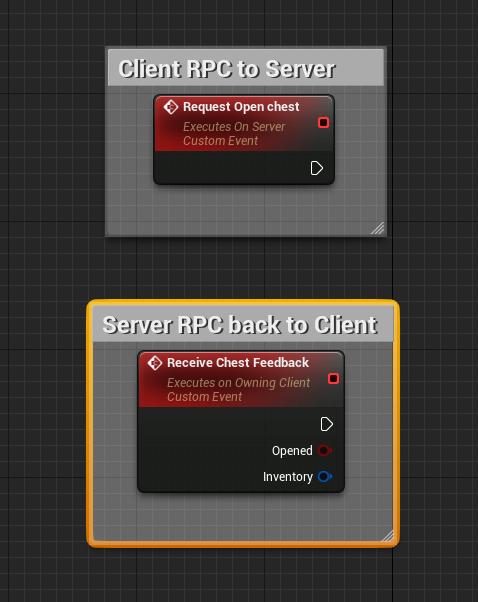
Client RPC to the server you want to open the chest -> Server RPC to the client that you have successfully opened the chest with outputs (presumably the inventory variable of the chest) connected to the event
 hollow bridge
I see, and every change I should update local + send the update to the server?
Or send the update to the server and wait for the updated list for a verification?
short arrow
not sure what you mean
there's not much to wait for other then the MS time between server and client
you don't need any delays if that's what you mean, it'd be pretty instant
once you receive the "Receive Chest Feedback" event, you can create or open the inventory widget with the details inserted
hollow bridge
ok got it.
What about using DOREPLIFETIME_ACTIVE_OVERRIDE to make the list replicate only to the current interacting player?
short arrow
it already does that
"owning client"
well you have to define that if you're using c++
but I handle inventory things in the controller anyway with an actor component
hollow bridge
Not inventroy, chest actors. I don't want to change thier owner
short arrow
so it's always server client only
anything inventory related
if multiple people are interacting with a chest
then just loop through all the actors interacting with it, and send them the details everytime something changes
no need for multicasts and stuff like that, atleast that's how I do things
that way it's impossible for any sort of manipulation between clients
proud badger
fossil spoke
If there is a crash you need to fix it.
thanks for the reply. I am new to packaging. so far I could not find it through the logs. is the crash reporter already in UE? or is it a plugin? could you provide some details?
fossil spoke
When the game crashes the crash reporter will open
With a trace to the crash
You need to do some research on this topic.
 plush wave
A controller can only get the game mode if it A) is on the server or B) is using a server function, correct?
fossil spoke
Well B) implies A) so yes.
plush wave
Well when I say sever function I'm meaning not a function on the server but a UFUNCTION(Server)
fossil spoke
That is a function on the server....
plush wave
Which is an RPC call from client to server that then runs on the server
From how I understand it
Ok, so following that logic, it also seems needless to have a HasAuthority() check within a server function?
fossil spoke
Correct
plush wave
Makes sense, didn't know if the client could try and manually run that function somehow. I assume it's compiled out or just void. I don't have a good understanding of how the function is represented on the client other than it triggers an RPC.
fossil spoke
The Client COULD run it. But the programmer would need to consciously cause it to do that.
The **_Implementation function is still a regular function and can be called like any other in normal code.
plush wave
I see
So if a client could manually call that function (through cheating or some other means) then a HasAuthority() would help stop that function from running locally?
fossil spoke
IF they could, yes.
But as long as the programmer isnt doing any silly shenanigans then it wont be an issue
And is redundant.
plush wave
Got it, thank you
 craggy jolt
Hey so i got a multiplayer template that works with steam on a listen server i made the game for mobile and all that is left is setting up the servers is there a ton i have to change to make the server work on mobile?
plush wave
craggy jolt
Hey so i got a multiplayer template that works with steam on a listen server i m...
Don't think steam works with mobile? I could be wrong
craggy jolt
ya i know that but i dont know anything about servers and am wondering does the listen server need to be specifically set up for mobile?
plush wave
You can't use Steam servers on mobile to my knowledge
 tall tinsel
Hey has anyone faced race conditions when multicasting anim montages?
I have an issue where abilities can interrupt montages in clients whereas bool flags should prevent them from playing.
I've been racking my brain around this one for a while now
 blissful kraken
Does anyone know networking solutions for both unity and unreal other than photo/bolt/fusion ?
 untold wind
Hey guys, sorry if this is a newby question, but I don't know much about best practices for networking.
I want to handle projectile spawning for a game with a dedicated server, but different guns have different behaviors so I would like to know how to approach:
1 - For a gun that I'm constantly spawning a simple projectile (maybe only a small starting offset), is it okay if the client use a Server-RPC and then the Server uses a MulticastRPC or should I just a replicated boolean/gameplaytag to toggle auto-fire?
2 - For a gun that I need some targeting (for homing), like for example I get the 3 closest players I can find in a cone, should I let the player find the Targets, send a Server-RPC passing the Targets and then Multicast-RPC with that data for other clients?
Or I should let the Player client just simulate the targeting but the server actually calculate and make an Mutlicast-RPC with the Targets?
Or each machine calculate the target so I don't need to send data to sync which might cause a player to see something that didn't happened?
digital marten
blissful kraken
Does anyone know networking solutions for both unity and unreal other than photo...
Unreal has networking built-in. People don't use 3rd party libraries in UE.
An alternative for Unity specifically is Mirror. Also if you do multiplayer in Unity use ParallelSync it will make your life so much easier when testing your multiplayer code.
digital marten
untold wind
Hey guys, sorry if this is a newby question, but I don't know much about best pr...
These questions depend on if you need your game to be server authoritative and how much work you are willing to do on lag compensation and network prediction.
Also if your projectiles are replicated actors, then you don't need a multicast RPC because the server will spawn them on the clients for you.
blissful kraken
digital marten
Unreal has networking built-in. People don't use 3rd party libraries in UE.
An ...
Thanks,I am looking for a single networking platform which will work on both engines
EOS has its C# SDK for unity ,but theres not much of a documentation in depth or a video on youtube so kinda hard to implement it as i dont know C# much
people say Photon is dead but i dont understand why, as oculus has been using photon network till date
digital marten
blissful kraken
Thanks,I am looking for a single networking platform which will work on both eng...
EOS is a service. I thought you meant an API for doing networking.
For UE you use Online Subsystem or ideally the new Online Services API. These UE APIs are meant to give a consistent API regardless of if you are using Steam, EOS, Xbox, etc...
blissful kraken
So if EOS is providing all the services why the SDK then ? i researched and it does allow to login through various services
why 2 different things when they have the same features ?
digital marten
To interact with EOS you must use the SDK. Other platforms like Steam also have their own SDK for interacting with their services.
Online Subsystem is the original API made by Epic to make using different online service SDKs consistent. So in theory you could swap from EOS to Steam with minimum changes to your codebase in an instant.
The problem is the Online Subsystem API is really old and needs updating. So Epic has made the Online Services API which is currently in beta.
Online Service will eventually replace the Online Subsystem, but that will take time.
Why do you want the same online service API for both Unreal and Unity? Learning either engine takes time and you are better off focusing on one engine and it's ecosystem if you want to be productive.
@blissful kraken
blissful kraken
because developing multiplayer on both engines means seperate servers and to manage that its a different task and to minimize the effort i was trying to find a better networking solution but havent found anything except for photon
blissful kraken
digital marten
To interact with EOS you must use the SDK. Other platforms like Steam also have ...
So the EOS kit which is avalaible on the market place has a wrapper of the EOS SDK in the kit ?
digital marten
The Online Subsystem and Online Services are Unreal Engine C++ modules. Not marketplace plugins.
digital marten
blissful kraken
because developing multiplayer on both engines means seperate servers and to man...
Why do you need to make your game in 2 different engines at the same time?
blissful kraken
I am trying to develop a same network for VR
more like i want to maintain a same network so that its not hard to manage
or should i just do it on different networking solutions as it does sound right in the head
kinda in a dilemma
thin stratus
These are two different things though. EOS is a backend.
You will need something totally else to allow UE to connect to Unity
digital marten
^
blissful kraken
and also i just found out this
"You need the C# SDK -- This is not a Unity SDK, to clarify.
The example project is WPF -- it won't work in Unity. It's also production-ready, so not very good for quickstarts, anyway."
thin stratus
EOS is only a backend anyway
blissful kraken
thin stratus
These are two different things though. EOS is a backend.
You will need somethin...
Yes,i just figured that out
thin stratus
It's for managing presence and sessions cross platform
Connecting UE to Unity needs a fully custom network layer
This is a pretty big time waste tbh
Stick with one engine
Unity has its DOTs thing now I think.
At least they are working on a built in network solution
Otherwise use UE
digital marten
blissful kraken
I am trying to develop a same network for VR
What do you mean same network?
Network simply means a connection between 1 or more computers.
thin stratus
But I would never mix them
blissful kraken
digital marten
What do you mean same network?
Network simply means a connection between 1 or m...
"Same Networking solutions"
thin stratus
UE can release Crossplatform. EOS supports Crossplatform.
I don't see why you need to use two engines for this
digital marten
Is this for your game, or do you intend on making this a marketplace plugin for Unity and Unreal?
If this is for your game. It's a waste of time.
blissful kraken
I have different SDKs for both unity and unreal , so the SDKs the user is gonna use should have access to a multiplayer feature
thin stratus
Why Unity and UE?
You are developing something for the Engines or for a Game?
It's not really clear why you need 2 Engines atm
digital marten
If it's a marketplace thing you want to sell, you will need to make everything from the ground up like @thin stratus said.
This probably includes integration with online services too.
thin stratus
Which also requires writing SDKs for both c++ and c# I guess
digital marten
Unity & Unreal engine can both target almost all the same platforms.
If you are using 2 different engines to target 2 different platforms. Then you are better off finding another engine entirely that does support both.
thin stratus
But as long as you aren't explaining why you actually need to do this, it's hard to suggest anything
digital marten
^
thin stratus
2 different engines for 2 different Platforms also makes no sense fwiw
I am trying to develop a same network for VR
No clue what that means fyi
blissful kraken
we have 2 teams working on unreal and unity so we need one networking solution to reduce the complexity
digital marten
That still doesn't explain anything. Why Unreal and Unity? What're you trying to achieve?
 small grail
You can use EOS for both backend but for the ingame network RPC or replication, UE has his own and Unity has use some 3rd party solution. It is difficult to do a common solution
dark edge
blissful kraken
we have 2 teams working on unreal and unity so we need one networking solution t...
That sounds like absolute insanity
 tame kraken
I need help: why can't I call RPC's on my owned actor?
I set it up with spawning -> set owner as my player controller -> set up enable input but still what's left is the RPC doesn't get called
what does this mean and how can I fix it?
the client can't get into the RPC
solar stirrup
tame kraken
I need help: why can't I call RPC's on my owned actor?
I set it up with spawning...
Do you set the owner on the server
tame kraken
yes I thought so, but I ditched that approach because it kept messing up for me t_t
shrewd ginkgo
When I transfer players from the lobby map to the game, the host's inputs are not activated and he cannot move, clients can move.
When I change auto posses player 0 host can move but this time I got new errors. how can I solve it

 wanton cedar
Learning about replication, and attempting to ragdoll character on death and replicate it from client to clients. The only way I've had success is to have a BP_char rpc-run on server to rpc-multicast the actor ragdoll, but it feels strange to have two rpc's.
is there a better way to proceed with this?
 digital marten
wanton cedar
Learning about replication, and attempting to ragdoll character on death and rep...
digital marten
wanton cedar
Learning about replication, and attempting to ragdoll character on death and rep...
Lets say you have a client press a key to ragdoll. Then that ^ is the correct method. You do an RPC call to the server, and then the server does a multicast back to everyone else.
Sounds like you want to ragdoll on death. In that case I assume death is handled on the server - because it should be. Now you can have a death event call the multicast and you don't need the RPC call on the client.
 dawn ledge
wanton cedar
Learning about replication, and attempting to ragdoll character on death and rep...
dawn ledge
wanton cedar
Learning about replication, and attempting to ragdoll character on death and rep...
This is normal, you are telling the server to then tell everyone else to do it
wanton cedar
digital marten
Lets say you have a client press a key to ragdoll. Then that ^ is the correct me...
the idea is to have character have health variable, on isdead (health <0 variable) activate this ragdoll effect, then 5s delay, cast to controller, RPC> run on server > server spawn function
controller be like :

its taken a LOT of learning to come up with casting that from the controller so it gets assigned correctly per client
i had done it all on the character at first -_-
in practice
digital marten
Doing netcode on components or the player character (pawn) is normal.
wanton cedar
a lot of learning, only about a month or so into UE
next is to tackle damage from client to client
sinful tree
wanton cedar
Learning about replication, and attempting to ragdoll character on death and rep...
You probably don't want to multicast this. Death is usually a state. Use an OnRep bool variable to represent the state of a target being dead and when set true, have that onrep perform the necssary logic to ragdoll/reset.
wanton cedar
my issue with from pawn was that the 2nd and 3rd clients controllers got reassigned to server on death, and i couldn't find the answer on how to dynamically use the player index to keep them to the pertaining controllers
so by executing on controller, the code kept it native
sinful tree
wanton cedar
my issue with `from pawn` was that the 2nd and 3rd clients controllers got reass...
The answer is don't use the player indexes to keep track of players.
 elder spindle
Anyone have an issue where a custom anim notify triggers on both server and client regardless if Trigger on Dedicated Server is turned on?
wanton cedar
sinful tree
The answer is don't use the player indexes to keep track of players.
LOL that was my answer and ditched that approach after a bit
wanton cedar
sinful tree
You probably don't want to multicast this. Death is usually a state. Use an On...
this was my original thinking, as this makes sense to me to have this triggered upon boolean, but til this morning replication was the issue
been up for a few hours just soaking YT examples of how others do things and explanations
im a new dev, first real game, so trying to absorb , although its a lot to take in at first
digital marten
You definitely chose a challenging topic for a beginner XD
Multiplayer is challenging because of network latency.
wanton cedar
idea was simple. use first person gun in third person template, make a 1v1 deathmatch. the rest is not simple 🙂
didn't wanna use linetrace, simply wanted the nerf balls to cause damage to enemy tag on hit
digital marten
You may want to use the ApplyDamage function and AnyDamage event for your damage code.
https://www.youtube.com/watch?v=8RuMckVAA4c

What are the Apply and Receive Damage Nodes in Unreal Engine 4
Source Files: https://github.com/MWadstein/wtf-hdi-files
It's networked by default.
You can tell by the icon on the top right of the node.
wanton cedar
current next step for me, is to figure out replication for weapon component since its added to the pawn using add component to component so i think the projectile spawn event itself isn't being replicated right
not sure if the pawn needs to involve setowner or not on the weapon component.
i dont think so, because the animations switch according to the HasRifle boolean
sorry if this all sounds dum af, still new, learning a lot
 static prism
guys i will do a system team on unreal and need to know if i should use the collisions response or the tags to verify the enemys wich i could use?
wanton cedar
could use an actor has tag set to enemy linked to boolean, and put an enemy tag on the enemies
 static prism
its better than setup the collision responses and channels?
thin stratus
Well I would advice against using those tags
They aren't straight forward to update and easy to typo
If you want tags use GameplayTags
And for who is enemy and who not, a tag or an enum for the team number is probably best
 lucid viper
Hello!
Im trying to build a third person shooter game, similar to fornite.
Ive been struggling past few months trying to get a locomotion / parkour system working ( Mantle system, Vault system, Wall run, Crouch, Prone, Slide, Ladder, Swim, Parachute system, etc ... )
-I had tried my hand at a CMC using Delgoodie's guide. I was running into some issues to get the mantle system working. Trying to debug the C++ code but this was way over my head for a beginner DEV here. Was not getting much help in their discord so I gave this up.
-I then bought this "plugin" https://www.unrealengine.com/marketplace/en-US/product/climbing-component/reviews got it working but ran into several issues with the locomotion and other issues. Been debugging for weeks and getting very little support so im thinking of abandoning this and maybe give it a few months until they fix some of the bugs.
-Was looking at the ALS community plugin but seeing thats its a very messy if your want to add new functions so not sure if I want to dive into this.
-I saw this new Smart locomotion system in the market place that looks interesting
- I see people talk about Lyra as well, not familiar with this.
Would anyone have any recomendations for me?

Unreal Engine
FlexibleLocomotionSystem.Easily integrate into your project.
thin stratus
Pretty sure none of those are a good idea for you
A single beginner dev doesn't make Fortnite. And Multiplayer + Movement requires a lot of c++ to get right
All these locomotion systems will sooner than later break on you cause you probably don't know how to extend them
You can buy that if you want to spend the 150 bucks but be aware that if that doesn't 100% do what you want then the dev is not required to help you
cloud fulcrum
Using Steam OSS. Do you guys think that this will work?
 thin stratus
I mean, little bit hard to directly close the game or?
cloud fulcrum
thin stratus
I mean, little bit hard to directly close the game or?
But will the Player be able to join his friend?
cloud fulcrum
thin stratus
You'll need to test it :P
Then I will test it
 queen escarp
Hm ok guys need a litle bit of help again, tring to add a "Widget onscreen representing another players character"

this gives cast failed why :/ ?
in game mode
cloud fulcrum
thin stratus
The code at least reads like that to me
I wasn´t able to either find or join my friends session any idea?
sinful tree
queen escarp
All Player Controllers array is not really necessary, nor is your number of players count in the GameMode. The GameState contains the "Players Array" which would give you access to the player controllers and the length of the array is the number of players.
The access none error is likely because you're attempting to access "As Player Character BP Parent" before it's actually had a chance to be initialized on the palyer controller itself. If you want that to happen on begin play of the player controller, then just have it happen on Begin Play of the player controller after the value has been set.
queen escarp
oh yeah post login is before begin gotcha
hmm yeah the all palyers controller / number of players is for another system that i acctually got working
but ok now i can create the widget on the player screen, how would i update the info based on wich unit ?
in the widget itselff with tic and forloop for number of players or ?
whats the normal way to do it
hm nevermind i solved it kinda
hm or well
thin stratus
cloud fulcrum
I wasn´t able to either find or join my friends session any idea?
Nope, you'll need to debug that
queen escarp
is it the game state that contains an array of players already ?
sinful tree
Yes
thin stratus
If you need a Widget per Player then just do this:
- In your Player Widget that should have Entries per Player, OnEventConstruct, get the GameState, get the PlayerArray, loop over the PlayerArray and add an Entry to whatever List you have per PlayerState. Ensure your Entry Widget has a Pointer to its PlayerState.
- In your PlayerState, on BeginPlay, get the Widget (e.g. from the HUD/PlayerController/Whereever you store it) and add an Entry to the List via "self". Additionally ensure that there is no entry with that PlayerState already to not end up with two entries.
- In your PlayerState, on EndPlay, remove the Widget Entry again.
queen escarp
hm
so this is how im trying to do it "player controller" is from player controller on event log in

it works for player 1 to get the other player but as you said eXi i need to get them on all players
shouldent something like this work ?
( this is not working ) but im missing something small i guess :/ ?
thin stratus
I told you what to do
queen escarp
yeah and i already saved that but for my sake am i out swimming ? for learning purposes whats wrong with what im doing ?
sinful tree
- You're using an RPC to attempt to communicate something that the client can do itself without the server telling it to do it.
- You're creating widgets for each playerstate, but not associating those widgets with a playerstate, so how's it supposed to know the data?
- You're passing Player controller through this event and I'm guessing this is already running on a player controller or on a class that would have an association to the correct player controller anyway.
- You're clearing the widget every time someone new joins. Completely unnecessary if you associate your widgets with a playerstate - you can just loop through them checking if you have one available already for the player or not, and do nothing if you do, otherwise create one and add it to the parent widget.
I had gone over something like this previously with another person and I see I even linked you this before. If you follow along with what Karkat was doing (I basically gave him a full on tutorial if you read back far enough and was correcting his issues along the way), you'll end up with the same result.
#multiplayer message
queen escarp
hm ok thanks for the info, now that u mention it i remeber something like that yeah, but its so messy to follow someone else task like that i appreciate the knowledge but i´ll try to do eXi-´s way then first i guess
so eXi if you could explain abit more in detail if you dont mind, what entry should i add to what list i have per player state ?

wdym with that ?
 cosmic goblet
Hey everyone, I'm not sure if Multiplayer is the right channel for this, but I'm running into a memory overload situation whenever another player joins my level. This seems to be caused by the hair groom on the playable character (third person view)
I'm using a pretty light hair strand system, with the default simulation ON
any guidance will be appreciated
dark edge
queen escarp
That's a giant mess. You don't need an array of all player controllers. You don't need a number of players integer. You're already on the server, why are you calling a run on server event?
First step, get a print string to run on ALL MACHINES whenever someone joins or leaves
Bonus points, have it print the number of players.
queen escarp
@dark edge y i will tomorrow need to sleep now ty for help X)
wanton cedar
instead of having the weapon component fire from the weapon component, should i be firing the projectile from the client from RPC multicast so the load of the shots isnt' on the network? I'm thinking spawn projectile function on the characterBP and game mode BP(if necessary)
brazen anvil
Does a variable have to be marked "replicated" to be used in a RPC?
 echo garnet
Hi, does anyone have an idea why does the Destroy session node does not work in my project? it does not return either a success or a failure and i cant understand why
fathom aspen
brazen anvil
Does a variable have to be marked "replicated" to be used in a RPC?
Not necessarily. An int for example can be passed just fine
You are probably asking about UObjects
And they have to be net addressable
 candid mulch
Im trying to make a floating health bar that displays other players health
everything works except getting the correct player in the health bar widget
how do i get the owning player to display their health value on their health bar?
brazen anvil
fathom aspen
Not necessarily. An int for example can be passed just fine
thanks!
 fluid summit
does anyone can think of a reason on why i'm only getting my default pawn on the server?
-Found it, I modified the game mode "starting new player" and forgot to call parent function
 candid mulch
did anyone get a working floating health bar for enemy players in multiplayer in 5.2+? And if so, can I see your implementation because mine is really bad
brazen anvil
Lets say my character has his hand up like he is giving a high five. What I want to do is control which single finger is down and have it replicate to all players including newly joined. Lets say all the animation is done and the functionality for moving a finger up or down is taken care of.
Would this consist of a replicated variable to indicate which finger is down (assuming the others are up), a OnRep, and a server RPC? My thought process is I would replicate the finger and call a server RPC so that it updates to all other clients. And then I would also have a OnRep that would handle any late joining players. Since when they join the value will be different from the default and so the OnRep would fire.
Is this the correct way to do it?
sinful tree
brazen anvil
Lets say my character has his hand up like he is giving a high five. What I want...
If the finger was client driven...
Client does whatever to indicate whatever finger to change to > Sends Server RPC with selected finger > Server sets "Selected Finger" replicated w/notify variable > OnRep triggers on clients, clients update the visual based on the replicated "Selected Finger" value.
fossil spoke
wanton cedar
instead of having the weapon component fire from the weapon component, should i ...
This depends on what your concept of a "projectile" is.
fossil spoke
Are you using C++?
wanton cedar
no, im no coder
everything so far is watching others tutorials, trying to absorb the concepts then attempt to make
im at the point of clients not seeing other clients projectiles, so dmg reports 0
fossil spoke
If its an Actor then you should only be spawning it on the Server.
It should then be set to replicate
This will cause it to appear on Clients.
wanton cedar
y not multicast it onto the clients, so its not networkly trafficed?
fossil spoke
Because you will cause it to desync like crazy.
wanton cedar
i shouldnt' consider the mulitcast itself the sync mechanism?
it would be cast from server time
fossil spoke
An RPC is not a sync mechanism
Its an event.
Which, depending on RTT, will arrive at different times for different Clients
brazen anvil
sinful tree
If the finger was client driven...
Client does whatever to indicate whatever fin...
Yeah so thats correcy way?
wanton cedar
my thinking was character > calls RPC multi > insert graph 4 Character function(spawnactor projectile event)
thsi worked for line trace, client > client

so was basing what i was trying to do , on this thinking
which is have clients perform calculation off network, while having server perform the cast
(ikik casting is a weird term in UE) wrong use of it
the clients might desync, but was thinking it allows the network to stay uncongested, because any other way i've tried, then extreme lag develops from lobbing many shots( in terms of having the server perform the projectile function)
dark parcel
wanton cedar
thsi worked for line trace, client > client
So if I have 2 seconds delay, I will have to wait 2 seconds to see the projectile everytime I fire?
wanton cedar
nono, its not that bad
i can take a video to show, its that... (idk if cpu bound or something) the input 4 movement begins to lag heavy
and i assumed it was network congestion
wanton cedar
i was doing as listening, but figured just run 2 person client until i sort out networking mechanics of how to replicate the characters function
idk enough to progress farther into diagnosing the net latency
im like... maybe 6w into UE
dark parcel
All im saying is if you do fire on server and I have 2 second delay, I will see the projectile after 2 seconds
That's not really playable
wanton cedar
but nothing has that delay, until i call the server's shootnerfballfunction, then it lags heavy if i shoot 10x
dark parcel
nothing have delay because you didn't emulate lag
u always want to emulate lag when doing multiplayer
there is no 0ms perfect world
wanton cedar
i just stopped, and figured watch everything possible on UE networking
sinful tree
wanton cedar
thsi worked for line trace, client > client
Those authority checks aren't necessary. Input is always going to be on the client sending the action. Running on Server will always be running on authority.
As for your lagging problem, is your trigger firing repeatedly, or only once when you press the input? If it's firing every frame that could potentially be lagging things up on account that you could be spawning an actor every frame.
wanton cedar
single fire
nothing fancy, i took the first person weapon component, and applied it to a function on the character that works, then before i finished making one for the server i went n got a beer
my thinking is client either tells server > run ur nerfball and cast it, or run my nerfball and multicast it
the only few things i've gotten to work were input key > srv ROS event > client only event > local code
and having input key > srv event > code
srv > code
i come from blender so i just learn by trial and error so its been a long month. now im on replication and netowrking order of op's
tmw ill try to approach it again
if yall have anything you think i should watch or read that would help, lmk, ill read or watch 🙂
queen escarp
@dark edge
ok mr.teacher done

 winged sky
Hello everyone, I found that the name of the Session seems to be the result of using the computer name plus a number, there is no simple way to rename the name of this Session?
thin stratus
winged sky
Hello everyone, I found that the name of the Session seems to be the result of u...
The Name of the Session is the PlayerName by default
Which is your Computer Name on Subsystem Null
Or your Steam Name on Subsystem Steam
If you want a custom one you will need to use Session Settings via either Advanced Session Plugin or C++
winged sky
thin stratus
The Name of the Session is the PlayerName by default
Thank you, I see logs show is "DESKTOP-O0KA0J0-5 c59457a49ef9b1a280de0af94a9cac3", feel what is a computer name, then check that the code seems to change here, But I don't know how to extend the code here better
 thin stratus
winged sky
Thank you, I see logs show is "DESKTOP-O0KA0J0-5 c59457a49ef9b1a280de0af94a9cac3...
thin stratus
winged sky
Thank you, I see logs show is "DESKTOP-O0KA0J0-5 c59457a49ef9b1a280de0af94a9cac3...
The usual way is to write your own node based on the same parent class as the one you look at. Basically mimic it and add more params. Or just handle it in C++. If you can't code, use the Advanced Session Plugin
cosmic goblet
cosmic goblet
Hey everyone, I'm not sure if Multiplayer is the right channel for this, but I'm...
Beep Boop
thin stratus
cosmic goblet
Beep Boop
Any error/warning/logs?
Also not sure this is really Multiplayer related if you aren't doing anything specific in terms of replication for this
cosmic goblet
thin stratus
Any error/warning/logs?
Nothing really, I'm monitoring the performance from afterburner and it's always either a D3D Error crash or a the Ram usage goes full and crashes
The game seems to run perfectly fine with multiple groom assets attached in the single player mode (Playable character, NPC, Creature Fur) but in MP it seems to not work
If it helps, the playable characters are using the Lyra System
thin stratus
Hm, not really a lot of info to work with. So if you remove the Groom Asset it works fine in Multiplayer?
Are you doing anything with that Asset despite having it spawned?
Is this a Component that is just attached or do you do anything to create it runtime?
cosmic goblet
thin stratus
Hm, not really a lot of info to work with. So if you remove the Groom Asset it w...
Yep, it works even when I turn off the simulation on them, but it still takes a performance hit
cosmic goblet
thin stratus
Is this a Component that is just attached or do you do anything to create it run...
I'm attaching all groom assets in the Blueprints of each character with a binding asset
thin stratus
Is that Lyra specific?
"In the Blueprints" meaning pre-runtime? Or is that actively attached after pressing play?
cosmic goblet
thin stratus
Is that Lyra specific?
Not really, this is something I've done in non-lyra blueprints as well before but this seems to be first time im running into this.
cosmic goblet
thin stratus
"In the Blueprints" meaning pre-runtime? Or is that actively attached after pres...
Pre-runtime
This is how it looks for reference

I'll get on the level in a while and share a recording of what happens, in case that helps
thin stratus
Not sure I can help much. Just asking some general questions so others might be able to help
This still doesn't mean it's a network issue
dark edge
queen escarp
<@127902729677963264>
ok mr.teacher done
That's the "what", now you need the "when". When do you want to update your player list UI?
 obtuse temple
I'm using a struct to replicate some custom properties for the items in my inventory manager. Is there a better way to implement this struct without having to send empty or null variables depening on the enum type?
 solar stirrup
obtuse temple
I'm using a struct to replicate some custom properties for the items in my inven...
solar stirrup
obtuse temple
I'm using a struct to replicate some custom properties for the items in my inven...
Custom struct serialization
Good doc
obtuse temple
solar stirrup
https://www.aclockworkberry.com/custom-struct-serialization-for-networking-in-un...
I already read that article but it was a bit daunting as I'm a bit of a c++ novice. Thanks for pointing me in the right direction.
solar stirrup
Rule of thumb with custom struct serialization is that you can do w/e you want as long as you read from the archive as much as you write to it
obtuse temple
Thanks I'll keep that in mind. Not a lot of items actually use this struct so it won't be as intensive as some of my other FastArray properties.
brazen anvil
I am looking at the Crouch() implementation in CharacterMovementComponent.cpp and had a question about this bit of code in it..
if (bClientSimulation && CharacterOwner->GetLocalRole() == ROLE_SimulatedProxy)
{
    // restore collision size before crouching
    ACharacter* DefaultCharacter = CharacterOwner->GetClass()->GetDefaultObject<ACharacter>();
    CharacterOwner->GetCapsuleComponent()->SetCapsuleSize(DefaultCharacter->GetCapsuleComponent()->GetUnscaledCapsuleRadius(), DefaultCharacter->GetCapsuleComponent()->GetUnscaledCapsuleHalfHeight());
    bShrinkProxyCapsule = true;
}
Now it says it is restoring collision size, but why would it be doing that on simulated proxies?
thin stratus
brazen anvil
I am looking at the `Crouch()` implementation in `CharacterMovementComponent.cpp...
Probably to ensure that the Simulated Client isn't in some strange state
brazen anvil
thin stratus
Probably to ensure that the Simulated Client isn't in some strange state
Ah ok. Is it common for logic to be ran on only simulated proxies like the above?
Like I guess my question is what type of stuff would you want to do where you are checking for a simulated proxy.
solar stirrup
Code to run on other players
As a client, your pawn is an Autonomous Proxy when controlled
Other players will be Simulated Proxies
thin stratus
brazen anvil
Like I guess my question is what type of stuff would you want to do where you ar...
Well you still need to adjust the Capsule on sim proxies. Imagine the local player wants to jump onto a crouching player.
brazen anvil
Yeah I am following that part but I guess what would be an example of something I want to run on the sim proxies. Like if I do something on my own character, I would assume I send some sort of rpc that will then update to the simulated proxies right?
thin stratus
no
The Client moves locally and already sends an RPC as ServerMove to the Server
The SimulatedProxy only receives data from the Server afterwards
That's also why you see other players at a location they were a longer time ago
brazen anvil
Hm, if the data was a variable with rep notify then wouldnt it be able to just execute code based on that change? Why would I need to check if it is a simulated proxy
thin stratus
It is a Variable with RepNotify
The Crouch one at least
Not sure what exactly you want to know at this point :P
brazen anvil
what type of stuff would you want to do where you are checking for a simulated proxy.
thin stratus
I can't give you examples if that's what you want
brazen anvil
oh yeah i was hoping
thin stratus
Everything where the Simulated Proxy has to also be considered
Jumping for example doesn't really matter
You'll notice that Sim Proxies have no clue that you double jumped
They only know they left Walking Mode
brazen anvil
Ok. thanks
thin stratus
brazen anvil
Ok. thanks
My suggestion from previous encounters with custom CMC Movement: Code it to work for Server and owning Client.
Once that works fine, check what part of your Movement has to be known to simulated proxies.
So don't solve it all at once, just make it work for the local player on high ping with corrections etc.
brazen anvil
Yeah I actually unknowingly have been doing that. I was only testing with a server and client and then just added another client and noticed a few things so was working towards fixing that.
 quartz iris
Hi guys. I have a system where when the player presses a button inside a widget, they're put into a lobby map as the host, then can have another player join them. However, whenever the player leaves the current map that they joined with the button and exits to the main menu, they can't create another server/map with the button inside the menu. How can I fix this?

Above is the leave game button


This is the code for the server creation/joining
quartz iris
meager spade
<@213979297000456193> put ?listen at the end of the level name
with the question mark ?
meager spade
yes
quartz iris
Ok
quartz iris
This didnt work cus its not dedicated?
meager spade
?
meager spade
when you go to main menu
did you call Leave Session?
or End Session (or w/e Advanced sessions calls it)
 frank hearth
Noob question: is it absolutely required to use a source build of Unreal in order to build dedicated servers? 😧 (the last time I tried building Unreal from source I ran into lots of issues with disk space)
edit: Yup, it is necessary. 😦 Okay, I will look into getting more disk space haha

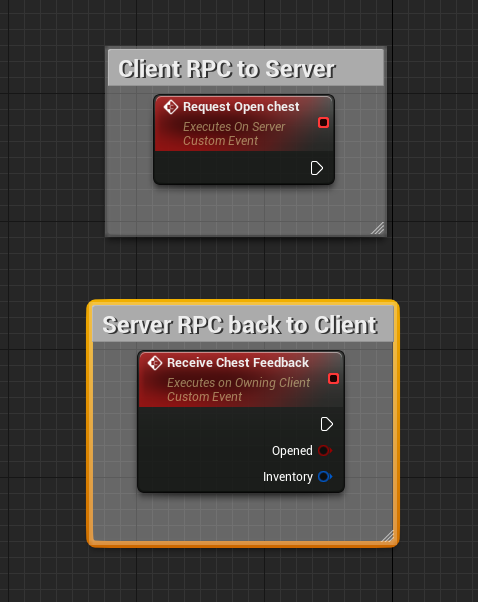
 spring lagoon
in playfab i want to use get server details but that function gives me an error like : only entities of the following types may call this api : title.
 tardy fossil
if i change a replicated variable, and send a reliable RPC at the same time, theres a chance they could show up at different times on a client if theres packetloss right?
meager spade
tardy fossil
if i change a replicated variable, and send a reliable RPC at the same time, the...
there is no guarentee
tardy fossil
yea kinda figured
latent heart
If there's no packetloss, the rpc would probably show up first.
Variables aren't replicated instantly.
But packetloss is always a thing.
spring lagoon
spring lagoon
in playfab i want to use get server details but that function gives me an error ...
i also pass the Authentication from after login > but donno why it's not working 🙂
tardy fossil
latent heart
Variables aren't replicated instantly.
oh thats right, it replicates based off of a timer that checks if the variable has changed right?
brazen anvil
They get batched up at the end of the frame
latent heart
...if it's that variable's turn to be replicated.
brazen anvil
oh dang it has to wait its turn
tardy fossil
are you sure the game needs to be running?
latent heart
Probably.
dark edge
tardy fossil
if i change a replicated variable, and send a reliable RPC at the same time, the...
You probably want OnRep
If I'm smelling what you're stepping in
quartz iris
quartz iris
Hi guys. I have a system where when the player presses a button inside a widget,...
Is this a server issue I cant even tell
It appears it's trying to create it
tardy fossil
try calling Destroy session before you change the level to Main Menu on the client
quartz iris
tardy fossil
try calling Destroy session before you change the level to Main Menu on the clie...
ah bingo
thank you
not sure what is happening with that lmao
tardy fossil
aha yeah i had the same issue awhile ago
meager spade
@chrome bay sorry for the ping, i heard your the goto guy for Iris, for some reason my GameState wont replicate, only the player controller ends up going to the player, nothing else seems to have replicated either
fathom aspen
At least Iris fulfilled it promise to optimize server performance
It doesn't replicate anything
fathom aspen
Please tell me you are not on a version beneath 5.1
meager spade
im on 5.3
unborn nimbus
What's the correct way to determine HasAuthority on a listen server?
tardy fossil
has anyone ever made their own client side projectile prediction system? if the server detects a hit, but the client doesn't report it, it should ignore the hit right? else that would technically give players with a higher ping an advantage
dark edge
unborn nimbus
What's the correct way to determine HasAuthority on a listen server?
Just call HasAuthority
dark edge
tardy fossil
has anyone ever made their own client side projectile prediction system? if the ...
Why would that give them an advantage?
Just prefer the shooter and latency is always bad.
The corner peek scenario is a tie but all else being equal, the lower latency player will have an advantage in a 2 way firefight
latent heart
The lower latency player just sees people first.
Not much you can do about that
Unless they're moving at constant speed and simulated as such, I suppose.
dark edge
I'm talking a little bit more psychological, the lower latency player will react faster to what happens in the game than the higher latency player will. Basically they are less in the past.
latent heart
I mean, maybe? In certain circumstances, sure.
I am just assuming lag compensation on the part of the server.
dark edge
Yeah prediction gets so weird, you need to keep so many timelines in mind. 2 clients + 1 server means 3 different opinions as to the timing of events. I'm so glad I don't need prediction, it's so much easier.
 dense forum
Where can i find more info/videos about UE 5.3 nDisplay Multiplayer Actor Replication.
https://portal.productboard.com/epicgames/1-unreal-engine-public-roadmap/c/1189-ndisplay-multiplayer-actor-replication
Essentially, a CAVE system of say 4 nodes can join a multiplayer server as 4 clients, and in the future n-Nodes represented as 1 client in a multiplayer session?
If you want the cave system to represent 1 multiplayer pawn but it joins as 4 players how does that work?
frank hearth
I see https://cedric-neukirchen.net/docs/multiplayer-compendium/introduction recommended a lot as a way to learn UE multiplayer. Would y'all recommend studying Cedric's guide over the official docs as a multiplayer newbie? Want to make sure I'm learning from the right resources 👀
This Compendium should only be used with a base understanding of the Singleplayer Game Framework of Unreal Engine.
From a quick skim it does seem to cover the same exact ground
solar stirrup
frank hearth
I see https://cedric-neukirchen.net/docs/multiplayer-compendium/introduction rec...
Yup
Do check the docs as well but that guide is a good start
dark edge
frank hearth
I see https://cedric-neukirchen.net/docs/multiplayer-compendium/introduction rec...
And don't start by trying to make a whole game. Start by trying to make a prototype where you choose a character, spawn in, and open a door. Have it work as well as possible for all combinations of late joining or bad network connections etc
brazen anvil
If my owning client calls a server rpc, will it execute the code inside of it locally as well?
dark edge
uh
quasi tide
No
brazen anvil
ok
void UMyComponent::ChangeStance(EStance NewStance)
{
    if (CharacterOwner->HasAuthority())
    {
        CurrentStance = NewStance;
        OnRep_Stance();  // call the RepNotify function manually on the server for immediate response
    }
    else
    {
        CharacterOwner->GetCapsuleComponent()->SetCapsuleHalfHeight(80, true);
        ServerChangeStance(NewStance); // Call the server function if we are a client
    }
}

void UMyComponent::ServerChangeStance_Implementation(EStance NewStance)
{
    ChangeStance(NewStance);
}
This is what I had, if I pushed a button it would execute ChangeStance()
dark edge
Basically the rules hold.
Only owner can call.
Only server will execute.
You are owner and server when you're the listen server or standalone
brazen anvil
yeah makes sense
dark edge
brazen anvil
```c++
void UMyComponent::ChangeStance(EStance NewStance)
{
if (CharacterOwn...
I'm half an idiot but I wouldn't bother with the authority check
assuming it works the same as BP just call the serverchangestance and call it a day
brazen anvil
Yeah I was just examining some code and maybe it was meant for like a listen server or something.
dark edge
void UMyComponent::ChangeStance(EStance NewStance)
{
    CharacterOwner->GetCapsuleComponent()->SetCapsuleHalfHeight(80, true);
    ServerChangeStance(NewStance);
}

void UMyComponent::ServerChangeStance_Implementation(EStance NewStance)
{
    CurrentStance = NewStance;
    OnRep_Stance();
}
Why not something like this?
Are you trying to predict capsule height for some reason?
The capsule thing seems weird, I just put it wherever
dark edge
fixed
brazen anvil
Yeah that would work
dark edge
in BP that should be robust to any setup
idk about C++ i know it's different in some ways
brazen anvil
yeah I don't know much about anything myself
 worthy wasp
for whatever reason - this function is executing 3x.... i would expect it to run once.
Actor is set to bReplicates = true...
void AVI_WaveSpawner::BeginPlay()
{
    Super::BeginPlay();
    if(GetLocalRole() == ROLE_Authority)
    {
        SetSpawnerInfo();
    }
Why would it run 3x?
dark edge
worthy wasp
for whatever reason - this function is executing 3x.... i would expect it to run...
2 clients and a server?
worthy wasp
dark edge
2 clients and a server?
debugGame single player.... OSS is ListenServer. I'm going to bool lock it - because its a configuration script basically
dark edge
Are you sure they are actual clients or that the actor is actually replicated?
fathom aspen
BeginPlay shouldn't get called multiple times in standalone as there is literally a check against that (HasBegunPlay something)
 bleak moon
Anyone know if there's a command to emulate a dirty disconnect that would be akin to a process crash?
@echo epoch
fathom aspen
There is DISCONNECT
akin to a process crash? That's game specific. It's up to your game to crash when it feels best to do so
 slate basin
Hey, on a listen server what remote role does the host pawn have? shouldn't the remote role be simulated proxy? but I think mine is returning autonomous proxy, I've found something here but not a definite answer https://forums.unrealengine.com/t/net-roles-are-different-between-pie-listen-server-and-pie-openlevel-listen-server/568662

Epic Developer Community Forums
I’m noticing inconsistent behavior with respect to the net roles when running an editor created listen server versus an “OpenLevel” created listen server. In both instances I’m running with PIE…I haven’t checked what a packed game says yet. My setup, and resulting behavior is as follows… When running PIE as a listen server and 2 players I get t...
brazen anvil
I push a key and I call this function:
void UFPSCharacterMovementComponent::ChangeStance(ECrouchStance NewStance)
{
    CurrentStance = NewStance;
    ServerChangeStance(CurrentStance);
}
CurrentStance is a OnRep property. So with the above function it is going to call my OnRep function and call the server RPC which is:
void UFPSCharacterMovementComponent::ServerChangeStance_Implementation(ECrouchStance NewStance)
{
    CurrentStance = NewStance;
    OnRep_CrouchStance();
}
So that is going to now update the server property and call the on rep. Is that correct so far?
latent heart
The OnRep won't be called on the client when the client changes the value.
It will only be called when the server sets teh value and then sends the value back to the client.
brazen anvil
Ok so I need to call it myself and not wait on the server to replicate it back to me then right?
latent heart
Something like that.
meager spade
@slate basin remote role would be Autonomous Proxy
ListenServer pawn will have local role Authority, Remote Role Autonomous
brazen anvil
Ok that must be the issue I am dancing around then. I had it working but as I move things around I mess stuff up
meager spade
well
your best to have an intermediate function
like Internal_ChangeStance, that both server and the local client call
and your OnRep is just for the other simulated proxies
this way client can switch it locally and not have any delay
brazen anvil
Can you show me an example? If not thats fine
My OnRep function has a switch statement in it that based on stance ends up calling another function that does all the work to change the stance.
So I should put the code that is in the OnRep function into the Internal_ChangeStance and have the onRep call the Internal_ChangeStance? That way I and the server can call it, then the on rep can call it as well
So then it would look like:
void UFPSCharacterMovementComponent::ChangeStance(ECrouchStance NewStance)
{
    CurrentStance = NewStance;
    SwitchCrouchStance();
    ServerChangeStance(CurrentStance);
}

void UFPSCharacterMovementComponent::ServerChangeStance_Implementation(ECrouchStance NewStance)
{
    CurrentStance = NewStance;
    SwitchCrouchStance();
}
So when I press a key to ChangeStance() I update my property, actually run the code to change the stance, and then run the server RPC. Then the server RPC updates the property and changes its stance. Now the property replicates to simulated proxies and then they all run the OnRep function which just calls SwitchCrouchStance()
dark edge
brazen anvil
Ok so I need to call it myself and not wait on the server to replicate it back t...
Are you trying to do a poor man's prediction or what?
slate basin
meager spade
<@315244367050702849> remote role would be Autonomous Proxy
I had no idea, thanks. At least I've only used this check in a couple of places, I usually check if locally controlled.
 faint cloud
do you guys know why when i start my game as a client i get 14 fps vs standalone at 45 fps?
fossil spoke
faint cloud
do you guys know why when i start my game as a client i get 14 fps vs standalone...
Use the profiling tools and find out why?
thin stratus
brazen anvil
So then it would look like:
```c++
void UFPSCharacterMovementComponent::ChangeSt...
There is little to no need to have an RPC here. If you need to move data to the server you need to utilize a custom Container and tie that into the CMC.
The CMC needs to be extended by doing exactly what it wants
Not too much and not too little
Everything else is sadly wrong in that regard
dark edge
faint cloud
do you guys know why when i start my game as a client i get 14 fps vs standalone...
Profile it
 dire dragon
my physical animation lags when multiplayer but doesn't when singleplayer
my blueprint (event beginplay)
 tardy fossil
dark edge
Profile it
tardy fossil
dark edge
Profile it
if you're getting 45 fps, the game isn't running at full speed in the first place, so when you run as client, you are technically running 2 versions of the game (dedicated and client) so it makes sense it would slow it down even more
oops meant to reply to the guy youre replying to
 blazing spruce
Hi, anyone know why this isn't setting the text? I'm calling the On Death dispatcher inside the IsDead OnRep function, you can see the 'Update Status Called' print does get printed in the second pic but its not actually updating the text?


 sinful tree
blazing spruce
Hi, anyone know why this isn't setting the text? I'm calling the On Death dispat...
sinful tree
blazing spruce
Hi, anyone know why this isn't setting the text? I'm calling the On Death dispat...
Possibly because by the time the widget pre construct is fired, your player controller doesn't yet have reference to its pawn so your cast is failing. Try putting a print on the cast failed to check and see if that's the case.
As you're also doing multiplayer, there could be more involved, like you could be calling OnDeath only on the server so your local widget doesn't know about it.
blazing spruce
sinful tree
Possibly because by the time the widget pre construct is fired, your player cont...
Yeah i tried that, cast isn't failing and the UpdateStatus event is being called
Ahhh maybe its that i think IsDead is set on server
Although, wouldn't the servers version of the widget be correctly updated?
because it isn't lol
sinful tree
Are you using invalidator or retainer boxes in your widgets at all?
If I remember right, they can cache the display of a widget and manipulating something like text being displayed doesn't necessarily mean it'll end up refreshing.
blazing spruce
sinful tree
Are you using invalidator or retainer boxes in your widgets at all?
No, but the widget is being created by a different widget and added as a child to a vertical box, could that have anything to do with it?

This widget is just displayed/removed when the player presses/releases the tab key
dire dragon
do i need to do 3 custom events for (for example) use? (run on server, run on client and multicast)
tardy fossil
blazing spruce
Hi, anyone know why this isn't setting the text? I'm calling the On Death dispat...
is that Status variable a widget? I think you're using the wrong node to change the text on the widget
sinful tree
blazing spruce
No, but the widget is being created by a different widget and added as a child t...
So if it's getting created when pressing tab, how is it to know the value that changed?
Eg. Player is killed. Press Tab. How does it show that the player is dead?
blazing spruce
sinful tree
So if it's getting created when pressing tab, how is it to know the value that c...
Ahhhh okay i know why its doing it now, where im using ClearChildren and creating the widget again its showing 'ALIVE' because thats what i have in there by default, i just need to figure how to get it to update properly after creating it again
blazing spruce
tardy fossil
is that Status variable a widget? I think you're using the wrong node to change ...
Yeah its just a text widget, i always use the SetText function to set text?
Got it, just added an if check before creating the widget to find out if the player is dead or not then passing the status into the widget directly and binding it to the status variable
 ivory bear
It is amazing the number of multiplayer tutorials using blueprints that never talk about lag compensation. What is more amazing is the number of people who *claim *to have finished a game using tutorial X and published to Steam.
Has kind of taken the wind out of my dev sails as a blueprint only dude. Just venting. 🙂
dark edge
ivory bear
It is amazing the number of multiplayer tutorials using blueprints that never ta...
Because you can't really do much lag compensation with just blueprints.
ivory bear
dark edge
Because you can't really do much lag compensation with just blueprints.
I know
dark edge
I mean you could do like a really simple system, just let the client say it hit something and do some sort of sanity check on the server
ivory bear
..and I dont have the time or brain-space to step back and learn C++
dark edge
I would just trust a client and then implement some sort of check. Something as simple as the distance between where the client said they hit the target and where the target is.
ivory bear
dark edge
I would just trust a client and then implement some sort of check. Something as ...
and you can do that in blueprints?