
#multiplayer
1 messages · Page 113 of 1
 sinful tree
Looks good 🙂
 fossil spoke
@twin juniper
- Yes
- Combining regular Blueprint into BTs and BTTs is normal and encouraged.
Thats not GASs primary purpose, its just a feature of its systems.
Prediction is only for Clients.
So it wouldnt apply to AI
 boreal bison
How do I use the servertravel command to get everyone to my gameplay level? can I do something like this?

there's a space after ServerTravel
nvm figured it out! had to enable seamless travel and run it on the server
 meager hazel
Hello any idea what causing this crash? i try to replicate a text render component from a variable, all is working on the editor but in the real game server the text render is not replicated at all
and today i just crash again in UE with the same error after close the 'play editor" and changing manualy the value of the text from the text render component

 errant glade
Hi, I implement the sessions create, join and find using advance session plugin. I tired to create a sub session in the main session but failed to create sub session in main session.
Can anyone tells how to create a sub sessions inside main sessions?
boreal bison
 queen escarp
<@205087231403229184> what tutorial did u use for the playerlist
queen escarp
<@205087231403229184> what tutorial did u use for the playerlist
I didn’t use one, I just made a player widget and then added them as children to a vertical box
queen escarp
hm ok do u mind showing me how u did it :/ ?
boreal bison
remind me tomorrow, I’m going to bed soon
queen escarp
okok
meager hazel
meager hazel
Hello any idea what causing this crash? i try to replicate a text render compone...
in editor the multi cast is perfectly working


the value of the text render is changing but when i cook the map and try on the real server game the server crash

and ofc the text render is not changed
boreal bison
@queen escarp @errant glade If you don’t want to wait until tomorrow, just go back through my messages here over the last 24 hours. my conversations with Adriel and Datura basically cover everything
queen escarp
okok
boreal bison
and ofc if they are around to answer your questions, they basically know everything
I just may have worn them out from asking thirty million questions lol
errant glade
ok
errant glade
errant glade
Hi, I implement the sessions create, join and find using advance session plugin....
??
sinful tree
meager hazel
in editor the multi cast is perfectly working
You shouldn't be multicasting a replicated variable's result. Display should be marked as RepNotify. Use the OnRep function to then set the text. Not sure about the error otherwise.
 delicate adder
When you PIE as 1 listen server and 1 client, is there an easy way to have the details list in the editor show the actors in the client world, as opposed to the listen server?
meager hazel
sinful tree
You shouldn't be multicasting a replicated variable's result. Display should be...
nothing change with the RepNotify


 meager hazel
sinful tree
Should say Set W/ Notify on it.
meager hazel
sinful tree
Should say Set W/ Notify on it.

 hoary spear
And not set on rep?
And definetly not with a flip flop
Setting it from the server causes the onrep ti be called
Thus on the client, the value is updated
 sinful tree
You shouldn't be setting anything in the OnRepDisplay function. You should just be using whatever the replicated value is to call that "Set Text" function on the Text Render Component.
You should be setting the Display variable when you're running on the server so that clients will receive the updated value.

 queen escarp
@sinful tree u got time to help me :/ ?
im trying to Figure out why this is not working.... Im Trying to a "lobby list" when a player joins add that player to the list for both players etc, but its not displaying the Name of the player and its removing it from the "server" and moves it to the client only
https://gyazo.com/841e275ad556c43f4da86a85577fa120

https://blueprintue.com/blueprint/l7jt9r10/
https://blueprintue.com/blueprint/qpea-8nb/
https://blueprintue.com/blueprint/9171a2dg/

No description provided
No description provided
sinful tree
queen escarp
im trying to Figure out why this is not working.... Im Trying to a "lobby list" ...
- Your player info being stored in the Game Instance is ok, but PostLogin is before that information will ever be available to the server. Begin Play on the client's controller can read the Game Instance and send the information to the server in a Server RPC.
- Player information should be stored on the PlayerState for that player. There is no reason to store it in the game mode, and even less of a reason to store it in an Array Structure in the game mode. The array of connected controllers is a bit pointless as you can always access the Player Array in the gamestate and get their controllers. Any variables relating to the player that you want others to see should be set in to an OnRep variable so that other clients can both receive the replicated information and act on it when it changes.
- With #1 and #2 taken into account, after calling the server RPC, you should be storing that player's information that you're sending on their PlayerState.
- Begin Play fires on clients and server when a player has joined the game, so this is a good time to create UI that may be related to that player, but if you have a general "list" you're wanting to show, you can have the begin play of PlayerState call an event dispatcher on the gamestate and pass through a reference to the PlayerState that your UI can bind to. The UI itself should be created when GameState's Begin Play starts. This way you don't need to worry about trying to create references for PlayerStates within your already existing UI, you just listen for when they are beginning on the GameState.
- Your main UI will need to both be able to read the current players in the game from the PlayerArray on the GameState and listen for any late joiners by binding to the event dispatcher on the GameState. Each PlayerState should get its own unique widget (see the earlier stuff I was discussing with Karkat here form here and earlier: #multiplayer message)
queen escarp
@sinful tree Nice thanks ill same this message and go thru it lawl xD
also a "simple move to location" command dose it need to be rpcd ?

like this works when playing as listen server , but as the client it dosent work :/ ??
ok just found the options in project section that alows client side movement

but wtf ?
ok nevermind i got it
 brisk fulcrum
I have a multiplayer game with steam infrastructure in Unreal Engine 5 engine. And my friends are connecting to my session, after they are connected, I change the map and my friends are dropped from the server. Can you help?
 open grove
Helloo, I've been working on my first Multiplayer Project and have a question about RPC's
In my example I'm wanting to replicate the CameraBooms rotation from one of the player controllers
Pawn.cpp
void APawn::Look(const FInputActionValue& Value)
{
  FVector2D LookAxisVector = Value.Get<FVector2D>();

  if (Controller != nullptr)
  {
      // add yaw and pitch input to controller
      AddControllerYawInput(LookAxisVector.X);
      AddControllerPitchInput(LookAxisVector.Y);
  }
  RotateCameraSvr(CameraBoom->GetComponentRotation());
}

void AGloryForGoblinsCharacter::RotateCameraSvr_Implementation(FRotator rotation)
{
    RotateCameraMltc(rotation);
}

void AGloryForGoblinsCharacter::RotateCameraMltc_Implementation(FRotator rotation)
{
    CameraBoom->SetWorldRotation(rotation);
}
Pawn.h
UFUNCTION(Server, Reliable)
void RotateCameraSvr(FRotator rotation);

UFUNCTION(NetMulticast, Reliable)
void RotateCameraMltc(FRotator rotation);
One thing I want to make sure about is that the Multicast Function doesn't run on the pawn that called the server RPC, is there a way I can do that, or refactor this so that it makes more sense?
Cheers
 chrome bay
First question would be - why does the cameras rotation matter to anybody apart from the local player?
Reliable Multicast called from an input function is also quite a quick way to destroy your bandwidth
 shrewd ginkgo
how can i make a timer for multiplayer that will start when the map is opened
and I want to add it viewport
shrewd ginkgo
yes
chrome bay
At the absolute simplest level, each player can add a widget to their viewport. Easy to do that from the HUD's begin play.
And just query the time from the Game State
Widget can update itself each tick
ez
chrome bay
video tutorials are unfortunately rarely good. Especially BP Multiplayer ones
open grove
chrome bay
First question would be - why does the cameras rotation matter to anybody apart ...
Spectating system so that each client can follow another clients look direction / position


 chrome bay
open grove
Spectating system so that each client can follow another clients look direction ...
chrome bay
open grove
Spectating system so that each client can follow another clients look direction ...
Can the clients not work out what the rotation is themselves locally? Multicasting everybodies camera rotation every tick even if they aren't in the spectator view is quite wasteful
chrome bay
shrewd ginkgo
I can't read it
Oh nvm
Discord being dumb
Yeah already that's stupid. Zero reason to add any network code
How do these people ship anything, ever.
 woven basin
chrome bay
How do these people ship anything, ever.
woven basin
chrome bay
How do these people ship anything, ever.
they dont
 unique cloak
?
 woven bramble
Pressing a button how can I hide (or make visibilty) the canvas in a widget for all clients?
 blazing spruce
woven bramble
Pressing a button how can I hide (or make visibilty) the canvas in a widget for ...
blazing spruce
woven bramble
Pressing a button how can I hide (or make visibilty) the canvas in a widget for ...
If the widget is always visible or always hidden for all players then you could have your game mode/game state loop through your connected players and display/remove the widget for everyone when the button is clicked i believe
woven bramble
blazing spruce
If the widget is always visible or always hidden for all players then you could ...
It just worked for Server. So not worked for Clients, any idea? :/

 thin stratus
woven bramble
It just worked for Server. So not worked for Clients, any idea? :/
thin stratus
woven bramble
It just worked for Server. So not worked for Clients, any idea? :/
The event would need to be a client rpc
This currently executes on the server side of each PlayerController
blazing spruce
woven bramble
It just worked for Server. So not worked for Clients, any idea? :/
Set your RemoveWidget event to run on owning client
 half umbra
can i check in an actor that is NOT replicated if some function is run on the server?
(In NOT Replicated Actor)
Example: Begin Play >> IsServer? >> If True Do Logic On Server Side if NO, do logic on client side
It will be ok?
chrome bay
Check the NetMode
 fathom aspen
HasAuthority I guess works fine as well if the actor was preplaced
half umbra
fathom aspen
HasAuthority I guess works fine as well if the actor was preplaced
With HasAuthority on NOT Replicated Actor, Authority has Client and Server 🙂
fathom aspen
If it was preplaced it shouldn't be like that
Actors that are preplaced get a local role of authority on server
And remote is none
half umbra
chrome bay
Check the NetMode
how?
fathom aspen
When it becomes replicated, remote becomes simulated
half umbra
i used it and works
fathom aspen
And that's since you seem to spawn it at runtime, explicitly on both machines
half umbra
but it is corectly?
fathom aspen
Yeah, it's reliable enough to be called correct
half umbra
fathom aspen
When it becomes replicated, remote becomes simulated
if not then Authority has Client and Server
fathom aspen
If spawned at runtime explicitly on both machines then yes
If preplaced in the map with bNetLoadOnClient=true then no
fathom aspen
I'm not sure what you're going through, but I'm telling you facts
If IsServer is working for you, then problem solved
Keep going
half umbra
no, because I need to understand it too 😄
fathom aspen
A machine having authority on a certain actor literally means that that machine was the one initiating the spawn action
As simple as that
An actor preplaced in the map with bNetLoadOnClient=true is first loaded on the server, and then "replicated" to clients via normal channels
So client should have no authority over it
half umbra
ok
fathom aspen
I literally wrote a whole tip on it which you can read in the tips and tricks aricle pinned in this channel
half umbra
but if i not using Replicated on Actor then if NetLoadOnClient is set to True, then still Switcha Has Authority >> Authority >> will be on Server and Client
fathom aspen
Yeah you have said this many times by now and I'm telling you that I don't buy it
half umbra
fathom aspen
Yeah you have said this many times by now and I'm telling you that I don't buy i...
I tested it
Print on Client and Server
with NetLoadOnClient checked
fathom aspen
Okay I did the same and it doesn't for me, what should I do now?
half umbra

Actor Is Not Replicated

I'm trying to understand
ok never mind, my mistake, I was spawning those actors using Multicast 🤦
half umbra
ok so in this case as i am using multicast and spawn actors on client and server then using node IsServer will be correct? @fathom aspen
(last question)
thin stratus
HasAuthority != IsServer , in case that matters
fathom aspen
half umbra
ok so in this case as i am using multicast and spawn actors on client and server...
For your use case, yes
half umbra
fathom aspen
For your use case, yes
thanks
half umbra
thin stratus
HasAuthority != IsServer , in case that matters
I forgot about HasAuthority node
thx
woven bramble
thin stratus
The event would need to be a client rpc
Thank you
woven bramble
blazing spruce
Set your RemoveWidget event to run on owning client
Thank you so much my frriend
 nocturne quail
a variable replicated using still needs doreplifetime?
 twilit radish
Yeah.
All ReplicatedUsing is doing is just building on top of Replicated and adding a callback.
nocturne quail
oh, I was doing this mistake , replicated using repnotify without a doreplifetime
now I will need to fix them all
nocturne quail
twilit radish
All `ReplicatedUsing` is doing is just building on top of `Replicated` and addin...
the callback function is not necessary to be located in the same class?
or we need to call function from another class in the call back
?
twilit radish
It has to be in the same class, it can't magically guess what to call.
You can however just have the callback invoke whatever you want.
twilit radish
thin stratus
HasAuthority != IsServer , in case that matters
I still think "HasAuthority" is an annoying pitfall. I much prefer checking the netmode with IsServer etc. or some kind of ownership check.
thin stratus
It is, but it's also rare that anyone actually uses Authority locally
99% of a time people use HasAuthority on a replicated Actor, and then it's fine
twilit radish
A client that spawns a local actor will have authority. Even in a networked game.
thin stratus
Yup
But people usually don't use the node then.
Like it's probably very specific to get a case where you use it and you expect HasAuthority to do something you don't expect
One would be spawning non replicated Actors manually on everyone and expecting the node to return Authority only on the server
Why one would do that kind of spawning? No clue
twilit radish
Also if you only ever use dedicated servers and no listen server or standalone modes then adding those later on might be a massive pain if you assumed that !HasAuthority() runs on all actors on the client. Imagine you have a bunch of characters, those characters need to do something whenever they are spawned so you decide to use if (!HasAuthority()) ... only to then realise that this doesn't work for standalone / listen servers while it 'seemed' to work fine at first with just dedicated servers :/
Definitely a more niche case but a possibility as well.
Which is also exactly how I figured out it didn't do what I thought it did. I was messing around and at some point there was an issue on my listen server because of the HasAuthority check I did. It just isn't a very intuitive way do to things once you realise it, but it will likely work 99% of the time anyway yup.
 clever hound
Server log:
[2023.08.29-18.57.09:308][  0]LogWorld: Bringing World /Engine/Maps/Entry.Entry up for play (max tick rate 30) at 2023.08.29-21.57.09
[2023.08.29-18.57.09:308][  0]LogWorld: Bringing up level for play took: 0.000717
[2023.08.29-18.57.09:309][  0]LogLoad: Took 2.643619 seconds to LoadMap(/Engine/Maps/Entry)
[2023.08.29-18.57.09:333][  0]LogInit: Display: Engine is initialized. Leaving FEngineLoop::Init()
[2023.08.29-18.57.09:333][  0]LogLoad: (Engine Initialization) Total time: 6.66 seconds
[2023.08.29-18.57.09:334][  0]LogLoad: (Engine Initialization) Total Blueprint compile time: 0.00 seconds
[2023.08.29-18.57.09:383][  1]LogTurnkeySupport: Turnkey Device: Win64@PC-987: (Name=PC-987, Type=Computer, Status=Valid, , Flags="Device_InstallSoftwareValid")
[2023.08.29-18.57.12:484][ 94]LogOnlineSession: Display: OSS: Session creation completed. Automatic start is turned on, starting session now.
[2023.08.29-18.57.12:484][ 94]LogBlueprintUserMessages: [BP_ServerGameInstance_C_0] Server started```
Im trying to use the Steam advanced sessions plugin to set up dedicated server. **Everything works fine and I can see the server listed over the internet with steam, but how do I get the server to run the right map**. In different tutorials I just see that all they do with the map is setting it to the settings like that but it can't be just that, right? I have to be missing something. You can see from the log that it runs some weird engine map /Engine/Maps/Entry which when I join ingame it is completely black  ```[2023.08.29-18.57.09:309][  0]LogLoad: Took 2.643619 seconds to LoadMap(/Engine/Maps/Entry)```
Hold up I think I got it
I forgot to set server map project settings. Let me test real quick
unique cloak
Any help, with this guys? please
twilit radish
clever hound
Server log:
```
[2023.08.29-18.57.09:308][ 0]LogWorld: Bringing World /Engine/M...
If the question is "How do I set the default map for a dedicated server?" then look underneath the 'advanced' section in the editor.
 twilit radish
unique cloak
Any help, with this guys? please
twilit radish
unique cloak
Any help, with this guys? please
I'm not quite understanding the question I guess. The weapon model doesn't change whether you're in FP or TP, no need to have two components. You do need to keep in mind that they are placed differently with different rotations depending on FP/TP. If you were to just stick the weapon at a location/rotation that looks good in FP it won't look good in TP and vice versa.
clever hound
twilit radish
If the question is "How do I set the default map for a dedicated server?" then l...
Yeah just found that setting and it fixed it
unique cloak
twilit radish
I'm not quite understanding the question I guess. The weapon model doesn't chang...
yeah so what do games like valorant and stuff do? bc when I look at other players the weapon matches both meshes. it has to be a common issue, what can be the way to fix that?
twilit radish
unique cloak
yeah so what do games like valorant and stuff do? bc when I look at other player...
They don't change the weapon. All they do is change the location / rotation depending on who is looking at it. If you're the one playing in FP it will be in a different location/rotation then when your team mate looks at you from a TP view.
I think most games these days just use some kind of inversed kinematics to make it look cool. But what your team mates / enemies see doesn't matter all that much as it's purely visual anyway.
If you shoot in FP then it's not going to try and calculate the shot from your TP weapon position/rotation. That would be awful.
unique cloak
twilit radish
They don't change the weapon. All they do is change the location / rotation depe...
so with ik or some animations they make the tp mesh the weapon that is in the invisible fp mesh?
unique cloak
twilit radish
If you shoot in FP then it's not going to try and calculate the shot from your T...
Yeah, lol right
Is there like a tutorial about this because im pretty much clueless
twilit radish
No clue if there are any tutorials in specific for this. All it comes down to is that you both still see the same weapon in the end. If I'm holding a flamethrower you will also see me holding a flamethrower. The only difference is that the weapon is not in the same spot as in FP the flamethrower would be close to my camera to make it look nice. For other people that wouldn't look great as that means the flamethrower would be inside of my head, so they move / reposition the weapon to fit along with however the TP character mesh was made.

Despite not being the best pictures I have nothing better to quickly grab 😅
unique cloak
twilit radish
No clue if there are any tutorials in specific for this. All it comes down to is...
so I need to make the gun fit the tp mesh? Also are you sure that I should use only 1 weapon bc in this tutorial he is using 2 weapons

also if im using 1 mesh how can I make this fit the tp mesh, bc as you said it's different rotation

 twin juniper
I'm creating a multiplayer game with enemy NPCs. In the enemy's behavior tree I'm calling an "attack" task node which triggers an "attack" event on the NPC's blueprint. The "attack" event on the NPC's blueprint then triggers an animation montage.
Given that this is a multiplayer game, the behavior tree is executing on the server. This means that the "attack" event that triggers the animation montage is also executing on the server. How do I handle this so the animation montage executes on the server and clients? Should I be using a GAS ability?
boreal bison
@sinful tree thanks to all your help with getting me to understand multiplayer UIs, I was able to implement the ability for players to mouse over each other's names and see their inventory of words by using the player name widget and passing a reference to the players inventory
and then using the hover events of a button to display it
thank you!!!
unique cloak
Any more ideas about that? I have no idea what to do. If there is something you don’t understand about the question please ask me. I really need that help
thin stratus
Is this an actual weapon actor?
unique cloak
thin stratus
Is this an actual weapon actor?
Yes, I’m using a child actor component to attach it though
thin stratus
ChildActorComponents by itself is pretty buggy
But that aside
Attachment of Actors is replicated
unique cloak
thin stratus
ChildActorComponents by itself is pretty buggy
Why btw?
thin stratus
Attaching an Actor to the ThirdPerson mesh will do that on everyone
unique cloak
thin stratus
Attachment of Actors is replicated
Yeah just im using 2 meshes
thin stratus
Yeah
I don't think you can do much about this in BPs.
Cause the WeaponActor gets forced attached to whatever the server sets it to
unique cloak
thin stratus
I don't think you can do much about this in BPs.
Good thing I’m using c++
thin stratus
Yeah then you should simply override the replicated attachment of the weapon actor
unique cloak
thin stratus
Attaching an Actor to the ThirdPerson mesh will do that on everyone
But it needs to be attached to fp mesh
thin stratus
unique cloak
But it needs to be attached to fp mesh
Yeah but only on the local client
unique cloak
Yeah
thin stratus
Yeah so the replicated attachment is breaking it for you
You would need to disable it by overriding it and handle it manually
unique cloak
thin stratus
Yeah so the replicated attachment is breaking it for you
Wdym? It supposed to be attached to there, it’s not a bug
What do you think about using 2 weapons?
unique cloak
thin stratus
But you need it to attach to First AND ThirdPerson or not
Yes. But I think in could be complex bc also the rotation is changing based on the mesh it’s attached to
That’s what most games do to solve that?
thin stratus
You just attach the weapon to the first person mesh if it's a local player. But again, replication is replicated so whatever the server does will have authority. If you need two different attachparents for your weapon you will need to disable the OnRep attachment stuff and make your own on rep that you can use to attach the weapon
unique cloak
thin stratus
You just attach the weapon to the first person mesh if it's a local player. But ...
How can I do that?
thin stratus
Override the OnRep_Attachment or whatever it is called in c++ and leave it empty
And make some other onrep variable you can control the attachment with
And then just attach in that
unique cloak
thin stratus
Override the OnRep_Attachment or whatever it is called in c++ and leave it empty
Doesn’t that mean that I will miss some of the built in replication unreal features?
And you sure that’s the right way to do it?
thin stratus
You can also see if you can figure out what the weapon is attached to in the OnRep attachment and if it's the character you could get the mesh component based on it being locally controlled
There are a bunch of ways to solve this
unique cloak
unique cloak
And you sure that’s the right way to do it?
Bc I looked at a random tutorial and it uses 2 weapons. But that seems like a clunky solution.
unique cloak
thin stratus
You can also see if you can figure out what the weapon is attached to in the OnR...
The weapon is attached to fp mesh to the grip socket
thin stratus
unique cloak
Bc I looked at a random tutorial and it uses 2 weapons. But that seems like a cl...
Yeah not sure about that
Would not do that
unique cloak
thin stratus
You can also see if you can figure out what the weapon is attached to in the OnR...
I don’t understand this way. Could you elaborate?
thin stratus
The OnRep should have information of what actor the weapon is getting attached to
If that actor is your character class
You can check if that character is locally controlled and then attach to the fp mesh
unique cloak
thin stratus
You can check if that character is locally controlled and then attach to the fp ...
And it will get the rotations of both meshes correctly?
thin stratus
unique cloak
And it will get the rotations of both meshes correctly?
I mean you attach to them individually
Rest is up to you. Idk about your rotations
unique cloak
thin stratus
I mean you attach to them individually
Do you know maybe if that’s the most common way of solving that for MP fps games?
thin stratus
unique cloak
Do you know maybe if that’s the most common way of solving that for MP fps games...
For UE probably. Generally no idea cause every engine is different
Also doesn't really matter as long as it works
unique cloak
thin stratus
Also doesn't really matter as long as it works
Alright thanks I will try that

 meager spade
i mean its coming from an actor component
but that actor component is not marked as replicated
so i am super confused, need to do some more digging
 winged vault
The player state is replicated on all clients. Is the player character also replicated? If so, we have mana on character and player state, would both be replicated?
fossil spoke
winged vault
The player state is replicated on all clients. Is the player character also repl...
Yes the Character is also replicated, how else would other Clients see you?
If you have your Mana property set to Replicate, then yes, it will also replicate.
winged vault
fossil spoke
Yes the Character is also replicated, how else would other Clients see you?
how would it know which one to keep? Lets say the player uses an ability and the mana changes by -10 on the character and also on player state by -10. I don't get whats the point of having it twice
fossil spoke
There wouldnt be any point in having it twice?
Health and/or Mana would be specific to a Character, so there is no reason for it to be on the PlayerState.
winged vault
fossil spoke
Health and/or Mana would be specific to a Character, so there is no reason for i...
Then whats the point of player state? Having properties that are needed to be seen by other clients right? I want other client to know the health of this client
fossil spoke
winged vault
Then whats the point of player state? Having properties that are needed to be se...
The PlayerState is good for things like Kills, Deaths, Score.
Something that is particular to THAT Player.
Characters are replicated to all Clients (when in relevancy range and not dormant) so if they had Health or Mana, that would also be available to other Players.
winged vault
fossil spoke
The PlayerState is good for things like Kills, Deaths, Score.
ok so no need lets say have an ability system component on the player state?
fossil spoke
Depends on what you need it to do.
If it needs to persist information across "deaths" of your Character, then the PlayerState would be better.
If not, having it on the Character is fine.
winged vault
I see so character information is set on spawn based on player state
fossil spoke
Not sure what you mean?
winged vault
fossil spoke
Not sure what you mean?
like if we want to keep mana same even after the user dies and respawns then we keep mana in player state too
fossil spoke
Not if its an Attribute of the ASC
The ASC would manage that
The ASC would be attached to the PlayerState
Instead of the Character
Which would make the Mana persist after death
winged vault
fossil spoke
Not if its an Attribute of the ASC
ahhh i see. thank you so much
 left marsh
Hello! I'm diving into the terrifying world of multiplayer. I have a case where the player is getting picked up by a boss and shaken before placed back on the ground. I am attaching the player to the boss's Mouth until partway through the animation, then I reset their position to the ground. This works fine for P1 as a listen server. However P2 jitters like crazy and is always a few meters away from the boss' mouth. How can I diagnose this issue? Is it lag from replication? Am I failing to trigger the attach code locally?
fossil spoke
left marsh
Hello! I'm diving into the terrifying world of multiplayer. I have a case wher...
You probably just want to attach the Mesh to the Boss instead of the entire Actor.
And then reattach the Mesh back to the Character when its over.
left marsh
That seems... dangerous.
I think I found a solution. I can disable Replicate Movement while it's attached.
So it only re-syncs when detached.
fossil spoke
left marsh
That seems... dangerous.
Why?
left marsh
Moving components between actors.
fossil spoke
If its simply for a cinematic sequence where the Player has no control until its over.
fossil spoke
left marsh
Moving components between actors.
Its only an attachment?
left marsh
So the mesh would move away from its owning actor?
fossil spoke
Yes?

YouTube
9 seconds · Clipped by Matt Boatswain · Original video "Diablo III: Gameplay Trailer" by Blizzard Entertainment
Like this?
Boss picks up Character Mesh (which would bring along with it all other attached components).
The Player wouldnt have any controls
Until the sequence is over
For which you would reattach the Mesh.
 cosmic bone
How do I make weapons do damage to certain player?
 latent heart
Well, you're free to define what a weapon and a player are, so give us some more context and maybe we can help>?
cosmic bone
latent heart
Well, you're free to define what a weapon and a player are, so give us some more...
Like a shotgun
latent heart
Right.
latent heart
Add some sort of ability to fire the shotgun, do a line/cone trace to see if it hits anything and then interface with the health system you've added to decrease their health?
left marsh
cosmic bone
How do I make weapons do damage to certain player?
Look into ETeamAttitude.
 naive wind
when calling SpawnActorDeferred(), do the properties i change before calling FinishSpawning() get replicated to clients or do i need to do this manually?
unique cloak
thin stratus
For UE probably. Generally no idea cause every engine is different
Now that I think about it. Isn’t the more common approach is 2 weapons? For example in Valorant we have skins and only the local player can see the weapon animations of this skin. That means they use 2 weapon meshes right? I think it’s like that for most games
 hollow eagle
naive wind
when calling SpawnActorDeferred(), do the properties i change before calling Fin...
hollow eagle
naive wind
when calling SpawnActorDeferred(), do the properties i change before calling Fin...
If those properties are set to replicate yes. Properties that aren't setup to replicate will never replicate.
cosmic bone
How do I make an escaped area like Friday the 13th and Tcm?
thin stratus
unique cloak
Now that I think about it. Isn’t the more common approach is 2 weapons? For exam...
You can do all of that with one weapon :P not sure what your goal here is. You won't get further by theorizing what other games do
twilit radish
I think you need to be a little clearer on what you want to know. Are we talking about a player swinging around a weapon or just some tool? Not quite sure what you mean with "tilting" either 🙂
 clever oasis
I’ve used OnRep it works for the client that joins the session but not for the one that is hosting the session as listener server.
Basically I want to notify the hud that a change happened on server on a replicated variable
I don’t want to use multicast just trigger an event in the local clients player controller
Is there any good documentation on this sort of setup? Unreal documentation seems very sparse
twilit radish
cosmic bone
How do I make an escaped area like Friday the 13th and Tcm?
By quickly looking at a gameplay video it seems like the concept is just trying to escape out of a certain area by solving puzzles or unlocking some kind of system and then running to an "exit"? In the context of multiplayer it would probably just come down to keeping track of who have "escaped" thus far and taking some action on that. If everyone has escaped maybe they win the game, maybe if not everyone has escaped after 10 minutes the people still alive loose. Not sure.
They are all just triggers with some checks I would assume.
if 'puzzle1' and 'puzzle2' are solved then open exit5
or similar.
twilit radish
clever oasis
I’ve used OnRep it works for the client that joins the session but not for the o...
Is this with C++ or blueprints?
clever oasis
twilit radish
Is this with C++ or blueprints?
C++
twilit radish
In C++ OnReps don't trigger for the listen server by default. If you set the value on the server and you want to also have that invoke you need to manually run the callback. E.g.
SomeVariable = Whatever;
RunMySomeVariableOnRep();
Then normal clients will still automatically have that OnRep invoked but this also makes sure the listen server gets that callback 🙂
clever oasis
twilit radish
In C++ OnReps don't trigger for the listen server by default. If you set the val...
Ah I see thanks a lot for that information, do you know if there’s any documentation where this would be mentioned?
Maybe I misread the unreal docs but couldn’t find anywhere that states onrep don’t trigger for listen server
twilit radish
The Unreal documentation is.. Rather lacking. I'm sure it's somewhere randomly mentioned in there but it's not a great source as Epic doesn't maintain it much 😦
Sorry had to quickly respond to something. @clever oasis I would recommend looking in the channel pins here, there are some great resources listed in there. In specific Cedric's 'network compendium' has some amazing information.
clever oasis
twilit radish
Sorry had to quickly respond to something. <@314751947825610752> I would recomme...
ah awesome thats a big help, thanks alot 🙂
 blissful talon
Is C++ OnRep only called when the property changed server-side? I mean, if client changes the property, the OnRep wouldn't be called for anyone?
chrome bay
correct
 chrome bay
You can use GetAllActorsOfClass - but you shouldn't. Clients won't receive the other controllers.
Sending a ref to Player Controller via a multicast doesn't make much sense
queen escarp

well the issue is ive done a floating text system that requiers owning player for the create widget
and i want every player to se the damage
chrome bay
The owning player of a widget is always the local user
queen escarp
yeah but in this case it was on an NPC (serverside)
im reworking it now since thats a dumb way to do it
chrome bay
Then it would have no player controller
queen escarp
exactly
chrome bay
You don't need to send the controller. ALL widgets are "owned" by the local player controller and nothing else.
queen escarp
aye
altho
im doing this instead trying to send the info to the player character Bp
but its casting failed :/
this is the info im sending
nevermind found it -.-
woven bramble
I added a "Go to the Lobby" button when the Game Over happens.
What is the best way to go to the lobby?
(I couldn't find the method that works for multiplayer by resetting the information from the previous game).
unique cloak
thin stratus
You can do all of that with one weapon :P not sure what your goal here is. You w...
My goal is having a functional fps. I mean I’m trying to choose the more common to be more “safe”.
sinful tree
Congrats, you've unlocked the "KILL THEM ALL" achievement.
You unlock this one by unintentionally allowing clients to effectively destroy every actor in the game that has health from anywhere, at any time.
sinful tree
Marking an event as "Run On Server" means you're allowing a client to make a call to the server and they can do so at any time. You're effectively opening the door for them.
You've allowed the client to input every single value in there, including an actor reference and amount of damage dealt. That means someone with a little know how will be able to spoof this RPC call and damage any actor with health. Further, because you've allowed them to input damage, you're basically letting them say they deal 999999999 damage, so everything can be instantly killed.
queen escarp
ha sure, but how would they manipulatew that ?
sinful tree
Extremely simple to do so. Spoof a packet.
 barren coyote
anyone has experience with sockets and might be able to help me with trying to reduce latency?
Im talking about UDP Server/Client architecture
queen escarp
hm like meddeling with the files ?
queen escarp
oh so a cheating tool obvi ?
sinful tree
Not specifically. You are allowing the client to make a call to the server at any time with that data.
queen escarp
but.. but :/
still dont get it i mean ppl will always find ways to cheat if thats what your after
sinful tree
You can eliminate it by not allowing the client to do so. They can RPC that they want to attack, and that should be all the data required. The server should be able to figure out the rest.
queen escarp
and im only "lerning" at most 4 ppl will play with me and my dumb friends with 0 interesst with developing so i think imfine
sinful tree
Well this one's a big one. It's about keeping in mind how you're programming to minimize the ways in which people could cheat.
queen escarp
hm
sinful tree
Imagine this was like some bank software.... You wouldn't expect the bank to let you say, directly deposit any amount of money into anyone's account.
queen escarp
ofc
sinful tree
You can log in, you can access your accounts, and you can make requests to move your money around based on the values that they know about, and that's about it.
So thinking about it, if you're attempting to deal damage in a multiplayer video game, you shouldn't allow the client to say who was damaged and for how much damage, and if you do, at least not just at face value.
Yes, if you don't really care about cheating then it's no big deal at the end of the day, and I only brought it up to make you aware of what you're doing by allowing a client to make the call like that. It's also good to think how to secure things the best way you can because if you happen to make something that actually does get popular and someone figures out you have this security hole and you keep doing the same thing all over the place, your game is likely to be ruined and require a lot of rework.
queen escarp
yeah understood
so it better to do it client < client instead client < server < client then ?
is that what your saying ?
hoary spear
Server should specify damage
Client basically only asks to deal damage
Server authorize, and set values behind the request
sinful tree
Anything you want replicated has to go through the server.
You have to make Server RPCs at some point. The issue is what you allow those RPCs to do and how much data you allow a client to send and utlimately utilize in the functions running on the server.
queen escarp
hmm okey
sinful tree
LMB > RPC to Server to Attack, no other data required.
Server receives RPC > Server determines who was hit, and how much damage should be dealt (or even if the client should be allowed to attack!)
Server sets values / calls multicasts or whatever else to replicate the results.
hoary spear
You can also try predicting result on client, but it is in no way authoritive, and doesnt actually deal dmg etc. It would at best prob play anim and vfx
queen escarp
hm ok
ive saved this info and will try to work at it !
ty for info
also about the acctual issue i had .) no comments there ?
oh wait that was the old post, i got it working but the "damage floating text" that im doing is not on the correct target
nevermind
i solved it -.-'ä
blazing spruce
sinful tree
Marking an event as "Run On Server" means you're allowing a client to make a cal...
Hi mate, just wanna get some more info on this as I fear I might be doing the same thing 😅 So if at any point the client is calling a Run on Server event which can allow them to change or specify values/actors ect.. should Run on Server events be avoided where possible? Does the same thing happen if a client is able to set a OnRep variable? and also what exactly is the best way to get the client to request the event from the server? I think I'm struggling a bit to understand exactly how to set up the logic so that the client is only ever requesting that the server executes the event in question
sinful tree
blazing spruce
Hi mate, just wanna get some more info on this as I fear I might be doing the sa...
Run On Server events are the only way for a client to request the server to do something. They're not inherently bad to use, it's just a matter of where you're using them, for what purpose, and what data you're trusting from a client.
When trying to deal damage, your client needs to notify the server that they want to deal damage, so that has to be an RPC.
That RPC shouldn't necessarily need to pass any additional data.
So when the server receives that RPC, it can start figuring out what should happen, like it can check if you're alive, you have a weapon equipped, and then proceed with executing the logic if it thinks you should, detecting if any enemies were within range or you were aiming at them, and then it applies the damage to the enemies based on the damage value that the server knows about already.
If you've programmed it correctly, then all of that should be able to be done by the server without the client telling it what weapon to use, how much damage it should be applying, and what actor it was aiming at.
If you are going to pass values to the server, it's important to validate them and make sure it's something sane. An example would be that you could potentially pass an actor reference for something you were aiming at, but the server should check to see if you actually could be aiming at that actor by doing a line trace and a distance check to verify if you have line of sight and they are within range, and only proceed with the event if the appropriate conditions are met.
Another example of something not great would be having a Run On Server event calling another Run On Server event on the actor. If you do something like this, that means clients could potentially skip the first Run On Server event and just execute the second one, which may mean they could be skipping crucial checks or logic being done by the server depending on what happens between those two event calls.
latent heart
Long story short, run on server should be used where appropriate and the server should not take what the client says as absolute truth. It should verify what it is asked to do.
blazing spruce
sinful tree
Run On Server events are the only way for a client to request the server to do s...
Okay thanks for this, so does the issue occur only when the client is passing information to the server to use? if no information is being passed over from the client is that essentially just the client making a request to the server? so the difference is client says 'I want to attack' VS 'i want to attack with X amount of damage to X actor'?
hoary spear
yepp
in the former (I want to attack), it's very hard for a client to cheat as they dont actually control anything beyond requesting to attack
in the latter, spoofing as Datura mentioned earlier, is quite easy
sinful tree
blazing spruce
Okay thanks for this, so does the issue occur only when the client is passing in...
The issue really boils down to trusting the client, which technically, you should never do completely. It is very much like "I want to attack" vs "I want to attack with X amount of damage", but again, you can always validate what the client sends in on the server too without just blindly trusting that what the client sent in is valid, and you will have to send data from the client to the server from time to time, but you should always make what it sends as simple as possible. Like, instead of a player being able to tell the server "I want to move Legendary Item X into Slot 5 of my inventory", you only let them tell the server "Move what is in slot 3 to slot 5 of my inventory". Same with dropping items "Drop Legendary Item X" is far worse than "Drop what is in slot 3".
Here's another way of thinking about security and trusting clients....
You release a game. Let's say you only ever want clients that have some specific game version to be able to connect to servers, just to ensure their version is up to date.
In order for you to know what version the client has, it must send you some data, there's no way around it, and if they can send you data, that means they can manipulate it before its sent as they control the computer. Unfortunately, this means we have no way of verifying what the actual client version is that the client is using as we're trusting the client to tell us what version they have. Sure, we can have them scan files, and check for certain bits to be checked within the files on their computer, but ultimately, their computer is the one that is going to tell us what their version is, and since they have control of their computer, they can control what gets sent by it. There are ways to obfuscate it, and make it harder for someone to spoof, but if someone figures it out, then they can lie and we have no way of knowing if they're telling the truth.
What this means is, if you were smart enough, you could code a little program that could connect to say... World of Warcraft and you could have it act exactly like a client would. This means you could log in, select a character, and even move them around and other players using legit clients could see it, without you having the actual WoW client - so long as it communicates and responds as the WoW servers expect, it would work. This is how "Private Servers" for games can come about - someone figures out how the client is communicating, and then they code up a back end to make it respond how they think the server would so that when a client connects to this server, it appears to a client to be valid and the client reacts as if it was connected to the actual game. Of course, it's made far simpler if the one doing something like this happens to get a copy of the server and client source code 😛
shrewd ginkgo
How can ı make multiplayer Doors. I watched some videos but all of it for gave error
 dark edge
shrewd ginkgo
How can ı make multiplayer Doors. I watched some videos but all of it for gave e...
dark edge
shrewd ginkgo
How can ı make multiplayer Doors. I watched some videos but all of it for gave e...

An overview of the Network Features example level, example 1.4: Variable Replication (RepNotify).
barren coyote
does event tick fire every time a frame is rendered?
or does it go by some kind of clock
dark edge
barren coyote
does event tick fire every time a frame is rendered?
yes as long as TickTime time has passed
tick interval or whatever
typically it's 0 so yes every frame
barren coyote
sweet, now another question: how do i set a widget to a specific point of view? i have to enable and disable based on what pov im looking through or is it possible to link the widget to be a part of the frame a pov renders?
the situation is that i have 2 points of view, the player point of view and the gun point of view which are both being rendered at the same time
nvm solved
blazing spruce
sinful tree
The issue really boils down to trusting the client, which technically, you shoul...
Sweet that make a lot of sense! So sticking with damage and stuff I have a throwing axe actor that gets spawned on the server when the player attacks, I then have another Run on Server event to increment/decrement the number of axes, am I doing anything wrong here specifically with the increment/decrement event or the set is aiming event?
Then on the axe that was spawned is where the hit detection takes place, is this covered by the HasAuthority check? how does HasAuthority play into it, if at all?
Finally the ApplyDamage event is called on the player that was hit but because it was called from the hit detection so all that should be ran on server anyways


 coarse swift
Hello! I made a tutorial of LAN play in UE4.25. It was used in the game, LAN Game, that was for my virtual school's Creator's Club.
If anyone needs LAN play in their UE4.25 game and don't know how, this a tutorial that can help.
Link to the video:
https://youtu.be/5Z9u-u3YaWc?si=scTSsmYLp269QT8D
Link to the game:
https://creamleaf.itch.io/lan-game

Hello! In this video I will show how to make a LAN demo in UE4.
Thank you for watching. Please subscribe if you like the channel. Like the video.
The link to the project I said in the video is: https://creamleaf.itch.io/lan-game. Please download Game Build #3.
The link to the Google Drive project is: https://drive.google.com/file/d/1AOtPxz-bM...

 steady cape
coarse swift
Hello! I made a tutorial of LAN play in UE4.25. It was used in the game, *LAN Ga...
steady cape
coarse swift
Hello! I made a tutorial of LAN play in UE4.25. It was used in the game, *LAN Ga...
Post this in #1054845249945616404
People won't loose it there
coarse swift
Hopefully not. Is there a channel to post it?
 faint seal
I've been working on this issue a couple of days now, If i run Map_1 from the editor i have control of the characters. If i open the level from another map (Main Menu) i do not have any controls. I've uploaded screen shots of my blueprints. I open the level from the main menu widget, Then from the player controller I have the server cast to the Gamemode and call the spawn player function and posse.


 open grove
Helloo, i've been looking for how to replicate a custom UObject, but I'm not having any luck finding anything.
Is this just not possible?
(C++)
boreal bison
Currently struggling on something that I feel like is probably extremely simple. I have a lobby that players can join, and there's text that says Waiting For Players. When the host presses the Start Game button, I want Waiting for Players to change to Joining Game for all connected players. Can currently only get it to change for the host. I think the main difference from my game UI is that the lobby UI is created and added to viewport in the lobby GameState rather than the player controller
so this is in the lobby ui event graph

 hollow bridge
Does dedicated server packaged as shipped runs faster/consume less resources than development package?
 tight jacinth
What method would you recommend for assigning players to teams? AGameMode::OnPostLogin is called after AGameMode::ChoosePlayerStart_Implementation method, so the first respawn will be "broken".
boreal bison
boreal bison
so this is in the lobby ui event graph
solved it, had to a call a multicast in the gamestate
open grove
hoary spear
https://jambax.co.uk/replicating-uobjects/
Looks like this should do the job, cheers!
sinful tree
blazing spruce
Sweet that make a lot of sense! So sticking with damage and stuff I have a throw...
Definitely doing something wrong with having an RPC like that. You're then trusting the client to tell the server to either increase or decrease the number of axes they have, therefore, someone could basically make it so they have infinite axes. When the server determines that you've successfully thrown an axe, the server should decrement that number. When the server determines you should have more axes, the server should increment it for you.
Additionally, it looks like you're calling RPCs to the client to tell them to update their axe count - not necessary. Set your variables to Rep W/ Noftify and it'll generate a function that automatically gets called when a new value arrives on the client at which point you can then do what you want with the newly replicated value.
Your multicasts and replicated variables in the component hit event look good as well as your damage application.
The Has Authority basically checks who has the ultimate authority of the actor, so if it was spawned on the server, the server would have authority, so the authority path will only execute while running on the server. The overlap and hits can be detected by clients and that's why you have the authority check - you usually only want the server doing the hit detection logic and eventual damage application.
blazing spruce
sinful tree
Definitely doing something wrong with having an RPC like that. You're then trus...
Oh I should of mentioned that anything calling from the PCREF is just updating widgets or playing anims on the widget so they're fine I think including the Update Num Axes event, just not specific enough naming on my part lol appreciate your help mate its making a lot more sense to me now
 low helm
I would like to confirm my theory on net relevance costs. If I have a bunch of replicated actors (open world) who have NETUSEOWNERRELEVANCY on a cluster manager, is it true that there will be essentially 0 cost for their relevancy checks?
twin juniper
Has anyone ever gotten significantly different results from "multibox trace by channel" on server vs client? I'm using it to check if a wolf bite makes contact with the player based on two sockets placed near the wolf's mouth. I would assume it's because of lag but my player is standing in the same position for a long time
 placid glade
Im using epic online services for a pier to pier multiplayer system and im testing it on my pc. I have the sign in in working, and I can create a game and look for a game, but as soon as I join a created game, the person that creates the game crashes.
I will give $5 to whoever finds the solution to this with paypal
LMK what questions u have
woven basin
twin juniper
Has anyone ever gotten significantly different results from "multibox trace by c...
You client tells the server it wants to attack, and your server does the trace. Or your client traces who it wants to hit, and tells the server.
Depends on a few factors which way to do it.
But both don’t trace.
They will often differ due to latency etc; unless you go down the server replay path
Which is a whole other topic
twin juniper
woven basin
You client tells the server it wants to attack, and your server does the trace. ...
In this case, it's a behavior tree on the server telling the wolf to play an attack animation montage through a gameplay ability (the gameplay ability runs the montage on server & client). I'm running an AnimNotifyState in the montage that checks if the trace has overlapped. If so, I send a gameplay event indicating a hit was made.
That makes sense about the latency. What's strange is that my player stays in the same position for over 10 seconds and nothing changes. The only time I get a hit on the server is when I move closer to the wolf where our bodies are overlapping.
placid glade
I'd really appreciate it if someone could help me
twin juniper
woven basin
Which is a whole other topic
I figured it out - it was some weird piece of logic in my code that checked for hits
twin juniper
placid glade
I'd really appreciate it if someone could help me
I recommend being more specific. Based on your question I'm not sure where to start, as very little information about the program or the crash is provided.
placid glade
twin juniper
I recommend being more specific. Based on your question I'm not sure where to st...
I can send the crash log if you want
Im a beginner so I don't really know how to even approach this problem
Im assuming this is the right one
sinful tree
[2023.08.31-02.00.13:544][405]LogEOSSDK: Warning: LogEOS: Error response received from backend. ServiceName=[OAuth], OperationName=[TokenGrantv2], Url=[<Redacted>], HttpStatus=[400], ErrorCode=[errors.com.epicgames.account.oauth.authorization_pending], NumericErrorCode=[1012], ErrorMessage=[The authorization server request is still pending as the end user has yet to visit and enter the verification code.], CorrId=[EOS-hLiHiW2PXE2H5Tl-VZr0pQ-NWsSxGUOU0yZ2I4GwNKpEw-alMNym5v70Wqa-AroUTFiw]
[2023.08.31-02.01.30:438][329]LogWindows: Error: appError called: Fatal error: [File:D:\build\++UE5\Sync\Engine\Source\Runtime\Engine\Private\UnrealEngine.cpp] [Line: 14868]
Couldn't spawn player:
Those are the two errors that kind of stick out. First one I don't know exactly, but maybe there's something you still need to do with verifying your account with EOS before using it.
The second one could be caused because there isn't room for the player to spawn / start position is being blocked, something along those lines?
 hushed sigil
I have an issue with multiplayer where player 1 loses control of their character as soon as there is a second player. When printing the player id in possessedBy() it looks like there's only one player (player 0), which two sets of calls for it
Anyone know why this could be happening?
wait realizing GetControllerId might not be doing what I think it is..
woven basin
hushed sigil
wait realizing GetControllerId might not be doing what I think it is..
Checked the pin guides for this. You don’t want to be doing that in multiplayer generally. The pin guides talk about it.
hushed sigil
which guide is that?
My issue is that enhanced input setup breaks in multiplayer. I try and set it up in PossessedBy() but it looks like that function is not being called for the server client player
placid glade
sinful tree
Those are the two errors that kind of stick out. First one I don't know exactly...
that helps a lot thank you so much
I'll check if it works tmr and if it does I'll dm u and have u send ur email for the paypal money
nocturne quail
if a multicast called by the server, its mean the event will be call by server and then on all clients?
sinful tree
nocturne quail
if a multicast called by the server, its mean the event will be call by server ...
Not exactly. Multicasts called by the server will execute on the server and all clients that see that actor as relevant. Clients that do not have that actor relevant will not execute it.
nocturne quail
sinful tree
Not exactly. Multicasts called by the server will execute on the server and all...
thanks
 humble wadi
Hey there fellow UE devs 🙂
Does anyone know if this is actually true for "Reliable" specifiers on RPCs? According to UE documentation, NetMulticast does not support "Reliable". Is that true?
 hoary spear
sinful tree
Not exactly. Multicasts called by the server will execute on the server and all...
hoary spear
sinful tree
Not exactly. Multicasts called by the server will execute on the server and all...
Is it a server sided opration to check for and track relevancy? I would think so
sinful tree
hoary spear
Is it a server sided opration to check for and track relevancy? I would think so
Yep
 kindred widget
humble wadi
Hey there fellow UE devs 🙂
Does anyone know if this is actually true for "Relia...
kindred widget
humble wadi
Hey there fellow UE devs 🙂
Does anyone know if this is actually true for "Relia...
Possibly true. On the other hand, why does it matter if a multicast makes it through or not?
Most multicasts should be fire and forget for small things that do not matter. If you need a promise that a multicast makes it to a client it's more likely you're looking for some sort of replicated state using an OnRep.
 full gyro
Hey guys I'm currently trying to set up a port forwarded Unreal Engine Dedicated server but I cant reach it from the outside. The port forwarding is is working but the Unreal Engine Server log does not even react to a player trying to connect. Simply connecting to the server via ip from within the local network is not a problem though. The first open level does not work, the second one does (The url is obviously redacted). What am I doing wrong?
 queen escarp
Question, if i have a "health variable" and i update it only via server thats all thats required right i should not be required to Rpc it right ?
cuz im calling this function from a Widget, wich then a player character bp fiers

but its only updating localy kinda
 nocturne quail
queen escarp
Question, if i have a "health variable" and i update it only via server thats a...
nocturne quail
queen escarp
Question, if i have a "health variable" and i update it only via server thats a...
I think you don't need to replicate the health variable, just let the server know about it so the server can know which player needs to die 😄
your health only show to you on your UI
queen escarp
yeah in my case this "movementpoints" blabla
you can se it restores 20 points but the server dont know about it kinda
nocturne quail
run the logic on server and replicate the variable
queen escarp
thats what im doing
nocturne quail
then the server should know about the variable because you are setting it on server
queen escarp
im not rpcing it tho just replicated variable on server
nocturne quail
you are doing it bp?
queen escarp
y
nocturne quail
I have no exp in bp replicas
nocturne quail
queen escarp
im not rpcing it tho just replicated variable on server
or maybe you need an onrep event, where it will update the UI
I assume your UI is not updated, which has nothing to do with the server
nocturne quail
no matter, you still need a callback to tell the UI it needs to update
everytime your health change, tell every related variable to refresh
queen escarp
hmm so if i change the variable to only rep notify ?
nocturne quail
rep notify is a callback for other clients not for UI
queen escarp
so then i need to rpc it u mean ?
nocturne quail
you need delegate
call it when your health change on character, and bind it in your widget to update the related variable
queen escarp
hmm
nocturne quail
in blueprint its an event dispatch
queen escarp
hmm
nocturne quail
queen escarp
hmm
Learn how to optimize your UI elements by driving updates through the use of Events.
queen escarp
hmm but
thats kinda weird that i have to do that in this case
could it be so that the value thats begin sent from the Widget its not rpcs ?
queen escarp
by making the variable from the Widget with the value replicated then it worked
weird tbh
but still makes sense
chrome bay
Frankly updating UI from game code is cursed
A ticking progress bar is gonna cost nothing
humble wadi
kindred widget
Possibly true. On the other hand, why does it matter if a multicast makes it thr...
There's a project we're working on and I've seen numerous reliable multicasts sending game critical events to other systems. There was an issue that occured because of one such multicast RPC that never arrived on the client, cuz apparently, the client was doing some performance heavy mesh merging at runtime and it stuttered for 2-3 seconds each time... the RPC was dispatched just before this happened so it ended up being dropped so I was wondering if it is true that multicasts cannot be made reliable (as this edge case seems to confirm it).
shrewd ginkgo
how can I move players to lobby level after countdown
 woven basin
humble wadi
Hey there fellow UE devs 🙂
Does anyone know if this is actually true for "Relia...
woven basin
humble wadi
Hey there fellow UE devs 🙂
Does anyone know if this is actually true for "Relia...
The Network compendium by eXi:
“For now, we have a simple throttling mechanism for Multicast events:
A Multicast function will not replicate more than twice in a given Actor's network update period.
Long term, Epic expects to improve on this.”
kindred widget
humble wadi
There's a project we're working on and I've seen numerous reliable multicasts se...
My point on this is that it's just a core design flaw to use Multicasts that way.
The base point is simply that anything that requires state or 100% correct update should be replicated. If you have critical state being sent through a Multicast RPC, that's not a good design to start with. These aren't player owned or you'd be using a client RPC. Which means these actors could potentially lose relevancy, or even if they're always relevant the player could DC and return. And if that happens, why would you send all of that data through to every single other player when only the one player needs it?
humble wadi
kindred widget
My point on this is that it's just a core design flaw to use Multicasts that way...
I'm already in the process of converting legacy code to OnReps but always wondered if NetMulticast Reliable was a thing. Turns out it is, but it'll be dropped after the 2nd attempt.
humble wadi
woven basin
“For now, we have a simple throttling mechanism for Multicast events:
A Multicas...
Makes sense, thank you. 🙂
 daring gorge
are there any resources on implementing client side prediction in the pawn movement component?
shrewd ginkgo
I want to add footprints to certain players in my game and I want this footprint to be seen only by certain people. they should all be on the same player controller and pawn class. how can I do that
For example, person x will leave a footprint and person y will not be able to see this footprint, person z will be able to see it.
I translated from google sorry for bad english
twilit radish
daring gorge
are there any resources on implementing client side prediction in the pawn movem...
My assumption would be no. There are general guides on how prediction in games work though, you could also look at how the CMC does certain things 🙂
twilit radish
shrewd ginkgo
I translated from google sorry for bad english
It depends on your game I suppose. The simplest approach I can think of is having clients place footprints upon a person moving on their end. Maybe they move a certain distance and then you place a footprint.
- This does come with the problem that if players have a certain relevancy distance in your game this might not work all that well. Maybe they need to be persistent as well. Not sure.
- It does however save having to send extra data over the network.
daring gorge
twilit radish
My assumption would be no. There are general guides on how prediction in games w...
Im planning for a boat movement component, do you think i should just use character movement component or try to implement in pawn movement component
twilit radish
is it a big boat? You could also decide to not do any prediction at all as often boats etc. are rather slow anyway.
daring gorge
twilit radish
is it a big boat? You could also decide to not do any prediction at all as often...
Its a small boat but fast and i dont want it to jitter or anything
twilit radish
Not sure if the CMC is suited for it to then.
In general there should be a decent amount of prediction related topics out there though. Just keep in mind that depending on your game you may have a much easier time if you don't need full authoritative behaviour. I guess at that point I kind of assume people aren't asking about it in here any more 😛
But regardless plenty of articles still mention ways to achieve that despite not all that many games need it.
daring gorge
Yeah i want to implement helicopters and boats and i cant find any resources about this anywhere
Well im using listen servers atm i think its safer to just implement it?
twilit radish
Don't specifically search for helicopters, boats or anything. Just look up how it in general works. The physics to boats are specific but the general networking part is rarely ever specific to a certain something.
And even if something is more specific it still starts with those basics of 'how do characters move' etc 😛
daring gorge
Ah alrighty ill search some stuff up regarding this, thank you so much!
 plush wing
Hey guys, new to replications and some of the concepts are really hard for me to wrap my head around. I have a small multiplayer project, a racing game. I calculate the total time (all laps added) for each player. These "total times" I want to display on an endscreen. I assume, I would have to replicate these total times (sending them to the server and then to all the clients?) in order to access the identical times? But, to be honest, I can't figure out how to achieve this with blueprints. If anyone could help me and give a hint in the right direction so I can proceed and additionally learn, I would really appreciate! 🙂
dark edge
That's just a replicated variable my man. Read the documentation.
You probably want the server to decide the race time, otherwise a client can say whatever time they want.
 digital marten
plush wing
Hey guys, new to replications and some of the concepts are really hard for me to...
digital marten
plush wing
Hey guys, new to replications and some of the concepts are really hard for me to...
There are a lot of useful resources pinned to the chat. Have a look through those. If you're getting started then I recommend reading this first.
 haughty sierra
working with the GAS. Should i use a Tag for a Team ID or work with variables or something else like enums? what are your suggestions
latent heart
Tags. Why not? Everything else is a tag.
 keen condor
hello, i have few questions about multiplayer in UE5 : is there any feature about lag compensation ? Replicates movement is an automatic tool for replicating an objet but it isn't using lag compensation, right ? Should we write oour own logic instead using replicate movement through rpc ? thank you verry much
keen condor
honestly i can't answer you
latent heart
Yeah. It was just a general query 😄
keen condor
i don't know exactly how it's done , i have a decent knowledge about networking in genral but not about game networking , it seems to be verry difficult to have a fluid system
latent heart
Multiplayer lag compensation and physics lag compensation are very difficult topics indeed.
Network lag*
keen condor
i tried the default template with my friend that lives in canada (i live in france) , and it was so fluid . I was sure that there was soome kind of magical stuff to make things work
but well i think each component has it's own logic
latent heart
There's no general lag compensation. If there is any, it will be entirely for movement with the character class only.
keen condor
okok thank you verry much*
latent heart
GAS has some lag compensation built in I think.
keen condor
Gas ?
latent heart
latent heart
But I don't know the extent of it.
keen condor
Okok , thank you mate !
 magic helm
GAS doesn't really have lag compensation, it's mainly event based and sends very minimal data so the network really isn't saturated when you use it correctly
And if your referring to lag compensation in the way the most FPS games do it, then it comes down to how you design your code rather than expecting it to work out the box
twilit radish
GAS and networking was a big let down for me 😔
latent heart
I was sure it did. Maybe just with over-time effects or something?
magic helm
It has things like prediction, and rollback stuff for it which are tools in a tool belt rather than complete solution for your game
latent heart
Ah. That'll be it.
magic helm
Yeah gameplay effects don't really have any lag compensation, but I remember seeing a post(linked in the GAS document by tranek) where Dave Ratti wanted to add proper prediction to gameplay effects. Never was done as far as I know before he left Epic...
digital marten
I've been watching the GDC talk by Rocket League and the one by Overwatch. They all used fixed time step. And I also read this awesome article on fixed time step https://gafferongames.com/post/fix_your_timestep/
I've been watching all this because I want to learn how to do networking for movement from scratch like they did.
I have a question with how fixed time step is implemented in Unreal Engine 5. Is there a correct way to implement this? Watching those talks and reading the article I get the impression it's baked into the main game loop, but I don't know how to change the engine to use a fixed time step. As a workaround I've been implementing fixed time step inside the pawn Tick function directly.

Gaffer On Games
Introduction Hi, I’m Glenn Fiedler and welcome to Game Physics.
In the previous article we discussed how to integrate the equations of motion using a numerical integrator. Integration sounds complicated, but it’s just a way to advance the your physics simulation forward by some small amount of time called “delta time” (or dt for short).
But how ...
hollow eagle
The simple answer is don't. That advice is talking about someone building a main loop in the first place (for a custom engine), unreal already has a main loop.
And chaos physics already has its own tick handling since physics likes to have consistent timesteps, separate from normal ticking.
Also why is this in multiplayer
digital marten
hollow eagle
Also why is this in multiplayer
All the material I've been reading and watching has been using fixed time step for rollback and client prediction to keep their gameplay responsive.
What's another way to handle this stuff? All the info I find online is using fixed time step. It has also been troubling that no one talks about how often you should send client input to the server. Should I send on keypress? 30Hz? etc... I'm under the impression that I should be sending input at the same rate as my time step since this is what Rocket League did, they run at 120Hz and send input for every physics sim over the network.
Been reading everything I can find atm, but I'm struggling to find details on some of these specifics and alternative methods.
hollow eagle
Just look at what the engine does already...?
Rollback doesn't require a fixed timestep, especially not on clients. Just a synced network clock.
digital marten
hollow eagle
Just look at what the engine does already...?
Ye, currently reading though it atm. Discovered https://docs.unrealengine.com/5.2/en-US/understanding-networked-movement-in-the-character-movement-component-for-unreal-engine/ about 30 minutes ago.

Detailed explanation of the Character Movement Component
hollow eagle
CMC does prediction and reconciliation without a fixed timestep, yes.
Because a fixed timestep is only really necessary for networking if you need deterministic physics (which rocket league likely does).
And even then you don't need that for your main loop, you just need it for the physics.
digital marten
I'm currently making making an Arcade spaceship game. It has basic acceleration and deceleration using velocity. What would be the right choice for this?
My assumption was fixed time step so I can do movement prediction to reduce movement delay. And since movement is attached to this basic physics movement I'd assume the input needs to also run at this time step.
hollow eagle
Don't bother even thinking about fixed timesteps or anything, you don't need it
what you just described is leagues simpler than CMC and it doesn't need it either
basic position/velocity handling, especially if kinematic (controlled by gameplay code rather than true physics simulation) doesn't require anything fancy.
digital marten
What about the floating value problem? How do I make sure the server and client calculate the same value without desync?
digital marten
hollow eagle
what you just described is leagues simpler than CMC and it doesn't need it eithe...
Thought what I need should be simple, though my head is full of complex solutions cause that's all the learning material I've found atm.
hollow eagle
why do you think they need to calculate the exact same value
CMC doesn't
and as I've stated, CMC is much more complicated than what you're trying to build
determinism isn't something you should strive for unless you actually need it
it adds a lot of complexity and is hard to do right
CMC (and most other movement systems') solution is ignoring tiny corrections and to interpolate between larger ones when necessary
 winged badger
Also you cant make sure one machine will come to exact ssme float value, its why you compare floats with IsNearlyEqual
digital marten
hollow eagle
CMC (and most other movement systems') solution is ignoring tiny corrections and...
So would my code do something like:
- Sample input
- Run movement
- Record input & movement
- Send input to server
- Receive server position
- Run sim from that input/tick
- Interpolate the difference between my current position and resim position
winged badger
When CMC receives server replication it replays all saved moves after received timestamp
digital marten
winged badger
Also you cant make sure one machine will come to exact ssme float value, its why...
Yeah I know, that's why I've been trying to understand how to make sure server & player position match.
winged badger
On automonois proxy
CMC also ignores corrections below 3UU with default settings
Float errors are on 10^-20 scale
digital marten
Question, how often should I be sending client input if I'm not using fixed time step?
Traditionally in singleplayer you sample the input and do sim+input*deltime. Do I wanna do the same here? So if someone has 200fps, then I send 200 inputs per second, or if they have 46 fps, then 46 inputs per second?
winged badger
There is no point staggering movement inputs
hollow eagle
you can freely send unreliable RPCs for movement on tick, that's all CMC does
winged badger
Dedicated servers will typically tick at max 30 btw
hollow eagle
buffering movement is only going to add latency
digital marten
hollow eagle
you can freely send unreliable RPCs for movement on tick, that's all CMC does
I was concerned that I would be sending to much data if I did that.
digital marten
hollow eagle
buffering movement is only going to add latency
Yeah I had experience with that.
I ended up making something I called phantom frames to compensate for a low input tick rate so the player character wouldn't jitter. It was a nightmare for keeping server and client in sync.
winged badger
Just send the data
Unreals default net traffic dettings havent changed since... UT
Meaning default works on 56k modem
hollow eagle
they're actually pretty low as defaults lol
digital marten
Sorry if this a dumb question, but where can I find the default network settings?
I looked in Project Settings>Engine>Network: It's empty for me.
Also checked DefaultEngine.ini and DefaultGame.ini: they don't have any defaults in them.
winged badger
The config class would have defaults
Overriden by defaultengine i think
Also baseengine.ini in engine is candidate
Your defaultengine just overrides that
Not near pc here
digital marten
winged badger
Overriden by defaultengine i think
Ahh I didn't realize they're overrides. Thx for pointing that out 👍
Still got lots to learn about the engine and I still need to go through all of the Unreal Docs, haven't got through them all yet.
winged badger
Never will 😂
digital marten
Balancing UNI, and getting distracted with making stuff always takes time away from reading LOL 😂
unique cloak
thin stratus
You can do all of that with one weapon :P not sure what your goal here is. You w...
Looks I can just attach it like that, Is it really better than 2 meshes? what is the advantages if 2 meshes vs this?

 unique cloak
animations right?
unique cloak
Actually ignore this
I have a different question. for a MP FPS should I use 2 components for weapons or 2 actors attached that are not components as weapons?
fossil spoke
unique cloak
I have a different question. for a MP FPS should I use 2 components for weapons ...
What do you mean?
Why do you need 2?
UT uses 2 I guess.
They have a Weapon Actor for FP perspective
And then another cosmetic Weapon Actor for TP perspective.
Its a very complicated way of handling it.
unique cloak
Exactly
unique cloak
fossil spoke
UT uses 2 I guess.
Unreal tournament?
fossil spoke
Essentially the FP Weapon is the Master and the TP Weapon is the slave which just copies what the Master does for cosmetics.
UT = Unreal Tournament yes.
unique cloak
fossil spoke
Essentially the FP Weapon is the Master and the TP Weapon is the slave which jus...
Yeah lol
fossil spoke
You would have to duplicate functionality in some sense.
unique cloak
fossil spoke
UT = Unreal Tournament yes.
Oh I didn’t know that, I actually tried to download it. But without luck lol
fossil spoke
Which is problematic.
unique cloak
That’s how lots of games handle it though
fossil spoke
But it works if you need to deal with separate visuals for those different perspectives.
unique cloak
Pretty sure the tp one is less detailed
fossil spoke
The TP Weapon is just a dummy, it performs no calculations or does any heavy lifting.
It literally just reads what the FP Weapon is doing and does those things for cosmetics.
Like, playing Muzzle Flash
Or firing anims
For example
unique cloak
Is there a resource to learn all of that from?
fossil spoke
UT best bet lol
unique cloak
I wanted to but the setup.bat file didn’t work
Oof
Btw my question was of if I should use components or not for them
Is there any way I could download UT somehow?
fossil spoke
unique cloak
Btw my question was of if I should use components or not for them
Again, not sure what you mean?
Components for what?
unique cloak
The weapons
fossil spoke
A Weapon should be its own Actor
unique cloak
It is
fossil spoke
So then what does your question mean?
unique cloak
For example a child actor component
fossil spoke
Id stay away from those
unique cloak
Why?
fossil spoke
Child Actors are.... tempramental.
They can be very buggy
What they achieve can easily be achieved by more robust means.
Also how would you handle the case where you need to change Weapons
If you have already assigned a Child Actor component of a Weapon?
unique cloak
Change the child actor
unique cloak
So should I just attach them like without using them as components?
fossil spoke
They are a gimmick IMO.
You would/should setup independant functionality on the Pawn that spawns its loadout of Weapons and sets up appropriate attachments for the primary Weapon
If you read the UT source code (you dont need to open its editor for that), you should be able to see how they manage it.
From memory, they spawn all Weapons for a Pawn when its created.
unique cloak
That’s sucks that I cant download it though
fossil spoke
The current equipped Weapon is attached to the Pawn
unique cloak
Oh
fossil spoke
And its associated TP Weapon is created by replication of its class for simulated proxies
unique cloak
Wdym?
fossil spoke
Go and read the source code man.
unique cloak
So it’s the same weapon attached to something else?
unique cloak
fossil spoke
Go and read the source code man.
Will do
fossil spoke
unique cloak
Thank you for your help! Gonna read that tomorrow🙂
 karmic wren
Hi, does anyone know, can you change NetMode on runtime? I don't know if player wants to be a host or client before he choses it on runtime, ListenServer/Client mode. ty
woven basin
karmic wren
Hi, does anyone know, can you change NetMode on runtime? I don't know if player ...
everyone starts as a client. You start a session to become a listen server, and other people join him.
well - kinda - but I guess what I am saying is you dont need to decide before runtime
apart from dedicated servers
karmic wren
woven basin
everyone starts as a client. You start a session to become a listen server, and ...
thanks, i kinda though it should work somewhat this way, but editor confused me, because it has netmode right next to editor modes)
woven basin
karmic wren
thanks, i kinda though it should work somewhat this way, but editor confused me,...
so in the editor you start a client in a netmode, so that other clients join instantly. That's kinda different to how it happens in a packaged game.
karmic wren
woven basin
so in the editor you start a client in a netmode, so that other clients join ins...
shouldnt it works the same in standalone? or this is with_editor thing?
queen escarp
hey guys question:
im planing to do a simple AI (turn based system) and im looking thru my options, am i understanding it right that each game only have 1x game mode related to all clients each client dosent have their own game mode, the game mode is only on the server and there is where i should do the logic right ?
thin stratus
More or less, yes.
Any information from whatever you do in the GameMode that needs to reach the clients can be send via GameState if needed.
thin stratus
queen escarp
cant be sent directly from gamemode < client ?
No, as you already said the GameMode doesn't exist on clients
 vital bramble
Hi, I do not understand how OnRep_Controller works, I connect 2 clients and have that code running in the OnRep_Controller of my Character
The log results gives me a total of 4 "[CLIENT] CONTROLLER REPLCIATED" but I do not understand why, shouldn't OnRep_Controller only be called on client that are locally controlled by the controller ?
 thin stratus
vital bramble
Hi, I do not understand how OnRep_Controller works, I connect 2 clients and have...
thin stratus
vital bramble
Hi, I do not understand how OnRep_Controller works, I connect 2 clients and have...
OnRep in CPP will only call on clients in general
The HasAuthority check should be redundant
And about the OnRep_Controller. In theory you should only get 1 print per client
vital bramble
Yeah, the HasAuthority check was only in case I missed something in how Unreal's networking works, but indeed I do not understand why I have 4 prints in total and not only 2
thin stratus
Print the object name fwiw
Of both the actor you are in and the controller that replicated
Are you maybe getting OnRep calls for a nullptr?
The ack stuff of controller is also a bit strange
There is a way where it calls something locally from the pawn iirc
 small grail
Maybe first to check how many times this function being called by setting the break point and check the call stacks...It is difficult to tell without seeing the code when you set the variables.
vital bramble
So, seems like the character & the controller are never null
Log_PFPMP_Character: [SERVER] CONTROLLER REPLICATED BP_PanMPCharacter_C_0 - BP_PantheonPlayerController_C_0
Log_PFPMP_Character: [CLIENT] PLAYER STATE REPLICATED
Log_PFPMP_Character: [CLIENT 256] - ASC Initialization succeed
Log_PFPMP_Character: [SERVER - CHARACTER LINKED TO CLIENT 257] - ASC Initialization succeed
Log_PFPMP_Character: [CLIENT] PLAYER STATE REPLICATED
Log_PFPMP_Character: [SERVER] CONTROLLER REPLICATED BP_PanMPCharacter_C_0 - BP_PantheonPlayerController_C_0
Log_PFPMP_Character: [CLIENT] PLAYER STATE REPLICATED
Log_PFPMP_Character: [CLIENT] PLAYER STATE REPLICATED
Log_PFPMP_Character: [CLIENT 257] - ASC Initialization succeed
Log_PFPMP_Character: [SERVER] CONTROLLER REPLICATED BP_PanMPCharacter_C_0 - BP_PantheonPlayerController_C_0
Log_PFPMP_Character: [SERVER] CONTROLLER REPLICATED BP_PanMPCharacter_C_0 - BP_PantheonPlayerController_C_0```But the callstack is different indeed
The 2 first time

And then

I guess this is called multiple time, and I could just ensure to have my logging / logic happens only the first time is the controller is the same ?
I do not really understand the callstack and why they are different actually
queen escarp
@thin stratus if i esent visa the game state i need to make a custom one should i use GamestateBaseoR GameState whats the difference :/ ?
sinful tree
queen escarp
<@94211915902889984> if i esent visa the game state i need to make a custom one ...
You always need to use GameStateBase with GameModeBase or GameState with GameMode.
GameState and GameMode has some built in functionality for deathmatch style games where GameStateBase and GameModeBase are the parent classes that don't have that extra functionality.
queen escarp
oh so if i just want a "clean" slate basicly i shoud use base on botoh
sinful tree
Yep
queen escarp
ah ok
sinful tree
You'll get odd behavior when starting to play if you don't have matching classes.
Like not being able to move or character not being spawned, etc.
queen escarp
ah ok
gotcha
hmm do you know where i would find some tutorial on setting up a basic "Turn system" for player / computer ?
ever saw a tutorial for that ?
 dark parcel
Any suggestion where to keep player data such as names, Level , SK_mesh and so on?
I don't want to place it in the character because I need the data without the Character existing.
Controller seems like an option but I want to replicate the Character Data and PC only exist in one own's machine and server.
sinful tree
dark parcel
Any suggestion where to keep player data such as names, Level , SK_mesh and so o...
PlayerState
 opaque hatch
I have a noob question about how MMO instanced part of the game is setup.
We have these single player mini games that won't require replication, but needs the result data to be securely stored. These "instanced" games are connected to a bigger multiplayer experience.
My dev lead is planning to deploy every one of these as separate instance over AWS. It doesn't sound like that's how any other MMO RPG is doing because the server cost would be insane.
What are the proper ways to set these up with ways to implement anit cheat?
sinful tree
queen escarp
hmm do you know where i would find some tutorial on setting up a basic "Turn sy...
It's a little tricky on account that you're throwing in computers in there with multiplayer.
You would basically keep an array of Actors (characters, pawns, or whatever) to indicate who's turn it is.
When a turn ends, you read the next index in the array and signal that it's that actor's turn, and enable the inputs/rpcs allowing the player to perform their actions and then end their turn, or in the case of computer controlled actors, they would start running their logic to determine their move and do it, then end their turn.
queen escarp
oh wait
before
ive acctualy done it already kinda
lawl
"i put on my rookie hat" and solved it

altho now im going from playyer - game mode game mode - player controller player controller - player
im guessing that order is kinda bad ?
sinful tree
opaque hatch
I have a noob question about how MMO instanced part of the game is setup.
We h...
Your dev lead is correct. There is no means to have players host games and for it to be considered secure for an MMO style game as any servers that clients can run will mean that they can fudge any data that you'd be saving on your backend.
opaque hatch
sinful tree
Your dev lead is correct. There is no means to have players host games and for ...
Thanks!
how are player instance housing normally implemented? if it's hosted locally, doesn't that mean I can just go and add any items to my instance if I find the backdoor?
Or because the inventory data is stored over the server, even if I add things to my local save, it will get over written afterward?
sorry if this sounds stupid. I am having a hard time wrapping my head around the instanced game concept.
 tranquil yoke
I have this Use Case where i generate Text To Speech using Polly on Server, Now I want to send these audio buffers to all the clients, Can i achieve this via Unreal Replication system, what is the maximum size of buffer i can replicate at once. I am already diving the Text in smaller chunks so i get smaller audio files, But it still seems too much ?
Is there any other way I can achieve this .
Thanks
thin stratus
@sinful tree @queen escarp I would actually always use the GameMode and GameState versions.
The whole MatchState stuff is also handled in there iirc. The split between Base and non-base is pretty arbitrary.
For Multiplayer games it almost makes no sense to use the Base version.
queen escarp
hm ok well Datura already explained it for me or rather the "base" version being the slate one and thats the one i want so idnno
why would it make No sense with the base version ?
sinful tree
opaque hatch
Thanks!
how are player instance housing normally implemented? if it's hosted loc...
That's what I'm kind of saying.... If you allow a client to host locally they are in control of the game, so they can spawn and do whatever, and then you'd be allowing them to submit whatever data to your backend, so they could instantly be max level and have all items, and effectively even delete other player's data that aren't even playing on the server.
When a player wants to join an instance, your backend would spin up that instance on your own hosted servers when needed and provide the connection instructions/details to the client that needs to join that instance and then the client can join it. These server instances don't have to be running 24/7 as they can be spun up and down as needed and GameLift can help with that.
queen escarp
Question tho, this is from my GameMode i wanna Cast to The actors of the class and Run An Event from that class how would i do that :/?
 opaque hatch
sinful tree
That's what I'm kind of saying.... If you allow a client to host locally they ar...
opaque hatch
sinful tree
That's what I'm kind of saying.... If you allow a client to host locally they ar...
This makes total sense. Thank you for clarifying this.
sinful tree
queen escarp
Question tho, this is from my GameMode i wanna Cast to The actors of the clas...
You wouldn't need to cast from that node as it should provide you the correct object type in the output.
To execute functions on each of those actors, all you'd need to do is use a foreach loop using the Out Actors array and in the loop body call the function/event you want to use.
 strong rose
Does anyone have experience with Network Code Optimization and Lowering Latency / Rubber Banding?
I need someone quite knowledgeable to help me fix these issues for a quick buck.
queen escarp
@sinful treeawesume ty!
hm how should i act in this scenarion, this is from an "NPC" - server side that wanna call a function on the game state
 dark parcel
COND_InitialOnly : This property will only attempt to send on the initial bunch
Is this ideal for variable that never gonna change, EG: Name
queen escarp
its getting null reff
dark parcel
queen escarp
hm how should i act in this scenarion, this is from an "NPC" - server side tha...
Have you set As My Game State?
queen escarp
Ye
boreal bison
sinful tree
That's what I'm kind of saying.... If you allow a client to host locally they ar...
how do you know everything
sinful tree

 wispy veldt
Hmm, what's the most reliable way to get a players ID in a multiplayer game? Is their index in the 'player array' always the same, or does it shift as players leave/join?
Working on a widget to kick players from a session. It has a sub widget that is added as a child for each player in the 'player state' array. There is an exposed player id variable on the widget that is passed in when the widget is created, and it's the current index (from a foreach loop) of the player array index. When a player is kicked it gets the index from the player state, casts to the player controller (as server), and triggers a custom event 'kickplayer' which removes the player from the session. The kick function works the first couple of times but if there are 3 or more players in the session it stops working after attempting to remove the third person. I am wondering if the player array index is getting messed up and I need to think of another way to identify individual players.
chrome bay
The index always changes
You get Unique ID's from whatever backend service you're using, usually via the online subsystem
Player States have the Players unique net id stored on them as a replicated property, so it's easily accessible
wispy veldt
Oh does it?
That's helpful, maybe I can use that instead. I do wonder why it stops working after 2 clients are removed though and it seems to be doing it consistently. The UI is rebuilt each time a player is removed so it should be updating the indexes of the players, but maybe the player array is being cleared out slower than the rebuild is happening.
Oh, it does! I assume it's APlayerState::GetUniqueID() ?
chrome bay
APlayerState::GetUniqueId()
GetUniqueID() gives you the UObject ID which likely isn't what you want
Brilliant naming conventions 😄
wispy veldt
yeah I meant Id, just typed too fast and shift didn't register 🙂
Thank you! I'll try to adjust my code to use that instead of the playerarray index.
chrome bay
Yeah PA index is arbitrary, probably not even synced on different machines
queen escarp
@dark parcel
ok so i find the issue, this is the code im setting the variables but this is on the "parent bp" not the child thats acctualy using the referense i dident know it dident pass down these refferenses ?
 dark parcel
@queen escarp Call to parent function on children
unless you override it, it should be calling to parent function by default
queen escarp
hm well this is how im callling the function im calling it from the parent class not the child

but its getting all actors that has the "parent class" also right ?
dark parcel
I mean you need to make sure this get execute don children too

go to your Children event begin play and show SS
queen escarp
show ss ?
dark parcel
Screen shoot
dark parcel
queen escarp
hm well this is how im callling the function im calling it from the parent class...
Also this will play Function on Children too
 dark parcel
queen escarp
dark parcel
queen escarp
You need to call super here
Right click event begin play call to parent function
You want to execute the portion of begin play from the parent
 dark parcel
ye like that
That orange node will execute parent begin play
so your gameState will be set
dark parcel
This is not something I will have linger in my code

You should define relevant actors instead getting all actor, imo
Eg Player 1 , Player 3, Turn
dark parcel
Instead getting Every Parent BP in existence
queen escarp
altho wont be many actors with parent bp in the level
dark parcel
queen escarp
altho wont be many actors with parent bp in the level
You know when you get the Parent Actor, you also get the children right?
just print string your out value
queen escarp
Yeah thats what i want
dark parcel
if the enemy uses the same base class too, then you will be getting every player and enemy in the map in existence just to check if it's someone turn
it's no way to go forward
queen escarp
I mean my maps will consist of max 10 parent actors with tag each time this is getting called so
I figure it wont cost so much
dark parcel
I would just do it properly, get all actor is probably one of the slowest node too, if you hover over it it will say it's a slow operation. If you need something to be check every tick and you don't know how to get a specific object, that do be a problem
 indigo steeple
Anyone know how I can make it so that when another player joins the first ones lobby, they both control the same character?
chrome bay
Two players can't control the same character
indigo steeple
chrome bay
Two players can't control the same character
hmm alright, in that case do yk how I can have both players play on the same randomly generated map? like all the props that randomly spawn, spawn perfectly but the island that they're on and its shape is different between the 2 players
chrome bay
Depends how you're generating the island I guess. You should be using a seed, making sure all clients use the same seed, and use that to drive deterministic RNG
indigo steeple
yeah i am using a seed but its being randomly selected first
indigo steeple
chrome bay
Depends how you're generating the island I guess. You should be using a seed, ma...
how to make all clients use the same randomly selected seed?
chrome bay
generate it on the server, send it to clients
indigo steeple
chrome bay
generate it on the server, send it to clients
thats what i thought I did here

did i do it wrong or smth?
sinful tree
Begin Play fires on both the client and server. There is no need to send RPCs to direct any instance to do anything on Begin Play as they could just do it on their own.
That said, if this is a replicated actor, it likely wouldn't have an owner so you shouldn't need any run on client events at all and could be why nothing is executing, similarly, you shouldn't need any run on server events as no client would be the owner of it. Instead, from Begin Play use a "Has Authority" node and use the "Authority" path and connect that up to your Island Seed node where you're reading it from the Game Instance. If you need the client to generate based on that seed, then you should set the "Seed" variable as an Rep W/ Notify replicated variable, and use the OnRep function to call Create Island.
@indigo steeple
indigo steeple
sinful tree
Begin Play fires on both the client and server. There is no need to send RPCs t...
Alright ty, i've been playing around with what u said and i'm still getting different islands on the both screens with the props staying in the same absolute spots... will keep trying for now
unique cloak
fossil spoke
And its associated TP Weapon is created by replication of its class for simulate...
how does it created by the replication for sim proxies? bc all I could find is this (There are like thousands of files there)

and in the constructor it's attached to the root first

so I can't find what you talked about
do you maybe know what file is it at?
unique cloak
or maybe could you elaborate about what you meant?
 cedar lagoon
Hello, does anyone has good informations about client-side predictions ?
queen escarp

i have 3x actors with class tag Incombat so "enemies in group should be 3 but im getting 6 why ./ ?
oh wait
scratch that
queen escarp
x=)
 quasi tide
Unless this is called like...once a match or something
quasi tide
But it is really really really bad for performance
quasi tide
Unless you have a very small amount of actors
dark edge
I mean that's not that bad if it's in a turn based thing
queen escarp
exactly
quasi tide
This includes environmental stuff as well
dark edge
How long does it take? Under 0.1 ms?
queen escarp
well this is only looking for actors of class with tag
quasi tide
No. It iterates through all actors and checks if it has that tag
Not only if they have the tag
dark edge
You'd be better off having some manager that knows about all the units anyway
queen escarp
hmm...
dark edge
but I wouldn't sweat it for now, profile and catch a frame you call it in if you want to check the timing
queen escarp
hm i mean this is just startup so i guess it will work fine but lateron it might so then id have to remake it then hjmm
dark edge
Is there any built-in way to get the full Control Rotation of a remote client?
I know base aim rotation gives you either the pitch or yaw, can't remember
 brisk swift
so i've got this premade asset pack from the marketplace that includes movement, combat system and abilities, is there a super easy way to make everything replicated or should I just start from scratch?
dark edge
brisk swift
so i've got this premade asset pack from the marketplace that includes movement,...
Depends
If it was programmed well, it might already be replicated
If it wasn't, it might be as much work as doing it all from scratch
Start by trying to understand how it works.
brisk swift
Yeah it's the 'dynamic combat system', unfortunately it's nothing is really replicated and for some reason the server can't move
dark parcel
brisk swift
Yeah it's the 'dynamic combat system', unfortunately it's nothing is really repl...
I'm using DCS, can't say i am a fan of it
too much frame dependent
if computer freze you can dodge attacks/ultimates
brisk swift
yeah think I'll start from scratch and just takes bit from it, mostly I like the movement, feels smooth and fluid
dark parcel
ALS movement is pretty smooth, there is also the community version which already make it network ready and replicated
can't say that you should use it. Might be hard to expand (at least for me). But it feels better than DCS movement
dark edge
Either way it's a BIG project and not trivial in the least
movement + combat systems are like, the biggest difficulty of multiplayer
queen escarp
hmm could i get Random player character based on amount of players

is there like a function for that or ?
dark edge
queen escarp
hmm could i get Random player character based on amount of players
Probably get player array from Gamestate, and get random element, then get its pawn
 dark parcel
doubt it
iirc player index is only for Local Multiplayer
Player Array should return controllers, you can get the pawn from that controller
dark edge
Player array returns playerstates
dark parcel
opps
dark edge
queen escarp
i mean this would work ?
Server only, sure
dark parcel
So player Array -> Player States -> Controller -> Pawn?
dark edge
You don't need the controller I don't think but sure
dark parcel
ohh player states have pawn I see
 radiant dew
why does this not work? client wants to change a variable, onrep gets called successfully but bpi doesnt print the text once i call it


bp_thirdperson calls ServerIsHighlighted -> onrep calls bpi which goes to other bp from where i call the bpi event
sorry, kinda new so confused with bpi's
sinful tree
radiant dew
why does this not work? client wants to change a variable, onrep gets called suc...
Does the print work if you put it in the OnRep function?
sinful tree
Is there a reason why you need to call the interface on self?
radiant dew
not really, dont know what to put on it
sinful tree
You'd need to put in a reference to the object where you actually implemented the interface.
radiant dew
so where i implemented the event?
sinful tree
Yes, you need a reference to a spawned instance of the class where you did this and feed it into the call in the OnRep.
 woven bramble
Is RunOnServer -> Multicast the best way to press a key and play a bullet sound at location, provided that Client-Server works properly?
The sound test works fine in standalone mode. But when I package and test it, it sounds like it's being spammed. I feel a small robotic repetitive sound.
sinful tree
woven bramble
The sound test works fine in standalone mode. But when I package and test it, it...
Are you sure the event that is triggering it isn't firing every frame? If you're using an Enhanced Input Action and using the Trigger output, that one sometimes constantly fires.
woven bramble
sinful tree
Are you sure the event that is triggering it isn't firing every frame? If you'r...
What I use is just clicking the left mouse and RunOnServer -> Multicast to play sound at location. And more interestingly it works fine in both Server and Client in Standalone mode. It only happens for Client in Package mode.
And even worse, I just realized that I've been getting Connection Lost error for Client repeatedly. When opening a door or something, the door opens with lag (in Client)
When I shoot, I often hear the sound of the bullet with lag.
I just realized that there is this kind of lag for Client in Standalone mode too. Just not as much as in package mode.
winged badger
Pie also has one sound device shared by default
hoary spear
The wall normal sounds like it wouldnonly be sent when it changes
 plush wave
How man bytes does a networked pointer take up?
I know a pointer is 8 bytes but I assume Unreal's are larger for networking overhead?
winged badger
im pretty sure the NetGUID is 16, but sometimes it will send stuff thats larger, once
like sending an asset path, that will be sent as a string, with NetGUID attached first time it replicates
and once Ack'ed by client connection, it will use NetGUID only
plush wave
What about this case
A pointer that is point to a data asset that is inside a replicated struct
That "pointer" is an asset path, right?
How many bytes does that take?
winged badger
depends on how long it is, it goes in as string, once
plush wave
So having shorter asset paths is actually useful
winged badger
then as NetGUID every time after
plush wave
In terms of networking
winged badger
that is a microoptimization
plush wave
Ok
winged badger
default UE network settings haven't changed since unreal tournament
so they would work on 56k modem
plush wave
What's the right way to override net serialization of a struct?
fathom aspen
Pins has an article that goes over NetSerialize function
 vivid seal
I always thought struct replication was atomic, is that not true if you don’t implement custom netserialize?
hollow eagle
Struct replication is not atomic, properties are handled individually (though iris has some new guarantees that make things better).
vivid seal
Sounds like I have some structs I need to write netserialize functions for 😦
keen condor
Hello, i can't understand soemthing , my projectile si replicated on client when it is spawn on server but not the opposite , the " Spawning on server1" is showing up in console but not" spawning on server2 ". I set breplicates variable to true , if someone has any idea
 keen condor
Am i wrong ?
thin stratus
The server one isn't actually an RPC is it
If it is then you need to define the _Implementation version of it
Not the normal one
Ah you have a _Validate function so it is an RPC. You need to use _Implementation for the actual definition
thin stratus
Nvm. Just use the _Implementation
I meant the Server version of the spawn projectile function
keen condor
Okok thank you verry much , but i don''t wan't to miss something i could learn so don't hesitate
Ok thank you verry much ❤️
thin stratus
I was just being cryptic cause didn't want to type so much on phone
keen condor
Thankks !
 lean current
I’m making an online board game, so far I’m just making the game itself. Is there anything that I need to keep in mind right now as I’m making the game so as not to make life difficult when implementing networking?
nocturne quail
should the multicast always be called by the server?
unique cloak
unique cloak
or maybe could you elaborate about what you meant?
@fossil spoke
sinful tree
nocturne quail
should the multicast always be called by the server?
If you don't call multicast on the server, then it won't execute for everyone.
nocturne quail
sinful tree
If you don't call multicast on the server, then it won't execute for everyone.
so the client is not supposed to call multicast, am I right? the multicast is intended to be called on server only else it will not work for everyone
thin stratus
lean current
I’m making an online board game, so far I’m just making the game itself. Is ther...
You should be making the Game as Multiplayer from the start
Otherwise you will probably have to recode it
thin stratus
nocturne quail
so the client is not supposed to call multicast, am I right? the multicast is in...
Yes
dark edge
lean current
I’m making an online board game, so far I’m just making the game itself. Is ther...
Good news, a board game is 100x easier to network than a real-time thing
Repnotify is your friend
But you need to do it multiplayer right now
You'll have to redo everything later if you don't
thin stratus
Good news, a garage is 100x easier to build than a house
A screwdriver is your friend
dark edge
I think a nail gun would be more the tool for this analogy
thin stratus
:P I'm just not getting why you even posted that
Of course RepNotify is a friend. It's a fundamental thing in Networking in UE
dark edge
Because every day you see people multicasting state around here.
woven bramble
Isn't it wrong to run an Event in a Widget by doing "RunOnOwningClient" for whatever reason (even if we run this event in a different place on the Server)?
Because widgets are not replicated anyway.
hoary spear
Remember civ™️ games plays over e-mail
nocturne quail
whats the difference between !HasAuthority and IsLocallyControlled?
both are doing the same job?
keen condor
Hello , if i wan't to spawn a projectile and ignore collision with it's owner , i will trigger an rpc to spawn the projectile on the server and then it will be replicated on all client, but where do i haveto handle the logic of ignoring the owner ? i could make another rpc for handling this but it seems to much ... any one has a better idea ?
woven bramble
nocturne quail
whats the difference between `!HasAuthority` and `IsLocallyControlled`?
!HasAuthority:
It checks whether the current instance of an actor or object is running on the server. If it returns true, it means the code is running on the server, and if it returns false, it means it's running on a client.
IsLocallyControlled:
It checks whether the current player or client has control over a particular actor. Whether server or client, you can control whoever performed an action with it. For example, if an action is active on all Clients when you enter a Box and you want it to be active only on whoever entered that box, you should use IsLocallyControlled.
nocturne quail
woven bramble
!HasAuthority:
It checks whether the current instance of an actor or object is r...
thanks
hollow eagle
HasAuthority is whether you have authority over the object, which will be true on the server for everything and will be true on clients for non-replicated actors.
IsLocallyControlled just checks that something is controlled by a local player, which may or may not be true on any client or server depending on the player and netmode.
HasAuthority doesn't necessarily mean you're on the server, and IsLocallyControlled doesn't mean you're on a client.
woven bramble
nocturne quail
thanks
you're welcome
nocturne quail
hollow eagle
HasAuthority is whether you have authority over the object, which will be true o...
thanks
 fluid summit
What is a property unique to each player controller / player state on the network? I want to use it to identify a message that is RPC
dark edge
fluid summit
What is a property unique to each player controller / player state on the networ...
Just use a ref to the playerstate or playercontroller
What are you actually trying to do
digital marten
fluid summit
What is a property unique to each player controller / player state on the networ...
When an RPC is called on the server or client, it automatically only runs on the player you call it on which makes it unique. Client and Server RPC have a 1:1 call ratio and Unreal engine handles controlling who is called on under the hood.
For example, if a player executes a Server RPC, then that RPC will only run on that pawn the player owns on the server, it won't run the Server RPC on other players.
If you want to send an identity of someone else down an RPC for a specific reason, then send a pointer to a Player Controller like @dark edge said.
fluid summit
digital marten
When an RPC is called on the server or client, it automatically only runs on the...
ended up doing something like that, thanks!
lean current
dark edge
You'll have to redo everything later if you don't
woah really?
good thing I asked lol
so I've done online games before (not on unreal) but they where all rts, I know board games (or just turn based games) are hella easier, so where do I start with making the game online? Is it worth going to a tutorial?
The reason I ask that is I've heard that its not very productive to follow tutorials, since they tell you exactly what to do instead of something like a doc page where it will give you everything you could do and you can figure out what you need to do
I am quite convinced by that, sometimes it is not useful to follow tutorials
hoary spear
Not only that, but tutorials often mislead you, fails to teach you stuff, and have a tendency to lack quality / good practices
lean current
yeah I think im not going to strictly follow a tutorial
also what are the docs for ue5 turn based multiplayer
or whatever its called
hoary spear
Not sure that exists - I've never seen anything like it atleast
lean current
well this looks promising
https://docs.unrealengine.com/5.0/en-US/networking-and-multiplayer-in-unreal-engine/

Setting up networked games for multiplayer.
hoary spear
General multiplayer docs and resources can be found pinnednon this channel
hoary spear
lean current
well this looks promising
https://docs.unrealengine.com/5.0/en-US/networking-an...
Looks like an ok place to start
 worthy knot
How well do chaos vehicles work in multiplayer ? In dedicated servers where all clients join and play together ( like a survival game server ) ? Do they require an extra setup for multiplayer ? Do they jitter when moving ?
lean current
hoary spear
Cedrics compendium was my intro
wow that looks nice actually
very neat website
thin stratus
I think so too
hoary spear
Its come a long way since the pfd i read
lean current
ok wait I have a question
by default, what variables are replicated across all clients?
from whatever class
hoary spear
Thats pretty broad
Some of the important classes are covered in the compendium
Pc, Ps, Gs
 south crane
Hi, I recently started playtesting my game with many people and quickly found out that clients with high ping don't have a smooth experience at all.
This is an example on how I created most of my blueprints for networking:
https://i.imgur.com/uYWHEwM.png
Now it works all good and well but there is the problem of latency. If you are a client with lets say 200ms ping then you input and then the montage plays 200ms later which feels unresponsive and bad.
This is an example how I made it feel smoother:
https://i.imgur.com/0JN4ypt.png
I set the player controller on an owning client event so it always returns valid only for the client firing the event.
So with the second blueprint now it immediately plays the animation for the client and 200ms later for the server and every other client.
I have had no experience with networking before I started working on this project and I basically self taught myself networking so I am assuming these are a bunch of bad practices.
Is this an "ideal" way to do it? If not how should I do it? I would also love if anyone has some kind of source where I can look at "ideal" networking practices.
I am not trying to make the best networking possible just not awful, thanks!

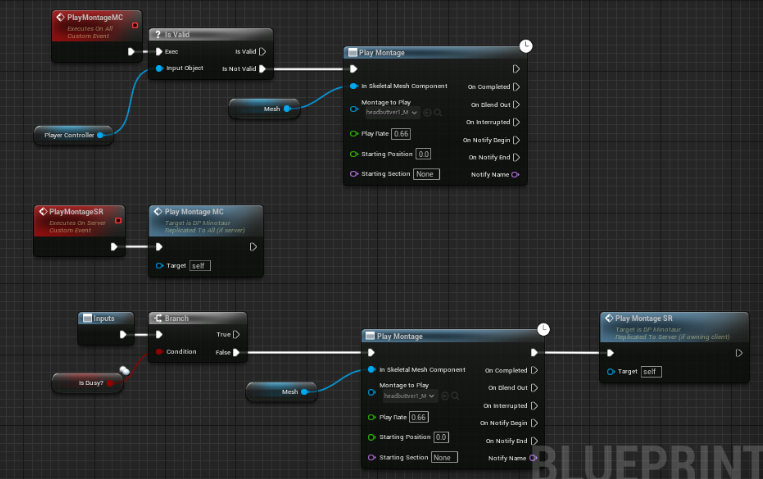

 digital marten
south crane
Hi, I recently started playtesting my game with many people and quickly found ou...
digital marten
south crane
Hi, I recently started playtesting my game with many people and quickly found ou...
Might be worth watching this GDC talk on Halo Reach https://www.youtube.com/watch?v=h47zZrqjgLc
They went into detail on how they made abilities like grenades and armour lock feel responsive even on 200-300ms ping. It gives good insight on how to hide lag from ping.

In this 2011 GDC session, Bungie's David Aldridge discusses the programming that drove Halo: Reach's online networking.
Register for GDC: http://ubm.io/2gk5KTU
Join the GDC mailing list: http://www.gdconf.com/subscribe
Follow GDC on Twitter: https://twitter.com/Official_GDC
GDC talks cover a range of developmental topics including game des...
south crane
will definitely check it out thanks!