#multiplayer
1 messages · Page 71 of 1
 hollow eagle
 ember vine
if valve dont spill the beans on how it works then the army of hackers making cheats for cs prolly will
 twilit radish
Regular modding is a thing for CS:GO too. So either way it will find a way 😛
hollow eagle
Source 2 hammer will be a thing, obviously
 unkempt tiger
garry newman got source 2 from valve like 2 years ago, its probably in there unless it's a recent addition. If it's in there then hundreds/thousands of s&box developers were probably already exposed to the API unless it was masked by the facepunch team
ember vine
yea he has pretty good things to say about it too, which is interesting because normally he just complains like a true brit
 quasi tide
He needs to make a full game before he starts complaining about the engine
unkempt tiger
his blog post about UE is still scarred into my brain
quasi tide
Link?
ember vine
i wanna read this, trying to find
unkempt tiger
ember vine
hoping it'll be as juicy as linus torvald c++ rant
quasi tide
Oh, 2016? Pass.
unkempt tiger
its not really juicy, but he sheds a valid opinion on the nightmare that is UE C++
ember vine
 already the first few lines
quasi tide
Eh - Just a blog post saying C++ is shit. Yeah, we know.
hollow eagle
most of that is just him discovering what the engine does/doesn't have, not even really any complaints
not like his unity rant
and yeah, source 2 isn't new. The sub-stepped ticks seems to be either CS2-specific, brand new to source 2, or just heavily NDA'd.
I wouldn't be surprised if it's a system specific to CS2 - that kind of substepping is usually pretty specific to systems it gets used by.
though tagging inputs with more granular timing information would be a nice generic thing
 dark edge
ember vine
<:OMEGALUL:436614732741476362> already the first few lines
dark edge
ember vine
<:OMEGALUL:436614732741476362> already the first few lines
"There isn’t any interpolation – apart from players" He means ACharacter I guess?
 lost inlet
the CMC performs it
dark edge
well yeah but I see people conflating Character and Player all the time
lost inlet
I do have access to s&box, it's trying its best to not remind you it's Source 2. the editor is heavily customised from the vanilla s2 suite
large parts of it we rewritten in C# to give an editor API for addons
 elfin copper
Guys how to deal with OwnerNoSee and OnlyOwnerSee when the class is not the same as the player? The owner of the mesh is actually the class itself so this approach is not working to properly set the weapon visibility, any thoughts?
 rose egret
any tutorial on how to make AWheeledVehiclePawn replicated ? I made it client authoritative but its not working
 graceful flame
Actors have a replicated checkbox, is it checked or unchecked?
 obsidian granite
Trying to create a dedicated server using UE5 documentation, but getting this error - any idea?

All I have done is create a [PROJECT_NAME]Server.Target.cs and it's throwing the error
hollow eagle
show the full build output
 latent heart
Did you edit the file to say it's a server target instead of game?
 obsidian granite

 thin stratus
The error sounds like you have some other UE process running
latent heart
Also copy+paste. DOn't screenshot.
thin stratus
Code 6 for me is usually when something is stuck and didn't close. Check in task manager for any UE related processes
obsidian granite
'''2>Creating makefile for AresServer (no existing makefile)
2>Server targets are not currently supported from this engine distribution.
2>C:\Program Files\Microsoft Visual Studio\2022\Community\MSBuild\Microsoft\VC\v170\Microsoft.MakeFile.Targets(44,5): error MSB3073: The command ""D:\Epic Games\UE_5.1\Engine\Build\BatchFiles\Build.bat" AresServer Win64 Development -Project="C:\Projects\Ares\Ares.uproject" -WaitMutex -FromMsBuild" exited with code 6.
2>Done building project "Ares.vcxproj" -- FAILED.
========== Build: 0 succeeded, 1 failed, 0 up-to-date, 1 skipped =========='''
latent heart
Are you using a launcher build?
thin stratus
You gotta need to download the engine from GitHub and build it from source. Dedicated servers aren't supported by standard launcher builds
latent heart
Aren't*
obsidian granite
Ahh my bad - I appreciate the help both!
thin stratus
Gnah phone
latent heart
🙂
obsidian granite
Thank you!
 deep coral
when a client loads an actor when joining in, does OnRep notify functions get triggered on client net load?
 fossil spoke
OnRep will be triggered if the value of that variable has changed
deep coral
eg, if I have a door with a variable Open which is OnRep notified, and it is set to true on the server, when a client loads in and loads the door, it will load as true but will it also trigger the onrep func?
fossil spoke
If by default the bool is false, but the server changes it to true, then a Client connects. The OnRep will be called because its value has changed.
deep coral
i see thx
If I have a replicated variable in an actor that is a struct, and If I change one of the inner variables using a pas by ref, does the change get replicated to clients?
using pass by ref BP node on the server
 fossil spoke
@deep coral I vaguely remember there being a bug where that doesnt cause it to rep.
 swift portal
Is there a way to have my unreal engine game send data to my server? Like let's say I wanted to send my players location to my python app every second. Is this possible?
fossil spoke
swift portal
Is there a way to have my unreal engine game send data to my server? Like let's ...
Setup a HTTP Server?
swift portal
fossil spoke
Setup a HTTP Server?
Is this possible in blueprints?
fossil spoke
With a Marketplace plugin probably.
 mortal mica
what's the main idea behind saved moves? is it for rolling back simulation and apply corrections?
 noble sentinel
Am I need to put replication in to run owning client?

It works without it(this is in game instance), but I saw somebody do run owning client on tutorial video
fossil spoke
mortal mica
what's the main idea behind saved moves? is it for rolling back simulation and a...
Yes
fossil spoke
noble sentinel
It works without it(this is in game instance), but I saw somebody do run owning ...
There is no point in marking Events as RPCs or setting properties as Replicated in the GameInstance as it is not replicated or shared across machines in any networked way.
mortal mica
fossil spoke
Yes
so the main purpose is to be more "fair" in who shot who, give laggy players a better experience, correct?
ie, avoid the whole "aim ahead of the movement to hit"
im trying to implement a "ship" movement component, wondering what features i need to consider from the cmc
noble sentinel
fossil spoke
There is no point in marking Events as RPCs or setting properties as Replicated...
Thank you, also can I ask omething too. Is this sending a player invite from steam overlay? So I dont need to make another widget for invite right?
 fossil spoke
No, its to ensure that the Character on the Client side respects the authority of its position on the server while maintaining a smooth visual for remote Clients.
mortal mica
or which are good enough to leave out, at least for now
fossil spoke
noble sentinel
Thank you, also can I ask omething too. Is this sending a player invite from ste...
I dont know sorry. I dont use this method of invite sending and am not familiar with it.
mortal mica
fossil spoke
No, its to ensure that the Character on the Client side respects the authority o...
that sounds more like prediction ?
why would you rollback movements for that?
nvm, found an explanation here: https://docs.unrealengine.com/5.0/en-US/understanding-networked-movement-in-the-character-movement-component-for-unreal-engine/

Detailed explanation of the Character Movement Component
makes sense
follow up question, but I'm guessing the whole "Combining moves" is just to save bandwith? I mean if player moved forward 1 meter, and then right 1 meter, it can be just sent as (1,1) in a single move and be done with it.
so in a naive implementation I could ignore combining moves at least until I get it working
hollow eagle
it's so that you only need a single rpc for the move instead of one per move
- then you don't need to worry about whatever additional latency it might introduce
 nova wasp
How nasty is a client deleting a networked actor before the server does? Seems fairly evil but I'm not certain
I can just... not do that I guess
 uneven kraken
So "Iris Replication" was listed in the roadmap as experimental for 5.1, but the 5.2 roadmap page doesn't mention it at all. Does that mean it's been dropped as a feature?
fossil spoke
nova wasp
How nasty is a client deleting a networked actor before the server does? Seems f...
Its fine. You could probably even respawn it if it was stabley named and have it all just work again lol
fossil spoke
uneven kraken
So "Iris Replication" was listed in the roadmap as experimental for 5.1, but the...
No it likely just means they have no news and its remaining experimental for this release.
Dont fret, it wont be dropped as a feature. Its a pretty important overhaul.
 fiery eagle
Hi Guys I have a Question Regarding the a function i am calling from client please tell me if this format is acceptable if not please correct me cpp void Func() { if(HasAuthority()) { //FunctionChangeState } else { if(IsLocallyControlled()) { //Server_FunctionChangeState } }
thin stratus
@fiery eagle looks fine. Only comment I would have is that sometimes you want to do the FunctionStateChange locally too to predict it.
dark edge
thin stratus
<@465970010981007372> looks fine. Only comment I would have is that sometimes yo...
Is the typical model for that simple prediction method just to skip owner on replicate?
fiery eagle
thin stratus
<@465970010981007372> looks fine. Only comment I would have is that sometimes yo...
Thank you 😊
fiery eagle
dark edge
Is the typical model for that simple prediction method just to skip owner on rep...
I am sorry am not good in English but what am trying to achieve is using this is reliable call to change state without any loss in data tried rep notify using function but under high ping say 500+ I was not getting state set reliably.
thin stratus
 void nest
Is there a way to find out if a session is singleplayer or hosted?
void nest
Is there a way to find out if a session is singleplayer or hosted?
Maybe IsServer?
thin stratus
dark edge
Is the typical model for that simple prediction method just to skip owner on rep...
Depends on what you are implementing tbh
There are things where you want it to replicate back to the client
void nest
No that doesn't work sadly. But I found a way. I used: https://gyazo.com/c87f49caa1b0d831a9e61fce37cc13c3

if this returns false it means the user in not hosting and thus in singleplayer
IsServer returns true on singleplayer as well
 short arrow
Hey guys, does anyone know of a way I can simulate a player count so that I can profile a specific number of people (playerstate, controller, character, etc.)? Maybe unreal has some setting for this that doesn't require me to set my computer on fire trying to open 50 clients. Or maybe someone knows a service that you can pay for something like this?
I can't really spawn AI because they already run on the server meaning there'd be no replication checks or relevancy checks happening 
 sick egret
conceptual question here: what's the point of UGameInstance::PreloadContentForURL?
does it start the loading right away? because if you immediately call this before doing a server travel, aren't the assets loaded one way or another?
thin stratus
I have an Array of CastingInfos. When one starts Casting it adds an entry and returns a handle to it.
I'm a bit at a loss at the moment how I would handle replication etc. for the Casting stopping/canceling, because if I remove the entry from the array to trigger replication, it does of course not allow for notifying anyone because the entry is gone.
If I pass in the previous entry into the OnRep, I still don't know the reason for the removal (e.g. Cancel vs Stop).
Is there some concept one can apply for this kind of setup?
Basically an Array of Information that gets entries added when starting something and entries removed when stopping it, and then notifying everyone who wants to know about the start and stop, as well as the reason for the stop.
Since this is a state I don't really think an RPC would be a good idea.
FGameplayCue talks about stuff being invoked from RepNotify, but I can't find where they do that. I only find Multicasts
oh
FActiveGameplayCue is a FastArraySerializerItem
Oh that could work actually. Because FastArray allows me to react to the removal of the item. But then I would still not know if it was due to cancel or stop
I wonder what happens if I change something in the Array Entry and then call remove on it
Does PreReplicatedRemove call with the updated info?
 ocean vessel
hi, which delegate in Online Interface gets called when "Join Game" is performed ?
 rose egret
@thin stratus however they say not to use reliable RPCs, but in a similar case I used Initial Only replication + reliable RPC to send actions instead of replicating my whole array, at least its working till now for me. FastArray could work but I did not use.
maybe add a variable to your array item to indicate why items was added! because of remove or ..
thin stratus
Yeah I'm close to trying it out
I looked a lot at GameplayEffect and Cues that use these FastArray setups
 glass vector
how do you reset the gamemode, gamestate, and player controllers after a seamless travel? I don't want any persistance at all
I just want a faster player experience from seamless travel
thin stratus
glass vector
how do you reset the gamemode, gamestate, and player controllers after a seamles...
GameMode and GameState should reset either way. PlayerController is only a problem if its the same Class, cause then it persists
thin stratus
Does modifying a FFastArraySerializer locally cause the per element events to call?
 open junco
How do I draw debug lines (via DrawDebugLine) on clients from the server? Via RPC, or there's some other method?
 chrome bay
RPC, or if you're in single process PIE you can do a massive hack and get the client editor world
 rose pollen
how do you set up a .ini file in VS that only is loaded for a dedicated server build?
 surreal niche
How are you supposed to add filters to the UCommonSessionSubsystem's UCommonSession_SearchSessionRequest so you can find sessions with specific parameters?
I know how to do it manually, but I don't see a way through Common
 tranquil swallow
Hey guys! I'm having a super odd issue that I've been a bit stumped on, if you are able to help or have questions lmk!
Issue:
In an Unreal Engine 5 Blueprint project, I've implemented a weapon system with custom events for shooting and handling damage. When a player shoots, the following sequence of events takes place:
"FireWeapon_Client" event (client) > "FireWeapon_Server" event (server) > "FireWeapon_All" event (multicast)
Weapon-specific event for spawning a projectile and setting damage values
"ActorBeginOverlap" event in the projectile Blueprint checks for player collisions and calls "ReceiveDamage" on the hit player
"ReceiveDamage" event subtracts damage from health (health is replicated) and calls "CheckHealth" event
"CheckHealth" event checks if health is <= 0 and calls "DeathMethod" event (multicast and reliable)
I am encountering two issues:
When the server shoots a client, the client dies instantly with one bullet.
When a client shoots the server, it takes two bullets to kill the server. However, when a client shoots another client, it still takes one bullet.
I need help in identifying and resolving the cause of these issues, ensuring that damage is calculated and applied consistently for all players (server and clients).
 naive dagger
hi! is the "ServerFixedFPS" in editor setting the same as the server tick rate ?
tried setting it to 60 and it made the vehicles jitter
dark edge
tranquil swallow
Hey guys! I'm having a super odd issue that I've been a bit stumped on, if you a...
First double check and confirm that only 1 projectile is being fired on any given machine
make sure you're not double dipping
I'm assuming only the multicast actually fires the projectile?
tranquil swallow
dark edge
First double check and confirm that only 1 projectile is being fired on any give...
Already checked that route, it doesnt seem to be. Then the player initiates the event in the weapon that spawns the projectile in a multicast event.


 dark edge
tranquil swallow
Already checked that route, it doesnt seem to be. Then the player initiates the ...
dark edge
tranquil swallow
Already checked that route, it doesnt seem to be. Then the player initiates the ...
ok so now show the logic chain from overlap to death
 winged badger
thin stratus
Does modifying a FFastArraySerializer locally cause the per element events to ca...
winged badger
thin stratus
Does modifying a FFastArraySerializer locally cause the per element events to ca...
Dont do that, youll brak replication indexes (add or remove)
tranquil swallow


 rose egret
anyone know why movement is replicated with delay when I detach my character from vehicle ? (if you notice character moves down a little then receives location and jumps to left side of car)
Character->DetachFromActor(FDetachmentTransformRules::KeepWorldTransform);
Character->SetActorLocationAndRotation(exitPoint, exitRotation);
Character->GetCharacterMovement()->SetMovementMode(MOVE_Falling);
Character->ForceNetUpdate();
I feel like its because of switching from AttachmentReplication to ReplicatedMovement 🤔
any idea ?
winged badger
rose egret
anyone know why movement is replicated with delay when I detach my character fro...
Client capture?
Predicted?
winged badger
thin stratus
Does modifying a FFastArraySerializer locally cause the per element events to ca...
And no it doesnt, its during deserialization, not value changed
winged badger
rose egret
anyone know why movement is replicated with delay when I detach my character fro...
Withoyt more info best guess is server correction because location is slightly and rotation way off
dark edge
@tranquil swallow you really oughta be doing more replication with repnotify and less RPCs. This is a bit of a mess. Are you intending for hit detection to be clientside?
rose egret
winged badger
Client capture?
its client and those codes are done in Auth
tranquil swallow
dark edge
<@198847720276885504> you really oughta be doing more replication with repnotify...
I would like to have server-side hit detection to ensure consistency among players. Could you please provide guidance on how I can modify my existing weapon system to utilize repnotify and reduce the use of RPCs, while maintaining server-side hit detection? I appreciate any help you can offer to improve my setup.
dark edge
tranquil swallow
I would like to have server-side hit detection to ensure consistency among playe...
Then just do the hit detect etc on server only
rose egret
@winged badger attachment, bHidden, .. are replicated at once but either position is arriving late or client is not applying it instantely I dunnow
winged badger
Might have something to do with that weird skeletal mesh rotation on character, 90 degrees
tranquil swallow
dark edge
Overlap -> has authority? -> do the stuff
Isnt this what that is?
 dark edge
tranquil swallow
Isnt this what that is?
dark edge
tranquil swallow
Isnt this what that is?
Show the rest of that chain. The whole thing.
tranquil swallow
 winged badger
rose egret
<@352507850980851712> attachment, bHidden, .. are replicated at once but either ...
winged badger
rose egret
<@352507850980851712> attachment, bHidden, .. are replicated at once but either ...
Catch a breakpoint before the jump, then set a data breakpoint in capsules component to world tranlation, then see what causes it in callstack
tranquil swallow
tranquil swallow
Already checked that route, it doesnt seem to be. Then the player initiates the ...
I sent all of how my weapon system works a little bit above.
tranquil swallow
That's right. A bit redundant there let me fix that
dark edge
Ooh I know
I know what it is
The bullet is not replicated
So has authority is true everywhere
Hmm maybe that's not it
rose egret
@winged badger btw it happens when ping is high, look like movement is replicated with next packet
dark edge
But it's certainly not great.
tranquil swallow
Previously I had replicated true on projectiles until I came upon the issue of multiple bullets being in existence for each fired.
dark edge
Yeah this is all a bit of a mess
I think it's the fact that recieve damage server is an rpc tho
dark edge
tranquil swallow
How many times does that "Projectile Has Hit XXX" fire?
Should be 1 time, always
er
lol the non-replicated bullets are really throwing this for a loop
I'd just replicate the bullets since you're not predicting anyway
tranquil swallow
Client 1 shoots Client 2
 dark edge
Input -> Run on server
Run On Server -> spawn REPLICATED projectile -> multicast (for cosmetics)
tranquil swallow
Mk Ill try that out
Thanks, I have to go for a bit but will def try that out and rework this a bit
dark edge
Then in REPLICATED projectile
Hit -> has authority? -> do stuff
What you're doing is close to OK but it'd be more for a local projectile system with clientside hit detection
tranquil swallow
 I'm just realising now how dumb my current logic is and is just everywhere
dark edge
with the "Server does everything" model things will at least make sense and be simple
but you will have ping lag
prediction makes everything much harder as you gotta think about everything from 3 points of view, the local client, the server, and remote clients, who will all see something slightly different and at different times
rose egret
@winged badger soory for mention. i found my problems
that effect was seen only in autonomous client, and I forgot that Actor.ReplicatedMovement is not replicated to autonomous.
for simulated clients I need to tell CMC to instantly jump and don't do any extrapolation.
and for local client I need to tell the CMC to send and ack instantly.
do u know names of such functions ?
 warped steppe
I've looked around in here and I can't find it: What's the world context string to make debugging nicer in the IDE?
in the watch window at least (show if we are client/server etc)
 fathom aspen
This is it. For UE5 you probably want to use UnrealEditor @warped steppe
mortal mica
I was looking for that a few hours ago 😄
we need a VS plugin that just displays that as an overlay 🙂
 pastel tangle
how do i set movement component to be client authoritive
 eternal canyon
pastel tangle
how do i set movement component to be client authoritive
eternal canyon
pastel tangle
how do i set movement component to be client authoritive
There’s two Booleans
If u look in the details panel they are right next to each other
Ignore server corrections is one
I’m pretty sure
And accept client auth position
fathom aspen
fossil spoke
https://docs.unrealengine.com/4.27/en-US/ProductionPipelines/DevelopmentSetup/Vi...
I don't know how long this has been a thing, but this is awesome. A lot of these I've been using because I saw them somewhere, and now they are consolidated in one single place
fossil spoke
Its been around a long time lol
fathom aspen
thin stratus
I was looking for that a few weeks ago
You probably want to test what is the correct command for UE5, and edit that message (add it just in case)
nova wasp
fossil spoke
https://docs.unrealengine.com/4.27/en-US/ProductionPipelines/DevelopmentSetup/Vi...
ah, thanks!!
naive dagger
hello everyone!
So I have this problem where the vehicle (using ChaosWheeledVehicleMovementComponent) jitter, it only started appearing after I set the “ServreFixedFPS” in the editor setting to 60, the jitter becomes worse the more I increase it. I have already enabled smooth fps and substepping.
Anyone encountered this problem before?
 uneven lion
I'm confused

do I "Destroy Session" before or after this? I am worried about doing Destroy Session after a Join Session On Success, or when should I?
if I don't destroy the session, I get an error going back to a previous server can't join twice
but then if I call Destroy before Join, join can fail and now I must re-search for and re-connect to my current session, am I understanding this right?
fossil spoke
@uneven lion Only the Host should be destroying the Session they have Created.
 molten matrix
I'm hitting this issue where once I ServerTravel to another map, the connected client disconnects with this error:
Thu Mar 23 21:26:13 EDT 2023 Error LogNet UEngine::BroadcastNetworkFailure: FailureType = ConnectionLost, ErrorString = UIpNetDriver::TickDispatch: Socket->RecvFrom: 10 (SE_ENOTSOCK) from 0.0.0.0:0, Driver = GameNetDriver IpNetDriver_6
Any idea what would cause this?
It's driving me a bit crazy because I hit this 3-4 weeks ago and I figured it out and now I can't remember what I did.
 surreal plaza
Do you guys have any pinned articles or videos for how to approach the online subsystem to maximize steam and EOS?
thin stratus
fossil spoke
<@308778472447148045> Only the Host should be destroying the Session they have C...
Afaik the Client also has to destroy it after leaving. Otherwise the local entry of the session will cause problems when trying to host or join again.
But obviously before joining, not after
thin stratus
molten matrix
I'm hitting this issue where once I ServerTravel to another map, the connected c...
Are you Seamless Traveling?
fossil spoke
thin stratus
Afaik the Client also has to destroy it after leaving. Otherwise the local entry...
Mmm ok, I wasnt aware that was the case.
But fair enough.
 vague ocean
how do implement a blueprintnativeevent interaction interface with server, reliable
doesn't seem I can have blueprintnative event and server on the ufunction
thin stratus
@vague ocean Interfaces usually shouldn't be networked
You perform your RPCs and in Class XYZ and then use the Interface functions afterwards.
E.g. Press E to interact -> RPC to Server -> LineTrace on Server -> Call Interface Function on HitActor
vague ocean
ah ok, I see. I was wondering about this
vague ocean
thin stratus
E.g. Press E to interact -> RPC to Server -> LineTrace on Server -> Call Interfa...
I have an InteractableBase class which implements the interface, so thats where I should do the networking?
thin stratus
I usually have this:
- ActorComponent that is replicated and handles RPCs
- Interface for Interacting
- BaseInteraction Actor that implements the Interface for easier set up
But this also depends on how your Interaction System is supposed to work
Often times it's overlap based, other times you want some prompt when you trace an interactable actor etc.
So most of the time, if that is similar to your system, the ActorComponent would perform a Trace on Tick to check if the Player is looking at an Interactable, keep track of the currently traced one, maybe highlights it and calls an EventDispatcher/Delegate to update some UI.
For Overlap ones, where you just walk into range of an interactable, we usually have another component on the Character (The ActorComponent sits on the Character most of the times), that handles overlaps, so a SphereCollision for example. The ActorComponent can then react to actors entering and exiting the SphereCollision, maybe check which of all the overlapped actors is the "Best" one (e.g. facing angle) etc.
vague ocean
Yep this is the same for my system, I have my character actor sending out line traces and storing the currently "focused" object
thin stratus
In the end, some input will trigger interaction on that current interactable
vague ocean
then I can call the Interact event on that object
thin stratus
Yeah, so 99% of that stuff I wrote is happening on Server and Client
If the Game is ListenServer based, then it can be only on the Client fwiw
Pressing Interact triggers an RPC then, that either just tells Server that you interact
vague ocean
this will have a dedicated server
thin stratus
Or even gives the server what you interact with if cheating is not a problem
vague ocean
cheating will be a big issue haha, need everything possible on the server 😂
vague ocean
thin stratus
Pressing Interact triggers an RPC then, that either just tells Server that you i...
whats the best way to have it overridable in blueprint. I want the non programmers in the team to easily be able to write logic in blueprints?
 calm prawn
Hi guys. I have a replication problem. What I'm doing wrong?
I have a flying actor, controlled by a mouse but the client is not working as expected.
For CurrentPitchSpeed and CurrentYawSpeed I have the same thing.
Controller rotates -> server rotates -> server sends to onrep -> onrep notify clients
 vague ocean
anyone know why a server rpc being called from a client wouldn't be running? Im calling it on an object from the player character
runs fine from the listen server player character
 blazing spruce
Does any particular culling methods need to be used / is preferred specifically for multiplayer?
 prisma snow
blazing spruce
Does any particular culling methods need to be used / is preferred specifically ...
prisma snow
blazing spruce
Does any particular culling methods need to be used / is preferred specifically ...
There is relevancy and built in stuff like the replication graph, but I'd say - it depends a lot on the specific needs of your game
blazing spruce
prisma snow
There is relevancy and built in stuff like the replication graph, but I'd say - ...
Im more thinking of general optimisation where i can cull things out like entire interiors that if the player is miles away from the building, doesn't need to be seen, ideally to improve FPS i just didnt know if there was any specific methods preferred when dealing with multiplayer
prisma snow
blazing spruce
Im more thinking of general optimisation where i can cull things out like entire...
rendering culling will happen by default afaik, I would not worry unless you profile some kind of specific problem
for multiplayer, it depends on your game
vague ocean
So I was getting the
No owning connection for actor error in the console, I did setowner on the actor, but now nothing happens on clients
prisma snow
if it is fps or third person, look at the replication graph @blazing spruce
blazing spruce
prisma snow
rendering culling will happen by default afaik, I would not worry unless you pro...
If rendering culling happens by default, what's the purpose of cull distance volumes?
prisma snow
blazing spruce
If rendering culling happens by default, what's the purpose of cull distance vol...
Idk, and not sure this is related to multiplayer
blazing spruce
No worries, ill have a look at the replication graph, thanks!
molten matrix
thin stratus
Are you Seamless Traveling?
I wasn’t. I tried switching to seamless travel and it seems to change from the SE_ENOTSOCK to a similar failure and disconnect but this time due to timeout
vague ocean
im rotating an actor inside of a server rpc (server, reliable ufunction). when done from a client, this is not being replicated to the other clients
replicate movement is ticked on
surreal plaza
vague ocean
im rotating an actor inside of a server rpc (server, reliable ufunction). when d...
Is this c++?
vague ocean
surreal plaza
Is this c++?
yes
 grizzled stirrup
fossil spoke
Mmm ok, I wasnt aware that was the case.
grizzled stirrup
fossil spoke
Mmm ok, I wasnt aware that was the case.
Yeah client definitely also has to destroy it or else they'll be in limbo, unable to create new sessions or join invites and hanging on to a stale old session until manually destroyed
Got burned by that a few times!
surreal plaza
vague ocean
yes
And you are setting replicates for the entire actor as well?
thin stratus
molten matrix
I wasn’t. I tried switching to seamless travel and it seems to change from the S...
Is that using Steam?
molten matrix
Eventually, I want to use steam, but currently using the null subsystem for development. I do see some logs about steam subsystem failing to initialize which is strange since I’m not currently using the steam subsystem
thin stratus
If you use Steam you'll need the SeamlessTravel either way
vague ocean
surreal plaza
And you are setting replicates for the entire actor as well?
Yes, and replicate movement is also ticked
 surreal plaza
vague ocean
Yes, and replicate movement is also ticked
surreal plaza
vague ocean
Yes, and replicate movement is also ticked
Can we see the code where this is changed?
vague ocean


im calling the server interact on the actor from the player character, after a line trace
surreal plaza
vague ocean
This should be in an _Implmentation method afaik. So ServerInteract_Implementation
vague ocean
surreal plaza
This should be in an _Implmentation method afaik. So ServerInteract_Implementat...
I thought so, but when I had it as _implementation it wasn't even getting called by the client instances
when I removed _implementation it got called, but not replicated
so idk wtf is going on 😂
surreal plaza
Are you using a debugger?
vague ocean
surreal plaza
Are you using a debugger?
i was just looking at the unreal in game logs
surreal plaza
vague ocean
i was just looking at the unreal in game logs
Is this in VS?
surreal plaza
For the moment, I would strip it down a little. Take off virtual just in case that is doing something weird. Also, are you passing in the actor to modify it?
vague ocean
virtual gone, swapped them all to the _implements version
not getting called on client, still works fine on the listen server
vague ocean
surreal plaza
For the moment, I would strip it down a little. Take off virtual just in case t...
basically just to hide it
chrome bay
Client isn't going to run a Server function unless it has authority over the object
vague ocean
chrome bay
Client isn't going to run a Server function unless it has authority over the obj...
I have used SetOwner
is that right?
vague ocean
ah, how do I do that?
 ruby lodge
Does anyone have a good tutorial or tutorial series about how to implement online functionality and upload the game to steam?
Idk really if that's right here or in #online-subsystems so I try both. Tell me which one is in the right channel to remove the other one.
chrome bay
vague ocean
ah, how do I do that?
Call SetOwner() on Server, then wait for it to replicate I guess
Bit strange though
ruby lodge
I mean really basic stuff like creating a server and joining. No interaction even
vague ocean
chrome bay
Call SetOwner() on Server, then wait for it to replicate I guess
how do I do it from the server? if(hasAuthority())?
because wont that just never run from clients?
surreal plaza
vague ocean
how do I do it from the server? if(hasAuthority())?
Just for clarity, what is the context of this actor?
chrome bay
vague ocean
because wont that just never run from clients?
Exactly - but if clients could set ownership of something that would be a pretty massive security flaw
vague ocean
surreal plaza
Just for clarity, what is the context of this actor?
its an object that I have implemented an interact interface on
interact, focus, unfocus, etc
chrome bay
The bottom line is though, clients can't change object ownership
vague ocean
chrome bay
Exactly - but if clients could set ownership of something that would be a pretty...
yep haha, makes a lot of sense. I just don't know how to "get permission" from the server from the client
chrome bay
Only the Server can do that
You can't - you have to route the RPC through an object that you DO own
A common workaround for interaction systems for e.g, is you put the RPC's on the controller, or pawn, or a component belonging to one of those etc.
And pass the object your interacting with as the argument
surreal plaza
vague ocean
interact, focus, unfocus, etc
I mean more like "this is a trigger on a box the player carries around."
vague ocean
chrome bay
A common workaround for interaction systems for e.g, is you put the RPC's on the...
ah so kind of in reverse to what usually happens
vague ocean
surreal plaza
I mean more like "this is a trigger on a box the player carries around."
just an object in the world that I can be interacted with, behaviour to be defined later
 sterile plaza
I have a player start that I have positioned and rotated. On the server, the camera gets both values. On the client, it only gets the location and does not receive the rotation.
Is this expected? Is there a checkbox to make that happen (I haven't found one) or do I need to set the rotation manually?
sterile plaza
wtf is APawn::RemoteViewPitch? Why is that a thing?
quasi tide
So you can properly animate simulated clients, IE - so you can see when your friend is looking up or down on your screen.
sterile plaza
Oh, I see. For seeing other clients.
Why is it so hard to figure out how to make my client camera use my player start rotation?
I can write a bunch of code to RPC the value down at start, but it seems crazy for that to be necessary.
sterile plaza
This shouldn't be this hard.
Holy shit. I finally flipped bits until it worked. Now to see if I can figure out which combination did it.
UsePawnControlRotation on the camera has to be off.
sterile plaza
And inherit pitch had to be off on the spring arm.
prisma snow
I dunno how accurate or deterministic Chaos is, but I would not rely on it for multiplayer. For a similar case, my plan was to send the arrival location pre-calculated in the server, so that the client arrives at the same one
dunno if the physics API lets you simulate with a hardcoded goal, I guess not
mmm
could be
tricky scenario
but should be doable
 cerulean lintel
Hey there! Regarding replication for a variable that holds character weapons (attached to the back of the character/socket) I’m currently using a repnotify for the weapon class variable and it works pretty well, it spawns thru a server unreliable function and replicates to clients. But when I turn this into an array and add the spawned weapon to the array, notify doesn’t work properly. Any clues on what could this be related to? Does arrays get replicated the same way?
sterile plaza
cerulean lintel
Hey there! Regarding replication for a variable that holds character weapons (at...
Why unreliable?
Can you show your array declaration?
How do you guys check if you're a client? That is you're running UI. This would be true for both dedicated client and standalone.
UKismetSystemLibrary::IsServer() nicely tells you if you're a server, whether that's standalone or dedicated or listen server. I don't see anything that's similar but for clients.
Mostly making sure there's not something I can easily check before I write my own.
dark edge
sterile plaza
How do you guys check if you're a client? That is you're running UI. This would ...
IsDedicatedServer
if that's false you have a UI
cerulean lintel
sterile plaza
Why unreliable?
Can you show your array declaration?
I was told to avoid using too many reliable calls as it can be hold off connection, but luckily changing it is quite easy, but didn't make a difference in the replication of the array
dark edge
cerulean lintel
Hey there! Regarding replication for a variable that holds character weapons (at...
When in doubt, make state Repnotify
multicasts for gameplay are pretty much gross
cerulean lintel
so I'm using this for a single weapon it works as expected
UFUNCTION()
void OnRep_ActiveWeapon();

UPROPERTY(Transient, ReplicatedUsing = OnRep_ActiveWeapon)
class AHCFWeapon* ActiveWeapon;
but if I change this to an array it won't replicate as expected
TArray<class AHCFWeapon*> WeaponSlots;
dark edge
Does that not replicate, not call the repnotify, or does the stuff after the repnotify not work?
cerulean lintel
First, it spawns twice the weapon on the client, which doesn't happen if it's a single property
Second, it doesn't replicate, even though it's in GetLifetimeReplicatedProps
dark edge
Are you still using multicasts anywhere?
cerulean lintel
no, I use repnotifies already, this is how I spawn the weapon
this works perfect if it's a single weapon, but not if I change that into a tarray
dark edge
I'd first start out by checking that WeaponSlots is replicating correctly
So is the first weapon in WeaponSlots considered to be the one you're holding? Is it like:
0: MainHand
1: OffHand
2: Back
3: Back
?
cerulean lintel
my plan was to use an index for the active one (possibly replicated as well?)
ideally, adding to the slots only equips to the back, doesn't make it active
dark edge
Start by making sure the pieces work bit by bit. Just print the array on tick or something and make sure it replicates right
cerulean lintel
since it's a server function, UFUNCTION(BlueprintCallable, Server, Unreliable) it shouldn't be called twice right?
I'm wondering if I'm missing any other HasAuthority check somewhere
Or IsLocallyControlled
fossil spoke
grizzled stirrup
Yeah client definitely also has to destroy it or else they'll be in limbo, unabl...
Good to know. Ill be dealing with Sessions soon myself. Ive been working with direct IP connections for years lol.
dark edge
cerulean lintel
since it's a server function, `UFUNCTION(BlueprintCallable, Server, Unreliable)`...
What function is that?
the one that leads to the setting of the array?
sterile plaza
cerulean lintel
I was told to avoid using too many reliable calls as it can be hold off connecti...
I use reliable for everything except for things that change often and I only care about the last known value. Like the position of something. If you need the RPC to go through, for something like setting a weapon variable, use reliable.
sterile plaza
cerulean lintel
`TArray<class AHCFWeapon*> WeaponSlots;`
Do you have
TArray<class AHCFWeapon*> WeaponSlots;
or
UPROPERTY(Replicated)
TArray<class AHCFWeapon*> WeaponSlots;
?
Why are you calling OnRep_ActiveWeapon() ?
cerulean lintel
sterile plaza
Do you have
```cpp
TArray<class AHCFWeapon*> WeaponSlots;
```
or
```cpp
UPROPERT...
I have
UPROPERTY(Transient, ReplicatedUsing = OnRep_WeaponSlots)
TArray<class AHCFWeapon*> WeaponSlots;
It's attempt to make replication trigger the notify
sterile plaza
Doesn't work that way. But I understand the attempt.
cerulean lintel
so now, my doubt is, if I add a new weapon to the WeaponSlots array, shouldn't it replicate to clients?
using this
UFUNCTION(BlueprintCallable, Server, Unreliable)
void AddNewWeapon(class ACharacter* Owner, TSubclassOf<class AHCFWeapon> WeaponClass);
It should.
First, switch that to reliable. Unless you're okay with that call not happening sometimes.
cerulean lintel
ok
sterile plaza
unreliable is for things that happen all the time and you're oaky if one is dropped because it will be replaced
cerulean lintel
should the TArray be Replicated or ReplicatedUsing?
cerulean lintel
so for this case I don't really need the OnRep
sterile plaza
what about it?
cerulean lintel
use the same approach? replicated without OnRep once finished as well?
UPROPERTY(Transient, ReplicatedUsing = OnRep_ActiveWeapon)
int32 ActiveWeapon;
looks good
if you don't need to know when it changes on the client
I would make a TArray<int> that replicates and debug that. reduce variables
cerulean lintel
I mean, I intend to call this from a anim_notify
sterile plaza
?
cerulean lintel
sterile plaza
I would make a TArray<int> that replicates and debug that. reduce variables
you mean for the weapon slots?
sterile plaza
for whatever you're struggling to get replicated
cerulean lintel
ok
sterile plaza
TArray still isn't working for you right?
sterile plaza
putting ReplicatedUsing makes it break?
cerulean lintel
for some reason, ReplicatedUsing just doesn't call it
like, client server outta sync
I have an idea
sterile plaza
if Replicated works, ReplicatedUsing should as well. that's weird
cerulean lintel
gonna delete intermediate and saved folders and re build
it worked now!
just have to find a way to set the active index now
sterile plaza
UE also suggests doing this now:
TArray<TObjectPtr<AHCFWeapon>> WeaponSlots;
TObjectPtr for member variables.
cerulean lintel
okay
should I follow the same approach to set the active weapon index? Like, the client calls a BlueprintCallable, Server, Reliable
and the server changes the index replicated varible
sterile plaza
yep
cerulean lintel
is there a better approach to pass the owner?
sterile plaza
who is the owner?
cerulean lintel
like, instead of having many functions that receives who called it
yeah
for instance
UFUNCTION(BlueprintCallable, Server, Unreliable)
void AddNewWeapon(class ACharacter* Owner, TSubclassOf<class AHCFWeapon> WeaponClass);
eliminate this Owner param, which is required for my weapon, but fetch it from somewhere else
sterile plaza
Who is the owner and what is their relation to the actor that's calling the server RPC?
cerulean lintel
I use the owner in the weapon class
but I didn't want to pass it as a param to the server rpc
can we get it some other way?
like, who called this rpc
sterile plaza
again, who is the owner and who is the actor with teh RPC?
cerulean lintel
the owner is the Character
sterile plaza
you can only call server RPCs on actors the client has authority over, ie your controller
cerulean lintel
the actor with RPC is a component of the character
sterile plaza
and the owner is the character?
cerulean lintel
Character calls Component with RPC passing self (character) as the arg so the server knows for who to spawn that
sterile plaza
the component can call GetOwner()
cerulean lintel
that will be replicated?
sterile plaza
that's on the server
cerulean lintel
the component is
sterile plaza
UFUNCTION(BlueprintCallable, Server)
...
void AMyActorComponent::AddNewWeapon_Implementation(TSubclassOf<class AHCFWeapon> WeaponClass)
{
  AActor* Owner = GetOwner();
}
 sinful tree
Marking a function as "Server" indicates that you want it to be an RPC, namely, something a client would be able to call, and similarly, the client could potentially call it any time they want. Based on the name of the function and the fact you're allowing an input of a "Weapon Class", I'm not sure that's what you actually want to be able to happen as someone malicious could call that RPC with whatever valid weapon class at any time during the game.
If this is something like player walks over weapon, weapon gets added to array, then you shouldn't need a Server RPC at all - the server should detect when the player is overlapping the weapon and the weapon should be able to handle adding that weapon to the array, all without the client telling the server to add the weapon.
cerulean lintel
sterile plaza
```cpp
UFUNCTION(BlueprintCallable, Server)
...
void AMyActorComponent::AddNewWe...
thanks for the tips! it worked
 twin juniper
With the dedicated server, do I have to write custom server sided code? Or can I just copy and paste the client and run it as a server and that'll work?
latent heart
Just compile your project in the server configuration. Requires a source engine build.
sterile plaza
Some is the same. Some is different.
latent heart
It's baiscally the same, except it doesn't render anythign and doesn't spawn a player for itself.
sterile plaza
Get one of the multiplayer example projects and check it out.
twin juniper
Okay, I already got multiplayer setup but at the moment it only runs as a client-server without running a dedicated server. What's the difference? Is it basically like a Minecraft server if I run a dedicated server?
sterile plaza
you can have a dedicated server
or a listen server, which is a server with a client as well
or client only
what you can run into, is writing code that assumes there is a host player who can do things that dedicated clients can't
which is what the last game my company made did :/
I suggest you write code assuming dedicated server.
latent heart
Don't assume dedi server. Don't assume listen server. Account for each.
sterile plaza
If you support dedicated server, listen server is trivial in my experience.
Very little code needs to be written specifically for listen server. Some, but not much.
latent heart
Even so. Just don't make assumptions.
Well written code will work no matter if it's a dedicated server, listen server, client or standalone.
sterile plaza
Mostly I have past trauma from working on a game that assumed p1 was host and would shortcut things, because no one at the studio had worked with UE before and didn't know any better (ish).
My workflow is to always run PIE in "play as client" because it guarantees you don't write player code differentiates between host player and client player. And in the case that you mess something up, it's WAY easier to fix things to support listen server than writing for listen server and then trying to fix it to support client.
uneven lion
I am still confused how I am supposed to allow switching servers... I have tried Join Session > Destroy Session and also Destroy Session > Join Session but neither way works.
If I do join first, I get error can't join twice on a server I've previously joined.
If I do destroy first, I get error can't destroy a null session even when in an active session (2nd joined session).
It seems neither way is right, and neither allows me to go from Server A > Server B > Server A
uneven lion
This doesn't work either ??

It's a button that when I click it, it checks if my SessionState is NoSession. If there's no session, no need to destroy first. In theory this is fine.
I press the button and go from Server A > Server B. That parts work.
Now in Server B I press the button (which now points to Server A), and get back a new error LogOnlineSession: Warning: STEAM: Failed to respond IP:<Redacted>
 shy slate
I have a local multiplayer setup for a UE5 project allows me to control one player with keyboard and one player with a gamepad. I have recently upgraded the project to 5.1 and noticed that in this version both the keyboard and the gamepad control Player One.
Looking at the player controller assigned to the two characters there are two different player controllers, both appropriately assigned Player Controller 0 assigned to Player BP 0 and Player Controller 1 assigned to Player BP 1.
Has anyone else had issue with multiplayer in the 5.1 version of the engine?
dark edge
shy slate
I have a local multiplayer setup for a UE5 project allows me to control one play...
PIE or launched?
shy slate
dark edge
PIE or launched?
PIE
dark edge
maybe the settings to route gamepad to player 1 got reset
shy slate
do you mean this Skip assigning Gamepad to Player 1 flag?

Seems i'm not the only one: https://www.reddit.com/r/unrealengine/comments/10w2qgh/skip_assigning_gamepad_to_player_1_broken/
reddit
6 votes and 10 comments so far on Reddit
 civic seal
Hey guys, how would you go about making a series of potentially really common events reliable? My employer demands that impact effects play 100% of the time on a really high projectile count, and I'm just brainstorming how I can get this working. I am considering creating an array of necessary data to be stored as event history, but my issue with this is that at one point this array will become beefy enough to overload the reliable RPC on a client receiving it for the first time (connecting midgame)
The obvious answer is to periodically empty this array, however if I fully empty it there will be a periodic window where events will not fire off and this will not be truly reliable. If I alter the array gradually, this will confuse the delta replication.
Any ideas?
mortal mica
civic seal
Hey guys, how would you go about making a series of potentially really common ev...
this might be an obvious question, but do you need to RPC the impact effects? can't the client determine it's location based on the client side simulation ?
oh, you mean past impacts? like scorchmarks left on the world?
civic seal
Sorta, there's just more data in the RPC than the projectiles normally have
a projectile state update is 128 bytes, and all the stuff it holds is super compressed. This is fine for movement, but impacts would look scuffed with 16bit floats
glass vector
how do you control where the player controller gets initially spawned in multiplayer? I have this problem where there is a short delay between spawning and possessing a pawn in multiplayer, and the player controller is initially spawned somewhere and the player can see stuff I don't want them to see
 modern swift
Does ServerTravel for dedicated server need "?listen" for MapName?listen
 toxic falcon
modern swift
Does ServerTravel for dedicated server need "?listen" for MapName?listen
toxic falcon
modern swift
Does ServerTravel for dedicated server need "?listen" for MapName?listen
Nope, it's only needed for Player hosted servers (listen servers)
 loud frost
Hey i am new to multiplayer , i want to know what is the best way to use realtime database , like firebase sql ?? What are these please clear my doubt
 neon mango
So I wrote gameplay code using Niagara simulation stages which works great for me to optimally do some essential gameplay calculations but since the Niagara particles won't render on a dedicated server where can I write such optimal GPU code so that it doesn't get ignored by dedicated server?
I'd maybe try to move it to a GPU Compute shader but would a dedicated server use the GPU even then?
 unique cloak
Is it ok to replicate a hit result? It’s from the server
prisma snow
neon mango
So I wrote gameplay code using Niagara simulation stages which works great for m...
That's why you generally don't write gameplay code in GPU for multiplayer games. Afaik, Niagara executes it's code on a virtual machine, so not sure that using a CPU compute helps, try asking in #niagara.
I'd say that you should write your simulation in C++ if you want to have reliable and proper results
 hushed mauve
Is is possible to create a component that is located in the server module, and then attach that to one of my clients, so this component exists only on the Client from the server side but not the client side?
hushed mauve
hushed mauve
Is is possible to create a component that is located in the server module, and t...
Or would this result in a crash of the game because the client does not have this code in there modules?
I would guess that i have to disable the replication of the component
prisma snow
hushed mauve
Is is possible to create a component that is located in the server module, and t...
You can have a server-only component (or client only), but I think your terminology is a bit mixed up - you would attach it to an actor, not to a client.
hushed mauve
prisma snow
You can have a server-only component (or client only), but I think your terminol...
Yeah i mean an actor that is owned by a specific client
So it would be possible that for example my character have a server only component attached to it, and only the server can access it
For that the replication needs to be disabled right?
prisma snow
hushed mauve
For that the replication needs to be disabled right?
Yep
prisma snow
hushed mauve
So it would be possible that for example my character have a server only compone...
I think so - just need to make sure you're spawning it on the server side only
prisma snow
hushed mauve
I would guess no
The client won't have any idea about that component
hushed mauve
prisma snow
The client won't have any idea about that component
Alright thank you
vague ocean
do server rpcs get called out of order? Im setting ownership of an actor on the server and then doing an interaction on it, but on the very first time it says no owning connection
after that its totally fine
prisma snow
vague ocean
do server rpcs get called out of order? Im setting ownership of an actor on the ...
reliable ones shouldn't afaik, unrealiables might
vague ocean
prisma snow
reliable ones shouldn't afaik, unrealiables might
weird, they're both reliable
this is what I have

TakeOwnership is (Server, Reliable), and so is ServerInteract
all takeownership does is if(HasAuthority() {interactable_object.SetOwner(this))
this is the player character
neon mango
prisma snow
That's why you generally don't write gameplay code in GPU for multiplayer games....
It looks like my MP game is going to have to be P2P only. I need GPU optimizations that don't happen on a dedicated server period unless someone knows something else? Even if I moved it from Niagara simulation stage to a compute shader in c++, server won't use GPU.
I guess that means GPU physics could never happen on dedicated server either?
prisma snow
neon mango
It looks like my MP game is going to have to be P2P only. I need GPU optimizatio...
At the moment I know a total of 0 games which have GPU-based game logic. Not saying it's impossible, but there are reasons to avoid it
neon mango
That's quite the statement? Most AAA games don't disclose how they do things
vague ocean
neon mango
That's quite the statement? Most AAA games don't disclose how they do things
ive never heard of game logic being done on the gpu
what reason do you have for that?
if it works for you, im not against it haha
ive just never heard of it
unless you have like high intensity ai pathing algorithms running which need lots of matrix multiplies?
prisma snow
neon mango
That's quite the statement? Most AAA games don't disclose how they do things
Well, to begin with, the number of scenarios in which GPU computing power is really needed are very few. Most AAA games use dedicated servers so relying on GPUs does not make sense. Also, while GPUs can process lots of data quickly, the communication between CPU and GPU is often a bottleneck so relying on a GPU simulation is also not ideal.
And finally, most AAA games are GPU bound so why remove processing from CPU to give more work to GPU
neon mango
I need to be able to count how many pixels of a certain color are in a texture pretty much every frame.
Doing this with read pixels is painfully slow for a hires texture.
prisma snow
This is under the assumption that the GPU is reliable enough as to produce good results for game logic
prisma snow
neon mango
I need to be able to count how many pixels of a certain color are in a texture p...
why do you need that?
neon mango
For a gameplay mechanic
prisma snow
cannot you mimick the functionality using an array and some C++ logic?
prisma snow
which is the gameplay mechanic exactly?
neon mango
But I guess if I'm doing dedicated server I can have a beefy server that perhaps can handle that using CPU read pixels
So that means I can do a dedicated server version and a P2P version of the calculation
Because no quest 2 would be a dedicated server
So I guess it's not an issue
Well I'll have to test that to be sure
Splatoon like territory score, counting the color of each team on map.
I tried various solutions but it was all with the intent of those solutions running well on quest 2 hardware but a PC running a dedicated server may be able to use one of my other solutions
neon mango
It's been tricky but this may be why Splatoon also was just P2P
Has to run on a switch
I've gotten pretty far mechanically but trying to cover all bases. think I over reacted to needing to use GPU on a dedicated server, but at least I know that it's not possible. Of course I'll have more resources on such a machine so CPU work like that might be ok.
vague ocean
@prisma snow from chatgpt, how reasonable does this sound?

does ownership replicate out like that?
vague ocean
neon mango
I've gotten pretty far mechanically but trying to cover all bases. think I over ...
keep us updated, sounds very interesting
rose egret
is it possible to connect by a static id when using OnlineSubsystemNull and open command ?
I want to game players a unique name for save load system
prisma snow
vague ocean
does ownership replicate out like that?
Idk but sounds reasonable, probably want to confirm with somebody who knows more
Or test it yourself to be sure
 cinder orbit
I'm confused why this parameter logItem's value becomes undefined after the initial run on the server during a multicast call. I have the param's class set to replicated and in debugger it is set correctly for the server side but when it goes to execute on the client now the param is undefined:
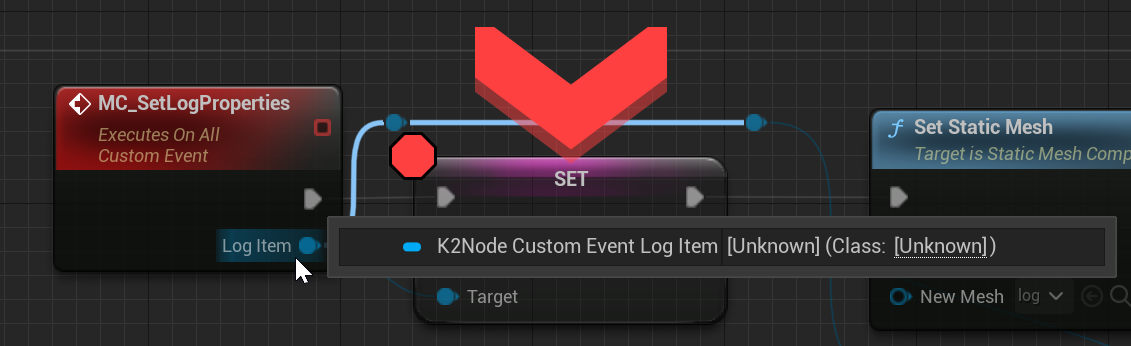
This event is called from the server
fiery eagle
HI I am having a bit of issue using UpdateSession in steam when i try to call update session in Post login of GameMode the hosted game stops showing in the find Server widget, I am using using trying to use Update session to update no of player count. Am I doing something wrong here.
twin juniper
TRying to setup a simple name system for when a player is in the lobby sets a username then when joins into the map the name is displayed, been trying to set this up but with no avail...any ideas?
molten matrix
Seamless travel supposedly persists the game mode. How does this work if I have a different game mode set up for the other map? Will there be two game modes? Will the new game mode not be created? Is there a way to switch it out for the new game mode?
vague ocean
how do you call a c++ server rpc in blueprint?
sinful tree
It would need to be set up as Blueprint callable in C++, then you would just call it like any other node iirc.
cinder orbit
Is it an issue that the character created for my host player (player 1) doesn't have a controller assigned? (e.g. the character for player 1's client). I can still move around as player 1 and such but in a 2 player multiplayer session, there's 4 player characters listed in debugger (2 client-side & 2 server-side) and only 3 player controllers (1 client-side & 2 server-side).
civic seal
Hey guys, need a little help tackling a problem. Some of my actors do not appear to replicate - everything about their replication is set up according to the way you're meant to do it - i.e. marking a property as replicated and introducing the LifetimeReplicatedProps line to get it added. Now, it seems to me that due to some condition some actors simply won't ever replicate, while other actors of the same class will do so smoothly, without a single problem.
I'm aware that it's a pretty broad description, but I'm kind of at a loss and I'd really appreciate a nudge in the right direction as to what it could possibly be.
prisma snow
civic seal
Hey guys, need a little help tackling a problem. Some of my actors do not appear...
just to ensure, are they marked as always relevant?
civic seal
prisma snow
just to ensure, are they marked as always relevant?
Yeah! Lemme post the line in case I'm doing it wrong
ASpellProjectileSystem()
    {
        ProjectileSystemNiagaraComponent = CreateDefaultSubobject<UNiagaraComponent>("Projectile System Niagara Component");
        ProjectileSystemNiagaraComponent->SetForceSolo(true);
        ProjectileSystemInstancedMesh = CreateDefaultSubobject<UInstancedStaticMeshComponent>("Projectile System Instanced Mesh");
        RootComponent->SetMobility(EComponentMobility::Static);
        ProjectileBody->SetCollisionEnabled(ECollisionEnabled::NoCollision);
        bAlwaysRelevant = true;
        NetUpdateFrequency = 48;
        MinNetUpdateFrequency = 24;
    }
Here I don't see Replicates = true; but I assume it is set in blueprints or whatever
civic seal
prisma snow
Here I don't see Replicates = true; but I assume it is set in blueprints or what...
in the parent
civic seal
👀
I was under the impression the constructors get appended not replaced
why the hell does it work
prisma snow
maybe I'm wrong
civic seal
the components get names set in the parent constructor so it would logically follow that they get appended
civic seal
prisma snow
maybe I'm wrong
no its okay, every little bit helps. I am just very confused and have no idea where to start looking for reasons for it breaking
prisma snow
yeah since the parent constructor has no parameters, it is automatically called
civic seal
It's systematic in the sense that some actors' properties do not get replicated
the RPCs however still get called
I am fairly certain my network is not crowded
prisma snow
do reliable RPCs get called?
civic seal
For that specific actor? I don't think I have any
prisma snow
civic seal
It's systematic in the sense that some actors' properties do not get replicated
some are, others are not?
civic seal
however other reliable RPCs do, with zero issues
prisma snow
are your actors instantiated by the server always?
do the replicated properties get set in the server?
civic seal
Yup! These are always spawned by the server
Yup
The client never touches the replicated properties, only reads
civic seal
Yup
prisma snow
or the same actors?
lost inlet
And what data type is the property?
civic seal
prisma snow
or the same actors?
These actors are dynamically spawned but it does not seem to depend on any particular class. Seems random. Sometimes it takes with zero issue, sometimes it just never replicates
civic seal
lost inlet
And what data type is the property?
just a second
Wow thank you
No, this is clearly not a replication bug, it's me being an idiot. Thanks so much for making me look. I completely forgot I wrote this system
The actors are not responsible for their info getting replicated
Just the one master property
Responsible for all the actors' projectile data
therefore if some get replicated and others do not, the issue is the way I compose them
thanks a whole bunch
no fr it would take me hours to look at the properties and see them commented out and replaced with the other thing
ily
tranquil swallow
dark edge
Input -> Run on server
Run On Server -> spawn REPLICATED projectile -> multicast...
Hey! Just wanted to say thank you for helping me out on this, it just got replication to click a lot better in my head!
 grave lynx
Hey, My gamemode is calling a client rpc function inside PlayerController for UI stuff with a array in parameter. But on this owning client function, the array is empty, but there are some data just before in the gamemode, any idea?
fossil spoke
grave lynx
Hey, My gamemode is calling a client rpc function inside PlayerController for UI...
Show the code.
grave lynx
Here is my array in the gamemode storing players infos TArray<FPlayerInfo> PlayersInfo;
On post login, we are asking to all PlayerController to update UI
for (const auto Player : ConnectedPlayers)
{
    Player->UpdateLobby(PlayersInfo);
}
UpdateLobby FUNCTION(Client, Unreliable) void UpdateLobby(const TArray<FPlayerInfo>& PlayerInfos) si inside the PlayerController. So I'm trying to print something from the struct, it's working on the server but not on the client
latent heart
Why is it unreliable?
fossil spoke
Show ALL the code, its not helpful to just cherry pick little bits.
grave lynx
it's ui stuff, does it need to be?
fossil spoke
Also PostLogin maybe to early to call an RPC as the Actor on the Client may not have been created yet.
Depending on network conditions
latent heart
Why not just put the array on the gamestate and use an onrep there?
That's where info shared between playerrs should probably be.
grave lynx
fossil spoke
Show ALL the code, its not helpful to just cherry pick little bits.
lot of stuff, hard to send everything 😭
grave lynx
latent heart
That's where info shared between playerrs should probably be.
ok let me try, so I call my UpdateLobby (client rpc) from the gamestate and send the array?
latent heart
You don't need an rpc. what is UpdateLobby meant to be doing?
grave lynx
well calling HUD functions to update widgets
fossil spoke
That information should be handled by the GameState TBH.
Probably even PlayerState since its just generally talking about the state of a Player.
latent heart
That info should be on the playerstate
grave lynx
ok I see
latent heart
Information about player -> playerstate. Information about game -> gamestate. Game Flow -> Gamemode. Player flow -> playercontroller.
grave lynx
true, so in my case, if a data has change, does the PlayerState has to the update widgets?
fossil spoke
Widgets should generally be reactionary, in that they change based on something changing elsewhere. Utilizing things like Delegates enables Widgets to bind to important events without specific classes having to push that info directly to the Widget.
latent heart
E.g. using onreps to trigger updates in widgets via delegates.
grave lynx
you right, I did it for Health stuff with onRep so yea, I see
So like all the clients have to know these struct, I could do this with the OnRep and a delegate
modern swift
anyone encounter missingpackage problem when use world partition as dedicated server for unreal 5.1 https://issues.unrealengine.com/issue/UE-163742 does this issue already fixed in 5.1?

Unreal Engine
Welcome to the Unreal Engine Issue and Bug Tracker. You can check the status of an issue and search for existing bugs. See latest bug fixes too.
 olive crow
is there a way to call a run on server event from non-owning client?
fossil spoke
RPCs need a net owning connection to be called.
This means it must pass through something like a PlayerController (Possessed Pawn and PlayerState are owned by the PC so are also included there).
latent heart
You can do server rpcs on the gamestate?
fossil spoke
latent heart
You can do server rpcs on the gamestate?
Yeah your right, not sure what I was thinking there.
latent heart
🙂
sterile plaza
Essentially player controller or anything owned by the player controller.
fiery eagle
Hi Guys Iam having a bit of issue here```cpp
void URaceGameInstance::CreateSession()
{
if (SessionInterface.IsValid())
{
LastSessionSettings = MakeShareable(new FOnlineSessionSettings());
if (IOnlineSubsystem::Get()->GetSubsystemName() == "NULL")
{
LastSessionSettings->bIsLANMatch = true;
}
else
{
LastSessionSettings->bIsLANMatch = false;//change true for NULL
}
    LastSessionSettings->NumPublicConnections = 4;
    LastSessionSettings->bAllowJoinInProgress = true;
    LastSessionSettings->bAllowJoinViaPresence = true;
    LastSessionSettings->bShouldAdvertise = true;
    LastSessionSettings->bUsesPresence = true;
    LastSessionSettings->bUseLobbiesIfAvailable = true;
    LastSessionSettings->BuildUniqueId = 1;
    LastSessionSettings->Set(SERVER_NAME_SETTING_KEY, DesiredServerName, EOnlineDataAdvertisementType::ViaOnlineServiceAndPing);
    const ULocalPlayer* LC = GetWorld()->GetFirstLocalPlayerFromController();
    if (LC)
    SessionInterface->CreateSession(*LC->GetPreferredUniqueNetId(), NAME_GameSession, *LastSessionSettings);
}
}
void URaceGameInstance::FindGameSessions()
{
SessionSearch = MakeShareable(new FOnlineSessionSearch);
if (SessionSearch.IsValid())
{
SessionSearch->bIsLanQuery = IOnlineSubsystem::Get()->GetSubsystemName() == "NULL" ? true : false;
SessionSearch->MaxSearchResults = 100;
SessionSearch->QuerySettings.Set(SEARCH_PRESENCE, true, EOnlineComparisonOp::Equals);
const ULocalPlayer* LC = GetWorld()->GetFirstLocalPlayerFromController();
if (LC)
SessionInterface->FindSessions(*LC->GetPreferredUniqueNetId(), SessionSearch.ToSharedRef());
UE_LOG(LogTemp, Warning, TEXT("[GI]Searching Session"));
}
}```
void URaceGameInstance::OnSeassionSearchFinished(bool bWasSuccessful)
{
    if (bWasSuccessful && SessionSearch.IsValid())
    {
        TArray<FServerData> ServerNames{};

        UE_LOG(LogTemp, Warning, TEXT("[GI]Searching Session Finished"));
        GEngine->AddOnScreenDebugMessage(-1, 3.0f, FColor::Green, TEXT("[GI]Searching Session Finished"));
        for (const FOnlineSessionSearchResult& SessionResult : SessionSearch->SearchResults)
        {
            FServerData SData{};
            SData.Name = *SessionResult.GetSessionIdStr();
            SData.MaxPlayer = SessionResult.Session.SessionSettings.NumPublicConnections;
            SData.CurrentPlayers = SData.MaxPlayer - SessionResult.Session.NumOpenPublicConnections;
            GEngine->AddOnScreenDebugMessage(-1, 3.0f, FColor::Green, FString::Printf(TEXT("NumOfPlayer: %d"),
SData.CurrentPlayers));

            SData.HostUserName = SessionResult.Session.OwningUserName;
            UE_LOG(LogTemp, Warning, TEXT("Found Session Names : %s"), *SessionResult.GetSessionIdStr());
            FString ServerName;
            if(SessionResult.Session.SessionSettings.Get(SERVER_NAME_SETTING_KEY, ServerName))
            {
                SData.Name = ServerName;
                //UE_LOG(LogTemp, Warning, TEXT("Data Found in SessionSetting: %s"), *TestData);
                GEngine->AddOnScreenDebugMessage(-1, 3.0f, FColor::Green, TEXT("Data Found in SessionSetting"));
            }
            else
            {
                SData.Name = "Could not Find ServerName";
                //UE_LOG(LogTemp, Warning, TEXT("Data Not Found in SessionSetting"));
            }
            ServerNames.Add(SData);
        }

        if (Menu != nullptr)
        {
            {
                Menu->SetServerList(ServerNames);
            }
        }
    }
}```SessionSearch->SearchResults is Shoing Empty when Run from steam but if run locally using powershell using these command -game -log -nosteam every thing works fine please help.
also iam using UpdateSession which is causing the list to be empty on steam removing it from the code make the Search results available on steam but my player count does not update then.
 ionic coral
steam sessions or advanced sessions causing client side to have bad rubberbanding
any fixes?
 agile loom
unique cloak
Is it ok to replicate a hit result? It’s from the server
agile loom
unique cloak
Is it ok to replicate a hit result? It’s from the server
Create another structure with the properties that you need to be replicated and replicate that structure
fiery eagle
fiery eagle
`SessionSearch->SearchResults `is Shoing Empty when Run from steam but if run lo...
#introductions Is there any solution for this.
 native axle
fiery eagle
<#187217643009212416> Is there any solution for this.
native axle
fiery eagle
<#187217643009212416> Is there any solution for this.
Had this problem recently, check this commit / file. Probably your FOnlineSearchSettings QuerySettings is not setup correctly. https://github.com/fpwong/FPLobby/commit/32bc1a62f1848ddbb8857fbbe9b42e6f5230921e
Oh I was looking at the wrong code, specifically seems you are missing Settings.Set(SEARCH_PRESENCE, true, EOnlineComparisonOp::Equals);
fiery eagle
@native axle Thanks for the link men did you check my code include above maybe i have done something wrong
native axle
in ur FindGameSessions
fiery eagle
@native axle SessionSearch->QuerySettings.Set(SEARCH_PRESENCE, true, EOnlineComparisonOp::Equals); this code is there in FindGameSession look
Will match my code to the link you provided.
native axle
Ah wrong line
try this one then Settings.Set(SEARCH_LOBBIES, true, EOnlineComparisonOp::Equals);
fiery eagle
@native axle Will add these lines test and update my men
twin juniper
why is my debug message showing on all clients?

i tried doing is locally controlled but still doesn't work
fiery eagle
I do know much of this but i think there is a node call switch on authority maybe try that
olive crow
fossil spoke
RPCs need a net owning connection to be called.
bypassed it by telling my own player inventory to send the event to the target inventory
glass vector
will begin play be called on the GM and player controllers on seamless travel to the destination map?
 viral phoenix
hey guys, im having problems with my gamepad inputs reading as keyboard and mouse inputs.
im using some off-brand playstation controller wanting to make a local multiplayer splitscreen game but UE keeps reading inputs from the gamepad (intended player 2) as keyboard and mouse inputs and making the character of player 1 do stuff. i have "skip assigning gamepad to Player 1" checked
This used to work for me but then one time when playing in the editor it just stopped working and ever since ive had this issue
unique cloak
agile loom
Create another structure with the properties that you need to be replicated and ...
Why?
 zenith wyvern
I want to store a log of messages, which can be generated by client or server, was hoping for tips on best practice
I guess I would have an event 'run on owning client' like 'add to log'
so both client and server store it client side only? it doesnt seem like replicating the log would work, or else the client has to rpc all its log msgs
agile loom
unique cloak
Why?
Does the client need all this information? if yes then replicate the hit result
 fiery eagle
@native axle Tried modification using as you recommended it doesn't seems to work also are you using UpdateSession anywhere because using it seems to break the find search results
unique cloak
agile loom
Does the client need all this information? if yes then replicate the hit result
I am using it to spawn particles
so only the hit actor
but isn't an overkill to make a struct for this?
agile loom
unique cloak
I am using it to spawn particles
Use unreliable multicast instead of replicating a variable
 quartz star
Hello im trying to replicate the float Variable "CurrentHealth" in an ActorComponent in cpp, but it gives me an error
Can someone help me?

 plush lotus
Hello, I need help 😦
just for test purpose i write that

what i expect is to have 1. split screen with 2 players.
Player 1 (0) posses vehicle 01
Player 2(1) posses vehicle 02
on the result i have split screen
i have my two character on the map
but the controller 1 control the vehicle 01
but the controller 2 doesn't do anything
also trying to do that with keybard and controller 1 only : si i remove that parametters but same result

keyboard and controller 1, control vehicle 01
and controller 2 doesn't do anything
i have the split screen and each split screen has a camera following the vehicle
but impossible to move vehicle 02
 rancid badger
next time please write it in one message
unique cloak
agile loom
Use unreliable multicast instead of replicating a variable
wdym? do you want me to sent this variable with a client unreliable RPC?
plush lotus
ha sorry
rancid badger
haha
plush lotus
lot of people told me that... hahaha 😄
rancid badger
😹
 steady cape
quartz star
Hello im trying to replicate the float Variable "CurrentHealth" in an ActorCompo...
steady cape
quartz star
Hello im trying to replicate the float Variable "CurrentHealth" in an ActorCompo...
UCoreHealthComponent::GetLifetimeReplicatedProps(...
DOREPLIFETIME(ACoreHealthComponent, ...
quartz star
steady cape
> `UCoreHealthComponent::GetLifetimeReplicatedProps(...`
> `DOREPLIFETIME(ACore...
but thats exactly what i did?
steady cape
UCoreHealthComponent::
...TIME(ACoreHealthComponent, ...
quartz star
steady cape
> `UCoreHealthComponent::`
> `...TIME(ACoreHealthComponent, ...`
this is what i did
void UCoreHealthComponent::GetLifetimeReplicatedProps(TArray<FLifetimeProperty>& OutLifetimeProps) const
{
    Super::GetLifetimeReplicatedProps(OutLifetimeProps);
    DOREPLIFETIME(ACoreHealthComponent, CurrentHealth);
}
You have a very obvious problem in the snippets I posted
I was trying to hint at it
plush lotus
plush lotus
Did I misunderstand something?
quartz star
steady cape
You have a very obvious problem in the snippets I posted
._.
thank u
i found it
steady cape
👌
agile loom
unique cloak
wdym? do you want me to sent this variable with a client unreliable RPC?
If the only thing that you need to do is spawn a particle effect, the server can call a multicast or client RPC
 unique cloak
yeah but I wat to call it from destroyed
destroy is called locally I think
also
Also because of lag I think it would be better to call it locally
agile loom
unique cloak
destroy is called locally I think
No, the destroy event executes on all connection
 unique cloak
oh so the function will be called on all machines
agile loom
unique cloak
oh so the function will be called on all machines
Yes
unique cloak
I mean the effects function
agile loom
This is the easiest way to implement the destroy effect
 fiery eagle
Hi Guys Iam having a bit of issue here```cpp
void URaceGameInstance::CreateSessi...
fiery eagle
fiery eagle
Hi Guys Iam having a bit of issue here```cpp
void URaceGameInstance::CreateSessi...
can anyone help me with this i cant seem to update the number of player in the OSS Steam version of the build this line of code does not seems to get updated in steam SData.CurrentPlayers = SData.MaxPlayer - SessionResult.Session.NumOpenPublicConnections;
unique cloak
agile loom
This is the easiest way to implement the destroy effect
yeah so I wanted the hit result to check for if I hit the head - head shot sound + particles
also why the client can't know about it? if it doesn't pass its own hit result to the server it should be ok right?
agile loom
unique cloak
also why the client can't know about it? if it doesn't pass its own hit result t...
Since the hit will happen sooner in the server and the server destroys the actor after that, you can use the Destroyed event and by a line trace find out what you hit and spawn the effect based on the result
agile loom
unique cloak
also why the client can't know about it? if it doesn't pass its own hit result t...
The server should handle everything, handle hit, apply damage, destroy
unique cloak
The server handles that and replicates it to the clients
I am talking about the hit result
agile loom
unique cloak
The server handles that and replicates it to the clients
Does the server destroy the actor after the collision?
unique cloak
agile loom
Does the server destroy the actor after the collision?
yes
agile loom
unique cloak
yes
Then any RPC may fail because the actor is destroyed


 agile loom
unique cloak
agile loom
unique cloak
Server should call Destroy();
agile loom
unique cloak
and it calls destroy
Something like this may help you
 agile loom
unique cloak
it is
agile loom
unique cloak
it is
MulticastDestroy executes on all connections
unique cloak
Why the server cant replicate the hit result though?
the clients cant modify it
I also replicate health I think, it doesn't mean that they can chat and change the health to 100000 hp lol
agile loom
unique cloak
the clients cant modify it
Use Destroyed() function
void AMyActor::Destroyed()
{
    if (GetWorld()->HasBegunPlay())    // <-Important
    {
        // Example
        FFXSystemSpawnParameters SpawnParams;
        SpawnParams.WorldContextObject = GetWorld();
        SpawnParams.SystemTemplate = DestroyParticle;
        SpawnParams.Location = GetActorLocation();
        UNiagaraFunctionLibrary::SpawnSystemAtLocationWithParams(SpawnParams);
    }

    Super::Destroyed();
}
It can, but RPC may fail because you destroyed the actor
agile loom
unique cloak
my only concern is cheating
If the server handles the hit and applies damage, then the client can not cheat
unique cloak
ok thank you so much!
 edgy helm
Hey, can anyone offer help regarding sound components not properly replicating to clients in multiplayer? Neither running it on server or multicast works.
plush lotus
no one can help me on my little issue?
plush lotus
the forum help me a little. If i create my character inside the beginPlay Event, It doesn't work! But if i put a delay on it.. it work... where am I supposed to create my characers if it's not on the begingPlay of the GameMode?
i have to use a isValid?
fiery eagle
SData.CurrentPlayers = SData.MaxPlayer - SessionResult.Session.NumOpenPublicConnections; bugged for sure if called using UpdateSession the current session disappears from the steam server, and this error persist in many forums as i searched so sad its still there only custom solution works.🥹
viral phoenix
viral phoenix
hey guys, im having problems with my gamepad inputs reading as keyboard and mous...
I still need help with this
calm prawn
Hi. I'm creating a multiplayer session but everytime when I create the session on server side, the client opens the map automatically. What could be the reason?
grave lynx
Hey, I'm trying to update a widget using a value from the GameState using a delegate (working fine on server). But the event is not fire on the client.
here is my function inside the GameState;
void AMyGameState::TickLobbyTimer()
{
  LobbyTime--;
  OnLobbyTimerUpdate.Broadcast(LobbyTime);
  if (LobbyTime <= 0)
  {
    // End
  }
}
OnLobbyTimerUpdate is bind on contruct on the widget:
void UWLobbyMenu::NativeConstruct()
{
  if (AMyGameState* GS = Cast<AMyGameState>        (GetWorld()->GetGameState()))
  {
    GS->OnLobbyTimerUpdate.AddDynamic(this,               &ThisClass::OnTimerUpdate);
  }
}
But nothing is printed inside OnTimerUpdate function, any idea?
fossil spoke
Have you verified by breakpoint that the binding to the delegate is happening?
The GameState maybe invalid?
grave lynx
fossil spoke
The GameState maybe invalid?
nah, gs valid 😦
grave lynx
fossil spoke
Have you verified by breakpoint that the binding to the delegate is happening?
prettry sure but one sec
fossil spoke
Is TickLobbyTimer being called on the Client?
grave lynx
fossil spoke
Is `TickLobbyTimer` being called on the Client?
I didn't specify any UFUNCTION so in the GS I think it's on the server?
fossil spoke
Huh?
Its a function, why would that mean its only being called by the Server?
Where is TickLobbyTimer being called?
grave lynx
fossil spoke
Where is `TickLobbyTimer` being called?
the gamemode is calling the function
fossil spoke
Ok so you know the GameMode only exists on the Server correct.
With that fact, how do you expect the delegate to be called on the Client?
grave lynx
Ok I see, I thought that as a delegate was fire on the GS, It could works for clients too
fossil spoke
Thats not how it works.
The GameMode should not be calling this function.
The GameMode defines the rules of the game. Not its state.
The GameState handles state
The GameMode could tell the GameState to move into a different state.
But it shouldnt be managing state things for it.
The better approach would be to have some sort of variable that says "Im in the Lobby State"
In the GameState
Which the GameMode could tell it to move to.
Then inside the GameStates Tick function, call TickLobbyTimer if its in the Lobby State.
The variable would be replicated, so that when its changed, the Client can the know its moved into the Lobby state and start ticking that function.
Which in turn would call the delegate.
For the Server and all Clients.
grave lynx
ok so the timer inside the GS is in the right place, just the way of calling it is wrong.
for me, the difference betwen states and rules is difficult. To choose between GS and GM
 visual glen
Anyone happen to know why I may be getting these errors in the Server and Client logs? I started the cook for Server and Client after the CameraComponent was addedand still getting this...
 sinful tree
grave lynx
for me, the difference betwen states and rules is difficult. To choose between G...
sinful tree
grave lynx
for me, the difference betwen states and rules is difficult. To choose between G...
I'd say Game Mode is usually more about Player Spawning rules than the full rules of a game.
If you think of game modes like "Deathmatch", "Capture the Flag" or "Team Deathmatch" in which case you would probably need a differing set of rules for spawning (ie. a diffferent Game Mode as "Deathmatch" players could likely spawn at any spawn point on the map, where Team Deathmatch you likely have designated areas for the teams) as well as a Game State to go along with those different game modes to keep track of differing elements like timers and scoring that could be shared with clients.
Change the game mode, you're also changing all the other options it provides, like what's the default Pawn Class, Playerstate, etc. So in that sense, it's also about changing those kinds of rules about the game. What you may want to put in the game mode for the examples I gave above if you're dealing with an end of round timer, is what happens when the timer in the game state reaches 0:00 - different game modes may want to move to a new map, while other game modes may keep the existing map, reshuffle the teams, and reset the scores in the game state. Then you could have multiple gamestates that have that same timer ending, but the selected game mode then decides what happens next rather than having the gamestate itself decide.
In the end, if it's something that needs to be shared with clients and there should technically only be a single value that exists for everyone, GameState is the place to put the value.
 subtle peak
Hey there. I am trying to replicate my grenade, but the "set linear velocity" is not being replicated. Do physics like this need to happen on multicast? Isnt there the possibility then of the grenade being in different locations on different clients?
 fossil spoke
subtle peak
Hey there. I am trying to replicate my grenade, but the "set linear velocity" is...
fossil spoke
subtle peak
Hey there. I am trying to replicate my grenade, but the "set linear velocity" is...
Why arent you just using a Projectile Movement Component?
subtle peak
fossil spoke
Why arent you just using a Projectile Movement Component?
Because it kept despawning after 3 seconds, and I couldn't figure out how to change it
Tried the "Set life span" node
mortal mica
question about the CMC, if I understand the code correctly, for simulated proxies the clients do a simplified simulated movement (basically use the last received position and velocity to calculate a new one), and moves the capsule (and hence the actor) there. And then when a network update is received it lerps towards the server's position, but this is only applied to the mesh component, not the root one.
What's the reason behind this? Couldn't the root component be lerped to the new server position + whatever local simulation is done in the next ticks?
edgy helm
Hey, can I get an explanation on replicating sound components, playing audio, and media sound to clients? Everything I tried so far doesn’t work (run on server, multicast).
loud frost
Can i get json data of firebase by Varest by using firebase web api call ??
 glossy kettle
loud frost
Can i get json data of firebase by Varest by using firebase web api call ??
glossy kettle
loud frost
Can i get json data of firebase by Varest by using firebase web api call ??
yea
idk what varest is but jus writ a HTTP req w the engine http thing
 silver remnant
Hello guys, I have a problem I am making a online game with 2 maps on it, problem here is that the 1st player goes in the door while other player did not, all of the sudden the new map pulls all players who are in the first map. How to fix this?
native axle
I have a component on my GameState and want to call Server RPC on it from a Client. But it won't let me because the client doesn't own the GameState? Do I need to make a Server RPC function elsewhere (like the PC) which just calls the component's function, or is there some way around this?
 oblique flicker
Hello! Can someone help me with some information? I'm trying to learn multiplayer and I'm stuck in (probably some noob things) the Lobby
 marble gazelle
silver remnant
Hello guys, I have a problem I am making a online game with 2 maps on it, proble...
marble gazelle
silver remnant
Hello guys, I have a problem I am making a online game with 2 maps on it, proble...
A single dedicated server instance (or listen server) can just run one map at a time. If you want two persistent maps, it requires to have two dedicated servers running and then the client needs to connect to the other server
silver remnant
marble gazelle
A single dedicated server instance (or listen server) can just run one map at a ...
Yes I already created 2 servers (for each map) problem is 2 players are on the same map, if the 1st players goes to a door that will go to the other map, it brings all the players to the 2nd map, instead of separate maps.
marble gazelle
silver remnant
Yes I already created 2 servers (for each map) problem is 2 players are on the s...
where is the function called, on the server or on the client. You need only the single client that should travel to call the function.
also you need to pass the IP, not the level
the server has to be started with the correct level already
silver remnant
marble gazelle
also you need to pass the IP, not the level
Noted
Sorry I forgot to screen shot that
@marble gazelle Here is the function that calls the server

 marble gazelle
silver remnant
<@132868383493324800> Here is the function that calls the server
marble gazelle
silver remnant
<@132868383493324800> Here is the function that calls the server
So is this called on the server or on the client. I'm confused.
silver remnant
Server and the cast to Character is the client
marble gazelle
silver remnant
Server and the cast to Character is the client
you don't need to call anything on the server to have the client travel, otherwise the server will change the map and this will have all clients load another map.
(You just need to call ClientTravel on the PlayerController)
silver remnant
marble gazelle
you don't need to call anything on the server to have the client travel, otherwi...
Ohhh so that's y all the client went to the new map
 forest bolt
Hello guys, I'm facing a really weird issue with sockets here. I have a dev in my team which can join any session, but when he hosts we fail to connect to his session (it shows up after FindSessions. His firewall is turned off.
(We're using P2P with PlayFab+Steam)
 true spade
Hi, I have a question for the Host migration, is it possible to create it for the P2P connections? I want to create it, so when host leaves the game just assign one of the clients as a new host, if possible with the existing player locations. Therefore, what is an idea (or steps) of (re)creating it?
Thanks in advance 🙂
 hushed heart
Hello! I have a bit of a general question, happy to read any docs or anything that point to more general advice on the subject as well as direct answers to my issue. I'm replicating some movement (not using the CMC here by the way, wish I could) as well as allowing the client to perform it too, so that I can prevent input lag. However, I think that's a naive way of doing it, as I'm experiencing that when there's proper latency, the two sides constantly fight the minor desyncs and so it just leads to barely playable jittery rubber banding.
What might be the best practise here? Whilst I know client side prediction can be a big old rabbit-hole of a subject, is this a completely wrong way to go about it? Is it maybe just a matter of reducing how often the server is replicating the movement, or something more complex? I essentially want to retain both the client-side movement being allowed to eliminate input delay whilst also retaining the server's authority, but not have any of this horrible jitter when there's some latency. I understand that eliminating any rubber banding at all when there's a huge amount of latency is impossible, but I think the amount I'm experiencing currently means there's obviously something wrong that I'm doing. Thank you!
surreal plaza
Is anyone familiar with how to best handle timers in multiplayer? My main timer is run from the server, but is there a best practice for how to handle timed events client side? Should it wait for server side RPCs when it fires or should I trust the local timer for local effects?
 clear island
whats the most reliable way to know as a client, when another client has joined the server?
is the BeginPlay of my PlayerState class a good place to check it?
marble gazelle
clear island
is the BeginPlay of my PlayerState class a good place to check it?
I'd say yes, you can also detect this in your GameState, it has a virtual function AddPlayerState and with that you could create your own callback.
clear island
marble gazelle
I'd say yes, you can also detect this in your GameState, it has a virtual functi...
oh thats great I was just going to ask if GameState was already valid when the begin play of my PlayerState class is called
latent heart
surreal plaza
Is anyone familiar with how to best handle timers in multiplayer? My main timer...
Depends ™️
hushed heart
hushed heart
Hello! I have a bit of a general question, happy to read any docs or anything th...
Following up on my own research which I've been doing all day more or less.
Okay so quite clearly my issue is that since it's the client's input that instigates the movement, when there's significant latency the server obviously receives everything late, meaning compared to the client it's living in the past. But because the server is the authority the client is jumped back in the past by however much latency there is, as it's being corrected based on outdated information. So, I suppose my next question to ask is: is a sensible way of mitigating this, doing one of the following?:
Rather than correcting the position on the client based on their current position, should I check first to see where the client was xxx ms ago (dependent on latency), then only correct if that's wildly out of place? Or should this check instead be done in reverse? As in, on receiving the replicated position, get the server's velocity and direction too, extrapolate forwards xxxms, and correct to that position instead?
The flaw with the first one is I see there might be the potential for problems with huge desync if they move very far, and it could lead to it getting worse. The flaw with the second solution to me is thati f the player changes direction or velocity suddenly, like, accelerating to reversing for example, there would be pretty extreme desync, so I'd maybe also have to account for changes there? Aaaa. Any pointers would be super helpful, thanks!
subtle peak
Hey what do you guys do with the character capsule after death?
If I disable collision on it, the unit falls through the ground
 surreal plaza
latent heart
Depends ™️
surreal plaza
latent heart
Depends ™️
I am building a metronome that will fire exactly every x seconds. I will fire important code from the server, so, like, "earn new resources," but for things like, "player sees a few coins drop onto their pile" cosmetic event, should I just do that as an on rep and be done with it or try and provide a more accurately timed event client side using a local timer. While cosmetic, I fully depend on players wanting to see that event as closely as the actual time as possible in my situation.
latent heart
You can predict that clientside np. They can play the animation, even update the gold count, but when they try to spend the gold, the server will have to say yes or no.
If you do it with an rpc, the rpc isn't guaranteed to arrive quickly or consistently.
surreal plaza
latent heart
You can predict that clientside np. They can play the animation, even update the...
Right. So in the case of a dependable effect, is a local version of the timer a way to go? I can see how I could just implement the same timer client and server side, but wasn't sure if Unreal had a more robust version of this already, like StartLocalTimer that would account for all of this play inbetween.
latent heart
Not that I know of.
But the game state does have a server time variable which you could leverage to make it start at the beginning of a second or something.
They should be as synced as possible.
If your tick is every 5s and it starts at 00:00:01.23 just make the first tick 3.77s. .
surreal plaza
latent heart
Not that I know of.
That all sounds great. Thanks for the help.
marble gazelle
subtle peak
Hey what do you guys do with the character capsule after death?
If I disable co...
you could disable collision and Movement/gravity (I don't really remember, but basically you just want to prevent that the character continues moving/falling)
latent heart
surreal plaza
That all sounds great. Thanks for the help.
Np
 jade patrol
hey, how do i replicate an actor to all but not the owner? for example i have a locally predicted ability that spawns bullets but i don't want for the bullets to be replicated back to client. I can hide it with owner no see, but is there a way to just skip the replication?
chrome bay
You mean a property not the entire actor presumably?
If so use COND_SkipOwner
Or you override IsNetRelevantFor and add your own settings
There isn't a built in way
jade patrol
ok, i see
 molten juniper
Hi all, is the only way to replicate control rotation to all clients by an unreliable netmulticast in the pawns tick?
chrome bay
No, a replicated property would be far better
Not sure why you'd need to though
Control Rotation is a controller-level concept, which itself isn't relevant to other clients
molten juniper
How else would you replicate a gun aiming up and down
molten juniper
ya
molten juniper
Yeah but let's say in this weird situation there isn't animations
 verbal tendon
I'd recommend to stop being weird 😄
Also you can just have something that aligns your gun ifyou have no anims
molten juniper
I wish I could but man I just collect my paycheck and dont ask questions
rose egret
@molten juniper typically you replicate aim direction in actor/pawn if needed, depends on game
rose egret
subtle peak
Hey what do you guys do with the character capsule after death?
If I disable co...
if u play death anim, keep collision with worldstatic/worlddynamic, if you want the character to not be on air when died.
if you use ragdoll (enabling the phy of MeshComp) no need for capsule collision, u can disable it and set the movement mode to None
 frank birch
how could I handle a player (ACharacter) "crashing" into another and "pushing it"? 🤔
maybe a serverside collision check and a launch? or addForce? 🤔 What replicates best on ACharacter? Launch or Addforce?
fiery eagle
Guys can anyone confirm this works or not SessionResult.Session.NumOpenPublicConnections iam tryingto find solution to this but iam unable to solve it this always return Num() =1, iam able to join create and find the session but this Line of code is only not working iam tryingto run this on steam.
 gloomy tiger
Any inputs you guys have 'bout dispatching FHitResult over the network when it comes to weight?
Trying to predict weapon firing/shooting and am slightly afraid of how overwhelming that could be
prisma snow
gloomy tiger
Any inputs you guys have 'bout dispatching `FHitResult` over the network when it...
weight?
prisma snow
gloomy tiger
Trying to predict weapon firing/shooting and am slightly afraid of how overwhelm...
I think it is a "common" functionality but as always, network and prediction are complex
I've only read about the topic, maybe somebody has more experience and can point out to resources
gloomy tiger
prisma snow
weight?
Yeah by weight I meant bandwidth packet size lol
Unfortunate terminology
prisma snow
gloomy tiger
Yeah by weight I meant bandwidth packet size lol
ahhh
Well I would not worry unless you're sending it very very frequently
At the same time, sending the whole struct seems a bit unnecessary
better pack it in your own struct with the data you need
prisma snow
Sounds reasonable
gloomy tiger
Ignore the "but" - got an idea while typing lol - anyways, thank you for your input @prisma snow! 🌟
prisma snow
gloomy tiger
Ignore the "but" - got an idea while typing lol - anyways, thank you for your in...
np
 rough kernel
i have a weird question, i have a struct array i want to replicate, this struct has a number of sub structs with additional data, i only plan to put data into 1 of these sub structs for each array member (the rest will stay at default values)
would making these sub structs each an array and leaving the array empty cut down on the amount of data that is replicated?
and where i want there to be data just add a single member and put my data there?
in theory it sounds like it would considering the fact those default values in the other sub structs would be concidered for replication, which is undesirable as they are unused in this case
visual glen
anyone know if the original action/axis input mapping doesn't work in multiplayer for 5.1? for some reason in editor my two players can move but not in a client connected to a dedicated server...
quasi tide
Input is entirely local. There is something else that is happening.
visual glen
That's kinda what I was thinking, but it's weird bc I can see the other client spawn in and disconnect, so I know it's not frozen
for more context I'm using
SetReplicates(true); SetReplicateMovement(true);
for the .cpp to replicate movement and
void MoveForward(float Val); void MoveRight(float Val); void LookUp(float Val); void Turn(float Val);
in the .h to control movement in the client
but it works in editor which is why I am currently sus
mortal mica
it should work
make sure you are setting the input mode to Game
on the connected player controller
prisma snow
rough kernel
i have a weird question, i have a struct array i want to replicate, this struct ...
iirc struct replication is atomic so I would only replicate the parts that change
maybe using a FFastArraySerializer
rough kernel
this is unfortunately just in blueprint and using RPCs to send single members of the array w/ array index
the struct having a byte to determine a type, and then a sub struct to hold the data for that types stuff
prisma snow
rough kernel
this is unfortunately just in blueprint and using RPCs to send single members of...
well, I'd use replicated properties for state replication.
Besides that, I'd try to minimize the data sent by knowing your game, what it needs, and designing the system accordingly
hushed heart
Hello! I'm back again! My previous questions have had me reading up about client side prediction all day, which had been a very good learning experience. Finally bothered to sit down and read through the entirety of the explanation doc regarding the CMC, which was neat and a headspin. I'll have to comb through the code, and will do so tomorrow, as I've figured I'm going to probably have to implement a simplified version of its saved moves buffer.
I have one simple question that'll really help get me on my way though: whereabouts on the client does the engine correct a replicated actor's position/rotation/velocity? I'd like to be able to override/disable it so I'm in control of corrections myself. All of this is on aid of ensuring movement on the client isn't being corrected by outdated data when there's latency.
Thank you!
surreal plaza
In the case of a multiplayer game where players have to hold a button to, say, charge a capacitor that might take 5 seconds. For those clients, are they sending a bunch of server requests every 10th of a second or something for that buildup? I ask because that seems excessive.
visual glen
mortal mica
on the connected player controller
tried that out by manually setting input to game only with C++ and still happening
mortal mica
visual glen
tried that out by manually setting input to game only with C++ and still happeni...
are you sure you are setting it after the client connects and possesses the pawn ?
visual glen
I'm setting it on BeginPlay
mortal mica
BeginPlay for whom?
visual glen
I am however connecting to the dedicated server by putting "127.0.0.1" where the command line arguments go, which seems to connect
BeginPlay on the PlayerController
visual glen
Will do, and now that I think about it, forgot to put the new PlayerController on the gamemodebase 🤦♂️
mortal mica
🙂
mortal mica
mortal mica
but try putting it after OnPossessed
actually unless you are doing weirder things elsewwhere beginplay should be enough
it could just be that you forgot to set the override 😛
visual glen
yea trying it now with the right PlayerController attached to the gamemodebase, takes a while cooking the client and server on this computer 
mortal mica
the reason I suggested OnPossessed is because you could have the player connect, and not spawn the default pawn, maybe instead spawn an spectator, and have some UI to do things
so I usually setup the input bindings after posession, and that's a good opportunity to also set the correct input mode
quasi tide
surreal plaza
In the case of a multiplayer game where players have to hold a button to, say, c...
That's not how I'd do it. Here's how'd I do it:
- Client activates it, sends the request to the server
- Server starts the clock on its own side
- Wait for the client to stop interacting for the server to know to cancel the timer
All you need to do is start the process on the clients - they can calculate it locally.
surreal plaza
quasi tide
That's not how I'd do it. Here's how'd I do it:
1) Client activates it, sends t...
Yes, that makes more sense. Thanks.
 dusky yoke
When I use ServerTravel, does it respawn the player, or do I have to set the player's position again? 🤔
Edit: Actually, when my server & client transitions, they're dropping through the world. Hmm.
plush lotus
hey
fossil spoke
dusky yoke
When I use ServerTravel, does it respawn the player, or do I have to set the pla...
You are transitioning to an entirely new level. Of course you would have to respawn them where you want them. How else would the game know what to do?
plush lotus
into the "Create Local Player" Do you know what they mean by : The ID of the physical controller that the should control the newly created player. A value of -1 specifies to use the next available ID
 fossil spoke
@plush lotus This is for co-op on consoles.
plush lotus
when i keep it -1, i'm not able to move my second gamepad. When i put 1, im able to put my second gamepad
fossil spoke
If you know that an input of 1 works, just continue to use that?
fossil spoke
There maybe nuances about using -1 that arent supported by all gamepads 🤷
Its not random though.
plush lotus
but if i don't understand why with -1 it doesn't work, when i believe it should work with -1.. it's not good 😄
even into the Tutorial video from Unreal Engine youtube page... they keep it to -1
so i would like to understand what is the "next available ID"
dusky yoke
fossil spoke
You are transitioning to an entirely new level. Of course you would have to resp...
Yeah, I've got respawn logic setup, I just had to debug where my player was located, and he seemed to be just dropping through the floor, so just gonna do some gravity-checks and it will probably be fine. Thanks!
fossil spoke
plush lotus
so i would like to understand what is the "next available ID"
If you have 2 controllers, the first would likely be ID:0 the "next" would then be ID:1
plush lotus
if it's the case, then my second controller should works with -1
the first one is really 0 ?
fossil spoke
plush lotus
the first one is really 0 ?
Likely yes.
plush lotus
lol
i have make a test... with print screen:
With 1 the 2 controller ID are : 0 and 1
With -1 the 2 controller ID are : 0 and -1
i have lost a full day because i keep the -1 😄
fossil spoke
It is probably a bug then.
Setting the ID directly is not a sin.
Especially if its because -1 is causing the wrong behaviour.
plush lotus
yes but i didn't expect the -1 was the issue... because by default it was that, and everyone was using that...

that's amazing 😄
visual glen
Whenever I introduce new components or new references to my project I've been getting these errors saying it can't find the native class
Anyone happen to know what can cause this? I am making sure to cook the build before opening it
 thin stratus
Missing Native Class? Almost sounds like you have C++ code that you didn't compile and BPs that rely on it
visual glen
That's what it'd sound like but the code compiles, it did this when also simply adding a CameraComponent to the character class
thin stratus
Do you properly close the editor when recompiling?
Or rather before recompiling
Also are you working alone or could someone have pushed BPs without the matching C++ code?
visual glen
I've been using VS 2022 to open/close the editor
Starting to wonder if compiling is the same as building 
thin stratus
It is
But the editor should be closed
Otherwise you hot reload
Which can cause all kinds of issues
visual glen
yep I compile it when it's closed
thin stratus
Does this crash the editor or packaged builds only?
visual glen
I've been using cooked builds for development client/server, only seems to crash the client
thin stratus
So it doesn't crash if you do the same in the editor with server/client?
visual glen
nope seems to work fine in editor
thin stratus
Did you try connecting to the client process before it crashes?
So you can debug it a bit more in vs?
Also does it crash in a specific place in your game or when does it happen?
visual glen
it crashes when trying to access the new playercontroller parent class I created
on BeginPlay
I can try attaching the client to VS to debug more, been using a console command to launch clients to get the log
thin stratus
Create PlayerController on BeginPlay?
visual glen
the playercontroller is doing SetInputMode(FInputModeGameOnly()); on BeginPlay
thin stratus
Ah you don't create the PC manually right?
visual glen
currently letting the GameModeBase take care of that
thin stratus
I would try connecting it to vs and seeing if you can find out a bit more
thin stratus
visual glen
currently letting the GameModeBase take care of that
Yeah that's fine. Sounded like you were spawning it on your own for a second
visual glen
will do, hopefully can figure this out once and for all 
lol. it works perfectly fine when I run it in the debugger
definitely looks like a step in the right direction
mortal mica
does anyone know what the "new move" "pending/dual move" and "old important move" are in the context of the CMC replication?
thin stratus
I think that stuff is outdated by now or not? They just send the container struct by now
A Move is a SavedMove. So the Information to perform this frames move. The client performs the move, saves all required info to perform it again and also sends the data to the server so it can also move
Not sure anymore what the dual and old important moves are about
But probably just optimization
@mortal mica
visual glen
I just had a breakthrough learning experience
I didn't realize that I had to compile the server AND client every time
mortal mica
thin stratus
But probably just optimization
yeah I think its an optimization as well, i think dual/pending is for root motion + player movement
but it's not very clear
lost inlet
It looks like there are still plans to port the CMC to NPP from a UDN post 3 weeks ago. NPP might not be completely dead afterall
mortal mica
lost inlet
It looks like there are still plans to port the CMC to NPP from a UDN post 3 wee...
what's NPP?
lost inlet
Network prediction plugin
The idea is to have general purpose network prediction rather than the CMC and GAS inventing their own
mortal mica
dang
I'm writing my own movement component
and kept repeating that code
and thinking, man this sure sounds like something that could be rearchitecture to be reusable
xD
is it a bad idea to try and implement a more complex movement than the Character into a movement component? As in more complex I mean a non-capsule shaped vehicle (actual convex shape) with collisions/bumping/bouncing off impacts
 woeful anvil
Does Iris work in 5.1/5.2?
warped steppe
woeful anvil
Does Iris work in 5.1/5.2?
does 5.2 include the ini settings it needs? if not you might need them off of main
 boreal apex
mortal mica
is it a bad idea to try and implement a more complex movement than the Character...
boreal apex
mortal mica
is it a bad idea to try and implement a more complex movement than the Character...
you could still use the stuff in the unreal vehicle movement component, i find it has many good features to start from, or at least prototype off of for a good start. you can turn off the default collision (or use it for something on the vehicle if you can) and then you can add additional custom collision with a specific tag or filter on the vehicle. You could also look into chaos destruction systems if your planning on doing any soft body vehicle physics, a buddy and i were going to do a vehicle game with chaos but havn't got around to it yet. Either chaos or some sort of mesh deformation system for the vehicle mesh would offer some amazing impacts in a vehicle game
 flint hollow
I want to start moving my project to be networked. I don't know anything about how to. I want to take the approach where i make the simplest method work and then learn from implementing and studying that.
So my question is, what's the most beginner friendly guide to get fast results?
I'm thinking tutorial that takes me from empty project to working example, holding hand style.
hushed heart
Honestly, the multiplayer quick start guide in unreal's own docs is a pretty good, quick guide if you read and understand some of the prereqs it lists!
https://docs.unrealengine.com/5.1/en-US/multiplayer-programming-quick-start-for-unreal-engine/

Create a simple multiplayer game in C++.
There's also the networking compendium which is a bit old and for ue4 but is still pretty handy for wrapping your head around the fundamentals of networking
https://cedric-neukirchen.net/Downloads/Compendium/UE4_Network_Compendium_by_Cedric_eXi_Neukirchen.pdf
hushed heart
flint hollow
I want to start moving my project to be networked. I don't know anything about h...
Hope the above are useful!
prisma snow
flint hollow
I want to start moving my project to be networked. I don't know anything about h...
I'd check the Network Compendium, it is very readable, extremely well explained, and very through
flint hollow
prisma snow
I'd check the Network Compendium, it is very readable, extremely well explained,...
i have it open but i wanted something more less ready and more doey
but i was just reminded about the docs for it, i think there was a straight forward example in there
@hushed heart ty
hushed heart
Reading it will go hand-in-hand with the quick start project I linked!
flint hollow
alright
hushed heart
It'll take you from the default third person template to networked rudimentary gunplay
flint hollow
hushed heart
It'll take you from the default third person template to networked rudimentary g...
this in the compendium or the docs + compendium?
hushed heart
The "docs" I linked are the guide!
The compendium is just good pre-reading to get a good primer before you jump in and do
The quick start is a fairly simple process because a lot of the more complicated stuff is handled under the hood so it's good to have a general idea of what the code is doing
flint hollow
right right
well thanks, i trust this is the thing i wanted.
a bit ready but also very doey
hushed heart
You're welcome! It's good do-ey and easy to expand.
plush lotus
Hi do you have some issue with the Enhance Input system for Local Multiplayer?
flint hollow
@hushed heart i wasnt prepared to start learning C++ today
i guess i have to be now
hushed heart
flint hollow
<@71232465078857728> i wasnt prepared to start learning C++ today
Oh yeah, networking simple stuff is possible but I really wouldn't recommend it
flint hollow
in bp you mean?
hushed heart
Yeah, exclusively in BP