1 messages · Page 70 of 1
 outer sphinx
 rose pollen
so I am using the advanced sessions plugin with steam and it is working well. I'd like to use AWS for my backend and am using the AWSGameKit plug in to set things up, but by default they only support either creating accounts with email/password or using facebook as an identity provider. Does anyone know of a good tutorial on using steam instead so that steam users don't need to create an account to play?
 zenith wyvern
im trying to make the third person template multiplayer, but when i create a pawn and possess it on any client other than the first, the camera is 99% blak

you can kind of see in the black, but its mostly just black. its just spawning the default pawn and possessing
input works, i can move the pawn from the black client, but cant see it
 cedar finch
@chrome bay So are there any specific things I need to set in the moving platform's details settings or in blueprint in order to make it work? I'm assuming "can player stand on" should be true. Then when it comes to moving the platform I'd guess the server would have to control the movement. Would having a CMC on the moving platform break anything? I ask because in some scenarios such as a moving vehicle, you may want to be able to drive it, but still allow players to stand on it.
I'm just trying to make sure theres no little setting or checkbox to get the "base" setup correctly for clients to smoothly stand on them and then I'll focus on the replicated movement. But I feel there will always be a fight between server and client on where the moving platform is due to server Authoritative movement. Unless you have any ideas on that.
 prisma pelican
unable to select focus on one of the editor windows, even alt tabbing doesnt work, the editor window nevers show up front
checked that the player is spawned in as well as the controller, alt tabbing can see the editor window of the client but cant bring it forward or select it, every other editor windows works normally
anyone else experienced this?
 twin juniper
How does unreal's networking listen server relay information to the peers? Is it just relaying inputs from one peer to all the others, since they're all running the same logic they should expect similar results? Or is it sending entire frames of data?
 sweet ore
can anyone tell me why sprite only jittering so hard while player is not? how can i fix this
sweet ore

 thin stratus
Put them as children of the mesh
Everything visual in Multiplayer should be a child of the mesh
Cause the mesh is interpolated
The capsule is teleported
 chrome bay
cedar finch
<@150632829909336066> So are there any specific things I need to set in the movi...
chrome bay
cedar finch
<@150632829909336066> So are there any specific things I need to set in the movi...
Ultimately it's impossible to sync the platform - because the CMC is simulating ahead of the server, while everything else in the world is simulating behind. So long as the thing you are standing on is network addressable, it shouldn't be too much of a problem - aside from the fact that you will get a correction whenever you leave the platform. AFAIK it's unavoidable though - the CMC and the platform are operating in different frames of reference.
If the platform is part of the world at startup, you shouldn't have many issues while standing on it - but you will initially get a correction since when you land on it, the server + client will have the platform in different positions. You could try simulating the platform ahead of time locally to avoid it, but then the platform will just constantly snap backwards instead.
After that initial correction things should be relatively ok
cedar finch
I was just curious because so many games new and old have moving platforms of some kind. Whether it be an actual platform like in a mario style game, or giant vehicles like the scarab in Halo where you can get on it and walk around, or even sea of thieves pirate ships. It's a cool feature but I couldn't find much about it anywhere accept a few posts complaining about clients jittering while moving/standing on the platform.
I read a response online that said, "Make the char a child of the platform while standing on it, unparent when they hit jump and copy velocity from the platform to the char at that instant. Did this in a similar situation and it worked well over the network with 150ms simulated lag."
But I wasn't exactly sure if that was possible in blueprints alone, or what it really meant lol
I wasn't sure if it meant the inheritance type of parent/child relationship, or something else
chrome bay
I assume they mean attach it, but I don't see how that would work
cedar finch
No clue. I thought the CMC runs a tick looking for the floor or "base" and the "jitter" issue with clients is probably the network issue of movement you described above
But hey, Sea of Thieves does it somehow. So they're either faking it, or figured if out somehow lol
I'm going to keep playing with it. If you figure anything out let me know. It's funny how what seems like a simple feature like moving platforms can be such a hassle.
I wonder of client Authoritative movement would work? You might see your friends jittering or floating lol but it might fix the individual users experiences. Idk
 azure hollow
Hey guys I've created a simple multiplayer system to just play on the same network and it works fine. All clients can join and move.
The issue is, the player who creates the session cannot move once he spawns BUT it is possessed and has a valid player controller. Any suggestion on this? Only the host cannot move 😦
 quasi tide
Check input mode @azure hollow
azure hollow
quasi tide
Check input mode <@356068692863352833>
first thing I did...it's not that the issue
azure hollow
on the player controller

on the game mode

I am travelling from one level to another and in the previous level I am using another player controller but I don't believe it's the issue...because clients work fine
 pearl bear
Hi all, what is the best way to replicate anim montage. I tried to use Multicast but client doesnt see anything
 short arrow
pearl bear
Hi all, what is the best way to replicate anim montage. I tried to use Multicast...
short arrow
pearl bear
Hi all, what is the best way to replicate anim montage. I tried to use Multicast...
Multicast bud
You Probably didn't do it right
pearl bear
short arrow
Multicast bud
For example, when my character uses a spell, I want her movement speed to increase. Is multicast relevant for this?
probably not because of if another player join after multicast execution that player cant see this update
In this case, it makes the most sense to update this variable on the server and mark it as replicated.
I wonder if my way of thinking is correct?
short arrow
That's not really what you asked in your first question. Replicating montages definitely is done through multicasts most of the time, any status effects should then be done through the server
You are correct in the way you're thinking though
But, I'm pretty sure multicasting a montage is the only way that isn't Mediocre.
pearl bear
short arrow
But, I'm pretty sure multicasting a montage is the only way that isn't Mediocre.
so purely cosmetic things should go into Multicast
short arrow
Depends on what you mean by cosmetic,. Anything that is temporary should be multicasted
Someone throwing a punch would be a multicast because only people around need to ever know about it
And after it's done being thrown it's irrelevent.
Something like opening a door that never closes would need to be rep notified and not multicasted, so people who come into relevancy in the future can receive the update that the door is open
Hope that makes sense
If it's persistent then rep notify, otherwise multicast.
 left wagon
Has anybody here developed multiplayer servers using agones in AWS and could land a hand? I'm very confused as to how to set it up correctly.
I managed to run agones in kubernetes using their examples but don't know how to set up a configuration for autoscaling when the player count hits the maximum allowed per match.
zenith wyvern
only the first player has working lighting. other cameras are black. what am i doing wrong?

 vague fractal
You are not dynamically spawning the light, right ?
pearl bear
short arrow
Depends on what you mean by cosmetic,. Anything that is temporary should be mult...
btw is it possible to run multicast rpc from uobject
vague fractal
pearl bear
btw is it possible to run multicast rpc from uobject
It is, but you need some setup for that, take a look at this pinned message <#multiplayer message>
pearl bear
vague fractal
It is, but you need some setup for that, take a look at this pinned message <htt...
is it logical
vague fractal
Wdym by that ?
pearl bear
vague fractal
Wdym by that ?
I have a design in my head to rpc from the uobject, but I'm not sure how logical it is.
Could there be any negative effects or limitations?
vague fractal
I mean, i did it and there's this site to teach you how to do it, so there are use/cases :D
Whenever it's good to do it is not possible to say for me, not experienced enough to judge that
pearl bear
😄 thanks
 dire lagoon
I have this same issue, does anyone know how to solve it? https://forums.unrealengine.com/t/steam-subsystem-with-advanced-session-never-travels-on-join/612723

So I am using the Advanced Steam Sessions plugin UE Version 4.27 Creating a session works just fine, also finding the session also works just fine However when I try to use the “Join Session” node, even if it fires On Success, the player never travels to the map which the host is in, any clues as to why this could be? here are some logs and ...
zenith wyvern
vague fractal
You are not dynamically spawning the light, right ?
no, its the third person template, trying to add multiplayer to it
vague fractal
dire lagoon
I have this same issue, does anyone know how to solve it? https://forums.unreale...
Any chance that you are using the steam sockets ? (https://docs.unrealengine.com/5.1/en-US/using-steam-sockets-in-unreal-engine/)
vague fractal
zenith wyvern
no, its the third person template, trying to add multiplayer to it
Hmm, then i'm not sure. Was just my first guess due to multiplayer
dire lagoon
vague fractal
Any chance that you are using the steam sockets ? (<https://docs.unrealengine.co...
no I'm not using the steam sockets
vague fractal
dire lagoon
no I'm not using the steam sockets
Ah ok, i did used them and i also got a join problem, thought it might be the same here
dire lagoon
Did the join session of advanced friends game instance work well for you?
twin juniper
 hollow eagle
<https://docs.unrealengine.com/5.1/en-US/networking-overview-for-unreal-engine/>
hollow eagle
<https://docs.unrealengine.com/5.1/en-US/networking-overview-for-unreal-engine/>
So all clients including listen server runs the same logic but when weapon is fired by a peer it tells the host, host then tells all the clients spawn a projectile from player1. Since they’re all running the same logic the projectile follows the same path on all the clients. So the listen server isn’t sending full frames of information just any critical information you that the server should handle
vague fractal
I actually don't even use the plugin as i'm doing it in C++, so i didn't had the need to expose it to BP 😅
twin juniper
But I’m guessing UE uses client side prediction and interpolation to keep data synched?
quasi tide
No. You have to implement that yourself if you're not using CMC or GAS
hollow eagle
twin juniper
So all clients including listen server runs the same logic but when weapon is fi...
First, get rid of the "peer" terminology. It implies P2P which unreal does not support out of the box. Unreal's networking is client-server - you have no peers, you only have the server and clients, where clients cannot talk to each other directly (and thus aren't "peers").
You're also thinking a bit too high level - unreal's networking is entirely focused around the replication of objects (which only the server can do), variables on those objects (also known as replication, again something only the server can do), and RPCs (calling functions on remote machines, which can be done only between clients and the server or vice versa). Anything beyond that - prediction, interpolation, etc is functionality you are implementing on top of the networking framework.
The built-in character movement component has built in support for prediction, but it implements that for itself. You have to implement it for anything else that hasn't already done so.
 torpid girder
hello, i am trying to understand why my OnRep_Characters doesn't trigger when i set the var
    UPROPERTY(BlueprintReadOnly, ReplicatedUsing = OnRep_Characters, Category = "Avalon|Data")
    TArray<FAvalonCharacterData> CharacterData;
---

  DOREPLIFETIME(UAvalonCharacterSelectComponent, CharacterData);
i 've set the var with
CharacterData = Data;
but i never hit the breakpoint on OnRep_Characters
quasi tide
In C++, you have to call the OnRep yourself for the server
 tender gale
torpid girder
hello, i am trying to understand why my OnRep_Characters doesn't trigger when i ...
tender gale
torpid girder
hello, i am trying to understand why my OnRep_Characters doesn't trigger when i ...
What Duroxxigar said, the OnRep doesn't execxute on the server/listen-server because it isn't being replicated
twin juniper
hollow eagle
First, get rid of the "peer" terminology. It implies P2P which unreal does not s...
Thank you for that explanation I guess my question is if the server tells a player spawn a bullet from this origin with this velocity is it then telling the clients every frame the position of that bullet or do the clients just follow their own logic in firing it?
hollow eagle
depends on how you implement it
it wouldn't be every frame, to start - network ticks don't happen every frame for every actor
But you'd want some degree of client prediction on projectiles or else they'd look choppy, with resolution for when the server does send the occasional position update.
I don't remember if the built in projectile movement component does any of this for you.
 graceful flame
If you don’t see the bullet does it even need to be a projectile in the first place? Could a simple line trace do the job instead?
 steady cape
graceful flame
If you don’t see the bullet does it even need to be a projectile in the first pl...
steady cape
graceful flame
If you don’t see the bullet does it even need to be a projectile in the first pl...
Sure
twin juniper
hollow eagle
But you'd want some degree of client prediction on projectiles or else they'd lo...
How often do you think server should send position updates? Like once every 10 frames or so?
hollow eagle
it depends ™️
and you wouldn't generally implement that yourself, it happens as part of replication.
twin juniper
I see ok
 dark edge
graceful flame
If you don’t see the bullet does it even need to be a projectile in the first pl...
dark edge
graceful flame
If you don’t see the bullet does it even need to be a projectile in the first pl...
Sometimes you want projectile motion even if you can't see it
Battlefield/Arma/PUBG
You shouldn't be using the stock projectile movement component though, it's not great. Whatever you end up with would be something doing line traces on tick
steady cape
I mean, if you're not going with realistic bullet travel, you don't need to
 ebon hinge

my relative location and rotation arent being replicated to other clients in this code. it works locally but everyone else just sees me put my hand to my head where the components default position is
 torpid girder
I was expecting to see it trigger on the client, server starts a player controller, it makes a call to load in the account details, sets the var and that should replicate down
I am playing as a listen client
But I am sure I did this before
 obtuse temple
I'm working on a metabolism system on a dedicated server. Which would be more performant? 1. Setting individual 5 second timers on characters that handle the metabolism logic on the character or 2. Make a component in the gamemode that "ticks" each actors metabolism every 5 seconds. I imagine having lots of players with individual serverside timers can lead to performance problems.
 winged badger
It wouldnt
Central object ticking all metabolism object is slightly more efficient
You will have extra cost if each metabolism is a standalone replicated object that will dwarf any timer/ticking cost though
Evaluating objects for replication is not cheap, timers are
obtuse temple
Thanks. Its just a few OnRep floats in an ActorComponent on the player, I only need to send them to the client for UI updates
winged badger
If you want efficiency, GS component with FastArray doing replication for all metsbolisms would be a way to go
winged badger
GameState
obtuse temple
Ah derp 😄
winged badger
You make a metabolism struct thst also has a weak pointer to component it has data for
And use that as fastarrayitem
obtuse temple
Cool thanks, I'll see what I can cook up
ebon hinge
ebon hinge
my relative location and rotation arent being replicated to other clients in thi...
any ideas?
winged badger
ebon hinge
any ideas?
Yeah, you never told the server what the position is. Use Unteliable RPC when you do
ebon hinge
winged badger
Yeah, you never told the server what the position is. Use Unteliable RPC when yo...
no it doesnt work. ive tried it. the clients dont receive the update
winged badger
There is no Server RPC i can see there
ebon hinge
winged badger
There is no Server RPC i can see there
thats a function
its called set aim socket
 dark edge
ebon hinge
its called set aim socket
dark edge
ebon hinge
its called set aim socket
Show the rest of this
I'm guessing other clients don't know which socket is aim socket
ebon hinge
ebon hinge
@dark edge right here
dark edge
ebon hinge
its called set aim socket
show when clients would run Set Aim Socket
dark edge
So when is another client supposed to Set Aim Socket?
You should use an onrep
on bIsAiming
OnRep_bIsAiming -> do the aim stuff (whatever set aim socket is doing)
then jsut set that boolean to replicated with skip owner (if you want some half-assed prediction)
ebon hinge
dark edge
OnRep_bIsAiming -> do the aim stuff (whatever set aim socket is doing)
sadly that isnt working either
its interesting though, if i have isAiming true by default, then the gun spawns in the same spot for me locally
dark edge
Then in OnRep_IsAiming, use IsAiming to select the position or whatever


the IsAiming onrep should do everything that is implied when aiming
whatever that is, moving IK stuff, anything like that
ebon hinge
dark edge
Then in OnRep_IsAiming, use IsAiming to select the position or whatever
yeah it doesnt work

 dark edge
you don't use IsAiming anywhere in your SetAimSocket logic unless you've changed it since you last screencapped it
you need to use the bool in your Set Aim Socket function to choose between aiming and non aiming positions or whatever
ebon hinge
dark edge
you don't use IsAiming anywhere in your SetAimSocket logic unless you've changed...


i use it to interpolate the ADS animation
it works
switching between positions isnt the problem
its the replication
specifically the relative location and rotation
i think thats where its hanging
i got it!!
 noble sentinel
Why my game sends players into different instances of same level when I use servertravel?
We are in same level but we cant see hear on interact with each other
dark edge
ebon hinge
i got it!!
what was it
ebon hinge
dark edge
what was it
i set the socket in my animbp on spawn but it wasnt recognizing it. looks like it automatically replicates in there. i just had to set a delay of 0.1s so i could load in before it sets the socket
then i just do the function again on right click
kinda weird but ill take it

mission accomplished
its a bit jittery for the other clients but i dont care at this point
not really noticeable
damn i fixed the jitter too
torpid girder
this is strange, i can see that the authority is updating a var, but the OnRepl function is still not being triggered
if (WasSuccessful && GetOwner()->HasAuthority())
    {
        CharacterData = CharactersPackage.data;

        if (CharacterData.Num() != 0)
        {
            ChosenCharacter(0);
        }
    }
CharacterData has been configured with
DOREPLIFETIME_CONDITION(UAvalonCharacterSelectComponent, CharacterData, COND_None);
that should as far as i understand replicated any time CharacterData is set?
it didn't even trigger if i start a separate server
noble sentinel
I really need help about this, I cant solve it for a month. When a player enter level change zone, players will server travel but they cant see or hear each other, and when a player finishes that bugged level, only he will travel to next level. Whats the problem?
 jade patrol
noble sentinel
I really need help about this, I cant solve it for a month. When a player enter ...
jade patrol
noble sentinel
I really need help about this, I cant solve it for a month. When a player enter ...
sounds like all players executes the server travel command, only the server should run it. here is a tutorial with more info about server travel and how to fix seamless travel issues https://www.youtube.com/watch?v=25oY0k081dk
torpid girder
helps is i set replication to true 🙂
pearl bear
TArray<USpell*> SpellSlots;```Anybody who tried to replicate TArray of uobjects?
TArray has null values when I tried to use them in multicast
 grim rain
hello can someone help me make this work on multiplayer? the server spawns it and it attaches but the client doesnt see anything or get their own falshlight

 snow hatch
anyone know if with a auto save system thats a plugin do you need to add each function you want to be saved or does it just pull that from what the players state is?
 prime pawn
Still learning replication, how do i correctly get player controller in multiplayer, I know this is incorrect. this applys to host, & not to the correct client
 pearl bear
Can I replicate UDataAsset?
 shadow arch
Anybody have any ideas as to why when i play as a client my AI doesn't wake up but when i play as a listen server + client my AI reacts to client correctly?
 fathom aspen
pearl bear
Can I replicate UDataAsset?
fathom aspen
pearl bear
Can I replicate UDataAsset?
A pointer to it
fathom aspen
prime pawn
How does DumbellHoldable relate to the PC? answer that question and you got your answer
 dim trail
should I be using the WithValidation tag more liberally?
im just returning true on most of them
fathom aspen
Depends if you really need to validate the data
noble sentinel
jade patrol
sounds like all players executes the server travel command, only the server shou...
Im trying to make level change when a player enter the level change zone, but how can I make it triggerable correctly by a client?
as clients cant trigger server travel
 prisma snow
noble sentinel
Im trying to make level change when a player enter the level change zone, but ho...
prisma snow
noble sentinel
Im trying to make level change when a player enter the level change zone, but ho...
your player pawn should be replicated and therefore, the server is the one that know when it enters the zone
noble sentinel
prisma snow
your player pawn should be replicated and therefore, the server is the one that ...
There is a lot of things to replicate, which ones you mean?
 prisma snow
noble sentinel
There is a lot of things to replicate, which ones you mean?
prisma snow
noble sentinel
There is a lot of things to replicate, which ones you mean?
it is already replicated (replicates, replicate movement)
prisma snow
noble sentinel
these was not ticked
depends, this is not soemthing I'm familiar with. If the component that triggers the overlap is the capsule, I guess it needs to be replicated
And character movement too
Idk about mesh
zenith wyvern
It turns out all my additional clients get black cameras because UE runs all of them 'under the same process'. If i uncheck that, they work fine (but everything is slower). With that in mind, is there an obvious reason my lighting doesnt work in multiplayer when 'run under same process'?
prisma snow
We have no issue with cameras in PIE, same process - however we had issues with render targets
jade patrol
noble sentinel
these was not ticked
are you familiar with RPC ? you can create an event that runs only on server, for example if you have a sphere you can check collisions on server only and on server you execute the command to travel, smth like this
 noble sentinel
jade patrol
are you familiar with RPC ? you can create an event that runs only on server, fo...
noble sentinel
jade patrol
are you familiar with RPC ? you can create an event that runs only on server, fo...
That would help me to enable level change with only server, thanks! But I also have a problem, even I trigger it with a server player, players are going into same map but they cant see hear or collide each other, how this is possible?
jade patrol
noble sentinel
That would help me to enable level change with only server, thanks! But I also h...
like i said only the server player needs to execute servertravel command, the clients will follow. not sure why players dont see each other ... do you use seamless travel option?
noble sentinel
jade patrol
like i said only the server player needs to execute servertravel command, the cl...
yeah, I think seamless travel is enabled if no additional steps required. But I dont understand how its possible to send people into same level but different instances

They are literally in seperate worlds, and one can use server travel again without affecting other after that point
noble sentinel
jade patrol
are you familiar with RPC ? you can create an event that runs only on server, fo...
well, I made same exact of it but

How I am 3/2, I have one listen server and one client
jade patrol
😄 you have 3 characters in the collision somehow
noble sentinel
jade patrol
😄 you have 3 characters in the collision somehow
can it be my point light :d
it wasnt
...
Fixed it
But I think I need to change execute command to server travel node
jade patrol
for seamless is a bit more complicated, i'm checking now how to do it, did it long time ago ...
noble sentinel
jade patrol
for seamless is a bit more complicated, i'm checking now how to do it, did it lo...
yeah, I used server travel node when its true but still nothing happens
jade patrol
noble sentinel
yeah, I used server travel node when its true but still nothing happens
ok so i've checked, you have to have a transition map in the project settings maps & modes advanced section
and seamless works in standalone mode, not in pie
like this 😄

so after this, if the player is still not visible, do you have some extra setup for the pawn ? or do you use player state to keep the player model customization or something like that?
noble sentinel
jade patrol
like this 😄
I cant try this as in standalone one players always going back to main menu as its steam connected, I think I will try it with packaging a beta build to steam, thanks for help, that player counter saved me.
 pseudo tusk
Anyone know how time dilation effects multiplayer? From what I'm reading it makes anything clock based act wonky and usually would effect all players?
noble sentinel
jade patrol
are you familiar with RPC ? you can create an event that runs only on server, fo...
This worked, it finally working as it should be, thank you very much
zenith wyvern
From a player controller, is the only way to change a variable an RPC? On click I want to set a variable on the server, which replicates
prisma snow
zenith wyvern
From a player controller, is the only way to change a variable an RPC? On click ...
yeah server RPC
it is a common flow (and recommended): Client RPC requesting to set some value, and server recieves the updated value, validates if needed, and sets+replicates it
 latent heart
You can optionally predict a positive response from the server. You will have to rpc out a negative response from the server to tell the client it didn't happen as well, though, if it fails.
That prediction wouldn't do anything destructive or whatnot. Maybe start playing an animation or whatever, but not kill anybody, use items, etx.
 stoic lake
is it possible to multicast from the gamemode?
prisma snow
stoic lake
is it possible to multicast from the gamemode?
nope, GameMode is not replicated
stoic lake
okay thanks
 cinder orbit
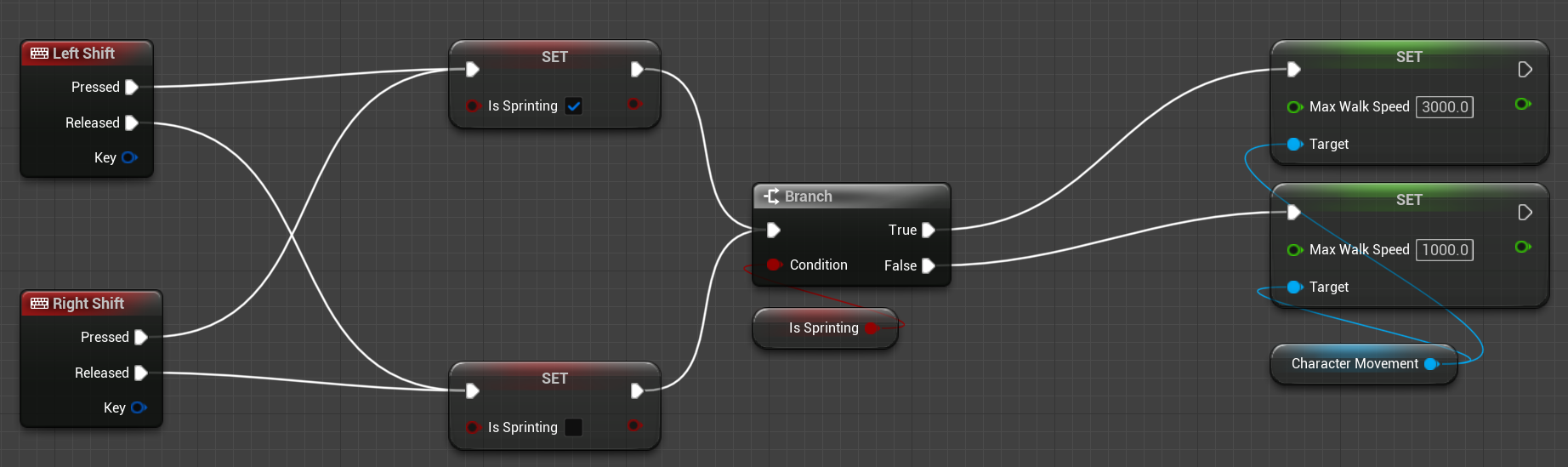
My sprint logic works on multiplayer for the host but not for player 2. isSprinting is a variable in the third person character BP, which is also where this logic is located.
What should I change?
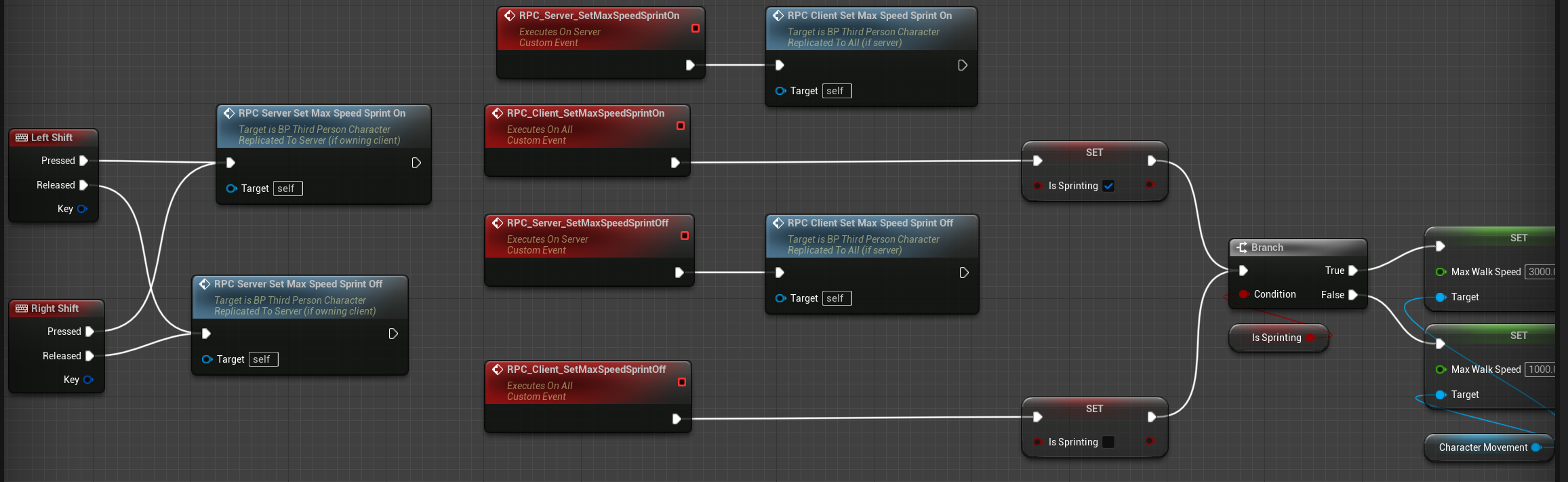
cinder orbit
Looks like this setup works, but im not sure if multicast means that now whenver 1 person sprints everyone will be sprinting.., but at least player 2 can sprint now:
 low helm
Multicast is definitely wrong
Just have the client change his run speed right away, and send a message to the server only to do the same
cinder orbit
Ah gotcha, ty!
 keen kraken
Hello! not sure if this is the right place to ask but it's related (would ask in rendering branch i guess) The question is there a built-in way to interpolate actors transformations between replication frames. so for example i sync actor every ~0.1 seconds (or it varies depending on lag etc) and i want to have smooth visual transition clientside for this actor. does unreal engine has such capabilities included or do i need to implement my own code for render thread which will do the interpolation between previous and current transforms every render frame? the goal is to have relative smooth transitions independent from client actor transform updates. (this is how it's done in all proper games) because i played paragon and creep units did move without interpolation (you see how they jump from position to position) and this made me wondering if it's a "hard" task to accomplish. Sorry couldn't find anything in google right away.
prisma snow
keen kraken
Hello! not sure if this is the right place to ask but it's related (would ask in...
The character movement component should handle this, with prediction/extrapolation as well. Not sure if this is what you need since it is a very complex movement system mainly for FPS games
keen kraken
hmmm so i guess i would need to implement it on my own, thanks!
prisma snow
keen kraken
hmmm so i guess i would need to implement it on my own, thanks!
why?
I mean, what are you planning to build?
keen kraken
because char movement is more coplex makes "a lot" of tests (traces) etc
so if i want a more performant way to smooth actors i would for sure use something specially designed for that
it would be a mistake to you char controller for units if the quantity of those units is above 100 or similar
you need some lightweight alternatives
prisma snow
Not sure if the floating pawn movement controller would handle it
keen kraken
but my question was a general one
prisma snow
keen kraken
it would be a mistake to you char controller for units if the quantity of those ...
Yeah it falls appart for those quantities
keen kraken
if unreal engine does have interpolation for synced entities
prisma snow
From what I know there is no built-in alternative, but coding the stuff manually is not difficult
keen kraken
as it seems "it doesn't"
prisma snow
I did it once for a test
keen kraken
yes
prisma snow
Writing the movement itself will be way harder than the interpolation
keen kraken
yes i know
prisma snow
The worse parts are if you want prediction and extrapolation
keen kraken
for simpler entities you only need interpolation
extrapolation can be usefull for time critical targets
to hide latency etc
prisma snow
yeah
I only wrote interpolation that time, with some buffering for the updates from the server
Also, grouping the updates using a network manager was much more efficient than doing individual RPCs
jade patrol
i used in the past smooth sync plugin that handled the interpolations pretty well and optimized
keen kraken
in the case you have C++ access (like we do) it's better to implement it directly on the objects. thank you for the answers!
rose pollen
can anyone recommend a good tutorial on authenticating through cognito with steam so that steam users don't have to make an account to play (but non steam users can still play via email/password)? It seems like this must be a very common need but google isn't showing me much on how to do it
dark edge
@cinder orbitSprinting like that will NOT work well in multiplayer with lag, but it'll sort of work
it'll be janky
 vivid egret
Suppose you have 3 players connected via LAN listen server. Each one has a ready check button widget on their viewport. You store their "ready state" in the GameState with a boolean array. ie PlayerID1 is stored in index 1 with their associated T/F ready state. How do you set this up to replicate so each player can see when the others are ready? I cannot figure this out for the life of me, Ive tried everything I can find on google and discord and nothing seems to work.
tender gale
vivid egret
Suppose you have 3 players connected via LAN listen server. Each one has a ready...
All you should have to do is set the book array to replicate and that’s it
Then the clients can check the value from the game state
And make sure you’re setting the game state’s ready value from the server (with a server RPC), so it’s most just being set on the single client’s game state
dark edge
vivid egret
Suppose you have 3 players connected via LAN listen server. Each one has a ready...
You store their ready state in their playerstate
The STATE of the PLAYER is that they are ready
tender gale
That’s a better structural change and would go with what Adriel said
Though storing and accessing them from the game state shouldn’t have any issues, so I would personally figure out why that’s not working for learning purposes and then move them to the player state
But it’s up to you
prime pawn
how do i cast to character player in multiplayer
All i cant find is Dont cast to character player
cause its getting an index of 0
but cant find on what to do instead
 agile loom
prime pawn
but cant find on what to do instead
agile loom
prime pawn
but cant find on what to do instead
You can get the controlled pawn (player character) from the controller (player controller)
 boreal apex
Curious if anyone knows how to easily receive a clients location in the world and print it to the hosts UI without the need of a complex array or map system, For context i am building a simple progress bar that shows the players % from start to finish in a racing game. I tried just getting any character in the world not equal to my owned pawn and if true i print out the last location. It works from the client to host, but not from the host to client, im thinking that maybe im using the wrong place to communicate this information for something like this. but Im curious if anyone has done anything like this or knows what im doing wrong. Im using strictly blueprints btw. (happy to share snips of code or vids if needed)
 silent valley
boreal apex
Curious if anyone knows how to easily receive a clients location in the world an...
silent valley
boreal apex
Curious if anyone knows how to easily receive a clients location in the world an...
Store the information in PlayerState. This is available for all players.
The host knows the position of all players (clients and self). On the host, compute the percentage complete, assign to the playerstate for each player. This information will be replicated to all clients so they can see the % for themselves and all other players.
boreal apex
silent valley
Store the information in PlayerState. This is available for all players.
ahhhh no way! I literally tried that exact thing but in the game state and not the player state, and it works perfectly now! THANK YOU
silent valley
boreal apex
ahhhh no way! I literally tried that exact thing but in the game state and not t...
Nice! Seems like you were v close 👍
boreal apex
Yes, I could feel it lol, thank you very much
 peak swallow
Hey people ! Do you know how to connect two gamepad controller to two different players in local ?
So far I've made this ...

But when i connect two gamepad, both the player 1 and the keyboard control the first player ( even when the option inside the settings menu is tick ) and when adding a second controller, it controls the first player as well but the first controller doesn't control anything anymore
On an old forum this guy said that two player controllers had to be created, but how and when ?
 peak swallow
Actually, I think that the unreal engine doesn't want to recognize a second gamepad because even in the project settings, when trying to add an input, only one of the two gamepads is recognized
thin stratus
There should be no need for the third PlayerController
Creating a second player with the node you screenshot should be enough
peak swallow
I tried but it doesn't, I just have another splited screen but none of the two newly created player reacts to any input
 willow cargo
Are actors spawned from Gamemode also replicated to clients? (the actor has 'replicates' turn on)
willow cargo
This doesn't seem to be working for me with dedicated server
in my gamemode I have

My TestObject actor is just the default actor with Replicates enabled.
Looking at the world Outliner of my connected client does not show any TestObjects
fathom aspen
Set it to AlwaysSpawn just in case, and there is nothing more to that
 fiery eagle
void UMPActorComponent::FinishReloading()
{
    if (MyCharacter == nullptr) return;
    bLocallyReloading = false;
    if (MyCharacter->HasAuthority())
    {
        if (GEngine)GEngine->AddOnScreenDebugMessage(-1, 1, FColor::White, FString::Printf(TEXT("FinishReloading")));
        CombatState = ECombatState::ECS_Unoccupied;
        UpdateAmmoValues();
    }
    else
    {
        if (MyCharacter->IsLocallyControlled())
        {
            ServerFinishReload();
        }
    }
    if (bIsFirePressed)
    {
        Fire();
    }
}```Hi I need #introductions on this
is it a proper way to Implement Finish reloading. CombatState Is set to Replication using RelicatedUsing=SetCombatState but for SomeReason iam not Getting ECombatState::ECS_Unoccupied Set everytime it skip some of the time so i added a RPC to call FinishReloading to make it work is this the correct way. As after adding RPC ECombatState::ECS_Unoccupied is setting Reliably.
vivid egret
dark edge
The STATE of the PLAYER is that they are ready
Maybe I don’t understand player state then. Does each player have their own player state, or does the player state represent all players? From what I can tell every player has their own, so I can’t request values from a specific player, or atleast I don’t know how to approach that.
tender gale
vivid egret
Maybe I don’t understand player state then. Does each player have their own play...

Every player has their own playerstate
The GameState has a list of every PlayerState you can access
vivid egret
tender gale
The GameState has a list of every PlayerState you can access
Hmm okay that makes sense. But how do you know which player state is bound to which character? Suppose you had 100 players how would you ever parse them; thankfully I only have 3
thin stratus
Pawn and Controller have pointers to PlayerStates
Pawn only if possessed
In C++ (maybe even BP by now), PlayerState also has a pointer back to the Pawn
The Owner (GetOwner()) of a PlayerState is the Controller
Obviously GetOwner only returns a valid pointer if you call that on the Server or the LocalClient
Cause PlayerControllers don't exist for remote clients
All of this comes with the little problem of PING, which is why C++ is a lot nicer here.
Most if not all of those variables have OnRep functions in C++ to ensure they are valid if you need to do anything on them
Controller <- PlayerController and Pawn <- Character, so that goes for those two too
tender gale
These are the two main resources I'd recommend reading/watching to fully explain networking and replication

An overview of the essential concepts for writing multiplayer game code in Unreal, in under 25
minutes or your money back.
Sample project: https://github.com/awforsythe/Repsi/
Patreon: https://patreon.com/alexforsythe
Twitter: https://twitter.com/alexforsythe
00:00 - Introduction
01:24 - Net Mode
03:33 - Replication System Basics
05:13 - Acto...
fiery eagle
fiery eagle
```cpp
void UMPActorComponent::FinishReloading()
{
if (MyCharacter == nullpt...
Need help Understanding why is OnRep_CombatState() is Not Setting CombatState To unoccupied Reliably on the client Side if using simulated lag.
vivid egret
thin stratus
Controller <- PlayerController and Pawn <- Character, so that goes for those two...
Thanks this is helpful!
vivid egret
tender gale
And make sure you’re setting the game state’s ready value from the server (with ...
So here is the code, I tried using a RunOnServer RPC to tell them gamestate to update if a player is ready at the index of that players ID. In the second image, you can see ID 1 (presumably the host) dosnt know when ID 2 (presumably a client) is ready.


I probably need to just sit down with the documentation on this for a few days until it clicks. But for now, what do you recommend so that all computers know everyones state?
The weird thing is, a few weeks ago I was casting to the GameMode for this and it worked fine. but then one day it just crapped out even though i hadnt changed any code
tender gale
You’re doing the server RPC in a widget blueprint, but widgets are only on the client
vivid egret
Im missing something, I read on forums you have to use RunOnServer from client actors or they wont work
tender gale
cinder orbit
My sprint logic works on multiplayer for the host but not for player 2. `isSprin...
Something I did want to add. This setup will not work if there is any latency issues, the client will have a ton of rubber banding. It only works when testing it locally
which you can test yourself with the "Enable Network Emulation" option in the Editor Settings

this video also shows it off around 11:30
 thorn trout
I can't find a solid answer on if steam offers dedicated servers for multiplayer and if it does I can't find a cost
Can anyone clarify this for me?
quasi tide
Steam probably could
cinder orbit
tender gale
Something I did want to add. This setup will *not* work if there is any latency ...
Got it, ty!
 marble fox

Why is it just showing on the client that does it?
Isn’t this getting called on the server ?
prisma snow
marble fox
Why is it just showing on the client that does it?
Matbe the client has authority over APlayerCharacter
marble fox
prisma snow
Matbe the client has authority over APlayerCharacter
I’m doing the exact same thing when I pick the weapon up but it gets destroyed on all clients so
prisma snow
marble fox
I’m doing the exact same thing when I pick the weapon up but it gets destroyed o...
I'd use the debugger to see what is going on
also maybe check Net Mode for extra debugging information
fathom aspen
I've just dropped this, so thought you might be interested:

Good practices to adopt, and bad habits to avoid when doing online multiplayer in Unreal Engine
 twilit radish
fathom aspen
https://wizardcell.com/unreal/multiplayer-tips-and-tricks/
twilit radish
fathom aspen
https://wizardcell.com/unreal/multiplayer-tips-and-tricks/
9/10 delay nodes are scared of this one simple trick.

Awesome work though, looks nice. Still scrolling through it though ❤️
fathom aspen
Thanks Thom, glad you like it!
tender gale
fathom aspen
https://wizardcell.com/unreal/multiplayer-tips-and-tricks/
Great writeup! I have a couple questions,
Is there a reason you didn't include the GameMode class in the data sheet going over all the gameplay framework actors in point 1?
fathom aspen
Good point! Reason is I only put there Actors that are replicated as it's mentioned above the data table ^^
GameMode isn't replicated, so replication settings are irrelevant 🙂
tender gale
Ah that makes sense! I missed the replicated part
Then with 2. Beware of GetPlayerXXX(0) Static FunctionsPermalink,
or that you’re doing local multiplayer (split-screen) only, then you’re good to go
I'm still new to networking so I could be completely incorrect, but isn't this the opposite where it's fine in MP (for the most part) and not good in splitscreen? From what I've tested it's okay to get the player controller with index 0 in a MP scenario because as long as they are only one local player it will get the correct controller.
It's only when you're doing splitscreen that there are multiple local players meaning it'll only get the first controller when the logic would usually want to get all of the splitscreen players
will end up returning different results based on the context, usually being:
Listen-server: The listen-server’s PlayerController.
Dedicated-server: The first client’s PlayerController.
Client: The client’s PlayerController.
Basically going off what I said above, it sounds like it would get the correct player controller you want outside of the Dedicated server, but otherwise you would want calling GetController from a Listen-server to get the listen server's controller, and the client to get the client's controller.
thin stratus
@fathom aspen Did you actually see that GetGameLoginOptions stuff I pinged you on?
tender gale
I still avoid the static functions regardless in situations where I'm setting up logic in an object that is replicated just for better clarity and the other points you made, but getting the player controller in a UMG widget (only on the client) should be completely fine in a MP project
It's just when you do splitscreen it doesn't work since there are multiple local players in a client
marble fox
prisma snow
I'd use the debugger to see what is going on
yup well, i got no idea
Why this aint working
its so weird, Before when i used Unreal i just did it on server and it like always worked, The weird part is im doing the EXACT same thing when i pick an item up but its working there
Wait i dont even think the server is getting called, let me print inside them and see
nope its getting called
fathom aspen
tender gale
Then with `2. Beware of GetPlayerXXX(0) Static FunctionsPermalink`,
> or that y...
I see where the confusion stems from. With GetPlayerXXX(0) static functions I meant the function itself and not the fact that the index is 0 (it used to say GetPlayerXXX(PlayerIndex) before, but I changed it). Those functions were initially made with local MP in mind. So you assign the PlayerIndex to the entity you're trageting. You can use them just fine in online MP, but as I mentioned there, they might fail you in a couple of scenarios. You might have not faced them yourself, but it's just a matter of time ^^
fathom aspen
thin stratus
<@393501253184913418> Did you actually see that GetGameLoginOptions stuff I pin...
I did: #multiplayer message
I will update it real soon, good find, thanks heaps!
marble fox
Wizard cell you think you could help me out?
tender gale
Yeah I wouldn’t use them in any ability or core classes that are being replicated, but it should be perfectly safe in non-networked objects like UMG widgets
marble fox
 thin stratus
fathom aspen
I did: https://discord.com/channels/187217643009212416/221799385611239424/108567...
thin stratus
fathom aspen
I did: https://discord.com/channels/187217643009212416/221799385611239424/108567...
Ah I missed that. Thanks for quoting the reply. Glad it helps
marble fox
This is only working for the client, the weapon switching. Even tho im calling it through a server event
fathom aspen
tender gale
Yeah I wouldn’t use them in any ability or core classes that are being replicate...
Yeah for the most part they are
But keep in mind that there are always other ways around them!
marble fox
Bro what
Why isnt my CurrentWeapon changing even tho im doing CurrentWeapon = NextWeapon
Ive found the problem but yea
marble fox

Can anyone tell me why CurrentWeapon isnt changing?
But if i do CurrentWeapon = WeaponArray[1] everything works perfectly.
marble fox
Aint no way i just spent 3 hours on 1 line that was wrong 💀
 spark pelican
I have an issue with replicating a value change on a UObject within an array. I have an array of UObjects that I believe are replicated correctly (SupportedForNetworking(), GetLifetimeReplicatedProps(), and ReplicateSubobjects()). Now, I don't know if this is normal behavior, but if I change a value within the UObject and also change something within the array, like adding or moving an element, it all replicates including the value on the UObject.
boreal apex
Hey, im wondering if anyone can help me solve this issue, my progress bars on the top are working fine but seem to have an issue on the client side once the host is a distance away from the client, then re-appears when i get close to the host again. it only seems to happen once they cross my finish line, which is just a bp with a collision trigger that fires an event dispatcher to my game mode saving the time to the player state. The progress bars are set by grabbing getting all actors of my character class, grabbing the actor that is not equal to my owning client, and printing the location stored in a vector on the player state. this is only a 2 player game so im wondering if theres an better way to do it in that case.
boreal apex
boreal apex
Hey, im wondering if anyone can help me solve this issue, my progress bars on th...
So I actually did solve this, turns out this type of character needs an always relevant check, which is fine in a 2 player setting where this data always has to be known by the clients. But is odd since im still just grabbing the location set in that player state, not the character. If there is a better way than checking on always relevant to fix something like this, please let me know!
short arrow
fathom aspen
https://wizardcell.com/unreal/multiplayer-tips-and-tricks/
First off this is amazing, Although I'm curious about number 2. Do you really call Get controller ->Cast to player controller every single time you want a reference to your controller, instead of just calling get player controller? Especially in dedicated server games where get player controller will always return only the clients controller?
I understand this is a best practice article, but do you really do that every single time? Or is it different in c++?
tender gale
That is also what I brought up. As long as there aren't multiple local players in one client from splitscreen (Which the article says the opposite?) it should be fine to use
If your project needs splitscreen that won't work, but otherwise I don't see what issues would come up
I could be completely wrong though. I just can't think of any scenarios where it wouldn't function properly
 sinful tree
boreal apex
So I actually did solve this, turns out this type of character needs an always r...
sinful tree
boreal apex
So I actually did solve this, turns out this type of character needs an always r...
Your code here fails as "Get All Actors of Class" would not retrieve the other player once they are out of relevancy, so even if the value is stored in the playerstate, the get all actors of class wouldn't contain the player. To do this differently, you'd need to get all the playerstates and then read their values.
 boreal apex
sinful tree
Your code here fails as "Get All Actors of Class" would not retrieve the other p...
boreal apex
sinful tree
Your code here fails as "Get All Actors of Class" would not retrieve the other p...
okay! il give that a try, thank you
 peak sentinel
fathom aspen
https://wizardcell.com/unreal/multiplayer-tips-and-tricks/
peak sentinel
fathom aspen
https://wizardcell.com/unreal/multiplayer-tips-and-tricks/
why this is not pinged yet 
fathom aspen
short arrow
First off this is amazing, Although I'm curious about number 2. Do you really ca...
Of course. It will return the target client's PC but only when called client-side. But what about it being called on the server? It will return the first client's one and not the targeted one (the targeted could be index 3 and you have no idea of knowing that)
fathom aspen
short arrow
I understand this is a best practice article, but do you really do that every si...
Yes. It's not any different in cpp. Casting is not bad
 hollow swallow
Has anyone got a good guide to create a party system?
short arrow
fathom aspen
Of course. It will return the target client's PC but only when called client-sid...
I meant more of you making a game that is dedicated server based, for anything that doesn't get called by the server, it's just so efficient and quick to use get player controller. So you must be very disciplined to still do it the "correct" way
fathom aspen
tender gale
That is also what I brought up. As long as there aren't multiple local players i...
It's not. Imagine it says GetPlayerXXX(PlayerIndex) and not GetPlayerXXX(0) if that what worries you 😉
These functions were literally made for local multiplayer and that's where they should stay.
Them having two landmines in online multiplayer along with that beginners will not be able to know when it's the right time to use them (there is no right time :P) it's much better to say "just avoid them".
I've been enough in this server to understand why they are bad
Peeps don't realize when they are called on the server and they start to panic when they don't get the target Actor they were hoping for 😄
short arrow
hollow swallow
Has anyone got a good guide to create a party system?
The way I did it, which worked perfectly was recommended to me by eXi. spawn an actor into the world each time a party is created that contains all the relevant information.
After that you just need to put the lgoic somewhere to request to start a party, invite, join, and leave, etc. For that I just made a party actor component inside of the player controller
short arrow
fathom aspen
Peeps don't realize when they are called on the server and they start to panic w...
ah rookie mistake 😄
hollow swallow
Cheers mate atleast that gives me a starting place
short arrow
hollow swallow
Cheers mate atleast that gives me a starting place
if you have any specific requests feel free to ask, but I couldn't find any party system worth using
fathom aspen
short arrow
I meant more of you making a game that is dedicated server based, for anything t...
If you know what you're doing then you're good. The related landmine is in a listen-server environment, but dedicated servers could be having something similar... idk
Also what if you happen to want to support listen-servers at one point
It's a good practice to plan for that early and just support it (it's not much of hassle)
short arrow
yeah that part is very true haha, we did plan to make the game work as listen server (to help test) and singleplayer.... Took a lot of fixing crap
fathom aspen
peak sentinel
why this is not pinged yet <:Angery:639247145614049289>
I blame @thin stratus for not 📌ing it 😛
thin stratus
Nani
fathom aspen
🤣
peak sentinel
mission successful
fathom aspen
vague fractal
I used to have this code here
bool UInventoryComponent::ReplicateSubobjects(UActorChannel *Channel, FOutBunch *Bunch, FReplicationFlags *RepFlags)
{
    bool bWroteSomething = Super::ReplicateSubobjects(Channel, Bunch, RepFlags);

    bWroteSomething |= Channel->ReplicateSubobjectList(InventoryItems, *Bunch, *RepFlags);

    return bWroteSomething;
}
But now with 5.1 ReplicateSubobjectList(...); seems to get deleted rather than just becoming deprecated in some upcoming version.
It tells me i should use AddReplicatedSubObject instead, but i'm not quite sure how i have to use this new one.
ReplicateSubobjectList was able to take a whole array, but AddReplicatedSubObject seems to only take a single UObject* now.
Something like this was the first thing which came to my mind, but now i wouldn't check if any wrote happened, so i think that's just wrong
bool UInventoryComponent::ReplicateSubobjects(UActorChannel *Channel, FOutBunch *Bunch, FReplicationFlags *RepFlags)
{
    bool bWroteSomething = Super::ReplicateSubobjects(Channel, Bunch, RepFlags);

    //bWroteSomething |= Channel->ReplicateSubobjectList(InventoryItems, *Bunch, *RepFlags);

    for(auto& InventoryItem : InventoryItems)
    {
        AddReplicatedSubObject(InventoryItem);
    }


    return bWroteSomething;
}
You don't do it during ReplicateSubobjects - you just add it to the list when you create the item, and it'll handle it
The documentation also states that you need to build the list client-side, which is a) stupid and b) in my experience, unnecessary unless you want to use network replays.
vague fractal
Any chance that you could lead me to the documentation ?
vague fractal
Thanks
Oh well, thought it will only be a matter of like 2 lines of code to adapt here, but nope xD
chrome bay
It does make it a bit easier tbh, but the tedious part is rebuilding the list client-side if you need it.
Fortunately, I don't 😄
I don't see anyway to achieve that in practice without also replicating a duplicate array of those objects most of the time.
Or using callbacks or w/e. It doesn't say whether the order is important or not
vague fractal
luckly i'm also not in the need for replays (at least if i understand the replays in UE correctly e.g. like in COD a kill cam?)
chrome bay
The demo replays are the things that paragon had (not sure if Fortnite did), where you can download the network data of a game session and "watch" it back
Not sure if it's used for anything else, maybe killcam, not sure
chrome bay
Yeah, just check the notes on it at the bottom. They seem to suggest it's required but I've not had that problem yet for my case
It's dumb really, I see no reason why the system couldn't manage to do that itself.
vague fractal
I've just learned last week that the documentations sometimes straight up lie, so i can accept this as another lie 🙃
chrome bay
Oh yes of course 😄
 edgy helm
Hey, is this the place to ask for help?
 fresh saddle
I’ve got a “Camera Manger” component that spawns and attaches a few cameras on a pawn in its own construction script
However, since updating to 5.1, the cameras themselves no longer maintain their attachment to the pawn. They simply spawn and maintain their world position 😦
Did something change in the new version?
twin juniper
Hi, is there any clean design to wait for widgets to be ready before doing any action on Pawn Spawn, I'm encountering a weird situation when giving my weapons on server where sometimes the weapons are given but the QuickBar/Inventory widgets not yet initialised and so don't listen yet to the delegates.
EDIT: i'm sorry I forgot to give any precisions but i'm giving my weapons in "Possessed" event in my Pawn.
winged badger
when you instantiate a widget first check if data is already there, if not bind to a delegate broadcast when it becomes available
twin juniper
winged badger
when you instantiate a widget first check if data is already there, if not bind ...
Right, that seems already better than Lyra solution which is just ticking the quickbar
I'll test that, thx !
winged badger
ticking also works, its simpler
quasi tide
fathom aspen
https://wizardcell.com/unreal/multiplayer-tips-and-tricks/
Wow - didn't know you were going to skimp out on us 🙄

(Jk <3)
twin juniper
winged badger
ticking also works, its simpler
Yeah but the QuickBar is always on the player screen, it's never deactivated, so I don't know if it's a good solution to do that.
I'm trying to tick my widgets the less possible, it might just be over-optimization but yeah idk 😄
twin juniper
twin juniper
I'm trying to tick my widgets the less possible, it might just be over-optimizat...
at least i avoid to do it when i can !
winged badger
Construct->TryInit-> if DataReady then PopulateWidget else BindOnDataReadyDelegates and HideWidget
Ticking when its cheap, is acceptable
as long as you're not doing anything crazy
going fully event driven adds code complexity
twin juniper
winged badger
going fully event driven adds code complexity
I find it cleaner tbh
It's more readable and understandable imo
fathom aspen
quasi tide
Wow - didn't know you were going to skimp out on us 🙄
Haha, this will steadily grow, don't worry 😜
Check #instructions
quasi tide
btw - WC, there is a typo at the start
fathom aspen
Pls shoot. Can even use the DMs if you want 😉
quasi tide
fathom aspen
Haha I barely proofread it once, so yeah that's expected 😛
@ember tendon pls don't DM me for work offering. See #instructions , thanks.
edgy helm
Hey, I am doing a universal call for help on vr multiplayer in unreal engine. I’ll describe it briefly. I have 1 listen server and 1 client. All works fine when there is only server but when client joins the server character now controls the client but remaining from its previous point of view. Auto possess is not enabled. Although, when I have 2 non vr players, all works fine. Is this because simply you cannot test vr multiplayer on one device?
 olive crow
is there any way to get a random available port number that's not gonna return any of the commonly used ones?
quasi tide
Just grab a random number in between the normal range of values. IE - one above the common known ones and one at the max port number.
There are only a handful (relatively speaking) of ports that you should avoid. I think like...the first 2000 or something like that.
Otherwise it is free game. Just check if in use, if not claim it.
olive crow
I read somewhere using port 0 will make the system set an available one, but not sure if true
twilit radish
edgy helm
Hey, I am doing a universal call for help on vr multiplayer in unreal engine. I...
Pretty sure you can not use 2 VR clients from the same device yeah. I don't even know how that would work honestly, you can't see the view from 2 cameras at once 😛
But in general if you have 2 devices then it should definitely just work.
edgy helm
Oh alright then, thanks.
quasi tide
olive crow
I read somewhere using port 0 will make the system set an available one, but not...
I don't think I've heard that before. I'd just go with my approach honestly. Not all that difficult to handle.
twin juniper
can we replicate a render target? when a player join, I want the server(player because P2P) send the RT to the new player
quasi tide
It is not P2P, just an FYI. Unless you're using custom networking.
olive crow
quasi tide
I don't think I've heard that before. I'd just go with my approach honestly. Not...
Just checked, it seems to work. Same PIE session, 2 clients opened a world with ?listen=0 and have different ports set by the system


 hearty marlin
Having a weird issue where using the Third Person Template with inconsistent animation pausing for multiplayer. If I turn on replication for the Third Person Character and set Net Mode as Play as Listening Client with at least 2 instances and load something else like a terrain, the player animations sometimes freeze for the other client and looks like the player is sliding around. Anyone else encounter this? Unreal 5.1
twin juniper
hmm, what about decompress, how can you achieve that?
twilit radish
prisma snow
maybe it is not
I mean.. Streaming services like Twitch exist. Obviously it's what they do to make money though so they spend a lot of time and effort on making it work. But it does show that it's definitely possible to have a lot of data at high quality send over a network to possibly thousands of people at the same time. So I would imagine depending on the needs one image shouldn't be too big of a deal 😄
chrome bay
GPU -> CPU readbacks are slow asf
If this is in reference to the fog of war thing, just keep the data CPU side
You will need it anyway to determine what is/isn't occluded etc.
And push that to GPU
prisma snow
chrome bay
GPU -> CPU readbacks are slow asf
yeah that's what I thought
prisma snow
chrome bay
If this is in reference to the fog of war thing, just keep the data CPU side
for fow, I'm currently calculating it in both CPU and GPU independently, it is really cheap and maybe passing the data through is slower
prisma snow
twilit radish
I mean.. Streaming services like Twitch exist. Obviously it's what they do to ma...
Yeah, although those are specialized services. Also, streams are not real time, so updates can be buffered and network jitter/mising packets are less impactful.
That said, there's GeforceNOW which seems to be an impressive tech feat, allowing to play in remote computers as if it was yours - so it is definitely possible
twilit radish
prisma snow
Yeah, although those are specialized services. Also, streams are not real time, ...
I'm aware they are usually buffered for packet loss etc. but it was more about the idea of "if you want you can definitely send a lot of data" 😄
prisma snow
twilit radish
I'm aware they are usually buffered for packet loss etc. but it was more about t...
ohh yeah definitely. But I don't think it is a trivial problem
 weary lichen
Hey
How can i replicate foliage instanced static mesh component
prisma snow
weary lichen
Hey
How can i replicate foliage instanced static mesh component
why do you want to do that?
usually that would be on the level and doesn't need to be replicated at all
weary lichen
prisma snow
why do you want to do that?
multiplayer game
you can cut trees
pickup rocks
etc
prisma snow
weary lichen
multiplayer game
well, you should use something like HISM (maybe you already do that) only as a visual representation of the game state. Under the hood, you should have some system with actors or objects that represent those trees/rocks etc, and that hold the related logic. When a tree is removed etc, you use the HISM index to remove the instance
weary lichen
yes but replicating 1k+ trees make the network laggy
graceful flame
You can trace then cast to hit actor to see if it’s instanced static mesh then based on the material you know if it’s a rock or tree.
weary lichen
graceful flame
You can trace then cast to hit actor to see if it’s instanced static mesh then b...
they spawn at runtime on server
like Ark
idk if you know
graceful flame
What does that have to do with what I said?
weary lichen
graceful flame
What does that have to do with what I said?
because client will not see the rock
because the server is spawning the trees, rock
graceful flame
They change location every game?
graceful flame
How are they spawned?
graceful flame
The location doesn’t matter all you’re doing is tracing during player interaction then checking the hit result for instanced static mesh or not.
weary lichen
yes ok
graceful flame
And the material lets you know if it’s a rock or tree
prisma snow
weary lichen
yes but replicating 1k+ trees make the network laggy
the spawn locations should be deterministic and procedurally generated so that you don't need to replicate all of them, just the initial seed
weary lichen
Sending a rpc with 1k+ transforms is not possible
prisma snow
after that, use FFastArraySerializers to hold the data and only send the diffs
prisma snow
weary lichen
Sending a rpc with 1k+ transforms is not possible
yeah indeed, it's too much
graceful flame
GameState can generate random locations and place them it’s replicated.
prisma snow
weary lichen
Sending a rpc with 1k+ transforms is not possible
the idea is to only replicate the changes, not the whole state everytime. I can imagine that trees and rocks are collected at a relatively slow pace, right?
weary lichen
prisma snow
the idea is to only replicate the changes, not the whole state everytime. I can ...
yes
graceful flame
Is the landscape generated too?
graceful flame
Why not?
prisma snow
weary lichen
yes
then it's really cheap to replicate
weary lichen
prisma snow
then it's really cheap to replicate
yes okay
for that
i will still need to send all the changes to the client
prisma snow
weary lichen
i will still need to send all the changes to the client
FFastArraySerializers
Please read what I type
xD
How to replicate hundreds of actors without replicating them.
weary lichen
prisma snow
FFastArraySerializers
can i use that to send everything on join ?
prisma snow
weary lichen
can i use that to send everything on join ?
yeah
but I would do the initial spawn seed-generated
weary lichen
i will just send the 20000 meters away foliages
prisma snow
you're gonna collapse the network
weary lichen
imagine the numbers of trees to send to a new client after 1 day with 20 players
if i use your method
prisma snow
well then you need to optimize more
for example
only send the data for the trees that are near each player
weary lichen
so i need to use instanced foliage spawner with a seed ?
and send the seed to clients ?
prisma snow
thin stratus
@fathom aspen Point 16 of that new doc you posted
That is a small diff that you probably point out
That the OnRep won't call on a ListenServer
weary lichen
prisma snow
- Seed for initial state (maybe optional)
- Send changes when those happen
- Sen...
Okay
Thank you a lot
fathom aspen
thin stratus
That the OnRep won't call on a ListenServer
Oh yeah, that's a very good point that my radar missed! Will point it out, thanks!
zenith wyvern
Is there a way to quickly reference the return of that random in, without a local variable?

Dragging off it again is a new random int
marble fox
how do i replicate a UParticleSystem? Cause calling it on the server doesnt do anything
marble fox

Why doesnt this work

the muzzleflash only shows for the client, not for every client
chrome bay
They don't replicate
dark edge
marble fox
the muzzleflash only shows for the client, not for every client
Why would it show for every client?
What part of your code runs on non-owning clients?
marble fox
chrome bay
They don't replicate
how i make em replicate
marble fox
dark edge
Why would it show for every client?
Well, I want the particles to replicate, like when i shoot everyone should see the particles
dark edge
You need to somehow replicate the fact that you shot
marble fox
Am i not doing it via the server event? I mean, If it happens on the server and the server calls it on all clients isnt that replicated ?
quasi tide
The weapon needs to replicate as well
marble fox
the weapon is replicated
dark edge
I don't see a multicast RPC anywhere in here
dark edge
Either that or a burst counter or whatever, but something needs to go from server to clients (skipping owner of course if you're locally predicting)
marble fox
dark edge
Either that or a burst counter or whatever, but something needs to go from serve...
Should the multicast be when i shoot on the player ?
 unkempt tiger
Any function I can override in my component that gets called after the initial bunch comes in?
dark edge
marble fox
Should the multicast be when i shoot on the player ?
The typcial flow is
Owner -> Server -> EveryoneElse
Getting it butter smooth is not trivial, that's why multiplayer is hard
marble fox
dark edge
The typcial flow is
Owner -> Server -> EveryoneElse
So i guess, tHis should happen when the player presses M1 (Mouse1)
dark edge
Owner:
Input -> Run On Server -> (optional) Local implementation
Server:
RunOnServer -> do the actual logic -> multicast
Everyone:
Multicast -> Local Implementation (if not owner)
something like that
you have 2 rpcs involved to get the fact that you're shooting to go from initiating client to other clients
Owner -> Server
Server -> Everyone Else
marble fox
Got it working thanks
unkempt tiger
Is it safe to assume PostNetRecieve will have all the replicated properties valid on its first call?
Or could they come in over several packets?
fathom aspen
Depends on what those properties are. Look for the latest in pins, it has some replication guarantees
 balmy gazelle
Someone knows if is possible to have different lighting scenarios levels loaded per client on the same server ?
fathom aspen
I think you are able if they were spawned and not loaded
Because loaded means they are loaded on all machines with the same settings etc.
winged badger
unkempt tiger
Is it safe to assume PostNetRecieve will have all the replicated properties vali...
Everything set in tick object was created will replicate before postnetinit
But...
If that property is a pointer to another replicated object
Then that object also has to replicate on its own before netguid can be resolved
short arrow
So is there any way to possibly set an actor component to be dormant or anything similar to it without directly changing the networking settings of the owning actor? My inventory component NetDriver Tick time is absolutely giving it to the server... Lubelessly
please help lol
 gilded vapor
marble fox
Should the multicast be when i shoot on the player ?
gilded vapor
marble fox
Should the multicast be when i shoot on the player ?
If the gun plays an animation (that's already replicated) you can just make it an anim-notify (to save yourself the RPC)
 distant turret
Hi guys for mobile games there are some games that have arena gamemode where u can challange another players character but in offline mode. How to get certain players shown in arena.
twin juniper
Question about game state rendering: The client renders or interpolates to the state the server sends but what happens when the server sends a new state during the interpolation process?
Does the client immediately discard the previous state and begin interpolating/rendering to the new state?
Or does it complete the previous state then render the new state?
 fossil spoke
What do you mean in regards to rendering?
Each Client performs their own rendering based on the information they have at the time.
If something updates information, the rendering state may change.
How this relates to interpolation really depends on what on earth you mean by that.
Maybe explaining what you are asking about in more detail would help give us context to better answer the question.
marble fox
gilded vapor
If the gun plays an animation (that's already replicated) you can just make it a...
no worries, i fixed it
fathom aspen
short arrow
So is there any way to possibly set an actor component to be dormant or anything...
You should be able to control that via AActor::ReplicateSubobjects. It gets called everytime the owning Actor is considered for replication
The new subobject replication system has a new convenient way to do that
short arrow
fathom aspen
You should be able to control that via AActor::ReplicateSubobjects. It gets call...
This works in 4.26?
Tysm will look into it!
 ornate pulsar
has anyone gotten a dedicated server system working with amazon gamelift?
fossil spoke
ornate pulsar
has anyone gotten a dedicated server system working with amazon gamelift?
Its better to just post your issue than asking a question like that.
What problem are you running into specifically?
ornate pulsar
I am able to get a Linux server compiled and uploaded to Amazon gamelift but when the fleet runs it it fails to init sdk within 5 min
Even though I init it with a plugin
fossil spoke
Have you provided all the appropriate prerequisites?
Such as any installers it might need for drivers etc
The UE prerequisites etc
vc_redist
 lusty snow
If I have a weapon component that is attached to acharacter, and also adds a reference to that weapon component to the character, and then I run WeaponComponent->Fire() from that character -- which also executes a server RPC from that component, how come it says there is no owning connection?
Is there some obvious way to set the owning connection on a component that I'm missing?
fossil spoke
lusty snow
If I have a weapon component that is attached to acharacter, and also adds a ref...
Is the Character possessed by a Controller?
Are you calling that RPC on an Autonomous Proxy?
lusty snow
Not currently, just have some input mapping. Just starting to learn! Yes I am calling the RPC on an Autonamous Proxy -- a client. Do I need to call SetOwner somewhere?
fossil spoke
If the Character isnt possessed then it wont have a NetOwningConnection, the Controller (PlayerController) is the NetOwningConnection.
It cant be an AutonomousProxy if it doesnt have a Controller possessing it.
lusty snow
Got you, starting to make sense. So once I integrate a controller I should be good to go and could probably even execute the RPC directly inside the weapon component without using a reference in the character or controller?
ornate pulsar
fossil spoke
Have you provided all the appropriate prerequisites?
how do I get a ue4prereq file
cause its not creating one when i build
lusty snow
Thanks by the way, Matt. This stuff is not so apparent scrolling through documentation or google as a newbie
fossil spoke
ornate pulsar
how do I get a ue4prereq file
Prerequisites can be found in the Extras folder in the Engine directory.
fossil spoke
lusty snow
Got you, starting to make sense. So once I integrate a controller I should be go...
If the Character is possessed by a Controller, any component on the Character can call RPCs.
ornate pulsar
fossil spoke
Prerequisites can be found in the `Extras` folder in the Engine directory.
cant find it (Im using UE5.1 built from source)
fossil spoke
 ornate pulsar
fossil spoke
ornate pulsar
fossil spoke
do you know the required files for getting a linux server to run this when its uploaded to a amazon gamelift fleet
fossil spoke
No, you may need to do further research on your own to determine what you need.
As this was only an example of something that maybe required.
ornate pulsar
alright
fossil spoke
Not a direct indication thats the issue.
Follow this tutorial series.

This video is the first part of an extensive and informative tutorial on how to integrate Amazon GameLift with Unreal Engine, going over concepts such as GameLift architecture, how to build Unreal Engine Source on Windows 10 using Visual Studio 2019, and making a new C++ project in Unreal Engine Source. In the process, we also go over other thin...
It is very thorough.
ornate pulsar
fossil spoke
https://www.youtube.com/watch?v=tOy0xYaP3wA&list=PLa1dM5bPQv0u2IWZRIxtRqwWVJNOUt...
he did a windows server, im doing a linux server
 frail barn
if i have a damage logic inside a controller, where i must place an event dispatcher, to update an HP bar widget, in a pawn, which takes damage, or in a widget?
 kindred widget
frail barn
if i have a damage logic inside a controller, where i must place an event dispat...
kindred widget
frail barn
if i have a damage logic inside a controller, where i must place an event dispat...
Why is a controller handling the damage logic instead of the Pawn? The dispatcher should go on whatever is holding the health. The widget should be able to bind to that.
frail barn
kindred widget
Why is a controller handling the damage logic instead of the Pawn? The dispatche...
why pawn?
kindred widget
The controller is a networking and control input class. It shouldn't matter if a pawn is possessed by a Player, Possessed by an AI controller, or even not possessed at all. They should still be able to take damage. Putting your damage code in a controller when it relates to a Pawn isn't a good idea.
frail barn
kindred widget
The controller is a networking and control input class. It shouldn't matter if a...
why its matters at all, who is possessed a pawn, to takes damage?
its just reducing a variable
tender gale
The player controller also persists between deaths/restarts, so it would make sense to only have the health component/data on the pawn since it has a limited life span
It’s also common practice because what if your player controller possesses a different pawn like a vehicle that would have different health?
frail barn
tender gale
It’s also common practice because what if your player controller possesses a dif...
each pawn has own health
tender gale
Wouldn’t you want all of the logic related to health/damage to be encapsulated all in one place?
So you don’t have to go running around between actors/classes to find what you want
You usually have a specific health component on the pawn to make it modular, and then all logic related to health goes in the component
frail barn
i dont see a problem here at all
controller does damage, pawn receives damage
nothing complicated
tender gale
For the sake of following what each classes purpose is and keeping a clean code base. Doesn’t it make sense to have one class/actor contain all the relevant data that controls it?
To answer your original question though, the delegate/event dispatcher would go in the pawn with your current structure
frail barn
it is
pawns has stats and overhead bar, and logic to change bar, when they receiving a damage
they need nothing more
tender gale
Alright lol
kindred widget
frail barn
i dont see a problem here at all
controller does damage, pawn receives damage
no...
So.. are all units invincible when you don't possess them? Are you duplicating code for your AI?
frail barn
kindred widget
So.. are all units invincible when you don't possess them? Are you duplicating c...
no and no
they taken damage normally
kindred widget
But how, if your damage code is in the controller?
frail barn
kindred widget
But how, if your damage code is in the controller?
what do u mean - how? they have a variable "HP"
when they taking damage this variable is reduced
tender gale
frail barn
if i have a damage logic inside a controller, where i must place an event dispat...
You said the damage logic is inside the controller
If a pawn isn’t being controlled, how can it take damage?
kindred widget
But you have said the code for reducing that is in the controller.
frail barn
tender gale
You said the damage logic is inside the controller
If a pawn isn’t being contro...
why do they need to be possessed to take damage? they dont need that
its kinda joke?
tender gale
Is the logic to handle damage in the player controller or pawn?
frail barn
rpc to do damage is in a controller
 sterile plaza
How far into a quick and dirty prototype/doc do you all start networking your stuff?
Obviously the sooner you support networking, the less effort it is to add more networking.
But making sure it works adds a non-trivial amount of work to a rapid prototype.
And maybe you discover the whole thing sucks before you even add mp? Assuming the game can work 1p.
tender gale
sterile plaza
How far into a quick and dirty prototype/doc do you all start networking your st...
For me if it’s a MP game then it’s always been a requirement to make sure it works in multiplayer, even if it’s prototyping
It could vary though per project
sterile plaza
That's my natural inclination, and that's probably what I should be doing with my new little hobby project.
But at work I've found that people (designers/producers) want quick and dirty prototyping so you can be super fast. But, while you can write some hacky 1p code that's a bit buggy and it's acceptable, that doesn't really fly for network code.
Which is an argument towards not adding it right away. But again, that's a bit to unique to our game that had designs that could be tested 1 we wanted to prototype (although we eventually tested in MP).
 abstract pike
Hey does anyone know how to get the equivalent of this working for UE5?
UE4Editor-Engine!GPlayInEditorContextString
Or maybe it's a rider issue instead of ue5, does anyone have it working with Rider?
 bitter swift
Is there a property or function that lets all players know that this character is receiving movement input? Or will I have to make a replicated var for that?
 livid sluice
I have a weird Issue, from what I understand about replication, this should work?
As in the print **should **fire on all clients and server.
But it only prints on the server.
(The actor has no owner and is already placed in the world )
Any clue as to why would help.

Ah managed to figure it out. I needed to add a delay after the switch node to give time for everything to sync and catchup
vague fractal
In here https://docs.unrealengine.com/5.1/en-US/replicated-subobjects-in-unreal-engine/
net.SubObjects.CompareWithLegacy gets mentioned to compare the new list with the old method at runtime, but how exactly should someone use this ?
Since i'm going to adapt to this new system it seems helpful if i just knew how it's meant to work 😅
quasi tide
sterile plaza
That's my natural inclination, and that's probably what I should be doing with m...
To be honest - once you get a grip on networking in general, it's not much more work to get a quick n' dirty networked prototype done in Unreal.
 pure ocean
Guys I have a question. What do you suggest is the best way for a beginner making a multiplayer game. I want to do a arena game with different weapon types. Like sword and archer for example. Would you recommend to make weapons which the character can pick up and these weapons have the abilities attatched to them. Or should I make multiple character blueprints as a "hero" the player selects in the main menu ?
It's a little bit difficult finding a course or tutorial that provide a clear path towards this
quasi tide
Because there isn't a "best" way. It's w/e way for your specific game design
If you want my actual advice, it'd be to not do multiplayer as a beginner.
Learn the engine first. Learn its framework.
Then do multiplayer.
pure ocean
Yeah that is definitely the best way, and I do appriciate that advice. But I'm too stubborn 😅
pure ocean
quasi tide
Then do multiplayer.
Do you have any suggestions for where I could find more up to date information about it though? I would greatly appriciate it
quasi tide
Check the pinned resources.
Start out with cedrics network compendium. It's the networking bible. Many people have made games off the knowledge in that alone.
The two pinned posts for WizardCell's blog is really good too.
Then for some of the more advanced stuff, you can use vori's pinned blog.
Alex Forsythe's video is also very good.
pure ocean
Okay amazing! That is really helpful
quasi tide
All of these things are pinned in this channel
pure ocean
quasi tide
All of these things are pinned in this channel
Didnt even think to check the pinned, really thank you! This is what I need. I just need to know the fundementals so I can create the exact things I need. tutorials are great but in many of them I just copy whatever the person is doing without understand why it's being done
quasi tide
Even with all of these resources, lacking an understanding of the underlying framework and lacking actual tangible practice will still cause you headaches.
All that said - if you still want to continue with networked games...welcome to one area of game development where the singular goal is to figure out how to not do it.
(The less networking you can figure out how to do, but still make your game feel good, the better)
pure ocean
Hehe sounds fantastic. I am ready to smash my head against the wall
I will give up and just make a singleplayer game if I run into obstacles that I literally cannot get past. But at least so far I've slowly been able to learn and figure out the issues I have faced. Atleast now I can replicate anything that is directly programmed in the character blueprint. but I dont want every player to have the same weapon and character appearance, so from what I understand I need to create datatables and enumerators and blueprint structures
unkempt tiger
So I have a component that within its EndPlay, does some logic on its owner. However I don't want this logic to be called if the actor is being destroyed.
I noticed that when the actor itself is destroyed on the server, the cleanup procedure on the client first destroys the components, then flags the actor as bIsBeingDestroyed, and only then removes the actor. It seems like components have no way of knowing whether or not their owner is being destroyed from their EndPlay scope, are there any workarounds to this?
weary lichen
Hey
i'm trying to replicate an Array of struct using FastArrayReplication but it does not replicate


 prisma snow
weary lichen
i'm trying to replicate an Array of struct using FastArrayReplication but it doe...
prisma snow
weary lichen
i'm trying to replicate an Array of struct using FastArrayReplication but it doe...
have you followed Vori's article?
weary lichen
prisma snow
have you followed Vori's article?
some things inside are old / not working for me
i followed everything
prisma snow
weary lichen
some things inside are old / not working for me
weird, I only used ffastarrays once, but it was recently and had no trouble
dunno if it was 5.0 or 5.1
Everything looks fine at first glance
tender gale
weary lichen
i'm trying to replicate an Array of struct using FastArrayReplication but it doe...
If you haven’t already I would look at lyra since it uses then
Which is an up to date example
weary lichen
tender gale
If you haven’t already I would look at lyra since it uses then
i will check
pearl bear
I have a multiplayer game that consists of three independent zone. Players can be in zones independently of each other. I have questions about loading these zones and level streaming.
How should I approach level streaming in multiplayer game
My game is based on listen server, so server always have to load when client in any zone
but client will only load own zone
graceful flame
What’s a zone? A level?
graceful flame
Sounds like it’s starting to get into mmo territory which means you’d need to have a backend service keeping track of which zone the players are in. Not sure how that would work on listen setup.
Why can’t it be one big level using world partition?
weary lichen
tender gale
If you haven’t already I would look at lyra since it uses then
Still not working for me
its same
as lyra
almost
pearl bear
graceful flame
Sounds like it’s starting to get into mmo territory which means you’d need to ha...
Its not like MMO, I have four floor and each of them includes a lot of assets
weary lichen
prisma snow
weird, I only used ffastarrays once, but it was recently and had no trouble
PreReplicatedRemove, PostReplicatedAdd, PostReplicatedChange are not called
idk why
chrome bay
You sure you're actually modifying it on the Server?
weary lichen
chrome bay
You sure you're actually modifying it on the Server?
Yes
I'm calling the cpp functions from blueprint
And i check Is Server before
prisma snow
@weary lichen plz no DM, I'd rather discuss it here
I'd debug first using the blueprint debugger and your IDE's debugger to see what is going on
 gloomy tiger
You guys know any way to monitor for PlayerArray changes @ GameState?
I mean, would like a delegate or something.
chrome bay
There's not, but you can create your own and add a delegate
AddPlayerState and RemovePlayerState are virtual
gloomy tiger
Sounds good. Thank you Jambax!
 knotty relic
I am having a strange issue recently, while testing my multiplayer using null subsystem with 2+ windows locally.
If I lose focus or unfocus the window as the listen server, players cant find the server or connect till I refocus the listen server; even if its just clicking into the window for a second and switching back.
Any ideas on what might be causing this?
 unkempt mica
I did an animation replacement for the idle animation in the quin anim bp, however the animations dont replicate now


is there a way to force them to replicate across
steady cape
You can't "replicate" animations
Animations will look at the actor's state and act accordingly
If your animation replacement works through RPCs, you'll need to fire them in "Owning Client" -> "Server" -> "Multicast" order, and play anim montage in multicast event
If it's some sort of state change (like, you have a boolean that is set to true when you're holding down a fire button and false when not), you can play anim montage in repnotify function of that variable
Although, if you have a part of a pawn's state represented by a bool, I assume you'd want to play a continuous looping animation, in which case you need to modify your animation blueprint to read this replicated variable and react to it's change
It depends, because I can only assume what you've done with anim blueprint, but what I've told you should suffice
unkempt mica
I just have the animbp edited with a bool to change if the player is holding a cup or not, so im guessing ill have to go with the third option to keep reacting to change the animation?
 steady cape
unkempt mica
I just have the animbp edited with a bool to change if the player is holding a c...
steady cape
unkempt mica
I just have the animbp edited with a bool to change if the player is holding a c...
I mean, yes, but It's been a while since I've worked with anim blueprints but I'm sure what you're showing me is an anim blueprint
Well, it's a graph of anim blueprint, to be exact
Let me check what's the layout of this, because I genuinely don't remember how it is laid out
unkempt mica
From ABP_Manny -> Animgraph -> Locomotion -> Idle
steady cape
unkempt mica
From ABP_Manny -> Animgraph -> Locomotion -> Idle
So, yeah "ABP" should tell you that this is Anim BluePrint
There should be an "Event Graph" tab at the top where you open the blueprint

There's this event that runs when the model is rendered

Here you can read replicated variable and set your "Holding cup" to it
Although, if it's a class default variable or an instanced variable (one you set through "Class defaults" tab) and you don't plan to change it throughout the game, you don't need to make it replicated, as it'll be set for every client to the default value already
 meager fable
I'm getting this error when joining a dedicated server, any ideas?
[2023.03.21-18.27.38:735][605]LogNet: Error: UEngine::BroadcastNetworkFailure: FailureType = ConnectionLost, ErrorString = UIpNetConnection::HandleSocketSendResult: Socket->SendTo failed with error 2 (SE_EBADF). [UNetConnection] RemoteAddr: ****, Name: IpConnection, Driver: GameNetDriver IpNetDriver, IsServer: NO, PC: NULL, Owner: NULL, UniqueId: Connection will be closed during next Tick()!, Driver = GameNetDriver IpNetDriver
 swift portal
I want to create a game where the AI is controlled by an external app. For example I have a rule based system in python that controls an AI in my UE game. What options are there for this. I came across unreal engine's Remote Control which seems promising but what other options are there if any?
 mortal mica
does anyone know where the "Replicates Movement" is handled inside UEs code?
quasi tide
Pawn I believe. Then just search for something like if (bReplicatesMovement)
That'd be where I started my search at least.
Depending on what you're trying to deduce at least.
mortal mica
found it, AActor it seems
I was looking for bReplicatesMovement
and it's bReplicateMovement (no s)
😄
mortal mica
ok and the actual logic happens in AActor::GatherCurrentMovement() it seems
just fyi 🙂
prisma snow
mortal mica
ok and the actual logic happens in AActor::GatherCurrentMovement() it seems
I always though it was handled from the CMC (although the net traffic goes through the actor)
But it makes sense bcs actors don't necessarly have CMC
mortal mica
im not sure yet if the CMC uses the bReplicatesMovement logic from the actor, there's a chance it does it's own custom stuff
unkempt mica
steady cape
Although, if it's a class default variable or an instanced variable (one you set...
tyyy
 crisp sable
Networking question.. Most games have a "refresh button" that will scan for any servers hosting a particular game.
__
How exactly does this button work? Does the client ping every single IP address in the internet to find any IP's that return a valid msg that says, "Yes, I'm hosting this game".
__
I know there's a range of ports that Unreal Engine games should use when hosting their games, I guess the client just has to ping those valid ports to check whether that machine is hosting a dedicated server.. How does it know the type of game that is being hosted? does each dedicated server have a unique game ID ?
 fossil spoke
crisp sable
Networking question.. Most games have a "refresh button" that will scan for any ...
fossil spoke
crisp sable
Networking question.. Most games have a "refresh button" that will scan for any ...
Generally there will be some type of "Master Server" somewhere that all Servers need to register with when they are providing a session of some kind, this then allows Clients to query that Master Server to get a list of which Servers are available.
Refreshing that list is just making a new query to the Master Server to say "Hey I need an updated list of available sessions"
crisp sable
ahh, i see
so when I host an Epic Unreal dedicated server, I'm registering my server with a master server that's hosted by Epic ?
fossil spoke
Yes, Epic have a backend which helps facilitate that. However if you are using Steam for example, Steam is also a backend for facilitating the same thing, just on a different platform (Steam).
crisp sable
ahh, cheers, thanks for clarifying that
make a lot of sense
more so than querying every single IP in the world. lol
frail barn
how to get remote player correctly?
get player controller or get player controller from player state seems wrong, bcz when i'm updating GUI's widget this way, its updated for every client, not for right one
 sinful tree
frail barn
how to get remote player correctly?
get player controller or get player controll...
sinful tree
frail barn
how to get remote player correctly?
get player controller or get player controll...
Is this code running on the server or on a client?
frail barn
sinful tree
Is this code running on the server or on a client?
multicast
sinful tree
Listen server or dedicated server?
frail barn
sinful tree
Listen server or dedicated server?
i'm testing it as a 2 clients
sinful tree
Ok, so if this is running as a multicast on the pawn, then it would trigger on each copy of the pawn - the pawn that exists on the server, the pawn that exists on client 1 and the pawn that exists on client 2.
Get Player Controller 0 almost always returns the local player controller, so in this instance, it would probably be ok to use in this scenario if you're trying to get the local HUD, on any other clients the cast to MOBA_Controller will fail and not proceed.
The cast to HUD should be successful on the local client that received this multicast, as would the call to the GUIHPupd function, though I don't know why you would have a HUD/Widget element marked to multicast as they do not replicate.
Where your problem likely lies is that there's nothing being passed through other than the Health Points and Health Points MAX values of the pawn that this multicast was called on. The multicast would be received on both clients and execute the GUIHPUpd but with no reference to the specific Pawn that it was triggered on, so both would be updating the GUI I imagine to the same value.
Only thing I'm not really sure of is IsPlayerControlled returning only true on the client who controls the pawn, which very likely could be the case.
Looks like it does return true on other clients, so yea, this code will execute for all players so long as the pawn this code exists on is relevant to clients and it is possessed by a player controller.
Ideally, you wouldn't even be calling a multicast at all to update the UI. Variables replicate on their own which means you shouldn't need to forcibly update these values. You could have your UI bind to the appropriate playerstate/pawn and read the value, so whenever the new value is received, the appropriate UI updates.
frail barn
after i disable isPlayerControlled check, i get a bunch of errors
i dont want to use bind, bcz its every frame
 dark edge
frail barn
how to get remote player correctly?
get player controller or get player controll...
dark edge
frail barn
how to get remote player correctly?
get player controller or get player controll...
ok back up. WHEN do you want to update this widget?
frail barn
dark edge
ok back up. WHEN do you want to update this widget?
when hp of player's pawn is changed
dark edge
frail barn
when hp of player's pawn is changed
that's an OnRep
frail barn
dark edge
that's an OnRep
yes
sinful tree
The OnRep can be used to call an event dispatcher your UI then binds to.
dark edge
Is the local player's pawn the only HP being shown on the UI?
You can do
OnRep -> is locally controlled? -> true -> get PlayerController0
it's gross but it'll work
better to get owning playercontroller I'd say
but best to bind to a dispatcher
frail barn
sinful tree
The OnRep can be used to call an event dispatcher your UI then binds to.
i know
but in this case i want to know, how to get a ref to a player controller, which controls a pawn at this moment
dark edge
frail barn
i know
but in this case i want to know, how to get a ref to a player controller,...
pawn has ref to its controller
if locally controlled, the controller will exist
if not, it won't
so YOUR pawn on YOUR machine will have a valid controller. YOUR pawn on MY machine won't
frail barn
dark edge
pawn has ref to its controller
if i use get player controller in a pawn, GUI updates for every clients
dark edge
frail barn
if i use `get player controller` in a pawn, GUI updates for every clients
you aren't filtering by locally controlled
Onrep fires everywhere
OnRep -> is locally controlled? -> true -> (now you know you're on the owner's machine)
frail barn
dark edge
Onrep fires everywhere
how to set client's controller to onRep?
dark edge
what the fuck no
IN PAWN:
Onrep_HP -> is locally controlled? -> true -> get self.controller -> cast to YourPlayerControllerClass -> do UI stuff
gross but it'll work
kindred widget
Gameplay classes caring about UI. 😦 Sad day.
dark edge
honestly just poll if you're not making EVE Online
or use a dispatcher
hp changes often enough I'd just use a binding
frail barn
dark edge
IN PAWN:
Onrep_HP -> is locally controlled? -> true -> get self.controller -> c...
both clients + errors
 dark edge
show your code
frail barn
dark edge
show your code
 dark edge
frail barn
dark edge
frail barn
Where's that onrep?
frail barn
dark edge
Where's that onrep?
health points is onRep
frail barn
dark edge
Pretty much none of that is what I was saying to do
check for local controller as u say
dark edge
but this is just a mess
no
you are checking if Player Controller 0 is a local player controller, which it (almost) always is
kindred widget
Also, HealthPoints is a replicated property. OnRep is a function. Adriel is telling you to not use this Multicast here.
dark edge
dark edge
IN PAWN:
Onrep_HP -> is locally controlled? -> true -> get self.controller -> c...
Literally just do this. No multicasts, none of that
kindred widget
In general, Multicasts should be mostly avoided while learning. They have very few niche real uses.
dark edge
kindred widget
In general, Multicasts should be mostly avoided while learning. They have very f...
would you multicast WeaponFired or bake it into some replicated variable like a burst counter?
for cosmetics only obv
sinful tree
 kindred widget
Hard to say these days. I haven't messed with GAS enough to keep up on that just yet. When I was messing around I was just using the one actor thingies for it.
Cues
dark edge
This is the least gross way to do it tho btw
 dark edge
kindred widget
Cues
dark edge
kindred widget
Cues
Is a cue just a multicast behind the scenes?
kindred widget
Can't remember. Thought it was a replicated actor. I remember something about some code reusing the same actor though. That might have been Lyra stuff, can't remember.
dark edge
My thinking is its just a multicast with some struct describing the cue but idk
GAS is big
I'm doing Lego Twisted Metal so it's not really a good fit for my project
frail barn
@sinful tree@dark edge thank you guys, in the onRep function it works fine. thank you again
 verbal python
I use the collab view in ue5, when I add "city sample crowd" and proceed to spawn the character Bp_Charactercrowd to the level, its hand is like the picture. Someone please help me.
 meager fable
I'm getting this error when joining a dedicated server, any ideas?
[2023.03.21-18.27.38:735][605]LogNet: Error: UEngine::BroadcastNetworkFailure: FailureType = ConnectionLost, ErrorString = UIpNetConnection::HandleSocketSendResult: Socket->SendTo failed with error 2 (SE_EBADF). [UNetConnection] RemoteAddr: ****, Name: IpConnection, Driver: GameNetDriver IpNetDriver, IsServer: NO, PC: NULL, Owner: NULL, UniqueId: Connection will be closed during next Tick()!, Driver = GameNetDriver IpNetDriver
 random heath
Does anyone know how to fetch highscore from savegame instance and create a leaderboard using PLAYFAB


 elfin copper
What's the proper approach to deal with weapon attachment when you have a first person and third person mesh? Is it spawning one weapon for each or is there a better way?
elfin copper
chrome bay
One FPP, one TPP
thanks, I thought so!
quasi tide
@chrome bay I've been thinkin' about removing the AHUD almost entirely from my game. And just using PC as a stand-in. I often find myself doing client RPCs in the PC to show/hide the UI stuff anyway. Is there any reason to keep using the AHUD in this case? Like, is there some kind of functionality of the AHUD that I don't know that I need until I do?
thin stratus
AHUD is 99% debugging stuff
It drives all the debugging your can enable
The on screen one that is
Despite that, you have 0 reason to use it at all imo
At least I haven't used it in the past i don't know how many projects over the last couple years. basically since UMG released.
prisma snow
I still like AHUD as interface between PC and widgets. But tbf it couples a lot with PC
quasi tide
I have typically been using as the overall UI manager. But...it just feels like including an extra step for the sake of an extra step in networking.
Because you're doing a client RPC from the PC anyway
thin stratus
Yeah sure, but that's really just a container then that requires an extra step to access
I would rather move to ULocalPlayer then
prisma snow
How do you deal with events that affect multiple widgets?
Maybe delegates on PC which broadcast to widgets then?
thin stratus
My hierarchy of widgets is usually:
One HUD Widget with a Canvas Panel that has all required HUD elements on the screen.
-- MAYBE a second HUD Widget to split CharacterHUD from GameStateHUD (e.g. no character means no healthbar, but still wanting the match time), but even that can be handled in the single HUD Widget
Multiple optional Menu Widgets, e.g. Pause Menu or Inventory Menu, depends on the Game. Also includes MainMenu and Lobby Menu fwiw
These Menus and the HUD are all more or less spawned and referenced by the PlayerController OR LocalPlayer
Menus are used to decide what InputMode to use (at least without using CommonUI)
HUD Widgets bind to delegates if they need anything
More or less avoiding any direct access to inner widgets of the HUD
quasi tide
My journey with UI management in UE has been:
Have one UMG widget that is the "Hud" per se. This manages the creation of everything UI related. This can allow easy designing/placement of all the widgets and the character/pawn manages this
Using AHUD for that same thing and designing the widgets with their placement already done.
thin stratus
Number 2 is what Unreal Tournament did
They have widgets with pre defined placement settings
And then they add them in a modular way
quasi tide
I've overall found that in practice, I often just go through the PC to do UI related stuff anyway. So figured I could cut out AHUD entirely. Just feels like an extra step.
thin stratus
And the widget positions itself when added to the panel
but that's a design choice per game
quasi tide
Yeah - that's pretty much exactly how I do it these days.
thin stratus
If you don't need the modular add/removing, and you can preplace your stuff, then that's not needed imo
Also by now you have the ability to extend widgets in child classes etc. so you can mostly get around this, but still fine if one wants to do it
UI stuff just has to be thought out up front
prisma snow
thin stratus
My hierarchy of widgets is usually:
- One HUD Widget with a Canvas Panel that h...
Ahh so basically a root/main widget handles the rest
thin stratus
And then there is the MVVM stuff now too
thin stratus
prisma snow
Ahh so basically a root/main widget handles the rest
Yes, but widgets should ultimately handle themselves
quasi tide
MVVM stuff felt buggy to me last I used it - so I haven't touched it since.
prisma snow
thin stratus
Yes, but widgets should ultimately handle themselves
oh yeah ofc
thin stratus
Yeah I tried it and it crashed very often
I stopped it when I had to use a TMap
Cause the docs are like "Handle the Array/Map by making FIeldNotifier functions that add/remove to it"
Then you do that and you get "FieldNotifier functions can't have params"

But I still liked the way you can bind stuff
if they remove the bugs and get it out of experimental then it would be nice
quasi tide
It's promising - just needs more time in the oven Fortnite
thin stratus
I had one object for like resources in a game (one VM object) and I just got that on Construct from the GameState and after that I didn't need to touch the UI anymore and just talked to the object
quasi tide
Well, thanks for the insight @thin stratus. I'm probably going to pull the trigger and just remove AHUD usage like I've been thinking about doing. Just rely on the PC like I do anyway.
thin stratus
prisma snow
oh yeah ofc
One thing I would try to avoid is trying to access inner widgets.
Imagine you have WB_HUD and WB_BuildMenu. And WB_BuildMenu is inside WB_HUD.
Now you have an input that's supposed to open and close the WB_BuildMenu.
One thought could be to simply handle the Input in the PC (which is good) and access the WB_BuildMenu instance via the WB_HUD instance that is referenced in the PC.
But that leads to really shitty coding if you have to reach further into the hierarchy.
It's really better to just have a delegate OnBuildMenuToggled or so that the inner widget can listen to.
thin stratus
quasi tide
Well, thanks for the insight <@94211915902889984>. I'm probably going to pull th...
Epic relies a lot on ULocalPlayer
Not 100% sure why, but probably worth reading up on
prisma snow
thin stratus
One thing I would try to avoid is trying to access inner widgets.
Imagine you ha...
Yeah that is one of the reasons I like the HUD as a "barrier" to avoid PC accessing/knowing about the UI implementation details
thin stratus
Yeah but even if AHUD handles it, you would do Widget1->Widget2->Widget3->Widget4->DoSomething()
Preferably after spawning the HUD widget, the game shouldn't touch the widgets anymore
quasi tide
I never let anything access the deeper layers of a Widget.
They are only ever allowed access to the main widget.
quasi tide
That will rely any information needed from the inner ones.
prisma snow
thin stratus
Yeah but even if AHUD handles it, you would do Widget1->Widget2->Widget3->Widget...
ah yeah those horrible chains xD
quasi tide
thin stratus
Not 100% sure why, but probably worth reading up on
Maybe to guarantee that it is the local player for w/e operation they're doing?
I know about the local player subsystem. I've just never really...explored it.
thin stratus
ULocalPlayer removes the Server version of the PC
quasi tide
Just got it for enhanced input 😅
thin stratus
As in, you don'th ave to deal with replication
Cause ULocalPlayer is .. local only
at least If I'm not mistaken
prisma snow
thin stratus
It's just easy to fall into that trap
yeah bcs coding proper public "interfaces" and encapsulating everything tends to take more time
quasi tide
But one would still have to do a client rpc to do any UI related tasks. So I'm not following really.
thin stratus
Correct, but I guess anything but that is then at least guaranteed to just be about the local player
It's not that often that you actually target a Widget with an RPC tbh
quasi tide
That is true.
thin stratus
Also not sure how LocalPlayers work with splitscreen stuff.
But that's a different story
quasi tide
Just like Epic - I don't mess with splitscreen much, if at all 😅
quasi tide
I'd have to explore ULocalPlayer to see what it is about. Because it kind of feels like if I use that as my widget container manager, it's the same issue that I'm currently having, but with ULocalPlayer instead of AHUD
thin stratus
I wouldn't worry too much and just stay with PC
quasi tide
So just took a quick look at ULocalPlayer and...I'm not sure what to actually use it for? A lot of the methods it has is already generally available.
chrome bay
Local Player is like a game instance but for a player
quasi tide
What would be a usecase for it though? To not bloat the actual GI?
chrome bay
Anything player-specific that persists levels etc.
(locally that is)
subsystems relevant to that player
Also quite a lot of online stuff routes back to the LP
quasi tide
chrome bay
Also quite a lot of online stuff routes back to the LP
As in the online stuff that inserts it into the LP, or there is a lot of neat info you can grab from the LP for networking purposes?
chrome bay
Well local player has the login options, unique net ID etc.
Anything that takes place without a world context needs the local player since there won't be a controller
Also widgets are all owned by a local player etc.
It contains view info
Lots of things
There's one for each local human player
noble sentinel
How to integrate steam invite in steam overlay to the game? Every tutorial I watch using an in game invite instead of inviting from steam? I can send people invites when I host advanced session, but invite do nothing
 vestal grove
Hi. how to compare players by points in multiplayer?
graceful flame
vestal grove
Hi. how to compare players by points in multiplayer?
Add variables to the player state then increase or decrease depending on events. Kills, deaths, or whatever counts as score. Then you can use a widget to show those values.
 stable patrol
is the multiplayer pdf not working anymore that link doesnt work for me. it kinda explain what classes to use and what to put in them
quasi tide
Works for me. Maybe you're internet is having issues connecting to the site?
stable patrol
i might of save the wrong link can u paste it for me the link u using
quasi tide
It's in the pinned messages. I already closed out. Sorry.
stable patrol
i look in it i must of missed it
never mind it work
might of been the link i had
obtuse temple
Is there a way to detect if a player jumped on the server without a custom RPC? ::Jump and ::OnJumped_Implementation are only clientside.
 ember vine
Anyone know what this is all about ?https://www.youtube.com/watch?v=GqhhFl5zgA0

Tick rate no longer matters for moving, shooting, or throwing.
Sub-tick updates are the heart of Counter-Strike 2. Previously, the server only evaluated the world in discrete time intervals (called ticks). Thanks to Counter-Strike 2’s sub-tick update architecture, servers know the exact instant that motion starts, a shot is fired, or a ‘nade i...
obtuse temple
obtuse temple
Is there a way to detect if a player jumped on the server without a custom RPC? ...
Override DoJump() in the character movement component seems to work on dedicated servers 👍
unkempt tiger
ember vine
Anyone know what this is all about ?https://www.youtube.com/watch?v=GqhhFl5zgA0
I'm pretty sure this is just explicit code that checks the timings of certain actions (like firing a bullet) and making sure that the result is advanced by the proper delta time in the very next tick
or actually it might be something more generic, like simulating the world by TimeToNextTick - TimeOfLastInput deltatime before moving to the next tick
twilit radish
But then you're still tick rate depended in some way or another, which they are claiming is a thing of the "past". Which is exactly why it's interesting.
But they just don't provide any more info. Sad times.
unkempt tiger
by tick rate dependent, don't they just mean acknowledging the user input on the very next tick?
anyways assuming it's something more complicated than what I described makes no sense to me, since it counters the discrete nature of computers. Ticking the next time fix is the only way I see how it's done
twilit radish
Well yes. That's exactly why I'm interested in, it's a rather big claim to make lol.
unkempt tiger
dont forget that they're speaking in their branding voice, and to the playerbase, not necessarily developers
twilit radish
Fair enough. Hopefully they do provide some better context about it on a technical level. Probably still too soon though.
ember vine
i want to believe its something really cool but it might jsut be a cope to keep 60tick servers without people complaining 
unkempt tiger
i've fallen into the 'thinking its something really cool' too many times only to be disappointed, but we can dream. If it is indeed magic, then it makes sense to be coming from the Valve gods
twilit radish
Let us have hopes for something cool for once xD
thin stratus
Isn't tick rate something very fundamental to PC architecture
The engine has to do a lot of stuff per frame and the time between has to be kept low to get high frames and tick rates
Unless they work around that I don't know what that should be
unkempt tiger
yeah you cant do it any other way, it's all in the deltatime floats
twilit radish
Plot twist, they reached 1000 tick servers and called it a day 😛
thin stratus
"The server calculates" sounds to me like they more or less try to further solve ping issues
hollow eagle
Tickrate is an inherent part of source's multiplayer architecture specifically.
I highly doubt they've gotten rid of the notion of ticks, they've probably just built some smart systems that support substeps based on input timing.
thin stratus
The only thing I could imagine is that they found a way to more precisely calculate what happened when between 2 networked clients
Which is impressive in itself
hollow eagle
They're likely tagging client actions with more than just the network tick # and doing extra calculations to resolve things with more granularity
hollow eagle
so ticks are still a thing, lots of systems are still bound to network tickrate, but player input isn't any longer
thin stratus
So probably something small enough so the user doesn't notice
unkempt tiger
yeah, they probably identify when inputs are fired and send it with the client input, then the server makes sure to subtick that before advancing to the discrete tick
hollow eagle
the real question is whether they'll document whatever fanciness they did like the classic source multiplayer networking article 🙂
volvo pls
thin stratus
And here we are using UE that doesn't even handle prediction properly
BUT HEY ... UEFN
;-;
unkempt tiger
or has no built in decoupling of logic to render frames..