#multiplayer
1 messages · Page 62 of 1
 real ridge
i am lost i am done XDD its still spawning away gonna try print value which is entering game mdoe
mode
server is getting my blue value then problem is in choosing player starts hm

but what can be wrong on it , every start is tagged from 1 to 10 hm

it choosed 9 i saw it and 9 is near blue base
okay giving up with it will use decals instead player start
it worked for me before
i am giving it exact value 9 and it spawn me anyway on other player start
 grand kestrel
@thin stratusThanks so much for your help with the stamina
 kindred widget
Curious thought about replication and static data references. Say I have objects that are being replicated. Lets say they reference a DataAsset to pull static data from.
What happens on the client when server creates one of these and replicates it with that hard pointer? The DataAsset has to be loaded before the object can be created on the client via replication, but is this done Async or synchronously?
Mostly trying to ask if the server replicates an object that forces the client to load required assets, if it'll cause frame hitches or just async load and create after?
 latent heart
I'm pretty sure it would synchronously load the asset when it received thr hard ref in the rpc.
Rep a soft ptr and handle thr async load yourself.
kindred widget
I assumed as much, but was mostly curious.
 south crest
what would cause NetLoadOnClient to work, but the objects appear at 0,0,0?
latent heart
Are you using deferred spawning?
south crest
just spawn actor, in blueprint
and they spawn correctly once already connected, but new client connects and sees them at 0,0,0
 twilit radish
Vori using deprecated methods in his blog smh.
UE_DEPRECATED(5.0, "Use GetNetMode or IsNetMode instead for more accurate results")
bool IsServer() const;
 prisma snow
twilit radish
Vori using deprecated methods in his blog smh.
> UE_DEPRECATED(5.0, "Use Get...
prisma snow
twilit radish
Vori using deprecated methods in his blog smh.
> UE_DEPRECATED(5.0, "Use Get...
shame shame ^^
 verbal tendon
prisma snow
shame shame ^^
verbal tendon
prisma snow
shame shame ^^
Agree
 fathom aspen
In his defense: He used it before it was deprecated
twilit radish
Defence denied.
verbal tendon
No defense necessary where no crime was committed
twilit radish
I'm following Vori's blog and my editor is crashing because it tries to procedurally generate my actors while I'm creating a BP derived class of the gamemode.. It actually inits the GM for some reason 🤣

:BlameVori:
 rose egret
fathom aspen
rose egret
fathom aspen
What is a pre onrep_
twilit radish
@pallid mesa there's absolutely no way that your blog post works in 5.1 because of this 🤣
The engine spawns a game mode actor when creating a derived Blueprint class for the preview window which calls the method you override to spawn the actors which in return causes a crash because I've not been able to deal with any of the variables yet and obviously I can't.
@rose egret
/** Always called immediately before properties are received from the remote. */
virtual void PreNetReceive() override;
```in actor.h pallid mesa
twilit radish
<@158247241000157185> there's absolutely no way that your blog post works in 5.1...
pallid mesa
twilit radish
<@158247241000157185> there's absolutely no way that your blog post works in 5.1...
That's not hard to fix, Thom, you can do better than that boohoo
twilit radish
You want to know why yours works and mine not?
pallid mesa
yeah shoot
twilit radish
void AProcGenGameMode::InitGameState()
{
    Super::InitGameState();

    AProcGenActor* MainSpawner = nullptr; <--- NOT A GARBAGE POINTER
    for (AProcGenActor* Spawner : TActorRange<AProcGenActor>(GetWorld()))
    {
        MainSpawner = Spawner;
        break;
    }

    if (MainSpawner == nullptr) return; <--- Only works because of

    RandomSeed = FMath::Rand();
    MainSpawner->ProcGen(RandomSeed);
}
```Versus yours:
```cpp
void AMyGameMode::InitGameState()
{
    Super::InitGameState();

    for (AProcGenSpawner* Spawner : TActorRange<AProcGenSpawner>(GetWorld()))
    {
        ProcGenSpawner = Spawner;
        break;
    }

    RandomSeed = FMath::Rand();

    ProcGenSpawner->ProcGen(RandomSeed);
}
Yours is a garbage pointer. The moment I added my return if nullptr it works.
So it probably just acts on garbage data but still works because of it.
Big shame on you Vori 🤣
pallid mesa
What do you mean?
twilit radish
My editor crashes without the nullptr return. Your InitGameState() method gets called in the editor preview window when creating a derived blueprint class for the game mode.
Because the editor spawns the actual gamemode to preview it.
pallid mesa
then guard it so it only gets called in game 😄
twilit radish
twilit radish
See this callstack.
pallid mesa
mhm it makes sense, you should also know that the article is not performing any safety check
it just assumes things will exist and are called on context
more verbosity will simply make the article harder to understand, you are not supposed to copy and paste
but to understand it!
twilit radish
I'm not copy pasting, that's exactly why my editor crashes and why I found a flaw in the way you did it without you ever realising you had this issue.
So once again, shame on you.
pallid mesa
but yeah I know I haven't added any nullptr check... it can explode in many different manners 😄
if I didn't add the spawner in the world it crashes aswell, did I bother? no
why? - because I don't care, null safety isn't what the article is about
twilit radish
This is not the actual world I'm talking about Vori. This is upon clicking the "Derive blueprint class" button in the editor for creating the game mode blueprint class.
 fathom aspen
In his defense: I addressed something similar to him once and he told me the same, and he's right.
If it was me, then you could argue, but you won't find such 
twilit radish
No, I'm absolutely going to blame him for running code on a garbage pointer 😂 ❤️
pallid mesa
need to add a liability notice at the beginning of every article
twilit radish
Also now that I can actually run my code I can finally see if I was right or not about why I was setting this entire thing up in the first place lol.
Soon™️ 👀
twilit radish
What are they changing in 5.2?
fathom aspen
Iris I guess
pallid mesa
no
for the most part it's level instances
the level instances need to be stably named
but that's all u need to ensure
pallid mesa
kinda
the need of spawning actor by actor is cause we didn't have any way to group actors
now there'll be one
fathom aspen
mhm I see
fathom aspen
pallid mesa
the need of spawning actor by actor is cause we didn't have any way to group act...
CAC tho

 gaunt cliff
Is it possible to create an RPC function in C++ and have it be overridable in Blueprints ?
twilit radish
Just call in the C++ implementation of the RPC a function that BPs can override. I don't think BPs can directly override the implementation.
gaunt cliff
if the BlueprintImplementableEvent is called from a Server would it be executed only on the server ?
just making sure my logic is true
twilit radish
If it's a server RPC it runs on the server yes.
fathom aspen
Either that or dropped (not executed at all)
gaunt cliff
alright good good
I understand that only AActor/UActorComponent can have replicated function, however we need an interface that handles some common interactions and stuff, but compiling it with Server, Reliable does not work
 dusky yoke
Hey! Thanks for the feedback!
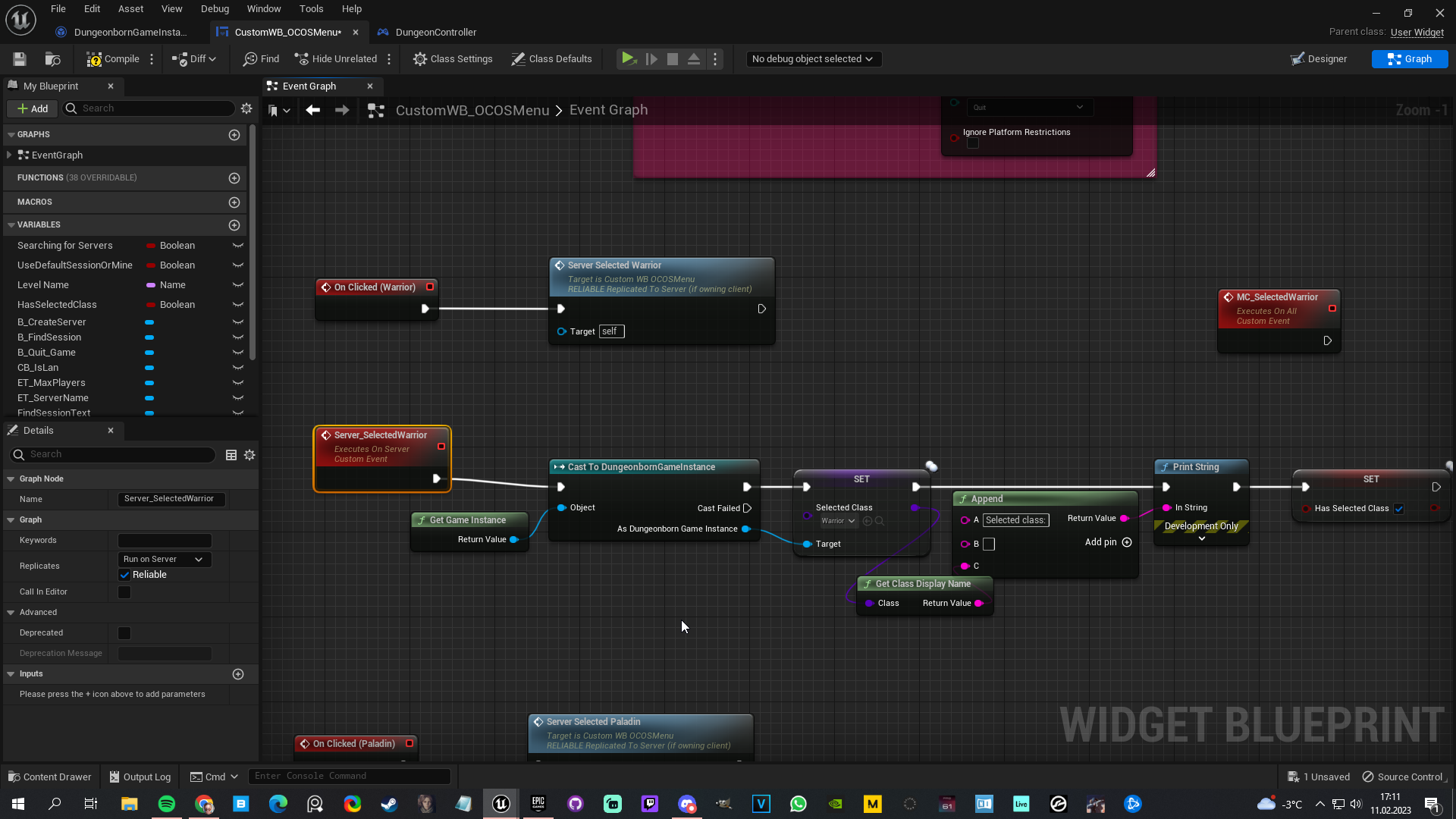
So in regards to that, I've set it up so that when the player starts up the game, they get to select their class in the main menu - Warrior, or Paladin.
https://i.imgur.com/93Y00F2.png
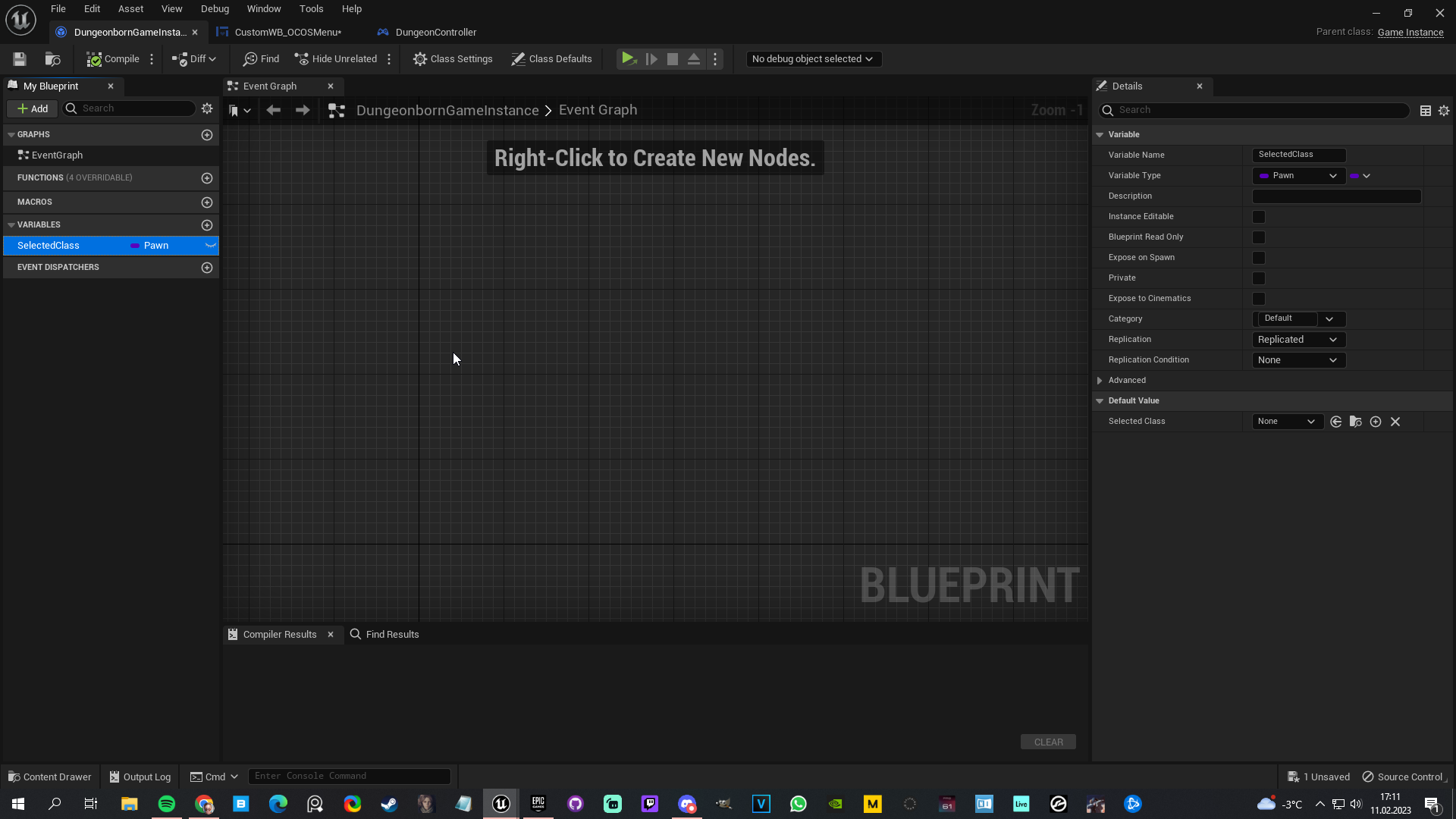
The class information is sent to the gameinstance, which stores the Pawn Class variable:
https://i.imgur.com/ReGuYeI.png
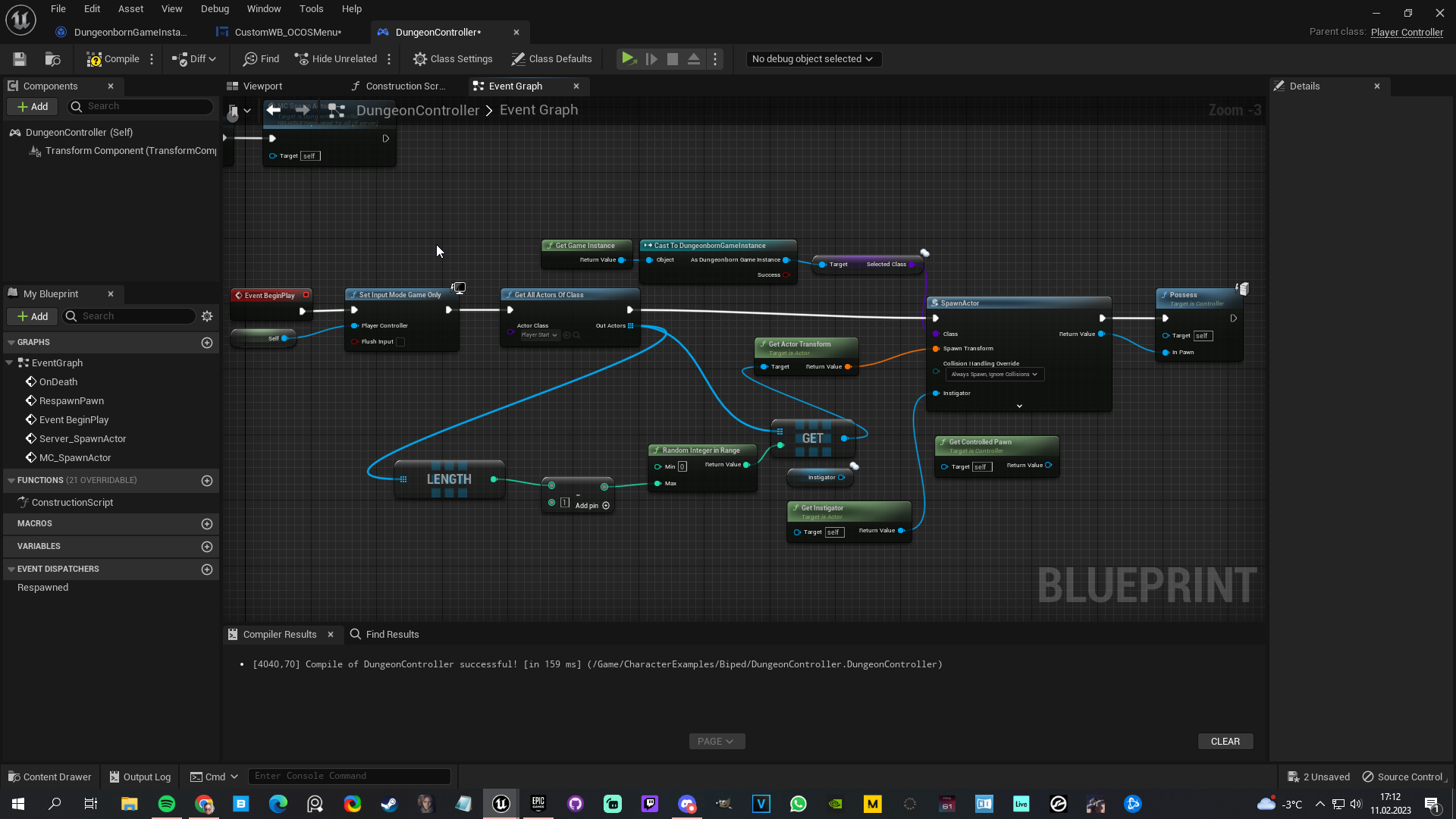
The client's character controller references this information when spawning it's pawn - this is probably where I'm doing something wrong, I'm not sure what's the best place to actually decide the spawning of the class when it comes to replication and such. I saw some tuts/documents doing it with the player controller, but alas, I've tried adding RPC's for all of these events aswell, but they give unwanted results.
https://i.imgur.com/PkvMttH.png
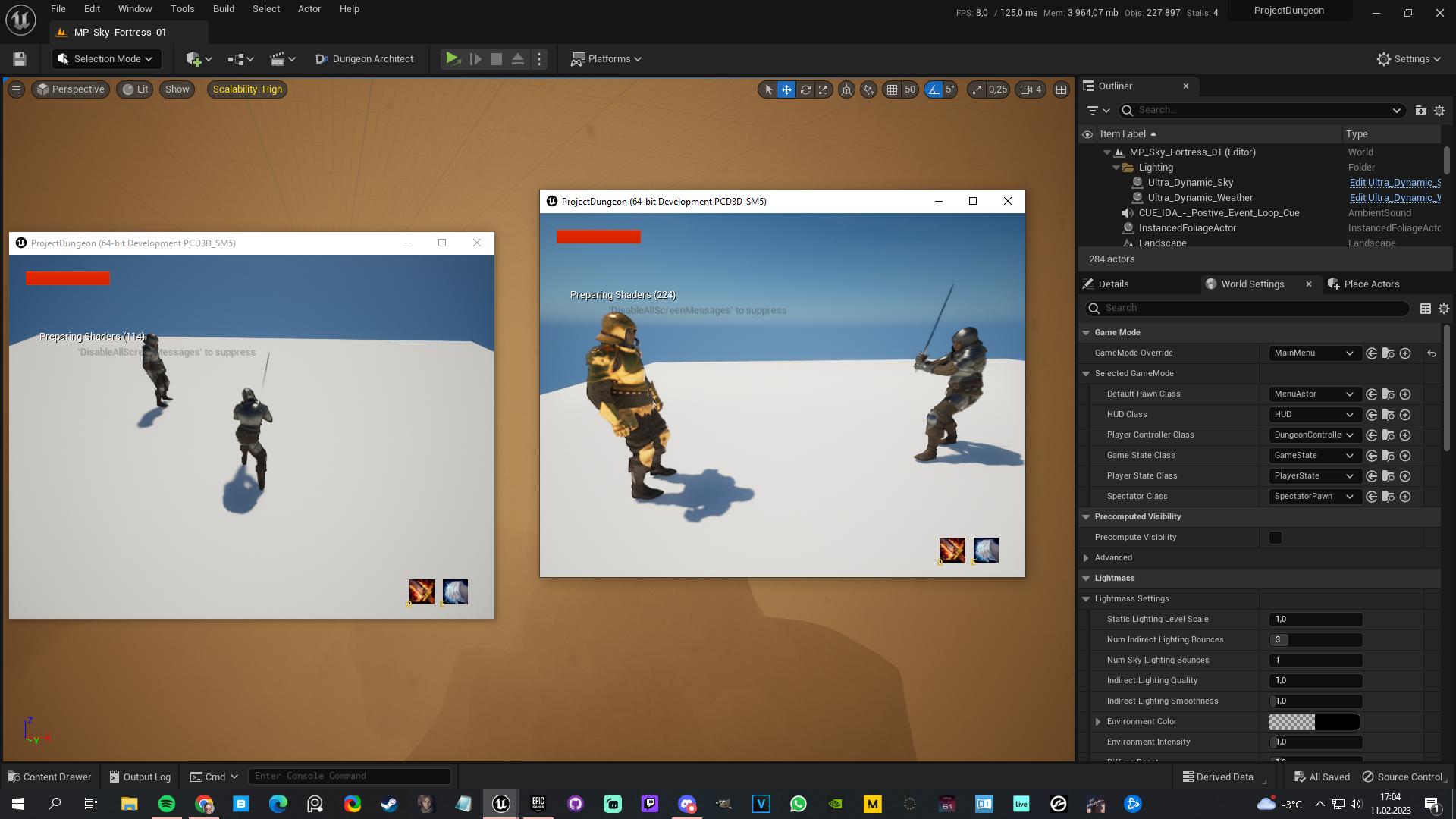
This is how it looks like when I do no RPC's for selection of classes etc - the server spawns a duplicate of it's own class (server on the left side, does not see the Paladin aka golden armored dude), and the client takes possession of that duplicate instead of it's own selected class, Paladin.
https://i.imgur.com/b6BApER.jpeg
Any tips on where I'm taking wrong steps here? 😅
 fathom aspen
gaunt cliff
I understand that only AActor/UActorComponent can have replicated function, howe...
fathom aspen
gaunt cliff
I understand that only AActor/UActorComponent can have replicated function, howe...
Not entirely true, subobjects can have them too
The interface wouldn't have the Server RPC per se, but the Actor would have it, the interface would just have the Interact() function that gets called from the server RPC that exists in the actor for example
verbal tendon
pallid mesa
mhm it makes sense, you should also know that the article is not performing any ...
TL;DR If you put code online it should work, without crashing
😁
And yes in perpetuity, so if future engine changes break your code. Shame on you 🙊
fathom aspen
vori quits writing articles
verbal tendon
Also .. death does not annul your contractual obligations
In the event of your death, you will still be expected to make sure your code continues working in perpetuity
twilit radish
@dusky yoke First of all, you can't call RPCs inside of widgets. They have no networking capability. Second of all I would recommend you spawn the character inside the gamemode and not inside the controller. The controller is currently spawning a local version of the pawn, that's not what you want. The server should spawn the pawn, have the appropriate player controller posses that pawn and then let it replicate towards the player(s).
pallid mesa
verbal tendon
**TL;DR** If you put code online it should work, without crashing
Back on topic: If you deep dive on details rather than the concept itself, then it's a lost attempt of learning something. Hence my decision will be puting a liability notice at the beginning of every article
 barren patrol
anyone played with Iris yet? Should I bother learning RepGraph at this point?
twilit radish
Unless you need it right now I would not bother with rep graph any more.
verbal tendon
twilit radish
Unless you need it right now I would not bother with rep graph any more.
I'm not up-to-date is there new goodies planned on the way?
twilit radish
With Iris rep graph is being yoinked away.
 river hazel
Iris filters seem like they can do what the repgraph was used for in a very similar way
twilit radish
IIt is also important to note that Iris does not support the Replication Graph. While Iris does not have any concept of “nodes” to control when and where actors are replicated, the new net object filters and prioritizers are intended as a replacement for the functionality provided by the Replication Graph.

Epic Developer Community
This tutorial walks through Iris, a new, experimental replication system that seeks to improve the performance, scalability, and maintainability of the ...
barren patrol
yeah i read that blog post which is why i was asking. it looks like a solid replacement to go with long term
but has anyone tried it out? its still experimental
im ok with some quirks but not really interested in having a broken project if its hugely buggy
 thin stratus
grand kestrel
<@94211915902889984>Thanks so much for your help with the stamina
thin stratus
grand kestrel
<@94211915902889984>Thanks so much for your help with the stamina
No worries. Does it work now?
thin stratus
barren patrol
im ok with some quirks but not really interested in having a broken project if i...
Then you are at a tough little point. Iris will probably take a few more versions before it actively replaces normal replication. If your project doesn't ship anytime soon, then you can try Iris out. Otherwise RepGraph is probably the saner idea
barren patrol
that was my intuition. tough spot heh
im reading repgraph code now. i think it will be useful to learn if only to understand choices made in iris
it seems like they are trying to do things similar in some ways (no virtual per-frame function calls) so im guessing the ideas in iris will be similar (tracking lists externally but in a filter class or smth)
hopefully it wont be too painful to port a repgraph setup over to iris filters
dusky yoke
twilit radish
<@343122880491421716> First of all, you can't call RPCs inside of widgets. They ...
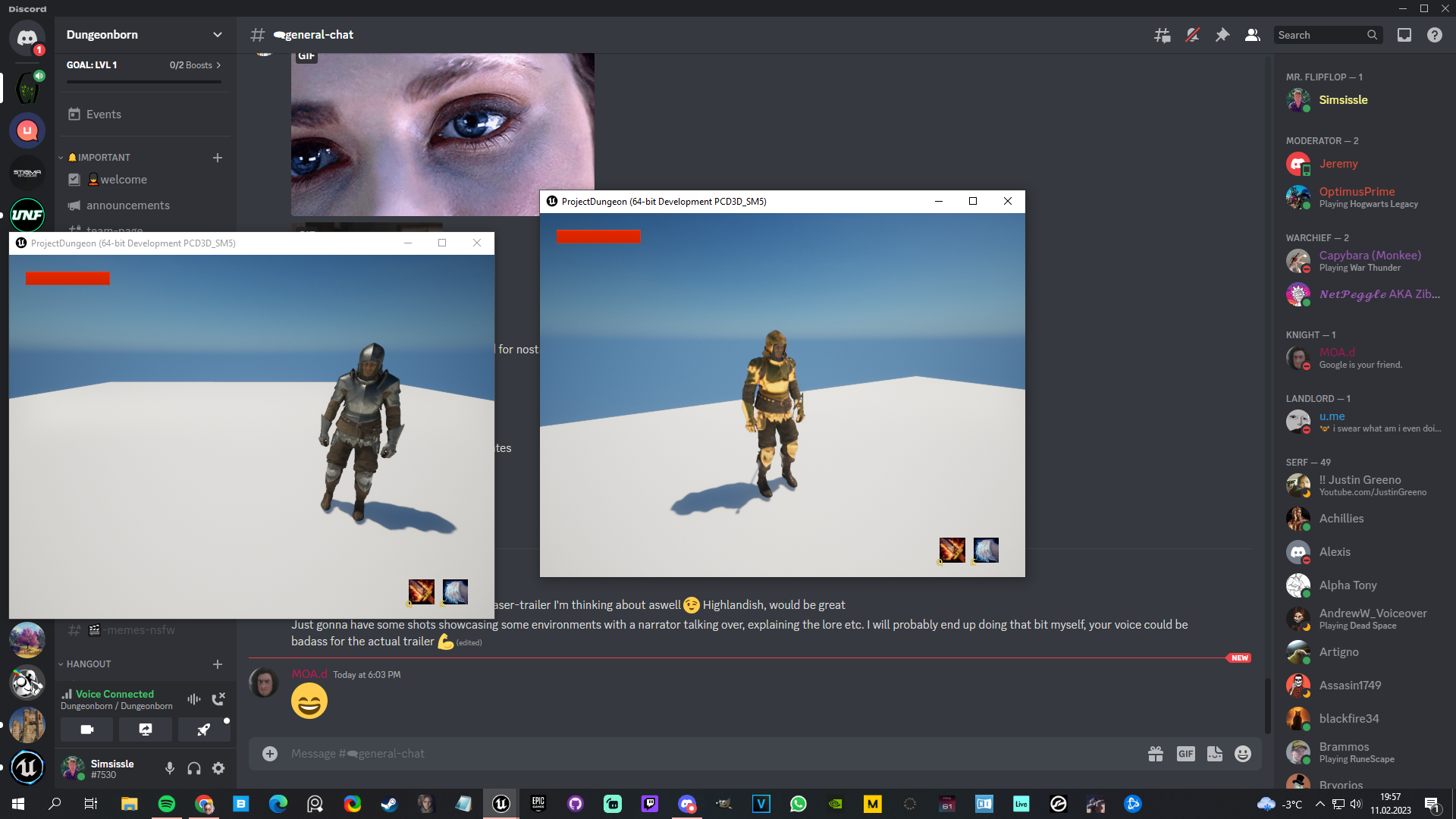
Thanks for the feedback, got it to work now 🙂 https://i.imgur.com/YZBXcL9.png
 fathom aspen
Usually, but no not really
Use this beauty instead UGameInstance::GetFirstLocalPlayerController()
I also assumed you are calling it locally (i.e. not on a dedicated server for example), but to be extra safe this is what happens when you call it in various different contexts
 real ridge
iis there any way how to on choose player start tell function which player start I want use for specific controller?
no on server it will find nothing
but u will be able to call it
kindred widget
In seamless travel situations on a ListenServer, GetPlayerController(0) can return a client's player controller.
Super rare. But can happen.
fathom aspen
fathom aspen
I also assumed you are calling it locally (i.e. not on a dedicated server for ex...
inb4 but kudos to you for explaining it to me at the time @kindred widget 😛
real ridge
real ridge
iis there any way how to on choose player start tell function which player start...
jesus u know this?
fathom aspen
no it's hard
real ridge
fathom aspen
no it's hard
Amen
grand kestrel
thin stratus
No worries. Does it work now?
Beautifully, no desync at 220ms. Although I've yet to introduce pkt loss
 peak sentinel
real ridge
iis there any way how to on choose player start tell function which player start...
peak sentinel
real ridge
iis there any way how to on choose player start tell function which player start...
save them to AWorldSettings, organize their indexes or set some tags for them, and during ChoosePlayerStart select based on index or tag depending on player?
thin stratus
grand kestrel
Beautifully, no desync at 220ms. Although I've yet to introduce pkt loss
PktLoss is always gonna do shit
peak sentinel
PktLoss scares me a lot
grand kestrel
Yeah just want to see how it recovers
But tbh it probably doesn't matter at that point
Who knew stamina could be such an ordeal 😅
thin stratus
Makes you understand why people (hopefully) say that Multiplayer Movement can't be done properly in BPs
 surreal niche
I just recently watched the Rocket League GDC talk about how they handled their networking, and they insist on a fixed timestep for physics.
Would that mean using the async physics tick on 5.1?
(I'm recreating a very simplified version of the character movement component to better understand networking)
(That also means not using the FRepMovement)
Also, related question, why does the character movement component depend on replication from the pawn instead of doing the replication within the component itself?
I heard component replication was worse but how is it actually worse?
grand kestrel
thin stratus
Makes you understand why people (hopefully) say that Multiplayer Movement can't ...
For sure. I definitely already knew it but this is a level above 😄
grand kestrel
pallid mesa
this is for stamina in the cmc, right?
I'm going to move the solution to a plugin I have which includes sprint and prone and also a shell for strafe (doesn't actually impl what strafing is for you). I found it was a lot cleaner to have them in separate movement components. Then I'll make the plugin public
pallid mesa
That's... very sweet Vaei, that's super super sweet, and I want to thank you personally for that 😄
thin stratus
What became out of the mini wiki
That you wrote me about
I already helped someone else in the past with the same topic and they wanted to release something showing an example iirc
:D is this gonna repeat itself until I make a post myself?
verbal tendon
thin stratus
I already helped someone else in the past with the same topic and they wanted to...
Probably a good idea 😄
real ridge
guys I have one weird question maybe, if I am creating session with map and I am joining it i have timer there which is already running because its managed from game state of that session how to set things to happen only after first player join or game will start ?
any ideas?
or what is common solution
my session is on dedicated server
thin stratus
GameMode has an override for "ShouldStartGame" or so
You can implement that and return true when all players are there
You have to tick "Delayed Start" or so in the defaults of the GameMode for that
real ridge
and I can have it paused till i start it ? I have few variables which values are inscreasing by time
and i think they are inscreasing also when I am not already in
for example this

its spawned on map and multiply value by time
its collectible
real ridge
thin stratus
You have to tick "Delayed Start" or so in the defaults of the GameMode for that
so delayed start + then should start game
and everything start working?
by default or i need set stuff in pawns to start then
thin stratus
I'm not sure if it will delay your BeginPlay call
But there are events for when the MatchState changes
And it will go to "InProgress" once the Should Start Game stuff returns true

 verbal tendon
thin stratus
I have to remember too much stuff :D
verbal tendon
thin stratus
I have to remember too much stuff :D
Brain go 🤯
real ridge
thin stratus
Yeah that's it
so set delayed start after beginn play in game mode and then use ready to start match ? to true means it will start ?
ya?
thin stratus
Given that our brain is just some gooie thing, it's quite amazing how much shit it can remember. Like 90% of jokes from Scrubs. Or almost all the Quests from Crossroads in WoW Classic.
is it useful? Probably not
thin stratus
real ridge
so set delayed start after beginn play in game mode and then use ready to start ...
You can just set DelayedStart in the Defaults to true
real ridge
thin stratus
Given that our brain is just some gooie thing, it's quite amazing how much shit ...
I do remember only shits i dont need
verbal tendon
thin stratus
Given that our brain is just some gooie thing, it's quite amazing how much shit ...
Memory is survival
thin stratus
verbal tendon
Memory is survival
So I pretty much suck at surviving for remembering the wrong stuff? :D
real ridge
thin stratus
You can just set DelayedStart in the Defaults to true
just here and let it be? its weird haha
 thin stratus
Yes
verbal tendon
thin stratus
So I pretty much suck at surviving for remembering the wrong stuff? :D
Nah, but as long as in the old days, you remembered your shelter and fresh water source, you were better off than if you didn't remember
😁
thin stratus
Fair
real ridge
but now how i can set delay I just should use that function to say it start ya? btw block me if my questions are out of the border hahhahaa
thin stratus
Good old days
thin stratus
real ridge
but now how i can set delay I just should use that function to say it start ya? ...
Depends on what your condition for starting the game is supposed to be
real ridge
thin stratus
Depends on what your condition for starting the game is supposed to be
atleast 1 player joined
so first one join and bum starting
thin stratus
real ridge
but now how i can set delay I just should use that function to say it start ya? ...

Wrong quote
But well
thin stratus
real ridge
atleast 1 player joined
The make a boolean for example called "bShouldStartGame"
Connect that to the return of the ReadToStartMatch
Set it to true in the PostLogin function
That will call for each player, so the first to join will set it to true and start the match

 thin stratus
Only if some Mod from a Server tells you how it works ¯_(ツ)_/¯
real ridge
bcs literally if anyone join i want start
 thin stratus
The Damage UE has done in the past 6 years can't be healed
Should send Tim an invoice
real ridge
thin stratus
The Damage UE has done in the past 6 years can't be healed
damage after 1 year with ue is too big also for me
cant imagine how much for you
 vivid egret
Hey folks, I am building an experiment for my lab. Each player has an interface that gives them test questions basically. the tricky thing is they can see eachothers answers so their has to be a connection and a timer for syncing them.
I have tried storing the timer variables in an instance, and only incrementing them on the host. However, the clients only retrieve the timer variables on connection, not on every tick. Any suggestions?
 pallid mesa
thin stratus
That you wrote me about
pallid mesa
thin stratus
That you wrote me about
ah yes, you told me about it. It's an ambitious idea and I appreciate it a lot...
I love being part of a community that is willing to share, it's amazing
It takes time and dedication, and lately there's not much of the former
 soft relic
@vivid egret Quite hard to answer this as theres not much context. Besides that though, here's a few notes:
- If you need to call a function with a different rate that your Tick, you can make use of the timers (SetTimerByEvent etc.). Since firstly, you dont want to overload your tick but also its not even really called every frame as you have a delay there.
- You dont need to manually sync values between users like this, theres different approaches but maybe one way would be to have a RepNotify variable with the answers of users stored in there, so that they only get replicated/synced from server(your host) to clients when changed.
real ridge
guys foolish question but how I can set friendly healthbars to green and enemy´s healthbars to red?
:DDDD
how
i replicate it to one widget
vivid egret
I would have booleans or tags associated with friendlys and enemies. Then just set colorbar to [color] based on boolean
real ridge
vivid egret
I would have booleans or tags associated with friendlys and enemies. Then just s...
hmmm
but he need to replicate his widget like twice
for friends
as green
and for enemies as red
still dont get it
real ridge
guys is there any setting where I can set range from which I cant see replicated thing?
some value
if I am too far it will disappear
soft relic
@real ridge A few ways of doing this, a quick simple way would be to have a Team variable on the pawns or their player states, and locally for each user compare their local team variable with the other pawn's team variable, if matches green, otherwise red
real ridge
soft relic
<@542784659675938849> A few ways of doing this, a quick simple way would be to h...
i do have
that variable
but how I can print 1 widget in 2 different colours is for me secret
i am dumb?
its late and my brain is dead lol
soft relic
Well, firstly you need to send to the widget who the owner pawn is, maybe by casting to the user widget object of the 3d widget component and passing its pawn reference.at begin play, once the widget comp is ready. Then, inside the widget event graph, you could check and compare owner pawns team with local pawns team (GetPlayerPawn etc.)
But ideally I would move your team setting to the player state, as thats the correct place to have it in the first place
real ridge
i have all variables I need team in player staet
state
and name there
but still dont get how to print it in 2 colours in same time
XDD for everyone
when its replicated
twilit radish
surreal niche
I heard component replication was worse but how is it actually worse?
To answer your first question, yes it requires the async physics to do it similarly to them. However it’s very much experimental with networking and in general, I had a hard time using it last time I looked at it. And the reason they use the character and not the component is because components have a small network overhead (I believe to identify the component) which isn’t normally an issue but is when you send it a whole bunch of times per second.
surreal niche
@twilit radish I see, I guess I'll have to experiment on my own to check stability, thank you for telling me of your experience with it.
As for the second one, is it really that bad? I guess I'll run some benchmarks to check because it sounds really over the top (not doubting you, just surprised it does affect it that much)
twilit radish
It’s not so bad, but when you’re running this ~60 times a second on average if you can save it with very little work why not 🤷♀️
real ridge
guys its not possible to call server,multicast to set name from pawn which is placed in world?

like base
or anything else
 serene basin
Hey guys, does anyone here have experience with using PlayFab dedicated servers in their multiplayer game? If so, I have some rather high-level questions and would love to chat :p
kindred widget
real ridge
guys its not possible to call server,multicast to set name from pawn which is pl...
Why are you multicasting the player name?
grand kestrel
Here is my plugin that forms the basis of movement abilities for my own game. Decided to open it up since @thin stratus was so gracious with his prediction code that was used for the Stamina.
https://github.com/Vaei/PredictedMovement/ & example video showing it in use : https://youtu.be/SHVm57AMruc
Feel free to link it in the future if anyone could make use of it. ( @pallid mesa )
GitHub
CMC extended for predicted abilities. Contribute to Vaei/PredictedMovement development by creating an account on GitHub.
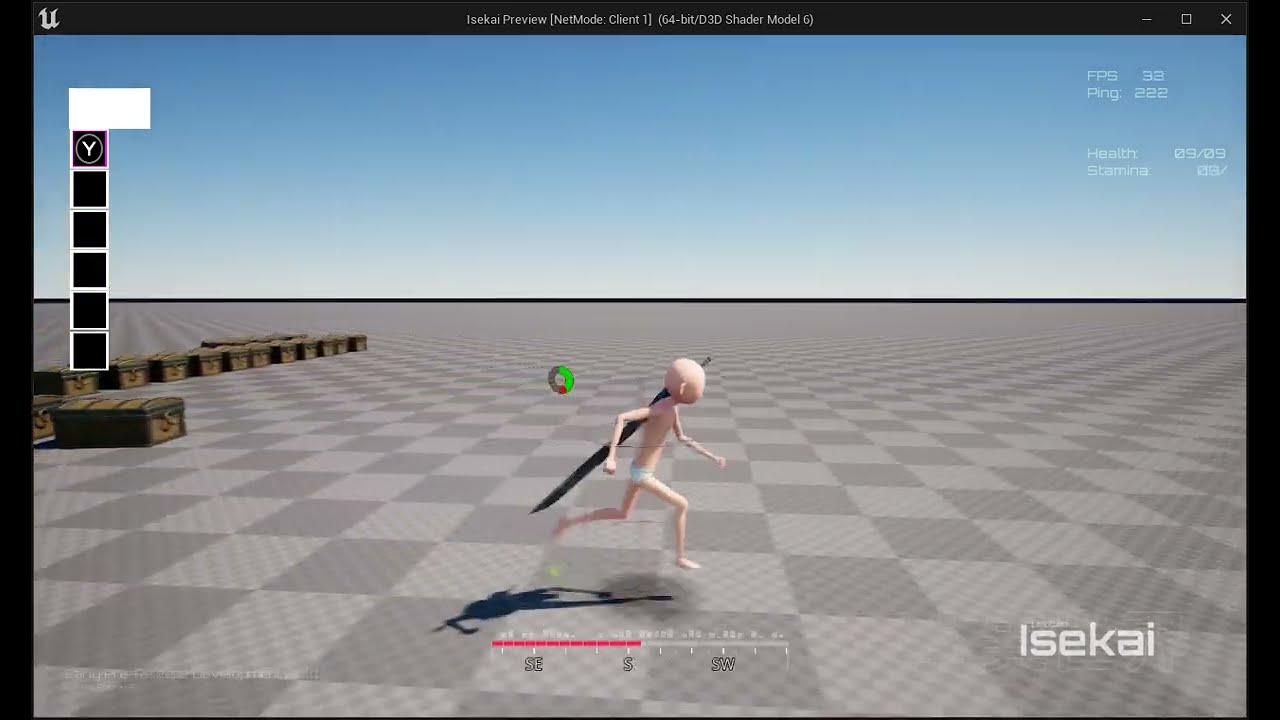
This is a demonstration for the freely available PredictedMovement plugin.
You can find it on Github: https://github.com/Vaei/PredictedMovement/
thin stratus
grand kestrel
Here is my plugin that forms the basis of movement abilities for my own game. De...
grand kestrel
I put credit in the UStaminaMovement header btw, if you want a link on the git page or something just let me know
thin stratus
I actually don't use PrepMoveFor and setMoveFor
I still think it's wrong to reapply stamina for saved moves
grand kestrel
Oops, that was basically just left over, I can test without it 😄
grand kestrel
What about the bStaminaDrained?
thin stratus
Both
grand kestrel
Let me do a quick test now
thin stratus
Cause let's say the server corrects it to 5 and your move still has the old value of 50. Your saved moves will continue sprinting longer and cause another correction
Cause instead of running out of stamina you will probably have enough to keep sprinting and then send a new server move with a location that the server can't reach
The boolean also comes from the server. Doesn't sound right to override it with the saved move
And for saving it into the saved move, the InitialPosition function should be enough
That's what epic does
At least for the values that are used in combinewith
grand kestrel
Are you sure I shouldn't be keeping SetMoveFor? Without that, its always 0 😄
thin stratus
Relatively sure. You already have SetInitialPosition
pallid mesa
🙏 nice, this is why its nice... initial proposal and a review.
I can't read the code now I have a bit of a fever
but I will take a look soon™️
thin stratus
The only reason the stamina is in the saved move is so you can combine it for a combined move
Not for restoring it when replaying moves
And for that it's enough to only use SetInitialPosition
I'm relatively sure at least
Don't have my code in front of me atm
grand kestrel
This is what happens when removing SetMoveFor
thin stratus
Eh
grand kestrel
Its trying to regen but keeps getting set back to 0
grand kestrel
Yep
thin stratus
Then the only thing setting your stamina should be sprinting and server corrections
So it shouldn't be 0
Unless you never init it hehe
thin stratus
CombineWith should only call on higher frames than 60 by default
SetInitialPosition should be saving the stamina value
thin stratus
    virtual void Clear() override;
    virtual uint8 GetCompressedFlags() const override;
    virtual bool CanCombineWith(const FSavedMovePtr& NewMove, ACharacter* InCharacter, float MaxDelta) const override;
    virtual void CombineWith(const FSavedMove_Character* OldMove, ACharacter* InCharacter, APlayerController* PC, const FVector& OldStartLocation) override;
    virtual void SetInitialPosition(ACharacter* Character) override;
That's all I override in my saved move
thin stratus
grand kestrel
SetInitialPosition is never called
That's part of ::ReplicateMoveToServer
And ::SetMoveFor
void FSavedMove_Character::SetMoveFor(ACharacter* Character, float InDeltaTime, FVector const& NewAccel, class FNetworkPredictionData_Client_Character & ClientData)
{
    CharacterOwner = Character;
    DeltaTime = InDeltaTime;

    SetInitialPosition(Character);
So unless you are missing a Super Call, this should call
grand kestrel
Yeah it turns out I'm an idiot, one of the classes I made ages ago wasn't using Super but specifying the class 😄
thin stratus
Ah
grand kestrel
The best part is I had already fixed that, except for SetInitialPosition which got missed
Which makes it even better 😄
vivid egret
vivid egret
Hey folks, I am building an experiment for my lab. Each player has an interface ...
After 5 hours I have come to a conclusion, why replicate a timer across a network when I can just lag the start time locally? So the fix was to run in GameMode on EventTick a delay node every .25 seconds, and set a GameTimeXXX variable = Get Game Time in Seconds. Then when a player joins, I just add GameTimeXXX to the player's personal Seconds variable, and call the players personal variables to the Widget. This is sufficient for my needs but maybe isnt optimal!
Ofcourse, this will cause problems for anyone joining more than 60 seconds late, because I don't know how to convert more than 120 seconds to minutes, but as long as all your clients join within a minute of start you are gooooood to go 🙂
The purpoose of the delay is to stop it from running every tick. Also this specificies the max lag you can have. .25 seconds of lag time is not a big deal for what i am working for.
Thanks for your help @thin stratus
grand kestrel
@thin stratus thanks, I've pushed those changes and it seems to work well; tested with 4% pkt loss and it behaves as well as anyone could hope for
 wintry ruin
Hi all, I have a packaged game, is there any way to change the maxplayers variable? its running and 16 players joined, then "server full" is displayed. Is there a way to change maxplayers without repackaging the server? This one:
[/Script/Engine.GameSession] MaxPlayers=32
Adding that to Game.ini just gets wiped out when the server starts, and it is limited 16.
thin stratus
wintry ruin
Hi all, I have a packaged game, is there any way to change the maxplayers variab...
Dedicated Server?
You can try to add ?MaxPlayers=32 as a start param to the exe
wintry ruin
@thin stratus yes, dedicated server. I will try the command line thanks!
thin stratus
Can also create a shortcut if it's windows
Of the exe
And edit it
I usually do that anyway to add -log to it
wintry ruin
it's an important setting I'm also checking if there is a way to update it programmatically for the future
I see it's in AGameSession::AtCapacity()
 crystal crag
You can't replicate a TWeakObjectPtr<AActor> can you?
It would have to be hard pointer instead in order to use UPROPERTY(Replicated)
Oh well TWeakObjectPtr isn't supported by reflection, so I guess that answers my own question
 fossil veldt
wintry ruin
Hi all, I have a packaged game, is there any way to change the maxplayers variab...
fossil veldt
wintry ruin
Hi all, I have a packaged game, is there any way to change the maxplayers variab...
Yay hey Talad, hope planeshift stuff is going well :D
wintry ruin
@fossil veldt we just switched fully to Unreal some days ago, after 4 years 🙂
fossil veldt
weeeeeeeew
wintry ruin
so, yes its going well, thanks
grand kestrel
@thin stratus btw I tested the stamina with a gameplay ability consuming it, and it worked fine 🙂 I will edit the readme to tell people they might need to flush server moves if there is a delay
 rose pollen
fwiw with GAS if you do sprint as ability that adds a tag like "sprinting" and has a gameplay effect flat cost of like 1 stamina, then an infinite duration gameplay effect and adds a stamina drain while sprinting tag is present and changes a variable on the attribute set that drives movespeed, and then have the character wait for attribute change on movespeed and set the movespeed, I think the default CMC is fine at 220 ping using network emulation at least. Besides a tiny bit of setup in C++ with gas that is all easily done in BP
you can also have a wait for attribute changed on stamina that checks if its zero and applies an "out of stamina" effect that cancels the sprinting ability and blocks other abilities
grand kestrel
That wont get you net predicted stamina, it'll desync 🙂
rose pollen
hmm, I thought the attribute set took care of it nicely
i haven't set up careful logging so I guess i wouldn't notice maybe but I've never seen an ability canceled or fail when the players screen showed sufficient stamina
grand kestrel
I just went through the whole process myself. I also started from GAS + GAS attributes. Either way the solution is freely available and completely done for you, just check the most recent pin
rose pollen
awesome, will take a look
how did you observe the desync? was it obvious or did it require careful logging to spot?
I will try turning the ping up to like 1K or something
grand kestrel
Enable p.netshowcorrections 1
It will draw a red capsule where the desync started and green capsule to where it was corrected to
I run a reasonably consistent ~220ms any time I PIE, always, since thats my target latency for a fluid experience, and always with p.netshowcorrections 1. It'll work fine at higher latencies too tho
rose pollen
I am targetting a much lower latency so I am usually PIE at 100 so maybe part of why i didn't notice
grand kestrel
Yeah my game is more "go on an adventure with your mates" than "shoot your mates in the face"
Well, you can do both, its just not the point 😄
I think 220ms means most people from around the world can play together, other than NZ/AU and EU.. mind you, it probably works fine at 350-400ms latency too so long as the connection doesn't spike
But I'll settle for 220
I think an open world adventure game is a good way to connect with family/friends who go overseas, that's my idea behind supporting really high latency if at all possible
rose pollen
very cool, i played a game that was somewhat competitive that was open world single server and their net code just wasn't good enough, I had a friend from NZ and I was in NA and game server was in EU and he would teleport all over which was a real bummer, would have been great to be able to play with him so cool that you are working on it
think 220 gets you just about anywhere like you said
grand kestrel
rose pollen
very cool, i played a game that was somewhat competitive that was open world sin...
NZ->EU is 350-400ms. NZ->LA(US) is 180-200ms. NZ->East Coast US is ~240-320ms IIRC
I'm not sure how playable even my game will be between EU and NZ 😄
rose pollen
did test at 250 ping with netshowcorrections and i definitely do get some corrections if i switch between sprinting and not rapidly or if i run out of stamina while sprinting so will check your code out for sure. if i just am sprinting around in open space there usually aren't any, even if i wave my mouse around to change directions like crazy, so it does seem like its the ability activation / deactivation causing the desync
if i just spam tap / release the sprint key as fast as possible i can get corrections to appear very consistently
grand kestrel
rose pollen
did test at 250 ping with netshowcorrections and i definitely do get some correc...
Yup that's the end result of using GAS attributes for stamina unfortunately because CMC needs to handle it
Its a pretty painful lesson to learn time-wise
 modest crater
I feel like im in the 5th dimension managing local delegates and animNotifies, with OnRep notifies and RPCs whilst also managing authority of who runs what when 🥲 Its so crazy how different this shit is from normal programming, Im loving it tho
 verbal tendon
modest crater
I feel like im in the 5th dimension managing local delegates and animNotifies, w...
verbal tendon
modest crater
I feel like im in the 5th dimension managing local delegates and animNotifies, w...
You mention you are experiencing love ... did you mean Stockholm Syndrome ?
verbal tendon
grand kestrel
I'm not sure how playable even my game will be between EU and NZ 😄
It probably won't be a great experience
Unfortunately people from AU/NZ are in a tough spot, because they don't have a low latency to anything
grand kestrel
verbal tendon
Unfortunately people from AU/NZ are in a tough spot, because they don't have a l...
Yep. I live in NZ 😄
verbal tendon
grand kestrel
Yep. I live in NZ 😄
My condolences
modest crater
grand kestrel
Yep. I live in NZ 😄
Im in aus, I feel that
 quartz panther
anyone knows why joining session opens wrong map on the client ?
I can see my sessions, the dedicated servers have correct map open, but when i join with client i can see in the logs that the default game map is open on client which is main menu map.
 thin stratus
Are you sure the client actually joined
Might have been rejected or failed to connect
pallid mesa
anyone here managed to implement instant replays?
quartz panther
@thin stratus how could i debug this?
pallid mesa
Setting the viewtarget is the missing step
https://media.discordapp.net/attachments/992501960508973057/1074138409087553599/image.png
But since the playerstate in the replay world got no owner... it resets to the og viewtarget
 thin stratus
quartz panther
<@94211915902889984> how could i debug this?
thin stratus
quartz panther
<@94211915902889984> how could i debug this?
Checking logs for example
thin stratus
pallid mesa
anyone here managed to implement instant replays?
No, but maybe this helps? #multiplayer message
thin stratus
pallid mesa
Setting the viewtarget is the missing step
https://media.discordapp.net/attachme...
I mean, can't you change that? :D
real ridge
kindred widget
Why are you multicasting the player name?
because i am i multiplayer?
and everyone need to see it
thin stratus
PlayerName is a State and only needs to be Replicated Variable
There is no need to multicast it
quartz panther
it does fail in the end...
pallid mesa
thin stratus
I mean, can't you change that? :D
its engine code, I'm considering a PR
thin stratus
Non virtual?
pallid mesa
this is one of those changes xD
when i did the pr to set the ownership on Posses many people came to me to say i broke their projects
so if I change this to something that bypasses the controller
i guess the same would happen
xDDD
real ridge
guys I have question as usually is there any good hmmm way how I can change my mesh over game ? for example I have red plane I will pick blue pill and my plane will change to another blue bigger plane
so i will switch mesh
it is possible ? 🙂
ofc in MP
so others will see too
thin stratus
You'd need a Variable that is Rep Notify
pallid mesa
yes you want an OnRep haha
thin stratus
Either directly a StaticMesh one
real ridge
so its not problem switch mesh okay
thin stratus
Or something that identifies which Plane you want
real ridge
just replicate it right?
thin stratus
Yeah
real ridge
okay cool
thin stratus
And you use the OnRep function to set the Mesh on the Component
real ridge
was scared if there is no problem with it
real ridge
thin stratus
And you use the OnRep function to set the Mesh on the Component
yes I will use on rep just when I Will pick that pill
okay aight thx
this discord is like holy bible for christian
lol
real ridge
guys I have another question if I run my session and for example destroy something it's destroyed till I don't restart session turn off and make new is there any way how I can restart running session? so i don't need close it and start new .exe?
so match will restart
and everything destroyed will return
thin stratus
ServerTravel to the same map again for example
modest crater
hey guys, im trying to have my character call the playercontroller and add the HUD widget i made on begin play, my issue is I dont know how to limit it to only do it for people who have a controller but also the listen server player needs too as well because he is returning null for locally controlled, I assume im going about it the wrong way
void AMinion_Character::BeginPlay()
{
    Super::BeginPlay();

    MovementComp = Cast<UCharacterMovementComponent>(GetMovementComponent());

    if (APlayerController* PlayerController = Cast<APlayerController>(Controller))
    {
        if (UEnhancedInputLocalPlayerSubsystem* Subsystem = ULocalPlayer::GetSubsystem<UEnhancedInputLocalPlayerSubsystem>(PlayerController->GetLocalPlayer()))
        {
            Subsystem->AddMappingContext(InpMappingContext, 0);
        }
    }

    if (IsLocallyControlled())
    {
        if (AMinion_PlayerController* pc = Cast<AMinion_PlayerController>(Controller))
        {
            pc->SpawnHUDWidget(this);
        }
    }
}
Your problem is that you use BeginPlay
BeginPlay doesn't mean your Character is possessed
Since you are using C++, your best bet is to use OnRep_Controller
thin stratus
That said
You could also just spawn it in the PC fwiw
But if you already have a working setup, then OnRep should be fine
real ridge
thin stratus
ServerTravel to the same map again for example
only way? or first what u got in mind
thin stratus
real ridge
only way? or first what u got in mind
Easiest way at least
real ridge
thin stratus
Easiest way at least
so after end match just sever travel to same map + use seamless travel ?
right?
ah u are god
modest crater
thin stratus
But if you already have a working setup, then OnRep should be fine
nah OnRep is too early for the UI i cant access the running time at that stage
thin stratus
The what
modest crater
if i create my ui inside OnRep_Controller its too early for it
ill keep searching aha
pallid mesa
@grand kestrel
Hey Vaei, mind fixing this? https://github.com/Vaei/PredictedMovement/blob/main/Source/PredictedMovement/Private/Sprint/SprintMovement.cpp#L44
There's a magic number 0.98f applied there, add a comment or wrap it in a variable so people can understand what that 0.98f is for! Thanks 😄
grand kestrel
pallid mesa
<@96182038511509504>
Hey Vaei, mind fixing this? <https://github.com/Vaei/Predi...
Woops. Yeah. I'll do it tomorrow though, about to go to bed. I don't remember why I had that number, been there for a long time, but maybe not needed anymore
thin stratus
modest crater
if i create my ui inside OnRep_Controller its too early for it
Too early for what exactly? You gotta be more precise. OnRep_Controller is usually totally fine, cause that's when you can be sure that the PC is valid on the Client side and the Pawn is possessed.
modest crater
thin stratus
Too early for what exactly? You gotta be more precise. OnRep_Controller is usual...
yeah, currently one of the elapsed time widgets is returning null when trying to get the time
matchTimeElapsed = UGameplayStatics::GetGameState(GetWorld())->GetServerWorldTimeSeconds();
its alright ill look somewhere else
thin stratus
That's just a race-condition with the GameState not replicating faster than the PC
Just guard the GetGameState return
modest crater
thin stratus
Just guard the GetGameState return
OnRep_Controller isnt being called on the listenserver now ahha but yeah the check fixed the other issue
thin stratus
OnRep not being called on Server is normal
modest crater
well my issue to bein with was that in BeginPlay it would call it on clients but not listen server too
thin stratus
So
modest crater
I needed it to put the hud on the server player too when respawning
thin stratus
You need the Character to be possessed for this. The best way is to:
- Override PossessedBy and guard for IsLocalPlayerController for ListenServer
- Override OnRep_Controller for Local Client
modest crater
alright thanks
thin stratus
And your Timer/GameState issue is because one thing will always replicate before the other. There is no guarantee and UE doesn't give you any "Hey everything is initialized" callback.
So either you guard the GameState in your HUD against being null for the time it's not replicated yet, or you only add the HUD when both Character is Possessed AND BeginPlay has been called.
But then you have to fight the Race Condition in your Character by checking "HasActorBegunPlay" in your OnRep, as well as checking if the Controller is valid on non-Authority in your BeginPlay
Cause BeginPlay on clients only calls if the GameState replicated
pallid mesa
@grand kestrel Also https://github.com/Vaei/PredictedMovement/blob/main/Source/PredictedMovement/Public/Stamina/StaminaMovement.h#L166
Why are you inheriting from FNetworkPredictionData_Client_Character_Sprint anything in particular?
thin stratus
I assume because it's used together with Sprinting
Like you can Sprint without Stamina
But when Stamina is used they lock it into being used with Sprinting
It's not a "here is how to sync a float in the CMC" example, but more of a "this is how you do sprinting with stamina"
pallid mesa
I don't see ties with sprinting in the sample code, just that, that's why I'm asking
Vaei did it quite well and he created a documentation on how to make these work together
But yeah if you skim the source code, you really don't see ties here: https://github.com/Vaei/PredictedMovement/blob/main/Source/PredictedMovement/Private/Stamina/StaminaMovement.cpp
thin stratus
I think it's missing a "canSprintInCurrent..." to utilize the stamina?
If it's not being used together, then yeah, the parent is "wrong"
pallid mesa
mostly mentions that CalcVelocity is where you'd drain and gain stamina based on cmc state, I imagine bIsSprinting is valid here
twilit radish
Vori dismantling the entire project 👀
pallid mesa
nono I'm doing a review pass, mostly because it's a community resource
thin stratus
pallid mesa
mostly mentions that `CalcVelocity` is where you'd drain and gain stamina based ...
I drain in PerformMovement usually
Draining Stamina in CalcVelocity sounds like you are adding side effects to a function that doesn't clearly state that it would do that
pallid mesa
can you trust on the bIsSprinting value on PerformMovement?
pallid mesa
gut, the justification of CalcVelocity is this:
CalcVelocity stems from PerformMovement and is called from all primary physics loops that have sub-ticks between frames for incredibly high accuracy.
do you agree?
thin stratus
No, CalcVelocity should CalcVelocity
Not reduce Stamina
PerformMovement is my choice :D
pallid mesa
CalcVelocity calls CalcStamina in his case due to this: PerformMovement should suffice if you have a reason to not update stamina between ticks.
thin stratus
So his idea is that during subticks we could stop sprinting
Which I think isn't important
thin stratus
Yeah but SubTicks aren't actually visible to the Player
It mostly allows for more precise collision
pallid mesa
gotcha, then I believe the explanation given in the docs is on point 👍
thin stratus
He basically just reduces Stamina in smaller steps
But only checks stamina after it in Update After Movement
So reducing it once per frame, or 8 times in sub steps doesn't really change anything for me
If you want to make use of the Sub Steps one would also need to check the state in the Subticks
thin stratus
The only thing that could happen is that the SubTicks would stop early due to "something"
But not sure that should affect Stamina
And I think all those "stop subticks" cases are starting a new Physics which hand that new Physics the remaining time
So overall it "should ^tm" always equal to the full DeltaTIme that frame anyway
But this is arguing on very tiny pieces
Both of it works and if he has a comment about it then that's fine I guess
When I coded the custom Hover Movement Component I had boosting also reduce the value in the subticks
But I also checked in those sub ticks if we have to stop boosting
Wasn't pretty I have to say
pallid mesa
haha yeah
Ah here it also explains the interop with GAS
SetStamina(...)
but would linking the set stamina with a gameplay effect work?
probably not
i think definitively not XD
real ridge
guys I am trying to find this in my unreal for making dynamical healthbars for enemies and allies but I Dont have it in ue5

its a plugin?
 pallid mesa
no you need to steal it from Lyra project
i think its a C++ component
so you'll have to find the C++ classes for it
or... use Lyra as your base project
quartz panther
sooo, dedicated server doesn't need ?listen at the end of the map url?
real ridge
quartz panther
sooo, dedicated server doesn't need ?listen at the end of the map url?
i think yes
i mean yes they dont need
quartz panther
oh my god, if things start to work now because of this ...
real ridge
quartz panther
oh my god, if things start to work now because of this ...
and what is your issue?
i use dedicated server so I had a lot of struggles with it
real ridge
okay so
grand kestrel
@pallid mesa @thin stratus when stamina hits 0 sprinting is stopped and regen begins. It can hit 0 between frames this way which might not be pointless for low end PC. Not a big deal either way.
And yeah the stamina is completely agnostic of sprinting, I'll remove the parent
Sleeping now
real ridge
- are you running session on same PC as client? if yes its bad you need use atleast 2 different machines with different ip but can be same network
- if you have not public IP from your provider then it wont work you need call there and tell them to give you public ip
- you need set port forwarding on your router for port 7777 +
then it will work
had same issues
@quartz panther
quartz panther
ok, so i'm using two different machines, the internet connection is the same, and not sure about the ports.
quartz panther
so i can see sessions because im on the same internet connection? im using EOS
real ridge
quartz panther
so i can see sessions because im on the same internet connection? im using EOS
you can see session because u are logged to eos and session too it does not depend on what network do you use but if you dont have public ip for network where dedicated server is running it will not allow you as player to join even u find it and same result if you wont have there set right ports + your router need be parent router so provider wont have any routers above you then your ports will works if no you will be getting this error every time u will try to join

i know had same issues
quartz panther
ohh yes, this is the same, thank you.
real ridge
timeout error and kick
so best you can doo call provider and check your router settings 😄
or maybe try to use some free hosting on aws
and try to run session there they should have settings for it too
quartz panther
you mean use aws free machine to host the server
real ridge
- btw u need type to cmd ipconfig (where your server is located) and take this address, then make settings on router for port trigerring or virtual server too if you do have this option


 real ridge
quartz panther
you mean use aws free machine to host the server
real ridge
quartz panther
you mean use aws free machine to host the server
yes , but I never treid it by myself
real ridge
pallid mesa
thats a component from lyra
ahhh i cant find it

fak
lyra doesnt have it
😦
pallid mesa
real ridge
guys I am trying to find this in my unreal for making dynamical healthbars for e...
where is this pic from?
real ridge
pallid mesa
where is this pic from?
lyra but i started game and tried find component
but thats not there

F
real ridge
okay will try find another system
pallid mesa
unless its been renamed
real ridge
pallid mesa
if its from lyra it will exist in lyra lol
noone said its from lyra
i checked custom components
it was not there
i try make my own component
pallid mesa
real ridge
guys I am trying to find this in my unreal for making dynamical healthbars for e...
I mean if you tell me that this pic is from Lyra...
real ridge
idk how
real ridge
pallid mesa
I mean if you tell me that this pic is from Lyra...
no no it was from video turtorial 🙂

real ridge
how I can do it ? XD
pallid mesa
probably you figured by now
 pallid mesa
🤷♂️
real ridge
that mfer propably using custom blueprints
 bitter swift
When using Network Emulation, is there any point in giving the server that emulation? Isn't it only relevant for clients, or am I not understand network correctly?
thin stratus
ListenServer might be a laggy boy or girl
twilit radish
It’s just an extra option if you need it. The reason to use this is because in a real environment a server can also have a bad connection while clients generally vary a lot. You can use either client, server or both. Doesn’t matter a whole lot.
thin stratus
Well BOTH might apply the ping setting twice
twilit radish
There’s not much point in both yeah, but it’s possible 😂
crystal crag
For gameplay feature components, are you stuck on relying on calling replicated functions inside of the actual PlayerController or PlayerState? I don't think the gameplay feature components themselves support any replication whatsoever.
thin stratus
You can replicate stuff in Components
They inherit the same "abilities" as their actors have
crystal crag
I'm talking about UControllerComponent for example
thin stratus
So a Component on a PlayerController can call Server and Client RPCs
crystal crag
Following the inheritance chain, there is no GetLifetimeRepProps() or whatever the method name is to specify replicated properties
RPCs and replicated properties are different and I am now mixing them. So you answered my question that they can at least support RPCs
But they don't appear to support replicated properties
thin stratus
Sure they do
crystal crag
They do? Would I have to follow the approach of replicating a custom UObject then or am I missing something?
thin stratus
It's the same as the Actor version
void UBallCarryComponent::GetLifetimeReplicatedProps(TArray<FLifetimeProperty>& OutLifetimeProps) const
{
    Super::GetLifetimeReplicatedProps(OutLifetimeProps);

    DOREPLIFETIME(UBallCarryComponent, HoldBallState);
}
oh wait a minute, UGameFrameworkComponent is a UActorComponent
That's weird. No idea how I ended up with they inherited from UObject
thin stratus
They do ultimately
crystal crag
well, right
But you know what I mean - I somehow thought they didn't inherit from UActorComponent at all
that false information led to my confusion
lol I just had another realization, if they didn't inherit from actor components then you wouldn't be able to add them the way the engine does >< omg I need to stop. I got all turned around somehow.
Someone queue up the homer simpson "DOH" for me
twilit radish
 crystal crag
rofl - thank you
twilit radish
😄
crystal crag
Ok, well now that I can move on from this, I have one other topic - I want to build a custom targeting component that supports multiplayer. The purpose of the component will be to allow characters to lock on to targets and keep their rotation in sync with the target character. So that leads me to two questions
- Does anyone have a good resource I could look up covering this, even it explains only high level details
- Does lyra's aim assist kind of mimic this to a point? I saw something about aim assist but I never figured out how to turn it on.
kindred widget
crystal crag
Ok, well now that I can move on from this, I have one other topic - I want to bu...
Aiming is always done locally, for the general reason that it would feel like crap to a client otherwise. Which means in general your system would just need a vector or component to interpolate your local ControlRotation towards for a lock on effect.
crystal crag
Interesting. That makes sense
What if you want to constrain a player to strafe around a target, but you want them to be able to aim? Wouldn't using the control rotation as the main source to do that prevent them from aiming?
twilit radish
I mean well yes, if you lock onto a target you’ll need to change the rotation. Can’t really avoid that 🙂
crystal crag
Well maybe I misunderstood what Authaer was saying. Generally the control rotation makes your character's capsule rotate on it's own, which would make the character "lock on"
twilit radish
Another way to do it that games often do is by not directly locking on to a target but by providing just aim assist when they shoot. Then you avoid the (in my opinion) annoying lock on a target as well.
crystal crag
which that is replicated automatically
Maybe I'm trying to do something that generally just isn't done in most games
I was thinking about what if I want an archer to be able to follow a monster strafing around them but still let them aim for the eyes
without them having to move the mouse left and follow it while moving and aiming
but maybe I'm making that out to be a bigger deal than it is. I guess I have to do that in horizon
and it doesn't bother me
twilit radish
I never played the game, so not sure how they exactly do it 😅
crystal crag
Well regardless, moving, while aiming with a mouse or controller is not that big of a deal. So I'm building a melee type game. So I was trying to think what if the player wants to change the upper body turn mid swing to hit a specific part of a monster. To allow them to over correct I guess.
kindred widget
There's also a large debate over whether aim assist should be used on PC. Definitely make an option for it at least for PC. Consoles are a little more relaxed about aim assists.
crystal crag
Well my game is PvE
Yeah aim assist is a much bigger controversy over PvP games
Still can be for PvE I suppose
kindred widget
Negative review incoming -
"Fk ths shit game moving my mouse when i dont want it to i did NOT aim there and it keeps moving my shots and i cant even turn this crap off!!!"
thin stratus
My wife played Mafia on PC but streamed to our Living Room TV with Gamepad.
Aim Assist was very welcome.
I more or less quit The Last of Us over having to aim a gun with a gamepad
kindred widget
Oh I love it. 😄 Specially on games like Just Cause. It's nice when your enemies are tiny little dots. But people will still complain about it. Because people.
Just one of those random PR nightmares that can easily be avoided with an if statement and a checkbox.
crystal crag
lol that's a good point
Well I would think for melee-centric games you would want lock on
nothing feels more annoying then you swinging and missing because the monster moved just a little out of the way
I might be trying to do too much with just one component too. I was originally thinking that I would use this component to check whether the player could target a certain component (basically, all enemies would have this component too) and then I could feed that into a notification system for the enemies if they were being targeted or notify the player if an enemy was targeting them, etc.
But if I am going to use just client-side to control the control rotation, then having the target replicated on the component no longer makes sense, because the client is the authority on what it is targeting
Then this method no longer makes sense
protected:

    UFUNCTION(BlueprintNativeEvent)
    bool CanBeTargeted(const FGameplayTagContainer& ContextTags, const AActor* InInstigator) const;
Well, I suppose I could have replicated data and then locally check. I'm not controlling whether damage can be applied through this or anything, so if someone cheats it locally then all they would be doing is targeting something they can't interact with
sathenzar now realizes he is rambling about specifics and no one else can read his mind and know what he is trying to achieve, making all of his thoughts go into the void
south crest
what would cause NetLoadOnClient to work, but the objects appear at 0,0,0?
 short arrow
I'm pretty sure actors don't update locations to clients and such by themselves
character locations are updated automatically because of cmc
but other actors need to be told a different way where they should be for clients
from my experience anyway
real ridge
guys is reset level functioning for mp?
Also I have still no ide how to make dynamical healthbars I tried give players variable what team they are and then send their team to widget and compare it and if it's enemy set it red or green but it works not correctly how to make bars like I can see it red if it's enemy but also as green in same time if it's friend 😦
thin stratus
south crest
what would cause NetLoadOnClient to work, but the objects appear at 0,0,0?
Hm, sounds pretty strange. Not sure why that would happen. Does that go for all Actors or just a specific one?
south crest
short arrow
from my experience anyway
interesting thx
south crest
thin stratus
Hm, sounds pretty strange. Not sure why that would happen. Does that go for all ...
happens with all my non character actors it seems
south crest
dynamically spawned by a character
using Spawn Actor by Class
any character can spawn an object like tree or chest, they do net load on client properly, but all of their locations are 0,0,0
am i supposed to have the server put the dynamic objects into a save game state and replicate that to clients or something?
it seems like replicate + netload should do it though...
thin stratus
NetLoadOnClient shouldn't affect runtime spawned actors though?
@south crest
Like that's usually for already placed actors and if the Client should load them from the disk or wait for the actor to be spawned through replication
twilit radish
Ok so my thoughts weren't wrong on that xD
I think the issue is that you're trying to spawn them on the client maybe?
any character can spawn an object like tree or chest
Does not work if the server doesn't spawn the actual replicated actors as clients do not have the authority to do this.
south crest
i did use the server to spawn them (client calls RunOnServer nodes for spawning stuff at runtime) but even if i spawn them from the listen server, same problem
twilit radish
Show your setup 😄

 twilit radish
Have you checked to see what "Location In Range" returns on the server?
 twilit radish
So it appears correctly on the server but not on the clients?
south crest
spawning at runtime appears correctly for all players connected (listen & other clients) but then a new client joins and sees all those spawned actors at 0,0,0
this is when connecting from a separate computer over LAN running in Standalone
(tried to test "real world")
real ridge
guys sorry for spamming anyone can help me with dynamical health bars? 😦 so allies will see me as green health bar and enemies as red I am lost
i have 1 widget and trying compare teams inside it and set color but it's hard idk why it's not working
twilit radish
south crest
Is tis a custom spawn actor node?
south crest
twilit radish
Is tis a custom spawn actor node?
No, built in
twilit radish
Maybe it's me, but spawn actor does not have things like "Vendor" etc. to my knowledge 🤔
 south crest
hehe, its just when you plug in the class
the class has "show in editor" on some vars
here it is dont judge 😄
big bogus bugs
twilit radish
There's also nothing in your logs?
south crest
no
 ionic turret
Hello guys, even for multiplayer resources i need to post in the other channel?
prisma snow
ionic turret
Hello guys, even for multiplayer resources i need to post in the other channel?
I'd recommend using the pinned resources, specially the two compendiums
grand kestrel
pallid mesa
<@96182038511509504>
Hey Vaei, mind fixing this? <https://github.com/Vaei/Predi...
So yeah I don't remember where that sizesq/.98f thing originated from, I think there was something it had to fix like, years ago, and I kept it without thinking about it because it didn't cause issues either. I've replaced that now with
bool USprintMovement::IsSprintingAtSpeed() const
{
    if (!IsSprinting())
    {
        return false;
    }
    const float MaxSpeedWalk = IsCrouching() ? MaxWalkSpeedCrouched : MaxWalkSpeed;
    const float Speed = IsMovingOnGround() ? Velocity.Size() : Velocity.Size2D();
    return Speed >= MaxSpeedWalk;
}
Maybe it should be > instead of >= 😄
ionic turret
prisma snow
I'd recommend using the pinned resources, specially the two compendiums
where?
 pallid mesa
grand kestrel
So yeah I don't remember where that sizesq/.98f thing originated from, I think t...
pallid mesa
grand kestrel
So yeah I don't remember where that sizesq/.98f thing originated from, I think t...
i believe the second ternary is reversed
when on air you'd like to compute 3-dimensional velocity
while on ground u can go for the simpler
grand kestrel
Nope
On ground you want to factor the total velocity
You don't factor fall velocity for sprinting exceeding max walk speed
Using 3D velocity on ground is because moving up hill could slow you down
pallid mesa
ah for sprinting! ahá! got you, wrap it in a comment cause it looks like a bug at first
grand kestrel
Fair 😄
pallid mesa
I think the 0.98f is merely to reduce the comparing factor
so shall be expressed as a percentage
so it looks like an empirically set magic number, so you might need that
but looks like a feature anyways
grand kestrel
Yeah I don't remember what it is 😄
I'll change it, then see if it works as expected in my own project, if it does I'll commit it
pallid mesa
also vaei could you do some diggin on its interoperability with gameplay attributes?
so stamina could be mutated with gameplay effects and such
or is that an open research topic?
grand kestrel
My time is too limited for that unfortunately
pallid mesa
okay! perfect!! Excelent just wanted to know
grand kestrel
pallid mesa
I think the 0.98f is merely to reduce the comparing factor
I remember now. When the character gets slowed down by anything at all, he gets bumped out of sprinting state if he falls even a little below max walk speed, I think it caused some re-entry issues. I'll leave it in but expose as parameter.
I will improve that velocity check like I did above, though
bool USprintMovement::IsSprintingAtSpeed() const
{
    if (!IsSprinting())
    {
        return false;
    }

    // When moving on ground we want to factor moving uphill or downhill so variations in terrain
    // aren't culled from the check. When falling, we don't want to factor fall velocity, only lateral
    const float Vel = IsMovingOnGround() ? Velocity.SizeSquared() : Velocity.SizeSquared2D();
    const float MaxWalkSpeed = IsCrouching() ? MaxWalkSpeedCrouched : MaxWalkSpeed;

    // When struggling to surpass walk speed, which can occur with heavy rotation and low acceleration, we
    // mitigate the check so there isn't a constant re-entry that can occur as an edge case
    return Vel >= (MaxWalkSpeed * MaxWalkSpeed * VelocityCheckMitigatorSprinting);
}
    /**
     * When struggling to surpass walk speed, which can occur with heavy rotation and low acceleration, we
     * mitigate the check so there isn't a constant re-entry that can occur as an edge case.
     * This can optionally be used inversely, to require you to considerably exceed MaxSpeedWalking before sprinting
     * will actually take effect.
     */
    UPROPERTY(Category="Character Movement: Walking", AdvancedDisplay, EditAnywhere, BlueprintReadWrite, meta=(ClampMin="0", UIMin="0"))
    float VelocityCheckMitigatorSprinting;
@pallid mesa
pallid mesa
good 👍
grand kestrel
@thin stratus on the topic of CalcVelocity vs PerformMovement; if stamina is fully drained between ticks, and the stamina is used for sprinting, that affects all movement properties (acceleration, braking, friction, speed) and they are definitely applied between ticks. When low frame rates come into play it would actually extend the amount of time you can sprint. It may not be seen, but may be felt. I might offer it as a choice in the readme/comments instead of telling them to use CalcVelocity if you're still sure it's not correct
twilit radish
Just try it out, Unreal can limit your FPS 👀
thin stratus
grand kestrel
<@94211915902889984> on the topic of `CalcVelocity` vs `PerformMovement`; if sta...
But iirc, unless you changed something, you aren't stopping sprinting during those subticks
So even if e.g. 5 out of 8 ticks already are at 0 stamina, you'd only stop after the full perform movement is through?
Maybe I didn't see you handling that
grand kestrel
thin stratus
But iirc, unless you changed something, you aren't stopping sprinting during tho...
It does stop during those subticks because it has bStaminDrained
    /*
     * Drain state entry and exit is handled here. Drain state is used to prevent rapid re-entry of sprinting or other
     * such abilities before sufficient stamina has regenerated. However, in the default implementation, 100%
     * stamina must be regenerated. Consider overriding this and changing FMath::IsNearlyEqual(Stamina, MaxStamina)
     * to FMath::IsNearlyEqual(Stamina, MaxStamina * 0.1f) to require 10% regeneration (or change the 0.1f to your
     * desired value) in the else-if scope in the function body.
     */
    virtual void OnStaminaChanged(float PrevValue, float NewValue)
    {
        if (FMath::IsNearlyZero(Stamina))
        {
            Stamina = 0.f;
            if (!bStaminaDrained)
            {
                SetStaminaDrained(true);
            }
        }
        // eg. FMath::IsNearlyEqual(Stamina, MaxStamina * 0.1f) to require 10% regeneration
        else if (FMath::IsNearlyEqual(Stamina, MaxStamina))
        {
            // If you want to add a percentage, whether its 10% or otherwise, you will need to multiply MaxStamina here
            // eg. Stamina = MaxStamina * 0.1f;
            Stamina = MaxStamina;
            if (bStaminaDrained)
            {
                SetStaminaDrained(false);
            }
        }
    }
I didn't see that in your GitHub code
grand kestrel
I've added the comments since
I'm updating a lot of stuff now
(It is there, just not well documented at that time) 😄
thin stratus
But Isn't it in the StaminaMovement?
grand kestrel
It is
real ridge
i have no idea why but every time I join session on my dedicated server my player state is empty even I am setting there variables after begin play on that map.... I dont f understand it
in editor its alright
again problem with teams.....
thin stratus
grand kestrel
It is
I would honestly not mix implementations in header and cpp
It's hard to follow your code like this
It's already tricky due to movement being in multiple classes and using Private/Public folders
grand kestrel
I'll move it then 😄
thin stratus
Where exatly are you calling UnSprint when stamina is drained?
grand kestrel
I'm not, once stamina is drained, it'll just start sprinting again, UnSprint is only input handling
If someone wants to remove the input they can do that manually by overriding OnStaminaDrained
Btw the code there is a little outdated, let me finish what I'm doing then I'll push 😄
thin stratus
Well all I'm triyng to understand is where you actually stop sprinting in subticks
verbal tendon
thin stratus
I would honestly not mix implementations in header and cpp
This 300%
Unless it is a single line return statement for a getter, it goes into the source file, not the header
The header is there to give an overview of the class. So I want to look at 20-50 lines of code to know what is going on
By putting in logic you make that a very hard thing to do, make your code less readable and maintainable
just don't do it
grand kestrel
thin stratus
Well all I'm triyng to understand is where you actually stop sprinting in subtic...
It's not on the github, because it requires interop between stamina and sprint classes, I override CanSprintInCurrentState and return !IsStaminaDrained
bool ULCharacterMovement::CanSprintInCurrentState() const
{
    if (!LocoCharacter)
    {
        return false;
    }

    if (LocoCharacter->bIsRagdoll)
    {
        return false;
    }

    if (IsSliding())
    {
        return false;
    }

    if (IsStaminaDrained())
    {
        return false;
    }

    return Super::CanSprintInCurrentState();
}
And you are checking CanSprintInCurrentState where in your local changes?
grand kestrel
UpdateCharacterStateBeforeMovement / UpdateCharacterStateAfterMovement
thin stratus
Right, but that's not called in subtick
Only in PerformMovement. So it would still go through all ticks before stopping to Sprint
grand kestrel
Hmm true enough
thin stratus
Even if the first subtick sets drained to true
Which was my whole point for it making no difference :<
grand kestrel
Alright, we'll use PerformMovement 😄
thin stratus
haha
I mean you can check in CalcVelocity too
That function is just a bit overloaded at that point
thin stratus
Also, fwiw, After and Before Movement can't both cover your Stop Sprinting in the same frame
Cause you call Super::PerformMovement either before or after your code
And it contains both Before and AfterMovement calls
I only use Before Movement
Not sure if that makes sense though
thin stratus
Yeah I know, just that crouch is handled in between those two events
hmmmmmmm
I mean
One could use StartNewPhysics
grand kestrel
Yyyeeppp
thin stratus
Also depends on the game at this point
If Sprinting can only be done while walking it could also sit in PhysWalking
.>
It#s hard to make something usable for everyone. I would have gone for "here is an example, now make your own"
But it's good that there is a repo with stuff now
Then I don't need to copy paste half my project
grand kestrel
I don't see anywhere else it checks crouch between frames?
grand kestrel
thin stratus
If Sprinting can only be done while walking it could also sit in PhysWalking
...If only there was a common point between them all... perhaps CalcVelocity
😄
thin stratus
If only CalcVelocity would not be the only point
grand kestrel
Which am I missing
thin stratus
grand kestrel
I don't see anywhere else it checks crouch between frames?
No but since the native code has crouching build in, stuff inside of PerformMovement can alter the state
But if you override PerformMovement, you can only call it before or after Super
(your Stamina code)
grand kestrel
Oh, right
thin stratus
So between UpdateCharacterStateBeforeMovement And AfterMovement, nothing will alter the stamina. Maybe move it to StartNewPhysics then I guess
Not sure
Doesn't really matter i guess
I had no issues handling it only in BeforeMovement
grand kestrel
So just call this from OnStaminaDrained
        if (IsSprinting())
        {
            UnSprint(false);
        }
And keep CalcStamina in CalcVelocity
That should probably do it
thin stratus
Or that, yeah
grand kestrel
@thin stratus@pallid mesa
### 1.0.1.0
* Removed stamina inheritance from sprint
* Fixed CanSprint() being used unnecessarily, CanSprintInCurrentState is utilized properly here
* Moved sprint input checking to virtual func `IsSprintWithinAllowableInputAngle`
* Sprint checks 3D velocity on ground, replaced magic number with UPROPERTY `VelocityCheckMitigatorSprinting`
* Moved implementations out of headers
* Greatly improved comments
Thanks for the feedback. Submitted this. Have to do paid work so it'll be a few hours before I can make further changes
@thin stratus I think it might be worth making a branch or fork, with it integrated into third person template + BP. I'll do it in the evening
Then it can be a proper learning resource
thin stratus
Cheers, It's almost 11PM here, so I will be sleeping soon and then I have to work tomorrow anyway, so won't be commenting for a while
grand kestrel
All good 😄
@pallid mesa ^ btw
If nothing else, it would also be helpful to see the intended implementation, for most people
 dense cape
This might be a very stupid question, but before I start diving into setting my project up using it...
Do Control Rig / Full Body IK animated Actors work properly with multiplayer out of the box?
real ridge
thin stratus
Cheers, It's almost 11PM here, so I will be sleeping soon and then I have to wor...
lol u are from my country ?
u have same time as me 😄
thin stratus
Timezones exist (:
real ridge
guys someone smart can help me with dynamic health bars ? I am out of mind
thin stratus
Yeah Germany
thin stratus
We still stick to English here though please (:
thin stratus
dense cape
This might be a very stupid question, but before I start diving into setting my ...
I assume it's the same as with anim BPs, so that those system don't have any direct multiplayer implementation cause they are driven by values that can be replicated elsewhere (e.g. Character)
real ridge
anyways guys I have Team ids every player has set team and I am passing self to my widget with health bar there I am checking "self" which I sent with local player if teams are same then i set color green if different then Red but I have still not working it is there any easy solution? lol every mp game has ally and enemy health bars and I cant find anything about it in UE
😦
dense cape
Makes perfect sense. I just didn't want to assume.
 red pollen
Hello there. I am trying to use GAS to add a replicated sprint ability to the Third person template, figured it would be a good place to start learning more about multiplayer shit.
I have it locally sending through to my Ability System Component when I press my Left Shift, with logs on the client, server and IDE which is all fine.
Just need to get the logic down from here I think. The GAS Shooter uses a movement child class to override the GetMaxSpeed function, I know it sounds like such an odd question but do I also have to go through this route, baring in mind I'm starting out with the Third person template?
I'm looking at their other abilities, like the Gun fire, or the Jump. Jump uses the normal character class, and Gun fire is all right there in the script.
I just wanna make sure it is actually replicated properly. Has anybody tried adding a sprint before?
 karmic jacinth
It seems like my Construction Script is unaffected by my replicated variable. Should I move the construct part to the Begin Play or is there a way to make it work?
 fossil spoke
@red pollen We have a #gameplay-ability-system channel for GAS questions.
There was also a recent Pinned Message in this channel that links to an example of implementing Sprint in the CMC.
grand kestrel
fossil spoke
There was also a recent Pinned Message in this channel that links to an example ...
I'll have a ThirdPersonTemplate example project up in the next few hours showing exactly how to use it too 🙂
karmic jacinth
red pollen
Hello there. I am trying to use GAS to add a replicated sprint ability to the Th...
I can answer that question here as it is more of a CMC question than a GAS one. Changing the GetMaxSpeed method is simply the best way to do it in a way that does not break the prediction since the result of GetMaxSpeed() is a safe method.
grand kestrel
karmic jacinth
I can answer that question here as it is more of a CMC question than a GAS one. ...
The sprint boolean still needs to be predicted
red pollen
karmic jacinth
I can answer that question here as it is more of a CMC question than a GAS one. ...
Lovely. Just wanted to make sure I was on the right path. Ty buddy! 😄
real ridge
how I can achieve something like this 1 widget but set for enemies as red and for ally as green?

i can't find any solution and mine not working
prisma snow
real ridge
how I can achieve something like this 1 widget but set for enemies as red and f...
Usually you'll have some data about teams or some way to tell whether something is allied or enemy. Then, you pass that data into the widget or whatever element uses it, and react accordingly
kindred widget
real ridge
how I can achieve something like this 1 widget but set for enemies as red and f...
You said earlier that you had your Team property in the characters. Do what I said earlier. Start with something like this. It's not performant, but you're using WidgetComponents anyhow so performance isn't a concern yet. Team should probably be on the playerstate, but that introduces more complications. If your team is on the character, this will work for you for now.


 glacial pollen
When I possess a vehicle in multiplayer, distance culling seems broken. I have a long line of cars, and I start at one end, and drive to the other, but "at the end of the line" I'm hitting invisible cars that didn't load in.
I've verified that the server and client both agree on the vehicles location.
(The 2nd player is just standing on the car, which is what is causing the hitching so ignore that. The culling issue happens without the 2nd player too)
 deep shore
I have a dedicated server up and running, and thankfully everything seems to be working great. I’m wondering just how high I can push the maximum player count per match…Are there profiling tools I can use to see if my game is capable of jumping from 20 players to 30 or 40?
fossil spoke
deep shore
I have a dedicated server up and running, and thankfully everything seems to be ...
Unreal Insights is a good place to start.
There is also the Network Profiler tool.
deep shore
fossil spoke
Unreal Insights is a good place to start.
thank you. I know it’s tough to make generalizations with this sort of thing when there’s so many variables at play. but does raising the player count like this typically put a lot of additional stress on clients, or should the performance of the server itself be the main concern?
grand kestrel
@thin stratus @pallid mesa
When you guys are back on, the example project is done, I'll edit it in my pinned post too I'll add it to the plugin's readme
https://github.com/Vaei/PredictedMovementExample
For anyone else; this is a third person template with net predicted prone, sprinting, stamina, and strafing.
fossil spoke
deep shore
thank you. I know it’s tough to make generalizations with this sort of thing wh...
To answer that question, you should profile your game. Profiling will literally tell you where you need to focus your energy. Especially if you don't know yet what you should be focusing on (typically because you are new or inexperienced in gamedev). Start with the things that are costing you the most in performance, knock them down a few pegs (you may need to refactor a few times before you can realize a solution that saves you majorly in performance, this is not unusual), then go back to the top of the list and start on another heavy hitting area.
If your Client is running at really low frame rates, profile the Client and see why, fix that until the Client can reach a stable 60FPS (or some other satisfactory target).
Then look at your Server, see what network traffic/bandwidth you can optimize. Usually more importantly, pay close attention to ensuring the Server is well optimized for CPU time.
The less time the Server is spending on CPU cycles, the more connections/players it could theoretically handle.
Constantly profile.
You cannot know what you need to tackle without first understanding what is costing you.
Understanding what is costing you, starts with profiling.
Make sure you keep old Profiles that are significant, or compile data that you can reference to from previous profiling so that you can compare your efforts to make sure you are actually making gains instead of just shifting the performance cost elsewhere.
deep shore
fossil spoke
Make sure you keep old Profiles that are significant, or compile data that you c...
thank you so much for that. I’ll take this advice and run with it. Time to brush up on Unreal Insights. 👍
fossil spoke
deep shore
thank you so much for that. I’ll take this advice and run with it. Time to bru...
When profiling, try as best you can to be consistent in the test scenario. There is little point to comparing profiles of wildly different sessions. You would have little point of reference.
vivid egret
Hey friends, my host is retrieving different values from game state than my clients, any ideas why this would happen? Specifically, I have a number on screen that increments every 20 seconds. Well the first time the number increments, the host does not, however the clients do. I am storing this incrementor in the game state so all clients can access this. I am casting from the widget to the player, inside the player is running a custom event on server that casts to the game state, and then the game state increments. It worked fine earlier today but I have spent hours now trying to figure out what is going on.
Thanks for any suggestions in advance!
twilit radish
Show your setup 🙂
twilit radish
fossil spoke
When profiling, try as best you can to be consistent in the test scenario. There...
Also a good point to note with this in my opinion is that if you can't easily get it to be similar enough is that there's no shame in setting up a test case. I was messing around the other day with the character system for example to see its network impact between a change I made and the original but it was absolutely impossible to profile without using a specific test setup because the internal variables kept changing too much for my scenario. But definitely depends™️.
 dark edge
vivid egret
Hey friends, my host is retrieving different values from game state than my clie...
dark edge
vivid egret
Hey friends, my host is retrieving different values from game state than my clie...
Casting is not communication.
Show your code
 wooden abyss
Hello, I have a Question regarding PlayerStates. I have this Overlay Widget that shows all the connected Players and their respective scores. In the Screenshot most right number next to the player name is the score. The score is saved in the player state and there is an Event that belongs to the Gamemode which increases the score when it is fired. Works fine so far. Now I wanted to save references to the PlayerStates in every connected Controller so that each Client can show the score of each Player on their own. Cause I thought the PlayerState exists on the client as well and is replicated. Now I can save the reference but only PlayerState on the Server gets updated (score increases) while the PlayerStates on the client never get updated. Maybe I didnt understand something about PlayerStates but I dont understand why they dont update the score. Is there anything I'm missing here? How can I make sure that my clients have the most up-to-date PlayerState infos?
 twilit radish
wooden abyss
Hello, I have a Question regarding PlayerStates. I have this Overlay Widget that...
twilit radish
wooden abyss
Hello, I have a Question regarding PlayerStates. I have this Overlay Widget that...
Is your score set to replicate? Also yes all player states are available for all players, controllers however are not. Also FYI gamestate already has an array with all the playerstates.
wooden abyss
twilit radish
Is your score set to replicate? Also yes all player states are available for all...
Do I have to set a variable that is meant to replicate from the PlayerState specifically to replicate as well? I was thinking it would be replicated because the PlayerState is already replicating
twilit radish
Considering Unreal does not support multiple game worlds it has to be a physical location in your world. I’m not entirely familiar with how to do this though but perhaps that the Level Streaming system has something to offer for your case? 🙂
twilit radish
wooden abyss
Do I have to set a variable that is meant to replicate from the PlayerState spec...
You need to specifically mark variables to replicate yes. Otherwise everything would and that would be a problem 🙂
 agile loom
wooden abyss
Do I have to set a variable that is meant to replicate from the PlayerState spec...
agile loom
wooden abyss
Do I have to set a variable that is meant to replicate from the PlayerState spec...
There is a score variable in the player state by default that you can use and is replicated as well
 wooden abyss
twilit radish
You need to specifically mark variables to replicate yes. Otherwise everything w...
wooden abyss
twilit radish
You need to specifically mark variables to replicate yes. Otherwise everything w...
Alright thank you!
wooden abyss
agile loom
There is a score variable in the player state by default that you can use and is...
Thanks!
twilit radish
agile loom
There is a score variable in the player state by default that you can use and is...
Set score is not a UFUNCTION btw. So if this is for blueprints that won’t work, but depends™️ I guess.
wooden abyss
Hm.... So it does work now after setting the score to replicate as well but it is quite slow for the client. I was using the term score to simplify my problem. It is actually the Currency a player gains when killing enemies. This is all handled by the Gamemode and doesnt update fast enough for the clients so their total amount of gold lacks behind. Are there better ways of doing this if I want to have some variables update faster?
Or is it feasible to have the value update locally and then communicate with the gamemode to check if the value is correct?
twilit radish
PlayerState has a pretty low update frequency by default I believe. You could just set it higher so it will try to more often replicate.
thin stratus
Or you call ForceNetUpdate on the PlayerState
wooden abyss
I saw the replication frequency values but didnt want to deal with those yet as I dont know the impact changes to those would have 😅
Gotta read up on ForceNetUpdate I guess 😄
Oh so it just forces the replication on the next frame?
ForceNetUpdate works perfectly. I think I prefer this so I can force it to update only in specific scenarios/events rather than just cranking up the replication frequency
twilit radish
Kind of. It forces the specific actor to be immediately considered for replication but Unreal does not guarantee immediate replication for anything. But it will basically be ASAP.
wooden abyss
It's a pretty basic game with not many entities to actually replicate so I guess this should be fine for my case
twilit radish
Also the whole frequency system sucks IMO. It's impossible to get it right as it depends on way too many factors. Unreal has a dynamic system you can toggle in which it will increase/decrease based upon how actively it's replicating stuff. But I have not tried it my self yet, but it sounds a whole lot better than either forgetting about it for actors or not knowing what values are "correct".

Detailed information about how Actor properties are replicated.
Just posting it if you or someone else is interested 😄
wooden abyss
Thanks for the help and all the info @thin stratus and @twilit radish. I'm completely new to this and some things are really hard to understand for me 😅 Really appreciate it!
Definitly interested. I dont JUST want it to work but also understand why 😂
twilit radish
It explains it on the page how it works.
(Advanced) Update Frequency Decrease Algorithm
During update attempts, Actors determine how long it has been since the most recent meaningful update was sent, and record the new time if they send a meaningful update. If an Actor being considered for update has not sent a meaningful update for more than two seconds, it will start decreasing its update frequency, reaching its minimum frequency after seven seconds without a meaningful update. For example, if an Actor with an update delay between 0.1 and 0.6 seconds had no meaningful updates for 3 seconds, it would attempt its next update in 0.2 seconds.(Advanced) Update Frequency Increase Algorithm
After sending a meaningful update, an Actor will schedule its next update to happen in 30-percent less time than the time between the last two meaningful updates, clamped between the minimum and maximum update frequencies. For example, if an Actor went exactly one second between meaningful updates, it would schedule its next update attempt for 0.7 seconds in the future (or a time near the specified minimum and maximum update frequencies). With each successive meaningful update, this calculation will be repeated, quickly reducing the time between updates if an Actor starts to have frequent data or subobject changes.
wooden abyss
Oh I see
twilit radish
Alright nevermind, this is still not what I'm looking for honestly. So it does dynamically change the frequency but it's still based on the initial actor frequency. It would have been really nice if it was fully dynamic 😦
real ridge
can I tell my game mode to random spawn collectibles on map?
in some random time squences?
or where to put this logic
 winged badger
 odd sundial
Sorry, I know, very old question but we implemented motion warping in our multiplayer game and it worked great right out of the box
 cedar swift
odd sundial
Sorry, I know, very old question but we implemented motion warping in our multip...
cedar swift
odd sundial
Sorry, I know, very old question but we implemented motion warping in our multip...
No problem, I'm glad to know it worked well for you. I adjusted mine to suit my specific needs, but it seems pretty good out of the box after 5.1
odd sundial
cedar swift
No problem, I'm glad to know it worked well for you. I adjusted mine to suit my ...
Oddly enough we're using 5.0.3 and no issues... shrug glad to hear you solved your issues!
red pollen
I have a bit of a multiplayer theory question.
Getting to grips with a rollback hit detection system where the server checks the state of the game when the player fires a shot, swings a sword etc. However, what happens when the player has high latency? For example, a lag spike or lag switch, where it would look legit if they lag, turn a corner and shoot at somebody then head back behind the corner? Should there be a latency cut off of sorts?
If anybody could point me to some docs or vids on the above that would be ideal.
pallid mesa
red pollen
If anybody could point me to some docs or vids on the above that would be ideal.
Devtricks
In this post you’ll learn the principles about network rewinding, and we’ll provide a very simple reconciliation implementation for Unreal Engine.
red pollen
pallid mesa
read here https://vorixo.github.io/devtricks/simple-rewinding/
Cheers will take a look.
 snow quarry
Does anyone know how to fade out a wall for just one clients character who walks behind it? I can fade out a wall fine, but every client in the area can see it.
bitter swift
Does anyone have experience with the Physics Control plugin, and if it's possible to replicate? So far, I'm unsuccessful in making it work in multiplayer. It seems that the functionality for the physics control is based on properties that aren't replicated.
vivid egret
Is it possible to cast to all the characters from the gamestate? For example, I have a time set up in my gamestate that all the players are getting. When the time gets to 5 minutes (time in minutes > 4), I want to run custom event (in ThirdPersonChar_BP) on all the players to change from Interface 1 to Interface 2. I know I can cast to gamestate from player, but how would I cast to ALL the players from gamestate?
My alternative is to set a "interface change" boolean in the gamestate, and have the characters run a branch on event tick until it sees that variable change. I dont want to use tick if possible.
 edgy patio
You could use a Multicast RPC.
Or you could make an delegate in the gamestate that will be called after 5 minutes. Each player, after initialization or beginplay could bind the ChangeInterface method to the gamestate delegate
real ridge
if I decide to spawn player by myself where is best place to do it in game mode? or in player controller and rpc it?
bcs I want use optional spawn points
vivid egret
edgy patio
You could use a Multicast RPC.
Or you could make an delegate in the gamestate th...
Not familiar with delegates, ill look into this! Multicast seems to be a good option.
So from GameState, when the timer hits 5 minutes, I would run a [CustomEventMulticast] -> [Cast to 3rdPersonChar_BP] -> [ChangeInterface]
vivid egret
real ridge
if I decide to spawn player by myself where is best place to do it in game mode?...
I would think in Player Controller because GameMode is only accessible by the server, so your clients wouldnt be able to interact with it to spawn. But I am no expert
edgy patio
vivid egret
Not familiar with delegates, ill look into this! Multicast seems to be a good op...
Are you using blueprint or c++?
In C++ it's called delegate, in blueprint it's event dispatcher.
I think the option 2 would be better, because isn't the responsibility of the gamestate handle something for the character.
It would be better to have this delegate/dispatch because the gamestate would call for everyone who is listening. Without knowing who it is (in this case, the gamestate doesn't need to know nothing about the 3rdPersonChar)
Delegate/Dispatcher usually is compared as using twitter.
Using this metaphor, when the game start, who is interested in this event in the gamestate should "follow" (bind) it.
So when the gamestate state call that event, everyone who is following / listening, will get a notification (in your case, will change the interface)
vivid egret
edgy patio
Are you using blueprint or c++?
In C++ it's called delegate, in blueprint it's e...
yeah blueprints, this is interesting. I will look into using the dispatcher
real ridge
guys I did custom spawning and suddenly my whole ui for played dissapeared lo
lol
do you have idea why?

his name team etc
grand kestrel
real ridge
guys I did custom spawning and suddenly my whole ui for played dissapeared lo
Where is your UI created
@thin stratus when you got a moment, can you confirm for me that this is correct? Not having any issues just double checking it. Doesn't compare stamina float but does compare drained bool
bool FSavedMove_Character_Stamina::CanCombineWith(const FSavedMovePtr& NewMove, ACharacter* InCharacter,
    float MaxDelta) const
{
    const TSharedPtr<FSavedMove_Character_Stamina>& SavedMove = StaticCastSharedPtr<FSavedMove_Character_Stamina>(NewMove);

    if (bStaminaDrained != SavedMove->bStaminaDrained)
    {
        return false;
    }

    return Super::CanCombineWith(NewMove, InCharacter, MaxDelta);
}
in pawn blueprint after begin play
timer is in game state replicated for all
grand kestrel
real ridge
in pawn blueprint after begin play
And are you calling IsLocallyControlled before creating it? Because if so, it probably doesn't have a player controller possessing it yet. BeginPlay is usually the wrong place. Grab LyraStarterGame and look at how it initializes in their BP.
You can grab the plugins and code they use
real ridge
grand kestrel
And are you calling IsLocallyControlled before creating it? Because if so, it pr...
where in general then initialize widgets
grand kestrel
IsLocallyControlled will always return false if there is no playercontroller possessing, and its common that BeginPlay on pawn is called before replication occurs
 young blaze
Multiplayer noob here, so apologies if this is super basic:
I'm connecting a bit of UI that uses data in my PlayerState. But: In the player controller on the client, my PlayerState is null /None at BeginPlay. It looks like I can add (in C++ only) an OnRep function in my playercontroller to detect when the State gets replicated for the first time, but it feels odd that I'd have to do that for something that's in the gameplay framework.
Is this expected? Is there another built in way to know when PlayerState will be ready?
grand kestrel
BeginPlay isn't a safe place for anything to check against the PlayerController
real ridge
grand kestrel
IsLocallyControlled will always return false if there is no playercontroller pos...
but when I try run it as listen server i dont see any ui too
grand kestrel
young blaze
Multiplayer noob here, so apologies if this is super basic:
I'm connecting a b...
Its expected, nearly the same issue as Laos
grand kestrel
real ridge
but when I try run it as listen server i dont see any ui too
BeginPlay can still happen before Possess happens
real ridge
grand kestrel
And are you calling IsLocallyControlled before creating it? Because if so, it pr...
and yes I do ask it

before creating
grand kestrel
real ridge
and yes I do ask it
Then that's why it doesn't work
That's always false before possessed


 grand kestrel
You (and epigraph) need to look at the OnRep_Controller and OnRep_PlayerState functions in C++, that should do it for non-authority, for authority you'll need to use possess for playercontroller, and wherever playerstate gets set
real ridge
okay i will but print says possesin is not happeing before
anyways
if I use default pawn as my pawn and not none
its working
when i set it none
its not working
and ui missing
- my bad its not working neither now lol
only for client not for listen server
 young blaze
Okay - I'll poke at Lyra and see how they use the OnReps. Thanks!
grand kestrel
Check LyraPawnExtComponent::IsPawnReadyToInitialize

You can build your own based on their code and using the modulargameplayactors plugin they use
real ridge
just quick question if I have custom spawning in game mode and I use default class for pawn as my pawn and not none ,(only for short time of testing) will it break something? bcs I need that Ui
i dont have time to steal now code from lyra
will do it later
just thought I have to use none when I spawn by myself
grand kestrel
For now just test by chucking in a long delay after beginplay
Do like a 3s delay and see if you get a UI after that delay
real ridge
3sec delay works
 grand kestrel
OK so you don't have a possessing controller, the 3s delay gives it enough time
real ridge
why then posses print was printed before ui print wtf
real ridge
even 1 sec is enough
grand kestrel
3s delay isn't a solution either, if someone's taking longer to load then they end up with no UI
Latency, poor network conditions, etc all cause that
If you really want to cheat for a quick and dirty solution make a loop using timers, let me show you, one moment
real ridge
grand kestrel
If you really want to cheat for a quick and dirty solution make a loop using tim...
hmmm
u mean workaround?
I am thinking if delay is ok for now
it works...works
right way is that one which lyra used right?
even 0.5 sec is ok but i dont want to have that short for sure
grand kestrel
OK, yeah, for now
I'd go as high as you're OK with going because if someone has an issue they'll end up with no UI
real ridge
it looks bad but what to do....
so best solution is lyra way? its immediately load?
after checking its valid?
cant I just somehow check if I am possesed and then initialize ui?
grand kestrel
real ridge
cant I just somehow check if I am possesed and then initialize ui?
You can override OnRep_Controller and PossessedBy then expose to blueprint
Both come from the Pawn class
The OnRep will cover clients and PossessedBy will cover listen server
thin stratus
grand kestrel
<@94211915902889984> when you got a moment, can you confirm for me that this is ...
Hm I think it's correct. The idea here is to only allow moves to combine that can
Sprinting for one frame after another for 16ms each or once for 32ms should not make a difference
But if you would sprint in frame 1 but not in frame 2, then it would matter, because you can't distinguish between which of two frames/moves stopped/strated the sprint
real ridge
grand kestrel
The OnRep will cover clients and PossessedBy will cover listen server
i just need client side
thanks 🙂
my server side is dedicated server
cast from player controller to player state ? is allowed by god ?
grand kestrel
real ridge
cast from player controller to player state ? is allowed by god ?
No
They're different classes
thin stratus
Usually the "WantsToSprint" stuff is already taken care of via the flags. They are compared in the super call iirc.
So if bStaminaDrained logically prevents 2 moves from being merged, then yes, this is correct
grand kestrel
You have OnRep_PlayerState tho
grand kestrel
thin stratus
Usually the "WantsToSprint" stuff is already taken care of via the flags. They a...
Thanks, that makes sense to me too
thin stratus
I thiiiink I'm also storing if I am sprinting at all
But that might be the same as stamina drained, not sure
Cause if you stop sprinting due to no stamina, then that would be important for not combining I think
But it might also be that it's super wrong. Best bet is to set fps to > 60 and then trying it and seeing if you get a correction when stamina is drained
Maybe it's redundant
grand kestrel
I run 120fps most of the time and never any correction so must be OK 😄
thin stratus
Everything over 60 causes combined moves by default so yeah
thin stratus
grand kestrel
I run 120fps most of the time and never any correction so must be OK 😄
You'd also not notice bugs by not combining
You need to test without the bStaminaDrained stopping combining
You only get problems if you combine in a situation where you shouldn't