#multiplayer
1 messages · Page 58 of 1
 autumn prairie
oh @graceful flame you said you use pb movement right?
 graceful flame
Yea
autumn prairie
i use the same approach for the OnRegister. you should change whatever PB has for this line in the movement to this :
{
    Super::OnRegister();
// Check that GetWorld() is valid before using it.
if (GetWorld() != nullptr)
{
    const bool bIsReplay = GetWorld()->IsPlayingReplay();

    // Set network smoothing values for listen and dedicated servers.
    if (!bIsReplay && (GetNetMode() == NM_ListenServer || GetNetMode() == NM_DedicatedServer))
    {
        NetworkSmoothingMode = ENetworkSmoothingMode::Exponential;
        NetworkNoSmoothUpdateDistance = 0.0f;
        NetworkLargeClientCorrectionDistance = 10.0f;
        // Set time between client acks, adjustments, and large corrections.
        NetworkMinTimeBetweenClientAckGoodMoves = 0.01f;
        NetworkMinTimeBetweenClientAdjustments = 0.005f;
        NetworkMinTimeBetweenClientAdjustmentsLargeCorrection = 0.01f;

        // Set no smooth update distance and simulated smooth location/rotation times.
        NetworkNoSmoothUpdateDistance = 5.0f;
        NetworkSimulatedSmoothLocationTime = 0.01f;
        NetworkSimulatedSmoothRotationTime = 0.01f;
    }
}
}```perfect for a fps.
graceful flame
I’ll try those settings thanks, but I’m not sure if they’ll work because I’ve set the max speed to some crazy high value lol xD
autumn prairie
has nothing to do with speeds
 quasi tide
graceful flame
I’ll try those settings thanks, but I’m not sure if they’ll work because I’ve se...
quasi tide
graceful flame
I’ll try those settings thanks, but I’m not sure if they’ll work because I’ve se...
 autumn prairie
this is just client to server settings
and i think pb only uses ListenServer
and they never do the getworld properly.
lol
yeah this is what they do lmfao!!!
void UPBPlayerMovement::OnRegister()
{
    Super::OnRegister();

    const bool bIsReplay = (GetWorld() && GetWorld()->IsPlayingReplay());
    if (!bIsReplay && GetNetMode() == NM_ListenServer)
    {
        NetworkSmoothingMode = ENetworkSmoothingMode::Linear;
    }
}```Thanks for sharing!
autumn prairie
no problem 😄
graceful flame
I also noticed the repo has been receiving some updates
autumn prairie
thats because i yell at him and tell him he is wrong.
thats why i gave up with pb xD
 dusty axle
Hi, I'm looking for advice for save approaches for a multiplayer game. I'm looking to create a game that will mostly be peer 2 peer hosting. The host server will create a game which will be a persistent world and log into it. They can also allow up to 10 players to join them, I plan on using EOS for the lobbies and everything.
What I'm trying to figure out is what is the best approach to save the different characters and make sure they are attacked to a unique ID I get from EOS. A database backend seems overkill, especially if it's a peer 2 peer game I want to ship.
I'm also using the Ascent Combat Framework so if I can leverage it's save system that would be ideal. Right now I'm thinking maybe I make sure GameMode or GameState is saved as a part of the save file and I can try serialize the data for the controller, character, inventory and equipment variables into that?
autumn prairie
there is so many different ways to approach the same feeling for a multiplayer game, if you understand a bit of c++
graceful flame
I added dash and packed moves If you’re interested in seeing my version I don’t mind sharing (on my phone at the moment though)
autumn prairie
graceful flame
I added dash and packed moves If you’re interested in seeing my version I don’t ...
thats okay, i dont even use it i created my own based on all those github repos, and this: https://github.com/Reddy-dev/Smooth-Networked-Movement-Plugin
 sonic python
graceful flame
You leaked your private key and should generate a new one. Not a big deal but st...
sonic python
graceful flame
You leaked your private key and should generate a new one. Not a big deal but st...
Whaat??
graceful flame
autumn prairie
thats okay, i dont even use it i created my own based on all those github repos,...
Ahh right you mentioned that
graceful flame
sonic python
Whaat??
What do you mean what? You leaked your keys.
autumn prairie
graceful flame
Ahh right you mentioned that
just forgot about those basic settings to help with the networking. you will notice a amazing feeling when playing 2 clients after adding thast
autumn prairie
dusty axle
Hi, I'm looking for advice for save approaches for a multiplayer game. I'm looki...
if you are using the Ascent Combat Framework plugin, you will need to ask for support in their discord. As a general UE discord our information about that plugin will be limited because we all don't have that plugin. All-tho, you can just set up the base server for the client with the Epic games documentation.https://docs.unrealengine.com/5.1/en-US/networking-and-multiplayer-in-unreal-engine/
 winged badger
dusty axle
Hi, I'm looking for advice for save approaches for a multiplayer game. I'm looki...
winged badger
dusty axle
Hi, I'm looking for advice for save approaches for a multiplayer game. I'm looki...
You provided no specs for the save system here... What kind of servers? Where do you want to save? Very little is multiplayer related here from what you mentioned - host needs to save, and maybe send save to clients as well. Everything else is same as singlr player
autumn prairie
winged badger
You provided no specs for the save system here... What kind of servers? Where do...
On top of this information, you would have set to set up a save system for the clients as well using the "UGameUserSettings" https://docs.unrealengine.com/5.1/en-US/API/Runtime/Engine/GameFramework/UGameUserSettings/
dusty axle
winged badger
You provided no specs for the save system here... What kind of servers? Where do...
The core thing I'm trying to solve is if I have multiple users connecting via EOS and I want to used the unreal save system, what's a good approach to reconnect to users to their user data when the log in/out or the server restarts.
autumn prairie
.....
dusty axle
If I had a relational DB backend it's easy, just trying to figure out if there are common approaches for this with the unreal save file so I don't need to add more
 hollow bridge
Where should I implement global chat events? GameState?
dusty axle
winged badger
You provided no specs for the save system here... What kind of servers? Where do...
sorry and to be clear, hosting is peer 2 peer, if you've played Valheim, think an approach like that. Every client is a potential server allowing friends to join their session for co-op play
 stiff oracle
hello guys, I have this problem that i have been scratching my head the past day, i can't find any sessions, and my friends cant find my sessions after using OSS steam. any help?
sonic python
graceful flame
What do you mean what? You leaked your keys.
So? Like I should change only when someone else tries to use that key?
graceful flame
autumn prairie
i use the same approach for the OnRegister. you should change whatever PB has fo...
Hey by the way I noticed you have NetworkNoSmoothUpdateDistance set twice
 oak oracle
hi sorry for later reply , i am adding it to ACharacter
graceful flame
and missing the NetWorkMaxSmoothUpdateDistance
autumn prairie
graceful flame
and missing the NetWorkMaxSmoothUpdateDistance
i dont see it twice hmm
but hey 😄 you reading up on this!
thats good lol
winged badger
dusty axle
sorry and to be clear, hosting is peer 2 peer, if you've played Valheim, think a...
i found using a custom archive, with bIsSaveGame = true less bulky to manage
graceful flame
NetworkNoSmoothUpdateDistance = 0.0f; then later on NetworkNoSmoothUpdateDistance = 5.0f;
winged badger
basically, it saves only actors with ISaveGameInterface and only UPROPS with SaveGame specifier
sonic python
graceful flame
Just change them
Ok How to do it?
graceful flame
sonic python
Ok How to do it?
Same place where you got them from. Its EOS right?
sonic python
Yes
quasi tide
winged badger
basically, it saves only actors with ISaveGameInterface and only UPROPS with Sav...
I should really look into doing it this way. Probably easier to manage than the way that I'm doing it 😅
winged badger
you basically create <header, data> hierarchy as deep as you need
usually not very, final product is basically the save game MetaData with TArray<FSavedActorData>, which in turn has information to spawn Actors in header and serialized data in TArray<uint8>
quasi tide
Luckily though - I don't really need it for my current game. Not much to save honestly.
Session based gameplay baby
winged badger
for me, a strategy layer about equivalent in size to XCOM2 comes to 200kB save
quasi tide
The only thing I'm using savegame for is to save some basic player stuff. Like what clothes they are currently wearing. Otherwise, everything else gets refreshed each play of the map.
 jolly delta
anyone know this error ? LogNetPlayerMovement: Warning: ServerMove: TimeStamp expired: 7.754775, CurrentTimeStamp: 9.255723, Character: BP_TopDownCharacter_C_0
graceful flame
quasi tide
The only thing I'm using savegame for is to save some basic player stuff. Like w...
Good to know, now I'm gonna edit the save game file when I play your game just so I can make the character nude. 😉
autumn prairie
graceful flame
and missing the NetWorkMaxSmoothUpdateDistance
on top of this information. I am not storing them in the client too.
its going right to the server.
ill fix when i get back and show you what i mean
graceful flame
okay
quasi tide
graceful flame
Good to know, now I'm gonna edit the save game file when I play your game just s...
You do you boo
 real ridge
guys I have question I am trying to multicast countdown to all players when bomb is picked BUT, My multicast is not called on clients sides only on server I treid debug and saw it, this is the screen whole code before multicast is happening from ActorOverlap--> has authority(authority)---> this event then I am calling multicast in event but its not called on clients why?

but when I call multicast from here its called

 eternal lake
real ridge
guys I have question I am trying to multicast countdown to all players when bomb...
eternal lake
real ridge
guys I have question I am trying to multicast countdown to all players when bomb...
Is your Bomb blueprint marked for replication?
real ridge
eternal lake
Is your `Bomb` blueprint marked for replication?

yea
but when I turn multicast as reliable
then it works..
eternal lake
real ridge
then it works..
Logic would suggest leaving it as reliable then.
real ridge
eternal lake
Logic would suggest leaving it as reliable then.
but reliable is taking more network not?
eternal lake
real ridge
but reliable is taking more network not?
You shouldn't worry about network performance until you really need to
real ridge
eternal lake
You shouldn't worry about network performance until you really need to
it always get stuck at some number in client

idk hwy
fixed!
 dusty axle
winged badger
i found using a custom archive, with bIsSaveGame = true less bulky to manage
dusty axle
winged badger
i found using a custom archive, with bIsSaveGame = true less bulky to manage
Thank you, I'll research that. Appreciate your time and response
 dark edge
real ridge
but reliable is taking more network not?
dark edge
real ridge
but reliable is taking more network not?
A countdown starting SHOULD be reliable
a particle effect firing should not
but I would do it with replicated variables, not a multicast. But that's up to you
The fact that the countdown happened isn't enough, you need to know WHEN or at least how much time is left.
If my screen shows the countdown a half second later that can be a problem. It really depends on how tight you need the timing to be.
real ridge
dark edge
A countdown starting SHOULD be reliable
so then its fine it reliable?
I also had to set reliable the creation of that widget
 serene furnace
Hello hello, I probably missed a part of the concept of the damage system on online projects, I cannot manage to trigger that Any damage thing, I checked my hit actor, the name of the hit actor and everything into my projectile, it is hitting a pawn, and the name of the pawn is really the player class,
Why Is it never triggering, no matter who gets hit ? Ty

This even any dammage is into the player pawn class
the name rendered of the print string into the projectile (not available in images)
Is "PlayChar_AT.Med_body" etc...
Does that means that UE considers hitting a skeletal mesh of something ?
 robust oriole
is it possible to set the walking speed for a character movement component on client side? when i do it it doesnt propagate to the server...
quasi tide
You need to do a server rpc to update it as well
 thin stratus
serene furnace
Hello hello, I probably missed a part of the concept of the damage system on onl...
thin stratus
serene furnace
Hello hello, I probably missed a part of the concept of the damage system on onl...
Damage has to be greater or at least not 0. Despite that it should work. Requires you to call it on the server though
 mild urchin
hey y'all i'm having a problem with widget components. Basically i'm creating a widget comp on an actor placed in the world with buttons on this widget. It works fine with one player but as soon as another player joins, i can't hover the buttons anymore. I'm creating all the widgets client side on the actor by the way.
autumn prairie
serene furnace
Hello hello, I probably missed a part of the concept of the damage system on onl...
this should not be multicasted.
client attacks. server does damage. Client then processes the damage.
So you need to make a function that is Server that does damge. and make one for client. the server then plugs into the client.
the client now will be able to deal damage depending on if your code is correctly plugged into the event of the damge done.
 shadow aurora
If I want to destroy players' pawns when they die, and then re-create them when they're revived, what class is the best to put the "pawn re-creation" in (i.e. spawning the actor)? I can't decide if I'm better off putting it in the gamemode or the player controller.
Kinda leaning towards gamemode.
 low helm
If it's a multiplayer game, the Player State or Player Controller are ideal for this
Game mode is not
because that information would not be available to the client
Unless of course you don't need to show the client any info about his pawn status in the interim
but even then, saving it on the game mode would require the server to have some complicated indexing system to know which info went with which player
Which is just a hassle
When you could put the info on each player's PlayerState and it's simple and ready to go
serene furnace
autumn prairie
this should not be multicasted.
This is my fire function

So Any dammage should not be multi casted ?? Then how would client receive dammage ? 🤔
serene furnace
thin stratus
Damage has to be greater or at least not 0. Despite that it should work. Require...
you were right my projectile did not have more than 0 dmg, I forgot that my base damage was 0 ^^'
I'm still curious on why the other guy tells me damage should not be multi casted ? How would a client know he got hit then ?
quasi tide
OnRep the health variable
thin stratus
serene furnace
you were right my projectile did not have more than 0 dmg, I forgot that my base...
There are some things you can Multicast and others you don't
You can Multicast playing some Hit reaction Anim or Sound
But Health is a State and should only modified on the Server and then made Replicated
serene furnace
Oh I see, so things should be processed first, then sended back to client with multi cast, is that it ? ^^
real ridge
guys how to set health widget always relevant ? I see that value of health changed only when I come closer
to it
on actor I have tick box always relevant but on widget I dont see it
serene furnace
isnt that because its multicast ? and not Repnotify code ?
real ridge
this is how I am setting health


oh I am dumb I didnt tick always relevant on enemy
kekw
its working now
 rose pollen
GAS does a pretty big chunk of this stuff for you, might be worth considering, for things like health / stamina / cooldowns / etc, its possible you will end up reinventing the wheel
autumn prairie
serene furnace
This is my fire function
MC fire should be client, and the S_Fire should be connected to it. Then Enhanced input then calls from the client. The client now says HEY THE SERVER IS REQUESTING ME TO DO SOMETHING! Server says SURE DO THIS! The server should be marked as replicated as well.
like he said above. Use multicasting for anims, sounds, particle fx or anything in that area. never things like this
autumn prairie
rose pollen
GAS does a pretty big chunk of this stuff for you, might be worth considering, f...
I dont think anyone enjoys using GAS tho lol
rose pollen
autumn prairie
I dont think anyone enjoys using GAS tho lol
haha i do, but I am pretty new so maybe just my lack of understanding
but i a significant % of the simple/basic issues I see posted on here gas just does for free
autumn prairie
its just not for me, i dont like how its layed out
lol
everyone has there own preferences 😄
gas is almost one, two, three click for this stuff tho
rose pollen
i don't go quite as all in on gas as lyra but i wouldn't see a good reason to implement my own health replication
but there may well be limitations / issues i haven't hit yet, I'm a noob for sure
autumn prairie
Pretty simple tbh. just make a float value of 100 and then do damge with the damage system
then use the actor has tag and set up collisions
once the collision has been hit, it does damge
rose pollen
yeah agree its not hard, just never found the existing system lacking
autumn prairie
xD
rose pollen
but like you said, to each their own
autumn prairie
the thing is, when you want to modify most of the GAS, you need so much editing in c++
ahhh drives me mad
i feel like GAS lacks a lot.
 faint parcel
Hi, I'm trying to replicate some Teams down in a GameState class to the clients but the PlayerStates that are inside the teams are null when they arrive, I assume it's because they haven't been replicated themselves at that point. What is the workaround for this?
 pure vigil
Random comment - I feel like I load this image up at least once a month. Love it. Can be found here in case anyone hasn't seen it https://cedric-neukirchen.net/Downloads/Compendium/UE4_Network_Compendium_by_Cedric_eXi_Neukirchen.pdf

 fossil spoke
pure vigil
Random comment - I feel like I load this image up at least once a month. Love it...
fossil spoke
pure vigil
Random comment - I feel like I load this image up at least once a month. Love it...
 twilit radish
👀
 fathom aspen
faint parcel
Hi, I'm trying to replicate some Teams down in a GameState class to the clients ...
fathom aspen
faint parcel
Hi, I'm trying to replicate some Teams down in a GameState class to the clients ...
To wait for them to replicate like you would wait for any other replicated property?
But honestly you could also handle this differently by storing UniqueNetIds or any lighter weight data
serene furnace
autumn prairie
MC fire should be client, and the S_Fire should be connected to it. Then Enhance...
The MC_Fire (Multicast) is the one displaying VFX, weapon animations etc...
And the one "Fire Rifle" That runs only on server is the one spawning projectile, then appying dammage on hit, is it correct way to do things ? 🙂
 hoary pendant
Hello, I am tryin to change the materail of every player to a random one when they first load into the actual game. I use a switch has authority to call the setSkins event that runs on the server. Unfortunately, the materials only change for the host and not for the client. What could be the cause? The event is called from Event BeginPlay of the character blueprint btw. I posted this question in #blueprint too but this channel seems more appropriate as it is a replication issue. Not trying to cross-post
 fossil spoke
hoary pendant
Hello, I am tryin to change the materail of every player to a random one when th...
fossil spoke
hoary pendant
Hello, I am tryin to change the materail of every player to a random one when th...
You should probably instead use a Replicated Variable to handle this.
You could probably get away with just using a Replicated Integer.
That is set to OnRep.
You would get the Server (Authority) to choose a random Integer in the range of available Skins for each Character.
Then in the OnRep set the Material to which ever one exists on the index that Integer is set to.
hoary pendant
So the server will assign a random integer variable (skin) for each player and then each player is going to set the skins themselves according to that variable?
hoary pendant
Alright let me try that, thanks.
fossil spoke
👍
fathom aspen
To explain the cause @hoary pendant


You could ignore 5.1.1 and jump straight to 5.1.2
hoary pendant
Ah, so the character has no network connection yet when the setSkins even is called, hence doesn't get notified of the material update
serene furnace
So, the other guy made me doubt is that correct please ?
 fathom aspen
It is not wrong
serene furnace
and then I grab the dammage / Status effect that are supposed to happen, and I send it back to the client that got hit with a multicast, right ? 😄
I kinda dont want to flop that part, its like main core or a game x)
quasi tide
fathom aspen
To explain the cause <@141521475478880256>
What is all this from?
fathom aspen
The newly top secret article 🕵️
 near granite
The log is stuck on this screen and the sub level won't load
 fathom aspen
Well I'm disclosing in case someone spots an error so I get hyped and get back to writing 😄
fathom aspen
near granite
The log is stuck on this screen and the sub level won't load
Doesn't seem like a PlayerStart was found so it's freaking out
quasi tide
I ain't doin' nuthin' until I see a first draft.
fathom aspen
What MP rule did I break to deserve this?
fathom aspen
serene furnace
and then I grab the dammage / Status effect that are supposed to happen, and I s...
I mean yeah using a multicast to fire effects is not uncommon, so you're good
near granite
fathom aspen
Doesn't seem like a PlayerStart was found so it's freaking out
I placed the player start in the sublevel but don't placed in persistent level..
this is related?
fathom aspen
Yeah. I mean you said it yourself, the sublevel won't load. How would GameMode be able to find the PlayerStart if so
PersistentLevel is always loaded, so there is there the PlayerStart should be
quasi tide
fathom aspen
~~What MP rule did I break to deserve this?~~
You left us....ever since you started working....you've been noticeably absent.
 twilit radish
 fathom aspen
It is all @pallid mesa to blame
hoary pendant
fossil spoke
You should probably instead use a Replicated Variable to handle this.
This actually worked, thank you so much!
hoary pendant
fathom aspen
To explain the cause <@141521475478880256>
And thank you for explaining the cause, will help me a lot in the future!
serene furnace
fathom aspen
I mean yeah using a multicast to fire effects is not uncommon, so you're good
im doing this in a perspective to make a more than 100 players project at the end of the path,
This MC way would make people out of render distance, not hearing, so seeing animations and VFX, right ?
Meaning that it would spare a bunch of recourses of big scale,right ? Or is there a better way for this type of game?
fathom aspen
Correct, Multicasts only run on actors that are relevant to the client, which is in your favor
 pallid mesa
🦆
fathom aspen
Quack quack!
pallid mesa
Hey 👋
fathom aspen
serene furnace
im doing this in a perspective to make a more than 100 players project at the en...
I mean why would they want to see animations/FX if they are far away? That's the whole point of relevancy
fathom aspen
pallid mesa
Hey 👋
We missed youyour articles
twilit radish
I’m just going to say this, but maybe it’s a good idea to just make a simple project first before attempting to make a game that needs to run 100 clients 😅
Not an easy task whatsoever in general.
serene furnace
fathom aspen
I mean why would they want to see animations/FX if they are far away? That's the...
okay well then I'm in the right optic ^^
I plan on making a big scale project, so I divided all of that in 3 projects, so I can lurn trough, so looks like for now I'm on the right path ^^
fathom aspen
Also a game of 100 would most prolly involve the use of the ReplicationGraph, which totally replaces the regular relevancy system that you're used to, but it shouldn't be too much different in how things are meant to work
pallid mesa
if you plan to do an mmorpg, unreal's architecture is not prepared for it - in general
pallid mesa
fathom aspen
Also a game of 100 would most prolly involve the use of the ReplicationGraph, wh...
rep graph is no longer state of the art with iris on scene
twilit radish
You mean totally got ditched? 😂
fathom aspen
Yeah I figured. Was on the schedule for a while, but no more high hopes for it to stick around 😄
serene furnace
fathom aspen
Also a game of 100 would most prolly involve the use of the ReplicationGraph, wh...
wooooow
What Da hell if replication graph ? where can I find this ? haha
I guess this is my first small scale online project, so its decent to lurn replicated stuff, but I will have to step up ^^
fathom aspen
ReplicationGraph.cpp/h and a cup of coffee
near granite
fathom aspen
Yeah. I mean you said it yourself, the sublevel won't load. How would GameMode b...
If I place a player start in the persistent level, I don't need to place it in the sublevel anymore?
fathom aspen
No you don't
quasi tide
pallid mesa
rep graph is no longer state of the art with iris on scene
Assuming Iris even leaves experimental any time this year 😅
serene furnace
fathom aspen
ReplicationGraph.cpp/h and a cup of coffee
Locus replication graph ? ^^
quasi tide
Didn't that article say that Iris enforces or works best with push model?
I can't remember
pallid mesa
Epic is pushing it hard as it will improve drastically the server footprint, which means more ds server instances per allocation bucket
twilit radish
IIRC fully push based.
pallid mesa
so iris === more $$ saves
quasi tide
Right right. But on the flip side, who knows how long it'll take 😛
Until we can see it in action, I'll be cautiously optimistic.
I'm excited for it though
fathom aspen
Them caring about the documentation side of it makes me feel it's not taking much time
twilit radish
Performance improvements of at least 5300% or I won’t use it 👀
quasi tide
I'm still curious about the actual improvements. They've only stated that it'll be an improvement as far as I know.
quasi tide
pallid mesa
u can enable it on lyra
I know I can just enable it. That's not what I mean though.
pallid mesa
so you want to see low level iris code in action
like... mass replication for instance
replication bubbles and such...
quasi tide
Once it gets the Fortnite seal of approval, that's when it is finally serious.
quasi tide
That's due to editor tooling though. Mieszko has mentioned that.
fathom aspen
Yeah I think I've seen that
pallid mesa
but yeah the tldr is... you can use iris now if you like
fathom aspen
Well what's clear is we'll all end up using it 
pallid mesa
although its not feature complete
quasi tide
Yeah, I know. Just want to see actual benchmarks and stuff like that. So far it is a bunch of corporate talk imo.
fathom aspen
"Things will just magically work™️ out of the box"
pallid mesa
its design by default will make things better cpu wise
but i get what you say with
'i need numbers'
quasi tide
"Get more zombies networked if you use Iris" - I'm listening...
fathom aspen
Wait till we start seeing #iris questions coming by and having no clue how to answer them 
I should start working on an emergency escape plan
quasi tide
fathom aspen
Wait till we start seeing #iris questions coming by and having no clue how to an...
Easy. Disable it. Next!
twilit radish
fathom aspen
I should start working on an emergency escape plan
It’s called “Sorry, work called”
fathom aspen
Or I'm beating myself, brb
quasi tide
Wizard is going to finish the new article that shan't be named, just in time for Iris to properly release and everyone ignore the article.
fathom aspen
That's the real fear
twilit radish
Btw. Random question, how on earth do people stress test their stuff?
fossil spoke
Seems to me that Iris is designed to be drop in and not a worry for the most part on the project side.
quasi tide
Time will tell.
fossil spoke
So i would be surprised if we get an influx of complicated Iris related questions.
Outside of "how do i enable/disable iris"
quasi tide
I see a bunch of IRIS_ENABLED guards.
fossil spoke
Thats likely for backwards compat issues
If not outright removed once/if its enabled by default
quasi tide
I figured it's to aid in the drop in aspect
Either way, I'm sure the lot of us regulars will be toying with it in due time.
fathom aspen
I want to believe this becomes/is a thing

I haven't tested it yet, so you can't judge me now
twilit radish
Judges
 chrome bay
The idea of tying any replication stuff to BeginPlay() fills me with an eternal hatred
Would literally break every project I've ever worked on
fathom aspen
PostInitializeComps ftw
chrome bay
Epic talking about it just makes me insta-sus
fathom aspen
Yeah BeginPlay is adored by Epic tbh
chrome bay
screeem.jpg
quasi tide
To be fair, the way it is named makes it a logical place to do setup stuff.
chrome bay
Should be called "WhenTheLegacyAGameModeClassCallsStartPlay"
Doesn't roll off the tongue tho
fossil spoke
chrome bay
The idea of tying any replication stuff to BeginPlay() fills me with an eternal ...
I feel that
chrome bay
Also BP people do stuff on BeginPlay that ruins lives 😄
twilit radish
You ever just find an answer to something on the forums and you get this because it’s on UDN.
 quasi tide
Lol - that's what you get for being a peasant
twilit radish
🥲
fossil spoke
chrome bay
Should be called "WhenTheLegacyAGameModeClassCallsStartPlay"
Cause in 5 they changed it such that the GameState replicating onto Clients now is the determining factor in when BeginPlay is called right?
Im still stuck on 4.27 unfortunately 🙂
 plucky prawn
chrome bay
Also BP people do stuff on BeginPlay that ruins lives 😄
plucky prawn
chrome bay
Also BP people do stuff on BeginPlay that ruins lives 😄
They also do once-off checks on tick that belong in begin play. Or do input handling on tick using bools set from the input actions instead of...using the input actions
chrome bay
fossil spoke
Cause in 5 they changed it such that the GameState replicating onto Clients now ...
Still the same deal on clients (was always the case) - but GS won't call begin play until GM calls "StartPlay"
chrome bay
When you play a round of Gears 3 online you realise where all this legacy stuff comes from 😄
Amazing how far it's been bent out of shape really..
quasi tide
I didn't look how how clients do it though.
quasi tide
It's probably an onrep, isn't it?
chrome bay
    UPROPERTY(Transient, ReplicatedUsing = OnRep_ReplicatedHasBegunPlay)
bool bReplicatedHasBegunPlay;```Yeah
So if you're using any of the legacy matchstate stuff (which is still very useful tbh) - setting stuff up on BeginPlay might cause many issues
I'd rather just be certain that once something is spawned, it's ready to go
quasi tide
And in there, that's where the GS does the HandleBeginPlay I'm guessing. Specifically for clients.
quasi tide
Right.
chrome bay
Then follows the servers' logic from there
quasi tide
I guess it makes sense on why they do it that way though.
chrome bay
yeah
tbh the legacy gamemode / match state stuff really isn't too bad
very useable still
near granite
Is it possible to load different sublevels for different clients?
quasi tide
I still think it is convoluted though. Wonder why the world settings one is responsible for begin play though. Why not just keep it on GS?
chrome bay
Hell if I know 😄
fossil spoke
quasi tide
I still think it is convoluted though. Wonder why the world settings one is res...
More legacy likely lol
quasi tide
I'm honestly a bit glad I traced how it all happens back in my comment. Easy to reference 😅
near granite
I already placed the player start in the persistent level but it keeps getting stuck in the logs saying it can't find the player start and don't load sublevel
 near granite
Each client can load different sublevels?
 dry torrent
Hey, I've been trying to wrap my head around replication and I'm very confused on what constitutes an "owner" of an actor.
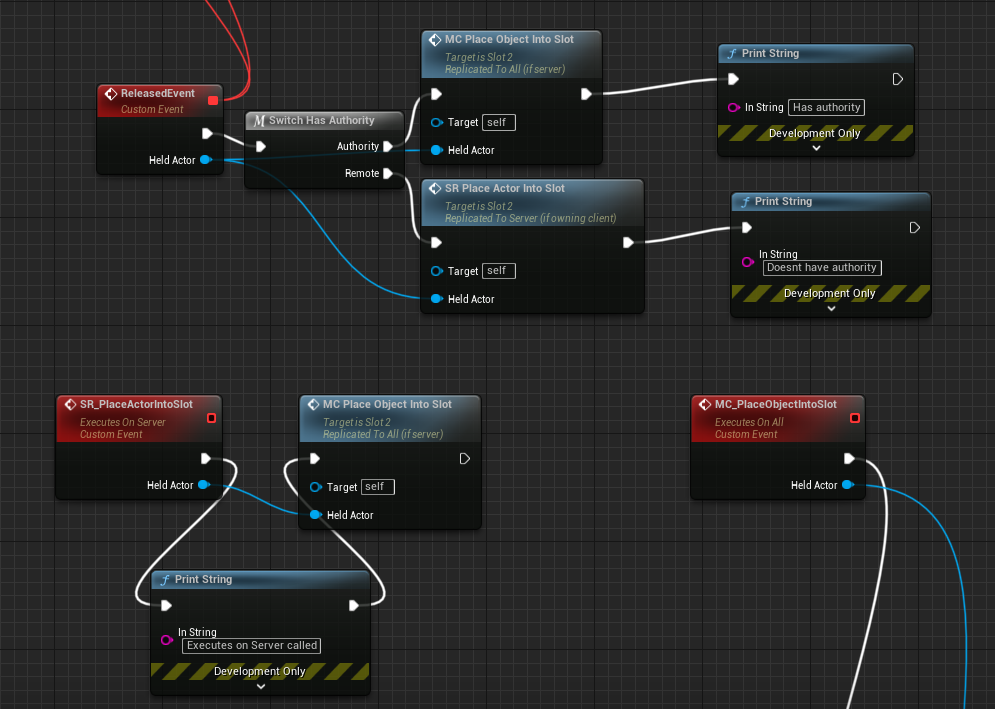
I am trying to accomplish a slotting system for VR UI. I have a dispatcher that's called on my Pawn on grip release. In the Slot BP, I bind that dispatcher to a custom event (image below). This event checks for authority and calls either a run-on-server or multicast event accordingly. However, the run-on-server event is never executed, presumably due to the client not owning the Slot actor. Host functionality works fine (I am using a listening server), but nothing happens when the client does the exact same thing.
Where do I even begin to fix this? I've done quite a bit of research but have ultimately gotten nowhere; I just don't seem to get it and I'm not sure what I'm missing. Any help is greatly appreciated!
https://i.imgur.com/cfn8jlh.png
 mellow stag
Okay so I have this building system setup. I need to have the building objects stop being replicated after being placed down. And then when they get destroyed would start replicating again. Right now the server starts to lag when a lot of people build
 warm lintel
dry torrent
Hey, I've been trying to wrap my head around replication and I'm very confused o...
warm lintel
dry torrent
Hey, I've been trying to wrap my head around replication and I'm very confused o...
- Owner is just what it says, in human speech, it's the owning player (read: PlayerController at the end of the chain) of that specific Actor. This is useful to know/use when calling things on clients, or when you expect things to happen for/by a specific player.
Edit: Double check that the "Held Actor" is actually replicating properly, your BP looks fine.
2nd edit: Something seems wrong with "Client not owning the Slot actor", can you explain the execution flow here?
If it's not owned by a client, it's owned by the server, in which case yeah it wouldn't get called & you need to think a bit differently.
quasi tide
Is there an appropriate class to subclass if I want to do per scenario settings? For example, when the host decides a map, they can change say, the number of enemies that can spawn or how often weapons spawn, etc... (in the context of my game, a scenario is just playing a single map and then going back to the lobby. That map is the "scenario")
I would like for it to reset to defaults after each session. I know about UGameUserSettings, but I don't want it to persist through shutdowns and map choices. Maybe I should just have a regular ol' UObject that holds the info and then resets to the CDO after the map ends?
I know I can parse for the options, but it can potentially be a lot of options and I don't want to pass a bajillion options. Ideally it is also globally accessible. GI subsystem is one candidate, but that lives on the client as well and I'd prefer for it to not exist on the client at all.
 woven basin
Is that not simply a game mode setting?
quasi tide
Yeah - that's what I didn't want to do 😭
So many ones to add 😅
GUS would work fine in all honesty - if I didn't have the requirement that it shouldn't persistent from map to map
Listen server
Yeah - thought about that too, but then the GI exists on the client 😅
How so? GISS gets created along with the GI.
GI isn't networked.
Correct - but the GISS object will exist on the client.
It won't have the correct data (which doesn't matter)
But it will exist
I know at the end of the day it doesn't matter if it exists. But I'd prefer for it to not exist 😅
I know how I can only get it if it is server and all that.
Oh nah - server ain't propagating jack all to clients.
I want a server only GISS that can be created/destroyed because the game doesn't auto start in networked mode. 😅
This is cursed
Yeah
I'm probably just going to end up doing a GISS to be completely honest. Then when map ends reset it to the CDO. And clients will just have an object that exists because I'm lazy.
It's only me 😅
I hope I don't misuse my own design, lol
check(GetNetMode() < NM_Client)
I'm doing a networked game as a super small indie. Already a tough idea. Making dedicated mandatory - that's just asking to fail 😅
You know what - you're right
I am a coward
dry torrent
warm lintel
- Owner is just what it says, in human speech, it's the owning player (read: Pla...
I appreciate your time. I'm still new to Unreal so I'm sure this is messy, but here is a basic breakdown of my flow/execution: https://pastebin.com/k8c3HhnB (I put it in a pastebin as to not flood this chat too much). Please let me know if you need clarification on anything (I'm definitely no writer).
My biggest question here is why SR Place Actor Into Slot is never called; my debug print is never called for it (probably should have mentioned that in my OP, my bad). Since the Slot is placed in the world and truly doesn't have an "owner", I think you're right in that I'll have to take a different approach to this all. Though what would that different approach look like?
I need something that allows the client to tell the server "hey, I want to insert the item that's hovering over the slot area into the slot". Currently physics are being replicated properly so it visually looks fine, just no slotting takes place when the client tries to do so (the item just drops to the nearest surface).
warm lintel
dry torrent
I appreciate your time. I'm still new to Unreal so I'm sure this is messy, but h...
Is the Slot Into event and friends inside a player owned Actor, or are they inside the Slot BP actor?
dry torrent
warm lintel
Is the `Slot Into` event and friends inside a player owned Actor, or are they in...
The code from my image is all inside the Slot BP actor.
warm lintel
Aha. That's the issue then, a server RPC will never run on that when called from a client, because no client owns that actor. You need to either move the logic to a player owned actor and reference the SlotBP actor from there, or if the logic must be contained with SlotBP, it has to call the RPC on it's self as a server owned object
I know it's confusing, but yeah, netcode 😅
What you're currently doing is having a client attempt to call a server function on an object it doesn't own, hence not conforming to the whole authority thing, if that makes sense.
I'm not at all sure what that plugin does at all though so it's all a bit unclear to me, but let me know if I can be of more help
dry torrent
warm lintel
I know it's confusing, but yeah, netcode 😅
Yeah that's kind of bizarre but I definitely get where the idea is coming from. I'm not 100% sure how I would implement that (for my specific use case) but I'm sure I can figure it out with enough time and tutorials, so I won't bother you with that haha. So I just need to make sure that any authority check is done in Pawn or any other player-owned BPs, got it.
I appreciate your help! I'll be sure to let you know if I run into any issues later down the line regarding this <3
warm lintel
dry torrent
Yeah that's kind of bizarre but I definitely get where the idea is coming from. ...
Wellll, basically, don't think in terms of generic game logic anymore. An analogy is ping-pong;
The two players are well, the players (read: player controllers), the ball is "server" owned, and so is the table. The rackets are player owned (read: pawns). Life is your game server.
Player 1 sends an RPC (requests a server rpc) to act upon his racket, life does it's checks and finds player 1 to indeed be the holder (read: owner) of the racket (server rpc implementation gets called here) -> the racket moves.
Racket hits ball, life (read: server) does it's physics, and calls a multicast RPC on the ball to the eyes (read: clients) of the players, updating it's position.
The distinction here is; considering Player 1 tries to act on Player 2's racket, nothing would happen (read: authority/ownership check). And considering either player try to directly affect the ball (or the table) mid-air without using the racket RPCs (read: authority checks), nothing happens, because it's against the rules 😛 .
I wouldn't say strictly keeping authority checks inside player owned objects is valid, as say a monster may need to act outside any player's accord, right. It just really depends on what you're trying to do 🤷♀️
Glad to be of service!
dry torrent
warm lintel
Wellll, basically, don't think in terms of generic game logic anymore. An analog...
This helps a ton to put it all into perspective. The missing puzzle piece for me I think was definitely just the general concept of non-ownership. I'm still slightly confused, but I definitely have a good enough idea now to begin experimenting. Again, thank you so so much! You've been a big help :P
warm lintel
dry torrent
This helps a ton to put it all into perspective. The missing puzzle piece for me...
Anytime! There isn't non-ownership per se, there is always ownership, sometimes it's just not player ownership, in which case things have to happen strictly on the server & by the server - and that gets replicated to clients through either multicasts, client RPCs or UE's replication system.


 old sequoia
jolly delta
Hey <:clown_dead:831523513017827370>
old sequoia
jolly delta
Hey <:clown_dead:831523513017827370>
The Server is performing the Moves sent from your client to the Server but is detecting an issue with the timestamps; the difference between Client Timestamp (left) is too different from the Server timestamp (right, CurrentTimeStamp).
Usually this is caused by the Server framerate hitching and having to redo a bunch of movements with expired timestamps or due to lag.
jolly delta
old sequoia
The Server is performing the Moves sent from your client to the Server but is de...
any clue to find a way to fix that ? i do nothing special so this is pretty weird for my self
old sequoia
jolly delta
any clue to find a way to fix that ? i do nothing special so this is pretty weir...
I recommend you run a profiling test on your server to check the performance.
Are you playing in Editor or in a packaged game? Do you have any networking issues communicating with the server?
Check the full logs for clues as to what might be happening.
jolly delta
old sequoia
I recommend you run a profiling test on your server to check the performance.
A...
i play in standalone net mode with standalone mode and launch separe server option ticked
jolly delta
btw i do that even if the player do not input anything lol
jolly delta
i can't find anything
 forest bolt
Hey guys, can anyone give me a light on using Linux x Windows Server for Dedicated Servers? I would naturally use Linux, but is there any argument against it?
jolly delta
forest bolt
Hey guys, can anyone give me a light on using Linux x Windows Server for Dedicat...
is that necessary to do a dedicated server ? :')
forest bolt
jolly delta
is that necessary to do a dedicated server ? :')
For me, yes. The game I'm working on will have P2P for casual and Dedicated for competitive modes.
jolly delta
my opinion is there is more option under linux to manage container of subinstance of server
but, since you have to download and build the unreal sources to build a dedicated, there is not so much difference for your pipeline to build for windows or linux is it more for managing the infrastructure
but this is only my opinion
jolly delta
old sequoia
I recommend you run a profiling test on your server to check the performance.
A...
seems that is it cause by using things like teleport or like dashing ability. But is it weird because all of teleport event are done on server side and updated trough replication to clients
 fierce grove
Hey guys,
I have a server control moving platform, rotations / translations....
When character step on it they inherit quite correctly standard translation but when the platform rotate it becomes jittery I'm sure their is some UE magic somewhere to fix a basic problem like so?
twilit radish
forest bolt
Hey guys, can anyone give me a light on using Linux x Windows Server for Dedicat...
The biggest argument is money, windows servers are more expensive because they need licenses to use where as Linux based distros can just be used by anyone for free. So whatever server provider you use obviously includes that cost into your plan as they are not going to wind up for those licensing costs (assuming they even provide windows servers in the first place). Here's for example the exact same server on AWS with the only difference being Linux vs Windows.


Seems like a small number, but if you consider that this is for one hour only those costs are going to stack up quite quickly when it's 1 hour * 24 hours for a day and then * 30/31 for a month * potentially multiple servers you're hosting.
 verbal tendon
They say that the best predictor of future behaviour is past behaviour. So I assume you have been very naughty in the past 😂
jolly delta
anyone that can help me to review my problem ?
twilit radish
jolly delta
seems that is it cause by using things like teleport or like dashing ability. Bu...
If you mean this, your problem is probably that once you teleport on the server the client moves that are being sent are not valid any more. Clients predict their movement, so if you teleport on the server your client gets corrected because the client didn't know about your teleport.
forest bolt
twilit radish
Seems like a small number, but if you consider that this is for one hour only th...
Thanks for the detailed answer! I’m more confident to go for Linux now.
twilit radish
LOL. Imagine the default value is not zero and all this time every single Unreal game could have performed better 🤣
 prisma snow
it is 0 and I am not even sure that the emulation is enabled by default
at least in the editor, you have to enable it despite the values set
dunno if those settings are exactly the same as the other ones
I tend to test with bad settings so that I'm not surprised by the worse case scenarios
sometimes extremely bad network conditions even trigger code errors like out-of-bound arrays
which is good imho bcs it helps to put some nice additional checks where needed
twilit radish
Which is exactly why the emulation exists, to find issues like that.
 lyric radish
I'm currently doing a multiplayer blueprint project and all the logic is in the player controllers events marked with " run on server."
So thinking about this from a cheating point of view, if you were able to decompile the client, will you be able to see the "run on server" logic? or does unreal engine strip away this code into whatever it does when you build your game?
twilit radish
With blueprints you can't hide code from people regardless of what you do, in C++ you could remove server side code from client builds if you're also using a dedicated server setup with no listen servers.
So yes, if people really want to they can see what you're up to.
But regardless of hiding your server side code or not the details of "this method exists and can be called from the client -> server" can never be hidden.
 halcyon ore
Reposting this from #blueprint
Hey all!
I feel like this should be a simple answer, but I'm not exactly sure how to use google to get exactly what I need. (that is a networked cooldown system)
I tried to use game time in seconds, but I realized thats relative to each player, so client could be 10 seconds, but server is 12 seconds, so the cooldown system is behind by 2 second already.
All google results turn up how to do it, but none of them are networked, or there networked in ways I don't like.
Since, for reference my code is some simple shoot code, but I have both the client and server verify if they can shoot.
If the client can shoot, then the server checks if it can shoot, if the client can't shoot, then the server is never RPC'd.
But, since the game time is already behind by like 2-3 seconds it seems, that messes up all my cooldown stuff.
Since, client is expecting the time to be past 23, but its current time is 20, but when the server activated the cooldown, its current time was 22, so thats expected for a 1 seconds cooldown on the server, but on the client, thats 3 seconds.
twilit radish
This is because of latency I assume, and if not on the same device because devices generally do not have the exact same internal clock time. There's a pinned message in this channel with an article for a better synchronized network clock for in Unreal, would recommend looking at that 🙂
real ridge
halcyon ore
Reposting this from <#221798862938046464>
Hey all!
I feel like this should be a...
I am using timer when I pick bomb and whole time math is executing in 1 bp and just multicasting to widgets of others and its working without delay
twilit radish
There's definitely delay in that in a real environment simply because of the network calls.
real ridge
twilit radish
There's definitely delay in that in a real environment simply because of the net...
but I didn't saw delay at mine solution
tested it few times
twilit radish
Are you doing this in the editor?
real ridge
twilit radish
Are you doing this in the editor?
packaged game
twilit radish
Were both clients on your own PC/the same network?
Because network calls simply have delay, that might not be noticeable at times with a good connection or LAN/the same PC but it's there for people with a worse connection.
old sequoia
halcyon ore
Reposting this from <#221798862938046464>
Hey all!
I feel like this should be a...
There's ReplicatedWorldTimeSeconds you can fetch from the Game State.
It's quite rough around the edges and doesn't sync up too well, it has ~300ms margin of error.
You can improve it slightly by subtracting the ping / 2 at the receiver's end if you're passing timestamps.
real ridge
server is running in Linux on my friend's server and I was joining twice from my laptop by using 2 accounts
but I will take a better look on to it
maybe I didn't notice
twilit radish
Try using the emulation profiles in the editor, they can be used to specifically set delays to emulate bad connections 🙂
real ridge
I will
jolly delta
twilit radish
If you mean this, your problem is probably that once you teleport on the server ...
it also append on just a simple mouving so....
is doing input movement on player controller is right ?
dark edge
jolly delta
seems that is it cause by using things like teleport or like dashing ability. Bu...
Show your code
But I have a feeling your teleport is being done something like
Input -> run on server event -> teleport
and that's now how the CMC likes to work.
jolly delta
dark edge
But I have a feeling your teleport is being done something like
Input -> run on...
my teleport is a gameplay part so only the server call it so...
but event a simple input moving throw the warning
dark edge
Show your code. That's not how the CMC works. CMC has prediction and correction.
halcyon ore
real ridge
I am using timer when I pick bomb and whole time math is executing in 1 bp and j...
Good idea.
But, like others say, it’s more replication, which is more delay, and given how my game is setup, that’d be a lot of replication.
halcyon ore
old sequoia
There's **ReplicatedWorldTimeSeconds** you can fetch from the Game State.
It's ...
Oh, that good to know.
I had read somewhere there was a replicated time, but I didn’t realize it was off game state.
jolly delta
PlayerController.cpp
void AProductionPlayerController::MoveUpDown(float X)
{
    APawn* const MyPawn = GetPawn();
    if (MyPawn && bCanMove)MyPawn->AddMovementInput(FVector::ForwardVector * (bInvertControls ? -1 : 1), X);
}

void AProductionPlayerController::MoveRightLeft(float X)
{
    APawn* const MyPawn = GetPawn();
    if (MyPawn && bCanMove) MyPawn->AddMovementInput(FVector::RightVector * (bInvertControls ? -1 : 1), X);
}

void AProductionPlayerController::SetupInputComponent()
{
    // set up gameplay key bindings
    Super::SetupInputComponent();

    InputComponent->BindAxis("Move Up/Down", this, &AProductionPlayerController::MoveUpDown);
    InputComponent->BindAxis("Move Right/Left", this, &AProductionPlayerController::MoveRightLeft);
}```this is playerCharacter


my collider is replicated component

@dark edge anything else is relevent ?
jolly delta
i'm exhausted spend 3 days on it without finding any clue...
verbal tendon
Riiiiggghhtttt 😁 Of course you are 😉
For in fact I too was born a godlike developer. There have been absolutely no countless amount of mistakes and learnings along the way
🤝
near granite
This is the code that makes Niagara follow the hand of the pawn placed in the level. This don't follow the hand and need to follow each other's hands locally, and there is no need for synchronization.

 shy yarrow
my game in the editor works perfectly, but when I package it and test it on Steam, one of the important features does not work properly, that feature is I did a logic that AI must leave alone players which injured and they must look for chasing other alive closest players! this works great in the editor but when I packaged it and tested it on steam , the AIs still try to chase and attack injured players, anyone have idea what is going on?
faint parcel
fathom aspen
To wait for them to replicate like you would wait for any other replicated prope...
But the OnRep_Teams for the clients' GameStates would have run by then, wouldn't it seeing as how Teams was replicated but with null PlayerStates in them?
Basically the flow is this:
A player joins, they are added to an empty team's PlayerStates array (e.g. team 1).
Teams (TArray of teams) is replicated to the clients (inside a GameState).
The Teams structure arrives and the PlayerStates array inside Team 1 has an element but it is nullptr.
Would waiting change that nullptr to the correct PlayerState (when the PlayerState is replicated?) and eventually hit an OnRep_Teams that had a valid PlayerState in Team 1's PlayerStates array?
twilit radish
Just an idea, but I would personally just ditch the array and instead keep the value inside the playerstate it self. It's going to get pretty annoying if you want to deal with constantly having nullptr's inside that array because things have not replicated properly yet. Even if a new client joins other clients can now again potentially have a nullptr because that playerstate was not replicated yet.
faint parcel
Huh I moved some code around (cough and actually moved past the first hit on the OnRep_Teams breakpoint cough) and OnRep_teams is hit twice in my case, second time the PlayerState is valid!
Sorry for wasting time asking general replication questions, just trying to get a feel for the "sane" way of doing this 🙂
faint parcel
twilit radish
Just an idea, but I would personally just ditch the array and instead keep the v...
That is something I just briefly considered. I wouldn't lose the ability to iterate teams either, it would just be a bit more other-way-around by first iterating players, then checking their teams. Good suggestion! 👍
A bit of a "does Teams have players or do players have teams?" situation maybe.
twilit radish
And the player array in gamestate actually has properly replicated states. So you'll never run into nullptr stuff.
- don't have to bother with cleaning and updating your own array xD
faint parcel
That's also true!
pallid mesa
yeah the ps should have the team variable (reiterating what @twilit radish said)
that's the common implementation
twilit radish
😂
faint parcel
See colleagues, this is the type of answers I enjoy the most, honest guiding opinions. This stuff can sometimes be very "You Can Do it AAAANNNYYWAY you Like!"
"But I don't KNOW what I like" 😐
twilit radish
I try to provide the solution I use or just like best in those cases lol.
pallid mesa
epic samples often expose these practices... shootergame, lyra...
there's now shootergame lts
from super@fossil veldt
 fossil veldt

twilit radish
You know what would be a cool idea, a subsystem or whatever where you can register an actor to depend on a different actor for when it's fully networked and then it shoots off a broadcast towards that registered actor. Basically what Jambax made but more modular 😛
Kind of related but also not so don't mind me x)
fossil veldt
twilit radish
You know what would be a cool idea, a subsystem or whatever where you can regist...
That's just the GameplayMessenger from Lyra
twilit radish
Yeah but Jambax's system is hardcoded for specific stuff and just fires a generic event after all of those are initialized.
pallid mesa
yes jambax subsystem is for ps, pc, pawn... common stuff, i see now what you mean
and snaps is right
twilit radish
I'm referring to:
PlayerState -> wants to register for a certain pawn to exist.
Pawn replicates -> call PlayerState broadcast or immediately call it if it already existed in the first place.
twilit radish
Honestly Epic should make this, even the engine has its struggles with 2 things depending on each other and then doing weird workarounds xD
pallid mesa
yeah lyra has a component exclusively dedicated for initialization
to cover pawn, playerstate and asc
it's quite convoluted XD
twilit radish
An entire component just for that? Oof.
pallid mesa
yeah XD
fossil veldt

twilit radish
:blame_snaps:
prisma snow
pallid mesa
yeah lyra has a component exclusively dedicated for initialization
sound like lots of fun
which on the other hand I get bcs networked initialization and race conditions tend to be tricky
twilit radish
Epic: Ignores most PRs. Also Epic: https://github.com/EpicGames/UnrealEngine/pull/10058
😂
fathom aspen
I'm on phone, was only the name of the function changed?
 novel shadow
Hey there, anyone know what could cause the host player to loose its player controller after a seamless travel??
I am on 4.27+ and it only happens sometimes and on specific PCs. I am doing a seamless travel and after the level is activated on the server the code waits for all the clients to sync up with the host to that same point. While he is waiting up and loading more sublevels, suddenly the game mode says that a player left the game. The host player!!??
Funny thing is - the game works -> all the clients can play but the host is on a black screen because he doesnt have a player controller anymore 😅 The host can even seamless travel with all the players back to the lobby - he still doesnt have a player controller anymore and the host is not in the gamestate player array - it is very weird. Anyone has any ideas?
 acoustic veldt
Hello All, Question,
When I use set view target (to make a dead player see the game from the perspective of the player who killed them) in multiplayer. Is there an explicit way to choose which camera to follow IF the pawn has multiple cameras?
 deep shore
acoustic veldt
Hello All, Question,
When I use set view target (to make a dead player see the ...
deep shore
acoustic veldt
Hello All, Question,
When I use set view target (to make a dead player see the ...
try using activate/deactivate component nodes locally, using references to the two cameras
acoustic veldt
Ah, so you mean deactivate the unwanted camera and activate the wanted one on the pawn BEFORE setting view target?
deep shore
I would try it after setting the view target, but i’m not sure it makes a difference
if you’re using a listen server this could potentially cause problems for their camera too, so watch out for that
the hosts camera
deep shore
You’re welcome 👍
 pseudo lance
does unreal engine have any multiplayer systems that allow for rewinding the game logic up to a point to check whether a clients version of events could actually unfold, and to settle disputes between clients on a case by case basis rather than just considering either the client or server as authoritive and taking it's word for it in all cases? (for example, one client gets shot in the shooters screen, in the clients screen that gets shot they were behind a wall for 2 seconds. Is it possible to have unreal engine allow she shooter to count his shot as a hit if in the servers replicated gamestate the shot player was out of the shooters view past a certain millisecond threshhold?)
fossil spoke
pseudo lance
does unreal engine have any multiplayer systems that allow for rewinding the gam...
This method is not directly exposed as a system in Unreal, it is generally up to the developers of a project to implement that as they need.
I believe the Shooter Game, Lyra and Unreal Tournament examples have some form of this.
It would be up to you to implement it in your own project.
 abstract pike
I'm having a situation where a new actor isn't replicating to client in time to receive a multicast that is called from the server shortly after it's spawned. Is there any way to guarantee that a multicast will run on the client once the client has actually replicated and spawned?
fossil spoke
abstract pike
I'm having a situation where a new actor isn't replicating to client in time to ...
No, you must wait for it to be ready before calling the RPC.
abstract pike
fossil spoke
No, you must wait for it to be ready before calling the RPC.
Yikes... Any nice way to do that which isn't collecting responses from all clients?
fossil spoke
You could send an RPC back to the Server that notifies it that the Client version is ready and then use that to trigger the RPC.
abstract pike
Yea OK, not ideal if there are a few clients you're waiting on though..
I guess I could try it as a rep notify property
fossil spoke
That would work, but keep in mind if the Actor is affected by Relevancy, that would likely cause the OnRep to trigger for everytime the Actor becomes relevant again.
abstract pike
fossil spoke
That would work, but keep in mind if the Actor is affected by Relevancy, that wo...
As in, when it's no longer relevant the actor is destroyed on client and so if it became relevant again it would send that property again and trigger a rep notify?
fossil spoke
Yes
abstract pike
Unfortunate
fossil spoke
Replicated Variables are stateful, thats their purpose.
RPCs are events.
They both have their clear purposes.
abstract pike
Yea it's just a huge pain to get an event to fire reliably on a short lived actor 😆
Maybe I can sort of fudge it where it just runs on begin play
fossil spoke
What are you doing?
abstract pike
Like an ability effect
abstract pike
This one happens to be a teleport
But it would have to work for a variety of things like explosions and fire on the ground etc
In this case the total lifetime is around half a second as it hides the unit, moves it, and then shows it.
fossil spoke
You are spawning an Actor for half a second to teleport another actor?
abstract pike
fossil spoke
You are spawning an Actor for half a second to teleport another actor?
Yea....
It's the downside our "standard" way of doing effects
There will be some like a .... i dunno earthquake that could last like 15 seconds
fossil spoke
Why do you need to teleport explosions and fire?
abstract pike
Oh sorry, those are other examples of ability effects
Not things that need to teleport
fossil spoke
So what needs to teleport?
fossil spoke
Then why not just implement that functionality for that unit on that unit?
Are you using GAS at all?
abstract pike
fossil spoke
Are you using GAS at all?
No unfortunately, trying to get a custom thing going but it's only half done which leaves big gaps for stuff like this
fossil spoke
abstract pike
No unfortunately, trying to get a custom thing going but it's only half done whi...
Why are you using a custom thing?
abstract pike
Well yea that's a big question, essentially to get a timeline of actions stored for each unit so it could be saved/rewound
It's not really feasible to try switch to GAS at this point anyway
fossil spoke
Spawning an Actor to teleport another Actor seems really silly.
abstract pike
Yea I see your point though about spawning an actor being crazy for the very short lived effects
It's ended up that way as a side effect of everything going through the same ability system
But it's true that it could just be done differently
Maybe we just have to call an event on the unit instead in this case
I'll have a play around with it
Thanks for the info
abstract pike
fossil spoke
GAS would have made this easy TBH.
Yea I know, I look at it with envy often 😆
fossil spoke
We converted over to it after building a custom system. It was worth it.
 sonic jasper
can anyone tell me why when i RPC from Client to Server PlayerState, spawn an actor and add to a replicated array (TArray<AActor*>) on the playerstate all clients arrays are updated ? not the behaviour i was expecting? Shouldnt that still be owned by the client and each playerstate maintains its own array of the actors it RPC'ed to be spawned?
fossil spoke
sonic jasper
can anyone tell me why when i RPC from Client to Server PlayerState, spawn an ac...
If the Actors are Spawned by the Server then they exist for all Clients, if the Array is replicated it will pass down to Clients whatever values it contains when set by the Server.
sonic jasper
This is for the clients units, I only want the array on the playerstate to have that clients units. I tried setting the replication condition to owner only but did not seem to make a difference. Without having them replicated the listen server / client doesnt seem to be able to access any non-replicated array on the playerstate even from a widget.
Would I just have to have like a filtered get for the client or something? That the best way?
fossil spoke
Well yeah, you can just add all units that get created to every PlayerState expecting that PLayerState to know its meant to be only holding the ones that particular Client made.
You need to tell the correct PlayerState for that Client to add the Units that Client created yourself.
sonic jasper
yeah ok, thought RPC from the playerstate was doing that.
fossil spoke
Depends on how you have it setup.
sonic jasper
isnt the playerstate setup default framework
fossil spoke
I mean it depends on what you are even doing with the RPC etc. I have no idea what your code looks like so I couldnt even speculate on why it may not be working.
Im only expressing what you "should" be doing.
sonic jasper
yeah, i have to be doing something wrong because atm it feels like the server is running a share playerstate for all clients
 neon mango
@fossil spoke is Lyra pretty decent at handling client prediction/latency issues to learn from?
fossil spoke
neon mango
<@223322728424407042> is Lyra pretty decent at handling client prediction/latenc...
No idea, I have barely looked at it. But I would expect that it does.
If not, Shooter Game can still be quite relevant.
Even UT can be relevant for learning.
neon mango
I've looked at that but I don't think they do anything fancy in regards to handling network lag
fossil spoke
Lyra?
neon mango
Shooter Game
sonic jasper
    UFUNCTION(Server, Reliable)
void Server_CreateUnitGroup(FPrimaryAssetId UnitSetAsset);```should execute on the servers copy of that clients playerstate?
neon mango
I'll have to poke around Lyra for it's Network code then
fossil spoke
sonic jasper
```C
UFUNCTION(Server, Reliable)
void Server_CreateUnitGroup(FPrimaryAss...
If its in the PlayerState then yes thats correct.
If that RPC is then spawning a new Actor and adding it to the PlayerStates replicated Array variable then that PlayerState will contain only that Clients Units.
However, keep in mind that PlayerStates exist on all Clients for all Clients.
Meaning that another Client can read another Clients PlayerState and see what Units they have.
Fixing that would be to change the Array to be OwnerOnly, as you mentioned earlier in the discussion.
sonic jasper
DOREPLIFETIME_CONDITION(ASPlayerState, PlayerGroups, COND_OwnerOnly); like so?
fossil spoke
Yep
sonic jasper
atm that PlayerGroups array seems to have every group in the game
fossil spoke
Its an array of Actors right?
sonic jasper
yeah
well class derived
    UPROPERTY(Replicated)
TArray<AUnitGroup*> PlayerGroups;```AUnitGroup : public AActor
fossil spoke
So how are you then adding to it?
sonic jasper
2 from each client atm
when i go to access it in a widget i get 4 on the client and 0 on the listen server
fossil spoke
Also probably should ask, how are you determining that you think it contains all Units not just those of the owning client?
sonic jasper
just logs
fossil spoke
Show the code for where you call Server_CreateUnitGroup
sonic jasper
havent quite figured how to do inspector with sessions yet
fossil spoke
Its likely you are selecting the same PlayerState when you think you arent.
So you are unintentionally creating 4 units for the same Client without realizing you are.
sonic jasper
yeah
its actually getting called from a delegate after loading primary assets
TArray<FName> LoadBundles;
            LoadBundles.Add("Placeable");
            const FStreamableDelegate Delegate = FStreamableDelegate::CreateUObject(this, &ASPlayerState::Preload_OnPlayerUnitSetAssetsLoaded, PlayerAssetList[i]);
AssetManager->LoadPrimaryAssets(CharacterSetData->Units, LoadBundles, Delegate);```then its just calling the RPC
void ASPlayerState::Preload_OnPlayerUnitSetAssetsLoaded(const FPrimaryAssetId UnitSetAsset)
{
    Server_CreateUnitGroup(UnitSetAsset);
}```for each group
fossil spoke
Ok so then where does the preloading get called from?
Including surrounding code is important for context.
sonic jasper
the whole chain originates from the player controller OnRep_PlayerState
fossil spoke
Is this just for testing?
sonic jasper
nah this is my trying to figure it out lol
its to preload data from primaryIDs
then generate a UI so player can place the units
fossil spoke
Alright well, the reason the ListenServer isnt getting any created is because the OnRep for the PlayerState wont get fired, since the Host is the Server.
Cant answer why there is 4 on the other Client.
sonic jasper
yeah right, the host logs it executes the onrep
fossil spoke
You sure?
sonic jasper
this is host log
 fossil spoke
Its hard to say without seeing all your code.
When asking for help, its always useful to post as much code as possible
It saves people asking a million questions
sonic jasper
yeah its just pages but, its not just calling that function =/
its preloading assets and then assets from those assets
might just move it back to player controller where it was working and deal with playerstate another time
sonic jasper
fossil spoke
It saves people asking a million questions
thanks for your help
fossil spoke
sonic jasper
thanks for your help
I wouldnt really think you would want it on the PlayerState anyway, could be abused in some way. Seems like a local client only thing, for which the PlayerController is ideal.
 lavish pier
fathom aspen
To explain the cause <@141521475478880256>
lavish pier
fathom aspen
To explain the cause <@141521475478880256>
Wait, is ue5.1.1 out yet?
graceful flame
Looking at the Network Profiler at the moment, which filter is the server and which one is client?

 versed ocean
typically the 7777* is server, but could be whatever you have it setup
graceful flame
Only the second one :54189 has any info for actors
versed ocean
then, sounds reversed for some weird reason
versed ocean
I mean again, it doesnt matter per say... its just a port number
near granite
Client can't join to the server with this log
 winged badger
GS is your gamestate, yes?
near granite
winged badger
GS is your gamestate, yes?
That's right!
I'm trying this for levels to look different for each players
https://www.reddit.com/r/unrealengine/comments/guhdw4/load_different_level_without_leaving_server/
This can cause this problem?
winged badger
what did you do with your gamestate thats very weird?
because it can't open an actor channelf or it
client connects fine, unreal replication system boots you out
it is also possible that your client and server do not have same FRepLayout for that class
near granite
winged badger
client connects fine, unreal replication system boots you out
how could you know in which log sentance?
winged badger
one that has Actor channel failed:
near granite
 near granite
winged badger
it is also possible that your client and server do not have same FRepLayout for ...
near granite
winged badger
it is also possible that your client and server do not have same FRepLayout for ...
The specified client runs the pawn's function through the level sequencer. This function changes the name variable of the server game state. As soon as the game state variable changes, the tick function that checks it triggers an event simultaneously on all clients. It was made this way to synchronize the moment of event occurrence between clients because clients wear equipment and exist in overlapping spaces in the same place.
winged badger
this is dedicated server?
near granite
yes!
near granite
a client(ndisplay) is PIE... others(hololens) is run on exe file..
near granite
winged badger
its likely your server and client builds are out of sync
I am deliberately taking different levels between servers and clients. What is at the server level is not at the client level. What is at some client level is not at some client level. Not only the levels, but also the pawns and level sequencers are different. Is this okay?
winged badger
not if they are connected
one level can be opened at a time, and has to be same one between client and server
near granite
I made a very simple level(has one actor in level) and made sure that it worked as intended even if I made a level with a different configuration for each user. So I used this trick. Is this a dangerous method?
https://www.reddit.com/r/unrealengine/comments/guhdw4/load_different_level_without_leaving_server/
I thought this article meant that the method I tried was fine(not good at English..)
novel shadow
novel shadow
Hey there, anyone know what could cause the host player to loose its player cont...
anyone has any ideas about my issue or how i can proceed to find the cause? Short: Host player loses its playercontroller (the gamemode receives a logout after seamless travel) - clients can all play but the host doesnt see any of that since he doesnt have a player anymore
 vivid abyss
novel shadow
anyone has any ideas about my issue or how i can proceed to find the cause? Shor...
vivid abyss
novel shadow
anyone has any ideas about my issue or how i can proceed to find the cause? Shor...
Override APlayerController::EndPlay() and put a breakpoint in it and see what/when/who is destroying the controller. Might give you a clue?
novel shadow
vivid abyss
Override APlayerController::EndPlay() and put a breakpoint in it and see what/wh...
That is a good idea - unfortunately it only happens in packaged builds so i cannot debug through - however thats a good point - i will log the end play reason - maybe that will give me clues
Any other ideas? (I have to log all the things that come to mind since i can only start one or max two playtests per day with that many people and i have a tight deadline 😅)
 molten badger
Hey 🙂 is there an easy wat to Split a HUD Interface and the cineCamera on two different screens? For now only one of them is working, but never both :/
near granite
winged badger
not if they are connected
Thank you for your help! I'm trying to do in other way!
old sequoia
novel shadow
That is a good idea - unfortunately it only happens in packaged builds so i cann...
Can you build in Development/Debug configuration? Or does this only occur in Shipping?
Then you can attach a debugger via Visual Studio
novel shadow
old sequoia
Can you build in Development/Debug configuration? Or does this only occur in Shi...
unfortunately it only happens quite consistently on other machines... but never mine... and I am currently in shipping - but I just found out about the lognetpackagemapverboselevel - maybe that will tell me something
winged badger
novel shadow
unfortunately it only happens quite consistently on other machines... but never ...
does it happen in non-shipping packaged builds?
do you have a source engine available?
novel shadow
winged badger
does it happen in non-shipping packaged builds?
i need to test this today
yeah i am in a source engine
fierce grove
been looking for good documentation to replicate people position on moving platformed owned by server ? Trying to see if I can tweak some stuff on the cmc
vivid abyss
Do you need bUseLobbiesIfAvailable = true; for Dedicated Steam servers? If I have it true it crashes trying to create lobby (for matchmaking).
damn I meant to post than in onlinesubsystems.
neon mango
abstract pike
I'm having a situation where a new actor isn't replicating to client in time to ...
Seems like Iris is going to be doing deferred RPC. Would that help you?

Epic Developer Community
This tutorial walks through Iris, a new, experimental replication system that seeks to improve the performance, scalability, and maintainability of the ...
twilit radish
I wanted to try something in a source build and I messed up x)
 twilit radish
Moral of the story, don't change the Actor.h file.

 clear island
ah yes, the accidental compile, been there just a few weeks ago
a story in 3 pictures:


 twilit radish
It was not accidental, but it's pain regardless xD
clear island
mine was very much accidental, but curious enough it was also Actor.h
I was like, damn today the UE editor is taking so long to start
goes back to rider
twilit radish
🤣
clear island


 twilit radish
I'm looking at if something I found actually works but it wasn't properly exposed. There's a variable that 'supposedly' keeps track of if a client acknowledged an actor from the point of the server. So I added a delegate to the actor with the connection and am curious if it will actually work correctly or not 👀
In theory it sounds pretty nice to know whether or not a certain connection knows about and has actually spawned a certain actor on their side without having to worry about doing stupid RPCs from the client side.
clear island
if its a pawn can you not use the OnRep_State ?
if not a pawn, then beginPlay() ? 🤔
twilit radish
This works for all actors.
BeginPlay on the server does not guarantee (and is pretty much always the case) means that the actor has replicated to a certain connection/client.
clear island
I mean checking beginplay on the client
twilit radish
Yes, but how does the server know that the client knows it has started BeginPlay?
clear island
ohh I see you want to know from server side
twilit radish
You either need to RPC to the server or the server doesn't 'know'.
clear island
yea I guess so
twilit radish
The way Unreal works is that clients acknowledge data internally in the replication system so that the server knows what data to send etc. and that's where my variable comes from. Assuming it actually properly gets set you can on the server get notified of when a certain connection has successfully spawned an actor on that specific client's side 😄
 lament garnet
twilit radish
The way Unreal works is that clients acknowledge data internally in the replicat...
lament garnet
twilit radish
The way Unreal works is that clients acknowledge data internally in the replicat...
we all thank you for testing this, let us know please so we dont need to recompile actor
👀
whats the secret variable tho?
twilit radish
lament garnet
whats the secret variable tho?
There’s a “SpawnAcked” variable in the ActorChannel.h but it’s awkward to get to and has no delegate or anything when changed.
 blazing spruce
Hi, someone remind me.. if set a replicated bool on input of a character it doesn't replicate properly, if i do it on the begin play, it does, why is this again?
Im sure ive seen it mentioned before.. is it something to do with input being called on client or something?
 kindred widget
Replication works from Server to Client. If a client does input, that is on the client. You would need to ServerRPC that to server and then set it for it to replicate to all.
lament garnet
twilit radish
There’s a “SpawnAcked” variable in the ActorChannel.h but it’s awkward to get to...
name at least sounds promising
twilit radish
Yeah 😄
twilit radish
I'm pretty sure it works. The one "but" is that the server it self doesn't trigger the delegate, I guess because it doesn't actually "replicate" to it self and just spawns it?
What I did the in the video is set the cull distance to like 5 metres or so but more importantly I set some emulation. Incoming traffic is instant but outgoing traffic for clients is 0.5 seconds. As you can see in the video the messages print roughly 0.5 seconds later when the actor becomes relevant to them. Which would in my head indicate that the message has arrived on the server with "hey, I received your data" meaning it would work.
So uh.. Success I suppose? 
 hardy monolith
Hello! I'm having a problem that players cannot see each other's pawns 😦
When I try to take a look in the editor:
- Server can see both pawns
- Client1 can see only Pawn1
- Client2 can see only Pawn2
But at the same time, when Pawn1 or Pawn2 collide with objects around, both players can see their physical reaction to it.
On the screenshot are pawn replication settings.
 twilit radish
Try using “always relevant” in there and see if it does anything
twilit radish
Do you dynamically assign a mesh to them or something similar?
Also, how are you spawning the pawns?
hardy monolith
I guess always relevant helped, I just didn't notice the pawn because it turns out to be too small
It's set as default pawn on GameMode and I have 2 player starts in world
Thanks for help!
I also got the another question, I expected it might be related, but looks like it's not (sadly)
Sometimes there happens that only player 1 has Pawn spawned, the other player doesn't get pawn assigned.
As I mentioned above, Pawns are just assigned as default pawn on GM + I have 2 player spawns in world (and those are having enough space around + Spawn Collision Handling set to "Try to Adjust Location, but always spawn).
On first screenshot is correct scenario, when both players are loaded fine
On second another player doesn't have pawn spawned and is just attached to camera in random place (I suppose 0,0,0)

 twilit radish
Is there nothing in the logs? Usually the engine complains about something.
hardy monolith

I can see two suspicious things here:
- about world context
- about find teleport spot
 twilit radish
I mean.. Seems pretty obvious to me 😛
Couldn't spawn Pawn of type ...
hardy monolith
This is my component structure, Mesh component is assigned as Root
twilit radish
It's complaining about it overlapping with geometry so you likely have one of both too close to the ground for example. But I think you also did not correctly set the spawn flags as it should still spawn if you ask it to.
Unless the engine does something weird I suppose.
hardy monolith

 twilit radish
That's to my knowledge the unfortunate part, you need to set this on your actual pawns I'm pretty sure. Instead of what seems like the player start it self, it probably just has those details because it's an actor it self.
So try updating your pawn with the correct flag and see if that fixes it 🙂
twilit radish
Because the spawn is an actor too. So it probably inherits it from the actor code which is pretty confusing yeah.
hardy monolith
Thanks you very much, Thom!
sonic python
Hey Guys
I don't why
The Session nodes are failing even in play in editor
Create Session Fails, Join Session Fails , Destroy Session Fails.
Anybody has any idea
Why it's happening?
And how to fix it?
real ridge
guys how I can get player State in game mode ? just to get values from there
i need find his spawn acording to value in player state
lament garnet
twilit radish
I'm pretty sure it works. The one "but" is that the server it self doesn't trigg...
cool man, im not sure how useful it is but thats good to know
abstract pike
neon mango
https://dev.epicgames.com/community/learning/tutorials/Xexv/unreal-engine-experi...
That would be incredibly handy, but, that's also experimental and likely to change so I don't think we'll be switching to that unfortunately
fossil spoke
neon mango
https://dev.epicgames.com/community/learning/tutorials/Xexv/unreal-engine-experi...
What you think its doing is not what its doing.
RPCs will be sent after the connection is updated, after replication data has been managed.
Before, RPCs would be sent at an inconsistent/unpredictable time in relation to replication data.
 wooden abyss
Hello, I have a question regarding my multiplayer game using listen server: I'm using InputAxis for my PlayerController and when another client joins the Session I get a lot of Nullpointers. After searching the Discord and finding some posts about this problem I got around to fix it by using the IsValid BP function. Now it looks like this:

Is this actually a proper fix for the problem? Or should i solve this any other way? It's actually my first time working with multiplayer and I just got around implementing the session and having a client join the session
And I would really like to know if that is a normal behaviour that occurs with listen servers and clients connecting to a session
Or do I have to configure something before, so that this problem doesnt even occur?
fossil spoke
AxisMapping are triggered every frame. If your PlayerController does not have a Pawn (could be that you are presenting a Character selection screen on joining etc etc) then GetControlledPawn would be null. So yes, this is an acceptable approach to "solving" the issue.
wooden abyss
My "game" is really barebones right now and after joining the session I just get thrown into the level without any character selection whatsoever
So does this just happen because of how the engine actually instantiates Player Pawns and Controllers?
And I know there are the new enhanced inputs that i didnt get around to using yet. Would using this make any difference?
fossil spoke
Its likely that the AxisMapping is being triggered a few times before the DefaultPawn is spawned.
I wouldnt worry to much about that as an issue for you right now.
Assuming that its working as you expect when you have a Pawn correctly spawned?
fossil spoke
Then given you are pretty new to MP stuff, I wouldnt focus to much on this particular issue right now.
wooden abyss
Was just wondering if I'm missing some fundamentals and it might be worth getting this out of the way before I try doing anything else so I dont get any other related problems down the line 😅
fossil spoke
The fundamental might be that the DefaultPawn is not spawned immediately in relation to the Controller and its AxisMappings being ticked.
Which in the long run isnt a major issue.
wooden abyss
Well, thank you for your support!
dark edge
real ridge
guys how I can get player State in game mode ? just to get values from there
You can just get the player state for a controller
real ridge
dark edge
You can just get the player state for a controller
yea I got it but last thing This is how I am setting player state variable team at the beginning of it but its propably is not set on server when on authority is not remote isnt it?
 wooden abyss
Ok, another question: When a client joins a session the PlayerPawn(which is just a "CameraPawn" that only has a SpringArm with a Camera and no Meshes) is spawned under the map and the client sees this before getting his position correctly set to the PlayerStart Actor:

Is there an easy way to fix this? It also feels like the Pawn isnt correctly instantiated. The SpringArm doesnt have the correct length and the Camera isnt even rotated
And i dont set those dynamically or anything
The host does spawn correctly
And the same goes for the singleplayer. PlayerPawn starts at the correct position with the correct SpringArm length and camera rotation
wooden abyss
Ok so I started PIE and created a session. Then I exit the PIE and started a new PIE. Tried to find a session but it didnt find any. So I would guess the session is destroyed upon exiting the PIE for the Host
Is that what you meant?
 grizzled stirrup
No because you don't find sessions that you are hosting AFAIK
It's more that your session doesn't get destroyed automatically at least in my case as a session is valid for me when restarting PIE after creating one
 copper quarry
Ive been attempting to create a multiplayer host and join server system. My code allows me to create a session and others can join it into a lobby map. My issue comes into play when attempting to move all the players over to a new map after the button has been pressed. Ive already tried researching videos and none have shown what im looking for, which is why I joined the server. The image above is the lobby button for starting the match when everyone is in the lobby.
 grizzled stirrup
wooden abyss
Ok so I started PIE and created a session. Then I exit the PIE and started a new...
grizzled stirrup
wooden abyss
Ok so I started PIE and created a session. Then I exit the PIE and started a new...
I am using this logic to determine if a session is valid btw: SessionInterface->GetSessionState(GameSessionName) != EOnlineSessionState::NoSession
wooden abyss
Ok I get why checking if a session is valid or not is important but I dont quite get the relation to the problem regarding my second client connecting and having a weird starting position before it actually gets moved to the correct PlayerStart position
grizzled stirrup
Sorry I was asking an unrelated question to yours originally
Regarding your question you can temporarily have the player's view set to a view target before pawn is possessed
Or keep the loading screen up until players have actually spawned
 robust willow
Why does Split Screen mode show hair on the left but not on the right?
 wooden abyss
grizzled stirrup
Or keep the loading screen up until players have actually spawned
wooden abyss
grizzled stirrup
Or keep the loading screen up until players have actually spawned
Yeah i was thinking about this too
Trying to understand what exactly is happening though
grizzled stirrup
You can step through the code in AGameModeBase
wooden abyss
I did find out that if i disable my camera after like 5 seconds it seems to swap to a different viewpoint that has the same orientation as what I see in the first second after joining
grizzled stirrup
What is typically happening is the player controller connects but there is no pawn ready to possess, so the game mode spawns one and places it at a valid PlayerStart and then the PlayerController possesses it after
wooden abyss
So i think there is some default viewpoint that is getting used
copper quarry
robust willow
Why does Split Screen mode show hair on the left but not on the right?
is the mesh set to only visible to owner?
Also is it replicated on the server?
wooden abyss
Alright I guess I will just go with a loading screen if thats just the basic behaviour of how the pawns get spawned and how they are possessed by the controller
Thanks a lot @grizzled stirrup
real ridge
Hello guys I have question it is possible to make respawn on session? If my player die he will be destroyed but then after few sec respawned again, how to achieve that? throught game mode?
thanks
s🙏🙏
 hexed pewter
Stuff like gun impact decals or impact particles can be spawned on server and then simply replicated down to clients I dont need multicast for that correct?
fossil spoke
hexed pewter
Stuff like gun impact decals or impact particles can be spawned on server and th...
You would not want to try and replicate those.
Cosmetics should generally be applied on the Client only via an event that has context for them.
hexed pewter
I see so I presume multicast from server to clients to spawn these cosmetic visual effects is more optimal,
is that because replication would keep track of the object (decals/particle emitters) and needlessly update them while they are not really that impactful? If yes then would conditionally replicating them only initially with COND_InitialOnly be okay or is it still outperformed by multicast + spawning on clients?
grizzled stirrup
No need for multicast either in most cases
For example a rocket exploding, you'd only need to replicate a RepNotify bool that says bIsExploded and then the client can play all of the particles locally
hexed pewter
Oh, I see now. Thanks you DevilsD and kylekatarn
grizzled stirrup
Unrelated question: When a session is created in PIE and then PIE is exited (but the editor is still open), does that session still exist when you play PIE again? It appears to from my test but just want to make sure
fossil spoke
grizzled stirrup
Unrelated question: When a session is created in PIE and then PIE is exited (but...
If the session wasnt told to be destroyed correctly during PIE exit, then yes, it would still technically be available.
It would eventually timeout I would expect.
rose pollen
i want my characters backpedal speed and strafe speed to be a bit slower than their forward movement speed, what is the standard/proper way to do this that isn't vulnerable to client side cheating? I had been just multiplying the input action value by 0.7, but as I understand it, unless i actually reduce the maxwalkspeed on character movement component on the server while moving backwards, the move speed won't be server enforced, is that accurate?
 green moat
How would you handle an axis input on a server controlled character?
In my example, I want to be able to move your character with a joystick and sending an RPC (to tell the server where to move the character) as often as the axis inputs update seems bad (to me), especially for anything at scale. I've throttled it to only send an rpc every 0.15s but anything greater is too unresponsive. Any advice? Am I overthinking this?
 silent valley
green moat
How would you handle an axis input on a server controlled character?
In my examp...
silent valley
green moat
How would you handle an axis input on a server controlled character?
In my examp...
You're probably overthinking it! Rpcs will be throttled by the engine anyway. Make sure they're not Reliable as those have significantly more overhead.
 upbeat basin
Isn't this what CMC is for? Are you tying to move something you don't own?
 short arrow
green moat
How would you handle an axis input on a server controlled character?
In my examp...
short arrow
green moat
How would you handle an axis input on a server controlled character?
In my examp...
yeah don't waste your time throttling rpcs, as long as they aren't reliable as noggs said you'll be fine. What you should do is lerp the incoming vectors to keep things smooth for clients though
that way you don't get anything choppy
short arrow
upbeat basin
Isn't this what CMC is for? Are you tying to move something you don't own?
you have to make your own sometimes. For example making your character always look at the direction of the mouse
 modest crater
Hey im trying to learn networking, still very very new to it, but I have a function that calls its networked version, when I play in editor, the client can still open the chest an nothing happens on the server (which is a ListenServer in editor), same way around if the server opens the chest, nothing on the client.
    bool Interact(const FVector& StatingLocation, const FVector& ForwardVec, const float traceDist);

    UFUNCTION(Server, Reliable)
    void ServerInteract(AActor* actorToInteractWith, APawn* instigator) const;
bool UMinion_InteractComponent::Interact(const FVector& StatingLocation, const FVector& ForwardVec, const float traceDist)
{
    TArray<FHitResult> hits;

    AActor* firstReturnedActor = SweepForInteractable(hits, StatingLocation, ForwardVec, traceDist, true);
    if (firstReturnedActor)
    {
        ServerInteract_Implementation(firstReturnedActor, Cast<APawn>(owner));
        firstReturnedActor = nullptr;
        return true;
    }
    return false;
}


void UMinion_InteractComponent::ServerInteract_Implementation(AActor* actorToInteractWith, APawn* instigator) const
{
    IMinion_Reaction_Interface::Execute_if_Interact(actorToInteractWith, instigator);
    UE_LOG(LogTemp, Warning, TEXT("Server interacting"));

}
 worn steppe
so the chest opening happens in Execute_if_Interact()?
modest crater
yes on whatever viewport i play in but never replicates
twilit radish
First of all, don’t call the implementation directly. This skips the entire network part. And second your problem is probably that your client does not own the chest actor, you need to own an actor to call a server rpc on it 🙂
modest crater
If i call it on the client it opens on client, if i call on listen server it opens on that
Okay
modest crater
twilit radish
First of all, don’t call the implementation directly. This skips the entire netw...
It was exactly what you said, once i removed the _Implementation it replicated to the server, thanks heaps
 bitter swift
Is there a way for server to detect a client's movement input in the character movement component? like in an If statement, GetInputAxisValue() only seems to change value on owning client.
winged badger
There are no inputs for client on the server
Input is strictly local only
And whatever you are trying to do, you should not need that information
twilit radish
I mean.. "kind of"™️, you can get the direction they are going to but you can't "if isForward". The client sends over the acceleration which is essentially the input vector + the max acceleration and the input is clamped to a max of 1. So if you remove by the max acceleration you basically have the input vector.
But it's not convenient whatsoever to get this data as the CMC basically doesn't keep a "this was the last valid move" easily accessible on both client/server.
What exactly are you trying to achieve, @bitter swift because there's probably a much easier solution.
bitter swift
twilit radish
I mean.. "kind of"™️, you can get the direction they are going to but you can't ...
Does that mean the client changes acceleration when moving and the server picks that up?
I made a custom movement mode where I simply move back and forth, like a swing. But I only want to swing when I am pressing the input, it runs on PhysCustom() which runs on Owning Client and Server on tick.
I guess I'm having the wrong approach because I try to change the velocity. Should I try changing acceleration instead?
winged badger
You should derive from FSavedMove and pass that as extra movement flag
And derive a custom CMC that uses your custom FSavedMove class
You can change default subobject class, see DetourCrowdController in engine for example, .cpp file
twilit radish
Seems way easier to do that yeah. Could probably just have a flag with "moving forward" or whatever.
Also don't randomly change the acceleration, that will very likely give desyncs because the client and server must have the same value because the prediction depends on it. Technically you can change it if you would like but there's no reason to honestly.
Also @rose pollen this pretty much answers your question too. You're indeed right. If you're concerned about cheaters, then yes they can force a quicker speed because the CMC clamps to the max acceleration * input vector. The input vector can have a max value of 1.0 which cheaters could in theory indeed force to 1.0 if you only clamp this value to 0.7 on the client. However it's a bit unfortunate because Epic hardcodes this pretty much throughout the entire thing. I am not sure however how easy it is to fix the case because of this.
My best "guess" for fixing this would be to provide a custom max input number or probably would be better to have a custom max acceleration, in an extended move struct, but I have absolutely no clue how to properly enforce this everywhere honestly. Overriding GetMaxAcceleration() seems like a massive pain because it has no context of what current move is being used. Perhaps that there's somewhere an easy accessible function that clamps the acceleration somewhere to an appropriate number, but I don't see it.
A note: Epic did not consistently make use of the same methods to clamp the acceleration, so yeah.. No idea honestly.
 dusky yoke
Hey guys, how do I allow my players to choose a class (a variable), and let that chosen variable replicate to the clients, and store that choice for the level they load into?
Also, kinda unrelated, is it best practice to have my different classes (Warrior, Mage etc) as child BPs, or one and the same BP where the class options are just chosen by what class you chose? Cherrs! ☺️
 torn obsidian
Is using the source to get a dedicated server the only way? I found some older posts that mentioned -server commandline works on any build but that seems gone with 5.1?
twilit radish
dusky yoke
Hey guys, how do I allow my players to choose a class (a variable), and let that...
Would probably look something along the lines of:
(Optional): Server sends the options they can pick from to the client.
Client RPCs back to the server with their choice.
Server sets that as a replicated property in for example their PlayerState so that other clients see it.
To save it you can for example use the Server game instance or something similar that persists. Unless we're talking about a restart, then you need to store it on disk somehow.
That should basically be it I suppose 😛
twilit radish
torn obsidian
Is using the source to get a dedicated server the only way? I found some older p...
You need a source build yes as Epic does not provide a download for the binaries with an install because most people don't need that stuff.
 latent heart
And just to keep the download size down.
If they provided binaries for every single configuration, it'd be gigantic.
torn obsidian
Dang. It's not even for large size. I just need one PC to act as host.
This also means I have to migrate my whole project right? I can't just add the binaries I need to it?
twilit radish
Correct.
 torn obsidian
Yeah I saw that online. Figured I'd ask because apparently in 4 you could launch any packaged exe as a server by adding -server to it.
Any easy way to migrate the whole project then? Or would I just have to launch it trough the new source build instead.
twilit radish
According to the docs that’s just for the editor. So in the end you’ll need it anyway.
torn obsidian
Oh yeah I misread that.
twilit radish
Not quite sure how to migrate it honestly, never had to do it 😅
torn obsidian
Would be nice if they added the binaries trough selection like plugins or such.
While I get the reasoning it does make it a problem for say a larger project that didn't realize they need source code to make a dedicated server. Especially since you can test server stuff without source.
twilit radish
I mean. You can just select whatever engine version you want for a source build. There’s no problem in migrating other than that you need to set it up once. Source builds are great regardless as it opens plenty of other opportunities too.
And for the less than 1 percent of people that probably ship with dedicated servers it doesn’t seem worth it to me for Epic honestly.
torn obsidian
Guess most of their online stuff just uses sessions that are locally hosted.
Maybe you can give me your opinion actually.
twilit radish
People use stuff like EOS, native platform lobbies etc. as dedicated stuff is expensive and requires a proper marketing plan to keep up with the costs. For most games it’s also just not relevant.
torn obsidian
The project I need to get working is a mix of normal gameplay and VR. The VR is used to control a few characters that will act as if they're in the past. The normal players can go and talk to them.
That normal player side would pretty much run all the time.
But that would be inside of a place I might not have access to the firewall. Museum mostly.
torn obsidian
twilit radish
People use stuff like EOS, native platform lobbies etc. as dedicated stuff is e...
I've noticed EOS before what's so special about it? And native lobbies?
twilit radish
EOS provides free sessions as an example, p2p relays and all that stuff. So you pay nothing whatsoever for cross platform multiplayer with the benefit of friend lists etc. That’s why it’s generally pretty special.
Native lobbies I meant platform depended solutions similar to EOS 🙂
torn obsidian
Ah.
Those sessions I think I have been using. You don't need to do much special for it right?
twilit radish
Unreal abstracts it away, but some kind of server needs to deal with it. So for example EOS provides it, Steam has this for their own platform etc.
It’s basically a server keeping track of all sessions. Could technically even do it your self.
But yeah, it’s mostly handled by Unreal. But you need to make the choice what handles it.
torn obsidian
So this says it's using the default subsystem.

And I noticed it uses steam automatically for example. Gave me a few issues before.
twilit radish
Correct, which does not work online by default. Not sure if there’s even a default implementation for LAN honestly, although probably.
torn obsidian
Well there is a LAN button... But what do you mean does not work online?
twilit radish
If you did not hook into something like EOS, Steam or whatever there’s no service to deal with the sessions people create so no one can find each other’s sessions.
So it will only work on LAN or perhaps when port forwarding (although port forwarding probably won’t work).
torn obsidian
Aaah. Yeah this works fine on LAN.
And what you are saying explains a weirdness I had earlier. I forgot to select host LAN and I couldn't find the server.
But my PC has steam and I noticed it even started using my username on steam and host without LAN worked then.
twilit radish
Then you probably enabled the Steam subsystem.
twilit radish
Somewhere there yeah.
torn obsidian
twilit radish
Somewhere there yeah.
Yup. Looks like steam is set as the default as well.
twilit radish
 rose egret
any thing for client side path following ?
rose egret
any thing for client side path following ?
I think the CMC has some stuff for it? But I have never used it for that purpose. You could look around a bit on that though.
twilit radish
torn obsidian
Yup. Looks like steam is set as the default as well.
Then there’s your answer 😄
rose egret
AIController and PathFallowing works on auth only afaik
I want to simulate headless client actually for my mutiplayer game
twilit radish
Could try just adding the movement input in the direction of the next path node.
torn obsidian
twilit radish
Then there’s your answer 😄
So I can activate all the subsystems freely? And use the one I want? Like EOS which is probably easiest since it requires no extra platforms to get installed?
twilit radish
But that’s a bit of a makeshift solution I suppose 😅
torn obsidian
rose egret
AIController and PathFallowing works on auth only afaik
What's it for? Like a guide thing for a local player only?
twilit radish
torn obsidian
So I can activate all the subsystems freely? And use the one I want? Like EOS wh...
Some have requirements to work, Steam wants you to use your own appid at some point for example. But generally yes. Do note not every subsystem supports everything.
rose egret
@torn obsidian yea something like that, I want to let them move and search for resources
torn obsidian
Well I need one that will work on Oculus. I noticed there's subsystem for oculus but I need it to communicate to non oculus.
twilit radish
Then you can consider something like EOS. Also Oculus deprecated their entire lobby system. Wouldn’t recommend it.
torn obsidian
rose egret
<@178086094724792320> yea something like that, I want to let them move and searc...
Hmm. You might need to just make them invisible for everyone else. If you can't control AI without running trough server I don't see much optoins.
torn obsidian
twilit radish
Then you can consider something like EOS. Also Oculus deprecated their entire lo...
Good to know.
But if I run it trough EOS for example.
Would it need any port forwarding or such?
twilit radish
No. EOS handles connections and sessions.
Although if we’re still on the long forgotten topic of dedicated, they don’t host your servers.
But you can still use EOS in combination.
torn obsidian
It's just because I was wondering. If it's only for a few people. Perhaps I don't need a dedicated server.
Part of the reason for a server was because I will most likely not be allowed to fiddle with the museum firewall settings.
However if the subsystem works like that without needing it then I could have the museum host.
twilit radish
It just depends, dedicated is often more useful for competitive games, PvP games etc. and has lower latency/ is more stable. But a lot of games use “p2p” because of the costs of dedicated.
And quite frankly, not every game needs dedicated servers. A lot of games are co-op, pve based.
torn obsidian
This is nothing competitive or anything. It's walking around in the past. Talk to people from the past. Except from time to time instead of a generic NPC they will get replaced by an actor with a VR headset where they can talk back and forth. But I already have a thing for voice.
twilit radish
If I were you I would look up some info your self about how EOS for example works and then make your decision on what to use.
torn obsidian
Yeah I've got it open on my second screen already.
twilit radish
Also in before any of the mods yell at us because we may have drifted a bit too off-topic at this point, there's also #online-subsystems and #epic-online-services with more info etc. 😄
 still imp
Hey. I've got a vague question but maybe it'll ring a bell. Weirdest thing is happening and I don't even know how to google for it. I have 2 pawns with floating movement components that replicate. When I run 2 instances, one host, one client, and then issue some movement on the client it moves correctly but stays still on the server. That is until i click the detach camera button in the editor. Then it snaps instantly to the correct position but even weirder when i attach to the camera again it goes back to the original position??? I can provide more details if anyone's interested. Of the top of my head, replication is enabled on the Pawn and on the FloatingPawnMovementComponent, Pawn has "Replicates Movement" set to true, i'm running in Listen Server mode with 2 total players. Editor is host and standalone is client. If this sounds even a little familiar let me know xD
torn obsidian
You should run that as RPC trough the host
still imp
movement as an rpc? it's updating in real time every frame
near granite
can't joint to server
 torn obsidian
still imp
movement as an rpc? it's updating in real time every frame
torn obsidian
still imp
movement as an rpc? it's updating in real time every frame
Yeah run it locally and then send it to server so it can update as well.
wooden abyss
Hey everyone, after trying to dive a little bit deeper into my multiplayer game I got stuck at a problem. I'm trying to create a super simple Tower Defense Coop Game. I already set up the sessions and can join the listen server. I have a "wavespawner" that spawns enemies on the server and the enemies get replicated on my client. Now when I try to build a Tower on the server it works without a problem and the tower even gets replicated to the client. This is my blueprint that spawns the tower actor

When I try to build a tower on my client the "ConstructTower" Event fires (debugged it) but the tower doesnt spawn. Seems like the "SERVER_ConstructTower" never fires
I was watching multiple videos already and tried searching the discord but couldnt find my error...
Anyone has some ideas on why it doesnt work on my client?
old sequoia
wooden abyss
Hey everyone, after trying to dive a little bit deeper into my multiplayer game ...
In order to send a Server RPC the sending object must:
A. Be an actor
B. Be replicated
C: Be owned by the client (the NetRole must be Autonomous Proxy) ((this is usually only your local PlayerController and its controlled Pawn))
Your Server RPC is most likely being dropped due to one of these criterias not being met
wooden abyss
Oh i got you! Yeah the actor that has the Event implemented is an actor that is not controlled. Its just a Node in my level to hold a tower so the last criteria isnt met.
Guess I need to refactor my code then 😅
Ah so thats why it works on my server cause it doesnt need to send an RPC i guess?
Because it IS the server already right?
Thanks for the help @old sequoia
old sequoia
wooden abyss
Because it IS the server already right?
Yeah, correct. Multicasts are fine and will execute on all clients (when called from the Server). When a Server calls a Server RPC it will simply execute it on itself locally :>
Good luck!
still imp
torn obsidian
Yeah run it locally and then send it to server so it can update as well.
Aah yeah mb, I tunnelvisioned on the replication and forgot to issue the command from server. Thx
kindred widget
old sequoia
In order to send a Server RPC the sending object must:
A. Be an actor
B. Be repl...
A and B are not entirely true. ActorComponents can RPCs as well. They also do not need to be replicated themselves, just a component of a replicated actor.
old sequoia
kindred widget
A and B are not entirely true. ActorComponents can RPCs as well. They also do no...
That's true. They are using the Owner to send the RPC. And the Owner must be an an actor.
 tired mortar
Hi guys, what is the best way to change a static mesh of a server spawned actor, that replicates to all the clients?
I tried with Multicast, but it doesn't work...
This is the code: The MulticastSetMesh doesn't change the mesh on the clients

I set the mesh after SpwanActor because it's generated runtime
latent heart
Try using spawn actor deferred, set the mesh nad then use finish spawn
That is, assuming, the mesh is actually even replicated.
tired mortar
latent heart
Try using spawn actor deferred, set the mesh nad then use finish spawn
Does this node exist in bp?
tired mortar
Hum, i can't find it, maybe you're meaning the "Expose on spawn" check
latent heart
Hmm.
That will allow you to set variables which can be used on construction to set the mesh.
Give it a go?!
tired mortar
Already tried but didn't work
I think a solution can be move the logic of the mesh generation inside the actor itself
When it's generated, it applies to the actor mesh
twilit radish
I set the mesh after SpwanActor because it's generated runtime
Like an actual fully dynamically generated one or just something you attach at runtime?
tired mortar
fully dynamic, i use glTFRuntime
twilit radish
The engine doesn't replicate full on meshes that it doesn't know about and probably also doesn't know the difference between them if you generate the same one on the client/server. Unless that library/plugin whatever it is does somehow link that up. You can probably just generate both on clients and server the same one and manually link them up through an ID or string as an example.
So the server would simply say I have mesh "51" (or whatever) on this actor, generate the same one and use that.
tired mortar
tired mortar
I think a solution can be move the logic of the mesh generation inside the actor...
This method worked btw
Ty anyway!
near granite
Is it possible to access to a server by codes written in the actor blueprint ?
twilit radish
Can you elaborate? As in sending a message from the client to the server or?
 blazing imp
how much harder is it to build LAN and dedicated support into a game?
over simply just dedicated?
Like we want to build a game that supports both... so you can have 24/7 hosted servers for players, as well as LAN based games if you want a short session for our younger players who have no clue how to work with dedicated servers
shy yarrow
I created a player outline effect using material and Render custom depth, but I want this effect appears when players go behind walls, not every time, how can I do it? any suggestion?how I can know when time I need to disable this and when enable this?


 trail robin
Hey, anyone know a fix for the problem, that a second player cant move ?
I use the SGK v2. as Template for our project and, we use the Advanced Session (Advanced Steam Session) for multiplayer, everything works fine.
But when the player joins the host's lobby, he see everything, he can be killed etc.
But he cant move.
Anyone know, an issue or fix for that ?
sonic python
sonic python
Listen server
?
Hey If I need to use the paid EOS version from the market should i also buy the Online Subsystem Blueprint?
 twin juniper
Im having an issue in which the widget is displaying for all users when i set it to visible, but i want it only to be for the owning client. how can i do this, im sure its simple

 grand kestrel
twin juniper
Im having an issue in which the widget is displaying for all users when i set it...
grand kestrel
twin juniper
Im having an issue in which the widget is displaying for all users when i set it...
Have you tried checking "only owner see"? Can't remember if that works properly for widget components or not
Here's a relevant bug https://issues.unrealengine.com/issue/UE-48546
When using the Owner No See option with Widgets, if the widget is set to display on the screen rather than the world, then the option does not affect the widget as intended.
Epic says they wont fix it. But you can just not create the widget unless the character is local only show the component if the character is local
modest crater
Hey, just still very new to networking but Im being told I need to manually call my OnRep_ function when I change a value that would normally trigger it anyway, I was told this is because the server will call it for all clients upon the change but It wont call it for itself, but If I'm manually calling it too then wont the function run twice? I'm a little confused lol
void AMinion_InteractableActor_Chest::GetLifetimeReplicatedProps(TArray<FLifetimeProperty>& OutLifetimeProps) const
{
    Super::GetLifetimeReplicatedProps(OutLifetimeProps);
    DOREPLIFETIME(AMinion_InteractableActor_Chest, bIsOpen);
}
void AMinion_InteractableActor_Chest::if_Interact_Implementation(APawn* inst)
{
    if (OpenAnimation)
    {
        bIsOpen = !bIsOpen;
        OnRep_ChestInteractedWith();
    }
}
That is correct, the Server does not call it for itself in C++ (In blueprint it does).
You need to make sure you arent causing it to be called twice on your own.
If you arent sure, just wrap it in an if(HasAuthority())
modest crater
Thanks heaps
near granite
Can I use Execute function on the server in regular Actor Blueprints?
fathom aspen
I'll assume regular means non client owned and the answer to that is no
 spice skiff
The server should be able to
 spare orbit
Hello,
I have a weird bug where I'm spawning a player from the player controller and the "play standalone" and "play as listen server" the player doesnt get possesed but any other Clients works fine
This is a screen of my code. It's on the player controller BP
 dark edge
spare orbit
Hello,
I have a weird bug where I'm spawning a player from the player controller...
dark edge
spare orbit
Hello,
I have a weird bug where I'm spawning a player from the player controller...
Why are you doing any of that?
spare orbit
dark edge
Why are you doing any of that?
I'm trying to do a Party Game so I need the multiplayer system
dark edge
spare orbit
I'm trying to do a Party Game so I need the multiplayer system
Read up on Game mode and use the built in capability to choose pawn class etc
near granite
fathom aspen
I'll assume regular means non client owned and the answer to that is no
if actor owned by client, that's possible?
fathom aspen
It is, but still there are caveats
near granite
fathom aspen
It is, but still there are caveats
what's that? so nomally not doing like that?
spare orbit
dark edge
Read up on Game mode and use the built in capability to choose pawn class etc
Oh the default pawn class is set to none so I can spawn the player whenever and however I want
fathom aspen
spare orbit
Hello,
I have a weird bug where I'm spawning a player from the player controller...
Same goes to you btw. BeginPlay is really unfortunate in terms of RPCs
What BP is that?
PlayerController?
spare orbit
yes
and the function that's calling is in the GM
I also tried to print with a key on the playercontroller and it does work but it still doesnt move
and only the server player. If I run all my controller as clients all work
fathom aspen
Well the setup is bad. You don't fire an RPC from client to tell the server spawn me a pawn, when you're doing that on BeginPlay
You could that in PostLogin of GameMode
near granite
fathom aspen
https://discord.com/channels/187217643009212416/221799385611239424/1070116307237...
Cube actor also can have net connection by being owned by client? normal actor means like actor has cube as a component..I want to use execute on server function in the cube actor blue print
spare orbit
fathom aspen
You could that in PostLogin of GameMode
Ohhh I see. I was following a tutorial. It's my first time trying multiplayer
fathom aspen
I'm not going to trash talk tutorials as they had enough, but I wonder why would the tutor release a video when the setup is a failure
spare orbit
that's the weird part XD I did exactly the same thing (I hope so). And in his end all works fine
although... He was using UE5 and I'm using 5.1
fathom aspen
What you're trying to do is literally what the engine does. Spawn pawn on start, which if you're not really familiar with source code, you could end up shooting yourself in the foot
The engine does it from the functions I addressed
If you have the source code at hand then that's pretty useful
fathom aspen
spare orbit
although... He was using UE5 and I'm using 5.1
Doesn't really make a difference
spare orbit
I think he explain that it's better having a event like this so it can spawn easier if the players dies
spare orbit
fathom aspen
The engine does it from the functions I addressed
yeah I will look those functions. Thanks a lot
fathom aspen
In which case, you don't call it in BeginPlay, but in PlayerDead (custom function you made) which happens on server, so you don't even have to server RPC in the first place
spare orbit
Ohhhhh
Thank you so much. I'll look into it. Do you have any web or video I could look into multiplayer?
like for basic stuff or tips
fathom aspen
Either pinned messages or my discord handle should get you into my cell
spare orbit
sorry what do you mean with get into your cell?
spare orbit
wooow
fathom aspen
This should be a good starting point in regards to what we talked now
spare orbit
yes, it's perfect!
fathom aspen
fathom aspen
https://discord.com/channels/187217643009212416/221799385611239424/1070116307237...
The tips article is still a WIP sadly
spare orbit
I see some stuff with c++ I think. I normally do more blueprints. But it's a lot of info, so I really appreciated 😁
I'll read some tomorrow
fathom aspen
Correct, however some of these functions are exposed to BP with similar if not same names