#blueprint
402296 messages · Page 952 of 403
 gentle urchin
 tight schooner
Make some arbitrary change to it and force it to recompile maybe
 scarlet pumice
Ok I think the problem is the Event is being called by code before the construction script has run!
 rough blade
I have a plane that has multiple static mesh pieces that all generate hit events when collided with (used to break them off on impact) but ever since I updated to UE5 the "Event Hit" node will only ever return my base Static Mesh as the "My Component" that was hit. Did they change this?
 jagged stone
I'm having trouble with the Make SplinePoint node... I'm using a certain Z value on the location (100 for example)...but when I print back the spline point location it is not 100, it is 108.xxxx ?
Everything else I have set to 0 (scale/tagent etc..)
Where is the splinepoint just changing it's own values?
gentle urchin
What point type do you use ?
For tangents etc
Does it change when yiu only add one, or when you add a second one
jagged stone
I've tried Curve/Curve Custom Tangent/Linear all seem to add this value to the position
gentle urchin
When you only add one?
I ended up using custom for mine
Tangent calculations mess with it otherwise
jagged stone
I'm not even adding them to a spline yet, I'm just building an array of splinepoints
B.ut the splinepoints have position values changed immediately (before even adding the points to the spline)
gentle urchin
How can they, if you havnt added them
jagged stone
That's what I'd like to know 😄 I'm literally just doing Make SplinePoint, then print the back the values in that SplinePoint...and they are different to what i just put in
gentle urchin
What are you trying to do qith this anyways 😄
jagged stone
I'm calculating a bunch of points using line traces, then setup a spline between those points so that I can lerp move something along the spline
So first I'm building an array of SplinePoints, then do Clear Points and Add points on the spline to give it the new points; but if the array of points is not even what i entered then the final spline is not going to be right
gentle urchin
You can lerp between regular vectors aswell just fyi
If you need curves tho.. then you're on one of many tracks
jagged stone
I need a timeline curve for the entire travel, so spline seems to the best way to do that
gentle urchin
Easily done without spline, as long as you dont want/need the curves
jagged stone
I don't need curves (as in bends) in the spline; how would I travel between an array of vectors (with a single timeline curve?)
(location points i mean by vectors)
 neat stream
Can an Object deletes himself?
gentle urchin
jagged stone
(location points i mean by vectors)
StartMovement -> Play from start (timeline)
TimelineUpdate -> lerp current loc to first index of pathVectors
TimelineComplete -> remove first index of pathVectors
jagged stone
But when the curve will be between each point, not the total travel
jagged stone
I needs to do the timeline for the total travel (not speed up/slow down etc... between waypoints), which is what will happen in your example
In your example if i have 5 locations i will run the timeline curve 5 times
gentle urchin
You can calc the needed playrate
jagged stone
My timeline curve is not linear
gentle urchin
If you want the entire path to take 1 sec, and the path is 100 units
......
Ok
I surrender
jagged stone
Really i just want the spline to be in the position i tell it to be in 😄
 grim spade
why my ai controlled actor not receiving input after i use Enable Input node?
jagged stone
instead of like 8 units off
gentle urchin
Custom curve points is the way to go
Think im using the Add Point node in my setup
 silk hinge
hey, can a "save game" handle mutliple slots in the same "saveGame" class ?
gentle urchin
Took a whike to ge it right since i wanted fixed curves
gentle urchin
silk hinge
hey, can a "save game" handle mutliple slots in the same "saveGame" class ?
Probably but sounds sub optimal
silk hinge
gentle urchin
Probably but sounds sub optimal
ok thanks, I would still give it a try, not mutch things to load anyway ^^
 lime cairn
I'm trying to figure out this concept. I have two actors, actor A and B. I want to to able to move and rotate actor A and have actor B be in the same position relative to it like in the illustration. I want to do this without childing or parenting it

I'm able to do the movement right but the rotation is proving to be more difficult than I thought
gentle urchin
Make actor b track actor a, and have a target pos/rot relative to actor a
Snap to it or lerp to it, depending on desired effect
This would be done on Tick()
Pos changes are the easy one
Rot is a bit more work, but there's a node for everything you need
lime cairn
gentle urchin
Rot is a bit more work, but there's a node for everything you need
Yeah pos is easy, rotation I can't figure out. There's the RotateVectorAroundAxis node but I don't understand it
gentle urchin
Thats the one yes
lime cairn
I'm not sure where to input the location of the square

I thought Axis but it seems like that that acts more like a boolean array
jagged stone
@gentle urchin it seems the issue was using the Add Points node on a spline; when I use Add Spline Point node to add each position separately it seems to work fine
lime cairn
Ahhh, and then I add the polygon position to the return value
gentle urchin
Setting z to 1 would be horizontal rotation
lime cairn
i think
gentle urchin
jagged stone
<@231467939734355969> it seems the issue was using the `Add Points` node on a sp...
I remember having some bs with it aswell
gentle urchin
lime cairn
i think
The out vector would be the new relative position
The degrees would be the delta rotation of ActorA
Since last rotation..
Kinda
I think atleast 🤣
 wicked magnet
Does anyone create Take Recorder scripts here?
 faint pasture
lime cairn
I'm trying to figure out this concept. I have two actors, actor A and B. I want ...
faint pasture
lime cairn
I'm trying to figure out this concept. I have two actors, actor A and B. I want ...
Convert Transform to Relative
faint pasture
Store that, move A, combine A.transform with the stored value, that's Bs transform
lime cairn
oh dear I might have been trying to reinvent the wheel there
gentle urchin
Same lol
lime cairn
Combine == Compose?
jagged stone
Does anyone have any experience with the "Mirror Vector by Normal" node, it seems bugged out (sometimes does not mirror correctly?)
 harsh tartan
Is there a node to set all booleans in an array to true/false at once?
 frank tide
How can I call function from other blueprint?
I have function AddScore on other blueprint. How can I call it?
 spark steppe
you need a reference to the object which uses the BP
gentle urchin
frank tide
How can I call function from other blueprint?
I have function AddScore on other ...
With a reference to the bp you've made it
What Ben said
spark steppe
harsh tartan
Is there a node to set all booleans in an array to true/false at once?
no
harsh tartan
Daamn
spark steppe
use an foreach loop?! (that's what a node would do either ways)
harsh tartan
Yeah i was gonna but i wanted to make sure there wasnt a node for that cause i thought doing each one separately might be unnecessary maybe even more expensive but youre absolutely right those two things literally would just be exactly the same
 sacred canyon
lime cairn
I'm trying to figure out this concept. I have two actors, actor A and B. I want ...
sacred canyon
lime cairn
I'm trying to figure out this concept. I have two actors, actor A and B. I want ...
wow Im doing something similar rn, completely broken
Im doing click and drag sides of a cube to extend them, and rotation is somehow making that impossible and it just keeps exploding its so painful
frank tide
spark steppe
you need a reference to the object which uses the BP
I need to instantiate it but how
 gentle urchin
frank tide
I need to instantiate it but how
gentle urchin
frank tide
I need to instantiate it but how
Thats a class ref, not an instance ref
frank tide
gentle urchin
Thats a class ref, not an instance ref
how can i get "ref" to instance
gentle urchin
Many ways. You could simply spawn it and save it that way
Or you could trace / collide for it
Or make itself register to some globally accessible class and access it via a global get function
Like playercontroller, playerchar, playerpawn, gamemode, gameinstance
Wherever it makes sense
lime cairn
sacred canyon
wow Im doing something similar rn, completely broken
Im doing click and drag sid...
yep I know, I think the ConvertTransformToRelative might work but it'll need significant refactoring on my part and it's 17.35 on the eve of an extra long weekend and I'm like ugh I'll just do that Monday
sacred canyon
yeah all the relative and worldspace stuff is whats confusing me
I mean it mainly works its just very easy to make the whole cube fly away if youre not careful with it
even if I just make it too tall for some reason, no idea why it suddenly cant handle it
 crimson jolt
How do you access World Settings through Blueprint?
 cedar sparrow
How come seemingly every tutorial and person on youtube uses their own custom Deal and Take Damage events instead of the built in Apply Damage and Take Any Damage
it seems like a waste to just make the same events and an interface to use them
gentle urchin
Agreed
Depends on needs
If you only need damage, then the built in system is fine
frank tide
Huh, when I press play, unreal engine just freezes
gentle urchin
They might've heard about the horribleness of casts and how it sacks performance
frank tide
 cedar sparrow
frank tide
Huh, when I press play, unreal engine just freezes
cedar sparrow
frank tide
Huh, when I press play, unreal engine just freezes
I had that issue until i resaved all my assets and then restarted my engine
cedar sparrow
gentle urchin
They might've heard about the horribleness of casts and how it sacks performance
I dont understand, are the damage nodes casts? I thought that was casting an actor as another actor
cedar sparrow
lol im not at the level for jokes yet! 😄
gentle urchin
Since damage is implemented at Actor level, everything thatnis an actorz can recieve damage
Everyone might not know this
frank tide
frank tide
why
 cedar sparrow
I can't imagine needing more than this for damage, but maybe im wrong
 frank tide
why
frank tide
frank tide
why
unreal engine literally takes 10 gb of ram rn
harsh tartan
In blueprints how would i print integer variable values as part of the string printed in the 'print string' node
Like when im printing "The new values is [the integer]"
frank tide
harsh tartan
In blueprints how would i print integer variable values as part of the string pr...
Format Text
tight schooner
harsh tartan
In blueprints how would i print integer variable values as part of the string pr...
Append node, or format text node
harsh tartan
I see
gentle urchin
cedar sparrow
I can't imagine needing more than this for damage, but maybe im wrong
Getting a returnvalue is not that easy without c++ f.ex
harsh tartan
Thanks
gentle urchin
If you wanted to know how much damage actually was applied
frank tide
harsh tartan
Thanks

 feral parrot
any thoughts on how to prevent character from moving left right t but be able to rotate if it's being driven by one action key? I need to switch it on and off when it's needed.

 soft kite
How does Request pawn prediction event stuff work?
I'm trying to use it to tell my Ai where to aim a projectile
Can't find any good info on the use of it
cedar sparrow
gentle urchin
Getting a returnvalue is not that easy without c++ f.ex
What would you want to return? You use the apply damage node, pass all the info to the receive damage node. If you wanted to return anything after from the damaged to the instigator then that seems like the time for an interface
gentle urchin
Yes exactly.
Return the actual damage dealt, after any mitigation, armor etc
If you wanted to display it f.ex
cedar sparrow
the apply node returns that already no?
 gentle urchin
Not by default, no
 full nacelle
Hello any suggestions on how to create a whack-a-mole playable machine via blueprints? Thanks!
 junior hedge
frank tide
Huh, when I press play, unreal engine just freezes
junior hedge
frank tide
Huh, when I press play, unreal engine just freezes
its probably something in your script
sacred canyon
sacred canyon
I mean it mainly works its just very easy to make the whole cube fly away if you...
THIS IS WHAT I MEAN https://gyazo.com/8c82f83195c84444f06b4d0bfb99d0d5

I dont know what the hell can even be causing things like this
 dry condor
and the cube goes brrrrrrrrrr 🤣
 hollow schooner
Just so I understand, you have the different sub-menus from both EXT and INT in one widget switcher?

And you only need 2 widget switchers to get the whole thing running? 😮
harsh tartan
If i attach an actor to another actor will that create references between them so that they can call custom events from one another?
 dawn gazelle
harsh tartan
If i attach an actor to another actor will that create references between them s...
dawn gazelle
harsh tartan
If i attach an actor to another actor will that create references between them s...
Not directly. You have these nodes to work with.
 sacred canyon
do those exist for components, or bones? I think I needed that at one point but didnt seem to exist
hollow schooner
Also, how do you get this node:
 dawn gazelle
hollow schooner
Also, how do you get this node:
dawn gazelle
hollow schooner
Also, how do you get this node:
That's a custom event.
dawn gazelle
sacred canyon
do those exist for components, or bones? I think I needed that at one point but ...
For Components you have several options of getting a component:

Not sure on bones.
sacred canyon
there seems to be a lot missing for bones
cant even seem to get a bone reference from overlap events
gentle urchin
hollow schooner
And you only need 2 widget switchers to get the whole thing running? 😮
Yepp, only 2
The Custom event simply activates another camera,
you probably have your existing method for this, with some "SetViewTargetWithBlend" going on
hollow schooner
gentle urchin
The Custom event simply activates another camera,
Oh right, so what I've done here, basically
 gentle urchin
yeah 🙂
hollow schooner
So Now I just need to copy your "Active Widget Index" tree and I should be good to go
cheers man, really aappreciate it
gentle urchin
Dont ask me if it scales etc, because i got no clue about that xD
i just know that this setup works 😛
does the job as i understood the request ^^
hollow schooner
Definitely cleaner than the Mess I made lol
From what I could see in the videos, it looks perfect
gentle urchin
😄
The limit of this sytem is that you can only animate one of the switch widgets at a time
so you cant fade one out while fading the other in
one must fade out. Then one can fade in 😛
faint pasture
feral parrot
any thoughts on how to prevent character from moving left right t but be able to...
What drives its rotation normally? You using Orient Rotation to Movement?
hollow schooner
gentle urchin
😄
One more thing, do I understand correctly, that via the Widget Index I can now just replace the lower section that I previously used, with a single widget indet node?

 bold shard
I made a BP_GameState which inherits from CPP_GameState, but I cannot cast to the BP version, only the CPP version. Did I miss a step or something?
hollow schooner
gentle urchin
Quite clean huh 😄
Very much so haha
feral parrot
faint pasture
What drives its rotation normally? You using Orient Rotation to Movement?
Yep, it is driven which direction it’s turned by
faint pasture
feral parrot
Yep, it is driven which direction it’s turned by
That doesn't answer the question. Is rotation driven by movement direction or something else?
do you have Orient Rotation to Movement turned on?
hollow schooner
So, I tried to copy and adapt the code, but the sub-menus are nto showing up. In my case, if I select the "colors" Icon I want the different color options to appear. That isnt currently happening.
Is it an issue with the index number?

Not quite sure how to set the index numbers
gentle urchin
The index number to use is the sequence they exist in the widget switcher
Top is 0, bottom is 0+n, however many choises you got
hollow schooner
From my understanding this should work though


"SelectColor" is index 0, which should show me the different color options . right?
hollow schooner
Maybe this is screwing with it

I have a custom event that toggles the camera
its not 2 separate events
gentle urchin
Gotta go for now, sushi on the table
hollow schooner
enjoy
bold shard
My casts are breaking every time I open the project 😭. I am casting to my game state, but closing and opening the project converts the cast into a Bad cast node and I don't know why. Has anyone dealt with something like this before?
spark steppe
did you maybe move the gamestate file once? could be that it has an redirector which acts weird?!
bold shard
No, I made the CPP, compiled, made the BP, and then started casting and running into this issue
hollow schooner
@gentle urchin These are the buttons and the hierachy. What am I overlooking?

 dawn gazelle
bold shard
No, I made the CPP, compiled, made the BP, and then started casting and running ...
dawn gazelle
bold shard
No, I made the CPP, compiled, made the BP, and then started casting and running ...
Did you compile while the editor was open?
bold shard
No, I always close the editor before compiling
dawn gazelle
Barring that, I'd say you may have a corrupt blueprint?
Try creating a new BP, cast to that blueprint in another, save up, restart the editor and see if the bad cast node still pops up.
spark steppe
when does your module start up?
bold shard
What do you mean? Like, when is the cast called?
spark steppe
"Modules": [
        {
            "Name": "MyProject",
            "Type": "Runtime",
            "LoadingPhase": "PreDefault",
            "AdditionalDependencies": [
                "Engine"
            ]
        }
    ],
should be something like this in the uproject file
bold shard
Looks like:
"Modules": [
    {
        "Name": "SL1",
        "Type": "Runtime",
        "LoadingPhase": "Default",
        "AdditionalDependencies": [
            "Engine",
            "AIModule",
            "CoreUObject",
            "DeveloperSettings",
            "CommonUI"
        ]
    }
],
can you check with PreDefault?
bold shard
Sure
spark steppe
it's just a wild guess tho
bold shard
Do I have to rebuild or anything after making that change?
spark steppe
no
bold shard
Nope, causes me to crash on startup
spark steppe
that just changes when in the startup process your module is loaded
hmm, guess some of your dependencies don't work too well with it
gentle urchin
hollow schooner
<@231467939734355969> These are the buttons and the hierachy. What am I overloo...
It looks correct
Id ditch the flipflop
bold shard
I tried casting to another class in the same file, I get the same issue. The class I am working in inherits from a plugin class, I wonder if that is the issue.
spark steppe
so your c++ class inherits from a plugins c++ class?
bold shard
My hierarchy is:
BP Game State > C++ Game State > AGameStateBase
BP Widget > C++ Plugin Widget > UCommonActivatableWidget
hollow schooner
gentle urchin
Id ditch the flipflop
How else can I go about that section If I only have one event?
spark steppe
which cast fails tho?
bold shard
In the BP Widget, I call GetGameState->CastToBPGameState
The GS cast is failing
I tried getting the player pawn and casting it to my BP class, that cast also gets broken on restart
spark steppe
which engine version are you using?
bold shard
5.0.2
spark steppe
well, overall your setup should work (and last time i've experienced such wonky behavior was 4.25, but also i was a noob back then :D)
gentle urchin
hollow schooner
How else can I go about that section If I only have one event?
You have two events ! Call it before the common event
hollow schooner
How do you mean? Im talking about the Camera Toggle Cast section
gentle urchin
Exactly
The cast is called from two events
One from interior menu going exterior
And vice versa
bold shard
Damn, well, I will see if I can handle this where my widget gets created instead of in the widget
hollow schooner
gentle urchin
Exactly
So what do you suggest I do here 😮
Cast it twice, once for each event?
harsh tartan
Is there a way i can group my blueprints so that if i like, wanna spawn a random enemy out of the collection of all my enemies, i can refer to that grouping of blueprints?
hollow schooner
Like this
 spark steppe
harsh tartan
Is there a way i can group my blueprints so that if i like, wanna spawn a random...
spark steppe
harsh tartan
Is there a way i can group my blueprints so that if i like, wanna spawn a random...
you could make an array of class references in your spawner blueprint
gentle urchin
hollow schooner
Cast it twice, once for each event?
No, combine them after their separate menu switch
Litteraly reverse the nodes
harsh tartan
spark steppe
you could make an array of class references in your spawner blueprint
is it expensive to be putting these arrays of every possible enemy class into one blueprint?
hollow schooner
Separate menu switch?
harsh tartan
especially if i might be doing that kind of thing multiples times in different blueprints?
gentle urchin
hollow schooner
Separate menu switch?
Just reverse them. Then at the end when you cast, combine them
hollow schooner
ah
hollow schooner
gentle urchin
Just reverse them. Then at the end when you cast, combine them
tada

The UI is still screwd though
gentle urchin
Well done !
spark steppe
harsh tartan
is it expensive to be putting these arrays of every possible enemy class into on...
not really
gentle urchin
What is messed up with it ?
harsh tartan
ok well thats good
spark steppe
you can also use soft class references if it makes sense, but that depends on your game
harsh tartan
im a bit overconcerned with doing thigns efficiently right now lool
hollow schooner
gentle urchin
What is messed up with it ?
None of the menus are opening
harsh tartan
idk what the difference is but ill look into that
spark steppe
soft class references don't force the class to be in memory, but if you gonna use it soon or later anyways, it might not make much sense to use them
gentle urchin
hollow schooner
None of the menus are opening
At all?
hollow schooner
gentle urchin
At all?
Yup. I only get the main buttons that SHOULD open the individual menus
gentle urchin
Ohh
So that one is working
Visibility set to visible on the widgets?
On the sub-widgets?
hollow schooner
gentle urchin
Visibility set to visible on the widgets?
let me check
EXT and INT buttons are there, but their sub-category buttons dotn show


Yeah, all buttons set to "Visible"
gentle urchin
Add some print strings, make sure they are clicked
Show me the function
Incase you got it wrong 😄
hollow schooner
Function?
gentle urchin
Yeah, for updating the widget?
hollow schooner
ermm
hollow schooner
Im confused as to what this is
I am sending button clicks to the varient manager

Nevermind, your function is for somethign else. But I cant figure out what for
gentle urchin
For hiding the sub menu if its already open
hollow schooner
So this is wrong:
 spark steppe
not necessarily
but you are aware that you can also set the active widget by reference?
which is imho better to read, and less prone to fail
gentle urchin
True
I usually dont have widgets as subwidgets
And referencing some Hbox feels odd
spark steppe
if you add a new widget in the wrong position, your indexes get messed up and the trouble starts, which wont happen with references
hollow schooner
So I recreated the function

So now I replace all of the previous ones with the function?

@gentle urchin Wouldnt it make more sense in the function to connect the input to the variable slots so that they update accordingly?
 hollow schooner
Sorry for the hassle
gentle urchin
Unrelated events, no worries
 charred berry
Anyyone know what this is referring to ? Level Script Blueprint references streamed actor Trig_dogstatueEntry
getting on loading, converted ue4 level to ue5
showing as error
gentle urchin
hollow schooner
They are connected 🙂 when you compile a function with inputs, you can reference them as local variables! pretty handy 🙂
cleans up much code
hollow schooner
gentle urchin
cleans up much code
Still doenst work though 😦 UI doenst show
gentle urchin
the controls dont show *
hollow schooner
This is what I have now
 gentle urchin
is the WS_Controls visible?
hollow schooner
Do you mean here?

 hollow schooner
Set to collapsed atm
gentle urchin
dont have it collapsed
hollow schooner
If I set it to visible, the color options are always visible and I cant change to e.g. the rims
gentle urchin
Thats the set active index part
spark steppe
and hide it whenever you want to hide it
hollow schooner
gentle urchin
thats the widget switchers job
Yes, but it literally wont change now
 gentle urchin
set to the 0'th index to hide it
spark steppe
really?
 hollow schooner
Is the issue in my hierachy?
 gentle urchin
dont put to much into it 😛
spark steppe
i mean, the whole thing is a bit weird, i wouldn't use a widget switcher in the first place 😄
spark steppe
ok
gentle urchin
you can ofc handle that manually, but why bother
hollow schooner
I think I need a brake for today. I'll take alook at everything tomorrow morning. My brain is smoking after work and trying to understand what I'm doing in my state is probably just counterproductinve
gentle urchin
spark steppe
i mean, the whole thing is a bit weird, i wouldn't use a widget switcher in the ...
What setup would you've gone for, for such a UI?
gentle urchin
hollow schooner
Is the issue in my hierachy?
No, one issue was that the widgetswitcher was set to hidden (probably because of your previous setup)
I cant say if there's more issues yet ..
spark steppe
well, i haven't put much thought into it honestly
i trust you on the widget switcher there
gentle urchin
I'm not a pro with UMG, so I'm all up for learning and alternatives ^^
spark steppe
i would have probably just spawned stuff in a named slot or something
and cleared that slot to hide things
or i would have used a widget switcher, it's a bit of a mood decision here i guess
gentle urchin
Spwaning into a named slot would be pretty clean aswell
spark steppe
yea but then you may have to repopulate the current color from somewhere, so the widget switcher is probably the better choice
gentle urchin
I'm generally not very fond of massive widgets containing tons of buttons and boxes and whatnot
spark steppe
as it keeps everything loaded
gentle urchin
so I'd probably subwidget it along the way to clean up the tree a little
Also the "hidden" border was mostly just to avoid hiding/showing the widgetswitcher, but the effect would be the same really
dry condor
it depends how "clean" you want to do it i think. im sure you could just slap it all into one widget and just switch some visibilitys. but thats not really a good solution imo
 maiden wadi
Dunno. Switcher would work fine if the bottom are just tab buttons. I don't care for keeping explicit pointers to widgets if I can help it. Only major containers usually have pointers in like HUD. And clearing a named slot causes garbage collection without a pointer, and that causes recreation of widgets constantly when using the tool.
gentle urchin
the bottom is a tab, just 2 sets
one set for interior config, and one set for exterior config
 steel shadow
Hi I need a little help. I have an actor with a child actor component that is a pawn, on pawn possession I call 'detachfromactor' in the pawn BP, however I don't think it works quite correctly as although I can control the pawn mostly it keeps snapping to the location of what I guess would be the parent, every 10 seconds or so
 tawdry surge
Don't use child actor components. They suck
 fiery swallow
In blueprints, casting to an object loads everything inside of it into memory even if the node was never used correct? This is also true in the editor as well?
maiden wadi
fiery swallow
In blueprints, casting to an object loads everything inside of it into memory ev...
Correct. And not just casting, This includes any hard reference properties even if empty.
Also function returns, etc.
gentle urchin
Only loads it if its not already there tho, right?
fiery swallow
maiden wadi
Also function returns, etc.
The man 🙏
maiden wadi
To be clear, it loads the CDO. So only one instance. It's not normally a problem unless you're loading a ton of different classes with heavy defaults specified.
spark steppe
this is more of a problem on heavy stuff, specially textures
fiery swallow
maiden wadi
To be clear, it loads the CDO. So only one instance. It's not normally a problem...
We are to the point where we need 64gb to package our game. We do have some very big assets. But I wondered if so many things being in memory due to hard references alone is the issue
We have been developing this game over 5 years and have yet to use soft references 🤔
spark steppe
64gb is the package result or 64gb is the amount of memory used while packing?
 wooden cave
does anyone know how to atach t he weapon to the first person character again in ue5? the template now its meant to pick up the gun from the level, is there any way to make it like before the gun is always with the player?
fiery swallow
We can't package the game with anything less then like 50gb of ram lol
spark steppe
how large is the packaged result?
and do you cook to single files or to a pak? (as iirc unreal produces the pak file in memory before writing it to disk...)
fiery swallow
It comes out to about 26gb. And I'm not sure of all the specifics but we do a normal package to release the game on steam. That's probably not helpful information though. I'm not the one who packages it because I don't have enough ram. But I was just hoping the issue can be helped by switching to soft references
It would also be good for low end pc users aswell
spark steppe
nope, that wont fix the packaging usage
unreal LOVES to make things in memory, that's why most people recommend 64GB or more
 wary wagon
does anyone remember the name of the node that returns an output based on a boolean value?
like an if branch but instead of exec pins as outputs you output a value
spark steppe
select node
fiery swallow
spark steppe
unreal **LOVES** to make things in memory, that's why most people recommend 64GB...
Lmao oh I see. Guess I'll be buying more sticks. Thanks for the information
spark steppe
you can, if you have enough disk space, increase the pagefile size
but that will be awful slow compared to real memory
 toxic thunder
I'm trying to call GetController() on a Vehicle (the default rover from the VehicleAdv template) but for some reason my controller is always None, even though I know the PlayerController who controls it, and controls work just as well.
The BP is a child of the "WheeledVehicle" class, so this would mean it's not actually a child of the default Pawn class? How does one work around this? I can't just call GetPlayerController(0), my project has local multiplayer.
 tawdry surge
No default pawn is the base for all pawns and characters, so it'll let you cast up to wheeled vehicle
If this is failing then the controller of this BP must not be a kart controller class or any of its children
 cinder thunder
Does anyone know why my location transform happens before my rotation? I want to rotated and move at the same time? My timeline goes from 0-1 over 5 seconds for both the X and Y component.

Y is used for rotation, X is used for position
gentle urchin
Why have them separated?
cinder thunder
I am trying to get it to work. When I used the same alpha value of 0-1, it was having the same problem....
@gentle urchin
I don't understand why they are not happening at the same time. My camera moves to the transform location and then rotates....
 fading wren
is there any problem for performance or other issues to use 2 reference in same node ?
 gentle urchin
fading wren
is there any problem for performance or other issues to use 2 reference in same ...
gentle urchin
fading wren
is there any problem for performance or other issues to use 2 reference in same ...
No
gentle urchin
cinder thunder
I don't understand why they are not happening at the same time. My camera moves...
Depends on the curve i suppose. I'd share the alpha probably
 jaunty summit
fading wren
is there any problem for performance or other issues to use 2 reference in same ...
jaunty summit
fading wren
is there any problem for performance or other issues to use 2 reference in same ...
How the heck that works though xD?
gentle urchin
Not sure if you want to hardcode that target vector tho
jaunty summit
So what the target really is?
 maiden wadi
It just calls the function on both pointers
fading wren
jaunty summit
How the heck that works though xD?
i dont know, but it works
gentle urchin
I abuse this all the time
fading wren
gentle urchin
No
great, thanks
cinder thunder
@gentle urchin yea same results when I share the alpha..
jaunty summit
maiden wadi
It just calls the function on both pointers
Woah
Is that BP only thing?
gentle urchin
Your loc/rot looks a bit weird tho, hard to say much about it
Like, if you tried lerping from fixed vector and rotator A to fixed vector and rotator B (or transform), surely that would work as expected

Lerp also gives you a weird effect when the input is variable
it slows down the closer it gets
Assuming it's lerp you want, you'd probably want to cache the initial rotation and location, and use those as starting points
then move towards a target rotation and location
cinder thunder
Ok I'll give that a try.
I am trying to set up a system where I have 5 points I'm my scene that I can move my camera to with the press of a button.
gentle urchin
So those would be scene components or actors i guess,
which would have a transform
 dim tapir
Is there a "or" function or a smart set to get this BP to work with more than one character?
 gentle urchin
You'd want the "parent" class
Hopefully they got a parent before the Character class?
If not, perhaps one should be made
dim tapir
Oh, shit. I have not done parent for my characters. I will redo sometime in the future
Thanks
gentle urchin
cinder thunder
Ok I'll give that a try.
I am trying to set up a system where I have 5 points ...
A suggested solution

 near glen
how can I force character to rotate till it reaches certain rotation but with character's basic rotation speed (like character should run to that direction but with 0 speed)
maiden wadi
jaunty summit
Woah
Sort of. It's functionally the same as
void SomeClass::SomeInputAxis(float Axis)
{
  SpringArm->AddLocalRotation(FRotator(0.f, Axis+Speed, 0.f));
  Head->AddLocalRotation(FRotator(0.f, Axis+Speed, 0.f));
}
@gentle urchin beautiful. That looks very clean. Thank you . I'll give it a go and report back.
jaunty summit
maiden wadi
Sort of. It's functionally the same as
```cpp
void SomeClass::SomeInputAxis(flo...
Ah I see. So in cpp you have to call it explicitly on both! Wow BP are so hacky ^^
Thanks Authaer!
cinder thunder
@gentle urchin one thing. I don't think set actor rotation work unless I remove my "character movment" from my blueprint (which I am fine with doing, I don't actually need to pilot the camera, just move it from a->b, ect
 craggy hatch
Hi ! Does somebody know a UE4 Tutorial about making XP or how to make a Static mesh follow onto your Direction like in the GIF ?

 azure smelt
I was wondering if someone here can help me out. I started using a VR plugin and It took sometime to set it up. Everything about it works except for 1 aspect, and that is the leg animations for walking. Instead of him side stepping or back stepping he is just walking forward in animation, no matter what direction I move. I had this working fine last time I looked at but that was months ago, returning to the project I feel as though some blueprint API changed or something as it is not working now. Can someone here help?
gentle urchin
cinder thunder
<@231467939734355969> one thing. I don't think set actor rotation work unless I...
Replace with your set control rotation if thats what works for you
And get control rotation^
For the initial rot
maiden wadi
azure smelt
I was wondering if someone here can help me out. I started using a VR plugin and...
Normally that is handled inside of a pawn's Skeletal Mesh's Animation Blueprint.
azure smelt

There is a comment here that says feetIK should be replaced with MovementAnim, but I don't know what Movement Anim node is?
near glen
is there any nice way to place reroute nodes on lines faster?
nvm, double click on line
maiden wadi
azure smelt
What is BS_VRPlayerWalk? That looks like an animation supporting multiple directions that blends from speed and direction. If it is, then your variable you're pulling from may not be updating direction correctly or something in the AnimBP's update function.
azure smelt
Where can i find the ABP update function?
What about the comment that says to replace feetIK with a Movement Anim?
What is the variable I am pulling from and where could I find it?
 restive token
What would be the best way to make a Pacman-style game that plays on a 2d widget?
Do I try to build it in Widgets or put it outside of the map and do a render target?
gentle urchin
I wouldnt play it on a widget at all but oh well ;p
Missing out on that collision handling and whatnot
spark steppe
well, you can run the whole game logic on an 2d array
gentle urchin
Sounds practical
spark steppe
at least for which dots are there
gentle urchin
I made some ANSI game with widget and text blocks
Old style, with animated river
Not very practical to work with
spark steppe
i made snake like that in JS and c
and after all, pacman game logic is kinda like snake
gentle urchin
Well
spark steppe
just with more walls and not growing
gentle urchin
But then the ghosts, and the power mechanic where you eat them or whatever
Not very experienced with pacman tbh
fiery swallow
dim tapir
Is there a "or" function or a smart set to get this BP to work with more than on...
If you're trying to get the closest actors in a certain distance you should do sphereoverlap actors rather then get all actors of class by the way. Way more efficient, and you can set the range aswell
spark steppe
https://youtu.be/dScq4P5gn4A?t=125 ok apparently they move smooth
but today i also wondered how to best implement playable arcade machines...
gentle urchin
spark steppe
but today i also wondered how to best implement playable arcade machines...
As in in-game arcade machines?
spark steppe
gentle urchin
As in in-game arcade machines?
yea, like in GTA 5 😄
spark steppe
bet someone made pacman as shader 😄
feral parrot
Hi guys! Could anyone give me an advise on what logic I can implement to make it work? I have a 2.5D platformer-like game and a character going from left to right. I want the character to rotate immediately once I pressed on my controller. What I've got so far is this, it works not as it's supposed to be 😦
 gentle urchin
Perhaps duckhunt would be fun to try lol
dim tapir
fiery swallow
If you're trying to get the closest actors in a certain distance you should do s...
I'm currently following online tutorials, when the game is near finish I'll work on the polish. Thanks for the tip though, I'll add it into the to-do
spark steppe
look at that beauty of a map in Buffer A
spark steppe

Unreal Intro
can you just render shaders in a widget/material in UE?
and pass the inputs to the shader parameters?
 dense cargo
feral parrot
Hi guys! Could anyone give me an advise on what logic I can implement to make it...
dense cargo
feral parrot
Hi guys! Could anyone give me an advise on what logic I can implement to make it...
Whats thé issue with that ?
dawn gazelle
feral parrot
Hi guys! Could anyone give me an advise on what logic I can implement to make it...
Input Axis events are constantly firing, so what is happening is you're adding the movement input, but scaling it by the axis value (so it can go + or - I imagine) and then your branch is checking whether the axis value == 1.
What you may want to do instead of the branch is is use a compare float node.
 feral parrot
dense cargo
Whats thé issue with that ?
feral parrot
dense cargo
Whats thé issue with that ?
it rotates my character to opposite direction when I stop
dense cargo
There y go datura is Ur savior 🤣
feral parrot
dawn gazelle
Input Axis events are constantly firing, so what is happening is you're adding t...
Working perfectly!Thanks! Can there be kind of situations when you are in between 0-180 degree?
harsh tartan
I wanna organize my actor assets into groups that i can spawn a random one from. Is there a way to group assets together by a category that i define, and how can i put references to all those assets in an array so i can spawn a random index from my main blueprint?
feral parrot
dawn gazelle
Input Axis events are constantly firing, so what is happening is you're adding t...
Another issue is when I start I'm already rotated for some reason. I do this to tweak it.

 harsh tartan
I may have asked a similar question earlier today i really dont remember, but im still having trouble grasping the idea of keeping all of my assets of a certain type in a kind of box that i can pull from
spark steppe
at least for actors theres the actor palette plugin
which should come with the engine?!
 dense cargo
feral parrot
Another issue is when I start I'm already rotated for some reason. I do this to ...
dense cargo
feral parrot
Another issue is when I start I'm already rotated for some reason. I do this to ...
This not work ?
dawn gazelle
feral parrot
Working perfectly!Thanks! Can there be kind of situations when you are in betwee...
There's all sorts of ways that your actor could get off of the rotation you're trying to use. I believe you need to constrain your physics to prevent unwanted rotation or movement.
 feral parrot
dawn gazelle
There's all sorts of ways that your actor could get off of the rotation you're t...
feral parrot
dawn gazelle
There's all sorts of ways that your actor could get off of the rotation you're t...
Oh gosh, that's what i need 🙂
 winter kettle
I have a X second interval to do a R Interp To node, I'm putting X as the Interp Speed, but my timeline ends before the interpolation finishes, what do?
 modest monolith
Can someone explain me why I don't lean my camera back when I release the button ? Horror engine has the same exact nodes but on my project doesn't work as in horror engine
 faint pasture
modest monolith
Can someone explain me why I don't lean my camera back when I release the button...
faint pasture
modest monolith
Can someone explain me why I don't lean my camera back when I release the button...
You're stopping the timeline instead of reversing it
 pallid crescent
is there a GetNetMode() function for blueprint?. cant find anything on it
modest monolith
faint pasture
You're stopping the timeline instead of reversing it
Perfect.. One of my common mistakes... Thank you!! Do you know also why I lean right when i should lean left ?
I press E and I lean to the left
Ooooh
sorry
my bad
i found out lol
Ok I swapped the inputs but now they are blocking again
If I lean right i'm still able to lean left and bug everything
faint pasture
modest monolith
If I lean right i'm still able to lean left and bug everything
Yeah because timelines like that are a kinda wack way to do it
I'd just have a float Lean and a LeanAxis.
Tick -> FinterpToConstant(Lean, LeanAxis, LeanSpeed)
but it depends on how often you're leaning etc
 visual crest
How do I make this variable callable by another blue print ?
 faint pasture
and how blendable you need it to be
modest monolith
faint pasture
Yeah because timelines like that are a kinda wack way to do it
But on the horror engine from where i stole it it works perfectly
visual crest
 modest monolith
@faint pasture

The characters lean properly and if I press Q while using E doesn't work
if I do the same in my project it does Q and E together
and then block my leaning
dense cargo
visual crest
Interface message
visual crest
dense cargo
Interface message
??
faint pasture
modest monolith
it goes Q and then I can't use E anymore
Read what I posted.
modest monolith
This is my setup atm
 faint pasture
Timelines are independent. You're setting the same thing multiple times per frame when both are running
That setup is fucked
dense cargo
visual crest
??
Try to pass your variable trough an interface message
faint pasture
I'd just FInterp it and call it a day.
visual crest
dense cargo
Try to pass your variable trough an interface message
I am really knew I don't know what that means
modest monolith
faint pasture
I'd just FInterp it and call it a day.
I don't know how to do it.. I am more confident with timelines.. as I see it works on that place why shouldn't it work on mine ?
dense cargo
dense cargo
Try to pass your variable trough an interface message
Hum create a blueprint interface , add it to both your bps , make a function on your interface adding the type of your variable , compile both blueprints and make a call whenever you need to pass your variable from a bp to the other
faint pasture
modest monolith
I don't know how to do it.. I am more confident with timelines.. as I see it wor...
Because you have 2 timelines running AT THE SAME TIME.
Have one input cancel the other timeline if you must use timelines to do this
If you press E then Q, the E timeline is reversing, while the Q timeline is going forward. They are both updating your lean (of course only the later one in the frame is what you see)
dense cargo
visual crest
I am really knew I don't know what that means
If y dont sée what i mean i advise you to search UP how to make a interface message on ytb , its p common to use them , it have other ways to pass a variable trough différent blueprints but to me its thé easiest
visual crest
dense cargo
If y dont sée what i mean i advise you to search UP how to make a interface mess...
Ok thanks I will do that
modest monolith
faint pasture
Because you have 2 timelines running AT THE SAME TIME.
That's why I have the branch nodes.. to not make them run at the same time.. like if I press E during Q it won't run the timeline.. but it does anyway
visual crest
dense cargo
If y dont sée what i mean i advise you to search UP how to make a interface mess...
What I am trying to do is make a power up that once you pick it up it makes it so you can sprint
visual crest
I thought it be as easy as making a branch with a unlock variable that is triggered by the powerup to be made true. But as you can see the pick up can't access that variable
faint pasture
modest monolith
That's why I have the branch nodes.. to not make them run at the same time.. lik...
Or you can try just doing it like this.

Depends on how much leaning you do and how much it must blend with other state but I really like doing stuff this way
modest monolith
faint pasture
Depends on how much leaning you do and how much it must blend with other state b...
I'm doing a lean of 0.2 seconds
very fast and smooth nothing very clucnky
cluncky
faint pasture
So what happens if you're leaning right and then press Q?
do you snap to center then begin left lean or what
modest monolith
I peek behind walls et cetera like horror games
No
My camera just rotates left or right
and moves also
faint pasture
I mean if you're leaning one way then try lean the other
 grim kraken
Hey I'm having a little trouble with using sockets at the moment, does anyone here know how to detach actors from sockets. If you think you may know please let me know and I am willing to go into more detail if need be.
faint pasture
what happens
faint pasture
grim kraken
Hey I'm having a little trouble with using sockets at the moment, does anyone he...
Just detach it from its parent
modest monolith
I mean with my setup it used to change trasform also.. but I couldn't make it block the other input so i just copied this one
faint pasture
you're attached AT a socket
dense cargo
visual crest
What I am trying to do is make a power up that once you pick it up it makes it s...
Ok so basicly, you have your Gem , once you pick it up or Walk on it , you send thé interface message ( interface allows you to communicate between blueprints , lets Say you create a function on your interface : Boost Speed on pick up ) and on your character bp , you will have an évent( since théy share thé same interface ) that would be called : Évent Boost on pickup annd then u put a higher mouvement Speed on your char with a delay
modest monolith
faint pasture
I mean if you're leaning one way then try lean the other
Now if i lean right while leaning left nothing happens
I can't because branch
faint pasture
Branchless my dude. Try my approach.
grim kraken
faint pasture
Just detach it from its parent
what nodes should i use to do that?? im quite new to blueprint so i do apologise
faint pasture
Just map Q and E to inputaxis Lean and away you go
modest monolith
faint pasture
Or you can try just doing it like this.
Where are inputs ?
faint pasture
modest monolith
Where are inputs ?
Inputaxis Lean
visual crest
dense cargo
Ok so basicly, you have your Gem , once you pick it up or Walk on it , you send ...
OK thanks Ill try
modest monolith
faint pasture
Inputaxis Lean
lemme try
faint pasture
I don't use axis events at all, just Tick -> handle all axis inputs -> update
dense cargo
visual crest
OK thanks Ill try
Hope i helped im on phone atm 🤣 sorrey
visual crest
ok np
modest monolith
faint pasture
Or you can try just doing it like this.
How do i get that "Get Lean"?
faint pasture
modest monolith
How do i get that "Get Lean"?
axis value
Lean would be an axis you make in your input settings
just like MoveForward and MoveRight and AimPitch and AimYaw etc
modest monolith
I have action mapping
faint pasture
Yeah so make it an axis instead or additionaly
modest monolith
XDDD

bro i have no knowledge about this finterp and stuff
i can't figure out what ur trying me to do
XD
I'm in burnout
dawn gazelle
Well, you don't need to use event tick in this case. Your Input Axis fires on tick by itself
Adjust the interp speed to see some results.
 queen sphinx
@modest monolith https://www.youtube.com/watch?v=DsgnAtvzZHg The WTF explanations are pretty good. He breaks down just the one function.

What are the FInterp Nodes in Unreal Engine 4 and how can we use them to make a mouse scroll zoom in and out for a 3rd person camera?
Source Files: https://github.com/MWadstein/wtf-hdi-files
 long whale
Hi, there is still no setting for default blueprint comment background color right?
dense cargo
Not as far as ik , i just copy paste them with color n font size
 mossy perch
 visual crest
dense cargo
U kidding me
visual crest
dense cargo
U kidding me
The interface keeps asking me for a target but I don't know how to make my BP_ThirdpersionCharactor its target

NVM I am dump
had to use my cast to
 broken wadi
You added the interface to your class default ya?
 loud cipher

Anyone know how i can make the impulse directional?
I am using a linetrace, i want the impulse to push the mesh bones (physical animation) based on what angle the linetrace hit the bone
I was using a rand float in range before by splitting the pin and it just moved the limb forward backward randomly but i want to be able to make it so that the limb is pushed in the direction its hit from
Any guidance appreciated thanks
 trim matrix
hello everyone, by chance would any of you know any good tutorials going over weapon systems? (ex. Picking up weapons, dropping weapons, bullet spread, magazine etc..) thank you in advance!
queen sphinx
@loud cipher I use this on my enemies. The point of impact is where the bullet hits the target.
 queen sphinx
this is only triggered when the enemy hit Zero HP
loud cipher
point*
queen sphinx
 queen sphinx
I believe so, this is the blueprint for the bullet.
queen sphinx
@trim matrix Not sure if it is the best, but has been helpful to me. https://www.youtube.com/playlist?list=PL4G2bSPE_8um-3MIHOTwFwjWZdWO24S9O

YouTube
and happy to hear it worked.
loud cipher
I have also been wondering, i have made a simple dismemberment system using break constraints, is it possible to have the animation stop playing on those broken constraints?
queen sphinx
MMMMM... I might need to go look up that dismemberment system.... Picturing My donkey toy head flying off due to a head shot.
loud cipher
trim matrix
queen sphinx
<@456226577798135808> Not sure if it is the best, but has been helpful to me. ht...
Ill take a look at these thank you
queen sphinx
hahah that is pretty funny.
loud cipher
loool
queen sphinx
would not be bad to keep the movement going if it was like a tentacle monster.
loud cipher
ikr but unfortunately its going to be a zombie :(
queen sphinx
maybe not the feet, but the arms?
loud cipher
I think so, maybe ill play around with the physics asset
i was hoping that there was some possible way in the Animbp to have states for crawling and stuff depending on the limbs broken
queen sphinx
wish I could help you on that, But animations was one of the last things I was going to learn.
dense cargo
visual crest
had to use my cast to
U managed to do what u wanted ?
 naive stag
If i attached lots of actors to one actor and i want to hide that one actor, do I need to for each loop it?
harsh tartan
I created a reference to an actor i spawned so i could reference the spawned actor elsewhere in the blueprint without dragging a big ugly line from the initial spawn node but its not working the same as just doing the big ugly direct wiring
does this not work?


out of order pictures
broken wadi
The white pins on the second screenshot are not connected, so body reference is never set
cinder thunder
@gentle urchin Just got around to testing your nodes. They worked like a charm. I did have to replace the rotation ones with the "Control Rotation" nodes. I am in business now. I owe you a 6 pack.
junior hedge
loud cipher
ikr but unfortunately its going to be a zombie :(
thats a zombie alright
maybe too much
 zealous moth
@naive stag no you can hide children
naive stag
zealous moth
<@355717095524270082> no you can hide children
how?
zealous moth
Set component visibility and then set apply to children as true
naive stag
zealous moth
Set component visibility and then set apply to children as true
what node do I use to make an actor a children of another actor?
naive stag
well you see
im trying to make a chunk based loading system. And im looking for an efficient way to set visibility/collision for every actor that is part of the chunk without having to use 'For Each Loop'
Im not sure though how I am supposed to make an actor part of chunk
I tried attach and child but that didnt really work because I still had to use 'For Each Loop'
trim matrix
Hey, I was wondering if anyone knows how to grab a specific player within a player start? So, all the players are using the same pawn character. I would like to know how I can assign the specific character within the specific player start a tag.
visual crest
I am trying to set up a double tap system and it works but only once and then after the first time it does nothing?
 junior hedge
visual crest
I am trying to set up a double tap system and it works but only once and then af...
junior hedge
visual crest
I am trying to set up a double tap system and it works but only once and then af...
try play from start
also are you doing anything to change your fov back?
junior hedge
try play from start
visual crest
off of what node?
junior hedge
 junior hedge
visual crest
now it don't do any thing lol
junior hedge
visual crest
now it don't do any thing lol
what are the values in your timeline
tell me all of them
junior hedge
what was wrong?
visual crest
Ok so what I am trying to make is sort of a magic dash-teleport a few feet away

but now I can't get the teleport to work
visual crest
return boolean?
junior hedge
 visual crest
print what? Like print string?
junior hedge
yes
visual crest
yea its not prininting
I am guessing because I don't have a target?
this should give me a massage ?

but it is not
junior hedge
visual crest
this should give me a massage ?
target is actor
why did you connect the boolean to print to screen?
that probably means its false
try picking a different location and see if it says true
visual crest
Huh? I am so sorry I don't understand. what actor? and what different location?
junior hedge
the target is actor so that isnt the problem
you connected the "Print to Screen" variable to your boolean, so if the boolean was false it wouldnt print anything
disconnect that and tell me
what it says
visual crest
I got it 100 value was just not enough to do any thing that was what was wrong lol
Sorry
junior hedge
visual crest
I got it 100 value was just not enough to do any thing that was what was wrong l...
it's because it was teleporting to that coordinate (Which probably had a floor or wall on it) so it didn't teleport it there due to COLLISION
visual crest
ah
 ocean meadow
Can anybody assist me in my inventory item overlap problem? everytime I drag and drop my first item over my second item, it overlaps it completely, not sure if it is a slot index problem or what
T_T
ocean meadow
ocean meadow
Can anybody assist me in my inventory item overlap problem? everytime I drag and...
I'm sorry for asking this, I hope I don't come off as obnoxious! ^^
gentle urchin
cinder thunder
<@231467939734355969> Just got around to testing your nodes. They worked like a ...
Sweet, good job!
 silent rune
How to check static mesh actor is in viewport?
 drifting peak
look at your components tab
if you are in BP then its on your left
if u are on map then its on right
@silent rune
silent rune
drifting peak
if u are on map then its on right
i mean check actor is in camera view
not in level
drifting peak
check if actor is in front of camera while running game?
silent rune
yes
drifting peak
do a cone
silent rune
wanna check actor is culling or not
drifting peak

or line trace
but cone is easier
check if its in radius
then check again if the player can actually see the object
 obtuse herald
silent rune
i mean check actor is in camera view
obtuse herald
silent rune
i mean check actor is in camera view
There is a node called 'was actor recently renderd'
obtuse herald
It will also return true if you can see the shadow of the actor or if the actor is just a bit out of view tho
 sharp steppe
If I have an array of characters, what node do I use to output them individually to set each of their variables?
 wintry geyser
For Each Loop
sharp steppe
Thanks for responding. I tried the ForEachLoop, but confused how to convert the Array Element output into individual variables I can set.
faint pasture
sharp steppe
Thanks for responding. I tried the ForEachLoop, but confused how to convert the ...
Array element is the character. Do character stuff to it.
sharp steppe
Ahhh I get it. After a day of troubleshooting… Thank you so much
 cedar remnant
Hi everyone! I am trying to find a way to remap my controller Dead Zone settings using the Enhanced Input Action system. My goal is to expose the lower and upper threshold as variables I can access through UI. Any help or direction with this would be amazing!

For a better view I do have "is player mappable" checked to "true" but I can't seem to any of these variables to a UI. Any help would be appreciated!
 tight schooner
Force it to finish for what purpose? I guess you can have a custom event that stops the timeline and then executes the "completed" stuff (use Sequence node)
gentle urchin
Ref the timeline -> stop, and you can ditch the sequence 😄
Or
Does it execute complete
If you call stop on it?
tight schooner
Idk for sure, but I would suspect not cuz you can resume the timeline and fiddle with the time, right?
gentle urchin
Very true
tight schooner
Anyway, @cedar crypt
 tight schooner
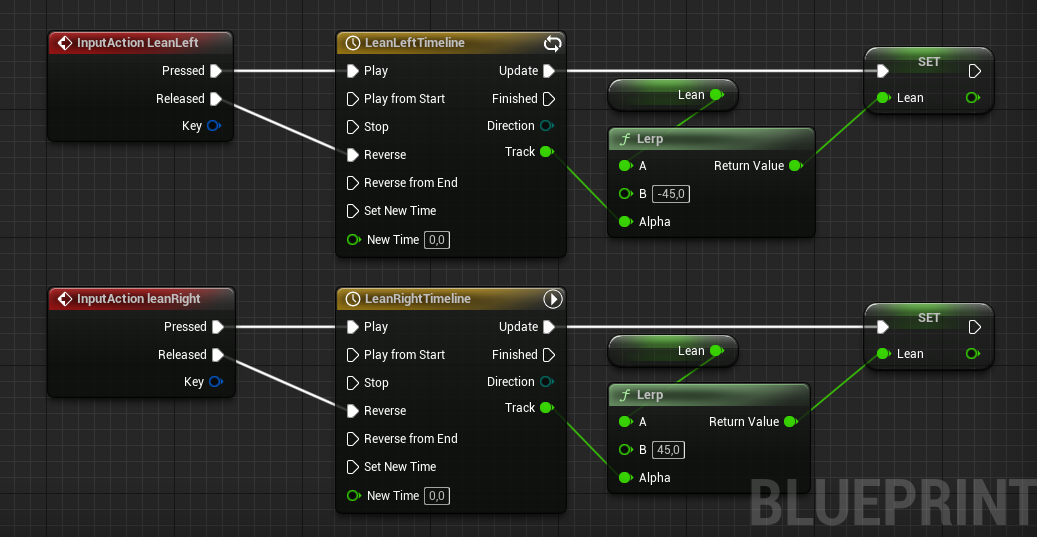
Based on the screenshot you think it would... Dunno
 surreal peak
The settings on those timelines seem strange
Is the top one looping and the bottom one set to auto play ?
junior hedge
Maybe you should share the keys in the timeline

 cedar crypt
?
tight schooner
Show us the timeline
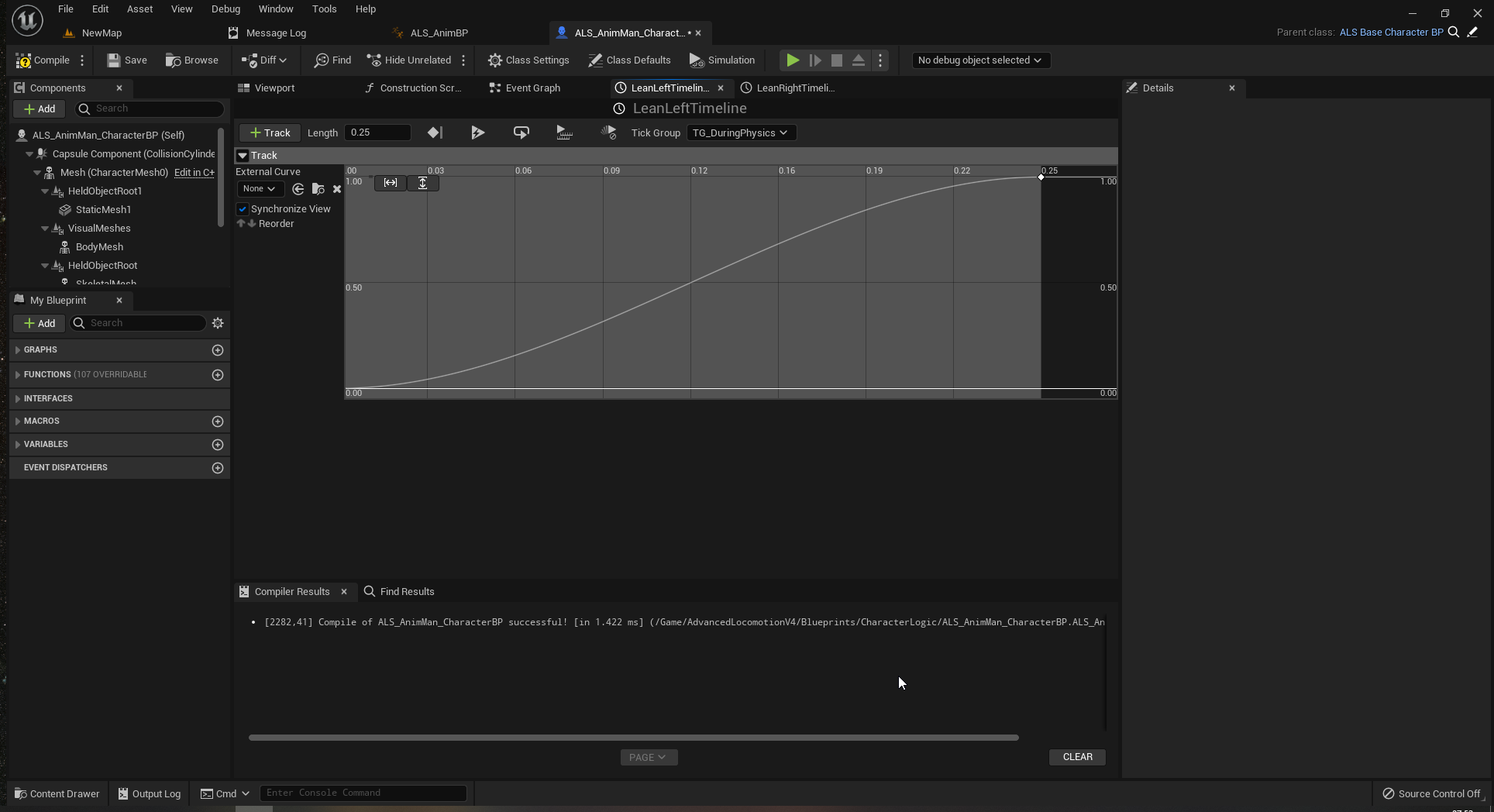 surreal peak
So one issue here can be
That the second timeline keeps running
And overrides your frist
First
But 0.25 seconds is quite low
So that would only happen if timed un lucky
But theoretically you want to stop the other timeline
So it doesn't set the Lean value at the same time
 surreal peak
Yeah cause you set new value to 0
The lerp then goes from 0 to t0
Sort of
Ohh wait a second
Can you please do the old setup agai
And disconnect the Leap getter from the lerp
cedar crypt
 surreal peak
The Lerp should only have fixed values
E.g 0 to 45
Not Lean to 45
If you remove that from the setup you posted before this one ( the one with two timelines in the screenshot ) it sh5work
Should work*
cedar crypt
it works
but then not with 2 timelines
one needs to finish before the other one is done
i am going to bed
i have been awake too long
surreal peak
Yeah that's what I meant with having to stop the other one
hollow schooner
gentle urchin
No, one issue was that the widgetswitcher was set to hidden (probably because of...
I just wanted to check the Function you created. To be safe, I connected the Input to the nodes directly as I dont think I did it correctly. I created an input seperately from a variable in the scene that both have the same name, but I doubt they are actually speaking to one another.
I'd also like to know what the "Select Int" does here. Should I keep the empty slot on 0 for all buttons or what is that slot for?
 gentle urchin
It selects int based on our bool conditio
hollow schooner
@gentle urchin After connecting the input to the nodes directly, the other tabs in the Exterior layout work now. The INT menu buttons are now gone, but i suppose thats an index issue
hollow schooner
gentle urchin
It selects int based on our bool conditio
So it always needs to be on 0?
hollow schooner
But seeing that I have like 6 menu buttons for the Exterior, do I need to have 6 nodes there to turn them all off?
gentle urchin
No,
Thats what the check is for
So whoever calls the node,
If we're already on their index,
Simply hide it
hollow schooner
So the 0 is just the "hide" option?
gentle urchin
Yes
hollow schooner
but for that to work, dont I need to add an empty node to each hierachy tree?

Otherwise index 0 is the first in the list, right?
gentle urchin
For the WS Controls only
Since the other one is always visible
But yes, you do need it
hollow schooner
Like this then?
 hollow schooner
Thanks for your patience. I'm like a toddler in his baby shoes at the moment lol
gentle urchin
Make sure the visibility is not set to hidden
On either the ws_controls or any of the sub widgets
hollow schooner
YES. Okay, 90% there. The EXT Layout works perfect.
When I go to the Interior layout, the color swabs of are available, but the menu below to choose "color dashboard" or "color seats" is gone lol. Let me check the indexes
okay
gentle urchin
Sweet. Getting closer :)
Kiddo is soon sleeping. Then ill be avaliable at the pc lol
hollow schooner
OMG
IT WORKS
you are a true hero
Ah, one more thing lol
When I now click the camera Icon to go from the interior back to the exterior, it displays one of the interior color menus. Sounds like an index issue, right?
hollow schooner
What is this for?
 hollow schooner
gentle urchin
I simply set it to hide the controls meny when i transitioned
hollow schooner
gentle urchin
I simply set it to hide the controls meny when i transitioned
Ah, how did you do that
gentle urchin
Just set the index to 0
The two nodes you showed
Replace with our function
And set new index to 0
hollow schooner
This is fantastic. I think I will need to study it over and over again to fully grasp what is going on, but I REALLY appreciate the patience and help that you keep giving me.
gentle urchin
Its working ?
hollow schooner
Yes
hollow schooner
I did in fact change the visibility of the main menu buttons to hidden, because I have a cool animation setup that animates the opacity of the buttons when the application starts.
Yeah, animating a fade between interior and exterior buttons would be the next step 😄
gentle urchin
The only thing you need to animate
Is the entire switches
So thats practical 😄
Render opacity and perhaps render Y scale or smth
hollow schooner
I'll try that tonight, need to get going to work. Thanks again dude, you're awesome!
 vast crow
Why do I have to recompile every dependent blueprint one by one on function signature change oh my god
gentle urchin
Sounds like a library change
 lime fulcrum
Oh my!
I've just realized the best way to handle menus when pausing a game. Since Listen for input does not work on paused game D:
gentle urchin
Or lots of interconnections
gentle urchin
lime fulcrum
Oh my!
I've just realized the best way to handle menus when pausing a game. Sinc...
Share this realisation !
I just dumped time dialation to 0.001
Who needs real pause anyways 😅
lime fulcrum
On your KEY EVENT, put a condition liek a BOOL that says "In Menu" then set the variable inside your pawn that is a reference to the widget, so you can use it on Menu, or inventory etc... Then instead of using the inputs as you would do to move the character, use an interface and send commands over the interface message to the referenced widget
then the wisget should set back the BOOL when you leave the interface so the commands goes backj to character movement
of couse the KEY EVENTS have to have checked "Execute whe npaused"
😛
@gentle urchin I tried Time dilation but it's not good for timelines that don't depend on them
I use timelines to modulate time dilation, of course those timelines have the checkbox IGNORE TIME DILATIONM off for obvious reasons. So they would be executed all the time
gentle urchin
lime fulcrum
On your KEY EVENT, put a condition liek a BOOL that says "In Menu" then set the ...
Try the OnKeyDown in the widget while paused, I think that one works
lime fulcrum
that did not work on my widget for some reason. And I dunno why. Even tried all input modes
If you mean this one of course
 gentle urchin
Game and UI
Hmm surprised if that doesnt work
Rerouting inputs is ofcourse an option
Just doesnt feel very... gracious
 neon forge
Is there a way to bypass a Layered Blend per Bone node when I play an anim montage from a bp? I have a bp set up to trigger an animation (kneeling down to pick something up) and only the top half of the animation plays on the skeleton.
 fallen glade
Can multiple character share an animation blueprint (with different animations) without relying to external plugins such as this? https://www.unrealengine.com/marketplace/en-US/product/universal-monster

Unreal Engine
Universal Monster (UM): NPC Framework + AI Behaviors & Combat System for Players & Enemies. Animation Blueprints, Behavior Trees, Melee Attack Hit Detection, Projectiles, AoE Power, DoT Ability, Hit Effects, Group Formations, Creatures. Slashin8r
they say it's 100% BP but how can that be
gentle urchin
Doesnt rely on the animation?
Wasnt there recently something about parented shared animation bps ?
fallen glade
If there was I completely missed it! I was holding off making more characters in the hope of being able to simplify the process
gentle urchin

Epic Developer Community
Share animations between different skeletons using the new feature Compatible Skeletons.
Havnt read or checked it out in detail, so it may not apply
But sounds relevant
fallen glade
mmmm i'll give it a whirl after work, if that's not it I guess I can shell 120(💀 ) poundaroos and report back
vast crow
FStructs don't have generated ToString conversions in blueprints...
 marsh crescent
when I release the sprint key(shift) the character still goes at the sprinting speed, I have made sure walk speed is much lower than sprint speed, please help

 marsh heron
Hey, I'm trying to interpolate a character's rotation in multiplayer, but for some reason the interpolation is 2x faster on server than on client... I've been searching for hours and I can't find a solution, please help...
gentle urchin
marsh crescent
when I release the sprint key(shift) the character still goes at the sprinting s...
Show the values
gentle urchin
marsh heron
Hey, I'm trying to interpolate a character's rotation in multiplayer, but for so...
Does it change with the number of clients?
marsh crescent
gentle urchin
Show the values
sprint is 1500 and walk is 500
marsh heron
gentle urchin
Does it change with the number of clients?
I'll try
gentle urchin
marsh crescent
sprint is 1500 and walk is 500
And the default speed?
gentle urchin
Whats rhe default max walk speed
marsh crescent
500
gentle urchin
Set in the movement component ?
marsh heron
gentle urchin
Does it change with the number of clients?
Yeah for some reason it works completely fine with 1 host player and 2+ client players, but when there's 1 host and 1 client, the client rotates faster...
gentle urchin
What are your animation blendspace values for sprinting ?
marsh crescent
600
gentle urchin
marsh heron
Yeah for some reason it works completely fine with 1 host player and 2+ client p...
Sounds like a rpc issue making the event fire twice for the client
If you printstring it, you can probably verify this
marsh heron
what should I printstring? the delta time?
gentle urchin
That'd be fine
marsh heron
alr
gentle urchin
Anything that would prove that it prints twice as often really
You have adjusted the rotation rate for deltatime i assume?
marsh crescent
gentle urchin
Set in the movement component ?
I changed it to 500 and it worked thanks
gentle urchin
marsh heron
I'm using finterpto to change the yaw of the character
Good. That takes deltatime in consideration
 gentle urchin
Dont you need is Authority switch there ?
Only the server should be allowed to rotate it, no? Assuming its replicated
Dangerous with assumptions in multiplayer, i know 😂
marsh heron
Oh well I can try lol
I added the switch but now the player is not rotating at all, I guess I'm missing something important here
on the client I mean
on the host it's fine
gentle urchin
The actor is set to replicate?
gentle urchin
Is it not ?
😅
Im brown with these things tho,
Probably better to ask in #multiplayer before i push you further down the wrong road lol
toxic thunder
tawdry surge
No default pawn is the base for all pawns and characters, so it'll let you cast ...
the screenshot includes proof that the cast fails because it's getting passed a "None" object though. this means either GetController doesn't actually get a controller when run on a pawn/vehicle, or my pawn isn't actually a pawn (though that'd make me wonder why the compiler accepts this).
I found a workaround though. This seems like a bug.
(I can just update and store the value I need in the pawn, then poll it from the PlayerController, instead of pushing the data from the pawn to the PlayerController)
 umbral merlin
 queen sequoia
Hello, I have a casting problem, im using ALS community version and im trying to cast to my camera behavior inside of the player controller to add zooming in and out, only problem is I cant find an object that would work for the cast
 trim matrix
so im making evey time i press s it would go down and w up but i can only press each ones only one time how i fix
 tawdry surge
You need a reference to your camera behavior object in order to type cast the reference
queen sequoia
tawdry surge
You need a reference to your camera behavior object in order to type cast the re...
ohhhh ok Ill Try To Fix That
tawdry surge
@trim matrix you're not adding to the location/rotation of the gun, you're just setting it. So pressing s or w is gonna just move it between two positions.
If you want to keep going every time you hit the buttons you'll have to get the current transform and add your offset to it every time you hit a button
trim matrix
tawdry surge
<@456226577798135808> you're not adding to the location/rotation of the gun, you...
how do i do that
 tawdry surge
You either need to get the current rotation and "combine" it with the offset rotation and set that as your new rotation
Or use the add rotation node
 blissful widget
^^^ You're setting the value to either 0 or 0.1, from what I can see. What you want to do instead is add on (offset * deltaTime) to the current elavation, and then set the elavation to that
trim matrix
blissful widget
^^^ You're setting the value to either 0 or 0.1, from what I can see. What you w...
can you help me with that sorry im kinda new also thank you man
tawdry surge
I'm not at my pc yet, but I'll drop a screen shot in a bit if you're still stuck
trim matrix
tawdry surge
I'm not at my pc yet, but I'll drop a screen shot in a bit if you're still stuck
im still thanks man
gentle urchin
tawdry surge
I'm not at my pc yet, but I'll drop a screen shot in a bit if you're still stuck
Damn pc's. Dont we have portables yet ?
Im always facing the same issue lol
tawdry surge
Not that I'd wanna use with unreal
trim matrix
tawdry surge
Not that I'd wanna use with unreal
can you dm me when your ready:D
tawdry surge
Always feel bad for people who only have laptops trying to get into unreal. Must be torture
 gentle urchin
I remote desktop to my stationary if I reallly have to
trim matrix
blissful widget
Basically this
ah okay let me try
blissful widget
My laptop's good and works well, but I haven't figured out a way to pan without the awkward second mouse 'button' that's actually a virtual area
blissful widget
trim matrix
ah okay let me try
Swap getter and setter for your actual variable of course
gentle urchin
blissful widget
My laptop's good and works well, but I haven't figured out a way to pan without ...
Sounds like something an external mouse would fix?
Mine only works during turbo hours
I hate turbo shit.
It never lasts :p
blissful widget
gentle urchin
Sounds like something an external mouse would fix?
I'm using it on the couch while the partner's home and to hang with doggo and shit. If I wanted a desktop setup, I'd go plug it in upstairs.
Oh I've got a power cord receding into the couch haha, ez access and always full power... ed lap melting
trim matrix
blissful widget
Swap getter and setter for your actual variable of course
but the set varibe is in the animation how put that in the blueprint bc in bp i can only get the call function

 blissful widget
trim matrix
but the set varibe is in the animation how put that in the blueprint bc in bp i ...
blissful widget
trim matrix
but the set varibe is in the animation how put that in the blueprint bc in bp i ...
You can still use the Set variable node, I just had the non-function setter to demonstrate, as I don't have your variables
If you don't have the Get Variable function, you might need to create it as well
trim matrix
blissful widget
If you don't have the Get Variable function, you might need to create it as well
but if i make one how i make it to change the thing in the animation bp
blissful widget
You create the function on the animation BP, and call it from... wherever you're calling it from, looks like the player BP
Eventually you may want an interface to let you perform this action on multiple different guns, for example, without caring about which gun it is. For now, get it working 🙂
trim matrix
but i cant set it in the animation blueprint @blissful widget

 blissful widget
trim matrix
but i cant set it in the animation blueprint <@174160195591602176>
blissful widget
trim matrix
but i cant set it in the animation blueprint <@174160195591602176>
Do not handle input outside the player BP, you'll get mega confused
Just finish up the way you were doing, it's a reasonable start
trim matrix
blissful widget
Do not handle input outside the player BP, you'll get mega confused
okay im kinda confused now😯
blissful widget
By?
trim matrix
blissful widget
Do not handle input outside the player BP, you'll get mega confused
it is not the player bp it is in there
 blissful widget
trim matrix
so im making evey time i press s it would go down and w up but i can only press ...
blissful widget
trim matrix
so im making evey time i press s it would go down and w up but i can only press ...
Where's this screenshot from?
trim matrix
blissful widget
Where's this screenshot from?
in this bp
 trim matrix
blissful widget
Where's this screenshot from?
trim matrix
blissful widget
Where's this screenshot from?
and here is where the rotation and elevation is controlled and that is what i want to make w up and s down @blissful widget

 feral parrot
guys how to control the speed when the character stops completely? It has some velocity and for 0.01 sec it goes to the directions it was previously going.