#blueprint
402296 messages · Page 931 of 403
 blissful grail
 trim matrix
@wintry geyserhow does it compare to a bpi?
 wintry geyser
Interfaces?
Interfaces are still a type of cast, it's just lean. I don't have info on perf
@blissful grail Is the issue multiplayer?
wintry geyser
Are you trying to attach the rope to the player, or the player to the rope. Because I think that's set to attach the player to the rope (Parent). With the Player as the location, and no socket 🤔
Swap the Parent/Target? Idk what's supposed to attach to what though. lol
blissful grail
Player should attach to the rope.
 mild tangle
hi i wanted to make a projectile stop being affected by gravity when a button is pressed anyone have any ideas?
i tried enable simulate physics and setting it to false
and i tried enable gravity as well
both didnt do anythign
 thin panther
trim matrix
i need help
thin panther
trim matrix
i need help
no one can help if you dont ask
mild tangle
thinking maybe temporarily spawn an empty object and attach it but I feel like that's too complicated and there's probably a simpler solution
nvm
found out i could deactivate projectile movement
trim matrix
thin panther
no one can help if you dont ask
So i made a blank project on ue5 and migrated Advanced locomotion into my empty project and im trying to figure out how i can set my character to the advanced locomotion actor
if that makes sense
idk
im new to this
so
 vast kindle
Heya everyone - got an interesting question regarding Async Loading for things like Animation Montages. Is there any way to do the following in any sort of manageable fashion:
- Async load an array of animation montage soft objects (This steps the easy one)
- Store some way of accessing the animation montage AND its name (I use the name for logic, since I randomize which animation montage to call based on different parses of the string value)
- Access the said montage to run (I use a multicast to run it for everyone so that they can see the action take place)
- Based on some criteria (such as switching equipment) - unload all of these animation montages (and start the process over with a new set of animation montages)
I am using animation layers (similar to Lyra) for my unique locomotions based on what classification of weapons are equipped - but I am building randomized combos based on the weapon itself, which hand (determined at time of attack) and stage of the combo is used in the action. If I do my randomization logic, get the name of what animation I need to pull - I currently find data table row based on name (which matches the animation montage name), pull out the struct, break it, and then async load the soft ref animation montage and pop it into the multicast. This WORKS, but I do not think it is the most effective way since I would have to async load every time any character needs to take an action; and also, I am currently not unloading the animation montage which builds bloat over time.
Any thoughts as to the best way I can try to get a bit more impactful with this would be huge! 🙂
 languid spear
trim matrix
So i made a blank project on ue5 and migrated Advanced locomotion into my empty ...
languid spear
trim matrix
So i made a blank project on ue5 and migrated Advanced locomotion into my empty ...
Advanced locomotion system is going to be extremely frustrating for a beginner. If you’re new to UE in general, you’ll have a much easier time working on other elements of your game first. You can always come back later to implement Advanced Locomotion.
blissful grail
Cool - now my attach to actor isn't working. What in tarnations is going on...
 limber parcel
i added respawn to my game like explained in this article, but for some reason my game starts lagging more and more on every respawn, what am i doing wrong?
https://docs.unrealengine.com/5.0/en-US/respawning-a-player-character/
mild tangle

ummm
why do the default cubes in the first person character starter level not get the impulse applied
but they recieve the impulse if i use a hit event instead
 hybrid horizon
I would start by using to print string to confirm the projectile still has velocity at the time of applying the impulse
mild tangle
that was helpful lmao
i forgot i freeze the projectile mid air before the impulse
but i saved the velocity before freezing it as a variable and plugged that in instead and it still doesnt work
you know what, i think it may be smarter to look up a tutorial on how to make a grenade
hybrid horizon
And the overlapped component is valid?
mild tangle
yes

no hellos
and there are 3 objects in the array

doesnt consider the objects to be simulated physics
even tho the box is ticked
 hybrid horizon
Print string the display name of the hit components to verify its actually hitting what its supposed to hit.
If it is hitting what its supposed, then I'm not really sure TBH
hybrid horizon
How are you triggering it exactly? Like what event? An overlap?
mild tangle
ohp i figured it out
thanks tho
the objects dont have generate overlap events set to true
lmao
wintry geyser
It's always something small and dumb
"Why isn't this replicating!?" .. Because it's not set to replicate.
blissful grail
What on Earth could cause my player to be able to attach to some actors but not others?
I have literally never had this many problems with just attaching to an actor or component
hybrid horizon
Collision maybe? I don't know but maybe there needs to be collision to do an attach?
wintry geyser
Maybe physics? I don't know what your rope is
hybrid horizon
Oh yeah that too^
blissful grail
There is no rope. It's just a class name.
wintry geyser
See I don't know!
Is it just some Actor? Does it have a specific root component?
Because I'm pretty sure that's what they attach to right
blissful grail
And I've already gone down the road about physics. I made extra sure that both collisions were set up to be identical
hybrid horizon
Unless you specify a bone, then yes I do believe it does use root, or whatever other component you tell it to attach to
blissful grail
Even their roots are the same
wintry geyser
So what happens exactly, does it spawn and is 100% separated, or does it spawn at 0,0,0 but is attached
blissful grail
Actor = root, component = w/e scene component you specify
hybrid horizon
wait, you said actor to actor, my bad. No component there
blissful grail
Let me record a video. It'll be easier to see.
wintry geyser
Do the thing, run around, then check the loc on the other Actor. It can at least help figure out what's going wrong
And getting the correct wrong is the first step to getting the right 🤔
blissful grail
The first cube I attach to - works as expected. The second one, does not. Both attaches are setup identically. Only difference is what I attach too
wintry geyser
But it's doing an array of actors to attach to, can you simplify that to 1 instance of the object?
blissful grail
There is only one actor in the world
It is just quick n' dirty code.
Specifically so I could keep these two attaches in the same location.
wintry geyser
Still
blissful grail
That literally makes no sense.
I am only getting one actor, because there is only one actor in the world that is of this class.
wintry geyser
From my perspective, that's the only difference. So it's difficult to determine a solution here lol
blissful grail
Changing that will have 0 effect on things. I am operating on the sole instance of the class.
wintry geyser
Is it actually teleporting because of the attach attempt, or is that separate?
wintry geyser
Got it, was concerned that maybe it was a race condition somehow, or the actor itself wasn't in the output. Weeeiirrd 🤔
blissful grail
Yeah - I am quite lost on this problem. I've honestly never encountered any issues with attaching to actors/components.
 runic parrot
Hi! does anyone know how to check on UI if keyboard key "key" is down? (while on "Mouse button down" method)

Found it, you need to override the method "On Key Down" and cache the state, you can use that state to check if the key is down.

 drowsy matrix
Is there a way to mimic the selection-highlight behaviour used within the editor? I'd love to have a highlight method that doesn't require duplicated meshes or post processing or a customized material
 faint pasture
drowsy matrix
Is there a way to mimic the selection-highlight behaviour used within the editor...
faint pasture
drowsy matrix
Is there a way to mimic the selection-highlight behaviour used within the editor...
How do you propose it works then, if you rule out those 3 ways to make it work?
drowsy matrix
That is essentially my question
 tight schooner
A rather elaborate Niagara particle system...
strains to think of other ways
 icy dragon
Spoiler alert
||You can't||
 cerulean fog
Hey, I have a really odd issue. For some reason my line trace randomly doesnt hit an object even though nothing about the object has changed or the location of the ray cast. https://gyazo.com/67892aa8c0144dc7b33f7fb12cbe9dc3.mp4
drowsy matrix
Ok new plan:
Is it possible to have a material/function append another material, so I can set up the existing material as a variable and add whatever I want to it without creating a new material each time?
faint pasture
drowsy matrix
Ok new plan:
Is it possible to have a material/function append another material,...

Build complex layered and blended materials that take advantage of material instancing.
 swift hornet
Does anyone have a solution for the gun size problem? Previous messages: #blueprint message. #blueprint message
Discord
Discord is the easiest way to communicate over voice, video, and text. Chat, hang out, and stay close with your friends and communities.
drowsy matrix
faint pasture
https://docs.unrealengine.com/4.27/en-US/RenderingAndGraphics/Materials/Material...
So, this means there's actually no way to just use raw materials as inputs, but I can at least create similar material layers and use those instead. Am I understanding correctly?
 twilit lion
Hi.
Best way to make recoil + recoil recovery? I can't seem to make it right.. 😭
 iron bone
Any suggestions on how to make a character "dash" forward a set amount of distance and then stop? Basically trying to replicate the dash that is in Celeste but in 3D.
"Launch character" is good but I want it to be the same amount of distance each time regardless of gravity and speed.
"Add Movement Input" has close results as well except I can't "dash" upwards into the air or anywhere that the player can't normally walk.
trim matrix
im trying to find a way to make and set names on players only with the same tribe/team ID but when i do it like this it throws out not valid, and when i run the entire thing on the client it ignores the existence of tribeID's and does it regardless of whether they are the same or not, anyone know what im doing wrong?

Nevermind i worked it out
 hoary palm
Okay I hope someone can help me out. I'm trying to get enhanced input working so I can let the player remap their keys. The problem is that we have primary and secondary keybinds. So I'm finding a new Display Name and then search the second mention of that display name, with which I then create a new widget. Which works fine until I try to remap them.
So I can't modify the player mappable options when mapping the key. I can output them but I am not sure how to set them. Triggers and Modifiers are also not carried over. Which then breaks the search algorithm because it can't find a match to the first key. Is there any way I can set those values?

 late gorge
is there a way to create an instance of a primary data asset in blueprint or editor utility widget?
i want to be able to take a bunch of data from an actor to turn into a primary data asset (the data can be loaded from said primary data asset, then changed, i want to be able to save those changes into a different primary data asset)
this is the closest thing i could find

 summer shadow
Hi there,
I have a scene with three meshes and some materials(colors). I set up a variant manager to switch the materials of the meshes (mesh 1 has 3 color options. mesh 2 has 2 color options and mesh 3 has 4 color options). This means there are 24 combinations of colors.
I also have a Blueprint which reads out the index numbers of the LevelVariantSet and loops through all the combinations and takes a screenshot of each one.
All this works perfectly fine, but only for this case. If there would be 4,5,6,... meshes instead, I need to update the Blueprint manually, creating new loops.
Now I am looking for a more dynamic solution where I for example only needs to define the number of meshes in a variable.
Does someone have an idea how to achieve this?
 blazing pollen
guys i were adding draw line and circle debugging, they were working fine at start but now they r not shown in the previewing reference pose

 dreamy yacht
Hi! I need to create a car selection menu ( level ) with 2 cars to choose, toggled with arrow left / arrow right, but first I need to set the auto possesed, default camera view to a static camera in level CameraActor_Hooligan_Level_CarSelection, but I cannot make it work
something is wrong with code


can you help ?
I don't want to use autoposses camera ( player0 ) in camera detaills
LOL
I've just found it
the playercontroller was not set in worldsettings
 regal venture
Is there any way to support inheritance with data assets?
 ornate dragon
Hi. Does anyone know how to make player character not being able to pass through enemy characters, but enemy characters can pass through each other (not blocking)? As well when enemy character dies, allow that player character to walk over dead body of the enemy characters?
I tried switching up collision presets, but without a success.
 tawdry surge
You can make a custom object channel for the enemies and then just set collision on the enemy to overlap pawn when it dies
ornate dragon
tawdry surge
You can make a custom object channel for the enemies and then just set collision...
I tried something like that (custom in Project Settings) and collisions with presets, but without success. Maybe you can show an example how it would work?
tawdry surge
Enemies should ignore the custom channel and block pawn.
On death set them to ignore pawn too
I'm not at my pc yet so I can't do a screenshot
ornate dragon
Thanks a lot! I'll try that
trim matrix
Hey there.
Quick question : How do I get the OnClicked of a button to work if it's created at runtime ?
In the img you can see what the WBP's event graph looks like, wondering what I'm fudging up.
I also noticed that other changes (setting style) didn't work, that seems like a relevant datapoint.
 tawdry surge
Did you enable click events on the controller?
trim matrix
uno secundo
Yes, it was already enabled
One thing I should look into though is the fact that the button wasn't even visible - I confused it with a button used for testing, that my so so smart me forgot to remove lol
 shadow saddle
does anyone know how to make your character move towards the direction of camera ?
tawdry surge
You can turn off orientation rotation to movement on the character movement component and set use control rotation yaw to true in the class defaults
shadow saddle
yes but i dun want the character to turn ,it only turn and move to the direction of the camera when i press wasd
tawdry surge
I don't understand what that means. You don't want the character to turn or you do?
shadow saddle
ok im working on a third person game
i dun want to set use control rotation yaw to true so player can rotate and see their chara face
the character only turn to the direction of the camera when player press wasd
tawdry surge
Ok so you want the camera to face the way the character is moving. Not the character to face the camera direction
shadow saddle
ok so i want my character to move towards the direction of the camera ,if i rotate left or right when moving my chara rotate to that direction ,but when i press A key or D key instead of moving to the direction of button (like orient rotation to movement) i pressed, it strafes left or right (walking left/right while chara facing forward)
for example ,i rotate my cam so see front face of my chara

if i press w the chara move towards the direc of camera

 devout dove
I'm moving my scene root instead of the static mesh, and because of that the collision doesn't work because the root scene has no collision. Is there a way to make the scene root without any meshes inherit the static mesh collision? So if the air plane static mesh hits an object the root scene inherits it and "bounces" of the wall?
tawdry surge
@shadow saddle use the camera forward vector for the direction pin of the add movement input node instead of the capsule
shadow saddle
tawdry surge
<@272995232017285121> use the camera forward vector for the direction pin of the...
this?
 tawdry surge
Yeah, except you can skip the get rotation
Follow camera-> get forward vector
There's another one that takes a component rather then a rotation
shadow saddle
now it moves to the direction of cam but how do i rotate my chara to that direction?
tawdry surge
Turn orient movement to rotation on
 manic geode
How do I find this one? It seems that its not there
 shadow saddle
ok thx
tawdry surge
Its just multiply now
manic geode
integer?
tawdry surge
All math functions are wild cards in ue5 so just make the operation you want and plug in your variables. It'll do the rest

 versed spruce
I made a button that tells another light in the scene to toggle. To place the button in the world i had to make a actor blueprint and put the widget in the actor and place it. I cant set the buttons actor reference in the world because the actor i had to put it in doesn't have the reference. How do i pass the actor variable from the widget actor to the widget or give the widget the buttons variable?
 short pawn
versed spruce
I made a button that tells another light in the scene to toggle. To place the bu...
short pawn
versed spruce
I made a button that tells another light in the scene to toggle. To place the bu...
You could set the variable in the game mode and then get it from there
short pawn
manic geode
door is not opening, how do i fix the error
Is the door moveable?
short pawn
What type of door is it
If u are trying to translate it, then it needs to be set to moveable
tawdry surge
You are trying to access static mesh component 4 after destroying it

 manic geode
tawdry surge
You are trying to access static mesh component 4 after destroying it
manic geode
tawdry surge
You are trying to access static mesh component 4 after destroying it
no I placed it in the world and try to interact with it
but it doesnt work
versed spruce
short pawn
You could set the variable in the game mode and then get it from there
How would i do that? And wouldn't that make it so every actor would have it? Not just the one its attached too
iron bone
Any suggestions on how to make a character "dash" forward a set amount of distance and then stop? Basically trying to replicate the dash that is in Celeste but in 3D.
"Launch character" is good but I want it to be the same amount of distance each time regardless of gravity and speed.
"Add Movement Input" has close results as well except I can't "dash" upwards into the air or anywhere that the player can't normally walk.
icy dragon
iron bone
Any suggestions on how to make a character "dash" forward a set amount of distan...
Timeline, lerping from cached current position to the same position with offset.
manic geode
Is it correct node structure?
 icy dragon
Though I'm not entirely sure if you can sweep collision with it
manic geode
short pawn
What type of door is it
its a placable object, aprt of building system
versed spruce
manic geode
Is it correct node structure?
Looks overly complicated but looks correct. Mine is much simpler which might give it some bugs later
manic geode
versed spruce
Looks overly complicated but looks correct. Mine is much simpler which might giv...
Well, its still not working. I fell that Im mising something, although Im following the very simple tutorial
And I double checked twice
And redone it
Not working
It gives me the erroes, and I cant interact with it
icy dragon
manic geode
Well, its still not working. I fell that Im mising something, although Im follow...
How does it not working?
manic geode
icy dragon
How does it not working?
The door is just static, like a wall
It should open and close, which it doesnt
https://youtu.be/ZMZZuYVvrn0?list=PLGm9gBuuMTeuLQythBu61WK7qO31RRH7l
This is the tutorial

UE4 Base Building, Build System tutorial series.
Building Playlist: https://www.youtube.com/playlist?list=PLGm9gBuuMTeuLQythBu61WK7qO31RRH7l
Join our discord: https://discord.gg/Gr9sPP2
Free assets: https://itsmebro.net
Donate: https://itsmebro.net/donate
Patreon: https://www.patreon.com/ItsMeBro
icy dragon
manic geode
It gives me the erroes, and I cant interact with it
Show the errors.
 manic geode
Unfortunately I cant reach that guy because he banned me from his server for me being Russian
icy dragon
I bet it's invalid reference.
manic geode
icy dragon
Show the errors.
 icy dragon
manic geode
Unfortunately I cant reach that guy because he banned me from his server for me ...
icy dragon
manic geode
Unfortunately I cant reach that guy because he banned me from his server for me ...
No other reason?
manic geode
icy dragon
No other reason?
Well he asked me political question, got calm political response and then banned
versed spruce
manic geode
Those are invalid actor reference errors
manic geode
versed spruce
Those are invalid actor reference errors
Im new so I dont understand what they mean)
and I dont know how to fix it
icy dragon
manic geode
I won the bet.
That means you owe me $50 your interaction interface function points to invalid reference.
Show the part where your player triggers the function.
icy dragon
manic geode
Well he asked me political question, got calm political response and then banned
That's quite shitty behaviour tbh
manic geode
 manic geode
icy dragon
That's quite shitty behaviour tbh
manic geode
icy dragon
That's quite shitty behaviour tbh
Yea i mean if you dont want to listen to some political garbage, dont ask those questions. I thought he was ready for it if he asked prior to helping me
versed spruce
manic geode
Im new so I dont understand what they mean)
I was new a week ago. When i make a button in the world set to open a door. That button needs to reference the door in the world i want it to command. I make a actor variable. In my photo its called door. And i tell it to target that door in the view port
Its kinda contrived but its how it works
manic geode
👀
versed spruce
Search on YouTube how to fix "Accessed none trying to read"
It should explain the problem
manic geode
ok
versed spruce

Hey guys, in today's video, I'm going to be showing you how to fix and read the error message of "accessed none trying to read...". This covers, what it is, what it means, and how to fix it.
#Ue4 #UnrealEngine4 #Ue4Tutorial
00:00 - Intro
00:05 - Overview
00:24 - How To ...
They dont explain it well but it gives you an idea
icy dragon
Ah, yeah, that channel kinda mixbag in terms of explanation and practices
||also can't forget one time where he passed off widget with fixed delay as "loading screen"||
faint pasture
manic geode
Is it correct node structure?
Why the NOT nodes, just swap your execution around there.
manic geode
faint pasture
Why the NOT nodes, just swap your execution around there.
It didnt work that way also(
may be its smth wrong with the door?
icy dragon
faint pasture
Why the NOT nodes, just swap your execution around there.
That's barely consequential to troubleshoot tbh
versed spruce
I set up a button function to set parts of it. Makes it easier. You could press a button to test the door function. So you know if the trigger is broken or the door function
icy dragon
 white elbow
how do I make a blueprint stop "thinking"?
white elbow
how do I make a blueprint stop "thinking"?
Define "making blueprint stop thinking"
manic geode
versed spruce
I set up a button function to set parts of it. Makes it easier. You could press ...
sounds very complicated
white elbow
icy dragon
Define "making blueprint stop thinking"
so it won't do anything until activated, like a pause
set active only applies to a component so ig that's not what I need
icy dragon
white elbow
so it won't do anything until activated, like a pause
Might be looking for disabling the actor's tick.
manic geode
Erm... WHAT
 white elbow
icy dragon
Might be looking for disabling the actor's tick.
white elbow
icy dragon
Might be looking for disabling the actor's tick.
Can I disable all events at once?
icy dragon
white elbow
Can I disable all events at once?
Don't execute them?
Though I think disabling tick effectively makes the actor brain dead.
icy dragon
IIRC even in paused game state actors can still execute events that aren't in tick
 slim grove
how am i meant to fix this with blueprints i know im meant to render the player on top of everything but i dont know how

the player is a full body mesh in FP mode so would that cause more issues?
versed spruce
It looks like you squished a slug on the wall
Im not experienced enough to help with that
slim grove
then why would you post a message like that
versed spruce
So you don't think im ignoring you because i helped the last guy to ask a question
slim grove
ah ok sorry
vast kindle
Heya any guys - any thoughts come up regarding how to handle Async Loading/Unloading with Animation Montages? I could really use someones thoughts on how best to approach this one:
1) Async load an array of animation montage soft objects (This steps the easy one)
2) Store some way of accessing the animation montage AND its name (I use the name for logic, since I randomize which animation montage to call based on different parses of the string value)
3) Access the said montage to run (I use a multicast to run it for everyone so that they can see the action take place)
4) Based on some criteria (such as switching equipment) - unload all of these animation montages (and start the process over with a new set of animation montages)
-------------
I am using animation layers (similar to Lyra) for my unique locomotions based on what classification of weapons are equipped - but I am building randomized combos based on the weapon itself, which hand (determined at time of attack) and stage of the combo is used in the action. If I do my randomization logic, get the name of what animation I need to pull - I currently find data table row based on name (which matches the animation montage name), pull out the struct, break it, and then async load the soft ref animation montage and pop it into the multicast. This WORKS, but I do not think it is the most effective way since I would have to async load every time any character needs to take an action; and also, I am currently not unloading the animation montage which builds bloat over time.
Any thoughts as to the best way I can try to get a bit more impactful with this would be huge! :slight_smile:``` crimson saddle
I would like to show map previews in my map selection screen but I am not sure how to go about doing this. Maps are not predefined, nor is there a set amount. If anyone could point me in the right direction that would be great
faint pasture
crimson saddle
I would like to show map previews in my map selection screen but I am not sure h...
I'd start with a structure containing a map name, a preview image, and a reference to the level to load
 fiery swallow
So I'm guessing sequencers active each execute on a different tick? so 8 pins in an execute will take 8 ticks to fire all of them? Can anyone confirm this or am I wrong?
faint pasture
Then you can have a data table of all levels and cruise that at runtime to present all the choices in some widget.
icy dragon
fiery swallow
So I'm guessing sequencers active each execute on a different tick? so 8 pins in...
You mean Sequence node?
fiery swallow
si
faint pasture
You prolly want soft references too unless you like to clog your RAM up, but I've never done this so idk
icy dragon
fiery swallow
So I'm guessing sequencers active each execute on a different tick? so 8 pins in...
No, Sequence node executes them in one tick.
fiery swallow
ah very nice, thank you
 lethal frost
I can't get the enemy units to go into the true portion. It says, "Array of Enemy unit base references is not compatible with array of party unit base references." Anyone know what could be the cause of this? both party and enemy units are child classes of the main unit base
 crimson saddle
faint pasture
I'd start with a structure containing a map name, a preview image, and a referen...
crimson saddle
faint pasture
I'd start with a structure containing a map name, a preview image, and a referen...
Is a preview image the best way? My maps are tile based so I was wondering if the more scalable way would be to somehow generate a preview
faint pasture
crimson saddle
Is a preview image the best way? My maps are tile based so I was wondering if th...
However you want to do it. You'll probably need to do it at editor time unless you reaaaaaaaally need to be able to do it at runtime and want to blow a month+ making that system.
crimson saddle
editor time is not an option because of player made maps. I guess I'll just enforce a preview image then, thanks
tight schooner
lethal frost
I can't get the enemy units to go into the true portion. It says, "Array of Enem...
For Each Loop has a wildcard input and output, so it takes on the class of the thing you connect to it. Same goes for Select. What are you trying to do anyway?
lethal frost
tight schooner
For Each Loop has a wildcard input and output, so it takes on the class of the ...
So I'm having a target list appear if my character decides to use damaging abilities. If they do, it will show the enemies (turn based combat), if using healing abilities, I want it to show the party members.
both of them have the same parent class which is why I'm so confused that they aren't compatible
tight schooner
Hmm... I wonder if the ForEachLoop wildcard was of the parent class, could you connect a child class array to it...
Your array types are either party or enemy so the ForEachLoop becomes either party or enemy when you connect it
I'm actually straining to think of a good way to handle it. I guess you can try to make a getter function... Just a new function marked as "pure"
And this function has 1 input (the boolean) and 1 output (an array of your shared base class)
lethal frost
I could attempt that, see if it would work. worth a shot at this point
tight schooner
And that's what you connect to the for each loop
Inside the function you do the select
Oh, I guess it would need your game mode ref too
But you get the idea
lethal frost
yeah, for sure, hopefully that works
 normal rampart
Is there any other way to call the construction script on an actor placed in a level other than moving it or going into the class and clicking compile?
tight schooner
normal rampart
Is there any other way to call the construction script on an actor placed in a l...
What I did is stole a C++ function from a certain library ("Rama's Victory Plugin") and made an Editor Utility Widget that re-runs construction on all selected actors
In other words it requires installing that or dipping a toe into C++
 quick grove
sorry guys, why when I package the project for Windows 10 it gives me those errors?
 tight schooner
(or did I steal it fro Rama's? I can't recall at this point)
In any case I stole a code snippet from the internet
 cyan bone
Dear friends, how do i make my army cube attack look more organic/natural:
They are using a simple Lerp. So my idea is to make the second, third and forth line go slower. And that some cubes go a bit faster than others
Here the LERP, how do i make the lerp randomize so that the cubes move in a more randomized way, and more organic?

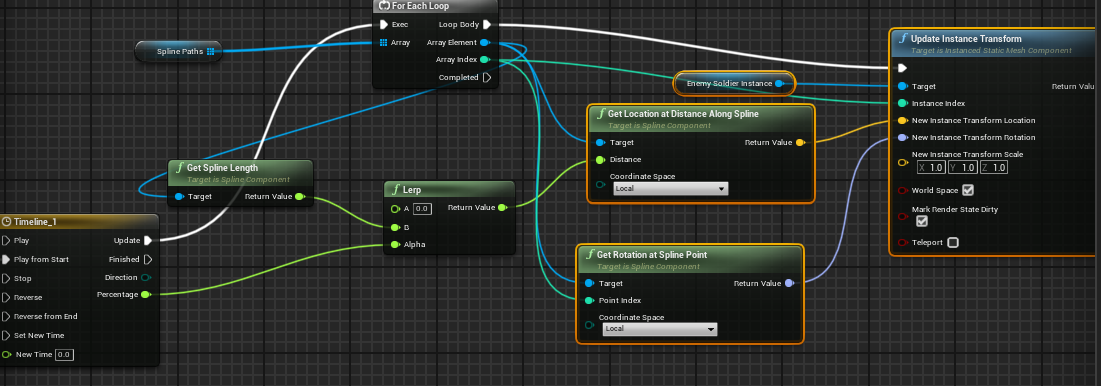
 zealous moth
quick grove
sorry guys, why when I package the project for Windows 10 it gives me those erro...
zealous moth
quick grove
sorry guys, why when I package the project for Windows 10 it gives me those erro...
your save file class has an issue when breaking the struct. I suggest you try to reload it and recompile it. If nothing is alerting you then export and reimport and finally if that also fails, remake from scratch
quick grove
thanks! I just recompiled it and now it works!!
trim matrix
@crimson saddleif its tilebased you could just make lowres versions of the maptiles and use those for the preview right?
could make a snapshot of the current map and use that for a preview aswell maybe?
tight schooner
cyan bone
Dear friends, how do i make my army cube attack look more organic/natural:
They ...
I haven't fully wrapped my head around your BP but the short version is you can set play rate on your timeline component
if you want them to play at different speeds
cyan bone
tight schooner
I haven't fully wrapped my head around your BP but the short version is you can ...
yup but the play rate is the float output right? Then that will apply to all lines 😦
tight schooner
I'm hesitant to suggest different designs from the outside but you already see the crux of the issue... You're controlling all things with 1 timeline but want different behavior from each.
crimson saddle
trim matrix
<@168451911048101889>if its tilebased you could just make lowres versions of the...
yeah thats what I was thinking, but I don't know how to do that unfortunately
tight schooner
... and the way to have multiple of something is to put it in a class and spawn multiple of it into the world (whether that's an actor or a component, though in this case components can't have timelines)
cyan bone
tight schooner
I'm hesitant to suggest different designs from the outside but you already see t...
I see. But they are actually instanced static meshes
So you suggest i create a timeline for each line?
Isnt that overdoing ? there must be a simpler way
Like for example, the float output of the timeline. What if i do something with it?
 amber gazelle
can I get some help what's going on here
 crimson saddle
Odd question, does anyone know of a way to resize a brush at runtime? I have some volumes and I don't want them extending too much or too little in maps of different sizes
wintry geyser
@vast kindle Did you get an answer? Technically because there's a chance to load ALL of them into memory anyway just because you're loading P1's Montage List + P2, P3, P4, etc. Couldn't you just keep them loaded but then the assign/un-assign* is just the string assignment you made before? So I guess reverse order of what you're doing currently? I'm curious what your 'bloat' would actually be if you loaded them all, or had a priority load list. Sometimes it's better to just preload if it's a fast paced multiplayer environment. 🤔
But I'm not sure what the environment spec is, and if you're trying to save memory every chance you get.
tight schooner
@cyan bone
I could suggest stuff but they're all ugly hacks. But in the spirit of "solving the problem in front of me", you can generate an array of floats ranging from (say) 1 to 1.3... Each element corresponds to a spline path array. (If you want to be fancy you could make a custom struct but this is a dirty hack.)
During timeline update your ForEachLoop gets the corresponding float element (use the Index output on that node). Now you have this random float that ranges from 1 to 1.3.
Lerp alpha = clamp(timeline * float)
Clamped from 0 to 1 ofc. Or use a Min node with 1.
cyan bone
tight schooner
<@969845251911073833>
I could suggest stuff but they're all ugly hacks. But in ...
Thats brilliant. Once again i think you saved me. I will try it.
 gentle urchin
Couldnt each cube have Speed ?
cyan bone
gentle urchin
Couldnt each cube have Speed ?
Custom Data?
cyan bone
gentle urchin
Couldnt each cube have Speed ?
They are instances
gentle urchin
They represent some actor tho, dont they?
cyan bone
gentle urchin
They represent some actor tho, dont they?
They are inside an actor called CubeFighters
gentle urchin
Right, but thats less important than what they represent , right
Being one ism actor makes sense, but the actors represented needs some data being stored somewhere
trim matrix
@tight schoonerwhy not float in range?
gentle urchin
Which could have speed
amber gazelle
amber gazelle
can I get some help what's going on here
would it be okay to just delete the node
gentle urchin
If its an army unit it would be weird with totally random speeds
But perhaps thats the chaos desired
trim matrix
but I imagine you spawn the cubes in right?
tight schooner
trim matrix
<@183028535563255808>why not float in range?
Yeah my premise is you'd use random float in range to generate the float array to begin with
And that's your speed scaling factor.
cyan bone
gentle urchin
If its an army unit it would be weird with totally random speeds
Yup it only needs a very subliminal modifier.
cyan bone
tight schooner
Yeah my premise is you'd use random float in range to generate the float array t...
https://streamable.com/ycohvz
Here i did it seanny based on what you told me more or less
I change the Timeline float to start at 0.4 and end at 1.4, instead of 0 to 1.
Then depending on the line count i subtract 0.1.
 tight schooner
Damn, no shamisen emoji
For future reference, if you find yourself centrally storing arrays of values for things beyond the mere object reference (like a lerp scaling factor), then you're probably on the wrong track for how to structure a system
Ideally each thing that needs customized values is a spawnable object that can hold its own data and manage as much of its own behavior as possible
 desert relic
I have an issue with first person character, when i try to walk upstairs im unable to but when i change my view angle i am able, its not max step height i have already tried it
cyan bone
tight schooner
Ideally each thing that needs customized values is a spawnable object that can h...
This is for better organization or better performance? What type of actor should it be? A data asset to store the arrays, a struct? Or make and individual function library for this attack function?
I thought it was better to have everything in the same place
Was even struggling in one actor blueprint that has so many functions and stuff
tight schooner
@cyan bone I'm speaking in general... I don't know all the considerations for your project. But maybe each spline path can be its own actor that has a timeline and a scaling factor. And each line of soldiers can be assigned to it? Idk. The complexity of a Total War style RTS in all of its crowdsim glory makes my head spin. Idk jack about crowd sims.
But generally speaking in terms of architecture you want to put things "where they belong". If you have a central manager, it should only have to manage the stuff that requires real coordination, like telling a line of soldiers what and when to attack. And then the lines of soldiers have their own self-managed behavior for attacking, rather than having the manager run a timeline and update individual unit locations.
I guess a chain of command is a decent metaphor here. The people concerned with high level strategy don't care about the battlefield tactics. The people managing battlefield tactics aren't ordering individual soldiers around. There's a hierarchy of delegation
I'm sure this is general object oriented programming best practice type stuff that I'm explaining poorly
cyan bone
tight schooner
<@969845251911073833> I'm speaking in general... I don't know all the considerat...
I see. But putting a spline movement into its own actor wouldnt reduce performance? That would be 80 Lerps vs 1 Lerp?
tight schooner
Computers are fast... You're not gonna choke the system by multiplying some floats
That's not the part of UE that's slow. The stuff that makes UE slow is unintuitive in practice and hard to predict
So I would just code stuff in a way that makes the most sense from a human perspective
And then use profiling tools if it's actually slow
To optimize in a targeted way
cyan bone
tight schooner
So I would just code stuff in a way that makes the most sense from a human persp...
My biggest problem is that im super disorganized. This is the full attack function, its quite messy, and i keep doing this.

I should split it into parts
yup spaghetti 🙂
 spark steppe
 tight schooner
Yeah. Functions, collapsed graphs, multiple event graphs, having a class hierarchy and putting functions "where they belong" in that hierarchy, and/or putting them into BP components... The strategies are endless
cyan bone
tight schooner
Yeah. Functions, collapsed graphs, multiple event graphs, having a class hierarc...
Putting them in BP components?
How do you do that?
Putting a function inside a BP component?
tight schooner
Yeah. Let's say you have some function or some variables that actor class A and B use. If A & B share a common parent class, it might be best to put it in the parent class.
If they don't share a parent class, you can put it in a BP actor component. When you create a new BP, "actor component" will be one of the options IIRC
Then you can add that component to actor classes A & B
Slap that component onto the event graph and you can use its functions and variables
 ashen hearth
When would you want to do that vs putting it into a function in a BP Function Library? If it has to track some state?
cyan bone
tight schooner
Slap that component onto the event graph and you can use its functions and varia...
thats a great trick. thank you. i will try it.
tight schooner
ashen hearth
When would you want to do that vs putting it into a function in a BP Function Li...
yeah, that's one reason. If it has to hold some data for a particular actor. Another reason is to use it as a sort-of interface; like have other actors talk to the component directly.
and the third reason I guess is if you want the component to have its own self-managed logic (events, timers, etc.)
ashen hearth
tight schooner
yeah, that's one reason. If it has to hold some data for a particular actor. Ano...
Ah thanks. I had never thought of using it if you want to allow other actors to talk to the component
tight schooner
yeah, it avoids casting in a similar way to BPIs cuz an actor can take a generic actor reference and "get component of class" and talk to the component directly
cyan bone
tight schooner
yeah, it avoids casting in a similar way to BPIs cuz an actor can take a generic...
Thats super useful. Omg

So practical
 lament geyser
Does anyone know how to fix this issue?
Tried all the usual things, like restart the editor and computer and it still does this?
I'm using 4.27...
tight schooner
mash every button on the keyboard in case something's stuck? lol
oh ok it works in the BP event graph... sorry, idk
lament geyser
tight schooner
mash every button on the keyboard in case something's stuck? lol
It works fine on a blank project, and also works on other blueprints within this project.. So cannot be the keyboard.
It's driving me mad...
wintry geyser
 ashen hearth
Is there an event accessible to BPs for when the viewport is resized?
Seems like a simple thing but I can't find anything in the BP docs, I did find this but it seems only available to C++: https://docs.unrealengine.com/5.0/en-US/API/Runtime/Engine/FViewport/FOnViewportResized/
vast kindle
wintry geyser
<@107704868193460224> Did you get an answer? Technically because there's a chanc...
Hello - I hadn't yet. But I am curious as to your thoughts. I definitely can load them all which would be just fine. My question is tho - how do I access them later on and later on still unload them.
I tried to save the primary asset IDs from the objects into an array. The values returned nothing though, so not only could I not recall the animation montage to play, I couldn't even grab it to unload it.
I think that is my biggest issue at the moment; I can load these montages just fine (And honestly, prob would be fine loading all the ones of that respective selection); but how do I access them to run them and later unload them after the fact?
Currently, to get an animation, I go through my data table logic - grab the corresponding row, break the struct, grab the soft reference, async it and then run the montage/multicast. If I have them all loaded already, I no longer need to async them, which is cool, but my data table method still takes up resources in excess since I already found that animation once, and ultimately would only give me a soft reference - not point to the loaded montage. Which my only idea to potentially make that work seemed to return null values from the array.
 mental trellis
wintry geyser
mental trellis
wintry geyser
I don't even.
wintry geyser
Sorry I had to, I see it so often on people's Player BP's. It's so wild.
wintry geyser
Of course not, this is UE baby!
blissful grail
mental trellis
I mean, why the second sequence?
For readability 🧠
wintry geyser

 mortal quarry
Hello, i need your help pls. I am using UE5 and do a Tutorial from UE4 and cant find in Blueprints: Vector - Vector; Vector + Vector, Float * Float. Is it possible to do it in any other way.
quick grove
sorry guys, how do I get the player's internal IPv4 so that I can show it on a widget? is that possible?
spark steppe
mortal quarry
Hello, i need your help pls. I am using UE5 and do a Tutorial from UE4 and cant ...
drag from a vector variable and search for multiply
the nodes have been replaced by one universal math node for each operation (+,-,*&/)
 wintry geyser
@vast kindle You got me in a rabbit hole on batch Async now. lol
 rich axle
Hey guys I have an actor with two components. If I place that actor into a level and modify it's instance, let's say the relative position of one component to change the offset to the second component, the change is not accounted for in the event graph or the construction script. It always takes the relative position with which it was originally placed in the blueprint viewport. Is there an option to consider the current instance value within the level instead of the "default" value?
tawdry surge
No
Any modifications you make to an individual instance are only for that instance
ashen hearth
tawdry surge
No
Any modifications you make to an individual instance are only for that instan...
At runtime, will calling Get Relative Location on the component get the rel location for that component in the instance that's calling it? If so @rich axle could do that where they want to make use of a particular instance's component's relative location, right?
rich axle
ashen hearth
At runtime, will calling Get Relative Location on the component get the rel loca...
I think it does at Runtime, but I would need it in Editor time aswell, as it is relevant for previz/previewing the behavior
vast kindle
wintry geyser
<@107704868193460224> You got me in a rabbit hole on batch Async now. lol
Hah, yeah - I am curious as to the best approach with it.
wintry geyser
I think I'm running into some similar issues, where it's mostly about the best way to run the Batch Async, while also pulling that same list for referencing to play later. But I think the first step is just a basic Struct of Anim Types you want, where something like 'Rifle Animations' would be an Array of those Anims/Montages in the Struct. Then doing a For Loop on Begin Play to Async Load them.
I was thinking a 'Map' of the Animations would be neat, but Loop + Async doesn't like that at all.
 manic vessel
Hi. I have slots I put my hands in and im calling a function inside the overlapped slot to highlight when my hand is overlapping. and to end when the overlap ends. GREAT! .... BUT some of the slots are small and close together and results in me overlapping multiple and having more than one highlighted. I tried to force it to only allow one slot to be valid But its causing another issue. anyone got a better idea than this.
 limber parcel
im kinda having a problem here, i made cuttable trees (they turn on physics and fall over) but the actor location of the tree doesnt seem to update when i do that
so my woodcutter would just keep attacking the spot where the tree was
how would i best fix this?
wintry geyser
They're probably still interacting with the Root Component's location @limber parcel
I'm assuming this isn't multiplayer?
limber parcel
so i have to actually get that phsyics mesh location?
its just singleplayer for now
wintry geyser
Yeah, because that's the thing that moved
limber parcel
cant i somehow parent everything together?
and how would i best handle this when the mesh is sometimes a skeletal mesh and sometimes static mesh?
wintry geyser
You could also just output the loc of the fallen child component and on bool fallen, get that loc instead of the root
 wintry geyser
I can't tell where that is in the thread of functions, or when it happens. How do we know the location isn't just saved from before it fell? When is this get loc occurring?
mortal quarry
hello can someone help me please i use unreal engine 5 and the tut is ue4

if i make multiply i get x,y,z
but in the vid he got only 1
limber parcel
wintry geyser
I can't tell where that is in the thread of functions, or when it happens. How d...
basically it gets this location every time it attacks to track the target
so yeah it gets the location directly from the actor object

i try to get the static mesh with this but it doesnt work either
btw do all mesh components have a common base?
like can i use this and it will find the first mesh type component it gets to?
 wintry geyser
Might be a bit redundant, but I typically set a location var in the actor on play, and then on state change. Depending on how I need to interact with it, or if I need to interact with a sub component of it in a different state. Especially when dealing with AI and Multiplayer. So then your AI would get the Actor's loc var instead of fiddling with different components at different times. Also helps keep the AI functions and Tasks clean if they don't have to fiddle with a shit ton of different location conditions, and it's only set in the interactable actor itself.
Begin Play get/store self loc
rep bool tree fall get/store component loc
At least to me, it's way less fiddly down the line when you're potentially dealing with like 10-20 other AI interactables
I also do this for interactables that could cause AI to fail nav too. So if they're a sliver outside of navmesh somehow which can cause get pathing to fail, I'd run a conditional check valid nav within distance, and set loc.
Then in the Task, get that loc and not the actual actor root.
white elbow
Is casting too expensive to do every tick? I heard it's not recommended
 glass stump
If I've got an enemy BP and multiple of these on a map, would there be a way to make individual changes to specific ones in the map?
white elbow
I'm trying to find a workaround but unsuccessful so far
wintry geyser
@white elbow It's not advisable to do really anything other than basic functions on tick. I'd almost advise you never touch it, especially when you're not sure if cast is expensive.
Why do you need to do it on tick? Is there a place you can set the reference instead?
What functions occur in which you need to pull that reference?
You should typically do an Actor Is Valid > Set Reference as Var
Then call that reference how you need it
limber parcel
wintry geyser
Begin Play get/store self loc
rep bool tree fall get/store component loc
but how exactly would i go about that?
white elbow
I need to check if the current weapon object var is rifle, set visibility of the widget, and get some variables from it
 limber parcel
white elbow
I need to check if the current weapon object var is rifle, set visibility of the...
limber parcel
white elbow
I need to check if the current weapon object var is rifle, set visibility of the...
you can make run once and use a delay to reset it
white elbow
but I think equipping/unequipping the rifle should fire these events now that I think about it
limber parcel
white elbow
but I think equipping/unequipping the rifle should fire these events now that I ...
try using interface or components instead of that casting
white elbow
wdym by interface?
 white elbow
never used it before, but I'll take a look at it, thanks
limber parcel
basically u can attach it to ur weapon and make it output a type component with which u can work
limber parcel
limber parcel
looks like this stupid code actually works btw
wintry geyser
Only problem is if you're using physics, you'd need a way to get the location again. So I'm thinking maybe your issue is the get model location isn't valid. Or you're still pulling the root component location because the model loc isn't valid for some reason.
That's good 😄
 limber parcel
but that just sets the variable once?
wintry geyser
@white elbow So the question there is, how do you set the current weapon to Rifle? You can use an Enum and track it that way, then set your visibility off of that.
@limber parcel It's an example of just conditional setting. You can add a branch condition for 'Fallen' to the Event Begin Play too ofc
 limber parcel
i think i will make an object variable instead that refers either the root or the mesh component
wintry geyser
Yeah tons of ways to do it, I just try and keep that type of info in the actual actor if it's something like a changing resource.
wintry geyser
Oh the lines? I use Electronic Nodes https://github.com/hugoattal/ElectronicNodes
The noodles are difficult for me to read sometimes lol
devout dove
Hello, is it possible to detect a hit/overlap of a static mesh inside a root scene while moving the scene not the mesh?
 devout dove
limber parcel
https://tenor.com/view/this-is-fine-fire-burning-life-living-gif-6373010
devout dove
limber parcel
https://tenor.com/view/this-is-fine-fire-burning-life-living-gif-6373010
me?
 vestal plinth
My AI character is only in the level once, but the AI controller is spawning five times. is that normal?

also the AI isn't running
devout dove
vestal plinth
My AI character is only in the level once, but the AI controller is spawning fiv...
They say that AI will takeover the world 
vestal plinth
it's being very inefficient
crimson saddle
I am using the ImportFileAsTexture2D node and my textures look blurry, how do I import them with the correct mip settings?
white elbow
Apply Point Damage seems to apply an impulse to physics objects, can I modify it somehow?
limber parcel
devout dove
me?
YES
white elbow
It doesn't seem to have any relevant nodes
limber parcel
white elbow
Apply Point Damage seems to apply an impulse to physics objects, can I modify it...
why do you need point damage?
white elbow
is it... not used that often?
limber parcel
sounds kinky
limber parcel
white elbow
is it... not used that often?
i dont see the point in it lol
basically u would always apply damage to an actor or not?
 near folio
@limber parcel why ?
white elbow
so it's better to use the simple apply damage instead?
limber parcel
white elbow
so it's better to use the simple apply damage instead?
if you dont have a specific reason to use the point damage i would say yes
white elbow
ok, noted
glass stump
do i have to make a child blueprint actor in order to make minor changes to a BP?
(say like give an enemy a different gun for example.)
devout dove
limber parcel
YES
This is the only way to make the specific movement so yeah
limber parcel
never say that in unreal engine lol
limber parcel
glass stump
(say like give an enemy a different gun for example.)
i made this to randomize my tree models, u can make something similar for ur weapon i guess
 tawdry surge
the animations would be handled by layers in the animation bp and you can set those too or set your animbp with all the layers to handle any weapon they might have
crimson saddle
does anyone know how to force textures imported at runtime to have the correct LOD settings? normally it gets done through a texture group but I can't get anything to apply at runtime
crimson saddle
quick unrelated math question. I have an x,y grid of a known width and height, and an array of grid "tiles". How do I find the array index corresponding to a coordinate?
My math brain isnt working right now
tawdry surge
usually it'll be ((column -1)* row length) + row = index if they were added in order
Idk something like that
limber parcel
how to paint actor foliage in UE5?

for some reason it only lets me select static mesh foliage
tawdry surge
Anyone know if actor velocity is only calculated on physics actors?
This is how I'm rotating my base pawn class to face the direction it's moving and move based on the direction the camera is facing.
I tried using velocity but couldn't get it to work right. Anyone know if I'm missing something? (Purposely not using movement components btw)
 limber parcel
were you drunk when you made this?
 limber parcel
tawdry surge
Anyone know if actor velocity is only calculated on physics actors?
limber parcel
tawdry surge
Anyone know if actor velocity is only calculated on physics actors?
why dont u just follow some tutorial?
just search for "your_game_type unreal tutorial series" and the first video usually shows u how to set up your camera
(and in some cases how not to)
 limber wing
Does anyone know of a good tutorial for lap times around a race track? The one Unreal provided on their official YouTube is too complicated
I just want a lap time to appear
tawdry surge
Because a tutorial would show me how to use the character or pawn movement components which already have this functionality built-in..
Base pawns do not and cannot even use the add movement input node.
This works perfectly. I was just wondering if anyone knew of a more elegant solution for determining the direction of movement and rotating to face it
@limber wing at the start of the race save game time in seconds and then when they pass the finish line subtract the current time from the start time
limber wing
Yeah, that sounds like what I'm trying to do, but will it work for multiple laps in a row?
tawdry surge
If you save the current time you cross the finish line each time
limber wing
Would I need two hit boxes in the same spot? One to initiate stopping the current lap, and one to start the next one?
tawdry surge
No you can do it in one overlap
limber wing

 fiery glen
tawdry surge
Anyone know if actor velocity is only calculated on physics actors?
fiery glen
tawdry surge
Anyone know if actor velocity is only calculated on physics actors?
if velocity isn't working well it's easy enough to just save their previous location in a variable on tick
fiery glen
limber parcel
why dont u just follow some tutorial?
this is not great advice lol
tawdry surge
Thats what I did but it felt like unreal provides this somewhere
fiery glen
he had a specific question in mind, not "how make unreal game"
limber parcel
well i have set up my camera like shown in the rpg series tutorial and it works
 solar sequoia
limber parcel
well i have set up my camera like shown in the rpg series tutorial and it works
solar sequoia
limber parcel
well i have set up my camera like shown in the rpg series tutorial and it works
no correlation
tawdry surge
@limber wing yeah basically, but you'll want to subtract the start time from the current time before replacing the start time with the new lap start time
fiery glen
I actually think just storing the prev location manually is fine because it can be controlled more
your solution makes sense except for maaaybe the delta time distance length thing
maybe have that raise interp speed rather than multiply delta time @tawdry surge
of course internally the math might cause an identical result 😅
tawdry surge
I'm actually only using delta time so that when I stop moving it doesn't 0 out my rotation but I probably should use it for interp speed too just to keep it even
fiery glen
of course it may also be helpful to consider when you don't want them to rotate
but that should be straightforward to figure out
limber wing
I think this is correct

It might do something weird for the first time I cross the start/finish line (when there is no lap start time to pull)
tawdry surge
You can do a branch and if start time =< 0 then skip the math and just set the time
limber wing
Smart
limber wing
I'm creating a function to display the laptime, but what would be my object reference when I cast to it?
My checkpoint is just a box collision
 tawdry surge
Since the player overlaps the box collision you can save the time to the player and then have the player call to the widget (since the player controllerowns it) and set your text box on the widget
limber wing
Oh ok
tawdry surge
This way you can let each player pawn/character handle knowing it's own times.
You may want to move it to player state or something if you end up doing multi-player tho
limber wing
Gotcha, yeah that makes sense
This is in my racecar pawn, I'm not sure exactly what to do to get rid of this warning. Sorry I'm a noob

Or should a Custom Event trigger this?
tawdry surge
It's saying you don't have a box collision component called checkpoint1
Just delete that event and make a new one
limber wing
Nevermind, I can't use the event begin overlap because it's not in my racecar blueprint
I am out of my league with this stuff lol... but I think I finally figured it out
tawdry surge
Nice
limber wing
Thank you for the help
Looks like it works about 70% of the time, and the other 30% it returns a laptime of < 1 second, usually like .008-.025
Which makes me think the event is getting called twice
tawdry surge
Maybe..
You can add a do once node and reset it after a 1 second delay
Just to make sure it's not getting called for each component
limber wing
Oh good idea. I added a delay node after casting, which works sort of, but it probably changes the laptime
tawdry surge
Yeah probably
ornate dragon
Hi. I know it's related to physics, tried some forces, putting a high mass to the enemy, changed Collision Enabled to QueryOnly under collision presets, for both target and player characters, but nothing (might have done incorrect something or missed something if it's related to previous settings).
I want to disable physics pushing for enemies, while still leave physics objects (in the gif you can see how just by walking in the enemies they are getting pushed at times, not always, and I want to get rid of this pushing).
 tawdry surge
Are you simulating physics on the enemies and character?
ornate dragon
tawdry surge
Are you simulating physics on the enemies and character?
I'm trying to kind of getting rid of them, without losing Collision (where player is blocking them) + MultiSphereTrace can be calculated on them. Otherwise, I don't need these kind of physics.
tawdry surge
There's a check box in the details panel in the physics section for simulating physics. If you turn that off that should stop.
They'll still have collision and physics things will still react to them
ornate dragon
If you mean for CharacterMovement "EnablePhysicsInteraction" it did not change the behavior.
Not sure what's causing this, it's for sure Physics side, but by unchecking that checkmark I though it would work as well.
 lapis ridge
Hey guys, what does inverting a rotation do?
I thought it'd turn all values to their negative version but it just seems to subtract 5 or so from them
mental trellis
I imagine if the rotation would point in direction A, inverting it would point in direction -A
 tawdry surge
@ornate dragon nah I mean on the collision volume and or skeletal mesh are you simulating physics. Itll be a check box in the details of the component under the physics section
trim matrix
is it normal for the default movement of Defaultpawn to not replicate even with replication on?
limber wing
How do I expose "Class Defaults" in a Blueprint as variables? Trying to set up a function that simulates tire wear

This doesn't seem to control anything?


 limber wing
Looks like that's already checked for me. It's not showing anything. Maybe because this is a chaos wheel blueprint?
wintry geyser
Sorry not sure, not super familiar with physics related classes 😦
limber wing
I guess I'll try Can Be Damaged
cyan bone
How do i detect when my character is rotating? I have a Mech that must play a sound when the character rotates. And then stop playing the sound once the rotation is finished.
Normally the rotation is done automatically when you click move the character just like when moving
 worthy tendon
maybe compare rotation on previous frame with rotation on current frame?
cyan bone
worthy tendon
maybe compare rotation on previous frame with rotation on current frame?
Thats on the tick event right? Thats expensive?
but maybe its the only way 😦
 twilit heath
cyan bone
Thats on the tick event right? Thats expensive?
twilit heath
cyan bone
Thats on the tick event right? Thats expensive?
entire engine runs on Tick
cyan bone
twilit heath
entire engine runs on Tick
This made me think. If the standard character rotation and character movement is maybe expensive? I could try to make an empty actor, and just move the army by click and lerp. Wouldnt that be cheaper?
twilit heath
you're worrying about wrong things
worthy tendon
cyan bone
but maybe its the only way 😦
you need to also make a throttled event that would play the sound. you can look on the internet on how to throttle an event.
twilit heath
premature optimizations = death
worthy tendon
cyan bone
This made me think. If the standard character rotation and character movement is...
tick is not expensive. comparing a rotation is nothing for todays cpu. (heck even ancient cpus can do that quickly)
twilit heath
especially when you don't fully understand what you're doing
cyan bone
worthy tendon
you need to also make a throttled event that would play the sound. you can look ...
couldnt find much except throttle input for vehicles
set throttle input
worthy tendon
you know what? I think I found a better way
forget my throttle nonesense
just use a timer.
gentle urchin
cyan bone
set throttle input
Did you solve your speed issue yesterday?
cyan bone
gentle urchin
Did you solve your speed issue yesterday?
Yup:
https://streamable.com/ycohvz
It looks way more human now.
I changed the Timeline float to start at 0.4 and end at 1.4, instead of 0 to 1 float.
Then depending on the line count i subtract 0.1. And also have an array of floats with random values for randomization along the soldiers.

Its mesmerizing to look at 🙂
 dawn gazelle
If I recall correctly, there's a 2-sided setting in the material?
 jolly pine
mild tangle
jolly pine
mild tangle
moved to proper channel my b
gentle urchin
cyan bone
Yup:
https://streamable.com/ycohvz
It looks way more human now.
I changed the T...
Nice ! Id wrap some stuff in functions to clean it up (and move to cpp but thats another story)
cyan bone
gentle urchin
Nice ! Id wrap some stuff in functions to clean it up (and move to cpp but thats...
Although i made a program in cpp in the past, i know nothing of cpp in unreal. It looks quite scary and like an advanced step. So im trying to learn and do everything in BP before going to cpp.
quick grove
guys just a question... how can I create a session with a code? I mean... when the player wants to join a friend session he must write the session code
and not the player's internal ipv4 (ofc u can't join a session from another Wi-Fi inserting the host internal IPv4)
gentle urchin
cyan bone
Although i made a program in cpp in the past, i know nothing of cpp in unreal. I...
It's not as scary as it seems once you make the leap 😛 but i get your point
 hybrid ether
Which node should I use? I have input value in range (0, 0.7) and I want output alpha (0, 1) so that 0.7 is 1 and 0 is 0?
hybrid ether
Thanks
 pseudo wedge
how would i increate/decrease ortho width over time?
right now i can only set the ortho width and it jumps to that value, i want it to somehow slowly increase/decease that value with the mousewheel
 tight schooner
Probably have to animate it on tick? Set a new float variable named Ortho Width Target or w/e
And then on tick use fInterpTo node
pseudo wedge
maybe timeline would work?
tight schooner
Yeah you could use a timeline. It's tick-like. I suppose it depends how you want the animation to work, though you'd have to set two variables — one for the starting value and another for the target value
And lerp the two floats
with a timeline float track that goes from 0 to 1
pseudo wedge
i have another(unrelated) question. I want to set the pitch of my ortho camera(up/down) between two distances/degrees. I am able to rotate the camera in the yaw but i cant figure out the pitch. This is how im doing yaw:
 tight schooner
I never used an ortho camera before so idk exactly. Can you get mouse Y axis and plug it into pitch?
pseudo wedge
i tried that but i cant figure out how to clamp the values
its not like camera rotation where it can be clamped between -60 and 30 for example
tight schooner
Probably set world rotation by getting the springarm rotator and manually adding the axis value to the pitch
And then clamping before setting
Maybe there's some more elegant way
But that should work
pseudo wedge
i printed the values of mouse y
looks like these values, cant make sense of it though
https://gyazo.com/41b248af52b670527466ae65806c0149
pseudo wedge
im stupid, clamping that would do nothing
tight schooner
You take the current pitch, add the axis value to it, and then clamp
And then set
 tight schooner
Put mouse Y on its own execution line
And on that line, use "set world rotation"
Keep roll and yaw as-is but modify pitch just as you're doing
The problem with your screenshot is you're using a world rotation value to add relative rotation = camera goes nuts
pseudo wedge
that sets the yaw to 0
tight schooner
Plug the break rotator yaw directly into the set rotator yaw
pseudo wedge
when the mouse go y itll set the yaw to 0 it looks like
that works mate thanks for the help
cyan bone
@tight schooner I have been experimenting with the tip you gave us yesterday on using actor components to reorganize functions and variables.
But there is an issue. Its not possible to use timelines. Is there an alternative around this?
Well its possible to use Set Timer though
tight schooner
The problem with timelines is they're already components, so you can't make a BP component with components
 dreamy totem
What am I supposed to put here?
 tight schooner
Cast checks the class of a spawned object
You need a reference to an object somewhere in your game world
Not sure what you're up to, so that's a general description
dreamy totem
alright. I'm trying to make it so when the missile hits, it will tell the spawner to create a new missile.
limber parcel
replace the cast with an interface then
interfaces will help u get around alot of problems
tight schooner
When your spawner spawns a missile, the output of the spawn node is an actor reference... That's a reference to the missile you just spawned
And you can save that to a variable for convenience
(optionally)
In any case having that reference lets your spawner know about the missile and talk to it
dreamy totem
like this?
 tight schooner
Well, almost. The first missile has to be spawned right?
limber parcel
as a rule of thumb u never want to cast to your own types
tight schooner
Does a missile even exist before beginplay?
dreamy totem
no, it spawns on begin play after a delay of 5 seconds
limber parcel
tight schooner
Does a missile even exist before beginplay?
stop it, just use interface lol
tight schooner
Huh. Does the spawner spawn it?
dreamy totem
yeah
Messiness is temporary. but on begin play the spawner creates a missile after a 5 second delay, then im trying to make it so the missile tells the spawner to spawn a new missile on deletion
 tight schooner
OK, the order is kinda weird. It needs to start by spawning a missile. It can't bind to the missile's event if the missile doesn't even exist yet lol
The order of operations is like... Beginplay, wait 5 seconds, spawn a missile, save the return value to a variable, set your homing target and whatnot
And bind to the event
 ember oracle
Hey, any idea how I can get my camera to move on its own X and Y axis even if it's rotated? I'm stumped
https://i.imgur.com/5KKCst8.png this is what I have so far, only works on the mouse X/Y but doesnt work if the camera is rotated
 dreamy yacht
Did anyone of you, who followed this tutorial had a problem, that no character was spawned in desired map/level ? Looks like that level loads with default view set at 0, 0, 0 XYZ and with no pawn

Hey guys, in today's video, I'm going to be showing you how to create a character selection menu. In this, you can choose which character to play as before entering the game from the main menu.
Main Menu Tutorial: https://youtu.be/K1vVbwMJCTQ
#Ue4 #UnrealEngine4 #Ue4Tutorial
_____________________________________________________________________...
tight schooner
ember oracle
https://i.imgur.com/5KKCst8.png this is what I have so far, only works on the mo...
I'm not entirely sure what you mean. If you want to offset the camera or otherwise have multiple levels of rotation/transform, you can attach the camera to a dummy "Scene Component", which is just an empty component with a transform
And then you'll have two layers of rotation to play with
limber parcel
dreamy totem
Messiness is temporary. but on begin play the spawner creates a missile after a ...
you could save ur missile actor to a variable
and keep checking if it still exists
and spawn a new one if not
 tight schooner
It's better to make logic event-driven if possible rather than continually re-checking the state
limber parcel
 tight schooner
The missile can report its own death with a dispatcher... That seems to be what theyre doing
limber parcel
thats a bit overkill imo lol
just use interface
call interface on launcher when missile explodes
and done
 serene crown
Hey unreal slackers, wanted to know how I could add Nav movement to an actor that is not the default character?
ember oracle
tight schooner
I'm not entirely sure what you mean. If you want to offset the camera or otherwi...
https://i.imgur.com/lHAheuk.gif this is my problem
 serene crown
I'm specifically looking to implement the "IsFalling" node
ember oracle
sorry its a small sized gif
i just need a way to always get the forward vector and have the mouse x/y correlate to it :/
limber parcel
serene crown
Hey unreal slackers, wanted to know how I could add Nav movement to an actor tha...
you should be able to just add it to any actor type
scuse me it has to be a character / pawn type
tight schooner
@ember oracle make the mouse XY value into a 3D vector, get the camera yaw, and Rotate Vector Around Axis might work (with the axis just 0,0,1) https://docs.unrealengine.com/5.0/en-US/BlueprintAPI/Math/Vector/RotateVectorAroundAxis/
limber parcel
ember oracle
i just need a way to always get the forward vector and have the mouse x/y correl...
then u give him an AI controller and tell him to do nodes
serene crown
limber parcel
scuse me it has to be a character / pawn type
It is a pawn... but it seems not to work... it says "the target needs to be a nav mesh component"
limber parcel
are u calling it on the character or the AI controller?
serene crown
limber parcel
are u calling it on the character or the AI controller?
on the character
limber parcel
try on the controller then
serene crown
still not working XD
limber parcel
it should
serene crown
it doesn't even connect
limber parcel
the controller has the nav movement component
 sacred plover
Can anyone tell me what the heck it is I'm doing wrong here that would cause this to randomly not work? I've read that sometimes there are issues using delays in widgets (the code behind it doesn't fire off) but I have no idea why that is
 ember oracle
tight schooner
<@245250135175593984> make the mouse XY value into a 3D vector, get the camera y...
ember oracle
tight schooner
<@245250135175593984> make the mouse XY value into a 3D vector, get the camera y...
https://i.imgur.com/N7Lyog3.png this doesn't work, probably doing it wrong though
 limber parcel
serene crown
it doesn't even connect
limber parcel
serene crown
it doesn't even connect
is this what u were looking for?
 tight schooner
@ember oracle idk, it is what I had in mind
serene crown
limber parcel
is this what u were looking for?
Well I'm not using the Character movement... :/
limber parcel
well if you want to use nav i guess u need it
tight schooner
@ember oracle oh actually you're straight up setting world location with the axes. Probably looks like there's no panning at all?
Try adding
Add offset or whatever
Otherwise the camera won't move anywhere
Otherwise the camera won't move anywhere
Cuz the result of Rotate Vector Around Axis is an offset and not a world location
serene crown
limber parcel
well if you want to use nav i guess u need it
Okay... so I'm making a platformer and I've been using a line trace to replace the IsFalling node... the problem is I've added a wall run, but sometimes the linetrace activates while wall running which interrupts the wall run
Is there another way to make a better "Ground check" ?
serene crown
My last resort would be to make "ground" boxcollision with an overlapp event... but that would make the level creation way longer 😛
 onyx token
so...
how would one go about making a branching dialogue system

a nice component that i can slap on an npc, and i can put in as many dialogue options / response options / branching paths - as i want to
tight schooner
I figure people write the dialog into an external CSV file or something... God forbid you do the writing in UE...
I really don't know though. Sorry for the useless response 
onyx token
i guess i'd have to make like a struct array for dialogue...
and one for options....
And then i'd need like an integer value for which stage of dialogue i'm on
and which branch i which stage...
that sounds like pain
i am creating physical pain as we speak
tight schooner
Seems like the type of thing you'd be able to google though?
Or even UE marketplace?

 weary lodge
Hey,
I am a beginner and looking for an Unreal Engine dialogue system blueprint tutorial, where the actor or camera is not moving, just like in a visual novel for example.
Please ping me of DM, because I legit can't really find any good ones on youtube.
Thank you! 
ember oracle
@tight schooner because you were a genius with mouse X/Y, any idea how I could replicate that into keyboard axis?
dreamy totem
@tight schooner @limber parcel Thank you for the help. I went with interfaces and got it working, I however had 1 concern, on my first time testing it when it worked properly, it crashed UE5, i opened UE5 and tested again and it worked good.
onyx token
weary lodge
wait
join me in my desperation
ember oracle
so A/D = left/right, W/S = up/down
weary lodge
onyx token
this is my helpstation

serene crown
Another questions I have... I'm using some high "forces" in my game which often result in me breaking through the collisions... is there a way to "Strengthen" the collisions?
tight schooner
ember oracle
so A/D = left/right, W/S = up/down
I think you can map buttons as axes (see project settings — input)
weary lodge
I think it's a general problem in communities about game engines and such, that there are too many people who have questions but too little experienced devs who can actually answer them, sadly
ember oracle
I've done that, would I have to have two separate functions to do the left/right and up/down or could i do it all in one with the axis?
tight schooner
It's kinda night shift in here. Try asking again in 10 hrs or something. I'm scrub tier next to some of the other regulars here @weary lodge
weary lodge
tight schooner
It's kinda night shift in here. Try asking again in 10 hrs or something. I'm scr...
well I assume there are not only american people doing UE huh
hah
tight schooner
@ember oracle idk when it comes to mouse axes vs input axes. At worst you could get them all and add them up before rotating the vector?
trim matrix
Unless sleep schedule broke and just wake up at 3am 
I don’t know of a tutorial for that Greg sadly. I wouldn’t even imagine there is one. And then even if there is one, I’d imagine it’s a bad tutorial anyways.
Kinda not a standers camera setup that people would usually make tutorial on
Though it is a incredibly simple camera setup.
tight schooner
Maybe something to look into is whatever UE has for cinematics? Idk jack about it myself
limber parcel
serene crown
Okay... so I'm making a platformer and I've been using a line trace to replace t...
you could try the environment query shit
limber parcel
dreamy totem
<@183028535563255808> <@469217472273317908> Thank you for the help. I went with...
sometimes that happens
set ur shit to save on compile
trim matrix
weary lodge
Hey,
I am a beginner and looking for an Unreal Engine dialogue system blueprint...
I mean I would imagine that you literally could just place a single camera in your level, facing forwards, and never move it. Just change the background
ember oracle
tight schooner
<@245250135175593984> idk when it comes to mouse axes vs input axes. At worst yo...
you're a god
thank you so much again
weary lodge
trim matrix
I mean I would imagine that you literally could just place a single camera in yo...
Yeah, but how do I actually do the dialogue?
that was the question
trim matrix
weary lodge
that was the question
Oh I see. You can’t find a tutorial about dialog system? I’m sure there is plenty.
 cursive grove
How can I prevent this?
I'm trying to get a BP component from overlapped meshes, but not all of them have it so I'm getting this error. I've tried "isvalid" node but returns the same result. I've also tried != than null but still I get the same errors

 weary lodge
trim matrix
Oh I see. You can’t find a tutorial about dialog system? I’m sure there is plent...
weary lodge
trim matrix
Oh I see. You can’t find a tutorial about dialog system? I’m sure there is plent...
Well, yes sure, but there are billions. I was asking if someone already knows a good one
trim matrix
It’s usually hard to find recommendations about “how to do system” tutorials here
Most of us would tell you to never ever watch a tutorial
tight schooner
@cursive grove IsValid shouldn't produce "accessed none" errors on its own seeing that the whole point of that node is to prevent those
As long as you don't try to do stuff with the invalid data before/after checking whether it's valid
cursive grove
Yea I was looking at the order of things, I did it now. I was checking if the static mesh of the component's owner was valid, weird stuff. I plugged in the component itself and it's cool now
tight schooner
@weary lodge I wouldn't take a tutorial as gospel but sometimes I look at them to get inspiration for how people approached a problem
It's the... learning how to write BP via a random YT tutorial is where things can get iffy. Epic has its own learning courses for BP if you need something formal and official
dreamy yacht
Did anyone of you, who followed this tutorial had a problem, that no character was spawned in desired map/level ? Looks like that level loads with default view set at 0, 0, 0 XYZ and with no pawn
https://www.youtube.com/watch?v=ziAkrTv59TA ?
Hey guys, in today's video, I'm going to be showing you how to create a character selection menu. In this, you can choose which character to play as before entering the game from the main menu.
Main Menu Tutorial: https://youtu.be/K1vVbwMJCTQ
#Ue4 #UnrealEngine4 #Ue4Tutorial
_____________________________________________________________________...

 trim matrix
Yea stick to official epic services if you are trying to learn how to write BP. Most all other sources promote horrible practices. If epic doesn’t provide something on it, then like he said, it’s best to just look at other sources as inspiration instead of actually following along.
Talking to Greg I am
 trim matrix
dreamy yacht
Please help
trim matrix
dreamy yacht
Please help
That sounds like you just don’t have a pawn set to be used in your gamemode?
The tutorial made you make a custom gamemode?
trim matrix
Oh does this character select screen change the pawn that is supposed to be used?
I see
Show the code that is responsible for switching the character.
dreamy yacht
I have done a simpler function just to check if the pawn class is stored and it seems so
ok


 trim matrix
That looks fine to me, now in the game level, how is the correct pawn being spawned and possesed?
and to make sure, you are seeing "FINAL CAR HOOL CHOSEN" and "FINAL CAR BUG CHOSESN" print correct?
 trim matrix
I think the level BP executes before the gamemode spawns its pawns.
One sec i think i remeber where i can check.
dreamy yacht

you think I should add the delay node ?
in here ?

0,5 second should be okay ?

 digital lantern
Hello, I have a problem, I want to spawn 2 random objects that will be chosen in a list, except that if there is not as many TargetPoint as objects then I have an error, how can I stop the object appearing when 2 objects have already spawned Ping me please
*It appears if there is a target point, otherwise not, and it makes me appear only the first two of the list
 dreamy yacht
added 0,5 second and still the same
trim matrix
dreamy yacht
added 0,5 second and still the same
yes im sorry, it was a different thing that runs begin play first.
anyways then, is the correct pawn being spawned and possed? It may be that the spawn location is just incorrect.
dreamy yacht
i will check
trim matrix
during runtime, you can press F8 to unposses the character.
you can then look in the world outliner
and check everything that is spawned in.
Make sure the correct pawn is spawned in or not.\
dreamy yacht
I have set another spawn point ( spawn location ) just above the ground

right here
still nothing
looks like it's not colliding with anything else
trim matrix
Ok well first, I need to know, was the correct pawn spawned in?
trim matrix
Then that’s the first issue.
trim matrix

try this
make sure that value is actualy correct.
You said this comes from begin play? Does it directly come from begin play? Im asking cause in my mind I have not ruled out the possiblity that this may not be executed.
 dreamy yacht
yes, directly
trim matrix
ok good.
dreamy yacht
but from sequence
trim matrix
From a sequence? can you show?
dreamy yacht


 trim matrix
right before you spawn the actor.
dreamy yacht
begin play ?
trim matrix


 dreamy yacht
correctly ?
 trim matrix
yes, what does it print.
dreamy yacht
 trim matrix
It is not being saved then.
dreamy yacht

I did a simpler function activated with P
but the outcome is the same
saved pawn is: CAR HOOL CHOSEN
trim matrix
What it prints that?
Not
CAR HOOL CHOSEN```there is a diffrence when there is a space
dreamy yacht

sorry I don't exactly get what you men ?
*mean
do you think there's an issue with typing ?
trim matrix
dreamy yacht
do you think there's an issue with typing ?
Sorry dont worry about it.
dreamy yacht
damn I have no idea what may be the problem
but you say, that the actor class doesn't get stored
?
trim matrix
Anyways, the problem lies before you even make it to the other level.
For some reason the class reference is just not being set properly
I think the problem is on the Enter input event
dreamy yacht
maybe there is smth wrong with the car bp ?
 surreal peak
Have you checked if the P Input is actually saving the variable?
Cause right now they are only printing a hardcoded text
trim matrix
 trim matrix
surreal peak
Have you checked if the P Input is actually saving the variable?
trim matrix
surreal peak
Have you checked if the P Input is actually saving the variable?
The variable "Should" be getting saved here
this is on another level
trim matrix
yes, that was on the game level, it was a debug key to check if the variable was being saved or not
oh wait
surreal peak
But is it being saved? because that was never actually checked
 trim matrix
yes
surreal peak
Nothing is actually checked here
trim matrix
that is what I was about to say, he needs to make sure its being saved.
surreal peak
Does pressing P already cause accessed none errors?
trim matrix
this debug key is on the character select level, it does the same thing as code elsewhere that also is not working.
So im sure its just not being set correctly.
Oh oml, do you even have the pawn placed in the level??????
on the character select screen?
and why do you even need todo that?
you can littelry just hardcode the value of the class set node

surreal peak
Unless it's a child class
The setup in itself is of course utter garbage
But if they are learning, then it's fine
 final brook
I have this simple setup for my blueprint. I'm trying to get the scale of the Tire component. I tried using Get Relative Transform and Get World Scale, but both simply return 1, 1, 1. What am I missing?


That's the transform of Tire
dreamy yacht
the pawn is not placed on the car selection level, nor on the "race" level
trim matrix
then that is the issue
 surreal peak
They would instantly tell you that the GetActorOfClass returns null
surreal peak
final brook
I have this simple setup for my blueprint. I'm trying to get the scale of the Ti...
Hm, are they also 2,0 2,0 2,0 runtime?
Nothing that resets the scale or so?
final brook
surreal peak
Hm, are they also 2,0 2,0 2,0 runtime?
I'm trying to fetch it in the construction script, but yes even if I run the program the scale remains 2, 2, 2
surreal peak
Indeed strange. If in doubt you could make your own variable and drive the tire scale and whatever other logic you need it for with
final brook
I suppose while I'm here: what's the recommended way to only scale a single axis inside a blueprint?
So far I've only found nodes that take in a vector
Do you have to fetch the component's current scale for the other two axes and feed that in?

 dreamy yacht
trim matrix
lol
dreamy yacht
trim matrix
lol
no errors related to car selection
trim matrix
Did placeing each pawn in the car selection level fix your issue?
you can litterly just put them under the map or something
trim matrix
yes?
dreamy yacht
accessed none
 trim matrix
yes, the GetActorOfClass node searches the entire level for a actor that matches the ActorClass input.
If it cannot find one, that node will return an invalid reference.
If you try to use an invalid reference, the accessed none error will happen.
dreamy yacht
and if I set actor class by manual
trim matrix
Therefore the solution is to place each pawn inside your character selection level, so that when GetActorOfClass node runs, it will search the enitre level for the pawn and it will actualy find it now, because you actualy placed it in the level.
trim matrix
dreamy yacht
and if I set actor class by manual
And yes, that is what you should really do, this whole get actor of class node thing is not a good way of doing it at all. But before you move away from it, it is important to understand why it was not working.
and understand how it could have been fixed
dreamy yacht
WORKS WORKS WORKS IT WOOOOOOOOOOOOOORKS!!!!!!!!!!!!!!!!!!!!!!!!!!!!!!!!!!
YEAH YEAH YEAH !!!
THANKS THANKS THANKS THANKS THANKS !
🙂 🙂 🙂 🙂 🙂
trim matrix
dreamy yacht
WORKS WORKS WORKS IT WOOOOOOOOOOOOOORKS!!!!!!!!!!!!!!!!!!!!!!!!!!!!!!!!!!
do you understand how the GetActorOfClass node works now?
dreamy yacht
yup
 near wolf
Hello. Can someone please help me as im stuck for long time now ... How can I make sure that the player controller will only have it's mesh changed ? I wanna change the mesh of my character, but keep manequinn on AI
 dreamy yacht
it looks for an entity in a level
trim matrix
dreamy yacht
yup
Ok good, now feel free to delete it, and just set the saved actor class variable directly.
tawdry surge
@near wolf you need a reference to the mesh component and then you can "set static" or "skeletal mesh"
near wolf
tawdry surge
<@292058077878943754> you need a reference to the mesh component and then you ca...
how is set static or skeletal mesh gonna change the mesh only on my character ?
weary lodge
Hey!
How do I change the field of view of the playerstart actor?
Without using a camera
is there some global FoV option?
tawdry surge
@near wolf If you make a skeleton mesh variable and set it to instance editable and expose on spawn you can set the mesh in the construction script of the character
 novel haven
Hey guys this is pretty basic but I dont get it. Is this a bug idk what im doing wrong
 tawdry surge
Also those debug boxes in the BP editor are buggy af
You gotta print the values to be sure what they are
spark steppe
specially if you do stuff in a loop
novel haven
yep i found it
weary lodge
Let's say I have a botton, when I click it it opens another level.
Now, in this scenario, I want to have the click be influenced by a %. So, if I click on the botton, it opens up lvl 1 40% of the time and lvl 2 60% of the time.
How would I do that?
 novel haven
weary lodge
Let's say I have a botton, when I click it it opens another level.
Now, in this...
novel haven
weary lodge
Let's say I have a botton, when I click it it opens another level.
Now, in this...
You can do it like this
 weary lodge
novel haven
You can do it like this
weary lodge
novel haven
You can do it like this
dang! thank you
Okay, but where do I put the On click in?
tawdry surge
That will open the 2nd one virtually everytime. Id do a random int in range and set the range to 0-1000 and check <= 400
Same principle but it'll be a bit more even results
And yes put it on clicked
weary lodge
I need to apologize, but I am a complete beginner, so I would need something visual to understand it
I have currently this:
 weary lodge
okay
tawdry surge
And check if that result is <=400
weary lodge
How would i do that?
tawdry surge
Pull off the result and type <=
weary lodge
tihs?
 tawdry surge
Yep
 tawdry surge
That'll give a larger range and will end up with more accurate results.
Still won't be exact, but should be good enough
 tawdry surge
Oh nice! Didn't know they had that
The int bool nonsense is fine for what they just did, but this is definitely a time saver for things that need more accuracy
spark steppe
thats way cleaner to read, too
glass stump
limber parcel
i made this to randomize my tree models, u can make something similar for ur wea...
Ooh, thank you! :D
 undone surge
is there a way to get a nav mesh bounds volume with custom dimensions and not in a square/rectangle
 high ocean
is there an equivalent node for strings that behaves like formattext for text vars?

Or are appending and building the only options?
 placid tundra
Hi!
I've been trying to make tricky blueprint riddles on twitter the past few days for fun. And then I was going to give people the answer a bit later. But I realized that there is one riddle that I just don't know why it works like that 🙃
Basically, the riddle is. what happens if you make a ForLoop that loops a few times and you add a delay node inside of it. The "trick" here is that we don't slow down the forloop with the delays.
But when I think about it, this doesn't work as I expected. I would have thought that if I create a ForLoop that loops 3 times and executes the delay(1) node that it would just create 3 async tasks that will all finish after one second
But it looks like only 1x task is created. And its the last one.
Does anyone know how this works behind the scenes or have any insight? Would love to learn more 😄
https://twitter.com/GisliKonradsson/status/1539639095827173376


Unreal blueprints riddle #2
Similar to the last one, but not super obvious what's going to happen
#UnrealEngine #programming #blueprints #gamedev

 Twitter
·
Twitter
·
 jagged stone
What's the best type of component to use as a mounting point? So i have a skeletal mesh, and then I want to add a mounting point child component so that i can attach stuff to its position. Should i just use a static mesh without any mesh?
manic geode
can I do the same thing by numerous ways and it will work normally?
jagged stone
Note that i don't want to attach the thing directly to a socket on the skeletal mesh, as I might change my mind where the mounting point should be, and then i don't want to have to dig back through other actors and change the socket