#blueprint
402296 messages · Page 918 of 403
 exotic niche


 boreal sigil
exotic niche
Question, I have a state machine for idle animation and walking/running animatio...
boreal sigil
exotic niche
Question, I have a state machine for idle animation and walking/running animatio...
Yes. I usually set a Boolean variable in the character BP to true when i want a certain animation montage to play eg. bIsAttacking. Then in the animbp i get that variable and if true i use a DoOnce node followed by a PlayMontage. when the montage is finished i call a custom Event which is connected to the Reset input of the DoOnce node.
Then set the Boolean to false.
exotic niche
👍
 fiery knoll
 late meadow
anyone know how to access the BuoyancyDataStructure in blueprint?
late meadow
anyone know how to access the BuoyancyDataStructure in blueprint?
When selecting the node 'Set Members in...', you can show/hide members you want to set (see right panel):
 late meadow
but shouldn't the buoyancy component be referenced somehow?
 untold fossil
is it not possible to change a variable inside a struct that is within another struct?
Because this doesn't seem to work: https://gyazo.com/89e050c97bde62be995cb3b21a82c54b
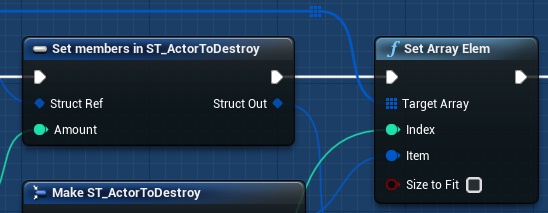
🤔
Oh yeah don't mind that item isn't connected to struct out, it was but it didn't work. So I tried building the struct from scratch and setting it directly, but doesn't work either.
I can change the variables of a struct (at top level) fine, but when I try to change the variables of a struct within that struct (second level) it doesn't work
Is that normal behavior?
 earnest tangle
you need to ensure everything you're changing is a ref and it should work
if any of the functions make copies instead of using refs, then it might not
untold fossil
I loop through an array of struct which contains another array of (another type of) struct. When changing the variable and reading the variable from the set members node it works, but then one node later when I get a copy of the array element I just set before hand it hasn't updated and is just the default value.
https://gyazo.com/be2abb21fa09b0f6c9fcb3ee7f24ac36

the print string in this example reads 20 (after one kill), default value is 20. When it should be 19
earnest tangle
then you're probably not setting the value correctly
there is no nested structs in this picture

 lucid lynx
My inventory variable is a struct array that's basically RowName/Quantity for a DataTable holding all my items. When setting the default value of this variable I'm able to set the RowName as if it were an Enum.
earnest tangle
I suspect the first Break ST_Mission always gives a new copy of the array
unless it says it's a reference when you hover the pin
untold fossil
lemme check
lucid lynx
If I want to add inventory items elsewhere it looks like I have to manually type in the RowName as a DataTable/Name.
untold fossil
 earnest tangle
this is one of the reasons why I moved a bunch of nested logic like this into C++ where the distinction is much easier to work with :P
untold fossil
should be a ref
earnest tangle
What about the Actor Classes to Destroy pin?
lucid lynx
Is there any way to add items to my inventory variable like my list of items is an Enum?
 earnest tangle
No I mean the output pin on the previous one
untold fossil
Oh
earnest tangle
lucid lynx
Is there any way to add items to my inventory variable like my list of items is ...
Make it an enum if you want it to behave like an enum? Not really sure what the problem is tbh :)
untold fossil
you mean this? https://gyazo.com/a495355849be7a22a67e4612a04f956d
 earnest tangle
Yeah
lucid lynx
earnest tangle
Make it an enum if you want it to behave like an enum? Not really sure what the ...
I mean like right here I'm able to set the RowName to something in the dropdown. It's behaving like an Enum.
 earnest tangle
Not 100% sure but it's possible you get a copy of the array for each pin that goes out of it
earnest tangle
lucid lynx
I mean like right here I'm able to set the RowName to something in the dropdown....
Ah I see, are your items actors or?
lucid lynx
earnest tangle
Ah I see, are your items actors or?
When I go to add items that aren't in that default list it wants me to type in the RowName. My items are not actors.

My items are a DataTable with info on strength, value, stack size, etc.
 maiden wadi
untold fossil
you mean this? https://gyazo.com/a495355849be7a22a67e4612a04f956d
maiden wadi
untold fossil
you mean this? https://gyazo.com/a495355849be7a22a67e4612a04f956d
I can 100% confirm that you're copying the array here. Any Break struct node is by copy. There is no such thing as a reference through a break node.
And that was also after the loop macro copied it.
earnest tangle
lucid lynx
When I go to add items that aren't in that default list it wants me to type in t...
Ah, yeah not sure how you'd get it with that particular node or if an alternative exists. Some of the other data table nodes have the dropdown but iirc they generally relate to getting items directly from it
fiery knoll
late meadow
but shouldn't the buoyancy component be referenced somehow?
'Set members' indeed takes a reference. Maybe the type of Buoyancy is not correct?
(Is that a default UE type or is it something custom?)
maiden wadi
lucid lynx
When I go to add items that aren't in that default list it wants me to type in t...
Instead of Making the struct manually, use GetDatatableRow and use the struct from that's return.
lucid lynx
maiden wadi
Instead of Making the struct manually, use GetDatatableRow and use the struct fr...
That's the special sauce I'm looking for. It wasn't working when I used Make instead of Get. Thanks!
untold fossil
maiden wadi
I can 100% confirm that you're copying the array here. Any Break struct node is ...
Ok thanks, I'll see how I can adjust it so it's a ref
maiden wadi
Good luck. 😄 Nested structs in BP is ~~a living hell ~~fun.
untold fossil
I honestly might drop the struct system for this particular part of the game entirely and swap it with object blueprints
Because I have a bad feeling this will cause way more headaches than it's worth
earnest tangle
It's definitely easier to deal with these types of things in C++ :P
maiden wadi
I don't even know if there is a way to get an array of structs out of another struct by ref. So even if you did make the ForLoop with ref output macro. You would still have to copy the array, modify it and then overwrite the entire array.
untold fossil
Yeah it's not possible, I've read some stuff online. It's just not doable at all. So I kinda have no other option than to move to blueprint objects. But honestly that might even be way better for what I need anyway, because it's a co-op game and the mission system will work better if blueprints are spawned that hold mission data. That way I can update mission data and only replicate that instead of having to replicate the entire struct of all missions and all data all of the time.
Easier to manage and more optimized. Win win 🙂
earnest tangle
Sounds like a good idea
 stable fossil
Does anyone know what to input here? 😂 I cant figure it out
 lucid lynx
stable fossil
Does anyone know what to input here? 😂 I cant figure it out
lucid lynx
stable fossil
Does anyone know what to input here? 😂 I cant figure it out
Uh, try GetWorldDeltaSeconds.
stable fossil
Ah, I see. That one does not require this context node. Thanks man
 neat stream
Guys how would you do a blocking volume spline?
 stuck kindle
So I was following a tutorial series on making a RTS and I'm at the part where I have to make the selection rectangle, followed the tutorial perfectly but when I have to test the rectangle something must have gone wrong with the blueprint because the selection rectangle is invisible
Alpha is lowered but only at 0,625
 severe tendon
This is probably beginner level easy but how can i change the value of a Bool variable with blueprint?
Like a certain condition is done then the bool changes from false to true?
lucid lynx
severe tendon
This is probably beginner level easy but how can i change the value of a Bool va...
Right-click your BP window and type in the variable name or drag the variable into your BP window. Set will let you change the variable, Get will tell you the value it's at.
 past hazel
"D:\UE\UE_5.0\Engine\Binaries\Win64\UnrealEditor.exe" "D:\UE\Projects\VRPGv\VRPG.uproject" 127.0.0.1 -game -ResX=800 -ResY=900 -WinX=0 -WinY=20 -log -nosteam
how to run in a window? now running in full screen
severe tendon
Anyone knows why this happens after i build the lighting?
 maiden wadi
stuck kindle
So I was following a tutorial series on making a RTS and I'm at the part where I...
maiden wadi
stuck kindle
So I was following a tutorial series on making a RTS and I'm at the part where I...
Are you doing a 2d or 3d space selection?
stuck kindle
maiden wadi
Are you doing a 2d or 3d space selection?
3d if I remember well
maiden wadi
What are you using for the display?
stuck kindle
I think that this is the code

It should define if you're holding or releasing the LMB
maiden wadi
Can't really read that with the crazy contrast. But none of that is for display stuff. Just setting state.
Are you using DrawRect in HUD's Draw event?
stuck kindle
I'm a bit of a newbie programmer so it's quite difficult to understand that
maiden wadi
What is supposed to make the rectangle display?
stuck kindle
Holding the left mouse button
There is a video referencing exactly what I did
"Marquee Selection"
maiden wadi
Video is nullptr to me. I have no reference to it.
stuck kindle

I'll cover how to make a typical marquee box selection mechanic used in many RTS and top-down style games to select units and buildings. This video will use units that I made in the previous video:
Previous video: https://www.youtube.com/watch?v=u0B5voGatbc
The first 10 minutes are exactly what I did, but the rectangle just won't show
And the cursor disappears
maiden wadi
Show me your version of 11:08
 icy dragon
Tbh that is one of the more difficult mechanic to pull off
maiden wadi
I didn't find it that difficult.
stuck kindle
maiden wadi
Show me your version of 11:08
In 5 mins, going home
maiden wadi
To be fair. This tutorial teaches some bad practices. Saving the mouse button down state is bad. You can get that state directly from the controller even without a cast anyhow.
icy dragon
maiden wadi
I didn't find it that difficult.
Well, you're a pro and likely working with AAA studio by now
maiden wadi
I did it before I was either of those things. It's a simple actor projection function for selection and a screen space FVector2D saved on mouse down, and the HUD Draw Rect frunction.
Even more fun doing it with a rotatable 3d box drawn from a niagara emitter. 😄
earnest tangle
I had to think for a moment how you would do the box select but yeah basically you just project the actors into a plane and then do a regular "is x/y within box" check so it shouldn't be too bad
stuck kindle
Remind me the screenshot key and where to find UE5 screenshots?
stuck kindle
And where do I find the screenshot
 maiden wadi
What sets IsDrawing state to true?
stuck kindle
I am somehow not entirely sure
Literally followed the tutorial lol
Still far away to fully understand UE5 language

This is the start


And after all this there's the drawing code
maiden wadi
Can you disconnect that branch and move it away a little and test this?
 stuck kindle
remove Is Drawing? ??
maiden wadi
Yes.
stuck kindle
Alright let me try
maiden wadi
Generally all you need in this check is if the mouse is detected as down, and then a distance check for the mouse down location to current mouse location.
 maiden wadi
For starts. Do you have this node anywhere?

If yes, uncheck Hide Cursor During Capture
 maiden wadi
Uncheck that setting. Will keep your mouse visible.
maiden wadi
Then the problem is likely the vectors. One sec.
stuck kindle
I feel sorry for my friend learning landscaping
maiden wadi
Interface events in HUD from Controller. :/ I hate youtube.
In your HUD, the interface event that is supposed to set StartMousePosition. Is that being called correctly?
You can add a print, or breakpoint with F9 on a node to test it.
 maiden wadi
Similar. It should be setting StartMousePosition, not Current.
stuck kindle

maiden wadi
Also, ticking in the controller to set the Current isn't necessary either. You can get that in the HUD's Draw event from it's owning controller.
stuck kindle
Wait so replace get mouse pos with startmouseposition?
maiden wadi
No, This event runs when you press left mouse, right?
stuck kindle
Yes I think so
maiden wadi
Replace the SetCurrent with SetStart here.
stuck kindle
Where
maiden wadi
stuck kindle
Here.
If this event runs when the mouse is pressed for the first time, you want to set Start here, not Current.
 maiden wadi
Depends on if Current is being set correctly as well.
Technically you shouldn't need to set it, could just get the mouse location from the controller itself.

Also. If I'm not mistaken, this will only work when dragging from the top left to bottom right.
 maiden wadi
Does that work when dragging from the top left to bottom right at least?
maiden wadi
If it is starting from the top left, then your event setting StartPosition isn't being called on mouse down.
stuck kindle
Oh god where do I find that now-
maiden wadi
Most likely your PlayerController
stuck kindle
 maiden wadi
You can leave the rest of that, but try disconnecting the stuff to the input event and try this.

Released technically isn't necessary, habit.
Er. Released won't even work, I derped and didn't connect it. Just do the Pressed part.
maiden wadi
You can just disconnect the white lines for now.
stuck kindle
I can't find "Cast To MyHUDClass"
 stuck kindle
 maiden wadi
For the HUD class though.
stuck kindle
this?
 maiden wadi
You can drag off of the GetHUD's return value and start typing Cast RTS_Marq
Should be the only one in the list after that.
 stuck kindle
 maiden wadi
Cast RTS_Marq
stuck kindle
HUD Class or just HUD

 maiden wadi
You don't need the class.
 stuck kindle
Perfect! Thank you
Man just this part was a emotional rollercoaster
But now that my code is different from the tutorial don't I have to modify it to continue onto unit selection?
maiden wadi
You shouldn't. This is all visual. Unit selection should use the Start vector and Mouse's current location, but other than that it's entirely independent.
Also.
stuck kindle
Okay
maiden wadi
Does this work when you drag from the bottom right to top left?
Because I have a memory of it being broken in that regard.
maiden wadi
Hmm. Maybe that was something else. But at least it's working. 😄
stuck kindle
Hopefully the time I have to rely on this channel again I'll already be at a decent point within the project
maiden wadi
Tutorials are good to follow for getting familiar with stuff, but do keep in mind they'll teach some bad things. Much like this one. Saving extra state that you already have access to is bad. It's just one more thing you have to keep track of. They are saving mouse button down state on mouse pressed and released. There are several places where you can end up pressing the mouse and never getting a released call. Which means you'd never stop drawing that until you fixed that state.
 covert schooner
Can animation blueprints have blueprint interfaces, if so how do you set them?
maiden wadi
Generally speaking, AnimBPs are meant to poll from their owning skeletal mesh's actor for state values. You rarely if ever access the AnimBP from other classes.
stuck kindle
Lmao, problem again
The unit selection works when I click on them but it's supposed to work also when they're inside the rectangle
Which it doesn't


 astral epoch
Okay asked in #gameplay-ai but I think they're asleep.
Does anyone know why a tick event (in a task, not normal blueprint) wouldn't fire?

The rest of the task works fine but I need this tick to do some pathfinding checks to make sure characters haven't found some weird route.
 thin panther
astral epoch
Okay asked in <#221798778208780288> but I think they're asleep.
Does anyone know...
thin panther
astral epoch
Okay asked in <#221798778208780288> but I think they're asleep.
Does anyone know...
Dont crosspost please
astral epoch
Is that an actual rule?
stuck kindle
stuck kindle
The unit selection works when I click on them but it's supposed to work also whe...
Anyone available? Kinda urgent
astral epoch
thin panther
Rule 2 and rule 7
Okay fair on 7 though that's kinda nested deep in the standard spam stuff.
thin panther
stuck kindle
Anyone available? Kinda urgent
Please be patient
stuck kindle
Fair, just kinda have to continue on selection and I can't find any other help online
thin panther
Yeah you wont get many guides on rts games
Theyre a very complex beast and high on the list of projevts solo devs probably shouldnt go after
stuck kindle
I mean, I've got my friend for the landscaping and another friend for modeling
Just gotta get used to programming
astral epoch
thin panther
Theyre a very complex beast and high on the list of projevts solo devs probably ...
Unreal is also really unsuited for them I find.
On a higher level they're not that complex, a lot of the functionality is repeated between units... but its the memory management and AI handling that starts to become a problem.
stuck kindle
Okay about what I said before, something confusing happened
It only works by selecting from bottom right to top left
From top left to bottom right it doesn't work
 shut fiber
Does anyone know if property specifiers are at all available to blueprint? Having lots of toggles for stuff in BP and not having access to EditCondition is making for some very poor UX
https://thomassampson.co.uk/posts/ue4-uproperty-editcondition/
earnest tangle
nope
iirc if you tick the private checkbox that may filter it out from some views but that's the extent of it
it's a good excuse to learn C++, basic stuff isn't hard if you have at least some programming background :)
shut fiber
yeah I've done a little bit of C++ but I still prefer to stick to BP for most stuff
 desert juniper
Is it possible for a player to bind to a delegate of a server owned actor on various clients?
 maiden wadi
desert juniper
Is it possible for a player to bind to a delegate of a server owned actor on var...
maiden wadi
desert juniper
Is it possible for a player to bind to a delegate of a server owned actor on var...
Might need better context on that.
stuck kindle
stuck kindle
Okay about what I said before, something confusing happened
@maiden wadi I'm truly sorry to test your patience but do you have any idea on why this happens?
desert juniper
maiden wadi
Might need better context on that.
I have an actor that acts as a tribe manager
I'd like for the members of the tribe to subscribe to it's delegates, such as when a new player joins, one is invited, etc
The actor is a cpp actor firing off it's DECLARE_DYNAMIC_MULTICAST_DELEGATEs when something is triggered, but client's aren't able to actually listen to those events
Currently implimenting the bindings in BP
 short reef
Okay I think I fixed it by having the projectiles just overlap rather than block each other
maiden wadi
desert juniper
I have an actor that acts as a tribe manager
I'd like for the members of the tri...
If the manager is replicated, then they can bind to it just fine. Just remember that you have to broadcast that delegate from an RPC or OnRep.
maiden wadi
stuck kindle
<@143471961723371520> I'm truly sorry to test your patience but do you have any ...
If I understood, your unit selection code only works from bottom right to top left?
maiden wadi
Hang on, I lost my surprised mask I use when someone says that about youtube tutorials. 😂
I'm pretty sure you just need to reconstruct the vectors. Is it the same video?
stuck kindle
I've been stuck on the selection section for so long
stuck kindle
maiden wadi
I'm pretty sure you just need to reconstruct the vectors. Is it the same video?
Mhm
The part after the 10 minutes
desert juniper
 Let me give it another shot
maiden wadi
That is odd. This function's comments state the direction of the points should not matter. :/
desert juniper
@maiden wadi So when a new member is added, it's done through an RPC and the AddNewMember (Server, Reliable) function on the actor updates by broadcasting it's multicast delegate
Trying to bind to it, manually in the player characters BP is yielding no results
 stuck kindle
maiden wadi
That is odd. This function's comments state the direction of the points should n...
stuck kindle
maiden wadi
That is odd. This function's comments state the direction of the points should n...
Not sure what to tell you honestly
maiden wadi
desert juniper
<@143471961723371520> So when a new member is added, it's done through an RPC an...
If I understand correctly, then you're only broadcasting on server? If so, you have to broadcast on clients as well once they received that info. Normally you'd use a FastArray for this, and on item added run the delegate broadcast. You can do it in a normal OnRep too by passing the old array in and crosschecking if necessary.
maiden wadi
stuck kindle
Not sure what to tell you honestly
I dunno. I avoided using that particular function due to it using an actor iterator and wrote my own screen projection checking functions.
stuck kindle
I only modified two assets by following the tutorial, this in MarqueeHUD

And this in Parent Unit Class
 desert juniper
maiden wadi
If I understand correctly, then you're only broadcasting on server? If so, you h...
desert juniper
maiden wadi
If I understand correctly, then you're only broadcasting on server? If so, you h...
thanks, let me see if I can read up on FastArray
 quick grove
sorry guys i just want to make sure that no matter how many digits there are I want the text to always be aligned with the top left corner of the monitor without the text coming out
 maiden wadi
quick grove
sorry guys i just want to make sure that no matter how many digits there are I w...
maiden wadi
quick grove
sorry guys i just want to make sure that no matter how many digits there are I w...
Set the anchors to the top right, and set alignment of X to 1.0
quick grove
oh thanks, easier than I thought
stuck kindle
Could it be that my problem comes from this?
 maiden wadi
Shouldn't be.
"Shouldn't"
But. Who knows.
You could try reconstructing the points into a top left and bottom right style.
Get the min X and MinY for top left, and MaxX and MaxY for bottom right.

 junior hedge
@rancid bobcat
stuck kindle
maiden wadi
Get the min X and MinY for top left, and MaxX and MaxY for bottom right.
How do I do that-
 faint pasture
stuck kindle
How do I do that-
faint pasture
stuck kindle
How do I do that-
With math
stuck kindle
Even worse
faint pasture
I mean you gotta learn math to do any of this stuff.
Finding which number is bigger is pretty easy.

 mental trellis
I believe everyone has done the tutorial. It's called school. Gotta pay attention, bro.
faint pasture
stuck kindle
How do I do that-
In your specific case, greater than and less than nodes are your friend
You have 2 X numbers and 2 Y numbers. You want one point to be SmallX, SmallY, and the other to be BigX, BigY

 opal portal
teach a noob please, whats that reflectioncubemap base node that i can not find?

 naive stag
I feel like I just reinvented a wheel. Basically I wrote this before I even knew FindLookAtRotation was a thing. When I tried switching into FindLookAtRotation, my old 'code' was wayyy more smoother than FindLookAtRotation. So uh, use this if u want idk.
 naive stag
I feel like I just reinvented a wheel. Basically I wrote this before I even knew...
naive stag
naive stag
I feel like I just reinvented a wheel. Basically I wrote this before I even knew...
Basically it only turns in 45 degrees instead of full 360
So only 8 directions it can face
 dull gale
Hey all, I'm trying to do movement speed based on direction and I'm hitting a bit of a wall:
My objective is to have forwards movement be whatever I want, while having sideways speed stay at 300 at all times.
initially I just multiplied the movement axis value by .5 while moving right/left. This works great while I'm walking, as the sideways movement is basically the same as the diagonal movement (pressing W and D).
The problem comes when I run as I have it set to change the max walk speed to 900, meaning the sideways movement becomes 450.
I tried to go around this by having a multiplier hooked to the forwards axis and increasing that when I run, but I soon found out the "Add Movement Input" clamps the "Scale Value" node between -1 and 1, so having a bigger number than 1 doesn't matter.
Does anyone have any ideas how I can get around this? Thanks!
stuck kindle
maiden wadi
No need for anything more than Min and Max functions.
So simply do this and connect it to Get Actors in Selection Rectangle
faint pasture
@dull galeMultiplayer or singleplayer?
maiden wadi
stuck kindle
So simply do this and connect it to Get Actors in Selection Rectangle
Can try it. Can't hurt. May work.
dull gale
faint pasture
<@225287982574338058>Multiplayer or singleplayer?
multiplayer actually, currently doing research on what to keep an eye out for networking
stuck kindle
That "May" is more than enough to me as of now
faint pasture
dull gale
multiplayer actually, currently doing research on what to keep an eye out for ne...
That's gonna be way more involved then you'd like, to do it correctly anyway.
desert juniper
naive stag
So only 8 directions it can face
interestingly, looks like FindLookAtRotation just calls MakeRotFromX with Target - Start
 faint pasture
naive stag
So only 8 directions it can face
faint pasture
naive stag
So only 8 directions it can face
Make the rotation, round it, ???, profit.
8 * Round(yaw/8)
er
45 * Round(yaw/45)
dull gale
faint pasture
That's gonna be way more involved then you'd like, to do it correctly anyway.
alright, let's assume single player then for now. Oh also, I did think about just setting the sideways movement multiplier to something smaller, but I feel like that's a hacky solution I wouldn't want to do (especially because I have running and sprinting)
 fair oak
how do i rotate the actor 90° with the current third person rotation? the event triggers when velocity happens and the location part works but not rotation (bottom part)
 stuck kindle
Didn't work, actually it stopped working completely
faint pasture
stuck kindle
Didn't work, actually it stopped working completely
Show what you have
naive stag
desert juniper
interestingly, looks like FindLookAtRotation just calls MakeRotFromX with Target...
Interesting
stuck kindle
Selection section of the HUD

And the parent unit class

This is the other part of the first pic
 faint pasture
fair oak
how do i rotate the actor 90° with the current third person rotation? the event ...
faint pasture
fair oak
how do i rotate the actor 90° with the current third person rotation? the event ...
Just add rotation or set rotation to be a combined rotation of current rotation and a 90 degree yaw
faint pasture
fair oak
but wait it should always be infront of the player model
What exactly are you trying to do?
fair oak
i want a colider box for my furniture placing system infront of the player it already moves with the player and rotates 90° when a item is in the way(on component overlap) but i also want it to be always infront of the third person character
like when the player spins spin the box 90° its slightly on the right from the actual anchor

 stuck kindle
Hell yeah another problem came up
faint pasture
@fair oakSo you're saying you want the box to move left or right if somethings in the way? Like you'd want the box to be here?
 fair oak
nope wait
currently its always in the north when its not overlapping with something when its north west it doesn't matter currently that would need even more scripting i think
 faint pasture
So what do you want, that it's always on the grid and in front of the character?
fair oak
yes
faint pasture
BoxPosition = CharacterPositionRoundedToGrid + Gridsize * CharacterForwardVectorSnappedToGridDirections
fair oak
i'll try
mental trellis
You don't even need to snap the vector
fair oak
faint pasture
BoxPosition = CharacterPositionRoundedToGrid + Gridsize * CharacterForwardVector...
ok idk wich nodes lol
mental trellis
SnapToGrid(SnapToGrid(CharacterPosition) + (GridSize * PlayerForward))
stuck kindle
Apparently the units get selected even when the box is not over them
faint pasture
Could even lose the inner SnapToGrid, depending on how you want it to feel.
stuck kindle
But only from bottom right to top left
mental trellis
faint pasture
Could even lose the inner SnapToGrid, depending on how you want it to feel.
You can't - you'd end up placing the box in the same square as the player if looking diagonally from the back of a grid square
fair oak
the movement already works but i mean the rotation now i'm confused lol
faint pasture
fair oak
the movement already works but i mean the rotation now i'm confused lol
Why would the rotation of a cube matter.
fair oak
i want it to rotate 90° when the play turnt slightly north west or south
faint pasture
You probably mean you want it to change POSITION, not just rotate
mental trellis
It's easy to do
fair oak
faint pasture
Why would the rotation of a cube matter.
because its always infront of the player and the blueprint ancher is in the players position
mental trellis
Abs(PlayerForward.Y) > Abs(PlayerForward.X) && PlayerForward.Y > 0 -> you're facing north
etc
fair oak
the actor rotates not the cube
faint pasture
So do you always want the furniture actor to be oriented with respect to the character?
but snapped to grid etc?
fair oak
yes
faint pasture
k so you need some function to round a rotation to the grid. Something like
Yaw = 90 * Round(Yaw/90)
There might be a built in one to do that, dunno
fair oak
yes like snap to grid but for rotations idk
this stuff with is a actor in the way works with rotation
 faint pasture
but anyways, once you got that
FurnitureYaw = RoundTo90Degrees(CharacterYaw)
mental trellis
If you want an easy way yo round to 90... Round(Value/90)*90
fair oak
mental trellis
If you want an easy way yo round to 90... Round(Value/90)*90
doesnt give me something good or i'm just bad at math
mental trellis
What is it doing?
 mental trellis
You're not rounding it...
fair oak
i know how do i round it 😅
mental trellis
And you don't want to touch the components other than yaw
break the rotation into components, divide the yaw by 90, round it, then multiply by 90 and then combine into a rotator again.
 fair oak
mental trellis
break the rotation into components, divide the yaw by 90, round it, then multipl...
fair oak
mental trellis
break the rotation into components, divide the yaw by 90, round it, then multipl...
and the weird thing is that in the viewport of the third person character the z yaw is just 270° and the others 0°
i found the issue why its two numbers sorry
stuck kindle
Nevermind what I asked I might just remake the whole code
mental trellis
fair oak
and the weird thing is that in the viewport of the third person character the z ...
Roll and pitch being 0 can be expected.
fair oak
mental trellis
Roll and pitch being 0 can be expected.
prints 0 after the math
 mental trellis
And what's connected to the divide node?
fair oak
mental trellis
And what's connected to the divide node?
y wich is the only thing thats not 0 when rotating the player
fair oak
oh somehow its z wich was 0 before the math oh wow weird
fair oak
mental trellis
so does it output 0 for every direction?
it put out 0 for x and z when the raw rotation was printed and somehow printed z as y
but then i just connected the divide to z anyway and it worked somehow
mental trellis
What you're saying makes little sense. Just screenshot your code.
fair oak
it works lol wait
 halcyon laurel
Hi everyone, i know about how to use the command console in blueprints, however I want to go more advanced than that, let’s base it on either a PC or tablet, I want to just press a button on my UI at any point in the game, it attaches image to an email and allows me to send that to someone. is there that kind of functionality to external apps like that or am I going to need a proper coder for this sort of task?
fair oak
mental trellis
What you're saying makes little sense. Just screenshot your code.
its really messed up when its a rotator variable it switches y and z for some reason and when the pins are split it switches back idk doesn't matter works now thanks and sorry that i took so long
mental trellis
fair oak
its really messed up when its a rotator variable it switches y and z for some re...
Screenshot your code.
fair oak
mental trellis
Screenshot your code.
the finished or the not working code?
severe tendon
When i cast something that isn't the character what should i get in the object node normally?
 mental trellis
fair oak
the finished or the not working code?
mental trellis
fair oak
the finished or the not working code?
Just all the code relating to rounding your rotation, from breaking to making.
fair oak
this is the working one
 mental trellis
severe tendon
When i cast something that isn't the character what should i get in the object n...
mental trellis
severe tendon
When i cast something that isn't the character what should i get in the object n...
The object you want to cast.
fair oak
fair oak
this is the working one
also this happens before that

and this swappes y and z for some reason but when i break the prins into 3 pins it works fine for some reason and z is z again

now it works

 glass stump
How do you
like reset the position of a BP?
Or like make it instantly teleport back to it's original position?
severe tendon
@mental trellis as the BP of the object?
mental trellis
The instance of the object you want to cast.
 flat coral
What's the difference between Visibility and Camera traces?
 mental trellis
Cast changes how an engine sees an object. It can't do anything without you giving it an object.
earnest tangle
flat coral
What's the difference between Visibility and Camera traces?
Nothing. It depends on how you've configured your collision channels
flat coral
Is there any best-practices on which should be "trace the world as it looks" vs "this trace may interact with invisible objects"
severe tendon
The thing is that i write get "name of the object" but nothing appears
mental trellis
flat coral
Is there any best-practices on which should be "trace the world as it looks" vs ...
It's kinda in the name.
earnest tangle
I think visibility and camera are usually treated something of "can you see through this" and "can the camera pass through this"
severe tendon
I'm so used to only using get player character or player controller that i dont really know how to get normal objects
earnest tangle
so for example a wall will have block on both, a window will ignore on visibility but block on camera, and so on
flat coral
a window will ignore on visibility but block on camera
This is exactly what I was looking for, thank you!
 worthy carbon
when i overlap the item it says its not valid and that's why the ItemIcon is not working in my inventory

someone help me please
why is it not valid
and how do i make it valid?
severe tendon
This is supposed to make an action when the character enters the collider and checks if the bool is true, yet for some reason there is an error, i've already set the bol value to true but it still fails

What is happening?
This happens too

 elfin wolf
you have to cast to the character after you overlap it
 tight schooner
severe tendon
This is supposed to make an action when the character enters the collider and ch...
tight schooner
severe tendon
This is supposed to make an action when the character enters the collider and ch...
The error means your "candado" variable is not set with any data. Instead you need to take the Other Actor pin, cast to it to check if it's the character class you're looking for, and then check the boolean
"Other actor" is the thing your box just overlapped. It's a generic actor reference which is why you have to do a cast check.
 gritty elm
how to make line trace hit on 2d image?
I have png image in unreal. and this picture have some objects. i want to line trace with mouse with click and detect object on png picture.
I know about mouse trace to world. but how to detect things on 2d image?
 misty pendant
How can i create ActorBeginOverlap to check if the pawn that is overlapping is the player?
tight schooner
@misty pendant Probably an assortment of ways to do this, but you can use Get Player Pawn, and see if your actor reference is == to it
gritty elm
I created sprite and i added collision box. how i can detect mouse trace on this collision box?
 faint pasture
flat coral
What's the difference between Visibility and Camera traces?
faint pasture
flat coral
What's the difference between Visibility and Camera traces?
Those are channels. Like Photoshop layers. You could add more
gritty elm
Hi @faint pasture, Can you help me with this issue?
I have 2d png image and i want to line trace on image. i tried to create sprite and i added collision box to it.
but how i can detect line trace on that box
anyone can help?
misty pendant
tight schooner
<@320985090022965258> Probably an assortment of ways to do this, but you can use...
figured it out how to do it, it was kind of simple. ty for explaining

oop
sorry
 wet shore
what is the best way to go about making certain controls work only when the player is in a trigger box?
 remote meteor
player overlap box, turns on boolean, leaves box, turns off boolean
when input is press, check boolean before continuing
 trim matrix
Sorry I don't know where to ask, I'll ask here.
What's the deal with the player index and the player controller?
quick grove
sorry guys how can I make that the game saves literally everything when the player is exiting and automatically reload the saves when the game is launching?
trim matrix
I'm trying to figure out how to create a playercontroller class that "decides" who to give to control to what
quick grove
I saw the "Save Extension" on the marketplace for free
wet shore
remote meteor
player overlap box, turns on boolean, leaves box, turns off boolean
Thank you! one last question: how do i set the controls i have in my level blueprint to work with the trigger box?
severe tendon
@tight schooner Ok thanks gonna check it out
 cursive grove
What is the proper way to combine 2 blueprints in a parent blueprint? e.g. a mesh blueprint and a vfx blueprint
severe tendon
Btw, how can i block the characters movement in some circunstance
Like when you pick up a note you wanna read and you cant move until you finished reading and exit it
faint pasture
trim matrix
Sorry I don't know where to ask, I'll ask here.
What's the deal with the player ...
What exactly are you trying to do? Everyone is Player 0 on their own local machine besides couch coop situations
trim matrix
I'm trying to understand the logic behind it
behind player controllers, player index and multiplayer
faint pasture
Player Index only means anything on the server. On clients, everyone is player 0
also on client you can only see your own playercontroller, not others
trim matrix
Ideally I'd want a situation where on load the player 1 possessed pawn 1, and player 2 possesses pawn 2
interesting
faint pasture
trim matrix
Ideally I'd want a situation where on load the player 1 possessed pawn 1, and pl...
Server does that
trim matrix
yes so far I've been developing locally and I'm using get player controller index 0 for input and all that
faint pasture
trim matrix
yes so far I've been developing locally and I'm using get player controller inde...
ew no
don't
trim matrix
what's the better way
faint pasture
Depends on where you're at
if you're in the Playercontroller, get self. If you're in the pawn, get its playercontroller, etc
trim matrix
so every pawn has a playercontroller by default? or do you have to set it on begin play or something?
faint pasture
What are you trying to do? Not every pawn has a Playercontroller, some have AIControllers if they aren't possessed by a player etc
trim matrix
i'm trying to understand lol
I made a simple pong clone so far
For research purposes

 trim matrix
But if the game is single player only the gamemode has to be on client right?
Not that it matters
Also the player controller handles all indexes on the local client if there are multiple right?
faint pasture
trim matrix
But if the game is single player only the gamemode has to be on client right?
Yes in single player or listen server the client and server are the same
 zealous moth
trim matrix
Also the player controller handles all indexes on the local client if there are ...
zealous moth
trim matrix
Also the player controller handles all indexes on the local client if there are ...
indices* and what are you talking about?
faint pasture
But anyway, it's pretty rare that you'd have to get PlayerController(0), I don't recall doing it ever
trim matrix
zealous moth
indices* and what are you talking about?
read the log
trim matrix
faint pasture
But anyway, it's pretty rare that you'd have to get PlayerController(0), I don't...
If you have two local players on a multiplayer match you might want to get player index 0 and 1 I assume?
zealous moth
yeah that's why i am asking for further info
you will always be player controller 0 unless you are in a console, with multiple controllers plugged in locally
then you get playercontroller(1) and so on
faint pasture
trim matrix
If you have two local players on a multiplayer match you might want to get playe...
Give an example of what you're trying to do where you even need to get the playercontroller by index?
The pawn knows its playercontroller, the playercontroller knows its pawn and hud and playerstate, what's the problem?
zealous moth
cursive grove
What is the proper way to combine 2 blueprints in a parent blueprint? e.g. a mes...
Make it a multivariable blueprint. Make an enumerable with 2 states and in your BP construction script, swap properties based on the enum value.
Now, as to why you'd want to do that, I don't know since it sounds like a massive headache.
zealous moth
severe tendon
Btw, how can i block the characters movement in some circunstance
you can either use internal boolean or "unpossess"
severe tendon
Ok
zealous moth
wet shore
Thank you! one last question: how do i set the controls i have in my level bluep...
level blueprint access is not good. you would need to pass it through as a reference somewhere somehow. If you want something overarching, use the game mode instead. You can at least cast to that.
zealous moth
quick grove
I saw the "Save Extension" on the marketplace for free
i tried that awhile ago and I didn't like it 😄
What you would typically do is that all elements requiring their data to be saved to set them as part of some struct and pass that onto the save game data. So when you reload the zone, you baseically respawn it from default and each actor checks in/=out based on the save data.
You can use GUID for that and add it to an array if it needs to stay or disappear. etc etc
trim matrix
faint pasture
The pawn knows its playercontroller, the playercontroller knows its pawn and hud...
Do you have to set the playercontroller manually in the pawn?
Or is the player controller accessing the pawn
 topaz badger
Currently trying to get a delta of a distance curve but these values are exactly the same when comparing them. Do animation curves not update every frame in UE5?
 glass stump
Is there a collision event for overlappingtwo components from two different objects?
zealous moth
glass stump
Is there a collision event for overlappingtwo components from two different obje...
on component begin overlap
zealous moth
topaz badger
Currently trying to get a delta of a distance curve but these values are exactly...
what value do you get?
topaz badger
zealous moth
what value do you get?
0 :(
glass stump
zealous moth
on component begin overlap
And then I cast to the other object?
How do I get the component after that though?
topaz badger
topaz badger
0 :(
well 0 when comparing the difference, both go from 0-45 as the animation progresses
glass stump
Hm. maybe I'm just formatting it wrong.
zealous moth
glass stump
And then I cast to the other object?
if you need to sure
zealous moth
topaz badger
well 0 when comparing the difference, both go from 0-45 as the animation progres...
do me a favor, on tick, get curve value and set to print string
does it change?
if not, your problem is the name ref is probably invalid
trim matrix
@zealous moth if you can answer the question above that'd be appreciated as well
zealous moth
trim matrix
<@383068958221139970> if you can answer the question above that'd be appreciated...
the overarching structure is that you have a game instance that contains your program. Then, your level loads and gets the game mode. The game mode then brings the default player controller and pawn and the pawn is then possessed if allowed. This is your PC and Pawn relationship.
If you were to unpossess, you would need to repossess later manually and declare it.
topaz badger
zealous moth
do me a favor, on tick, get curve value and set to print string
yeah, i get a value going up to 45 as the animation plays
topaz badger
well yes, but the last frame and current frame values are mysteriously the same
yep
zealous moth
can i see? :X
topaz badger
 zealous moth
where's the rest?
 trim matrix
zealous moth
the overarching structure is that you have a game instance that contains your pr...
trim matrix
zealous moth
the overarching structure is that you have a game instance that contains your pr...
But is the first ever possession done by the pawn asking it or by the player controller deciding it?
topaz badger
Ive actually pinned it to something else, following an epic tutorial and they have to use a do once node to set the initial value, seems like that is getting reset constantly
zealous moth
topaz badger
Ive actually pinned it to something else, following an epic tutorial and they ha...
do once??????? what?!?!?!?!
topaz badger
 zealous moth
oh god
topaz badger
its from an epic livestream/tutorial
zealous moth
oh no.... don't trust them
sometimes they mess up live 😄
i am trying to follow your logic
sec
zealous moth
trim matrix
But is the first ever possession done by the pawn asking it or by the player con...
both, the pawn must be possessable as well and enable input
topaz badger
yeah, haha. They showed it working. Its for a turn in place. Theres really nothing out there that shows a good way on how to do it.
zealous moth
is your do once supposed to start unclosed?
 zealous moth
i can't say i know 😦
if it is a tutorial, i'd start over
and test it back each step of the way
^ i do that when the same happens on my side >.>
trim matrix
A player controller can only possess one actor at a time right?
zealous moth
any controller can only control 1 thing
each ai pawn will have their own ai controller as well
uh oh, Authaer is coming out
maiden wadi
Possess, yes. But a few hundred thousand things can have input enabled.
maiden wadi
Werk werk
trim matrix
nevermind the logic this is a very jank test world for practicing this
 zealous moth
we are the robots
trim matrix
so if I press 1 then 2 I'm possessing ONLY pawn 2 right?
or if I press 1 and 2 I'm possessing both?
this is the player controller bp
 zealous moth
trim matrix
so if I press 1 then 2 I'm possessing ONLY pawn 2 right?
zealous moth
trim matrix
so if I press 1 then 2 I'm possessing ONLY pawn 2 right?
I think it unpossess the other
I've never played with that setup
You have an "On possess" event
you can print string it on your actors and say "Hi I am possessed!"
trim matrix
yeah ok I'm starting to figure it out thanks
next million dollar question is: how do I turn this into a multiplayer enviroment for testing?
Other than setting the clients to 2
zealous moth
trim matrix
next million dollar question is: how do I turn this into a multiplayer enviromen...
LAN or online?
if you're poor, RPC
if you're rich, AWS master race
maiden wadi
There is also an editor setting to enable late joining button
trim matrix
I'm trying to do the most basic thing
I have a test world with two pawns, and I want to spawn two windows with two player controllers (representing two players in a server) one possessing each
zealous moth
oh boy, I haven't done that... LAN parties, man I tell you h'wat
maiden wadi
trim matrix
local lol
To clarify, do you mean two people on one screen, or simulating two people playing on their own machine?
trim matrix
two people playing on their own machine
wet shore
zealous moth
level blueprint access is not good. you would need to pass it through as a refer...
my main issue is that i am trying to reference a camera actor and cant seem to do it outside of the level blueprint
maiden wadi
Yeah, just set the players to two, or enable the late joining editor button.
Set it to dedicated or listenserver for type.
maiden wadi
It might for dedicated servers. Not sure. I'm used to testing under Listenserver conditions where one player is host and player. Is how we do stuff at work.
trim matrix
Ok so if I want the two clients to possess one pawn each I can get all actors of class array and for each give one to each controller?
maiden wadi
You could. Though it's usually easier to use game mode overrides.
trim matrix
Wait, in the game mode bp how do I directly address a specific client?
Client 2, for example
maiden wadi
Depends on your game and how you have your framework set up. But there is a function named GetDefaultPawnClassForController.
 teal gull
Hey folks quick question. How can I iterate tru 10 static meshes?
I have an array of references to static mesh and I want to set ref to the 10 bullets on my mag. Do i need to add to array one by one? imnot sure how to do a loop and get the correct static mesh each loop
 zealous moth
wet shore
my main issue is that i am trying to reference a camera actor and cant seem to d...
zealous moth
wet shore
my main issue is that i am trying to reference a camera actor and cant seem to d...
in your game mode, create a variable of your camera actor and leave it unset.
When your camera actor spawns, on begin play, get game mode, cast to it and set the actor variable to itself.
Now anytime you need to refer to that actor, you can do so in the game mode.
maiden wadi
Alternatively. I also recommend not making separate classes specifically. You could just alter how the class works instead of making two very different classes.
zealous moth
so many 30+ playlist videos watched and they messed up something on vid 2 and 15 and nothing works
"but if you do it right, it works!"
trim matrix
maiden wadi
Alternatively. I also recommend not making separate classes specifically. You co...
Thank you, I have one more question
How do I actually program and address the server?
Like, do I work inside the gamemode?
zealous moth
trim matrix
Thank you, I have one more question
How do I actually program and address the se...
look up EOS, they got a freebie
it's minimal work
trim matrix
I meant inside unreal
maiden wadi
Hmm? EOS is just a connection platform.
trim matrix
Yeah I was wondering the same
maiden wadi
Pretty sure you're looking for an RPC.
trim matrix
I mean, even just something as simple as the server broadcasting to all clients a print string
zealous moth
oh, did i misread?
oh, RPC calls
read up on RPC
client makes requests to server and server does whatever
trim matrix
yeah but who's this "server"
is it gamemode? Inside my project what is the server represented with
maiden wadi
Server is an application of the game running on a machine.
 stoic quarry
Hi, could someone help me privately with a bug I have?
 nova horizon
Is there a way to use C++ and Blueprint st the same time?
maiden wadi
trim matrix
yeah but who's this "server"
Case. A dedicated server is am application with no client and no graphics. You can run a dedicated server and a game client on the same machine, but they are not the same application so the client still has to go through RPCs even on the same machine because of the differing applications.
On Listenserver a server is an application of the game that is both server and a player. Think typical console shooters where one player hosts.
Talking about networked actors. Every player has a player character. So if you're on a dedicated server game, and there are two players, there are actually six character instances. Two on the server, two on client 1 and two on client 2.
The same case on a listenserver is that there are only six characters.
maiden wadi
nova horizon
Is there a way to use C++ and Blueprint st the same time?
You already are. Blueprint is C++ code. All you have to do is set up VS or Rider and open the solution file in your IDE. Extend the classes you want to extend or create new ones, and compile, and launch the engine through the IDE.
nova horizon
I see
Is rider better than VS?
Ah
Any real difference
I see
Cause I moved from Unity to Unreal and this is all very new to me lol
Thanks 👍
trim matrix
nova horizon
Cause I moved from Unity to Unreal and this is all very new to me lol

Translate your Unity knowledge into UE4 so you can get up to speed quickly.
maiden wadi
You're going to have an initial shock with how difficult it can be to reiterate changes. At least that seems to be the most common Unity User's experience.
nova horizon
trim matrix
https://docs.unrealengine.com/4.27/en-US/Basics/UnrealEngineForUnityDevs/
Oh thank you this will be very helpful
nova horizon
maiden wadi
You're going to have an initial shock with how difficult it can be to reiterate ...
I think I've already had a few initial shock lol
maiden wadi
Having never used Unity. Can't say. 😄 Using Unreal was pretty easy to learn for me.
nova horizon
Same lol
Unreal seems very very complicated compared to Unity but I feel like it benefits this way cuz it's more flexible
nova horizon
trim matrix
https://docs.unrealengine.com/4.27/en-US/Basics/UnrealEngineForUnityDevs/
Problem is am using UE5
trim matrix
nova horizon
Problem is am using UE5
It doesn't matter much, all the concepts are the same in UE5, only the UI changed a bit
maiden wadi
I feel like Unreal has a ton of framework that Unity seems to be missing. And rather than learning them, Unity users seem to build from the ground up and fight the systems already in place instead of understanding them.
nova horizon
It takes longer to do stuff but I don mind it
nova horizon
trim matrix
It doesn't matter much, all the concepts are the same in UE5, only the UI change...
Ah I see
Anything changed with the code or?
trim matrix
nova horizon
Anything changed with the code or?
code from UE4 is almost completely unchanged when going to UE5 unless you were already pretty deep
nova horizon
trim matrix
code from UE4 is almost completely unchanged when going to UE5 unless you were a...
I see alright transitioning from C# to C++ shouldn't be too hard
I did basic C++ before I did C#
Yep I know that
But I'm more excited tbh lol
Will do 👍
I should go
There are other people who probably needs help more than I do
But thank you

 grave relic
Hey everyone 🙂 Wanted to ask if there are any great plugin for sequences?To make an interactable sequences? Logic like "call sequences 1,2,3 with buttons at your widget blueprint " Sorry if its sound weird but I can't say what i really want to due the rules of this server :DD
The difficulty is that I want to automate this process
 high ocean
Any idea on how to "set camera view"? There's a function to get camera view, but not one to set it. I need to set another actor's camera view to the current actor's.
maiden wadi
high ocean
Any idea on how to "set camera view"? There's a function to get camera view, but...
As in you want the current viewport to go to that camera, or you want to rotate a camera to a view
high ocean
maiden wadi
As in you want the current viewport to go to that camera, or you want to rotate ...
First option 🙂 the other is clear enough with blend. But can't seem to find a solution for "the other way around".
maiden wadi
There should be a SetViewTargetWithBlend in PlayerController.
high ocean
there is, but it will blend from current view to "that camera's view".
maiden wadi
Not with a 0 time input. It's instant.
high ocean
Camera 1 (current) -> Camera 2 (target). Yes (instant). I need Camera 1 (current) -> Other player's camera view & SET it to (current) view.
Ok, here's what's wrong:
- I'm spawning a mount (spawn another character BP then destroy current)
- If the SKM is rotated towards the camera, the camera of the newly spawned mounted character will have it's boom reflect it's spawn rotation (obviously).
- I need to somehow "send" the current camera's view over to that new character so the transition is seamless.
maiden wadi
So problem is that possessing the new pawn keeps the old pawn's camera rotation?
As in if you're facing the mount's left, possession makes you look left afterwards?
high ocean
maiden wadi
So problem is that possessing the new pawn keeps the old pawn's camera rotation?
I'll make a quick vid... I'm wasting ur time this way 😐
maiden wadi
Man, I'm playing video games. I'm already wasting time. 😄
If I did understand correctly though. I think you're looking to set the controller's control rotation on possession of the pawn.
high ocean
maiden wadi
Man, I'm playing video games. I'm already wasting time. 😄
😭 wish I had some time for that 😐
so there it is... I need the camera to "stay put"
and "translate" it's view to the new camera of the mount
only found some hacky shenanigans online which I'm not gonna implement lol (with the spectator pawn n shiet lol)
maiden wadi
Seems like a control rotation thing if you're using spring arms with control rotation.
high ocean
I am using those, yes
maiden wadi
That's odd. I don't remember that setting automatically like that. I recall having to specifically implement control rotation changing when I did some of my possession code.
 ancient sparrow
is there a blueprint node that takes 2 execution inputs, and either of them will activate the same execution output, but it will output a boolean depending on which input was triggered
zealous moth
ancient sparrow
is there a blueprint node that takes 2 execution inputs, and either of them will...
why????
high ocean
Getting the camera/camera boom's transform returns 000 regardless of the SKM rotation. However, the "get camera view" node returns some values. Problem is how to "set camera view" of the newly spawned one - there's no function for that.
 ancient sparrow
zealous moth
why????
ancient sparrow
zealous moth
why????
i just need it
maiden wadi
ancient sparrow
is there a blueprint node that takes 2 execution inputs, and either of them will...
Usually you just make a new Event with a boolean and call that event from your other two execution lines with differing boolean inputs.
ancient sparrow
but how do you get the differing boolean inputs
maiden wadi
 maiden wadi
high ocean
Getting the camera/camera boom's transform returns 000 regardless of the SKM rot...
maiden wadi
high ocean
Getting the camera/camera boom's transform returns 000 regardless of the SKM rot...
I'm not really sure how I would handle that. But I feel like something is setting your control rotation during that transition that shouldn't be. Maybe one pawn is destroyed or unpossessed too early. Barring that, you could just save the control rotation's state pre possession, and set it on some client side possession notification. Not sure there are any of them in BP alone though. I usually hook into some of the C++ only ones and add BIEs or delegates.
 normal rampart
Is there any way to determine the direction an actor is moving when setting the location directly and it's not technically using physics to move? I'm using a sequencer to set the transform of an actor and need to know if it's moving left or right on the X axis.
The only thing I came up with is to cache it's X location, delay an arbitrary amount, and compare the X location with the cached X location, but it has pretty unreliable results for some reason.
high ocean
maiden wadi
I'm not really sure how I would handle that. But I feel like something is settin...
I can get the control rotation no problem. However, so far, I haven't found a way to SET the control rotation. It's exactly what you are saying. The control rotation gets reset to the new pawn's control rotation which is different. So after possession, I should somehow "force" it, SET the control rotation. But I can't find a node/way to handle that in BPs 😐

 high ocean
normal rampart
Is there any way to determine the direction an actor is moving when setting the ...
high ocean
normal rampart
Is there any way to determine the direction an actor is moving when setting the ...
get forward/right vector? Or maybe I'm not understanding the question properly...
high ocean
maiden wadi
Should just be this.
wtf... lemme check again... I wrote those exact words...
high ocean
high ocean
wtf... lemme check again... I wrote those exact words...
Ok, ok... my bad, did it in the character 🤦♂️ got confused trying so much stuff fast. I'll come back with the results - would be nice if it worked 😄@maiden wadi
normal rampart
high ocean
get forward/right vector? Or maybe I'm not understanding the question properly.....
The actor doesn't turn at all, no change in rotation, so the forward and right vector remains the same. It just translates
maiden wadi
😄 It happens.
high ocean
maiden wadi
😄 It happens.
Like a charm 🤌 👏
Thank you (again). You've helped me develop at least 25% of my first two games lol 😄
maiden wadi
normal rampart
Is there any way to determine the direction an actor is moving when setting the ...
You have to save state yourself. You can make a velocity from two points, so if you are setting it on tick, just save the current location before moving. CurrentLocation - PreMoveLocation = Velocity
 bronze quiver
So im driving a car through a box volume, acts as a checkpoint for now and there is collision on it causing the car to flip? unsure what im doing wrong
 maiden wadi
high ocean
Like a charm 🤌 👏
Thank you (again). You've helped me develop at least 25% of ...
maiden wadi
high ocean
Like a charm 🤌 👏
Thank you (again). You've helped me develop at least 25% of ...
Control rotation is fun. Specially with replication compression math and the confusion it can cause. Wait til you set up a nice little AI system that does all the looking around and stuff. And then realize that there is a SetFocus function in the AI controller that has multiple tiers of focus and everything and works out of the box like a player looking around. 😄
bronze quiver
bronze quiver
So im driving a car through a box volume, acts as a checkpoint for now and there...
this is all thats on it really
 maiden wadi
bronze quiver
So im driving a car through a box volume, acts as a checkpoint for now and there...
maiden wadi
bronze quiver
So im driving a car through a box volume, acts as a checkpoint for now and there...
Sounds like you want to remove Blocking channels and only use Overlap channels?
bronze quiver
maiden wadi
Sounds like you want to remove Blocking channels and only use Overlap channels?
since im still learning, thats what I think I want for this object only, yes
high ocean
maiden wadi
Control rotation is fun. Specially with replication compression math and the con...
I've got mixed feelings about things I dig into for a day only to find out there's some tickbox built into the engine that auto-handles all of it for me lol. I feel both stupid for wasting time & happy that it's both fixed and easy to do so lol 😄
like... this control rotation for instance 🤦♂️
I saw it was the only value changing when moving camera, looked in the wrong place, didn't find the function and started looking online pffff
maiden wadi
I used to love that feeling. 😄 Most of my time is spent in UI though. No savior checkboxes.
high ocean
I keep saying for 6 months now that UMG really really needs some love from Epic... 😐
maiden wadi
Specially with Common UI coming out. That plugin literally makes me nauseous.
high ocean
maiden wadi
Specially with Common UI coming out. That plugin literally makes me nauseous.
the whatnow?!
omg... wtf is this?!
😮
maiden wadi
Some new UI extension stuff from Epic. I took a look into it a long while ago before UE5 release. It's coded terribly.
normal rampart
maiden wadi
You have to save state yourself. You can make a velocity from two points, so if ...
Yeah that's what I was trying before, but I revisited it just now and ig it works somewhat properly when I compare the values BEFORE the delay. Idk what sense it makes, but it works better. Thanks 🙂
high ocean
so... UMG did get some ❤️ afterall - but according to ppl I trust looks at @maiden wadi it isn't so good? 😆
high ocean
maiden wadi
Some new UI extension stuff from Epic. I took a look into it a long while ago be...
Oh, so yea, it's just control-oriented stuff from what I read here
maiden wadi
Eh, it was in alpha. With any luck by 5.13 it'll be okay. But after seeing someone const cast out of a const OnPaint function to set a timer just to create a tick function that they could have avoided with a simple time state variable. I got allergic. Then at work we started implementing it for other reasons. It literally stops the middle mouse button from working from nothing but being enabled. Zero settings, zero implementation, not being used, just enabled in the project. No middle mouse in actors input or UMG.
high ocean
So UMG as a system still suffers 6 year-old bugs lol
Well, honestly, I feel like those "binds" are utterly useless as a system and could be safely removed as nobody in their right mind uses them. If they would at least expose a tick frequency (like all actors have), they could become more useful. But then again, I'm barely staying afloat with half of the changes so yea...
maiden wadi
Even with a frequency, they're pointless. Bindings are bad for two reasons. Two bindings is already more function overhead than just using the widget's tick. And if you ever set the property that thing is bound to once, the entire binding won't run anymore. Stops updating.
high ocean
Wow, didn't even know that. Then again, I never used them so 🤷♂️ 😆
 lime yoke
Can't set variables on anim notify states. I think this is a bug.
Variable "NameOfVariable" is read-only within this context and cannot be set to a new value
Collision on a box volume?

 fervent cave
does someone has some pointers on dynamic depth of field? cant seem to stop ue from replacing my volume with some random default one instead of just tweaking the values on my volume
zealous moth
maiden wadi
Even with a frequency, they're pointless. Bindings are bad for two reasons. Two ...
Remember, the hard limit on a poor tier pc is 35 afterwards the FPS drops
we had that debate!
glass stump
How do you define what component is hit in an Event Hit? (Of the other object.)
faint pasture
glass stump
How do you define what component is hit in an Event Hit? (Of the other object.)
Isn't there a component pin on the event?
or in the hit result
 spark steppe
anyone succeeded adding timespan to datetime struct in ue5?
lime yoke
Do you guys happen to know how to make a static mesh that can be pass through one side but no from the other? Something like a Dark Souls fog.
 paper galleon
Not one static mesh. You'd have to combine collision volumes with the static mesh in an actor
lime yoke
Yup, I suppose that should be the way to do it.
naive stag
So I want to make something but I have no idea how to make it and I couldn’t find anything about it. Is there a way to see collisions only in game?
Not in the editor, but in game
paper galleon
naive stag
So I want to make something but I have no idea how to make it and I couldn’t fin...
Yeah. Look for the HiddenInGame bool in the component defaults and turn it off. Also ensure that visibility is on
Not so sure about "only" in game though.
But the above method will be visible in editor and in game
naive stag
paper galleon
Yeah. Look for the HiddenInGame bool in the component defaults and turn it off. ...
So when I will export the game it will still be visible?
paper galleon
naive stag
So when I will export the game it will still be visible?
Nope.
Ahh I see that you meant now.
naive stag
paper galleon
Not so sure about "only" in game though.
But the above method will be visible i...
I just want to be able to switch visions between normal view and collisions only by a press of a button
paper galleon
Nah. Collision debugs are editor only features. You have to implement some sort of visibility mechanism yourself.
paper galleon
naive stag
I just want to be able to switch visions between normal view and collisions only...
Is it a gameplay feature or you're debugging something in-game.
naive stag
paper galleon
Is it a gameplay feature or you're debugging something in-game.
Gameplay feature
Think of it as a blind character
That can sense stuff
paper galleon
naive stag
Gameplay feature
Sorry, you'd have to implement it another way. Materials, really thin static meshes, 3D wigets.
Several other options really.
I tend to favour materials but I have no idea how to implement it at the moment
naive stag
paper galleon
Sorry, you'd have to implement it another way. Materials, really thin static mes...
What about the 3d widgets?
paper galleon
I haven't done anything of the sort that you're trying to implement. So I can't really help that way.
🥲
naive stag
I think if I’ll do it with materials, it will cause me lots of trouble further when I will try to build a map
Rn it’s just a testing map
Wdym by effect?
paper galleon
The collision visibility effect you're going for.
naive stag
Oh you mean the texture it will be that will over the collisions? It doesn’t matter at all tbh, as long as there is a texture that indicates it’s existence
spark steppe
so i want to add time skipping, my game pretty much uses seconds as ingame minutes, so i thought i could just set time dilation to 10, delay for minutes/10 and set it back to 1
but im not getting what i'm expecting
i've read that time dilation messes with delta time, so is it not an reliable way to pass time within a certain amount of real time?
paper galleon
I'd use states for time skips.
Time dilation is best for slow mo or fast forwards over a short period.
That's what I'd use it for anyways.
spark steppe
what do you mean by states?
time dilation would have the benefit that AI would still do things
but i guess it's also heavy on CPU "compressing" all that within a shorter period of time
with time dilation of 10 and 30fps, i should still get 3 ticks per "what would be a second normaly", which should be ok for most AI stuff
paper galleon
States like "what should be happening at this time of the day?"
When I run the time skip event, I'd do a bunch of checks and set a bunch of stuffs.
I'll admit this method only works best if you're keeping track of only a few stuff.
spark steppe
yea, but ticks still happen, with altered delta from how i understood it?!
i want to increase FPS actually
with 30fps and time dilation 10, it should process at 300fps 😛
kind of
yes
😄.
but no
it does not from my observation 😄
e.g. "get game time" should be affected by time dilation
i'm aware of that
see, i may be patient as gentoo user, but not t.maxfps 3 patient
alright, so i have to think of how to implement a sane schedule for my ai tasks and such
so that i can just alter the time value, with some offset, and notify my AI to rethink their life decisions
spark steppe
whats your source of truth to manage your time? custom game instance?
 candid geyser
Any quick ideas on how to help the game detect if the player isn't moving?
paper galleon
spark steppe
whats your source of truth to manage your time? custom game instance?
Subsystem.
paper galleon
candid geyser
Any quick ideas on how to help the game detect if the player isn't moving?
Check velocity.length is lower than whatever threshold you want.
spark steppe
i was kind of considering to ask in cpp if i should make time a subsystem 😄
candid geyser
paper galleon
Check velocity.length is lower than whatever threshold you want.
What if I just check the velocity and ask if it's close to or equal to zero?
paper galleon
Lol. 90% of the time the answer is subsystem.
spark steppe
thanks ozy and laura
i guess i'll leave that problem for future me, and lay it down for today 😄
paper galleon
candid geyser
What if I just check the velocity and ask if it's close to or equal to zero?
You could do that. Same effect I think?
I just prefer checking the length
candid geyser
paper galleon
You could do that. Same effect I think?
I just prefer checking the length
I'll give velocity a try, thank you!!!
paper galleon
candid geyser
I'll give velocity a try, thank you!!!
You should use a proper threshold. Due to how the movement component works, the velocity may not be close to zero and yet the character looks motionless
 cobalt gulch
How can I make a shield blueprint allow players to vault over the shield to the other side
candid geyser
paper galleon
You should use a proper threshold. Due to how the movement component works, the ...
What do you mean?
paper galleon
candid geyser
What do you mean?
In my game for example, the max walk speed is 150. When I check if the character is not moving I check that the velocity length is less than 50 or is it 100?
I don't check if it is equal to zero because it may not be most of the time and yet the character looks like it's not moving.
candid geyser
The problem so far is that I need to to check the velocity in all directions. Left, Right, Forward, Backward, Up, and Down.
And I dont think velocity length will check my up and down velocity
Because, well, length.
paper galleon
Yeah it won't. Just do what you have in mind. You should be fine
paper galleon
😅
candid geyser
Ohhhh boy now I have a new "thing" to workaround
faint pasture
cobalt gulch
How can I make a shield blueprint allow players to vault over the shield to the ...
That is an insanely loaded question.
Do you already have a vault mechanic?
candid geyser
Get Velocity is a vector, I know I can just split it, but I dont know if that will work for what im doing.
Hmmm
faint pasture
candid geyser
Get Velocity is a vector, I know I can just split it, but I dont know if that wi...
You want to know total velocity right?
candid geyser
Oh oh oh wait I MIGHT have an idea
faint pasture
Or just velocity in XY?
candid geyser
Velocity in all directions
faint pasture
Like, are you trying to check if velocity is 0ish or what? Just check its length.
paper galleon
candid geyser
Get Velocity is a vector, I know I can just split it, but I dont know if that wi...
Velocity is a single direction. You usually check it against another vector like actor forward or actor right to determine its direction relative to the character
cobalt gulch
faint pasture
That is an insanely loaded question.
Do you already have a vault mechanic?
Yeah but its buggy and im going to start over
faint pasture
cobalt gulch
Yeah but its buggy and im going to start over
Get it working before asking how to make something that depends on it.
cobalt gulch
faint pasture
Get it working before asking how to make something that depends on it.
I just want it so the player goes to the other side nothing fancy
candid geyser
faint pasture
Like, are you trying to check if velocity is 0ish or what? Just check its lengt...
I wanna check if velocity(player move speed) is close to, if not equal to 0
cobalt gulch
Perhaps an animation is played
faint pasture
candid geyser
I wanna check if velocity(player move speed) is close to, if not equal to 0
OK so velocity.length
candid geyser
But I need it to check every axis.
faint pasture
that's it
faint pasture
candid geyser
But I need it to check every axis.
Do you understand what a vector is?
candid geyser
Velocity length works for up and down as well?
faint pasture
or do you want 3 answers.
candid geyser
faint pasture
Do you understand what a vector is?
I very vaguely understand it
I know it's in relation to the players direction(???)
faint pasture
Just check velocity length and read up on vectors. It is not in relation to the player's direction (whatever that means)
paper galleon
Velocity is a single direction. There is no up or down.
You check it relative to another vector on the character. Like the actor forward vector
faint pasture
candid geyser
Wait wait so then what are vectors???
Google will tell you
candid geyser
Okay okay I think im getting it haha
paper galleon
I want to facepalm so badly lol.
candid geyser
Feel free bro
paper galleon
Lmao.
Just Google vectors. Requires the tiniest bit of math
But they're pretty easy to understand
candid geyser
Any amount of math is my kryptonite
cobalt gulch
ugh
candid geyser
I know I know
I looked up vectors
And
I do not feel smart for not forgetting what they are
paper galleon
Lol. Vectors have a magnitude and direction.
They exist in a frame of reference.
The form angles relative to each other. That's how you get a direction
candid geyser
Come on man im the same guy who asked how to make a circle
You should know I suck at this by now
candid geyser
paper galleon
Lol. Vectors have a magnitude and direction.
They exist in a frame of reference...
Yup :')
faint pasture
Velocity is (Speed in X, Speed in Y, Speed in Z), and its length is Absolute Speed
paper galleon
faint pasture
Velocity is (Speed in X, Speed in Y, Speed in Z), and its length is Absolute Spe...
I think they're also looking for the direction of the velocity relative to the character. To know if the character is moving forward, left or up.. and so on
faint pasture
paper galleon
I think they're also looking for the direction of the velocity relative to the c...
Yeah idk, gotta ask a good question to get a good answer.
candid geyser
Nope, I only care if the player is moving at all
candid geyser
faint pasture
Yeah idk, gotta ask a good question to get a good answer.
h e y
faint pasture
K then Velocity.length is your speed. Now make sure you understand it before proceeding.
paper galleon
candid geyser
Nope, I only care if the player is moving at all
Oh, you mentioned forward, left... yada yada. So I assumed.
Like I stated wayyyyyyyyyyyyyy earlier.
Use velocity.length
Like Adriel has stated also
faint pasture
Something something horse water.
paper galleon
The horse ain't thirsty enough
 wary sail
Not sure where to put this question but does anyone have any idea if its possible to get a line trace to hit a Niagara particle specifically the surface of the new fluid simulation templates UE5 has? I'd assume theres not a out the box solution but thought I'd ask in case anyone knows differently?
 pliant solar
i love blueprint
i made a crouch blueprint to make it more smoother

im working on it
seems done
hey it works
pog
 fleet delta
Hello, Looking for some help. I'm trying to get Rinterp to Constant to either complete the rotation if its past a certain degrees or to return to the original position using the InputAxis. Everything I've tried so far either looks like the char is teleporting from left to right or gets stuck at an angle going the wrong direction. Player is locked to the -/+ X Axis so 2d movement.
 covert schooner
Is it bad form to prefix event dispatchers with On? for instance OnFire? Is there any coding practice here?
tight schooner
covert schooner
Is it bad form to prefix event dispatchers with On? for instance OnFire? Is the...
GitHub
An attempt to make Unreal Engine 4 projects more consistent - GitHub - Allar/ue5-style-guide: An attempt to make Unreal Engine 4 projects more consistent
If you want a style guide, there's one
covert schooner
tight schooner
https://github.com/Allar/ue5-style-guide#3314-event-handlers-and-dispatchers-sho...
thank you so much, that is EXACTLY what I was looking for.
 old kernel
Hey so I am having an issue with a 1D Blendspace not playing one of the animations at its point. The animation is like stuck in its reference pose and not moving
Would anyone know what to do with this?
candid geyser
Actually hang on I worded that poorly
Im trying to use a behavior tree to alternate branching dialogue paths. Right now im trying to figure how to get it to branch depending on the players rank.
trim matrix
candid geyser
Im trying to use a behavior tree to alternate branching dialogue paths. Right no...
The same behavior tree that is used for AI?
candid geyser
trim matrix
The same behavior tree that is used for AI?
Yeah.
trim matrix
candid geyser
Actually hang on I worded that poorly
Are you aware that this is not the correct use of a behavior tree at all?
candid geyser
trim matrix
Are you aware that this is not the correct use of a behavior tree at all?
Yup.
trim matrix
Is the player rank a variable in your blackboard?
candid geyser
Do you mean a variable or a key?
trim matrix
Key
candid geyser
I dont have the players actual rank set, but I have the required rank as one.
trim matrix
You need the players rank.
Just use a selector node and blackboard decorators to "branch"

Next time you make a dialog system, make sure to not use a behavior tree.
candid geyser
Yeah, should I use a service to actually determine the players rank?
candid geyser
I know, it just makes it so I can take the actor, place it where I want, and assign it the tree
And then just like that it works
So I could make like 5 trees if I wanted, and just assign them to their actors
And then I can initiate dialogue like that
trim matrix
candid geyser
And then I can initiate dialogue like that
You can do the same using a blackboard value for the rank
im not sure the issue.
Either way, just do whatever you think is best
candid geyser
Okay I got it
 tawny forge
Hey, when restarting the editor I get LogUObjectGlobals: Warning: Failed to find object 'Class None.DestructibleMesh' when opening one of 4 BPs that inherit from another BP which is based on ACharacter. The base BP has a Skeletal Mesh, an Animation asset and a widget. The 4 "broken" derived BPs only change the Skeletal Mesh and Animation asset. I reference these BPs in an C++ array to spawn actors, the base BP works as is, the derived ones don't. If I open the full BP editor for the derived bps and hit compile it just works again. However, I have to do this step after every editor restart and in a shipping build they are also broken.
icy dragon
candid geyser
Im trying to use a behavior tree to alternate branching dialogue paths. Right no...
Might as well dive into C++ and make dialogue graph resembling behaviour tree.
candid geyser
icy dragon
Might as well dive into C++ and make dialogue graph resembling behaviour tree.
gamer
icy dragon
Behaviour Tree is not fitted for dialogue system, and far difficult to manage for that purpose anyway.
icy dragon
candid geyser
gamer
I'm not kidding, you're going to shot yourself in the foot with that super hacky setup of behaviour tree.
candid geyser
What's the issue with it exactly?
icy dragon
candid geyser
What's the issue with it exactly?
- It's unintuitive to setup - imagine passing that to other people serving as writers or quest designers.
- It's hard to test, manage, and keep track of the dialogue and persisting outcome from it.
candid geyser
Oh I thought it was like actually game breaking
icy dragon
#2 can be game breaking.
candid geyser
Personally it's been really easy to do it this way
But I guess time will tell, I dunno
icy dragon
Fair enough, I won't work on your project.
Just don't cry if you stumble upon issues when you do some extensive test on it
 dusk dust
hello. How can I sample a render target inside of blueprints? I want to apply an offset to a procedural grid of vertices based on this heightmap render target.
candid geyser
icy dragon
Just don't cry if you stumble upon issues when you do some extensive test on it
Don't worry, I know
 harsh coral
Quick question...Can I use a boolean to switch one parameter on and at the same time switch another one off?
Like: "If you hide this actor, unhide that actor"?
tight schooner
Not sure how exactly you want to implement that, but you can always use a "not" node on a boolean to get the opposite
so that one actor does the opposite of the input boolean
tight schooner
Sorry, I'm not experienced with the sequencer
harsh coral
Nevermind, I might have found a different solution...
quick grove
guys why there isn't a node named like "Set Camera Rotation" (target is player camera manager)?
...there's only "Get Camera Rotation" but then to set that I need the "Set Camera Rotation"

if that is not possible... how can I set the rotation of the camera?
oh I found it... I just need "Set Control Rotation"
harsh coral
Ok, looks like I need more help still.
So, to iterate on my problem:
- I need to Set the visibility of Object A with a boolean switch. When the boolean is true, it also needs to turn OFF the visibility of objects B and C.
- If I connect the boolean to a NOT node, I can send that to the visibility of Object B and C, so this works.
BUT.
- It also needs to work the other way around.
SO. If I set the visibility on Object B to ON, it needs to turn off the visibility on Object A.
Is that possible?
 wanton fiber
I mean yeah I don't see why it wouldn't be
Just maybe instead of directly setting a bool to make it nicer you could make either an event or a function in each of the objects called something like SetVisibility with one boolean argument that takes in the visibility
You can branch to see if this boolean is true and if so tell all the other objects to SetVisibility but with a false boolean. If it isn't true, just turn off the visibility
harsh coral

 tawdry surge
Event dispatcher is your friend here
wanton fiber
harsh coral
something like this on each of the objects
 tawdry surge
That'll work but it's not very scalable
harsh coral
Sorry, I´m a complete beginner, how do I get the "set visibility" node?
And what do you mean that ist not very scalable?
tawdry surge
If you use an event dispatcher your manager BP (the one above) makes a call
The actors listen for it and handle it individually, so one might turn one and the other off.
If you decide to add more actor classes later then you can just tell them to listen for the call
The other method means you need to add a reference inside the manager for every new actor type
harsh coral
Ok, this is a bit too complicated already.
I´m just trying to branch a few visibility nodes now.
And then I need to get ONE node that selects if either ONE of several bools is true, it sets the condition on another branch to true.
tawdry surge
Flipflop
harsh coral
is there an OR node, that takes in more than two values?
I have three values that ALL need to set ONE value to true
Sorry, I know this is really basic stuff...:)=
tawdry surge
It'll return an "is A" bool which you can use with a "not" to choose if it should be true or false on A
Flipflop->set visibilityx3
Use the "is A" bool in the "new visibility" pin
Put a "not" in the mix if you want it to be ON originally but OFF when you switch it the first time
fiery knoll
harsh coral
is there an OR node, that takes in more than two values?
U can add more inputs here.

 dawn stone
I have a very slow animating video (.5sec per frame). The video is pretty long so all textures of the frames can not be loaded in at once. I want to streamload the next frame textures in the background while transition between the previews frames plays.
I tried Async Load Asset with soft object references, but they halt the frames and cause massive frame drops.

https://docs.unrealengine.com/5.0/en-US/texture-streaming-in-unreal-engine/ someone recommended Texture Streaming, which sounds perfect for my use case. Unfortunately I can not figure out how to manually tell UE to streamload the next frame texture in the background. Do you know how to do that?

System for loading and unloading textures into and out of memory during gameplay.
 late gorge
im having issues loading a map, it works in editor, but fails to load in a packaged version, is there any particular reason why that would happen? as far as i can tell there's no difference between the two maps and they're both loaded using the same process
trim matrix
Just wanted to share this somewhere but I just found out you can do Math Expressions in Blueprint. Now all the node calculations will be gone. 😄

 celest steppe
2022 and still no way to properly define the order of categories in the details panel?
 raw orbit
is there any way to change the order of variables in a struct created as a blueprint within ue5_
raw orbit
@mortal pilot  what does it mean, should i just use my projects structs.h i made recently for all my structural needs
 mortal pilot
idk, I don't do blueprints, was just testing new emoji
raw orbit

celest steppe
Can't you just drag-drop the variables into order?
if applicable, using the dot-border at the left side?
 mental swallow
When using a delay node that waits 0,00001 seconds, will the logic that runs after that happen on the next frame? I would want to use a delay node to fix race conditions but within the same frame.
 solar bison
How do I put in widgets inside another widget?
 uneven geode
solar bison
How do I put in widgets inside another widget?
uneven geode
solar bison
How do I put in widgets inside another widget?
When you create a widget, in components list appar your other widgets
Hi, does someone know why a blueprint compile but when i package game errors make package fail? How to prevent that? i'm migrating project to ue5. Thanks
 gentle urchin
mental swallow
When using a delay node that waits 0,00001 seconds, will the logic that runs aft...
gentle urchin
mental swallow
When using a delay node that waits 0,00001 seconds, will the logic that runs aft...
Yes it would
You fix race conditions within the frame by organizing your logic and flow control
Make sure A is done before B
Only call functionB after A etc
mental swallow
okay, thanks Squize
gentle urchin
You can also set up function B with a precondition for function A by adding a bool to whenever function A has been executed that frame
cursive grove
zealous moth
Make it a multivariable blueprint. Make an enumerable with 2 states and in your ...
I want to combine blueprints into a non destructive, modular way. I have problems with inheritance though
 near glen
if I want to make some kind of planets with landscape system (digging, building) with ability to travel between those planets, is there any good solutions with at least some optimisations?
elfin wolf
near glen
if I want to make some kind of planets with landscape system (digging, building)...

Unreal Engine
State-of-the-art Voxel Plugin with powerful editor & runtime tools
this is a good place to start
tawdry surge
@cursive grove You can do components
 flat hinge
Hey guys - I'm pretty stuck on something, have a feeling it's not to do with my setup so much as something more systematic; would any one be able to help me with this?
maiden wadi
flat hinge
Hey guys - I'm pretty stuck on something, have a feeling it's not to do with my ...
I'm not sure about the specific issue. But one thing I would recommend doing is not setting internal state from other places like you're doing with the enum and string. Call functions or pass as expose on spawn and let the widget handle it's own internal state. It saves on refactoring time later on and keeps your classes integrations much cleaner, which is really important in widgets. You could pass the enum and set into the create widget function, and just have the data ready on construct. Then all you need for that widget anywhere you use it is the CreateWidget and AddTo calls.
flat hinge
maiden wadi
I'm not sure about the specific issue. But one thing I would recommend doing is ...
Yeah thank you, got a little twisted around as i'm learning widgets for the first time and this code is in the parent widget 🤣
maiden wadi
Yeah. 😄 I went through that a little which is why I'm pointing it out. It's fine, until it's not, and then you need that tab in a second which, but it's fine, so you copy it somewhere. Then you need it in a third place. Now you have to add something, so you go back and have to fix up all three locations. Your future self will love you.
flat hinge
Hehehe
I just don't get it, the break points don't hit properly, but stepping through It I can see the values are getting set correctly. Then nothing else changes them, but when they are read back out they are all set to the last index.
flat hinge
Binding an event to on clicked in the parent widget's construct
ha
i'm an idiot
thank you
actually no that shouldn't be an issue in theory
as the buttons are created in the same event before this step
bronze quiver
Hey, im coming from unity and trying to understand unreal. Im getting a accessed none error, and im assuming that means that the variable does not have a reference to the other blueprint its getting called from? However they are components and they auto populate when searching for them. been messing with this for about an hr now so if anyone has any ideas just point me in the direction to look
flat hinge
bronze quiver
Hey, im coming from unity and trying to understand unreal. Im getting a accesse...
Are you spawning anything based on conditions that might be able to fail, before trying to access the object?
For example, trying to load a level using a name that doesn't exist
bronze quiver
flat hinge
Are you spawning anything based on conditions that might be able to fail, before...
Im spawning checkpoints using an array, so one should spawn after the other. Racing game
flat hinge
bronze quiver
Im spawning checkpoints using an array, so one should spawn after the other. Rac...
And those checkpoints are what you are trying to read i'm guessing ?
bronze quiver
yes, the component under them.
 flat hinge
So i'm far from an expert, but that set up looks... odd to me, like it is probably not doing what you think it is - however that is likely a different issue... my guess without knowing more is that the checkpoint you are trying to read did not spawn - so when you try and access it the game is going \o/
bronze quiver
this is the components on the checkpoint it self. idk if this matters though
 flat hinge
Aha ok i've confirmed that it's a reading problem for sure. When we create the button it populates the text correctly - but when reading in the variable that the text is bound to, it returns the wrong value
dafuq
Just found some one with the same problem on the forums, I can't imagine this is a rare bug if so
near glen
elfin wolf
https://www.unrealengine.com/marketplace/en-US/product/voxel-plugin-free
thanks a lot!
flat hinge
I have a hunch that it's not possible to read variables out of a widget. Going to try find a way to set the event up in the widget itself and see if that works
hmm - ok scrap that, it looks like it's a case of not being able to distinguish between widget object references
Huzzah got it working
result -> don't try and read any widget variables outside of the widget
 dire shadow
is it possible to use a setup like this and still have the rotation parented to another object

tried rotation the springarm instead of the camera with it inheriting rotation but that doesnt seem to work

or should i make another pawn thats just the camera ?
 warm terrace
Hey okk! I know this is a old post but did you ever figure out a way to accomplish this?
Hey Guys does anyone know if its possible to set up something like this in a blueprint? https://www.youtube.com/watch?v=_YFhuuMOhVo&t=105s

▼ After Effects Beginners Course ▼
https://www.domestika.org/en/courses/2207-fundamentals-of-animation-in-after-effects/tierneytv
In this tutorial I will show you how to use the PolyFX MoGraph effector in Cinema 4D to create procedural effects.
Colour Lovers: http://www.colourlovers.com
DON'T FORGET TO LIKE, SHARE, SUBSCRIBE!
FOR MORE TIPS...
I'm using a array and sine to move my grid up and down but would have a additional effector the when overlap or collision happens to effect its z position. I've tried using a capsule and collision with actor begin overlap but that didn't work. Has anyone done this before?

 glossy bane
Does anyone know if it's impossible to edit the collision of all children of an actor by editing the parent's collision settings in runtime? The BPI event is called inside the parent BP but none of the children, either already spawned or spawned after collision is disabled inherit the new collision

 warm terrace
I'm not familiar with that node. So I can effect collision but linking the collision to a event that effects its relative location I cant find. Like creating a volume that I can animate through a grid of cube and as the volume moves through the grid it triggers a multiply value to its z relative location.
glossy bane
warm terrace
I'm not familiar with that node. So I can effect collision but linking the colli...
Sorry I was actually asking a different question my bad if you though I was answering, I wouldn't know how to help since I'm a noob
maiden wadi
glossy bane
Does anyone know if it's impossible to edit the collision of all children of an ...
Pretty sure you just need to iterate over the attached components to set their collisions
glossy bane
maiden wadi
Pretty sure you just need to iterate over the attached components to set their c...
Like inside the child BP?
maiden wadi
Do you want every single component to have the same collision that is parented to Tile?
glossy bane
maiden wadi
Do you want every single component to have the same collision that is parented t...
I want all currently existing children of Tile parent, and all future spawns (every 0.2s theres a new child) to disable collision while a certain event is going on, and then all of them to again re-enable collision when that event ends
 undone surge
if i want to get a random socket from a skeleton will i have to create an array of strings with the socket names or is there a better way ?
glossy bane
I know I can get all existing ones with get all actors of class, and add a branch on begin play in child BP to check if event is going on but I'm looking for a better way of doing it, performance-wise
maiden wadi
Well, if they're parented to Tile, then it's a simple matter of state control. When you spawn a new child, check Tile's collision and set it to that. When the event begins and ends, set collision to tile and iterate over all attached components or actors to set their collision.
 lone bison
How would I spawn an actor then make the player switch to the actors camera?
glossy bane
maiden wadi
Well, if they're parented to Tile, then it's a simple matter of state control. W...
Right so on child beginplay check parent's collision and set it to that, but when you say iterate do you mean using a get all actors of class kind of way to get every spawned tile?