#blueprint
402296 messages · Page 893 of 403
 lapis inlet
 tawdry surge
No
lapis inlet
Since the method I was using was asking for an object
A gamemode isn't an object, right?
Waaaaaaait
You can link the "cast to gamemode" with "get gamemode"
Wait is that what you said?
tawdry surge
Yes
tawdry surge
No problem
 hollow cape
you need to cast to your specific gamemode
lapis inlet
Wont get the constant G
tawdry surge
Gamemode is an object
For casting to work you have to have a thing you to look at a lower class of, so you try to cast to that
 tawdry surge
Yes
lapis inlet
And then calculate velocity from there
tawdry surge
Yeah
lapis inlet
Got constant G, other components from the equation are "Mass of body at center" and "radius of the orbit"
So cast to the Sun in that case
tawdry surge
Yes. Just make sure the white pins are connected
Thats how it knows what to do next
lapis inlet
Hmmmmm it seems the game cannot decide if the Sun exists
Even thought there is a sun in the level
tawdry surge
Yeah but is your variable pointing to that one?
tawdry surge
So you'll have to get all actors of class, get the 0th element, and use that for your object in the cast
lapis inlet
Aaah
tawdry surge
Assuming you only have one sun
tawdry surge
That's fine
hollow cape
Bear in mind that GetAllActorsOfClass is a relatively heavy call. Fine for testing, but don't abuse it
lapis inlet
Only need it for one thing
Calculating the initial orbital velocity, which should only be applied once at gamestart
tawdry surge
If there's only one thing it's fine. But yeah don't use it alot
lapis inlet
 tawdry surge
Yep
lapis inlet
Issue is, I cannot get it to call for the sphere of the Sun, which has the mass
hollow cape
drag off the output array, get (a copy), element 0, that's the reference to that actor
lapis inlet
Aaaaah
 steel shadow
I think a lot of problems in my game are caused by my ridiculous scale
hollow cape
and I would hit some tutorials to get more familiar with methods of getting references, and general gameplay logic
steel shadow
Like I have 2 trees that are within 10 metres in my game scale, but are 29k unreal units apart
steel shadow
I have to give characters speed values of hundreds of thousands
lapis inlet
Still need to calculate distance and then put everything through the equation, then apply velocity
tawdry surge
Your math looked fine
 upbeat briar
Anyone know how to interact with transforms within a game play ability or possibly a better way to DROP weapons on the ground in Lyra?
https://forums.unrealengine.com/t/how-do-i-get-player-transform-within-an-ability-specifically-ga-drop-in-lyra/543156
lapis inlet
Oh are you kidding me~
tawdry surge
@steel shadow huge numbers run the risk of precision errors if you go into the billions. Especially for wp. Ue5 has the doubles datatype in BP to mitigate this but you should still generally to fake large distances with smaller scale
lapis inlet
"Cast to MainGameBase" seems to be failing
lapis inlet
Wait
No my bad
Ooooh my dumbass thought that the print wasn't working
But in reality it was
It just wasn't connected
 pine trellis
What's the console command that brings up the draw calls and all the other info?
I was using stat fps but that only shows fps
I can't remember
lapis inlet
Anyways turns out the equation isn't actually useful because it simply tells the velocity of an object, and not the XY&Z velocity, nor is it build for UE4
tawdry surge
Math is math
lapis inlet
Indeed
Just need to keep experimenting then
Fuck it I'll just add player movement, anyone know how to do a "click to move in x direction by applying force?"
tawdry surge
Yeah. Also you made sure that unreals global gravity scale was set to 0 if you're creating your own right?
lapis inlet
Yep
tawdry surge
Ok
lapis inlet
Gravity is set to 0 and it doesn't work regardless because everything is locked on the Z axis
Meaning the game is two-dimensional
tawdry surge
So you want x,y, and leave z at 0
lapis inlet
nods
tawdry surge
You can right click the vector pin on the apply force node and split it
Add you x,y floats and hard code z to 0
lapis inlet
I'm having trouble with making the game know just what direction the player mouse is
Then putting a force that pushes the player in that direction
tawdry surge
Physics are tricky like that
 vapid comet
I'm trying to follow along with this vide guide https://youtu.be/05IDz-GUrJA to make a heart based health system. but every time I try to test it i run into this error

i assume it has something to do with how i have the dynamicMatRef set up but i cant figure out whats going on
 tawdry surge
Does heart image have a dynamic material to get?
vapid comet
 oh god i hooked up the wrong heart image
steel shadow
tawdry surge
<@968546962242695178> huge numbers run the risk of precision errors if you go in...
Well I am not sure I am in the billions but my scale is larger than i'd like. My scenes are about 200k x 200k unreal units across each way. My flying characters move at max speeds of (ball park estimate) 30k unreal units a second. Would this be a source of precision errors maybe? It's a multiplayer game so maybe very hard to do movement prediction? I could downscale x10 see if that helps.
 trim matrix
how do i make the enemy damage the player when it gets close
 odd ember
steel shadow
Well I am not sure I am in the billions but my scale is larger than i'd like. My...
odd ember
steel shadow
Well I am not sure I am in the billions but my scale is larger than i'd like. My...
sounds like why precision errors are happening. what are you making since you need these distances and speeds?
tawdry surge
So it's less than 10 seconds to cross your map?
tawdry surge
Suppose it should be ok at those numbers but why not just leave the engine scale alone and adjust your personal scaling math when placing things and calculating distances/speeds?
steel shadow
its multiplayer i already had a conversation in #multiplayer and the advice was such scales are bad for multiplayer games so I am downscaling
 icy dragon
steel shadow
a game with flying insects
icy dragon
steel shadow
a game with flying insects
Why not have the whole world scaled up?
As in things that are normal sized from a human perspective actually larger than it should to emulate smaller insect perspective
Are there any conflict with this approach on your design docs or even issues during testing?
 neat prairie
hi,
I'm trying to get the material instance used on my landscape. I had the blueprint for it before but being an idiot I deleted it. does anyone know how to get it?
i can get the material from the landscape but it's a material interface object not a material instance dynamic object
 sonic crest
I found a workaround for this

that's basically it
created another data table for this
and works
 high ocean
@brazen pikeThanks, your idea of the mesh itself colliding and things having nothing to do with the material's opacity mask got me to solve the problem - yep, I had a collision bug somewhere else in the procedural generation. Fixed it, and now it works as intended. Thank you! 😄
neat prairie
neat prairie
i can get the material from the landscape but it's a `material interface object`...
can you cast from material interface to instance?
high ocean
@neat prairieget the material's reference which will be of type material interface, use create dynamic material instance, save it's ref and operate your params on that.
@neat prairiehere, for reference:
 neat prairie
okay. however, the landscape does use a material instance by default, if that is any simpler?
high ocean
neat prairie
okay. however, the landscape **does** use a material instance by default, if tha...
it's fine
neat prairie
but that does look like what i had
high ocean
to be completely honest, I don't quite understand myself where this "interface" comes from, I've seen it's a different type of class than material/material instance & since it always worked like that, I've never bothered to clear the fog
neat prairie
fair enough. thanks
high ocean
neat prairie
fair enough. thanks
hope it helps, np. Wish I knew, maybe someone will see this convo and clear the fog for us 🙂
 trail imp
I'm going through a tutorial - has the Float + Float node been changed to something else?
icy dragon
trail imp
I'm going through a tutorial - has the Float + Float node been changed to someth...
If you're in UE5, math nodes are universal (and with that comes few setbacks)
trail imp
yes, UE5
alright, so it needs a new approach to do the same thing?
put in an add node
icy dragon
trail imp
alright, so it needs a new approach to do the same thing?
Not exactly new approach, but just use add node and hook anything into it
 brazen pike
icy dragon
If you're in UE5, math nodes are universal (and with that comes few setbacks)
brazen pike
icy dragon
If you're in UE5, math nodes are universal (and with that comes few setbacks)
If you don't mind explaining, what are the setbacks? As someone who hasn't used UE5 but will probably be working with it in a few months time, I'm curious to know
trail imp
icy dragon
Not exactly new approach, but just use add node and hook anything into it
so like that?
 icy dragon
brazen pike
If you don't mind explaining, what are the setbacks? As someone who hasn't used ...
icy dragon
brazen pike
If you don't mind explaining, what are the setbacks? As someone who hasn't used ...
The setbacks would be that some math op node with certain variables have additional input that doesn't seem to be present with the universal node (e.g. equals for vector have tolerance value). Not to mention people won't know what var pairings that aren't compatible.
icy dragon
trail imp
so like that?
Yes.
brazen pike
icy dragon
The setbacks would be that some math op node with certain variables have additio...
did they remove the old nodes and replace them with the universal or just add the universal as the default one it provides?
icy dragon
brazen pike
did they remove the old nodes and replace them with the universal or just add th...
The former
brazen pike
ugh that sucks
Is there another way to do error tolerance for vectors equal
since I abuse that quite a bit in my bps
 remote meteor
vector should have its own equal node isnt it
 untold fossil
Small math and blueprint question. How can I get the vector between two vectors. I have two vectors, one is from a laser cannon. Second is from my camera that can look 360 around. I want the laser to fire where the camera is looking BUT only when the camera is within 20 degrees (dot product) of the forward vector of the laser turret. If the camera is outside the 20 degrees I want the laser to fire at the most prefered direction which is:
https://gyazo.com/ca6bf96828daf310819bc4677017bcda
 remote meteor
rotate around y axis 20 degree from the btm vector?
 late gorge
ok so im using "SetGamePaused" to pause the game in my UI
and that makes my inputs not work...
any ideas why that might happen?
the input mode is set to GameAndUI
neat prairie
high ocean
hope it helps, np. Wish I knew, maybe someone will see this convo and clear the ...
this isn't working for me. no errors, but if I try and change a parameter nothing happens

 rose kettle
Hi! My save load system I made does not seem to be working, any ideas why? I followed with this tutorial https://youtu.be/coPqS4eTphM
Hey guys, in today's video I'm going to be showing you how to create a basic save a load game system which keeps track of player / in-game statistics, which you can customise very easily however you want.
Unreal Engine 4 Tutorials Playlist: https://www.youtube.com/playlist?list=PLQN3U_-lMANOnnjfvEEVeAPE8mfrGr_VH
Blender Tutorials Playlist: htt...
neat prairie
rose kettle
Hi! My save load system I made does not seem to be working, any ideas why? I fol...
what's not working about it
rose kettle
After I save and restart the game and click load, it just spawns me at the default location and not the saved one
I think it's smth to do with the saving

 high ocean
neat prairie
this isn't working for me. no errors, but if I try and change a parameter nothin...
high ocean
neat prairie
this isn't working for me. no errors, but if I try and change a parameter nothin...
are you sure you are actually setting the mesh (or whatever you need) to use the dynamic material that you are actually modifying?
neat prairie
high ocean
are you sure you are actually setting the mesh (or whatever you need) to use the...
hold on i may have solved it
neat prairie
rose kettle
I think it's smth to do with the saving
try saving to a .txt just so you can verify the saving works. it's probably some obscure reason the stats don't save properly
neat prairie
high ocean
are you sure you are actually setting the mesh (or whatever you need) to use the...
hmmm well it says i have done, in the blueprint, but not in the inspector
 mighty cliff
trying to lower a players friction, do i would have to run the event as the server or do i run it on the server and owning player?
or does anyone know of a good tutorial for adding network replicated sliding?
neat prairie
mighty cliff
trying to lower a players friction, do i would have to run the event as the serv...
try #multiplayer
 livid vessel
Hey! I have a bit more specific question and I hope someone can answer it. I want some sort of shader (or whatever makes sense) that does a hue shift in a radius around an object. Similar to a decal, just 3D. Any ideas how to achieve this effect?
high ocean
@neat prairienot sure what you mean by inspector
neat prairie
high ocean
<@507232357879775263>not sure what you mean by inspector
(sorry, unity lingo) like, if i click on the landscape in the editor when playing, and check the Details->Landscape Material
mighty cliff
will do banana, thanks
high ocean
@neat prairiewait... are we talking landscape material?! How do you ref and operate on a landscape material at all!? We talking ue4 - right?
neat prairie
high ocean
<@507232357879775263>wait... are we talking landscape material?! How do you ref ...
yeah... there's not much of a difference?
you can put a regular material of any kind into a landscape like it was any other static mesh
high ocean
neat prairie
you can put a regular material of any kind into a landscape like it was any othe...
yea, no, not really, it's a little different, and afaik, you can't change landscape material at runtime, so making a DMI is pointless, so that's why it isn't working
landscape material has a layering system which makes it different from materials "on any static mesh"
neat prairie
fuck i just found out you can import heightmaps from texture with a blueprint
i shouldve been doing that all along
high ocean
for landscape? No need for a blueprint, just import a heightmap, make sure it's normalized otherwise you're in for a surprise. There's a guide in the docs about importing heightmaps/use terrasculpt's UE preset.
anyway, i feel all of this is kinda off-topic, not blueprint stuff, more like #level-design
neat prairie
but i am trying to change the heightmap on the fly
high ocean
ok, look: don't use landscape and you can do whatever you like. If you use landscape, you can't do shit to it at runtime
neat prairie
livid vessel
Hey! I have a bit more specific question and I hope someone can answer it. I wan...
hue shift on what? the screen, or just the adjacent object
neat prairie
high ocean
ok, look: don't use landscape and you can do whatever you like. If you use lands...
false (i am doing everything to it at runtime), but nevermind.
high ocean
neat prairie
false (i am doing everything to it at runtime), but nevermind.
🤷♂️ ok then... gl 😆
 dawn topaz
https://spaceplace.gibsonmartelli.com/2018/04/05/global-variable-in-unreal/
I followed this tutorial exactly and it's giving me this error, what should I do? Do I recreate the variable in this pickup item BP? (That didn't work, as suspected. Still lost!)

 tight schooner
dawn topaz
<https://spaceplace.gibsonmartelli.com/2018/04/05/global-variable-in-unreal/>
I ...
tight schooner
dawn topaz
<https://spaceplace.gibsonmartelli.com/2018/04/05/global-variable-in-unreal/>
I ...
Try compiling TP_GameInstance BP?
livid vessel
neat prairie
hue shift on what? the screen, or just the adjacent object
On the Objects texture in radius
 undone surge
im trying to make the AI walk towards my direction when i t loses sight of me but i want it to be random. how do i tell it to go in any random direction except for backwards
 livid vessel
neat prairie
hue shift on what? the screen, or just the adjacent object
livid vessel
neat prairie
hue shift on what? the screen, or just the adjacent object
but maybe rendering it on the screen would also be an option
 faint pasture
untold fossil
Small math and blueprint question. How can I get the vector between two vectors....
faint pasture
untold fossil
Small math and blueprint question. How can I get the vector between two vectors....
Calc delta from cannon to aim, clamp to 20 degrees, add to cannon
So if aim is 45,0,45 and cannon is 15,0,15, delta would be 30,0,30 clamped to 20,0,20, readded to cannon resulting in 35,0,35
do it on rotators though, don't break them (other than maybe the clamping), so it'll behave
You can delta and combine rotators
trim matrix
hey guys
Im trying to make AI play an animation when hes close to the player


not too sure why the animation wont play
I state that if the distance between the player and the enemy is less than 5 it will activate the animation
faint pasture
trim matrix
Im trying to make AI play an animation when hes close to the player
You set attack animation to false in both outputs of that branch...
faint pasture
You're gonna want to get rid of the NOT in the 2nd transition too
wait nvm
5 distance is dummy short, try 200
Also you want distance from player pawn, not their controller
Not sure if the controller moves with the pawn or not but I wouldn't rely on it
 cyan birch
Yea, Units are roughly equivalent to a centimeter so 5cm probably isn't even beyond your character's nipple hairs.
trim matrix
I think its better if I just say if I collide with player
faint pasture
You'll want at least double the capsule radius so 100
Make it work then tune it
right now it doesn't work
 cyan sedge
Hey, everyone hope your having a good day I want to make this playable but don't know-how is there some steps or tutorials you can recommend, I have imported the animation into UE5 but don't know what to do next.


 faint pasture
cyan sedge
Hey, everyone hope your having a good day I want to make this playable but don't...
faint pasture
cyan sedge
Hey, everyone hope your having a good day I want to make this playable but don't...
Start with a pawn. Look at the 3rd person template.
trim matrix
trim matrix
something wrong here?
cyan sedge
faint pasture
Start with a pawn. Look at the 3rd person template.
is there any tutorials
faint pasture
cyan sedge
is there any tutorials
Read my name lol.
You'll want to just open up the 3rd person template starter and look at its animBP
you can probably just swap mesh and animations and parts of it will just work
cyan sedge
faint pasture
Read my name lol.
You'll want to just open up the 3rd person template starter an...
alr thanks If I need more help I'll dm you.
faint pasture
The new mannequin anim bps are much more complex, look at the older one.
cyan sedge
faint pasture
The new mannequin anim bps are much more complex, look at the older one.
k


 trim matrix
how to replace time with a variable in curves?
 zealous moth
trim matrix
?
zealous moth
trim matrix
?
No. When you cast into something you get a reference to the class. You define the class with the input and use the output as a downstream reference. In your case, you cast and you are not using your reference at all
zealous moth
trim matrix
how to replace time with a variable in curves?
use delta time differences and plot it out on the curve
trim matrix
zealous moth
use delta time differences and plot it out on the curve
can you link me a website/documentation/ youtube video? I am really struggling to find a solution and don't understand how to use delta time to do the job
trim matrix
Hey folks said I would post a video on this one. Trying to make my Ball move left to right only (Like a side scroller, just testing out stuff to learn). For some reason the camera is rotating with the ball but I believe I have all the settings correct. I uploaded the video, could someone have a quick look: https://youtu.be/og87PxJw1gA
 zealous moth
trim matrix
can you link me a website/documentation/ youtube video? I am really struggling t...
zealous moth
trim matrix
can you link me a website/documentation/ youtube video? I am really struggling t...

Curve ref is a curve float type variable
zealous moth
trim matrix
Hey folks said I would post a video on this one. Trying to make my Ball move lef...
Do you want it to move through physics or through imagination?

the problem is that your spring arm is parented to the ball. If you move it physically, you are moving the root point so the camera rotates
either unparent it
or separate it entirely and make it an independent actor that follows the ball
trim matrix
zealous moth
So my bad, i think you got it wrong, I meant something like Speed on X axis and Height of Actor on Y axis
trim matrix
so I need a curve with X axis as a variable and Y axis as a variable and none of them are time
not a variable but a curve like values
zealous moth
right click in the explorer, create a new file, misc and make it a curve
trim matrix

so this is what I want visualized
by default the x axis is time
I wanna change that
@zealous moth
faint pasture
@trim matrixTime is just the name for X axis in a curve
input time, get value
just put your keys in there and use it
trim matrix
OH you are a lifesaver thanks to both of you for helping
zealous moth
at the end of the day it is still a float to float matrix
 obtuse current
Can I change an actor's replication role at runtime? I want to temporarily make my local player character a simulated proxy so I can move it only on the server and have it appear to animate and so forth on client, without expecting client input
 barren sonnet
Anyone know why a construction script would only work correctly when in game only if the the actor is placed in the Persistent level ?
 late shuttle
I've found some construction bugs occur when multiple things are loaded at the same time. I've found loading the level, the game mode, the player character, the player controller and pulling variables from different things sometimes breaks at first tick because I didn't understand the order in which everything loads.
I found the solution was to have GameMode construct as much as possible within reason then have other things pull references after GameMode had constructed. I'm not an expert on the topic but this may be something to look into.
barren sonnet
hmmm yeah that might be it and would make most sense. Thanks!
 calm cargo
Is there any way to unbind an event from all its binds, without needing the broadcaster reference?
 hollow gorge
is it possible to remain in control over character movement when keyboard focus is set to a widget's button? i.e.: The keyboard input should be able to sent to both (movement + button) simultaneously.
Edit: More specifically, is there a prebuilt functionality for that or do I need to implement a workaround?
zealous moth
@hollow gorge is it possible? Yes.
Built in? No.
You will need to tell your pawn not to use certain inputs while the ui takes them.
 drifting peak
anyone know a method to procedurally generate a walkable mesh(quad) to projectile hit location?
 gentle urchin
zealous moth
<@144094407694483456> is it possible? Yes.
Built in? No.
You will need to tell y...
gentle urchin
zealous moth
<@144094407694483456> is it possible? Yes.
Built in? No.
You will need to tell y...
Listen for input, non consuming?
zealous moth
I was thinking a simple boolean
gentle urchin
I guess that could work aswell
I would expect setting up input listeners would do the same trick, but im not sure :p
 cobalt gulch
Hi
I have a timeline which increases a players yaw for weapon recoil
How could I make it so when a player equips a vertical grip, it halfs the recoil
 long whale
does gamemode have built in parameter for number of player connected?
should this work?
 faint pasture
cobalt gulch
How could I make it so when a player equips a vertical grip, it halfs the recoi...
faint pasture
cobalt gulch
How could I make it so when a player equips a vertical grip, it halfs the recoi...
Depends on how you set up your system but somewhere in it there'll be a multiply by 0.5
faint pasture
long whale
does gamemode have built in parameter for number of player connected?
Size of playerstates array on gamestate
cobalt gulch
When I play a reload anim it takes longer than the delay to reload
Can I speed/slow the anim with nodes?
long whale
faint pasture
Size of playerstates array on gamestate
thanks
 dusk nymph
Hello I'm using a server to save my player data but to save the player's inventory what to do I can't save the actor directly should I save its name and get it by its name somehow or there is another better way?
hollow gorge
is there an event that goes off for when pressing enter key on a focused widget button? If so, what's it called?
cobalt gulch
How can I check if a button is down?

I want to make it so if the player is still holding down the rmb then they will keep aiming after reloading
 silk cosmos
just set a boolean while aiming
silk cosmos
?
input action on pressed -> boolean is aiming = true
input action on release -> boolean is aiming = false
now you know when youre aiming
silk cosmos
unless youre resetting it or releasing the button in any when then that boolean would always be true while holding down input action
long whale
Hi, I want to make a start menu with some rendered scene. Need to set up a camera, can I do that without a default pawn class?
 torpid mulch
Hi guys, is the default character modifiable? I wanted the character rotation to change with the mouse (character always looking to camera direction) but on the blueprint I can't edit the functions. If I want to modify the character entirely such as the Jump function, should I create a common pawn instead of a character?
silk cosmos
You can still use the character class, you'll just have to make your own jump function, if you want to modify it. You can also easily make the character look toward mouse direction
torpid mulch
So I can ignore the already made functions and create my own, right?
silk cosmos
Ye you can
torpid mulch
silk cosmos
You can still use the character class, you'll just have to make your own jump fu...
Yeah but what confuses me is that I can't see what is inside of the pre-made functions, I don't know if the default movement messes with rotation already hm
silk cosmos
you can look at the variables inside your movement component and edit those to your liking.
torpid mulch
Oh so this is the component with all the movement and character information?
 silk cosmos
if you tried to use a pawn class youd have to make your own movement system which would be quite complicated and kinda pointless unless you need very specific movement
yes
that is what basically handles your movement
torpid mulch
I see now, I thought that was something hidden, now I can understand it better xD
Oh it even has the rotation on camera dir. by default :0
 silk cosmos
yeah make sure orient rotation to movement is off in the character movement component while that is on or theyll fight eachother
faint pasture
I say this almost every day, we need a Casting 101 sticky because it's every damn day you see someone new thinking cast is a "get" or something.
tight schooner
You cast your line into the river of objects and when you feel that nibble you reel it in
Damn, another accessed none
tawdry surge
I doubt they'd read it anyway
zealous moth
@tawdry surge
Come to blueprints
See a how to cast question
Go back to cozy graphics
Nobody bothers us
trim matrix

does anybody why the value is not going up
it just adds once and it stays like that forever
its suppose to add +1 to the variable Number of attacks every 3 secondes
 sudden nimbus
i think you intend to have "Number of Attacks" as one of the two inputs to +, and the other being the value 1, which you could just hardcode here unless you need the amount to add to vary at runtime
if you've already tried that, if Number of Attacks is a "Local Variable" here then you are starting with a fresh zero each time the function is called
but i cant see all the context
trim matrix

Basically trying to set the timer at 2.8 for the first attack
then back to 2.4 for the rest of the attacks


@sudden nimbus
sudden nimbus
trim matrix
<@138013505545568256>
do you mean to use your variable for that 2.8? you've got it set to be always 2.8
 brazen merlin
trim matrix
brazen merlin
trim matrix
For starters, adding those two variables will work but only the one time. You want to add to the number of attacks and the set it so that the next time it increments up.
The branch node doesnt do anything currently, it is always true so its the same as if it wasnt there.
sudden nimbus
a useful pattern for turning it on and off for debugging, but yeah otherwise is doing nothing
 jaunty jolt
How do i insert a Niagara Emitter in my blueprint actor? I can only inset Niagara System.
 brazen pike
jaunty jolt
How do i insert a Niagara Emitter in my blueprint actor? I can only inset Niagar...
brazen pike
jaunty jolt
How do i insert a Niagara Emitter in my blueprint actor? I can only inset Niagar...
Why not convert it to a system with only the emitter in it
trim matrix
brazen merlin
For starters, adding those two variables will work but only the one time. You wa...
fuck
so what do i do
sudden nimbus
panic
trim matrix
😭
jaunty jolt
brazen pike
Why not convert it to a system with only the emitter in it
So right clicked it and then Create Niagara System. It worked it created NE_Smoke_System. But when i add it to my blueprint, instead of smoke its just some squares?
sudden nimbus
spitballing here-- assuming whatever "Number 1" is is -0.4, what about this? bear in mind it will just reduce -0.4 after each attack i assume (seriously not enough information to know what any of this is). If you want it to be 2.8 the first time and 2.4 for all other times its run, then just make a variable thats 2.8, and call "Set WhateverVariable" to 2.4 after the attack, and then just use "WhateverVariable" for the Time on the timer you are making.

 sudden nimbus
jaunty jolt
So right clicked it and then Create Niagara System. It worked it created NE_Smok...
sudden nimbus
jaunty jolt
So right clicked it and then Create Niagara System. It worked it created NE_Smok...
when playing the game, its gray squares instead of the particle you expect? sounds like shader compiling
(waits for shaders to compile for the "ah ha" moment)
brazen merlin
trim matrix
fuck
You have: var1 + var2 = var3, where var3 is being set... var1 and var2 are static in this case, they never change
You want: var1 + var2 = var2, so that you are adding to the amount each time it goes through
sudden nimbus
^^ yep
 woeful timber
Any way to search all blueprints for a particular key word? (Similar to how I would 'find in files' in C++)
trim matrix
brazen merlin
You have: var1 + var2 = var3, where var3 is being set... var1 and var2 are stati...
ohhhhhh
it works
thanks man

so over here I can put a if branch after the attack boolean
and say that if number of attacks is higher than 1
set the time to 2.4
is this the right way to do it?
brazen merlin
I dont really understand what you have... but what you are asking makes sense
trim matrix
basically when it starts attacking it doesn't have the cooldown animation
so the damage reduction comes in faster
after the second attack its a slower animation before the AI hits the player
brazen pike
woeful timber
Any way to search all blueprints for a particular key word? (Similar to how I wo...
Theres a binoculars button on the search window. That will search all blueprints
If that's what you mean

 brazen pike
trim matrix
is this the right way to do it?
brazen pike
trim matrix
is this the right way to do it?
You'd want to have a select float node
trim matrix
brazen pike
You'd want to have a select float node
doesnt work
brazen pike
trim matrix
doesnt work
What do you mean
 jaunty jolt
I need to know when my character starts moving and when stops moving? Like Event Begin Moving? Something like that?
So that i can trigger some effects like dust.
brazen pike
jaunty jolt
I need to know when my character starts moving and when stops moving? Like Event...
What about movement inputs? Like pressing W to move forward?
jaunty jolt
@brazen pike Im controlling many groups of characters, rabbits, with ai move to. will that work in this situation too?
i thought about that. but its hard. because im sending groups of rabbits to different places by clicking. that means i would need to check when they arrive to stop the dust
trim matrix
i dont understand why my code is not working
brazen pike
trim matrix
I want the time to be 3.2 sec after the second attack
Surely this would save you some branches
 brazen pike
jaunty jolt
i thought about that. but its hard. because im sending groups of rabbits to diff...
brazen pike
jaunty jolt
i thought about that. but its hard. because im sending groups of rabbits to diff...
Many people do footstep audio using notifies in the walking animation. You could do something like that.
jaunty jolt
brazen pike
Many people do footstep audio using notifies in the walking animation. You could...
I see. The alternative is to put a check - Is Walking? In the Event tick. That is to be avoided right?
brazen pike
You could do that, but most people would advise against it
trim matrix
brazen pike
Surely this would save you some branches
wheres your if branch
brazen pike
You don't really need it. The select does a similar thing but with a variable instead of execution line
trim matrix
im kinda confused by the second select float node @brazen pike
 foggy escarp
Math is confusing
 thin panther
Only way to get better is to keep trying!
brazen pike
trim matrix
im kinda confused by the second select float node <@199709965471055872>
Here is another way of doing it that might be a bit less confusing:

it is getting the number of attacks and checking what time it should output based on them. If there has been zero attacks, then it will choose time 2.8, and if there has been 1 attack it will choose 3.0 and the same with 2 attacks choosing 3.2.
I've clamped it to 0-2 because you only mentioned three (and with this setup if number of attacks exceeds 2 then it will output 0)
trim matrix
can I make it stay at 3.0 forever after the 2nd attack
brazen pike
yeah, you'd just make the max be 1 and remove 3.2 as an option
but if you only want 2.8 and 3.0 then make it a boolean
 brazen pike
That will be 2.4 for attack #1 and attack #2 but 2.8 for attack #3, is that what you want?
brazen pike
trim matrix
so if its not true it pick B ?
yes
brazen pike
Where you do change the number of attacks
trim matrix
when the collision stops between the AI and the player ill just set the number of attacks back to 0

over here
brazen pike
Okay. And how does it know how many attacks it has done
 trim matrix
brazen pike
Okay. And how does it know how many attacks it has done
trim matrix
brazen pike
Okay. And how does it know how many attacks it has done
I tried both the clamp and select float method and none of them seem to work
My mental health bar just goes down every 1.4 seconds
trim matrix
brazen pike
I've clamped it to 0-2 because you only mentioned three (and with this setup if ...
oh
well that wont work in my favor
I need to find a new solution
 minor wolf
trim matrix
My mental health bar just goes down every 1.4 seconds
minor wolf
trim matrix
My mental health bar just goes down every 1.4 seconds
Happens to all of us, don't sweat it
trim matrix
no pun intended
brazen pike
trim matrix
My mental health bar just goes down every 1.4 seconds
Can you show the entire blueprint? Because only seeing individual parts makes it hard to help


 minor wolf
Isn't there a website run my epic where you can paste in your blueprint and it will generate an interactive graph so you can share it around?
brazen pike

blueprintUE is a tool for sharing, rendering and rating blueprints for Unreal Engine 4. UE4 is a game engine which use visual scripting called blueprint.
trim matrix
minor wolf
Happens to all of us, don't sweat it
since my game is in a nightmare the character cannot die
so instead we decided to make a mental health bar
brazen pike
trim matrix
My mental health bar just goes down every 1.4 seconds
Instead of it going down every 1.4 seconds, what do you want?
trim matrix
No description provided
How do i scale noise to be used on a procedural mesh? i made a procedural mesh grid and added noise and used the noise for the Z value to get bumps, but the bumps are too small for the polygons and causes a lot of ugly jaggies
I want the bumps to be applied to a larger number of polygons per section so it has larger bumps/dips that arent jagged and ugly
No description provided
trim matrix
brazen pike
Instead of it going down every 1.4 seconds, what do you want?
well it is in sync with the actual attack animation
ugly jaggies

lemme show you an example
@brazen pike notice how its not in sync. First one is in sync, after that its not
 tardy seal
Super beginner question here. I am trying to interpolate between two rotations but when I use any of the rotation interpolation nodes, it only rotates my actor a small amount instantly. I assume the answer is obvious but I can't figure it out. Also is this the best discord server for Unreal Engine help?
 brazen pike
tardy seal
Super beginner question here. I am trying to interpolate between two rotations b...
brazen pike
tardy seal
Super beginner question here. I am trying to interpolate between two rotations b...
if you debug that when its running, does it all work as you intend? (I mean as in, does the set actor rotation actually get fired)
trim matrix
tardy seal
Super beginner question here. I am trying to interpolate between two rotations b...


this is what I did last year
brazen pike
trim matrix
<@199709965471055872> notice how its not in sync. First one is in sync, after t...
Yeah, so you probably want to do this in an entirely different way. You want to have mental health attack be fired off only when there is no animation already playing
trim matrix
not sure if it will help
brazen pike
or do you want to cancel the animation to start a new one?
tardy seal
trim matrix
Oh wow I will try this out. Thank you!
tardy seal
brazen pike
if you debug that when its running, does it all work as you intend? (I mean as i...
Yes it does but only for one frame. Having it interpolate faster means it turns more for the single frame it fires.
trim matrix
brazen pike
or do you want to cancel the animation to start a new one?
as soon as you see the hands touching the player I want the mental health bar to go down
brazen pike
maybe try putting a break point on set actor rotation. If it only fires once for a single frame, then if you continue after the first time it pauses then it should show you if the branch is stopping it
trim matrix
so basically as soon as the boolean is true and the timer on the set function by name is over it will decrease the health
because im assuming that's when the actual function will start
brazen pike
If the branch is what is causing issues in your BP, then removing it will solve things. I'm not sure why there is a branch there at all, I guess to try and save a little memory or something?
tardy seal
brazen pike
If the branch is what is causing issues in your BP, then removing it will solve ...
The branch is not causing it
tardy seal
brazen pike
If the branch is what is causing issues in your BP, then removing it will solve ...
I almost perfectly copied an example for what I am doing online which is why there is a branch there, and also why I am so confused it isn't working
I also should mention that if I plug the target rotation straight into the set actor rotation it works fine. The interpolation is breaking it for some reason.
jaunty jolt
I have this smoke particle effect. When i activate it in the blueprint, it starts emitting a lot of smoke right away. That looks very unnatural. How can i make it fade in. Like emitting little smoke at first? And then slowly emit all?
 brazen pike
tardy seal
I also should mention that if I plug the target rotation straight into the set a...
brazen pike
tardy seal
I also should mention that if I plug the target rotation straight into the set a...
Ok and if you remove the branch and set the interp speed to 1? Does it rotate there over 1 second?
 tardy seal
brazen pike
Ok and if you remove the branch and set the interp speed to 1? Does it rotate th...
tardy seal
brazen pike
Ok and if you remove the branch and set the interp speed to 1? Does it rotate th...
Nope. It just turns a small amount instantly.
I can send a video of it happening. I feel like I've tried almost everything :/
I probably haven't tried a lot but I've tried everything I know how to do as a beginner lol
trim matrix
How do I increase the space between vertices? for this procedural mesh grid


 brazen pike
tardy seal
Super beginner question here. I am trying to interpolate between two rotations b...
brazen pike
tardy seal
Super beginner question here. I am trying to interpolate between two rotations b...
with the inputs, are you trying to rotate by 90 degrees with each press?
tardy seal
Yes
The goal is to just turn the camera 90 degrees if I press one key, and -90 degrees if I press the other key
brazen pike
tardy seal
The goal is to just turn the camera 90 degrees if I press one key, and -90 degre...
Try doing this instead:

 true valve
How would you distribute some code onto multiple ticks? Are you talking about using creating custom events?
tardy seal
brazen pike
Try doing this instead:
That works fine but the set up I had before changed the rotation value just fine as well. It just breaks when it tries to interpolate between the actor rotation and the desired rotation.
I think I found the issue. For some reason getting the actor rotation doesn't work at all and just gives the starting rotation.
brazen pike
Oh you might need to get world rotation
 obtuse herald
true valve
How would you distribute some code onto multiple ticks? Are you talking about us...
obtuse herald
true valve
How would you distribute some code onto multiple ticks? Are you talking about us...
That message was literally from a year ago
Depends on what you want to distribute onto multiple ticks
brazen pike
There's two types of rotation, Relative and World. World rotation is the rotation it has in the level and relative is what it has in the BP. You might be setting the world rotation but getting the relative. Not too sure. try setting world rotation of the component you want to rotate and then getting the world rotation of the same component
tardy seal
brazen pike
There's two types of rotation, Relative and World. World rotation is the rotatio...
That worked! I don't understand it but its working perfectly now. Thank you so much for your help!
true valve
obtuse herald
That message was literally from a year ago
Trying to figure how can I have multiple ticks by using FActorTickFunction and FComponentTickFunction.
obtuse herald
true valve
Trying to figure how can I have multiple ticks by using FActorTickFunction and F...
Oh, yeah I guess that's something different. Have a look on sequence nodes and custom events
true valve
obtuse herald
Oh, yeah I guess that's something different. Have a look on sequence nodes and c...
But sequence executes one after another. They don't execute the code on multiple frames. Same for custom event. Right?
obtuse herald
true valve
But sequence executes one after another. They don't execute the code on multiple...
Tick does fire every frame
are you looking for delay nodes?
icy dragon
Or maybe timers
Though I guess multithreading to task thread is the only way to have the tick function not disrupting the main game thread
true valve
obtuse herald
Tick does fire every frame
Trying to do something which was done in this. https://www.youtube.com/watch?v=CBP5bpwkO54

This Unreal Fest Europe presentation by Rare's Senior Software Engineer Jon Holmes covers the techniques employed to efficiently manage the scale of Ticking Components and Actors within Sea of Thieves while also diving into a few real-world examples of how the team optimised these systems and detailing how it all plugs in neatly inside Unreal En...
tardy seal
What would be the easiest way to move an actor based on it's forward vector using the set actor location node?
drifting peak
move component to
or if you want a smooth transition, use a timeline, set world location of the actor you want to move and lerp it from the timeline
@tardy seal

a is the beginning position, b is final position you want it to be at
tardy seal
Ah thank you! What I'm trying to figure out is much simpler lol. I just am trying to get position b
brazen pike
tardy seal
Ah thank you! What I'm trying to figure out is much simpler lol. I just am tryin...
Are there only two locations you'd need to go to? If there are more (like a character walking around a house) then this isn't a good approach. But if you just want to move a door from the closed position to the open position then a timeline is the way to go
tardy seal
brazen pike
Are there only two locations you'd need to go to? If there are more (like a char...
When I press W, I want my camera to move forward a specific amount
wait I may have figured it out
brazen pike
if your camera is part of a pawn, then you can use the node "add movement input"
and define the direction and scale there
a timeline wouldn't be a good idea with character movement
tardy seal
I just want the camera to move a set amount forward without the key being held down when I press W. Would add movement input work for that?
brazen pike
A timeline might be a good idea. It just can be unecessarily complicated to change the start/end points when you use a timeline
But if you only ever have 2 locations, then go with a timeline as blake suggested
tardy seal
brazen pike
But if you only ever have 2 locations, then go with a timeline as blake suggeste...
There aren't only two locations unfortunately
idealy I would be able to move anywhere in increments
If you know the game Inscryption, I am trying to make a similar movement system to that
foggy escarp
Personally I prefer interping with timers/tick
brazen pike
foggy escarp
Personally I prefer interping with timers/tick
That's what I was thinking here
tardy seal
Ok but all I need to know is how to get a location a set amount in front of my actor lol
I have absolutely no idea what i am doing
brazen pike
So you can do the same thing you did earlier with the rotation interps. You set a target location you want to get to, and then feed in the current location in world space. You do the same thing but with vectors
tardy seal
brazen pike
So you can do the same thing you did earlier with the rotation interps. You set ...
yes but what Im saying is I have no idea how to get the target location
like
foggy escarp
I recomend for doing things like this and have no clue to use debug spheres to mark where u (think a vector or location should go. That way there's less guesswork during testing
foggy escarp
Gotta get after that good dopamine.
Use debug spheres to figure out what vector things do.
brazen pike
tardy seal
If you know the game Inscryption, I am trying to make a similar movement system ...
Do you mean like in this view?
 tardy seal
brazen pike
Do you mean like in this view?
tardy seal
brazen pike
Do you mean like in this view?
No, when the player stands up from the table, pressing W moves you forward like 5 feet, and pressing a or d turns you 90 degrees in either direction
Like moving on a grid
 tame owl
Can't find good info about this by googling, so I thought I would ask here. Does anyone know of any way of implementing a similar sort of "crime scene investigation/scanning" mechanic as scene in these videos in Unreal Engine? I have a good idea of what the mechanics should be, but I don't even know where to begin to approach something like this. I can assume that the "scanning" aspect could probably be done using a stencil layer or something but beyond that I have no idea.
It would actually help a lot if a more experienced programmer could DM me about this.

Detroit Become Human Walkthrough for Connor
In this mission connor needs to look for his new partner in a bar called LT Hank anderson.
After which you will need to investigate a crime scene of a murder.
By completing this mission this way we unlock the Deviant Located trophy
 tardy seal
Wait I just figured it out
I made a vector, multiplied it by the forward vector, then added it to the actors location
brazen pike
tardy seal
I made a vector, multiplied it by the forward vector, then added it to the actor...
Yeah so that will get you the vector in front of you by a certain amount. You'd probably want to check if you can move there first, otherwise you might have a room of 4.2 metres width where the player can move 1 metre at a time. If you are 4 metres into the room you'd move forward and sudenly be at 4.2, meaning if you go backwards you're now 0.2 metres offset from the position you actually want to be
So setting specific points where the game knows you have to move to might be a good idea, because it will see there is no point ahead of you to move to, and if you are offset at any time the game will adjust the length of your movement and you'll be fine again
 deep elbow
can you no longer print to screen furing construction time? is it reserved to runtime only? i swear i used to be able to print when not playing
tardy seal
Good idea! My last question is that when I rotate or move it seems to be offset by just a few decimal points. I assume I could just round to the closest whole number but it would be nice if I didn’t have to
brazen pike
tardy seal
Good idea! My last question is that when I rotate or move it seems to be offset ...
Yeah that's pretty common, if rounding works go for it
tardy seal
brazen pike
Yeah that's pretty common, if rounding works go for it
Ok thanks!
brazen pike
tame owl
Can't find good info about this by googling, so I thought I would ask here. Does...
Well there are a ton of different ways to do this. I assume what you are confused about is the mechanics of being able to inspect things only when in investigation mode. That can be done in a lot of ways. The firs thought that came to mind is to have the items always active but interaction is prevented if the player trying to interact is not in investigation mode. That way you can avoid things like getting all actors of class Interactable or maybe a spheretrace around the player activating all interactable items. The scanning effect would be a post-process material that I'm sure with some time you could replicate
 opaque acorn
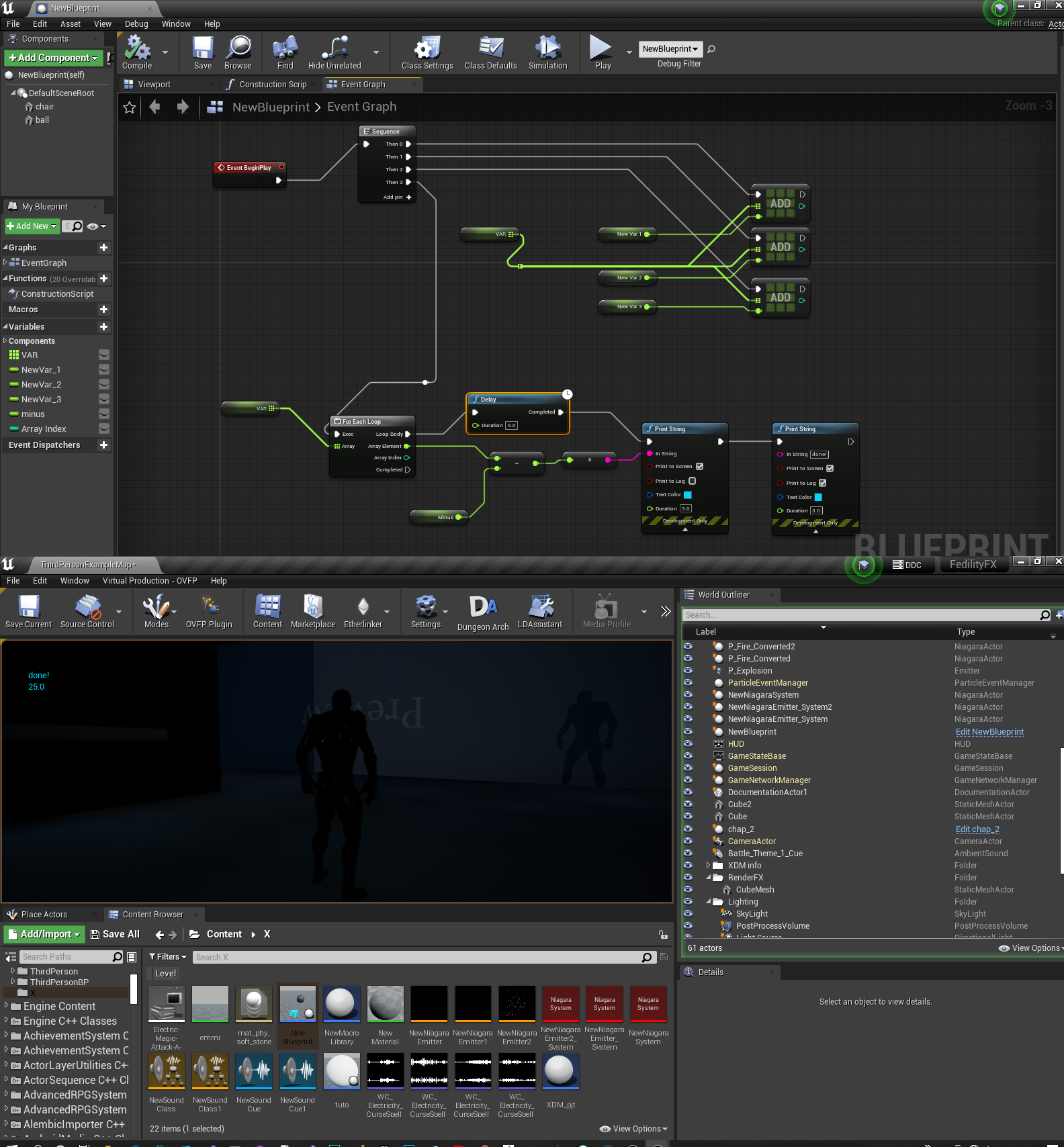
https://ibb.co/qJwjR2d
Hello there I wanted to tst try each loop for array. It worked well showing me the deduction of 5 from each vari of floats ( values follows: 10, 20 and 30, hence results are 5,15 and 25).Now I wanted to have a delay between these deductions but I am only getting the third result. Do the delay fun dont work with each loop??
 undone surge
what is the diff between the 2 blue things. one is for the controller bp and the other for the spawned actor pawn?

which one should i use
brazen pike
undone surge
which one should i use
It depends what you're using them for
undone surge
if i just want my ai to mvoe around
brazen pike
opaque acorn
https://ibb.co/qJwjR2d
Hello there I wanted to tst try each loop for array. It w...
No a delay isn't going to work with a for each loop. You can write your own loop which is delayed by a set amount. I'm sure you can find one online
opaque acorn
why it wont work?
brazen pike
undone surge
if i just want my ai to mvoe around
Again, it depends how you do that. If you are setting a BB value then you'd want the controller. If you're doing something like "set actor location" then the pawn is what you want.
 cyan bone
I copied the standard character. To make my spaceship character.
So it has movement already done.
But now i need it to tremble and shake when it walks or turns. But i have no skeletal mesh in it (because i deleted it),
So what should i do?
 solar bison
Will Array.Remove() error out if the element isn't present in array?
 lime fulcrum
Hey guys! How do I remove a pin from the SELECT node? I added one by accident
I mean this node

oh my. It only show up when you right click on the right side of it :
I was going crazy for 10 minutes
foggy escarp
opaque acorn
why it wont work?
https://blueprintue.com/blueprint/f-_8dg59/
Here's a for each loop with delay macro.
No description provided
 paper gate
lime fulcrum
Hey guys! How do I remove a pin from the SELECT node? I added one by accident
paper gate
lime fulcrum
Hey guys! How do I remove a pin from the SELECT node? I added one by accident
Right click on pin and remove pin
gentle urchin
solar bison
Will Array.Remove() error out if the element isn't present in array?
Doesnt it return a bool?
For success/failed
lime fulcrum
@paper gate It didn't show up on the Pin but on the right side of it. In the empty area. Probably some DPI scaling issue I guess
😅
solar bison
gentle urchin
Doesnt it return a bool?
ok good. So basically failed means nothing happens or gets mutated right
paper gate
When i click anything in marketplace it open web
undone surge
is there a way i can destroy my ai actor and then a little while later make the body dissappear? my ai keeps shooting it cuz it hasnt been destroyed because of the dying animation delay
brazen pike
undone surge
is there a way i can destroy my ai actor and then a little while later make the ...
Just check that the target is alive before each shot
paper gate
undone surge
is there a way i can destroy my ai actor and then a little while later make the ...
Set a true bool for shooting
When ai killed just make bool false and start animation
undone surge
yea but technically its alive untill its destroyed
brazen pike
Then.... make it not do that
brazen pike
If it knows when to play the animation, then it knows it's dead. So why can't other AI tell that it's dead?
undone surge
tahts what im trying to figure out i have to go over my conditons again
brazen pike
When it starts the animation, set a boolean of "IsDead" to true. Then have the AI access that boolean whenever it fires to make sure it isn't shooting a dead target
undone surge
thats execatly what i did
but it still shoots when the animation is playing
ill see what the prob is
gentle urchin
Health > 0
 pale anchor
Quick question if my attempt is dumb: I'm building a adventure (Point'n'Click-Style) Game and want to use Text/Audio while interact with items.
like f.e. Use Item A -> Play first Audio for Item A; Use Item A again -> Play second Audio Item; Use Item A AGAIN -> Play third Audio ; etc.
Now for the base... i would build a Structure for a DataTable where I put everything in what I need (Enum for Item; Audio 1,Text 1, Audio 2, Text 2, etc etc.
And i'm gonna call that either over a BP in a higher hierachy (maybe GM or GameState).
Is there a smarter way to store the item related things? I'm using a Item DataTable for my Objects in the World where i basically define via Name what type of item you're.
icy dragon
pale anchor
Quick question if my attempt is dumb: I'm building a adventure (Point'n'Click-St...
You could make the interactable BP having its own struct array, and get index by the interact count.
brazen pike
Using a datatable is probably fine, but personally I wouldnt go for it since you need to add it into the datatable each time rather than just duplicating an object, slightly changing the name and boom new item
pale anchor
Ye I thought that as well... I build a BP "WorldItem" where I can define via Name what kind of Mesh, Behaviour and so the Item is... As I destroy those objects via Pickup I'm afraid I would run into issues
pale anchor
brazen pike
Using a datatable is probably fine, but personally I wouldnt go for it since you...
Ye... thinking about to reverse the idea currently... hm...
But other than that the datatable + struct idea for the stuff should be good to go? I only have maybe 30-50 Items per lvl
brazen pike
30-50 unique items? That's quite a lot you may not want to use a datatable for that
brazen pike
pale anchor
Ye I thought that as well... I build a BP "WorldItem" where I can define via Nam...
Also why would anything break when you pickup items?
pale anchor
brazen pike
Also why would anything break when you pickup items?
Currently I destroy the Actor put the Struc Item into a Inventory Array and call the object new from that (for examine; useage).
And wouldn't I loose the current state of that BP when I destroy the world instance.. like the Int for the audio count?
pale anchor
brazen pike
30-50 unique items? That's quite a lot you may not want to use a datatable for t...
Any other ideas?
brazen pike
pale anchor
And wouldn't I loose the current state of that BP when I destroy the world insta...
Do you mean that an audio plays the first time a type of item is picked up, then later on when a different item of the same type is picked up a different audio plays?
pale anchor
brazen pike
Do you mean that an audio plays the first time a type of item is picked up, then...
Nah... more like f.e. a safe in a room that a player can "use"
Player use it first time: Audio1 (hm.. a safe.. locked..)
Player use it 2nd time: Audio 2 (still locked...)
Player use it 3rd time: Audio 3 (ye that doesn't help to open it)
So these Audio Cues and lines are unique to that item.
brazen pike
And in this instance you AREN'T destroying it?
pale anchor
That case wouldn't be an issue.
But wouldn't be it worse to have 30-50 unique BPs in the content folder? I guess not? Sry english isn't my first lang... that makes it hard to explain.. i gonna play around and will see how i End.
thanks for the input
drifting peak
" attempting to create a joint between objects that are both static" does anyone know what this log means?
brazen pike
drifting peak
" attempting to create a joint between objects that are both static" does anyone...
are you trying to use a physics constraint
brazen pike
pale anchor
But wouldn't be it worse to have 30-50 unique BPs in the content folder? I guess...
I guess, if it works: use it. In my experience there isn't any specific problems with doing it in any one way, just that it can be a little annoying and hard to manage. You should do whatever makes the most sense to you.
undone surge
does the AI perception debugger show all actor sight and hearing circles?
drifting peak
@brazen pike yeah it was accidently left there a while back thanks!
 brittle garnet
Is there a way to set the Category for a custom, editor callable even I've created in a blueprint? Right now, it shows up in the Default category in the editor. I would like it to be in the Spawning category.
 gentle urchin
pale anchor
Nah... more like f.e. a safe in a room that a player can "use"
Player use it fir...
gentle urchin
pale anchor
Nah... more like f.e. a safe in a room that a player can "use"
Player use it fir...
Wouldnt this just play a singular cue with 3 random options ? Picking a random one each time

Can reference dialogue files, abusing the built in subtitle system aswell
pale anchor
gentle urchin
But Random wouldn't work...
For some objects.. sure.. but not for the majority as there are unique lines for the items.. take things like Pictures on a wall...
Currently I'm building like this:
 gentle urchin
Random would work for your scenario as I see it
And if not random, surely there exists some sequenced node aswell (wild guess)
I believe the random is also non-repeating
pale anchor
Ye thanks for the input.. but random not gonna work for my case
gentle urchin
Switch* not sequence
Requires external int input so perhaps not as helpfull
Hard limited to 5 audio/texts
Not a very flexible setup compared to atleast an array
But then again even more work to set up and keep track of in a DB
pale anchor
Five should be fine for the scope of the project.
undone surge
im trying to get the spawned AI reference here in this cast . what would go into the object pin ?

im casting to controller
pale anchor
undone surge
im trying to get the spawned AI reference here in this cast . what would go into...
a reference to the controller
like a defined variable
undone surge
can i do get owner ?
gentle urchin
If the owner is your ai controller, sure
undone surge
the cast always fails
gentle urchin
So its not :)
undone surge
hmmm
gentle urchin
You can print its display name if you're unsure
Get owner()-> get displayname()-> print string
gentle urchin
It doesnt have an owner it sounds like
undone surge
wait like ai controller is the top most class right in the hiearchy
like in this case
so like i want to get access to the variables in this ai controller class
wat should i be doing
 dusky topaz
Somewhat insignificant question, but still something I've been thinking about for a while, I assume if I get the game mode, cast it and save it as a variable in one blueprint, it would be better for me to pass that reference to any other references through that blueprint instead of getting the game mode and casting it in each blueprint individually, right?
tawdry surge
If you already have it and can easily pass it then go for it, but the gamemode is always loaded so casting to it doesn't really cost much
dusky topaz
Hmm, fair enough, so basically: Don't jump through hoops just to get a reference to the game mode to another blueprint?
remote meteor
dependency is probably the difference here
tawdry surge
Casting to one thing, especially something Iike the gamemode that is always loaded, is better than doing a bunch of work just to avoid casting
brazen pike
I think the problem is that if you cast in one spot then have that passed through to everything else, then you end up wirh the issue of having unecessary references all throughout your game
trim matrix
i have a spaceship that eventually the player will be able to move, do i use Actor or Pawn for the spaceship?
tawdry surge
Pawn
@brazen pike It's always loaded anyway so that wouldn't matter.
Only time that would come into play is if you're passing through intermediary BP's
trim matrix
thank you
 modest kestrel
This is my blueprint for dashing, how can I only dash when I am moving and not when I am standing still.

 earnest tangle
modest kestrel
This is my blueprint for dashing, how can I only dash when I am moving and not w...
earnest tangle
modest kestrel
This is my blueprint for dashing, how can I only dash when I am moving and not w...
Check your character's velocity vector's length
cyan sedge
why is there no texture here when I added a texture in blender
 modest kestrel
earnest tangle
Check your character's velocity vector's length
modest kestrel
earnest tangle
Check your character's velocity vector's length
sorry I am new, how to do that?
earnest tangle
Get Velocity -> Get Length -> Greater than
tawdry surge
@cyan sedge blender shaders don't transfer
earnest tangle
Usually you can find relevant nodes easily by just trying to add a new node and typing in some words :)
cyan sedge
tawdry surge
<@949985443842261053> blender shaders don't transfer
so what do I do
 marble warren
cyan sedge
so what do I do
marble warren
cyan sedge
so what do I do
check your material editor and connects texture to parameter
tawdry surge
Any assigned material slots will still be there and any texture images will still be imported. However anything you did with the shader node graph in blender will have to be re-done
modest kestrel
earnest tangle
Get Velocity -> Get Length -> Greater than
not able to attach them
 earnest tangle
If this is in your character BP, you don't need to
The character itself has a velocity, which the node should give you as is
(note the target pin says "Self")
modest kestrel
so in firstpersoncamera component I should have velocity?
cyan sedge
marble warren
check your material editor and connects texture to parameter
tutorials?
 tight pollen
How can I check the local rotation of the AI, which direction is it pointing in relation to the player, AI is it turned backwards or sideways etc.?
I have no idea :/
I want to know more about which side he got the shot from
tawdry surge
@cyan sedge Ben Cloward on YouTube has a couple great material series
@tight pollen dot product
cyan sedge
tawdry surge
<@949985443842261053> Ben Cloward on YouTube has a couple great material series
does he have a video about the question I am asking
tawdry surge
Haha.. be funny if he didn't
cyan sedge
tawdry surge
Haha.. be funny if he didn't
hm can you send me a link
tawdry surge
Idk what you do and don't know about ue materials. Guessing you're totally new to them and should pry start at the beginning
cyan sedge
tawdry surge
Idk what you do and don't know about ue materials. Guessing you're totally new t...
ight
tight pollen
tawdry surge
<@693223765072543857> dot product
I still have no idea how to do it with this
cyan bone
What is more expensive, animating a character, or moving it using vinterp?
tight pollen
cyan bone
What is more expensive, animating a character, or moving it using vinterp?
vinterp
i think
cyan bone
tight pollen
vinterp
but why? isnt it basically the same?
cyan bone
So vinterp is cheaper?
gentle urchin
Vinterp is dirt cheap
tawdry surge
Get the forward vectors for the enemy and the projectile. Do a dot product of the two vectors and it will return a value between 1, -1. One if they are pointing the same way, negative one for opposite, and 0 for perpendicular @tight pollen
cyan bone
im using so much vinterp instead of animating the characters. so thats why i was worried
gentle urchin
Im at 2k vinterps per tick, no biggie
tight pollen
tawdry surge
Get the forward vectors for the enemy and the projectile. Do a dot product of th...
seems to work the way I would like it to, but in this case, how do check if the AI gets hit from the side as well?
 mental trellis
If it's from the side, the value would be between -0.5 and 0.5 pretty much
 woeful pelican
I want to be able to detect when the player is exposed to the void. Any ideas?
I have a macgyvered radial line trace that triggers on movement but I don't think it's precise enough or performance light.
 earnest tangle
"exposed to the void", as in leaving the box there or?
 boreal mesa
do you think i'm abusing collapsed nodes?
 earnest tangle
I personally never collapse nodes because I find it easier to follow the logic if it's all visible at once but if you find that helpful then ¯_(ツ)_/¯
mental trellis
If you're gonna collapse nodes like that, I'd probably just use a function.
boreal mesa
i see, thanks, probably that i should reserve collapsed nodes for more... "special" stuff
tight pollen
mental trellis
If it's from the side, the value would be between -0.5 and 0.5 pretty much
ok, however, these values are the same. when you shoot AI's right side and AI's left side, it's the same, between 0.5 / -0.5
How can I check if it is right or left side
woeful pelican
earnest tangle
"exposed to the void", as in leaving the box there or?
When the pawn is not completely surrounded by objects
meshes, skyboxes, geometry
mental trellis
tight pollen
ok, however, these values are the same. when you shoot AI's right side and AI'...
Assuming a horizontal plane, if your cross instead of dot the vectors, then the resultant z value will tell you which side
earnest tangle
@woeful pelican Is this something that can change as result of player actions or is it always based on just location in level?
mental trellis
<0 for one side, >0 for the other
woeful pelican
You are suggesting that I create "playable volumes" to track the player with, correct? I could do that.
I'd just need to figure out how to make the volume automatically size tightly to the meshes..
For reference, this is what I was doing before.

On every movement frame.
 crude isle
What do I use instead of Client Play Camera Shake
I'm watching an outdated tutorial so it doesn't exist anymore but I need to use it lol
tight pollen
mental trellis
<0 for one side, >0 for the other
not quite, when I shoot e.g. in the right side and e.g. more towards the front of the character, I have positive values and when I shoot closer to the back but still to the right side, I have negative values
mental trellis
tight pollen
not quite, when I shoot e.g. in the right side and e.g. more towards the front o...
Well that's how it should work. 😦
If the 2 vectors are parallel, it should be zero.
crude isle
yo anyone tryna answer my question
mental trellis
What you could do is inverse transform the incoming vector by the shot character's transform and just check the Y value (<0 for left, >0 for right)
Or <0 for right. Something like that.
Or unrotate if you just have the rotator.
You probably want to do that, as you don't want to involve the shot character's position.
 dapper iron
Is there a way to consume an input event retroactively?
Say I have an input event hooked up to interact in one of my blueprints, and it has the consume event unchecked; As a result of the interaction I change the pawn controlled by my PlayerController.
The new pawn has another interaction event with the same button with consume event unchecked, which returns control to the original character.
Both input nodes are on the PlayerController and not on the pawn blueprints.
The problem is that I can't have either of them consume automatically, since that would cause whichever is called second to not happen; But if I don't consume then both will get triggered in the same frame and end up passing control to the second pawn and then immediately taking it back.
My question is if there's a way to have the consume event checkbox unchecked like this, but then manually decide to consume it via a blueprint node/CPP function.

(I can just delay the successful interaction by a frame so that the unsuccessful interaction can fail before the state changes, and that works, I was just wondering if there existed a way to consume the event in the first place)
tight pollen
mental trellis
What you could do is inverse transform the incoming vector by the shot character...
I know that I am asking you a lot, but could you send me a screenshot of what it would look like, because I do not fully understand
I tried to do it, but something goes wrong
mental trellis
Ignore what I said there.
ChacterThatGotShot->GetRotation->UnrotateVector(IncomingShotVector)
Then compare the Y value
Just as a byproduct of doing that
Abs(y) > Abs(x) means it's from the side.
tight pollen
mental trellis
ChacterThatGotShot->GetRotation->UnrotateVector(IncomingShotVector)
it does not work
mental trellis
In what way?
 barren flower
woeful pelican
I want to be able to detect when the player is exposed to the void. Any ideas?
...
barren flower
woeful pelican
I want to be able to detect when the player is exposed to the void. Any ideas?
...
Do you just mean when he leaves the box?
woeful pelican
Do you know Source games?
barren flower
A bit
crude isle
is there a way I can do multiple stuff on Event Tick
bcuz it only lets me connect it to one thing
gentle urchin
Sequence
 woeful pelican
barren flower
A bit
woeful pelican
barren flower
A bit
In a sense, maps in source games are a series of rooms. There is no 'outside' to these rooms, and can't do collision updates when it cannot find the world around the player.
crude isle
gentle urchin
Sequence
u meant that to me or what
trim matrix
I feel like the the clear and invalidate timer by handle node is messing things up
gentle urchin
crude isle
u meant that to me or what
Ye
barren flower
woeful pelican
In a sense, maps in source games are a series of rooms. There is no 'outside' to...
You can still do subtractive BSP in unreal
tight pollen
mental trellis
In what way?
 gentle urchin
crude isle
Well is there a way I can do it all at the same time
gentle urchin
crude isle
Well is there a way I can do it all at the same time
Its always in order
earnest tangle
barren flower
You can still do subtractive BSP in unreal
You can but there are quite a few gotchas with BSP meshes :P
mental trellis
tight pollen
You don't need the dot at all.
barren flower
woeful pelican
In a sense, maps in source games are a series of rooms. There is no 'outside' to...
But in answer to your question, if you are using meshes then you just have to create a volume for the playspace and just do a check that you are overlapping one each second or whatever
crude isle
gentle urchin
Its *always* in order
like what if I want 3 separate things to happen at once
gentle urchin
crude isle
like what if I want 3 separate things to happen at once
You cant
gentle urchin
They can happen the same frame
crude isle
I see
gentle urchin
Which is percieved as at the same time
 tight pollen
still doesn't work
mental trellis
What happens now?
tight pollen
it is enough for a light shot to hit the back of the character and the value changes to what should be on the other side
mental trellis
Shrug that is correct code that that section. I don't know what the rest of your code is doing!
trim matrix

hey guys
does anyone know why this is not working
the new value for the timer on the Set Timer by Function Name never gets set
even if number of attacks is greater than 1
and I clearly see the value for the number of attacks variable go up with a print string
so idk what the issue is
tight pollen
mental trellis
_Shrug_ that is correct code that _that_ section. I don't know what the rest of ...
i used Get Right vector from Bullet and from Hit Actor and then Dot product < 0
and it seems to be working
I just don't know if it's correct
tight pollen
it is something like for Forward and backward 😅
mental trellis
Hehe.
If you wanted to use forward vector, I guess you could switch to checking the x value instead of y.
That'd make more sense if you're looking at the code.
tight pollen
mental trellis
If you wanted to use forward vector, I guess you could switch to checking the x ...
but it can also be so?
like i made
 glass stump
How do I change a material instance parameter in a BP?
 boreal mesa
undone surge
would these 2 pins be interchangable
boreal mesa
undone surge
would these 2 pins be interchangable
the distance will be the same
undone surge
ok
 mortal wharf
I want to sort an array of locations by their angle to a center actor (so the elements are ordered clockwise from the center actor) 🙂 How would I do that?
I don't see a blueprint node to sort by predicate 😛
boreal mesa
mortal wharf
I don't see a blueprint node to sort by predicate 😛
probably time to resort to C++ lol
mortal wharf
boreal mesa
probably time to resort to C++ lol
aaaaallllriiiight.... 😛
Seems like it
 fallen glade
is it possible to find everything used in a project from a library like this?

best way I can think of os the reference viewer but it doesn't tell me what's being used
 remote meteor
hmm yeah this one you might need to find yourself within the referenced blueprint
fallen glade
remote meteor
hmm yeah this one you might need to find yourself within the referenced blueprin...
how though?
just by browsing it?
remote meteor
kinda
the find in blueprint only searches for node/pin names and not their origin
so yeah need to manually search
 cursive musk
https://youtu.be/TQsg8j-a3Y8 idk if im like vague explaining this, but ive ran into the problem when following this tutorial about sliding, maybe someone else had this problem too. I got all the blueprint steps right (i rewatched it multiple time :/ ) and my slide just doesnt function. When i try to slide is just slows down extremely and i cant uncrouch. everything else works, walking, crouching . Does someone know how to fix this by any chance?

Support the channel through donations. Crypto accepted!
PayPal: https://paypal.me/reidschannel?locale.x=en_US
Patreon: https://www.patreon.com/reidschannel
Bitcoin: 1JFwWHr4X6uAeoZadukzqKjzFBj3Qjy7Sk
Ethereum: 0x2B2Bc108F1Cc0fF899959dEF3226637787d8C3dE
Dogecoin: DNQ33YnhpWoTBokBNVkZP5ub8KTLkpyjpv
Join our community discord!
Discord: https://dis...
brazen pike
fallen glade
is it possible to find everything used in a project from a library like this?
well you can find the target as all of these are made in c++. For instance you can find this one in Kismet String Library and then searching the name of it. Then you can find all of the functions in the same file

Or do you mean only whats in the project?
fallen glade
brazen pike
Or do you mean only whats in the project?
that, yeah
brazen pike
hmmm yeah well might need to manually search like IAsaka said
remote meteor
sometimes they are very sneaky 😆
remote meteor
cursive musk
not very sure, can you show your crouch functions?
 rough iris
will I be able to edit the values of the inventory reference I pass in inside the loop?

or is it creating a copy somewhere along the way?
rough iris
or this is the right way to go about it?
 remote meteor
change the Get(Copy) to Get(Reference)
or you can always after modifying,
set it back to the struct array
remote meteor
remote meteor
change the Get(Copy) to Get(Reference)
by default, For Each Loop in blueprint makes a copy when Getting the index item
you can change it to Get(Reference) but thats up to you
the Inventory Object is already a reference so its fine
problem here is the modified value isnt propagated back to the struct array from the for each element
 humble flume
Hey guys I am making a mini map i am making it using texture my map is quite big I want that my map look like gta 5 mini map can anybody tell me how can I convert my image to gta 5 type mini map image
rough iris
remote meteor
change the Get(Copy) to Get(Reference)
how do I change Get(Copy) to Get(Reference) exactly?
remote meteor
you need to make your own for each loop macro essentially
you can double click the macro and see how its done
there is a Get(Copy) node inside
rough iris
in terms of the loop, I can just fetch the inventory reference and use the array index
that's not an issue
the issue is whether the setter sets the item correctly
I guess I worded it wrong originally
rough iris
In this case, is Inventory a reference to the actual inventory component or is it a copy?
 remote meteor
because all object are passed by reference
its the reference to the component form outside
rough iris
awesome
remote meteor
there is no "copy" function for blueprint objects
all blue variable you see in blueprints
are all references
rough iris
I thought the rhombus were references and circles were values
remote meteor
yeah
so the difference is
reference of reference vs copy of reference
in the end its going back to the same place
 rough iris
remote meteor
in the end its going back to the same place
rough iris
remote meteor
in the end its going back to the same place
gotcha, thanks
 serene crown
Hi everyone 😄
I'm trying to make an endless runner, the runner only goes forward but I noticed that the game stops itself after a certain distance... is that normal? can't I make it infinite without turns?
cursive musk
cursive musk
yes i know ive done way to much for a crouch and a slide, im new to this and followed a long tutorial xd
remote meteor
i believe this part should be something like this

also the set movement state function please
cursive musk
remote meteor
i believe this part should be something like this
what should i add in there?
 remote meteor
reference back to the original video
that part is responsible to set your movement state back to walking when you release the crouch input
cursive musk
alright it fixed that it uncrouches me after the slide now but its still weirdly slow
mental trellis
tight pollen
but it can also be so?
If it works, it's fine. :)
cursive musk
cursive musk
alright it fixed that it uncrouches me after the slide now but its still weirdly...
 rose charm
Hello, I'm trying to make a airship buildable on runtime, on which the player can build the airship with blocks and pilot it, but I don't know a way to update the collision of the airship (a pawn) and the new attached blocks keep passing through the walls. Does anyone know how can I do it?
cursive musk
cursive musk
it seems to slow me down in mid air too for some reason
serene crown
rose charm
Hello, I'm trying to make a airship buildable on runtime, on which the player ca...
I'm very new but the only way I could imagine this working would be to have all the "Placeable blocks" placed down already in a "Dormant" state (invisible and with no collisions) and when you go to place down the block your holding instead of actually creating a new block to attach to the pawn you just activate the dormant block at that location... it's a bit a cheat but that how I would make it 🙂
serene crown
rose charm
Hello, I'm trying to make a airship buildable on runtime, on which the player ca...
OH wait, maybe I have an even better solution, you could use this Node here:
 remote meteor
An advice
dont use child actor component
unless you really have too
its too finnicky
serene crown
remote meteor
dont use child actor component
Using it rn... no problem for now, why are you saying this? What could happen? 😮
 red grail

 icy dragon
serene crown
Using it rn... no problem for now, why are you saying this? What could happen? �...
icy dragon
serene crown
Using it rn... no problem for now, why are you saying this? What could happen? �...
You're in for a huge trouble
Mainly referencing actors in question.
Spawning actors then do some attachment is far more reliable.
rose charm
serene crown
I'm very new but the only way I could imagine this working would be to have all ...
the problem is that I dont know if there is a way to make a pawn with multiple collision, the only collision relevant for movement is the static mesh i have on the root, if I add more collisions on the actor these ones keep passing through walls
serene crown
icy dragon
You're in for a huge trouble
It's just to place random obstacles on a endless runner... it's for a gamejam :/
icy dragon
serene crown
It's just to place random obstacles on a endless runner... it's for a gamejam :/
Doesn't matter. Child Actor Components are bad.
So much so that I'll spank you for using it if you're working for me.
serene crown
rose charm
the problem is that I dont know if there is a way to make a pawn with multiple c...
Not if the blocks are part of the ship already with collisions turned off... I think
serene crown
icy dragon
So much so that I'll spank you for using it if you're working for me.
Ahhh man... and I thought I found my new Favorite node... 😦
serene crown
rose charm
the problem is that I dont know if there is a way to make a pawn with multiple c...
Ohh I get it... I never tried that with a pawn... you might be right then :/
icy dragon
rose charm
Hello, I'm trying to make a airship buildable on runtime, on which the player ca...
Are you using static mesh components "welded" together?
 solemn crescent
I need a button to reposition a 2D card in front of the current camera position, with out parenting it;
if the camera moves it should not follow.
The card should face and fill the FOV.
How would I go about that?
I’m just getting started with blueprints.
 wise tide
My settings menu has a return button which takes you back to the main menu. However you can also access the settings UMG from an in-game pause menu, where I would want the return button to instead return you to the main pause menu.
I don't want to create 2 different settings UMGs because then I would need to update both separately. Whats' the proper way to deal with this issue?
rose charm
icy dragon
Are you using static mesh components "welded" together?
I've changed the root mesh to a cube and now it worked, I was using a custom mesh before, I will check if the problem is in it
icy dragon
wise tide
My settings menu has a return button which takes you back to the main menu. Howe...
Why not having both main menu and pause menu use the same options menu widget?
wise tide
they do
but there is a button on the options menu widget which takes the user back to the previous screen, which is different depending on if the user is in the main menu or the pause menu
icy dragon
wise tide
but there is a button on the options menu widget which takes the user back to th...
Already tried binding events for it?
rose charm
wise tide
they do
maybe you can try to save a variable with the previous widget
tardy seal
For some reason Vinterp To Constant still has some smoothing when it interpolates between different vectors. How can I make interpolation between two vectors be completely linear?
wise tide
icy dragon
Already tried binding events for it?
I don't know what binding events are
icy dragon
wise tide
I don't know what binding events are

Adding and removing events from an Event Dispatcher's events list.
faint pasture
tardy seal
For some reason Vinterp To Constant still has some smoothing when it interpolate...
How do you know it's not linear?
It should be.
It's velocity linear. It'll lerp at x speed towards Target from current
 fickle ermine
not sure if this is a problem with my blueprints or how im setting up the scene, but ive dragged in a couple of my coin actors and any beyond the first one wont respawn when i set their 'ishidden' boolean to false
do i need to give them individual variables or something? im very new
trim matrix
I created an anim notif here

in my anim graph
and im trying to get a ref of the variable start taking damage in my other bp

the function never gets triggered

supposed to take away 5 health from the player
every time the anim notify is true
tight pollen
How can I make a smooth transition from Animation to Ragdoll?
wise tide
icy dragon
https://docs.unrealengine.com/4.27/en-US/ProgrammingAndScripting/Blueprints/User...
Is this what people usually use for this issue? I assume there is a tutorial for my specific issue as most games have to deal with it, but I am struggling to find one. Also I am not fully understanding the event binding stuff after watching a couple tutorials
 obtuse yoke
I made this little course by placing things separately to test it out. but now i would like to move it all to a BP actor so I can spawn it as a whole wherever I want. How would I do that?
 icy dragon
wise tide
Is this what people usually use for this issue? I assume there is a tutorial for...
icy dragon
wise tide
Is this what people usually use for this issue? I assume there is a tutorial for...
Well, I personally use event dispatchers in the same context
undone surge
im trying to calculate the distance between 2 ai characters but it only starts changing only one of them moves
zealous moth
@undone surge how are you doing it?
undone surge

it only changes when the actor from class moves. the one i am comparing distance to is an ai controller
do i have to associate it with controlled pawn ?
nvm i think i answered my own question
undone surge
zealous moth
<@168627036070346753> how are you doing it?
THANKS!
zealous moth
Omg what am I looking at????
undone surge
idk
zealous moth
Why is there no specific actor? What is the event trigger? Tick?
icy dragon
undone surge
:NotLikeThis:
icy dragon
undone surge
yes
That happens on Tick?
zealous moth
Going back to graphics, see you there @icy dragon
undone surge
all this

 dark crow
Delicious spaghett
icy dragon
 undone surge
yes
icy dragon
I mean, you do you.
undone surge
xD
tight pollen
tight pollen
How can I make a smooth transition from Animation to Ragdoll?
Someone can help?
Some idea?
undone surge
i just want to get it working then i will fix shit
icy dragon
zealous moth
Going back to graphics, see you there <@325627930484932608>
Understood
 hearty barn
I'm rotating the player to look to the left of his velocity and this works if the ship is going to the right but if the player turns 180 and goes right this doesn't work what am I missing? the crappy drawing may better explain what I mean

 undone surge
what is the correct way to spawn multiple AI actors ?
brazen pike
undone surge
all this
woah maybe dont get all actors of class on tick
undone surge
yea yea im not
brazen pike
Ah I've seen it wrong
undone surge
this is how i spawn 1 @brazen pike

 cerulean palm
I have a map of string to struct{array<string>} in BP,
I need to find a struct against a key string, and then add another string to the array member of the value struct,
but for some reason the added string isn't stored in the map array member,
does the "Find" node return the struct by copy?
undone surge
how willl i do multiple
remote meteor
cerulean palm
I have a map of string to struct{array<string>} in BP,
I need to find a struct ...
Yes
brazen pike
Maybe use an array
cerulean palm
crap
remote meteor
Just add it back once u done modifying the map
cerulean palm
will using an uboject work?
cerulean palm
remote meteor
Just add it back once u done modifying the map
Okay, so essentially it'll replace the value and the full array within everytime
trim matrix
anybody???????
remote meteor
Then you can modify it by reference
cerulean palm
"Find" Behaviour is same even if I use an UObject BP instead of the struct, right?
remote meteor
Yeah but since it is an UObject
Hence it is a reference
So values will be updated
cerulean palm
yay
remote meteor
trim matrix
anybody???????
Not sure but from your second vid it appears the boolean is false?
You sure they are fetching the correct values?
 trim matrix
I want 5 damage to the player everytime the anim notif is true
remote meteor
Just call it at the anim notify to deal damage?
trim matrix
 remote meteor
Are they the same anim bp?
tight pollen
tight pollen
Someone can help?
Refresh

 remote meteor
trim matrix
remote meteor
trim matrix
When is this called
trim matrix
It wont let me get the mentalhealth function in my anim bp
trim matrix
remote meteor
When is this called
when the anim notif activates
remote meteor
??
remote meteor
trim matrix
Let me see the left side to this
The only thing you did on anim notify is setting a bool to true, nothing else
Youre not gettinf ur function because the branch check for the bool happens earlier that it is being setted to true
trim matrix
fk
remote meteor
Also i dont get why not just straight up call the damage function from ur animbp
Why go through a bool?
trim matrix
remote meteor
Let me see the left side to this
 trim matrix
remote meteor
Also i dont get why not just straight up call the damage function from ur animbp
trim matrix
remote meteor
Also i dont get why not just straight up call the damage function from ur animbp
wont let me
 remote meteor
Bruh
remote meteor
Make a event dispatcher in your abp, call it on anim notify
In your ai,
You have the reference to your abp
Bind that event dispatcher
During begin play or something
Then deal damage from there
undone surge
brazen pike
Do you want a reference to all of them?
if i dont reference to each would their stats be used ? like if i use a variable from the class like health or isdead then will each spawned actor carry their own stats ?
remote meteor
trim matrix
Or you also can explore on this
trim matrix
THANKS!


