#blueprint
402296 messages · Page 886 of 403
 grand valve
If its a translucent material with the a parameter in the opacity slot, yes
but it can be bad performance to have translucent materials always active
 wise tide
hrm, couldnt I change the material to translucent when I need it to be? Or is that not possible, in the BP I mean
grand valve
unfortunately no
 rotund marlin
hmm is it possible to make a train stand-able on as it moves over blueprints or na?
grand valve
you can swap the material, but not change its blend mode at runtime
wise tide
perhaps there is a better solution to my problem. I allow players to choose their own skin by swapping the material from a UI menu. In my game when players die they turn to a ghost which is a transparent version of their skin.
I could perhaps duplicate every single material and add a ghost prefix, and when I change the material to the ghost version I do it by name or something?
or maybe the bad performance wouldnt be an issue in my case because I would only use it on the players and they are extremely low poly (made out of flat surfaced cubes) max 12 players
grand valve
thats a possibility
yea im actually not 100% sure if the performance is terrible if the material is translucent but at 100% opacity..
i just know if you stack 10 windows behind the camera at 50% opacity
you are drawing pixels like 10x
there is a base cost for enableing transparency but
it might be ok in your case
wise tide
I might just give it a shot and see how it performs, if I notice any issues I can just go for a different solution and if its too difficult I can just make the ghost not have any skin and just have a default "ghost" skin instead
ty for the help
grand valve
oh if you do run into perf issues, try this too https://danieru.com/2018/07/04/dither-based-transparency-in-unreal-engines-material-editor/ its like a checker mask that simulates transparency but without any overdraw
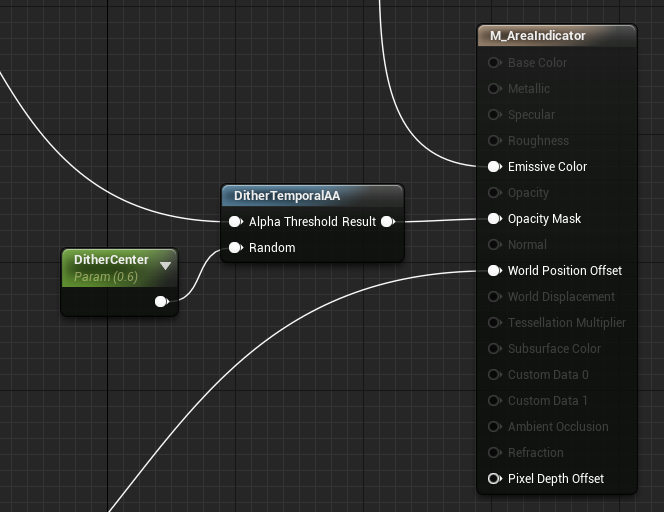
When optimizing TINY METAL for the Switch a technique I have started using is dithered transparency. To use dithering in Unreal Engine you can use the “DitherTemporalAA” node. A couple …
wise tide
interesting, ty
 maiden wadi
To be fair. A couple of transparent textures on a character or fifty probably won't really be noticed.
wise tide
How do I actually access the parameter in my BP? I assume I need to cast to the material so I tried the node for that, inputting my mesh, but it tells me it doesn't work like that
grand valve
you just do set and get parameter nodes, and you have to just match their Name
you dont need to cast to the specific material, you just need to be referencing A material instance, or a primitive (mesh, static, skeletal) component. There are nodes that accept either target
I find the easiest one that handles most of it under the hood is "SetScalarParameterOnMaterials" and that takes a primitive component (static or skeletal mesh) as a target
wise tide
Yep, works perfectly. Thanks
 versed sun
Does anyone know if the Element Index in a hit result can return the Element of a static mesh?

i always get 0
 sacred canyon
maybe something about collision
maiden wadi
versed sun
Does anyone know if the Element Index in a hit result can return the Element of ...
You usually use Physical Materials for that kind of thing. Element is used mostly for ISM or HISM element detection when tracing against one of those components.
Or wait. No, that was Item.
I don't remember Element though. Checking source.
Element seems to be a new value specifically for Chaos Physics.
 wraith crane
Hey! I dont know why the RemoveFromParent dont working. I can open the pause menu but i cant close it. Can someone help me? pls
 wise tide
I want dead players to be able to interact with specific objects that living players cannot interact with. I have this setup correctly however both living and dead players can see the objects.
I want to make it so when a player dies it will render these objects for them somewhere in the BP. The objects don't have to be meshes, they can be HUD elements or anything.
 trim matrix
wraith crane
Hey! I dont know why the RemoveFromParent dont working. I can open the pause men...
trim matrix
wraith crane
Hey! I dont know why the RemoveFromParent dont working. I can open the pause men...
Every single time you hit the pause button, you are creating a new widget
wraith crane
yes
trim matrix
First time you hit the button, you create a NewWidget and add it to the screen
The second time you hit the pause button
you create a NewWidget and remove it from the screen
The first widget you created does not ever get removed
wraith crane
but how to remove them?
Neither is removing. I have the transparency of the widget set to about 10 percent and every time I click the button it turns off
darkens
trim matrix
On button press
If game is not paused
Set GamePaused to TRUE, Create Widget, Add to player screen, then save the created widget to a UserWidget variable.
if game is paused
Set GamePaused to FALSE, remove widget from parent. The important part is that the target for this node will be the UserWidget variable.
wraith crane
trim matrix
On button press
If game is not paused
Set GamePaused to TRUE, Create Widget, Add...
ok then i do it
 covert schooner
how do you open the levels blueprint in ue5? There is no "blueprints" section like there was in ue4.
wraith crane
trim matrix
On button press
If game is not paused
Set GamePaused to TRUE, Create Widget, Add...
Oh, this work, thanks!
maiden wadi
covert schooner
how do you open the levels blueprint in ue5? There is no "blueprints" section li...
 covert schooner
thank you!
maiden wadi
Advise avoiding the Level BP unless you explicitly need to use it though.
trim matrix
wise tide
I want dead players to be able to interact with specific objects that living pla...
HUD elements and meshes will need to be handled differently. For actors I can think of a couple different approches of the top of my head. You could put all the ghost specific objects and all the human specific objects in their own levels. Then just show each level when needed. You could also create your own manager that knows every ghost object and human object. Then there could be a function on this manager that sets the visability of all known actors depending on the situation. You could tag every actor that is only for ghosts or humans and then GetAllActorsWithTag, loop through them and hide what you need. There are a lot of different ways to do this.
trim matrix
wise tide
I want dead players to be able to interact with specific objects that living pla...
For HUDS, just create a ghost HUD and a player HUD. Show what you need depending on the situation.
covert schooner
maiden wadi
Advise avoiding the Level BP unless you explicitly need to use it though.
yeah, i know its bad form, just using it for testing some things with delays before writing a bunch of delegates.
wise tide
trim matrix
HUD elements and meshes will need to be handled differently. For actors I can th...
The tag every actor and loop sounds like a great solution for me as I only plan on having a limited number. You wouldn't happen to know if there is a guide for it or something or could help me with setting it up? I am not too sure how to go about it
trim matrix
It is very simple
on an actor in your level.

just goto the details, under the Actor section, hit the dropdown to show advanced settings, add a tag
in BP
 wise tide
Yep, I have a interactableGhost tag added to my ghost objects now
trim matrix
just call that function, and for loop the returned array
wise tide
and that function would be in the level BP I assume
trim matrix
well yes, you can get it inside of the level BP if you are working out of that 
also you can programaticly set tags on an actor.

If you would like todo that as well.
wise tide
I see, that is very interesting. I will try and get it setup and see how it goes. Thanks for the help
Yep, works perfectly. When I tried finding a post online about it and saw nothing I was worried it would be overly difficult. Thanks a lot
 lime fulcrum
Hey! IS there a way to change the save game folder within blueprint? I remember there was a node but I think it wasn't too obvious
:\
rotund marlin
where do i find the settings so actors dont get auto destroyed outside map?
lime fulcrum
@rotund marlin WORLD SETTINGS

I think it's the Enable World Bounds check
try deselecting it
 lime fulcrum
search for KillZ or bounds
maybe is hidden in the advanced tabs. I yet have to try UE5
Still on 4 :\
rotund marlin
my killz is grayed out
rotund marlin
Also for me the Z aint the problem, its Killed on X
lime fulcrum
it's bounds then...
rotund marlin
 rotund marlin
tried still dies at one point
lime fulcrum
:\
rotund marlin
its very odd, oh well
 proper dagger
hi! how would I go about stopping the player camera from moving when I set view target with blend to another camera for hiding in a locker? here is the locker bp https://blueprintue.com/blueprint/n1b5fywt/ and this is the toggle hide function https://blueprintue.com/blueprint/jm7so2p5/ . Thank you!

No description provided
No description provided
 fleet cobalt
this is my widget script how do i make it so it would only spawn in specific room

 faint pasture
fleet cobalt
this is my widget script how do i make it so it would only spawn in specific roo...
faint pasture
fleet cobalt
this is my widget script how do i make it so it would only spawn in specific roo...
Room Trigger -> show widget. Steps in between will depend on how you wanna do things.
 rough blade
I am trying to create a vehicle fighting game - right now I have pilots as child actors within the vehicle - I have noticed that overlap events and line traces cant detect skeletal / static meshes when the actor is attached as a child actor. Is there any way to detect these child actors without attaching collision boxes to them (this is currently the only way I found to do it)?
faint pasture
rough blade
I am trying to create a vehicle fighting game - right now I have pilots as child...
Child actors are pretty bad
 opal pulsar
rough blade
I am trying to create a vehicle fighting game - right now I have pilots as child...
opal pulsar
rough blade
I am trying to create a vehicle fighting game - right now I have pilots as child...
ive had a similar experience in the past and giving it a collision box was the simplest option
so if you dont have a specific reason not to do it, id say its worth a shot
faint pasture
Is this multiplayer at all?
rough blade
@faint pasture It is - I have the turrets / weapon systems of the vehicles as child actors as well.
@opal pulsar Thank you - Its just causing issues with projectiles (determining how many times to damage something)
versed sun
maiden wadi
You usually use Physical Materials for that kind of thing. Element is used mostl...
Ahh thanks. I knew Hit Item was for ISM but was hoping Element Index would work forMAterials
 valid bolt
Anyone else having this bug? i cant seem to break any of my structures
 faint pasture
rough blade
<@127902729677963264> It is - I have the turrets / weapon systems of the vehicle...
faint pasture
rough blade
<@127902729677963264> It is - I have the turrets / weapon systems of the vehicle...
I've been down that road. Child actors are pretty bad. Just spawn actors at runtime.
rough blade
@faint pasture May I ask what issues you ran into?
 icy dragon
rough blade
<@127902729677963264> May I ask what issues you ran into?
icy dragon
rough blade
<@127902729677963264> May I ask what issues you ran into?
Reference issues
It's a huge PITA to get something done with Child Actor component as opposed to just attaching actors.
faint pasture
rough blade
<@127902729677963264> May I ask what issues you ran into?
For reference this is the type of design. Fully modular vehicles made up of parts.
https://www.youtube.com/watch?v=d7O0WzNHteQ

Child actor components just in general aren't great and in anything multiplayer they're a nightmare. For my vehicles, I just have a struct that describes the entire construction of the vehicle and a function that builds it.
icy dragon
Mine is an RPG project, and for stuff like weapons, special abilities, I found it easier to just spawn actors and use the reference of it
faint pasture
It's actaully called S_VehicleRecipe and it's just like a list of parts, their locations, and their custom data.
rough blade
@icy dragon yea I’ve run into that. Work around a were indeed a pain. @faint pasture huh, would an acceptable system be detecting childActors - their held actor - deleting them and spawning their held actor in place?
faint pasture
I wish we had some way to add actors to actors at compile time, if even for visualization.
faint pasture
rough blade
<@325627930484932608> yea I’ve run into that. Work around a were indeed a pain. ...
Why even have the child actors then? Is this meant to be for modular vehicles created at runtime or for design?
rough blade
@faint pasture Right now for design. The bulk of my work on this game is making tools that allow rapid creation of content. Right now my system is set up for me drag and drop child actors - tweak a few exposed customizations and ready to go.
icy dragon
rough blade
<@325627930484932608> yea I’ve run into that. Work around a were indeed a pain. ...
If you're spawning actors, you can just use a class variable and call it a day
I don't know if BP had built in functionality for getting class by name, but I know in C++ such thing is possible, and simple too
rough blade
In the future I’d love to go down the road of players building their own vehicles (played with a similar design to what you mentioned) but for now I need a fast way to efficiently pump out new content. @icy dragon I think I could get something like that to work. @faint pasture just so I understand - the reason this doesn’t work in multiplayer is because the client and server see 2 different actors essentially. Directly calling one will only work in the world it exists. But spawning attached actors at runtime bypasses this issue as these actors are the “same” for client and server?
lime fulcrum
Is UE4 seriously unable to list files in a specific folder or at least list all available save games?
Basically I'd have to make a different save game to list my save games... which is not convenient :\
How do you read all your save games and put it into a list?
Blueprint File Utilities built-in plugin solves this. I wonder why it's not included by default :\
 cobalt gulch
Guys i need serious help
I moved some of the content i was using into it's own folder to make everything easier to see
But in doing so when moving the content, it seemingly made everything i had moved disappear almost like it was deleted
So now when I go into my map every texture is missing and object too
The output log says as follows


The walls are still there just the objects and textures are completely missing
faint pasture
cobalt gulch
I moved some of the content i was using into it's own folder to make everything ...
Did you do the move in the editor or in File Explorer?
cobalt gulch
faint pasture
Did you do the move in the editor or in File Explorer?
File explorer
faint pasture
cobalt gulch
File explorer
ya fucked up. Gotta do the move through the Unreal content browser so it doesn't break the references.
Roll back and do the move in the editor
cobalt gulch
Roll back??
faint pasture
and also fix up redirectors once you've done that
You're using version control, right?
faint pasture
So no. So you gotta undo that move in File Explorer and pray it didn't break anything
if it's all good, then move the assets around in the Unreal Editor
cobalt gulch
I don't know how I can undo it
faint pasture
cobalt gulch
I don't know how I can undo it
? Move them back.
faint pasture
You gotta go back to exactly how it was before you moved anything.
Also, use source control if your project is of any importance to you so this stuff doesn't happen.
cobalt gulch
Can't I just find what objects are missing and link them up to the new location?
Because I dont think that is working for me
This is such a stupid engine
I'm definitely giving up if this has just ruined my level ..
 autumn flint
Hello, I want to create an object that will fall 1 2 meters forward when a key is pressed in UE4. The dropped item must fall on the ground, how can I do this, can you suggest a tutorial?
 trim pollen
i'm trying to call a function in my pawn from a blueprint. it's asking for "bp pawn object reference". i'm only able to find "pawn object references" though (e.g. get player pawn)... what am i missing here?
autumn flint
imagine a grenade is thrown and an object will form where it falls
The character will throw an object on the ground and will be positioned appropriately on the ground where it falls. How can I do this? is there a similar tutorial?
faint pasture
trim pollen
i'm trying to call a function in my pawn from a blueprint. it's asking for "bp ...
Your pawn is named "BP Pawn" right?
you need a reference to a "BP Pawn" to call "BP Pawn" functions
Try
Get Player Pawn -> Cast to BP Pawn -> Do Thing
faint pasture
cobalt gulch
Can't I just find what objects are missing and link them up to the new location?
yup, have fun
faint pasture
cobalt gulch
I'm definitely giving up if this has just ruined my level ..
You need to be on version control yesterday. This is totally not the last time you'll brick your project in some way. Get on version control and backups or eat the risk.
trim pollen
faint pasture
Try
Get Player Pawn -> Cast to BP Pawn -> Do Thing
ah yeah this seems to be the way, thank you
 radiant mural
cobalt gulch
I'm definitely giving up if this has just ruined my level ..
radiant mural
cobalt gulch
I'm definitely giving up if this has just ruined my level ..
Don't give up! you'd be amazed at how fast rebuilding a level for the 5th time is :/ But yeah, like Adriel said, spend some time to get a version control system working, or if you find that too complex, regular backups at minimum
 pulsar path
i tried making a widget in ue5, but it comes as an infinite space by default? how do i get the 'normal' widget like in ue4? with the screen outline so i know where to place stuff lol


i cant seem to find anything on google 🤐
radiant mural
add a canvas panel? or does that not work in editor widgets?
.. are you making a game widget, or a widget for use in an engine plugin?
pulsar path
a game widget, for the HUD n stuff
radiant mural
Ok, make a widget.. make sure it is user widget.. add a Canvas Panel
The fullscreen outline thing Is the Canvas Panel
pulsar path
thanks!
pulsar path
weird
 thin panther
cobalt gulch
I'm definitely giving up if this has just ruined my level ..
thin panther
cobalt gulch
I'm definitely giving up if this has just ruined my level ..
trust me theres a lot worse you can do... its not a stupid engine
icy dragon
radiant mural
It no longer is added by default, for several reasons
I guess for good reason
I almost exclusively rely on anything but Canvas Panel, and it makes the UI much more scalable than just dumping everything on Canvas Panel.
 obtuse dawn
so im having this problem where I want to make the camera move with my mouse but it keeps cliping back to the original rotation
heres what I mean
 dark crow
Show code
obtuse dawn
It was supposed to be called look left but what ever
 icy dragon
obtuse dawn
It was supposed to be called look left but what ever
icy dragon
obtuse dawn
It was supposed to be called look left but what ever
Why not have the camera tied to control rotation?
icy dragon
If the axis is 0, of course the rotation's going to go back to 0
radiant mural
icy dragon
I guess for good reason
I almost exclusively rely on anything but Canvas Panel,...
I usually make my MainWidget built up by several child widgets, and reuse buttons and things like that. Of these, only my MainWidget uses the Canvas panel. Indeed super important, but maybe not for Every widget. (My experience on the subject is rather limited, i still use tutorials)
obtuse dawn
icy dragon
Why not have the camera tied to control rotation?
I tried that and the camera just did not move
dark crow
obtuse dawn
It was supposed to be called look left but what ever
Yeah that won't work, lol
You can tie the camera to control rotation indeed, there are nodes to use for that aka Add Controller Pitch/Yaw/Roll
You need Yaw
And ofc you gotta make sure the camera uses control rotation
There's a check for that
obtuse dawn
dark crow
Yeah that won't work, lol
You can tie the camera to control rotation indeed, ...
well uhh it works now thanks alot
 round moth
anyone know how i could lock the velocity of the player while they are wallrunning?
grand valve
Assuming wallrunning is a submode of "Walking" movement mode, you could just add forward input for the pawn for every tick of "wallrunning"
rotund marlin
hmm.. Is there a way to "Re-generate" my world partision? as its only covering like quarter of my map atm
trim matrix
How can I make a custom collision for an actor which will only really respond to mouse click events?
It's an actor with a static mesh
For some reason the "onclick" event doesn't respond.
 jovial dirge

I'm trying to setup Proximity Voice Chat, the voice chat works but it's global and not proximity, what could I be doing wrong?
 tawdry surge
@trim matrix actors don't accept input by default
wise tide
should my entire main menu be within the same widget blueprint or should each separate "interface" be its own widget? For example on main menu if I click settings or server browser should that be in the same widget
thin panther
up to you
id maybe make the settings different so i can use it in the pause menu too
maybe even server browser
if its gonna be used elsewhere then you can make it it's own widget
wise tide
I see, I will probably make my settings and customisation (change skin) separate as I want them accessible from pause, ty
oh and one more thing, I assume if I want an intro screen when my game is opened that would go in the first widget and once its finished it loads the main menu
or are intro videos a separate thing
thin panther
not sure tbh, i handle mine via async loading screen so
trim matrix
tawdry surge
<@456226577798135808> actors don't accept input by default
@tawdry surge How can I enable it?
 lone eagle
Hey! does anyone know if you can toggle collision the same way you can toggle visibility?
im hiding static meshes but when they are hidden i still collide with them meaning i cant pass through certain doorways

event beginplay to hide my static meshes
lone eagle
actor begin overlap for revealing my hidden meshes
 lone eagle
could i make it so that my tags that are being hidden are also having collision turned off
grand valve
yup, if you cant directly connect the nodes like with the tag ones, then you need to do a for each loop
and the loop sets each object collision to off
lone eagle
im about to try something out, thanks for the help
i may ping you shortly though
got it working
thanks! @grand valve
grand valve
np!
tawdry surge
@trim matrix you probably want to "assign" on clicked to bind it to a delegate event and fire off your logic that way.
Or you can use an interface to trigger the logic.

 trim matrix
Ah okay that worke,d thank you.
rotund marlin
Hmm.. So i made a actor for controlling time, but it does not seem fire of event tick in the world, Even if it has Event Ticks enabled in the actor itself

Nvm i was a dumb dumb again ^^ Was outside the partision of spawn lol
 autumn surge
hey, lets say I have a physics actor that can be moved by the player, how would I get the downwards vector at all times? like independent from the actor rotation.
 raw parcel
Does anyone know how to send a random value into a select function thats 1-3?
autumn surge
random integer in range?
raw parcel
autumn surge
random integer in range?
tysm, random int was acting really weird bc I did 1-3 not 0-2
autumn surge
add a +1 to the number thrown out?
or increment node
but maybe the select function wont start at 1?
 sweet silo
hi everyone i'm trying to use the return function on the move component node but it's not working.. any idea why ? thanks
 maiden wadi
Does Hello print?
sweet silo
yes 🙂
the workaround i found was using another move to component once player does not overlap
 jaunty jolt
I need to create a spline from my green point to the purple point at run time. So basically no matter where the destination point is (purple point), i need a point in the middle to make it a curved line. How do i do this?

Also it needs to draw it. So it needs to be visible. Because so far all my splines i created are not visible
trim matrix
Hey so I am trying to get my character to just simply walk around however the node "get random reachable point in radius" is only printing the characters location not printing a new location any advice?
 thorny night
Has anyone seen this error and know how to fix it? Im new to blueprinting so I have no idea whats going on :C
 icy dragon
jaunty jolt
I need to create a spline from my green point to the purple point at run time. S...
icy dragon
jaunty jolt
I need to create a spline from my green point to the purple point at run time. S...
Perhaps by making a three point spline mesh
icy dragon
thorny night
Has anyone seen this error and know how to fix it? Im new to blueprinting so I h...
Show the BP code in question.
thorny night
icy dragon
Show the BP code in question.
it should be this one
 icy dragon
thorny night
it should be this one
icy dragon
thorny night
it should be this one
How do you set that Inventory reference variable?
thorny night
icy dragon
How do you set that Inventory reference variable?
sorry im not sure what you mean T-T im still really new to blueprinting and followed a youtube video for this code with my own tweaking
icy dragon
thorny night
sorry im not sure what you mean T-T im still really new to blueprinting and foll...
You have that one reference variable called Inventory, which makes Set Array Elem node compains because the variable references to nothing.
So, elsewhere in your BP, what did you do you to set the reference for that variable?
trim matrix
Why would ai move to not be moving my character at all?
thorny night
icy dragon
You have that one reference variable called Inventory, which makes Set Array Ele...
hmmm, the inventory variable is a inventory component if that is what you were asking?
icy dragon
thorny night
hmmm, the inventory variable is a inventory component if that is what you were a...
Aha, that explains the stray Inventory Component node at the left
I assume you didn't set the Inventory reference var to the Inventory Component node from the Cast node, which makes it points to nothing.
icy dragon
trim matrix
Why would ai move to not be moving my character at all?
Is the navigation mesh on the map good?
trim matrix
icy dragon
Is the navigation mesh on the map good?
Yup
Theres my code cause I think that'd be helpful

The radius is set to 1250
thorny night
icy dragon
I assume you didn't set the Inventory reference var to the Inventory Component n...
yes, very true haha! do you know i would be able to fix this? Sorry this game is due tommorow for class and ive been poking at this for hours
trim matrix
It continuesly is printing the coords as 0, 0, 0 and "aborted"
thorny night
trim matrix
Why would ai move to not be moving my character at all?
are you trying to get the AI to follow your charchter?
trim matrix
thorny night
are you trying to get the AI to follow your charchter?
Nope just for it to wander
My character as in the ai character
icy dragon
thorny night
yes, very true haha! do you know i would be able to fix this? Sorry this game is...
If you're not reusing the Inventory variable elsewhere, you can just directly get the array from Inventory Component and hook it to the Set Array Elem node.
Otherwise set the Inventory variable to the Inventory Component from the cast before Set Array Elem
thorny night
trim matrix
My character as in the ai character
so youre trying to get the ai to wander around?
trim matrix
correct
thorny night
icy dragon
If you're not reusing the Inventory variable elsewhere, you can just directly ge...
:OO ill try that!! ty ty
icy dragon
thorny night
:OO ill try that!! ty ty
No probsies 👍
thorny night
trim matrix
correct

this is my code for that if you wanted to try it out?
just remember to set your ai to roam
trim matrix
I just checked that and its printing success the first time but not moving and after that its print abort
Should I try it in a blank level rq?
Same thing..
trim matrix
And its not moving at all even on the first one when it says success
thorny night
hmmm, ive never had that problem so im not sure how to help :C
trim matrix
Okay somethings screwy with my project..
thorny night
trim matrix
Okay somethings screwy with my project..
did you try making a new project and seeing if the blueprint was the issue?
trim matrix
Yeah I did
thorny night
did it work on the new project
trim matrix
Yup
I could probably just move the content I need over and do the inputs rq
Im assuming its because I have duplicated it a few times to avoid corruption and this is the like 5th copy or something like that? Or I just screwed with some of the project settings
thorny night
ope, that could be it
trim matrix
Migrating over some of the stuff now we'll see how this turns out
thorny night
is anyone available to hop on call for a second to help me debug this issue :CC im getting desperate and cant firgure this out
thorny night
trim matrix
Migrating over some of the stuff now we'll see how this turns out
let me know how it goes!
trim matrix
Welp
It messed up inputs
But so far so good
oh geez
That is a lot of inputs..
But I mean ai is working
thorny night
LETS GO YOU
trim matrix
One mistake but its fine
Oh wait no just me being dumb
Gotta rewrite some of the hud code I think but thats probably just a recompile or something
There we go
Just had to switch the gamemode rq
Aight welp ima head out for now cya thanks for your help!
thorny night
Anytime! glad u got it to work!
 timber cloak
I still don't understand how dot product knows which is left or right side. Since both side are same number
anyone understands how to get proper number for left/right? Any other alternative calculation?
 wise tide
Simple question but I am struggling to find an answer online, I have my main interfaces as their own UMG assets. I want to load my server browser UMG from the main menu UMG on clicking a button. I have the event for the button but I don't know how to load the other UMG
 mental swallow
Why should one prefer the Projectile Movement Component over simulating physics?
Homing functionality comes into my mind, but else? Performance?
 tight schooner
timber cloak
I still don't understand how dot product knows which is left or right side. Sinc...
tight schooner
timber cloak
I still don't understand how dot product knows which is left or right side. Sinc...
You could maybe do something with cross product https://youtu.be/h0NJK4mEIJU
 mental trellis
Videos on math 😦
tight schooner
imagine understanding geometry visually
mental trellis
You can have it be visual without needing a video.
tight schooner
I mean, feel free to look up Cross Product on Wikipedia
mental trellis
https://www.mathsisfun.com/algebra/vectors-cross-product.html this explains all you need to know in a single 2s repeating graphic
Math explained in easy language, plus puzzles, games, quizzes, worksheets and a forum. For K-12 kids, teachers and parents.
timber cloak
thanks for the link, still unsure how to use those maths in UE. I just tried with Acos as following on those site link math. But i think i fail maths
tight schooner
cross product is a node... you feed it two vectors and it outputs a third vector
mental trellis
Cross your initial vector with your other vector, the resulting z value (assuming your other 2 vectors are in the horizontal plane) will tell you which direction it was coming from
timber cloak
let me try for whole day. Thanks again
 torpid hound
Is there any kind of "select on GameplayTag" type node?
mental swallow
switch works with GameplayTag
torpid hound
That's not really the same thing unfortunately
Could be a handy reference for making a select-by-tag node though
 north maple
hello, i'm trying to achieve fog of war but i couldn't figure out how to save material according to my coordinates

can someone guide me? if possible i don't want to use render target, video should give an idea
 hybrid ether
I have many these kind of gather blueprints and I want populate landscape with these. How should I do that right? because there is not bp painter etc

 glossy egret
hey guys, im having a strange issue with the text variable.
when ever i use a text variable, i can add use the enter key
like this and make paragraphs, and it will store this info,
and i can format my text in paragraphs all i want.
but if i put that same text variable into a struct i am no longer able to do so. it must be like this sentence and it will be restricted to a plain line of text.
can some tell me if i missed something. please help. this is pretty inconvenient. what im doing requires arrays and structs.
mental trellis
Have you tried shift+enter?
mental trellis
Have you tried putting your text in notepad and then copy+paste it in?
glossy egret
Let me test that out
Doesn't work, it condenses it into a single line of text,
Happens with string also
Possibly and oversight in blueprint implementation
mental trellis
That's definitely odd.
Have you tried using escape character?
My first line\nMy second line?
Maybe that'll work 😦
(when you display the text, not in the box)
glossy egret
Let me try how exactly is it formatted
I found it
Hold on a sec


the settings in the struct setup was hidden. but multi-line is on by default for normal variables, but off by default on struct variables.
so.
glossy egret
mental trellis
That's definitely odd.
lol yeh. i figured it was a small oversight.
they arent in standard with each other.
thanks for brain storming with me
glossy egret
nether did i
because they are typicaly setup by default for 99 out of 100 siutations to work
 lusty stream
How can i make character controllers be able to push eachother like physical objects?
 dire flame
im trying to update my player ui widget on collision with my pickup but i cant pull it off (still a ue noob).
so my thinking is get the PickUpLetter Component of the hit object and update the player ui to the corresponding Letter...

 gentle urchin
lusty stream
How can i make character controllers be able to push eachother like physical obj...
gentle urchin
lusty stream
How can i make character controllers be able to push eachother like physical obj...
Controllers dont have a physical representation in the world. If you mean pawns, thats another thing ofc
maiden wadi
hybrid ether
I have many these kind of gather blueprints and I want populate landscape with t...
There is, actually a foliage painter for Actors. It isn't the most performant, and you'll end up with issues in a larger map, as they don't get the ISM bonus. But it's possible.
lusty stream
gentle urchin
Controllers dont have a physical representation in the world. If you mean pawns,...
right, my bad, i meant actors with character movement component of course
 mellow folio
Some part of this question isn't worded to make sense. Have you tried ADDTOVIEWPORT when you create MainWidget
 undone surge
what node disables phyics and makes ragdoll ?
 full mica
I'm getting the following error when loading the editor:
LogAssetManager: Display: Ignoring PrimaryAssetType Building - Conflicts with BP_BuildingType_C - Asset: DA_House
DA_House is a data asset that derives from BP_BuildingType which derives from PrimaryDataAsset - does anyone know what this error message means?
torpid hound
If I have a blueprint for loop in a function and return during the loop, will that imply a break or will bad things happen?
 earnest tangle
it will immediately exit the function at that point
gentle urchin
Very few tutorials know about this neat little trick
Whenever you go foreachloopwithbreak, you might aswell just return mid loop in a function
earnest tangle
kinda depends on what you're doing but it is often a good approach
gentle urchin
If you break your situation alteadly allows you to break :p
Searching for somrthing specific will still require full iteration ofcourse. Like nearest actor or something
 summer jetty
Any ideas why this isn't working? It should search for a variable in my data table, find the corresponding row name, then look for the texture 2D in that row to set as a slate brush for the icon in this widget. But I'm getting an error message whenever I run it: "Attempted to access index -1 from array CallFunc_GetDataTableRowNames_OutRowNames of length 5!".
 earnest tangle
Find returns -1 when it doesn't find anything
summer jetty
The variable value is 'abc' and the item name in the datatable is 'abc'. So it should find it.
earnest tangle
Print the values to confirm
summer jetty
ok...
wise tide
All the different "interfaces" for my main menu are separate UMG objects (title screen, settings, customisation, lobby etc).
I am not sure what the correct way to load them all and transition between them is. Could anybody link me to a video on it or explain it? I tried finding videos for it but all the tutorials I found only use 1 UMG object or 1 interface
The closest I got to a solution was a post someone made saying you need to get all the UMG "widgets" and run a for loop enabling them in the viewport and toggling transparency depending on what buttons you press, but it didn't really explain how to do that
earnest tangle
it depends a bit on how you want to move between them, but the easiest way would be to have a switched widget and placing all your menus under it
then you can have the switcher switch between whatever menu you want to display
wise tide
I see, where would I place all my menus? The level BP?
gentle urchin
Nooo
earnest tangle
I would just have a main menu widget which houses them, which you can add/remove
gentle urchin
Hud is a common class
Or playercontroller
Assuming you ment owning class of the widget(s)
wise tide
Player controller could work because I want the options shown on the menu to change depending on whats set in the player controller, at least I think I do
sweet silo
Any idea how i can resolve the collision box not being hit multiple times by the third charachter bp
summer jetty
earnest tangle
Print the values to confirm
It's definitely returning the correct name to that variable. So it's something to do with the bit from 'GetDataTableRows' onwards.
earnest tangle
Try printing the values in the array
summer jetty
It's converting the variable name to a number in the 'find' bit.
I stuck a print string on there and instead of finding a name, it's an integer. But I'm not sure why.
earnest tangle
Find returns the index where it was found
summer jetty
It should be text to string to name format.
ok, so it's not returning the row name.
earnest tangle
No, isn't that why you have the Get in there?
summer jetty
I thought the get was using the row name to look for the image on that row?
earnest tangle
Have you looked at the pin names you're connecting together?
the value from Get goes into Row Name
summer jetty
yeah, it should use the row name to find the other values in that row and then I break it up so I can pull the image (texture 2d) from there?
at least that was what I was going for
earnest tangle
Exactly
summer jetty
so I don't understand why it's giving me the index instead of the row name?
or maybe I don't understand the get/find function properly?
earnest tangle
Well the way you have it set up is you're using Find to look up a value from the row names array
and then you're using Get to get that particular value based on the index from that array
summer jetty
ah no, I want it to find the item name not the row name on the find part.
I don't know the row name. That's the point of the find bit.
I only have the item name to work with.
earnest tangle
In that case you would probably need to iterate the rows to find the correct row
summer jetty
what do you mean by that? Another breakiteminfo bit?
earnest tangle
You need to get all the rows as an array, and use a for each
then within the for each, you need to compare the item name for that row with the item name that you want to find
summer jetty
ok, I'll give it a go. Cheers!
 open latch
TravelFailure: InvalidURL, Reason for Failure: 'Invalid URL: /Game/EndlessRunner/Maps/LevelSelection'. Shutting down PIE.
TravelFailure: ClientTravelFailure, Reason for Failure: 'Invalid URL: /Game/EndlessRunner/Maps/LevelSelection'. Shutting down PIE.
It works on the first 2 levels , but on the third level it refers to an old map

What is going on in level 3...
 winter adder
Not seeing a "help" channel, so I apologize if this isn't the best place for it: In UE 5.0.1 - Adding a FPS HUD Widget. Adding in the progress bar. If I resize to what I want it at for let's say health. Then I add a 2nd progress bar for armor. It's not allowing me to add the 2nd one, much less anything else from that menu to the left column where Progress bar is found. Anyone else coming across this?
Ah ok
I see a UE5 channel now. Apologies
Found out, it was a Canvas Panel missing
thin panther
Not to mention i did already reply to you
open latch
can someone please explain how this is possible
how is it possible for that save game to exist when I just start the game ?
shouldn't it make one ?
trim matrix
The same save game as last time you saved it. Would be pretty pointless if your save was reset every time you start the game.
open latch
trim matrix
The same save game as last time you saved it. Would be pretty pointless if your ...
it is in editor
so shouldn't all variables be reset?
when you stop it
trim matrix
It doesn’t look like that to me
open latch
trim matrix
It doesn’t look like that to me
do you know how I can find that save game and reset it
 restive token
how can I limit the fps only on first launch of the game? and then if the user changes it in my options menu, it doesnt limit it again
trim matrix
I don’t remember the name of the function of the top of my head.
Probably like clear save game from slot
Remove save game from slot
Something like that
DeleteGameInSlot
open latch
trim matrix
DeleteGameInSlot
yeah got it 😄 , I have no idea why it keeps saving the game though after exiting the game in editor but cleared it now
need to remind myself to clear the game slots before I package the game
 keen anchor
any way to change the physics asset for clothing physics on a skelton mesh using blueprints?
basically to adapt to morphs on the mesh
sweet silo
Could you elaborate i still have issues with casting
thin panther
Basically its for checking, is this general actor reference referring to this specific house or another thing
mental trellis
This specific house class*
thin panther
Yes sorry
mental trellis
What if the player character is a house?!
mental trellis
Think outside the house
gentle urchin
be the house
mental trellis
There is no house
thin panther
Something something rotating 4d cubes
thin panther
What if the multiverse is a house too
Think about it
A multiverse is just a house for universes
mental trellis
thin panther
Something something rotating 4d cubes
Tesseracts
mental trellis
gentle urchin
Your house is now a boat
I love that commercial.
thin panther
That sounds like an odd commercial
thin panther
Definitely an odd commercial
mental trellis

We're not saying this body wash will make your man smell like a romantic millionaire jet fighter pilot, but we are insinuating it.
mental trellis
It... is a uk commercial?!
thin panther
Whaat
Ive literally never seen it before lmaooo
In fact ive mever seen an old spice ad here
mental trellis
You've been missing out. The solution? It's wearing Old Spice.
Your project is now diamonds.
sweet silo
Ok thanks and about the "object" you are supposed to put in?
trim matrix
How can I get the owner of a spawned actor?
As in like, the actor which spawned the actor.
sweet silo
Ok!!! So it's kind of a if valid example?
thin panther
trim matrix
As in like, the actor which spawned the actor.
Pass it in as a parameter to the spawn
Have an expose on spawn actor ref
trim matrix
okay
thin panther
Then pass in self as a param
trim matrix
Then do I just call GetOwner or something?
sweet silo
In the example of a " on overlaped" we check for third character person and we have to get a blue node from the cast into other actors
thin panther
trim matrix
Then do I just call GetOwner or something?
No as you have given the owner...
sweet silo
Ahhhhhh ok it's the other way around
thin panther
If you pass in self when you spawn something... then that variable in the spawned object os gonn have whatever spawned it as the ref
sweet silo
Why the word cast though?
trim matrix
Oh I see what you're saying
expose a varialbe of self
TO pass when created
But is there a cleaner way to do it than that?
thin panther
trim matrix
But is there a cleaner way to do it than that?
Not really thats as clean as you can get
Even messing around with getowner is messier
trim matrix
Okay.
 odd ember
sweet silo
Why the word cast though?
odd ember
sweet silo
Why the word cast though?
like metal casting or actor casting. It's the same concept
sweet silo
Ok i see i thought it meant like " call the third person character to do something"
thin panther
Isnt the node literally called K2_DynamicCast in the source?
sweet silo
odd ember
like metal casting or actor casting. It's the same concept
Ok ! English is not my native language maybe that's why...
Ahah im so close to getting it finally
 ebon minnow
Hello! I have a object ref property set as instanced. However, the dropdown is empty even if I have types of the parent class set in the object property. Is this normal? I would have expected it to be populated by classes that could be instanciated inside the property?
sweet silo
That's important so why are there so many issues with this blue object lin
Hahha fun fact
Omg i have a problem I'm addicted to UE and dev but I'm bad at it so it takes me forever to solve stuff
mental trellis
Well, the cast analogy holds up for the actual purpose as well.
You're casting a net/line to see if it catches the correct class. Or something.
odd ember
I dunno, polymorphism is basically actor casting
mental trellis
Casting is more like square peg, round hole.
You can change that hole to square.
The peg doesn't change.
It is, but it's more accurate.
You're being too literal!
trim matrix
How can I save the current material to set it back later?
I have a dynamic material instance of my material
But I don't want to save individual properties, like vector3,
If that's possible.
Wouldn't that cause the properties to change since the material instance is changing the properties?
Or is a meterial instance not actually pointing to the material
 terse moss
You have to create a material instance within the blueprint it's used if I'm not mistaken
If I understand correctly
trim matrix
Yah so I'm thinking I can create two dynamic material instance, save one as default
and use the other to swap?
terse moss
I mean you could make a struct of the parameters and save that
terse moss
are you saying you want the material itself stored within blueprint? Or the parameters as they exist at a given time
trim matrix
I'd like the parameters but as a single object
So I don't have to deal with individual parameters
odd ember
I don't know that particular example, but. It makes sense that casting attributes functionality through casts. I don't think there needs to be an implication of whether or not the functionality was there beforehand or not. If you successfully cast to a class, you have access to that class's functionality. Whether the functionality existed in the first place matters less IMO
trim matrix
So I can set all the parameters to default at once,
terse moss
Assuming you have parity across materials for naming conventions and what parameters are alterable, you could make a master struct that includes base material as well as all standard parameters you're using
Idk what use cases need to be covered here though
mental trellis
Create a function for applying all the parameters and pass it a struct of all your parameter values
terse moss
Yeah basically that. The next step up would be to have the material itself as part of the struct if that needs to change as well
terse moss
Again though, you'd need parity among all materials in that case
Yeah, there's a reason that there's a cast failed exit pin
 storm elm
Does anyone know if there is something like the Predict Projectile Path node, but with either a custom equation for the object's motion, or with the option to supply a direction vector for gravity?
odd ember
well it does, doesn't it? you get access to more functionality. that's like the whole point of casting no?
mental trellis
It changes the interface, not the backing data.
odd ember
yes but inaccessible
faint pasture
storm elm
Does anyone know if there is something like the **Predict Projectile Path** node...
If you're making your own projectile movement component just make that function yourself
But you can always just rotate the path
storm elm
faint pasture
But you can always just rotate the path
That's true, but what I need is the prediction of hits on the path. If all I needed was the path, I would absolutely just rotate the path or some such. Know any ways of telling whether a given path will hit an actor, and get the hit info?
odd ember
well the argument is just whether or not you need to know where the functionality came from. and the casting analogy is pretty simple in that you get access to the functionality of a class when you cast to it. At that point, whether how that functionality came to exist in the first place matters less. what matters is that you can access it through a successful cast
faint pasture
storm elm
That's true, but what I need is the prediction of hits on the path. If all I nee...
You'll have to trace the path segments
storm elm
odd ember
well the argument is just whether or not you need to know where the functionalit...
Casting a lot is also bad for optimization, isn't it? If I understand properly, just referencing a blueprint class will load it into memory. It's fundamentally different in the way it loads than C++ classes. So if a bunch of your blueprints reference each other, they'll all get loaded into memory at the same time, potentially loading your whole game instead of just what's needed.
odd ember
storm elm
Casting a lot is also bad for optimization, isn't it? If I understand properly, ...
right but you can't avoid that. It's just part and parcel of a cast. Typical it's not an issue since everything is loaded in anyway
sure, for successful casts. but the concept of casting has to explain away unsuccessful casts too
faint pasture
Do you guys really use the BP_ prefix?
radiant mural
Yep
 formal parcel
anyone know how I could combine these two input to create a vector and then limit to a maximum of -1 to 1 based on the input scale? this is to combine both axis of input without allowing the usual diagonal speed gain, and really I just need the vector that these create...
 cobalt gulch
How can I make it so if an object hits another object it gets destroyed?
faint pasture
cobalt gulch
How can I make it so if an object hits another object it gets destroyed?
Detect the hit, then destroy it
cobalt gulch
I want a bullet to destroy a barricade piece
Could I set it up so it enables the physics on it and falls?
faint pasture
Sure
I would do that through damage probably, if that's the "language" your bullets speak to everything else
Bullet Event Hit -> Apply damage to hit thing
cobalt gulch
Could I not just make it so when the barricade is touching the bullet it breaks/falls
formal parcel
ughh.. can anyone help me?
paradoxed you should watch some beginner tutorials
this is extremely basic
faint pasture
formal parcel
anyone know how I could combine these two input to create a vector and then limi...
Make vector -> clamp vector size
cobalt gulch
formal parcel
this is extremely basic
chaos physics aint basic lmfao
faint pasture
cobalt gulch
Could I not just make it so when the barricade is touching the bullet it breaks/...
In Barricade
Event Hit -> cast to bullet -> set self simulate physics
Or in bullet
Event hit -> cast to barricade -> set simulate physics
but that's a bad way to do it
cobalt gulch
How can I event hit the specific mesh in the barricade actor?
storm elm
cobalt gulch
I want a bullet to destroy a barricade piece
Could also use tags and avoid the cast if you wanted
faint pasture
use an interface, Damage is already built in
trim matrix
I'm trying to pass a reference of "this" to a class in C++ which wants that object pointer.
Is this not a pointer in blueprints?
faint pasture
cobalt gulch
How can I event hit the specific mesh in the barricade actor?
Select mesh in outlinder, there'll be a bunch of events you can implement
at bottom of properties
trim matrix
 faint pasture
trim matrix
faint pasture
trim matrix
Why would you cut off the important bit. Of type.... what?
faint pasture
Just show your code and BP
trim matrix
And in my blueprint I'm trying to pass "this"
formal parcel
clamping doesn't work Adriel, its allowing each axis to go to ABS 1 which is still the same issue
faint pasture
formal parcel
clamping doesn't work Adriel, its allowing each axis to go to ABS 1 which is sti...
Show your BP
formal parcel
 cobalt gulch
 faint pasture
@cobalt gulchNo. Not like that. What are the chances the bullet is overlapping your barricade on a tick?
storm elm
formal parcel
clamping doesn't work Adriel, its allowing each axis to go to ABS 1 which is sti...
Can you just use Normalize Vector?
cobalt gulch
faint pasture
<@213979297000456193>No. Not like that. What are the chances the bullet is ove...
How do I reference if a specific mesh in an actor is hit??
 ionic raft
cobalt gulch
ionic raft
cobalt gulch
Click on the mesh in the barricade. At the button of it's properties, there are a bunch of green pluses. Choose the event hit. Cast the hit actor to the bullet. On cast succeed, then destroy the barricade.
cobalt gulch
ionic raft
Click on the mesh in the barricade. At the button of it's properties, there are ...
Oh right its like widgets i see lol thx
faint pasture
formal parcel
IDK i'm not sure what the name of what i'm trying to do is
If the inputs were -1, 1, what do you want for the output?
cobalt gulch
ionic raft
Click on the mesh in the barricade. At the button of it's properties, there are ...
 formal parcel
ok so then that is working i think, let me check my drain code make sure its not wrong, thanks for the help
faint pasture
cobalt gulch
Yup
ionic raft
cobalt gulch
are you doing this on the barricade actor? is your bullet named Bullet_Master? if so, that should work
faint pasture
now make sure the collision is set up so they can actually hit
You should really use damage tho
cobalt gulch
ionic raft
are you doing this on the barricade actor? is your bullet named Bullet_Master? i...
The door actor but it has barricades on the door
cobalt gulch
ionic raft
are you doing this on the barricade actor? is your bullet named Bullet_Master? i...
It doesn't let me destroy the mesh though
faint pasture
Bullet
Event Hit -> Apply Damage to Hit Actor
Whatever hit actor
Event Any Damage -> Do Whatever
faint pasture
cobalt gulch
It doesn't let me destroy the mesh though
You're destroying the whole actor. Is that what you want to do?
cobalt gulch
faint pasture
You're destroying the whole actor. Is that what you want to do?
No only the mesh which was hit
ionic raft
cobalt gulch
It doesn't let me destroy the mesh though
you can set the mesh to hidden if you don't want to destroy the whole door.
faint pasture
OK then do that
Computers only do exactly what you tell them to. Nothing less, nothing more.
You're telling it to destroy the whole actor
cobalt gulch
 faint pasture
cobalt gulch
faint pasture
cobalt gulch
You gotta check if the other actor is the bullet
not the component that was hit
You're asking "Is the barricade a bullet?" and of course it's not.
And you're still destroying the whole actor
formal parcel
math terms are hard... whats the term for turning that resulting vector into an intensity float again?
cobalt gulch
Cant get this to work
 faint pasture
formal parcel
math terms are hard... whats the term for turning that resulting vector into an ...
faint pasture
formal parcel
math terms are hard... whats the term for turning that resulting vector into an ...
Length
formal parcel
thank you
faint pasture
cobalt gulch
Cant get this to work
That looks right. Now make sure the collision is set up to actually hit
Show collision settings on barricade and bullet
ionic raft
sorry to interrupt, but i'm trying to get controllers that aren't xinput to work with our game using the RawInput plugin. I've got a switch pro controller that I'm using to test, but there's a couple problems.
- Most of the buttons work, and the right thumbstick works, but there doesn't seem to be any axis that the left thumbstick is being sent to. Any clue why?
- The switch controller sends its buttons to different buttons (not sure how to phrase this) than my friend's playstation controller. How can I set this up in a way where both controllers would work?
storm elm
faint pasture
er -0.7, 0.7
Wouldn't this make the ratio between the two inputs off? Like, if forward input was 0.8, and horizontal was 0.7? Wouldn't it go at 45 degrees instead of going a little bit more forward like it should? Wouldn't Normalize be better? I might be misunderstanding how clamp works...
faint pasture
storm elm
Wouldn't this make the ratio between the two inputs off? Like, if forward input ...
If it's for input then nah it's correct. Depends on what he's doing with the vector
But the CMC already clamps I'm pretty sure so idk why he's doing it too
Clamp length doesn't change angle
terse moss
@cobalt gulch I'd also recommend having the initial overlap check stem from the bullet. Then you don't have it checking every time unrelated objects are near
faint pasture
terse moss
<@213979297000456193> I'd also recommend having the initial overlap check stem f...
The whole setup is bad but I'm trying to just help him get what he's doing working.
ionic raft
^
faint pasture
It SHOULD be the bullet telling the thing that it hits that it got hit
formal parcel
Thanks a bunch Adriel, you're very helpful
terse moss
Maybe make a breakable bpi and call a custom event through that
formal parcel
@storm elm I'm using the vector to set the movement direction
but its physics based movement so i needed the length to be constrained in any direction so that you couldn't go faster diagonally
seems to be working fine now with clamp
cobalt gulch
It's still not working hm

The bullet is overlapping the barricade
So it should hide it
 gusty shuttle
I'd like to clean this up a bit. Goal is to GetFrameRateLimit and set my FPSIndex (used when player pushes buttons left or right to select the FPS they want). So is there a better way to get the info from the float, then to int, then from int I'd need to select the index number (0-3). I just need to convert somehow cleaner. It works if I do it this way, but I want to learn how to do this cleaner

 storm elm
formal parcel
<@286254658102624259> I'm using the vector to set the movement direction
storm elm
formal parcel
<@286254658102624259> I'm using the vector to set the movement direction
Ah. I mean, if it's just direction that's a perfect use for Normalize. Direction vectors all have a length of 1, and Normalize reduces the length of a vector to 1. Clamp should be fine too (I haven't used it much, so idk really), although using two clamp nodes on the inputs seems less optimized and harder to edit later than 1 normalize. Whatever works though. I should note that a vector with components .7 and .7 results in a length of .9899 instead of 1. It's probably close enough, but would technically make you move slower diagonally. Normalize will just give you a length of 1 in the same direction as whatever vector you feed it.
faint pasture
@cobalt gulchshow the collision profile of the bullet and barricade
with all the channels etc

 formal parcel
@storm elm i swapped out for normalize, works fine also - question - what exactly is tolerance?
 storm elm
That would be how close it has to be to 1. There's going to be some small amount of error, usually, and it wants to know how large an error is acceptable. I think.
terse moss
@cobalt gulch try a printstring on cast failed to see if it's even doing that successfully
formal parcel
side note... this 20 year coding vet is really enjoying blueprints
gentle urchin
gusty shuttle
I'd like to clean this up a bit. Goal is to GetFrameRateLimit and set my FPSInde...
/30 -1
formal parcel
im baffled the managed to make a visual coding system that I dont dispise
cobalt gulch
terse moss
<@213979297000456193> try a printstring on cast failed to see if it's even doing...
Nothing happens in game with the text prints
faint pasture
formal parcel
side note... this 20 year coding vet is really enjoying blueprints
BP is awesome, haters gonna hate. If it was exactly as fast as C++ and had full feature parity I'd never use anything else.
gusty shuttle
@gentle urchin What do you mean? Divide 30?
formal parcel
its just refreshing and doesn't feel like it slows me down like low-code interfaces or whatever
faint pasture
@cobalt gulchDo you have CCD on the bullet?
gentle urchin
gusty shuttle
<@231467939734355969> What do you mean? Divide 30?
(Fps / 30 ) -1 = fpsIndex
terse moss
By in game do you mean not playing in editor?
cobalt gulch
faint pasture
<@213979297000456193>Do you have CCD on the bullet?
CCD?
formal parcel
a lot of people have tried the drag and drop coding stuff before and it always sucked, blueprints feel really good to use
faint pasture
you need CCD, the chance of a bullet being inside the barricade collider is like zero
formal parcel
AND_I_DONT_HAVE_TO_DO_THIS
cobalt gulch
faint pasture
Continuous Collision Detection
I enabled that on everything and it still doesnt work.. this engine is complete garbage lol
gentle urchin
Did it work @gusty shuttle ?
terse moss
Lol not understanding what you're doing doesn't make the engine garbage
formal parcel
lol
gentle urchin
I read that wrong lol
thin panther
(if you think the engine is garbage then switch)
formal parcel
the engine is pretty amazing, i've been using it 5 days and blazing through things
thin panther
its the best engine i have ever used
formal parcel
i think you're just missing some fundamentals
gusty shuttle
gentle urchin
Did it work <@294162432115474433> ?
It works wonderfully! Thanks!
 cobalt gulch
This should work but it doesnt
formal parcel
you should spend all day watching beginner tutorials
and maybe learn some general programming
terse moss
Then there's a problem with implementation
Do some debugging. Enable visibility of stuff in game and set time dilation to low if you want to visually verify that a collision should be occurring
It could be as simple as an issue with collision profiles
terse moss
Time dilation is a huge help that nobody mentions
thin panther
cobalt gulch
youve made the bullet only respond to pawn type collision, a door will not be a pawn
cobalt gulch
 thin panther
oh youre going for an overlap
gentle urchin
Yeah, for sure. I always forget it exists 😄
terse moss
Set 2 keys on your keyboard to double or half the current time dilation. Let's you speed past stuff or slow way down to catch anything you need
thin panther
your checking for an overlap thats never gonna happen
terse moss
I guess is there a reason you're using a physical bullet?
Or could a line trace do the job
faint pasture
@cobalt gulchRead this
https://docs.unrealengine.com/4.27/en-US/InteractiveExperiences/Physics/Collision/Overview/

An overview of how Collision and Collision Responses operate in Unreal Engine 4.
 clear lodge
Not sure if this is more suited for #multiplayer or here, but why is this displaying on all clients and the server? This is in a macro being called in the tick event, within the player blueprint. Maybe I am missing something obvious.

(the bool is from a trace)
terse moss
@cobalt gulch and if it's just a matter of the bullet moving too fast and never actually occupying the space needed to trigger the overlap, you could have it store 2 vector values to perform a line trace each frame. That is, assuming you need a physical bullet at all. If you want hitscan reaction time, just do a single line trace and ditch the bullet
gentle urchin
Bullet for flavor only
Using hit start and hit location for the bullet travel ans hit fx
faint pasture
clear lodge
Not sure if this is more suited for <#221799385611239424> or here, but why is t...
Is the interact widget replicated?
Anything like that should be clientside only in most cases so just do the tracing and the showing of the UI etc on client only
clear lodge
It is not, none of the UI- related variables are replicated.
I tried playing as client, listen server, disabling the "run on a single process" thing (saw that suggested from googling this). Not sure what I'm missing
faint pasture
Is that a regular widget or a widget component on an actor?
like is this for a 3d popup or on the 2d ui?
clear lodge
It is just a regular widget
gusty shuttle
@gentle urchin Just want to thank you again for assisting me clean that up. That was nice of you
clear lodge
this is what I'm seeing when the line trace hits the door on the client side, it shows up on the server (and other clients if I run more than 2 windows)

 terse moss
Does "set relative location" not work here?
I don't think I've used that particular node
sweet silo
that's reallly weird i couldn't make it work properly..
terse moss
I guess you'd miss out on the built in easing if you try a different node, but not sure
I tend to use timelines and lerps for that type of thing
terse moss
I'd say try out set relative location with an interpto if you want to avoid timeline shenanigans
That said, idk the context of the code.
 hallow garden
Hello Guys .
Can u tell me please why my set focus AI not working
My AI Shooting Task is working . But the set focus is not working For some reason
thin panther
there is no way to know without you showing thecode
hallow garden
k im trying to capture

It shows that it is executed in the behaiviour tree but its doesnt work
gentle urchin
gusty shuttle
<@231467939734355969> Just want to thank you again for assisting me clean that u...
No worries. Sometimes another perspective can get you a long way😄
cobalt gulch
I fixed it
How can I enable physics when the barricade mesh is hit?
So the barricade falls
faint pasture
cobalt gulch
How can I enable physics when the barricade mesh is hit?
You just answered your own question
on the event hit
enable physics on it
 mental trellis
And then apply an impulse.
cobalt gulch
Cus it doesnt work 😦
mental trellis
Because it's been hit but physics was off when it was hit.
So you need to reapply the hit force.
cobalt gulch
 thin panther
thats enable gravity
cobalt gulch
 thin panther
not simulate physics
cobalt gulch
Simulate physics is needed
mental trellis
Lol so it is, tea!
thin panther
but yeah youll want your impulse to be the direction of the shot
cobalt gulch
Ok so now it works but it falls through the ground
thin panther
then its still an issue with collision channels
 thin panther
ok and what about whatever its on
 thin panther
if thats whatever the barricade is on top of
 formal parcel
if I have a location and a velocity, and another force vector, how can I add those all together to get the resulting location?
basically the location that the object will end up after the physics tick
mental trellis
It might fall through the ground if it's slightly below the ground when you enable physics.
(if your collision channels are correct.)
trim matrix
Is there a reason why my material might not be changing? I have a dynamic material instance, and an event which gets from my C++ code.
 formal parcel
Irelia i'm no expert but looks ok to me, is that ref valid?
 cobalt gulch
mental trellis
It might fall through the ground if it's slightly below the ground when you enab...
cobalt gulch
mental trellis
It might fall through the ground if it's slightly below the ground when you enab...
Its not but it still doesnt work lol
trim matrix
I set the reference like so
formal parcel
well obv...
mental trellis
Lol
formal parcel
he blames the engine 🙂
cobalt gulch
How can I give this mesh a collision :/
clear lodge
 formal parcel
so yea, is there a way to get the location that something will be after the physics are updated?
cobalt gulch
thank you lord
trim matrix
Yes I'm creating my dynamic material instance, saving the ref, then using that ref to change the material, and my event is getting triggered but material is not changing
formal parcel
simple stuff like the input param on the material BP matches what ur passing in exactly?
i've never passed in a new texture entirely, I just set it to a new texture
i usually only pass in scalar params
cobalt gulch
How would I add an impulse from the opposite direction of where the player is looking?
formal parcel
forward vector * -1 would prolly work i think
 formal parcel
multiply the vector * -1
cobalt gulch
 cobalt gulch
 formal parcel
yea looks about right
cobalt gulch
It doesnt work lol
formal parcel
well i mean
i'm seeing a player_character being casted from player character so i'm assuming you have several issues
this whole flow sounds weird abyways
what happens to a barricade when it is shot... should be code inside the barricade
but i'm really not giving programming lessons at this point, sorry
cobalt gulch
 formal parcel
wouldn't it be simpler to just have physics enabled already on the barricade
formal parcel
idk man
clear lodge
if the barricade takes damage can't you just check for a bullet hit and tell it to do point damage to where it hits on the barricade?
formal parcel
given i have a location, velocity and impulse to be added for the frame is there a way to calculate the resulting location of an object?
cobalt gulch
clear lodge
if the barricade takes damage can't you just check for a bullet hit and tell it ...
It overlaps
cus the bullet goes thru
clear lodge
even then you can get the overlap point i think and damage at that location? Break the sweep result and grab that location and do point damage?
something like that?
 cobalt gulch
Idk
It should apply the impulse from the opposite direction of the camera on the character
open latch
Is it possible to have an attracted object follow a certain path ( paths gets randomly generated )
storm elm
open latch
Is it possible to have an attracted object follow a certain path ( paths gets ra...
What do you mean by attracted?
open latch
storm elm
What do you mean by attracted?
As the player runs along a path , new tiles gets spawned at a certain point there should spawn a magnet that pulls the character toward it. A teleporter of sorts
But it needs to pass through all the tiles between the player and that target so they can be destroyed , else they will stay in the world
storm elm
What needs to pass through the tiles?
open latch
Well I would let the player fly to the magnet ( disabled controls)
storm elm
Ok, and you need the tiles to get destroyed between the player and the magnet as they pass through?
open latch
Yep
Since there will be walls and corners etc , I have no idea how to let the player follow the path
Without taking the shortest route
Aka going through a wall
storm elm
So you want them to follow the shortest route that doesn't require them to clip through things? You need them to sort of automatically navigate to the magnet? Or do you just want to destroy the walls that are in the way so they can go straight?
open latch
Option 2
Automatically navigate to the magnet
Without going through walls
Or traps
Hence flight
storm elm
What happens if the safe way to the magnet requires them to move away from the magnet first? Do they do it anyway, or move to the closest safe space to the magnet that doesn't require them to go away from the magnet?
open latch
Shouldn't matter I think
By talking just now I think something like a beacon system can be made ?
formal parcel
Hey sipes, is there a way to get the location that something will be after the physics tick if i have the location and velocity?
storm elm
It shouldn't really matter. If it was just the closest location, then you could maybe fudge it with raytracing, but AI is probably the way to do it @open latch . Unfortunately, I'm not yet familiar with Unreal's AI system.
open latch
What I mean by that is if the magnet is spawned, there will be beacons that will pull the player forward till he reaches the magnet
So every tile will have a beacon
That gets spawned
But not active till there is a magnet
storm elm
formal parcel
Hey sipes, is there a way to get the location that something will be after the p...
Sort of? It would depend on how accurate you need the physics to be, and what kind of bodies they are, etc. I'll think on it for a minute.
formal parcel
let me give you the real context
storm elm
open latch
What I mean by that is if the magnet is spawned, there will be beacons that will...
Ok, so... when you said 'random path' at the beginning, you were talking about how to make the path of beacons randomized?
formal parcel
i need to know if something is going to be closer to a point after the tick (or next tick?) than it was this tick
and i have its current location, velocity, though I am adding a force as well thats negligible since i'm talking about being closer
trim matrix
I have a grid of tiles and I'm trying to chang etheir material at runtime when they get clicked. For some reason, only one tile changes their material regardless of which one I click. The grid is being generated at runtime so they aren't placed in the level. Would that change in any way their behavior for dynamic instance materials?
formal parcel
yes you need a separate material instance for each one
trim matrix
i mean, I generate the material instance at runtime
for each object
in their event beginplay
storm elm
formal parcel
i need to know if something is going to be closer to a point after the tick (or ...
That shouldn't be too hard. Let me make something in Blueprint real quick.
trim matrix
 formal parcel
thanks man
the obvious of tracking where it is and checking where it was
wont work because i need it for current frame, not last frame
like: "is going to be shorter", not "is now shorter"
oh and the 2nd object doesn't move
its static
storm elm
Are you moving things based on tick, or delta?
storm elm
right. Ok, let me see...
open latch
storm elm
Ok, so... when you said 'random path' at the beginning, you were talking about h...
It is an endless runner so the path is not fixed
storm elm
that's easier, although not as good for smooth gameplay
formal parcel
i'll need to i think? i'm calling the AddForce method
i'm currently doing it in ticks
damn now i'm worried
storm elm
Ticks are easier in some ways, but if your game slows down, the movement will slow. Likewise, when the game is able to run quickly, it will speed up. If you base it on delta (time since last tick) then movement will remain the way you expect it to, even if framerate drops
formal parcel
yea i'll need to pass the delta to my addmovement function
and multiply something there
time matters in this game, more frames cant allow faster movement
good catch 🙂
easy enough to implement though, I effectively just multiply the resulting force by the delta that I already have in the tick
storm elm
pretty much. Might have to adjust a constant or two
formal parcel
it doesn't need to be crazy accurate either, if I'm going to be remotely close to being closer next tick, return true
is basically it
and if its wrong a frame here and there in weird cases it wont matter
the next frame would fix it
storm elm
Ok, fair enough. Easy enough it doesn't have to be perfect. Let me finish this up and I'll screenshot it
storm elm
No need for that lol... though I appreciate it. I'd feel bad, I don't really play anything these days. And the practice is good for me.
This should work, but you'll want to test it to be sure.

The velocity would need to be in terms of tick, so you may have to do some math involving delta
which would be estimated, since it would assume the time between ticks would be constant
So, not completely accurate, but close.
Adding the velocity (per tick) to the location should give you the objects location on the next tick, and then you just compare the differences between the before and after locations with the static object's location. If the length ends up less next tick, it's closer. Otherwise it's not
storm elm
open latch
It is an endless runner so the path is not fixed
You should be able to go into whatever you're using for your path generation and place beacons as necessary? I guess without knowing how the path is generated, I couldn't really give more specifics.
formal parcel
awesome, thanks for the help
i figured it was something like that but honestly this 3d math still hasn't clicked
adding a velocity to a location and subtracting another thing and getting a length is deranged talk
open latch
storm elm
You should be able to go into whatever you're using for your path generation and...
Could make the player a homing projectile but same problem right would take the shortest route
storm elm
formal parcel
adding a velocity to a location and subtracting another thing and getting a leng...
When you're just testing for distance and comparing, you can honestly think of it in just 1D. Your object, at location A, is moving along a line with some speed B. You need to know if, in 1 tick, it's closer or further from some point on the line, C. So, you find |A-C|. Since it's distance, an absolute value, you could also do |C-A|. You add the speed/tick to the moving object's location, then get |A-C| again. If the second value is smaller than the first, it's closer. The only added step here is using the Vector Length node. That mindset doesn't work for a lot of other stuff, but it works for this.
gentle urchin
Go for squared distance for extra gains
formal parcel
its kinda working @storm elm but i need a tiny tolerance i think
its actually working perfect heh
i ended up here, working well

thanks again
 feral shale
Hey guys, with the Enhanced Input system, is it possible to recreate the old "Input axis" mappings? As in having a input event fire every frame as long as the keys are down?
(without having to do your own code inside the actors tick)
Arhh... I completly crossed over the "Hold" trigger..
 strong topaz
Hi, I have this blueprint that basically checks if the player character is overlapping a box collision and then if he is when I press the V key it should fire off the rest of my script, the detection seems to work because as soon as my character enters the zone the beginoverlap node begins playing when for some reason when I press the V key it doesn't trigger the rest of my blueprint (the part that comes after the exit of the Gate) what am I doing wrong?

 silk cosmos
Have you used a print string on you exit box to see when it's closing the gate?
 swift sphinx
This is a simple Bunny Jump but the problem im having is that i can just SPAM the spacebar and i will never miss a jump is there a way i can make it so that i HAVE to press space again only once when i land and only in a sertain timeframe?
 strong topaz
silk cosmos
Have you used a print string on you exit box to see when it's closing the gate?
strong topaz
silk cosmos
Have you used a print string on you exit box to see when it's closing the gate?
Yeah I tried a print screen, even that one doesn't display so the issue is definately with the key press, it doesn't seem to register that I am pressing the key
strong topaz
if I plug the eventbeginoverlap directly to the rest of my blueprint (after the gate exit) it works
it's an actor bp
silk cosmos
So key presses won't register in a random actor
formal parcel
@storm elm ended up figuring out the issue... gravity. things falling on top wasn't triggering
 silk cosmos
You'll need to find some way to handle inputs in a character class or pawn. I don't remember if pawn will work and I'm not at my computer so I can't check atm
strong topaz
I could do it in the level blueprint but then i won't be able to reference the components of my actor BP on the level BP
 wispy star
Can anyone tell, if there's a way to change that via BP?
 silk cosmos
You should be able to click on the actor in the level. Then in the level BP, right click and there should be some way to reference the actor
@strong topaz
strong topaz
Hmm good idea, I will try that, thanks
silk cosmos
No problem!
storm elm
strong topaz
Hi, I have this blueprint that basically checks if the player character is overl...
Did you enable input at begin gameplay? If it's not on the player pawn, you may also have to uncheck 'consume input' anywhere else you use the V key.
formal parcel
You can set that transform by either type.. i imagine that changes it?
@wispy star "Set Relative Location" vs "Set World Location"
storm elm
wispy star
Can anyone tell, if there's a way to change that via BP?
You can set either through blueprints. Changing the transform in that dropdown list just changes the way it's displayed.
 civic herald
When adding variables in Blueprint can you make them Editor Only? Or does it have to be made in C++ and wrapped.
wispy star
@formal parcel so setting world location will lock component to world type?
formal parcel
i think it will, try
if you set any aspect of it via the world method vs the relative one i believe it would change it
because you cant really have both at once
wispy star
well, nope...it stays attached
storm elm
You can totally set its relative location and then change its world location. Setting its relative location is just setting it to a particular world location, with some added transforms. Unless you're in the BP editor and moving things in the viewport, in which case world location doesn't exist because it's not in a world.
wispy star
nah...it doesn't work
the bool called Absolute btw
but after it set to true, it won't be possible to set location
cause both relative and world transforms are only work in local space

 formal parcel
so sipes, whats the best way to draw a non physics cylinder(or whatever) between two locations in the world that isn't laggy af like a 1 segment cable?
wispy star
update on tick?
formal parcel
cables dont do that already?
i mean, clearly not
is that a setting or something or do you mean to reposition the component?
wispy star
i mean, if you need to update the position on tick or not
 blazing scroll
I am trying to trigger a custom event from another component in a sequence but for whatever reason the item level value is always as big as the second trigger although the values are different
 formal parcel
yea i was going to draw it every tick
if needed
but oddly enough there isn't a straightforward way to just draw something between points
blazing scroll
I check which skill is executed with a switch but the values are wrong
 mellow folio
I guess you need to know more about how the query skill node is working
 mellow folio
All the code you posted looks good
The problem is elsewhere
Before or after, Or it’s doing the right thing and you don’t realize it
Try putting .02 delay between the first and second sequence to check for timing issues
 hard charm
guys a question how could I integrate discord in my project
I want to make it check if you are logged into discord and get your discord user id
blazing scroll
mellow folio
Try putting .02 delay between the first and second sequence to check for timing ...
I tried that but that did not help unfortunately
mellow folio
That’s good it verifies the code you showed is clean
