#blueprint
402296 messages · Page 860 of 403
 maiden wadi
 grand sky
@maiden wadi thank you for your reply. It's very useful 🙂
 worthy carbon
Can you tell me how?
grand sky
worthy carbon
Can you tell me how?
Wait a sec, I will draw for you
worthy carbon
grand sky
Wait a sec, I will draw for you
Oh thanks!
grand sky
worthy carbon
Oh thanks!
I dont know this is the solution for you but it's work for me before

Choose your slots that will be initialized and resize
 velvet swallow
Hey Everyone,
I got a little problem wit my Inputs, I am actually not sure it is a Bug or if I have to set it up differently.
I want to show a UI-Widget while pressing a input-button(Tab), this UI-Widget has buttons (to be clicked with the cursor).
I have accordingly bound a show and hide function to the Button pressed and button released events.
Now this works without a problem.
But when I now click with the mouse while I am holding Tab (to show the widget).
When I click on the button, instead of executing the button's on click event. The on release Event for the Tap-input is executed. And the click on the button is not registered. When I then stop holding Tab and press it again, I can click on the button as expected/wanted.
Closing and reopening the the Tab Overlay, it still works.
Only when I click on something else and then open the Overlay afterwords, the first click again, does not register but instead executes the input-released for the Tab button.
I am assuming that the cursor switches between UI and regular input? Is there a special way I have to manage mouse clicks if I want them to be used for UI buttons and as Game-Inputs? Like constantly tracing if the Cursor is currently over UI or Gameworld?
 gentle urchin
Gotta see some logic for this really ^
velvet swallow
This should be all

 muted halo
Hey guys, Im using the Geo Referencing plugin and currently have the information displayed on my screen using the built in widget. How would I be able to cast those coordinates to a print string?

 gentle urchin
velvet swallow
This should be all
gentle urchin
velvet swallow
This should be all
How about letting the ui listen for the release ?
Could this be focus related... 🧐
 undone willow
do you have to use tick for fall damage?
maiden wadi
OnLanded
undone willow
the only decent bluprint i saw online uses tick but my tick is so huge I don't wanna crowd it
onLanded!
velvet swallow
gentle urchin
How about letting the ui listen for the release ?
So I tried to just remove the release part and see what happens. So when I press Tab it just opens the Overlay and stays open.
Clicking on the button immediately executes properly. (My assumtion was that I maybe had to click twice, because the Widget was not focused, like you suggested. But since the click gets executed properly on the first click after opening the Widget, that does not seems to be the problem)
gentle urchin
undone willow
the only decent bluprint i saw online uses tick but my tick is so huge I don't w...
Ugh, this sounds scary I'll admit
Like, are you doing that much that really needs to be updated every single frame ? 😅
velvet swallow
Further confusion:
I added some empty code to the on release now.
When I click the Button (a UI Button?), while still holding an input key, the release for that key will be executed.
undone willow
gentle urchin
Like, are you doing that much that really needs to be updated every single frame...
I could probably break it up into custom events tbf
I followed a wallrun tutorial that used tick and then I built off of it so it is pretty long atm
gentle urchin
velvet swallow
Further confusion:
I added some empty code to the on release now.
When I click t...
Right, but isnt that like the buttons fault ?
velvet swallow
gentle urchin
Right, but isnt that like the buttons fault ?
I guess, but the button has no code except print String.
So this is some default engine behaviour.
 unborn compass
So this is an actor i made to show where a projectile/shield will appear, does a line trace for a certain distance based on the ability. I cannot get the rotation correct though. No matter what I do it doesn't update the rotation. I have it OnTick to correct position based on line trace but I cannot get rotation to update correctly. I wanted it to be overwatch style. Apologies for spaghetti code


basically just can't get it to rotate with my pawn but like 200 units in front
velvet swallow
unborn compass
basically just can't get it to rotate with my pawn but like 200 units in front
You could just make it a Component of your pawn.
Or Attach the Actor to you Pawn, which would make it a Child-Component.
Either way the relative transform should than stay the same in relation to the Pawn
gentle urchin
velvet swallow
I guess, but the button has no code except print String.
So this is some default...
Yes exactly what i was getting at ^^ you can try doing a custom button instead
maiden wadi
unborn compass
So this is an actor i made to show where a projectile/shield will appear, does a...
I strongly recommend learning how the functions TransformLocation TransformRotation, and their InverseTransform counterparts work. They'll help you a ton when learning vector math in Unreal.
unborn compass
maiden wadi
I strongly recommend learning how the functions TransformLocation TransformRotat...
i'll take a look
maiden wadi
Actually I just reread through your logic and I'm not sure you're looking for those in this case, but they're still worth checking out.
velvet swallow
gentle urchin
Yes exactly what i was getting at ^^ you can try doing a custom button instead
Yea, my workaround would be to just not use the release event, when it is not reliable.
Instead just check if the button is pressed on a fixed interval, before hiding the overlay again.
My hope was that I just had to configure something differently tho ^^
unborn compass
velvet swallow
You could just make it a Component of your pawn.
Or Attach the Actor to you Pawn...
I want one system for both projectiles and stuff like shields though and for it to take obstacles into account so thats why theres the line trace
gentle urchin
velvet swallow
Yea, my workaround would be to just not use the release event, when it is not re...
Custom button is quite easy to make / set up if you wanna give it a crack. Basically a border, some overrides, dispatchers and pressed state
Not sure it would solve anything 💁♂️
maiden wadi
@unborn compass Looks like rotation is your only issue. I believe your issue is that you're rotating it based off of world center. I think what you're actually looking to do is rotate it towards the player's camera direction. Or even the trace direction.
unborn compass
maiden wadi
<@!288445122947973121> Looks like rotation is your only issue. I believe your is...
exactly
maiden wadi
You could do something as simple as (TraceEnd - TraceStart)->Normalize->RotationFromXVector
velvet swallow
gentle urchin
Not sure it would solve anything 💁♂️
I will play around with it, maybe I will take a look at the cpp code for the button and see if there is actually something the triggers the release event.
Thanks tho 😄
gentle urchin
That makes more sense obv^^
maiden wadi
UserWidgets and controls are a special kind of hell that really sucks if you don't have a decent view of the whole system.
unborn compass
its working now but is "fixed" in the wrong way.... how can i rotate it 90 degrees based on characters position?

i didn't pay attention in linear algebra 😦
maiden wadi
Try MakeRotFromXZ with X being your TraceEnd-TraceStart->Normalize. and Z being VectorUp. Then break/make it with a + or - 90 on Yaw.
Should be fairly resistant to pitch changes that way.
Something like this.

Er. except +90
unborn compass
kk lemme try thank you
maiden wadi
The amount of copies BP vector math make sometimes kills me. 😄 I really hope Verse helps with that and will work in UI, that'd be awesome.
unborn compass
lol i think it might be a bit more complicated then this

cause the axis it needs to be rotated on is changing?
based on the direction the pawn is looking?
or no should i try adding to X instead of y?

 gentle urchin
😂
maiden wadi
I have no idea.
unborn compass
i tried but was probably doing it wrong
gentle urchin
You want i facing player ?
unborn compass
ye
unborn compass
 gentle urchin
Screens "forward" is the edge?
unborn compass
same issue now though I have to turn it 90 degrees but the 90 degrees needs to be split between whichever vector my character is facing
i think....
gentle urchin
So
Find look at
(Target location, target location+character right vector)
Asssuming char forward is always directly towards the 'shield'thingy
unborn compass
gentle urchin
(Target location, target location+character right vector)
can you show me in blueprints
srry lol i can't visualize what this means
gentle urchin
Findlookat has two inputs
unborn compass
oh oh
gentle urchin
Start -> Target location
Target -> Target location + GetActorRightVector
It could prob just be self
And self + right vector
Instead of "target"
They'd be the same anyways
Start being 0 and target being right vector...
unborn compass
 gentle urchin
Not from trace start
unborn compass
trace start is at pawn anyway
gentle urchin
Either both from trace start, or both from trace end
unborn compass
oh
gentle urchin
Start can prob just be 0,0,0 vector tbh
unborn compass
kind of the same issue as before here. Doesn't work when looking up but at eye level it works

 gentle urchin
give me a sec
you're right
its nulled

this works
the original transform orientation of the mesh

You could also use a spring arm for this i guess
Already got collision detection on it
And a socket to connect to :)
unborn compass
gentle urchin
perfect, you're a genius
 gentle urchin
🥳
unborn compass
now i need to be able to rotate it on button press like mei's wall in overwatch
lol
i think i got that on my own though
gentle urchin
Springarm, socket, rotation offset
 wicked magnet
This is such a simple thing, yet for some reason I'm not sure the answer. I want to access my Player Controller to find out which skeletal mesh is being used to play a montage from a component blueprint. I have multiple characters, and so I want to reference the player controller to find out which one to trigger an animation.
I tried this but clearly did not work.

 flint wharf
I'm adding some blueprints to pan the camera in overhead view using the mouse.. is that supposed to live in the player controller?
gentle urchin
Could live in your cameramanager
 odd ember
camera manger is an extension of player controller
so yeah it doesn't really matter
but generally everything somehow goes through the camera manager
as annoying as that is
flint wharf
Thanks... hard to figure out where everything goes looking at toy examples
 cunning heart
Hey there,
I'm having some Camera jitter issues in my 3rd person project and I was wondering if anyone could help out.
Basically, I’m trying to have the 3rd person player Camera that’s on a Spring Arm to focus on both the player and the locked-on target.
I do that by getting a point between the player and the target and having the Camera look at it using “Find Look at Rotation”.
The logic works as intended but the issue I’m having is that when I move left and right while locked on the camera has a bit of a horizontal jitter.
I've attached an image my logic inside the player blueprint.
And here is the issue in action.
https://www.youtube.com/watch?v=Q5Qk9BxGHv0

 unborn compass
could someone explain this possibly lol
 cunning heart
unborn compass
could someone explain this possibly lol
cunning heart
unborn compass
could someone explain this possibly lol
did you try doing it the other way around
pull it from the Bind event and then create a function from that
 wispy pumice
Anyone know what would be destroying my player and throwing me into spectator mode when using World Composition?
I'll get so far away from where I spawned at and the vehicle I'm driving and the player just straight dissappear....
 icy dragon
wispy pumice
Anyone know what would be destroying my player and throwing me into spectator mo...
icy dragon
wispy pumice
Anyone know what would be destroying my player and throwing me into spectator mo...
Sounds like your player is flung by intersecting physics.
wispy pumice
It always happens around the same area
icy dragon
Either that, or since you mention world composition, the player might falling before the level loads
wispy pumice
Wouldn't the camera go with it though?
It vanishes instantly
let me play it again and see
if so then the player should still be in the list
Wait what is this?

I keep seeing it
seems to keep changing location
Default Pawn...
Sounds like it may be the source behind my issue
icy dragon
Aha, then that's Game Mode issue.
wispy pumice
@icy dragon Well I was doing a possess...I changed the game mode and set my spawn and now I'm spawning in the air nearly a tile away from the spawn point...
velvet swallow
Make sure that the Pawn on which you are running this is actually controlled by the AIController.
Also I think you need a working NavMesh for that to work.
 pliant salmon
[2022.03.17-23.43.33:486][327]LogScript: Warning: Accessed None trying to read property CallFunc_Array_Get_Item_1
Why am I getting this? Does this mean I have a nullptr in the array? It's from a for loop node
 desert juniper
pliant salmon
Why am I getting this? Does this mean I have a nullptr in the array? It's from a...
desert juniper
pliant salmon
Why am I getting this? Does this mean I have a nullptr in the array? It's from a...
yes, it means your array is empty (or null), or the element you are trying to access in the array is empty doesn't exist
desert juniper
I believe it means the item in the array position 1, but don't have the soruce code in front of me now. I'd start with validating the array is valid before you loop through it
can you screenie?
pliant salmon
sure
 dire frost
pliant salmon
```[2022.03.17-23.43.33:486][327]LogScript: Warning: Accessed None trying to rea...
dire frost
pliant salmon
```[2022.03.17-23.43.33:486][327]LogScript: Warning: Accessed None trying to rea...
I think it means the thing that's trying to read the array is null
Not sure tho it's been a long time since i moved to cpp
pliant salmon
 desert juniper
you know, it does sound more like the array itself is just null
dire frost
Add a breakpoint on the for each loop and see the length of the array
pliant salmon
okay, not super used to debugging BP, (I am writing the c++ plugins haha)
let me try
desert juniper
 I've not tried to do it on standalone
dire frost
No i think it should be in editor
desert juniper
yeah, if possible, just run it in the editor
pliant salmon
ah yeah the set has 1 element "None"
pliant salmon
on the set?
dire frost
On the loop body
pliant salmon
right
good idea
thanks @dire frost @desert juniper that sorted out that issue, now onto the next haha
dire frost
Lol hey progress is progress
dire frost
Did you setup some kind of a nav mesh?
icy dragon
pliant salmon
divide by 0, even though I have no division sigh!
Well, at least it didn't open a black hole...
pliant salmon
don't give it any ideas @icy dragon
dire frost
pliant salmon
very retro error to have
Doesn't it tell which actor with that warning?
pliant salmon
I just find it so bizarre that a GetComponentS() piped to AddItems() would result in a None added to the set
dire frost
Yeah move to function does not support air movement
pliant salmon
doesn't seem smart
dire frost
pliant salmon
I just find it so bizarre that a GetComponentS() piped to AddItems() would resul...
You should check if the gotten component is != Nullptr
Otherwise it will add null to the list
pliant salmon
dire frost
Doesn't it tell which actor with that warning?
yeah in another part, but hard to trace down unless it can pin point the node that is buggin
 dire frost
There's a way to make the moving in functionality yourself with code or you can maybe find a plugin for it
It's a really difficult thing to do but you can make a volume with a bunch of point your actor can move to using an algorithm (A* is a popular one)
dire frost
pliant salmon
You're checking if 0 is a valid index not the object it self
pliant salmon
groan!
dire frost
Huh?
pliant salmon
so I have to loop through the GetComponents result, check valid and then add to set by hand?
or is there a macro
has to be, seems common enough?
pliant salmon
ah right so that works on lists too?
dire frost
Nope, but you can do an each for loop
pliant salmon
okay so I do have to do the loop by hand.
dire frost
But i find it so weird how that "get all components of class" returns a nullptr
Don't thing it should do that
pliant salmon
I thought BP would be more polished and easier to use imo
like even in python I could do list += some_list_returning_function()
and if the list is [] then it's a noop
not adding a nullptr, if you get what I mean
dire frost
Yeah i understand
I thought that function basically does the same thing
But i guess not?
pliant salmon
doesn't seem like it because I was getting Nones from the set it seems
although I probably am doing something silly, maybe
dire frost
Tbh i never used sets ( i find it kinda intimidating)
Can't you just add arrays to your original array? Does it need to be on separate arrays?
pliant salmon
that was my original idea, but then the context menu suggested "add items" which belonged to Sets, and then I thought oh actually a set is what I want (no duplicates)
desert juniper
here's the video https://youtu.be/9uU0frKenMs?t=367
dire frost
As long as your not using maps the You good
pliant salmon
oh wait, the None actually refers to the object i want
dire frost
desert juniper
here's the video <https://youtu.be/9uU0frKenMs?t=367>
Oh yeah that's pretty much how i did it too
 dire frost
pliant salmon
oh wait, the None actually refers to the object i want
dire frost
pliant salmon
oh wait, the None actually refers to the object i want
Huh? So it's not s nullptr?
unborn compass
real quick anyone, a way to get absolute down vector?
pliant salmon
dire frost
Huh? So it's not s nullptr?
I don't really know what that means (the screenshot)
omg
omg @dire frost
dire frost
pliant salmon
I don't really know what that means (the screenshot)
It means there's two items, first is null and second is a thing
pliant salmon
there was a default value item of None
pliant salmon
such a noob haha
dire frost
unborn compass
real quick anyone, a way to get absolute down vector?
Isn't absolute down vector just an up vector?
dire frost
pliant salmon
such a noob haha
Nah it's ok. Sometimes you miss these silly thing that could fuck up your whole code
pliant salmon
(I was looking at the Default Values in details as the current value of the variable)
I wasn't lying when I said I had no exp debugging BP haha
dire frost
unborn compass
just down vector
(0,0,-1) is a down vector
pliant salmon
thanks for your help mate
 trim marsh
yo guys , i have this variable , and i need to get the value only 1 time , the problem is that this function is on tick event , any sugest?
 dire frost
pliant salmon
thanks for your help mate
dire frost
pliant salmon
thanks for your help mate
Np 👍. And enjoy bps because they are way better than cpp lol
desert juniper
trim marsh
yo guys , i have this variable , and i need to get the value only 1 time , the p...
have it on tick, and just turn tick on/off whenever you need?
dire frost
The whole engine would've crashed for the same error lol
pliant salmon
hahaha do you think so? I have found UE c++ quite easy
oh segfault crash, yeah I get what you mean
dire frost
trim marsh
yo guys , i have this variable , and i need to get the value only 1 time , the p...
You can use a do once node
trim marsh
desert juniper
have it on tick, and just turn tick on/off whenever you need?
need tick on all the time
 manic viper
I am having the darndest time figuring this out.
I'm trying to get a Cannon Actor to launch a projectile when the player presses "E"
I tried creating an event dispatcher on the cannon and triggering it from the player BP but I think i'm doing something wrong here. I'm sure it's something simple that I'm missing.
(is this even the best practice for accomplishing this ? )
Here's the Cannon bp https://i.imgur.com/oWjpEm4.png
and the player bp trying to call it
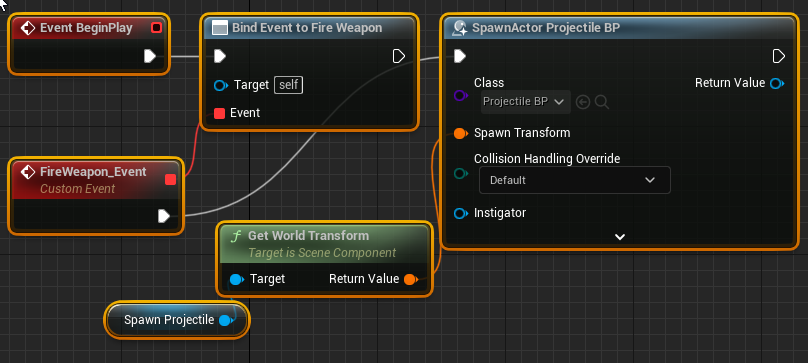
 desert juniper
trim marsh
need tick on all the time
desert juniper
trim marsh
need tick on all the time
then yeah, like @dire frost said, use a DoOnce?
dire frost
pliant salmon
hahaha do you think so? I have found UE c++ quite easy
Honestly i kinda prefer c++. Cause it's way more manageable than the literal spaghetti code of bps
pliant salmon
I could see with the 👀 that the TSet<Blah> = {nullptr} if it was code haha
icy dragon
dire frost
Honestly i kinda prefer c++. Cause it's way more manageable than the literal spa...
The other way of saying C++ can have spaghetti but not in your face
trim marsh
desert juniper
then yeah, like <@!611249115401027584> said, use a DoOnce?
yeah , it work thx
 thorny lily
Hey guys, I currently have the rotation problem, where the turret i rotate goes the long way around when hitting the -180 to 180 point, and i cant wrap my head around it atm.
icy dragon
thorny lily
Hey guys, I currently have the rotation problem, where the turret i rotate goes ...
That's gimbal lock issue with FRotator struct.
dire frost
manic viper
I am having the darndest time figuring this out.
I'm trying to get a Cannon A...
So what's the problem?
manic viper
sorry! It doesn't work at all
dire frost
It kinda seems fine to me
manic viper
dire frost
It kinda seems fine to me
The intended behavior is i press "E" and it spawns the projectile and launches out of the cannon. I know that the projectile spawning works because if i attach the spawn actor directly to beginplay it will launch one right at the start
I think it has something to do with how i'm referencing ?
dire frost
I'm looking at you code and the only thing that seems to be a possible problem is maybe you not setting up the interface correctly?
manic viper
 manic viper
 dire frost
How do you interact with the cannon tho?
manic viper
you don't i'm trying to test something completely unrelated, but I need to get the absolute ground floor basics of "the cannon shoots when I press this button"
dire frost
Or is it something that you can always use no matter what
manic viper
always use no matter what
it's literally just a cannon model sitting on the ground with a projectile spawner on it
dire frost
Then set a hard reference to that cannon
You can set it manually or user "get actor of class"
dire frost
manic viper
Btw unless you will possess the cannon, you won't need it to be a pawn
manic viper
eventually it's going to move and rotate
manic viper
just tested
ABSOLUTELY
just hard coded it in LOL

legendary
Thank you Iskander!
dire frost
Lol well it is a fix
manic viper
i know it's not the best practice. but I just want to see what i can get away with for now as I'm learning
dire frost
You can probably use line trace to and cast the hit actor to the canon pawn and fire the fire interface from the cast
That's how it usually works
dire frost
thorny lily
Hey guys, I currently have the rotation problem, where the turret i rotate goes ...
After all FRotator is just a struct of floats and you should treat as one
manic viper
Haha so it's gotta work with a projectile
for reference, the "intended" gameplay is gonna be to rotate the cannon and adjust velocity of the projectile to hit certain objects
you will essentially be controlling the cannon
dire frost
In other words, possessing it
dire frost
I mean, yeah why not
It's already a pawn so you might as well
Makes your code more readable
manic viper
Yeah I think you're right
unborn compass
how to get actors who are overlapping w/ a component? can't remember the node ffs
collision capsule
does getOverlappingActors work? lol
dire frost
Yep
wispy pumice
I can't figure this out for the life of me, could someone please give me a helping hand on this? https://youtu.be/SCt9WoIA0n0
I keep despawning and I don't know why.
 faint pasture
manic viper
should i ... put all the logic .. on the cannon ?
faint pasture
manic viper
should i ... put all the logic .. on the cannon ?
Put Cannon logic on the cannon. That's kinda the whole point of object oriented programming.
What's the gameplay, are you always controlling the cannon or is it a thing on a ship or a station you run up to and control or what
pliant salmon
also makes me a bit sad when the function you need isn't exposed to BP
why isn't FRotator::Clamp() exposed?
faint pasture
pliant salmon
also makes me a bit sad when the function you need isn't exposed to BP
What function
dire frost
faint pasture
What function
Usually it's just unreal Devs forgetting to expose something to bps
faint pasture
pliant salmon
why isn't FRotator::Clamp() exposed?
Is this for some wild 6DOF stuff or something that'll work in Euler angles?
dire frost
Oops tried to reply to the other guy lol
pliant salmon
nay, no 6DoF (hello again), this is simply I want 0-360 deg value
faint pasture
pliant salmon
also makes me a bit sad when the function you need isn't exposed to BP
Btw a BP function library is a GREAT first c++ project. Make it.
faint pasture
pliant salmon
nay, no 6DoF (hello again), this is simply I want 0-360 deg value
Ah so converting 1080 to 360. Just modulo it
pliant salmon
Ohhhh my friend I already have a lib, so I'll expose it that way
faint pasture
If it's just a simple clamp or modulo on one axis then you can just do it in BP in 2 seconds.
pliant salmon
dire frost
Usually it's just unreal Devs forgetting to expose something to bps
probably find it's in UE5 haha
faint pasture
A clamp on a rotator would be a bit more exotic.
pliant salmon
faint pasture
If it's just a simple clamp or modulo on one axis then you can just do it in BP ...
yeah it is, but it's also negative for some reason
faint pasture
Negative is fine. What are you trying to do?
dire frost
pliant salmon
probably find it's in UE5 haha
Maybe yeah, wouldnt be surprised if that happens
pliant salmon
convert actor rotation yaw to Heading (0-360deg)
faint pasture
Is this for display? Like you're done treating it as a rotator and wanna display it somehow.
pliant salmon
faint pasture
Is this for display? Like you're done treating it as a rotator and wanna display...
somewhat yes
simulated AIS broadcast
dire frost
pliant salmon
simulated AIS broadcast
I'm sorry, what are you trying to do again?
pliant salmon
boat simulation
faint pasture
pliant salmon
convert actor rotation yaw to Heading (0-360deg)
Heading = (yaw + 360)%360
pliant salmon
AIS being one of the "sensors"
dire frost
I don't know much sbout boats but i think you can Work it out
pliant salmon
dire frost
I don't know much sbout boats but i think you can Work it out
yep nearly done, just debugging this
faint pasture
Try what I just posted
thorny lily
Okay I am really stuck on this rotation error with my tank turret,
I use the camera to calc in which direction the turret moves by getting the difference between their rotations to limit the speed the turret turns.
And the camera rotation goes from 180 to -180 which causes the problem but i dont find a workaround rn
 dire frost
thorny lily
Okay I am really stuck on this rotation error with my tank turret,
I use the cam...
dire frost
thorny lily
Okay I am really stuck on this rotation error with my tank turret,
I use the cam...
Trying lerping the difference instead of the tank rotation?
pliant salmon
faint pasture
Heading = (yaw + 360)%360
thanks mate. I know it's not hard, I just like to use functions if they are already there instead of filling my BP with maths 😉
dire frost
Like get the difference between the tank and the camera and slowly add that to the tank rotation
pliant salmon
thorny lily
Okay I am really stuck on this rotation error with my tank turret,
I use the cam...
this looks cool
faint pasture
@thorny lily can't see your video but each frame, calculate a Target rotation and continuously lerp towards that
Input drives target rotation
Target drives the interp
Interp drives the turret rotation
That's how you can enforce a speed limit
thorny lily
dire frost
Trying lerping the difference instead of the tank rotation?
i thaugt learping doesnt really make sense as the turret needs a fixed max rotation speed and learping would be pretty inacurate as it would need the same time to go from 0 to 90 degree as from 0 to 45 degree or am i wrong? 🤔
But yeah what u just said sounds good, I'm gonna try it out^^
thorny lily
pliant salmon
this looks cool
thanks^^
dire frost
thorny lily
i thaugt learping doesnt really make sense as the turret needs a fixed max rotat...
Yeah you're right but i just wanted to avoid a more complex way to smoothly change a value
I can tell how it works if you want to
faint pasture
thorny lily
i thaugt learping doesnt really make sense as the turret needs a fixed max rotat...
Rinterp to constant
It is exactly a speed limit on a rotator
dire frost
Completely forgot about that lol. Yeah that can work too
If i remembered that node was a think i wouldn't have made myself from scratch
thorny lily
gonna try that not exactly sure yet how i should calculate the interp speed to get a fixed speed limit but we will see 😄
dire frost
If we're assuming that moving 20° should take 1 second then Just get the different and divide it by 20
So if the difference is 60° the will take 3 seconds to reach that
thorny lily
thanks guys that really seems to solve my problem completely and at the same time makes my calc shorter on the tick
pliant salmon
are the tracing/statistic stuff exposed to BP?
dire frost
Not sure what're referring to
I mean i should be asleep 5 hours ago but i cant
Insomnia is a bitxh
pliant salmon
for performance monitoring etc
profiling etc

How to identify performance problems and fix them.
pliant salmon
and making my own?
manic viper
faint pasture
What's the gameplay, are you always controlling the cannon or is it a thing on a...
Sorry I missed this! I was knee deep in blue prints!
Right now I'm just trying to setup the logic to "control" the cannon I just put it all on the actual cannon as a pawn with a camera now
now I have to dig into the documentation and learn about collisions lol
I have the barebones basics functionality setup. With the logic on the cannon - setting up construction script in the projectile to adjust the velocity
(full disclosure I am an absolutely novice programmer. I do 3d modeling and voice acting. So this is all new to me. I apologize in advance if i ask something stupid)
dire frost
manic viper
https://dl.dropboxusercontent.com/s/d2dmns45zlc0bo5/NVIDIA_Share_i9tA7Mf6qL.mp4
Can you take a screenshot of the errors?
manic viper
yeah it's just one error

just repeated for every instance that it spawns
something about simulate physics + collision incompatability
dire frost
manic viper
(full disclosure I am an absolutely novice programmer. I do 3d modeling and voic...
Nah it's alright mate, we're all stupid deep inside
manic viper
haha if yall ever need help with audio engineering, you just ping me!
or sound design
dire frost
Thanks i will keep that in mind
pliant salmon
also, please tell me there's an easy way to get degrees from the 2d unit vector
I have atan already but that whines about divide by 0
dire frost
manic viper
So the collision is not set for the projectiles. You can enable it by using "set collision enabled"
dire frost
pliant salmon
I have atan already but that whines about divide by 0
Honestly i wouldn't pay too much attention to that warning
dire frost
dire frost
So the collision is not set for the projectiles. You can enable it by using "set...
You can enable it in the details panel of the projectile or in construction script (again using the set collision mode enabled node)
manic viper
hmmm

this is what is under collision on the collision component
had to change it under collision presets there's another drop down. Physics (and query)
 mystic bough
hey all. I'm looking into the best way to store my player's cleared levels. I was considering doing a struct that would also reference their data table row where all info was pulled from, but wanted to consider other options. In theory, 100+ levels and there's additional challenges that can be added to levels.
mystic bough
struct was so I could store the additional challenges info with the stage, left out that part
odd ember
 late shuttle
Just make a data table and keep them organized with a Name variable.
late shuttle
Just make a data table and keep them organized with a Name variable.
can't write to data tables
pliant salmon
I have an instance of a class (that is a subclass) as a variable in a blueprint, and then I passing this instance as a pointer to some c++ code, and this is saying that this point !IsValid
what can cause this?
do I have to do something special to this instance/variable to "initialise it"
odd ember
pliant salmon
I have an instance of a class (that is a subclass) as a variable in a blueprint,...
??? are you using reflection to get BP values that you modify in cpp?
pliant salmon
nope
odd ember
so how can you get a BP variable in cpp?
pliant salmon
 odd ember
is it a cpp variable that you have exposed to bp?
pliant salmon
oh sorry, if by reflection you mean BP exposed, yes
odd ember
no reflection is something else
odd ember
pliant salmon
this is a function with a parameter, not a variable?
pliant salmon

correct
AISPositionReport is a subclass of GenericMsg
but otherwise this seems fairly pedestrian, no?
odd ember
I can't see the full code and where the struct connects
is the struct BP or cpp based?
pliant salmon
cpp
pliant salmon
yeah I reckon so
odd ember
then why post in #blueprint lol
pliant salmon
because I have been doing this stuff in cpp with no problem?
the minute it's in BP it doesn't work
mainly the instance AIS Msg Wrapper
pliant salmon
I was wondering if i had to do something else in BP land, is all
pliant salmon
fair enough
 opaque river
I have something that should be, and likely is, straight forward but my methodology is flawed. I have a component I want it to rotate in a set circle around the actor at a given radius, the movement is supposed to follow an analog stick movement and basically to remain in a position until that stick is moved But I can only Get it to move to one of the set up down left or right instead of smoothing the movement
what method should i be using to have the movement mapped to the stick movement to get as close to 360 degree movement as possible
faint pasture
opaque river
I have something that should be, and likely is, straight forward but my methodol...
Show your setup
opaque river
I made some headway but now slightly different issue
very simple follow the leader


So we have our little aim assist which follows around our arrow
we rotate our arrow via its pitch following our gamepad movement
so now we have 360 degree motion
but the issue needing to be solved is it snaps back to default position when we stop applying directional pressure
where I would prefer it holds the last position
trying to resolve that now
 trim matrix
opaque river
I made some headway but now slightly different issue
trim matrix
opaque river
I made some headway but now slightly different issue
You need to add a small amount of rotation each tick.
As of now, you are basically just setting the relative rotation based on the axis value.
opaque river
well i want it to be effectively an aim reticle and retain its position think like twin sticks shooter
trim matrix
As you probably already know, when you hold the controller stick all the way right, axis value = 1. When you let go of the controller stick, axis value goes back down to 0.
opaque river
im with you, i was just jumping on that as i just solved the -1 to 1 range was limiting the movement
opaque river
wont that same situation just be the same delio with extra rotations?
trim matrix
No
SomeValue can be based of the AxisValue
If you use this method
Each tick
When this math gets calculated
Even if the axis value = 0
The new relative rotation will not change.
Because the formula is GetRelativeRot + SomeValue(BasedOfAxisV) = NewRelativeRot
This will create the behavior you are looking for.
And btw SomeValue is just a rate of change
opaque river
well the way its currently working you have the pitch, our pitch is being rotated 360 atm its following the movement of the axis yaw as a slave component, if we were to say we have some other modifier and we are adding or subtracting or multiplying by our axis yaw that number is being updated instantly with or without input
so as soon as we touch it or let it default back its updating and thus changing the pitch
so if we say we have some X which we are adding the yaw to. X + (int from 180 to -180) that value is still being modified at the same rate as our method from before, assuming we have it set to move perfectly in sync with our controllers yaw position
trim matrix
Im not sure what your saying. Your issue is incredibly simple to solve. I hope I helped and good luck with it.
opaque river
yeah well thanks for trying i probably just need to come back with fresh eyes like a piece of writing you have spent too long staring at
gentle urchin
Oh lord
This doesnt even workn
Its basically just a do once event .. just like a regular input action is
manic viper
oh no
it works
does it look good ? Not at all. Is it viable for a finished product ? Never.
manic viper
that's what makes it beautiful
gentle urchin
The return from delay
manic viper
LOL yes
gentle urchin
Didnt see it in that hurdle 😄
manic viper
a 0.1 tick event
gentle urchin
0.5 on the screenshot
gentle urchin
Might just start a timer at that point 😂
gentle urchin
Anim is ment for tick
manic viper
because the log itself for turning and rotating is so convoluted
manic viper
🤔
manic viper
I know there are much better ways to handle this. I'm just trying to brute force my way into it while i'm learning unreal lol

 gentle urchin
Rotating 45 degrees in a snap will look bad even at 1000 fps
manic viper
its ... something
gentle urchin
Ouf....
manic viper
im VERY new
gentle urchin
Creative i suppose 😄
manic viper
im just trying to think of the "best" way to approach what i'm going for here
i want to be able to walk up to the cannon and aim it by pressing control buttons
like there will be a wwheel to turn it left and right and another one to aim it up and down
and another for velocity
gentle urchin
Tick is tha way
Enable tick when you get up to it
Disable it when you leave it
Tick, target rotation and RInterpConst
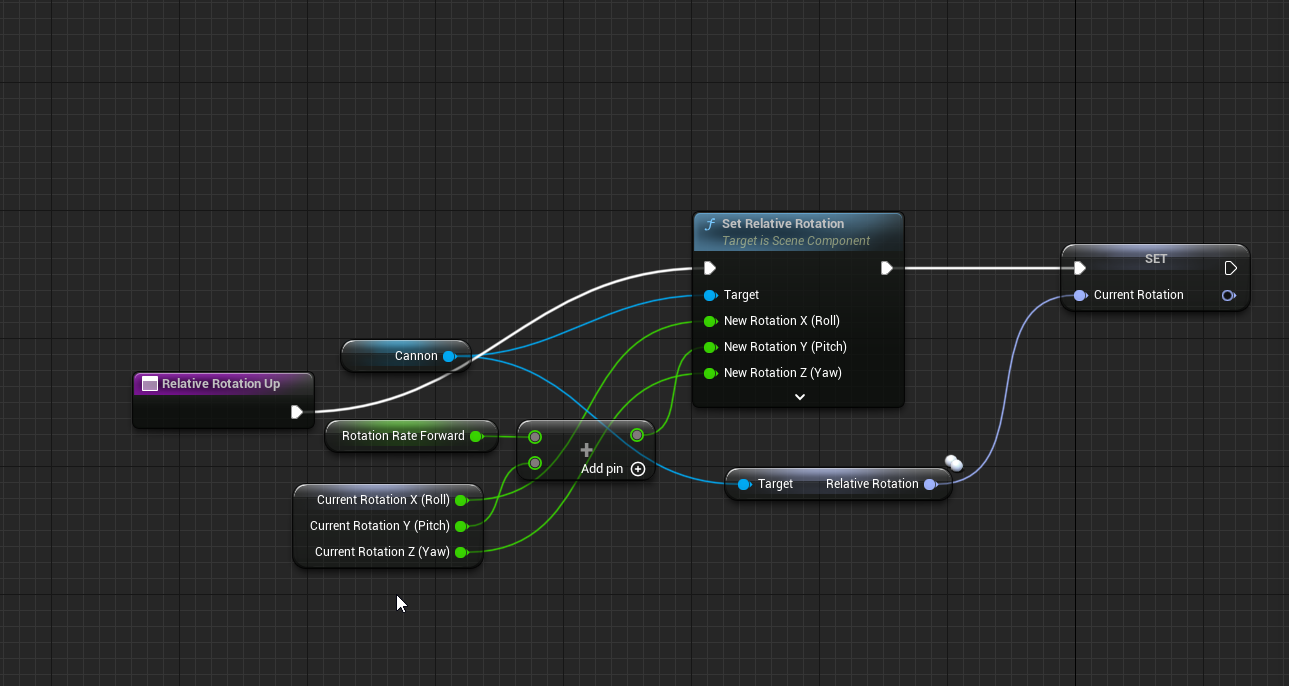 gentle urchin
You only need one on tick
The RInterpConst
The input that you want constantly triggered sounds like something that would be an axis input and not action input
manic viper
ill have to watch wadstein video
There isn't one for Const
only the og Rinterp
D:
gentle urchin
 manic viper
Yeah I loaded it up and looked it up
im just at that stage where this is basically wizardry
gentle urchin
It moves from one rot to target rot at fixed speed
manic viper
yeah i got that part. I but knowing how to create the target rot in the way that I want it to work
gentle urchin
The inputs would only affect target Rotation variable
manic viper
basically, I'm learning to drive and you just handed me the keys to the mclaren
gentle urchin
The input on the function should probably be a rotator aswell
manic viper
but i'd still have to do that for each "axis" essentially yeah ?
manic viper
so many bools
manic viper
So many
gentle urchin
Or floats
manic viper
you're out of control, squize. Breaking my brain
im 100% going to try and mess with this tomorrow after I get up
@manic viper pinging myself to find this location later
gentle urchin
At that point just doing the rot input directly could be cleaner depending on desired effect
 grand briar
Need some help coming up with a better solution for.. well i'm rotating my actor based on the angle im looking at. So i can look 90 degrees to the left before he starts rotating that direction
Example

Here's what i came up with. I think it counts as cursed
The flip flops seems to be causing a lot of lag in the rotation
gentle urchin
Is this on tick
grand briar
Yeah
gentle urchin
Ouff
grand briar
I lack better knowledge
gentle urchin
You wanna update the headrot on tick, and check for the dot product of aim vs char forward
Its ok
I judge, but i mean nothing by it 😆
Dot prod of <=0 is 90 degrees so thats what you wanna react to
Flipflops is a bit unpractical for this
Since they effectively run at half tick rate
Making it jitter
grand briar
Yeah and i got two of them there, i can notice when i PIE and watch it, it becomes really obvious how slow it is after the second one
But i'm still not clear what to do? I am doing the headrot on tick. I figured that's pretty much what i'm doing.. what you said
gentle urchin
If standing still then if lookatdirection dot actorforward <= 0, update actor untill actor forward == lookatdirection
maiden wadi
On a side note, this is usually animation driven via a 2D aimspace. Epic has a decent implementation for it in their content examples.
gentle urchin
In a while i can setup some nodes in a bp 😄
True that^ i always forget that , cuz i never do it 😅
grand briar
But i also have conditions, such as it has to finish rotating to that point before it can rotate again. So i set the turning bool there also need to switch the use controller desired rotation otherwise i cant run around again
grand briar
maiden wadi
On a side note, this is usually animation driven via a 2D aimspace. Epic has a d...
Oh? That'd be really helpful. Do you know which one?
maiden wadi
Not sure, can look in a minute.
gentle urchin
grand briar
But i also have conditions, such as it has to finish rotating to that point befo...
Yes, you'd toggle it off again when the aimdirection is equal to actor forward ^^
grand briar
Ah, yeah i hear what you're saying. But.. i still don't see a difference from what i'm doing, even thought i know what i have now is wrong hah. Been trying to set this up for two days now, my brain is a little fried. I didn't want to tick the bools either i don't know if that's wrong. Setting it to true every frame

Oh, and i had a big problem with the actor rotation vs the control rotation. They don't match so not sure if the dot would work here. Figured out that they're different ranges, actor rot has a range from -180 to 180 and control rot 0-360. I had to convert their range with some.. probably also less than ideal maths so that i could stop rotating when they're nearly equal
 gentle urchin
Just add 180 to actor rot and they're very comparable
You dont need the map to range
grand briar
Damn.. yup..
 grave relic
Quick question, can you not have actor variables in data tables?
gentle urchin
you can have variables
grave relic
Yeah but when i make the variable type actor its greyed out
grave relic
👍
gentle urchin
you can have an actor class if you want
gentle urchin
unborn compass
perfect, you're a genius
did you try with a spring arm ? 😄
This is what it would look like 😛
 dreamy yacht
Hi, I have a similar problem. I am working on arcade racer, but my cars tend to roll over constantly ruining the gameplay fluency. Adding the inertia to axis kills the steering responsiveness and cause weird behaviour. I have decided, that it would be best to limit car rotation to smth as -45/+45 in Y axis ( X axis in my case ) to prevent it from flipping on the roof, but the code I have made doesn't work
This is code inside the vehicle BP

 white elbow
how do I make a line trace ignore the whole class of actors instead of specific ones?
2 classes to be precise
gentle urchin
Change the class' collision response
 glossy trench
Good day,
is the gamepad "A" button (xbox 360 gpad) HARDcoded in the widgets to make "A" button ,,, the confirm/click/pressed ?
how would i "switch" it to "B" button? (make B button the "confirm" one) ?
 lapis inlet
Anyone willing to guide me in creating a basic gravity simulation?
 haughty temple
are you not able to delete all array elements in a loop? print string tells me its reading both attached actors but only destroys 1
edit: i found a workaround just set the life span of the actors to .1 and it works not sure why it wont work with destroy actor
lapis inlet
gentle urchin
Not using the built in one?
As in, objects emit their own gravity based on parameters like mass, density and radius etc etf
And on a 2d plane
gentle urchin
haughty temple
are you not able to delete all array elements in a loop? print string tells me i...
reverse loop when deleting , if you're removing entries aswell
dreamy yacht
hi! anyone can help me with setrelative rotation ( above) ?
 tight pollen
 solid delta
guys how do i add colision to my blueprints spline
 maiden wadi
glossy trench
Good day,
is the gamepad "A" button (xbox 360 gpad) HARDcoded in the widgets t...
maiden wadi
glossy trench
Good day,
is the gamepad "A" button (xbox 360 gpad) HARDcoded in the widgets t...
Not at the pc at the moment to look but chances are it would be a project setting or coded in Slate. In like UButton or a parent.
Er SButton
 pastel rivet
Hmm weird issue, but i have a print string on event tick, and there are several instances of the same blueprint when playing, printing different results from a variable, even tough theres only 1 instance of that BP
solid delta
Halp lmao
gentle urchin
pastel rivet
Hmm weird issue, but i have a print string on event tick, and there are several ...
sorta contraticting statement
pastel rivet
Hey, what if this was a growing group? Etc my last group was 1-9 (0 to 8) but now theres a new group 10-18 (9 - 17)
pastel rivet
gentle urchin
sorta contraticting statement
Yes ikr, but its weird, there are 4 instances printing in my log, and giving different results, but theres only 1 BP in the world
gentle urchin
pastel rivet
Hey, what if this was a growing group? Etc my last group was 1-9 (0 to 8) but no...
the / would be on group amount while % would be on channel amount
if you wanted a dynamic group i'd suggest doing an array
pastel rivet
 gentle urchin
Array of "group members"
Donno how you handle sending the int, but whatever is sending the value would also have to know about the amount of group members for this to work i suppose
pastel rivet
Basically i have everything i need then
 gentle urchin
AmountofChannels = Channels * groupmembers
haughty temple
gentle urchin
reverse loop when deleting , if you're removing entries aswell
ahh perfect thank you 😄
dreamy yacht
Hi, I have a problem. I am working on arcade racer, but my cars tend to roll over constantly ruining the gameplay fluency. Adding the inertia to axis kills the steering responsiveness and cause weird behaviour. I have decided, that it would be best to limit car rotation to smth as -45/+45 in Y axis ( X axis in my case ) to prevent it from flipping on the roof, but the code I have made doesn't work
This is code inside the vehicle BP
 pastel rivet
@gentle urchin
This worked as well 😄
 gentle urchin
Surely there are several methods to reach the goal }}
odd ember
gentle urchin
Surely there are several methods to reach the goal }}
only in good games™️
 gilded hazel
anybody know how i can set up aiming towards mouse cursor location in 2d? struggling for tutorials or resources and everything ive tried doesnt work.

(id like to aim up etc)
gentle urchin
Doesnt world location work?
gilded hazel
full rotation basically
gentle urchin
Deproject mouse to world ,
Using X and Z values
Or Y and Z , depending on your forward ofc
gilded hazel
im not familiar with deproject to be honest
gentle urchin
Aim direction being findlookat with a nulled out depth axis
Deproject screen to world takes the mouse screen location and finds the world location under it basically
 hallow compass
I’m trying to make a loading screen using the Load Stream Level node, everything works fine but all the textures don’t load until a few seconds after the rest of the game actually loads. Any way to make an actual loading screen out there?
gentle urchin
gilded hazel
ill be honest ive no idea what half of that means 😂
Mouse has a location on the screen
Deprojecting takes this screenlocation and i assume traces directly behind it
Then it returns the location where the trace hits in the world
This location will be a Vector(x,y,z)
Since you're on a sidescroller you only have 2 axis to care about. Right, and up
So you want to take this location vector and null out the axis you're not using (your depth)
gentle urchin
hallow compass
I’m trying to make a loading screen using the Load Stream Level node, everything...
C++
 stuck plaza
is it possible to find by predicate from TArray<> in bp?
hallow compass
gentle urchin
C++
Scary
 earnest tangle
stuck plaza
is it possible to find by predicate from `TArray<>` in bp?
earnest tangle
stuck plaza
is it possible to find by predicate from `TArray<>` in bp?
No
gilded hazel
gentle urchin
Mouse has a location on the screen
Deprojecting takes this screenlocation and i...
thank you - is this not just a line trace in different manner? does convertmousepositiontoworldspace also work similarly?
earnest tangle
stuck plaza
is it possible to find by predicate from `TArray<>` in bp?
On second thought, I think if you create a custom search by delegate function, which takes a value-returning dynamic delegate as a parameter you could use that... but the performance is probably not very good, so it would be fairly limited in its usage
gentle urchin
gilded hazel
thank you - is this not just a line trace in different manner? does convertmouse...
Perhaps thats the node im thinking about tbh
gilded hazel
ah
stuck plaza
earnest tangle
On second thought, I think if you create a custom search by delegate function, w...
I just used a regular for loop, it seems to work
earnest tangle
Yeah that's the way to go in BP's I guess :D
gilded hazel
how do you then alter the projectile direction? im using an arrow component on my mesh as the spawn location but i dont know how to set projectile trajectory
so even if i have mouse location i arent sure how to hook that into trajectory
earnest tangle
This depends on how you're moving your projectile. You can either rotate it towards that point if it always moves forwards, or if not, set its velocity so that it moves towards that direction
gilded hazel
earnest tangle
This depends on how you're moving your projectile. You can either rotate it towa...
assume you mean rotate the spawn 'arrow'
earnest tangle
Depends on how you're setting the rotation of your projectile I guess
You certainly could rotate the arrow component if you're setting the rotation based on it, but it would probably be easier to just adjust the rotation separate from the arrow
 thin panther
Once you get the vector to look at, you can move by that vector each time
Alternatively if you cant find the nodes for it there is some manual vector math you could do, but im pretty sure the nodes exist
earnest tangle
Projectile Movement Component also exists :)
(But you'd still need to figure out the direction for it to go where you want)
gilded hazel
yeah i am using projectile movement component
thin panther
And the direction you can get by getting the vector it takes to look at mouse position from the arrow
gilded hazel
i think the worst thing about learning bp is having 60% of the knowledge and theory but the constant frustration of not knowing how to set things up 😂
earnest tangle
that's how it goes lol
 solid delta
HOW

reddit
0 votes and 0 comments so far on Reddit
?
am asking this question lol
white elbow
How would you make a line trace apply impulse to an object as if it was hit by a projectile?
earnest tangle
calculate the direction of the line trace, apply impulse into that direction
assuming that's how you want it to work
white elbow
kinda, but it wouldn't matter where you hit the component, if it's the same angle it's gonna affect it the same
I want like if you hit a cube way off center it's gonna apply rotational force
if that's even possible
like apply impulse to a point of contact instead of a whole component
faint pasture
white elbow
like apply impulse to a point of contact instead of a whole component
Isn't there an apply impulse at location?
white elbow
faint pasture
Isn't there an apply impulse at location?
🙏 😌 my hero
those default cubes won't know what hit 'em
odd ember
poor cubes
odd ember
white elbow
unless I program them to
will you?
white elbow
I might
odd ember
white elbow
I might
 undone willow
what am i supposed to plug into "input" on isShiftDown?
I just wanna check if shift is down when i press the space bar
 modest gulch
Hello, I want to make screen effect (as in, in-game smartphone or tv screen or whatever having screen with something arbitrary on it), but I dont even know how it is called, so I have hard time googling it for tutorials etc. Only thing I know it is something to do with render targets.
earnest tangle
It kinda depends on how exactly you want it to work, but one way to do it would be to just use a Widget Component
You can use it to render a UMG widget which could be used as your screen contents
modest gulch
earnest tangle
You can use it to render a UMG widget which could be used as your screen content...
You mean, you can use widget on mesh surface?
earnest tangle
the widget component will just render the widget as a flat plane, so if you line it up with your mesh it would probably work
if your screen is not flat then you might need to do something more elaborate :)
modest gulch
I will look into it, thanks
 quiet stag
hey guys im working on a fan made pokemon game just started..was wondering if i should use a data asset for each pokemon or a struct or a data table..not sure what to use
 dark crow
Data Asset sounds comfy
gentle urchin
Isnt data assets not instanciated ?
So DA_A referenced by PokemonA and PokemonB would be the very same data asset?
 last abyss
yeah
odd ember
modest gulch
Hello, I want to make screen effect (as in, in-game smartphone or tv screen or w...
postprocess?
gentle urchin
Sounds like i should've gone for data asset instead of database for my project then
quiet stag
what about using a data table so i can have a list of 151 pokemon
odd ember
quiet stag
what about using a data table so i can have a list of 151 pokemon
that would work right up until the point where nintendo sends a C&D letter
quiet stag
odd ember
that would work right up until the point where nintendo sends a C&D letter
thats okay...
im fine with that lol
just kidding im just doing it for me and my friends.
quiet stag
odd ember
that would work right up until the point where nintendo sends a C&D letter
so what are the pros and cons of a data table for this
odd ember
the pros are
you have a data table
the cons are, you can't write to a data table at runtime
quiet stag
kk thanks!
quiet stag
yep ok great thanks!
quiet stag
one for items
gentle urchin
and one for the TM's
quiet stag
yep
odd ember
pokemans
gentle urchin
sure, another for items i guess
odd ember
I never played pokemon so I'm not sure what TM is
quiet stag
trainer moves
odd ember
datatables aren't true data bases however so you can't really cross reference them
quiet stag
i think or trained moves
gentle urchin
basically an action or an ability
odd ember
isn't that a part of the pokeman itself?
dreamy yacht
do you know how can I limit the car rotation on certain axis ?
quiet stag
a tm is an item that you can give to your pokemon to learn the move
dreamy yacht
to prevent roll over ?
gentle urchin
a pokemon's nature would in the broad strokes define the actions/abilities avaliable to it
odd ember
quiet stag
a tm is an item that you can give to your pokemon to learn the move
that sounds like a function
odd ember
gentle urchin
a pokemon's nature would in the broad strokes define the actions/abilities avali...
yeah but a pokeman class can contain its own evolutions too
gentle urchin
dreamy yacht
to prevent roll over ?
add roll force
odd ember
you don't need a table for that
quiet stag
omfg guys! haha i can use the pokie api website and just loop through the json and store all that in my data table...what a god move
gentle urchin
odd ember
yeah but a pokeman class can contain its own evolutions too
It can, for sure
odd ember
you could even inherit from a base pokeman class and have each evolution as a subclass
quiet stag

An open RESTful API for Pokémon data
im going to look into how i can make an api call and store that in a cvi file
i know how to work with apis and json...just gott figure out how i can store that data in a cvi file
odd ember
quiet stag
im going to look into how i can make an api call and store that in a cvi file
you can probably do that through a URL command inside of UE
might supercede having a data table whatsoever
gentle urchin
odd ember
you could even inherit from a base pokeman class and have each evolution as a su...
Sounds like a lot of work compared to a database
Datatable*
odd ember
gentle urchin
Sounds like a lot of work compared to a database

they don't do the same thing
you need to store functionality somewhere
data tables only contain data
and subclassing it would be more elegant than e.g. having to use an enum state for each pokeman
gentle urchin
Not sure youd say that after 750 entries but who knows
Maybe its just me prefering excel autofill
odd ember
gentle urchin
Not sure youd say that after 750 entries but who knows
you do understand you don't have a choice right? if each pokeman has unique functionality or abilities you still need to write that functionality somewhere
gentle urchin
The only difference between them are currently taught moves, a random extra stat
True, abilities would live in their own db
And youd need a class to actually pull and act on that data
gentle urchin
Yes
hence the class to pull/act/functionally use the data
It would need to be separate anyways
due to the nature of the spells
odd ember
unless I am mistaken each pokeman has a set of moves that is unique
gentle urchin
they're not unique
gentle urchin
Indeed, it does not
odd ember
and you'd still need to have however many different abilities as separate components
odd ember
that would be the most elegant way of retaining logic while keeping the correct architecture
gentle urchin
the rest is just dmg , a particle and some anim
odd ember
I mean if it's just damage and effects then yes it's just data
gentle urchin
the dmg has affinity, but it acts all the same
odd ember
but if it's unique functionality it's different
gentle urchin
like, "psychic" and "fire" damage
odd ember
gentle urchin
the dmg has affinity, but it acts all the same
that's just damage type
 odd ember
tbh sounds like you don't even need abilities just base damage and attack
gentle urchin
More or less
odd ember
ah no
odd ember
there are defensive abilities too
gentle urchin
but that could just be a tag
true, harden and whatnot
but thats just another status
odd ember
well that's still logic though
gentle urchin
Yepp, but very limited
only need a few of them, which can handle getting passed in some DB row reference
or be spawned based on the row or smth
shouldnt be that hard to bind them together
odd ember
and since you can't cross reference data tables (or maybe you can with composite data tables, never tried) you'd probably want this stored on the class itself, and not in a data table
gentle urchin
so much more trouble doing it per class really
quiet stag
gentle urchin
whats that!?
gentle urchin
Just part of a TM list
quiet stag
ah gotcha
odd ember
gentle urchin
so much more trouble doing it per class really
not really, you just add the component type you need per class
you still need 1 class per pokeman
undone willow
what am I meant to plug into input here?
 odd ember
you're not going to get around that
gentle urchin
but you make and manage 150 classes ...
odd ember
yes because there is no other way
gentle urchin
I'd make 1 "poke"-class , the number of effect classes needed (10-20, tops)
odd ember
in the end even with data you need something to spawn in the world
gentle urchin
The "poke" class !
Area spawner would have an array of ID's (row references) for which it can spawn
on battle enter -> Spawn "Poke" class with the Row reference-> Class handles pulling the data, swapping meshes, and updating animations
odd ember
sure, assuming each pokeman is compatible with the template
odd ember
well no it's not a given
not all of them could use character movement for instance
and you'd need at least 1 animBP per skeleton, still
gentle urchin
The animBP would be more troublesome, if its a 3d game
most of the pokemon games are 2d , but not sure what's desired in this remake thingy ^^
 twilit lion
Please vote so this can be fixed, thank you 🙂
https://issues.unrealengine.com/issue/UE-146356

Unreal Engine
Welcome to the Unreal Engine Issue and Bug Tracker. You can check the status of an issue and search for existing bugs. See latest bug fixes too.
odd ember
even with 2d you'd need the same though
odd ember
you still need to connect the frames correctly no? so animations can happen in succession
and the sprite sheets would depend heavily on the size of the pokeman
gentle urchin
Actually, if its a 2d one, there's no animation at all
its just a sprite
when attacking, they simply "slide" the sprite a bit forward and backward xD
odd ember
moving from one sprite to the next is still an animation no? so if you need a sequence of animations you'd still need to connect multiple sprite sheets? or multiple elements of sprite sheets
earnest tangle
twilit lion
Please vote so this can be fixed, thank you 🙂
https://issues.unrealengine.com/i...
That has a resolution of "By Design" so I don't think that's getting changed 🤔
 stoic palm
One message removed from a suspended account.
odd ember
stoic palm
One message removed from a suspended account.
relative rotation?
otherwise use add rotation perhaps?
gentle urchin
odd ember
moving from one sprite to the next is still an animation no? so if you need a se...
like this is an "attack" .. the pokemon doesnt animate at all on any level (weirdly enough, they are 2 "animating image sprites in the menu, but here they are just 1 static image)

Anyhow derailing blueprint at this point
Gotta give data assets a dive and see if they're usefull in my project! Think i wanna go more component driven for the construction part of the game aswell,
it seem more reasonable
instead of this massive DB handling everything
even for things that do not have it
faint pasture
quiet stag
hey guys im working on a fan made pokemon game just started..was wondering if i ...
I would do Pokemon as raw data only. That is how they did the original games and it's not like any of the moves can't be expressed as raw data
You could easily roll an entire Pokemon up into a set of structs
odd ember
gentle urchin
like this is an "attack" .. the pokemon doesnt animate at all on any level (weir...
my point is just that "data driven" often forgets that you have to setup logic for this somewhere
faint pasture
But don't make a fan game. Horrible idea.
odd ember
and that logic often isn't compatible with how the data is stored
gentle urchin
odd ember
my point is just that "data driven" often forgets that you have to setup logic f...
Valid point for sure
gentle urchin
I've sorta encountered this exactly , in some sense atleast
my DB coming short of what i need
despite having "everything"
faint pasture
You would have to have something along the spectrum towards ECS on the brain to get a data driven Pokemon running well.
gentle urchin
it doesnt.. work well enough 😛
stoic palm
odd ember
otherwise use add rotation perhaps?
One message removed from a suspended account.
faint pasture
odd ember
which is why stuff like data assets exist
We are at a point of having to choose data tables or assets for our tile maps. What's the first thing that pops in your head for a system that supports a tile map editor (not necessarily in game but at least in the unreal editor)?
Basically we need to be able to very quickly author and view hundreds of small tile maps (just a structure really).
odd ember
faint pasture
We are at a point of having to choose data tables or assets for our tile maps. W...
it sounds like tiles should be data only, but that they could contain objects with logic on top of them potentially? so e.g. a trap would still be an object on top of the tile, even if it's a pitfall trap
but that depends heavily on what kind of game you're making
faint pasture
Yeah they're data only. It's a procedural system that uses authored maps
WFC specifically
odd ember
faint pasture
WFC specifically
I have a profound dislike for WFC because it's not directed enough
faint pasture
The dream is to be able to paint tiles in an editor mode, just with tile picker and mouse dragging. I've investigated a custom editor mode but it gets a bit gnarly fast.
odd ember
you could do something like that in a blutility, but yeah it's not pretty
my biggest problem with stuff like this is that there is no way in blutilities to understand focus, which is fundamental for using stuff like hotkeys
faint pasture
Can a Blutility do cursor tracing stuff? I was under the impression that they were just a thing that you "run"
odd ember
yep it's just a script
in my case I've been using editor widgets
but again, same problem
so I do have some scripts that allow viewport handling of actors
but it gets finicky because you still have to press buttons on the widget while the viewport has focus
so you gotta use some "hacks" to stop the behavior
like right now I have a timer that runs functionality on actors only while they are selected
as soon as they get deselected, it stops
faint pasture
What would be a good parent class for a bultility for painting?
odd ember
I don't think there's many choices. I'd start with the editor widget base class
if you do happen to find a way to get the viewport from an editor widget do let me know
but I suspect I'll eventually have to write a subsystem for this
trim marsh
yo guys , i have this interface inside this function that is in tick event , but i need only call when i need it not every tick

 odd ember
that I expose to the editor widgets
odd ember
trim marsh
yo guys , i have this interface inside this function that is in tick event , but...
then don't have it on tick
trim marsh
i need check the condition for example , so if true made something with the interface
faint pasture
trim marsh
i need check the condition for example , so if true made something with the inte...
What are you trying to do gameplay wise?
modest gulch
Question about blutilities, tutorial that I currently watch speaks about them, but looks like in current version of UE they are either gone or changed name. Anyone knows what can be done?
odd ember
modest gulch
Question about blutilities, tutorial that I currently watch speaks about them, b...
don't watch those tutorials 😂
trim marsh
faint pasture
What are you trying to do gameplay wise?
i have a condition running on tick that is an actor on screen(true) or off screen(false), so i need a interface to call when this occur , so for example , if actor is in screen , and i want to kill him , this only take action 1 time
faint pasture
trim marsh
i have a condition running on tick that is an actor on screen(true) or off scree...
Check if it's on screen and not pending kill
odd ember
sounds like you need an event dispatcher not running interfaces on tick
I don't know who first told people to abuse interfaces in BP
but they have a lot of blood on their hands

 random plaza
can 3d widgets in the world be affected by light?
im using a widget as a sign for workshops and they glow in the dark
odd ember
I don't think it's part of the functionality no
random plaza
i'll try and mess around with the material and see what happens
odd ember
a 3d widget is a wrapper for a widget, not an actual material
odd ember
gentle urchin
Wouldnt a sign for a workshop be a mesh?
ordinarily
random plaza
i cant for the life of me figure out how to get a custom font on them though
so widgets have been a workaround
odd ember
random plaza
i cant for the life of me figure out how to get a custom font on them though
you have to create that as part of the texture?
or use a decal or some such
random plaza
i'll look around and see what i can do
odd ember
there's also the 3d text render actor
faint pasture
@random plazaHave you tried a lit material yet?
grand briar
gentle urchin
You dont need the map to range
I realized why i need the map range by the way. Controlrot and actorrot are different ranges, if i add 180 to actorrot when it starts at -180 when controlrot is 360 actorrot is going to be 180 and vice versa
gentle urchin
grand briar
I realized why i need the map range by the way. Controlrot and actorrot are diff...
They are, yet they represent the same do they not
grand briar
controlrot has a range of 0-360
actorrot is -180 180
so from 0-180 they are the same. then actorrot flips to -180 and controlrot continues to 360.. and actorrot goes to 0 in that time.. if i add 180 then it would be 180 at that time controlrot is at 360
gentle urchin
Right but this was just for comparison
So offsetting actorrot by 180 would give you a comparable rotator to the controlrot
As in, they are the same range
And if you wanted to remap the range, youd say in range is -180 to 180 and outrange is 0 to 360
grand briar
But the mapping i did worked. Took a while i'm not so good with maths. I don't want to confuse myself further with that really. I'm still trying to follow your instructions from before heh
gentle urchin
If it works it works !i may not have the full picture anyways 😄
random plaza
i fixed it, just switched to a text render with a offline font
grand briar
gentle urchin
If it works it works !i may not have the full picture anyways 😄
Sometimes i feel like i just hit buttons in the right order until things start working
 steady orbit
I have a question about instanced static meshes. I want to make a star field, but I want to be able to click on each individual star and they all have individual data of any kind. Is this possible with instanced static meshes?
Kinda like an instanced blueprint actor in a way
odd ember
steady orbit
I have a question about instanced static meshes. I want to make a star field, bu...
you'd need actors for that I'm pretty sure
or you separate the star meshes from the rest and write a script to populate triggers around instance meshes
steady orbit
I wonder how other games do it
Like stellaris for example
Having that many actors is so bad on performance
odd ember
steady orbit
Having that many actors is so bad on performance
are they made in unreal 🤔
grand briar
steady orbit
Like stellaris for example
But stellaris doesn't have a star field with an enormous amount of stars if you dont count the background, which isn't relevant. It's just like any RTS where you could click on any building or any unit
grand briar
odd ember
are they made in unreal 🤔
It's made in some paradox engine
odd ember
that would probably explain it
in house engines are often more specialized
UE is more general
odd ember
well you can only get answers based on the engine
although
I wouldn't worry about optimizing it before you've made it
steady orbit
I’d rather not delve into a project and ultimately know it’ll be a dead end
I’ve came at this before
I’ll keep trying


I did find this for starters
odd ember
steady orbit
I’d rather not delve into a project and ultimately know it’ll be a dead end
yeah but you can't be prescient about the problems you'll encounter
unless you have the experience to tackle them
grand briar
Wouldn't it be more important how much information you'd require from each actor rather than how many actors you have. I'm sure there are ways to limit that to what you need at the time. I don't think 100, or 1000 actors would be completely unreasonable for a game?
steady orbit
I’ll try individual actors again.
odd ember
you can't fix something that isn't broken in the first place
steady orbit
Relax lol
odd ember
one of the reasons premature optimization is evil
velvet swallow
Stellaris stars are just a sprite, you can have several thousand of those clickable without performance issues in unreal.
steady orbit
Didn’t even think of that
 twilit heath
Linetrace hit object index corresponds with index of instance in ism component
gentle urchin
So each ism sort of points to a background actor woth the help of a manager
Exactly
So the actors have a ism and index ref
Which i iterate over for the the data lookup
twilit heath
For a SP game you generally dont need to worry while beliw 20-30k actors