#blueprint
402296 messages · Page 814 of 403
 trim matrix
 worthy frost
?
worthy frost
trim matrix
yup just asking
yeah that's exactly what i wanted to do x)
thx kaos and the guys for ur help 😄
 unreal tusk
Anyone have an idea on how to grab variables from another actor?
I have a On Component Begin Overlap for other actor.
I've set Other Actor as a variable. I assume I can cast to ThirdPersonCharacter and set it to Other Actor on Object? However, from there, how do I call for example, that Other Actor's armor variable, so that I can calculate damage correctly.
 faint pasture
unreal tusk
Anyone have an idea on how to grab variables from another actor?
I have a On Com...
faint pasture
unreal tusk
Anyone have an idea on how to grab variables from another actor?
I have a On Com...
Just cast the OtherActor to ThirdPersonCharacter then get the variable.
You don't need to save the ref to a variable or whatever
Yes that would be the good/general way to do it.
The main difference would between the approaches would be
Casting
On overlap, check if OtherActor is a ThirdPersonCharacter. If it is, get its armor value, then apply damage.
Interface
On Overlap, call IArmor::GetModifier on OtherActor, do math, then call IDamage::ApplyDamage on it as well.
Although, the damage causer shouldn't care about armor. Armor should be handled in the damage system by the damagee.
Unless you have some weird effect like "Causes 3x Armor Value as Damage"
unreal tusk
oh good point actually.
I do have a weird value though, since I'm operating off the Dungeons and Dragons ruleset, but yeah. Good point. I'll see if I can workshop something up on the Event AnyDamage side.
faint pasture
THAC0?
unreal tusk
That probably makes everything super simple compared to what I was trying to do
faint pasture
@slate pondJust use the DamageTaken modifier on the victim's side
OnTakeDamage, HP = HP - RawIncomingDamage x DamageTakenModifier
I'm still praying for the day that components can just automagically implement interfaces on behalf of the owning actor
Although a component is sorta already an interface + state so...
I do interaction by component and not with an interface.
 runic parrot
faint pasture
I'm still praying for the day that components can just automagically implement i...
runic parrot
faint pasture
I'm still praying for the day that components can just automagically implement i...
Doesnt work with
-get owner - does implement interface X -> if no, add interface
?
faint pasture
That doesn't sound right at all but I might be wrong
Yeah at that point you might as well just handle the interface there. What I'm talking about is just slapping a HealthComponent on an actor and having it handle damage, with the actor not even necessarily knowing anything about it.
Why doesn't GAS just get component by class? speed?
That's pretty interesting, so it doesnt own an ASC until it gets asked for its ASC?
so the map doesn't start with 100,000 ASCs floating around
 open sedge
so im playing a sequence from a blueprint but it only plays once. how can i tell it it play forever

and no i cannot place it in the level and do it that way sadly
i need it in this bp to reference and start/stop
 keen solstice
So I noticed textures change (decrease quality) depending of the distance of the player, there's any way to increase this distance a little? Was looking on google but can't find anything about this
faint pasture
keen solstice
So I noticed textures change (decrease quality) depending of the distance of the...
Scalability settings?
 keen solstice
Thank you guys for the help but I just found my problem, I was using texture group 2d pixel (because I want to use a pixelated texture and preserve the pixels), but for some reason this makes the texture bug a lot when you apply it to a mesh lol
runic parrot
I'm trying to change the name of one if my variables, but supposedly i already have one with that name "CharactersInBuilding".
I want to change the one with "2" and remove that "2".
There's no variable with that name, does anyone know what may be happening? i already compiled again.

 tawdry surge
Try restarting the editor. Sometimes unreal doesn't update that a variable has been deleted or an input added
 devout latch
Yes, I had that problem before. Restarting should fix it.
 languid hemlock
Hello @brazen merlin i come to you in a time of need i cant seem to find the input modifier you showed here https://media.discordapp.net/attachments/897096790757748750/933866789153157160/unknown.png

 sonic oak
it's just a float value set as a variable
It will determine how 'fast' the movement occurs, or rather how much distance will be covered in that input
languid hemlock
oooh okay
 smoky rivet

why is this read only
its an animnotify blueprint
possible to make it read and write so i can access it in another blueprint?
 brazen merlin
languid hemlock
Hello <@!568839944970174501> i come to you in a time of need i cant seem to find...
brazen merlin
languid hemlock
Hello <@!568839944970174501> i come to you in a time of need i cant seem to find...
yep. What Sparta said. I called it InputModifier, but you can call the float variable whatever you like. You need to make it in your BP_Kart class since that's where MoveForward gets called.
languid hemlock
brazen merlin
yep. What Sparta said. I called it InputModifier, but you can call the float var...
yup :3 btw uh shall i put it into update or the initializion?
brazen merlin
languid hemlock
yup :3 btw uh shall i put it into update or the initializion?
set the default value of InputModifier to 1.0 in the variable details. No need to use a setter node here. In your HackerItem class, when the Hit event fires, you are getting this variable and changing the value to -1.0, then delay, then back to 1.0
languid hemlock
brazen merlin
set the default value of InputModifier to 1.0 in the variable details. No need t...
ahh alright :0 but is it like a float * float as i cant seem to select a Float using a custom name
brazen merlin
languid hemlock
ahh alright :0 but is it like a float * float as i cant seem to select a Float u...
what?
 umbral ginkgo
How would I do a line trace from the player camera?
brazen merlin
umbral ginkgo
How would I do a line trace from the player camera?
if its for gun sights, i think its a bit trickier than just a line trace
brazen merlin
umbral ginkgo
Not for a gun
so you just need a line trace from camera? specifically just that? nothing else is going on?
 normal hawk
seems like a total noob question, but -- i basically have a need for a volume with a blueprintable enter/exit step. Does some actor like this exist somewhere? I feel like I'm completely missing something
brazen merlin
normal hawk
seems like a total noob question, but -- i basically have a need for a volume wi...
you have OverlapEnter and OverlapEnd events for actors
umbral ginkgo
brazen merlin
so you just need a line trace from camera? specifically just that? nothing else ...
If I know what I'm doing (which I don't), yes
brazen merlin
umbral ginkgo
If I know what I'm doing (which I don't), yes
you've done line traces before? like from the player facing direction for example?
brazen merlin
first person shooter?
brazen merlin
alright
well you need to get the forward vector of your camera for starters, there are plenty of "how to do line trace" for unreal out there, you want the camera actor specifically though
normal hawk
@brazen merlin aha! TriggerBox + ActorBeginOverlap. Looks like that will work. Thanks for giving me the pointer in the right spot.
 faint sand
Im testing basic AI Behavior Tree, a simple run to player. Ive got it all set up, except its not working. What am i missing


 trim matrix
how do you detect when it reach the limit, actually i just did a (RootYaw >= 90) set isTurning and then if isTurning is true interp RootYaw
 worthy frost
curves allow for better blending
trim matrix
they do like that
worthy frost
yeah
faint sand
it never actually does anything with the MoveTo piece which seems to indicate it is getting nothing for the TargetLocation
 trim matrix
worthy frost
yeah
trim matrix
worthy frost
yeah
so if i don't have turn anims i'm a little bit.. f*cked ? 😄
faint sand
no, its getting a value, just the AI isnt moving to that location
 trim matrix
never touched it tbh.. 
 remote meteor
faint sand
it never actually does anything with the MoveTo piece which seems to indicate it...
remote meteor
faint sand
it never actually does anything with the MoveTo piece which seems to indicate it...
selector will only run a single branch
faint sand
so that should be a sequence then?
ok, so i changed that. i can see it firing on the MoveTo, but the AI still arent moving
remote meteor
you need some sort of a decorator for the actual condition
 faint sand
so this should work... and i see it firing both now, but still no movement

yeah, really simple flat square and the green covers teh whole thing

other than its shape, all its settings are default

yep, custom controller. nothing special. its only function is to test AI Behavior so it has a single node on it
well single node... graph
which calls the RunBehaviorTree
yes
fwiw both red/blue characters are AI, i spawn at player start

you can see me changing position
also fwiw this is a blank new project, top down, the only thing that exists is AI behavior items already posted

so, we can see the vector is correct, and we can see it execute both nodes in the tree
that seems to indicate the tree and task and blackboard are correct
not sure what you mean by step
all these nodes turn yellow back and fort

wonder if the characters are stuck in the floor geometry, going to move them up a bit
moved. no change
testing
no moveforward node specifically but ill set it up to move to other ai
character
default


tried that, nothing


does this matter

ok. ill try that. i did replace the default navmesh, so it might have borked it up
yeah, 200 wouldnt even make it to the other character, they are 1000 apart exactly
but thats just the bruch
brush
the box itself covers everything, and you can see the gree
yeah, UE5
umm... i dont know how to create a new recastnavmesh. it looks like its an actor
so that could be the problem, it might be linked somehow to the original/default navmesh that i deleted before i created this navmesh
brb rr
back
not that i can tell. i assume you want me to delete it firt
checking
no, it did not
and the green is gone, which seems to be drawn by the recast
ill create a new navmesh
umbral ginkgo
How would I display the out hit of a line trace in a string
faint sand
ok, as soon as i dragged the new navmesh on the map it creatd a new recast

no change, AI still just stand there
nope
did a search of simplemovement
nope, but ill give that a shot
umbral ginkgo
Why is this line trace inverted with the camera?

Yes
When you say camera location you mean what I have now?
 full dew
Not sure if this is the place to ask this question. Anyone run into problems trying to use action "cast to bp motion controller"?
brazen merlin
umbral ginkgo
When you say camera location you mean what I have now?
you have the location, but you need to produce an offset by using the forward vector
umbral ginkgo
Ahh that makes sense
faint sand
i tried an AI MoveTo node, but im having issues setting it up.
 unique holly
Heyo, here with what i hope is an easy one.... Opening project, all its set to do is open a menu widget... and the cursor is jumping to top left screen. Hoping its a common one, but not had great luck on google!!
full dew
Not sure if this is the place to ask this question. Anyone run into problems trying to use action "cast to bp motion controller"?
 brazen merlin
full dew
Not sure if this is the place to ask this question. Anyone run into problems tr...
brazen merlin
full dew
Not sure if this is the place to ask this question. Anyone run into problems tr...
that cast doesn't look like its bp motion controller
full dew
yea, but cast to bp motion controller was not on the list to choose from
umbral ginkgo
@slate pond Is this what you were talking about?
 full dew
brazen merlin
that cast doesn't look like its bp motion controller
full dew
brazen merlin
that cast doesn't look like its bp motion controller
the action i used gave me a warning. The tutorial i followed called for cast to bp motion controller but it was not in the action menu to choose frome
 languid hemlock
brazen merlin
what?
languid hemlock
brazen merlin
what?
like how did you make the float just be a name as a blueprint?
faint sand

so per that output, its working, except the characters arent moving lol
newvar0 is the blue one btw
i thought maybe the animation was broken, but i checked and all the stuff is there. its the default animation blueprint
i didnt think so, but considering anything at this point
this is exactly why i didnt want to test in my actual projected. wanted to keep it super simple
sure
brazen merlin
languid hemlock
like how did you make the float just be a name as a blueprint?
You should really watch a video on bp variables
faint sand
default AIController - no change, and i still get the same Success output
at this point weve taken the behavior completely out of the scenario, so whats left. it would seem the characters themselves
checked characters on map, they are Movable
 opaque river
been following this https://www.youtube.com/watch?v=uEd-USZfJxU tutorial on a basic character controller for a vertical slice, I cant seem to find any option he has enabled that my project doesnt but I have no pawn movement on mine what am i missing that might be assumed to be turned on for the tutorial?

For our first series, we tackle one of our all time favorite 2D game: the excellent metroidvania Hollow Knight! Explore with us the intricate design choices behind the character controller!
https://www.patreon.com/Lucid_Tales_GDP
00:00 Intro
01:37 Character Controller Analysis
04:06 Walking
09:17 Jumping
16:39 Final Showcase
Hollow Knight Pro...
faint sand
is that in the character?
i dont know where that detail section is at
lol duh one sec

static
 lunar gale
Hello friends, I'm kinda new to UE and I'm having issues with a save/load thing. I don't wanna butt in someone else's question here but if anyone with a big brain could help out that would be amazing; I've been at this all day
faint sand
well i seriously appreciate the effort. at this point i feel like i should just recreate the test project and do it all from scratch again. who knows
UE5 bug maybe?
ok will do thanks again for monstrous effort @slate pond
 dawn gazelle
faint sand
dawn gazelle
faint sand
You can't hook up the switch this way. The movement result would only be valid if you check it on the On Success or On Fail outputs.
faint sand
why? i had a separate print for each output
not doubting you, just dont understand why it would matter
 full dew
I made a comparison clip of my screen and a tutorials screen
dawn gazelle
So either on fail or on success.
faint sand
i see what you mean... but in this scenario if it was failing it wouldnt even get to the switch since the fail wasnt hooked up
languid hemlock
brazen merlin
You should really watch a video on bp variables
i found out how to make one i called it ReverseInput only thing i get tho is Get or Set Reverse Input
full dew
I made a comparison clip of my screen and a tutorials screen
 dawn gazelle
faint sand
i see what you mean... but in this scenario if it was failing it wouldnt even ge...
dawn gazelle
faint sand
i see what you mean... but in this scenario if it was failing it wouldnt even ge...
yes it would.
faint sand
ok, good to know
well ive already deleted the project, so ill put that check back in if the new test project runs into the same proble
thanks for letting me know
dawn gazelle
d'oh <_>
faint sand
yep, lol... i have a problem with starting things over and over and over again. im doing good on my actual real project, have only started over twice
once i get to a point where ive figured out a bunch of better ways to do things, it feels messy so i start over
ive done pretty good resisting that urge
brazen merlin
languid hemlock
i found out how to make one i called it ReverseInput only thing i get tho is Get...
when you drag a var from the variable list out into the graph, you have those two options, get or set, based on what you need - that's how you use variables
faint sand
anyway, good night 🙂 thanks again

 faint sand
 supple bane
Anyone have any idea why this isnt working?
supple bane
Anyone have any idea why this isnt working?
what exactly are you expecting that isnt happening
supple bane
Im trying to get the print string on the 2nd image to play
that is all
the button works on the first image and plays the first print string
 fathom wigeon
Is anyone here particularly good with reading crash dump files?
lunar gale
is the function in your "Inventory" bp?
supple bane
lunar gale
is the function in your "Inventory" bp?
Yes
lunar gale

faint sand
honestly no idea why it wouldnt work. when you press play, do you see the flow go through it at all (the red line thing)
supple bane
faint sand
honestly no idea why it wouldnt work. when you press play, do you see the flow g...
I dont see any flow, no
faint sand
which implies the exec isnt actually 'entering' the function, but i cant see any reason why. its not like you got anything complicated there
faint sand
oh, on the top when running your game, you have a drop down in which you have to select what your monitoring
supple bane
yes I do, I forgot I turned it off earlier
mb
I see the flow for the first part, just not the 2nd
faint sand
no clue. sorry. its like 2+2=5 for some reason. i dont see any logical reason it wouldnt trigger the second print
is not executing the function evidently
i have something like 40 functions in my main project and ive never had that happen
supple bane
faint sand
no clue. sorry. its like 2+2=5 for some reason. i dont see any logical reason it...
Yea ive been stuck for a little while now
thanks for trying
faint sand
try creating a new test function
supple bane
good idea
faint sand
with no pins
lunar gale
are you getting any errors?
 peak solstice
Hello everyone. I'm a new guy to Unreal Engine 4, and I bumped into a Blueprint problem for Text Switching in Widgets.

 lunar gale
@supple bane try creating a custom event that executes the function in inventoryBP and then try calling the custom event on clicked instead
peak solstice
Oh man, I'm nowhere near to inventory. You guys seem to know your stuff. (:D)
I managed to change text with BP interfaces for actors, but not text switching when activating an event like opening and closing doors.
faint pasture
@peak solsticeWhat causes Open Door to appear?
supple bane
faint sand
with no pins
Ive solved the problem, thanks for the help
fathom wigeon
Id love some help if anyone can assist. Is anyone here particularly good at reading crash dump files? I am currently having an issue with my shipping builds. What is happening is I can Play the shipping build 1 time, as soon as I exit and go back in its an immediate crash and just says "Fatal Error". I do not have this issue at all when I am launching the game using "right click on Uproject > Launch Game" I also do not have any errors in the editor either in my output log when doing the same repro steps.

 lunar gale
@peak solstice As far as I know you have to remove widgets from display when you want them gone
you have a remove from parent node
peak solstice
where should I insert remove parent for names?


I used event tick, maybe it's that causing it?
lunar gale
I'm kinda new to UE too lol
peak solstice
same
lunar gale
yeah maybe you don't want whtaver you're setting there firing off every frame
peak solstice
I made it far to know how to make Press Vs Hold same button for prone and crouch
peak solstice
lunar gale
yeah maybe you don't want whtaver you're setting there firing off every frame
Is there an alternative for Event Tick?
I forgot to show this.
Should there be a branch here in this?
 lunar gale
um, maybe a collision when you get close to the door?
i don't know what the situation is exactly
peak solstice
I prefer Box Collision Overlaps over LineByTrace via FPP Camera
for activation and widgets
lunar gale
what if you have a delay as long as the door opening/closing animation in between checks?
idk, maybe someone with a bigger brain can help tbh
 sturdy garnet
currently it sumps my entire magazine because both ammo and max ammo are set to 25 by default, how would i make it only use the shots i have fired
 peak solstice
Doors are activated by an Input which is (X) or [E]
sturdy garnet
if u gonna reply pls tag cos im gonna be off discord ty
lunar gale
oh @peak solstice try looking into the flip flop node
and have it go from open to closed
languid hemlock
brazen merlin
when you drag a var from the variable list out into the graph, you have those tw...
tried moving it from the list onto the graph and it dissapears after wanting to connect it
dawn gazelle
sturdy garnet
currently it sumps my entire magazine because both ammo and max ammo are set to ...

No description provided

 faint pasture
@peak solsticeYou have 2 states, whether or not the door is open and whether or not the door is in range to show the popup.
When player enters trigger area, show the popup. When they leave, remove it.
When player activates the door, set bDoorIsOpen to NOT(bDoorIsOpen), then change the popup widget text and play the door opening timeline, both based on the current state of bDoorIsOpen


 viscid arrow
does anyone know how to get a specific actor from "get all actors from class"?
supple bane
Pretty new to messing with arrays,
can anyone help me understand why this isnt working

 peak solstice
why print strings or are they only for tests?
supple bane
tests
peak solstice
gotcha 😉
@supple bane you only anything about texts for object names by any chance?
know*
supple bane
im not sure what you're asking
peak solstice
check my screenshots above and see
dawn gazelle
viscid arrow
does anyone know how to get a specific actor from "get all actors from class"?
You can use an array "Get" but that means you need to know the index of the actor you're wanting to get.
What is the unique thing about the actor you're wanting to get out of the array?
supple bane
peak solstice
<@!312225309770514463> you only anything about texts for object names by any cha...
im doing it with names more as a test, ill be switching to getting the item class
viscid arrow
dawn gazelle
You can use an array "Get" but that means you need to know the index of the acto...
the characters movement component
dawn gazelle
supple bane
Pretty new to messing with arrays,
can anyone help me understand why this isnt w...
What's not working about it? You could also check to see if the strings being fed into the comparator are the same by putting them into a print string as well.
supple bane
dawn gazelle
What's not working about it? You could also check to see if the strings being f...
 dawn gazelle
viscid arrow
the characters movement component
dawn gazelle
viscid arrow
the characters movement component
Ok, but all the rest of those actors have the movement component too, yea?
viscid arrow
dawn gazelle
Ok, but all the rest of those actors have the movement component too, yea?
yeah, it's just affecting the first actor from the "get " node
supple bane
it doesnt proceed to 'scan slot for items' so im guessing its just having trouble accessing the inventory slot array
dawn gazelle
supple bane
So that looks like you have nothing in your array currently if it's stopping there.
viscid arrow
peak solstice
't there be a GET in that Array?
not in that case
dawn gazelle
viscid arrow
yeah, it's just affecting the first actor from the "get " node
In the actor array, what actor is it that you want to pick out specifically? What is it about them that makes you want to get that one? Are they close to you? Are they the target of an attack? How are you supposed to know which actor it is you want to interact with?
supple bane
dawn gazelle
So that looks like you have nothing in your array currently if it's stopping the...
thats what I thought

but that shouldnt be the case
dawn gazelle
What are those objects?
dawn gazelle
That's a bad idea. Widgets shouldn't be used to hold game data, instead they should only represent data of something else. Say, an inventory component.
That aside, those Inventory Slots, they exist already in the widget itself (like you see them in the design view?)
viscid arrow
dawn gazelle
In the actor array, what actor is it that you want to pick out specifically? Wh...
im hitting a actor, to which i apply a actor component to slow the walk speed of the actor, but since im using the "get" node it only applies the effect to the actor who spawned first, im trying to figure out how to apply the effect to the actor that the projectile hit ( photo for reference)
 supple bane
dawn gazelle
That's a bad idea. Widgets shouldn't be used to hold game data, instead they sh...
supple bane
dawn gazelle
That's a bad idea. Widgets shouldn't be used to hold game data, instead they sh...
no, they are only added through the construct script
dawn gazelle
supple bane
no, they are only added through the construct script
So then they are only variables?
supple bane
yes
 graceful forum
Hi all, I want to replace the reference of a replicated actor componant from an inheriting child BP class. Should I do this on ConstructionScript? And what happens to the events that are bound by the parent class, will they still be bound to the new reference?
viscid arrow
supple bane
yes
then there's no data
dawn gazelle
^
supple bane
they are all just from the inventoryslot class
viscid arrow
supple bane
they are all just from the inventoryslot class
if the variables don't have any script added to them, they are just a shell
dawn gazelle
viscid arrow
im hitting a actor, to which i apply a actor component to slow the walk speed of...
So you have a reference to the actor that was hit before you apply this effect and I'm guessing you're adding this slow debuff component to the actor that was hit. If that's the case, you should probably just be able to get the owner of the component and there's your ref.
viscid arrow
dawn gazelle
So you have a reference to the actor that was hit before you apply this effect a...
i'll try that
dawn gazelle
May need to cast it to your enemy class for now, but you may want to think about using an interface.
supple bane
viscid arrow
if the variables don't have any script added to them, they are just a shell
so why can I not get the array now but Ive been able to before?
viscid arrow
supple bane
so why can I not get the array now but Ive been able to before?
because the string that you are looking for isn't added to the actual array
supple bane
viscid arrow
because the string that you are looking for isn't added to the actual array
the item info is
dawn gazelle
If those "Inventory Slot #" only exist as variables, and they do not have a widget assigned to them (like you can store the return variable of a create widget node in them) then they are effectively null. Adding those variables to an array when nothing is populated in them is like adding nothing to the array.
viscid arrow
supple bane
the item info is
it would be easier if you used a struct
supple bane
dawn gazelle
If those "Inventory Slot #" only exist as variables, and they do not have a widg...
So I cant run code through individual slots?
dawn gazelle
This scenario, I have a widget I've added to another widget. This variable would be valid.


If I created a variable manually, like this "test" one...
 supple bane
wait nvm im stupid
dawn gazelle
It doesn't have any widget assigned to it.
dawn gazelle
So they exist in the heirarchy of the main widget you're looking at?
 blissful grail
Is there a way to get the gamemode of a level prior to loading the level?
brazen merlin
blissful grail
Is there a way to get the gamemode of a level prior to loading the level?
cant get anything from a level if its not loaded
blissful grail
Well, I misspoke. I want to load it, configure it, then switch into it.
So, it should technically be loaded into memory.
brazen merlin
blissful grail
Well, I misspoke. I want to load it, configure it, then switch into it.
please clarify the "its"
blissful grail
I didn't say "its"
brazen merlin
..
blissful grail
I'm not sure what clarification you want
brazen merlin
load gamemode or level? configure gamemode or level? switch gamemode or levle?
viscid arrow
dawn gazelle
So you have a reference to the actor that was hit before you apply this effect a...
yeah it works, but it's affecting the first actor, im trying to find a substitute to "get all actors of class"
blissful grail
I want to place the umap into memory. But NOT switch to it. Then, I want to access the gamemode that is tied to that umap. Change some things and then switch to the umap.
So, load the umap. Configure the GM associated with the umap, then actually switch to it afterwards.
dawn gazelle
viscid arrow
yeah it works, but it's affecting the first actor, im trying to find a substitut...
Getting the owner of the component should be what you need if you are adding the component to the actor that you're wanting to apply the debuff to.
brazen merlin
blissful grail
I want to place the umap into memory. But NOT switch to it. Then, I want to acce...
i dont get why you need to change things about the gamemode when the level isnt loaded, it should already have the settings. If you're trying to pass data between levels, you need to use game instance.
graceful forum
graceful forum
Hi all, I want to replace the reference of a replicated actor componant from an ...
Can I bump this about replacing my actor component reference from a child class
blissful grail
brazen merlin
i dont get why you need to change things about the gamemode when the level isnt ...
Because I don't want my GI to have 239482374902387 variables for my game. I want things to be isolated. There shouldn't be a running count of things that don't even need to exist unless needed.
dawn gazelle
supple bane
yes
Maybe a silly question, but have you added the main widget to the screen before executing the scanforitems function?
supple bane
dawn gazelle
Maybe a silly question, but have you added the main widget to the screen before ...
I add it to hierarchy then remove from parent onBeginPlay
viscid arrow
dawn gazelle
Getting the owner of the component should be what you need if you are adding the...
yeah it doesn't let me homie
dawn gazelle
viscid arrow
yeah it doesn't let me homie
Doesn't let you what?
brazen merlin
blissful grail
Because I don't want my GI to have 239482374902387 variables for my game. I want...
well you still cant affect anything about a level if its not loaded
blissful grail
So there is no possible way to load the map into memory and NOT switch to it immediately?
brazen merlin
maybe, but not by bp
viscid arrow
dawn gazelle
Doesn't let you what?
im trying to reference the function that i made in the actor blueprint but it requires a reference to the actor

 slate hound
how do I get rid of this Return node in this interface function? I made an output then deleted it and now this return node won't leave... do I really have to delete the function and remake it? 
 dawn gazelle
viscid arrow
im trying to reference the function that i made in the actor blueprint but it r...
dawn gazelle
viscid arrow
im trying to reference the function that i made in the actor blueprint but it r...
Get the owner of the component, not the actor that you're using getactorofclass from.
viscid arrow
dawn gazelle
Get the owner of the component, not the actor that you're using getactorofclass ...
ok, now what?
dawn gazelle
 viscid arrow
this is what it shows
 viscid arrow
dawn gazelle
viscid arrow
dawn gazelle
i see
dawn gazelle
slate hound
how do I get rid of this Return node in this interface function? I made an outpu...
That's the only way I found to do it myself 😢
slate hound
so sad... I have a bunch of stuff in the implementation already
dawn gazelle
supple bane
I add it to hierarchy then remove from parent onBeginPlay
I'm stumped on this one. You can check the length of the array before the loop, and it'll probably be 0 as that would be the only reason why that loop doesn't execute. If it's 0, that means the array has no values in it.
supple bane
dawn gazelle
I'm stumped on this one. You can check the length of the array before the loop,...
how do I check the value?
/ length
dawn gazelle
Length node
dawn gazelle
Yep
supple bane
yea it came out as 0
when I scan the array from inventoryBP i get 6(which is whta im looking for)
 gentle urchin
blissful grail
Is there a way to get the gamemode of a level prior to loading the level?
gentle urchin
blissful grail
Is there a way to get the gamemode of a level prior to loading the level?
No.
Oh lol. realized it had already been answered.
blissful grail
Yeah and expanded upon.
 barren relic
Hey guys! Does anyone have any suggestions on how to load another level when when say all ai on a map are slain? Say kill 10 enemies then you get a popup for the next level?
dawn gazelle
barren relic
Hey guys! Does anyone have any suggestions on how to load another level when whe...
In your game state, do get all actors of class "Enemy" on begin play. The length of the array is the total number of enemies in the level - store that length in a variable on game state. When you defeat an enemy, do a call to game state to subtract one from that stored variable, and check if that variable is <= 0 (less than just for ensuring it gets called) and if it is, display your popup for the next level.
gentle urchin
^This but self registering Enemies instead
gentle urchin
It would work the same way, but would suddenly allow several "waves" and whatnot
Guess its out of scope of the quesiton
brazen merlin
way to go Squize
blissful grail
I'd go with the dispatcher. Then tie their death to increment a counter in the game state. Each death the game state checks if the number of deaths equals the amount required set in the GameMode.
brazen merlin
thinking overly flexible as always
 brazen merlin
well since we're all saying our opinions on the matter... I would have the enemy broadcast their death (allows you to have other things to listen to this if you want) and keep track of deaths in game instance since you are changing levels. I say game instance because you can post final score of total kills but still work with per level kill counts for changing the level.
brazen merlin
gentle urchin
https://tenor.com/view/yoda-coffee-baby-yoda-the-mandalorian-sipping-gif-1574098...
is that Gizmo from Gremlins?
gentle urchin
Baby.Yoda
 supple bane
any ideas on why this is inaccurate?
 brazen merlin
gentle urchin
brazen merlin
gentle urchin
is that Gizmo from Gremlins!?
gentle urchin
Ye 😛
gentle urchin
supple bane
any ideas on why this is inaccurate?
inaccurate how
supple bane
gentle urchin
inaccurate how
just different from the actual array
brazen merlin
thought it was an Ewok, another idea stolen by lucas films
gentle urchin
supple bane
just different from the actual array
define "actual array"
what is the "actual array" i this context? what your widget is telling you?
supple bane
sorry im having trouble explaining it
it comes from the actual inventoryBP
instead of getting called from a reference
if I call the length from inventory itself, I get a length of 6(which is what im looking for)
if I call it from anywhere else, it comes back as 0
dawn gazelle
My guess would be that you're using a variable named "Inventory" without setting the actual instance of an inventory that it needs to be set to.
gentle urchin
Likely has errors aswell due to access none
supple bane
no thats not it
gentle urchin
Question numero dos: Is this multiplayer?
supple bane
no
supple bane
gentle urchin
Likely has errors aswell due to access none
and yes i am getting this error
gentle urchin
Datura was right
supple bane
hm
dawn gazelle
What do I win? 😄
 dawn gazelle
lol
 icy dragon
dawn gazelle
What do I win? 😄
icy dragon
dawn gazelle
What do I win? 😄
Blueprint Editor with hookers and blackjack
gentle urchin
supple bane
hm
So you need to set that variable before you try to access it 🙂
supple bane
onbeginplay?
gentle urchin
A reference variable is by default empty/null/nullptr
supple bane
or construct?
gentle urchin
Beginplay sounds more reasonable
supple bane
k
gentle urchin
being an inventory
dont really have any knowledge of your setup so cant really give good reliable advice in such context
its all guesswork
gentle urchin
Thank Datura! 😄
supple bane
dawn gazelle
What do I win? 😄
it works now, thank u both so much
 willow cedar
What would be the best way to create a melee system for different weapons? Like, should I make all the weapons different blueprints, then put the coding in each of them for how they work?
brazen merlin
willow cedar
What would be the best way to create a melee system for different weapons? Like,...
maybe better to have a parent class since they are all melee, then child classes modify the parent setup - collision, mesh visual, etc
try to list out all the features you want, then see what are common across all weapons
willow cedar
brazen merlin
maybe better to have a parent class since they are all melee, then child classes...
That is really good advice. Thanks! I'll take a look at it.
Is there any way to get any of these inputs in an Actor Component?

Or what would be the most proper way to handle this.
brazen merlin
this has yet to be defined
willow cedar
Like, should I just put all my inputs on a Controller BP, and then have this pull the events from a cast?
brazen merlin
willow cedar
Like, should I just put all my inputs on a Controller BP, and then have this pul...
i suppose. Player inputs usually go in Controller or Character/Pawn
you dont really want it all over the place, but maybe you do 🙂
willow cedar
Yeah, I have everything setup in my Character atm
I'd rather move it to a Player Controller
brazen merlin
then what's with the question about actor component?
willow cedar
I wanted to have controller inputs do stuff in the Component
I didn't have a central area for controls yet, so I'm going to work on that now
brazen merlin
willow cedar
I wanted to have controller inputs do stuff in the Component
would still think its better to have the input event not all the component
is this mp?
willow cedar
Yes
brazen merlin
ah that makes sense
you can still have inputs on character
or mix between controller and character
willow cedar
Yeah, currently it's all on character, but I think for Organization sake, it will be best for me to put it all on a controller BP
That way multiple characters can have the same control inputs already done.
brazen merlin
usually you want movement and such on the character, while non-character specific inputs like opening menu are in controller
willow cedar
What about something like an attack?
brazen merlin
anything that needs to talk to the character to do something, would go there
menu, push to talk, things like that are on controller
those areNT character dependant
willow cedar
Ah, okay. Makes sense.
So like the player controller can still use inputs even when the character is destroyed or whatnot?
brazen merlin
right
willow cedar
That makes a lot of sense
brazen merlin
they cant move, but they can still open menus
willow cedar
Yeah
brazen merlin
cool
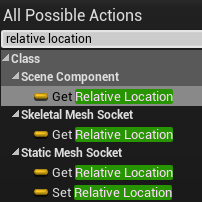 brazen merlin
 dire frigate
shouldn't I be able to set the relative location of a scene component?
dire frigate
shouldn't I be able to set the relative location of a scene component?
is it the root?
willow cedar
I'm doing a Melee attack system for a specific weapon on a component. In case I want to swap my way of attacking, I just change components out. That's the best idea I came up with.
dire frigate
Not sure what root means in this contex, but I'm editing the event graph for my first person character blueprint
brazen merlin
dire frigate
shouldn't I be able to set the relative location of a scene component?
also, im pretty sure the sets are functions, not var
brazen merlin
willow cedar
I'm doing a Melee attack system for a specific weapon on a component. In case I ...
sounds good to me - whatever weapon is held can pass its data to the character or whatever to adjust things like anims, damage vars, etc
willow cedar
brazen merlin
sounds good to me - whatever weapon is held can pass its data to the character o...
I was wondering, would I call animations on the Character, or do it in the Component?
brazen merlin
willow cedar
I was wondering, would I call animations on the Character, or do it in the Compo...
we're talking locomotion anims yeah?
willow cedar
No clue. Probably?
brazen merlin
like different idles?
brazen merlin
idle, walk, run, jump - those are locomotion
willow cedar
Yeah
willow cedar
Then yes, the one offs
brazen merlin
your weapon holds all of that
both types anyways
you can have a function on your character to call the attack - get damage, play montage, etc - and you'd have vars for the inputs for that function
the vars are set by whatever weapon is currently held
willow cedar
Sweet. I guess my next question is, how do I hold an animation on a frame I want until I release a button in a Montage
gentle urchin
Sounds more like a locomotion state then
brazen merlin
willow cedar
Sweet. I guess my next question is, how do I hold an animation on a frame I want...
what mean "hold"?
 eternal reef
You could also use sections in your montage which loop until you release your button
willow cedar
brazen merlin
what mean "hold"?
Like, I have a sword swing anim, and at the build up for the swing, I want to keep that pose until I release my attack button
eternal reef
Something like
Press Button -> Play Montage (with Sections -> Play until loop, which repeats)
Release -> Play Next Section of Montage
willow cedar
How would I choose where it stops and loops?
gentle urchin
yeah i supose sections would also work 😛
brazen merlin
willow cedar
How would I choose where it stops and loops?
you set these sections in the montage
dire frigate
So when making a smooth crouch event, I set my capsule half height. I currently don't have a crouching animation, and shifting my capsule half height basically moves my entire character (i.e lowering it will lower my character through the floor, increasing it will make my character go into the air). Is this just something that needs to be compensated with using an animation and shifting my mesh's z-axis? It seems my hitbox works as intended, so I can still walk and actually crouch under things, but visually my feet are in the floor
brazen merlin
dire frigate
So when making a smooth crouch event, I set my capsule half height. I currently ...
i sorta skimmed this 😅 I read "smooth crouch" - you should use a timeline to interp the value
dire frigate
I did that
eternal reef
willow cedar
How would I choose where it stops and loops?
https://www.youtube.com/watch?v=nTMDQhrOfVU&t=205s
Shortly shows montage sections
Most descriptions you find are using the old interface, but this might help

Quick introductory example of using a montage for an attack combo!
willow cedar
eternal reef
https://www.youtube.com/watch?v=nTMDQhrOfVU&t=205s
Shortly shows montage sectio...
Thanks
brazen merlin
dire frigate
I did that
then something is wrong with the setup
dire frigate
?
my crouch works, it's just the tidbit where visually my character's feet goes through the floor
brazen merlin
oh i see, so the mesh looks odd but the collision is alright
dire frigate
exactly
brazen merlin
not that i know how, but you could use IK on the legs so they are responding to the geomtry
dire frigate
I'm asking if I need to just use an animation and change my mesh's z-axis or if I'm just doing something wrong overall to be moving my whole character
I'll look into that in a bit, since I've never heard of it 👀
brazen merlin
lol i mean ive not done a crounching 3rd person character before
dire frigate
I'm first person 👁️
brazen merlin
oh, but there's a player mesh
dire frigate
yep
brazen merlin
ive done fps, but you cant see your feet
dire frigate
I was thinking that I'll just be hiding my body anyway
but for the sake of learning I've not set that
brazen merlin
still the idea of using IK in engine to calculate legs as they crouch since its dependent on the collider update
eternal reef
The movement is based on the capsule that you are using
If it is reduced in size, its main priority is to have the bottom of it on the ground, it basically ignores the mesh, for which reason it gets pushed into the ground
Just having an animation that suits the height of the capsule that you set works
willow cedar
eternal reef
You could also use sections in your montage which loop until you release your bu...
How would I loop part of the Montage?
brazen merlin
dire frigate
I'll look at finding one
that's where i was thinking your setup was wrong 😛
dire frigate
sidenote, does it sound proper to use bps for character/widget/scene control flows and use c++ for things like calculations/inventory management/etc.?
oh dw, you were right, I didn't make it clear that it worked haha
brazen merlin
willow cedar
How would I loop part of the Montage?
you missed this #blueprint message
 hexed cloak
Doing VOIP setup, new players joining the server don't have the sound attenuation so their voice goes cross map?
eternal reef
willow cedar
How would I loop part of the Montage?
Let me quickly check one of my projects
Yeah unfortunately its not explicitly mentioned in that video
 north hedge
Yeah this didn't end up being the issue 😐
brazen merlin
north hedge
Yeah its more to do with the BP but cheers I'll post it there
eternal reef
willow cedar
How would I loop part of the Montage?
Basically something like that

You can ignore the "End" Section
All you need is Default -> LoopStart (Loops)
LoopEnd
willow cedar

I think this works?
I just don't exactly know how to set this up in BP
I've done anim montages before, but not with sections
 hollow granite
hello everyone,
i am trying to call events from an actor that i saved inside a variable. I find the actor through a linetrace from the mouse, basically its the actor that is currently under my mouse-cursor. I checked already that the variable gets set correctly. But neither the cursor-overlap nor the on-clicked event get fired. any idea what the problem is?

 willow cedar
Oh wait, I think I got it. It just keeps looping until the animation montage finishes
Sweet, I got it working. This is very nice.
eternal reef
you can also define which section it should play next with this
 willow cedar
What does that do?
eternal reef
You can switch to an arbitrary section in your montage if required
Like switching from Loop back to Default
just as an example
brazen merlin
willow cedar
What does that do?
you can change which section to play next. For example, you have a combo montage of 5 different punches, they can play sequentially, or you can specify the section of the 5 to jump to
Loop back to Default is a good example, very handy
willow cedar
Ah, okay. Sweet
Is there a way to prioritize a Montage, so another one doesn't trigger? Like right now I can hold down my attack, but if I do something else while doing so, the anim montage for that will play over it.
gentle urchin
you could block it by checking if montage is already playing
brazen merlin
willow cedar
Is there a way to prioritize a Montage, so another one doesn't trigger? Like rig...
anim montage should play over locomotion, you can override locomotion using slots
you do need to cache the locomotion and blend the slot using layered blend per bone
eternal reef
I think theres a Tutorial on YT for montage priority
Handy if you want to be able to prevent montages from playing at the same time, but still allowing it to cancel them in certain ways
willow cedar
brazen merlin
anim montage should play over locomotion, you can override locomotion using slot...
I'll probably need to do this for other things down the line
brazen merlin
oh, different montages... what Squize said
willow cedar
What needs to be the Target for this?

 brazen merlin
if you use multiple slots, you'll need to control the layered blend per bone to prioritize which plays of which
willow cedar
gentle urchin
It gives you a hint 😄
Ah, I guess a better question is what is an Anim Instance?
brazen merlin
willow cedar
What needs to be the Target for this?
get your Mesh, from that get Anim Instance
its the anim bp instance on your character mesh
willow cedar
Is that something that needs to be set up beforehand?
eternal reef
Its the "framework" how your character handles animations
Third Person Character from UE4 has a pre-built if you are using that one
willow cedar
I think I got it working
 grave relic
Does anyone here have any ides on how to calculate the diffrerence between two numbers? Lets say i have two ints 22 and 8 and i want to get the difference between them so from 22 to 8 it 14
remote meteor
minus then absolute
grave relic
Thx it was the absolute node i was looking for ^^
 sturdy herald
Hello. How can i add a trail to a Pawn, if its moved by the Character with Contorl rig?
 neat stream
Is box trace much more expensive than 4 or 5 linetrace ?
willow cedar
Thanks for all the help today everyone. I made a good amount of progress on my project, and everyone here has really helped me understand a lot of things I haven't before.
 drifting rapids
hay can someone help me with something basic? I'm just trying to get a widget to work, I made a button on the widget and I'm trying to click it but whenever I play in editor, the button wont register anything, like the button doesnt exist even though its on the screen, I have an onhovered event, but even though the mouse cursor is hovering over it, its not doing anything on the blueprint at all.
eternal reef
Did you set the input mode?
 eternal reef
Yeah, when you display the widget, use that afterwards and select the widget
drifting rapids
I just added the widget directly in front of the player camera

is there a better way to do it?
eternal reef
Is there any reason why you did it that way or was that just a general attempt of displaying the widget?
drifting rapids
just a general attempt
i didnt know how to do it properly, i want these buttons to always be on screen
eternal reef
Aight gotcha
If you want it to be displayed right at the start
Event Begin Play -> Create Widget (Pick your widget class) -> Pull the return value out and use add to viewport
This just makes it visible on your "Camera"
If you want to interact with it you need to use "Set Input Mode UI Only" for example
drifting rapids
ok well that made the widget work but disabled the touch controls
so now when the widget is focused by the mouse it wont accept any touch input
how do i have both going at once so i can touch the button
eternal reef
via Set Input Mode you can define whether you only want Game Input, UI Input or Both at the same time
Might work when using both
eternal reef
Did you try focusing it? Not really familiar with touch input tbh
drifting rapids
yeah doesnt work
must be a limitation of ue4
cant have touch input and ui working at the same time
which is retarded
it should work
might have to make a custom touch input hud
eternal reef
Seems to be a common issue when googling it
https://answers.unrealengine.com/questions/541635/touch-buttons-dont-work.html
Maybe this works no idea, but there are a few posts on the ue forum, you might find a suitable answer
drifting rapids
thank you i'll take a look
nah the answer there didnt work for me
apparently the canvas in the widget block touch controls I'll have to remove that from the widget
keen solstice
Someone know if it's possible to set texture hue through blueprint? Not a material, a texture
 fiery glen
this would normally be an instanced material parameter?
not sure exactly what you mean
keen solstice
I want to recolor a paper flipbook but since it doesn't use materials IDK how to access the HUE from a texture
I want to set this value using blueprints, is this even possible?

 keen solstice
This is exactly my problem, I must change the texture, not a material because flipbooks can't use materials, only textures 😦
fiery glen
well, I have no great ideas then
I'm pretty sure flipbooks use a material from what I can see here
never touched this stuff
keen solstice
I'll keep trying, just found a "cast to texture" node, maybe this will work... anyway thank you for the help!
Uh, I'll try asking at this channel, thank you for the tip 🙂
 autumn shard
Hi, what is the best way to sort a list of float? contained by a map or a datatable
smaller to bigger for example
gentle urchin
Manually
autumn shard
gentle urchin
Manually
there is no other way? what if your table has 20-40 lines?
gentle urchin
What about it? Just sort it xD
autumn shard
gentle urchin
What about it? Just sort it xD
ok I see, through this node right?
 gentle urchin
probably not if this is a struct from a datatable
autumn shard
gentle urchin
probably not if this is a struct from a datatable
I don't see any other node sorting.
I can still get an array from the datatable no?
gentle urchin
Get Datatable Rows,
then you need to fetch the data
store it in an array, and make a function for sorting it
autumn shard
gentle urchin
store it in an array, and make a function for sorting it
I see, thanks for the hint, I'll start working on it!
 velvet forum
Hello How are everyone
good morning
how can i get nearest actor
then find the second nearest actor then third actor etc?
 woeful pelican
velvet forum
Hello How are everyone
good morning
how can i get nearest actor
then find the s...
woeful pelican
velvet forum
Hello How are everyone
good morning
how can i get nearest actor
then find the s...
From what I'm reading it looks like you're gonna have to get all relevant actors, then compare the distance of them and order them that way
For example

This I believe gets the closest distance
What I'd try is to find something that orders the actors based on the 'get distance to' node
gentle urchin
Had a function for this a while ago

This sorts the actor array based on distance
@velvet forum
remote meteor
if you only use distance for comparison
use distance squared instead
ur cpu will thank you
gentle urchin
How much does it matter ?
Any comparisons on it? Is it.. twice as fast? 😅 yeah its a good habbit to pick the better/faster method slightly less accurate but wouldnt matter here
 raw orbit
how do I go about creating a child of an anim blueprint using a different skeleton? ive done it before but ive completely forgotten. >_<
if i have cats and dogs id rather avoid having two fairly similar anim blueprints to manage if they can just share one parent
think i managed it
tawdry surge
Depends on your game I suppose.. I have separate animations for male and female characters cuz they move a lil differently. I'd pry keep cats and dogs separate too for the same reason
 warped spindle
Compiling shaders are too slow than usual. I Tried to comple 120 shaders and that took 1h, 120 shaders before was just 3-4 minutes or even 1 minute sometimes.
velvet forum
gentle urchin
Hello
https://streamable.com/t6j62v
look thats work !!
thanks
 gentle urchin
Sweet😄
 maiden wadi
warped spindle
Compiling shaders are too slow than usual. I Tried to comple 120 shaders and tha...
maiden wadi
warped spindle
Compiling shaders are too slow than usual. I Tried to comple 120 shaders and tha...
120? O.o Whenever our tech artist changes stuff, it's immediately 6k to 30k. 😄 5900x noms on them though.
gentle urchin
Nice to see there's not only Green players around
 carmine thunder
Hey I am trying to try some networking on Unreal. I am playing as a client but whenever I play it. It does give me the control over the default main player
what might be the issue?
velvet forum
gentle urchin
Thank you very muchhhh 😁😁😁😁
 pallid axle
Why is it so complicated to get a simple variable from another blueprint
 jaunty solstice
Hi guys
I need to iterate thru an array of vertices.
The assumption is that the vertices are all in sequential order, ie positioned next to each other on the actual static mesh.
How can I sort the array so that this is accomplished?
 tawdry surge
Sort
open sedge
anyone know how to make sliders snap to certain points througout the slider?

so it snaps to like 0% 25% 50% 100% etc
eternal reef
Just a guess, set value is between x and y -> 25% and so on?
open sedge
hm?
 versed sun
open sedge
anyone know how to make sliders snap to certain points througout the slider?
versed sun
open sedge
anyone know how to make sliders snap to certain points througout the slider?

set these setting
if you want it 0 to 1, make step size .25 and max value 1
versed sun
np
open sedge
my main fear is idk how to save all these options lol
like will they reset after they restart
or does ue4 auto save those
video settings
versed sun
those wont, but default value will
open sedge
yeah
versed sun
have you used Saved Game ?

How do I use the Save Game Object in Unreal Engine 4?
Source Files: https://github.com/MWadstein/wtf-hdi-files
 mystic bough
does anyone know what causes widgets to return invalid...?
my progress bar that very clearly exists has decided to not be valid.
 versed sun
are you looking for it on Construct? add a 0.0 delay before looking for it sometimes helps me
 earnest tangle
If it returns invalid then it doesn't exist
mystic bough
accessing it via interface. I'll add a delay there real quick to make sure, but it wasn't being accessed until 5~ seconds after play
 brazen pike
I've had that problem too, where I'll set it as a variable between create widget and add to viewport, but it will be return as invalid everytime for no reason
mystic bough
yeah, still invalid lol
versed sun
ooo, sometimes my widgets get bugged , I have to save and restart project and things work different

Unreal Engine Forums
Hi folks, I am not sure if I am doing something wrong or if I have discovered a bug. Instances of my custom widget placed in other widgets are not updating their visuals when I make changes to the custom widget. Specifically, I can access a button widget that I added to the custom widget via blueprints and define functionality for it. But the ...
earnest tangle
I would check that you're assigning the widget correctly
It's kind of difficult to say from the screenshot, but it's always possible you're not using the same variable, or the initialization runs after the point where you try to access it (you can for example use Print nodes to see what order stuff runs in)
mystic bough
yeah debugging it now, really irritating bug because it's initialized on begin play and isn't called until I click on something
earnest tangle
That sounds like it should work then, assuming the object with the begin play is initialized
So beyond that it might be not assigned into the variable
warped spindle
maiden wadi
120? O.o Whenever our tech artist changes stuff, it's immediately 6k to 30k. 😄 ...
:)) i know 120 it's not much at all ,but i used that to make a compare.
 visual dune
I was able to isolate this error to this part of my blueprint.

 earnest tangle
The player controller might not exist when it runs
Since I think that would be accessing an array to get it
visual dune
it runs when i click a ui button
earnest tangle
Try disconnecting the spawn node and see if it still errors out
versed sun
Project restart fixed Widget problem?
yup, im working with widgets now and have to restart a few times an hour
visual dune
earnest tangle
The player controller might not exist when it runs
IVe tried that, im still getting the same issue
 gentle urchin
Its an array thats causing the error
Is the class ur spawning doing something with an array at beginplay?
earnest tangle
@visual dune if you disconnect the spawn node and it still errors out, this is then not the cause for it
also I mean disconnect as in remove the exec pin :)
visual dune
Oh, i tried that and yeah it doesnt crash
visual dune
gentle urchin
Is the class ur spawning doing something with an array at beginplay?
I will look for anything
earnest tangle
Yeah I think Squize is onto something if it only crashes when the spawn runs :)
visual dune
Yeah i tried spawning a different actor and it didnt work, so i gotta find the issue with my actor
Its weird because it only crashes when compiled to a shipping game but doesnt when tested in editor.
gentle urchin
Things happen a tad different in shipping game
The root issue is not checking validity of index ur trying to access
versed sun
U45 doesn't let you click on errors and jump to the problem ?
gentle urchin
#ue5-general would probably know
trim matrix
worthy frost
curves allow for better blending
Hi kaos, i setted up everything (curves, turn anims) and tried what u told me, it seems to work for the detection but i'm struggling with retrieving curve values etcc to interp the root yaw, everything i tried just doesn't do what i want 😐 any chance you help me pls ??
I took the epic sample to understand how they do with curves but yeah they got the same issue
i setted up my curves like that

TurnAnim is a metadata so i can detect if a turn anim is playing
 hot lotus
Hi everyone, I am trying to do a RepNotify on a struct variable but when I am using the "Set members in MyStruct" node, the OnRep function only get's called on the client and not on the server. Is there a workaround for this? I am using Unreal 4.27
gentle urchin
Why would you need it called on the server ? Server is setting the struct var, no?
hot lotus
It is not getting called on the listen server* So the host does not see it
gentle urchin
Do other clients see it ?
If not, then it doesnt sound like you're replicating anything
hot lotus
Yes other clients see it
gentle urchin
Guess its a #multiplayer problem then
hot lotus
Ok thank you
gentle urchin
Does it sound reasonable to surround "waters" and "lakes" with a spline to attatch any dock/fishinghut to , in a city-builder ?
brazen merlin
gentle urchin
Does it sound reasonable to surround "waters" and "lakes" with a spline to attat...
oh i see, so that you have "build points" specifically around water sources
brazen merlin
yeah.... somehow you have to check if the building placement is within the proximity of the spline or whatever...
gentle urchin
thats fine, i'd use a manager for that and just check all the splines really
brazen merlin
what about physical materials?
gentle urchin
"getclosestLocation to world location" works wonders ^^
hmm... well i could but ... troublesome?
i'd still need some weird snap logic for it i think
brazen merlin
i dunno how your system all works, i was thinking of a line trace when the player tries to place it
brazen merlin
then you could line trace for that physical material
gentle urchin
of the "area" the building would require
brazen merlin
per meter..... so you need to check multiple spots? could still determine that through physical material i think, just need enough checks to satisfy that there is enough water
im thinking of the Settlers games actually, but they show a grid of dots that range from red to green to inform you of building spots
gentle urchin
thats my inspiration, mostly
brazen merlin
so do you show build spots?
gentle urchin
No, that part i removed
brazen merlin
alright well, physical materials seems like a direction, or else go with spline
id lean on physical materials for the fact that if you change the water shape you wont have to update a spline as well
willow cedar
So I have a Actor that refills a players Gas, but the issue is that it checks every tick for the IF part. I want it to smoothly add gas to the tank, but don't really know how to do that without event tick.
 gentle urchin
there's a few traces going on while moving it around
brazen merlin
well looks like you already got spline going?
gentle urchin
Figured just using splines would solve alot of it, and avoid some weird edge cases
like the X rotation while doing Y makes Z happens ..
spline is just... spline 😄
 spark steppe
willow cedar
So I have a Actor that refills a players Gas, but the issue is that it checks ev...
spark steppe
willow cedar
So I have a Actor that refills a players Gas, but the issue is that it checks ev...
you could use a timer instead of the tick event
basically you start the timer when the overlap happens, and invalidate it when the overlap stops
https://www.youtube.com/watch?v=qc5WpNq7RFg
brazen merlin
i think i have a picture of this setup
gentle urchin
with physical material and traces, wouldnt I need to orient it to the direction of the ocean aswell? Along with moving it to a "desired % of water/land split for the building"
brazen merlin
gentle urchin
with physical material and traces, wouldnt I need to orient it to the direction ...
see thats the parts i dont know, because i didnt build your building manager system dealy 😄
gentle urchin
its just an Actor following the mouse world location x)
brazen merlin
willow cedar
So I have a Actor that refills a players Gas, but the issue is that it checks ev...
Here ya go, replace the custom events with your overlaps
 brazen merlin
gentle urchin
its just an Actor following the mouse world location x)
brazen merlin
gentle urchin
its just an Actor following the mouse world location x)
so intricate!
willow cedar
brazen merlin
Here ya go, replace the custom events with your overlaps
Dude, thanks! This is great!
spark steppe
but don't use world delta as time, if you want to update 10 times per second you go with 1/10 = 0.1
gentle urchin
brazen merlin
so intricate!
trace is just checking for "landscape" or "water" tag
brazen merlin
gentle urchin
trace is just checking for "landscape" or "water" tag
then what about spline?
gentle urchin
if all traces hit, and are of the correct tag, i accept the location
I dont have the spline yet, was just looking for ideas on it ^^
brazen merlin
oh, that's for those that need land and water?
 umbral ginkgo
How can I make line traces pass through the character?
brazen merlin
gentle urchin
nice try Squize, but this is #blueprint 😛
gentle urchin
brazen merlin
nice try Squize, but this is <#221798862938046464> 😛
busted !
brazen merlin
umbral ginkgo
How can I make line traces pass through the character?
dont allow the character to block it
spark steppe
umbral ginkgo
How can I make line traces pass through the character?
you can pass an array of characters/actors to ignore
umbral ginkgo
When I tried that it didnt work
spark steppe
yea, or remove the character from the trace channel at all
brazen merlin
gentle urchin
but then, you just need like at least 40% of each right? give a 20% fudge?
gentle urchin
Yeah that sounds reasonable
brazen merlin
can tune them as you need
gentle urchin
and probably a side that fixed needs to be Land (for entry point)
brazen merlin
i was thinking that too, didnt know if you want to do that, but yeah
gentle urchin
so first row of traces needs to hit land, then the rest split 40% with 20% give or take
brazen merlin
maybe not in half, but definitely a side
gentle urchin
Ill try that
i'd prefer not doing the splines really
procedurally making them very nice would be,.. a challenge
brazen merlin
is it grid like? the way you trace check?
gentle urchin
yes
brazen merlin
so if its a 4x4 building, you just need the first column for water and the last column for land no?
first column being the "front" (or whatever you call it)
gentle urchin
Exactly
brazen merlin
seems less error prone to ignore the middle then
gentle urchin
Hmm
brazen merlin
i guess unless its a really long building...
gentle urchin
that actually makes sense in many ways 😄
brazen merlin
structurally speaking right?
 gentle urchin
foundation height determines the difference in terrain that i accept accross the entire building area
Yes i am
On water im aligning to water surface, and checking depth to ensure building reaches
spark steppe
you both should meet for a candle light dinner
brazen merlin
well i hope it works in execturion
brazen merlin
spark steppe
you both should meet for a candle light dinner
what kind of candles?
umbral ginkgo
This doesn't ignore the player when looking at the line trace draw for some reason
 spark steppe
brazen merlin
what kind of candles?
spark steppe
brazen merlin
what kind of candles?
megascans
brazen merlin
spark steppe
megascans
i'll probably be late then 🥲
spark steppe
umbral ginkgo
This doesn't ignore the player when looking at the line trace draw for some reas...
because you don't set the array when it's not connected to the execution flow
versed sun
umbral ginkgo
This doesn't ignore the player when looking at the line trace draw for some reas...
set out actors isnt pluged in
brazen merlin
umbral ginkgo
This doesn't ignore the player when looking at the line trace draw for some reas...
your get actors isn't getting anything and the set is not connected
spark steppe
and you may have to pick a class
umbral ginkgo
Geez i missed everything
 pliant jewel
Is there a way to quickly check what other levels are loaded?
spark steppe
pliant jewel
Is there a way to quickly check what other levels are loaded?
not in blueprint
gentle urchin
brazen merlin
i'll probably be late then 🥲
so close. Wrong sides. Ty for the help!
 viscid arrow
im trying to make a projectile that chains to enemies after initial hit, any tips?
umbral ginkgo
I know this system sucks. What should be done differently
 viscid arrow
umbral ginkgo
I know this system sucks. What should be done differently
viscid arrow
umbral ginkgo
I know this system sucks. What should be done differently
what are you trying to do
 flat coral
umbral ginkgo
I know this system sucks. What should be done differently
flat coral
umbral ginkgo
I know this system sucks. What should be done differently
You're basically not using the gate at all, you're just making your own gate with the boolean
umbral ginkgo
Thats what I thought
thing is idk how id check and see if the player presses "e" in the gate
flat coral
Well what happens if they HOLD e?
flat coral
Right now, yeah. I'm just wondering what you're trying to do with Tick at all
umbral ginkgo
In short im trying to make a interaction system
for a button or something like that
flat coral
I guess what I'm saying is, if you can only spawn while overlapping, just delete tick, delete the gate, rename your bool "IsOverlapping" and you're golden
spark steppe
overengineer
gentle urchin
my speciality !
flat coral
Doors are not your friends in my game

 pulsar rampart
Hey Guys I need some help i want to make if the player loses the same level restarts but i don't know how so can anyone help plz?
pulsar rampart
This one?
 pulsar rampart
tawdry surge
But that will reset the whole level completely
pulsar rampart
tawdry surge
But that will reset the whole level completely
ik
viscid arrow
pulsar rampart
This one?
yes
maiden wadi
Usually Open Level
remote meteor
Open level
flat coral
Is there a way to change how much force an object moves with if you're using SetRelativeLocation?

Other than just speeding it up
I dont want it to move faster, but if an object gets hit by this I want it to get absolutely fucking rocked
 merry cobalt
You could implement Physics.
flat coral
The other object is already phys enabled
 woven hearth
Heya i have problem with this error
 flat coral
it already gets moved by this, I just want it to get moved MORE
versed sun
dosnt checking Sweep make it collide ?
flat coral
Nah sweep makes it stop when it hits. This thing should stop for nothing
versed sun
ok
woven hearth
woven hearth
Heya i have problem with this error
The part of that code
 maiden wadi
EventHit, add impulse to the other actor.
merry cobalt
Have you tried adding force or yea Impulse.
flat coral
maiden wadi
EventHit, add impulse to the other actor.
Ach, I knew that would work, but I had hoped there was a better way
faint sand
how do you get this debug info on screen?

 bold phoenix
Do you know if there is a node to modify ISO, shutter speed, aperture etc, from blueprint
versed sun
 faint sand
how do you get this debug info on screen?
faint sand
faint sand
how do you get this debug info on screen?
Got it - " ' " key
versed sun
If you click the Make Post Processing Setting , you get a list of ALLL the setting in Details Window
viscid arrow
how does one make so you can make a actor bounce to a set location
maiden wadi
Depends on the use case.
You can add a projectile movement component to it and launch it, or interpolate it's movement yourself in it's tick.
viscid arrow
maiden wadi
Depends on the use case.
making it so it moves to the closest actor upon hit
maiden wadi
Like picking up coins or something?
viscid arrow
maiden wadi
Like picking up coins or something?
like chain lightning
projectile hits actor then chains to other actors
maiden wadi
Oh! My brain is in literal mode. I took bounce literally.
viscid arrow
maiden wadi
Oh! My brain is in literal mode. I took bounce literally.
been there
maiden wadi
Uh. Basically just an iteration loop. Choose first target. Get targets around first target, run through a distance check to get the closest, make sure it hasn't hit that target yet, return closest non hit target. Repeat for that target, repeat for that target, etc.
viscid arrow
that part i understand, is the actual movement part that i don't get
 rain moss
anyone know how to get a microsecond in blue print?
viscid arrow
rain moss
anyone know how to get a microsecond in blue print?
on duration put .001
rain moss
I'm trying to pass a microsecond as data to an SDK
not trying to wait for a microsecond
so microsecond as a timestamp
c++ works as well
i see something called fraction nano but unsure of what it is
viscid arrow
that's beyond my knowledge, sorry
rain moss
it's alright, thanks for your help!
 earnest flax
Hello guys, could someone tell me how to make the camera in flying template like in the third person character template, I mean when you move with mouse the camera moves as well
viscid arrow
you mean that the camera locks to where the mouse is at?
maiden wadi
rain moss
anyone know how to get a microsecond in blue print?
What are you trying to do?
rain moss
Getting the microseconds that passed between two date time stamps
maiden wadi
I'm not sure you're going to get much finer than Milliseconds in BP. C++ has access to the actual tick count, which registers the time in 100ns increments.
earnest flax
viscid arrow
you mean that the camera locks to where the mouse is at?
yes
like when you move with mouse the camera moves as well
and looks from different angle
viscid arrow
Hey guys, in today's video, I'm going to be showing you how to move the camera around the player while they are moving without it effecting the direction in which the player is walking, or moving, in. This will create a free look system that you see in PUBG, The Last of Us 2, Hitman or Assassins Creed.
#Ue4 #UnrealEngine4 #Ue4Tutorial
_________...
is this what you are looking for
 main lake
Any idea on how I can add the object itself to an array in the GM without having 10 Add nodes depending on the enumeration item selected in the Details panel in unreal editor ?

Like I do have 1 node set for the Roll Call Triggers, but I don't want to have 10 things like that for each element of the enumeration, I don't know if it's possible ?
earnest flax
viscid arrow
https://youtu.be/DO6YhXaonKw
oh thanks
spark steppe
main lake
Any idea on how I can add the object itself to an array in the GM without having...
try to plugin all to one add node, if that doesn't work you can use a "append" node, drag from the input array and choose "make array"
then add all your items to the temporary array that you append to the other one
wait you got 10 arrays where you want to add the same item too?
main lake
spark steppe
try to plugin all to one add node, if that doesn't work you can use a "append" n...
no
I want to add the object itself to the right array depending on the selected item in the Enum
main lake
like so ?
 spark steppe
yes
bold phoenix
versed sun
Thanks
spark steppe
now you should be able to connect the arrays
you most likely don't need your switch node at all then
spark steppe
you connect your arrays to the enum values
and use the output of the select as input for the add to array node
main lake
like so ?
 spark steppe
yes
main lake
thank you
bold phoenix
versed sun
What's your camera in the set node? When I try to plug a cine camera component or a camera component it's not working
versed sun
bold phoenix
What's your camera in the set node? When I try to plug a cine camera component o...
that was just a normal Camera Component in a blueprint
i never messed with cine cameras, dunno if it has a post processing part or not
bold phoenix
versed sun
i never messed with cine cameras, dunno if it has a post processing part or not
Oh okay, there is two "set post process settings" node
I would rather not Messe with them but unfortunately noraml camera are missing certain physical element like foacal length
peak solstice
I need help with text switching for Widgets. Open will not disappear when doors are opened

I'm using a BP_Interface called Get Name
 maiden wadi
What is your Widget Hierarchy?
peak solstice
Yes, I need help with it
Widget appears on Overlap begins, disappears when you leave box collision, that works. My issue is when I open the door, the previous default text (Open Doors) when door is closed will not disappear when I open the doors. It is hiding behind Close Doors text
My widget is called Name_Widget
maiden wadi
If your widget hierarchy only has one textblock, then you're adding that widget to the screen multiple times.
peak solstice
maiden wadi
If your widget hierarchy only has one textblock, then you're adding that widget ...
So is the issue the Interface or Widget with Binding?

Explain Widget Hierarchy, I'm very new to UE4
maiden wadi
Widget Hierarchy is the list of widgets you've added in the designer. It's a nested hierarchy of widgets.
More likely the issue is that you've added that widget to screen more than once.
peak solstice
If I remove the On Component Overlap Begin from this branch, I remove the text switch problem but I will end up with no default text when first time arriving to the door prior pressing X

@maiden wadi
What do I need to do here?
 maiden wadi
Nothing. If that is your hierarchy, then your widget is most likely getting added to screen multiple times. Where do you create and add this widget?
peak solstice
@maiden wadi
I added the widget to the door's collision.
Xbox Button Widget works fine, so does it's color changes when pressed
But the other widget the Name one is broken

 maiden wadi
Yeah. Multiple components are going to overlap on that. So you're adding several widgets to screen on overlap.
You need to create a widget, set it in that variable like you're doing, but before you create it, check if the pointer is valid and in viewport.
peak solstice
So component overlaps...
So it acts like an event tick?
maiden wadi
No.
Your character by default has at least two components. More if you've added any. Anything with collision in that door's overlap type will trigger that. So if your capsule and your skeletal mesh trigger the overlap, that's two overlaps.
The casted actor will of course pass for both, because both belong to it when they trigger it.
peak solstice
My character has even more components, It has box collision on both arms plus an FPP camera on its head
Should I replace On CompnentOverlap Begin?
maiden wadi
You just need to control your widget creation.
Between the cast and the Create there needs to be logic checking if the widget was already created and put in that pointer. If widget is not valid, create it and add it to viewport. If it was valid, check if it's in viewport. If it is not in viewport, add it to viewport without creating a new one. If it is created and is in viewport, then do nothing, it's already where you want it.
 mild ibex
how would I set a toggle for an axis mapping, basically im using a trigger on a controller to zoom into something, and on release i want it to do nothing, which is happening, but the next time i press the trigger i want it to zoom out, or maybe press a button to actually toggle it, maybe A, either way all ive been able to get to happen for an AXIS mapping is zoom in or out only, im assuming its because its on tick
Ive tried the flip flop, tried doing an action mapping instead but I just cant figure it out, I can sort out the rest of the code but a toggle is really throwing me off
peak solstice
maiden wadi
You just need to control your widget creation.
checking if widget is valid?
How do I do that? Do I add branches with boolean variables?
maiden wadi
IsValid the pointer you've put it in.
gentle urchin
mild ibex
how would I set a toggle for an axis mapping, basically im using a trigger on a ...
flipflop sounds like what you'd want really . How come it didnt work?
you just gotta gate the tick
for the flipflop
so it only happens once per "press"
maiden wadi
@peak solsticeShould look vaguely like this.
 mild ibex
gentle urchin
you just gotta gate the tick
mild ibex
gentle urchin
you just gotta gate the tick
how
only "gate" ive seen is a timer, but that isnt really what im getting at
gentle urchin
like a Do Once really
mild ibex
right
gentle urchin
which is reset on 0 input
willow cedar
I've been making my Melee system on a Actor component. Is there a way to do an Overlap Event/Overlap Check in there?
gentle urchin
which then again can toggle a second bool, which acts as your flipflop
mild ibex
gentle urchin
which then again can toggle a second bool, which acts as your flipflop
so along the lines of this?
 gentle urchin
sequence and 3 branches and 2 bools..
peak solstice
maiden wadi
<@!399272731654225960>Should look vaguely like this.
Oh wow, looks nice, I'll give it a try tonight after work. Will you be up here tonight by any chance?
flat coral
Hmm, let's say I wish PhysicalMaterials had additional properties (EG "CollisionDamageMultiplier" which tells actors how much it hurts to hit it). How would I go about adding those fields?
Considered:
- Subclassing PhysicalMaterial (doesn't seem to be a legal option when applying the physmat to a Material)
- Having a map somewhere from PhysicalMaterial to an additional SMaterialProperties struct (kinda gross, requires upkeep for each new material, where would I put it?)
 hardy fable
I'm pretty sure I had working subclasses of physicalmaterials before? What issues did you have with it


 flat coral
hardy fable
I'm pretty sure I had working subclasses of physicalmaterials before? What issue...
flat coral
hardy fable
I'm pretty sure I had working subclasses of physicalmaterials before? What issue...
Doesn't even show up as an option in the relevant menu

 mild ibex
oh thats good to see, i was actually getting in the right direction of that, i was just about to add a variable after checking some things and go that route
hardy fable
flat coral
Doesn't even show up as an option in the relevant menu
That's because you haven't made an asset with that bp
mild ibex
the not nodes i might not have tried but thankyou so much
hardy fable
You made a class but no asset
Physical materials are like data assets. You create assets that live in the editor like meshes and textures, and choose those, not the base class.
flat coral
How do I create an asset from it?
hardy fable
Uh. Try misc, data asset? Or you might have to create a regular one and reparent it. I don't remember
flat coral
No dice...

This is actually something I've tried before, creating in-editor (not in-level) instances of BPs, I struck out trying to figure out how and used a worse system
hardy fable
That's easy if you parent from udataasset