#blueprint
402296 messages · Page 812 of 403
 split orbit
Atleast during the startup of the Inventory
Cause its calling for Columns and Rows but thats not set until the Inventory_Widget is created
Which won't be an issue when opening containers later, cause the event for "OnOpen" will be called then to do all that and set it up correctly
Its just that on Event Begin Play doesn't work for what I need
 dawn gazelle
split orbit
Atleast during the startup of the Inventory
Cause its calling for Columns and R...
dawn gazelle
split orbit
Atleast during the startup of the Inventory
Cause its calling for Columns and R...
I think you need to work things to be more modular.
Like your inventory UI, just the inventory component that you have without duplicating it.... All that would require for input is: An inventory component.
From that inventory component you would both know what items are contained within the inventory and how many slots the inventory has. Your UI should then be able to generate what it should look like from that whenever component you "create" the widget with.
When you bring up a "swap" UI, all that really should be required is that you feed in two inventory components. The storage you're pulling from and your inventory, so that means you can reuse the original widget you used just for your inventory to make up both sides of the swap UI. As far as transferring items between , that just requires a bit more dealing with the drag and drop operations if you hadn't already set them up to use target components.
You should definitely not use beginplay to create these things. It should be when you need them. So pressing "I" for example is when you create your inventory widget.
Interacting with a container item is when you create the swap ui. If you just want to test, then put that on a keybind too for now, like pressing "Y" opens the swap UI and feed in a test component on your character.
split orbit
dawn gazelle
I think you need to work things to be _more_ modular.
Like your inventory UI, ju...
I think the reason why I used Begin Play for the Inventory is because it is a static constant size and would never change
The Containers on the other hand are variable and change depending if you say open a Wooden Chest or a Iron Chest they could have completely different row/column values.
As for what I was attempting to do, I was basically trying to create a pseudo container for certain slots on my character equipment screen. But as I found out doesn't work because it would have to be set as constants Column/Row value before being created
Setting it to 2x2 removes all those errors
Before the Drag/Drop issues that I have to fix but thats another issue
 slim sorrel
The asset '/Game/Game/Blueprints/Game/PBH_Base_GameMode' (PBH_Base_GameMode.uasset) failed to save.

Cancel: Stop saving all assets and return to the editor.
Retry: Attempt to save the asset again.
Continue: Skip saving this asset only.
This kind of useless error reporting is about to make me switch to unity.
I have been stuck with this project dead in the water for two days on this, and I have no idea whats causing it.
 icy dragon
slim sorrel
This kind of useless error reporting is about to make me switch to unity.
icy dragon
slim sorrel
This kind of useless error reporting is about to make me switch to unity.
Good luck redoing things from square one in Unity, because this error can be as simple as the file being unable to read/overwritten on disk.
slim sorrel
I have tried restarting my PC, assuring I don't have two instances of the editor.
icy dragon
I know restarting PC won't change a file's read only attribute, so no magic bullet
slim sorrel
The error doesn't even give me a reason why that asset is having trouble.
dawn gazelle
split orbit
I think the reason why I used Begin Play for the Inventory is because it is a st...
I haven't done anything like this, but I imagine using an inventory component for each piece of equipment or even for all of them is a bit wasteful of the component as you likely:
- Care more about the "type" of equipment going into the slot. (Don't want people equipping helmets on their feet)
- Don't care about the physical size of any particular item (as they're meant to go into the slot they're meant to go into, so it doesn't matter how big they are)
- Not sure if you're doing diablo-esque style items where some may be 1 handed and others 2 handed, so that's something else that needs to be managed, like swapping in a 2 handed weapon while you already have two separate 1 handed weapons.
I think if I had to, I'd make a separate component entirely that handles equipment, and only stores the data that your inventory component normally would, but instead stored in a map of equipment slot -> inventory item. When you do a drag and drop operation, the UI can validate if it's the right item type for the slot you're trying to drop it into. If it's valid, and there's something already in the slot, swap it around, if not, set the value in the map to what you dropped into it, and display whatever visuals.
icy dragon
slim sorrel
The error doesn't even give me a reason why that asset is having trouble.
Check in File Explorer if the uasset file is flagged as Read only.
dawn gazelle
split orbit
I think the reason why I used Begin Play for the Inventory is because it is a st...
I haven't done anything like this, but I imagine using an inventory component for each piece of equipment or even for all of them is a bit wasteful of the component as you likely:
- Care more about the "type" of equipment going into the slot. (Don't want people equipping helmets on their feet)
- Don't care about the physical size of any particular item (as they're meant to go into the slot they're meant to go into, so it doesn't matter how big they are)
- Not sure if you're doing diablo-esque style items where some may be 1 handed and others 2 handed, so that's something else that needs to be managed, like swapping in a 2 handed weapon while you already have two separate 1 handed weapons.
I think if I had to, I'd make a separate component entirely that handles equipment, and only stores the data that your inventory component normally would, but instead stored in a map of equipment slot -> inventory item. When you do a drag and drop operation, the UI can validate if it's the right item type for the slot you're trying to drop it into. If it's valid, and there's something already in the slot, swap it around, if not, set the value in the map to what you dropped into it, and display whatever visuals.
That component can also handle applying any effects, setting up your player with whatever weapon, etc.
slim sorrel
icy dragon
I know restarting PC won't change a file's read only attribute, so no magic bull...
So you have no idea what causes this or how to fix it, and you feel that guesswork is fine, and that the error message and causation of this error is just okay as is?
Your right I must just be stupid.
split orbit
dawn gazelle
I haven't done anything like this, but I imagine using an inventory component fo...
I was only making an item "container" for a few of the slots as you can put different sizes/combinations of that item type in that slot
Such as like Diablo 2 Charms, basically a dedicated section for those specific types that are only effective when inside that area
To be exact, only 3 of them needed a 2x2 grid the rest are just actual "slots" that are set in and done
icy dragon
slim sorrel
So you have no idea what causes this or how to fix it, and you feel that guesswo...
It won't hurt to check things around ┐( ˘_˘)┌
 candid nest
hey i am using this but still my ai is not spawning it was spawning before but not now i have plug this it in begin play and it is inside my game mode
 icy dragon
slim sorrel
So you have no idea what causes this or how to fix it, and you feel that guesswo...
icy dragon
slim sorrel
So you have no idea what causes this or how to fix it, and you feel that guesswo...
But hey, no one's stopping you from clicking this https://unity3d.com/get-unity/download

Unity
Unity is the ultimate game development platform. Use Unity to build high-quality 3D and 2D games, deploy them across mobile, desktop, VR/AR, consoles or the Web, and connect with loyal and enthusiastic players and customers.
dawn gazelle
candid nest
hey i am using this but still my ai is not spawning it was spawning before but n...
Try changing the collision handling override. It may be in a spot that it can't properly spawn.
candid nest
dawn gazelle
Try changing the collision handling override. It may be in a spot that it can't...
can u explain how to do that sorry i am currently noob
slim sorrel
icy dragon
It won't hurt to check things around ┐( ˘_˘)┌
You are a useless pos.
candid nest
dawn gazelle
Try changing the collision handling override. It may be in a spot that it can't...
it is spawning but going down down down
icy dragon
slim sorrel
You are a useless pos.
Whatever you say ¯_(ツ)_/¯
It took at least 5 fricking minutes to check the .uasset file in File Explorer
One could even speedrun it down to 1 minute
 dark crow
slim sorrel
You are a useless pos.
dark crow
slim sorrel
You are a useless pos.
No need to be rude in the first place, won't get you anywhere
icy dragon
🤫 don't tell him that, at least make it spoiler
 gentle urchin
I mean, its clearly stating the issue, not sure what else youd want the editor to inspect and report back on..
 queen urchin
Hey guys. I have a "Top view game". And I have a pawn with camera. And a landscape that is not flat. I want that pawn to move right on the landscape (so camera wont be under landscape anytime. Probably any ideas how to make so?
icy dragon
queen urchin
Hey guys. I have a "Top view game". And I have a pawn with camera. And a landsca...
Wasn't Character Movement Component handle the collision?
Or are you not inheriting from Character class?
gentle urchin
If all else fails just delte it and make a new GameMode 😄
icy dragon
Guys, spoiler tags
||We know that in many cases people barely put any logic in Game Mode||
gentle urchin
icy dragon
Guys, spoiler tags
||We know that in many cases people barely put any logic in G...
cant recall spoiler tag :(
 tawdry surge
Depends on the game. I made a rail shooter and like 90% of that game's logic in in the game mode
icy dragon
gentle urchin
*cant recall spoiler tag* :(
Wrap in double pipe symbol ||
icy dragon
gentle urchin
||Spoiler?||
||yes||
 teal goblet
Hey Anyone got a second to checkout an issue with Ragdoll and Forces?
tawdry surge
Well something like my example it wouldn't make a ton of sense to make half a dozen manager objects to handle enemy spawning, game timer, score, player progression, ui updates, etc..
Easier to stick it all in the game mode and have it handled in one globally accessible place.
But I'd never do that in an rpg project
teal goblet
I can make my enemy die and go into Ragdoll but I cannot aaply a force to make him fly through the air
icy dragon
teal goblet
I can make my enemy die and go into Ragdoll but I cannot aaply a force to make h...
#legacy-physics might know more about it
 remote meteor
usually apply impulse will work
with physics enabled
unless its specified to be ignored in the same physics menu where you enable physics
tawdry surge
^
remote meteor
usually my game flow and setups/streamingmaps/etc i place them in game mode, game state as its name implies, the state of the game, game time and such,
player health and such on player state
🤔
but thats just me i guess
icy dragon
I do absolutely nothing in Game Mode lmao
tawdry surge
I avoid it in multi-player because it's a server only object, and communication with it takes extra steps.
But single player games, its just convenient
icy dragon
Even my game being single player, I still do absolutely nothing on GM
I do most of the questing in Flow Graph and have Game Instance serve as volatile memory of the game
tawdry surge
So if you for example, have a quest where you gotta race or box or something outside the general rules of the game.
I'd simply load the level with the racing/boxing game mode assigned.
How do you do it?
remote meteor
depends on the level switching option i guess, if we use load level streaming, i can use game mode to handle the streaming part and continue
if just usual open level, an entire separate game mode is also possible
icy dragon
tawdry surge
So if you for example, have a quest where you gotta race or box or something out...
I just pass the inputs around, and spawn a manager actor specific to the minigame, as I'm not switching persistent level because of open world design
remote meteor
the concern i had was, i need a seamless loading screen with bgm playing, hence i opt for level streaming
icy dragon
Also in my GDD, I had majority of the minigames (except board games) pretty much reusing existing mechanics with some minor differences.
Example, fight club minigame would reusing the normal combat but disable access to items/magic, disable equipments prior to the fight, and cap the max HP. Racing would use the existing free roam riding system, but has checkpoint on the road and forfeit conditions.
tawdry surge
Open world makes it a little harder because you can't change the gamemode without changing the persistent level, which I find annoying, but soon to be irrelevant with gameplay feature plugins in ue5. (Some time this year hopefully)
 charred grove
hello everyone. i need help on making a game like clash royale, anyone willing to give me a hand? in ue4
i have many questions
and i dont know who to go to since theres no specific tutorial on what i need.
 faint pasture
charred grove
hello everyone. i need help on making a game like clash royale, anyone willing t...
faint pasture
charred grove
hello everyone. i need help on making a game like clash royale, anyone willing t...
If you're brand new, start much smaller.
charred grove
im not brand new, i have a 3d thir dperson
that i added many stuff to
but idont know how to do other certain things
such as the one i want to do now
like, i already know how to blueprint a character with pc keybindings and its own actions on each key
but
deploying a card from a mobile phone
is something im not familiarized with
idk if you know what i mean
its like a card game
remote meteor
first you need the units
charred grove
where you deploy an actor, that walks forward and damages the tower
remote meteor
means you need AI
charred grove
yes
remote meteor
then you need the cards to know what actor to spawn when you deploy them
charred grove
how do i make a widget, to grab cards from and deploy them? on a phone
correction, widget i know
but the action of deploying the card
remote meteor
a drag and drop operation i guess
remote meteor
on drop to the main widget
remote meteor
cast from viewport to world
charred grove
its what i need some insight
charred grove
nice thanks
i screenshotted and ill follow along
do you mind if i ask any question evry now and then?
remote meteor
just ask here i suppose
charred grove
ight ty
remote meteor
maybe you can use button press for unit spawnning first
i would iron that part out
then figure how to do drag and drop and spawn at particular location
charred grove
ight yes its better until i get the base structure done
 fair magnet
is there a way to add actor components like that?
 faint pasture
fair magnet
is there a way to add actor components like that?
faint pasture
fair magnet
is there a way to add actor components like that?
Yes but idk if construction script might complicate things.
fair magnet
doesn't have to be in construction
I'm just used to "initialize" things there
okay lol... I just didn't find this node... weird I searched for exactly this...

 round sail
can someone help me with the MakeRotFromX node. I cannot seem to get my head around it ?
 worthy carbon
Hi there! I’m searching for a tutorial how to make an hotbar like “ press 1 to use you’re rifle and press 2 to use you’re shotgun” but i cannot find it… does someone knows a good tutorial or know how i can make it?
faint pasture
round sail
can someone help me with the MakeRotFromX node. I cannot seem to get my head aro...
What's the problem? It'll return the rotation that results in x being aligned with that input, with roll zeroed out
 brazen pike
worthy carbon
Hi there! I’m searching for a tutorial how to make an hotbar like “ press 1 to u...
brazen pike
worthy carbon
Hi there! I’m searching for a tutorial how to make an hotbar like “ press 1 to u...
This series worked for me: https://www.youtube.com/watch?v=dnoMQF1ZqtQ Just ensure you can see it at all times, set everything to align to slots and that the numbers on the keyboard are input to set the selected index slot to whatever you want.
Then you can skip the whole drag and drop part because you wont need it
worthy carbon
Thanks!👍🏻👍🏻
brazen pike
But this is also for an inventory. If you just want static items (like call of duty for instance) then you COULD use variables in the player blueprint working mainly with bools but I'd recommend against it since you'd need to redo the entire system if you want to make it dynamic
queen urchin
icy dragon
Wasn't Character Movement Component handle the collision?
Or are you not inherit...
Its just not a character. More like just an invisible pawn with a camera
Yep, forgot to mention - its not player's pawn. Its just a dummie with a camera, not a character (rn its an invisible ball 😄 )
So its like "How can pawn be always on terrain"
icy dragon
queen urchin
So its like "How can pawn be always on terrain"
So basically a freecam pawn?
queen urchin
icy dragon
So basically a freecam pawn?
Yep. Just not in 3 dimensions. You cant just fly around. Only XY plane
But the problem is - terrain is not flat so rn this freecam pawn can be under terrain
icy dragon
queen urchin
But the problem is - terrain is not flat so rn this freecam pawn can be under te...
You could do an evil linetrace hack downwards to adjust the elevation.
queen urchin
icy dragon
You could do an evil linetrace hack downwards to adjust the elevation.
Yeah, implementing it rn. I just wanted to ask if there is smth better than that 😄
tawdry surge
I'd just use a character with the sk mesh set to none so you can let gravity in the cmc handle it
queen urchin
tawdry surge
I'd just use a character with the sk mesh set to none so you can let gravity in ...
This pawn should move really fast in some cases. Not sure that I can give it to gravity. + it sounds not cheap
fair magnet
Playerstate is being activated before the actual player is being created right?
 brazen merlin
queen urchin
This pawn should move really fast in some cases. Not sure that I can give it to ...
brazen merlin
queen urchin
This pawn should move really fast in some cases. Not sure that I can give it to ...
Line trace does sound relatively simple. You want something smooth vs cmc which might jitter. And you can control how often it updates and only to check when moving. Move input is already a tick.
 trim matrix
Hello! How do i get the angle between two vectors (not position vectors) without having to deal with dot method?
queen urchin
brazen merlin
Line trace does sound relatively simple. You want something smooth vs cmc which ...
Well, rn I just added line trace for every pawn movement. So it will check only when its moving. Should do the trick
Thanks
Looks pretty smooth btw
brazen merlin
trim matrix
Hello! How do i get the angle between two vectors (not position vectors) without...
I think delta rotator returns the angle between two rotators
 subtle light
anyone here familiar with dispatcher functions?
UMG events aren't bind automatically like they're supposed to, I suspect this may be because the widget has to be spawned at runtime but I don't recall if Actors and other objects have this issue when spawned during runtime.
what's the correct way to do this without having to manually bind to a custom event? or is this simply not possible?
 brazen merlin
You should bind the event on construct. Either here in your main widget or if you have a widget button class, in there.
What im looking at now also doesnt make sense.
gentle urchin
Not plugged in for starter but that might be for pic only..
 maiden wadi
On a side note, all UI is spawned at runtime.
gentle urchin
Bad habbit of many
subtle light
gentle urchin
Not plugged in for starter but that might be for pic only..
it's for pic only, I typically plug that into beginplay
subtle light
cannot spawn UI in construction. seems like I have to go with manual custom events and binding instead of using the built-in events.
but yeah, pauseUI is setup in beginplay before any binding would occur.
maiden wadi
I'm confused though, why do you need that binding? You already have quit running on a button press.
gentle urchin
Could just let the ui quit game
subtle light
maiden wadi
I'm confused though, why do you need that binding? You already have quit running...
just to make it cleaner and use UE's own event dispatcher bindings.
brazen merlin
Little confused why this is also in SCPPlayerController and not a widget
maiden wadi
But.. you're calling it from a button press aren't you?
Like, this is intended to be a button that quits the game?
gentle urchin
Show the dispatch call aswell..
subtle light
brazen merlin
Little confused why this is also in SCPPlayerController and not a widget
I have the pause/resume function built into the player controller and decided to put the whole thing in there, so that the UI only calls dispatchers.
it's a pattern I want to be able to use in the future too. this way the UI doesn't need any references to the player controller, etc.
gentle urchin
It doesnt if its just self contained either
brazen merlin
But if you can call quit here...
subtle light
so in this specific instance, I can call quit on the UI itself, but it's obviously not something I want to do for pause/unpause and other functions so I'm just trying to be consistent.
gentle urchin
Moving this ui to another project
Means setting up the dispatchers again
Pause unpause can also reside in the widget
Pause usually comes from controller in my projects but unpause is just reversing what the controller does
maiden wadi
I would just seriously put the QuitGame directly on the button's OnPressed/Clicked. There are other bindings that things can use to save or whatever when Quit is called.
Forcing it into the controller is indirection.
subtle light
gentle urchin
Pause unpause can also reside in the widget
it's just easier to have in the controller, since there's other stuff like setting the mouse cursor and input mode. otherwise the UI and player controller both need references to each other.
maiden wadi
The UI needs the controller, the controller doesn't need the UI.
gentle urchin
The game should work without the ui
subtle light
maiden wadi
The UI needs the controller, the controller doesn't need the UI.
where would I create and spawn the UI then?
gentle urchin
Hud class 😄
subtle light
lol fair
maiden wadi
You can do it in controller, but there's no reason to keep a pointer around to a simple window. I do all of my widget managing in AHUD or AHUD actor components. But for a pause menu, it should just be something you can throw on screen and forget about until it's closed.
Widget's construct can pause game, Destruct can unpause. Buttons can directly do other things, etc.
And like Squize said earlier, doing it without direct bindings or with as few as necessary allows portability.
subtle light
so for the pause inputaction, do you typically go
playercon > HUD class > UMG visibility
or
HUD class > UMG visibility
icy dragon
subtle light
anyone here familiar with dispatcher functions?
UMG events aren't bind automatic...
I have the logic for pause menu almost entirely within the widget BP, including quitting.
It's strange to see it done in Player Controller, because I'm assuming this is even more convoluted mess of references
maiden wadi
Personally, I have static getters for my HUD in library functions. HUD itself would have "ShowPauseMenu". Any other button in game could call GetHUD->ShowPauseMenu. And I also enable input in my AHUD class from it's owner controller, so say, escape or P could also call the same ShowPauseMenu
subtle light
where do you get the inputaction pause key then? UMG doesn't support inputactions.
maiden wadi
It does though. Through Input Components as well as direct windows keys.
icy dragon
Also built in focus/navigation rule exists.
Assuming you have to press a button to quit the game
maiden wadi
Every UserWidget has both OnKeyDown which is sent directly from OperatingSystem, and they also have an InputComponent that you can bind action events to through the player controller.
Probably OnKeyDown for a pause menu. Pause disrupts normal controller inputs.
icy dragon
I personally don't use the built in navigation system, but uses a plugin instead that allow for keyboard/gamepad navigation, it goes more than the built in one
I know I already commit massive heresy on #umg
gentle urchin
Set it up customly instead using listen for input bindings
But perhaps i should check out the built in navigation again in the future
future me nods
subtle light
either I couldn't figure out how to use it, or built-in navigation was a complete dumpster fire as of 4.18-4.22 ish give or take. I ended up writing some inheritance spaghetti for custom mixed mouse/gamepad navigation lol.
 rich prairie
I have a npc. I can't remove its Movement Component.
How do I make it dynamic / static?
Setting it to dynamic works perfect, but then I get the normal error code
Mobility of /Game/Maps/1_StartMap/UEDPIE_0_1_StartMap.1_StartMap:PersistentLevel.Qgiver_Chest2 : CollisionCylinder has to be 'Movable' if you'd like to move it with CharacterMovementComponent.
subtle light
luckily my other projects have only needed exclusively navigation or pointer.
icy dragon
gentle urchin
*future me nods*
TBH I found the built in navigation kinda limited for my purpose, and I can have procedurally built menus
subtle light
rich prairie
I have a npc. I can't remove its Movement Component.
How do I make it dynamic /...
movement component is hard-built into the character class, as far as I know, inherited components can't be removed.
icy dragon
subtle light
either I couldn't figure out how to use it, or built-in navigation was a complet...
The built in navigation system is pretty much the same since 4.5
gentle urchin
icy dragon
TBH I found the built in navigation kinda limited for my purpose, and I can have...
Same. Im gonna have to hit a wall before i look at it again tbf
subtle light
I had so many problems with wrap-around, where manually specified widgets to wrap and focus wouldn't work. I gave up on it pretty shortly after.
icy dragon
subtle light
either I couldn't figure out how to use it, or built-in navigation was a complet...
This plugin works for me, but I don't know if this is going to work in 4.18. i use 4.27 so it works.
GitHub
A UE4 plugin designed to help easily make UMG menus navigable by mouse, keyboard and gamepad - GitHub - goncasmage1/UINavigation: A UE4 plugin designed to help easily make UMG menus navigable by mo...
subtle light
ended up implementing an entire selection system that exists outside of UE's - I had to go back to UE's system for binding inputs using inputkeyselector, but that was it lol
 ivory sky
hello, I need some help, is this the right channel to ask for it?
icy dragon
ivory sky
hello, I need some help, is this the right channel to ask for it?
If it's about actor BP, yes.
ivory sky
ok so, I have an actor I'm trying to teleport, but when I do so a component (skeletal mesh) won't teleport with it, I saw that if I change collision from collison enabled to no collision then it works, but if I change it after it's spawned, like this
https://i.gyazo.com/a86931939fbf842d422738d154cb3b10.png
it still won't work

any ideas on how to fix it?
maiden wadi
Collision won't change anything about teleporting with the actor. Is that SkeletalMeshComponent a part of that actor?
icy dragon
ivory sky
ok so, I have an actor I'm trying to teleport, but when I do so a component (ske...
Are you teleporting with Set Actor Location?
brazen merlin
ivory sky
ok so, I have an actor I'm trying to teleport, but when I do so a component (ske...
in other words, show more of your bp because this isnt enough
maiden wadi
Sounds more like a case where it has been detached, or attached with wrong settings.
ivory sky
icy dragon
Are you teleporting with Set Actor Location?
yes
ivory sky
brazen merlin
in other words, show more of your bp because this isnt enough
I'm basically teleporting the actor to where a line trace ends
brazen merlin
ivory sky
I'm basically teleporting the actor to where a line trace ends
thats not really the point. a picture is worth a thousand words (usually)
ivory sky
Ye I just gotta figure out how to fit it all in
https://i.gyazo.com/2c44bad82a9421272e4ee6ad8a9b7a0e.png
https://i.gyazo.com/0c0ffc98598a559b71e496bb08676d6f.png
https://i.gyazo.com/81002730136d329960d34fe65d86c345.png


I Know some part of the code are not really well written but I dont care rn
brazen merlin
there is also https://blueprintue.com/
ivory sky
brazen merlin
there is also https://blueprintue.com/
Thanks
icy dragon
brazen merlin
there is also https://blueprintue.com/
Well, if only the interpreter doesn't suck...
Like, I swear I have hard time reading through BP graphs there
 trail ginkgo
Quelqu’un maîtrise l’animation du saut ? Merci de me contacter j’aurais besoin d’aide
brazen merlin
yeah.. can always grab Blueprint Graph Screenshot (or whatever its called) from marketplace for free
ivory sky

No description provided
icy dragon
trail ginkgo
Quelqu’un maîtrise l’animation du saut ? Merci de me contacter j’aurais besoin d...
フランス語は話せません、ごめんなさい
maiden wadi
ivory sky
https://i.gyazo.com/2c44bad82a9421272e4ee6ad8a9b7a0e.png
https://i.gyazo.com/0c0...
What is TeleportComponents?
ivory sky
I wanted to try to teleport them seperately but if theres a fix that one is complitely useless, so dont mind it
It didnt do anything in my original code
brazen merlin
ivory sky
https://blueprintue.com/blueprint/aiw6wknj/
why are you doing this on tick vs another event? why does a while loop need to be performed while on tick vs another event? does this require constant updating, why?
 rigid storm
Any general rules of thumb about which type of component to choose? I'm trying to add an upward force that simulates bouyancy when an object collides with a zone representing a fluid. I want it to be re-usable across objects
i don't know if thats a Primitive Component because it involves physics or an Actor Component because its abstract behavior
brazen merlin
rigid storm
i don't know if thats a Primitive Component because it involves physics or an Ac...
both sound pretty good. I think actor comp can have a visual, not sure about primitive
rigid storm
I guess you can build an Actor component into any of the other components, right? because the other ones descend from Actor
icy dragon
rigid storm
I guess you can build an Actor component into any of the other components, right...
Actor Components descend from UObject (I think), but as with other Actor Components, you can use it to build an Actor
rigid storm
alright. makes sense. So, in unreal, whats the general mechanism of re-using small bits of behavior? Do game objects have multiple blueprints on them (e.g. one for moving around, one for responding to gravity, etc) or do objects only have one blueprint each?
if its the latter, how does one modularize? can you, like, bundle up parts of a blueprint?
(i'm a Unity refugee, if you can't tell)
maiden wadi
Highly depends on the case. In the case of making an object bouyant, I think that depends on how you want to go about it. Cheapest would probably be two different components. A non scene component ActorComponent with the actual logic, and then a separate class of SceneComponent used to define the buoyant points on the actor. They could probably even be an editor only set of scene components that set an array on the ActorComponent that handles the actual flotation. Not sure if that's doable in BP alone.
brazen merlin
rigid storm
(i'm a Unity refugee, if you can't tell)
i could guess after the first question.... Unreal has a mixture of COP and OOP concepts, so the situations inform the direction
ivory sky
brazen merlin
why are you doing this on tick vs another event? why does a while loop need to b...
ye basically I needed this actor to follow the player camera, I used the while loop because its the easiest method I found so the actor won't be inside the wall
 full flax
hey guys...I have a blueprint actor class I've built for my door assembly...it currently has a frame, door, and transom static mesh and there's two public floats for transom and door open ratio. Eventually I'd like to have a trigger for clicking to open the door, etc...but for now I'm trying to place it properly...I have another blueprint actor class for one floor of my building...it contains all the static meshes for the floors, ceilings, walls, etc...I am now wanting to move the doors into this blueprint class...but when I do I can't seem to find how to expose each doors public open ratio variables...am I going about this all wrong?
rigid storm
maiden wadi
Highly depends on the case. In the case of making an object bouyant, I think tha...
interesting, yeah this is more or less exactly what I planned to do, including the editor only portion. As long as I have a set of offsets, I know how to do the math to apply rotational impulse, etc.
So I guess I'm probably gonna need to bite the bullet and get into C++, yeah?
whats the general guidance there? do people that use C++ tend to go C++ only for everything, or is a hybrid approach pretty standard?
maiden wadi
Depends on who you ask. I like both.
full flax
I can see the child class in my outliner but it won't let me select it
rigid storm
hmm. well. I guess the last reasonable question to ask is what the best way for me to RTFM is. Do people typically learn this stuff from sample projects? Are there good docs that explain this stuff?
I feel like almost all the materials I encounter are too beginner oriented.
brazen merlin
full flax
I can see the child class in my outliner but it won't let me select it
can you select it from the details?
icy dragon
brazen merlin
i could guess after the first question.... Unreal has a mixture of COP and OOP c...
A bit tangent: is OOP in Unity that uncommon?
brazen merlin
icy dragon
A bit tangent: is OOP in Unity that uncommon?
lol, read that wrong
it is that uncommon though
full flax
brazen merlin
can you select it from the details?
yes, but I don't see the open ratio variables
brazen merlin
full flax
yes, but I don't see the open ratio variables
welli hope you exposed them
rigid storm
icy dragon
A bit tangent: is OOP in Unity that uncommon?
the COP in unity is still OOP in form. There's a direction to move away from OOP into "data oriented design", but thats a whole other frustrating conversation.
full flax
brazen merlin
welli hope you exposed them
they're exposed in the door actor class...do they also need to be exposed in the building floor actor class? if so, how?
brazen merlin
full flax
they're exposed in the door actor class...do they also need to be exposed in the...
i dunno, i dont fully follow your initial problem
maiden wadi
rigid storm
whats the general guidance there? do people that use C++ tend to go C++ only fo...
The shortest answer is that defining asset usage in C++ is a fucking nightmare. Requires static references and such that both clutter code, look ugly, and don't change when you decide to move assets around in your project. C++ is fantastic for math. BP math is okay for simple equations, but get four brackets in and it's just annoying. For the defining assets, that makes BP shine for spawning particles, or creating widgets, or setting materials. BP is also MUCH cleaner for timers and async calls with callbacks like loading soft objects. You'll find a balance.
full flax
how do I access the public variables of a child actor in a parent actor
if I place the child actor directly in my level I can just click on it and drag the sliders to open the doors...but when I place the door actor inside my building floor actor, I can't seem to find those variables.
at least not in the level instance...I can find it if I open the building floor actor in the editor
rigid storm
maiden wadi
The shortest answer is that defining asset usage in C++ is a fucking nightmare. ...
hmm. and I imagine there are ways to call into C++... static methods, I guess? from within BP?
 spice lynx
full flax
yes, but I don't see the open ratio variables
spice lynx
full flax
yes, but I don't see the open ratio variables
Your child actors in the BP are child actor components
They don't actually exist in the level, they are spawned in by the BP. This is why you can't see their exposed variables
 rigid storm
there are free functions in C++? oh thank god.
full flax
spice lynx
They don't actually exist in the level, they are spawned in by the BP. This is w...
is this a bad way to do things? I've tried asking for guidance on structuring this thing before to no avail...so I just figured I'd dive in and start organizing...
icy dragon
rigid storm
hmm. and I imagine there are ways to call into C++... static methods, I guess? ...
Sorry, I meant UFUNCTION(BlueprintCallable)
full flax
right now I have hundreds of doors in my level, and I was hoping to organize them into actor groups.
maiden wadi
rigid storm
hmm. and I imagine there are ways to call into C++... static methods, I guess? ...
BP and C++ is a one way street. C++ cannot access anything defined in BP. There are small ways around this like BlueprintImplementableEvents, and BlueprintNativeEvents. You can also define default variables in C++ and then set them in a BP child class, and use them in C++. And for access from BP, you just need to make your functions a UFUNCTION and BlueprintPure or BlueprintCallable. You can call them directly on the object in question. Though there are also Libraries where you can define static functions the same way and call them anywhere in BP as well.
spice lynx
full flax
right now I have hundreds of doors in my level, and I was hoping to organize the...
I mean some people will advise you to stay very far away from CAC. The same can be said for PIE, some parts of UE just don't work as well as they should.
That being said, based on your use case. It's fine to use CAC. You just need to be aware of the limitations. Just like with level instances, the children don't live in the level you see them in at the editor
 odd ember
spice lynx
odd ember
spice lynx
have you come around to not using them then? 🙂
spice lynx
they live inside the parent BP/Level instance, so you can't reference them from other places of your level
spice lynx
odd ember
have you come around to not using them then? 🙂
Nope. I had no choice 🙂
rigid storm
C++ cannot access anything defined in BP.
oh, but you can define functions with inputs, right? like, little input pins that you can pipe into from BP when calling the function?
icy dragon
rigid storm
there are free functions in C++? oh thank god.
Speaking of which
https://www.unrealengine.com/en-US/onlinelearning-courses/converting-blueprints-to-c

Unreal Engine
This course teaches you how to convert a Blueprint project to C++, explaining the core concepts of using C++ in Unreal Engine. Learn how to create an AI agent that senses, reacts to, and navigates the world around them.
rigid storm
🙇 🙇 🙇 🙇
odd ember
that thumbnail is blasphemy. not using dark mode smh
full flax
spice lynx
I mean some people will advise you to stay very far away from CAC. The same can ...
I don't even know what CAC and PIE stands for
gentle urchin
rigid storm
> C++ cannot access anything defined in BP.
oh, but you can define functions wi...
Yes! And you can make blueprintimplementable events which can have return values and whatnot
odd ember
full flax
I don't even know what CAC and PIE stands for
child actor component and pie (any type)
just kidding, it's play in editor
ivory sky
ivory sky
ye basically I needed this actor to follow the player camera, I used the while l...
Any help?
maiden wadi
rigid storm
> C++ cannot access anything defined in BP.
oh, but you can define functions wi...
Yep. As long as it is a BP exposed type. EG you can't use a uint16 for example. Integers in BP are only uint8 bytes, and int32 signed integers.
icy dragon
ivory sky
ye basically I needed this actor to follow the player camera, I used the while l...
Won't be inside the wall? Can't you do the check once before teleporting?
full flax
well as I said, I currently have hundreds of doors and windows directly in my level in the editor...it's a nightmare...and I can't imagine trying to access a specific door or window at game time via any logical convention...so I was hoping to make each floor of my building have it's own doors and windows as children...what's the best way to expose this type of structure?
odd ember
full flax
well as I said, I currently have hundreds of doors and windows directly in my le...
ideally each door is an actor that you spawn attached to a door frame
same for windows if they need functionality
ivory sky
icy dragon
Won't be inside the wall? Can't you do the check once before teleporting?
I need to know the "amount* of actor being inside, I tried to calculate it but didnt manage to get it, also since the player can look to another wall you need to check it again
maiden wadi
rigid storm
> C++ cannot access anything defined in BP.
oh, but you can define functions wi...
Also a good response to this is to point out that everything you get in BP by default is pretty much a C++ function written somewhere and just BP exposed.
rigid storm
interesting. Okay, Well this has been really helpful.
Thanks a ton, @maiden wadi @icy dragon @gentle urchin !
I'm off to learn about converting blueprints to C++, and then to figure out how to create editor only behavior to capture a set of offsets that I can deliver to... I guess another component to handle logic. I'm not 100% sure of what "component" implies in Unreal yet, but conceptually this is a direction
odd ember
rigid storm
interesting. Okay, Well this has been really helpful.
Thanks a ton, <@!1434719...
a component is a class that attaches to an actor
spice lynx
full flax
well as I said, I currently have hundreds of doors and windows directly in my le...
Don't have them all be part of the same BP
You shouldn't cram an entire floor into a BP
full flax
odd ember
ideally each door is an actor that you spawn attached to a door frame
ok...is that something that is handled by the level or the building floor actor? Currently my building has floor actors that contain only static meshes. For example, one ward has 26 windows and 20 doors...I have 8 wards on the male side and 8 wards on the female side.
spice lynx
All those windows and doors should be BPs of their own, places into the respective (sub)level
rigid storm
odd ember
it's like components for ECS
its definitely not like components in ECS
spice lynx
full flax
ok...is that something that is handled by the level or the building floor actor?...
What's the reasoning for making floor actors?
odd ember
full flax
ok...is that something that is handled by the level or the building floor actor?...
depends how your setup is
rigid storm
that much I am sure of haha
odd ember
rigid storm
its definitely not like components in ECS
ECS components only use data, but principally the use case is the same
full flax
spice lynx
What's the reasoning for making floor actors?
organization of hundreds of static meshes...no one could tell me a better way to do it...and I saw in a William Faucher video about separating walls and ceilings and such for lumen that you can collect them into actor components...so I did.
odd ember
the idea is it's a freeform class that is easily attachable to an actor
which is analogous to an entity
full flax
What's ECS?
odd ember
entity component system
rigid storm
components and systems in ECS are a very specific implementation concept that is not the same as COP
Although I am extremely excited for the Mass engine to come out so I can do some actual ECS
odd ember
it's a design pattern that allows for very lightweight data structures to be managed by systems
icy dragon
full flax
What's ECS?
Enhanced Chip Set
full flax
sheesh...are there any good tutorials for building levels in UE5 that cover this stuff?
icy dragon
Wait no, this isn't Amiga channel
odd ember
rigid storm
components and systems in ECS are a very specific implementation concept that is...
analogous
rigid storm
I mean, yeah. But in the same sense that functional programming and OOP are analogous
odd ember
full flax
sheesh...are there any good tutorials for building levels in UE5 that cover this...
modular kits are generally hellish. the idea is to use them for the blockout, then once you're satisfied with use case, convert them into a building proxy
rigid storm
they're both ways of modularizing behavior, they just accomplish it totally differently lol
odd ember
rigid storm
I mean, yeah. But in the same sense that functional programming and OOP are ana...
it's a design pattern, not a paradigm
full flax
I tried to tell you I'm ready to move past blockout...but I can't find any resouorces on HOW to properly structure a level like this.
I don't even know what to search for.
so I just pop in here and ask questions that usually end with me discovering I did a WHOLE LOT OF WORK that I now have to delete and do over "properly"
spice lynx
full flax
I don't even know what to search for.
Try #level-design
odd ember
full flax
I tried to tell you I'm ready to move past blockout...but I can't find any resou...
if you're ready to move beyond that, you need either an artist or to do it yourself. measure out the rooms or export your modularly built structure back into something like blender
rigid storm
right. okay, sorry I didn't mean to make this into a debate. the reason I'm saying they aren't similar is that it doesn't actually inform me about the specifics of modularization in Unreal any more than the literal word "component" does
odd ember
then build a single mesh out of that
icy dragon
full flax
I tried to tell you I'm ready to move past blockout...but I can't find any resou...
You ever heard meddling Unity kids saying Prefabs?
odd ember
that mesh will be a proxy. a proxy is the art version of a blockout
odd ember
rigid storm
right. okay, sorry I didn't mean to make this into a debate. the reason I'm say...
components attach to actors in a many to one relationship
ivory sky
Any updates?
full flax
so all the 3d modeling I've done as what I thought was final in-game art asset is what actually?
I have the entire building built in blender already
full flax
I did! now I want to organize it all
and be able to interact with them...so I've been putting all the static meshes into actors
odd ember
that's good
but so
anything that is static
you can leave as a single unified structure
anything that requires interaction needs to be separate
full flax
well I had to break it up into a bunch more static meshes than I initially thought so they can be properly lit by lumen.
and culled/optimized by nanite
odd ember
okay well I'm not familiar with lumen
or nanite
all of that seems extremely experimental
maiden wadi
@rigid storm In short. Actors are UObjects, and ActorComponents are UObjects. As UObjects, they share a lot of similarity in underlying code. However they differ in their implementations. The easiest way to look at it is from the top. When you open a level, you open a UWorld. this UWorld can spawn Actors which it saves in it's array of known actors in the world. An Actor similarly creates ActorComponents and maintains and keeps track of them.
brazen merlin
odd ember
or nanite
its recommended to break up your walls and ceilings and floors, seems like overkill though
full flax
well I'm not releasing this anytime soon...so I want to work with the new stuff
icy dragon
odd ember
all of that seems extremely experimental
Even then both touted to be the holy grail of filmmakers and archvizers
full flax
it looks fantastic...I just want to organize it so I can start workign with game logic
brazen merlin
epic: "lets make our next engine... not about games"
odd ember
well I'm going by the notion that anything UE5 is in for some rough beta testing, and I don't get paid by epic to that 🙂
icy dragon
Which I can't relate because I'm not a dedicated filmmaker (more in level with homebrew machinimas)
maiden wadi
Nanite is going to make the Casting hate skyrocket. 😄
icy dragon
brazen merlin
epic: "lets make our next engine... not about games"
That's what Unity Technologies would say.
odd ember
brazen merlin
epic: "lets make our next engine... not about games"
can't blame them for wanting all that filmmaking coin
full flax
well I have to step away for a bit...called into a meeting...I'll get back to this I guess...
odd ember
maiden wadi
Nanite is going to make the Casting hate skyrocket. 😄
you need to cast to use nanite?
brazen merlin
i swear ive read multiple sources that talk about how much more money is made in games industry than film nowadays
rigid storm
@maiden wadi and blueprints implement individual components? or whole actors? or both?
icy dragon
brazen merlin
i swear ive read multiple sources that talk about how much more money is made in...
Yes, and then Virtual Production become a thing
maiden wadi
No, but people are bad at keeping their assets in line now. Wait til their assets are allowed to be that stupid large.
icy dragon
Even more so with the hardcore endless mode of COVID going on
maiden wadi
rigid storm
<@!143471961723371520> and blueprints implement individual components? or whol...
Actors do. A "Blueprint" is just another name for a class.
brazen merlin
Covid... covid... like CommVid?
icy dragon
Linear media makers and enterprise guys gotta turn their head around, and see how games technology somehow strive through
brazen merlin
wait a minute... there's no D in virus 😱
rigid storm
okay.. so an "ActorComponent" is a component that attaches to an actor, or class that implements an Actor to which one attaches components?
odd ember
yes but COVIS sounds too much like a pet name
icy dragon
maiden wadi
Actors do. A "Blueprint" is just another name for a class.
Let's not get into the rabbit hole of blueprinty things, like animBP, material BP...
maiden wadi
icy dragon
Let's not get into the rabbit hole of blueprinty things, like animBP, material B...
They're still all just classes.
brazen merlin
rigid storm
okay.. so an "ActorComponent" is a component that attaches to an actor, or clas...
actor component attach to actors
brazen merlin
rigid storm
okay.. so an "ActorComponent" is a component that attaches to an actor, or clas...
or you could have a Child Actor Component to attach another Actor to an Actor
maiden wadi
rigid storm
okay.. so an "ActorComponent" is a component that attaches to an actor, or clas...
Think of an Actor as a class that manages ActorComponents. An ActorComponent can be something that either displays something, like a StaticMeshComponent, or something that modularizes code, like the CharacterMovementComponent.
odd ember
brazen merlin
or you could have a Child Actor Component to attach another Actor to an Actor
pls
CAC should be deprecated
maiden wadi
#define deprecated "Destroyed in Unholy Fire"
rigid storm
is there some other method of parenting actors that is preferred?
brazen merlin
ive been using CAC without issues
odd ember
a component is a class for repeat logic to be stored that can be attached to an actor. for instance, a health component could exist, and that could be applied to any actor that requires having health
odd ember
rigid storm
is there some other method of parenting actors that is preferred?
AttachTo
icy dragon
rigid storm
is there some other method of parenting actors that is preferred?
Attach To
And for the love of crap, stay away from Child Actor component if possible.
rigid storm
alright, awesome. this clears up a lot. I think the primary confusion was that a lot of tutorials design the entire actor within one blueprint, so I didn't know if Blueprints == Actor == ActorComponent
brazen merlin
rigid storm
alright, awesome. this clears up a lot. I think the primary confusion was that...
thats because compartmentalization is a skill lacking in most people, especially newbs
odd ember
blueprint == class/object, actor == WorldObject?
basically an actor is an object with a transform, so it can exist in the (game) world
icy dragon
brazen merlin
thats because compartmentalization is a skill lacking in most people, especially...
That word is as mouthful as floccinaucinihilipilification
odd ember
maiden wadi
GameMode, GameState, PlayerState, etc.
they too have transforms and exist in world
maiden wadi
Mmm. No, not all of them. AInfo actors do not have a location.
brazen merlin
icy dragon
That word is as mouthful as floccinaucinihilipilification
yeah but caramelization is a real word, floccinaucinihilipilification sounds like some failed pharmaceutical product
maiden wadi
In fact. Technically actors don't have a location either. They use their RootComponent to get location.
brazen merlin
well i looked it up, literally exists to just be the longest word
odd ember
maiden wadi
In fact. Technically actors don't have a location either. They use their RootCom...

Actor is the base class for an Object that can be placed or spawned in a level.
odd ember
I refer you to the docs
icy dragon
brazen merlin
yeah but caramelization is a real word, floccinaucinihilipilification sounds lik...
Ironically I found Llanfairpwllgwyngyllgogerychwyrndrobwllllantysiliogogogoch to be less mouthful than that
maiden wadi
Spawned in a level doesn't mean that it has to have a transform. It means the level maintains it by keeping a pointer to it to keep it alive.
brazen merlin
icy dragon
Ironically I found Llanfairpwllgwyngyllgogerychwyrndrobwllllantysiliogogogoch to...
yeah but many european countries just smash words together for convenience
rigid storm
brazen merlin
yeah but caramelization is a real word, floccinaucinihilipilification sounds lik...
I can't tell if this is a joke or an autocorrect error, but I laughed
maiden wadi
The actor itself doesn't have a location. It gets it from it's root component.

 brazen merlin
rigid storm
I can't tell if this is a joke or an autocorrect error, but I laughed
brazen merlin
rigid storm
I can't tell if this is a joke or an autocorrect error, but I laughed
it was a joke, and both caramelization and compartmentalization are real words 😛
brazen merlin
maiden wadi
The actor itself doesn't have a location. It gets it from it's root component.
my eyes!
odd ember
maiden wadi
The actor itself doesn't have a location. It gets it from it's root component.
so can an actor exist without its root component?
rigid storm
caramelization is not a real word. And compartmentalization is a skill that I could use more of. But that's what therapy is for
odd ember
rigid storm
caramelization is not a real word. And compartmentalization is a skill that I c...

the process of heating sugar (such as granulated white sugar or the sugar contained in a food) at high temperature so that water is removed and the sugar is broken down (as into glucose and fructose) and then reformed into complex polymers producing a sweet, nutty, or… See the full definition
rigid storm
nonesense. everyone knows caramel is only a fictitious word designed to start pronunciation fights
odd ember
just like birds aren't real, gotcha
brazen merlin
birds are not real
they're a fabrication of false belief - there are only flying lizards
 shadow crescent
good evening fellow creators!
brazen merlin
shadow crescent
good evening fellow creators!
you want #graphics lol
brazen merlin
shadow crescent
I am far better at coding than graphics, lol
too bad coding is listed under Programming and not Content Creation
trim matrix
Someone worked on FVector::EvaluateBezier before https://docs.unrealengine.com/4.26/en-US/API/Runtime/Core/Math/FVector/EvaluateBezier/ . I Want to create splines at runtime for pathing with this if it possible but I cant find even how to get started 😦 .
Generates a list of sample points on a Bezier curve defined by 2 points.
ivory sky
ivory sky
ok so, I have an actor I'm trying to teleport, but when I do so a component (ske...
bump
trim matrix
Trying out there . Thanks
 lilac yarrow
I have setup different characters using different assets from the stylizedmodularcharacter, I have setup a system to change the body parts by string, and then merge all of the skeletalmeshes in one mesh.
My problem here is with or without the merging of the meshes, I am unable to save my structs, I have tried making a savegameblueprint, yet my player model never retains the struct, and always loads the default settings set to that struct.


 odd ember
lilac yarrow
odd ember
lilac yarrow
🤔 🤔 🤔
odd ember
lilac yarrow
I have setup different characters using different assets from the stylizedmodula...
structs are generally not great on the side of BP. you can try SetStructMembers
lilac yarrow
Thank you will try now
odd ember
lilac yarrow
but this function... why?
lilac yarrow
What would you recommend instead of struct
Because I have a character creation that creates body parts from the skeletalmeshes and then merges them into one mesh
odd ember
lilac yarrow
What would you recommend instead of struct
I recommend doing save utility in #cpp
brazen merlin
lilac yarrow
Because I have a character creation that creates body parts from the skeletalmes...
you can do SetMembers in bp
odd ember
and hope for the best
lilac yarrow
I see, I am quite wet behind the ears, and just hacking at it, so I can improve, I have been doing this for years, but my learning curve is slow
lilac yarrow
brazen merlin
you can do SetMembers in bp
Thank you
odd ember
structs are generally meant to be static read only data in BP
you can set them but it's an awkward process and they will sometimes bug you out, especially when it comes to setting (and later retrieving) pointers
brazen merlin
yeah, otherwise, if they are all skeletal mesh components, put them in an array and remember what each index corresponds to
lilac yarrow
brazen merlin
yeah, otherwise, if they are all skeletal mesh components, put them in an array ...
I have them in an array, but I want to save that array without the indexed pointer
brazen merlin
lilac yarrow
I have them in an array, but I want to save that array without the indexed point...
i didnt see an array in the pics, and i dont really understand why not
 brazen merlin
ewww, are those structs in a struct?
 brazen merlin
lilac yarrow
brazen merlin
lilac yarrow
i guess they did it this way for good reason
im all for automation and streamlining, but there's a limit, usually that limit is workability/ease of use
maiden wadi
Random side note with the savegame loading. You can delete almost half of the function.
 lilac yarrow
maiden wadi
Random side note with the savegame loading. You can delete almost half of the fu...
lilac yarrow
maiden wadi
Random side note with the savegame loading. You can delete almost half of the fu...
Thank you
 near wolf
can someone help me add rotation to steering wheel ? Thanks

 smoky ice
Does anyone know what would cause a BP node to need to be refreshed every time I load up the UE editor?
near wolf
I made it rotate, but it rotates instantly not slowly
smoky ice
This seems to happen every time, it's not even my code 😄

 novel rock
near wolf
can someone help me add rotation to steering wheel ? Thanks
novel rock
near wolf
can someone help me add rotation to steering wheel ? Thanks
Are you using a vehicle controller? https://docs.unrealengine.com/4.27/en-US/InteractiveExperiences/Vehicles/SimpleWheeledVehicleMovementComponent/

The Unreal Engine 4 Blueprint Vehicles User Guide for SimpleWheeledVehicleMovement Component.
odd ember
smoky ice
This seems to happen every time, it's not even my code 😄
this looks like you don't have that plugin installed anymore
or it didn't install properly
smoky ice
odd ember
this looks like you don't have that plugin installed anymore
I've had it in for months now and that call exists elsehwere, I moved this call into a function on a BP and this seems to happen now. In fact that same function works just fine when called within another BP, I'm a bit confused this go round tbh
odd ember
smoky ice
I've had it in for months now and that call exists elsehwere, I moved this call ...
well move it back then
smoky ice
no issue
 odd ember
smoky ice
no issue
odd ember
smoky ice
no issue
your player controller is different
my take is
you moved it somewhere it doesn't belong
and that's why it's giving you issues
smoky ice
odd ember
well move it back then
Potentially? It's calling the same gameplay statics however
odd ember
apparently not
smoky ice
well yes, apparently not, I get that, I was just seeing if there was something I might be missing. This works once refreshed.
It's not the normal compile issue I see
odd ember
if the node is redded out like that it means it doesn't exist
so it's likely wrong scope
also as far as I can see it's not a gameplay statics
it's steam API which is different
smoky ice
Sorry I meant the PlayerController call that feeds in
near wolf
novel rock
Are you using a vehicle controller? https://docs.unrealengine.com/4.27/en-US/Int...
this you send me is about car tires
not steering wheel inside the car
smoky ice
The function is in a UBlueprintFunctionLibrary, which I assumed was fair game
novel rock
near wolf
not steering wheel inside the car
Attach steering wheel movement to tire steering and multiply or divide as needed.
near wolf
novel rock
Attach steering wheel movement to tire steering and multiply or divide as needed...
that is what im trying here

but im not that familiar with blueprints
right now it rotates, but instantly, it does not rotate slowly
novel rock
near wolf
but im not that familiar with blueprints
How are you moving your vehicle?
 paper galleon
near wolf
but im not that familiar with blueprints
paper galleon
near wolf
but im not that familiar with blueprints
This looks like a press release turning. Shouldn't you be using axis events
smoky ice
odd ember
why have you moved it
It was being called directly within a UObject BP and because I'm working on crossplay I've abstract this behind a generic object that's steam specific, with epic and others being C++ implementations.
near wolf
I followed a tutorial, the car tires turn normaly and they work, but now I wanna attach a steering wheel to them
that rotates with them
odd ember
smoky ice
It was being called directly within a UObject BP and because I'm working on cros...
if you have cpp integration, double click on the node and check where it is from
saves me loading up the editor
smoky ice

It's called from a BP of mine, but it references this UBlueprintFUnctionLibrary call in the AdvancedSession lib
novel rock
near wolf
I followed a tutorial, the car tires turn normaly and they work, but now I wanna...
Attach input move right axis value to steering wheel rotation. Idk what axis x, y, or x. Play with it
smoky ice

So I call this node from a UObject and it works, I moved it to another UObject and it can't find it
near wolf
novel rock
Attach input move right axis value to steering wheel rotation. Idk what axis x, ...
it does not find such blueprint
odd ember
smoky ice
So I call this node from a UObject and it works, I moved it to another UObject a...
have you tried spawning it instead of copying it over?
near wolf
novel rock
Attach input move right axis value to steering wheel rotation. Idk what axis x, ...
it's not there when i search for it
smoky ice
odd ember
have you tried spawning it instead of copying it over?
Spawning a node? I'm not familiar
odd ember
smoky ice
Spawning a node? I'm not familiar
getting it from the context menu
odd ember
rather than using copy paste
 odd ember
I don't actually see the error, I don't know if you have posted it?
smoky ice
^ you mean like this correct
odd ember
yes
I mean if it spawns in red
there is something wrong with the scope or with the plugin
odd ember
does it work otherwise if you compile it?
smoky ice
Yep
novel rock
near wolf
it's not there when i search for it
What tutorial where you using?
smoky ice
If I refresh or run with the node disconnected it works
This is the first time for me in years that I legit can't tell what the diff is that causes this 😄
near wolf
novel rock
What tutorial where you using?
I used one for the car movement, but it has nothing in common with the steering wheel now. Im trying to add it on my own
odd ember
smoky ice
This is the first time for me in years that I legit can't tell what the diff is ...
faulty plugin, BP bugs, could be anything at this point
novel rock
near wolf
I used one for the car movement, but it has nothing in common with the steering ...
Can you send me a link to the video or documentation?
smoky ice
Yah all I'm really seeing in the log is:
LogLinker: [AssetLog] H:\BattleAxe\Content\BattleAxe\Online\BP_OnlineSystemsShim_AdvancedSessions.uasset: Failed to load '/Script/AdvancedSteamSessions': Can't find file.
I don't even get an exception running with VS open
 bright harbor
so i might just be bad at math, but how would i take a trace that points at the floor and rotate the player to the face the linetrace hits. that’s what i tried https://media.discordapp.net/attachments/221798862938046464/933204464163237938/Screenshot_56.png
 near wolf
novel rock
Can you send me a link to the video or documentation?
near wolf
novel rock
Can you send me a link to the video or documentation?

From mesh to driveable in less than 16 minutes!
Based on the PhysX vehicle. Does not require armature rigging.
Dodge Charger RT model courtesy of HomiDiFerru - TurboSquid
Donate (thank you!):
https://paypal.me/vrmarco
odd ember
smoky ice
Yah all I'm really seeing in the log is:
```LogLinker: [AssetLog] H:\BattleAxe\C...

I'd try #cpp and see if they can help you out
sounds like the plugin is missing or corrupt or some such
odd ember
sure
novel rock
near wolf
https://www.youtube.com/watch?v=BKbKfF0jTLY
did you do the entire tutorial?
near wolf
yes
novel rock
near wolf
yes
these are both the same Key Inputs
 brazen merlin
near wolf
one is for the steering wheel, other one is for the tires
brazen merlin
near wolf
one is for the steering wheel, other one is for the tires
not quite, both are for steering, and both are for tires
near wolf
it does not let me use only one key input for both
novel rock
near wolf
it does not let me use only one key input for both
do you have any of these options?

this would make things a lot easier for you.
 near wolf
but it does not find such function
i looked for input axis move right
and is not there
novel rock
near wolf
but it does not find such function
you would need to change from VehicleMovement (inherited) to WheeledVehicleMovementComponent4W Under Components
near wolf
ah but this will undo all the stuff i did on the vehicle movement
i just draged out one for a test
and I still don't have a input axis moveright function
novel rock
crate an empty actor class BP > then add WheeledVehicleMovementComponent4W > then add wheels under wheel setup > then try and add input movement direction ( right or left idk what you prefer)
near wolf
novel rock
crate an empty actor class BP > then add WheeledVehicleMovementComponent4W > the...
input axis left or right does not appear
novel rock
near wolf
input axis left or right does not appear
anything happen when you type in move?
near wolf
it does not find the function we need
i think we should try some other way
the wheel rotates, just need to make it slow
novel rock

 novel rock
try this
 novel rock
you can either use this vehicle or try my instructions again. those inputs should be there now if not then idk.
near wolf
i copied it from that blurpeint
to mine
so i made it rotate but still it goes instantly
and not rotating slowly
novel rock
near wolf
and not rotating slowly
what dose the BP Class look like?
near wolf
what do you mean
novel rock
take a screen shot of your blueprint.
near wolf
 near wolf
does not work
novel rock
then multiply by 1 or 10 or 20 or 0.1 play with it
near wolf
this just shows the angle that the steering wheel rotates
novel rock
near wolf
this just shows the angle that the steering wheel rotates
that's no wat you want?
novel rock
do you have an Xbox 360 controller?
near wolf
nah
novel rock
near wolf
i want it to rotate 90 degrees but slowly
I guess you cold use with Event Tick and lerp values over time. I recommend looking into lerps.
 wary wagon
are there any tricks for breaking when a blueprint variable is set
odd ember
breaking how?
wary wagon
like c++ data breakpoint in visual studio
(break when value is set)
pausing execution and showing which blueprint called the variable's setter
odd ember
wary wagon
pausing execution and showing which blueprint called the variable's setter
F8 while the node is selected
wary wagon
my binds must be different, is it accessible from the dropdown menus?
 hexed cloak
icy dragon
wary wagon
my binds must be different, is it accessible from the dropdown menus?
hexed cloak
icy dragon
wary wagon
my binds must be different, is it accessible from the dropdown menus?
Right click on the node.
I believe the hotkey is F9
near wolf
novel rock
I guess you cold use with Event Tick and lerp values over time. I recommend look...
im going bed now, ill try tomorow ,thanks for help
novel rock
I wanted to be cool and use Is valid but i don't think it will work in this situation
 lilac yarrow
I cleaned it up and ran it with an array but still same problem, the current skeletal mesh will not load


 novel rock
I wanted to be cool and use Is valid but i don't think it will work in this situ...
novel rock
novel rock
I wanted to be cool and use Is valid but i don't think it will work in this situ...
Ignore me i guess you can do this with no errors.

 short agate
It could also just be that i'm not handling things properly on my end
 abstract summit
Somebody know why , when i change camera like that of my firstPersonCharacter he desapear

when i eject i saw him but in game he is invisible ?
charred grove
hello guys

why is the top tower
stretched by the camera?
also how can i give it a bette rlighting?
such as this
just a sec

just like that
colorful
cuz i tried to set lighting, but it gives it a realistic lighting which its not what i want
icy dragon
abstract summit
Somebody know why , when i change camera like that of my firstPersonCharacter he...
Are you trying to transition from first person to third person? Or switching to another player character? (a la Battlefield Modern Combat)
 languid hemlock
i got an actor called itembox and want it to get collected and if it gets collected to add the Blueprint HackerItem to the Character
abstract summit
juste switchin camera
icy dragon
abstract summit
juste switchin camera
Then you can simply set active the TP camera and deactivate the FP camera.
Set View Target With Blend is mainly for swapping to another actor with camera.
languid hemlock
heres my itembox blueprint and the second pic is my hackeritem blueprint

 abstract summit
icy dragon
Then you can simply set active the TP camera and deactivate the FP camera.
Set V...
abstract summit
icy dragon
Then you can simply set active the TP camera and deactivate the FP camera.
Set V...
look
i see the raycast but no the mesh
just why..
 pallid axle
yo where does the output print to un unreal
 pallid axle
I know how to print in blueprint but where does it show on screen
tawdry surge
Output log and/or upper left of the screen
You can adjust how long it is on screen from the print node
pallid axle
alright guess I'm using the print node wrong
tawdry surge
Not sure how, but I'm sure there's a wtf video for it if you're having trouble with it
pallid axle
man programming is a lot easier then blueprints
tawdry surge
Haha idk how you figure that. I've taught 8 year olds how to use blueprint. Never had anyone under 15 get past functions in a text based language
pallid axle
welll maybe I should of learned blueprints first but they kinda lame tho
 tawdry surge
Lame how? It vastly easier to debug and track logic, and typically runs as fast as c#
C++ is good for some things but quick prototyping isn't one of them
pallid axle
I feel more free when not using visual scripting idk
 fluid stratus
If anyone might be using easy ballistics plugin. How might one change ammo types? I though set ammo could work. But it has not changed the ammo and in fact is preventing firing from happening.
odd ember
pallid axle
I feel more free when not using visual scripting idk
then don't use them. be free
tawdry surge
Well that's kinda the difference between lower and higher level languages..
 carmine thunder
I am trying to respawn the coin. I think I have done almost everything correct but the coin doesn't respond to collision and neither it gets destroyed

 zealous fog
Why are you casting?
zealous fog
But you arent checking whether the hit actor is the player
Youre checking if the player is the player
carmine thunder
okayyy
zealous fog
Which it always will be (assuming its always thirpersoncharacter)
zealous fog
So this cast will never fail
You gotta connect the other actor node
Your coin is now spawning at the exact location where the cylinder is, and is probably colliding and thus not spawning, you can try selecting another collision setting
Or spawn it with a little offset, so you can see if it is spawning at all
carmine thunder
other actor node to where?
coin's shape is cylinder
if it gets destroyed then it wouldnt collide
zealous fog
carmine thunder
other actor node to where?
These are really the basics you should get familiar with first

Announce Post: https://forums.unrealengine.com/showthread.php?101051
This Training Stream takes a look at Blueprint Communication. We find that Unreal Developers of all levels can sometimes struggle through the concepts behind moving data between objects. So in this video we'll take a look at the different ways to make Blueprints talk to one an...
Probably one of the most recommended videos on this discord
haha
carmine thunder
i assume other actor node to object ?
zealous fog
Yes, but its good to understand why you are doing it as well
carmine thunder
I am mostly in c++ and i have to do bps because I dont have much time left now 😦
and i am vv new to Unreal 😦
carmine thunder
somehow i covereed behaviour trees, blackboard in 2-3 days
with cpp
but rn i have to wrap this up with BPs
so i need help
zealous fog
Transform is location, rotation and scale
carmine thunder
i did connect it to other actor to object
 last abyss
can 2 components of the same actor call begin overlap on eachother?
carmine thunder
looks like this now
 zealous fog
Not what object it should be/look like
tawdry surge
Are you trying to spawn another coin from the current coin after the current coin was destroyed?
Cuz that's what it looks like
carmine thunder
i want to spawn the same coin
spawning is the 2nd thing. Rn it's not even triggering the collision and getting destroyed
tawdry surge
Just set hidden in game on/off.
Destroying it will give you a new instance
carmine thunder
oh that sounds like a solution 😮
tawdry surge
That has to do with the collision settings on the collision volume and the player character
zealous fog
carmine thunder
spawning is the 2nd thing. Rn it's not even triggering the collision and getting...
You have the destroy actor node somewhere else?
tawdry surge
If the volume is ignoring pawns it won't fire when the player overlaps
Not unless you actually want to destroy it
carmine thunder
tawdry surge
If the volume is ignoring pawns it won't fire when the player overlaps
by default is it ignoring pawns?
carmine thunder
zealous fog
You have the destroy actor node somewhere else?
it's destroying self
would set hidden will deactivate the box colliders at the same time?
zealous fog
carmine thunder
it's destroying self
Where?
tawdry surge
It depends on the blueprint class you made. I always just check.
You can destroy it but then nothing else inside the BP will fire because it's been destroyed.
You'll have to spawn a new one from somewhere else
Not actually sure
Have to try it to remember
carmine thunder
blueprints were made to make life easier 😦
zealous fog
Also, I wonder if you really wanna get the world transform of cylinder? What actor is the cylinder? Is it like the coin purse or what
carmine thunder
tawdry surge
It depends on the blueprint class you made. I always just check.
You can destroy...
in cpp i could do object pooling to avoid new instances
zealous fog
They are easy but you cant expect to just finish something quickly in a whole new way of programming haha
Dont let this discourage you
carmine thunder
zealous fog
Also, I wonder if you really wanna get the world transform of cylinder? What act...
cynlinder is itself a coin
zealous fog
But then you are spawning a coin with the exact same transform as another coin
So you would have it collide with that other coin
tawdry surge
Thats still an option in BP. Look in the advanced section of the spawn node..
But you still have to spawn it from outside itself
Once it's destroyed then it's done executing logic
carmine thunder
why is it another coin. THe motive is that the player collides->coin despawn-> after 10 secs it respawns at same location
zealous fog
Then you should cache the location when the coin is destroyed and then respawn it at that location
carmine thunder
okayyyy
zealous fog
tawdry surge
Thats still an option in BP. Look in the advanced section of the spawn node..
Bu...
If its easier for you, you could always spawn the coin immediately and then change visibility after 10 seconds
But then you have the collision issue again
carmine thunder
zealous fog
If its easier for you, you could always spawn the coin immediately and then chan...
yeah collision issue in that thing
is respawning that annoying with bps?
zealous fog
No, but if you dont know how blueprints work, and youre expecting to know how they work immediately, probably yes
carmine thunder
lol it means yes then 😛
zealous fog
Well, then dont expect to know how BP work immediately without practise and you should be fine
The video I sent earlier will really cover a lot of things that you are trying to do
Event dispatchers (and the correct time to use them, probably not in this situation you are in), casting, and interfaces (probably what you should be using atm)
carmine thunder
okayyyy
what's the opp of set hidden
when i want to unhide
interfaces are powerful
for designs
zealous fog
You could~~ probably~~ find that on google
tawdry surge
It's still set hidden. You just make it false instead of true
And I'm pretty sure there's a set collision enabled node as well
carmine thunder
uhm that should help
but first it's not triggering collision
let me check volumes
@tawdry surge cylinder is set to block all
and the box comp is for checking collision
isn't the opp of sethidden is setvisibility?
tawdry surge
Ok so grab the cylinder from the components window, drag it on to the graph, pull off the return/output pin, type set enable collision. Set to false or none or whatever
carmine thunder
no maybe
carmine thunder
tawdry surge
Ok so grab the cylinder from the components window, drag it on to the graph, pul...
okayy
tawdry surge
And no. Look at your set hidden in game node. There should be a check box at the bottom. Just uncheck it to set unhidden
carmine thunder
would this work too?
 zealous fog
carmine thunder
isn't the opp of sethidden is setvisibility?
zealous fog
carmine thunder
isn't the opp of sethidden is setvisibility?
You can always check documentation
Set Visibility
Just google the node + ue4
tawdry surge
If you want it to have no collision all the time sure
tawdry surge
Then you can set it directly like that in the details panel
zealous fog
Similarly, here you can find out all about collision https://docs.unrealengine.com/4.27/en-US/InteractiveExperiences/Physics/Collision/
All about collision, collision responses, and collision presets.
<@&213101288538374145>
tawdry surge
The box collision will have it's own collision settings
Make that overlap the pawn and it should work just fine
charred grove
hello guys
i cant make my drag and drop actor on world work
i got main widget, i got the widget image for the actor, and i got the blueprint for the actor

i dragged the red square, and its supposed to spawn a cylinder
but nothing spanws
on mouse button down

on drag detected

on drag cancelled

 lyric pumice

This video covers how to create vehicles with planet gravity. It can also be adapted for other custom gravity applications such as centrifugal or driving on walls. You just need to use a different vector with the apply linear velocity blueprint node.
This works for Unreal Engine 4 too.
Unreal Engine
https://www.unrealengine.com/en-US/
 timber terrace
Hey guys, i am getting a weird issue where my cast isn't working
the weird part is that is only works with one weapon and doesn't work with the other
 bright harbor
im only trying to get my player to lay flat against the ground no matter what the surface is, but it's just not working, anyone know why?


 last abyss
bright harbor
im only trying to get my player to lay flat against the ground no matter what th...
last abyss
bright harbor
im only trying to get my player to lay flat against the ground no matter what th...
you sure the trace is hitting the floor, not the player?
 high yew
my content browser is opening the folders inside of it and puting it in the parent folders.
 bright harbor
last abyss
you sure the trace is hitting the floor, not the player?
bright harbor
last abyss
you sure the trace is hitting the floor, not the player?
i believe so, it’s been told to ignore self
last abyss
I guess start by visualizing what the trace hits, then see what the look at rotation would result into and how the rotation would be when you apply it to the mesh
bright harbor
i’ll keep trying, thank you for the help
 empty needle
Anybody have an idea on how to pass by reference?
brazen merlin
empty needle
Anybody have an idea on how to pass by reference?
you should check out how incrementInt works. It takes a reference, manipulates that var, and returns the updated result
empty needle

I'm trying to make sure that I always return by Ref on the struct.
I have a actor that I'm using as a Global Variable basically.
brazen merlin
then use set-by ref var
 agile edge
how do I reduce find all
agile edge
ctrl+shift+F it seems to be stuck "searching" too many things or something
brazen merlin
trim matrix
in this how i can add name
try asking again in #umg but be a bit clearer
trim matrix
just like this
 languid hemlock
um i need sum help with ma blueprint my game is a 3d fun racer game and im creating an object which inverses controls for the other racer either 1 or 2 depdning on who has it

simpleplacing it in the level doesnt do anything
have i done something wrong?
brazen merlin
the way move input works is by how much has been pressed (noticeable with a joystick) Scale Value means how much it should be moving 0-1 is like 0-100% movement. You want to get what this value is from the target player and invert, so you are close 🙂
 blissful grail
So, I have a GameMode that has an int variable that represents how many objectives have to be completed. I want this to vary from map to map, but rely on one GameMode. What is the recommended approach to handling this? Is there somewhere else that I save the number of objectives to be completed and then the GameMode just reads that in BeginPlay?
languid hemlock
brazen merlin
the way move input works is by how much has been pressed (noticeable with a joys...
oooh :0 both my players share the same movement file you could say but uh i use the car template from unreal and i dunno what value i should exactly get from the file
@brazen merlin here for example is my movement file
 dawn gazelle
blissful grail
So, I have a GameMode that has an `int` variable that represents how many object...
dawn gazelle
blissful grail
So, I have a GameMode that has an `int` variable that represents how many object...
Probably level blueprint if you want to keep the gamemode the same. Pass the variable from the level to the game mode on begin play.
blissful grail
Well, one instance of the map might require 1 objective, and another might require 5. Same map, just a different value.
brazen merlin
languid hemlock
<@!568839944970174501> here for example is my movement file
that doesnt look like movement
blissful grail
How would the level BP help in this scenario? It too is tied to the map. But I need this value to be configurable.
To be settable prior to the actual loading of the map.
languid hemlock
brazen merlin
that doesnt look like movement
i dont know what this file exactly is for as i havent looked at much of the unreal car template :(
but it basically controls the players speed
or well the cars rather :p
brazen merlin
its called SetMeshesVisibility
languid hemlock
brazen merlin
its called SetMeshesVisibility
oki i clicked on it hmm and then?
i cantseem to find speed values there aswell
brazen merlin
languid hemlock
oki i clicked on it hmm and then?
i have no clue whats going on, sounds like you need to get more familiar with bp basics, try something else, come back to this feature later
languid hemlock
brazen merlin
i have no clue whats going on, sounds like you need to get more familiar with bp...
the thing its for an exam which i gotta finish tomorow xd
brazen merlin
oof
dawn gazelle
blissful grail
How would the level BP help in this scenario? It too is tied to the map. But I n...
Each level's blueprint can have a different value which you can then pass to the game mode.
languid hemlock
brazen merlin
oof
i found this now
 blissful grail
dawn gazelle
Each level's blueprint can have a different value which you can then pass to the...
blissful grail
dawn gazelle
Each level's blueprint can have a different value which you can then pass to the...
I understand this. But this would require that I just duplicate the exact same map if I want one version of the map to have 1 objective requirement, and another version of the map to have 3. Which is the exact problem that I'm trying to solve. Avoiding duplicating.
Picture you have a map selection screen. You can select "Neighborhood" with 1 required objective or "Neighborhood" with 3 required objectives. They are the exact same map, the only difference is the required objective count. It seems awfully silly to duplicate the map just to change 1 value.
brazen merlin
languid hemlock
i found this now
you're better off doing it in the player class instead of HackerItem. What your HackerItem should do is set this variable to -1.0, run the delay, then set back to 1.0. It's sort of what you are doing but less nodes

so for your HackerItem, onHit, cast that hit actor to PlayerClass, from that return, set the var to -1, delay, then set to 1
dawn gazelle
blissful grail
I understand this. But this would require that I just duplicate the exact same m...
In that scenario, when you select the neighborhood, you can store the number of objectives of that neighborhood in the game instance. On beginplay in the gamemode of the actual level, read the game instance for the values.
 simple trench
So I am quite new to unreal engine. I have an enemy ai as a character and it has a gun mesh on its right hand. how would i make it shoot a bullet out of that?
brazen merlin
simple trench
So I am quite new to unreal engine. I have an enemy ai as a character and it has...
sounds like you get to start learning about anim montages, spawning, and projectile movement components
blissful grail
dawn gazelle
In that scenario, when you select the neighborhood, you can store the number of ...
That's what I'm currently doing, but I was hoping for a more elegant solution rather than the game instance storing so many different variations.
languid hemlock
brazen merlin
so for your HackerItem, onHit, cast that hit actor to PlayerClass, from that ret...
im honestly so confused rn :( could i send you the files and pay you maybe >w<
dawn gazelle
blissful grail
That's what I'm currently doing, but I was hoping for a more elegant solution ra...
You could use a data table to store the values for each neighborhood, and just read the appropriate data table row when selected.
brazen merlin
languid hemlock
im honestly so confused rn :( could i send you the files and pay you maybe >w<
i feel the sending of files is going to be a bigger hassle
languid hemlock
could i still dm you tho? >w<
brazen merlin
ehh, id rather you learn 🙂
languid hemlock
oki i try
but like the onHit thing what shall i remove in the current BP from HackerItem
brazen merlin
languid hemlock
but like the onHit thing what shall i remove in the current BP from HackerItem
brazen merlin
languid hemlock
but like the onHit thing what shall i remove in the current BP from HackerItem
and the var i am talking about is the one in the picture, which is made in your player class
blissful grail
dawn gazelle
You could use a data table to store the values for each neighborhood, and just r...
You actually just gave me an idea. Data Asset. They're not meant to be written to, sure. But I can do it in this case because there's only going to be one instance that won't be shared. So, on the level selection, it shows the required objective count, then upon selection, set the variable in the appropriate data asset. The GM reads from this assigned GM on Begin Play.
languid hemlock
there ´s no onHit tho qwq only event hit
brazen merlin
languid hemlock
there ´s no onHit tho qwq only event hit
sorry, thats what i meant
languid hemlock
aaah oki
how do i do that cast the hit actor to my player Class as it doesnt seem to work as theres no player class
brazen merlin
languid hemlock
how do i do that cast the hit actor to my player Class as it doesnt seem to work...
the Hit returns Other and you cast it to whatever the name of your player class is called
languid hemlock
brazen merlin
the Hit returns Other and you cast it to whatever the name of your player class ...
like this?
 brazen merlin
languid hemlock
like this?
brazen merlin
languid hemlock
like this?
nope
languid hemlock
brazen merlin
nope
hm how then? 🤔
brazen merlin
languid hemlock
hm how then? 🤔
Whats the name of your player class?
The bp where inputs are performed for movement?
languid hemlock
BP_KartPawnBase
languid hemlock
brazen merlin
Should be blue not purple
maybe theres a reason why its purple because of idk my settings or something? >.>
because i havent found issue7fix7explanation on why its like that
brazen merlin
languid hemlock
maybe theres a reason why its purple because of idk my settings or something? >....
you want blue, it should be as simple as dragging off from Other and then typing "cast BP_Kart" to get the cast node for your player
languid hemlock
brazen merlin
you want blue, it should be as simple as dragging off from Other and then typing...
how much would you want regarding payment because im honestly dumb funded :(
brazen merlin
languid hemlock
how much would you want regarding payment because im honestly dumb funded :(
nah i want you to learn this, this is for school
languid hemlock
yea but its just the problem that ive lookedalot and theres no video on howto get it to purple
brazen merlin
no not purple, you want blue
languid hemlock
yea i meant blue sry qwq
imma try a new blueprint from scratch
should i use actor or pawn for an item? >.>
brazen merlin
just to reiterate what i mean
( first picture is in your player class)
( second is your hacker item class - do not cast to MyCharacter, cast to your player class BP_Kart)

 languid hemlock
down is the Player and the above is the HackItem im guessing? >.>
brazen merlin
languid hemlock
down is the Player and the above is the HackItem im guessing? >.>
i thought i made that clear up above
faint pasture
languid hemlock
should i use actor or pawn for an item? >.>
Of those 2, Actor of course. Pawn is for things that the Player or AI will control/possess through the PlayerController/AIController
languid hemlock
brazen merlin
i thought i made that clear up above
sry was stupid rn xd
languid hemlock
faint pasture
Of those 2, Actor of course. Pawn is for things that the Player or AI will cont...
aaaah oki thx :3
faint pasture
Pawns are Actors too though, brush up on the class heirarchy
 dreamy basin
Can Anyone help me to create a vortex which pulls players towards the vortex projectile
near wolf
hey guys, im doing a blueprint for rotating steering wheel inside a car. But right now it rotates instantly. Any ideas how to make it rotate slow with the tires?

 willow phoenix
you need to put it on a timeline/tick to rotate smooth
and steering value is pretty sure either 0 or 1
near wolf
I already have steering tires, but im not sure how to connect the steering wheel to them
so it rotates together with them
split orbit
Ok so, i am trying to figure out my issue from earlier a bit better.
I have a Function called "GetPayload" which basically gets the itemobject that is currently being dragged around.
IS it possible to make this function.... (idk how to word this so hear it goes) not bound to a blueprint? So it can be accessed by any blueprint I call it to?
 viscid python
Can anyone point me in the right direction on how to get a UI element dynamically "pointing" to a coordinate/actor in my 3D environment? Like this UI here: https://images.igdb.com/igdb/image/upload/t_screenshot_huge/sbkqzir28hzjnbrudajr.jpg
 maiden wadi
viscid python
Can anyone point me in the right direction on how to get a UI element dynamicall...
maiden wadi
viscid python
Can anyone point me in the right direction on how to get a UI element dynamicall...
There are a few different ways to do that. You could make a static white arm and offset the rest of the widget and then just place the widget at the actor's screen location. But honestly I personally find it much easier to just do a little math and use DrawLines in a UserWidget's OnPaint override.
viscid python
Thanks for the answer! I'm too much of a beginner to pull off what you described, however 🤔 I want to do something like this (not specifically for weapons but that's the example) https://cdn1.epicgames.com/ue/product/Screenshot/SS1-1920x1080-4416a5e718793a208a25e10f0cd06e7b.jpg?resize=1&w=1920

This is a store asset for 30€, I'd buy it just to see how it is done but the author seems long gone and the Discord is abandoned. So no support or anything and I'm not sure if it's worth it. I don't even know what to look and search for on Google, however 😅
 wary shadow
Hi there, what’s the easiest way to pass a bool variable (flag) from a widget BP (let’s say a sort of menu) to an actor BP?
I’m able to set the variable depending on the button clicked, but I don’t know how to access it from the actor BP
 north hedge
wary shadow
I’m able to set the variable depending on the button clicked, but I don’t know h...
north hedge
wary shadow
I’m able to set the variable depending on the button clicked, but I don’t know h...
Theres multiple ways, If the BP was part of the player I'd spawn it via the players input and then create a reference to the player via the spawn actor bp that way you can just set the variable directly through it via the player reference if its singleplayer
Anyone know why VR controllers would be working perfectly fine in editor but not overlapping/gripping in a Quest build that averages about 50 fps?
Its not making any sense
wary shadow
north hedge
Theres multiple ways, If the BP was part of the player I'd spawn it via the play...
Thanks for your reply. Up to now I’ve a starting level with the menu, depending on the button chosen I several environments, the actor BP is the same for each new environment but I’d like to change some features of him depending on the level opened
north hedge
You could do on a switch on Gamemode Begin Play, iirc its called on each new level load. But google that first because its been a while
zealous fog
north hedge
Anyone know why VR controllers would be working perfectly fine in editor but not...
I've had some issues with collision in editor vs in build
I changed the collision boxes a little bit, the problem was that the collision seemed to be more accurate than in editor
And the overlap wasn't happening in game because the boxes weren't actually touchinf
north hedge
Cheers, I might move them away from the hands to see if its an issue with that
zealous fog
Could always print t string to see if the event hits
north hedge
Yeah I have it printing overlapping actor and a few other vars we have that are assigned on grab/overlap
and everything but the overlap hit actor is being ignored
maiden wadi
viscid python
Thanks for the answer! I'm too much of a beginner to pull off what you describe...
I can't give a tutorial really, but I can generally tell you how I would do it. If your classes are set up correctly, pretty much all of your weapons would have a base class. Each weapon can extend from that, but the base class would have an array of attachment points of some kind, struct or whatever and probably has the names of sockets in it or has a GameplayTag or Enum that can look up socket names from a map or datatable. What this allows you to do, is have these weapons spawned, but pass them into a widget in the form of the base class and still access that information from them. You could pass that into one large widget like here in the green box. Allows you to set the weapon's name there, and get it's attachment points. You would have that large widget create six smaller ones, one for each attach point and one for each attach points box. Some screen space math could solve spacing the boxes out from the weapon at angles. You use some converting functions to get the weapon's socket locations on screen and convert that to the widget's canvas' local space and set the widgets where you need them. After that it's as simple as using OnPaint to draw the line from the outer edges of the box widget to the attachpoint widget. It is exceptionally complex work but definitely worth trying for if you're into UI design.

Random fun note.. This isn't easy work, which makes me surprised this person went lazy and attached the line to the bottom of the square widget here instead of just figuring the square's outer closest to the attach point.
 viscid python
maiden wadi
I can't give a tutorial really, but I can generally tell you how I would do it. ...
viscid python
maiden wadi
I can't give a tutorial really, but I can generally tell you how I would do it. ...
Thanks for this excellent explanation! 🙂 Would I also be able to just display it in the game? I would not want it to be in a separate screen/widget. But I guess so, since you said the actual squares with the pointer are basically separate widgets (than can be displayed... anywhere I guess?)
viscid python
maiden wadi
Random fun note.. This isn't easy work, which makes me surprised this person wen...
Maybe the author liked the idea that it attaches to the bottom centre of the square or something like that 😉 As far as I found out, it's a professional game developer who also founded/owns (?) a studio.
 mint comet
been trying to move the camera on the Z axis, but it's not working, am i doing anything wrong?

 brisk garden
Wondered if someone could tell me how I can create a very basic "dialogue system"?
Basically I have this UMG/widget that I want to use. When I click on the button "Next", the text in the bottom box should change to a different (pre-set) text.
How can I do that? All tutorials that I look up cover completely different dialogue systems

https://youtu.be/ZZK1oOq2WW0?t=13
The result I want to achieve is basically this.
Just 1 button that goes through the whole conversation up until the end
 maiden wadi
viscid python
Maybe the author liked the idea that it attaches to the bottom centre of the squ...
maiden wadi
viscid python
Maybe the author liked the idea that it attaches to the bottom centre of the squ...
Perhaps. Professional just means you got paid for it. To me it just looks tacky. 😄 I'd have at the very least, put the line going over the container at half or quarter alpha to give it the impression that it's behind it.
zealous fog
Maybe he just finished the whole system and figured I've done enough work 😂
maiden wadi
viscid python
Thanks for this excellent explanation! 🙂 Would I also be able to just display i...
You could potentially do this in game as well. Slightly trickier. Could use WidgetComponents and some particle ribbons I think for a more dynamic approach.
viscid python
maiden wadi
You could potentially do this in game as well. Slightly trickier. Could use Widg...
Could I use the blueprints from the weapon assets in the store and display them ingame?
maiden wadi
Probably. That's the greatest thing about programming, you can do anything you want. 😄 Just depends how much work you want to put in.
viscid python
I absolutely want to see this in my game, and it will be done 😎 As of now I just don't have all the knowledge and experience in Blueprints I need 🤔
I'm glad to have some information on what to do and what to even look for now, thanks to you and this channel 😉
 calm iris
Attached a game camera to a camera rail, works as intended when moved manually in the editor, but how do you make the camera start moving along the track when pressing play?
 runic parrot
Hi! does anyone know of a way to make a double progress bar?
i want to show how much hp something has and how much it loose, on the same bar
icy dragon
brisk garden
Wondered if someone could tell me how I can create a very basic "dialogue system...
You might want to look for visual novel like system.
gentle urchin
runic parrot
Hi! does anyone know of a way to make a double progress bar?
Easiest done with material unless you wanna move into Slate territory
gentle urchin
runic parrot
Hi! does anyone know of a way to make a double progress bar?
Easiest done with material unless you wanna move into Slate territory
Surprised the original bar dont support multiple colors/values
maiden wadi
I'm lazy. I'd just drop two progressbars in an overlay
shadow crescent
quick Q ... can we have more than one Begin Play in a blueprint graph?
or should I keep it all together?
currently using sequencers but wondering if I can separate
odd ember
shadow crescent
quick Q ... can we have more than one Begin Play in a blueprint graph?
begin play only exists in one place. however nothing is stopping you from separating out custom events that be called on begin play
near wolf
Hey guys , anyone know how can I make a steering wheel rotate with the tires? I already got working tires, but need to set up the steering wheel

right now it rotates instantly and not slowly with the tires
worthy carbon
Hi! Can someone send me the best tutorial for how to learn blueprints and animation etc
 tight schooner
@near wolf Can you get the relative tire angle from the vehicle movement component? Or if not, from the tires themselves?
I'm not familiar with the vehicle movement component so I'm just speaking in terms of general troubleshooting
near wolf
tight schooner
I'm not familiar with the vehicle movement component so I'm just speaking in ter...
im not that familiar too, I followed a tutorial for the tires, but now im trying to setup the steering wheel on my own somehow..
tight schooner
Though from a car pov, it's usually the steering wheel input that drives the tires, but if you're doing an arcadey thing then I get it
If it's cosmetic and doesn't need to be accurate at all, you can use FInterpTo or FInterpToConstant to smoothen the steering wheel motion
Independent of what the tires are doing
 foggy escarp
tight schooner
<@292058077878943754> Can you get the relative tire angle from the vehicle movem...
foggy escarp
tight schooner
<@292058077878943754> Can you get the relative tire angle from the vehicle movem...
 near wolf
it needs to go with the wheel, because I will have character driving and rotating the steering wheel
foggy escarp
its part of the vehicle wheel component.
near wolf
but im not sure how to connect the steering wheel with the tires
calm iris
How do you play sequence as soon as you press play in the editor?
foggy escarp
near wolf
but im not sure how to connect the steering wheel with the tires

with the angle you can convert the steering angle directly with the roll of the steering wheel.
Or the better way would be to simply have the steering wheel be a 5th wheel type that's also turning but has no collision.
near wolf
but I don't have any bones for the steering wheel, it's just an object that I want to rotate
foggy escarp
Then you could just have a tick to keep the same rotation as the vehicles steering angle.
near wolf
yeah but how to do that? And do it slowly. Because right now it rotates to the same angle as the wheels, but it just does it instantly
gentle urchin
Nvm, didnt actually read up!
foggy escarp
being that sterring angle is based off of a percentage, you would have to convert it.
 grave relic
Anyone that can help me with this spawner issue? So ive got a weird bug, i have a spawner that spawns civilians any value from 1-9 is fine, but then the spawns get caped at 9. So if i say spawn 100 civilians i will still only spawn 9.

 near wolf
foggy escarp
being that sterring angle is based off of a percentage, you would have to conver...
near wolf
foggy escarp
being that sterring angle is based off of a percentage, you would have to conver...
can you show with example please? im not sure how to do it properly
foggy escarp
sure
maiden wadi
grave relic
Anyone that can help me with this spawner issue? So ive got a weird bug, i have ...
If you're asking why this doesn't spawn 100 and only spawns 9, I assume that it's a collision issue. You're spawning around a tiny point, and the default only tries to place actors so far away from that place before it'll fail spawning. You can set the CollisionHandlingOverride, but you should also try to spawn them on the navmesh in a decently sized area.
 split orbit
I have a Inventory_Widget that has this inside it (First picture)
Then I have a Component that calls for the variables from that Widget
For some reason it returns 0 for the values... what am I doing wrong...
It returns the values correctly inside the InventoryGrid_Widget

 maiden wadi
split orbit
I have a Inventory_Widget that has this inside it (First picture)
Then I have a...
maiden wadi
split orbit
I have a Inventory_Widget that has this inside it (First picture)
Then I have a...
I highly recommend you change your design process. Widget should not ever dictate the size of that inventory array. Further the Inventory should not care about that widget, it should never know that it exists. Instead, your Inventory should have a single Size value. The Inventory component can be passed to the Widget, and the Widget can arrange it's own grid based on that size and the contents in the inventory.
The general design flow should always be that UI never affects gameplay data directly. Gameplay classes should absolutely never care about UI. UI should be able to call functions on gameplay classes to affect them and get data from gameplay classes to display their data.
split orbit
maiden wadi
I highly recommend you change your design process. Widget should not ever dictat...
I am trying to make it modular so that I can just not have to recreate it EVERY time I make a new Inventory/Container
maiden wadi
But that's exactly what you've done though. Your container has an inventory widget in it. And that means that there's a widget for every container. Instead, you should have dozens of containers and a single widget.
split orbit
I am beyond confused at this point then, 12 days of trying to fuck with this to get it to work in ANY way.
maiden wadi
Widget should be able to take any container pointer and populate itself from that container.
Here. Lets start with this. What is the goal here? Look at a chest, press F, open inventory?
split orbit
I haven't even gotten that far 😦
maiden wadi
But is that the end goal?
split orbit
Yeah, i guess?
gentle urchin
Its hard to design something without a goal in mind
maiden wadi
Start with the trace. Need this in your Pawn. Can be converted correctly to an interface function later for more interactions but this is the singleminded goal right now so a cast to the class is fine.
 foggy escarp
near wolf
can you show with example please? im not sure how to do it properly
foggy escarp
near wolf
can you show with example please? im not sure how to do it properly

here's without any interpolation
the axes I'm using here isn't quite right, but its close to the idea.
split orbit
maiden wadi
Start with the trace. Need this in your Pawn. Can be converted correctly to an i...
The problem is, I am trying to make the framework before actually populating "Chest Actors" in the world.
I am trying to recreate something I saw and then expand upon it.
I have no way to verbally explain it apparently, cause I just keep looping myself
And I sent you a PM, I apologize
maiden wadi
I'm aware. But you need to be able to look at the chests first. After that, once you have them, populating the world with them is just a simple generation code or level design placement.
split orbit
The problem here is I can't make them and populate them in the world without first creating the framework in which they work on
I don't know how to describe it and am failing every step of this I am sorry
"Container" is the term I am using to describe a Grid in which Items can be stored
The Player Inventory is one of these
A Chest, is one of these
A 1x1 Equipment slot is one of these
I understand later I will need to tie a widget to an actor that on use of F pulls up a specific variation of the "Container" tied to said Actor
maiden wadi
Your inventory itself just needs to be an ActorComponent. This can exist on your chests, and on your player character. How you transfer data between them is up to you.
split orbit
It already is an ActorComponent
gentle urchin
easily moveable between projects
Widget is purely a cosmetic visual thing for the player
and should have next to 0 effect on the inventory itself
maiden wadi
Then follow along with me for a moment. Make yourself an Actor class for the base class of your containers that will exist in the world. Like Chests, Drawers, Shelves, etc. Place a default Inventory Component on it.
Should look like this relatively.

Later on you can subclass this and add visuals, like making a child class of this class and naming it Chest, and adding a static or skeletal mesh of a chest.
maiden wadi
It's perfectly okay. 😄 Just start with the actor class. New Actor, name it whatever you like. ContainerBaseActor, ContainerParentActor, whatever.


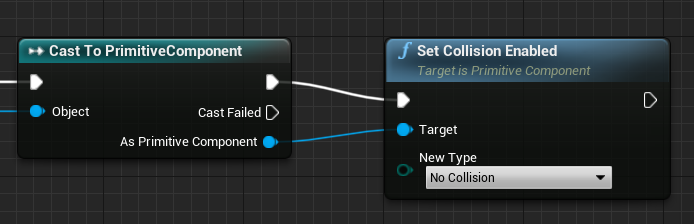
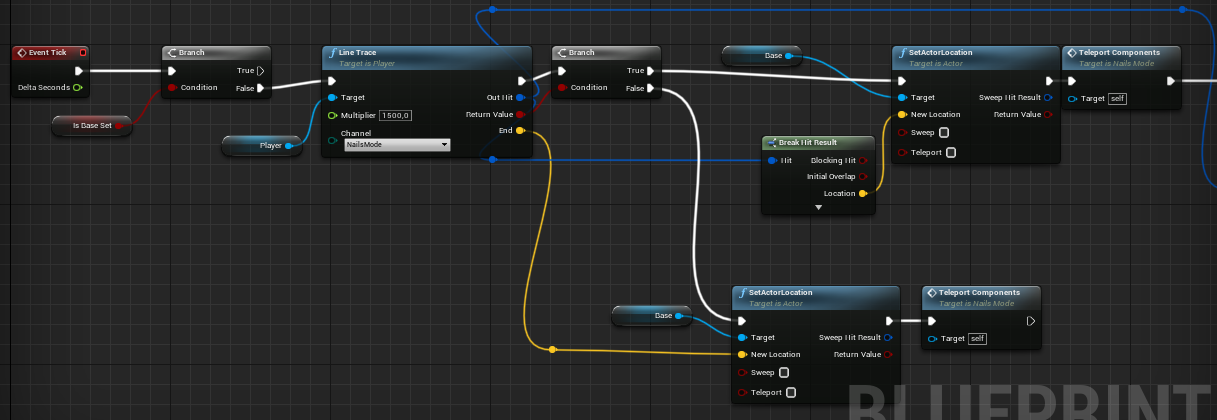
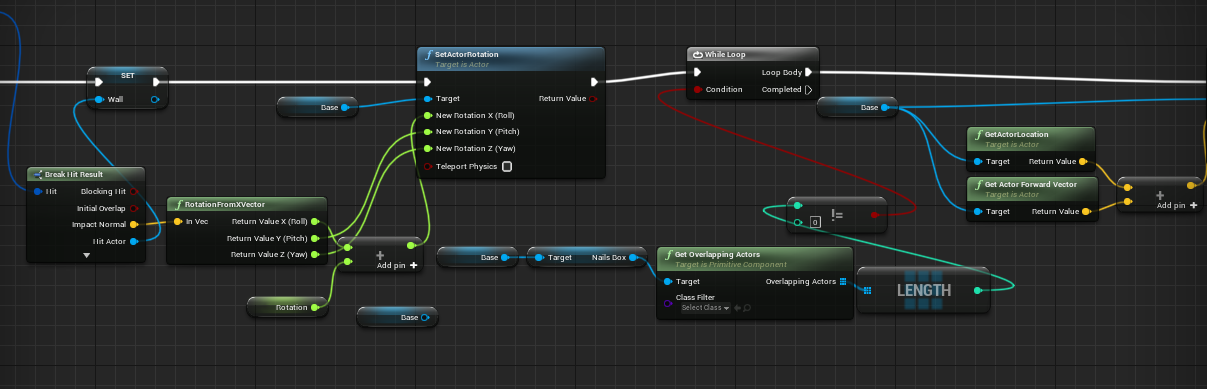
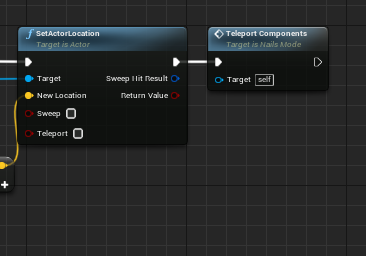


 maiden wadi
That'll work fine for now. That has your InventoryComponent on it?
split orbit
Yea
maiden wadi
Does your InventoryComponent have a size specified for it in itself?
split orbit
Nope
Thats the issue I am having
Each "Instance" of object has a different Columns x Rows value
gentle urchin
Instance editable variables
maiden wadi
Do that for starts. Open the InventoryComponent blueprint, make an integer. InventorySize or whatever.
And yeah, make it InstanceEditable
gentle urchin
possibly ExposeOnSpawn if you want to expose them out in the editor and have the owner define the size of it ..
but thats.. 3 steps ahead
maiden wadi
 split orbit
Ok I have that already I just happened to do it from the Widget to the Component so each version of the widget pulled in
Sets the size of its own container
maiden wadi
You want to avoid doing anything except displaying in the Widget. Don't use it to store values.
split orbit
So that I could drag in the InventoryGrid_Widget into the Inventory_Widget (the actual Inventory Screen)
maiden wadi
The inventory size needs to be in the Inventory itself.
Widgets are volatile. They come, they go, they change often, they're not useful for storing gameplay data.
viscid python
maiden wadi
I can't give a tutorial really, but I can generally tell you how I would do it. ...
Here I am bothering you again but I am just eager to know if you'd have an answer to this:
You know the standard health bars, floating over enemies in a lot of TP games. Would it be possible to attach a bar (or any ui info element) to a certain "bone" of an actor? So that your leg would have a custom health bar for example but always be shown at the position of that leg in 3D space?
maiden wadi
Sure. Most people use WidgetComponents for that. Just set the WidgetComponent to attach to the bone of your skeletal mesh.
viscid python
What, that would be it? That's possible?
maiden wadi
Should be
 viscid python
Amazing... I'm so off trying that. Thank you once again!