#blueprint
402296 messages · Page 751 of 403
 earnest tangle
I don't think that node is a builtin so it's coming from somewhere else, possibly a plugin or a custom function
 kindred marsh
Hello guys i really need your help. I am working on a VR project i have the oculus rift hmd and i didn't manage to see my vr controllers. I saw a lot of tutorials and i follow the steps but nothing. I believe that it was the steam VR i close it but same problem. Could anyone help?
 vagrant flicker
Hello. Can somebody tell me how to limit the animation sequence to play only from the first to the last frame?
In my case, I have two issues:
First, If I press the backwards button "T" and the animation is on 0 frame -> The animation will play from the backwards. I do not want to. I want the sequence to be played backwards only if its on certain frame and not go bellow 0.
The second problem is that when I play the level sequence backwards, when it goes to the first frame (0) the animation is going at the minus graph.. -1000 and etc while I am holding the button.
I fix that for the forward part by using "EventOnFinished" and now when the animation goes to the last frame, it stops and even If i press again the button nothing happens, its stays in the last frame, but for some reason its only working for the forward part.

No description provided
 jovial prairie
how to fix font from AAAAAAAAAAA back to normal

 maiden wadi
@jovial prairie That looks like RichText?
If it is you'll need to create a RichTextFormat file.
jovial prairie
got it

 sonic crescent
Hi! Any good tutorial/notes to animate a spaceship banking when the ship is turning? I want it to bank/roll quick a start, and go back to position when releasing…
 faint pasture
sonic crescent
Hi! Any good tutorial/notes to animate a spaceship banking when the ship is turn...
faint pasture
sonic crescent
Hi! Any good tutorial/notes to animate a spaceship banking when the ship is turn...
Get yaw rate, map that to your desired bank angle, profit.
 spice smelt
Hi, I'm relatively new to unreal, and I'm working on a film/television project.
I need to make an actor spawn where I click, which means just taking the trasform of a raycast hit from screen space to world space.
However while doing so for play mode was pretty straightforward, I found nothing about doing so from edit mode instead of play mode...
 tidal marlin
its not my project so i cant do it. But dude where i give it really sure that its not plugin.....]
earnest tangle
You'll have to ask the person whose project it is to try and hover over it to see where it comes from
It should say "Target: Something" where Something is where it's defined
 icy dragon
spice smelt
Hi, I'm relatively new to unreal, and I'm working on a film/television project.
...
icy dragon
spice smelt
Hi, I'm relatively new to unreal, and I'm working on a film/television project.
...
Why would you need to do that on edit mode anyway?
spice smelt
We need it to spawn mannequins while virtual production camera (ue's beta feature) is running and while third parties may modify the scene
icy dragon
spice smelt
We need it to spawn mannequins while virtual production camera (ue's beta featur...
I don't know how VR Editor works or any difference with the VP camera thingie, but can't you spawn the content browser menu while it's running?
sonic crescent
faint pasture
Get yaw rate, map that to your desired bank angle, profit.
Thank for your answer. I understand that i need use the yaw. The thing i'm not aware with, is the way to animate it (fast yaw, fix yaw, then releasing yaw).. Do i use a Timeline for that?
spice smelt
icy dragon
I don't know how VR Editor works or any difference with the VP camera thingie, b...
yes, but you should assume the person holding the virtual camera knows nothing about unreal or computers in general, he just wants to touch a table and make a mannequin appear on top of it
 white scroll
Any way to show all blueprint compile warnings while in the editor?
We are getting following warnings a lot when building the game through cmd but can't figure out what blueprints are causing these
LogInit: Display: LogEnum: Warning: In asset 'None', there is an enum property of type 'EPlayerTeam' with an invalid value of 'EPlayerTeam::Attacker'
 quartz glade
Are blueprints garunteed to complete all processing before firing another event on the next frame?
Consider the BP above. If I click the mouse button briefly, and trigger some long and complicated function, am I garunteed in this scenario that no matter how long that function takes, it will be completed before UE processes the mouse released event?
 earnest tangle
Yes
The only exception to this is if you use latent nodes, such as a delay
obviously whatever logic is in the delay will run later whenever the delay (or whatever the latent action is) finishes
quartz glade
yep, that makes sense. But otherwise its all single threaded?
spice smelt
earnest tangle
obviously whatever logic is in the delay will run later whenever the delay (or w...
imagine if it was a blocking sleep 😆
earnest tangle
That'd be fun
@quartz glade and yeah, the game logic runs in UE's gamethread which is just one thread
quartz glade
cool - thanks. makes it easier to reason with some of the processes
spice smelt
quartz glade
yep, that makes sense. But otherwise its all single threaded?
from a generic game engine perspective, even if objects methods were run multithreaded, all the events should be guaranteed to have completed before the next step/update/whatever you call it
quartz glade
yeah - so a mouse pressed, then a mouse released, they should technically always be on two seperate ticks right?
spice smelt
quartz glade
yeah - so a mouse pressed, then a mouse released, they should technically always...
there can be funky lower level exceptions, like if you click the mouse outside of your game, drag it on the game window, and then release it inside
in that case you never know it was pressed
quartz glade
oh right - i can see how that occurs - ok
spice smelt
but those are edge cases that won't happen 99.999% of the times, and just can't happen if your application is fullscreen
quartz glade
a related question to confirm I'm not going crazy - there is no such thing as a "mouse held down" event/status. The only way to detect that scenario is get "pressed", set a bool, deal with it until "released"?
I checked the new UE5 event input stuff, didnt see it there either..
spice smelt
that said bear in mind that all i'm saying comes from generic development, I've no experience with if and how ue handles these edge cases internally
earnest tangle
There's probably no event for "held down"... There might be a way to query the current button status for example in a Tick handler
But not sure if that's available in BP's
 unique wasp
I'm confused about where I'm supposed to put my camera. I thought I could put that in my Pawn class, but if I do that, then it doesn't seem to get used. If I put a camera directly in the level and set it to Auto Activate For Player 0, then I get the behaviour I want, but then the PlayerController doesn't 'have' it because it's in the level instead of in the Pawn. I'm confused, how is this supposed to work?
(I have a GameMode, PlayerController and Pawn Blueprint class, and have set the Editor Preferences and GameMode to use those.)
(I'm making a building game, by the way, so there's no player avatar in the world: just a cursor to click stuff)
earnest tangle
If you put it in a pawn, and then set that as the default player pawn, it definitely should be the one used
 obtuse herald
 tranquil rain
Can anyone help me with this? How do I stop list items showing others variables?
tranquil rain
Can anyone help me with this? How do I stop list items showing others variables?

I've used the ListView Widget before, so I thought I remembered how to use it. Lol. Here's the reminder to my future self so that I don't waste another couple of hours in forum posts and google-holes.
This example was created with UE 4.25 but should apply to 4.23 and later (this was when Epic changed the UserObjectListEntry interface).
#ue4 #...
unique wasp
earnest tangle
If you put it in a pawn, and then set that as the default player pawn, it defini...
That's exactly what I did. Or well, I think that's what I did. Apparently I'm missing some step along the way?
tranquil rain
tranquil rain
Can anyone help me with this? How do I stop list items showing others variables?
https://answers.unrealengine.com/questions/1023716/view.html
This is the issue I'm having but I'm unclear on how to set the last node to visualise the widget
unique wasp
earnest tangle
If you put it in a pawn, and then set that as the default player pawn, it defini...
Ah, I figured it out: I had set my GameMode but had then accidentally quit without saving. After restarting I continued working and didn't realise my GameMode wasn't used, and thus the Pawn with my camera also wasn't used.
 obtuse herald
 trim matrix
also check the log
 obtuse herald
tranquil rain
https://answers.unrealengine.com/questions/1023716/view.html
This is the issue ...
obtuse herald
tranquil rain
https://answers.unrealengine.com/questions/1023716/view.html
This is the issue ...
That's a custom function
Your problem is that you're not refreshing (or at least not correctly) your Entry widgets with the new Item data they've received.
tranquil rain
obtuse herald
Your problem is that you're not refreshing (or at least not correctly) your **En...
I might I do that. My items are being set on construct
vagrant flicker
Hey folks! I still need some advice, can anyone take a look when its possible? ❤️
obtuse herald
tranquil rain
I might I do that. My items are being set on construct
Did you already added the UserObjectListEntry interface? If not do that first.
tranquil rain
That is done
obtuse herald
Ok, now on you left side you should have Interface functions
tranquil rain
Yeah
obtuse herald
Implement the OnListItemObjectSet function
This will give you an event with an fancy icon
tranquil rain
That's how I do it
obtuse herald
And you're refreshing your data based on the ListItemObject you're receiving through this event?
tranquil rain
I set all the item entries with it
obtuse herald
show me

 obtuse herald
that looks good
obtuse herald
tranquil rain
now, what do you do when clicking on the widget?
tranquil rain
Select data to be applied to spawned actors in the next level. It all works fine except the check boxes showing as checked when not.
 minor galleon
anyone know why sequence graph editor wont F*&(king stop popping up?
tranquil rain
Only the data from the ones you actually click is taken
obtuse herald
tranquil rain
Select data to be applied to spawned actors in the next level. It all works fine...
Ok, change the state of the check box at OnItemSelectionChanged
to the IsSelected state
obtuse herald
tranquil rain
Just clicking checkbox within the item
Ah, well you need some way of telling your entry widget if the item is selected
I'm assuming you always want max. 1 item selected
So you need to store somewhere which item is selected
tranquil rain
I want 4
obtuse herald
ok
then you need to store which 4 items are selected
and based on that, change the checkbox state when receiving new data inside the entry widget
tranquil rain
I'm storing the index number
obtuse herald
So the your Item object knows the self index and can access the index of every Item selected?
tranquil rain
It could
obtuse herald
Ok then, check if the index of the received object is one of the indexes currently selected (at OnListItemObjectSet)
If so, tick the checkbox, else untick the checkbox
tranquil rain
I'll give it a try. Thanks
obtuse herald
Because currently your EntryWidget does receive it's new data, but doesn't do anything with the checkbox, so it just stays ticked
tranquil rain
Will let you know the results 😀
 gray hare
If I add a component to an actor in C++, the inherited component shows up in blueprint, but the details panel is empty. Is there a way to make it not empty?
 odd ember
make properties UPROPERTY(VisibleDefaults) or BlueprintReadOnly or BlueprintReadWrite
maiden wadi
Also don't hotreload.
odd ember
dunno why this is in the blueprint channel though
gray hare
I wasn't sure if this was a C++ or BP issue. Conversation is continuing in #cpp. Thanks for the help.
gray hare
I tried hot reloading way back in 4.13, but it was horrible and bad and it scarred me. So no more.
maiden wadi
TLDR, just enable LiveCoding, and if you change a class constructor, or a .h file, close the editor and F5
gray hare
Most of what I do involves touching .h files.
icy dragon
gray hare
I tried hot reloading way back in 4.13, but it was horrible and bad and it scarr...
War never changes, and so does Hot Reload.
Safe to say they gave up and started integrating Live++ into the engine.
gray hare
I've had good luck using Hot Reloading when iterating on unit tests.
maiden wadi
You'll have good luck until one of these days, you hotreload, and then spend two weeks rehooking up half of your blueprints when they just randomly decide to corrupt. 😄
gray hare
yeah...
maiden wadi
I used to think I could just be careful around it. Then I had it happen to me. Screw doing that again.
 pure relic
Hello! I have one question. I'm looking to make an object of my choice ripple once (As in the geo ripples) and it can be triggered by an input of my choice. Anyone know how I can do it? I've only been able to find raindrop tutorials x.x'
pure relic
odd ember
I have no idea what you mean
sure. So I am looking to find a way to have some geometry (lets say a disc) ripple from the center when triggered by pressing a key
pure relic
Sorry if Im not clear

^ like this. It needs to show depth, not just a material
unless 3d depth can be shown via a material
odd ember
I don't think this is the right channel for that type of ask. I can't see anything in blueprint that would help you with that. try #graphics
 tawdry surge
anyone have any idea why my left mouse button input is not firing from my game mode BP
However my on click event in my player's ui widget still works fine
icy dragon
tawdry surge
anyone have any idea why my left mouse button input is not firing from my game m...
Okay, first, I don't think Game Modes are supposed to handle inputs.
tawdry surge
no i lie
obtuse herald
I don't think game modes can even receive input events in the first place
tawdry surge
the button reacts the event wont fire
obtuse herald
game mode really isn't the place for whatever you are trying to achive
tawdry surge
ok thats what i was wondering
icy dragon
Game Mode is practically server side in MP situations.
tawdry surge
this is just a single player stand alone
obtuse herald
Usually you define stuff like winning conditions in there
tawdry surge
shouldnt matter
icy dragon
tawdry surge
this is just a single player stand alone
It doesn't care if your game is single player or not.
Just don't do input events in Game Mode.
tawdry surge
playing in single is playing as the server so it doesnt matter in this instance
the input thing does matter
well apparently you cant
obtuse herald
PlayerController / PlayerPawn is probably the thing you want to put this in
 north marten
Is there a way to have a static mesh use a sequencer for a spawning in and out animation? The tutorial i followed shows to use the level sequencer but it has to have the actor in the level in order for it to work and i cant have it spawn in if its already there
obtuse herald
north marten
Is there a way to have a static mesh use a sequencer for a spawning in and out a...
Use Timelines instead
north marten
obtuse herald
Use Timelines instead
Crap i completely forgot about those, thank you
Can timelines work with material parameters?
odd ember
sure
icy dragon
north marten
Can timelines work with material parameters?
Yes.
north marten
Can someone give me a quick crash coarse on that please?
odd ember
something easily googlable
icy dragon
north marten
Can someone give me a quick crash coarse on that please?
As far as the Timeline concerned, it just outputs float for anything else to feed from.
odd ember
I'm sure there are tutorials by the boatload
north marten
yeah I was looking around and havent found anything for it, just meterial collections and using the sequencer
odd ember
maybe try using the keywords
icy dragon
north marten
yeah I was looking around and havent found anything for it, just meterial collec...
Basically on Timeline's update exec, set materal instance dynamic's scalar parameter, and feed its float input with Timeline's float output, which was fetched from the value in Timeline's current time.
north marten
icy dragon
Basically on Timeline's update exec, set materal instance dynamic's scalar param...
alright Ill see what I can do, thanks for the help there
 uncut lark
so Im having an issue. my walk button will override the normal walking behavior. For now, it will just continually walk at the walk speed until you let go of W, then itll return to its original behavior.
Any ideas?
 fallen glade
Is it possible to have request a random point in reachable range but in a doughnut so it's not too close to me?
Right now I'm doing it like this:
Get random point
Is point far away enough?
If not, fail,
Repeat after a delay
 odd ember
should be
uncut lark
Yeah there should be like a range value
fallen glade
you guys mean by code or bp?
obtuse herald
uncut lark
Yeah there should be like a range value
I can't remember one
obtuse herald
odd ember
I was going to suggest the math
would be hard because the point needs to be reachable
fallen glade
obtuse herald
would be hard because the point needs to be reachable
I mean it's working now but I'm getting a lot of false results depending on the doughnut size
obtuse herald
fallen glade
I mean it's working now but I'm getting a lot of false results depending on the ...
yeah honestly I wouldn't know a better way
fallen glade
obtuse herald
yeah honestly I wouldn't know a better way
oh well thank you anyway 🙏
obtuse herald
fallen glade
oh well thank you anyway 🙏
you could try the EQS way
odd ember
obtuse herald
would be hard because the point needs to be reachable
ternary operator?
obtuse herald
odd ember
ternary operator?
?
odd ember
select node
 hybrid ether
Hello, I have building system and its like placing actors and then destroying actors. Base building like rust or ark. How to save those?
 granite jacinth
hi, very new to ue4, i'm trying to ge tthis "character rotation" variable to send the number into my anim blueprint, but i don't know how. anyideas at all?

i need the number to end up here

 tacit oyster
Hi everyone, I'm creating a chat system. I use the bp player state to store the nickname (it comes from the gameinstance). For first I spawn the character, after that I assign the nick to the player state. The issue is that when the node called to assign the nick is executed the spawn has not been completed yet, despite the node for the spawn comes before the node for the nick. The only way I found is to use a long delay. Is there any solution? Thanks.
earnest tangle
How did you determine the spawn is not complete?
fallen glade
obtuse herald
you could try the EQS way
Do you know what's the best learning resource to learn EQS? I find it very confusing
obtuse herald
fallen glade
Do you know what's the best learning resource to learn EQS? I find it very confu...
actually, I got another idea:

(I didn't test it tho)
obtuse herald
fallen glade
Do you know what's the best learning resource to learn EQS? I find it very confu...
https://www.youtube.com/watch?v=kL0m0jOudQY also this made EQS clear to me
 dawn gazelle
granite jacinth
hi, very new to ue4, i'm trying to ge tthis "character rotation" variable to sen...
dawn gazelle
granite jacinth
hi, very new to ue4, i'm trying to ge tthis "character rotation" variable to sen...
In your Anim blueprint you probably have an "Event Blueprint Update Animation" that has a cast in it that is setting some values. This is where you'd need to set the Character Direction you need.
granite jacinth
dawn gazelle
In your Anim blueprint you probably have an "Event Blueprint Update Animation" t...

i made a float variable in the anim bp, which do pull off of?
there's also this one
 dawn gazelle
granite jacinth
i made a float variable in the anim bp, which do pull off of?
dawn gazelle
granite jacinth
i made a float variable in the anim bp, which do pull off of?
The ThirdPersonCharacter cast or the AsThirdPersonCharacter variable.
granite jacinth
granite jacinth
hi, very new to ue4, i'm trying to ge tthis "character rotation" variable to sen...
@dawn gazelle is the stuff on this end ok, no changes?
 onyx token
okay so i'm currently trying to make 8 directions of dodge with 8 different dodge animations
depending on input
i'm about to plaster my entire blueprint full of AND / OR / XOR / whatever nodes

but before i do this-
is there a better way to do this? 
odd ember
create a function
onyx token
well this is inside a makro
odd ember
I don't trust macros personally
onyx token
why? 
odd ember
there's been cases of them not being able to validate data correct, use functions correctly, and in some cases straight up crash
onyx token
hmm so i shouldn't use functions and just put 8 different montages in my normal blueprint?

because afaik i can't put a montage onto a function
onyx token
but i thought blend spaces are for looping animations?
odd ember
it's for... animation blending?
onyx token
yea like running / walking
odd ember
but you can also have 2d blendspaces
so you can blend a lower and an upper part of an animation
and have them blend correctly based on 2 values
onyx token
ooh nono i don't want the animations to blend, i'm fine with those 8 animations not blending at all
(they can't really blend anyways, they're vastly different from one another)
odd ember
well
onyx token
i just wanted to know if there's like a "get direction" node or something
 dire frost
onyx token
i just wanted to know if there's like a "get direction" node or something
dire frost
onyx token
i just wanted to know if there's like a "get direction" node or something
what do you mean by "get direction" do you mean like where the player is facing or where is the player going?
onyx token
hmm... can i play animations in the animBP with an event, or do i have to have a bunch of booleans and put it on Update Animation?
onyx token
dire frost
what do you mean by "get direction" do you mean like where the player is facing ...
input direction
WASD
or controller input
dire frost
oh, you can just get the input axis for each one
odd ember
those are the same values
onyx token
so i got this for my attack animation, the bool "Firing" gets set to active when i press Leftclick

so should i make 8 different bools and put them all into the animBP?
or maybe make an int and have a selector in the animBP
odd ember
handle animations in the animgraph, not the BP graph...
but
you somehow need to collapse those 2 values into 1 value
 odd ember
the whole point of the animBP is the animgraph
if you click on the "default state machine"
yes
because the animation graph runs on a separate animation thread whereas BP runs on the game thread
onyx token
i see....
but how would i play a different animation in the animgraph tho? With a bunch of Layered blend per bone - which just are set to all the bones?
onyx token
how would i do otherwise? 
odd ember
you can handle it inside of a single node
called BlendPoses
in fact, I handle all my animations through that node
onyx token
i see....
the thing is- all the tutorials i watch, they literally just play animations in the third person character blueprint - screw it 
i never knew you're supposed to play them in the animgraph 
odd ember
montages where things are happening as a cutscene or similar can be done in normal BP
but if you're actively playing while animating, you'll want to have the separation
odd ember
onyx token
i never knew you're supposed to play them in the animgraph <:OhIPanda:4467760616...
it's kind of in the name innit
onyx token
well i guess....
Blueprints are named blueprints despite not being blue 
 pseudo narwhal
Hi, do you know how can I get all the elements from a widget inside blueprints? I dont want to create references for all of them
odd ember
blueprints refer to schematics because they used to be drawn on blue cloth with chalk afaik
or no, it was actually paper
onyx token
pseudo narwhal
Hi, do you know how can I get all the elements from a widget inside blueprints? ...
create a reference to the widget and you can control them the individual parts?
odd ember
https://en.wikipedia.org/wiki/Blueprint this might be a more in depth version
pseudo narwhal
I wanted to select all of the elements (images, text, buttons...) at once, isnt there any specific node for that?
onyx token
pseudo narwhal
I wanted to select all of the elements (images, text, buttons...) at once, isnt ...
nope
ok so this can't be correct

do i need to do this for every single animation?
and then have 1 bigass int to select them all?
pseudo narwhal
Thanks @onyx token , I'll do it one by one then..
odd ember
I would suggest creating an enumerator for directional inputs
onyx token
ok sure- but you get what i mean
onyx token
wait so i actually just stack 7 "Blend poses by int" nodes? 
odd ember
no
onyx token
and the question is just how i choose them?
onyx token
but where can i set more?
 odd ember
read pls
onyx token
ooh you mean one of these
https://cdn.discordapp.com/attachments/847253861403197471/905547570951094322/byfy7zrdaX.mp4
ok hang on
lemme get an enum, maybe it gets less if it's context sensitive
onyx token
onyx token
but i have a bunch tho...
 odd ember
you'll have 8
onyx token
 odd ember
if you right click on the node, you should be able to add or remove poses

 late cave
wait until you discover that some nodes have stuff to change in the detail panel only...
odd ember
anyway
the next step is converting your input into an enum
you basically have a 2d vector value of [forward, right]
onyx token
wait hang on, i need a default null value in my enum right?
odd ember
those go between -1..1
odd ember
you dont
you only want to transition into a roll state when rolling
so having a default state isn't necessary
but it's there regardless
onyx token
alright.... So how do i fill the RollAnim? Can i pull it from my third person character via animBP?
onyx token
sure, i call it the "noodlynator"
 odd ember
all you have to figure out now is how to transition your inputs into the enum
odd ember
odd ember
you basically have a 2d vector value of `[forward, right]`
I don't know where your camera is in relation to your character, but basically this
onyx token
ok wait but... how do i get it to default now?

like
i can set the int
to 1-8, no problem
based on which WASD is pressed
and if i set it to 0 it goes default?
nvm i can't set it to 0...
onyx token

odd ember
 onyx token
i don't wanna take up so much of your time, i feel bad, are there any tutorials i can go through that explain it all to me?
odd ember
it's really intuitive
but yeah idk there probably are
I don't know the tutorial stuff out there
onyx token
so i'm using the standard mannequin.... i would do this then?
 odd ember
what I gave you with the blend poses will most likely not be covered very easily, but the transition between states in an animation state machine will definitely be covered
and all you need to do is to take that blendposes node
and put it inside a node inside the state machine and figure out a transition condition
onyx token
okay....
so the transition condition would be me pressing the roll button
and then i'd put the enum inside of the node inside the state machine
which is inside my anim graph, being filtered via a bone filter
which is inside my mesh
which is inside my third person character blueprint
what is happening
my brain hurts
odd ember
well consider this
I have about 7 systems layered on top of each other in the game world alone
never mind what is going on on the character/player
games are very complex machines
 odd ember
lmao
onyx token
wait, if i add a custom event in my character mesh animation BP-
Why can i not call it in my third person character if i have the mesh right there?


oh wait, it's because i'm dumb.
dire frost
<@&213101288538374145> this one right here
 torn kettleBOT
:no_entry_sign: Omnicy#3240 was banned.
 nimble vortex
thank you.
onyx token
wait wtf?
 odd ember
onyx token
wait, if i add a custom event in my character mesh animation BP-
Why can i not c...
odd ember
onyx token
wait, if i add a custom event in my character mesh animation BP-
Why can i not c...
it might be worth handling a lot of the initial logic on begin play instead of using expensive functions on the animation tick
what you do want on animation tick is switching direction and checking for input
onyx token
ye nono i just wanted to use the Shift key as a way of setting the "i'm rolling" bool
and set an int in my third person character BP - which i would then send via the custom event over to my animBP
should i use an interface instead?
i'm confused why the custom event doesn't work...
odd ember
you need to bind your event dispatchers if you want a direct link
onyx token
oh right event dispatchers were a thing too
okay, so now i got the rolling to work - but of course it never stops rolling...
odd ember
have you set the exit condition?
onyx token
that's what i'm trying to figure out
the exit condition would be once the animation is done
odd ember
it should be the opposite transition of entering
 odd ember
there's an animation percentage thing
that you can use
percentage completed or whatever
onyx token
all i found is this but this doesn't work...

although epic did use it on the jump animation...

 odd ember
so you gotta find the same one
onyx token
oh you mean the one playing right now?
odd ember
yep
onyx token
like this? The only ones i have are these ones
 odd ember
I think there's one called GetRelevantAnimTimeRemaining
which is probably the one picked
because someone has had this problem before and solved it
 mild flare
Hello,
I am trying to setup a Killfeed and it actually works pretty fine, displays the killfeed on client and server-side. but I still get error messages when I am done testing - can't figure out to avoid that, tried running it with a delay broke it, also did making it reliable
what am I doing wrong?
 dawn gazelle
mild flare
Hello,
I am trying to setup a Killfeed and it actually works pretty fine, displa...
dawn gazelle
mild flare
Hello,
I am trying to setup a Killfeed and it actually works pretty fine, displa...
Player controllers are only present on the owning client and the server, not on other clients.
mild flare
so the multicast is ruining it, do i get that right?
should it be run on owning client?
dawn gazelle
Right. The multicast is calling on all other clients, so they can't see that player controller reference. Even if you were to "Run on Owning Client" it still wouldn't receive the references correctly.
mild flare
hmm damn, thanks for the hint
dawn gazelle
What you probably want to do is have your UI bind to an event dispatcher in the game state. When a player is killed, the server can run an "executes on all" RPC in the gamestate passing the playerstates of the causer and victim which then calls the event dispatcher and passes through the referenced playerstates. The event dispatcher in your UI can then create your message you want to display and read the names from the playerstate value it passes through.
I say to pass through the playerstate reference as it's probably less data passing the references than the entire stringed names every time.
mild flare
alright, makes sense will try to make it work like you said - thanks!
onyx token
ok.

i got this
and it's being triggered by this

which works
and to go back, i wanna do this

which doesn't work.

and i'm stuck. I literally have no idea why.
i tried all of these.

 vapid ibex
Is there a way to store something in the editor? I'm loading an XML object during the work, and the problem is that the editor crashes if I load it too many times, I'm seeking a way to load it once and then store somewhere.
dawn gazelle
vapid ibex
Is there a way to store something in the editor? I'm loading an XML object durin...
You're loading the XML at runtime?
onyx token
nvm, i was really really really really stupid.
i never set the bool to "stop being activated"


end me
onyx token
but thanks so much for helping me, you're da best  @odd ember
vapid ibex
dawn gazelle
You're loading the XML at runtime?
No, in the editor. Basically XML stores my dialogues. In the runtime I load it once in game instance, but I also use it when I'm editing the dialogue trees to display text of the phrases, and apparently it crashes the editor. I use EasyXMLParser.
I guess this gets called too often.
 dawn gazelle
vapid ibex
I guess this gets called too often.
dawn gazelle
vapid ibex
I guess this gets called too often.
Is it possible to do the load from file before calling this function and pass the XML object reference in?
vapid ibex
Ideally that's what I want to do, yes. I just don't knowe where to store the XML object when in the editor.
https://forums.unrealengine.com/t/store-variables-values-in-editor-utility-blueprint/144997/3
Found this, will try that approach and see how it goes.

Unreal Engine Forums
It’s not what they are intended for, and is maybe more of a hack, but you can use a Primary Data Asset. Its data can be changed from the editor or even during pie. To make it, create new blueprint class - all classes - primary data asset. This is where you create the properties you need. Then right click the content browser - misc - data asset...
 trim elbow
I'm trying to make my character invisible to the AI when it's hidden in darkness. Added collision to the light blueprint and I got no clue how to set in the overlapped area to be visible for the AI
 odd ember
that's uh
a very difficult thing to do
early thief games could do it because their renderer was entirely software based
so light values per vertex were available directly
trim elbow
But the sphere collision should't technically solve that for a simple game ? I did a boolean variable isHidden and trying to set it to true on collision , however no clue how to make the AI ignore the character.
odd ember
you can fake it by having a collision that blocks the visibility channel or whichever channel the AI uses for vision
but that sounds like a boatload of markup, with a lot of markup debt and performance issues
there aren't really any solid solutions for this as of yet
that's why no game has done it since the thief series
icy dragon
trim elbow
But the sphere collision should't technically solve that for a simple game ? I d...
I'd say to fake it by having the static dark areas to be covered by a trigger sphere/box, and do a check if player character overlaps with it.
Of course, that has to be static, and you would make an exception to the rule if the player overlaps with another fake light trigger areas.
odd ember
you don't have to consider players overlapping it
faint pasture
You can either calculate lightness heatmap in 2 or just dynamically calculate illumination by lights within range etc
odd ember
if you have the correct collision channels blocked it's automatic
faint pasture
Like if you have 5 lights in relevance just run some function to calculate an illuminance from distance and a line trace vs visibility from light to character.
odd ember
a light heatmap sounds like an interesting concept, but it's probably costly... either in terms of production and/or in terms of performance
faint pasture
It all depends on the design. If it's 3d then I'd just trace vs lights and calculate it dynamically.
odd ember
I would imagine it more like a navmesh style map where light values are mapped perhaps
but certainly not something that's possible in BP
odd ember
faint pasture
It all depends on the design. If it's 3d then I'd just trace vs lights and calcu...
sounds very expensive performance wise
trim elbow
I'm a beginner so guess I 'll go with the simpler way as with the trigger volumes .
odd ember
you don't need to have trigger volumes. the collision just needs to block vision
faint pasture
odd ember
sounds very expensive performance wise
Around 10 traces per frame is absolutely dirt cheap. I do 1000 in worst case for a FOV system and it doesn't affect perf.
odd ember
I'd probably in your case create a custom collision channel that is used exclusively for AI vision, so that it doesn't interfere with the use of other channels
faint pasture
You already have Visibity, can also just use that.
I'm sure there might be a way to leverage EQS to do this too.
odd ember
faint pasture
Around 10 traces per frame is absolutely dirt cheap. I do 1000 in worst case for...
10 traces per AI per light in a level with 20-100 AI and some 150 lights? let me see that performance report
odd ember
faint pasture
You already have Visibity, can also just use that.
many other unreal based objects use that, including cameras
hence why it's smart to make a custom channel
icy dragon
odd ember
10 traces per AI per light in a level with 20-100 AI and some 150 lights? let me...
Put in some wager for extra fun.
faint pasture
You only need to trace vs player character
And only from lights within a range. Dirt easy
icy dragon
faint pasture
You only need to trace vs player character
What about cover obstructions?
odd ember
I imagine this is only when there is a direct hit on player from the trace
faint pasture
We're talking illumination here right? Like Theif and Splinter Cell
That's a trace from Lights to Character blocked by Visibility.
Npc seeing the character can be a function of trace from their eyes to character blocked by Visibility
trim elbow
More like a simple lowpoly maze game , that i'm trying to hide/crouch in the dark areas to avoid patrolling AI's
odd ember
I'm still wondering how your trace alone will account for illumination based on the information of the light. a custom light class with exposed volume that has linear values for illumination is perhaps the best case, and even that sounds a bit dodgy.
icy dragon
I'm putting into account cover system for the heck of it. Say, player hiding under a bench or behind a protrusion.
faint pasture
And whether or not they see you is
Illumination x Visibity or whatever
odd ember
again it doesn't seem you take specific light information into account
so all lights would be the same light
which isn't true
nevermind indirect lighting
faint pasture
You can do a distance function etc.
odd ember
yeah but you're still not taking into account any light information
which means a candle and an industrial spotlight have the same effect on the AI
faint pasture
Ok so then you use Power in the function.
Illumination = TraceHits x Power x 1/distance etc
odd ember
trim elbow
More like a simple lowpoly maze game , that i'm trying to hide/crouch in the dar...
I'd make prop actors where the stealth collision is built in, in a case like that. it's not going to be perfect, and perhaps some adjustment will be necessary. but you'll be a lot better off than any of the way more complex systems necessary for this otherwise
odd ember
faint pasture
Ok so then you use Power in the function.
and where does this power come from?
and what is it based on?
faint pasture
Whatever you want, or just take the Illuminance off the light component.
odd ember
again that's just a linear distance to the light
it doesn't account for e.g. IES textures
icy dragon
trim elbow
More like a simple lowpoly maze game , that i'm trying to hide/crouch in the dar...
Considering you're working on a low poly game, you might want the tracers to be more generous. Let's say around 40 cone shaped line traces.
faint pasture
Well no shit lol, but you can easily use direction and cone angle etc to filter it to the general light shape.
odd ember
I can't imagine the performance issues with 40 cone traces going on
odd ember
faint pasture
Well no shit lol, but you can easily use direction and cone angle etc to filter ...
good luck with that

it's for good reason there hasn't been a commercial game that has tried this
faint pasture
What alternative are you suggesting then that uses the IES then?
I'm guessing none. So checking for a general cone is better than nothing. Make your light profiles fit the cone close enough and call it a day.
odd ember
I'm not suggesting an alternative for any of this. it's a pipedream to try and make something like that work through traces, and I don't think the end result will be worth the effort put in.
I already suggested just using the visibility collision for the person asking, and keep it at that
and perhaps the closest to a "professional" solution would be something like an actual navmesh that takes light values off the ground and allows AI to sample them
which would likely require some degree of baking (e.g. limited dynamic light support)
icy dragon
People just generally lower their expectations when it comes to lowpoly games and its feature implementations. Unless the game style is hyper realistic, they'd expect the AI to be more generous and not cheesing them with realism.
vapid ibex
trim elbow
But the sphere collision should't technically solve that for a simple game ? I d...
Every time AI spots the player, run a check for if isHidden is true or not, and if true - simply abort the whatever it must do when it spots the player.
odd ember
vapid ibex
Every time AI spots the player, run a check for if isHidden is true or not, and ...
again you can avoid that by just having the right collision channel
faint pasture
Skyrim does it exactly as I suggest.
https://gaming.stackexchange.com/questions/37662/does-light-affect-sneaking
Stop being a Debbie downer.

Arqade
Is sneaking more effective in darker environments, and if so how much does the light level effect sneaking?
icy dragon
It's just given that low poly = less realism all around
odd ember
faint pasture
Skyrim does it exactly as I suggest.
https://gaming.stackexchange.com/question...
that's not at all what you suggested. they use complex calculation of light values that do not seem linear whatsoever. it's also not just a line trace to anywhere, it's specific spot, which probably allows for some degree of GL magic to happen. probably why they can pull that much vis information
icy dragon
As far as the logic sight goes, typically games see the player as either a huge box or cylinder/capsules.
(MGS2 seem to be the exception by detecting per limb collision with artificial delays)
vapid ibex
odd ember
I can't imagine the performance issues with 40 cone traces going on
You don't need trace. Just simple dot product between direction to you and the direction the light faces with check if it's less than the angle of light's cone.
But then again, yeah, true stealth is very hard, since I don't know if it's even possible to solve cases when for instance you're in the shadow but there's a bright lit wall behind you, so you CANNOT be hidden.
odd ember
vapid ibex
You don't need trace. Just simple dot product between direction to you and the d...
no accounting of the indirect light value associated with said light, only works for linear illumination, does not take into account complex (e.g. IES texture) type information
points I've already made further up
vapid ibex
odd ember
no accounting of the indirect light value associated with said light, only works...
You don't really need to anyway? Approximation is more than enough unless your character is an ant and it's really detrimental if they're between the rims of IES texture or no.
odd ember
vapid ibex
You don't really need to anyway? Approximation is more than enough unless your c...
approximation is more than enough, which is why even most stealth games don't bother with a light check and instead either implement through other means (e.g. markup) or not at all
vapid ibex
I suspect that it's not that they don't bother, it's that their versions are more optimized than linetracing to every light in the vicinity.
icy dragon
odd ember
I can't imagine the performance issues with 40 cone traces going on
I'd say 40 line traces covering up a cone is pretty generous, and you could even skip outer walls that players can't hide with at all.
Dangit, I think you can even reduce the trace count if player character's overall hitbox is not on sight at all.
Only increase the trace count if player hitbox is on sight, then check for the limbs hitboxes.
odd ember
odd ember
I know that they don't bother
just adding to this point, there is a difference between perceived safety and actual safety, and it's much easier to play on that difference than it is to make AI work well with lights
icy dragon
If you want to go further, don't line trace at all if distance to player is further than max linetrace distance.
odd ember
I wouldn't do a single trace until more conditions have been fulfilled, personally
vapid ibex
odd ember
just adding to this point, there is a difference between perceived safety and ac...
Yeah, UE's unaccessibility to light levels bite me when I wanted to make AI that avoid lights.
odd ember
within maxrange/within dot half angle/trace
vapid ibex
Just stopping it from going closer than needed to a light was simple enough, but then I wanted it to pathfind while sticking to the shadows...
odd ember
vapid ibex
Yeah, UE's unaccessibility to light levels bite me when I wanted to make AI that...
it's not UE's fault per se, it's that modern graphics libraries aren't necessarily able to all use the same functionality due to the hardware involved. thief's software renderer worked because it didn't require any specific extra hardware
vapid ibex
I even pondered some ridiculous hacks like "render a small 2x2px camera view right down the NPC's center, and try to sample brightness of that texture"
odd ember
I mean, the NPC's visibility doesn't really matter
it's the player's location that matters
vapid ibex
Not if NPC's behavior is affected by how much lit it is. The idea was of an NPC that's cowardly in light but attacks in darkness.
odd ember
I see
faint pasture
If lighting informs ai as well just bake it to a tilemap and use that, or EQS
Same thing tho, not really sampling GPU light but a function of nearby light and their properties.
sonic crescent
Sorry to disturb.... i can't remember.. I need to shoot a Big bullet every 10 Bullets... What was the node to do that? I think it was something to do with N ...
odd ember
odd ember
and perhaps the closest to a "professional" solution would be something like an ...
.
faint pasture
sonic crescent
Sorry to disturb.... i can't remember.. I need to shoot a Big bullet every 10 Bu...
Modulo %
sonic crescent
thanks it be that
 faint cloak
You guys know how to add all this options to a custom event?

I'm trying to update a health bar after fall damage
nvm i found the way
 ripe rose
when my player picks up a weapon and the appropriate static mesh and other visual components are added to their actor, i need other player clients to also do that. do i need to do a repnotify for adding the components? can i just make the components replicate? or what's the easiest way to do this?
 final nimbus
How do you get blueprint pins to show their values when setting a breakpoint?
I've tried hovering, clicking, setting watch points on this Start/End FVectors and no luck.

 dark crow
 glass crypt
shouldn't a child automatically call a parent's event? i can't for the life of me call the "interact" event that's implemented in the parent.

tried this too

if i set a breakpoint in the child bp it gets hit, but never hit if i set it in the parent bp
the whole point of inheritance is to inherit functionality from parents so i'm not sure what's going on
is it because it's an interface event?
 tulip mason
glass crypt
is it because it's an interface event?
tulip mason
glass crypt
is it because it's an interface event?
Yeah I think so, not 100% sure but I think interfaces need to be implemented where you want them regardless. Even it's a copy and paste deal.
Only other solution u can think is to have a function in the parent/child called from the interface that carries down from parent to child.
tranquil rain
I have checkboxes on list items how could I stop allowing them to be checked after a certain number?
dawn gazelle
tranquil rain
I have checkboxes on list items how could I stop allowing them to be checked aft...
Keep count after each one is manipulated. If >= amount - disable all unchecked. If < amount - enable all.
tranquil rain
I tried this but can only seem to lock all or none

I think I'm trying to halt the whole thing
Where would be better


 upbeat shore
okay I am losing my mind trying to figure this out so I'll ask here. is there an easy way to do a snap 40-50 degree turn with a character blueprint? I'm trying to set up a basic VR character but every tutorial for a snap turn is with the player being a Pawn and not a Character, so the methods simply do not work, either not doing any rotating at all or for some reason actually changing the location instead of rotation
I can set up a smooth turn super easy, but the snap turn is just not working
 velvet dagger
I'm trying to make it where when a button is held my character will slowly descend instead of descending normally, how would I go about doing that?
 thorn ermine
upbeat shore
okay I am losing my mind trying to figure this out so I'll ask here. is there an...
thorn ermine
upbeat shore
okay I am losing my mind trying to figure this out so I'll ask here. is there an...
maybe show some stuff you are trying that is not working, or you just want to know how to do this in general?
upbeat shore
thorn ermine
maybe show some stuff you are trying that is not working, or you just want to kn...
just in general, but with regard to vr. the iterations i've tried that didnt work are basically just versions of the current template VR snap turn code
i have tried pretty much every single rotate node for everything. it seems like rotators just do not like it when you have an HMD active
thorn ermine
upbeat shore
just in general, but with regard to vr. the iterations i've tried that didnt wor...
just off the top of my head, are you following a tutorial? or just kind of winging it?
there are a few out there, and I see one recently has been updated to handle 4.27 new VR template. maybe start there, unless someone here might know right off the bat.
https://www.youtube.com/watch?v=1rQvPnKvlfk
upbeat shore
I've tried both tutorial and winging it
yeah I already checked that one out. I followed it to a T, but instead of rotating the character, it would just kinda move it slightly forward and to the right
 neon heath
guys i been stuck on this for 4 hours
upbeat shore
the problem being that he is using a Pawn blueprint type and I'm using a character, so for some reason it can't work the same
neon heath
 upbeat shore
at least I think that's the issue
neon heath
any ideas? I am literally just trying to make a car movable / drivable - I have everything setup but for some reason no results still, yes everything is rigged, yes the model is being instantiated through the blueprint into the world
following this dudes tut: https://www.youtube.com/watch?v=T6vvnLRzjvY
In this tutorial you will learn how to rig a vehicle/car in blender and then setup the car blueprint and chaos vehicle physics in unreal engine 5.
This is a step by step tutorial on how to make cars in unreal engine 5.
Get this project ► https://pinkpockettv.gumroad.com/l/cargame
Patreon ► https://www.patreon.com/pinkpockettv
Instagram ► http...
neon heath
upbeat shore
so now i have it working
forgot a semi colon? XD
upbeat shore
earlier I attempted to use the add yaw input with a do once, but it was just moving smooth
so I deleted it, but I figured I would redo it to show "i tried this but it was only smooth turning" and I go to test and it is snapping
neon heath
very nice!
upbeat shore
so I guess i'm happy its working but why didnt it work earlier
neon heath
I feel dumb too right now, spent 4 hours to get a damn car to move and still having issues
using chaos Physics
chaos vehicle plugin
etc
upbeat shore
man, I wish I could help you but I know nothing about vehicles in unreal
also it seems like the issue was before I had it in a function? If I put the same code into a function it breaks, but outside it works
thorn ermine
upbeat shore
also it seems like the issue was before I had it in a function? If I put the sam...
now we could be getting somewhere. doonce is dependant on context, if its in a function, the context is within that function, so if you call doonce outside of a function, the "once" is dependent on the life cycle of that function ( it could be an event, or tick for example )
upbeat shore
OH that makes a lot of sense then
thorn ermine
but glad you got it working
upbeat shore
because that function would just be constantly repeating due to it being executed from an axis event right?
dawn gazelle
neon heath
I feel dumb too right now, spent 4 hours to get a damn car to move and still hav...
Have you actually possessed the car actor?
neon heath
what do you mean by possessed? I have the blue print with everything in it
dawn gazelle
Possessing an actor is what allows you to control it.
neon heath
 dawn gazelle
You placed the actor in your scene yea?
dawn gazelle
Click on the actor in the world and look at the possess options

You want to change Auto Poessess Player to Player 0.
neon heath
im in ue5
dawn gazelle
Should be something similar I imagine. I'm not at all familiar with Ue5 yet.
 dawn gazelle
Yeah change Auto Possess to Player 0
thorn ermine
upbeat shore
because that function would just be constantly repeating due to it being execute...
I mean the amount of times and even the speed at which it gets called has kind of no impact on the state of the function itself, the documentation on this is also not very clear, so trial and error suggests blueprint functions reset their state upon entry ( we know it does this for doonce ) whereas the tick function itself does not reset this state each time it gets called ( otherwise doonce would never work as expected )
https://forums.unrealengine.com/t/do-once-not-doing-once/1794
This is going to cause problems for more people for sure, but it is also a good idea to make small test cases that you can quickly assert behavior independently of your game, if you are unsure of exactly how or why something works, specially if you are making it a prime mechanic in your game 🙂
dawn gazelle
Try checking your input axis values by putting a print string after them and feeding in your axis value, specifically Throttle.
neon heath
yup i had done that for an hour lol
its insane - like, they print out values when they aren't even being pressed
dawn gazelle
yeah they would since they're axis - they always fire.
neon heath
it seems for some reason, i think my issue is with the input settings
right axis true
fair
gah
dawn gazelle
and you are getting values out? like between -1 and 1?
 dawn gazelle
Check your input binds.

 worthy frost
S is also -1
err 1`
it should be -1?
oh wait nevermind
its bound to different axis
@neon heath does the value increase when you press the key?
or is it always 0?
worthy frost
do you have anything else that could be overriding that
neon heath
 worthy frost
and consuming the input (tho it should not even execute)
neon heath
nothing else really in here thats saying 'w' or 'W' as input
worthy frost
no i mean another event in another blueprint
neon heath
up here there is tho
worthy frost
bound to the same input
neon heath

but that shouldnt be valid to reference because that would be in access of a diff bp like, firstpersoncharacter etc
let me see
worthy frost
its likely the key got consumed
 worthy frost
yeah it was being consumed elsewhere
neon heath
so i got the car moving now
thanks btw @worthy frost @dawn gazelle
but its super slow lmfao
worthy frost
well
worthy frost
you need to provide a multiplier to your input
neon heath
right yea
worthy frost
Axis * value * DeltaSeconds
where value is your speed multi
so Axis * (500 * DeltaSeconds) (to ensure car has same speed if frame rate changes)
neon heath
 worthy frost
maybe i dunno its 6 am
neon heath
lets see if this is yummy
worthy frost
and not slept
worthy frost
been working all day, crunching last minute fixes for DLC release
worthy frost
Red Solstice 2 on Steam
 sage pecan
Hi, I would like my character to stay crouch if button is down, I'm thinking of looping the animation, how do I do that?
 neon heath
prob use a boolean value, say if(bool==true) then basically animation.looping = true
etc
then if(bool==false) animation.looping = false
sage pecan
The problem is, I don't know how to do the animation looping since the event is fired only once when pressed
So the animation will be played only until the end of animation
 tawdry basalt
sage pecan
Hi, I would like my character to stay crouch if button is down, I'm thinking of ...
tawdry basalt
sage pecan
Hi, I would like my character to stay crouch if button is down, I'm thinking of ...
you can use flip flop
how do I add objects in pawn to an array?
thorn ermine
upbeat shore
because that function would just be constantly repeating due to it being execute...
And thinking about it a little more it seems more likely that those type of methods ( doonce, doN, etc. ) maintain their state via the Event Graph
so for events, tick, anything that you do inside the main event graph, will respect that state, whereas functions get their own "new" mini event graph upon entry, and it gets "destroyed" upon exit. 🙂
ok, done with this now, lets do some work
worthy frost
@sage pecan i would not use a montage for crouching
this would be done via the animation bp
then again looks like your doing something crazy cause deactivating the movement component, why?
also crouch will set the capsule size to crouched size (in the CMC)
so not sure why you are manually setting it there also
all you need is your animation bp to query the player and see if its crouching
but 100% i would not use a montage for crouch
sage pecan
worthy frost
this would be done via the animation bp
I will try using that
I deactivate the movement because when I input the movement when crouching, it will overwrite the crouch animation and play the movement animation
sage pecan
worthy frost
also crouch will set the capsule size to crouched size (in the CMC)
I also thought that too, but when play mode, I noticed that the capsule component doesn't change, not sure why so I do it manually
sage pecan
worthy frost
and your playing montage,
Can I know when I should use montage and AnimBP instead?
worthy frost
(click the Character Movement Component in your character BP)
Montage are for things like sword swing attacks, etc
things which fire off dynamically
ripe rose
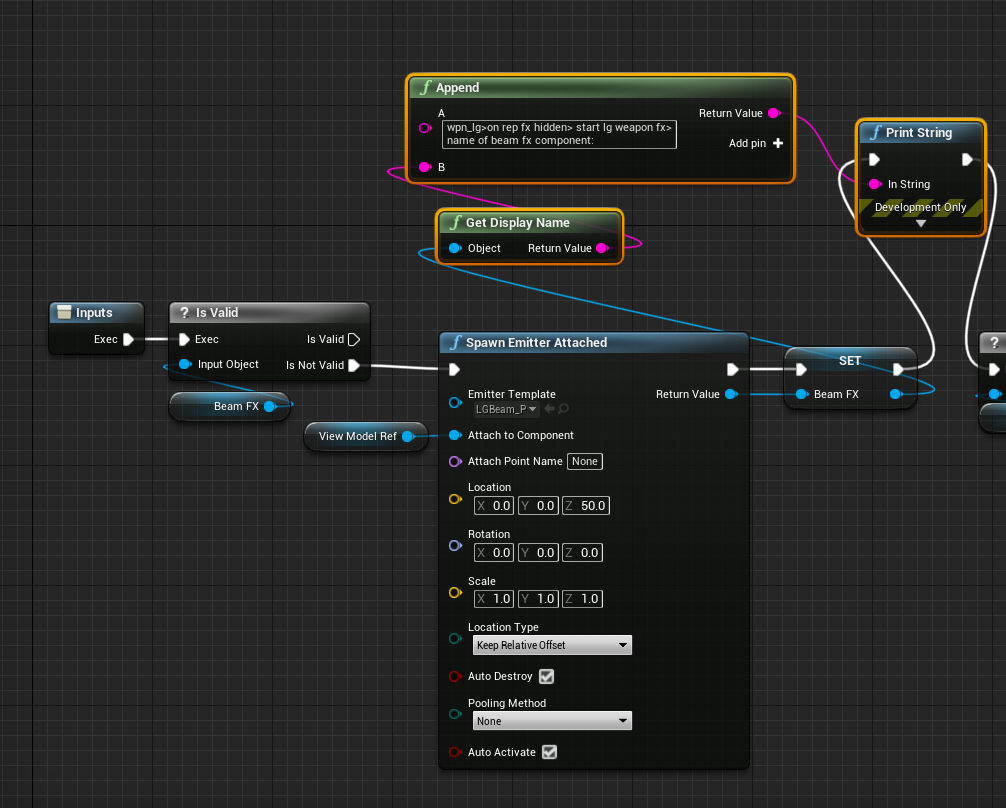
the following is part of a repnotify that triggers when a player fires their weapon. it works perfectly under normal circumstances, but if the player is holding the fire key when they enter relevancy range, it doesn't work. it actually runs the code, but that print statement i put there displays the name as blank. meaning it goes through the node to create a particle system, but it's null after it tries to save it
https://i.imgur.com/Hb7Eyqf.png
 worthy frost
movement, crouching, etc should be AnimBP
sage pecan
worthy frost
things which fire off dynamically
Ohhh ok ok
sage pecan
worthy frost
(click the Character Movement Component in your character BP)
This right?
 worthy frost
bo
no*
CrouchedHalfHeight
and yes you need CanCrouch ticked also
its misleading cause its under Nav Movement
but the movement component checks that bool, to allow crouching, even for non nav agents
its weird but it is what it is
neon heath
I think my iq has dropped about 50% or so due to sleep deprivation, would someone be kind enough to tell me again - how do i just get the distance between 2 objects, yes a float - a float / vector - vector but more in depth
worthy frost
    FORCEINLINE bool CanEverCrouch() const { return NavAgentProps.bCanCrouch; }

    /** Returns true if component can jump */
FORCEINLINE bool CanEverJump() const { return NavAgentProps.bCanJump; }``` as seen here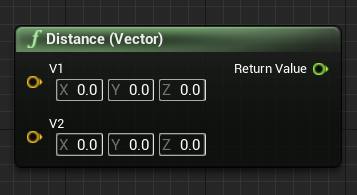 worthy frost
(Location - Location).Length
sage pecan
So the capsule component will follow this height?
Will it shows in the play mode if I disable 'Hidden in Game'?
 worthy frost
or use that node 🙂
neon heath
I feel dumb because Im not sure what to use for the actual vector
im trying to do FirstPersonController and an in game object
but I need to convert to vector
worthy frost
?
upbeat shore
alright now I've got another issue. the camera height is either way too high with my guardian floor floating above my ground in game, or its too low and the guardian floor is beneath the ground. I'm using a quest 2 with the link cable. I cant test on my index if its a persistent issue or just oculus
worthy frost
you want to get what?
neon heath
player and a car
neon heath
if(dist of 2 objects <= 1) ill debug a message
worthy frost
Car->GetActorLocation Player->GetActorLocation
ripe rose
neon heath
im trying to do FirstPersonController and an in game object
get player pawn, get actor location
worthy frost
Distance < 1
ripe rose
ripe rose
the following is part of a repnotify that triggers when a player fires their wea...
kaos do you have any inkling why this isn't working? it was actually working when i had it all in my player BP but i moved it over to a component and now it's not working. replication for the component is on
neon heath
beautifulll
worthy frost
@ripe rose i am not sure, if the particle fails to spawn
then the component its meant to attach to was null
try printing the attach component
ripe rose
o
upbeat shore
upbeat shore
alright now I've got another issue. the camera height is either way too high wit...
i got it. needed to make a parent scene component for the camera and controllers
ripe rose
i thought i checked that already but you're right
now i just have to figure out why that is null which i also don't understand rip
shoulda been created on beginplay of the component for all clients
i mean it is
it just goes null after leaving relevancy range
worthy frost
not sure what that component is
where is it created?
you do know relevancy destroys the actor right?
then recreates it when they enter relevancy
ripe rose
the player BP adds this weapon component on its beginplay, and then the weapon component adds a static mesh to the player and saves it as a reference
i vaguely understand relevancy
i probably have a gap in knowledge somewhere
ripe rose
yeah sounds likely
worthy frost
we just made our players always relevant
but for a 8 player co-op it made no sense to hide them
ripe rose
yeah
worthy frost
we do use that for the AI tho
cause we can have up to 200 ai in the world
and that would be nuts 😛
ripe rose
wellt he good news is the static mesh is being re-added when re-entering relevancy, it's just the reference that gets wiped
when something re-enters relevancy, does is just recreate all of the components it had without running their beginplays?
worthy frost
it should run the beginplays
ripe rose
weird
neon heath
goodnight guys - thanks for your help, I much appreciate it!
ripe rose
nite
ripe rose
it's trying to run the repnotify function before the beginplay functions, so it hasn't yet set the reference that it tries to use in the repnotify
idgi
This is how it is supposed to work. You can handle your logic in BeginPlay and be assured that the variable has been replicated by then.
maybe i'm doing something backwards
yeah i think i may more or less fully understand what's going on now
was simply an order of operations problem
wasn't a problem when i had this all on the player bp because the components weren't being added at beginplay
 pure walrus
i just learn u cant check a checkbox and add it to a widget in the same frame UNLESS u check it before u add it (still same frame)
happily losing 30mn on this to start the day in shape
actually nvm it doesnt work
i had to delay to next frame
 ripe rose
one time i had a variable that would set in editor correctly but in standalone wouldn't. i had to put basically a "if(true)" to make it work
ue4 can be special sometimes
maiden wadi
Wut? You should be able to set checked state after adding the checkbox to something else i the same frame?
@pure walrus How are you creating that checkbox?
 dim robin
would you suggest any workaround to fix a physics simulated sphere to prevent it from rolling "forever" on a non-flat plane?
earnest tangle
give it a nonzero angular inertia or whatever the setting was called
 earnest summit
Hii peeps, question I am trying to add a "Fire Rifle" animation to my character, If I dont have looping enabled it only does it once and with looping on it doesnt stop after releasing the mouse button. Is there a way to break the loop or maybe a more common use to add a animation like this?

 brittle plinth
hey guys
Do you know how to add cinematic black bars ingame?
earnest tangle
Easiest way would probably be to just add a widget which has bars on top and bottom
 brazen pike
earnest summit
Hii peeps, question I am trying to add a "Fire Rifle" animation to my character,...
brazen pike
earnest summit
Hii peeps, question I am trying to add a "Fire Rifle" animation to my character,...
You could probably make your own loop. Just a custom event that fires the animation and, after waiting the same amount of time the animation takes, calls itself or loops back on itself. Then you add a branch somewhere in there with a bool variable that is set to true when the character starts firing and set to false when they stop.
That way the animation only loops when the character is firing
btw you might want to turn the animation into a montage rather than just a straight animation. Tbh, I don't know why it is better but when I used straight animations in my own project it would mess up other animations and using a montage fixed that problem. Could just be my own issue though, I haven't taken the time to fully understand it all
earnest summit
brazen pike
You could probably make your own loop. Just a custom event that fires the animat...
Thanks so much for your response and help, I tried adding a Montage but with no success (the anim didnt play at all) I will try to do the montage again since everyone on google suggests using montages and the play anim breaks my other animations as well.
brazen pike
Oh I see you were asking about that now. Yeah I would definitely suggest using a montage.
earnest summit
brazen pike
Oh I see you were asking about that now. Yeah I would definitely suggest using a...
Alright I give it a try thanks again bro 🙂
brittle plinth
earnest tangle
Easiest way would probably be to just add a widget which has bars on top and bot...
Great, How do I add that
?
the whole widget
Trough out the game
done
😄
 willow phoenix
quick savegame node question (nothing found about this here https://docs.unrealengine.com/4.27/en-US/InteractiveExperiences/SaveGame/)
Where does the editor store my "Save Game Slot"? i just want to wipe it for bugfix and i do not want to create a new "slot"
icy dragon
willow phoenix
quick savegame node question (nothing found about this here https://docs.unreale...
Look on your AppData folders.
willow phoenix
icy dragon
Look on your AppData folders.
i mean from within the editor, its persisting the "stop play" ofc
oh
wait you mean appdata on win? 😄
icy dragon
willow phoenix
wait you mean appdata on win? 😄
Yes. That's where save slot files usually go, including those created from PIE
willow phoenix
icy dragon
Yes. That's where save slot files usually go, including those created from PIE
do you know the path?
nevermind, found it 🙂
save game slot file is under in the project files \Unreal Projects\MyProject\Saved\SaveGames
 lucid lynx
I have a -180 to 180 variable that indicates a direction in 3D space. I need to convert that information to an x,y plot of 0-1 and 0-1.
 gentle urchin
Example value? What would -180 be in x.y space?
lucid lynx
-180 to 0 would be 0 to 1 on the x space for example.
gentle urchin
And 0 to 180 would be 0 to 1 in y space?
lucid lynx
Let's see...I think 90 would probably be x=0, y=0.5
gentle urchin
180 would be x 0 and y 1?
lucid lynx
Yeah, that's the idea. I think x would be 0.5 though.
gentle urchin
- 180 would be x 1 , y 0?
Map range clamped x2should solve it
Guess you gotta know the values you want
But the node that can solve this would be map ranged clamped
One of them handles -180 to 0 in x
The other handles 0 to 180 in y
However scaled you want/need
lucid lynx
Ah, I think that's what I'm looking for.
So I just feed the same info into that node two different times, one for my x and the other for y?
 opaque patio
Anyone know what I'm doing wrong here? The teleporting works fine when the vehicle topples over, but only once. Once it "teleports" the whole thing of rolling over and teleporting doesnt work anymore. The 2nd time around it does print string "toppled", so it does go through it. I'm still a noobie, so if you're willing to help (thanks a lot btw 🙂 ) please take it easy on the terminology

its the teleport node that doesnt want to work twice for some reason
maiden wadi
@opaque patio What's with the GetActorOfClass?
 sacred current
How can I change a value float smoothly from 1 to 0 over a given number of seconds, using a set timer by event?
opaque patio
maiden wadi
<@!585119112347385889> What's with the GetActorOfClass?
only way I could get the actor reference, idk, tried another route but didnt work
maiden wadi
@sacred current You can't. Not unless something else is updating whatever you're using the number in. You need some sort of Tick,Timeline, etc. And by then you may as well just update your own float there.
 formal wren
When using child actors, this happens after a while:
 maiden wadi
@opaque patio But this is the blueprint of the car you're flipping isn't it? You should be able to just call this on self if that's the case?
formal wren
For some reason ue keeps the created child actor isntances on the map after playing
opaque patio
Thnx, ill try that. Thought of that as well, but didnt work. Maybe it does now
formal wren
resulting in my character having 20 hands instead of 2
opaque patio
maiden wadi
<@!585119112347385889> But this is the blueprint of the car you're flipping isn'...
That was it, thanks a lot!
maiden wadi
@formal wrenIs that via ChildActorComponent?
 full hare
Well Oh boy i hate behavior trees anyone has any ideas why it isnt working? the GetBool casts to the controlled ai gets the boolean which works but then the blackboard based condition like breaks everything o,o
 earnest tangle
is the idea that all those nodes will run in sequence?
so first it finds a location, then it gets a bool, then it moves?
full hare
yep the find loaction and move to works but i wanted to add a boolean to the move to
location*
earnest tangle
Yeah so the problem is you're using a selector and not a sequence
full hare
i tried using a sequence as well but let me try
earnest tangle
selector runs the nodes that you have in it until one of them succeeds
sequence runs nodes in it until one of them fails
so in this instance, the selector would probably never get to the last node if get bool is always successful
full hare
the weird thing is if blackboard is well not true then it stops since it doesnt suceed but if i use the other one then it stops when it suceeds
i meant if the boolean not blackboard mb
earnest tangle
Well yeah it would stop in the false-case because your blackboard decorator fails so it won't run the node in that case
trim matrix
Hello. If I am doing this manipulation it adds extra item , which wasn't in array
 full hare
i used the sequencer now after the blackboard is true it no longer checks if the boolean changes and even if i use a simple parallel and i see the value change the blackboard doesnt care and execute the code anyway even though it isnt longer valid and it should stop
 earnest tangle
so you want it to abort the move if the boolean value changes?
full hare
basically I want it only move to only if the boolean is true if its false dont move if its true again move there again
in short i have an enemy and it always follows the player but i want it to stand still when it shoots but after it shoots it needs to follow the player again
earnest tangle
Maybe try setting the blackboard decorator so it aborts self if the value changes
It should have an option for that
full hare
in on value change i have no options there
like in the observer aborts
i just have none
earnest tangle
That's odd, it should definitely have "self" 🤔
full hare
well there were no options so i had to cheese it a bit now it works thanks 😄
it didnt have self
but i added it to a simple parallel and now it has self so it works
thank you
earnest tangle
well that's good :)
 open elbow
I'm wondering if anyone knows how to take a screen position that's fed to UE and trigger UI under that screen location? Regular mouse clicks won't work with my project set up
 marble olive
Has anyone tried to make an Arcade machine with playable mini games? I would be interested hear if anyone has.
vapid ibex
I have a problem in my UI blueprint that fills an element with slots. It should be a simple task, but forloop for some reason refuses to behave! What might be the problem?
 earnest tangle
are you modifying active slots in your loop
if so, the problem is most likely that the last index pin gets re-evaluated every iteration, so the last index keeps becoming smaller and you get less items than you wanted
maiden wadi
👆
It is a very good habit in Blueprint to drop anything you're looping over into a function with the loop parameters. Less chances of reeval issues, and loops also tend to behave better that way. Also for the same reason and for a lot less execution, it's a good habit to mark your const BlueprintCallable C++ getters that return arrays with BlueprintPure=false
vapid ibex
Oh, so the last index is evaluated every iteration?
I thought it is evaluated only the first time when loop begins - which would be, you know, logical thing to do...
maiden wadi
Not necessarily. C++ does the same thing.
thorn ermine
I mean you can make it not evaluate it again by introducing a variable, and dont change it during the loop 😆
earnest tangle
technically it still re-evaluates it, the value just is constant
maiden wadi
If you follow C++, this for instance, would only print one time. Since I is being reevaluated every iteration.
{
  i += 50;
  UKismetSystemLibrary::PrintString(this, FString::FromInt(i));
}```It's the same for blueprint loops, whether ForLoop or ForEachLoop.
I mean. If you wanted to, you could create your own BlueprintMacro that takes in the end value, or the array, stores it locally, and iterates off of that. StableForLoop, StableForEachLoop
Works well. 😄 May actually keep that.

 glossy bane
I'm trying to change a vector parameter in cascade trough blueprints but I'm getting no results, anyone that could point to where I have made a mistake?

 maiden wadi
Use that a User level Parameter?
glossy bane
maiden wadi
Use that a User level Parameter?
I'm not sure what you mean
maiden wadi
In Niagara. What is Acceleration marked as? User, System, Particle, etc
glossy bane
This is in cascade not Niagara, and I have just right-clicked and selected acceleration as emitter module
maiden wadi
Oh. Brain went straight to Niagara. 😄
glossy bane
Yeah I should be able to do this simple effect in cascade so I just figured I would try
Changing the constant for Z axis in acceleration does exactly as expected in the particle preview
 south merlin
What is the difference between Report Damage Event and Apply Damage?
I didn't even know there was a Report Damage Event until today. I always used Apply Damage
earnest tangle
report is for AI perception damage sense
apply damage works with the builtin damage system on actors
south merlin
so it wont' apply damage, just let the AI know it got damage?
like shoot a monster to agro it?
earnest tangle
that's up to how you want to implement it, apply damage does nothing by default as well
south merlin
ok, before I was using the apply damage to change the state of an enemy when you shoot it. Going to look into this damage report. It might clean up some code.
(I"m moving everything over to Behavior Trees for my AI)
thanks
trim matrix

Why does this not print to the play mode? Am I going about this the wrong way entirely?
earnest tangle
Your print node is not connected to the exec pins
Nodes with exec pins do nothing unless you connect them
 pine hatch
Hi I have a problem regarding to my blueprints on hit event... I am using the event to set vector parameters on my material.. so when it hits the other actor it sets the normal value to -1 on the hitted location.. it works fine but the only problem is when it doesn't hit the other actor anymore it doesn't set it back to 0... I tried to use isvalid on the hit result.. I also tried to use the on component end overlap event.. but non of those works.. I wonder could I use some kind of custom event or how could I get an event to tell the bp when it should set it back to 0 ???
south merlin
@pine hatch is this a damage effect that wears off over time? Or do you mean once the overlap ends it should go back to 0?
pine hatch
once the overlap end it should go back to 0 but i have to use the on component hit event it doesnt work with on component being overlap event
 zealous moth
is there a way to move individual components in editor? Like an Actor with 2 cubes. Move one that isn't root and move the other (also not root)
I am not talking about move component node. Just drag and drop
earnest tangle
If you select the component when you have the actor selected you can move it
earnest tangle
Works for me unless I misunderstand
 trim matrix
God i love structures. best thing in the world.
 pine hatch
is there like an is event active function?
obtuse herald
trim matrix
God i love structures. best thing in the world.
I have a love-hate relationship with them, they are really useful however they can sometimes break messing quite a few things up
trim matrix
obtuse herald
I have a love-hate relationship with them, they are really useful however they c...
can to many structures be game breaking?
 fluid stratus
Might there be a way to go for high values such as like in a idle game? I am hoping to try for high values but things start to break at about 2billion mark. Tho numbers can show about 9 quintillion functionality breaks. I guess you could think of it a endless rpg is what I am working on. But atm 2 billion is the limit which is abit of a bummer then again I am trying to work with crazy ideas.
earnest tangle
usually they only break if you change fields in BP structs, C++ structs work pretty reliably :P
trim matrix
I have about 20 structures as of right now lol
So much easier to store you information int here than copy and pasting everything voer and over agian
obtuse herald
trim matrix
can to many structures be game breaking?
No, the issues mostly releates to editing the strcuts-structer after you used them. Sometimes things will go just fine; sometimes you get compile errors because you now have different struct "versions"; sometimes it compiles with different struct versions breaking things in runtime.
obtuse herald
earnest tangle
usually they only break if you change fields in BP structs, C++ structs work pre...
really? well I guess I'll be only using cpp structs from now on
trim matrix
obtuse herald
No, the issues mostly releates to editing the strcuts-structer after you used th...
This is why there is a system to fixing a structure.
earnest tangle
Yeah I haven't had any issues with modifying structs declared in C++
trim matrix
Its a simple fix really. Save EVERYTHING, close editor, reopen editor, edit structure, Save structure, exit editor and DONT SAVE, close it. This does not break it.
zealous moth
Is there a way to automate adding new components in editor on construction?
I have an array of cubes. I want to add a new cube by clicking the instance editable array and just add a new one in the world.
So click add on the array, adds a new actor component of type static mesh comp defaulting to cube.
earnest tangle
construction script can do stuff in editor, maybe try that
obtuse herald
trim matrix
Its a simple fix really. Save EVERYTHING, close editor, reopen editor, edit stru...
My try was always reloading the blueprint, fixed the issues 70% of the time
trim matrix
obtuse herald
My try was always reloading the blueprint, fixed the issues 70% of the time
I tried that, but it just breaks blueprints with ease. I lost so many damn projects due to this lol
zealous moth
earnest tangle
construction script can do stuff in editor, maybe try that
i know that, I just am not sure how adding a component to an array would make it work. Thinking...
maiden wadi
If the array is instance editable, and you change the array, it'll run the construction script usually.
trim matrix
Im trying out a new method other than doing this, Which system would be better? like this or anim notify??

 remote obsidian
Hola, with bitmasking enums, is there a way to cast a bitmasked enum to the enum itself?
Eg. I want a function that has an input of a bitmasked enum, but it's not psosible to mark a function input as bitmasked it seems?
Similarly what if i wanted to have a map array of static meshes, with the key being a bitmasked enum?
Doesn't seem possible using blueprints to me?
Bitmask integer is not compatible with enum
odd ember
why aren't you handling animations inside animation graph?
remote obsidian
Int to byte then byte to enum, is that the path?:
odd ember
I don't know that BP is fully setup to deal with bitmask enums if they're not defined explicitly in cpp
(and exposed that way)
faint pasture
remote obsidian
Hola, with bitmasking enums, is there a way to cast a bitmasked enum to the enum...
What if the parameter is a byte
trim elbow
Hello all ! I'm trying to get the sprint working , while simulating it never reaches the underlined false condition , while it's being pressed , is there a simple solution for this?


the ui seems to work fine
and that part is the issue i guess
remote obsidian
faint pasture
What if the parameter is a byte
I think that makes issues when going back the other way for comparisons
I think i can make do with bitmask int > byte > enum
trim matrix
@trim elbow You are telling it to Move the stamina bar to search for the same value IF it is true or false?
Branch the condition to say stamina on?
add another branch on false, add the > to true?
earnest tangle
also if your game runs at even 100 fps, the stamina recovers in 0.3 seconds from 0 to >10
trim elbow
earnest tangle
also if your game runs at even 100 fps, the stamina recovers in 0.3 seconds from...
the ui display the stamina level properly
trim matrix
Thats because its only finding that value.
trim elbow
trim matrix
Branch the condition to say stamina on?
in the underlined part right?
trim matrix
Drag stamina On to the branch condition
add another branch to false
connect the condition to that
that SHOULD work i think.


 trim matrix
False to True then stop
not false flase
Hey guys, in today's video, I'm going to be showing you how to create a sprinting (running) mechanic for your player, with a stamina system alongside this. The stamina will decrease and regenerate.
#Ue4 #UnrealEngine4 #Ue4Tutorial
00:00 - Intro
00:33 - Sprinting
05:28 -...
follow that
willow phoenix
trying to sort my struct array. it is not even close to what im expecting it to happen. where did my brain turn 180°
 trim matrix

sorry to ask such a simple question but nothing is filtering out when I search, is this a bug or did I click something?
remote obsidian
Another hopefully simple question, if I don't want to store my array long term, simply create it before a foreach loop, populate it, pass it to another node then forget about it, is that possible?
I've tried the make array node but it seems like it's not intended to be used this way, only for creating an array in 1 step with specified items
trim elbow
trim matrix
https://www.youtube.com/watch?v=cUAvmje9Pyg&ab_channel=MattAspland
oki ty! will follow
neon heath
hey guys
does anyone know any really good UE5 assets?
and more specifically - UE5 population assets for random characters / npcs?
my population system isnt supported in ue5 yet
trim matrix
neon heath
does anyone know any really good UE5 assets?

This video shows how to recompile a plugin (in this sample case, the UE4Duino plugin for Arduino communications: https://github.com/RVillani/UE4Duino ) for Unreal Engine to avoid "built with different engine version" errors.
There is a "In About a Minute" version of this process here: https://youtu.be/sC0gnfYzFzU
south merlin
pine hatch
once the overlap end it should go back to 0 but i have to use the on component h...
You might want to do something like, On Hit, start a timer that repeats and checks a bool IsOverlaping? That is true on Hit and goes false on End Overlap Event. Then invalidates the timer. And use that timer to check if you are still overlapping.
neon heath
trim matrix
https://www.youtube.com/watch?v=2HHJ6AYnwFw
Unfortunately its not a plugin, its a whole system
willow phoenix
if anyone wants to sort a struct: i added a remove index for my temp array too, and now it works:
 faint pasture
remote obsidian
I think that makes issues when going back the other way for comparisons
faint pasture
remote obsidian
I think that makes issues when going back the other way for comparisons
Are you sure you can't use a bitmask enum as a parameter? Why do you need to cast it?
neon heath
trim matrix
https://www.unrealengine.com/marketplace/en-US/product/world-director-npc-pro-no...
isn't supported for ue5
trim matrix
You can convert it.
Just like

Strider is not UE5 supported
BUT converting it, it is now.
earnest tangle
Sorting in BP's is kinda annoying, it's much simpler in C++ :P
odd ember
not to mention slow
faint pasture
Sorting is the type of thing that is very good to have in a function library.
And yes, math in BP is very slow. I changed an algorithm from 8 milliseconds per frame to 0.05 milliseconds per frame just by moving some math to C++
earnest tangle
sorting almost anything in C++: Algo::Sort(AlmostAnything); lol
remote obsidian
faint pasture
Are you sure you can't use a bitmask enum as a parameter? Why do you need to cas...
As a function parameter with blueprints I can't seem to make the enum itself multiselectable
If I choose integer I should be able to set it to bitmasked but I don't get that option when setting up a function in a blueprint function library
Just going to keep the function working with a single enum selected input, I'll just have to call it multiple times
For now anyway till I have more time to figure this out
maiden wadi
earnest tangle
sorting almost anything in C++: `Algo::Sort(AlmostAnything);` lol
Definitely everything. 😄
MyArray.Sort([](const MyStruct& A, const MyStruct& B){ return A.StructProperty < B.StructProperty; });
earnest tangle
Algo::SortBy(MyArray, &MyStruct::StructProperty) :P
maiden wadi
Fair enough. Side note.. Don't stay only BP if you're going to do UI. It's just not worth it. Sorting is just one example.
Like.. Here, sort this list.. You need to sort it by seven different categories. That's like, what, 30 lines of code for both ascending and decending for all seven? That'd be a nightmare in blueprint.
dawn gazelle
But I thought I did pretty good sorting 4 categories both asc and desc... D:

(only used for a relatively small list too....)
odd ember
I keep UI to menus 🙏
other than hud elements, I try to keep all other UI work diegetic
final nimbus
Is there no way to change the values of these select pins? I want to have -1 be an option
 odd ember
don't think so