#blueprint
402296 messages · Page 744 of 403
 echo salmon
 fiery glen
echo salmon
Hello guys i recently switched from unity to unreal. Iam looking to learn bluepr...
fiery glen
echo salmon
Hello guys i recently switched from unity to unreal. Iam looking to learn bluepr...

Unreal Engine
Unreal Online Learning is a free learning platform that offers hands-on video courses and guided learning paths.
also maybe read this https://docs.unrealengine.com/4.27/en-US/Basics/UnrealEngineForUnityDevs/

Translate your Unity knowledge into UE4 so you can get up to speed quickly.
echo salmon
ty
 trim matrix
Is there any way to create Aim Dead zone/Free aim for First Person Shooter that's like rising storm 2/Red orchestra? I'm looking toward a tutorial or any suggestion
 earnest tangle
Are you referring to how when not aiming down the sights in those games the gun waves around and doesn't necessarily aim towards center of screen?
trim matrix
Wait actually
Both
When you are not aiming + ADS
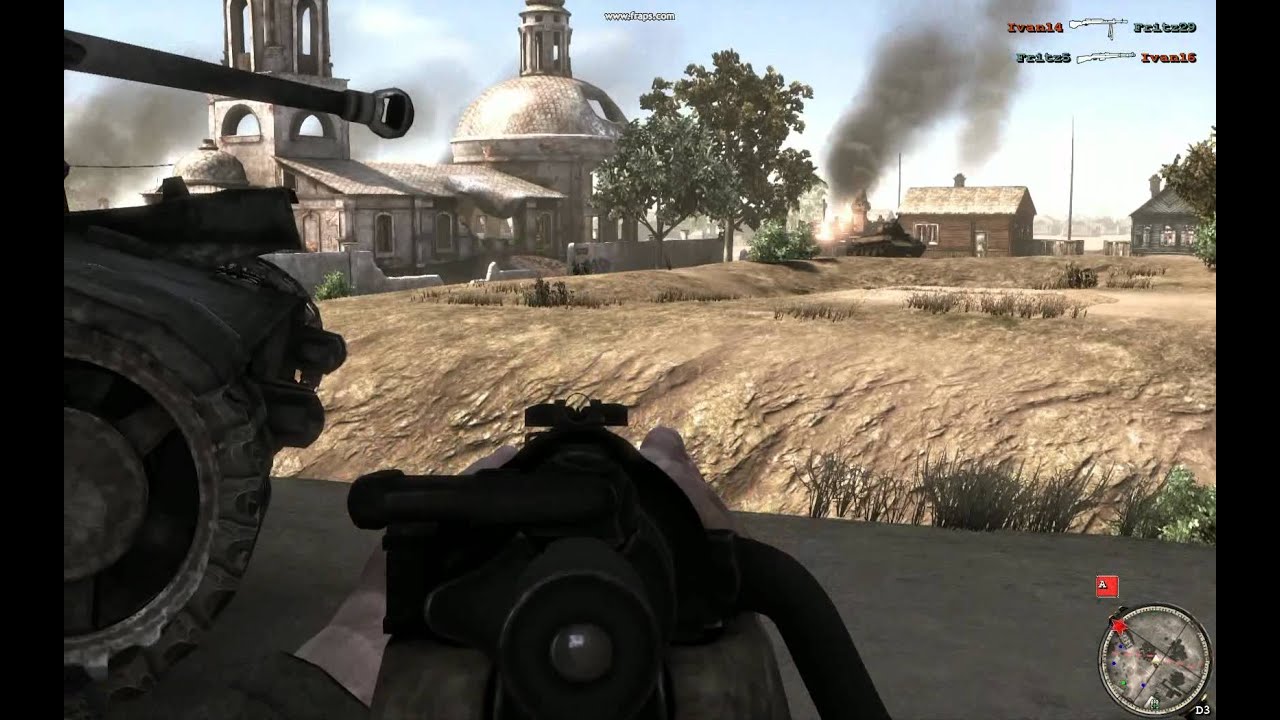
Just a short clip showing the free-floating iron sight aiming in Red Orchestra 2.
Like this
earnest tangle
Ah right it does do it a bit when ADS'ing too
trim matrix
I'm trying figure out as well as finding any tutorial sources for it but still can't find anything
earnest tangle
I would start by making some kind of a system where you draw the aim point as a crosshair, and try to get that moving in the way you want
you could probably take the aiming movement and use that to move the crosshair simultaneously, and clamp its min/max positions into a certain area of the screen
once you have this you could then trace into the point for shots, and perhaps also calculate rotations for the weapon model similarly
trim matrix
hmm
Does it also work for ADS?
I'm just afraid the aiming movement could break the ADS, like it's not following the center of aim sight
earnest tangle
Well if you move the gun based on the logic and then just trace from where the gun is pointing at, it seems like it should work
trim matrix
Ok, I will try what I can do, thank you for your suggestion
 fast escarp
Does anybody know where you can hook into adding hotkeys for blueprints? Like how b+left click adds a branch node
earnest tangle
fast escarp
cheers
 quaint trail
Hi, recently concluded two nice tutorials by Unreal Sensei, Environment and Blueprint, using Unreal Engine 5 and loved the experience.
https://youtu.be/gQmiqmxJMtA
https://youtu.be/ITCWa3oLNAQ
Years back also frequented Ben Tristem's Unreal 4 C++ course and did not finish the Tanks part.
https://www.udemy.com/course/unrealcourse/
I'm looking into doing a simple 3rd person shooter project as a way to get more adept with the Engine (v5) and will stick to Blueprints this time so I can stay focused on the Engine and progress faster initially in knowing more parts of the engine.
I'm wondering if there is nice standard reference content to check to get more at ease with the Engine (Having an idea and knowing how to implement it or at least know where to find for a solution) and then more specifically good standard reference content for a 3rd person type of game concerning blueprints, game settings, actors, etc.
Thanks
 worthy carbon
I want to make an multiplayer game like fortnite but do i need to buy stuff for that
 spark steppe
or time, a lot of it (and patience, and the ability to learn new stuff quick)
worthy carbon
Oke thanks
 mild flare
Hi!
This BP is spawning 2 emitters one for 1st person and one for 3rd person (for multiplayer). When shooting a weapon, the emitters are visible in 1st person, the client and the server also see the 3rd person one. BUT through the clients vision the emitters spawning on the server are not moving along with the movement of the weapon/player. So they keep spawning on the same location when the server starts shooting even if he moves. I tried to get the rotation in, it only worked for the server-vision but not for the clients-vision
i hope i explained that well enough, i barely understand it myself lol

 formal wren
Hi, need some help solving this vector math problem: I have the location of a bone. I want to offset that location in bone space and then convert it to world space. Any idea which node to use?
Found it:

 last abyss
guys I'm having an issue where self is returning none, how is that possible..?

 maiden wadi
It's not possible. It's the blueprint debugger.
 orchid grove
You broke it lol
maiden wadi
Put a print node past it and break on that.
You're still breaking on Set.
Debugger breaks on function start. Which means the pure nodes like Self haven't been called yet.
 last abyss
its in a function in a grid cell class which is parented to actor
maiden wadi
This is during play?
last abyss
yeah when my character overlaps the grid cell's box collision
maiden wadi
Do you get a class name if you print Self's display name?
 maiden wadi
One more use case of the blueprint debugger being terrible. I always rely on prints personally. Haven't been let down by them yet. 😄
last abyss
yeah but the variable that i'm setting is not being set and giving me accessed none errors
last abyss
never mind it was just an issue of calling the wrong function, because they both HAD similar names 🥴 it's still strange that in the debugger it does say none when setting the variable though but it seems to actually set it to the one I intended it to now.
 tender sierra
question: is the Editor Utility Widgets the only way that lets you do stuff in **Blueprint **but in Editor mode?
spark steppe
what do you mean by stuff?
tender sierra
what I do have in mind, is working with cameras
but it could be anything blueprint-wise that is compatible in editor mode.
I know that Editor Utility Widget has this purpose and I guess not all blueprint nodes exists or are compatible to be used in Editor Utility WIdget
So I am curious if there are other ways to run Blueprint in Editor, but that is not Editor Utility Widget
spark steppe
well, you can call functions on actors from editor utility widgets
and you have the option to mark functions as call in editor in actor blueprints to call them from the actor details panel
 marble tusk
Describes how to use Blueprints in the editor to automate content production tasks.
maiden wadi
This really depends on the context you're after.
For instance, you can make editor callable functions in blueprint to position things in editor from an instance of an actor class.
tender sierra
True
For now, I was curious if the only way was Editor Utility Widget, or if there were more ways
It seems to be more ways based on your answers 🙂
marble tusk
Yeah, there's also something called Scripted Actions where you can make an action show up in the right click menu
tender sierra
spark steppe
and you have the option to mark functions as call in editor in actor blueprints ...
and you have the option to mark functions as call in editor in actor blueprints to call them from the actor details panel
could you please elaboret?
Can you give me any sort of example?
marble tusk
tender sierra
`and you have the option to mark functions as call in editor in actor blueprints...
Describes how to call Blueprint events and functions on Actors while working in the editor.
spark steppe
guys, you can add <> around your links to avoid the big thumbnail^
maiden wadi
 tender sierra
@maiden wadi @spark steppe @marble tusk
So if I understood things correct, and to sum it up.
In Editor, you can utilise Blueprints in
- Editor Utility Widget: create graphical interfaces that "do stuff" in Blueprint 🙂
- Scripted Actions: access blueprint from eg RIght Click / Context menu.
- Calling Blueprint from an actors Detail Panel (a button).
Did I miss any? 🙂
maiden wadi
Possibly. Dunno. Don't do a ton of level design stuff which is where those are used a lot.
tender sierra
Good enough, thanks
The other question I have, now that we established multiple ways to access BP in the Editor:
can you change what camera you are in with Blueprint from the editor?
marble tusk
There's also an awesome free plugin called "Editor Scripting Tools" you get find here https://unrealengineresources.com/plugins. It unfortunately doesn't have documentation yet, but it lets you do a whole lot more editor scripting stuff with blueprints
tender sierra
Oh ... one more thing related to the first question
Now that I know you can create context menus and such
You think you could connect a hotkey to a custom BP like that?
 light token
Any math wonders here? I wan't to apply a large force when the value is small and want to apply a small force when the value is big. I'm using delta time right now but I need to invert it one way or the other. Any ideas?
earnest tangle
One way would be to do maximum value - value, this would make it so if value is small it applies a large amount, but if value is large then a small one
(of course only works if you have some kind of expected maximum value for it)
light token
Of course! Had a little Eureka moment! Thanks a lot!
earnest tangle
👍


 random quail
 fallen glade
is there a way to set the avoidance weight?
fallen glade
is there a way to set the avoidance weight?
it is read-only, but still can change in c++
fallen glade
random quail
it is read-only, but still can change in c++
I don't understand why the epic people keep half of the variables locked for bp users 😦
thank you though @random quail
random quail
nvm, you can't easily change it as it is passed to avoidance manager during registration
so dig around UAvoidanceManager if it is possible to modify it after registration
random quail
fallen glade
I don't understand why the epic people keep half of the variables locked for bp ...
it is used once during CMC initialization so if it was writable it would do nothing. see CharacterMovementComponent.cpp:791 for details
 sick sapphire
how do i adjust the distance at which the camera starts clipping into things
maiden wadi
@sick sapphire Project Settings, Near Clip Plane
sick sapphire
maiden wadi
<@!512990075802615818> Project Settings, Near Clip Plane
thanks
i cannot have different clip planes for different cameras?
 zealous jasper
hello, I divided the touch screen into 2, different control on the right side, different control on the left side, I manage it inside the character, but I need to leave the left side to control the right side, how can I turn off focus for touch, I don't use buttons or anything.
 gritty elm
can anyone explain what is happening in the highlighted area?

we are doing a line trace. and from that line trace, we are doing inverse transform location with other actor location
what exact mean by this?
maiden wadi
@sick sapphireNot that I'm aware of. At least not by default. I assume you could code around it with custom C++ classes maybe.
sick sapphire
maiden wadi
<@!512990075802615818>Not that I'm aware of. At least not by default. I assume y...
Ah ok thanks
maiden wadi
@gritty elm In this image, Location is a world space position. You're taking that position and transforming it into the local space of the supplied transform.
gritty elm
i'm supplying get actor location
so it will be world space, not local space?
but this function takes T as local space, this is where the issue is happening while understanding
maiden wadi
No. You're making a transform out of that GetActorLocation. So it will be a default rotation and default scale, but with a world position of it's own.
Lets assume that your GetActorLocation is x1100, y12000, z0
gritty elm
does rotation and scale matter when using inverse transform?
maiden wadi
You make a transform out of that. Transform is now Location=(x1100, 12000, z0), Rotation=(0,0,0), Scale=(1,1,1)
gritty elm
yes that is correct. but what T input exact does?
maiden wadi
Your other location is at say... x900, y12000, z0. You inverse that into the transform's local space. This will return you a new vector of 200,0,0
gritty elm
so does it subtract two vectors internally?
maiden wadi
Because you're not using rotation or scale, you could essentially get the same thing by doing target-start
maiden wadi
Yeah. Target-Start. Target is your hitpoint, start is your actor location.
No. Not exactly. But in your case it will work the same.
You have no rotation supplied in the transform, so the function is the same.
gritty elm
so what is the difference between inverse transform location and vector1-vector2
maiden wadi
Vector-Vector doesn't rotate anything.
gritty elm
how rotation is related to vector
maiden wadi
Hold your right hand out to your side.
It's on your right. Now remember where your hand is and turn around.
It's still on YOUR right, but now it's in an entirely new place.
Your position and rotation is your transform. Your hand is the target point in this scenario.
gritty elm
make sense. Thanks for explanation. Is there any book for mastering in vector math?
maiden wadi
Dunno. Never was a huge academic. 😄
zealous jasper
zealous jasper
hello, I divided the touch screen into 2, different control on the right side, d...
😔
 bold sedge
 quaint trail
Any staple good foundational tutorials out there about blueprints that I should prioritize?
mild flare
is there any pic that shows how the different 'things' are attached to eachother and what controls what (GameState, PlayerController and all that?
 gentle urchin
mild flare
is there any pic that shows how the different 'things' are attached to eachother...
gentle urchin
mild flare
is there any pic that shows how the different 'things' are attached to eachother...

 late cave
I hope I'm doing this all wrong because god damn...
 tender sierra
A question about variables
If I only need to work on one axis, hence just one value (just Z in my case), what type of variable should I use?
 late cave
tender sierra
A question about variables
If I only need to work on one axis, hence just one v...
late cave
tender sierra
A question about variables
If I only need to work on one axis, hence just one v...
Well, if you hover over the value in the node you'll see that it's a float, so... float?
tender sierra
late cave
Well, if you hover over the value in the node you'll see that it's a float, so.....
hmm. I was sure it gave me three values last time I tried float.. Not it is one.
Thanks 🙂
just to be sure I understand the basics. Float is always one value, right?
late cave
tender sierra
hmm. I was sure it gave me three values last time I tried float.. Not it is one....
the vector/rotator (ie what you had before you split it) was three values (three floats)
late cave
tender sierra
just to be sure I understand the basics. Float is always one value, right?
yes, one floating point number (ie decimal number)
tender sierra
@late cave
is there a way to work on one of the SetWorldRotation axis only?
Right now, I had to set the two others by hand. I think I could read the values out of the SunLIght component, but if I can only limit the Rotation on one axis, and leave the others be, it would be most convenient
 late cave
tender sierra
<@!149623011199156225>
is there a way to work on one of the SetWorldRotation ax...
late cave
tender sierra
<@!149623011199156225>
is there a way to work on one of the SetWorldRotation ax...
Well, here's what I do...
 tender sierra
I was thinking so too
So thats the only way, to read it out of the component. Then I could just as good type them in like I did now
So no way to kind of "leave the others be, I just want to set this axis"?
late cave
the effect of my node setup is exactly as you described
trim matrix
That is the way.
tender sierra
This is the way
trim matrix
Always do that, dont hard code any values
Hard code meaning directly typing in the values.
Always best practice to avoid that where ever possible, as that makes your game way harder to change later on.
tender sierra
yes, I realized that when you wrote it. To eliminate errors
When I drag out from the component, what should I type to get this three valued-node that reads out the two values?
this one

 odd ember
tender sierra
I was thinking so too
So thats the only way, to read it out of the component. Th...
odd ember
tender sierra
I was thinking so too
So thats the only way, to read it out of the component. Th...
use AddOffset instead of SetWorld
tender sierra
@odd ember - thanks, will check this one too
trim matrix
tender sierra
this one
This node is called GetRelativeLocation. Since you were working with World Location you would need GetWorldLocation.

And yes if you are tryng to just offset.. Add offset is better to use anyways
gentle urchin
^ allows you to add to just one axis, just like op asked
tender sierra
okay
but I am missing one last piece, how do I get this one
when I drag out from the component, what should I type?
 trim matrix
This node is called GetRelativeLocation. Since you were working with World Locat...
trim matrix
trim matrix
This node is called GetRelativeLocation. Since you were working with World Locat...
That is called GetRelativeLocation
But like i said,
you might need GetWorldLocation
tender sierra
thanks to you both. @trim matrix and @odd ember
for the sake of learning, I will check both. Originally I wanted the addoffset so it might be sufficient.
trim matrix
Yes try them both. For what your doing add offset seems to be what you need. It is important to understand how to to do them both though.
 digital palm
Hello there, little question, I'm trying to play a music, and stop it with a simple key. there is no stop sound function, so I promote to variable the return value of spawn value 2D. Then, when "w" is pressed, I stop this value. But it doesn't work and got this error. The music is played, but i can't stop it. Any idea?


 atomic salmon
digital palm
Hello there, little question, I'm trying to play a music, and stop it with a sim...
atomic salmon
digital palm
Hello there, little question, I'm trying to play a music, and stop it with a sim...
Spawn Sound 2D has an auto destroy option in the drop down section. It looks like you are trying to stop the sound when it has already been marked for kill.
 opaque patio
Anyone got any clue how to stop a vehicle after it has been unpossessed? It just keeps on rolling, even when throttle input and handbrake have both been altered

possessing goes well, but after that I can't seem to do anything to the vehicle anymore (its a PhysX wheeledvehicle bp)
is it because no controller is assigned to it anymore or smth?
 static charm
yeah its been a year or so since ive dealth with the same issue. pretty sure i just switched it back to AI controller
digital palm
atomic salmon
Spawn Sound 2D has an auto destroy option in the drop down section. It looks lik...
I'm trying to stop the sound while it's playing. Ok i will Check for this option
opaque patio
static charm
yeah its been a year or so since ive dealth with the same issue. pretty sure i j...
Tried it before like this

and this is the ai controller

but doesnt work either for some reason. The cast always seems to fail
static charm
well nothing is going to work if ur casts fail
opaque patio
well, yeah I get that, but do you maybe happen to know if I didnt set up the cast correctly?
bit of an unreal noobie hehe
static charm
pretty sure you cant cast from controller directly to a pawn
the error would tell u which cast is failing
opaque patio
static charm
pretty sure you cant cast from controller directly to a pawn
any way how to do it then? Srry if i seem a bit pushy, just really damn frustrated being at this for the entire day
atomic salmon
GetPlayerPawn is the pawn possessed by the player, but you have unpossessed it, so the cast fails
atomic salmon
Which of the two casts you posted fails?
opaque patio
but thats not the cast that fails though
the first image is the one that fails
the cast to the aicontroller
atomic salmon
You should always verify the the returned reference is valid before using it
So after GetAIController I would do a IsValid?
In that way you will know why the cast fails
static charm
it's going to fail because pretty sure he's doing that in the player blueprint or vehicle blueprint
atomic salmon
Check GetAIController, it seems to be needing an input
 dawn gazelle
 static charm
yeah but if hes in player/vehicle blueprint and there's no AI controller to get
dawn gazelle
but you need the actor anyway, which means you'd already have the controlled pawn most likley.
opaque patio
thanks for the help 🙂 got some reading up to do since im obv not informed enough. If I still dont get it working tomorrow I'll ask again
static charm
re-remembering my past, you have to spawn your AI controller
then you can posses the vehicle with the spawned controller
but sounds like you're better off, finding a tutorial that covers possesing a vehicle and unpossesing
opaque patio
static charm
but sounds like you're better off, finding a tutorial that covers possesing a ve...
thats... thats exactly what I did, spot on
 high yew
how do i make it so that if a actor touches another actor then it triggers an event
static charm
you can use On Component Begin Overlap event
then make sure you have collision setup for overlaps on both actors and have Generate Overlap Event enabled in same settings area
trim matrix
If I'm trying to set an array there's no point in clearing it first is there? Not talking about edge cases. Like if I have an array of potential targets and I compile a new array value that needs to be set to the current one then clearing the old value is redundant right?
static charm
correct
although there might be edge cases where clearing it could be useful but otherwise no
oh sorry u said no edge cases lol
trim matrix
Yeah I'm looking at this setup I made a month ago and my new approach makes clearing this irrelevant. I probably had some edge case in mind when I started doing it this way and just kept doing it out of habit or st. thanks for confirming
 ripe rose
can a component's BP not add another component to its owner? I'm trying to have my weapon components add a static mesh to its owner on beginplay
i.e. the player can pick up a weapon, which adds that weapon as a component to the playerBP. then the weapon component on beginplay adds a static mesh to the playerBP
 snow harness
This condition is Failing, despite the Key Query being Is Set, and the bool is True. "value: true (fail)"
 static charm
Devin, i think you can just add a static mesh to the component bp, then just Attach component to playerbp, like a socket on the skeletal mesh if you wanted.
NoNeurtality, you can try asking in AI chat below, which covers behavior trees
snow harness
Thank you
ripe rose
static charm
Devin, i think you can just add a static mesh to the component bp, then just Att...
unless i'm crazy, you can't add a static mesh to a component
also this is apparenrtly a known issue since 2016 https://answers.unrealengine.com/questions/375973/add-components-to-actor-from-child-component.html
i'll either create a function in c++ and expose to bps or i'll just use blueprint communication to get around it (i.e. call an event on the player which adds a static mesh)
was just surprised i can't do this the most direct way
static charm
oh yeah i guess i was remembering wrong, the static mesh was already added by default in the weapon system i was using
but just attached when needed
or maybe i was spawning/adding the component in the parent actor bp
and just calling it from the component bp
ripe rose
yeah that's what i'll likely do
odd ember
snow harness
This condition is Failing, despite the Key Query being Is Set, and the bool is T...
create your own decorator
don't trust the built in ones. I've been doing AI over the past couple of days and unfortunately most of them are obtuse or undocumented. sometimes they might do what you want, other times they don't at all
if you make your own, you know exactly what you are getting
snow harness
odd ember
if you make your own, you know exactly what you are getting
Good idea. I'll try that.
snow harness
odd ember
if you make your own, you know exactly what you are getting
What node do you use to set if a decorator failed or succeeded?
snow harness
The premade decorators which check a blackboard value, they seem to act as a gate/branch, and if a value doesn't meet the check, that branch fails.
snow harness
For sure. I guess I don't understand what a decorator is really supposed to be. But I'm just trying to get a branch to fail if a bool is false.
odd ember
a decorator is supposed to be a condition check
it has a built in function for checking conditions
snow harness
Ah didn't see top left with Function Overrides
When you create a new decorator youre just looking at a blank canvas
odd ember
there are resources out there for this
snow harness
Of course. It's been a bit. Had just been asking for clarification on built in functionality, and then asked you a followup question since you were here. I appreciate the help. I'm on the right track now.
odd ember
snow harness
Of course. It's been a bit. Had just been asking for clarification on built in f...
sure, feel free to ask if you're having issues. but do read the docs first
 undone timber
i am going crazy with a bp... i am using an add child actor component, but for whatever reason is not snapping to the parent, i have tried using further attachactorto component, and other methods, but the childs wont stay stuck
however using spawn actor and then attaching the actor to the mesh works... but then it would break all my game logic as it relies in changing the class of this actors for modularity


i have used both manual and automatic attachment
visually this is what is happening the actors just fly away dead

and somehow any semblance or reference towards them dies as the ship cannot fire because apparently the child actor is pending kill
static charm
if they have physics on and the parent doesn't then it doesn't matter what u do
undone timber
both have physics
static charm
well if the parent has physics then the child doesn't need physics, since they will be attached
so disable physics by default on the child
undone timber
i tried that one too
static charm
did they fly away?
undone timber
no they just stood there motionless
the ship could be flown
they need physics for collisions, since capital ships have quite a few turrets and you can collide or snipe them frm a distance
it used to work before when i would add the child actors directly into the blueprints
but i am trying to make it more modular with just data blueprints where the child actors are added on construction based on what the data blueprint states
static charm
is the main component of the child actor the physics component or is the physics component rooted below anything?
undone timber
it has physics on both the base of the cihld actor and the barrel
static charm
my only thought is try attaching any physics components themselves instead of the actor, or both
but i do remember having issues with those actors as components myself long ago
took awhile to get it right, then i just avoided them in projects since lol.
undone timber
nope didnt work... can i change an actor class on the fly as done for child actors?
static charm
not sure what you mean, at runtime no i never heard of changing the class of a object.
undone timber
ugh but if i use actors then all sort of stuff will be broken... as the turrets have to add themselves as references onto the ship so that they report power usage and such and if they are blown up they need to be swappable
its a function of child actors
set child actor class
allows you to destry and swap actors but keep the component
so you can use it as reference
static charm
im sure what you want to do is possible or at least close to how you have it setup. but transforms and physics can get screwy/confusing when you have sub actors/components.
undone timber
it is certainly possible... i mean it was working before... just... for some reason child actors added at runtime dont snap... stick?
static charm
well another dumb question, is the child actor rooted underneath the main ship's physics component
undone timber
you might be onto something there.... that node only allows to attach child actors to actors...
so self
the hull is the physics component
static charm
that would explain some of the behavior your seeing
undone timber
 undone timber
yeah but it maybe dies before it attaches?
because they are getting pending kill for whatever reason by themselves
thing is when adding child actors you cannot add them directly to meshes...
can i make a mesh the root?
static charm
or wait no the hull is ur root component there
static charm
so the child actor would automatically root under the hull when u add it
and u already tried with the child physics off and it still didn't attach
yeah can't think of anything else to try with that setup
undone timber
by all rights it should work
static charm
have you tried using just 'actor components' class? or does that not fit your goal?
might still have the same problems though
undone timber
it does not because when the actor is destroyed i lose the reference for swapping stuff
odd ember
sounds like you need some more advanced architecture to do what you want to do
undone timber
perhaps i should drop trying to use the actor component and use a regular component that controls a mesh...
odd ember
undone timber
perhaps i should drop trying to use the actor component and use a regular compon...
what is it that you want to do? keep meshes attached to an actor after the actor is gone?
 winged sentinel
Is there not a way to debug function library blueprints?
odd ember
you can place breakpoints? what's the issue?
winged sentinel
odd ember
you can place breakpoints? what's the issue?
Ah true I usually like to see it in real time what’s happening lien when u select an object up top
 digital kelp
anyone have any idea what im missing to set the Transform location for SplineIK controller correctly. trying to set it along a spline and updating the location/transform over distance. From the animBP Im Debug Drawing a Frustum and it follows the spline perfectly, its the same input passing into the transform for the spline Ik. the two Actors are in separate BP placed in the world. any help would be appreciated

 undone timber
odd ember
what is it that you want to do? keep meshes attached to an actor after the actor...
undone timber
odd ember
what is it that you want to do? keep meshes attached to an actor after the actor...
no, i just want the hcild actors to stay attached to the parent and move with the parent
child**
odd ember
undone timber
no, i just want the hcild actors to stay attached to the parent and move with th...
I meant outside of the scope of what you are already doing. you might not be able to achieve what you want to achieve by doing it the way you're doing it right now
undone timber
how so? why not? it used to work before...then i didnt... and i dont know why
either way if i dont manage to fix it by today i am thinking of refactoring and doing things in a different way, just i am not sure which would be the most ideal way
also that why not is a real one, not being snarky, more like, why it dosnt work? what is hte problem
odd ember
undone timber
either way if i dont manage to fix it by today i am thinking of refactoring and ...
child actors are generally not great to work with and can bug out for who knows what reason. I'd definitely consider refactoring, especially if this is a key system for your project
it's much better to have a robust system that doesn't break down and makes the project future proof than going for easy hacky solutions that are prone to breakdowns
thinking about how to set things up should take you longer than implementing them basically
 inner rose
Hi,can someone help me with this? I want to rotate an object(it will be on android) by holding and moving it. I am new to android.
Holding and moving your finger on the mobile screen.
undone timber
in that case, the idea is that ships in my game have multiple modules (powr, shield, weapons, etc) which can be swapped freely, this are visible frm the outisde and also change the physics and behavior of the ships (mass, innertia, collisions) and are destryable upgradeable, etc etc.
which would be a good way to implement them? i am thinking a regular component controller for each type, and just add the meshes with the controller and manage them as such?
or use actors for each component and manage them separately for swapping purposes?
i am leaning more towards actors in my mind but i am not sure of which could be hte benefits
performance wise
 snow halo
damn weirdest bug?? for some reason set members in struct doesn't work off of a for each loop array element pin

am i crazy?
just doesn't set it : /
sigh duh, for each is returning a copy not a ref : /
is there any for each loop that returns a ref instead of a copy?
otherwise i guess i gotta do this:
 trim matrix
Hello guys I have problem with my inventory system I want to make exchange item system when you select an item and press button to exchange it with other item, it is kinda working but the problem is that it doesn't update the "thumnail " of the old item. idk how to fix it
https://blueprintue.com/blueprint/wc17rfdr/
this is the link of my all bp
I will be more than happy if someone can help me
I am fighting with this problem for 2 weeks 😦

No description provided
 worthy tendon
snow halo
otherwise i guess i gotta do this:
worthy tendon
snow halo
otherwise i guess i gotta do this:
Yeah, if you need this a lot, go ahead and make a macro for it. it's best to place it in a macro library so you can use it everywhere.
 sharp rapids
I have a question about Soft Object References
Let's say I load a Soft Object Reference using 'Async Load Asset' Node
It loads the asset into memory
Then I Again load the soft reference the same way
So, will it load the asset twice in the memory or will it stop because the asset already exists in memory?
I don't want to take up unnecessary memory by loading Soft References again and again.
dawn gazelle
Stolen from here: https://answers.unrealengine.com/questions/899908/question-on-asynchronous-asset-loading-and-using-g.html
Async load first checks if the object is loaded in memory before trying to load it. So it will exist in memory only once. You do not need to check if the object is already loaded.
sharp rapids
@dawn gazelle Well that just made my life a bit easier. Thanks
tender sierra
Hi
Is there anything similar to Add World Offset but for offset for rotation?
AddWorldOffset is for location ...
 earnest tangle
tender sierra
Hi
Is there anything similar to Add World Offset but for offset for rotation?
A...
earnest tangle
tender sierra
Hi
Is there anything similar to Add World Offset but for offset for rotation?
A...
There is a node add rotation something or other at least
tender sierra
@earnest tangle you mean this?

yes, that's a SetWorldRotation
I was curious if there was a way to add offset to the rotation instead of setting it
earnest tangle
No there's another one which has the word add in the name, but I forgot the exact name of it
It would probably show up if you search for "add rotation"
tender sierra
yeah, thought so too but couldnt find
let me google and see
earnest tangle
Weird 🤔
tender sierra
mm. seems logical that there should be one
Are you on UE now? could you give it a quick search?
earnest tangle
^yeah that's the one
tender sierra
ah, local and not world
Will try it out
🙂
this one wasn't compatible.
I am trying AddLocalRotation now
 inner rose
Hi,can someone help me with this? I want to rotate an object(it will be on android) by holding and moving it. I am new to android.
atomic salmon
@tender sierrayou are rotating a component, so you need to use AddLocalRotation. AddActorLocalRotation is for actors.
tender sierra
thanks @atomic salmon for confirming
However, something is behaving strange here.
If you please take a look at how the original values look like and the result values, then we see a difference:
oroginal
original

result

BP

even if I leave all the three values at 0 on the AddLocalRotation, it seems to alter the values on the target component
I kept them all as 0
 atomic salmon
@tender sierrawhat you are seeing in the Details panels are usually world rotations
tender sierra
result: 0
 tender sierra
atomic salmon
<@!537884119758012416>what you are seeing in the Details panels are usually worl...
tender sierra
atomic salmon
<@!537884119758012416>what you are seeing in the Details panels are usually worl...
yes, so I am assuming that AddLocalRotation is Adding to the world values
atomic salmon
@tender sierrawhat AddLocalRotation does is to add a rotation to the component in the component's local coordinates system
tender sierra
atomic salmon
<@!537884119758012416>what AddLocalRotation does is to add a rotation to the com...
yes, but it seems not to?
Let me try again and give you a proper feedback on my error this time
one sec
step 1: I leave the values to 0. The result is fine. These are the default values and I have added 0 to them, hence they are kept unaltered

step 2: I added 10 to Y and Z, but the result shows X, Y and Z are affected.

is it because of a conflict between local and world, ie that local Z might not be world Z?
atomic salmon
@tender sierrathe rotation angles shown in the Details panel are in World Coordinates
Let me pull a slide for you

Look at the cube in the slide
tender sierra
yes, I know the difference. I was assuming that if you would add locally, the result would affect things properly
but I think I understand my problem
since the light is rotated in world, adding local values would yeah not be the same
yes, I know, I know.
I have worked in 3d for years, so these differences are totally clear to me
atomic salmon
ok
tender sierra
so:
how can I Add a rotation then?
this one works, but requires the GetWorldRot node next to it
I am trying to learn, so I am experimenting in not using GetWorldRotation, but using an ADD node instead
For rotation
 atomic salmon
@tender sierrahow do you want to rotate your SunsetLight? Around one if its local axis or around a world axis?
tender sierra
around the world axis
I was hoping there was a AddWorldRotation or something. Just adding to it, not setting it
because setting requires me to set the other axis, X and Y which I want to leave be
in the previous screenshot I showed you that I had to read X and Y with GetWorldRotation
So I thought that if I could add a value, I would simply ignore X and Y, since we dont need to change them, but only add to Z
atomic salmon
ok but then just use AddWorldRotation
There is a AddWorldRotation if you look it up
AddWorldRotation
tender sierra
@atomic salmon yes, but it also behaved strange
Let me try again
atomic salmon
@tender sierramake sure the Details panel is not showing Relative Rotations. There is a little dropdown on the right side of Rotation, check what it is set to.
tender sierra
atomic salmon
<@!537884119758012416>make sure the Details panel is not showing Relative Rotati...
bloody hell. I thought these were always world... okay, thanks for clearing this out for me
I need to re-look this through to kinda calibrate my brain around the new discovery 😄
thanks for pointing this out
 atomic salmon
@tender sierrawell in a hierarchy of components it is more interesting, in general, to know the relative rotation of a component respect to its parent.
tender sierra
true
But I was thinking that the details panel was only showing world. I never thought it had these two modes I could actually switch between
I do this kind of things in eg 3dsMax every day. But I totally missed it in UE
atomic salmon
@tender sierrano worries, part of the learning curve. 😉
tender sierra
@atomic salmon one last question if I may. Yesterday, someone showed me this. This one had no "title"

the one I found looks like this .. with title

can you hide a title?
more of a genreal UE question 🙂
atomic salmon
Those are tow different things
tender sierra
yes, beside location and rotation
atomic salmon
yes beside that.
tender sierra
ah, so beside being different node, its not just about the title not being there?
atomic salmon
the first one is a variable belonging to the target class, I assume it is a scene component or something derived from it
the variable, which is originally a vector, has been split into its 3 components
the second one is a function
tender sierra
ah, a variable.
you mean the target is a variable, for the first img?
atomic salmon
No, Target represents in general a reference to an instance of an actor or component in this case
Target is the the particular component or actor on which you are running that function or getting the value of the variable from
This concept is derived from Object Oriented Programming
You have classes which are archetypes, then you have instances which are how a class materializes into specific objects
So Dog is a class, but my dog Sparky is an instance of that class
tender sierra
sorry to interupt. lets roll back a sec. I got lost in your first explanation
 tender sierra
At first, i thought the nodes looked different because their targets were different, but apparently that wasnt the case
atomic salmon
You have an Actor in the level, for example a car
The car has a steering wheel attached to it
Now the steering wheel, which is a component of the car, knows its relative location respect to the car
The relative location of the steering wheel within the car is a property of the steering wheel
That property is represented by the variable Relative Location within the steering wheel
So I can just ask the steering wheel what is your Relative Location ?
And this is what it was done in your first example. Target is the steering wheel and you are retrieving/reading/querying its Relative Location property
Are you following so far?
tender sierra
I think
So the component in the first screenshot is a component lower in the hierachy, while the second screenshot shows a node that is relevant for a component on the top of the hiearchy?
keep in mind, the first screenshot was given to me from someone giving me an advise how I should solve this
So when I was searching for the node, mine looked different
atomic salmon
In the second example you are calling what is called a function on the component to retrieve its World Rotation
The reason this is a function is that the component is part of a hierarchy, so its World Location depends on the world location of its parent which may depend on the world location of its parent on so on...
tender sierra
okay
I think I understand, because this is how the hiearchy looks like
no matter if I pick GetWorldLocation or Get Relative Transform, they look the same
 atomic salmon
The engine has to calculate the World Location for that component by going up the hierarchy and adding all relative locations until it gets to the world
tender sierra
and in what cases would it give me a node that would look like the first screenshot?
is it relevant in my case?
atomic salmon
When you read Relative is always relative to the parent
When you read World is always relative to the world coordinate system (global axis)
sharp rapids
Can I chime in gentlemen?
atomic salmon
Sure
tender sierra
sorry if I am missing the point, or if I was unclear with the original question
I was wondering why the nodes look different.
Is it because what context they are in or is there any other reason?
 atomic salmon
Because one is reading the value of a property and the other is calling a function
sharp rapids
@tender sierra in the first image, the one without a title, you're essentially accessing a variable in a class
In the second one, you are accessing a Function in a class, the title you're seeing is the name of the function
tender sierra
okay
1: reading from a variable
2: reading from a component, in my case, Directional Light Component.
right?
atomic salmon
2 is calling a function on a component
the function does the job and returns the value
tender sierra
and that is the only way it works, as long as it is a component, right?
Unreal is very good in showing things in the BP editor, so you can see what it is without needing to see the whole thing
so part of my learning here is to narrow it down, that "when it looks like this, it is because of that ..:"
atomic salmon
as long as you pass to it a SceneComponent or any component derived from it, it will work
because it knows how to calculate their World Rotation
inner rose
Hi,can someone help me with this? I want to rotate an object(it will be on android) by holding and moving it. I am new to android.
tender sierra
@atomic salmon @sharp rapids
so if I create a variable, and then drag a node out of it, the get-node would be without the title, right? 🙂
sharp rapids
@tender sierra Yes
atomic salmon
exactly, you are retrieving the value of that variable and then you can work with it
that is what is called a Get
tender sierra
thank you both, @atomic salmon and @sharp rapids ❤️
long discussion, but it helped me level up a bit 🌟
atomic salmon
I know that if you come form a non-programming background these concepts can be hard to grasp at first, but eventually they will become clear
tender sierra
amen to that 😄
atomic salmon
Just keep in mind that if you drag a pin onto a target in a function and you get an error, the engine is telling you that that Target is not compatible with that function
tender sierra
as said before, UE does a great job color coding and expaning things, without you needing to see the whole code so to say
So part of my training is seeing what you see. Ie "no title means this" and so on
atomic salmon
If there is not title, it means the valuable information is in the name of the pins on the right, aka the output variable
 tender sierra
not because i need it, but what would I need to alter on this variable to "remove" the title then?
 atomic salmon
That's not a variable, that is a function
tender sierra
because it is a rotator?
sharp rapids
Right click on the node and click split pin
atomic salmon
GetAxis returns the three axis (vectors) which describe that rotator
The rotator doesn't have a variable holding its three axis, so that function calculates them from the 3 rotation angles of the rotator
tender sierra
sharp rapids
Right click on the node and click split pin
like this?
 atomic salmon
good luck working with those
tender sierra
for now, I just want to see what you just explained to me, that a variable would generate a node with that title
so if not a rotator.. let me try on another variable
atomic salmon
@tender sierrayou got it the other way around
when you retrieve a variable there is no title
nodes with titles are, in general, functions
tender sierra
yes, but this one isnt a variable..?
 atomic salmon
It is the Relative Location variable, which normally is a Vector (3 components) but the vector pin has been split into the three elements of the vector
Do this, drag out of the component and search again for Relative Location, it will be at the bottom
You will see a yellow pin
That is a vector
tender sierra
how would you create one like this?
its tricky, when someone (not you, but someone else yesterday) tries to help you and then gives you a screenshot and gets you all confused 😄
atomic salmon
Then you right click on it on the yellow pin, split pin structure, and you get the 3 elements of the vector
 atomic salmon
tender sierra
how would you create one like this?
its tricky, when someone (not you, but some...
atomic salmon
tender sierra
how would you create one like this?
its tricky, when someone (not you, but some...
I know. There is a different between knowing something and being able to explain it to others.
tender sierra
🙂
in this case, when would you have a target pin in them?

this one, I must have created by mistake earlier and it was just lying there. But I can now confirm what you all explained to me earlier
atomic salmon
This is a variable you created inside the actor BP I assume, so the Target pin is implicit, there is no need for it
sharp rapids
@tender sierra Create an actor variable
Drag of the variable, search for Get Relative Rotation
You should get the 'target' node
atomic salmon
The engine knows which variable it is and where it comes from
spark steppe
this is more of a programming question, how would i iterate over a "node graph" where the nodes can have multiple connections, like 2 connectors from the same node go to the same other node
i'm kinda lost in getting in an infinite loop
or other question, how is such hierarchy called? (as it's not a tree)
tender sierra
sharp rapids
<@537884119758012416> Create an actor variable
Drag of the variable, search for ...
not in this case - could it be that this particular variable does not have any rotation in it? can you give me any variable kind that does? (for the sake of testing and learning and understanding)
sharp rapids
@tender sierra did you try doing what I said
atomic salmon
@spark steppe that would a graph and you are looking for graph traversal algorithms: https://en.wikipedia.org/wiki/Graph_traversal
In computer science, graph traversal (also known as graph search) refers to the process of visiting (checking and/or updating) each vertex in a graph. Such traversals are classified by the order in which the vertices are visited. Tree traversal is a special case of graph traversal.
tender sierra
sharp rapids
<@537884119758012416> did you try doing what I said
I did

so I am assuming that this particular variable isnt compatible/or get relative rotation isnt relevant for it
earnest tangle
Vectors don't have a rotation
atomic salmon
inner rose
Hi,can someone help me with this? I want to rotate an object(it will be on andro...
there are two parts to it. 1. retrieve the touch input, 2. use it to rotate your object on screen.
tender sierra
sharp rapids
Try an Actor variable
I found "actor", but how can I have it show multiple rotation axis?
(what a crash course! 🙂 )
atomic salmon
@inner rosecheck this out: https://www.youtube.com/watch?v=i8nxiSMa3Bw
@codingbanglayt @unrealengine
Power By : Coding Bangla YT
×××××××××××××××××××××××××
If You want support US :
https://www.patreon.com/codingbanglayt?fan_landing=true
This Video Power by
Stroyed Developer
See our all Apps & Games in one page
https://codingbanglaytctgamedevprogramming.blogspot.com/2021/08/my-all-games-and-apps-list-by...
inner rose
atomic salmon
<@!755447995637563492>check this out: https://www.youtube.com/watch?v=i8nxiSMa3B...
Thanks,I will check it out.
atomic salmon
@tender sierrayou need to explain what you are trying to achieve with those axis you are trying to retrieve
inner rose
atomic salmon
there are two parts to it. 1. retrieve the touch input, 2. use it to rotate your...
The first time I tried to do what I had asked,it would move in one direction no matter what direction I moved my finger. Thanks again,I will check the video out.
atomic salmon
@inner rosethat tutorial shows you how to use the touch input to direct the movement of a character, it should be pretty close to what you need, even if you may be trying to rotate an on screen object the principles are the same
inner rose
atomic salmon
<@!755447995637563492>that tutorial shows you how to use the touch input to dire...
Ok
tender sierra
atomic salmon
<@!537884119758012416>you need to explain what you are trying to achieve with th...
@tender sierrayou need to explain what you are trying to achieve with those axis you are trying to retrieve
the rotation thing is solved more or less
What I started to ask then was to understand that screenshot. I now know that the person who tried to helped me also confused me a bit.
You guys explained, that when a node doesnt have a title, then it is a variable, which I now understand and have confirmed. Thanks for that.
then I was curious how come that it had a target pin and @sharp rapids had an explanation, which I havent really solved/understood just yet
So the question went into a new direction, more UE-BP-technical than programming itself.
I think I am fine now, I wont take more of your time but let things sink in for the moment
Many thanks 🌟
atomic salmon
@tender sierrashort explanation is that the variable has a target because you start from a reference to the component you want to get the relative rotation from, you drag out of it and type relative rotation, once you have found it you click on it and it adds it to the event graph, connecting the target pin to the original reference to the component you started from.
It is like saying "ok, I understand you want the Relative Rotation of this exact component" connected to the Target pin
If you had to drag in the event graph a reference to another component, disconnect target and connect it to this new component, you will now be getting the Relative Location of that new component
tender sierra
yeah, but this approach wont give me a variable, but a Function, as you explained earlier

I dragged a reference to a component
I drag out and typed Get Relative ...
And I got, what you explained was a function
atomic salmon
@tender sierra Can give you both. See at the bottom of the context menu when you drag out of the reference? Those are variables for that instance.
tender sierra
ah
atomic salmon
But then you pick a function so you get a function.
atomic salmon
If you had to pick one of the variables (properties) you will get it
tender sierra
so that person did in fact give me the proper info, but I missed the variables all the time
time to see if this will help me any further
 atomic salmon
Some people believe that a visual scripting language like Blueprints is not a programming language, but actually it is
tender sierra
oh, I do certainly think it is
and its a wonderful language
finally I can program, more than I have ever done, no matter how much I tried over the years
atomic salmon
As said, the variable (property) you are looking at is Relative Location as the name of the output pins show
tender sierra
great
time to work then! 💪
atomic salmon
Repeated three times because the original vector pin Relative Location has been split into its three components X, Y and Z
Great! I think you are getting the gist of it
 wanton bobcat
Hi guys,
I think I have question that is pretty easy to solve, but I do not know for what I should look for 😦
To my problem. I want to create module build out of four different wooden logs. These logs are spawned random on blueprint actor location, by seed or placing the actor. What's important, that it is random.
So, I have several placeholder stacked up to a log wall and when I place the blueprint actor in the scene, it's filled up with all the meshes I am giving it. How? :/
I fiddled around with an array, shuffle node etc ... but all I got is, that all my meshes getting placed but in a random order.
This one was the closest I was able to achieve
https://docs.unrealengine.com/4.26/Images/Resources/ContentExamples/Blueprints_Advanced/1_1/AdvBP_1_1_ConstructionScript.webp

Oh noes - you deleted your answer :/
... but for clarification and because you was not sure about what I am talking about:
Actually this here should be the setup.
I place some empty objects in the blueprints, which get replaced by an actual mesh.
Everytime I place the blueprint, the output should be a different.
 sharp rapids
@wanton bobcat Well, I looked again at your Blueprint and realized my advice didn't really make sense, so I deleted it 🙂
wanton bobcat
@sharp rapids oh okay 😄
...but you can also ignore this blueprint. This one is from the documentation and the closest I could get :/
sharp rapids
Guessing by the image, You have six placeholders and you want to place a random wooden log (out of 4) at these positions?
wanton bobcat
Out of any number, but yeah. Basically that is what I try to achieve.
In the next step I also want to implement random rotation, Material etc. but for now I would be more than happy to get to this point
 obtuse herald
Is every module it's own actor?
wanton bobcat
Yep ... and the meshes inside instances
obtuse herald
just build the module inside the viewport out of one of the placeholder static meshes. Now create a variable that holds your all your placeholder meshes. In construction script, create an 'make array' node and add all your static mesh components to it, iterate over it (for-each loop) and change the static mesh to random element of your variable inside the loop body.
to get a random element use a 'get' node, connect the index with 'random int in range' from 0 to your variable -> 'last index'
 wanton bobcat
Thanks you three, I will try to get it work and since ToyB-Chan liked your blueprint, I will try this.
Random item from array also sounds pretty nice - will look into this later
How do you pack your placeholder meshes, that are placed in the viewport, in your Placeholder array?
It works pretty well this way, but your method looks a lot more customizable, because it's extendable.
sharp rapids
Placeholder Meshes is an array of 'Static Mesh Component'
Log Meshes is an array of 'Static Mesh'
wanton bobcat
This one I do understand (I hope) but how do you place these placeholders in 3d space?
Here is what I did, following the instructions by ToyB-Chan.


 patent ermine
I have an actor blueprint, which contains Hierarchical instanced stat mish component. On mouse over, i'd like to highlight the specific mesh that is under mouse cursor. This works, however, it highlights all the meshes contained in the hierarchical instanced static mesh components, not the individual mesh. Any way to get the mesh that is under mouse cursor, which is an instanced mesh?
 sharp rapids
@wanton bobcat That's because the Construction Script runs everytime anything happens in the Editor
You move, Compile, Click any button, etc. The construction script will run
wanton bobcat
Yeeeah ... and I got this one work on my own 😛
Random Rotation whoop whoop ^^

For my, that's some big brain energy moments 😛
First of all, thanks to you guys! This helped me a lot.
Now I will look for the random material and making these meshes to instanced meshes, but this is something I can search for easier and can be also added later 🙂
sharp rapids
@patent ermine Here's a question I found
If by highlighting, you mean changing the material properties, then I think It's not possible. You'll have to use a new static mesh there.
patent ermine
@sharp rapids This makes sense. Thanks for that link.
sharp rapids
@trim matrix The cast is probably failing
Try hooking it up to the 'Cast Failed' pin
spark steppe
anyone encountered the problem that get overlapping actors works on the first call, but not on the 2nd?
i have a box where my character is standing in, and it only returns the character first time i do the query
i have the feeling that it is caused by level streaming (which neither the box, nor the character is "affected" by)
or well, the box might be, as stuff gets streamed into the box, but the box is in a level which is always loaded
spark steppe
it's just firing the begin and end overlap at the same time, but not for all of my volumes 😕
sharp rapids
Is the collision box static in the world or is it moving?
You might want to check that the box is staying in place and not moving out of place
spark steppe
static
i think i nailed it down to my volume mesh using complex as simple collision
it seems to only work reliable with generated collision primitives
which are more complex than my "complex" collision from the mesh, but well, guess i have to deal with that
the irony with your nick 😄
sharp rapids
spark steppe
the irony with your nick 😄
😄
Can't say anything without seeing the setup
What is the collision mode on your box? Is it Query Only or Physics Only? Or Both?
spark steppe
both
sharp rapids
And Can the player collide with the box? Collide means physically hit the box, not just overlap
I'm guessing, when the player walks in the box, it also collides with the box thus moving the box away and triggering the 'End Overlap'
spark steppe
that's something that i can't tell 😄
i tried with a custom object response channel, and couldn't get it working at all
the box overlaps on all channels, the player has some to block and some to overlap
but for the sake of it, couldn't get it working with my custom channel, even when setting both to block my player would walk through the box
the box is set to static, can it even move then?
sharp rapids
You can try setting the Collision Box to Query Only
spark steppe
and the box has every channel set to overlap, so it shouldn't really get pushed by anything
tender sierra
If anyone is up to another question - I am wondering if you know if blueprint is able to do an Add Component, ie not doing it manually but letting a blueprint create or access an existing blueprint and Adding components, eg a Directional Light
Or would you need a plugin for something like that?
 spark steppe
you can do it in blueprint
earnest tangle
You can, there are nodes for it
tender sierra
could you please point me into the direction, what should I look for?
earnest tangle
they have specific nodes for each component, such as "add directional light component"
tender sierra
so with blueprint, you could actually build other blueprints?
earnest tangle
I don't know if it's actually supported that you can use an actor to modify another one though
tender sierra
so what can you do then? any examples?
sharp rapids
tender sierra
so with blueprint, you could actually build other blueprints?
You can modify existing blueprints, You cannot create new classes (I think)
earnest tangle
well for example you can add a component dynamically to the actor itself
tender sierra
@sharp rapids modify would be good enough.
@earnest tangle dynamically like temporary, right? or could you save the blueprint afterwards?
earnest tangle
Oh you want to do it at edit time?
tender sierra
So, an Editor Widget that does things like adding new components into an existing blueprint, correct?
earnest tangle
I'd imagine it to be possible but not entirely sure what would be the purpose of doing so :)
(also not sure if it's possible via the builtin nodes, but you certainly could create some custom nodes for it)
tender sierra
let me show you what I have in mind
this is an existing blueprint I have. As you can see, it has different blocks and you can switch between them. They are coded in a manner that we can switch between different lighting scenarios
if you wanna add a fifth option, you need to do all this stuff all over again.
I am thinking whether or not it would be possible, with the help of blueprint or plugin (bp is better, for me) to add more options
 sharp rapids
spark steppe
and the box has every channel set to overlap, so it shouldn't really get pushed ...
sharp rapids
spark steppe
and the box has every channel set to overlap, so it shouldn't really get pushed ...
Well, I'm at loss here. Did you try testing it in a completely new blank level?
spark steppe
no, i'll probably try again later, need a break now
earnest tangle
@tender sierra ah I see... personally I think this might be more easily done by creating one blueprint class which contains this combination of components, and then creating a number of child blueprints derived from it with the appropriate configurations... you could then spawn the appropriate actor
tender sierra
so I could have something like this and each time I change from one option to another, I spawn another child BP?
 earnest tangle
Yeah you'd create some way of associating a class with the lighting value, such as a Map<Lighting, Class>
and then just spawn whatever's in there
tender sierra
I think your idea is quite good
It would save me the mess in creating new component-tree for each option and connect all the wires
instead, just one main BP, the switcher, and then child BPs that are the actual skies
hmm...
the child BPs could then be so simple, that you only set what lighting setting you want
never thought of it this way
let me digest the new idea 😄
..
**back to my previous question, for the sake of learning.
**regarding adding components to an existing blueprint with blueprint.
What should I search for? What is it called?
earnest tangle
well at least if you're editing an actor there are nodes which should show up if you search for "add component"
sharp rapids
I have a question
If I want to temporarily run code on an actor for some time
then which one is better suited for the purpose?
Actor vs Actor Components?
In any other circumstances, Actor Components are the obvious choice, But I want to be able to remove the code from memory when I don't want to use it
I could remove Actor Components using the 'Remove Component' Nodes
But it seems using 'Add Component' or 'Remove Component' nodes create a Hard-Reference to the said component which automatically loads the component into memory even If I'm not using them
So, Using Components kind of becomes useless
On the other hand, Using Actors, I can spawn one when needed and then destroy them, all using Soft References. So they'll be garbage collected when not in use
worthy carbon
Hi! Can someone explain me how i can setup when the player level up he gets an new reward from the battlepass
sharp rapids
What do you think?
 sacred current
CanI get a name of a GameplayTag like Rpg.attrubute.strength, but get only the .strenght?
gentle urchin
Not sure if theres nodes for that, if not atleast you can convert it to string and parse it from there
 sage pecan
Hi, whenever I shoot the line trace on empty space (Sky or to a distance), the emitter will spawn on (0, 0, 'Player height')
 gentle urchin
sage pecan
Hi, whenever I shoot the line trace on empty space (Sky or to a distance), the e...
gentle urchin
sage pecan
Hi, whenever I shoot the line trace on empty space (Sky or to a distance), the e...
Makes sense, it didnt hit anything
maiden wadi
@sacred current They're not really set up like that. You can get parents of tags, at least in C++, but I don't think you can get the last part specifically. Is this for displaying it in UI?
sacred current
yes
sage pecan
Which Out Hit should I connect to my emitter for it only to Spawn on object hit?
Or even spawn on end of trace if doesn't hit anything?
sacred current
just to do not maunally
gentle urchin
sage pecan
Which Out Hit should I connect to my emitter for it only to Spawn on object hit?...
Branch on return value (or blocking hit if thats your criteria)
sage pecan
gentle urchin
Branch on return value (or blocking hit if thats your criteria)
Hmmm, I will try that
Thanks for suggestion
maiden wadi
@sacred current Realistically, you should have a datatable of FText that has the GameplayTag as a name for lookup. Then you can directly convert your Tag into an FName and use it in the datatable lookup. This route also allows very easy localization.
Side note to this. The getting parent tags thing I mentioned earlier also allows for easy datatable lookup too. For instance. If you have stat attributes that have one datatable, and items that have another. And your tags are like.. Game.Stat.Strength, then if Game.Stat.Strength tag matches(not exact), use this table, else use the items table. Sort of thing.
Allows you to have a static set of data somewhere and very easy name lookup via any tag.
odd ember
undone timber
in that case, the idea is that ships in my game have multiple modules (powr, shi...
If you can get away with using components, use components. Otherwise you can try spawning actors and attaching them using AttachActorToActor
odd ember
snow halo
damn weirdest bug?? for some reason set members in struct doesn't work off of a ...
Bp structs are really terrible to work with, especially in arrays. If you can, do it cpp side
mild flare
anyone got a blueprint to increase the projectile spread (of a gun/rifle) when the character is moving - similar to cs go where the faster the pawn moves the more spread there is
odd ember
(1/move speed)
mild flare
i am thinking the same ya lol, i thought it would be a crazy calculation but i think this is actually super simple
thanks alot
 plucky harness
what variable i can use to store 2 unrelated integers? atm im using vector 2d but its float based and im seeying a bunch of truncate nodes
gentle urchin
Intpoint? Not sure if its accessible in bp
plucky harness
its basically X and Y for a grid and i store them in array
dont see intpoint in bp
gentle urchin
Im sure ive seen a 2d int struct in there but cant remember what its called
sharp rapids
plucky harness
its basically X and Y for a grid and i store them in array
In that case, creating your own struct would be convenient
plucky harness
totally forgot about that
gentle urchin
Often times there can be premade nodes for dealing with them if you use existing structs but maybe not in this case
 tranquil gorge
hey guys  i want my base turnrate to be subject to how fast my character is moving any tips
i thought of using a curve meybe but how would i go about implementing this
maiden wadi
@tranquil gorgeWrite a function for it. Set a base turn rate as a variable and then in the GetTurnRate function, get the variable, and return a modified version of it based on Velocity.
gentle urchin
Using a curve;
Get float value of curve at time where instead of time you remap velocity from 0 to endtime of the curve
tranquil gorge
@gentle urchin @maiden wadi get back to you guys in a bit ty for a timely response
 bright frigate
howdy, I've tried to implement sound starts and stops based on the time (e.g. morning sounds when it's morning time) but I'm getting strange results.
I basically spawn 2 sounds at location.
But once I connected it to the logic of checking what time it is, one of the sounds starts and immediately stop and the next one in the chain starts and continues, however, it's running at like 100x speed instead of its normal speed.
Originally these two spawn at location sounds were just connected to level blueprint's begin play. Now I've attached them to a custom event, which I call on event tick (which is checking if it's time to call said event or not).
for visual info

If I put this logic into the sun bp (which is in charge of the time), the result is the same
gentle urchin
Sun should have events for when morning starts and when night starts
bright frigate
I did that actually before this
with event dispatchers
but the result was exactly the same
gentle urchin
Sounds way better already
Checking on tick seem odd since time accumulation happens somewhere already. So on accumulate, check if it exceeds your defined morning and night values
bright frigate
I tried the event dispatchers because I was trying to avoid tick, but the sun already is on tick so at least that's why the result is the same
can you elaborate on what you mean by on accumulate?
gentle urchin
Accumulate -> add up i suppose
sharp rapids
How about using Timers?
gentle urchin
Timers makes a ton of sense
bright frigate
I suppose on tick it's checking every time whether the seconds value is morning time or not (the whole branch section) so I guess that's why it keeps repeating the event?
gentle urchin
Timers running at the frequency needed for the minimum visible time difference for the player or smth
Altho sun needs to reposition at smalles arc visible i guess
bright frigate
lemme try recording a short clip
sharp rapids
gentle urchin
Altho sun needs to reposition at smalles arc visible i guess
Well, Then a Timeline?
gentle urchin
Both in combination perhaps.
The timer for the time updating, and the timeline for the suns position
Not sure if a timeline vs just moving on tick makes any difference tho
sharp rapids
You can do away with only Timelines imo
Start a timeline at Morning, move the sun along with Timeline
When the Timeline ends, It's Night
bright frigate
Ok so this is super fast because I set the time multiplier for quick debug purposes. The buzzing is irrelevant, that's the streetlamp. As it hits 04.00 on the time, it then switches the 2 sounds on (background cars + birds). But you can hear the cars sound instantly starts and goes away and the bird one remains, but the bird one is running super fast even though it does sound natural, but it's wrong according to the original sound
bright frigate
The sun cycle is running fine btw. I was originally using timelines for the day night cycle if you guys remember and it was a nightmare. The new setup is much better (running on tick, settings the seconds and just doing maths to get minutes and hours)
sharp rapids
This is wayy off topic, But How do you get the Blueprint wires to be straight?
Mine are always curved
bright frigate
sharp rapids
This is wayy off topic, But How do you get the Blueprint wires to be straight?
haha electronic nodes on marketplace
you have to buy it
it's a plugin so you just need to activate
sharp rapids
Ah, I see
gentle urchin
Right click the pin -> straighten connection to x
Along those lines (no pun intended)
sharp rapids
gentle urchin
Right click the pin -> straighten connection to x
No, I meant the diagonal wires
gentle urchin
Ah
bright frigate
so anyway, what should I do instead? Should I set a boolean for times of day like morning, afternoon etc.? I think that should not cause the accumulation effect. The booleans would be set in the day night cycle and then in the level blueprint I can just check if it's true or false and play depending on that
@bleak mica you giving me anxiety 😄
 bleak mica
hey everyone, new here, and in need of some advice, i have this blueprint code that gets a mesh path from my database and then converts it to a skeletal mesh asset using the "get asset by object path" node and "cast to skeletal mesh". this is then stored as a variable and added to an array. the array is then accessed later to to get the meshes and assemble a larger skeletal mesh. this all works and is used as a means to reduce calls to my database. however there is a massive lag when this occurs due to it having to iterate over 500 objects( which this will grow way larger, maybe 10,000s+), i assume this is because it is loading all the objects into memory. is there a better way to control this.

lol sorry trying to be clear about my issue
bright frigate
bright frigate
so anyway, what should I do instead? Should I set a boolean for times of day lik...
no, same result
so I'm stuck, I don't know what else to do
sharp rapids
@bright frigate At the start of your vid, In the Blueprint, You have those 'Spawn Sound At Location' nodes
What is the 'Random Float' plugged into the 'Start Time' pin?
I'm guessing, Try setting the 'Start Time' to 0?
bright frigate
@sharp rapids those are just to start the cues at random play times, i.e. within the sound files, so that they don't sound predictable
tranquil gorge
ok @maiden wadi your advice seemed the easiest to start with but im not sure what you ment by get the turn rate variable and return a modified version based on velocity
heres what i got so far
 sharp rapids
@bright frigate You said, The car sound starts and goes away. It might be because it's starting the sound clip midway? For e.g. It's a 60 seconds clip and it starts it at 55 seconds? (According to the Random Float pin)?
bright frigate
sharp rapids
<@!396990950842564608> You said, The car sound starts and goes away. It might be...
they're set to loop so it shouldn't matter
like if I just plug the spawn sounds to event begin play of the level bp, then everything is nice and dandy, they'll play forever and at the correct speed and neither will skip
should I instead have a sound cue with a giant radius and set that to enable/disable instead?
bleak mica
@bright frigate does it always play exactly the same every time you start game
bright frigate
bleak mica
<@!396990950842564608> does it always play exactly the same every time you start...
Which one? The new setup? Yep, it's the same - first sound starts once and then stops while the second plays at crazy speed.
I just tried this instead and this works perfectly

except now I don't have control over where in the playthrough of the sound it should begin playing (the random float in range)
maiden wadi
@tranquil gorge Use this for Length. This is how fast your object is moving.
 tranquil gorge
maiden wadi
<@!229661383309000704> Use this for Length. This is how fast your object is movi...
tranquil gorge
maiden wadi
<@!229661383309000704> Use this for Length. This is how fast your object is movi...
ok sweet and then what nodes should be set up after that to tie every thing together
 mild flare
maiden wadi
<@!229661383309000704> Use this for Length. This is how fast your object is movi...
mild flare
maiden wadi
<@!229661383309000704> Use this for Length. This is how fast your object is movi...
even if you just helped someone else, this came in right in the perfect moment for an issue i had - thanks alot
is there an easy way to turn a negative float into a positive float (reading velocity of character movement)
multiply by -1 fixed
tranquil gorge
maiden wadi
im dont seem to have the max range clamped function. and im also a bit confused at where my variable for base turn rate comes into play
oh well found the "map" not max range lol
maiden wadi
@tranquil gorgeThe bottom nodes are creating a multiplier from the current movement speed. The top one would be your base turn rate which gets multiplied by said multiplier.
I just used MakeLiteralFloat nodes in place of float variables.
tranquil gorge
ah ok so now that i have all this what function should i use to tie this into a usable node for my event graph
maiden wadi
You don't necessarily need the base turn rate either in this case I suppose. You could just multiply whatever inputs are coming in like the Axis value by the multiplier here.
mild flare
damn its works ty
tranquil gorge
should i just use this off as is or is there something that like add controller yaw input that should be added to the end?
maiden wadi
Really depends on your turning. For instance, are you using a CharacterClass here?
tranquil gorge
maiden wadi
Really depends on your turning. For instance, are you using a CharacterClass her...
i believe so
maiden wadi
Do this in a function. Mark it pure on the top right.

Then you can do this on your inputs.
 sharp rapids
Hey, can anyone tell me which is the official intended way of Loading and Unloading assets at Runtime?
Is it using Soft References or using Asset Registry?
maiden wadi
That highly depends on the asset and the use case for it.
sharp rapids
I'm confused
@maiden wadi Some people say use Soft References, some say Use asset registery
maiden wadi
What is the use case?
sharp rapids
@maiden wadi For e.g. I have a dashing ability on the player
When the ability is on, load a particle system and sound clip
When it is off, unload them from memory
bleak mica
@bright frigate see if this works, i just combined them both together. havent played around with sounds or timed things before, but this looks like it could work (forgot to connect the random float to the other node)
 maiden wadi
@sharp rapids Definitely softreferences then. But this is a tricky thing. Do you understand the difference between a SoftPointer and a HardPointer? Maybe even a Weak pointer?
sharp rapids
@maiden wadi I do understand Soft and Hard Pointers
Don't know about Weak pointer
Also can you tell me what is the difference between Soft References and using Asset Registry?
maiden wadi
Okay. Weak pointers are semi important here even though they don't relate to BP because they're part of the garbage collection system.
When you have a object that is pointed to by a hard pointer, it will not get garbage collected. Meaning it stays in memory.
Pointing to an asset via SoftPointer allows you to specify hundreds of thousands of these without ever actually loading them. (This is most often used in class defaults or even better in a Datatable)
Weakpointer allows you to point to a specific instance of something but NOT stop garbage collection(Collection will still stop if there are any hard pointers pointing to it).
To further explain, what happens is that when Unreal tries to load an object, like say your Character, it checks if there are any hard pointers to anything else that might be unloaded. Say you have a SkeletalMesh with it's value set as their hair. This hair mesh asset will get loaded. If you instead specify that as a SoftObject, the hair asset will not get loaded until you specifically load the asset and set it.
bright frigate
bleak mica
<@!396990950842564608> see if this works, i just combined them both together. ha...
Thanks but what are you saying will work with this?
I already used that setup before and even now
What I'm trying to do now is to fade it in, but the fade in doesn't work, even though it executes via print string
but it repeats the print screen which means it's being reset and never gets to start
I want the sounds to gradually come in when they begin to play
currently I can either play them using the set active nodes, but they will always start at their beginning times + they will start abruptly or I can't start them at all
super confusing
maiden wadi
@sharp rapids Datatables are the greatest example of this usually because your datatables can become thousands of entries long for something as simple as character customization. Shirts, jackets, head, hair, glasses, pants, shoes. All of those have meshes, and textures that go on those meshes, etc. And if you specify those in the datatable as a hard pointer, you load all of that into memory in that moment that the table is loaded. Where as using softobject pointers, you only load the paths to that stuff. you can then get a table row and purposely load the asset.
So for instance you have Shoes set up in a table. You have these as softrefs. You get a row and set your character's static mesh for shoes to a pair of boots. This asset is loaded and then used. If you then get another row, and set it to sneakers, sneakers will get loaded, and boots will no longer be hard pointed to since they're not being used, and eventually garbage collection will clear out boots.
bleak mica
@bright frigateto gradually come in, i believe you can just place a lerp( linear interpolation) or timeline on the volume pin of the play sound at location node.
gritty elm
The min and max is returning the same value, is that correct?
 spark steppe
gritty elm
The min and max is returning the same value, is that correct?
spark steppe
gritty elm
The min and max is returning the same value, is that correct?
does the mesh have a collision set up?
gritty elm
i see, The min is returning negative, and max is returning positive value. But the value is same, only sign is changed, is that correct?
spark steppe
if your mesh is a cube, most likely yes
gritty elm
spark steppe
does the mesh have a collision set up?
mesh collision is set to block all
how collision is related to local bound?
spark steppe
i'm not sure if it is, but possible that its used to calculate the bounds
sharp rapids
@maiden wadi ah, I see. Now, my question is,
You load Soft References using the Async Load Asset node, while there is another way of loading asset using Asset Registry.
Which are the use cases for Asset Registry?
 faint badge
sharp rapids
Is it using Soft References or using Asset Registry?
faint badge
sharp rapids
Is it using Soft References or using Asset Registry?
This is being over complicated, it's nothing to do with hard versus soft pointers here. While knowing the difference is useful, the Asset Registry actually does the load via soft references so there's no actual loading difference here. The main difference is the AssetRegistry lets you query information about the asset without loading it. For example you can see how many assets of a certain type exist and their names without actually loading them which can be useful for listing things in a menu.
So basically it just comes down to "Do you need information about the asset or just to load the asset?"
sharp rapids
@faint badge I just need to load the asset
faint badge
Then just use a soft reference
Just make sure to check it actually returns a valid result before you use it
bright frigate
bleak mica
<@!396990950842564608>to gradually come in, i believe you can just place a lerp(...
Yea but it's still doing the same thing - playing it at ridiculous speed even though it's fading in with the timeline. I don't know how I should stop that.
maiden wadi
@sharp rapids Personal opinion is that asset registry is pointless in 95% of cases for general gameplay design and shouldn't be used unless you have a serious need for it. SoftRefs can be loaded via Async or LoadAssetBlocking. A lot of things actually have callback functions for loading softref things like UImage. The Texture slate thing in UMG. You can pass a Softref into it and it'll async load it for you and set it.
bright frigate
bright frigate
Yea but it's still doing the same thing - playing it at ridiculous speed even th...
How can I check for whether it's morning or not on anything other than tick? And how can I fire off an event like play morning sounds, on anything other than tick?
mild flare
performance question: is it better running a check (branch with bool) to check a certain thing before performing a custom event? Example: custom event will set 2 booleans to 0. should the BP before the event fires check if one or both bools are even set to 1?
spark steppe
no, just write the bools
bright frigate
tick in the sun is calculating time and updating the position of everything related
therefore I can check there if it's morning or not. Which I do and set a boolean for morning.
Then in the level I am checking if that bool is true or not. If it is, fire off the event to play morning sounds.
sharp rapids
@faint badge @maiden wadi do you reckon I could also load Blueprint classes using Soft Pointers?
I want to temporarily run some code when needed and then remove it from memory.
Is it possible?
spark steppe
@bright frigate you could add an event dispatcher to your sun blueprint which fires everytime the "time" of day changes (e.g. from morning to noon)
then anything that should play a sound, could hook into that event dispatcher
spark steppe
sharp rapids
<@324964355471048714> <@143471961723371520> do you reckon I could also load Blue...
you can create objects from classes, which use class references (which can be soft pointers, too)
bright frigate
spark steppe
<@!396990950842564608> you could add an event dispatcher to your sun blueprint w...
I did exactly this at first, same result - one sound play and stops, the other plays at crazy speed
maiden wadi
@sharp rapids It's possible, but I wouldn't worry about classes as much. Classes are extremely light on memory assuming you don't hardref half of the game in them. Theoretically you should basically be able to keep your entire game's classes in memory at all times without an issue. It only becomes a problem when the referencing gets out of control. Like your main classes all having default meshes and such.
Most times it's your textures and sounds that you really want to be careful with hardreffing.
Even models are usually semi cheap.
spark steppe
semi 😄
bright frigate
no matter where I handle the playing of the sound, if the nodes involved have any sort of gradual updating (e.g. fade in) then it either doesn't play or plays like nuts. But if I just do a set is active node, then it's fine, but it's ... basic
spark steppe
@bright frigate well something is wrong then, hard to tell without knowing how you actually play the sound
bright frigate
spark steppe
<@!396990950842564608> well something is wrong then, hard to tell without knowin...
what can I show you?
bright frigate
ok hold on lemme compile some screenshots
bright frigate
haha just for better info
I like to give more context so you have a better understanding
sharp rapids
@maiden wadi I see.
So now, using Soft References
The workflow I understand is,
Load the asset using Async Load Asset node, then set it to the required variable.
Then when no longer needed, clear the variable reference so the garbage collection can collect it.
Is this correct?
faint badge
maiden wadi
<@!604222443887919115> It's possible, but I wouldn't worry about classes as much...
Blueprints can get very heavy very fast so I'd definitely not recommend not worrying about them. It's something you should be constantly paying attention to otherwise it's going to bite you down the line.
maiden wadi
If your blueprints are getting heavy, then you're using them wrong. Don't hard reference assets in them.
sharp rapids
@faint badge @maiden wadi Do I have the correct workflow?
maiden wadi
Pretty much.
sharp rapids
Is there anything else I should keep track of?
faint badge
sharp rapids
<@143471961723371520> I see.
So now, using Soft References
The workflow I unders...
Yep, just note that Garbage Collection doesn't run immediately so there may be a delay before you get the memory back. Also if you're in editor the GC may never clean up the load
Never profile memory usage in editor as it's very misleading
bright frigate
@spark steppe
 spark steppe
well you should only fire the event when the time changes, not as long as it's morning
bright frigate
but how i do dat
I tried a do once but that didn't work other than printing the debug string once
or can I use a 'while' node?
spark steppe
no
bright frigate
while morning == true
faint badge
maiden wadi
If your blueprints are getting heavy, then you're using them wrong. Don't hard r...
It's very easy to accidentally hard reference in blueprints due to their nature. Add a cast node in to a blueprint cast? that's a hard reference. Added a node to set a mesh behind a branch that doesn't normally run? Hard ref and you're still paying the memory cost for that mesh even though you never use it.
My point wasn't that "Blueprints can't be lightweight" or that they shouldn't. But I'm saying sometimes they can be so you should be paying attention to them to keep them small and then also even if they are small, if you don't need them they shouldn't be in memory. Memory management is a constant battle and you should be keeping an eye on it from the start rather than not worrying about it and getting bitten at the end which is what I see on a lot of projects
spark steppe
actually, how long should the sounds play? the whole morning or only when it gets morning?
bright frigate
spark steppe
actually, how long should the sounds play? the whole morning or only when it get...
in a range of times, so morning time (between x and y hours)
spark steppe
are your sound cues set to loop?
bright frigate
yup
these were originally just spawned at begin play and played indefinitely
so they worked fine there
and even now if I only connect the spawns or set active, they'll work, to the event. But if I try to do something like fade in, then nope, fail
spark steppe
well your actual code is nuts, it plays the sounds every tick
bright frigate
ye
sharp rapids
@faint badge Yes, that is what I'm doing right now. Trying to manage memory.
I'm also planning on using Actors for abilities logic.
For e.g. The dash example I gave before, a separate actor would contain all the logic and meshes, particle systems, etc. I will load them when required, and destroy them after done.
bright frigate
any ideas how I can remove it from tick? To me it seems impossibru
sharp rapids
The only hitch I feel is that creating a soft reference for everything seems like a weird thing. It feels there might be some better way, more convenient way to do it.
spark steppe
first of all make the event dispatcher on the sun bp, where the level bp subscribes to
bright frigate
I thought I'd be able to by setting that boolean but then I need to check the boolean and I can only do it on tick lol
faint badge
sharp rapids
<@324964355471048714> Yes, that is what I'm doing right now. Trying to manage me...
Depending on your use case Actor Components may be a good alternative to look at. This was how we did it on Robo Recall (which you can download the editor project for) where we grouped shared logic into components that could easily be added to any actor to add new capabilities to that actor
spark steppe
that wont work with meshes + particles^
sharp rapids
@faint badge Actor Components was my first choice too. But then I found out, using the Add Component node creates a hard reference to the said component.
Which kind of nullifies the intent
bright frigate
spark steppe
first of all make the event dispatcher on the sun bp, where the level bp subscri...
I did the event dispatcher approach first and it was the same result.
called the dispatch in the sun bp
bound the event in level bp
event fired
but it still played the crazy speed one as if on tick
spark steppe
sharp rapids
<@324964355471048714> Actor Components was my first choice too. But then I found...
you can add/remove the component as you wish
spark steppe
bright frigate
I did the event dispatcher approach first and it was the same result.
called th...
yea because you used the same dumb logic
make an event dispatcher, and create an enum which has all values for daytimes, e.g. morning, noon, afternoon, ....
call the event something like onDaytimeChanged
faint badge
spark steppe
that wont work with meshes + particles^
I read it as the blueprint held the mesh objects but the actor itself had a mesh component already, it just read the value from the blueprint.
If the blueprint is adding new mesh components then yeah a separate actor would work well
spark steppe
yea, isn't really clear from the description
sharp rapids
@faint badge yep, separate actors would be good.
@faint badge @maiden wadi Thanks for your help! 🙂
faint badge
No worries, good luck with everything
formal wren
Does it make sense to clamp values before inputting them to an ease function?

or is it uneccessary
 upbeat smelt
im trying to implement yaw recovery on my fps gun. is there any blueprint node that will help me rotate my view from final yaw to initial yaw based on player's forward vector or something similar?
formal wren
Is this a good way to track time:
 worthy tendon
formal wren
or is it uneccessary
worthy tendon
formal wren
or is it uneccessary
if you know AttachAlpha*1.5 is always between 0 and 1, then don't clamp. otherwise you should clamp.
spark steppe
formal wren
Is this a good way to track time:
no
worthy tendon
if you don't clamp things like this will happen.
 spark steppe
save the gametime in seconds when idle started, and subtract it when necessary from the current time
don't update a value every tick if you don't have to
formal wren
spark steppe
save the gametime in seconds when idle started, and subtract it when necessary f...
Good point 🙂
Thx
formal wren
worthy tendon
if you don't clamp things like this will happen.
Yes you're right. Just tested it and bad things happen if I dont clamp 😛
thx
bright frigate
@spark steppe I'm trying but I can't figure out where to place the enum nodes.
I did switch on time of day off the event dispatch but the sound is the same, tick fast sound
also tried this but same result
 bright frigate
also tried this but same result
bright frigate
bright frigate
also tried this but same result
although this is probably wrong
spark steppe
add the enum as parameter to your dispatcher
and create a variable with that enum on your sun blueprint too
and make a pure getter function which takes the game time float and returns the time of day enum
then store the daytime in the variable on the sunbp, and compare it to the result of that getter function, if the value changed call the event and update the variable on the sun bp
so you only call the event and update the variable when oldDaytime != newDaytime
bright frigate
spark steppe
add the enum as parameter to your dispatcher
I'm trying to do just this but cannot find a way. Copy signature from? The list doesn't have anything for that. The pin is of sun bp object type as well
spark steppe
theres a small + button on the dispatcher detail
it's really well hidden
probably the best hidden thing in UE 😄
bright frigate
thanks it really was hidden especially when on a big screen
bright frigate
spark steppe
and make a pure getter function which takes the game time float and returns the ...
where should this function be? In the level bp?
spark steppe
in the sun bp
actually it could be anywhere, a blueprint function library would work, too
 spark steppe
i think your resulting BP will be cleaner to read if you make a separate getter which converts time to daytime
tranquil gorge
maiden wadi
Then you can do this on your inputs.
hey bud im sorry i never got back but i had to take a lunch break. what should i do if i dont have the get turn rate multiplier node
@trim matrix did you happen to read the earlier comments i had about the situation
just want to make sure you know where i was coming from
maiden wadi
That node was a custom function you were supposed to make out of it. You don't need to make a function out of it if you don't want to. It just keeps graphs tidier.
tranquil gorge
oh i did but yours was green and i had the blue kind @maiden wadi
odd ember
ah yes, the elusive green node creation
maiden wadi
That's what the pure specifier was for in the top right.
maiden wadi
I did. It was in the same screenshot with the function. In the details panel in the top right.
 spark steppe
you really want it green, right?


 south abyss
Hi guys, I'm starting out in the unreal and I'm a person who has a lot of difficulty to learn, so I thought about starting to use BP, as they said, it's possible to do everything you can do using CPP and it's even easier to understand at the time I was surprised by this and went to research more about it, but I saw that there is a lot of discussion about BP and CPP, and now I don't know what to learn, I saw CPP very quickly and it seems extremely complicated to me, would it be possible to create a "big" game of good quality using blueprints?
I've seen people saying that the best thing to do is use the 2, but I don't know how to do that
odd ember
if you're new, I'd focus on making small projects where you can learn a lot before doing anything "big"
spark steppe
you can't do everything as with cpp, but you can do a lot
odd ember
going big immediately, without any knowledge of how to do things properly means that you'll accrue technical debt at an alarming rate. your project will slow down, and your own motivation will drop as well because it's slow and or buggy.
take some time to learn things at a comfortable pace. then once you've learned a bit, you can try taking on bigger challenges
as for whether you can make everything with BP: you can, but it's not necessarily advisable. BPs are expensive compared to raw code, so in the long run it's better to use CPP. however, for small prototypes, and especially for getting to know the engine and as an intro to programming, they're excellent
 pastel storm
im tryna follow a tutorial from beardgames but this aint workin out

i keep finding new channels to post this is bruh
south abyss
odd ember
going big immediately, without any knowledge of how to do things properly means ...
I agree with you thank you, I think I'm thinking very wrong, the correct thing is to always start with little things, I get very anxious and I always try to do everything at the same time and in the end I can't and I get discouraged, I'm trying to solve this problem little by little, I will start doing little things with BP, in the future I will be posting my projects here, save my words lol

 odd ember
 zenith trout
why does this not work
zenith trout
why does this not work
you're not actually executing the cast node or boolean setting
zenith trout
huh
zenith trout
thanks!
dawn gazelle
south abyss
I agree with you thank you, I think I'm thinking very wrong, the correct thing i...
It's completely possible to make a game without touching any C++. You might hit into roadblocks though where you want the engine to do something within blueprints, but the nodes to do said operation don't exist, and at that point, you must use C++ to at least try to code in and possibly expose that functionality to blueprints.
If you're trying to squeeze every bit of performance because your game needs it, then you're probably going to have to move a lot of stuff to C++, especially math operations.
If your game runs fine, and you didn't need to expose any more functionality to blueprints, then just using blueprints is completely viable.
faint badge
For some context to these statements Fortnite uses a large amount of blueprints as part of it, it's just the most critical paths and systems are in C++. So even on very large projects blueprints are still very viable and widely used.
For smaller or less performance intensive games it's fully possible to never touch C++ and in fact I believe several games have shipped doing exactly that
 worthy frost
faint badge
For some context to these statements Fortnite uses a large amount of blueprints ...
worthy frost
faint badge
For some context to these statements Fortnite uses a large amount of blueprints ...
Just to touch on this also, that balance between C++ and Blueprint is crucial for big games. Intensive stuff/base systems in c++, Blueprint to be used to expand those base classes. Working in a team with non c++ developers, exposing what they need, takes a huge strain off us c++ developers. People read online "Blueprint is slower, avoid blueprint, truth is, unless your doing stuff every frame, you won't notice any major performance hit over using BP vs C++ (unless your doing very complex stuff or iterating a lot of things in BP (which is expensive)). So whilst you can make a big game in BP, having some C++ knowledge, can help move expensive logic into code for performance.
and wrong reply :/ sorry
faint badge
Totally fine. I completely agree with you, the balance is so important. Some of my most used code on projects is a couple of lines exposing something to BP developers and artists
 velvet dagger
I'm trying to make an object that bounces but it falls over, how would I keep it standing up?
I also need help with my collectables, I need to know how to make it where only the player specifically can collect them, since if anything else falls into their collision they disappear :(
bright frigate
I really don't understand this, even with a do-once, if I connect the do once to a timeline, it will still spawn millions of sounds
if I remove the timeline, all is dandy, dafuq?
dawn gazelle
bright frigate
I really don't understand this, even with a do-once, if I connect the do once to...
Can you show how you have it hooked up?
bright frigate
dawn gazelle
Can you show how you have it hooked up?

I even have a do once on the part where it calls the event dispatcher in the sun bp (that's keeping time tracking)
I switched the orders of do once as well, plugged it in after the timeline, all sorts of whacky tries
dawn gazelle
So timelines constantly play once you've fed in an execution path into their play pin.
bright frigate
yeah
dawn gazelle
Timelines will fire their Update pin every frame until they're stopped.
So it'll constantly be firing the "spawn sound at location" node.
bright frigate
yea but why does it play so many timelines even though there's a do-once?
static charm
lol
dawn gazelle
I just explained why.
bright frigate
if I remove the timeline, the do once will work as expected
dawn gazelle
The timeline itself constantly fires the Update pin once you've fed in an execution into it's Play pin.
bright frigate
Here i am doing a similar thing
Sun bp fires event to update lights
Lights bp checks what time it is and decides whether to switch them on or off
Using a timeline to adjust their intensity
So imagine for audio now, instead of intensity it's volume

Here the timeline is working as I would expect
but for the spawn audio it isn't
so I'm really confused
the same kind of logic is happening where I'm firing off event to spawn sound and the level bp is handling the event (in this case the sun is checking time and then calling event), but even if I put time check in level bp, it's still the same problem
dawn gazelle
Correction:
 static charm
the timeline is a function that starts and plays a "track/curve/thing" of data and then updates it's data every tick, for as long as the length of the timeline you specificed.
until you tell it to stop.
if you're still confused read the documentation
bright frigate
so I can't attach a timeline to adjust the audio, unless there's another node that will take the input for volume
static charm
and examples
bright frigate
as I've shown I understand the timeline since I use it fine with the lights
static charm
you can adjust volume with a timeline
odd ember
even a blind hen can find a speck of corn sometimes
dawn gazelle
You can adjust the audio, but you shouldn't spawn the audio on the Update path of the timeline.
odd ember
timelines work as Datura suggested
bright frigate
dawn gazelle
You can adjust the audio, but you shouldn't spawn the audio on the Update path o...
yea this is what I'm wondering about how i should modify things
dawn gazelle
You're setting a ref "Morning Birds" after spawning it - you can use that to adjust volume.
bright frigate
odd ember
even a blind hen can find a speck of corn sometimes
seriously why is eveyrone on the discord instantly abusive? Don't say anything if you think I'm too dumb for you
bright frigate
dawn gazelle
You're setting a ref "Morning Birds" after spawning it - you can use that to adj...
Thanks will give it a try

 static charm
damn everybody got the electric nodes
bright frigate
dawn gazelle
thank you. My aim is to gradually fade the sound in. Even earlier than the timeline I was trying to use a Fade In, but those were also being launched millions of times instead of just once
odd ember
bright frigate
seriously why is eveyrone on the discord instantly abusive? Don't say anything i...
have you considered your own behavior in relation to this? You can't claim to understand timelines because you got them to work just once, when in other cases they won't work by your same principles
bright frigate
static charm
damn everybody got the electric nodes
I should get royalty at this point lollll
odd ember
people are here trying to give advice, and you're saying "no it doesn't work like that"
static charm
he gets it, lets move past it
bright frigate
odd ember
have you considered your own behavior in relation to this? You can't claim to un...
My behaviour:
- try for like 8-10 hours
- ask on discord for help
- try my best to do suggestions which are often quite complicated as they require more knowledge
- come back after another 3-4 hours
Is that a problem now?
Just because I had a spawn attached to the timeline doesn't mean I don't understand them. You're seeing what I'm doing after 13-14 hours of doing this + other things. Should I have to also explain to you how I have a crazy injury I'm working through and can't afford to abandon work because of them? There are a million different people of different capabilities and different circumstances that affect said abilities. I don't understand why the most capable amongst us show the least patience and require relatively juniors to memorise the books or have a PhD. If I had those I wouldn't be asking for help, that goes for everything in life.
bright frigate
odd ember
people are here trying to give advice, and you're saying "no it doesn't work lik...
Where did I say it doesn't work like that? I said I realised the problem which was staring at me and I didn't notice it until it was pointed out to me. It's a scientific fact that people are better at pointing out others' mistakes than one is capable of noticing what is the right thing to do. It's literally used in professional chess training or things of that sort that have complicated decision making like programming
Anyway, I don't want to say more on it, so I hold nothing against you
odd ember
just be open. people here aren't out for malice.
 prisma stag
Hello,
I have this column of text for a widget that needs to be bound to a different struct value in a map variable. What is the easiest way to bind these values without making too much of a mess in the widget bp?
 bright frigate
dawn gazelle
bright frigate
dawn gazelle
Thank you, this works well. It should work for the rest too!
spark steppe
now try without the do once
if you got the part in the sun bp correct, the event should only fire once anyways
otherwise your current code will work exactly one morning but not the next
maiden wadi
@prisma stag Not really. Bindings are not a very good use for updating stuff like that. Either make a subwidget and put the struct into it and update the text in the subwidget and then add them here, or make a tick function that iterates over your structs and text and updates them that way.
odd ember
yeah if only bindings weren't massively expensive
prisma stag
Oh, I never realized they were expensive.
maiden wadi
Bindings really aren't that useful in most cases. The rare binding I use at work consistently is the Tooltip widget binding, which is pretty different than the ticked bindings. By the time you start using the tick bindings, you may as well just drop stuff into the widget's Tick.
bright frigate
@spark steppe yea I was planning on where to reset the do once, but let me see without the do once
spark steppe
well, if you got the setup as i suggested earlier it should work fine
prisma stag
maiden wadi
Bindings really aren't that useful in most cases. The rare binding I use at work...
So, are the easy to use binding pretty much just their own tick events that always make sure the text is updated?
maiden wadi
Yep. They also break if you ever set that value manually and don't run anymore.
spark steppe
prisma stag
So, are the easy to use binding pretty much just their own tick events that alwa...
more like widget gets rendered and requests the data
bright frigate
spark steppe
well, if you got the setup as i suggested earlier it should work fine
I definitely need at least one do-once in there, either in the sun or in the level
spark steppe
no, you don't need a do once
prisma stag
spark steppe
more like widget gets rendered and requests the data
Ah, so updates every frame?
bright frigate
spark steppe
well, if you got the setup as i suggested earlier it should work fine
I could not figure out your solution at the pure getter function part my brain just stopped working
spark steppe
@prisma stag yes
bright frigate
spark steppe
no, you don't need a do once
every iteration I've seen on answers unrealforum has do onces in the solutions as well
so it's at least a popular way
odd ember
prisma stag
Ah, so updates every frame?
ticked bindings (the "bind" button) update every frame. manual bindings to your components will only update as they are received
spark steppe
i feel like do once is never really necessary, or at least it's something with rare use cases
your stuff isn't one
prisma stag
maiden wadi
<@!324230048506707968> Not really. Bindings are not a very good use for updating...
"Either make a subwidget and put the struct into it and update the text in the subwidget and then add them here". Do you know of a video/tutorial that goes over this?
bright frigate
well so far I can't find a way that I can understand enough to implement without a do once. If you are willing to spend time showing the nodes I could replicate it but it will cost you time of course
odd ember
bright frigate
well so far I can't find a way that I can understand enough to implement without...
what is calling the event before the do once?
like where do you call it from
gentle urchin
bright frigate
Here i am doing a similar thing
Sun bp fires event to update lights
Lights bp ch...
Isnt the second branch here sort of useless? Along with the second timeline (and the delays?) If its not evening its dawn(?). Run the timeline forwards.. or backwards
spark steppe
@bright frigate

instead of using now, you could just use your game time as parameter of the function
maiden wadi
@prisma stagI'm not sure. I don't really do tutorials much. What I mean is to make a new widget class that has the button and your text in it. This class gets created and added to your vertical box or whatever is holding those. This requires passing in whatever you need to get the struct's data and whatever that button needs to operate.
spark steppe
then you break it down to hours, and put a simple select node on it to return the correct enum value
you store the result of that function in your sun bp, but you only update it if the result is different from the currently saved value in the sun bp
then you can also call your event, because that's the only moment where daytime changed
bright frigate
odd ember
what is calling the event before the do once?
In the Sun BP? Just updating sun position
 prisma stag
maiden wadi
<@!324230048506707968>I'm not sure. I don't really do tutorials much. What I mea...
prisma stag
maiden wadi
<@!324230048506707968>I'm not sure. I don't really do tutorials much. What I mea...
Hm, Ill take a look at doing that. The other option is, and let me know if it would be ok, is to create a function that updates all the values and call it whenever it seems fit?