#blueprint
402296 messages · Page 734 of 403
 bright harbor
would i just use the navmesh system?
like if i wanted to kind of match where the player was moving
 odd ember
nah
just use the player's location in world and the bullet's location to find out the direction in which to go in, and update that every tick
navmesh is only for complicated queries
bright harbor
gotcha, thanks so much!
@odd ember This is what i tried, only problem is the bullet seems to lag behind the player in between steps, and if i remove the delay, the bullet travels way too fast
 odd ember
bullet.location + (bullet.location - player.location).normalize() * speed
also delay with tick is no bueno
bright harbor
odd ember
`bullet.location + (bullet.location - player.location).normalize() * speed`
alright, so i would plug this into a set actor location?
odd ember
tbh if you're using a projectile movement, you might just need the direction
so just the middle bit that's normalized
and I think you have to SetVelocity on the projectile movement component
bright harbor
alright, i'll give it a shot
the projectile component is messing with my brain
i don't think i understand how to use it
bright harbor
i tried that, and it straight up took a dip and went into the floor, i tried defining a target in the homing settings, but that helped nothing
odd ember
you might have to turn gravity off
bright harbor
still nothing, it just went for a dip in the floor
odd ember
not sure about the homing stuff, would not personally touch it
also make sure that it spawns somewhere it has room
bright harbor
is there a solution that wouldn't envolve the projectile movement, just to keep things simple for me to use and understand
odd ember
anything else is much more complicated
and projectile movement is literally something you slap onto an actor and forget about
so not really sure why you're having trouble
bright harbor
idk either, i put it on, and did nothing else, not working at all
odd ember
have you set its speed?
odd ember
hard to say tbh
literally set up every projectile movement the same way and never had any issues
bright harbor
i got the bullet to move by itself if that means anything
i just need to get it to follow the player
bright harbor
velocity on the bullet movement?
odd ember
projectile movement yes
bright harbor
okay, i tried it, it seemed to just make the bullet still, and multiplying the normalized vector by a float just made the bullet fly away
odd ember
you can perhaps try rotation from x vector on the normalized vector use that to set rotation (on the actor)
that avoids touching the projectile movement entirely
bright harbor
that seemed to make the bullet rotate away from the player, but not by a full 180 degrees
odd ember
try reversing the subtraction
it should be correct seeing this is from the bullet's perspective but who knows what's going on
bright harbor
i can't even tell what's happening
odd ember
maybe show your code
 odd ember
that's... not right
all you need is the direction
so
(bullet.location - player.location).normalized()
odd ember
can you show your code again
bright harbor
 odd ember
that should work
so it's something to do with how it's spawned
if you're simulating the game or the bullet spawns before the player
then it wont work
bright harbor
i plopped an instance of the bullet in manually, not spawning it through script
if that is the issue
odd ember
try spawning it from stepping into a trigger box
bright harbor
that didn't help
odd ember
hard to say then
you can alternatively try find look at rotation
to see if that makes a difference
bright harbor
alright, that got it to look at me, i'm gonnna try doing it without the bullet movement component, how would i make the bullet just constantly move forward
odd ember
that's the projectile movement
that's all it does
you can try and fake it by setting actor location per frame
but that's the closest you're gonna get
bright harbor
let me try just setting the actor location, what would the equation be?
bright harbor
i think that got it, thank you so much for your help and patience
i really appreciate it
 vernal flint
I discovered that ADD for map is not like ADD for array ( where the the new entry is added on last index ) but equivalent to Insert Array 0 ( where new entry are added on index 0 ) . Only took me 3 hours of debuging to find this and finally know why my inventory system was not returning correct item 😭
odd ember
maps and arrays are two completely different data structures... you're not supposed to use a map the same way you're using an array
 glass stump
if i've created an enemy but i want more than one of them in the game, do i have to copy each blueprint or can i just put the same blueprint into the game multiple times? baring in mind, the enemyi s a patrolling one going between two points. i know i'd have to create two new points for each enemy, so i guess i'd need to duplicate the BP for this to take effect? or is there a better way to do it?
odd ember
the same blueprint
whole idea is that blueprints are a template that you can copy over
so you minimize the amount of work necessary
you might need to expose data that you want to change, for instance patrol patterns
 spark steppe
is there no method to check if a streaming level is loaded or not?
 dark crow
Is Level Loaded (?)
 onyx token

So i'm trying to compare objects
i got an actor blueprint, that says "building"
And i wanna select the building

now i could make an array of all the buildings in my game
but that doesn't seem seem very useful to me 
so how do i get from an "actor type" to a "building type" ?
can i just use this? 
 bright harbor
you could take the object, get it's class, then compare the classes
if you do the == building, that will check if it's that particular type of building
if you have a class of all the buildings in your game, try comparing that
@onyx token
odd ember
ideally all your builds derive from the same type of building class, which you could then use as a comparison
best case you can compare by super, worst case you can cast to the building superclass
onyx token
well i have a class, building - and i make child classes for the individual buildings
when i spawn them, i spawn the child class
which should also give out the parent class shouldn't it?
odd ember
if you compare them, yes. I'm not sure entirely if it works for BP, but like I said you can cast them to the building superclass
and that could work as a check
 odd ember
you're already using blueprint
 odd ember
it's expensive, but a single check isn't going to break the bank
if you were doing 10s to 100s of check every frame, it might be a problem
onyx token
 i see... thanks!
odd ember
as a footnote, performance should always be assessed by amortization. a single action can be expensive, but depending on how often it happens and the conditions for it to be a worst case scenario, it really isn't a concern to worry about
blueprints already are about 10 times as expensive as pure cpp code
and people do some terribly unoptimized code that still runs
so optimize for when you release the game, not when you create the functionality initially
onyx token
fair enough
also i will never write boring lines of text. And if it means my game is 10fps, so be it

onyx token
odd ember
as a footnote, performance should always be assessed by amortization. a single a...
thanks alot for helping! 
 hasty spear
another wee question, is there a quick (blueprint) way of taking a float and making sure it's above a certain number, if not then giving a default value instead?
i have three floats for scale and if any are less than 0.1 I wanna set them to 0.1.. do I need to make my own function
so like
'if returnValue < 0.1 then 0.1 else returnValue'
 dawn gazelle
clamp
dawn gazelle
or MAX even...
 fiery swallow
onyx token
but isn't casting really expensive? <:rooThink1:580614815408586762>
fiery swallow
onyx token
but isn't casting really expensive? <:rooThink1:580614815408586762>
I seen this scrolling down, casting isn't a big deal. It's almost as cheap as line traces. Like everything else, avoid using repetitive things that can be easily stored as a variable, but if you have to cast then it's really not something you need to be worried about
onyx token
fiery swallow
I seen this scrolling down, casting isn't a big deal. It's almost as cheap as li...
oh btw-
About optimisation-
People go apeshit when people do stuff on tick
but i wanna do stuff on tick
it's so comfy to just use a branch & boolean

fiery swallow
So my thing with that is... There's usually no reason to update things on tick, especially not in blueprints.. Like at the very least just use a timer by function and update it every 0.3 seconds or so.
dawn gazelle
You can do stuff on tick if you need to do stuff on tick - like things that need to be done every frame like movement so it's smooth.
If you have a boolean you're setting that you're checking on tick, instead of setting the boolean, just do the thing you want to do instead of setting that boolean.
onyx token
Okay, so if tick is bad-
Could i instead just massively use interfaces to communicate between stuff?
onyx token
like right now, i have a lil function to select a building of mine

i click it - it selects.
And i want, when i select it, a little UI element to pop up over the building.
So now i could just put a "if Selected is true - continue" branch on tick in the building BP-
But i know that coders would get mad at me for that 
dawn gazelle
But why - you have an event already where you know it's selected, you may as well continue the logic from there rather than waiting on tick.
onyx token
with an interface right?
dawn gazelle
 onyx token
wait-
I can give signals to blueprints i cast to? 
i thought i could only do variables...
dawn gazelle
When casting, you're getting a reference to the object - so you can run functions, events or muck with variables.

 dawn gazelle
You of course can still use the boolean to indicate that the item is selected, if you need to check for that somehow or somewhy
onyx token
thanks alot for helping me! 
dawn gazelle
Example of bad usage of tick:
 fiery swallow
dawn gazelle
Example of bad usage of tick:
fiery swallow
dawn gazelle
Example of bad usage of tick:
You made a pain in my heart at the very beginning, Get all actors of class. and then you shattered it when you did a for loop right after... Then you set multiple variables 🤢 🤢
You shouldn't even joke like this, that screenshot is murder
 icy dragon
dawn gazelle
Example of bad usage of tick:
icy dragon
dawn gazelle
Example of bad usage of tick:
Cursed blueprint images (DO NOT ABUSE EVENT TICK AT 3 AM)
 pale blade
What's the best way to do delays in parallel?
For example:
All ran in parallel, so each Actor spawns in one second interval.
wait 1s - Spawn Actor
wait 2s - Spawn Actor
wait 3s - Spawn Actor
wait 4s - Spawn Actor
wait 5s - Spawn Actor
//... repeat N times
Alternatively:
Spawn Actor
wait 1s
Spawn Actor
wait 1s
//... repeat N times
For Each Loop with delays don't seem to work
 trim matrix
pale blade
What's the best way to do delays in parallel?
For example:
All ran in parallel,...
trim matrix
pale blade
What's the best way to do delays in parallel?
For example:
All ran in parallel,...
Best way would be to use a timer.
A looping timer
Or you can also just do the good old plug the execution back into the delay. After the delay is finished kinda thing.
And yes for loop with delays will not work
Both of those solutions do not run the delays in parell though, but instead one after another
Running them in parallel would be more complicated then is needed
pale blade
Hmm.. like.. how do I say it
The actor that calls this event that processes this "spawn actor with delay interval", might call this event again
So the event might be called again while the event is in the middle of being called, which I want it to also work and not have them conflict with each other
trim matrix
So there can be multiple SpawningActorsEachSeconds running at once?
Like two sets of this spawn acter per second both happening at the same time?
pale blade
Yeah
trim matrix
yea then use looping timers
Each timer is controlled by a timer handle
Which is a variable
So you can make an array of timer handles
pale blade
I see, let me try it out
trim matrix
Although now that i think of that, that exactly might not work actually, since you need to specify how many times each timer gets ran?
pale blade
Hmm, I guess there isn't a simple solution
trim matrix
Yea, what you should do then. Create an object that will manage each spawning timer.
Inside of this object, use a timer to controll the spawning.
pale blade
Alternatively, I was thinking of adding a delay inside the Actor
So spawn Actor, but don't do anything until X seconds
trim matrix
hm i dont get what you mean there
pale blade
Oh, like.. you create a Blueprint called BP_GroundIndicator
Then at every second interval, spawn a BP_GroundIndicator
All at the same time
But there is a variable you pass into each BP_GroundIndicator that tells it to delay doing anything until X seconds have passed
So kind of, it's like one second interval where it shows up
trim matrix
hm maybe that could work? But I think you would run an issue with that.
Maybe not tho its hard to put this together perfectly in my head lol
just texting about it
I think as long as you never want a actor to spawn in immedielty as the StartSpawningActorsEverySecond function is called that would work. The first actor would have to spawn a second after the function is called.
And you also couldn't individually controll the frequency of each set of spawning. It would always have to be one second.
You would also have to come up with a bit of a clever way to manage the data that drives each set of spawning.
Well more like a clever way to pair each spawn actor event with the correct data.
pale blade
Sounds complicated
trim matrix
Yea I think that solution will be more complicated then it needs to be.
pale blade
Well, I'll think about it some more
Was wondering if there was an easy way or what other people do
trim matrix
Also harder to adjust and change later on
Well like i said
Make an object that manages each set of spawning xD
Thats how
pale blade
Yeah, that could work
trim matrix
Either that or create your own timeline like system
but just do it the one object per set of spawning way.
pale blade
Gotcha
trim matrix
Yea, ActorSpawningManagerObject
- Has looping timer inside that runs a CustomSpawnActor function each time the timer completes.
-Has variable for times spawned
- Has spawn frequency variable
something like that
 sand shore
pale blade
For Each Loop with delays don't seem to work
sand shore
pale blade
For Each Loop with delays don't seem to work
they absolutely do, but you're expecting them to set a unique timer per loop body and that isn't how this works.
FTimerHandle DelayHandle;
for (...)
{
    TimerManager.SetTimer(DelayHandle, DelayFinish, DelayTime);
}
And the timer which was made before gets removed.
Timelines can have event outputs, maybe that's one way to solve this that is nice and easy
pale blade
I see, so that's how it works
I think I understand better now
sand shore
All delays are is just a nice layer over timers
But going from a delay to a full timer setup is a jump, so, I can sympathize with wanting something a bit easier.
I think you can make a custom for loop that has a delay inside if that wasn't already suggested
 zinc fog
Hi, i'm trying changing some of the sky atmosphere colors via blueprint, but it doesn't look like all parameters are available. Can anyone confirm this maybe, i'm on UE5 and dot know if that can be the cause plus i am new to BPs.

 dusky olive
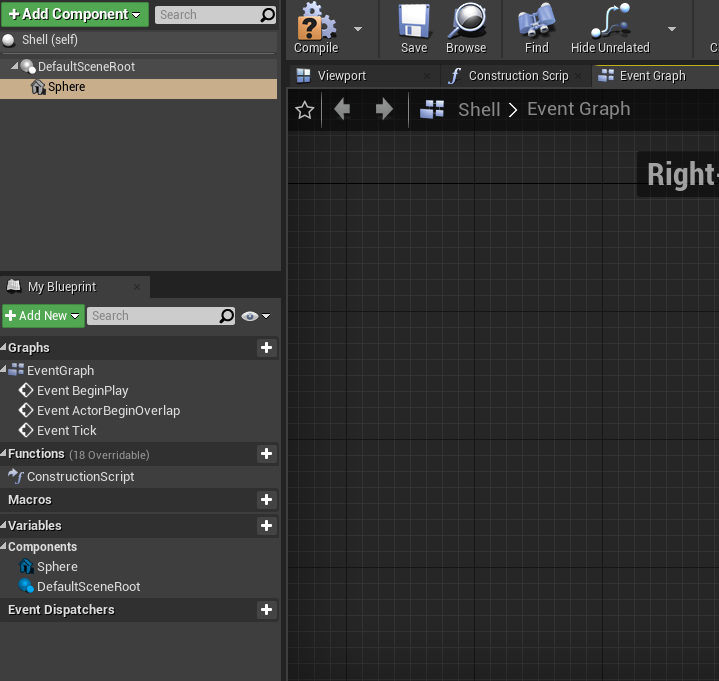
Can anyone tell me why my turrets are not firing at the enemies that were spawned? It can track the enemy fine, but it does not fire at all.
A tutorial that I was following said to add a socket , and have the "bullet" (which is a sphere) spawning from that socket.

No description provided
I had "Collion Handling Override" set to always spawn, ignore collisions
The socket name is ShellSpawn, and the shell is just a generic sphere
 serene hemlock
Can you show your code of spawning the shell?
dusky olive
dusky olive
https://blueprintue.com/blueprint/rrerry75/
This is meant to be my blueprint that spawns the shell. Its part of a larger blueprint that has the turrets tracking and firing at an enemy


Shell settings

 maiden wadi
Initial assumption is that your newly spawned shell actor is colliding with something and being pushed somewhere else.
dusky olive
maiden wadi
Initial assumption is that your newly spawned shell actor is colliding with some...
Since I can't even see the shell actors in the playtests, I'm not sure if it spawned at all.
Besides, I specifically made it so that it supposed to spawn while ignoring collisions
You can see in my 1st and 3rd screenshots
maiden wadi
Could always just add a print on the Shell's beginplay and draw a debug point.
dusky olive
Can you show me how to do that please?
maiden wadi
Run this on Shell's beginplay.

Should show you an orange square where shell spawned if it did. Might also add a Print of the location as well.
dusky olive
dusky olive
Like in here?
Shell does not have a beginplay - its not a blueprint but an object unlike the enemy AI that I have.
 maiden wadi
Shell's parent class is Object you mean?
dusky olive
Yes? I am not familiar with UE terminology so I'm terribly sorry. But basically, Shell has no code or blueprints whatsoever
The blueprint spawning the shell is in the turret
and it supposed to make it spawn through the socket that I have added on top of the tower
You can see it as you scroll up
serene hemlock
the thrid screenshot looks like a normal actor
click on the "Open full Blueprind Editor" - Prompt
maiden wadi
You can see the class's parent in the top right when you open it as well.
dusky olive
serene hemlock
click on the "Open full Blueprind Editor" - Prompt
like this?

yes I can see now
serene hemlock
maiden wadi
Run this on Shell's beginplay.
yes now you can add this to begin play
 maiden wadi
The reason I ask is because everything inherits from Object. But this class itself cannot have transforms, so cannot exist visually. Actors are like containers, they inherit from Object and hold ActorComponents. Actors technically cannot be seen or have a transform either, but they can use their root ActorComponent for this. Components themselves are what you actually see in game.
But yes, your class is an Actor. So you're fine.
maiden wadi
dusky olive
like this?
Right click in the grey graph and do GetActorLocation and use that for the Position.
serene hemlock
you can't see the "Default scene Root"- component ingame like this https://i.gyazo.com/c332c2f89361322e70dbffe6c9b431b8.png
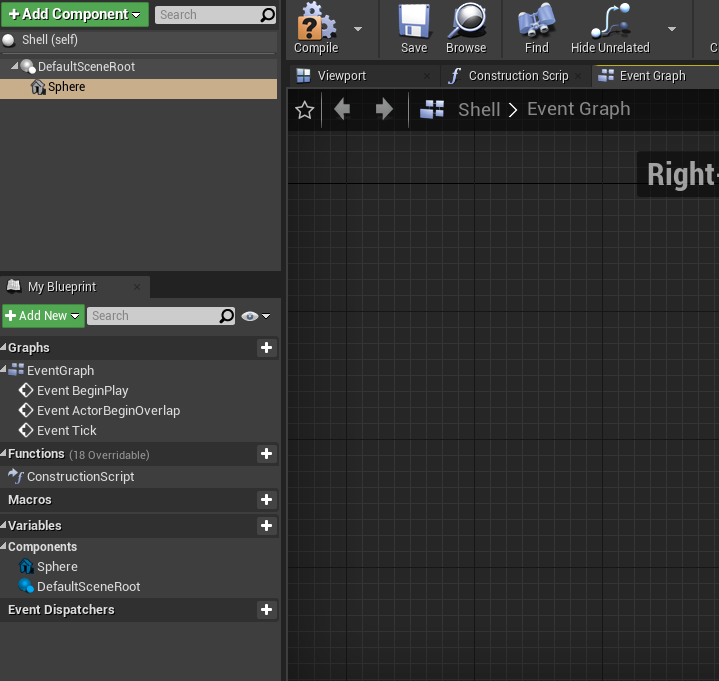
you have to add a mesh that you can see, like a sphere
dusky olive
maiden wadi
Right click in the grey graph and do GetActorLocation and use that for the Posit...
Is this right?
 maiden wadi
Should be. When running that, do you see lavender squares showing up on screen when your turret should fire?
dusky olive
yea so on testing, there was no debig point drawn
maiden wadi
Add a PrintString afte the debug point
dusky olive
like it didn't even spawn
maiden wadi
Use the same GetActorLocation for the string, it should autoconvert it from the yellow vector to the pink string.
dusky olive
like so?

ill have to get on top of that mesh thing that Masquerade mentioned to. I don't know if that will help me though
maiden wadi
Connect the execution pins for DrawDebugPoint and PrintString, but yeah.
Try running after that, see if anything shows up in the top left of your game screen.
serene hemlock
dusky olive
ill have to get on top of that mesh thing that Masquerade mentioned to. I don't ...
get sure that the shell is spawning first like Authaer is saying
 serene hemlock
it is spawning, thats why the text is there, you don't see the shell because it has no visible component like i said
serene hemlock
serene hemlock
you can't see the "Default scene Root"- component ingame like this https://i.gya...
add a sphere like this to you shell
dusky olive
okay I see. Give me a moment please
Ok so it does spawn, and I can see it now but there are hitches
- it spawns immediately when the intended behaviour is that its supposed to spawn only when enemies are in range
- the shell doesn't actually move towards the enemy

you can see a difference
maiden wadi
Your shell needs a ProjectileMovementComponent. And your Shell spawning code needs a check for whether it should fire.
dusky olive
maiden wadi
Your shell needs a ProjectileMovementComponent. And your Shell spawning code nee...
wait so is that what my blueprint is missing?. The first screenshot and and UE blueprint link that I have posted earlier, you can see that it spawns the shell, but it doesn't actually do anything as far as the "projectile movement" is concerned?
maiden wadi
Your spawning code should be nothing more than spawning the projectile with the correct facing, and if it's a homing projectile, setting the target.
You can set up your Shell to handle all of it's own movement from the moment it's spawned with a Projectile Movement Component.
Quite a few shooter tutorials likely use the same thing. Basically just spawning a projectile actor at a location and having the projectile itself set up to shoot at a set velocity in a direction.
onyx token
do variables in child blueprints not get inherited?
dusky olive
yes thats what I plan to do with my turret game. It doesn't have to home on to the enemies like missiles. It can miss, but it just has to spawn and directs itself towards the enemy from the moment its in range
 serene hemlock
onyx token
do variables in child blueprints not get inherited? <:rooThink1:5806148154085867...
serene hemlock
onyx token
do variables in child blueprints not get inherited? <:rooThink1:5806148154085867...
they do, but you don't see them in your "variables" tab. You have to call them manually
dusky olive
does this look valid? Do I need something like "get actor location"? are there variables involved?
serene hemlock
dusky olive
does this look valid? Do I need something like "get actor location"? are there v...
you can add the projectile movement component directly in you components tab like the sphere
serene hemlock
onyx token
thanks alot! <@!266652453187878912>
you're welcome^^
dusky olive
okay i see

Since it is a 2D game, what settings other than "initial speed" and "max speed" do i need to concern myself with?
maiden wadi
@onyx token You can show them as well with the little eye icon.
 dusky olive
like so?
 serene hemlock
yes
onyx token
maiden wadi
<@!359809433771180033> You can show them as well with the little eye icon.

thank you!
dusky olive
Also I tried initially with my first settings and the projectile still didnt move. but there was a heavy frame rate drop. makes me suspect that there is something else going on in the background within the unreal editor that i cannot see
lets try this setting that you suggested
serene hemlock
maiden wadi
<@!359809433771180033> You can show them as well with the little eye icon.
ha I didn't know that too, thanks lol
serene hemlock
dusky olive
Also I tried initially with my first settings and the projectile still didnt mov...
you are spawning a projectile every frame
so that will have a heavy performance hit
dusky olive

it works now?
JEEZ. thats a lot more than i intended
my initial concern before all this was the enemy would leave the turret range before the projectile could spawn
serene hemlock
jap you have to alter your spawn functionality, how do you check if the enemy is in range?
dusky olive
so i changed the fire interval from 5 sec to 0.1
serene hemlock
you mean the actor tick interval?
dusky olive
yea, from here
 serene hemlock
that will just delay the shell spawning
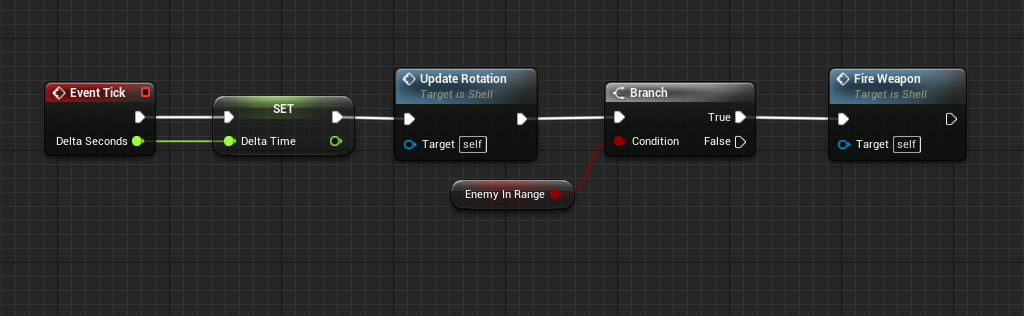
you are calling the fire event every frame with the "event tick"- node, the delay is just delaying the spawn, not creating an interval
dusky olive
I guess thats a technicality - the fire rate did reduce though

my only other issue here is that the shell spawns right at the start
dusky olive
dusky olive
1. it spawns immediately when the intended behaviour is that its supposed to spa...
like so^
serene hemlock
dusky olive
did you reduce the tick rate for this?
dusky olive
I changed from 0.1 to 1.5s
and the velocity to 2000
now it looks less like Touhou game
 dusky olive
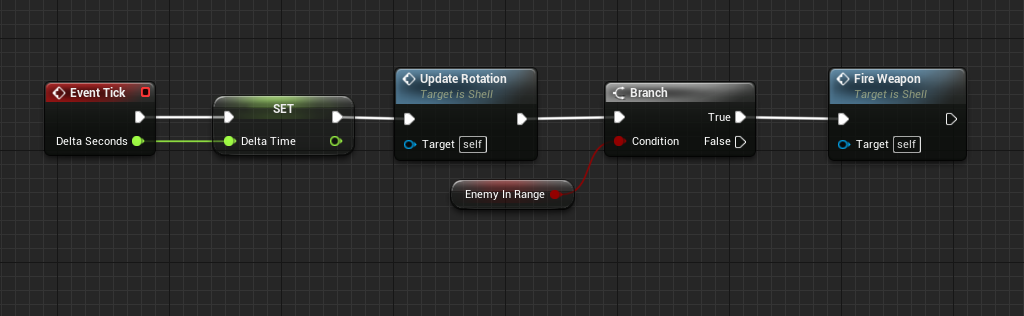
that makes sense, but I feel like I will have to rewrite / add more parts to the target detection and acquisition part of the tower blueprints. I did actually add a boolean value EnemyInRange, but I didn't how to implement it in the current blueprints that I got
EDIT: In the other towers. I have four towers.

You can see it bottom left, top right
serene hemlock
yeah you will have to, has the tutorial that you followed built some functionality to the target detection?
dusky olive
None at all. I think they omitted some parts (which was why I am here in the first place)
Wait
Yes and no
Before all of this, the target detection worked in the sense that the turret could track the enemies. The best way to determine if this worked was via a square turret since it is a 2D game
but now that we are here, its evident that this part that you mentioned is missing
Or maybe I am missing something myself here
I have a single branch here in the part that handles target detection

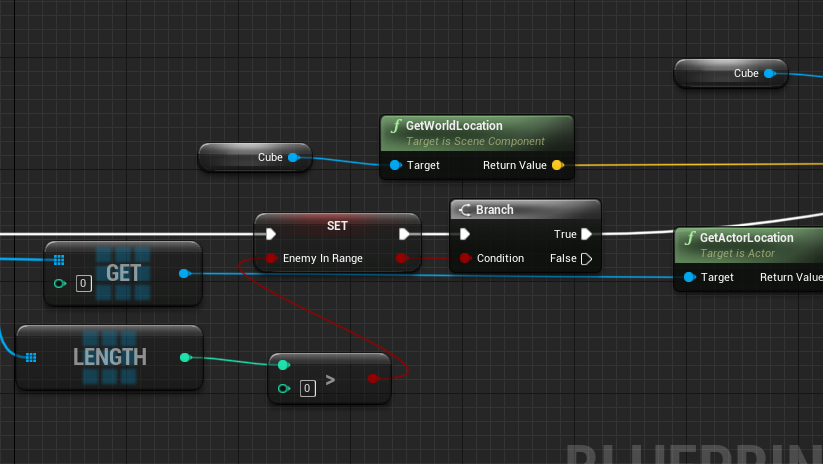
Could a boolean value (assigned false by default) be connected to here, which then changes to "true" upon success?
serene hemlock
can you show me your whole target detection?
dusky olive
serene hemlock
can you show me your whole target detection?
No description provided
 fading oak
whats the best way to make a pawn jump, without using "jump" function as i cannot use CMC
serene hemlock
dusky olive
Could a boolean value (assigned false by default) be connected to here, which th...
yes you can do it like this https://i.gyazo.com/4f165ed63a9cabfcc50fdb4615189a92.png
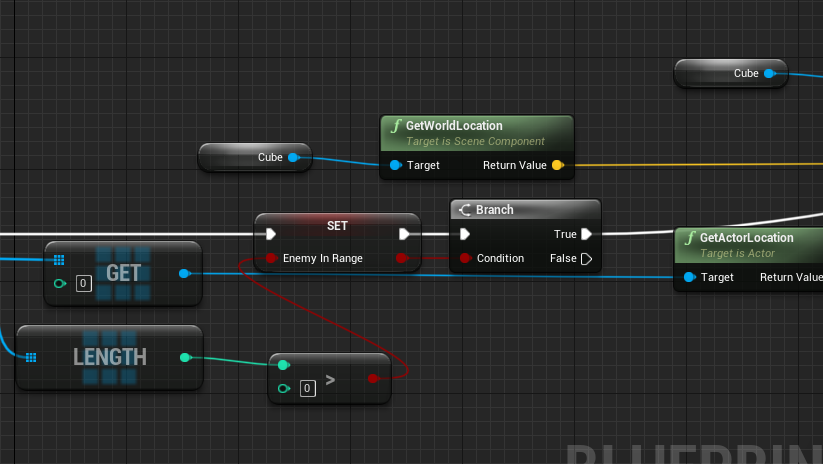
wait that's not testing if the enemy is in range
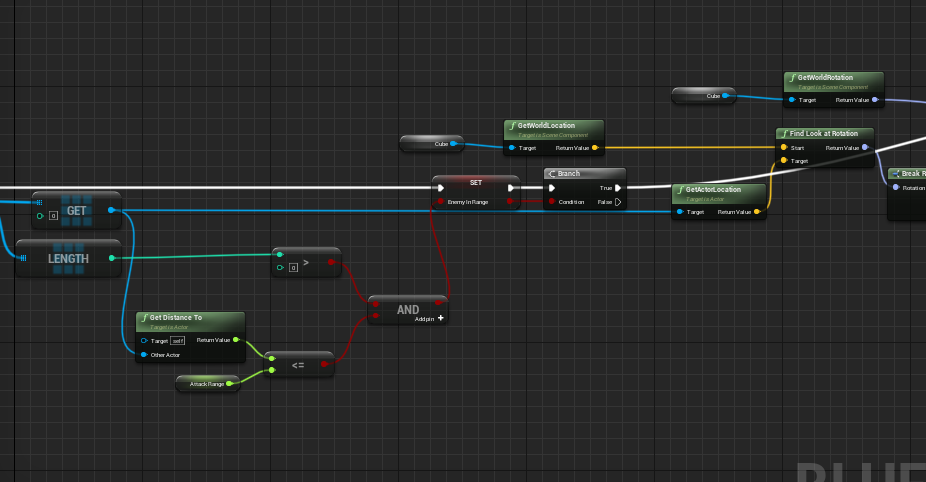
https://i.gyazo.com/e88b1e6b3ec2bd920bb1874ca8ba8797.png that should do it

but this will only check for one enemy, checking for multiple enemies will get a bit more complicated
serene hemlock
fading oak
whats the best way to make a pawn jump, without using "jump" function as i canno...
you can call "Add Impulse" or "Add Force"
dusky olive
I think thats fine? I imagine that in an ideal scenario:
- 2 enemies enter the turret range not at the same time, but sequentially
- The turret tracks the first one detected, aka one in front and shoots it
- The turret destroys first target, then turns to second target
or is there something else to your point that im missing
fading oak
serene hemlock
you can call "Add Impulse" or "Add Force"
thank you!
serene hemlock
the get node after "Get all actors of class" is set to 0, so only the first enemy spawned will be checked
but try getting it to work with only one enemy first^^
serene hemlock
fading oak
thank you!
you're welcome^^
fading oak
new problem! i am moving camera with mouse, but my sphere character will not go in the direction that the camera is facing, i am using torue and physics for movement if that helps

i have it moving my static mesh also but that didnt help the movement
serene hemlock
ha i set the same thing up yesterday https://i.gyazo.com/ffd273db50eca0788dcc35f06047f9fa.png
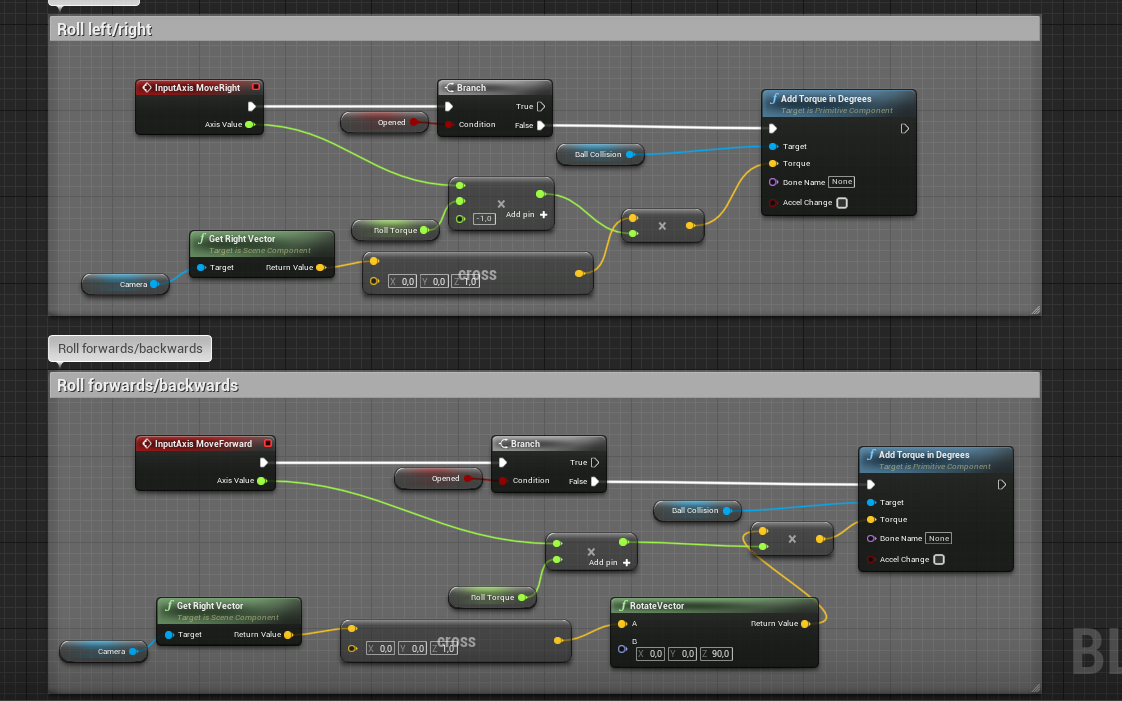 dusky olive
serene hemlock
https://i.gyazo.com/e88b1e6b3ec2bd920bb1874ca8ba8797.png that should do it
dusky olive
serene hemlock
https://i.gyazo.com/e88b1e6b3ec2bd920bb1874ca8ba8797.png that should do it
its a little bit convoluted for me, but i think i got it? does this look right to you?
 serene hemlock
yes this should work
dusky olive
dusky olive
I think thats fine? I imagine that in an ideal scenario:
1. 2 enemies enter the...
wow i just tested and its great. it doesnt spawn at the start, but when the turret has the enemy in range. Thank you so much. Its just a matter of fine tuning now. But I must ask.
Do you think your solution can handle this scenario or will I need to change it up further?
maiden wadi
It won't matter. If it works now, let it work. If you need to come back to it later, do that then. Avoid the perpetual loop of overoptimizing something.
dusky olive
You're right. I'm probably overarching right now so I'll can it for a moment and adjust variable values for the towers. But really, I thank the two of you for all your assistance. It is very, very much appreciated.
maiden wadi
Chances are, you're definitely going to change it later for one reason or another. But one of the greatest skills you'll learn as a developer is to move on to other things and not hyper focus on making things the greatest.
dusky olive
Very sound advice. If it's not obvious enough already, I am a novice with developing work, and UE especially. Again, I thank all of you who helped me.
serene hemlock
you're welcome^^
I'm glad I could help
huh where did the guy with the actor validation question go
 true valve
Any idea how to take screenshot of you rmap from top. If I place a camera, all the post process appear.
 onyx pawn
using static mesh and flipflop I managed to get it to spawn the meshes along the spline but now I need to figure out how to get the meshes that are are spawned to align sides to face each other along curve


this how seating looks currently but without facing each other
 eternal reef
Flipflop a 90/-90 degree rotation when you spawn them? First thing that comes to my mind
 slender hawk
What method would you use to make a trail like the LightCycles in TRON?
icy dragon
slender hawk
What method would you use to make a trail like the LightCycles in TRON?
Basic Anim Trails setup should do the job.
 opaque blade
slender hawk
What method would you use to make a trail like the LightCycles in TRON?
opaque blade
slender hawk
What method would you use to make a trail like the LightCycles in TRON?
Ribbons with Spawn Rate per Unit (Niagara and also exissts in Cascade)
Anim Trail setup could work too, but iirc they have a start,end position (much like beams)
 gentle urchin
onyx pawn
using static mesh and flipflop I managed to get it to spawn the meshes along the...
gentle urchin
onyx pawn
using static mesh and flipflop I managed to get it to spawn the meshes along the...
Face each other or face some common center?
onyx pawn
gentle urchin
Face each other or face some common center?
face in alignment along so they will face following the curve of spline
gentle urchin
So.. stare the next chair in the back?
onyx pawn
like this

this is using code for instanced static mesh
using just single static mesh
but I have two static meshe types I am using
 earnest tangle
there's a function on the spline to get the forward vector at a distance along the spline
you should be able to use that to rotate them so they follow the curve
 high ocean
I have a bit of a math problem. I have a grid, and want to be able to access the adjacent tiles of any tile within the grid, as long as:
- they are valid (this is pretty simple & straightforward)
- they are actually adjacent (without ignoring row/column). Of course this is what I can't figure out but I'm sure it's a very simple math problem 😐
 earnest tangle
Wouldn't it work if you just checked x and y are within the range of n - 1 and n + 1
as long as both x and y are both within that range it should be an adjacent tile
high ocean
lemme get what you're saying through my thick skull...sec 🤦♂️ 😆
earnest tangle

if you calculate the x/y index for the tile, you can then easily find out what the adjacent tiles are
high ocean
that's x divided by y?
earnest tangle
well for example tile 5 is at x=1 y=1, so its adjacent tiles are x - 1 and x + 1 on the x axis
high ocean
oh oh...
high ocean
so THAT is how to approach the thinking, not the numbers themselves 🤦♂️ jesus I suck! Alright, i'll try it out 😛 thanks alot @earnest tangle!
gentle urchin
high ocean
so THAT is how to approach the thinking, not the numbers themselves 🤦♂️ jesus ...
Guess its the same stuff but ;
 high ocean
@gentle urchinOh... modulo. Thanks! 🙂
onyx pawn
earnest tangle
there's a function on the spline to get the forward vector at a distance along t...
this one?
 earnest tangle
Yeah that's probably the one
dusky olive
serene hemlock
but this will only check for one enemy, checking for multiple enemies will get a...
Ok im back with more questions. How much more complicated will this need to be?
Since this blueprint works only for one enemy , I noticed that after cutting down the attack range, the turret kept on tracking the first enemy it spotted OR stays stuck even when there is another enemy clearly within the attack of it
No description provided
high ocean
@gentle urchinSorry for being dumb, but... I guess I don't understand what the "<>" symbols mean.
Not equal? In range? Either one would still return true, since 1 is both in range and not equal to 0 for some squares, so I'm misunderstanding something.
 eternal reef
I did not follow your discussion, but dont you always get the same actor?
You are always referencing actor with index 0
Wouldnt it make sense to use AI Perception
On Percpeption update check how many Actors are perceived, if 1 just target that one
If more, either just focus the one first entering or run a check in the background to continously check their distance to the turret
With this you could make us of Set Focus and wouldnt need to adjust the world rotation of your turret
gentle urchin
high ocean
<@!231467939734355969>Sorry for being dumb, but... I guess I don't understand wh...
Not equal. If the result of the modulo is 0, it means we've reched a new row (when going upwards)
gentle urchin
high ocean
<@!231467939734355969>Sorry for being dumb, but... I guess I don't understand wh...

When going downwards (n-1) we wanna check that % != RowLength-1 (3, in this example)
high ocean
gentle urchin
Not equal. If the result of the modulo is 0, it means we've reched a new row (wh...
Ok, thanks, rn I'm doing this, so it should work but...wtf?! Lemme check breakpoints again. It IS what I did in the function:
 gentle urchin
If False, you should possibly indicate that (unless your true adds to some array i suppose, or just prints)
high ocean
true adds targets, it's a targetting system. False will simply not add target xD
gentle urchin
I see
I guess its hard to say if anything is wrong there not seeing the missing code for the equation 😛
high ocean
@gentle urchin 😭 why silly mistakes like this make me waste hours?! ofc it's working unless i check against the wrong coordinate 🤦♂️ Fek! Thanks alot man!
it's not uniform and I was checking against the other axis
gentle urchin
Glad you got it working
dusky olive
Does anyone have any idea how to make a turret track multiple targets? not at the same time obviously but sequentially within the attack range when the first target is either destroyed or out of range
No description provided
I had the idea to make it loop again but the thing crashed because it causes infinite loops


Both of these solutions didnt work
 maiden wadi
Generally speaking, if you're avoiding BehaviorTrees. You should consider checking targets on a timer or tick, and just make a function that'll find you the closest target, or any target if your current target == null.
Also, avoid WhileLoops, and circling execution like that until you're very familiar logic wise with what is happening. And then definitely avoid it.
dusky olive
lol avoid it til i understand it, then avoid it completely
As for behaviour trees, first time I ever heard of so i dont mind going down that path if it gets me any closer.
As for making it so that turret targets anything else if current target == null, then could I start from the branch

thats how i got my loop idea
but again, clearly didnt work
gentle urchin
Also, I'd consider using a collision volume for detecting targets, adding them to an array and targeting first valid index
On overlap -> Add to array
On end overlap -> Remove from array
dusky olive
Some did actually suggest that to me but i dont know how to add the function myself (or like where does it go) in my current blueprint
because im afraid that it might screw it up beyond repair
I did post the updated blueprint
 bright frigate
I'm trying to implement some simple sprinting. My footsteps sounds are generated by linetrace (since I don't have a mesh for my FP character), so the interval determines how often the sound of footsteps plays.
But what's happening is that when I sprint, it doesn't change the interval. The only way it changes if I'm sprinting and I jump at the same time, or press shift while I'm decelerating after releasing W
 earnest tangle
What's the code that triggers the footstep sound?
bright frigate
earnest tangle
What's the code that triggers the footstep sound?
😄

I followed a tutorial for this
high ocean
@gentle urchinI know I'm a pain in the but, but it's not working afterall... I don't get it. X = 3, Y=4. This is the function:
https://blueprintue.com/blueprint/zovni6fx/
No description provided
earnest tangle
bright frigate
😄
Yeah so there you have it. It's setting a timer at the interval. If you don't restart the timer when you start sprinting, it will keep running at the previous interval
gentle urchin
high ocean
<@!231467939734355969>I know I'm a pain in the but, but it's not working afteral...
Just a tip.. you can use "OR" instead of the branch setup 😛 Is this part of a loop?
high ocean
Nope
gentle urchin
the tip is flawed if its not 😄
So how do you check for several ? Am i missing something here?
Oh nvm,
Got it
sequenced
mb was a tad quick 😄
high ocean
I know but got burned in the past with complicated bools, wasted hours debugging the wrong stuff when it was complicated bools in the end so since then I try avoiding them - I'm just trying my best, but intellect doesn't help much + I'm pretty old alrdy so it won't get better anymore 🤷♂️
bright frigate
earnest tangle
Yeah so there you have it. It's setting a timer at the interval. If you don't re...
where/how should I place it 😅
reset at the end of the timer execution line?
gentle urchin
high ocean
I know but got burned in the past with complicated bools, wasted hours debugging...
Getting into a meeting now, so gotta get back to you after
earnest tangle
Uhh, something like that. You would need to reset the Do Once to allow it to run again, and then run it
it's a bit confusing as to why it's set up in that particular way, but something like that should probably work
serene hemlock
@dusky olive if you still have trouble with it feel free to pm me, I fell like this will get a bit chaotic in this channel with the other issues being talked about as well^^
dusky olive
oh sure, thank you! im spent almost too much time on this so im gonna take a little break and get back to it proper
serene hemlock
yes take your time not to get frustrated haha
bright frigate
earnest tangle
Uhh, something like that. You would need to reset the Do Once to allow it to run...
https://www.youtube.com/watch?v=I973d6ABTf4
This is what I followed in case you want his reasonings.

Hey guys, in today's video, I'm going to be showing you how to create a footstep system in first person. This works if you don't have a mesh or animations. For better third person examples, check the video below the SFX links.
Footstep Sounds:
https://freesound.org/people/GiocoSound/sounds/421150/
https://freesound.org/people/GiocoSound/sounds/...
It made sense when I implemented it but it's been several weeks/months so it's kinda blasted out of my mind lol
normally in just writing code I'd just have a bunch of ifs or whiles to check the states of each of the variables before executing these other functions (e.g. the linetrace branch) but with the way blueprints are it kinda overwhelms me
 naive grail
How i can handle instance editable feature like engine does. If you change "Brush shape" it changes other options related to shape
 bright frigate
normally in just writing code I'd just have a bunch of ifs or whiles to check th...
bright frigate
bright frigate
normally in just writing code I'd just have a bunch of ifs or whiles to check th...
I tried doing this just now but it made no difference

ok it's resolved
in his notes, I just needed to do this and call the event at the end of the sprint code
 earnest tangle
naive grail
How i can handle instance editable feature like engine does. If you change "Brus...
earnest tangle
naive grail
How i can handle instance editable feature like engine does. If you change "Brus...
You probably need to use C++ for this, I don't think it's possible purely in BP's
(eg. using a UPROPERTY with Instanced or something might work)
true valve
Any idea why saving could long time?
 worthy tendon
earnest tangle
You probably need to use C++ for this, I don't think it's possible purely in BP'...
worthy tendon
earnest tangle
You probably need to use C++ for this, I don't think it's possible purely in BP'...
yeah, but that's a stupid limitation. they could easily allow that feature but yet they didn't
earnest tangle
Yeah who knows, there's a lot of limitations in BP's which don't necessarily make sense. If you're serious about UE development, it's a good idea to eventually start learning C++
naive grail
earnest tangle
You probably need to use C++ for this, I don't think it's possible purely in BP'...
I need to be certain but thx anyways 🙂
naive grail
naive grail
How i can handle instance editable feature like engine does. If you change "Brus...
Any other answers?
high ocean
@gentle urchinIt's fine, went around it in the end, just couldn't get it, so made vector2 vars as coords for tiles and just went classic +/- on them 😆 Thanks again for ur time! 🙂
 fallen glade
Are there any performace concerns using child actors ? couple per character ?
earnest tangle
Probably not much beyond just having regular actors
worthy tendon
naive grail
Any other answers?
not possible in blueprint. although you can have class reference variables. but you can't change default values of the selected class. you can create child blueprints of that class with adjusted default values and select child blueprints instead.
 storm vigil
Hi. Is this an ok setup for adding randomization on items being spawned? The container or enemy will only spawn one item. I have luck variable that increases the chance to pick the select that has rarer list of items or should I use a loot table (map dictionary?) to just specify the chances of spawning each item? Any downsides using this setup? Thank you
 storm vigil
or this one
 earnest tangle
Seems reasonable to me. It depends entirely on how you want it to work really
In this setup, all commons have an equal chance of spawning in relation to each other, and all rares have an equal chance of spawning in relation to each other
So if that's how you want it to work, then I don't see any downsides here
 spare vessel
Hi is there anyway to get current camera exposure value in a material
storm vigil
earnest tangle
Seems reasonable to me. It depends entirely on how you want it to work really
Thank you 🙂 Indeed, if I need this to be complex then I would need to learn how to use map (probably a mix of item data class (purple) and float (green) to set each item, I would also need to insert a logic so that the luck variable can affect the chances of getting the rare items.
earnest tangle
Yep
 vague birch
Hello, wondering what options I have if I would like to connect my game to an active directory domain. The connection could be as minimal as checking if the email entered is valid or not (available in the domain) The goal is to use Windows credentials to authorise access to the game
 drowsy flame
Is there any way i can select faces of a mesh inside a blueprint and modify it in real time?
dawn gazelle
vague birch
Hello, wondering what options I have if I would like to connect my game to an ac...
You probably don't have any options in #blueprint for something like that. You'd probably have to code in LDAP connectivity within C++.
earnest tangle
vague birch
Hello, wondering what options I have if I would like to connect my game to an ac...
that's an interesting feature... but you'd probably need to do this with C++ using the appropriate windows apis
glass stump
odd ember
the same blueprint
Ah, thank you! :)
vague birch
@earnest tangle @dawn gazelle cheers! Was looking for anything really, this should be a good start :D
 rancid quartz
Hello. I have a quick question about efficiency.
For a five second timeline, is it worth it to retrieve a map value and store it in a variable before playing in order to avoid looking that value up every frame/update during play? Or are map lookups already pretty light?
Any advice would be appreciated.
Cheers.
earnest tangle
It's unlikely to have a visible impact
rancid quartz
Thank you!
 viscid blaze
What's the correct way to use Interfaces along with Inheritance? I've looked up some documentation, but I'm not understand how you technically go about it.
It's my understand that you only use the Interface Function for the Parent Class, and then actually override the Parent Function when you go to impalement it on the Child Classes. Is that correct?
Are there any example projects out there that anyone knows about that I can deconstruct?
 lament trail
Hi - anyone know if its possible to add sequencer keyframes for a camera at runtime using blueprint functions?
 near ruin
Hello. I'd like to make the doors in my project become gradually invisible as the player (FPS) approaches. Completely new to BP, any hints as to what I should look into? My idea was to first create a class BP for the door blade and replicate this throughout the level. Then bind a volume to the player position and check for collision. Any smarter ways of approaching this?
earnest tangle
You could probably do that in a material by just checking distance to camera or something
near ruin
Interesting! And perhaps the checking should start when the player collides with a volume, instead of having it on tick?
earnest tangle
depends, it should be a fairly cheap thing to do in a material though, basically you'd just lerp by the distance (plus some math bits)
near ruin
Alright, I'll look into it. Thanks!
 proud notch
Hi,
Any documentation or tutorial or information about loading a level a few seconds before entering it? or how to handle level loading?
I have a VR tour and at some point the player change levels, but when switching levels it takes a few seconds of freeze screen then on the next level textures are very low quality for a few seconds, and that looks pretty bad for the experience.
I am looking for a way to load the textures and level before entering it for the transition to be as smooth as possible.
appreciate any help regarding that.
odd ember
proud notch
Hi,
Any documentation or tutorial or information about loading a level a few s...
you'll probably have to resort to cpp for that, unless you stream the levels. and even then that would require some hacky workarounds
biggest issue is that in either case nothing is async from BP afaik
fallen glade
earnest tangle
Probably not much beyond just having regular actors
It's that much worse than components? Thank you for the answer!
odd ember
really wish they'd revamp child actors
I meant the component
I don't consider spawning an actor and attaching it a child actor
but that's just semantics
but also, a third way that's vetted is to add explicit references to actors in the same level
the actors can be linked during editor time and the references work before beginplay
earnest tangle
I'm not sure if child actor components really have that much wtf behavior
you just need to know that if you delete the parent actor the child actors go away too and that's pretty much it
odd ember
there's plenty of weirdness, memory hogging and wtf associated with child actor components
earnest tangle
I remember I was wondering about this and nobody there could actually explain it at the time 
It was mostly that "yeah if you just know they get deleted when the parent is deleted then yeah that's mostly it"
odd ember
kind of like how structs in BP also screw up from time to time
earnest tangle
that's kinda weird because the child actor component isn't that complicated
I guess the part of it actually spawning it when in editor might cause some weirdness
proud notch
odd ember
you'll probably have to resort to cpp for that, unless you stream the levels. an...
mmm do you know how to implement a loading screen? it doesn't matter is not a smooth transition, what it matters to me is not having that freeze time and looking the texture loading in the next level... maybe a loading screen is just enough for that case, but I am not sure how to do that.
odd ember
proud notch
mmm do you know how to implement a loading screen? it doesn't matter is not a ...
loading screens are cpp exclusive, but there's a resource on the wiki somewhere
oof I can't imagine how bullshitty that must be tbh
odd ember
well if it's just the transition level it's perhaps just moderately more expensive than a flat loading screen
I'll go out on a limb and say nothing about VR is fun
at least development wise
that's how cpp handles it, more or less
but the whole loading screen shebang isn't available
because of what I imagine some low level constriants
earnest tangle
who needs load screens
proud notch
This could work, just a dark room is enough, same for the start of the next level. not a very elegant solution but elegant enough for a non developer like me.
earnest tangle
my game just freezes when you load, then loads into the map, and you might luck out and see items teleporting because their positions changed
:D
odd ember
tbh implementing loading screens was like a 10 min job with the wiki so I dunno
earnest tangle
lol probably :)
icy dragon
proud notch
This could work, just a dark room is enough, same for the start of the next leve...
Might as well go for the old Source method, by showing a "LOADING" text while everything freezes (iconic Source audio glitch won't be replicated tho)
odd ember
I remember HL1 loading screens lasting a good 2 minutes back in the day
those were the days
proud notch
My case is about 4 seconds tops, 2 second freeze and 2 seconds loading textures. but it looks ugly, and this is a VR archviz experience, so client is picky.
odd ember
hire a programmer or do the cpp loading screen yourself. if it's a professional job I know I would
proud notch
yeah I may take that route if I can't do something nice myself.
other option is jut to bring the second level to the first one and thats it. no switching between levels. but I wanted to learn how to do it the right way.
odd ember
learning projects shouldn't be professional projects IMO
proud notch
every project is a learning experience.
odd ember
a learning experience is different than a learning project
proud notch
agree.
icy dragon
proud notch
My case is about 4 seconds tops, 2 second freeze and 2 seconds loading textures....
For one thing, HL Alyx displays a full screen image in lieu of ye olde Source 1 loading screen.
proud notch
but how would I know I need to hire a CPP dev if I didn't even knew that what is needed?
odd ember
you gotta do some risk assessment
proud notch
icy dragon
For one thing, HL Alyx displays a full screen image in lieu of ye olde Source 1 ...
yes, that could work too, just not sure how to display it.
odd ember
due dilligence and research for the issues that you may encounter
proud notch
that is what I am doing..
icy dragon
proud notch
yes, that could work too, just not sure how to display it.
I never worked for VR (and I have historic health problem with it), so not sure how the widgets are handled in VR.
odd ember
sounds like you're doing it as the last thing in the project though
it's something you ideally do pre production
proud notch
icy dragon
I never worked for VR (and I have historic health problem with it), so not sure ...
it is a PCVR experience, since they didn't like the mobile quality. but I guess is still different?
 quartz pawn
how do you change an objects trace channel?
odd ember
in the collision settings
proud notch
odd ember
sounds like you're doing it as the last thing in the project though
Art and looks is priority for the client, levels switching was something I wanted to do, not a requirement. and yes I am not very experienced, but I am good in what I do and that is why the client trust me, even if I am learning a few things along the way, the client knows this too.
odd ember
I guess this is the learning experience (tm) for this project then
proud notch
part of it. the big learning experience was they didn't actually wanted a mobile VR experience, and they switched in the middle of the project, I learned that I should have insisted even more on a PCVR experience (even when I did insist). archviz is a mess most of the time, clients change scope every day or assets, they give you very little time, and a lot more issues, that is why is hard to plan ahead projects like this, and I agree is when you need the most to plan ahead, but is just not possible sometimes.
odd ember
I do think gamedev is lucky in that sense that stakeholders can't change their minds too often, or nothing would get implemented
not that the road is any less bumpy because of it
 unique wasp
This is the MOST AMAZING error ever. Why can't I pass a material to a function even if the types are seemingly correct?
 odd ember
you need a material interface
quartz pawn
hi so I have a question. I am creating an item pick up system. Right now whenever I interact with an object, I want it to add that object class to a class reference array I got. However, its an actor specific class reference for its children and its self. I am wondering how I can take a trace hit actor and cast it to its parents class. (sorry if this is confusing)
 odd ember
that's because a material can either be a material, or a material instance
dawn gazelle
unique wasp
This is the MOST AMAZING error ever. Why can't I pass a material to a function e...
The types are different. One's a Material Interface Object the other is a Material Instance Object
proud notch
odd ember
I do think gamedev is lucky in that sense that stakeholders can't change their m...
yeah, I know game dev is not easy either, but at least you have a consolidated team or even someone knowledgeable asking for things an not just a random suit expecting AAA quality in 1 week. :/ hehe.
odd ember
the classic game of cop and blueprints
quartz pawn
quartz pawn
hi so I have a question. I am creating an item pick up system. Right now wheneve...
anyone?
Thats what I am trying to do. I have a parent actor and I have children of that parent
well i want to get the class of the hit actor and add it to this array
unique wasp
odd ember
you need a material interface
Ohhhhhh I misread instance as interface, thinking I already had the correct type. Turns out the error made sense after all. Thanks! :)
quartz pawn
but i want the array to be only children/its self of its parent
thats the issue
it wont add
icy dragon
proud notch
it is a PCVR experience, since they didn't like the mobile quality. but I guess ...
Even in PC VR, you'll hit with limitations quickly. Note that you really have to prioritise framerate above all else, otherwise you cause mass nausea on your client.
quartz pawn
"Actor Class Reference is not compatible with Item Actor Class Reference"
 regal crag
So I don't know if anyone can help me but I tried using fake 2d lighting and for some reason the intensity of this is that of the sun for some reason
 odd ember
probably better to ask in #graphics @regal crag
but yeah intensity
point lights do start with like 5000 intensity
quartz pawn
 proud notch
odd ember
hire a programmer or do the cpp loading screen yourself. if it's a professional ...
proud notch
odd ember
hire a programmer or do the cpp loading screen yourself. if it's a professional ...
if you know cpp and are interested, please send me a quote.
quartz pawn
because its taking a class reference
odd ember
proud notch
if you know cpp and are interested, please send me a quote.
ah man I appreciate it but I don't do work for hire. I'll see if I can find the wiki page for you. it's really not complicated
quartz pawn
but i the object gets deleted
what
whats that
but i need to add it to an array
that gets used in the future
like spawned in
proud notch
odd ember
ah man I appreciate it but I don't do work for hire. I'll see if I can find the ...
cool, thanks.
quartz pawn
so it doesn't matter if the object class gets deleted mid game
and reused?
the object i mean
the actor
odd ember
proud notch
cool, thanks.
In this tutorial I'll show you how to properly setup a self-contained Loading Screen System for your game - which will allow you to safely play movie files, audio clips or load a widget to the screen during any type of map loading.
quartz pawn
but when i cast to the item_actor object
will it work for the children?
it fails
it was a child of it


what should I look for?
it says none
but that would be impossible
as the interface executes
on the correct actor
and the trace says it hits something too
idk what debugging to do
it makes no sense
odd ember
figure out why you get null pointer instead of an actor ref from your trace
maybe the actor is pending kill
quartz pawn
thats it
 last walrus
how do I compare bool with enum? this is the best solution I found so far...

dont look at the name of bool
just an example
I'm making game for two players
so if it's 1'st player turn = second cant do anything and vice versa
icy dragon
last walrus
I'm making game for two players
so if it's 1'st player turn = second cant do an...
Why not just directly use bool value?
Something like bIsPlayerOne
Or more elegant solution would be integer for player index for >2 players
last walrus
icy dragon
Why not just directly use bool value?
because there will be moments when none of players can do anything
icy dragon
last walrus
because there will be moments when none of players can do anything
Using the integer value, you can do switch case with it.
In fact, enums are in essence named (unsigned 8-bit) integers
last walrus
icy dragon
Using the integer value, you can do switch case with it.
so I'll anyway use switch/select
I thought theres a way without them
if it's true, then second player cant do anything (cuz it's 1'st player turn)
hard to explain without showing all the code
dawn gazelle
You may as well use the enum directly. If you need to store who's turn it is, then just create a variable using that enum. If you want it to be no-ones turn, add a "None" value to the enum.
last walrus
well
I have results of comparing
1 = first value of enum and ETC
... 1 2 3
T 0 1 0
F 0 0 1
yes
1 is "none"
 indigo bough
Anyone who has worked with basic debug controls for actors...
Looking at adding a movable point, which is only really adjusting location in the X axis relative from it's parent. If I want to add an object that is editable per-instance of an actor through a translation gizmo, how would I do this? Is it a case of adding a scene component to the actor, and just navigating to that in the blueprint actor rollout (in the scene details panel)? Or is there a way to sort of make it clickable/selectable without that extra digging into the actor itself?
(Strictly a design time thing, editor only, etc, etc.)
dawn gazelle

 safe sigil
How can I reparent an actor?
I mean in runtime, sorry I was not really specific 🙂
I want to pickup an iten and parent it to the pawn
I am looking for the right function block for that. I do have the event and the actor in the blueprint but I do not know what to do next
Maybe I am using the wrong term for that
I think that is the right term for what I mean, I look into it. thanks
If I want a certain point in a blueprint to attatch it to, what component should I use? A scene?
 warm ermine
Question - How do I keep my current Stamina from going over the max Stamina?

 odd ember
jesus no
glass stump
what's the best way to do like alert states? like where an enemy is just patrolling, then when they're aware of a player, then when they're attacking a player, that kind of thing? would each state me like a new task in the BH?
odd ember
just use a select float node where the bool is stamina >= max stamina
odd ember
glass stump
what's the best way to do like alert states? like where an enemy is just patroll...
fluid states
glass stump
odd ember
fluid states
Ah, thanks, I'll look into that! :)
glass stump
odd ember
fluid states
is that what they're commonly known as because all I'm getting is stuff about water lol.
odd ember
it's basically a state tied to a numeric value rather than rigid enum or bool states
so like, "awareness" might be fluid state where it might go from 0% to 100% aware
then you decide how much awareness to add each frame based on what the AI is experiencing
and add threshold values for specific behaviors
glass stump
ooh, that's really good and way more dynamic than i was expecting! this sounds like it'll do perfectly. i'll try it out, thank you! :)
 civic briar
Is the only way to have a bullet trail effect work with line tracing is by using a dummy projectile ?
I'm stumped.
I decided to use line tracing for bullets in my game because it makes the most sense for the playstyle.
Although originally I tried using projectiles and the collision is super inconsistent. Especially in multiplayer
odd ember
just create a fake spline mesh or something that spans the length of the trace
but yeah otherwise you gotta fake it
civic briar
Yeah I want to start playing with Niagra effects
odd ember
good luck, that's quite the rabbit hole
 timid whale
Hi all, quick question about blueprint organization: is there a hidden cost to creating multiple event graphs in a blueprint actor?
I'm grouping blueprint nodes into separate event graphs for code organization, but I dont want to unknowingly incur hidden runtime or compile costs
odd ember
don't know that the VM makes a difference of them once compiled
even so you could easily move between graphs without any issue
fiery swallow
timid whale
Hi all, quick question about blueprint organization: is there a hidden cost to c...
no
timid whale
cool, thanks
another question, can anyone share if they have a process regarding turning blueprints into c++ classes
is there some automated process, do you have any metrics for measuring blueprint class complexity
is there some rule of thumb for when its time for a bp class to become a cpp class
I've basically just looked at some of my code and realized some of my blueprint classes have like several graphs, over 20 events, etc
I try to always start with a cpp base class
odd ember
architecture is usually something you will want to plan for early, not make changes in late
timid whale
and then when things look complex and unlikely to change much I pull code into the cpp class
true, but my approach to this game project has been highly iterative and experimental
so there were a lot of emergent game mechanics that were easier to prototype in blueprints
odd ember
generally I wouldn't look at the amount of functions or events as a measure of when to put things into cpp, but rather when a profiling a class is found to not be performant enough
timid whale
especially because the unreal cpp api is kind of huge and it took me a while to even figure out how to properly utilize rider and the intellisense and other features
oh okay, that sounds interesting
could you recommend some docs on profiling class performance
timid whale
sounds good, thanks
dawn gazelle
warm ermine
Would that look something like this?

The MIN in this case will take whichever is lower of the two. So if your Stamina +25 > Max Stamina, then it'll choose the "Max Stamina" value instead.
 fleet cedar
Can anyone tell me how to get the forward vector of my camera but without it's rotation?
Only it's yaw forward I guess
odd ember
dawn gazelle
The MIN in this case will take whichever is lower of the two. So if your Stamin...
a select float eleminates quite a bit of that
odd ember
fleet cedar
Can anyone tell me how to get the forward vector of my camera but without it's r...
you mean, the global value for forward? (1,0,0)?
 sand shore
odd ember
a select float eleminates quite a bit of that
sand shore
odd ember
a select float eleminates quite a bit of that
I think using a select is more nodes there, no?
You still have the get stamina and max stamina nodes. You still have the addition node. You still have the set node.
You'd replace the Min node with the select node, and then have to add a comparison node.
odd ember
I guess you're right in min handling the conditionality
 supple dome
fleet cedar
supple dome
fleet cedar
Get forward vector -> normalize 2d
 lethal slate
hey, im having a weird error with Blueprint
i made a variable to test something regarding the types, but now i can't erase it cuz it crashes the editor
i can change the type and compile it just fine, but trying to erase the variable makes it crash
this is the error that shows
Assertion failed: NumNewPins == InNewPins.Num()
How can i fix this?
fleet cedar
Thanks @supple dome
 blissful gull
is there an easy way to replicate timers?
dawn gazelle
blissful gull
is there an easy way to replicate timers?
What are you needing to replicate them for?
dawn gazelle
So it's just a timer that really only needs to exist on the server right? You can just replicate the current timer value if someone is viewing it, no?
blissful gull
yes but then i would have to replicate it every frame, no?
warm ermine
@trim matrix @odd ember @dawn gazelle
Got it working. Thank you for the advise 🙂
dawn gazelle
blissful gull
yes but then i would have to replicate it every frame, no?
No, replicate only once, start a timer client side from that value. The server knows the true value.
blissful gull
how would you do that?
dawn gazelle
blissful gull
how would you do that?

On the client side if you needed to see it ticking down, then you can start your own copy of the timer from the replicated "Timer Value"
 pseudo pelican
does anyone know how I could make an impulse play on a timeline but not exceed a distance when I scale the timeline length up or down?
spark steppe
can someone enlighten me about world soft object references?
it feels like they are all nullpointers or something on runtime
 spice ibex
spark steppe
can someone enlighten me about world soft object references?
spice ibex
spark steppe
can someone enlighten me about world soft object references?
Short version: soft object references are used when actors/objects that may or may not be loaded yet. i.e. could be actors in the level that has not streamed yet. There are others cases too when you can use soft objects references. Now about them being null pointers, you have to resolve the soft reference when you are trying to do something to the actor referenced by it. Once you do that, check if the resolved reference is valid or not, if it's valid, you are good. If it is not, you will have to load it, you can use a node called "async load asset", it's a latent function so once it's finished executing, you should have the reference to the actor. You may have to cast to the actor once the async load is done. If you still don't have the actor reference, it means there were issues loading the actor.
spark steppe
thanks, i'm aware of that, but what about world soft object references, when i store them in an array, can't they be compared to another world soft object reference?
i'm trying to setup level streaming of multiple levels at once, and im kinda in a dead end right now 😄
in theory my code should work, but it doesn't as expected
spice ibex
By world soft object references, do you mean the actors/objects loaded by a streaming level OR the reference to the streaming level itself?
spark steppe
the reference to the streaming level itself
so its a soft object reference on a level file
spice ibex
Ah okay, is it not working in the editor or packaged game
spark steppe
editor
the references are valid, it loads the levels fine, it starts to get buggy when i try to load 2 at once or unload 2 at once
spice ibex
Are you doing level streaming or spawning level instances
spark steppe
thinking about it, maybe it's a limitation of level streaming that only one can be processed at a time?!
i'm streaming them in/out
spice ibex
I think you can only load/unload 1 at a time
Hover over the stream level node, it may tell you that calling it again has no effect
spark steppe
so i would have to make a queue and wait for the completed event... uhm... fun time
spice ibex
Yeah I had similar issues with level instancing last week
spark steppe
ok, thanks i haven't noticed the tooltip, so my bad
also only shows on the load stream level, not on unload, but guess its the same for both then
 spark steppe
i want to dynamically load/unload them when the player leaves/enters specific areas
so i guess i'm better of with some queue system which can handle multiple levels
spice ibex
This can handle multiple levels and it will not have the issue you were having before, i.e. you will be able to use the for loop to load multiple levels at the same time
spark steppe
but it can't unload them?!
spark steppe
multiple at once?
 spark steppe
oh i see
is there any way to get the package name from a world soft object reference?
spice ibex
So I am loading 3 levels and after 5 s, unloading them all
 spark steppe
just because i find it easier to handle to have the actual levels linked, instead of their names 😄
also thanks for testing it 👍
spice ibex
spark steppe
is there any way to get the package name from a world soft object reference?
no it can't do that
np gl further 🙂
spark steppe
your way seems to be the "official" way, so guess its smarter to go that route
spice ibex
I think both have their use cases, for example, if you want to have a loading screen that wait for all the levels to load, it makes sense to use the latent function which actually tells you that the level is loaded
My method can do that too, but you will have to bind events to the level streaming object
Like this

So it's up to you xD
spark steppe
ok my queue system works, so it was all just related to the fact that it can't do multiple at once
thank you
bright frigate
Hello, this is my crouching code. It goes smoothly down, but on the way up, it snaps instead of interpolating. I followed a tutorial, but I'm not sure why it doesn't work in reverse for me.
 spark steppe
i don't understand whats going on there, which implies that the tutorial is a mess on its own
where is event onStartCrouch and onEndCrouch even called?
bright frigate
I'm not using them
top left is doing the crouching by adjusting heights of the camera and capsule
spark steppe
yea but it's moving the camera as soon as you hit/release the button
i'm surprised that you said it goes down smooth
bright frigate
https://www.youtube.com/watch?v=aW-y5sT1fMw
This is what I followed for the interpolation

Using the first person shooter template, this tutorial covers how to make the camera smoothly change height when crouching/uncrouching.
This is designed to be quick guide to get you up and running, rather than an explanation of the theory behind it.
Tutorials are hard.
UPDATE - If you're using the Vector Spring Interpolation, you'll need to c...
works fine in this
the first half. The second half he uses spring stuff which isn't applicable to me
I should add that his version seems to be a toggle crouch rather than a press crouch as it is mine
spark steppe
where does he use AddLocalOffset in the input action event?
bright frigate
well that I did earlier I didn't follow him :p I only saw and used this video for the interpolation
:p
maybe it's because in the crouching bit I'm putting hard values and in the rest it's using the variables for relative locations
but I don't know what I should do to bring them together lol
spark steppe
remove the addLocalOffset and store the location offset in the camera relative location variable
bright frigate
I am storing the original camera relative locaiton in the construction script
 spark steppe
then make a new variable, name it cameraTargetOffset
on inputActionCrouch pressed you set it to 0,0,-40
on released to 0,0,0
then in eventTick you add cameraTargetOffset to CameraRelativeLocation and use that as target value for your vinterp
and remove the addLocalOffset, thats nonsense if you want smooth transition
bright frigate
like this?

this still snaps on the way up 😦
oh sorry it was supposed to be vinterp
hold on
no it's still messing up, now I crouch halfway through the floor and only come back up halfway (still snapping).
spark steppe
first of all, on released you should set it to 0,0,0
2nd you wasn't supposed to change the variable which stores the result of the vinterp node
3rd you where supposed to add the new variable to the variable which is on the target input of the vinterp node
 bright frigate
it doesn't go through the floor, but on the way up it still snaps and it ends up lower than what it should return to
and it's like it goes back to original height then goes down to this new height
spark steppe
show the input action event
bright frigate
With 0.0 for Z, it goes even lower for the return height. With 40 it's a little higher but still lower than original

maybe I need to change something here
 bright frigate
those two events?
spark steppe
yes
bright frigate
no difference
spark steppe
remove the current interpolated location variable from the whole thing
and as new input for the vinterp current you use the same as in your construction script
relative location of the camera
bright frigate
no change and now my character is chattering his teeth lol (rapidly short movements up and down)
how would you implement this whole thing from scratch?
spark steppe
disconnect the capsule half height changing nodes for testing
bright frigate
ends up basically doing the same thing just at a lesser intensity
disconnecting means it doesn't crouch fully but goes somewhat down and begins the chattering teeth
spark steppe
chattering?
bright frigate
the vibrating
spark steppe
something is messing with your camera position
are you using a armature which also plays animations?
bright frigate
spark steppe
are you using a armature which also plays animations?
no nothing, there's no mesh, just camera and capsule
I dunno why my image isn't sending
 spark steppe
well it was there
you shouldn't use the camera relative location for the last thing i told you
you should use the relative location from the camera object
this

discord seems to be a bit dizzy atm
bright frigate
but that;s what it is, ^ that is stored in cmaera relative location
spark steppe
no, it's not what it is
it is the camera location at time of construction, which isn't really where the camera actually is
bright frigate
right
I did this and it acts the same as all the others before (i.e. smooth down, snap back up)

even more confusing, with 40 and 0 for the released relative location, there is no difference lol (??)
I'mma reset this back to what i had before I lose it lol
fading oak
how do i get my player to turn with my camera?
spark steppe
so you haven't tested with the current relative location?
instead of the relative location at construction time
bright frigate
I did, I went as far as to replace all occurrences of construction time version of the variable with the component version and it made little difference 😢
spark steppe
i can't help you if you do some stuff on your own like that
you still need the construction reference for the vector addition
bright frigate
I tried that as well, it didn't make a difference
I'll see if I can try it again
the mystery is why it's not applying the interpolation on the way up, so I'm thinking I need to update the current location after it has changed. Which I believe is what happens at the arrow
 bright frigate
spark steppe
you still need the construction reference for the vector addition
bright frigate
spark steppe
you still need the construction reference for the vector addition
but you just said I needed it!
spark steppe
i did not
bright frigate
ok can we go through this algorithmically in text so that I don't get confused by pins and nodes
 bright frigate
construction: save current and interpolated location of camera
in my original state of the BP before all the changes:
on crouch: set camera offset to -40, set capsule height to 40
on release: set camera offset to 40 (so reverse), set capsule height to 88 (original)
on start crouch, get relative location (from construction time), add it to the scaled half height and set the new value to current interpolated location.
on end, do the same but subtract
in tick, interpolate between the current location of the camera to the relative location <-- these will be different once I press the key, since I have taken out -40. Set this to current interpolated location and then set relative location of the camera.
spark steppe
construction: save current and interpolated location of camera
on crouch: set camera offset to -40 , set capsule height to 40
on release: set camera offset to 0 (so reverse), set capsule height to 88 (original)
whatever...
you can intergrate the capsule once you got the other stuff working, and got a glimpse of whats even going on
bright frigate
spark steppe
on crouch: set camera offset to -40 ~~, set capsule height to 40~~
if I unpin the capsule heights, then nothing happens, nothing moves.
fading oak


this is my movement and my camera
is there a reason my character isnt moving in the direction the camera is facing?
like, i can move the camera fine, but my "forward" is the same direction no matter what way im facing
bright frigate
spark steppe
construction: save current ~~and interpolated~~ location of camera
Ok I've done it now
 spark steppe
you still have the capsule stuff connected...
bright frigate
there is still a very very slight snap in the beginning of getting up, but then it's smooth. Is that expected?
spark steppe
no, there shouldn't be a snap
bright frigate
spark steppe
you still have the capsule stuff connected...
Sorry yes, after disconnecting this goes away however it does seem to not go all the way down as before, so is that a difference in both of their heights?
spark steppe
yes
bright frigate
so I don't need to bother with capsule height?
spark steppe
well, you have to
bright frigate
yea about collision I was about to say
spark steppe
show your character blueprint hierarchy
bright frigate

gun, bullets etc are all hidden and not needed
This is with the capsule connected
this is disconnected
spark steppe
your problem with the capsule is that changing its height will move the camera
that's why it "snaps"
bright frigate
so shall I only change capsule height then instead of the camera?
spark steppe
i'll leave it to you to figure that one out
put it on your todo list if it's to much now, you should really understand what you are doing, and actually it seems you don't 😄
drowsy flame
Hello anyone heard about polygroups when it comes to mesh editing?
onyx token

how could i optimize this?
right now, every time i place a building, and spawn a hud for it - i got an event tick that places the hud.
But the hud only shows up when i select it
so the more buildings i place, the more shit i do each tick, which is gonna crash my stuff eventually...
but idk how else to place something on my viewport - if not on tick?
spark steppe
is that like a tooltip hud?
onyx token
well it's the name of a lil building i place, and some information on it like "farm has gathered 1/3 crops" and a button "place another field"
gentle urchin
You could use a widget component, and set it to screen space
Wouldnt need tick at all
onyx token
this is how it looks right now
https://cdn.discordapp.com/attachments/847253861403197471/895188414226386974/K2cfGYjlj0.mp4
which i find pretty neato
onyx token
gentle urchin
You could use a widget component, and set it to screen space
but how would i make it follow my object?
gentle urchin
the component would be on the object
onyx token
oh that's how you mean it...
hmm
so like make the widget part of the object, just toggle the visibility...
gentle urchin
Exactly
I re-used the widget aswell, just using the widget component as a container for it, but im not sure thats really beneficial
onyx token
so right now i have a "building" BP, and a "farmhouse" BP which is a child of the building bp
so that means i would make the widget part of the Building BP
and fill it with information from the farmhouse
onyx token
partially yeah
gentle urchin
Does it require it's own custom widget compared to other buildings ?
gentle urchin
I feel like its a yes no question xD
onyx token
and something like a hunter doesn't
well-
there are parts that all buildings have
like "item gathered: 3/10"
onyx token
although i could probably just say fuckit and give the farmhouse a completely unique widget
and just copy the small stuff that all buildings share...
gentle urchin
the common stuff is just set up in "building bp"
onyx token
especially since they all have different sizes anyways, and i was already dreading figuring out how to procedurally create the "selection radius" that appears when you select a building - that changes size depending on the building
gentle urchin
even if its not 100% common, (like 80% of the buildings do X, a few do Y) you can even add that in the buildingBP and just override that function in the necessary child bps
onyx token
true, i can still keep the parent-child bp
ok now i just gotta figure out how to add a widget into 3d space and make it screenspace
gentle urchin
Selection sizes is easiest best based on some size data
onyx token
do i use a widget here?


 onyx token
why must things always depend on everything
you're making a strategy game too, that's neat!
onyx token
i know da feel
gentle urchin
Atleast in my setup i went for this setup
 onyx token
so how did you manage to make the widget always face the camera?
gentle urchin
emphasized that i'm abusing the widget component as a container, not as a widget creator or whatever
 onyx token
LOL
i didn't know that worked
damn that works pretty well
that was almost too easy lol
spark steppe
looks good! 👍
onyx token
thank you alot for the help, i really apprechiate it!
bright frigate
spark steppe
put it on your todo list if it's to much now, you should really understand what ...
I understand code, I'm not used to BPs as they are mostly remembering an entire API essentially. But didn't need the put down.
The entire point of asking in a group is because I can't figure something out on my own, or to get better alternatives from experienced personnel. Now it seems like I need to do a PHD before I can even ask a question.
spark steppe
i mean i showed you how to apply smooth transform to a component
now you just have to apply the knowledge to make it work together with the capsule
specially if you are used to code stuff that should be an easy task, maybe lay it down, sleep a night over it, and get your head clear from what you tried before
 uncut lark
Want a mechanic to take an enemy as a human shield, any ideas on how to take an enemy, attach it to the player so that they follow them around?
 worthy drift
Does anyone have good ideas on how to change a variable over a set amount of time? So I have a float variable that controls a fixed rate of depletion of another float, and I want to have it so that when you collect a specific actor, that actor reduces the fixed depletion rate of the first variable over a set amount of time.
drowsy flame
Hello anyone heard about polygroups?
icy dragon
worthy drift
Does anyone have good ideas on how to change a variable over a set amount of tim...
Either use Event Tick + Interp To functions, or Timeline latent nodes.
worthy drift
icy dragon
Either use Event Tick + Interp To functions, or Timeline latent nodes.
Yeah, right now I'm playing with Finterp nodes to try and decrease the amount depleted per function call. Problem is it's pretty tedious when I have to do it to several variables. Event tick is also an option, but probably a bit too performance heavy for several variables. Thanks for the reply!
icy dragon
worthy drift
Yeah, right now I'm playing with Finterp nodes to try and decrease the amount de...
Though that being said, Timeline node on itself still (kind of) used the tick quota.
drowsy flame
do you know if it is possible to target specific polygroups in a blueprint/ code and change mesh in runtime?
icy dragon
drowsy flame
do you know if it is possible to target specific polygroups in a blueprint/ code...
Not sure what you mean by polygroups, but for the latter, yes.
drowsy flame
well basically i want to modify specific parts of a mesh during runtime, is it possible?
not the whole mesh but parts of it
and I was wondering how can I target specific parts of the mesh inside code or blueprint?
icy dragon
drowsy flame
well basically i want to modify specific parts of a mesh during runtime, is it p...
If it's one skelmesh, then no.
But, if you make it modular by splitting the skelmesh in import, while using the same skeleton, you could swap one skelmesh to another without changing the others in the same actor and retaining the pose.
pale blade
Is it possible to get these notify data from AnimMontage before you Play Anim Montage in your Blueprints?
 drowsy flame
icy dragon
If it's one skelmesh, then no.
But, if you make it modular by splitting the ske...
drowsy flame
icy dragon
If it's one skelmesh, then no.
But, if you make it modular by splitting the ske...
ah I see, no its not what I am looking for, seems very hacky this is how my mesh looks, and I want parts of it to colour red, change in height and stuff
 spark steppe
make separate meshs/materials for the items
icy dragon
drowsy flame
ah I see, no its not what I am looking for, seems very hacky this is how my mesh...
If it's just the colour, then that's up to the material.
maiden wadi
Even height can be somewhat adjusted with materials. Depends on the desired look.
spark steppe
yea but considering the question, he may have an easier time to just separate the stuff
trim matrix
Hi, So I have two axis mappings.
and in blueprint I've implemented these events that rotate the camera. The problem is the camera only rotates when i press left or right button!
Do you have any idea why that's the case?
 drowsy flame
seriously, can something like this be achieved only using materials ? Depending on different input it has to change.

@maiden wadi
or is it too difficult
maiden wadi
Potentially. I don't know about the sharp edges on the lifts between two areas of a different level, materials might try smoothing that a little. Also not certain if they allow differences in collision. Maybe when using complex.
That is assuming you need to view it that close though. If it's only a vague height difference, materials would be fine.
Not even entirely certain what I'm looking at. Hard to break down programmatic requirements.
drowsy flame
its supposed to be a clock that shows a lot of different data, but thanks I am gonna try using materials, do you think it will use a lot less resources than making this into a bundle of meshes
icy dragon
drowsy flame
seriously, can something like this be achieved only using materials ? Depending ...
That kind of display might also be the job for widget components, which can display UMG elements in the 3D world.
In the end, don't hesitate to do testing, and see which method works for your specific needs.
drowsy flame
Thanks for help guys
 crude birch
Hey there, I have a question:
In my GameMode I have assigned a HUD class which is the first graph - for now it just creates my Heads up Display widget and adds it to the viewport.
The second graph shows my controller (also assigned in the GameMode) which I use to get some variables from the HUD... as you can see I try to get the Heads Up Display and try to print it on screen.

For some reason this only works with the delay node before the cast - even if the delay is set to 0 - but If I remove the delay node, the print returns "none".
Could it be that by default the controller is initialized before the hud? At least that's what the order in the GameMode would suggest
earnest tangle
That's probably what's going on yeah. You could do the logic in the HUD class instead, it has a "get owning player controller" node which should return the appropriate controller
icy dragon
This might be what you're looking for.
https://www.tomlooman.com/rendering-wounds-on-characters/

Earlier this week I tweeted about hit-masking characters to show dynamic blood and wounds. Today I'd like to talk a little about the effect and how it came to be. I'll talk a little bit about the technical details and some alternatives. The effect is a proof of concept to try and find a cheaper alternative to texture splatting using render targe...
fading oak
is there a reason my character isnt moving in the direction the camera is facing?
like, i can move the camera fine, but my "forward" is the same direction no matter what way im facing
crude birch
fading oak
is there a reason my character isnt moving in the direction the camera is facing...
there is a checkbox in the character blueprint to use "controller rotation yaw" and in the character movement component of the character blueprint there are "use controller desired rotation" and "orient rotation to movement" checkboxes.
but it also depends on how you have set up the input actions and your controller