#blueprint
402296 messages · Page 725 of 403
 manic wigeon
but first parent character i have my character movement input. maybe its calling the pawn before hand?
 obtuse herald
didn't you want that?
manic wigeon
no iwant the scene to pause on space and then if i press space again the scenematic continues
obtuse herald
manic wigeon
instead of pausing it and resuming
then use the 'Pause' node instead of the 'Stop at Current Time' node
Inside your 'FirstPersonCharacter' blueprint
 obtuse herald
No problem

 woeful plaza
Ah, nvm, it looks like you cannot use it with a event tick
 rain egret
i have a performance related question, i have launched my project to test how heavy the ships are i created.
if 4 are moving it tanked the framerate from 230 to 150

how can i better the performance?
ticks are alread for everything disabled that doesnt use it
 pliant violet
rain egret
i have a performance related question, i have launched my project to test how he...
pliant violet
rain egret
i have a performance related question, i have launched my project to test how he...
I am no expert, but you could check the rendering settings (shadows, polygons on those models), and see if playing with those cause it
The profiler is also recommended, though I haven't used it before: https://docs.unrealengine.com/4.27/en-US/TestingAndOptimization/PerformanceAndProfiling/Profiler/#:~:text=Enabling Profiler,-There are two&text=Run the UFE with the,then select the Profiler tab.
rain egret
thanks man i will give it a shot
 tight schooner
@rain egret look into performance profiling starting with the "stat" commands (e.g. "stat unit") to narrow down the source of slowdown
pliant violet
Hey everyone, I have been searching UE answer hub but I am having trouble firing my projectiles in the direction my gun is facing. I figured using the forward vector would solve this. Anyone have experience with this?

(It is a double barrel on a top down ship shooter, so that is why I have a sequencer)
tight schooner
You may be able to "get world transform" directly @pliant violet
rain egret
this is how i got around the same issue pat
 pliant violet
tight schooner
You may be able to "get world transform" directly <@456483120951328768>
pliant violet
tight schooner
You may be able to "get world transform" directly <@456483120951328768>
Thanks. I wanted to offset the projectile origin to the front of the barrel, my pawn doesn't have a socket.
rain egret
aim is just a scene component thats parented to the front of my barrel
tight schooner
@pliant violet you should be able to get world rotation instead of convert forward vec to rot
pliant violet
tight schooner
<@456483120951328768> you should be able to get world rotation instead of conver...
Ahhh I misunderstood you, thanks!
Dang still having some trouble, here is where it is now:
 tight schooner
@pliant violet it looks correct to me. You should do some debugging like printing values and Draw Debug Sphere and stuff. Figure out where exactly the issue lies.
pliant violet
tight schooner
<@456483120951328768> it looks correct to me. You should do some debugging like ...
Will do!! Thanks everyone 🙂
 faint pasture
@woeful plaza yeah you wouldn't want to set a timer on tick. That'd be like resetting the timer 60 times a second.
@rain egret what is moving the ships?
woeful plaza
Yeah, I had it on tick to setup a test, but got confused when it did the actual execute
But that only happens once, so it sort of makes sense
faint pasture
Just keep in mind the tick is just an event that runs every frame. Unless something has to update every frame, don't put it on tick.
rain egret
faint pasture
<@305108890381451264> what is moving the ships?
The ship is being moved by a floating pawn movement, the ship also has walls attached to it as well, like the wooden walls you see in the image are all separat
Furthermore, the framerate drops additionally if I turn around with the ship. So I assume it has to do with the attached actors
faint pasture
@rain egret show the output from stat GPU console command
Also show the output from stat unit, make sure both of these are done when it's in the real chuggy framerate
rain egret


well the fps went from 230 to 170, its not terrible but i want to know how i could improve it
obtuse herald
rain egret
Game Thread seems to be the slowest
rain egret
What does that mean? I am very new when it comes to performance optimization
Both of these screenshots were made from launch
obtuse herald
rain egret
What does that mean? I am very new when it comes to performance optimization
Means it's not an issue with your graphics
rain egret
It could be the ship pawn having many attached objects it needs to move around
obtuse herald
you can try setting the ships movability to static if you think that's the issue
faint pasture
Yeah I would guess that it is between the floating pond movement and the ship Collision
obtuse herald
otherwise, I recommend you the Profiler
faint pasture
What type of collision does the ship at its attached actors have?
obtuse herald
gives you a shitton of information about everything that happens in the game thread and how long it took
rain egret
faint pasture
What type of collision does the ship at its attached actors have?
The ship has block all and is Objekt type dynamic movement, the ship parts are also block all and is obj type physics body.
The ship also ignores all the attached parts when moving
obtuse herald
do they simulate physics?
rain egret
Not if they are attached
obtuse herald
ok
I don't think it should be that much of a problem unless you have thousands of them
rain egret
That’s true
obtuse herald
Then it's time for the Profiler
faint pasture
@rain egret i mean simple collision or complex or what?
Is the movement component having to check collisions of a couple boxes or thousands of polygons, that's what I'm getting at
rain egret
Simple collision made from a procedural mesh
Just a couple of boxes
The ship is made out of a steel beam wireframe
faint pasture
Yeah at this point, profile it. If anything touches blueprint on tick, that could be enough to get you down to 170 frames.
obtuse herald
This neatly explains the basics of the Profiler: https://www.unrealengine.com/en-US/blog/how-to-improve-game-thread-cpu-performance

Unreal Engine
Is the frame rate in your game low? Do you know why? Could it be because you have too many enemies spawned at once or is it because one specific enemy is expensive? Could it be because you have a ton of visual effects or because of that sweet skill system you wrote? Read on to find out.
faint pasture
Math in BP is ass slow
rain egret
The ship has no smart maths to do, just movement controls that consist of turning and flying forward backwards
faint pasture
Profile it and find the bottleneck. I had a function go from 2ms to 0.02 by moving some math to c++ lol. Although the fact that it's worse when moving makes me think collision system. Check if there's some settings to play with there.
rain egret
Okay, I also have a small issue that consists of the ship pawn jittering when moving and the player is standing on top.
The ship also ignores the player when moving
Jittering gets worse the faster the ship is
tight schooner
Make sure you're not playing-in-editor too. Perf can be quite different between play-in-editor, standalone preview, and packaged. (I get the impression that BP execution is especially slow in PIE. Also, sometimes drawing stat overlays impacts the framerate lol.)
rain egret
Oh for sure, I have a on clicked event bound to something and this only works when I play in a new window
tight schooner
well that seems buggy
I just meant don't take perf metrics too seriously within PIE
rain egret
Mmm pie
 rare gale
Is there any way to get an ActorComponent Blueprint to see and use macros from my MacroLib? I can't see them for some reason.
 gentle urchin
I found that using object as parent class for my macro lib gave me global access to it
rare gale
hmmm, is that going to break everything if I go from actor to object now? I'll give it a shot after checking in and backing up. 🙂
 snow harness
Anyone with Behavior Tree experience?
I'm not seeing any way to store an actor array in the Blackboard.
It's possible to create a single object variable, but not an array.
Looking around online suggested just storing the array variable on a casted actor, but I'm trying to keep this BTtask actor-agnostic if I can.
rare gale
@gentle urchin was it called "Object" or something else? I don't see that option. It's currently an Actor
 rare gale
It's the parent of all options in the list when making a new one... not available as I can see if I try to change over the current Actor version 😦
Object does what I want though, so I guess I have my day planned for me 😉
gentle urchin
hehe not what you had planned already i guess
rare gale
Oh, nice... it even works in UMG. Didn't know that part was even possible. Thanks for the heads up. This is great, even if I have to manually transfer a ton of stuff.
obtuse herald
gentle urchin
probably has some downsides, i just dont know of any
UObjects don't have a World Context, which disables various functions like spawning and retrieving AActors, delay nodes and some other stuff I can't remember right now.
rare gale
Yeah, I'm finding some weirdness now. Can't access PlayerCharacter, PlayerController, etc. Not sure if there are workarounds. Also, couldn't save because it said the macro was part of an external graph?
gentle urchin
Can one not input the needed ref's in such a case?
obtuse herald
gentle urchin
Can one not input the needed ref's in such a case?
You can
but you're probably better of by just using a function library instead
rare gale
Maybe, I just like to keep that stuff clean so include it in my macro graph since I'm not doing anything too crazy
gentle urchin
That is also an option ofc
rare gale
Is a a function lib accessible more places?
obtuse herald
rare gale
Is a a function lib accessible more places?
in every place
rare gale
One thing I like about macros is multiple execution paths
obtuse herald
function libaries can't delay (no latent actions) and only have 1 exec in and 1 exec out
or they are pure, then they don't have an exec pin
rare gale
maybe I need to split some of these things out so I have a little of both
 obsidian pelican
@hardy fable @obtuse herald so I tried the two ideas of yours. The thing with the index as filename didn't worked, the custom loop with and counter and decreasing it after a delay and jump to the beginning again works
It has something with the frames
 covert arrow
hey guys are structs more efficient in keeping certain types of variables for instance. Movement speed we can have walk, run, crouch speeds in a struct then add it to the player or is it better to have it on the character as global variables?
ok thank you.
oh i see so for switching movement configs it is better to use structs, data tables, data assets etc.
but there is no performance difference.
 gloomy cypress
I feel so stupid how the f have I gone nearly a whole year without knowing about the math expression node.
 lofty hound
Why is data not being transferred between levels in my game instance? it works fine when starting game on either level but when opening lvl from previous level is doesnt load correct data? Am i not understanding how the instance works correctly#~?
 silk hinge
Hey, I'm looking for a way into a menu to cast on the players that is tapping on a button,
For exemple, I tap on a button, cast to player, run a function from the player, any easy way to do this ? 🙂
 craggy turret
So I seem to have a problem with flying. Whenever im in fly mode and i use any input key to modify any axis, the character just slides in the last direction pressed. any way to fix this?
gentle urchin
silk hinge
Hey, I'm looking for a way into a menu to cast on the players that is tapping on...
players? only local player(s) can touch ui buttons 😮
rain egret
okay i have got a ubdate with the jittering, the jittering only occures if i am standing on the attached actors

if i stand on the beam, which is the ships pawn, theres no jittering
 clear sierra
Can we use Execute Console Command in shipping builds ?
tight schooner
I believe so?
 wet cape
Hi everyone. I have a modular construction blueprint very similar to this one.
https://www.youtube.com/watch?v=LlXpcglQkr8
There are a few out there like this, but what I need now is one that can specify another blueprint instead of only a static mesh. For example, imagine I'm making a fence and every so often I want to also add a street light and has an actual area light. I would want that configuration in a separate blueprint. I want to be able to drag out a line of these.
Has anyone seen anything like this or knows if this is even possible?
In this video I will show you how to make this blueprint:
https://www.youtube.com/watch?v=02iFLUjBC6Y
If you want the wood pack check this video:
https://www.youtube.com/watch?v=MBx1hv-tVA0
SONG Info:
• Title: Lost Within
• Artist: A Himitsu
• Genre: Dance & Electronic
• Mood: Sad
• Download: https://goo.gl/cF9EC4
silk hinge
gentle urchin
players? only local player(s) can touch ui buttons 😮
ah yeah like Char blueprint
wet cape
I know I can reference a bp inside another bp. To be specific, I don't know what nodes to replace these with so that it accepts a blueprint instead of a static mesh.

 trim matrix
Hello. I've tried to make a object get destroyed when colliding, however, it doesn't work. I have this:

When I try it with Box Trigger, it works successfully. What's the problem?
 vast kindle
Hey everyone - got a quick question - is there a way to import or mass enter in values for a map variable?
I am trying to create a giant listing of every item name (across a few different data tables) mapped to the quality of the item. So that when it comes to randomizing, I can have it pull randomly from the list based on quality, and grab the item name from it.
 spice ibex
I am spawning a level instance in my master level. The spawned level instance has a level sequence in it. The sequence is supposed to play after the level instance gets loaded. Everything runs fine but the movement tracks in the sequence do not work, i.e. the sequence cannot move the actors. any ideas why that would be happening?
 brazen pike
trim matrix
When I try it with Box Trigger, it works successfully. What's the problem?
brazen pike
trim matrix
When I try it with Box Trigger, it works successfully. What's the problem?
(Obligatory only been using UE4 for a couple months) but it looks like you are using the wrong node here. I think what you are looking for is EventHit.
Event beginoverlap would only work for a box trigger because a box trigger has no collision. So you can walk right through it. In other words, your character mesh would overlap with the box trigger. But if a cube has collision, you wouldn't be able to walk inside it, or overlap it.
brazen pike
wet cape
I know I can reference a bp inside another bp. To be specific, I don't know wha...
Maybe instead of a static mesh, you could make a new BP with only a static mesh component in it... it would function the same as a mesh and you'd be able to switch it with another BP when you wanted to
 hardy tide
Hi there, i started developing a scroll shoot em up game (Rtype style) and im having a bit of trouble, only been using U4 for a couple of months and did a course, so bear with lol,
What im trying to do is on the Player BP (the ship) when i move up or down, for the ship to slightly pitch rotate on each direction as im holding the button and then once i let go to go back to its original rotation position. (i was thinking of doing so with a timeline, but the axis input doesnt have the "depressed" button setting.
I tried to make axis-less inputs but they dont "loop" as i hold the button, so in theory id have to mash the button to go anywhere so that plan went out the window.
Any ideas? Thanks!
This was the plan:

 sleek urchin
Is there anyway to create a tuple using bp's?
 pale blade
Is there any way to automatically delete unconnected reroute nodes?
Some of my blueprints are spaghetti and I really want to use reroute nodes but I just can't stand these hidden unconnected reroute nodes. They are practically invisible

 zealous moth
@rain egret did you ever figure out how to ride stuff? Looks like it here. The jitter iw due to thebfact that it is 1 frame off in terms of sync movement.
rain egret
yes i had to disable movement and use the attach to node. sometimes its the simplest things that cause me headache
the 1 frame synch issue, is there a way to fix this?
while its not as noticeable when its slow, its a thorn id rather get rid off
also, i dont know if i have mentioned this, but the jitterig occures on the ship and not the player character
 deep imp
rare gale
One thing I like about macros is multiple execution paths
deep imp
rare gale
One thing I like about macros is multiple execution paths
I love macros
 worthy tendon
sleek urchin
Is there anyway to create a tuple using bp's?
worthy tendon
sleek urchin
Is there anyway to create a tuple using bp's?
struct
 winter kettle
If I have something like this, will the sequence wait for the delay on the first pin to execute the second pin?

 dawn gazelle
winter kettle
If I have something like this, will the sequence wait for the delay on the first...
dawn gazelle
winter kettle
If I have something like this, will the sequence wait for the delay on the first...
No
 civic briar
Adding force to the player by getting forward vector. This obviously causes the character to move up/ down like you are flying ( because my character is hovering)
How can i limit this to only the forward (Yaw) value ? So that if i look down and turn, the value is still forward to the face of the player but not effecting the pitch

Nevermind. Figured it out

 drowsy osprey
Has anyone ever gotten an event dispatcher to work from "Sequence director", IE using the event track, to trigger and event in a Level or Character BP? I'm at a loss for what to link as the "target" on the bind side in the level BP. Would be super helpful for me to be able to just use Event Dispatchers for most of what I'm doing since it's so fast and efficient.
trim matrix
brazen pike
(Obligatory only been using UE4 for a couple months) but it looks like you are u...
Right, worked. Thank you.
 uncut lark
So if I wanted a weapon system for multiple weapons that share the same stats, Id want to go towards an actor child class system, right?
 eternal reef
@uncut lark I'd say so, yes. Just make sure how you want to structure it. The earlier you have a rough plan the less you have to re-adjust which I had to do a few times based on child hierarchy
 burnt dew
Hello,
Is there any documentation for blueprint node, with all nodes documented? similar to documentation for code? (something more useful then the one unreal have)
Edit: I should rephrase that, unreals bp doc is useful, but i find it a bit hard to get a good overview.
trim matrix
This only works with one object instance. How can I make it work with all instances of that type?

If I choose "No debug object selected", nothing works.
And with only one specific object, it does.
 spark steppe
it isn't supposed to work with multiple objects at the same time
you can add a breakpoint to one of the nodes, if you need more detailed debugging
then it will pause execution there and tell you on which object the code was executed
trim matrix
spark steppe
it isn't supposed to work with multiple objects at the same time
How can I achieve the functionality of Unity's "Prefabs"?
If you are comfortable with Unity - of course.
A blueprint class is apparently the equivalent of Prefabs?
 maiden wadi
@trim matrix I don't know anything about Unity, but judging from the Prefab explanation, it's just a basic Actor class in Unreal. Actor class allows the attachment of components which can be static meshes, collision objects, particles, etc. And if you change this on the base class, it'll be changed on everything.
spark steppe
i don't know anything about unity (beat me to it authaer :D)
maiden wadi
It's worth noting that Unreal has a plugin somewhere called Prefabrictor I think. Which is a little different.
Pretty sure that's a paid plugin though.
 sharp fox
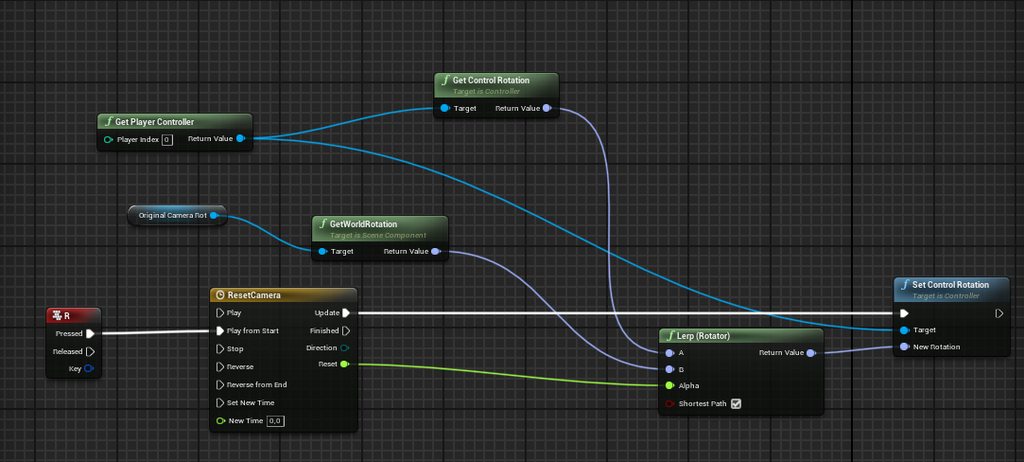
Can i reset camera rotation to original camera rotation in first person?
My blueprint doesn't reset yaw rotation https://imgur.com/a/1yi18Ap
 sharp fox
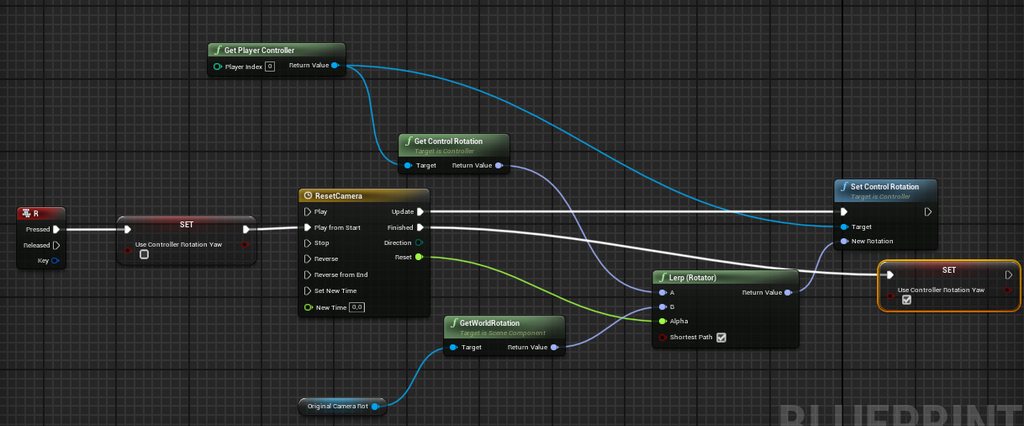
I figured out that i have to set "Use controller rotation yaw" to false to set my yaw rotation to original but i don't wonna have this option set for whole game, becouse i use first person, but when i use that blueprint then it still doesn't work https://imgur.com/a/CptLP6U
 arctic moat
Hello, so i have this blueprint for a projectile where when the it explodes, it applies radial damage. When i select "Should Bounce" in the projectile movement, how can i set it so if the project hits the actor, it explodes on impact, but if it misses the actor, it bounces like normal.

 honest wolf
sharp fox
I figured out that i have to set "Use controller rotation yaw" to false to set m...
honest wolf
sharp fox
I figured out that i have to set "Use controller rotation yaw" to false to set m...
Attach your camera to another actor and try again. Also check if "Use Pawn Control Rotation" is disabled.
sharp fox
honest wolf
Attach your camera to another actor and try again. Also check if "Use Pawn Contr...
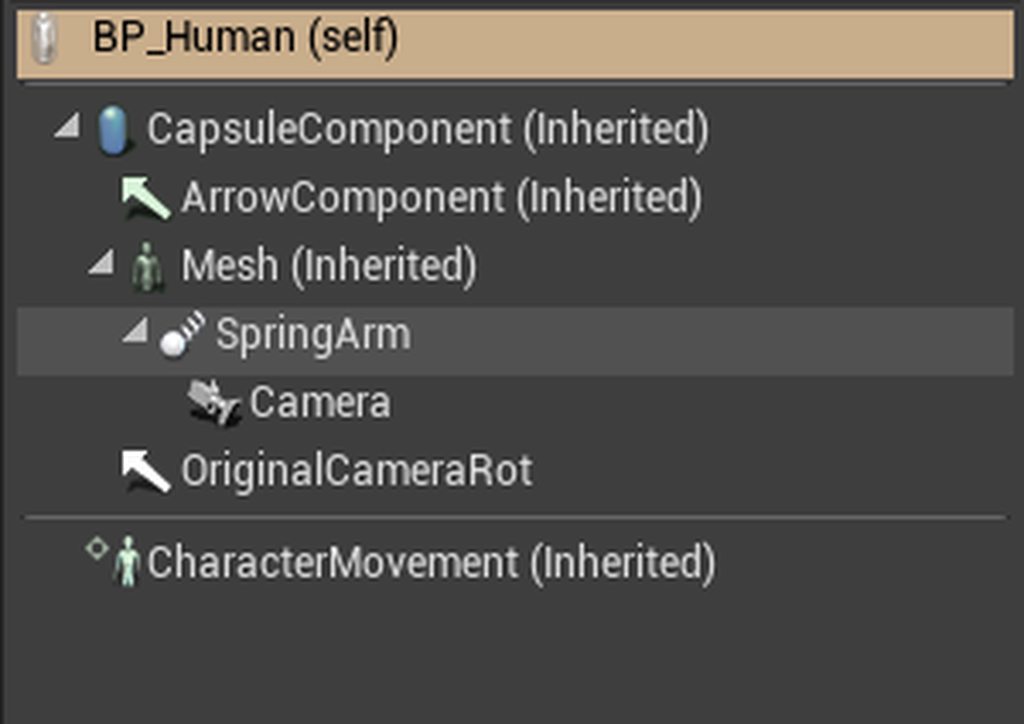
when i disable use pawn control rotation then i can't move camera upwards
 honest wolf
sharp fox
https://imgur.com/a/qKRE1rL
honest wolf
sharp fox
https://imgur.com/a/qKRE1rL
Do you use the SpringArm for anything?
sharp fox
honest wolf
Do you use the SpringArm for anything?
yes
honest wolf
Then make sure use pawn control rotation is on for the springarm, but off for the camera
sharp fox
honest wolf
Then make sure use pawn control rotation is _on_ for the springarm, but _off_ fo...
still doesn't set my yaw to original yaw
honest wolf
Can you describe what you use the spring arm for in a first-person game?
sharp fox
honest wolf
Can you describe what you use the spring arm for in a first-person game?
for holding camera (i know thats weird) but i will show you, i make a video
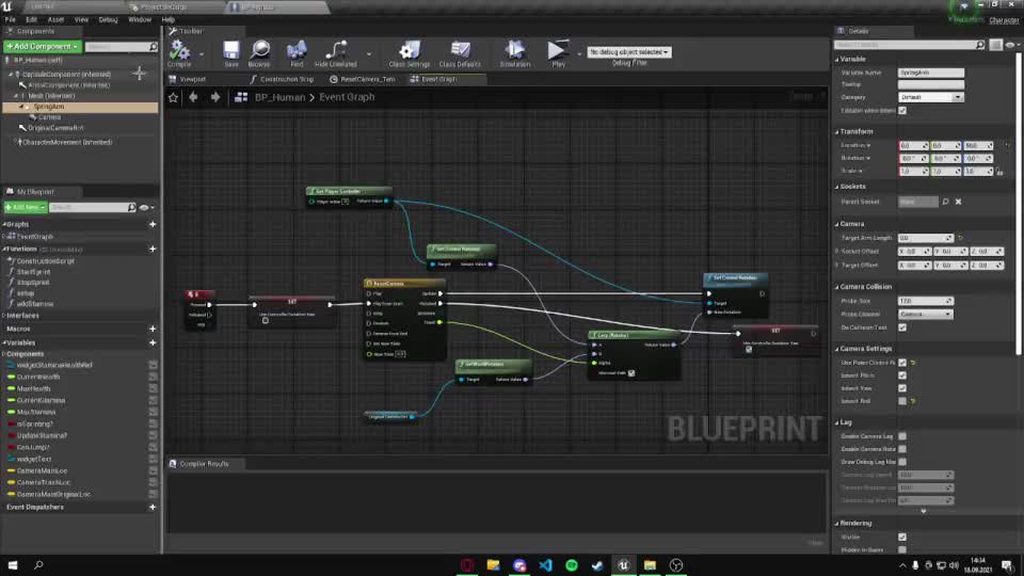 honest wolf
I don't really see what you use the spring arm for. Can you elaborate?
sharp fox
i really don't know i just have it there, i set arm length to 0
honest wolf
^
sharp fox
i did and i need to set use pawn control rotation to on becaouse when its off i can't move my camera up
but it still doesn't work
i can't rotate my camera up and down thats what i meant
honest wolf
When I initially made our first person framework I had lots of issues with rotations, that's why I ended up not directly altering the camera at all
I have a parent actor and only manipulate that
 sharp fox
so i need to add (scene) component and attach camera to it and move scene component? not the camera?
honest wolf
Yes
honest wolf
Relative location changes the rotation relative to its parent actor
World rotation changes the absolute rotation of it in world space
 honest wolf
Maybe it would be easier to describe what you try to achieve first
sharp fox
honest wolf
Maybe it would be easier to describe what you try to achieve first
i need to teleport player in front of trash can (i did that) and then reset camera rotation and set camera location inside trash bin
obtuse herald
spawn a new camera for that?
honest wolf
sharp fox
i need to teleport player in front of trash can (i did that) and then reset came...
Are they sort of hiding in there?
Can they move?
sharp fox
no i mean i did the teleport blueprint and i did the camera location set in trash bin but i can't do reset camera rotation
honest wolf
I was more wondering about the gameplay you want to achieve
If the player is in the trash bin to hide for example, and can't move. It would make more sense to make the trashcan a pawn with its own camera that you just possess.
sharp fox
honest wolf
I was more wondering about the gameplay you want to achieve
the homeless man and i tried to do trash can searching
obtuse herald
sounds like anim montage for me
 fathom spindle
hey, can anyone remind me how to get a linetrace to test against the actual polygons of a skeletal mesh and not the capsule component? its been awhile since i used unreal and im stuck on it
sharp fox
obtuse herald
sounds like anim montage for me
i don't have player mesh, my player mesh is just air
obtuse herald
fathom spindle
hey, can anyone remind me how to get a linetrace to test against the actual poly...
tick 'Use Complex Collision'
 hazy igloo
trim matrix
How can I achieve the functionality of Unity's "Prefabs"?
hazy igloo
trim matrix
How can I achieve the functionality of Unity's "Prefabs"?

Translate your Unity knowledge into UE4 so you can get up to speed quickly.
Perhaps it can help
sharp fox
honest wolf
If the player is in the trash bin to hide for example, and can't move. It would ...
ok now my camera rotation is reseting but only in pitch, not in yaw
 fleet heron
please tell me how to make the movement of wagons between trains? take one wagon with the mouse and insert it between the other two wagons.😢
rain egret
zealous moth
<@305108890381451264> did you ever figure out how to ride stuff? Looks like it h...
hey man, forgot to actually write a response so i am not sure if you read my reply.
the riding issue was fixed with attach to and disabling movement.
you mentioned it jitters because the movement is 1 frame off in terms of synching, what can i do against that?
arctic moat
im struggling with my projectiles. I have a grenade launcher. Everything works until it hits the player. If it hits the player, it just bounces off. I want it so if it hits the player, it explodes on impact, but if it doesnt hit the player, it will bounce like normal. How can i implement that to here?
 honest wolf
arctic moat
im struggling with my projectiles. I have a grenade launcher. Everything works u...
honest wolf
arctic moat
im struggling with my projectiles. I have a grenade launcher. Everything works u...
Split the Hit Result and check if the Actor that was hit is the player
arctic moat
honest wolf
Split the Hit Result and check if the Actor that was hit is the player
i've tried that and it didn't work
i tried this, it doesnt work :/
 honest wolf
You should check If Hit Actor == Player first to begin with
arctic moat
how do i do that?
honest wolf
Get the player Pawn and use a equal-comparision node and a branch
spark steppe
that's a server side event
 spark steppe
so most likely there isn't only one player
arctic moat
its a multiplayer game
so like, if player 1 shoots the grenade launcher, it bounces off player 2
honest wolf
Then check if the actor is of type of your player class
I'd recommend checking the ShooterGame sample for examples
honest wolf
Maybe try starting with something easier.
arctic moat
when i check "should bounce" off, it explodes on impact
only when bounce is on, it ignores exploding on the actor, but when it hits the ground, after a set time it explodes
honest wolf
There should be an "On Projectile Bounce" event which you can leverage.
arctic moat
gimme a second, trying to upload a video about it
i can take the low effort route and keep "should bounce" disabled
but would be nice to have it bounce as well as hit the player on impact
honest wolf
Hook on the Projectile Bounce Event, check if you bounced on a player, and if yes, force the explosion
arctic moat
so far i have this as my OnProjectileBounce
 honest wolf
Break the Impact Result, check if the Hit Actor is a player (by casting or checking the class), and if yes, do the explosion
arctic moat
like this? or am i missing something?
 honest wolf
You should check if the actor you try to apply damage to is a player
arctic moat
isnt that what "hit actor" is tho?
arctic moat
so like this?
 honest wolf
That should do the trick, although you should destroy the particle after you've done the explosion (not sure if apply damage will do that for you)
arctic moat
nope, still not doing what i want it to :/
honest wolf
Have you checked with a breakpoint if it gets called?
arctic moat
like a branch?
honest wolf
Click the Apply Damage node and press F9
then start the session
If it gets called, your session should be paused
and it jumps to the node
honest wolf
So, what is the behaviour you would expect compared to what is actually happening?
Is there no explosion? Is the damage not applied?
arctic moat
honest wolf
So, what is the behaviour you would expect compared to what is actually happenin...
i expect it to explode on impact, dealing the damage.
i can record another video
easier to see it visually
oh wait
i forgot i added a spawn protection thing so the player can't get damaged if they're hit 🤦♂️
honest wolf
:D
honest wolf
Anytime!
arctic moat
i always feel so silly when the solution can be that simple 🤦♂️
honest wolf
I once spent two days re-creating an entire component because I missed a wrongly set checkbox
Stuff like that happens
The important thing is to learn from it and implement measurements that prevent such things from happening again
Which in this case was to add some sort of verification system that forces the session to quit when wrong conditions are present
arctic moat
honest wolf
I once spent two days re-creating an entire component because I missed a wrongly...
ooof. Well i hope you managed to get it working!
honest wolf
Yeah, it's all working now haha.
arctic moat
nice!
 acoustic hatch
Hi do anyone knows how to fix my player is rotated after vaulting
I followed 3 tutorials on YT all of them results to having my character rotated either on the X or Y
honest wolf
Can you share your setup?
A screenshot of your rotating blueprint should be a good start!
 honest wolf
I assume you create a spline when vaulting?
 burnt grove
Hey guys, I'm trying to make a world map using an orthographic scene capture. On top of that, I would like to display location indicators. How do I get 2D coordinates of world locations?
acoustic hatch
honest wolf
I assume you create a spline when vaulting?
What is that
honest wolf
burnt grove
Hey guys, I'm trying to make a world map using an orthographic scene capture. On...
Project World to Screen
honest wolf
acoustic hatch
What is that
A spline is basically a path you make with markers for positional data
burnt grove
@honest wolf This would project to the actual viewport, not to the render target?
acoustic hatch
honest wolf
A spline is basically a path you make with markers for positional data
How can I not create that
honest wolf
not create? You mean you don't want to use a spline?
honest wolf
burnt grove
<@!123440007334723584> This would project to the actual viewport, not to the ren...
I think so, yes.
acoustic hatch
I'm so dumb I'm new to this so sorry can't understand much
honest wolf
honest wolf
I think so, yes.
You could copy the logic though and just make use your render target instead.
acoustic hatch
Could the animation be the problem? @honest wolf
I use my own animation from mixamo instead of the one within the tutorial's description
honest wolf
acoustic hatch
I'm so dumb I'm new to this so sorry can't understand much
No problem. Here is an approach of how to implement vaulting that I used in the past:
- Get the actor / object you want to vault and it's bounds (iirc the function is called Get Actor Array bounds)
- Calculate the distance you need to travel (formula I used was: Distance Relative To Velocity * 2 + Y from the Bounds)
- Calculate the end position (formula I used was: Position before Vaulting + New Vector made of ( X = X from Actor Forward Vector * Vaulting Distance, Y = Y from Actor Forward Vector * Vaulting Distance)
- Create spline with three points:
-
- 1 (Start): Position before vaulting
-
- 2 (Middle): (Start + End) / 2 + New Vector (Z = Height of your Actor)
-
- 3 (End): End position calculated previously
I used two float curves for rotation animation length and lerped between 0 and 22 (Yaw) (can be any number) and position animation length
acoustic hatch
Ok thanks, I'll try to get a use of that
honest wolf
Formula for Distance Relative To Velocity: Lerp between 100 and 160 using Player Velocity / Max Walk Speed
Those numbers are just chosen on how they feel ingame
Smaller numbers would mean a shorter jump
 safe iron
Hey guys, I need yet again some help, this time is a little simpler problem though, I wanted to implement a feature that makes the player view slightly tilt left or right when you are moving sideways, like in Quake or in Serious Sam, and I kinda managed to implement that, using a rotator, a set relative rotation node that has the First Person Camera as target and using the Axis Value float on the InputAxis Move Right node to set the angle at which the camera rotates, I'll send yu a photo of the code. As I said it kinda works, but the problem is that to get the effect working I had to disable Use Pawn Control Rotation, which makes impossible to turn Up and Down, and allows the player to only turn left or right, how do I fix it? Thanks in advance
 honest wolf
safe iron
Hey guys, I need yet again some help, this time is a little simpler problem thou...
honest wolf
safe iron
Hey guys, I need yet again some help, this time is a little simpler problem thou...
Make a new scene component and attach the camera to that. Instead of rotating the camera, rotate the scene component
Do not use a Spline Component
safe iron
Oh, ok, thanks 😄
honest wolf
honest wolf
Do _not_ use a Spline Component
unless you actually need one that is
honest wolf
safe iron
Oh, ok, thanks 😄
Keep in mind that with your current setup your meshes will move with your camera. You may want to seperate them if you can't achieve the effect you want.
safe iron
Hmm, still doesn't work, by rotating the component wither the camera doesn't rotate (Use Pawn Control Rotation on) or it rotates but it can't look up or down (Use Pawn Control Rotation off), I tried disconnecting the rotation node and with Use Pawn Control Rotation off it still can't rotate Up or down, has to deal with that specific setting
honest wolf
PCR should be off, what is your code looking like for updating the rotation of the scene component?
safe iron

This is it, I just added a set relative rotation plugged with a rotator and the Axis Value from the Input Event
honest wolf
Hmm, works for me (although on x2 you don't see much, x20 is more visible)
though not very smooth
craggy turret
So I have a dash set to Q. I also have a flying mode and I made the dash work only in flying mode. I want to lose stamina, like a lot of it everytime I dash, for now its set to 1. The problem is, even if I press really quick it still uses a lot of stamina and it keeps dashing as long as I keep the button pressed.
honest wolf
Do you have a video example of what you try to achieve?
honest wolf
craggy turret
So I have a dash set to Q. I also have a flying mode and I made the dash work on...
Use a Do Once node and Reset it when you release the button
craggy turret
Ok lemme see
safe iron
honest wolf
Do you have a video example of what you try to achieve?
I'll hop into Quake and take a small video, brb
honest wolf
craggy turret
Ok lemme see
 honest wolf
Hmm, I'd clean that first then so it's easier to debug. You may have some other code that causes a loop for example
Disregard my DoOnce idea.
 honest wolf
You could add another node to the sequence, but I'd rather figure out why it keeps dashing when you hold it
Since "Pressed" should only fire once when held.
safe iron
craggy turret
ill look closer thanks
safe iron
This is the video, when I move sideways the player camera tilts
honest wolf
Ahhh
craggy turret
oh so you mean I should go from sequence to reset
honest wolf
That's a bit more complex then. Using a simple "Add Rotation" won't make it that smooth
safe iron
Yeah, I planned to use a timeline
honest wolf
craggy turret
oh so you mean I should go from sequence to reset
Please disregard my DoOnce idea, try to figure out why it keeps dashing when holding down first.
DoOnce shouldnt be needed here.
safe iron
I just used a simple set rotation as a simple code to verify everything was working, then I would have added the timeline to smooth it
craggy turret
its weird bcs i only have a lot of checks
for stamina and for flying
nothing else
honest wolf
safe iron
I just used a simple set rotation as a simple code to verify everything was work...
I added this for the MoveRight event (Center Actor would be the actor you added for the camera)
 craggy turret
im using launch characters if that matters
honest wolf
Which results in this
craggy turret
launch character that onyl launches horizontally
honest wolf
Can you record a video of your issue?
craggy turret
yas
safe iron
Ok, lemme restart UE5 in a sec
honest wolf
ShareX
safe iron
here is the video, the resolution is low cause I use a separate window to test the game, only way to get good performance (GTX 1650), also, I have no idea why it's so laggy
As you can see the camera tilts as it should, but when I move the mouse up or down, the camera does not rotate, so I am stuck in a Doom 1993 like visual where I can only turn left or right, not up or down
PCR is off, whenever I turn it off this issue occours, when I turn it on I can look up and down, but the tilting effect is gone :/
craggy turret
I set it so it doesn't dash if stamina is below 50
but even then it keeps removing stamina
and it somehow goes into negative
honest wolf
safe iron
PCR is off, whenever I turn it off this issue occours, when I turn it on I can l...
Can you post a screenshot of the full Components tab of the character blueprint?
like this
 safe iron
 craggy turret
so basically my code is Press Q--> Check if Player is flying then if stamina is less or equal to 100 and if it is above 50 launch character.
I also have an event tick where it removes stamina if Burst is checked, and it does that when the Q button is pressed
honest wolf
I have trouble reading your blueprint code, would you mind making it more readable first and post another screenshot(s)?
craggy turret
yeah ill make some more since its messy
honest wolf
I recommend using comment boxes, equal spacing between nodes and re-route nodes for greater readablity.
 lofty hound
Wondering if anyone can help me regarding the game instance. I’m making a turn based combat game with an overworld that spawns into a battle so upon the execution of the battle from the overworld. Similar to Pokemon the player has a party of 3 characters that are set via menu widgets by the player once the game has started and the party details are all stored in the instance in the hope that it would carry over to the battle map level when that is opened. Now this all works fine when starting the game you can use the menu to set your party and all info is correct until I launch the battle level (which opens a new level) and none of the party data is being carried over to the new level. But certain other bits of data are. Any ideas? Am I using the instance wrong ?
 honest wolf
lofty hound
Wondering if anyone can help me regarding the game instance. I’m making a turn b...
honest wolf
lofty hound
Wondering if anyone can help me regarding the game instance. I’m making a turn b...
Is your GameInstance overridden in the world settings?
honest wolf
What was the issue?
safe iron
Use controller rotation pitch was off
._. I didn't even think the pawn itself had settings
craggy turret
 safe iron
Thanks a lot

 honest wolf
craggy turret
honest wolf
craggy turret
So you want the character to keep flying when they release the button, but still have enough stamina?
craggy turret
Basically, I want the character to be able to dash a few times, until stamina reaches 50. from then they have to wait until they have enough stamina to dash again
i put on relealse to set movement mode flying because it kept hovering in mid air
honest wolf
craggy turret
You should check if (Stamina - 50 < 0) and if yes, set stamina to 0 instead.
craggy turret
after i pressed Q
lofty hound
honest wolf
Is your GameInstance overridden in the world settings?
You mean is it set in the project setting under map and modes?
honest wolf
lofty hound
You mean is it set in the project setting under map and modes?
I mean here.

nvm
I'm stupid
you can't override it there
But yeah, is it set in the project settings?
lofty hound
honest wolf
But yeah, is it set in the project settings?
It is set yeah
honest wolf
Can you show how you store data in the game instance and try to retrieve it after the level has switched?
craggy turret
honest wolf
You should check if (Stamina - 50 < 0) and if yes, set stamina to 0 instead.
I did this but even if I use press the button slightly the stamina reduces by 70
 honest wolf
That's because you use Event Tick. It's called (at 120 FPS), 120 times per second.
You want to reduce stamina when the Dash is called instead.
craggy turret
yeah i figured that is the problem
i just didnt know how to yknow, use something else
how do I do that? xD
honest wolf
Move the Stamina check to before the Sequence at your Pressed Event
If there is not enough stamina to begin with, why bother do anything :D
honest wolf
I'd remove all the branches you are not using right now, it just adds visual clutter, making it harder to debug.
honest wolf
Yeah

 scenic kindle
Hey. I'm trying to save a variable to a game instance from another blueprint but I can't connect "Target" because "Game Instance Object Reference is not compatible with Game Instance Object Reference". anyone know why?
craggy turret
it still goes down by 70
craggy turret
yeah
honest wolf
Move it to the InputAction
craggy turret
with the sequence or separate?
so i did it with the sequence and it works
thanks ^_^ what a life saver
such an easy fix too
honest wolf
The start of your InputAction Burst should look something like this

You can use "InRange" to check if its between 2 numbers btw
instead of two branches with > and <
craggy turret
this makes more sense
honest wolf
scenic kindle
Hey. I'm trying to save a variable to a game instance from another blueprint but...
After using "Get Game Instace", cast it to your gameinstance name

Then using "As YOURNAME Game Instance" set the variable
craggy turret
Now It can use the dash even if stamina is slightly above 50 but its not a bug its a feature
😄
honest wolf
You don't want that?
craggy turret
Not exactly but its fine as long as it cant be spammed
ill just add more stamina cost
honest wolf
You shouldn't be able to with the new code.
Or, if you want to prevent spam while there is enough stamina, add a cooldown
craggy turret
i didnt add the inrange thing
yeah i was going to get on the cd after i figured why it uses too much stamina
honest wolf
There are multiple ways of doing a cooldown:
- You could use the Gameplay Ability System. (may be overkill)
- You could save the DateTime when it was last used and check if X seconds have passed.
- You could use a timeline (not sure about performance)
honest wolf
That would be more expensive, performance-wise.
craggy turret
then i dont want that
scenic kindle
And another thing. the Open Level node doesn't work.
honest wolf
scenic kindle
And another thing. the Open Level node doesn't work.
In editor or in a cooked build?
craggy turret
honest wolf
There are multiple ways of doing a cooldown:
* You could use the Gameplay Abilit...
Make DateTime?
honest wolf
It's a variable type
 craggy turret
oh the blue one
scenic kindle
honest wolf
In editor or in a cooked build?
in the editor. basically what i want is when i overlap a box collision it saves a variable to a game instance and opens a level.
when i do it like this it works
 honest wolf
scenic kindle
when i do it like this it works
honest wolf
scenic kindle
when i do it like this it works
And when is it not working?
scenic kindle
but when i do this it doesn't work
 craggy turret
what do i set the value as
honest wolf
Did you check if the node is actually called with a breakpoint?
I'd assume the cast fails.
scenic kindle
yeah the cast fails but idk why
dawn gazelle
scenic kindle
yeah the cast fails but idk why
Your game isn't set to use ResourceGameInstance if the cast fails.
honest wolf
craggy turret
what do i set the value as
You set it as "Now" when the dash was made and check if enough time has past like this.
 craggy turret
Oh I also have another weird problem. In fly mode when I press any input after the action is done it keeps sliding
scenic kindle
dawn gazelle
Your game isn't set to use ResourceGameInstance if the cast fails.
i just want it to store a variable in the game instance, then open the level, then load the game instance. how would i do that?
honest wolf
Check your project settings.
dawn gazelle
scenic kindle
i just want it to store a variable in the game instance, then open the level, th...
How you're doing it is fine, but you need to set the game to use your custom game instance.
 scenic kindle
dawn gazelle
How you're doing it is fine, but you need to set the game to use your custom gam...
scenic kindle
dawn gazelle
How you're doing it is fine, but you need to set the game to use your custom gam...
ooooooohhhhhh it works thanks.
what's the difference between add to viewport and add to player screen?
dawn gazelle
add to player screen is if you're doing split screen stuff.
scenic kindle
oh. makes sense. so it's basically to show a ui for a specific player?
dawn gazelle
So if you had local multiplayer and you wanted each player to have their own HUD, you'd need to use add to player screen.
scenic kindle
oh cuz then it would just overlay it on the whole viewport instead of the player's square. i get it.
dawn gazelle
 craggy turret
dawn gazelle
craggy turret
dawn gazelle
tbh i dont understand wahts going on
I mean I kinda do
I dont know how to connect this to my code
Thanks for all the help now im 1 step forward to my goal
lofty hound
honest wolf
Can you show how you store data in the game instance and try to retrieve it afte...
This is where i set the variables with reference to instance
 lofty hound
honest wolf
Can you show how you store data in the game instance and try to retrieve it afte...
lofty hound
honest wolf
Can you show how you store data in the game instance and try to retrieve it afte...
This is being called from new level through a battlemanager
 honest wolf
Have you verified the set calls by checking if the cast to your instance class is successful?
lofty hound
yeah cast works fine
honest wolf
Your game is singleplayer, right?
lofty hound
yes single player
honest wolf
Of what type is "Party Slot 1" ?
lofty hound
its weird though because it all works absolutely fine until new level is loaded. like all functionality seems to execute fine until, i can set the party slots and pull the correct data from them after the fact but as soon as i load the new level it doesn't acknowledge the chances made for certain variables
its an object reference to the base class of my characters
honest wolf
Ah, see, the problem is that you can not save references as they'll be invalidated when the first level is unloaded
Rather than saving a reference, save the class name or another identifier.
If it's a more complex object with data, you might need more complex serialization
 indigo bough
Hey folks, how would I set the bReturnPhysicalMaterial as a part of a PredictProjectilePath? Or is this something I need to set in the hit object/phys material?
 lofty hound
honest wolf
Rather than saving a reference, save the class name or another identifier.
lofty hound
honest wolf
Rather than saving a reference, save the class name or another identifier.
So the party slot needs to be a class reference?
honest wolf
lofty hound
So the party slot needs to be a class reference?
If possible. If not (since you allow, e.g. customizations to the selection) you need to seralize it yourself, save it, and load it.
honest wolf
indigo bough
Hey folks, how would I set the bReturnPhysicalMaterial as a part of a PredictPro...
The FCollisionQueryParams used by PredictProjectilePath are hardcoded, sadly.
https://docs.unrealengine.com/4.26/en-US/API/Runtime/Engine/Kismet/FPredictProjectilePathParams/ The params you can set can be found here.
Input parameters to PredictProjectilePath functions.
indigo bough
honest wolf
The FCollisionQueryParams used by PredictProjectilePath are hardcoded, sadly.
Damn okay, wondering how to get around that then. I'll do some reading. Thanks!
honest wolf
indigo bough
Damn okay, wondering how to get around that then. I'll do some reading. Thanks!
You could try taking the Hit Component, call Get Material, on that Get Physical Material
indigo bough
honest wolf
You could try taking the Hit Component, call Get Material, on that Get Physical ...
Haha, just tried that! But yeah it's returning null. Might be something wrong in my setup elsewhere causing this though. I'll keep at it 🙂
lofty hound
honest wolf
If possible. If not (since you allow, e.g. customizations to the selection) you ...
As in save to a save game BP?
honest wolf
lofty hound
As in save to a save game BP?
Save to disk for example, though I feel like there is a better solution for this out there. I'm just not aware of it right now.
indigo bough
honest wolf
You could try taking the Hit Component, call Get Material, on that Get Physical ...
Ahh, I was using "Get Material by Face Index", just getting the component material works. Only issue is multi-material components of course. Enough of a solution for now anyway. Thanks again!
honest wolf
indigo bough
Ahh, I was using "Get Material by Face Index", just getting the component materi...
Any time! For multi-materials another workaround could be to cast a linetrace yourself to that hit location and use that hit result instead.
indigo bough
Good idea, I'll set that up 🙂
lofty hound
honest wolf
Save to disk for example, though I feel like there is a better solution for this...
So i changed to class reference rather than object reference and have the same problem
Would the instance save the class of the actor object to the next level if the actor object doesnt exist in the next level?
 last siren
Is there a function to take a transform+mesh and see what it would overlap/collide with, without spawning a temp actor with a mesh component to use (actor->GetOverlappingComponent)?
gentle urchin
There's debug shapes ? If that could help
drowsy osprey
Has anyone had any luck using event dispatchers out of “sequence director” on event track? Can’t seem to figure out what sequence Director needs to point to to target. 🤔
Trying to hit either character or level bp.
last siren
gentle urchin
There's debug shapes ? If that could help
Not to draw, just want to test if a map area is clear enough of obstructions before spawning in some things. I could make a box/sphere/capsule I guess but a mesh is a more flexible shape
gentle urchin
Ah ok ok, didnt quite get the use case ^^ but for sure, a mesh is way more flexible!
 white lynx
Is there a way to force blueprint classes to always open with full blueprint editor even if it's a read/data only bp?


 crimson hornet
crimson hornet
crimson hornet
This is in the widget where I click on a button and I will remove the widget and set the mode to game mode only
crimson hornet
crimson hornet
Does anyone know why this is not working?
This is in the player controller class. Here I set if I click "escape" the options menu will show and UI mode only
rare gale
trim matrix
This only works with one object instance. How can I make it work with all instan...
Did you ever get an answer here? I'm not sure I understand what you're asking in the first place. When you ask how to make it work with all instances, what do you mean by work? The graph will only update when the code for that specific instance is run. So, if you set that dropdown to look at Coin5, but collect Coin4 you won't see it run. You should see the Print String from Coin4 on-screen though. Each version of a coin you place in the world should work the same, the editor graph will only update or be active when the specifically selected version is affected though.
trim matrix
rare gale
Did you ever get an answer here? I'm not sure I understand what you're asking in...
Yeah, I got it working. Thanks for the explanation.
dawn gazelle
crimson hornet
Does anyone know why this is not working?
What's not working about it?
 glossy bane
Do instanced static meshes somehow get a different collision than the static mesh that is assigned to them? I have assigned simple box collisions on the static meshes but when I spawn the instanced meshes they seem to instead be using a complex collision
dawn gazelle
crimson hornet
the mode stays on UI mode only
Are you getting error messages at all? Notably, you have an "Options Widget" reference within your widget, perhaps you mean to just have it use "self" as a reference if that clicked event is within the widget itself.
crimson hornet
Im not getting any errors
crimson hornet
dawn gazelle
Are you getting error messages at all? Notably, you have an "Options Widget" re...
Ill try that
Well it worked thanks!
 rancid current
Is there anything wrong in this? It runs and it makes the line traces but it doesnt make an impact point even when it intersects with things
 trim matrix
Hey I wanna try building a game in UE, I only know javascript so would blueprints be an easy starting point for a 2d/3D game?
rancid current
trim matrix
Hey I wanna try building a game in UE, I only know javascript so would blueprint...
Starting point yeah but if you get serious you WILL need to learn C++
indigo bough
I'm doing a looping bounce arc calculation for my projectile after each consecutive hit, but unless I limit bounce count or put a higher than ideal minimum velocity, I get a crash from 'infinite loop'. Any other way around this? I don't really want to stop bouncing if the projectile still has valid velocity to bounce further than an arbitrary bounce count limit.
trim matrix
rancid current
Starting point yeah but if you get serious you WILL need to learn C++
Oh yeah of course, just for the first few
rancid current
indigo bough
I'm doing a looping bounce arc calculation for my projectile after each consecut...
You could try adding a .01 second delay before the area it says is an infinite loop
rancid current
trim matrix
Oh yeah of course, just for the first few
Yeah BP is a great language for beginners, it's very capable but fairly slow as you would expect.
indigo bough
rancid current
You could try adding a .01 second delay before the area it says is an infinite l...
Ahh yeah, that solves it, though now I can actually get those infinite loops. Wondering how to avoid that. I'm multiplying by surface restitution (.3 atm) every time, so how it's staying at a certain velocity, I'm not sure. Anyway, thanks for the tip! 🙂
rancid current
I don't have any ideas on how to do that off the top of my head, good luck
 quasi frost
So I am taking all of a set of widgets from a grid and saving them to a temporary array before wiping the original array and then reloading them from the temporary array. However, variables from the widgets in the temporary array are reset to their default value. Is there some way to save the value of variables when moving widgets between arrays? Am I simply doing it wrong here?

 maiden wadi
@quasi frost What you're doing wouldn't reset variables. What might is if you're doing something with them on Construct, or PreConstruct.
trim matrix
Also are blueprints good for 2d games?
quasi frost
maiden wadi
<@!318639827937525762> What you're doing wouldn't reset variables. What might is...
Oh you are absolutely correct. I can't believe I over looked that. Simple boolean fixed that, thanks!
indigo bough
Could anyone tell me what the launch velocity here is measured in? I would have thought m/s, but putting in an accurate value in m/s here doesn't really return the expected resulting path. (even x10 feels very short in comparison to reality)
 rancid current
trim matrix
Also are blueprints good for 2d games?
rancid current
trim matrix
Also are blueprints good for 2d games?
3D games are really weird in Unreal, they're basically just 3D but they use planes, using BPs is the exact same
trim matrix
rancid current
3D games are really weird in Unreal, they're basically just 3D but they use plan...
Ah is making 2d games in UE a good choice in ur opinion?
rancid current
trim matrix
Ah is making 2d games in UE a good choice in ur opinion?
Imo Unity is better for 2D games, UE is better for 3D
hazy igloo
rancid current
Is there anything wrong in this? It runs and it makes the line traces but it doe...
The trace line hits an visible actor?
There is a good learning video from Matthew: https://youtu.be/yo9VrxFgUJY

What is the Line Trace By Channel Node in Unreal Engine 4
Source Files: https://github.com/MWadstein/wtf-hdi-files
rancid current
hazy igloo
There is a good learning video from Matthew: https://youtu.be/yo9VrxFgUJY
I've watched that video, yes it passes through an actor that is clearly visible
white lynx
^ It needs to react to the collision
check the docs on collision

You have trace channels, object channels, and profile channels
 autumn plover
How do I get a player character in GameInstance. Need to call a function to the player controller to change camera FOV...

doing it here because its multiplayer
civic briar
autumn plover
How do I get a player character in GameInstance. Need to call a function to the ...
Cast, get character, as character get camera, set FOV
autumn plover
thanks alot
 burnt trench
I have a general question. Is the 4.27 version stable and not have any major issues? Can I use it for my major project?
I am noticing a pretty significant increase in compilation of blueprints for example
anyone experiencing the same?
like I just made a new variable in a compiled blueprint and it took more than 5 seconds to compile it
I have a pretty solid computer and the blueprint and the project itself are at the bare minimum stages right now. Just started yesterday
I dont see why this is happening
and also, ue4 goes to not responding state during that time
actually, on furthur investigation, its not the compiler but the save of the BP which is slow
I had compile and save thing on
snow harness
I've got a branch of float > float, which is returning True, even though printing the value makes it apparent it shouldn't be. Am I dumb? I can't figure out why this branch is going to true, even though you can see on the left I have floats which are not greater than 0.9, so in those cases the branch should be False, but it's always True regardless.
 peak crater
anyone else waste lots of time overdesigning your event standardization between gamemode, gamestate, pc and character pawn?
lol
snow harness
I was just trying to show that the same float is flowing both to Print and Branch, and looking to the left where it's printed, there are values which are less than 0.9, yet the Branch always returns True.
pause the game before you observe values
Since this is a For Each Loop, and there are multiple cycles per frame, how can I see the values of each iteration in one frame?
Ah breakpoint within the loop, that makes sense
 timber pilot
Any suggestions for turning the player's body without turning the camera? Doing the opposite seems easy, but I need the body to rotate to sync up an animation without turning the player's head involuntarily
 languid haven
New to blueprints and trying to get a HUD element to pop-up when the player picks up an item and can't seem to figure it out. What do I add to the item parent object to make it show a HUD element for a couple seconds after successfully picking up the item?

this is the item parent blueprint. all the picking up stuff works, but the Set Visibility gives an error. the InventoryTooltip variable is an object reference. Not really sure what's wrong since I'm mostly guessing with the set up.
error says "Accessed None trying to read property InventoryTooltip"
burnt trench
apparently it was a perforce issue. The server wasnt responding which was why it was taking so long to save files. Issue is fixed
 pure locust
Where does it actually know what input to look for here? It's just the basic third person controller but this is the same as all the other things here too, they all just have the name of what's happening but nothing defining the input

 dark crow
Top left
Edit -> Project Settings... -> Input
 stuck ore

for some reason this isnt working
when i leave the area
the widget stays visible
this is for a door btw
when i enter the zone where i can open the door, i want text to appear prompting the player to open the door
worthy tendon
stuck ore
https://gyazo.com/fa7baf5a46f4e878ab7ccbba22badd03
is your character really FirstPersonCharacter?
it probably isn't
dark crow
Depends if the selected pawn in the gamemode is that or you auto possess it in the world
worthy tendon
there is better way to check if other actor is your player. you don't need cast at all

if OtherActor equals PlayerPawn it goes to True side of branch.
you need this branch for both begin and end overlap. remove those casts as well.
 true valve
How do you duplicate BP actor in blueprint?
Would make array and getting the actor at index 0 work?
 sand shore
That wouldn't be a duplicate object, so no.
You need to either Spawn Actor or Construct Object
As for actually copying everything over.... you'll have to make a function to do that; and then call that on your object
you could do it with an Expose on Spawn variable
then you'd use that on the construction script for Actors (but objects you'd still need to call some kind of copy function for)
true valve
sand shore
As for actually copying everything over.... you'll have to make a function to do...

I get that error when I construct
sand shore
is that an abstract class?
true valve
sand shore
is that an abstract class?
It's an Blueprint actor, does it have to be c++ class
sand shore
Unfortunately I'm all out of ideas
languid haven
How would I go about making a blueprint actor that changes the color of the lighting in a level?
I have a day/night cycle set up in the Level Blueprints, and a variable for when to change the lighting, but I can't find a blueprint node that'll actually change the lighting color.
 unreal token
how do I make a solid building mesh, enterable, with a portal at the door. if I asked that correctly
 surreal peak
@sand shore @true valve I think Actors have to be spawned. The construct object node can't be used with them.
true valve
surreal peak
<@112221040666542080> <@441113547540398091> I think Actors have to be spawned. T...
So what I'm trying to do: I have two variables with the same actor. I take variable A and assign it to B then DestroyActor A. Since B is being used to check things. I get errors after it deletes variable A. Two variables with the same actor type.
surreal peak
Literally same actor instance or just 2 times an actor?
I don't think you'll get around spawning actor B and moving the data over by hand. There is no copy construction for actors afaik
true valve
could it be done using c++
surreal peak
Maybe
Iirc there is some Template Actor you can pass into the SpawnParams
But not sure if that's the desired use case of it
What you describe with actor A and B sounds like you are using one and the same actor instance
Which would of course break if you destroy it via either of the two variables
These variables only point to an address in your memory
Actors can only be created via SpawnActor
worthy tendon
true valve
So what I'm trying to do: I have two variables with the same actor. I take varia...
You are probably solving the wrong problem.
The XY problem is a communication problem encountered in help desk and similar situations in which the person asking for help obscures the real issue, X, because instead of asking directly about issue X, they ask how to solve a secondary issue, Y, which they believe will allow them to resolve issue X on their own.
However, resolving issue Y oft...
true valve
What I'm trying to do? I have some clothes. Head, chest, legs, etc. So when I equip one kind for the first time I put it on, but if I try to put on the same type i spawn the one I'm wearing in front of me and equip the one I just selected then destroy it from the world.
 hoary orchid
https://docs.unrealengine.com/4.26/en-US/BlueprintAPI/Sequence/GetMovieScene/
How do I get access to this now?
I've been trying to access it but can't seem to find a way to access
Get Movie Scene
fathom spindle
hi there, can anyone please help me set up a linetrace so that it ignores the capsule component of a character and instead collides with the skeletal mesh polygons? i'm trying out all the options and getting nowhere, would really appreciate some help 🙂
honest wolf
fathom spindle
hi there, can anyone please help me set up a linetrace so that it ignores the ca...
You need to mark the "Use Complex" checkbox
 floral quail
For a blueprint script component, how would you get a reference to the actor that calls the functionality?

I'm trying to follow this tutorial: https://www.youtube.com/watch?v=Oh7pDL8RFaI that references an Owning Pawn variable

Developer Relations Technical Artist Alan Noon walks us through the creation of a fully functional tank! Learn about setting up a drivable vehicle with working treads, ground collision, a firing cannon, and more!

Pls @ me if you know! 😄
honest wolf
floral quail
For a blueprint script component, how would you get a reference to the actor tha...
You need to use the "Get Owner" call for Actor Components. Search for "Get Owner" and pay attention to which one is the correct one.
Should look like this
 honest wolf
Any time!
floral quail
I wonder how the tutorial has made the function as a parameter?
Possibly just setting the value once?
Is that a best practice?
floral quail
floral quail
see this @honest wolf
floral quail
The last screenshot i mentioned has an Owning Parameter
Instead of the get method
Also it doesn't quite seem to work
 honest wolf
Ah, they probably just saved the reference as variable
floral quail
It complains when I don't directly reference a parameter in target
honest wolf
You can only leave the parameter blank if you call the function within the class it was created in
Otherwise you need a reference to the "Tank Motor"
If the "Tank Motor" is the owning actor, which you can get with Get Parent, you have to cast that to the Tank Motor class first and use that
floral quail
referencing "tank motor" I'd just assume that it wouldn't apply the movement to the tank, but try to move the "motor"
 honest wolf
You can have movement handlers in actor components
floral quail
Huh it actually just works
honest wolf
Simply put, Actor Components are just "containers" for code
They're all attached to the same parent actor
which they can also control
floral quail
Yeah, it's just when adding "actor localoffset" with tank motor component as target
honest wolf
It's like the breaks in your car. You hitting the pedal doesn't cause the pedal itself to force the car to halt, the pedals just transform your input to the actual breaks
floral quail
I'd assume only the tank motor component would be moved in space
I have unity background, might be what's messing with me 😛
honest wolf
Translate your Unity knowledge into UE4 so you can get up to speed quickly.
This may be helpful
floral quail
Ty! Right now I'm trying to get my hands dirty with a lot of blueprints, think it can really speed up iteration
The hardest thing is wrapping my head around all the high level functionality
 whole dune
Any idea how i could make these stay connected with the 2 carriages no matter what? like if 1 carriage moves forward the thing stretches so its still connected

 native willow
Describes the Spring Controller which is used to limit how far a bone can stretch from its reference pose before force is applied in the opposite direction.

 native willow
that can do this
 jade nova
How can I make it so I have a text ui that constantly updates and goes by a variable
native willow
bind it
native willow
it is already handled by unreal
jade nova
How
native willow

LetMeGoogleThat.com
For all those people that find it more convenient to bother you with their question than to google it for themselves.
jade nova
Hmm that’s not what I want I think
Because I only want the variable to update the text
Im stuck on that since a long time
native willow
just bind the text
native willow
so if it is not working, show what you've got
 native willow
jade nova
Now I have event graph and the function
native willow
jade nova
Now I have event graph and the function
you need to bind the variable, don't need to use the function
jade nova
So I go in event graph?
 jade nova
That’s in the proprieties of the variable?
But the variable isn’t in the widget blueprint
I can’t find this menu
Where is it
 iron grotto
Hi, I'm starting unreal and I have a small problem on my actual code, I've created A Wall and on the "On Component Hit (Wall)" I just put my code. When I hit it with the player it's working, but when I try to shoot it, my projectile don't trigger the "On Component Hit", how can I debug myself ?
jade nova
native willow
just choose the variable from the list
Where is list
native willow
you click the text and it has the Text property with the bind button next to it
native willow
iron grotto
Hi, I'm starting unreal and I have a small problem on my actual code, I've creat...
it depends on how you've done the projectiles
jade nova
The variable isn’t in the list
I just have « create binding’
I think I got it
Not sure tho
iron grotto
My projectile is just a basic sphere
native willow
but how are you shooting it
 native willow
it means the variable is not in the character 🙂
iron grotto
First with a fire Event that is called by PullTrigger event, and the PullTrigger is called in my Character on the right stick (Top down shooter)
 native willow
yeah, but how the projectile is moving?
jade nova
Sorry I feel kinda stupid
iron grotto
Oh sorry, with a projectile movement set to 1200
native willow
what happens with the projectile? does it bounces off?
iron grotto
I'll take a Gif to show, it will be better I think
Is it maybe because the projectile actor is destroyed too soon ?
native willow
yeah, that was the thing I was about to suggest
iron grotto
is the delay at the right place ?

Because even with the delay my projectile still doesn't interact with the "on component hit(wall)"
jade nova
@native willow I got another problem

So I made this soccer game
And when the ball hits a goal it gets destroyed and spawns a new one
So then I added a new goal and changed some variables
Because earlier I had only one
But now if I shoot on any of the goals , the other one stops working
Can you help?
@native willow
I get this error message

 maiden meteor
heyo, can someone help?
i need to display text in a HUD element whenever the player is in radius to an object
 sacred socket
jade nova
I get this error message
sacred socket
jade nova
I get this error message
Try adding collision sphere to your character then use node on Actor Begin Overlap and Cast it to the player which has to be in radius
sand shore
surreal peak
<@112221040666542080> <@441113547540398091> I think Actors have to be spawned. T...
Yeah, but I wasn't wanting to guess at every possibility
sacred socket
Can anyone help me with this, I want grabbed character to follow my mouse input. I am using Set World rotation with find look at rotation.
Also I want Character to Grab at his hand. Can we change location of any character on skeletol based?
brazen pike
sacred socket
Can anyone help me with this, I want grabbed character to follow my mouse input....
you are gonna want to use an event tick (or close to it) to set the world rotation to be the same as your character. What you've described should work. Can you post your blueprints?
trim matrix
Does Torque in Nm * Inertia in KG/M squared equal to Angular Acceleration in Rad/s? It is important for me to know
jade nova
Damn that is good
jade nova
sacred socket
Can anyone help me with this, I want grabbed character to follow my mouse input....
This
sacred socket
jade nova
This
Yeah
sacred socket
brazen pike
you are gonna want to use an event tick (or close to it) to set the world rotati...
Yeah I have used event tick with world rotation but I think the problem is input axis left/right is updating gameplay character rotation and not grabbed characater rotation.
I will post blueprints when I will open my pc
brazen pike
sacred socket
Yeah I have used event tick with world rotation but I think the problem is input...
This is what I have for something similar. Mine does not use multiplayer though, so if you are doing a similar game to friday the 13th as it seems like in the clip, you won't be able to have it exactly the same

Rotate trap is called when I have a trap in the player's hand. It then spawns a red/green trap at the end of the player's line trace when they can or can't place it down.
If you have a different skeletal mesh to the one on the ground than in the hand, you'll need to do soemthing similar
rain egret
i come in enlightenment
the issue i had, which was:
if character steps on attached actor to moving pawn, moving pawn will jitter
how i solved it:
in the character movement component i simply set the tick group from pre physics to during physics
 late cave
Can you broadcast a message with, say a struct in it, and have blueprints receive it without knowing what class sent it? (Event dispatchers seem to require casting and can't contain any variables, unless I've misunderstood things...)
 earnest tangle
@late cave I have a subsystem in my project which has a number of game events which functions in this way
late cave
earnest tangle
<@!149623011199156225> I have a subsystem in my project which has a number of ga...
That sounds interesting... can you elaborate? How are you sending data with your messages/events?
earnest tangle
it's just a regular event dispatcher (or rather, since it's C++, it's a dynamic multicast delegate)
late cave
Ahhh... that's what I thought... C++ always has the answers!
sand shore
late cave
Can you broadcast a message with, say a struct in it, and have blueprints receiv...
to bind to an event, you have to know which class stores the delegate.
Since you can broadcast events from outside the class, you don't know that the event came from the class
earnest tangle
well the reason is that it's a subsystem, and you can't do subsystems in BP's
sand shore
So you could do this entirely in BP aside from the subsystem
earnest tangle
you could use the same pattern in BP's just as well, but you'd just need to store your dispatchers on something like an actor
sand shore
Game instance or Game State would work
earnest tangle
if you're concerned about casting, don't worry. If you just add listeners once in a while, the cost from casting is negligible
late cave
earnest tangle
you could use the same pattern in BP's just as well, but you'd just need to stor...
Haha... I just made this... so this isn't entirely crazy? 🙂
 earnest tangle
Seems entirely reasonable
late cave
So any class that wants to be affected by an item can just look for that in the player controller, for example, and the same with any item... no casting necessary...
sand shore
But also you could have a level of indirection: You call a function on Game State when you spawn your McGuffin. McGuffins have a set of public events, and GameState has OnMcGuffinSpawned.
Fizzler binds to OnMcGuffinSpawned and then manually binds McGuffin.SomethingHappened to Fizzler.StageProgressed.
Neither GameState or McGuffin realize this is a possibility, but now McGuffin is linked to Fizzler
Some would say Fizzling your McGuffins is kinda weird. But you do you
 sour hill
I'm not exactly sure if this is the right place to ask help but here's my problem.
I have a paper plane model and since animating it manually would be a tedious process I decided to animate it by creating a blueprint class, adding the model there and using the nodes to add velocity to the plane at the start and at each tick.
This way I quite quickly achieved the result I was looking for but I'd like to use the sequencer and render a video of the plane flying, but when I play the sequence, the blueprint isn't triggered. Is there maybe a way to bake it to keyframes or trigger the blueprint from the sequencer. Thanks.
(please ping)
late cave
@earnest tangle @sand shore thank you both for the information! 👍
dawn gazelle
sand shore
But also you could have a level of indirection: You call a function on Game Stat...
This seems like too much of a ploy to move the plot forward.
sand shore
Deus ex Control Pattern
 open crypt
is there any reason to make multiple savegame objects when you don't have an excessive amount of variables? or just make one master ?
sand shore
There can be, but you'd typically see saves implemented into folders if there are multiple .sav per save
open crypt
I'm trying to decide between having the slots all saved onto one and use that to query the data
or I might save a list of users on the saveobject and just use a single slot
sand shore
And all that would be abstracted away so it could look a lot like GetSave("Paragon Run", SaveType.DashLayout)
And you could have tiny .sav or big .sav
open crypt
I guess the Slot is what I'm not fully comfortable with, I've always used the same one
sand shore
A good reason for that is if there are portions of the state you want players to easily copy around without replacing the entire state.
but which are not global
But it is a lot of work to get a good multi slot system going
open crypt
my use case is less game and more simulation - saving recoreds and stuff
open crypt
so Just use a single slot and query using strings against saved array of user names?
sand shore
it's generally applicable even if I used game terms
Yeah, I'd stick to what you're personally comfy with
You're seeking problems for a solution you think might be worth it. I'd say unless you know you'll need it, it will be more beneficial to just extend the familiar pattern
open crypt
Just wanted to check - those were my instincts - thank you for explaining that
sand shore
Because my example is just the tip of the iceberg
to get to that level of ease of use is "miles" of work
open crypt
I think of it as the edge of the rabbit hole
sand shore
It's appealing to me, but I'm a UE programmer by trade
open crypt
got a call at station but I'll be back - might break some stuff when I get back 🙂
 velvet dagger
I'm trying to make loading screen tips but I don't know how to make the text change 😓
Help would be very appreciated!
sacred socket
velvet dagger
Help would be very appreciated!
Use Asynchronous Loading Screen Plugin its best for level to load and it does everything automatically of level loading and assets
velvet dagger
I was thinking about it, just wanted to make it from scratch tho :>
sacred socket
velvet dagger
I was thinking about it, just wanted to make it from scratch tho :>
I think for that you have to use c++ because it has async process of loading levels and assets
Also you can change text in Widget Bp by using set text node
sacred socket
velvet dagger
Am I doing something wrong?
W8 let me check
velvet dagger
Alrighty!
whole dune
native willow
that can do this
Okay, i dont really know how to use that so i‘m just gonna keep on trying setting bone locations
sacred socket
@velvet dagger
 sacred socket
@velvet dagger Make Sure You Set it as variable
 velvet dagger
Ok ok so, I read something that told me to make strings and put it in a select thingy with a random int node selecting them, I then put a set text thing as the select nodes exec and when I use the set text on the text box I want and play the widget it's blank
sacred socket
I didnt get it what are you trying to achieve
Are you trying to make tips at game during loading?
velvet dagger
Loading screen text that changes after a set amount of time
sacred socket
and you want them to be random
sacred socket
ok w8
velvet dagger
I'm sorry for being confusing
sacred socket
np my english is bad 🙂
velvet dagger
It's cool!
sacred socket
@velvet dagger Here It is Make String Variable and convert it into array and add your random stuff.
 velvet dagger
Finding the set text thing is the most trouble I'm having
 sacred socket
Click On your text widget and drag node from it and then search?
 sacred socket
velvet dagger
This?
sacred socket
velvet dagger
This?
No the text widget which we add below canvas panel.

@velvet dagger here and dont forget to make the text you added here as variable
open crypt
@sand shore I have a question about references to a save game object - if they are created on different blueprints, like this, should I treat them like two separate instances? how would they work if you tried saving to the same slot but with a different reference (but the same save_game object)
is it just the same?
 craggy turret
Is it acceptable to use Even Tick when I want to regen mana or health?
spark steppe
open crypt
it's a reference to the object
so it points to the save game object that was created in create save game object
open crypt
craggy turret
Is it acceptable to use Even Tick when I want to regen mana or health?
You can enable it if you want to have an effect, like keeping adding health until full, then you disable the tick event on that respective BP
open crypt
spark steppe
so it points to the save game object that was created in `create save game objec...
So what happens if you create the save game object on another BP?
open crypt
craggy turret
Is it acceptable to use Even Tick when I want to regen mana or health?
You could also use a timeline for the same effect, and for that you would have more control
craggy turret
Yeah im doing that, but I have stamina regen and decrease that doesnt work like that at all
spark steppe
what do you mean by "what happens"?
craggy turret
not the timeline, just disabling it after i get max X
open crypt
spark steppe
what do you mean by "what happens"?
if you to a slot - of the same savegame object type (but a difference reference)
spark steppe
it would overwrite the existing data
open crypt
okay that's fine - I just wanted to check - so I can still make an 'independent" reference (even make the savegame object if it doesn't exist) - I haven't done any debugging yet but I'm assuming the references would actually match in terms of their object
 dense shard
Hi.
Wondering about the execution wires:
In some examples, you have many execution wire sources going into one target, which is kind of unusual. Normally you’d have one to many, not many to many.
Is there an advantage to supporting this instead of just forcing the user to link-up one true path between nodes?
I guess it does clarify dependencies and maybe lets the compiler know about opportunities for parallel execution, but in exchange it can get pretty messy.
Thoughts?
 craggy turret
As you can see my percentage is at 50 but the bar is still full. why 😦

please help if you know
 supple dome
craggy turret
As you can see my percentage is at 50 but the bar is still full. why 😦
supple dome
craggy turret
As you can see my percentage is at 50 but the bar is still full. why 😦
its 0-1 range
craggy turret
but 50% is 50%
supple dome
?
craggy turret
50% of 1 is 0.5
supple dome
then type 0.5
craggy turret
dont tell me thats how it works
spark steppe
that's how it works
dense shard
spark steppe
https://tenor.com/view/charlie-day-gif-18564553
Either approach is fine though, I guess? I was just wondering if one actually yielded some advantage.
craggy turret
it doesnt show as 0.5 in game doe....
 open crypt
craggy turret
it doesnt show as 0.5 in game doe....
open crypt
craggy turret
it doesnt show as 0.5 in game doe....
Are familiar with what a Lerp is?
craggy turret
nope
open crypt
Teach him that first Takain
craggy turret
my values definelty are from 0 to 1 doe
spark steppe
no, map range is the way to go here
open crypt
it is, but lerp is the simplest example
supple dome
craggy turret
my values definelty are from 0 to 1 doe
they are not, else it would be working lol
 open crypt
craggy turret
let me check everything then
open crypt
craggy turret
let me check everything then
You know about running breaks and stepping through your blueprints right?
craggy turret
 supple dome
the value is getting overriden by this
 craggy turret
open crypt
You know about running breaks and stepping through your blueprints right?
craggy turret
open crypt
You know about running breaks and stepping through your blueprints right?
nope, newbie here
supple dome
make sure it returns 0-1
open crypt
ah, take a course buddy, save yourself many headaches - that or at least go through the youtube series that are out there
craggy turret
im going trough them
for now im just experminenting
make a little game
get used to all this
craggy turret
supple dome
make sure it returns 0-1
My max mana is 1
open crypt
ah, well in answer to your question, watch this and you will increase in power https://youtu.be/YyzsbY4pLuQ

Support the channel through donations. Crypto accepted!
PayPal: https://paypal.me/reidschannel?locale.x=en_US
Patreon: https://www.patreon.com/reidschannel
Bitcoin: 1JFwWHr4X6uAeoZadukzqKjzFBj3Qjy7Sk
Ethereum: 0x2B2Bc108F1Cc0fF899959dEF3226637787d8C3dE
Dogecoin: DNQ33YnhpWoTBokBNVkZP5ub8KTLkpyjpv
Join our community discord!
Discord: https://dis...
craggy turret
imma pin it thank you
open crypt
bro I'd honestly watch it immediately - this is the equivalent of learning how to fly when you've been taking the bus
craggy turret
this issue is really bugging me now
 timber knoll
well for something like a percentage binding you shouldnt need it honestly
craggy turret
and i dont understand it
timber knoll
stepping through stuff is more when you have a lot going on at once
craggy turret
ill watch it after i figure out why my percentages dont change
open crypt
Your problem is two areas - 1 - simple math 2 - UMG
first make sure your numbers are changing correctly, worry about displaying them after that
craggy turret
they are
open crypt
UMG is it's own little beast and can be very quirky, so you want to make sure that your numbers are absolutely solid
craggy turret
the adding and substracting of mana works
timber knoll
getting the percentage should be as simple as calling it from your player and having it return current/max
if not, you are making it complicated for yourself 😄
dense shard
Actually I found an example with events in which full linearity is not possible
craggy turret
is this the problem?
 timber knoll
isnt your mana out of 100?
craggy turret
no
1
everything is between 0 and 1
all values
and it doesnt show me in the game
the value i set in the HUD blueprint
floral quail
craggy turret
sick anims
craggy turret
@floral quail they came with the character 😄
pliant violet
Hey crew, I am spawning a projectile at the end of a gun here (top down shooter), but the direction is not correct, which makes me feel I have the rotation wrong.

I am unsure of what to do with the rotation, anyone have advice?
 timber knoll
set it to the gun rotation
 heavy lion
Evening all. I am trying to rotate a bone left and right using the mouse. I have done it before but I cant for the life of me remember how
timber knoll
im not 100% sure on projectile movement if its in local space or world space tho
if its world space, you can get the forward vector and use that to set your bullets velocity instead
which would give the same result
pliant violet
Ill give that a shot, thanks @timber knoll . The projectile seems to just float downwards when I use the world location
**rotation
trim matrix

I have a tree that I'm cutting down. It has a vector for the direction where it should fall, but after an hour last night and a few attempts this morning I can't figure out how to rotate it so that it's laying down towards that vector I have
I can do it if I don't care about the "roll" of the tree but I'd rather have the rotation be as simple as possible.
 lusty wave
@trim matrix Not sure if this is the part you're hung up on: To achieve this, you want to rotate about the axis perpendicular to both the tree itself (world z probably) and the direction you want it to fall (drawn as [x, y, 0] in your diagram). So you would find the axis as rotation_axis = world_z.cross(fall_direction).normalized() (pseudo-code). You could then pass that vector and the angle to RotatorFromAxisAndAngle (a blueprint node), assuming the pivot of of the tree object is defined at its base. If you were doing a physics based method, applying an impulse in the [x,y,0] direction at the top of the top of the tree (AddImpulseAtLocation could do this) might work? Unfortunately I have to run and can't be much more help, just a couple of ideas though.
civic briar
Is it possible to use Add Movement Input with physics enabled ? Cant figure out how to make it work.
earnest tangle
I don't think the movement components support physics based movement
civic briar
Apparently not, and its driving me mad
earnest tangle
It might be possible to write your custom movement component which handles it, but the ones out of the box, no
well, you could just apply a force into the desired direction to emulate the behavior
or something
civic briar
Yeah i did but trying to get away from that.
I am trying to use the character movement because its much better in terms of replicating the movement vs physics
But i have to use physics because the object is constantly hovering
earnest tangle
Hovering? What's that got to do with physics?
civic briar
It dynamically changes the hover height based on the difference between start and end point of line trace and applies upwards force
earnest tangle
ah
you could probably just set the Z position of the actor instead of using physics
and if you want it to look like it's sort of floating, you could probably fuzz it a bit with some randomness
civic briar
Yeah i thought about doing that, but its hard to get it feeling right.
Like if you were to jump off a ledge, the gravity is important, and when it gets close to the ground, the hover comp i made will act as a spring to slowly move the player back to the correct height
earnest tangle
yeah it's a bit tricky I guess
the other option would be to move the actor manually while keeping physics on, eg via set actor location
you'd have to calculate the right amounts etc. manually but it shouldn't be too bad
civic briar
ive done this. it works but isnt replicated with the character movement, so id need to do all the prediction, etc manually which i was trying to avoid for now
earnest tangle
ah
physics aren't deterministic btw either if you need replication
so that could go out of sync between clients
open crypt
I've been able to import a texture via Runtime and have it display on a widget but I can't get it to save - the save event returns True, and I have a Texture2D object on my save object that I am setting to the newly imported texture before saving to slot (and again, it comes back as true) but when I try to load it, that variable is always null
If I need to make it dynamic, I'm not sure how
civic briar
earnest tangle
so that could go out of sync between clients
Yeah physics are tricky but its the only proper way to achieve the results i need :/
as far as i know
earnest tangle
you can calculate a springy effect without them too but yeah it's a bit of a pain lol
@open crypt fairly sure if you import it at runtime it won't have anything you can really save. You would need to save for example the filename of the texture, then on load get the appropriate runtime loaded texture based on it
civic briar
Yeah especially with trying to re-create gravity
open crypt
earnest tangle
<@!273265779175194624> fairly sure if you import it at runtime it won't have any...
I want them to import an image without having to manually copy it to project folder - are you saying that's what I have to do though? Basically have a file browser and they pick out a PNG - then once they do that, I need to get that file path and somehow copy the file via blueprint to the project folder and then just save that image path ?
earnest tangle
You could probably just save the full path to the file
this way there's no need to copy anything
open crypt
earnest tangle
<@!273265779175194624> fairly sure if you import it at runtime it won't have any...
That's what I don't get, why does it return positive? in fact, when I was testing, I made a load event and it loaded the image fine, as long as i didn't shut down the editor, it was transient
open crypt
earnest tangle
You could probably just save the full path to the file
they might change i
earnest tangle
what function are you using that's returning true?

 earnest tangle
Well that just means the save succeeded
open crypt
if there was some way to convert the texture to a dynamic one, I think I could save it
yes but when I load it, it is empty
earnest tangle
Yeah, because it's a transient texture
open crypt
I'd like to be able to convert it to something savable
earnest tangle
you could probably save a reference to a non transient texture asset such as the ones bundled into your game
open crypt
that or I guess I need to get a true file importer
earnest tangle
right, I don't know if that's possible in this way. My game has a feature where it loads graphics at runtime and saves it, but it does this by keeping track of the filename
 earnest tangle
Yeah if you want you could store it as bytes in the save
You'd just have to recreate it when loaded from the bytes
 civic briar
Okay so why tf can i not add force using the Character Movement Component
zealous moth
@civic briar try launch
open crypt
earnest tangle
Yeah if you want you could store it as bytes in the save
Still doesn't work - I"m going to check something else but I could have sworn this was going to work
earnest tangle
Make sure your loading logic for it is correct
It's a bit tricky with textures because they have to have everything just right for it to work :P
open crypt
this can't be helpful
 earnest tangle
🤔
try printing the length instead, sometimes these hover things don't work correctly
open crypt
earnest tangle
try printing the length instead, sometimes these hover things don't work correct...
it's zero - i wonder if there is a max size? It absolutely imports and displays fine but it's a 5 mb image - maybe the bytes has a limitation on size?
 earnest tangle
There shouldn't